HarmonyOS7 实战:Search 搜索框从输入到过滤的完整链路
·
前言
几乎每个应用都有搜索功能——搜商品、搜文章、搜联系人。ArkUI 提供了 Search 组件,集成了输入框和搜索按钮,还支持 onChange 实时过滤和 onSubmit 提交搜索。
但光有个搜索框还不够,搜索历史记录、实时建议、结果展示这些配套功能也得跟上。这篇文章用一个"ArkUI 知识库搜索"的案例,把搜索功能的完整链路串起来。
应用场景
搜索组件适合这些场景:
- 内容搜索(文章、商品、联系人)
- 功能搜索(快速跳转到设置项)
- 命令搜索(类似 VS Code 的命令面板)
- 筛选过滤(在列表中快速定位)
方案设计
完整的搜索功能包含四个模块:
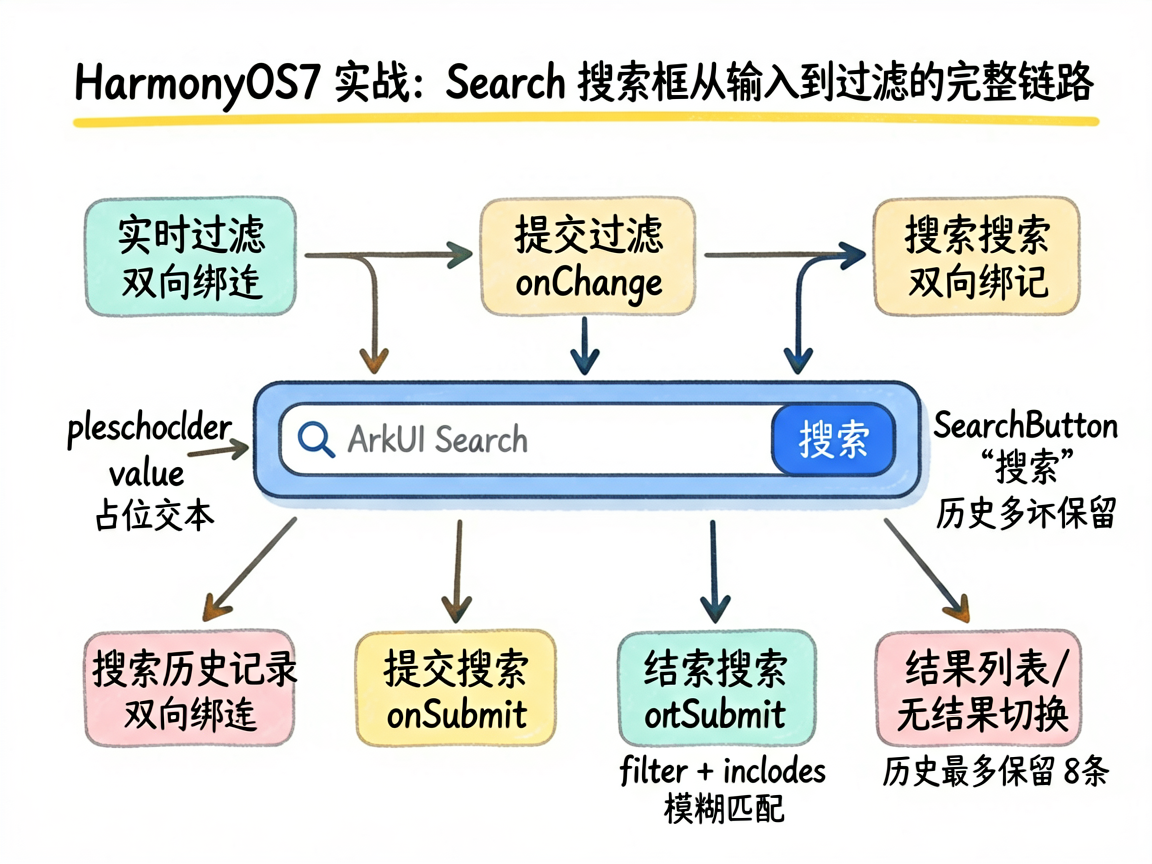
┌──────────────────────┐
│ Search 搜索框         │
├──────────────────────┤
│ 搜索结果 / 搜索历史   │  ← 根据是否有结果切换
├──────────────────────┤
│ 结果列表项            │
│ ...                  │
└──────────────────────┘
- 输入时实时过滤(
onChange) - 提交时保存搜索历史(
onSubmit)
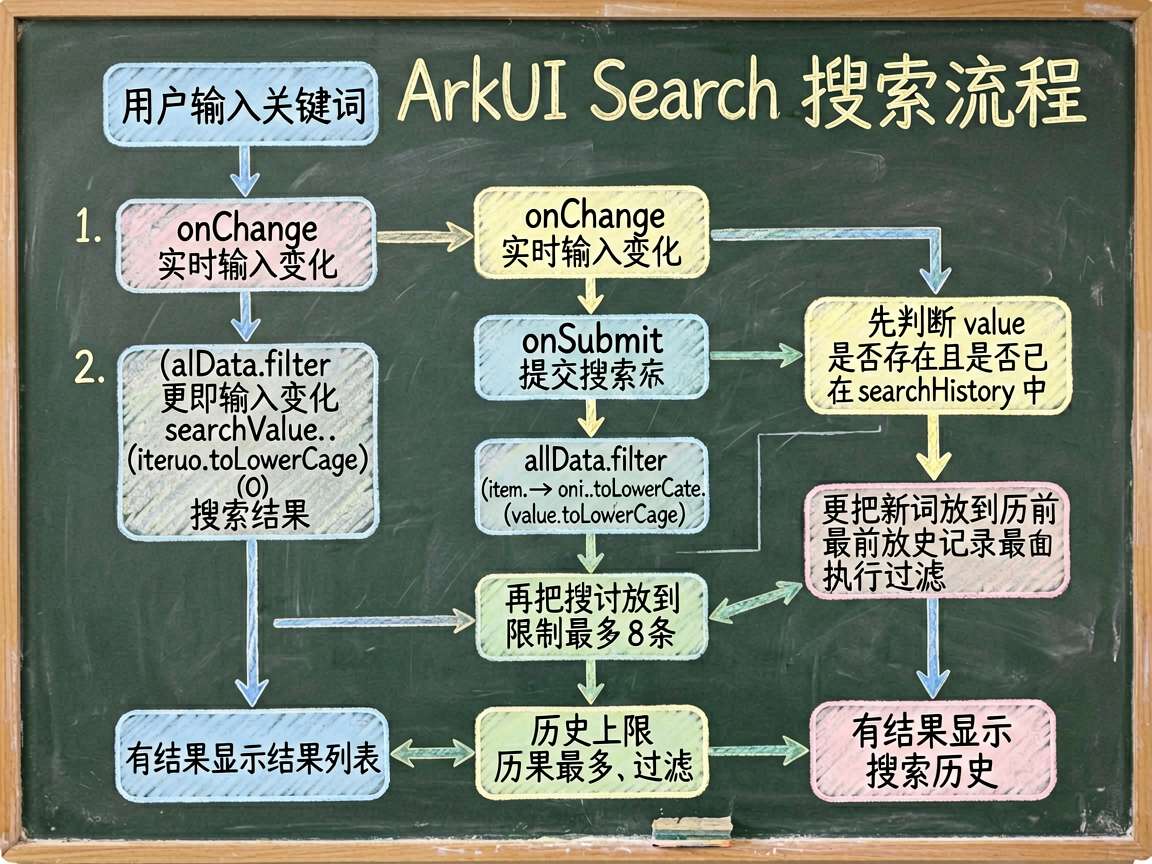
- 无结果时展示历史记录
- 点击历史记录快速填充
编码实现
Search 组件配置
Search({
  placeholder: '搜索 ArkUI 相关知识...',
  value: this.searchValue
})
  .searchButton('搜索')
  .width('100%')
  .onSubmit((value: string) => {
    // 提交搜索:添加到历史记录,执行过滤
  })
  .onChange((value: string) => {
    // 输入变化:实时过滤结果
  })
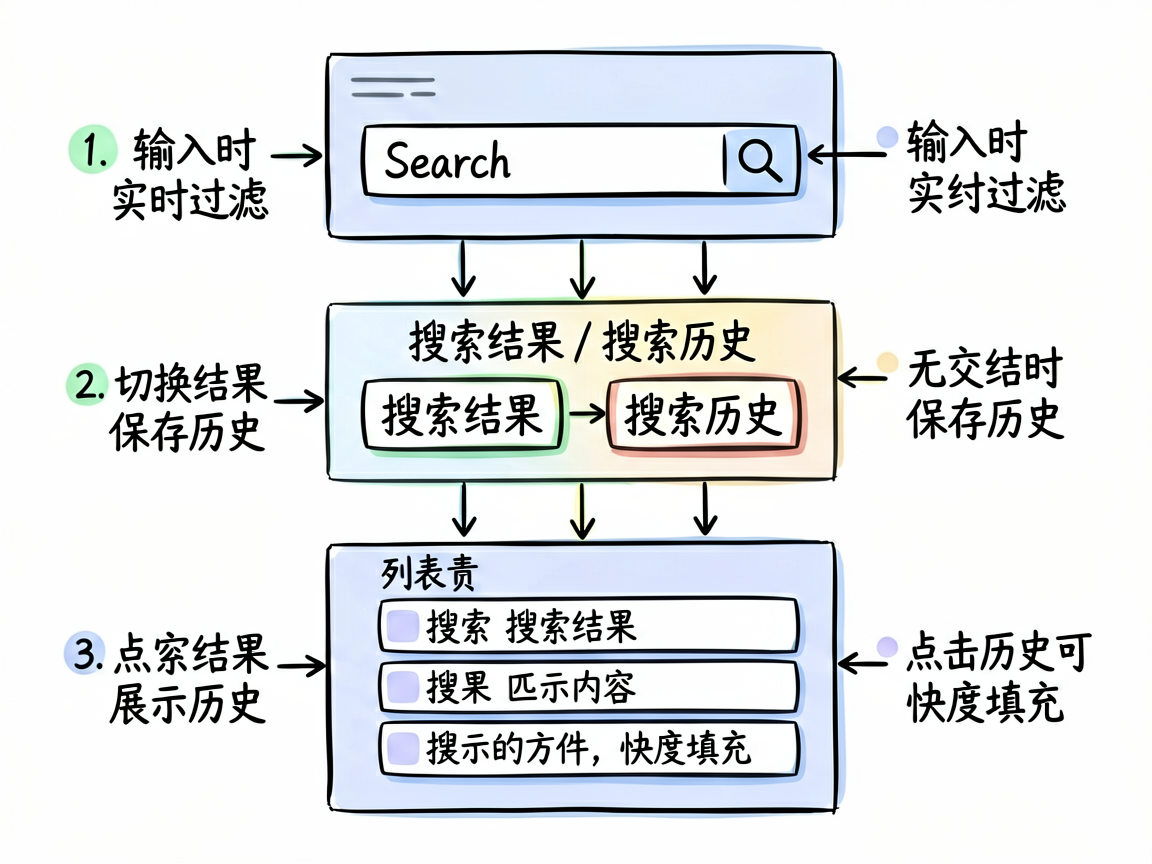
placeholder:搜索框的占位文本value:当前输入值(绑定@State)searchButton('搜索'):搜索按钮的文字onSubmit:点击搜索按钮或回车时触发onChange:每次输入变化时触发
实时过滤逻辑
.onChange((value: string) => {
  this.searchValue = value
  if (value) {
    this.searchResults = this.allData.filter(item =>
      item.toLowerCase().includes(value.toLowerCase())
    )
  } else {
    this.searchResults = []
  }
})
filter + includes 实现了最基础的模糊匹配。转小写后比较,不区分大小写。
搜索历史记录
.onSubmit((value: string) => {
  if (value && !this.searchHistory.includes(value)) {
    this.searchHistory = [value].concat(this.searchHistory).slice(0, 8)
  }
  this.searchResults = this.allData.filter(item =>
    item.toLowerCase().includes(value.toLowerCase())
  )
})
新的搜索词放在历史记录的最前面,最多保留 8 条。如果已经存在就不重复添加。
完整页面代码
@Entry
@Component
struct SearchFilterPage {
  @State searchValue: string = ''
  @State searchResults: string[] = []
  @State searchHistory: string[] = ['ArkUI', '状态管理', '动画', '鸿蒙开发']
  private allData: string[] = [
    'ArkUI 声明式开发', 'ArkTS 语言基础', '状态管理装饰器',
    '动画系统概述', '组件化开发', '鸿蒙应用架构',
    'UIAbility 生命周期', '资源管理', '多媒体处理',
    '数据持久化', '网络请求', '分布式能力'
  ]

  build() {
    Column() {
      Scroll() {
        Column() {
          Text('Search 搜索框')
            .fontSize(18).fontWeight(FontWeight.Bold).margin({ bottom: 8 })

          Column() {
            Search({
              placeholder: '搜索 ArkUI 相关知识...',
              value: this.searchValue
            })
              .searchButton('搜索')
              .width('100%')
              .onSubmit((value: string) => {
                if (value && !this.searchHistory.includes(value)) {
                  this.searchHistory = [value]
                    .concat(this.searchHistory).slice(0, 8)
                }
                this.searchResults = this.allData.filter(item =>
                  item.toLowerCase().includes(value.toLowerCase())
                )
              })
              .onChange((value: string) => {
                this.searchValue = value
                if (value) {
                  this.searchResults = this.allData.filter(item =>
                    item.toLowerCase().includes(value.toLowerCase())
                  )
                } else {
                  this.searchResults = []
                }
              })
          }
          .width('100%')

          if (this.searchResults.length > 0) {
            Column() {
              Text('搜索结果')
                .fontSize(13).fontWeight(FontWeight.Medium)
                .margin({ top: 12, bottom: 8 })
              ForEach(this.searchResults, (item: string) => {
                Row() {
                  Text('\u{1F50D}').fontSize(14)
                  Text(item).fontSize(14).margin({ left: 8 })
                }
                .width('100%').padding(10).backgroundColor('#F8F9FA')
                .borderRadius(8).margin({ bottom: 4 })
              })
            }.width('100%')
          } else {
            Column() {
              Text('搜索历史')
                .fontSize(13).fontWeight(FontWeight.Medium)
                .margin({ top: 12, bottom: 8 })
              ForEach(this.searchHistory, (item: string) => {
                Row() {
                  Text('\u{1F550}').fontSize(12)
                  Text(item).fontSize(13).margin({ left: 8 }).layoutWeight(1)
                }
                .width('100%').padding(8).margin({ bottom: 4 })
                .onClick(() => {
                  this.searchValue = item
                  this.searchResults = this.allData.filter(d =>
                    d.toLowerCase().includes(item.toLowerCase())
                  )
                })
              })
              Button('清除历史').width('100%').margin({ top: 8 })
                .onClick(() => { this.searchHistory = [] })
            }.width('100%')
          }
        }
        .width('100%').backgroundColor('#FFFFFF').borderRadius(12).padding(16)
      }
      .layoutWeight(1)
    }
    .width('100%').height('100%').backgroundColor('#F5F6FA').padding(16)
  }
}
踩坑总结
坑1:onChange 和 onSubmit 的职责划分
onChange 做实时过滤,onSubmit 做历史记录保存。别在 onChange 里保存历史,否则用户每输入一个字符都会存一条记录。
坑2:空输入的处理
输入框清空时要同时清空搜索结果,否则页面会留着上次的结果。代码里用 if (value) 做了判断。
坑3:历史记录的点击回填
点击历史记录项时,需要同时更新 searchValue(搜索框文本)和 searchResults(搜索结果)。只更新一个的话,界面状态会不一致。
优化建议
- 搜索防抖:输入频繁时,
onChange每次都触发过滤。数据量大时加个防抖(debounce)减少过滤次数 - 高亮匹配词:搜索结果中高亮显示匹配的关键词,提升用户体验
- 搜索建议:在用户输入时展示下拉建议列表,点击直接填充
- 拼音搜索:加入拼音匹配,用户输入 “zhuangtai” 也能搜到 “状态管理”
写在最后
Search 组件把搜索框的交互标准化了——输入、提交、按钮一体化。配合 onChange 实时过滤和搜索历史管理,能快速搭建出完整的搜索功能。在实际项目中,搜索往往是用户体验的关键环节,值得花时间打磨。

讨论HarmonyOS开发技术,专注于API与组件、DevEco Studio、测试、元服务和应用上架分发等。
更多推荐

 2
2 0
0- 0


 已为社区贡献100条内容

所有评论(0)