餐厅排队叫号系统源码基于HarmonyOS API 24深度解析排队列表区域使用垂直 Scroll 包裹 24 个 bigNumberCard,通过 layoutWeight(1) 占据剩余空间
一、项目背景与业务意义
1.1 行业痛点与数字化转型的必然趋势
在当今餐饮行业中,高峰期排队叫号一直是困扰餐厅经营者和消费者的核心痛点之一。传统的人工叫号方式存在诸多问题:服务员手工书写号码牌容易出错,顾客在嘈杂环境中听不到叫号导致过号频发,排队数据无法沉淀为经营分析资产,门店管理者难以实时掌握客流动态。这些问题在节假日、周末午餐高峰期尤为突出,直接影响顾客满意度和翻台效率。
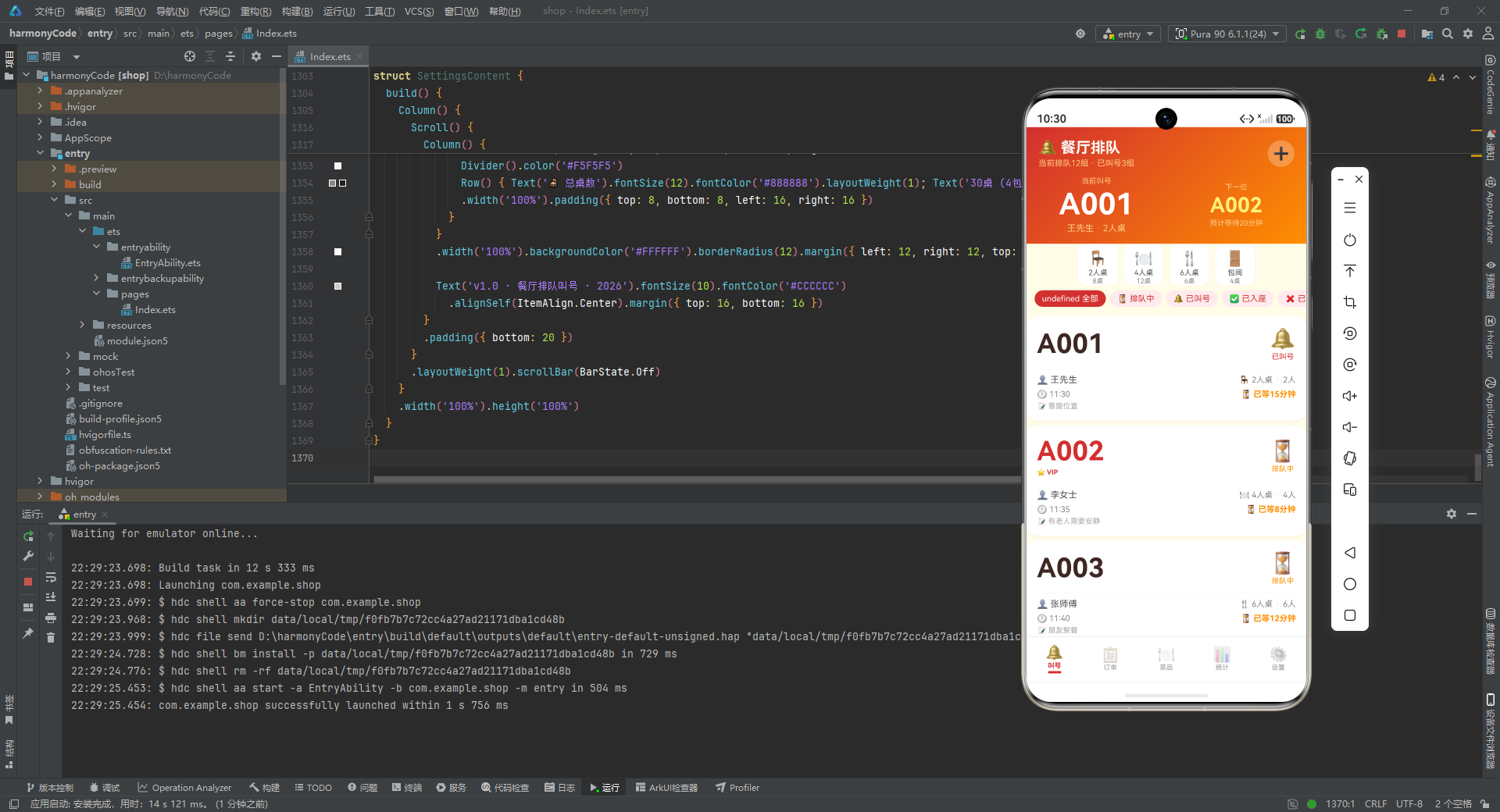
随着移动互联网技术深度渗透餐饮行业,越来越多的餐厅开始引入数字化排队叫号系统。一套优秀的排队管理系统,不仅要解决"叫号"这一个动作,还需要覆盖从取号、等待、叫号、入座到订单管理的完整业务闭环,同时为经营者提供客流分析、营收统计、热销菜品追踪等数据化决策支持。本文解析的这套源码,正是这样一套面向中小型餐饮门店的全功能排队叫号移动端应用,它将排队管理、订单管理、菜品管理、营业统计和门店设置五大核心模块整合在一个统一的应用框架内。
1.2 技术选型与架构理念
本应用基于 HarmonyOS 的 ArkUI 声明式开发范式构建,采用 ArkTS 语言编写。ArkTS 在 TypeScript 基础上扩展了声明式 UI 描述能力,通过 @Component、@State、@Builder、@Observed 等装饰器实现响应式数据绑定和组件化开发。选择这一技术栈的原因在于:它天生支持跨设备运行,从手机到平板到大屏都能自适应;声明式语法让 UI 结构一目了然,降低了复杂界面的维护成本;状态管理机制简洁高效,适合处理排队这种需要频繁刷新的场景。
整个应用采用"单入口 + 多内容区切换"的架构模式。底部导航栏提供五个功能入口,顶部区域通过条件渲染切换不同的业务页面,每个业务页面内部又封装了列表展示、弹窗交互、表单录入等子功能。这种分层设计让代码结构清晰,各模块之间低耦合,便于后续独立迭代和扩展。
1.3 配色策略与视觉设计
在视觉层面,应用采用了一套暖色调的餐饮主题配色方案。主色为餐饮红 #D32F2F,象征着食欲与热情;辅助色为暖橙 #FF8F00,营造温暖活泼的氛围;背景色为米白 #FFFDE7,给用户一种干净舒适的观感;文字主色为深棕 #3E2723,比纯黑更柔和,符合餐饮场景的亲和力定位。所有页面的顶部区域统一使用从红色到橙色的 135 度线性渐变,形成了一致的品牌视觉语言。这种配色策略不仅美观,更重要的是在不同功能页面之间建立了一致的视觉认知,降低了用户的学习成本。
二、接口类型定义:构建类型安全的数据契约
2.1 五大元数据接口
在开始编写业务逻辑之前,源码首先定义了一系列接口类型,用于约束各种元数据的结构。这些接口虽然不直接承载数据,但它们为整个应用提供了类型安全保障。
interface QueueStatusMeta {
  label: string
  color: string
  bg: string
  icon: string
}

interface TableTypeMeta {
  label: string
  icon: string
  capacity: number
  count: number
}

interface MenuCategoryMeta {
  label: string
  icon: string
  color: string
}

interface OrderStatusMeta {
  label: string
  color: string
  bg: string
}

interface DishMeta {
  label: string
  icon: string
  price: number
  sold: number
}
逐行解析:
-
QueueStatusMeta接口定义了排队状态的元数据结构。label是状态的显示文本(如"排队中"),color是该状态对应的文字颜色,bg是背景色,icon是表情符号图标。这种设计将视觉表现与业务状态绑定在一起,避免了在渲染时到处写if-else判断。 -
TableTypeMeta描述桌型信息。label为桌型名称,icon为对应图标,capacity为该桌型的容量人数,count为该桌型的可用数量。通过这个接口,桌位资源被结构化管理。 -
MenuCategoryMeta定义菜品分类。包含分类标签、图标和主题色。每个分类有独立的颜色,这让分类筛选器有了更丰富的视觉区分度。 -
OrderStatusMeta与排队状态元数据类似,定义了订单状态(待上菜、用餐中、已结账、已取消)的标签、文字色和背景色。 -
DishMeta是一个轻量级的菜品摘要结构,主要用于热销排行榜场景,只包含标签、图标、价格和销量四个字段,相比完整的菜品模型更加精简。
这种"元数据接口 + 配置表"的设计模式,使得所有状态相关的视觉表现都可以通过查表获取,极大降低了视图层的条件判断复杂度。
三、数据模型:基于 @Observed 的响应式实体类
3.1 排队记录模型
@Observed
export class QueueEntry {
  id: number = 0
  number: string = ''
  customerName: string = ''
  phone: string = ''
  partySize: number = 0
  tableType: string = ''
  status: string = '排队中'
  waitTime: number = 0
  estimatedTime: number = 0
  createdAt: string = ''
  notes: string = ''
  vip: boolean = false
  calledCount: number = 0
  constructor(id: number, number: string, customerName: string, phone: string,
             partySize: number, tableType: string, status: string,
             waitTime: number, estimatedTime: number, createdAt: string,
             notes: string, vip: boolean, calledCount: number) {
    this.id = id; this.number = number; this.customerName = customerName; this.phone = phone
    this.partySize = partySize; this.tableType = tableType; this.status = status
    this.waitTime = waitTime; this.estimatedTime = estimatedTime; this.createdAt = createdAt
    this.notes = notes; this.vip = vip; this.calledCount = calledCount
  }
}
逐行解析:
-
@Observed装饰器标记该类为可观察对象。当该对象的属性发生变化时,绑定了该对象的 UI 组件会自动刷新。这是 ArkUI 响应式编程的核心机制之一,对于排队系统来说至关重要——排队状态、等待时间等数据会随时间变化,需要实时反映到界面上。 -
类中定义了 13 个字段。
id是唯一标识符;number是显示给顾客的排队号码(如"A001");customerName和phone分别是顾客姓名和脱敏后的手机号;partySize是用餐人数,决定了需要分配什么桌型;tableType记录顾客期望的桌型;status是当前排队状态,默认为"排队中"。 -
waitTime记录已经等待的分钟数,estimatedTime是预计还需等待的时间。这两个字段在卡片展示时非常重要——当等待时间超过 15 分钟时,界面会用红色加粗显示以提醒工作人员关注。 -
createdAt是取号时间字符串;notes存储顾客的特殊需求(如"靠窗"“有老人”"商务宴请"等);vip标记是否为 VIP 客户,VIP 客户的号码会以红色高亮显示;calledCount记录叫号次数,用于判断是否需要重新叫号。 -
构造函数接收全部 13 个参数并赋值给实例属性。这种全参数构造函数虽然写法略显冗长,但保证了对象创建时所有字段都有明确的初始值,避免了空值导致的渲染异常。
3.2 菜品模型
@Observed
export class MenuItem {
  id: number = 0
  name: string = ''
  category: string = ''
  price: number = 0
  originalPrice: number = 0
  description: string = ''
  icon: string = ''
  sold: number = 0
  rating: number = 0
  available: boolean = true
  spicy: number = 0
  isSpecial: boolean = false
  tags: string[] = []
  constructor(id: number, name: string, category: string, price: number,
             originalPrice: number, description: string, icon: string,
             sold: number, rating: number, available: boolean,
             spicy: number, isSpecial: boolean, tags: string[]) {
    this.id = id; this.name = name; this.category = category; this.price = price
    this.originalPrice = originalPrice; this.description = description; this.icon = icon
    this.sold = sold; this.rating = rating; this.available = available
    this.spicy = spicy; this.isSpecial = isSpecial; this.tags = tags
  }
}
逐行解析:
-
菜品模型同样使用
@Observed标记,确保菜品信息变更(如停售、改价)能实时反映到列表和详情中。 -
id和name是基础标识;category标识菜品所属分类,对应前面定义的分类配置;price是当前售价,originalPrice是原价(用于显示划线价,营造优惠感)。 -
description是菜品的描述文案,如"肥而不腻,入口即化";icon使用表情符号作为菜品图标,无需引入图片资源;sold是累计销量,用于排序和展示热度;rating是评分(1-5 分)。 -
available标记菜品是否在售,停售的菜品会在列表中显示"已停售"标签;spicy是辣度等级(0-3),在卡片上会渲染对应数量的辣椒图标;isSpecial标记是否为招牌菜,招牌菜会在名称后显示皇冠图标,卡片背景也会变为暖色调。 -
tags是标签数组,如['招牌', '必点']、['川菜', '辣'],在详情页以标签云形式展示,帮助顾客快速了解菜品特色。
3.3 订单模型
@Observed
export class TodayOrder {
  id: number = 0
  orderNumber: string = ''
  tableNumber: string = ''
  customerName: string = ''
  items: string = ''
  totalAmount: number = 0
  status: string = '待上菜'
  createdAt: string = ''
  guestCount: number = 0
  duration: number = 0
  paymentMethod: string = '微信支付'
  constructor(id: number, orderNumber: string, tableNumber: string, customerName: string,
             items: string, totalAmount: number, status: string, createdAt: string,
             guestCount: number, duration: number, paymentMethod: string) {
    this.id = id; this.orderNumber = orderNumber; this.tableNumber = tableNumber
    this.customerName = customerName; this.items = items; this.totalAmount = totalAmount
    this.status = status; this.createdAt = createdAt; this.guestCount = guestCount
    this.duration = duration; this.paymentMethod = paymentMethod
  }
}
逐行解析:
-
orderNumber是格式化的订单编号(如"ORD20260806001"),包含日期信息便于追溯;tableNumber是桌号(如"A05""B02"“V01”),其中 V 开头通常表示包间。 -
items是菜品明细的拼接字符串(如"红烧肉+酸菜鱼+蛋炒饭+番茄蛋汤"),这里用字符串简化了实际开发中的菜品列表结构,便于快速展示。 -
totalAmount是订单总金额;status默认为"待上菜",订单创建后会经历"待上菜→用餐中→已结账"的生命周期,也可能变为"已取消"。 -
createdAt是下单时间;guestCount是用餐人数;duration是用餐时长(分钟),在详情页展示为"用餐时长: XX分钟";paymentMethod记录支付方式(微信支付、支付宝、美团、现金),为后续的支付方式分析提供数据基础。
四、静态配置:将业务规则与视觉表现集中管理
4.1 排队状态配置表
const QUEUE_STATUS_CONFIG: Record<string, QueueStatusMeta> = {
  '排队中': { label: '排队中', color: '#FF8F00', bg: '#FFF8E1', icon: '⏳' },
  '已叫号': { label: '已叫号', color: '#D32F2F', bg: '#FFEBEE', icon: '🔔' },
  '已入座': { label: '已入座', color: '#43A047', bg: '#E8F5E9', icon: '✅' },
  '已过号': { label: '已过号', color: '#9E9E9E', bg: '#F5F5F5', icon: '❌' },
  '已取消': { label: '已取消', color: '#EF5350', bg: '#FFEBEE', icon: '🚫' }
}
逐行解析:
-
这是一个以状态中文名为键、以元数据对象为值的 Record 映射表。定义了五种排队状态,每种状态都绑定了特定的颜色和图标。
-
"排队中"用橙色(
#FF8F00)配合沙漏图标,表示正在等待;"已叫号"用餐饮红(#D32F2F)配合铃铛图标,强调需要立即响应;"已入座"用绿色(#43A047)配合对勾图标,表示成功完成。 -
"已过号"用灰色(
#9E9E9E)配合叉号图标,表示顾客未及时响应;"已取消"用浅红(#EF5350)配合禁止图标,明确表示终止。这种颜色语义在全应用中保持一致:红橙表示需关注/进行中,绿表示完成,灰表示过期/终止。
4.2 桌型与分类配置
const TABLE_TYPE_CONFIG: Record<string, TableTypeMeta> = {
  '2人桌': { label: '2人桌', icon: '🪑', capacity: 2, count: 8 },
  '4人桌': { label: '4人桌', icon: '🍽️', capacity: 4, count: 12 },
  '6人桌': { label: '6人桌', icon: '🍴', capacity: 6, count: 6 },
  '包间': { label: '包间', icon: '🚪', capacity: 10, count: 4 }
}

const MENU_CATEGORY_CONFIG: Record<string, MenuCategoryMeta> = {
  '招牌': { label: '招牌菜', icon: '👑', color: '#D32F2F' },
  '热菜': { label: '热菜', icon: '🍳', color: '#FF8F00' },
  '凉菜': { label: '凉菜', icon: '🥗', color: '#43A047' },
  '汤品': { label: '汤品', icon: '🍲', color: '#7E57C2' },
  '主食': { label: '主食', icon: '🍚', color: '#5D4037' },
  '饮品': { label: '饮品', icon: '🥤', color: '#26A69A' },
  '甜点': { label: '甜点', icon: '🍰', color: '#EC407A' }
}
逐行解析:
-
桌型配置定义了四种桌型,每种桌型都有对应的容量和数量。2 人桌有 8 张,4 人桌有 12 张(数量最多,符合大众餐饮需求),6 人桌有 6 张,包间有 4 个(容量 10 人,适合大型聚会)。这些数据在排队页面的横滑桌型状态区域展示。
-
菜品分类配置定义了七个分类,每个分类有独立的主题色。招牌菜用红色突出,热菜用橙色,凉菜用绿色(清新感),汤品用紫色,主食用棕色,饮品用青色,甜品用粉色。这种"一分类一色"的设计让分类筛选器视觉上更加丰富。
4.3 订单状态与筛选数组
const ORDER_STATUS_CONFIG: Record<string, OrderStatusMeta> = {
  '待上菜': { label: '待上菜', color: '#FF8F00', bg: '#FFF8E1' },
  '用餐中': { label: '用餐中', color: '#43A047', bg: '#E8F5E9' },
  '已结账': { label: '已结账', color: '#9E9E9E', bg: '#F5F5F5' },
  '已取消': { label: '已取消', color: '#EF5350', bg: '#FFEBEE' }
}

const TABLE_TYPES: string[] = ['2人桌', '4人桌', '6人桌', '包间']
const STATUS_FILTERS: string[] = ['全部', '排队中', '已叫号', '已入座', '已过号']
const MENU_CATEGORIES: string[] = ['招牌', '热菜', '凉菜', '汤品', '主食', '饮品', '甜点']
逐行解析:
-
订单状态配置定义了四种状态,与排队状态配置的结构相似但独立维护,因为订单状态和排队状态的语义不同。
-
三个字符串数组分别用于驱动 ForEach 渲染:
TABLE_TYPES用于桌型选择器和横滑列表,STATUS_FILTERS用于排队页的状态筛选标签,MENU_CATEGORIES用于菜品页的分类筛选标签。将这些枚举值提取为常量数组,便于统一管理和扩展。
五、模拟数据:构建贴近真实的业务场景
5.1 时段客流数据
const HOURLY_TRAFFIC: number[] = [0, 0, 0, 0, 0, 0, 0, 5, 12, 28, 45, 52, 38, 22, 15, 18, 35, 62, 78, 85, 68, 42, 20, 8]
const HOUR_LABELS: string[] = ['0', '1', '2', '3', '4', '5', '6', '7', '8', '9', '10', '11', '12', '13', '14', '15', '16', '17', '18', '19', '20', '21', '22', '23']
const MAX_HOURLY: number = 85
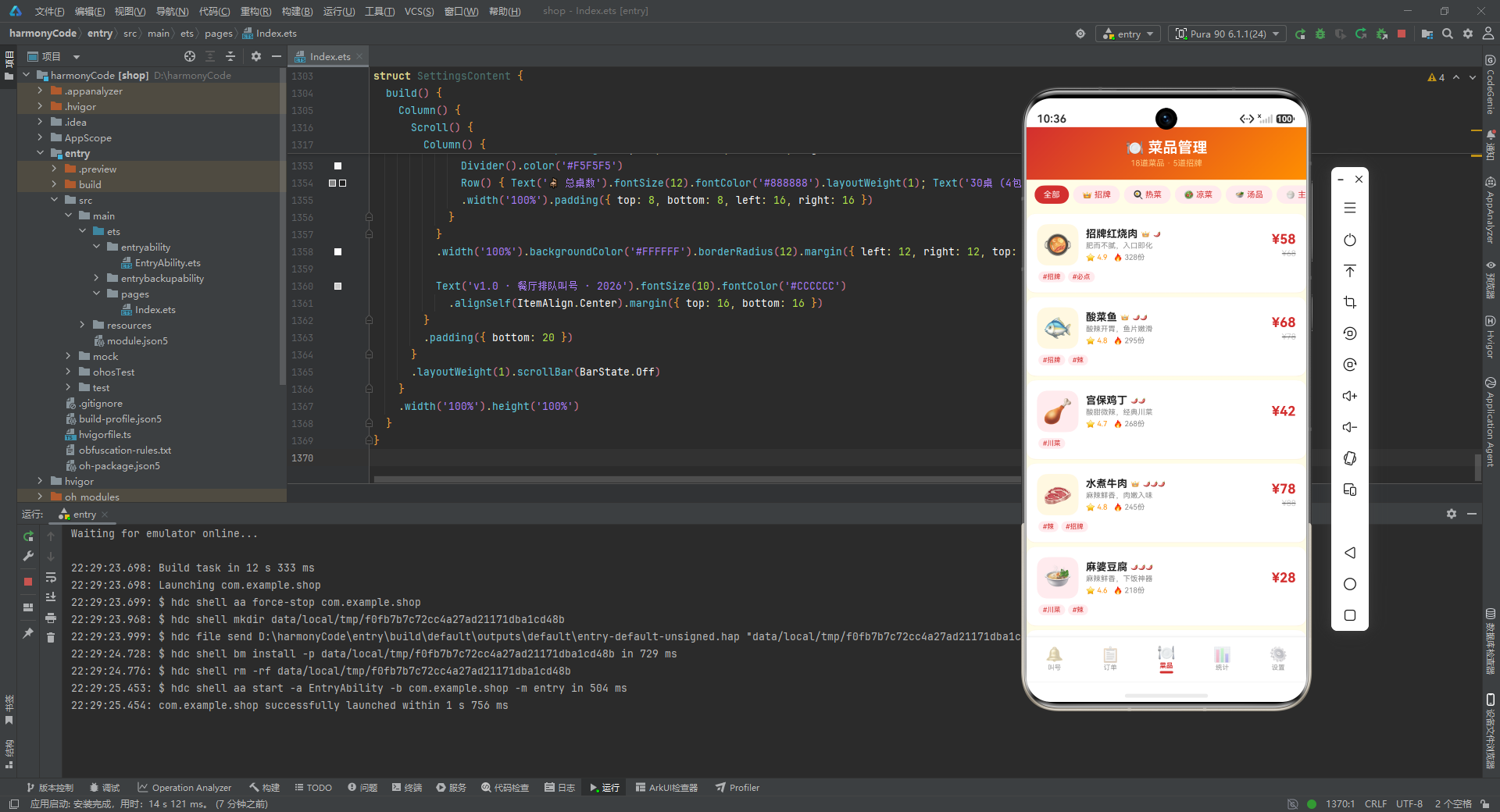
逐行解析:
-
HOURLY_TRAFFIC是一个 24 元素数组,索引 0-23 对应一天 24 个小时的客流量。凌晨 0-6 点客流为 0(餐厅不营业),7 点开始有少量早餐客流(5 人),9-10 点早茶客流上升,11-12 点迎来午餐高峰(52 人),下午 14-15 点是午休低谷(15-18 人),17-20 点是晚餐高峰,19 点达到全天峰值 85 人。 -
HOUR_LABELS是小时标签数组,用于柱状图的 X 轴显示。MAX_HOURLY记录最大小时客流量(85),作为柱状图高度的归一化基准值,确保所有柱子高度按比例缩放。
5.2 热销菜品排行
const TOP_DISHES: DishMeta[] = [
  { label: '招牌红烧肉', icon: '🥘', price: 58, sold: 328 },
  { label: '酸菜鱼', icon: '🐟', price: 68, sold: 295 },
  { label: '宫保鸡丁', icon: '🍗', price: 42, sold: 268 },
  { label: '水煮牛肉', icon: '🥩', price: 78, sold: 245 },
  { label: '麻婆豆腐', icon: '🍲', price: 28, sold: 218 },
  { label: '糖醋排骨', icon: '🍖', price: 52, sold: 196 },
  { label: '干锅花菜', icon: '🥦', price: 32, sold: 172 },
  { label: '蛋炒饭', icon: '🍚', price: 18, sold: 165 }
]
const MAX_DISH_SOLD: number = 328
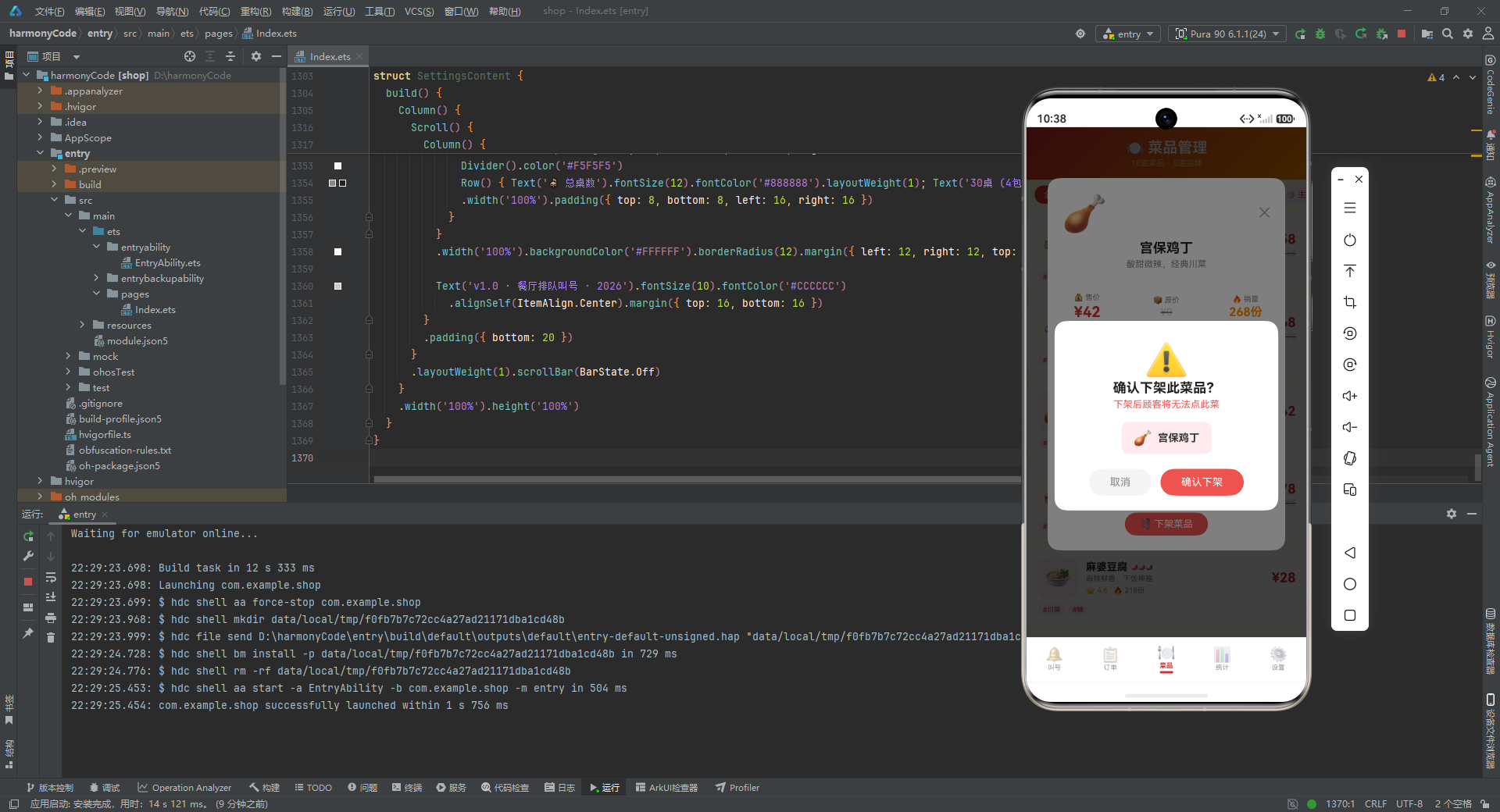
逐行解析:
-
TOP_DISHES数组包含 8 道热销菜品,按销量降序排列。第一名"招牌红烧肉"售出 328 份,价格 58 元;销量最高的菜品价格并非最贵,说明性价比是热销的重要因素。 -
MAX_DISH_SOLD取第一名销量 328,作为排行榜进度条的归一化基准。每道菜的进度条宽度按该菜销量 / 328 * 100%计算,形成直观的销量对比条形图。
5.3 排队、菜品与订单的模拟数据
排队数据包含 24 条记录,覆盖了各种状态组合:有排队中的、已叫号的、已入座的、已过号的、已取消的,还有 VIP 客户和普通客户的区分。每条记录都包含真实的顾客姓名(脱敏)、手机号(脱敏)、用餐人数、桌型、状态、等待时间、取号时间和备注信息。备注信息非常丰富,包括"靠窗位置"“有老人需要安静”“朋友聚餐”“商务宴请”“带小孩”“生日聚餐”"同事聚餐"等真实场景需求。
菜品数据包含 18 道菜,分布在七个分类中,涵盖了招牌菜、热菜、凉菜、汤品、主食、饮品、甜点。每道菜都有完整的描述、评分、辣度、销量和标签信息。订单数据包含 16 条今日订单,覆盖了待上菜、用餐中、已结账、已取消四种状态,支付方式包括微信支付、支付宝、美团和现金。
六、统计函数:为数据展示提供统一接口
function getWaitingCount(): number { return 12 }
function getCalledCount(): number { return 3 }
function getSeatedCount(): number { return 3 }
function getSkippedCount(): number { return 1 }
function getTotalQueueToday(): number { return 24 }
function getTodayRevenue(): number { return 2486 }
function getTodayOrderCount(): number { return 16 }
function getAvgWaitTime(): number { return 12 }
function getTableOccupancy(): number { return 85 }
function getHourlyTraffic(idx: number): number { return HOURLY_TRAFFIC[idx] }
function getMaxHourly(): number { return MAX_HOURLY }
function getDishSold(idx: number): number { return TOP_DISHES[idx].sold }
function getMaxDishSold(): number { return MAX_DISH_SOLD }
function getTopDishName(idx: number): string { return TOP_DISHES[idx].label }
function getTopDishIcon(idx: number): string { return TOP_DISHES[idx].icon }
function getTopDishPrice(idx: number): number { return TOP_DISHES[idx].price }
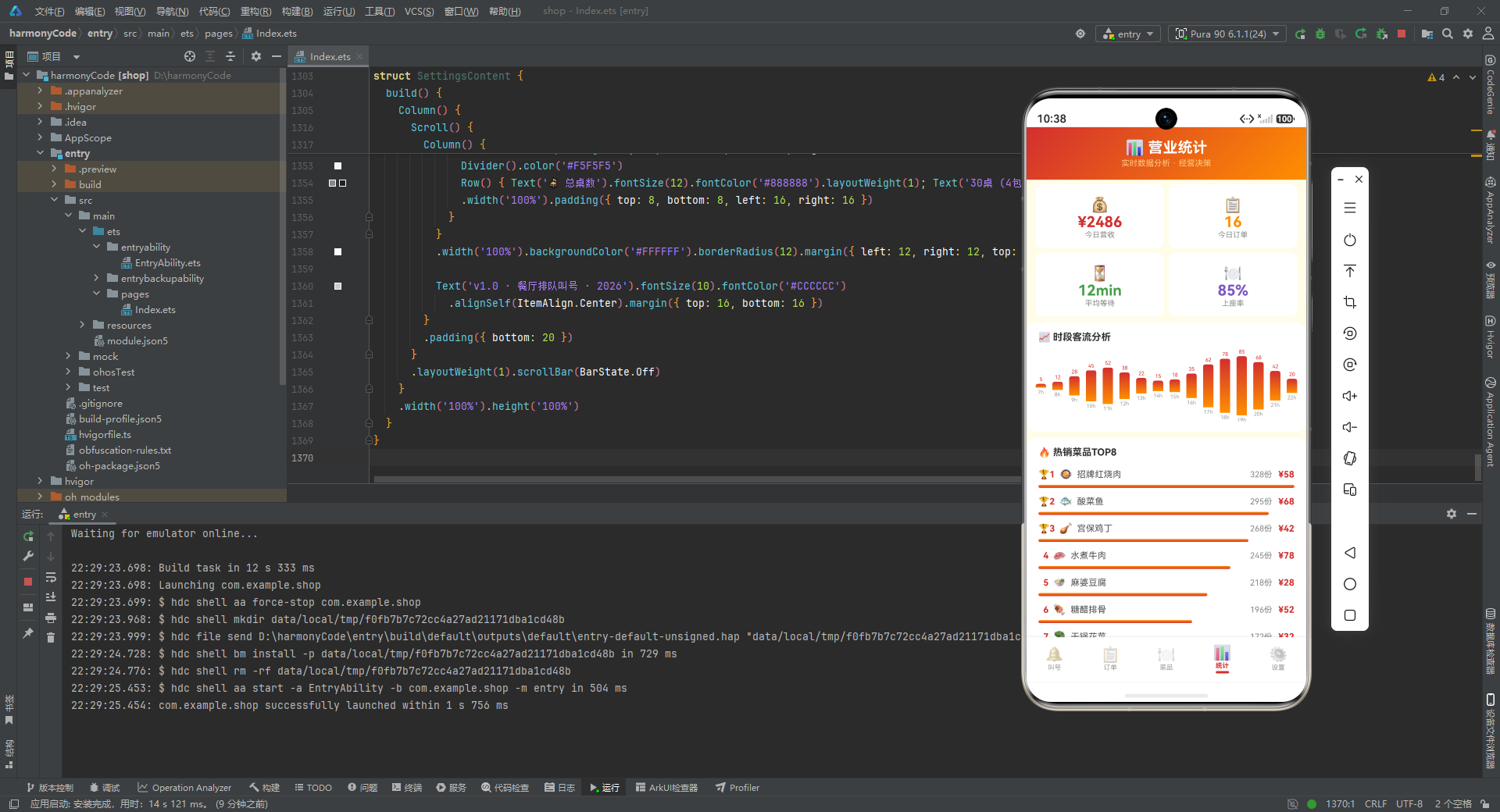
逐行解析:
-
前 9 个函数返回各项业务指标的固定值:等待中 12 组、已叫号 3 组、已入座 3 组、已过号 1 组、今日总排队 24 组、今日营收 2486 元、今日订单 16 单、平均等待 12 分钟、上座率 85%。在实际项目中,这些函数会替换为从后端 API 获取数据的异步调用。
-
后 6 个函数是索引访问器,通过索引从
HOURLY_TRAFFIC和TOP_DISHES数组中获取数据。将数据访问封装为函数的好处是:视图层不需要直接依赖底层数据结构,未来数据来源从静态数组变为动态 API 时,只需修改这些函数的内部实现即可。
七、入口页面与底部导航框架
7.1 Tab 枚举定义
enum RestaurantTab {
  QUEUE = 0,
  ORDERS = 1,
  MENU = 2,
  STATS = 3,
  SETTINGS = 4
}
逐行解析:
- 定义了一个枚举类型
RestaurantTab,包含五个成员,分别对应叫号、订单、菜品、统计、设置五个功能页面。使用枚举而非魔法数字(如 0、1、2)的好处是代码可读性更强,activeTab === RestaurantTab.QUEUE比activeTab === 0更容易理解。
7.2 入口组件结构
@Entry
@Component
struct RestaurantQueueApp {
  @State activeTab: RestaurantTab = RestaurantTab.QUEUE

  @Builder contentArea() {
    Column() {
      if (this.activeTab === RestaurantTab.QUEUE) {
        QueueListContent()
      } else if (this.activeTab === RestaurantTab.ORDERS) {
        OrderListContent()
      } else if (this.activeTab === RestaurantTab.MENU) {
        MenuManageContent()
      } else if (this.activeTab === RestaurantTab.STATS) {
        StatsContent()
      } else {
        SettingsContent()
      }
    }
    .layoutWeight(1)
  }
逐行解析:
-
@Entry装饰器标记该组件为应用入口页面,HarmonyOS 应用启动时会渲染该组件。@Component声明这是一个自定义组件。 -
@State activeTab是组件级状态变量,初始值为RestaurantTab.QUEUE,即应用启动后默认展示排队叫号页面。当activeTab变化时,contentArea会重新渲染对应的内容组件。 -
@Builder contentArea()定义了一个构建器函数,通过if-else条件渲染不同的内容组件。layoutWeight(1)让内容区域占据剩余空间,为底部导航栏留出位置。这种条件渲染的方式简洁直观,适合 Tab 数量较少的场景。
7.3 底部导航项构建器
@Builder bottomTabItem(icon: string, label: string, tab: RestaurantTab) {
  Column() {
    Text(icon).fontSize(20).opacity(this.activeTab === tab ? 1.0 : 0.45)
    Text(label).fontSize(9)
      .fontColor(this.activeTab === tab ? '#D32F2F' : '#999999')
      .fontWeight(this.activeTab === tab ? FontWeight.Bold : FontWeight.Normal)
      .margin({ top: 1 })
    if (this.activeTab === tab) {
      Column().width(18).height(3)
        .backgroundColor('#D32F2F').borderRadius(2).margin({ top: 2 })
    }
  }
  .layoutWeight(1)
  .alignItems(HorizontalAlign.Center)
  .padding({ top: 5, bottom: 5 })
  .onClick(() => { this.activeTab = tab })
}
逐行解析:
-
这是一个可复用的导航项构建器,接收图标、标签和对应的 Tab 枚举三个参数。通过参数化设计,五个导航项共用同一个构建器,避免了重复代码。
-
图标
Text(icon)的透明度根据是否为当前激活 Tab 动态调整:激活时完全不透明(1.0),非激活时半透明(0.45),形成视觉对比。 -
标签文字的颜色在激活时为餐饮红(
#D32F2F),非激活时为灰色(#999999);字重在激活时加粗。这两个属性的三元运算保证了选中状态与未选中状态的清晰区分。 -
当该 Tab 被激活时,在标签下方渲染一个 18x3 的红色圆角小条作为选中指示器,这是现代移动端 Tab 设计的常见模式。
-
onClick回调将activeTab设置为当前点击的 Tab,触发状态更新和界面刷新。
7.4 主构建函数
build() {
  Column() {
    this.contentArea()
    Row() {
      this.bottomTabItem('🔔', '叫号', RestaurantTab.QUEUE)
      this.bottomTabItem('📋', '订单', RestaurantTab.ORDERS)
      this.bottomTabItem('🍽️', '菜品', RestaurantTab.MENU)
      this.bottomTabItem('📊', '统计', RestaurantTab.STATS)
      this.bottomTabItem('⚙️', '设置', RestaurantTab.SETTINGS)
    }
    .width('100%')
    .backgroundColor('#FFFFFF')
    .padding({ top: 4, bottom: 6 })
    .shadow({ radius: 8, color: '#1A000000', offsetY: -2 })
  }
  .width('100%').height('100%')
  .backgroundColor('#FFFDE7')
}
逐行解析:
-
整体布局是一个垂直 Column,上方是内容区域(
contentArea),下方是水平 Row 排列的五个导航项。 -
底部导航栏设置白色背景,上下各有少量内边距。
shadow属性添加了一个向上的阴影(offsetY: -2),半径 8,颜色为半透明黑色(#1A000000),让导航栏与内容区域产生层次感。 -
最外层 Column 设置宽高 100%,背景色为米白(
#FFFDE7),这是全局的背景色,在所有页面切换时保持一致。
八、排队叫号页:核心业务场景的深度实现
8.1 状态声明与模态遮罩
@Component
struct QueueListContent {
  @State selectedFilter: string = '全部'
  @State showAddModal: boolean = false
  @State showEditModal: boolean = false
  @State showDeleteConfirm: boolean = false
  @State showDetailModal: boolean = false
  @State selectedEntry: QueueEntry | null = null
  @State formName: string = ''
  @State formPhone: string = ''
  @State formPartySize: number = 2
  @State formTableType: string = '2人桌'
  @State formNotes: string = ''

  @Builder modalOverlay(onClose: () => void) {
    Column()
      .width('100%').height('100%')
      .backgroundColor('rgba(0,0,0,0.5)')
      .onClick(onClose)
  }
逐行解析:
-
排队页面声明了 10 个状态变量。
selectedFilter控制列表筛选;四个show*Modal布尔值分别控制新增、编辑、删除确认、详情四个弹窗的显示;selectedEntry存储当前选中的排队记录,类型为QueueEntry | null,初始为 null。 -
formName、formPhone、formPartySize、formTableType、formNotes是新增排队表单的字段,formPartySize默认 2 人,formTableType默认 2 人桌,这些都是最常见的取号场景。 -
modalOverlay是一个可复用的遮罩构建器,接收一个onClose回调函数。遮罩是一个铺满全屏的半透明黑色 Column(rgba(0,0,0,0.5)),点击遮罩区域会触发onClose回调关闭弹窗。这种设计让所有弹窗共享同一套遮罩逻辑,保证了交互一致性。
8.2 取号排队弹窗
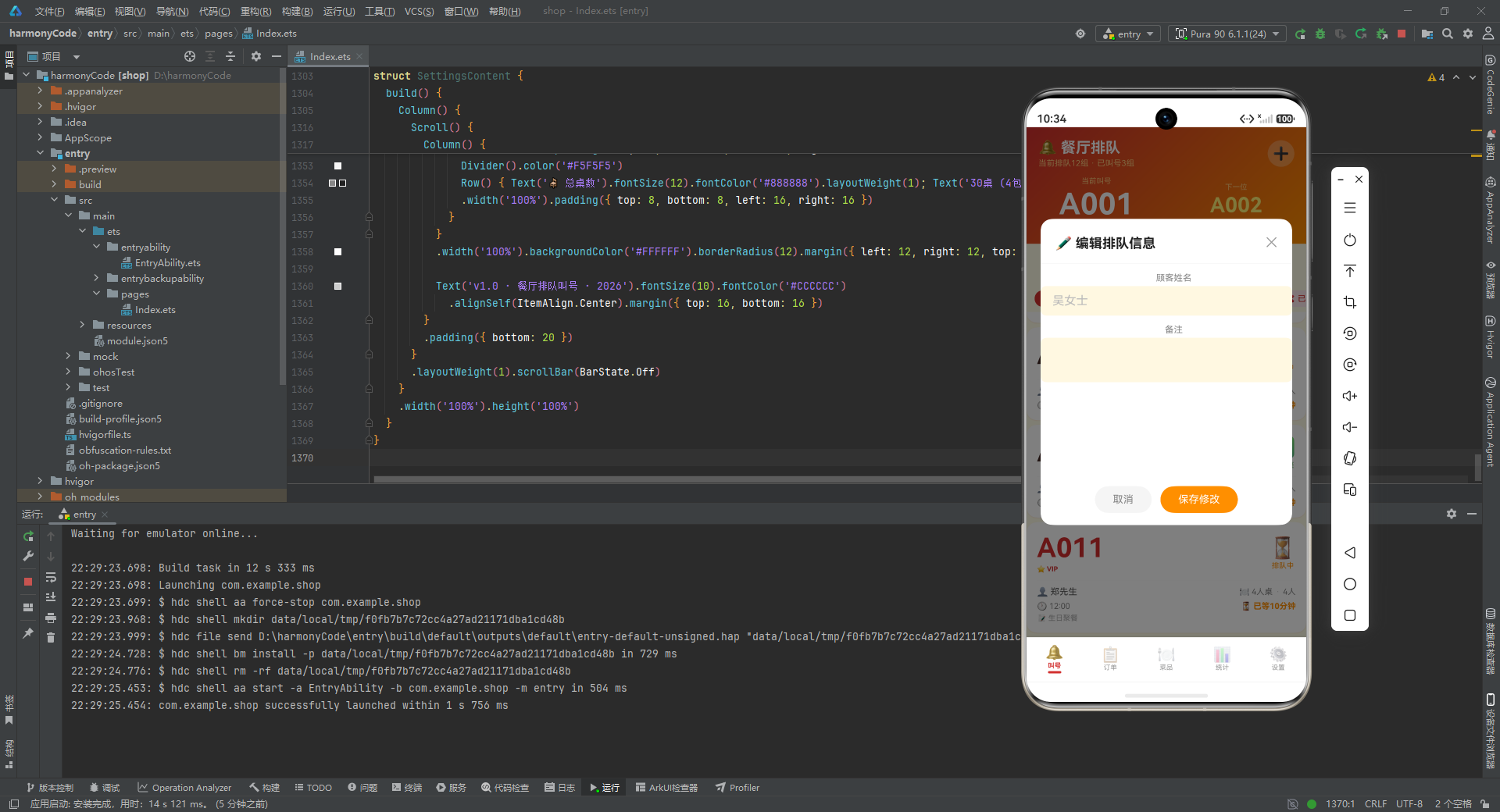
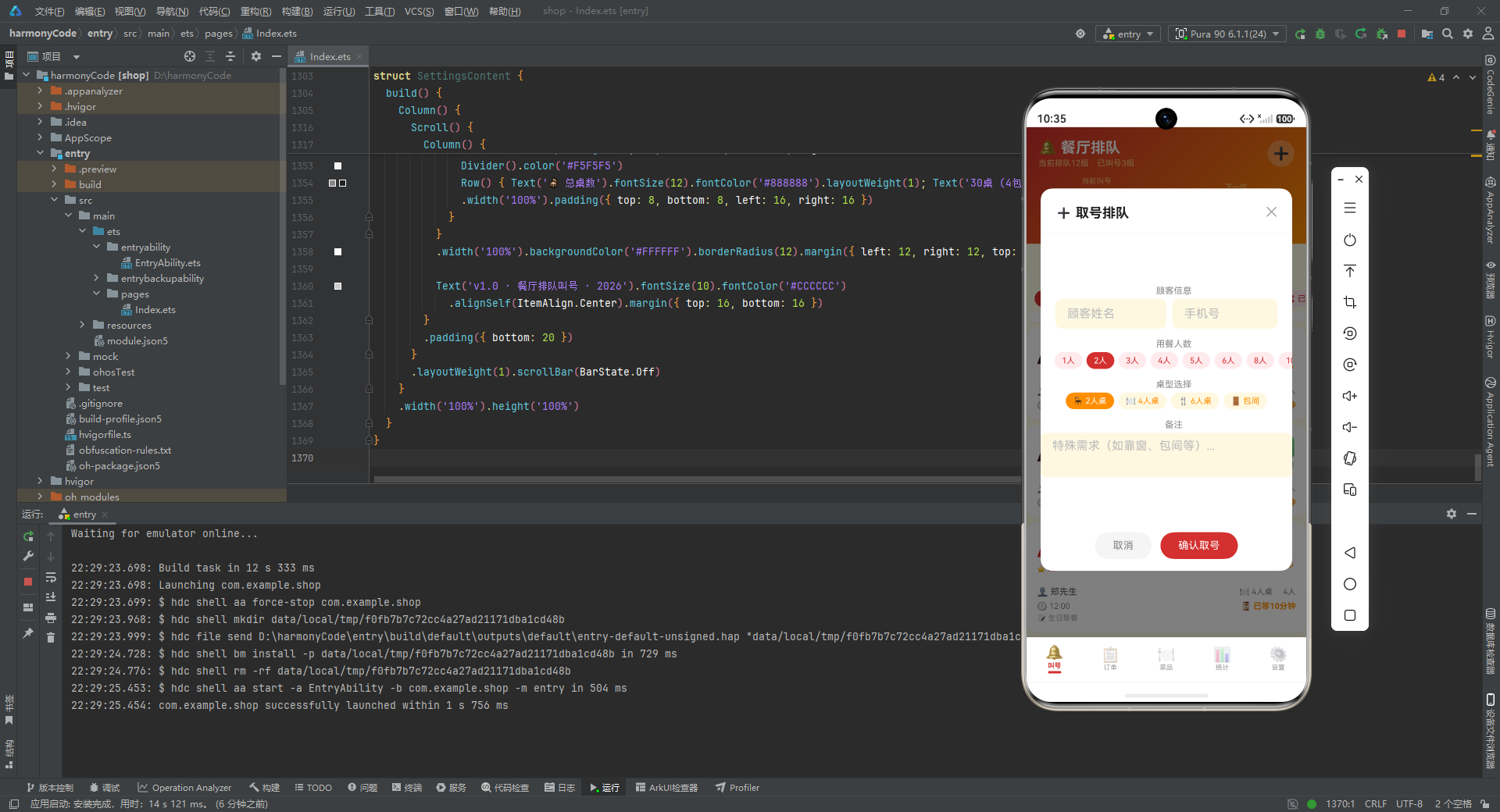
取号弹窗是排队页面最复杂的交互组件之一,它包含顾客信息录入、人数选择、桌型选择、备注填写四个部分。
@Builder addQueueModal() {
  Column() {
    this.modalOverlay(() => { this.showAddModal = false })
    Column() {
      Row() {
        Text('➕ 取号排队').fontSize(18).fontWeight(FontWeight.Bold).fontColor('#212121')
        Row().layoutWeight(1)
        Text('✕').fontSize(18).fontColor('#999999')
          .onClick(() => { this.showAddModal = false })
      }
      .width('100%').padding({ left: 20, right: 20, top: 18, bottom: 12 })
      Divider().color('#F0F0F0')
逐行解析:
-
弹窗最外层是一个 Column,首先渲染遮罩层,然后是弹窗主体。这种"遮罩 + 内容"的堆叠结构通过 Column 的顺序排列实现。
-
弹窗头部是一个 Row,左侧是标题"➕ 取号排队",中间用
Row().layoutWeight(1)占据剩余空间将关闭按钮推到右侧,右侧是"✕"关闭按钮。关闭按钮的onClick将showAddModal设为 false 关闭弹窗。 -
Divider分隔线将头部与表单内容分开,颜色为浅灰(#F0F0F0)。
      Scroll() {
        Column() {
          Text('顾客信息').fontSize(12).fontColor('#888888').margin({ top: 12, left: 20 })
          Row() {
            TextInput({ placeholder: '顾客姓名' })
              .placeholderColor('#BBBBBB').fontSize(14).layoutWeight(1)
              .backgroundColor('#FFF8E1').borderRadius(8)
              .onChange((v: string) => { this.formName = v })
            TextInput({ placeholder: '手机号' })
              .placeholderColor('#BBBBBB').fontSize(14).layoutWeight(1)
              .backgroundColor('#FFF8E1').borderRadius(8).margin({ left: 8 })
              .onChange((v: string) => { this.formPhone = v })
          }
          .margin({ left: 20, right: 20, top: 4 })
逐行解析:
-
表单内容区域使用
Scroll包裹,确保内容超出弹窗高度时可以滚动。内部是一个 Column 垂直排列各个表单字段。 -
"顾客信息"是小标题,字号 12,颜色为灰色。下方是两个并排的
TextInput:顾客姓名和手机号。两个输入框各占一半宽度(layoutWeight(1)),中间用 8 的左间距分隔。 -
输入框背景色为米黄(
#FFF8E1),圆角 8,占位符颜色为浅灰。onChange回调将输入值同步到对应的状态变量。
          Text('用餐人数').fontSize(12).fontColor('#888888').margin({ top: 14, left: 20 })
          Row() {
            ForEach([1, 2, 3, 4, 5, 6, 8, 10], (n: number) => {
              if (this.formPartySize === n) {
                Text(n + '人').fontSize(11).fontColor('#FFFFFF').backgroundColor('#D32F2F')
                  .padding({ left: 10, right: 10, top: 5, bottom: 5 }).borderRadius(12)
                  .margin({ left: 3, right: 3 })
              } else {
                Text(n + '人').fontSize(11).fontColor('#D32F2F').backgroundColor('#FFEBEE')
                  .padding({ left: 10, right: 10, top: 5, bottom: 5 }).borderRadius(12)
                  .margin({ left: 3, right: 3 })
                  .onClick(() => { this.formPartySize = n })
              }
            })
          }
          .margin({ left: 16, right: 16, top: 4 })
逐行解析:
-
用餐人数选择器使用标签按钮组的方式实现。
ForEach遍历[1, 2, 3, 4, 5, 6, 8, 10]这 8 个选项(注意跳过了 7 和 9,因为这两个人数在实际场景中较少见)。 -
选中的选项显示为白字红底(
#D32F2F),未选中的显示为红字浅红底(#FFEBEE)。点击未选中选项时将formPartySize更新为对应数值。这种"胶囊式"选择器比下拉框更直观,适合选项数量有限的场景。
          Text('桌型选择').fontSize(12).fontColor('#888888').margin({ top: 14, left: 20 })
          Row() {
            ForEach(TABLE_TYPES, (t: string) => {
              if (this.formTableType === t) {
                Text(TABLE_TYPE_CONFIG[t]?.icon + ' ' + t)
                  .fontSize(11).fontColor('#FFFFFF').backgroundColor('#FF8F00')
                  .padding({ left: 10, right: 10, top: 5, bottom: 5 }).borderRadius(12)
                  .margin({ left: 3, right: 3 })
              } else {
                Text(TABLE_TYPE_CONFIG[t]?.icon + ' ' + t)
                  .fontSize(11).fontColor('#FF8F00').backgroundColor('#FFF8E1')
                  .padding({ left: 10, right: 10, top: 5, bottom: 5 }).borderRadius(12)
                  .margin({ left: 3, right: 3 })
                  .onClick(() => { this.formTableType = t })
              }
            })
          }
          .margin({ left: 16, right: 16, top: 4 })
逐行解析:
-
桌型选择器遍历
TABLE_TYPES数组,为每种桌型渲染一个胶囊按钮。选中状态的配色为白字橙底(#FF8F00),与人数选择器的红色形成区分。 -
每个按钮的文字由桌型图标和桌型名称拼接而成(如"🪑 2人桌"),从配置表中读取图标,保证了图标与桌型的对应关系。
          Text('备注').fontSize(12).fontColor('#888888').margin({ top: 14, left: 20 })
          TextArea({ placeholder: '特殊需求(如靠窗、包间等)...' })
            .placeholderColor('#BBBBBB').fontSize(12).width('100%').height(60)
            .backgroundColor('#FFF8E1').borderRadius(8)
            .margin({ left: 20, right: 20, top: 4 })
            .onChange((v: string) => { this.formNotes = v })
        }
      }
      .layoutWeight(1)
      Row() {
        Text('取消').fontSize(14).fontColor('#888888')
          .backgroundColor('#F5F5F5').borderRadius(20)
          .padding({ left: 24, right: 24, top: 10, bottom: 10 })
          .onClick(() => { this.showAddModal = false })
        Text('确认取号').fontSize(14).fontColor('#FFFFFF')
          .backgroundColor('#D32F2F').borderRadius(20)
          .padding({ left: 24, right: 24, top: 10, bottom: 10 })
          .margin({ left: 12 })
          .onClick(() => { this.showAddModal = false })
      }
      .width('100%').justifyContent(FlexAlign.Center)
      .padding({ left: 20, right: 20, top: 16, bottom: 16 })
    }
    .width('90%').height('75%').backgroundColor('#FFFFFF').borderRadius(16)
    .alignItems(HorizontalAlign.Center)
    .position({ x: '5%', y: '12%' })
  }
  .width('100%').height('100%').position({ x: 0, y: 0 }).zIndex(999)
}
逐行解析:
-
备注区域使用
TextArea组件,支持多行输入,高度 60,占位符提示"特殊需求(如靠窗、包间等)…"。 -
表单底部是两个按钮:灰色"取消"和红色"确认取号",通过
justifyContent(FlexAlign.Center)居中排列。两个按钮当前都只是关闭弹窗,在实际项目中"确认取号"需要提交表单数据。 -
弹窗主体宽度 90%、高度 75%,白色背景圆角 16,通过
position定位在屏幕中央偏上位置(x: '5%', y: '12%')。zIndex(999)确保弹窗在所有内容之上。
8.3 大号数字卡片:排队列表的核心视觉元素
大号数字卡片是排队页面最具特色的视觉设计,每张卡片以醒目的大号字体展示排队号码。
@Builder bigNumberCard(q: QueueEntry) {
  Column() {
    Row() {
      Column() {
        Text(q.number).fontSize(36).fontWeight(FontWeight.Bold)
          .fontColor(q.vip ? '#D32F2F' : '#3E2723')
        if (q.vip) {
          Text('⭐ VIP').fontSize(9).fontColor('#D32F2F').fontWeight(FontWeight.Bold).margin({ top: 2 })
        }
      }.layoutWeight(1).alignItems(HorizontalAlign.Start)
      Column() {
        Text(QUEUE_STATUS_CONFIG[q.status]?.icon ?? '⏳').fontSize(28)
        Text(QUEUE_STATUS_CONFIG[q.status]?.label ?? '排队中').fontSize(10)
          .fontColor(QUEUE_STATUS_CONFIG[q.status]?.color ?? '#FF8F00').margin({ top: 2 })
      }.alignItems(HorizontalAlign.Center)
    }
    .width('100%')
    Divider().color('#F5F5F5').margin({ top: 10, bottom: 8 })
逐行解析:
-
卡片接收一个
QueueEntry参数。顶部是一个 Row,左右分栏:左侧是大号排队号码,右侧是状态图标。 -
排队号码使用 36 号超大字体加粗显示,视觉冲击力极强。VIP 客户的号码颜色为餐饮红(
#D32F2F),普通客户为深棕(#3E2723)。VIP 客户在号码下方还会显示"⭐ VIP"标签。 -
右侧状态区域从配置表中获取图标和标签。图标 28 号字体,标签 10 号字体并使用配置的状态颜色。
?? '⏳'和?? '排队中'是空值合并运算符,防止配置表中找不到对应状态时出现 undefined。
    Row() {
      Text('👤 ' + q.customerName).fontSize(12).fontColor('#555555')
      Row().layoutWeight(1)
      Text(TABLE_TYPE_CONFIG[q.tableType]?.icon + ' ' + q.tableType).fontSize(11).fontColor('#888888')
      Text('·').fontSize(11).fontColor('#CCCCCC').margin({ left: 4 })
      Text(q.partySize + '人').fontSize(11).fontColor('#888888').margin({ left: 4 })
    }
    .width('100%')
    Row() {
      Text('🕐 ' + q.createdAt).fontSize(11).fontColor('#888888')
      Row().layoutWeight(1)
      Text('⏳ 已等' + q.waitTime + '分钟').fontSize(11)
        .fontColor(q.waitTime > 15 ? '#EF5350' : '#FF8F00')
        .fontWeight(FontWeight.Bold)
    }
    .width('100%').margin({ top: 6 })
    if (q.notes !== '') {
      Text('📝 ' + q.notes).fontSize(10).fontColor('#AAAAAA').maxLines(1)
        .textOverflow({ overflow: TextOverflow.Ellipsis })
        .width('100%').margin({ top: 4 })
    }
  }
  .width('100%').padding(14).backgroundColor('#FFFFFF')
  .borderRadius(14).margin({ left: 12, right: 12, top: 6 })
  .shadow({ radius: 4, color: '#1AD32F2F', offsetY: 2 })
  .onClick(() => { this.selectedEntry = q; this.showDetailModal = true })
}
逐行解析:
-
第一行信息栏:左侧是顾客姓名(带人物图标),右侧是桌型图标和名称,中间用圆点分隔,最后是用餐人数。
Row().layoutWeight(1)作为弹性占位将左右两部分推开。 -
第二行信息栏:左侧是取号时间,右侧是已等待时间。这里有一个重要的动态颜色逻辑:当等待时间超过 15 分钟时,文字变为浅红色(
#EF5350)并加粗,提醒工作人员关注长时间等待的顾客。 -
备注区域仅在有备注时显示(
if (q.notes !== '')),使用 10 号灰色字体,maxLines(1)限制为一行,超出部分用省略号截断(TextOverflow.Ellipsis),保持卡片高度一致。 -
卡片整体白色背景、14 的内边距、14 的圆角,左右各 12 的外边距。阴影颜色为半透明红色(
#1AD32F2F),呼应主题色。点击卡片会设置selectedEntry并打开详情弹窗。
8.4 排队页面整体布局
build() {
  Stack() {
    Column() {
      Column() {
        Row() {
          Column() {
            Text('🔔 餐厅排队').fontSize(20).fontWeight(FontWeight.Bold).fontColor('#FFFFFF')
            Text('当前排队' + getWaitingCount() + '组 · 已叫号' + getCalledCount() + '组')
              .fontSize(11).fontColor('#FFCC80').margin({ top: 3 })
          }.alignItems(HorizontalAlign.Start).layoutWeight(1)
          Text('➕').fontSize(22).fontColor('#FFFFFF')
            .backgroundColor('rgba(255,255,255,0.25)').width(36).height(36).borderRadius(18)
            .textAlign(TextAlign.Center)
            .onClick(() => { this.showAddModal = true })
        }
        .width('100%').padding({ left: 16, right: 16, top: 16, bottom: 12 })
逐行解析:
-
整体布局使用
Stack作为根容器,这样可以叠加弹窗和主内容。内部是一个 Column 垂直排列头部、桌型横滑、状态筛选、排队列表。 -
头部区域是一个 Row:左侧标题"🔔 餐厅排队"和副标题统计信息,右侧是一个 36x36 的圆形"➕"按钮,半透明白色背景。点击按钮打开取号弹窗。副标题使用浅橙色(
#FFCC80)显示实时排队和叫号数量。
        Row() {
          Column() {
            Text('当前叫号').fontSize(10).fontColor('#FFCC80')
            Text('A001').fontSize(40).fontWeight(FontWeight.Bold).fontColor('#FFFFFF').margin({ top: 2 })
            Text('王先生 · 2人桌').fontSize(12).fontColor('#FFCC80').margin({ top: 2 })
          }.layoutWeight(1).alignItems(HorizontalAlign.Center)
          Column() {
            Text('下一位').fontSize(10).fontColor('#FFCC80')
            Text('A002').fontSize(28).fontWeight(FontWeight.Bold).fontColor('#FFF176').margin({ top: 2 })
            Text('预计等待20分钟').fontSize(10).fontColor('#FFCC80').margin({ top: 2 })
          }.layoutWeight(1).alignItems(HorizontalAlign.Center)
        }
        .width('100%').padding({ bottom: 14 })
      }
      .width('100%')
      .linearGradient({ angle: 135, colors: [['#D32F2F', 0], ['#FF8F00', 1]] })
逐行解析:
-
头部下方是一个大号叫号显示区,左右两栏对称布局:左侧"当前叫号"显示 A001(40 号超大字体),右侧"下一位"显示 A002(28 号字体,颜色为亮黄
#FFF176,与当前叫号形成主次区分)。 -
当前叫号下方显示顾客姓名和桌型,下一位下方显示预计等待时间。这一区域让工作人员一眼就能看到当前叫号状态,无需翻看列表。
-
整个头部区域使用 135 度线性渐变背景,从餐饮红(
#D32F2F)过渡到暖橙(#FF8F00),形成醒目的视觉焦点。
      Scroll() {
        Row() {
          ForEach(TABLE_TYPES, (t: string) => {
            Column() {
              Text(TABLE_TYPE_CONFIG[t]?.icon ?? '🪑').fontSize(20)
              Text(TABLE_TYPE_CONFIG[t]?.label ?? '').fontSize(10).fontColor('#555555').margin({ top: 2 })
              Text(TABLE_TYPE_CONFIG[t]?.count + '桌').fontSize(9).fontColor('#888888')
            }
            .backgroundColor('#FFFFFF').borderRadius(10)
            .padding({ left: 14, right: 14, top: 8, bottom: 8 })
            .margin({ left: 4, right: 4 })
            .shadow({ radius: 2, color: '#1A000000', offsetY: 1 })
          })
        }
        .padding({ left: 8, right: 8 })
      }
      .scrollable(ScrollDirection.Horizontal).scrollBar(BarState.Off).height(56)
逐行解析:
-
桌型状态横滑区域使用水平滚动的
Scroll,遍历四种桌型,每种桌型渲染一个小卡片:图标(20 号)、桌型名称(10 号)、可用桌数(9 号)。白色背景圆角 10,带轻微阴影。 -
scrollable(ScrollDirection.Horizontal)设置水平滚动方向,scrollBar(BarState.Off)隐藏滚动条保持界面简洁,高度 56 固定。
      Scroll() {
        Row() {
          ForEach(STATUS_FILTERS, (s: string) => {
            if (this.selectedFilter === s) {
              Text(QUEUE_STATUS_CONFIG[s]?.icon + ' ' + s ?? s).fontSize(11).fontColor('#FFFFFF').backgroundColor('#D32F2F')
                .padding({ left: 10, right: 10, top: 5, bottom: 5 }).borderRadius(14)
                .margin({ left: 3, right: 3 })
            } else {
              Text(QUEUE_STATUS_CONFIG[s]?.icon + ' ' + s ?? s).fontSize(11).fontColor('#D32F2F').backgroundColor('#FFEBEE')
                .padding({ left: 10, right: 10, top: 5, bottom: 5 }).borderRadius(14)
                .margin({ left: 3, right: 3 })
                .onClick(() => { this.selectedFilter = s })
            }
          })
        }
        .padding({ left: 8, right: 8 })
      }
      .scrollable(ScrollDirection.Horizontal).scrollBar(BarState.Off).height(36)
逐行解析:
-
状态筛选横滑区域遍历
STATUS_FILTERS数组(全部、排队中、已叫号、已入座、已过号),每个筛选项渲染为胶囊按钮。选中状态为白字红底,未选中为红字浅红底。注意"全部"状态在配置表中没有对应的图标,会通过空值合并运算符回退为纯文字。 -
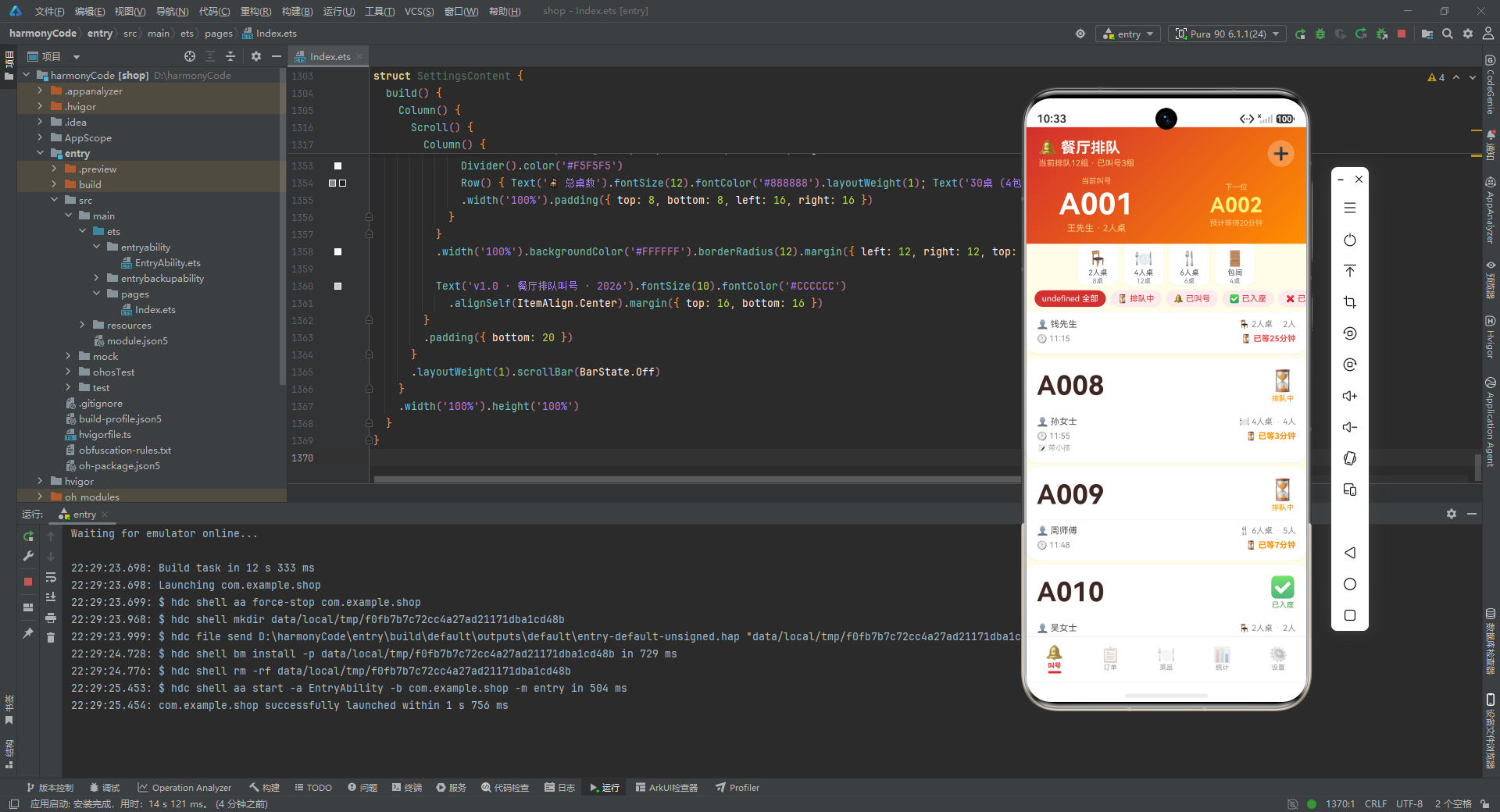
排队列表区域使用垂直
Scroll包裹 24 个bigNumberCard,通过layoutWeight(1)占据剩余空间。 -
最后,
Stack容器底部根据状态变量条件渲染四个弹窗:取号弹窗、编辑弹窗、删除确认弹窗、详情弹窗。这种"主内容 + 条件弹窗"的 Stack 叠加模式是 ArkUI 中实现模态交互的标准做法。
九、今日订单页:订单全生命周期管理
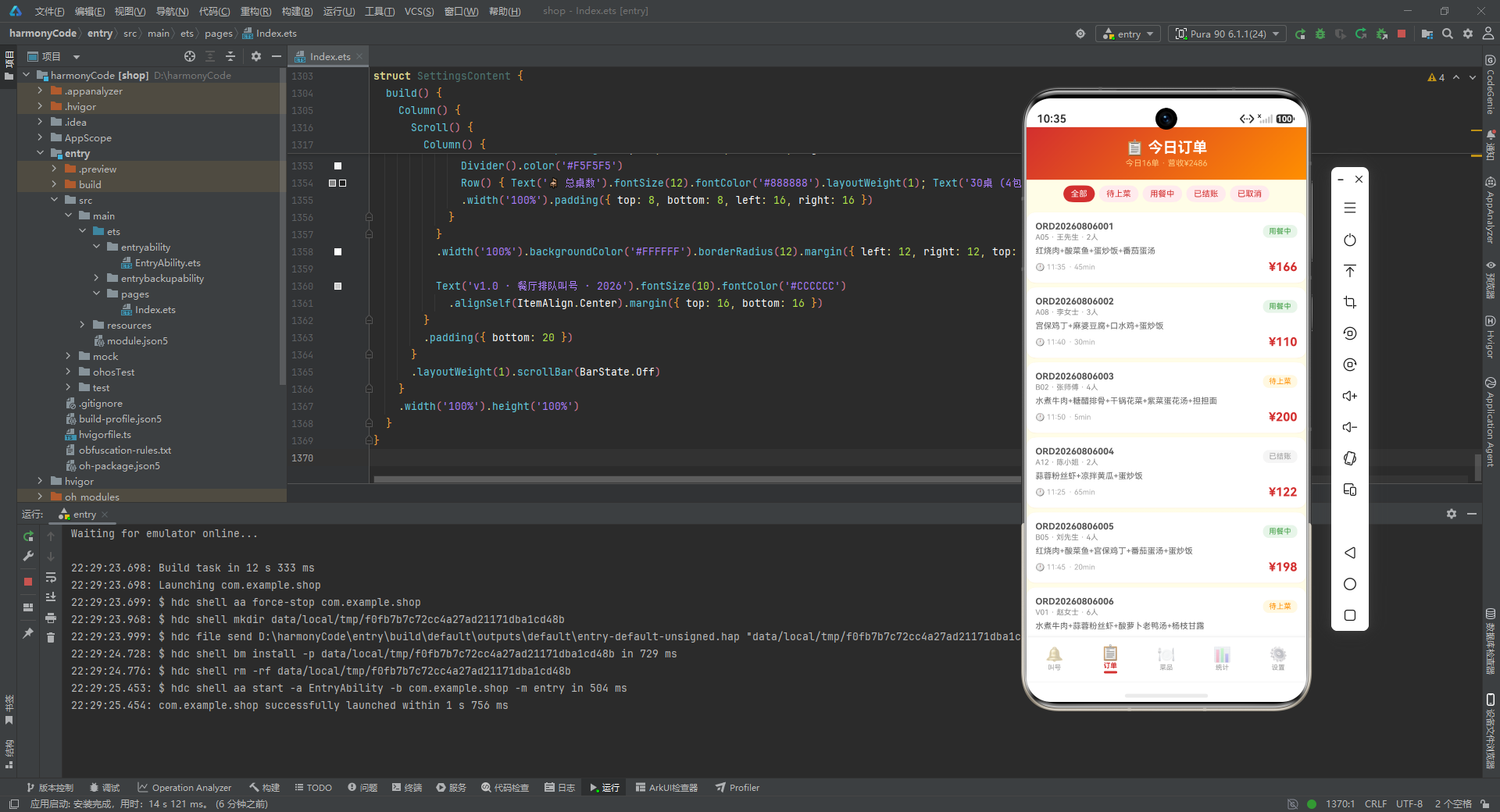
9.1 订单卡片设计
@Builder orderCard(o: TodayOrder) {
  Column() {
    Row() {
      Column() {
        Text(o.orderNumber).fontSize(12).fontWeight(FontWeight.Bold).fontColor('#555555')
        Text(o.tableNumber + ' · ' + o.customerName + ' · ' + o.guestCount + '人')
          .fontSize(10).fontColor('#888888').margin({ top: 2 })
      }.layoutWeight(1).alignItems(HorizontalAlign.Start)
      Text(ORDER_STATUS_CONFIG[o.status]?.label ?? '待上菜').fontSize(10)
        .fontColor(ORDER_STATUS_CONFIG[o.status]?.color ?? '#FF8F00')
        .backgroundColor(ORDER_STATUS_CONFIG[o.status]?.bg ?? '#FFF8E1')
        .padding({ left: 8, right: 8, top: 3, bottom: 3 }).borderRadius(8)
    }
    .width('100%')
    Text(o.items).fontSize(11).fontColor('#666666').maxLines(2)
      .textOverflow({ overflow: TextOverflow.Ellipsis })
      .width('100%').margin({ top: 6 })
    Row() {
      Text('🕐 ' + o.createdAt).fontSize(10).fontColor('#AAAAAA')
      Text('· ' + o.duration + 'min').fontSize(10).fontColor('#AAAAAA').margin({ left: 4 })
      Row().layoutWeight(1)
      Text('¥' + o.totalAmount).fontSize(16).fontWeight(FontWeight.Bold).fontColor('#D32F2F')
    }
    .width('100%').margin({ top: 6 })
  }
  .width('100%').padding(12).backgroundColor('#FFFFFF')
  .borderRadius(12).margin({ left: 12, right: 12, top: 6 })
  .shadow({ radius: 3, color: '#1AD32F2F', offsetY: 1 })
  .onClick(() => { this.selectedOrder = o; this.showDetailModal = true })
}
逐行解析:
-
订单卡片分为三行信息。第一行:左侧是订单编号和桌号·顾客·人数的组合信息,右侧是状态标签(从配置表读取标签、颜色和背景色)。
-
第二行是菜品明细,最多显示 2 行(
maxLines(2)),超出部分省略号截断。这避免了菜品过多时卡片高度过大。 -
第三行:左侧是下单时间和用餐时长,右侧是订单金额(16 号加粗红色字体)。
Row().layoutWeight(1)将左右两部分推开。 -
卡片整体设计与排队卡片保持一致:白色背景、圆角 12、半透明红色阴影。点击卡片打开订单详情弹窗。
9.2 订单详情弹窗
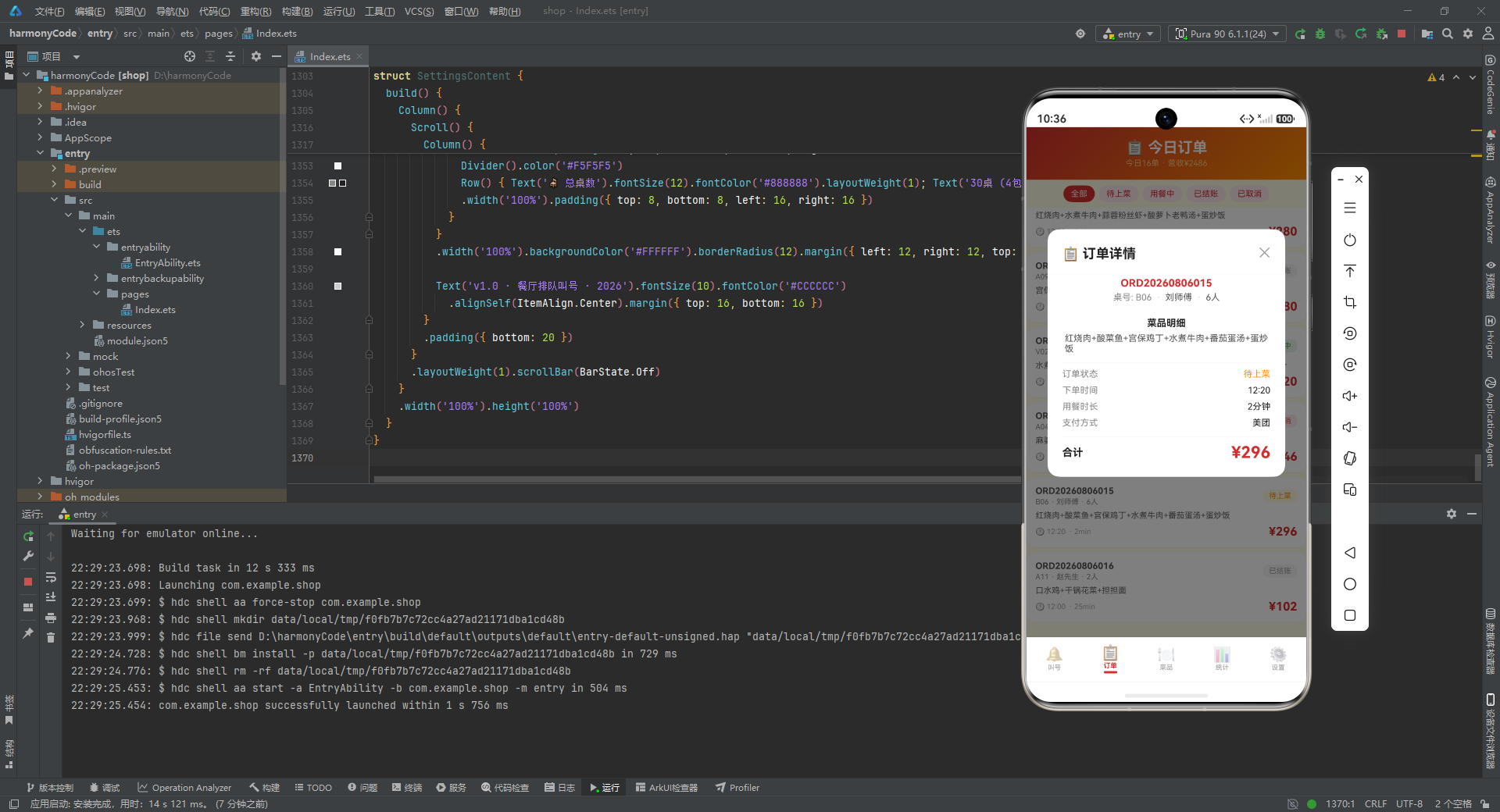
订单详情弹窗展示了订单的完整信息,包括菜品明细、状态、时间、时长、支付方式和金额。
@Builder detailModal() {
  Column() {
    this.modalOverlay(() => { this.showDetailModal = false })
    Column() {
      Row() {
        Text('📋 订单详情').fontSize(18).fontWeight(FontWeight.Bold).fontColor('#212121')
        Row().layoutWeight(1)
        Text('✕').fontSize(18).fontColor('#999999')
          .onClick(() => { this.showDetailModal = false })
      }
      .width('100%').padding({ left: 20, right: 20, top: 18, bottom: 12 })
      Divider().color('#F0F0F0')
      Column() {
        Text(this.selectedOrder?.orderNumber ?? '').fontSize(14).fontWeight(FontWeight.Bold).fontColor('#D32F2F')
        Row() {
          Text('桌号: ' + (this.selectedOrder?.tableNumber ?? '')).fontSize(12).fontColor('#888888')
          Text('·').fontSize(12).fontColor('#CCCCCC').margin({ left: 6 })
          Text(this.selectedOrder?.customerName ?? '').fontSize(12).fontColor('#555555').margin({ left: 6 })
          Text('·').fontSize(12).fontColor('#CCCCCC').margin({ left: 6 })
          Text(this.selectedOrder?.guestCount + '人').fontSize(12).fontColor('#555555').margin({ left: 6 })
        }
        .margin({ top: 4 })
逐行解析:
-
详情弹窗结构与排队详情弹窗类似:遮罩 + 白色主体。头部标题"📋 订单详情"和关闭按钮。
-
订单编号以红色加粗显示,下方一行组合信息用圆点分隔桌号、顾客姓名和用餐人数。所有可选值都通过
?? ''提供空字符串默认值。
        Divider().color('#F5F5F5').margin({ top: 12, bottom: 8 })
        Text('菜品明细').fontSize(13).fontWeight(FontWeight.Bold).fontColor('#212121')
        Text(this.selectedOrder?.items ?? '').fontSize(12).fontColor('#555555').margin({ top: 6 })
        Divider().color('#F5F5F5').margin({ top: 12, bottom: 8 })
        Row() {
          Text('订单状态').fontSize(12).fontColor('#888888').layoutWeight(1)
          Text(ORDER_STATUS_CONFIG[this.selectedOrder?.status ?? '待上菜']?.label ?? '待上菜').fontSize(12)
            .fontColor(ORDER_STATUS_CONFIG[this.selectedOrder?.status ?? '待上菜']?.color ?? '#FF8F00')
        }
        .width('100%')
        Row() {
          Text('下单时间').fontSize(12).fontColor('#888888').layoutWeight(1)
          Text(this.selectedOrder?.createdAt ?? '').fontSize(12).fontColor('#212121')
        }
        .width('100%').margin({ top: 8 })
逐行解析:
-
菜品明细区域用分隔线与上下内容隔开,标题加粗,明细文字灰色。之后又一条分隔线分隔出订单属性区域。
-
订单属性以"标签: 值"的行布局展示,每行左侧标签灰色、右侧值深色,通过
layoutWeight(1)推开。依次展示订单状态(带状态颜色)、下单时间、用餐时长、支付方式。
        Row() {
          Text('合计').fontSize(14).fontWeight(FontWeight.Bold).fontColor('#212121')
          Row().layoutWeight(1)
          Text('¥' + (this.selectedOrder?.totalAmount ?? 0)).fontSize(22).fontWeight(FontWeight.Bold).fontColor('#D32F2F')
        }
        .width('100%')
      }
      .padding({ left: 20, right: 20, top: 4, bottom: 20 })
    }
    .width('85%').backgroundColor('#FFFFFF').borderRadius(16)
    .alignItems(HorizontalAlign.Center)
    .position({ x: '7.5%', y: '20%' })
  }
  .width('100%').height('100%').position({ x: 0, y: 0 }).zIndex(999)
}
逐行解析:
-
底部合计区域:左侧"合计"标签,右侧是 22 号超大红色加粗的金额数字,视觉上突出总价信息。
-
弹窗主体宽度 85%,白色背景圆角 16,定位在屏幕中央偏上位置(
y: '20%'),zIndex(999)确保层级最高。
十、菜品管理页:丰富的菜品信息展示
10.1 菜品卡片
@Builder dishCard(m: MenuItem) {
  Column() {
    Row() {
      Column() {
        Text(m.icon).fontSize(32)
      }.width(56).height(56)
      .backgroundColor(m.isSpecial ? '#FFF8E1' : '#FFEBEE').borderRadius(14)
      .alignItems(HorizontalAlign.Center).justifyContent(FlexAlign.Center)
      Column() {
        Row() {
          Text(m.name).fontSize(14).fontWeight(FontWeight.Bold).fontColor('#212121')
          if (m.isSpecial) {
            Text('👑').fontSize(10).margin({ left: 4 })
          }
          if (m.spicy > 0) {
            Text('🌶️'.repeat(m.spicy)).fontSize(8).margin({ left: 4 })
          }
        }
        Text(m.description).fontSize(10).fontColor('#888888').margin({ top: 2 })
        Row() {
          Text('⭐ ' + m.rating).fontSize(10).fontColor('#FF8F00')
          Text('🔥 ' + m.sold + '份').fontSize(10).fontColor('#888888').margin({ left: 8 })
          if (!m.available) {
            Text('已停售').fontSize(9).fontColor('#EF5350').margin({ left: 8 })
          }
        }
        .margin({ top: 4 })
      }.layoutWeight(1).alignItems(HorizontalAlign.Start).padding({ left: 10 })
      Column() {
        Text('¥' + m.price).fontSize(18).fontWeight(FontWeight.Bold).fontColor('#D32F2F')
        if (m.originalPrice > 0) {
          Text('¥' + m.originalPrice).fontSize(11).fontColor('#CCCCCC')
            .decoration({ type: TextDecorationType.LineThrough }).margin({ top: 2 })
        }
      }.alignItems(HorizontalAlign.End)
    }
    .width('100%')
逐行解析:
-
菜品卡片采用三列布局:左侧图标区、中间信息区、右侧价格区。
-
左侧图标区是一个 56x56 的方块,背景色根据是否为招牌菜动态变化:招牌菜为米黄(
#FFF8E1),普通菜为浅红(#FFEBEE)。图标使用 32 号字体的表情符号。 -
中间信息区第一行是菜品名称,后面跟条件渲染的皇冠图标(招牌菜)和辣椒图标(辣度大于 0 时,通过
'🌶️'.repeat(m.spicy)重复对应次数)。第二行是描述文字。第三行是评分(星标+分数)、销量(火焰+份数),以及停售时的红色"已停售"标签。 -
右侧价格区显示当前售价(18 号红色加粗),如果原价大于 0 则在下方显示划线原价(
TextDecorationType.LineThrough)。
    Row() {
      ForEach(m.tags, (tag: string) => {
        Text('#' + tag).fontSize(9).fontColor('#D32F2F').backgroundColor('#FFEBEE')
          .padding({ left: 6, right: 6, top: 2, bottom: 2 }).borderRadius(8)
          .margin({ left: 2, right: 2 })
      })
    }
    .width('100%').margin({ top: 8 })
  }
  .width('100%').padding(14).backgroundColor('#FFFFFF')
  .borderRadius(12).margin({ left: 12, right: 12, top: 6 })
  .shadow({ radius: 3, color: '#1AD32F2F', offsetY: 1 })
  .onClick(() => { this.selectedDish = m; this.showDetailModal = true })
}
逐行解析:
- 卡片底部是标签云区域,遍历菜品的
tags数组,每个标签渲染为"#标签"的胶囊,红色文字浅红背景。点击卡片打开菜品详情弹窗。
10.2 菜品详情弹窗
菜品详情弹窗信息非常丰富,包含价格区、详细属性区和标签区。
@Builder detailModal() {
  Column() {
    this.modalOverlay(() => { this.showDetailModal = false })
    Column() {
      Row() {
        Text(this.selectedDish?.icon ?? '🍽️').fontSize(48)
        Row().layoutWeight(1)
        Text('✕').fontSize(18).fontColor('#999999')
          .onClick(() => { this.showDetailModal = false })
      }
      .width('100%').padding({ left: 20, right: 20, top: 20 })
      Text(this.selectedDish?.name ?? '').fontSize(18).fontWeight(FontWeight.Bold).fontColor('#212121').margin({ top: 8 })
      Text(this.selectedDish?.description ?? '').fontSize(12).fontColor('#888888').margin({ top: 4 })
      Divider().color('#F0F0F0').margin({ top: 16, left: 20, right: 20 })
      Row() {
        Column() {
          Text('💰 售价').fontSize(10).fontColor('#888888')
          Text('¥' + (this.selectedDish?.price ?? 0)).fontSize(20).fontWeight(FontWeight.Bold).fontColor('#D32F2F').margin({ top: 2 })
        }.layoutWeight(1).alignItems(HorizontalAlign.Center)
        Column() {
          Text('📦 原价').fontSize(10).fontColor('#888888')
          Text('¥' + (this.selectedDish?.originalPrice ?? 0)).fontSize(14).fontColor('#CCCCCC').margin({ top: 2 })
            .decoration({ type: TextDecorationType.LineThrough })
        }.layoutWeight(1).alignItems(HorizontalAlign.Center)
        Column() {
          Text('🔥 销量').fontSize(10).fontColor('#888888')
          Text((this.selectedDish?.sold ?? 0) + '份').fontSize(16).fontWeight(FontWeight.Bold).fontColor('#FF8F00').margin({ top: 2 })
        }.layoutWeight(1).alignItems(HorizontalAlign.Center)
      }
      .width('100%').margin({ top: 16 })
逐行解析:
-
详情弹窗头部是大号菜品图标(48 号字体)和关闭按钮。下方是菜品名称(加粗)和描述文字。
-
价格区三列布局:售价(20 号红色加粗)、原价(14 号灰色划线)、销量(16 号橙色加粗)。三列等宽(
layoutWeight(1))居中对齐,信息一目了然。
      Divider().color('#F0F0F0').margin({ top: 16, left: 20, right: 20 })
      Column() {
        Text('详细信息').fontSize(13).fontWeight(FontWeight.Bold).fontColor('#212121')
          .width('100%').padding({ left: 20, top: 16, bottom: 8 })
        Row() { Text('分类').fontSize(12).fontColor('#888888').layoutWeight(1); Text(this.selectedDish?.category ?? '').fontSize(12).fontColor('#212121') }
        .width('100%').padding({ left: 20, right: 20, top: 4 })
        Row() { Text('评分').fontSize(12).fontColor('#888888').layoutWeight(1); Text('⭐ ' + (this.selectedDish?.rating ?? 0)).fontSize(12).fontColor('#FF8F00') }
        .width('100%').padding({ left: 20, right: 20, top: 8 })
        Row() { Text('辣度').fontSize(12).fontColor('#888888').layoutWeight(1); Text(this.selectedDish?.spicy === 0 ? '不辣' : '🌶️'.repeat(this.selectedDish?.spicy ?? 0)).fontSize(12).fontColor('#D32F2F') }
        .width('100%').padding({ left: 20, right: 20, top: 8 })
        Row() { Text('状态').fontSize(12).fontColor('#888888').layoutWeight(1); Text(this.selectedDish?.available ? '✅ 在售' : '❌ 停售').fontSize(12).fontColor(this.selectedDish?.available ? '#43A047' : '#EF5350') }
        .width('100%').padding({ left: 20, right: 20, top: 8 })
        Row() { Text('招牌').fontSize(12).fontColor('#888888').layoutWeight(1); Text(this.selectedDish?.isSpecial ? '👑 招牌菜' : '普通菜品').fontSize(12).fontColor(this.selectedDish?.isSpecial ? '#D32F2F' : '#888888') }
        .width('100%').padding({ left: 20, right: 20, top: 8 })
      }
      .width('100%')
逐行解析:
-
详细信息区使用紧凑的"标签: 值"行布局,每行内联写在一条语句中,代码虽然紧凑但信息清晰。依次展示分类、评分、辣度、状态、招牌五个属性。
-
辣度的展示有特殊逻辑:辣度为 0 时显示"不辣",否则用
'🌶️'.repeat()重复对应次数的辣椒图标。状态的展示根据available布尔值显示"✅ 在售"(绿色)或"❌ 停售"(红色)。招牌属性同理。
      if (this.selectedDish != null && this.selectedDish.tags.length > 0) {
        Divider().color('#F0F0F0').margin({ top: 16, left: 20, right: 20 })
        Text('标签').fontSize(13).fontWeight(FontWeight.Bold).fontColor('#212121')
          .width('100%').padding({ left: 20, top: 16, bottom: 8 })
        Row() {
          ForEach(this.selectedDish.tags, (tag: string) => {
            Text('#' + tag).fontSize(11).fontColor('#D32F2F')
              .backgroundColor('#FFEBEE').padding({ left: 8, right: 8, top: 3, bottom: 3 })
              .borderRadius(10).margin({ left: 3, right: 3 })
          })
        }
        .width('100%').padding({ left: 20, bottom: 16 })
      }
      Row() {
        Text('🗑️ 下架菜品').fontSize(13).fontColor('#FFFFFF')
          .backgroundColor('#EF5350').borderRadius(16)
          .padding({ left: 20, right: 20, top: 8, bottom: 8 })
          .onClick(() => { this.showDeleteConfirm = true })
      }
      .width('100%').justifyContent(FlexAlign.Center)
      .padding({ top: 8, bottom: 20 })
    }
    .width('85%').constraintSize({ maxHeight: '80%' }).backgroundColor('#FFFFFF').borderRadius(16)
    .alignItems(HorizontalAlign.Center)
    .position({ x: '7.5%', y: '10%' })
  }
  .width('100%').height('100%').position({ x: 0, y: 0 }).zIndex(999)
}
逐行解析:
-
标签区域只在菜品有标签时显示(
tags.length > 0),遍历标签数组渲染为胶囊按钮。标签区域使用条件渲染避免了空标签时的无意义展示。 -
底部是一个居中的"🗑️ 下架菜品"按钮,红色背景,点击后打开下架确认弹窗。
-
弹窗主体使用
constraintSize({ maxHeight: '80%' })限制最大高度为屏幕的 80%,防止内容过多超出屏幕。这是因为菜品详情信息较多,需要确保弹窗不会撑满整个屏幕。
十一、营业统计页:数据可视化呈现
11.1 四格统计卡
build() {
  Column() {
    Column() {
      Text('📊 营业统计').fontSize(20).fontWeight(FontWeight.Bold).fontColor('#FFFFFF')
      Text('实时数据分析 · 经营决策').fontSize(11).fontColor('#FFCC80').margin({ top: 3 })
    }
    .width('100%').padding({ top: 16, bottom: 16 })
    .linearGradient({ angle: 135, colors: [['#D32F2F', 0], ['#FF8F00', 1]] })
    .alignItems(HorizontalAlign.Center)

    Scroll() {
      Column() {
        Row() {
          Column() {
            Text('💰').fontSize(20).margin({ top: 4 })
            Text('¥' + getTodayRevenue()).fontSize(20).fontWeight(FontWeight.Bold).fontColor('#D32F2F')
            Text('今日营收').fontSize(10).fontColor('#888888')
          }.layoutWeight(1).alignItems(HorizontalAlign.Center).padding({ top: 12, bottom: 12 })
          .backgroundColor('#FFFFFF').borderRadius(10).margin({ left: 6, right: 3, top: 6 })
          Column() {
            Text('📋').fontSize(20).margin({ top: 4 })
            Text(getTodayOrderCount().toString()).fontSize(20).fontWeight(FontWeight.Bold).fontColor('#FF8F00')
            Text('今日订单').fontSize(10).fontColor('#888888')
          }.layoutWeight(1).alignItems(HorizontalAlign.Center).padding({ top: 12, bottom: 12 })
          .backgroundColor('#FFFFFF').borderRadius(10).margin({ left: 3, right: 6, top: 6 })
        }
        .width('100%').padding({ left: 6, right: 6 })
逐行解析:
-
统计页头部与其他页面一致:红色到橙色渐变背景,标题"📊 营业统计"和副标题"实时数据分析 · 经营决策"。
-
内容区域使用
Scroll包裹,确保内容超出屏幕时可滚动。首先是两行四格统计卡,每行两个卡片。 -
每个卡片由图标(20 号)、数值(20 号加粗,使用对应主题色)和标签(10 号灰色)三部分组成。第一行:今日营收(红色)和今日订单(橙色);第二行:平均等待(绿色)和上座率(紫色)。四个卡片使用不同的颜色区分,视觉效果丰富。
11.2 时段客流柱状图
        Column() {
          Text('📈 时段客流分析').fontSize(13).fontWeight(FontWeight.Bold)
            .width('100%').padding({ left: 16, top: 12, bottom: 8 })
          Row() {
            ForEach([7, 8, 9, 10, 11, 12, 13, 14, 15, 16, 17, 18, 19, 20, 21, 22], (h: number) => {
              Column() {
                Text(getHourlyTraffic(h).toString())
                  .fontSize(7).fontColor('#D32F2F').margin({ bottom: 2 })
                Column()
                  .width(14)
                  .height((getHourlyTraffic(h) / getMaxHourly() * 80).toFixed(0) + 'vp')
                  .linearGradient({ angle: 180, colors: [['#D32F2F', 0], ['#FF8F00', 1]] })
                  .borderRadius({ topLeft: 3, topRight: 3 })
                Text(h + 'h').fontSize(7).fontColor('#999999').margin({ top: 2 })
              }
              .layoutWeight(1).alignItems(HorizontalAlign.Center)
            })
          }
          .padding({ left: 8, right: 8, bottom: 12 })
        }
        .width('100%').backgroundColor('#FFFFFF').borderRadius(12)
        .margin({ left: 12, right: 12, top: 8 })
逐行解析:
-
时段客流柱状图展示 7 点到 22 点的客流量(16 个柱子)。每个柱子是一个 Column,包含三个元素:顶部数值标签、中间柱体、底部小时标签。
-
柱体高度通过动态计算:
getHourlyTraffic(h) / getMaxHourly() * 80,即当前小时客流除以最大客流再乘以 80vp(最大柱高)。.toFixed(0)取整后拼接'vp'作为高度单位。这种纯 CSS/样式实现的柱状图无需引入第三方图表库,轻量且高效。 -
柱体使用 180 度线性渐变(从上到下),红色到橙色,顶部圆角(
borderRadius: { topLeft: 3, topRight: 3 })。每个柱子等宽(layoutWeight(1)),数值标签和小时标签都是 7 号小字体。
11.3 热销菜品排行
        Column() {
          Text('🔥 热销菜品TOP8').fontSize(13).fontWeight(FontWeight.Bold)
            .width('100%').padding({ left: 16, top: 12, bottom: 8 })
          Column() {
            ForEach([0, 1, 2, 3, 4, 5, 6, 7], (i: number) => {
              Row() {
                Text((i < 3 ? '🏆' : '  ') + (i + 1).toString()).fontSize(12).fontColor('#D32F2F').fontWeight(FontWeight.Bold)
                Text(getTopDishIcon(i)).fontSize(14).margin({ left: 6 })
                Text(getTopDishName(i)).fontSize(12).fontColor('#555555').layoutWeight(1).margin({ left: 6 })
                Text(getDishSold(i) + '份').fontSize(11).fontColor('#888888')
                Text('¥' + getTopDishPrice(i)).fontSize(12).fontColor('#D32F2F').fontWeight(FontWeight.Bold).margin({ left: 8 })
              }
              .width('100%').padding({ top: 6, bottom: 6, left: 16, right: 16 })
              Row() {
                Column()
                  .width((getDishSold(i) / getMaxDishSold() * 100).toFixed(0) + '%')
                  .height(4)
                  .linearGradient({ angle: 0, colors: [['#D32F2F', 0], ['#FF8F00', 1]] })
                  .borderRadius(2)
                Column().layoutWeight(1)
              }
              .width('100%').padding({ left: 16, right: 16 }).margin({ bottom: 4 })
            })
          }
        }
        .width('100%').backgroundColor('#FFFFFF').borderRadius(12)
        .margin({ left: 12, right: 12, top: 8 })
        .padding({ bottom: 8 })
逐行解析:
-
热销菜品 TOP8 排行榜,每项包含两行:信息行和进度条行。
-
信息行:排名(前三名带奖杯图标🏆)、菜品图标、菜品名称(弹性占位)、销量、价格。排名和价格使用红色加粗,突出重点信息。
-
进度条行:一个高度为 4 的渐变条,宽度按
getDishSold(i) / getMaxDishSold() * 100%计算。使用 0 度水平渐变(从左到右),红色到橙色。后面跟一个layoutWeight(1)的空 Column 填充剩余空间。这种横向进度条直观地展示了各菜品的销量对比。
十二、门店设置页:基础信息管理
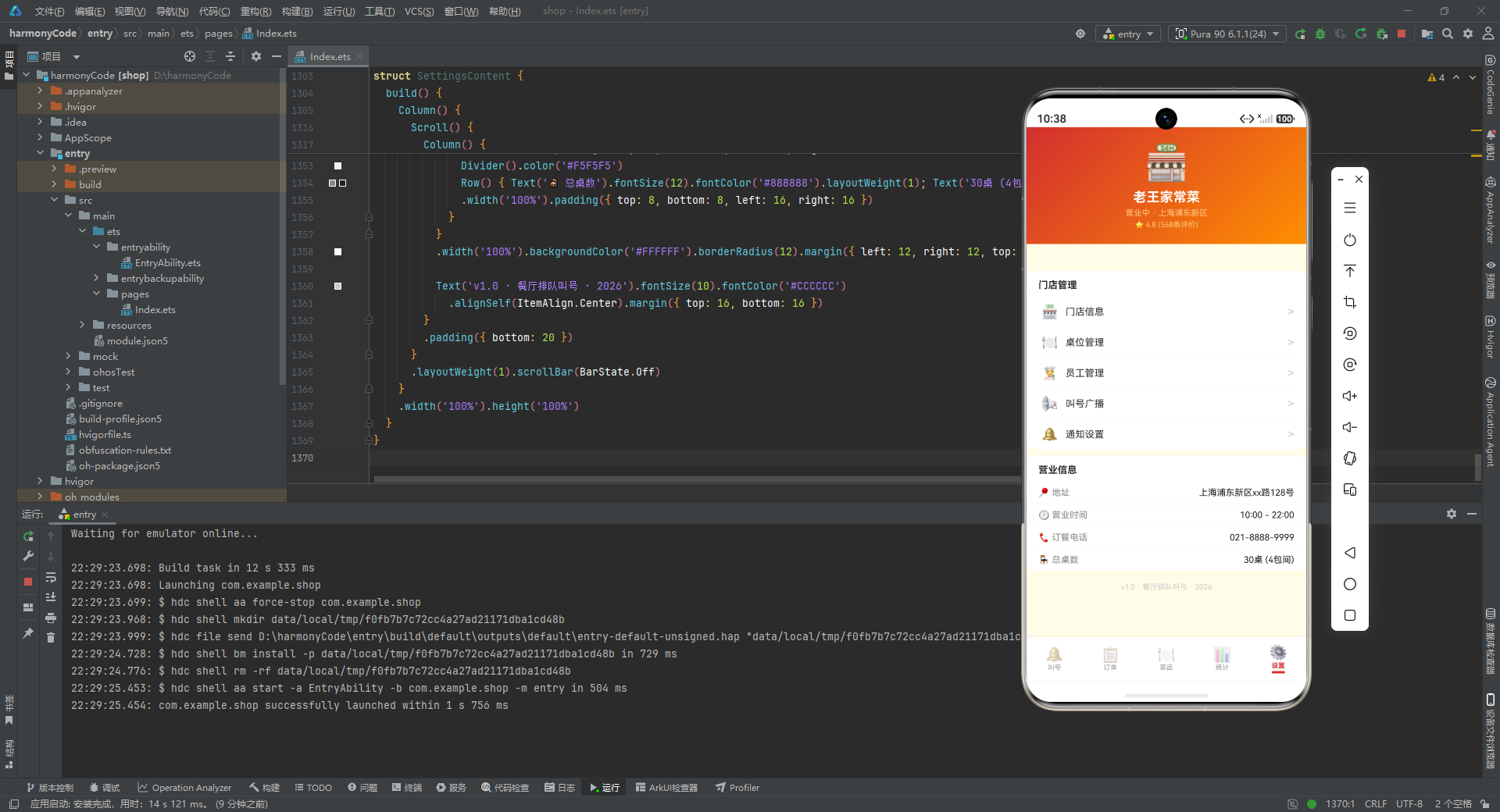
12.1 门店信息头部
build() {
  Column() {
    Column() {
      Text('🏪').fontSize(48).margin({ top: 20 })
      Text('老王家常菜').fontSize(18).fontWeight(FontWeight.Bold).fontColor('#FFFFFF').margin({ top: 8 })
      Text('营业中 · 上海浦东新区').fontSize(11).fontColor('#FFCC80').margin({ top: 4 })
      Text('⭐ 4.8 (568条评价)').fontSize(10).fontColor('#FFCC80').margin({ top: 4 })
    }
    .width('100%').padding({ bottom: 20 })
    .linearGradient({ angle: 135, colors: [['#D32F2F', 0], ['#FF8F00', 1]] })
    .alignItems(HorizontalAlign.Center)
逐行解析:
- 设置页头部是一个居中布局:大号门店图标(48 号)、门店名称"老王家常菜"(18 号加粗白色)、营业状态和地址(11 号浅橙)、评分和评价数(10 号浅橙)。同样的红橙渐变背景保持了一致性。
12.2 门店管理与营业信息
Scroll() {
Column() {
Column() {
Text('门店管理').fontSize(13).fontWeight(FontWeight.Bold)
.width('100%').padding({ left: 16, top: 12, bottom: 8 })
Column() {
Row() { Text('🏪').fontSize(18); Text('门店信息').fontSize(13).layoutWeight(1).margin({ left: 10 }); Text('>').fontColor('#CCCCCC') }
.width('100%').padding({ top: 10, bottom: 10, left: 4 })
Divider().color('#F0F0F0')
Row() { Text('🍽️').fontSize(18); Text('桌位管理').fontSize(13).layoutWeight(1).margin({ left: 10 }); Text('>').fontColor('#CCCCCC') }
.width('100%').padding({ top: 10, bottom: 10, left: 4 })
Divider().color('#F0F0F0')
Row() { Text('👨🍳').fontSize(18); Text('员工管理').fontSize(13).layoutWeight(1).margin({ left: 10 }); Text('>').fontColor('#CCCCCC') }
.width('100%').padding({ top: 10, bottom: 10, left: 4 })
Divider().color('#F0F0F0')
Row() { Text('📢').fontSize(18); Text('叫号广播').fontSize(13).layoutWeight(1).margin({ left: 10 }); Text('>').fontColor('#CCCCCC') }
.width('100%').padding({ top: 10, bottom: 10, left: 4 })
Divider().color('#F0F0F0')
Row() { Text('🔔').fontSize(18); Text('通知设置').fontSize(13).layoutWeight(1).margin({ left: 10 }); Text('>').fontColor('#CCCCCC') }
.width('100%').padding({ top: 10, bottom: 10, left: 4 })
}
.padding({ left: 16, right: 16 })
}
.width('100%').backgroundColor('#FFFFFF').borderRadius(12).margin({ left: 12, right: 12, top: 10 })
逐行解析:
-
门店管理卡片包含五个设置项:门店信息、桌位管理、员工管理、叫号广播、通知设置。每个设置项是一个 Row:左侧图标、中间名称(
layoutWeight(1)占位)、右侧箭头">"(灰色)。项与项之间用浅灰分隔线隔开。 -
这种"列表项 + 箭头"的模式是移动端设置页的标准交互范式,用户点击后进入对应的详情页面(当前代码中箭头仅为视觉展示,未绑定点击事件)。
        Column() {
          Text('营业信息').fontSize(13).fontWeight(FontWeight.Bold)
            .width('100%').padding({ left: 16, top: 12, bottom: 8 })
          Column() {
            Row() { Text('📍 地址').fontSize(12).fontColor('#888888').layoutWeight(1); Text('上海浦东新区xx路128号').fontSize(12).fontColor('#212121') }
            .width('100%').padding({ top: 8, bottom: 8, left: 16, right: 16 })
            Divider().color('#F5F5F5')
            Row() { Text('🕐 营业时间').fontSize(12).fontColor('#888888').layoutWeight(1); Text('10:00 - 22:00').fontSize(12).fontColor('#212121') }
            .width('100%').padding({ top: 8, bottom: 8, left: 16, right: 16 })
            Divider().color('#F5F5F5')
            Row() { Text('📞 订餐电话').fontSize(12).fontColor('#888888').layoutWeight(1); Text('021-8888-9999').fontSize(12).fontColor('#212121') }
            .width('100%').padding({ top: 8, bottom: 8, left: 16, right: 16 })
            Divider().color('#F5F5F5')
            Row() { Text('🪑 总桌数').fontSize(12).fontColor('#888888').layoutWeight(1); Text('30桌 (4包间)').fontSize(12).fontColor('#212121') }
            .width('100%').padding({ top: 8, bottom: 8, left: 16, right: 16 })
          }
        }
        .width('100%').backgroundColor('#FFFFFF').borderRadius(12).margin({ left: 12, right: 12, top: 8 })

        Text('v1.0 · 餐厅排队叫号 · 2026').fontSize(10).fontColor('#CCCCCC')
          .alignSelf(ItemAlign.Center).margin({ top: 16, bottom: 16 })
      }
      .padding({ bottom: 20 })
    }
    .layoutWeight(1).scrollBar(BarState.Off)
  }
  .width('100%').height('100%')
}
逐行解析:
-
营业信息卡片展示四项基础信息:地址、营业时间、订餐电话、总桌数。格式与门店管理卡片一致,都是"标签: �"的行布局加分隔线。
-
页面底部是版本号文字"v1.0 · 餐厅排队叫号 · 2026",10 号灰色居中显示,
alignSelf(ItemAlign.Center)实现居中对齐。这是应用信息的标准展示位置。
十三、关键技术特性对比总结
下表对本应用中涉及的关键技术特性进行了系统对比和总结:
| 技术特性 | 实现方式 | 应用场景 | 优势分析 |
|---|---|---|---|
| 响应式状态管理 | @State 装饰器 | 所有组件的局部状态 | 数据变化自动触发 UI 刷新,无需手动操作 DOM |
| 可观察对象 | @Observed 装饰器 | QueueEntry、MenuItem、TodayOrder | 对象属性变更时绑定的 UI 自动更新 |
| 可复用构建器 | @Builder 装饰器 | modalOverlay、bigNumberCard、orderCard、dishCard、bottomTabItem | 将重复的 UI 结构封装为函数,减少代码冗余 |
| 条件渲染 | if-else 语句 | Tab 切换、弹窗显示、VIP 标签、备注区域 | 根据状态动态显示/隐藏 UI 元素 |
| 列表渲染 | ForEach | 桌型横滑、状态筛选、菜品列表、订单列表、标签云 | 遍历数组生成重复 UI 结构 |
| 配置驱动渲染 | Record 映射表 | QUEUE_STATUS_CONFIG、TABLE_TYPE_CONFIG 等 | 视觉表现与业务逻辑解耦,修改配置即改变全局表现 |
| 模态弹窗 | Stack 叠加 + 遮罩 | 新增、编辑、删除确认、详情 | 统一的遮罩+主体模式,交互一致 |
| 动态样式 | 三元运算符 | 选中态颜色、等待超时变色、VIP 高亮 | 根据数据动态计算颜色、字重等样式属性 |
| 纯样式图表 | Column 高度计算 | 时段客流柱状图、热销进度条 | 无需第三方图表库,轻量高效 |
| 渐变背景 | linearGradient | 所有页面头部、柱状图柱体、进度条 | 增强视觉层次感,统一品牌色调 |
| 水平滚动 | ScrollDirection.Horizontal | 桌型状态区、状态筛选区、分类筛选区 | 有限空间内展示更多选项 |
| 空值安全 | ?? 空值合并运算符 | 配置查表、可选属性访问 | 防止 undefined 导致渲染异常 |
十四、架构设计总结与深度思考
14.1 分层架构的清晰性
纵观整个应用的源码,可以清晰地看到一套分层架构的设计思路。最底层是接口类型定义,它们建立了数据结构的类型契约;往上是数据模型层,使用 @Observed 类封装业务实体;再往上是静态配置层,将业务规则和视觉表现集中管理;然后是模拟数据层,提供贴近真实的测试数据;最后是视图层,由多个 @Component 组建构成,每个组件负责一个功能页面的展示和交互。这种分层让代码的职责边界非常清晰,任何一层的修改都不会大面积波及其他层。
14.2 配置驱动的视觉一致性
本应用最值得借鉴的设计理念之一是"配置驱动渲染"。通过将排队状态、桌型、菜品分类、订单状态的视觉属性(颜色、背景、图标)统一提取为配置表,视图层只需要通过键值查表就能获取完整的视觉表现参数。这种做法带来了三个显著好处:第一,全应用的视觉风格高度一致,不会出现同类元素颜色不统一的问题;第二,修改某个状态的颜色只需改一处配置,全应用自动生效;第三,视图层代码大幅简化,不需要大量 if-else 判断状态颜色。
14.3 弹窗交互的统一模式
应用中的所有弹窗(新增、编辑、删除确认、详情)都遵循同一套交互模式:Stack 根容器叠加遮罩和主体、遮罩半透明黑色可点击关闭、主体白色圆角卡片居中定位、zIndex 999 确保最高层级。这种统一的弹窗模式让用户在不同功能页面中操作弹窗时有一致的体验预期,也降低了开发者的认知成本——学会一个弹窗的实现方式,就掌握了所有弹窗的实现。
14.4 动态样式的巧妙运用
源码中大量使用了三元运算符实现动态样式:选中态与非选中态的颜色切换、等待超时的红色警示、VIP 客户的红色高亮、招牌菜的皇冠图标、辣度的动态辣椒数量。这些动态样式让界面能够根据数据状态智能地调整视觉表现,无需额外的渲染逻辑。特别是等待时间超过 15 分钟自动变红的机制,是一个很贴心的业务设计——它让工作人员无需主动检查就能注意到长时间等待的顾客。
14.5 纯样式实现数据可视化
统计页的柱状图和进度条完全使用 ArkUI 的基础组件(Column 的高度和宽度)实现,没有引入任何第三方图表库。柱状图通过动态计算 height 属性实现,进度条通过动态计算 width 百分比实现,两者都配合 linearGradient 渐变背景增强视觉效果。这种轻量级的实现方式适合数据量不大、交互简单的场景,避免了引入重量级图表库带来的包体积增加和性能开销。
安装DevEco Studio程序

选择目标安装目录:

设置环境变量,但是需要重启一下:

新建一个空白模板:

设置API为24的模板项目:

初始化项目,自动下载相关依赖:

完整代码:
// ============================================================
// 场景:餐厅排队叫号系统 App
// 布局:大号数字卡片 + 横向滑动区域 + 状态徽章列表
// 配色:餐饮红 #D32F2F / 暖橙 #FF8F00 / 米白 #FFFDE7 / 深棕 #3E2723
// ============================================================
// ==================== 接口类型定义 ====================
interface QueueStatusMeta {
label: string
color: string
bg: string
icon: string
}
interface TableTypeMeta {
label: string
icon: string
capacity: number
count: number
}
interface MenuCategoryMeta {
label: string
icon: string
color: string
}
interface OrderStatusMeta {
label: string
color: string
bg: string
}
interface DishMeta {
label: string
icon: string
price: number
sold: number
}
// ==================== 数据模型 ====================
@Observed
export class QueueEntry {
id: number = 0
number: string = ''
customerName: string = ''
phone: string = ''
partySize: number = 0
tableType: string = ''
status: string = '排队中'
waitTime: number = 0
estimatedTime: number = 0
createdAt: string = ''
notes: string = ''
vip: boolean = false
calledCount: number = 0
constructor(id: number, number: string, customerName: string, phone: string, partySize: number, tableType: string, status: string, waitTime: number, estimatedTime: number, createdAt: string, notes: string, vip: boolean, calledCount: number) {
this.id = id; this.number = number; this.customerName = customerName; this.phone = phone
this.partySize = partySize; this.tableType = tableType; this.status = status
this.waitTime = waitTime; this.estimatedTime = estimatedTime; this.createdAt = createdAt
this.notes = notes; this.vip = vip; this.calledCount = calledCount
}
}
@Observed
export class MenuItem {
id: number = 0
name: string = ''
category: string = ''
price: number = 0
originalPrice: number = 0
description: string = ''
icon: string = ''
sold: number = 0
rating: number = 0
available: boolean = true
spicy: number = 0
isSpecial: boolean = false
tags: string[] = []
constructor(id: number, name: string, category: string, price: number, originalPrice: number, description: string, icon: string, sold: number, rating: number, available: boolean, spicy: number, isSpecial: boolean, tags: string[]) {
this.id = id; this.name = name; this.category = category; this.price = price
this.originalPrice = originalPrice; this.description = description; this.icon = icon
this.sold = sold; this.rating = rating; this.available = available
this.spicy = spicy; this.isSpecial = isSpecial; this.tags = tags
}
}
@Observed
export class TodayOrder {
id: number = 0
orderNumber: string = ''
tableNumber: string = ''
customerName: string = ''
items: string = ''
totalAmount: number = 0
status: string = '待上菜'
createdAt: string = ''
guestCount: number = 0
duration: number = 0
paymentMethod: string = '微信支付'
constructor(id: number, orderNumber: string, tableNumber: string, customerName: string, items: string, totalAmount: number, status: string, createdAt: string, guestCount: number, duration: number, paymentMethod: string) {
this.id = id; this.orderNumber = orderNumber; this.tableNumber = tableNumber
this.customerName = customerName; this.items = items; this.totalAmount = totalAmount
this.status = status; this.createdAt = createdAt; this.guestCount = guestCount
this.duration = duration; this.paymentMethod = paymentMethod
}
}
// ==================== 静态配置 ====================
const QUEUE_STATUS_CONFIG: Record<string, QueueStatusMeta> = {
'排队中': { label: '排队中', color: '#FF8F00', bg: '#FFF8E1', icon: '⏳' },
'已叫号': { label: '已叫号', color: '#D32F2F', bg: '#FFEBEE', icon: '🔔' },
'已入座': { label: '已入座', color: '#43A047', bg: '#E8F5E9', icon: '✅' },
'已过号': { label: '已过号', color: '#9E9E9E', bg: '#F5F5F5', icon: '❌' },
'已取消': { label: '已取消', color: '#EF5350', bg: '#FFEBEE', icon: '🚫' }
}
const TABLE_TYPE_CONFIG: Record<string, TableTypeMeta> = {
'2人桌': { label: '2人桌', icon: '🪑', capacity: 2, count: 8 },
'4人桌': { label: '4人桌', icon: '🍽️', capacity: 4, count: 12 },
'6人桌': { label: '6人桌', icon: '🍴', capacity: 6, count: 6 },
'包间': { label: '包间', icon: '🚪', capacity: 10, count: 4 }
}
const MENU_CATEGORY_CONFIG: Record<string, MenuCategoryMeta> = {
'招牌': { label: '招牌菜', icon: '👑', color: '#D32F2F' },
'热菜': { label: '热菜', icon: '🍳', color: '#FF8F00' },
'凉菜': { label: '凉菜', icon: '🥗', color: '#43A047' },
'汤品': { label: '汤品', icon: '🍲', color: '#7E57C2' },
'主食': { label: '主食', icon: '🍚', color: '#5D4037' },
'饮品': { label: '饮品', icon: '🥤', color: '#26A69A' },
'甜点': { label: '甜点', icon: '🍰', color: '#EC407A' }
}
const ORDER_STATUS_CONFIG: Record<string, OrderStatusMeta> = {
'待上菜': { label: '待上菜', color: '#FF8F00', bg: '#FFF8E1' },
'用餐中': { label: '用餐中', color: '#43A047', bg: '#E8F5E9' },
'已结账': { label: '已结账', color: '#9E9E9E', bg: '#F5F5F5' },
'已取消': { label: '已取消', color: '#EF5350', bg: '#FFEBEE' }
}
const TABLE_TYPES: string[] = ['2人桌', '4人桌', '6人桌', '包间']
const STATUS_FILTERS: string[] = ['全部', '排队中', '已叫号', '已入座', '已过号']
const MENU_CATEGORIES: string[] = ['招牌', '热菜', '凉菜', '汤品', '主食', '饮品', '甜点']
// ==================== 时段客流数据 ====================
const HOURLY_TRAFFIC: number[] = [0, 0, 0, 0, 0, 0, 0, 5, 12, 28, 45, 52, 38, 22, 15, 18, 35, 62, 78, 85, 68, 42, 20, 8]
const HOUR_LABELS: string[] = ['0', '1', '2', '3', '4', '5', '6', '7', '8', '9', '10', '11', '12', '13', '14', '15', '16', '17', '18', '19', '20', '21', '22', '23']
const MAX_HOURLY: number = 85
// ==================== 热销菜品排行 ====================
const TOP_DISHES: DishMeta[] = [
{ label: '招牌红烧肉', icon: '🥘', price: 58, sold: 328 },
{ label: '酸菜鱼', icon: '🐟', price: 68, sold: 295 },
{ label: '宫保鸡丁', icon: '🍗', price: 42, sold: 268 },
{ label: '水煮牛肉', icon: '🥩', price: 78, sold: 245 },
{ label: '麻婆豆腐', icon: '🍲', price: 28, sold: 218 },
{ label: '糖醋排骨', icon: '🍖', price: 52, sold: 196 },
{ label: '干锅花菜', icon: '🥦', price: 32, sold: 172 },
{ label: '蛋炒饭', icon: '🍚', price: 18, sold: 165 }
]
const MAX_DISH_SOLD: number = 328
// ==================== 排队数据(24条) ====================
const mockQueue: QueueEntry[] = [
new QueueEntry(1, 'A001', '王先生', '138****1001', 2, '2人桌', '已叫号', 15, 5, '11:30', '靠窗位置', false, 1),
new QueueEntry(2, 'A002', '李女士', '139****1002', 4, '4人桌', '排队中', 8, 20, '11:35', '有老人需要安静', true, 0),
new QueueEntry(3, 'A003', '张师傅', '137****1003', 6, '6人桌', '排队中', 12, 35, '11:40', '朋友聚餐', false, 0),
new QueueEntry(4, 'A004', '陈小姐', '135****1004', 2, '2人桌', '已入座', 0, 0, '11:20', '', false, 1),
new QueueEntry(5, 'A005', '刘先生', '136****1005', 3, '4人桌', '排队中', 5, 15, '11:45', '', false, 0),
new QueueEntry(6, 'A006', '赵女士', '133****1006', 8, '包间', '排队中', 18, 45, '11:50', '商务宴请,需要包间', true, 0),
new QueueEntry(7, 'A007', '钱先生', '132****1007', 2, '2人桌', '已过号', 25, 0, '11:15', '', false, 2),
new QueueEntry(8, 'A008', '孙女士', '131****1008', 4, '4人桌', '排队中', 3, 10, '11:55', '带小孩', false, 0),
new QueueEntry(9, 'A009', '周师傅', '130****1009', 5, '6人桌', '排队中', 7, 25, '11:48', '', false, 0),
new QueueEntry(10, 'A010', '吴女士', '188****1010', 2, '2人桌', '已入座', 0, 0, '11:25', '', false, 1),
new QueueEntry(11, 'A011', '郑先生', '187****1011', 4, '4人桌', '排队中', 10, 30, '12:00', '生日聚餐', true, 0),
new QueueEntry(12, 'A012', '王女士', '186****1012', 3, '4人桌', '排队中', 6, 18, '12:05', '', false, 0),
new QueueEntry(13, 'A013', '李先生', '185****1013', 2, '2人桌', '已取消', 0, 0, '11:40', '客人等不及离开', false, 0),
new QueueEntry(14, 'A014', '张女士', '184****1014', 6, '6人桌', '排队中', 14, 40, '12:10', '同事聚餐', false, 0),
new QueueEntry(15, 'A015', '陈先生', '183****1015', 2, '2人桌', '排队中', 4, 12, '12:15', '', false, 0),
new QueueEntry(16, 'A016', '刘师傅', '182****1016', 10, '包间', '排队中', 20, 50, '12:20', '家庭聚会,老人小孩', true, 0),
new QueueEntry(17, 'A017', '赵先生', '181****1017', 4, '4人桌', '已叫号', 18, 3, '12:00', '', false, 1),
new QueueEntry(18, 'A018', '钱女士', '180****1018', 2, '2人桌', '排队中', 2, 8, '12:25', '', false, 0),
new QueueEntry(19, 'A019', '孙先生', '189****1019', 5, '6人桌', '排队中', 9, 28, '12:12', '', false, 0),
new QueueEntry(20, 'A020', '周女士', '177****1020', 3, '4人桌', '已入座', 0, 0, '11:50', '', false, 1),
new QueueEntry(21, 'A021', '吴先生', '176****1021', 4, '4人桌', '排队中', 11, 32, '12:30', '', false, 0),
new QueueEntry(22, 'A022', '郑女士', '175****1022', 2, '2人桌', '排队中', 5, 15, '12:35', '靠窗', false, 0),
new QueueEntry(23, 'A023', '王师傅', '174****1023', 8, '包间', '排队中', 16, 42, '12:18', '公司团建', true, 0),
new QueueEntry(24, 'A024', '李女士', '173****1024', 4, '4人桌', '已叫号', 15, 2, '12:10', '', false, 1)
]
// ==================== 菜品数据(18道) ====================
const mockMenuItems: MenuItem[] = [
new MenuItem(1, '招牌红烧肉', '招牌', 58, 68, '肥而不腻,入口即化', '🥘', 328, 4.9, true, 1, true, ['招牌', '必点']),
new MenuItem(2, '酸菜鱼', '招牌', 68, 78, '酸辣开胃,鱼片嫩滑', '🐟', 295, 4.8, true, 2, true, ['招牌', '辣']),
new MenuItem(3, '宫保鸡丁', '热菜', 42, 0, '酸甜微辣,经典川菜', '🍗', 268, 4.7, true, 2, false, ['川菜']),
new MenuItem(4, '水煮牛肉', '热菜', 78, 88, '麻辣鲜香,肉嫩入味', '🥩', 245, 4.8, true, 3, true, ['辣', '招牌']),
new MenuItem(5, '麻婆豆腐', '热菜', 28, 0, '麻辣鲜香,下饭神器', '🍲', 218, 4.6, true, 3, false, ['川菜', '辣']),
new MenuItem(6, '糖醋排骨', '热菜', 52, 0, '酸甜可口,外酥里嫩', '🍖', 196, 4.7, true, 0, false, ['经典']),
new MenuItem(7, '干锅花菜', '热菜', 32, 0, '香辣入味,下酒好菜', '🥦', 172, 4.5, true, 2, false, ['辣']),
new MenuItem(8, '蒜蓉粉丝虾', '热菜', 88, 98, '蒜香浓郁,虾肉Q弹', '🦐', 165, 4.9, true, 0, true, ['海鲜', '招牌']),
new MenuItem(9, '凉拌黄瓜', '凉菜', 16, 0, '清脆爽口,开胃前菜', '🥒', 156, 4.5, true, 0, false, ['凉菜']),
new MenuItem(10, '口水鸡', '凉菜', 38, 0, '麻辣鲜香,鸡肉嫩滑', '🐔', 142, 4.7, true, 3, false, ['川菜', '辣']),
new MenuItem(11, '皮蛋豆腐', '凉菜', 18, 0, '清凉爽口,夏日首选', '🥚', 128, 4.4, true, 0, false, ['凉菜']),
new MenuItem(12, '番茄蛋汤', '汤品', 22, 0, '酸甜暖胃,营养丰富', '🍅', 135, 4.5, true, 0, false, ['汤']),
new MenuItem(13, '紫菜蛋花汤', '汤品', 18, 0, '清淡鲜美,快速上桌', '🥣', 112, 4.3, true, 0, false, ['汤']),
new MenuItem(14, '酸萝卜老鸭汤', '汤品', 48, 0, '酸香开胃,滋补养生', '🦆', 98, 4.7, true, 0, false, ['汤', '滋补']),
new MenuItem(15, '蛋炒饭', '主食', 18, 0, '粒粒分明,蛋香四溢', '🍚', 165, 4.6, true, 0, false, ['主食']),
new MenuItem(16, '担担面', '主食', 22, 0, '麻辣鲜香,正宗川味', '🍜', 148, 4.7, true, 2, false, ['面食', '辣']),
new MenuItem(17, '鲜榨西瓜汁', '饮品', 18, 0, '新鲜现榨,冰爽解暑', '🥤', 105, 4.5, true, 0, false, ['饮品']),
new MenuItem(18, '杨枝甘露', '甜点', 26, 0, '芒果西米,甜品之王', '🍰', 92, 4.8, true, 0, true, ['甜点', '招牌'])
]
// ==================== 今日订单数据(16条) ====================
const mockOrders: TodayOrder[] = [
new TodayOrder(1, 'ORD20260806001', 'A05', '王先生', '红烧肉+酸菜鱼+蛋炒饭+番茄蛋汤', 166, '用餐中', '11:35', 2, 45, '微信支付'),
new TodayOrder(2, 'ORD20260806002', 'A08', '李女士', '宫保鸡丁+麻婆豆腐+口水鸡+蛋炒饭', 110, '用餐中', '11:40', 3, 30, '支付宝'),
new TodayOrder(3, 'ORD20260806003', 'B02', '张师傅', '水煮牛肉+糖醋排骨+干锅花菜+紫菜蛋花汤+担担面', 200, '待上菜', '11:50', 4, 5, '微信支付'),
new TodayOrder(4, 'ORD20260806004', 'A12', '陈小姐', '蒜蓉粉丝虾+凉拌黄瓜+蛋炒饭', 122, '已结账', '11:25', 2, 65, '微信支付'),
new TodayOrder(5, 'ORD20260806005', 'B05', '刘先生', '红烧肉+酸菜鱼+宫保鸡丁+番茄蛋汤+蛋炒饭', 198, '用餐中', '11:45', 4, 20, '美团'),
new TodayOrder(6, 'ORD20260806006', 'V01', '赵女士', '水煮牛肉+蒜蓉粉丝虾+酸萝卜老鸭汤+杨枝甘露', 240, '待上菜', '12:00', 6, 3, '微信支付'),
new TodayOrder(7, 'ORD20260806007', 'A03', '钱先生', '宫保鸡丁+蛋炒饭', 60, '已结账', '11:15', 1, 55, '现金'),
new TodayOrder(8, 'ORD20260806008', 'B01', '孙女士', '红烧肉+糖醋排骨+干锅花菜+番茄蛋汤+蛋炒饭', 180, '用餐中', '11:55', 4, 15, '微信支付'),
new TodayOrder(9, 'ORD20260806009', 'A07', '周师傅', '酸菜鱼+麻婆豆腐+担担面', 118, '待上菜', '11:48', 3, 2, '支付宝'),
new TodayOrder(10, 'ORD20260806010', 'A15', '吴女士', '口水鸡+皮蛋豆腐+蛋炒饭+鲜榨西瓜汁', 80, '已结账', '11:30', 2, 50, '微信支付'),
new TodayOrder(11, 'ORD20260806011', 'B03', '郑先生', '红烧肉+水煮牛肉+蒜蓉粉丝虾+酸萝卜老鸭汤+蛋炒饭', 280, '待上菜', '12:05', 4, 1, '微信支付'),
new TodayOrder(12, 'ORD20260806012', 'A09', '王女士', '宫保鸡丁+凉拌黄瓜+番茄蛋汤', 80, '已结账', '11:35', 2, 40, '支付宝'),
new TodayOrder(13, 'ORD20260806013', 'V02', '张女士', '水煮牛肉+蒜蓉粉丝虾+糖醋排骨+酸萝卜老鸭汤+杨枝甘露+鲜榨西瓜汁', 320, '用餐中', '12:10', 6, 10, '微信支付'),
new TodayOrder(14, 'ORD20260806014', 'A04', '陈先生', '麻婆豆腐+蛋炒饭', 46, '已取消', '11:40', 1, 0, '微信支付'),
new TodayOrder(15, 'ORD20260806015', 'B06', '刘师傅', '红烧肉+酸菜鱼+宫保鸡丁+水煮牛肉+番茄蛋汤+蛋炒饭', 296, '待上菜', '12:20', 6, 2, '美团'),
new TodayOrder(16, 'ORD20260806016', 'A11', '赵先生', '口水鸡+干锅花菜+担担面', 102, '已结账', '12:00', 2, 25, '微信支付')
]
// ==================== 统计函数 ====================
function getWaitingCount(): number { return 12 }
function getCalledCount(): number { return 3 }
function getSeatedCount(): number { return 3 }
function getSkippedCount(): number { return 1 }
function getTotalQueueToday(): number { return 24 }
function getTodayRevenue(): number { return 2486 }
function getTodayOrderCount(): number { return 16 }
function getAvgWaitTime(): number { return 12 }
function getTableOccupancy(): number { return 85 }
function getHourlyTraffic(idx: number): number { return HOURLY_TRAFFIC[idx] }
function getMaxHourly(): number { return MAX_HOURLY }
function getDishSold(idx: number): number { return TOP_DISHES[idx].sold }
function getMaxDishSold(): number { return MAX_DISH_SOLD }
function getTopDishName(idx: number): string { return TOP_DISHES[idx].label }
function getTopDishIcon(idx: number): string { return TOP_DISHES[idx].icon }
function getTopDishPrice(idx: number): number { return TOP_DISHES[idx].price }
// ==================== 底部 Tab 枚举 ====================
enum RestaurantTab {
QUEUE = 0,
ORDERS = 1,
MENU = 2,
STATS = 3,
SETTINGS = 4
}
// ==================== 入口页面 ====================
@Entry
@Component
struct RestaurantQueueApp {
@State activeTab: RestaurantTab = RestaurantTab.QUEUE
@Builder contentArea() {
Column() {
if (this.activeTab === RestaurantTab.QUEUE) {
QueueListContent()
} else if (this.activeTab === RestaurantTab.ORDERS) {
OrderListContent()
} else if (this.activeTab === RestaurantTab.MENU) {
MenuManageContent()
} else if (this.activeTab === RestaurantTab.STATS) {
StatsContent()
} else {
SettingsContent()
}
}
.layoutWeight(1)
}
@Builder bottomTabItem(icon: string, label: string, tab: RestaurantTab) {
Column() {
Text(icon).fontSize(20).opacity(this.activeTab === tab ? 1.0 : 0.45)
Text(label).fontSize(9)
.fontColor(this.activeTab === tab ? '#D32F2F' : '#999999')
.fontWeight(this.activeTab === tab ? FontWeight.Bold : FontWeight.Normal)
.margin({ top: 1 })
if (this.activeTab === tab) {
Column().width(18).height(3)
.backgroundColor('#D32F2F').borderRadius(2).margin({ top: 2 })
}
}
.layoutWeight(1)
.alignItems(HorizontalAlign.Center)
.padding({ top: 5, bottom: 5 })
.onClick(() => { this.activeTab = tab })
}
build() {
Column() {
this.contentArea()
Row() {
this.bottomTabItem('🔔', '叫号', RestaurantTab.QUEUE)
this.bottomTabItem('📋', '订单', RestaurantTab.ORDERS)
this.bottomTabItem('🍽️', '菜品', RestaurantTab.MENU)
this.bottomTabItem('📊', '统计', RestaurantTab.STATS)
this.bottomTabItem('⚙️', '设置', RestaurantTab.SETTINGS)
}
.width('100%')
.backgroundColor('#FFFFFF')
.padding({ top: 4, bottom: 6 })
.shadow({ radius: 8, color: '#1A000000', offsetY: -2 })
}
.width('100%').height('100%')
.backgroundColor('#FFFDE7')
}
}
// ==================== 排队叫号页(大号数字卡片布局) ====================
@Component
struct QueueListContent {
@State selectedFilter: string = '全部'
@State showAddModal: boolean = false
@State showEditModal: boolean = false
@State showDeleteConfirm: boolean = false
@State showDetailModal: boolean = false
@State selectedEntry: QueueEntry | null = null
@State formName: string = ''
@State formPhone: string = ''
@State formPartySize: number = 2
@State formTableType: string = '2人桌'
@State formNotes: string = ''
@Builder modalOverlay(onClose: () => void) {
Column()
.width('100%').height('100%')
.backgroundColor('rgba(0,0,0,0.5)')
.onClick(onClose)
}
@Builder addQueueModal() {
Column() {
this.modalOverlay(() => { this.showAddModal = false })
Column() {
Row() {
Text('➕ 取号排队').fontSize(18).fontWeight(FontWeight.Bold).fontColor('#212121')
Row().layoutWeight(1)
Text('✕').fontSize(18).fontColor('#999999')
.onClick(() => { this.showAddModal = false })
}
.width('100%').padding({ left: 20, right: 20, top: 18, bottom: 12 })
Divider().color('#F0F0F0')
Scroll() {
Column() {
.placeholderColor('#BBBBBB').fontSize(12).width('100%').height(60)
.backgroundColor('#FFF8E1').borderRadius(8)
.margin({ left: 20, right: 20, top: 4 })
.onChange((v: string) => { this.formNotes = v })
}
}
.layoutWeight(1)
Row() {
Text('取消').fontSize(14).fontColor('#888888')
.backgroundColor('#F5F5F5').borderRadius(20)
.padding({ left: 24, right: 24, top: 10, bottom: 10 })
.onClick(() => { this.showAddModal = false })
Text('确认取号').fontSize(14).fontColor('#FFFFFF')
.backgroundColor('#D32F2F').borderRadius(20)
.padding({ left: 24, right: 24, top: 10, bottom: 10 })
.margin({ left: 12 })
.onClick(() => { this.showAddModal = false })
}
.width('100%').justifyContent(FlexAlign.Center)
.padding({ left: 20, right: 20, top: 16, bottom: 16 })
}
.width('90%').height('75%').backgroundColor('#FFFFFF').borderRadius(16)
.alignItems(HorizontalAlign.Center)
.position({ x: '5%', y: '12%' })
}
.width('100%').height('100%').position({ x: 0, y: 0 }).zIndex(999)
}
@Builder editQueueModal() {
Column() {
this.modalOverlay(() => { this.showEditModal = false })
Column() {
Row() {
Text('✏️ 编辑排队信息').fontSize(18).fontWeight(FontWeight.Bold).fontColor('#212121')
Row().layoutWeight(1)
Text('✕').fontSize(18).fontColor('#999999')
.onClick(() => { this.showEditModal = false })
}
.width('100%').padding({ left: 20, right: 20, top: 18, bottom: 12 })
Divider().color('#F0F0F0')
Column() {
Text('顾客姓名').fontSize(12).fontColor('#888888').margin({ top: 12, left: 20 })
TextInput({ placeholder: this.selectedEntry?.customerName ?? '' })
.placeholderColor('#BBBBBB').fontSize(14).width('100%')
.backgroundColor('#FFF8E1').borderRadius(8)
.margin({ left: 20, right: 20, top: 4 })
Text('备注').fontSize(12).fontColor('#888888').margin({ top: 12, left: 20 })
TextArea({ placeholder: this.selectedEntry?.notes ?? '' })
.placeholderColor('#BBBBBB').fontSize(12).width('100%').height(60)
.backgroundColor('#FFF8E1').borderRadius(8)
.margin({ left: 20, right: 20, top: 4 })
}
.layoutWeight(1)
Row() {
Text('取消').fontSize(14).fontColor('#888888')
.backgroundColor('#F5F5F5').borderRadius(20)
.padding({ left: 24, right: 24, top: 10, bottom: 10 })
.onClick(() => { this.showEditModal = false })
Text('保存修改').fontSize(14).fontColor('#FFFFFF')
.backgroundColor('#FF8F00').borderRadius(20)
.padding({ left: 24, right: 24, top: 10, bottom: 10 })
.margin({ left: 12 })
.onClick(() => { this.showEditModal = false })
}
.width('100%').justifyContent(FlexAlign.Center)
.padding({ left: 20, right: 20, top: 16, bottom: 16 })
}
.width('90%').height('60%').backgroundColor('#FFFFFF').borderRadius(16)
.alignItems(HorizontalAlign.Center)
.position({ x: '5%', y: '18%' })
}
.width('100%').height('100%').position({ x: 0, y: 0 }).zIndex(999)
}
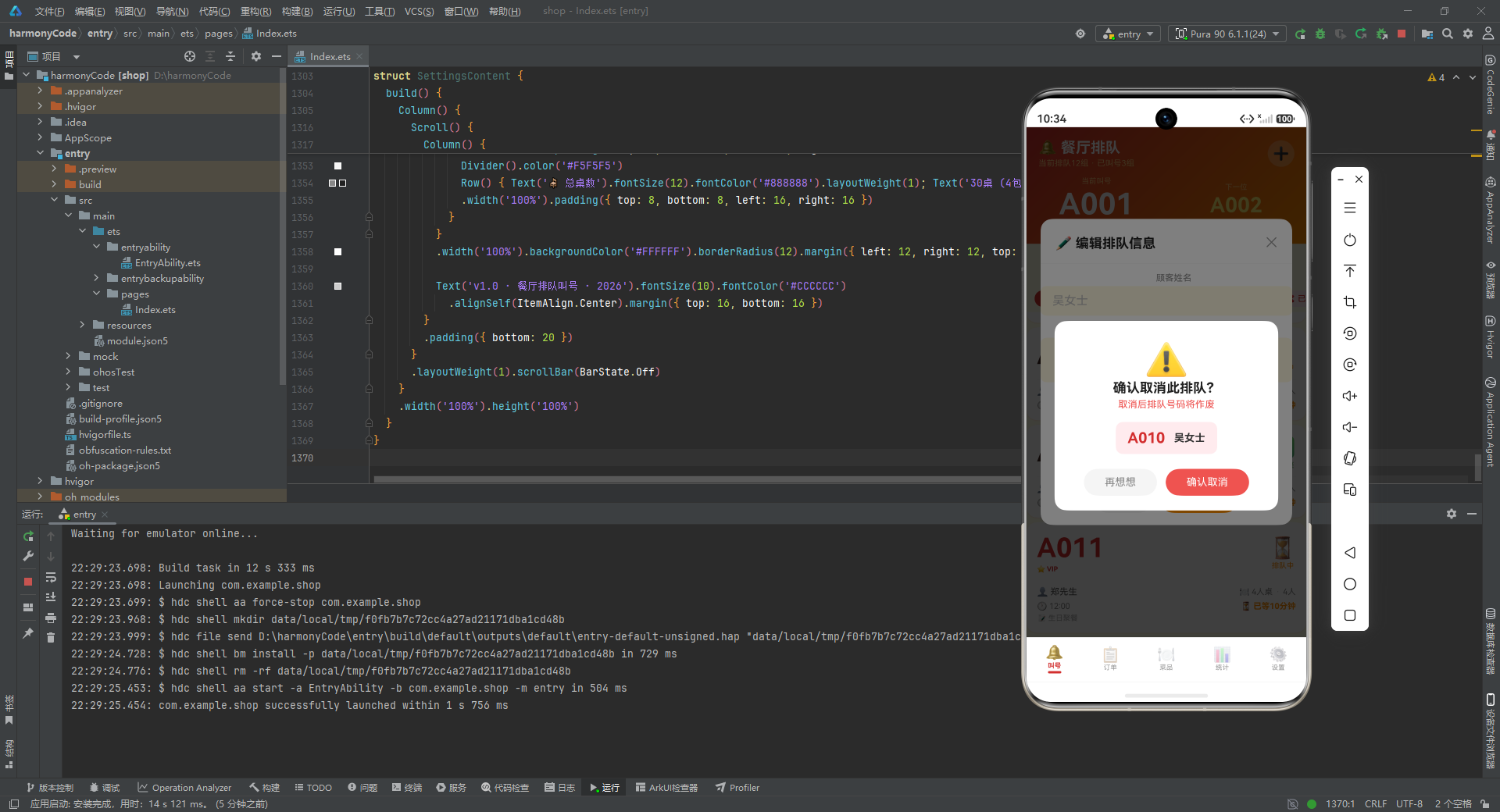
@Builder deleteConfirmModal() {
Column() {
this.modalOverlay(() => { this.showDeleteConfirm = false })
Column() {
Text('⚠️').fontSize(48).margin({ top: 24 })
Text('确认取消此排队?').fontSize(18).fontWeight(FontWeight.Bold).fontColor('#212121')
Text('取消后排队号码将作废').fontSize(13).fontColor('#EF5350').margin({ top: 4 })
Row() {
Text(this.selectedEntry?.number ?? '').fontSize(20).fontWeight(FontWeight.Bold).fontColor('#D32F2F')
Text(this.selectedEntry?.customerName ?? '').fontSize(14).fontColor('#333333')
.fontWeight(FontWeight.Bold).margin({ left: 12 })
}
.backgroundColor('#FFEBEE').borderRadius(10)
.padding({ left: 16, right: 16, top: 10, bottom: 10 }).margin({ top: 16 })
Row() {
Text('再想想').fontSize(14).fontColor('#888888')
.backgroundColor('#F5F5F5').borderRadius(20)
.padding({ left: 28, right: 28, top: 10, bottom: 10 })
.onClick(() => { this.showDeleteConfirm = false })
Text('确认取消').fontSize(14).fontColor('#FFFFFF')
.backgroundColor('#EF5350').borderRadius(20)
.padding({ left: 28, right: 28, top: 10, bottom: 10 })
.margin({ left: 12 })
.onClick(() => { this.showDeleteConfirm = false })
}
.width('100%').justifyContent(FlexAlign.Center)
.padding({ left: 20, right: 20, top: 20, bottom: 20 })
}
.width('80%').backgroundColor('#FFFFFF').borderRadius(16)
.alignItems(HorizontalAlign.Center)
.position({ x: '10%', y: '38%' })
}
.width('100%').height('100%').position({ x: 0, y: 0 }).zIndex(999)
}
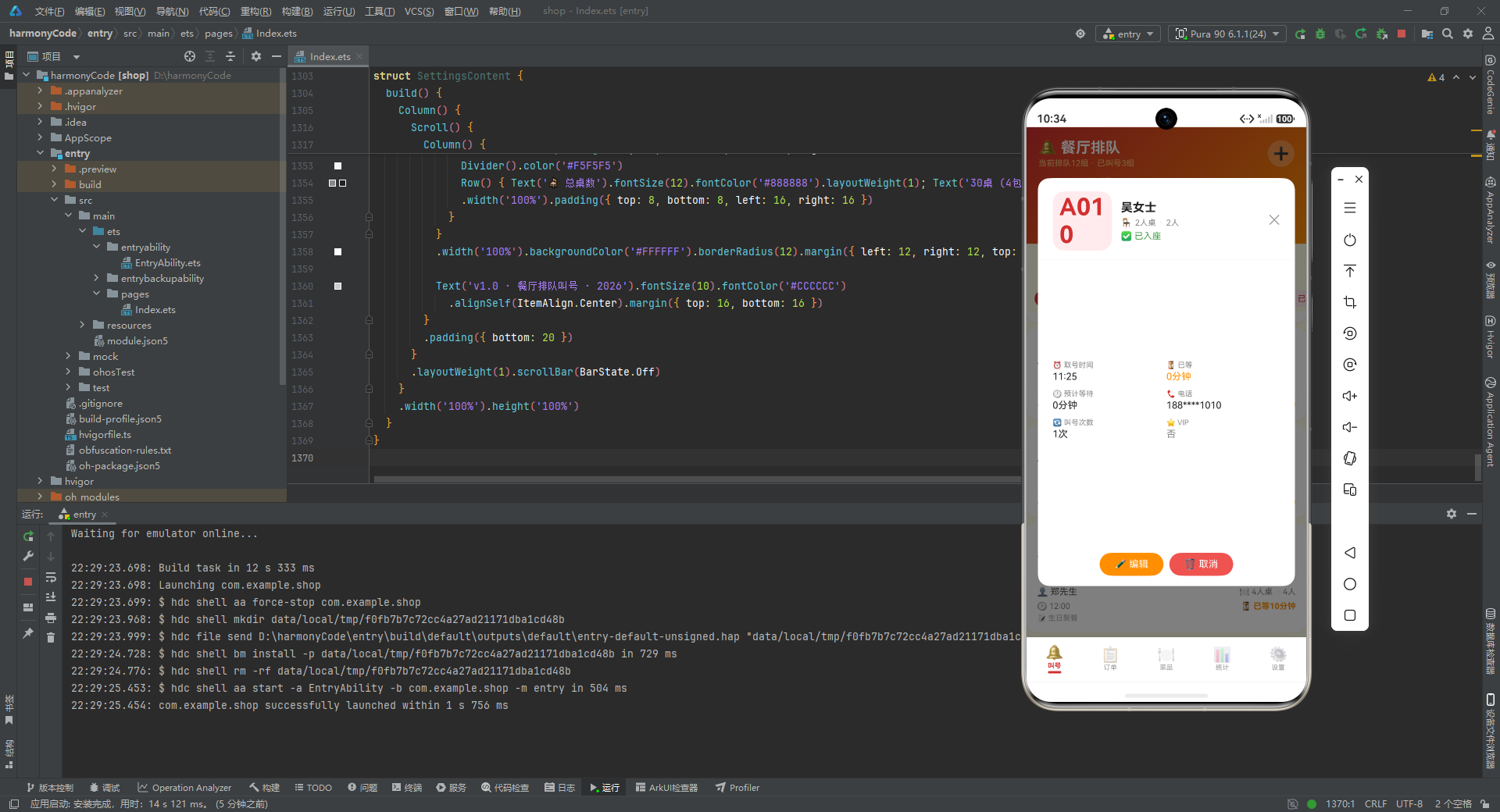
@Builder detailModal() {
Column() {
this.modalOverlay(() => { this.showDetailModal = false })
Column() {
Row() {
Column() {
Text(this.selectedEntry?.number ?? '').fontSize(32).fontWeight(FontWeight.Bold).fontColor('#D32F2F')
}.width(80).height(80).backgroundColor('#FFEBEE').borderRadius(16)
.alignItems(HorizontalAlign.Center).justifyContent(FlexAlign.Center)
Column() {
Text(this.selectedEntry?.customerName ?? '').fontSize(16).fontWeight(FontWeight.Bold).fontColor('#212121')
Row() {
Text(TABLE_TYPE_CONFIG[this.selectedEntry?.tableType ?? '2人桌']?.icon ?? '🪑').fontSize(12)
Text(this.selectedEntry?.tableType ?? '').fontSize(11).fontColor('#888888').margin({ left: 4 })
Text('·').fontSize(11).fontColor('#CCCCCC').margin({ left: 4 })
Text(this.selectedEntry?.partySize + '人').fontSize(11).fontColor('#888888').margin({ left: 4 })
}
.margin({ top: 4 })
Text(QUEUE_STATUS_CONFIG[this.selectedEntry?.status ?? '排队中']?.icon + ' ' + (QUEUE_STATUS_CONFIG[this.selectedEntry?.status ?? '排队中']?.label ?? '排队中'))
.fontSize(12)
.fontColor(QUEUE_STATUS_CONFIG[this.selectedEntry?.status ?? '排队中']?.color ?? '#FF8F00')
.margin({ top: 4 })
}.layoutWeight(1).alignItems(HorizontalAlign.Start).padding({ left: 12 })
Text('✕').fontSize(18).fontColor('#999999')
.onClick(() => { this.showDetailModal = false })
}
.width('100%').padding({ left: 20, right: 20, top: 18 })
Divider().color('#F0F0F0').margin({ top: 12 })
Scroll() {
Column() {
Row() {
Column() {
Text('⏰ 取号时间').fontSize(10).fontColor('#888888')
Text(this.selectedEntry?.createdAt ?? '').fontSize(13).fontColor('#212121').margin({ top: 2 })
}.layoutWeight(1).alignItems(HorizontalAlign.Start)
Column() {
Text('⏳ 已等').fontSize(10).fontColor('#888888')
Text((this.selectedEntry?.waitTime ?? 0) + '分钟').fontSize(13).fontColor('#FF8F00').margin({ top: 2 })
}.layoutWeight(1).alignItems(HorizontalAlign.Start)
}
.width('100%').margin({ top: 12 })
Row() {
Column() {
Text('🕐 预计等待').fontSize(10).fontColor('#888888')
Text((this.selectedEntry?.estimatedTime ?? 0) + '分钟').fontSize(13).fontColor('#212121').margin({ top: 2 })
}.layoutWeight(1).alignItems(HorizontalAlign.Start)
Column() {
Text('📞 电话').fontSize(10).fontColor('#888888')
Text(this.selectedEntry?.phone ?? '').fontSize(13).fontColor('#212121').margin({ top: 2 })
}.layoutWeight(1).alignItems(HorizontalAlign.Start)
}
.width('100%').margin({ top: 10 })
Row() {
Column() {
Text('🔄 叫号次数').fontSize(10).fontColor('#888888')
Text((this.selectedEntry?.calledCount ?? 0) + '次').fontSize(13).fontColor('#212121').margin({ top: 2 })
}.layoutWeight(1).alignItems(HorizontalAlign.Start)
Column() {
Text('⭐ VIP').fontSize(10).fontColor('#888888')
Text(this.selectedEntry?.vip ? '是' : '否').fontSize(13)
.fontColor(this.selectedEntry?.vip ? '#D32F2F' : '#888888').margin({ top: 2 })
}.layoutWeight(1).alignItems(HorizontalAlign.Start)
}
.width('100%').margin({ top: 10 })
if (this.selectedEntry?.notes !== '') {
Column() {
Text('📝 备注').fontSize(10).fontColor('#888888')
Text(this.selectedEntry?.notes ?? '').fontSize(13).fontColor('#555555').margin({ top: 4 })
.width('100%')
}
.width('100%').margin({ top: 10 }).alignItems(HorizontalAlign.Start)
}
}
.padding({ left: 20, right: 20, bottom: 16 })
}
.layoutWeight(1)
Row() {
Text('✏️ 编辑').fontSize(13).fontColor('#FFFFFF')
.backgroundColor('#FF8F00').borderRadius(16)
.padding({ left: 20, right: 20, top: 8, bottom: 8 })
.onClick(() => { this.showEditModal = true })
Text('🗑️ 取消').fontSize(13).fontColor('#FFFFFF')
.backgroundColor('#EF5350').borderRadius(16)
.padding({ left: 20, right: 20, top: 8, bottom: 8 })
.margin({ left: 8 })
.onClick(() => { this.showDeleteConfirm = true })
}
.width('100%').justifyContent(FlexAlign.Center)
.padding({ left: 20, right: 20, top: 12, bottom: 14 })
}
.width('92%').height('80%').backgroundColor('#FFFFFF').borderRadius(16)
.alignItems(HorizontalAlign.Center)
.position({ x: '4%', y: '10%' })
}
.width('100%').height('100%').position({ x: 0, y: 0 }).zIndex(999)
}
// ========== 大号数字卡片 Builder ==========
@Builder bigNumberCard(q: QueueEntry) {
Column() {
// 大号排队号码
Row() {
Column() {
Text(q.number).fontSize(36).fontWeight(FontWeight.Bold)
.fontColor(q.vip ? '#D32F2F' : '#3E2723')
if (q.vip) {
Text('⭐ VIP').fontSize(9).fontColor('#D32F2F').fontWeight(FontWeight.Bold).margin({ top: 2 })
}
}.layoutWeight(1).alignItems(HorizontalAlign.Start)
Column() {
Text(QUEUE_STATUS_CONFIG[q.status]?.icon ?? '⏳').fontSize(28)
Text(QUEUE_STATUS_CONFIG[q.status]?.label ?? '排队中').fontSize(10)
.fontColor(QUEUE_STATUS_CONFIG[q.status]?.color ?? '#FF8F00').margin({ top: 2 })
}.alignItems(HorizontalAlign.Center)
}
.width('100%')
Divider().color('#F5F5F5').margin({ top: 10, bottom: 8 })
Row() {
Text('👤 ' + q.customerName).fontSize(12).fontColor('#555555')
Row().layoutWeight(1)
Text(TABLE_TYPE_CONFIG[q.tableType]?.icon + ' ' + q.tableType).fontSize(11).fontColor('#888888')
Text('·').fontSize(11).fontColor('#CCCCCC').margin({ left: 4 })
Text(q.partySize + '人').fontSize(11).fontColor('#888888').margin({ left: 4 })
}
.width('100%')
Row() {
Text('🕐 ' + q.createdAt).fontSize(11).fontColor('#888888')
Row().layoutWeight(1)
Text('⏳ 已等' + q.waitTime + '分钟').fontSize(11)
.fontColor(q.waitTime > 15 ? '#EF5350' : '#FF8F00')
.fontWeight(FontWeight.Bold)
}
.width('100%').margin({ top: 6 })
if (q.notes !== '') {
Text('📝 ' + q.notes).fontSize(10).fontColor('#AAAAAA').maxLines(1)
.textOverflow({ overflow: TextOverflow.Ellipsis })
.width('100%').margin({ top: 4 })
}
}
.width('100%').padding(14).backgroundColor('#FFFFFF')
.borderRadius(14).margin({ left: 12, right: 12, top: 6 })
.shadow({ radius: 4, color: '#1AD32F2F', offsetY: 2 })
.onClick(() => { this.selectedEntry = q; this.showDetailModal = true })
}
build() {
Stack() {
Column() {
// 渐变头部 + 大号当前叫号
Column() {
Row() {
Column() {
Text('🔔 餐厅排队').fontSize(20).fontWeight(FontWeight.Bold).fontColor('#FFFFFF')
Text('当前排队' + getWaitingCount() + '组 · 已叫号' + getCalledCount() + '组').fontSize(11).fontColor('#FFCC80').margin({ top: 3 })
}.alignItems(HorizontalAlign.Start).layoutWeight(1)
Text('➕').fontSize(22).fontColor('#FFFFFF')
.backgroundColor('rgba(255,255,255,0.25)').width(36).height(36).borderRadius(18)
.textAlign(TextAlign.Center)
.onClick(() => { this.showAddModal = true })
}
.width('100%').padding({ left: 16, right: 16, top: 16, bottom: 12 })
// 大号当前叫号显示
Row() {
Column() {
Text('当前叫号').fontSize(10).fontColor('#FFCC80')
Text('A001').fontSize(40).fontWeight(FontWeight.Bold).fontColor('#FFFFFF').margin({ top: 2 })
Text('王先生 · 2人桌').fontSize(12).fontColor('#FFCC80').margin({ top: 2 })
}.layoutWeight(1).alignItems(HorizontalAlign.Center)
Column() {
Text('下一位').fontSize(10).fontColor('#FFCC80')
Text('A002').fontSize(28).fontWeight(FontWeight.Bold).fontColor('#FFF176').margin({ top: 2 })
Text('预计等待20分钟').fontSize(10).fontColor('#FFCC80').margin({ top: 2 })
}.layoutWeight(1).alignItems(HorizontalAlign.Center)
}
.width('100%').padding({ bottom: 14 })
}
.width('100%')
.linearGradient({ angle: 135, colors: [['#D32F2F', 0], ['#FF8F00', 1]] })
// 桌型状态横滑
Scroll() {
Row() {
ForEach(TABLE_TYPES, (t: string) => {
Column() {
Text(TABLE_TYPE_CONFIG[t]?.icon ?? '🪑').fontSize(20)
Text(TABLE_TYPE_CONFIG[t]?.label ?? '').fontSize(10).fontColor('#555555').margin({ top: 2 })
Text(TABLE_TYPE_CONFIG[t]?.count + '桌').fontSize(9).fontColor('#888888')
}
.backgroundColor('#FFFFFF').borderRadius(10)
.padding({ left: 14, right: 14, top: 8, bottom: 8 })
.margin({ left: 4, right: 4 })
.shadow({ radius: 2, color: '#1A000000', offsetY: 1 })
})
}
.padding({ left: 8, right: 8 })
}
.scrollable(ScrollDirection.Horizontal).scrollBar(BarState.Off).height(56)
// 状态筛选
Scroll() {
Row() {
ForEach(STATUS_FILTERS, (s: string) => {
if (this.selectedFilter === s) {
Text(QUEUE_STATUS_CONFIG[s]?.icon + ' ' + s ?? s).fontSize(11).fontColor('#FFFFFF').backgroundColor('#D32F2F')
.padding({ left: 10, right: 10, top: 5, bottom: 5 }).borderRadius(14)
.margin({ left: 3, right: 3 })
} else {
Text(QUEUE_STATUS_CONFIG[s]?.icon + ' ' + s ?? s).fontSize(11).fontColor('#D32F2F').backgroundColor('#FFEBEE')
.padding({ left: 10, right: 10, top: 5, bottom: 5 }).borderRadius(14)
.margin({ left: 3, right: 3 })
.onClick(() => { this.selectedFilter = s })
}
})
}
.padding({ left: 8, right: 8 })
}
.scrollable(ScrollDirection.Horizontal).scrollBar(BarState.Off).height(36)
// 排队列表
Scroll() {
Column() {
this.bigNumberCard(mockQueue[0])
this.bigNumberCard(mockQueue[1])
this.bigNumberCard(mockQueue[2])
this.bigNumberCard(mockQueue[3])
this.bigNumberCard(mockQueue[4])
this.bigNumberCard(mockQueue[5])
this.bigNumberCard(mockQueue[6])
this.bigNumberCard(mockQueue[7])
this.bigNumberCard(mockQueue[8])
this.bigNumberCard(mockQueue[9])
this.bigNumberCard(mockQueue[10])
this.bigNumberCard(mockQueue[11])
this.bigNumberCard(mockQueue[12])
this.bigNumberCard(mockQueue[13])
this.bigNumberCard(mockQueue[14])
this.bigNumberCard(mockQueue[15])
this.bigNumberCard(mockQueue[16])
this.bigNumberCard(mockQueue[17])
this.bigNumberCard(mockQueue[18])
this.bigNumberCard(mockQueue[19])
this.bigNumberCard(mockQueue[20])
this.bigNumberCard(mockQueue[21])
this.bigNumberCard(mockQueue[22])
this.bigNumberCard(mockQueue[23])
}
.padding({ bottom: 20 })
}
.layoutWeight(1).scrollBar(BarState.Off)
}
.width('100%').height('100%')
if (this.showAddModal) { this.addQueueModal() }
if (this.showEditModal) { this.editQueueModal() }
if (this.showDeleteConfirm) { this.deleteConfirmModal() }
if (this.showDetailModal) { this.detailModal() }
}
}
}
// ==================== 今日订单页 ====================
@Component
struct OrderListContent {
@State selectedStatus: string = '全部'
@State showDetailModal: boolean = false
@State selectedOrder: TodayOrder | null = null
@Builder modalOverlay(onClose: () => void) {
Column()
.width('100%').height('100%')
.backgroundColor('rgba(0,0,0,0.5)')
.onClick(onClose)
}
@Builder detailModal() {
Column() {
this.modalOverlay(() => { this.showDetailModal = false })
Column() {
Row() {
Text('📋 订单详情').fontSize(18).fontWeight(FontWeight.Bold).fontColor('#212121')
Row().layoutWeight(1)
Text('✕').fontSize(18).fontColor('#999999')
.onClick(() => { this.showDetailModal = false })
}
.width('100%').padding({ left: 20, right: 20, top: 18, bottom: 12 })
Divider().color('#F0F0F0')
Column() {
Text(this.selectedOrder?.orderNumber ?? '').fontSize(14).fontWeight(FontWeight.Bold).fontColor('#D32F2F')
Row() {
Text('桌号: ' + (this.selectedOrder?.tableNumber ?? '')).fontSize(12).fontColor('#888888')
Text('·').fontSize(12).fontColor('#CCCCCC').margin({ left: 6 })
Text(this.selectedOrder?.customerName ?? '').fontSize(12).fontColor('#555555').margin({ left: 6 })
Text('·').fontSize(12).fontColor('#CCCCCC').margin({ left: 6 })
Text(this.selectedOrder?.guestCount + '人').fontSize(12).fontColor('#555555').margin({ left: 6 })
}
.margin({ top: 4 })
Divider().color('#F5F5F5').margin({ top: 12, bottom: 8 })
Text('菜品明细').fontSize(13).fontWeight(FontWeight.Bold).fontColor('#212121')
Text(this.selectedOrder?.items ?? '').fontSize(12).fontColor('#555555').margin({ top: 6 })
Divider().color('#F5F5F5').margin({ top: 12, bottom: 8 })
Row() {
Text('订单状态').fontSize(12).fontColor('#888888').layoutWeight(1)
Text(ORDER_STATUS_CONFIG[this.selectedOrder?.status ?? '待上菜']?.label ?? '待上菜').fontSize(12)
.fontColor(ORDER_STATUS_CONFIG[this.selectedOrder?.status ?? '待上菜']?.color ?? '#FF8F00')
}
.width('100%')
Row() {
Text('下单时间').fontSize(12).fontColor('#888888').layoutWeight(1)
Text(this.selectedOrder?.createdAt ?? '').fontSize(12).fontColor('#212121')
}
.width('100%').margin({ top: 8 })
Row() {
Text('用餐时长').fontSize(12).fontColor('#888888').layoutWeight(1)
Text((this.selectedOrder?.duration ?? 0) + '分钟').fontSize(12).fontColor('#212121')
}
.width('100%').margin({ top: 8 })
Row() {
Text('支付方式').fontSize(12).fontColor('#888888').layoutWeight(1)
Text(this.selectedOrder?.paymentMethod ?? '').fontSize(12).fontColor('#212121')
}
.width('100%').margin({ top: 8 })
Divider().color('#F5F5F5').margin({ top: 12, bottom: 8 })
Row() {
Text('合计').fontSize(14).fontWeight(FontWeight.Bold).fontColor('#212121')
Row().layoutWeight(1)
Text('¥' + (this.selectedOrder?.totalAmount ?? 0)).fontSize(22).fontWeight(FontWeight.Bold).fontColor('#D32F2F')
}
.width('100%')
}
.padding({ left: 20, right: 20, top: 4, bottom: 20 })
}
.width('85%').backgroundColor('#FFFFFF').borderRadius(16)
.alignItems(HorizontalAlign.Center)
.position({ x: '7.5%', y: '20%' })
}
.width('100%').height('100%').position({ x: 0, y: 0 }).zIndex(999)
}
@Builder orderCard(o: TodayOrder) {
Column() {
Row() {
Column() {
Text(o.orderNumber).fontSize(12).fontWeight(FontWeight.Bold).fontColor('#555555')
Text(o.tableNumber + ' · ' + o.customerName + ' · ' + o.guestCount + '人').fontSize(10).fontColor('#888888').margin({ top: 2 })
}.layoutWeight(1).alignItems(HorizontalAlign.Start)
Text(ORDER_STATUS_CONFIG[o.status]?.label ?? '待上菜').fontSize(10)
.fontColor(ORDER_STATUS_CONFIG[o.status]?.color ?? '#FF8F00')
.backgroundColor(ORDER_STATUS_CONFIG[o.status]?.bg ?? '#FFF8E1')
.padding({ left: 8, right: 8, top: 3, bottom: 3 }).borderRadius(8)
}
.width('100%')
Text(o.items).fontSize(11).fontColor('#666666').maxLines(2)
.textOverflow({ overflow: TextOverflow.Ellipsis })
.width('100%').margin({ top: 6 })
Row() {
Text('🕐 ' + o.createdAt).fontSize(10).fontColor('#AAAAAA')
Text('· ' + o.duration + 'min').fontSize(10).fontColor('#AAAAAA').margin({ left: 4 })
Row().layoutWeight(1)
Text('¥' + o.totalAmount).fontSize(16).fontWeight(FontWeight.Bold).fontColor('#D32F2F')
}
.width('100%').margin({ top: 6 })
}
.width('100%').padding(12).backgroundColor('#FFFFFF')
.borderRadius(12).margin({ left: 12, right: 12, top: 6 })
.shadow({ radius: 3, color: '#1AD32F2F', offsetY: 1 })
.onClick(() => { this.selectedOrder = o; this.showDetailModal = true })
}
build() {
Stack() {
Column() {
Column() {
Text('📋 今日订单').fontSize(20).fontWeight(FontWeight.Bold).fontColor('#FFFFFF')
Text('今日' + getTodayOrderCount() + '单 · 营收¥' + getTodayRevenue()).fontSize(11).fontColor('#FFCC80').margin({ top: 3 })
}
.width('100%').padding({ top: 16, bottom: 16 })
.linearGradient({ angle: 135, colors: [['#D32F2F', 0], ['#FF8F00', 1]] })
.alignItems(HorizontalAlign.Center)
Scroll() {
Row() {
ForEach(['全部', '待上菜', '用餐中', '已结账', '已取消'], (s: string) => {
if (this.selectedStatus === s) {
Text(s).fontSize(11).fontColor('#FFFFFF').backgroundColor('#D32F2F')
.padding({ left: 10, right: 10, top: 5, bottom: 5 }).borderRadius(14)
.margin({ left: 3, right: 3 })
} else {
Text(s).fontSize(11).fontColor('#D32F2F').backgroundColor('#FFEBEE')
.padding({ left: 10, right: 10, top: 5, bottom: 5 }).borderRadius(14)
.margin({ left: 3, right: 3 })
.onClick(() => { this.selectedStatus = s })
}
})
}
.padding({ left: 8, right: 8 })
}
.scrollable(ScrollDirection.Horizontal).scrollBar(BarState.Off).height(38)
Scroll() {
Column() {
this.orderCard(mockOrders[0])
this.orderCard(mockOrders[1])
this.orderCard(mockOrders[2])
this.orderCard(mockOrders[3])
this.orderCard(mockOrders[4])
this.orderCard(mockOrders[5])
this.orderCard(mockOrders[6])
this.orderCard(mockOrders[7])
this.orderCard(mockOrders[8])
this.orderCard(mockOrders[9])
this.orderCard(mockOrders[10])
this.orderCard(mockOrders[11])
this.orderCard(mockOrders[12])
this.orderCard(mockOrders[13])
this.orderCard(mockOrders[14])
this.orderCard(mockOrders[15])
}
.padding({ bottom: 20 })
}
.layoutWeight(1).scrollBar(BarState.Off)
}
.width('100%').height('100%')
if (this.showDetailModal) { this.detailModal() }
}
}
}
// ==================== 菜品管理页 ====================
@Component
struct MenuManageContent {
@State selectedCategory: string = '全部'
@State showDetailModal: boolean = false
@State showDeleteConfirm: boolean = false
@State selectedDish: MenuItem | null = null
@Builder modalOverlay(onClose: () => void) {
Column()
.width('100%').height('100%')
.backgroundColor('rgba(0,0,0,0.5)')
.onClick(onClose)
}
@Builder detailModal() {
Column() {
this.modalOverlay(() => { this.showDetailModal = false })
Column() {
Row() {
Text(this.selectedDish?.icon ?? '🍽️').fontSize(48)
Row().layoutWeight(1)
Text('✕').fontSize(18).fontColor('#999999')
.onClick(() => { this.showDetailModal = false })
}
.width('100%').padding({ left: 20, right: 20, top: 20 })
Text(this.selectedDish?.name ?? '').fontSize(18).fontWeight(FontWeight.Bold).fontColor('#212121').margin({ top: 8 })
Text(this.selectedDish?.description ?? '').fontSize(12).fontColor('#888888').margin({ top: 4 })
Divider().color('#F0F0F0').margin({ top: 16, left: 20, right: 20 })
Row() {
Column() {
Text('💰 售价').fontSize(10).fontColor('#888888')
Text('¥' + (this.selectedDish?.price ?? 0)).fontSize(20).fontWeight(FontWeight.Bold).fontColor('#D32F2F').margin({ top: 2 })
}.layoutWeight(1).alignItems(HorizontalAlign.Center)
Column() {
Text('📦 原价').fontSize(10).fontColor('#888888')
Text('¥' + (this.selectedDish?.originalPrice ?? 0)).fontSize(14).fontColor('#CCCCCC').margin({ top: 2 })
.decoration({ type: TextDecorationType.LineThrough })
}.layoutWeight(1).alignItems(HorizontalAlign.Center)
Column() {
Text('🔥 销量').fontSize(10).fontColor('#888888')
Text((this.selectedDish?.sold ?? 0) + '份').fontSize(16).fontWeight(FontWeight.Bold).fontColor('#FF8F00').margin({ top: 2 })
}.layoutWeight(1).alignItems(HorizontalAlign.Center)
}
.width('100%').margin({ top: 16 })
Divider().color('#F0F0F0').margin({ top: 16, left: 20, right: 20 })
Column() {
Text('详细信息').fontSize(13).fontWeight(FontWeight.Bold).fontColor('#212121')
.width('100%').padding({ left: 20, top: 16, bottom: 8 })
Row() { Text('分类').fontSize(12).fontColor('#888888').layoutWeight(1); Text(this.selectedDish?.category ?? '').fontSize(12).fontColor('#212121') }
.width('100%').padding({ left: 20, right: 20, top: 4 })
Row() { Text('评分').fontSize(12).fontColor('#888888').layoutWeight(1); Text('⭐ ' + (this.selectedDish?.rating ?? 0)).fontSize(12).fontColor('#FF8F00') }
.width('100%').padding({ left: 20, right: 20, top: 8 })
Row() { Text('辣度').fontSize(12).fontColor('#888888').layoutWeight(1); Text(this.selectedDish?.spicy === 0 ? '不辣' : '🌶️'.repeat(this.selectedDish?.spicy ?? 0)).fontSize(12).fontColor('#D32F2F') }
.width('100%').padding({ left: 20, right: 20, top: 8 })
Row() { Text('状态').fontSize(12).fontColor('#888888').layoutWeight(1); Text(this.selectedDish?.available ? '✅ 在售' : '❌ 停售').fontSize(12).fontColor(this.selectedDish?.available ? '#43A047' : '#EF5350') }
.width('100%').padding({ left: 20, right: 20, top: 8 })
Row() { Text('招牌').fontSize(12).fontColor('#888888').layoutWeight(1); Text(this.selectedDish?.isSpecial ? '👑 招牌菜' : '普通菜品').fontSize(12).fontColor(this.selectedDish?.isSpecial ? '#D32F2F' : '#888888') }
.width('100%').padding({ left: 20, right: 20, top: 8 })
}
.width('100%')
if (this.selectedDish != null && this.selectedDish.tags.length > 0) {
Divider().color('#F0F0F0').margin({ top: 16, left: 20, right: 20 })
Text('标签').fontSize(13).fontWeight(FontWeight.Bold).fontColor('#212121')
.width('100%').padding({ left: 20, top: 16, bottom: 8 })
Row() {
ForEach(this.selectedDish.tags, (tag: string) => {
Text('#' + tag).fontSize(11).fontColor('#D32F2F')
.backgroundColor('#FFEBEE').padding({ left: 8, right: 8, top: 3, bottom: 3 })
.borderRadius(10).margin({ left: 3, right: 3 })
})
}
.width('100%').padding({ left: 20, bottom: 16 })
}
Row() {
Text('🗑️ 下架菜品').fontSize(13).fontColor('#FFFFFF')
.backgroundColor('#EF5350').borderRadius(16)
.padding({ left: 20, right: 20, top: 8, bottom: 8 })
.onClick(() => { this.showDeleteConfirm = true })
}
.width('100%').justifyContent(FlexAlign.Center)
.padding({ top: 8, bottom: 20 })
}
.width('85%').constraintSize({ maxHeight: '80%' }).backgroundColor('#FFFFFF').borderRadius(16)
.alignItems(HorizontalAlign.Center)
.position({ x: '7.5%', y: '10%' })
}
.width('100%').height('100%').position({ x: 0, y: 0 }).zIndex(999)
}
@Builder deleteConfirmModal() {
Column() {
this.modalOverlay(() => { this.showDeleteConfirm = false })
Column() {
Text('⚠️').fontSize(48).margin({ top: 24 })
Text('确认下架此菜品?').fontSize(18).fontWeight(FontWeight.Bold).fontColor('#212121')
Text('下架后顾客将无法点此菜').fontSize(13).fontColor('#EF5350').margin({ top: 4 })
Row() {
Text(this.selectedDish?.icon ?? '🍽️').fontSize(20)
Text(this.selectedDish?.name ?? '').fontSize(14).fontColor('#333333')
.fontWeight(FontWeight.Bold).margin({ left: 8 })
}
.backgroundColor('#FFEBEE').borderRadius(10)
.padding({ left: 16, right: 16, top: 10, bottom: 10 }).margin({ top: 16 })
Row() {
Text('取消').fontSize(14).fontColor('#888888')
.backgroundColor('#F5F5F5').borderRadius(20)
.padding({ left: 28, right: 28, top: 10, bottom: 10 })
.onClick(() => { this.showDeleteConfirm = false })
Text('确认下架').fontSize(14).fontColor('#FFFFFF')
.backgroundColor('#EF5350').borderRadius(20)
.padding({ left: 28, right: 28, top: 10, bottom: 10 })
.margin({ left: 12 })
.onClick(() => { this.showDeleteConfirm = false; this.showDetailModal = false })
}
.width('100%').justifyContent(FlexAlign.Center)
.padding({ left: 20, right: 20, top: 20, bottom: 20 })
}
.width('80%').backgroundColor('#FFFFFF').borderRadius(16)
.alignItems(HorizontalAlign.Center)
.position({ x: '10%', y: '38%' })
}
.width('100%').height('100%').position({ x: 0, y: 0 }).zIndex(999)
}
@Builder dishCard(m: MenuItem) {
Column() {
Row() {
Column() {
Text(m.icon).fontSize(32)
}.width(56).height(56)
.backgroundColor(m.isSpecial ? '#FFF8E1' : '#FFEBEE').borderRadius(14)
.alignItems(HorizontalAlign.Center).justifyContent(FlexAlign.Center)
Column() {
Row() {
Text(m.name).fontSize(14).fontWeight(FontWeight.Bold).fontColor('#212121')
if (m.isSpecial) {
Text('👑').fontSize(10).margin({ left: 4 })
}
if (m.spicy > 0) {
Text('🌶️'.repeat(m.spicy)).fontSize(8).margin({ left: 4 })
}
}
Text(m.description).fontSize(10).fontColor('#888888').margin({ top: 2 })
Row() {
Text('⭐ ' + m.rating).fontSize(10).fontColor('#FF8F00')
Text('🔥 ' + m.sold + '份').fontSize(10).fontColor('#888888').margin({ left: 8 })
if (!m.available) {
Text('已停售').fontSize(9).fontColor('#EF5350').margin({ left: 8 })
}
}
.margin({ top: 4 })
}.layoutWeight(1).alignItems(HorizontalAlign.Start).padding({ left: 10 })
Column() {
Text('¥' + m.price).fontSize(18).fontWeight(FontWeight.Bold).fontColor('#D32F2F')
if (m.originalPrice > 0) {
Text('¥' + m.originalPrice).fontSize(11).fontColor('#CCCCCC')
.decoration({ type: TextDecorationType.LineThrough }).margin({ top: 2 })
}
}.alignItems(HorizontalAlign.End)
}
.width('100%')
Row() {
ForEach(m.tags, (tag: string) => {
Text('#' + tag).fontSize(9).fontColor('#D32F2F').backgroundColor('#FFEBEE')
.padding({ left: 6, right: 6, top: 2, bottom: 2 }).borderRadius(8)
.margin({ left: 2, right: 2 })
})
}
.width('100%').margin({ top: 8 })
}
.width('100%').padding(14).backgroundColor('#FFFFFF')
.borderRadius(12).margin({ left: 12, right: 12, top: 6 })
.shadow({ radius: 3, color: '#1AD32F2F', offsetY: 1 })
.onClick(() => { this.selectedDish = m; this.showDetailModal = true })
}
build() {
Stack() {
Column() {
Column() {
Text('🍽️ 菜品管理').fontSize(20).fontWeight(FontWeight.Bold).fontColor('#FFFFFF')
Text('18道菜品 · 5道招牌').fontSize(11).fontColor('#FFCC80').margin({ top: 3 })
}
.width('100%').padding({ top: 16, bottom: 16 })
.linearGradient({ angle: 135, colors: [['#D32F2F', 0], ['#FF8F00', 1]] })
.alignItems(HorizontalAlign.Center)
Scroll() {
Row() {
Text('全部').fontSize(11)
.fontColor(this.selectedCategory === '全部' ? '#FFFFFF' : '#D32F2F')
.backgroundColor(this.selectedCategory === '全部' ? '#D32F2F' : '#FFEBEE')
.padding({ left: 12, right: 12, top: 6, bottom: 6 }).borderRadius(14)
.margin({ left: 3, right: 3 })
.onClick(() => { this.selectedCategory = '全部' })
ForEach(MENU_CATEGORIES, (c: string) => {
if (this.selectedCategory === c) {
Text(MENU_CATEGORY_CONFIG[c]?.icon + ' ' + c)
.fontSize(11).fontColor('#FFFFFF').backgroundColor('#D32F2F')
.padding({ left: 12, right: 12, top: 6, bottom: 6 }).borderRadius(14)
.margin({ left: 3, right: 3 })
} else {
Text(MENU_CATEGORY_CONFIG[c]?.icon + ' ' + c)
.fontSize(11).fontColor('#D32F2F').backgroundColor('#FFEBEE')
.padding({ left: 12, right: 12, top: 6, bottom: 6 }).borderRadius(14)
.margin({ left: 3, right: 3 })
.onClick(() => { this.selectedCategory = c })
}
})
}
.padding({ left: 8, right: 8 })
}
.scrollable(ScrollDirection.Horizontal).scrollBar(BarState.Off).height(40)
Scroll() {
Column() {
this.dishCard(mockMenuItems[0])
this.dishCard(mockMenuItems[1])
this.dishCard(mockMenuItems[2])
this.dishCard(mockMenuItems[3])
this.dishCard(mockMenuItems[4])
this.dishCard(mockMenuItems[5])
this.dishCard(mockMenuItems[6])
this.dishCard(mockMenuItems[7])
this.dishCard(mockMenuItems[8])
this.dishCard(mockMenuItems[9])
this.dishCard(mockMenuItems[10])
this.dishCard(mockMenuItems[11])
this.dishCard(mockMenuItems[12])
this.dishCard(mockMenuItems[13])
this.dishCard(mockMenuItems[14])
this.dishCard(mockMenuItems[15])
this.dishCard(mockMenuItems[16])
this.dishCard(mockMenuItems[17])
}
.padding({ bottom: 20 })
}
.layoutWeight(1).scrollBar(BarState.Off)
}
.width('100%').height('100%')
if (this.showDetailModal) { this.detailModal() }
if (this.showDeleteConfirm) { this.deleteConfirmModal() }
}
}
}
// ==================== 营业统计页 ====================
@Component
struct StatsContent {
build() {
Column() {
Column() {
Text('📊 营业统计').fontSize(20).fontWeight(FontWeight.Bold).fontColor('#FFFFFF')
Text('实时数据分析 · 经营决策').fontSize(11).fontColor('#FFCC80').margin({ top: 3 })
}
.width('100%').padding({ top: 16, bottom: 16 })
.linearGradient({ angle: 135, colors: [['#D32F2F', 0], ['#FF8F00', 1]] })
.alignItems(HorizontalAlign.Center)
Scroll() {
Column() {
// 四格统计
Row() {
Column() {
Text('💰').fontSize(20).margin({ top: 4 })
Text('¥' + getTodayRevenue()).fontSize(20).fontWeight(FontWeight.Bold).fontColor('#D32F2F')
Text('今日营收').fontSize(10).fontColor('#888888')
}.layoutWeight(1).alignItems(HorizontalAlign.Center).padding({ top: 12, bottom: 12 })
.backgroundColor('#FFFFFF').borderRadius(10).margin({ left: 6, right: 3, top: 6 })
Column() {
Text('📋').fontSize(20).margin({ top: 4 })
Text(getTodayOrderCount().toString()).fontSize(20).fontWeight(FontWeight.Bold).fontColor('#FF8F00')
Text('今日订单').fontSize(10).fontColor('#888888')
}.layoutWeight(1).alignItems(HorizontalAlign.Center).padding({ top: 12, bottom: 12 })
.backgroundColor('#FFFFFF').borderRadius(10).margin({ left: 3, right: 6, top: 6 })
}
.width('100%').padding({ left: 6, right: 6 })
Row() {
Column() {
Text('⏳').fontSize(20).margin({ top: 4 })
Text(getAvgWaitTime() + 'min').fontSize(20).fontWeight(FontWeight.Bold).fontColor('#43A047')
Text('平均等待').fontSize(10).fontColor('#888888')
}.layoutWeight(1).alignItems(HorizontalAlign.Center).padding({ top: 12, bottom: 12 })
.backgroundColor('#FFFFFF').borderRadius(10).margin({ left: 6, right: 3, top: 6 })
Column() {
Text('🍽️').fontSize(20).margin({ top: 4 })
Text(getTableOccupancy() + '%').fontSize(20).fontWeight(FontWeight.Bold).fontColor('#7E57C2')
Text('上座率').fontSize(10).fontColor('#888888')
}.layoutWeight(1).alignItems(HorizontalAlign.Center).padding({ top: 12, bottom: 12 })
.backgroundColor('#FFFFFF').borderRadius(10).margin({ left: 3, right: 6, top: 6 })
}
.width('100%').padding({ left: 6, right: 6 })
// 时段客流柱状图
Column() {
Text('📈 时段客流分析').fontSize(13).fontWeight(FontWeight.Bold)
.width('100%').padding({ left: 16, top: 12, bottom: 8 })
Row() {
ForEach([7, 8, 9, 10, 11, 12, 13, 14, 15, 16, 17, 18, 19, 20, 21, 22], (h: number) => {
Column() {
Text(getHourlyTraffic(h).toString())
.fontSize(7).fontColor('#D32F2F').margin({ bottom: 2 })
Column()
.width(14)
.height((getHourlyTraffic(h) / getMaxHourly() * 80).toFixed(0) + 'vp')
.linearGradient({ angle: 180, colors: [['#D32F2F', 0], ['#FF8F00', 1]] })
.borderRadius({ topLeft: 3, topRight: 3 })
Text(h + 'h').fontSize(7).fontColor('#999999').margin({ top: 2 })
}
.layoutWeight(1).alignItems(HorizontalAlign.Center)
})
}
.padding({ left: 8, right: 8, bottom: 12 })
}
.width('100%').backgroundColor('#FFFFFF').borderRadius(12)
.margin({ left: 12, right: 12, top: 8 })
// 热销菜品排行
Column() {
Text('🔥 热销菜品TOP8').fontSize(13).fontWeight(FontWeight.Bold)
.width('100%').padding({ left: 16, top: 12, bottom: 8 })
Column() {
ForEach([0, 1, 2, 3, 4, 5, 6, 7], (i: number) => {
Row() {
Text((i < 3 ? '🏆' : ' ') + (i + 1).toString()).fontSize(12).fontColor('#D32F2F').fontWeight(FontWeight.Bold)
Text(getTopDishIcon(i)).fontSize(14).margin({ left: 6 })
Text(getTopDishName(i)).fontSize(12).fontColor('#555555').layoutWeight(1).margin({ left: 6 })
Text(getDishSold(i) + '份').fontSize(11).fontColor('#888888')
Text('¥' + getTopDishPrice(i)).fontSize(12).fontColor('#D32F2F').fontWeight(FontWeight.Bold).margin({ left: 8 })
}
.width('100%').padding({ top: 6, bottom: 6, left: 16, right: 16 })
Row() {
Column()
.width((getDishSold(i) / getMaxDishSold() * 100).toFixed(0) + '%')
.height(4)
.linearGradient({ angle: 0, colors: [['#D32F2F', 0], ['#FF8F00', 1]] })
.borderRadius(2)
Column().layoutWeight(1)
}
.width('100%').padding({ left: 16, right: 16 }).margin({ bottom: 4 })
})
}
}
.width('100%').backgroundColor('#FFFFFF').borderRadius(12)
.margin({ left: 12, right: 12, top: 8 })
.padding({ bottom: 8 })
}
.padding({ bottom: 20 })
}
.layoutWeight(1).scrollBar(BarState.Off)
}
.width('100%').height('100%')
}
}
// ==================== 门店设置页 ====================
@Component
struct SettingsContent {
build() {
Column() {
Column() {
Text('🏪').fontSize(48).margin({ top: 20 })
Text('老王家常菜').fontSize(18).fontWeight(FontWeight.Bold).fontColor('#FFFFFF').margin({ top: 8 })
Text('营业中 · 上海浦东新区').fontSize(11).fontColor('#FFCC80').margin({ top: 4 })
Text('⭐ 4.8 (568条评价)').fontSize(10).fontColor('#FFCC80').margin({ top: 4 })
}
.width('100%').padding({ bottom: 20 })
.linearGradient({ angle: 135, colors: [['#D32F2F', 0], ['#FF8F00', 1]] })
.alignItems(HorizontalAlign.Center)
Scroll() {
Column() {
Column() {
Text('门店管理').fontSize(13).fontWeight(FontWeight.Bold)
.width('100%').padding({ left: 16, top: 12, bottom: 8 })
Column() {
Row() { Text('🏪').fontSize(18); Text('门店信息').fontSize(13).layoutWeight(1).margin({ left: 10 }); Text('>').fontColor('#CCCCCC') }
.width('100%').padding({ top: 10, bottom: 10, left: 4 })
Divider().color('#F0F0F0')
Row() { Text('🍽️').fontSize(18); Text('桌位管理').fontSize(13).layoutWeight(1).margin({ left: 10 }); Text('>').fontColor('#CCCCCC') }
.width('100%').padding({ top: 10, bottom: 10, left: 4 })
Divider().color('#F0F0F0')
Row() { Text('👨🍳').fontSize(18); Text('员工管理').fontSize(13).layoutWeight(1).margin({ left: 10 }); Text('>').fontColor('#CCCCCC') }
.width('100%').padding({ top: 10, bottom: 10, left: 4 })
Divider().color('#F0F0F0')
Row() { Text('📢').fontSize(18); Text('叫号广播').fontSize(13).layoutWeight(1).margin({ left: 10 }); Text('>').fontColor('#CCCCCC') }
.width('100%').padding({ top: 10, bottom: 10, left: 4 })
Divider().color('#F0F0F0')
Row() { Text('🔔').fontSize(18); Text('通知设置').fontSize(13).layoutWeight(1).margin({ left: 10 }); Text('>').fontColor('#CCCCCC') }
.width('100%').padding({ top: 10, bottom: 10, left: 4 })
}
.padding({ left: 16, right: 16 })
}
.width('100%').backgroundColor('#FFFFFF').borderRadius(12).margin({ left: 12, right: 12, top: 10 })
Column() {
Text('营业信息').fontSize(13).fontWeight(FontWeight.Bold)
.width('100%').padding({ left: 16, top: 12, bottom: 8 })
Column() {
Row() { Text('📍 地址').fontSize(12).fontColor('#888888').layoutWeight(1); Text('上海浦东新区xx路128号').fontSize(12).fontColor('#212121') }
.width('100%').padding({ top: 8, bottom: 8, left: 16, right: 16 })
Divider().color('#F5F5F5')
Row() { Text('🕐 营业时间').fontSize(12).fontColor('#888888').layoutWeight(1); Text('10:00 - 22:00').fontSize(12).fontColor('#212121') }
.width('100%').padding({ top: 8, bottom: 8, left: 16, right: 16 })
Divider().color('#F5F5F5')
Row() { Text('📞 订餐电话').fontSize(12).fontColor('#888888').layoutWeight(1); Text('021-8888-9999').fontSize(12).fontColor('#212121') }
.width('100%').padding({ top: 8, bottom: 8, left: 16, right: 16 })
Divider().color('#F5F5F5')
Row() { Text('🪑 总桌数').fontSize(12).fontColor('#888888').layoutWeight(1); Text('30桌 (4包间)').fontSize(12).fontColor('#212121') }
.width('100%').padding({ top: 8, bottom: 8, left: 16, right: 16 })
}
}
.width('100%').backgroundColor('#FFFFFF').borderRadius(12).margin({ left: 12, right: 12, top: 8 })
Text('v1.0 · 餐厅排队叫号 · 2026').fontSize(10).fontColor('#CCCCCC')
.alignSelf(ItemAlign.Center).margin({ top: 16, bottom: 16 })
}
.padding({ bottom: 20 })
}
.layoutWeight(1).scrollBar(BarState.Off)
}
.width('100%').height('100%')
}
}
14.6 待优化与扩展方向
尽管当前应用功能已经相当完整,但在实际项目落地时还有几个方向可以进一步优化。首先,列表渲染目前使用了硬编码的索引调用(如 this.bigNumberCard(mockQueue[0]) 到 mockQueue[23]),应该改为 ForEach 遍历以支持动态数据。其次,统计函数目前返回固定值,需要对接后端 API 获取真实数据。第三,表单提交(取号、编辑)目前只是关闭弹窗,需要实现实际的数据持久化逻辑。第四,可以引入路由管理实现页面间的跳转传参。最后,门店管理中的设置项需要实现实际的页面跳转和功能页面。
14.7 总结
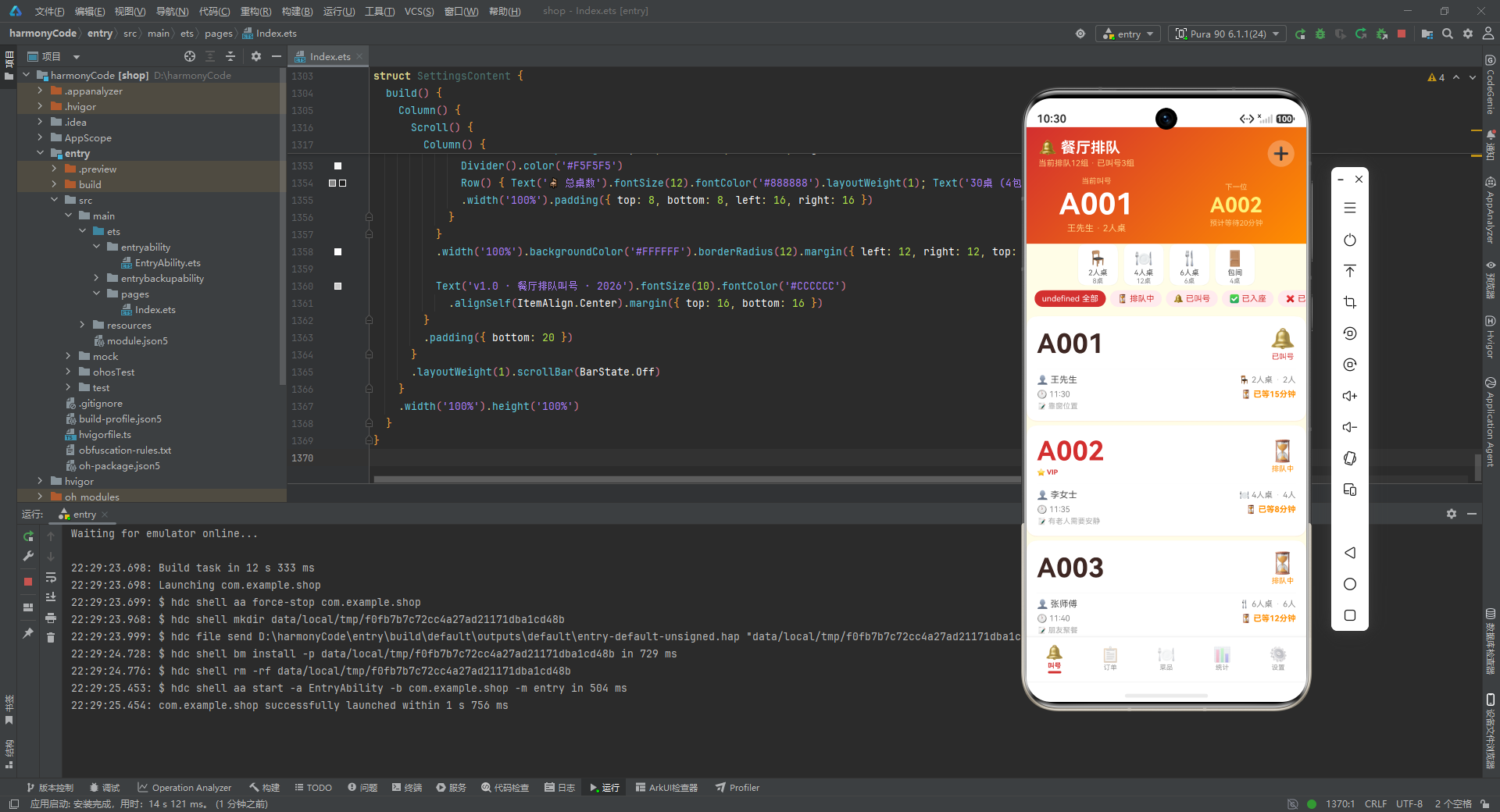
从接口类型定义到数据模型、从静态配置到模拟数据、从入口框架到五大功能页面、从列表卡片到弹窗交互、从表单录入到数据可视化,源码展现了一套完整的移动端业务应用的全貌。其核心设计理念——配置驱动渲染、统一弹窗模式、动态样式智能切换、纯样式数据可视化——都具有很强的通用性和可迁移性,不仅适用于餐饮场景,也可以作为其他行业移动端应用的参考范本。通过对这套源码的深入理解,开发者可以快速掌握 ArkUI 声明式开发的核心模式,并将这些模式应用到自己的项目中。

讨论HarmonyOS开发技术,专注于API与组件、DevEco Studio、测试、元服务和应用上架分发等。
更多推荐


 3
3 0
0- 0


 已为社区贡献146条内容

所有评论(0)