HarmonyOS应用开发实战:猫猫大作战-AccountKit 的登录流程
·
前言
AccountKit 是 HarmonyOS 的帐号服务能力,支持用户通过华为帐号登录应用。对于「猫猫大作战」这类带有排行榜和好友系统的游戏,接入华为帐号登录可以实现跨设备数据同步、好友排名等功能。用户无需注册新账号,一键授权即可完成登录,大幅降低使用门槛。
本文以「猫猫大作战」的华为帐号集成为锚点,讲解 AccountKit 的完整登录流程,包括帐号获取、令牌验证、登录状态管理、以及退出登录。
提示:本系列不讲 ArkTS 基础语法与环境搭建。本篇是阶段六第 156 篇。
一、AccountKit 基础概念
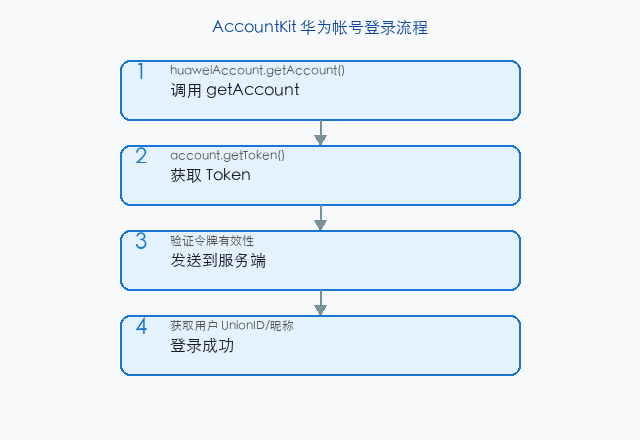
1.1 登录流程
用户点击"华为登录"按钮
         │
         ▼
huaweiAccount.getAccount()  ───►  获取华为帐号对象
         │
         ▼
account.getToken()          ───►  获取登录令牌 (Token)
         │
         ▼
服务端验证 Token            ───►  返回用户身份标识 (UnionID)
         │
         ▼
登录成功,进入游戏
1.2 模块导入
import { huaweiAccount } from '@kit.AccountKit';
import { BusinessError } from '@kit.BasicServicesKit';
提示:
@kit.AccountKit是 HarmonyOS 统一 Kit 导入方式,替代了旧的@ohos.account.huaweiAccount。
二、华为帐号登录
2.1 获取帐号和 Token
async function loginWithHuaweiID(): Promise<LoginResult> {
  try {
    // 步骤 1:获取华为帐号
    const account = await huaweiAccount.getAccount();
    console.info(`获取到华为帐号: ${account.getDisplayName()}`);

    // 步骤 2:获取登录令牌
    const token = await account.getToken();
    console.info(`获取到 Token: ${token.substring(0, 10)}...`);

    // 步骤 3:将 Token 发送到服务端验证
    const userInfo = await verifyTokenOnServer(token);

    return {
      success: true,
      unionId: userInfo.unionId,
      displayName: userInfo.displayName,
      avatar: userInfo.avatar,
    };
  } catch (err) {
    const bizErr = err as BusinessError;
    console.error(`登录失败: code=${bizErr.code}, message=${bizErr.message}`);

    if (bizErr.code === 401) {
      // 用户取消授权
      return { success: false, error: '用户取消登录' };
    }
    return { success: false, error: `登录失败: ${bizErr.message}` };
  }
}

interface LoginResult {
  success: boolean;
  unionId?: string;
  displayName?: string;
  avatar?: string;
  error?: string;
}
2.2 Token 验证(服务端)
// 服务端验证 Token 的示例(Node.js)
// 客户端将 Token 发送给服务端,服务端调用华为接口验证
async function verifyTokenOnServer(token: string): Promise<UserInfo> {
  const response = await fetch('https://api.example.com/auth/huawei', {
    method: 'POST',
    headers: {
      'Content-Type': 'application/json',
    },
    body: JSON.stringify({ token }),
  });

  if (!response.ok) {
    throw new Error(`Token 验证失败: ${response.status}`);
  }

  return await response.json();
}

interface UserInfo {
  unionId: string;      // 用户唯一标识(跨应用不变)
  displayName: string;  // 用户昵称
  avatar: string;       // 头像 URL
}
三、登录状态管理
3.1 持久化登录状态
import { preferences } from '@kit.ArkData';

class AuthManager {
  private static instance: AuthManager;
  private userInfo: UserInfo | null = null;
  private preferencesStore: preferences.Preferences | null = null;

  static getInstance(): AuthManager {
    if (!AuthManager.instance) {
      AuthManager.instance = new AuthManager();
    }
    return AuthManager.instance;
  }

  async init(context: common.UIAbilityContext): Promise<void> {
    this.preferencesStore = await preferences.getPreferences(context, 'auth_prefs');
    // 尝试恢复登录状态
    const savedUnionId = this.preferencesStore.get('unionId', '') as string;
    if (savedUnionId) {
      this.userInfo = {
        unionId: savedUnionId,
        displayName: this.preferencesStore.get('displayName', '') as string,
        avatar: this.preferencesStore.get('avatar', '') as string,
      };
    }
  }

  async login(): Promise<boolean> {
    const result = await loginWithHuaweiID();
    if (result.success && result.unionId) {
      this.userInfo = {
        unionId: result.unionId,
        displayName: result.displayName ?? '玩家',
        avatar: result.avatar ?? '',
      };
      // 持久化
      await this.preferencesStore?.put('unionId', this.userInfo.unionId);
      await this.preferencesStore?.put('displayName', this.userInfo.displayName);
      await this.preferencesStore?.put('avatar', this.userInfo.avatar);
      await this.preferencesStore?.flush();
      return true;
    }
    return false;
  }

  async logout(): Promise<void> {
    this.userInfo = null;
    await this.preferencesStore?.delete('unionId');
    await this.preferencesStore?.delete('displayName');
    await this.preferencesStore?.delete('avatar');
    await this.preferencesStore?.flush();
  }

  get isLoggedIn(): boolean {
    return this.userInfo !== null;
  }

  get displayName(): string {
    return this.userInfo?.displayName ?? '游客';
  }
}
3.2 登录状态的生命周期
@Entry
@Component
struct GameApp {
  @State isLoggedIn: boolean = false;
  @State playerName: string = '游客';
  private authManager = AuthManager.getInstance();

  aboutToAppear() {
    const ctx = getContext() as common.UIAbilityContext;
    this.authManager.init(ctx).then(() => {
      this.isLoggedIn = this.authManager.isLoggedIn;
      this.playerName = this.authManager.displayName;
    });
  }

  build() {
    Column() {
      Text(`欢迎, ${this.playerName}`)
        .fontSize(18)
        .margin({ bottom: 20 })

      if (!this.isLoggedIn) {
        Button('华为帐号登录')
          .onClick(async () => {
            const success = await this.authManager.login();
            if (success) {
              this.isLoggedIn = true;
              this.playerName = this.authManager.displayName;
              promptAction.showToast({ message: '登录成功!' });
            }
          })
      } else {
        Button('退出登录')
          .onClick(async () => {
            await this.authManager.logout();
            this.isLoggedIn = false;
            this.playerName = '游客';
          })
      }
    }
    .width('100%')
    .padding(24)
  }
}
四、登录按钮 UI
4.1 样式规范
@Builder
HuaweiLoginButton(onLogin: () => void) {
  Button({
    icon: $r('app.media.ic_huawei_logo'),
    text: '华为帐号登录'
  })
  .width('280vp')
  .height('48vp')
  .fontSize(16)
  .fontWeight(FontWeight.Medium)
  .fontColor('#FFFFFF')
  .backgroundColor('#C8102E')  // 华为品牌红
  .borderRadius(24)
  .onClick(() => onLogin())
}
4.2 错误状态处理
// 登录失败的不同场景
enum LoginErrorType {
  USER_CANCEL,        // 用户取消
  NETWORK_ERROR,      // 网络错误
  TOKEN_EXPIRED,      // Token 过期
  SERVER_ERROR,       // 服务端验证失败
  UNKNOWN,            // 未知错误
}

function handleLoginError(err: BusinessError): LoginErrorType {
  switch (err.code) {
    case 401: return LoginErrorType.USER_CANCEL;
    case 402: return LoginErrorType.TOKEN_EXPIRED;
    case 500: return LoginErrorType.SERVER_ERROR;
    default:
      if (err.message.includes('network')) {
        return LoginErrorType.NETWORK_ERROR;
      }
      return LoginErrorType.UNKNOWN;
  }
}
五、Token 的缓存与刷新
5.1 Token 缓存策略
class TokenManager {
  private token: string | null = null;
  private expiryTime: number = 0;

  async getValidToken(): Promise<string | null> {
    // 如果 Token 还有效,直接返回
    if (this.token && Date.now() < this.expiryTime) {
      return this.token;
    }

    // Token 过期或不存在,重新获取
    try {
      const account = await huaweiAccount.getAccount();
      this.token = await account.getToken();
      this.expiryTime = Date.now() + 3600 * 1000;  // 假设 1 小时有效
      return this.token;
    } catch {
      return null;
    }
  }

  clearToken(): void {
    this.token = null;
    this.expiryTime = 0;
  }
}
5.2 Token 刷新时机
| 时机 | 操作 | 说明 |
|---|---|---|
| 应用启动 | 检查 Token | 从缓存加载 |
| Token 过期 | 静默刷新 | account.getToken() 重新获取 |
| 登录状态校验失败 | 重新登录 | 引导用户重新授权 |
| 退出登录 | 清除 Token | clearToken() |
六、AccountKit API 详解
6.1 获取帐号信息
const account = await huaweiAccount.getAccount();

// 可用方法
account.getDisplayName();    // 用户昵称
account.getAvatarUri();      // 头像 URI
account.getUnionId();        // 应用内唯一 ID(同一应用内不变)
account.getOpenId();         // 开发者账号维度的用户 ID
account.getToken();          // 登录令牌(服务端验证用)
6.2 方法对比
| 方法 | 返回值 | 唯一性 | 用途 |
|---|---|---|---|
getUnionId() |
string | 同一应用内唯一 | 用户身份标识 |
getOpenId() |
string | 同一开发者帐号内唯一 | 跨应用识别 |
getToken() |
string | 临时令牌 | 服务端验证 |
getDisplayName() |
string | 可变 | UI 展示 |
提示:
UnionID是推荐的用户标识字段——同一应用内不同设备间唯一且不变,适合作为数据库中的用户主键。
七、游戏中的数据绑定
// 登录后绑定游戏数据
@Entry
@Component
struct GameMain {
  @State playerName: string = '游客';
  @State highScore: number = 0;
  @State rank: number = -1;

  async onLoginSuccess(unionId: string, name: string) {
    this.playerName = name;

    // 从服务端拉取用户数据
    const userData = await fetchUserData(unionId);
    if (userData) {
      this.highScore = userData.highScore;
      this.rank = userData.rank;
      // 更新本地最高分
      AppStorage.setOrCreate('highScore', userData.highScore);
    }
  }
}
八、常见问题
| 问题 | 原因 | 解决 |
|---|---|---|
getAccount() 抛出 401 |
用户取消 | 展示登录按钮让用户重试 |
| Token 为空 | 网络异常 | 检查网络后重试 |
| 服务端验证失败 | Token 过期 | 重新获取 Token |
| 登录后界面未更新 | 状态未同步 | 检查 @State 是否更新 |
| 退出登录后仍有数据 | 缓存未清 | 调用 clearToken() |
九、安全注意事项
// ⚠️ 安全性提示
// 1. Token 不能泄露到客户端日志中
console.info(`Token: ${token}`);  // 🚫 禁止!

// 2. Token 验证必须在服务端完成
// 🚫 错误:在客户端直接验证
const isValid = token.startsWith('valid');  // ❌

// 3. 使用 HTTPS 传输 Token
// ✅ 正确:通过 HTTPS POST 发送到服务端
fetch('https://api.example.com/auth/verify', { ... })

// 4. 本地不要存储原始 Token
// ✅ 正确:只存 UnionID 用于识别
preferences.put('unionId', account.getUnionId());
十、AccountKit vs 其他登录方式
| 登录方式 | 集成复杂 | 用户门槛 | 数据同步 | 适用场景 |
|---|---|---|---|---|
| 华为帐号 | 低 | 低(已有帐号) | ✅ | 游戏主登录 |
| 手机号 | 高(短信) | 中 | ❌ | 无华为设备 |
| 匿名 | 无 | 无 | ❌ | 快速体验 |
| 第三方登录 | 高(对接) | 中 | ✅ | 多平台 |
总结
AccountKit 通过 huaweiAccount.getAccount() + account.getToken() 实现一键登录,结合服务端 Token 验证和本地持久化构建完整的登录体系。核心要点:getAccount() 获取华为帐号、 getToken() 获取登录令牌、 服务端验证 Token 并返回 UnionID、 本地持久化 UnionID 实现自动登录、 Token 缓存与静默刷新、 退出时清除所有认证数据。
下一篇将深入 LoginWithHuaweiIDButton——华为一键登录按钮组件的封装。
如果这篇文章对你有帮助,欢迎点赞👍、收藏⭐、关注🔔,你的支持是我持续创作的动力!
相关资源:

讨论HarmonyOS开发技术,专注于API与组件、DevEco Studio、测试、元服务和应用上架分发等。
更多推荐



 7
7 0
0- 0


 已为社区贡献48条内容

所有评论(0)