HarmonyOS应用开发实战:猫猫大作战-postCardAction 的通信流程
·
前言
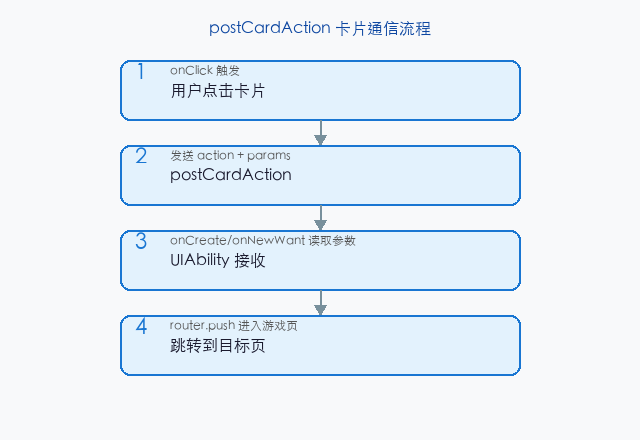
postCardAction 是服务卡片与 UIAbility 之间的通信机制。当用户在桌面上点击卡片时,卡片可以发送消息给所属的 UIAbility,实现"卡片→应用"的跳转和数据传递。
本文以「猫猫大作战」的桌面卡片点击进入游戏为锚点,讲解 postCardAction 的通信流程。
提示:本系列不讲 ArkTS 基础语法与环墋搭建。
一、卡片点击跳转
// ScoreCard.ets — 卡片布局
@Entry
@Component
struct ScoreCard {
  @LocalStorageProp('score') score: string = '0';

  build() {
    Column() {
      Text('🏆 得分').fontSize(12)
      Text(this.score).fontSize(24).fontWeight(FontWeight.Bold)
    }
    .onClick(() => {
      postCardAction(this, {
        action: 'router',
        abilityName: 'EntryAbility',
        params: { targetPage: 'game' }
      });
    })
    .width('100%').height('100%')
    .justifyContent(FlexAlign.Center)
  }
}
二、在 UIAbility 中接收
// EntryAbility.ets
export default class EntryAbility extends UIAbility {
  onCreate(want: Want) {
    const targetPage = want.parameters?.targetPage as string;
    if (targetPage === 'game') {
      AppStorage.setOrCreate('targetPage', 'pages/Index');
    }
  }
}
三、总结
postCardAction 实现卡片到应用的点击跳转和数据传递。
核心要点:
postCardAction(component, action)发送卡片事件- UIAbility 在
onCreate/onNewWant中接收参数
下一篇预告:第 169 篇将深入 scheduledUpdateTime——卡片定时刷新。
如果这篇文章对你有帮助,欢迎点赞👍、收藏⭐、关注🔔,你的支持是我持续创作的动力!
相关资源:

讨论HarmonyOS开发技术,专注于API与组件、DevEco Studio、测试、元服务和应用上架分发等。
更多推荐
 8
8 0
0- 0


 已为社区贡献83条内容

所有评论(0)