HarmonyOS 数据缓存一致性实战:内存、本地、远程数据同步
HarmonyOS 数据缓存一致性实战:内存、本地、远程数据同步
很多应用的缓存问题不是“有没有缓存”,而是“缓存之间互相打架”。页面先显示了内存数据,后台又拉到远程数据,本地数据库里还保留着上一次修改。最后表现出来就是列表闪动、用户刚改的内容被覆盖、离线进入页面一片空白。
这篇文章从一个常见场景入手:用户资料、订单列表、配置数据这类页面,需要先快速展示可用数据,再刷新远程数据,同时避免把本地未同步修改覆盖掉。示例以 ArkTS 写法组织,持久化层可以按项目替换为 Preferences、RDB 或文件缓存。
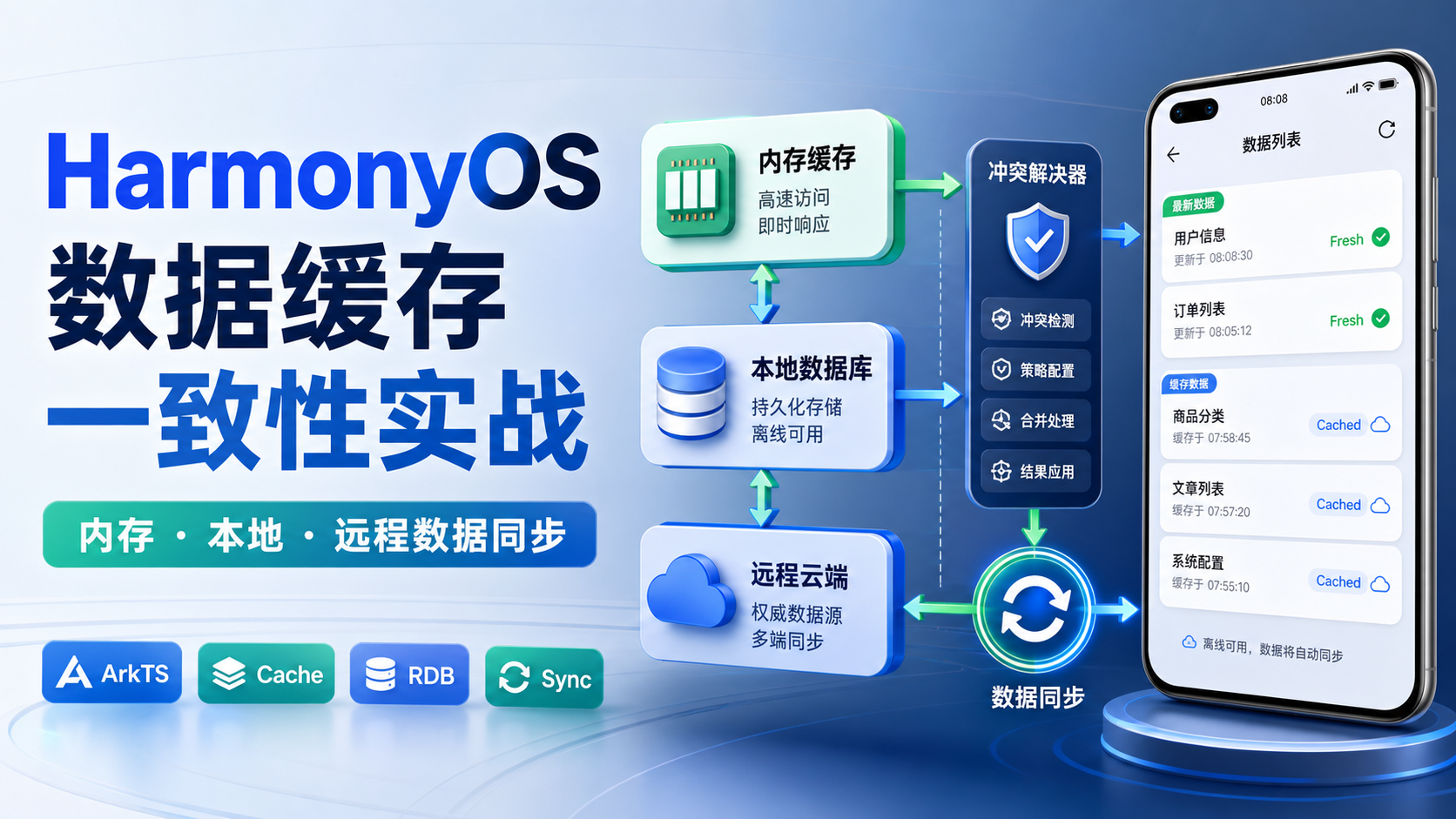
1. 缓存一致性先看数据生命周期
缓存一致性不是单纯“读缓存、写缓存”。更准确的模型是数据在三层之间流动。
| 层级 | 适合存什么 | 不能承担什么 |
|---|---|---|
| 内存缓存 | 当前会话内的高频读取数据 | 不能作为离线可靠来源 |
| 本地持久化 | 最近一次可用数据、用户草稿、同步状态 | 不能默认为远程最新 |
| 远程数据 | 服务端权威结果 | 弱网下不能阻塞页面可用性 |
如果这三层没有统一协调,页面就会出现两种极端:要么每次都等远程接口,体验慢;要么只相信缓存,数据旧而不自知。
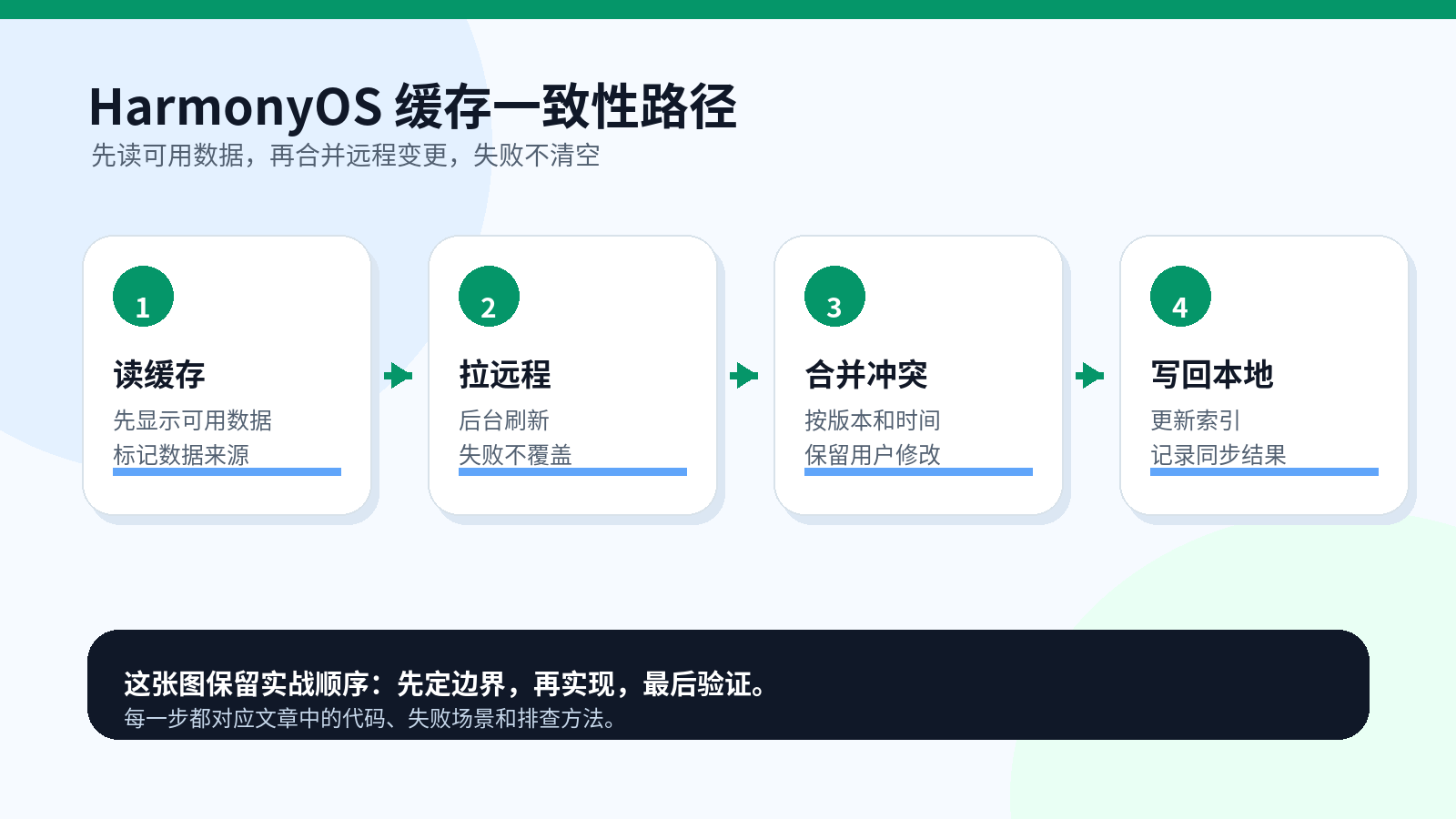
2. 资料定位和版本边界
设计缓存时,建议同时关注官方数据持久化能力和项目已有数据访问层。
| 资料 | 用途 |
|---|---|
| 华为开发者文档中心:https://developer.huawei.com/consumer/cn/doc/ | 确认数据管理、文件、应用上下文等能力入口 |
| HarmonyOS 指南:https://developer.huawei.com/consumer/cn/doc/harmonyos-guides/ | 查 Preferences、关系型数据库、文件等持久化说明 |
| 项目 Repository 层 | 确认页面是否绕过仓库直接读写缓存 |
| 接口返回字段 | 确认是否有版本号、更新时间、删除标记 |
本文示例重点展示一致性策略,不绑定某个数据库 API。落地时,把 LocalStore 的读写替换成项目实际的持久化实现即可。
3. 先给缓存数据加版本字段
没有版本字段,就很难判断远程数据和本地数据谁更新。最低限度要有更新时间、来源和同步状态。
type CacheSource = 'memory' | 'local' | 'remote';
type SyncState = 'clean' | 'dirty' | 'syncing' | 'conflict';

interface CacheEntry<TData> {
  key: string;
  data: TData;
  version: number;
  updatedAt: number;
  source: CacheSource;
  syncState: SyncState;
}

interface UserProfile {
  userId: string;
  nickname: string;
  avatarUrl: string;
  bio: string;
}
version 用于服务端和本地比较,updatedAt 用于没有版本号时兜底判断,syncState 告诉页面数据是否干净。它防止“旧缓存覆盖新数据”,也防止本地草稿被远程旧数据冲掉。
4. 内存缓存只负责快,不负责可靠
内存缓存适合减少同一页面或同一会话里的重复读取。它不应该承担离线恢复,也不应该长期保存业务状态。
class MemoryCache<TData> {
  private readonly store = new Map<string, CacheEntry<TData>>();

  get(key: string): CacheEntry<TData> | undefined {
    return this.store.get(key);
  }

  put(entry: CacheEntry<TData>): void {
    this.store.set(entry.key, {
      ...entry,
      source: 'memory',
    });
  }

  remove(key: string): void {
    this.store.delete(key);
  }
}
这里的边界很清楚:内存层只提升读取速度,不决定数据是否权威。页面打开时可以先读它,但后面仍然要经过本地和远程校验。
5. 本地存储保存“最后可用状态”
持久化层的价值是离线可用和失败可恢复。示例里用内存模拟本地存储,项目中可以替换为关系型数据库或 Preferences。
class LocalProfileStore {
  private readonly rows = new Map<string, CacheEntry<UserProfile>>();

  async read(userId: string): Promise<CacheEntry<UserProfile> | undefined> {
    return this.rows.get(`profile:${userId}`);
  }

  async save(entry: CacheEntry<UserProfile>): Promise<void> {
    this.rows.set(entry.key, {
      ...entry,
      source: 'local',
    });
  }

  async markDirty(userId: string, profile: UserProfile): Promise<void> {
    const key = `profile:${userId}`;
    const old = this.rows.get(key);
    await this.save({
      key,
      data: profile,
      version: old?.version ?? 0,
      updatedAt: Date.now(),
      source: 'local',
      syncState: 'dirty',
    });
  }
}
markDirty 很重要:用户本地修改后,不能等同于远程已同步。它告诉后续同步器,这条数据需要上传或冲突处理。
6. 远程数据源只返回结果,不直接改页面
远程层最好不要直接操作 UI,也不要直接写内存缓存。它只负责拿到服务端状态。
interface RemoteProfileResult {
  profile: UserProfile;
  version: number;
  serverTime: number;
}

class RemoteProfileSource {
  async fetchProfile(userId: string): Promise<RemoteProfileResult> {
    // 实际项目中替换为网络请求层,例如统一 HttpClient。
    return await Promise.resolve({
      profile: {
        userId,
        nickname: 'HarmonyUser',
        avatarUrl: 'https://example.com/avatar.png',
        bio: 'offline first profile',
      },
      version: 12,
      serverTime: Date.now(),
    });
  }
}
这一层的输入是 userId,输出是带版本的远程结果。它不判断是否覆盖本地,因为覆盖规则属于同步协调器。
7. 同步协调器负责合并,不让各层互相覆盖
真正决定一致性的地方,是比较本地状态和远程状态。
class ProfileSyncCoordinator {
  merge(
    local: CacheEntry<UserProfile> | undefined,
    remote: RemoteProfileResult
  ): CacheEntry<UserProfile> {
    const remoteEntry: CacheEntry<UserProfile> = {
      key: `profile:${remote.profile.userId}`,
      data: remote.profile,
      version: remote.version,
      updatedAt: remote.serverTime,
      source: 'remote',
      syncState: 'clean',
    };

    if (!local) {
      return remoteEntry;
    }

    if (local.syncState === 'dirty' && local.version >= remote.version) {
      return {
        ...local,
        syncState: 'conflict',
      };
    }

    if (remote.version > local.version) {
      return remoteEntry;
    }

    return {
      ...local,
      syncState: local.syncState === 'syncing' ? 'clean' : local.syncState,
    };
  }
}
这段代码防止两类事故:远程旧数据覆盖本地修改、本地旧缓存挡住远程新数据。实际项目可以把冲突策略做得更细,例如按字段合并、弹窗让用户选择、或者上报冲突事件。
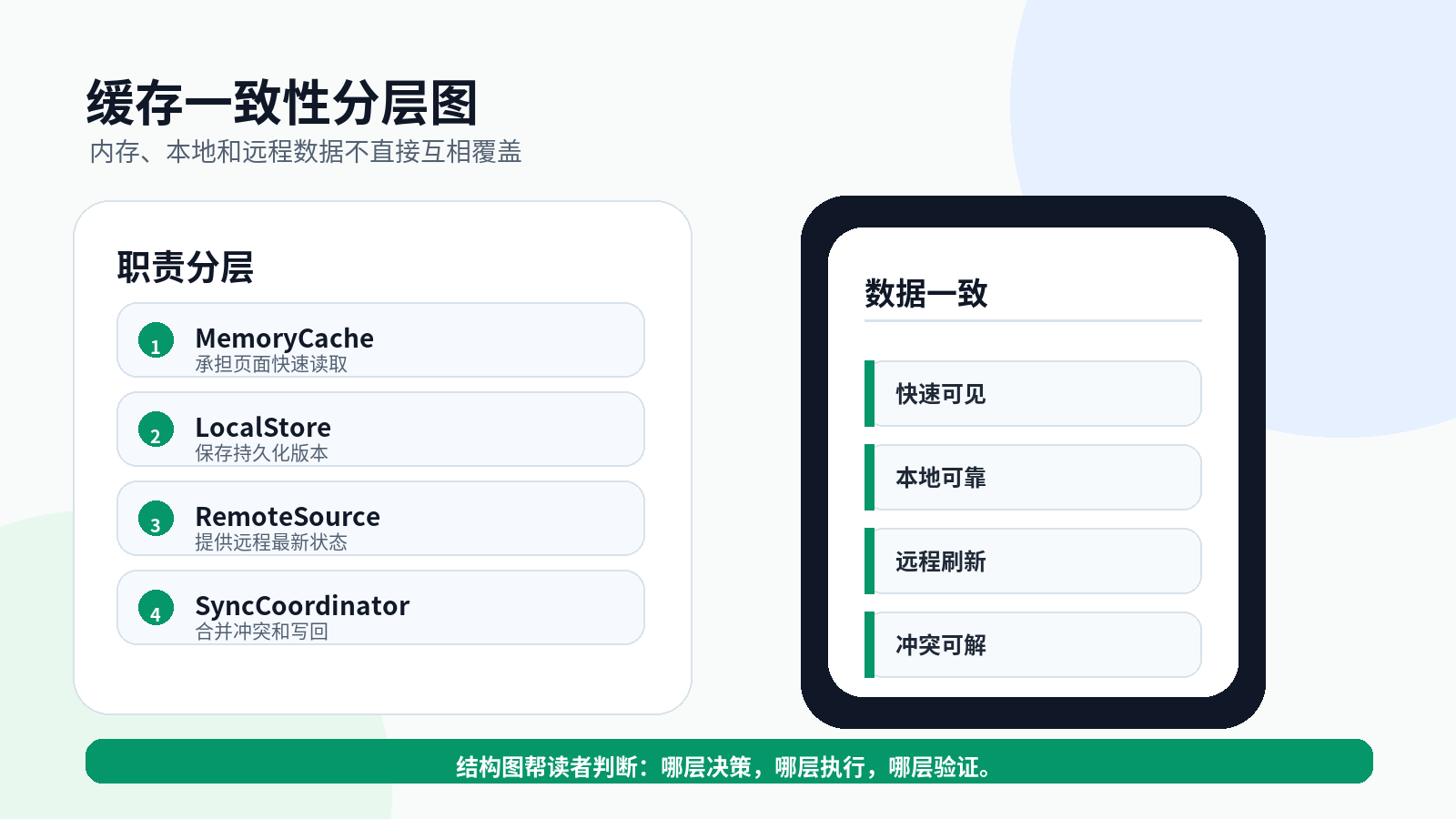
8. Repository 让页面先可用再刷新
页面不应该自己协调三层缓存。Repository 可以先返回本地可用数据,再触发远程刷新。
interface ProfileSnapshot {
  entry?: CacheEntry<UserProfile>;
  refreshing: boolean;
  message: string;
}

class ProfileRepository {
  constructor(
    private readonly memory: MemoryCache<UserProfile>,
    private readonly local: LocalProfileStore,
    private readonly remote: RemoteProfileSource,
    private readonly coordinator: ProfileSyncCoordinator
  ) {}

  async load(userId: string): Promise<ProfileSnapshot> {
    const key = `profile:${userId}`;
    const memoryEntry = this.memory.get(key);
    if (memoryEntry) {
      return { entry: memoryEntry, refreshing: true, message: '展示内存数据,后台刷新中' };
    }

    const localEntry = await this.local.read(userId);
    return {
      entry: localEntry,
      refreshing: true,
      message: localEntry ? '展示本地缓存,后台刷新中' : '正在加载远程数据',
    };
  }

  async refresh(userId: string): Promise<CacheEntry<UserProfile>> {
    const localEntry = await this.local.read(userId);
    const remoteResult = await this.remote.fetchProfile(userId);
    const merged = this.coordinator.merge(localEntry, remoteResult);
    await this.local.save(merged);
    this.memory.put(merged);
    return merged;
  }
}
load 和 refresh 分开,是为了让首屏先可用,远程刷新失败时也不清空页面。页面可以先渲染 load 的结果,再在合适时机调用 refresh。
9. 页面状态要展示数据来源
缓存页面最容易忽略“数据来源提示”。用户需要知道当前看到的是最新数据还是缓存数据。
type ProfileViewState =
  | { type: 'loading'; text: string }
  | { type: 'profile'; profile: UserProfile; badge: string; conflict: boolean }
  | { type: 'empty'; text: string }
  | { type: 'error'; text: string; keepOldData: boolean };

function toProfileView(snapshot: ProfileSnapshot): ProfileViewState {
  if (!snapshot.entry) {
    return { type: 'loading', text: snapshot.message };
  }

  const badge = snapshot.entry.source === 'remote'
    ? '最新数据'
    : snapshot.entry.source === 'local'
      ? '本地缓存'
      : '内存缓存';

  return {
    type: 'profile',
    profile: snapshot.entry.data,
    badge,
    conflict: snapshot.entry.syncState === 'conflict',
  };
}
这段代码连接 Repository 和 UI。它不处理数据库,也不处理网络,只把缓存来源转成页面可以展示的状态。这样用户看到缓存时不会误以为是远程最新状态。
10. 写入时不要立刻假装同步成功
用户编辑资料后,常见错误是先改 UI,然后直接标记成功。更稳的做法是本地先标脏,再异步同步远程。
class ProfileCommandService {
  constructor(
    private readonly local: LocalProfileStore,
    private readonly memory: MemoryCache<UserProfile>
  ) {}

  async updateNickname(userId: string, nickname: string): Promise<CacheEntry<UserProfile>> {
    const old = await this.local.read(userId);
    const profile: UserProfile = {
      userId,
      nickname,
      avatarUrl: old?.data.avatarUrl ?? '',
      bio: old?.data.bio ?? '',
    };

    await this.local.markDirty(userId, profile);
    const dirty = await this.local.read(userId);
    if (!dirty) {
      throw new Error('LOCAL_WRITE_FAILED');
    }
    this.memory.put(dirty);
    return dirty;
  }
}
这里的边界是“本地写入成功”,不是“远程同步成功”。页面可以显示“已保存到本地,等待同步”,这比直接提示成功更诚实,也更容易处理弱网。
11. 一致性验证动作
缓存逻辑必须用场景验证,不能只看代码。
| 验证场景 | 操作 | 预期结果 |
|---|---|---|
| 首次进入 | 清空本地数据后打开页面 | 进入 loading,远程成功后写入本地 |
| 二次进入 | 保留本地数据后断网打开 | 显示本地缓存,并提示缓存来源 |
| 远程更新 | 本地版本 10,远程版本 12 | 合并远程数据,状态为 clean |
| 本地未同步 | 本地 dirty,远程版本不高 | 标记 conflict,不覆盖本地修改 |
| 刷新失败 | 本地有数据,远程请求失败 | 保留旧数据,提示刷新失败 |
建议把这些场景写成 Repository 层测试。不要只在页面手动点,因为页面测试很难覆盖版本冲突。
12. 缓存问题排查表
| 现象 | 优先看哪里 | 可能修复方式 |
|---|---|---|
| 页面数据闪回旧值 | version 比较是否正确 | 远程版本高才覆盖本地 |
| 用户修改被覆盖 | 本地 dirty 是否保留 | 冲突时不要直接写远程结果 |
| 离线页面空白 | 是否先读本地持久化 | load 阶段先返回本地数据 |
| 刷新失败后列表清空 | catch 中是否清空 state | 失败时保留旧快照 |
| 多页面数据不一致 | 是否绕过 Repository | 禁止页面直接读写缓存 |
排查时先找“谁写了数据”。如果页面、网络层、本地层都能写同一个缓存,问题很难稳定复现。
13. 上线前缓存验收清单
- 每个缓存实体都有
key/version/updatedAt/source/syncState。 - 页面只通过 Repository 读取业务数据。
- 远程刷新失败不会清空已有可用数据。
- 本地 dirty 数据不会被远程旧版本覆盖。
- UI 能展示“本地缓存、内存缓存、最新数据”等来源。
- 缓存冲突有明确处理策略,不静默丢弃用户修改。
- 首次进入、二次进入、断网、远程更新、冲突合并都有验证记录。
缓存一致性专项证据包:读写冲突要能复盘
缓存问题通常不是“有没有缓存”,而是内存、本地和远程三层状态不一致。补强时要记录读取来源、数据版本、写入时间和冲突处理结果。
| 证据字段 | 作用 |
|---|---|
source | 判断读的是内存、本地还是远程 |
dataVersion | 判断是否被旧数据覆盖 |
writeAt | 判断写入顺序 |
conflictPolicy | 判断冲突如何解决 |
interface CacheConsistencyEvidence {
  key: string
  source: 'memory' | 'local' | 'remote'
  dataVersion: number
  writeAt: number
}

function isNewerCache(a: CacheConsistencyEvidence, b: CacheConsistencyEvidence): boolean {
  if (a.dataVersion !== b.dataVersion) return a.dataVersion > b.dataVersion
  return a.writeAt > b.writeAt
}
这段代码的边界是缓存冲突判断,防止旧数据在异步回写时覆盖新数据。
14. 小结:缓存一致性靠协调器,不靠多写 if
HarmonyOS 应用做缓存时,真正需要设计的是数据流向。内存缓存负责快,本地持久化负责可恢复,远程数据负责权威状态,同步协调器负责比较和合并。只要各层职责清楚,页面就能做到先可用、再刷新、失败不清空、冲突不覆盖。

讨论HarmonyOS开发技术,专注于API与组件、DevEco Studio、测试、元服务和应用上架分发等。
更多推荐



 7
7 0
0- 0



 已为社区贡献252条内容

所有评论(0)