坦克大战游戏开发实战(五)-Canvas游戏渲染技术
·
坦克大战游戏开发实战(五)-Canvas游戏渲染技术
前言
Canvas是HarmonyOS游戏开发的核心渲染技术,它提供了高性能的2D图形绘制能力。在坦克大战游戏中,所有的游戏对象(坦克、子弹、地图、特效)都需要通过Canvas进行渲染。本文将详细讲解Canvas渲染技术的应用。
Canvas渲染的重要性
- 高性能绘制:利用GPU加速实现流畅渲染
- 灵活控制:精确控制每个像素的绘制
- 动画效果:支持复杂的动画和特效
- 跨平台兼容:统一的渲染API
一、Canvas初始化
1.1 Canvas组件配置
在HarmonyOS中,Canvas组件需要在页面中进行配置:
@Entry
@Component
struct GamePage {
  private settings: RenderingContextSettings = new RenderingContextSettings(true);
  private context: CanvasRenderingContext2D = new CanvasRenderingContext2D(this.settings);

  private canvasWidth: number = 520;
  private canvasHeight: number = 520;

  build() {
    Column() {
      Canvas(this.context)
        .width(this.canvasWidth)
        .height(this.canvasHeight)
        .backgroundColor('#1a1a1a')
        .onReady(() => {
          this.onCanvasReady();
        })
    }
  }

  private onCanvasReady(): void {
    // Canvas准备就绪,开始渲染
    this.render();
  }
}
1.2 渲染上下文配置
// 启用抗锯齿
private settings: RenderingContextSettings = new RenderingContextSettings(true);

// 创建2D渲染上下文
private context: CanvasRenderingContext2D = new CanvasRenderingContext2D(this.settings);

// 设置默认样式
private setupContext(): void {
  this.context.lineCap = 'round';
  this.context.lineJoin = 'round';
}
二、渲染循环
2.1 主渲染方法
private render(): void {
  // 清空画布
  this.clearCanvas();

  // 绘制地图
  this.renderMap();

  // 绘制坦克
  this.renderTanks();

  // 绘制子弹
  this.renderBullets();

  // 绘制特效
  this.renderEffects();

  // 绘制UI
  this.renderUI();
}
2.2 清空画布
private clearCanvas(): void {
  // 方法1:清空整个画布
  this.context.clearRect(0, 0, this.canvasWidth, this.canvasHeight);

  // 方法2:填充背景色
  this.context.fillStyle = '#1a1a1a';
  this.context.fillRect(0, 0, this.canvasWidth, this.canvasHeight);
}
三、地图渲染
3.1 地图绘制
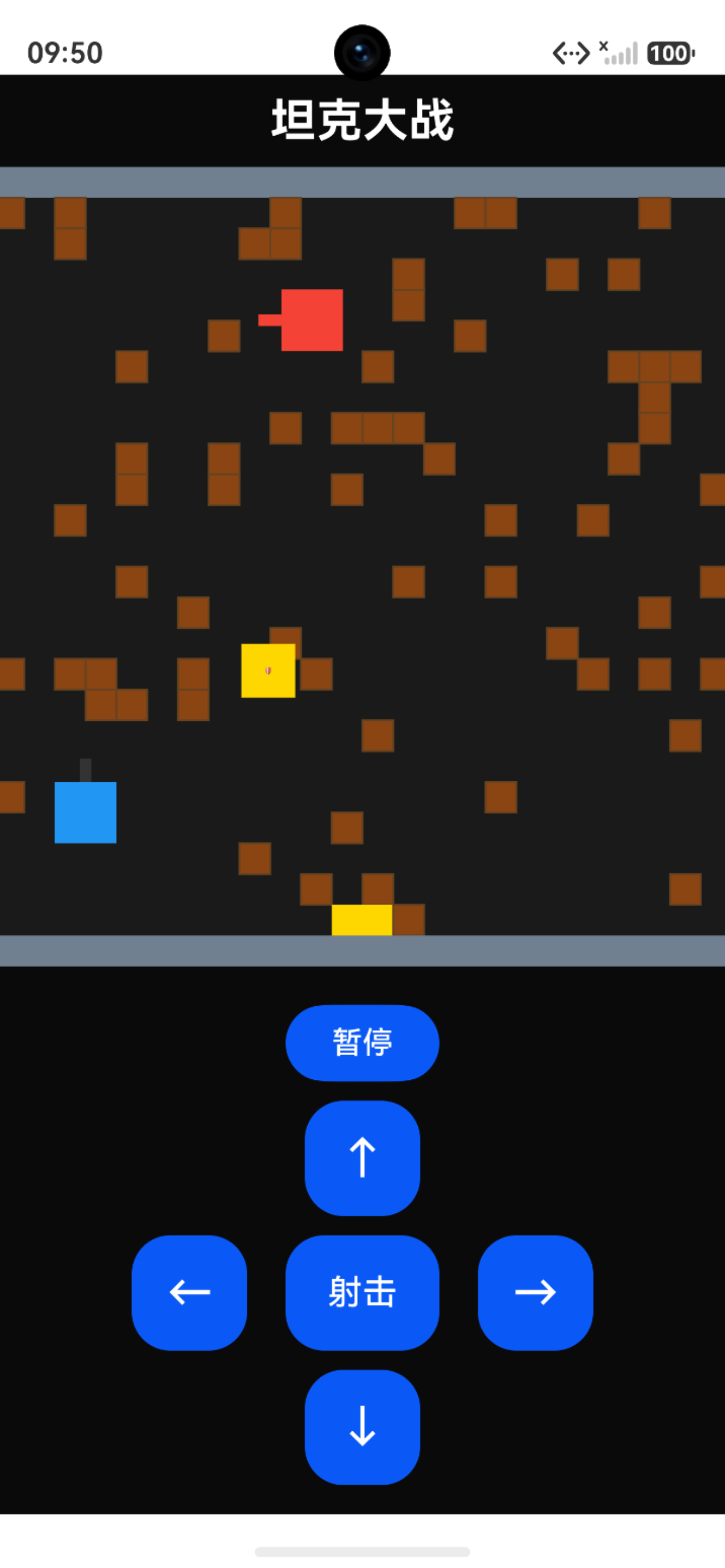
private renderMap(): void {
  if (!this.gameMap) return;

  const tileSize = this.gameMap.tileSize;

  for (let y = 0; y < this.gameMap.height; y++) {
    for (let x = 0; x < this.gameMap.width; x++) {
      const tile = this.gameMap.getTile(x, y);
      if (tile) {
        this.renderTile(tile);
      }
    }
  }
}

private renderTile(tile: MapTile): void {
  if (tile.isDestroyed) {
    this.renderEmptyTile(tile);
    return;
  }

  switch (tile.tileType) {
    case TileType.BRICK:
      this.renderBrickTile(tile);
      break;
    case TileType.STEEL:
      this.renderSteelTile(tile);
      break;
    case TileType.WATER:
      this.renderWaterTile(tile);
      break;
    case TileType.BASE:
      this.renderBaseTile(tile);
      break;
    default:
      this.renderEmptyTile(tile);
  }
}
图 1 地图展示
3.2 各类型瓦片渲染
private renderBrickTile(tile: MapTile): void {
  // 绘制砖墙主体
  this.context.fillStyle = '#8B4513';
  this.context.fillRect(tile.x, tile.y, tile.width, tile.height);

  // 绘制砖块纹理
  this.context.strokeStyle = '#654321';
  this.context.lineWidth = 1;

  for (let i = 0; i < 4; i++) {
    const y = tile.y + (i * tile.height / 4);
    this.context.beginPath();
    this.context.moveTo(tile.x, y);
    this.context.lineTo(tile.x + tile.width, y);
    this.context.stroke();
  }
}

private renderWaterTile(tile: MapTile): void {
  // 绘制河水主体
  this.context.fillStyle = '#1E90FF';
  this.context.fillRect(tile.x, tile.y, tile.width, tile.height);

  // 绘制动态水波纹
  const time = Date.now() / 500;
  this.context.strokeStyle = '#00BFFF';
  this.context.lineWidth = 2;

  for (let i = 0; i < 3; i++) {
    const y = tile.y + (i * tile.height / 3) + Math.sin(time + i) * 3;
    this.context.beginPath();
    this.context.moveTo(tile.x, y);
    this.context.lineTo(tile.x + tile.width, y);
    this.context.stroke();
  }
}
四、坦克渲染
4.1 坦克主体绘制
private renderTanks(): void {
  // 绘制玩家坦克
  if (this.playerTank && this.playerTank.isAlive) {
    this.renderTank(this.playerTank, '#4CAF50');
  }

  // 绘制敌方坦克
  this.enemyTanks.forEach(tank => {
    if (tank.isAlive) {
      this.renderTank(tank, '#FF5722');
    }
  });
}

private renderTank(tank: TankBase, color: string): void {
  this.context.save();

  // 移动到坦克中心
  const centerX = tank.x + tank.width / 2;
  const centerY = tank.y + tank.height / 2;

  // 旋转画布
  this.context.translate(centerX, centerY);
  this.context.rotate(this.getTankRotation(tank.direction));
  this.context.translate(-centerX, -centerY);

  // 绘制坦克底座
  this.renderTankBase(tank, color);

  // 绘制炮塔
  this.renderTankTurret(tank, color);

  this.context.restore();
}
4.2 坦克组件渲染
private renderTankBase(tank: TankBase, color: string): void {
  // 绘制履带
  this.context.fillStyle = '#333333';
  this.context.fillRect(tank.x, tank.y, 8, tank.height);
  this.context.fillRect(tank.x + tank.width - 8, tank.y, 8, tank.height);

  // 绘制主体
  this.context.fillStyle = color;
  this.context.fillRect(tank.x + 8, tank.y + 4, tank.width - 16, tank.height - 8);
}

private renderTankTurret(tank: TankBase, color: string): void {
  const centerX = tank.x + tank.width / 2;
  const centerY = tank.y + tank.height / 2;

  // 绘制炮塔
  this.context.fillStyle = color;
  this.context.beginPath();
  this.context.arc(centerX, centerY, 10, 0, Math.PI * 2);
  this.context.fill();

  // 绘制炮管
  this.context.fillStyle = '#333333';
  this.context.fillRect(centerX - 2, tank.y - 5, 4, 15);
}
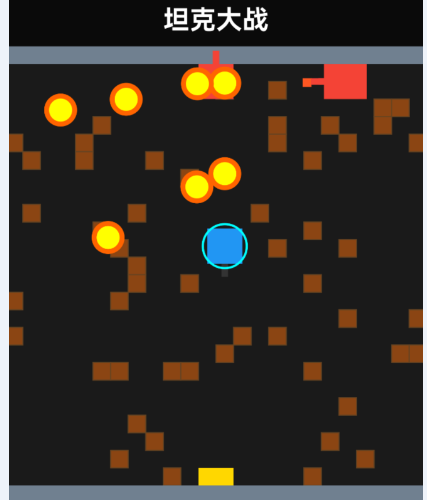
4.3 护盾效果渲染
private renderShield(tank: PlayerTank): void {
  if (!tank.hasShield) return;

  const centerX = tank.x + tank.width / 2;
  const centerY = tank.y + tank.height / 2;
  const radius = tank.width / 2 + 8;

  // 绘制闪烁护盾
  const alpha = (Math.sin(Date.now() / 100) + 1) / 2;
  this.context.strokeStyle = `rgba(100, 200, 255, ${alpha})`;
  this.context.lineWidth = 4;
  this.context.beginPath();
  this.context.arc(centerX, centerY, radius, 0, Math.PI * 2);
  this.context.stroke();

  // 绘制护盾光晕
  this.context.strokeStyle = `rgba(100, 200, 255, ${alpha * 0.5})`;
  this.context.lineWidth = 2;
  this.context.beginPath();
  this.context.arc(centerX, centerY, radius + 5, 0, Math.PI * 2);
  this.context.stroke();
}
图 2 护盾效果展示
五、子弹渲染
5.1 子弹绘制
private renderBullets(): void {
  this.bullets.forEach(bullet => {
    if (!bullet.isActive) return;

    // 绘制子弹主体
    this.context.fillStyle = '#FFD700';
    this.context.fillRect(bullet.x, bullet.y, bullet.width, bullet.height);

    // 绘制子弹光晕
    this.context.fillStyle = 'rgba(255, 215, 0, 0.3)';
    this.context.fillRect(
      bullet.x - 2,
      bullet.y - 2,
      bullet.width + 4,
      bullet.height + 4
    );
  });
}
六、特效渲染
6.1 爆炸特效
private explosions: Explosion[] = [];

private renderEffects(): void {
  this.explosions.forEach(explosion => {
    this.renderExplosion(explosion);
  });
}

private renderExplosion(explosion: Explosion): void {
  const progress = explosion.getProgress();
  const radius = explosion.maxRadius * progress;

  // 绘制爆炸光圈
  this.context.fillStyle = `rgba(255, 100, 0, ${1 - progress})`;
  this.context.beginPath();
  this.context.arc(explosion.x, explosion.y, radius, 0, Math.PI * 2);
  this.context.fill();

  // 绘制爆炸火花
  for (let i = 0; i < 8; i++) {
    const angle = (i / 8) * Math.PI * 2;
    const sparkX = explosion.x + Math.cos(angle) * radius * 0.8;
    const sparkY = explosion.y + Math.sin(angle) * radius * 0.8;

    this.context.fillStyle = `rgba(255, 200, 0, ${1 - progress})`;
    this.context.beginPath();
    this.context.arc(sparkX, sparkY, 3, 0, Math.PI * 2);
    this.context.fill();
  }
}
6.2 粒子效果
private renderParticles(): void {
  this.particles.forEach(particle => {
    const alpha = particle.life / particle.maxLife;

    this.context.fillStyle = `rgba(${particle.r}, ${particle.g}, ${particle.b}, ${alpha})`;
    this.context.beginPath();
    this.context.arc(particle.x, particle.y, particle.size, 0, Math.PI * 2);
    this.context.fill();
  });
}
七、UI渲染
7.1 游戏信息UI
private renderUI(): void {
  // 绘制分数
  this.context.fillStyle = '#FFFFFF';
  this.context.font = 'bold 18px Arial';
  this.context.textAlign = 'left';
  this.context.fillText(`分数: ${this.score}`, 10, 25);

  // 绘制生命值
  if (this.playerTank) {
    this.context.fillText(`生命: ${this.playerTank.lives}`, 10, 50);
  }

  // 绘制关卡
  this.context.textAlign = 'right';
  this.context.fillText(`关卡: ${this.level}`, this.canvasWidth - 10, 25);
}
7.2 游戏状态UI
private renderGameStateUI(): void {
  if (this.gameState === 'ready') {
    this.renderReadyUI();
  } else if (this.gameState === 'paused') {
    this.renderPausedUI();
  } else if (this.gameState === 'gameover') {
    this.renderGameOverUI();
  }
}

private renderReadyUI(): void {
  // 半透明遮罩
  this.context.fillStyle = 'rgba(0, 0, 0, 0.7)';
  this.context.fillRect(0, 0, this.canvasWidth, this.canvasHeight);

  // 提示文字
  this.context.fillStyle = '#FFFFFF';
  this.context.font = 'bold 24px Arial';
  this.context.textAlign = 'center';
  this.context.fillText('点击开始游戏', this.canvasWidth / 2, this.canvasHeight / 2);
}

private renderGameOverUI(): void {
  // 半透明遮罩
  this.context.fillStyle = 'rgba(0, 0, 0, 0.8)';
  this.context.fillRect(0, 0, this.canvasWidth, this.canvasHeight);

  // 游戏结束文字
  this.context.fillStyle = '#FF0000';
  this.context.font = 'bold 32px Arial';
  this.context.textAlign = 'center';
  this.context.fillText('游戏结束', this.canvasWidth / 2, this.canvasHeight / 2 - 30);

  // 最终分数
  this.context.fillStyle = '#FFFFFF';
  this.context.font = 'bold 20px Arial';
  this.context.fillText(`最终分数: ${this.score}`, this.canvasWidth / 2, this.canvasHeight / 2 + 20);
}
八、性能优化
8.1 离屏Canvas
private offscreenCanvas: OffscreenCanvas;
private offscreenContext: OffscreenCanvasRenderingContext2D;

private setupOffscreenCanvas(): void {
  this.offscreenCanvas = new OffscreenCanvas(this.canvasWidth, this.canvasHeight);
  this.offscreenContext = this.offscreenCanvas.getContext('2d');

  // 预渲染静态元素
  this.prerenderStaticElements();
}

private prerenderStaticElements(): void {
  // 预渲染地图
  if (this.gameMap) {
    this.gameMap.render(this.offscreenContext);
  }
}

private render(): void {
  // 复制预渲染的静态元素
  this.context.drawImage(this.offscreenCanvas, 0, 0);

  // 只渲染动态元素
  this.renderTanks();
  this.renderBullets();
  this.renderUI();
}
8.2 批量绘制
private renderBulletsOptimized(): void {
  // 开始批量绘制
  this.context.beginPath();

  this.bullets.forEach(bullet => {
    if (!bullet.isActive) return;

    // 添加到路径
    this.context.rect(bullet.x, bullet.y, bullet.width, bullet.height);
  });

  // 一次性填充
  this.context.fillStyle = '#FFD700';
  this.context.fill();
}
8.3 视口裁剪
private renderWithViewport(): void {
  // 设置裁剪区域
  this.context.save();
  this.context.beginPath();
  this.context.rect(this.viewportX, this.viewportY, this.viewportWidth, this.viewportHeight);
  this.context.clip();

  // 只渲染视口内的对象
  this.renderVisibleObjects();

  this.context.restore();
}

private renderVisibleObjects(): void {
  // 过滤出视口内的对象
  const visibleTanks = this.tanks.filter(tank => this.isInViewport(tank));
  const visibleBullets = this.bullets.filter(bullet => this.isInViewport(bullet));

  // 渲染可见对象
  visibleTanks.forEach(tank => this.renderTank(tank));
  visibleBullets.forEach(bullet => this.renderBullet(bullet));
}
九、总结
本文详细讲解了Canvas游戏渲染技术的应用,包括:
- Canvas初始化:配置渲染上下文和画布尺寸
- 渲染循环:实现主渲染方法和清空画布
- 地图渲染:绘制各种类型的地形瓦片
- 坦克渲染:绘制坦克主体、炮塔和护盾效果
- 子弹渲染:绘制子弹和光晕效果
- 特效渲染:实现爆炸和粒子效果
- UI渲染:绘制游戏信息和状态UI
- 性能优化:离屏Canvas、批量绘制、视口裁剪
技术要点回顾
- ✅ Canvas组件提供高性能2D渲染能力
- ✅ 渲染循环确保流畅的游戏画面
- ✅ 离屏Canvas优化静态元素渲染
- ✅ 批量绘制减少绘制调用次数
- ✅ 视口裁剪避免渲染不可见对象
系列文章导航:
下期预告: 坦克大战游戏开发实战(六)-虚拟按键控制系统

讨论HarmonyOS开发技术,专注于API与组件、DevEco Studio、测试、元服务和应用上架分发等。
更多推荐


 6
6 0
0- 0


 已为社区贡献76条内容

所有评论(0)