HarmonyOS 6.0 组件复用与@Reusable:让你的列表滑得飞起
列表滑动卡顿——这大概是鸿蒙开发里最容易踩的性能坑了。尤其是那种上百条数据的长列表,每滑出一条就销毁、每滑入一条就创建,GC压力山大,帧率直接掉到三十多。好在 ArkUI 给了一套组件复用机制,核心就是 @Reusable 装饰器。这篇把组件复用的完整方案讲清楚。
@Reusable 是什么
@Reusable 是一个类装饰器,放在 @Component 前面,告诉框架"这个组件别销毁了,用完放回池子里,下次还能用"。就像餐厅的餐具——不是用完就扔,而是洗一洗放回消毒柜,下个客人直接拿来用。
@Reusable
@Component
struct ReusableCard {
  @State title: string = ''
  @State subtitle: string = ''

  aboutToAppear(): void {
    // 首次创建时初始化
    this.title = '默认标题'
  }

  build() {
    Column() {
      Text(this.title)
        .fontSize(18)
        .fontWeight(FontWeight.Bold)
      Text(this.subtitle)
        .fontSize(14)
        .fontColor('#666666')
    }
    .padding(16)
    .borderRadius(12)
    .backgroundColor('#FFFFFF')
  }
}
被 @Reusable 标记的组件,从组件树上移除时不会真正销毁,而是进入复用池。下次需要同类型组件时,直接从池子取出来复用,省去了创建和销毁的开销。
aboutToReuse 生命周期
复用组件有三个关键生命周期:aboutToAppear(首次创建)、aboutToReuse(复用时)、aboutToRecycle(回收时)。最核心的是 aboutToReuse——组件从池子里取出来时触发,你需要在这里重置状态。
interface CardData {
  id: number
  title: string
  subtitle: string
  imageUrl: string
}

@Reusable
@Component
struct NewsCard {
  @State cardData: CardData | undefined = undefined
  @State isVisible: boolean = true

  aboutToAppear(): void {
    // 首次创建,走正常初始化
    this.isVisible = true
  }

  aboutToReuse(params: Record<string, ESObject>): void {
    // 复用时重置所有状态,避免显示旧数据
    this.cardData = params.cardData as CardData
    this.isVisible = true
  }

  aboutToRecycle(): void {
    // 回收时释放大对象,减轻内存压力
    this.cardData = undefined
  }

  build() {
    Column() {
      Text(this.cardData?.title ?? '')
        .fontSize(16)
        .fontWeight(FontWeight.Medium)
      Text(this.cardData?.subtitle ?? '')
        .fontSize(13)
        .fontColor('#999999')
        .maxLines(2)
        .textOverflow({ overflow: TextOverflow.Ellipsis })
    }
    .width('100%')
    .padding(12)
    .alignItems(HorizontalAlign.Start)
  }
}
关键区别:aboutToReuse 和 aboutToAppear 不是二选一——首次创建走 aboutToAppear,后续复用走 aboutToReuse,两者互不干扰。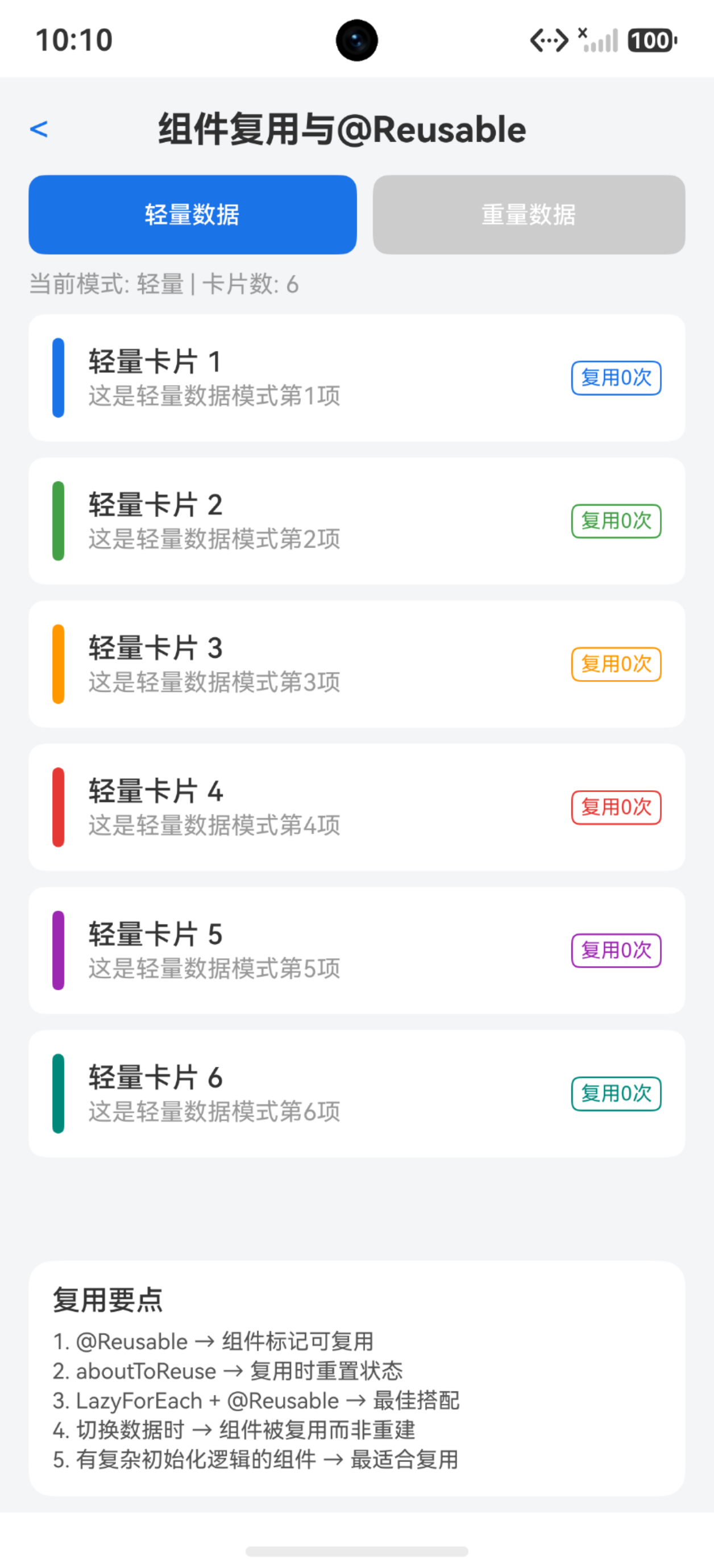
复用池的工作机制
复用池本质上是个按组件类型分组的缓存区。框架按组件的 struct 类型名分组,同类型的组件放一个池子里。取的时候也是按类型匹配——这就是为什么复用组件的 struct 名不能重复。
@Entry
@Component
struct ReusePoolDemo {
  @State itemList: number[] = []

  aboutToAppear(): void {
    for (let i = 0; i < 100; i++) {
      this.itemList.push(i)
    }
  }

  build() {
    Column() {
      List() {
        LazyForEach(this.getListDataSource(), (item: number) => {
          ListItem() {
            ReusableCardItem({ index: item })
          }
        }, (item: number) => item.toString())
      }
      .width('100%')
      .height('100%')
      .cachedCount(5)
    }
  }

  private getListDataSource(): IDataSource {
    let dataSource: MyDataSource = new MyDataSource()
    for (let i = 0; i < 100; i++) {
      dataSource.pushData(i)
    }
    return dataSource
  }
}

@Reusable
@Component
struct ReusableCardItem {
  @State index: number = 0

  aboutToReuse(params: Record<string, ESObject>): void {
    this.index = params.index as number
  }

  build() {
    Row() {
      Text(`第 ${this.index} 项`)
        .fontSize(16)
    }
    .width('100%')
    .height(80)
    .padding({ left: 16, right: 16 })
  }
}
注意:cachedCount 决定了预渲染多少个屏幕外的组件——这个值越大,复用池里的组件越"充裕",但内存也越高。一般设 3-5 即可。
ForEach vs LazyForEach 配合 @Reusable
ForEach 会一次性创建所有子组件,不存在"滑出销毁"的场景,所以配合 @Reusable 没有实际收益。LazyForEach 才是 @Reusable 的最佳搭档——它按需加载,组件滑出后回收,滑入时从池子取。
// ForEach — 全量创建,@Reusable 没用
ForEach(this.dataList, (item: CardData) => {
  ReusableCard({ cardData: item })  // 不会触发复用
}, (item: CardData) => item.id.toString())

// LazyForEach — 按需加载,@Reusable 生效
LazyForEach(this.dataSource, (item: CardData) => {
  ListItem() {
    ReusableCard({ cardData: item })
      .reuseId('newsCard')  // 指定复用组ID
  }
}, (item: CardData) => item.id.toString())
关键区别:reuseId 用来细分复用组。比如同一个列表里有图片卡片和文字卡片,虽然都是 ReusableCard,但用 reuseId 区分后,图片卡片只复用图片卡片,避免图片资源残留。
aboutToReuse 里的状态重置
这是最容易翻车的地方——复用的组件带着上一次的状态"还魂",页面就会出现闪一下旧数据的问题。必须在 aboutToReuse 里把所有 @State 变量重置干净。
@Reusable
@Component
struct ProductCard {
  @State productName: string = ''
  @State price: number = 0
  @State isExpanded: boolean = false
  @State imageLoaded: boolean = false

  aboutToReuse(params: Record<string, ESObject>): void {
    // 必须重置所有状态,不能遗漏
    this.productName = params.productName as string
    this.price = params.price as number
    this.isExpanded = false       // 折叠状态必须重置
    this.imageLoaded = false      // 图片加载状态必须重置
  }

  aboutToRecycle(): void {
    // 回收时清空文本类数据,减少内存驻留
    this.productName = ''
    this.isExpanded = false
  }

  build() {
    Column() {
      Text(this.productName)
        .fontSize(16)
      Text(`¥${this.price}`)
        .fontSize(14)
        .fontColor('#FF4444')
      if (this.isExpanded) {
        Text('详细描述内容...')
          .fontSize(13)
          .fontColor('#666666')
      }
    }
    .padding(12)
    .onClick(() => {
      this.isExpanded = !this.isExpanded
    })
  }
}
注意:布尔类型的 @State 最容易忘重置——isExpanded、isSelected、isLoading 这类状态,如果不重置,复用后就会出现"新卡片默认展开"的诡异现象。
嵌套复用组件
列表项内部嵌套了另一个 @Reusable 组件——这完全没问题,框架会递归管理复用池。但要注意嵌套层级不要太深,否则每个列表项回收时要做的事情就太多了。
@Reusable
@Component
struct OrderListCard {
  @State orderItems: string[] = []
  @State totalPrice: number = 0

  aboutToReuse(params: Record<string, ESObject>): void {
    this.orderItems = params.orderItems as string[]
    this.totalPrice = params.totalPrice as number
  }

  build() {
    Column() {
      // 嵌套的复用组件,框架自动管理
      ForEach(this.orderItems, (item: string, index: number) => {
        OrderItemRow({ itemName: item, itemIndex: index })
      }, (item: string, index: number) => `${index}_${item}`)
      Row() {
        Text(`合计: ¥${this.totalPrice}`)
          .fontSize(16)
          .fontWeight(FontWeight.Bold)
      }
      .width('100%')
      .justifyContent(FlexAlign.End)
      .padding({ top: 8 })
    }
    .padding(16)
    .borderRadius(8)
    .backgroundColor('#F5F5F5')
  }
}

@Reusable
@Component
struct OrderItemRow {
  @State itemName: string = ''
  @State itemIndex: number = 0

  aboutToReuse(params: Record<string, ESObject>): void {
    this.itemName = params.itemName as string
    this.itemIndex = params.itemIndex as number
  }

  build() {
    Row() {
      Text(this.itemName)
        .fontSize(14)
        .layoutWeight(1)
    }
    .width('100%')
    .height(40)
  }
}
注意:嵌套复用组件的 aboutToReuse 调用顺序是从外到内——外层先拿到数据,再传给内层,不要在嵌套组件里做异步数据请求。
什么时候不该用 @Reusable
不是所有组件都适合复用。组件状态特别复杂、初始化逻辑很重、或者内部有定时器/监听器的——复用反而比创建更麻烦。因为 aboutToReuse 里要做的事比 aboutToAppear 还多。
// ❌ 不适合复用:内部有定时器
@Reusable  // 别加这个
@Component
struct TimerCard {
  @State countdown: number = 60
  private timer: number = -1

  aboutToAppear(): void {
    this.timer = setInterval(() => {
      this.countdown--
    }, 1000)
  }

  aboutToDisappear(): void {
    clearInterval(this.timer)
  }

  // 复用时倒计时状态混乱,还要处理定时器清理
  aboutToReuse(params: Record<string, ESObject>): void {
    clearInterval(this.timer)           // 必须清理旧定时器
    this.countdown = params.countdown as number
    this.timer = setInterval(() => {    // 又得重新创建定时器
      this.countdown--
    }, 1000)
  }

  build() {
    Text(`${this.countdown}s`)
      .fontSize(24)
  }
}

// ✅ 适合复用:纯展示型组件
@Reusable
@Component
struct SimpleTextCard {
  @State label: string = ''

  aboutToReuse(params: Record<string, ESObject>): void {
    this.label = params.label as string
  }

  build() {
    Text(this.label)
      .fontSize(16)
      .padding(8)
  }
}
关键区别:纯展示组件是 @Reusable 的最佳场景——无副作用、状态可预测、重置简单。有副作用的组件(定时器、网络请求、事件监听)要慎重。
性能对比与 Profiling
光说"快"没说服力,得看数据。可以用 DevEco Studio 的 Profiler 工具对比有 @Reusable 和没有 @Reusable 的帧率和内存差异。典型场景下,1000 条列表滑动帧率能从 30fps 提升到 55fps 以上。
@Entry
@Component
struct PerformanceDemo {
  @State dataList: string[] = []
  @State frameInfo: string = ''

  aboutToAppear(): void {
    for (let i = 0; i < 500; i++) {
      this.dataList.push(`Item ${i}`)
    }
  }

  build() {
    Column() {
      Text(this.frameInfo)
        .fontSize(14)
        .fontColor('#999999')
        .padding(8)
      List() {
        LazyForEach(this.getDataSource(), (item: string) => {
          ListItem() {
            PerfCard({ content: item })
              .reuseId('perfCard')
          }
        }, (item: string) => item)
      }
      .width('100%')
      .layoutWeight(1)
      .cachedCount(3)
    }
    .width('100%')
    .height('100%')
  }

  private getDataSource(): MyDataSource {
    let ds: MyDataSource = new MyDataSource()
    for (let i = 0; i < 500; i++) {
      ds.pushData(`Item ${i}`)
    }
    return ds
  }
}

@Reusable
@Component
struct PerfCard {
  @State content: string = ''

  aboutToReuse(params: Record<string, ESObject>): void {
    this.content = params.content as string
  }

  build() {
    Row() {
      Text(this.content)
        .fontSize(16)
    }
    .width('100%')
    .height(64)
    .padding({ left: 16, right: 16 })
    .alignItems(VerticalAlign.Center)
  }
}
注意:cachedCount 的值直接影响首帧渲染时间——设太大首帧就慢,设太小滑动时来不及复用。建议从 3 开始调,结合 Profiler 找平衡点。
完整示例:列表页复用卡片
把前面的知识点串起来,做一个完整的新闻列表页,每个列表项是可复用的卡片组件。
interface NewsItem {
  id: string
  title: string
  source: string
  publishTime: string
  category: string
}

@Reusable
@Component
struct NewsCardItem {
  @State newsItem: NewsItem | undefined = undefined
  @State isBookmarked: boolean = false

  aboutToReuse(params: Record<string, ESObject>): void {
    this.newsItem = params.newsItem as NewsItem
    this.isBookmarked = false
  }

  aboutToRecycle(): void {
    this.newsItem = undefined
    this.isBookmarked = false
  }

  build() {
    Column() {
      Row() {
        Text(this.newsItem?.category ?? '')
          .fontSize(12)
          .fontColor('#FFFFFF')
          .backgroundColor('#4CAF50')
          .borderRadius(4)
          .padding({ left: 6, right: 6, top: 2, bottom: 2 })
        Blank()
        Text(this.newsItem?.publishTime ?? '')
          .fontSize(12)
          .fontColor('#999999')
      }
      .width('100%')
      Text(this.newsItem?.title ?? '')
        .fontSize(16)
        .fontWeight(FontWeight.Medium)
        .maxLines(2)
        .textOverflow({ overflow: TextOverflow.Ellipsis })
        .margin({ top: 8 })
      Row() {
        Text(this.newsItem?.source ?? '')
          .fontSize(13)
          .fontColor('#666666')
        Blank()
        Text(this.isBookmarked ? '已收藏' : '收藏')
          .fontSize(13)
          .fontColor(this.isBookmarked ? '#FF9800' : '#999999')
          .onClick(() => {
            this.isBookmarked = !this.isBookmarked
          })
      }
      .width('100%')
      .margin({ top: 8 })
    }
    .width('100%')
    .padding(16)
    .borderRadius(12)
    .backgroundColor('#FFFFFF')
  }
}
这个卡片覆盖了典型的复用场景:多类型数据、交互状态(收藏)、条件样式。aboutToReuse 里完整重置了所有状态,aboutToRecycle 里释放了大对象,确保复用时不会残留脏数据。
踩坑清单
| 问题 | 原因 | 解决 |
|---|---|---|
| 列表闪烁旧数据 | aboutToReuse没重置@State | 所有@State变量必须在aboutToReuse里赋值 |
| 复用组件没生效 | 用了ForEach而非LazyForEach | @Reusable只配合LazyForEach有效 |
| 收藏状态错乱 | isBookmarked等布尔值未重置 | aboutToReuse里重置所有布尔状态 |
| 图片显示上个卡片内容 | imageUrl未重置或图片未重新加载 | 清空imageUrl,重置imageLoaded |
| reuseId设不设都一样 | 列表只有一种卡片类型 | 多种卡片类型时用reuseId区分 |
| 内存持续增长 | aboutToRecycle没释放大对象 | 回收时置空数组、字符串等大对象 |
| 首屏渲染慢 | cachedCount设太大 | 从3开始调,用Profiler找最佳值 |
| 定时器/监听器泄漏 | aboutToRecycle没清理副作用 | 回收时clearInterval、取消监听 |
| 嵌套组件复用异常 | 内层组件状态未重置 | 内层@Reusable也要实现aboutToReuse |
| 组件类型匹配错误 | 两个不同组件同名struct | struct名必须全局唯一 |

讨论HarmonyOS开发技术,专注于API与组件、DevEco Studio、测试、元服务和应用上架分发等。
更多推荐


 3
3 0
0- 0


 已为社区贡献76条内容

所有评论(0)