HarmonyOS 6.0 后台任务与长时驻留:让应用退到后台还能干活
应用切到后台就被挂起——这是 HarmonyOS 的省电策略,没毛病。但你的音乐播放、导航定位、蓝牙传输怎么办?总不能一切后台就断吧。HarmonyOS 提供了 BackgroundTaskManager 来申请长时任务,让应用在后台也能持续运行。这篇把后台长时驻留的完整方案讲清楚。
后台任务的类型
HarmonyOS 把后台任务分成三类——短时任务(Transient Task)、长时任务(Continuous Task)和延迟任务(WorkScheduler)。短时任务给几秒到几分钟的宽限,长时任务让应用后台长驻,延迟任务则是系统择机拉起。本文重点讲长时任务。
import { backgroundTaskManager } from '@kit.BackgroundTasksKit'

// 短时任务:申请临时宽限时间
function requestTransientTask(): void {
  backgroundTaskManager.requestSuspendDelay('保存数据', () => {
    console.info('短时任务即将到期')
  })
}

// 查询剩余配额
function checkRemainTime(): void {
  let delayInfo = backgroundTaskManager.getRemainingDelayTime()
  console.info(`剩余短时任务时间: ${delayInfo}`)
}
关键区别:短时任务有配额限制,用完就不能再申请——适合偶尔的后台操作。长时任务没有配额概念,但必须声明后台模式类型。
申请长时任务的基本流程
长时任务的核心是 startBackgroundRunning 和 stopBackgroundRunning。申请前需要两件事:module.json5 里声明 backgroundModes,代码里创建 WantAgent。
import { backgroundTaskManager } from '@kit.BackgroundTasksKit'
import { wantAgent, WantAgent } from '@kit.AbilityKit'
import { BusinessError } from '@kit.BasicServicesKit'

async function startLongRunningTask(context: Context): Promise<void> {
  // 第一步:创建WantAgent,点击通知栏能回到应用
  let wantAgentInfo: wantAgent.WantAgentInfo = {
    wants: [
      {
        bundleName: 'com.example.myapp',
        abilityName: 'EntryAbility'
      }
    ],
    actionType: wantAgent.OperationType.START_ABILITY,
    requestCode: 0,
    actionFlags: [wantAgent.WantAgentFlags.UPDATE_PRESENT_FLAG]
  }

  let wantAgentObj: WantAgent = await wantAgent.getWantAgent(wantAgentInfo)

  // 第二步:申请长时任务,指定后台模式
  try {
    await backgroundTaskManager.startBackgroundRunning(
      context,
      backgroundTaskManager.BackgroundMode.AUDIO_PLAYBACK,
      wantAgentObj
    )
    console.info('长时任务申请成功')
  } catch (error) {
    let err = error as BusinessError
    console.error(`长时任务申请失败: ${err.code}`)
  }
}
注意:WantAgent 是必须的——系统通知栏会显示"XX正在后台运行"的提示,点击后通过 WantAgent 跳回你的应用。
module.json5 配置
长时任务不是想用就能用,得先在 module.json5 里声明。backgroundModes 指定你的后台模式,KEEP_BACKGROUND_RUNNING 权限也得加上。
// module.json5 中的配置(这是JSON,不是ArkTS代码)
// "abilities": [{
//   "name": "EntryAbility",
//   "backgroundModes": ["audioPlayback"],
//   ...
// }],
// "requestPermissions": [{
//   "name": "ohos.permission.KEEP_BACKGROUND_RUNNING",
//   "reason": "$string:keep_running_reason",
//   "usedScene": {
//     "abilities": ["EntryAbility"],
//     "when": "inuse"
//   }
// }]
backgroundModes 支持的类型:audioPlayback(音频播放)、location(定位)、bluetoothInteraction(蓝牙)、multiDeviceConnection(多设备互联)、taskKeeping(任务保活)等。每个类型对应一种后台场景,不能乱填。
注意:backgroundModes 声明的类型必须和实际行为一致——声明了 audioPlayback 但实际在做定位,系统检测到不一致会杀掉长时任务。
后台音频播放
音频播放是最经典的长时任务场景。用户切到别的应用,音乐不能断。声明 audioPlayback 模式后,应用退后台不会被挂起。
import { backgroundTaskManager } from '@kit.BackgroundTasksKit'
import { wantAgent, WantAgent } from '@kit.AbilityKit'
import { BusinessError } from '@kit.BasicServicesKit'

@Entry
@Component
struct AudioPlaybackPage {
  @State isPlaying: boolean = false
  @State songTitle: string = '夜曲'
  private context: Context = this.getUIContext().getHostContext() as Context

  async togglePlayback(): Promise<void> {
    if (this.isPlaying) {
      try {
        await backgroundTaskManager.stopBackgroundRunning(this.context)
        this.isPlaying = false
      } catch (error) {
        let err = error as BusinessError
        console.error(`停止失败: ${err.code}`)
      }
      return
    }

    let wantAgentInfo: wantAgent.WantAgentInfo = {
      wants: [{ bundleName: 'com.example.musicapp', abilityName: 'EntryAbility' }],
      actionType: wantAgent.OperationType.START_ABILITY,
      requestCode: 0,
      actionFlags: [wantAgent.WantAgentFlags.UPDATE_PRESENT_FLAG]
    }

    let agent: WantAgent = await wantAgent.getWantAgent(wantAgentInfo)

    try {
      await backgroundTaskManager.startBackgroundRunning(
        this.context,
        backgroundTaskManager.BackgroundMode.AUDIO_PLAYBACK,
        agent
      )
      this.isPlaying = true
    } catch (error) {
      let err = error as BusinessError
      console.error(`启动失败: ${err.code}`)
    }
  }

  build() {
    Column() {
      Text(this.songTitle)
        .fontSize(24)
        .fontWeight(FontWeight.Bold)
      Button(this.isPlaying ? '暂停' : '播放')
        .onClick(() => this.togglePlayback())
        .width(120)
        .height(44)
        .margin({ top: 24 })
    }
    .width('100%')
    .height('100%')
    .justifyContent(FlexAlign.Center)
  }
}
关键区别:startBackgroundRunning 是异步的——调用后不代表立刻生效,要用 await 等结果,不要在回调前就假设任务已经启动。
后台持续定位
导航类应用必须在后台持续获取位置。声明 location 模式,配合 geoLocationManager 订阅位置变化,即使应用退到后台,定位回调也不会中断。
import { backgroundTaskManager } from '@kit.BackgroundTasksKit'
import { wantAgent, WantAgent } from '@kit.AbilityKit'
import { geoLocationManager } from '@kit.LocationKit'
import { BusinessError } from '@kit.BasicServicesKit'

async function startLocationTask(context: Context): Promise<void> {
  let wantAgentInfo: wantAgent.WantAgentInfo = {
    wants: [{ bundleName: 'com.example.navapp', abilityName: 'EntryAbility' }],
    actionType: wantAgent.OperationType.START_ABILITY,
    requestCode: 0,
    actionFlags: [wantAgent.WantAgentFlags.UPDATE_PRESENT_FLAG]
  }

  let agent: WantAgent = await wantAgent.getWantAgent(wantAgentInfo)

  try {
    await backgroundTaskManager.startBackgroundRunning(
      context,
      backgroundTaskManager.BackgroundMode.LOCATION,
      agent
    )

    // 订阅位置变化
    let requestInfo: geoLocationManager.SingleLocationRequest = {
      locationTimeout: 10,
      singleLocationType: geoLocationManager.SingleLocationType.REQUEST_CURRENT
    }
    geoLocationManager.getCurrentLocation(requestInfo, (err, location) => {
      if (!err) {
        console.info(`纬度: ${location.latitude}, 经度: ${location.longitude}`)
      }
    })
  } catch (error) {
    let err = error as BusinessError
    console.error(`定位长时任务启动失败: ${err.code}`)
  }
}
注意:location 模式需要额外申请位置权限——ohos.permission.LOCATION 和 ohos.permission.LOCATION_IN_BACKGROUND 都得声明,且需要用户授权。
生命周期与资源管理
长时任务不是申请了就万事大吉,你得在 UIAbility 的生命周期里做好配对——onBackground 保留、onDestroy 释放。
import { UIAbility, AbilityConstant, Want, wantAgent, WantAgent } from '@kit.AbilityKit'
import { backgroundTaskManager } from '@kit.BackgroundTasksKit'
import { window } from '@kit.ArkUI'
import { hilog } from '@kit.PerformanceAnalysisKit'

const DOMAIN = 0xF811
const TAG = 'BackgroundAbility'

export default class BackgroundAbility extends UIAbility {
  private isBackgroundRunning: boolean = false

  onCreate(want: Want, launchParam: AbilityConstant.LaunchParam): void {
    hilog.info(DOMAIN, TAG, 'onCreate')
  }

  onWindowStageCreate(windowStage: window.WindowStage): void {
    windowStage.loadContent('pages/Index')
  }

  onBackground(): void {
    // 切到后台,长时任务保持运行,不要在这里stop
    hilog.info(DOMAIN, TAG, 'onBackground')
  }

  onDestroy(): void {
    // Ability销毁时必须释放长时任务
    if (this.isBackgroundRunning) {
      backgroundTaskManager.stopBackgroundRunning(this.context)
      this.isBackgroundRunning = false
    }
  }

  async startTask(): Promise<void> {
    let wantAgentInfo: wantAgent.WantAgentInfo = {
      wants: [{ bundleName: 'com.example.myapp', abilityName: 'BackgroundAbility' }],
      actionType: wantAgent.OperationType.START_ABILITY,
      requestCode: 0,
      actionFlags: [wantAgent.WantAgentFlags.UPDATE_PRESENT_FLAG]
    }
    let agent: WantAgent = await wantAgent.getWantAgent(wantAgentInfo)

    try {
      await backgroundTaskManager.startBackgroundRunning(
        this.context,
        backgroundTaskManager.BackgroundMode.TASK_KEEPING,
        agent
      )
      this.isBackgroundRunning = true
    } catch (error) {
      hilog.error(DOMAIN, TAG, '启动失败')
    }
  }
}
注意:onDestroy 里一定要 stopBackgroundRunning——不释放的话,系统通知栏会一直显示"XX正在后台运行",用户体验极差。
系统资源约束
即使申请了长时任务,系统也不是任你为所欲为。后台长驻的应用会受 CPU 限频、网络带宽压缩、内存回收优先级提高等约束。
@Entry
@Component
struct ResourceConstraintDemo {
  @State taskStatus: string = '未启动'
  private context: Context = this.getUIContext().getHostContext() as Context
  private timer: number = -1

  async startLightweightTask(): Promise<void> {
    let wantAgentInfo: wantAgent.WantAgentInfo = {
      wants: [{ bundleName: 'com.example.myapp', abilityName: 'EntryAbility' }],
      actionType: wantAgent.OperationType.START_ABILITY,
      requestCode: 0,
      actionFlags: [wantAgent.WantAgentFlags.UPDATE_PRESENT_FLAG]
    }

    let agent: WantAgent = await wantAgent.getWantAgent(wantAgentInfo)

    try {
      await backgroundTaskManager.startBackgroundRunning(
        this.context,
        backgroundTaskManager.BackgroundMode.TASK_KEEPING,
        agent
      )
      this.taskStatus = '运行中'
      // 轻量定时器,避免CPU密集操作
      this.timer = setInterval(() => {
        console.info('后台心跳')
      }, 5000)
    } catch (error) {
      this.taskStatus = '启动失败'
    }
  }

  async stopTask(): Promise<void> {
    clearInterval(this.timer)
    try {
      await backgroundTaskManager.stopBackgroundRunning(this.context)
      this.taskStatus = '已停止'
    } catch (error) {
      this.taskStatus = '停止失败'
    }
  }

  build() {
    Column() {
      Text(`任务状态: ${this.taskStatus}`)
        .fontSize(18)
      Row() {
        Button('启动').onClick(() => this.startLightweightTask()).width(100)
        Button('停止').onClick(() => this.stopTask()).width(100).margin({ left: 16 })
      }
      .margin({ top: 24 })
    }
    .width('100%')
    .height('100%')
    .padding(24)
    .justifyContent(FlexAlign.Center)
  }
}
关键区别:后台长时任务不等于前台性能——系统会限频,原来 1 秒能跑完的计算,后台可能要 3-5 秒。后台任务的设计要"低频、小包、省资源"。
完整示例:后台任务状态页
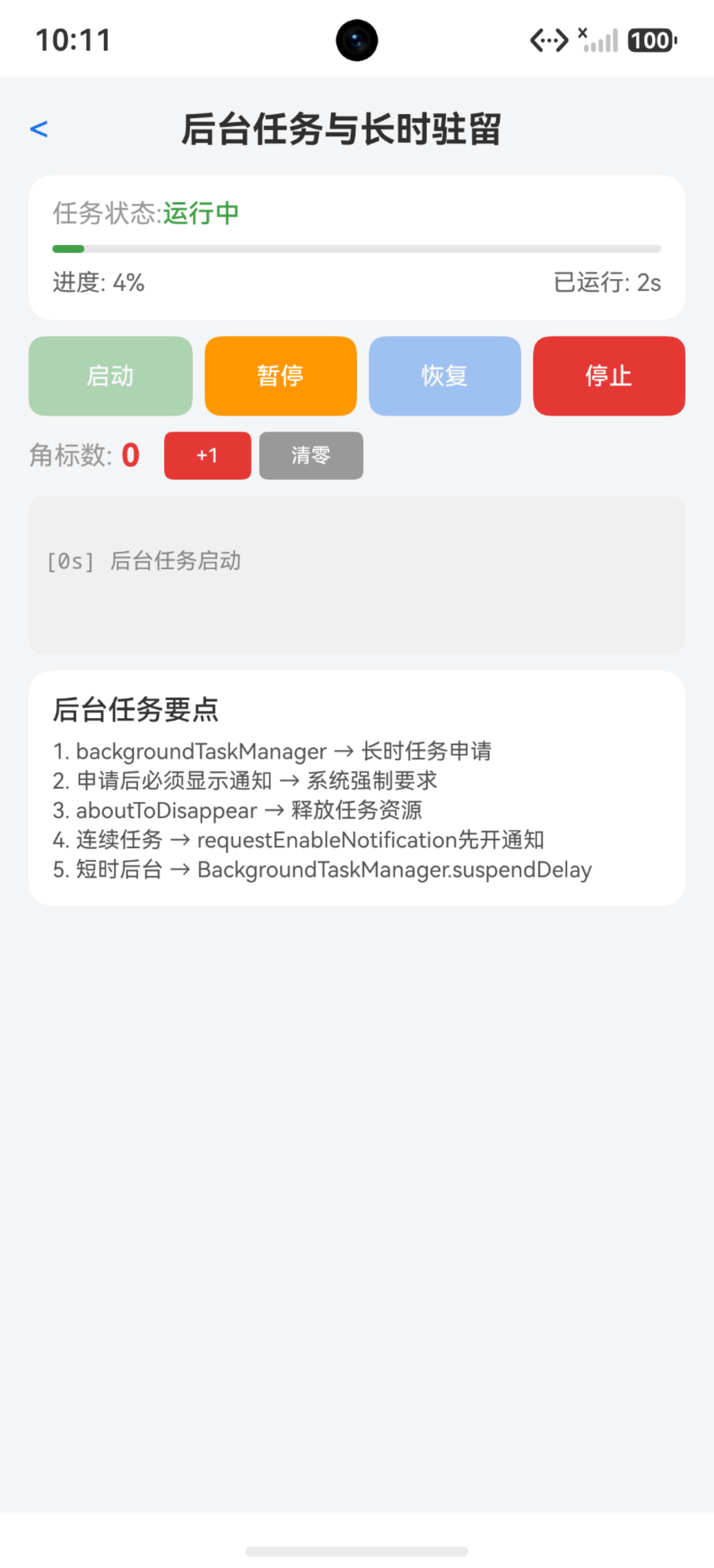
把知识点串起来,做一个模拟后台长时任务的状态展示页,包含启动/停止控制、状态显示、运行时间统计。
import { backgroundTaskManager } from '@kit.BackgroundTasksKit'
import { wantAgent, WantAgent } from '@kit.AbilityKit'
import { BusinessError } from '@kit.BasicServicesKit'

@Entry
@Component
struct BackgroundTaskPage {
  @State taskStatus: string = '未启动'
  @State runningSeconds: number = 0
  @State modeLabel: string = '无'
  private context: Context = this.getUIContext().getHostContext() as Context
  private timer: number = -1

  async startContinuousTask(): Promise<void> {
    let wantAgentInfo: wantAgent.WantAgentInfo = {
      wants: [{ bundleName: 'com.example.myapp', abilityName: 'EntryAbility' }],
      actionType: wantAgent.OperationType.START_ABILITY,
      requestCode: 0,
      actionFlags: [wantAgent.WantAgentFlags.UPDATE_PRESENT_FLAG]
    }
    let agent: WantAgent = await wantAgent.getWantAgent(wantAgentInfo)

    try {
      await backgroundTaskManager.startBackgroundRunning(
        this.context,
        backgroundTaskManager.BackgroundMode.AUDIO_PLAYBACK,
        agent
      )
      this.taskStatus = '运行中'
      this.modeLabel = '音频播放'
      this.runningSeconds = 0
      this.timer = setInterval(() => { this.runningSeconds++ }, 1000)
    } catch (error) {
      let err = error as BusinessError
      this.taskStatus = `启动失败: ${err.code}`
    }
  }

  async stopContinuousTask(): Promise<void> {
    clearInterval(this.timer)
    try {
      await backgroundTaskManager.stopBackgroundRunning(this.context)
      this.taskStatus = '已停止'
      this.modeLabel = '无'
    } catch (error) {
      let err = error as BusinessError
      this.taskStatus = `停止失败: ${err.code}`
    }
  }

  private formatTime(seconds: number): string {
    let min: number = Math.floor(seconds / 60)
    let sec: number = seconds % 60
    return `${min}分${sec}秒`
  }

  build() {
    Column() {
      Text('后台长时任务')
        .fontSize(24)
        .fontWeight(FontWeight.Bold)
      Column() {
        Text(`状态: ${this.taskStatus}`)
          .fontSize(18)
        Text(`模式: ${this.modeLabel}`)
          .fontSize(16)
          .margin({ top: 8 })
          .fontColor('#666666')
        Text(`运行时长: ${this.formatTime(this.runningSeconds)}`)
          .fontSize(16)
          .margin({ top: 8 })
          .fontColor('#666666')
      }
      .margin({ top: 32 })
      .padding(24)
      .borderRadius(16)
      .backgroundColor('#F5F5F5')
      Row() {
        Button('启动任务')
          .onClick(() => this.startContinuousTask())
          .width(140)
          .height(44)
          .backgroundColor('#4CAF50')
        Button('停止任务')
          .onClick(() => this.stopContinuousTask())
          .width(140)
          .height(44)
          .backgroundColor('#FF5722')
          .margin({ left: 16 })
      }
      .margin({ top: 32 })
    }
    .width('100%')
    .height('100%')
    .padding(24)
    .justifyContent(FlexAlign.Center)
  }
}
这个页面完整展示了长时任务的申请、通知、状态管理、计时、停止释放。切到后台后通知栏会提示"正在运行",点击通知能回到应用。
踩坑清单
| 问题 | 原因 | 解决 |
|---|---|---|
| startBackgroundRunning报错9600 | 没声明KEEP_BACKGROUND_RUNNING权限 | module.json5加权限声明 |
| 通知栏不显示后台提示 | WantAgent创建失败 | 检查bundleName和abilityName是否匹配 |
| 后台任务被系统杀掉 | backgroundModes和实际行为不一致 | 声明的模式必须和运行逻辑匹配 |
| 切后台后定位/音乐中断 | 没有申请长时任务就切后台 | 切后台前先startBackgroundRunning |
| onDestroy后通知栏还显示 | 没有调用stopBackgroundRunning | onDestroy里必须释放 |
| 短时任务配额用完 | 频繁requestSuspendDelay | 改用长时任务或减少后台操作 |
| 多次start不报错 | 重复申请会被忽略 | 先检查状态再申请 |
| 后台CPU被限频 | 系统对后台任务有限频策略 | 后台逻辑要轻量、低频 |
| 内存被优先回收 | 后台应用内存回收优先级高 | 后台尽量少持大对象 |
| 想申请多种后台模式 | backgroundModes是数组 | 可声明多个模式,但必须都实际使用 |

讨论HarmonyOS开发技术,专注于API与组件、DevEco Studio、测试、元服务和应用上架分发等。
更多推荐



 6
6 0
0- 0


 已为社区贡献100条内容

所有评论(0)