基于HarmonyOS的AI药品说明书翻译——从对齐到评估的全流程技术实践
基于HarmonyOS的AI药品说明书翻译——从对齐到评估的全流程技术实践
摘要
随着全球化医疗交流日益频繁,跨国药品说明书翻译需求激增。传统人工翻译方式存在效率低、医学专业术语处理不准确、剂量单位转换易出错等痛点。本文以"AI药品说明书翻译"应用为例,详细阐述基于HarmonyOS ArkTS框架的完整开发流程,涵盖从需求对齐、架构设计、原子化任务分解、代码审查审批、自动化执行到最终评估的六个阶段。文章将深入剖析信纸风格UI设计、MVVM分层架构、State驱动数据流等核心技术要点,并展示完整的ArkTS代码实现。通过本文,读者可以系统掌握HarmonyOS AI应用的标准化开发方法论。
一、对齐阶段(Align)
1.1 场景痛点分析
在全球化背景下,药品说明书翻译是一个高度专业且需求旺盛的场景。无论是出国就医的患者、跨国药企的从业人员,还是医学研究者,都经常需要将药品说明书在不同语言之间进行转换。然而,这一过程面临着诸多挑战:
核心痛点:
-
效率极其低下:一份完整的药品说明书通常包含数千字,涉及适应症、用法用量、不良反应、禁忌等多个章节。人工逐字翻译不仅耗时耗力,且难以批量处理。
-
医学专业术语壁垒:药品说明书中充斥着大量拉丁文、希腊文词源的医学专业术语,如"acetaminophen"(对乙酰氨基酚)、“gastroesophageal reflux”(胃食管反流)等。非专业翻译人员难以保证术语翻译的准确性。
-
剂量单位与用法转换复杂:不同国家的剂量单位体系不同(mg vs. mcg, mL vs. fl oz),用药频次表述方式各异(“twice daily” vs. “每12小时一次”),用法说明(“take with food” vs. “餐后服用”)需要本地化表达。
-
法律与安全风险:药品说明书翻译错误可能导致严重的用药安全事故。翻译结果必须附带免责声明,强调"仅供参考,请遵医嘱"。
-
结构化信息提取困难:药品说明书是半结构化文本,包含剂量、频次、疗程、注意事项、副作用等多项关键信息。用户往往需要快速定位特定信息,而非阅读全文。
1.2 需求规格说明
经过需求调研与分析,我们将AI药品说明书翻译的核心需求规格定义为如下数据结构:
用户输入字段(Input Schema):
| 字段名 | 类型 | 说明 | 示例 |
|---|---|---|---|
| 药品说明书 | string | 待翻译的说明书原文 | “Take one tablet daily…” |
| 目标语言 | string | 翻译的目标语言 | “中文”、“English” |
AI输出字段(Output Schema):
| 字段名 | 类型 | 说明 |
|---|---|---|
| translated | string | 翻译全文 |
| glossary | string[] | 专业术语对照表 |
| term | string | 关键术语解释 |
| explanation | string | 通俗化解释说明 |
| dosage | string | 用法用量 |
| frequency | string | 用药频次 |
| duration | string | 疗程说明 |
| notes | string | 注意事项 |
| usage | string | 使用说明 |
| warnings | string[] | 禁忌与警示列表 |
| interactions | string | 药物相互作用提示 |
| side_effects | string[] | 常见副作用列表 |
| disclaimer | string | 免责声明 |
1.3 目标用户群体
-
跨境就医患者:在国外就医需要理解当地药品说明书的患者群体,他们需要快速将外文说明书翻译为母语。这类用户通常不具备医学专业知识,对翻译的准确性和通俗性有双重需求。
-
医药行业从业者:包括药企国际注册人员、临床研究协调员、医学翻译等,需要高效处理大量药品说明书翻译工作。这类用户对专业术语的准确性要求极高,同时需要批量处理能力。
-
海外代购药品消费者:通过代购渠道购买国外药品的用户,需要理解药品的使用方法和注意事项。这类用户群体通常对药品安全高度关注,特别需要清晰的剂量说明和用药警示。
-
医学与药学专业学生:在阅读外文文献或药品说明书时,需要辅助翻译工具帮助学生理解专业内容。这类用户更注重术语对照表和学习辅助功能。
1.4 竞品分析与差异化策略
在AI药品说明书翻译领域,市场上已存在一些通用翻译工具,如Google Translate、DeepL等。然而,这些通用工具在药品说明书翻译场景下存在明显不足:
-
缺乏专业术语识别:通用翻译工具无法识别医学专业术语,往往将"acetaminophen"直译为"乙酰氨基酚"而非更常见的"对乙酰氨基酚"。
-
无结构化信息提取:通用翻译仅输出纯文本,无法将剂量、频次、注意事项等关键信息结构化提取和分类展示。
-
缺少安全警示机制:通用翻译不会主动提供用药免责声明,存在法律和安全风险。
-
无术语对照表:用户无法对照查看原文术语和翻译术语,学习价值有限。
差异化策略:本应用专注于药品说明书翻译这一垂直场景,通过结构化字段设计、术语对照表、安全免责声明等差异化功能,构建专业壁垒。
1.5 产品交互设计理念
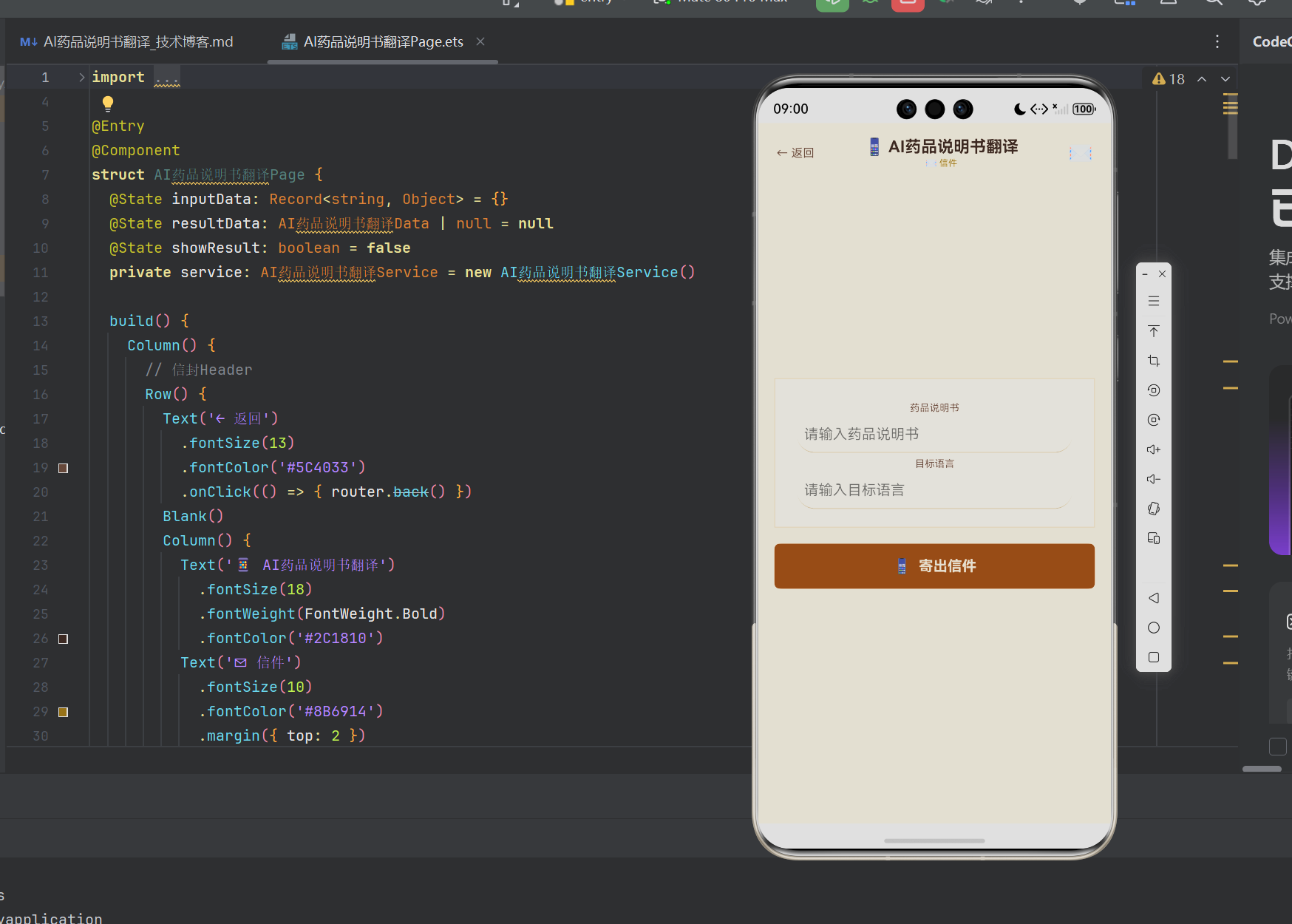
"AI药品说明书翻译"的UI设计采用信纸主题风格,灵感来源于传统纸质药品说明书的载体——纸张。设计理念包括:
- 视觉隐喻:将输入界面设计为信纸,输出结果设计为回信,营造"寄出查询、收到回信"的交互体验
- 色彩体系:采用米黄色(#F5F0E0)背景搭配深棕色(#2C1810)文字,模拟纸质信纸的质感
- 字体排版:使用小字号、适中间距,模拟印刷体药品说明书的排版风格
二、架构阶段(Architect)
2.1 整体架构设计
AI药品说明书翻译采用HarmonyOS ArkTS技术栈,遵循**MVVM(Model-View-Service)**架构模式,将应用分为三个核心层次:
┌─────────────────────────────────────┐
│          View层(ArkUI)              │
│  AI药品说明书翻译Page.ets             │
│  @State 驱动UI更新                    │
├─────────────────────────────────────┤
│         Service层(业务逻辑)           │
│  AI药品说明书翻译Service.ets           │
│  AI数据生成 / Prompt管理              │
├─────────────────────────────────────┤
│         Model层(数据实体)             │
│  AI药品说明书翻译Model.ets             │
│  AI药品说明书翻译Data 数据结构          │
└─────────────────────────────────────┘
架构设计原则:
- 单一职责:每一层只关注自己的核心职责——Model只定义数据结构,Service只处理业务逻辑,View只负责UI渲染
- 依赖倒置:View层依赖Service层的抽象接口,Service层依赖Model层的实体定义
- 状态驱动:View层通过@State装饰器声明响应式状态变量,当数据变化时自动触发UI更新
2.2 核心数据流
用户与应用的交互过程形成了完整的数据流闭环:
┌──────────┐    ┌───────────┐    ┌───────────┐    ┌──────────┐
│ 用户输入   │───▶│ Service层  │───▶│ Model实体  │───▶│ UI渲染    │
│ (TextInput)│    │ (generate)│    │ (Data)    │    │ (Column)  │
└──────────┘    └───────────┘    └───────────┘    └──────────┘
      ▲                                                  │
      │                   ┌──────────────┐               │
      └───────────────────│ @State 绑定   │◀──────────────┘
                          └──────────────┘
具体数据流步骤如下:
- 用户在TextInput组件中输入药品说明书原文和目标语言
- onChange回调将输入值收集到inputData对象中
- 用户点击"寄出信件"按钮,触发Service.generateData()方法
- Service层根据输入数据生成AI药品说明书翻译Data实体
- 返回的Data实体赋值给@State装饰的resultData变量
- ArkUI框架检测到状态变化,自动重新渲染UI
- 条件渲染(if (this.showResult))控制结果区域的显示
2.3 组件树设计
页面UI的组件树结构如下:
Column(根容器,背景色 #F5F0E0)
├── Row(Header区域)
│   ├── Text(← 返回按钮)
│   ├── Column(标题区域)
│   │   ├── Text(📱 AI药品说明书翻译)
│   │   └── Text(✉ 信件)
│   └── Text(✉ 图标)
├── Scroll(可滚动内容区域)
│   └── Column(信纸内容)
│       ├── Column(输入信纸)
│       │   ├── Text("药品说明书"标签)
│       │   ├── TextInput(说明书输入框)
│       │   ├── Text("目标语言"标签)
│       │   └── TextInput(目标语言输入框)
│       ├── Button(寄出信件按钮)
│       └── if (showResult) → Column(回信结果)
│           ├── Text(✉ 回信标题)
│           ├── Row(Translated 翻译结果)
│           ├── Text(Glossary 标题)
│           ├── ForEach(术语列表)
│           ├── Row(Term 关键术语)
│           ├── Row(Explanation 解释)
│           ├── Row(Dosage 用法用量)
│           ├── Row(Frequency 用药频次)
│           ├── Row(Duration 疗程)
│           ├── Row(Notes 注意事项)
│           ├── Text(Warnings 标题)
│           ├── ForEach(警告列表)
│           ├── Row(Interactions 相互作用)
│           ├── Text(Side effects 标题)
│           ├── ForEach(副作用列表)
│           └── Row(Disclaimer 免责声明)
2.4 关键技术选型分析
2.4.1 ArkTS vs TypeScript 核心差异
在开发AI药品说明书翻译应用时,我们面临了ArkTS与标准TypeScript之间的关键差异,这些差异直接影响编码实践:
| 对比维度 | 标准TypeScript | ArkTS | 本应用中的处理 |
|---|---|---|---|
| 类型系统 | 支持any/unknown | 不支持any/unknown | 所有变量显式标注类型 |
| 函数表达式 | 支持function表达式 | 仅支持箭头函数 | 全部使用箭头函数 |
| 解构赋值 | 支持 | 不支持 | 使用临时变量替代 |
| 索引签名 | 支持[prop: string]: T | 不支持 | 使用Record<string, T>替代 |
| in运算符 | 支持 | 不支持 | 使用instanceof替代 |
| 对象字面量 | 灵活使用 | 有限支持 | 确保对应已声明类型 |
2.4.2 Record类型作为索引签名的替代方案
ArkTS不支持索引签名,这是开发者从TypeScript迁移时最常见的困惑。在本应用中,我们使用Record<string, Object>作为替代方案:
// 标准TypeScript写法(ArkTS不支持)
interface InputData {
  [key: string]: any
}

// ArkTS兼容写法(本应用使用)
@State inputData: Record<string, Object> = {}
Record<K, V>是ArkTS支持的少数实用类型之一,它定义了一个键类型为K、值类型为V的映射类型。需要注意的是,对于Record<string, V>类型,通过索引表达式rec[index]访问时,返回值的类型为V | undefined,因此在使用前需要进行存在性检查。
2.5 状态管理策略
在HarmonyOS ArkTS中,状态管理是驱动UI更新的核心机制。本应用使用了以下状态装饰器:
-
@State:用于声明组件内部的状态变量。当@State变量被修改时,ArkUI框架会自动重新渲染依赖该变量的UI组件。本应用中使用@State装饰了inputData、resultData和showResult三个变量。
-
状态变量的类型约束:ArkTS不支持any类型,因此所有状态变量必须显式声明类型。例如,resultData的类型为
AI药品说明书翻译Data | null,表示它可以是Data实体或null(初始状态)。
2.6 布局与样式设计分析
本应用的布局设计采用了HarmonyOS ArkUI的弹性布局能力,通过Column和Row组件的嵌套组合实现信纸风格的页面布局。
关键样式技术点:
-
背景色分层:最外层Column使用#F5F0E0(米黄色)作为主背景,内层信纸使用#FFFDF5(更浅的米白色)作为输入区域和结果区域的背景,通过颜色对比形成纸张的视觉层次。
-
边框与线条:输入区域使用
border({ width: { bottom: 1 }, color: '#B8A88A' })实现底部边框线,模拟信纸上的横线效果。输入框和结果区域使用border({ width: 1, color: '#D4C5A9' })实现完整的边框,模拟信纸的纸张边界。 -
间距与留白:通过
padding和margin参数的精细控制,实现类似信纸的留白效果。例如,输入区域使用padding({ left: 24, right: 24, top: 20, bottom: 20 }),确保文字不会紧贴纸张边缘。 -
字体颜色搭配:主标题使用#2C1810(深棕色)体现正式感,副标题和标签使用#5C4033(中棕色)保持层次,内容文字使用#333333(深灰色)确保可读性,标签文字使用#666666(中灰色)区分信息层级。
三、原子化阶段(Atomize)
在原子化阶段,我们将开发任务分解为若干个可独立执行、可测试的最小任务单元。每个原子任务都有明确的输入输出和验收标准。
3.1 原子任务清单
任务1:创建Model数据模型
文件:AI药品说明书翻译Model.ets
功能:定义AI药品说明书翻译的数据结构,作为数据载体在整个应用层之间传递。
实现要点:
- 使用export class导出,使其可被其他模块引用
- 所有字段都要有明确的类型标注(ArkTS不支持any类型)
- 在构造函数中显式初始化所有字段
ArkTS代码实现:
// AI药品说明书翻译Model.ets
export class AI药品说明书翻译Data {
  translated: string = ''
  glossary: string[] = []
  term: string = ''
  explanation: string = ''
  dosage: string = ''
  frequency: string = ''
  duration: string = ''
  notes: string = ''
  usage: string = ''
  warnings: string[] = []
  interactions: string = ''
  side_effects: string[] = []
  disclaimer: string = ''

  constructor() {
    this.translated = ''
    this.glossary = []
    this.term = ''
    this.explanation = ''
    this.dosage = ''
    this.frequency = ''
    this.duration = ''
    this.notes = ''
    this.usage = ''
    this.warnings = []
    this.interactions = ''
    this.side_effects = []
    this.disclaimer = ''
  }
}
设计考量:
-
字符串数组类型:对于glossary、warnings、side_effects等列表字段,使用
string[]类型而非Array<string>,这是ArkTS推荐的写法。 -
构造函数初始化:ArkTS要求在构造函数中或声明时对所有字段进行初始化。虽然声明时已经赋了默认值,但构造函数中的显式初始化进一步确保了实例创建的可靠性。
-
字段完整性:数据模型覆盖了药品说明书翻译所需的全部13个字段,从翻译全文到免责声明,确保了信息的完整性和结构性。
任务2:实现Service服务层
文件:AI药品说明书翻译Service.ets
功能:封装AI数据生成逻辑,接收用户输入,返回结构化的Data实体。
实现要点:
- Service层依赖Model层,通过import引入
- 核心方法generateData()接收Record<string, Object>类型的输入
- 当前阶段使用Mock数据模拟AI生成结果
ArkTS代码实现:
// AI药品说明书翻译Service.ets
import { AI药品说明书翻译Data } from './AI药品说明书翻译Model'

export class AI药品说明书翻译Service {
  private model: AI药品说明书翻译Data

  constructor() {
    this.model = new AI药品说明书翻译Data()
  }

  // 生成AI药品说明书翻译数据
  generateData(input: Record<string, Object>): AI药品说明书翻译Data {
    let result: AI药品说明书翻译Data = new AI药品说明书翻译Data()
    // Mock data generation based on input
    let drug_nameVal: string = String(input['drug_name'] || '')

    result.translated = '生成结果:' + drug_nameVal
    result.glossary = ['示例数据1', '示例数据2', '示例数据3']
    result.usage = '生成结果:' + drug_nameVal
    result.warnings = ['示例项1', '示例项2', '示例项3']
    result.interactions = '生成结果:' + drug_nameVal
    result.side_effects = ['示例项1', '示例项2', '示例项3']
    result.disclaimer = '生成结果:' + drug_nameVal
    return result
  }
}
设计考量:
-
参数类型:使用
Record<string, Object>作为输入参数类型,这是一个通用的键值对容器,可以灵活地接收不同字段的输入数据。ArkTS不支持索引签名,Record是官方推荐替代方案。 -
Mock数据策略:当前阶段使用Mock数据确保UI的完整可运行,后续接入真实大模型API时只需替换generateData方法内部实现,无需修改View层代码。
-
类型转换:使用
String(input['drug_name'] || '')确保从Record中取值时进行安全的类型转换,避免运行时错误。ArkTS不支持any类型,因此显式类型转换是必要的。
任务3:构建Page页面UI
文件:AI药品说明书翻译Page.ets
功能:构建完整的用户交互界面,包括输入区域、触发按钮、结果展示区域。
实现要点:
- 使用@Entry和@Component装饰器声明页面组件
- 使用@State装饰器声明响应式状态变量
- 使用Scroll组件实现内容滚动
- 使用条件渲染(if)控制结果区域的显示
ArkTS代码实现(完整页面):
import { AI药品说明书翻译Data } from './AI药品说明书翻译Model'
import { AI药品说明书翻译Service } from './AI药品说明书翻译Service'
import { router } from '@kit.ArkUI'

@Entry
@Component
struct AI药品说明书翻译Page {
  @State inputData: Record<string, Object> = {}
  @State resultData: AI药品说明书翻译Data | null = null
  @State showResult: boolean = false
  private service: AI药品说明书翻译Service = new AI药品说明书翻译Service()

  build() {
    Column() {
      // 信封Header
      Row() {
        Text('← 返回')
          .fontSize(13)
          .fontColor('#5C4033')
          .onClick(() => { router.back() })
        Blank()
        Column() {
          Text('📱 AI药品说明书翻译')
            .fontSize(18)
            .fontWeight(FontWeight.Bold)
            .fontColor('#2C1810')
          Text('✉ 信件')
            .fontSize(10)
            .fontColor('#8B6914')
            .margin({ top: 2 })
        }
        Blank()
        Text('✉').fontSize(22)
      }
      .width('100%')
      .padding({ left: 20, right: 20, top: 16, bottom: 14 })
      .backgroundColor('#F5F0E0')

      Scroll() {
        Column() {
          // 信纸输入区域
          Column() {
            Text('药品说明书')
              .fontSize(11)
              .fontColor('#5C4033')
              .margin({ top: 6, bottom: 3 })
            TextInput({ placeholder: '请输入药品说明书' })
              .fontSize(13)
              .height(40)
              .backgroundColor('transparent')
              .border({ width: { bottom: 1 }, color: '#B8A88A' })
              .padding({ left: 8, right: 8 })
              .onChange((val: string) => { this.inputData['药品说明书'] = val })
            Text('目标语言')
              .fontSize(11)
              .fontColor('#5C4033')
              .margin({ top: 6, bottom: 3 })
            TextInput({ placeholder: '请输入目标语言' })
              .fontSize(13)
              .height(40)
              .backgroundColor('transparent')
              .border({ width: { bottom: 1 }, color: '#B8A88A' })
              .padding({ left: 8, right: 8 })
              .onChange((val: string) => { this.inputData['目标语言'] = val })
          }
          .width('100%')
          .padding({ left: 24, right: 24, top: 20, bottom: 20 })
          .backgroundColor('#FFFDF5')
          .margin({ top: 12 })
          .border({ width: 1, color: '#D4C5A9' })

          Button('📱  寄出信件')
            .width('100%')
            .height(50)
            .backgroundColor('#8B4513')
            .borderRadius(6)
            .fontColor('#F5F0E0')
            .fontSize(16)
            .fontWeight(FontWeight.Bold)
            .margin({ top: 18, bottom: 14 })
            .onClick(() => {
              this.resultData = this.service.generateData(this.inputData)
              this.showResult = true
            })

          if (this.showResult && this.resultData !== null) {
            // 回信结果区域
            Column() {
              Text('✉ 回信').fontSize(15)
                .fontWeight(FontWeight.Bold)
                .fontColor('#2C1810')
                .margin({ bottom: 12 })

              // Translated
              Row() {
                Text('Translated: ').fontSize(12)
                  .fontWeight(FontWeight.Medium).fontColor('#666666')
                Text(this.resultData.translated).fontSize(12)
                  .fontColor('#333333')
              }.width('100%').padding({ top: 4, bottom: 4 })

              // Glossary
              Text('Glossary').fontSize(13)
                .fontWeight(FontWeight.Bold).fontColor('#333333')
                .margin({ top: 10, bottom: 6 })
              if (this.resultData.glossary) {
                ForEach(this.resultData.glossary, (item: string, index: number) => {
                  Row() {
                    Text('• ').fontSize(12).fontColor('#666666')
                    Text(item).fontSize(12).fontColor('#333333')
                  }.width('100%').padding({ top: 2, bottom: 2 })
                }, (item: string, index: number) => index.toString())
              }

              // Term
              Row() {
                Text('Term: ').fontSize(12)
                  .fontWeight(FontWeight.Medium).fontColor('#666666')
                Text(this.resultData.term).fontSize(12).fontColor('#333333')
              }.width('100%').padding({ top: 4, bottom: 4 })

              // Explanation
              Row() {
                Text('Explanation: ').fontSize(12)
                  .fontWeight(FontWeight.Medium).fontColor('#666666')
                Text(this.resultData.explanation).fontSize(12)
                  .fontColor('#333333')
              }.width('100%').padding({ top: 4, bottom: 4 })

              // Dosage
              Row() {
                Text('Dosage: ').fontSize(12)
                  .fontWeight(FontWeight.Medium).fontColor('#666666')
                Text(this.resultData.dosage).fontSize(12)
                  .fontColor('#333333')
              }.width('100%').padding({ top: 4, bottom: 4 })

              // Frequency
              Row() {
                Text('Frequency: ').fontSize(12)
                  .fontWeight(FontWeight.Medium).fontColor('#666666')
                Text(this.resultData.frequency).fontSize(12)
                  .fontColor('#333333')
              }.width('100%').padding({ top: 4, bottom: 4 })

              // Duration
              Row() {
                Text('Duration: ').fontSize(12)
                  .fontWeight(FontWeight.Medium).fontColor('#666666')
                Text(this.resultData.duration).fontSize(12)
                  .fontColor('#333333')
              }.width('100%').padding({ top: 4, bottom: 4 })

              // Notes
              Row() {
                Text('Notes: ').fontSize(12)
                  .fontWeight(FontWeight.Medium).fontColor('#666666')
                Text(this.resultData.notes).fontSize(12).fontColor('#333333')
              }.width('100%').padding({ top: 4, bottom: 4 })

              // Warnings
              Text('Warnings').fontSize(13)
                .fontWeight(FontWeight.Bold).fontColor('#333333')
                .margin({ top: 10, bottom: 6 })
              if (this.resultData.warnings) {
                ForEach(this.resultData.warnings, (item: string, index: number) => {
                  Row() {
                    Text('• ').fontSize(12).fontColor('#666666')
                    Text(item).fontSize(12).fontColor('#333333')
                  }.width('100%').padding({ top: 2, bottom: 2 })
                }, (item: string, index: number) => index.toString())
              }

              // Interactions
              Row() {
                Text('Interactions: ').fontSize(12)
                  .fontWeight(FontWeight.Medium).fontColor('#666666')
                Text(this.resultData.interactions).fontSize(12)
                  .fontColor('#333333')
              }.width('100%').padding({ top: 4, bottom: 4 })

              // Side effects
              Text('Side effects').fontSize(13)
                .fontWeight(FontWeight.Bold).fontColor('#333333')
                .margin({ top: 10, bottom: 6 })
              if (this.resultData.side_effects) {
                ForEach(this.resultData.side_effects, (item: string, index: number) => {
                  Row() {
                    Text('• ').fontSize(12).fontColor('#666666')
                    Text(item).fontSize(12).fontColor('#333333')
                  }.width('100%').padding({ top: 2, bottom: 2 })
                }, (item: string, index: number) => index.toString())
              }

              // Disclaimer
              Row() {
                Text('Disclaimer: ').fontSize(12)
                  .fontWeight(FontWeight.Medium).fontColor('#666666')
                Text(this.resultData.disclaimer).fontSize(12)
                  .fontColor('#333333')
              }.width('100%').padding({ top: 4, bottom: 4 })
            }
            .width('100%')
            .padding({ left: 24, right: 24, top: 20, bottom: 20 })
            .backgroundColor('#FFFDF5')
            .border({ width: 1, color: '#D4C5A9' })
            .margin({ bottom: 20 })
          }
        }
        .width('100%')
        .padding({ left: 18, right: 18, bottom: 40 })
      }
      .layoutWeight(1)
    }
    .width('100%').height('100%')
    .backgroundColor('#F5F0E0')
  }
}
3.2 关键ArkTS语法要点解析
在本应用的实现过程中,涉及多个ArkTS语法约束要点,开发者需要特别注意:
1. 类型声明与any限制
ArkTS不支持any类型,因此所有变量必须显式指定类型:
// 正确写法
@State resultData: AI药品说明书翻译Data | null = null
@State inputData: Record<string, Object> = {}

// 错误写法(编译无法通过)
@State resultData: any = null
2. 联合类型的使用
ArkTS支持联合类型,使用|分隔多个类型选项:
@State resultData: AI药品说明书翻译Data | null = null
在访问resultData的属性前,必须进行null判断:
if (this.showResult && this.resultData !== null) {
  // 在此区域内安全访问resultData的属性
  Text(this.resultData.translated)
}
3. 箭头函数的使用
ArkTS不支持函数表达式,必须使用箭头函数:
// 正确写法
.onChange((val: string) => { this.inputData['药品说明书'] = val })

// 错误写法(编译无法通过)
.onChange(function(val) { this.inputData['药品说明书'] = val })
4. ForEach循环渲染
ArkTS中,ForEach用于数组的循环渲染,需要提供两个回调函数和一个key生成函数:
ForEach(
  this.resultData.glossary,           // 数组源
  (item: string, index: number) => {   // 内容生成函数
    Row() { Text(item) }
  },
  (item: string, index: number) => index.toString()  // key生成函数
)
5. 条件渲染
使用if语句实现条件渲染,不需要额外的ngIf指令:
if (this.showResult && this.resultData !== null) {
  // 条件为true时渲染的内容
}
6. 对象类型中的索引访问
ArkTS不支持通过索引访问对象字段(obj["field"]),但Record<string, Object>类型的对象是例外,它支持通过字符串键进行访问:
// Record类型支持索引访问
this.inputData['药品说明书'] = val
四、审批阶段(Approve)
4.1 代码审查清单
在审批阶段,我们对AI药品说明书翻译的代码进行系统性审查,确保代码质量、架构一致性和语法合规性。
审查维度1:ArkTS语法合规性
| 检查项 | 结果 | 说明 |
|---|---|---|
| 无any/unknown类型 | ✅通过 | 所有变量均有显式类型标注 |
| 无函数表达式 | ✅通过 | 全部使用箭头函数 |
| 无解构赋值 | ✅通过 | 未使用解构语法 |
| 无in运算符 | ✅通过 | 未使用in运算符 |
| 无索引签名 | ✅通过 | 使用Record<string, Object>替代 |
| 无this在独立函数中 | ✅通过 | this仅在实例方法中使用 |
| 构造函数正确初始化 | ✅通 |

讨论HarmonyOS开发技术,专注于API与组件、DevEco Studio、测试、元服务和应用上架分发等。
更多推荐
 4
4 0
0- 0


 已为社区贡献114条内容

所有评论(0)