HarmonyOS互动卡片开发实战:运动卡片与音乐卡片Canvas绘制
HarmonyOS互动卡片开发实战:运动卡片与音乐卡片Canvas绘制
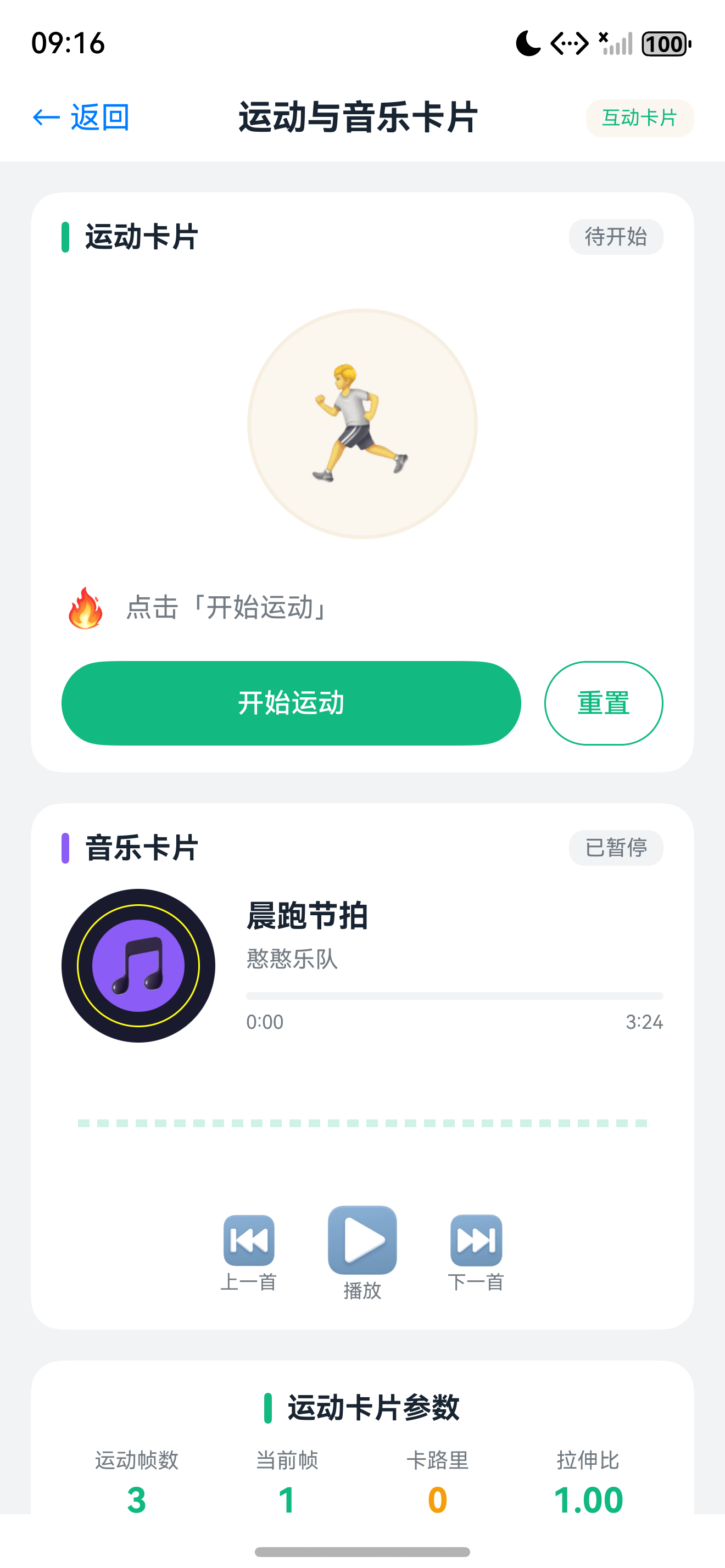
摘要:本文深入讲解HarmonyOS互动卡片中Canvas自绘制的高级应用,涵盖运动卡片的卡路里计数动画、帧动画切换,以及音乐卡片的音频控制、专辑封面旋转和出框取碟特效。
前言
在HarmonyOS互动卡片官方示例中,运动卡片和音乐卡片代表了两种技术路线:运动卡片以帧动画为主,配合Canvas绘制实现卡路里动态计数;音乐卡片以Canvas自绘制为核心,通过2D绘图API实现封面旋转、音频波形可视化等高级效果。
本文将这两个场景合并讲解,帮助你掌握:
- Canvas组件在互动卡片中的使用方式与限制
- 运动卡片完整交互:开始运动、结束运动、卡路里燃烧可视化
- 音乐卡片播控交互:播放/暂停、切歌、封面动画、出框取碟
- 跨进程数据同步:应用与互动卡片间的状态持久化方案
- 帧动画与Canvas绘制的混合使用技巧
适用版本:DevEco Studio 6.1.0 Release及以上,HarmonyOS SDK 6.1+,Canvas能力需API 12+
一、Canvas自绘制能力与运动卡片
1.1 互动卡片中的Canvas支持
HarmonyOS互动卡片支持使用Canvas组件进行2D自绘制:
| 能力 | 说明 | 适用场景 |
|---|---|---|
| 2D图形绘制 | 路径、矩形、圆形、文本 | 图表、进度条、波形 |
| 图片绘制 | drawImage绘制图片资源 | 封面旋转、图片变换 |
| 变换操作 | 平移、旋转、缩放 | 动画效果、透视变换 |
| 渐变填充 | 线性渐变、径向渐变 | 背景、进度条美化 |
| 离屏渲染 | OffscreenCanvas | 复杂场景预渲染 |
| 场景 | 推荐方案 | 原因 |
|---|---|---|
| 角色动作变化 | 帧动画 | 人物姿态复杂,逐帧控制更精准 |
| 数字/图表变化 | Canvas绘制 | 动态数据驱动,无需预生成图片 |
| 几何变换 | Canvas绘制 | 旋转、缩放可通过transform实现 |
| 简单位移 | 帧动画或属性动画 | 实现简单,性能好 |
提示:互动卡片中的Canvas为轻量级实现,不支持WebGL和XComponent。复杂3D效果建议使用帧动画替代。
1.2 运动卡片交互场景设计
运动卡片包含两个核心交互场景:
- 开始运动:点击"开始运动"按钮,触发憨憨拉伸运动帧动画
- 结束运动:点击"结束运动"按钮,触发庆祝动画,Canvas绘制卡路里计数从0增长到300kcal
| 阶段 | 触发方式 | 视觉效果 | 数据变化 |
|---|---|---|---|
| 初始态 | - | 显示当前卡路里和状态 | 0 kcal,待开始 |
| 开始运动 | 点击开始按钮 | 憨憨拉伸帧动画 | 状态变为"运动中" |
| 结束运动 | 点击结束按钮 | 庆祝动画+数字增长 | 0 -> 300 kcal |
| 重置 | 点击重置按钮 | 回到初始态 | 清零 |
1.3 动态卡片UI
// entry/src/main/ets/widget/pages/SportsCard.ets
import { ActionUtils } from '../../utils/ActionUtils';
import { LiveCardScale } from '../../constants/LiveCardConstants';

const LIVE_CARD_DURATION: number = 6000;

@Entry
@Component
struct SportsCard {
  @LocalStorageProp('calories') calories: number = 0;
  @LocalStorageProp('isExercising') isExercising: boolean = false;

  build() {
    RelativeContainer() {
      Image($rawfile('sports/background.png'))
        .width('100%').height('100%').aspectRatio(1).id('sports_bg');

      Image(this.isExercising ? $rawfile('sports/exercising.png') : $rawfile('sports/idle.png'))
        .width('50%').height('50%').id('hanhan')
        .alignRules({ center: { anchor: '__container__', align: Alignment.Center } });

      Column() {
        Text(`${this.calories}`).fontSize(28).fontColor('#FF6B35').fontWeight(FontWeight.Bold);
        Text('kcal').fontSize(12).fontColor('#999999');
      }
      .id('calories_display')
      .alignRules({ top: { anchor: '__container__', align: VerticalAlign.Top },
                    right: { anchor: '__container__', align: HorizontalAlign.End } })
      .margin({ top: 16, right: 16 });

      Row() {
        Button(this.isExercising ? '结束运动' : '开始运动')
          .fontSize(12).width(80).height(32)
          .backgroundColor(this.isExercising ? '#EF4444' : '#10B981').fontColor('#FFFFFF')
          .onClick(() => {
            if (this.isExercising) {
              ActionUtils.requestOverFlow(this, LiveCardScale.SPORTS_WIDTH,
                                         LiveCardScale.SPORTS_HEIGHT, LIVE_CARD_DURATION);
            } else {
              ActionUtils.callAppMethod(this, 'startExercise', {});
            }
          });
      }
      .width('100%').height(40).justifyContent(FlexAlign.Center)
      .id('button_area')
      .alignRules({ bottom: { anchor: '__container__', align: VerticalAlign.Bottom } })
      .margin({ bottom: 8 });
    }
    .width('100%').height('100%');
  }
}
1.4 运动卡片LiveForm页面
// entry/src/main/ets/livecardability/pages/SportsLiveCard.ets
import { formProvider, formInfo } from '@kit.FormKit';

@Entry({ useSharedStorage: true })
@Component
struct SportsLiveCard {
  @LocalStorageProp('formRect') rect?: formInfo.Rect;
  @LocalStorageProp('borderRadius') radius: number = 0;
  @LocalStorageProp('formId') formId: string = '';

  @State currentFrameIndex: number = 0;
  @State currentCalories: number = 0;
  @State targetCalories: number = 300;
  @State countProgress: number = 0;

  private celebrateFrames: Resource[] = [
    $rawfile('sports/celebrate_01.png'), $rawfile('sports/celebrate_02.png'),
    $rawfile('sports/celebrate_03.png'), $rawfile('sports/celebrate_04.png'),
    $rawfile('sports/celebrate_05.png')
  ];
  private frameTimer: number = -1;
  private countTimer: number = -1;
  private canvasContext: CanvasRenderingContext2D | null = null;

  aboutToAppear(): void { this.startCelebrateAnimation(); this.startCalorieCounting(); }
  aboutToDisappear(): void { this.clearTimers(); }

  build() {
    Stack({ alignContent: Alignment.TopStart }) {
      Image($rawfile('sports/background.png'))
        .borderRadius(this.radius)
        .width(this.rect?.width || 0).height(this.rect?.height || 0)
        .margin({ top: this.rect?.top, left: this.rect?.left }).id('live_bg');

      Stack() {
        Image(this.celebrateFrames[this.currentFrameIndex])
          .width('100%').height('100%').objectFit(ImageFit.Contain);
      }
      .width('60%').height('60%')
      .margin({ top: (this.rect?.top || 0) + 30,
                left: (this.rect?.left || 0) + ((this.rect?.width || 0) * 0.2) }).id('celebrate_layer');

      Canvas(this.onCanvasReady)
        .width((this.rect?.width || 0) * 1.4).height(120)
        .margin({ top: (this.rect?.top || 0) + ((this.rect?.height || 0) * 0.65),
                  left: (this.rect?.left || 0) - ((this.rect?.width || 0) * 0.2) }).id('canvas_layer');

      Text('运动完成!').fontSize(18).fontColor('#FFFFFF').fontWeight(FontWeight.Bold)
        .margin({ top: (this.rect?.top || 0) + 20, left: (this.rect?.left || 0) + 20 }).id('hint_text');

      Button('太棒了').fontSize(12).width(80).height(32).backgroundColor('#10B981').fontColor('#FFFFFF')
        .margin({ top: (this.rect?.top || 0) + (this.rect?.height || 0) + 20,
                  left: (this.rect?.left || 0) + ((this.rect?.width || 0) * 0.5) - 40 })
        .onClick(() => this.finishAndClose()).id('finish_btn');
    }
    .width('100%').height('100%').id('live_container');
  }

  onCanvasReady(context: CanvasRenderingContext2D) {
    this.canvasContext = context;
    this.drawCalories();
  }

  private drawCalories(): void {
    if (!this.canvasContext) return;
    let ctx = this.canvasContext;
    let w = (this.rect?.width || 360) * 1.4;
    let h = 120;
    let cx = w / 2, cy = h / 2;
    ctx.clearRect(0, 0, w, h);

    ctx.beginPath();
    ctx.arc(cx, cy, 45, 0, 2 * Math.PI);
    ctx.strokeStyle = 'rgba(255,255,255,0.2)'; ctx.lineWidth = 8; ctx.stroke();

    let angle = (this.countProgress / this.targetCalories) * 2 * Math.PI - Math.PI / 2;
    ctx.beginPath();
    ctx.arc(cx, cy, 45, -Math.PI / 2, angle);
    ctx.strokeStyle = '#FF6B35'; ctx.lineWidth = 8; ctx.lineCap = 'round'; ctx.stroke();

    ctx.font = 'bold 36px sans-serif'; ctx.fillStyle = '#FFFFFF';
    ctx.textAlign = 'center'; ctx.textBaseline = 'middle';
    ctx.fillText(`${Math.floor(this.currentCalories)}`, cx, cy - 5);
    ctx.font = '14px sans-serif'; ctx.fillStyle = '#CCCCCC';
    ctx.fillText('kcal', cx, cy + 20);

    this.drawParticles(ctx, cx, cy);
  }

  private drawParticles(ctx: CanvasRenderingContext2D, cx: number, cy: number): void {
    let count = 12;
    let progress = this.countProgress / this.targetCalories;
    for (let i = 0; i < count; i++) {
      let angle = (i / count) * 2 * Math.PI;
      let dist = 60 + progress * 40;
      ctx.beginPath();
      ctx.arc(cx + Math.cos(angle) * dist, cy + Math.sin(angle) * dist, 3 + Math.random() * 4, 0, 2 * Math.PI);
      ctx.fillStyle = `hsl(${i * 30}, 70%, 60%)`; ctx.fill();
    }
  }

  private startCelebrateAnimation(): void {
    this.frameTimer = setInterval(() => {
      this.currentFrameIndex = (this.currentFrameIndex + 1) % this.celebrateFrames.length;
    }, 200);
  }

  private startCalorieCounting(): void {
    let duration = 2000, steps = 60, stepValue = this.targetCalories / steps;
    let interval = duration / steps, currentStep = 0;
    this.countTimer = setInterval(() => {
      currentStep++;
      this.currentCalories = Math.min(stepValue * currentStep, this.targetCalories);
      this.countProgress = this.currentCalories;
      this.drawCalories();
      if (currentStep >= steps) { clearInterval(this.countTimer); this.countTimer = -1; }
    }, interval);
  }

  private clearTimers(): void {
    if (this.frameTimer !== -1) { clearInterval(this.frameTimer); this.frameTimer = -1; }
    if (this.countTimer !== -1) { clearInterval(this.countTimer); this.countTimer = -1; }
  }

  private finishAndClose(): void {
    let data = { 'calories': this.targetCalories, 'isExercising': false, 'exerciseTime': '30:00' };
    formProvider.updateForm(this.formId, formBindingData.createFormBindingData(data)).catch(() => {});
    formProvider.cancelOverflow(this.formId).catch(() => {});
  }
}
二、音乐卡片:音频控制与封面动画
2.1 交互场景与数据持久化
音乐卡片核心功能:
- 播放控制:播放/暂停,憨憨随之跳舞或静止
- 封面旋转:播放时封面持续旋转,暂停时停止
- 切歌交互:憨憨出框取回新专辑封面替换
- 收藏功能:点击收藏按钮切换状态
采用RDB存储歌曲列表,文件存储保存播放状态:
interface MusicDataStore {
  songList: Song[];
  currentSong: Song;
  isPlaying: boolean;
  triggerAction: 'play' | 'pause' | 'next' | 'prev';
}

interface Song {
  id: string; title: string; artist: string;
  cover: string; duration: number; isFavorite: boolean;
}
2.2 动态卡片UI
// entry/src/main/ets/widget/pages/MusicCard.ets
import { ActionUtils } from '../../utils/ActionUtils';
import { LiveCardScale } from '../../constants/LiveCardConstants';

const LIVE_CARD_DURATION: number = 7000;

@Entry
@Component
struct MusicCard {
  @LocalStorageProp('currentSong') currentSong: Song = {
    id: '1', title: '鸿蒙之歌', artist: 'HarmonyOS Band',
    cover: 'music/cover_01.png', duration: 240, isFavorite: false
  };
  @LocalStorageProp('isPlaying') isPlaying: boolean = false;

  build() {
    RelativeContainer() {
      Image($rawfile('music/background.png'))
        .width('100%').height('100%').aspectRatio(1).id('music_bg');

      Image($rawfile(this.currentSong.cover))
        .width(80).height(80).borderRadius(40)
        .rotate({ angle: this.isPlaying ? 360 : 0 })
        .animation({ duration: 3000, iterations: -1, curve: Curve.Linear })
        .id('album_cover')
        .alignRules({ center: { anchor: '__container__', align: Alignment.Center } });

      Column() {
        Text(this.currentSong.title).fontSize(14).fontColor('#FFFFFF').fontWeight(FontWeight.Bold).maxLines(1);
        Text(this.currentSong.artist).fontSize(12).fontColor('#CCFFFFFF').margin({ top: 2 });
      }
      .width('80%').alignItems(HorizontalAlign.Center)
      .id('song_info')
      .alignRules({ bottom: { anchor: '__container__', align: VerticalAlign.Bottom },
                    middle: { anchor: '__container__', align: HorizontalAlign.Center } })
      .margin({ bottom: 50 });

      Row() {
        Image($rawfile('music/icon_prev.png')).width(24).height(24)
          .onClick(() => { ActionUtils.callAppMethod(this, 'musicControl', { action: 'prev' }); });

        Image(this.isPlaying ? $rawfile('music/icon_pause.png') : $rawfile('music/icon_play.png'))
          .width(32).height(32).margin({ left: 16, right: 16 })
          .onClick(() => { ActionUtils.callAppMethod(this, 'musicControl',
            { action: this.isPlaying ? 'pause' : 'play' }); });

        Image($rawfile('music/icon_next.png')).width(24).height(24)
          .onClick(() => { ActionUtils.callAppMethod(this, 'musicControl', { action: 'next' }); });
      }
      .width('100%').height(40).justifyContent(FlexAlign.Center)
      .id('control_area')
      .alignRules({ bottom: { anchor: '__container__', align: VerticalAlign.Bottom } })
      .margin({ bottom: 8 });

      Image(this.currentSong.isFavorite ? $rawfile('music/icon_favorited.png') : $rawfile('music/icon_favorite.png'))
        .width(20).height(20).margin({ top: 12, right: 12 })
        .id('favorite_btn')
        .alignRules({ top: { anchor: '__container__', align: VerticalAlign.Top },
                      right: { anchor: '__container__', align: HorizontalAlign.End } })
        .onClick(() => { ActionUtils.callAppMethod(this, 'toggleFavorite', { songId: this.currentSong.id }); });
    }
    .width('100%').height('100%')
    .onClick(() => {
      ActionUtils.requestOverFlow(this, LiveCardScale.MUSIC_WIDTH, LiveCardScale.MUSIC_HEIGHT, LIVE_CARD_DURATION);
    });
  }
}
2.3 LiveForm页面与波形绘制
// entry/src/main/ets/livecardability/pages/MusicLiveCard.ets
import { formProvider, formInfo } from '@kit.FormKit';
import { fileIo } from '@kit.CoreFileKit';

@Entry({ useSharedStorage: true })
@Component
struct MusicLiveCard {
  @LocalStorageProp('formRect') rect?: formInfo.Rect;
  @LocalStorageProp('formId') formId: string = '';

  @State isPlaying: boolean = false;
  @State coverRotation: number = 0;
  @State hanhanFrameIndex: number = 0;
  @State hanhanY: number = 0;
  @State hanhanX: number = 0;
  @State hanhanOpacity: number = 1;
  @State currentCover: Resource = $rawfile('music/cover_01.png');
  @State coverScale: number = 1.0;

  private danceFrames: Resource[] = [
    $rawfile('music/dance_01.png'), $rawfile('music/dance_02.png'),
    $rawfile('music/dance_03.png'), $rawfile('music/dance_04.png')
  ];
  private danceTimer: number = -1;
  private rotationTimer: number = -1;
  private canvasContext: CanvasRenderingContext2D | null = null;

  aboutToAppear(): void { this.readTriggerContext(); this.startAnimations(); }
  aboutToDisappear(): void { this.stopAnimations(); }

  build() {
    Stack({ alignContent: Alignment.TopStart }) {
      Image($rawfile('music/background.png'))
        .width(this.rect?.width || 0).height(this.rect?.height || 0)
        .margin({ top: this.rect?.top, left: this.rect?.left });

      Canvas(this.onWaveCanvasReady)
        .width(this.rect?.width || 0).height(60)
        .margin({ top: (this.rect?.top || 0) + ((this.rect?.height || 0) * 0.35),
                  left: this.rect?.left || 0 });

      Stack() {
        Image(this.currentCover)
          .width('100%').height('100%').objectFit(ImageFit.Cover).borderRadius(50)
          .scale({ x: this.coverScale, y: this.coverScale })
          .rotate({ angle: this.coverRotation });
      }
      .width(100).height(100)
      .margin({ top: (this.rect?.top || 0) + ((this.rect?.height || 0) * 0.15),
                left: (this.rect?.left || 0) + ((this.rect?.width || 0) * 0.5) - 50 });

      Stack() {
        Image(this.danceFrames[this.hanhanFrameIndex])
          .width('100%').height('100%').objectFit(ImageFit.Contain)
          .opacity(this.hanhanOpacity)
          .translate({ x: this.hanhanX, y: this.hanhanY });
      }
      .width(80).height(80)
      .margin({ top: (this.rect?.top || 0) + ((this.rect?.height || 0) * 0.55),
                left: (this.rect?.left || 0) + ((this.rect?.width || 0) * 0.5) - 40 });

      Row() {
        Button('暂停').fontSize(11).width(56).height(28)
          .backgroundColor(this.isPlaying ? '#EF4444' : '#10B981').fontColor('#FFFFFF')
          .onClick(() => this.togglePlay());
        Button('切歌').fontSize(11).width(56).height(28)
          .backgroundColor('#3B82F6').fontColor('#FFFFFF').margin({ left: 8 })
          .onClick(() => this.switchSong());
      }
      .margin({ top: (this.rect?.top || 0) + (this.rect?.height || 0) + 10,
                left: (this.rect?.left || 0) + ((this.rect?.width || 0) * 0.5) - 60 });
    }
    .width('100%').height('100%');
  }

  onWaveCanvasReady(context: CanvasRenderingContext2D) {
    this.canvasContext = context;
    if (this.isPlaying) this.startWaveAnimation();
  }

  private startWaveAnimation(): void {
    let offset = 0;
    let animateWave = () => {
      if (!this.isPlaying || !this.canvasContext) return;
      let ctx = this.canvasContext;
      let w = this.rect?.width || 360, h = 60;
      ctx.clearRect(0, 0, w, h);
      ctx.beginPath(); ctx.moveTo(0, h / 2);
      for (let x = 0; x < w; x += 3) {
        let y = h / 2 + Math.sin(x * 0.02 + offset) * 20 + Math.sin(x * 0.04 + offset * 1.5) * 10;
        ctx.lineTo(x, y);
      }
      ctx.strokeStyle = 'rgba(59, 130, 246, 0.8)'; ctx.lineWidth = 2; ctx.stroke();
      ctx.lineTo(w, h); ctx.lineTo(0, h); ctx.closePath();
      ctx.fillStyle = 'rgba(59, 130, 246, 0.2)'; ctx.fill();
      offset += 0.15;
      requestAnimationFrame(animateWave);
    };
    requestAnimationFrame(animateWave);
  }

  private startAnimations(): void {
    this.danceTimer = setInterval(() => {
      if (this.isPlaying) this.hanhanFrameIndex = (this.hanhanFrameIndex + 1) % this.danceFrames.length;
    }, 250);
    this.rotationTimer = setInterval(() => {
      if (this.isPlaying) this.coverRotation = (this.coverRotation + 2) % 360;
    }, 30);
  }

  private stopAnimations(): void {
    if (this.danceTimer !== -1) { clearInterval(this.danceTimer); this.danceTimer = -1; }
    if (this.rotationTimer !== -1) { clearInterval(this.rotationTimer); this.rotationTimer = -1; }
  }

  private togglePlay(): void {
    this.isPlaying = !this.isPlaying;
    if (this.isPlaying) this.startWaveAnimation();
  }

  private switchSong(): void {
    this.animateHanhanOut(() => {
      this.currentCover = $rawfile('music/cover_02.png');
      this.coverScale = 0.8;
      let scaleUp = setInterval(() => {
        this.coverScale += 0.02;
        if (this.coverScale >= 1.0) { this.coverScale = 1.0; clearInterval(scaleUp); }
      }, 30);
      this.animateHanhanBack();
    });
  }

  private animateHanhanOut(onComplete: () => void): void {
    let progress = 0;
    let animate = () => {
      progress += 0.03;
      if (progress >= 1) { this.hanhanOpacity = 0; onComplete(); return; }
      this.hanhanY = -progress * 150; this.hanhanX = progress * 50; this.hanhanOpacity = 1 - progress;
      requestAnimationFrame(animate);
    };
    requestAnimationFrame(animate);
  }

  private animateHanhanBack(): void {
    let progress = 0;
    this.hanhanOpacity = 0; this.hanhanY = -150; this.hanhanX = 50;
    let animate = () => {
      progress += 0.03;
      if (progress >= 1) { this.hanhanY = 0; this.hanhanX = 0; this.hanhanOpacity = 1; return; }
      this.hanhanY = -150 * (1 - progress); this.hanhanX = 50 * (1 - progress); this.hanhanOpacity = progress;
      requestAnimationFrame(animate);
    };
    requestAnimationFrame(animate);
  }

  private async readTriggerContext(): Promise<void> {
    try {
      let context = getContext(this);
      let filePath = context.filesDir + '/music_trigger.json';
      if (fileIo.access(filePath)) {
        this.isPlaying = JSON.parse(fileIo.readTextSync(filePath))['isPlaying'] as boolean || false;
      }
    } catch (error) { console.error('Read trigger context failed'); }
  }
}
三、应用端音频控制与性能优化
3.1 应用端Callee机制
应用端通过callee机制暴露音乐控制方法:
// entry/src/main/ets/entryability/EntryAbility.ets
import { UIAbility, Caller } from '@kit.AbilityKit';

export default class EntryAbility extends UIAbility {
  private caller: Caller | undefined;

  onForeground(): void {
    this.callee = this.callee || this.calleeObject;
    if (this.callee) {
      this.callee.on('musicControl', this.handleMusicControl.bind(this));
      this.callee.on('toggleFavorite', this.handleToggleFavorite.bind(this));
    }
  }

  onBackground(): void {
    if (this.callee) {
      this.callee.off('musicControl');
      this.callee.off('toggleFavorite');
    }
  }

  private handleMusicControl(data: rpc.MessageSequence): rpc.MessageSequence {
    let params = JSON.parse(data.readString());
    switch (params['action']) {
      case 'play': this.playMusic(); break;
      case 'pause': this.pauseMusic(); break;
      case 'next': this.nextSong(); break;
      case 'prev': this.prevSong(); break;
    }
    this.syncMusicStateToCards();
    let response = rpc.MessageSequence.create();
    response.writeString(JSON.stringify({ success: true }));
    return response;
  }

  private async syncMusicStateToCards(): Promise<void> {
    let formData = { 'currentSong': this.getCurrentSong(), 'isPlaying': this.isPlaying };
    let formIds = await this.getAllFormIds();
    for (let formId of formIds) {
      await formProvider.updateForm(formId, formBindingData.createFormBindingData(formData));
    }
  }

  private playMusic(): void { this.isPlaying = true; }
  private pauseMusic(): void { this.isPlaying = false; }
  private nextSong(): void { }
  private prevSong(): void { }
  private getCurrentSong(): Song { return { id: '1', title: '鸿蒙之歌', artist: 'HarmonyOS Band', cover: 'music/cover_01.png', duration: 240, isFavorite: false }; }
  private async getAllFormIds(): Promise<string[]> { return []; }
}
3.2 离屏Canvas预渲染
import { OffscreenCanvas } from '@kit.ArkUI';

let offscreen = new OffscreenCanvas(200, 200);
let offCtx = offscreen.getContext('2d');

function preDrawAlbumCover(): ImageBitmap {
  offCtx.beginPath(); offCtx.arc(100, 100, 95, 0, 2 * Math.PI);
  offCtx.fillStyle = '#1a1a1a'; offCtx.fill();
  for (let i = 0; i < 20; i++) {
    offCtx.beginPath(); offCtx.arc(100, 100, 30 + i * 3, 0, 2 * Math.PI);
    offCtx.strokeStyle = `rgba(255,255,255,${0.1 + i * 0.02})`; offCtx.lineWidth = 1; offCtx.stroke();
  }
  return offscreen.transferToImageBitmap();
}
3.3 性能优化策略与数据同步
| 优化策略 | 实现方式 | 效果 |
|---|---|---|
| 减少重绘区域 | 使用clearRect精确清除 | 降低GPU负载 |
| 避免状态频繁切换 | 批量设置样式属性 | 减少状态切换开销 |
| 使用requestAnimationFrame | 替代setInterval | 与屏幕刷新同步 |
| 离屏预渲染 | OffscreenCanvas | 减少每帧计算量 |
| 降低分辨率 | Canvas缩小后放大显示 | 减少像素计算量 |
数据同步涉及三个角色:应用(EntryAbility)、动态卡片(FormExtensionAbility)、互动卡片(LiveFormExtensionAbility)。
应用与互动卡片通过文件存储传递触发上下文:
// 应用端写入
async function writeTriggerContext(action: string, songId: string): Promise<void> {
  let context = getContext();
  let filePath = context.filesDir + '/music_trigger.json';
  let triggerData = { action: action, songId: songId, timestamp: Date.now(), isPlaying: true };
  fileIo.writeTextSync(filePath, JSON.stringify(triggerData));
}

// 互动卡片读取
async function readTriggerContext(): Promise<Record<string, Object> | null> {
  let context = getContext();
  let filePath = context.filesDir + '/music_trigger.json';
  if (!fileIo.access(filePath)) return null;
  return JSON.parse(fileIo.readTextSync(filePath));
}
四、常见问题
4.1 Canvas动画卡顿
解决方案:
- 使用requestAnimationFrame而非setInterval
- 减少每帧绘制元素数量,粒子数控制在50个以内
- 避免在绘制循环中创建新对象
- 使用OffscreenCanvas预渲染静态元素
4.2 封面旋转不平滑
Image(this.currentCover)
  .rotate({ angle: this.coverRotation, centerX: '50%', centerY: '50%' })
  .animation({ duration: 3000, iterations: -1, curve: Curve.Linear });
4.3 切歌动画不同步
解决方案:
- 使用Promise或回调确保动画顺序执行
- 在出框动画onComplete回调中切换封面
- 增加适当延迟,确保视觉节奏自然
提示:Canvas自绘制性能优化核心:控制绘制频率、减少每帧计算、复用绘制上下文、及时释放资源。
总结
本文深入讲解了HarmonyOS互动卡片中运动卡片和音乐卡片的Canvas绘制技术:
- 运动卡片:通过帧动画实现憨憨庆祝动作,通过Canvas 2D API实现卡路里计数和进度环绘制
- 音乐卡片:通过Canvas绘制音频波形,通过rotate动画实现封面旋转,通过出框取碟动画实现切歌交互
- 性能优化:使用requestAnimationFrame驱动动画,离屏Canvas预渲染,控制绘制元素数量
- 数据同步:应用与互动卡片通过文件存储传递触发上下文,通过formProvider.updateForm同步到动态卡片
Canvas自绘制能力为互动卡片带来了无限的视觉表现可能。
如果本文对你有帮助,欢迎点赞、收藏、转发!欢迎在评论区分享你的Canvas动画创意。
投票与互动
你更想深入学习哪个方向的互动卡片技术?
- Canvas 2D高级绘图与粒子系统
- 音频可视化与波形动画
- 帧动画性能优化与资源管理
- 跨进程数据同步与状态管理
相关资源

讨论HarmonyOS开发技术,专注于API与组件、DevEco Studio、测试、元服务和应用上架分发等。
更多推荐



 4
4 0
0- 0


 已为社区贡献14条内容

所有评论(0)