HarmonyOS NEXT AI 智能生活助手:首页设计与快捷入口实现
HarmonyOS NEXT AI 智能生活助手:首页设计与快捷入口实现
前言
在前两篇文章中,我们完成了 [项目规划与架构设计]和 [企业级工程创建]。本文是系列第 03 篇,将带你实现 HarmonyAI 的首页。
首页是 APP 的"门面",用户打开 APP 第一眼看到的就是首页。一个优秀的首页需要兼顾美观性、功能性和引导性。
HarmonyAI 首页包含以下核心模块:
- 快捷入口:AI 工具箱入口(聊天、翻译、OCR、花语等)
- 最近聊天:显示最近的对话历史
- AI 推荐:智能推荐功能卡片
- 每日一句:激励性名言警句
- 今日花语:每日随机花语展示
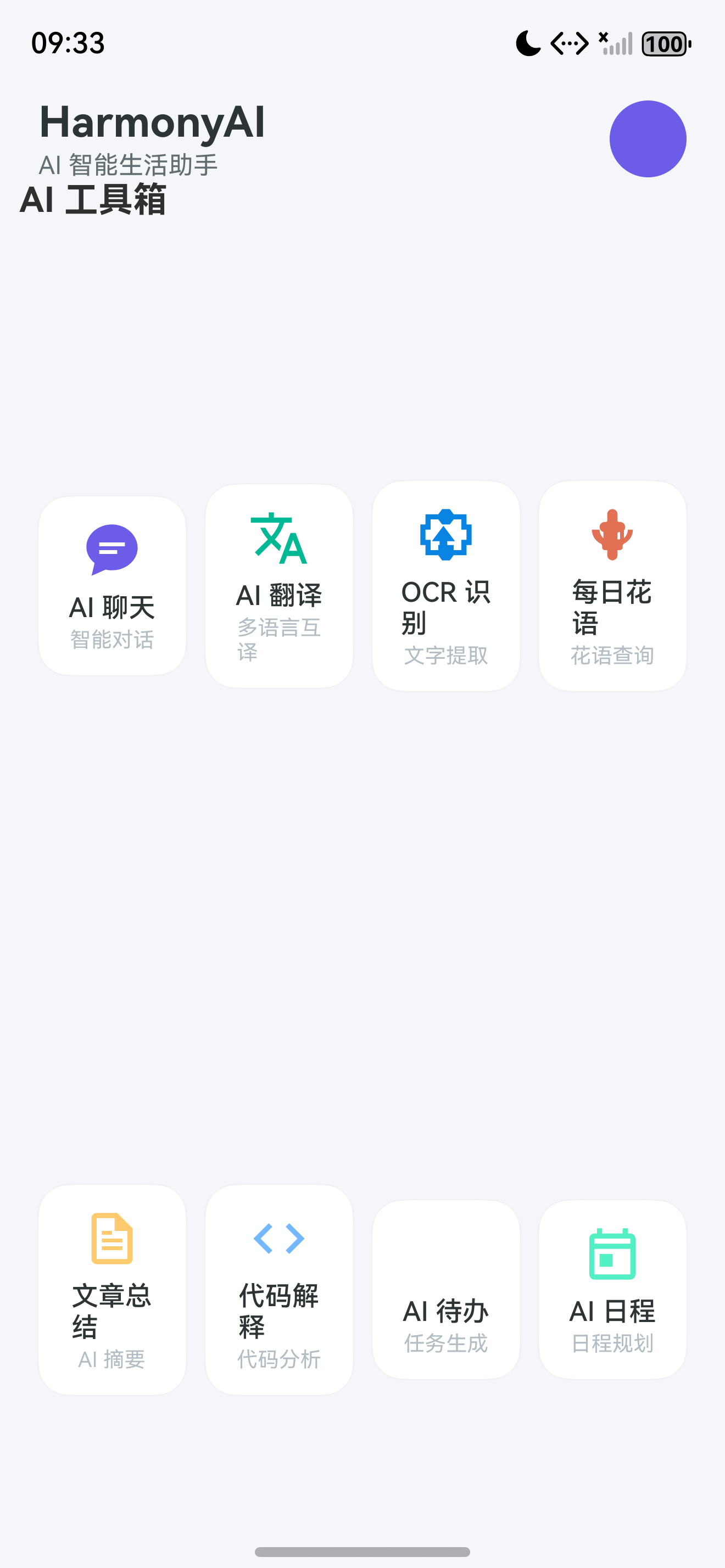
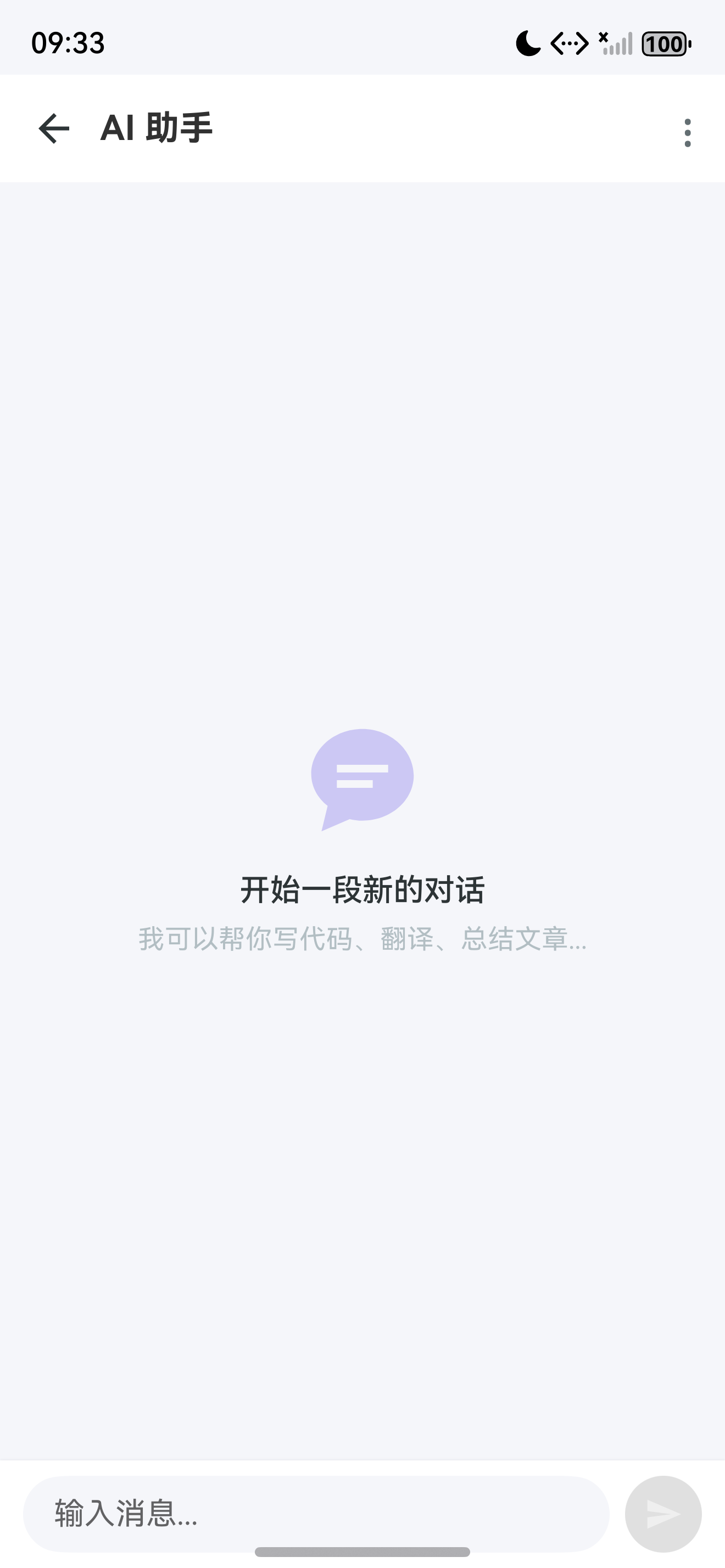
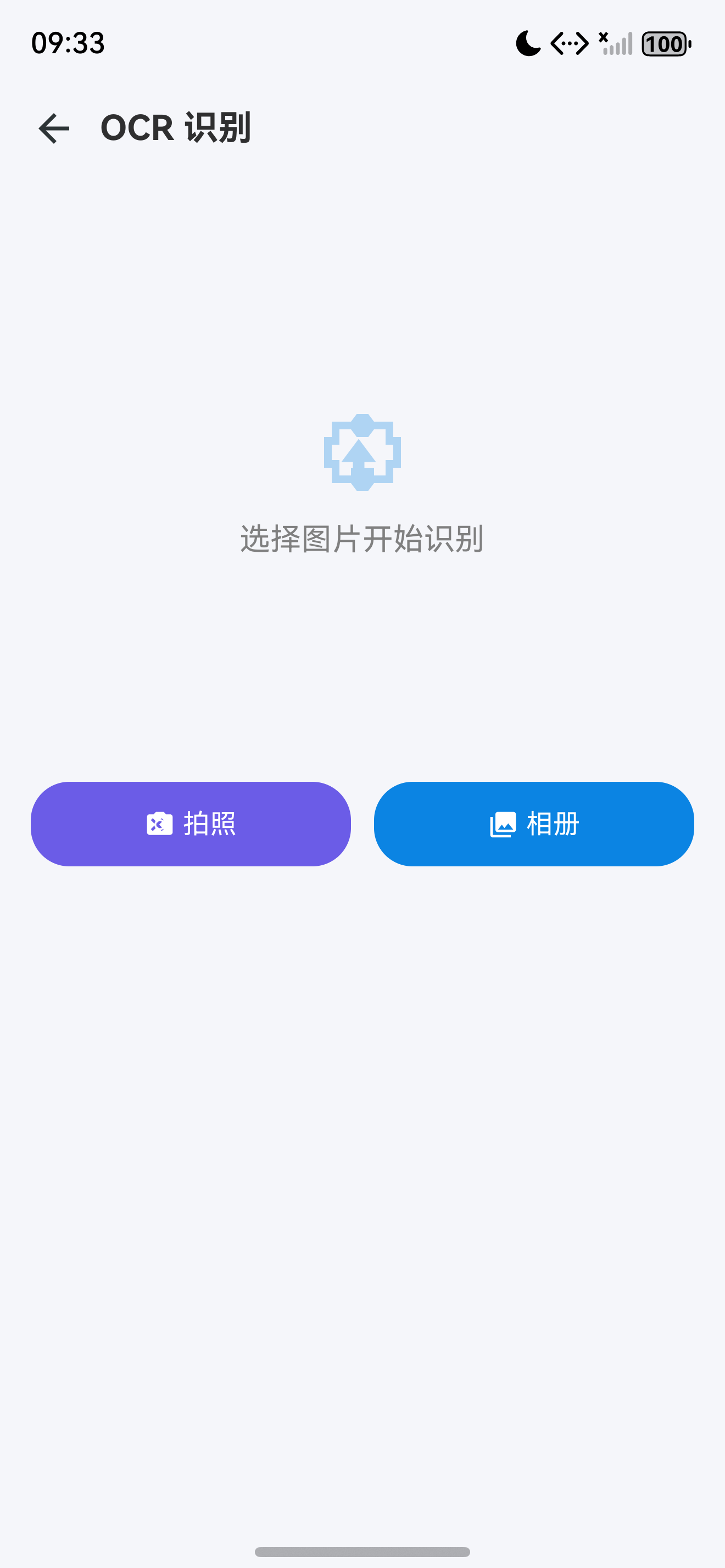
图1:HarmonyAI 首页模块布局示意图
一、首页整体设计
1.1 页面布局结构
首页采用 垂直滚动布局,从上到下依次排列:
┌─────────────────────┐
│  [搜索] 搜索/快捷入口栏 │  ← 顶部搜索栏
├─────────────────────┤
│  快捷入口 (Grid 2×4)  │  ← 8 个 AI 功能入口
│  ┌──┐ ┌──┐ ┌──┐ ┌──┐│
│  │聊│ │翻│ │OC│ │花││
│  │天│ │译│ │R │ │语││
│  └──┘ └──┘ └──┘ └──┘│
│  ┌──┐ ┌──┐ ┌──┐ ┌──┐│
│  │总│ │代│ │待│ │日││
│  │结│ │码│ │办│ │程││
│  └──┘ └──┘ └──┘ └──┘│
├─────────────────────┤
│  [星] AI 推荐         │  ← 横向滑动推荐
│  [推荐卡片] [推荐卡片]  │
├─────────────────────┤
│  [消息] 最近聊天       │  ← 最近对话列表
│  ────────────────    │
│  聊天的标题 1          │
│  聊天的标题 2          │
│  聊天的标题 3          │
├─────────────────────┤
│  [编辑] 每日一句       │  ← 名言警句
├─────────────────────┤
│  [花] 今日花语         │  ← 花语 Widget
└─────────────────────┘
1.2 交互设计
| 交互元素 | 手势/操作 | 反馈效果 |
|---|---|---|
| 快捷入口图标 | 点击 | 缩放动画 + 跳转 |
| AI 推荐卡片 | 左右滑动 | 卡片滑动切换 |
| 最近聊天项 | 点击 | 跳转聊天页 |
| 搜索栏 | 点击 | 展开搜索页 |
| 下拉刷新 | 下拉手势 | 刷新所有数据 |
1.3 图标资源规范
HarmonyOS NEXT 设备上 emoji 会渲染为蓝色/紫色块,必须使用 SVG 矢量图标:
| 模块 | 图标资源名 | 说明 |
|---|---|---|
| 搜索栏 | ic_search.svg | 搜索图标 |
| 扫码 | ic_scan.svg | 扫码图标 |
| AI 聊天 | ic_chat.svg | 聊天气泡 |
| AI 翻译 | ic_translate.svg | 翻译图标 |
| OCR 识别 | ic_ocr.svg | 文字识别 |
| 每日花语 | ic_flower.svg | 花朵图标 |
| 文章总结 | ic_summary.svg | 摘要图标 |
| 代码解释 | ic_code.svg | 代码括号 |
| AI 待办 | ic_todo.svg | 待办清单 |
| AI 日程 | ic_schedule.svg | 日历图标 |
提示:所有 SVG 图标统一放在
entry/src/main/resources/base/media目录下,通过$r('app.media.ic_xxx')引用。
二、数据模型定义
2.1 快捷入口模型
// model/QuickEntry.ts
export interface QuickEntry {
  id: string;           // 唯一标识
  icon: Resource;       // 图标资源
  title: string;        // 标题
  description: string;  // 描述
  route: string;        // 路由路径
  color: ResourceColor; // 主题色
}
2.2 首页数据模型
// model/HomeData.ts
export interface HomeData {
  quickEntries: QuickEntry[];     // 快捷入口
  recentChats: Conversation[];   // 最近聊天
  aiRecommendations: AICard[];   // AI 推荐
  dailyQuote: string;             // 每日一句
  dailyFlower: FlowerInfo | null; // 今日花语
}

export interface AICard {
  id: string;
  title: string;
  description: string;
  icon: Resource;
  bgColor: ResourceColor;
  tip: string;
}

export interface FlowerInfo {
  name: string;
  language: string;      // 花语
  meaning: string;       // 寓意
  suggestion: string;    // 送花建议
  story: string;         // 历史故事
}
三、同步助手类实现
3.1 SyncHelper 数据同步
在 HarmonyOS NEXT 中,@Observed 装饰器用于观察嵌套对象的属性变化。但有时我们需要更灵活的同步机制。
// utils/SyncHelper.ts
export class SyncHelper {
  static instance: SyncHelper;
  private observers: Map<string, Function[]> = new Map();

  static getInstance(): SyncHelper {
    if (!SyncHelper.instance) {
      SyncHelper.instance = new SyncHelper();
    }
    return SyncHelper.instance;
  }

  // 注册观察者
  observe(key: string, callback: Function): void {
    const callbacks = this.observers.get(key) || [];
    callbacks.push(callback);
    this.observers.set(key, callbacks);
  }

  // 通知变更
  notify(key: string, data?: any): void {
    const callbacks = this.observers.get(key);
    if (callbacks) {
      callbacks.forEach(cb => cb(data));
    }
  }

  // 移除观察者
  removeObserve(key: string, callback: Function): void {
    const callbacks = this.observers.get(key) || [];
    const index = callbacks.indexOf(callback);
    if (index > -1) {
      callbacks.splice(index, 1);
    }
  }
}
使用场景:当 AIService 返回数据后,通过 SyncHelper 通知首页更新每日一句或今日花语。
四、首页组件实现
4.1 顶部搜索栏
// components/SearchBar.ets
@Component
struct SearchBar {
  @State searchText: string = '';

  build() {
    Row() {
      // 搜索图标
      Image($r('app.media.ic_search'))
        .width(20).height(20)
        .margin({ left: 12 })
      // 输入框
      TextInput({ placeholder: '搜索AI能力...', text: this.searchText })
        .layoutWeight(1)
        .backgroundColor(Color.Transparent)
        .fontSize(16)
        .margin({ left: 8, right: 12 })
        .onChange((value: string) => {
          this.searchText = value;
        })
      // 扫码图标(预留)
      Image($r('app.media.ic_scan'))
        .width(20).height(20)
        .margin({ right: 12 })
    }
    .width('100%')
    .height(48)
    .backgroundColor(Color.White)
    .borderRadius(24)
    .shadow({ radius: 4, color: 'rgba(0,0,0,0.08)' })
    .margin({ left: 16, right: 16, top: 12 });
  }
}
4.2 快捷入口网格
// pages/HomePage.ets (快捷入口部分)
@Component
struct QuickEntryGrid {
  private entries: QuickEntry[] = [
    { id: 'chat', icon: $r('app.media.ic_chat'), title: 'AI 聊天',
      description: '智能对话助手', route: 'pages/ChatPage', color: '#6C5CE7' },
    { id: 'translate', icon: $r('app.media.ic_translate'), title: 'AI 翻译',
      description: '多语言互译', route: 'pages/TranslatePage', color: '#00B894' },
    { id: 'ocr', icon: $r('app.media.ic_ocr'), title: 'OCR 识别',
      description: '文字提取', route: 'pages/OCRPage', color: '#0984E3' },
    { id: 'flower', icon: $r('app.media.ic_flower'), title: '每日花语',
      description: '花语查询', route: 'pages/FlowerPage', color: '#E17055' },
    { id: 'summary', icon: $r('app.media.ic_summary'), title: '文章总结',
      description: 'AI 摘要', route: 'pages/SummaryPage', color: '#FDCB6E' },
    { id: 'code', icon: $r('app.media.ic_code'), title: '代码解释',
      description: '代码分析', route: 'pages/CodePage', color: '#74B9FF' },
    { id: 'todo', icon: $r('app.media.ic_todo'), title: 'AI 待办',
      description: '智能待办', route: 'pages/TodoPage', color: '#A29BFE' },
    { id: 'schedule', icon: $r('app.media.ic_schedule'), title: 'AI 日程',
      description: '日程规划', route: 'pages/SchedulePage', color: '#55EFC4' }
  ];

  build() {
    Column() {
      // 标题
      Text('AI 工具箱')
        .fontSize(18)
        .fontWeight(FontWeight.Bold)
        .width('100%')
        .margin({ left: 16, bottom: 12 });

      // 2x4 网格布局
      Grid() {
        ForEach(this.entries, (item: QuickEntry) => {
          GridItem() {
            // 快捷入口卡片
            Column() {
              // 图标
              Image(item.icon)
                .width(36).height(36)
                .margin({ bottom: 6 });
              // 标题
              Text(item.title)
                .fontSize(14)
                .fontWeight(FontWeight.Medium);
              // 描述
              Text(item.description)
                .fontSize(11)
                .fontColor(Color.Gray);
            }
            .width('100%')
            .padding(12)
            .backgroundColor(Color.White)
            .borderRadius(16)
            .shadow({ radius: 4, color: 'rgba(0,0,0,0.06)' })
            .onClick(() => {
              RouterUtil.navigateTo(item.route);
            });
          }
        }, (item: QuickEntry) => item.id)
      }
      .columnsTemplate('1fr 1fr 1fr 1fr')
      .rowsTemplate('1fr 1fr')
      .columnsGap(10)
      .rowsGap(10)
      .padding({ left: 16, right: 16 });
    }
  }
}
4.3 AI 推荐卡片(横向滑动)
@Component
struct AIRecommendation {
  private cards: AICard[] = [
    { id: '1', title: '今日翻译', description: '英语 → 中文',
      icon: $r('app.media.ic_translate_big'), bgColor: '#6C5CE7',
      tip: '试试翻译 "Hello World"' },
    { id: '2', title: '代码助手', description: '代码解释与优化',
      icon: $r('app.media.ic_code_big'), bgColor: '#00B894',
      tip: '粘贴代码开始分析' },
    { id: '3', title: '文章总结', description: '长文快速摘要',
      icon: $r('app.media.ic_summary_big'), bgColor: '#0984E3',
      tip: '输入文章或链接' }
  ];
  @State currentIndex: number = 0;

  build() {
    Column() {
      // 标题栏
      Row() {
        Image($r('app.media.ic_star')).width(20).height(20).margin({ right: 6 });
        Text('AI 推荐')
          .fontSize(18)
          .fontWeight(FontWeight.Bold);
        Blank();
        Text('更多')
          .fontSize(14)
          .fontColor($r('app.color.primary'));
      }
      .width('100%')
      .padding({ left: 16, right: 16, bottom: 12 });

      // 横向滑动列表
      Scroll() {
        Row() {
          ForEach(this.cards, (card: AICard) => {
            // 推荐卡片
            Column() {
              Image(card.icon)
                .width(48).height(48);
              Text(card.title)
                .fontSize(16)
                .fontWeight(FontWeight.Bold)
                .fontColor(Color.White)
                .margin({ top: 12 });
              Text(card.description)
                .fontSize(13)
                .fontColor('rgba(255,255,255,0.8)')
                .margin({ top: 4 });
              Text(card.tip)
                .fontSize(12)
                .fontColor('rgba(255,255,255,0.6)')
                .margin({ top: 8 });
            }
            .width(220)
            .height(160)
            .padding(16)
            .backgroundColor(card.bgColor)
            .borderRadius(20)
            .margin({ left: 16 })
            .alignItems(HorizontalAlign.Start);
          })
        }
      }
      .scrollable(ScrollDirection.Horizontal)
      .edgeEffect(EdgeEffect.Spring);
    }
  }
}
4.4 最近聊天列表
@Component
struct RecentChatList {
  @State conversations: Conversation[] = [];
  private syncHelper = SyncHelper.getInstance();

  aboutToAppear() {
    this.loadRecentChats();
    // 监听新消息
    this.syncHelper.observe('new_message', () => {
      this.loadRecentChats();
    });
  }

  loadRecentChats() {
    // 从 ConversationRepository 加载最近 5 条
    ConversationRepository.getInstance()
      .getRecentConversations(5)
      .then((chats: Conversation[]) => {
        this.conversations = chats;
      });
  }

  build() {
    Column() {
      // 标题
      Row() {
        Image($r('app.media.ic_chat')).width(20).height(20).margin({ right: 6 });
        Text('最近聊天')
          .fontSize(18)
          .fontWeight(FontWeight.Bold);
        Blank();
        Text('查看全部 >')
          .fontSize(14)
          .fontColor(Color.Gray)
          .onClick(() => {
            RouterUtil.navigateTo('pages/HistoryPage');
          });
      }
      .width('100%')
      .padding({ left: 16, right: 16, bottom: 12 });

      // 聊天列表
      ForEach(this.conversations, (conv: Conversation) => {
        HistoryCard({ conversation: conv })
          .margin({ bottom: 8 })
          .onClick(() => {
            RouterUtil.navigateTo('pages/ChatPage', { convId: conv.id });
          });
      }, (conv: Conversation) => conv.id);
    }
  }
}
五、首页主页面组合
5.1 HomePage 完整实现
// pages/HomePage.ets
@Entry
@Component
struct HomePage {
  @State dailyQuote: string = '';
  @State dailyFlower: FlowerInfo | null = null;
  @StorageLink('statusBarHeight') statusBarHeight: number = 32;
  @StorageLink('navBarHeight') navBarHeight: number = 24;
  private syncHelper = SyncHelper.getInstance();

  aboutToAppear() {
    this.loadDailyData();
  }

  loadDailyData() {
    // 加载每日一句
    this.dailyQuote = '每一个不曾起舞的日子,都是对生命的辜负。 —— 尼采';
    // 从 AIService 加载今日花语
    AIService.getInstance()
      .getDailyFlower()
      .then((flower: FlowerInfo) => {
        this.dailyFlower = flower;
      })
      .catch(() => {
        // 兜底数据
        this.dailyFlower = {
          name: '向日葵',
          language: '沉默的爱',
          meaning: '忠诚、希望、光明',
          suggestion: '适合送给正在奋斗的朋友',
          story: '向日葵的花语是沉默的爱,代表着勇敢追求幸福。'
        };
      });
  }

  build() {
    Column() {
      // 顶部安全区占位
      Row().width('100%').height(this.statusBarHeight);

      // 可滚动区域
      Scroll() {
        Column() {
          // 搜索栏
          SearchBar();

          // 快捷入口
          QuickEntryGrid()
            .margin({ top: 20 });

          // AI 推荐
          AIRecommendation()
            .margin({ top: 24 });

          // 最近聊天
          RecentChatList()
            .margin({ top: 24 });

          // 每日一句
          DailyQuoteCard({ quote: this.dailyQuote })
            .margin({ top: 24 });

          // 今日花语
          if (this.dailyFlower) {
            DailyFlowerCard({ flower: this.dailyFlower! })
              .margin({ top: 16, bottom: 32 });
          }
        }
        .width('100%');
      }
      .scrollable(ScrollDirection.Vertical)
      .edgeEffect(EdgeEffect.Spring)
      .layoutWeight(1);

      // 底部安全区占位
      Row().width('100%').height(this.navBarHeight);
    }
    .width('100%')
    .height('100%')
    .backgroundColor($r('app.color.page_background'));
  }
}
5.2 每日一句卡片
@Component
struct DailyQuoteCard {
  @Prop quote: string;

  build() {
    Column() {
      Row() {
        Image($r('app.media.ic_edit')).width(18).height(18).margin({ right: 6 });
        Text('每日一句')
          .fontSize(16)
          .fontWeight(FontWeight.Bold);
      }
      .width('100%')
      .margin({ bottom: 12 });

      Column() {
        Text(this.quote)
          .fontSize(15)
          .fontColor('#2D3436')
          .lineHeight(24)
          .textAlign(TextAlign.Center);
      }
      .padding(20)
      .backgroundColor(Color.White)
      .borderRadius(16)
      .shadow({ radius: 4, color: 'rgba(0,0,0,0.06)' });
    }
    .padding({ left: 16, right: 16 });
  }
}
六、路由与导航
6.1 RouterUtil 工具类
// utils/RouterUtil.ts
import router from '@ohos.router';

export class RouterUtil {
  // 跳转页面
  static navigateTo(uri: string, params?: Record<string, Object>): void {
    router.pushUrl({
      url: uri,
      params: params
    }, router.RouterMode.Standard, (err) => {
      if (err) {
        hilog.error(0x0000, 'RouterUtil',
          'Failed to navigate. Code: %{public}d, message: %{public}s',
          err.code, err.message);
      }
    });
  }

  // 返回上一页
  static back(page?: number): void {
    router.back(page);
  }

  // 替换页面
  static replaceTo(uri: string, params?: Record<string, Object>): void {
    router.replaceUrl({
      url: uri,
      params: params
    });
  }

  // 清除栈并跳转
  static clearAndNavigate(uri: string): void {
    router.clear();
    router.pushUrl({ url: uri });
  }
}
6.2 路由配置
// 在 EntryAbility 中配置路由表
onWindowStageCreate(windowStage: window.WindowStage) {
  // 配置路由
  windowStage.loadContent('pages/HomePage', (err) => {
    if (err.code) {
      hilog.error(0x0000, 'HarmonyAI',
        'Failed to load content. Cause: %{public}s',
        JSON.stringify(err));
    }
  });
}
注意:HarmonyOS NEXT 路由需要在
module.json5中配置 page 的srcEntry,或者使用router.pushUrl动态跳转。
七、主题与样式
7.1 首页主题色
// theme/LightTheme.ts
export const LightTheme = {
  // 背景色
  pageBackground: '#F5F6FA',
  cardBackground: '#FFFFFF',
  // 主色调
  primary: '#6C5CE7',
  primaryLight: '#A29BFE',
  // 快捷入口颜色
  entryColors: {
    chat: '#6C5CE7',
    translate: '#00B894',
    ocr: '#0984E3',
    flower: '#E17055',
    summary: '#FDCB6E',
    code: '#74B9FF',
    todo: '#A29BFE',
    schedule: '#55EFC4'
  },
  // 文字颜色
  textPrimary: '#2D3436',
  textSecondary: '#636E72',
  textTertiary: '#B2BEC3',
  // 阴影
  shadow: 'rgba(0,0,0,0.06)'
};
7.2 玻璃拟态效果
// 玻璃拟态组件
@Component
struct GlassCard {
  @Prop blur: number = 10;
  @Prop opacity: number = 0.15;

  build() {
    Column() {
      // 内容插槽
    }
    .width('100%')
    .backgroundColor('rgba(255,255,255,0.7)')
    .borderRadius(20)
    .shadow({ radius: 10, color: 'rgba(0,0,0,0.08)' })
    .backdropBlur(this.blur);
  }
}
八、完整的首页效果
8.1 页面功能矩阵
| 模块 | 数据来源 | 交互方式 | 视觉效果 |
|---|---|---|---|
| 搜索栏 | 本地输入 | 点击展开 | 圆角搜索框 |
| 快捷入口 | 本地数据 | 点击跳转 | 2×4 网格,图标 + 文字 |
| AI 推荐 | AIService | 横向滑动 | 渐变卡片,圆角 |
| 最近聊天 | Repository | 点击跳转 | 列表项,阴影 |
| 每日一句 | 本地/远程 | 自动刷新 | 白色卡片 |
| 今日花语 | AIService | 点击查看更多 | 花语卡片 |
8.2 性能优化要点
- 延迟加载:首页按模块延迟渲染,优先显示快捷入口
- 图片缓存:使用 Image Kit 的缓存机制
- 数据预加载:在 Splash 页预加载首页数据
- 状态管理:使用 @State 最小化更新范围
九、常见问题
9.1 Grid 布局不整齐
// 错误:columnsTemplate 设置错误
Grid() {
  // ...
}
.columnsTemplate('1fr 1fr 1fr') // 3列,不符合2×4需求

// 正确:4列布局
.columnsTemplate('1fr 1fr 1fr 1fr')
.rowsTemplate('1fr 1fr')
9.2 路由跳转失败
// 错误:路由路径不正确
router.pushUrl({ url: 'pages/ChatPage' }); // 缺少 .ets 后缀

// 正确
router.pushUrl({ url: 'pages/ChatPage' }); // 不需要后缀
// 需要注意的是,路由必须在 module.json5 中注册
提示:HarmonyOS NEXT 路由路径不需要文件后缀,但是必须在
module.json5的abilities中配置pages数组。
十、Git 提交
# 添加首页相关文件
git add .

# 提交
git commit -m "feat(home): 完成首页设计与快捷入口

- 实现 2x4 快捷入口网格
- 实现 AI 推荐横向滑动卡片
- 实现最近聊天列表
- 实现每日一句卡片
- 实现今日花语卡片
- 封装 RouterUtil 路由工具
- 封装 SyncHelper 同步助手
- 定义首页数据模型

Co-Authored-By: AtomCode (deepseek-v4-flash) <noreply@atomgit.com>"

# 创建 Tag
git tag v0.0.2
总结
本文实现了 HarmonyAI 的首页,包含快捷入口网格、AI 推荐卡片、最近聊天列表、每日一句和今日花语五大模块。核心要点:
- 2×4 快捷入口网格:8 个 AI 功能入口,点击跳转对应页面
- 横向滑动推荐卡片:智能推荐,滑动切换
- 最近聊天列表:展示最近对话,快速进入聊天
- 每日一句 + 今日花语:首页内容丰富度提升
- 完整主题配色:统一视觉风格
如果这篇文章对你有帮助,欢迎点赞👍、收藏⭐、关注🔔,你的支持是我持续创作的动力!
上一篇: [创建企业级 AI 工程与目录结构]
下一篇: [ChatGPT 风格 AI 聊天界面]
相关资源:

讨论HarmonyOS开发技术,专注于API与组件、DevEco Studio、测试、元服务和应用上架分发等。
更多推荐
 8
8 0
0- 0


 已为社区贡献64条内容

所有评论(0)