HarmonyOS NEXT 文件搜索功能开发:多条件筛选、关键词高亮与性能优化实战
HarmonyOS NEXT 文件搜索功能开发:多条件筛选、关键词高亮与性能优化实战
前言
文件搜索是文件管理应用的核心功能模块,高效的搜索能力直接影响用户体验。本文基于 HarmonyExplorer 项目,深入讲解搜索中心(Search)页面的完整开发流程,包括 SearchBar 组件封装、按名称搜索、按类型筛选、按时间范围筛选、按文件大小筛选、关键词高亮、搜索历史记录、搜索结果排序和搜索性能优化等核心技术。
一、搜索功能架构设计
1.1 架构分层概述
文件搜索采用 UI → ViewModel → Repository → Service 分层架构,SearchService 负责搜索引擎和过滤逻辑,SearchViewModel 管理搜索状态和结果列表。
interface SearchCondition {
  keyword: string;
  fileTypes: Array<FileType>;
  startTime: number; endTime: number;
  minSize: number; maxSize: number;
  sortType: SortType;
}

enum SortType {
  NameAsc = 0, NameDesc = 1, TimeDesc = 2,
  TimeAsc = 3, SizeDesc = 4, SizeAsc = 5
}

interface SearchResult {
  fileInfo: FileInfo;
  matchedKeywords: Array<string>;
  relevanceScore: number;
}
1.2 搜索流程设计
搜索流程从用户输入关键词开始,经过条件筛选、排序和分页,最终返回结果列表。管道式处理 保证了流程的清晰性。
提示:搜索操作应在异步线程中执行,避免大目录扫描阻塞 UI 线程,同时通过防抖机制减少无效搜索请求。
二、SearchBar 组件封装
2.1 组件设计实现
SearchBar 是搜索功能的入口组件,提供输入框、搜索按钮和清除按钮,支持实时搜索和提交搜索两种模式。
@Component
struct SearchBar {
  @State inputText: string = '';
  @Prop placeholder: string = '搜索文件...';
  public onSearch: (keyword: string) => void = () => {};
  public onTextChange: (text: string) => void = () => {};

  build(): void {
    Row() {
      Image('resources/search_icon.png').width(20).height(20).margin({ left: 12, right: 8 })
      TextInput({ text: this.inputText, placeholder: this.placeholder })
        .layoutWeight(1).backgroundColor(Color.Transparent).fontSize(14)
        .onChange((value: string) => { this.inputText = value; this.onTextChange(value); })
        .onSubmit(() => { this.onSearch(this.inputText); })
      if (this.inputText.length > 0) {
        Image('resources/clear_icon.png').width(16).height(16).margin({ right: 12 })
          .onClick(() => { this.inputText = ''; this.onTextChange(''); })
      }
    }.width('100%').height(40).backgroundColor('#F5F5F5').borderRadius(20)
  }
}
2.2 防抖搜索处理
实时搜索时使用防抖机制,用户停止输入 300ms 后才触发搜索,避免频繁搜索导致性能问题。
class DebounceSearchController {
  private timerId: number = -1;
  private readonly delay: number = 300;

  public search(keyword: string, callback: (text: string) => void): void {
    if (this.timerId !== -1) { clearTimeout(this.timerId); }
    this.timerId = setTimeout(() => { callback(keyword); this.timerId = -1; }, this.delay);
  }
}
三、按名称搜索实现
3.1 名称匹配算法
按名称搜索支持精确匹配和模糊匹配,模糊匹配使用包含判断实现,同时计算相关度分数用于排序。
class SearchService {
  public static searchByName(files: Array<FileInfo>, keyword: string): Array<SearchResult> {
    const results: Array<SearchResult> = [];
    const lowerKeyword: string = keyword.toLowerCase();
    for (let i = 0; i < files.length; i++) {
      const lowerName: string = files[i].name.toLowerCase();
      if (lowerName.includes(lowerKeyword)) {
        const position: number = lowerName.indexOf(lowerKeyword);
        results.push({
          fileInfo: files[i], matchedKeywords: [keyword],
          relevanceScore: position === 0 ? 100 : (100 - position)
        });
      }
    }
    return results;
  }
}
3.2 搜索结果统计
| 搜索维度 | 统计内容 | 展示方式 |
|---|---|---|
| 总数量 | 结果总数 | 顶部显示 |
| 按类型 | 各类型数量 | 标签显示 |
| 按目录 | 各目录数量 | 分组显示 |
| 按时间 | 时间分布 | 图表显示 |
四、按类型筛选
4.1 类型筛选实现
文件类型筛选支持多选,用户可以选择一个或多个文件类型进行过滤,筛选结果实时更新。
class FileTypeFilter {
  public static filter(results: Array<SearchResult>, selectedTypes: Array<FileType>): Array<SearchResult> {
    if (selectedTypes.length === 0) { return results; }
    const filtered: Array<SearchResult> = [];
    for (let i = 0; i < results.length; i++) {
      if (selectedTypes.indexOf(results[i].fileInfo.type) !== -1) {
        filtered.push(results[i]);
      }
    }
    return filtered;
  }
}
4.2 类型筛选交互
类型筛选标签采用 Chip 风格设计,选中状态使用主题色高亮,未选中状态使用灰色背景。
提示:文件类型筛选应支持多选模式,允许用户同时搜索多种类型的文件,提升搜索灵活性。
五、按时间范围筛选
5.1 时间筛选实现
时间范围筛选支持预设时间段和自定义时间段两种方式,基于文件修改时间进行过滤。
class TimeRangeFilter {
  public static filter(results: Array<SearchResult>, startTime: number, endTime: number): Array<SearchResult> {
    if (startTime === 0 && endTime === 0) { return results; }
    const filtered: Array<SearchResult> = [];
    for (let i = 0; i < results.length; i++) {
      const modifyTime: number = results[i].fileInfo.modifyTime;
      if (modifyTime >= startTime && modifyTime <= endTime) {
        filtered.push(results[i]);
      }
    }
    return filtered;
  }
}

interface TimeRange { startTime: number; endTime: number; }
5.2 时间段选择器
| 快捷选项 | 时间范围 | 适用场景 |
|---|---|---|
| 今天 | 当天 0:00 至现在 | 查找最近文件 |
| 本周 | 本周日至现在 | 查找本周文件 |
| 本月 | 本月 1 日至现在 | 查找本月文件 |
| 自定义 | 用户选择日期 | 精确范围查找 |
六、按文件大小筛选
6.1 大小筛选实现
文件大小筛选支持预设范围和自定义范围两种方式,通过 minSize 和 maxSize 参数控制。
class FileSizeFilter {
  private static readonly MB: number = 1024 * 1024;

  public static filter(results: Array<SearchResult>, minSize: number, maxSize: number): Array<SearchResult> {
    if (minSize === 0 && maxSize === 0) { return results; }
    const filtered: Array<SearchResult> = [];
    for (let i = 0; i < results.length; i++) {
      const size: number = results[i].fileInfo.size;
      if (size >= minSize && (maxSize === 0 || size <= maxSize)) {
        filtered.push(results[i]);
      }
    }
    return filtered;
  }
}
6.2 大小格式化显示
- 小于 1KB:直接显示字节数
- 小于 1MB:以 KB 为单位显示
- 小于 1GB:以 MB 为单位显示
- 大于等于 1GB:以 GB 为单位显示
七、关键词高亮实现
7.1 高亮渲染
搜索结果中的关键词需要高亮显示,ArkUI 的 Text 组件支持使用 Span 子组件实现富文本渲染。
@Component
struct HighlightText {
  @Prop fullText: string;
  @Prop keyword: string;
  @Prop normalColor: string = '#333333';
  @Prop highlightColor: string = '#007DFF';

  build(): void {
    Text() {
      if (this.keyword.length === 0) {
        Span(this.fullText).fontSize(14).fontColor(this.normalColor)
      } else {
        this.buildHighlightedSpans()
      }
    }
  }

  @Builder
  buildHighlightedSpans(): void {
    const lowerText: string = this.fullText.toLowerCase();
    const position: number = lowerText.indexOf(this.keyword.toLowerCase());
    if (position === -1) {
      Span(this.fullText).fontSize(14).fontColor(this.normalColor); return;
    }
    if (position > 0) {
      Span(this.fullText.substring(0, position)).fontSize(14).fontColor(this.normalColor)
    }
    Span(this.fullText.substring(position, position + this.keyword.length))
      .fontSize(14).fontColor(this.highlightColor).fontWeight(FontWeight.Bold)
    if (position + this.keyword.length < this.fullText.length) {
      Span(this.fullText.substring(position + this.keyword.length)).fontSize(14).fontColor(this.normalColor)
    }
  }
}
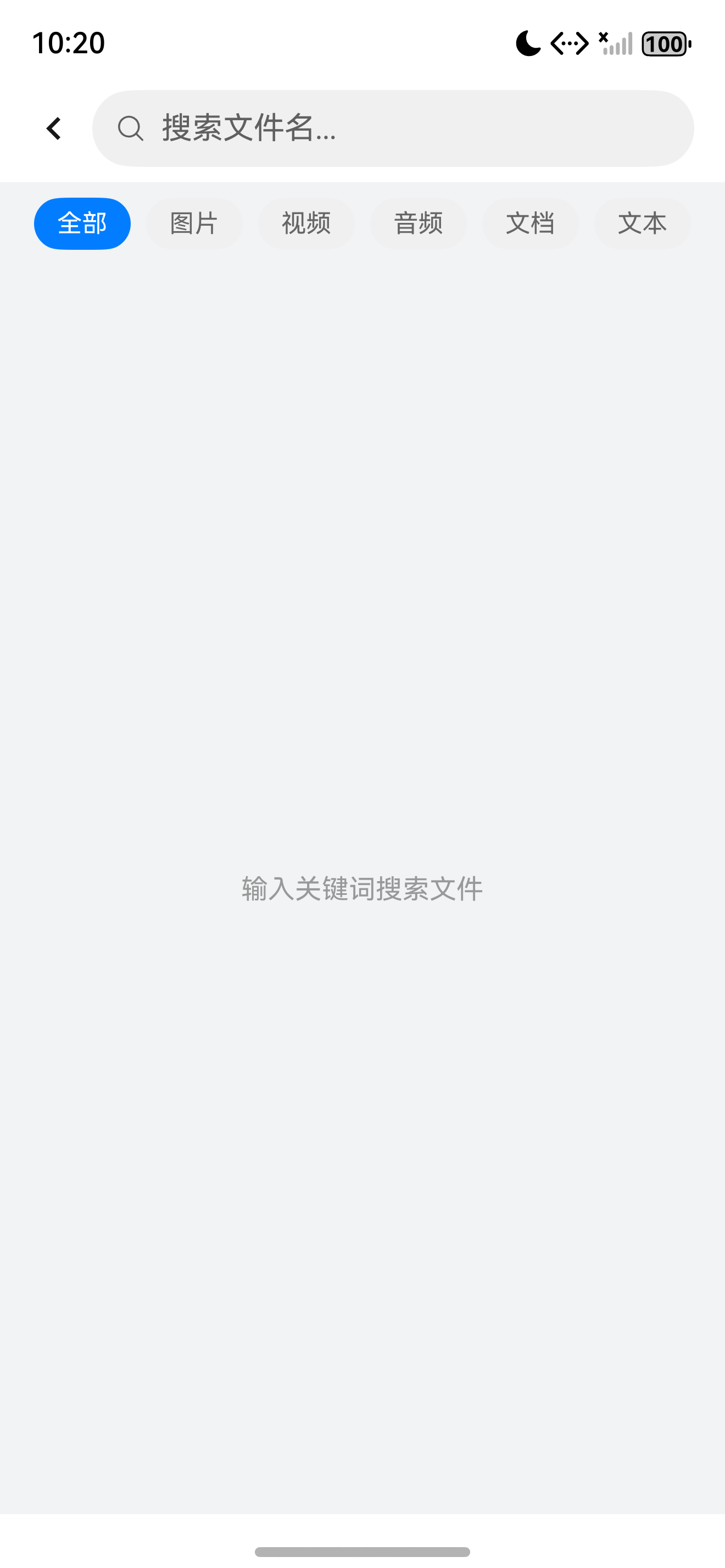
搜索中心页面效果展示,包含搜索栏、筛选条件和结果列表
7.2 高亮性能优化
提示:当文本内容较长时,关键词高亮应限制在文件名范围内,避免对完整路径进行高亮处理,减少 Span 组件数量。
八、搜索历史记录
8.1 历史记录管理
搜索历史记录通过 Preferences 持久化存储,记录用户搜索关键词和时间,支持快速重复搜索和清空历史。历史记录 能显著提升重复搜索的效率。
class SearchHistoryManager {
  private static readonly PREF_NAME: string = 'search_history';
  private static readonly MAX_HISTORY: number = 20;

  public static async addHistory(context: Context, keyword: string): Promise<void> {
    if (keyword.trim().length === 0) { return; }
    const history: Array<SearchHistory> = await SearchHistoryManager.getHistory(context);
    const filtered: Array<SearchHistory> = history.filter(
      (item: SearchHistory) => item.keyword !== keyword
    );
    filtered.unshift({ keyword: keyword, searchTime: Date.now() });
    const trimmed: Array<SearchHistory> = filtered.slice(0, SearchHistoryManager.MAX_HISTORY);
    const prefs: preferences.Preferences =
      await preferences.getPreferences(context, SearchHistoryManager.PREF_NAME);
    await prefs.put('history_list', JSON.stringify(trimmed));
    await prefs.flush();
  }

  public static async getHistory(context: Context): Promise<Array<SearchHistory>> {
    const prefs: preferences.Preferences =
      await preferences.getPreferences(context, SearchHistoryManager.PREF_NAME);
    const jsonStr: string = await prefs.get('history_list', '[]') as string;
    return JSON.parse(jsonStr);
  }
}

interface SearchHistory { keyword: string; searchTime: number; }
8.2 历史记录展示
搜索历史以标签形式展示在搜索框下方,点击标签直接执行搜索,长按标签可以删除单条记录。
九、搜索结果排序
9.1 排序实现
搜索结果支持按名称、时间和大小进行升序或降序排列,用户可以通过排序按钮切换排序方式。
class SearchResultSorter {
  public static sort(
    results: Array<SearchResult>, sortType: SortType
  ): Array<SearchResult> {
    const sorted: Array<SearchResult> = results.slice();
    if (sortType === SortType.NameAsc) {
      sorted.sort((a: SearchResult, b: SearchResult) =>
        a.fileInfo.name.localeCompare(b.fileInfo.name));
    } else if (sortType === SortType.TimeDesc) {
      sorted.sort((a: SearchResult, b: SearchResult) =>
        b.fileInfo.modifyTime - a.fileInfo.modifyTime);
    } else if (sortType === SortType.SizeDesc) {
      sorted.sort((a: SearchResult, b: SearchResult) =>
        b.fileInfo.size - a.fileInfo.size);
    }
    return sorted;
  }
}
9.2 排序方式说明
| 排序方式 | 排序依据 | 适用场景 |
|---|---|---|
| 名称升序 | 文件名 A-Z | 按字母查找 |
| 时间最新 | 修改时间倒序 | 查找最近文件 |
| 大小降序 | 文件大小倒序 | 查找大文件 |
| 大小升序 | 文件大小正序 | 查找小文件 |
十、搜索性能优化
10.1 索引优化
对于大量文件,全量扫描效率低下,可以通过建立 文件索引 提升搜索速度。
class FileIndexManager {
  private static indexMap: Map<string, IndexedFile> = new Map();

  public static async buildIndex(rootPath: string): Promise<void> {
    const files: Array<FileInfo> = await FileUtil.listFilesRecursive(rootPath);
    for (let i = 0; i < files.length; i++) {
      FileIndexManager.indexMap.set(files[i].path, { fileInfo: files[i], nameLower: files[i].name.toLowerCase() });
    }
  }

  public static search(keyword: string): Array<SearchResult> {
    const results: Array<SearchResult> = [];
    const lowerKeyword: string = keyword.toLowerCase();
    FileIndexManager.indexMap.forEach((indexed: IndexedFile) => {
      if (indexed.nameLower.includes(lowerKeyword)) {
        results.push({ fileInfo: indexed.fileInfo, matchedKeywords: [keyword], relevanceScore: 100 });
      }
    });
    return results;
  }
}

interface IndexedFile { fileInfo: FileInfo; nameLower: string; }
10.2 性能优化策略
- 建立文件名索引,避免每次全量扫描
- 使用防抖机制减少搜索请求频率
- 搜索结果分页加载,避免一次性渲染过多项
- 缓存搜索结果,相同关键词直接返回
提示:文件索引应在应用启动时或首次搜索时异步构建,构建过程中显示进度提示,避免用户长时间等待。
十一、SearchViewModel 完整实现
11.1 ViewModel 状态管理
SearchViewModel 统一管理搜索条件、搜索结果和搜索历史,协调各筛选器的协作。
@Observed
class SearchViewModel {
  public keyword: string = '';
  public condition: SearchCondition = {
    keyword: '', fileTypes: [], startTime: 0, endTime: 0,
    minSize: 0, maxSize: 0, sortType: SortType.TimeDesc
  };
  public results: Array<SearchResult> = [];
  public isSearching: boolean = false;
  private debounceController: DebounceSearchController = new DebounceSearchController();

  public async search(): Promise<void> {
    if (this.keyword.trim().length === 0) { this.results = []; return; }
    this.isSearching = true;
    this.condition.keyword = this.keyword;
    try {
      let results: Array<SearchResult> = SearchService.searchByName(
        FileIndexManager.getAllFiles(), this.keyword);
      results = FileTypeFilter.filter(results, this.condition.fileTypes);
      results = TimeRangeFilter.filter(results, this.condition.startTime, this.condition.endTime);
      results = FileSizeFilter.filter(results, this.condition.minSize, this.condition.maxSize);
      results = SearchResultSorter.sort(results, this.condition.sortType);
      this.results = results;
    } catch (error) {
      LogUtil.error('搜索失败: ' + error);
    } finally {
      this.isSearching = false;
    }
  }

  public debouncedSearch(): void {
    this.debounceController.search(this.keyword, () => { this.search(); });
  }
}
11.2 管道式筛选
搜索条件按管道式顺序执行,每个筛选器接收上一个筛选器的输出作为输入。管道模式 保证了筛选逻辑的清晰性和可组合性。
- 名称匹配:通过关键词匹配文件名,计算相关度分数
- 类型筛选:根据用户选择的文件类型过滤结果
- 时间筛选:按修改时间范围进一步缩小结果集
- 大小筛选:按文件大小范围过滤
- 结果排序:按指定排序方式输出最终结果
十二、页面布局与总结
12.1 页面布局实现
搜索页面由搜索栏、筛选条件区、搜索历史区和结果列表区组成,通过 Column 和 List 组合实现垂直布局。
@Entry
@Component
struct SearchPage {
  @State viewModel: SearchViewModel = new SearchViewModel();

  build(): void {
    Column() {
      SearchBar({
        placeholder: '搜索文件...',
        onSearch: (keyword: string) => { this.viewModel.keyword = keyword; this.viewModel.search(); },
        onTextChange: (text: string) => { this.viewModel.keyword = text; this.viewModel.debouncedSearch(); }
      }).padding({ left: 16, right: 16, top: 8, bottom: 8 })
      this.buildTypeFilter()
      if (this.viewModel.results.length > 0) {
        List() {
          ForEach(this.viewModel.results, (result: SearchResult) => {
            ListItem() {
              Row() {
                Image(FileUtil.getFileIcon(result.fileInfo.type)).width(32).height(32)
                Column() {
                  HighlightText({ fullText: result.fileInfo.name, keyword: this.viewModel.keyword })
                  Text(FileUtil.formatFileSize(result.fileInfo.size)).fontSize(12).fontColor('#999999').margin({ top: 4 })
                }.layoutWeight(1).margin({ left: 12 }).alignItems(HorizontalAlign.Start)
              }.width('100%').padding(12).onClick(() => { FileUtil.openFile(result.fileInfo); })
            }
          }, (result: SearchResult) => result.fileInfo.id)
        }.layoutWeight(1)
      } else {
        EmptyView({ message: '未找到匹配文件' })
      }
    }.width('100%').height('100%')
  }
}
12.2 最佳实践总结
| 优化项 | 方案 | 效果 |
|---|---|---|
| 防抖搜索 | 300ms 延迟 | 减少请求 |
| 文件索引 | 启动时构建 | 秒级搜索 |
| 分页加载 | 每页 50 条 | 内存优化 |
| 结果缓存 | Map 缓存 | 重复搜索 |
提示:搜索功能是文件管理应用中使用频率最高的功能之一,性能优化至关重要。建议在开发阶段使用大量测试文件(10000+)进行压力测试。
总结
本文基于 HarmonyExplorer 项目完整讲解了 HarmonyOS NEXT 文件搜索功能的开发流程,涵盖了 SearchBar 组件封装、按名称搜索、按类型筛选、按时间范围筛选、按文件大小筛选、关键词高亮、搜索历史记录、搜索结果排序和搜索性能优化等核心功能。通过管道式筛选设计和索引优化策略,开发者可以构建出高效、灵活的文件搜索系统。
如果这篇文章对你有帮助,欢迎点赞👍、收藏⭐、关注🔔,你的支持是我持续创作的动力!
相关资源

讨论HarmonyOS开发技术,专注于API与组件、DevEco Studio、测试、元服务和应用上架分发等。
更多推荐

 6
6 0
0- 0


 已为社区贡献87条内容

所有评论(0)