基于HarmonyOS API 24棋牌对局记录应用数据底座 由类型定义、配置令牌、Mock 数据与统计函数构成,独立于 UI 之外,为所有页面提供统一的数据来源
一、引言:当千年棋韵遇见现代移动开发
棋牌,是中华文明中一颗璀璨的明珠。从春秋战国的围棋对弈,到楚河汉界的象棋博弈,再到今天风靡大街小巷的五子棋、跳棋与军棋,棋类运动早已超越了单纯的娱乐范畴,成为承载智慧、磨砺心性、传承文化的重要载体。古人云"棋如人生",每一盘棋的背后都是一次思维的淬炼、一次心态的较量、一次经验的沉淀。
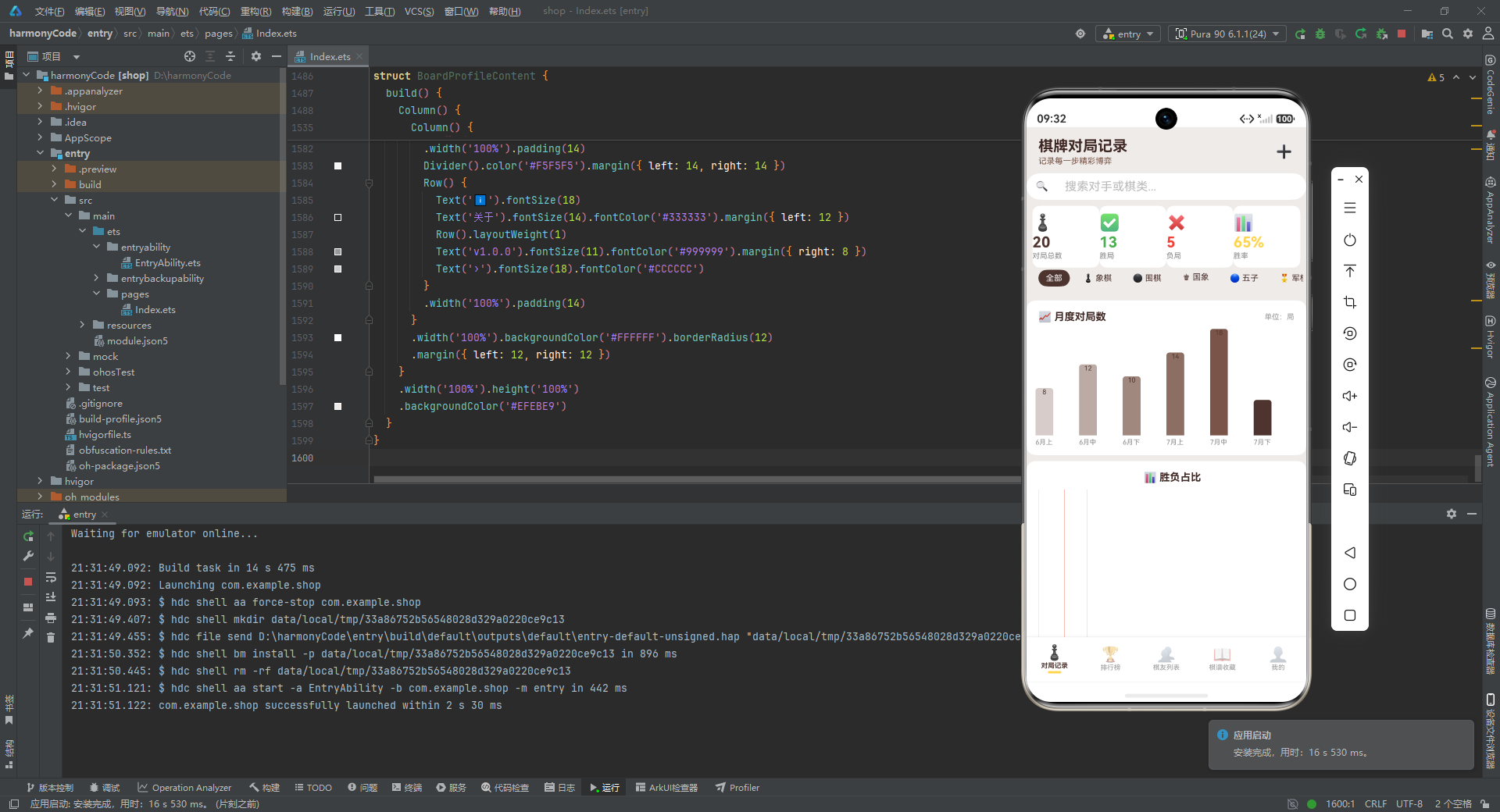
然而,传统的棋类爱好者往往面临着诸多记录与复盘的痛点。纸质棋谱容易丢失,记忆中的对手信息会随时间模糊,胜负走势难以直观呈现,等级分的变化更是无法量化追踪。对于一个认真钻研棋艺的爱好者而言,缺乏系统化的数据沉淀,就如同一位将军没有战报归档,每一次的胜败得失都只能停留在主观印象里,难以形成可分析、可回溯、可改进的闭环。
正是在这样的背景下,一款专注于"对局记录与数据分析"的移动端应用应运而生。它要解决的核心问题,是让每一位棋友都能像职业棋手那样,拥有一份属于自己的棋艺档案。这份档案不仅记录"和谁下过、胜负如何",更要从棋类分布、月度走势、胜负占比、对手画像、棋谱收藏等多维度,把零散的对局数据编织成一张可读、可分析、可决策的图谱。
从工程角度来看,这类应用对前端框架提出了相当高的要求。它需要在有限的屏幕空间里,同时承载列表渲染、表单录入、弹窗交互、图表可视化、状态筛选、多页面切换等复杂场景。任何一项做不好,都会直接拖累用户体验。本篇要剖析的,正是这样一个"麻雀虽小、五脏俱全"的完整实现。
它采用 ArkTS 声明式 UI 范式构建,整体代码大约一千六百行,却完整覆盖了一个棋牌爱好者的日常使用闭环:对局记录的增删改查、统计图表的可视化、棋友与棋谱的管理、排行榜与个人中心的展示。麻雀虽小,但它的设计思路、状态管理方式、组件拆分粒度、数据与表现的解耦策略,都值得开发者细细品味。
本文将按照"自顶向下、由表及里"的顺序,逐段拆解这份实现。我们会先看类型定义如何为整个应用奠定契约,再看配置令牌如何把"数据"与"表现"分离,然后深入到入口页面与各个功能子页,逐一分析每一个 Builder、每一处状态绑定、每一次条件渲染背后的设计意图。希望读完之后,你不仅能理解这份代码"写了什么",更能领悟"为什么这样写"。
二、技术栈与整体架构一览
在正式进入代码之前,有必要先交代清楚这份实现所依赖的技术底座,以及它在宏观上是如何组织的。这样在后续逐段分析时,读者心中始终有一张全局地图。
这份代码基于 HarmonyOS / OpenHarmony 的 ArkTS 声明式 UI 框架。ArkTS 在 TypeScript 的基础上,扩展出了一套面向 UI 的装饰器体系,其中最核心的几个概念如下:
@Entry:标记应用的入口组件,一个页面通常只有一个入口。@Component:声明一个自定义组件,可被复用与组合。@State:组件内部的状态变量,变化时会触发依赖它的 UI 重新渲染。@Builder:把一段 UI 结构封装成可调用的函数,类似"轻量级子组件",便于复用与组织。@Observed:标记一个类为可观察对象,配合@ObjectLink可实现深层对象的响应式更新。
整体架构可以概括为"一个入口 + 五个子页 + 一层数据底座":
- 入口组件 负责承载底部导航 Tab,并根据当前选中的 Tab 切换显示不同的子页面。
- 五个子页面 分别是对局记录、排行榜、棋友列表、棋谱收藏、个人中心,各自职责单一、边界清晰。
- 数据底座 由类型定义、配置令牌、Mock 数据与统计函数构成,独立于 UI 之外,为所有页面提供统一的数据来源。
这种分层的好处是显而易见的:UI 层只关心"怎么画",数据层只关心"画什么",两者通过类型契约衔接。日后即使把 Mock 数据替换为真实的网络请求或本地数据库,UI 组件本身几乎不用改动,只需在数据层做适配即可。这是这份代码在工程性上最值得称道的一点。
接下来,我们就按照这个分层顺序,自底向上地展开分析。
三、类型定义层:为整个应用奠定契约
3.1 为什么类型定义如此重要
在声明式 UI 框架里,UI 是状态的函数:UI = f(state)。如果 state 的结构不清晰、字段含义模糊,那么 UI 的渲染逻辑就会变得难以维护。因此,优秀的前端实现总是先从类型定义开始,把领域模型"钉死"在代码层面。
这份代码在文件开头,集中定义了九个 interface,分别对应应用中九类领域对象:棋类元信息、对局结果、执棋方、对弈地点、棋友、对局记录、棋谱收藏、月度柱状图数据、胜负占比数据、棋类分布数据、排行榜数据。这些类型共同构成了应用的"领域语言",后续所有的 Mock 数据、状态变量、Builder 入参,都建立在这些类型之上。
3.2 棋类与基础元信息类型
首先看最基础的几个元信息类型:
interface GameTypeMeta {
  label: string
  icon: string
  color: string
  bg: string
  desc: string
}

interface ResultMeta {
  label: string
  color: string
  icon: string
  bg: string
}

interface ColorSideMeta {
  label: string
  icon: string
  color: string
  bg: string
  desc: string
}

interface LocationMeta {
  label: string
  icon: string
  desc: string
}
逐行解释如下:
GameTypeMeta描述一种棋类的完整展示信息。label是显示名称,如"中国象棋";icon是 Emoji 图标;color是主色,用于标签文字或背景;bg是浅色背景,用于卡片底色;desc是一句话描述,用于提示。ResultMeta描述对局结果(胜/负/和)的展示信息,字段含义与上面类似,只是少了desc,因为结果本身已经足够直观。ColorSideMeta描述执棋方(执黑/执白/红先/黑后),多了一个desc字段用于说明先后手规则,比如"黑棋先手"。LocationMeta描述对弈地点(家中/棋社/比赛/公园/朋友家),只有label、icon、desc三个字段,因为地点不需要复杂的颜色配置。
可以看到,这几个类型的设计高度一致:都用 label + icon 表达"是什么",用 color + bg 表达"怎么显示",用 desc 表达"额外说明"。这种统一的字段命名,让后续在 Builder 中取值时心智负担很低,不用为每种类型记一套不同的字段名。
3.3 业务实体类型
接下来是承载实际业务数据的实体类型:
interface PlayerMeta {
  id: number
  name: string
  avatar: string
  rating: number
  wins: number
  losses: number
  draws: number
  totalGames: number
  color: string
}

interface GameRecordMeta {
  id: number
  date: string
  gameType: string
  opponent: string
  result: string
  moves: number
  duration: string
  location: string
  notes: string
  ratingChange: number
  color: string
}

interface CollectionMeta {
  id: number
  title: string
  gameType: string
  source: string
  author: string
  year: string
  rating: number
  notes: string
  color: string
  icon: string
}
逐行解释如下:
PlayerMeta描述一位棋友。id是唯一标识;name与avatar(Emoji 头像)用于列表展示;rating是等级分;wins/losses/draws/totalGames是战绩统计;末尾的color是该棋友在 UI 中使用的主题色,用于把数字与头像染色统一。GameRecordMeta描述一条对局记录,是整个应用最核心的实体。它包含了日期、棋类、对手、结果、手数、时长、地点、心得、等级分变化、执棋方等几乎所有业务字段。这个类型的字段之多,正说明一条对局记录承载的信息密度。CollectionMeta描述一份棋谱收藏,包含标题、棋类、来源、作者、年代、评分、备注、主题色与图标。它和GameRecordMeta的区别在于:对局记录是"自己下的",棋谱收藏是"别人下的精彩棋局",两者的展示形态与交互需求不同,因此独立建模。
值得注意的是,这三个实体类型在字段命名上保持了一致的风格:id 开头、业务字段居中、展示用的 color/icon 收尾。这种规律性让阅读者在后续遇到新类型时,能很快猜测出字段的用途。
3.4 图表与排行类型
最后是支撑图表与排行的类型:
interface MonthBarMeta {
  label: string
  value: number
  color: string
}

interface ResultRatioMeta {
  label: string
  value: number
  color: string
  icon: string
}

interface TypeRatioMeta {
  label: string
  value: number
  color: string
  icon: string
}

interface RankMeta {
  rank: number
  name: string
  rating: number
  winRate: string
  totalGames: number
  trend: string
  icon: string
  color: string
}
逐行解释如下:
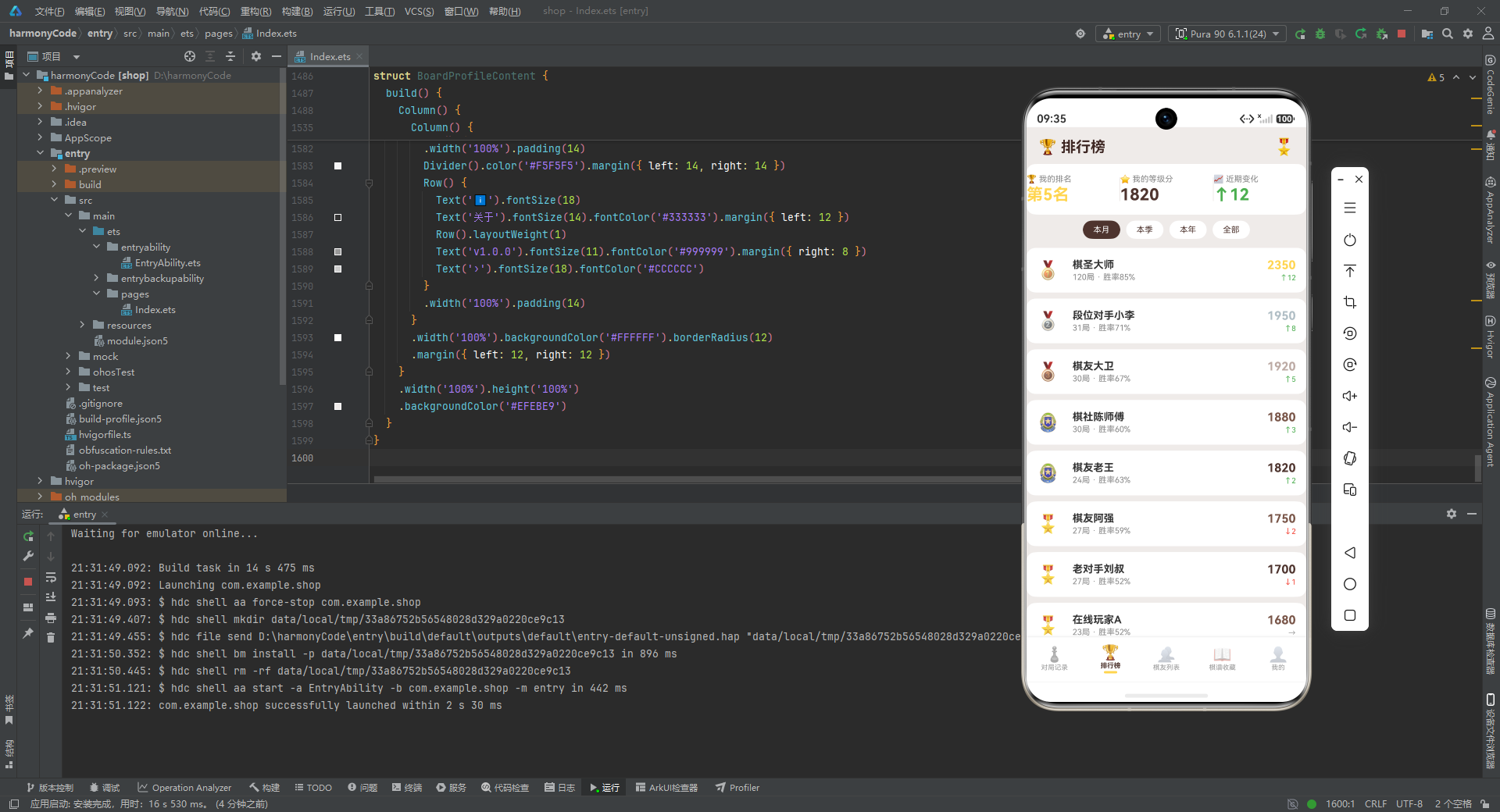
MonthBarMeta是月度柱状图的一根柱子,label是"6月上"这样的时间标签,value是该时段对局数,color是柱子颜色。ResultRatioMeta与TypeRatioMeta结构几乎一样,都是"标签 + 数值 + 颜色 + 图标"四件套,分别用于胜负占比条与棋类分布条。这里作者没有合并成一个通用类型,而是各起一名,是为了让数据语义更明确:一个是按结果维度统计,一个是按棋类维度统计。RankMeta是排行榜的一条记录,除了排名、姓名、等级分、胜率、对局数之外,特别有一个trend字段,用 “↑12” / “↓2” / “→” 这样的字符串表达近期走势,配合icon(奖牌 Emoji)和color(主题色)来差异化展示前三名与其他名次。
至此,类型定义层就分析完毕。这九个 interface 看似平淡无奇,却是整个应用的骨架。它们让 TypeScript 的类型检查在编译期就为我们把关,避免了"字段拼错""类型混用"等低级错误,也让后续的 Mock 数据有了明确的填充模板。
四、可观察数据模型:GameItem 类
类型定义只是"形状",要让它真正参与响应式系统,还需要一个可观察的类。这份代码用 @Observed 装饰器定义了 GameItem 类:
@Observed
export class GameItem {
  id: number = 0
  date: string = ''
  gameType: string = ''
  opponent: string = ''
  result: string = ''
  moves: number = 0
  duration: string = ''
  location: string = ''
  notes: string = ''
  ratingChange: number = 0
  color: string = ''
  constructor(id: number, date: string, gameType: string, opponent: string,
             result: string, moves: number, duration: string, location: string,
             notes: string, ratingChange: number, color: string) {
    this.id = id; this.date = date; this.gameType = gameType; this.opponent = opponent
    this.result = result; this.moves = moves; this.duration = duration
    this.location = location; this.notes = notes; this.ratingChange = ratingChange
    this.color = color
  }
}
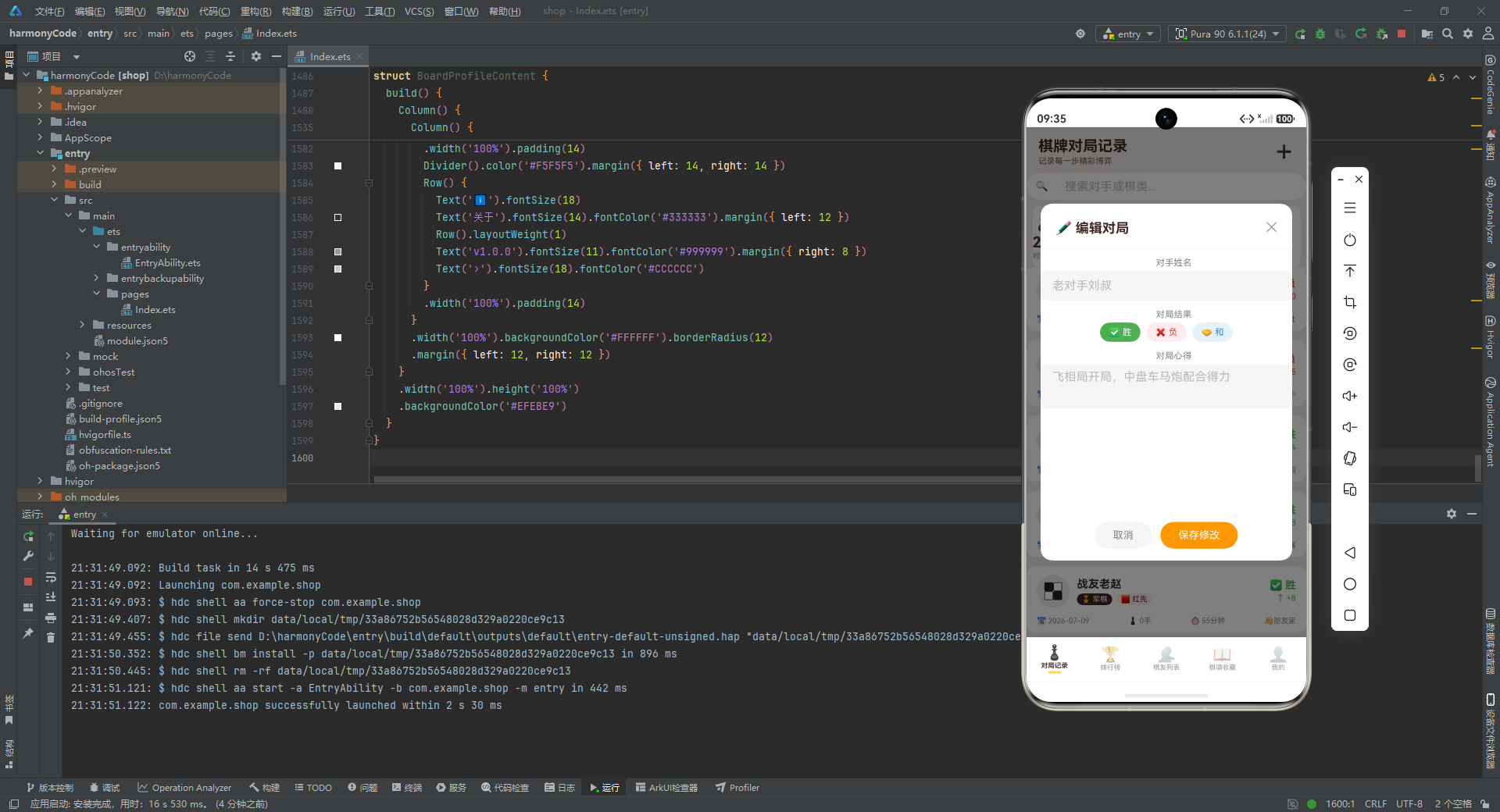
逐行解释如下:
@Observed装饰器告诉框架:这个类的实例是可观察的。当它的属性发生变化时,框架能够感知到,并触发依赖这些属性的 UI 重新渲染。这是 ArkTS 实现"深层对象响应式"的关键机制。export class GameItem表示这个类可以被外部模块导入复用。在大型项目里,把可观察类独立成文件是常见做法。- 类的属性都给了默认值(
id: number = 0、date: string = ''等)。这一点很重要:在声明式 UI 中,未初始化的属性容易导致渲染时读到undefined,从而报错或显示异常。给默认值是稳健的工程习惯。 - 构造函数接收十一个参数,与属性一一对应。函数体内用分号把多条赋值语句压在一行里,虽然紧凑,但牺牲了一点可读性。在生产代码中,更推荐换行书写,但这里为了节省篇幅也可以接受。
- 字段顺序与
GameRecordMeta高度一致,说明GameItem本质上是GameRecordMeta的"可观察版本"。之所以没有直接用 interface 实例,是因为 interface 在 ArkTS 中是静态类型,不参与运行时响应式,必须用 class 才能被@Observed装饰。
这里有一个设计上的取舍值得玩味:作者只为对局记录建了 @Observed 类,而为棋友、棋谱、排行榜等仍使用 interface 实例。这说明在当前实现里,只有对局记录被设计为"可深度编辑"的对象(增、删、改、查全都有),其他实体都是只读展示。如果未来棋友也需要编辑功能,那么 PlayerMeta 同样需要升级为 @Observed 类。这是阅读代码时可以提前预判的演进方向。
五、配置令牌:让数据与表现解耦
5.1 配置令牌的设计哲学
在许多不够成熟的前端代码里,常常能看到这样的"坏味道":颜色值、图标、文案散落在各个组件的 UI 描述里,硬编码得一塌糊涂。一旦产品要求"把胜局的颜色从绿色改成青色",开发者就得全局搜索替换,既容易遗漏,又容易误伤。
这份代码用一种非常优雅的方式规避了这个问题:把所有"与展示相关的常量"集中抽取成几个配置令牌(Config Token)。组件在渲染时,统一通过 CONFIG[key] 的方式取值,而不是直接写死颜色或图标。这样一来,配色与文案的调整只需改一处,全局生效。
5.2 棋类配置
先看棋类的配置:
const GAME_TYPE_CONFIG: Record<string, GameTypeMeta> = {
  '中国象棋': { label: '中国象棋', icon: '♟️', color: '#4E342E', bg: '#EFEBE9', desc: '楚河汉界,国粹经典' },
  '围棋': { label: '围棋', icon: '⚫', color: '#3E2723', bg: '#EFEBE9', desc: '黑白世界,纵横十九道' },
  '国际象棋': { label: '国际象棋', icon: '♚', color: '#795548', bg: '#EFEBE9', desc: '王后车象马兵的博弈' },
  '五子棋': { label: '五子棋', icon: '🔵', color: '#4E342E', bg: '#EFEBE9', desc: '五子连珠方为胜' },
  '跳棋': { label: '跳棋', icon: '🔴', color: '#795548', bg: '#EFEBE9', desc: '跳跃前进,策略对抗' },
  '军棋': { label: '军棋', icon: '🎖️', color: '#3E2723', bg: '#EFEBE9', desc: '排兵布阵,运筹帷幄' }
}
逐行解释如下:
const GAME_TYPE_CONFIG声明一个常量,类型是Record<string, GameTypeMeta>,即"以棋类名称为键、以元信息为值"的字典。- 每一种棋都对应一个完整的元信息对象。以"中国象棋"为例:
label是"中国象棋",icon是国际象棋符号 ♟️(这里借用了 Unicode 棋子符号,因为 Emoji 里没有专门的中国象棋符号),color是深棕色#4E342E,bg是浅米色#EFEBE9,desc是"楚河汉界,国粹经典"。 - 六种棋的
bg都统一使用#EFEBE9,营造出一种古朴的纸面感;而color在三种深浅不同的棕色之间变化(#4E342E、#3E2723、#795548),让不同棋类在视觉上有微妙的区分,又不至于割裂整体色调。 desc字段的文案很有文化味道,“楚河汉界”“黑白世界”"排兵布阵"等都是棋类的经典意象,体现了作者对棋牌文化的理解。
5.3 结果、执棋方与地点配置
接下来是结果、执棋方、地点三组配置:
const RESULT_CONFIG: Record<string, ResultMeta> = {
  '胜': { label: '胜', color: '#4CAF50', icon: '✅', bg: '#E8F5E9' },
  '负': { label: '负', color: '#F44336', icon: '❌', bg: '#FFEBEE' },
  '和': { label: '和', color: '#2196F3', icon: '🤝', bg: '#E3F2FD' }
}

const COLOR_SIDE_CONFIG: Record<string, ColorSideMeta> = {
  '执黑': { label: '执黑', icon: '⚫', color: '#212121', bg: '#E0E0E0', desc: '黑棋先手' },
  '执白': { label: '执白', icon: '⚪', color: '#757575', bg: '#FAFAFA', desc: '白棋后手' },
  '红先': { label: '红先', icon: '🟥', color: '#D32F2F', bg: '#FFEBEE', desc: '红方先手' },
  '黑后': { label: '黑后', icon: '⬛', color: '#212121', bg: '#F5F5F5', desc: '黑方后手' }
}

const LOCATION_CONFIG: Record<string, LocationMeta> = {
  '家中': { label: '家中', icon: '🏠', desc: '线上对弈' },
  '棋社': { label: '棋社', icon: '🎎', desc: '线下棋社' },
  '比赛': { label: '比赛', icon: '🏆', desc: '正式比赛' },
  '公园': { label: '公园', icon: '🌳', desc: '公园石桌' },
  '朋友家': { label: '朋友家', icon: '👋', desc: '朋友家中小聚' }
}
逐行解释如下:
RESULT_CONFIG用语义化的颜色表达三种结果:胜用绿色#4CAF50、负用红色#F44336、和用蓝色#2196F3,这是 Material Design 的经典三色,符合用户对"成功/失败/中性"的直觉认知。bg则是各自颜色的浅色版本,用于未选中状态的背景。COLOR_SIDE_CONFIG同时容纳了围棋的"执黑/执白"和象棋的"红先/黑后"两套体系。这是一个巧妙的设计:用一个统一的配置字典兼容了不同棋类的先后手表达,UI 层无需关心当前是哪种棋,只要根据color字段取值即可。desc字段补充了"先手/后手"的说明,帮助新手理解规则。LOCATION_CONFIG用五个 Emoji 表达五种对弈场景。desc字段进一步细化:“家中"对应"线上对弈”,“棋社"对应"线下棋社”,这种区分让数据更具分析价值——日后可以统计线上与线下的胜率差异。
5.4 选项数组
最后是几组用于筛选与表单选项的数组:
const GAME_TYPES: string[] = ['中国象棋', '围棋', '国际象棋', '五子棋', '跳棋', '军棋']
const GAME_FILTERS: string[] = ['全部', '中国象棋', '围棋', '国际象棋', '五子棋', '跳棋', '军棋']
const RESULT_TYPES: string[] = ['胜', '负', '和']
const COLOR_SIDES: string[] = ['执黑', '执白', '红先', '黑后']
const LOCATIONS: string[] = ['家中', '棋社', '比赛', '公园', '朋友家']
逐行解释如下:
GAME_TYPES是纯棋类列表,用于新增对局表单中的棋类选择。GAME_FILTERS在棋类列表前加了"全部"选项,用于对局列表的筛选条。这里把"全部"和具体棋类分开放,是因为表单里不需要"全部"这个选项,而筛选条需要。一个小细节,却体现了对场景的细分考虑。RESULT_TYPES、COLOR_SIDES、LOCATIONS分别是结果、执棋方、地点的选项数组,主要用于表单与筛选。
这些数组与前面的配置字典是配套使用的:数组提供"有哪些选项",字典提供"每个选项怎么显示"。两者结合,构成了一个完整的"配置即数据"体系。
六、Mock 数据:用真实感的数据填充应用
6.1 为什么 Mock 数据要"真实"
Mock 数据质量的高低,直接决定了 demo 的说服力。如果 Mock 数据是 test1、test2、用户A、用户B 这样的占位符,那么无论 UI 多漂亮,都难以让人信服。这份代码的 Mock 数据写得相当用心:对手有"棋友老王"“段位对手小李"这样有身份感的称呼,对弈心得是"中盘战术运用得当,弃子抢先”"三间高夹定式失误,大龙被屠"这样专业的复盘笔记,棋谱收藏更是直接引用了《橘中秘》《梅花谱》《发阳论》《玄玄棋经》这些真实存在的经典棋书。
这种真实感带来的好处是多方面的:第一,它让评审者能直观感受到应用的业务场景;第二,它暴露了数据字段的真实使用方式,比如"对局心得"字段到底该多长、"等级分变化"的正负如何展示;第三,它本身就是一份业务文档,新人接手时读一遍 Mock 数据,就能大致理解这个应用是做什么的。
6.2 对局记录数据
先看二十条对局记录:
const mockGames: GameItem[] = [
  new GameItem(1, '2026-07-19', '中国象棋', '棋友老王', '胜', 87, '32分钟', '棋社',
    '中盘战术运用得当,弃子抢先', 12, '红先'),
  new GameItem(2, '2026-07-18', '围棋', '段位对手小李', '负', 215, '1小时42分', '家中',
    '布局阶段过于保守,中盘被压制', -8, '执黑'),
  new GameItem(3, '2026-07-17', '国际象棋', '在线玩家A', '胜', 56, '28分钟', '家中',
    '西西里防御开局,攻王翼成功', 10, '执白'),
  // ... 共 20 条,覆盖六种棋类、三种结果、五种地点
  new GameItem(20, '2026-06-30', '国际象棋', '棋友麦克', '胜', 62, '31分钟', '公园',
    '法兰西防御,战术组合精彩', 13, '执白')
]
逐行解释如下:
- 数组类型显式标注为
GameItem[],即前面定义的可观察类数组。每一条记录都用new GameItem(...)构造,参数顺序与构造函数签名一致。 - 第一条记录:编号 1,日期 2026-07-19,棋类中国象棋,对手"棋友老王",结果胜,手数 87,时长 32 分钟,地点棋社,心得"中盘战术运用得当,弃子抢先",等级分变化 +12,执棋方红先。短短一行,信息密度极高。
- 第二条记录是一场围棋失利,手数高达 215、时长 1 小时 42 分,心得是"布局阶段过于保守,中盘被压制",等级分变化 -8。这条数据很好地展示了"负局"在 UI 中的呈现方式:红色箭头、负数。
- 第三条是国际象棋,使用了"西西里防御"这样的专业术语,让数据显得真实可信。
- 二十条记录覆盖了六种棋类、三种结果(胜/负/和)、五种地点、四种执棋方,分布合理,足以检验 UI 的各种分支。
6.3 棋友、棋谱与排行榜数据
接下来是棋友、棋谱、排行榜三组数据:
const mockPlayers: PlayerMeta[] = [
  { id: 1, name: '棋友老王', avatar: '🧔', rating: 1820, wins: 15, losses: 6,
    draws: 3, totalGames: 24, color: '#4E342E' },
  { id: 2, name: '段位对手小李', avatar: '👨', rating: 1950, wins: 22, losses: 5,
    draws: 4, totalGames: 31, color: '#3E2723' },
  // ... 共 8 位棋友
]

const mockCollections: CollectionMeta[] = [
  { id: 1, title: '橘中秘残局精选', gameType: '中国象棋', source: '明·朱晋桢',
    author: '朱晋桢', year: '1632', rating: 5, notes: '象棋残局经典,研究必读',
    color: '#4E342E', icon: '📖' },
  // ... 共 8 份棋谱,涵盖象棋、围棋、国象、综合
  { id: 8, title: '我的对局集', gameType: '综合', source: '自整理', author: '本人',
    year: '2026', rating: 3, notes: '个人精彩对局记录', color: '#795548', icon: '📒' }
]

const mockRankings: RankMeta[] = [
  { rank: 1, name: '棋圣大师', rating: 2350, winRate: '85%', totalGames: 120,
    trend: '↑12', icon: '🥇', color: '#FFD54F' },
  { rank: 2, name: '段位对手小李', rating: 1950, winRate: '71%', totalGames: 31,
    trend: '↑8', icon: '🥈', color: '#B0BEC5' },
  // ... 共 8 名,前三名用金银铜奖牌,其余用勋章
  { rank: 8, name: '在线玩家A', rating: 1680, winRate: '52%', totalGames: 23,
    trend: '→', icon: '🎖️', color: '#795548' }
]
逐行解释如下:
mockPlayers是八位棋友,每位都有头像(Emoji)、等级分、胜负和统计、总对局数、主题色。等级分从 1550 到 1950 分布,覆盖了从新手到高段位的范围。mockCollections是八份棋谱收藏,特别值得一提的是它引用了真实存在的经典棋书:《橘中秘》(明·朱晋桢,1632 年)、《梅花谱》(清·王再越,1663 年)、《发阳论》(日本·桑原道节,1713 年)、《玄玄棋经》(元·严师,1347 年)、《棋经十三篇》(宋·张拟,1049 年)。这种真实感让 demo 立刻有了说服力。最后一条"我的对局集"则展示了用户自建收藏的场景。mockRankings是八名排行榜,前三名分别用 🥇🥈🥉 三种奖牌 Emoji,主题色也对应金银铜(#FFD54F、#B0BEC5、#BCAAA4),第四名以后用 🏅🎖️ 勋章,主题色回归棕色系。trend字段用 "↑12""↓2"“→” 表达近期走势,配合绿/红/灰三色显示,直观明了。
6.4 图表数据
最后是三组图表数据:
const monthBarData: MonthBarMeta[] = [
  { label: '6月上', value: 8, color: '#D7CCC8' },
  { label: '6月中', value: 12, color: '#BCAAA4' },
  { label: '6月下', value: 10, color: '#A1887F' },
  { label: '7月上', value: 14, color: '#8D6E63' },
  { label: '7月中', value: 18, color: '#795548' },
  { label: '7月下', value: 6, color: '#4E342E' }
]

const resultRatioData: ResultRatioMeta[] = [
  { label: '胜', value: 13, color: '#4CAF50', icon: '✅' },
  { label: '负', value: 5, color: '#F44336', icon: '❌' },
  { label: '和', value: 2, color: '#2196F3', icon: '🤝' }
]

const typeRatioData: TypeRatioMeta[] = [
  { label: '中国象棋', value: 6, color: '#4E342E', icon: '♟️' },
  { label: '围棋', value: 4, color: '#3E2723', icon: '⚫' },
  { label: '国际象棋', value: 4, color: '#795548', icon: '♚' },
  { label: '五子棋', value: 3, color: '#4E342E', icon: '🔵' },
  { label: '军棋', value: 2, color: '#3E2723', icon: '🎖️' },
  { label: '跳棋', value: 1, color: '#795548', icon: '🔴' }
]
逐行解释如下:
monthBarData是六根柱子,从"6月上"到"7月下",颜色从浅棕#D7CCC8渐变到深棕#4E342E。这种同色系渐变是一种很高级的视觉设计:它既区分了不同时段,又保持了整体的和谐,避免了彩虹色带来的杂乱感。resultRatioData是胜负和的占比数据,13 胜 5 负 2 和,与mockGames的统计一致,体现了数据的内部自洽。typeRatioData是六种棋类的对局数分布,6+4+4+3+2+1=20,正好等于对局总数。这种"小数据也能自洽"的细节,是高质量 demo 的标志。
七、统计函数:数据聚合的统一入口
在 UI 层直接调用 mockGames.length 来获取对局总数,看似简单,却有一个隐患:如果日后数据源从 Mock 切换到网络请求,所有 UI 里的硬编码引用都要改。这份代码用一组统计函数把数据聚合封装起来:
function getGameCount(): number { return 20 }
function getWinCount(): number { return 13 }
function getLossCount(): number { return 5 }
function getDrawCount(): number { return 2 }
function getWinRate(): number { return 65 }
function getPlayerCount(): number { return 8 }
function getCollectionCount(): number { return 8 }
function getAvgRating(): number { return 1750 }
function getTotalMoves(): number { return 1689 }
逐行解释如下:
- 九个函数分别返回对局总数、胜局数、负局数、和局数、胜率、棋友数、棋谱数、平均等级分、总手数。
- 当前实现里,这些函数都直接返回写死的数字。这是一种"占位实现":它先把接口定义好,UI 层统一通过函数调用获取数据,等到数据层真正接入真实数据源时,只需修改函数内部实现,UI 层完全不用动。
- 这种模式在软件工程里叫做"依赖倒置":UI 层不依赖具体的数据来源,而是依赖一个抽象的函数接口。它是让代码具备"可替换性"的关键。
- 一个小细节:
getWinRate()返回 65,是整数而不是 0.65。这说明 UI 层会以getWinRate() + '%'的方式拼接百分号,函数内部已经把比例换算成了百分比数值,避免 UI 层重复处理。
八、底部 Tab 枚举与入口页面
8.1 枚举定义
应用有五个底部 Tab,用枚举来管理:
enum BoardTab {
  RECORD = 0,
  RANK = 1,
  PLAYERS = 2,
  COLLECTION = 3,
  PROFILE = 4
}
逐行解释如下:
enum BoardTab定义了一个数字枚举,五个值分别对应五个 Tab。- 用枚举而不是字符串常量,好处是:编译期就能检查 Tab 值的合法性,避免拼写错误;切换逻辑里用
===比较时也更高效。 - 显式写出
= 0、= 1等赋值,虽然枚举默认就是从 0 递增,但显式写出来能提升可读性,也让后续维护者一眼看出值是什么。
8.2 入口组件的状态与内容区
入口组件 BoardGameApp 负责管理当前选中的 Tab,并根据 Tab 切换显示内容:
@Entry
@Component
struct BoardGameApp {
  @State activeTab: BoardTab = BoardTab.RECORD

  @Builder contentArea() {
    Column() {
      if (this.activeTab === BoardTab.RECORD) {
        GameRecordContent()
      } else if (this.activeTab === BoardTab.RANK) {
        RankContent()
      } else if (this.activeTab === BoardTab.PLAYERS) {
        PlayerContent()
      } else if (this.activeTab === BoardTab.COLLECTION) {
        CollectionContent()
      } else {
        BoardProfileContent()
      }
    }
    .layoutWeight(1)
  }
逐行解释如下:
@Entry装饰器标记这是应用的入口组件,整个页面从这里开始渲染。@Component声明这是一个自定义组件。@State activeTab: BoardTab = BoardTab.RECORD定义一个状态变量activeTab,初始值为RECORD,即默认显示对局记录页。当activeTab变化时,依赖它的contentArea会重新渲染。@Builder contentArea()是一个 Builder 函数,封装了"根据 Tab 切换内容"的逻辑。它用if / else if链依次判断当前 Tab,渲染对应的子组件。- 五个子组件
GameRecordContent、RankContent、PlayerContent、CollectionContent、BoardProfileContent都是各自独立的@Component,这里只是把它们组合起来。 - 最外层的
Column().layoutWeight(1)让内容区占据除底部 Tab 外的所有高度。
8.3 底部 Tab 项的渲染
底部 Tab 的每一项由 bottomTabItem Builder 渲染:
@Builder bottomTabItem(icon: string, label: string, tab: BoardTab) {
  Column() {
    Text(icon).fontSize(20).opacity(this.activeTab === tab ? 1.0 : 0.45)
    Text(label).fontSize(9)
      .fontColor(this.activeTab === tab ? '#4E342E' : '#999999')
      .fontWeight(this.activeTab === tab ? FontWeight.Bold : FontWeight.Normal)
      .margin({ top: 1 })
    if (this.activeTab === tab) {
      Column().width(18).height(3)
        .backgroundColor('#FFD54F').borderRadius(2).margin({ top: 2 })
    }
  }
  .layoutWeight(1)
  .padding({ top: 5, bottom: 5 })
  .onClick(() => { this.activeTab = tab })
}
逐行解释如下:
- Builder 接收三个参数:
icon(Emoji 图标)、label(文字标签)、tab(对应的枚举值)。 - 图标的
opacity根据是否选中在 1.0 与 0.45 之间切换,选中时全亮,未选中时半透明。这是一种轻量的视觉反馈,比改变图标本身更省资源。 - 文字标签的颜色在
#4E342E(深棕)与#999999(灰)之间切换,字重在 Bold 与 Normal 之间切换,双重强调选中态。 if (this.activeTab === tab)条件渲染一段黄色的小圆角条,作为选中项下方的指示器。这种"小尾巴"是现代移动端 Tab 的常见设计语言。- 最外层的
.layoutWeight(1)让五个 Tab 项平均分布宽度;.onClick把点击事件绑定为切换activeTab。
8.4 入口组件的 build 方法
最后看入口组件的 build 方法:
build() {
  Column() {
    this.contentArea()
    Row() {
      this.bottomTabItem('♟️', '对局记录', BoardTab.RECORD)
      this.bottomTabItem('🏆', '排行榜', BoardTab.RANK)
      this.bottomTabItem('👥', '棋友列表', BoardTab.PLAYERS)
      this.bottomTabItem('📖', '棋谱收藏', BoardTab.COLLECTION)
      this.bottomTabItem('👤', '我的', BoardTab.PROFILE)
    }
    .width('100%')
    .backgroundColor('#FFFFFF')
    .padding({ top: 4, bottom: 6 })
    .shadow({ radius: 8, color: '#1A000000', offsetY: -2 })
  }
  .width('100%').height('100%')
  .backgroundColor('#EFEBE9')
}
逐行解释如下:
- 整个页面是一个
Column,上面是contentArea()(占满剩余高度),下面是底部 Tab 栏。 - 底部 Tab 栏是一个
Row,依次调用五次bottomTabItem,分别传入对应的图标、文字、枚举值。 - Tab 栏背景设为白色,上下各有少量 padding,并通过
.shadow加了一个向上偏移 2 像素、半径 8 的浅阴影,让 Tab 栏与内容区产生层次感。阴影颜色#1A000000中的1A是透明度(约 10%),非常克制,不会显得脏。 - 整个页面背景是
#EFEBE9,与前文配置令牌里的浅米色一致,营造统一的纸面感。
至此,入口组件就把"内容区 + 底部导航"的骨架搭好了。接下来我们深入最核心、也最复杂的对局记录页。
九、对局记录页:核心业务模块的全景
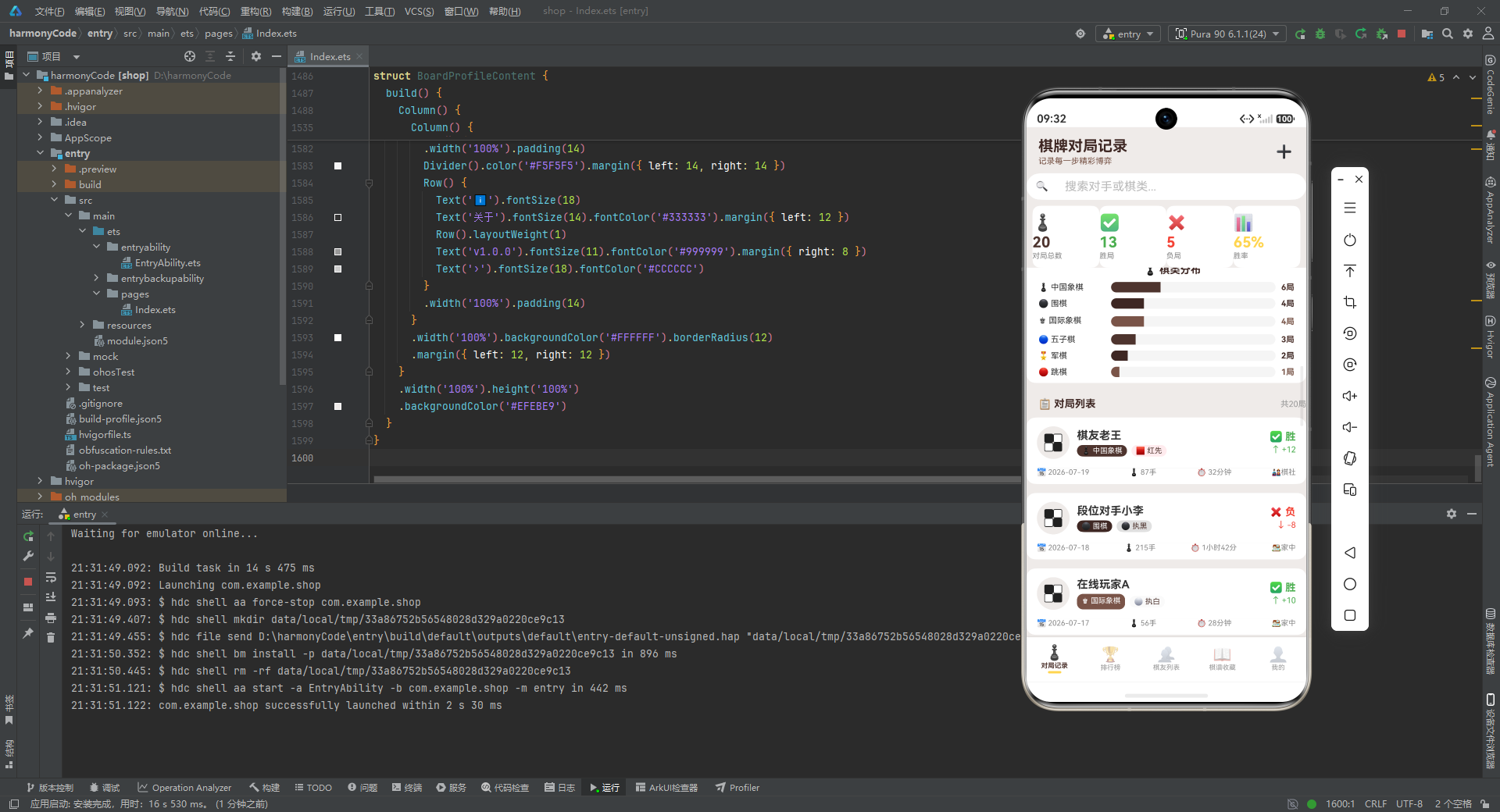
对局记录页是这个应用最重的模块,单是一个 struct 就有七百多行。它要同时承载:顶部标题与新增入口、搜索框、四张统计卡片、月度柱状图、胜负占比条、棋类分布条、分类筛选、对局列表,以及新增/编辑/删除/详情四个弹窗。这一节我们分多个小节,逐一拆解。
9.1 状态变量声明
先看组件开头的一长串状态变量:
@Component
struct GameRecordContent {
  @State searchKeyword: string = ''
  @State selectedType: string = '全部'
  @State selectedResult: string = '全部'
  @State showAddModal: boolean = false
  @State showEditModal: boolean = false
  @State showDeleteConfirm: boolean = false
  @State showDetailModal: boolean = false
  @State selectedGame: GameItem | null = null
  @State editingGame: GameItem | null = null
  @State formDate: string = '2026-07-19'
  @State formGameType: string = '中国象棋'
  @State formOpponent: string = ''
  @State formResult: string = '胜'
  @State formMoves: string = '80'
  @State formDuration: string = ''
  @State formLocation: string = '棋社'
  @State formColor: string = '执黑'
  @State formRatingChange: string = '10'
  @State formNotes: string = ''
逐行解释如下:
searchKeyword是搜索框的输入值,用于筛选对局。selectedType和selectedResult是当前选中的棋类筛选与结果筛选,默认都是"全部"。showAddModal、showEditModal、showDeleteConfirm、showDetailModal四个布尔值,分别控制四个弹窗的显示与隐藏。这种"一个弹窗一个布尔"的设计简单直接,适合弹窗数量不多的场景。selectedGame和editingGame是当前选中/正在编辑的对局对象,类型是GameItem | null,初始为 null,表示未选中。这里用可空类型是为了在弹窗关闭时清空引用。formDate到formNotes是新增/编辑表单的各个字段。注意它们都被定义为string类型,即使是formMoves(手数)和formRatingChange(等级分变化)这样的数值字段。这是因为TextInput.onChange回调返回的是字符串,用 string 存储可以省去类型转换,提交时再统一转换。这是一种务实的取舍:在 demo 阶段优先保证流程跑通,类型严格性可以后续再加强。
9.2 弹窗遮罩的复用
四个弹窗都需要一个半透明遮罩,点击遮罩关闭弹窗。这份代码把遮罩抽成了一个可复用的 Builder:
@Builder modalOverlay(onClose: () => void) {
  Column()
    .width('100%').height('100%')
    .backgroundColor('rgba(0,0,0,0.5)')
    .onClick(onClose)
}
逐行解释如下:
- Builder 接收一个
onClose回调函数作为参数,体现了 Builder 也可以像函数一样接收入参。 - 遮罩是一个铺满父容器的
Column,背景色是rgba(0,0,0,0.5),即半透明黑色。 .onClick(onClose)把点击事件直接绑定到传入的回调上。这样每个弹窗在调用时只需传入"关闭自己"的逻辑,遮罩本身完全复用。
这是一个很小的设计,却体现了"DRY(Don’t Repeat Yourself)"的工程素养。如果不抽取,四个弹窗各写一遍遮罩,既冗余又容易不一致。
9.3 新增对局弹窗
新增对局弹窗是所有弹窗里字段最多的一个,我们分段来看。先是头部与日期、棋类选择:
@Builder addGameModal() {
  Column() {
    this.modalOverlay(() => { this.showAddModal = false })
    Column() {
      Row() {
        Text('♟️ 新增对局').fontSize(18).fontWeight(FontWeight.Bold).fontColor('#3E2723')
        Row().layoutWeight(1)
        Text('✕').fontSize(18).fontColor('#999999')
          .onClick(() => { this.showAddModal = false })
      }
      .width('100%').padding({ left: 20, right: 20, top: 18, bottom: 12 })
      Divider().color('#EFEBE9')
逐行解释如下:
- 弹窗最外层是一个
Column,第一项是遮罩(点击关闭),第二项是弹窗主体。 - 头部用
Row布局:左边是标题"♟️ 新增对局",中间用一个Row().layoutWeight(1)把关闭按钮推到右边,右边是"✕"关闭按钮。 - 头部下方用
Divider分隔,颜色与整体米色系一致。
接下来是日期输入与棋类选择:
      Scroll() {
        Column() {
          Text('对局日期').fontSize(12).fontColor('#888888').margin({ top: 12, left: 20 })
          TextInput({ placeholder: '2026-07-19' })
            .placeholderColor('#BBBBBB').fontSize(14).width('100%')
            .backgroundColor('#F5F5F5').borderRadius(8)
            .margin({ left: 20, right: 20, top: 4 })
            .onChange((v: string) => { this.formDate = v })
          Text('棋类选择').fontSize(12).fontColor('#888888').margin({ top: 12, left: 20 })
          Scroll() {
            Row() {
              ForEach(GAME_TYPES, (t: string) => {
                if (this.formGameType === t) {
                  Text(GAME_TYPE_CONFIG[t]?.icon + ' ' + t)
                    .fontSize(11).fontColor('#FFFFFF')
                    .backgroundColor(GAME_TYPE_CONFIG[t]?.color ?? '#4E342E')
                    .padding({ left: 8, right: 8, top: 5, bottom: 5 }).borderRadius(12)
                    .margin({ left: 3, right: 3 })
                } else {
                  Text(GAME_TYPE_CONFIG[t]?.icon + ' ' + t)
                    .fontSize(11).fontColor(GAME_TYPE_CONFIG[t]?.color ?? '#4E342E')
                    .backgroundColor(GAME_TYPE_CONFIG[t]?.bg ?? '#EFEBE9')
                    .padding({ left: 8, right: 8, top: 5, bottom: 5 }).borderRadius(12)
                    .margin({ left: 3, right: 3 })
                    .onClick(() => { this.formGameType = t })
                }
              })
            }
          }
          .scrollable(ScrollDirection.Horizontal).scrollBar(BarState.Off)
          .margin({ left: 16, right: 16, top: 4 })
逐行解释如下:
- 整个表单内容包在一个
Scroll里,因为字段多,在小屏设备上可能超出弹窗高度,需要可滚动。 - 每个字段都遵循"标题(小字灰)+ 输入控件"的模式,标题用
fontSize(12).fontColor('#888888'),输入控件用浅灰背景#F5F5F5与圆角 8。 - 日期输入用
TextInput,onChange把值写入formDate。 - 棋类选择用了一组横向排列的"标签胶囊"。对每一种棋,判断
formGameType === t:若选中,文字白色、背景是该棋的主色;若未选中,文字是该棋的主色、背景是该棋的浅色背景。点击未选中项时,把formGameType设为对应棋类。 - 这里用
?.可选链和?? '#4E342E'空值合并,是为了防御性地处理"配置字典里找不到某个 key"的情况。虽然当前所有 key 都存在,但这种写法让代码更健壮。 - 棋类胶囊整体放在一个横向
Scroll里,关闭滚动条,这样在窄屏上也能完整看到所有选项。
接下来是对手、结果、手数时长的输入:
          Text('对手姓名').fontSize(12).fontColor('#888888').margin({ top: 12, left: 20 })
          TextInput({ placeholder: '如:棋友老王' })
            .placeholderColor('#BBBBBB').fontSize(14).width('100%')
            .backgroundColor('#F5F5F5').borderRadius(8)
            .margin({ left: 20, right: 20, top: 4 })
            .onChange((v: string) => { this.formOpponent = v })
          Text('对局结果').fontSize(12).fontColor('#888888').margin({ top: 12, left: 20 })
          Row() {
            ForEach(RESULT_TYPES, (r: string) => {
              if (this.formResult === r) {
                Text(RESULT_CONFIG[r]?.icon + ' ' + r)
                  .fontSize(12).fontColor('#FFFFFF')
                  .backgroundColor(RESULT_CONFIG[r]?.color ?? '#4E342E')
                  .padding({ left: 12, right: 12, top: 6, bottom: 6 }).borderRadius(14)
                  .margin({ left: 4, right: 4 })
              } else {
                Text(RESULT_CONFIG[r]?.icon + ' ' + r)
                  .fontSize(12).fontColor(RESULT_CONFIG[r]?.color ?? '#4E342E')
                  .backgroundColor(RESULT_CONFIG[r]?.bg ?? '#EFEBE9')
                  .padding({ left: 12, right: 12, top: 6, bottom: 6 }).borderRadius(14)
                  .margin({ left: 4, right: 4 })
                  .onClick(() => { this.formResult = r })
              }
            })
          }
          .margin({ left: 16, right: 16, top: 4 })
逐行解释如下:
- 对手姓名是一个普通
TextInput,placeholder 给了示例"如:棋友老王",引导用户填写。 - 对局结果用的是与棋类选择完全相同的"胶囊切换"模式,只是数据源换成
RESULT_TYPES,配置换成RESULT_CONFIG。这种模式的高度一致性,让阅读者一旦理解了一处,就能快速理解所有类似的切换控件。 - 结果胶囊的圆角是 14,比棋类的 12 略大,因为结果胶囊的高度更大(padding 上下 6 vs 棋类的 5),更大的圆角让胶囊看起来更协调。
接着是手数与时长并排输入、地点、执棋方:
          Row() {
            Column() {
              Text('手数').fontSize(12).fontColor('#888888')
              TextInput({ placeholder: '80' })
                .placeholderColor('#BBBBBB').fontSize(12).width('100%')
                .backgroundColor('#F5F5F5').borderRadius(8).margin({ top: 4 })
                .onChange((v: string) => { this.formMoves = v })
            }.layoutWeight(1).alignItems(HorizontalAlign.Start)
            Column() {
              Text('时长').fontSize(12).fontColor('#888888')
              TextInput({ placeholder: '30分钟' })
                .placeholderColor('#BBBBBB').fontSize(12).width('100%')
                .backgroundColor('#F5F5F5').borderRadius(8).margin({ top: 4 })
                .onChange((v: string) => { this.formDuration = v })
            }.layoutWeight(1).alignItems(HorizontalAlign.Start).margin({ left: 12 })
          }
          .margin({ left: 20, right: 20, top: 12 })
逐行解释如下:
- 手数与时长并排显示,用一个
Row包两个Column,各占layoutWeight(1),中间用margin({ left: 12 })留出间距。这是表单里"短字段并排"的常见布局。 - 每个
Column内部用alignItems(HorizontalAlign.Start)让标题左对齐,符合中文阅读习惯。
地点与执棋方的胶囊切换与前文棋类、结果完全同构,这里不再赘述。最后是等级分变化、心得,以及底部按钮:
          Text('等级分变化').fontSize(12).fontColor('#888888').margin({ top: 12, left: 20 })
          TextInput({ placeholder: '10' })
            .placeholderColor('#BBBBBB').fontSize(14).width('100%')
            .backgroundColor('#F5F5F5').borderRadius(8)
            .margin({ left: 20, right: 20, top: 4 })
            .onChange((v: string) => { this.formRatingChange = v })
          Text('对局心得').fontSize(12).fontColor('#888888').margin({ top: 12, left: 20 })
          TextArea({ placeholder: '记录对局心得与复盘...' })
            .placeholderColor('#BBBBBB').fontSize(12).width('100%').height(60)
            .backgroundColor('#F5F5F5').borderRadius(8)
            .margin({ left: 20, right: 20, top: 4, bottom: 12 })
            .onChange((v: string) => { this.formNotes = v })
        }
      }
      .layoutWeight(1)
      Row() {
        Text('取消').fontSize(14).fontColor('#888888')
          .backgroundColor('#F5F5F5').borderRadius(20)
          .padding({ left: 24, right: 24, top: 10, bottom: 10 })
          .onClick(() => { this.showAddModal = false })
        Text('保存对局').fontSize(14).fontColor('#FFFFFF')
          .backgroundColor('#4E342E').borderRadius(20)
          .padding({ left: 24, right: 24, top: 10, bottom: 10 })
          .margin({ left: 12 })
          .onClick(() => { this.showAddModal = false })
      }
      .width('100%').justifyContent(FlexAlign.Center)
      .padding({ left: 20, right: 20, top: 16, bottom: 16 })
    }
    .width('90%').backgroundColor('#FFFFFF').borderRadius(16)
    .constraintSize({ maxHeight: '80%' })
    .position({ x: '5%', y: '10%' })
  }
  .width('100%').height('100%').position({ x: 0, y: 0 }).zIndex(999)
}
逐行解释如下:
- 对局心得用的是
TextArea而非TextInput,因为心得通常较长,需要多行输入。height(60)给了固定的三行左右高度。 - 底部按钮区用
Row居中(justifyContent(FlexAlign.Center))放"取消"和"保存对局"两个按钮。取消按钮是浅灰背景灰字,保存按钮是深棕背景白字,主次分明。 - 弹窗主体宽 90%、圆角 16、白底,用
constraintSize({ maxHeight: '80%' })限制最大高度,避免在长表单时撑出屏幕。position({ x: '5%', y: '10%' })把弹窗定位到屏幕上方 10% 处,留出顶部呼吸空间。 - 最外层
zIndex(999)确保弹窗浮在所有内容之上。
9.4 编辑对局弹窗
编辑弹窗与新增弹窗结构相似,但只暴露了"对手、结果、心得"三个可编辑字段,其他字段(日期、棋类、地点等)不可改:
@Builder editGameModal() {
  // ... 头部"✏️ 编辑对局"
  Column() {
    Text('对手姓名').fontSize(12).fontColor('#888888').margin({ top: 12, left: 20 })
    TextInput({ placeholder: this.editingGame?.opponent ?? '' })
      .placeholderColor('#BBBBBB').fontSize(14).width('100%')
      .backgroundColor('#F5F5F5').borderRadius(8)
      .margin({ left: 20, right: 20, top: 4 })
    Text('对局结果').fontSize(12).fontColor('#888888').margin({ top: 12, left: 20 })
    Row() {
      ForEach(RESULT_TYPES, (r: string) => {
        // ... 与新增弹窗的结果胶囊一致
      })
    }
    .margin({ left: 16, right: 16, top: 4 })
    Text('对局心得').fontSize(12).fontColor('#888888').margin({ top: 12, left: 20 })
    TextArea({ placeholder: this.editingGame?.notes ?? '' })
      .placeholderColor('#BBBBBB').fontSize(12).width('100%').height(60)
      .backgroundColor('#F5F5F5').borderRadius(8)
      .margin({ left: 20, right: 20, top: 4 })
  }
  // ... 底部按钮"保存修改"用橙色 #FF9800,与新增的深棕区分
}
逐行解释如下:
- 编辑弹窗的
TextInput与TextArea的 placeholder 直接取自this.editingGame?.opponent与this.editingGame?.notes,用?? ''兜底空值。这样用户打开编辑弹窗时,能看到当前值作为占位提示。 - 注意这里只是把当前值作为 placeholder 显示,并没有真正回填到
formOpponent等表单状态变量。这是一个 demo 的简化处理:真实场景下,打开编辑弹窗时应该把editingGame的各字段同步到formXxx,让输入框显示真实值而非 placeholder。这是一个可以改进的点。 - 底部"保存修改"按钮用橙色
#FF9800,与新增弹窗的深棕#4E342E形成视觉区分,让用户在多个弹窗并存时也能快速辨认当前操作类型。
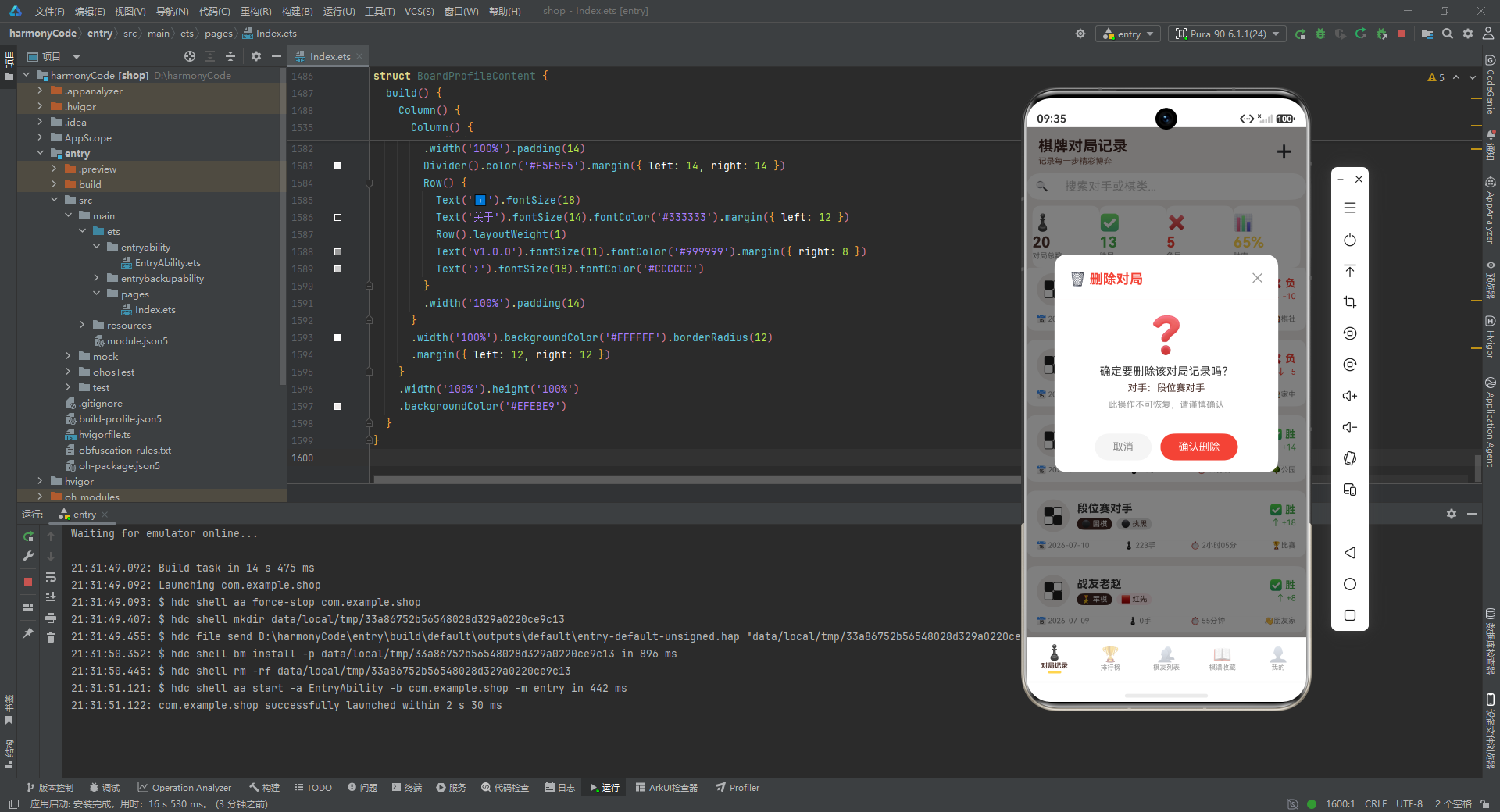
9.5 删除确认弹窗
删除是不可逆操作,所以需要一个专门的确认弹窗:
@Builder deleteGameModal() {
  Column() {
    this.modalOverlay(() => { this.showDeleteConfirm = false })
    Column() {
      Row() {
        Text('🗑️ 删除对局').fontSize(18).fontWeight(FontWeight.Bold).fontColor('#F44336')
        Row().layoutWeight(1)
        Text('✕').fontSize(18).fontColor('#999999')
          .onClick(() => { this.showDeleteConfirm = false })
      }
      .width('100%').padding({ left: 20, right: 20, top: 18, bottom: 12 })
      Divider().color('#FFEBEE')
      Column() {
        Text('❓').fontSize(48).margin({ top: 20 })
        Text('确定要删除该对局记录吗?')
          .fontSize(15).fontColor('#333333').margin({ top: 12 })
        Text('对手:' + (this.selectedGame?.opponent ?? ''))
          .fontSize(13).fontColor('#4E342E').margin({ top: 6 })
        Text('此操作不可恢复,请谨慎确认')
          .fontSize(12).fontColor('#999999').margin({ top: 8 })
      }
      .width('100%').padding({ bottom: 16 })
      Row() {
        Text('取消').fontSize(14).fontColor('#888888')
          .backgroundColor('#F5F5F5').borderRadius(20)
          .padding({ left: 24, right: 24, top: 10, bottom: 10 })
          .onClick(() => { this.showDeleteConfirm = false })
        Text('确认删除').fontSize(14).fontColor('#FFFFFF')
          .backgroundColor('#F44336').borderRadius(20)
          .padding({ left: 24, right: 24, top: 10, bottom: 10 })
          .margin({ left: 12 })
          .onClick(() => { this.showDeleteConfirm = false })
      }
      .width('100%').justifyContent(FlexAlign.Center)
      .padding({ left: 20, right: 20, top: 16, bottom: 16 })
    }
    .width('80%').backgroundColor('#FFFFFF').borderRadius(16)
    .position({ x: '10%', y: '25%' })
  }
  .width('100%').height('100%').position({ x: 0, y: 0 }).zIndex(999)
}
逐行解释如下:
- 删除弹窗的标题用红色
#F44336,分隔线也用浅红#FFEBEE,整体色调警示用户这是危险操作。 - 中间用一个 48 号的大问号 Emoji “❓” 作为视觉锚点,比纯文字更醒目。
- 提示文案分三层:主提示"确定要删除该对局记录吗?“(15 号黑字)、辅助信息"对手:xxx”(13 号棕字,让用户知道删的是哪条)、警告"此操作不可恢复,请谨慎确认"(12 号灰字)。
- 底部"确认删除"按钮同样用红色,与标题呼应。"取消"按钮在左、"确认删除"在右,符合"安全操作在左、危险操作在右"的常规约定。
- 弹窗宽度只有 80%,比新增/编辑的 90% 窄,定位也更靠下(y: 25%),让删除确认弹窗在视觉上更"克制",不会喧宾夺主。
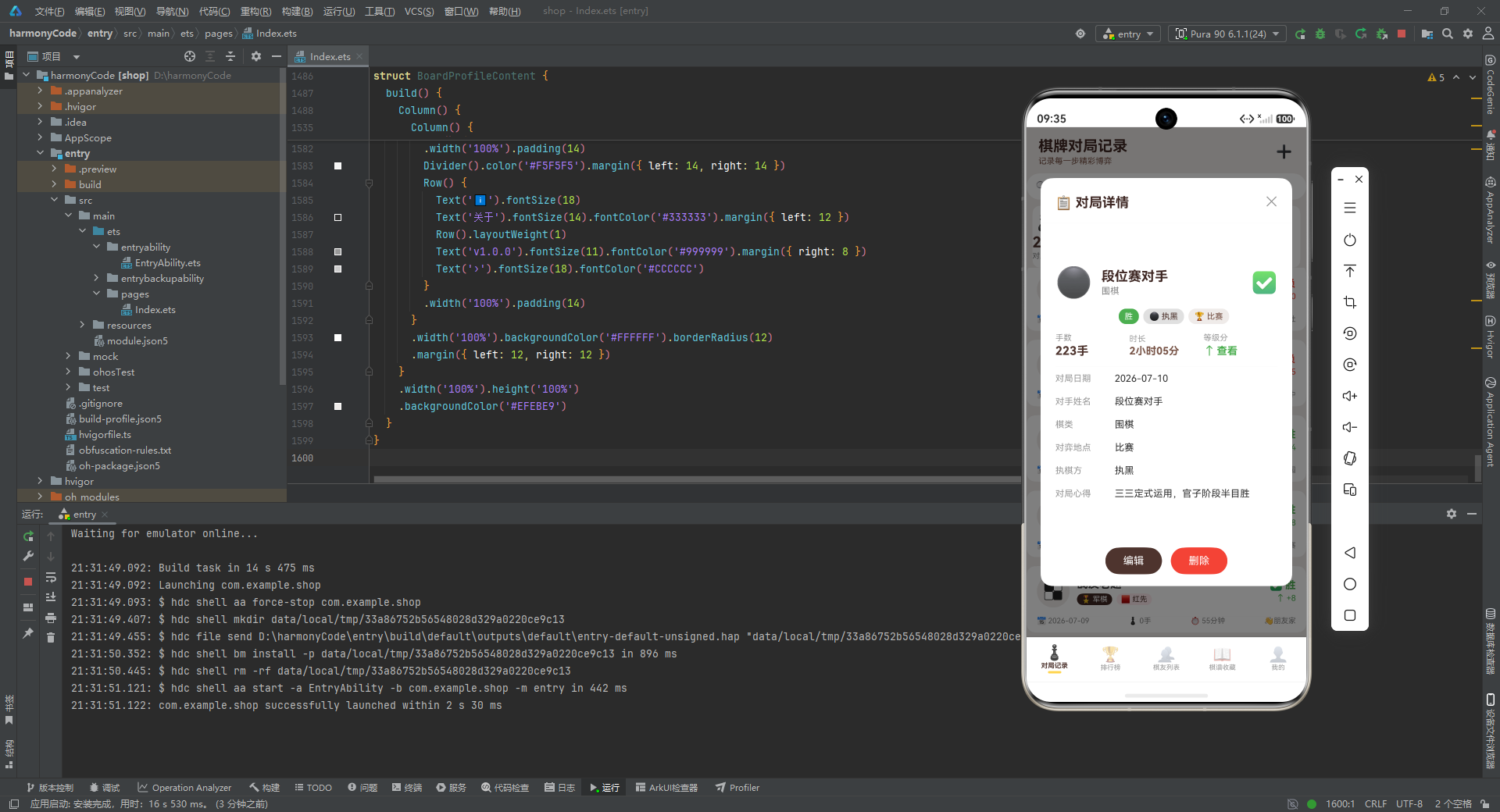
9.6 对局详情弹窗
详情弹窗展示一条对局的所有信息,并提供"编辑""删除"两个入口:
@Builder detailGameModal() {
  Column() {
    this.modalOverlay(() => { this.showDetailModal = false })
    Column() {
      Row() {
        Text('📋 对局详情').fontSize(18).fontWeight(FontWeight.Bold).fontColor('#3E2723')
        Row().layoutWeight(1)
        Text('✕').fontSize(18).fontColor('#999999')
          .onClick(() => { this.showDetailModal = false })
      }
      .width('100%').padding({ left: 20, right: 20, top: 18, bottom: 12 })
      Divider().color('#EFEBE9')
      Scroll() {
        Column() {
          Row() {
            Text(GAME_TYPE_CONFIG[this.selectedGame?.gameType ?? '中国象棋']?.icon ?? '♟️')
              .fontSize(40)
            Column() {
              Text(this.selectedGame?.opponent ?? '')
                .fontSize(18).fontWeight(FontWeight.Bold).fontColor('#3E2723')
              Text(GAME_TYPE_CONFIG[this.selectedGame?.gameType ?? '中国象棋']?.label ?? '')
                .fontSize(12).fontColor('#888888').margin({ top: 2 })
            }
            .alignItems(HorizontalAlign.Start).margin({ left: 12 })
            Row().layoutWeight(1)
            Text(RESULT_CONFIG[this.selectedGame?.result ?? '胜']?.icon ?? '✅')
              .fontSize(28)
          }
          .width('100%').padding({ left: 20, right: 20, top: 16, bottom: 12 })
逐行解释如下:
- 详情头部是一个"大图标 + 对手名 + 棋类 + 结果图标"的横排。棋类图标用 40 号大字,结果图标用 28 号,通过尺寸差异建立视觉层次。
this.selectedGame?.gameType ?? '中国象棋'这种写法出现在每一处取值里,虽然啰嗦,但保证了selectedGame为 null 时不会崩溃,始终回退到一个合理的默认值。
接下来是三个标签胶囊(结果、执棋方、地点)与三项关键数据(手数、时长、等级分):
          Row() {
            Text(RESULT_CONFIG[this.selectedGame?.result ?? '胜']?.label ?? '胜')
              .fontSize(11).fontColor('#FFFFFF')
              .backgroundColor(RESULT_CONFIG[this.selectedGame?.result ?? '胜']?.color ?? '#4E342E')
              .padding({ left: 8, right: 8, top: 4, bottom: 4 }).borderRadius(10)
            Text(COLOR_SIDE_CONFIG[this.selectedGame?.color ?? '执黑']?.icon + ' ' +
                 (COLOR_SIDE_CONFIG[this.selectedGame?.color ?? '执黑']?.label ?? ''))
              .fontSize(11).fontColor('#4E342E')
              .backgroundColor(COLOR_SIDE_CONFIG[this.selectedGame?.color ?? '执黑']?.bg ?? '#EFEBE9')
              .padding({ left: 8, right: 8, top: 4, bottom: 4 }).borderRadius(10)
              .margin({ left: 6 })
            Text(LOCATION_CONFIG[this.selectedGame?.location ?? '棋社']?.icon + ' ' +
                 (LOCATION_CONFIG[this.selectedGame?.location ?? '棋社']?.label ?? ''))
              .fontSize(11).fontColor('#795548')
              .backgroundColor('#EFEBE9')
              .padding({ left: 8, right: 8, top: 4, bottom: 4 }).borderRadius(10)
              .margin({ left: 6 })
          }
          .margin({ left: 20, bottom: 12 })
逐行解释如下:
- 三个胶囊依次展示结果、执棋方、地点。结果胶囊用主色背景白字,执棋方与地点用浅色背景深色字,主次有别。
- 每个胶囊的内容都是"图标 + 空格 + 文字"的拼接,让信息更易扫读。
等级分变化的展示特别值得一看:
          Row() {
            Column() {
              Text('手数').fontSize(11).fontColor('#999999')
              Text((this.selectedGame?.moves.toString() ?? '0') + '手')
                .fontSize(16).fontWeight(FontWeight.Bold).fontColor('#4E342E')
                .margin({ top: 2 })
            }.layoutWeight(1).alignItems(HorizontalAlign.Start)
            Column() {
              Text('时长').fontSize(11).fontColor('#999999')
              Text(this.selectedGame?.duration ?? '')
                .fontSize(14).fontWeight(FontWeight.Bold).fontColor('#795548')
                .margin({ top: 2 })
            }.layoutWeight(1).alignItems(HorizontalAlign.Start)
            Column() {
              Text('等级分').fontSize(11).fontColor('#999999')
              Row() {
                Text(this.selectedGame !== null && this.selectedGame.ratingChange > 0 ? '↑' :
                     (this.selectedGame !== null && this.selectedGame.ratingChange < 0 ? '↓' : '→'))
                  .fontSize(16).fontColor(this.selectedGame !== null && this.selectedGame.ratingChange > 0 ? '#4CAF50' :
                    (this.selectedGame !== null && this.selectedGame.ratingChange < 0 ? '#F44336' : '#2196F3'))
                Text('查看')
                  .fontSize(14).fontWeight(FontWeight.Bold)
                  .fontColor(this.selectedGame !== null && this.selectedGame.ratingChange > 0 ? '#4CAF50' :
                    (this.selectedGame !== null && this.selectedGame.ratingChange < 0 ? '#F44336' : '#2196F3'))
                  .margin({ left: 2 })
              }
              .margin({ top: 2 })
            }.layoutWeight(1).alignItems(HorizontalAlign.Start)
          }
逐行解释如下:
- 三列等宽展示手数、时长、等级分。手数用深棕、时长用中棕,等级分则根据正负动态变色。
- 等级分的箭头方向与颜色完全由
ratingChange的正负决定:大于 0 显示绿色↑、小于 0 显示红色↓、等于 0 显示蓝色→。这是整个应用里最复杂的一处条件渲染,嵌套了三层三元表达式。 - 注意这里有一处疑似笔误:箭头后面显示的是"查看"二字,而不是实际的等级分变化数值。结合上下文推测,作者原本可能想显示数值,但写成了"查看"。这是阅读代码时可以发现的细节问题。
详情弹窗的下半部分用 detailRow Builder 逐行展示其他字段:
      this.detailRow('对局日期', this.selectedGame?.date ?? '')
      this.detailRow('对手姓名', this.selectedGame?.opponent ?? '')
      this.detailRow('棋类', GAME_TYPE_CONFIG[this.selectedGame?.gameType ?? '中国象棋']?.label ?? '')
      this.detailRow('对弈地点', LOCATION_CONFIG[this.selectedGame?.location ?? '棋社']?.label ?? '')
      this.detailRow('执棋方', COLOR_SIDE_CONFIG[this.selectedGame?.color ?? '执黑']?.label ?? '')
      this.detailRow('对局心得', this.selectedGame?.notes ?? '')
detailRow 本身很简单:
@Builder detailRow(label: string, value: string) {
  Row() {
    Text(label).fontSize(12).fontColor('#999999').width(80)
    Text(value).fontSize(13).fontColor('#333333').layoutWeight(1)
  }
  .width('100%').padding({ left: 20, right: 20, top: 8, bottom: 8 })
}
逐行解释如下:
detailRow接收标签与值两个字符串参数,用一个Row把它们左右排开:标签固定宽 80,值占满剩余宽度。- 这种"参数化 Builder"是 ArkTS 里复用 UI 片段的利器,避免了重复书写六遍几乎一样的
Row。
详情弹窗底部是"编辑"和"删除"两个按钮,点击后会先关闭详情弹窗,再打开对应的编辑或删除弹窗:
      Row() {
        Text('编辑').fontSize(14).fontColor('#FFFFFF')
          .backgroundColor('#4E342E').borderRadius(20)
          .padding({ left: 24, right: 24, top: 10, bottom: 10 })
          .onClick(() => {
            this.showDetailModal = false
            this.editingGame = this.selectedGame
            this.showEditModal = true
          })
        Text('删除').fontSize(14).fontColor('#FFFFFF')
          .backgroundColor('#F44336').borderRadius(20)
          .padding({ left: 24, right: 24, top: 10, bottom: 10 })
          .margin({ left: 12 })
          .onClick(() => {
            this.showDetailModal = false
            this.showDeleteConfirm = true
          })
      }
      .width('100%').justifyContent(FlexAlign.Center)
      .padding({ left: 20, right: 20, top: 16, bottom: 16 })
逐行解释如下:
- 点击"编辑"时,先把
showDetailModal置 false(关详情),再把editingGame设为当前selectedGame(把要编辑的对象传过去),最后把showEditModal置 true(开编辑弹窗)。这是一个典型的"弹窗串联"流程。 - 点击"删除"时,只需关闭详情并打开删除确认弹窗,因为删除弹窗自己会读
selectedGame。
9.7 统计卡片
页面顶部有四张统计卡片,用 statCard Builder 统一渲染:
@Builder statCard(icon: string, value: string, label: string, color: string) {
  Column() {
    Text(icon).fontSize(22)
    Text(value).fontSize(20).fontWeight(FontWeight.Bold).fontColor(color).margin({ top: 2 })
    Text(label).fontSize(10).fontColor('#888888').margin({ top: 1 })
  }
  .layoutWeight(1)
  .backgroundColor('#FFFFFF')
  .borderRadius(10)
  .padding({ top: 10, bottom: 10 })
  .alignItems(HorizontalAlign.Start)
}
逐行解释如下:
- Builder 接收图标、数值、标签、颜色四个参数,分别对应卡片的上中下三行内容与数值的染色。
- 卡片用
layoutWeight(1)在父Row里等分宽度,白底圆角 10,上下 padding 10。 alignItems(HorizontalAlign.Start)让三行内容左对齐,比居中更有"数据报表"的质感。
调用处是这样:
Row() {
  this.statCard('♟️', getGameCount().toString(), '对局总数', '#4E342E')
  this.statCard('✅', getWinCount().toString(), '胜局', '#4CAF50')
  this.statCard('❌', getLossCount().toString(), '负局', '#F44336')
  this.statCard('📊', getWinRate() + '%', '胜率', '#FFD54F')
}
.width('100%').padding({ left: 8, right: 8 })
逐行解释如下:
- 四张卡片分别展示对局总数(棕)、胜局(绿)、负局(红)、胜率(金),每张卡片的数值用对应主题色染色,与全应用的配色体系一致。
- 数值都通过前文的统计函数获取,
getWinRate() + '%'这种拼接说明getWinRate返回的是整数。
9.8 月度柱状图
柱状图用纯 ArkTS 组件手绘,没有借助任何图表库:
@Builder monthBarChart() {
  Column() {
    Row() {
      Text('📈 月度对局数').fontSize(14).fontWeight(FontWeight.Bold).fontColor('#3E2723')
      Row().layoutWeight(1)
      Text('单位:局').fontSize(10).fontColor('#999999')
    }
    .width('100%').padding({ left: 16, right: 16, top: 14, bottom: 8 })
    Row() {
      ForEach(monthBarData, (item: MonthBarMeta) => {
        Column() {
          Column() {
            Text(item.value.toString())
              .fontSize(9).fontColor('#4E342E').margin({ bottom: 2 })
          }
          .width(24).height(item.value * 8)
          .backgroundColor(item.color).borderRadius({ topLeft: 4, topRight: 4 })
          Text(item.label).fontSize(9).fontColor('#888888').margin({ top: 4 })
        }
        .layoutWeight(1)
        .alignItems(HorizontalAlign.Start)
      })
    }
    .width('100%').padding({ left: 12, right: 12, bottom: 12 })
    .alignItems(VerticalAlign.Bottom)
  }
  .width('100%').backgroundColor('#FFFFFF').borderRadius(12)
  .margin({ left: 12, right: 12, top: 8 })
}
逐行解释如下:
- 图表标题用
Row实现"左标题 + 右单位"的布局,中间用Row().layoutWeight(1)推开。 - 柱子区域是一个
Row,对monthBarData数组用ForEach渲染。每一根柱子是一个Column:内部先是一个带数值文字的小Column(柱子本体),下面是时段标签。 - 柱子的高度由
item.value * 8计算得出,即每局对应 8 像素高度。这是一种最朴素的"数值到像素"的线性映射,没有考虑数据归一化,但用于 demo 足够直观。 - 柱子宽度固定 24,圆角只在顶部(
topLeft: 4, topRight: 4),底部贴着标签,模拟真实柱状图的视觉。 - 外层
Row用alignItems(VerticalAlign.Bottom)让所有柱子底部对齐,这是柱状图的基本要求。 - 整个图表卡片白底圆角 12,左右 margin 12,与统计卡片的间距保持一致。
9.9 胜负占比条
占比条用一种很巧妙的方式实现:把三种结果的数值作为 layoutWeight,让三段颜色自动按比例分配宽度:
@Builder winRateBar() {
  Column() {
    Text('📊 胜负占比').fontSize(14).fontWeight(FontWeight.Bold).fontColor('#3E2723')
      .margin({ left: 16, top: 14, bottom: 8 })
    Row() {
      ForEach(resultRatioData, (item: ResultRatioMeta) => {
        Column() {
          Column()
            .layoutWeight(item.value)
            .height(20)
            .backgroundColor(item.color)
            .borderRadius(item.label === '胜' ? { topLeft: 10, bottomLeft: 10 } :
              (item.label === '和' ? 0 : { topRight: 10, bottomRight: 10 }))
          Text(item.icon + ' ' + item.label + ' ' + item.value)
            .fontSize(9).fontColor(item.color).margin({ top: 4 })
        }
        .alignItems(HorizontalAlign.Start)
      })
    }
    .width('100%').padding({ left: 16, right: 16, bottom: 12 })
  }
  .width('100%').backgroundColor('#FFFFFF').borderRadius(12)
  .margin({ left: 12, right: 12, top: 8 })
}
逐行解释如下:
- 占比条本体是一个
Row,对resultRatioData用ForEach渲染三段。 - 每一段是一个
Column,内部先是一段有颜色的色块(用layoutWeight(item.value)让宽度按数值分配,固定高度 20),下面是"图标 + 标签 + 数值"的说明文字。 - 圆角处理很精巧:第一段(胜)只在左侧圆角,最后一段(和)只在右侧圆角,中间段(负)不圆角。这样三段拼起来形成一个两端圆角的完整占比条。
- 这里有一个潜在的渲染陷阱:
layoutWeight在 ArkTS 里通常需要配合具体的高度或宽度约束才能正确分配,把layoutWeight用在色块上、同时色块又有固定height(20),依赖的是框架对"剩余空间分配"的处理。这种用法在某些版本下可能需要调整为百分比宽度,但作者选择这种写法是为了让三段宽度随数值自动变化,无需手动计算百分比。
9.10 棋类分布条
棋类分布用横向的进度条形式展示:
@Builder typeRatioChart() {
  Column() {
    Text('♟️ 棋类分布').fontSize(14).fontWeight(FontWeight.Bold).fontColor('#3E2723')
      .margin({ left: 16, top: 14, bottom: 8 })
    ForEach(typeRatioData, (item: TypeRatioMeta) => {
      Row() {
        Text(item.icon + ' ' + item.label).fontSize(11).fontColor('#333333').width(90)
        Column() {
          Row() {
            Column()
              .layoutWeight(item.value)
              .height(14)
              .backgroundColor(item.color)
              .borderRadius({ topLeft: 7, bottomLeft: 7 })
            Column().layoutWeight(20 - item.value).height(14)
              .backgroundColor('#F5F5F5')
              .borderRadius({ topRight: 7, bottomRight: 7 })
          }
        }
        .layoutWeight(1)
        .margin({ left: 8, right: 8 })
        Text(item.value + '局').fontSize(11).fontColor(item.color).fontWeight(FontWeight.Bold)
      }
      .width('100%').padding({ left: 16, right: 16, bottom: 8 })
    })
  }
  .width('100%').backgroundColor('#FFFFFF').borderRadius(12)
  .margin({ left: 12, right: 12, top: 8, bottom: 8 })
}
逐行解释如下:
- 每一种棋占一行:左边是"图标 + 棋类名"(固定宽 90),中间是进度条,右边是"X局"的数值。
- 进度条用一个
Row包两段:已填充段layoutWeight(item.value)用主色、左侧圆角;未填充段layoutWeight(20 - item.value)用浅灰、右侧圆角。两段拼起来形成一个完整的圆角进度条。 - 这里的
20是一个"魔法数字",它对应的是单种棋的最大可能对局数(从 Mock 数据看,最多的中国象棋是 6 局,远小于 20)。用 20 作为分母,让进度条永远不会撑满,视觉上更克制。但这种硬编码也有风险:如果某种棋的对局数超过 20,layoutWeight会出现负数,渲染异常。更稳健的做法是用所有棋类的最大值作为分母。
9.11 分类筛选条与对局卡片
筛选条用 filterChip Builder 渲染:
@Builder filterChip(label: string, type: string) {
  Text(label)
    .fontSize(11)
    .fontColor(this.selectedType === type ? '#FFFFFF' : '#4E342E')
    .backgroundColor(this.selectedType === type ? '#4E342E' : '#EFEBE9')
    .padding({ left: 10, right: 10, top: 5, bottom: 5 })
    .borderRadius(12)
    .margin({ left: 4, right: 4 })
    .onClick(() => { this.selectedType = type })
}
逐行解释如下:
- 筛选条是横向可滚动的胶囊组,每个胶囊根据是否选中切换"深棕底白字"与"浅米底深棕字"。
- 点击胶囊把
selectedType设为对应的棋类。
对局卡片 gameCard 是整个应用信息密度最高的 UI 单元:
@Builder gameCard(g: GameItem, index: number) {
  Column() {
    Row() {
      // 棋盘色块图标:用 2x2 的黑白格子模拟棋盘
      Column() {
        Row() {
          Column().width(12).height(12).backgroundColor('#212121').borderRadius(2)
          Column().width(12).height(12).backgroundColor('#FFFFFF')
            .border({ width: 1, color: '#212121' }).borderRadius(2)
        }
        Row() {
          Column().width(12).height(12).backgroundColor('#FFFFFF')
            .border({ width: 1, color: '#212121' }).borderRadius(2)
          Column().width(12).height(12).backgroundColor('#212121').borderRadius(2)
        }
      }
      .width(44).height(44)
      .backgroundColor(GAME_TYPE_CONFIG[g.gameType]?.bg ?? '#EFEBE9')
      .borderRadius(22)
      .padding(4)
      .justifyContent(FlexAlign.Center)
逐行解释如下:
- 卡片左侧是一个 44x44 的圆形色块,内部用 2x2 的黑白小格子模拟一个迷你棋盘。这是一个非常用心的细节:不依赖任何图片资源,纯用四个
Column拼出一个棋盘图案,既点题又轻量。 - 圆形色块的背景色取自该棋类的
bg配置,让不同棋类的卡片在视觉上有微妙的差异。
卡片中间是对手名与两个标签:
      Column() {
        Text(g.opponent)
          .fontSize(15).fontWeight(FontWeight.Bold).fontColor('#333333')
        Row() {
          Text(GAME_TYPE_CONFIG[g.gameType]?.icon + ' ' + (GAME_TYPE_CONFIG[g.gameType]?.label ?? g.gameType))
            .fontSize(10).fontColor('#FFFFFF')
            .backgroundColor(GAME_TYPE_CONFIG[g.gameType]?.color ?? '#4E342E')
            .padding({ left: 6, right: 6, top: 2, bottom: 2 }).borderRadius(8)
          Text(COLOR_SIDE_CONFIG[g.color]?.icon + ' ' + (COLOR_SIDE_CONFIG[g.color]?.label ?? g.color))
            .fontSize(10).fontColor('#4E342E')
            .backgroundColor(COLOR_SIDE_CONFIG[g.color]?.bg ?? '#EFEBE9')
            .padding({ left: 6, right: 6, top: 2, bottom: 2 }).borderRadius(8)
            .margin({ left: 6 })
        }
        .margin({ top: 4 })
      }
      .alignItems(HorizontalAlign.Start).layoutWeight(1).margin({ left: 10 })
逐行解释如下:
- 对手名用 15 号粗体黑字,是卡片的主标题。
- 下方两个标签胶囊:棋类(主色底白字)与执棋方(浅色底深棕字),主次有别。
卡片右侧是结果与等级分变化:
      Column() {
        Text(RESULT_CONFIG[g.result]?.icon + ' ' + g.result)
          .fontSize(14).fontWeight(FontWeight.Bold)
          .fontColor(RESULT_CONFIG[g.result]?.color ?? '#4E342E')
        Row() {
          Text(g.ratingChange > 0 ? '↑' : (g.ratingChange < 0 ? '↓' : '→'))
            .fontSize(12)
            .fontColor(g.ratingChange > 0 ? '#4CAF50' : (g.ratingChange < 0 ? '#F44336' : '#2196F3'))
          Text((g.ratingChange > 0 ? '+' : '') + g.ratingChange.toString())
            .fontSize(11)
            .fontColor(g.ratingChange > 0 ? '#4CAF50' : (g.ratingChange < 0 ? '#F44336' : '#2196F3'))
            .margin({ left: 2 })
        }
        .margin({ top: 2 })
      }
      .alignItems(HorizontalAlign.End)
    }
    .width('100%').padding({ left: 14, right: 14, top: 12, bottom: 12 })
逐行解释如下:
- 结果用 14 号粗体,颜色取自
RESULT_CONFIG,胜绿负红和蓝。 - 等级分变化用箭头 + 数值,正数前加
+号,颜色同样随正负切换。这种"符号 + 数值 + 颜色"的三重编码,让用户一眼就能判断这局是涨分还是掉分。
卡片底部是日期、手数、时长、地点的四列信息:
    Divider().color('#F5F5F5').margin({ left: 14, right: 14 })
    Row() {
      Text('📅 ' + g.date).fontSize(10).fontColor('#888888')
      Row().layoutWeight(1)
      Text('♟️ ' + g.moves + '手').fontSize(10).fontColor('#888888')
      Row().layoutWeight(1)
      Text('⏱️ ' + g.duration).fontSize(10).fontColor('#888888')
      Row().layoutWeight(1)
      Text(LOCATION_CONFIG[g.location]?.icon + g.location).fontSize(10).fontColor('#888888')
    }
    .width('100%').padding({ left: 14, right: 14, bottom: 10 })
  }
  .width('100%')
  .backgroundColor('#FFFFFF')
  .borderRadius(12)
  .margin({ left: 12, right: 12, top: 6, bottom: 6 })
  .onClick(() => {
    this.selectedGame = g
    this.showDetailModal = true
  })
}
逐行解释如下:
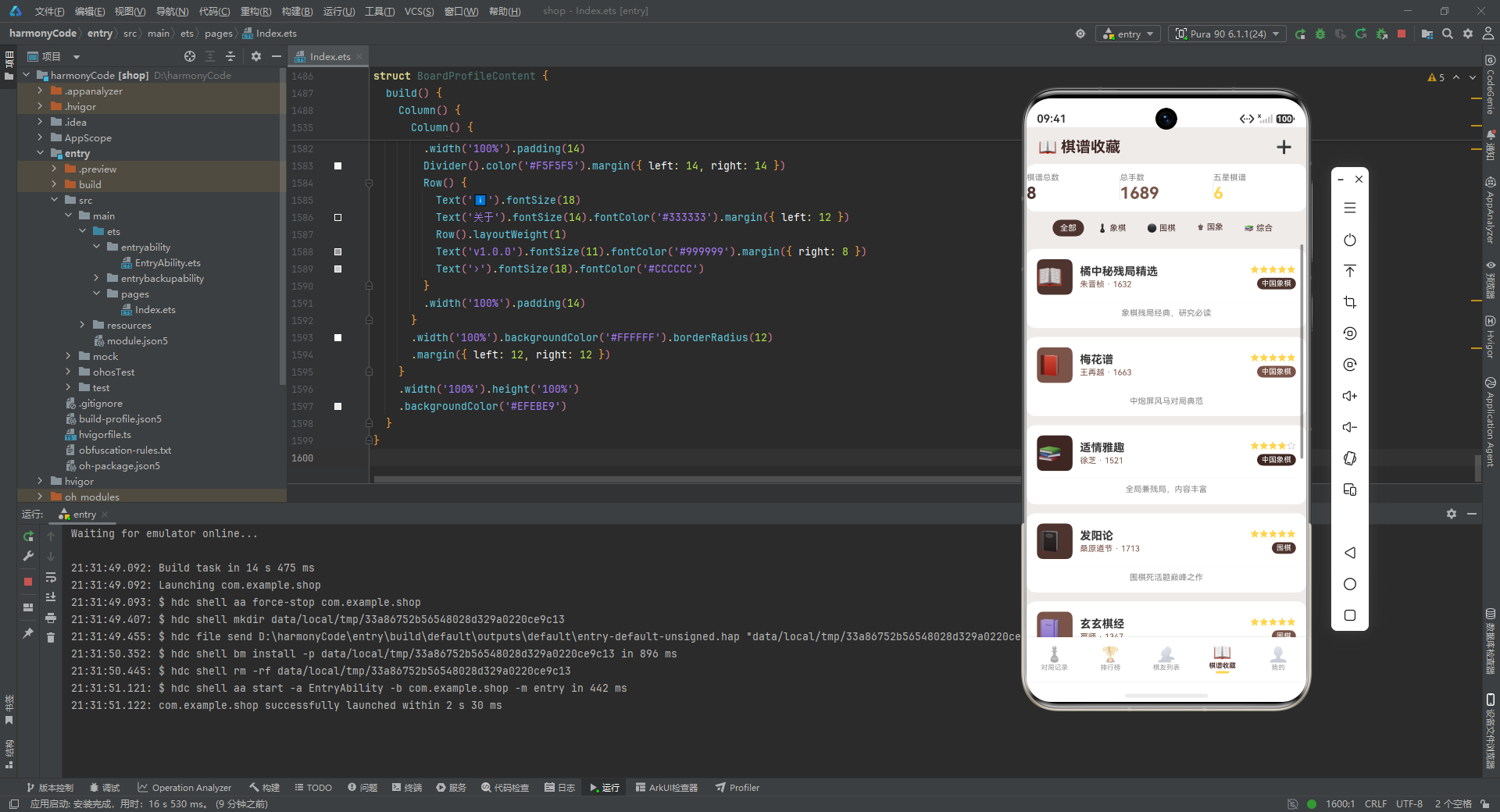
- 用一个浅色
Divider把卡片分成上下两部分:上部是核心信息(对手、棋类、结果、等级分),下部是元信息(日期、手数、时长、地点)。 - 下部四列用三个
Row().layoutWeight(1)作为弹性间距,让四段信息均匀分布。 - 整张卡片的
onClick把当前对局赋给selectedGame,并打开详情弹窗。这是列表项到详情的 standard 跳转模式。
9.12 对局记录页的 build 方法
最后看整个页面的组装:
build() {
  Column() {
    // 顶部标题栏
    Row() {
      Column() {
        Text('棋牌对局记录').fontSize(20).fontWeight(FontWeight.Bold).fontColor('#3E2723')
        Text('记录每一步精彩博弈').fontSize(11).fontColor('#795548').margin({ top: 2 })
      }
      .alignItems(HorizontalAlign.Start).layoutWeight(1)
      Text('➕').fontSize(22).fontColor('#4E342E')
        .onClick(() => { this.showAddModal = true })
    }
    .width('100%').padding({ left: 16, right: 16, top: 14, bottom: 10 })
    // 搜索框
    Row() {
      Text('🔍').fontSize(14).margin({ left: 12 })
      TextInput({ placeholder: '搜索对手或棋类...' })
        .placeholderColor('#BBBBBB').fontSize(12).layoutWeight(1)
        .backgroundColor('transparent').margin({ left: 6, right: 12 })
        .onChange((v: string) => { this.searchKeyword = v })
    }
    .width('100%').height(36)
    .backgroundColor('#FFFFFF').borderRadius(18)
    .margin({ left: 12, right: 12, bottom: 8 })
    // 统计卡片
    Row() {
      this.statCard('♟️', getGameCount().toString(), '对局总数', '#4E342E')
      this.statCard('✅', getWinCount().toString(), '胜局', '#4CAF50')
      this.statCard('❌', getLossCount().toString(), '负局', '#F44336')
      this.statCard('📊', getWinRate() + '%', '胜率', '#FFD54F')
    }
    .width('100%').padding({ left: 8, right: 8 })
    // 图表区与列表区(可滚动)
    Scroll() {
      Column() {
        Scroll() {
          Row() {
            this.filterChip('全部', '全部')
            this.filterChip('♟️ 象棋', '中国象棋')
            this.filterChip('⚫ 围棋', '围棋')
            this.filterChip('♚ 国象', '国际象棋')
            this.filterChip('🔵 五子', '五子棋')
            this.filterChip('🎖️ 军棋', '军棋')
            this.filterChip('🔴 跳棋', '跳棋')
          }
          .padding({ left: 8, right: 8 })
        }
        .scrollable(ScrollDirection.Horizontal).scrollBar(BarState.Off)
        .margin({ left: 4, right: 4, bottom: 8 })
        this.monthBarChart()
        this.winRateBar()
        this.typeRatioChart()
        Row() {
          Text('📋 对局列表').fontSize(14).fontWeight(FontWeight.Bold).fontColor('#3E2723')
          Row().layoutWeight(1)
          Text('共' + getGameCount() + '局').fontSize(11).fontColor('#999999')
        }
        .width('100%').padding({ left: 16, top: 12, bottom: 4 })
        this.gameCard(mockGames[0], 0)
        this.gameCard(mockGames[1], 1)
        // ... 共 20 张卡片
        this.gameCard(mockGames[19], 19)
        Column().height(20)
      }
    }
    .layoutWeight(1)
    // 弹窗
    if (this.showAddModal) { this.addGameModal() }
    if (this.showEditModal) { this.editGameModal() }
    if (this.showDeleteConfirm) { this.deleteGameModal() }
    if (this.showDetailModal) { this.detailGameModal() }
  }
  .width('100%').height('100%')
  .backgroundColor('#EFEBE9')
}
逐行解释如下:
- 整个页面是一个
Column,自上而下依次是:标题栏、搜索框、统计卡片、可滚动的内容区(含筛选条、三个图表、对局列表)、弹窗层。 - 标题栏左边是主副标题(“棋牌对局记录” + “记录每一步精彩博弈”),右边是新增按钮"➕"。
- 搜索框是一个圆角胶囊(
borderRadius(18)),内部是放大镜 Emoji + 透明背景的 TextInput。backgroundColor('transparent')让输入框与外层胶囊融为一体。 - 统计卡片之后是一个
Scroll,把筛选条、三个图表、二十张对局卡片全部包起来,让它们可以一起滚动。layoutWeight(1)让这个 Scroll 占据剩余高度。 - 筛选条本身又是一个横向
Scroll,关闭滚动条,让七个筛选胶囊可以横向滑动。 - 三个图表依次是月度柱状图、胜负占比条、棋类分布条,每个都是独立的白底卡片。
- 对局列表标题用"📋 对局列表 + 共X局"的左右布局,然后是二十张
gameCard。 - 最后是四个弹窗的条件渲染:只有对应的布尔为 true 时才挂载。这是 ArkTS 里实现"按需弹窗"的标准写法。
- 末尾的
Column().height(20)是一个占位空白,让列表底部不至于贴着屏幕边缘。
值得一提的是,二十张卡片是逐条手写 this.gameCard(mockGames[0], 0) 到 this.gameCard(mockGames[19], 19),而不是用 ForEach 循环。这是一种略显啰嗦的写法,可能是为了 demo 的稳定性(避免 ForEach 在某些场景下的 key 警告),但在生产代码里应该用 ForEach 替代,否则卡片数量变化时要手动增删。
十、排行榜页:荣誉与竞争的展示
排行榜页相对简单,主要展示"我的排名概览 + 筛选 + 排行榜列表"。
10.1 筛选胶囊与排行项
@Builder filterChip(label: string, period: string) {
  Text(label)
    .fontSize(11)
    .fontColor(this.selectedPeriod === period ? '#FFFFFF' : '#4E342E')
    .backgroundColor(this.selectedPeriod === period ? '#4E342E' : '#FFFFFF')
    .padding({ left: 14, right: 14, top: 6, bottom: 6 })
    .borderRadius(16)
    .margin({ left: 4, right: 4 })
    .onClick(() => { this.selectedPeriod = period })
}

@Builder rankItem(r: RankMeta, index: number) {
  Row() {
    Text(r.icon).fontSize(24).width(40)
    Column() {
      Text(r.name).fontSize(14).fontWeight(FontWeight.Bold).fontColor('#333333')
      Text(r.totalGames + '局 · 胜率' + r.winRate)
        .fontSize(11).fontColor('#888888').margin({ top: 2 })
    }
    .alignItems(HorizontalAlign.Start).layoutWeight(1).margin({ left: 8 })
    Column() {
      Text(r.rating.toString()).fontSize(16).fontWeight(FontWeight.Bold).fontColor(r.color)
      Text(r.trend).fontSize(10)
        .fontColor(r.trend.startsWith('↑') ? '#4CAF50' :
          (r.trend.startsWith('↓') ? '#F44336' : '#999999'))
        .margin({ top: 2 })
    }
    .alignItems(HorizontalAlign.End)
  }
  .width('100%')
  .backgroundColor('#FFFFFF')
  .borderRadius(12)
  .padding(14)
  .margin({ left: 12, right: 12, top: 4, bottom: 4 })
}
逐行解释如下:
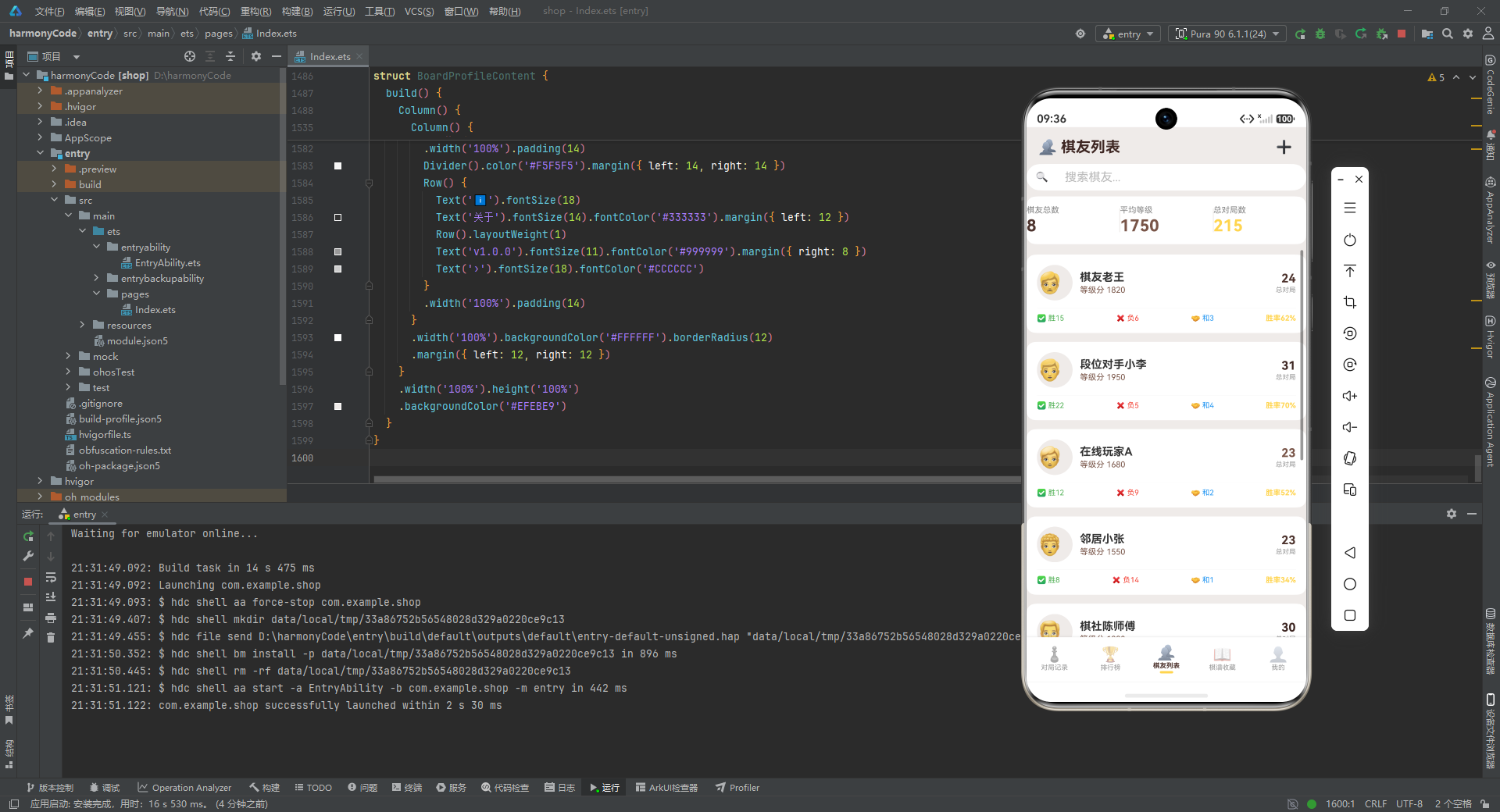
- 排行榜的筛选胶囊与对局记录页的略有不同:未选中时背景是纯白(而不是浅米色),让排行项的白底卡片与筛选胶囊有更明显的区分。
rankItem的布局是"奖牌图标 + 姓名/胜率 + 等级分/走势"的三段式。奖牌图标用 24 号大字、固定宽 40,让所有姓名左对齐。- 走势
trend的颜色用startsWith('↑')判断:以↑开头是绿色、以↓开头是红色、其余灰色。这是一种字符串前缀匹配的技巧,避免了把趋势拆成"方向 + 数值"两个字段。
10.2 排行榜页的 build 方法
build() {
  Column() {
    Row() {
      Text('🏆 排行榜').fontSize(20).fontWeight(FontWeight.Bold).fontColor('#3E2723')
      Row().layoutWeight(1)
      Text('🎖️').fontSize(22).fontColor('#FFD54F')
    }
    .width('100%').padding({ left: 16, right: 16, top: 14, bottom: 10 })
    // 排名概览
    Row() {
      Column() {
        Text('🏆 我的排名').fontSize(11).fontColor('#888888')
        Text('第5名').fontSize(22).fontWeight(FontWeight.Bold).fontColor('#FFD54F').margin({ top: 2 })
      }.alignItems(HorizontalAlign.Start).layoutWeight(1)
      Column().width(1).height(32).backgroundColor('#EFEBE9')
      Column() {
        Text('⭐ 我的等级分').fontSize(11).fontColor('#888888')
        Text('1820').fontSize(22).fontWeight(FontWeight.Bold).fontColor('#4E342E').margin({ top: 2 })
      }.alignItems(HorizontalAlign.Start).layoutWeight(1)
      Column().width(1).height(32).backgroundColor('#EFEBE9')
      Column() {
        Text('📈 近期变化').fontSize(11).fontColor('#888888')
        Text('↑12').fontSize(22).fontWeight(FontWeight.Bold).fontColor('#4CAF50').margin({ top: 2 })
      }.alignItems(HorizontalAlign.Start).layoutWeight(1)
    }
    .width('100%').backgroundColor('#FFFFFF').borderRadius(12)
    .padding({ top: 14, bottom: 14 })
    .margin({ left: 12, right: 12, bottom: 8 })
    // 筛选
    Row() {
      this.filterChip('本月', '本月')
      this.filterChip('本季', '本季')
      this.filterChip('本年', '本年')
      this.filterChip('全部', '全部')
    }
    .padding({ left: 8, right: 8, bottom: 8 })
    // 排行榜列表
    Scroll() {
      Column() {
        this.rankItem(mockRankings[0], 0)
        // ... 共 8 项
        this.rankItem(mockRankings[7], 7)
        Column().height(20)
      }
    }
    .layoutWeight(1)
  }
  .width('100%').height('100%')
  .backgroundColor('#EFEBE9')
}
逐行解释如下:
- 顶部标题栏右边是一个金色勋章 Emoji,作为装饰。
- “排名概览"卡片用三段式展示"我的排名 / 我的等级分 / 近期变化”,中间用 1 像素宽的浅色竖线分隔。这是仪表盘类 UI 的常见手法。
- 筛选条提供"本月/本季/本年/全部"四个时间维度,虽然当前实现里筛选不会真正过滤数据(因为 Mock 数据固定),但 UI 框架已经搭好,接入真实数据后即可生效。
- 排行榜列表用
Scroll包裹,支持上下滚动。八条记录逐条手写调用rankItem。
十一、棋友列表页:对手画像的管理
棋友列表页的结构与对局记录页类似:标题栏 + 搜索框 + 统计 + 列表 + 新增弹窗。
11.1 新增棋友弹窗
@Builder addPlayerModal() {
  Column() {
    this.modalOverlay(() => { this.showAddModal = false })
    Column() {
      Row() {
        Text('👥 添加棋友').fontSize(18).fontWeight(FontWeight.Bold).fontColor('#3E2723')
        Row().layoutWeight(1)
        Text('✕').fontSize(18).fontColor('#999999')
          .onClick(() => { this.showAddModal = false })
      }
      .width('100%').padding({ left: 20, right: 20, top: 18, bottom: 12 })
      Divider().color('#EFEBE9')
      Column() {
        Text('棋友昵称').fontSize(12).fontColor('#888888').margin({ top: 12, left: 20 })
        TextInput({ placeholder: '如:棋友小赵' })
          .placeholderColor('#BBBBBB').fontSize(14).width('100%')
          .backgroundColor('#F5F5F5').borderRadius(8)
          .margin({ left: 20, right: 20, top: 4 })
        Text('初始等级分').fontSize(12).fontColor('#888888').margin({ top: 12, left: 20 })
        TextInput({ placeholder: '1500' })
          .placeholderColor('#BBBBBB').fontSize(14).width('100%')
          .backgroundColor('#F5F5F5').borderRadius(8)
          .margin({ left: 20, right: 20, top: 4 })
      }
      .layoutWeight(1)
      Row() {
        Text('取消').fontSize(14).fontColor('#888888')
          .backgroundColor('#F5F5F5').borderRadius(20)
          .padding({ left: 24, right: 24, top: 10, bottom: 10 })
          .onClick(() => { this.showAddModal = false })
        Text('添加棋友').fontSize(14).fontColor('#FFFFFF')
          .backgroundColor('#4E342E').borderRadius(20)
          .padding({ left: 24, right: 24, top: 10, bottom: 10 })
          .margin({ left: 12 })
          .onClick(() => { this.showAddModal = false })
      }
      .width('100%').justifyContent(FlexAlign.Center)
      .padding({ left: 20, right: 20, top: 16, bottom: 16 })
    }
    .width('90%').backgroundColor('#FFFFFF').borderRadius(16)
    .constraintSize({ maxHeight: '60%' })
    .position({ x: '5%', y: '20%' })
  }
  .width('100%').height('100%').position({ x: 0, y: 0 }).zIndex(999)
}
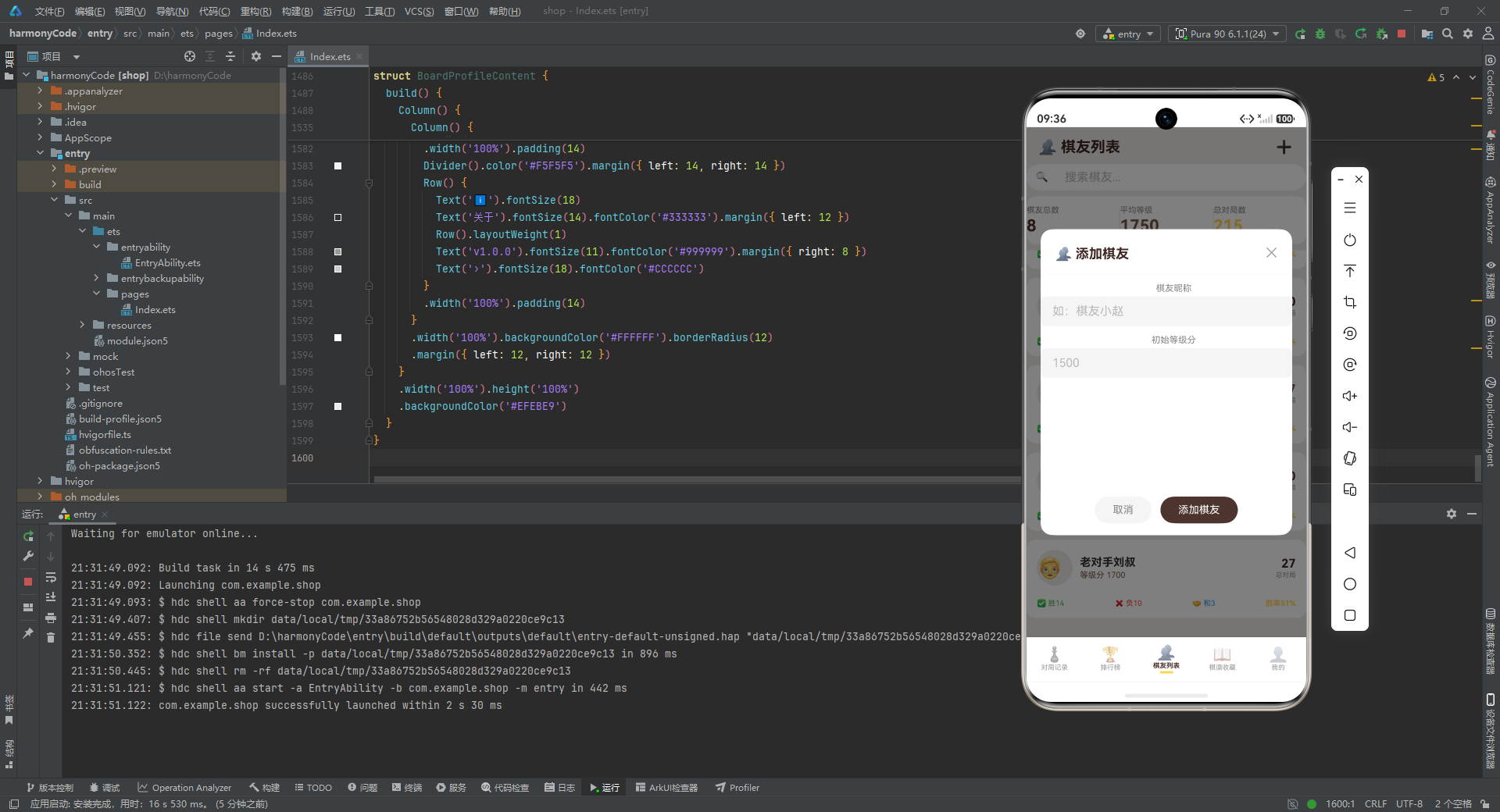
逐行解释如下:
- 新增棋友弹窗只有两个字段:昵称与初始等级分,所以最大高度限制为 60%,比新增对局弹窗的 80% 小很多,视觉上更轻量。
- 整体结构与新增对局弹窗完全一致:遮罩 + 头部 + 表单 + 底部按钮。这种高度一致性让用户在不同弹窗之间切换时没有学习成本。
11.2 棋友卡片
@Builder playerCard(p: PlayerMeta) {
  Column() {
    Row() {
      Column() {
        Text(p.avatar).fontSize(28)
      }
      .width(48).height(48)
      .backgroundColor('#EFEBE9').borderRadius(24)
      .alignItems(HorizontalAlign.Start)
      .justifyContent(FlexAlign.Center)
      Column() {
        Text(p.name).fontSize(15).fontWeight(FontWeight.Bold).fontColor('#333333')
        Text('等级分 ' + p.rating.toString())
          .fontSize(11).fontColor('#795548').margin({ top: 2 })
      }
      .alignItems(HorizontalAlign.Start).layoutWeight(1).margin({ left: 10 })
      Column() {
        Text(p.totalGames.toString()).fontSize(16).fontWeight(FontWeight.Bold).fontColor(p.color)
        Text('总对局').fontSize(9).fontColor('#999999').margin({ top: 1 })
      }
      .alignItems(HorizontalAlign.End)
    }
    Divider().color('#F5F5F5').margin({ top: 10, bottom: 8 })
    Row() {
      Text('✅ 胜' + p.wins).fontSize(10).fontColor('#4CAF50')
      Row().layoutWeight(1)
      Text('❌ 负' + p.losses).fontSize(10).fontColor('#F44336')
      Row().layoutWeight(1)
      Text('🤝 和' + p.draws).fontSize(10).fontColor('#2196F3')
      Row().layoutWeight(1)
      Text('胜率' + Math.floor(p.wins / p.totalGames * 100) + '%').fontSize(10)
        .fontColor('#FFD54F').fontWeight(FontWeight.Bold)
    }
  }
  .width('100%')
  .backgroundColor('#FFFFFF')
  .borderRadius(12)
  .padding(14)
  .margin({ left: 12, right: 12, top: 6, bottom: 6 })
}
逐行解释如下:
- 卡片上部是"头像 + 姓名/等级分 + 总对局数"的三段式。头像是 48x48 的圆形浅米色块,内部放 28 号的 Emoji 头像。
- 下部是胜/负/和/胜率四列,用三个
Row().layoutWeight(1)做弹性间距。胜率用Math.floor(p.wins / p.totalGames * 100)现场计算,这是整个应用里少有的"运行时计算"——其他统计数据都由统计函数返回写死值,而胜率在这里实时算。这种不一致是个小瑕疵,理想情况下应该统一由函数计算。 - 胜率用金色加粗,与前文统计卡片里的胜率颜色一致,形成跨页面的视觉锚点。
11.3 棋友列表页的 build 方法
build() {
  Column() {
    Row() {
      Text('👥 棋友列表').fontSize(20).fontWeight(FontWeight.Bold).fontColor('#3E2723')
      Row().layoutWeight(1)
      Text('➕').fontSize(22).fontColor('#4E342E')
        .onClick(() => { this.showAddModal = true })
    }
    .width('100%').padding({ left: 16, right: 16, top: 14, bottom: 10 })
    // 搜索框
    Row() {
      Text('🔍').fontSize(14).margin({ left: 12 })
      TextInput({ placeholder: '搜索棋友...' })
        .placeholderColor('#BBBBBB').fontSize(12).layoutWeight(1)
        .backgroundColor('transparent').margin({ left: 6, right: 12 })
        .onChange((v: string) => { this.searchKeyword = v })
    }
    .width('100%').height(36)
    .backgroundColor('#FFFFFF').borderRadius(18)
    .margin({ left: 12, right: 12, bottom: 8 })
    // 统计
    Row() {
      Column() {
        Text('棋友总数').fontSize(11).fontColor('#888888')
        Text(getPlayerCount().toString()).fontSize(22).fontWeight(FontWeight.Bold)
          .fontColor('#4E342E').margin({ top: 2 })
      }.alignItems(HorizontalAlign.Start).layoutWeight(1)
      Column().width(1).height(32).backgroundColor('#EFEBE9')
      Column() {
        Text('平均等级').fontSize(11).fontColor('#888888')
        Text(getAvgRating().toString()).fontSize(22).fontWeight(FontWeight.Bold)
          .fontColor('#795548').margin({ top: 2 })
      }.alignItems(HorizontalAlign.Start).layoutWeight(1)
      Column().width(1).height(32).backgroundColor('#EFEBE9')
      Column() {
        Text('总对局数').fontSize(11).fontColor('#888888')
        Text('215').fontSize(22).fontWeight(FontWeight.Bold)
          .fontColor('#FFD54F').margin({ top: 2 })
      }.alignItems(HorizontalAlign.Start).layoutWeight(1)
    }
    .width('100%').backgroundColor('#FFFFFF').borderRadius(12)
    .padding({ top: 12, bottom: 12 })
    .margin({ left: 12, right: 12, bottom: 8 })
    // 棋友列表
    Scroll() {
      Column() {
        this.playerCard(mockPlayers[0])
        // ... 共 8 张
        this.playerCard(mockPlayers[7])
        Column().height(20)
      }
    }
    .layoutWeight(1)
    if (this.showAddModal) { this.addPlayerModal() }
  }
  .width('100%').height('100%')
  .backgroundColor('#EFEBE9')
}
逐行解释如下:
- 页面结构与对局记录页几乎同构:标题栏 + 搜索框 + 统计卡片 + 列表 + 弹窗。
- 统计卡片展示"棋友总数 / 平均等级 / 总对局数"三项,中间用竖线分隔。注意"总对局数"这里写死了 215,而不是用函数计算,这是与前文统计函数设计意图相悖的一处硬编码。
- 八张棋友卡片逐条手写调用
playerCard。
十二、棋谱收藏页:经典棋书的管理
棋谱收藏页展示用户收藏的棋书,并提供按棋类筛选与新增收藏的功能。
12.1 新增棋谱弹窗
@Builder addCollectionModal() {
  Column() {
    this.modalOverlay(() => { this.showAddModal = false })
    Column() {
      Row() {
        Text('📖 添加棋谱').fontSize(18).fontWeight(FontWeight.Bold).fontColor('#3E2723')
        Row().layoutWeight(1)
        Text('✕').fontSize(18).fontColor('#999999')
          .onClick(() => { this.showAddModal = false })
      }
      .width('100%').padding({ left: 20, right: 20, top: 18, bottom: 12 })
      Divider().color('#EFEBE9')
      Column() {
        Text('棋谱名称').fontSize(12).fontColor('#888888').margin({ top: 12, left: 20 })
        TextInput({ placeholder: '如:梅花谱' })
          .placeholderColor('#BBBBBB').fontSize(14).width('100%')
          .backgroundColor('#F5F5F5').borderRadius(8)
          .margin({ left: 20, right: 20, top: 4 })
        Text('棋类').fontSize(12).fontColor('#888888').margin({ top: 12, left: 20 })
        TextInput({ placeholder: '如:中国象棋' })
          .placeholderColor('#BBBBBB').fontSize(14).width('100%')
          .backgroundColor('#F5F5F5').borderRadius(8)
          .margin({ left: 20, right: 20, top: 4 })
        Text('来源/作者').fontSize(12).fontColor('#888888').margin({ top: 12, left: 20 })
        TextInput({ placeholder: '如:清·王再越' })
          .placeholderColor('#BBBBBB').fontSize(14).width('100%')
          .backgroundColor('#F5F5F5').borderRadius(8)
          .margin({ left: 20, right: 20, top: 4 })
        Text('收藏备注').fontSize(12).fontColor('#888888').margin({ top: 12, left: 20 })
        TextArea({ placeholder: '棋谱特点与心得...' })
          .placeholderColor('#BBBBBB').fontSize(12).width('100%').height(60)
          .backgroundColor('#F5F5F5').borderRadius(8)
          .margin({ left: 20, right: 20, top: 4, bottom: 12 })
      }
      .layoutWeight(1)
      Row() {
        Text('取消').fontSize(14).fontColor('#888888')
          .backgroundColor('#F5F5F5').borderRadius(20)
          .padding({ left: 24, right: 24, top: 10, bottom: 10 })
          .onClick(() => { this.showAddModal = false })
        Text('收藏棋谱').fontSize(14).fontColor('#FFFFFF')
          .backgroundColor('#4E342E').borderRadius(20)
          .padding({ left: 24, right: 24, top: 10, bottom: 10 })
          .margin({ left: 12 })
          .onClick(() => { this.showAddModal = false })
      }
      .width('100%').justifyContent(FlexAlign.Center)
      .padding({ left: 20, right: 20, top: 16, bottom: 16 })
    }
    .width('90%').backgroundColor('#FFFFFF').borderRadius(16)
    .constraintSize({ maxHeight: '75%' })
    .position({ x: '5%', y: '12%' })
  }
  .width('100%').height('100%').position({ x: 0, y: 0 }).zIndex(999)
}
逐行解释如下:
- 新增棋谱弹窗有四个字段:棋谱名称、棋类、来源/作者、收藏备注。最大高度限制 75%,介于新增对局(80%)与新增棋友(60%)之间,与字段数量成正比。
- 棋类这里用的是普通
TextInput而不是胶囊切换,是一个简化处理。理想情况下应该复用棋类胶囊选择器,保证数据与配置字典一致。 - placeholder 都用了真实示例(“如:梅花谱”“如:清·王再越”),引导性很强。
12.2 棋谱卡片
@Builder collectionCard(c: CollectionMeta) {
  Column() {
    Row() {
      Column() {
        Text(c.icon).fontSize(28)
      }
      .width(48).height(48)
      .backgroundColor(c.color).borderRadius(8)
      .alignItems(HorizontalAlign.Start)
      .justifyContent(FlexAlign.Center)
      Column() {
        Text(c.title).fontSize(15).fontWeight(FontWeight.Bold).fontColor('#333333')
        Text(c.author + ' · ' + c.year).fontSize(11).fontColor('#795548').margin({ top: 2 })
      }
      .alignItems(HorizontalAlign.Start).layoutWeight(1).margin({ left: 10 })
      Column() {
        Row() {
          ForEach([1, 2, 3, 4, 5], (s: number) => {
            Text(s <= c.rating ? '★' : '☆')
              .fontSize(12)
              .fontColor(s <= c.rating ? '#FFD54F' : '#CCCCCC')
          })
        }
        Text(c.gameType).fontSize(10).fontColor('#FFFFFF')
          .backgroundColor(c.color)
          .padding({ left: 6, right: 6, top: 2, bottom: 2 }).borderRadius(8)
          .margin({ top: 4 })
      }
      .alignItems(HorizontalAlign.End)
    }
    Divider().color('#F5F5F5').margin({ top: 10, bottom: 8 })
    Text(c.notes).fontSize(11).fontColor('#888888')
  }
  .width('100%')
  .backgroundColor('#FFFFFF')
  .borderRadius(12)
  .padding(14)
  .margin({ left: 12, right: 12, top: 6, bottom: 6 })
}
逐行解释如下:
- 卡片上部是"书脊色块 + 标题/作者·年代 + 评分/棋类标签"的三段式。书脊色块用
c.color作为背景,让每份棋谱有自己的主题色。 - 评分用五行星实现:对
[1,2,3,4,5]用ForEach,s <= c.rating时显示实心星 ★ 并染金色,否则显示空心星 ☆ 染浅灰。这是一种非常经典的星级评分渲染方式。 - 棋类标签用
c.color作为背景,与书脊色块呼应,整体配色统一。 - 卡片下部是一句备注,用浅灰小字,给读者补充信息。
12.3 棋谱收藏页的 build 方法
build() {
  Column() {
    Row() {
      Text('📖 棋谱收藏').fontSize(20).fontWeight(FontWeight.Bold).fontColor('#3E2723')
      Row().layoutWeight(1)
      Text('➕').fontSize(22).fontColor('#4E342E')
        .onClick(() => { this.showAddModal = true })
    }
    .width('100%').padding({ left: 16, right: 16, top: 14, bottom: 10 })
    // 统计
    Row() {
      Column() {
        Text('棋谱总数').fontSize(11).fontColor('#888888')
        Text(getCollectionCount().toString()).fontSize(22).fontWeight(FontWeight.Bold)
          .fontColor('#4E342E').margin({ top: 2 })
      }.alignItems(HorizontalAlign.Start).layoutWeight(1)
      Column().width(1).height(32).backgroundColor('#EFEBE9')
      Column() {
        Text('总手数').fontSize(11).fontColor('#888888')
        Text(getTotalMoves().toString()).fontSize(22).fontWeight(FontWeight.Bold)
          .fontColor('#795548').margin({ top: 2 })
      }.alignItems(HorizontalAlign.Start).layoutWeight(1)
      Column().width(1).height(32).backgroundColor('#EFEBE9')
      Column() {
        Text('五星棋谱').fontSize(11).fontColor('#888888')
        Text('6').fontSize(22).fontWeight(FontWeight.Bold)
          .fontColor('#FFD54F').margin({ top: 2 })
      }.alignItems(HorizontalAlign.Start).layoutWeight(1)
    }
    .width('100%').backgroundColor('#FFFFFF').borderRadius(12)
    .padding({ top: 12, bottom: 12 })
    .margin({ left: 12, right: 12, bottom: 8 })
    // 筛选
    Scroll() {
      Row() {
        this.filterChip('全部', '全部')
        this.filterChip('♟️ 象棋', '中国象棋')
        this.filterChip('⚫ 围棋', '围棋')
        this.filterChip('♚ 国象', '国际象棋')
        this.filterChip('📚 综合', '综合')
      }
      .padding({ left: 8, right: 8 })
    }
    .scrollable(ScrollDirection.Horizontal).scrollBar(BarState.Off)
    .margin({ left: 4, right: 4, bottom: 8 })
    // 棋谱列表
    Scroll() {
      Column() {
        this.collectionCard(mockCollections[0])
        // ... 共 8 张
        this.collectionCard(mockCollections[7])
        Column().height(20)
      }
    }
    .layoutWeight(1)
    if (this.showAddModal) { this.addCollectionModal() }
  }
  .width('100%').height('100%')
  .backgroundColor('#EFEBE9')
}
逐行解释如下:
- 统计卡片展示"棋谱总数 / 总手数 / 五星棋谱"三项。注意"五星棋谱"写死了 6,与 Mock 数据里 5 分的棋谱数量一致,但同样没有用函数计算,是一处硬编码。
- 筛选条比其他页面多了"综合"选项,因为棋谱收藏里有"综合"类型的棋书(如"我的对局集")。
- 八张棋谱卡片逐条手写调用
collectionCard。
十三、个人中心页:设置与成就的入口
个人中心页是最静态的一个页面,没有弹窗、没有筛选,纯粹展示用户信息与菜单入口。
13.1 个人中心页的 build 方法
build() {
  Column() {
    // 头部
    Row() {
      Column() {
        Text('♟️').fontSize(40)
      }
      .width(64).height(64)
      .backgroundColor('#FFD54F').borderRadius(32)
      .alignItems(HorizontalAlign.Start)
      .justifyContent(FlexAlign.Center)
      Column() {
        Text('棋坛新秀').fontSize(18).fontWeight(FontWeight.Bold).fontColor('#3E2723')
        Text('业余5段 · 对局365局').fontSize(11).fontColor('#795548').margin({ top: 2 })
      }
      .alignItems(HorizontalAlign.Start).layoutWeight(1).margin({ left: 12 })
    }
    .width('100%')
    .backgroundColor('#FFFFFF')
    .borderRadius(12)
    .padding(16)
    .margin({ left: 12, right: 12, top: 14, bottom: 8 })
    // 数据统计
    Row() {
      Column() {
        Text('20').fontSize(20).fontWeight(FontWeight.Bold).fontColor('#4E342E')
        Text('对局总数').fontSize(10).fontColor('#888888').margin({ top: 2 })
      }.alignItems(HorizontalAlign.Start).layoutWeight(1)
      Column().width(1).height(32).backgroundColor('#EFEBE9')
      Column() {
        Text('13').fontSize(20).fontWeight(FontWeight.Bold).fontColor('#4CAF50')
        Text('胜局').fontSize(10).fontColor('#888888').margin({ top: 2 })
      }.alignItems(HorizontalAlign.Start).layoutWeight(1)
      Column().width(1).height(32).backgroundColor('#EFEBE9')
      Column() {
        Text('65%').fontSize(20).fontWeight(FontWeight.Bold).fontColor('#FFD54F')
        Text('胜率').fontSize(10).fontColor('#888888').margin({ top: 2 })
      }.alignItems(HorizontalAlign.Start).layoutWeight(1)
      Column().width(1).height(32).backgroundColor('#EFEBE9')
      Column() {
        Text('1820').fontSize(20).fontWeight(FontWeight.Bold).fontColor('#795548')
        Text('等级分').fontSize(10).fontColor('#888888').margin({ top: 2 })
      }.alignItems(HorizontalAlign.Start).layoutWeight(1)
    }
    .width('100%').backgroundColor('#FFFFFF').borderRadius(12)
    .padding({ top: 14, bottom: 14 })
    .margin({ left: 12, right: 12, bottom: 8 })
    // 菜单列表
    Column() {
      Row() {
        Text('📊').fontSize(18)
        Text('对局数据分析').fontSize(14).fontColor('#333333').margin({ left: 12 })
        Row().layoutWeight(1)
        Text('›').fontSize(18).fontColor('#CCCCCC')
      }
      .width('100%').padding(14)
      Divider().color('#F5F5F5').margin({ left: 14, right: 14 })
      // ... 共 7 个菜单项:对局数据分析、我的成就墙、导入棋谱、分享对局、训练计划、设置、关于
    }
    .width('100%').backgroundColor('#FFFFFF').borderRadius(12)
    .margin({ left: 12, right: 12 })
  }
  .width('100%').height('100%')
  .backgroundColor('#EFEBE9')
}
逐行解释如下:
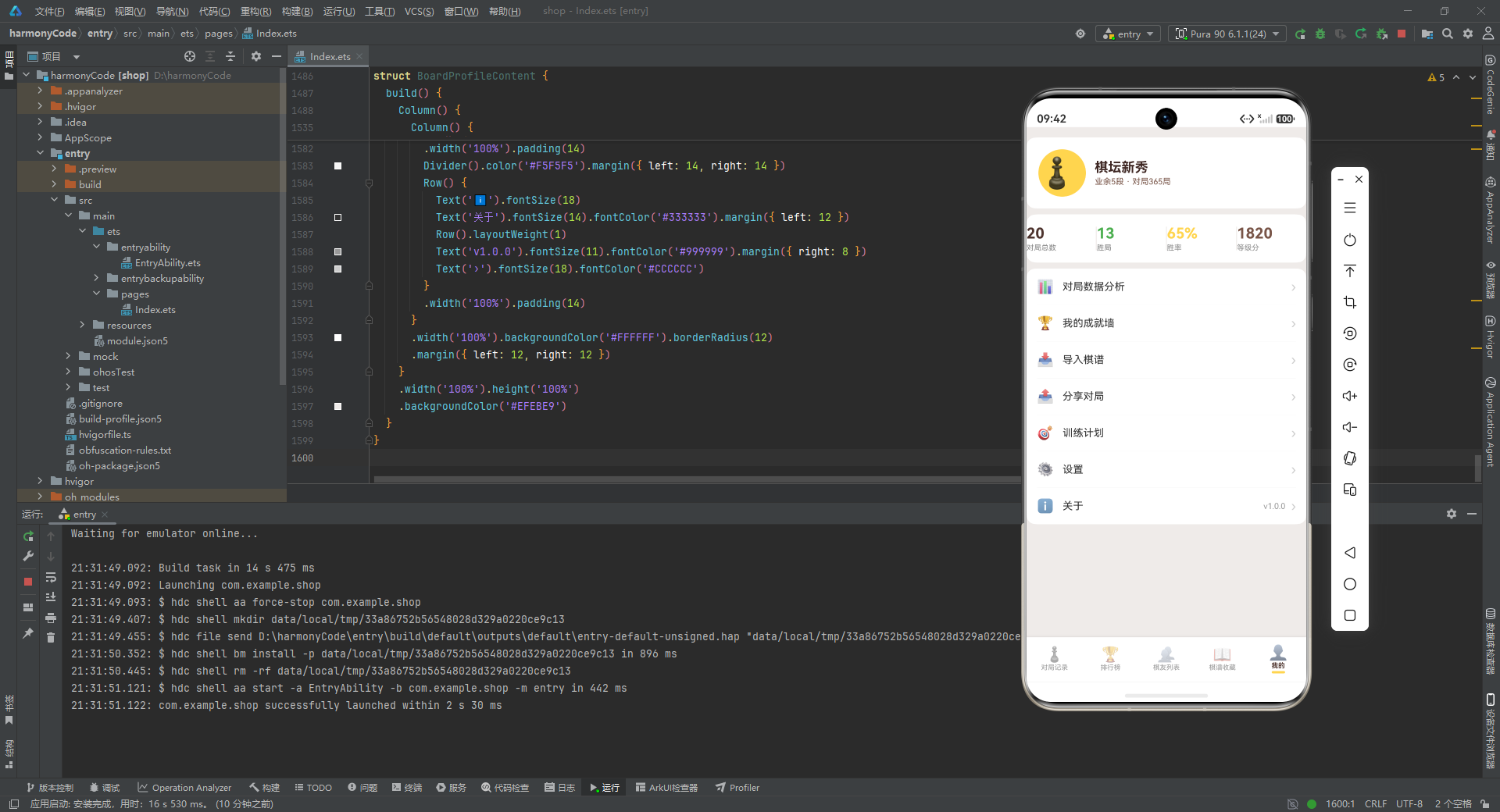
- 头部卡片展示用户头像(64x64 金色圆形,内放 40 号棋子 Emoji)、昵称"棋坛新秀"、副标题"业余5段 · 对局365局"。
- 数据统计卡片用四列展示对局总数、胜局、胜率、等级分,配色与其他页面一致。
- 菜单列表是一个白底卡片,内部用七行
Row展示菜单项,每行之间用浅色Divider分隔。每个菜单项是"Emoji + 标题 + 弹性间距 + 右箭头 ›"的结构,是 iOS 风格设置页的经典布局。 - 七个菜单项分别是:对局数据分析、我的成就墙、导入棋谱、分享对局、训练计划、设置、关于。其中"关于"项右侧还多了一个版本号"v1.0.0",用浅灰小字显示。
- 个人中心页是唯一没有
@State的页面,因为它纯展示,没有任何交互态。这也说明它的设计是最简单的——如果未来要给菜单项加点击跳转,就需要引入状态或路由。
十四、关键特性对比表
为了帮助读者快速把握这份实现的方方面面,下表从多个维度对它的关键特性进行总结对比:
| 维度 | 实现方式 | 设计亮点 | 可改进点 |
|---|---|---|---|
| 类型定义 | 九个 interface + 一个 @Observed 类 | 字段命名统一、覆盖全部领域对象 | 部分实体(棋友/棋谱)未升级为可观察类,编辑时无法深度响应 |
| 配置令牌 | 四个 Record 字典 + 五个选项数组 | 数据与表现完全解耦,配色集中管理 | 部分硬编码颜色(如统计卡片)未走配置 |
| Mock 数据 | 20 条对局 + 8 棋友 + 8 棋谱 + 8 排行 + 3 图表 | 真实感强、引用经典棋书、数据自洽 | 部分统计值(如总对局数 215)未与 Mock 数据联动 |
| 状态管理 | @State 布尔控制弹窗、@State 对象承载选中态 | 弹窗开关清晰、表单字段独立 | 表单字段全为 string,缺少类型约束;编辑弹窗未真正回填 |
| 弹窗系统 | 四类弹窗 + 复用遮罩 Builder | 遮罩复用、危险操作二次确认、主次按钮配色区分 | 弹窗定位用百分比,不同屏幕比例下位置可能偏移 |
| 图表实现 | 纯 ArkTS 手绘柱状图/占比条/分布条 | 零依赖、配色统一、同色系渐变 | layoutWeight 占比条在部分版本可能渲染异常;魔法数字 20 未归一化 |
| 列表渲染 | 逐条手写 gameCard/playerCard 调用 | 调用清晰、便于调试 | 未使用 ForEach 循环,数据量变化时需手动增删 |
| 配色体系 | 棕色系主色 + Material 三色(绿红蓝) | 古朴纸面感、语义化颜色、跨页面一致 | 部分颜色值散落,未全部抽到配置令牌 |
| 组件复用 | Builder 封装可复用片段 | modalOverlay/statCard/detailRow/filterChip 高度复用 | 同名 Builder(filterChip)在多个组件重复定义,可考虑抽公共组件 |
| 交互闭环 | 列表点击 → 详情 → 编辑/删除 | 弹窗串联流畅、状态传递清晰 | 新增/编辑/删除均为前端假操作,未持久化 |
| 工程性 | 单文件约 1600 行 | 分层清晰、注释分段、命名规范 | 单文件偏大,建议按页面拆分多文件 |
安装DevEco Studio程序

选择目标安装目录:

设置环境变量,但是需要重启一下:

新建一个空白模板:

设置API为24的模板项目:

初始化项目,自动下载相关依赖:

完整代码:
// ============ 类型定义 ============
interface GameTypeMeta {
label: string
icon: string
color: string
bg: string
desc: string
}
interface ResultMeta {
label: string
color: string
icon: string
bg: string
}
interface ColorSideMeta {
label: string
icon: string
color: string
bg: string
desc: string
}
interface LocationMeta {
label: string
icon: string
desc: string
}
interface PlayerMeta {
id: number
name: string
avatar: string
rating: number
wins: number
losses: number
draws: number
totalGames: number
color: string
}
interface GameRecordMeta {
id: number
date: string
gameType: string
opponent: string
result: string
moves: number
duration: string
location: string
notes: string
ratingChange: number
color: string
}
interface CollectionMeta {
id: number
title: string
gameType: string
source: string
author: string
year: string
rating: number
notes: string
color: string
icon: string
}
interface MonthBarMeta {
label: string
value: number
color: string
}
interface ResultRatioMeta {
label: string
value: number
color: string
icon: string
}
interface TypeRatioMeta {
label: string
value: number
color: string
icon: string
}
interface RankMeta {
rank: number
name: string
rating: number
winRate: string
totalGames: number
trend: string
icon: string
color: string
}
// ============ 棋牌对局数据模型 ============
@Observed
export class GameItem {
id: number = 0
date: string = ''
gameType: string = ''
opponent: string = ''
result: string = ''
moves: number = 0
duration: string = ''
location: string = ''
notes: string = ''
ratingChange: number = 0
color: string = ''
constructor(id: number, date: string, gameType: string, opponent: string, result: string, moves: number, duration: string, location: string, notes: string, ratingChange: number, color: string) {
this.id = id; this.date = date; this.gameType = gameType; this.opponent = opponent
this.result = result; this.moves = moves; this.duration = duration
this.location = location; this.notes = notes; this.ratingChange = ratingChange
this.color = color
}
}
// ============ 配置令牌 ============
const GAME_TYPE_CONFIG: Record<string, GameTypeMeta> = {
'中国象棋': { label: '中国象棋', icon: '♟️', color: '#4E342E', bg: '#EFEBE9', desc: '楚河汉界,国粹经典' },
'围棋': { label: '围棋', icon: '⚫', color: '#3E2723', bg: '#EFEBE9', desc: '黑白世界,纵横十九道' },
'国际象棋': { label: '国际象棋', icon: '♚', color: '#795548', bg: '#EFEBE9', desc: '王后车象马兵的博弈' },
'五子棋': { label: '五子棋', icon: '🔵', color: '#4E342E', bg: '#EFEBE9', desc: '五子连珠方为胜' },
'跳棋': { label: '跳棋', icon: '🔴', color: '#795548', bg: '#EFEBE9', desc: '跳跃前进,策略对抗' },
'军棋': { label: '军棋', icon: '🎖️', color: '#3E2723', bg: '#EFEBE9', desc: '排兵布阵,运筹帷幄' }
}
const RESULT_CONFIG: Record<string, ResultMeta> = {
'胜': { label: '胜', color: '#4CAF50', icon: '✅', bg: '#E8F5E9' },
'负': { label: '负', color: '#F44336', icon: '❌', bg: '#FFEBEE' },
'和': { label: '和', color: '#2196F3', icon: '🤝', bg: '#E3F2FD' }
}
const COLOR_SIDE_CONFIG: Record<string, ColorSideMeta> = {
'执黑': { label: '执黑', icon: '⚫', color: '#212121', bg: '#E0E0E0', desc: '黑棋先手' },
'执白': { label: '执白', icon: '⚪', color: '#757575', bg: '#FAFAFA', desc: '白棋后手' },
'红先': { label: '红先', icon: '🟥', color: '#D32F2F', bg: '#FFEBEE', desc: '红方先手' },
'黑后': { label: '黑后', icon: '⬛', color: '#212121', bg: '#F5F5F5', desc: '黑方后手' }
}
const LOCATION_CONFIG: Record<string, LocationMeta> = {
'家中': { label: '家中', icon: '🏠', desc: '线上对弈' },
'棋社': { label: '棋社', icon: '🎎', desc: '线下棋社' },
'比赛': { label: '比赛', icon: '🏆', desc: '正式比赛' },
'公园': { label: '公园', icon: '🌳', desc: '公园石桌' },
'朋友家': { label: '朋友家', icon: '👋', desc: '朋友家中小聚' }
}
const GAME_TYPES: string[] = ['中国象棋', '围棋', '国际象棋', '五子棋', '跳棋', '军棋']
const GAME_FILTERS: string[] = ['全部', '中国象棋', '围棋', '国际象棋', '五子棋', '跳棋', '军棋']
const RESULT_TYPES: string[] = ['胜', '负', '和']
const COLOR_SIDES: string[] = ['执黑', '执白', '红先', '黑后']
const LOCATIONS: string[] = ['家中', '棋社', '比赛', '公园', '朋友家']
// ============ 全局写死数据 - 20条对局记录 ============
const mockGames: GameItem[] = [
new GameItem(1, '2026-07-19', '中国象棋', '棋友老王', '胜', 87, '32分钟', '棋社', '中盘战术运用得当,弃子抢先', 12, '红先'),
new GameItem(2, '2026-07-18', '围棋', '段位对手小李', '负', 215, '1小时42分', '家中', '布局阶段过于保守,中盘被压制', -8, '执黑'),
new GameItem(3, '2026-07-17', '国际象棋', '在线玩家A', '胜', 56, '28分钟', '家中', '西西里防御开局,攻王翼成功', 10, '执白'),
new GameItem(4, '2026-07-16', '五子棋', '邻居小张', '胜', 23, '8分钟', '朋友家', '花月开局,黑棋双三胜', 6, '执黑'),
new GameItem(5, '2026-07-15', '中国象棋', '棋社常客陈师傅', '和', 92, '45分钟', '棋社', '双方中残局均势,握手言和', 0, '黑后'),
new GameItem(6, '2026-07-14', '围棋', '棋友阿强', '胜', 198, '1小时35分', '公园', '星·小目布局,中盘打入成功', 15, '执白'),
new GameItem(7, '2026-07-13', '国际象棋', '棋友大卫', '负', 68, '38分钟', '棋社', '后翼失守,残局少一兵', -10, '执黑'),
new GameItem(8, '2026-07-12', '五子棋', '在线高手X', '负', 31, '11分钟', '家中', '疏忽对方双活三,被反杀', -5, '执白'),
new GameItem(9, '2026-07-11', '中国象棋', '老对手刘叔', '胜', 76, '30分钟', '公园', '飞相局开局,中盘车马炮配合得力', 14, '红先'),
new GameItem(10, '2026-07-10', '围棋', '段位赛对手', '胜', 223, '2小时05分', '比赛', '三三定式运用,官子阶段半目胜', 18, '执黑'),
new GameItem(11, '2026-07-09', '军棋', '战友老赵', '胜', 0, '55分钟', '朋友家', '布阵巧妙,地雷封锁成功', 8, '红先'),
new GameItem(12, '2026-07-08', '跳棋', '小朋友小美', '负', 0, '20分钟', '家中', '跳子路线规划不足,被反超', -3, '执白'),
new GameItem(13, '2026-07-07', '中国象棋', '线上棋友', '负', 81, '35分钟', '家中', '当头炮被破,残局少一相', -7, '黑后'),
new GameItem(14, '2026-07-06', '围棋', '棋社老前辈', '和', 210, '1小时48分', '棋社', '布局中规中矩,终局均势', 2, '执白'),
new GameItem(15, '2026-07-05', '国际象棋', '棋友阿明', '胜', 48, '25分钟', '朋友家', '王翼弃兵开局,快速攻杀', 9, '执白'),
new GameItem(16, '2026-07-04', '五子棋', '俱乐部高手', '胜', 35, '12分钟', '棋社', '浦月开局,长连制胜', 7, '执黑'),
new GameItem(17, '2026-07-03', '中国象棋', '网络对弈者', '胜', 79, '33分钟', '家中', '起马局转换灵活,得子胜', 11, '红先'),
new GameItem(18, '2026-07-02', '围棋', '段位赛对手B', '负', 205, '1小时55分', '比赛', '三间高夹定式失误,大龙被屠', -12, '执黑'),
new GameItem(19, '2026-07-01', '军棋', '棋友大军', '和', 0, '48分钟', '棋社', '双方旗子均被消灭,平局', 1, '黑后'),
new GameItem(20, '2026-06-30', '国际象棋', '棋友麦克', '胜', 62, '31分钟', '公园', '法兰西防御,战术组合精彩', 13, '执白')
]
// ============ 棋友列表 ============
const mockPlayers: PlayerMeta[] = [
{ id: 1, name: '棋友老王', avatar: '🧔', rating: 1820, wins: 15, losses: 6, draws: 3, totalGames: 24, color: '#4E342E' },
{ id: 2, name: '段位对手小李', avatar: '👨', rating: 1950, wins: 22, losses: 5, draws: 4, totalGames: 31, color: '#3E2723' },
{ id: 3, name: '在线玩家A', avatar: '🧑', rating: 1680, wins: 12, losses: 9, draws: 2, totalGames: 23, color: '#795548' },
{ id: 4, name: '邻居小张', avatar: '👨🦱', rating: 1550, wins: 8, losses: 14, draws: 1, totalGames: 23, color: '#4E342E' },
{ id: 5, name: '棋社陈师傅', avatar: '👴', rating: 1880, wins: 18, losses: 7, draws: 5, totalGames: 30, color: '#3E2723' },
{ id: 6, name: '棋友阿强', avatar: '🧓', rating: 1750, wins: 16, losses: 8, draws: 3, totalGames: 27, color: '#795548' },
{ id: 7, name: '棋友大卫', avatar: '🧔♂️', rating: 1920, wins: 20, losses: 6, draws: 4, totalGames: 30, color: '#4E342E' },
{ id: 8, name: '老对手刘叔', avatar: '🧓', rating: 1700, wins: 14, losses: 10, draws: 3, totalGames: 27, color: '#3E2723' }
]
// ============ 棋谱收藏 ============
const mockCollections: CollectionMeta[] = [
{ id: 1, title: '橘中秘残局精选', gameType: '中国象棋', source: '明·朱晋桢', author: '朱晋桢', year: '1632', rating: 5, notes: '象棋残局经典,研究必读', color: '#4E342E', icon: '📖' },
{ id: 2, title: '梅花谱', gameType: '中国象棋', source: '清·王再越', author: '王再越', year: '1663', rating: 5, notes: '中炮屏风马对局典范', color: '#795548', icon: '📕' },
{ id: 3, title: '适情雅趣', gameType: '中国象棋', source: '明·徐芝', author: '徐芝', year: '1521', rating: 4, notes: '全局兼残局,内容丰富', color: '#3E2723', icon: '📚' },
{ id: 4, title: '发阳论', gameType: '围棋', source: '日本·桑原道节', author: '桑原道节', year: '1713', rating: 5, notes: '围棋死活题巅峰之作', color: '#4E342E', icon: '📓' },
{ id: 5, title: '玄玄棋经', gameType: '围棋', source: '元·严师', author: '严师', year: '1347', rating: 5, notes: '古代围棋理论集大成', color: '#795548', icon: '📔' },
{ id: 6, title: '棋经十三篇', gameType: '围棋', source: '宋·张拟', author: '张拟', year: '1049', rating: 5, notes: '围棋理论经典', color: '#3E2723', icon: '📙' },
{ id: 7, title: '曼海姆对局集', gameType: '国际象棋', source: '现代赛事', author: '多个大师', year: '1914', rating: 4, notes: '国际象棋经典对局汇编', color: '#4E342E', icon: '📘' },
{ id: 8, title: '我的对局集', gameType: '综合', source: '自整理', author: '本人', year: '2026', rating: 3, notes: '个人精彩对局记录', color: '#795548', icon: '📒' }
]
// ============ 排行榜 ============
const mockRankings: RankMeta[] = [
{ rank: 1, name: '棋圣大师', rating: 2350, winRate: '85%', totalGames: 120, trend: '↑12', icon: '🥇', color: '#FFD54F' },
{ rank: 2, name: '段位对手小李', rating: 1950, winRate: '71%', totalGames: 31, trend: '↑8', icon: '🥈', color: '#B0BEC5' },
{ rank: 3, name: '棋友大卫', rating: 1920, winRate: '67%', totalGames: 30, trend: '↑5', icon: '🥉', color: '#BCAAA4' },
{ rank: 4, name: '棋社陈师傅', rating: 1880, winRate: '60%', totalGames: 30, trend: '↑3', icon: '🏅', color: '#795548' },
{ rank: 5, name: '棋友老王', rating: 1820, winRate: '63%', totalGames: 24, trend: '↑2', icon: '🏅', color: '#4E342E' },
{ rank: 6, name: '棋友阿强', rating: 1750, winRate: '59%', totalGames: 27, trend: '↓2', icon: '🎖️', color: '#795548' },
{ rank: 7, name: '老对手刘叔', rating: 1700, winRate: '52%', totalGames: 27, trend: '↓1', icon: '🎖️', color: '#4E342E' },
{ rank: 8, name: '在线玩家A', rating: 1680, winRate: '52%', totalGames: 23, trend: '→', icon: '🎖️', color: '#795548' }
]
// ============ 月度对局数 ============
const monthBarData: MonthBarMeta[] = [
{ label: '6月上', value: 8, color: '#D7CCC8' },
{ label: '6月中', value: 12, color: '#BCAAA4' },
{ label: '6月下', value: 10, color: '#A1887F' },
{ label: '7月上', value: 14, color: '#8D6E63' },
{ label: '7月中', value: 18, color: '#795548' },
{ label: '7月下', value: 6, color: '#4E342E' }
]
// ============ 胜率占比 ============
const resultRatioData: ResultRatioMeta[] = [
{ label: '胜', value: 13, color: '#4CAF50', icon: '✅' },
{ label: '负', value: 5, color: '#F44336', icon: '❌' },
{ label: '和', value: 2, color: '#2196F3', icon: '🤝' }
]
// ============ 各棋类分布 ============
const typeRatioData: TypeRatioMeta[] = [
{ label: '中国象棋', value: 6, color: '#4E342E', icon: '♟️' },
{ label: '围棋', value: 4, color: '#3E2723', icon: '⚫' },
{ label: '国际象棋', value: 4, color: '#795548', icon: '♚' },
{ label: '五子棋', value: 3, color: '#4E342E', icon: '🔵' },
{ label: '军棋', value: 2, color: '#3E2723', icon: '🎖️' },
{ label: '跳棋', value: 1, color: '#795548', icon: '🔴' }
]
// ============ 统计函数 ============
function getGameCount(): number { return 20 }
function getWinCount(): number { return 13 }
function getLossCount(): number { return 5 }
function getDrawCount(): number { return 2 }
function getWinRate(): number { return 65 }
function getPlayerCount(): number { return 8 }
function getCollectionCount(): number { return 8 }
function getAvgRating(): number { return 1750 }
function getTotalMoves(): number { return 1689 }
// ============ 底部 Tab 枚举 ============
enum BoardTab {
RECORD = 0,
RANK = 1,
PLAYERS = 2,
COLLECTION = 3,
PROFILE = 4
}
// ============ 入口页面 ============
@Entry
@Component
struct BoardGameApp {
@State activeTab: BoardTab = BoardTab.RECORD
@Builder contentArea() {
Column() {
if (this.activeTab === BoardTab.RECORD) {
GameRecordContent()
} else if (this.activeTab === BoardTab.RANK) {
RankContent()
} else if (this.activeTab === BoardTab.PLAYERS) {
PlayerContent()
} else if (this.activeTab === BoardTab.COLLECTION) {
CollectionContent()
} else {
BoardProfileContent()
}
}
.layoutWeight(1)
}
@Builder bottomTabItem(icon: string, label: string, tab: BoardTab) {
Column() {
Text(icon).fontSize(20).opacity(this.activeTab === tab ? 1.0 : 0.45)
Text(label).fontSize(9)
.fontColor(this.activeTab === tab ? '#4E342E' : '#999999')
.fontWeight(this.activeTab === tab ? FontWeight.Bold : FontWeight.Normal)
.margin({ top: 1 })
if (this.activeTab === tab) {
Column().width(18).height(3)
.backgroundColor('#FFD54F').borderRadius(2).margin({ top: 2 })
}
}
.layoutWeight(1)
.padding({ top: 5, bottom: 5 })
.onClick(() => { this.activeTab = tab })
}
build() {
Column() {
this.contentArea()
Row() {
this.bottomTabItem('♟️', '对局记录', BoardTab.RECORD)
this.bottomTabItem('🏆', '排行榜', BoardTab.RANK)
this.bottomTabItem('👥', '棋友列表', BoardTab.PLAYERS)
this.bottomTabItem('📖', '棋谱收藏', BoardTab.COLLECTION)
this.bottomTabItem('👤', '我的', BoardTab.PROFILE)
}
.width('100%')
.backgroundColor('#FFFFFF')
.padding({ top: 4, bottom: 6 })
.shadow({ radius: 8, color: '#1A000000', offsetY: -2 })
}
.width('100%').height('100%')
.backgroundColor('#EFEBE9')
}
}
// ============ 对局记录页 ============
@Component
struct GameRecordContent {
@State searchKeyword: string = ''
@State selectedType: string = '全部'
@State selectedResult: string = '全部'
@State showAddModal: boolean = false
@State showEditModal: boolean = false
@State showDeleteConfirm: boolean = false
@State showDetailModal: boolean = false
@State selectedGame: GameItem | null = null
@State editingGame: GameItem | null = null
@State formDate: string = '2026-07-19'
@State formGameType: string = '中国象棋'
@State formOpponent: string = ''
@State formResult: string = '胜'
@State formMoves: string = '80'
@State formDuration: string = ''
@State formLocation: string = '棋社'
@State formColor: string = '执黑'
@State formRatingChange: string = '10'
@State formNotes: string = ''
// ========== 弹框遮罩 ==========
@Builder modalOverlay(onClose: () => void) {
Column()
.width('100%').height('100%')
.backgroundColor('rgba(0,0,0,0.5)')
.onClick(onClose)
}
}
.layoutWeight(1)
Row() {
Text('编辑').fontSize(14).fontColor('#FFFFFF')
.backgroundColor('#4E342E').borderRadius(20)
.padding({ left: 24, right: 24, top: 10, bottom: 10 })
.onClick(() => {
this.showDetailModal = false
this.editingGame = this.selectedGame
this.showEditModal = true
})
Text('删除').fontSize(14).fontColor('#FFFFFF')
.backgroundColor('#F44336').borderRadius(20)
.padding({ left: 24, right: 24, top: 10, bottom: 10 })
.margin({ left: 12 })
.onClick(() => {
this.showDetailModal = false
this.showDeleteConfirm = true
})
}
.width('100%').justifyContent(FlexAlign.Center)
.padding({ left: 20, right: 20, top: 16, bottom: 16 })
}
.width('90%').backgroundColor('#FFFFFF').borderRadius(16)
.constraintSize({ maxHeight: '80%' })
.position({ x: '5%', y: '10%' })
}
.width('100%').height('100%').position({ x: 0, y: 0 }).zIndex(999)
}
@Builder detailRow(label: string, value: string) {
Row() {
Text(label).fontSize(12).fontColor('#999999').width(80)
Text(value).fontSize(13).fontColor('#333333').layoutWeight(1)
}
.width('100%').padding({ left: 20, right: 20, top: 8, bottom: 8 })
}
// ========== 统计卡片 ==========
@Builder statCard(icon: string, value: string, label: string, color: string) {
Column() {
Text(icon).fontSize(22)
Text(value).fontSize(20).fontWeight(FontWeight.Bold).fontColor(color).margin({ top: 2 })
Text(label).fontSize(10).fontColor('#888888').margin({ top: 1 })
}
.layoutWeight(1)
.backgroundColor('#FFFFFF')
.borderRadius(10)
.padding({ top: 10, bottom: 10 })
.alignItems(HorizontalAlign.Start)
}
// ========== 月度对局柱状图 ==========
@Builder monthBarChart() {
Column() {
Row() {
Text('📈 月度对局数').fontSize(14).fontWeight(FontWeight.Bold).fontColor('#3E2723')
Row().layoutWeight(1)
Text('单位:局').fontSize(10).fontColor('#999999')
}
.width('100%').padding({ left: 16, right: 16, top: 14, bottom: 8 })
Row() {
ForEach(monthBarData, (item: MonthBarMeta) => {
Column() {
Column() {
Text(item.value.toString())
.fontSize(9).fontColor('#4E342E').margin({ bottom: 2 })
}
.width(24).height(item.value * 8)
.backgroundColor(item.color).borderRadius({ topLeft: 4, topRight: 4 })
Text(item.label).fontSize(9).fontColor('#888888').margin({ top: 4 })
}
.layoutWeight(1)
.alignItems(HorizontalAlign.Start)
})
}
.width('100%').padding({ left: 12, right: 12, bottom: 12 })
.alignItems(VerticalAlign.Bottom)
}
.width('100%').backgroundColor('#FFFFFF').borderRadius(12)
.margin({ left: 12, right: 12, top: 8 })
}
// ========== 胜率占比条 ==========
@Builder winRateBar() {
Column() {
Text('📊 胜负占比').fontSize(14).fontWeight(FontWeight.Bold).fontColor('#3E2723')
.margin({ left: 16, top: 14, bottom: 8 })
Row() {
ForEach(resultRatioData, (item: ResultRatioMeta) => {
Column() {
Column()
.layoutWeight(item.value)
.height(20)
.backgroundColor(item.color)
.borderRadius(item.label === '胜' ? { topLeft: 10, bottomLeft: 10 } : (item.label === '和' ? 0 : { topRight: 10, bottomRight: 10 }))
Text(item.icon + ' ' + item.label + ' ' + item.value)
.fontSize(9).fontColor(item.color).margin({ top: 4 })
}
.alignItems(HorizontalAlign.Start)
})
}
.width('100%').padding({ left: 16, right: 16, bottom: 12 })
}
.width('100%').backgroundColor('#FFFFFF').borderRadius(12)
.margin({ left: 12, right: 12, top: 8 })
}
// ========== 棋类分布 ==========
@Builder typeRatioChart() {
Column() {
Text('♟️ 棋类分布').fontSize(14).fontWeight(FontWeight.Bold).fontColor('#3E2723')
.margin({ left: 16, top: 14, bottom: 8 })
ForEach(typeRatioData, (item: TypeRatioMeta) => {
Row() {
Text(item.icon + ' ' + item.label).fontSize(11).fontColor('#333333').width(90)
Column() {
Row() {
Column()
.layoutWeight(item.value)
.height(14)
.backgroundColor(item.color)
.borderRadius({ topLeft: 7, bottomLeft: 7 })
Column().layoutWeight(20 - item.value).height(14)
.backgroundColor('#F5F5F5')
.borderRadius({ topRight: 7, bottomRight: 7 })
}
}
.layoutWeight(1)
.margin({ left: 8, right: 8 })
Text(item.value + '局').fontSize(11).fontColor(item.color).fontWeight(FontWeight.Bold)
}
.width('100%').padding({ left: 16, right: 16, bottom: 8 })
})
}
.width('100%').backgroundColor('#FFFFFF').borderRadius(12)
.margin({ left: 12, right: 12, top: 8, bottom: 8 })
}
// ========== 分类筛选条 ==========
@Builder filterChip(label: string, type: string) {
Text(label)
.fontSize(11)
.fontColor(this.selectedType === type ? '#FFFFFF' : '#4E342E')
.backgroundColor(this.selectedType === type ? '#4E342E' : '#EFEBE9')
.padding({ left: 10, right: 10, top: 5, bottom: 5 })
.borderRadius(12)
.margin({ left: 4, right: 4 })
.onClick(() => { this.selectedType = type })
}
// ========== 对局卡片 ==========
@Builder gameCard(g: GameItem, index: number) {
Column() {
Row() {
// 棋盘色块图标
Column() {
Row() {
Column().width(12).height(12).backgroundColor('#212121').borderRadius(2)
Column().width(12).height(12).backgroundColor('#FFFFFF').border({ width: 1, color: '#212121' }).borderRadius(2)
}
Row() {
Column().width(12).height(12).backgroundColor('#FFFFFF').border({ width: 1, color: '#212121' }).borderRadius(2)
Column().width(12).height(12).backgroundColor('#212121').borderRadius(2)
}
}
.width(44).height(44)
.backgroundColor(GAME_TYPE_CONFIG[g.gameType]?.bg ?? '#EFEBE9')
.borderRadius(22)
.padding(4)
.justifyContent(FlexAlign.Center)
Column() {
Text(g.opponent)
.fontSize(15).fontWeight(FontWeight.Bold).fontColor('#333333')
Row() {
Text(GAME_TYPE_CONFIG[g.gameType]?.icon + ' ' + (GAME_TYPE_CONFIG[g.gameType]?.label ?? g.gameType))
.fontSize(10).fontColor('#FFFFFF')
.backgroundColor(GAME_TYPE_CONFIG[g.gameType]?.color ?? '#4E342E')
.padding({ left: 6, right: 6, top: 2, bottom: 2 }).borderRadius(8)
Text(COLOR_SIDE_CONFIG[g.color]?.icon + ' ' + (COLOR_SIDE_CONFIG[g.color]?.label ?? g.color))
.fontSize(10).fontColor('#4E342E')
.backgroundColor(COLOR_SIDE_CONFIG[g.color]?.bg ?? '#EFEBE9')
.padding({ left: 6, right: 6, top: 2, bottom: 2 }).borderRadius(8)
.margin({ left: 6 })
}
.margin({ top: 4 })
}
.alignItems(HorizontalAlign.Start).layoutWeight(1).margin({ left: 10 })
Column() {
Text(RESULT_CONFIG[g.result]?.icon + ' ' + g.result)
.fontSize(14).fontWeight(FontWeight.Bold)
.fontColor(RESULT_CONFIG[g.result]?.color ?? '#4E342E')
Row() {
Text(g.ratingChange > 0 ? '↑' : (g.ratingChange < 0 ? '↓' : '→'))
.fontSize(12)
.fontColor(g.ratingChange > 0 ? '#4CAF50' : (g.ratingChange < 0 ? '#F44336' : '#2196F3'))
Text((g.ratingChange > 0 ? '+' : '') + g.ratingChange.toString())
.fontSize(11)
.fontColor(g.ratingChange > 0 ? '#4CAF50' : (g.ratingChange < 0 ? '#F44336' : '#2196F3'))
.margin({ left: 2 })
}
.margin({ top: 2 })
}
.alignItems(HorizontalAlign.End)
}
.width('100%').padding({ left: 14, right: 14, top: 12, bottom: 12 })
Divider().color('#F5F5F5').margin({ left: 14, right: 14 })
Row() {
Text('📅 ' + g.date).fontSize(10).fontColor('#888888')
Row().layoutWeight(1)
Text('♟️ ' + g.moves + '手').fontSize(10).fontColor('#888888')
Row().layoutWeight(1)
Text('⏱️ ' + g.duration).fontSize(10).fontColor('#888888')
Row().layoutWeight(1)
Text(LOCATION_CONFIG[g.location]?.icon + g.location).fontSize(10).fontColor('#888888')
}
.width('100%').padding({ left: 14, right: 14, bottom: 10 })
}
.width('100%')
.backgroundColor('#FFFFFF')
.borderRadius(12)
.margin({ left: 12, right: 12, top: 6, bottom: 6 })
.onClick(() => {
this.selectedGame = g
this.showDetailModal = true
})
}
build() {
Column() {
// 顶部标题栏
Row() {
Column() {
Text('棋牌对局记录').fontSize(20).fontWeight(FontWeight.Bold).fontColor('#3E2723')
Text('记录每一步精彩博弈').fontSize(11).fontColor('#795548').margin({ top: 2 })
}
.alignItems(HorizontalAlign.Start).layoutWeight(1)
Text('➕').fontSize(22).fontColor('#4E342E')
.onClick(() => { this.showAddModal = true })
}
.width('100%').padding({ left: 16, right: 16, top: 14, bottom: 10 })
// 搜索框
Row() {
Text('🔍').fontSize(14).margin({ left: 12 })
TextInput({ placeholder: '搜索对手或棋类...' })
.placeholderColor('#BBBBBB').fontSize(12).layoutWeight(1)
.backgroundColor('transparent').margin({ left: 6, right: 12 })
.onChange((v: string) => { this.searchKeyword = v })
}
.width('100%').height(36)
.backgroundColor('#FFFFFF').borderRadius(18)
.margin({ left: 12, right: 12, bottom: 8 })
// 统计卡片
Row() {
this.statCard('♟️', getGameCount().toString(), '对局总数', '#4E342E')
this.statCard('✅', getWinCount().toString(), '胜局', '#4CAF50')
this.statCard('❌', getLossCount().toString(), '负局', '#F44336')
this.statCard('📊', getWinRate() + '%', '胜率', '#FFD54F')
}
.width('100%').padding({ left: 8, right: 8 })
// 图表区
Scroll() {
Column() {
// 分类筛选
Scroll() {
Row() {
this.filterChip('全部', '全部')
this.filterChip('♟️ 象棋', '中国象棋')
this.filterChip('⚫ 围棋', '围棋')
this.filterChip('♚ 国象', '国际象棋')
this.filterChip('🔵 五子', '五子棋')
this.filterChip('🎖️ 军棋', '军棋')
this.filterChip('🔴 跳棋', '跳棋')
}
.padding({ left: 8, right: 8 })
}
.scrollable(ScrollDirection.Horizontal).scrollBar(BarState.Off)
.margin({ left: 4, right: 4, bottom: 8 })
// 月度柱状图
this.monthBarChart()
// 胜率占比
this.winRateBar()
// 棋类分布
this.typeRatioChart()
// 对局列表
Row() {
Text('📋 对局列表').fontSize(14).fontWeight(FontWeight.Bold).fontColor('#3E2723')
Row().layoutWeight(1)
Text('共' + getGameCount() + '局').fontSize(11).fontColor('#999999')
}
.width('100%').padding({ left: 16, top: 12, bottom: 4 })
// 逐条渲染对局
this.gameCard(mockGames[0], 0)
this.gameCard(mockGames[1], 1)
this.gameCard(mockGames[2], 2)
this.gameCard(mockGames[3], 3)
this.gameCard(mockGames[4], 4)
this.gameCard(mockGames[5], 5)
this.gameCard(mockGames[6], 6)
this.gameCard(mockGames[7], 7)
this.gameCard(mockGames[8], 8)
this.gameCard(mockGames[9], 9)
this.gameCard(mockGames[10], 10)
this.gameCard(mockGames[11], 11)
this.gameCard(mockGames[12], 12)
this.gameCard(mockGames[13], 13)
this.gameCard(mockGames[14], 14)
this.gameCard(mockGames[15], 15)
this.gameCard(mockGames[16], 16)
this.gameCard(mockGames[17], 17)
this.gameCard(mockGames[18], 18)
this.gameCard(mockGames[19], 19)
Column().height(20)
}
}
.layoutWeight(1)
// 弹框
if (this.showAddModal) { this.addGameModal() }
if (this.showEditModal) { this.editGameModal() }
if (this.showDeleteConfirm) { this.deleteGameModal() }
if (this.showDetailModal) { this.detailGameModal() }
}
.width('100%').height('100%')
.backgroundColor('#EFEBE9')
}
}
// ============ 排行榜页 ============
@Component
struct RankContent {
@State selectedPeriod: string = '本月'
@Builder filterChip(label: string, period: string) {
Text(label)
.fontSize(11)
.fontColor(this.selectedPeriod === period ? '#FFFFFF' : '#4E342E')
.backgroundColor(this.selectedPeriod === period ? '#4E342E' : '#FFFFFF')
.padding({ left: 14, right: 14, top: 6, bottom: 6 })
.borderRadius(16)
.margin({ left: 4, right: 4 })
.onClick(() => { this.selectedPeriod = period })
}
@Builder rankItem(r: RankMeta, index: number) {
Row() {
Text(r.icon).fontSize(24).width(40)
Column() {
Text(r.name).fontSize(14).fontWeight(FontWeight.Bold).fontColor('#333333')
Text(r.totalGames + '局 · 胜率' + r.winRate)
.fontSize(11).fontColor('#888888').margin({ top: 2 })
}
.alignItems(HorizontalAlign.Start).layoutWeight(1).margin({ left: 8 })
Column() {
Text(r.rating.toString()).fontSize(16).fontWeight(FontWeight.Bold).fontColor(r.color)
Text(r.trend).fontSize(10)
.fontColor(r.trend.startsWith('↑') ? '#4CAF50' : (r.trend.startsWith('↓') ? '#F44336' : '#999999'))
.margin({ top: 2 })
}
.alignItems(HorizontalAlign.End)
}
.width('100%')
.backgroundColor('#FFFFFF')
.borderRadius(12)
.padding(14)
.margin({ left: 12, right: 12, top: 4, bottom: 4 })
}
build() {
Column() {
Row() {
Text('🏆 排行榜').fontSize(20).fontWeight(FontWeight.Bold).fontColor('#3E2723')
Row().layoutWeight(1)
Text('🎖️').fontSize(22).fontColor('#FFD54F')
}
.width('100%').padding({ left: 16, right: 16, top: 14, bottom: 10 })
// 排名概览
Row() {
Column() {
Text('🏆 我的排名').fontSize(11).fontColor('#888888')
Text('第5名').fontSize(22).fontWeight(FontWeight.Bold).fontColor('#FFD54F').margin({ top: 2 })
}.alignItems(HorizontalAlign.Start).layoutWeight(1)
Column().width(1).height(32).backgroundColor('#EFEBE9')
Column() {
Text('⭐ 我的等级分').fontSize(11).fontColor('#888888')
Text('1820').fontSize(22).fontWeight(FontWeight.Bold).fontColor('#4E342E').margin({ top: 2 })
}.alignItems(HorizontalAlign.Start).layoutWeight(1)
Column().width(1).height(32).backgroundColor('#EFEBE9')
Column() {
Text('📈 近期变化').fontSize(11).fontColor('#888888')
Text('↑12').fontSize(22).fontWeight(FontWeight.Bold).fontColor('#4CAF50').margin({ top: 2 })
}.alignItems(HorizontalAlign.Start).layoutWeight(1)
}
.width('100%').backgroundColor('#FFFFFF').borderRadius(12)
.padding({ top: 14, bottom: 14 })
.margin({ left: 12, right: 12, bottom: 8 })
// 筛选
Row() {
this.filterChip('本月', '本月')
this.filterChip('本季', '本季')
this.filterChip('本年', '本年')
this.filterChip('全部', '全部')
}
.padding({ left: 8, right: 8, bottom: 8 })
// 排行榜列表
Scroll() {
Column() {
this.rankItem(mockRankings[0], 0)
this.rankItem(mockRankings[1], 1)
this.rankItem(mockRankings[2], 2)
this.rankItem(mockRankings[3], 3)
this.rankItem(mockRankings[4], 4)
this.rankItem(mockRankings[5], 5)
this.rankItem(mockRankings[6], 6)
this.rankItem(mockRankings[7], 7)
Column().height(20)
}
}
.layoutWeight(1)
}
.width('100%').height('100%')
.backgroundColor('#EFEBE9')
}
}
// ============ 棋友列表页 ============
@Component
struct PlayerContent {
@State searchKeyword: string = ''
@State showAddModal: boolean = false
@Builder modalOverlay(onClose: () => void) {
Column()
.width('100%').height('100%')
.backgroundColor('rgba(0,0,0,0.5)')
.onClick(onClose)
}
@Builder addPlayerModal() {
Column() {
this.modalOverlay(() => { this.showAddModal = false })
Column() {
Row() {
Text('👥 添加棋友').fontSize(18).fontWeight(FontWeight.Bold).fontColor('#3E2723')
Row().layoutWeight(1)
Text('✕').fontSize(18).fontColor('#999999')
.onClick(() => { this.showAddModal = false })
}
.width('100%').padding({ left: 20, right: 20, top: 18, bottom: 12 })
Divider().color('#EFEBE9')
Column() {
Text('棋友昵称').fontSize(12).fontColor('#888888').margin({ top: 12, left: 20 })
TextInput({ placeholder: '如:棋友小赵' })
.placeholderColor('#BBBBBB').fontSize(14).width('100%')
.backgroundColor('#F5F5F5').borderRadius(8)
.margin({ left: 20, right: 20, top: 4 })
Text('初始等级分').fontSize(12).fontColor('#888888').margin({ top: 12, left: 20 })
TextInput({ placeholder: '1500' })
.placeholderColor('#BBBBBB').fontSize(14).width('100%')
.backgroundColor('#F5F5F5').borderRadius(8)
.margin({ left: 20, right: 20, top: 4 })
}
.layoutWeight(1)
Row() {
Text('取消').fontSize(14).fontColor('#888888')
.backgroundColor('#F5F5F5').borderRadius(20)
.padding({ left: 24, right: 24, top: 10, bottom: 10 })
.onClick(() => { this.showAddModal = false })
Text('添加棋友').fontSize(14).fontColor('#FFFFFF')
.backgroundColor('#4E342E').borderRadius(20)
.padding({ left: 24, right: 24, top: 10, bottom: 10 })
.margin({ left: 12 })
.onClick(() => { this.showAddModal = false })
}
.width('100%').justifyContent(FlexAlign.Center)
.padding({ left: 20, right: 20, top: 16, bottom: 16 })
}
.width('90%').backgroundColor('#FFFFFF').borderRadius(16)
.constraintSize({ maxHeight: '60%' })
.position({ x: '5%', y: '20%' })
}
.width('100%').height('100%').position({ x: 0, y: 0 }).zIndex(999)
}
@Builder playerCard(p: PlayerMeta) {
Column() {
Row() {
Column() {
Text(p.avatar).fontSize(28)
}
.width(48).height(48)
.backgroundColor('#EFEBE9').borderRadius(24)
.alignItems(HorizontalAlign.Start)
.justifyContent(FlexAlign.Center)
Column() {
Text(p.name).fontSize(15).fontWeight(FontWeight.Bold).fontColor('#333333')
Text('等级分 ' + p.rating.toString())
.fontSize(11).fontColor('#795548').margin({ top: 2 })
}
.alignItems(HorizontalAlign.Start).layoutWeight(1).margin({ left: 10 })
Column() {
Text(p.totalGames.toString()).fontSize(16).fontWeight(FontWeight.Bold).fontColor(p.color)
Text('总对局').fontSize(9).fontColor('#999999').margin({ top: 1 })
}
.alignItems(HorizontalAlign.End)
}
Divider().color('#F5F5F5').margin({ top: 10, bottom: 8 })
Row() {
Text('✅ 胜' + p.wins).fontSize(10).fontColor('#4CAF50')
Row().layoutWeight(1)
Text('❌ 负' + p.losses).fontSize(10).fontColor('#F44336')
Row().layoutWeight(1)
Text('🤝 和' + p.draws).fontSize(10).fontColor('#2196F3')
Row().layoutWeight(1)
Text('胜率' + Math.floor(p.wins / p.totalGames * 100) + '%').fontSize(10).fontColor('#FFD54F').fontWeight(FontWeight.Bold)
}
}
.width('100%')
.backgroundColor('#FFFFFF')
.borderRadius(12)
.padding(14)
.margin({ left: 12, right: 12, top: 6, bottom: 6 })
}
build() {
Column() {
Row() {
Text('👥 棋友列表').fontSize(20).fontWeight(FontWeight.Bold).fontColor('#3E2723')
Row().layoutWeight(1)
Text('➕').fontSize(22).fontColor('#4E342E')
.onClick(() => { this.showAddModal = true })
}
.width('100%').padding({ left: 16, right: 16, top: 14, bottom: 10 })
// 搜索框
Row() {
Text('🔍').fontSize(14).margin({ left: 12 })
TextInput({ placeholder: '搜索棋友...' })
.placeholderColor('#BBBBBB').fontSize(12).layoutWeight(1)
.backgroundColor('transparent').margin({ left: 6, right: 12 })
.onChange((v: string) => { this.searchKeyword = v })
}
.width('100%').height(36)
.backgroundColor('#FFFFFF').borderRadius(18)
.margin({ left: 12, right: 12, bottom: 8 })
// 统计
Row() {
Column() {
Text('棋友总数').fontSize(11).fontColor('#888888')
Text(getPlayerCount().toString()).fontSize(22).fontWeight(FontWeight.Bold).fontColor('#4E342E').margin({ top: 2 })
}.alignItems(HorizontalAlign.Start).layoutWeight(1)
Column().width(1).height(32).backgroundColor('#EFEBE9')
Column() {
Text('平均等级').fontSize(11).fontColor('#888888')
Text(getAvgRating().toString()).fontSize(22).fontWeight(FontWeight.Bold).fontColor('#795548').margin({ top: 2 })
}.alignItems(HorizontalAlign.Start).layoutWeight(1)
Column().width(1).height(32).backgroundColor('#EFEBE9')
Column() {
Text('总对局数').fontSize(11).fontColor('#888888')
Text('215').fontSize(22).fontWeight(FontWeight.Bold).fontColor('#FFD54F').margin({ top: 2 })
}.alignItems(HorizontalAlign.Start).layoutWeight(1)
}
.width('100%').backgroundColor('#FFFFFF').borderRadius(12)
.padding({ top: 12, bottom: 12 })
.margin({ left: 12, right: 12, bottom: 8 })
// 棋友列表
Scroll() {
Column() {
this.playerCard(mockPlayers[0])
this.playerCard(mockPlayers[1])
this.playerCard(mockPlayers[2])
this.playerCard(mockPlayers[3])
this.playerCard(mockPlayers[4])
this.playerCard(mockPlayers[5])
this.playerCard(mockPlayers[6])
this.playerCard(mockPlayers[7])
Column().height(20)
}
}
.layoutWeight(1)
if (this.showAddModal) { this.addPlayerModal() }
}
.width('100%').height('100%')
.backgroundColor('#EFEBE9')
}
}
// ============ 棋谱收藏页 ============
@Component
struct CollectionContent {
@State showAddModal: boolean = false
@State selectedType: string = '全部'
@Builder modalOverlay(onClose: () => void) {
Column()
.width('100%').height('100%')
.backgroundColor('rgba(0,0,0,0.5)')
.onClick(onClose)
}
@Builder addCollectionModal() {
Column() {
this.modalOverlay(() => { this.showAddModal = false })
Column() {
Row() {
Text('📖 添加棋谱').fontSize(18).fontWeight(FontWeight.Bold).fontColor('#3E2723')
Row().layoutWeight(1)
Text('✕').fontSize(18).fontColor('#999999')
.onClick(() => { this.showAddModal = false })
}
.width('100%').padding({ left: 20, right: 20, top: 18, bottom: 12 })
Divider().color('#EFEBE9')
Column() {
Text('棋谱名称').fontSize(12).fontColor('#888888').margin({ top: 12, left: 20 })
TextInput({ placeholder: '如:梅花谱' })
.placeholderColor('#BBBBBB').fontSize(14).width('100%')
.backgroundColor('#F5F5F5').borderRadius(8)
.margin({ left: 20, right: 20, top: 4 })
Text('棋类').fontSize(12).fontColor('#888888').margin({ top: 12, left: 20 })
TextInput({ placeholder: '如:中国象棋' })
.placeholderColor('#BBBBBB').fontSize(14).width('100%')
.backgroundColor('#F5F5F5').borderRadius(8)
.margin({ left: 20, right: 20, top: 4 })
Text('来源/作者').fontSize(12).fontColor('#888888').margin({ top: 12, left: 20 })
TextInput({ placeholder: '如:清·王再越' })
.placeholderColor('#BBBBBB').fontSize(14).width('100%')
.backgroundColor('#F5F5F5').borderRadius(8)
.margin({ left: 20, right: 20, top: 4 })
Text('收藏备注').fontSize(12).fontColor('#888888').margin({ top: 12, left: 20 })
TextArea({ placeholder: '棋谱特点与心得...' })
.placeholderColor('#BBBBBB').fontSize(12).width('100%').height(60)
.backgroundColor('#F5F5F5').borderRadius(8)
.margin({ left: 20, right: 20, top: 4, bottom: 12 })
}
.layoutWeight(1)
Row() {
Text('取消').fontSize(14).fontColor('#888888')
.backgroundColor('#F5F5F5').borderRadius(20)
.padding({ left: 24, right: 24, top: 10, bottom: 10 })
.onClick(() => { this.showAddModal = false })
Text('收藏棋谱').fontSize(14).fontColor('#FFFFFF')
.backgroundColor('#4E342E').borderRadius(20)
.padding({ left: 24, right: 24, top: 10, bottom: 10 })
.margin({ left: 12 })
.onClick(() => { this.showAddModal = false })
}
.width('100%').justifyContent(FlexAlign.Center)
.padding({ left: 20, right: 20, top: 16, bottom: 16 })
}
.width('90%').backgroundColor('#FFFFFF').borderRadius(16)
.constraintSize({ maxHeight: '75%' })
.position({ x: '5%', y: '12%' })
}
.width('100%').height('100%').position({ x: 0, y: 0 }).zIndex(999)
}
@Builder filterChip(label: string, type: string) {
Text(label)
.fontSize(11)
.fontColor(this.selectedType === type ? '#FFFFFF' : '#4E342E')
.backgroundColor(this.selectedType === type ? '#4E342E' : '#EFEBE9')
.padding({ left: 10, right: 10, top: 5, bottom: 5 })
.borderRadius(12)
.margin({ left: 4, right: 4 })
.onClick(() => { this.selectedType = type })
}
@Builder collectionCard(c: CollectionMeta) {
Column() {
Row() {
Column() {
Text(c.icon).fontSize(28)
}
.width(48).height(48)
.backgroundColor(c.color).borderRadius(8)
.alignItems(HorizontalAlign.Start)
.justifyContent(FlexAlign.Center)
Column() {
Text(c.title).fontSize(15).fontWeight(FontWeight.Bold).fontColor('#333333')
Text(c.author + ' · ' + c.year).fontSize(11).fontColor('#795548').margin({ top: 2 })
}
.alignItems(HorizontalAlign.Start).layoutWeight(1).margin({ left: 10 })
Column() {
Row() {
ForEach([1, 2, 3, 4, 5], (s: number) => {
Text(s <= c.rating ? '★' : '☆')
.fontSize(12)
.fontColor(s <= c.rating ? '#FFD54F' : '#CCCCCC')
})
}
Text(c.gameType).fontSize(10).fontColor('#FFFFFF')
.backgroundColor(c.color)
.padding({ left: 6, right: 6, top: 2, bottom: 2 }).borderRadius(8)
.margin({ top: 4 })
}
.alignItems(HorizontalAlign.End)
}
Divider().color('#F5F5F5').margin({ top: 10, bottom: 8 })
Text(c.notes).fontSize(11).fontColor('#888888')
}
.width('100%')
.backgroundColor('#FFFFFF')
.borderRadius(12)
.padding(14)
.margin({ left: 12, right: 12, top: 6, bottom: 6 })
}
build() {
Column() {
Row() {
Text('📖 棋谱收藏').fontSize(20).fontWeight(FontWeight.Bold).fontColor('#3E2723')
Row().layoutWeight(1)
Text('➕').fontSize(22).fontColor('#4E342E')
.onClick(() => { this.showAddModal = true })
}
.width('100%').padding({ left: 16, right: 16, top: 14, bottom: 10 })
// 统计
Row() {
Column() {
Text('棋谱总数').fontSize(11).fontColor('#888888')
Text(getCollectionCount().toString()).fontSize(22).fontWeight(FontWeight.Bold).fontColor('#4E342E').margin({ top: 2 })
}.alignItems(HorizontalAlign.Start).layoutWeight(1)
Column().width(1).height(32).backgroundColor('#EFEBE9')
Column() {
Text('总手数').fontSize(11).fontColor('#888888')
Text(getTotalMoves().toString()).fontSize(22).fontWeight(FontWeight.Bold).fontColor('#795548').margin({ top: 2 })
}.alignItems(HorizontalAlign.Start).layoutWeight(1)
Column().width(1).height(32).backgroundColor('#EFEBE9')
Column() {
Text('五星棋谱').fontSize(11).fontColor('#888888')
Text('6').fontSize(22).fontWeight(FontWeight.Bold).fontColor('#FFD54F').margin({ top: 2 })
}.alignItems(HorizontalAlign.Start).layoutWeight(1)
}
.width('100%').backgroundColor('#FFFFFF').borderRadius(12)
.padding({ top: 12, bottom: 12 })
.margin({ left: 12, right: 12, bottom: 8 })
// 筛选
Scroll() {
Row() {
this.filterChip('全部', '全部')
this.filterChip('♟️ 象棋', '中国象棋')
this.filterChip('⚫ 围棋', '围棋')
this.filterChip('♚ 国象', '国际象棋')
this.filterChip('📚 综合', '综合')
}
.padding({ left: 8, right: 8 })
}
.scrollable(ScrollDirection.Horizontal).scrollBar(BarState.Off)
.margin({ left: 4, right: 4, bottom: 8 })
// 棋谱列表
Scroll() {
Column() {
this.collectionCard(mockCollections[0])
this.collectionCard(mockCollections[1])
this.collectionCard(mockCollections[2])
this.collectionCard(mockCollections[3])
this.collectionCard(mockCollections[4])
this.collectionCard(mockCollections[5])
this.collectionCard(mockCollections[6])
this.collectionCard(mockCollections[7])
Column().height(20)
}
}
.layoutWeight(1)
if (this.showAddModal) { this.addCollectionModal() }
}
.width('100%').height('100%')
.backgroundColor('#EFEBE9')
}
}
// ============ 个人中心页 ============
@Component
struct BoardProfileContent {
build() {
Column() {
// 头部
Row() {
Column() {
Text('♟️').fontSize(40)
}
.width(64).height(64)
.backgroundColor('#FFD54F').borderRadius(32)
.alignItems(HorizontalAlign.Start)
.justifyContent(FlexAlign.Center)
Column() {
Text('棋坛新秀').fontSize(18).fontWeight(FontWeight.Bold).fontColor('#3E2723')
Text('业余5段 · 对局365局').fontSize(11).fontColor('#795548').margin({ top: 2 })
}
.alignItems(HorizontalAlign.Start).layoutWeight(1).margin({ left: 12 })
}
.width('100%')
.backgroundColor('#FFFFFF')
.borderRadius(12)
.padding(16)
.margin({ left: 12, right: 12, top: 14, bottom: 8 })
// 数据统计
Row() {
Column() {
Text('20').fontSize(20).fontWeight(FontWeight.Bold).fontColor('#4E342E')
Text('对局总数').fontSize(10).fontColor('#888888').margin({ top: 2 })
}.alignItems(HorizontalAlign.Start).layoutWeight(1)
Column().width(1).height(32).backgroundColor('#EFEBE9')
Column() {
Text('13').fontSize(20).fontWeight(FontWeight.Bold).fontColor('#4CAF50')
Text('胜局').fontSize(10).fontColor('#888888').margin({ top: 2 })
}.alignItems(HorizontalAlign.Start).layoutWeight(1)
Column().width(1).height(32).backgroundColor('#EFEBE9')
Column() {
Text('65%').fontSize(20).fontWeight(FontWeight.Bold).fontColor('#FFD54F')
Text('胜率').fontSize(10).fontColor('#888888').margin({ top: 2 })
}.alignItems(HorizontalAlign.Start).layoutWeight(1)
Column().width(1).height(32).backgroundColor('#EFEBE9')
Column() {
Text('1820').fontSize(20).fontWeight(FontWeight.Bold).fontColor('#795548')
Text('等级分').fontSize(10).fontColor('#888888').margin({ top: 2 })
}.alignItems(HorizontalAlign.Start).layoutWeight(1)
}
.width('100%').backgroundColor('#FFFFFF').borderRadius(12)
.padding({ top: 14, bottom: 14 })
.margin({ left: 12, right: 12, bottom: 8 })
// 菜单列表
Column() {
Row() {
Text('📊').fontSize(18)
Text('对局数据分析').fontSize(14).fontColor('#333333').margin({ left: 12 })
Row().layoutWeight(1)
Text('›').fontSize(18).fontColor('#CCCCCC')
}
.width('100%').padding(14)
Divider().color('#F5F5F5').margin({ left: 14, right: 14 })
Row() {
Text('🏆').fontSize(18)
Text('我的成就墙').fontSize(14).fontColor('#333333').margin({ left: 12 })
Row().layoutWeight(1)
Text('›').fontSize(18).fontColor('#CCCCCC')
}
.width('100%').padding(14)
Divider().color('#F5F5F5').margin({ left: 14, right: 14 })
Row() {
Text('📥').fontSize(18)
Text('导入棋谱').fontSize(14).fontColor('#333333').margin({ left: 12 })
Row().layoutWeight(1)
Text('›').fontSize(18).fontColor('#CCCCCC')
}
.width('100%').padding(14)
Divider().color('#F5F5F5').margin({ left: 14, right: 14 })
Row() {
Text('📤').fontSize(18)
Text('分享对局').fontSize(14).fontColor('#333333').margin({ left: 12 })
Row().layoutWeight(1)
Text('›').fontSize(18).fontColor('#CCCCCC')
}
.width('100%').padding(14)
Divider().color('#F5F5F5').margin({ left: 14, right: 14 })
Row() {
Text('🎯').fontSize(18)
Text('训练计划').fontSize(14).fontColor('#333333').margin({ left: 12 })
Row().layoutWeight(1)
Text('›').fontSize(18).fontColor('#CCCCCC')
}
.width('100%').padding(14)
Divider().color('#F5F5F5').margin({ left: 14, right: 14 })
Row() {
Text('⚙️').fontSize(18)
Text('设置').fontSize(14).fontColor('#333333').margin({ left: 12 })
Row().layoutWeight(1)
Text('›').fontSize(18).fontColor('#CCCCCC')
}
.width('100%').padding(14)
Divider().color('#F5F5F5').margin({ left: 14, right: 14 })
Row() {
Text('ℹ️').fontSize(18)
Text('关于').fontSize(14).fontColor('#333333').margin({ left: 12 })
Row().layoutWeight(1)
Text('v1.0.0').fontSize(11).fontColor('#999999').margin({ right: 8 })
Text('›').fontSize(18).fontColor('#CCCCCC')
}
.width('100%').padding(14)
}
.width('100%').backgroundColor('#FFFFFF').borderRadius(12)
.margin({ left: 12, right: 12 })
}
.width('100%').height('100%')
.backgroundColor('#EFEBE9')
}
}
十五、总结
通读这份近一千六百行的实现,我们可以清晰地看到一个"麻雀虽小、五脏俱全"的棋牌对局记录应用是如何从零搭建起来的。
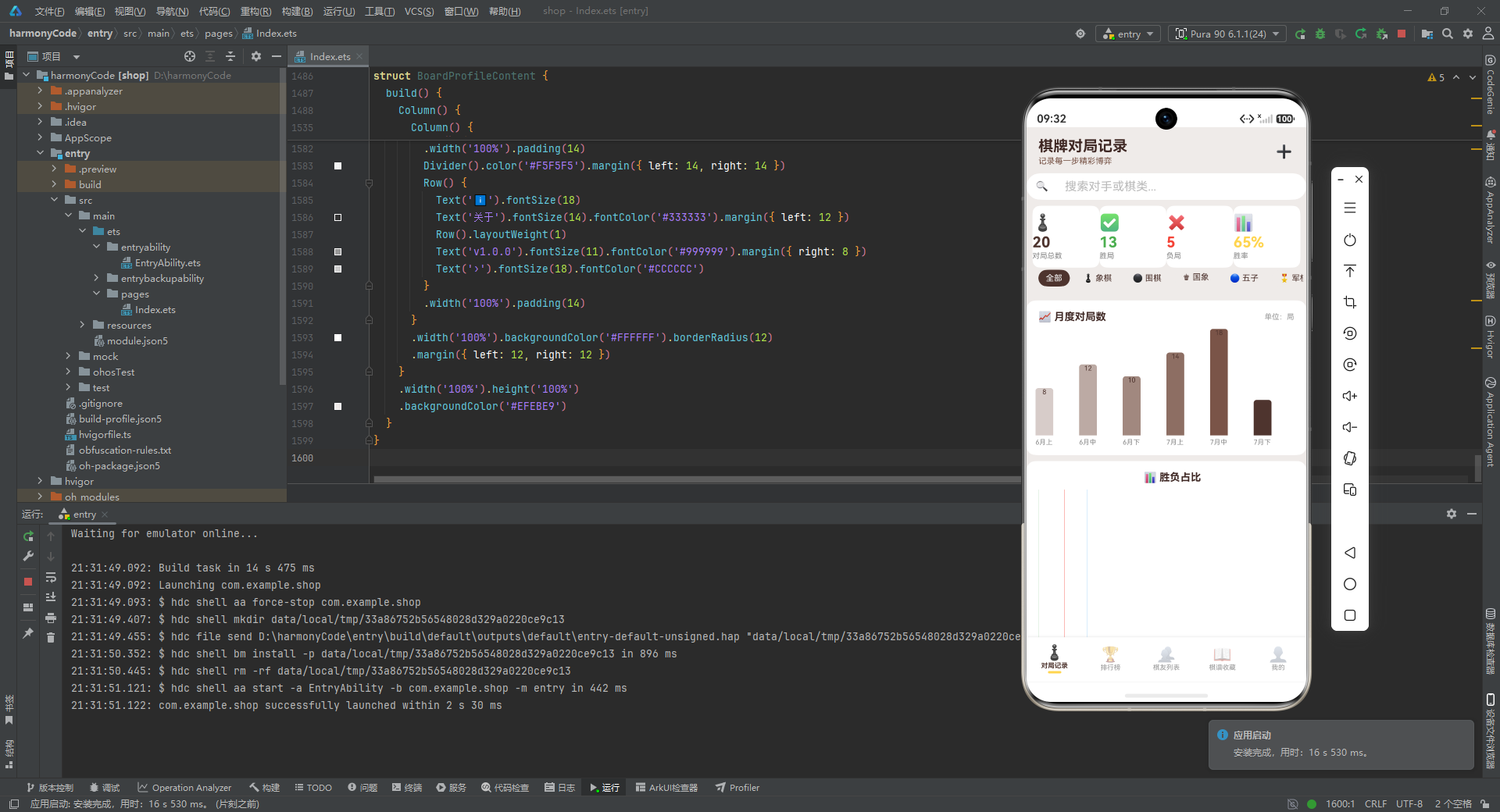
从领域建模的角度看,它用九个 interface 把棋类、结果、执棋方、地点、棋友、对局、棋谱、图表、排行这些核心概念一一钉死,再用一个 @Observed 类把最核心的对局记录升级为可观察对象。这种"先建模、后画 UI"的顺序,是任何严肃前端项目都应遵循的工程纪律。
从配置管理的角度看,它把所有展示相关的常量(颜色、图标、文案)集中抽取成四个配置字典与五个选项数组,让 UI 层统一通过 CONFIG[key] 取值。这种"配置即数据"的思路,让日后的配色调整、文案修改、国际化都变得轻而易举。配色上选用棕色系作为主色调,辅以 Material Design 的绿红蓝三色表达胜负和,既营造了古朴的纸面感,又保证了语义的清晰。
从状态管理的角度看,它用一组 @State 布尔值控制四个弹窗的显隐,用 @State 对象承载当前选中的对局,用 @State 字符串承载表单输入。虽然表单字段全为 string 是一种简化,但这种"一个弹窗一个布尔"的设计在弹窗数量不多时足够清晰,阅读者能一眼看出当前有哪些交互态。
从 UI 复用的角度看,它大量使用 @Builder 封装可复用的 UI 片段:modalOverlay 复用遮罩、statCard 复用统计卡片、detailRow 复用详情行、filterChip 复用筛选胶囊、gameCard 复用对局卡片。这些 Builder 让七百多行的对局记录页依然保持了可读性。图表部分用纯 ArkTS 手绘柱状图、占比条、分布条,零依赖、配色统一,展现了声明式 UI 在轻量可视化上的潜力。
从交互闭环的角度看,它完整覆盖了"列表 → 详情 → 编辑/删除"以及"新增 → 列表"两条主流程,弹窗之间的串联(详情 → 编辑、详情 → 删除)通过状态传递实现,流畅自然。删除操作的二次确认、危险操作的红色警示,都体现了对用户体验的细致考量。
比如列表渲染没有使用 ForEach 而是逐条手写,数据量变化时维护成本高;部分统计值(如总对局数 215、五星棋谱 6)是硬编码而非由函数计算,与"统计函数统一入口"的设计意图不完全一致;编辑弹窗没有把当前值真正回填到表单字段,只是作为 placeholder 显示;图表里的魔法数字 20 没有做归一化处理,存在边界风险;同名 Builder(如 filterChip、modalOverlay)在多个组件里重复定义,可以进一步抽成公共组件或工具函数。这些都是从 demo 走向生产时需要打磨的细节。
在分层、复用、配色、交互、数据真实性上都达到了相当高的水准。对于想要学习 ArkTS 的开发者而言,这份代码几乎涵盖了日常开发会遇到的绝大部分场景:类型定义、可观察对象、配置管理、状态绑定、条件渲染、列表渲染、表单录入、弹窗交互、图表可视化、多页面切换。逐段精读它,胜过看十篇零散的教程。

讨论HarmonyOS开发技术,专注于API与组件、DevEco Studio、测试、元服务和应用上架分发等。
更多推荐


 1
1 0
0- 0


 已为社区贡献129条内容

所有评论(0)