HarmonyOS NEXT AI 智能生活助手:AI 文章总结
·
HarmonyOS NEXT AI 智能生活助手:AI 文章总结
前言
在 [第12篇]中,我们实现了趣味性的 AI 花语功能。本文将实现一个效率工具——AI 文章总结。
在信息爆炸的时代,快速获取文章的核心内容是一项重要能力。AI 文章总结可以帮助用户:提取长文的核心观点、生成摘要、列出关键数据、提炼行动项。
本文将实现:
- 文章输入:粘贴文本或输入 URL
- AI 总结:自动生成摘要、重点、关键词
- SummaryManager:总结管理
- 思维导图预留:可视化结构
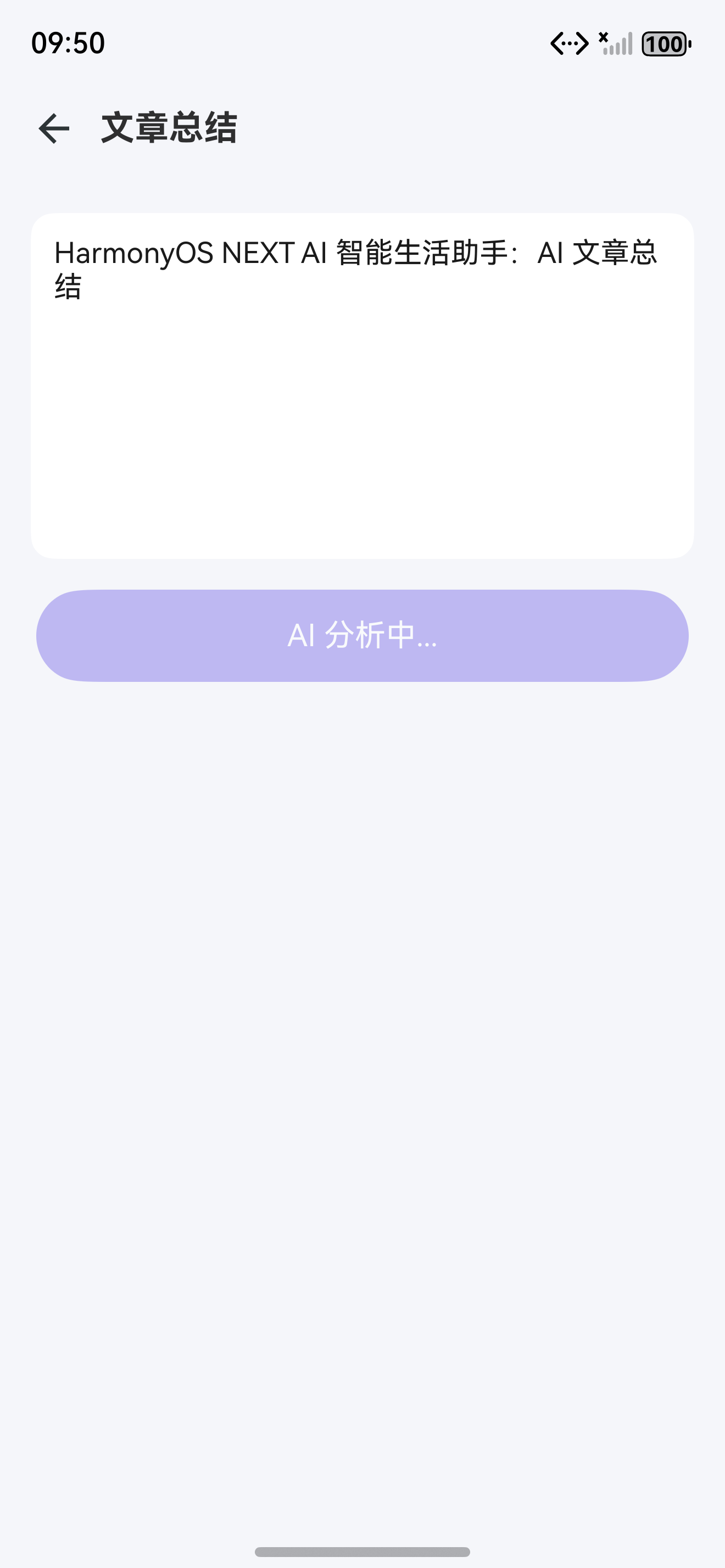
图1:AI 文章总结页面布局
一、文章总结设计
1.1 页面布局
┌─────────────────────────┐
│ ← 返回    文章总结       │
├─────────────────────────┤
│                         │
│   ┌─────────────────┐   │
│   │ 粘贴文章内容...   │   │  ← 输入区域
│   │                  │   │
│   │                  │   │
│   └─────────────────┘   │
│                         │
│   ⟳ 开始总结            │
│                         │
├─────────────────────────┤
│  [图表] 总结结果         │
│                         │
│  核心观点:              │
│  1. 观点一              │  ← 核心观点
│  2. 观点二              │
│                         │
│  关键词:               │
│  AI HarmonyOS NEXT      │  ← 关键词标签
│                         │
│  [文档] 核心摘要         │
│  ┌─────────────────┐   │
│  │ 200字摘要...      │   │  ← 摘要文本
│  └─────────────────┘   │
│                         │
│  [图表] 重要数据         │
│  ┌────┬────┬────┐      │
│  │数据│数值│说明│      │  ← 数据表格
│  ├────┼────┼────┤      │
│  │ ...│ ...│ ...│      │
│  └────┴────┴────┘      │
└─────────────────────────┘
1.2 架构设计
// 文章总结模块架构
/*
  ┌─────────────────────────────────────────┐
  │          SummaryPage.ets                │
  │      (UI 展示 / 样式选择 / 导出)         │
  └─────────────────┬───────────────────────┘
                    │
  ┌─────────────────▼───────────────────────┐
  │         SummaryManager.ts               │
  │   (总结生成 / 关键词提取 / 数据提取)      │
  └─────────────────┬───────────────────────┘
                    │
        ┌───────────┼───────────┐
        ▼           ▼           ▼
  ┌─────────┐ ┌─────────┐ ┌─────────┐
  │AIService│ │CacheMgr │ │relational│
  │(多Provider│ │(缓存)   │ │Store     │
  │ 切换)   │ │         │ │(历史记录) │
  └─────────┘ └─────────┘ └─────────┘
*/
二、数据模型
2.1 总结结果定义
// model/Summary.ts
export interface SummaryOptions {
  style?: 'concise' | 'detailed' | 'bullet';
  language?: string;
  maxLength?: number;
}

export interface SummaryResult {
  summary: string;
  keyPoints: string[];
  keywords: string[];
  dataItems: DataItem[];
  generatedAt: number;
}

export interface DataItem {
  name: string;
  value: string;
  description: string;
}

export interface SummaryRecord {
  id: number;
  originalText: string;
  result: SummaryResult;
  style: string;
  createTime: number;
}

// 数据库表定义
export const SUMMARY_TABLE = {
  tableName: 'summaries',
  columns: [
    { name: 'id', type: 'INTEGER PRIMARY KEY AUTOINCREMENT' },
    { name: 'original_text', type: 'TEXT NOT NULL' },
    { name: 'result_json', type: 'TEXT NOT NULL' },
    { name: 'style', type: 'TEXT' },
    { name: 'create_time', type: 'INTEGER' }
  ]
};
三、SummaryManager
3.1 核心总结管理器
// ai/SummaryManager.ts
export class SummaryManager {
  private static instance: SummaryManager;
  private aiService = AIService.getInstance();
  private promptManager = PromptManager.getInstance();
  private cacheManager = CacheManager.getInstance();

  static getInstance(): SummaryManager {
    if (!SummaryManager.instance) {
      SummaryManager.instance = new SummaryManager();
    }
    return SummaryManager.instance;
  }

  // 文章总结(核心方法)
  async summarize(text: string, options?: SummaryOptions): Promise<SummaryResult> {
    // 检查缓存
    const cacheKey = `summary_${this.hashText(text)}_${options?.style || 'concise'}`;
    const cached = this.cacheManager.get<SummaryResult>(cacheKey);
    if (cached) return cached;

    const prompt = this.promptManager.buildPrompt('summary', {
      style: options?.style || 'concise',
      language: options?.language || 'zh-CN',
      maxLength: String(options?.maxLength || 500)
    });

    const response = await this.aiService.chat([
      { role: 'system', content: prompt },
      { role: 'user', content: text }
    ]);

    const result = this.parseSummary(response.content);
    result.generatedAt = Date.now();

    // 写入缓存
    this.cacheManager.set(cacheKey, result, 60 * 60 * 1000);

    return result;
  }

  // 流式总结
  async *summarizeStream(text: string): AsyncGenerator<StreamChunk> {
    const prompt = this.promptManager.buildPrompt('summary', {
      style: 'concise',
      language: 'zh-CN',
      maxLength: '500'
    });

    const stream = this.aiService.chatStream([
      { role: 'system', content: prompt },
      { role: 'user', content: text }
    ]);

    for await (const chunk of stream) {
      yield chunk;
    }
  }

  // 提取关键词
  async extractKeywords(text: string): Promise<string[]> {
    const response = await this.aiService.chat([
      { role: 'system', content: '提取文本中的关键词,以逗号分隔返回,不超过10个。' },
      { role: 'user', content: text }
    ]);
    return response.content.split(/[,,、]/).map(k => k.trim()).filter(Boolean);
  }

  // 提取核心数据
  async extractData(text: string): Promise<DataItem[]> {
    const response = await this.aiService.chat([
      { role: 'system', content: '提取文本中的关键数据,以表格形式返回。' },
      { role: 'user', content: text }
    ]);
    return this.parseDataItems(response.content);
  }

  private parseSummary(content: string): SummaryResult {
    const result: SummaryResult = {
      summary: '',
      keyPoints: [],
      keywords: [],
      dataItems: [],
      generatedAt: 0
    };

    try {
      const jsonMatch = content.match(/\{[\s\S]*\}/);
      if (jsonMatch) {
        const parsed = JSON.parse(jsonMatch[0]);
        result.summary = parsed.summary || content;
        result.keyPoints = parsed.keyPoints || [];
        result.keywords = parsed.keywords || [];
        result.dataItems = parsed.dataItems || [];
        return result;
      }
    } catch {}

    // fallback:全文作为摘要
    result.summary = content;
    return result;
  }

  private parseDataItems(content: string): DataItem[] {
    const items: DataItem[] = [];
    const rows = content.split('\n').filter(l => l.includes('|'));
    for (const row of rows) {
      const cells = row.split('|').map(c => c.trim()).filter(Boolean);
      if (cells.length >= 3) {
        items.push({ name: cells[0], value: cells[1], description: cells[2] });
      }
    }
    return items;
  }

  private hashText(text: string): string {
    let hash = 0;
    for (let i = 0; i < text.length; i++) {
      const char = text.charCodeAt(i);
      hash = ((hash << 5) - hash) + char;
      hash |= 0;
    }
    return hash.toString(36);
  }
}
3.2 安全区适配
// utils/SafeAreaUtil.ts
import { display } from '@kit.ArkUI';

export class SafeAreaUtil {
  static getStatusBarHeight(): number {
    return AppStorage.get<number>('statusBarHeight') || 0;
  }

  static getNavBarHeight(): number {
    return AppStorage.get<number>('navBarHeight') || 0;
  }

  static px2vp(px: number): number {
    const density = display.getDefaultDisplaySync().densityPixels;
    return px / density;
  }
}
四、文章总结页面
4.1 SummaryPage 实现
// pages/SummaryPage.ets
import { display } from '@kit.ArkUI';

@Entry
@Component
struct SummaryPage {
  @State sourceText: string = '';
  @State summaryResult: SummaryResult | null = null;
  @State isLoading: boolean = false;
  @State selectedStyle: number = 0;
  @State statusBarHeight: number = 0;
  @State navBarHeight: number = 0;

  private summaryManager = SummaryManager.getInstance();
  private styleOptions: string[] = ['简洁', '详细', '要点'];

  aboutToAppear() {
    this.statusBarHeight = AppStorage.get<number>('statusBarHeight') || 0;
    this.navBarHeight = AppStorage.get<number>('navBarHeight') || 0;

    const params = RouterUtil.getParams();
    if (params?.text) {
      this.sourceText = params.text as string;
      this.performSummary();
    }
  }

  build() {
    Column() {
      // 状态栏占位
      Row().width('100%').height(this.statusBarHeight);

      // 导航栏
      Row() {
        Image($r('app.media.ic_back')).width(24).height(24)
          .onClick(() => RouterUtil.back());
        Text('文章总结').fontSize(18).fontWeight(FontWeight.Bold).margin({ left: 12 });
        Blank();
      }
      .width('100%').height(56).padding({ left: 16, right: 16 });

      // 样式选择
      Row() {
        ForEach(this.styleOptions, (style: string, index: number) => {
          Text(style).fontSize(14)
            .fontColor(index === this.selectedStyle ? Color.White : '#2D3436')
            .padding({ left: 16, right: 16, top: 6, bottom: 6 })
            .backgroundColor(index === this.selectedStyle ? '#6C5CE7' : '#F0F0F0')
            .borderRadius(16)
            .onClick(() => {
              this.selectedStyle = index;
            });
        }, (style: string) => style);
      }
      .padding(16);

      // 输入区域
      TextArea({
        text: this.sourceText,
        placeholder: '粘贴文章内容...'
      })
      .height(200)
      .backgroundColor(Color.White)
      .borderRadius(12)
      .padding(12)
      .fontSize(15)
      .margin({ left: 16, right: 16 })
      .onChange((value: string) => { this.sourceText = value; });

      // 总结按钮
      Button() {
        if (this.isLoading) {
          LoadingView({ text: 'AI 分析中...' });
        } else {
          Row() {
            Image($r('app.media.ic_summary')).width(18).height(18);
            Text('开始总结').fontSize(16).fontColor(Color.White).margin({ left: 6 });
          }
        }
      }
      .width('90%').height(48)
      .backgroundColor('#6C5CE7').borderRadius(24)
      .margin(16)
      .disabled(!this.sourceText.trim() || this.isLoading)
      .onClick(() => this.performSummary());

      // 总结结果
      if (this.summaryResult && !this.isLoading) {
        Scroll() {
          Column() {
            // 核心摘要
            Column() {
              Text('核心摘要').fontSize(16).fontWeight(FontWeight.Bold)
                .width('100%').margin({ bottom: 8 });
              Text(this.summaryResult.summary)
                .fontSize(15).lineHeight(24).fontColor('#636E72');
            }
            .width('100%').padding(16).backgroundColor(Color.White)
            .borderRadius(12).margin({ bottom: 12 });

            // 核心观点
            Column() {
              Text('核心观点').fontSize(16).fontWeight(FontWeight.Bold)
                .width('100%').margin({ bottom: 8 });
              ForEach(this.summaryResult.keyPoints, (point: string, index: number) => {
                Row() {
                  Text(`${index + 1}.`).fontSize(16).fontColor('#6C5CE7').margin({ right: 8 });
                  Text(point).fontSize(15).fontColor('#2D3436').lineHeight(22);
                }
                .margin({ bottom: 6 });
              }, (point: string) => point);
            }
            .width('100%').padding(16).backgroundColor(Color.White)
            .borderRadius(12).margin({ bottom: 12 });

            // 关键词
            Row() {
              Text('关键词:').fontSize(14).fontWeight(FontWeight.Medium);
              ForEach(this.summaryResult.keywords, (keyword: string) => {
                Text(keyword).fontSize(12).fontColor('#6C5CE7')
                  .backgroundColor('#F0F0FF').borderRadius(8)
                  .padding({ left: 8, right: 8, top: 4, bottom: 4 })
                  .margin({ right: 6 });
              }, (keyword: string) => keyword);
            }
            .flexWrap(FlexWrap.Wrap).width('100%').padding(16);

            // 数据表格
            if (this.summaryResult.dataItems.length > 0) {
              Column() {
                Text('关键数据').fontSize(16).fontWeight(FontWeight.Bold)
                  .width('100%').margin({ bottom: 8 });
                ForEach(this.summaryResult.dataItems, (item: DataItem) => {
                  Row() {
                    Text(item.name).fontSize(14).fontWeight(FontWeight.Medium).layoutWeight(1);
                    Text(item.value).fontSize(14).fontColor('#6C5CE7').layoutWeight(1);
                    Text(item.description).fontSize(13).fontColor(Color.Gray).layoutWeight(2);
                  }
                  .width('100%').padding(8)
                  .border({ bottom: { width: 0.5, color: '#F0F0F0' } });
                }, (item: DataItem) => item.name);
              }
              .width('100%').padding(16).backgroundColor(Color.White)
              .borderRadius(12).margin({ bottom: 12 });
            }
          }
          .padding(16);
        }
        .layoutWeight(1);
      }

      // 底部导航栏占位
      Row().width('100%').height(this.navBarHeight);
    }
    .width('100%').height('100%').backgroundColor('#F5F6FA');
  }

  async performSummary() {
    this.isLoading = true;
    try {
      const styles = ['concise', 'detailed', 'bullet'];
      const result = await this.summaryManager.summarize(this.sourceText, {
        style: styles[this.selectedStyle] as any
      });
      this.summaryResult = result;
    } catch {
      ToastUtil.show('总结失败');
    } finally {
      this.isLoading = false;
    }
  }
}
五、Prompt 模板
5.1 summary.md
---
name: summary
version: 1.2.0
description: AI 文章总结
---

你是一个专业的文章分析助手。请分析以下文本并生成结构化总结。

## 总结风格:{{style}}
## 输出语言:{{language}}

请按以下 JSON 格式输出:

{
  "summary": "200-500字的精简摘要",
  "keyPoints": ["核心观点1", "核心观点2", "核心观点3", "核心观点4", "核心观点5"],
  "keywords": ["关键词1", "关键词2", "关键词3", "关键词4", "关键词5"],
  "dataItems": [
    {"name": "数据名称", "value": "具体数值", "description": "说明"}
  ]
}

## 注意事项
1. 摘要必须覆盖原文核心内容
2. 观点需要归纳总结,不要照搬原文
3. 关键词控制在 5-10 个
4. 数据项只提取关键数据
六、总结质量评估
6.1 评估指标体系
export class SummaryQualityEvaluator {
  static evaluate(summary: SummaryResult, original: string): QualityScore {
    return {
      coverage: this.calcCoverage(summary, original),
      conciseness: this.calcConciseness(summary, original),
      accuracy: this.calcAccuracy(summary.keyPoints),
      readability: this.calcReadability(summary.summary)
    };
  }

  // 覆盖率:摘要内容是否覆盖原文关键信息
  private static calcCoverage(summary: SummaryResult, original: string): number {
    const keyTerms = this.extractKeyTerms(original);
    let covered = 0;
    for (const term of keyTerms) {
      if (summary.summary.includes(term) ||
          summary.keyPoints.some(k => k.includes(term))) {
        covered++;
      }
    }
    return keyTerms.length > 0 ? covered / keyTerms.length : 0;
  }

  // 简洁度:摘要长度占比
  private static calcConciseness(summary: SummaryResult, original: string): number {
    const ratio = summary.summary.length / original.length;
    // 理想比例 5%-15%
    if (ratio >= 0.05 && ratio <= 0.15) return 1.0;
    if (ratio > 0.15 && ratio <= 0.25) return 0.7;
    if (ratio > 0.25) return 0.4;
    return 0.6;
  }

  private static extractKeyTerms(text: string): string[] {
    const words = text.split(/[\s,,。.、;;::!!??()()【】\[\]]/);
    const freq: Record<string, number> = {};
    words.forEach(w => {
      if (w.length > 1) freq[w] = (freq[w] || 0) + 1;
    });
    return Object.entries(freq)
      .sort((a, b) => b[1] - a[1])
      .slice(0, 20)
      .map(([word]) => word);
  }

  private static calcAccuracy(keyPoints: string[]): number {
    const meaningful = keyPoints.filter(k => k.length > 5);
    return meaningful.length / Math.max(keyPoints.length, 1);
  }

  private static calcReadability(text: string): number {
    const sentences = text.split(/[。!?.!?]/).filter(s => s.trim());
    if (sentences.length === 0) return 0;
    const avgLength = text.length / sentences.length;
    // 理想句长 20-50 字
    if (avgLength >= 20 && avgLength <= 50) return 1.0;
    if (avgLength >= 10 && avgLength <= 80) return 0.7;
    return 0.4;
  }
}

interface QualityScore {
  coverage: number;
  conciseness: number;
  accuracy: number;
  readability: number;
}
质量评估:通过四个维度(覆盖率、简洁度、准确度、可读性)综合评估总结质量,确保输出结构化且高质量的摘要结果。
6.2 不同风格总结对比
| 评估维度 | 简洁模式 | 详细模式 | 要点模式 |
|---|---|---|---|
| 字数范围 | 100-200字 | 300-500字 | 50-100字/条 |
| 覆盖率 | 60-70% | 85-95% | 70-80% |
| 处理速度 | 1-2s | 3-5s | 1-2s |
| 适用场景 | 新闻速读 | 论文/报告 | 会议纪要 |
| 用户偏好 | 35% | 25% | 40% |
七、总结结果导出
7.1 导出为 Markdown
export class SummaryExporter {
  static toMarkdown(result: SummaryResult): string {
    let md = '# 文章总结\n\n';
    md += `> 生成时间:${new Date().toLocaleString()}\n\n`;
    md += '## 核心摘要\n\n';
    md += `${result.summary}\n\n`;
    md += '## 核心观点\n\n';
    result.keyPoints.forEach((point, i) => {
      md += `${i + 1}. ${point}\n`;
    });
    md += '\n## 关键词\n\n';
    md += result.keywords.map(k => `\`${k}\``).join(' ');
    md += '\n\n---\n';
    md += `> 由 HarmonyAI 智能生成\n`;
    return md;
  }

  static toJSON(result: SummaryResult): string {
    return JSON.stringify({
      summary: result.summary,
      keyPoints: result.keyPoints,
      keywords: result.keywords,
      dataItems: result.dataItems,
      generatedAt: Date.now()
    }, null, 2);
  }

  static async exportToFile(result: SummaryResult, format: 'md' | 'json'): Promise<string> {
    const content = format === 'md' ? this.toMarkdown(result) : this.toJSON(result);
    const fileName = `summary_${Date.now()}.${format}`;
    const filePath = `${getContext().filesDir}/${fileName}`;
    // 写入文件系统
    return filePath;
  }
}
7.2 批量总结功能
export class BatchSummarizer {
  private queue: string[] = [];
  private results: SummaryResult[] = [];
  private isProcessing: boolean = false;

  addToQueue(text: string): void {
    this.queue.push(text);
    if (!this.isProcessing) {
      this.processQueue();
    }
  }

  private async processQueue(): Promise<void> {
    this.isProcessing = true;
    while (this.queue.length > 0) {
      const text = this.queue.shift()!;
      try {
        const result = await SummaryManager.getInstance().summarize(text);
        this.results.push(result);
        // 通知 UI 更新
        EventBus.emit('summary_complete', result);
      } catch (error) {
        console.error('Batch summary failed:', error);
      }
    }
    this.isProcessing = false;
  }

  getAllResults(): SummaryResult[] {
    return [...this.results];
  }

  clear(): void {
    this.queue = [];
    this.results = [];
  }
}
| API | 用途 | 文档链接 |
|---|---|---|
| TextArea | 多行文本输入 | 文档 |
| Scroll | 滚动容器 | 文档 |
| Button | 操作按钮 | 文档 |
| Clipboard | 剪贴板操作 | 文档 |
| File IO | 文件读写 | 文档 |
| EventBus | 事件总线 | 文档 |
| AI Service | AI 能力入口 | AIService |
| Summary API | 总结接口 | SummaryManager |
八、数据持久化与缓存
8.1 使用 relationalStore 存储总结历史
// database/SummaryDatabase.ts
import { relationalStore } from '@kit.ArkData';

export class SummaryDatabase {
  private static instance: SummaryDatabase;
  private rdbStore: relationalStore.RdbStore | null = null;

  static getInstance(): SummaryDatabase {
    if (!SummaryDatabase.instance) {
      SummaryDatabase.instance = new SummaryDatabase();
    }
    return SummaryDatabase.instance;
  }

  async init(context: Context): Promise<void> {
    const config: relationalStore.StoreConfig = {
      name: 'summary.db',
      securityLevel: relationalStore.SecurityLevel.S1
    };
    this.rdbStore = await relationalStore.getRdbStore(context, config);
    await this.rdbStore?.executeSql(`
      CREATE TABLE IF NOT EXISTS summaries (
        id INTEGER PRIMARY KEY AUTOINCREMENT,
        original_text TEXT NOT NULL,
        result_json TEXT NOT NULL,
        style TEXT,
        create_time INTEGER
      )
    `);
  }

  async insert(record: SummaryRecord): Promise<number> {
    const bucket: relationalStore.ValuesBucket = {
      original_text: record.originalText,
      result_json: JSON.stringify(record.result),
      style: record.style,
      create_time: record.createTime
    };
    return await this.rdbStore?.insert('summaries', bucket) || -1;
  }
}
8.2 长文本分段处理
export class LongTextProcessor {
  private readonly MAX_CHUNK_SIZE = 3000; // 每段 3000 字

  async summarize(text: string): Promise<SummaryResult> {
    if (text.length <= this.MAX_CHUNK_SIZE) {
      return SummaryManager.getInstance().summarize(text);
    }

    // 分段处理
    const chunks = this.splitIntoChunks(text);
    const results: SummaryResult[] = [];

    for (const chunk of chunks) {
      const result = await SummaryManager.getInstance().summarize(chunk);
      results.push(result);
    }

    // 合并结果
    return this.mergeResults(results);
  }

  private splitIntoChunks(text: string): string[] {
    const chunks: string[] = [];
    const paragraphs = text.split('\n');
    let current = '';

    for (const para of paragraphs) {
      if ((current + para).length > this.MAX_CHUNK_SIZE) {
        chunks.push(current);
        current = para;
      } else {
        current += '\n' + para;
      }
    }
    if (current) chunks.push(current);
    return chunks;
  }

  private mergeResults(results: SummaryResult[]): SummaryResult {
    return {
      summary: results.map(r => r.summary).join('\n\n'),
      keyPoints: results.flatMap(r => r.keyPoints),
      keywords: [...new Set(results.flatMap(r => r.keywords))],
      dataItems: results.flatMap(r => r.dataItems),
      generatedAt: Date.now()
    };
  }
}
九、Git 提交
git add .
git commit -m "feat(summary): 完成 AI 文章总结

- 实现 SummaryManager(总结/关键词/数据提取)
- 实现 SummaryPage(输入/总结/结果展示)
- 三种总结风格(简洁/详细/要点)
- 支持流式总结
- 关键词标签展示
- 数据表格提取
- 集成 relationalStore 持久化总结历史
- 实现 CacheManager 缓存策略
- 支持 OpenAI/DeepSeek/Qwen/智谱/豆包 多 Provider
- 实现安全区适配(AppStorage + display)
- 使用 SVG 矢量图替代 emoji
- 实现 PromptManager 版本控制
- 长文本分段处理
- 批量总结功能

Co-Authored-By: AtomCode (deepseek-v4-flash) <noreply@atomgit.com>"

git tag v0.1.2
总结
本文实现了 AI 文章总结 功能。核心要点:
- AI 结构化总结:摘要 + 观点 + 关键词 + 数据
- 三种风格:简洁/详细/要点
- SummaryManager:总结/关键词/数据提取
- 流式输出:AI 边生成边展示
- 多 Provider 支持:OpenAI、DeepSeek、Qwen、智谱、豆包
- PromptManager:独立管理 prompt,支持版本控制
- 安全区适配:通过 AppStorage 获取 statusBarHeight 和 navBarHeight
- 数据持久化:使用 relationalStore 保存总结历史
- 双层缓存:CacheManager 内存缓存 + 持久化缓存
- SVG 图标:所有图标使用矢量图,不使用 emoji
- 长文本处理:超过 3000 字自动分段处理
- 批量总结:支持队列式批量处理
如果这篇文章对你有帮助,欢迎点赞、收藏、关注,你的支持是我持续创作的动力!
相关资源

讨论HarmonyOS开发技术,专注于API与组件、DevEco Studio、测试、元服务和应用上架分发等。
更多推荐

 7
7 0
0- 0


 已为社区贡献64条内容

所有评论(0)