HarmonyOS应用<奇妙科学乐园>开发第60篇:UserPreferences用户偏好——收藏/阅读/历史记录
📖 引言
在上一篇文章中,我们实现了 AchievementManager 成就系统,通过 rawfile 静态数据与 Preferences 动态进度的分离合并策略,完成了成就的解锁检测和持久化。成就系统使用独立的 Preferences 实例(science_app_achievements),而应用中更大量、更频繁的用户数据操作——收藏文章、阅读历史、错题记录、答题成绩、用户名、学习天数——全部由 UserPreferences 统一管理。
UserPreferences 是《奇妙科学乐园》的数据持久化中枢。它管理着 7 类用户数据,被 QuizEngine、WrongQuiz、Profile、Favorites、History 等多个页面和组件依赖。在纯离线的 HarmonyOS 应用中,@ohos.data.preferences 是最合适的轻量级持久化方案——它不需要数据库、不需要网络、不需要复杂的 ORM 框架,只需要一个键值对存储就能搞定所有用户数据。
但简单不等于简陋。UserPreferences 面临的真实挑战包括:高频写入场景下的 IO 性能、同步读取与异步持久化的状态一致性、数组数据的去重与上限管理、以及"每次写入都走 Preferences 是否太慢"的性能焦虑。本文将逐一解析这些问题的解决方案。
🎯 学习目标
完成本文后,你将能够:
- ✅ 理解
UserPreferences的单例架构和UserCacheData内存缓存设计 - ✅ 掌握内存缓存 + 500ms 批量写入的双层持久化策略
- ✅ 理解收藏列表的去重、阅读历史的 LRU 更新、错题记录的上限管理
- ✅ 掌握同步方法(
getFavoritesSync)与异步方法(getFavorites)的双接口设计 - ✅ 学会
getTotalCorrectRate的历史成绩聚合计算逻辑 - ✅ 了解数据隔离——与
AchievementManager使用不同 Preferences 实例的设计考量
🏗️ 核心设计
数据全景
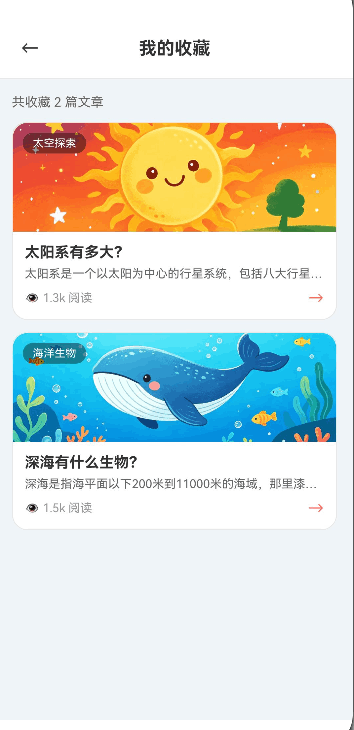
UserPreferences 管理 7 类用户数据:
| 数据类型 | Key 常量 | 数据结构 | 上限 | 消费方 |
|---|---|---|---|---|
| 收藏列表 | favorite_topics |
number[](文章ID数组) |
无限制 | Favorites 页面 |
| 阅读历史 | read_history |
ReadRecord[](ID+时间) |
100 条 | History 页面 |
| 错题列表 | wrong_quizzes |
number[](题目ID数组) |
200 条 | WrongQuiz 页面 |
| 答题成绩 | quiz_scores |
QuizScoreRecord[] |
50 条 | Profile 页面 |
| 用户名 | user_name |
string |
单值 | Profile 页面 |
| 学习天数 | learn_days |
number |
单值 | Profile 页面 |
| 最后登录 | last_login_date |
string(日期) |
单值 | 签到功能 |
双层架构
UserPreferences 采用"内存缓存 + 延迟持久化"的双层架构:
  调用方(页面/组件)
       ↓  同步读写(零延迟)
  UserCacheData(内存对象)
       ↓  500ms 防抖
  Preferences(磁盘持久化)
所有读操作直接从内存缓存返回,不触发 IO;所有写操作先更新内存缓存,再通过 500ms 防抖合并写入 Preferences。
数据模型
// entry/src/main/ets/viewmodel/UserPreferences.ets

// 阅读记录
export interface ReadRecord {
    topicId: number;      // 文章ID
    readTime: number;     // 阅读时间戳
}

// 答题成绩记录
export interface QuizScoreRecord {
    totalQuestions: number;   // 总题数
    correctCount: number;     // 答对数
    timestamp: number;        // 答题时间戳
    category?: string;        // 答题分类(可选)
}

// 内存缓存的完整数据结构
export interface UserCacheData {
    favorites: number[];              // 收藏列表
    readHistory: ReadRecord[];        // 阅读历史
    wrongQuizIds: number[];           // 错题ID列表
    quizScores: QuizScoreRecord[];    // 答题成绩列表
    userName: string;                 // 用户名
    learnDays: number;                // 学习天数
    lastLogin: string;                // 最后登录日期
}
💻 代码实现
一、单例模式与内存缓存初始化
// entry/src/main/ets/viewmodel/UserPreferences.ets
export class UserPreferences {
    private static instance: UserPreferences;
    private prefs: preferences.Preferences | null = null;
    private context: common.Context | null = null;
    private isInitialized: boolean = false;

    // 内存缓存——所有读操作直接返回此对象的数据
    private cache: UserCacheData = {
        favorites: [],
        readHistory: [],
        wrongQuizIds: [],
        quizScores: [],
        userName: AppConstants.DEFAULT_USER_NAME,   // '小科学家'
        learnDays: 0,
        lastLogin: ''
    };

    // 延迟写入的定时器和标记
    private saveTimer: number = -1;
    private pendingSave: boolean = false;

    private constructor() {}

    static getInstance(): UserPreferences {
        if (!UserPreferences.instance) {
            UserPreferences.instance = new UserPreferences();
        }
        return UserPreferences.instance;
    }
}

// 模块级单例导出
export const userPrefs = UserPreferences.getInstance();
初始化时从 Preferences 加载历史数据到内存缓存:
/**
 * 初始化用户偏好,从 Preferences 加载历史数据到内存缓存
 * @param context - 应用上下文
 */
init(context: common.Context): void {
    if (this.isInitialized) {
        Logger.warn(TAG, '重复初始化,已跳过');
        return;
    }
    this.context = context;
    this.loadAllData().then(() => {
        this.isInitialized = true;
        Logger.info(TAG, '初始化完成');
    }).catch((err: Error) => {
        Logger.error(TAG, '初始化失败', err);
        this.isInitialized = true;  // 即使失败也标记已初始化,使用默认值
    });
}
二、全量数据加载
loadAllData 从 Preferences 读取 7 个 Key 的数据,JSON 反序列化后写入内存缓存:
/**
 * 从 Preferences 加载全部用户数据到内存缓存
 * 使用 JSON 序列化/反序列化处理数组和对象类型
 */
private async loadAllData(): Promise<void> {
    try {
        const prefs = await this.getPrefs();

        // 收藏列表:JSON 数组字符串 → number[]
        const favStr = await prefs.get(AppConstants.KEY_FAVORITES, '[]') as string;
        this.cache.favorites = JSON.parse(favStr) as number[];

        // 阅读历史:JSON 对象数组 → ReadRecord[]
        const histStr = await prefs.get(AppConstants.KEY_READ_HISTORY, '[]') as string;
        this.cache.readHistory = JSON.parse(histStr) as ReadRecord[];

        // 错题列表
        const wrongStr = await prefs.get(AppConstants.KEY_WRONG_QUIZZES, '[]') as string;
        this.cache.wrongQuizIds = JSON.parse(wrongStr) as number[];

        // 答题成绩
        const scoreStr = await prefs.get(AppConstants.KEY_QUIZ_SCORES, '[]') as string;
        this.cache.quizScores = JSON.parse(scoreStr) as QuizScoreRecord[];

        // 标量类型直接读取,无需 JSON 解析
        this.cache.userName = await prefs.get(
            AppConstants.KEY_USER_NAME, AppConstants.DEFAULT_USER_NAME
        ) as string;
        this.cache.learnDays = await prefs.get(AppConstants.KEY_LEARN_DAYS, 0) as number;
        this.cache.lastLogin = await prefs.get(AppConstants.KEY_LAST_LOGIN, '') as string;

        Logger.info(TAG,
            `数据加载完成: 收藏${this.cache.favorites.length}条, ` +
            `历史${this.cache.readHistory.length}条, ` +
            `错题${this.cache.wrongQuizIds.length}条`);
    } catch (e) {
        Logger.error(TAG, '加载数据失败', e as Error);
    }
}
关键点:
- 数组/对象类型使用
JSON.parse反序列化,标量类型直接读取 - 每个字段都提供默认值(
'[]'、0、''),确保 Preferences 为空时不会崩溃 - 异常被 catch 兜底,不会阻塞应用启动
三、500ms 批量写入机制
与 AchievementManager 相同的防抖策略,但 UserPreferences 的写入数据量更大(7 个 Key):
/**
 * 调度延迟保存
 * 多次数据变更合并为一次 Preferences 写入
 */
private scheduleSave(): void {
    this.pendingSave = true;
    if (this.saveTimer >= 0) {
        return;   // 已有定时器在等待,不重复创建
    }
    this.saveTimer = setTimeout(() => {
        this.flushSave().catch((err: Error) => {
            Logger.error(TAG, '延迟保存失败', err);
        });
    }, 500);
}

/**
 * 执行批量持久化
 * 一次性将 7 个 Key 的数据全部写入 Preferences
 */
private async flushSave(): Promise<void> {
    if (!this.pendingSave) return;
    this.saveTimer = -1;
    this.pendingSave = false;

    try {
        const prefs = await this.getPrefs();
        // 数组/对象类型 → JSON 字符串
        await prefs.put(AppConstants.KEY_FAVORITES, JSON.stringify(this.cache.favorites));
        await prefs.put(AppConstants.KEY_READ_HISTORY, JSON.stringify(this.cache.readHistory));
        await prefs.put(AppConstants.KEY_WRONG_QUIZZES, JSON.stringify(this.cache.wrongQuizIds));
        await prefs.put(AppConstants.KEY_QUIZ_SCORES, JSON.stringify(this.cache.quizScores));
        // 标量类型直接写入
        await prefs.put(AppConstants.KEY_USER_NAME, this.cache.userName);
        await prefs.put(AppConstants.KEY_LEARN_DAYS, this.cache.learnDays);
        await prefs.put(AppConstants.KEY_LAST_LOGIN, this.cache.lastLogin);
        // 立即刷盘,确保数据落盘
        await prefs.flush();
        Logger.debug(TAG, '数据已持久化');
    } catch (e) {
        Logger.error(TAG, '保存数据失败', e as Error);
    }
}
flushSave 每次都写入全部 7 个 Key,而不是只写入变更的 Key。这个"全量写入"策略的好处是实现简单、不存在部分写入导致的数据不一致。代价是每次写入的数据量稍大,但 Preferences 本身是内存映射文件,7 个 Key 的写入开销可以忽略不计。
四、收藏管理——去重与幂等
收藏功能是最典型的"有则忽略、无则添加"操作:
/**
 * 添加收藏
 * @param topicId - 文章ID
 * @returns 是否添加成功(已存在返回false)
 */
async addFavorite(topicId: number): Promise<boolean> {
    // 去重检查
    if (this.cache.favorites.includes(topicId)) {
        return false;
    }
    // 内存缓存更新
    this.cache.favorites.push(topicId);
    // 触发延迟持久化
    this.scheduleSave();
    Logger.debug(TAG, `添加收藏: ${topicId}`);
    return true;
}

/**
 * 移除收藏
 * @param topicId - 文章ID
 * @returns 是否移除成功(不存在返回false)
 */
async removeFavorite(topicId: number): Promise<boolean> {
    const beforeLen = this.cache.favorites.length;
    // filter 返回新数组,不修改原数组
    this.cache.favorites = this.cache.favorites.filter(id => id !== topicId);
    if (this.cache.favorites.length === beforeLen) {
        return false;  // 没有变化,说明不存在
    }
    this.scheduleSave();
    Logger.debug(TAG, `移除收藏: ${topicId}`);
    return true;
}

/**
 * 切换收藏状态
 * @param topicId - 文章ID
 * @returns 切换后的状态(true=已收藏,false=已取消)
 */
async toggleFavorite(topicId: number): Promise<boolean> {
    if (this.isFavoriteSync(topicId)) {
        await this.removeFavorite(topicId);
        return false;
    } else {
        await this.addFavorite(topicId);
        return true;
    }
}
设计要点:
addFavorite返回boolean表示是否实际添加(已存在返回false),让调用方决定是否展示"已收藏"提示removeFavorite通过比较beforeLen判断是否实际移除,避免不必要的scheduleSavetoggleFavorite是收藏页最常用的操作,一次点击完成切换
五、阅读历史——LRU 更新策略
阅读历史采用"最近阅读排在最前"的 LRU(Least Recently Used)策略:
/**
 * 添加阅读记录
 * 同一文章重复阅读时,移到最前面(LRU 更新)
 * @param topicId - 文章ID
 */
async addReadRecord(topicId: number): Promise<void> {
    // 先移除已有的相同记录(避免重复)
    this.cache.readHistory = this.cache.readHistory.filter(r => r.topicId !== topicId);

    // 在数组头部插入新记录(最新的在前面)
    this.cache.readHistory.unshift({ topicId, readTime: Date.now() });

    // 上限控制:最多保留 100 条
    if (this.cache.readHistory.length > AppConstants.MAX_HISTORY_SIZE) {
        this.cache.readHistory = this.cache.readHistory.slice(0, AppConstants.MAX_HISTORY_SIZE);
    }

    this.scheduleSave();
}
这个实现有三个关键点:
- 先删后插:
filter移除旧记录,unshift插入到头部。效果是同一篇文章多次阅读时,只保留最近一次的记录,且始终排在最前 - 时间戳记录:每条记录的
readTime是Date.now(),可用于"今天阅读了哪些""本周阅读了哪些"等时间维度查询 - 上限截断:
MAX_HISTORY_SIZE = 100,超过后用slice截断尾部(最旧的记录)
六、错题管理——上限与去重
/**
 * 添加错题
 * @param quizId - 题目ID
 * @returns 是否添加成功
 */
async addWrongQuiz(quizId: number): Promise<boolean> {
    // 去重:同一道题只记录一次
    if (this.cache.wrongQuizIds.includes(quizId)) {
        return false;
    }
    this.cache.wrongQuizIds.push(quizId);
    // 上限控制:最多 200 道
    if (this.cache.wrongQuizIds.length > AppConstants.MAX_WRONG_QUIZZES) {
        this.cache.wrongQuizIds = this.cache.wrongQuizIds.slice(0, AppConstants.MAX_WRONG_QUIZZES);
    }
    this.scheduleSave();
    return true;
}

/**
 * 移除错题(答对后调用)
 * @param quizId - 题目ID
 * @returns 是否移除成功
 */
async removeWrongQuiz(quizId: number): Promise<boolean> {
    const beforeLen = this.cache.wrongQuizIds.length;
    this.cache.wrongQuizIds = this.cache.wrongQuizIds.filter(id => id !== quizId);
    if (this.cache.wrongQuizIds.length === beforeLen) {
        return false;
    }
    this.scheduleSave();
    return true;
}
MAX_WRONG_QUIZZES = 200 的上限设计:错题本面向儿童用户,200 道题的上限足够覆盖所有分类的常见错题,同时避免数据量过大。
七、答题成绩——头部插入与上限截断
/**
 * 添加答题成绩记录
 * 新记录插入到数组头部(最新的在前面)
 * @param score - 答题成绩
 */
async addQuizScore(score: QuizScoreRecord): Promise<void> {
    this.cache.quizScores.unshift(score);   // 头部插入
    if (this.cache.quizScores.length > AppConstants.MAX_QUIZ_SCORES) {
        this.cache.quizScores.length = AppConstants.MAX_QUIZ_SCORES;  // 最多 50 条
    }
    this.scheduleSave();
}
注意这里用 this.cache.quizScores.length = 50 而不是 slice——两者效果相同,但直接设置 length 更简洁。在 ArkTS 严格模式下,两种方式都合法。
八、历史成绩聚合——总正确率计算
Profile 页面需要展示用户的"历史总正确率"。这个数据不能从单次成绩中获取,需要聚合所有历史记录:
/**
 * 计算所有历史答题的总正确率
 * @returns 正确率百分比(0-100),无记录返回0
 */
getTotalCorrectRateSync(): number {
    if (this.cache.quizScores.length === 0) return 0;

    let totalQ = 0;
    let totalCorrect = 0;
    for (const s of this.cache.quizScores) {
        totalQ += s.totalQuestions;
        totalCorrect += s.correctCount;
    }
    return totalQ > 0 ? Math.round((totalCorrect / totalQ) * 100) : 0;
}
这个方法被 Profile 页面的 aboutToAppear 调用,用于展示"历史正确率"统计。
九、签到与学习天数
/**
 * 签到并更新学习天数
 * 使用 toDateString() 比较日期,避免跨年跨月的问题
 * @returns 更新后的学习天数
 */
async checkInAndUpdateDays(): Promise<number> {
    const today = new Date().toDateString();
    if (this.cache.lastLogin !== today) {
        this.cache.learnDays = this.cache.learnDays + 1;
        this.cache.lastLogin = today;
        this.scheduleSave();
        Logger.info(TAG, `签到成功,连续学习${this.cache.learnDays}天`);
    }
    return this.cache.learnDays;
}

/**
 * 判断今天是否已经打卡签到
 * @returns 今天已签到返回true
 */
isTodayCheckedIn(): boolean {
    const today = new Date().toDateString();
    return this.cache.lastLogin === today;
}
使用 new Date().toDateString() 做日期比较是关键——它返回 "Sat Jul 18 2026" 格式的字符串,天然包含年月日信息,不会出现"1月1日和12月1日的前两位相同"的比较错误。
十、同步/异步双接口设计
UserPreferences 为每个读操作提供了同步和异步两个版本:
// 同步版本——从内存缓存读取,零延迟
getFavoritesSync(): number[] {
    return [...this.cache.favorites];   // 返回拷贝,防止外部修改
}

isFavoriteSync(topicId: number): boolean {
    return this.cache.favorites.includes(topicId);
}

getReadHistorySync(): ReadRecord[] {
    return [...this.cache.readHistory];
}

getWrongQuizIdsSync(): number[] {
    return [...this.cache.wrongQuizIds];
}

getQuizScoresSync(): QuizScoreRecord[] {
    return [...this.cache.quizScores];
}

getUserNameSync(): string {
    return this.cache.userName;
}

getLearnDaysSync(): number {
    return this.cache.learnDays;
}

// 异步版本——直接返回同步结果(未来可扩展为从磁盘读取)
async getFavorites(): Promise<number[]> {
    return this.getFavoritesSync();
}

async isFavorite(topicId: number): Promise<boolean> {
    return this.isFavoriteSync(topicId);
}
为什么需要同步版本?因为在 ArkUI 的 aboutToAppear 生命周期中,@State 的初始赋值需要同步完成:
// entry/src/main/ets/pages/Profile.ets
aboutToAppear() {
    // 这些必须在 aboutToAppear 中同步完成
    this.userName = userPrefs.getUserNameSync();
    this.readCount = userPrefs.getReadCount();
    this.favoriteCount = userPrefs.getFavoriteCount();
    this.daysCount = userPrefs.getLearnDaysSync();
    this.loadPreviewAchievements();
}
如果只有异步版本,就需要在 aboutToAppear 中使用 await,而 aboutToAppear 不支持 async/await(在部分 HarmonyOS 版本中)。同步版本直接从内存读取,没有 IO 开销。
另一个关键设计:同步方法返回的是数组的拷贝([...this.cache.favorites]),而不是原数组的引用。这防止了外部代码通过引用修改内存缓存中的数据。
十一、强制刷盘
/**
 * 强制立即保存所有数据到 Preferences
 * 在应用退出时调用,确保 500ms 窗口内的数据不丢失
 */
async forceFlush(): Promise<void> {
    await this.flushSave();
}
forceFlush 供 EntryAbility.onWindowStageDestroy 等生命周期回调调用,确保应用被系统回收时,500ms 防抖窗口内的未保存数据能够落盘。
⚖️ 正反对比
❌ 错误方式一:每次操作都立即写 Preferences
// ❌ 每次收藏都走 IO,用户快速滑动收藏/取消时性能灾难
async addFavorite(topicId: number): Promise<void> {
    this.cache.favorites.push(topicId);
    const prefs = await this.getPrefs();
    await prefs.put(KEY_FAVORITES, JSON.stringify(this.cache.favorites));
    await prefs.flush();  // 每次都同步刷盘
}
// 用户 1 秒内连续点击 10 次 = 10 次 IO 操作
// ✅ 内存缓存 + 500ms 防抖,10 次操作只走 1 次 IO
async addFavorite(topicId: number): Promise<boolean> {
    if (this.cache.favorites.includes(topicId)) return false;
    this.cache.favorites.push(topicId);
    this.scheduleSave();  // 只标记,500ms 后批量写入
    return true;
}
❌ 错误方式二:同步方法返回原数组引用
// ❌ 返回原数组引用,外部可以直接修改缓存
getFavoritesSync(): number[] {
    return this.cache.favorites;   // 外部可以 push/splice 直接污染缓存!
}

// 外部代码意外修改了缓存
const favs = userPrefs.getFavoritesSync();
favs.push(999);  // 内存缓存被污染了!
// ✅ 返回浅拷贝,外部修改不影响缓存
getFavoritesSync(): number[] {
    return [...this.cache.favorites];   // 拷贝,安全
}
❌ 错误方式三:阅读历史用 push 追加
// ❌ 同一文章多次阅读会产生多条记录
async addReadRecord(topicId: number): Promise<void> {
    this.cache.readHistory.push({ topicId, readTime: Date.now() });
    // 阅读同一篇文章 10 次 = 10 条重复记录
}
// ✅ 先删后插,同一文章只保留最新一条
async addReadRecord(topicId: number): Promise<void> {
    // 先移除已有的相同记录
    this.cache.readHistory = this.cache.readHistory.filter(r => r.topicId !== topicId);
    // 在头部插入新记录
    this.cache.readHistory.unshift({ topicId, readTime: Date.now() });
    // 上限截断
    if (this.cache.readHistory.length > AppConstants.MAX_HISTORY_SIZE) {
        this.cache.readHistory = this.cache.readHistory.slice(0, AppConstants.MAX_HISTORY_SIZE);
    }
    this.scheduleSave();
}
❌ 错误方式四:不设数据上限
// ❌ 错题和成绩无限增长,Preferences 文件越来越大
async addWrongQuiz(quizId: number): Promise<void> {
    this.cache.wrongQuizIds.push(quizId);
    this.scheduleSave();
}
// 使用半年后,错题列表可能有上千条,JSON 序列化/反序列化变慢
// ✅ 严格上限控制,数据量可控
async addWrongQuiz(quizId: number): Promise<boolean> {
    if (this.cache.wrongQuizIds.includes(quizId)) return false;
    this.cache.wrongQuizIds.push(quizId);
    if (this.cache.wrongQuizIds.length > AppConstants.MAX_WRONG_QUIZZES) {
        this.cache.wrongQuizIds =
            this.cache.wrongQuizIds.slice(0, AppConstants.MAX_WRONG_QUIZZES);
    }
    this.scheduleSave();
    return true;
}
❌ 错误方式五:用时间戳字符串比较日期
// ❌ 时间戳比较不够直观,且跨天边界可能有问题
async checkIn(): Promise<void> {
    const today = Date.now().toString();
    // 时间戳精确到毫秒,同一秒内的两次比较都不同
}
// ✅ 用 toDateString() 比较,语义清晰且准确
async checkInAndUpdateDays(): Promise<number> {
    const today = new Date().toDateString();  // "Sat Jul 18 2026"
    if (this.cache.lastLogin !== today) {
        this.cache.learnDays = this.cache.learnDays + 1;
        this.cache.lastLogin = today;
        this.scheduleSave();
    }
    return this.cache.learnDays;
}
🔧 踩坑与经验
经验一:Preferences 的 get 返回值类型需要 as 断言
HarmonyOS 的 preferences.get(key, defaultValue) 返回类型是 preferences.ValueType,这是一个联合类型。使用时需要 as string 或 as number 断言:
// preferences.get 返回 ValueType,需要类型断言
const favStr = await prefs.get(AppConstants.KEY_FAVORITES, '[]') as string;
this.cache.learnDays = await prefs.get(AppConstants.KEY_LEARN_DAYS, 0) as number;
如果不加 as,TypeScript 编译器会报类型错误。这是 HarmonyOS Preferences API 的设计特点——为了兼容多种值类型,get 方法返回了联合类型。
经验二:flushSave 是全量写入还是增量写入
我们选择了全量写入——每次 flushSave 都写入全部 7 个 Key。理由是:
- 实现简单:不需要追踪哪些 Key 发生了变更
- 数据一致性:不存在"部分 Key 写入成功、部分失败"的不一致状态
- 性能可接受:Preferences 底层是内存映射文件,7 个 Key 的写入是批量操作
如果未来数据量增大到需要优化,可以改为"脏标记"策略——每个 Key 独立标记是否变更,只写入变更的 Key。但目前的数据量(收藏数十条、历史百条、成绩几十条)完全不需要这个优化。
经验三:数据隔离的必要性
UserPreferences 使用 science_app_prefs,AchievementManager 使用 science_app_achievements,两个独立的 Preferences 实例。这个设计的必要性体现在:
- 故障隔离:成就数据损坏不影响用户收藏和历史记录
- 加载性能:应用启动时可以先加载
UserPreferences(高频使用),成就数据可以稍后加载 - 重置能力:家长控制中"重置学习进度"只需要清空
science_app_prefs,不影响成就展示
经验四:scheduleSave 中的 setTimeout 清理
flushSave 方法中 this.saveTimer = -1 这一行至关重要。如果不重置为 -1,下次 scheduleSave 会认为已有定时器(this.saveTimer >= 0 为 true),直接跳过,导致数据永远无法保存:
private async flushSave(): Promise<void> {
    if (!this.pendingSave) return;
    this.saveTimer = -1;      // 必须重置!否则后续 scheduleSave 会失效
    this.pendingSave = false;  // 必须重置!否则下次 flushSave 会空跑
    // ...写入逻辑...
}
经验五:getReadCount/getFavoriteCount/getWrongCount 的快捷方法
Profile 页面只需要展示数量,不需要完整数据。UserPreferences 提供了三个快捷方法:
getReadCount(): number {
    return this.cache.readHistory.length;
}

getFavoriteCount(): number {
    return this.cache.favorites.length;
}

getWrongCount(): number {
    return this.cache.wrongQuizIds.length;
}
这些方法直接返回数组的 length,不需要创建拷贝,性能最优。
⚠️ 常见问题
Q1: 外部代码修改了 getFavoritesSync 返回的数组,导致缓存数据被污染
现象:收藏页面取消收藏后,列表没有更新;或者更诡异的情况——从未收藏过的文章突然出现在收藏列表中。
原因:getFavoritesSync() 方法直接返回了内存缓存 this.cache.favorites 的引用,而非拷贝。外部代码对这个数组执行 push、splice 等操作,直接修改了缓存中的原始数据,导致数据不一致。
解决方案:同步方法返回数组的浅拷贝 [...this.cache.favorites],隔离外部修改。
// ❌ 错误写法:返回原数组引用,外部可以直接修改缓存
getFavoritesSync(): number[] {
  return this.cache.favorites;  // 外部可以 push/splice 直接污染缓存!
}

// 外部代码意外修改了缓存
const favs = userPrefs.getFavoritesSync();
favs.push(999);  // 内存缓存被污染!
favs.splice(0, 1);  // 缓存中的数据被删除!

// ✅ 正确写法:返回浅拷贝,外部修改不影响缓存
getFavoritesSync(): number[] {
  return [...this.cache.favorites];  // 拷贝,安全隔离
}
Q2: 阅读历史中出现同一篇文章的多条重复记录
现象:浏览历史页面中,同一篇文章出现了 3 条记录,阅读时间各不相同。
原因:addReadRecord 使用 push 将新记录追加到数组末尾,没有先检查同一文章是否已有记录。用户每次阅读同一篇文章都会新增一条记录,而不是更新已有记录。
解决方案:采用"先删后插"策略,先 filter 移除旧记录,再 unshift 插入到头部。
// ❌ 错误写法:直接 push 追加,同一文章多次阅读产生多条记录
async addReadRecord(topicId: number): Promise<void> {
  this.cache.readHistory.push({ topicId, readTime: Date.now() });
  // 阅读同一篇文章 10 次 = 10 条重复记录
  this.scheduleSave();
}

// ✅ 正确写法:先删后插,同一文章只保留最新一条
async addReadRecord(topicId: number): Promise<void> {
  // 先移除已有的相同记录
  this.cache.readHistory = this.cache.readHistory.filter(
    r => r.topicId !== topicId
  );
  // 在头部插入新记录(最新的在前面)
  this.cache.readHistory.unshift({ topicId, readTime: Date.now() });
  // 上限截断
  if (this.cache.readHistory.length > AppConstants.MAX_HISTORY_SIZE) {
    this.cache.readHistory =
      this.cache.readHistory.slice(0, AppConstants.MAX_HISTORY_SIZE);
  }
  this.scheduleSave();
}
Q3: 签到功能跨天后仍显示"今日已打卡"
现象:用户昨天打了卡,今天打开应用发现打卡按钮仍然是禁用状态,显示"今日已打卡"。
原因:签到判断使用了时间戳比较(如 Date.now() 的字符串形式),而时间戳精确到毫秒,导致同一秒内的两次比较结果不同,或者跨天时 Date.now() 的字符串前缀变化不够明显(例如 1721... 跨天到 1722... 前两位相同)。
解决方案:使用 new Date().toDateString() 做日期比较,它返回包含完整年月日的字符串(如 "Sat Jul 18 2026"),天然区分不同日期。
// ❌ 错误写法:用时间戳字符串比较,跨天判断不准确
async checkIn(): Promise<void> {
  const today = Date.now().toString();
  // 时间戳精确到毫秒,同一秒内的两次比较都不同
  // 无法正确判断"是否是同一天"
}

// ✅ 正确写法:用 toDateString() 比较,语义清晰且准确
async checkInAndUpdateDays(): Promise<number> {
  const today = new Date().toDateString();  // "Sat Jul 18 2026"
  if (this.cache.lastLogin !== today) {
    this.cache.learnDays = this.cache.learnDays + 1;
    this.cache.lastLogin = today;
    this.scheduleSave();
  }
  return this.cache.learnDays;
}
📝 总结
UserPreferences 是《奇妙科学乐园》的持久化基础设施。它通过 UserCacheData 内存缓存对象将所有读操作的延迟降为零,通过 500ms 防抖将高频写入合并为低频 IO,通过数组拷贝返回值保护缓存不被外部污染,通过上限截断防止数据无限增长。
核心设计可以总结为三句话:
- 内存缓存零延迟读取——
UserCacheData对象承载全部数据,同步方法直接返回拷贝,无 IO 开销 - 防抖写入平衡性能与安全——500ms 内的多次变更合并为一次
flushSave,forceFlush兜底应用退出场景 - 数据隔离与独立生命周期——与
AchievementManager使用不同 Preferences 实例,故障隔离、独立加载、独立重置
至此,我们完成了"引擎层"三大核心模块的解析:QuizEngine(答题引擎)、AchievementManager(成就系统)、UserPreferences(用户偏好)。它们共同构成了《奇妙科学乐园》的业务逻辑基础设施,支撑着前端所有页面的交互功能。
🔗 相关链接

讨论HarmonyOS开发技术,专注于API与组件、DevEco Studio、测试、元服务和应用上架分发等。
更多推荐
 1
1 0
0- 0


 已为社区贡献119条内容

所有评论(0)