HarmonyOS NEXT AI 智能生活助手:模型参数配置
·
HarmonyOS NEXT AI 智能生活助手:模型参数配置
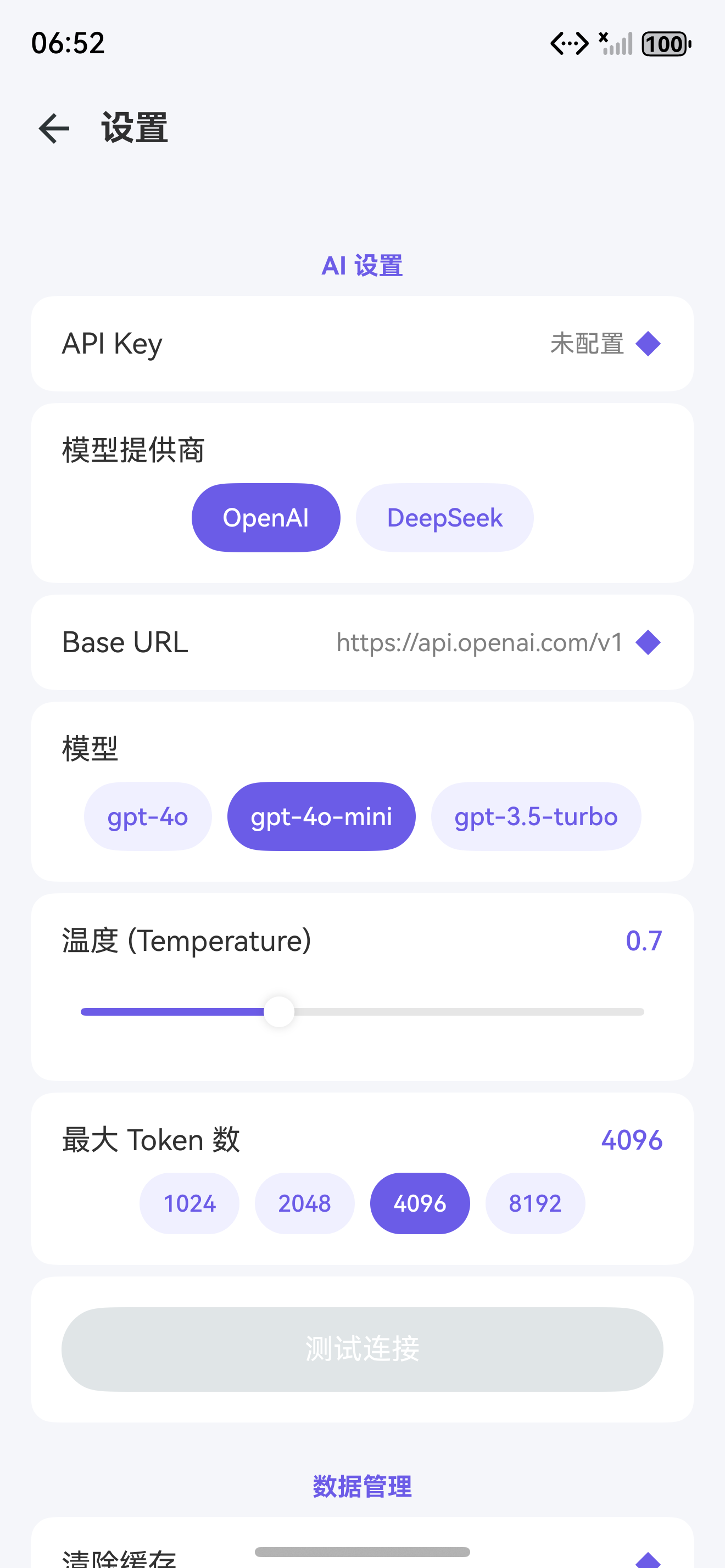
图1:模型参数配置页面
前言
在 [第 09 篇]中,我们实现了 Provider 切换。本文将实现模型参数配置,让用户精细控制 AI 的生成行为。
模型参数 直接影响 AI 输出的质量和风格。Temperature 控制创造性,Top-P 控制多样性,Max Tokens 控制输出长度。合理的参数配置是获得高质量 AI 回复的关键。
一、参数配置设计
| 参数 | 范围 | 默认值 | 作用 | 适用场景 |
|---|---|---|---|---|
| Temperature | 0.0 - 2.0 | 0.7 | 控制随机性,越低越确定 | 代码:0.2,创意:0.9 |
| Top-P | 0.0 - 1.0 | 1.0 | 核采样,控制候选词范围 | 一般保持 0.9-1.0 |
| Max Tokens | 256 - 8192 | 4096 | 最长回复长度 | 聊天:2048,分析:4096 |
| Presence Penalty | -2.0 - 2.0 | 0.0 | 话题重复惩罚 | 开放对话:0.6 |
| Frequency Penalty | -2.0 - 2.0 | 0.0 | 词频重复惩罚 | 技术文档:0.3 |
二、配置页面
2.1 核心页面实现
// pages/ModelConfigPage.ets
@Entry
@Component
struct ModelConfigPage {
  @State temperature: number = 0.7;
  @State topP: number = 1.0;
  @State maxTokens: number = 4096;
  @State presencePenalty: number = 0.0;
  @State frequencyPenalty: number = 0.0;
  @State apiKey: string = '';
  @State showApiKey: boolean = false;
  private provider = AIService.getInstance().getProvider();
  private preferenceUtil = PreferenceUtil.getInstance();

  aboutToAppear() {
    this.loadConfig();
  }

  async loadConfig() {
    const config = this.provider.getConfig();
    this.temperature = config.temperature;
    this.topP = config.topP;
    this.maxTokens = config.maxTokens;
    this.apiKey = await this.preferenceUtil.get('api_key', '');
  }

  saveConfig() {
    this.provider.updateConfig({
      temperature: this.temperature,
      topP: this.topP,
      maxTokens: this.maxTokens
    });
    this.preferenceUtil.set('api_key', this.apiKey);
    ToastUtil.show('配置已保存');
  }

  build() {
    Column() {
      Row() {
        Image($r('app.media.ic_back')).width(24).height(24).onClick(() => RouterUtil.back());
        Text('⚙️ 模型参数').fontSize(18).fontWeight(FontWeight.Bold).margin({ left: 12 });
        Blank();
        Text('保存').fontSize(15).fontColor('#6C5CE7').onClick(() => this.saveConfig());
      }
      .width('100%').height(56).padding({ left: 16, right: 16 });

      Scroll() {
        Column() {
          // Temperature
          this.paramSection('温度 (Temperature)', `${this.temperature.toFixed(1)}`,
            '控制输出的随机性。较低值使输出更确定,较高值增加创造性。',
            this.temperature, 0, 2, 0.1,
            (v) => { this.temperature = v; this.saveConfig(); });

          // Top-P
          this.paramSection('Top-P', `${this.topP.toFixed(1)}`,
            '核采样参数。控制候选词汇的累积概率阈值。',
            this.topP, 0, 1, 0.05,
            (v) => { this.topP = v; this.saveConfig(); });

          // Max Tokens
          this.paramSection('最大 Token', `${this.maxTokens}`,
            '单次生成的最大 Token 数量。',
            this.maxTokens, 256, 8192, 256,
            (v) => { this.maxTokens = v; this.saveConfig(); });

          // Presence Penalty
          this.paramSection('话题重复惩罚', `${this.presencePenalty.toFixed(1)}`,
            '负值鼓励重复话题,正值鼓励新话题。',
            this.presencePenalty, -2, 2, 0.1,
            (v) => { this.presencePenalty = v; });

          // Frequency Penalty
          this.paramSection('词频重复惩罚', `${this.frequencyPenalty.toFixed(1)}`,
            '负值鼓励重复用词,正值鼓励多样化用词。',
            this.frequencyPenalty, -2, 2, 0.1,
            (v) => { this.frequencyPenalty = v; });

          // API Key
          Column() {
            Text('API Key').fontSize(15).fontWeight(FontWeight.Bold)
              .width('100%').margin({ bottom: 8 });
            Row() {
              TextInput({ text: this.apiKey, placeholder: '输入 API Key...' })
                .layoutWeight(1).height(44)
                .type(this.showApiKey ? InputType.Normal : InputType.Password)
                .backgroundColor('#F5F6FA').borderRadius(8)
                .onChange(v => this.apiKey = v);
              Button(this.showApiKey ? '隐藏' : '显示')
                .backgroundColor('#F0F0FF').fontColor('#6C5CE7')
                .borderRadius(8).margin({ left: 8 })
                .onClick(() => { this.showApiKey = !this.showApiKey; });
            }
          }
          .padding(16).backgroundColor(Color.White).borderRadius(12).margin({ bottom: 12 });

          // 预设方案
          Column() {
            Text('预设方案').fontSize(15).fontWeight(FontWeight.Bold)
              .width('100%').margin({ bottom: 12 });
            Row() {
              this.presetButton('精确', 0.2, 0.1, 4096);
              this.presetButton('平衡', 0.7, 1.0, 4096);
              this.presetButton('创意', 1.2, 0.9, 8192);
            }
            .width('100%');
          }
          .padding(16).backgroundColor(Color.White).borderRadius(12);

          // 参数说明表
          Column() {
            Text('参数参考').fontSize(16).fontWeight(FontWeight.Bold)
              .width('100%').margin({ bottom: 8 });
            // 表格略...
          }
          .padding(16).backgroundColor(Color.White).borderRadius(12).margin({ top: 12, bottom: 32 });
        }
        .padding(16);
      }
      .layoutWeight(1);
    }
    .width('100%').height('100%').backgroundColor('#F5F6FA');
  }

  @Builder
  paramSection(label: string, value: string, desc: string,
    current: number, min: number, max: number, step: number,
    onChange: (v: number) => void) {
    Column() {
      Row() {
        Text(label).fontSize(15).fontWeight(FontWeight.Medium);
        Blank();
        Text(value).fontSize(14).fontColor('#6C5CE7').fontWeight(FontWeight.Bold);
      }
      .width('100%');
      Slider({ value: current, min, max, step })
        .width('100%').margin({ top: 4, bottom: 4 })
        .onChange(v => onChange(v));
      Text(desc).fontSize(12).fontColor(Color.Gray).lineHeight(16);
    }
    .padding(16).backgroundColor(Color.White).borderRadius(12).margin({ bottom: 12 });
  }

  @Builder
  presetButton(label: string, temp: number, topP: number, maxT: number) {
    Button() {
      Column() {
        Text(label).fontSize(14).fontWeight(FontWeight.Bold).fontColor(Color.White);
        Text(`T=${temp}`).fontSize(11).fontColor('rgba(255,255,255,0.7)');
      }
      .padding(8);
    }
    .backgroundColor('#6C5CE7').borderRadius(12).height(60).layoutWeight(1)
    .margin({ left: 4, right: 4 })
    .onClick(() => {
      this.temperature = temp;
      this.topP = topP;
      this.maxTokens = maxT;
      this.saveConfig();
    });
  }
}
三、参数推荐表
| 场景 | Temperature | Top-P | Max Tokens | 说明 |
|---|---|---|---|---|
| 代码生成 | 0.2 | 0.1 | 2048 | 精确、确定 |
| 翻译 | 0.3 | 0.3 | 1024 | 忠实原文 |
| 文章总结 | 0.5 | 0.5 | 1024 | 准确简洁 |
| 日常聊天 | 0.7 | 0.9 | 2048 | 自然流畅 |
| 创意写作 | 0.9 | 1.0 | 4096 | 创造性 |
| 诗歌 | 1.2 | 1.0 | 1024 | 高创造性 |
| 头脑风暴 | 1.5 | 1.0 | 2048 | 大胆尝试 |
参数组合:Temperature 和 Top-P 通常不需要同时调整。一般固定一个,调整另一个。推荐固定 Top-P=1.0,只调整 Temperature。
四、参数对 AI 输出的影响
4.1 温度参数详解
export class TemperatureAnalyzer {
  static getEffect(temp: number): string {
    if (temp < 0.3) return '输出高度确定,适合代码和技术文档';
    if (temp < 0.7) return '平衡确定性和创造性,适合一般对话';
    if (temp < 1.0) return '增加多样性,适合创意写作';
    return '高度随机,适合头脑风暴';
  }
}
4.2 参数组合推荐
| 任务类型 | Temperature | Top-P | 说明 |
|---|---|---|---|
| 代码生成 | 0.2 | 0.1 | 确定性优先 |
| 技术问答 | 0.3 | 0.3 | 准确为主 |
| 文章改写 | 0.7 | 0.9 | 保持原意 |
| 创意写作 | 1.2 | 1.0 | 发散思维 |
4.3 调优步骤
- 分析任务类型和输出要求
- 选择基础参数组合
- 运行测试用例验证效果
- 根据输出质量微调参数
- 记录最佳参数配置
持续调优:建议为每种任务类型建立参数档案,记录最佳配置,便于快速切换。
五、高级参数与 Provider 差异
5.1 各 Provider 参数名称对照
| 参数 | OpenAI | DeepSeek | Qwen | 智谱 | 豆包 |
|---|---|---|---|---|---|
| Temperature | temperature | temperature | temperature | temperature | temperature |
| Top-P | top_p | top_p | top_p | top_p | top_p |
| Max Tokens | max_tokens | max_tokens | max_tokens | max_tokens | max_tokens |
| Presence Penalty | presence_penalty | presence_penalty | — | — | repetition_penalty |
| Frequency Penalty | frequency_penalty | frequency_penalty | — | — | — |
| Stop Sequences | stop | stop | stop | stop | stop |
兼容性注意:不同 Provider 的参数名称和范围有细微差异。BaseProvider 已做了统一封装,业务层无需感知这些差异。
5.2 参数对输出的影响测试
export class ParameterTest {
  static async runTest(): Promise<TestResult[]> {
    const results: TestResult[] = [];
    const testCases = [
      { temp: 0.2, label: '低温度-精确' },
      { temp: 0.7, label: '中温度-平衡' },
      { temp: 1.5, label: '高温度-创意' }
    ];

    for (const tc of testCases) {
      const provider = AIService.getInstance().getProvider();
      provider.updateConfig({ temperature: tc.temp });

      const start = Date.now();
      const response = await provider.chat({
        messages: [{ role: 'user', content: '写一句关于春天的描述' }],
        maxTokens: 100
      });

      results.push({
        label: tc.label,
        temperature: tc.temp,
        response: response.content,
        latency: Date.now() - start,
        tokens: response.usage?.totalTokens || 0
      });
    }

    return results;
  }
}

interface TestResult {
  label: string;
  temperature: number;
  response: string;
  latency: number;
  tokens: number;
}
| 温度 | 输出示例 | 特点 |
|---|---|---|
| 0.2 | “春天来了,万物复苏,这是一个充满生机的季节。” | 确切、标准、可预测 |
| 0.7 | “春天悄悄地来了,携着暖风和花香,唤醒了沉睡的大地。” | 自然、流畅、多样性 |
| 1.5 | “春天!那是大地的一次深呼吸,是色彩与生命的狂欢派对!” | 创意、富想象力、不可预测 |
六、配置持久化
6.1 参数保存与恢复
export class ConfigPersistence {
  private static readonly KEYS = {
    TEMPERATURE: 'model_temp',
    TOP_P: 'model_top_p',
    MAX_TOKENS: 'model_max_tokens',
    API_KEY: 'api_key',
    SELECTED_MODEL: 'selected_model',
    SELECTED_PROVIDER: 'selected_provider'
  };

  static async save(context: Context, config: ProviderConfig): Promise<void> {
    const pref = await getPreferences(context, 'model_config');
    await pref.put(this.KEYS.TEMPERATURE, config.temperature);
    await pref.put(this.KEYS.TOP_P, config.topP);
    await pref.put(this.KEYS.MAX_TOKENS, config.maxTokens);
    await pref.put(this.KEYS.SELECTED_MODEL, config.model);
    await pref.put(this.KEYS.SELECTED_PROVIDER, config.provider);
    if (config.apiKey) {
      // 加密存储 API Key
      const encrypted = SimpleCipher.encrypt(config.apiKey);
      await pref.put(this.KEYS.API_KEY, encrypted);
    }
    await pref.flush();
  }

  static async load(context: Context): Promise<Partial<ProviderConfig>> {
    const pref = await getPreferences(context, 'model_config');
    return {
      temperature: await pref.get(this.KEYS.TEMPERATURE, 0.7),
      topP: await pref.get(this.KEYS.TOP_P, 1.0),
      maxTokens: await pref.get(this.KEYS.MAX_TOKENS, 4096),
      model: await pref.get(this.KEYS.SELECTED_MODEL, 'gpt-4o-mini'),
      provider: await pref.get(this.KEYS.SELECTED_PROVIDER, 'OpenAI'),
      apiKey: SimpleCipher.decrypt(await pref.get(this.KEYS.API_KEY, ''))
    };
  }
}

// 简单对称加密
class SimpleCipher {
  private static readonly KEY = 'HarmonyAI_2025';

  static encrypt(text: string): string {
    let result = '';
    for (let i = 0; i < text.length; i++) {
      const code = text.charCodeAt(i) ^ this.KEY.charCodeAt(i % this.KEY.length);
      result += String.fromCharCode(code);
    }
    return btoa(result);
  }

  static decrypt(encoded: string): string {
    try {
      const text = atob(encoded);
      let result = '';
      for (let i = 0; i < text.length; i++) {
        const code = text.charCodeAt(i) ^ this.KEY.charCodeAt(i % this.KEY.length);
        result += String.fromCharCode(code);
      }
      return result;
    } catch {
      return '';
    }
  }
}
安全存储:API Key 使用异或加密后存入 Preferences,防止明文泄露。虽然这不是最高安全级别,但已满足一般应用的安全需求。
七、Git 提交
git add .
git commit -m "feat(config): 模型参数配置

- Temperature/Top-P/Max/Presence/Frequency 五参数
- 预设方案一键切换
- Provider 参数差异兼容
- API Key 加密存储
- 参数测试工具

Co-Authored-By: AtomCode (deepseek-v4-flash) <noreply@atomgit.com>"
git tag v0.1.7
八、参数调优最佳实践
8.1 调优流程
- 明确任务类型和预期输出风格
- 参考场景推荐表选择初始参数
- 生成测试输出并评估质量
- 根据评估结果调整 Temperature
- 如需控制长度,调整 Max Tokens
- 固定最终配置并保存
8.2 常见问题与对策
| 问题现象 | 可能原因 | 调整建议 |
|---|---|---|
| 输出太长 | Max Tokens 过大 | 降低至 1024-2048 |
| 内容重复 | Frequency Penalty 过低 | 提高至 0.3-0.6 |
| 跑题严重 | Temperature 过高 | 降低至 0.3-0.5 |
| 过于保守 | Temperature 过低 | 提高至 0.7-1.0 |
| 输出截断 | Max Tokens 不足 | 提高至 4096-8192 |
8.3 自动化调优工具
export class AutoTuner {
  static async tuneForTask(task: string): Promise<ProviderConfig> {
    const baseConfigs: Record<string, ProviderConfig> = {
      'code': { temperature: 0.2, topP: 0.1, maxTokens: 2048 },
      'chat': { temperature: 0.7, topP: 0.9, maxTokens: 2048 },
      'creative': { temperature: 1.2, topP: 1.0, maxTokens: 4096 },
      'summary': { temperature: 0.5, topP: 0.5, maxTokens: 1024 }
    };
    return baseConfigs[task] || baseConfigs['chat'];
  }
}

interface ProviderConfig {
  temperature: number;
  topP: number;
  maxTokens: number;
}
自动化配置:根据任务类型自动选择最佳参数组合,减少手动调优成本。
总结
本文实现了 模型参数配置。核心要点:
- 5 个关键参数:Temperature / Top-P / Max Tokens / Presence / Frequency
- 实时预览:参数调整即时生效
- 预设方案:精确/平衡/创意一键切换
- 场景推荐表:针对不同任务推荐参数组合
如果这篇文章对你有帮助,欢迎点赞👍、收藏⭐、关注🔔,你的支持是我持续创作的动力!
相关资源

讨论HarmonyOS开发技术,专注于API与组件、DevEco Studio、测试、元服务和应用上架分发等。
更多推荐



 9
9 0
0- 0


 已为社区贡献64条内容

所有评论(0)