HarmonyOS 6.0 @Computed计算属性与@Monitor深度监听——V2状态派生与追踪
写 HarmonyOS 应用最烦的是什么?在 build 里写一堆计算逻辑——总价要遍历数组算、筛选结果要每次手动 filter、格式化日期要反复调用工具函数。V1 时代没辙,只能写 @Watch 勉强凑合,但 @Watch 只能监单个变量、拿不到旧值、不支持深度观测。API 12 的 @Computed 和 @Monitor 彻底解决了状态派生和监听的问题——@Computed 自动缓存计算结果,@Monitor 支持多变量深度监听且能获取变化前后的值。这篇把 @Computed 和 @Monitor 的完整方案讲清楚。
@Computed:同步计算属性
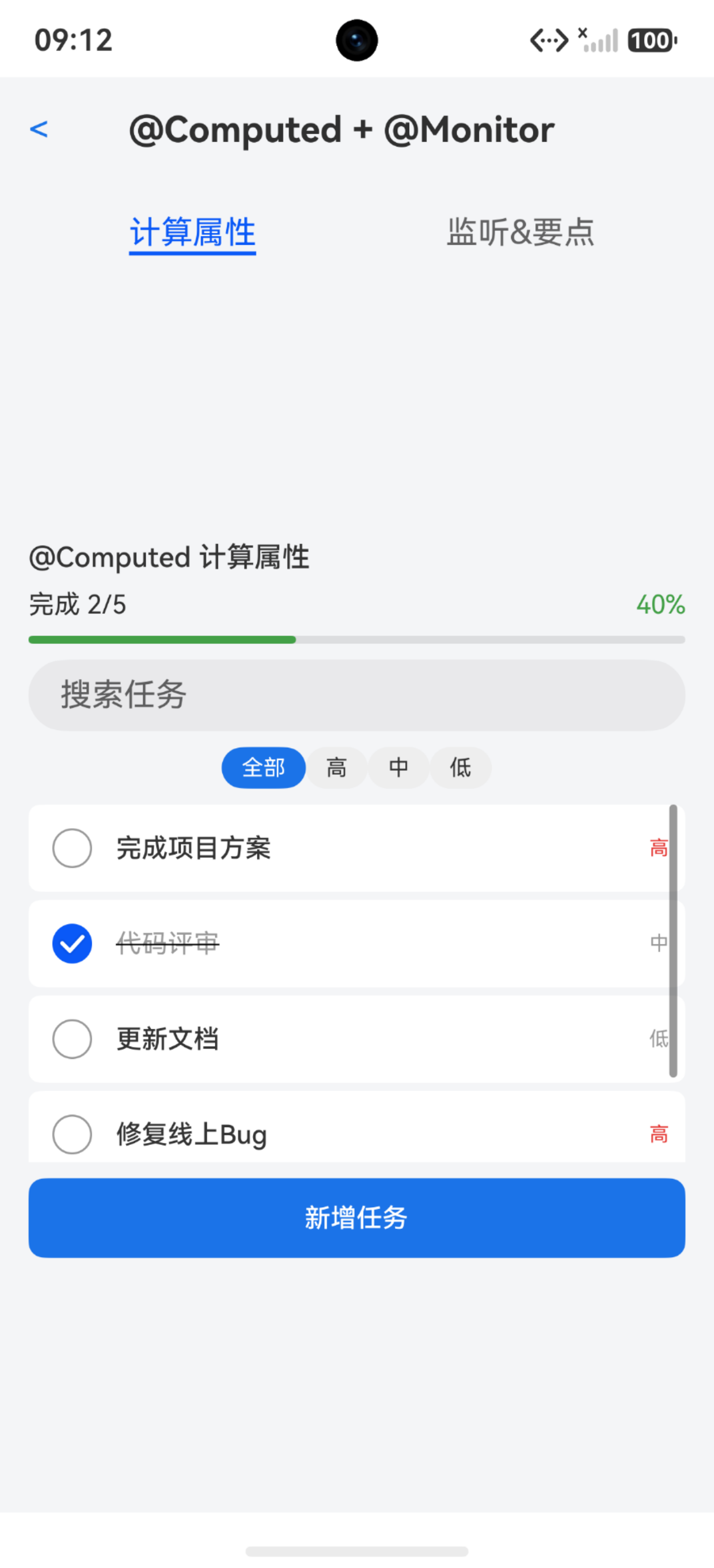
@Computed 是一个 getter 装饰器,标记在 @ComponentV2 的 get 方法上。它的核心价值:只在依赖的状态变化时才重新计算,其他时候直接返回缓存值。
@Entry
@ComponentV2
struct ComputedBasicPage {
  @Local price: number = 100
  @Local quantity: number = 2
  @Local discount: number = 0.9
  @Local note: string = '备注信息'

  @Computed
  get totalPrice(): number {
    return this.price * this.quantity * this.discount
  }

  build() {
    Column({ space: 16 }) {
      Text(`单价: ${this.price}`)
      Text(`数量: ${this.quantity}`)
      Text(`折扣: ${this.discount}`)

      Slider({ value: this.price, min: 1, max: 500 })
        .onChange((v: number) => { this.price = v })
      Slider({ value: this.quantity, min: 1, max: 10 })
        .onChange((v: number) => { this.quantity = v })

      Text(`总价: ${this.totalPrice}`)
        .fontSize(22)
        .fontWeight(FontWeight.Bold)
        .fontColor('#FF4444')

      TextInput({ text: this.note })
        .onChange((v: string) => { this.note = v })

      Text('修改备注不会触发 totalPrice 重新计算')
        .fontSize(12)
        .fontColor('#999999')
    }
    .width('100%')
    .padding(20)
  }
}
关键区别: totalPrice 只依赖 price、quantity、discount,修改 note 不会触发重新计算。@Computed 通过编译期静态分析自动追踪依赖,无需手动声明。
@Computed 的依赖追踪原理
@Computed 在编译期分析 getter 函数体中读取了哪些状态变量,只在这些变量变化时才重新执行计算。其他无关状态变化不会触发。
@Entry
@ComponentV2
struct DependencyTrackPage {
  @Local items: string[] = ['A', 'B', 'C']
  @Local filterKeyword: string = ''
  @Local pageOffset: number = 0

  @Computed
  get filteredItems(): string[] {
    let result: string[] = []
    for (let i = 0; i < this.items.length; i++) {
      if (this.filterKeyword.length === 0 || this.items[i].indexOf(this.filterKeyword) >= 0) {
        result.push(this.items[i])
      }
    }
    return result
  }

  @Computed
  get itemCount(): number {
    return this.filteredItems.length
  }

  build() {
    Column({ space: 12 }) {
      Text('搜索过滤')
        .fontSize(20)
        .fontWeight(FontWeight.Bold)

      TextInput({ placeholder: '输入关键词过滤', text: this.filterKeyword })
        .onChange((v: string) => { this.filterKeyword = v })

      Text(`匹配 ${this.itemCount} 项`)

      List({ space: 8 }) {
        ForEach(this.filteredItems, (item: string) => {
          ListItem() {
            Text(item)
              .fontSize(16)
              .padding(12)
              .backgroundColor('#F5F5F5')
              .borderRadius(8)
          }
        }, (item: string) => item)
      }
      .width('100%')
      .height(200)

      Row() {
        Button('添加项').onClick(() => {
          let newArr = [...this.items]
          newArr.push(`Item ${this.items.length + 1}`)
          this.items = newArr
        })
        Button('清空').onClick(() => {
          this.items = []
        })
      }

      Slider({ value: this.pageOffset, min: 0, max: 100 })
        .onChange((v: number) => { this.pageOffset = v })
      Text('拖动 Slider 不会触发 filteredItems 重新计算')
        .fontSize(12)
        .fontColor('#999999')
    }
    .width('100%')
    .padding(20)
  }
}
注意: filteredItems 依赖 items 和 filterKeyword,itemCount 依赖 filteredItems(传递依赖)。pageOffset 变化不会触发任何计算属性的重新执行。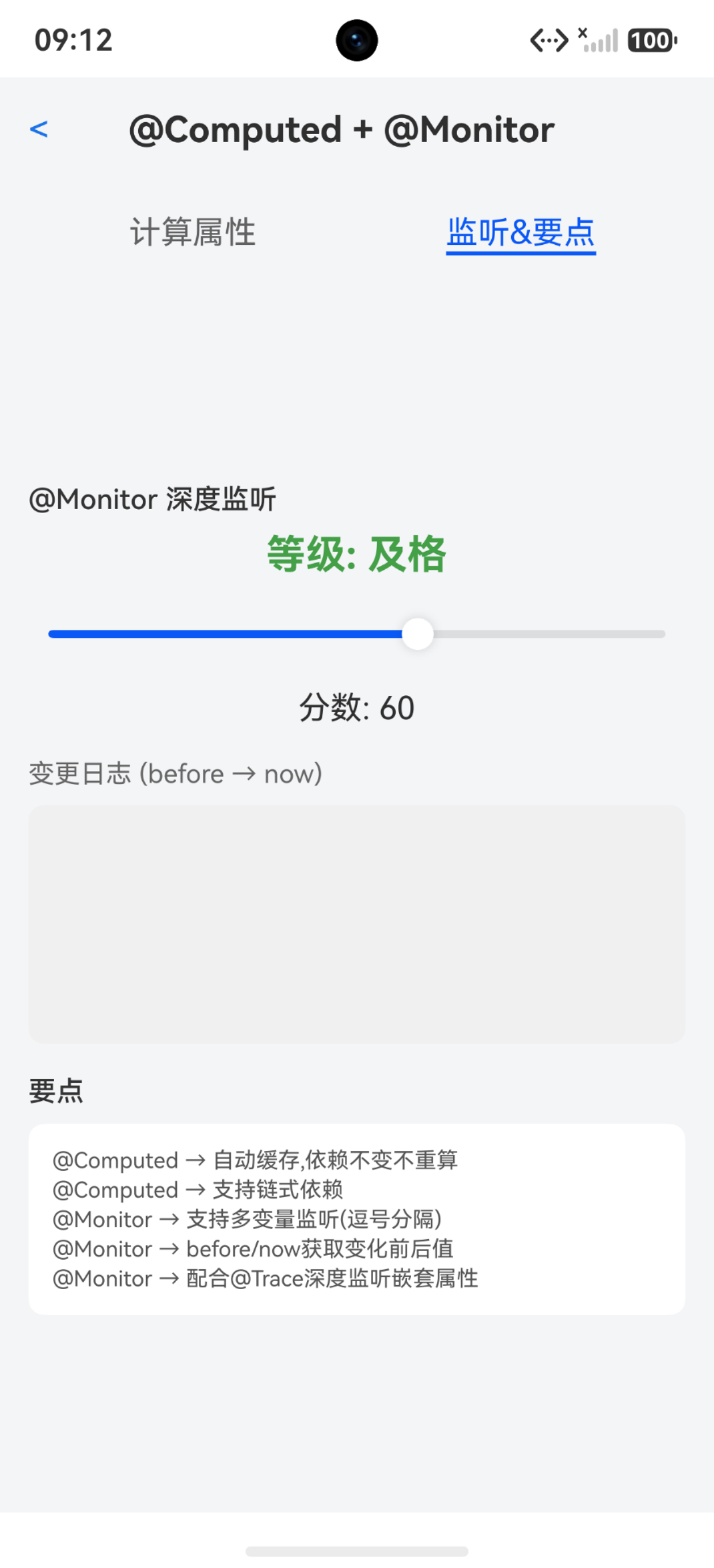
@Computed 链式依赖
@Computed 可以依赖另一个 @Computed,形成链式依赖。框架会自动按依赖顺序计算——底层变化触发上层重新计算。
@ObservedV2
class OrderItem {
  @Trace name: string = ''
  @Trace price: number = 0
  @Trace quantity: number = 1
}

@Entry
@ComponentV2
struct ComputedChainPage {
  @Local items: OrderItem[] = [
    Object.assign(new OrderItem(), { name: '耳机', price: 199, quantity: 1 }),
    Object.assign(new OrderItem(), { name: '键盘', price: 349, quantity: 2 }),
    Object.assign(new OrderItem(), { name: '鼠标', price: 89, quantity: 1 })
  ]
  @Local taxRate: number = 0.08

  @Computed
  get subtotal(): number {
    let total = 0
    for (let i = 0; i < this.items.length; i++) {
      total += this.items[i].price * this.items[i].quantity
    }
    return total
  }

  @Computed
  get tax(): number {
    return this.subtotal * this.taxRate
  }

  @Computed
  get total(): number {
    return this.subtotal + this.tax
  }

  build() {
    Column({ space: 12 }) {
      Text('订单结算')
        .fontSize(22)
        .fontWeight(FontWeight.Bold)

      List({ space: 8 }) {
        ForEach(this.items, (item: OrderItem, index: number) => {
          ListItem() {
            Row() {
              Text(item.name).layoutWeight(1).fontSize(16)
              Text(`¥${item.price} x ${item.quantity}`).fontSize(14).fontColor('#666666')
            }
            .padding(12)
            .backgroundColor('#F5F5F5')
            .borderRadius(8)
          }
        }, (item: OrderItem, index: number) => `${index}_${item.name}`)
      }
      .width('100%')
      .height(200)

      Column() {
        Row() {
          Text('小计').layoutWeight(1)
          Text(`¥${this.subtotal.toFixed(2)}`).fontColor('#333333')
        }
        Row() {
          Text(`税费 (${(this.taxRate * 100).toFixed(0)}%)`).layoutWeight(1)
          Text(`¥${this.tax.toFixed(2)}`).fontColor('#666666')
        }
        Row() {
          Text('合计').layoutWeight(1).fontWeight(FontWeight.Bold)
          Text(`¥${this.total.toFixed(2)}`).fontColor('#FF4444').fontWeight(FontWeight.Bold)
        }
      }
      .padding(16)
      .backgroundColor('#FFFFFF')
      .borderRadius(12)
      .border({ width: 1, color: '#E0E0E0' })

      Slider({ value: this.taxRate * 100, min: 0, max: 20 })
        .onChange((v: number) => { this.taxRate = v / 100 })
      Text(`税率: ${(this.taxRate * 100).toFixed(0)}%`)
    }
    .width('100%')
    .padding(20)
  }
}
关键区别: subtotal → tax → total 形成三级依赖链。items 变化时 subtotal 先算,然后 tax 基于新 subtotal 算,最后 total 基于新 tax 算——全自动,不用手动调用。
@Monitor:深度状态监听
@Monitor 是 V2 版本的状态监听器,比 V1 的 @Watch 强大得多:支持同时监听多个变量、能获取变化前后的值、支持深度观测。
@Entry
@ComponentV2
struct MonitorBasicPage {
  @Local score: number = 60
  @Local level: string = '及格'
  @Local changeLog: string = ''

  @Monitor('score')
  onScoreChange(monitor: IMonitor) {
    monitor.dirty.forEach((path: string) => {
      let before = monitor.value(path)?.before ?? 0
      let now = monitor.value(path)?.now ?? 0
      this.changeLog = `分数从 ${before} 变为 ${now}\n` + this.changeLog
    })

    if (this.score >= 90) {
      this.level = '优秀'
    } else if (this.score >= 80) {
      this.level = '良好'
    } else if (this.score >= 60) {
      this.level = '及格'
    } else {
      this.level = '不及格'
    }
  }

  build() {
    Column({ space: 16 }) {
      Text(`等级: ${this.level}`)
        .fontSize(22)
        .fontWeight(FontWeight.Bold)
        .fontColor(this.score >= 60 ? '#4CAF50' : '#FF4444')

      Slider({ value: this.score, min: 0, max: 100 })
        .onChange((v: number) => { this.score = Math.round(v) })

      Text(`当前分数: ${this.score}`)
        .fontSize(18)

      Scroll() {
        Text(this.changeLog)
          .fontSize(13)
          .fontColor('#666666')
      }
      .width('100%')
      .height(120)
      .padding(12)
      .backgroundColor('#F5F5F5')
      .borderRadius(8)
    }
    .width('100%')
    .padding(20)
  }
}
关键区别: monitor.value(path)?.before 和 monitor.value(path)?.now 分别拿到变化前和变化后的值。V1 的 @Watch 只能拿到新值,拿不到旧值——这是 @Monitor 最大的优势。
@Monitor 同时监听多个变量
@Monitor 可以用逗号分隔同时监听多个状态变量,任何一个变化都会触发回调。
@Entry
@ComponentV2
struct MultiMonitorPage {
  @Local width: number = 100
  @Local height: number = 100
  @Local color: string = '#007DFF'
  @Local log: string = ''

  @Monitor('width', 'height', 'color')
  onDimensionChange(monitor: IMonitor) {
    monitor.dirty.forEach((path: string) => {
      let before = monitor.value(path)?.before ?? ''
      let now = monitor.value(path)?.now ?? ''
      this.log = `${path}: ${before} → ${now}\n` + this.log
    })
  }

  @Computed
  get area(): number {
    return this.width * this.height
  }

  build() {
    Column({ space: 16 }) {
      Text(`面积: ${this.area}`)
        .fontSize(20)
        .fontWeight(FontWeight.Bold)

      Column()
        .width(this.width)
        .height(this.height)
        .backgroundColor(this.color)
        .borderRadius(8)

      Row() {
        Text('宽')
        Slider({ value: this.width, min: 50, max: 300 })
          .layoutWeight(1)
          .onChange((v: number) => { this.width = Math.round(v) })
      }
      Row() {
        Text('高')
        Slider({ value: this.height, min: 50, max: 300 })
          .layoutWeight(1)
          .onChange((v: number) => { this.height = Math.round(v) })
      }
      Row() {
        ForEach(['#007DFF', '#4CAF50', '#FF9800', '#E91E63'], (c: string) => {
          Column()
            .width(40)
            .height(40)
            .borderRadius(20)
            .backgroundColor(c)
            .border({ width: 2, color: this.color === c ? '#333333' : Color.Transparent })
            .onClick(() => { this.color = c })
        }, (c: string) => c)
      }

      Scroll() {
        Text(this.log)
          .fontSize(12)
          .fontColor('#666666')
      }
      .width('100%')
      .height(100)
      .padding(8)
      .backgroundColor('#F5F5F5')
      .borderRadius(8)
    }
    .width('100%')
    .padding(20)
  }
}
注意: monitor.dirty 是一个数组,包含本次触发监听的所有变化路径。一次回调中可能有多个变量同时变化(比如 animateTo 里同时改宽高),dirty 会有多个元素。
@Monitor 配合 @Trace 深度监听
@Monitor 监听 @ObservedV2 + @Trace 修饰的对象时,可以深度观测嵌套属性的变化。
import { ObservedV2, Trace } from '@kit.ArkUI'

@ObservedV2
class PlayerState {
  @Trace name: string = ''
  @Trace hp: number = 100
  @Trace mp: number = 50
  @Trace level: number = 1
}

@Entry
@ComponentV2
struct DeepMonitorPage {
  @Local player: PlayerState = new PlayerState()
  @Local battleLog: string = ''

  @Monitor('player')
  onPlayerChange(monitor: IMonitor) {
    monitor.dirty.forEach((path: string) => {
      let before = monitor.value(path)?.before
      let now = monitor.value(path)?.now
      if (before instanceof PlayerState && now instanceof PlayerState) {
        if (before.hp !== now.hp) {
          this.battleLog = `HP: ${before.hp} → ${now.hp}\n` + this.battleLog
        }
        if (before.mp !== now.mp) {
          this.battleLog = `MP: ${before.mp} → ${now.mp}\n` + this.battleLog
        }
        if (before.level !== now.level) {
          this.battleLog = `升级! Lv.${before.level} → Lv.${now.level}\n` + this.battleLog
        }
      }
    })
  }

  build() {
    Column({ space: 16 }) {
      Text(`${this.player.name} Lv.${this.player.level}`)
        .fontSize(22)
        .fontWeight(FontWeight.Bold)

      Row() {
        Text(`HP: ${this.player.hp}/100`).layoutWeight(1).fontColor('#FF4444')
        Text(`MP: ${this.player.mp}/50`).layoutWeight(1).fontColor('#2196F3')
      }

      Progress({ value: this.player.hp, total: 100 })
        .color('#FF4444')
      Progress({ value: this.player.mp, total: 50 })
        .color('#2196F3')

      Row() {
        Button('受伤').onClick(() => { this.player.hp = Math.max(0, this.player.hp - 15) })
        Button('治疗').onClick(() => { this.player.hp = Math.min(100, this.player.hp + 20) })
        Button('施法').onClick(() => { this.player.mp = Math.max(0, this.player.mp - 10) })
        Button('升级').onClick(() => {
          this.player.level++
          this.player.hp = 100
          this.player.mp = 50
        })
      }

      Scroll() {
        Text(this.battleLog)
          .fontSize(12)
          .fontColor('#666666')
      }
      .width('100%')
      .height(150)
      .padding(8)
      .backgroundColor('#F5F5F5')
      .borderRadius(8)
    }
    .width('100%')
    .padding(20)
  }
}
关键区别: @Monitor 监听的是 player 整体变量,但因为 player 的属性被 @Trace 修饰,属性变化也会触发 @Monitor 回调,且可以通过 before/now 对比出具体哪个属性变了。
@Monitor 在 @ObservedV2 类中使用
@Monitor 不只能在 @ComponentV2 中使用,还可以直接放在 @ObservedV2 修饰的类里——监听自身属性变化,做业务逻辑处理。
import { ObservedV2, Trace, Monitor } from '@kit.ArkUI'

@ObservedV2
class TemperatureSensor {
  @Trace celsius: number = 25

  @Monitor('celsius')
  onCelsiusChange(monitor: IMonitor) {
    monitor.dirty.forEach((path: string) => {
      let before = monitor.value(path)?.before ?? 0
      let now = monitor.value(path)?.now ?? 0
      if (now > 35) {
        console.warn(`高温警告: ${before}°C → ${now}°C`)
      }
    })
  }

  get fahrenheit(): number {
    return this.celsius * 9 / 5 + 32
  }
}

@Entry
@ComponentV2
struct ClassMonitorPage {
  @Local sensor: TemperatureSensor = new TemperatureSensor()

  build() {
    Column({ space: 16 }) {
      Text(`温度: ${this.sensor.celsius}°C / ${this.sensor.fahrenheit.toFixed(1)}°F`)
        .fontSize(22)
        .fontWeight(FontWeight.Bold)
        .fontColor(this.sensor.celsius > 35 ? '#FF4444' : '#333333')

      Slider({ value: this.sensor.celsius, min: -20, max: 50 })
        .onChange((v: number) => { this.sensor.celsius = Math.round(v) })

      Text(this.sensor.celsius > 35 ? '⚠ 高温警告' : '温度正常')
        .fontSize(16)
        .fontColor(this.sensor.celsius > 35 ? '#FF4444' : '#4CAF50')
    }
    .width('100%')
    .padding(20)
  }
}
注意: @Monitor 在类中的监听逻辑与 UI 无关——它是纯业务逻辑的监听,比如打日志、发警告、做校验。UI 层的响应交给 @Trace 自动完成。
@Computed vs @Monitor 的分工
| 能力 | @Computed | @Monitor |
|---|---|---|
| 用途 | 派生新值 | 监听变化做副作用 |
| 返回值 | 有(getter 返回值) | 无(void) |
| 缓存 | 自动缓存,依赖不变不重算 | 无缓存,每次变化都触发 |
| 副作用 | 禁止(纯计算) | 允许(打日志、发请求等) |
| 获取旧值 | 不支持 | 支持 (before/now) |
| 多变量 | 自动追踪依赖 | 手动声明监听列表 |
| 使用位置 | @ComponentV2 的 getter | @ComponentV2 方法或 @ObservedV2 类 |
完整示例:带筛选和统计的任务管理
把 @Computed 和 @Monitor 组合起来,做一个带实时统计和变更日志的任务管理页面。
import { ObservedV2, Trace } from '@kit.ArkUI'

@ObservedV2
class TaskItem {
  @Trace id: string = ''
  @Trace title: string = ''
  @Trace completed: boolean = false
  @Trace priority: string = 'medium'
}

@Entry
@ComponentV2
struct TaskManagerPage {
  @Local tasks: TaskItem[] = [
    Object.assign(new TaskItem(), { id: '1', title: '完成项目方案', completed: false, priority: 'high' }),
    Object.assign(new TaskItem(), { id: '2', title: '代码评审', completed: true, priority: 'medium' }),
    Object.assign(new TaskItem(), { id: '3', title: '更新文档', completed: false, priority: 'low' }),
    Object.assign(new TaskItem(), { id: '4', title: '修复线上Bug', completed: false, priority: 'high' }),
    Object.assign(new TaskItem(), { id: '5', title: '整理周报', completed: true, priority: 'medium' })
  ]
  @Local filterKeyword: string = ''
  @Local filterPriority: string = 'all'
  @Local changeLog: string = ''

  @Computed
  get filteredTasks(): TaskItem[] {
    let result: TaskItem[] = []
    for (let i = 0; i < this.tasks.length; i++) {
      let task = this.tasks[i]
      let keywordMatch = this.filterKeyword.length === 0 || task.title.indexOf(this.filterKeyword) >= 0
      let priorityMatch = this.filterPriority === 'all' || task.priority === this.filterPriority
      if (keywordMatch && priorityMatch) {
        result.push(task)
      }
    }
    return result
  }

  @Computed
  get totalCount(): number {
    return this.filteredTasks.length
  }

  @Computed
  get completedCount(): number {
    let count = 0
    for (let i = 0; i < this.filteredTasks.length; i++) {
      if (this.filteredTasks[i].completed) {
        count++
      }
    }
    return count
  }

  @Computed
  get progressPercent(): number {
    if (this.totalCount === 0) return 0
    return Math.round(this.completedCount / this.totalCount * 100)
  }

  @Monitor('tasks')
  onTasksChange(monitor: IMonitor) {
    monitor.dirty.forEach((path: string) => {
      let before = monitor.value(path)?.before
      let now = monitor.value(path)?.now
      if (before instanceof Array && now instanceof Array) {
        if (now.length > before.length) {
          this.changeLog = `新增了任务\n` + this.changeLog
        } else if (now.length < before.length) {
          this.changeLog = `删除了任务\n` + this.changeLog
        } else {
          this.changeLog = `任务状态变更\n` + this.changeLog
        }
      }
    })
  }

  toggleTask(id: string) {
    let newTasks = this.tasks.map((task: TaskItem) => {
      if (task.id === id) {
        let newTask = new TaskItem()
        newTask.id = task.id
        newTask.title = task.title
        newTask.completed = !task.completed
        newTask.priority = task.priority
        return newTask
      }
      return task
    })
    this.tasks = newTasks
  }

  addTask() {
    let newTask = new TaskItem()
    newTask.id = Date.now().toString()
    newTask.title = '新任务 ' + (this.tasks.length + 1)
    newTask.completed = false
    newTask.priority = 'medium'
    this.tasks = [...this.tasks, newTask]
  }

  build() {
    Column() {
      Text('任务管理')
        .fontSize(22)
        .fontWeight(FontWeight.Bold)
        .padding({ left: 20, top: 16, bottom: 12 })

      Row() {
        Text(`完成 ${this.completedCount}/${this.totalCount}`)
          .fontSize(14)
        Blank()
        Text(`${this.progressPercent}%`)
          .fontSize(14)
          .fontColor('#4CAF50')
      }
      .width('100%')
      .padding({ left: 20, right: 20 })

      Progress({ value: this.progressPercent, total: 100 })
        .color('#4CAF50')
        .width('90%')

      TextInput({ placeholder: '搜索任务', text: this.filterKeyword })
        .width('90%')
        .onChange((v: string) => { this.filterKeyword = v })

      Row() {
        ForEach(['all', 'high', 'medium', 'low'], (p: string) => {
          Text(p === 'all' ? '全部' : (p === 'high' ? '高' : (p === 'medium' ? '中' : '低')))
            .padding({ left: 12, right: 12, top: 6, bottom: 6 })
            .fontSize(13)
            .backgroundColor(this.filterPriority === p ? '#007DFF' : '#EEEEEE')
            .fontColor(this.filterPriority === p ? Color.White : '#333333')
            .borderRadius(16)
            .onClick(() => { this.filterPriority = p })
        }, (p: string) => p)
      }

      List({ space: 8 }) {
        ForEach(this.filteredTasks, (task: TaskItem) => {
          ListItem() {
            Row() {
              Checkbox()
                .select(task.completed)
                .onChange(() => { this.toggleTask(task.id) })
              Column() {
                Text(task.title)
                  .fontSize(15)
                  .fontWeight(task.completed ? FontWeight.Normal : FontWeight.Medium)
                  .fontColor(task.completed ? '#999999' : '#333333')
                  .decoration({ type: task.completed ? TextDecorationType.LineThrough : TextDecorationType.None })
                Text(task.priority === 'high' ? '高优先级' : (task.priority === 'medium' ? '中优先级' : '低优先级'))
                  .fontSize(12)
                  .fontColor(task.priority === 'high' ? '#FF4444' : '#999999')
                  .margin({ top: 2 })
              }
              .alignItems(HorizontalAlign.Start)
              .margin({ left: 12 })
              .layoutWeight(1)
            }
            .padding(12)
            .backgroundColor('#FFFFFF')
            .borderRadius(8)
          }
        }, (task: TaskItem) => task.id)
      }
      .width('100%')
      .layoutWeight(1)
      .padding({ left: 16, right: 16 })

      Row() {
        Scroll() {
          Text(this.changeLog)
            .fontSize(11)
            .fontColor('#999999')
        }
        .width('60%')
        .height(40)
        .padding(4)
        .backgroundColor('#F5F5F5')
        .borderRadius(4)

        Button('+ 新任务')
          .onClick(() => this.addTask())
      }
      .width('100%')
      .padding(16)
    }
    .width('100%')
    .height('100%')
    .backgroundColor('#F5F5F5')
  }
}
这个任务管理页面综合运用了 @Computed(筛选、统计、进度)和 @Monitor(变更日志)。筛选条件变化时只有 filteredTasks 及其依赖的 totalCount、completedCount、progressPercent 重新计算,其他状态不受影响。
踩坑清单
| 问题 | 原因 | 解决 |
|---|---|---|
| @Computed 在 @Component 中使用 | @Computed 只能在 @ComponentV2 中 | 换用 @ComponentV2 |
| @Computed 里修改了状态 | 计算属性应该是纯函数 | 副作用逻辑放 @Monitor |
| @Computed 返回类型不明确 | 未显式声明返回类型 | 建议显式声明 getter 返回类型 |
| @Monitor 拿不到旧值 | 用了 V1 的 @Watch | @Monitor 通过 monitor.value().before 获取 |
| @Monitor 监听多个变量语法错 | 用空格分隔 | 用逗号分隔:@Monitor(‘a’, ‘b’) |
| @Monitor 监听非状态变量 | 普通变量不可监听 | 监听的变量必须被 @Local/@Param/@Provider 等装饰 |
| @Monitor 深度监听不触发 | 对象属性未加 @Trace | 配合 @ObservedV2 + @Trace 使用 |
| @Computed 缓存失效 | getter 里有随机数或时间戳 | @Computed 必须是确定性计算 |
| @Monitor 在 @Component 中使用 | @Monitor 只能在 @ComponentV2 中 | 换用 @ComponentV2 |
| @Computed 和 @Monitor 循环触发 | @Monitor 里修改了 @Computed 的依赖 | 避免循环依赖 |

讨论HarmonyOS开发技术,专注于API与组件、DevEco Studio、测试、元服务和应用上架分发等。
更多推荐


 7
7 0
0- 0


 已为社区贡献90条内容

所有评论(0)