HarmonyOS 6.0 PersistenceV2持久化存储——V2时代的磁盘级状态管理
V1 的 PersistentStorage 用过的同学都知道,坑不少:和 AppStorage 耦合导致初始化时序混乱、不支持复杂数据类型、持久化和内存状态同步不可靠。API 12 推出的 PersistenceV2 彻底重新设计了持久化方案——基于 @ObservedV2 + @Trace 的属性级自动持久化,connect 一行绑定,修改即落盘,退出应用数据还在。这篇把 PersistenceV2 的完整方案讲清楚。
PersistenceV2 基本用法
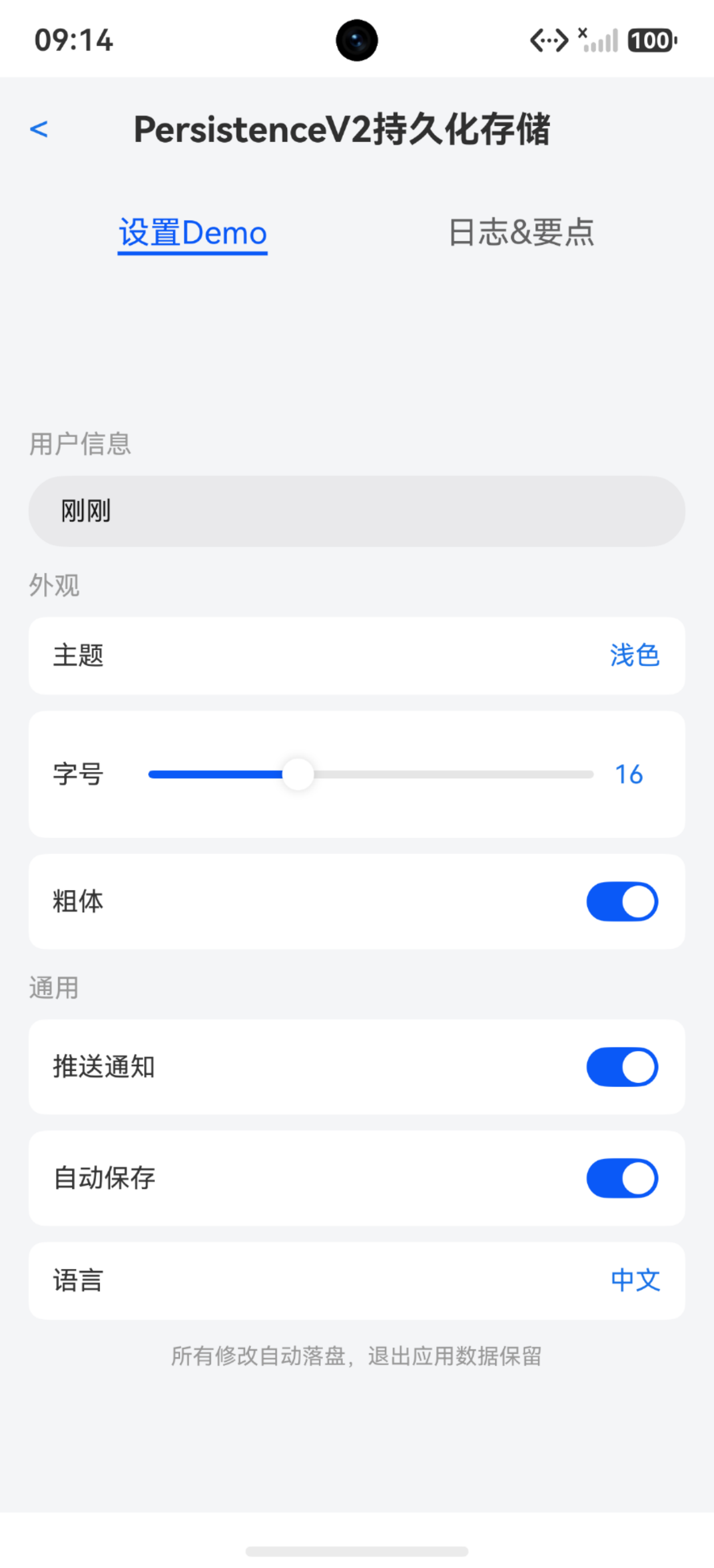
PersistenceV2 的核心 API 只有一个:connect。传入类型和默认值构造器,自动创建或获取持久化实例。
import { PersistenceV2, ObservedV2, Trace } from '@kit.ArkUI'

@ObservedV2
class UserSettings {
  @Trace username: string = '未登录'
  @Trace theme: string = 'light'
  @Trace fontSize: number = 16
  @Trace notifications: boolean = true
}

@Entry
@ComponentV2
struct PersistenceBasicPage {
  @Local settings: UserSettings = PersistenceV2.connect(UserSettings, () => new UserSettings())!

  build() {
    Column({ space: 16 }) {
      Text('用户设置(持久化)')
        .fontSize(22)
        .fontWeight(FontWeight.Bold)

      TextInput({ text: this.settings.username, placeholder: '输入用户名' })
        .width('100%')
        .onChange((v: string) => { this.settings.username = v })

      Row() {
        Text('主题')
          .layoutWeight(1)
        Text(this.settings.theme === 'light' ? '浅色' : '深色')
          .onClick(() => {
            this.settings.theme = this.settings.theme === 'light' ? 'dark' : 'light'
          })
          .fontColor('#007DFF')
      }

      Row() {
        Text('字号')
          .layoutWeight(1)
        Slider({ value: this.settings.fontSize, min: 12, max: 24 })
          .width(180)
          .onChange((v: number) => { this.settings.fontSize = Math.round(v) })
      }

      Row() {
        Text('通知')
          .layoutWeight(1)
        Toggle({ type: ToggleType.Switch, isOn: this.settings.notifications })
          .onChange((v: boolean) => { this.settings.notifications = v })
      }

      Text('退出应用再进入,以上设置仍然保留')
        .fontSize(13)
        .fontColor('#999999')
    }
    .width('100%')
    .height('100%')
    .padding(20)
    .backgroundColor(this.settings.theme === 'dark' ? '#1E1E1E' : '#F5F5F5')
  }
}
关键区别: 修改 this.settings.username 时,@Trace 触发 UI 刷新,PersistenceV2 自动将变更写入磁盘。不需要手动调 save——@Trace 属性的变更就是自动持久化的触发器。
connect 的参数与返回值
connect 方法签名:PersistenceV2.connect(type, keyOrDefaultCreator, defaultCreator?)
- type:类构造函数,同时作为默认 key(用 type.name)
- keyOrDefaultCreator:可选的自定义 key 字符串,或默认值构造器
- defaultCreator:当磁盘无数据时,用此函数创建默认实例
@ObservedV2
class AppConfig {
  @Trace language: string = 'zh'
  @Trace region: string = 'CN'
}

@Entry
@ComponentV2
struct ConnectParamsPage {
  @Local config1: AppConfig = PersistenceV2.connect(AppConfig, () => new AppConfig())!
  @Local config2: AppConfig = PersistenceV2.connect(AppConfig, 'custom_key', () => new AppConfig())!

  build() {
    Column({ space: 12 }) {
      Text('connect 参数说明')
        .fontSize(20)
        .fontWeight(FontWeight.Bold)

      Text('方式1: 用类型名作 key')
        .fontSize(14)
      Text(`config1 language: ${this.config1.language}`)

      Text('方式2: 自定义 key')
        .fontSize(14)
      Text(`config2 language: ${this.config2.language}`)

      Button('修改 config1')
        .onClick(() => { this.config1.language = 'en' })
      Button('修改 config2')
        .onClick(() => { this.config2.language = 'ja' })
    }
    .width('100%')
    .padding(20)
  }
}
注意: 不传 key 时用类型的 name 作为存储 key(如 AppConfig)。传了自定义 key 则按自定义 key 存储。同一个类型不同 key 是两条独立的持久化数据。
自动持久化 vs 手动 save
@Trace 修饰的属性变更会自动触发持久化。但非 @Trace 的属性变更不会,需要手动调 save。
@ObservedV2
class DraftData {
  @Trace title: string = ''
  @Trace content: string = ''
  lastSavedTime: number = 0
}

@Entry
@ComponentV2
struct AutoSavePage {
  @Local draft: DraftData = PersistenceV2.connect(DraftData, () => new DraftData())!

  manualSave() {
    this.draft.lastSavedTime = Date.now()
    PersistenceV2.save(DraftData)
  }

  build() {
    Column({ space: 16 }) {
      Text('草稿编辑')
        .fontSize(22)
        .fontWeight(FontWeight.Bold)

      TextInput({ text: this.draft.title, placeholder: '标题' })
        .width('100%')
        .onChange((v: string) => { this.draft.title = v })

      TextArea({ text: this.draft.content, placeholder: '内容' })
        .width('100%')
        .height(200)
        .onChange((v: string) => { this.draft.content = v })

      Text('title 和 content 自动持久化,lastSavedTime 需手动 save')
        .fontSize(12)
        .fontColor('#999999')

      Button('手动保存时间戳')
        .onClick(() => this.manualSave())
    }
    .width('100%')
    .padding(20)
  }
}
关键区别: title 和 content 被 @Trace 修饰,修改后自动落盘。lastSavedTime 没有 @Trace,修改后必须手动调 PersistenceV2.save(DraftData) 才能持久化。
remove 与 keys
PersistenceV2 提供 remove 删除指定 key 的持久化数据,keys 查看所有已持久化的 key。
@ObservedV2
class CacheData {
  @Trace value: string = ''
}

@Entry
@ComponentV2
struct RemoveKeysPage {
  @Local cache: CacheData = PersistenceV2.connect(CacheData, () => new CacheData())!
  @Local allKeys: string[] = []

  refreshKeys() {
    this.allKeys = PersistenceV2.keys()
  }

  removeCache() {
    PersistenceV2.remove(CacheData)
    this.cache = new CacheData()
  }

  build() {
    Column({ space: 16 }) {
      Text('持久化 Key 管理')
        .fontSize(20)
        .fontWeight(FontWeight.Bold)

      TextInput({ text: this.cache.value, placeholder: '输入值' })
        .onChange((v: string) => { this.cache.value = v })

      Button('查看所有 Keys')
        .onClick(() => this.refreshKeys())

      ForEach(this.allKeys, (key: string) => {
        Text(`key: ${key}`)
          .fontSize(14)
          .fontColor('#666666')
      }, (key: string) => key)

      Button('删除 CacheData')
        .onClick(() => this.removeCache())

      Text('删除后重新 connect 会使用默认值')
        .fontSize(12)
        .fontColor('#999999')
    }
    .width('100%')
    .padding(20)
  }
}
注意: remove 之后,磁盘上的数据被清除。再次 connect 时会使用 defaultCreator 创建新的默认实例,而不是恢复旧数据。
嵌套类型的 @Type 标记
持久化数据如果包含嵌套的复杂类型(比如对象里嵌对象),需要用 @Type 标记子类型,否则反序列化时会丢失类型信息。
import { PersistenceV2, ObservedV2, Trace, Type } from '@kit.ArkUI'

@ObservedV2
class Address {
  @Trace city: string = ''
  @Trace district: string = ''
}

@ObservedV2
class UserProfile {
  @Trace name: string = ''
  @Trace age: number = 0
  @Type(Address)
  @Trace address: Address = new Address()
}

@Entry
@ComponentV2
struct NestedTypePage {
  @Local profile: UserProfile = PersistenceV2.connect(UserProfile, () => new UserProfile())!

  build() {
    Column({ space: 16 }) {
      Text('嵌套类型持久化')
        .fontSize(22)
        .fontWeight(FontWeight.Bold)

      TextInput({ text: this.profile.name, placeholder: '姓名' })
        .onChange((v: string) => { this.profile.name = v })

      TextInput({ text: this.profile.address.city, placeholder: '城市' })
        .onChange((v: string) => { this.profile.address.city = v })

      TextInput({ text: this.profile.address.district, placeholder: '区县' })
        .onChange((v: string) => { this.profile.address.district = v })

      Text('不加 @Type(Address),address 反序列化后会是纯对象而非 Address 实例')
        .fontSize(12)
        .fontColor('#FF4444')
    }
    .width('100%')
    .padding(20)
  }
}
关键区别: @Type(Address) 告诉 PersistenceV2 在反序列化时用 Address 类重建对象,而不是返回一个普通 Object。不加 @Type 的话,this.profile.address 反序列化后没有 city/district 属性,只有普通 Object 的键值。
跨页面数据共享
PersistenceV2 是应用级别的——不同页面 connect 同一个 key,拿到的是同一份数据。修改一处,其他页面下次 connect 时自动同步。
@ObservedV2
class CounterState {
  @Trace count: number = 0
}

@Entry
@ComponentV2
struct PageA {
  @Local counter: CounterState = PersistenceV2.connect(CounterState, () => new CounterState())!

  build() {
    Column({ space: 16 }) {
      Text('页面 A')
        .fontSize(22)
        .fontWeight(FontWeight.Bold)

      Text(`计数: ${this.counter.count}`)
        .fontSize(48)
        .fontWeight(FontWeight.Bold)

      Row() {
        Button('-1').onClick(() => { this.counter.count-- })
        Button('+1').onClick(() => { this.counter.count++ })
        Button('归零').onClick(() => { this.counter.count = 0 })
      }
    }
    .width('100%')
    .height('100%')
    .justifyContent(FlexAlign.Center)
  }
}
注意: 在页面 A 修改 count 后,切到页面 B(也 connect 了 CounterState),count 值是更新后的——PersistenceV2 的数据是全局共享的。
notifyOnError 错误处理
序列化或反序列化失败时,PersistenceV2 可以通过 notifyOnError 注册错误回调。
@Entry
@ComponentV2
struct ErrorHandlePage {
  @Local errorMsg: string = ''

  aboutToAppear(): void {
    PersistenceV2.notifyOnError((key: string, reason: string, msg: string) => {
      this.errorMsg = `持久化错误: key=${key}, reason=${reason}, msg=${msg}`
    })
  }

  build() {
    Column({ space: 16 }) {
      Text('错误处理')
        .fontSize(20)
        .fontWeight(FontWeight.Bold)

      if (this.errorMsg.length > 0) {
        Text(this.errorMsg)
          .fontSize(14)
          .fontColor('#FF4444')
          .padding(12)
          .backgroundColor('#FFEBEE')
          .borderRadius(8)
      }

      Text('当序列化/反序列化失败时,错误信息会在这里显示')
        .fontSize(13)
        .fontColor('#999999')
    }
    .width('100%')
    .padding(20)
  }
}
PersistenceV2 vs PersistentStorage 对比
| 能力 | PersistenceV2 (V2) | PersistentStorage (V1) |
|---|---|---|
| 数据模型 | @ObservedV2 + @Trace 类 | AppStorage 键值对 |
| 自动持久化 | @Trace 属性自动落盘 | 需手动 PersistProp |
| 跨页面共享 | connect 同 key 即共享 | 通过 AppStorage 间接共享 |
| 嵌套类型 | @Type 标记支持 | 不支持 |
| 深度观测 | @Trace 属性级 | 仅一层 |
| 初始化时序 | connect 即用,无时序问题 | 依赖 AppStorage 初始化顺序 |
| 错误回调 | notifyOnError | 无 |
| 适用组件 | @ComponentV2 | @Component |
完整示例:设置页面持久化
把前面的知识点串起来,做一个完整的设置页面——用户偏好、主题、字号全部持久化,退出重进完全恢复。
import { PersistenceV2, ObservedV2, Trace, Type } from '@kit.ArkUI'

@ObservedV2
class FontConfig {
  @Trace size: number = 16
  @Trace bold: boolean = false
}

@ObservedV2
class AppPreferences {
  @Trace username: string = ''
  @Trace avatarColor: string = '#007DFF'
  @Trace theme: string = 'light'
  @Trace language: string = 'zh'
  @Trace notifications: boolean = true
  @Trace autoSave: boolean = true
  @Type(FontConfig)
  @Trace font: FontConfig = new FontConfig()
}

@ComponentV2
struct SettingItem {
  @Param label: string = ''
  @Param content: string = ''
  @Event onClick: () => void = () => {}

  build() {
    Row() {
      Text(this.label)
        .fontSize(15)
        .layoutWeight(1)
      Text(this.content)
        .fontSize(14)
        .fontColor('#007DFF')
    }
    .width('100%')
    .padding({ left: 16, right: 16, top: 14, bottom: 14 })
    .backgroundColor('#FFFFFF')
    .borderRadius(8)
    .onClick(() => this.onClick())
  }
}

@ComponentV2
struct ToggleItem {
  @Param label: string = ''
  @Param isOn: boolean = false
  @Event onChange: (val: boolean) => void = () => {}

  build() {
    Row() {
      Text(this.label)
        .fontSize(15)
        .layoutWeight(1)
      Toggle({ type: ToggleType.Switch, isOn: this.isOn })
        .onChange((v: boolean) => this.onChange(v))
    }
    .width('100%')
    .padding({ left: 16, right: 16, top: 14, bottom: 14 })
    .backgroundColor('#FFFFFF')
    .borderRadius(8)
  }
}

@Entry
@ComponentV2
struct SettingsPersistencePage {
  @Local prefs: AppPreferences = PersistenceV2.connect(AppPreferences, () => new AppPreferences())!
  @Local showColorPicker: boolean = false

  build() {
    Scroll() {
      Column({ space: 12 }) {
        Text('应用设置')
          .fontSize(24)
          .fontWeight(FontWeight.Bold)
          .padding({ bottom: 8 })

        Text('个人信息')
          .fontSize(13)
          .fontColor('#999999')
          .padding({ left: 4 })

        SettingItem({
          label: '用户名',
          content: this.prefs.username.length > 0 ? this.prefs.username : '未设置',
          onClick: () => {}
        })

        TextInput({ text: this.prefs.username, placeholder: '修改用户名' })
          .width('100%')
          .padding({ left: 16, right: 16 })
          .onChange((v: string) => { this.prefs.username = v })

        Text('外观')
          .fontSize(13)
          .fontColor('#999999')
          .padding({ left: 4, top: 8 })

        SettingItem({
          label: '主题',
          content: this.prefs.theme === 'light' ? '浅色' : '深色',
          onClick: () => {
            this.prefs.theme = this.prefs.theme === 'light' ? 'dark' : 'light'
          }
        })

        Row() {
          Text('头像颜色')
            .fontSize(15)
            .layoutWeight(1)
          ForEach(['#007DFF', '#4CAF50', '#FF9800', '#E91E63', '#9C27B0'], (color: string) => {
            Column()
              .width(28)
              .height(28)
              .borderRadius(14)
              .backgroundColor(color)
              .border({ width: 2, color: this.prefs.avatarColor === color ? '#333333' : Color.Transparent })
              .margin({ left: 6 })
              .onClick(() => { this.prefs.avatarColor = color })
          }, (color: string) => color)
        }
        .width('100%')
        .padding({ left: 16, right: 16, top: 14, bottom: 14 })
        .backgroundColor('#FFFFFF')
        .borderRadius(8)

        Row() {
          Text('字号')
            .fontSize(15)
          Slider({ value: this.prefs.font.size, min: 12, max: 24 })
            .layoutWeight(1)
            .margin({ left: 12 })
          Text(`${this.prefs.font.size}`)
            .fontSize(14)
            .fontColor('#007DFF')
            .width(30)
        }
        .width('100%')
        .padding({ left: 16, right: 16, top: 14, bottom: 14 })
        .backgroundColor('#FFFFFF')
        .borderRadius(8)

        ToggleItem({
          label: '粗体',
          isOn: this.prefs.font.bold,
          onChange: (v: boolean) => { this.prefs.font.bold = v }
        })

        Text('通用')
          .fontSize(13)
          .fontColor('#999999')
          .padding({ left: 4, top: 8 })

        ToggleItem({
          label: '推送通知',
          isOn: this.prefs.notifications,
          onChange: (v: boolean) => { this.prefs.notifications = v }
        })

        ToggleItem({
          label: '自动保存',
          isOn: this.prefs.autoSave,
          onChange: (v: boolean) => { this.prefs.autoSave = v }
        })

        SettingItem({
          label: '语言',
          content: this.prefs.language === 'zh' ? '中文' : 'English',
          onClick: () => {
            this.prefs.language = this.prefs.language === 'zh' ? 'en' : 'zh'
          }
        })

        Button('重置所有设置')
          .width('100%')
          .backgroundColor('#FF4444')
          .margin({ top: 16 })
          .onClick(() => {
            PersistenceV2.remove(AppPreferences)
            this.prefs = new AppPreferences()
          })

        Text('所有设置自动持久化,退出应用后仍然保留')
          .fontSize(12)
          .fontColor('#999999')
          .padding({ top: 8 })
      }
      .padding(20)
    }
    .width('100%')
    .height('100%')
    .backgroundColor(this.prefs.theme === 'dark' ? '#1E1E1E' : '#F5F5F5')
  }
}
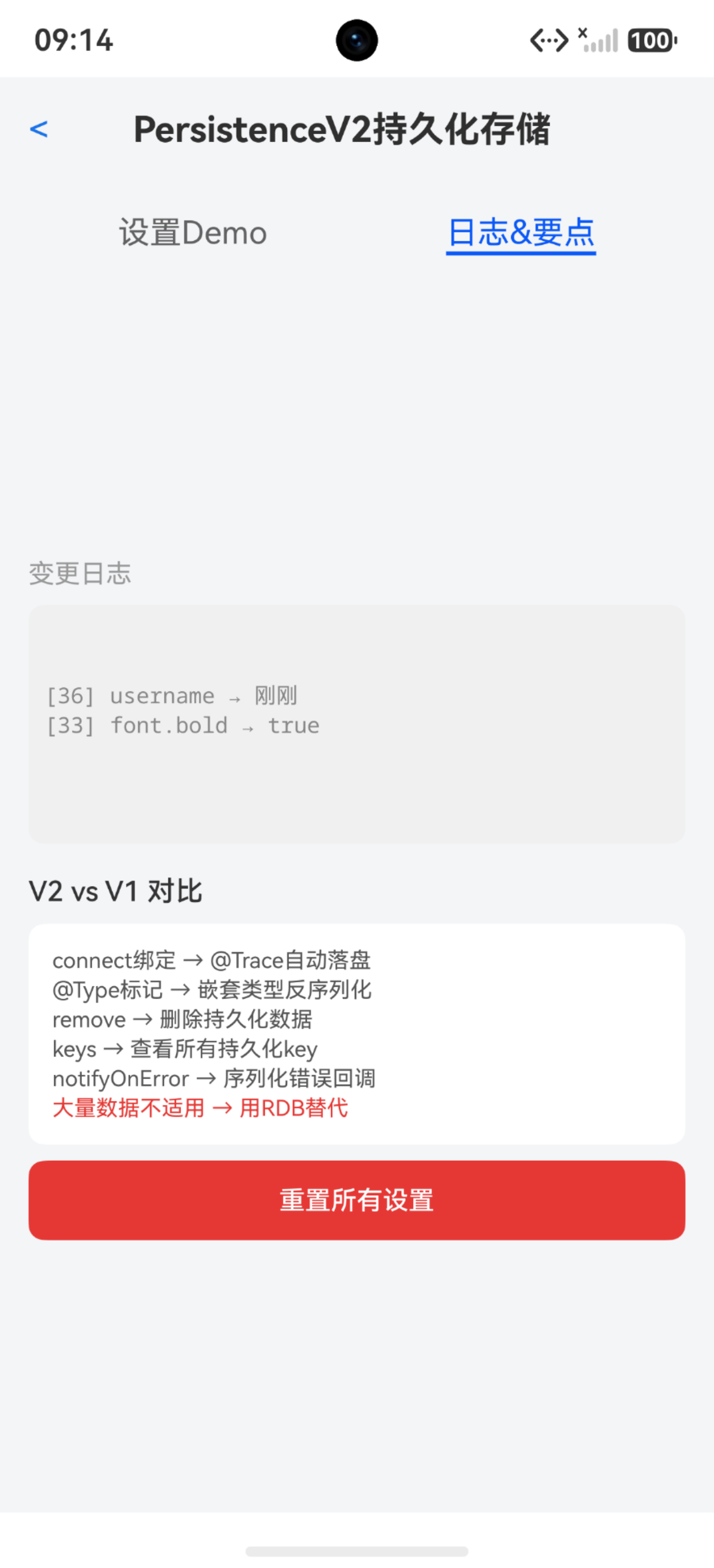
这个设置页面覆盖了 PersistenceV2 的核心用法:connect 绑定、@Trace 自动持久化、@Type 嵌套类型、remove 重置、跨页面共享。所有设置修改后自动落盘,退出应用重新进入完全恢复。
踩坑清单
| 问题 | 原因 | 解决 |
|---|---|---|
| connect 返回 undefined | 磁盘数据损坏 | 判空后用默认值兜底 |
| 嵌套对象反序列化丢属性 | 未加 @Type 标记 | 对嵌套复杂类型加 @Type(ClassName) |
| 非 @Trace 属性修改不落盘 | 只有 @Trace 属性自动持久化 | 手动调 PersistenceV2.save() |
| 数组类型持久化异常 | PersistenceV2 不推荐存数组 | 用 @ObservedV2 类包裹数组或改用 RDB |
| 数据量大时持久化慢 | PersistenceV2 基于文件序列化 | 大量数据用 RDB 而非 PersistenceV2 |
| remove 后 connect 返回旧值 | remove 后组件未重新初始化 | remove 后手动创建新实例 |
| 同一类型多 key 冲突 | 忘了传自定义 key | 用 connect(Type, ‘uniqueKey’, () => new Type()) |
| V1/V2 持久化混用 | PersistentStorage 和 PersistenceV2 同时操作 | 统一用 PersistenceV2 |
| connect 在 loadContent 之前调用 | UI 实例未就绪 | 在 loadContent 回调后调用 connect |
| notifyOnError 未生效 | 注册太晚,错误已发生 | 尽早注册 notifyOnError |

讨论HarmonyOS开发技术,专注于API与组件、DevEco Studio、测试、元服务和应用上架分发等。
更多推荐


 5
5 0
0- 0


 已为社区贡献100条内容

所有评论(0)