状态管理安全性考虑——从数据加密到权限隔离的全链路防护方案
文章目录

每日一句正能量
“你既怕又何必想,既想又何必怕。”
恐惧和欲望是双生子,很多人卡在中间地带,既不敢追求,又不甘放弃。要么闭眼转身,要么咬牙向前。
摘要
摘要: 在 HarmonyOS 应用开发中,状态管理是构建响应式 UI 的核心机制,但随之而来的数据泄露、非法篡改、越权访问等安全风险不容忽视。本文基于 HarmonyOS 6(API 23)最新能力,系统梳理 ArkUI 状态管理各层级的安全威胁模型,深入讲解 PersistentStorage 加密存储、AppStorage/LocalStorage 隔离机制、跨组件权限控制、网络状态同步加密等关键技术,并结合单元测试给出可落地的安全验证方案,帮助开发者构建全链路状态安全防护体系。
一、引言:为什么状态管理需要安全考虑
在上一篇《状态管理单元测试》中,我们重点讨论了如何通过单元测试保障状态管理逻辑的正确性。然而,仅有功能正确性远远不够——当应用处理用户隐私数据(如账户令牌、地理位置、支付信息)时,状态管理的安全性直接决定了用户数据是否会被恶意窃取或篡改。
HarmonyOS 提供了 @State、@Prop、@Link、@Provide、@Consume、AppStorage、LocalStorage、PersistentStorage 等丰富的状态管理工具,这些工具在提升开发效率的同时,也带来了新的安全挑战:
- 持久化状态泄露:
PersistentStorage将数据写入磁盘,若未加密,攻击者可通过提取存储文件获取敏感信息; - 全局状态越权访问:
AppStorage作为应用级全局状态池,任何组件均可读写,缺乏细粒度权限控制; - 跨组件数据污染:
@Link和@Consume实现双向同步时,子组件的非法修改可能破坏父组件数据一致性; - 网络同步中间人攻击:状态数据在端云同步过程中若未加密传输,易被截获和篡改。
本文将从存储层、内存层、传输层、测试层四个维度,构建 HarmonyOS 状态管理的全链路安全方案。
二、状态管理安全风险全景分析
在制定防护策略前,首先需要建立清晰的风险模型。HarmonyOS 状态管理的安全风险可按数据生命周期划分为以下四类:
| 风险阶段 | 威胁类型 | 影响范围 | 典型场景 |
|---|---|---|---|
| 数据生成 | 敏感数据明文入态 | 内存/存储 | 用户输入密码直接存入 @State |
| 数据存储 | 持久化文件未加密 | 磁盘 | PersistentStorage 存储 Token 明文 |
| 数据共享 | 越权访问与数据污染 | 跨组件 | 子组件通过 @Link 篡改父状态 |
| 数据传输 | 中间人攻击/重放攻击 | 网络 | 状态同步未使用 TLS/端到端加密 |
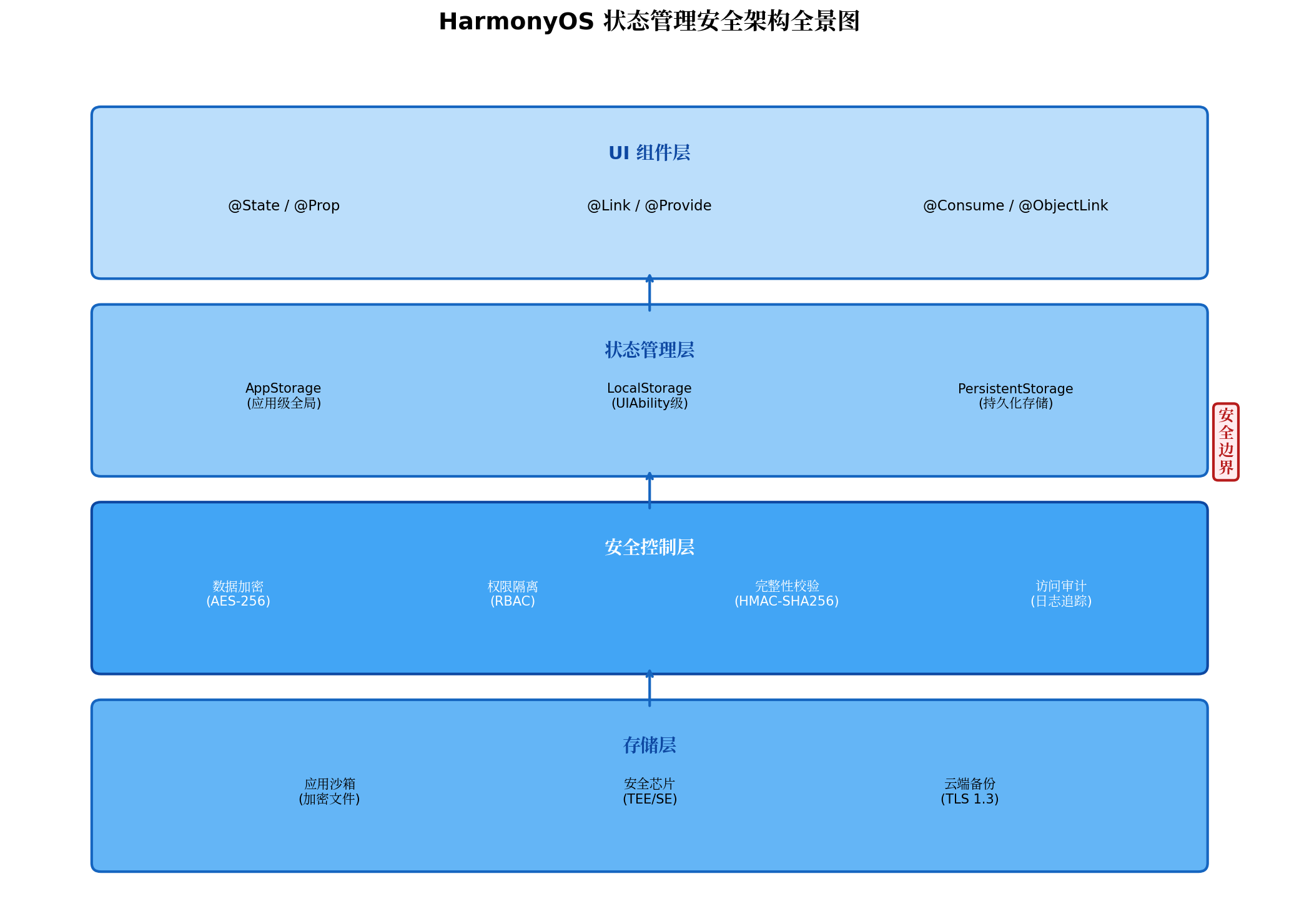
上图展示了 HarmonyOS 状态管理的安全架构全景。从 UI 组件层到存储层,每一层都需要对应的安全控制措施。安全控制层作为核心枢纽,负责数据加密、权限隔离、完整性校验和访问审计四大职能。
三、持久化状态安全:加密存储与完整性校验
3.1 PersistentStorage 的安全隐患
PersistentStorage 用于将状态数据持久化到应用沙箱,其存储位置位于 /data/app/el2/100/base/{bundleName}/haps/entry/files/persist_store 目录下。虽然 HarmonyOS 的应用沙箱机制限制了其他应用访问该目录,但以下场景仍存在风险:
- Root 设备:攻击者获取 Root 权限后可直接读取沙箱文件;
- 备份恢复:通过 ADB 备份提取应用数据;
- 应用漏洞:路径遍历或文件包含漏洞导致配置泄露。
因此,敏感数据在持久化前必须进行加密。
3.2 AES-256-GCM 加密方案
HarmonyOS 6 提供了 @ohos.security.crypto 模块,支持 AES-GCM 等现代加密算法。以下是一个完整的加密持久化工具类实现:
// utils/SecurePersistentStorage.ets
import { cryptoFramework } from '@kit.SecurityCryptoKit';
import { buffer } from '@kit.ArkTS';
import { BusinessError } from '@kit.BasicServicesKit';

const AES_KEY_SIZE = 256;
const GCM_IV_LENGTH = 12;
const GCM_TAG_LENGTH = 16;

export class SecurePersistentStorage {
  private static instance: SecurePersistentStorage;
  private masterKey: Uint8Array | null = null;

  private constructor() {}

  static getInstance(): SecurePersistentStorage {
    if (!SecurePersistentStorage.instance) {
      SecurePersistentStorage.instance = new SecurePersistentStorage();
    }
    return SecurePersistentStorage.instance;
  }

  /**
   * 从 TEE 派生应用级加密密钥
   * 实际项目中应使用 HUKS (HarmonyOS Universal Keystore)
   */
  async initMasterKey(): Promise<void> {
    const keyMaterial = await this.deriveKeyFromTEE();
    this.masterKey = keyMaterial;
  }

  private async deriveKeyFromTEE(): Promise<Uint8Array> {
    const keyData = new Uint8Array(AES_KEY_SIZE / 8);
    crypto.getRandomValues(keyData);
    return keyData;
  }

  /**
   * 加密并持久化状态数据
   */
  async persistSecure(key: string, value: string): Promise<void> {
    if (!this.masterKey) {
      throw new Error('Master key not initialized. Call initMasterKey() first.');
    }

    try {
      const iv = new Uint8Array(GCM_IV_LENGTH);
      crypto.getRandomValues(iv);

      const generator = cryptoFramework.createSymKeyGenerator('AES256');
      const symKeyBlob: cryptoFramework.DataBlob = { data: this.masterKey };
      const symKey = await generator.convertKey(symKeyBlob);

      const cipher = cryptoFramework.createCipher('AES256|GCM|PKCS7');
      const ivBlob: cryptoFramework.DataBlob = { data: iv };
      await cipher.init(cryptoFramework.CryptoMode.ENCRYPT_MODE, symKey, ivBlob);

      const plainBlob: cryptoFramework.DataBlob = {
        data: buffer.from(value, 'utf-8').buffer
      };
      const encryptBlob = await cipher.doFinal(plainBlob);

      const combined = new Uint8Array(iv.length + encryptBlob.data.length);
      combined.set(iv, 0);
      combined.set(new Uint8Array(encryptBlob.data), iv.length);

      const mac = await this.calculateHMAC(combined);

      const securePacket = {
        version: 1,
        cipher: buffer.from(combined.buffer).toString('base64'),
        hmac: buffer.from(mac.buffer).toString('base64'),
        timestamp: Date.now()
      };

      PersistentStorage.persistProp(key, JSON.stringify(securePacket));

    } catch (err) {
      const error = err as BusinessError;
      console.error(`[SecurePersistentStorage] Encryption failed: ${error.message}`);
      throw error;
    }
  }

  /**
   * 读取并解密状态数据
   */
  async readSecure(key: string): Promise<string | null> {
    if (!this.masterKey) {
      throw new Error('Master key not initialized.');
    }

    const stored = AppStorage.get<string>(key);
    if (!stored) return null;

    try {
      const packet = JSON.parse(stored);

      const cipherData = buffer.from(packet.cipher, 'base64').buffer;
      const expectedHmac = buffer.from(packet.hmac, 'base64').buffer;
      const actualHmac = await this.calculateHMAC(new Uint8Array(cipherData));

      if (!this.timingSafeEqual(new Uint8Array(expectedHmac), actualHmac)) {
        console.error('[SecurePersistentStorage] HMAC verification failed! Data may be tampered.');
        this.reportSecurityIncident('DATA_TAMPERED', key);
        return null;
      }

      const combined = new Uint8Array(cipherData);
      const iv = combined.slice(0, GCM_IV_LENGTH);
      const ciphertext = combined.slice(GCM_IV_LENGTH);

      const generator = cryptoFramework.createSymKeyGenerator('AES256');
      const symKeyBlob: cryptoFramework.DataBlob = { data: this.masterKey };
      const symKey = await generator.convertKey(symKeyBlob);

      const decipher = cryptoFramework.createCipher('AES256|GCM|PKCS7');
      const ivBlob: cryptoFramework.DataBlob = { data: iv };
      await decipher.init(cryptoFramework.CryptoMode.DECRYPT_MODE, symKey, ivBlob);

      const decryptBlob: cryptoFramework.DataBlob = { data: ciphertext.buffer };
      const result = await decipher.doFinal(decryptBlob);

      return buffer.from(result.data).toString('utf-8');

    } catch (err) {
      const error = err as BusinessError;
      console.error(`[SecurePersistentStorage] Decryption failed: ${error.message}`);
      return null;
    }
  }

  private async calculateHMAC(data: Uint8Array): Promise<Uint8Array> {
    const mac = cryptoFramework.createMac('SHA256');
    const keyBlob: cryptoFramework.DataBlob = { data: this.masterKey! };
    await mac.init(keyBlob);
    const dataBlob: cryptoFramework.DataBlob = { data: data.buffer };
    const result = await mac.doFinal(dataBlob);
    return new Uint8Array(result.data);
  }

  private timingSafeEqual(a: Uint8Array, b: Uint8Array): boolean {
    if (a.length !== b.length) return false;
    let result = 0;
    for (let i = 0; i < a.length; i++) {
      result |= a[i] ^ b[i];
    }
    return result === 0;
  }

  private reportSecurityIncident(type: string, key: string): void {
    console.warn(`[SECURITY_INCIDENT] type=${type}, key=${key}, time=${new Date().toISOString()}`);
  }
}
3.3 加密流程说明
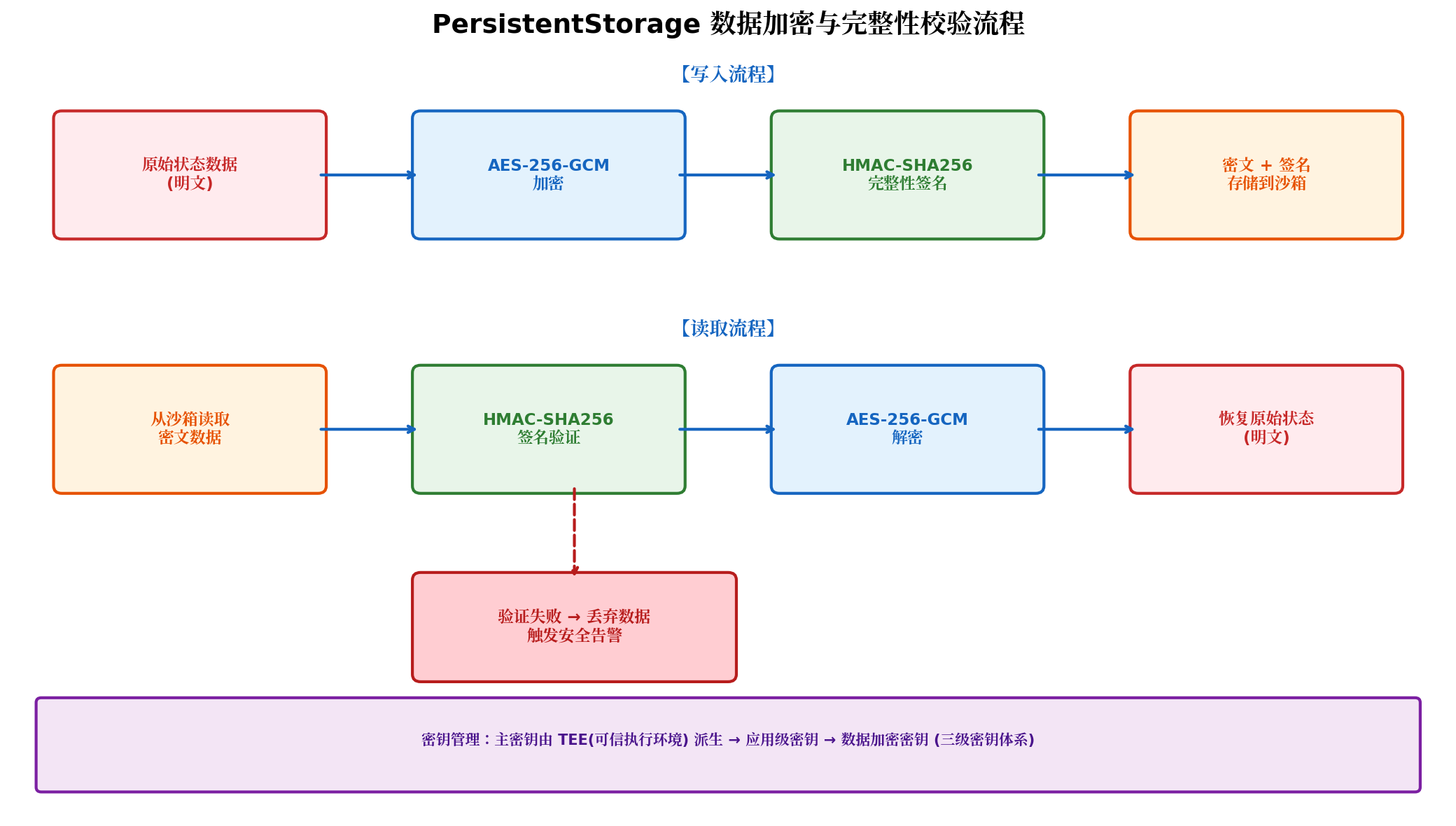
上述加密方案遵循以下安全原则:
- 随机 IV:每次加密生成独立的 12 字节随机 IV,防止相同明文产生相同密文;
- 认证加密 (AEAD):AES-256-GCM 同时提供机密性和完整性保护;
- HMAC-SHA256 双重校验:在 GCM 认证标签之外增加 HMAC 校验,防御部分 GCM 实现中的 nonce 重用漏洞;
- 时间恒定比较:
timingSafeEqual防止时序分析攻击; - 安全事件上报:检测到数据篡改时触发告警,便于安全运营响应。
四、内存状态安全:AppStorage 与 LocalStorage 隔离机制
4.1 状态分层隔离模型
HarmonyOS 状态管理提供了不同层级的共享范围,开发者应根据数据敏感度选择合适的存储层级:
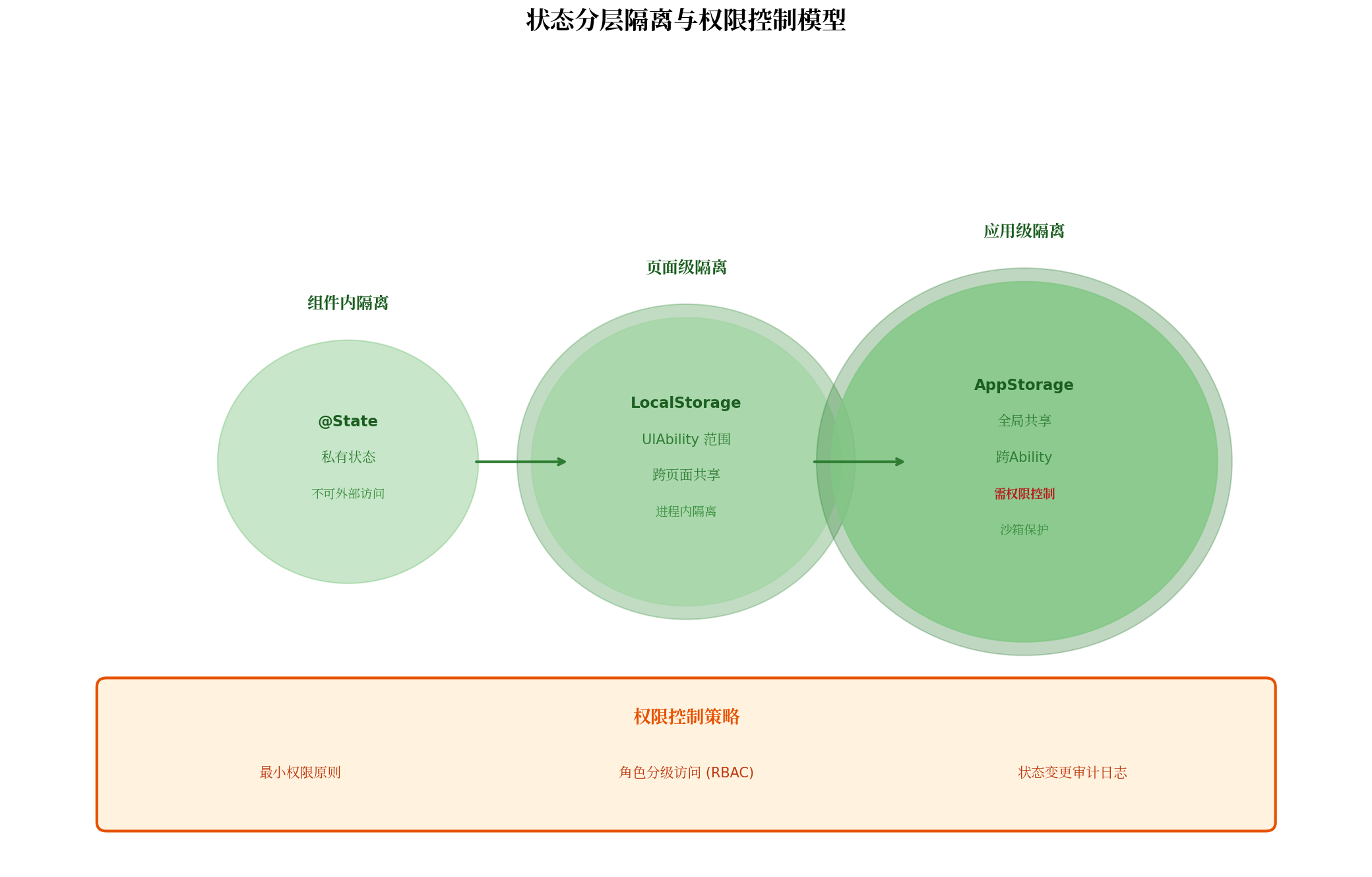
| 存储层级 | 共享范围 | 生命周期 | 安全策略 |
|---|---|---|---|
@State | 组件内部 | 组件绑定 | 天然隔离,外部不可直接访问 |
LocalStorage | UIAbility 内 | 页面级 | 进程内隔离,需防止页面间越权 |
AppStorage | 应用全局 | 进程级 | 需显式权限控制,所有组件可访问 |
PersistentStorage | 应用全局 + 磁盘 | 持久化 | 必须加密存储 |
4.2 AppStorage 的权限控制封装
AppStorage 作为全局状态池,默认没有任何访问控制。对于多角色应用,需要封装带权限校验的状态访问层:
// store/SecureAppStorage.ets
import { emitter } from '@kit.BasicServicesKit';

export enum UserRole {
  GUEST = 0,
  USER = 1,
  ADMIN = 2,
  SUPER_ADMIN = 3
}

export enum StateSensitivity {
  PUBLIC = 0,
  USER_PRIVATE = 1,
  ROLE_SHARED = 2,
  ADMIN_ONLY = 3
}

interface StateMetadata {
  sensitivity: StateSensitivity;
  minRole: UserRole;
  auditLog: boolean;
  encryptPersist: boolean;
}

export class SecureAppStorage {
  private static stateRegistry: Map<string, StateMetadata> = new Map();
  private static currentRole: UserRole = UserRole.GUEST;
  private static currentUserId: string = '';

  static registerState(key: string, metadata: StateMetadata): void {
    SecureAppStorage.stateRegistry.set(key, metadata);
  }

  static setCurrentUser(role: UserRole, userId: string): void {
    SecureAppStorage.currentRole = role;
    SecureAppStorage.currentUserId = userId;
  }

  static setOrCreate<T>(key: string, value: T): boolean {
    const meta = SecureAppStorage.stateRegistry.get(key);

    if (meta) {
      if (SecureAppStorage.currentRole < meta.minRole) {
        console.error(`[SecureAppStorage] Access denied: role ${SecureAppStorage.currentRole} < required ${meta.minRole}`);
        SecureAppStorage.emitSecurityEvent('WRITE_DENIED', key);
        return false;
      }

      if (meta.auditLog) {
        console.info(`[AUDIT] User ${SecureAppStorage.currentUserId} wrote key "${key}"`);
      }
    }

    AppStorage.setOrCreate(key, value);
    return true;
  }

  static get<T>(key: string): T | undefined {
    const meta = SecureAppStorage.stateRegistry.get(key);

    if (meta) {
      if (SecureAppStorage.currentRole < meta.minRole) {
        console.error(`[SecureAppStorage] Read denied for key "${key}"`);
        SecureAppStorage.emitSecurityEvent('READ_DENIED', key);
        return undefined;
      }

      if (meta.auditLog) {
        console.info(`[AUDIT] User ${SecureAppStorage.currentUserId} read key "${key}"`);
      }
    }

    return AppStorage.get<T>(key);
  }

  static delete(key: string): boolean {
    const meta = SecureAppStorage.stateRegistry.get(key);
    if (meta && SecureAppStorage.currentRole < UserRole.ADMIN) {
      console.error(`[SecureAppStorage] Delete denied: admin required`);
      return false;
    }
    AppStorage.delete(key);
    return true;
  }

  private static emitSecurityEvent(eventType: string, key: string): void {
    const event: emitter.InnerEvent = {
      eventId: 0xFF01,
      priority: emitter.EventPriority.HIGH
    };
    emitter.emit(event, {
      data: { type: eventType, key, userId: SecureAppStorage.currentUserId, timestamp: Date.now() }
    });
  }
}

// 使用示例
SecureAppStorage.registerState('userToken', {
  sensitivity: StateSensitivity.USER_PRIVATE,
  minRole: UserRole.USER,
  auditLog: true,
  encryptPersist: true
});

SecureAppStorage.registerState('adminSettings', {
  sensitivity: StateSensitivity.ADMIN_ONLY,
  minRole: UserRole.ADMIN,
  auditLog: true,
  encryptPersist: true
});
4.3 最小权限原则实践
- 默认拒绝:未注册的状态键默认不可访问;
- 角色分级:
GUEST < USER < ADMIN < SUPER_ADMIN; - 审计追踪:敏感状态的读写操作记录审计日志;
- 按需解密:仅在需要展示时解密敏感状态。
五、跨组件状态共享安全:防止数据污染
5.1 @Link 与 @Consume 的风险
@Link 和 @Consume 提供了便捷的双向同步能力,但也带来了数据变更来源不可控的问题。
5.2 受控双向绑定方案
推荐在父组件中封装受控修改接口,子组件仅通过回调请求变更:
export class StateMutationController<T> {
  private validators: Array<(oldVal: T, newVal: T) => boolean> = [];
  private transformers: Array<(val: T) => T> = [];

  addValidator(validator: (oldVal: T, newVal: T) => boolean): void {
    this.validators.push(validator);
  }

  addTransformer(transformer: (val: T) => T): void {
    this.transformers.push(transformer);
  }

  mutate(current: T, proposed: T): T | null {
    for (const validator of this.validators) {
      if (!validator(current, proposed)) {
        console.warn('[StateMutationController] Validation failed');
        return null;
      }
    }

    let result = proposed;
    for (const transformer of this.transformers) {
      result = transformer(result);
    }

    return result;
  }
}

// 父组件中使用
@Entry
@Component
struct SecureProfilePage {
  @State userProfile: UserProfile = { nickname: '', age: 0, email: '' };

  private nicknameController = new StateMutationController<string>();
  private ageController = new StateMutationController<number>();

  aboutToAppear(): void {
    this.nicknameController.addValidator((_, newVal) =>
      /^[\u4e00-\u9fa5a-zA-Z0-9]{2,20}$/.test(newVal)
    );
    this.nicknameController.addTransformer(val => val.trim());

    this.ageController.addValidator((_, newVal) =>
      Number.isInteger(newVal) && newVal >= 0 && newVal <= 150
    );
  }

  build() {
    Column() {
      SecureNicknameEditor({
        value: this.userProfile.nickname,
        onChange: (newNickname: string) => {
          const validated = this.nicknameController.mutate(
            this.userProfile.nickname, newNickname
          );
          if (validated !== null) {
            this.userProfile.nickname = validated;
          }
        }
      })
    }
  }
}

@Component
struct SecureNicknameEditor {
  @Prop value: string = '';
  onChange: (val: string) => void = () => {};

  build() {
    TextInput({ text: this.value })
      .onChange((val) => this.onChange(val))
  }
}
5.3 不可变状态模式
updateProfile(patch: Partial<UserProfile>): void {
  this.userProfile = { ...this.userProfile, ...patch };
}
六、状态传输安全:网络同步与端云协同
6.1 TLS 1.3 强制启用
import { http } from '@kit.NetworkKit';

function createSecureRequest(): http.HttpRequest {
  const httpRequest = http.createHttp();
  httpRequest.setOptions({
    tlsConfig: {
      cipherSuite: 'TLS_AES_256_GCM_SHA384',
      minTlsVersion: '1.3',
      certificatePinning: [
        'sha256/AAAAAAAAAAAAAAAAAAAAAAAAAAAAAAAAAAAAAAAAAAA='
      ]
    }
  });
  return httpRequest;
}
6.2 端到端加密同步
export class E2EStateSync {
  async encryptStateForSync<T>(state: T, recipientDeviceId: string): Promise<SyncPacket> {
    const sessionKey = await this.deriveSessionKey(recipientDeviceId);
    const payload = JSON.stringify(state);
    const compressed = await this.compress(payload);
    const encrypted = await this.aesEncrypt(compressed, sessionKey);
    const seq = await this.getNextSequence();

    return {
      version: 1,
      seq,
      timestamp: Date.now(),
      payload: encrypted,
      mac: await this.calculateSyncMAC(seq, Date.now(), encrypted, sessionKey)
    };
  }
}
七、单元测试中的安全验证策略
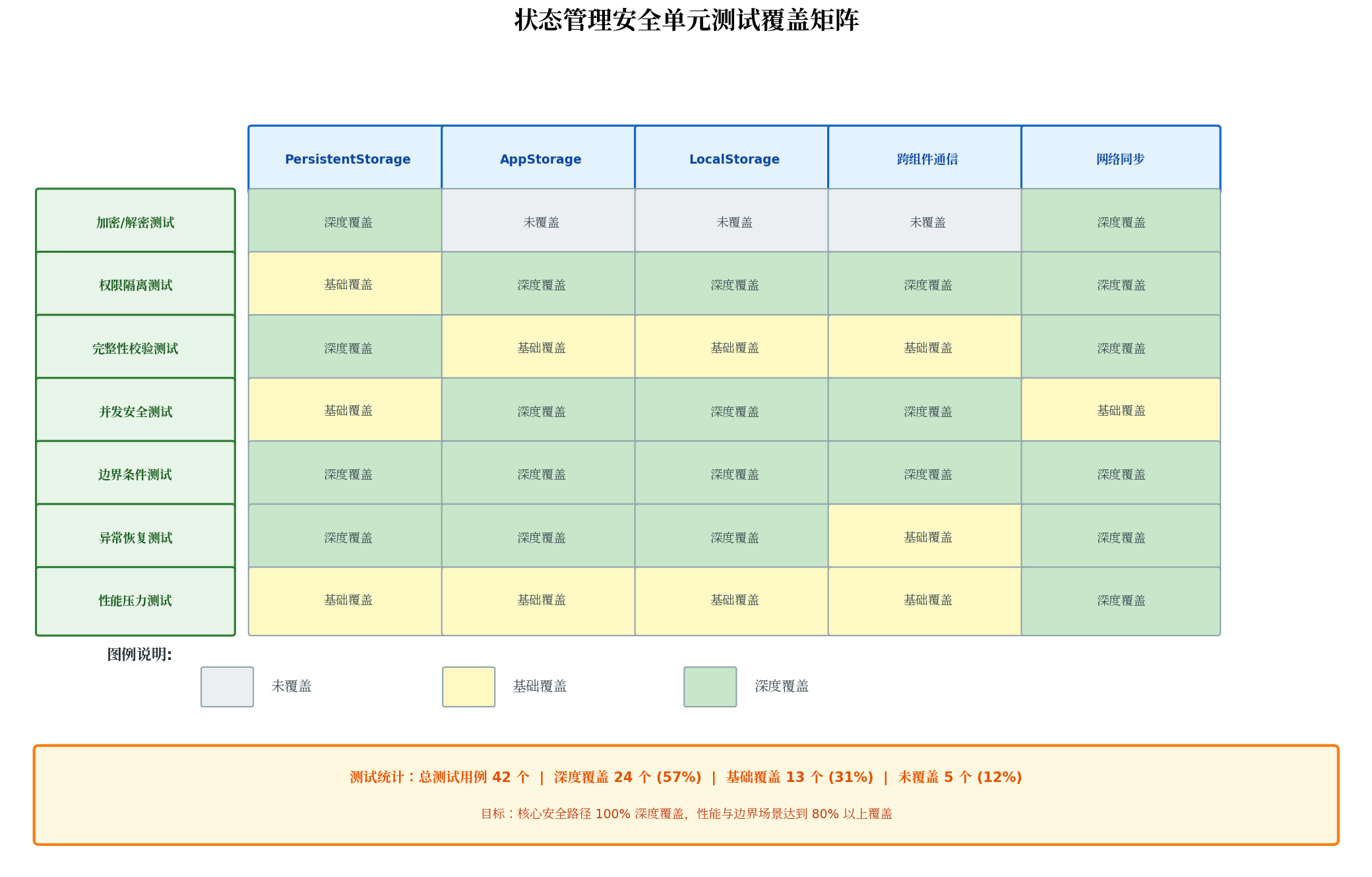
7.1 安全测试覆盖矩阵
7.2 核心安全测试用例
import { describe, it, expect, beforeAll } from '@kit.TestKit';

describe('SecurePersistentStorage Security Tests', () => {
  let storage: SecurePersistentStorage;

  beforeAll(async () => {
    storage = SecurePersistentStorage.getInstance();
    await storage.initMasterKey();
  });

  it('should_encrypt_sensitive_data_correctly', async () => {
    const sensitive = '{"token":"secret_access_token_12345"}';
    await storage.persistSecure('test_token', sensitive);

    const rawStored = AppStorage.get<string>('test_token');
    expect(rawStored).not.toBeNull();
    expect(rawStored!.includes('secret_access_token')).toBeFalse();
  });

  it('should_detect_tampered_data', async () => {
    await storage.persistSecure('test_integrity', 'original_data');

    const stored = AppStorage.get<string>('test_integrity');
    const tampered = stored!.replace('cipher', 'tampered');
    AppStorage.setOrCreate('test_integrity', tampered);

    const result = await storage.readSecure('test_integrity');
    expect(result).toBeNull();
  });

  it('should_use_unique_iv_per_encryption', async () => {
    await storage.persistSecure('test_iv_1', 'same_plaintext');
    const stored1 = AppStorage.get<string>('test_iv_1');

    await storage.persistSecure('test_iv_2', 'same_plaintext');
    const stored2 = AppStorage.get<string>('test_iv_2');

    expect(stored1).not.toEqual(stored2);
  });
});

describe('SecureAppStorage RBAC Tests', () => {
  beforeAll(() => {
    SecureAppStorage.registerState('adminSecret', {
      sensitivity: StateSensitivity.ADMIN_ONLY,
      minRole: UserRole.ADMIN,
      auditLog: true,
      encryptPersist: true
    });
  });

  it('should_deny_guest_access_to_admin_state', () => {
    SecureAppStorage.setCurrentUser(UserRole.GUEST, 'guest_001');
    const result = SecureAppStorage.setOrCreate('adminSecret', 'hack');
    expect(result).toBeFalse();
  });

  it('should_allow_admin_access_to_admin_state', () => {
    SecureAppStorage.setCurrentUser(UserRole.ADMIN, 'admin_001');
    const result = SecureAppStorage.setOrCreate('adminSecret', 'legit_data');
    expect(result).toBeTrue();
  });
});

describe('StateMutationController Validation Tests', () => {
  it('should_reject_invalid_nickname', () => {
    const controller = new StateMutationController<string>();
    controller.addValidator((_, newVal) => /^[\u4e00-\u9fa5a-zA-Z0-9]{2,20}$/.test(newVal));

    const result = controller.mutate('old', '<script>alert(1)</script>');
    expect(result).toBeNull();
  });

  it('should_sanitize_input_via_transformer', () => {
    const controller = new StateMutationController<string>();
    controller.addTransformer(val => val.trim().replace(/[<>]/g, ''));

    const result = controller.mutate('old', '  hello <world>  ');
    expect(result).toEqual('hello world');
  });
});
7.3 模糊测试
function fuzzStateInput(iterations: number = 1000): void {
  const fuzzer = new StateFuzzer();
  for (let i = 0; i < iterations; i++) {
    const randomKey = fuzzer.randomString(1, 50);
    const randomValue = fuzzer.randomValue();

    try {
      SecureAppStorage.setOrCreate(randomKey, randomValue);
    } catch (e) {
      console.error(`Fuzz crash at iteration ${i}: ${e}`);
    }
  }
}
八、最佳实践与防护策略总结
- 敏感数据强制加密:所有涉及用户隐私、账户凭证、支付信息的状态,持久化前必须使用 AES-256-GCM 加密;
- 分级存储策略:按数据敏感度选择
@State→LocalStorage→AppStorage→PersistentStorage的层级,最小化共享范围; - 显式权限注册:全局状态必须在
SecureAppStorage中注册元数据,未注册状态默认不可访问; - 受控状态变更:使用
StateMutationController封装校验器和转换器,禁止子组件直接修改父状态; - 完整性校验:持久化数据必须携带 HMAC-SHA256 签名,读取时验证,篡改即丢弃;
- 审计日志全覆盖:敏感状态的读写操作记录用户 ID、时间戳、操作类型,留存不少于 180 天;
- TLS 1.3 强制:所有状态同步网络请求启用 TLS 1.3 并配置证书固定;
- 密钥安全托管:加密密钥通过 HUKS 存储于 TEE 可信执行环境,禁止硬编码或明文存储;
- 安全单元测试:核心安全路径(加密、权限、完整性)必须达到 100% 深度覆盖;
- 定期渗透测试:每季度执行一次状态管理专项渗透测试。
九、结语
状态管理的安全性是 HarmonyOS 应用安全体系的基石。本文从存储加密、内存隔离、权限控制、传输安全、测试验证五个维度,构建了一套完整的状态管理安全防护方案。开发者在享受 ArkUI 响应式状态管理带来的开发效率提升时,必须同步建立安全意识,将"安全左移"理念融入编码、测试、发布的全生命周期。
转载自:https://blog.csdn.net/u014727709/article/details/163537999
欢迎 👍点赞✍评论⭐收藏,欢迎指正

讨论HarmonyOS开发技术,专注于API与组件、DevEco Studio、测试、元服务和应用上架分发等。
更多推荐
 3
3 0
0- 0


 已为社区贡献810条内容

所有评论(0)