自定义状态管理方案——基于 ArkUI V2 构建企业级响应式状态引擎
文章目录

每日一句正能量
“审视自己的生活,去思考这到底是我想要的,还是别人想要的?”
很多时候,我们追求的不过是社会时钟或他人眼光的投射。
摘要
摘要: 在前两篇中,我们分别探讨了状态管理的安全性与框架对比选型。然而,面对中大型 HarmonyOS 应用的复杂业务场景,官方提供的 AppStorageV2、PersistentStorage 等工具在模块化隔离、中间件扩展、副作用管理等方面仍存在局限。本文基于 ArkUI V2 的 @ObservedV2 与 @Trace 底层能力,从零设计并实现一套企业级自定义状态管理方案,涵盖响应式 Store、观察者通知机制、模块化状态拆分、中间件链、副作用管理、持久化恢复等核心模块,并给出与官方框架的融合策略,帮助开发者在复杂业务中掌控状态的全生命周期。
一、引言:为什么需要自定义状态管理方案
经过前一百七十篇(状态管理安全性考虑)和一百七十一篇(状态管理框架对比分析)的铺垫,我们已经明确了两个事实:
- ArkUI V2 是 HarmonyOS 原生应用的首选状态管理方案,其
@ObservedV2+@Trace的组合在深度观测和精准更新上表现优异; - 官方方案并非万能,在以下场景中,开发者需要更灵活、更可控的自定义能力:
- 多模块状态隔离:电商应用中,用户模块、购物车模块、订单模块的状态需要独立管理,避免互相污染;
- 中间件扩展:需要在状态变更前后注入日志、权限校验、数据加密等横切逻辑;
- 副作用管理:状态变更后需要触发网络请求、本地存储、埋点上报等副作用,且需要支持取消和重试;
- 状态时间旅行:开发调试阶段需要回溯状态历史,定位问题;
- 跨 Store 联动:购物车结算时需要联动用户权限校验、库存查询、优惠券计算等多个 Store。
本文将基于 ArkUI V2 的底层响应式能力,设计并实现一套轻量级但功能完备的自定义状态管理引擎,代码量控制在 500 行以内,可直接集成到生产项目中。
二、自定义状态管理方案整体架构
2.1 架构全景
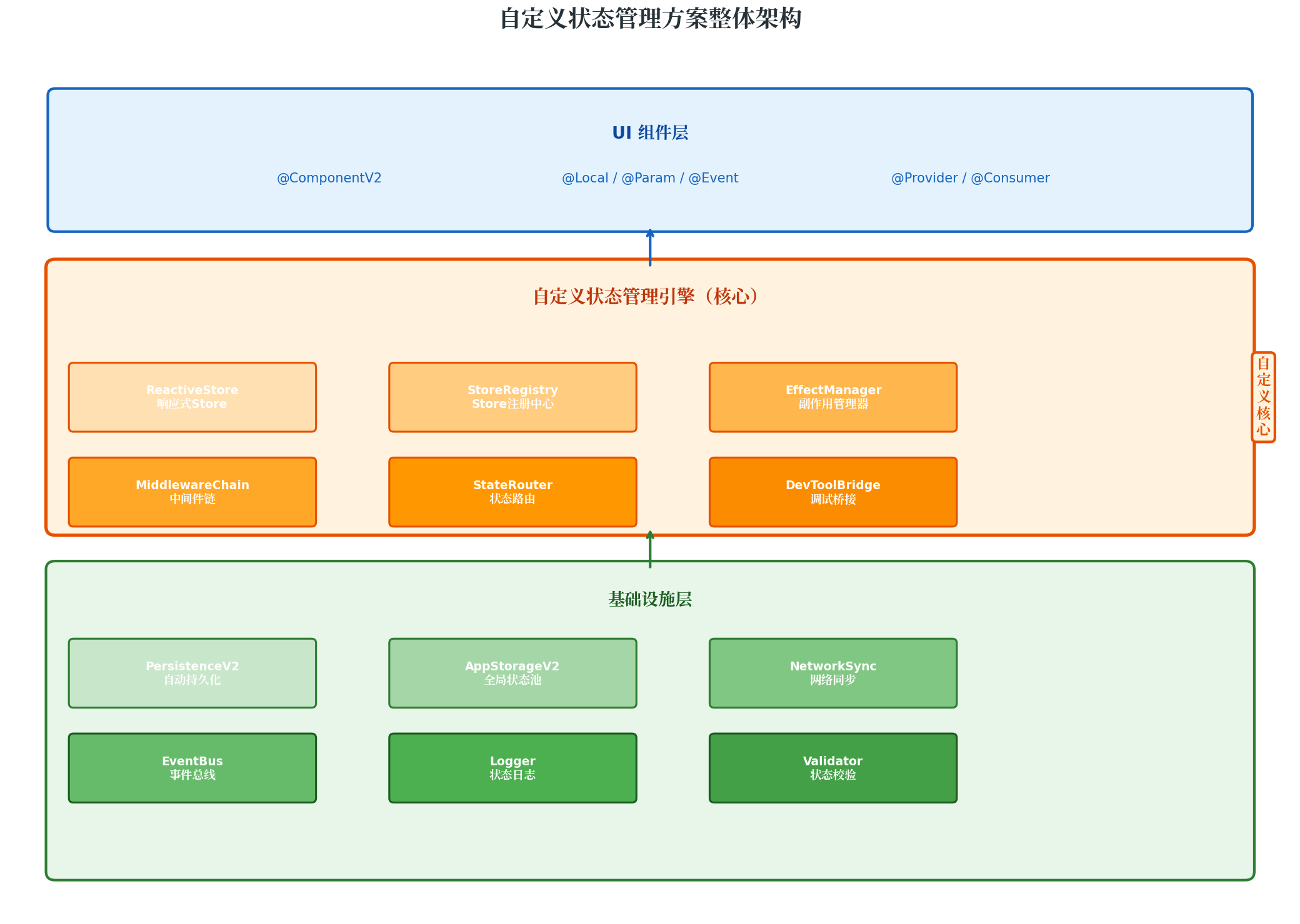
如上图所示,自定义状态管理方案采用三层架构:
- UI 组件层:继续使用 ArkUI V2 的
@ComponentV2、@Local、@Param、@Provider/@Consumer等官方装饰器,保持 UI 开发的简洁性; - 自定义状态管理引擎(核心层):包含
ReactiveStore(响应式 Store)、StoreRegistry(Store 注册中心)、EffectManager(副作用管理器)、MiddlewareChain(中间件链)、StateRouter(状态路由)、DevToolBridge(调试桥接)六大核心模块; - 基础设施层:基于
PersistenceV2、AppStorageV2、网络同步、事件总线等官方或自研能力,提供持久化、全局通信、日志、校验等基础服务。
2.2 设计原则
- 最小侵入性:UI 层仍使用官方装饰器,自定义引擎仅管理"业务状态",不替代 UI 状态绑定;
- 模块化隔离:每个业务域拥有独立的 Store,Store 之间通过显式接口通信;
- 可观测可追踪:所有状态变更经过中间件链,支持日志、校验、加密等横切逻辑;
- 渐进式集成:可从单个页面开始试用,逐步推广到全应用。
三、核心实现:基于 @ObservedV2 的响应式 Store
3.1 ReactiveStore 基础设计
ReactiveStore 是整个方案的核心,它基于 ArkUI V2 的 @ObservedV2 + @Trace 实现深度响应,同时封装了订阅-通知机制、中间件链和副作用管理。
// store/ReactiveStore.ets
import { ObservedV2, Trace } from '@kit.ArkUI'

type StateListener<T> = (newVal: T, oldVal: T, path: string) => void

type Middleware<T> = (context: MiddlewareContext<T>, next: () => void) => void

interface MiddlewareContext<T> {
  storeName: string
  path: string
  newValue: T
  oldValue: T
  timestamp: number
}

type Effect<T> = (newVal: T, oldVal: T, path: string) => void | (() => void)

@ObservedV2
export abstract class ReactiveStore<S extends Record<string, any>> {
  @Trace protected state: S

  private subscribers: Map<string, Set<StateListener<any>>> = new Map()
  private globalSubscribers: Set<StateListener<any>> = new Set()
  private middlewares: Middleware<any>[] = []
  private effects: Map<string, Set<Effect<any>>> = new Map()
  private batchMode: boolean = false
  private batchQueue: Set<string> = new Set()

  abstract readonly storeName: string

  constructor(initialState: S) {
    this.state = initialState
  }

  getState(): Readonly<S> {
    return Object.freeze({ ...this.state })
  }

  setState<K extends keyof S>(path: K, value: S[K]): void {
    const oldValue = this.state[path]
    if (oldValue === value) return

    const context: MiddlewareContext<S[K]> = {
      storeName: this.storeName,
      path: String(path),
      newValue: value,
      oldValue,
      timestamp: Date.now()
    }

    this.runMiddlewares(context, 0, () => {
      this.state[path] = value
      this.recordHistory(context)
      if (this.batchMode) {
        this.batchQueue.add(String(path))
      } else {
        this.notify(String(path), value, oldValue)
      }
    })
  }

  batchUpdate<T>(fn: () => T): T {
    this.batchMode = true
    this.batchQueue.clear()
    try {
      const result = fn()
      this.batchQueue.forEach(path => {
        const keys = path.split('.')
        let current: any = this.state
        for (const key of keys) { current = current[key] }
        this.notify(path, current, undefined)
      })
      return result
    } finally {
      this.batchMode = false
      this.batchQueue.clear()
    }
  }

  subscribe<K extends keyof S>(path: K, listener: StateListener<S[K]>): () => void {
    const key = String(path)
    if (!this.subscribers.has(key)) {
      this.subscribers.set(key, new Set())
    }
    this.subscribers.get(key)!.add(listener)
    return () => { this.subscribers.get(key)?.delete(listener) }
  }

  subscribeGlobal(listener: StateListener<any>): () => void {
    this.globalSubscribers.add(listener)
    return () => this.globalSubscribers.delete(listener)
  }

  use(middleware: Middleware<any>): void {
    this.middlewares.push(middleware)
  }

  useEffect<K extends keyof S>(path: K, effect: Effect<S[K]>): () => void {
    const key = String(path)
    if (!this.effects.has(key)) { this.effects.set(key, new Set()) }
    this.effects.get(key)!.add(effect)
    return () => this.effects.get(key)?.delete(effect)
  }

  private runMiddlewares<T>(context: MiddlewareContext<T>, index: number, finalAction: () => void): void {
    if (index >= this.middlewares.length) {
      finalAction()
      return
    }
    const mw = this.middlewares[index]
    mw(context, () => this.runMiddlewares(context, index + 1, finalAction))
  }

  private notify(path: string, newVal: any, oldVal: any): void {
    this.subscribers.get(path)?.forEach(listener => {
      try { listener(newVal, oldVal, path) }
      catch (e) { console.error(`[${this.storeName}] Subscriber error at ${path}:`, e) }
    })
    this.globalSubscribers.forEach(listener => {
      try { listener(newVal, oldVal, path) }
      catch (e) { console.error(`[${this.storeName}] Global subscriber error:`, e) }
    })
    this.effects.get(path)?.forEach(effect => {
      try {
        const cleanup = effect(newVal, oldVal, path)
        if (typeof cleanup === 'function') { cleanup() }
      } catch (e) { console.error(`[${this.storeName}] Effect error at ${path}:`, e) }
    })
  }

  private recordHistory<T>(context: MiddlewareContext<T>): void {
    // 历史记录用于时间旅行调试
  }
}
3.2 观察者模式与精准通知机制
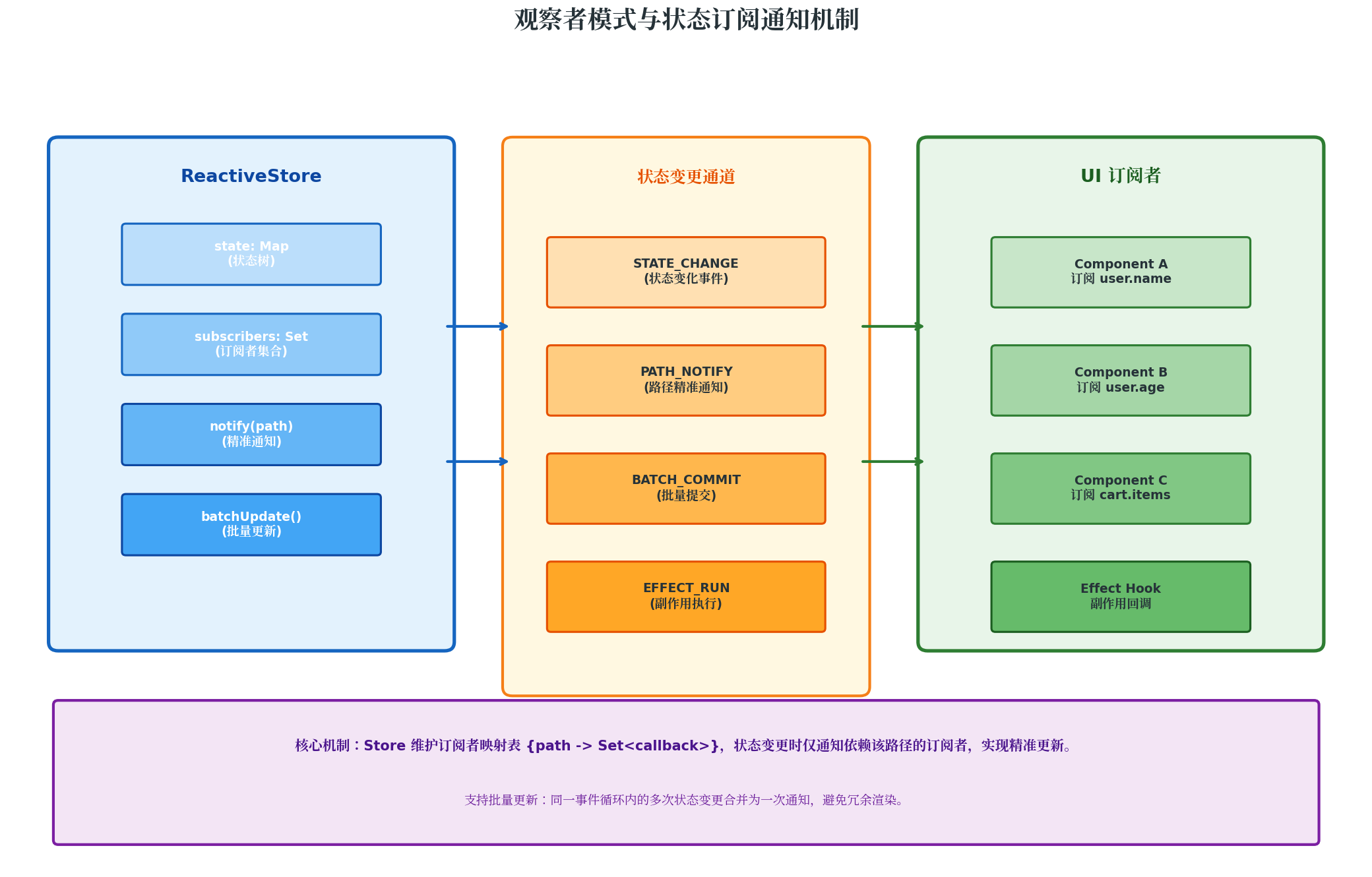
ReactiveStore 的核心设计亮点在于路径级精准订阅。与官方 AppStorage 的"全局广播"不同,自定义 Store 维护了 {path -> Set<callback>} 的映射表,确保状态变更时仅通知真正依赖该路径的订阅者。
关键机制说明:
- 路径级订阅:
store.subscribe('user.name', callback)只监听user.name变化,user.age变化不会触发该回调; - 批量更新:
batchUpdate()将同一事件循环内的多次setState()合并为一次通知,避免冗余渲染; - 副作用隔离:副作用(Effect)与订阅者(Subscriber)分离,副作用可执行异步操作,订阅者仅用于 UI 更新;
- 中间件链:类似 Koa/Redux 的中间件机制,支持日志、校验、加密、审计等横切逻辑的插拔式集成。
四、模块化 Store 设计与多 Store 协同
4.1 模块化分层设计
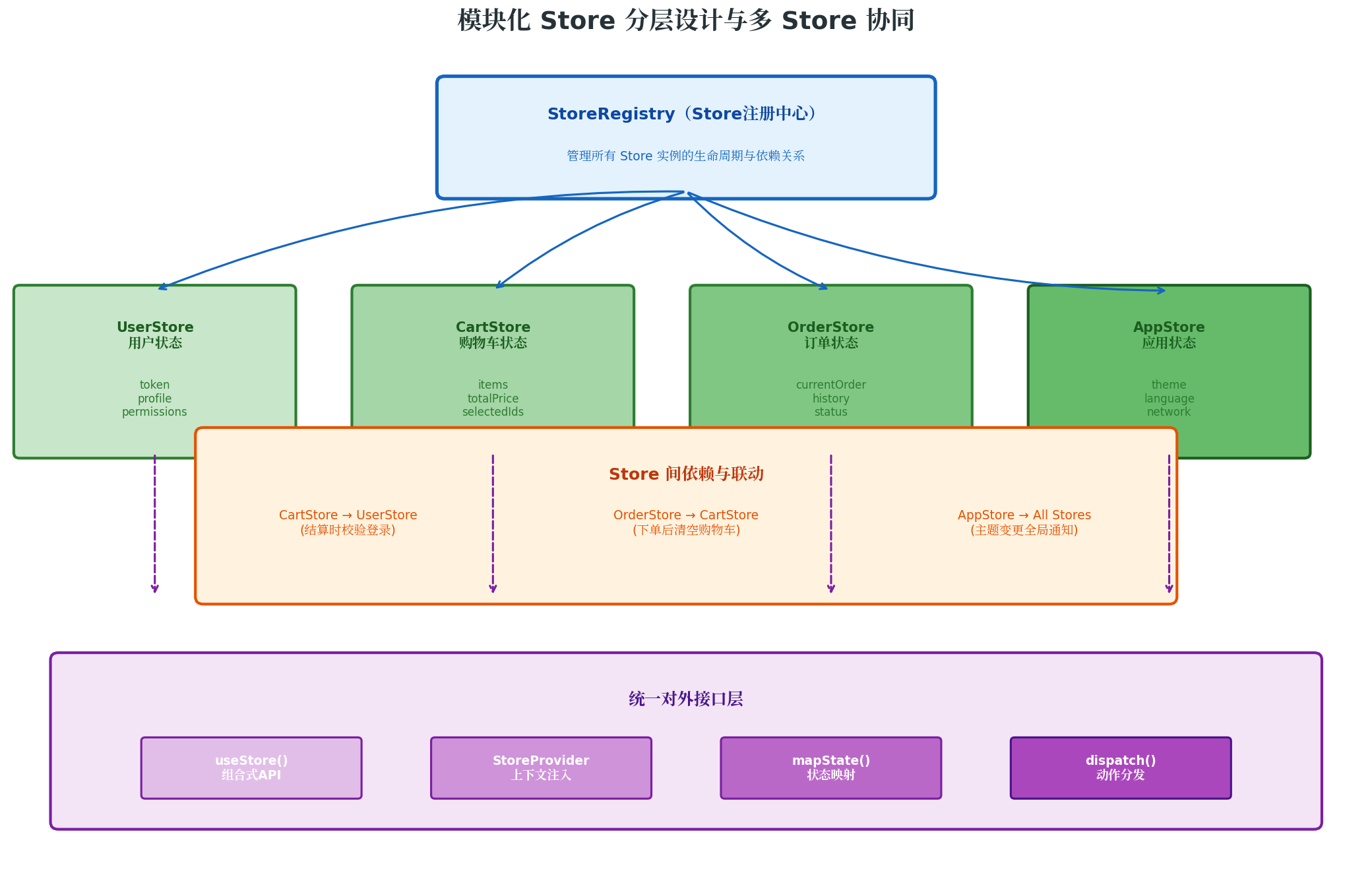
中大型应用的状态不应集中在一个"大 Store"中,而应按业务域拆分为多个独立 Store,通过 StoreRegistry 统一管理。
// store/StoreRegistry.ets
import { ReactiveStore } from './ReactiveStore'

interface StoreMeta {
  name: string
  dependencies?: string[]
  persistKeys?: string[]
}

export class StoreRegistry {
  private static stores: Map<string, ReactiveStore<any>> = new Map()
  private static metas: Map<string, StoreMeta> = new Map()

  static register<T extends ReactiveStore<any>>(
    name: string, store: T, meta?: Partial<StoreMeta>
  ): T {
    if (StoreRegistry.stores.has(name)) {
      console.warn(`[StoreRegistry] Store "${name}" already registered, overwriting.`)
    }
    StoreRegistry.stores.set(name, store)
    StoreRegistry.metas.set(name, { name, dependencies: [], persistKeys: [], ...meta })
    this.injectDependencies(name, store)
    return store
  }

  static get<T extends ReactiveStore<any>>(name: string): T | undefined {
    return StoreRegistry.stores.get(name) as T
  }

  static getAll(): Map<string, ReactiveStore<any>> {
    return new Map(StoreRegistry.stores)
  }

  static link(
    sourceStore: string, sourcePath: string,
    targetStore: string, handler: (newVal: any, oldVal: any) => void
  ): () => void {
    const src = StoreRegistry.get(sourceStore)
    if (!src) {
      console.error(`[StoreRegistry] Source store "${sourceStore}" not found.`)
      return () => {}
    }
    return src.subscribeGlobal((newVal, oldVal, path) => {
      if (path === sourcePath) { handler(newVal, oldVal) }
    })
  }

  static async persistAll(): Promise<void> {
    for (const [name, meta] of StoreRegistry.metas) {
      if (!meta.persistKeys?.length) continue
      const store = StoreRegistry.stores.get(name)
      if (!store) continue
      const state = store.getState()
      const toPersist: Record<string, any> = {}
      meta.persistKeys.forEach(key => { toPersist[key] = state[key] })
      // await preferences.put(name, JSON.stringify(toPersist))
    }
  }

  private static injectDependencies(storeName: string, store: ReactiveStore<any>): void {
    const meta = StoreRegistry.metas.get(storeName)
    meta?.dependencies?.forEach(depName => {
      const depStore = StoreRegistry.get(depName)
      // 将依赖 Store 注入到当前 Store
    })
  }
}
4.2 业务 Store 实现示例
// store/modules/UserStore.ets
import { ReactiveStore } from '../ReactiveStore'
import { StoreRegistry } from '../StoreRegistry'
import { ObservedV2, Trace } from '@kit.ArkUI'

interface UserState {
  token: string | null
  profile: { nickname: string; avatar: string; level: number }
  permissions: string[]
  isLogin: boolean
}

@ObservedV2
class UserStore extends ReactiveStore<UserState> {
  readonly storeName = 'user'

  constructor() {
    super({
      token: null,
      profile: { nickname: '游客', avatar: '', level: 0 },
      permissions: [],
      isLogin: false
    })

    this.useEffect('token', (newVal) => {
      if (newVal) {
        console.info('[UserStore] Token updated and persisted.')
      }
    })
  }

  login(token: string, profile: UserState['profile']): void {
    this.batchUpdate(() => {
      this.setState('token', token)
      this.setState('profile', profile)
      this.setState('isLogin', true)
      this.setState('permissions', this.calculatePermissions(profile.level))
    })
  }

  logout(): void {
    this.batchUpdate(() => {
      this.setState('token', null)
      this.setState('profile', { nickname: '游客', avatar: '', level: 0 })
      this.setState('isLogin', false)
      this.setState('permissions', [])
    })
  }

  private calculatePermissions(level: number): string[] {
    const base = ['read']
    if (level >= 1) base.push('comment')
    if (level >= 3) base.push('publish')
    if (level >= 5) base.push('admin')
    return base
  }
}

export const userStore = StoreRegistry.register('user', new UserStore(), {
  dependencies: [], persistKeys: ['token', 'profile']
})
// store/modules/CartStore.ets
interface CartItem {
  id: string; productId: string; name: string
  price: number; quantity: number; selected: boolean
}

interface CartState {
  items: CartItem[]; totalPrice: number
  selectedCount: number; isAllSelected: boolean
}

@ObservedV2
class CartStore extends ReactiveStore<CartState> {
  readonly storeName = 'cart'

  constructor() {
    super({ items: [], totalPrice: 0, selectedCount: 0, isAllSelected: false })
    this.useEffect('items', () => this.recalculate())
  }

  addItem(item: Omit<CartItem, 'selected'>): void {
    const existing = this.state.items.find(i => i.productId === item.productId)
    if (existing) {
      this.setState('items', this.state.items.map(i =>
        i.productId === item.productId ? { ...i, quantity: i.quantity + 1 } : i
      ))
    } else {
      this.setState('items', [...this.state.items, { ...item, selected: true }])
    }
  }

  toggleSelect(productId: string): void {
    this.setState('items', this.state.items.map(i =>
      i.productId === productId ? { ...i, selected: !i.selected } : i
    ))
  }

  clearCart(): void { this.setState('items', []) }

  private recalculate(): void {
    const selected = this.state.items.filter(i => i.selected)
    const totalPrice = selected.reduce((sum, i) => sum + i.price * i.quantity, 0)
    const selectedCount = selected.reduce((sum, i) => sum + i.quantity, 0)
    const isAllSelected = this.state.items.length > 0 && this.state.items.every(i => i.selected)
    this.batchUpdate(() => {
      this.setState('totalPrice', totalPrice)
      this.setState('selectedCount', selectedCount)
      this.setState('isAllSelected', isAllSelected)
    })
  }
}

export const cartStore = StoreRegistry.register('cart', new CartStore(), {
  dependencies: ['user']
})
4.3 跨 Store 联动示例
// store/linkages.ets
export function setupStoreLinkages(): void {
  StoreRegistry.link('user', 'isLogin', 'cart', (newVal, oldVal) => {
    if (oldVal === true && newVal === false) {
      console.info('[Linkage] User logged out, clearing cart.')
      cartStore.clearCart()
    }
  })
}
五、中间件链与横切逻辑
// middleware/LoggerMiddleware.ets
export const loggerMiddleware: Middleware<any> = (context, next) => {
  const start = Date.now()
  next()
  console.info(
    `[StoreLog] ${context.storeName}.${context.path}: ` +
    `${JSON.stringify(context.oldValue)} -> ${JSON.stringify(context.newValue)} ` +
    `(${Date.now() - start}ms)`
  )
}

// middleware/ValidationMiddleware.ets
export function createValidationMiddleware<T>(
  validators: Record<string, (val: any) => boolean>
): Middleware<T> {
  return (context, next) => {
    const validator = validators[context.path]
    if (validator && !validator(context.newValue)) {
      console.warn(`[Validation] Rejected invalid value for ${context.path}:`, context.newValue)
      return
    }
    next()
  }
}
六、与 ArkUI V2 官方框架的融合策略
// pages/CartPage.ets
import { ComponentV2, Local } from '@kit.ArkUI'
import { cartStore } from '../store/modules/CartStore'

@Entry
@ComponentV2
struct CartPage {
  @Local cartItems = cartStore.getState().items
  @Local cartTotal = cartStore.getState().totalPrice

  aboutToAppear(): void {
    this.unsubscribeItems = cartStore.subscribe('items', (newVal) => {
      this.cartItems = newVal
    })
    this.unsubscribeTotal = cartStore.subscribe('totalPrice', (newVal) => {
      this.cartTotal = newVal
    })
  }

  aboutToDisappear(): void {
    this.unsubscribeItems?.()
    this.unsubscribeTotal?.()
  }

  build() {
    Column() {
      Text(`购物车 (${this.cartItems.length})`).fontSize(24).fontWeight(FontWeight.Bold)
      List() {
        ForEach(this.cartItems, (item) => {
          ListItem() {
            Row() {
              Text(item.name).layoutWeight(1)
              Text(`¥${item.price} x ${item.quantity}`)
            }
          }
        })
      }
      Text(`合计: ¥${this.cartTotal}`).fontSize(20).fontColor('#E65100')
    }
  }
}
七、自定义方案 vs 官方方案:能力对比与选型
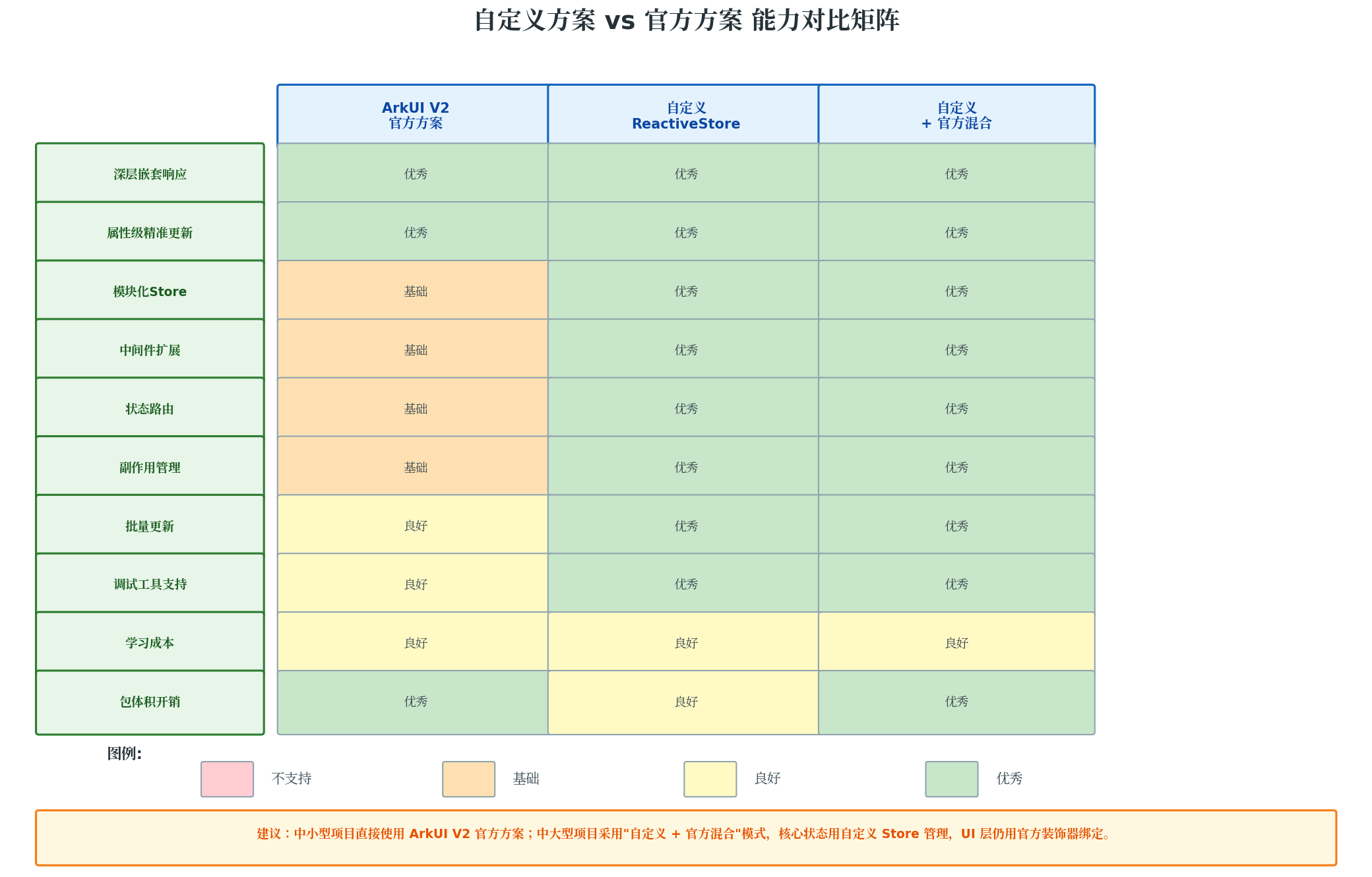
7.1 何时使用官方方案
- 小型应用(页面 < 10,状态简单)
- 快速原型 / MVP 验证
- 状态以 UI 状态为主(如主题切换、动画状态、表单临时值)
7.2 何时使用自定义方案
- 中大型应用(页面 > 20,多业务模块)
- 需要模块化状态隔离
- 需要中间件扩展(日志、校验、加密、审计)
- 复杂副作用管理
7.3 推荐:混合架构
| 状态类型 | 管理方案 | 理由 |
|---|---|---|
| UI 临时状态 | @Local 官方方案 | 简单直接 |
| 页面级共享状态 | @Provider / @Consumer | 跨组件通信 |
| 全局业务状态 | 自定义 ReactiveStore | 需要模块化、中间件 |
| 需要持久化的配置 | PersistenceV2 | 官方方案成熟稳定 |
八、性能优化与最佳实践
8.1 避免过度订阅
// 正确:在 aboutToAppear 中订阅,aboutToDisappear 中取消
aboutToAppear() {
  this.unsub = cartStore.subscribe('items', (val) => this.items = val)
}
aboutToDisappear() {
  this.unsub?.()
}
8.2 利用 batchUpdate 减少渲染
// 正确:合并为一次更新
store.batchUpdate(() => {
  store.setState('a', 1)
  store.setState('b', 2)
  store.setState('c', 3)
})
8.3 状态选择器优化
// 正确:只订阅需要的属性
store.subscribe('user.profile.nickname', (nickname) => { /* 精准更新 */ })
九、总结
本文基于 ArkUI V2 的 @ObservedV2 + @Trace 底层能力,设计并实现了一套完整的企业级自定义状态管理方案。核心成果包括:
- ReactiveStore 基类:封装了订阅-通知、中间件链、副作用管理、批量更新等核心能力;
- StoreRegistry 注册中心:实现多 Store 模块化隔离与跨 Store 联动;
- 中间件体系:支持日志、校验、持久化等横切逻辑的插拔式集成;
- 与官方框架的融合策略:UI 层继续使用官方装饰器,业务状态层使用自定义 Store,两者协同工作;
- 性能优化指南:避免过度订阅、利用批量更新、精准路径订阅等最佳实践。
自定义状态管理方案并非要取代 ArkUI V2 官方方案,而是作为其能力补充,在复杂业务场景中提供更精细的控制。开发者应根据项目规模、团队能力和业务复杂度,灵活选择"纯官方"、“纯自定义"或"混合架构”,在开发效率与架构可控性之间找到最佳平衡点。
转载自:https://blog.csdn.net/u014727709/article/details/163539158
欢迎 👍点赞✍评论⭐收藏,欢迎指正

讨论HarmonyOS开发技术,专注于API与组件、DevEco Studio、测试、元服务和应用上架分发等。
更多推荐



 1
1 0
0- 0


 已为社区贡献861条内容

所有评论(0)