组件文档自动生成——基于 ArkTS 注解与 AST 解析的智能化文档工程实践
文章目录

每日一句正能量
对能解决的问题,聚焦行动而非空想;对无法控制的事,学会接纳而非纠结。
行动是唯一的答案,空想只会增加焦虑。接纳是唯一的解脱,纠结只会困住自己。改变能改变的,接受不能改变的,并有智慧分辨两者的不同。
一、前言
在 HarmonyOS 应用开发中,随着项目规模扩大和组件库日益丰富,组件文档的维护逐渐成为困扰开发团队的"隐形痛点"。一个成熟的组件库往往包含数十乃至上百个组件,每个组件又涉及属性(Props)、事件(Events)、方法(Methods)、插槽(Slots)等多维度接口定义。传统的手动维护方式不仅效率低下,更致命的是文档与源码极易脱节——开发者修改了组件接口却忘记同步更新文档,导致下游使用者频繁踩坑。
本文将深入探讨如何在 HarmonyOS / ArkTS 生态中构建一套组件文档自动生成体系,涵盖从 JSDoc 注释规范、TypeScript AST 静态解析、ArkTS 自定义注解(Annotation)元数据驱动,到 DevEco Studio 官方 DocTool 工具链集成,最终打通 CI/CD 自动化流水线,实现"代码即文档"的工程化目标。
二、传统文档维护模式的痛点分析
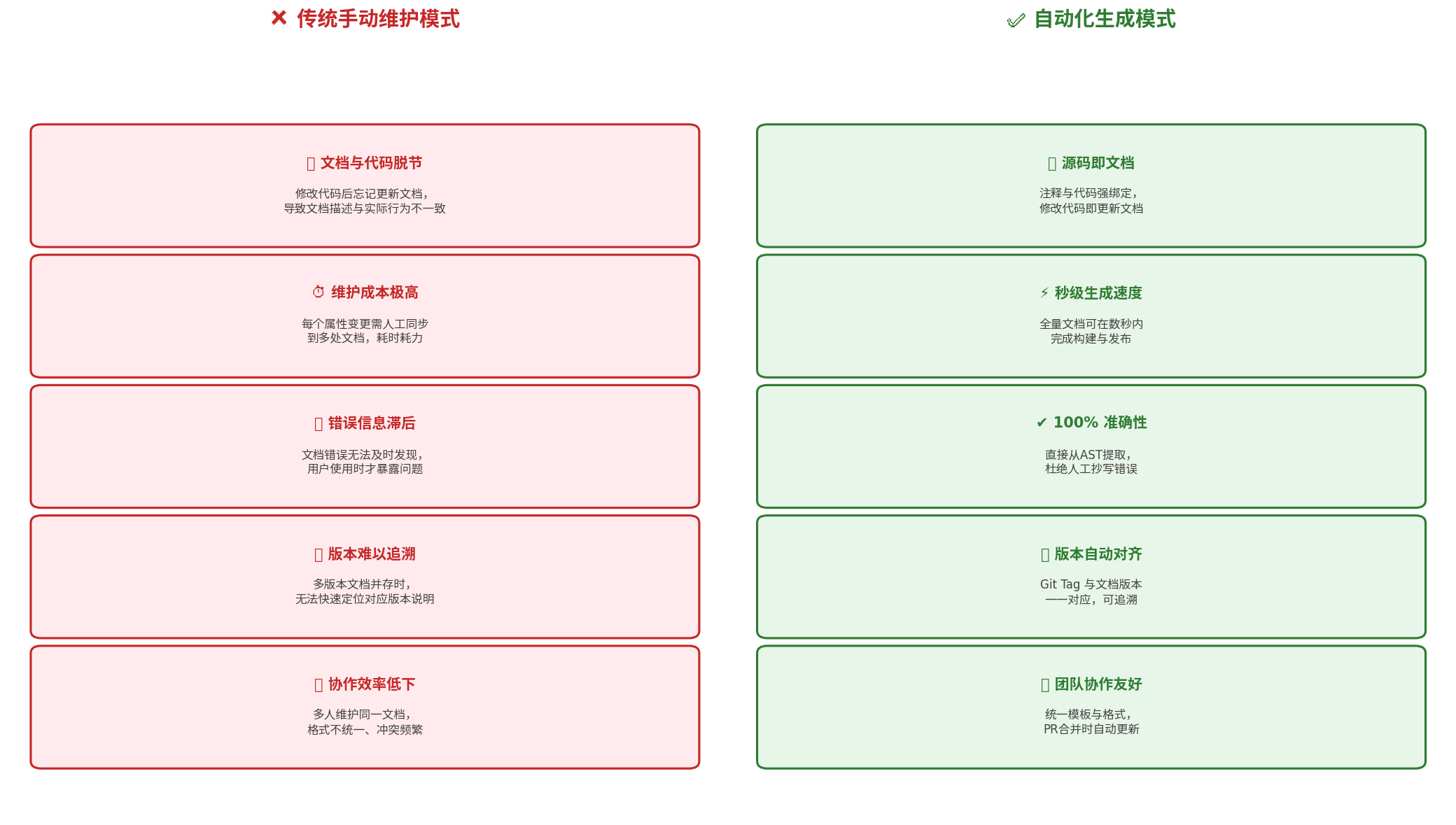
在正式展开技术方案之前,我们先系统梳理手动维护组件文档面临的五大核心痛点:
| 痛点维度 | 具体表现 | 影响程度 |
|---|---|---|
| 文档与代码脱节 | 修改代码后忘记更新文档,导致描述与实际行为不一致 | ★★★★★ |
| 维护成本极高 | 每个属性变更需人工同步到多处文档,耗时耗力 | ★★★★☆ |
| 错误信息滞后 | 文档错误无法及时发现,用户使用时才暴露问题 | ★★★★☆ |
| 版本难以追溯 | 多版本文档并存时,无法快速定位对应版本说明 | ★★★☆☆ |
| 协作效率低下 | 多人维护同一文档,格式不统一、冲突频繁 | ★★★☆☆ |
这些痛点在大型组件库场景中尤为突出。以某企业级 HarmonyOS 组件库为例,其包含 80+ 组件、400+ 公共属性、200+ 事件定义,若采用纯人工维护,每次迭代需投入约 2~3 人日进行文档同步,且错误率居高不下。因此,构建自动化的文档生成体系已不再是"锦上添花",而是工程化建设的刚需。
三、技术方案总览
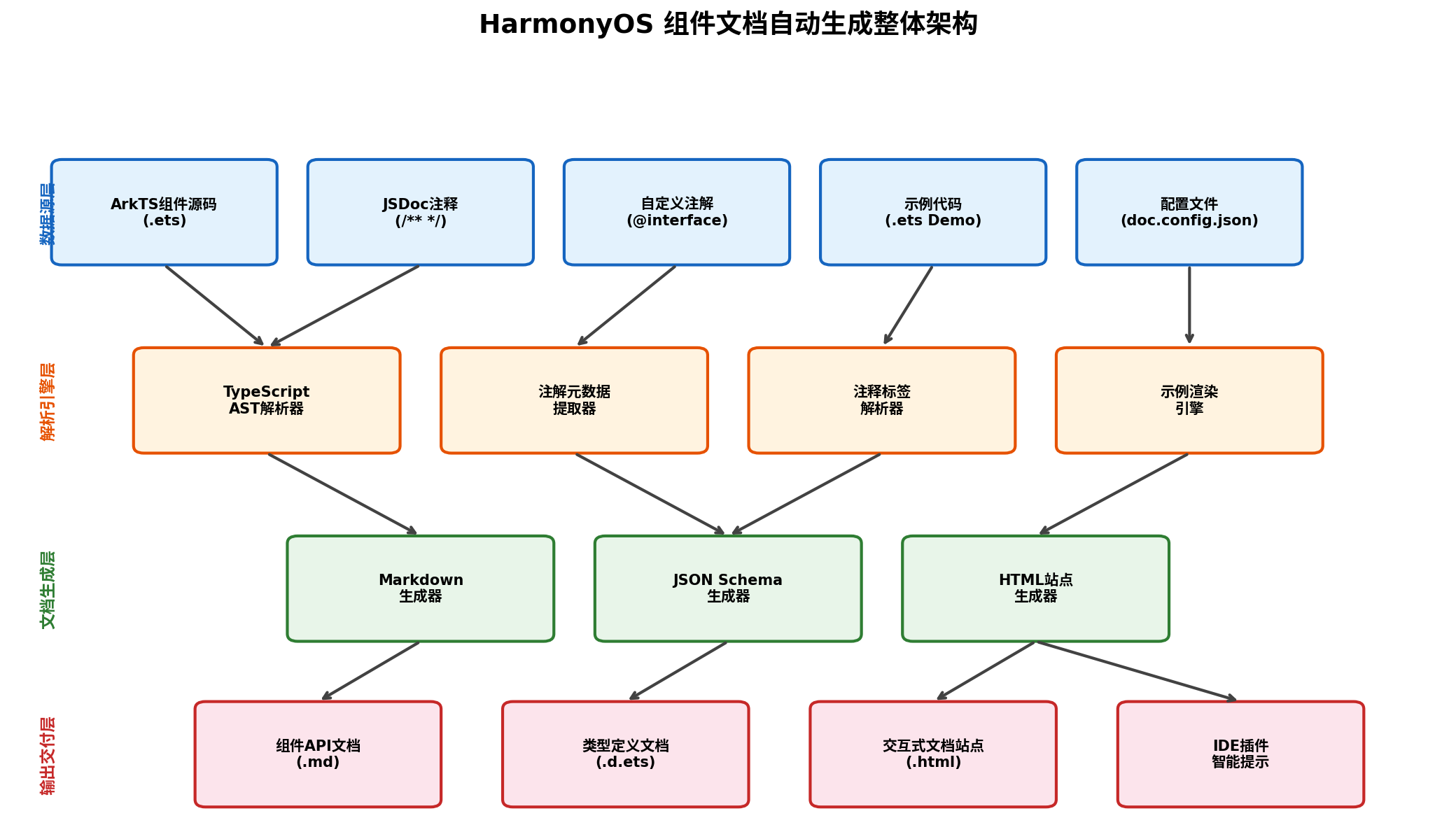
本文提出的智能化文档工程体系采用四层架构设计:
-
数据源层:以 ArkTS 组件源码(
.ets)为核心,结合 JSDoc 注释、ArkTS 自定义注解(@interface)、示例代码(.ets Demo)及配置文件(doc.config.json)共同构成文档原始数据。 -
解析引擎层:通过 TypeScript AST 解析器提取源码结构,注解元数据提取器捕获装饰器信息,注释标签解析器解析 JSDoc 语义,示例渲染引擎编译并提取 Demo 代码。
-
文档生成层:基于解析结果,分别输出 Markdown 格式文档、JSON Schema 类型定义、以及 HTML 交互式文档站点。
-
输出交付层:最终产物包括组件 API 文档(
.md)、类型定义文档(.d.ets)、交互式文档站点(.html),并可进一步集成到 IDE 插件中提供智能提示。
下面将分三个技术方案逐一展开。
四、方案一:基于 JSDoc 注释的文档自动生成
4.1 JSDoc 注释规范设计
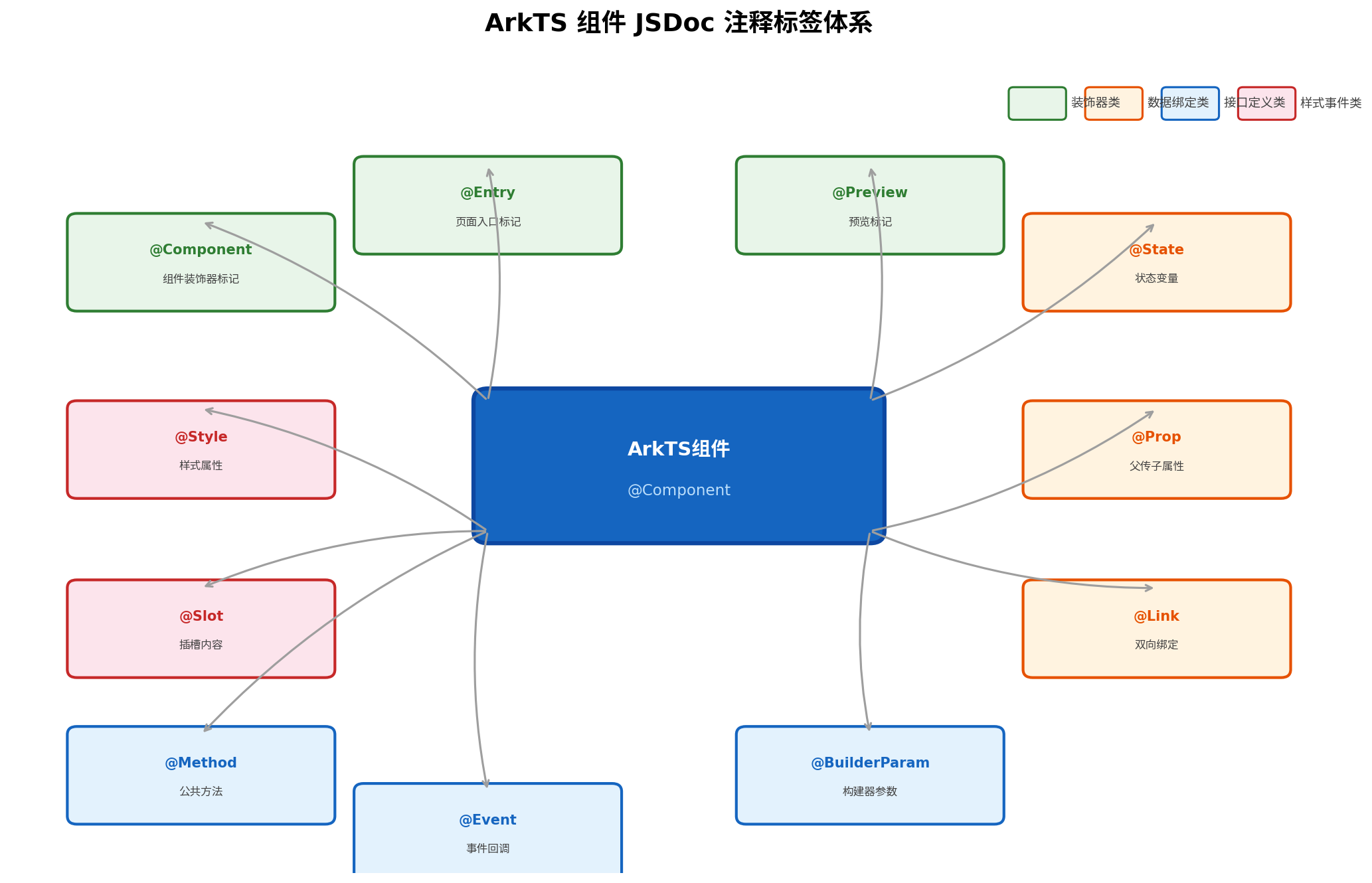
JSDoc 是一种基于注释的 API 文档生成规范,ArkTS 作为 TypeScript 的超集,天然支持 JSDoc 语法。为了在 HarmonyOS 组件库中实现标准化文档提取,我们首先需要定义一套面向 ArkUI 组件的 JSDoc 标签规范:
| 标签 | 作用域 | 说明 | 示例 |
|---|---|---|---|
@component | 类/结构体 | 标记组件名称与简要描述 | @component Button 按钮组件 |
@prop | 属性 | 描述组件属性 | @prop {string} text 按钮显示文本 |
@state | 状态变量 | 描述内部状态 | @state {boolean} isLoading 加载状态 |
@event | 事件 | 描述回调事件 | @event {Function} onClick 点击事件 |
@method | 方法 | 描述公共方法 | @method {void} focus() 获取焦点 |
@slot | 插槽 | 描述自定义构建器 | @slot {BuilderParam} customContent 自定义内容 |
@since | 通用 | 标记可用版本 | @since 12 |
@deprecated | 通用 | 标记废弃接口 | @deprecated since 14 请使用 onSubmit 替代 |
@example | 通用 | 提供代码示例 | @example Button({text: 'OK'}).type(Primary) |
4.2 组件源码注释示例
以下是一个符合上述规范的 Button 组件源码示例:
// components/Button.ets

/**
 * @component Button
 * @description 常用的操作按钮,支持多种类型、尺寸和状态。
 * @since 12
 * @example
 * Button({ text: "确认" })
 *   .type(ButtonType.Primary)
 *   .size(ButtonSize.Large)
 *   .onClick(() => console.info("点击"))
 */
@Component
export struct Button {
  /**
   * @prop {string} text
   * @description 按钮显示的文本内容
   * @default ""
   */
  @Prop text: string = '';

  /**
   * @prop {ButtonType} type
   * @description 按钮的视觉类型
   * @default ButtonType.Primary
   */
  @Prop type: ButtonType = ButtonType.Primary;

  /**
   * @prop {ButtonSize} size
   * @description 按钮的尺寸规格
   * @default ButtonSize.Medium
   */
  @Prop size: ButtonSize = ButtonSize.Medium;

  /**
   * @prop {boolean} disabled
   * @description 是否禁用按钮
   * @default false
   */
  @Prop disabled: boolean = false;

  /**
   * @prop {boolean} loading
   * @description 是否显示加载状态
   * @default false
   */
  @Prop loading: boolean = false;

  /**
   * @event {() => void} onClick
   * @description 点击按钮时的回调事件
   */
  onClick?: () => void;

  /**
   * @slot {BuilderParam} prefixIcon
   * @description 按钮前缀图标构建器
   */
  @BuilderParam prefixIcon?: () => void;

  build() {
    Row() {
      if (this.prefixIcon) {
        this.prefixIcon();
      }
      Text(this.text)
        .fontSize(this.size === ButtonSize.Large ? 18 : 14)
        .fontColor(this.type === ButtonType.Primary ? Color.White : Color.Black)
    }
    .width(this.size === ButtonSize.Large ? 200 : 120)
    .height(this.size === ButtonSize.Large ? 50 : 40)
    .backgroundColor(this.type === ButtonType.Primary ? '#1890FF' : '#F5F5F5')
    .opacity(this.disabled ? 0.5 : 1)
    .onClick(() => {
      if (!this.disabled && !this.loading && this.onClick) {
        this.onClick();
      }
    })
  }
}

/**
 * @enum ButtonType
 * @description 按钮类型枚举
 */
export enum ButtonType {
  /** 主按钮 */
  Primary,
  /** 次按钮 */
  Default,
  /** 虚线按钮 */
  Dashed,
  /** 文字按钮 */
  Text
}

/**
 * @enum ButtonSize
 * @description 按钮尺寸枚举
 */
export enum ButtonSize {
  /** 小尺寸 */
  Small,
  /** 中尺寸 */
  Medium,
  /** 大尺寸 */
  Large
}
4.3 AST 解析脚本实现
基于 TypeScript 编译器 API,我们可以编写一个 Node.js 脚本,从 .ets 文件中提取上述 JSDoc 注释并生成 Markdown 文档:
// scripts/generate-docs.ts
import * as ts from 'typescript';
import * as fs from 'fs';
import * as path from 'path';

interface ComponentDoc {
  name: string;
  description: string;
  since?: string;
  props: PropDoc[];
  events: EventDoc[];
  slots: SlotDoc[];
  examples: string[];
}

interface PropDoc {
  name: string;
  type: string;
  description: string;
  defaultValue?: string;
}

interface EventDoc {
  name: string;
  type: string;
  description: string;
}

interface SlotDoc {
  name: string;
  type: string;
  description: string;
}

/**
 * 解析单个 .ets 文件,提取组件文档信息
 */
function parseComponentFile(filePath: string): ComponentDoc | null {
  const sourceCode = fs.readFileSync(filePath, 'utf-8');
  const sourceFile = ts.createSourceFile(
    filePath,
    sourceCode,
    ts.ScriptTarget.Latest,
    true
  );

  let componentDoc: ComponentDoc | null = null;

  ts.forEachChild(sourceFile, (node) => {
    // 识别 @Component 装饰的结构体
    if (ts.isStructDeclaration(node)) {
      const jsDoc = ts.getJSDocTags(node);
      const componentTag = jsDoc.find(tag => tag.tagName.text === 'component');

      if (componentTag) {
        componentDoc = {
          name: node.name.text,
          description: extractCommentText(node) || '',
          since: getTagValue(jsDoc, 'since'),
          props: [],
          events: [],
          slots: [],
          examples: []
        };

        // 遍历结构体成员
        node.members.forEach(member => {
          const memberJsDoc = ts.getJSDocTags(member);

          if (ts.isPropertyDeclaration(member) || ts.isPropertySignature(member)) {
            const propName = member.name.getText(sourceFile);
            const propType = member.type?.getText(sourceFile) || 'any';

            // 识别 @Prop 标签
            const propTag = memberJsDoc.find(tag => tag.tagName.text === 'prop');
            if (propTag) {
              componentDoc!.props.push({
                name: propName,
                type: propType,
                description: extractCommentText(member) || '',
                defaultValue: getTagValue(memberJsDoc, 'default')
              });
            }

            // 识别 @event 标签(以 on 开头的属性视为事件)
            const eventTag = memberJsDoc.find(tag => tag.tagName.text === 'event');
            if (eventTag || propName.startsWith('on')) {
              componentDoc!.events.push({
                name: propName,
                type: propType,
                description: extractCommentText(member) || ''
              });
            }

            // 识别 @slot 标签(@BuilderParam 属性)
            const slotTag = memberJsDoc.find(tag => tag.tagName.text === 'slot');
            if (slotTag) {
              componentDoc!.slots.push({
                name: propName,
                type: propType,
                description: extractCommentText(member) || ''
              });
            }
          }
        });

        // 提取 @example 标签
        const exampleTags = jsDoc.filter(tag => tag.tagName.text === 'example');
        componentDoc.examples = exampleTags.map(tag =>
          tag.comment?.toString() || ''
        );
      }
    }
  });

  return componentDoc;
}

/**
 * 提取 JSDoc 注释文本
 */
function extractCommentText(node: ts.Node): string {
  const ranges = ts.getLeadingCommentRangesOfNode(node, node.getSourceFile());
  if (!ranges || ranges.length === 0) return '';

  const sourceFile = node.getSourceFile();
  const comments = ranges.map(range =>
    sourceFile.text.substring(range.pos, range.end)
  );

  // 清理 JSDoc 标记,保留纯文本
  return comments.join('\n')
    .replace(/\/\*\*?\s*/g, '')
    .replace(/\s*\*\s*/g, '\n')
    .replace(/\*\//g, '')
    .replace(/@\w+.*?\n/g, '')
    .trim();
}

/**
 * 获取指定标签的值
 */
function getTagValue(jsDoc: ts.JSDocTag[], tagName: string): string | undefined {
  const tag = jsDoc.find(t => t.tagName.text === tagName);
  return tag?.comment?.toString();
}

/**
 * 生成 Markdown 文档
 */
function generateMarkdown(doc: ComponentDoc): string {
  let md = `# ${doc.name}\n\n`;
  md += `> ${doc.description}\n\n`;

  if (doc.since) {
    md += `**适用版本:** API ${doc.since}\n\n`;
  }

  // Props 表格
  if (doc.props.length > 0) {
    md += `## 属性 (Props)\n\n`;
    md += `| 属性名 | 类型 | 默认值 | 说明 |\n`;
    md += `|--------|------|--------|------|\n`;
    doc.props.forEach(prop => {
      md += `| ${prop.name} | \`${prop.type}\` | ${prop.defaultValue || '-'} | ${prop.description} |\n`;
    });
    md += `\n`;
  }

  // Events 表格
  if (doc.events.length > 0) {
    md += `## 事件 (Events)\n\n`;
    md += `| 事件名 | 类型 | 说明 |\n`;
    md += `|--------|------|------|\n`;
    doc.events.forEach(event => {
      md += `| ${event.name} | \`${event.type}\` | ${event.description} |\n`;
    });
    md += `\n`;
  }

  // Slots 表格
  if (doc.slots.length > 0) {
    md += `## 插槽 (Slots)\n\n`;
    md += `| 插槽名 | 类型 | 说明 |\n`;
    md += `|--------|------|------|\n`;
    doc.slots.forEach(slot => {
      md += `| ${slot.name} | \`${slot.type}\` | ${slot.description} |\n`;
    });
    md += `\n`;
  }

  // 代码示例
  if (doc.examples.length > 0) {
    md += `## 代码示例\n\n`;
    doc.examples.forEach((example, index) => {
      md += `### 示例 ${index + 1}\n\n`;
      md += `\`\`\`typescript\n${example}\n\`\`\`\n\n`;
    });
  }

  return md;
}

// 主入口:扫描组件目录并生成文档
function main() {
  const componentsDir = path.resolve(__dirname, '../components');
  const outputDir = path.resolve(__dirname, '../docs');

  if (!fs.existsSync(outputDir)) {
    fs.mkdirSync(outputDir, { recursive: true });
  }

  const files = fs.readdirSync(componentsDir)
    .filter(f => f.endsWith('.ets'))
    .map(f => path.join(componentsDir, f));

  const indexEntries: string[] = [];

  files.forEach(file => {
    const doc = parseComponentFile(file);
    if (doc) {
      const mdContent = generateMarkdown(doc);
      const outputPath = path.join(outputDir, `${doc.name}.md`);
      fs.writeFileSync(outputPath, mdContent, 'utf-8');
      console.info(`[DOC] 已生成文档: ${outputPath}`);
      indexEntries.push(`- [${doc.name}](./${doc.name}.md) — ${doc.description}`);
    }
  });

  // 生成索引文件
  const indexContent = `# 组件库文档索引\n\n${indexEntries.join('\n')}\n`;
  fs.writeFileSync(path.join(outputDir, 'README.md'), indexContent, 'utf-8');
  console.info('[DOC] 索引文件生成完成');
}

main();
4.4 运行与效果
执行上述脚本后,将在 docs/ 目录下生成如下结构的文档:
docs/
├── README.md          # 组件索引
├── Button.md          # Button 组件文档
├── Input.md           # Input 组件文档
└── ...
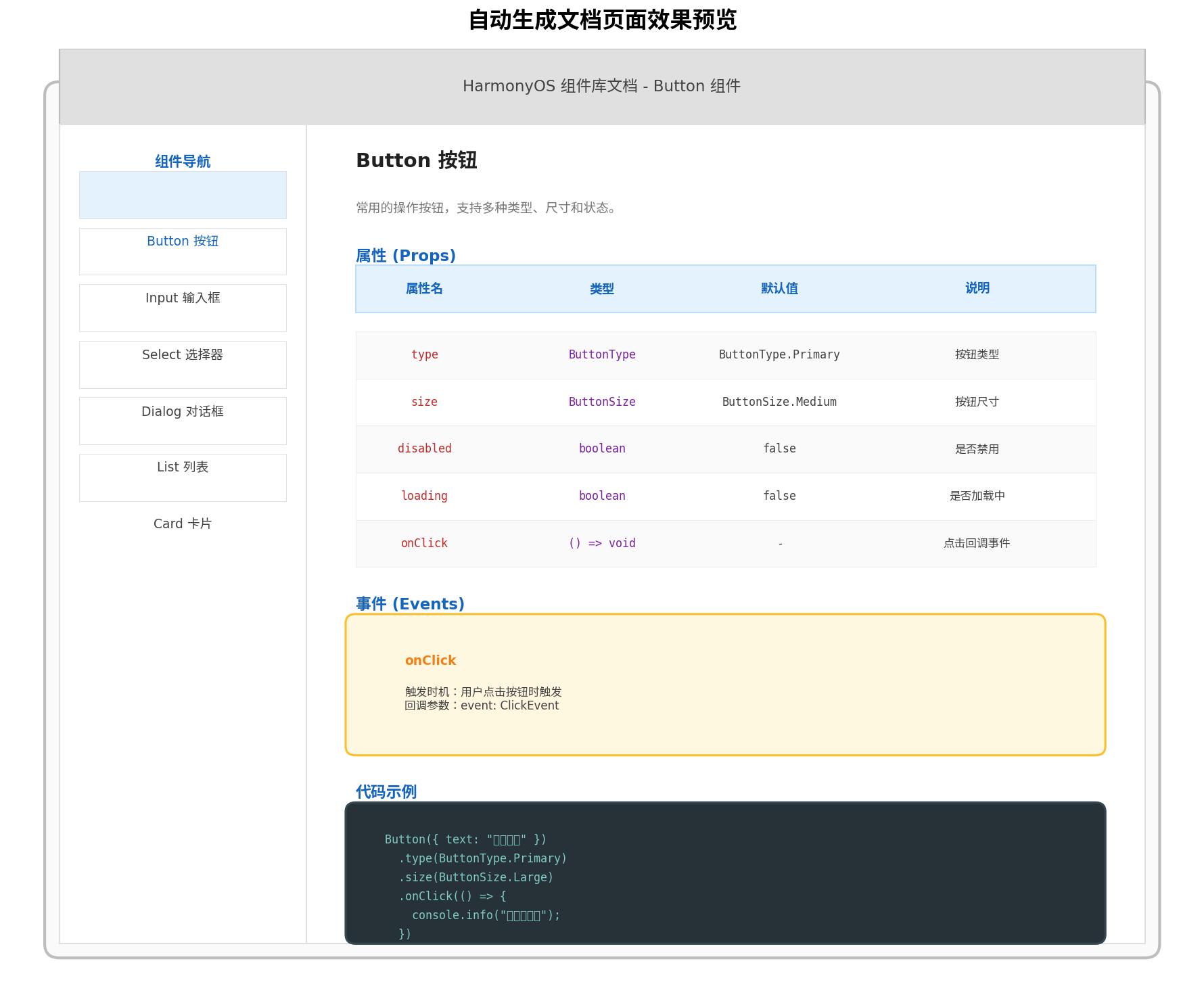
生成的 Button.md 内容如下(节选):
# Button

> 常用的操作按钮,支持多种类型、尺寸和状态。

**适用版本:** API 12

## 属性 (Props)

| 属性名 | 类型 | 默认值 | 说明 |
|--------|------|--------|------|
| text | `string` | "" | 按钮显示的文本内容 |
| type | `ButtonType` | ButtonType.Primary | 按钮的视觉类型 |
| size | `ButtonSize` | ButtonSize.Medium | 按钮的尺寸规格 |
| disabled | `boolean` | false | 是否禁用按钮 |
| loading | `boolean` | false | 是否显示加载状态 |

## 事件 (Events)

| 事件名 | 类型 | 说明 |
|--------|------|------|
| onClick | `(() => void) \| undefined` | 点击按钮时的回调事件 |

## 插槽 (Slots)

| 插槽名 | 类型 | 说明 |
|--------|------|------|
| prefixIcon | `(() => void) \| undefined` | 按钮前缀图标构建器 |

## 代码示例

### 示例 1

```typescript
Button({ text: "确认" })
  .type(ButtonType.Primary)
  .size(ButtonSize.Large)
  .onClick(() => console.info("点击"))
五、方案二:基于 ArkTS 自定义注解的元数据驱动方案
5.1 ArkTS 注解机制简介
从 API Version 20 开始,ArkTS 正式支持用户自定义注解(User-Defined Annotation)。注解是一种语言特性,通过添加元数据来改变应用声明的语义,且可以在编译期被静态分析工具读取。cite🛠web_search:1#7:~:text=用户自定义注解…用户自定义注解的定义与interface的定义类似
利用这一特性,我们可以为组件定义一套编译期元数据注解,在文档生成阶段直接读取这些注解,而无需依赖注释文本的字符串解析。
5.2 定义文档元数据注解
// annotations/DocAnnotations.ets

/**
 * 组件文档注解 —— 标记组件基本信息
 */
export @interface ComponentDoc {
  /** 组件中文名称 */
  name: string;
  /** 组件详细描述 */
  description: string;
  /** 最低支持版本 */
  since: number = 12;
  /** 所属分类 */
  category: string = "通用";
}

/**
 * 属性文档注解 —— 标记组件属性
 */
export @interface PropDoc {
  /** 属性说明 */
  description: string;
  /** 默认值文本描述 */
  defaultValue: string = "";
  /** 是否必填 */
  required: boolean = false;
}

/**
 * 事件文档注解 —— 标记组件事件
 */
export @interface EventDoc {
  /** 事件说明 */
  description: string;
  /** 回调参数说明 */
  params: string = "";
}

/**
 * 示例代码注解 —— 标记文档示例
 */
export @interface ExampleDoc {
  /** 示例标题 */
  title: string;
  /** 示例描述 */
  description: string = "";
}
5.3 在组件中使用注解
// components/Button.ets
import { ComponentDoc, PropDoc, EventDoc, ExampleDoc } from '../annotations/DocAnnotations';

@ComponentDoc({
  name: "按钮",
  description: "常用的操作按钮,支持多种类型、尺寸和状态。",
  since: 12,
  category: "基础组件"
})
@Component
export struct Button {
  @PropDoc({
    description: "按钮显示的文本内容",
    defaultValue: "空字符串",
    required: true
  })
  @Prop text: string = '';

  @PropDoc({
    description: "按钮的视觉类型",
    defaultValue: "ButtonType.Primary"
  })
  @Prop type: ButtonType = ButtonType.Primary;

  @PropDoc({
    description: "是否禁用按钮",
    defaultValue: "false"
  })
  @Prop disabled: boolean = false;

  @EventDoc({
    description: "点击按钮时的回调事件",
    params: "无参数"
  })
  onClick?: () => void;

  @ExampleDoc({
    title: "基础用法",
    description: "最常用的按钮样式"
  })
  static BasicExample(): void {
    // 示例代码仅用于文档提取,不参与运行时逻辑
  }

  build() {
    // ... 构建逻辑
  }
}
5.4 注解元数据提取策略
由于 ArkTS 注解在编译后会被保留在 .d.ets 声明文件中,cite🛠web_search:1#7:~:text=当编译器根据ets代码自动生成.d.ets文件时…源代码中的注解定义会在.d.ets文件中保留 我们可以通过解析 .d.ets 文件来提取注解元数据:
// scripts/extract-annotations.ts
import * as ts from 'typescript';
import * as fs from 'fs';
import * as path from 'path';

/**
 * 从 .d.ets 文件中提取注解元数据
 */
function extractAnnotationsFromDeclaration(filePath: string): any[] {
  const content = fs.readFileSync(filePath, 'utf-8');
  const sourceFile = ts.createSourceFile(filePath, content, ts.ScriptTarget.Latest, true);

  const components: any[] = [];

  ts.forEachChild(sourceFile, (node) => {
    if (ts.isStructDeclaration(node) || ts.isClassDeclaration(node)) {
      const decorators = ts.getDecorators?.(node) || [];
      const componentDoc = decorators.find((d: ts.Decorator) =>
        ts.isCallExpression(d.expression) &&
        ts.isIdentifier(d.expression.expression) &&
        d.expression.expression.text === 'ComponentDoc'
      );

      if (componentDoc) {
        const meta = parseDecoratorArgs(componentDoc as ts.Decorator);
        components.push({
          name: node.name?.text,
          meta,
          members: extractMemberAnnotations(node)
        });
      }
    }
  });

  return components;
}

/**
 * 解析装饰器参数
 */
function parseDecoratorArgs(decorator: ts.Decorator): Record<string, any> {
  if (!ts.isCallExpression(decorator.expression)) return {};

  const args = decorator.expression.arguments[0];
  if (!args || !ts.isObjectLiteralExpression(args)) return {};

  const result: Record<string, any> = {};
  args.properties.forEach((prop: ts.ObjectLiteralElementLike) => {
    if (ts.isPropertyAssignment(prop) && ts.isIdentifier(prop.name)) {
      const key = prop.name.text;
      if (ts.isStringLiteral(prop.initializer)) {
        result[key] = prop.initializer.text;
      } else if (ts.isNumericLiteral(prop.initializer)) {
        result[key] = Number(prop.initializer.text);
      } else if (prop.initializer.kind === ts.SyntaxKind.TrueKeyword) {
        result[key] = true;
      } else if (prop.initializer.kind === ts.SyntaxKind.FalseKeyword) {
        result[key] = false;
      }
    }
  });

  return result;
}

/**
 * 提取成员注解
 */
function extractMemberAnnotations(node: ts.StructDeclaration | ts.ClassDeclaration): any[] {
  const members: any[] = [];

  node.members.forEach(member => {
    if (ts.isPropertyDeclaration(member) || ts.isMethodDeclaration(member)) {
      const decorators = ts.getDecorators?.(member) || [];
      const docDecorators = decorators.filter((d: ts.Decorator) => {
        if (!ts.isCallExpression(d.expression)) return false;
        const name = ts.isIdentifier(d.expression.expression)
          ? d.expression.expression.text
          : '';
        return ['PropDoc', 'EventDoc', 'SlotDoc'].includes(name);
      });

      if (docDecorators.length > 0) {
        members.push({
          name: member.name.getText(),
          decorators: docDecorators.map(d => ({
            type: (d as ts.Decorator).expression.getText(),
            args: parseDecoratorArgs(d as ts.Decorator)
          }))
        });
      }
    }
  });

  return members;
}
方案二的优势在于:注解是强类型的,IDE 可以在编写时提供自动补全和类型检查,避免了 JSDoc 字符串解析可能带来的格式错误。同时,注解与源码的绑定关系更加紧密,编译器会在注解参数类型不匹配时直接报错。
六、方案三:集成 DevEco Studio DocTool 官方工具链
6.1 DocTool 简介
HarmonyOS 官方提供了 DocTool 工具,支持从 ArkTS 源码注释自动生成标准化 API 参考文档。该工具基于 TypeScript/JavaScript 开发,支持解析 ArkTS 语法、提取 @system、@ohos 等模块的注释,并输出符合华为文档规范的 Markdown 格式。cite🛠web_search:1#0:~:text=鸿蒙Next官方提供的API文档生成工具是DocTool…支持从源码注释自动生成标准化API参考文档
6.2 配置与使用
在工程根目录创建 doc.config.json 配置文件:
{
  "projectName": "MyComponentLibrary",
  "version": "1.0.0",
  "sourceDirs": [
    "./components",
    "./utils"
  ],
  "outputDir": "./docs-output",
  "format": "markdown",
  "includePrivate": false,
  "excludePatterns": [
    "**/*.test.ets",
    "**/internal/**"
  ],
  "customTags": {
    "@category": "分类",
    "@platform": "适用平台",
    "@permission": "所需权限"
  },
  "template": {
    "header": "# {componentName}\n\n> {description}\n\n",
    "propTable": "## 属性\n\n| 属性 | 类型 | 默认值 | 说明 |\n|------|------|--------|------|\n",
    "eventTable": "## 事件\n\n| 事件 | 类型 | 说明 |\n|------|------|------|\n",
    "exampleBlock": "## 示例\n\n\`\`\`typescript\n{code}\n\`\`\`\n"
  }
}
在 DevEco Studio 中,通过菜单 Tools > Generate ArkTS API Documentation 启动文档生成,或在终端执行:
# 假设 hdct 已加入环境变量
hdct doc --config ./doc.config.json
6.3 三种方案对比
| 维度 | 方案一:JSDoc + AST | 方案二:自定义注解 | 方案三:DocTool |
|---|---|---|---|
| 实现复杂度 | 中等(需自行编写解析脚本) | 较高(需定义注解体系) | 低(官方工具开箱即用) |
| 灵活性 | 高(完全自定义输出格式) | 高(强类型元数据) | 中(受限于官方模板) |
| 类型安全 | 低(字符串解析) | 高(编译期检查) | 中 |
| 维护成本 | 中 | 低(注解即代码) | 低 |
| 适用场景 | 中小型组件库、高度定制需求 | 大型组件库、严格规范团队 | 快速接入、标准化输出 |
建议策略:对于已有项目,可优先采用方案一快速落地;对于新建项目,推荐方案二构建长期可持续的元数据体系;方案三可作为补充,用于生成符合华为官方规范的 API 参考文档。
七、自动化流水线搭建
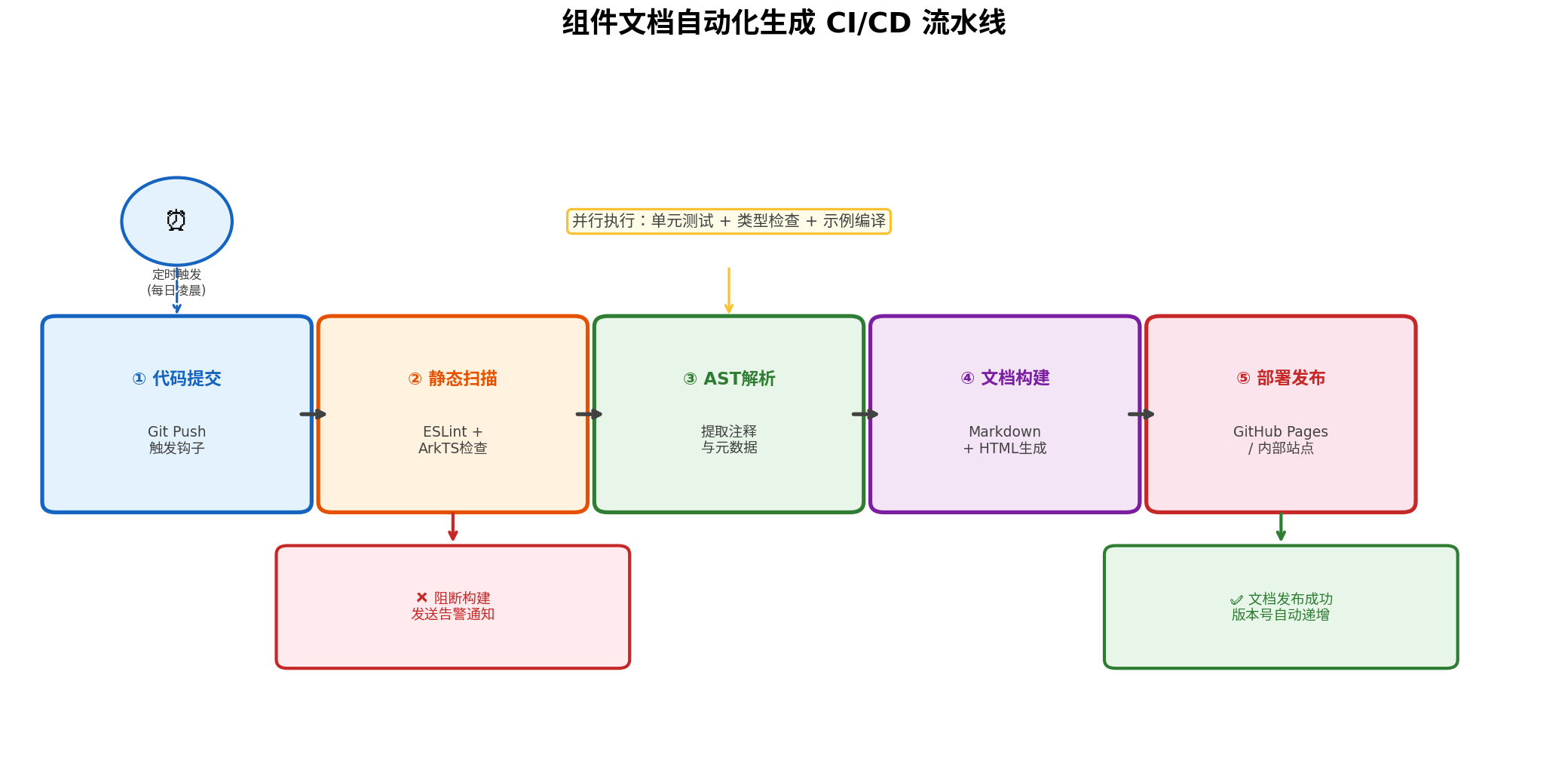
文档自动化的最终目标是实现无人值守的持续交付。以下是一个基于 GitHub Actions 的完整流水线配置:
# .github/workflows/doc-generation.yml
name: Component Documentation CI

on:
  push:
    branches: [main, develop]
    paths:
      - 'components/**'
      - 'annotations/**'
      - 'scripts/**'
  pull_request:
    branches: [main]
    paths:
      - 'components/**'
  schedule:
    # 每日凌晨 2 点定时触发全量构建
    - cron: '0 18 * * *'

jobs:
  lint-and-check:
    runs-on: ubuntu-latest
    steps:
      - uses: actions/checkout@v4

      - name: Setup Node.js
        uses: actions/setup-node@v4
        with:
          node-version: '20'
          cache: 'npm'

      - name: Install dependencies
        run: npm ci

      - name: Run ESLint
        run: npm run lint

      - name: Type check
        run: npm run type-check

      - name: Verify component examples compile
        run: npm run build:examples

  generate-docs:
    needs: lint-and-check
    runs-on: ubuntu-latest
    steps:
      - uses: actions/checkout@v4

      - name: Setup Node.js
        uses: actions/setup-node@v4
        with:
          node-version: '20'
          cache: 'npm'

      - name: Install dependencies
        run: npm ci

      - name: Generate Markdown docs
        run: npm run docs:generate

      - name: Generate JSON schema
        run: npm run docs:schema

      - name: Build HTML site
        run: npm run docs:build

      - name: Upload artifacts
        uses: actions/upload-artifact@v4
        with:
          name: documentation
          path: |
            docs-output/
            schema/

  deploy:
    needs: generate-docs
    if: github.ref == 'refs/heads/main'
    runs-on: ubuntu-latest
    permissions:
      contents: write
      pages: write
    steps:
      - uses: actions/checkout@v4

      - name: Download artifacts
        uses: actions/download-artifact@v4
        with:
          name: documentation
          path: ./dist

      - name: Deploy to GitHub Pages
        uses: peaceiris/actions-gh-pages@v3
        with:
          github_token: ${{ secrets.GITHUB_TOKEN }}
          publish_dir: ./dist/docs-output
          cname: docs.your-component-lib.com

      - name: Create release tag
        run: |
          VERSION=$(node -p "require('./package.json').version")
          git tag "docs-v$VERSION-$(date +%Y%m%d)"
          git push origin "docs-v$VERSION-$(date +%Y%m%d)"
流水线关键设计要点
-
路径过滤触发:仅在组件源码、注解定义或脚本变更时触发构建,避免无关提交浪费 CI 资源。
-
前置质量门禁:在文档生成前执行 ESLint 静态扫描、TypeScript 类型检查和示例代码编译验证,确保源码质量过关后才生成文档。
-
多格式并行输出:同时生成 Markdown(便于开发者本地阅读)、JSON Schema(便于 IDE 插件消费)和 HTML 站点(便于在线浏览)。
-
版本自动对齐:文档发布时自动创建
docs-v{version}-{date}格式的 Git Tag,实现文档版本与源码版本的一一对应。 -
定时全量构建:通过 Cron 表达式每日凌晨触发一次全量构建,确保即使遗漏了某些增量触发场景,文档也不会长期滞后。
八、进阶:IDE 智能提示集成
文档自动化的价值不仅体现在静态站点上,更在于提升开发者的编码体验。我们可以将生成的 JSON Schema 集成到 DevEco Studio 中,实现组件属性的智能提示:
// schema/Button.schema.json
{
  "$schema": "http://json-schema.org/draft-07/schema#",
  "type": "object",
  "title": "Button",
  "description": "常用的操作按钮组件",
  "properties": {
    "text": {
      "type": "string",
      "description": "按钮显示的文本内容",
      "default": ""
    },
    "type": {
      "type": "string",
      "enum": ["Primary", "Default", "Dashed", "Text"],
      "description": "按钮的视觉类型",
      "default": "Primary"
    },
    "size": {
      "type": "string",
      "enum": ["Small", "Medium", "Large"],
      "description": "按钮的尺寸规格",
      "default": "Medium"
    },
    "disabled": {
      "type": "boolean",
      "description": "是否禁用按钮",
      "default": false
    },
    "onClick": {
      "type": "string",
      "description": "点击按钮时的回调事件"
    }
  },
  "required": ["text"]
}
通过 DevEco Studio 的 Live Templates 和 CodeGenie 插件能力,cite🛠web_search:1#14:~:text=DevEco CodeGenie…支持智能问答、代码生成、页面生成 可以将 Schema 数据注入到 IDE 的自动补全引擎中,让开发者在编写 Button({}) 时即可获得属性列表、类型提示和默认值填充。
九、总结与展望
本文系统阐述了在 HarmonyOS / ArkTS 生态中构建组件文档自动生成体系的完整技术路径:
- 方案一(JSDoc + AST) 适合快速落地,利用 TypeScript 编译器 API 从注释中提取结构化信息,零侵入现有代码。
- 方案二(自定义注解) 适合长期维护,借助 ArkTS 编译期元数据能力,实现强类型、可检查的文档标记体系。
- 方案三(DocTool) 适合标准化输出,直接复用华为官方工具链,生成符合鸿蒙生态规范的 API 文档。
三种方案并非互斥,实际项目中可以组合使用:以自定义注解作为权威元数据源,以 JSDoc 作为补充说明,以 DocTool 作为标准化输出通道,最终通过 CI/CD 流水线实现文档的自动化构建与持续交付。
未来演进方向
- AI 辅助文档生成:结合大语言模型,基于组件源码自动生成自然语言描述,进一步降低注释编写成本。
- 交互式 Playground:在文档站点中嵌入 ArkUI 实时渲染能力,让开发者可以在线编辑示例代码并即时预览效果。
- 多语言国际化:扩展文档生成脚本,支持一键输出中、英、日等多语言版本,助力组件库出海。
- 与 OpenClaw 智能体集成:将组件文档作为知识库注入智能体,实现自然语言查询组件用法的 AI 助手。
文档是组件库与开发者之间的桥梁。当这座桥梁可以自动搭建、实时维护时,团队便能将更多精力投入到创造真正有价值的业务功能中去。
转载自:https://blog.csdn.net/u014727709/article/details/163541116
欢迎 👍点赞✍评论⭐收藏,欢迎指正

讨论HarmonyOS开发技术,专注于API与组件、DevEco Studio、测试、元服务和应用上架分发等。
更多推荐
 5
5 0
0- 0


 已为社区贡献869条内容

所有评论(0)