# 基于 HarmonyOS API 24 与 HarmonyOS ArkTS API 24 的极限装备舱运输平台开发实战——HarmonyOS 6.1.1 暗黑霓虹风单文件页面架构全解析
一、技术概述与项目背景
在 HarmonyOS 6.1.1 的全栈生态体系中,ArkTS 作为核心声明式开发语言已经演进到了 HarmonyOS ArkTS API 24 阶段,为开发者提供了更加丰富、高效且类型安全的 UI 构建能力。本项目"极限装备舱 ADRENALINE HAUL"正是一个基于 HarmonyOS API 24 构建的极限运动装备专业运输与装备管理平台,它面向冲浪板、滑雪板、攀岩装备、山地车等高价值极限装备的运输场景,将装备库存管理、航点导航、预约调度、车辆装载监控、气象预警、战绩统计与用户中心七大功能模块整合在单文件页面架构中,充分展现了 ArkTS 在复杂业务场景下的表达力和组织能力。
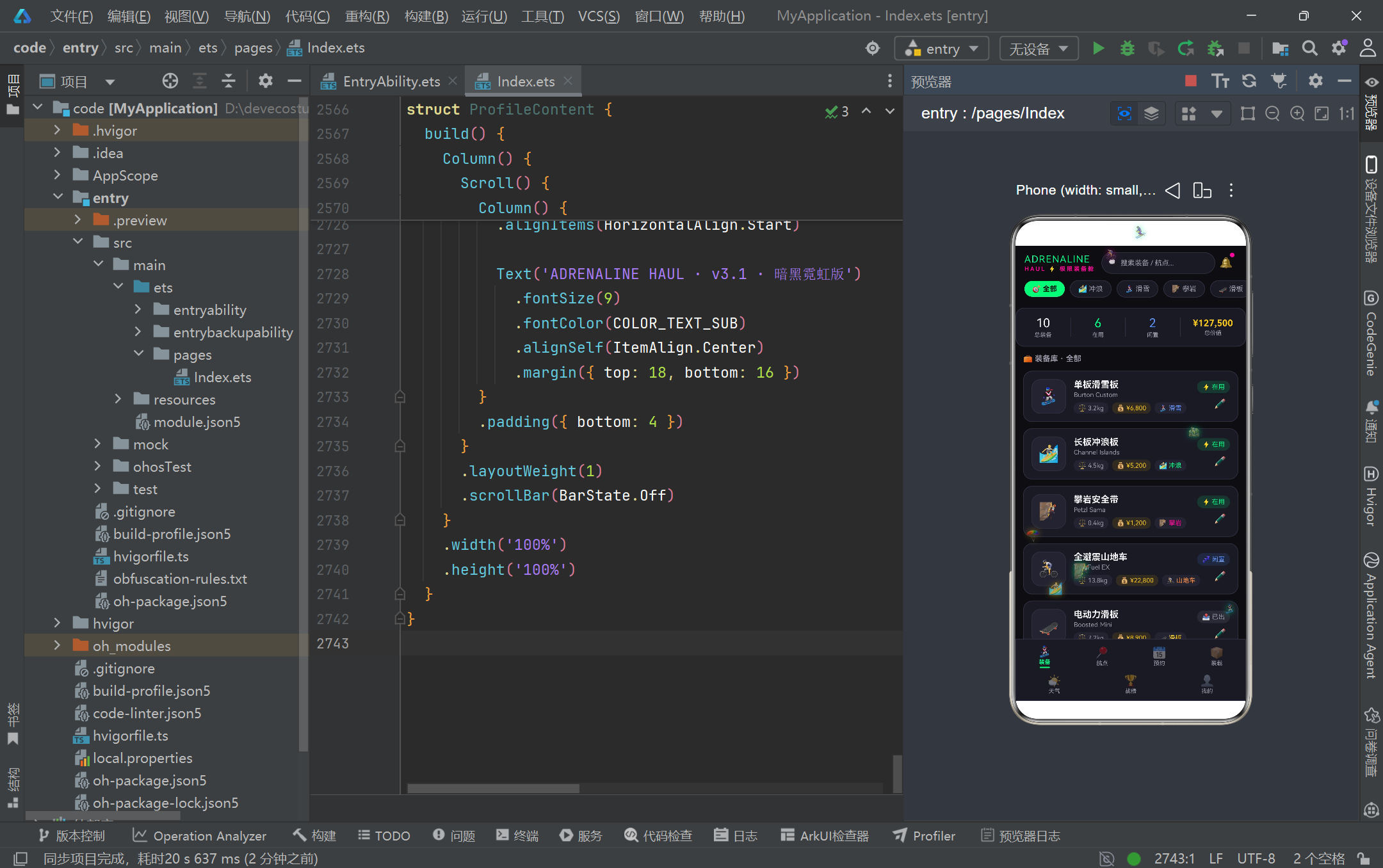
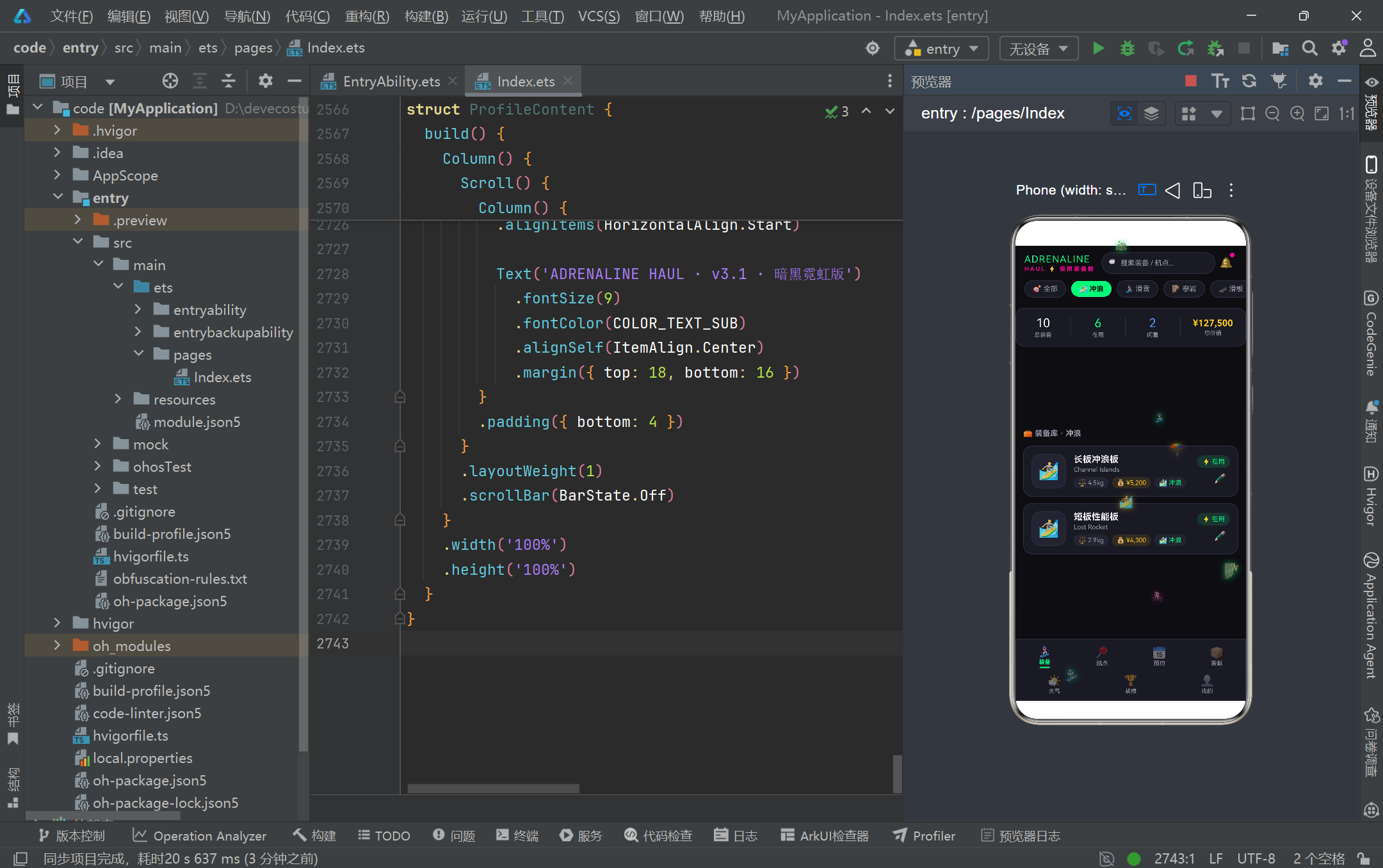
该项目采用暗黑霓虹电竞风视觉语言,通过十余个精心调配的主题色常量构建了一套高度统一的色彩体系。主色调以近黑底色配合荧光绿、品红、金色三种霓虹强调色,营造出强烈的视觉冲击力和电竞氛围感。这种设计不仅满足了极限运动用户群体对个性化视觉表达的诉求,同时通过高对比度的色彩搭配确保了信息在暗色背景上的可读性,体现了 HarmonyOS ArkTS API 24 在样式系统方面的灵活控制能力——从字体粗细、字间距、圆角半径到阴影发光效果,均可通过链式调用的方式精确控制。
在架构层面,本项目采用了典型的单文件多组件组织模式,将所有逻辑封装在一个 ArkTS 文件中,通过 @Entry、@Component 装饰器体系构建组件树。项目定义了八个 @Observed 可观察数据类来承载业务模型,通过 @State、@Prop 等状态管理装饰器实现组件间的数据传递与响应式更新。同时,大量纯函数被提取到组件外部用于数据转换、格式化和过滤计算,这种关注点分离的设计理念使得 UI 渲染层与业务逻辑层保持了清晰的边界,既提升了代码的可测试性,也降低了后续维护的认知负担。
值得一提的是,本项目在交互体验层面引入了粒子动画系统,通过 setInterval 定时器驱动一组极限运动图标在屏幕中持续向上漂浮,配合 textShadow 发光效果营造出动态的视觉氛围。这一实现依托于 HarmonyOS 6.1.1 的生命周期回调机制(aboutToAppear / aboutToDisappear)和 HitTestMode 透传点击事件能力,在不干扰用户正常操作的前提下为页面注入了活力。此外,四个功能各异的弹窗模态(编辑装备、删除航点、预约运输、天气预警)通过条件渲染与遮罩层叠加实现,展示了 ArkTS 在构建复杂交互流程时的成熟模式。
二、系统架构总览
三、逐段代码深度解析
3.1 主题色彩常量体系
const COLOR_BG: string = '#0D0D12'
const COLOR_CARD: string = '#1A1A24'
const COLOR_CARD_LIGHT: string = '#232330'
const COLOR_PRIMARY: string = '#00FF88'
const COLOR_SECONDARY: string = '#FF0099'
const COLOR_GOLD: string = '#F5C518'
const COLOR_TEXT: string = '#F2F2F5'
const COLOR_TEXT_SUB: string = '#9A9AA8'
const COLOR_BORDER: string = '#2E2E3E'
const COLOR_RED: string = '#FF4D5E'
const COLOR_BLUE: string = '#5B8DEF'
const COLOR_ORANGE: string = '#FF8A3D'
这段代码定义了整个应用的主题色彩常量体系,是暗黑霓虹电竞风视觉语言的基石。项目采用了分层色彩策略:COLOR_BG 作为最底层背景使用近黑色调(#0D0D12)营造沉浸氛围;COLOR_CARD 和 COLOR_CARD_LIGHT 作为卡片背景提供两级层次区分;COLOR_PRIMARY(荧光绿 #00FF88)和 COLOR_SECONDARY(品红 #FF0099)是两大核心强调色,分别用于主要操作按钮和次级高亮元素;COLOR_GOLD(金色)专门用于价值类信息的展示。通过将这些颜色提取为顶层 const 常量,项目实现了色彩管理的集中化,任何主题调整只需修改一处即可全局生效,这体现了良好的设计令牌(Design Token)理念。同时所有常量均显式标注 string 类型,符合 ArkTS 的严格类型约束规范。
3.2 数据模型接口定义
interface GearModel {
  id: number
  name: string
  brand: string
  sport: string
  weight: number
  value: number
  status: string
  icon: string
  notes: string
}

interface RouteModel {
  id: number
  name: string
  sport: string
  difficulty: number
  altitude: number
  distance: number
  tags: string
  heat: number
}

interface WeatherModel {
  id: number
  date: string
  icon: string
  tempMin: number
  tempMax: number
  wind: string
  condition: string
  warning: boolean
}
项目通过 interface 定义了八组数据模型契约,涵盖了装备、航点、预约、天气、车辆、成就、装载清单和粒子等全部业务实体。这里展示的 GearModel 是最核心的装备模型,包含名称、品牌、运动类型、重量、价值、状态、图标和备注九个字段;RouteModel 描述了极限运动航点的难度、海拔、距离和热度等地理属性;WeatherModel 则包含了温度区间、风力、天气状况及预警标志。值得注意的是,所有接口字段都使用了 ArkTS 的原生基本类型(number、string、boolean),没有使用联合类型或可选属性,这种简化的类型设计确保了数据结构的确定性和序列化的一致性,同时也为后续 @Observed 类的实现提供了清晰的契约基础。tags 字段采用管道符分隔的字符串格式(如"粉雪|缆车|夜滑"),在渲染时通过 split 方法动态拆分,是一种轻量级的标签存储方案。
3.3 @Observed 可观察数据类
@Observed
class GearItem implements GearModel {
  id: number = 0
  name: string = ''
  brand: string = ''
  sport: string = ''
  weight: number = 0
  value: number = 0
  status: string = '闲置'
  icon: string = '🏂'
  notes: string = ''
  constructor(id: number, name: string, brand: string, sport: string,
    weight: number, value: number, status: string, icon: string, notes: string) {
    this.id = id; this.name = name; this.brand = brand; this.sport = sport
    this.weight = weight; this.value = value; this.status = status
    this.icon = icon; this.notes = notes
  }
}

@Observed
class RouteItem implements RouteModel {
  id: number = 0
  name: string = ''
  sport: string = ''
  difficulty: number = 1
  altitude: number = 0
  distance: number = 0
  tags: string = ''
  heat: number = 0
  constructor(id: number, name: string, sport: string, difficulty: number,
    altitude: number, distance: number, tags: string, heat: number) {
    this.id = id; this.name = name; this.sport = sport; this.difficulty = difficulty
    this.altitude = altitude; this.distance = distance; this.tags = tags; this.heat = heat
  }
}
@Observed 装饰器是 HarmonyOS ArkTS API 24 中实现响应式数据绑定的关键机制。当被 @Observed 标注的类的属性发生变化时,框架会自动通知所有引用该实例的 @State、@Prop 等状态变量触发 UI 重新渲染。这里展示的 GearItem 和 RouteItem 都通过 implements 关键字实现了对应的 interface 契约,同时为每个属性提供了默认初始值——这是 ArkTS 的严格要求,所有类属性在声明时必须初始化。构造函数采用全参数设计,通过分号分隔的紧凑赋值风格完成属性初始化。项目共定义了八个 @Observed 类,分别对应八组数据模型,这种一一对应的映射关系使得数据层的类型系统非常清晰。在实际运行中,当用户编辑装备信息或切换排序模式时,对应的数据实例属性变更会自动驱动关联组件的视图更新,无需手动调用 setState 或 invalidate 等命令式刷新方法。
3.4 Record 配置映射表
interface StatusMeta {
  label: string
  color: string
  bg: string
  icon: string
}

const GEAR_STATUS_CONFIG: Record<string, StatusMeta> = {
  '在用': { label: '在用', color: '#00FF88', bg: 'rgba(0,255,136,0.12)', icon: '⚡' },
  '闲置': { label: '闲置', color: '#5B8DEF', bg: 'rgba(91,141,239,0.12)', icon: '💤' },
  '已出': { label: '已出', color: '#9A9AA8', bg: 'rgba(154,154,168,0.12)', icon: '📤' }
}

interface SportMeta {
  label: string
  icon: string
  color: string
}

const SPORT_CONFIG: Record<string, SportMeta> = {
  '冲浪': { label: '冲浪', icon: '🏄', color: '#00FF88' },
  '滑雪': { label: '滑雪', icon: '🏂', color: '#5B8DEF' },
  '攀岩': { label: '攀岩', icon: '🧗', color: '#FF0099' },
  '滑板': { label: '滑板', icon: '🛹', color: '#F5C518' },
  '山地车': { label: '山地车', icon: '🚴', color: '#FF8A3D' },
  '滑翔': { label: '滑翔', icon: '🪂', color: '#FF4D5E' }
}
项目通过 Record<string, T> 类型构建了五组配置映射表,将业务状态的视觉元数据(颜色、背景、图标)与状态文本解耦。GEAR_STATUS_CONFIG 为装备的三种状态(在用、闲置、已出)分别定义了对应的主题色、半透明背景色和 Emoji 图标;SPORT_CONFIG 则为六种极限运动类型配置了专属的色彩标识。这种设计模式的优势在于:当业务状态需要在多个组件中复用相同的视觉表现时,只需通过键查找即可获取完整的样式信息,避免了在多处硬编码颜色值和图标字符串。在组件渲染中,通过可选链操作符(如 GEAR_STATUS_CONFIG[g.status]?.color)安全访问配置,即使状态值不在映射表中也不会导致运行时崩溃,而是优雅降级到默认值。这种防御式编程策略在 HarmonyOS ArkTS API 24 中尤为重要,因为 Record 查找在键不存在时返回 undefined,可选链确保了类型安全。
3.5 静态 Mock 数据集
const mockGear: GearItem[] = [
  new GearItem(1, '单板滑雪板', 'Burton Custom', '滑雪', 3.2, 6800, '在用', '🏂', '参加崇礼粉雪季的主力板'),
  new GearItem(2, '长板冲浪板', 'Channel Islands', '冲浪', 4.5, 5200, '在用', '🏄', '后海湾日常刷浪用'),
  new GearItem(3, '攀岩安全带', 'Petzl Sama', '攀岩', 0.4, 1200, '在用', '🧗', '阳朔多段攀必备'),
  new GearItem(4, '全避震山地车', 'Trek Fuel EX', '山地车', 13.8, 22800, '闲置', '🚴', '秦岭林道结束后待保养'),
  new GearItem(5, '电动力滑板', 'Boosted Mini', '滑板', 7.2, 8900, '已出', '🛹', '已转卖给同城骑手')
]

const mockRoutes: RouteItem[] = [
  new RouteItem(1, '崇礼万龙滑雪场', '滑雪', 4, 2170, 280, '粉雪|缆车|夜滑', 92),
  new RouteItem(2, '三亚后海湾', '冲浪', 3, 5, 2400, '浪点|初学|民宿', 88),
  new RouteItem(3, '阳朔白山岩壁', '攀岩', 5, 320, 1600, '天然岩壁|多段|多线路', 85)
]

const mockWeather: WeatherItem[] = [
  new WeatherItem(1, '08-23 周日', '☀️', 22, 30, '微风 2级', '浪高0.8m · 城市热浪', false),
  new WeatherItem(2, '08-24 周一', '⛈️', 18, 24, '狂风 8级', '台风外围 · 浪高4.2m', true),
  new WeatherItem(3, '08-25 周二', '🌧️', 17, 23, '北风 6级', '持续降雨 · 浪高2.8m', false)
]
项目预置了七组静态 Mock 数据集,涵盖了装备、航点、预约、天气、车辆、成就和装载清单等全部业务领域。这里展示的装备数据包含了真实极限运动品牌(如 Burton、Channel Islands、Petzl、Trek 等)和贴近实际的规格参数;航点数据涵盖崇礼、三亚、阳朔、阿勒泰等知名极限运动目的地,并附带了难度等级、海拔和距离等关键信息;天气数据模拟了五日预报,其中第二日设置了台风预警标志,为后续的预警弹窗交互提供了数据基础。这些 Mock 数据在组件构建时通过 new 操作符实例化为 @Observed 对象数组,使得整个应用在无后端服务的情况下也能呈现完整的业务功能和丰富的视觉内容。数据中融入了大量中文场景化描述(如"参加崇礼粉雪季的主力板"),增强了应用的真实感和代入感。
3.6 辅助纯函数工具集
function formatMoney(n: number): string {
  const s: string = '' + n
  let out: string = ''
  let count: number = 0
  for (let i = s.length - 1; i >= 0; i--) {
    out = s[i] + out
    count++
    if (count % 3 === 0 && i > 0) {
      out = ',' + out
    }
  }
  return '¥' + out
}

function getFilteredGear(sport: string): GearItem[] {
  if (sport === '全部') {
    return mockGear
  }
  return mockGear.filter((g: GearItem) => g.sport === sport)
}

function getSortedRoutes(mode: string): RouteItem[] {
  const list: RouteItem[] = mockRoutes.slice()
  if (mode === '难度') {
    list.sort((a: RouteItem, b: RouteItem) => b.difficulty - a.difficulty)
  } else if (mode === '距离') {
    list.sort((a: RouteItem, b: RouteItem) => a.distance - b.distance)
  } else {
    list.sort((a: RouteItem, b: RouteItem) => b.heat - a.heat)
  }
  return list
}
项目在组件外部定义了二十余个纯函数用于数据处理和格式转换,这些函数不依赖任何组件上下文,输入确定即输出确定,具备良好的可测试性和可复用性。formatMoney 函数通过逆序遍历字符串并每三位插入逗号的方式实现千分位格式化,最终拼接人民币符号返回;getFilteredGear 根据运动类型对装备列表进行过滤,当传入"全部"时直接返回完整列表;getSortedRoutes 则根据排序模式(难度、距离、热度)对航点列表进行排序,值得注意的是该函数先通过 slice() 创建数组副本再进行排序,避免了修改原始数据。这些纯函数的设计体现了函数式编程的思想,将数据转换逻辑从 UI 渲染中剥离,使得组件的 build 方法更加专注于视图描述。同时,所有函数参数和返回值都有显式类型标注,符合 ArkTS 的严格类型规范。
3.7 Tab 枚举与主入口组件状态
enum GearTab {
  GEAR = 0,
  ROUTE = 1,
  BOOKING = 2,
  LOADING = 3,
  WEATHER = 4,
  RECORD = 5,
  PROFILE = 6
}

@Entry
@Component
struct AdrenalineHaulApp {
  @State activeTab: GearTab = GearTab.GEAR
  @State searchKeyword: string = ''
  @State selectedSport: string = '全部'
  @State particles: ParticleItem[] = initParticles()
  private timerId: number = -1

  aboutToAppear(): void {
    this.timerId = setInterval(() => {
      this.updateParticles()
    }, 280)
  }

  aboutToDisappear(): void {
    if (this.timerId !== -1) {
      clearInterval(this.timerId)
      this.timerId = -1
    }
  }
}
GearTab 枚举定义了七个 Tab 页面的索引常量,使用数值枚举确保了 Tab 切换时比较操作的高效性。主入口组件 AdrenalineHaulApp 通过 @Entry 装饰器标记为应用入口,内部维护了四个 @State 状态变量:activeTab 控制当前激活的 Tab 页面,searchKeyword 绑定搜索框输入,selectedSport 记录当前选中的运动类型筛选条件,particles 则承载粒子动画的数据数组。aboutToAppear 和 aboutToDisappear 是 HarmonyOS 6.1.1 的组件生命周期回调,分别在组件创建前和销毁前触发。这里在 aboutToAppear 中通过 setInterval 启动了一个每 280 毫秒执行一次的定时器来驱动粒子动画,并在 aboutToDisappear 中通过 clearInterval 清理定时器,这种成对出现的资源获取与释放模式是避免内存泄漏的关键实践。timerId 初始值设为 -1 作为无效标识符,在清理前进行条件检查,确保不会对未启动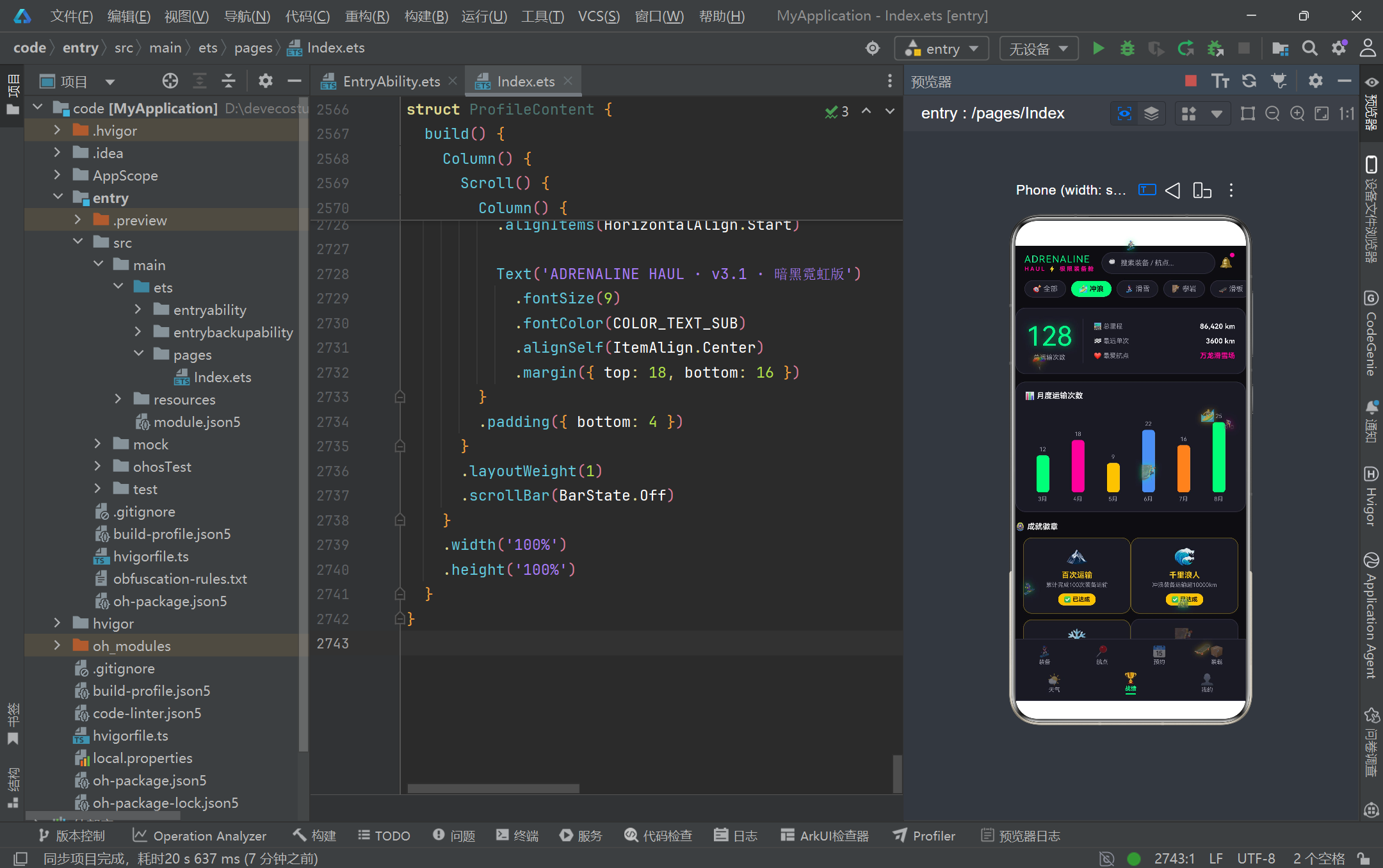
的定时器执行无效清理操作。
3.8 粒子动画驱动逻辑
updateParticles(): void {
  const next: ParticleItem[] = []
  for (const p of this.particles) {
    const ny: number = p.y - 1.4 - (p.id % 3) * 0.5
    if (ny < -8) {
      next.push(new ParticleItem(p.id, p.icon, Math.round(Math.random() * 920) / 10, 108, p.size))
    } else {
      next.push(new ParticleItem(p.id, p.icon, p.x, Math.round(ny * 10) / 10, p.size))
    }
  }
  this.particles = next
}
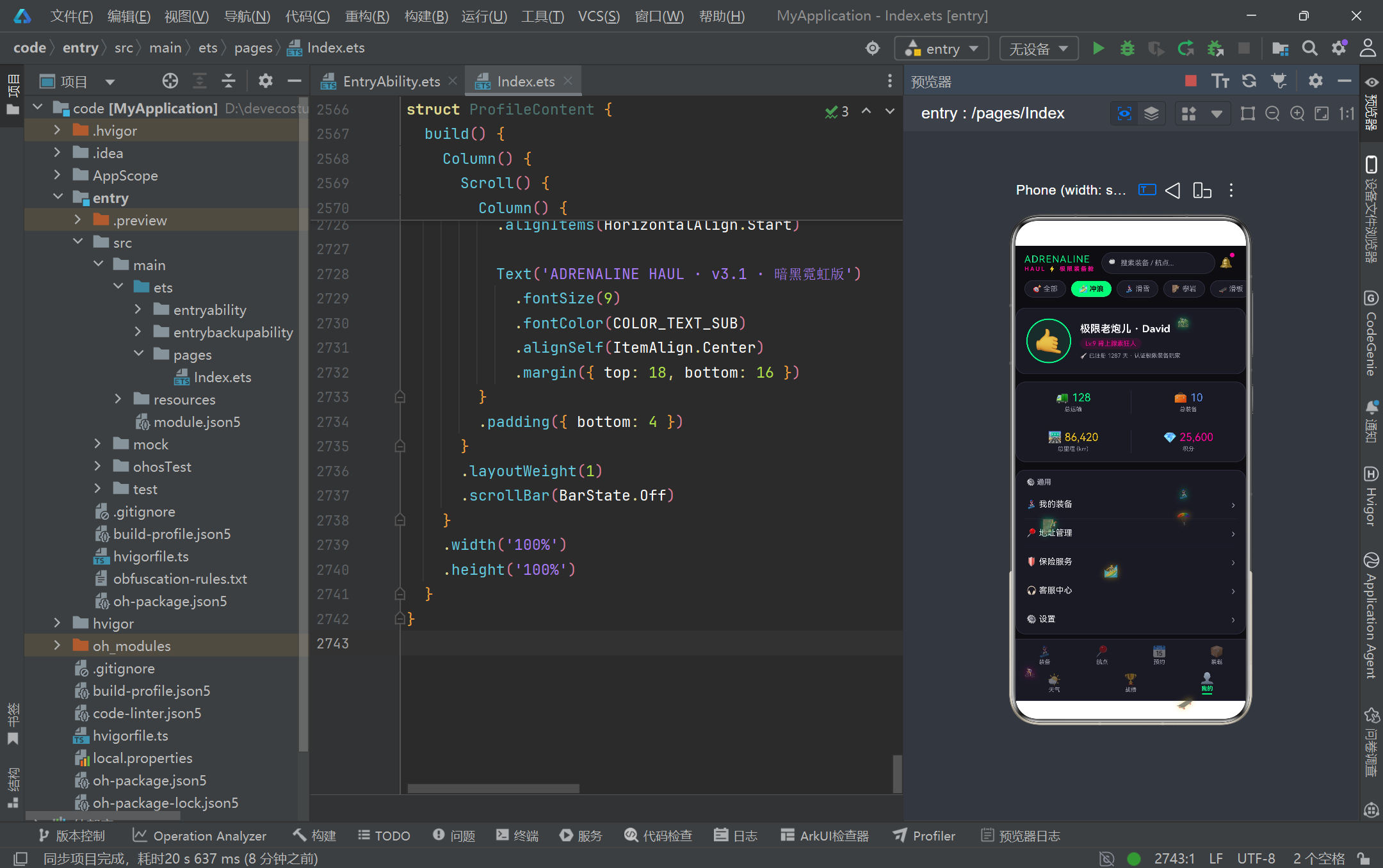
updateParticles 方法是粒子动画系统的核心驱动逻辑,每次定时器触发时被调用。该方法采用不可变数据更新策略:创建一个新的数组 next,遍历当前粒子列表计算每个粒子的新位置,然后将新数组整体赋值给 this.particles 触发 @State 的响应式更新。每个粒子的 y 坐标每次减少 1.4 加上一个基于 id 的差异化增量(p.id % 3 * 0.5),这种设计使得不同粒子的上升速度略有不同,营造出更自然的漂浮效果。当粒子 y 坐标低于 -8(即飘出屏幕顶部)时,将其重置到屏幕底部(y=108)并随机分配新的 x 坐标,实现粒子的循环复用。Math.round(ny * 10) / 10 的运算将坐标值保留一位小数,避免浮点数精度问题导致的位置抖动。这种基于定时器的命令式动画方案虽然不如属性动画(animateTo)声明式,但在需要精确控制每帧状态的场景下提供了更大的灵活性。
3.9 顶部头部构建器
@Builder headerBuilder() {
  Column() {
    Row() {
      Column() {
        Text('ADRENALINE')
          .fontSize(15)
          .fontWeight(FontWeight.Black)
          .fontColor(COLOR_PRIMARY)
          .letterSpacing(1)
        Text('HAUL ⚡ 极限装备舱')
          .fontSize(9)
          .fontWeight(FontWeight.Bold)
          .fontColor(COLOR_SECONDARY)
          .letterSpacing(2)
          .margin({ top: 1 })
      }
      .alignItems(HorizontalAlign.Start)

      Row() {
        Text('🔍').fontSize(12)
        TextInput({ placeholder: '搜索装备 / 航点...' })
          .placeholderColor(COLOR_TEXT_SUB)
          .placeholderFont({ size: 11 })
          .fontSize(11)
          .fontColor(COLOR_TEXT)
          .caretColor(COLOR_PRIMARY)
          .backgroundColor(Color.Transparent)
          .layoutWeight(1)
          .onChange((v: string) => {
            this.searchKeyword = v
          })
      }
      .layoutWeight(1)
      .height(34)
      .backgroundColor(COLOR_CARD)
      .borderRadius(17)
      .border({ width: 1, color: COLOR_BORDER })
      .padding({ left: 10, right: 10 })

      Column() {
        Text('🔔').fontSize(17)
        Column()
          .width(7)
          .height(7)
          .borderRadius(4)
          .backgroundColor(COLOR_SECONDARY)
          .position({ x: 23, y: 1 })
      }
      .width(34)
      .height(34)
      .onClick(() => {
        this.activeTab = GearTab.WEATHER
      })
    }
    .width('100%')
    .padding({ left: 14, right: 14, top: 10 })
    .alignItems(VerticalAlign.Center)
  }
  .width('100%')
  .backgroundColor(COLOR_BG)
}
headerBuilder 是主入口组件的头部构建器,通过 @Builder 装饰器定义为一个可复用的 UI 片段。该头部由三部分组成:左侧的品牌标识区使用 Column 纵向排列"ADRENALINE"主标题和"HAUL ⚡ 极限装备舱"副标题,通过 FontWeight.Black 和 letterSpacing 营造粗体宽间距的电竞字体效果;中间的搜索框区域采用 Row 横向布局组合放大镜图标和 TextInput 输入框,输入框使用 layoutWeight(1) 占满剩余空间,caretColor 设置为荧光绿使光标与主题保持一致;右侧的通知铃铛图标通过 position 绝对定位叠加了一个品红色小圆点作为未读消息提示,点击后切换到天气 Tab 页面。整个头部通过 padding 和 alignItems 精确控制了内边距和垂直对齐,搜索框的 borderRadius(17) 配合 height(34) 形成了胶囊形状,符合移动端触摸友好的设计规范。onChange 回调将输入值实时同步到 searchKeyword 状态变量,为后续的搜索过滤功能提供了数据基础。
3.10 底部 Tab 导航栏与内容区路由
@Builder tabItemBuilder(icon: string, label: string, tab: GearTab) {
  Column() {
    Text(icon)
      .fontSize(17)
      .opacity(this.activeTab === tab ? 1.0 : 0.45)
    Text(label)
      .fontSize(9)
      .fontColor(this.activeTab === tab ? COLOR_PRIMARY : COLOR_TEXT_SUB)
      .fontWeight(this.activeTab === tab ? FontWeight.Bold : FontWeight.Normal)
      .margin({ top: 1 })
    if (this.activeTab === tab) {
      Column()
        .width(16)
        .height(2)
        .backgroundColor(COLOR_PRIMARY)
        .borderRadius(1)
        .margin({ top: 2 })
    }
  }
  .layoutWeight(1)
  .alignItems(HorizontalAlign.Center)
  .padding({ top: 5, bottom: 5 })
  .onClick(() => {
    this.activeTab = tab
  })
}

@Builder contentArea() {
  Column() {
    if (this.activeTab === GearTab.GEAR) {
      GearContent({ sportFilter: this.selectedSport })
    } else if (this.activeTab === GearTab.ROUTE) {
      RouteContent()
    } else if (this.activeTab === GearTab.LOADING) {
      LoadingContent()
    } else if (this.activeTab === GearTab.WEATHER) {
      WeatherContent()
    } else {
      ProfileContent()
    }
  }
  .layoutWeight(1)
}
tabItemBuilder 是底部 Tab 项的通用构建器,接收图标、标签和 Tab 枚举三个参数,通过条件表达式动态控制激活态与非激活态的视觉表现:激活时图标完全不透明、文字使用荧光绿加粗并显示底部指示条;非激活时图标半透明、文字使用灰色常规字重且不显示指示条。这种通过三元运算符驱动的样式绑定是 ArkTS 声明式 UI 的核心范式。contentArea 构建器则通过 if-else 链实现了 Tab 内容区的条件路由,根据 activeTab 的值渲染对应的子组件。值得注意的是,GearContent 在实例化时通过参数传递了 selectedSport 状态值(sportFilter: this.selectedSport),这是 ArkTS 中父组件向子组件传递数据的标准方式,子组件通过 @Prop 接收后形成单向数据流。底部 Tab 栏被拆分为上下两排(4+3 布局),通过两个 Row 容器分别承载,这种设计在保持七个 Tab 等宽分布的同时避免了单行排列的拥挤感。
3.11 build 方法的 Stack 叠加架构
build() {
  Stack() {
    Column() {
      this.headerBuilder()
      this.contentArea()
      Column() {
        Row() {
          this.tabItemBuilder('🏂', '装备', GearTab.GEAR)
          this.tabItemBuilder('📍', '航点', GearTab.ROUTE)
          this.tabItemBuilder('📅', '预约', GearTab.BOOKING)
          this.tabItemBuilder('📦', '装载', GearTab.LOADING)
        }
        .width('100%')
        Row() {
          this.tabItemBuilder('🌤️', '天气', GearTab.WEATHER)
          this.tabItemBuilder('🏆', '战绩', GearTab.RECORD)
          this.tabItemBuilder('👤', '我的', GearTab.PROFILE)
        }
        .width('100%')
      }
      .width('100%')
      .backgroundColor(COLOR_CARD)
      .border({ width: 1, color: COLOR_BORDER })
    }
    .width('100%')
    .height('100%')

    Column() {
      ForEach(this.particles, (p: ParticleItem) => {
        Text(p.icon)
          .fontSize(p.size)
          .opacity(0.7)
          .textShadow({ radius: 14, color: particleGlow(p.id), offsetX: 0, offsetY: 0 })
          .position({ x: p.x + '%', y: p.y + '%' })
      })
    }
    .width('100%')
    .height('100%')
    .hitTestBehavior(HitTestMode.None)
  }
  .width('100%')
  .height('100%')
  .backgroundColor(COLOR_BG)
}
主入口组件的 build 方法采用 Stack 容器实现了两层叠加架构。底层是一个 Column 容器,从上到下依次排列头部构建器、内容区和底部 Tab 栏,构成了应用的主功能骨架。上层是一个覆盖全屏的 Column 容器,通过 ForEach 渲染粒子动画列表,每个粒子使用 Text 组件显示运动图标,配合 textShadow 发光效果和 position 百分比定位实现自由漂浮。关键在于上层容器设置了 hitTestBehavior(HitTestMode.None),这使得粒子层不会拦截任何触摸事件,所有点击操作会透传到下层的功能组件,实现了视觉效果与交互逻辑的完美隔离。这种 Stack 叠加模式是 HarmonyOS ArkTS API 24 中实现全局装饰层(如浮窗、引导层、动画粒子)的标准方案,相比绝对定位方案更加灵活且响应式友好。particleGlow 函数根据粒子 id 的奇偶性返回不同的发光颜色(绿、粉、金三色循环),为粒子动画增添了色彩层次感。
3.12 装备管理组件与编辑弹窗
@Component
struct GearContent {
  @Prop sportFilter: string = '全部'
  @State showEditModal: boolean = false
  @State editingGear: GearItem | null = null
  @State formName: string = ''
  @State formBrand: string = ''
  @State formWeight: string = ''
  @State formValue: string = ''
  @State formStatus: string = '在用'
  @State formNotes: string = ''

  @Builder modalOverlay(onClose: () => void) {
    Column()
      .width('100%')
      .height('100%')
      .backgroundColor('rgba(0,0,0,0.7)')
      .onClick(onClose)
  }

  @Builder editGearModal() {
    Stack() {
      this.modalOverlay(() => {
        this.showEditModal = false
      })
      Column() {
        Row() {
          Text('✏️ 编辑装备')
            .fontSize(17)
            .fontWeight(FontWeight.Bold)
            .fontColor(COLOR_TEXT)
          Column().layoutWeight(1)
          Text('✕')
            .fontSize(17)
            .fontColor(COLOR_TEXT_SUB)
            .padding(6)
            .onClick(() => {
              this.showEditModal = false
            })
        }
        .width('100%')
        .padding({ left: 18, right: 18, top: 16, bottom: 10 })

        Divider().color(COLOR_BORDER)

        Scroll() {
          Column() {
            Text('装备名称')
              .fontSize(11)
              .fontColor(COLOR_TEXT_SUB)
              .width('100%')
              .margin({ top: 12 })
            TextInput({ placeholder: this.editingGear?.name ?? '装备名称' })
              .fontSize(13)
              .fontColor(COLOR_TEXT)
              .backgroundColor(COLOR_CARD_LIGHT)
              .borderRadius(10)
              .border({ width: 1, color: COLOR_BORDER })
              .width('100%')
              .onChange((v: string) => {
                this.formName = v
              })
          }
          .padding({ left: 18, right: 18, bottom: 14 })
        }
        .layoutWeight(1)

        Row() {
          Text('取消')
            .fontSize(13)
            .fontColor(COLOR_TEXT_SUB)
            .backgroundColor(COLOR_CARD_LIGHT)
            .borderRadius(20)
            .onClick(() => { this.showEditModal = false })
          Text('保存')
            .fontSize(13)
            .fontWeight(FontWeight.Bold)
            .fontColor(COLOR_BG)
            .backgroundColor(COLOR_PRIMARY)
            .borderRadius(20)
            .margin({ left: 12 })
            .onClick(() => { this.showEditModal = false })
        }
        .justifyContent(FlexAlign.Center)
      }
      .width('85%')
      .height('60%')
      .backgroundColor(COLOR_CARD)
      .borderRadius(16)
    }
    .width('100%')
    .height('100%')
    .zIndex(999)
  }
}
GearContent 是装备管理 Tab 的核心组件,通过 @Prop 接收父组件传递的运动类型筛选条件,内部维护了七个 @State 状态变量来管理编辑弹窗的显隐和表单数据。modalOverlay 是一个通用的遮罩层构建器,接收一个回调函数作为关闭参数,通过半透明黑色背景覆盖全屏并绑定 onClick 触发关闭。editGearModal 构建器定义了编辑弹窗的完整 UI,采用 Stack 叠加遮罩层和内容卡片:内容卡片占据 85% 宽度和 60% 高度,顶部是标题栏(含关闭按钮),中部是可滚动的表单区域(包含装备名称、品牌、重量、价值、状态和备注等输入字段),底部是取消和保存按钮。弹窗通过 zIndex(999) 确保浮于所有内容之上,条件渲染通过 if (this.showEditModal) 控制。editingGear 使用联合类型 GearItem | null,通过可选链操作符(?.)安全访问当前编辑装备的属性作为输入框的 placeholder,这种空安全设计是 ArkTS 类型系统的重要特性。
3.13 装备卡片与统计仪表盘
@Builder gearCardBuilder(g: GearItem) {
  Row() {
    Column() {
      Text(g.icon).fontSize(26)
    }
    .width(54)
    .height(54)
    .backgroundColor(COLOR_CARD_LIGHT)
    .borderRadius(14)
    .justifyContent(FlexAlign.Center)

    Column() {
      Text(g.name)
        .fontSize(14)
        .fontWeight(FontWeight.Bold)
        .fontColor(COLOR_TEXT)
        .maxLines(1)
      Text(g.brand)
        .fontSize(10)
        .fontColor(COLOR_TEXT_SUB)
        .margin({ top: 2 })
      Row() {
        Text('⚖️ ' + g.weight + 'kg')
          .fontSize(10)
          .fontColor(COLOR_TEXT_SUB)
          .backgroundColor(COLOR_CARD_LIGHT)
          .borderRadius(8)
        Text('💰 ' + formatMoney(g.value))
          .fontSize(10)
          .fontColor(COLOR_GOLD)
          .backgroundColor('rgba(245,197,24,0.1)')
          .borderRadius(8)
          .margin({ left: 6 })
        Text((SPORT_CONFIG[g.sport]?.icon ?? '🎯') + ' ' + g.sport)
          .fontSize(10)
          .fontColor(SPORT_CONFIG[g.sport]?.color ?? COLOR_TEXT_SUB)
          .backgroundColor(COLOR_CARD_LIGHT)
          .borderRadius(8)
          .margin({ left: 6 })
      }
      .margin({ top: 6 })
    }
    .layoutWeight(1)
    .padding({ left: 12 })

    Column() {
      Text((GEAR_STATUS_CONFIG[g.status]?.icon ?? '') + ' ' + g.status)
        .fontSize(10)
        .fontColor(GEAR_STATUS_CONFIG[g.status]?.color ?? COLOR_TEXT_SUB)
        .backgroundColor(GEAR_STATUS_CONFIG[g.status]?.bg ?? COLOR_CARD_LIGHT)
        .borderRadius(10)
      Text('✏️')
        .fontSize(15)
        .onClick(() => {
          this.editingGear = g
          this.formName = g.name
          this.formBrand = g.brand
          this.formWeight = '' + g.weight
          this.formValue = '' + g.value
          this.formStatus = g.status
          this.formNotes = g.notes
          this.showEditModal = true
        })
    }
  }
  .backgroundColor(COLOR_CARD)
  .borderRadius(14)
  .border({ width: 1, color: COLOR_BORDER })
  .padding(12)
}
gearCardBuilder 构建了装备卡片的三段式横向布局:左侧是 54x54 的图标容器,中间是装备信息区(名称、品牌、三个标签胶囊),右侧是状态标签和编辑按钮。三个标签胶囊分别展示重量、价值和运动类型,通过不同的背景色和文字色实现视觉区分——价值标签使用金色文字配半透明金色背景突出金额信息。状态标签通过 GEAR_STATUS_CONFIG 映射表查找对应的图标、颜色和背景,确保了状态视觉表现的一致性。编辑按钮的 onClick 回调展示了弹窗打开的完整流程:先将当前装备赋值给 editingGear,然后将装备属性逐一填充到表单状态变量中(注意 weight 和 value 需要通过字符串拼接转换为 string 类型),最后将 showEditModal 设为 true 触发弹窗渲染。这种将数据预填到独立表单状态的设计模式,使得表单编辑不会直接修改原始数据,只有在用户点击保存时才应该提交变更,实现了编辑操作的原子性。
3.14 航点排序与删除确认交互
@Component
struct RouteContent {
  @State sortMode: string = '热度'
  @State showDeleteModal: boolean = false
  @State deletingRoute: RouteItem | null = null

  @Builder routeCardBuilder(rt: RouteItem) {
    Column() {
      Row() {
        Column() {
          Text(SPORT_CONFIG[rt.sport]?.icon ?? '📍').fontSize(22)
        }
        .backgroundColor('rgba(0,255,136,0.08)')
        .borderRadius(10)

        Column() {
          Text(rt.name)
            .fontSize(13)
            .fontWeight(FontWeight.Bold)
            .fontColor(COLOR_TEXT)
          Text('⛰ ' + rt.altitude + 'm · 📍 ' + rt.distance + 'km')
            .fontSize(10)
            .fontColor(COLOR_TEXT_SUB)
        }
        .layoutWeight(1)

        Text('🗑️')
          .onClick(() => {
            this.deletingRoute = rt
            this.showDeleteModal = true
          })
      }

      Text(getStars(rt.difficulty))
        .fontSize(9)

      Row() {
        ForEach(rt.tags.split('|'), (t: string) => {
          Text('#' + t)
            .fontSize(9)
            .fontColor(SPORT_CONFIG[rt.sport]?.color ?? COLOR_PRIMARY)
            .backgroundColor(COLOR_CARD_LIGHT)
            .borderRadius(8)
        })
      }

      Text('🔥 热度 ' + rt.heat)
        .fontSize(10)
        .fontColor(COLOR_ORANGE)
    }
    .backgroundColor(COLOR_CARD)
    .borderRadius(14)
    .padding(12)
  }
}
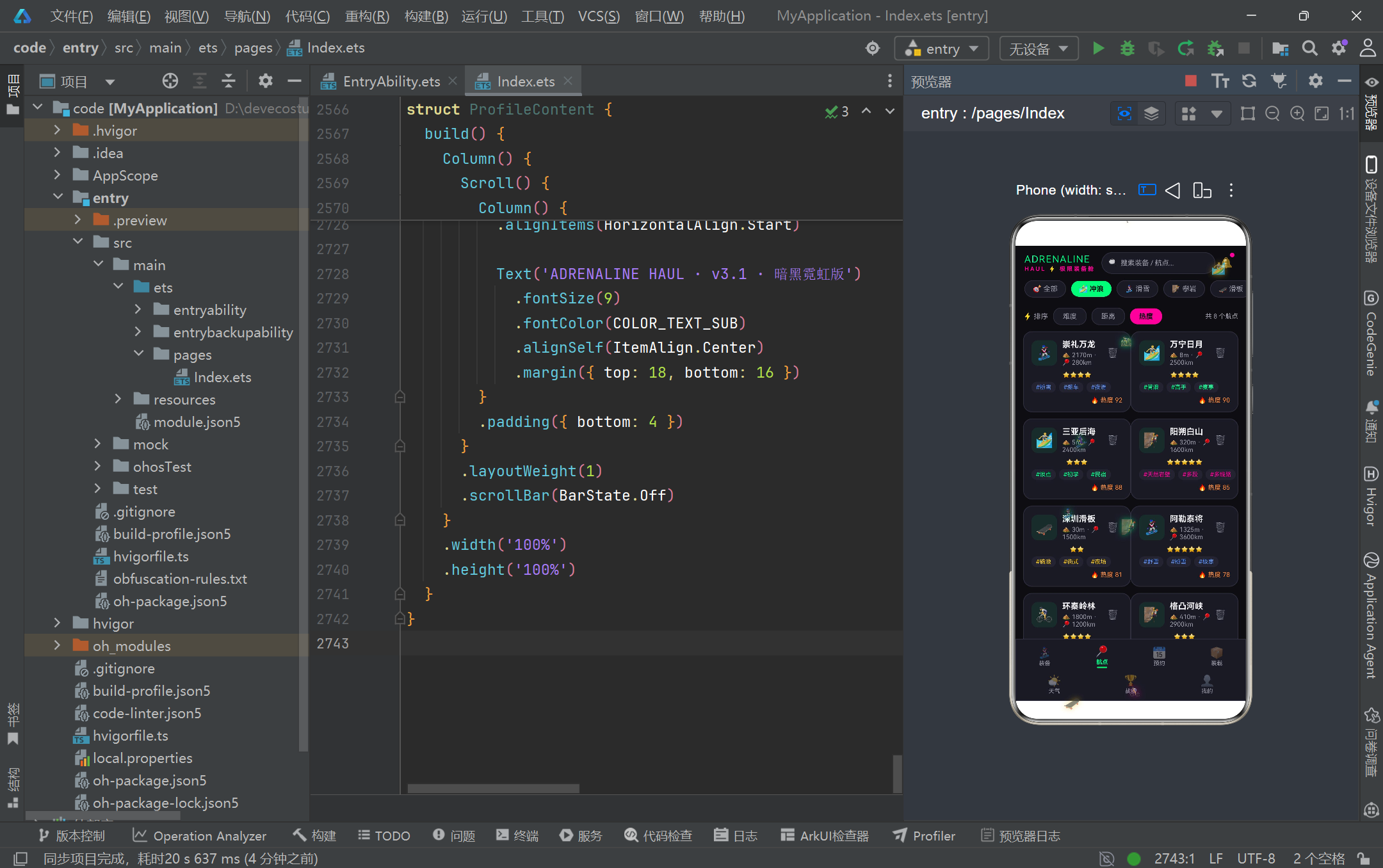
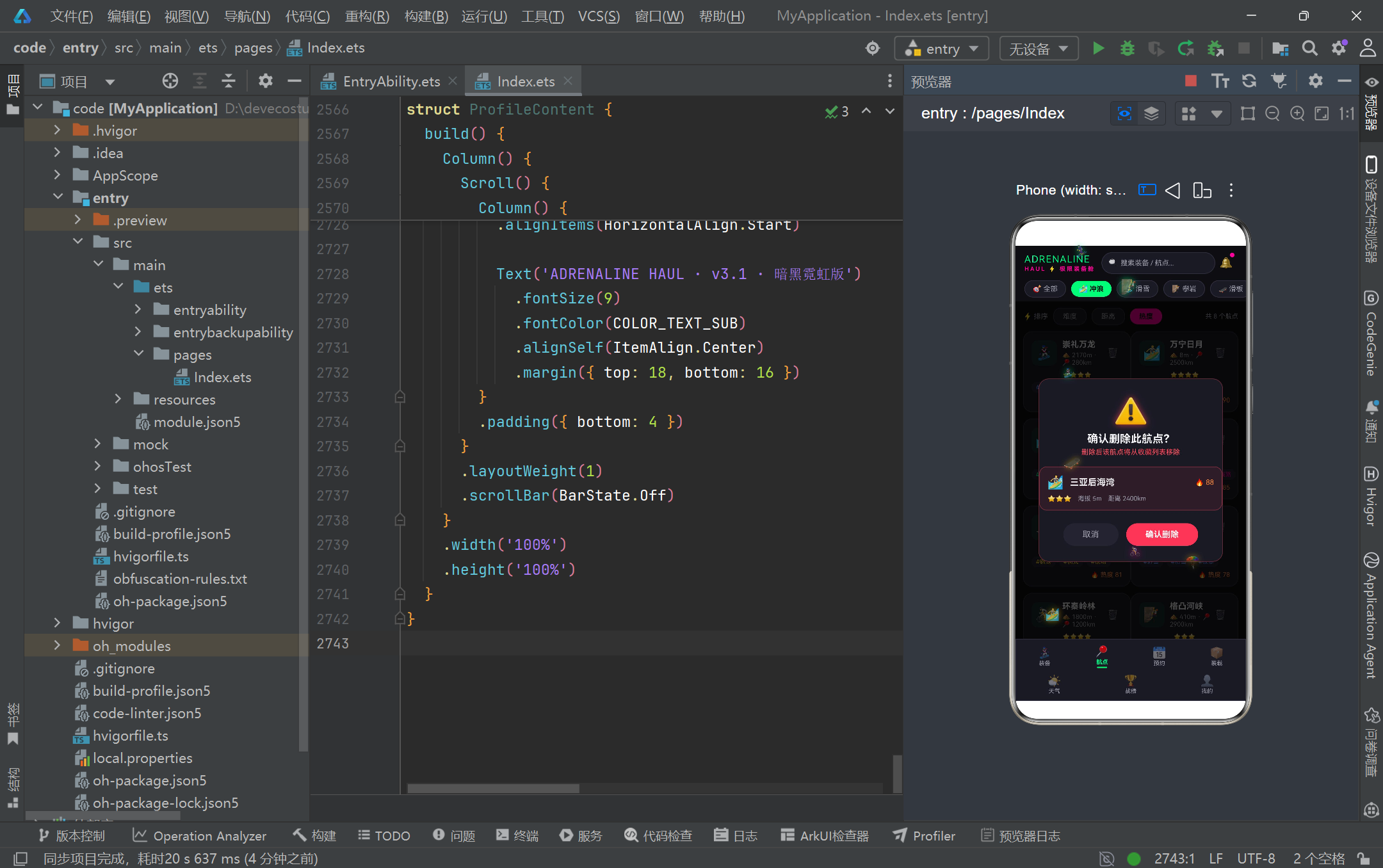
RouteContent 组件实现了航点列表的排序展示与删除确认交互。sortMode 状态变量默认为"热度",通过 SORT_MODES 数组定义的三个排序选项(难度、距离、热度)切换排序逻辑。routeCardBuilder 构建的航点卡片信息丰富:顶部是运动图标和航点名称、海拔距离信息;中部通过 getStars 函数将难度数值转换为星星字符串直观展示难度等级;下方通过 split(‘|’) 将 tags 字符串拆分为标签数组并渲染为话题标签(#粉雪、#缆车等),每个标签使用对应运动类型的主题色;底部显示热度值。删除按钮的交互流程与装备编辑类似:点击后将当前航点赋值给 deletingRoute 并显示删除确认弹窗。删除弹窗采用了红色警示色调(COLOR_RED 边框和半透明红色背景),配合大号警告图标和"确认删除此航点?"的提示文案,在视觉上强化了操作的不可逆性,这是一种优秀的防误操作设计实践。
3.15 预约日历与运输预约表单
@Component
struct BookingContent {
  @State month: number = 8
  @State selectedDay: number = 12
  @State showBookingModal: boolean = false
  @State selectedGears: number[] = [1, 3]
  @State selectedSpecials: string[] = ['防震']
  @State formPickup: string = ''
  @State formDestination: string = ''
  @State formTime: string = ''
  @State formNotes: string = ''

  toggleGear(id: number): void {
    if (this.selectedGears.indexOf(id) >= 0) {
      this.selectedGears = this.selectedGears.filter((i: number) => i !== id)
    } else {
      this.selectedGears = this.selectedGears.concat([id])
    }
  }

  @Builder dayCellBuilder(r: number, c: number) {
    if (r * 7 + c + 1 <= daysInMonth(this.month)) {
      Column() {
        Text('' + (r * 7 + c + 1))
          .fontSize(12)
          .fontWeight(this.selectedDay === r * 7 + c + 1 ? FontWeight.Bold : FontWeight.Normal)
          .fontColor(this.selectedDay === r * 7 + c + 1 ? COLOR_BG : COLOR_TEXT)
        if (hasBookingOnDate(calendarDateStr(this.month, r * 7 + c + 1))) {
          Column()
            .width(5)
            .height(5)
            .borderRadius(3)
            .backgroundColor(COLOR_SECONDARY)
            .margin({ top: 3 })
        }
      }
      .width(34)
      .height(40)
      .backgroundColor(this.selectedDay === r * 7 + c + 1 ? COLOR_PRIMARY : COLOR_CARD_LIGHT)
      .borderRadius(10)
      .onClick(() => {
        this.selectedDay = r * 7 + c + 1
      })
    } else {
      Column().width(34).height(40)
    }
  }
}
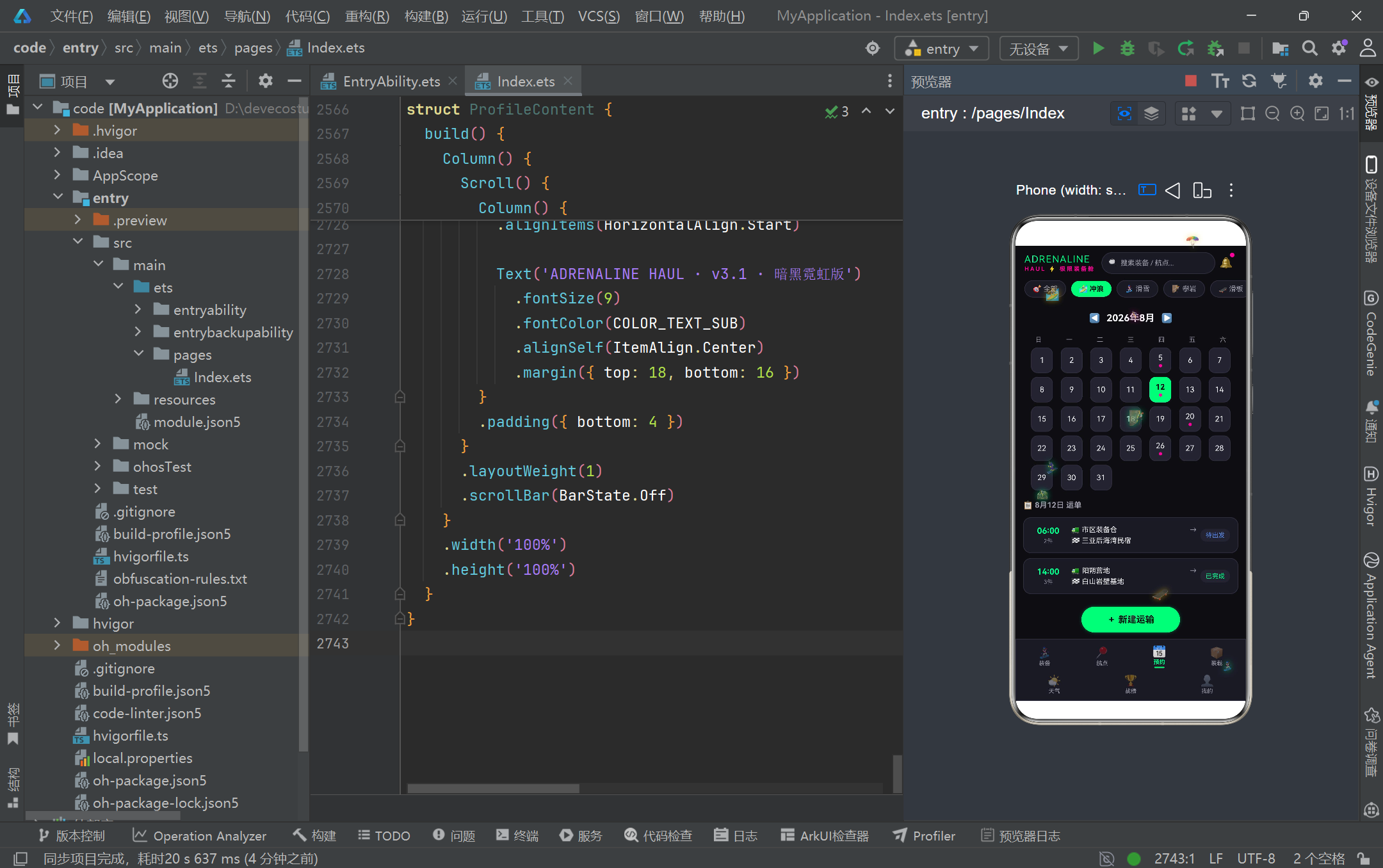
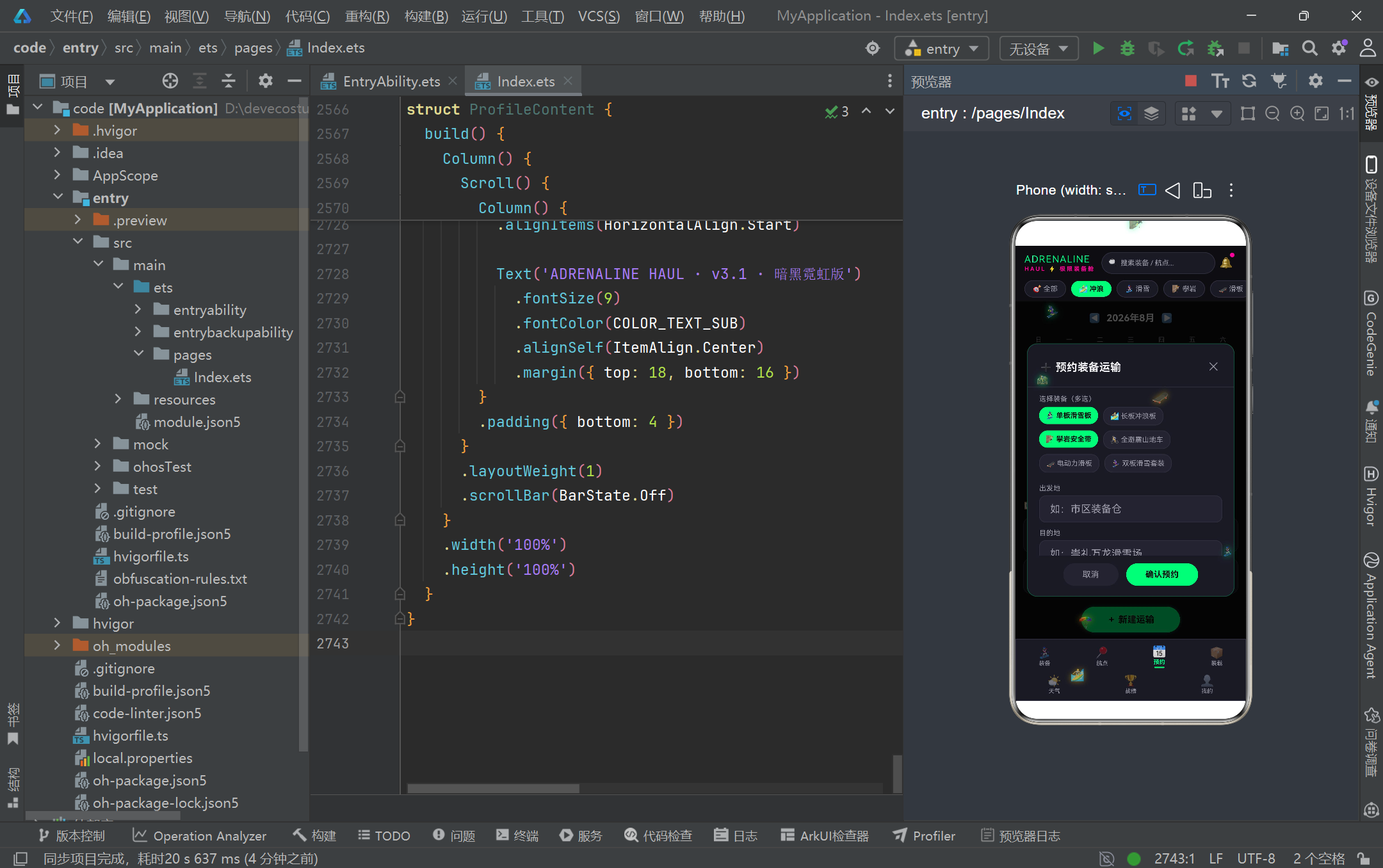
BookingContent 组件是预约管理 Tab 的核心,融合了日历选择器和运输预约表单两大交互模块。日历通过 dayCellBuilder 构建器逐格渲染,接收行号 r 和列号 c 作为参数,通过 r * 7 + c + 1 计算日期数字,超过当月天数的格子渲染为空占位。选中的日期使用荧光绿背景配合深色文字,未选中的日期使用深灰背景配浅色文字,有预约的日期下方显示品红色小圆点作为标记。toggleGear 方法实现了装备的多选切换逻辑:通过 indexOf 判断是否已选中,已选中则 filter 移除,未选中则 concat 添加,这种不可变数组操作方式确保了 @State 的响应式触发。selectedGears 和 selectedSpecials 分别管理装备多选和特殊要求多选(防震、防水、恒温、加急),在弹窗中通过 Flex Wrap 布局实现自动换行的标签选择器。月份切换通过 ◀ ▶ 按钮控制,切换时自动修正超出当月天数的 selectedDay,体现了边界条件的严谨处理。
3.16 车辆装载监控与进度条
@Component
struct LoadingContent {
  @Builder progressBarBuilder(pct: number, barColor: string) {
    Row() {
      Column()
        .width(pct + '%')
        .height(8)
        .backgroundColor(barColor)
        .borderRadius(4)
      Column()
        .layoutWeight(1)
        .height(8)
    }
    .width('100%')
    .height(8)
    .backgroundColor(COLOR_CARD_LIGHT)
    .borderRadius(4)
    .clip(true)
  }

  @Builder vehicleCardBuilder(v: VehicleItem) {
    Column() {
      Row() {
        Column() {
          Text(getVehicleIcon(v.name)).fontSize(26)
        }
        .width(48)
        .height(48)
        .backgroundColor(COLOR_CARD_LIGHT)
        .borderRadius(12)

        Column() {
          Text(v.name)
            .fontSize(14)
            .fontWeight(FontWeight.Bold)
            .fontColor(COLOR_TEXT)
          Text('已装 ' + v.gearCount + ' 件装备')
            .fontSize(10)
            .fontColor(COLOR_TEXT_SUB)
        }
        .layoutWeight(1)

        Text('剩余 ' + (v.capacity - v.loaded) + 'kg')
          .fontSize(10)
          .fontColor(COLOR_PRIMARY)
          .backgroundColor('rgba(0,255,136,0.08)')
          .borderRadius(9)
      }

      Row() {
        Text('载重').fontSize(10).fontColor(COLOR_TEXT_SUB)
        Column().layoutWeight(1)
        Text(v.loaded + ' / ' + v.capacity + ' kg').fontSize(10).fontColor(COLOR_TEXT)
      }

      this.progressBarBuilder(loadPercent(v.loaded, v.capacity), COLOR_PRIMARY)

      Row() {
        Text('体积').fontSize(10).fontColor(COLOR_TEXT_SUB)
        Column().layoutWeight(1)
        Text(v.loadedVolume + ' / ' + v.volume + ' m³').fontSize(10).fontColor(COLOR_TEXT)
      }

      this.progressBarBuilder(loadPercent(v.loadedVolume, v.volume), COLOR_SECONDARY)
    }
    .backgroundColor(COLOR_CARD)
    .borderRadius(14)
    .padding(14)
  }
}
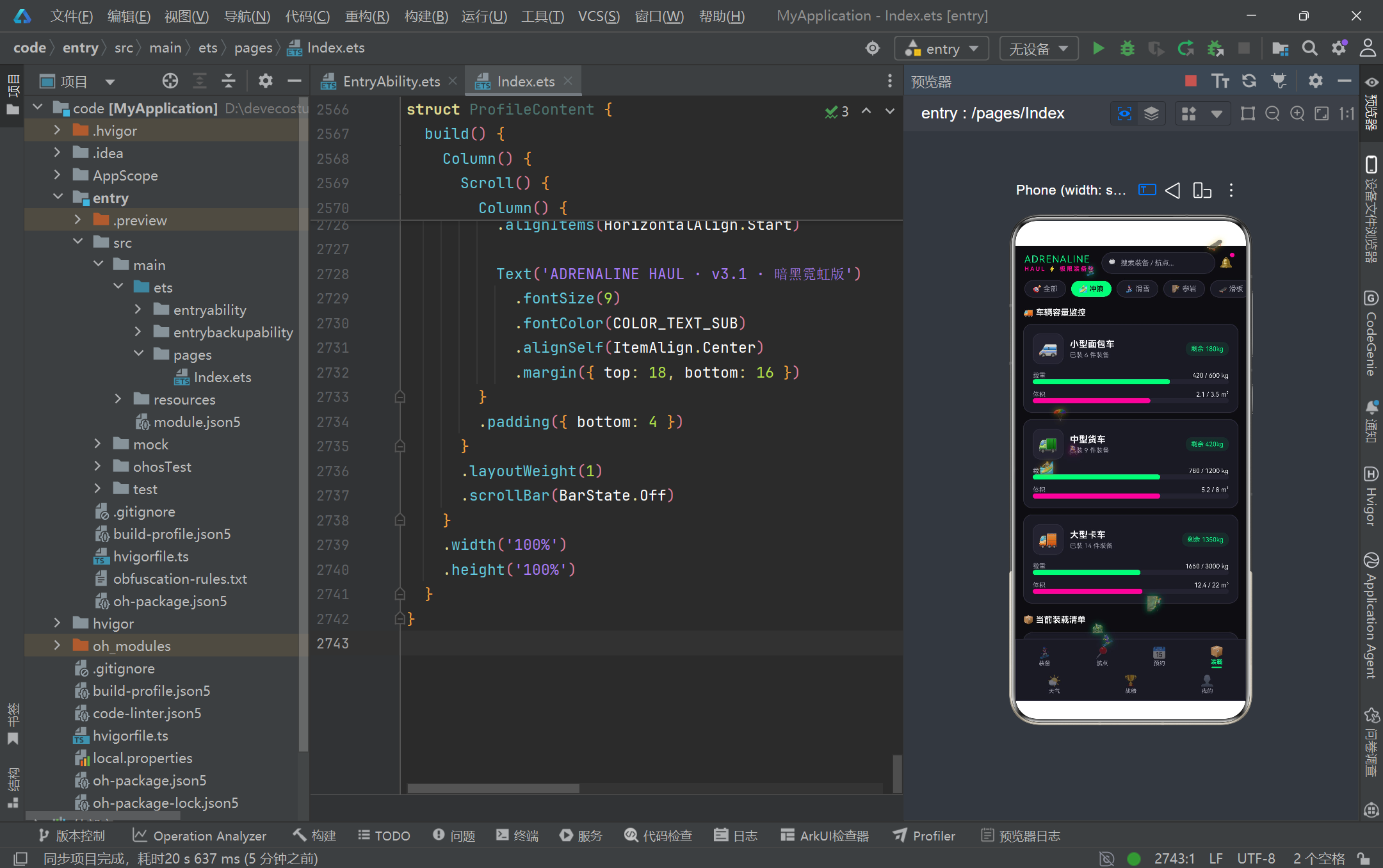
LoadingContent 组件实现了车辆容量监控和装载清单展示。progressBarBuilder 是一个高度可复用的进度条构建器,接收百分比和颜色两个参数,通过 Row 容器内两个 Column 的宽度分配实现进度条效果——前者使用百分比宽度表示已用容量,后者使用 layoutWeight(1) 填充剩余空间。clip(true) 确保进度条圆角不被内部色块溢出破坏。vehicleCardBuilder 构建的车辆卡片展示了载重和体积两个维度的容量信息:顶部是车型图标、名称和剩余载重提示;中部两行分别显示载重和体积的已用/总量数据,并配以对应的进度条(载重用荧光绿,体积用品红)。loadPercent 函数将已用值与总量值的比值转换为 0-100 的整数百分比,并做了上限 100 和除零保护。下方的装载清单通过 MANIFEST_STATUS_CONFIG 映射表为每个装载项渲染状态图标和状态标签,直观展示了"已固定"“待固定”"运输中"三种装载状态。
3.17 天气预警与模态详情
@Component
struct WeatherContent {
  @State showWarningModal: boolean = false
  @State currentLocation: string = '崇礼 · 万龙滑雪场'

  build() {
    Stack() {
      Column() {
        Row() {
          Text('📍 ' + this.currentLocation)
            .fontSize(14)
            .fontWeight(FontWeight.Bold)
            .fontColor(COLOR_TEXT)
          Column().layoutWeight(1)
          Text('🔄')
            .fontSize(14)
            .onClick(() => {
              this.currentLocation = this.currentLocation === '崇礼 · 万龙滑雪场'
                ? '万宁 · 日月湾浪点' : '崇礼 · 万龙滑雪场'
            })
        }

        if (hasWeatherWarning()) {
          Row() {
            Text('⛈️').fontSize(30)
            Column() {
              Text('恶劣天气预警 · 明日运输受影响')
                .fontSize(12)
                .fontWeight(FontWeight.Bold)
                .fontColor(COLOR_ORANGE)
              Text('台风外围 8级狂风 · 浪高4.2m,点击查看详情')
                .fontSize(10)
                .fontColor(COLOR_TEXT_SUB)
            }
            .layoutWeight(1)
          }
          .backgroundColor('rgba(255,138,61,0.14)')
          .border({ width: 1, color: 'rgba(255,138,61,0.5)' })
          .onClick(() => {
            this.showWarningModal = true
          })
        }

        Scroll() {
          Column() {
            ForEach(mockWeather, (w: WeatherItem) => {
              Row() {
                Column() {
                  Text(w.date.split(' ')[0])
                    .fontColor(w.warning ? COLOR_ORANGE : COLOR_TEXT)
                  Text(w.date.split(' ')[1])
                    .fontColor(COLOR_TEXT_SUB)
                }
                Text(w.icon).fontSize(26)
                Row() {
                  Text('' + w.tempMin + '°').fontColor(COLOR_BLUE)
                  Text(' ~ ').fontColor(COLOR_TEXT_SUB)
                  Text('' + w.tempMax + '°').fontColor(COLOR_SECONDARY)
                }
                Column() {
                  Text('🌬 ' + w.wind).fontColor(COLOR_TEXT_SUB)
                  Text(w.condition).fontColor(w.warning ? COLOR_ORANGE : COLOR_PRIMARY)
                }
                if (w.warning) {
                  Text('预警')
                    .fontColor(COLOR_BG)
                    .backgroundColor(COLOR_ORANGE)
                    .borderRadius(8)
                }
              }
              .border({ width: 1, color: w.warning ? 'rgba(255,138,61,0.4)' : COLOR_BORDER })
            })
          }
        }
      }

      if (this.showWarningModal) {
        this.warningModal()
      }
    }
  }
}
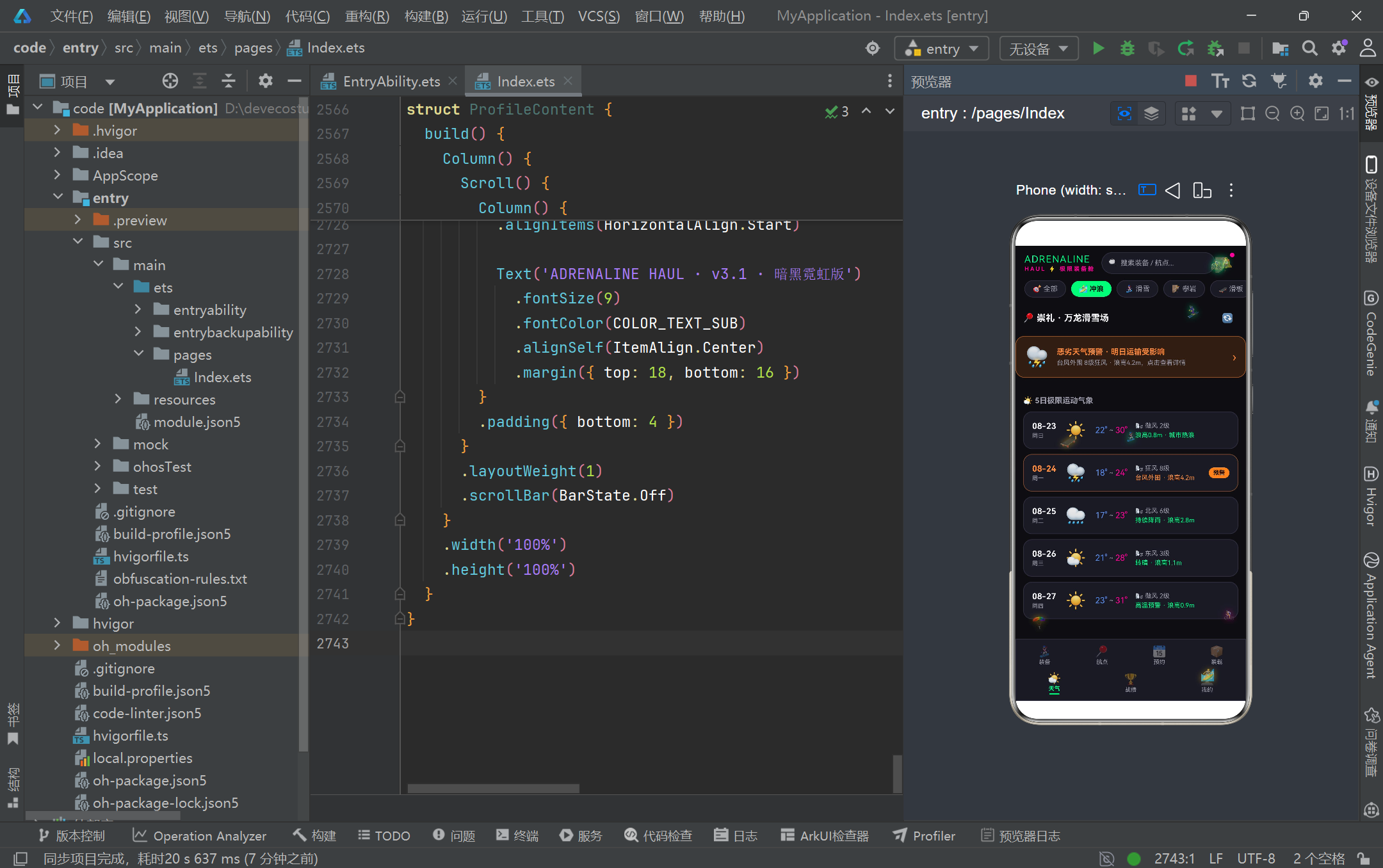
WeatherContent 组件实现了天气展示与预警交互功能。页面顶部是位置选择器,通过 🔄 按钮在"崇礼·万龙滑雪场"和"万宁·日月湾浪点"两个预设位置间切换。当 hasWeatherWarning() 检测到预警天气时,页面顶部显示橙色预警横幅,点击可展开详细的预警弹窗。五日天气预报列表通过 ForEach 渲染,每条记录包含日期、天气图标、温度区间、风力和天气状况。预警日的日期文字、天气状况文字和卡片边框均使用橙色高亮,并在右侧附加"预警"标签,确保预警信息在视觉上足够醒目。温度区间使用蓝色(最低温)到品红色(最高温)的渐变色映射,直观传达温度感受。预警详情弹窗(warningModal)采用 85% 宽度 55% 高度的中等尺寸,内容包含预警图标、标题、详细描述、影响时间段和四条建议措施,所有信息均使用 Scroll 容器包裹以应对内容溢出场景。这种层次化的预警信息呈现方式,从列表标记到横幅提示再到详情弹窗,为极限运动装备运输的安全决策提供了充分的气象信息支撑。
3.18 战绩仪表盘与柱状图
@Component
struct RecordContent {
  @Builder achievementCardBuilder(a: AchievementItem) {
    Column() {
      Text(a.icon)
        .fontSize(28)
        .opacity(a.unlocked ? 1.0 : 0.35)
      Text(a.name)
        .fontSize(12)
        .fontWeight(FontWeight.Bold)
        .fontColor(a.unlocked ? COLOR_GOLD : COLOR_TEXT_SUB)
      Text(a.desc)
        .fontSize(9)
        .fontColor(COLOR_TEXT_SUB)
        .maxLines(2)
        .textAlign(TextAlign.Center)

      if (a.unlocked) {
        Text('✅ 已达成')
          .backgroundColor(COLOR_GOLD)
      } else {
        Row() {
          Column()
            .width(a.progress + '%')
            .height(4)
            .backgroundColor(COLOR_SECONDARY)
          Column()
            .layoutWeight(1)
            .height(4)
        }
        .backgroundColor(COLOR_CARD_LIGHT)
        .clip(true)

        Text(a.progress + '%')
          .fontColor(COLOR_SECONDARY)
      }
    }
    .backgroundColor(COLOR_CARD)
    .border({ width: 1, color: a.unlocked ? 'rgba(245,197,24,0.35)' : COLOR_BORDER })
  }

  build() {
    Column() {
      Scroll() {
        Column() {
          Row() {
            Column() {
              Text('' + TOTAL_TRIPS)
                .fontSize(42)
                .fontWeight(FontWeight.Black)
                .fontColor(COLOR_PRIMARY)
                .textShadow({ radius: 18, color: 'rgba(0,255,136,0.6)' })
              Text('总运输次数')
                .fontSize(10)
                .fontColor(COLOR_TEXT_SUB)
            }
            Column()
              .width(1)
              .height(70)
              .backgroundColor(COLOR_BORDER)

            Column() {
              Row() {
                Text('🛣 总里程')
                Text(formatNumber(TOTAL_MILEAGE) + ' km')
              }
              Row() {
                Text('🏁 最远单次')
                Text(LONGEST_TRIP + ' km')
              }
              Row() {
                Text('❤️ 最爱航点')
                Text(FAVORITE_SPOT)
              }
            }
          }

          Row() {
            ForEach(MONTHLY_STATS, (v: number, i: number) => {
              Column() {
                Text('' + v).fontSize(9)
                Column()
                  .width(20)
                  .height(monthBarHeight(v))
                  .backgroundColor(monthBarColor(i))
                  .borderRadius(5)
                Text(MONTH_LABELS[i]).fontSize(9)
              }
              .layoutWeight(1)
            })
          }
          .height(150)
          .alignItems(VerticalAlign.Bottom)
        }
      }
    }
  }
}
RecordContent 组件构建了战绩仪表盘,包含成就数据概览、月度柱状图和成就徽章三大模块。顶部概览区采用左右分栏布局:左侧以 42px 超大字号配合 textShadow 发光效果展示总运输次数(128次),右侧通过三行键值对展示总里程、最远单次和最爱航点。月度柱状图通过 ForEach 遍历 MONTHLY_STATS 数组,每个数据项渲染为一个 Column 容器,内含数值标签、柱体和月份标签。柱体高度通过 monthBarHeight 函数将数值映射为像素高度,颜色通过 monthBarColor 函数按索引循环取色,实现了六色彩虹柱状图效果。成就徽章通过 achievementCardBuilder 构建,已达成徽章使用金色边框和"已达成"标签,未达成徽章使用灰色边框并展示进度条和百分比。徽章图标通过 opacity 区分已达成(1.0)和未达成(0.35)状态,整体布局采用 2 列网格排列。这种数据可视化方式将枯燥的统计数字转化为直观的视觉图形,增强了用户的成就感和使用乐趣。
3.19 个人中心与设置列表
@Component
struct ProfileContent {
  build() {
    Column() {
      Scroll() {
        Column() {
          Row() {
            Column() {
              Text('🤙').fontSize(38)
            }
            .width(70)
            .height(70)
            .backgroundColor('rgba(0,255,136,0.08)')
            .borderRadius(35)
            .border({ width: 2, color: COLOR_PRIMARY })

            Column() {
              Text('极限老炮儿 · David')
                .fontSize(16)
                .fontWeight(FontWeight.Bold)
                .fontColor(COLOR_TEXT)
              Text('Lv.9 肾上腺素狂人')
                .fontSize(10)
                .fontColor(COLOR_SECONDARY)
                .backgroundColor('rgba(255,0,153,0.1)')
                .borderRadius(9)
              Text('🚀 已注册 1287 天 · 认证极限装备玩家')
                .fontSize(9)
                .fontColor(COLOR_TEXT_SUB)
            }
            .layoutWeight(1)
          }
          .backgroundColor(COLOR_CARD)
          .borderRadius(16)

          Column() {
            Row() {
              Column() {
                Text('🚚 ' + TOTAL_TRIPS)
                  .fontSize(17)
                  .fontWeight(FontWeight.Black)
                  .fontColor(COLOR_PRIMARY)
                Text('总运输').fontSize(9)
              }
              .layoutWeight(1)
              Column().width(1).height(36).backgroundColor(COLOR_BORDER)
              Column() {
                Text('🧰 ' + mockGear.length)
                  .fontColor(COLOR_BLUE)
                Text('总装备').fontSize(9)
              }
              .layoutWeight(1)
            }

            Divider().color(COLOR_BORDER)

            Row() {
              Column() {
                Text('🛣 ' + formatNumber(TOTAL_MILEAGE))
                  .fontColor(COLOR_GOLD)
                Text('总里程 (km)').fontSize(9)
              }
              .layoutWeight(1)
              Column().width(1).height(36).backgroundColor(COLOR_BORDER)
              Column() {
                Text('💎 ' + formatNumber(USER_POINTS))
                  .fontColor(COLOR_SECONDARY)
                Text('积分').fontSize(9)
              }
              .layoutWeight(1)
            }
          }
          .backgroundColor(COLOR_CARD)
          .borderRadius(16)

          Column() {
            Text('⚙️ 通用')
              .fontSize(11)
              .fontColor(COLOR_TEXT_SUB)
            ForEach(PROFILE_SETTINGS, (s: string) => {
              Column() {
                Row() {
                  Text(s).fontSize(13).fontColor(COLOR_TEXT).layoutWeight(1)
                  Text('›').fontSize(16).fontColor(COLOR_TEXT_SUB)
                }
                .padding({ top: 13, bottom: 13 })
                Divider().color(COLOR_BORDER)
              }
            })
          }

          Text('ADRENALINE HAUL · v3.1 · 暗黑霓虹版')
            .fontSize(9)
            .fontColor(COLOR_TEXT_SUB)
            .alignSelf(ItemAlign.Center)
        }
      }
    }
  }
}
ProfileContent 组件是个人中心 Tab 的实现,由用户资料卡、统计网格、设置列表和版本信息四部分组成。用户资料卡采用横向布局:左侧是 70x70 的圆形头像容器(borderRadius: 35 配合 width/height 实现正圆),使用荧光绿边框和半透明绿色背景;右侧是用户昵称、等级标签和注册信息,等级标签"Lv.9 肾上腺素狂人"使用品红色文字配半透明品红背景突出展示。统计网格采用 2x2 布局,通过 Divider 和 1px 宽的 Column 作为分隔线,四个统计项分别使用不同的主题色(绿、蓝、金、粉)区分,每项包含图标加数值和描述文字。设置列表通过 ForEach 遍历 PROFILE_SETTINGS 数组渲染,每项包含设置名称和右箭头,项间以 Divider 分隔,构成了标准的设置列表样式。底部版本信息使用 alignSelf(ItemAlign.Center) 居中对齐,这种通过 ItemAlign 控制子项在交叉轴对齐方式的技术在 ArkTS 中用于实现灵活的布局微调。
四、核心交互流程
五、技术特性对比分析
| 技术维度 | 本项目实现方案 | 传统方案对比 | 优势分析 |
|---|---|---|---|
| 状态管理 | @Observed + @State + @Prop 三层装饰器体系 | Redux/Vuex 全局状态树 | 组件级状态自治,减少不必要的全局重渲染,数据流向清晰可追踪 |
| 数据建模 | interface 契约 + @Observed class 实现 + Record 配置映射 | 纯 class 或纯 interface | 接口与实现分离,配置数据与业务数据解耦,类型安全且扩展灵活 |
| 弹窗交互 | 条件渲染 + Stack 叠加 + zIndex 分层 + 遮罩层透传 | 第三方弹窗库或路由跳转 | 零依赖原生实现,弹窗生命周期与组件同步,样式定制自由度高 |
| 动画系统 | setInterval 定时器驱动 + 不可变数组更新 + HitTestMode 透传 | animateTo 属性动画或 Lottie | 精确控制每帧状态,粒子循环复用效率高,不影响交互层响应 |
| 色彩管理 | 顶层 const 常量 + Record 映射表 + 可选链安全访问 | CSS 变量或主题文件 | 编译期类型检查,集中化管理,运行时零开销,空安全降级 |
| 列表渲染 | ForEach + 纯函数过滤排序 + 条件渲染切换 | 虚拟列表或分页加载 | 数据转换与视图渲染分离,排序过滤逻辑可独立测试,响应式自动更新 |
| 表单处理 | 独立 @State 表单字段 + onChange 实时同步 + 预填默认值 | 双向绑定或表单库 | 单向数据流可控性强,编辑不污染源数据,保存时才提交变更 |
| 日历组件 | 纯 Builder 逐格构建 + 边界天数计算 + 预约标记点 | 第三方日历组件 | 完全自主可控样式,暗色主题无缝融合,无外部依赖体积小 |
六、架构设计模式总结
本项目在数据流设计上采用了单向数据流与不可变更新相结合的模式。所有状态变更都通过 @State 装饰器触发响应式渲染,而数组类型的状态更新(如粒子列表、选中装备列表)均采用创建新数组而非原地修改的方式,确保了框架能够正确检测到引用变化并执行重渲染。toggleGear 和 toggleSpecial 方法中的 filter + concat 组合、updateParticles 中的新数组构建都是这一模式的典型实践。同时,@Prop 装饰器实现了父到子的单向数据传递,子组件无法修改 @Prop 变量,这种约束防止了数据逆流导致的不可预测状态变化。项目还将大量数据转换逻辑抽取为组件外部的纯函数(如 getFilteredGear、getSortedRoutes、formatMoney),这些函数无副作用、输入输出确定,既可以在模板中直接调用,也便于未来抽取为独立的工具模块进行单元测试。
在组件拆分策略上,项目遵循了"一个 Tab 一个组件"的原子化原则,七个 Tab 各自封装为独立的 @Component struct,内部状态自治,仅在必要时通过参数接收外部数据。每个组件内部通过 @Builder 将复杂的 UI 片段拆分为可复用的构建器方法,如 gearCardBuilder、routeCardBuilder、vehicleCardBuilder 等,这种内聚式的构建器模式既避免了 build 方法过长的问题,又保持了组件内部的封装性。四个功能弹窗(编辑装备、删除航点、预约运输、天气预警)虽然分属不同组件,但都遵循相同的实现范式:Stack 叠加遮罩层和内容卡片,通过 @State 布尔值控制显隐,zIndex(999) 确保层级,遮罩层 onClick 关闭弹窗。这种统一的弹窗模式降低了认知成本,使得开发者可以快速理解和维护任意弹窗的逻辑。
七、性能优化与最佳实践
项目在性能层面采取了多项优化措施。首先是粒子动画的循环复用策略:八个粒子在飘出屏幕顶部后被重置到底部继续漂浮,而非不断创建新粒子,这种对象池思想有效控制了内存占用和 GC 压力。其次是 Scroll 容器的 scrollBar(BarState.Off) 统一隐藏滚动条,在保证可滚动性的同时避免了滚动条对暗色主题视觉一致性的破坏。再者,所有列表渲染都使用 ForEach 配合预计算的数组,避免了在渲染过程中执行复杂计算。日历组件通过 daysInMonth 函数预计算当月天数,空格子直接渲染空 Column 占位,避免了无效的条件判断分支。aboutToDisappear 中的 clearInterval 清理确保了组件销毁后定时器不再执行,防止了内存泄漏。此外,hitTestBehavior(HitTestMode.None) 使粒子层不参与事件分发,减少了触摸事件的路由开销。这些优化虽然单看微不足道,但累积起来为应用的流畅运行提供了保障。
在代码质量层面,项目体现了 ArkTS 严格类型编程的最佳实践。所有变量声明都有显式类型标注,函数参数和返回值类型完整,没有使用 any 或未类型化的变量。可选链操作符(?.)和空值合并操作符(??)被广泛用于安全访问 Record 映射表中可能不存在的键值,如 GEAR_STATUS_CONFIG[g.status]?.color ?? COLOR_TEXT_SUB,这种防御式编程确保了即使数据异常也不会导致运行时崩溃。纯函数的提取使得业务逻辑与 UI 渲染解耦,formatMoney 和 formatNumber 函数通过手动字符串遍历实现千分位格式化,避免了依赖 toLocaleString 等国际化 API 的不确定性。项目还大量使用了常量数组(如 SPORT_PILLS、SORT_MODES、CALENDAR_WEEKDAYS)来定义静态选项,这些数组在编译期确定,运行时不可变,既提高了代码可读性也便于后续国际化扩展。
安装DevEco Studio程序

选择目标安装目录:

设置环境变量,但是需要重启一下:

新建一个空白模板:

设置API为24的模板项目:
初始化项目,自动下载相关依赖:

完整代码:
// ============================================================
// 极限装备舱 ADRENALINE HAUL — 极限运动装备运输平台
// 暗黑霓虹电竞风 · ArkTS 单文件页面
// 场景:冲浪板 / 滑雪板 / 攀岩装备等极限装备专业运输 + 装备管理
// 7 Tab:装备 / 航点 / 预约 / 装载 / 天气 / 战绩 / 我的
// ============================================================
// ============ 主题颜色常量 ============
const COLOR_BG: string = '#0D0D12'
const COLOR_CARD: string = '#1A1A24'
const COLOR_CARD_LIGHT: string = '#232330'
const COLOR_PRIMARY: string = '#00FF88'
const COLOR_SECONDARY: string = '#FF0099'
const COLOR_GOLD: string = '#F5C518'
const COLOR_TEXT: string = '#F2F2F5'
const COLOR_TEXT_SUB: string = '#9A9AA8'
const COLOR_BORDER: string = '#2E2E3E'
const COLOR_RED: string = '#FF4D5E'
const COLOR_BLUE: string = '#5B8DEF'
const COLOR_ORANGE: string = '#FF8A3D'
// ============ 数据模型 interface ============
interface GearModel {
id: number
name: string
brand: string
sport: string
weight: number
value: number
status: string
icon: string
notes: string
}
interface RouteModel {
id: number
name: string
sport: string
difficulty: number
altitude: number
distance: number
tags: string
heat: number
}
interface BookingModel {
id: number
date: string
time: string
pickup: string
destination: string
gearCount: number
status: string
}
interface WeatherModel {
id: number
date: string
icon: string
tempMin: number
tempMax: number
wind: string
condition: string
warning: boolean
}
interface VehicleModel {
id: number
name: string
capacity: number
volume: number
loaded: number
loadedVolume: number
gearCount: number
}
interface AchievementModel {
id: number
name: string
icon: string
desc: string
unlocked: boolean
progress: number
}
interface ManifestModel {
id: number
gearName: string
vehicle: string
qty: number
status: string
}
interface ParticleModel {
id: number
icon: string
x: number
y: number
size: number
}
// ============ @Observed class ============
@Observed
class GearItem implements GearModel {
id: number = 0
name: string = ''
brand: string = ''
sport: string = ''
weight: number = 0
value: number = 0
status: string = '闲置'
icon: string = '🏂'
notes: string = ''
constructor(id: number, name: string, brand: string, sport: string, weight: number, value: number, status: string, icon: string, notes: string) {
this.id = id; this.name = name; this.brand = brand; this.sport = sport
this.weight = weight; this.value = value; this.status = status
this.icon = icon; this.notes = notes
}
}
@Observed
class RouteItem implements RouteModel {
id: number = 0
name: string = ''
sport: string = ''
difficulty: number = 1
altitude: number = 0
distance: number = 0
tags: string = ''
heat: number = 0
constructor(id: number, name: string, sport: string, difficulty: number, altitude: number, distance: number, tags: string, heat: number) {
this.id = id; this.name = name; this.sport = sport; this.difficulty = difficulty
this.altitude = altitude; this.distance = distance; this.tags = tags; this.heat = heat
}
}
@Observed
class BookingItem implements BookingModel {
id: number = 0
date: string = ''
time: string = ''
pickup: string = ''
destination: string = ''
gearCount: number = 0
status: string = '待出发'
constructor(id: number, date: string, time: string, pickup: string, destination: string, gearCount: number, status: string) {
this.id = id; this.date = date; this.time = time; this.pickup = pickup
this.destination = destination; this.gearCount = gearCount; this.status = status
}
}
@Observed
class WeatherItem implements WeatherModel {
id: number = 0
date: string = ''
icon: string = '☀️'
tempMin: number = 0
tempMax: number = 0
wind: string = ''
condition: string = ''
warning: boolean = false
constructor(id: number, date: string, icon: string, tempMin: number, tempMax: number, wind: string, condition: string, warning: boolean) {
this.id = id; this.date = date; this.icon = icon
this.tempMin = tempMin; this.tempMax = tempMax; this.wind = wind
this.condition = condition; this.warning = warning
}
}
@Observed
class VehicleItem implements VehicleModel {
id: number = 0
name: string = ''
capacity: number = 0
volume: number = 0
loaded: number = 0
loadedVolume: number = 0
gearCount: number = 0
constructor(id: number, name: string, capacity: number, volume: number, loaded: number, loadedVolume: number, gearCount: number) {
this.id = id; this.name = name; this.capacity = capacity; this.volume = volume
this.loaded = loaded; this.loadedVolume = loadedVolume; this.gearCount = gearCount
}
}
@Observed
class AchievementItem implements AchievementModel {
id: number = 0
name: string = ''
icon: string = '🏆'
desc: string = ''
unlocked: boolean = false
progress: number = 0
constructor(id: number, name: string, icon: string, desc: string, unlocked: boolean, progress: number) {
this.id = id; this.name = name; this.icon = icon; this.desc = desc
this.unlocked = unlocked; this.progress = progress
}
}
@Observed
class ManifestItem implements ManifestModel {
id: number = 0
gearName: string = ''
vehicle: string = ''
qty: number = 0
status: string = '待固定'
constructor(id: number, gearName: string, vehicle: string, qty: number, status: string) {
this.id = id; this.gearName = gearName; this.vehicle = vehicle
this.qty = qty; this.status = status
}
}
@Observed
class ParticleItem implements ParticleModel {
id: number = 0
icon: string = '🏂'
x: number = 0
y: number = 0
size: number = 18
constructor(id: number, icon: string, x: number, y: number, size: number) {
this.id = id; this.icon = icon; this.x = x; this.y = y; this.size = size
}
}
// ============ 配置 interface + Record map ============
interface StatusMeta {
label: string
color: string
bg: string
icon: string
}
const GEAR_STATUS_CONFIG: Record<string, StatusMeta> = {
'在用': { label: '在用', color: '#00FF88', bg: 'rgba(0,255,136,0.12)', icon: '⚡' },
'闲置': { label: '闲置', color: '#5B8DEF', bg: 'rgba(91,141,239,0.12)', icon: '💤' },
'已出': { label: '已出', color: '#9A9AA8', bg: 'rgba(154,154,168,0.12)', icon: '📤' }
}
interface SportMeta {
label: string
icon: string
color: string
}
const SPORT_CONFIG: Record<string, SportMeta> = {
'冲浪': { label: '冲浪', icon: '🏄', color: '#00FF88' },
'滑雪': { label: '滑雪', icon: '🏂', color: '#5B8DEF' },
'攀岩': { label: '攀岩', icon: '🧗', color: '#FF0099' },
'滑板': { label: '滑板', icon: '🛹', color: '#F5C518' },
'山地车': { label: '山地车', icon: '🚴', color: '#FF8A3D' },
'滑翔': { label: '滑翔', icon: '🪂', color: '#FF4D5E' }
}
interface BookingStatusMeta {
label: string
color: string
}
const BOOKING_STATUS_CONFIG: Record<string, BookingStatusMeta> = {
'已完成': { label: '已完成', color: '#00FF88' },
'待出发': { label: '待出发', color: '#5B8DEF' },
'运输中': { label: '运输中', color: '#F5C518' },
'待确认': { label: '待确认', color: '#FF0099' }
}
interface SpecialMeta {
label: string
icon: string
color: string
}
const SPECIAL_CONFIG: Record<string, SpecialMeta> = {
'防震': { label: '防震', icon: '🛡️', color: '#00FF88' },
'防水': { label: '防水', icon: '💧', color: '#5B8DEF' },
'恒温': { label: '恒温', icon: '🌡️', color: '#F5C518' },
'加急': { label: '加急', icon: '⚡', color: '#FF0099' }
}
interface ManifestStatusMeta {
label: string
color: string
icon: string
}
const MANIFEST_STATUS_CONFIG: Record<string, ManifestStatusMeta> = {
'已固定': { label: '已固定', color: '#00FF88', icon: '✅' },
'待固定': { label: '待固定', color: '#F5C518', icon: '⏳' },
'运输中': { label: '运输中', color: '#5B8DEF', icon: '🚚' }
}
// ============ 静态数据 ============
const mockGear: GearItem[] = [
new GearItem(1, '单板滑雪板', 'Burton Custom', '滑雪', 3.2, 6800, '在用', '🏂', '参加崇礼粉雪季的主力板'),
new GearItem(2, '长板冲浪板', 'Channel Islands', '冲浪', 4.5, 5200, '在用', '🏄', '后海湾日常刷浪用'),
new GearItem(3, '攀岩安全带', 'Petzl Sama', '攀岩', 0.4, 1200, '在用', '🧗', '阳朔多段攀必备'),
new GearItem(4, '全避震山地车', 'Trek Fuel EX', '山地车', 13.8, 22800, '闲置', '🚴', '秦岭林道结束后待保养'),
new GearItem(5, '电动力滑板', 'Boosted Mini', '滑板', 7.2, 8900, '已出', '🛹', '已转卖给同城骑手'),
new GearItem(6, '双板滑雪套装', 'Salomon S/Force', '滑雪', 8.6, 7400, '闲置', '⛷️', '雪季结束入库封存'),
new GearItem(7, '短板性能板', 'Lost Rocket', '冲浪', 2.9, 4300, '在用', '🏄', '日月湾大浪天专用'),
new GearItem(8, '机械保护套装', 'Black Diamond', '攀岩', 2.1, 3600, '在用', '🧗', '含六边形塞与岩塞一整套'),
new GearItem(9, '滑翔伞具', 'Ozone Enzo', '滑翔', 5.8, 31500, '已出', '🪂', '高级竞赛伞已转让'),
new GearItem(10, '速降自行车', 'Specialized Demo', '山地车', 15.4, 35800, '在用', '🚵', '速降赛道主力战车')
]
const mockRoutes: RouteItem[] = [
new RouteItem(1, '崇礼万龙滑雪场', '滑雪', 4, 2170, 280, '粉雪|缆车|夜滑', 92),
new RouteItem(2, '三亚后海湾', '冲浪', 3, 5, 2400, '浪点|初学|民宿', 88),
new RouteItem(3, '阳朔白山岩壁', '攀岩', 5, 320, 1600, '天然岩壁|多段|多线路', 85),
new RouteItem(4, '阿勒泰将军山', '滑雪', 5, 1325, 3600, '野雪|粉雪|极寒', 78),
new RouteItem(5, '万宁日月湾', '冲浪', 4, 8, 2500, '管浪|高手|赛事', 90),
new RouteItem(6, '格凸河峡谷', '攀岩', 3, 410, 2900, '裂缝|传统攀|探洞', 65),
new RouteItem(7, '环秦岭林道', '山地车', 4, 1800, 1200, '林道|爬坡|风景', 72),
new RouteItem(8, '深圳滑板碗池公园', '滑板', 2, 30, 1500, '碗池|街式|夜场', 81)
]
const mockBookings: BookingItem[] = [
new BookingItem(1, '2026-08-05', '08:30', '崇礼雪具仓', '万龙滑雪场山顶站', 4, '已完成'),
new BookingItem(2, '2026-08-12', '06:00', '市区装备仓', '三亚后海湾民宿', 2, '待出发'),
new BookingItem(3, '2026-08-12', '14:00', '阳朔营地', '白山岩壁基地', 3, '已完成'),
new BookingItem(4, '2026-08-20', '07:30', '阿勒泰机场提货点', '将军山雪场酒店', 5, '待出发'),
new BookingItem(5, '2026-08-26', '09:00', '万宁渔港冷库', '日月湾浪点驿站', 2, '运输中'),
new BookingItem(6, '2026-09-02', '10:00', '深圳湾集散中心', '滑板碗池公园', 3, '待确认')
]
const mockWeather: WeatherItem[] = [
new WeatherItem(1, '08-23 周日', '☀️', 22, 30, '微风 2级', '浪高0.8m · 城市热浪', false),
new WeatherItem(2, '08-24 周一', '⛈️', 18, 24, '狂风 8级', '台风外围 · 浪高4.2m', true),
new WeatherItem(3, '08-25 周二', '🌧️', 17, 23, '北风 6级', '持续降雨 · 浪高2.8m', false),
new WeatherItem(4, '08-26 周三', '🌤️', 21, 28, '东风 3级', '转晴 · 浪高1.1m', false),
new WeatherItem(5, '08-27 周四', '☀️', 23, 31, '微风 2级', '高温预警 · 浪高0.9m', false)
]
const mockVehicles: VehicleItem[] = [
new VehicleItem(1, '小型面包车', 600, 3.5, 420, 2.1, 6),
new VehicleItem(2, '中型货车', 1200, 8.0, 780, 5.2, 9),
new VehicleItem(3, '大型卡车', 3000, 22.0, 1650, 12.4, 14)
]
const mockAchievements: AchievementItem[] = [
new AchievementItem(1, '百次运输', '🏔', '累计完成100次装备运输', true, 100),
new AchievementItem(2, '千里浪人', '🌊', '冲浪装备运输超10000km', true, 100),
new AchievementItem(3, '极寒挑战', '❄️', '冬季雪场运输30次', true, 100),
new AchievementItem(4, '百米岩壁', '🧗', '攀岩装备送达高海拔岩壁', false, 60),
new AchievementItem(5, '川藏通关', '🚵', '完成川藏线装备投送', false, 35),
new AchievementItem(6, '年度MVP', '🏆', '年度运单量进入平台前十', false, 72)
]
const mockManifest: ManifestItem[] = [
new ManifestItem(1, '单板滑雪板 Burton', '小型面包车', 2, '已固定'),
new ManifestItem(2, '长板冲浪板 CI', '中型货车', 1, '已固定'),
new ManifestItem(3, '攀岩安全带 Petzl', '小型面包车', 3, '待固定'),
new ManifestItem(4, '全避震山地车 Trek', '大型卡车', 1, '已固定'),
new ManifestItem(5, '双板滑雪套装 Salomon', '大型卡车', 1, '运输中'),
new ManifestItem(6, '短板性能板 Lost', '中型货车', 1, '待固定')
]
const MONTHLY_STATS: number[] = [12, 18, 9, 22, 16, 25]
const MONTH_LABELS: string[] = ['3月', '4月', '5月', '6月', '7月', '8月']
const SPORT_PILLS: string[] = ['全部', '冲浪', '滑雪', '攀岩', '滑板', '山地车']
const SORT_MODES: string[] = ['难度', '距离', '热度']
const GEAR_STATUSES: string[] = ['在用', '闲置', '已出']
const SPECIAL_OPTIONS: string[] = ['防震', '防水', '恒温', '加急']
const PROFILE_SETTINGS: string[] = ['🏂 我的装备', '📍 地址管理', '🛡️ 保险服务', '🎧 客服中心', '⚙️ 设置']
const CALENDAR_WEEKDAYS: string[] = ['日', '一', '二', '三', '四', '五', '六']
const MONTH_DAYS: number[] = [31, 28, 31, 30, 31, 30, 31, 31, 30, 31, 30, 31]
const TOTAL_TRIPS: number = 128
const TOTAL_MILEAGE: number = 86420
const LONGEST_TRIP: number = 3600
const FAVORITE_SPOT: string = '万龙滑雪场'
const USER_POINTS: number = 25600
// ============ 辅助纯函数 ============
function getStars(d: number): string {
let s: string = ''
for (let i = 0; i < d; i++) {
s += '⭐'
}
return s
}
function countGearByStatus(status: string): number {
let count: number = 0
for (const g of mockGear) {
if (g.status === status) {
count++
}
}
return count
}
function getGearTotalValue(): number {
let total: number = 0
for (const g of mockGear) {
total += g.value
}
return total
}
function formatMoney(n: number): string {
const s: string = '' + n
let out: string = ''
let count: number = 0
for (let i = s.length - 1; i >= 0; i--) {
out = s[i] + out
count++
if (count % 3 === 0 && i > 0) {
out = ',' + out
}
}
return '¥' + out
}
function formatNumber(n: number): string {
const s: string = '' + n
let out: string = ''
let count: number = 0
for (let i = s.length - 1; i >= 0; i--) {
out = s[i] + out
count++
if (count % 3 === 0 && i > 0) {
out = ',' + out
}
}
return out
}
function getFilteredGear(sport: string): GearItem[] {
if (sport === '全部') {
return mockGear
}
return mockGear.filter((g: GearItem) => g.sport === sport)
}
function getSortedRoutes(mode: string): RouteItem[] {
const list: RouteItem[] = mockRoutes.slice()
if (mode === '难度') {
list.sort((a: RouteItem, b: RouteItem) => b.difficulty - a.difficulty)
} else if (mode === '距离') {
list.sort((a: RouteItem, b: RouteItem) => a.distance - b.distance)
} else {
list.sort((a: RouteItem, b: RouteItem) => b.heat - a.heat)
}
return list
}
function getSortedRouteAt(mode: string, index: number): RouteItem {
return getSortedRoutes(mode)[index]
}
function getBookingsByDate(date: string): BookingItem[] {
return mockBookings.filter((b: BookingItem) => b.date === date)
}
function hasBookingOnDate(date: string): boolean {
return getBookingsByDate(date).length > 0
}
function padNum(n: number): string {
if (n < 10) {
return '0' + n
}
return '' + n
}
function calendarDateStr(month: number, day: number): string {
return '2026-' + padNum(month) + '-' + padNum(day)
}
function daysInMonth(m: number): number {
return MONTH_DAYS[m - 1] ?? 31
}
function loadPercent(used: number, total: number): number {
if (total <= 0) {
return 0
}
const pct: number = Math.round(used / total * 100)
if (pct > 100) {
return 100
}
return pct
}
function monthBarHeight(v: number): number {
return Math.round(v / 25 * 100) + 10
}
function monthBarColor(i: number): string {
const colors: string[] = [COLOR_PRIMARY, COLOR_SECONDARY, COLOR_GOLD, COLOR_BLUE, COLOR_ORANGE, COLOR_PRIMARY]
return colors[i % colors.length]
}
function getVehicleIcon(name: string): string {
if (name === '小型面包车') {
return '🚐'
}
if (name === '中型货车') {
return '🚚'
}
return '🚛'
}
function getBookableGear(): GearItem[] {
return mockGear.slice(0, 6)
}
function hasWeatherWarning(): boolean {
return getWarningWeather() !== null
}
function getWarningWeather(): WeatherItem | null {
for (const w of mockWeather) {
if (w.warning) {
return w
}
}
return null
}
function getAchievementAt(index: number): AchievementItem {
return mockAchievements[index]
}
function particleGlow(id: number): string {
if (id % 2 === 0) {
return 'rgba(0,255,136,0.75)'
}
if (id % 3 === 0) {
return 'rgba(255,0,153,0.75)'
}
return 'rgba(245,197,24,0.7)'
}
function initParticles(): ParticleItem[] {
const icons: string[] = ['🏂', '🏄', '🧗', '🚴', '⛷️', '🛹', '🚵', '🪂']
const list: ParticleItem[] = []
for (let i = 0; i < icons.length; i++) {
list.push(new ParticleItem(i, icons[i], (i * 12 + 3) % 96, 12 + (i * 13) % 90, 14 + (i % 3) * 4))
}
return list
}
// ============ 底部 Tab 枚举(上排4个 + 下排3个) ============
enum GearTab {
GEAR = 0,
ROUTE = 1,
BOOKING = 2,
LOADING = 3,
WEATHER = 4,
RECORD = 5,
PROFILE = 6
}
// ============ 入口主页面 ============
@Entry
@Component
struct AdrenalineHaulApp {
@State activeTab: GearTab = GearTab.GEAR
@State searchKeyword: string = ''
@State selectedSport: string = '全部'
@State particles: ParticleItem[] = initParticles()
private timerId: number = -1
aboutToAppear(): void {
this.timerId = setInterval(() => {
this.updateParticles()
}, 280)
}
aboutToDisappear(): void {
if (this.timerId !== -1) {
clearInterval(this.timerId)
this.timerId = -1
}
}
updateParticles(): void {
const next: ParticleItem[] = []
for (const p of this.particles) {
const ny: number = p.y - 1.4 - (p.id % 3) * 0.5
if (ny < -8) {
next.push(new ParticleItem(p.id, p.icon, Math.round(Math.random() * 920) / 10, 108, p.size))
} else {
next.push(new ParticleItem(p.id, p.icon, p.x, Math.round(ny * 10) / 10, p.size))
}
}
this.particles = next
}
// ========== 顶部头部(无动画) ==========
@Builder headerBuilder() {
Column() {
Row() {
Column() {
Text('ADRENALINE')
.fontSize(15)
.fontColor(COLOR_PRIMARY)
.letterSpacing(1)
Text('HAUL ⚡ 极限装备舱')
.fontSize(9)
.fontWeight(FontWeight.Bold)
.fontColor(COLOR_SECONDARY)
.letterSpacing(2)
.margin({ top: 1 })
}
.alignItems(HorizontalAlign.Start)
Row() {
Text('🔍').fontSize(12)
TextInput({ placeholder: '搜索装备 / 航点...' })
.placeholderColor(COLOR_TEXT_SUB)
.placeholderFont({ size: 11 })
.fontSize(11)
.fontColor(COLOR_TEXT)
.caretColor(COLOR_PRIMARY)
.backgroundColor(Color.Transparent)
.padding({ left: 4, right: 4 })
.layoutWeight(1)
.onChange((v: string) => {
this.searchKeyword = v
})
}
.layoutWeight(1)
.height(34)
.backgroundColor(COLOR_CARD)
.borderRadius(17)
.border({ width: 1, color: COLOR_BORDER })
.padding({ left: 10, right: 10 })
.margin({ left: 10 })
.alignItems(VerticalAlign.Center)
Column() {
Text('🔔').fontSize(17)
Column()
.width(7)
.height(7)
.borderRadius(4)
.backgroundColor(COLOR_SECONDARY)
.position({ x: 23, y: 1 })
}
.width(34)
.height(34)
.justifyContent(FlexAlign.Center)
.onClick(() => {
this.activeTab = GearTab.WEATHER
})
}
.width('100%')
.padding({ left: 14, right: 14, top: 10 })
.alignItems(VerticalAlign.Center)
Scroll() {
Row() {
ForEach(SPORT_PILLS, (s: string) => {
if (this.selectedSport === s) {
Text((SPORT_CONFIG[s]?.icon ?? '🎯') + ' ' + s)
.fontSize(11)
.fontWeight(FontWeight.Bold)
.fontColor(COLOR_BG)
.backgroundColor(COLOR_PRIMARY)
.padding({ left: 12, right: 12, top: 6, bottom: 6 })
.borderRadius(14)
.margin({ right: 8 })
} else {
Text((SPORT_CONFIG[s]?.icon ?? '🎯') + ' ' + s)
.fontSize(11)
.fontColor(COLOR_TEXT_SUB)
.backgroundColor(COLOR_CARD)
.padding({ left: 12, right: 12, top: 6, bottom: 6 })
.borderRadius(14)
.margin({ right: 8 })
.border({ width: 1, color: COLOR_BORDER })
.onClick(() => {
this.selectedSport = s
})
}
})
}
.padding({ left: 14, right: 14 })
}
.scrollable(ScrollDirection.Horizontal)
.scrollBar(BarState.Off)
.width('100%')
.margin({ top: 10 })
}
.width('100%')
.backgroundColor(COLOR_BG)
.padding({ bottom: 6 })
}
// ========== Tab 内容区 ==========
@Builder contentArea() {
Column() {
if (this.activeTab === GearTab.GEAR) {
GearContent({ sportFilter: this.selectedSport })
} else if (this.activeTab === GearTab.ROUTE) {
RouteContent()
} else if (this.activeTab === GearTab.BOOKING) {
BookingContent()
} else if (this.activeTab === GearTab.LOADING) {
LoadingContent()
} else if (this.activeTab === GearTab.WEATHER) {
WeatherContent()
} else if (this.activeTab === GearTab.RECORD) {
RecordContent()
} else {
ProfileContent()
}
}
.layoutWeight(1)
}
// ========== 底部 Tab 项 ==========
@Builder tabItemBuilder(icon: string, label: string, tab: GearTab) {
Column() {
Text(icon)
.fontSize(17)
.opacity(this.activeTab === tab ? 1.0 : 0.45)
Text(label)
.fontSize(9)
.fontColor(this.activeTab === tab ? COLOR_PRIMARY : COLOR_TEXT_SUB)
.fontWeight(this.activeTab === tab ? FontWeight.Bold : FontWeight.Normal)
.margin({ top: 1 })
if (this.activeTab === tab) {
Column()
.width(16)
.height(2)
.backgroundColor(COLOR_PRIMARY)
.borderRadius(1)
.margin({ top: 2 })
}
}
.layoutWeight(1)
.alignItems(HorizontalAlign.Center)
.padding({ top: 5, bottom: 5 })
.onClick(() => {
this.activeTab = tab
})
}
build() {
Stack() {
Column() {
this.headerBuilder()
this.contentArea()
Column() {
Row() {
this.tabItemBuilder('🏂', '装备', GearTab.GEAR)
this.tabItemBuilder('📍', '航点', GearTab.ROUTE)
this.tabItemBuilder('📅', '预约', GearTab.BOOKING)
this.tabItemBuilder('📦', '装载', GearTab.LOADING)
}
.width('100%')
Row() {
this.tabItemBuilder('🌤️', '天气', GearTab.WEATHER)
this.tabItemBuilder('🏆', '战绩', GearTab.RECORD)
this.tabItemBuilder('👤', '我的', GearTab.PROFILE)
}
.width('100%')
}
.width('100%')
.backgroundColor(COLOR_CARD)
.border({ width: 1, color: COLOR_BORDER })
.padding({ top: 4, bottom: 4 })
}
.width('100%')
.height('100%')
Column() {
ForEach(this.particles, (p: ParticleItem) => {
Text(p.icon)
.fontSize(p.size)
.opacity(0.7)
.textShadow({ radius: 14, color: particleGlow(p.id), offsetX: 0, offsetY: 0 })
.position({ x: p.x + '%', y: p.y + '%' })
})
}
.width('100%')
.height('100%')
.hitTestBehavior(HitTestMode.None)
}
.width('100%')
.height('100%')
.backgroundColor(COLOR_BG)
}
}
// ============ Tab1:装备 GEAR ============
@Component
struct GearContent {
@Prop sportFilter: string = '全部'
@State showEditModal: boolean = false
@State editingGear: GearItem | null = null
@State formName: string = ''
@State formBrand: string = ''
@State formWeight: string = ''
@State formValue: string = ''
@State formStatus: string = '在用'
@State formNotes: string = ''
@Builder modalOverlay(onClose: () => void) {
Column()
.width('100%')
.height('100%')
.backgroundColor('rgba(0,0,0,0.7)')
.onClick(onClose)
}
// ========== 弹框2:编辑装备信息(暗色卡片式 85% x 60%) ==========
@Builder editGearModal() {
Stack() {
this.modalOverlay(() => {
this.showEditModal = false
})
Column() {
Row() {
Text('✏️ 编辑装备')
.fontSize(17)
.fontWeight(FontWeight.Bold)
.fontColor(COLOR_TEXT)
Column().layoutWeight(1)
Text('✕')
.fontSize(17)
.fontColor(COLOR_TEXT_SUB)
.padding(6)
.onClick(() => {
this.showEditModal = false
})
}
.width('100%')
.padding({ left: 18, right: 18, top: 16, bottom: 10 })
Divider().color(COLOR_BORDER)
Scroll() {
Column() {
Text('装备名称')
.fontSize(11)
.fontColor(COLOR_TEXT_SUB)
.width('100%')
.margin({ top: 12 })
TextInput({ placeholder: this.editingGear?.name ?? '装备名称' })
.fontSize(13)
.fontColor(COLOR_TEXT)
.placeholderColor(COLOR_TEXT_SUB)
.caretColor(COLOR_PRIMARY)
.backgroundColor(COLOR_CARD_LIGHT)
.borderRadius(10)
.border({ width: 1, color: COLOR_BORDER })
.width('100%')
.margin({ top: 5 })
.onChange((v: string) => {
this.formName = v
})
Text('品牌')
.fontSize(11)
.fontColor(COLOR_TEXT_SUB)
.width('100%')
.margin({ top: 12 })
TextInput({ placeholder: this.editingGear?.brand ?? '品牌' })
.fontSize(13)
.fontColor(COLOR_TEXT)
.placeholderColor(COLOR_TEXT_SUB)
.caretColor(COLOR_PRIMARY)
.backgroundColor(COLOR_CARD_LIGHT)
.borderRadius(10)
.border({ width: 1, color: COLOR_BORDER })
.width('100%')
.margin({ top: 5 })
.onChange((v: string) => {
this.formBrand = v
})
Row() {
Column() {
Text('重量 (kg)')
.fontSize(11)
.fontColor(COLOR_TEXT_SUB)
.width('100%')
TextInput({ placeholder: '' + (this.editingGear?.weight ?? 0) })
.fontSize(13)
.fontColor(COLOR_TEXT)
.placeholderColor(COLOR_TEXT_SUB)
.caretColor(COLOR_PRIMARY)
.backgroundColor(COLOR_CARD_LIGHT)
.borderRadius(10)
.border({ width: 1, color: COLOR_BORDER })
.width('100%')
.margin({ top: 5 })
.onChange((v: string) => {
this.formWeight = v
})
}
.layoutWeight(1)
.alignItems(HorizontalAlign.Start)
Column() {
Text('价值 (¥)')
.fontSize(11)
.fontColor(COLOR_TEXT_SUB)
.width('100%')
TextInput({ placeholder: '' + (this.editingGear?.value ?? 0) })
.fontSize(13)
.fontColor(COLOR_TEXT)
.placeholderColor(COLOR_TEXT_SUB)
.caretColor(COLOR_PRIMARY)
.backgroundColor(COLOR_CARD_LIGHT)
.borderRadius(10)
.border({ width: 1, color: COLOR_BORDER })
.width('100%')
.margin({ top: 5 })
.onChange((v: string) => {
this.formValue = v
})
}
.layoutWeight(1)
.alignItems(HorizontalAlign.Start)
.margin({ left: 10 })
}
.width('100%')
.margin({ top: 12 })
Text('状态')
.fontSize(11)
.fontColor(COLOR_TEXT_SUB)
.width('100%')
.margin({ top: 12 })
Row() {
ForEach(GEAR_STATUSES, (s: string) => {
if (this.formStatus === s) {
Text((GEAR_STATUS_CONFIG[s]?.icon ?? '') + ' ' + s)
.fontSize(11)
.fontWeight(FontWeight.Bold)
.fontColor(COLOR_BG)
.backgroundColor(GEAR_STATUS_CONFIG[s]?.color ?? COLOR_PRIMARY)
.padding({ left: 14, right: 14, top: 7, bottom: 7 })
.borderRadius(14)
.margin({ right: 8 })
} else {
Text((GEAR_STATUS_CONFIG[s]?.icon ?? '') + ' ' + s)
.fontSize(11)
.fontColor(GEAR_STATUS_CONFIG[s]?.color ?? COLOR_TEXT_SUB)
.backgroundColor(COLOR_CARD_LIGHT)
.padding({ left: 14, right: 14, top: 7, bottom: 7 })
.borderRadius(14)
.margin({ right: 8 })
.border({ width: 1, color: COLOR_BORDER })
.onClick(() => {
this.formStatus = s
})
}
})
}
.width('100%')
.margin({ top: 5 })
Text('备注')
.fontSize(11)
.fontColor(COLOR_TEXT_SUB)
.width('100%')
.margin({ top: 12 })
TextArea({ placeholder: this.editingGear?.notes ?? '补充说明...' })
.fontSize(12)
.fontColor(COLOR_TEXT)
.placeholderColor(COLOR_TEXT_SUB)
.backgroundColor(COLOR_CARD_LIGHT)
.borderRadius(10)
.border({ width: 1, color: COLOR_BORDER })
.width('100%')
.height(70)
.margin({ top: 5 })
.onChange((v: string) => {
this.formNotes = v
})
}
.padding({ left: 18, right: 18, bottom: 14 })
.alignItems(HorizontalAlign.Start)
}
.layoutWeight(1)
.scrollBar(BarState.Off)
Row() {
Text('取消')
.fontSize(13)
.fontColor(COLOR_TEXT_SUB)
.backgroundColor(COLOR_CARD_LIGHT)
.borderRadius(20)
.padding({ left: 30, right: 30, top: 10, bottom: 10 })
.onClick(() => {
this.showEditModal = false
})
Text('保存')
.fontSize(13)
.fontWeight(FontWeight.Bold)
.fontColor(COLOR_BG)
.backgroundColor(COLOR_PRIMARY)
.borderRadius(20)
.padding({ left: 30, right: 30, top: 10, bottom: 10 })
.margin({ left: 12 })
.onClick(() => {
this.showEditModal = false
})
}
.width('100%')
.justifyContent(FlexAlign.Center)
.padding({ top: 12, bottom: 16 })
}
.width('85%')
.height('60%')
.backgroundColor(COLOR_CARD)
.borderRadius(16)
.border({ width: 1, color: COLOR_BORDER })
}
.width('100%')
.height('100%')
.zIndex(999)
}
// ========== 装备卡片 ==========
@Builder gearCardBuilder(g: GearItem) {
Row() {
Column() {
Text(g.icon).fontSize(26)
}
.width(54)
.height(54)
.backgroundColor(COLOR_CARD_LIGHT)
.borderRadius(14)
.border({ width: 1, color: COLOR_BORDER })
.justifyContent(FlexAlign.Center)
.alignItems(HorizontalAlign.Center)
Column() {
Text(g.name)
.fontSize(14)
.fontWeight(FontWeight.Bold)
.fontColor(COLOR_TEXT)
.maxLines(1)
Text(g.brand)
.fontSize(10)
.fontColor(COLOR_TEXT_SUB)
.margin({ top: 2 })
Row() {
Text('⚖️ ' + g.weight + 'kg')
.fontSize(10)
.fontColor(COLOR_TEXT_SUB)
.backgroundColor(COLOR_CARD_LIGHT)
.padding({ left: 7, right: 7, top: 3, bottom: 3 })
.borderRadius(8)
Text('💰 ' + formatMoney(g.value))
.fontSize(10)
.fontColor(COLOR_GOLD)
.backgroundColor('rgba(245,197,24,0.1)')
.padding({ left: 7, right: 7, top: 3, bottom: 3 })
.borderRadius(8)
.margin({ left: 6 })
Text((SPORT_CONFIG[g.sport]?.icon ?? '🎯') + ' ' + g.sport)
.fontSize(10)
.fontColor(SPORT_CONFIG[g.sport]?.color ?? COLOR_TEXT_SUB)
.backgroundColor(COLOR_CARD_LIGHT)
.padding({ left: 7, right: 7, top: 3, bottom: 3 })
.borderRadius(8)
.margin({ left: 6 })
}
.margin({ top: 6 })
}
.layoutWeight(1)
.alignItems(HorizontalAlign.Start)
.padding({ left: 12 })
Column() {
Text((GEAR_STATUS_CONFIG[g.status]?.icon ?? '') + ' ' + g.status)
.fontSize(10)
.fontColor(GEAR_STATUS_CONFIG[g.status]?.color ?? COLOR_TEXT_SUB)
.backgroundColor(GEAR_STATUS_CONFIG[g.status]?.bg ?? COLOR_CARD_LIGHT)
.padding({ left: 8, right: 8, top: 4, bottom: 4 })
.borderRadius(10)
Text('✏️')
.fontSize(15)
.padding({ left: 10, right: 6, top: 8, bottom: 4 })
.onClick(() => {
this.editingGear = g
this.formName = g.name
this.formBrand = g.brand
this.formWeight = '' + g.weight
this.formValue = '' + g.value
this.formStatus = g.status
this.formNotes = g.notes
this.showEditModal = true
})
}
.alignItems(HorizontalAlign.End)
}
.width('100%')
.backgroundColor(COLOR_CARD)
.borderRadius(14)
.border({ width: 1, color: COLOR_BORDER })
.padding(12)
.margin({ top: 10 })
}
build() {
Stack() {
Column() {
Row() {
Column() {
Text('' + mockGear.length)
.fontSize(19)
.fontColor(COLOR_TEXT)
Text('总装备')
.fontSize(9)
.fontColor(COLOR_TEXT_SUB)
.margin({ top: 2 })
}
.layoutWeight(1)
.alignItems(HorizontalAlign.Center)
Column()
.width(1)
.height(30)
.backgroundColor(COLOR_BORDER)
Column() {
Text('' + countGearByStatus('在用'))
.fontSize(19)
.fontColor(COLOR_PRIMARY)
Text('在用')
.fontSize(9)
.fontColor(COLOR_TEXT_SUB)
.margin({ top: 2 })
}
.layoutWeight(1)
.alignItems(HorizontalAlign.Center)
Column()
.width(1)
.height(30)
.backgroundColor(COLOR_BORDER)
Column() {
Text('' + countGearByStatus('闲置'))
.fontSize(19)
.fontColor(COLOR_BLUE)
Text('闲置')
.fontSize(9)
.fontColor(COLOR_TEXT_SUB)
.margin({ top: 2 })
}
.layoutWeight(1)
.alignItems(HorizontalAlign.Center)
Column()
.width(1)
.height(30)
.backgroundColor(COLOR_BORDER)
Column() {
Text(formatMoney(getGearTotalValue()))
.fontSize(14)
.fontWeight(FontWeight.Bold)
.fontColor(COLOR_GOLD)
Text('总价值')
.fontSize(9)
.fontColor(COLOR_TEXT_SUB)
.margin({ top: 2 })
}
.layoutWeight(1.2)
.alignItems(HorizontalAlign.Center)
}
.width('100%')
.backgroundColor(COLOR_CARD)
.borderRadius(14)
.border({ width: 1, color: COLOR_BORDER })
.padding({ top: 12, bottom: 12 })
.margin({ left: 12, right: 12, top: 10 })
Scroll() {
Column() {
Text('🧰 装备库 · ' + this.sportFilter)
.fontSize(12)
.fontWeight(FontWeight.Bold)
.fontColor(COLOR_TEXT_SUB)
.width('100%')
.margin({ top: 12, bottom: 2 })
ForEach(getFilteredGear(this.sportFilter), (g: GearItem) => {
this.gearCardBuilder(g)
})
}
.padding({ left: 12, right: 12, bottom: 16 })
}
.layoutWeight(1)
.scrollBar(BarState.Off)
}
.width('100%')
.height('100%')
if (this.showEditModal) {
this.editGearModal()
}
}
.width('100%')
.height('100%')
}
}
// ============ Tab2:航点 ROUTE ============
@Component
struct RouteContent {
@State sortMode: string = '热度'
@State showDeleteModal: boolean = false
@State deletingRoute: RouteItem | null = null
@Builder modalOverlay(onClose: () => void) {
Column()
.width('100%')
.height('100%')
.backgroundColor('rgba(0,0,0,0.7)')
.onClick(onClose)
}
// ========== 弹框3:删除航点确认(暗色警示式 80% 居中) ==========
@Builder deleteRouteModal() {
Stack() {
this.modalOverlay(() => {
this.showDeleteModal = false
})
Column() {
Text('⚠️')
.fontSize(44)
.margin({ top: 24 })
.textShadow({ radius: 16, color: 'rgba(255,77,94,0.7)', offsetX: 0, offsetY: 0 })
Text('确认删除此航点?')
.fontSize(17)
.fontWeight(FontWeight.Bold)
.fontColor(COLOR_TEXT)
.margin({ top: 8 })
Text('删除后该航点将从收藏列表移除')
.fontSize(11)
.fontColor(COLOR_RED)
.margin({ top: 4 })
Column() {
Row() {
Text(SPORT_CONFIG[this.deletingRoute?.sport ?? '']?.icon ?? '📍')
.fontSize(20)
Text(this.deletingRoute?.name ?? '')
.fontSize(14)
.fontWeight(FontWeight.Bold)
.fontColor(COLOR_TEXT)
.layoutWeight(1)
.margin({ left: 10 })
Text('🔥 ' + (this.deletingRoute?.heat ?? 0))
.fontSize(11)
.fontColor(COLOR_ORANGE)
}
.width('100%')
Row() {
Text(getStars(this.deletingRoute?.difficulty ?? 1))
.fontSize(10)
Text('海拔 ' + (this.deletingRoute?.altitude ?? 0) + 'm')
.fontSize(10)
.fontColor(COLOR_TEXT_SUB)
.margin({ left: 10 })
Text('距离 ' + (this.deletingRoute?.distance ?? 0) + 'km')
.fontSize(10)
.fontColor(COLOR_TEXT_SUB)
.margin({ left: 10 })
}
.width('100%')
.margin({ top: 8 })
}
.width('100%')
.backgroundColor('rgba(255,77,94,0.08)')
.borderRadius(12)
.border({ width: 1, color: 'rgba(255,77,94,0.35)' })
.padding(12)
.margin({ top: 16 })
Row() {
Text('取消')
.fontSize(13)
.fontColor(COLOR_TEXT_SUB)
.backgroundColor(COLOR_CARD_LIGHT)
.borderRadius(20)
.padding({ left: 30, right: 30, top: 10, bottom: 10 })
.onClick(() => {
this.showDeleteModal = false
})
Text('确认删除')
.fontSize(13)
.fontWeight(FontWeight.Bold)
.fontColor('#FFFFFF')
.backgroundColor(COLOR_RED)
.borderRadius(20)
.padding({ left: 30, right: 30, top: 10, bottom: 10 })
.margin({ left: 12 })
.onClick(() => {
this.showDeleteModal = false
})
}
.margin({ top: 20, bottom: 24 })
}
.width('80%')
.backgroundColor(COLOR_CARD)
.borderRadius(16)
.border({ width: 1, color: 'rgba(255,77,94,0.3)' })
.alignItems(HorizontalAlign.Center)
}
.width('100%')
.height('100%')
.zIndex(999)
}
// ========== 航点卡片 ==========
@Builder routeCardBuilder(rt: RouteItem) {
Column() {
Row() {
Column() {
Text(SPORT_CONFIG[rt.sport]?.icon ?? '📍').fontSize(22)
}
.width(40)
.height(40)
.backgroundColor('rgba(0,255,136,0.08)')
.borderRadius(10)
.justifyContent(FlexAlign.Center)
Column() {
Text(rt.name)
.fontSize(13)
.fontWeight(FontWeight.Bold)
.fontColor(COLOR_TEXT)
.maxLines(1)
Text('⛰ ' + rt.altitude + 'm · 📍 ' + rt.distance + 'km')
.fontSize(10)
.fontColor(COLOR_TEXT_SUB)
.margin({ top: 3 })
}
.layoutWeight(1)
.alignItems(HorizontalAlign.Start)
.padding({ left: 8 })
Text('🗑️')
.fontSize(14)
.padding(6)
.onClick(() => {
this.deletingRoute = rt
this.showDeleteModal = true
})
}
.width('100%')
Text(getStars(rt.difficulty))
.fontSize(9)
.margin({ top: 8 })
Row() {
ForEach(rt.tags.split('|'), (t: string) => {
Text('#' + t)
.fontSize(9)
.fontColor(SPORT_CONFIG[rt.sport]?.color ?? COLOR_PRIMARY)
.backgroundColor(COLOR_CARD_LIGHT)
.padding({ left: 7, right: 7, top: 3, bottom: 3 })
.borderRadius(8)
.margin({ right: 5 })
})
}
.width('100%')
.margin({ top: 6 })
Row() {
Column().layoutWeight(1)
Text('🔥 热度 ' + rt.heat)
.fontSize(10)
.fontColor(COLOR_ORANGE)
}
.width('100%')
.margin({ top: 6 })
}
.layoutWeight(1)
.backgroundColor(COLOR_CARD)
.borderRadius(14)
.border({ width: 1, color: COLOR_BORDER })
.padding(12)
.margin({ top: 10 })
}
build() {
Stack() {
Column() {
Row() {
Text('⚡ 排序')
.fontSize(11)
.fontColor(COLOR_TEXT_SUB)
.margin({ right: 8 })
ForEach(SORT_MODES, (m: string) => {
if (this.sortMode === m) {
Text(m)
.fontSize(11)
.fontWeight(FontWeight.Bold)
.fontColor(COLOR_BG)
.backgroundColor(COLOR_SECONDARY)
.padding({ left: 14, right: 14, top: 6, bottom: 6 })
.borderRadius(12)
.margin({ right: 8 })
} else {
Text(m)
.fontSize(11)
.fontColor(COLOR_TEXT_SUB)
.backgroundColor(COLOR_CARD)
.padding({ left: 14, right: 14, top: 6, bottom: 6 })
.borderRadius(12)
.margin({ right: 8 })
.border({ width: 1, color: COLOR_BORDER })
.onClick(() => {
this.sortMode = m
})
}
})
Column().layoutWeight(1)
Text('共 8 个航点')
.fontSize(10)
.fontColor(COLOR_TEXT_SUB)
}
.width('100%')
.padding({ left: 12, right: 12, top: 10 })
.alignItems(VerticalAlign.Center)
Scroll() {
Column() {
ForEach([0, 1, 2, 3], (r: number) => {
Row() {
this.routeCardBuilder(getSortedRouteAt(this.sortMode, r * 2))
this.routeCardBuilder(getSortedRouteAt(this.sortMode, r * 2 + 1))
}
.width('100%')
.alignItems(VerticalAlign.Top)
})
}
.padding({ left: 12, right: 12, bottom: 16 })
}
.layoutWeight(1)
.scrollBar(BarState.Off)
}
.width('100%')
.height('100%')
if (this.showDeleteModal) {
this.deleteRouteModal()
}
}
.width('100%')
.height('100%')
}
}
// ============ Tab3:预约 BOOKING ============
@Component
struct BookingContent {
@State month: number = 8
@State selectedDay: number = 12
@State showBookingModal: boolean = false
@State selectedGears: number[] = [1, 3]
@State selectedSpecials: string[] = ['防震']
@State formPickup: string = ''
@State formDestination: string = ''
@State formTime: string = ''
@State formNotes: string = ''
toggleGear(id: number): void {
if (this.selectedGears.indexOf(id) >= 0) {
this.selectedGears = this.selectedGears.filter((i: number) => i !== id)
} else {
this.selectedGears = this.selectedGears.concat([id])
}
}
toggleSpecial(s: string): void {
if (this.selectedSpecials.indexOf(s) >= 0) {
this.selectedSpecials = this.selectedSpecials.filter((i: string) => i !== s)
} else {
this.selectedSpecials = this.selectedSpecials.concat([s])
}
}
@Builder modalOverlay(onClose: () => void) {
Column()
.width('100%')
.height('100%')
.backgroundColor('rgba(0,0,0,0.7)')
.onClick(onClose)
}
// ========== 弹框1:预约装备运输(暗色表单式 90% x 75%) ==========
@Builder bookingModal() {
Stack() {
this.modalOverlay(() => {
this.showBookingModal = false
})
Column() {
Row() {
Text('➕ 预约装备运输')
.fontSize(17)
.fontWeight(FontWeight.Bold)
.fontColor(COLOR_TEXT)
Column().layoutWeight(1)
Text('✕')
.fontSize(17)
.fontColor(COLOR_TEXT_SUB)
.padding(6)
.onClick(() => {
this.showBookingModal = false
})
}
.width('100%')
.padding({ left: 18, right: 18, top: 16, bottom: 10 })
Divider().color(COLOR_BORDER)
Scroll() {
Column() {
Text('选择装备(多选)')
.fontSize(11)
.fontColor(COLOR_TEXT_SUB)
.width('100%')
.margin({ top: 12 })
Flex({ wrap: FlexWrap.Wrap }) {
ForEach(getBookableGear(), (g: GearItem) => {
if (this.selectedGears.indexOf(g.id) >= 0) {
Text(g.icon + ' ' + g.name)
.fontSize(11)
.fontWeight(FontWeight.Bold)
.fontColor(COLOR_BG)
.backgroundColor(COLOR_PRIMARY)
.padding({ left: 10, right: 10, top: 7, bottom: 7 })
.borderRadius(13)
.margin({ right: 8, bottom: 8 })
.onClick(() => {
this.toggleGear(g.id)
})
} else {
Text(g.icon + ' ' + g.name)
.fontSize(11)
.fontColor(COLOR_TEXT_SUB)
.backgroundColor(COLOR_CARD_LIGHT)
.padding({ left: 10, right: 10, top: 7, bottom: 7 })
.borderRadius(13)
.margin({ right: 8, bottom: 8 })
.border({ width: 1, color: COLOR_BORDER })
.onClick(() => {
this.toggleGear(g.id)
})
}
})
}
.width('100%')
.margin({ top: 6 })
Text('出发地')
.fontSize(11)
.fontColor(COLOR_TEXT_SUB)
.width('100%')
.margin({ top: 10 })
TextInput({ placeholder: '如:市区装备仓' })
.fontSize(13)
.fontColor(COLOR_TEXT)
.placeholderColor(COLOR_TEXT_SUB)
.caretColor(COLOR_PRIMARY)
.backgroundColor(COLOR_CARD_LIGHT)
.borderRadius(10)
.border({ width: 1, color: COLOR_BORDER })
.width('100%')
.margin({ top: 5 })
.onChange((v: string) => {
this.formPickup = v
})
Text('目的地')
.fontSize(11)
.fontColor(COLOR_TEXT_SUB)
.width('100%')
.margin({ top: 10 })
TextInput({ placeholder: '如:崇礼万龙滑雪场' })
.fontSize(13)
.fontColor(COLOR_TEXT)
.placeholderColor(COLOR_TEXT_SUB)
.caretColor(COLOR_PRIMARY)
.backgroundColor(COLOR_CARD_LIGHT)
.borderRadius(10)
.border({ width: 1, color: COLOR_BORDER })
.width('100%')
.margin({ top: 5 })
.onChange((v: string) => {
this.formDestination = v
})
Text('运输时间')
.fontSize(11)
.fontColor(COLOR_TEXT_SUB)
.width('100%')
.margin({ top: 10 })
TextInput({ placeholder: '2026-08-30 08:00' })
.fontSize(13)
.fontColor(COLOR_TEXT)
.placeholderColor(COLOR_TEXT_SUB)
.caretColor(COLOR_PRIMARY)
.backgroundColor(COLOR_CARD_LIGHT)
.borderRadius(10)
.border({ width: 1, color: COLOR_BORDER })
.width('100%')
.margin({ top: 5 })
.onChange((v: string) => {
this.formTime = v
})
Text('特殊要求(多选)')
.fontSize(11)
.fontColor(COLOR_TEXT_SUB)
.width('100%')
.margin({ top: 10 })
Row() {
ForEach(SPECIAL_OPTIONS, (s: string) => {
if (this.selectedSpecials.indexOf(s) >= 0) {
Text((SPECIAL_CONFIG[s]?.icon ?? '') + ' ' + s)
.fontSize(11)
.fontWeight(FontWeight.Bold)
.fontColor(SPECIAL_CONFIG[s]?.color ?? COLOR_PRIMARY)
.backgroundColor('rgba(0,255,136,0.1)')
.border({ width: 1, color: SPECIAL_CONFIG[s]?.color ?? COLOR_PRIMARY })
.padding({ left: 12, right: 12, top: 7, bottom: 7 })
.borderRadius(13)
.margin({ right: 8 })
.onClick(() => {
this.toggleSpecial(s)
})
} else {
Text((SPECIAL_CONFIG[s]?.icon ?? '') + ' ' + s)
.fontSize(11)
.fontColor(COLOR_TEXT_SUB)
.backgroundColor(COLOR_CARD_LIGHT)
.border({ width: 1, color: COLOR_BORDER })
.padding({ left: 12, right: 12, top: 7, bottom: 7 })
.borderRadius(13)
.margin({ right: 8 })
.onClick(() => {
this.toggleSpecial(s)
})
}
})
}
.width('100%')
.margin({ top: 6 })
Text('备注')
.fontSize(11)
.fontColor(COLOR_TEXT_SUB)
.width('100%')
.margin({ top: 10 })
TextArea({ placeholder: '如:板包需要立放,勿重压...' })
.fontSize(12)
.fontColor(COLOR_TEXT)
.placeholderColor(COLOR_TEXT_SUB)
.backgroundColor(COLOR_CARD_LIGHT)
.borderRadius(10)
.border({ width: 1, color: COLOR_BORDER })
.width('100%')
.height(70)
.margin({ top: 5 })
.onChange((v: string) => {
this.formNotes = v
})
}
.padding({ left: 18, right: 18, bottom: 14 })
.alignItems(HorizontalAlign.Start)
}
.layoutWeight(1)
.scrollBar(BarState.Off)
Row() {
Text('取消')
.fontSize(13)
.fontColor(COLOR_TEXT_SUB)
.backgroundColor(COLOR_CARD_LIGHT)
.borderRadius(20)
.padding({ left: 30, right: 30, top: 10, bottom: 10 })
.onClick(() => {
this.showBookingModal = false
})
Text('确认预约')
.fontSize(13)
.fontWeight(FontWeight.Bold)
.fontColor(COLOR_BG)
.backgroundColor(COLOR_PRIMARY)
.borderRadius(20)
.padding({ left: 30, right: 30, top: 10, bottom: 10 })
.margin({ left: 12 })
.onClick(() => {
this.showBookingModal = false
})
}
.width('100%')
.justifyContent(FlexAlign.Center)
.padding({ top: 12, bottom: 16 })
}
.width('90%')
.height('75%')
.backgroundColor(COLOR_CARD)
.borderRadius(16)
.border({ width: 1, color: 'rgba(0,255,136,0.25)' })
}
.width('100%')
.height('100%')
.zIndex(999)
}
// ========== 日历日期格 ==========
@Builder dayCellBuilder(r: number, c: number) {
if (r * 7 + c + 1 <= daysInMonth(this.month)) {
Column() {
Text('' + (r * 7 + c + 1))
.fontSize(12)
.fontWeight(this.selectedDay === r * 7 + c + 1 ? FontWeight.Bold : FontWeight.Normal)
.fontColor(this.selectedDay === r * 7 + c + 1 ? COLOR_BG : COLOR_TEXT)
if (hasBookingOnDate(calendarDateStr(this.month, r * 7 + c + 1))) {
Column()
.width(5)
.height(5)
.borderRadius(3)
.backgroundColor(COLOR_SECONDARY)
.margin({ top: 3 })
}
}
.width(34)
.height(40)
.justifyContent(FlexAlign.Center)
.backgroundColor(this.selectedDay === r * 7 + c + 1 ? COLOR_PRIMARY : COLOR_CARD_LIGHT)
.borderRadius(10)
.border({ width: 1, color: this.selectedDay === r * 7 + c + 1 ? COLOR_PRIMARY : COLOR_BORDER })
.margin({ top: 6 })
.onClick(() => {
this.selectedDay = r * 7 + c + 1
})
} else {
Column()
.width(34)
.height(40)
.margin({ top: 6 })
}
}
build() {
Stack() {
Column() {
Row() {
Text('◀')
.fontSize(14)
.fontColor(COLOR_TEXT_SUB)
.padding(10)
.onClick(() => {
this.month = this.month === 1 ? 12 : this.month - 1
if (this.selectedDay > daysInMonth(this.month)) {
this.selectedDay = daysInMonth(this.month)
}
})
Text('2026年' + this.month + '月')
.fontSize(15)
.fontWeight(FontWeight.Bold)
.fontColor(COLOR_TEXT)
Text('▶')
.fontSize(14)
.fontColor(COLOR_TEXT_SUB)
.padding(10)
.onClick(() => {
this.month = this.month === 12 ? 1 : this.month + 1
if (this.selectedDay > daysInMonth(this.month)) {
this.selectedDay = daysInMonth(this.month)
}
})
}
.justifyContent(FlexAlign.Center)
.margin({ top: 8 })
Row() {
ForEach(CALENDAR_WEEKDAYS, (w: string) => {
Text(w)
.fontSize(10)
.fontColor(COLOR_TEXT_SUB)
.layoutWeight(1)
.textAlign(TextAlign.Center)
})
}
.width('100%')
.padding({ left: 12, right: 12, top: 10 })
Scroll() {
Column() {
ForEach([0, 1, 2, 3, 4], (r: number) => {
Row() {
ForEach([0, 1, 2, 3, 4, 5, 6], (c: number) => {
this.dayCellBuilder(r, c)
})
}
.width('100%')
.justifyContent(FlexAlign.SpaceEvenly)
})
Text('📋 ' + this.month + '月' + this.selectedDay + '日 运单')
.fontSize(12)
.fontWeight(FontWeight.Bold)
.fontColor(COLOR_TEXT_SUB)
.width('100%')
.margin({ top: 16, bottom: 4 })
if (getBookingsByDate(calendarDateStr(this.month, this.selectedDay)).length === 0) {
Column() {
Text('🌙')
.fontSize(28)
.opacity(0.6)
Text('当日暂无运输预约')
.fontSize(11)
.fontColor(COLOR_TEXT_SUB)
.margin({ top: 6 })
}
.width('100%')
.padding({ top: 18, bottom: 18 })
.backgroundColor(COLOR_CARD)
.borderRadius(14)
.border({ width: 1, color: COLOR_BORDER })
}
ForEach(getBookingsByDate(calendarDateStr(this.month, this.selectedDay)), (b: BookingItem) => {
Row() {
Column() {
Text(b.time)
.fontSize(13)
.fontWeight(FontWeight.Bold)
.fontColor(COLOR_PRIMARY)
Text(b.gearCount + '件')
.fontSize(9)
.fontColor(COLOR_TEXT_SUB)
.margin({ top: 3 })
}
.width(52)
.alignItems(HorizontalAlign.Center)
Column() {
Row() {
Text('🚚 ' + b.pickup)
.fontSize(11)
.fontColor(COLOR_TEXT)
.maxLines(1)
Column().layoutWeight(1)
Text('→')
.fontSize(11)
.fontColor(COLOR_TEXT_SUB)
Column().width(6)
}
.width('100%')
Text('🏁 ' + b.destination)
.fontSize(11)
.fontColor(COLOR_TEXT)
.maxLines(1)
.margin({ top: 4 })
}
.layoutWeight(1)
.alignItems(HorizontalAlign.Start)
.padding({ left: 10 })
Text(b.status)
.fontSize(10)
.fontColor(BOOKING_STATUS_CONFIG[b.status]?.color ?? COLOR_TEXT_SUB)
.backgroundColor(COLOR_CARD_LIGHT)
.padding({ left: 8, right: 8, top: 4, bottom: 4 })
.borderRadius(9)
}
.width('100%')
.backgroundColor(COLOR_CARD)
.borderRadius(12)
.border({ width: 1, color: COLOR_BORDER })
.padding(12)
.margin({ top: 8 })
.alignItems(VerticalAlign.Center)
})
}
.padding({ left: 12, right: 12, bottom: 12 })
}
.layoutWeight(1)
.scrollBar(BarState.Off)
Text('+ 新建运输')
.fontSize(14)
.fontWeight(FontWeight.Bold)
.fontColor(COLOR_BG)
.backgroundColor(COLOR_PRIMARY)
.borderRadius(22)
.padding({ left: 40, right: 40, top: 12, bottom: 12 })
.margin({ top: 8, bottom: 10 })
.shadow({ radius: 12, color: 'rgba(0,255,136,0.35)', offsetY: 0, offsetX: 0 })
.onClick(() => {
this.showBookingModal = true
})
}
.width('100%')
.height('100%')
if (this.showBookingModal) {
this.bookingModal()
}
}
.width('100%')
.height('100%')
}
}
// ============ Tab4:装载 LOADING ============
@Component
struct LoadingContent {
// ========== 进度条 ==========
@Builder progressBarBuilder(pct: number, barColor: string) {
Row() {
Column()
.width(pct + '%')
.height(8)
.backgroundColor(barColor)
.borderRadius(4)
Column()
.layoutWeight(1)
.height(8)
}
.width('100%')
.height(8)
.backgroundColor(COLOR_CARD_LIGHT)
.borderRadius(4)
.clip(true)
}
// ========== 车型容量卡片 ==========
@Builder vehicleCardBuilder(v: VehicleItem) {
Column() {
Row() {
Column() {
Text(getVehicleIcon(v.name)).fontSize(26)
}
.width(48)
.height(48)
.backgroundColor(COLOR_CARD_LIGHT)
.borderRadius(12)
.border({ width: 1, color: COLOR_BORDER })
.justifyContent(FlexAlign.Center)
Column() {
Text(v.name)
.fontSize(14)
.fontWeight(FontWeight.Bold)
.fontColor(COLOR_TEXT)
Text('已装 ' + v.gearCount + ' 件装备')
.fontSize(10)
.fontColor(COLOR_TEXT_SUB)
.margin({ top: 3 })
}
.layoutWeight(1)
.alignItems(HorizontalAlign.Start)
.padding({ left: 10 })
Text('剩余 ' + (v.capacity - v.loaded) + 'kg')
.fontSize(10)
.fontColor(COLOR_PRIMARY)
.backgroundColor('rgba(0,255,136,0.08)')
.padding({ left: 8, right: 8, top: 5, bottom: 5 })
.borderRadius(9)
}
.width('100%')
.alignItems(VerticalAlign.Center)
Row() {
Text('载重')
.fontSize(10)
.fontColor(COLOR_TEXT_SUB)
Column().layoutWeight(1)
Text(v.loaded + ' / ' + v.capacity + ' kg')
.fontSize(10)
.fontColor(COLOR_TEXT)
}
.width('100%')
.margin({ top: 12 })
this.progressBarBuilder(loadPercent(v.loaded, v.capacity), COLOR_PRIMARY)
Row() {
Text('体积')
.fontSize(10)
.fontColor(COLOR_TEXT_SUB)
Column().layoutWeight(1)
Text(v.loadedVolume + ' / ' + v.volume + ' m³')
.fontSize(10)
.fontColor(COLOR_TEXT)
}
.width('100%')
.margin({ top: 10 })
this.progressBarBuilder(loadPercent(v.loadedVolume, v.volume), COLOR_SECONDARY)
}
.width('100%')
.backgroundColor(COLOR_CARD)
.borderRadius(14)
.border({ width: 1, color: COLOR_BORDER })
.padding(14)
.margin({ top: 10 })
}
build() {
Column() {
Scroll() {
Column() {
Text('🚛 车辆容量监控')
.fontSize(13)
.fontWeight(FontWeight.Bold)
.fontColor(COLOR_TEXT)
.width('100%')
.margin({ top: 10 })
ForEach(mockVehicles, (v: VehicleItem) => {
this.vehicleCardBuilder(v)
})
Text('📦 当前装载清单')
.fontSize(13)
.fontWeight(FontWeight.Bold)
.fontColor(COLOR_TEXT)
.width('100%')
.margin({ top: 18, bottom: 2 })
Column() {
ForEach(mockManifest, (m: ManifestItem) => {
Row() {
Text(MANIFEST_STATUS_CONFIG[m.status]?.icon ?? '⏳')
.fontSize(15)
Column() {
Text(m.gearName)
.fontSize(12)
.fontWeight(FontWeight.Bold)
.fontColor(COLOR_TEXT)
.maxLines(1)
Text(m.vehicle + ' · x' + m.qty)
.fontSize(10)
.fontColor(COLOR_TEXT_SUB)
.margin({ top: 2 })
}
.layoutWeight(1)
.alignItems(HorizontalAlign.Start)
.padding({ left: 10 })
Text(m.status)
.fontSize(10)
.fontColor(MANIFEST_STATUS_CONFIG[m.status]?.color ?? COLOR_TEXT_SUB)
.backgroundColor(COLOR_CARD_LIGHT)
.padding({ left: 9, right: 9, top: 4, bottom: 4 })
.borderRadius(9)
}
.width('100%')
.padding({ top: 10, bottom: 10 })
.alignItems(VerticalAlign.Center)
})
}
.width('100%')
.backgroundColor(COLOR_CARD)
.borderRadius(14)
.border({ width: 1, color: COLOR_BORDER })
.padding({ left: 14, right: 14, top: 6, bottom: 6 })
.margin({ top: 10 })
}
.padding({ left: 12, right: 12, bottom: 16 })
}
.layoutWeight(1)
.scrollBar(BarState.Off)
}
.width('100%')
.height('100%')
}
}
// ============ Tab5:天气 WEATHER ============
@Component
struct WeatherContent {
@State showWarningModal: boolean = false
@State currentLocation: string = '崇礼 · 万龙滑雪场'
@Builder modalOverlay(onClose: () => void) {
Column()
.width('100%')
.height('100%')
.backgroundColor('rgba(0,0,0,0.7)')
.onClick(onClose)
}
// ========== 弹框4:天气预警详情(信息展示式 85% x 55% 橙色调) ==========
@Builder warningModal() {
Stack() {
this.modalOverlay(() => {
this.showWarningModal = false
})
Column() {
Text('⛈️')
.fontSize(52)
.margin({ top: 22 })
.textShadow({ radius: 20, color: 'rgba(255,138,61,0.8)', offsetX: 0, offsetY: 0 })
Text('台风外围气流预警')
.fontSize(17)
.fontWeight(FontWeight.Bold)
.fontColor(COLOR_ORANGE)
.margin({ top: 8 })
Text('08-24 全天 · 预警等级:橙色')
.fontSize(11)
.fontColor(COLOR_TEXT_SUB)
.margin({ top: 4 })
Scroll() {
Column() {
Column() {
Text('📢 详细描述')
.fontSize(12)
.fontWeight(FontWeight.Bold)
.fontColor(COLOR_TEXT)
.width('100%')
Text('受台风外围环流影响,沿海地区将出现8级以上狂风并伴有强降雨,浪高预计达4.2米,山区阵风可达9级,能见度低,公路货运存在侧翻与坠物风险。')
.fontSize(11)
.fontColor(COLOR_TEXT_SUB)
.lineHeight(17)
.margin({ top: 6 })
}
.width('100%')
.alignItems(HorizontalAlign.Start)
.backgroundColor(COLOR_CARD_LIGHT)
.borderRadius(12)
.border({ width: 1, color: COLOR_BORDER })
.padding(12)
.margin({ top: 14 })
Column() {
Text('⏱ 影响时间段')
.fontSize(12)
.fontWeight(FontWeight.Bold)
.fontColor(COLOR_TEXT)
.width('100%')
Text('08-24 05:00 — 08-25 18:00(约37小时)')
.fontSize(11)
.fontColor(COLOR_ORANGE)
.margin({ top: 6 })
}
.width('100%')
.alignItems(HorizontalAlign.Start)
.backgroundColor(COLOR_CARD_LIGHT)
.borderRadius(12)
.border({ width: 1, color: COLOR_BORDER })
.padding(12)
.margin({ top: 10 })
Column() {
Text('🛡️ 建议措施')
.fontSize(12)
.fontWeight(FontWeight.Bold)
.fontColor(COLOR_TEXT)
.width('100%')
Text('1. 暂停冲浪板等大件装备的敞篷运输,改用厢式货车')
.fontSize(11)
.fontColor(COLOR_TEXT_SUB)
.margin({ top: 6 })
Text('2. 高价值装备(滑翔伞/速降车)建议延迟至08-26发运')
.fontSize(11)
.fontColor(COLOR_TEXT_SUB)
.margin({ top: 5 })
Text('3. 已在途车辆请驶入服务区固定货物,避开跨海大桥')
.fontSize(11)
.fontColor(COLOR_TEXT_SUB)
.margin({ top: 5 })
Text('4. 雪场高山路段请加装防滑链并限速40km/h')
.fontSize(11)
.fontColor(COLOR_TEXT_SUB)
.margin({ top: 5 })
}
.width('100%')
.alignItems(HorizontalAlign.Start)
.backgroundColor(COLOR_CARD_LIGHT)
.borderRadius(12)
.border({ width: 1, color: COLOR_BORDER })
.padding(12)
.margin({ top: 10 })
}
.padding({ left: 18, right: 18, bottom: 12 })
}
.layoutWeight(1)
.scrollBar(BarState.Off)
Text('知道了')
.fontSize(14)
.fontWeight(FontWeight.Bold)
.fontColor(COLOR_BG)
.backgroundColor(COLOR_ORANGE)
.borderRadius(20)
.padding({ left: 44, right: 44, top: 11, bottom: 11 })
.margin({ top: 10, bottom: 18 })
.onClick(() => {
this.showWarningModal = false
})
}
.width('85%')
.height('55%')
.backgroundColor(COLOR_CARD)
.borderRadius(16)
.border({ width: 1, color: 'rgba(255,138,61,0.4)' })
.alignItems(HorizontalAlign.Center)
}
.width('100%')
.height('100%')
.zIndex(999)
}
build() {
Stack() {
Column() {
Row() {
Text('📍 ' + this.currentLocation)
.fontSize(14)
.fontWeight(FontWeight.Bold)
.fontColor(COLOR_TEXT)
Column().layoutWeight(1)
Text('🔄')
.fontSize(14)
.padding(8)
.onClick(() => {
this.currentLocation = this.currentLocation === '崇礼 · 万龙滑雪场' ? '万宁 · 日月湾浪点' : '崇礼 · 万龙滑雪场'
})
}
.width('100%')
.padding({ left: 12, right: 12, top: 10 })
.alignItems(VerticalAlign.Center)
if (hasWeatherWarning()) {
Row() {
Text('⛈️')
.fontSize(30)
.margin({ right: 12 })
Column() {
Text('恶劣天气预警 · 明日运输受影响')
.fontSize(12)
.fontWeight(FontWeight.Bold)
.fontColor(COLOR_ORANGE)
Text('台风外围 8级狂风 · 浪高4.2m,点击查看详情')
.fontSize(10)
.fontColor(COLOR_TEXT_SUB)
.margin({ top: 4 })
}
.layoutWeight(1)
.alignItems(HorizontalAlign.Start)
Text('›')
.fontSize(18)
.fontColor(COLOR_ORANGE)
}
.width('100%')
.backgroundColor('rgba(255,138,61,0.14)')
.borderRadius(14)
.border({ width: 1, color: 'rgba(255,138,61,0.5)' })
.padding(14)
.margin({ left: 12, right: 12, top: 12 })
.alignItems(VerticalAlign.Center)
.onClick(() => {
this.showWarningModal = true
})
}
Scroll() {
Column() {
Text('🌤️ 5日极限运动气象')
.fontSize(12)
.fontWeight(FontWeight.Bold)
.fontColor(COLOR_TEXT_SUB)
.width('100%')
.margin({ top: 14, bottom: 2 })
ForEach(mockWeather, (w: WeatherItem) => {
Row() {
Column() {
Text(w.date.split(' ')[0])
.fontSize(13)
.fontWeight(FontWeight.Bold)
.fontColor(w.warning ? COLOR_ORANGE : COLOR_TEXT)
Text(w.date.split(' ')[1])
.fontSize(9)
.fontColor(COLOR_TEXT_SUB)
.margin({ top: 2 })
}
.width(44)
.alignItems(HorizontalAlign.Start)
Text(w.icon)
.fontSize(26)
.margin({ left: 8 })
Row() {
Text('' + w.tempMin + '°')
.fontSize(13)
.fontColor(COLOR_BLUE)
Text(' ~ ')
.fontSize(11)
.fontColor(COLOR_TEXT_SUB)
Text('' + w.tempMax + '°')
.fontSize(13)
.fontColor(COLOR_SECONDARY)
}
.margin({ left: 14 })
.alignItems(VerticalAlign.Center)
Column() {
Text('🌬 ' + w.wind)
.fontSize(10)
.fontColor(COLOR_TEXT_SUB)
Text(w.condition)
.fontSize(10)
.fontColor(w.warning ? COLOR_ORANGE : COLOR_PRIMARY)
.margin({ top: 3 })
}
.layoutWeight(1)
.alignItems(HorizontalAlign.Start)
.padding({ left: 12 })
if (w.warning) {
Text('预警')
.fontSize(9)
.fontWeight(FontWeight.Bold)
.fontColor(COLOR_BG)
.backgroundColor(COLOR_ORANGE)
.padding({ left: 7, right: 7, top: 3, bottom: 3 })
.borderRadius(8)
}
}
.width('100%')
.backgroundColor(COLOR_CARD)
.borderRadius(14)
.border({ width: 1, color: w.warning ? 'rgba(255,138,61,0.4)' : COLOR_BORDER })
.padding(13)
.margin({ top: 8 })
.alignItems(VerticalAlign.Center)
})
}
.padding({ left: 12, right: 12, bottom: 16 })
}
.layoutWeight(1)
.scrollBar(BarState.Off)
}
.width('100%')
.height('100%')
if (this.showWarningModal) {
this.warningModal()
}
}
.width('100%')
.height('100%')
}
}
// ============ Tab6:战绩 RECORD ============
@Component
struct RecordContent {
// ========== 成就徽章卡片 ==========
@Builder achievementCardBuilder(a: AchievementItem) {
Column() {
Text(a.icon)
.fontSize(28)
.opacity(a.unlocked ? 1.0 : 0.35)
Text(a.name)
.fontSize(12)
.fontWeight(FontWeight.Bold)
.fontColor(a.unlocked ? COLOR_GOLD : COLOR_TEXT_SUB)
.margin({ top: 6 })
Text(a.desc)
.fontSize(9)
.fontColor(COLOR_TEXT_SUB)
.maxLines(2)
.textAlign(TextAlign.Center)
.margin({ top: 3 })
if (a.unlocked) {
Text('✅ 已达成')
.fontSize(9)
.fontWeight(FontWeight.Bold)
.fontColor(COLOR_BG)
.backgroundColor(COLOR_GOLD)
.padding({ left: 9, right: 9, top: 4, bottom: 4 })
.borderRadius(9)
.margin({ top: 8 })
} else {
Row() {
Column()
.width(a.progress + '%')
.height(4)
.backgroundColor(COLOR_SECONDARY)
.borderRadius(2)
Column()
.layoutWeight(1)
.height(4)
}
.width('100%')
.height(4)
.backgroundColor(COLOR_CARD_LIGHT)
.borderRadius(2)
.clip(true)
.margin({ top: 10 })
Text(a.progress + '%')
.fontSize(9)
.fontColor(COLOR_SECONDARY)
.margin({ top: 4 })
}
}
.layoutWeight(1)
.backgroundColor(COLOR_CARD)
.borderRadius(14)
.border({ width: 1, color: a.unlocked ? 'rgba(245,197,24,0.35)' : COLOR_BORDER })
.padding(12)
.margin({ top: 8 })
.alignItems(HorizontalAlign.Center)
}
build() {
Column() {
Scroll() {
Column() {
// ===== 成就仪表盘 =====
Row() {
Column() {
Text('' + TOTAL_TRIPS)
.fontSize(42)
.fontColor(COLOR_PRIMARY)
.textShadow({ radius: 18, color: 'rgba(0,255,136,0.6)', offsetX: 0, offsetY: 0 })
Text('总运输次数')
.fontSize(10)
.fontColor(COLOR_TEXT_SUB)
.margin({ top: 2 })
}
.justifyContent(FlexAlign.Center)
Column()
.width(1)
.height(70)
.backgroundColor(COLOR_BORDER)
.margin({ left: 16, right: 16 })
Column() {
Row() {
Text('🛣 总里程')
.fontSize(10)
.fontColor(COLOR_TEXT_SUB)
Column().layoutWeight(1)
Text(formatNumber(TOTAL_MILEAGE) + ' km')
.fontSize(11)
.fontWeight(FontWeight.Bold)
.fontColor(COLOR_TEXT)
}
.width('100%')
Row() {
Text('🏁 最远单次')
.fontSize(10)
.fontColor(COLOR_TEXT_SUB)
Column().layoutWeight(1)
Text(LONGEST_TRIP + ' km')
.fontSize(11)
.fontWeight(FontWeight.Bold)
.fontColor(COLOR_TEXT)
}
.width('100%')
.margin({ top: 10 })
Row() {
Text('❤️ 最爱航点')
.fontSize(10)
.fontColor(COLOR_TEXT_SUB)
Column().layoutWeight(1)
Text(FAVORITE_SPOT)
.fontSize(11)
.fontWeight(FontWeight.Bold)
.fontColor(COLOR_SECONDARY)
}
.width('100%')
.margin({ top: 10 })
}
.layoutWeight(1)
}
.width('100%')
.backgroundColor(COLOR_CARD)
.borderRadius(16)
.border({ width: 1, color: COLOR_BORDER })
.padding(16)
.margin({ left: 12, right: 12, top: 10 })
.alignItems(VerticalAlign.Center)
// ===== 月度运输次数柱状图 =====
Column() {
Text('📊 月度运输次数')
.fontSize(12)
.fontWeight(FontWeight.Bold)
.fontColor(COLOR_TEXT)
.width('100%')
Row() {
ForEach(MONTHLY_STATS, (v: number, i: number) => {
Column() {
Text('' + v)
.fontSize(9)
.fontColor(COLOR_TEXT_SUB)
.margin({ bottom: 4 })
Column()
.width(20)
.height(monthBarHeight(v))
.backgroundColor(monthBarColor(i))
.borderRadius(5)
Text(MONTH_LABELS[i])
.fontSize(9)
.fontColor(COLOR_TEXT_SUB)
.margin({ top: 5 })
}
.layoutWeight(1)
.alignItems(HorizontalAlign.Center)
.justifyContent(FlexAlign.End)
})
}
.width('100%')
.height(150)
.margin({ top: 10 })
.alignItems(VerticalAlign.Bottom)
}
.width('100%')
.backgroundColor(COLOR_CARD)
.borderRadius(16)
.border({ width: 1, color: COLOR_BORDER })
.padding(14)
.margin({ left: 12, right: 12, top: 12 })
// ===== 成就徽章 =====
Text('🏅 成就徽章')
.fontSize(12)
.fontWeight(FontWeight.Bold)
.fontColor(COLOR_TEXT)
.width('100%')
.margin({ top: 16, bottom: 2 })
ForEach([0, 1, 2], (r: number) => {
Row() {
this.achievementCardBuilder(getAchievementAt(r * 2))
this.achievementCardBuilder(getAchievementAt(r * 2 + 1))
}
.width('100%')
.padding({ left: 12, right: 12 })
})
}
.padding({ bottom: 16 })
}
.layoutWeight(1)
.scrollBar(BarState.Off)
}
.width('100%')
.height('100%')
}
}
// ============ Tab7:我的 PROFILE ============
@Component
struct ProfileContent {
build() {
Column() {
Scroll() {
Column() {
// ===== 暗色资料卡 =====
Row() {
Column() {
Text('🤙')
.fontSize(38)
}
.width(70)
.height(70)
.backgroundColor('rgba(0,255,136,0.08)')
.borderRadius(35)
.border({ width: 2, color: COLOR_PRIMARY })
.justifyContent(FlexAlign.Center)
.alignItems(HorizontalAlign.Center)
Column() {
Text('极限老炮儿 · David')
.fontSize(16)
.fontWeight(FontWeight.Bold)
.fontColor(COLOR_TEXT)
Text('Lv.9 肾上腺素狂人')
.fontSize(10)
.fontColor(COLOR_SECONDARY)
.backgroundColor('rgba(255,0,153,0.1)')
.padding({ left: 8, right: 8, top: 3, bottom: 3 })
.borderRadius(9)
.margin({ top: 5 })
Text('🚀 已注册 1287 天 · 认证极限装备玩家')
.fontSize(9)
.fontColor(COLOR_TEXT_SUB)
.margin({ top: 5 })
}
.layoutWeight(1)
.alignItems(HorizontalAlign.Start)
.padding({ left: 14 })
}
.width('100%')
.backgroundColor(COLOR_CARD)
.borderRadius(16)
.border({ width: 1, color: COLOR_BORDER })
.padding(16)
.margin({ left: 12, right: 12, top: 10 })
.alignItems(VerticalAlign.Center)
// ===== 统计网格 2x2 =====
Column() {
Row() {
Column() {
Text('🚚 ' + TOTAL_TRIPS)
.fontSize(17)
.fontColor(COLOR_PRIMARY)
Text('总运输')
.fontSize(9)
.fontColor(COLOR_TEXT_SUB)
.margin({ top: 3 })
}
.layoutWeight(1)
.alignItems(HorizontalAlign.Center)
.padding({ top: 14, bottom: 14 })
Column()
.width(1)
.height(36)
.backgroundColor(COLOR_BORDER)
Column() {
Text('🧰 ' + mockGear.length)
.fontSize(17)
.fontColor(COLOR_BLUE)
Text('总装备')
.fontSize(9)
.fontColor(COLOR_TEXT_SUB)
.margin({ top: 3 })
}
.layoutWeight(1)
.alignItems(HorizontalAlign.Center)
.padding({ top: 14, bottom: 14 })
}
.width('100%')
Divider().color(COLOR_BORDER)
Row() {
Column() {
Text('🛣 ' + formatNumber(TOTAL_MILEAGE))
.fontSize(17)
.fontColor(COLOR_GOLD)
Text('总里程 (km)')
.fontSize(9)
.fontColor(COLOR_TEXT_SUB)
.margin({ top: 3 })
}
.layoutWeight(1)
.alignItems(HorizontalAlign.Center)
.padding({ top: 14, bottom: 14 })
Column()
.width(1)
.height(36)
.backgroundColor(COLOR_BORDER)
Column() {
Text('💎 ' + formatNumber(USER_POINTS))
.fontSize(17)
.fontColor(COLOR_SECONDARY)
Text('积分')
.fontSize(9)
.fontColor(COLOR_TEXT_SUB)
.margin({ top: 3 })
}
.layoutWeight(1)
.alignItems(HorizontalAlign.Center)
.padding({ top: 14, bottom: 14 })
}
.width('100%')
}
.width('100%')
.backgroundColor(COLOR_CARD)
.borderRadius(16)
.border({ width: 1, color: COLOR_BORDER })
.margin({ left: 12, right: 12, top: 12 })
// ===== 设置列表 =====
Column() {
Text('⚙️ 通用')
.fontSize(11)
.fontWeight(FontWeight.Bold)
.fontColor(COLOR_TEXT_SUB)
.width('100%')
.padding({ left: 16, top: 12, bottom: 6 })
ForEach(PROFILE_SETTINGS, (s: string) => {
Column() {
Row() {
Text(s)
.fontSize(13)
.fontColor(COLOR_TEXT)
.layoutWeight(1)
Text('›')
.fontSize(16)
.fontColor(COLOR_TEXT_SUB)
}
.width('100%')
.padding({ top: 13, bottom: 13, left: 4, right: 4 })
.alignItems(VerticalAlign.Center)
Divider().color(COLOR_BORDER)
}
.width('100%')
.padding({ left: 12, right: 12 })
})
}
.width('100%')
.backgroundColor(COLOR_CARD)
.borderRadius(16)
.border({ width: 1, color: COLOR_BORDER })
.margin({ left: 12, right: 12, top: 12 })
.alignItems(HorizontalAlign.Start)
Text('ADRENALINE HAUL · v3.1 · 暗黑霓虹版')
.fontSize(9)
.fontColor(COLOR_TEXT_SUB)
.alignSelf(ItemAlign.Center)
.margin({ top: 18, bottom: 16 })
}
.padding({ bottom: 4 })
}
.layoutWeight(1)
.scrollBar(BarState.Off)
}
.width('100%')
.height('100%')
}
}
八、总结
本项目"极限装备舱 ADRENALINE HAUL"基于 HarmonyOS 6.1.1 和 HarmonyOS ArkTS API 24 构建了一个功能完整、视觉鲜明的极限运动装备运输管理平台。从技术架构来看,项目充分利用了 ArkTS 的装饰器体系(@Entry、@Component、@State、@Prop、@Observed、@Builder)构建了层次分明的组件树,通过 interface 和 Record 类型系统实现了严格的类型约束和配置化管理,通过纯函数提取实现了业务逻辑与视图渲染的关注点分离。七个 Tab 页面涵盖了装备管理、航点导航、预约调度、装载监控、天气预警、战绩统计和个人中心等完整业务闭环,四个功能弹窗展示了条件渲染与模态交互的成熟模式,粒子动画系统则体现了 ArkTS 在动态视觉效果方面的扩展能力。
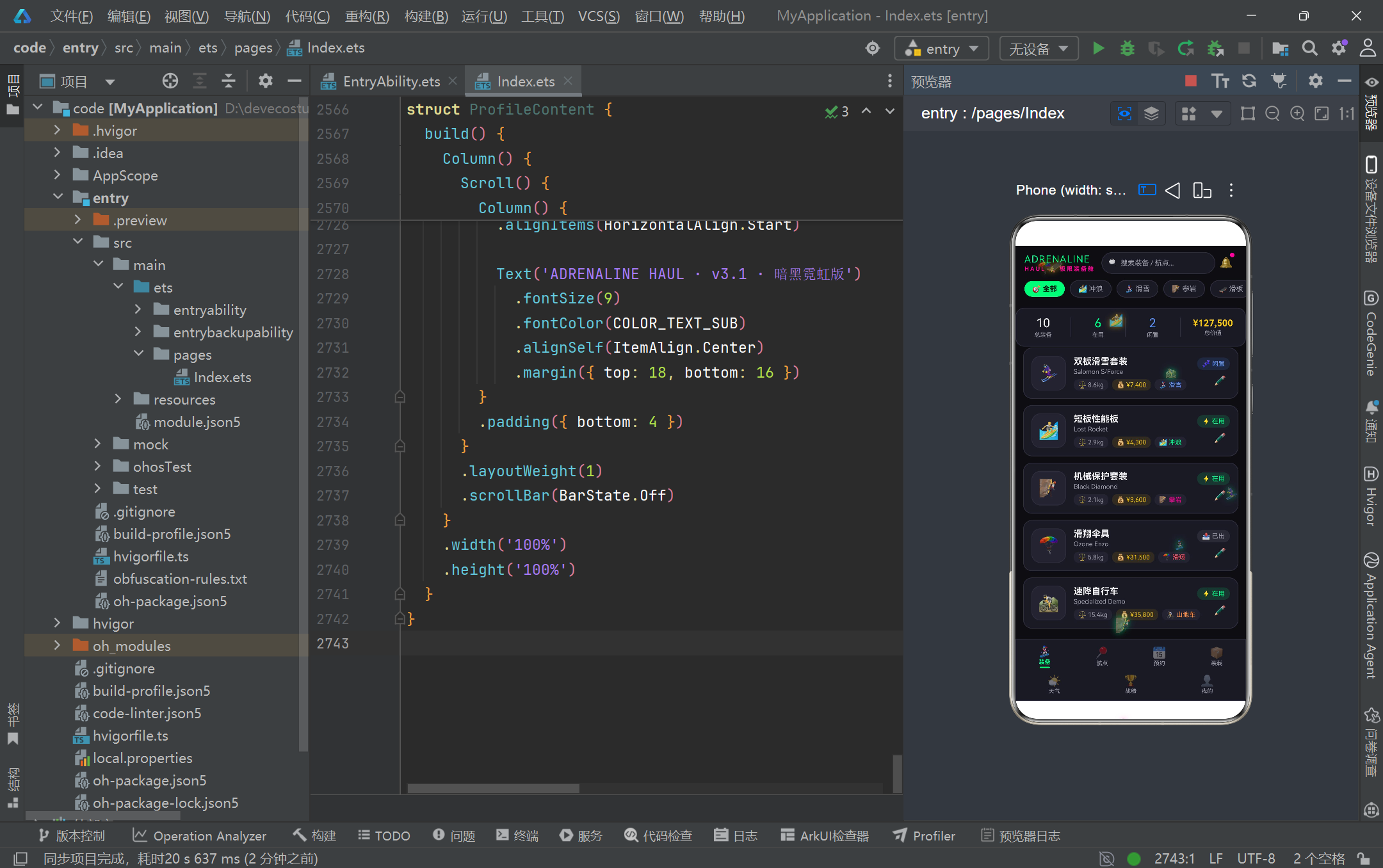
从设计美学来看,暗黑霓虹电竞风的视觉语言通过十余个主题色常量和五组 Record 配置映射表实现了系统化的色彩管理,荧光绿、品红、金色的三色强调体系在近黑底色上营造出强烈的视觉冲击力。每个卡片、标签、进度条都经过精心的圆角、间距和阴影设计,Emoji 图标的广泛使用为界面注入了趣味性和辨识度。从运动类型配色(冲浪绿、滑雪蓝、攀岩粉)到状态配色(在用绿、闲置蓝、已出灰),色彩编码贯穿了整个应用的信息架构,帮助用户快速识别和分类信息。天气预警的橙色警示、删除确认的红色警示等场景化色彩运用,进一步提升了交互的安全性和用户体验。
从工程实践来看,项目展现了多个值得借鉴的开发模式:不可变数据更新策略确保了响应式系统的可靠运行;可选链和空值合并的防御式编程保障了数据异常场景下的稳定性;组件外纯函数的提取提升了代码的可测试性和可维护性;生命周期回调中的资源管理避免了内存泄漏;Builder 方法的内聚拆分保持了 build 方法的简洁可读。这些实践虽然针对单文件页面架构,但其背后的设计原则——类型安全、关注点分离、防御式编程、资源生命周期管理——同样适用于更大规模的 HarmonyOS 应用开发。
展望未来,该项目可以在多个方向进一步演进。在数据层面,可以将静态 Mock 数据替换为真实的 HTTP 请求,通过 HarmonyOS 的网络能力对接后端 API,同时引入数据缓存和离线存储机制。在状态管理层面,当业务复杂度增长时,可以考虑引入 AppStorage 或 LocalStorage 实现跨组件的状态共享,减少 @Prop 的层层传递。在动画层面,可以将 setInterval 驱动的粒子系统升级为基于 animateTo 的属性动画或 @AnimatableExtend 自定义动画,获得更流畅的 60fps 渲染和更好的性能表现。在组件化层面,可以将通用的弹窗框架、进度条、卡片等抽取为独立的自定义组件,甚至封装为可复用的 UI 库。这些演进方向都建立在当前扎实的 ArkTS 基础架构之上,充分证明了 HarmonyOS API 24 在支撑复杂业务应用方面的成熟度和扩展性。

讨论HarmonyOS开发技术,专注于API与组件、DevEco Studio、测试、元服务和应用上架分发等。
更多推荐

 9
9 0
0- 0


 已为社区贡献163条内容

所有评论(0)