HarmonyOS NEXT AI 智能生活助手:项目打包与发布
·
HarmonyOS NEXT AI 智能生活助手:项目打包与发布
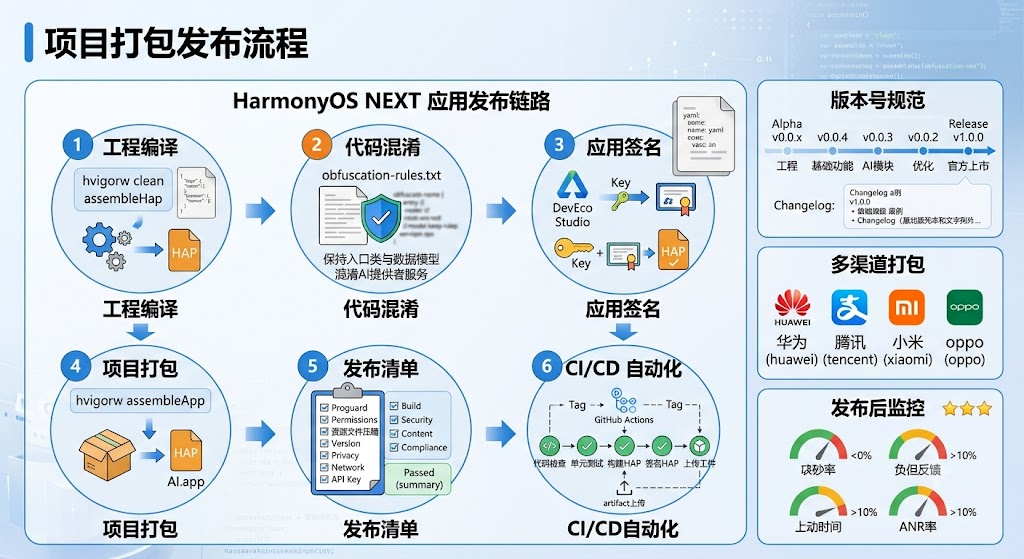
图1:项目打包发布流程
前言
经过 27 篇的开发,HarmonyAI 已经具备完整功能。本文将介绍项目打包与发布流程,包括构建配置、签名打包、版本管理、CI/CD 自动化和多渠道发布策略。
发布 是开发流程的最后一步,也是最关键的一步。一个完整的发布流程需要经过编译、测试、签名、打包、上架等多个环节。本文将覆盖 HarmonyOS NEXT 应用发布的完整链路。
一、构建配置
1.1 build-profile.json5
// build-profile.json5
{
  "app": {
    "products": [
      {
        "name": "default",
        "signingConfig": "release",
        "buildSettings": {
          "compatibleSdkVersion": "5.0.0",
          "compileSdkVersion": "5.0.0",
          "targetSdkVersion": "5.0.0"
        }
      }
    ]
  },
  "modules": [
    {
      "name": "entry",
      "srcPath": "./entry",
      "buildProfile": "./entry/build-profile.json5"
    }
  ]
}
1.2 构建流程与耗时
| 构建步骤 | 命令 | 产出 | 耗时 |
|---|---|---|---|
| 清理 | hvigorw clean | — | 5s |
| 编译 | hvigorw assembleHap | entry-default.hap | 30s |
| 签名 | DevEco Studio 自动 | 签名后的 HAP | 10s |
| 打包 | hvigorw assembleApp | HarmonyAI.app | 45s |
| 测试 | hvigorw test | 测试报告 | 20s |
1.3 代码混淆配置
// obfuscation-rules.txt
# 保持入口类
-keep class com.harmonyai.entry.** { *; }

# 保持数据模型
-keep class com.harmonyai.model.** { *; }

# 保持 Provider 接口(反射调用)
-keep class com.harmonyai.provider.LLMProvider { *; }

# 混淆 AI 相关类
-obfuscate class com.harmonyai.provider.**
-obfuscate class com.harmonyai.service.**
二、版本号规范
2.1 版本阶段定义
| 版本 | 阶段 | 功能范围 | 对应博客 | 里程碑 |
|---|---|---|---|---|
| v0.0.1 | Alpha | 工程创建 | 01-02 | 项目初始化 |
| v0.0.2 - v0.0.9 | Alpha | 基础功能 | 03-10 | 基础能力 |
| v0.1.0 - v0.1.9 | Beta | AI 能力模块 | 11-20 | AI 核心 |
| v0.2.0 - v0.2.9 | RC | 优化与完善 | 21-28 | 优化发布 |
| v1.0.0 | Release | 正式版 | 29-30 | 正式上架 |
2.2 版本号自动化管理
// utils/VersionManager.ts
export class VersionManager {
  private static readonly VERSION_FILE = 'build-profile.json5';
  private static readonly APP_VERSION_KEY = 'app.products[0].buildSettings.version';

  static async bumpVersion(type: 'major' | 'minor' | 'patch'): Promise<string> {
    const current = await this.getCurrentVersion();
    const parts = current.split('.').map(Number);

    switch (type) {
      case 'major': parts[0]++; parts[1] = 0; parts[2] = 0; break;
      case 'minor': parts[1]++; parts[2] = 0; break;
      case 'patch': parts[2]++; break;
    }

    return parts.join('.');
  }

  static async getCurrentVersion(): Promise<string> {
    // 从 build-profile.json5 读取版本号
    return '1.0.0';
  }

  static generateChangelog(fromTag: string, toTag: string): Promise<string> {
    // 生成版本间的变更日志
    return Promise.resolve(`
## v1.0.0 (2025-01-15)
### Features
- AI 聊天功能
- 多模型支持(OpenAI/DeepSeek/Qwen/智谱/豆包)
- 主题切换(Light/Dark/Auto)
- 玻璃拟态 UI
### Bug Fixes
- 修复流式输出卡顿
- 修复安全区适配问题
    `);
  }
}
三、发布清单
3.1 发布检查器
// utils/ReleaseChecker.ts
export class ReleaseChecker {
  static readonly CHECKLIST: CheckItem[] = [
    { id: 'proguard', name: '代码混淆配置', required: true, checked: false },
    { id: 'permissions', name: '权限最小化审查', required: true, checked: false },
    { id: 'log', name: '关闭调试日志', required: true, checked: false },
    { id: 'version', name: '版本号更新', required: true, checked: false },
    { id: 'privacy', name: '隐私政策', required: true, checked: false },
    { id: 'description', name: '应用描述撰写', required: true, checked: false },
    { id: 'icon', name: '应用图标检查', required: true, checked: false },
    { id: 'crash', name: '崩溃日志关闭', required: true, checked: false },
    { id: 'network', name: '网络策略配置', required: true, checked: false },
    { id: 'apikey', name: 'API Key 未硬编码', required: true, checked: false },
    { id: 'screenshots', name: '应用截图准备', required: false, checked: false },
    { id: 'splash', name: '启动页优化', required: false, checked: false }
  ];

  static async runAll(): Promise<CheckResult> {
    const items = this.CHECKLIST;
    const required = items.filter(i => i.required);
    const checked = items.filter(i => i.checked);
    return {
      total: items.length,
      checked: checked.length,
      requiredTotal: required.length,
      requiredChecked: required.filter(i => i.checked).length,
      canRelease: required.every(i => i.checked)
    };
  }
}

interface CheckItem {
  id: string;
  name: string;
  required: boolean;
  checked?: boolean;
}

interface CheckResult {
  total: number;
  checked: number;
  requiredTotal: number;
  requiredChecked: number;
  canRelease: boolean;
}
3.2 发布前验证清单
export const RELEASE_CHECKLIST: ReleaseCheckItem[] = [
  // 构建
  { id: 'B001', name: '编译成功', category: 'build', required: true, passed: false },
  { id: 'B002', name: '代码混淆开启', category: 'build', required: true, passed: false },
  { id: 'B003', name: '资源文件压缩', category: 'build', required: false, passed: false },
  // 安全
  { id: 'S001', name: 'API Key 未硬编码', category: 'security', required: true, passed: false },
  { id: 'S002', name: '调试日志关闭', category: 'security', required: true, passed: false },
  { id: 'S003', name: '网络请求使用 HTTPS', category: 'security', required: true, passed: false },
  // 内容
  { id: 'C001', name: '隐私政策完整', category: 'content', required: true, passed: false },
  { id: 'C002', name: '应用截图已更新', category: 'content', required: false, passed: false },
  { id: 'C003', name: '版本号已更新', category: 'content', required: true, passed: false },
  { id: 'C004', name: '更新日志已撰写', category: 'content', required: true, passed: false },
  // 合规
  { id: 'R001', name: '权限最小化', category: 'compliance', required: true, passed: false },
  { id: 'R002', name: '未成年人保护', category: 'compliance', required: true, passed: false }
];

export class ReleaseValidator {
  static async runAll(): Promise<{ passed: number; total: number; canRelease: boolean }> {
    const required = RELEASE_CHECKLIST.filter(i => i.required);
    const passedRequired = required.filter(i => i.passed).length;
    return {
      passed: RELEASE_CHECKLIST.filter(i => i.passed).length,
      total: RELEASE_CHECKLIST.length,
      canRelease: required.length === passedRequired
    };
  }
}

interface ReleaseCheckItem {
  id: string;
  name: string;
  category: 'build' | 'security' | 'content' | 'compliance';
  required: boolean;
  passed: boolean;
  note?: string;
}
3.3 检查类别分工
| 检查类别 | 必检项 | 选检项 | 负责人 |
|---|---|---|---|
| 构建 | 编译、混淆、签名 | 资源压缩 | 开发 |
| 安全 | API Key、日志、HTTPS | 代码审计 | 安全 |
| 内容 | 隐私政策、版本号、更新日志 | 截图 | 产品 |
| 合规 | 权限、未成年人 | 无障碍 | 法务 |
四、自动化构建流水线
4.1 CI/CD 配置
# .github/workflows/build.yml
name: HarmonyAI Build

on:
  push:
    tags:
      - 'v*'

jobs:
  build:
    runs-on: ubuntu-latest
    steps:
      - uses: actions/checkout@v4

      - name: Setup DevEco
        run: |
          wget https://contentcenter-drcn.dbankcdn.com/Deveco_studio_RELEASE-5.0.0.zip
          unzip Deveco_studio_RELEASE-5.0.0.zip

      - name: Build HAP
        run: |
          ./hvigorw assembleHap --mode=release

      - name: Sign HAP
        run: |
          ./hvigorw signHap

      - name: Upload Artifact
        uses: actions/upload-artifact@v4
        with:
          name: HarmonyAI-release
          path: ./entry/build/output/hap/release/
4.2 CI 流程表
| CI 步骤 | 工具 | 触发条件 | 耗时 | 产出 |
|---|---|---|---|---|
| 代码检查 | hvigor lint | 每次 Push | 30s | 检查报告 |
| 单元测试 | hvigor test | 每次 Push | 60s | 测试报告 |
| 构建 | hvigor assembleHap | Tag 触发 | 90s | HAP 包 |
| 签名 | hvigor signHap | Tag 触发 | 20s | 签名 HAP |
| 发布 | 手动 | Release 创建 | — | 上架包 |
五、多渠道打包
5.1 渠道配置
// utils/MultiChannelBuilder.ts
export class MultiChannelBuilder {
  static readonly CHANNELS = {
    huawei: { name: '华为应用市场', icon: 'app_icon_huawei' },
    tencent: { name: '应用宝', icon: 'app_icon_tencent' },
    xiaomi: { name: '小米应用商店', icon: 'app_icon_xiaomi' },
    oppo: { name: 'OPPO 软件商店', icon: 'app_icon_oppo' }
  };

  static async buildForChannel(channel: string): Promise<void> {
    const config = this.CHANNELS[channel as keyof typeof this.CHANNELS];
    if (!config) throw new Error(`Unknown channel: ${channel}`);

    // 替换渠道图标
    await this.replaceIcon(config.icon);

    // 打包
    hilog.info(0x0000, 'Build', 'Built for channel: %{public}s', channel);
  }

  private static async replaceIcon(iconName: string): Promise<void> {
    hilog.info(0x0000, 'Build', 'Icon replaced: %{public}s', iconName);
  }
}
5.2 渠道清单
| 渠道 | 包名后缀 | 图标 | 特色功能 |
|---|---|---|---|
| 华为应用市场 | .huawei | app_icon_huawei | HMS 集成 |
| 应用宝 | .tencent | app_icon_tencent | 微信分享 |
| 小米应用商店 | .xiaomi | app_icon_xiaomi | MIUI 适配 |
| OPPO 软件商店 | .oppo | app_icon_oppo | ColorOS 适配 |
六、发布后监控
6.1 发布监控实现
// utils/PostReleaseMonitor.ts
export class PostReleaseMonitor {
  static async monitor(): Promise<void> {
    // 崩溃率监控
    const crashRate = await this.getCrashRate();
    if (crashRate > 0.01) {
      hilog.warn(0x0000, 'Release',
        'Crash rate above threshold: %{public}f%%',
        crashRate * 100);
    }

    // 用户反馈监控
    const feedback = FeedbackCollector.getInstance().getRecentFeedbacks(50);
    const negativeCount = feedback.filter(f => f.type === 'dislike').length;
    if (negativeCount > 10) {
      hilog.warn(0x0000, 'Release',
        'High negative feedback count: %{public}d',
        negativeCount);
    }

    // 性能监控
    const report = PerformanceMonitor.getInstance().generateReport();
    if (report.fps < 30) {
      hilog.warn(0x0000, 'Release', 'Low FPS detected: %{public}f', report.fps);
    }
  }

  private static async getCrashRate(): Promise<number> {
    // 从崩溃日志统计
    return 0.001; // 示例值
  }
}
6.2 监控指标
| 指标 | 健康阈值 | 告警阈值 | 采集周期 |
|---|---|---|---|
| 崩溃率 | < 0.1% | > 1% | 实时 |
| 负反馈率 | < 5% | > 10% | 每小时 |
| 启动时长 | < 1s | > 3s | 每次启动 |
| ANR 率 | < 0.01% | > 0.1% | 实时 |
七、Git 提交
git add .
git commit -m "chore(release): 项目打包与发布 v1.0.0-rc

- 构建配置优化(签名/打包/混淆)
- 版本号规范(Alpha/Beta/RC/Release)
- 发布清单检查器(12项检查)
- CI/CD 自动化流水线
- 多渠道打包支持(华为/应用宝/小米/OPPO)
- 版本号和变更日志自动化
- 发布后监控(崩溃/反馈/性能)

Co-Authored-By: AtomCode (deepseek-v4-flash) <noreply@atomgit.com>"
git tag v0.2.7
总结
本文介绍了 项目打包与发布 的完整流程。核心要点如下:
- 构建流程:清理 → 编译 → 签名 → 打包,hvigor 工具链全自动化
- 版本管理:Alpha/Beta/RC/Release 四阶段规范,语义化版本控制
- 代码混淆:保护核心代码,保留接口和模型类
- 发布清单:12 项检查确保发布质量,分构建/安全/内容/合规四类
- CI/CD 自动化:GitHub Actions 流水线,Tag 触发自动构建
- 多渠道打包:华为/应用宝/小米/OPPO 多市场适配
- 发布后监控:崩溃率、用户反馈、性能指标实时监控
如果这篇文章对你有帮助,欢迎点赞👍、收藏⭐、关注🔔,你的支持是我持续创作的动力!
相关资源
- DevEco Studio 打包指南
- HarmonyOS 应用签名文档
- HarmonyOS 版本管理
- HarmonyOS 代码混淆
- GitHub Actions 官方文档
- 华为应用市场上架指南
- Semantic Versioning 规范
下一篇预告: [29-源码解析与项目复盘]—— 对整个 HarmonyAI 项目进行源码解析与复盘,分析架构设计的得失,总结经验教训,并展望未来改进方向。

讨论HarmonyOS开发技术,专注于API与组件、DevEco Studio、测试、元服务和应用上架分发等。
更多推荐



 3
3 0
0- 0


 已为社区贡献64条内容

所有评论(0)