基于HarmonyOS API 24智慧二手交易市场把“数据如何被取用“封装成方法,让 UI 层只依赖方法签名而非数据结构,这种解耦让数据源的切换(本地数组 → 远程接口)变得平滑
一、写在前面:为什么我们要研究这样一款招聘求职应用
在当今移动互联网时代,招聘求职类应用已经成为连接人才与企业最重要的数字化桥梁之一。无论是 BOSS 直聘、拉勾、猎聘,还是智联招聘、前程无忧,这类产品都在用极其复杂的交互逻辑和庞大的数据体系,承载着千万级求职者与百万级企业的双向匹配需求。一个看似简单的"投递简历"动作,背后其实牵涉到职位检索、公司筛选、投递状态追踪、面试日程管理、个人档案维护等一整套相互联动的业务流程。
与此同时,随着 HarmonyOS(鸿蒙操作系统)生态的快速崛起,越来越多的开发者开始关注如何使用华为官方推出的 ArkTS 语言与 ArkUI 声明式开发框架来构建原生应用。ArkTS 在 TypeScript 的基础上做了进一步的约束与增强,强调类型安全、编译期检查和声明式 UI 编写范式,非常适合用来开发结构清晰、可维护性强的中大型应用。而招聘求职类应用恰好是一个"麻雀虽小、五脏俱全"的典型场景——它既需要丰富的列表展示与卡片化信息呈现,又需要弹窗交互、状态机流转、多页面切换、图表统计等高级能力,是学习和实践 ArkTS 的绝佳载体。
本文将要剖析的,正是一款完全使用 ArkTS 编写的招聘求职应用。它采用 Indigo(靛蓝)/Purple(紫色)的专业配色方案,整体视觉风格沉稳而不失活力,非常契合职场工具类产品的调性。这款应用在一个单文件结构中,完整实现了职位浏览、公司广场、投递追踪、面试日程、个人中心这五大核心模块,并通过精心设计的数据模型、元数据字典、状态变量和构建器(Builder)函数,将复杂的业务逻辑拆解为可复用、可组合的代码单元。
无论你是刚接触 ArkTS 想要快速上手一个完整项目,还是已有一定经验希望学习更优雅的组件化拆分思路,又或者正在寻找一份"招聘类应用"的参考实现来启发自己的产品设计,这篇文章都会给你带来系统性的收获。接下来,我们将按照"自顶向下、由外而内"的顺序,逐段拆解这份代码,把每一个接口定义、每一个状态变量、每一个构建器函数的意图和实现细节都讲透。
二、整体架构鸟瞰:一个结构体如何承载整个应用
在 ArkTS 的世界里,一个应用页面的核心通常是一个被 @Entry 和 @Component 装饰器标注的结构体(struct)。本应用也不例外,它将整个招聘求职功能浓缩在一个名为 JobSearchApp 的结构体中。虽然从工程化角度看,真实项目会把不同模块拆分到不同文件,但将所有逻辑收敛在单一结构体内,反而让初学者能够一眼看清"数据如何流动、状态如何驱动 UI、组件如何复用"的全过程。
从宏观上看,这个结构体的内部组织可以分为以下几个层次:
第一层是数据契约层,即位于文件顶部的一组 interface 声明。它们定义了职位、公司、投递记录、面试日程、用户档案等核心业务对象的结构,是整个应用的数据骨架。
第二层是状态管理层,通过一组 @State 装饰的变量来持有当前选中的 Tab、各类弹窗的显隐开关、被选中的职位 ID 等运行时状态。这些变量的任何变化都会触发 ArkUI 框架的差分渲染,自动更新依赖它们的 UI 部分。
第三层是元数据字典层,用一组 Record<string, XXX> 类型的私有属性,把"全职/兼职/实习"、"已投递/已查看/面试中/Offer/不合适"这类枚举值的展示文案、颜色等视觉信息集中管理,避免散落在各处造成维护困难。
第四层是静态数据层,包含 27 条职位、16 家公司、13 条投递记录、9 条面试日程等模拟数据。在真实工程中这些数据会来自后端接口,这里用本地数组模拟,便于聚焦于 UI 与交互的实现。
第五层是业务方法层,提供诸如"根据 ID 查职位"、"获取投递统计"等纯函数式的辅助方法。
第六层是构建器(Builder)层,这是本文篇幅最大、也是最具技术含量的部分。它又分为三组:弹窗构建器(模态遮罩、申请弹窗、简历编辑弹窗、撤回确认弹窗、职位详情弹窗)、卡片与控件构建器(Tab 图标、薪资盒子、职位卡片、筛选药丸组、公司卡片、投递卡片、面试卡片、统计柱状图)、以及五大 Tab 页面构建器。
第七层是入口构建层,即 build() 方法,它用 Stack 把"主内容区 + 底部 Tab 栏"与"弹窗遮罩层"叠加在一起,是整个应用的渲染起点。
这种分层并非 ArkTS 强制要求,而是作者根据职责单一原则自然形成的组织方式。理解了这七个层次,你就掌握了阅读这份代码的"地图"。下面我们逐层深入。
三、数据契约层:用 interface 定义业务世界的 vocabulary
3.1 核心业务实体
应用一开始就用四个核心 interface 勾勒出了业务世界的基本词汇:职位(JobItem)、公司(CompanyItem)、投递记录(ApplicationItem)、面试日程(InterviewItem)。让我们先看职位接口的完整定义:
interface JobItem {
  id: number
  title: string
  company: string
  salary: string
  salaryMin: number
  salaryMax: number
  city: string
  district: string
  experience: string
  education: string
  type: string
  tags: string[]
  publishDate: string
  isUrgent: boolean
  isRemote: boolean
  description: string
  welfare: string[]
  hrName: string
  hrAvatar: string
}
逐字段解读这段定义。id 是职位的唯一标识,类型为 number,后续通过它来在数组中查找具体职位。title 和 company 分别存储职位名称与公司名称,是最基础的两个展示字段。salary 是一个字符串形式的薪资范围(如 "25-40K"),方便直接渲染;而 salaryMin 和 salaryMax 是拆分后的数值,便于做区间筛选和排序,这种"既存原始字符串又存结构化数值"的设计在实战中非常常见,体现了"展示优先、计算可用"的务实思路。
city 和 district 共同定位职位的地理位置,前者到城市级(如"深圳"),后者到区级(如"南山区"),二者配合能在卡片上呈现"深圳 南山区"这样的精细地址。experience 和 education 是经验要求与学历要求,取值为预定义枚举字符串。type 标识职位类型(全职/兼职/实习)。tags 是技能标签数组,例如 ['React', 'TypeScript', 'ArkTS', '微前端'],用于在卡片上以小药丸形式展示技术栈。
publishDate 存储的是相对时间文案(如"2天前"),而非时间戳,这意味着数据层已经做了人性化预处理,UI 层无需再格式化。isUrgent 和 isRemote 是两个布尔标记,分别决定是否显示"急聘"红标和"远程"绿标,是提升信息密度的关键设计。description 是职位描述长文本,welfare 是福利待遇数组。最后,hrName 和 hrAvatar 描述发布该职位的 HR 信息,其中 hrAvatar 直接用一个颜色字符串(如 "#5C6BC0")作为头像背景色——这是一种"用首字母 + 背景色"模拟头像的轻量方案,避免了引入图片资源。
公司接口的定义则聚焦于雇主画像:
interface CompanyItem {
  id: number
  name: string
  logo: string
  industry: string
  size: string
  stage: string
  city: string
  rating: number
  jobCount: number
  welfare: string[]
  intro: string
  isVerified: boolean
  isFollowing: boolean
}
这里的 logo 同样用颜色字符串模拟,而非真实图片 URL。industry 是所属行业,size 是公司规模档位(如 "1000+"),stage 是融资阶段(如"已上市"、“D轮以上”)。rating 是评分(浮点数,如 4.8),jobCount 是该公司在招职位数。isVerified 表示是否通过企业认证(影响是否显示绿色对勾徽标),isFollowing 表示当前用户是否已关注该公司(影响"关注/已关注"按钮的状态)。这两个布尔字段是典型的"用户与对象的关系状态",需要在 UI 上做条件渲染。
投递记录接口刻画的是求职者一端的动作轨迹:
interface ApplicationItem {
  id: number
  jobTitle: string
  companyName: string
  applyDate: string
  status: string
  stage: number
  hrReply: string
  lastUpdate: string
  salary: string
  city: string
}
这里最有意思的是 status(字符串状态码,如 'applied'、'viewed'、'interview'、'offer'、'rejected')与 stage(1~4 的数字阶段)并存的设计。status 用于精确描述当前所处的业务状态,配合元数据字典可以渲染出对应颜色和文案;而 stage 是一个简化的进度刻度,专门用来驱动卡片底部的"投递→查看→面试→Offer"四段进度条。两者既有重叠又各有侧重:status 表达"是什么",stage 表达"走到第几步"。hrReply 存储 HR 的最新反馈文案,lastUpdate 是最后更新时间的相对文案。
面试日程接口则面向"即将发生的事件":
interface InterviewItem {
  id: number
  jobTitle: string
  companyName: string
  interviewTime: string
  interviewType: string
  location: string
  round: string
  interviewer: string
  status: string
  tips: string
  reminder: boolean
}
interviewTime 是面试时间,interviewType 区分视频面试/现场面试/电话面试,location 是面试地点(视频面试时为会议平台名)。round 描述这是第几面以及面的性质(如"二面·技术面"、“终面·架构面”),interviewer 是面试官姓名与身份。status 取值为 'upcoming'、'completed'、'cancelled'。tips 是面试准备建议,reminder 标记是否已设置提醒——后者会直接影响卡片底部是显示"已设提醒"绿色文案还是"未设提醒"灰色文案。
3.2 元数据接口:把"枚举的视觉表现"类型化
除了上述四个业务实体,作者还定义了一组"元数据"接口,用来描述枚举值该如何被渲染。这是一种相当成熟的设计:
interface JobTypeMeta {
  label: string
  color: ResourceColor
}

interface AppStatusMeta {
  label: string
  color: ResourceColor
  bgColor: ResourceColor
}

interface InterviewStatusMeta {
  label: string
  color: ResourceColor
}
注意这些接口里出现了 ResourceColor 类型。这是 ArkTS 内置的联合类型,可以接受十六进制字符串(如 '#5C6BC0')或资源引用,专门用于颜色属性。把它写进 interface,意味着这些元数据结构在类型层面就被约束为"只能装颜色",编译器会帮你拦截非法赋值。
AppStatusMeta 比 JobTypeMeta 多了一个 bgColor,这是因为投递状态在卡片上需要同时展示文字颜色和浅色背景色(一种"软徽章"风格),而职位类型只需要一个实心背景色块。这种"按需定义字段"的做法避免了冗余。
还有几个语义化更强的元数据接口:
interface EducationMeta {
  label: string
  short: string
}

interface ExperienceMeta {
  label: string
  range: string
}

interface CompanySizeMeta {
  label: string
  range: string
}
EducationMeta 的 short 字段存储学历的英文缩写(如本科对应 'BK'),可用于空间紧凑时的简写展示。ExperienceMeta 的 label 是"应届生/初级/中级/高级/专家"这样的人美化文案,range 是"0年/1-3年"这样的原始区间,分别用于不同语境。CompanySizeMeta 同理,label 是"大型企业"这样的描述,range 是"1000人+"这样的具体数字。这种"一个枚举值映射到多个展示维度"的设计,让 UI 层可以根据场景灵活取用。
3.3 辅助实体:技能、筛选、统计、用户
最后还有四个辅助 interface 收尾:
interface SkillItem {
  name: string
  level: number
}

interface FilterPill {
  label: string
  selected: boolean
}

interface StatItem {
  label: string
  count: number
  color: ResourceColor
}

interface UserProfile {
  name: string
  avatar: string
  position: string
  experience: string
  education: string
  city: string
  phone: string
  email: string
  bio: string
}
SkillItem 用于个人中心的技能进度条,name 是技能名,level 是 0~100 的熟练度。FilterPill 描述一个筛选药丸的状态(虽然实际代码中筛选器用了更轻量的字符串数组 + activeIndex 方案,这个接口属于"预留扩展")。StatItem 用于投递统计柱状图,count 决定柱子高度,color 决定柱子颜色。UserProfile 是用户档案,字段覆盖姓名、头像(颜色)、职位、经验、学历、城市、手机、邮箱、个人简介,是个人中心页与申请弹窗共用的数据源。
至此,数据契约层共定义了 13 个 interface,构成了一份清晰的"业务词汇表"。它们之间没有继承关系,保持了扁平简洁的结构,非常便于在 IDE 中通过类型提示来探索字段含义。
四、状态管理层:@State 如何驱动整个应用的交互
进入 JobSearchApp 结构体内部,最先映入眼帘的是一组 @State 装饰的状态变量。在 ArkUI 的响应式模型里,@State 是最基础也最常用的状态装饰器:被它修饰的变量一旦发生赋值,框架就会自动找到所有引用该变量的 UI 组件并重新渲染。本应用正是依靠这几个状态变量,串联起了 Tab 切换、弹窗显隐、选中项追踪等核心交互。
@Entry
@Component
struct JobSearchApp {
  @State currentTab: number = 0
  @State showApplyModal: boolean = false
  @State showResumeModal: boolean = false
  @State showWithdrawModal: boolean = false
  @State showJobDetailModal: boolean = false
  @State selectedJobId: number = 0
  @State selectedAppId: number = 0
  @State activeFilterIndex: number = 0
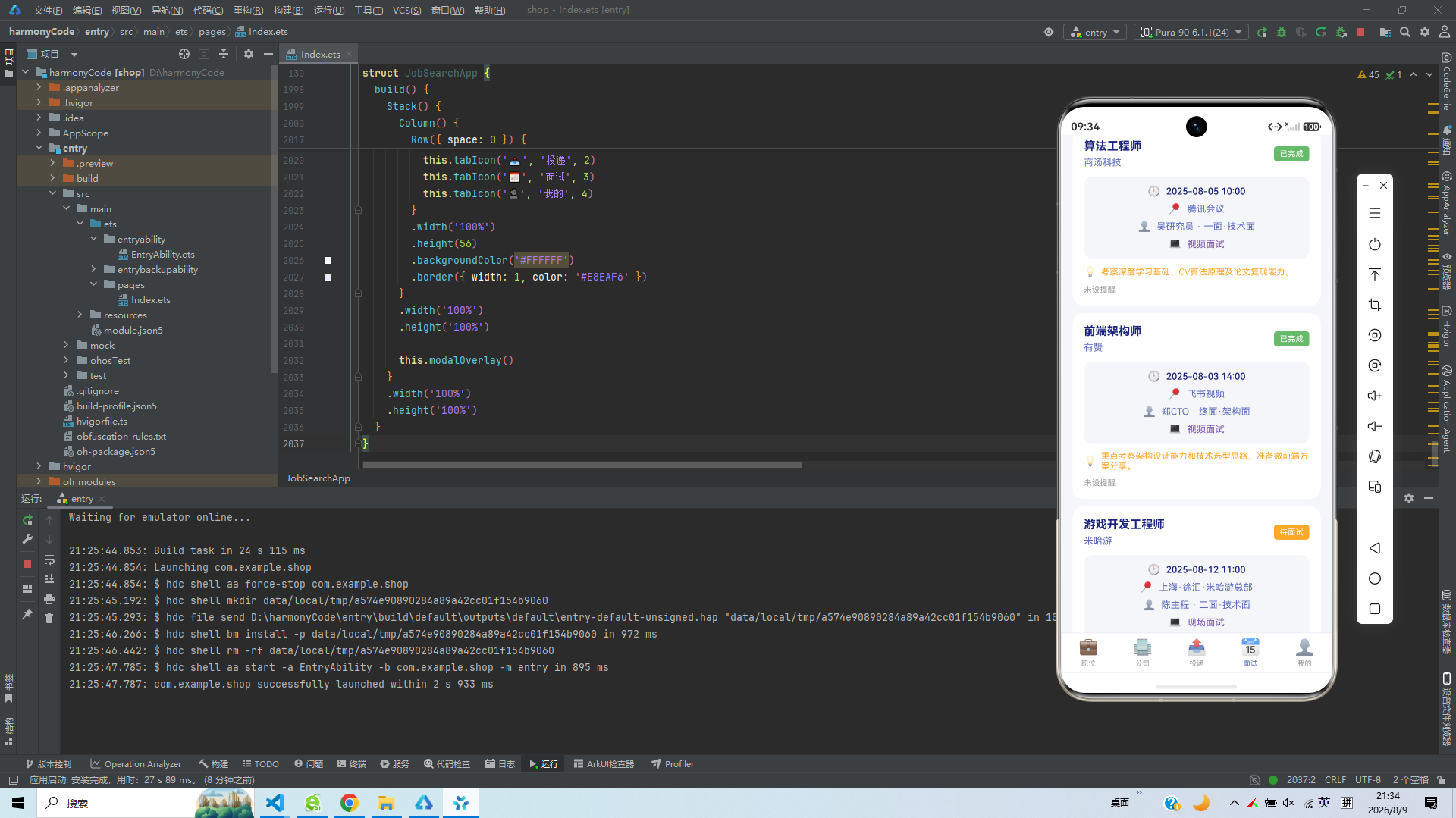
我们来逐一分析每个状态变量的职责。
currentTab 是当前激活的 Tab 索引,初值为 0,对应"职位"页。它的取值范围是 0~4,分别对应职位、公司、投递、面试、我的这五个底部 Tab。当用户点击底部 Tab 栏时,tabIcon 构建器会把 currentTab 更新为对应索引,build() 方法中的 if (this.currentTab === 0) 等条件分支就会据此渲染对应的 Tab 页面。这是整个应用导航的"总开关"。
接下来的四个布尔变量 showApplyModal、showResumeModal、showWithdrawModal、showJobDetailModal 分别控制四种弹窗的显隐。之所以用四个独立变量而非一个"当前弹窗类型"枚举,是因为这些弹窗之间存在"层叠触发"的可能——例如在职位详情弹窗中点击"立即沟通"会关闭详情弹窗并打开申请弹窗,用独立布尔变量可以精确表达这种"先关一个、再开一个"的时序。每个弹窗构建器内部都通过 if (this.showXXXModal) 来决定是否渲染,关闭时只需把对应变量置为 false。
selectedJobId 和 selectedAppId 是两个"上下文指针"。当用户点击某张职位卡片时,jobCard 构建器会把该职位的 id 赋值给 selectedJobId,随后职位详情弹窗就能通过 this.getJobById(this.selectedJobId) 拿到对应数据并展示。selectedAppId 同理服务于"撤回投递"确认弹窗。这种"先记录选中项 ID,再由弹窗按 ID 取数"的模式,比"直接把整个对象塞进状态"更轻量,也更符合"状态最小化"原则。
activeFilterIndex 用于追踪当前选中的筛选项索引。需要注意的是,应用里其实有三组筛选器(城市、薪资、经验),但只用了这一个变量来记录"当前激活的筛选项索引"。在实际渲染时,三组筛选器共享同一个 activeFilterIndex,这意味着切换不同筛选器组时索引会互相影响——这是一种简化实现,真实项目通常会给每组筛选器单独的状态。
理解了这些状态变量,你就掌握了应用所有"会变的东西"。其余的属性都是不可变的静态数据或方法,不会触发重新渲染。这种"状态与数据严格分离"的意识,是写出可维护 ArkTS 代码的关键。
五、元数据字典层:用 Record 把枚举的视觉表现集中托管
在传统的前端开发中,"如果状态是 offer 就显示绿色、文案是 Offer"这类逻辑往往散落在各个组件的 if/else 或 switch 里,随着状态增多,代码会变得越来越难维护。本应用采用了一种更优雅的方案:用一组 Record<string, XXX> 类型的字典,把每个枚举值对应的文案和颜色集中托管。
private jobTypeMeta: Record<string, JobTypeMeta> = {
  '全职': { label: '全职', color: '#5C6BC0' },
  '兼职': { label: '兼职', color: '#FFA726' },
  '实习': { label: '实习', color: '#66BB6A' }
}
Record<string, JobTypeMeta> 是 TypeScript/ArkTS 的工具类型,表示"以 string 为键、以 JobTypeMeta 为值的映射"。这里把三种职位类型映射到各自的标签和颜色:全职是靛蓝 #5C6BC0,兼职是橙色 #FFA726,实习是绿色 #66BB6A。当 UI 需要渲染某个职位的类型徽章时,只需 this.jobTypeMeta[job.type].color 就能拿到对应颜色,完全不需要条件判断。如果将来新增"外包"类型,只需在字典里加一行,UI 代码无需改动。
学历元数据则多了 short 字段:
private educationMeta: Record<string, EducationMeta> = {
  '大专': { label: '大专', short: 'DC' },
  '本科': { label: '本科', short: 'BK' },
  '硕士': { label: '硕士', short: 'SS' },
  '博士': { label: '博士', short: 'BS' },
  '不限': { label: '不限', short: 'XZ' }
}
这里把大专、本科、硕士、博士、不限五种学历各映射到一个英文缩写,便于在空间紧凑的场景(如列表项的小标签)里用两字母缩写代替中文。注意"不限"的缩写是 'XZ'(不限的拼音首字母),保持了缩写风格的一致性。
经验元数据体现了"同一枚举,多语境展示"的思路:
private experienceMeta: Record<string, ExperienceMeta> = {
  '应届': { label: '应届生', range: '0年' },
  '1-3年': { label: '初级', range: '1-3年' },
  '3-5年': { label: '中级', range: '3-5年' },
  '5-10年': { label: '高级', range: '5-10年' },
  '10年以上': { label: '专家', range: '10年+' },
  '不限': { label: '不限', range: '不限' }
}
键名是数据层使用的原始值(如 '3-5年'),label 是人美化的职级描述(“中级”),range 是区间文案(“3-5年”)。在筛选器里展示的可能是 range,在职位详情页展示的可能是 label,各取所需。
投递状态元数据是字段最丰富的一个,因为状态徽章需要同时有文字色和背景色:
private appStatusMeta: Record<string, AppStatusMeta> = {
  'applied': { label: '已投递', color: '#5C6BC0', bgColor: '#E8EAF6' },
  'viewed': { label: '已查看', color: '#7E57C2', bgColor: '#EDE7F6' },
  'interview': { label: '面试中', color: '#FFA726', bgColor: '#FFF3E0' },
  'offer': { label: 'Offer', color: '#66BB6A', bgColor: '#E8F5E9' },
  'rejected': { label: '不合适', color: '#EF5350', bgColor: '#FFEBEE' }
}
这五个状态构成了求职流程的完整生命周期:投递(靛蓝)→ 查看(深紫)→ 面试中(橙)→ Offer(绿)/ 不合适(红)。颜色从冷到暖、从蓝到绿再到红,暗合了"进展中→成功/失败"的情绪走向。每个状态都配了一对深浅色:color 是文字色,bgColor 是浅色背景,二者搭配形成柔和的"软徽章"效果,比纯色块更现代。在投递卡片中,状态徽章的渲染就是 fontColor(this.appStatusMeta[app.status].color) 配合 backgroundColor(this.appStatusMeta[app.status].bgColor),一行字典查询替代了一长串 switch。
面试状态和公司规模的元数据字典与之类似:
private interviewStatusMeta: Record<string, InterviewStatusMeta> = {
  'upcoming': { label: '待面试', color: '#FFA726' },
  'completed': { label: '已完成', color: '#66BB6A' },
  'cancelled': { label: '已取消', color: '#EF5350' }
}

private companySizeMeta: Record<string, CompanySizeMeta> = {
  '0-50': { label: '微型企业', range: '0-50人' },
  '50-200': { label: '小型企业', range: '50-200人' },
  '200-500': { label: '中型企业', range: '200-500人' },
  '500-1000': { label: '中大型', range: '500-1000人' },
  '1000+': { label: '大型企业', range: '1000人+' }
}
面试状态用三色表达"未发生/已结束/已取消"三种语义。公司规模则把数字区间映射到"微/小/中/中大型/大型"的语义档位,并保留了 range 字段供需要展示具体人数时使用。
整套元数据字典的设计哲学可以总结为一句话:把"数据值"与"视觉表现"的映射关系从 UI 代码中抽离,集中成一张可查表。这种做法带来的好处是全方位的——新增枚举值只需改字典、配色调整只需改字典、文案本地化只需改字典,UI 组件本身始终保持纯粹的结构代码。
六、静态数据层:用本地数组模拟一个真实的数据后端
真实应用的数据来自服务器接口,但为了聚焦于 UI 与交互实现,本应用在结构体内用一组 private 数组直接持有了大量模拟数据。这些数据覆盖了 27 个职位、16 家公司、13 条投递记录、9 条面试日程,足以让应用在视觉上"跑起来"。我们来看职位数据的几个代表性条目:
private jobs: JobItem[] = [
  { id: 1, title: '高级前端工程师', company: '腾讯科技', salary: '25-40K',
    salaryMin: 25, salaryMax: 40, city: '深圳', district: '南山区',
    experience: '3-5年', education: '本科', type: '全职',
    tags: ['React', 'TypeScript', 'ArkTS', '微前端'], publishDate: '2天前',
    isUrgent: true, isRemote: false,
    description: '负责腾讯云控制台前端架构设计与开发,主导微前端方案落地,提升研发效率与用户体验。',
    welfare: ['六险一金', '免费三餐', '股票期权', '弹性工作', '带薪年假'],
    hrName: '王经理', hrAvatar: '#5C6BC0' },
  // ... 其余 26 条
]
观察这条数据可以发现几个设计要点。其一,salary 字符串 "25-40K" 与 salaryMin: 25、salaryMax: 40 同时存在,前者用于直接显示,后者用于筛选与排序,互不干扰。其二,isUrgent: true 标记这是一个急聘职位,卡片上会显示红色"急聘"小标;isRemote: false 表示非远程,所以不会有绿色"远程"标。其三,tags 数组最多放四个技术标签,卡片渲染时只取前两个(job.tags.slice(0, 2)),详情页才展示全部——这是"列表精简、详情完整"的信息层次控制。其四,hrAvatar 用 '#5C6BC0' 这种颜色字符串模拟头像,配合 hrName 的首字母就能渲染出一个圆形彩色头像块。
数据中还包含一些特殊形态的职位,体现了数据设计的完整性。例如实习岗位的薪资单位是"元/天":
{ id: 13, title: '前端实习生', company: '拼多多', salary: '300-500/天',
  salaryMin: 300, salaryMax: 500, city: '上海', district: '长宁区',
  experience: '应届', education: '本科', type: '实习', ... }
又如兼职岗位的城市是"远程"、区域是"不限":
{ id: 25, title: '兼职设计师', company: '设计工作室', salary: '200-400/天',
  salaryMin: 200, salaryMax: 400, city: '远程', district: '不限',
  experience: '不限', education: '不限', type: '兼职', isRemote: true, ... }
这些"边界数据"确保了 UI 在各种异常或边缘场景下都能正确渲染,是测试驱动设计思维的体现。
公司数据同样丰富,每家公司的 welfare、intro、rating、jobCount、stage 等字段都填得很饱满:
private companies: CompanyItem[] = [
  { id: 1, name: '腾讯科技', logo: '#5C6BC0', industry: '互联网',
    size: '1000+', stage: '已上市', city: '深圳', rating: 4.8, jobCount: 356,
    welfare: ['六险一金', '免费三餐', '股票期权', '弹性工作'],
    intro: '腾讯是中国领先的互联网增值服务提供商,业务涵盖社交、游戏、金融、云服务等领域。',
    isVerified: true, isFollowing: true },
  // ... 其余 15 家
]
size: '1000+' 是一个键,会被 companySizeMeta 字典翻译成"大型企业"。rating: 4.8 会在卡片上以橙色星级 + 数字的形式展示。isVerified: true 让公司名旁出现绿色对勾。isFollowing: true 让关注按钮显示为"已关注"的浅色态。这些布尔与枚举字段组合在一起,让每张公司卡片都能呈现差异化的视觉信息。
投递记录数据则呈现了完整的状态流转:
private applications: ApplicationItem[] = [
  { id: 1, jobTitle: '高级前端工程师', companyName: '腾讯科技',
    applyDate: '2025-08-05', status: 'interview', stage: 3,
    hrReply: '您好,您的简历已通过筛选,请准备面试。', lastUpdate: '2小时前',
    salary: '25-40K', city: '深圳' },
  { id: 3, jobTitle: 'HarmonyOS开发工程师', companyName: '华为终端',
    applyDate: '2025-08-03', status: 'offer', stage: 4,
    hrReply: '恭喜您通过面试,Offer已发送至邮箱。', lastUpdate: '3小时前',
    salary: '28-48K', city: '深圳' },
  { id: 6, jobTitle: '全栈开发工程师', companyName: '小米',
    applyDate: '2025-07-30', status: 'rejected', stage: 1,
    hrReply: '感谢您的投递,岗位不匹配。', lastUpdate: '3天前',
    salary: '22-38K', city: '北京' },
  // ...
]
可以看到 status 与 stage 的对应关系:interview 对应 stage: 3(走到面试阶段),offer 对应 stage: 4(走到 Offer 阶段),rejected 对应 stage: 1(停在投递阶段)。hrReply 文案也随状态变化,被拒时是委婉的"岗位不匹配",Offer 时是祝贺语。这些数据让投递卡片的进度条和反馈文案都能真实地"动起来"。
面试日程数据覆盖了视频、现场、电话三种面试类型,以及待面试、已完成、已取消三种状态:
private interviews: InterviewItem[] = [
  { id: 1, jobTitle: '高级前端工程师', companyName: '腾讯科技',
    interviewTime: '2025-08-08 14:00', interviewType: '视频面试',
    location: '腾讯会议', round: '二面·技术面', interviewer: '刘技术总监',
    status: 'upcoming', tips: '请准备React源码级问题和系统设计题,建议提前准备项目难点分享。',
    reminder: true },
  { id: 8, jobTitle: '后端开发工程师', companyName: '阿里巴巴',
    interviewTime: '2025-07-25 10:00', interviewType: '视频面试',
    location: '钉钉视频', round: '一面·技术面', interviewer: '黄技术专家',
    status: 'cancelled', tips: '因面试官临时有事,面试已取消,等待重新安排。',
    reminder: false },
  // ...
]
tips 字段是面试准备建议,会被渲染成带灯泡图标的橙色提示条,是非常贴心的产品细节。reminder 决定卡片底部是"已设提醒"还是"未设提醒"。
除了业务数据,还有四组筛选器数组、一组技能数组和一个用户档案对象:
private cityFilters: string[] = ['全部城市', '北京', '上海', '深圳', '杭州', '远程']
private salaryFilters: string[] = ['全部薪资', '15K以下', '15-30K', '30-50K', '50K以上']
private expFilters: string[] = ['全部经验', '应届', '1-3年', '3-5年', '5-10年', '10年以上']
private eduFilters: string[] = ['全部学历', '大专', '本科', '硕士', '博士']

private skills: SkillItem[] = [
  { name: 'ArkTS/ArkUI', level: 90 },
  { name: 'React/Vue', level: 85 },
  { name: 'TypeScript', level: 88 },
  { name: 'Node.js', level: 75 },
  { name: 'HarmonyOS', level: 82 },
  { name: 'CSS/动画', level: 80 }
]

private profile: UserProfile = {
  name: '张明轩', avatar: '#5C6BC0', position: '高级前端工程师',
  experience: '5年经验', education: '本科', city: '深圳',
  phone: '138****8888', email: 'zhangmx@email.com',
  bio: '5年前端开发经验,擅长HarmonyOS生态与React技术栈,热爱技术分享与开源社区。'
}
筛选器数组的每一项都是一个字符串文案,配合 activeFilterIndex 状态即可驱动"药丸"的高亮切换。技能数组的 level 是 0~100 的熟练度,个人中心会用进度条可视化。profile 对象的 phone 做了脱敏处理(138****8888),体现了对用户隐私的尊重。
七、业务方法层:三个小而美的辅助函数
在大量数据之后,是三个不起眼但很关键的辅助方法。它们都是 private 的纯函数,负责从数据中"取"或"算"出 UI 需要的结果。
private getFilteredJobs(): JobItem[] {
  return this.jobs
}

private getJobById(id: number): JobItem {
  return this.jobs.find(j => j.id === id) || this.jobs[0]
}

private getAppStats(): StatItem[] {
  return [
    { label: '已投递', count: 3, color: '#5C6BC0' },
    { label: '已查看', count: 3, color: '#7E57C2' },
    { label: '面试中', count: 4, color: '#FFA726' },
    { label: 'Offer', count: 2, color: '#66BB6A' },
    { label: '不合适', count: 2, color: '#EF5350' }
  ]
}
getFilteredJobs() 目前直接返回全部职位,是一个"预留的筛选入口"。在真实实现中,它会根据 activeFilterIndex 和各筛选器数组做过滤,但当前版本为了聚焦 UI,简化为返回全集。保留这个方法的好处是:将来接入真实筛选逻辑时,UI 层的 ForEach(this.getFilteredJobs(), ...) 完全不用改,只改方法内部即可。
getJobById(id) 用数组的 find 方法按 ID 查找职位,找不到时返回 this.jobs[0] 作为兜底。这个兜底设计很重要——它避免了 undefined 在后续渲染中引发空指针异常,让弹窗在 selectedJobId 还没被正确赋值时也能优雅地显示第一条职位。|| this.jobs[0] 这种"短路兜底"是处理可能为空查询的常用技巧。
getAppStats() 返回投递统计的柱状图数据。注意这里的 count 是硬编码的数字(3、3、4、2、2),并没有从 applications 数组实时聚合。这是一种"展示先行"的简化,真实实现会用 applications.filter(a => a.status === 'xxx').length 来动态计算。但把统计逻辑封装在方法里、返回结构化的 StatItem[],已经为未来的动态化做好了抽象准备——statBarChart 构建器只消费这个方法的返回值,不关心数据从哪来。
这三个方法体现了一个共同理念:把"数据如何被取用"封装成方法,让 UI 层只依赖方法签名而非数据结构。这种解耦让数据源的切换(本地数组 → 远程接口)变得平滑。
八、弹窗系统:用 @Builder 构建可复用的模态层
弹窗是移动端交互不可或缺的一环。本应用实现了四种弹窗:申请职位、编辑简历、撤回确认、职位详情。它们共享一套统一的"遮罩 + 内容卡片"结构,并通过一个 modalOverlay 总调度器来按需渲染。我们先看这个调度器:
@Builder modalOverlay() {
  if (this.showApplyModal) {
    this.applyJobModal()
  }
  if (this.showResumeModal) {
    this.editResumeModal()
  }
  if (this.showWithdrawModal) {
    this.withdrawConfirmModal()
  }
  if (this.showJobDetailModal) {
    this.jobDetailModal()
  }
}
@Builder 是 ArkTS 的装饰器,用于把一段 UI 结构封装成可复用的函数。modalOverlay 作为一个"总开关",依次检查四个布尔状态,哪个为 true 就渲染哪个弹窗。由于这些状态互斥性较强(同时只开一个弹窗),这种顺序判断的方式既清晰又高效。这个总调度器最终会在 build() 里被叠在主内容之上,形成模态层。
8.1 申请职位弹窗:简历预览 + 双按钮
@Builder applyJobModal() {
  Column() {
    Column()
      .width('100%')
      .height('100%')
      .backgroundColor('rgba(0,0,0,0.5)')
      .onClick(() => {
        this.showApplyModal = false
      })

    Column() {
      Text('申请职位')
        .fontSize(20)
        .fontWeight(FontWeight.Bold)
        .fontColor('#1A237E')
        .margin({ top: 20, bottom: 8 })

      Text(this.getJobById(this.selectedJobId).title + ' · '
        + this.getJobById(this.selectedJobId).company)
        .fontSize(14)
        .fontColor('#5C6BC0')
        .margin({ bottom: 16 })
      // ... 简历预览区与按钮区
    }
    .width('85%')
    .backgroundColor('#FFFFFF')
    .borderRadius(20)
    .constraintSize({ maxHeight: '80%' })
  }
  .width('100%')
  .height('100%')
  .justifyContent(FlexAlign.Center)
  .alignItems(HorizontalAlign.Center)
}
这个弹窗的结构是典型的"全屏 Column 包裹半透明遮罩 + 居中内容卡片"。最外层 Column 撑满全屏,justifyContent(FlexAlign.Center) 让内容垂直居中,alignItems(HorizontalAlign.Center) 让内容水平居中。第一个子 Column 是遮罩层,backgroundColor('rgba(0,0,0,0.5)') 给出半透明黑色,点击它会把 showApplyModal 置为 false 关闭弹窗——这就是常见的"点遮罩关闭"交互。
第二个子 Column 是实际的白色内容卡片,宽度 85%,圆角 20,最大高度 80%(通过 constraintSize 防止内容过多撑爆屏幕)。卡片顶部是"申请职位"标题和当前选中职位的"标题 · 公司"副标题——这里通过 this.getJobById(this.selectedJobId) 动态取数,体现了 selectedJobId 状态的用途。
卡片中部是简历预览区,用浅灰背景 #F5F6FA 包裹,展示用户头像(取 profile.name 首字母)、姓名职位、经验学历城市、个人简介。简介用 maxLines(3) 限制最多三行,超出部分 textOverflow({ overflow: TextOverflow.Ellipsis }) 以省略号收尾——这是处理长文本的标准手法。
卡片底部是"取消"和"立即投递"两个按钮,各占 layoutWeight(1) 等分宽度。"取消"是浅灰底靛蓝字,"立即投递"是靛蓝底白字,二者通过颜色对比明确主次。两个按钮的点击回调都把 showApplyModal 置为 false(真实场景下"立即投递"还会发起网络请求)。
8.2 编辑简历弹窗:表单输入 + 滚动容器
编辑简历弹窗比申请弹窗更复杂,因为它包含多个表单输入项,需要用 Scroll 容器包裹以应对内容超出高度的情况:
@Builder editResumeModal() {
  Column() {
    Column()
      .width('100%').height('100%')
      .backgroundColor('rgba(0,0,0,0.5)')
      .onClick(() => { this.showResumeModal = false })

    Column() {
      Text('编辑简历')
        .fontSize(20).fontWeight(FontWeight.Bold).fontColor('#1A237E')
        .margin({ top: 20, bottom: 16 })

      Scroll() {
        Column({ space: 12 }) {
          Row({ space: 12 }) {
            Text('姓名').fontSize(14).fontColor('#5C6BC0').width(70)
            TextInput({ text: this.profile.name })
              .fontSize(14).fontColor('#1A237E')
              .backgroundColor('#F5F6FA').borderRadius(8)
              .height(40).layoutWeight(1)
          }.width('100%')
          // ... 职位、城市等更多输入项
          TextArea({ text: this.profile.bio })
            .fontSize(13).fontColor('#1A237E')
            .backgroundColor('#F5F6FA').borderRadius(8)
            .constraintSize({ maxHeight: 120 }).width('100%')
          // ... 取消/保存按钮
        }.width('100%').padding({ left: 16, right: 16 })
      }
      .layoutWeight(1)
      .constraintSize({ maxHeight: '60%' })
    }
    .width('88%').backgroundColor('#FFFFFF').borderRadius(20)
    .constraintSize({ maxHeight: '85%' })
  }
  .width('100%').height('100%')
  .justifyContent(FlexAlign.Center).alignItems(HorizontalAlign.Center)
}
这里有几个值得关注的细节。每个表单项都是一个 Row,左边是固定宽度 70 的标签 Text,右边是 layoutWeight(1) 撑满剩余空间的 TextInput。这种"标签 + 输入框"的等宽布局是表单设计的经典范式。TextInput 用 this.profile.xxx 作为初始值,让用户能看到当前内容并在此基础上修改。
个人简介用了 TextArea 而非 TextInput,因为它支持多行输入,并用 constraintSize({ maxHeight: 120 }) 限制了最大高度,防止用户输入过多导致弹窗撑爆。整个表单被 Scroll 包裹,constraintSize({ maxHeight: '60%' }) 限制滚动区域高度,配合外层卡片的 maxHeight: '85%',确保弹窗在任何屏幕尺寸下都不会溢出。
8.3 撤回确认弹窗:危险操作的二次确认
撤回投递是一个不可逆操作,需要二次确认。这个弹窗做得非常克制——宽度只有 75%,内容精简,强调"警示感":
@Builder withdrawConfirmModal() {
  Column() {
    Column()
      .width('100%').height('100%')
      .backgroundColor('rgba(0,0,0,0.5)')
      .onClick(() => { this.showWithdrawModal = false })

    Column({ space: 16 }) {
      Text('撤回投递')
        .fontSize(20).fontWeight(FontWeight.Bold).fontColor('#1A237E')
        .margin({ top: 24 })

      Text('确定要撤回该投递记录吗?撤回后HR将无法查看您的简历。')
        .fontSize(14).fontColor('#5C6BC0')
        .textAlign(TextAlign.Center)
        .margin({ left: 20, right: 20 })

      Row({ space: 12 }) {
        Button('取消')
          .fontSize(14).fontColor('#5C6BC0')
          .backgroundColor('#F5F6FA').borderRadius(24)
          .layoutWeight(1).height(44)
          .onClick(() => { this.showWithdrawModal = false })

        Button('确认撤回')
          .fontSize(14).fontColor('#FFFFFF')
          .backgroundColor('#EF5350').borderRadius(24)
          .layoutWeight(1).height(44)
          .onClick(() => { this.showWithdrawModal = false })
      }
      .width('100%').padding({ left: 20, right: 20, bottom: 24 })
    }
    .width('75%').backgroundColor('#FFFFFF').borderRadius(20)
  }
  .width('100%').height('100%')
  .justifyContent(FlexAlign.Center).alignItems(HorizontalAlign.Center)
}
注意"确认撤回"按钮用的是红色 #EF5350 背景,而非主色调靛蓝。这是 UI 设计中表达"危险操作"的通用约定——红色按钮能让用户在点击前多一秒犹豫。文案"撤回后HR将无法查看您的简历"明确告知后果,符合"破坏性操作必须说明影响"的交互原则。两个按钮等宽并排,取消在左、确认在右,遵循了"次要操作在左、主要操作在右"的惯例。
8.4 职位详情弹窗:信息密度最高的弹窗
职位详情弹窗是四个弹窗中信息量最大的,包含标题薪资区、标签区、公司信息、职位描述、技能标签、福利待遇、HR 信息、操作按钮等八个区块。它用 Scroll 包裹整个内容,constraintSize({ maxHeight: '85%' }) 限制最大高度:
@Builder jobDetailModal() {
  Column() {
    Column()
      .width('100%').height('100%')
      .backgroundColor('rgba(0,0,0,0.5)')
      .onClick(() => { this.showJobDetailModal = false })

    Column() {
      Scroll() {
        Column({ space: 0 }) {
          Row({ space: 12 }) {
            Column({ space: 4 }) {
              Text(this.getJobById(this.selectedJobId).title)
                .fontSize(22).fontWeight(FontWeight.Bold).fontColor('#1A237E')
              Text(this.getJobById(this.selectedJobId).salary)
                .fontSize(18).fontWeight(FontWeight.Bold).fontColor('#E91E63')
            }.alignItems(HorizontalAlign.Start).layoutWeight(1)

            Text('×')
              .fontSize(24).fontColor('#5C6BC0')
              .onClick(() => { this.showJobDetailModal = false })
          }
          .width('100%').padding({ left: 20, right: 20, top: 20, bottom: 12 })
          // ... 标签区、公司信息、职位描述、技能标签、福利待遇、HR 信息
        }.width('100%')
      }.layoutWeight(1)
    }
    .width('90%').backgroundColor('#FFFFFF').borderRadius(20)
    .constraintSize({ maxHeight: '85%' })
  }
  .width('100%').height('100%')
  .justifyContent(FlexAlign.Center).alignItems(HorizontalAlign.Center)
}
顶部是"职位标题 + 薪资"与右上角关闭按钮 × 的横向布局。薪资用粉红色 #E91E63 高亮,是整个弹窗中最醒目的视觉元素——这符合招聘场景中"薪资是求职者最关心的信息"的认知。
标签区用一排小药丸展示城市、经验、学历、职位类型。前三个是浅蓝底(#E8EAF6),职位类型则用元数据字典查到的颜色做实心填充:
Text(this.getJobById(this.selectedJobId).type)
  .fontSize(12).fontColor('#FFFFFF')
  .backgroundColor(this.jobTypeMeta[this.getJobById(this.selectedJobId).type].color)
  .borderRadius(4)
  .padding({ left: 8, right: 8, top: 4, bottom: 4 })
这里 this.jobTypeMeta[...].color 就是元数据字典发挥作用的典型场景——一行查表替代了 if/else。
技能标签和福利待遇都用了 Flex({ wrap: FlexWrap.Wrap }) 实现自动换行的标签云。FlexWrap.Wrap 让超出宽度的标签自动换到下一行,是处理数量不定的标签的最佳容器。福利待遇的每个标签还带了一个绿色对勾 ✓ 前缀,强化"已包含"的正向感受。
HR 信息区展示 HR 的首字母头像、姓名和"HR · 活跃"状态,让求职者知道对面是谁、是否在线。最底部的"不感兴趣"和"立即沟通"按钮,前者关闭弹窗,后者关闭详情弹窗并打开申请弹窗——这正是前面提到的"层叠触发":
Button('立即沟通')
  .onClick(() => {
    this.showJobDetailModal = false
    this.selectedJobId = this.selectedJobId
    this.showApplyModal = true
  })
先关详情、再开申请,两个状态变量的先后赋值清晰地表达了交互时序。
整个弹窗系统通过统一的结构(遮罩 + 居中卡片)、统一的圆角(20)、统一的关闭机制(点遮罩或点 ×/取消),给用户带来一致的模态体验。而每个弹窗又根据自身业务特点,在宽度、高度、内容密度、按钮配色上做了差异化处理,体现了"统一中有变化"的设计素养。
九、卡片与控件构建器:列表项的组件化艺术
如果说弹窗是"偶发的交互层",那么卡片就是"常态的内容层"。招聘应用的核心体验,几乎都建立在各种卡片之上。本应用把职位卡、公司卡、投递卡、面试卡都抽象成了 @Builder 函数,配合 Tab 图标、薪资盒子、筛选药丸组、统计柱状图等辅助控件,构成了一个完整的列表项组件库。
9.1 Tab 图标:底部导航的最小单元
@Builder tabIcon(icon: string, label: string, index: number) {
  Column({ space: 4 }) {
    Text(icon)
      .fontSize(22)
    Text(label)
      .fontSize(10)
      .fontColor(this.currentTab === index ? '#5C6BC0' : '#999999')
  }
  .justifyContent(FlexAlign.Center)
  .alignItems(HorizontalAlign.Center)
  .layoutWeight(1)
  .height('100%')
  .onClick(() => {
    this.currentTab = index
  })
}
tabIcon 接收三个参数:icon 是 emoji 图标字符串(如 '💼'),label 是文字标签(如"职位"),index 是该 Tab 的索引。构建器内部用一个垂直 Column 把图标和文字叠放,文字颜色根据 this.currentTab === index 动态切换——激活时是主色靛蓝 #5C6BC0,未激活时是灰色 #999999。整个 Column 用 layoutWeight(1) 等分底部栏宽度,height('100%') 撑满底部栏高度,点击时把 currentTab 更新为自身索引。
这是一个"参数化构建器"的典范:通过传入不同的 icon/label/index,同一个构建器能渲染出五个不同的 Tab 项,避免了重复代码。
9.2 薪资盒子:高对比度的薪资展示
@Builder salaryBox(salary: string) {
  Text(salary)
    .fontSize(16)
    .fontWeight(FontWeight.Bold)
    .fontColor('#FFFFFF')
    .backgroundColor('#E91E63')
    .borderRadius(6)
    .padding({ left: 10, right: 10, top: 4, bottom: 4 })
}
这个构建器极其简洁——就是把薪资字符串渲染成一个粉红底白字的小盒子。之所以单独抽成构建器,是因为薪资在职位卡、职位详情、投递卡等多处都要展示,且样式高度一致。把它封装后,任何地方需要展示薪资只需 this.salaryBox(job.salary),既保证视觉统一,又便于全局调整。
9.3 职位卡片:信息密度与层次的控制
职位卡是应用中出现频率最高的组件,它的设计直接决定了列表页的体验。我们完整看一下:
@Builder jobCard(job: JobItem) {
  Column({ space: 0 }) {
    Row({ space: 12 }) {
      Column({ space: 6 }) {
        Row({ space: 8 }) {
          Text(job.title)
            .fontSize(17).fontWeight(FontWeight.Bold).fontColor('#1A237E')

          if (job.isUrgent) {
            Text('急聘')
              .fontSize(10).fontColor('#FFFFFF')
              .backgroundColor('#EF5350').borderRadius(3)
              .padding({ left: 6, right: 6, top: 2, bottom: 2 })
          }

          if (job.isRemote) {
            Text('远程')
              .fontSize(10).fontColor('#FFFFFF')
              .backgroundColor('#66BB6A').borderRadius(3)
              .padding({ left: 6, right: 6, top: 2, bottom: 2 })
          }
        }

        Text(job.company + ' · ' + job.city + ' ' + job.district)
          .fontSize(13).fontColor('#5C6BC0')
      }
      .alignItems(HorizontalAlign.Start).layoutWeight(1)

      this.salaryBox(job.salary)
    }
    .width('100%')

    Row({ space: 6 }) {
      Text(job.experience)
        .fontSize(11).fontColor('#5C6BC0')
        .backgroundColor('#E8EAF6').borderRadius(3)
        .padding({ left: 6, right: 6, top: 3, bottom: 3 })

      Text(job.education)
        .fontSize(11).fontColor('#5C6BC0')
        .backgroundColor('#E8EAF6').borderRadius(3)
        .padding({ left: 6, right: 6, top: 3, bottom: 3 })

      ForEach(job.tags.slice(0, 2), (tag: string) => {
        Text(tag)
          .fontSize(11).fontColor('#7E57C2')
          .backgroundColor('#EDE7F6').borderRadius(3)
          .padding({ left: 6, right: 6, top: 3, bottom: 3 })
      })
    }
    .width('100%').margin({ top: 10 })

    Divider().color('#E8EAF6').margin({ top: 10, bottom: 10 })

    Row({ space: 8 }) {
      Text(job.hrName.charAt(0))
        .fontSize(14).fontColor('#FFFFFF').fontWeight(FontWeight.Bold)
        .backgroundColor(job.hrAvatar)
        .width(28).height(28).borderRadius(14)
        .textAlign(TextAlign.Center)

      Text(job.hrName)
        .fontSize(12).fontColor('#5C6BC0').layoutWeight(1)

      Text(job.publishDate)
        .fontSize(11).fontColor('#999999')
    }
    .width('100%')
  }
  .width('100%').padding(16)
  .backgroundColor('#FFFFFF').borderRadius(16)
  .margin({ bottom: 10 })
  .onClick(() => {
    this.selectedJobId = job.id
    this.showJobDetailModal = true
  })
}
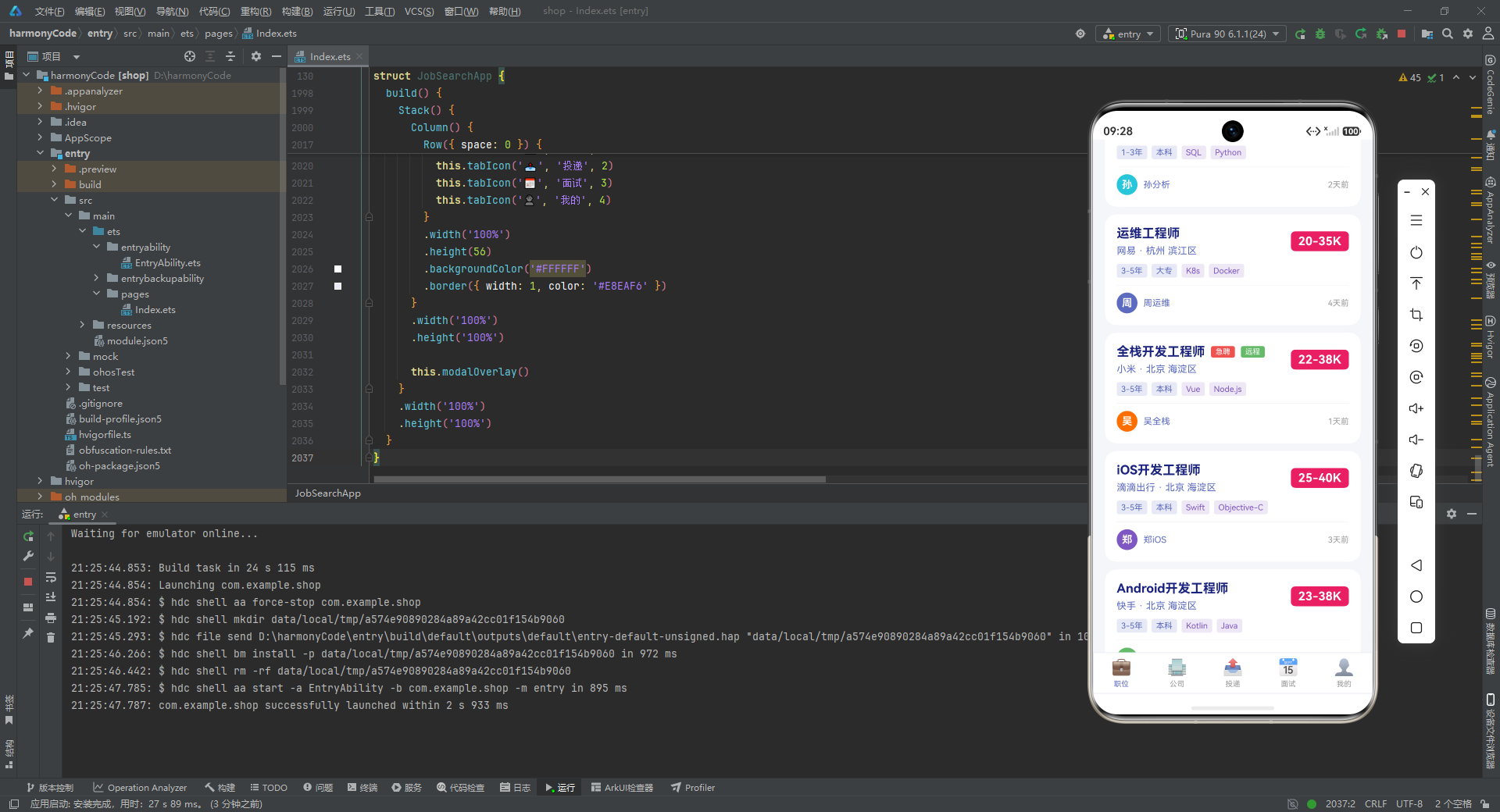
这张卡片的信息层次非常清晰,自上而下分为三层。
第一层是"标题行":左侧是职位标题(17 号粗体深靛蓝),紧跟条件渲染的"急聘"红标和"远程"绿标。if (job.isUrgent) 和 if (job.isRemote) 是 ArkUI 的条件渲染语法,只有布尔值为 true 时才渲染对应节点。标题下方是"公司 · 城市 区"的灰色副标题。右侧是 salaryBox 渲染的粉红薪资盒子。这一层用 Row 横向布局,左侧 Column 用 layoutWeight(1) 撑满,薪资盒子自适应宽度。
第二层是"标签行":经验、学历用浅蓝底药丸,前两个技能标签用浅紫底药丸(颜色 #7E57C2 + 背景 #EDE7F6)。job.tags.slice(0, 2) 只取前两个标签,控制信息密度。ForEach 遍历这两个标签各自渲染一个 Text。
第三层是"HR 行":用 Divider 分隔后,左侧是 HR 首字母头像(28×28 圆形,背景色取自 job.hrAvatar),中间是 HR 姓名,右侧是发布时间。这一行让卡片有了"人"的温度,暗示"这是一位真实 HR 发布的职位"。
整张卡片用 onClick 包裹,点击时把 selectedJobId 设为当前职位 ID 并打开详情弹窗。这种"卡片整体可点"的设计是移动端的常见交互。
9.4 筛选药丸组:横向滚动的过滤器
@Builder filterPillGroup(filters: string[], activeIndex: number) {
  Scroll() {
    Row({ space: 8 }) {
      ForEach(filters, (filter: string, index: number) => {
        Text(filter)
          .fontSize(12)
          .fontColor(this.activeFilterIndex === index ? '#FFFFFF' : '#5C6BC0')
          .backgroundColor(this.activeFilterIndex === index ? '#5C6BC0' : '#E8EAF6')
          .borderRadius(16)
          .padding({ left: 12, right: 12, top: 6, bottom: 6 })
          .onClick(() => {
            this.activeFilterIndex = index
          })
      })
    }
    .padding({ left: 16, right: 16 })
  }
  .scrollable(ScrollDirection.Horizontal)
  .scrollBar(BarState.Off)
  .width('100%')
  .margin({ bottom: 12 })
}
filterPillGroup 接收一个筛选字符串数组和当前激活索引,用 ForEach 把每个筛选项渲染成一个"药丸"(圆角 16 的 Text)。激活项是靛蓝底白字,非激活项是浅蓝底靛蓝字,通过 this.activeFilterIndex === index 三元判断切换。整个药丸组被 Scroll 包裹,scrollable(ScrollDirection.Horizontal) 允许横向滚动,scrollBar(BarState.Off) 隐藏滚动条——当筛选项较多(如经验有 6 项)超出屏幕宽度时,用户可以左右滑动查看更多。
这个构建器是"参数化复用"的另一个范例:职位页调用了三次,分别传入城市、薪资、经验三组筛选器,复用同一套渲染逻辑。
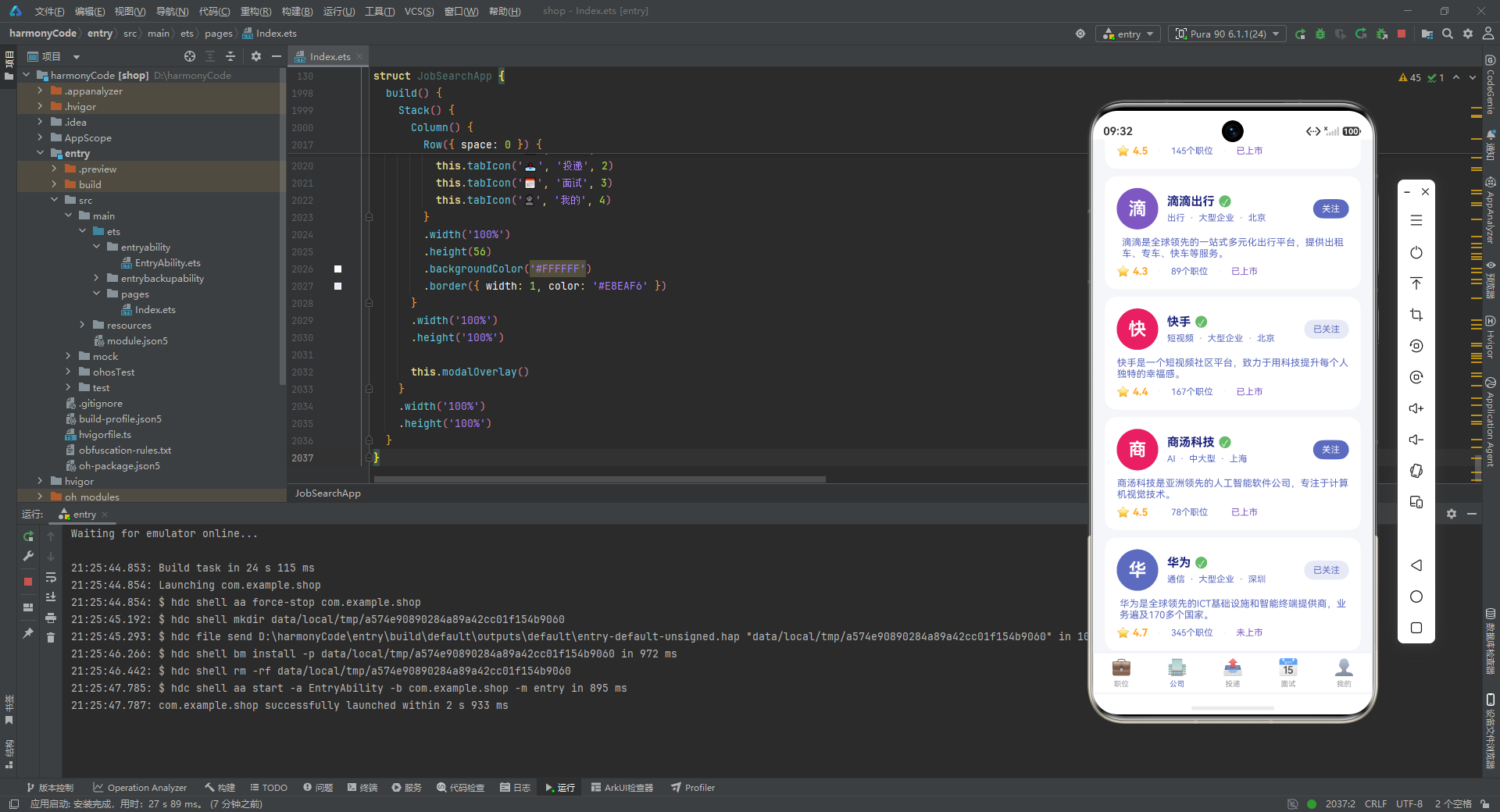
9.5 公司卡片:雇主画像的完整呈现
@Builder companyCard(company: CompanyItem) {
  Column({ space: 0 }) {
    Row({ space: 12 }) {
      Text(company.name.charAt(0))
        .fontSize(24).fontColor('#FFFFFF').fontWeight(FontWeight.Bold)
        .backgroundColor(company.logo)
        .width(56).height(56).borderRadius(28)
        .textAlign(TextAlign.Center)

      Column({ space: 6 }) {
        Row({ space: 6 }) {
          Text(company.name)
            .fontSize(16).fontWeight(FontWeight.Bold).fontColor('#1A237E')

          if (company.isVerified) {
            Text('✓')
              .fontSize(12).fontColor('#FFFFFF')
              .backgroundColor('#66BB6A').borderRadius(10)
              .width(16).height(16).textAlign(TextAlign.Center)
          }
        }

        Row({ space: 6 }) {
          Text(company.industry).fontSize(12).fontColor('#5C6BC0')
          Text('·').fontSize(12).fontColor('#5C6BC0')
          Text(this.companySizeMeta[company.size].label).fontSize(12).fontColor('#5C6BC0')
          Text('·').fontSize(12).fontColor('#5C6BC0')
          Text(company.city).fontSize(12).fontColor('#5C6BC0')
        }
      }
      .alignItems(HorizontalAlign.Start).layoutWeight(1)

      Text(company.isFollowing ? '已关注' : '关注')
        .fontSize(12)
        .fontColor(company.isFollowing ? '#5C6BC0' : '#FFFFFF')
        .backgroundColor(company.isFollowing ? '#E8EAF6' : '#5C6BC0')
        .borderRadius(16)
        .padding({ left: 12, right: 12, top: 6, bottom: 6 })
    }
    .width('100%')

    Text(company.intro)
      .fontSize(13).fontColor('#5C6BC0')
      .margin({ top: 10 })
      .maxLines(2)
      .textOverflow({ overflow: TextOverflow.Ellipsis })

    Row({ space: 12 }) {
      Row({ space: 4 }) {
        Text('⭐').fontSize(14)
        Text(company.rating.toFixed(1))
          .fontSize(14).fontWeight(FontWeight.Bold).fontColor('#FFA726')
      }

      Text('·').fontSize(14).fontColor('#E8EAF6')
      Text(company.jobCount + '个职位').fontSize(12).fontColor('#5C6BC0')
      Text('·').fontSize(14).fontColor('#E8EAF6')
      Text(company.stage).fontSize(12).fontColor('#7E57C2')
    }
    .width('100%').margin({ top: 8 })
  }
  .width('100%').padding(16)
  .backgroundColor('#FFFFFF').borderRadius(16)
  .margin({ bottom: 10 })
}
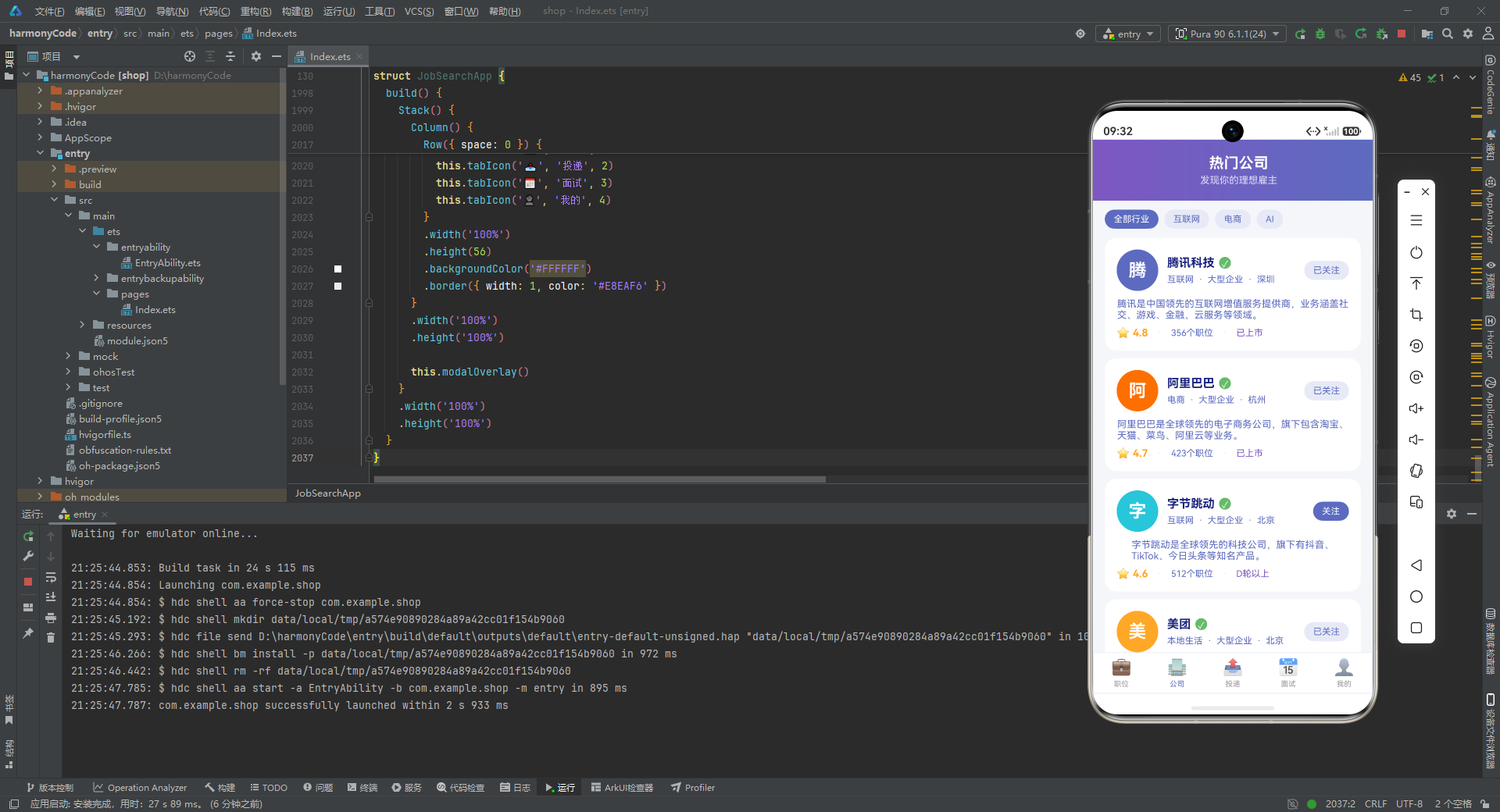
公司卡片的结构与职位卡类似,但信息侧重点不同。顶部是"公司 Logo(首字母圆形头像)+ 公司名称 + 认证对勾 + 行业/规模/城市 + 关注按钮"。company.rating.toFixed(1) 把浮点评分格式化为一位小数(如 4.8),配橙色星标展示。company.jobCount + '个职位' 用字符串拼接展示在招职位数。company.stage 用紫色字突出融资阶段。
关注按钮的样式随 isFollowing 切换:已关注是浅蓝底靛蓝字(弱化),未关注是靛蓝底白字(突出),引导用户去关注。公司简介用 maxLines(2) 限制两行,超出省略。
9.6 投递卡片:带进度条的状态机可视化
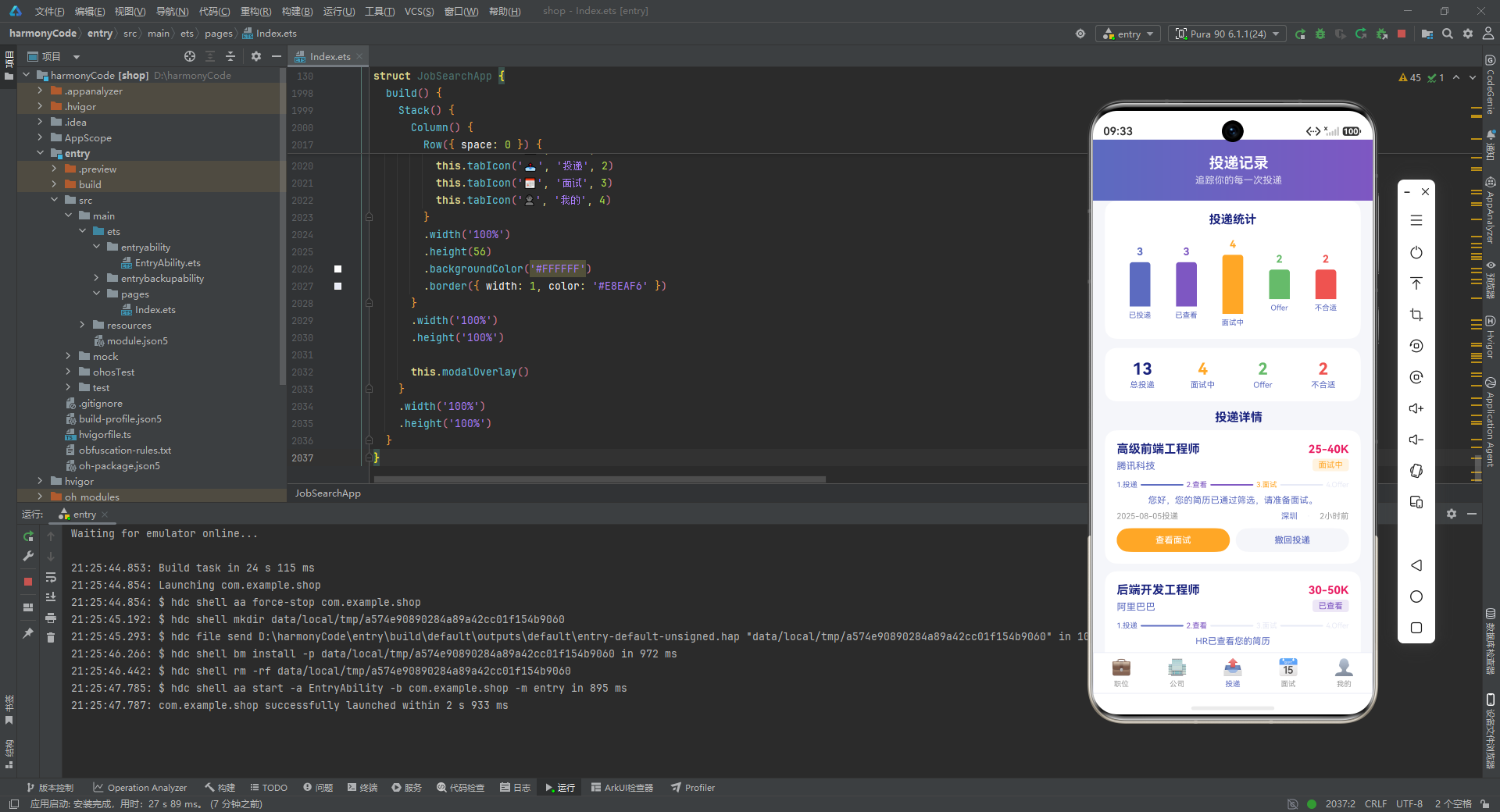
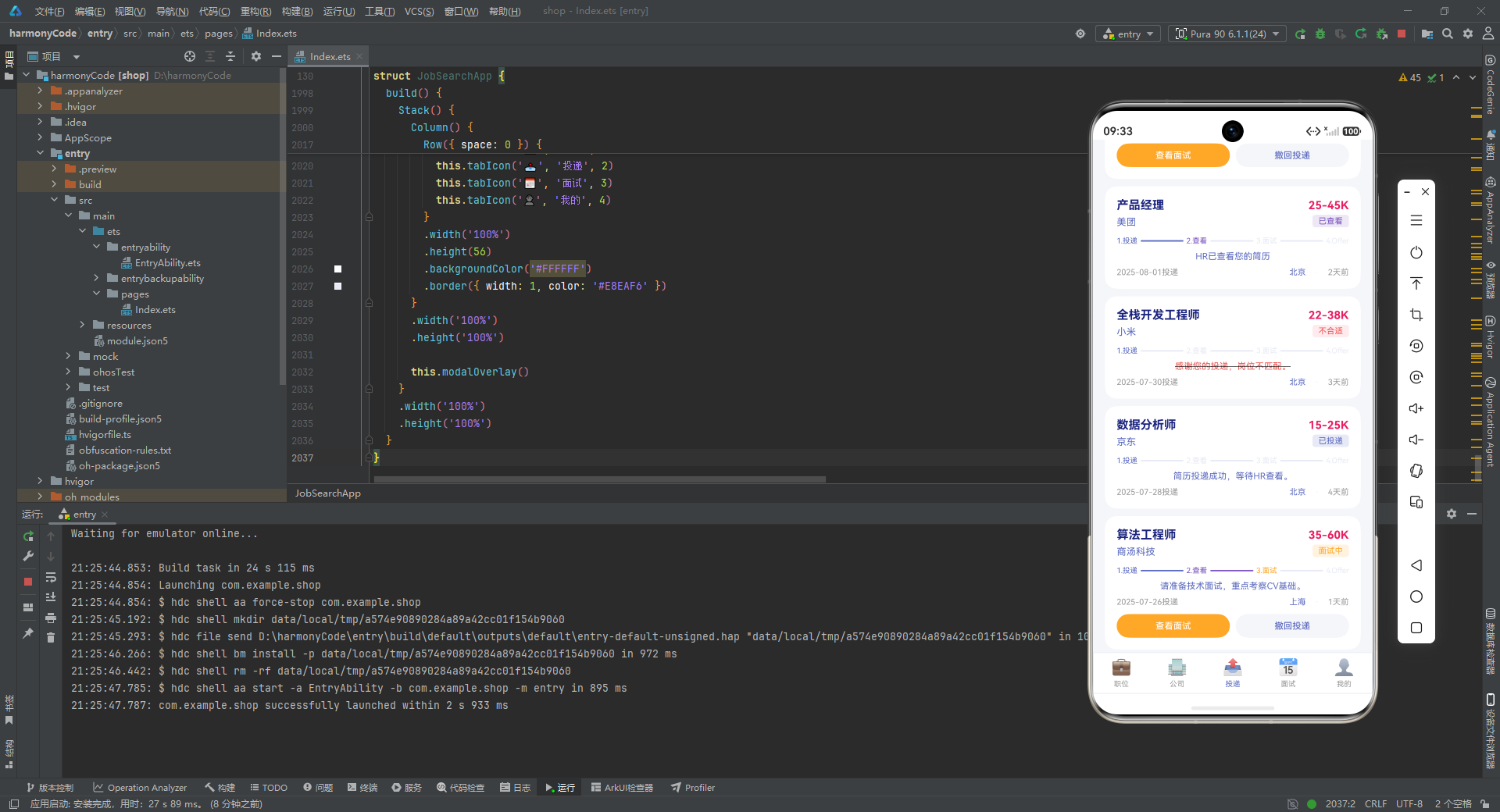
投递卡片是所有卡片中最复杂的,因为它要在一个卡片里同时展示"当前状态"和"历史进度"。我们看核心的进度条部分:
Row({ space: 4 }) {
  Text('1.投递')
    .fontSize(10)
    .fontColor(app.stage >= 1 ? '#5C6BC0' : '#E8EAF6')

  Column()
    .height(2).layoutWeight(1)
    .backgroundColor(app.stage >= 2 ? '#5C6BC0' : '#E8EAF6')
    .borderRadius(1)

  Text('2.查看')
    .fontSize(10)
    .fontColor(app.stage >= 2 ? '#7E57C2' : '#E8EAF6')

  Column()
    .height(2).layoutWeight(1)
    .backgroundColor(app.stage >= 3 ? '#7E57C2' : '#E8EAF6')
    .borderRadius(1)

  Text('3.面试')
    .fontSize(10)
    .fontColor(app.stage >= 3 ? '#FFA726' : '#E8EAF6')

  Column()
    .height(2).layoutWeight(1)
    .backgroundColor(app.stage >= 4 ? '#FFA726' : '#E8EAF6')
    .borderRadius(1)

  Text('4.Offer')
    .fontSize(10)
    .fontColor(app.stage >= 4 ? '#66BB6A' : '#E8EAF6')
}
.width('100%').margin({ top: 12 })
这是一个手工拼装的"分段进度条"。四个文字节点(投递/查看/面试/Offer)之间用三个 Column 充当连接线,每个连接线 layoutWeight(1) 等分剩余空间。文字和连接线的颜色都由 app.stage >= N 判断:达到该阶段就用对应主题色(靛蓝/深紫/橙/绿),未达到就用极浅的灰蓝 #E8EAF6(视觉上近似"未点亮")。
这种"用 >= 阈值判断"的方式非常巧妙——只需一个 stage 数字就能驱动四个节点和三个连接线共七个元素的颜色,无需复杂的 switch。例如 stage: 3 时,投递(≥1)、查看(≥2)、面试(≥3)都点亮,Offer(≥4)未点亮,连接线同理,形成"走到第三步"的视觉。
卡片还根据 status 做条件渲染:被拒时 HR 回复用红色 + 删除线(decoration({ type: TextDecorationType.LineThrough })),其他状态用正常蓝色。面试中的卡片底部会多出"查看面试"和"撤回投递"两个按钮,后者点击会打开撤回确认弹窗。
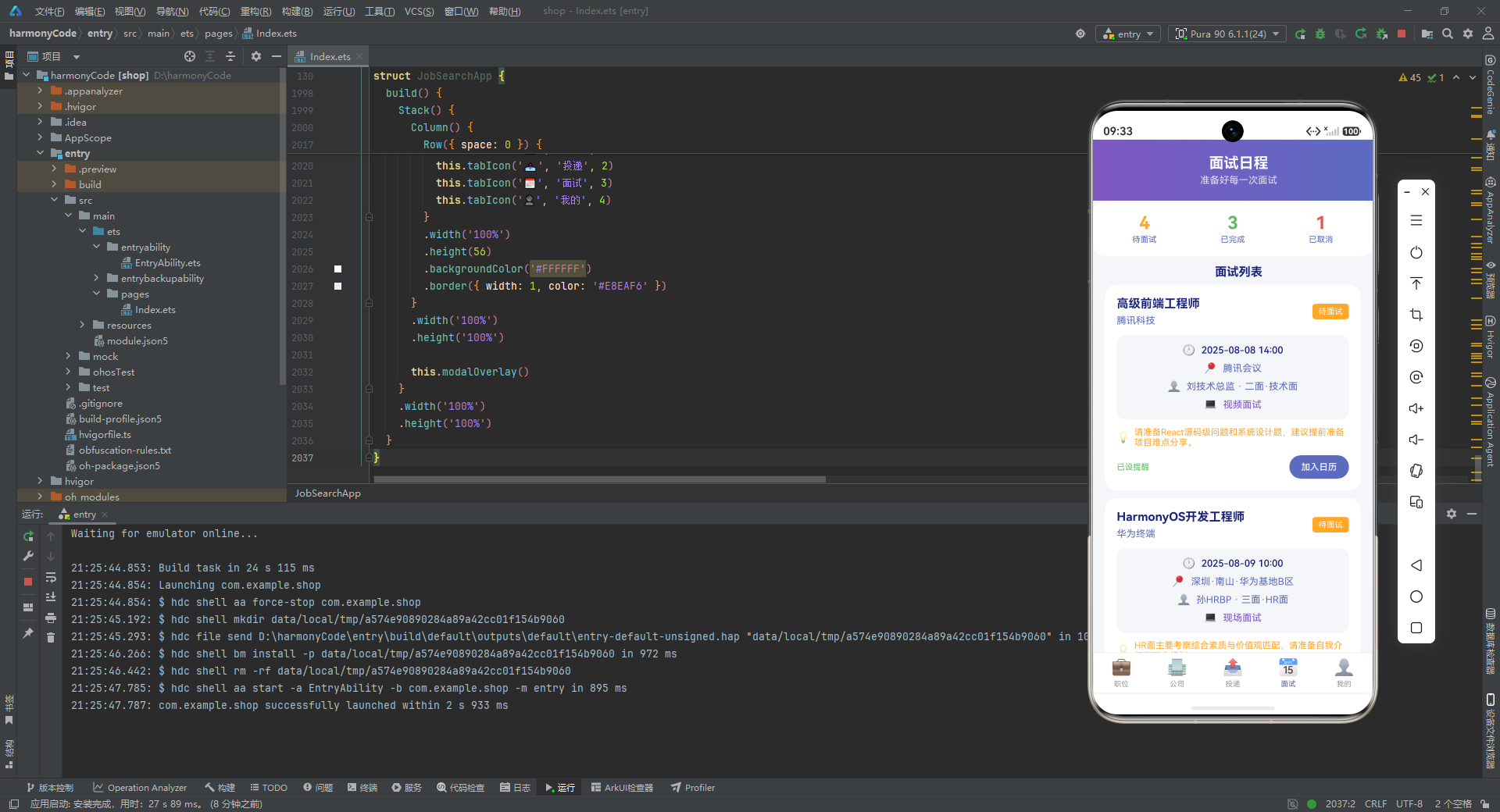
9.7 面试卡片:信息分区与状态色块
@Builder interviewCard(interview: InterviewItem) {
  Column({ space: 0 }) {
    Row({ space: 12 }) {
      Column({ space: 6 }) {
        Text(interview.jobTitle)
          .fontSize(16).fontWeight(FontWeight.Bold).fontColor('#1A237E')
        Text(interview.companyName)
          .fontSize(13).fontColor('#5C6BC0')
      }
      .alignItems(HorizontalAlign.Start).layoutWeight(1)

      Text(this.interviewStatusMeta[interview.status].label)
        .fontSize(11).fontColor('#FFFFFF')
        .backgroundColor(this.interviewStatusMeta[interview.status].color)
        .borderRadius(4)
        .padding({ left: 8, right: 8, top: 4, bottom: 4 })
    }
    .width('100%')

    Column({ space: 8 }) {
      Row({ space: 8 }) {
        Text('🕐').fontSize(14)
        Text(interview.interviewTime)
          .fontSize(13).fontColor('#1A237E').fontWeight(FontWeight.Medium)
      }
      Row({ space: 8 }) {
        Text('📍').fontSize(14)
        Text(interview.location).fontSize(13).fontColor('#5C6BC0')
      }
      Row({ space: 8 }) {
        Text('👤').fontSize(14)
        Text(interview.interviewer + ' · ' + interview.round)
          .fontSize(13).fontColor('#5C6BC0')
      }
      Row({ space: 8 }) {
        Text('💻').fontSize(14)
        Text(interview.interviewType).fontSize(13).fontColor('#7E57C2')
      }
    }
    .width('100%').margin({ top: 12 }).padding(12)
    .backgroundColor('#F5F6FA').borderRadius(12)

    Row({ space: 6 }) {
      Text('💡').fontSize(14)
      Text(interview.tips)
        .fontSize(12).fontColor('#FFA726').layoutWeight(1)
        .maxLines(2).textOverflow({ overflow: TextOverflow.Ellipsis })
    }
    .width('100%').margin({ top: 10 })

    Row({ space: 12 }) {
      if (interview.reminder) {
        Text('已设提醒').fontSize(11).fontColor('#66BB6A').layoutWeight(1)
      } else {
        Text('未设提醒').fontSize(11).fontColor('#999999').layoutWeight(1)
      }

      if (interview.status === 'upcoming') {
        Button('加入日历')
          .fontSize(12).fontColor('#FFFFFF')
          .backgroundColor('#5C6BC0').borderRadius(20).height(32)
      }
    }
    .width('100%').margin({ top: 10 })
  }
  .width('100%').padding(16)
  .backgroundColor('#FFFFFF').borderRadius(16)
  .margin({ bottom: 10 })
}
面试卡片的亮点在于"信息分区"。顶部是标题 + 状态色块(用 interviewStatusMeta 字典查色)。中间是一个浅灰背景 #F5F6FA 的信息区,用四个带 emoji 图标的行分别展示时间(🕐)、地点(📍)、面试官(👤)、面试类型(💻),让结构化信息一目了然。下方是橙色灯泡 💡 + 面试建议的提示条。最底部根据 reminder 显示提醒状态,根据 status === 'upcoming' 决定是否显示"加入日历"按钮。
9.8 统计柱状图:用纯 UI 拼出的数据可视化
@Builder statBarChart() {
  Column({ space: 0 }) {
    Text('投递统计')
      .fontSize(16).fontWeight(FontWeight.Bold).fontColor('#1A237E')
      .margin({ bottom: 16 })

    Row({ space: 0 }) {
      ForEach(this.getAppStats(), (stat: StatItem) => {
        Column({ space: 6 }) {
          Text(stat.count.toString())
            .fontSize(14).fontWeight(FontWeight.Bold).fontColor(stat.color)

          Column()
            .width(28)
            .height(stat.count * 20)
            .backgroundColor(stat.color)
            .borderRadius({ topLeft: 4, topRight: 4 })

          Text(stat.label)
            .fontSize(10).fontColor('#5C6BC0')
        }
        .layoutWeight(1)
        .alignItems(HorizontalAlign.Center)
      })
    }
    .width('100%').height(120)
  }
  .width('100%').padding(16)
  .backgroundColor('#FFFFFF').borderRadius(16)
  .margin({ bottom: 12 })
}
这是一个不依赖任何图表库的"手工柱状图"。ForEach 遍历 getAppStats() 返回的五条统计数据,每条渲染成一个 Column:顶部是数字(用 stat.color 着色),中间是柱子(宽度固定 28,高度 stat.count * 20 即按数量等比放大),底部是标签。五个 Column 用 layoutWeight(1) 等分宽度,整体放在一个高度 120 的 Row 里。柱子顶部用 borderRadius({ topLeft: 4, topRight: 4 }) 做了圆角,视觉更柔和。
这种"用基础组件拼图表"的做法在数据量小、样式简单时非常实用,避免了引入第三方图表库的体积开销。
十、五大 Tab 页面:把构建器组装成完整页面
前面我们拆解了各种弹窗和卡片构建器,它们是"零件"。这一节我们看"总装车间"——五个 Tab 页面构建器,它们把头部、筛选器、卡片列表、统计数据等零件组装成完整的页面。每个 Tab 页面都遵循"顶部渐变头部 + 中部内容区 + 整体竖向滚动"的统一骨架,又各有特色。
10.1 职位页:渐变头部 + 筛选器 + 职位列表
@Builder jobsTab() {
  Scroll() {
    Column({ space: 0 }) {
      Column({ space: 0 }) {
        Row({ space: 12 }) {
          Text(this.profile.name.charAt(0))
            .fontSize(20).fontColor('#FFFFFF').fontWeight(FontWeight.Bold)
            .backgroundColor('rgba(255,255,255,0.3)')
            .width(44).height(44).borderRadius(22)
            .textAlign(TextAlign.Center)

          Column({ space: 2 }) {
            Text('你好,' + this.profile.name)
              .fontSize(18).fontWeight(FontWeight.Bold).fontColor('#FFFFFF')
            Text('愿你好运连连,Offer不断!')
              .fontSize(12).fontColor('rgba(255,255,255,0.8)')
          }
          .alignItems(HorizontalAlign.Start).layoutWeight(1)
        }
        .width('100%').padding({ left: 16, right: 16, top: 16, bottom: 16 })

        Row({ space: 8 }) {
          Text('🔍').fontSize(16)
          Text('搜索职位、公司、关键词...')
            .fontSize(13).fontColor('rgba(255,255,255,0.7)').layoutWeight(1)
          Text('筛选')
            .fontSize(12).fontColor('#5C6BC0')
            .backgroundColor('#FFFFFF').borderRadius(12)
            .padding({ left: 10, right: 10, top: 4, bottom: 4 })
        }
        .width('100%')
        .backgroundColor('rgba(255,255,255,0.2)')
        .borderRadius(24)
        .padding({ left: 16, right: 8, top: 10, bottom: 10 })
        .margin({ left: 16, right: 16, bottom: 16 })
      }
      .width('100%')
      .linearGradient({
        direction: GradientDirection.Right,
        colors: [['#5C6BC0', 0], ['#7E57C2', 1]]
      })

      this.filterPillGroup(this.cityFilters, 0)
      this.filterPillGroup(this.salaryFilters, 1)
      this.filterPillGroup(this.expFilters, 2)

      Row({ space: 8 }) {
        Text('为你推荐')
          .fontSize(16).fontWeight(FontWeight.Bold).fontColor('#1A237E')
          .layoutWeight(1)
        Text(this.jobs.length + '个职位')
          .fontSize(12).fontColor('#5C6BC0')
      }
      .width('100%').padding({ left: 16, right: 16, bottom: 8 })

      Column() {
        ForEach(this.getFilteredJobs(), (job: JobItem) => {
          this.jobCard(job)
        })
      }
      .width('100%').padding({ left: 16, right: 16 })
    }
    .width('100%')
  }
  .scrollable(ScrollDirection.Vertical)
  .scrollBar(BarState.Off)
  .layoutWeight(1)
  .backgroundColor('#F5F6FA')
}
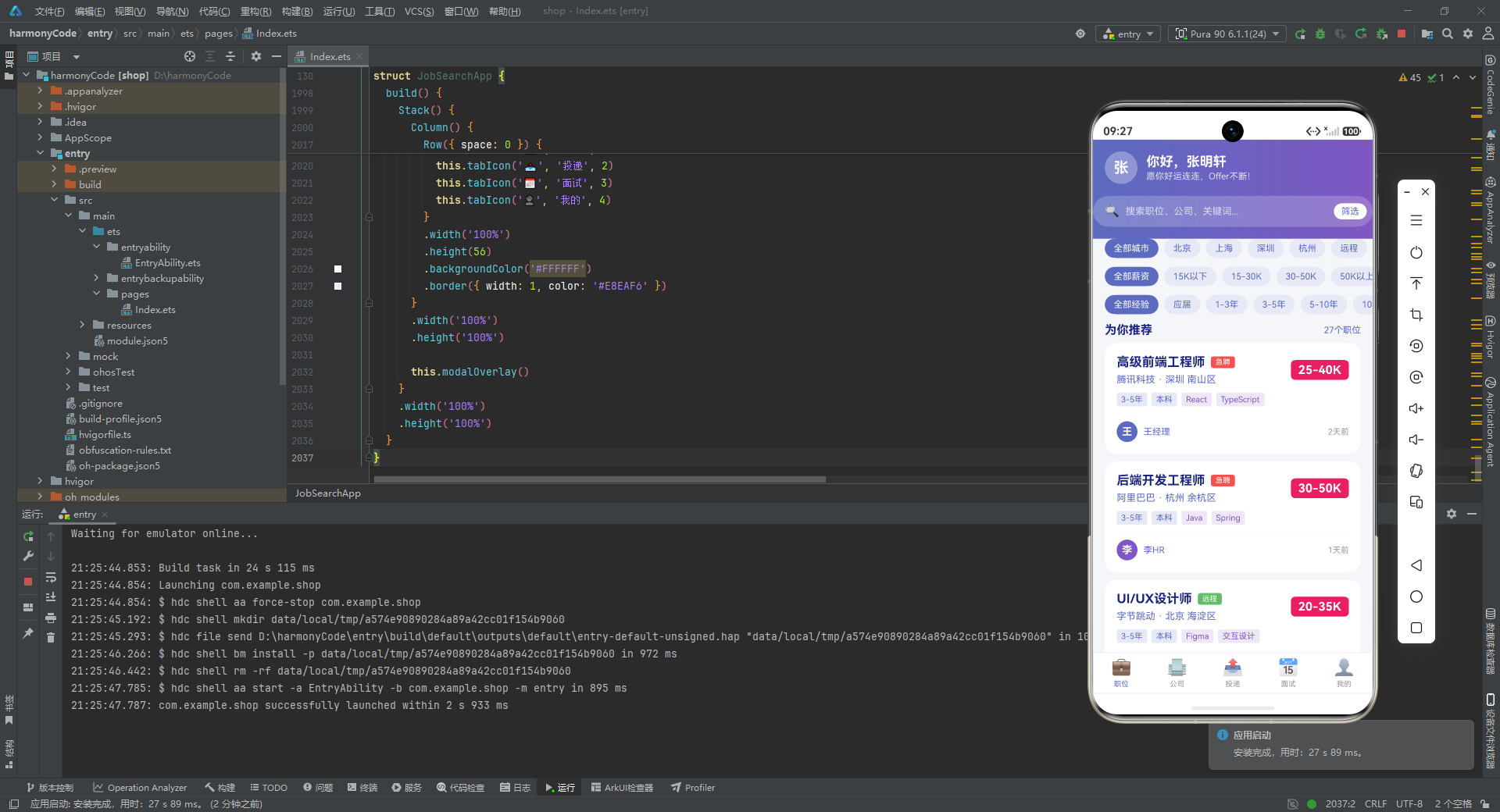
职位页的头部是这个应用视觉的"门面"。它用 linearGradient 实现了从靛蓝 #5C6BC0 到深紫 #7E57C2 的水平渐变背景,direction: GradientDirection.Right 表示从左到右渐变,colors 数组的第二元素是色标位置(0 到 1)。头部内是一个问候行(用户首字母头像 + “你好,张明轩” + 祝福语)和一个半透明的搜索框(backgroundColor('rgba(255,255,255,0.2)') 让搜索框在渐变背景上呈磨砂感)。
头部下方是三组筛选药丸(城市、薪资、经验),复用前面讲过的 filterPillGroup。再往下是"为你推荐"标题栏,左侧标题、右侧职位计数。最后是 ForEach 遍历 getFilteredJobs() 渲染职位卡列表。整个页面用 Scroll 竖向包裹,backgroundColor('#F5F6FA') 给页面底色,让白色卡片浮于其上。
10.2 公司页:行业筛选 + 公司列表
@Builder companiesTab() {
  Scroll() {
    Column({ space: 0 }) {
      Column({ space: 0 }) {
        Text('热门公司')
          .fontSize(20).fontWeight(FontWeight.Bold).fontColor('#FFFFFF')
        Text('发现你的理想雇主')
          .fontSize(13).fontColor('rgba(255,255,255,0.8)')
          .margin({ top: 4 })
      }
      .width('100%').padding({ left: 16, top: 20, bottom: 20 })
      .linearGradient({
        direction: GradientDirection.Right,
        colors: [['#7E57C2', 0], ['#5C6BC0', 1]]
      })

      Row({ space: 8 }) {
        Text('全部行业')
          .fontSize(12).fontColor('#FFFFFF')
          .backgroundColor('#5C6BC0').borderRadius(16)
          .padding({ left: 12, right: 12, top: 6, bottom: 6 })
        Text('互联网').fontSize(12).fontColor('#5C6BC0')
          .backgroundColor('#E8EAF6').borderRadius(16)
          .padding({ left: 12, right: 12, top: 6, bottom: 6 })
        // ... 电商、AI
      }
      .width('100%').padding({ left: 16, right: 16, top: 12, bottom: 12 })

      Column() {
        ForEach(this.companies, (company: CompanyItem) => {
          this.companyCard(company)
        })
      }
      .width('100%').padding({ left: 16, right: 16 })
    }
    .width('100%')
  }
  .scrollable(ScrollDirection.Vertical).scrollBar(BarState.Off)
  .layoutWeight(1).backgroundColor('#F5F6FA')
}
公司页的渐变方向与职位页相反(紫→蓝),形成视觉区分。头部只有标题和副标题,没有搜索框。下方的行业筛选是静态的几个药丸("全部行业"激活态为实心靛蓝,其余为浅蓝底),没有用 filterPillGroup 复用——因为这里的筛选逻辑是静态展示,不需要状态驱动。列表区用 ForEach 遍历 companies 数组渲染公司卡。
10.3 投递页:统计图表 + 概览数字 + 投递列表
投递页是信息最丰富的页面,它把统计柱状图、四个概览数字、投递详情列表三层信息叠在一起:
@Builder applicationsTab() {
  Scroll() {
    Column({ space: 0 }) {
      Column({ space: 4 }) {
        Text('投递记录')
          .fontSize(20).fontWeight(FontWeight.Bold).fontColor('#FFFFFF')
        Text('追踪你的每一次投递')
          .fontSize(13).fontColor('rgba(255,255,255,0.8)')
      }
      .width('100%').padding({ left: 16, top: 20, bottom: 20 })
      .linearGradient({
        direction: GradientDirection.Right,
        colors: [['#5C6BC0', 0], ['#7E57C2', 1]]
      })

      Column() {
        this.statBarChart()

        Row({ space: 12 }) {
          Column({ space: 2 }) {
            Text(this.applications.length.toString())
              .fontSize(22).fontWeight(FontWeight.Bold).fontColor('#1A237E')
            Text('总投递').fontSize(11).fontColor('#5C6BC0')
          }.layoutWeight(1).alignItems(HorizontalAlign.Center)

          Column({ space: 2 }) {
            Text('4').fontSize(22).fontWeight(FontWeight.Bold).fontColor('#FFA726')
            Text('面试中').fontSize(11).fontColor('#5C6BC0')
          }.layoutWeight(1).alignItems(HorizontalAlign.Center)

          Column({ space: 2 }) {
            Text('2').fontSize(22).fontWeight(FontWeight.Bold).fontColor('#66BB6A')
            Text('Offer').fontSize(11).fontColor('#5C6BC0')
          }.layoutWeight(1).alignItems(HorizontalAlign.Center)

          Column({ space: 2 }) {
            Text('2').fontSize(22).fontWeight(FontWeight.Bold).fontColor('#EF5350')
            Text('不合适').fontSize(11).fontColor('#5C6BC0')
          }.layoutWeight(1).alignItems(HorizontalAlign.Center)
        }
        .width('100%').padding(16)
        .backgroundColor('#FFFFFF').borderRadius(16).margin({ bottom: 12 })
      }
      .width('100%').padding({ left: 16, right: 16 })

      Text('投递详情')
        .fontSize(16).fontWeight(FontWeight.Bold).fontColor('#1A237E')
        .padding({ left: 16, bottom: 8 })

      Column() {
        ForEach(this.applications, (app: ApplicationItem) => {
          this.applicationCard(app)
        })
      }
      .width('100%').padding({ left: 16, right: 16 })
    }
    .width('100%')
  }
  .scrollable(ScrollDirection.Vertical).scrollBar(BarState.Off)
  .layoutWeight(1).backgroundColor('#F5F6FA')
}
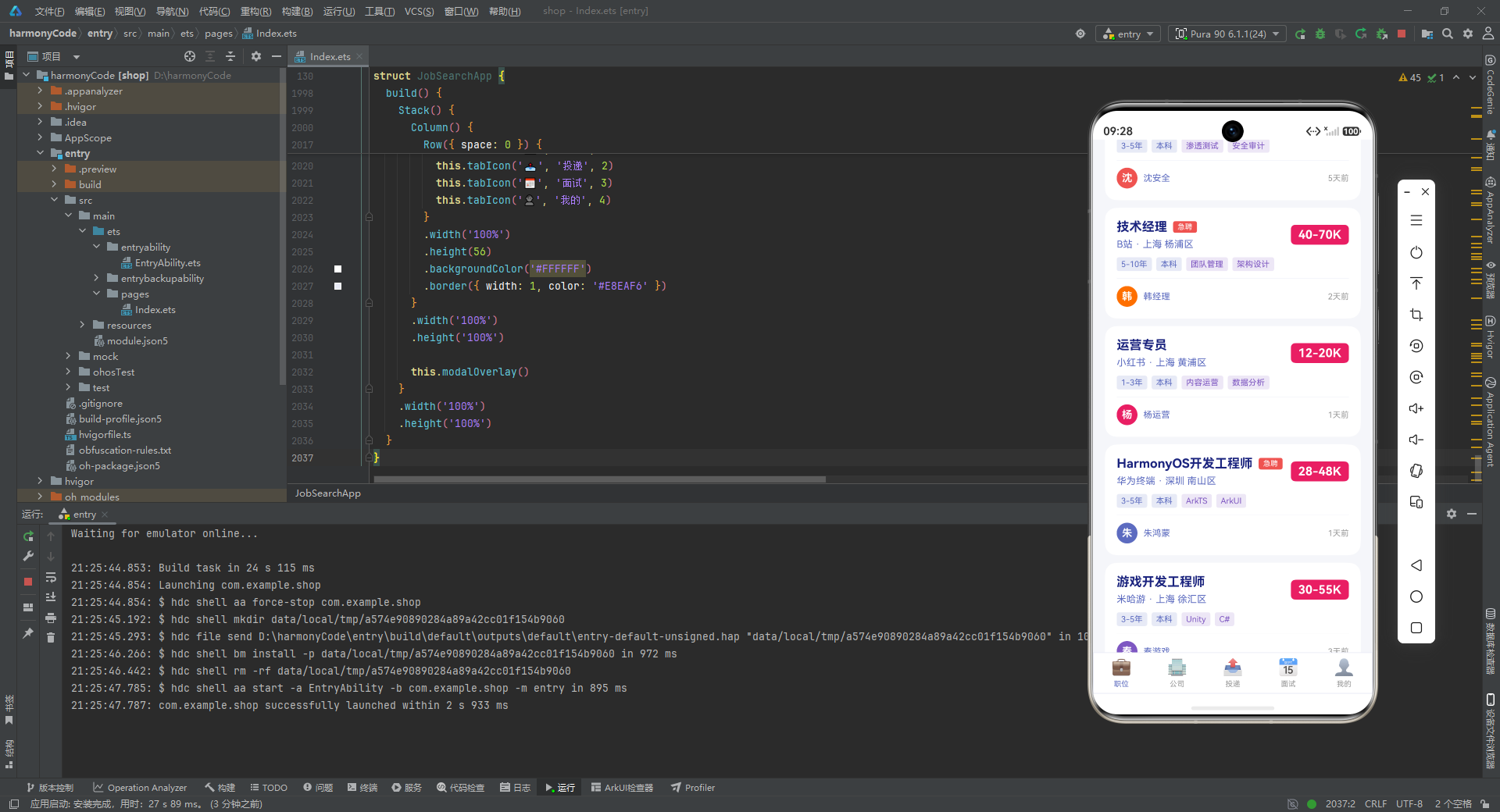
页面先调用 this.statBarChart() 渲染柱状图,紧接一个四列的概览数字栏(总投递/面试中/Offer/不合适),每个数字用对应主题色着色(靛蓝/橙/绿/红),用 layoutWeight(1) 等分四列。这种"图表 + 数字"的双重统计呈现,让用户既能直观看到分布比例,又能快速读到精确数字。下方是"投递详情"标题和投递卡片列表。
10.4 面试页:状态概览 + 面试列表
@Builder interviewsTab() {
  Scroll() {
    Column({ space: 0 }) {
      Column({ space: 4 }) {
        Text('面试日程')
          .fontSize(20).fontWeight(FontWeight.Bold).fontColor('#FFFFFF')
        Text('准备好每一次面试')
          .fontSize(13).fontColor('rgba(255,255,255,0.8)')
      }
      .width('100%').padding({ left: 16, top: 20, bottom: 20 })
      .linearGradient({
        direction: GradientDirection.Right,
        colors: [['#7E57C2', 0], ['#5C6BC0', 1]]
      })

      Row({ space: 12 }) {
        Column({ space: 2 }) {
          Text('4').fontSize(24).fontWeight(FontWeight.Bold).fontColor('#FFA726')
          Text('待面试').fontSize(11).fontColor('#5C6BC0')
        }.layoutWeight(1).alignItems(HorizontalAlign.Center)

        Column({ space: 2 }) {
          Text('3').fontSize(24).fontWeight(FontWeight.Bold).fontColor('#66BB6A')
          Text('已完成').fontSize(11).fontColor('#5C6BC0')
        }.layoutWeight(1).alignItems(HorizontalAlign.Center)

        Column({ space: 2 }) {
          Text('1').fontSize(24).fontWeight(FontWeight.Bold).fontColor('#EF5350')
          Text('已取消').fontSize(11).fontColor('#5C6BC0')
        }.layoutWeight(1).alignItems(HorizontalAlign.Center)
      }
      .width('100%').padding(16)
      .backgroundColor('#FFFFFF').borderRadius(16)
      .margin({ left: 16, right: 16, bottom: 12 })

      Text('面试列表')
        .fontSize(16).fontWeight(FontWeight.Bold).fontColor('#1A237E')
        .padding({ left: 16, bottom: 8 })

      Column() {
        ForEach(this.interviews, (interview: InterviewItem) => {
          this.interviewCard(interview)
        })
      }
      .width('100%').padding({ left: 16, right: 16 })
    }
    .width('100%')
  }
  .scrollable(ScrollDirection.Vertical).scrollBar(BarState.Off)
  .layoutWeight(1).backgroundColor('#F5F6FA')
}
面试页结构相对简洁:渐变头部 + 三列状态概览(待面试/已完成/已取消)+ 面试卡片列表。三列概览的数字比投递页更大(24 号字体),因为面试是更"紧急"的信息,需要更强的视觉权重。
10.5 我的页:用户档案 + 技能进度 + 设置项
个人中心页是最长的页面,包含用户头部、统计概览、个人简介、技能进度条、设置列表五个区块。我们重点看技能进度条和设置列表两个特色部分:
Column({ space: 12 }) {
  ForEach(this.skills, (skill: SkillItem) => {
    Column({ space: 6 }) {
      Row({ space: 8 }) {
        Text(skill.name)
          .fontSize(13).fontWeight(FontWeight.Medium).fontColor('#1A237E')
          .layoutWeight(1)
        Text(skill.level + '%')
          .fontSize(12).fontColor('#5C6BC0')
      }.width('100%')

      Column()
        .width('100%').height(6)
        .backgroundColor('#E8EAF6').borderRadius(3)

      Row() {
        Column()
          .width((skill.level + '%'))
          .height(6)
          .backgroundColor('#5C6BC0').borderRadius(3)
      }.width('100%')
    }.width('100%')
  })
}
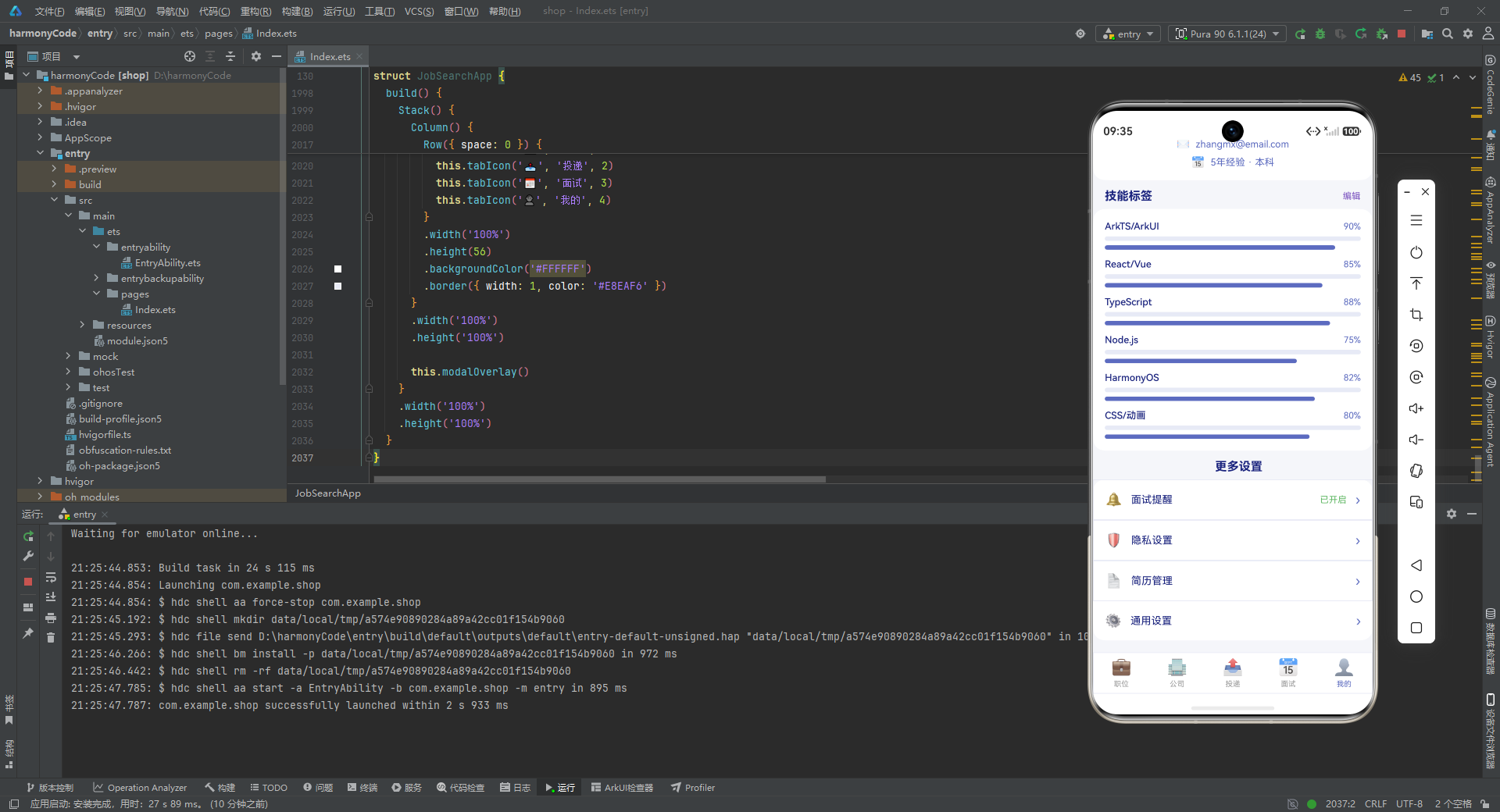
技能进度条用了一个巧妙的"双层叠加"技巧:先画一个满宽的浅色 Column(#E8EAF6,代表 100% 轨道),再在下面用一个 Row 包裹一个宽度为 skill.level + '%' 的深色 Column(#5C6BC0,代表实际进度)。由于 ArkUI 的 width 属性接受百分比字符串,width('90%') 就能让进度条精确对应 90% 的宽度。顶部是技能名 + 百分比数字的行。
这种"轨道 + 进度"的双层结构是进度条的经典实现,比用 Slider 组件更可控、更易定制样式。
设置列表则是典型的"列表项"模式:
Column({ space: 0 }) {
  Row({ space: 12 }) {
    Text('🔔').fontSize(18)
    Text('面试提醒').fontSize(14).fontColor('#1A237E').layoutWeight(1)
    Text('已开启').fontSize(12).fontColor('#66BB6A')
    Text('›').fontSize(18).fontColor('#5C6BC0')
  }
  .width('100%').padding(16)
  .border({ width: 1, color: '#E8EAF6' })

  Row({ space: 12 }) {
    Text('🛡️').fontSize(18)
    Text('隐私设置').fontSize(14).fontColor('#1A237E').layoutWeight(1)
    Text('›').fontSize(18).fontColor('#5C6BC0')
  }
  .width('100%').padding(16)
  .border({ width: 1, color: '#E8EAF6' })
  // ... 简历管理、通用设置
}
.width('100%').backgroundColor('#FFFFFF').borderRadius(16)
.margin({ left: 16, right: 16, bottom: 16 })
每个设置项是一个 Row:左侧 emoji 图标 + 中间标题(layoutWeight(1) 撑满)+ 可选的状态文案(如"已开启"绿色)+ 右侧箭头 ›。项与项之间用 border({ width: 1, color: '#E8EAF6' }) 的浅色边框分隔。整个设置组用白色圆角卡片包裹,浮在浅灰背景上。
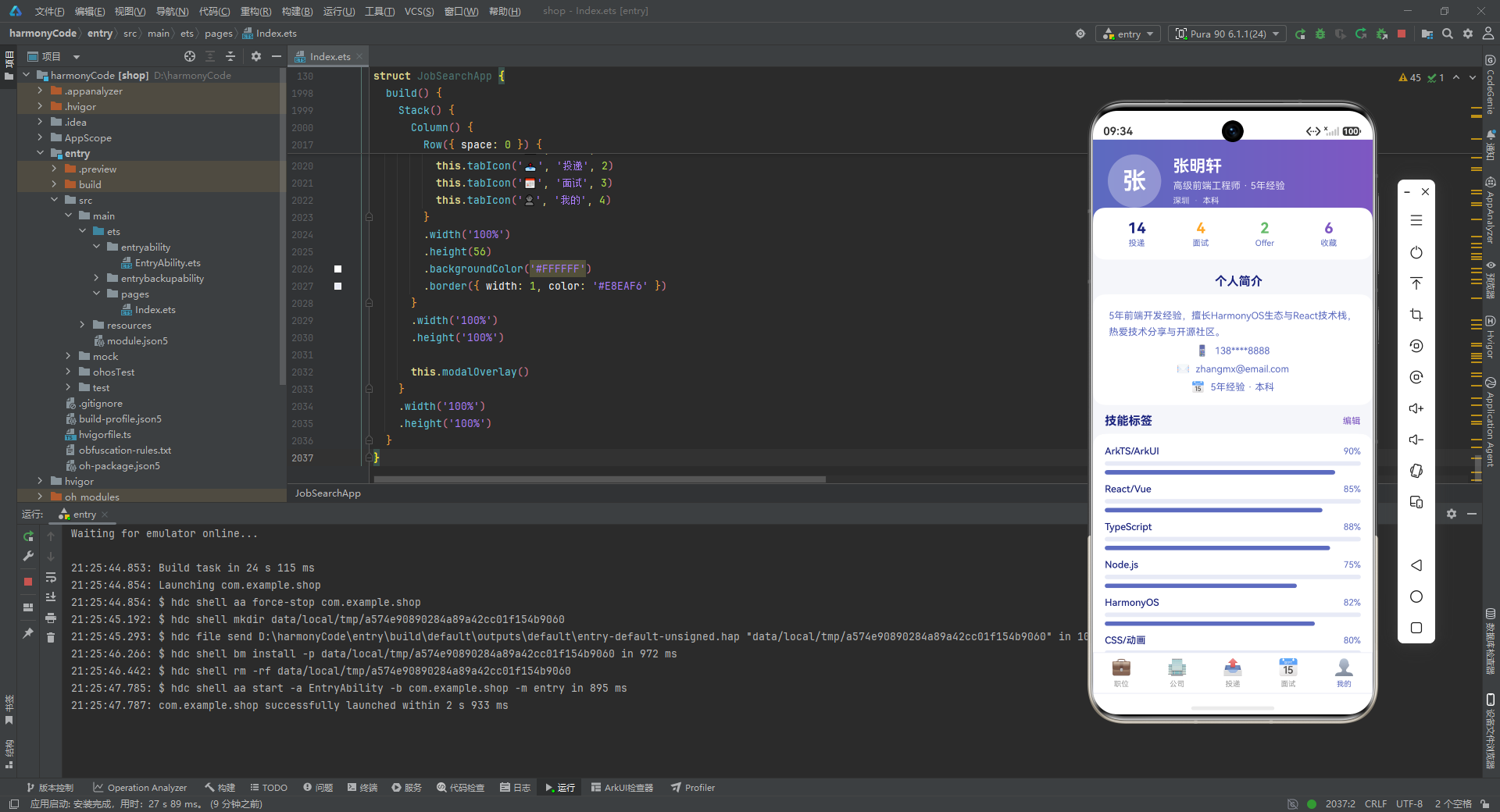
个人中心头部还用了一个值得注意的技巧——统计卡片用 margin({ top: -20 }) 产生负 margin,让它"上浮"压在渐变头部之上,形成卡片悬浮于头部的层次感:
Row({ space: 0 }) {
  // 四列统计:投递/面试/Offer/收藏
}
.width('100%').padding(16)
.backgroundColor('#FFFFFF').borderRadius(16)
.margin({ left: 16, right: 16, top: -20 })
这种负 margin 叠加是移动端卡片化设计的常用手法,能让页面层次更丰富。
十一、build 入口:Stack 叠加主内容与模态层
所有零件和页面都准备好后,最终的 build() 方法把它们组装成完整的应用:
build() {
  Stack() {
    Column() {
      if (this.currentTab === 0) {
        this.jobsTab()
      }
      if (this.currentTab === 1) {
        this.companiesTab()
      }
      if (this.currentTab === 2) {
        this.applicationsTab()
      }
      if (this.currentTab === 3) {
        this.interviewsTab()
      }
      if (this.currentTab === 4) {
        this.profileTab()
      }

      Row({ space: 0 }) {
        this.tabIcon('💼', '职位', 0)
        this.tabIcon('🏢', '公司', 1)
        this.tabIcon('📤', '投递', 2)
        this.tabIcon('📅', '面试', 3)
        this.tabIcon('👤', '我的', 4)
      }
      .width('100%').height(56)
      .backgroundColor('#FFFFFF')
      .border({ width: 1, color: '#E8EAF6' })
    }
    .width('100%').height('100%')

    this.modalOverlay()
  }
  .width('100%').height('100%')
}
build() 是每个 @Component 必须实现的方法,返回根 UI 节点。这里用 Stack 作为根容器,Stack 的特性是"子节点层叠堆放",后放的节点会盖在先放的节点之上。
Stack 的第一个子节点是一个 Column,包含"当前 Tab 页面 + 底部 Tab 栏"。if (this.currentTab === N) 根据当前 Tab 索引渲染对应页面——注意这里用了一连串 if 而非 if/else if,但因为 currentTab 同一时间只有一个值,实际只有一个分支会渲染。底部 Tab 栏是一个高度 56 的 Row,包含五个 tabIcon 调用,每个传入不同的 emoji 和标签。
Stack 的第二个子节点是 this.modalOverlay(),即前面讲过的弹窗总调度器。由于它在 Stack 中位于 Column 之后,所以弹窗会覆盖在主内容之上,形成模态效果。当所有弹窗状态都为 false 时,modalOverlay 不渲染任何内容,Stack 只显示主内容,用户感知不到弹窗层的存在。
这种"主内容 + 模态层"的 Stack 叠加架构,是 ArkUI 中实现全局弹窗的标准模式。它比把弹窗写在各页面内部更清晰,也让弹窗能跨页面复用。
十二、关键特性对比总结
为了帮助读者快速把握这款应用的核心设计,下表对各个模块的关键特性做了横向对比:
| 模块 | 核心职责 | 关键技术点 | 数据驱动方式 | 复用策略 |
|---|---|---|---|---|
| 数据契约层(interface) | 定义业务对象结构 | 13 个扁平 interface、ResourceColor 类型约束 | 无(纯类型) | 全应用共享类型 |
| 状态管理层(@State) | 持有运行时可变状态 | 8 个 @State 变量、响应式渲染 | 赋值即触发重渲染 | 集中在主组件 |
| 元数据字典层 | 托管枚举的视觉表现 | Record<string, XXX>、查表替代 switch | 字典查询 | 6 个字典全应用复用 |
| 静态数据层 | 模拟后端数据 | 本地数组、27 职位/16 公司/13 投递/9 面试 | 直接引用 | 通过辅助方法间接访问 |
| 业务方法层 | 封装数据取用逻辑 | find 查找、短路兜底、结构化返回 | 方法调用 | UI 只依赖方法签名 |
| 弹窗系统 | 模态交互 | @Builder、遮罩+卡片、层叠触发、constraintSize | 4 个布尔状态驱动 | modalOverlay 总调度 |
| 卡片构建器 | 列表项渲染 | 参数化 @Builder、条件渲染、ForEach、layoutWeight | 传入数据对象 | 跨页面复用 |
| 筛选药丸组 | 横向滚动过滤 | Scroll 横向、activeFilterIndex 三元切换 | 单一索引状态 | 三组筛选器复用同一构建器 |
| 投递进度条 | 状态机可视化 | stage >= N 阈值判断、手工分段 | stage 数字驱动 | 嵌入投递卡片 |
| 统计柱状图 | 数据可视化 | ForEach + layoutWeight、height 等比放大 | StatItem 数组 | 纯 UI 拼装无图表库 |
| 五大 Tab 页面 | 页面总装 | linearGradient 渐变头、Scroll 竖向滚动 | currentTab 切换 | 复用所有构建器 |
| build 入口 | 应用根节点 | Stack 叠加、if 分支渲染 | currentTab + 弹窗状态 | 主内容 + 模态层分离 |
安装DevEco Studio程序

选择目标安装目录:

设置环境变量,但是需要重启一下:

新建一个空白模板:

设置API为24的模板项目:

初始化项目,自动下载相关依赖:

完整代码:
// 招聘求职 HarmonyOS ArkTS Application
// Indigo/Purple Professional Theme
interface JobItem {
id: number
title: string
company: string
salary: string
salaryMin: number
salaryMax: number
city: string
district: string
experience: string
education: string
type: string
tags: string[]
publishDate: string
isUrgent: boolean
isRemote: boolean
description: string
welfare: string[]
hrName: string
hrAvatar: string
}
interface CompanyItem {
id: number
name: string
logo: string
industry: string
size: string
stage: string
city: string
rating: number
jobCount: number
welfare: string[]
intro: string
isVerified: boolean
isFollowing: boolean
}
interface ApplicationItem {
id: number
jobTitle: string
companyName: string
applyDate: string
status: string
stage: number
hrReply: string
lastUpdate: string
salary: string
city: string
}
interface InterviewItem {
id: number
jobTitle: string
companyName: string
interviewTime: string
interviewType: string
location: string
round: string
interviewer: string
status: string
tips: string
reminder: boolean
}
interface JobTypeMeta {
label: string
color: ResourceColor
}
interface EducationMeta {
label: string
short: string
}
interface ExperienceMeta {
label: string
range: string
}
interface AppStatusMeta {
label: string
color: ResourceColor
bgColor: ResourceColor
}
interface InterviewStatusMeta {
label: string
color: ResourceColor
}
interface CompanySizeMeta {
label: string
range: string
}
interface SkillItem {
name: string
level: number
}
interface FilterPill {
label: string
selected: boolean
}
interface StatItem {
label: string
count: number
color: ResourceColor
}
interface UserProfile {
name: string
avatar: string
position: string
experience: string
education: string
city: string
phone: string
email: string
bio: string
}
@Entry
@Component
struct JobSearchApp {
@State currentTab: number = 0
@State showApplyModal: boolean = false
@State showResumeModal: boolean = false
@State showWithdrawModal: boolean = false
@State showJobDetailModal: boolean = false
@State selectedJobId: number = 0
@State selectedAppId: number = 0
@State activeFilterIndex: number = 0
private jobTypeMeta: Record<string, JobTypeMeta> = {
'全职': { label: '全职', color: '#5C6BC0' },
'兼职': { label: '兼职', color: '#FFA726' },
'实习': { label: '实习', color: '#66BB6A' }
}
private educationMeta: Record<string, EducationMeta> = {
'大专': { label: '大专', short: 'DC' },
'本科': { label: '本科', short: 'BK' },
'硕士': { label: '硕士', short: 'SS' },
'博士': { label: '博士', short: 'BS' },
'不限': { label: '不限', short: 'XZ' }
}
private experienceMeta: Record<string, ExperienceMeta> = {
'应届': { label: '应届生', range: '0年' },
'1-3年': { label: '初级', range: '1-3年' },
'3-5年': { label: '中级', range: '3-5年' },
'5-10年': { label: '高级', range: '5-10年' },
'10年以上': { label: '专家', range: '10年+' },
'不限': { label: '不限', range: '不限' }
}
private appStatusMeta: Record<string, AppStatusMeta> = {
'applied': { label: '已投递', color: '#5C6BC0', bgColor: '#E8EAF6' },
'viewed': { label: '已查看', color: '#7E57C2', bgColor: '#EDE7F6' },
'interview': { label: '面试中', color: '#FFA726', bgColor: '#FFF3E0' },
'offer': { label: 'Offer', color: '#66BB6A', bgColor: '#E8F5E9' },
'rejected': { label: '不合适', color: '#EF5350', bgColor: '#FFEBEE' }
}
private interviewStatusMeta: Record<string, InterviewStatusMeta> = {
'upcoming': { label: '待面试', color: '#FFA726' },
'completed': { label: '已完成', color: '#66BB6A' },
'cancelled': { label: '已取消', color: '#EF5350' }
}
private companySizeMeta: Record<string, CompanySizeMeta> = {
'0-50': { label: '微型企业', range: '0-50人' },
'50-200': { label: '小型企业', range: '50-200人' },
'200-500': { label: '中型企业', range: '200-500人' },
'500-1000': { label: '中大型', range: '500-1000人' },
'1000+': { label: '大型企业', range: '1000人+' }
}
private jobs: JobItem[] = [
{ id: 1, title: '高级前端工程师', company: '腾讯科技', salary: '25-40K', salaryMin: 25, salaryMax: 40, city: '深圳', district: '南山区', experience: '3-5年', education: '本科', type: '全职', tags: ['React', 'TypeScript', 'ArkTS', '微前端'], publishDate: '2天前', isUrgent: true, isRemote: false, description: '负责腾讯云控制台前端架构设计与开发,主导微前端方案落地,提升研发效率与用户体验。', welfare: ['六险一金', '免费三餐', '股票期权', '弹性工作', '带薪年假'], hrName: '王经理', hrAvatar: '#5C6BC0' },
{ id: 2, title: '后端开发工程师', company: '阿里巴巴', salary: '30-50K', salaryMin: 30, salaryMax: 50, city: '杭州', district: '余杭区', experience: '3-5年', education: '本科', type: '全职', tags: ['Java', 'Spring', 'MySQL', 'Redis'], publishDate: '1天前', isUrgent: true, isRemote: false, description: '参与淘宝交易核心系统开发,承载亿级流量,保障系统高可用与高性能。', welfare: ['六险一金', '餐补', '股票期权', '年终奖', '弹性工作'], hrName: '李HR', hrAvatar: '#7E57C2' },
{ id: 3, title: 'UI/UX设计师', company: '字节跳动', salary: '20-35K', salaryMin: 20, salaryMax: 35, city: '北京', district: '海淀区', experience: '3-5年', education: '本科', type: '全职', tags: ['Figma', '交互设计', '用户研究', 'Sketch'], publishDate: '3天前', isUrgent: false, isRemote: true, description: '负责抖音产品设计,从用户研究到交互原型,打造极致用户体验。', welfare: ['七险一金', '免费三餐', '健身房', '弹性工作', '股票期权'], hrName: '张设计', hrAvatar: '#FFA726' },
{ id: 4, title: '产品经理', company: '美团', salary: '25-45K', salaryMin: 25, salaryMax: 45, city: '北京', district: '朝阳区', experience: '5-10年', education: '本科', type: '全职', tags: ['B端产品', '数据驱动', '用户增长', 'SQL'], publishDate: '1天前', isUrgent: true, isRemote: false, description: '负责美团外卖商家端产品规划与迭代,通过数据分析驱动产品决策。', welfare: ['六险一金', '餐补', '股票期权', '弹性工作', '团建'], hrName: '陈经理', hrAvatar: '#66BB6A' },
{ id: 5, title: '测试开发工程师', company: '百度', salary: '18-30K', salaryMin: 18, salaryMax: 30, city: '北京', district: '海淀区', experience: '1-3年', education: '本科', type: '全职', tags: ['自动化', 'Python', 'Selenium', 'Jenkins'], publishDate: '5天前', isUrgent: false, isRemote: false, description: '负责百度搜索质量保障体系建设,推动自动化测试覆盖率提升。', welfare: ['六险一金', '餐补', '股票期权', '年终奖', '弹性工作'], hrName: '赵测试', hrAvatar: '#EF5350' },
{ id: 6, title: '数据分析师', company: '京东', salary: '15-25K', salaryMin: 15, salaryMax: 25, city: '北京', district: '大兴区', experience: '1-3年', education: '本科', type: '全职', tags: ['SQL', 'Python', 'Tableau', '统计'], publishDate: '2天前', isUrgent: false, isRemote: true, description: '负责京东电商业务数据分析,为运营决策提供数据支持与洞察。', welfare: ['六险一金', '餐补', '年终奖', '弹性工作', '节日福利'], hrName: '孙分析', hrAvatar: '#26C6DA' },
{ id: 7, title: '运维工程师', company: '网易', salary: '20-35K', salaryMin: 20, salaryMax: 35, city: '杭州', district: '滨江区', experience: '3-5年', education: '大专', type: '全职', tags: ['K8s', 'Docker', 'Linux', 'CI/CD'], publishDate: '4天前', isUrgent: false, isRemote: false, description: '负责网易云基础设施运维,保障线上服务稳定运行,推动DevOps实践。', welfare: ['六险一金', '免费三餐', '股票期权', '健身房', '弹性工作'], hrName: '周运维', hrAvatar: '#5C6BC0' },
{ id: 8, title: '全栈开发工程师', company: '小米', salary: '22-38K', salaryMin: 22, salaryMax: 38, city: '北京', district: '海淀区', experience: '3-5年', education: '本科', type: '全职', tags: ['Vue', 'Node.js', 'MongoDB', 'GraphQL'], publishDate: '1天前', isUrgent: true, isRemote: true, description: '负责小米IoT平台全栈开发,从前端到后端全链路技术实践。', welfare: ['六险一金', '餐补', '股票期权', '产品折扣', '弹性工作'], hrName: '吴全栈', hrAvatar: '#FF6F00' },
{ id: 9, title: 'iOS开发工程师', company: '滴滴出行', salary: '25-40K', salaryMin: 25, salaryMax: 40, city: '北京', district: '海淀区', experience: '3-5年', education: '本科', type: '全职', tags: ['Swift', 'Objective-C', 'RxSwift', '架构'], publishDate: '3天前', isUrgent: false, isRemote: false, description: '负责滴滴出行iOS客户端开发,优化出行体验,提升App性能。', welfare: ['六险一金', '餐补', '股票期权', '弹性工作', '团建'], hrName: '郑iOS', hrAvatar: '#7E57C2' },
{ id: 10, title: 'Android开发工程师', company: '快手', salary: '23-38K', salaryMin: 23, salaryMax: 38, city: '北京', district: '海淀区', experience: '3-5年', education: '本科', type: '全职', tags: ['Kotlin', 'Java', 'Jetpack', '性能优化'], publishDate: '2天前', isUrgent: false, isRemote: false, description: '负责快手主APP Android端开发,参与短视频核心业务迭代。', welfare: ['七险一金', '免费三餐', '股票期权', '健身房', '弹性工作'], hrName: '冯安卓', hrAvatar: '#66BB6A' },
{ id: 11, title: '算法工程师', company: '商汤科技', salary: '35-60K', salaryMin: 35, salaryMax: 60, city: '上海', district: '徐汇区', experience: '5-10年', education: '硕士', type: '全职', tags: ['深度学习', 'CV', 'PyTorch', 'C++'], publishDate: '1天前', isUrgent: true, isRemote: false, description: '负责计算机视觉算法研究与落地,在人脸识别、自动驾驶等领域突破创新。', welfare: ['七险一金', '免费三餐', '股票期权', '科研补贴', '弹性工作'], hrName: '钱算法', hrAvatar: '#E91E63' },
{ id: 12, title: 'DevOps工程师', company: '华为', salary: '28-45K', salaryMin: 28, salaryMax: 45, city: '深圳', district: '龙岗区', experience: '3-5年', education: '本科', type: '全职', tags: ['CI/CD', 'Terraform', 'Ansible', 'AWS'], publishDate: '4天前', isUrgent: false, isRemote: false, description: '负责华为云DevOps平台建设,推动研发流程自动化与效率提升。', welfare: ['六险一金', '餐补', '股票期权', '年终奖', '弹性工作'], hrName: '褚DevOps', hrAvatar: '#5C6BC0' },
{ id: 13, title: '前端实习生', company: '拼多多', salary: '300-500/天', salaryMin: 300, salaryMax: 500, city: '上海', district: '长宁区', experience: '应届', education: '本科', type: '实习', tags: ['React', 'Vue', 'JavaScript', 'CSS'], publishDate: '1天前', isUrgent: true, isRemote: false, description: '参与拼多多商家后台前端开发,在导师指导下完成业务模块开发。', welfare: ['餐补', '住房补贴', '转正机会', '导师带教', '弹性工作'], hrName: '卫实习', hrAvatar: '#FFA726' },
{ id: 14, title: '大数据工程师', company: '蚂蚁集团', salary: '30-50K', salaryMin: 30, salaryMax: 50, city: '杭州', district: '西湖区', experience: '3-5年', education: '本科', type: '全职', tags: ['Hadoop', 'Spark', 'Flink', 'Hive'], publishDate: '3天前', isUrgent: false, isRemote: false, description: '负责蚂蚁金服大数据平台建设,处理PB级数据,支撑风控与营销场景。', welfare: ['六险一金', '餐补', '股票期权', '年终奖', '弹性工作'], hrName: '蒋大数据', hrAvatar: '#26C6DA' },
{ id: 15, title: '安全工程师', company: '奇安信', salary: '25-40K', salaryMin: 25, salaryMax: 40, city: '北京', district: '朝阳区', experience: '3-5年', education: '本科', type: '全职', tags: ['渗透测试', '安全审计', 'Python', '逆向'], publishDate: '5天前', isUrgent: false, isRemote: true, description: '负责企业安全渗透测试与漏洞挖掘,保障客户信息系统安全。', welfare: ['六险一金', '餐补', '股票期权', '安全培训', '弹性工作'], hrName: '沈安全', hrAvatar: '#EF5350' },
{ id: 16, title: '技术经理', company: 'B站', salary: '40-70K', salaryMin: 40, salaryMax: 70, city: '上海', district: '杨浦区', experience: '5-10年', education: '本科', type: '全职', tags: ['团队管理', '架构设计', 'Java', '微服务'], publishDate: '2天前', isUrgent: true, isRemote: false, description: '负责B站社区技术团队管理,带领团队完成核心业务系统架构升级。', welfare: ['七险一金', '免费三餐', '股票期权', '健身房', '弹性工作'], hrName: '韩经理', hrAvatar: '#FF6F00' },
{ id: 17, title: '运营专员', company: '小红书', salary: '12-20K', salaryMin: 12, salaryMax: 20, city: '上海', district: '黄浦区', experience: '1-3年', education: '本科', type: '全职', tags: ['内容运营', '数据分析', '活动策划', '社群'], publishDate: '1天前', isUrgent: false, isRemote: false, description: '负责小红书社区内容运营,策划主题活动,提升用户活跃与留存。', welfare: ['六险一金', '餐补', '年终奖', '弹性工作', '节日福利'], hrName: '杨运营', hrAvatar: '#E91E63' },
{ id: 18, title: 'HarmonyOS开发工程师', company: '华为终端', salary: '28-48K', salaryMin: 28, salaryMax: 48, city: '深圳', district: '南山区', experience: '3-5年', education: '本科', type: '全职', tags: ['ArkTS', 'ArkUI', 'HarmonyOS', 'C++'], publishDate: '1天前', isUrgent: true, isRemote: false, description: '负责HarmonyOS原生应用开发,参与ArkUI框架生态建设,打造分布式体验。', welfare: ['六险一金', '餐补', '股票期权', '年终奖', '弹性工作'], hrName: '朱鸿蒙', hrAvatar: '#5C6BC0' },
{ id: 19, title: '游戏开发工程师', company: '米哈游', salary: '30-55K', salaryMin: 30, salaryMax: 55, city: '上海', district: '徐汇区', experience: '3-5年', education: '本科', type: '全职', tags: ['Unity', 'C#', 'Shader', '3D'], publishDate: '3天前', isUrgent: false, isRemote: false, description: '参与原神等3A游戏开发,负责游戏核心玩法系统设计与实现。', welfare: ['七险一金', '免费三餐', '股票期权', '健身房', '弹性工作'], hrName: '秦游戏', hrAvatar: '#7E57C2' },
{ id: 20, title: '增长产品经理', company: '携程', salary: '25-40K', salaryMin: 25, salaryMax: 40, city: '上海', district: '长宁区', experience: '3-5年', education: '本科', type: '全职', tags: ['用户增长', 'A/B测试', '数据驱动', 'SQL'], publishDate: '2天前', isUrgent: false, isRemote: true, description: '负责携程旅行App用户增长策略,通过数据驱动提升获客与转化效率。', welfare: ['六险一金', '餐补', '股票期权', '年终奖', '弹性工作'], hrName: '尤增长', hrAvatar: '#66BB6A' },
{ id: 21, title: 'DBA数据库管理员', company: '平安科技', salary: '22-35K', salaryMin: 22, salaryMax: 35, city: '深圳', district: '福田区', experience: '3-5年', education: '本科', type: '全职', tags: ['MySQL', 'Oracle', 'Redis', '运维'], publishDate: '4天前', isUrgent: false, isRemote: false, description: '负责平安集团核心数据库运维管理,保障数据安全与系统高可用。', welfare: ['六险一金', '餐补', '股票期权', '年终奖', '弹性工作'], hrName: '许DBA', hrAvatar: '#26C6DA' },
{ id: 22, title: '机器学习工程师', company: '旷视科技', salary: '35-55K', salaryMin: 35, salaryMax: 55, city: '北京', district: '海淀区', experience: '5-10年', education: '硕士', type: '全职', tags: ['NLP', 'BERT', 'TensorFlow', 'Python'], publishDate: '1天前', isUrgent: true, isRemote: false, description: '负责NLP前沿算法研发与落地,在智能客服、文本理解等场景实现突破。', welfare: ['七险一金', '免费三餐', '股票期权', '科研补贴', '弹性工作'], hrName: '何ML', hrAvatar: '#E91E63' },
{ id: 23, title: '市场专员', company: '蔚来汽车', salary: '12-18K', salaryMin: 12, salaryMax: 18, city: '上海', district: '嘉定区', experience: '1-3年', education: '本科', type: '全职', tags: ['品牌营销', '活动策划', '社交媒体', '文案'], publishDate: '3天前', isUrgent: false, isRemote: false, description: '负责蔚来品牌市场推广活动策划与执行,提升品牌知名度与用户认知。', welfare: ['六险一金', '餐补', '购车折扣', '年终奖', '弹性工作'], hrName: '吕市场', hrAvatar: '#FFA726' },
{ id: 24, title: '架构师', company: '微众银行', salary: '50-80K', salaryMin: 50, salaryMax: 80, city: '深圳', district: '南山区', experience: '10年以上', education: '本科', type: '全职', tags: ['分布式架构', '微服务', 'DDD', 'Java'], publishDate: '2天前', isUrgent: true, isRemote: false, description: '负责微众银行核心系统架构设计,引领技术方向,保障金融级系统稳定性。', welfare: ['七险一金', '免费三餐', '股票期权', '年终奖', '弹性工作'], hrName: '施架构', hrAvatar: '#5C6BC0' },
{ id: 25, title: '兼职设计师', company: '设计工作室', salary: '200-400/天', salaryMin: 200, salaryMax: 400, city: '远程', district: '不限', experience: '不限', education: '不限', type: '兼职', tags: ['平面设计', 'Logo', '海报', '品牌'], publishDate: '1天前', isUrgent: false, isRemote: true, description: '为客户提供平面设计服务,包括Logo、海报、品牌VI等视觉设计工作。', welfare: ['灵活时间', '项目提成', '远程办公', '作品集展示', '长期合作'], hrName: '张设计', hrAvatar: '#7E57C2' },
{ id: 26, title: '测试经理', company: '猿辅导', salary: '30-45K', salaryMin: 30, salaryMax: 45, city: '北京', district: '朝阳区', experience: '5-10年', education: '本科', type: '全职', tags: ['测试管理', '自动化', '性能测试', '团队管理'], publishDate: '3天前', isUrgent: false, isRemote: false, description: '负责猿辅导产品质量管理体系建设,带领测试团队保障产品交付质量。', welfare: ['六险一金', '餐补', '股票期权', '年终奖', '弹性工作'], hrName: '张测试', hrAvatar: '#66BB6A' },
{ id: 27, title: '前端架构师', company: '有赞', salary: '40-65K', salaryMin: 40, salaryMax: 65, city: '杭州', district: '西湖区', experience: '5-10年', education: '本科', type: '全职', tags: ['React', '微前端', 'Webpack', 'Node.js'], publishDate: '2天前', isUrgent: true, isRemote: true, description: '负责有赞SaaS平台前端架构设计,推动微前端与组件化体系建设。', welfare: ['六险一金', '餐补', '股票期权', '年终奖', '弹性工作'], hrName: '孔前端', hrAvatar: '#FF6F00' }
]
private companies: CompanyItem[] = [
{ id: 1, name: '腾讯科技', logo: '#5C6BC0', industry: '互联网', size: '1000+', stage: '已上市', city: '深圳', rating: 4.8, jobCount: 356, welfare: ['六险一金', '免费三餐', '股票期权', '弹性工作'], intro: '腾讯是中国领先的互联网增值服务提供商,业务涵盖社交、游戏、金融、云服务等领域。', isVerified: true, isFollowing: true },
{ id: 2, name: '阿里巴巴', logo: '#FF6F00', industry: '电商', size: '1000+', stage: '已上市', city: '杭州', rating: 4.7, jobCount: 423, welfare: ['六险一金', '餐补', '股票期权', '年终奖'], intro: '阿里巴巴是全球领先的电子商务公司,旗下包含淘宝、天猫、菜鸟、阿里云等业务。', isVerified: true, isFollowing: true },
{ id: 3, name: '字节跳动', logo: '#26C6DA', industry: '互联网', size: '1000+', stage: 'D轮以上', city: '北京', rating: 4.6, jobCount: 512, welfare: ['七险一金', '免费三餐', '健身房', '弹性工作'], intro: '字节跳动是全球领先的科技公司,旗下有抖音、TikTok、今日头条等知名产品。', isVerified: true, isFollowing: false },
{ id: 4, name: '美团', logo: '#FFA726', industry: '本地生活', size: '1000+', stage: '已上市', city: '北京', rating: 4.5, jobCount: 287, welfare: ['六险一金', '餐补', '股票期权', '弹性工作'], intro: '美团是中国领先的生活服务电子商务平台,覆盖餐饮、外卖、出行、酒店等场景。', isVerified: true, isFollowing: true },
{ id: 5, name: '百度', logo: '#5C6BC0', industry: '搜索/AI', size: '1000+', stage: '已上市', city: '北京', rating: 4.4, jobCount: 198, welfare: ['六险一金', '餐补', '股票期权', '年终奖'], intro: '百度是全球最大的中文搜索引擎,致力于AI技术研发与应用落地。', isVerified: true, isFollowing: false },
{ id: 6, name: '京东', logo: '#EF5350', industry: '电商', size: '1000+', stage: '已上市', city: '北京', rating: 4.5, jobCount: 234, welfare: ['六险一金', '餐补', '年终奖', '弹性工作'], intro: '京东是中国领先的技术驱动型电商和零售基础设施服务商。', isVerified: true, isFollowing: false },
{ id: 7, name: '网易', logo: '#66BB6A', industry: '互联网', size: '1000+', stage: '已上市', city: '杭州', rating: 4.6, jobCount: 176, welfare: ['六险一金', '免费三餐', '股票期权', '健身房'], intro: '网易是中国领先的互联网技术公司,涵盖游戏、音乐、教育、电商等业务。', isVerified: true, isFollowing: true },
{ id: 8, name: '小米', logo: '#FF6F00', industry: '智能硬件', size: '1000+', stage: '已上市', city: '北京', rating: 4.5, jobCount: 145, welfare: ['六险一金', '餐补', '股票期权', '产品折扣'], intro: '小米是一家以智能手机、智能硬件和IoT平台为核心的科技公司。', isVerified: true, isFollowing: false },
{ id: 9, name: '滴滴出行', logo: '#7E57C2', industry: '出行', size: '1000+', stage: '已上市', city: '北京', rating: 4.3, jobCount: 89, welfare: ['六险一金', '餐补', '股票期权', '弹性工作'], intro: '滴滴是全球领先的一站式多元化出行平台,提供出租车、专车、快车等服务。', isVerified: true, isFollowing: false },
{ id: 10, name: '快手', logo: '#E91E63', industry: '短视频', size: '1000+', stage: '已上市', city: '北京', rating: 4.4, jobCount: 167, welfare: ['七险一金', '免费三餐', '股票期权', '健身房'], intro: '快手是一个短视频社区平台,致力于用科技提升每个人独特的幸福感。', isVerified: true, isFollowing: true },
{ id: 11, name: '商汤科技', logo: '#E91E63', industry: 'AI', size: '500-1000', stage: '已上市', city: '上海', rating: 4.5, jobCount: 78, welfare: ['七险一金', '免费三餐', '股票期权', '科研补贴'], intro: '商汤科技是亚洲领先的人工智能软件公司,专注于计算机视觉技术。', isVerified: true, isFollowing: false },
{ id: 12, name: '华为', logo: '#5C6BC0', industry: '通信', size: '1000+', stage: '未上市', city: '深圳', rating: 4.7, jobCount: 345, welfare: ['六险一金', '餐补', '股票期权', '年终奖'], intro: '华为是全球领先的ICT基础设施和智能终端提供商,业务遍及170多个国家。', isVerified: true, isFollowing: true },
{ id: 13, name: 'B站', logo: '#FF6F00', industry: '视频', size: '1000+', stage: '已上市', city: '上海', rating: 4.5, jobCount: 112, welfare: ['七险一金', '免费三餐', '股票期权', '健身房'], intro: '哔哩哔哩是中国年轻人聚集的综合性视频社区,覆盖动画、游戏、科技等内容。', isVerified: true, isFollowing: false },
{ id: 14, name: '米哈游', logo: '#7E57C2', industry: '游戏', size: '500-1000', stage: '未上市', city: '上海', rating: 4.6, jobCount: 67, welfare: ['七险一金', '免费三餐', '股票期权', '健身房'], intro: '米哈游是知名游戏开发公司,代表作有原神、崩坏系列等。', isVerified: true, isFollowing: true },
{ id: 15, name: '蔚来汽车', logo: '#26C6DA', industry: '新能源', size: '1000+', stage: '已上市', city: '上海', rating: 4.4, jobCount: 134, welfare: ['六险一金', '餐补', '购车折扣', '年终奖'], intro: '蔚来是全球领先的智能电动汽车公司,致力于打造高端智能电动汽车品牌。', isVerified: true, isFollowing: false },
{ id: 16, name: '微众银行', logo: '#5C6BC0', industry: '金融科技', size: '1000+', stage: '未上市', city: '深圳', rating: 4.5, jobCount: 89, welfare: ['七险一金', '免费三餐', '股票期权', '年终奖'], intro: '微众银行是国内首家互联网银行,以科技为核心驱动金融服务创新。', isVerified: true, isFollowing: false }
]
private applications: ApplicationItem[] = [
{ id: 1, jobTitle: '高级前端工程师', companyName: '腾讯科技', applyDate: '2025-08-05', status: 'interview', stage: 3, hrReply: '您好,您的简历已通过筛选,请准备面试。', lastUpdate: '2小时前', salary: '25-40K', city: '深圳' },
{ id: 2, jobTitle: '后端开发工程师', companyName: '阿里巴巴', applyDate: '2025-08-04', status: 'viewed', stage: 2, hrReply: 'HR已查看您的简历', lastUpdate: '1天前', salary: '30-50K', city: '杭州' },
{ id: 3, jobTitle: 'HarmonyOS开发工程师', companyName: '华为终端', applyDate: '2025-08-03', status: 'offer', stage: 4, hrReply: '恭喜您通过面试,Offer已发送至邮箱。', lastUpdate: '3小时前', salary: '28-48K', city: '深圳' },
{ id: 4, jobTitle: 'UI/UX设计师', companyName: '字节跳动', applyDate: '2025-08-02', status: 'interview', stage: 3, hrReply: '请于8月10日参加二面。', lastUpdate: '5小时前', salary: '20-35K', city: '北京' },
{ id: 5, jobTitle: '产品经理', companyName: '美团', applyDate: '2025-08-01', status: 'viewed', stage: 2, hrReply: 'HR已查看您的简历', lastUpdate: '2天前', salary: '25-45K', city: '北京' },
{ id: 6, jobTitle: '全栈开发工程师', companyName: '小米', applyDate: '2025-07-30', status: 'rejected', stage: 1, hrReply: '感谢您的投递,岗位不匹配。', lastUpdate: '3天前', salary: '22-38K', city: '北京' },
{ id: 7, jobTitle: '数据分析师', companyName: '京东', applyDate: '2025-07-28', status: 'applied', stage: 1, hrReply: '简历投递成功,等待HR查看。', lastUpdate: '4天前', salary: '15-25K', city: '北京' },
{ id: 8, jobTitle: '算法工程师', companyName: '商汤科技', applyDate: '2025-07-26', status: 'interview', stage: 3, hrReply: '请准备技术面试,重点考察CV基础。', lastUpdate: '1天前', salary: '35-60K', city: '上海' },
{ id: 9, jobTitle: 'DevOps工程师', companyName: '华为', applyDate: '2025-07-25', status: 'viewed', stage: 2, hrReply: 'HR已查看您的简历', lastUpdate: '2天前', salary: '28-45K', city: '深圳' },
{ id: 10, jobTitle: '测试开发工程师', companyName: '百度', applyDate: '2025-07-23', status: 'rejected', stage: 1, hrReply: '经验要求不匹配,期待下次合作。', lastUpdate: '5天前', salary: '18-30K', city: '北京' },
{ id: 11, jobTitle: '前端架构师', companyName: '有赞', applyDate: '2025-07-20', status: 'offer', stage: 4, hrReply: '恭喜获得Offer,请尽快确认。', lastUpdate: '6小时前', salary: '40-65K', city: '杭州' },
{ id: 12, jobTitle: '机器学习工程师', companyName: '旷视科技', applyDate: '2025-07-18', status: 'applied', stage: 1, hrReply: '简历投递成功,等待筛选。', lastUpdate: '1周前', salary: '35-55K', city: '北京' },
{ id: 13, jobTitle: '游戏开发工程师', companyName: '米哈游', applyDate: '2025-07-15', status: 'interview', stage: 3, hrReply: '技术面试安排在下周三。', lastUpdate: '2天前', salary: '30-55K', city: '上海' }
]
private interviews: InterviewItem[] = [
{ id: 1, jobTitle: '高级前端工程师', companyName: '腾讯科技', interviewTime: '2025-08-08 14:00', interviewType: '视频面试', location: '腾讯会议', round: '二面·技术面', interviewer: '刘技术总监', status: 'upcoming', tips: '请准备React源码级问题和系统设计题,建议提前准备项目难点分享。', reminder: true },
{ id: 2, jobTitle: 'HarmonyOS开发工程师', companyName: '华为终端', interviewTime: '2025-08-09 10:00', interviewType: '现场面试', location: '深圳·南山·华为基地B区', round: '三面·HR面', interviewer: '孙HRBP', status: 'upcoming', tips: 'HR面主要考察综合素质与价值观匹配,请准备自我介绍和职业规划。', reminder: true },
{ id: 3, jobTitle: 'UI/UX设计师', companyName: '字节跳动', interviewTime: '2025-08-10 15:30', interviewType: '视频面试', location: '飞书视频', round: '二面·作品集', interviewer: '周设计总监', status: 'upcoming', tips: '请准备好作品集讲解,重点展示设计思路和用户研究过程。', reminder: true },
{ id: 4, jobTitle: '算法工程师', companyName: '商汤科技', interviewTime: '2025-08-05 10:00', interviewType: '视频面试', location: '腾讯会议', round: '一面·技术面', interviewer: '吴研究员', status: 'completed', tips: '考察深度学习基础、CV算法原理及论文复现能力。', reminder: false },
{ id: 5, jobTitle: '前端架构师', companyName: '有赞', interviewTime: '2025-08-03 14:00', interviewType: '视频面试', location: '飞书视频', round: '终面·架构面', interviewer: '郑CTO', status: 'completed', tips: '重点考察架构设计能力和技术选型思路,准备微前端方案分享。', reminder: false },
{ id: 6, jobTitle: '游戏开发工程师', companyName: '米哈游', interviewTime: '2025-08-12 11:00', interviewType: '现场面试', location: '上海·徐汇·米哈游总部', round: '二面·技术面', interviewer: '陈主程', status: 'upcoming', tips: '请准备Unity Shader和性能优化相关内容,带上Demo演示。', reminder: true },
{ id: 7, jobTitle: '产品经理', companyName: '美团', interviewTime: '2025-07-28 14:00', interviewType: '电话面试', location: '电话', round: '一面·业务面', interviewer: '林产品总监', status: 'completed', tips: '考察产品思维和数据分析能力,准备外卖商家端优化方案。', reminder: false },
{ id: 8, jobTitle: '后端开发工程师', companyName: '阿里巴巴', interviewTime: '2025-07-25 10:00', interviewType: '视频面试', location: '钉钉视频', round: '一面·技术面', interviewer: '黄技术专家', status: 'cancelled', tips: '因面试官临时有事,面试已取消,等待重新安排。', reminder: false },
{ id: 9, jobTitle: 'DevOps工程师', companyName: '华为', interviewTime: '2025-08-11 09:30', interviewType: '视频面试', location: '华为云会议', round: '二面·技术面', interviewer: '徐架构师', status: 'upcoming', tips: '请准备K8s集群管理和CI/CD流水线设计相关问题。', reminder: true }
]
private cityFilters: string[] = ['全部城市', '北京', '上海', '深圳', '杭州', '远程']
private salaryFilters: string[] = ['全部薪资', '15K以下', '15-30K', '30-50K', '50K以上']
private expFilters: string[] = ['全部经验', '应届', '1-3年', '3-5年', '5-10年', '10年以上']
private eduFilters: string[] = ['全部学历', '大专', '本科', '硕士', '博士']
private skills: SkillItem[] = [
{ name: 'ArkTS/ArkUI', level: 90 },
{ name: 'React/Vue', level: 85 },
{ name: 'TypeScript', level: 88 },
{ name: 'Node.js', level: 75 },
{ name: 'HarmonyOS', level: 82 },
{ name: 'CSS/动画', level: 80 }
]
private profile: UserProfile = {
name: '张明轩',
avatar: '#5C6BC0',
position: '高级前端工程师',
experience: '5年经验',
education: '本科',
city: '深圳',
phone: '138****8888',
email: 'zhangmx@email.com',
bio: '5年前端开发经验,擅长HarmonyOS生态与React技术栈,热爱技术分享与开源社区。'
}
private getFilteredJobs(): JobItem[] {
return this.jobs
}
private getJobById(id: number): JobItem {
return this.jobs.find(j => j.id === id) || this.jobs[0]
}
private getAppStats(): StatItem[] {
return [
{ label: '已投递', count: 3, color: '#5C6BC0' },
{ label: '已查看', count: 3, color: '#7E57C2' },
{ label: '面试中', count: 4, color: '#FFA726' },
{ label: 'Offer', count: 2, color: '#66BB6A' },
{ label: '不合适', count: 2, color: '#EF5350' }
]
}
@Builder modalOverlay() {
if (this.showApplyModal) {
this.applyJobModal()
}
if (this.showResumeModal) {
this.editResumeModal()
}
if (this.showWithdrawModal) {
this.withdrawConfirmModal()
}
if (this.showJobDetailModal) {
this.jobDetailModal()
}
}
@Builder applyJobModal() {
Column() {
Column()
.width('100%')
.height('100%')
.backgroundColor('rgba(0,0,0,0.5)')
.onClick(() => {
this.showApplyModal = false
})
Column() {
Text('申请职位')
.fontSize(20)
.fontWeight(FontWeight.Bold)
.fontColor('#1A237E')
.margin({ top: 20, bottom: 8 })
Text(this.getJobById(this.selectedJobId).title + ' · ' + this.getJobById(this.selectedJobId).company)
.fontSize(14)
.fontColor('#5C6BC0')
.margin({ bottom: 16 })
Row() {
Text('简历预览')
.fontSize(14)
.fontWeight(FontWeight.Medium)
.fontColor('#1A237E')
.layoutWeight(1)
Text('更换简历')
.fontSize(12)
.fontColor('#7E57C2')
}
.width('100%')
.padding({ left: 16, right: 16 })
.margin({ bottom: 8 })
Column() {
Row({ space: 12 }) {
Text(this.profile.name.charAt(0))
.fontSize(24)
.fontColor('#FFFFFF')
.fontWeight(FontWeight.Bold)
.backgroundColor(this.profile.avatar)
.width(48)
.height(48)
.borderRadius(24)
.textAlign(TextAlign.Center)
Column({ space: 4 }) {
Text(this.profile.name + ' · ' + this.profile.position)
.fontSize(15)
.fontWeight(FontWeight.Medium)
.fontColor('#1A237E')
Text(this.profile.experience + ' · ' + this.profile.education + ' · ' + this.profile.city)
.fontSize(12)
.fontColor('#5C6BC0')
}
.alignItems(HorizontalAlign.Start)
.layoutWeight(1)
}
.width('100%')
Text(this.profile.bio)
.fontSize(13)
.fontColor('#5C6BC0')
.margin({ top: 12 })
.maxLines(3)
.textOverflow({ overflow: TextOverflow.Ellipsis })
}
.width('100%')
.padding(16)
.backgroundColor('#F5F6FA')
.borderRadius(12)
.margin({ left: 16, right: 16, bottom: 16 })
Row({ space: 12 }) {
Button('取消')
.fontSize(14)
.fontColor('#5C6BC0')
.backgroundColor('#F5F6FA')
.borderRadius(24)
.layoutWeight(1)
.height(44)
.onClick(() => {
this.showApplyModal = false
})
Button('立即投递')
.fontSize(14)
.fontColor('#FFFFFF')
.backgroundColor('#5C6BC0')
.borderRadius(24)
.layoutWeight(1)
.height(44)
.onClick(() => {
this.showApplyModal = false
})
}
.width('100%')
.padding({ left: 16, right: 16, bottom: 24 })
}
.width('85%')
.backgroundColor('#FFFFFF')
.borderRadius(20)
.constraintSize({ maxHeight: '80%' })
}
.width('100%')
.height('100%')
.justifyContent(FlexAlign.Center)
.alignItems(HorizontalAlign.Center)
}
@Builder editResumeModal() {
Column() {
Column()
.width('100%')
.height('100%')
.backgroundColor('rgba(0,0,0,0.5)')
.onClick(() => {
this.showResumeModal = false
})
Column() {
Text('编辑简历')
.fontSize(20)
.fontWeight(FontWeight.Bold)
.fontColor('#1A237E')
.margin({ top: 20, bottom: 16 })
Scroll() {
Column({ space: 12 }) {
Row({ space: 12 }) {
Text('姓名')
.fontSize(14)
.fontColor('#5C6BC0')
.width(70)
TextInput({ text: this.profile.name })
.fontSize(14)
.fontColor('#1A237E')
.backgroundColor('#F5F6FA')
.borderRadius(8)
.height(40)
.layoutWeight(1)
}
.width('100%')
Row({ space: 12 }) {
Text('职位')
.fontSize(14)
.fontColor('#5C6BC0')
.width(70)
TextInput({ text: this.profile.position })
.fontSize(14)
.fontColor('#1A237E')
.backgroundColor('#F5F6FA')
.borderRadius(8)
.height(40)
.layoutWeight(1)
}
.width('100%')
Row({ space: 12 }) {
Text('城市')
.fontSize(14)
.fontColor('#5C6BC0')
.width(70)
TextInput({ text: this.profile.city })
.fontSize(14)
.fontColor('#1A237E')
.backgroundColor('#F5F6FA')
.borderRadius(8)
.height(40)
.layoutWeight(1)
}
.width('100%')
Text('个人简介')
.fontSize(14)
.fontColor('#5C6BC0')
.alignSelf(ItemAlign.Start)
TextArea({ text: this.profile.bio })
.fontSize(13)
.fontColor('#1A237E')
.backgroundColor('#F5F6FA')
.borderRadius(8)
.constraintSize({ maxHeight: 120 })
.width('100%')
Row({ space: 12 }) {
Button('取消')
.fontSize(14)
.fontColor('#5C6BC0')
.backgroundColor('#F5F6FA')
.borderRadius(24)
.layoutWeight(1)
.height(44)
.onClick(() => {
this.showResumeModal = false
})
Button('保存')
.fontSize(14)
.fontColor('#FFFFFF')
.backgroundColor('#5C6BC0')
.borderRadius(24)
.layoutWeight(1)
.height(44)
.onClick(() => {
this.showResumeModal = false
})
}
.width('100%')
.margin({ top: 8, bottom: 16 })
}
.width('100%')
.padding({ left: 16, right: 16 })
}
.layoutWeight(1)
.constraintSize({ maxHeight: '60%' })
}
.width('88%')
.backgroundColor('#FFFFFF')
.borderRadius(20)
.constraintSize({ maxHeight: '85%' })
}
.width('100%')
.height('100%')
.justifyContent(FlexAlign.Center)
.alignItems(HorizontalAlign.Center)
}
@Builder withdrawConfirmModal() {
Column() {
Column()
.width('100%')
.height('100%')
.backgroundColor('rgba(0,0,0,0.5)')
.onClick(() => {
this.showWithdrawModal = false
})
Column({ space: 16 }) {
Text('撤回投递')
.fontSize(20)
.fontWeight(FontWeight.Bold)
.fontColor('#1A237E')
.margin({ top: 24 })
Text('确定要撤回该投递记录吗?撤回后HR将无法查看您的简历。')
.fontSize(14)
.fontColor('#5C6BC0')
.textAlign(TextAlign.Center)
.margin({ left: 20, right: 20 })
Row({ space: 12 }) {
Button('取消')
.fontSize(14)
.fontColor('#5C6BC0')
.backgroundColor('#F5F6FA')
.borderRadius(24)
.layoutWeight(1)
.height(44)
.onClick(() => {
this.showWithdrawModal = false
})
Button('确认撤回')
.fontSize(14)
.fontColor('#FFFFFF')
.backgroundColor('#EF5350')
.borderRadius(24)
.layoutWeight(1)
.height(44)
.onClick(() => {
this.showWithdrawModal = false
})
}
.width('100%')
.padding({ left: 20, right: 20, bottom: 24 })
}
.width('75%')
.backgroundColor('#FFFFFF')
.borderRadius(20)
}
.width('100%')
.height('100%')
.justifyContent(FlexAlign.Center)
.alignItems(HorizontalAlign.Center)
}
@Builder jobDetailModal() {
Column() {
Column()
.width('100%')
.height('100%')
.backgroundColor('rgba(0,0,0,0.5)')
.onClick(() => {
this.showJobDetailModal = false
})
Column() {
Scroll() {
Column({ space: 0 }) {
Row({ space: 12 }) {
Column({ space: 4 }) {
Text(this.getJobById(this.selectedJobId).title)
.fontSize(22)
.fontWeight(FontWeight.Bold)
.fontColor('#1A237E')
Text(this.getJobById(this.selectedJobId).salary)
.fontSize(18)
.fontWeight(FontWeight.Bold)
.fontColor('#E91E63')
}
.alignItems(HorizontalAlign.Start)
.layoutWeight(1)
Text('×')
.fontSize(24)
.fontColor('#5C6BC0')
.onClick(() => {
this.showJobDetailModal = false
})
}
.width('100%')
.padding({ left: 20, right: 20, top: 20, bottom: 12 })
Row({ space: 8 }) {
Text(this.getJobById(this.selectedJobId).city)
.fontSize(12)
.fontColor('#5C6BC0')
.backgroundColor('#E8EAF6')
.borderRadius(4)
.padding({ left: 8, right: 8, top: 4, bottom: 4 })
Text(this.getJobById(this.selectedJobId).experience)
.fontSize(12)
.fontColor('#5C6BC0')
.backgroundColor('#E8EAF6')
.borderRadius(4)
.padding({ left: 8, right: 8, top: 4, bottom: 4 })
Text(this.getJobById(this.selectedJobId).education)
.fontSize(12)
.fontColor('#5C6BC0')
.backgroundColor('#E8EAF6')
.borderRadius(4)
.padding({ left: 8, right: 8, top: 4, bottom: 4 })
Text(this.getJobById(this.selectedJobId).type)
.fontSize(12)
.fontColor('#FFFFFF')
.backgroundColor(this.jobTypeMeta[this.getJobById(this.selectedJobId).type].color)
.borderRadius(4)
.padding({ left: 8, right: 8, top: 4, bottom: 4 })
}
.width('100%')
.padding({ left: 20, right: 20, bottom: 12 })
Row({ space: 8 }) {
Text(this.getJobById(this.selectedJobId).company)
.fontSize(14)
.fontWeight(FontWeight.Medium)
.fontColor('#1A237E')
Text('·')
.fontSize(14)
.fontColor('#5C6BC0')
Text(this.getJobById(this.selectedJobId).publishDate + '发布')
.fontSize(12)
.fontColor('#5C6BC0')
}
.width('100%')
.padding({ left: 20, right: 20, bottom: 16 })
Divider().color('#E8EAF6').margin({ left: 20, right: 20 })
Text('职位描述')
.fontSize(16)
.fontWeight(FontWeight.Bold)
.fontColor('#1A237E')
.padding({ left: 20, top: 16, bottom: 8 })
Text(this.getJobById(this.selectedJobId).description)
.fontSize(14)
.fontColor('#5C6BC0')
.lineHeight(24)
.padding({ left: 20, right: 20 })
.margin({ bottom: 16 })
Text('技能标签')
.fontSize(16)
.fontWeight(FontWeight.Bold)
.fontColor('#1A237E')
.padding({ left: 20, bottom: 8 })
Flex({ wrap: FlexWrap.Wrap }) {
ForEach(this.getJobById(this.selectedJobId).tags, (tag: string) => {
Text(tag)
.fontSize(12)
.fontColor('#5C6BC0')
.backgroundColor('#E8EAF6')
.borderRadius(4)
.padding({ left: 10, right: 10, top: 6, bottom: 6 })
.margin({ right: 8, bottom: 8 })
})
}
.width('100%')
.padding({ left: 20, right: 20 })
.margin({ bottom: 16 })
Text('福利待遇')
.fontSize(16)
.fontWeight(FontWeight.Bold)
.fontColor('#1A237E')
.padding({ left: 20, bottom: 8 })
Flex({ wrap: FlexWrap.Wrap }) {
ForEach(this.getJobById(this.selectedJobId).welfare, (w: string) => {
Row({ space: 4 }) {
Text('✓')
.fontSize(12)
.fontColor('#66BB6A')
Text(w)
.fontSize(12)
.fontColor('#66BB6A')
}
.backgroundColor('#E8F5E9')
.borderRadius(4)
.padding({ left: 8, right: 8, top: 6, bottom: 6 })
.margin({ right: 8, bottom: 8 })
})
}
.width('100%')
.padding({ left: 20, right: 20 })
.margin({ bottom: 16 })
Row({ space: 12 }) {
Text(this.getJobById(this.selectedJobId).hrName.charAt(0))
.fontSize(18)
.fontColor('#FFFFFF')
.fontWeight(FontWeight.Bold)
.backgroundColor(this.getJobById(this.selectedJobId).hrAvatar)
.width(40)
.height(40)
.borderRadius(20)
.textAlign(TextAlign.Center)
Column({ space: 2 }) {
Text(this.getJobById(this.selectedJobId).hrName)
.fontSize(14)
.fontWeight(FontWeight.Medium)
.fontColor('#1A237E')
Text('HR · 活跃')
.fontSize(12)
.fontColor('#66BB6A')
}
.alignItems(HorizontalAlign.Start)
.layoutWeight(1)
}
.width('100%')
.padding({ left: 20, right: 20, bottom: 20 })
Row({ space: 12 }) {
Button('不感兴趣')
.fontSize(14)
.fontColor('#5C6BC0')
.backgroundColor('#F5F6FA')
.borderRadius(24)
.layoutWeight(1)
.height(48)
.onClick(() => {
this.showJobDetailModal = false
})
Button('立即沟通')
.fontSize(14)
.fontColor('#FFFFFF')
.backgroundColor('#5C6BC0')
.borderRadius(24)
.layoutWeight(1)
.height(48)
.onClick(() => {
this.showJobDetailModal = false
this.selectedJobId = this.selectedJobId
this.showApplyModal = true
})
}
.width('100%')
.padding({ left: 20, right: 20, bottom: 24 })
}
.width('100%')
}
.layoutWeight(1)
}
.width('90%')
.backgroundColor('#FFFFFF')
.borderRadius(20)
.constraintSize({ maxHeight: '85%' })
}
.width('100%')
.height('100%')
.justifyContent(FlexAlign.Center)
.alignItems(HorizontalAlign.Center)
}
@Builder tabIcon(icon: string, label: string, index: number) {
Column({ space: 4 }) {
Text(icon)
.fontSize(22)
Text(label)
.fontSize(10)
.fontColor(this.currentTab === index ? '#5C6BC0' : '#999999')
}
.justifyContent(FlexAlign.Center)
.alignItems(HorizontalAlign.Center)
.layoutWeight(1)
.height('100%')
.onClick(() => {
this.currentTab = index
})
}
@Builder salaryBox(salary: string) {
Text(salary)
.fontSize(16)
.fontWeight(FontWeight.Bold)
.fontColor('#FFFFFF')
.backgroundColor('#E91E63')
.borderRadius(6)
.padding({ left: 10, right: 10, top: 4, bottom: 4 })
}
@Builder jobCard(job: JobItem) {
Column({ space: 0 }) {
Row({ space: 12 }) {
Column({ space: 6 }) {
Row({ space: 8 }) {
Text(job.title)
.fontSize(17)
.fontWeight(FontWeight.Bold)
.fontColor('#1A237E')
if (job.isUrgent) {
Text('急聘')
.fontSize(10)
.fontColor('#FFFFFF')
.backgroundColor('#EF5350')
.borderRadius(3)
.padding({ left: 6, right: 6, top: 2, bottom: 2 })
}
if (job.isRemote) {
Text('远程')
.fontSize(10)
.fontColor('#FFFFFF')
.backgroundColor('#66BB6A')
.borderRadius(3)
.padding({ left: 6, right: 6, top: 2, bottom: 2 })
}
}
Text(job.company + ' · ' + job.city + ' ' + job.district)
.fontSize(13)
.fontColor('#5C6BC0')
}
.alignItems(HorizontalAlign.Start)
.layoutWeight(1)
this.salaryBox(job.salary)
}
.width('100%')
Row({ space: 6 }) {
Text(job.experience)
.fontSize(11)
.fontColor('#5C6BC0')
.backgroundColor('#E8EAF6')
.borderRadius(3)
.padding({ left: 6, right: 6, top: 3, bottom: 3 })
Text(job.education)
.fontSize(11)
.fontColor('#5C6BC0')
.backgroundColor('#E8EAF6')
.borderRadius(3)
.padding({ left: 6, right: 6, top: 3, bottom: 3 })
ForEach(job.tags.slice(0, 2), (tag: string) => {
Text(tag)
.fontSize(11)
.fontColor('#7E57C2')
.backgroundColor('#EDE7F6')
.borderRadius(3)
.padding({ left: 6, right: 6, top: 3, bottom: 3 })
})
}
.width('100%')
.margin({ top: 10 })
Divider().color('#E8EAF6').margin({ top: 10, bottom: 10 })
Row({ space: 8 }) {
Text(job.hrName.charAt(0))
.fontSize(14)
.fontColor('#FFFFFF')
.fontWeight(FontWeight.Bold)
.backgroundColor(job.hrAvatar)
.width(28)
.height(28)
.borderRadius(14)
.textAlign(TextAlign.Center)
Text(job.hrName)
.fontSize(12)
.fontColor('#5C6BC0')
.layoutWeight(1)
Text(job.publishDate)
.fontSize(11)
.fontColor('#999999')
}
.width('100%')
}
.width('100%')
.padding(16)
.backgroundColor('#FFFFFF')
.borderRadius(16)
.margin({ bottom: 10 })
.onClick(() => {
this.selectedJobId = job.id
this.showJobDetailModal = true
})
}
@Builder filterPillGroup(filters: string[], activeIndex: number) {
Scroll() {
Row({ space: 8 }) {
ForEach(filters, (filter: string, index: number) => {
Text(filter)
.fontSize(12)
.fontColor(this.activeFilterIndex === index ? '#FFFFFF' : '#5C6BC0')
.backgroundColor(this.activeFilterIndex === index ? '#5C6BC0' : '#E8EAF6')
.borderRadius(16)
.padding({ left: 12, right: 12, top: 6, bottom: 6 })
.onClick(() => {
this.activeFilterIndex = index
})
})
}
.padding({ left: 16, right: 16 })
}
.scrollable(ScrollDirection.Horizontal)
.scrollBar(BarState.Off)
.width('100%')
.margin({ bottom: 12 })
}
@Builder companyCard(company: CompanyItem) {
Column({ space: 0 }) {
Row({ space: 12 }) {
Text(company.name.charAt(0))
.fontSize(24)
.fontColor('#FFFFFF')
.fontWeight(FontWeight.Bold)
.backgroundColor(company.logo)
.width(56)
.height(56)
.borderRadius(28)
.textAlign(TextAlign.Center)
Column({ space: 6 }) {
Row({ space: 6 }) {
Text(company.name)
.fontSize(16)
.fontWeight(FontWeight.Bold)
.fontColor('#1A237E')
if (company.isVerified) {
Text('✓')
.fontSize(12)
.fontColor('#FFFFFF')
.backgroundColor('#66BB6A')
.borderRadius(10)
.width(16)
.height(16)
.textAlign(TextAlign.Center)
}
}
Row({ space: 6 }) {
Text(company.industry)
.fontSize(12)
.fontColor('#5C6BC0')
Text('·')
.fontSize(12)
.fontColor('#5C6BC0')
Text(this.companySizeMeta[company.size].label)
.fontSize(12)
.fontColor('#5C6BC0')
Text('·')
.fontSize(12)
.fontColor('#5C6BC0')
Text(company.city)
.fontSize(12)
.fontColor('#5C6BC0')
}
}
.alignItems(HorizontalAlign.Start)
.layoutWeight(1)
Text(company.isFollowing ? '已关注' : '关注')
.fontSize(12)
.fontColor(company.isFollowing ? '#5C6BC0' : '#FFFFFF')
.backgroundColor(company.isFollowing ? '#E8EAF6' : '#5C6BC0')
.borderRadius(16)
.padding({ left: 12, right: 12, top: 6, bottom: 6 })
}
.width('100%')
Text(company.intro)
.fontSize(13)
.fontColor('#5C6BC0')
.margin({ top: 10 })
.maxLines(2)
.textOverflow({ overflow: TextOverflow.Ellipsis })
Row({ space: 12 }) {
Row({ space: 4 }) {
Text('⭐')
.fontSize(14)
Text(company.rating.toFixed(1))
.fontSize(14)
.fontWeight(FontWeight.Bold)
.fontColor('#FFA726')
}
Text('·')
.fontSize(14)
.fontColor('#E8EAF6')
Text(company.jobCount + '个职位')
.fontSize(12)
.fontColor('#5C6BC0')
Text('·')
.fontSize(14)
.fontColor('#E8EAF6')
Text(company.stage)
.fontSize(12)
.fontColor('#7E57C2')
}
.width('100%')
.margin({ top: 8 })
}
.width('100%')
.padding(16)
.backgroundColor('#FFFFFF')
.borderRadius(16)
.margin({ bottom: 10 })
}
@Builder applicationCard(app: ApplicationItem) {
Column({ space: 0 }) {
Row({ space: 12 }) {
Column({ space: 6 }) {
Text(app.jobTitle)
.fontSize(16)
.fontWeight(FontWeight.Bold)
.fontColor('#1A237E')
Text(app.companyName)
.fontSize(13)
.fontColor('#5C6BC0')
}
.alignItems(HorizontalAlign.Start)
.layoutWeight(1)
Column({ space: 4 }) {
Text(app.salary)
.fontSize(15)
.fontWeight(FontWeight.Bold)
.fontColor('#E91E63')
Text(this.appStatusMeta[app.status].label)
.fontSize(11)
.fontColor(this.appStatusMeta[app.status].color)
.backgroundColor(this.appStatusMeta[app.status].bgColor)
.borderRadius(4)
.padding({ left: 8, right: 8, top: 2, bottom: 2 })
}
.alignItems(HorizontalAlign.End)
}
.width('100%')
Row({ space: 4 }) {
Text('1.投递')
.fontSize(10)
.fontColor(app.stage >= 1 ? '#5C6BC0' : '#E8EAF6')
Column()
.height(2)
.layoutWeight(1)
.backgroundColor(app.stage >= 2 ? '#5C6BC0' : '#E8EAF6')
.borderRadius(1)
Text('2.查看')
.fontSize(10)
.fontColor(app.stage >= 2 ? '#7E57C2' : '#E8EAF6')
Column()
.height(2)
.layoutWeight(1)
.backgroundColor(app.stage >= 3 ? '#7E57C2' : '#E8EAF6')
.borderRadius(1)
Text('3.面试')
.fontSize(10)
.fontColor(app.stage >= 3 ? '#FFA726' : '#E8EAF6')
Column()
.height(2)
.layoutWeight(1)
.backgroundColor(app.stage >= 4 ? '#FFA726' : '#E8EAF6')
.borderRadius(1)
Text('4.Offer')
.fontSize(10)
.fontColor(app.stage >= 4 ? '#66BB6A' : '#E8EAF6')
}
.width('100%')
.margin({ top: 12 })
if (app.status === 'rejected') {
Text(app.hrReply)
.fontSize(12)
.fontColor('#EF5350')
.decoration({ type: TextDecorationType.LineThrough })
.margin({ top: 8 })
} else {
Text(app.hrReply)
.fontSize(12)
.fontColor('#5C6BC0')
.margin({ top: 8 })
}
Row({ space: 12 }) {
Text(app.applyDate + '投递')
.fontSize(11)
.fontColor('#999999')
.layoutWeight(1)
Text(app.city)
.fontSize(11)
.fontColor('#5C6BC0')
Text('·')
.fontSize(11)
.fontColor('#E8EAF6')
Text(app.lastUpdate)
.fontSize(11)
.fontColor('#999999')
}
.width('100%')
.margin({ top: 8 })
if (app.status === 'interview') {
Row({ space: 8 }) {
Button('查看面试')
.fontSize(12)
.fontColor('#FFFFFF')
.backgroundColor('#FFA726')
.borderRadius(20)
.height(32)
.layoutWeight(1)
Button('撤回投递')
.fontSize(12)
.fontColor('#5C6BC0')
.backgroundColor('#F5F6FA')
.borderRadius(20)
.height(32)
.layoutWeight(1)
.onClick(() => {
this.selectedAppId = app.id
this.showWithdrawModal = true
})
}
.width('100%')
.margin({ top: 10 })
}
}
.width('100%')
.padding(16)
.backgroundColor('#FFFFFF')
.borderRadius(16)
.margin({ bottom: 10 })
}
@Builder interviewCard(interview: InterviewItem) {
Column({ space: 0 }) {
Row({ space: 12 }) {
Column({ space: 6 }) {
Text(interview.jobTitle)
.fontSize(16)
.fontWeight(FontWeight.Bold)
.fontColor('#1A237E')
Text(interview.companyName)
.fontSize(13)
.fontColor('#5C6BC0')
}
.alignItems(HorizontalAlign.Start)
.layoutWeight(1)
Text(this.interviewStatusMeta[interview.status].label)
.fontSize(11)
.fontColor('#FFFFFF')
.backgroundColor(this.interviewStatusMeta[interview.status].color)
.borderRadius(4)
.padding({ left: 8, right: 8, top: 4, bottom: 4 })
}
.width('100%')
Column({ space: 8 }) {
Row({ space: 8 }) {
Text('🕐')
.fontSize(14)
Text(interview.interviewTime)
.fontSize(13)
.fontColor('#1A237E')
.fontWeight(FontWeight.Medium)
}
Row({ space: 8 }) {
Text('📍')
.fontSize(14)
Text(interview.location)
.fontSize(13)
.fontColor('#5C6BC0')
}
Row({ space: 8 }) {
Text('👤')
.fontSize(14)
Text(interview.interviewer + ' · ' + interview.round)
.fontSize(13)
.fontColor('#5C6BC0')
}
Row({ space: 8 }) {
Text('💻')
.fontSize(14)
Text(interview.interviewType)
.fontSize(13)
.fontColor('#7E57C2')
}
}
.width('100%')
.margin({ top: 12 })
.padding(12)
.backgroundColor('#F5F6FA')
.borderRadius(12)
Row({ space: 6 }) {
Text('💡')
.fontSize(14)
Text(interview.tips)
.fontSize(12)
.fontColor('#FFA726')
.layoutWeight(1)
.maxLines(2)
.textOverflow({ overflow: TextOverflow.Ellipsis })
}
.width('100%')
.margin({ top: 10 })
Row({ space: 12 }) {
if (interview.reminder) {
Text('已设提醒')
.fontSize(11)
.fontColor('#66BB6A')
.layoutWeight(1)
} else {
Text('未设提醒')
.fontSize(11)
.fontColor('#999999')
.layoutWeight(1)
}
if (interview.status === 'upcoming') {
Button('加入日历')
.fontSize(12)
.fontColor('#FFFFFF')
.backgroundColor('#5C6BC0')
.borderRadius(20)
.height(32)
}
}
.width('100%')
.margin({ top: 10 })
}
.width('100%')
.padding(16)
.backgroundColor('#FFFFFF')
.borderRadius(16)
.margin({ bottom: 10 })
}
@Builder statBarChart() {
Column({ space: 0 }) {
Text('投递统计')
.fontSize(16)
.fontWeight(FontWeight.Bold)
.fontColor('#1A237E')
.margin({ bottom: 16 })
Row({ space: 0 }) {
ForEach(this.getAppStats(), (stat: StatItem) => {
Column({ space: 6 }) {
Text(stat.count.toString())
.fontSize(14)
.fontWeight(FontWeight.Bold)
.fontColor(stat.color)
Column()
.width(28)
.height(stat.count * 20)
.backgroundColor(stat.color)
.borderRadius({ topLeft: 4, topRight: 4 })
Text(stat.label)
.fontSize(10)
.fontColor('#5C6BC0')
}
.layoutWeight(1)
.alignItems(HorizontalAlign.Center)
})
}
.width('100%')
.height(120)
}
.width('100%')
.padding(16)
.backgroundColor('#FFFFFF')
.borderRadius(16)
.margin({ bottom: 12 })
}
@Builder jobsTab() {
Scroll() {
Column({ space: 0 }) {
Column({ space: 0 }) {
Row({ space: 12 }) {
Text(this.profile.name.charAt(0))
.fontSize(20)
.fontColor('#FFFFFF')
.fontWeight(FontWeight.Bold)
.backgroundColor('rgba(255,255,255,0.3)')
.width(44)
.height(44)
.borderRadius(22)
.textAlign(TextAlign.Center)
Column({ space: 2 }) {
Text('你好,' + this.profile.name)
.fontSize(18)
.fontWeight(FontWeight.Bold)
.fontColor('#FFFFFF')
Text('愿你好运连连,Offer不断!')
.fontSize(12)
.fontColor('rgba(255,255,255,0.8)')
}
.alignItems(HorizontalAlign.Start)
.layoutWeight(1)
}
.width('100%')
.padding({ left: 16, right: 16, top: 16, bottom: 16 })
Row({ space: 8 }) {
Text('🔍')
.fontSize(16)
Text('搜索职位、公司、关键词...')
.fontSize(13)
.fontColor('rgba(255,255,255,0.7)')
.layoutWeight(1)
Text('筛选')
.fontSize(12)
.fontColor('#5C6BC0')
.backgroundColor('#FFFFFF')
.borderRadius(12)
.padding({ left: 10, right: 10, top: 4, bottom: 4 })
}
.width('100%')
.backgroundColor('rgba(255,255,255,0.2)')
.borderRadius(24)
.padding({ left: 16, right: 8, top: 10, bottom: 10 })
.margin({ left: 16, right: 16, bottom: 16 })
}
.width('100%')
.linearGradient({
direction: GradientDirection.Right,
colors: [['#5C6BC0', 0], ['#7E57C2', 1]]
})
this.filterPillGroup(this.cityFilters, 0)
this.filterPillGroup(this.salaryFilters, 1)
this.filterPillGroup(this.expFilters, 2)
Row({ space: 8 }) {
Text('为你推荐')
.fontSize(16)
.fontWeight(FontWeight.Bold)
.fontColor('#1A237E')
.layoutWeight(1)
Text(this.jobs.length + '个职位')
.fontSize(12)
.fontColor('#5C6BC0')
}
.width('100%')
.padding({ left: 16, right: 16, bottom: 8 })
Column() {
ForEach(this.getFilteredJobs(), (job: JobItem) => {
this.jobCard(job)
})
}
.width('100%')
.padding({ left: 16, right: 16 })
}
.width('100%')
}
.scrollable(ScrollDirection.Vertical)
.scrollBar(BarState.Off)
.layoutWeight(1)
.backgroundColor('#F5F6FA')
}
@Builder companiesTab() {
Scroll() {
Column({ space: 0 }) {
Column({ space: 0 }) {
Text('热门公司')
.fontSize(20)
.fontWeight(FontWeight.Bold)
.fontColor('#FFFFFF')
Text('发现你的理想雇主')
.fontSize(13)
.fontColor('rgba(255,255,255,0.8)')
.margin({ top: 4 })
}
.width('100%')
.padding({ left: 16, top: 20, bottom: 20 })
.linearGradient({
direction: GradientDirection.Right,
colors: [['#7E57C2', 0], ['#5C6BC0', 1]]
})
Row({ space: 8 }) {
Text('全部行业')
.fontSize(12)
.fontColor('#FFFFFF')
.backgroundColor('#5C6BC0')
.borderRadius(16)
.padding({ left: 12, right: 12, top: 6, bottom: 6 })
Text('互联网')
.fontSize(12)
.fontColor('#5C6BC0')
.backgroundColor('#E8EAF6')
.borderRadius(16)
.padding({ left: 12, right: 12, top: 6, bottom: 6 })
Text('电商')
.fontSize(12)
.fontColor('#5C6BC0')
.backgroundColor('#E8EAF6')
.borderRadius(16)
.padding({ left: 12, right: 12, top: 6, bottom: 6 })
Text('AI')
.fontSize(12)
.fontColor('#5C6BC0')
.backgroundColor('#E8EAF6')
.borderRadius(16)
.padding({ left: 12, right: 12, top: 6, bottom: 6 })
}
.width('100%')
.padding({ left: 16, right: 16, top: 12, bottom: 12 })
Column() {
ForEach(this.companies, (company: CompanyItem) => {
this.companyCard(company)
})
}
.width('100%')
.padding({ left: 16, right: 16 })
}
.width('100%')
}
.scrollable(ScrollDirection.Vertical)
.scrollBar(BarState.Off)
.layoutWeight(1)
.backgroundColor('#F5F6FA')
}
@Builder applicationsTab() {
Scroll() {
Column({ space: 0 }) {
Column({ space: 4 }) {
Text('投递记录')
.fontSize(20)
.fontWeight(FontWeight.Bold)
.fontColor('#FFFFFF')
Text('追踪你的每一次投递')
.fontSize(13)
.fontColor('rgba(255,255,255,0.8)')
}
.width('100%')
.padding({ left: 16, top: 20, bottom: 20 })
.linearGradient({
direction: GradientDirection.Right,
colors: [['#5C6BC0', 0], ['#7E57C2', 1]]
})
Column() {
this.statBarChart()
Row({ space: 12 }) {
Column({ space: 2 }) {
Text(this.applications.length.toString())
.fontSize(22)
.fontWeight(FontWeight.Bold)
.fontColor('#1A237E')
Text('总投递')
.fontSize(11)
.fontColor('#5C6BC0')
}
.layoutWeight(1)
.alignItems(HorizontalAlign.Center)
Column({ space: 2 }) {
Text('4')
.fontSize(22)
.fontWeight(FontWeight.Bold)
.fontColor('#FFA726')
Text('面试中')
.fontSize(11)
.fontColor('#5C6BC0')
}
.layoutWeight(1)
.alignItems(HorizontalAlign.Center)
Column({ space: 2 }) {
Text('2')
.fontSize(22)
.fontWeight(FontWeight.Bold)
.fontColor('#66BB6A')
Text('Offer')
.fontSize(11)
.fontColor('#5C6BC0')
}
.layoutWeight(1)
.alignItems(HorizontalAlign.Center)
Column({ space: 2 }) {
Text('2')
.fontSize(22)
.fontWeight(FontWeight.Bold)
.fontColor('#EF5350')
Text('不合适')
.fontSize(11)
.fontColor('#5C6BC0')
}
.layoutWeight(1)
.alignItems(HorizontalAlign.Center)
}
.width('100%')
.padding(16)
.backgroundColor('#FFFFFF')
.borderRadius(16)
.margin({ bottom: 12 })
}
.width('100%')
.padding({ left: 16, right: 16 })
Text('投递详情')
.fontSize(16)
.fontWeight(FontWeight.Bold)
.fontColor('#1A237E')
.padding({ left: 16, bottom: 8 })
Column() {
ForEach(this.applications, (app: ApplicationItem) => {
this.applicationCard(app)
})
}
.width('100%')
.padding({ left: 16, right: 16 })
}
.width('100%')
}
.scrollable(ScrollDirection.Vertical)
.scrollBar(BarState.Off)
.layoutWeight(1)
.backgroundColor('#F5F6FA')
}
@Builder interviewsTab() {
Scroll() {
Column({ space: 0 }) {
Column({ space: 4 }) {
Text('面试日程')
.fontSize(20)
.fontWeight(FontWeight.Bold)
.fontColor('#FFFFFF')
Text('准备好每一次面试')
.fontSize(13)
.fontColor('rgba(255,255,255,0.8)')
}
.width('100%')
.padding({ left: 16, top: 20, bottom: 20 })
.linearGradient({
direction: GradientDirection.Right,
colors: [['#7E57C2', 0], ['#5C6BC0', 1]]
})
Row({ space: 12 }) {
Column({ space: 2 }) {
Text('4')
.fontSize(24)
.fontWeight(FontWeight.Bold)
.fontColor('#FFA726')
Text('待面试')
.fontSize(11)
.fontColor('#5C6BC0')
}
.layoutWeight(1)
.alignItems(HorizontalAlign.Center)
Column({ space: 2 }) {
Text('3')
.fontSize(24)
.fontWeight(FontWeight.Bold)
.fontColor('#66BB6A')
Text('已完成')
.fontSize(11)
.fontColor('#5C6BC0')
}
.layoutWeight(1)
.alignItems(HorizontalAlign.Center)
Column({ space: 2 }) {
Text('1')
.fontSize(24)
.fontWeight(FontWeight.Bold)
.fontColor('#EF5350')
Text('已取消')
.fontSize(11)
.fontColor('#5C6BC0')
}
.layoutWeight(1)
.alignItems(HorizontalAlign.Center)
}
.width('100%')
.padding(16)
.backgroundColor('#FFFFFF')
.borderRadius(16)
.margin({ left: 16, right: 16, bottom: 12 })
Text('面试列表')
.fontSize(16)
.fontWeight(FontWeight.Bold)
.fontColor('#1A237E')
.padding({ left: 16, bottom: 8 })
Column() {
ForEach(this.interviews, (interview: InterviewItem) => {
this.interviewCard(interview)
})
}
.width('100%')
.padding({ left: 16, right: 16 })
}
.width('100%')
}
.scrollable(ScrollDirection.Vertical)
.scrollBar(BarState.Off)
.layoutWeight(1)
.backgroundColor('#F5F6FA')
}
@Builder profileTab() {
Scroll() {
Column({ space: 0 }) {
Column({ space: 0 }) {
Row({ space: 16 }) {
Text(this.profile.name.charAt(0))
.fontSize(32)
.fontColor('#FFFFFF')
.fontWeight(FontWeight.Bold)
.backgroundColor('rgba(255,255,255,0.3)')
.width(72)
.height(72)
.borderRadius(36)
.textAlign(TextAlign.Center)
Column({ space: 6 }) {
Text(this.profile.name)
.fontSize(22)
.fontWeight(FontWeight.Bold)
.fontColor('#FFFFFF')
Text(this.profile.position + ' · ' + this.profile.experience)
.fontSize(13)
.fontColor('rgba(255,255,255,0.85)')
Row({ space: 6 }) {
Text(this.profile.city)
.fontSize(11)
.fontColor('rgba(255,255,255,0.9)')
Text('·')
.fontSize(11)
.fontColor('rgba(255,255,255,0.6)')
Text(this.profile.education)
.fontSize(11)
.fontColor('rgba(255,255,255,0.9)')
}
}
.alignItems(HorizontalAlign.Start)
.layoutWeight(1)
}
.width('100%')
.padding(20)
}
.width('100%')
.linearGradient({
direction: GradientDirection.Right,
colors: [['#5C6BC0', 0], ['#7E57C2', 1]]
})
Row({ space: 0 }) {
Column({ space: 2 }) {
Text('14')
.fontSize(20)
.fontWeight(FontWeight.Bold)
.fontColor('#1A237E')
Text('投递')
.fontSize(11)
.fontColor('#5C6BC0')
}
.layoutWeight(1)
.alignItems(HorizontalAlign.Center)
Column({ space: 2 }) {
Text('4')
.fontSize(20)
.fontWeight(FontWeight.Bold)
.fontColor('#FFA726')
Text('面试')
.fontSize(11)
.fontColor('#5C6BC0')
}
.layoutWeight(1)
.alignItems(HorizontalAlign.Center)
Column({ space: 2 }) {
Text('2')
.fontSize(20)
.fontWeight(FontWeight.Bold)
.fontColor('#66BB6A')
Text('Offer')
.fontSize(11)
.fontColor('#5C6BC0')
}
.layoutWeight(1)
.alignItems(HorizontalAlign.Center)
Column({ space: 2 }) {
Text('6')
.fontSize(20)
.fontWeight(FontWeight.Bold)
.fontColor('#7E57C2')
Text('收藏')
.fontSize(11)
.fontColor('#5C6BC0')
}
.layoutWeight(1)
.alignItems(HorizontalAlign.Center)
}
.width('100%')
.padding(16)
.backgroundColor('#FFFFFF')
.borderRadius(16)
.margin({ left: 16, right: 16, top: -20 })
Text('个人简介')
.fontSize(16)
.fontWeight(FontWeight.Bold)
.fontColor('#1A237E')
.padding({ left: 16, top: 20, bottom: 8 })
Column({ space: 8 }) {
Text(this.profile.bio)
.fontSize(13)
.fontColor('#5C6BC0')
.lineHeight(22)
Row({ space: 8 }) {
Text('📱')
.fontSize(14)
Text(this.profile.phone)
.fontSize(13)
.fontColor('#5C6BC0')
}
Row({ space: 8 }) {
Text('✉️')
.fontSize(14)
Text(this.profile.email)
.fontSize(13)
.fontColor('#5C6BC0')
}
Row({ space: 8 }) {
Text('📅')
.fontSize(14)
Text(this.profile.experience + ' · ' + this.profile.education)
.fontSize(13)
.fontColor('#5C6BC0')
}
}
.width('100%')
.padding(16)
.backgroundColor('#FFFFFF')
.borderRadius(16)
.margin({ left: 16, right: 16, bottom: 12 })
Row({ space: 12 }) {
Text('技能标签')
.fontSize(16)
.fontWeight(FontWeight.Bold)
.fontColor('#1A237E')
.layoutWeight(1)
Text('编辑')
.fontSize(12)
.fontColor('#7E57C2')
.onClick(() => {
this.showResumeModal = true
})
}
.width('100%')
.padding({ left: 16, right: 16, bottom: 8 })
Column({ space: 12 }) {
ForEach(this.skills, (skill: SkillItem) => {
Column({ space: 6 }) {
Row({ space: 8 }) {
Text(skill.name)
.fontSize(13)
.fontWeight(FontWeight.Medium)
.fontColor('#1A237E')
.layoutWeight(1)
Text(skill.level + '%')
.fontSize(12)
.fontColor('#5C6BC0')
}
.width('100%')
Column()
.width('100%')
.height(6)
.backgroundColor('#E8EAF6')
.borderRadius(3)
Row() {
Column()
.width((skill.level + '%'))
.height(6)
.backgroundColor('#5C6BC0')
.borderRadius(3)
}
.width('100%')
}
.width('100%')
})
}
.width('100%')
.padding(16)
.backgroundColor('#FFFFFF')
.borderRadius(16)
.margin({ left: 16, right: 16, bottom: 12 })
Text('更多设置')
.fontSize(16)
.fontWeight(FontWeight.Bold)
.fontColor('#1A237E')
.padding({ left: 16, bottom: 8 })
Column({ space: 0 }) {
Row({ space: 12 }) {
Text('🔔')
.fontSize(18)
Text('面试提醒')
.fontSize(14)
.fontColor('#1A237E')
.layoutWeight(1)
Text('已开启')
.fontSize(12)
.fontColor('#66BB6A')
Text('›')
.fontSize(18)
.fontColor('#5C6BC0')
}
.width('100%')
.padding(16)
.border({ width: 1, color: '#E8EAF6' })
Row({ space: 12 }) {
Text('🛡️')
.fontSize(18)
Text('隐私设置')
.fontSize(14)
.fontColor('#1A237E')
.layoutWeight(1)
Text('›')
.fontSize(18)
.fontColor('#5C6BC0')
}
.width('100%')
.padding(16)
.border({ width: 1, color: '#E8EAF6' })
Row({ space: 12 }) {
Text('📄')
.fontSize(18)
Text('简历管理')
.fontSize(14)
.fontColor('#1A237E')
.layoutWeight(1)
Text('›')
.fontSize(18)
.fontColor('#5C6BC0')
}
.width('100%')
.padding(16)
.border({ width: 1, color: '#E8EAF6' })
Row({ space: 12 }) {
Text('⚙️')
.fontSize(18)
Text('通用设置')
.fontSize(14)
.fontColor('#1A237E')
.layoutWeight(1)
Text('›')
.fontSize(18)
.fontColor('#5C6BC0')
}
.width('100%')
.padding(16)
}
.width('100%')
.backgroundColor('#FFFFFF')
.borderRadius(16)
.margin({ left: 16, right: 16, bottom: 16 })
}
.width('100%')
}
.scrollable(ScrollDirection.Vertical)
.scrollBar(BarState.Off)
.layoutWeight(1)
.backgroundColor('#F5F6FA')
}
build() {
Stack() {
Column() {
if (this.currentTab === 0) {
this.jobsTab()
}
if (this.currentTab === 1) {
this.companiesTab()
}
if (this.currentTab === 2) {
this.applicationsTab()
}
if (this.currentTab === 3) {
this.interviewsTab()
}
if (this.currentTab === 4) {
this.profileTab()
}
Row({ space: 0 }) {
this.tabIcon('💼', '职位', 0)
this.tabIcon('🏢', '公司', 1)
this.tabIcon('📤', '投递', 2)
this.tabIcon('📅', '面试', 3)
this.tabIcon('👤', '我的', 4)
}
.width('100%')
.height(56)
.backgroundColor('#FFFFFF')
.border({ width: 1, color: '#E8EAF6' })
}
.width('100%')
.height('100%')
this.modalOverlay()
}
.width('100%')
.height('100%')
}
}
十三、全文总结
我们从背景动机出发,逐层剖析了这款基于 ArkTS 的招聘求职应用,从最顶层的 interface 数据契约,到最底层的 build() 入口,把每一个设计决策背后的意图都讲透了。回顾全文,有几个核心收获值得反复品味。
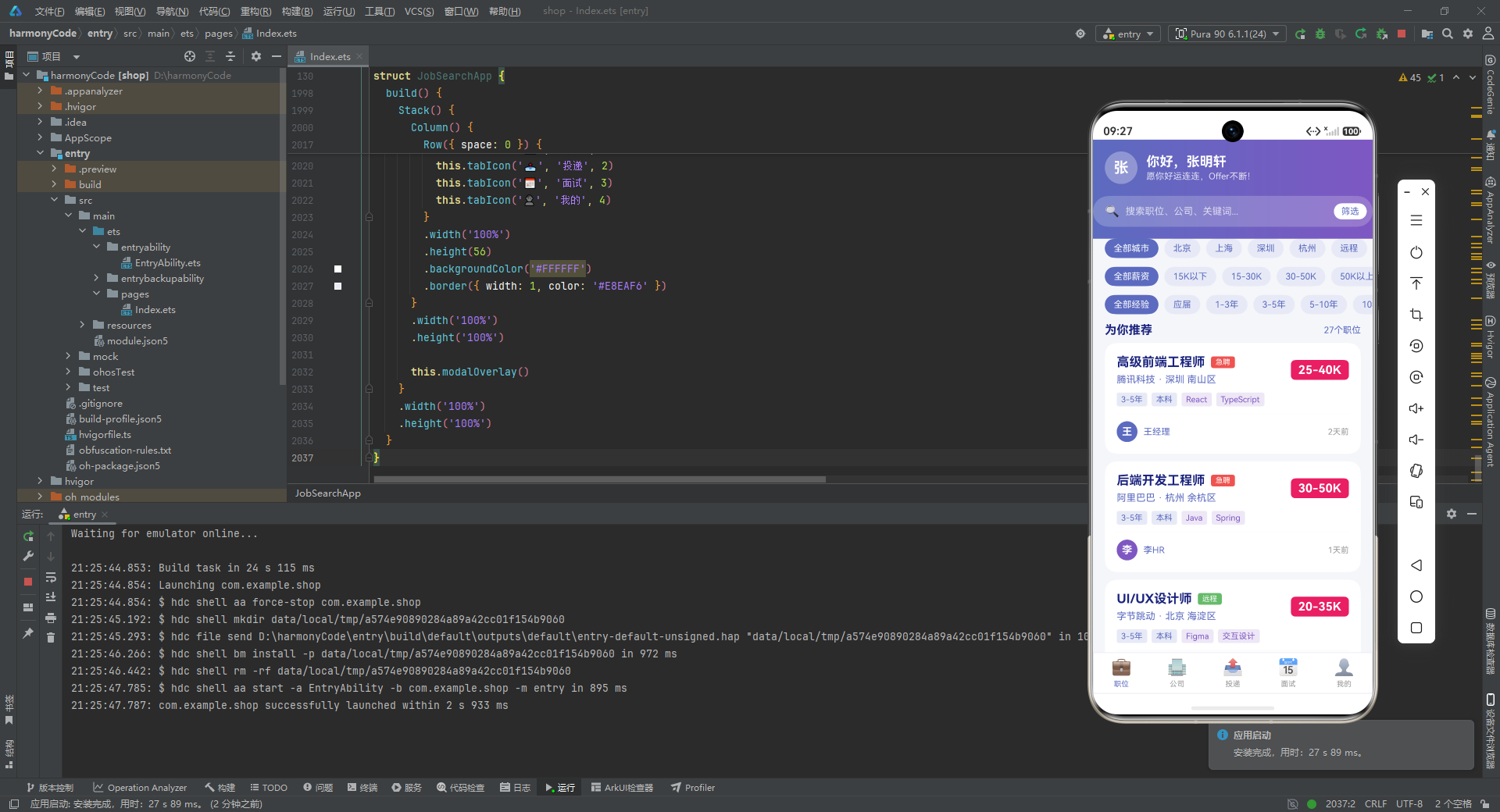
第一,类型先行是 ArkTS 开发的基础纪律。这份代码一开始就用 13 个 interface 把业务世界的词汇固定下来,让后续所有的状态、数据、构建器都有了明确的类型约束。ResourceColor 这类内置类型的运用,更是把"颜色"这种容易出错的值在编译期就拦住了。这种"先建模、再写逻辑"的习惯,能让大型应用的维护成本显著降低。
第二,元数据字典是处理枚举视觉表现的优雅范式。把"状态值 → 文案 + 颜色"的映射收敛成 Record 字典,让 UI 代码只需一行查表就能拿到所有视觉信息,彻底告别了散落各处的 if/else 和 switch。这种模式在任何需要"根据枚举渲染不同样式"的场景都适用,值得迁移到自己的项目中。
第三,@Builder 是 ArkTS 组件化的核心武器。通过参数化的构建器函数,这份代码用极少的重复实现了职位卡、公司卡、投递卡、面试卡四种高信息密度的列表项,以及 Tab 图标、薪资盒子、筛选药丸组等辅助控件。理解了"构建器即组件"的思想,就能在 ArkTS 中写出像 React 一样可组合、可复用的 UI 代码。
第四,状态最小化原则让交互逻辑清晰可控。整个应用只用了 8 个 @State 变量,却支撑起了 5 个 Tab 切换、4 种弹窗显隐、筛选器高亮、选中项追踪等全部交互。秘诀在于"只把真正会变的东西放进状态",其余的静态数据和计算逻辑都用不可变属性或方法封装。这种克制让状态流可追溯、可调试。
第五,统一的设计语言是产品质感的来源。从配色(靛蓝/紫主色 + 粉红薪资 + 绿/橙/红状态色)、圆角(卡片 16、弹窗 20、药丸 16)、间距(padding 16、margin 10)到渐变头部(蓝→紫或紫→蓝),整个应用保持着高度一致的视觉规范。这种一致性不是框架强制的,而是作者通过 disciplined 的重复约定养成的,是专业前端工程师的基本素养。
第六,手工拼装能力体现了对底层组件的掌控。无论是用 Column 拼进度条、用 ForEach + layoutWeight 拼柱状图,还是用负 margin 拼悬浮卡片,这份代码展示了"不依赖第三方库也能做出丰富视觉"的功力。在 HarmonyOS 生态尚在发展、第三方组件库不够完善的当下,这种手工拼装能力尤其珍贵。

讨论HarmonyOS开发技术,专注于API与组件、DevEco Studio、测试、元服务和应用上架分发等。
更多推荐


 8
8 0
0- 0


 已为社区贡献129条内容

所有评论(0)