基于HarmonyOS API 24智慧二手交易市场「跳蚤橙风」页面之间共享同一套底层数据,通过 showOverlay 和 overlayType 两个状态变量统一管理所有弹窗的显示与类型切换
一、引言:在线票务在移动端的意义与挑战
随着移动互联网的深度普及,电影消费已经从"到影院排队买票"彻底演变为"打开手机一键选座"。这种消费习惯的转变背后,是票务应用在前端体验、数据组织、状态流转等多方面的高要求。一部优秀的电影票务应用,不仅需要把影片信息、影院信息、排片信息、座位信息、订单信息等庞杂的数据有机地组织起来,还需要在有限的手机屏幕上呈现出清晰、流畅、富有沉浸感的交互体验。
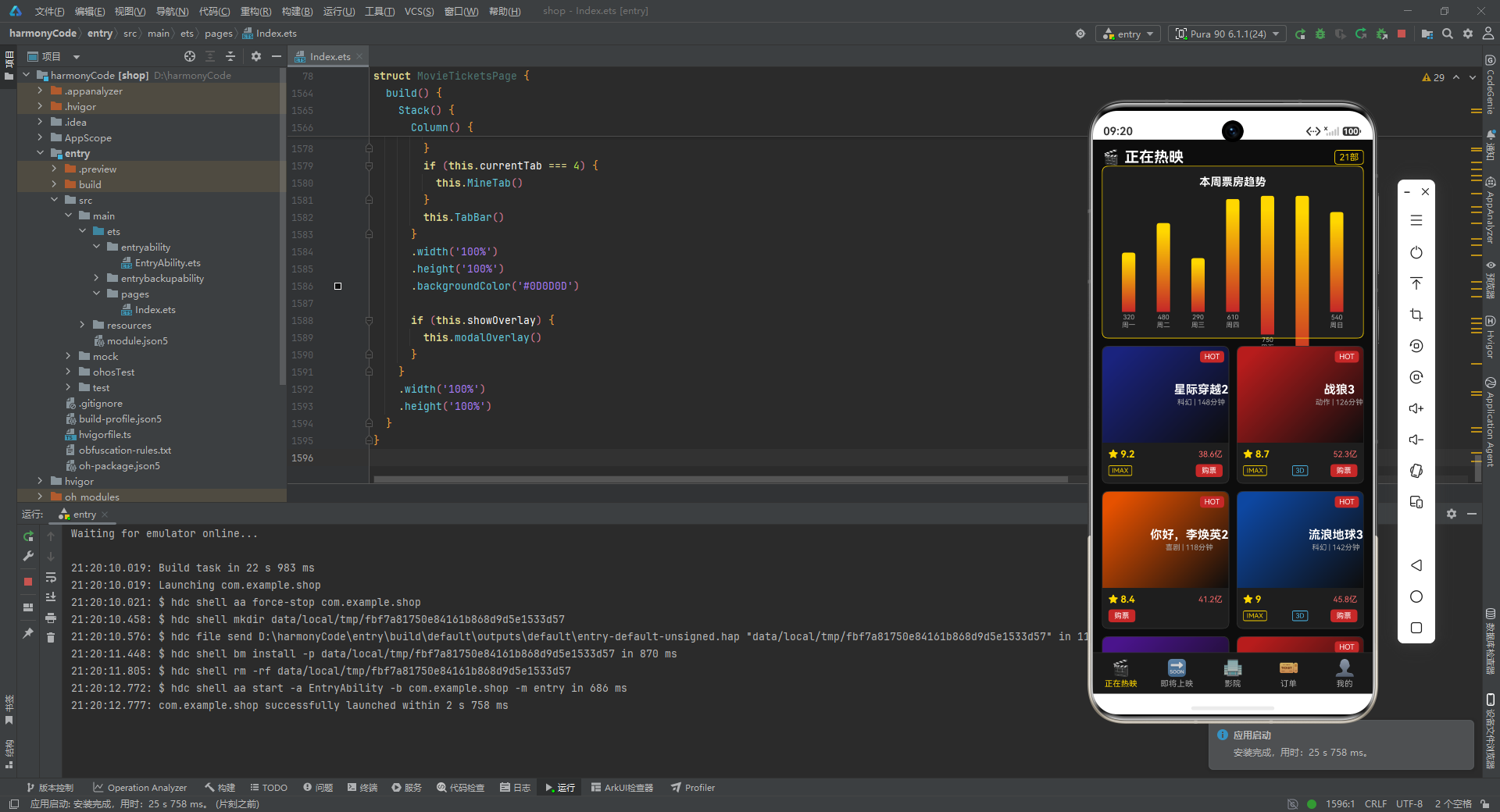
HarmonyOS(鸿蒙)作为华为推出的分布式操作系统,其应用开发框架 ArkTS 在声明式 UI 范式的基础上,提供了丰富的状态管理能力和组件化机制。使用 ArkTS 开发电影票务应用,既能享受到声明式 UI 带来的简洁与直观,又能借助 @State、@Builder、@Component 等装饰器实现高效的状态驱动渲染。本文将以一个功能完整的电影票务页面为研究对象,逐段拆解其代码实现,深入分析每一个数据结构、每一个组件构建器、每一处状态流转的设计思路。
这个应用涵盖了电影票务场景下的几乎所有核心功能:正在热映影片展示、即将上映影片预告、附近影院列表、订单管理与改签退票、个人中心与观影记录。同时还实现了选座购票、影片详情查看、改签场次选择、退票确认等弹窗交互。通过对这套代码的深度剖析,读者不仅能掌握 ArkTS 的实战用法,还能理解一个完整的商业级移动应用是如何从需求拆解到代码落地的。
二、整体架构概览
在深入代码细节之前,我们先用宏观视角审视一下整个应用的架构。整个页面由一个主组件构成,内部通过 currentTab 状态变量在五个功能页面之间切换:正在热映、即将上映、影院、订单、我的。每个页面都是一个独立的 @Builder 方法,负责渲染对应的内容。页面之间共享同一套底层数据(电影列表、影院列表、订单列表等),通过 showOverlay 和 overlayType 两个状态变量统一管理所有弹窗的显示与类型切换。
这种"单页面多 Tab + 全局弹窗"的架构是移动端常见的模式,它的优势在于:
- 数据集中管理,所有 Tab 共享同一份状态,避免了跨页面数据同步的复杂性。
- 弹窗逻辑统一收口,通过一个
overlayType字符串即可区分不同弹窗,扩展方便。 - 组件化程度高,每个卡片、每个弹窗都是独立的
@Builder,可复用、可维护。
下面我们从代码的第一行开始,逐段剖析。
三、数据模型设计:用接口定义业务实体
任何应用的根基都是数据模型。这段代码在开头定义了多个 interface,用于描述电影票务场景中的各类业务实体。接口在 ArkTS 中承担着类型约束的职责,它们让数据结构变得清晰可读,也为后续的组件传参提供了类型安全保障。
3.1 类型元数据接口
首先定义的是三个用于描述"元数据"的接口:
interface GenreMeta {
  key: string
  label: string
  color: string
}
interface MovieStatusMeta {
  key: string
  label: string
  color: string
}
interface OrderStatusMeta {
  key: string
  label: string
  color: string
}
interface CinemaServiceMeta {
  key: string
  label: string
  icon: string
}
逐行解释:
GenreMeta:电影类型(genre)的元数据。key是类型的唯一标识(如"科幻"),label是展示给用户的中文名称,color是该类型在 UI 中对应的主题色。这种设计将"类型"从单纯的字符串升级为带有视觉属性的复合对象。MovieStatusMeta:电影状态的元数据。电影有"热映中"“即将上映”"已下映"等状态,每个状态对应不同的标签文字和颜色。OrderStatusMeta:订单状态的元数据。订单有"已支付"“已观影”“已退票”"待支付"等状态,同样配有标签和颜色。CinemaServiceMeta:影院服务的元数据。与前面三个不同,它用icon字段(一个 emoji 字符)代替了color字段,因为服务标签在 UI 中主要靠图标来区分。
这种"元数据接口"的设计模式非常值得学习。它把业务状态的展示信息(标签、颜色、图标)从散落在各处的硬编码值,集中到了统一的映射表中。当需要修改某个状态的颜色或文案时,只需改一处即可全局生效。
3.2 电影数据接口
interface MovieItem {
  id: number
  title: string
  genre: string
  duration: number
  director: string
  cast: string
  rating: number
  boxOffice: number
  releaseDate: string
  status: string
  posterColor: string
  synopsis: string
  isHot: boolean
  isImax: boolean
  is3D: boolean
}
逐行解释:
id:电影的唯一标识,类型为 number,用于在列表中区分不同电影,也用于点击时传递选中项。title:电影名称,字符串类型,会在卡片标题、详情弹窗、订单列表等多处展示。genre:电影类型,值为 genreMap 中的某个 key(如"科幻"“动作”)。duration:片长,以分钟为单位的数字,用于在卡片上显示"148分钟"这样的信息。director:导演姓名。cast:主演阵容,多个演员用逗号分隔的字符串。rating:评分,浮点数(如 9.2),用于星级展示和数字展示。boxOffice:票房,以"亿"为单位的数字(如 38.6 代表 38.6 亿)。releaseDate:上映日期,格式为YYYY-MM-DD的字符串。status:状态标识,取值为 statusMap 中的 key(如 ‘hot’)。posterColor:海报的背景色。由于本应用没有使用真实图片海报,而是用渐变色块模拟海报效果,所以每个电影都配有一个主题色。synopsis:剧情简介文本。isHot:是否为热门影片,布尔值,控制卡片上是否显示 “HOT” 标签。isImax:是否有 IMAX 版本,控制是否显示 IMAX 标签。is3D:是否有 3D 版本,控制是否显示 3D 标签。
这三个布尔标志位(isHot、isImax、is3D)的设计体现了"特征标记"的思想。它们独立于 status 字段存在,因为一部"热映中"的电影不一定同时是"热门推荐"和"IMAX 版本",这些维度是正交的。
3.3 即将上映电影接口
interface ComingMovie {
  id: number
  title: string
  genre: string
  releaseDate: string
  director: string
  cast: string
  expectation: number
  posterColor: string
  synopsis: string
  daysUntil: number
}
逐行解释:
- 与
MovieItem相比,ComingMovie去掉了duration、rating、boxOffice、status、isHot、isImax、is3D这些字段。因为即将上映的电影还没有评分、票房等数据,这些字段对即将上映的电影没有意义。 - 新增了
expectation:期待值,一个 0 到 100 的数字,用于在卡片上展示一个进度条。 - 新增了
daysUntil:距离上映还有多少天,用于在卡片右侧醒目地展示倒计时数字。
这种"根据业务场景拆分接口"的做法避免了数据冗余。如果强行用 MovieItem 统一表示所有电影,即将上映的电影就会出现大量空字段或默认值,既不优雅也容易引发 bug。
3.4 影院数据接口
interface CinemaItem {
  id: number
  name: string
  address: string
  distance: number
  price: number
  halls: number
  services: string[]
  rating: number
  phone: string
  isVip: boolean
}
逐行解释:
id:影院唯一标识。name:影院名称,包含品牌和门店信息(如"万达影城(朝阳大悦城店)")。address:影院地址。distance:距离用户的距离,以公里为单位的浮点数,用于排序和展示。price:起步票价,数字类型,展示为"¥45起"。halls:影厅数量。services:服务列表,是一个字符串数组,每个元素是 serviceMap 中的 key(如 ‘imax’、‘3d’)。rating:影院评分,浮点数(如 4.8)。phone:联系电话。isVip:是否为 VIP 影院,控制是否在卡片上显示 VIP 标签。
services 字段使用字符串数组而非对象数组,是一种轻量化的设计。实际的服务信息(图标、标签)通过 serviceMap 查找获得,既节省了内存,又保证了数据一致性。
3.5 订单数据接口
interface OrderItem {
  id: number
  movieTitle: string
  cinemaName: string
  hall: string
  seat: string
  showTime: string
  price: number
  status: string
  orderTime: string
  posterColor: string
}
逐行解释:
id:订单唯一标识。movieTitle:所购电影票对应的影片名称。cinemaName:影院名称。hall:影厅信息(如"IMAX 1号厅")。seat:座位信息,多个座位用逗号分隔的字符串(如"F排12座,F排13座")。showTime:放映时间。price:订单总价。status:订单状态,取值为 orderStatusMap 中的 key。orderTime:下单时间。posterColor:海报颜色,用于在订单卡片左侧显示一个色块,与电影形成视觉关联。
注意订单中直接存储了 movieTitle 和 cinemaName 等冗余信息,而不是只存电影 ID 和影院 ID 再去关联查询。这是订单系统的常见做法——订单作为历史快照,应该在创建时就固化所有关键信息,避免后续电影或影院信息变更影响历史订单的展示。
四、主组件与状态管理
定义完所有数据接口后,代码进入主组件的定义。这是整个应用的核心。
4.1 组件声明与状态变量
@Entry
@Component
struct MovieTicketsPage {
  @State currentTab: number = 0
  @State showOverlay: boolean = false
  @State overlayType: string = ''
  @State selectedMovieId: number = 0
  @State selectedOrderId: number = 0
  @State selectedCinemaId: number = 0
  @State selectedSeats: string[] = []
  @State weeklyData: number[] = [320, 480, 290, 610, 750, 920, 540]
  @State weekLabels: string[] = ['周一', '周二', '周三', '周四', '周五', '周六', '周日']
逐行解释:
@Entry:标记该组件为应用的入口页面,HarmonyOS 会将其作为页面树的根节点渲染。@Component:声明这是一个自定义组件,可以被复用和组合。struct MovieTicketsPage:ArkTS 使用 struct 而非 class 来定义组件,这是声明式 UI 框架的惯例。@State currentTab: number = 0:当前激活的 Tab 索引,初始值为 0(正在热映)。当用户点击底部导航栏时,这个值会改变,从而触发页面内容的重新渲染。@State showOverlay: boolean = false:是否显示弹窗遮罩层。所有弹窗(详情、购票、改签、退票)都通过这一个布尔值统一控制显隐。@State overlayType: string = '':当前弹窗的类型。取值包括 ‘detail’(影片详情)、‘book’(选座购票)、‘edit’(改签)、‘cancel’(退票)。配合showOverlay一起使用,实现了弹窗的统一调度。@State selectedMovieId: number = 0:当前选中的电影 ID,用于在详情弹窗和购票弹窗中定位具体影片。@State selectedOrderId: number = 0:当前选中的订单 ID,用于在改签和退票弹窗中定位具体订单。@State selectedCinemaId: number = 0:当前选中的影院 ID。@State selectedSeats: string[] = []:用户在选座界面选中的座位列表,如 [‘F12’, ‘F13’]。每次打开选座弹窗时会清空。@State weeklyData: number[]:本周每天的票房数据,用于绘制柱状图。这七个数字分别对应周一到周日的票房(单位为万)。@State weekLabels: string[]:与 weeklyData 对应的星期标签。
@State 装饰器是 ArkTS 状态管理的核心。被它标记的变量一旦发生变化,框架会自动重新渲染依赖该变量的 UI 部分。这种响应式机制让开发者只需关注数据的变化,而不用手动操作 DOM。
4.2 元数据映射表
接下来是一组 private 的映射表,它们把前面定义的元数据接口实例化:
private genreMap: Record<string, GenreMeta> = {
  '科幻': { key: '科幻', label: '科幻', color: '#4FC3F7' },
  '动作': { key: '动作', label: '动作', color: '#FF7043' },
  '喜剧': { key: '喜剧', label: '喜剧', color: '#FFD54F' },
  '爱情': { key: '爱情', label: '爱情', color: '#F06292' },
  '悬疑': { key: '悬疑', label: '悬疑', color: '#9575CD' },
  '动画': { key: '动画', label: '动画', color: '#81C784' },
  '战争': { key: '战争', label: '战争', color: '#A1887F' },
  '恐怖': { key: '恐怖', label: '恐怖', color: '#90A4AE' }
}
逐行解释:
Record<string, GenreMeta>是 TypeScript 的工具类型,表示一个以字符串为键、以 GenreMeta 为值的映射对象。- 每种电影类型都被赋予了一个独特的颜色:科幻是浅蓝色(#4FC3F7),动作是橙红色(#FF7043),喜剧是金黄色(#FFD54F),爱情是粉色(#F06292),悬疑是紫色(#9575CD),动画是绿色(#81C784),战争是棕色(#A1887F),恐怖是灰蓝色(#90A4AE)。
- 这些颜色并非随意选取,而是参考了 Material Design 的调色板,每种颜色都能传达出对应类型电影的氛围感。
类似地,还有三个映射表:
private statusMap: Record<string, MovieStatusMeta> = {
  'hot': { key: 'hot', label: '热映中', color: '#C62828' },
  'soon': { key: 'soon', label: '即将上映', color: '#FFD700' },
  'end': { key: 'end', label: '已下映', color: '#666666' }
}
private orderStatusMap: Record<string, OrderStatusMeta> = {
  'paid': { key: 'paid', label: '已支付', color: '#FFD700' },
  'used': { key: 'used', label: '已观影', color: '#81C784' },
  'refund': { key: 'refund', label: '已退票', color: '#AAAAAA' },
  'pending': { key: 'pending', label: '待支付', color: '#FF6B6B' }
}
private serviceMap: Record<string, CinemaServiceMeta> = {
  'imax': { key: 'imax', label: 'IMAX', icon: '🎬' },
  '3d': { key: '3d', label: '3D', icon: '👓' },
  'dolby': { key: 'dolby', label: '杜比', icon: '🔊' },
  'vip': { key: 'vip', label: 'VIP厅', icon: '👑' },
  'park': { key: 'park', label: '停车', icon: '🅿️' },
  'food': { key: 'food', label: '餐饮', icon: '🍿' }
}
逐行解释:
statusMap定义了电影的三种状态:热映中(深红色 #C62828)、即将上映(金色 #FFD700)、已下映(灰色 #666666)。颜色选择传达了状态的情感倾向——红色表示活跃热映,金色表示期待,灰色表示结束。orderStatusMap定义了订单的四种状态:已支付(金色)、已观影(绿色)、已退票(灰色)、待支付(红色)。待支付用红色起到警示作用,提醒用户尽快完成支付。serviceMap定义了影院的六种服务标签,每种都用一个直观的 emoji 图标表示:IMAX 用胶片图标,3D 用眼镜图标,杜比用音箱图标,VIP厅用皇冠图标,停车用 P 字图标,餐饮用爆米花图标。
五、模拟数据:构建丰富的业务数据集
5.1 正在热映电影列表
代码中预置了 21 部正在热映的电影数据,构成一个 MovieItem 数组。我们来看其中几条代表性数据:
private movies: MovieItem[] = [
  { id: 1, title: '星际穿越2', genre: '科幻', duration: 148, director: '克里斯托弗·诺兰',
    cast: '马修·麦康纳,安妮·海瑟薇', rating: 9.2, boxOffice: 38.6,
    releaseDate: '2026-07-15', status: 'hot', posterColor: '#1A237E',
    synopsis: '人类再次踏上穿越虫洞的旅程,寻找新的家园。',
    isHot: true, isImax: true, is3D: false },
  { id: 2, title: '战狼3', genre: '动作', duration: 126, director: '吴京',
    cast: '吴京,张译', rating: 8.7, boxOffice: 52.3,
    releaseDate: '2026-07-20', status: 'hot', posterColor: '#B71C1C',
    synopsis: '冷锋再次出征,保卫海外同胞安全。',
    isHot: true, isImax: true, is3D: true },
  // ... 其余 19 部电影数据结构相同
]
逐行解释:
- 每条数据都完整填充了 MovieItem 接口定义的所有字段。
posterColor的选择与电影主题相关:星际穿越2用深蓝色(#1A237E,宇宙色),战狼3用深红色(#B71C1C,热血色),你好李焕英2用深橙色(#E65100,温暖色),流浪地球3用深蓝(#0D47A1,科幻色)。isHot标记了哪些电影是重点推荐的热门影片。在这 21 部电影中,只有部分被标记为 isHot=true,这些电影会在卡片上显示醒目的 “HOT” 标签。isImax和is3D的组合涵盖了各种情况:只有 IMAX 的、只有 3D 的、两者都有的、两者都没有的,覆盖了真实场景中的各种排片情况。- 数据中包含了科幻、动作、喜剧、爱情、悬疑、动画、战争等多种类型,确保了 UI 展示的多样性。
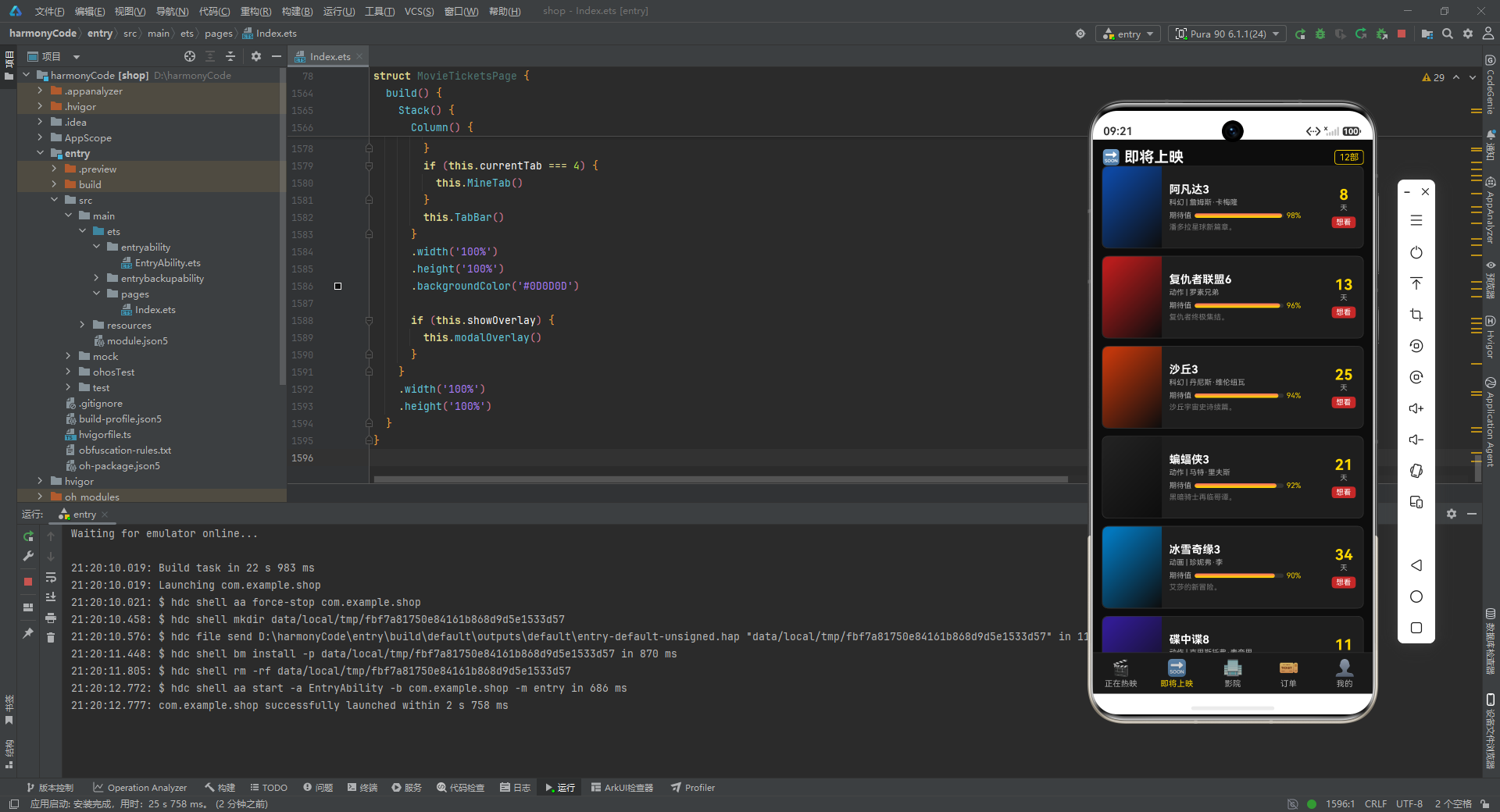
5.2 即将上映电影列表
private comingMovies: ComingMovie[] = [
  { id: 1, title: '阿凡达3', genre: '科幻', releaseDate: '2026-08-15',
    director: '詹姆斯·卡梅隆', cast: '萨姆·沃辛顿,佐伊·索尔达娜',
    expectation: 98, posterColor: '#0D47A1',
    synopsis: '潘多拉星球新篇章。', daysUntil: 8 },
  { id: 2, title: '复仇者联盟6', genre: '动作', releaseDate: '2026-08-20',
    director: '罗素兄弟', cast: '小罗伯特·唐尼,克里斯·埃文斯',
    expectation: 96, posterColor: '#B71C1C',
    synopsis: '复仇者终极集结。', daysUntil: 13 },
  // ... 其余 10 部即将上映电影
]
逐行解释:
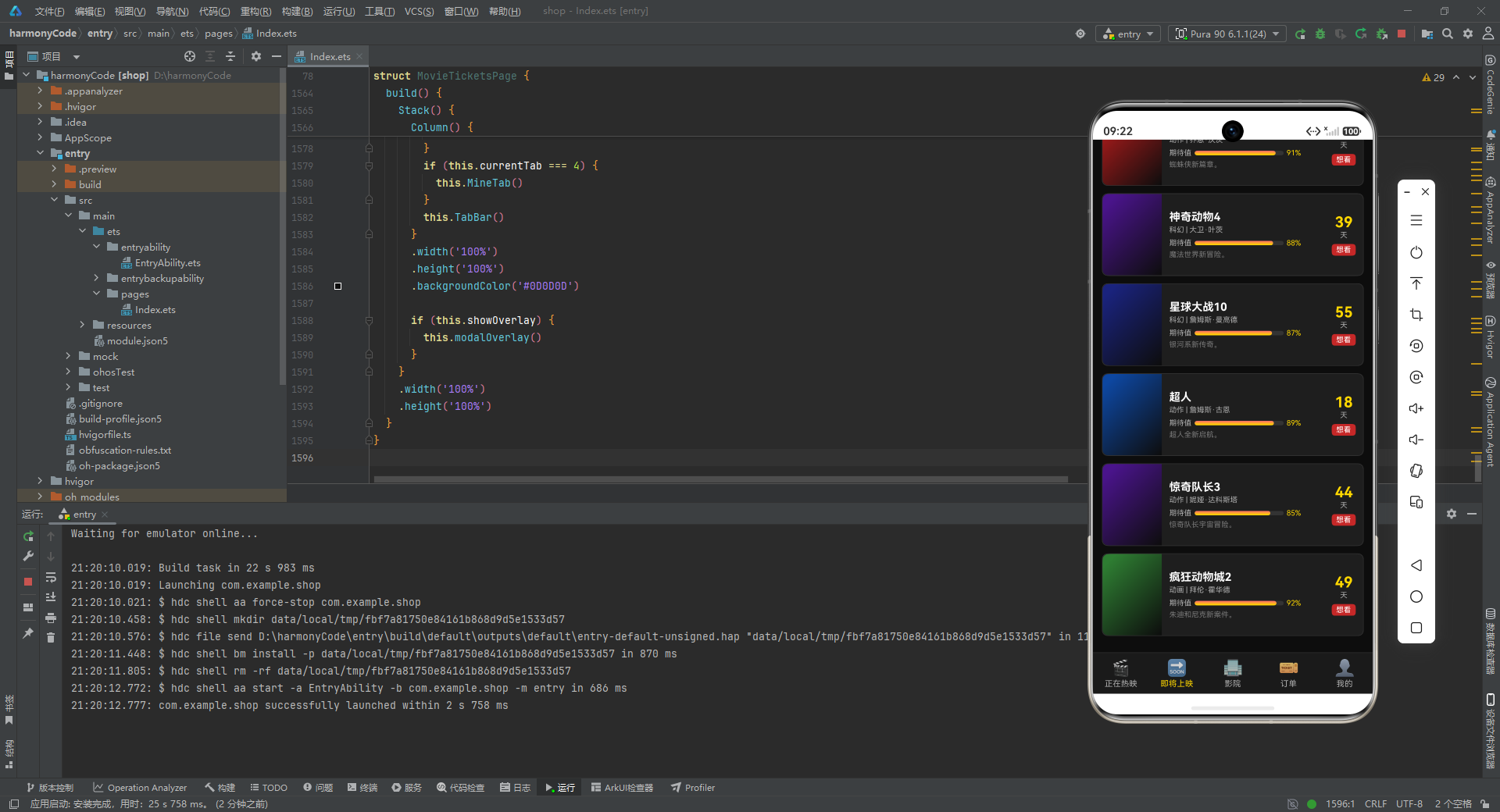
- 即将上映的电影共 12 部,涵盖了阿凡达3、复仇者联盟6、沙丘3、蝙蝠侠3、冰雪奇缘3等备受期待的续作。
expectation期待值从 85 到 98 不等,阿凡达3以 98 的期待值高居榜首。daysUntil倒计时天数从 8 天到 55 天不等,在 UI 上会以大号数字醒目展示,营造"即将上映"的期待感。
5.3 影院列表
private cinemas: CinemaItem[] = [
  { id: 1, name: '万达影城(朝阳大悦城店)', address: '朝阳区朝阳北路101号',
    distance: 0.8, price: 45, halls: 12,
    services: ['imax', '3d', 'dolby', 'vip', 'park', 'food'],
    rating: 4.8, phone: '010-88888001', isVip: true },
  { id: 2, name: 'CGV影城(三里屯店)', address: '朝阳区三里屯路19号',
    distance: 1.2, price: 52, halls: 10,
    services: ['imax', '3d', 'dolby', 'food'],
    rating: 4.7, phone: '010-88888002', isVip: true },
  // ... 其余 13 家影院
]
逐行解释:
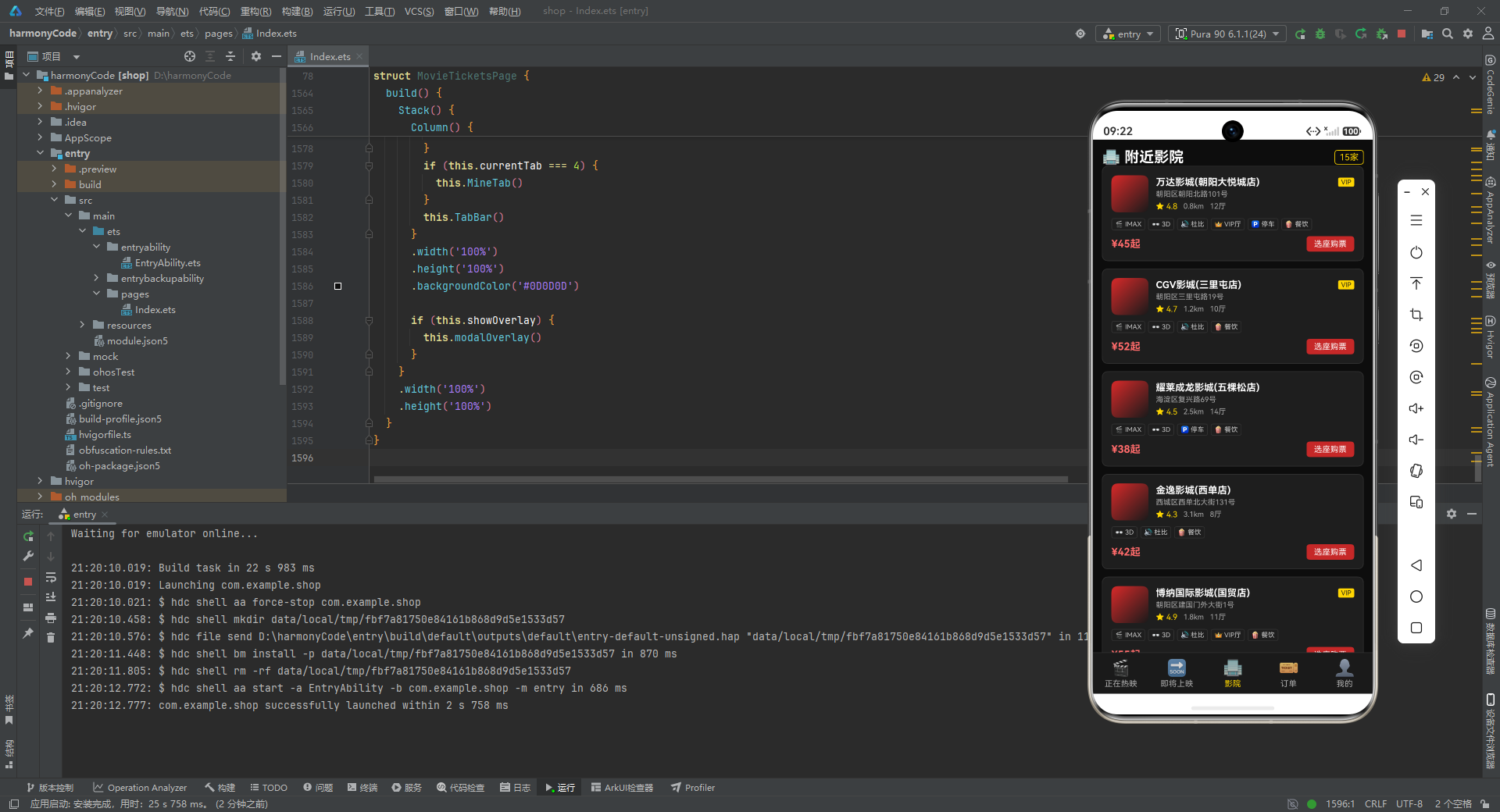
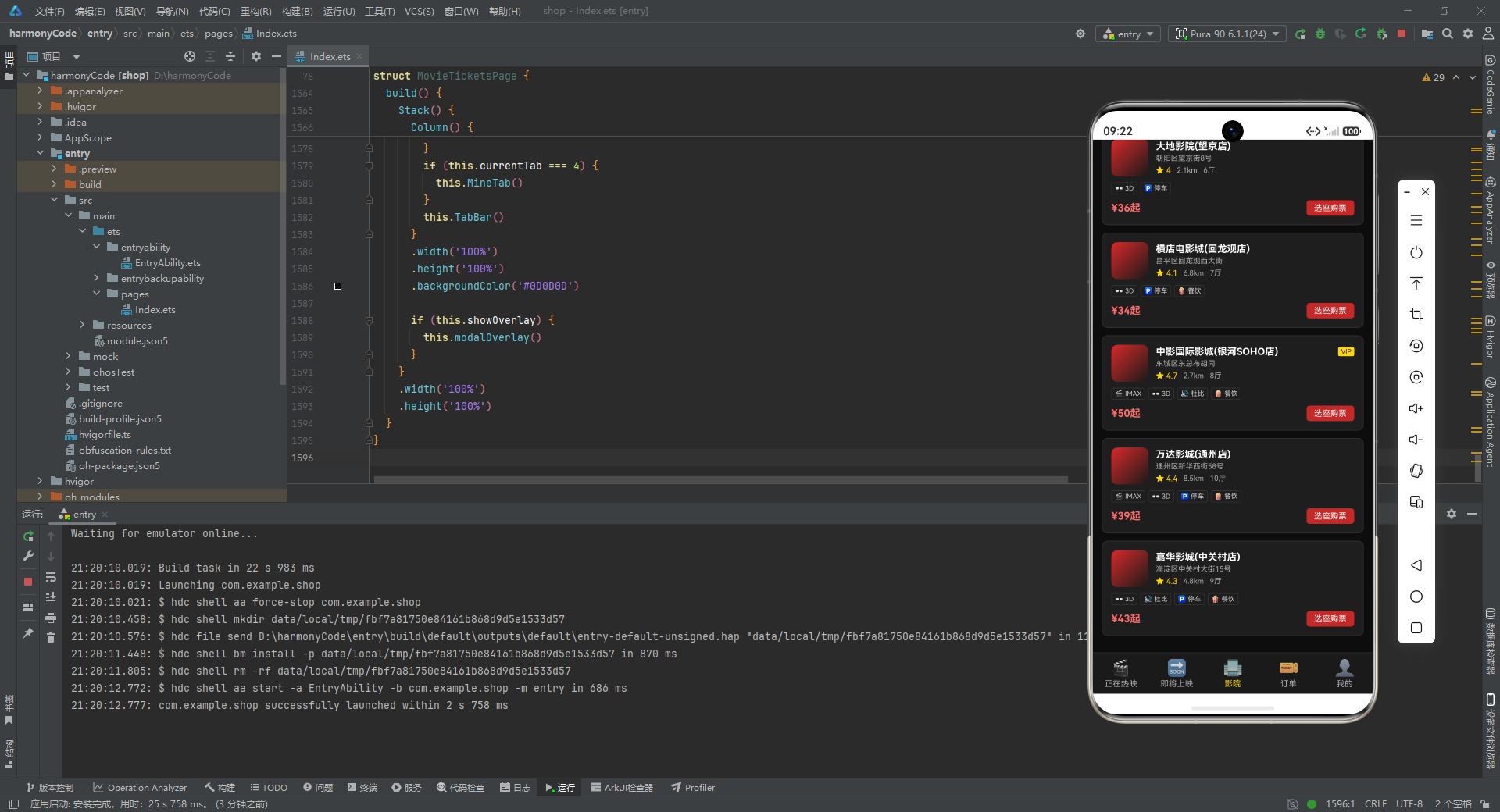
- 共 15 家影院,覆盖了万达、CGV、耀莱成龙、金逸、博纳、UME、保利、卢米埃、百老汇、首都电影院、大地、横店、中影国际、嘉华等主流院线品牌。
services数组的不同组合体现了各影院的硬件差异:万达朝阳大悦城店拥有全部六种服务(IMAX、3D、杜比、VIP、停车、餐饮),是最全配置;而大地影院望京店只有 3D 和停车两种基础服务。distance从 0.8km 到 8.5km,price从 34 元到 58 元,rating从 4.0 到 4.9,这些数值的差异让影院列表在排序和展示时有丰富的层次感。isVip标记了 5 家 VIP 影院,它们会在卡片上显示金色 VIP 标签。
5.4 订单列表
private orders: OrderItem[] = [
  { id: 1, movieTitle: '星际穿越2', cinemaName: '万达影城(朝阳大悦城店)',
    hall: 'IMAX 1号厅', seat: 'F排12座,F排13座',
    showTime: '2026-08-08 19:30', price: 90, status: 'paid',
    orderTime: '2026-08-07 14:20', posterColor: '#1A237E' },
  { id: 7, movieTitle: '满江红2', cinemaName: '保利国际影城(天安门店)',
    hall: '6号厅', seat: 'G排9座,G排10座',
    showTime: '2026-08-01 16:30', price: 92, status: 'refund',
    orderTime: '2026-07-30 15:20', posterColor: '#880E4F' },
  // ... 其余 9 笔订单
]
逐行解释:
- 共 11 笔订单,覆盖了四种订单状态:已支付(paid)、已观影(used)、已退票(refund)、待支付(pending)。
- 每笔订单的
seat字段展示了一到四个座位不等,模拟了单人观影、双人观影、多人团购等不同场景。 price字段是订单总价,等于单价乘以座位数。例如第 3 笔订单(流浪地球3,3 个座位,IMAX 厅)总价 165 元。posterColor与对应电影的 posterColor 保持一致,让订单卡片左侧的色块能够与电影形成视觉关联。
5.5 座位数据
private seatRows: string[] = ['A', 'B', 'C', 'D', 'E', 'F', 'G', 'H']
private seatCols: number[] = [1, 2, 3, 4, 5, 6, 7, 8, 9, 10]
private bookedSeats: string[] = ['C5', 'C6', 'D7', 'E3', 'F8', 'F9']
逐行解释:
seatRows:座位行号,从 A 到 H 共 8 行。seatCols:座位列号,从 1 到 10 共 10 列。- 这构成了一个 8 行 10 列共 80 个座位的影厅。
bookedSeats:已被预订的座位列表,共 6 个座位。这些座位在选座界面上会以灰色不可点击的状态展示。
六、底部导航栏组件
导航栏是用户在不同功能页面之间切换的入口。
@Builder
TabBar() {
  Row() {
    ForEach([{ idx: 0, label: '正在热映', icon: '🎬' },
             { idx: 1, label: '即将上映', icon: '🔜' },
             { idx: 2, label: '影院', icon: '🏢' },
             { idx: 3, label: '订单', icon: '🎫' },
             { idx: 4, label: '我的', icon: '👤' }],
      (item: Record<string, number | string>) => {
        Column() {
          Text(`${item.icon}`)
            .fontSize(22)
          Text(`${item.label}`)
            .fontSize(11)
            .fontColor(this.currentTab === item.idx ? '#FFD700' : '#AAAAAA')
            .margin({ top: 2 })
        }
        .layoutWeight(1)
        .alignItems(HorizontalAlign.Center)
        .onClick(() => {
          this.currentTab = item.idx as number
        })
      }, (item: Record<string, number | string>) => `${item.idx}`)
  }
  .width('100%')
  .height(56)
  .backgroundColor('#1A1A1A')
  .border({ width: { top: 1 }, color: '#333333' })
}
逐行解释:
@Builder装饰器声明这是一个可复用的 UI 构建方法。与@Component不同,@Builder不创建独立的组件实例,而是在调用处内联展开,适合用于构建局部 UI 片段。- 外层
Row()是水平排列容器,承载五个 Tab 按钮。 ForEach的第一个参数是一个内联数组,定义了五个 Tab 的数据:索引(idx)、标签文字(label)、图标(icon)。每个 Tab 都用一个 emoji 作为图标,简洁直观。ForEach的第二个参数是渲染函数,接收每个 item 并构建对应的Column。- 在 Column 内部,先放一个 22 号字体的图标 Text,再放一个 11 号字体的标签 Text。
- 标签的字体颜色通过三元表达式动态决定:如果当前 Tab 等于该按钮的 idx,则显示金色(#FFD700),否则显示灰色(#AAAAAA)。这就是
@State currentTab驱动的高亮效果。 layoutWeight(1)让五个 Column 平均分配 Row 的宽度。alignItems(HorizontalAlign.Center)让图标和文字水平居中。onClick回调中执行this.currentTab = item.idx as number,修改状态变量,触发页面切换。
ForEach的第三个参数是键值生成函数,用 idx 作为唯一 key,确保列表渲染的高效更新。- 外层 Row 设置了 100% 宽度、56vp 高度、深色背景(#1A1A1A),并通过
border只在顶部添加一条 1px 的分隔线(#333333),与上方内容区分开。
七、星级评分组件
这是一个可复用的小组件,用于展示评分对应的星级。
@Builder
StarRating(rating: number) {
  Row() {
    ForEach([0, 1, 2, 3, 4], (i: number) => {
      Text(i < Math.round(rating / 2) ? '★' : '☆')
        .fontSize(12)
        .fontColor(i < Math.round(rating / 2) ? '#FFD700' : '#555555')
    }, (i: number) => `${i}`)
  }
}
逐行解释:
@Builder StarRating(rating: number):这个构建器接收一个 rating 参数(0-10 分制的评分)。ForEach([0, 1, 2, 3, 4], ...):遍历 0 到 4 共五个位置,对应五颗星。Math.round(rating / 2):将 10 分制转换为 5 分制。例如 rating=9.2 时,9.2/2=4.6,四舍五入为 5,所以五颗星全部点亮。rating=8.4 时,8.4/2=4.2,四舍五入为 4,四颗星点亮。- 三元表达式
i < Math.round(rating / 2) ? '★' : '☆':如果当前星星索引小于应点亮的数量,显示实心星(★),否则显示空心星(☆)。 - 字体颜色同样用三元表达式:点亮的星为金色(#FFD700),未点亮的为深灰色(#555555)。
这个组件虽然简单,但体现了"评分可视化"的常见做法——将数字评分映射为直观的星级展示。
八、电影卡片组件
电影卡片是"正在热映"页面中最核心的展示单元。它的设计需要在有限的空间内传达尽可能多的信息。
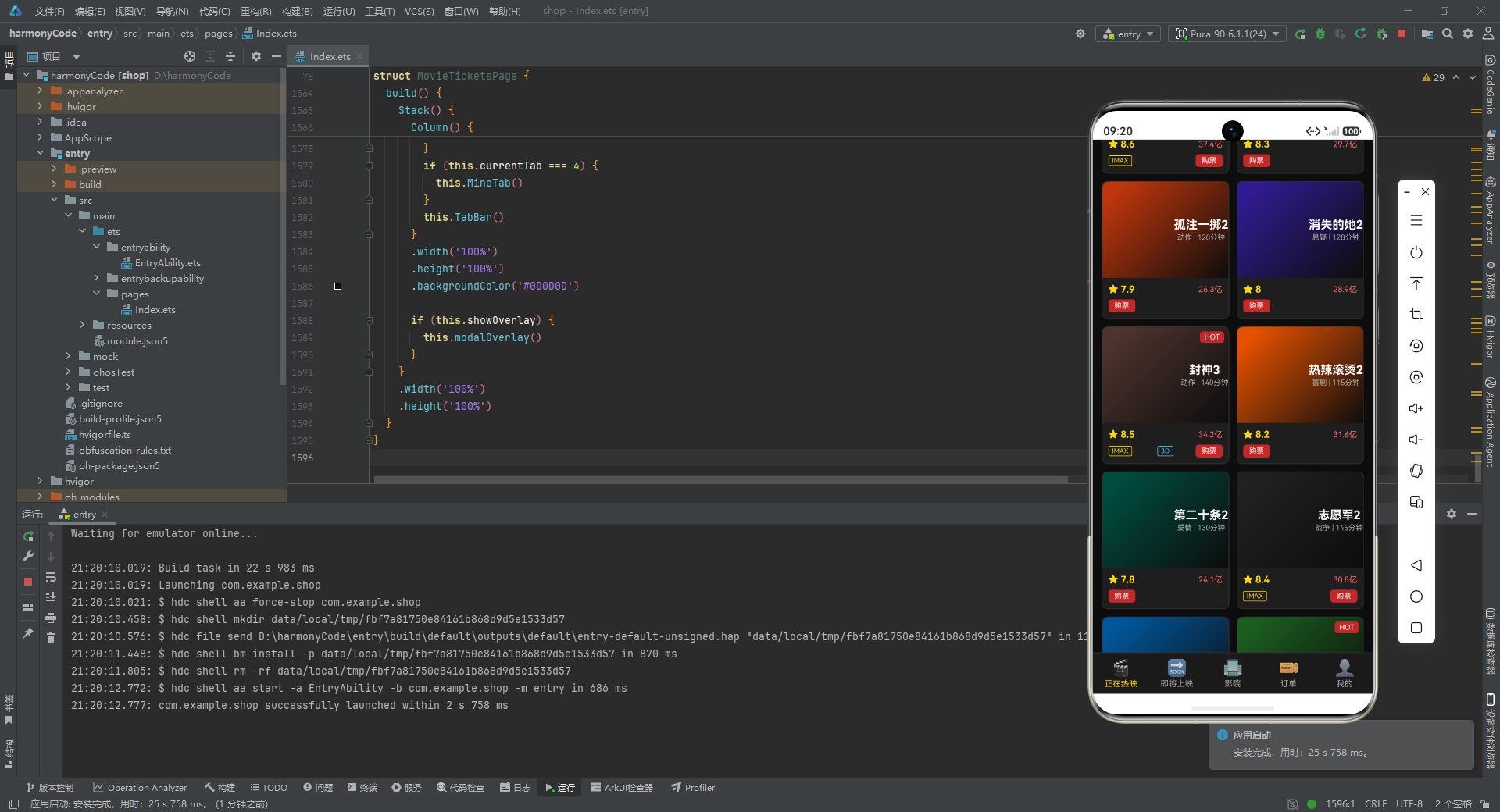
@Builder
MovieCard(movie: MovieItem) {
  Column() {
    Stack({ alignContent: Alignment.TopEnd }) {
      Column()
        .width('100%')
        .height(130)
        .linearGradient({
          angle: 135,
          colors: [[movie.posterColor, 0.1], ['#0D0D0D', 1.0]]
        })
        .borderRadius({ topLeft: 8, topRight: 8 })
      Column() {
        if (movie.isHot) {
          Text('HOT')
            .fontSize(10)
            .fontColor('#FFFFFF')
            .backgroundColor('#C62828')
            .padding({ left: 6, right: 6, top: 2, bottom: 2 })
            .borderRadius(4)
        }
      }
      .padding(6)
      Column() {
        Text(`${movie.title}`)
          .fontSize(16)
          .fontColor('#FFFFFF')
          .fontWeight(FontWeight.Bold)
        Text(`${movie.genre} | ${movie.duration}分钟`)
          .fontSize(10)
          .fontColor('#AAAAAA')
          .margin({ top: 2 })
      }
      .height('100%')
      .justifyContent(FlexAlign.Center)
      .alignItems(HorizontalAlign.Center)
    }
    .width('100%')
    .height(130)
逐行解释:
@Builder MovieCard(movie: MovieItem):接收一个 MovieItem 对象作为参数。- 外层
Column是卡片的整体容器。 Stack({ alignContent: Alignment.TopEnd }):使用 Stack(层叠布局)来叠加海报背景、HOT 标签和标题文字。alignContent: Alignment.TopEnd让子元素默认对齐到右上角。- 第一个子元素
Column()是海报背景层:- 宽度 100%,高度 130vp。
linearGradient创建线性渐变背景,角度 135 度(从左上到右下),从电影的主题色渐变到深黑色(#0D0D0D)。这种渐变模拟了电影海报的氛围感,既保留了电影主题色的辨识度,又通过深色底部确保了文字的可读性。borderRadius只设置左上和右上的圆角,与卡片整体的圆角保持一致。
- 第二个子元素
Column()是 HOT 标签层:- 通过
if (movie.isHot)条件渲染,只有热门电影才显示。 - HOT 标签是白字红底(#C62828)的小标签,通过 padding 控制大小,borderRadius 设置圆角。
- 外层 Column 设置了
padding(6),让标签与边缘保持间距。
- 通过
- 第三个子元素
Column()是标题信息层:- 包含电影名称(16号字体、白色、加粗)和类型+片长信息(10号字体、灰色)。
height('100%')让这个 Column 占满 Stack 的高度。justifyContent(FlexAlign.Center)和alignItems(HorizontalAlign.Center)让文字在背景层中居中显示。
卡片下半部分是评分、票房和标签信息:
    Column() {
      Row() {
        Text(`★ ${movie.rating}`)
          .fontSize(13)
          .fontColor('#FFD700')
          .fontWeight(FontWeight.Bold)
        Text(`${movie.boxOffice}亿`)
          .fontSize(11)
          .fontColor('#FF6B6B')
      }
      .width('100%')
      .justifyContent(FlexAlign.SpaceBetween)
逐行解释:
- 这一部分是一个 Column 容器,内含两行信息。
- 第一行是评分和票房:
- 左侧是评分,用金色星号加数字的形式展示(如"★ 9.2"),13 号字体加粗。
- 右侧是票房,用红色文字展示(如"38.6亿"),11 号字体。
justifyContent(FlexAlign.SpaceBetween)让两个元素分别贴左和贴右排列。
      Row() {
        if (movie.isImax) {
          Text('IMAX')
            .fontSize(9)
            .fontColor('#FFD700')
            .border({ width: 1, color: '#FFD700' })
            .padding({ left: 4, right: 4, top: 1, bottom: 1 })
            .borderRadius(2)
        }
        if (movie.is3D) {
          Text('3D')
            .fontSize(9)
            .fontColor('#4FC3F7')
            .border({ width: 1, color: '#4FC3F7' })
            .padding({ left: 4, right: 4, top: 1, bottom: 1 })
            .borderRadius(2)
            .margin({ left: 4 })
        }
        Text('购票')
          .fontSize(10)
          .fontColor('#FFFFFF')
          .backgroundColor('#C62828')
          .padding({ left: 8, right: 8, top: 3, bottom: 3 })
          .borderRadius(4)
      }
      .width('100%')
      .justifyContent(FlexAlign.SpaceBetween)
      .alignItems(VerticalAlign.Center)
      .margin({ top: 6 })
    }
    .width('100%')
    .padding(8)
逐行解释:
- 第二行是格式标签和购票按钮:
- IMAX 标签:金色描边、金色文字、9 号字体、小圆角。如果电影有 IMAX 版本才显示。
- 3D 标签:蓝色描边(#4FC3F7)、蓝色文字。如果同时有 IMAX 标签,则添加
margin({ left: 4 })保持间距。 - 购票按钮:白字红底(#C62828)的圆角按钮,是卡片上最醒目的行动入口。
- 同样使用
SpaceBetween布局,让标签贴左、按钮贴右。
最后是卡片整体的样式和点击事件:
    }
    .width('100%')
    .backgroundColor('#1E1E1E')
    .borderRadius(8)
    .border({ width: 1, color: '#333333' })
    .onClick(() => {
      this.selectedMovieId = movie.id
      this.overlayType = 'detail'
      this.showOverlay = true
    })
  }
逐行解释:
- 卡片整体背景色为深灰(#1E1E1E),8vp 圆角,1px 深色边框(#333333)。
onClick回调:点击卡片时,设置selectedMovieId为当前电影的 id,设置overlayType为 ‘detail’,然后将showOverlay设为 true。这三个状态变量的变化会触发详情弹窗的显示。
九、票房趋势图组件
这是一个纯用 ArkTS 原生组件实现的简易柱状图,展示了本周每天的票房数据。
@Builder
WeeklyChart() {
  Column() {
    Text('本周票房趋势')
      .fontSize(15)
      .fontColor('#FFFFFF')
      .fontWeight(FontWeight.Bold)
    Row() {
      ForEach(this.weeklyData, (val: number, idx: number) => {
        Column() {
          Column()
            .width(18)
            .height(val / 4)
            .linearGradient({
              angle: 180,
              colors: [['#FFD700', 0.1], ['#C62828', 1.0]]
            })
            .borderRadius({ topLeft: 3, topRight: 3 })
          Text(`${val}`)
            .fontSize(9)
            .fontColor('#AAAAAA')
            .margin({ top: 2 })
          Text(`${this.weekLabels[idx]}`)
            .fontSize(9)
            .fontColor('#AAAAAA')
        }
        .layoutWeight(1)
        .alignItems(HorizontalAlign.Center)
        .justifyContent(FlexAlign.End)
      }, (val: number, idx: number) => `${idx}`)
    }
    .width('100%')
    .height(180)
    .alignItems(VerticalAlign.Bottom)
    .margin({ top: 10 })
  }
  .width('100%')
  .padding(12)
  .backgroundColor('#1E1E1E')
  .borderRadius(8)
  .border({ width: 1, color: '#FFD700' })
}
逐行解释:
- 外层
Column是图表容器,标题"本周票房趋势"用 15 号白色加粗字体。 - 内层
Row是柱状图主体,高度 180vp,子元素底部对齐(alignItems(VerticalAlign.Bottom)),确保所有柱子从底部向上生长。 ForEach遍历weeklyData数组,为每个数据项渲染一个 Column:- 柱子本身是一个
Column(),宽度固定 18vp,高度为val / 4。这里除以 4 是一个简单的数据缩放,将票房数值(如 920)转换为合理的像素高度(230vp),避免超出容器高度。 - 柱子使用
linearGradient从金色(顶部 #FFD700)渐变到深红色(底部 #C62828),角度 180 度表示从上到下。顶部圆角让柱子看起来更精致。 - 柱子上方是数值文字(9 号灰色字体),下方是星期标签。
layoutWeight(1)让七个柱子平均分配 Row 的宽度。justifyContent(FlexAlign.End)让柱子内容在 Column 内部底部对齐。
- 柱子本身是一个
- 图表容器整体使用深灰背景、8vp 圆角、金色边框,与"正在热映"页面的金色主题保持一致。
这个柱状图虽然简单,但展示了"不依赖第三方图表库、用原生组件实现数据可视化"的思路。在实际项目中,如果需要更复杂的图表(折线图、饼图等),可以考虑接入图表库或使用 Canvas 自绘。
十、正在热映页面
将前面定义的 WeeklyChart 和 MovieCard 组合起来,就构成了"正在热映"页面的完整内容。
@Builder
HotTab() {
  Scroll() {
    Column() {
      Row() {
        Text('🎬 正在热映')
          .fontSize(20)
          .fontColor('#FFFFFF')
          .fontWeight(FontWeight.Bold)
        Text(`${this.movies.length}部`)
          .fontSize(12)
          .fontColor('#FFD700')
          .border({ width: 1, color: '#FFD700' })
          .padding({ left: 6, right: 6, top: 2, bottom: 2 })
          .borderRadius(4)
      }
      .width('100%')
      .justifyContent(FlexAlign.SpaceBetween)
      .alignItems(VerticalAlign.Center)

      this.WeeklyChart()

      Grid() {
        ForEach(this.movies, (movie: MovieItem) => {
          GridItem() {
            this.MovieCard(movie)
          }
        }, (movie: MovieItem) => `${movie.id}`)
      }
      .columnsTemplate('1fr 1fr')
      .columnsGap(10)
      .rowsGap(10)
      .width('100%')
      .padding({ top: 10 })
    }
    .width('100%')
    .padding(12)
  }
  .width('100%')
  .layoutWeight(1)
  .scrollBar(BarState.Off)
}
逐行解释:
Scroll()是可滚动容器,当内容超出屏幕高度时允许用户上下滚动浏览。scrollBar(BarState.Off)隐藏了滚动条,让界面更简洁。- 内层
Column承载页面的所有内容,宽度 100%,padding 12vp。 - 顶部
Row是页面标题栏:- 左侧"🎬 正在热映"用 20 号白色加粗字体。
- 右侧显示影片数量(如"21部"),金色描边小标签。
SpaceBetween布局让标题和数量标签分列两端。
this.WeeklyChart()调用前面定义的票房趋势图组件。Grid()是网格布局容器,用于以两列方式排列电影卡片:columnsTemplate('1fr 1fr')定义两列等宽布局。columnsGap(10)和rowsGap(10)设置列间距和行间距各 10vp。ForEach遍历 movies 数组,为每部电影渲染一个GridItem,内部调用this.MovieCard(movie)。- 键值函数用
movie.id作为唯一 key。
layoutWeight(1)让 Scroll 占满除底部导航栏之外的所有剩余空间。
十一、即将上映卡片与页面
11.1 即将上映卡片
即将上映的电影采用横向卡片布局,与正在热映的网格卡片形成视觉差异。
@Builder
ComingCard(movie: ComingMovie) {
  Row() {
    Column()
      .width(80)
      .height(110)
      .linearGradient({
        angle: 135,
        colors: [[movie.posterColor, 0.1], ['#0D0D0D', 1.0]]
      })
      .borderRadius({ topLeft: 8, bottomLeft: 8 })
      .justifyContent(FlexAlign.Center)
      .alignItems(HorizontalAlign.Center)

    Column() {
      Text(`${movie.title}`)
        .fontSize(15)
        .fontColor('#FFFFFF')
        .fontWeight(FontWeight.Bold)
      Text(`${movie.genre} | ${movie.director}`)
        .fontSize(10)
        .fontColor('#AAAAAA')
        .margin({ top: 3 })
逐行解释:
- 卡片整体是一个
Row,从左到右分为三部分:海报色块、影片信息、倒计时区域。 - 左侧海报色块:宽度 80vp,高度 110vp,与 MovieCard 类似的渐变背景,但只设置了左上和左下的圆角。
- 中间影片信息区使用
layoutWeight(1)占据剩余空间:- 电影标题(15 号白色加粗)。
- 类型和导演信息(10 号灰色)。
接下来是期待值进度条:
      Row() {
        Text('期待值')
          .fontSize(10)
          .fontColor('#AAAAAA')
        Row() {
          Column()
            .width(movie.expectation * 1.2)
            .height(6)
            .linearGradient({
              angle: 0,
              colors: [['#FFD700', 0.1], ['#FF6B6B', 1.0]]
            })
            .borderRadius(3)
        }
        .width(120)
        .height(6)
        .backgroundColor('#333333')
        .borderRadius(3)
        .margin({ left: 4 })
        Text(`${movie.expectation}%`)
          .fontSize(10)
          .fontColor('#FFD700')
          .margin({ left: 4 })
      }
      .alignItems(VerticalAlign.Center)
      .margin({ top: 6 })
逐行解释:
- 这是一个自定义的进度条实现。
- 外层 Row 包含三部分:"期待值"标签、进度条、百分比数字。
- 进度条由两层 Row 嵌套实现:
- 外层 Row 宽度固定 120vp,背景色 #333333(轨道色),6vp 高度,3vp 圆角。
- 内层包含一个 Column,宽度为
movie.expectation * 1.2。例如期待值 98 时,宽度为 117.6vp,接近轨道满宽。这个 1.2 的系数是把 0-100 的百分比值映射到 120vp 的轨道宽度上。 - 内层 Column 使用从金色到红色的水平渐变(angle: 0),视觉上传达"期待值越高越热"的感觉。
然后是剧情简介和倒计时区域:
      Text(`${movie.synopsis}`)
        .fontSize(10)
        .fontColor('#777777')
        .maxLines(2)
        .textOverflow({ overflow: TextOverflow.Ellipsis })
        .margin({ top: 4 })
    }
    .layoutWeight(1)
    .padding(10)
    .alignItems(HorizontalAlign.Start)

    Column() {
      Text(`${movie.daysUntil}`)
        .fontSize(20)
        .fontColor('#FFD700')
        .fontWeight(FontWeight.Bold)
      Text('天')
        .fontSize(10)
        .fontColor('#AAAAAA')
      Text('想看')
        .fontSize(10)
        .fontColor('#FFFFFF')
        .backgroundColor('#C62828')
        .padding({ left: 6, right: 6, top: 2, bottom: 2 })
        .borderRadius(4)
        .margin({ top: 6 })
    }
    .padding(10)
    .justifyContent(FlexAlign.Center)
    .alignItems(HorizontalAlign.Center)
  }
  .width('100%')
  .backgroundColor('#1E1E1E')
  .borderRadius(8)
  .border({ width: 1, color: '#333333' })
  .margin({ bottom: 10 })
}
逐行解释:
- 剧情简介使用
maxLines(2)限制最多两行,textOverflow({ overflow: TextOverflow.Ellipsis })在超出时显示省略号,避免过长文本撑破卡片布局。 - 右侧倒计时区域:
- 倒计时天数用 20 号金色加粗字体,是卡片上最醒目的数字。
- 下方"天"字用 10 号灰色。
- "想看"按钮是白字红底的圆角小标签,作为行动入口。
- 卡片整体样式与 MovieCard 保持一致:深灰背景、8vp 圆角、深色边框。
11.2 即将上映页面
@Builder
ComingTab() {
  Scroll() {
    Column() {
      Row() {
        Text('🔜 即将上映')
          .fontSize(20)
          .fontColor('#FFFFFF')
          .fontWeight(FontWeight.Bold)
        Text(`${this.comingMovies.length}部`)
          .fontSize(12)
          .fontColor('#FFD700')
          .border({ width: 1, color: '#FFD700' })
          .padding({ left: 6, right: 6, top: 2, bottom: 2 })
          .borderRadius(4)
      }
      .width('100%')
      .justifyContent(FlexAlign.SpaceBetween)
      .alignItems(VerticalAlign.Center)

      ForEach(this.comingMovies, (movie: ComingMovie) => {
        this.ComingCard(movie)
      }, (movie: ComingMovie) => `${movie.id}`)
    }
    .width('100%')
    .padding(12)
  }
  .width('100%')
  .layoutWeight(1)
  .scrollBar(BarState.Off)
}
逐行解释:
- 页面结构与 HotTab 类似:Scroll 容器内放 Column,顶部是标题栏,下方是卡片列表。
- 不同之处在于 ComingTab 使用
ForEach+ComingCard逐条渲染,而非 Grid 网格布局。这是因为即将上映的卡片是横向布局,更适合纵向列表展示。 - 键值函数使用
movie.id。
十二、影院卡片与页面
12.1 影院卡片
影院卡片的信息密度较高,需要在一张卡片上展示影院名称、地址、评分、距离、厅数、服务标签、价格和购票按钮。
@Builder
CinemaCard(cinema: CinemaItem) {
  Column() {
    Row() {
      Column()
        .width(50)
        .height(50)
        .linearGradient({
          angle: 135,
          colors: [['#C62828', 0.1], ['#1A1A1A', 1.0]]
        })
        .borderRadius(8)
        .justifyContent(FlexAlign.Center)
        .alignItems(HorizontalAlign.Center)
      Column() {
        Row() {
          Text(`${cinema.name}`)
            .fontSize(13)
            .fontColor('#FFFFFF')
            .fontWeight(FontWeight.Bold)
            .layoutWeight(1)
          if (cinema.isVip) {
            Text('VIP')
              .fontSize(9)
              .fontColor('#1A1A1A')
              .backgroundColor('#FFD700')
              .padding({ left: 4, right: 4, top: 1, bottom: 1 })
              .borderRadius(2)
          }
        }
        .width('100%')
        .alignItems(VerticalAlign.Center)
逐行解释:
- 卡片顶部第一行是一个 Row,左侧是 50x50 的影院图标色块(红到黑的渐变,8vp 圆角),右侧是影院信息区。
- 影院信息区的第一行包含影院名称和 VIP 标签:
- 影院名称用 13 号白色加粗字体,
layoutWeight(1)占据剩余空间。 - VIP 标签通过
if (cinema.isVip)条件渲染,金底深色字,只有 VIP 影院才显示。
- 影院名称用 13 号白色加粗字体,
        Text(`${cinema.address}`)
          .fontSize(10)
          .fontColor('#AAAAAA')
          .maxLines(1)
          .textOverflow({ overflow: TextOverflow.Ellipsis })
          .margin({ top: 3 })
        Row() {
          Text(`★ ${cinema.rating}`)
            .fontSize(11)
            .fontColor('#FFD700')
          Text(`${cinema.distance}km`)
            .fontSize(10)
            .fontColor('#AAAAAA')
            .margin({ left: 8 })
          Text(`${cinema.halls}厅`)
            .fontSize(10)
            .fontColor('#AAAAAA')
            .margin({ left: 8 })
        }
        .margin({ top: 4 })
        .alignItems(VerticalAlign.Center)
      }
      .layoutWeight(1)
      .padding({ left: 10 })
      .alignItems(HorizontalAlign.Start)
    }
    .width('100%')
    .alignItems(VerticalAlign.Center)
逐行解释:
- 地址文本使用
maxLines(1)限制为一行,超出时显示省略号。 - 评分、距离、厅数三个信息横向排列,用
margin({ left: 8 })保持间距。评分用金色星号,距离和厅数用灰色。
服务标签区域:
    Row() {
      ForEach(cinema.services, (svc: string) => {
        Text(`${this.serviceMap[svc].icon} ${this.serviceMap[svc].label}`)
          .fontSize(9)
          .fontColor('#CCCCCC')
          .border({ width: 1, color: '#333333' })
          .padding({ left: 4, right: 4, top: 2, bottom: 2 })
          .borderRadius(3)
          .margin({ right: 4 })
      }, (svc: string) => svc)
    }
    .width('100%')
    .margin({ top: 8 })
逐行解释:
ForEach遍历影院的services数组,为每个服务生成一个标签。- 标签内容是
this.serviceMap[svc].icon+ 空格 +this.serviceMap[svc].label,例如"🎬 IMAX"、“👓 3D”。 - 这里的关键是
this.serviceMap[svc]的查找操作——通过服务 key 从映射表中获取完整的展示信息,实现了数据与展示的解耦。 - 标签样式为 9 号字体、浅灰色文字、深色描边、3vp 圆角、右侧 4vp 间距。
价格和购票按钮:
    Row() {
      Text(`¥${cinema.price}起`)
        .fontSize(14)
        .fontColor('#FF6B6B')
        .fontWeight(FontWeight.Bold)
      Text('选座购票')
        .fontSize(11)
        .fontColor('#FFFFFF')
        .backgroundColor('#C62828')
        .padding({ left: 10, right: 10, top: 4, bottom: 4 })
        .borderRadius(4)
    }
    .width('100%')
    .justifyContent(FlexAlign.SpaceBetween)
    .alignItems(VerticalAlign.Center)
    .margin({ top: 8 })
  }
  .width('100%')
  .padding(12)
  .backgroundColor('#1E1E1E')
  .borderRadius(8)
  .border({ width: 1, color: '#333333' })
  .margin({ bottom: 10 })
}
逐行解释:
- 左侧价格"¥45起"用 14 号红色加粗字体。
- 右侧"选座购票"按钮用白字红底圆角样式。
SpaceBetween布局让价格和按钮分列两端。
12.2 影院页面
影院页面的结构与即将上映页面类似,使用 ForEach 逐条渲染影院卡片:
@Builder
CinemaTab() {
  Scroll() {
    Column() {
      Row() {
        Text('🏢 附近影院')
          .fontSize(20)
          .fontColor('#FFFFFF')
          .fontWeight(FontWeight.Bold)
        Text(`${this.cinemas.length}家`)
          .fontSize(12)
          .fontColor('#FFD700')
          .border({ width: 1, color: '#FFD700' })
          .padding({ left: 6, right: 6, top: 2, bottom: 2 })
          .borderRadius(4)
      }
      .width('100%')
      .justifyContent(FlexAlign.SpaceBetween)
      .alignItems(VerticalAlign.Center)

      ForEach(this.cinemas, (cinema: CinemaItem) => {
        this.CinemaCard(cinema)
      }, (cinema: CinemaItem) => `${cinema.id}`)
    }
    .width('100%')
    .padding(12)
  }
  .width('100%')
  .layoutWeight(1)
  .scrollBar(BarState.Off)
}
逐行解释:
- 标题栏显示"🏢 附近影院"和影院数量"15家"。
- 遍历 cinemas 数组,每个影院渲染一个 CinemaCard。
- 整体结构与 ComingTab 保持一致的布局模式。
十三、订单卡片与页面
13.1 订单卡片
订单卡片是信息最密集的卡片类型,需要展示电影信息、影院信息、座位信息、价格、状态、取票码,以及根据状态显示不同的操作按钮。
@Builder
OrderCard(order: OrderItem) {
  Column() {
    Row() {
      Column()
        .width(56)
        .height(80)
        .linearGradient({
          angle: 135,
          colors: [[order.posterColor, 0.1], ['#0D0D0D', 1.0]]
        })
        .borderRadius({ topLeft: 8, bottomLeft: 8 })
        .justifyContent(FlexAlign.Center)
        .alignItems(HorizontalAlign.Center)
      Column() {
        Text(`${order.movieTitle}`)
          .fontSize(14)
          .fontColor('#FFFFFF')
          .fontWeight(FontWeight.Bold)
        Text(`${order.cinemaName}`)
          .fontSize(10)
          .fontColor('#AAAAAA')
          .maxLines(1)
          .textOverflow({ overflow: TextOverflow.Ellipsis })
          .margin({ top: 2 })
        Text(`${order.hall}`)
          .fontSize(10)
          .fontColor('#777777')
          .margin({ top: 2 })
        Text(`座位: ${order.seat}`)
          .fontSize(10)
          .fontColor('#FFD700')
          .margin({ top: 2 })
      }
      .layoutWeight(1)
      .padding({ left: 10 })
      .alignItems(HorizontalAlign.Start)
逐行解释:
- 卡片顶部第一行是一个 Row,分为三部分:海报色块、订单信息、价格与状态。
- 左侧海报色块使用订单的
posterColor渐变,与对应电影保持视觉一致。 - 中间订单信息区依次显示:电影标题(14号白色加粗)、影院名称(10号灰色,单行省略)、影厅信息(10号深灰)、座位信息(10号金色,座位信息用金色突出显示因为这是取票时的关键信息)。
layoutWeight(1)让中间区域占据剩余空间。
右侧价格和状态:
      Column() {
        Text(`¥${order.price}`)
          .fontSize(15)
          .fontColor('#FF6B6B')
          .fontWeight(FontWeight.Bold)
        Text(`${this.orderStatusMap[order.status].label}`)
          .fontSize(10)
          .fontColor(this.orderStatusMap[order.status].color)
          .border({ width: 1, color: this.orderStatusMap[order.status].color })
          .padding({ left: 4, right: 4, top: 1, bottom: 1 })
          .borderRadius(3)
          .margin({ top: 4 })
      }
      .alignItems(HorizontalAlign.End)
      .justifyContent(FlexAlign.Center)
    }
    .width('100%')
    .alignItems(VerticalAlign.Center)
逐行解释:
- 价格用 15 号红色加粗字体。
- 状态标签通过
this.orderStatusMap[order.status]查找获取标签文字和颜色。文字颜色和边框颜色都使用映射表中定义的颜色,确保不同状态的视觉区分一致。 - 例如:已支付状态显示金色"已支付"标签,已退票状态显示灰色"已退票"标签,待支付状态显示红色"待支付"标签。
放映时间和取票码:
    Row() {
      Text(`${order.showTime}`)
        .fontSize(10)
        .fontColor('#AAAAAA')
      Row() {
        Text('取票码')
          .fontSize(9)
          .fontColor('#AAAAAA')
        Text(`${1000 + order.id}`)
          .fontSize(13)
          .fontColor('#FFD700')
          .fontWeight(FontWeight.Bold)
          .margin({ left: 4 })
      }
      .alignItems(VerticalAlign.Center)
    }
    .width('100%')
    .justifyContent(FlexAlign.SpaceBetween)
    .alignItems(VerticalAlign.Center)
    .margin({ top: 8 })
逐行解释:
- 左侧显示放映时间(如"2026-08-08 19:30")。
- 右侧显示取票码,取票码通过
1000 + order.id简单生成(如订单 id=1 的取票码为 1001),用 13 号金色加粗字体突出显示。
二维码占位和操作按钮:
    Row() {
      Row() {
        Column()
          .width(30)
          .height(30)
          .backgroundColor('#1A1A1A')
          .border({ width: 1, color: '#FFD700' })
          .borderRadius(4)
        Column() {
          Text('二维码')
            .fontSize(9)
            .fontColor('#FFD700')
        }
        .margin({ left: 6 })
        .justifyContent(FlexAlign.Center)
      }
      .alignItems(VerticalAlign.Center)

      Row() {
        if (order.status === 'paid') {
          Text('改签')
            .fontSize(10)
            .fontColor('#FFD700')
            .border({ width: 1, color: '#FFD700' })
            .padding({ left: 8, right: 8, top: 3, bottom: 3 })
            .borderRadius(4)
            .onClick(() => {
              this.selectedOrderId = order.id
              this.overlayType = 'edit'
              this.showOverlay = true
            })
          Text('退票')
            .fontSize(10)
            .fontColor('#FF6B6B')
            .border({ width: 1, color: '#FF6B6B' })
            .padding({ left: 8, right: 8, top: 3, bottom: 3 })
            .borderRadius(4)
            .margin({ left: 6 })
            .onClick(() => {
              this.selectedOrderId = order.id
              this.overlayType = 'cancel'
              this.showOverlay = true
            })
        }
        if (order.status === 'pending') {
          Text('去支付')
            .fontSize(10)
            .fontColor('#FFFFFF')
            .backgroundColor('#C62828')
            .padding({ left: 8, right: 8, top: 3, bottom: 3 })
            .borderRadius(4)
        }
      }
      .alignItems(VerticalAlign.Center)
    }
    .width('100%')
    .justifyContent(FlexAlign.SpaceBetween)
    .alignItems(VerticalAlign.Center)
    .margin({ top: 8 })
逐行解释:
- 左侧是一个二维码占位区域:一个 30x30 的金色描边色块旁边标注"二维码"文字。在实际应用中,这里会渲染真实的二维码图片。
- 右侧操作按钮根据订单状态动态显示:
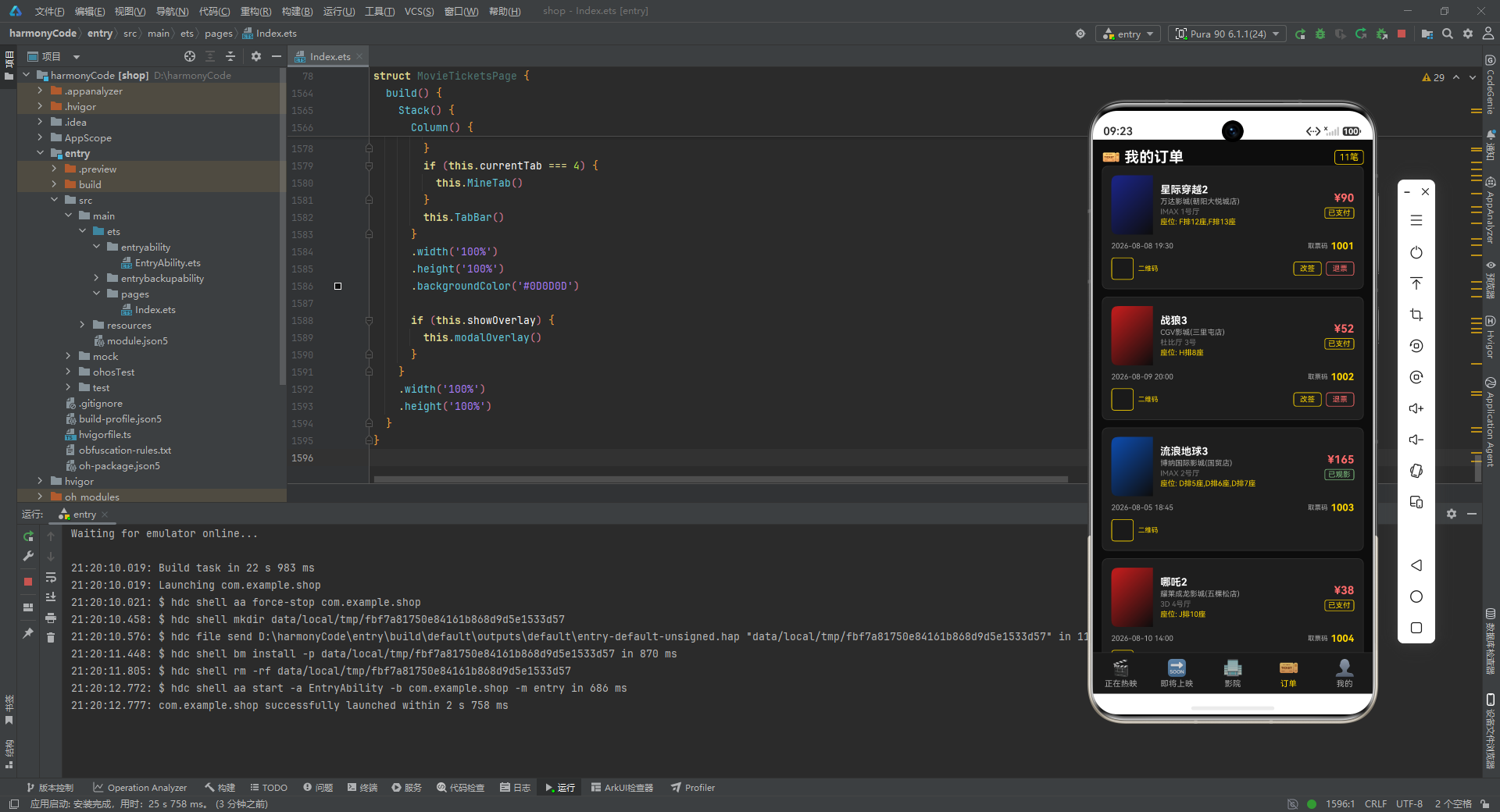
if (order.status === 'paid'):已支付的订单显示"改签"和"退票"两个按钮。改签按钮是金色描边样式,点击后设置overlayType为 ‘edit’ 并显示弹窗。退票按钮是红色描边样式,点击后设置overlayType为 ‘cancel’ 并显示弹窗。if (order.status === 'pending'):待支付的订单显示"去支付"按钮,白字红底实心样式,引导用户完成支付。- 已观影(used)和已退票(refund)状态的订单不显示任何操作按钮,因为这两种状态已经是终态。
这种基于状态的按钮条件渲染是订单系统的核心交互逻辑,确保用户只能对可操作的订单执行相应操作。
13.2 订单页面
@Builder
OrderTab() {
  Scroll() {
    Column() {
      Row() {
        Text('🎫 我的订单')
          .fontSize(20)
          .fontColor('#FFFFFF')
          .fontWeight(FontWeight.Bold)
        Text(`${this.orders.length}笔`)
          .fontSize(12)
          .fontColor('#FFD700')
          .border({ width: 1, color: '#FFD700' })
          .padding({ left: 6, right: 6, top: 2, bottom: 2 })
          .borderRadius(4)
      }
      .width('100%')
      .justifyContent(FlexAlign.SpaceBetween)
      .alignItems(VerticalAlign.Center)

      ForEach(this.orders, (order: OrderItem) => {
        this.OrderCard(order)
      }, (order: OrderItem) => `${order.id}`)
    }
    .width('100%')
    .padding(12)
  }
  .width('100%')
  .layoutWeight(1)
  .scrollBar(BarState.Off)
}
逐行解释:
- 标题栏显示"🎫 我的订单"和订单数量"11笔"。
- 遍历 orders 数组,每个订单渲染一个 OrderCard。
- 布局模式与前几个页面保持一致。
十四、个人中心页面
个人中心页面展示了用户信息、积分/优惠券/观影卡统计、观影记录、我的收藏和设置列表。
14.1 用户信息卡片
@Builder
MineTab() {
  Scroll() {
    Column() {
      Row() {
        Text('👤 个人中心')
          .fontSize(20)
          .fontColor('#FFFFFF')
          .fontWeight(FontWeight.Bold)
      }
      .width('100%')

      Column() {
        Row() {
          Column()
            .width(60)
            .height(60)
            .borderRadius(30)
            .linearGradient({
              angle: 135,
              colors: [['#C62828', 0.1], ['#FFD700', 1.0]]
            })
            .justifyContent(FlexAlign.Center)
            .alignItems(HorizontalAlign.Center)
          Column() {
            Text('影迷达人')
              .fontSize(16)
              .fontColor('#FFD700')
              .fontWeight(FontWeight.Bold)
            Text('VIP黄金会员')
              .fontSize(11)
              .fontColor('#AAAAAA')
              .margin({ top: 2 })
          }
          .layoutWeight(1)
          .padding({ left: 12 })
          .alignItems(HorizontalAlign.Start)
          Text('编辑')
            .fontSize(11)
            .fontColor('#FFD700')
            .border({ width: 1, color: '#FFD700' })
            .padding({ left: 8, right: 8, top: 3, bottom: 3 })
            .borderRadius(4)
        }
        .width('100%')
        .alignItems(VerticalAlign.Center)
逐行解释:
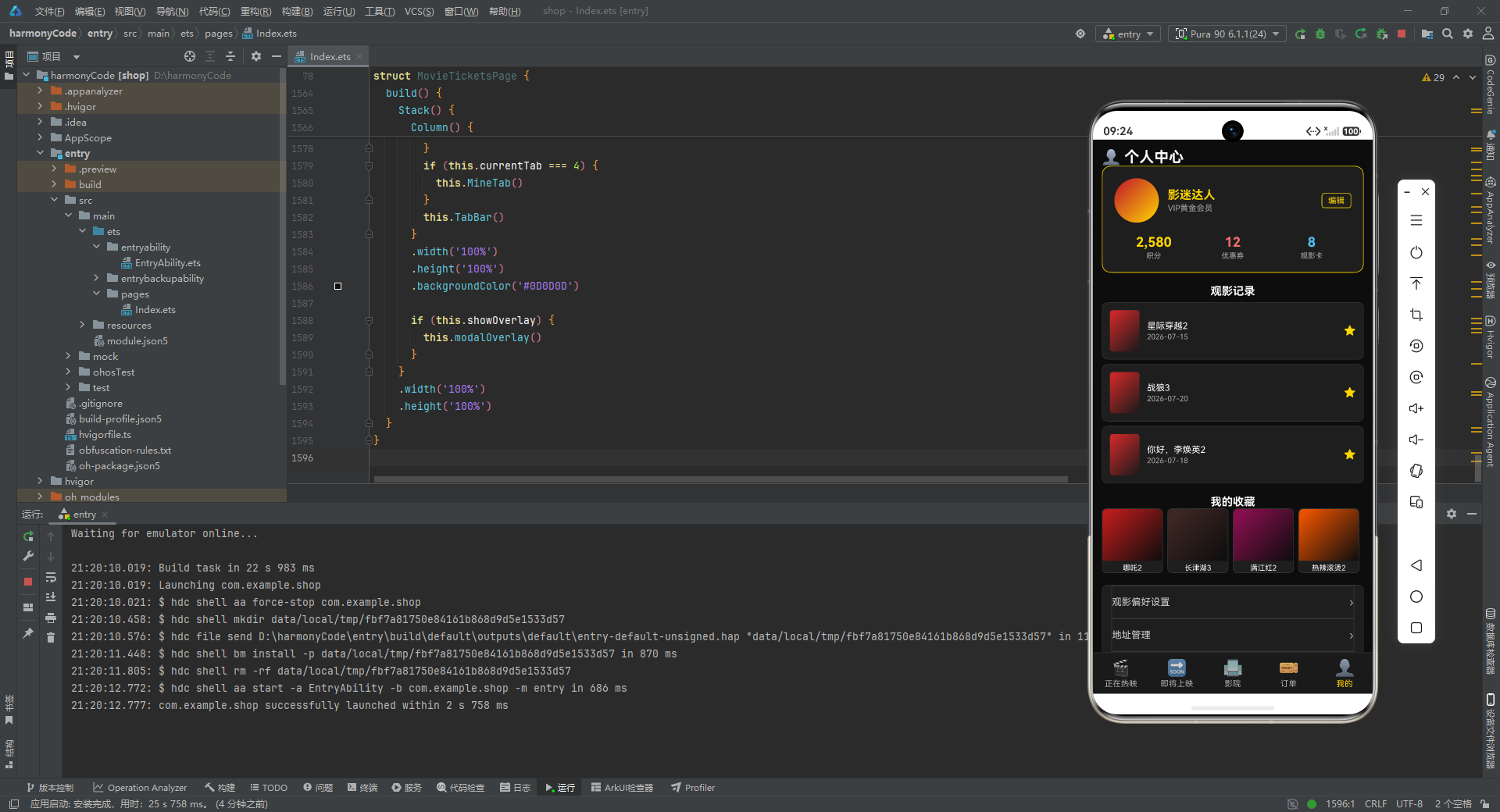
- 用户头像是一个 60x60 的圆形色块(
borderRadius(30)),使用从红色到金色的渐变,模拟一个有质感的头像占位。 - 昵称"影迷达人"用 16 号金色加粗字体,会员等级"VIP黄金会员"用 11 号灰色字体。
- 右侧"编辑"按钮是金色描边样式,用于跳转编辑资料页面。
14.2 数据统计区
        Row() {
          Column() {
            Text('2,580')
              .fontSize(18)
              .fontColor('#FFD700')
              .fontWeight(FontWeight.Bold)
            Text('积分')
              .fontSize(10)
              .fontColor('#AAAAAA')
              .margin({ top: 2 })
          }
          .layoutWeight(1)
          .alignItems(HorizontalAlign.Center)
          Column() {
            Text('12')
              .fontSize(18)
              .fontColor('#FF6B6B')
              .fontWeight(FontWeight.Bold)
            Text('优惠券')
              .fontSize(10)
              .fontColor('#AAAAAA')
              .margin({ top: 2 })
          }
          .layoutWeight(1)
          .alignItems(HorizontalAlign.Center)
          Column() {
            Text('8')
              .fontSize(18)
              .fontColor('#4FC3F7')
              .fontWeight(FontWeight.Bold)
            Text('观影卡')
              .fontSize(10)
              .fontColor('#AAAAAA')
              .margin({ top: 2 })
          }
          .layoutWeight(1)
          .alignItems(HorizontalAlign.Center)
        }
        .width('100%')
        .margin({ top: 16 })
      }
      .width('100%')
      .padding(16)
      .backgroundColor('#1E1E1E')
      .borderRadius(12)
      .border({ width: 1, color: '#FFD700' })
逐行解释:
- 三个数据统计项横向排列,各占三分之一宽度(
layoutWeight(1))。 - 积分(2,580)用金色,优惠券(12)用红色,观影卡(8)用蓝色,三种颜色形成视觉区分。
- 每个数字下方有对应的标签文字。
- 整个用户信息卡片使用 12vp 大圆角和金色边框,与个人中心的金色主题呼应。
14.3 观影记录
        Text('观影记录')
          .fontSize(15)
          .fontColor('#FFFFFF')
          .fontWeight(FontWeight.Bold)
          .margin({ top: 16 })
        ForEach([0, 1, 2], (i: number) => {
          Row() {
            Column()
              .width(40)
              .height(56)
              .linearGradient({
                angle: 135,
                colors: [['#C62828', 0.1], ['#1A1A1A', 1.0]]
              })
              .borderRadius(4)
            Column() {
              Text(`${this.movies[i].title}`)
                .fontSize(12)
                .fontColor('#FFFFFF')
              Text(`${this.movies[i].releaseDate}`)
                .fontSize(10)
                .fontColor('#AAAAAA')
                .margin({ top: 2 })
            }
            .layoutWeight(1)
            .padding({ left: 10 })
            .alignItems(HorizontalAlign.Start)
            Text('★')
              .fontSize(16)
              .fontColor('#FFD700')
          }
          .width('100%')
          .padding(10)
          .backgroundColor('#1E1E1E')
          .borderRadius(8)
          .border({ width: 1, color: '#333333' })
          .margin({ top: 6 })
        }, (i: number) => `${i}`)
逐行解释:
- 观影记录复用了 movies 数组的前三部电影数据(索引 0、1、2),展示用户最近观看的三部影片。
- 每条记录左侧是一个 40x56 的海报色块,右侧是电影名称和上映日期,最右侧是一个金色星号标记。
- 这里巧妙地复用了已有的 movies 数据,避免了额外定义观影记录数据结构。
14.4 我的收藏
        Text('我的收藏')
          .fontSize(15)
          .fontColor('#FFFFFF')
          .fontWeight(FontWeight.Bold)
          .margin({ top: 16 })
        Row() {
          ForEach([5, 6, 7, 11], (i: number) => {
            Column() {
              Column()
                .width('100%')
                .height(70)
                .linearGradient({
                  angle: 135,
                  colors: [[this.movies[i].posterColor, 0.1], ['#0D0D0D', 1.0]]
                })
                .borderRadius({ topLeft: 6, topRight: 6 })
              Text(`${this.movies[i].title}`)
                .fontSize(10)
                .fontColor('#FFFFFF')
                .maxLines(1)
                .margin({ top: 4 })
            }
            .layoutWeight(1)
            .backgroundColor('#1E1E1E')
            .borderRadius(6)
            .border({ width: 1, color: '#333333' })
            .margin({ right: 6 })
          }, (i: number) => `${i}`)
        }
        .width('100%')
逐行解释:
- 收藏区复用了 movies 数组中索引为 5、6、7、11 的四部电影(唐人街探案4、哪吒2、长津湖3、封神3)。
- 四个收藏项横向排列,各占四分之一宽度。
- 每个收藏项上方是 70vp 高的海报色块(使用电影各自的 posterColor),下方是电影名称(单行省略)。
margin({ right: 6 })让收藏项之间保持间距。
14.5 设置列表
        Column() {
          ForEach(['观影偏好设置', '地址管理', '客服中心', '关于我们'], (item: string, idx: number) => {
            Row() {
              Text(`${item}`)
                .fontSize(13)
                .fontColor('#CCCCCC')
              Text('›')
                .fontSize(16)
                .fontColor('#AAAAAA')
            }
            .width('100%')
            .justifyContent(FlexAlign.SpaceBetween)
            .padding({ top: 12, bottom: 12 })
            .border({ width: idx < 3 ? 1 : 0, color: '#333333' })
          }, (item: string) => item)
        }
        .width('100%')
        .padding({ left: 12, right: 12 })
        .backgroundColor('#1E1E1E')
        .borderRadius(8)
        .border({ width: 1, color: '#333333' })
        .margin({ top: 16 })
      }
      .width('100%')
      .padding(12)
    }
    .width('100%')
    .layoutWeight(1)
    .scrollBar(BarState.Off)
  }
}
逐行解释:
- 设置列表包含四项:观影偏好设置、地址管理、客服中心、关于我们。
- 每项左侧是文字标签,右侧是一个右尖括号"›"作为导航箭头。
border({ width: idx < 3 ? 1 : 0, color: '#333333' }):前三项之间有分隔线,最后一项不需要底部分隔线。这是一个常见的列表分隔线处理技巧——通过索引判断是否是最后一项来决定是否显示底边框。
十五、辅助方法
在组件的构建器之间,代码定义了几个辅助方法,用于数据查询和状态操作。
getSelectedMovie(): MovieItem {
  return this.movies.find((m: MovieItem) => m.id === this.selectedMovieId) || this.movies[0]
}

getSelectedOrder(): OrderItem {
  return this.orders.find((o: OrderItem) => o.id === this.selectedOrderId) || this.orders[0]
}
逐行解释:
getSelectedMovie():通过selectedMovieId从 movies 数组中查找对应的 MovieItem。使用Array.find()方法,如果找不到(比如初始状态 selectedMovieId 为 0),则返回 movies[0] 作为默认值,避免返回 undefined 导致后续访问报错。getSelectedOrder():同样的逻辑,通过selectedOrderId查找订单。
这种"查找 + 默认值"的防御性编程模式在 UI 开发中很重要,确保即使在状态未正确初始化的情况下,UI 也不会崩溃。
isSeatBooked(seat: string): boolean {
  return this.bookedSeats.indexOf(seat) >= 0
}

isSeatSelected(seat: string): boolean {
  return this.selectedSeats.indexOf(seat) >= 0
}
逐行解释:
isSeatBooked(seat):检查某个座位是否已被预订。通过indexOf在 bookedSeats 数组中查找,返回值大于等于 0 表示存在。isSeatSelected(seat):检查某个座位是否已被用户选中。同样的逻辑,在 selectedSeats 数组中查找。
toggleSeat(seat: string) {
  if (this.isSeatBooked(seat)) {
    return
  }
  if (this.isSeatSelected(seat)) {
    this.selectedSeats = this.selectedSeats.filter((s: string) => s !== seat)
  } else {
    this.selectedSeats = this.selectedSeats.concat([seat])
  }
}
逐行解释:
toggleSeat(seat):切换座位的选中状态,是选座交互的核心方法。- 第一步:如果座位已被预订,直接返回,不允许操作。
- 第二步:如果座位已被选中,使用
filter过滤掉该座位,实现取消选中。注意这里是通过重新赋值this.selectedSeats = ...而非直接修改数组,这是 ArkTS 响应式状态的要求——必须赋新值才能触发重新渲染。 - 第三步:如果座位未被选中,使用
concat将新座位添加到数组末尾。同样通过重新赋值触发响应式更新。
十六、选座网格组件
选座界面是电影票务应用中最复杂的交互之一。
@Builder
SeatGrid() {
  Column() {
    Text('银幕中央')
      .fontSize(10)
      .fontColor('#AAAAAA')
    Column()
      .width('80%')
      .height(4)
      .linearGradient({
        angle: 0,
        colors: [['#FFD700', 0.1], ['#FF6B6B', 1.0]]
      })
      .borderRadius(2)
      .margin({ top: 4, bottom: 12 })
逐行解释:
- 顶部先显示"银幕中央"文字和一个渐变色条,模拟影院银幕的视觉效果。色条宽度 80%,高度 4vp,从金色到红色的水平渐变。
margin({ top: 4, bottom: 12 })在色条上方留 4vp 间距,下方留 12vp 间距,让座位区与银幕之间有足够的空间。
    ForEach(this.seatRows, (row: string) => {
      Row() {
        Text(`${row}`)
          .fontSize(10)
          .fontColor('#AAAAAA')
          .width(16)
        ForEach(this.seatCols, (col: number) => {
          Text(`${col}`)
            .fontSize(11)
            .fontColor(this.isSeatBooked(`${row}${col}`) ? '#555555' :
              (this.isSeatSelected(`${row}${col}`) ? '#1A1A1A' : '#FFFFFF'))
            .backgroundColor(this.isSeatBooked(`${row}${col}`) ? '#333333' :
              (this.isSeatSelected(`${row}${col}`) ? '#FFD700' : '#1E1E1E'))
            .border({
              width: 1,
              color: this.isSeatBooked(`${row}${col}`) ? '#444444' :
                (this.isSeatSelected(`${row}${col}`) ? '#FFD700' : '#555555')
            })
            .borderRadius(4)
            .width(22)
            .height(22)
            .textAlign(TextAlign.Center)
            .margin({ left: 3, right: 3 })
            .decoration({ type: this.isSeatBooked(`${row}${col}`) ?
              TextDecorationType.LineThrough : TextDecorationType.None })
            .onClick(() => {
              this.toggleSeat(`${row}${col}`)
            })
        }, (col: number) => `${row}${col}`)
      }
      .margin({ bottom: 4 })
      .alignItems(VerticalAlign.Center)
    }, (row: string) => row)
  }
  .width('100%')
  .alignItems(HorizontalAlign.Center)
}
逐行解释:
- 外层
ForEach遍历 seatRows(A-H 共 8 行),为每行渲染一个 Row。 - 每行左侧显示行号字母(如"A"),宽度 16vp。
- 内层
ForEach遍历 seatCols(1-10 共 10 列),为每个座位渲染一个 Text 组件。 - 座位的座位标识为
${row}${col},如"A1""C5"等。 - 座位的字体颜色通过嵌套三元表达式决定:
- 已预订:深灰色(#555555)
- 已选中:深色(#1A1A1A,在金色背景上的对比色)
- 可选:白色(#FFFFFF)
- 背景色同样通过三元表达式决定:
- 已预订:深灰色(#333333)
- 已选中:金色(#FFD700)
- 可选:深灰色(#1E1E1E)
- 边框颜色:
- 已预订:更深的灰色(#444444)
- 已选中:金色(#FFD700)
- 可选:中灰色(#555555)
.decoration({ type: ... LineThrough ... }):已预订的座位添加删除线装饰,进一步强化"不可选"的视觉提示。这是一个很贴心的细节。.onClick(() => { this.toggleSeat(row{row}row{col}) }):点击座位时调用 toggleSeat 方法切换选中状态。- 键值函数
${row}${col}确保每个座位有唯一标识。
十七、购票弹窗
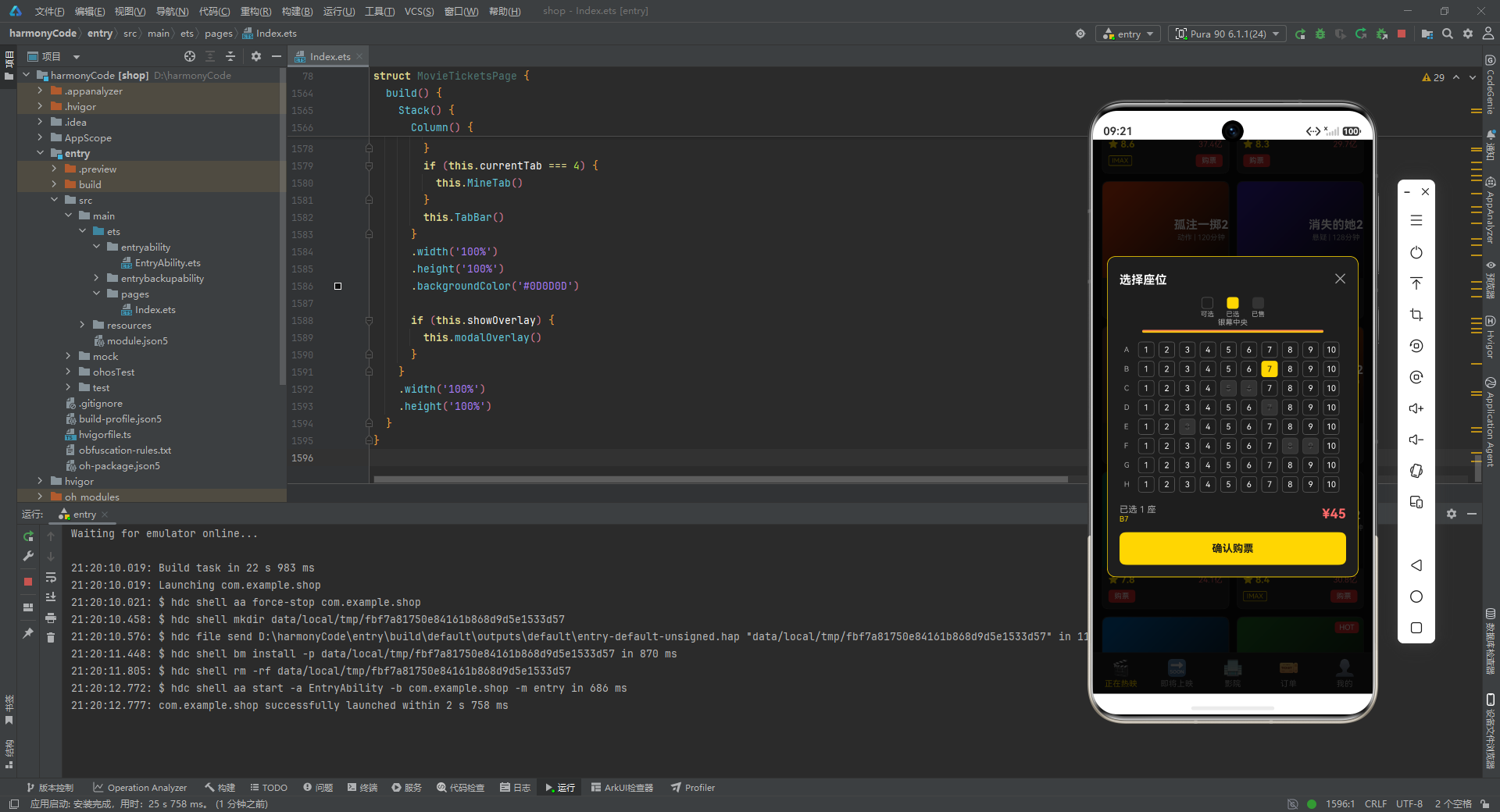
购票弹窗包含了选座图例、选座网格和确认按钮。
@Builder
BookModal() {
  Column() {
    Row() {
      Text('选择座位')
        .fontSize(16)
        .fontColor('#FFFFFF')
        .fontWeight(FontWeight.Bold)
      Text('✕')
        .fontSize(18)
        .fontColor('#AAAAAA')
        .onClick(() => {
          this.showOverlay = false
          this.selectedSeats = []
        })
    }
    .width('100%')
    .justifyContent(FlexAlign.SpaceBetween)
逐行解释:
- 弹窗顶部是标题栏:左侧"选择座位"标题,右侧关闭按钮"✕"。
- 点击关闭按钮时,同时隐藏弹窗(
showOverlay = false)和清空已选座位(selectedSeats = []),确保下次打开时是干净状态。
    Row() {
      Column() {
        Column()
          .width(16)
          .height(16)
          .backgroundColor('#1E1E1E')
          .border({ width: 1, color: '#555555' })
          .borderRadius(4)
        Text('可选')
          .fontSize(9)
          .fontColor('#AAAAAA')
          .margin({ top: 2 })
      }
      .alignItems(HorizontalAlign.Center)
      Column() {
        Column()
          .width(16)
          .height(16)
          .backgroundColor('#FFD700')
          .borderRadius(4)
        Text('已选')
          .fontSize(9)
          .fontColor('#AAAAAA')
          .margin({ top: 2 })
      }
      .alignItems(HorizontalAlign.Center)
      .margin({ left: 16 })
      Column() {
        Column()
          .width(16)
          .height(16)
          .backgroundColor('#333333')
          .borderRadius(4)
        Text('已售')
          .fontSize(9)
          .fontColor('#AAAAAA')
          .margin({ top: 2 })
      }
      .alignItems(HorizontalAlign.Center)
      .margin({ left: 16 })
    }
    .width('100%')
    .justifyContent(FlexAlign.Center)
    .margin({ top: 8 })
逐行解释:
- 图例区域展示了三种座位状态的色块和说明:可选(深灰色块)、已选(金色色块)、已售(更深的灰色块)。
- 三个图例项水平居中排列,后两项通过
margin({ left: 16 })保持间距。 - 图例的颜色与 SeatGrid 中座位的状态颜色完全对应,确保用户能正确理解颜色含义。
    this.SeatGrid()

    Row() {
      Column() {
        Text(`已选 ${this.selectedSeats.length} 座`)
          .fontSize(12)
          .fontColor('#AAAAAA')
        Text(`${this.selectedSeats.join(', ') || '未选择'}`)
          .fontSize(10)
          .fontColor('#FFD700')
          .maxLines(1)
          .textOverflow({ overflow: TextOverflow.Ellipsis })
      }
      .layoutWeight(1)
      .alignItems(HorizontalAlign.Start)
      Text(`¥${this.selectedSeats.length * 45}`)
        .fontSize(18)
        .fontColor('#FF6B6B')
        .fontWeight(FontWeight.Bold)
    }
    .width('100%')
    .margin({ top: 12 })
    .alignItems(VerticalAlign.Center)
逐行解释:
- 调用
this.SeatGrid()渲染选座网格。 - 底部信息栏左侧显示已选座位数量和具体座位列表。
selectedSeats.join(', ')将数组用逗号连接成字符串,如果数组为空则显示"未选择"。 - 右侧显示总价
¥${this.selectedSeats.length * 45},每个座位 45 元,选中数量乘以单价即为总价。18 号红色加粗字体让价格醒目。
    Row() {
      Text('确认购票')
        .fontSize(14)
        .fontColor('#1A1A1A')
        .fontWeight(FontWeight.Bold)
    }
    .width('100%')
    .height(44)
    .backgroundColor(this.selectedSeats.length > 0 ? '#FFD700' : '#444444')
    .borderRadius(8)
    .justifyContent(FlexAlign.Center)
    .alignItems(VerticalAlign.Center)
    .margin({ top: 12 })
    .onClick(() => {
      this.showOverlay = false
      this.selectedSeats = []
    })
  }
  .width('90%')
  .padding(16)
  .backgroundColor('#1E1E1E')
  .borderRadius(12)
  .border({ width: 1, color: '#FFD700' })
}
逐行解释:
- "确认购票"按钮的背景色通过三元表达式决定:如果已选座位数量大于 0,显示金色(可点击状态);否则显示灰色(不可用状态)。
- 点击确认按钮后关闭弹窗并清空已选座位。
- 弹窗整体宽度 90%,16vp 内边距,12vp 圆角,金色边框。
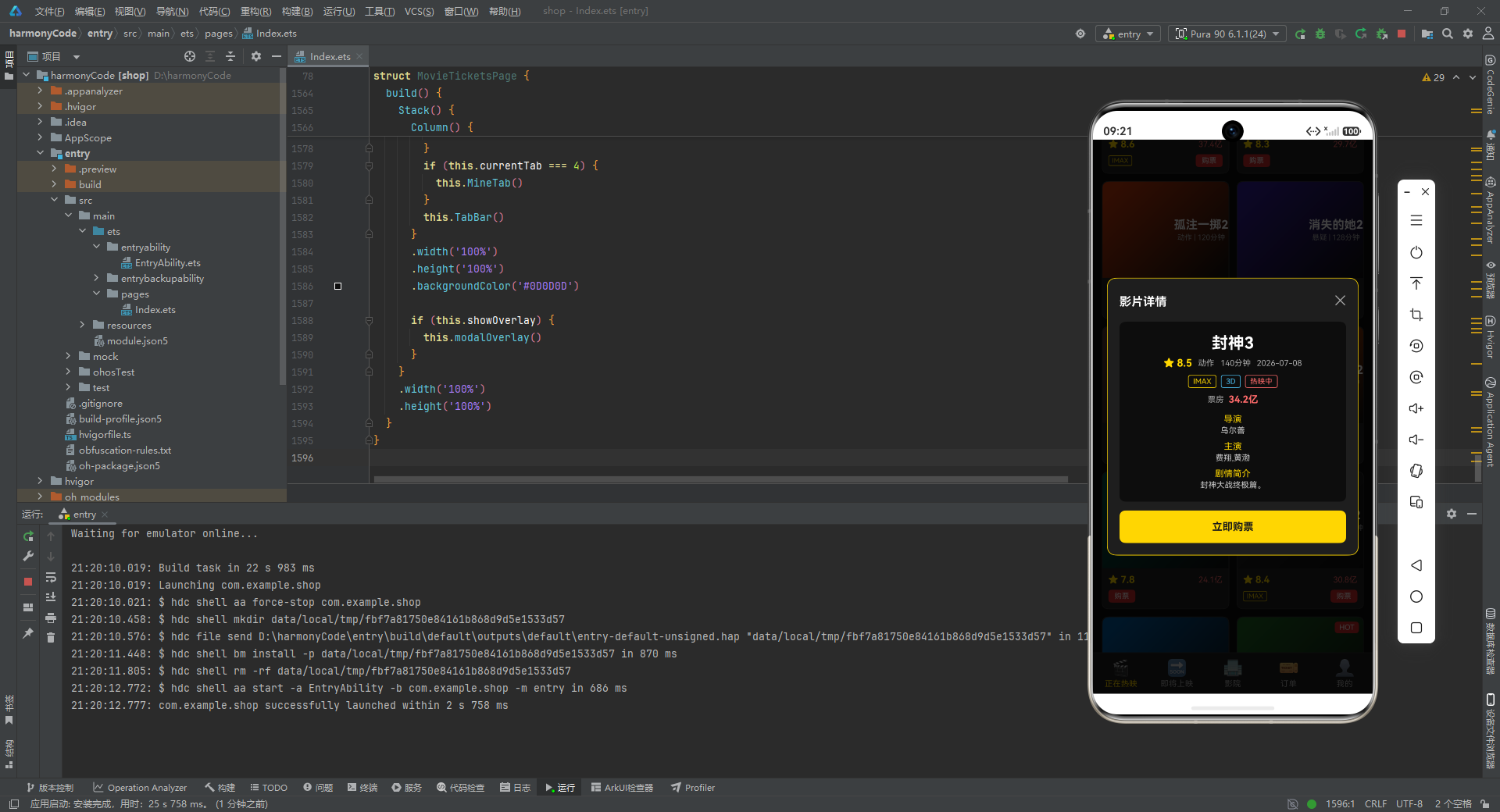
十八、影片详情弹窗
详情弹窗展示了电影的完整信息,并提供购票入口。
@Builder
DetailModal() {
  Column() {
    Row() {
      Text('影片详情')
        .fontSize(16)
        .fontColor('#FFFFFF')
        .fontWeight(FontWeight.Bold)
      Text('✕')
        .fontSize(18)
        .fontColor('#AAAAAA')
        .onClick(() => {
          this.showOverlay = false
        })
    }
    .width('100%')
    .justifyContent(FlexAlign.SpaceBetween)
逐行解释:
- 顶部标题栏与购票弹窗一致,点击"✕"关闭弹窗(只关闭,不清空座位,因为详情弹窗不涉及选座)。
    Column() {
      Text(`${this.getSelectedMovie().title}`)
        .fontSize(22)
        .fontColor('#FFFFFF')
        .fontWeight(FontWeight.Bold)
      Row() {
        Text(`★ ${this.getSelectedMovie().rating}`)
          .fontSize(14)
          .fontColor('#FFD700')
          .fontWeight(FontWeight.Bold)
        Text(`${this.getSelectedMovie().genre}`)
          .fontSize(11)
          .fontColor('#AAAAAA')
          .margin({ left: 8 })
        Text(`${this.getSelectedMovie().duration}分钟`)
          .fontSize(11)
          .fontColor('#AAAAAA')
          .margin({ left: 8 })
        Text(`${this.getSelectedMovie().releaseDate}`)
          .fontSize(11)
          .fontColor('#AAAAAA')
          .margin({ left: 8 })
      }
      .alignItems(VerticalAlign.Center)
      .margin({ top: 6 })
逐行解释:
- 通过
this.getSelectedMovie()获取当前选中的电影对象,然后在弹窗中展示其详细信息。 - 电影标题用 22 号白色加粗字体,是弹窗中最大的文字。
- 评分、类型、片长、上映日期横向排列,评分用金色,其余用灰色,通过
margin({ left: 8 })保持间距。
      Row() {
        if (this.getSelectedMovie().isImax) {
          Text('IMAX')
            .fontSize(10)
            .fontColor('#FFD700')
            .border({ width: 1, color: '#FFD700' })
            .padding({ left: 6, right: 6, top: 2, bottom: 2 })
            .borderRadius(3)
        }
        if (this.getSelectedMovie().is3D) {
          Text('3D')
            .fontSize(10)
            .fontColor('#4FC3F7')
            .border({ width: 1, color: '#4FC3F7' })
            .padding({ left: 6, right: 6, top: 2, bottom: 2 })
            .borderRadius(3)
            .margin({ left: 6 })
        }
        if (this.getSelectedMovie().isHot) {
          Text('热映中')
            .fontSize(10)
            .fontColor('#FF6B6B')
            .border({ width: 1, color: '#FF6B6B' })
            .padding({ left: 6, right: 6, top: 2, bottom: 2 })
            .borderRadius(3)
            .margin({ left: 6 })
        }
      }
      .margin({ top: 8 })
逐行解释:
- 标签区域根据电影属性条件渲染 IMAX、3D、热映中三个标签,样式与 MovieCard 中的标签一致。
- 每个标签通过
if条件判断是否显示,后两个标签通过margin({ left: 6 })保持与前面标签的间距。
      Row() {
        Text('票房')
          .fontSize(11)
          .fontColor('#AAAAAA')
        Text(`${this.getSelectedMovie().boxOffice}亿`)
          .fontSize(13)
          .fontColor('#FF6B6B')
          .fontWeight(FontWeight.Bold)
          .margin({ left: 6 })
      }
      .margin({ top: 8 })
      .alignItems(VerticalAlign.Center)

      Text('导演')
        .fontSize(12)
        .fontColor('#FFD700')
        .margin({ top: 12 })
      Text(`${this.getSelectedMovie().director}`)
        .fontSize(11)
        .fontColor('#CCCCCC')
        .margin({ top: 2 })

      Text('主演')
        .fontSize(12)
        .fontColor('#FFD700')
        .margin({ top: 8 })
      Text(`${this.getSelectedMovie().cast}`)
        .fontSize(11)
        .fontColor('#CCCCCC')
        .margin({ top: 2 })

      Text('剧情简介')
        .fontSize(12)
        .fontColor('#FFD700')
        .margin({ top: 8 })
      Text(`${this.getSelectedMovie().synopsis}`)
        .fontSize(11)
        .fontColor('#CCCCCC')
        .margin({ top: 2 })
    }
    .width('100%')
    .padding(16)
    .backgroundColor('#0D0D0D')
    .borderRadius(8)
    .margin({ top: 12 })
逐行解释:
- 票房信息行:左侧灰色"票房"标签,右侧红色加粗的票房数字。
- 导演信息:金色标签 + 灰色内容。
- 主演信息:金色标签 + 灰色内容。
- 剧情简介:金色标签 + 灰色内容。
- 这部分信息容器使用深黑色背景(#0D0D0D),与弹窗主体的深灰色(#1E1E1E)形成层次区分,让信息区域在视觉上成为一个独立的卡片。
    Row() {
      Text('立即购票')
        .fontSize(14)
        .fontColor('#1A1A1A')
        .fontWeight(FontWeight.Bold)
    }
    .width('100%')
    .height(44)
    .backgroundColor('#FFD700')
    .borderRadius(8)
    .justifyContent(FlexAlign.Center)
    .alignItems(VerticalAlign.Center)
    .margin({ top: 12 })
    .onClick(() => {
      this.overlayType = 'book'
      this.selectedSeats = []
    })
  }
  .width('90%')
  .constraintSize({ maxHeight: '80%' })
  .padding(16)
  .backgroundColor('#1E1E1E')
  .borderRadius(12)
  .border({ width: 1, color: '#FFD700' })
}
逐行解释:
- "立即购票"按钮是金色实心按钮,深色文字。
- 点击后不关闭弹窗,而是将
overlayType改为 ‘book’,从详情弹窗切换到选座弹窗。同时清空 selectedSeats,确保选座界面是干净状态。 constraintSize({ maxHeight: '80%' })限制弹窗最大高度为屏幕的 80%,防止内容过多时弹窗超出屏幕。
十九、改签弹窗
改签弹窗允许用户选择新的放映场次。
@Builder
EditModal() {
  Column() {
    Row() {
      Text('改签订单')
        .fontSize(16)
        .fontColor('#FFFFFF')
        .fontWeight(FontWeight.Bold)
      Text('✕')
        .fontSize(18)
        .fontColor('#AAAAAA')
        .onClick(() => {
          this.showOverlay = false
        })
    }
    .width('100%')
    .justifyContent(FlexAlign.SpaceBetween)

    Column() {
      Text(`${this.getSelectedOrder().movieTitle}`)
        .fontSize(15)
        .fontColor('#FFFFFF')
        .fontWeight(FontWeight.Bold)
      Text(`${this.getSelectedOrder().cinemaName}`)
        .fontSize(11)
        .fontColor('#AAAAAA')
        .margin({ top: 4 })
      Text(`当前: ${this.getSelectedOrder().hall} | ${this.getSelectedOrder().seat}`)
        .fontSize(11)
        .fontColor('#FFD700')
        .margin({ top: 4 })
      Text(`原场次: ${this.getSelectedOrder().showTime}`)
        .fontSize(11)
        .fontColor('#AAAAAA')
        .margin({ top: 4 })
    }
    .width('100%')
    .padding(12)
    .backgroundColor('#0D0D0D')
    .borderRadius(8)
    .margin({ top: 12 })
逐行解释:
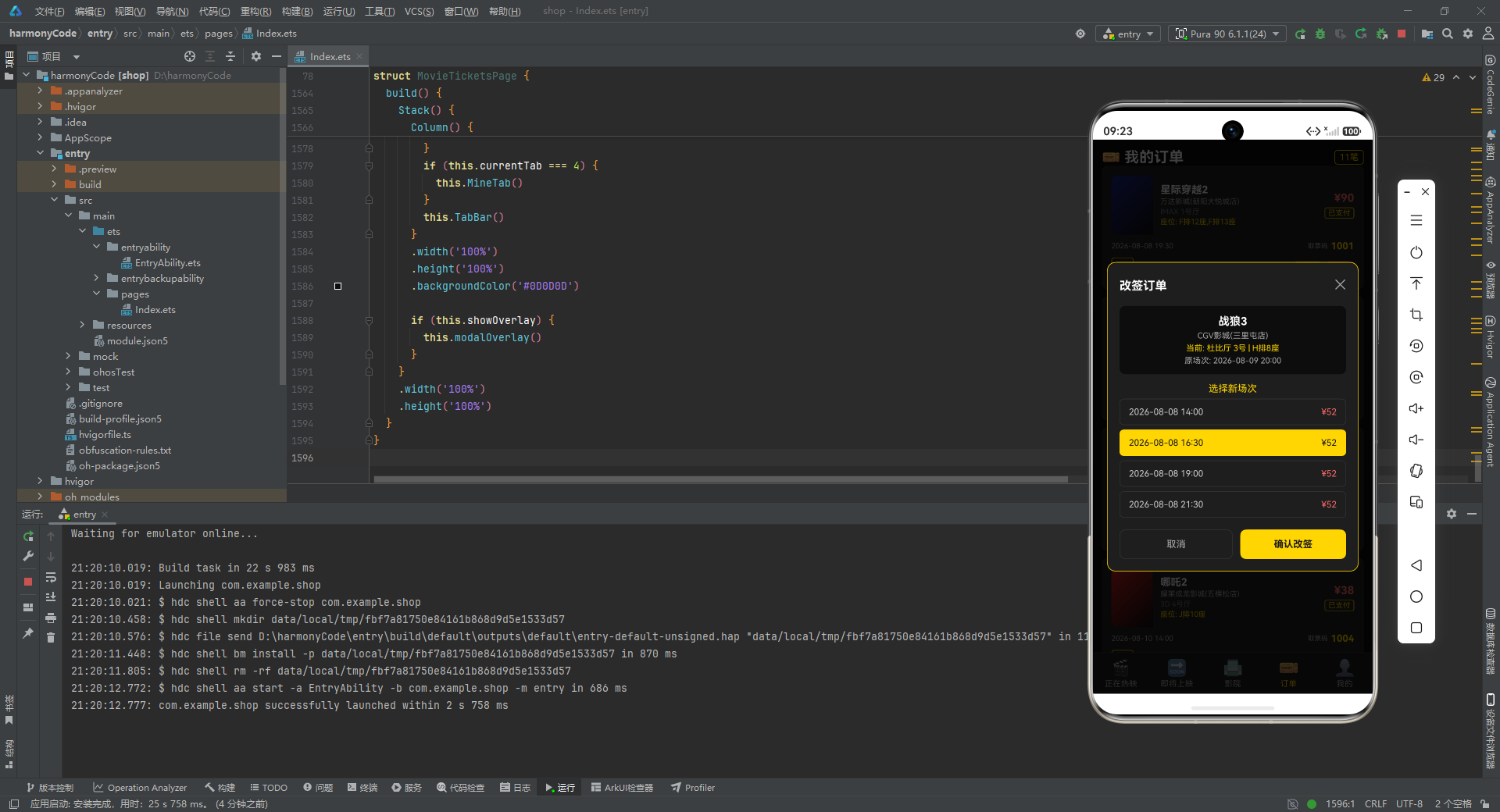
- 通过
this.getSelectedOrder()获取当前选中的订单,展示电影名称、影院名称、当前影厅和座位、原场次时间。 - 当前影厅和座位用金色突出,原场次时间用灰色,形成"当前信息 vs 待选择信息"的视觉对比。
    Text('选择新场次')
      .fontSize(13)
      .fontColor('#FFD700')
      .margin({ top: 12 })
    ForEach(['2026-08-08 14:00', '2026-08-08 16:30', '2026-08-08 19:00', '2026-08-08 21:30'],
      (time: string, idx: number) => {
        Row() {
          Text(`${time}`)
            .fontSize(12)
            .fontColor(idx === 1 ? '#1A1A1A' : '#CCCCCC')
          Text(`¥${this.getSelectedOrder().price}`)
            .fontSize(12)
            .fontColor(idx === 1 ? '#1A1A1A' : '#FF6B6B')
        }
        .width('100%')
        .padding({ left: 12, right: 12, top: 10, bottom: 10 })
        .backgroundColor(idx === 1 ? '#FFD700' : '#1E1E1E')
        .borderRadius(6)
        .border({ width: 1, color: idx === 1 ? '#FFD700' : '#333333' })
        .justifyContent(FlexAlign.SpaceBetween)
        .margin({ top: 6 })
      }, (time: string) => time)
逐行解释:
- 提供四个可选的新场次,都是同一天的不同时间段。
idx === 1的判断让第二个场次(16:30)处于选中状态——金色背景、深色文字。这模拟了"默认选中一个场次"的交互。- 其余场次为深色背景、灰色文字和红色价格。
- 每个场次右侧显示价格,与原订单价格相同。
- 在实际应用中,这里应该用
@State变量来管理选中的场次索引,让用户可以点击切换。当前代码是静态展示选中状态的演示。
    Row() {
      Text('取消')
        .fontSize(13)
        .fontColor('#AAAAAA')
        .layoutWeight(1)
        .height(40)
        .border({ width: 1, color: '#333333' })
        .borderRadius(8)
        .textAlign(TextAlign.Center)
        .onClick(() => {
          this.showOverlay = false
        })
      Text('确认改签')
        .fontSize(13)
        .fontColor('#1A1A1A')
        .fontWeight(FontWeight.Bold)
        .layoutWeight(1)
        .height(40)
        .backgroundColor('#FFD700')
        .borderRadius(8)
        .textAlign(TextAlign.Center)
        .margin({ left: 10 })
        .onClick(() => {
          this.showOverlay = false
        })
    }
    .width('100%')
    .margin({ top: 16 })
    .alignItems(VerticalAlign.Center)
  }
  .width('90%')
  .padding(16)
  .backgroundColor('#1E1E1E')
  .borderRadius(12)
  .border({ width: 1, color: '#FFD700' })
}
逐行解释:
- 底部是"取消"和"确认改签"两个按钮,各占一半宽度(
layoutWeight(1))。 - "取消"按钮是灰色描边样式,点击关闭弹窗。
- "确认改签"按钮是金色实心样式,点击也关闭弹窗(实际应用中这里应该执行改签逻辑)。
- 两个按钮之间通过
margin({ left: 10 })保持间距。 textAlign(TextAlign.Center)让按钮文字水平居中。注意这里用textAlign而非justifyContent,因为 Text 组件本身的文字对齐用textAlign属性。
二十、退票弹窗
退票弹窗是一个确认对话框,用警示风格提醒用户退票的后果。
@Builder
CancelModal() {
  Column() {
    Text('⚠️')
      .fontSize(36)
    Text('确认退票?')
      .fontSize(17)
      .fontColor('#FFFFFF')
      .fontWeight(FontWeight.Bold)
      .margin({ top: 8 })
    Text(`${this.getSelectedOrder().movieTitle}`)
      .fontSize(13)
      .fontColor('#FFD700')
      .margin({ top: 8 })
    Text(`${this.getSelectedOrder().showTime}`)
      .fontSize(11)
      .fontColor('#AAAAAA')
      .margin({ top: 4 })
    Text(`退款金额: ¥${this.getSelectedOrder().price}`)
      .fontSize(13)
      .fontColor('#FF6B6B')
      .fontWeight(FontWeight.Bold)
      .margin({ top: 8 })
    Text('退票将收取5%手续费,退款原路返回')
      .fontSize(10)
      .fontColor('#777777')
      .margin({ top: 4 })
逐行解释:
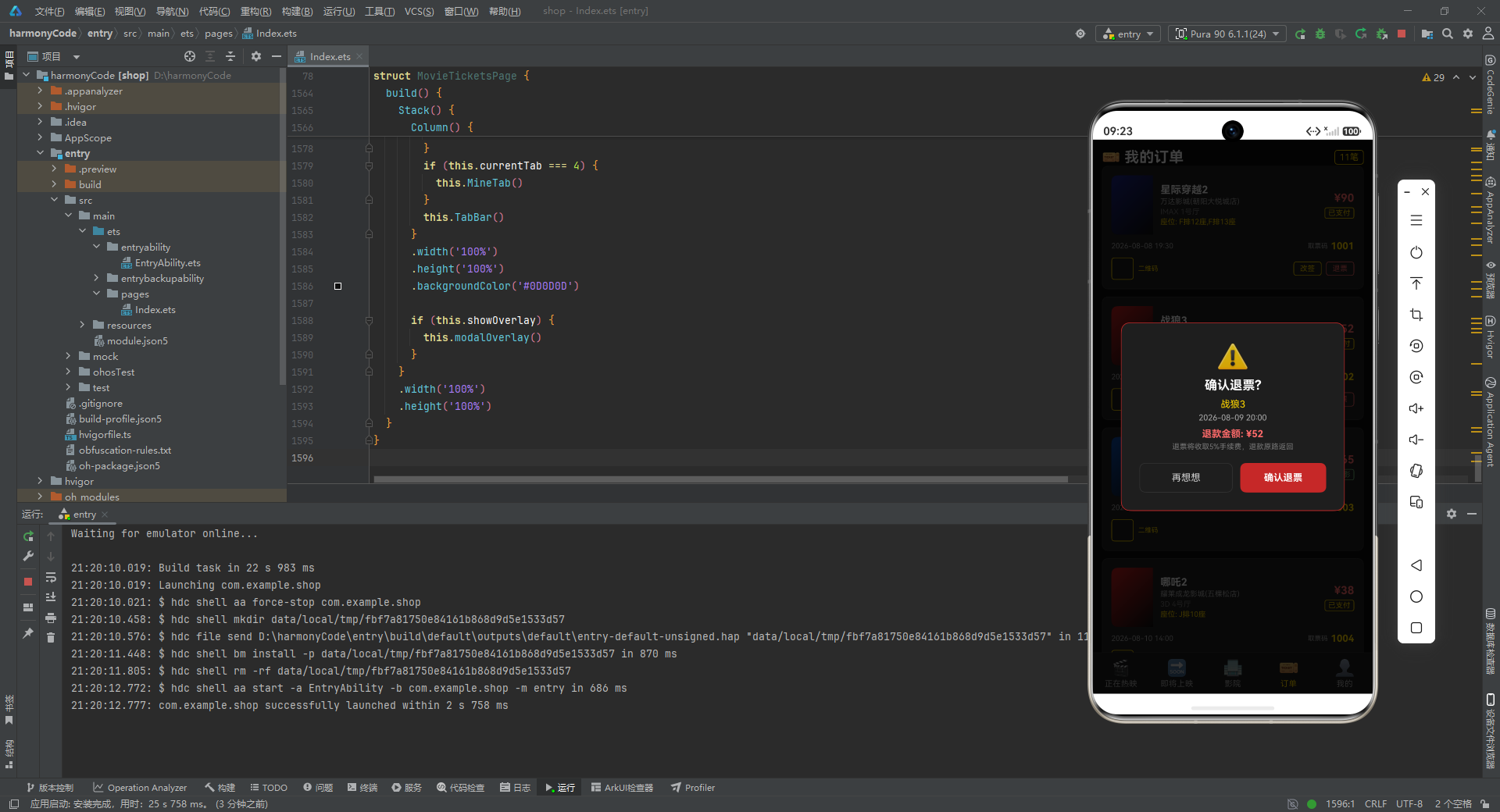
- 弹窗顶部是一个 36 号字体的警告图标"⚠️",用大字号增强视觉冲击力。
- "确认退票?"用 17 号白色加粗字体作为主标题。
- 电影名称用金色,放映时间用灰色。
- 退款金额用 13 号红色加粗字体突出显示。
- 底部用 10 号深灰色文字说明退票规则:“退票将收取5%手续费,退款原路返回”。这个提示信息对于用户决策至关重要。
    Row() {
      Text('再想想')
        .fontSize(13)
        .fontColor('#CCCCCC')
        .layoutWeight(1)
        .height(40)
        .border({ width: 1, color: '#333333' })
        .borderRadius(8)
        .textAlign(TextAlign.Center)
        .onClick(() => {
          this.showOverlay = false
        })
      Text('确认退票')
        .fontSize(13)
        .fontColor('#FFFFFF')
        .fontWeight(FontWeight.Bold)
        .layoutWeight(1)
        .height(40)
        .backgroundColor('#C62828')
        .borderRadius(8)
        .textAlign(TextAlign.Center)
        .margin({ left: 10 })
        .onClick(() => {
          this.showOverlay = false
        })
    }
    .width('100%')
    .margin({ top: 16 })
    .alignItems(VerticalAlign.Center)
  }
  .width('80%')
  .padding(24)
  .backgroundColor('#1E1E1E')
  .borderRadius(12)
  .border({ width: 1, color: '#C62828' })
  .alignItems(HorizontalAlign.Center)
}
逐行解释:
- 底部两个按钮:“再想想”(取消)和"确认退票"。
- "再想想"按钮是灰色描边样式,文字"再想想"比"取消"更人性化,符合退票场景的语境。
- "确认退票"按钮是红色实心样式(#C62828),红色与退票的警示主题一致。
- 弹窗整体宽度 80%(比其他弹窗的 90% 更窄),让退票弹窗看起来更像一个集中的确认对话框。
- 边框颜色使用红色(#C62828)而非金色,进一步强化警示氛围。
alignItems(HorizontalAlign.Center)让弹窗内所有内容水平居中。
二十一、弹窗容器与主构建方法
21.1 弹窗容器
所有弹窗都通过一个统一的容器组件来管理:
@Builder
modalOverlay() {
  Column() {
    if (this.overlayType === 'book') {
      this.BookModal()
    }
    if (this.overlayType === 'detail') {
      this.DetailModal()
    }
    if (this.overlayType === 'edit') {
      this.EditModal()
    }
    if (this.overlayType === 'cancel') {
      this.CancelModal()
    }
  }
  .width('100%')
  .height('100%')
  .backgroundColor('rgba(0,0,0,0.75)')
  .justifyContent(FlexAlign.Center)
  .alignItems(HorizontalAlign.Center)
  .onClick(() => {
    this.showOverlay = false
    this.selectedSeats = []
  })
}
逐行解释:
modalOverlay是弹窗的遮罩层容器,覆盖整个屏幕。- 通过四个
if判断overlayType的值,渲染对应的弹窗组件。这种设计让新增弹窗类型变得简单——只需新增一个 if 分支即可。 - 遮罩层背景色为半透明黑色
rgba(0,0,0,0.75),让背景内容变暗,突出弹窗内容。 justifyContent(FlexAlign.Center)和alignItems(HorizontalAlign.Center)让弹窗在屏幕中央显示。onClick回调:点击遮罩层的空白区域(弹窗外部)时关闭弹窗并清空已选座位。这是一种常见的弹窗关闭交互——点击遮罩层即关闭。
注意:由于 onClick 绑定在最外层 Column 上,点击弹窗内部任何区域时事件会冒泡到外层,也会触发关闭。在实际应用中,需要在弹窗内部阻止事件冒泡,或者使用 hitTestBehavior 属性来控制事件处理行为。
21.2 主构建方法
最后是整个页面的入口构建方法:
build() {
  Stack() {
    Column() {
      if (this.currentTab === 0) {
        this.HotTab()
      }
      if (this.currentTab === 1) {
        this.ComingTab()
      }
      if (this.currentTab === 2) {
        this.CinemaTab()
      }
      if (this.currentTab === 3) {
        this.OrderTab()
      }
      if (this.currentTab === 4) {
        this.MineTab()
      }
      this.TabBar()
    }
    .width('100%')
    .height('100%')
    .backgroundColor('#0D0D0D')

    if (this.showOverlay) {
      this.modalOverlay()
    }
  }
  .width('100%')
  .height('100%')
}
逐行解释:
build()是每个组件必须实现的方法,返回组件的 UI 结构。- 最外层使用
Stack(层叠布局),让页面内容和弹窗遮罩层可以叠加显示。 - 内层
Column是页面主体:- 通过五个
if判断currentTab的值,渲染对应的 Tab 页面内容。只有当前 Tab 的内容会被渲染,其他 Tab 的内容不会出现在组件树中,节省了渲染资源。 - 底部固定渲染
TabBar()导航栏。 - 整体背景色为深黑色(#0D0D0D),与应用的深色主题一致。
- 通过五个
if (this.showOverlay):当 showOverlay 为 true 时,在 Stack 上层叠加渲染 modalOverlay 弹窗遮罩层。由于 Stack 的层叠特性,弹窗会覆盖在页面内容之上。- 整个 Stack 占满屏幕的 100% 宽度和高度。
这种"Stack + 条件渲染弹窗"的模式是 ArkTS 中实现全局弹窗的常用方案。它的优势是弹窗逻辑集中、不侵入页面内容结构、可以方便地控制显隐。
二十二、关键特性对比表
下面用表格总结本应用中各个核心模块的关键特性:
| 模块 | 功能描述 | 核心状态变量 | 关键交互 | 视觉特色 |
|---|---|---|---|---|
| 正在热映 | 展示热映电影列表和票房趋势图 | currentTab, selectedMovieId | 点击卡片打开详情弹窗 | 渐变海报色块、柱状图、网格布局 |
| 即将上映 | 展示即将上映电影和期待值 | currentTab | 浏览信息(无弹窗交互) | 倒计时数字、期待值进度条 |
| 影院列表 | 展示附近影院和服务信息 | currentTab, selectedCinemaId | 浏览影院信息 | 服务标签图标、距离与评分展示 |
| 订单管理 | 展示订单列表和操作按钮 | currentTab, selectedOrderId | 改签/退票/去支付 | 状态标签、取票码、二维码占位 |
| 个人中心 | 展示用户信息和观影记录 | currentTab | 浏览个人信息 | 数据统计、收藏网格、设置列表 |
| 影片详情弹窗 | 展示电影完整信息 | showOverlay, overlayType, selectedMovieId | 点击"立即购票"切换到选座 | 信息分区展示、金色标签 |
| 选座购票弹窗 | 选择座位并确认购票 | showOverlay, overlayType, selectedSeats | 点击座位切换选中状态 | 座位网格、三态颜色、删除线 |
| 改签弹窗 | 选择新放映场次 | showOverlay, overlayType, selectedOrderId | 选择场次并确认 | 场次列表、默认选中高亮 |
| 退票弹窗 | 确认退票操作 | showOverlay, overlayType, selectedOrderId | 确认或取消退票 | 警示图标、红色主题、退款说明 |
| 底部导航栏 | 在五个页面之间切换 | currentTab | 点击 Tab 切换页面 | 金色高亮、emoji 图标 |
| 票房趋势图 | 展示本周票房柱状图 | weeklyData, weekLabels | 纯展示无交互 | 渐变柱子、数据缩放 |
二十三、设计模式与技术亮点总结
23.1 状态驱动 UI
整个应用严格遵循"状态驱动 UI"的声明式编程范式。所有的 UI 变化都由 @State 变量的变化来触发:
currentTab的变化驱动页面切换。showOverlay和overlayType的变化驱动弹窗的显示与类型切换。selectedSeats的变化驱动选座界面的座位颜色更新。selectedMovieId和selectedOrderId的变化驱动详情弹窗和改签/退票弹窗的内容更新。
开发者无需手动操作 DOM 或调用渲染方法,只需修改状态变量,框架会自动计算差异并更新对应的 UI 部分。
23.2 元数据映射模式
应用大量使用了"映射表"模式来管理业务状态的展示信息。genreMap、statusMap、orderStatusMap、serviceMap 四个映射表分别管理电影类型、电影状态、订单状态和影院服务的标签、颜色、图标。这种模式的优势在于:
- 展示信息集中管理,修改一处即可全局生效。
- 数据层与展示层解耦,业务数据只存 key(如 ‘imax’),展示时再查表获取完整信息。
- 新增类型或状态时,只需在映射表中添加一条记录,无需修改多处代码。
23.3 组件化与复用
应用通过 @Builder 装饰器将 UI 拆分为多个可复用的构建器:TabBar、StarRating、MovieCard、WeeklyChart、ComingCard、CinemaCard、OrderCard、SeatGrid 等。每个构建器专注于一个 UI 片段的构建,职责单一、接口清晰。这种组件化设计使得:
- 代码结构清晰,易于维护。
- 组件可以在不同页面间复用(如 MovieCard 在 HotTab 和 MineTab 中都有使用)。
- 修改某个组件的样式或行为时,影响范围可控。
23.4 统一的弹窗管理
应用通过 showOverlay + overlayType 两个状态变量统一管理四种弹窗(详情、购票、改签、退票)。这种设计的优势在于:
- 弹窗逻辑集中收口,不会散落在各处。
- 新增弹窗类型只需添加一个
@Builder和一个 if 分支。 - 弹窗的显隐通过修改状态变量控制,与声明式 UI 范式一致。
23.5 深色主题与色彩体系
整个应用采用深色主题设计,背景色从 #0D0D0D(最深)到 #1E1E1E(卡片背景)到 #1A1A1A(导航栏)形成层次。金色(#FFD700)作为主强调色贯穿全局,用于高亮、标签、按钮等关键元素。红色(#C62828、#FF6B6B)用于价格、警告和行动按钮。蓝色(#4FC3F7)用于 3D 标签等辅助元素。这种统一的色彩体系让应用在视觉上保持一致性和专业感。
23.6 渐变色块替代图片
由于没有使用真实图片资源,应用巧妙地使用 linearGradient 渐变色块来模拟电影海报、影院图标、用户头像等视觉元素。每个电影都有自己的 posterColor 主题色,配合从主题色到深黑色的 135 度渐变,营造出海报的氛围感。这种做法在原型开发和演示场景中非常实用,既节省了图片资源,又保持了视觉效果的丰富性。
23.7 防御性编程
代码中多处体现了防御性编程的思想:
getSelectedMovie()和getSelectedOrder()在查找失败时返回默认值,避免 undefined 导致的运行时错误。toggleSeat()在操作前先检查座位是否已被预订,防止非法操作。- 文本组件大量使用
maxLines和textOverflow限制显示行数,防止长文本破坏布局。 constraintSize限制弹窗最大高度,防止内容过多时超出屏幕。
23.8 条件渲染的灵活运用
应用大量使用 if 条件渲染来控制 UI 元素的显示:
- 根据电影属性(isHot、isImax、is3D)决定是否显示对应标签。
- 根据订单状态(paid、pending)决定显示哪些操作按钮。
- 根据
currentTab决定渲染哪个页面。 - 根据
overlayType决定渲染哪个弹窗。
条件渲染让 UI 能够根据数据动态变化,是声明式 UI 的核心能力之一。
安装DevEco Studio程序

选择目标安装目录:

设置环境变量,但是需要重启一下:

新建一个空白模板:

设置API为24的模板项目:

初始化项目,自动下载相关依赖:

完整代码:
// 电影票务 - HarmonyOS ArkTS
interface GenreMeta {
key: string
label: string
color: string
}
interface MovieStatusMeta {
key: string
label: string
color: string
}
interface OrderStatusMeta {
key: string
label: string
color: string
}
interface CinemaServiceMeta {
key: string
label: string
icon: string
}
interface MovieItem {
id: number
title: string
genre: string
duration: number
director: string
cast: string
rating: number
boxOffice: number
releaseDate: string
status: string
posterColor: string
synopsis: string
isHot: boolean
isImax: boolean
is3D: boolean
}
interface ComingMovie {
id: number
title: string
genre: string
releaseDate: string
director: string
cast: string
expectation: number
posterColor: string
synopsis: string
daysUntil: number
}
interface CinemaItem {
id: number
name: string
address: string
distance: number
price: number
halls: number
services: string[]
rating: number
phone: string
isVip: boolean
}
interface OrderItem {
id: number
movieTitle: string
cinemaName: string
hall: string
seat: string
showTime: string
price: number
status: string
orderTime: string
posterColor: string
}
@Entry
@Component
struct MovieTicketsPage {
@State currentTab: number = 0
@State showOverlay: boolean = false
@State overlayType: string = ''
@State selectedMovieId: number = 0
@State selectedOrderId: number = 0
@State selectedCinemaId: number = 0
@State selectedSeats: string[] = []
@State weeklyData: number[] = [320, 480, 290, 610, 750, 920, 540]
@State weekLabels: string[] = ['周一', '周二', '周三', '周四', '周五', '周六', '周日']
private genreMap: Record<string, GenreMeta> = {
'科幻': { key: '科幻', label: '科幻', color: '#4FC3F7' },
'动作': { key: '动作', label: '动作', color: '#FF7043' },
'喜剧': { key: '喜剧', label: '喜剧', color: '#FFD54F' },
'爱情': { key: '爱情', label: '爱情', color: '#F06292' },
'悬疑': { key: '悬疑', label: '悬疑', color: '#9575CD' },
'动画': { key: '动画', label: '动画', color: '#81C784' },
'战争': { key: '战争', label: '战争', color: '#A1887F' },
'恐怖': { key: '恐怖', label: '恐怖', color: '#90A4AE' }
}
private statusMap: Record<string, MovieStatusMeta> = {
'hot': { key: 'hot', label: '热映中', color: '#C62828' },
'soon': { key: 'soon', label: '即将上映', color: '#FFD700' },
'end': { key: 'end', label: '已下映', color: '#666666' }
}
private orderStatusMap: Record<string, OrderStatusMeta> = {
'paid': { key: 'paid', label: '已支付', color: '#FFD700' },
'used': { key: 'used', label: '已观影', color: '#81C784' },
'refund': { key: 'refund', label: '已退票', color: '#AAAAAA' },
'pending': { key: 'pending', label: '待支付', color: '#FF6B6B' }
}
private serviceMap: Record<string, CinemaServiceMeta> = {
'imax': { key: 'imax', label: 'IMAX', icon: '🎬' },
'3d': { key: '3d', label: '3D', icon: '👓' },
'dolby': { key: 'dolby', label: '杜比', icon: '🔊' },
'vip': { key: 'vip', label: 'VIP厅', icon: '👑' },
'park': { key: 'park', label: '停车', icon: '🅿️' },
'food': { key: 'food', label: '餐饮', icon: '🍿' }
}
private movies: MovieItem[] = [
{ id: 1, title: '星际穿越2', genre: '科幻', duration: 148, director: '克里斯托弗·诺兰', cast: '马修·麦康纳,安妮·海瑟薇', rating: 9.2, boxOffice: 38.6, releaseDate: '2026-07-15', status: 'hot', posterColor: '#1A237E', synopsis: '人类再次踏上穿越虫洞的旅程,寻找新的家园。', isHot: true, isImax: true, is3D: false },
{ id: 2, title: '战狼3', genre: '动作', duration: 126, director: '吴京', cast: '吴京,张译', rating: 8.7, boxOffice: 52.3, releaseDate: '2026-07-20', status: 'hot', posterColor: '#B71C1C', synopsis: '冷锋再次出征,保卫海外同胞安全。', isHot: true, isImax: true, is3D: true },
{ id: 3, title: '你好,李焕英2', genre: '喜剧', duration: 118, director: '贾玲', cast: '贾玲,张小斐', rating: 8.4, boxOffice: 41.2, releaseDate: '2026-07-18', status: 'hot', posterColor: '#E65100', synopsis: '穿越时空再次与母亲相遇的温情故事。', isHot: true, isImax: false, is3D: false },
{ id: 4, title: '流浪地球3', genre: '科幻', duration: 142, director: '郭帆', cast: '吴京,刘德华', rating: 9.0, boxOffice: 45.8, releaseDate: '2026-07-10', status: 'hot', posterColor: '#0D47A1', synopsis: '地球继续流浪,面对新的宇宙危机。', isHot: true, isImax: true, is3D: true },
{ id: 5, title: '唐人街探案4', genre: '悬疑', duration: 132, director: '陈思诚', cast: '王宝强,刘昊然', rating: 8.1, boxOffice: 33.5, releaseDate: '2026-07-22', status: 'hot', posterColor: '#4A148C', synopsis: '唐仁秦风组合再破奇案。', isHot: false, isImax: false, is3D: false },
{ id: 6, title: '哪吒2', genre: '动画', duration: 110, director: '饺子', cast: '配音团队', rating: 8.9, boxOffice: 49.1, releaseDate: '2026-07-05', status: 'hot', posterColor: '#B71C1C', synopsis: '哪吒再闹东海,命运由我不由天。', isHot: true, isImax: true, is3D: true },
{ id: 7, title: '长津湖3', genre: '战争', duration: 156, director: '陈凯歌', cast: '吴京,易烊千玺', rating: 8.6, boxOffice: 37.4, releaseDate: '2026-07-12', status: 'hot', posterColor: '#3E2723', synopsis: '志愿军在严寒中英勇作战。', isHot: false, isImax: true, is3D: false },
{ id: 8, title: '满江红2', genre: '悬疑', duration: 124, director: '张艺谋', cast: '沈腾,易烊千玺', rating: 8.3, boxOffice: 29.7, releaseDate: '2026-07-25', status: 'hot', posterColor: '#880E4F', synopsis: '南宋风云再起,忠义之辩。', isHot: false, isImax: false, is3D: false },
{ id: 9, title: '孤注一掷2', genre: '动作', duration: 120, director: '申奥', cast: '张艺兴,金晨', rating: 7.9, boxOffice: 26.3, releaseDate: '2026-07-28', status: 'hot', posterColor: '#BF360C', synopsis: '揭露境外网络诈骗全产业链。', isHot: false, isImax: false, is3D: false },
{ id: 10, title: '消失的她2', genre: '悬疑', duration: 128, director: '崔睿', cast: '朱一龙,倪妮', rating: 8.0, boxOffice: 28.9, releaseDate: '2026-07-16', status: 'hot', posterColor: '#311B92', synopsis: '一场离奇失踪背后的真相。', isHot: false, isImax: false, is3D: false },
{ id: 11, title: '封神3', genre: '动作', duration: 140, director: '乌尔善', cast: '费翔,黄渤', rating: 8.5, boxOffice: 34.2, releaseDate: '2026-07-08', status: 'hot', posterColor: '#4E342E', synopsis: '封神大战终极篇。', isHot: true, isImax: true, is3D: true },
{ id: 12, title: '热辣滚烫2', genre: '喜剧', duration: 115, director: '贾玲', cast: '贾玲,雷佳音', rating: 8.2, boxOffice: 31.6, releaseDate: '2026-07-14', status: 'hot', posterColor: '#E65100', synopsis: '为梦想挥洒汗水的励志故事。', isHot: false, isImax: false, is3D: false },
{ id: 13, title: '第二十条2', genre: '爱情', duration: 130, director: '张艺谋', cast: '雷佳音,马丽', rating: 7.8, boxOffice: 24.1, releaseDate: '2026-07-19', status: 'hot', posterColor: '#004D40', synopsis: '正当防卫的法律与情理。', isHot: false, isImax: false, is3D: false },
{ id: 14, title: '志愿军2', genre: '战争', duration: 145, director: '陈凯歌', cast: '唐国强,王砚辉', rating: 8.4, boxOffice: 30.8, releaseDate: '2026-07-21', status: 'hot', posterColor: '#212121', synopsis: '抗美援朝保家卫国。', isHot: false, isImax: true, is3D: false },
{ id: 15, title: '深海2', genre: '动画', duration: 108, director: '田晓鹏', cast: '配音团队', rating: 8.7, boxOffice: 22.5, releaseDate: '2026-07-06', status: 'hot', posterColor: '#01579B', synopsis: '深海的奇幻冒险之旅。', isHot: false, isImax: true, is3D: true },
{ id: 16, title: '长安三万里2', genre: '动画', duration: 135, director: '谢君伟', cast: '配音团队', rating: 8.8, boxOffice: 27.3, releaseDate: '2026-07-11', status: 'hot', posterColor: '#1B5E20', synopsis: '大唐诗人的传奇人生。', isHot: true, isImax: false, is3D: false },
{ id: 17, title: '万里归途2', genre: '动作', duration: 122, director: '饶晓志', cast: '张译,王俊凯', rating: 8.1, boxOffice: 25.6, releaseDate: '2026-07-23', status: 'hot', posterColor: '#BF360C', synopsis: '海外撤侨的惊险旅程。', isHot: false, isImax: false, is3D: false },
{ id: 18, title: '无名2', genre: '悬疑', duration: 118, director: '程耳', cast: '梁朝伟,王一博', rating: 7.6, boxOffice: 19.4, releaseDate: '2026-07-17', status: 'hot', posterColor: '#263238', synopsis: '隐蔽战线上的无名英雄。', isHot: false, isImax: false, is3D: false },
{ id: 19, title: '熊出没2', genre: '动画', duration: 96, director: '林汇达', cast: '配音团队', rating: 7.5, boxOffice: 18.2, releaseDate: '2026-07-09', status: 'hot', posterColor: '#2E7D32', synopsis: '熊大熊二的新冒险。', isHot: false, isImax: false, is3D: true },
{ id: 20, title: '铃芽之旅2', genre: '爱情', duration: 112, director: '新海诚', cast: '配音团队', rating: 8.6, boxOffice: 21.7, releaseDate: '2026-07-13', status: 'hot', posterColor: '#6A1B9A', synopsis: '少女跨越时空的旅程。', isHot: false, isImax: false, is3D: false },
{ id: 21, title: '速度与激情11', genre: '动作', duration: 138, director: '路易斯·莱特里尔', cast: '范·迪塞尔,杰森·斯坦森', rating: 8.0, boxOffice: 35.1, releaseDate: '2026-07-24', status: 'hot', posterColor: '#212121', synopsis: '飞车家族终极对决。', isHot: true, isImax: true, is3D: true }
]
private comingMovies: ComingMovie[] = [
{ id: 1, title: '阿凡达3', genre: '科幻', releaseDate: '2026-08-15', director: '詹姆斯·卡梅隆', cast: '萨姆·沃辛顿,佐伊·索尔达娜', expectation: 98, posterColor: '#0D47A1', synopsis: '潘多拉星球新篇章。', daysUntil: 8 },
{ id: 2, title: '复仇者联盟6', genre: '动作', releaseDate: '2026-08-20', director: '罗素兄弟', cast: '小罗伯特·唐尼,克里斯·埃文斯', expectation: 96, posterColor: '#B71C1C', synopsis: '复仇者终极集结。', daysUntil: 13 },
{ id: 3, title: '沙丘3', genre: '科幻', releaseDate: '2026-09-01', director: '丹尼斯·维伦纽瓦', cast: '提莫西·查拉梅,赞达亚', expectation: 94, posterColor: '#BF360C', synopsis: '沙丘宇宙史诗续篇。', daysUntil: 25 },
{ id: 4, title: '蝙蝠侠3', genre: '动作', releaseDate: '2026-08-28', director: '马特·里夫斯', cast: '罗伯特·帕丁森', expectation: 92, posterColor: '#212121', synopsis: '黑暗骑士再临哥谭。', daysUntil: 21 },
{ id: 5, title: '冰雪奇缘3', genre: '动画', releaseDate: '2026-09-10', director: '珍妮弗·李', cast: '配音团队', expectation: 90, posterColor: '#0277BD', synopsis: '艾莎的新冒险。', daysUntil: 34 },
{ id: 6, title: '碟中谍8', genre: '动作', releaseDate: '2026-08-18', director: '克里斯托弗·麦夸里', cast: '汤姆·克鲁斯', expectation: 93, posterColor: '#311B92', synopsis: '伊森·亨特终极任务。', daysUntil: 11 },
{ id: 7, title: '蜘蛛侠4', genre: '动作', releaseDate: '2026-09-05', director: '乔恩·沃茨', cast: '汤姆·赫兰德', expectation: 91, posterColor: '#B71C1C', synopsis: '蜘蛛侠新篇章。', daysUntil: 29 },
{ id: 8, title: '神奇动物4', genre: '科幻', releaseDate: '2026-09-15', director: '大卫·叶茨', cast: '埃迪·雷德梅恩', expectation: 88, posterColor: '#4A148C', synopsis: '魔法世界新冒险。', daysUntil: 39 },
{ id: 9, title: '星球大战10', genre: '科幻', releaseDate: '2026-10-01', director: '詹姆斯·曼高德', cast: '待定', expectation: 87, posterColor: '#1A237E', synopsis: '银河系新传奇。', daysUntil: 55 },
{ id: 10, title: '超人', genre: '动作', releaseDate: '2026-08-25', director: '詹姆斯·古恩', cast: '大卫·科伦斯韦', expectation: 89, posterColor: '#0D47A1', synopsis: '超人全新启航。', daysUntil: 18 },
{ id: 11, title: '惊奇队长3', genre: '动作', releaseDate: '2026-09-20', director: '妮娅·达科斯塔', cast: '布丽·拉尔森', expectation: 85, posterColor: '#4A148C', synopsis: '惊奇队长宇宙冒险。', daysUntil: 44 },
{ id: 12, title: '疯狂动物城2', genre: '动画', releaseDate: '2026-09-25', director: '拜伦·霍华德', cast: '配音团队', expectation: 92, posterColor: '#2E7D32', synopsis: '朱迪和尼克新案件。', daysUntil: 49 }
]
private cinemas: CinemaItem[] = [
{ id: 1, name: '万达影城(朝阳大悦城店)', address: '朝阳区朝阳北路101号', distance: 0.8, price: 45, halls: 12, services: ['imax', '3d', 'dolby', 'vip', 'park', 'food'], rating: 4.8, phone: '010-88888001', isVip: true },
{ id: 2, name: 'CGV影城(三里屯店)', address: '朝阳区三里屯路19号', distance: 1.2, price: 52, halls: 10, services: ['imax', '3d', 'dolby', 'food'], rating: 4.7, phone: '010-88888002', isVip: true },
{ id: 3, name: '耀莱成龙影城(五棵松店)', address: '海淀区复兴路69号', distance: 2.5, price: 38, halls: 14, services: ['imax', '3d', 'park', 'food'], rating: 4.5, phone: '010-88888003', isVip: false },
{ id: 4, name: '金逸影城(西单店)', address: '西城区西单北大街131号', distance: 3.1, price: 42, halls: 8, services: ['3d', 'dolby', 'food'], rating: 4.3, phone: '010-88888004', isVip: false },
{ id: 5, name: '博纳国际影城(国贸店)', address: '朝阳区建国门外大街1号', distance: 1.8, price: 55, halls: 11, services: ['imax', '3d', 'dolby', 'vip', 'food'], rating: 4.9, phone: '010-88888005', isVip: true },
{ id: 6, name: 'UME国际影城(华星店)', address: '海淀区双榆树科学院南路', distance: 4.2, price: 48, halls: 9, services: ['imax', '3d', 'park'], rating: 4.6, phone: '010-88888006', isVip: false },
{ id: 7, name: '保利国际影城(天安门店)', address: '东城区东长安街', distance: 2.9, price: 46, halls: 10, services: ['imax', '3d', 'dolby', 'park'], rating: 4.4, phone: '010-88888007', isVip: false },
{ id: 8, name: '卢米埃影城(芳草地店)', address: '朝阳区东大桥路9号', distance: 1.5, price: 58, halls: 7, services: ['imax', '3d', 'dolby', 'vip', 'food'], rating: 4.8, phone: '010-88888008', isVip: true },
{ id: 9, name: '百老汇影城(当代店)', address: '海淀区学院路51号', distance: 5.1, price: 40, halls: 8, services: ['3d', 'park', 'food'], rating: 4.2, phone: '010-88888009', isVip: false },
{ id: 10, name: '首都电影院(西单店)', address: '西城区西单北大街', distance: 3.3, price: 44, halls: 9, services: ['imax', '3d', 'food'], rating: 4.5, phone: '010-88888010', isVip: false },
{ id: 11, name: '大地影院(望京店)', address: '朝阳区望京街8号', distance: 2.1, price: 36, halls: 6, services: ['3d', 'park'], rating: 4.0, phone: '010-88888011', isVip: false },
{ id: 12, name: '横店电影城(回龙观店)', address: '昌平区回龙观西大街', distance: 6.8, price: 34, halls: 7, services: ['3d', 'park', 'food'], rating: 4.1, phone: '010-88888012', isVip: false },
{ id: 13, name: '中影国际影城(银河SOHO店)', address: '东城区东总布胡同', distance: 2.7, price: 50, halls: 8, services: ['imax', '3d', 'dolby', 'food'], rating: 4.7, phone: '010-88888013', isVip: true },
{ id: 14, name: '万达影城(通州店)', address: '通州区新华西街58号', distance: 8.5, price: 39, halls: 10, services: ['imax', '3d', 'park', 'food'], rating: 4.4, phone: '010-88888014', isVip: false },
{ id: 15, name: '嘉华影城(中关村店)', address: '海淀区中关村大街15号', distance: 4.8, price: 43, halls: 9, services: ['3d', 'dolby', 'park', 'food'], rating: 4.3, phone: '010-88888015', isVip: false }
]
private orders: OrderItem[] = [
{ id: 1, movieTitle: '星际穿越2', cinemaName: '万达影城(朝阳大悦城店)', hall: 'IMAX 1号厅', seat: 'F排12座,F排13座', showTime: '2026-08-08 19:30', price: 90, status: 'paid', orderTime: '2026-08-07 14:20', posterColor: '#1A237E' },
{ id: 2, movieTitle: '战狼3', cinemaName: 'CGV影城(三里屯店)', hall: '杜比厅 3号', seat: 'H排8座', showTime: '2026-08-09 20:00', price: 52, status: 'paid', orderTime: '2026-08-06 10:15', posterColor: '#B71C1C' },
{ id: 3, movieTitle: '流浪地球3', cinemaName: '博纳国际影城(国贸店)', hall: 'IMAX 2号厅', seat: 'D排5座,D排6座,D排7座', showTime: '2026-08-05 18:45', price: 165, status: 'used', orderTime: '2026-08-04 16:30', posterColor: '#0D47A1' },
{ id: 4, movieTitle: '哪吒2', cinemaName: '耀莱成龙影城(五棵松店)', hall: '3D 4号厅', seat: 'J排10座', showTime: '2026-08-10 14:00', price: 38, status: 'paid', orderTime: '2026-08-07 09:50', posterColor: '#B71C1C' },
{ id: 5, movieTitle: '唐人街探案4', cinemaName: '金逸影城(西单店)', hall: '5号厅', seat: 'B排3座,B排4座', showTime: '2026-08-03 21:15', price: 84, status: 'used', orderTime: '2026-08-02 19:00', posterColor: '#4A148C' },
{ id: 6, movieTitle: '封神3', cinemaName: '卢米埃影城(芳草地店)', hall: 'VIP 1号厅', seat: 'A排1座', showTime: '2026-08-11 19:00', price: 58, status: 'paid', orderTime: '2026-08-07 11:25', posterColor: '#4E342E' },
{ id: 7, movieTitle: '满江红2', cinemaName: '保利国际影城(天安门店)', hall: '6号厅', seat: 'G排9座,G排10座', showTime: '2026-08-01 16:30', price: 92, status: 'refund', orderTime: '2026-07-30 15:20', posterColor: '#880E4F' },
{ id: 8, movieTitle: '深海2', cinemaName: 'UME国际影城(华星店)', hall: '3D 2号厅', seat: 'E排7座', showTime: '2026-08-12 20:30', price: 48, status: 'pending', orderTime: '2026-08-07 13:40', posterColor: '#01579B' },
{ id: 9, movieTitle: '长安三万里2', cinemaName: '首都电影院(西单店)', hall: '3号厅', seat: 'C排5座,C排6座,C排7座,C排8座', showTime: '2026-07-28 19:00', price: 176, status: 'used', orderTime: '2026-07-27 14:10', posterColor: '#1B5E20' },
{ id: 10, movieTitle: '速度与激情11', cinemaName: '中影国际影城(银河SOHO店)', hall: 'IMAX 1号厅', seat: 'K排12座', showTime: '2026-08-13 21:00', price: 50, status: 'paid', orderTime: '2026-08-07 16:55', posterColor: '#212121' },
{ id: 11, movieTitle: '你好,李焕英2', cinemaName: '百老汇影城(当代店)', hall: '4号厅', seat: 'F排2座,F排3座', showTime: '2026-07-25 15:00', price: 80, status: 'refund', orderTime: '2026-07-24 10:30', posterColor: '#E65100' }
]
private seatRows: string[] = ['A', 'B', 'C', 'D', 'E', 'F', 'G', 'H']
private seatCols: number[] = [1, 2, 3, 4, 5, 6, 7, 8, 9, 10]
private bookedSeats: string[] = ['C5', 'C6', 'D7', 'E3', 'F8', 'F9']
@Builder
TabBar() {
Row() {
ForEach([{ idx: 0, label: '正在热映', icon: '🎬' }, { idx: 1, label: '即将上映', icon: '🔜' }, { idx: 2, label: '影院', icon: '🏢' }, { idx: 3, label: '订单', icon: '🎫' }, { idx: 4, label: '我的', icon: '👤' }], (item: Record<string, number | string>) => {
Column() {
Text(`${item.icon}`)
.fontSize(22)
Text(`${item.label}`)
.fontSize(11)
.fontColor(this.currentTab === item.idx ? '#FFD700' : '#AAAAAA')
.margin({ top: 2 })
}
.layoutWeight(1)
.alignItems(HorizontalAlign.Center)
.onClick(() => {
this.currentTab = item.idx as number
})
}, (item: Record<string, number | string>) => `${item.idx}`)
}
.width('100%')
.height(56)
.backgroundColor('#1A1A1A')
.border({ width: { top: 1 }, color: '#333333' })
}
@Builder
StarRating(rating: number) {
Row() {
ForEach([0, 1, 2, 3, 4], (i: number) => {
Text(i < Math.round(rating / 2) ? '★' : '☆')
.fontSize(12)
.fontColor(i < Math.round(rating / 2) ? '#FFD700' : '#555555')
}, (i: number) => `${i}`)
}
}
@Builder
MovieCard(movie: MovieItem) {
Column() {
Stack({ alignContent: Alignment.TopEnd }) {
Column()
.width('100%')
.height(130)
.linearGradient({
angle: 135,
colors: [[movie.posterColor, 0.1], ['#0D0D0D', 1.0]]
})
.borderRadius({ topLeft: 8, topRight: 8 })
Column() {
if (movie.isHot) {
Text('HOT')
.fontSize(10)
.fontColor('#FFFFFF')
.backgroundColor('#C62828')
.padding({ left: 6, right: 6, top: 2, bottom: 2 })
.borderRadius(4)
}
}
.padding(6)
Column() {
Text(`${movie.title}`)
.fontSize(16)
.fontColor('#FFFFFF')
.fontWeight(FontWeight.Bold)
Text(`${movie.genre} | ${movie.duration}分钟`)
.fontSize(10)
.fontColor('#AAAAAA')
.margin({ top: 2 })
}
.height('100%')
.justifyContent(FlexAlign.Center)
.alignItems(HorizontalAlign.Center)
}
.width('100%')
.height(130)
Column() {
Row() {
Text(`★ ${movie.rating}`)
.fontSize(13)
.fontColor('#FFD700')
.fontWeight(FontWeight.Bold)
Text(`${movie.boxOffice}亿`)
.fontSize(11)
.fontColor('#FF6B6B')
}
.width('100%')
.justifyContent(FlexAlign.SpaceBetween)
Row() {
if (movie.isImax) {
Text('IMAX')
.fontSize(9)
.fontColor('#FFD700')
.border({ width: 1, color: '#FFD700' })
.padding({ left: 4, right: 4, top: 1, bottom: 1 })
.borderRadius(2)
}
if (movie.is3D) {
Text('3D')
.fontSize(9)
.fontColor('#4FC3F7')
.border({ width: 1, color: '#4FC3F7' })
.padding({ left: 4, right: 4, top: 1, bottom: 1 })
.borderRadius(2)
.margin({ left: 4 })
}
Text('购票')
.fontSize(10)
.fontColor('#FFFFFF')
.backgroundColor('#C62828')
.padding({ left: 8, right: 8, top: 3, bottom: 3 })
.borderRadius(4)
}
.width('100%')
.justifyContent(FlexAlign.SpaceBetween)
.alignItems(VerticalAlign.Center)
.margin({ top: 6 })
}
.width('100%')
.padding(8)
}
.width('100%')
.backgroundColor('#1E1E1E')
.borderRadius(8)
.border({ width: 1, color: '#333333' })
.onClick(() => {
this.selectedMovieId = movie.id
this.overlayType = 'detail'
this.showOverlay = true
})
}
@Builder
WeeklyChart() {
Column() {
Text('本周票房趋势')
.fontSize(15)
.fontColor('#FFFFFF')
.fontWeight(FontWeight.Bold)
Row() {
ForEach(this.weeklyData, (val: number, idx: number) => {
Column() {
Column()
.width(18)
.height(val / 4)
.linearGradient({
angle: 180,
colors: [['#FFD700', 0.1], ['#C62828', 1.0]]
})
.borderRadius({ topLeft: 3, topRight: 3 })
Text(`${val}`)
.fontSize(9)
.fontColor('#AAAAAA')
.margin({ top: 2 })
Text(`${this.weekLabels[idx]}`)
.fontSize(9)
.fontColor('#AAAAAA')
}
.layoutWeight(1)
.alignItems(HorizontalAlign.Center)
.justifyContent(FlexAlign.End)
}, (val: number, idx: number) => `${idx}`)
}
.width('100%')
.height(180)
.alignItems(VerticalAlign.Bottom)
.margin({ top: 10 })
}
.width('100%')
.padding(12)
.backgroundColor('#1E1E1E')
.borderRadius(8)
.border({ width: 1, color: '#FFD700' })
}
@Builder
HotTab() {
Scroll() {
Column() {
Row() {
Text('🎬 正在热映')
.fontSize(20)
.fontColor('#FFFFFF')
.fontWeight(FontWeight.Bold)
Text(`${this.movies.length}部`)
.fontSize(12)
.fontColor('#FFD700')
.border({ width: 1, color: '#FFD700' })
.padding({ left: 6, right: 6, top: 2, bottom: 2 })
.borderRadius(4)
}
.width('100%')
.justifyContent(FlexAlign.SpaceBetween)
.alignItems(VerticalAlign.Center)
this.WeeklyChart()
Grid() {
ForEach(this.movies, (movie: MovieItem) => {
GridItem() {
this.MovieCard(movie)
}
}, (movie: MovieItem) => `${movie.id}`)
}
.columnsTemplate('1fr 1fr')
.columnsGap(10)
.rowsGap(10)
.width('100%')
.padding({ top: 10 })
}
.width('100%')
.padding(12)
}
.width('100%')
.layoutWeight(1)
.scrollBar(BarState.Off)
}
@Builder
ComingCard(movie: ComingMovie) {
Row() {
Column()
.width(80)
.height(110)
.linearGradient({
angle: 135,
colors: [[movie.posterColor, 0.1], ['#0D0D0D', 1.0]]
})
.borderRadius({ topLeft: 8, bottomLeft: 8 })
.justifyContent(FlexAlign.Center)
.alignItems(HorizontalAlign.Center)
Column() {
Text(`${movie.title}`)
.fontSize(15)
.fontColor('#FFFFFF')
.fontWeight(FontWeight.Bold)
Text(`${movie.genre} | ${movie.director}`)
.fontSize(10)
.fontColor('#AAAAAA')
.margin({ top: 3 })
Row() {
Text('期待值')
.fontSize(10)
.fontColor('#AAAAAA')
Row() {
Column()
.width(movie.expectation * 1.2)
.height(6)
.linearGradient({
angle: 0,
colors: [['#FFD700', 0.1], ['#FF6B6B', 1.0]]
})
.borderRadius(3)
}
.width(120)
.height(6)
.backgroundColor('#333333')
.borderRadius(3)
.margin({ left: 4 })
Text(`${movie.expectation}%`)
.fontSize(10)
.fontColor('#FFD700')
.margin({ left: 4 })
}
.alignItems(VerticalAlign.Center)
.margin({ top: 6 })
Text(`${movie.synopsis}`)
.fontSize(10)
.fontColor('#777777')
.maxLines(2)
.textOverflow({ overflow: TextOverflow.Ellipsis })
.margin({ top: 4 })
}
.layoutWeight(1)
.padding(10)
.alignItems(HorizontalAlign.Start)
Column() {
Text(`${movie.daysUntil}`)
.fontSize(20)
.fontColor('#FFD700')
.fontWeight(FontWeight.Bold)
Text('天')
.fontSize(10)
.fontColor('#AAAAAA')
Text('想看')
.fontSize(10)
.fontColor('#FFFFFF')
.backgroundColor('#C62828')
.padding({ left: 6, right: 6, top: 2, bottom: 2 })
.borderRadius(4)
.margin({ top: 6 })
}
.padding(10)
.justifyContent(FlexAlign.Center)
.alignItems(HorizontalAlign.Center)
}
.width('100%')
.backgroundColor('#1E1E1E')
.borderRadius(8)
.border({ width: 1, color: '#333333' })
.margin({ bottom: 10 })
}
@Builder
ComingTab() {
Scroll() {
Column() {
Row() {
Text('🔜 即将上映')
.fontSize(20)
.fontColor('#FFFFFF')
.fontWeight(FontWeight.Bold)
Text(`${this.comingMovies.length}部`)
.fontSize(12)
.fontColor('#FFD700')
.border({ width: 1, color: '#FFD700' })
.padding({ left: 6, right: 6, top: 2, bottom: 2 })
.borderRadius(4)
}
.width('100%')
.justifyContent(FlexAlign.SpaceBetween)
.alignItems(VerticalAlign.Center)
ForEach(this.comingMovies, (movie: ComingMovie) => {
this.ComingCard(movie)
}, (movie: ComingMovie) => `${movie.id}`)
}
.width('100%')
.padding(12)
}
.width('100%')
.layoutWeight(1)
.scrollBar(BarState.Off)
}
@Builder
CinemaCard(cinema: CinemaItem) {
Column() {
Row() {
Column()
.width(50)
.height(50)
.linearGradient({
angle: 135,
colors: [['#C62828', 0.1], ['#1A1A1A', 1.0]]
})
.borderRadius(8)
.justifyContent(FlexAlign.Center)
.alignItems(HorizontalAlign.Center)
Column() {
Row() {
Text(`${cinema.name}`)
.fontSize(13)
.fontColor('#FFFFFF')
.fontWeight(FontWeight.Bold)
.layoutWeight(1)
if (cinema.isVip) {
Text('VIP')
.fontSize(9)
.fontColor('#1A1A1A')
.backgroundColor('#FFD700')
.padding({ left: 4, right: 4, top: 1, bottom: 1 })
.borderRadius(2)
}
}
.width('100%')
.alignItems(VerticalAlign.Center)
Text(`${cinema.address}`)
.fontSize(10)
.fontColor('#AAAAAA')
.maxLines(1)
.textOverflow({ overflow: TextOverflow.Ellipsis })
.margin({ top: 3 })
Row() {
Text(`★ ${cinema.rating}`)
.fontSize(11)
.fontColor('#FFD700')
Text(`${cinema.distance}km`)
.fontSize(10)
.fontColor('#AAAAAA')
.margin({ left: 8 })
Text(`${cinema.halls}厅`)
.fontSize(10)
.fontColor('#AAAAAA')
.margin({ left: 8 })
}
.margin({ top: 4 })
.alignItems(VerticalAlign.Center)
}
.layoutWeight(1)
.padding({ left: 10 })
.alignItems(HorizontalAlign.Start)
}
.width('100%')
.alignItems(VerticalAlign.Center)
Row() {
ForEach(cinema.services, (svc: string) => {
Text(`${this.serviceMap[svc].icon} ${this.serviceMap[svc].label}`)
.fontSize(9)
.fontColor('#CCCCCC')
.border({ width: 1, color: '#333333' })
.padding({ left: 4, right: 4, top: 2, bottom: 2 })
.borderRadius(3)
.margin({ right: 4 })
}, (svc: string) => svc)
}
.width('100%')
.margin({ top: 8 })
Row() {
Text(`¥${cinema.price}起`)
.fontSize(14)
.fontColor('#FF6B6B')
.fontWeight(FontWeight.Bold)
Text('选座购票')
.fontSize(11)
.fontColor('#FFFFFF')
.backgroundColor('#C62828')
.padding({ left: 10, right: 10, top: 4, bottom: 4 })
.borderRadius(4)
}
.width('100%')
.justifyContent(FlexAlign.SpaceBetween)
.alignItems(VerticalAlign.Center)
.margin({ top: 8 })
}
.width('100%')
.padding(12)
.backgroundColor('#1E1E1E')
.borderRadius(8)
.border({ width: 1, color: '#333333' })
.margin({ bottom: 10 })
}
@Builder
CinemaTab() {
Scroll() {
Column() {
Row() {
Text('🏢 附近影院')
.fontSize(20)
.fontColor('#FFFFFF')
.fontWeight(FontWeight.Bold)
Text(`${this.cinemas.length}家`)
.fontSize(12)
.fontColor('#FFD700')
.border({ width: 1, color: '#FFD700' })
.padding({ left: 6, right: 6, top: 2, bottom: 2 })
.borderRadius(4)
}
.width('100%')
.justifyContent(FlexAlign.SpaceBetween)
.alignItems(VerticalAlign.Center)
ForEach(this.cinemas, (cinema: CinemaItem) => {
this.CinemaCard(cinema)
}, (cinema: CinemaItem) => `${cinema.id}`)
}
.width('100%')
.padding(12)
}
.width('100%')
.layoutWeight(1)
.scrollBar(BarState.Off)
}
@Builder
OrderCard(order: OrderItem) {
Column() {
Row() {
Column()
.width(56)
.height(80)
.linearGradient({
angle: 135,
colors: [[order.posterColor, 0.1], ['#0D0D0D', 1.0]]
})
.borderRadius({ topLeft: 8, bottomLeft: 8 })
.justifyContent(FlexAlign.Center)
.alignItems(HorizontalAlign.Center)
Column() {
Text(`${order.movieTitle}`)
.fontSize(14)
.fontColor('#FFFFFF')
.fontWeight(FontWeight.Bold)
Text(`${order.cinemaName}`)
.fontSize(10)
.fontColor('#AAAAAA')
.maxLines(1)
.textOverflow({ overflow: TextOverflow.Ellipsis })
.margin({ top: 2 })
Text(`${order.hall}`)
.fontSize(10)
.fontColor('#777777')
.margin({ top: 2 })
Text(`座位: ${order.seat}`)
.fontSize(10)
.fontColor('#FFD700')
.margin({ top: 2 })
}
.layoutWeight(1)
.padding({ left: 10 })
.alignItems(HorizontalAlign.Start)
Column() {
Text(`¥${order.price}`)
.fontSize(15)
.fontColor('#FF6B6B')
.fontWeight(FontWeight.Bold)
Text(`${this.orderStatusMap[order.status].label}`)
.fontSize(10)
.fontColor(this.orderStatusMap[order.status].color)
.border({ width: 1, color: this.orderStatusMap[order.status].color })
.padding({ left: 4, right: 4, top: 1, bottom: 1 })
.borderRadius(3)
.margin({ top: 4 })
}
.alignItems(HorizontalAlign.End)
.justifyContent(FlexAlign.Center)
}
.width('100%')
.alignItems(VerticalAlign.Center)
Row() {
Text(`${order.showTime}`)
.fontSize(10)
.fontColor('#AAAAAA')
Row() {
Text('取票码')
.fontSize(9)
.fontColor('#AAAAAA')
Text(`${1000 + order.id}`)
.fontSize(13)
.fontColor('#FFD700')
.fontWeight(FontWeight.Bold)
.margin({ left: 4 })
}
.alignItems(VerticalAlign.Center)
}
.width('100%')
.justifyContent(FlexAlign.SpaceBetween)
.alignItems(VerticalAlign.Center)
.margin({ top: 8 })
Row() {
Row() {
Column()
.width(30)
.height(30)
.backgroundColor('#1A1A1A')
.border({ width: 1, color: '#FFD700' })
.borderRadius(4)
Column() {
Text('二维码')
.fontSize(9)
.fontColor('#FFD700')
}
.margin({ left: 6 })
.justifyContent(FlexAlign.Center)
}
.alignItems(VerticalAlign.Center)
Row() {
if (order.status === 'paid') {
Text('改签')
.fontSize(10)
.fontColor('#FFD700')
.border({ width: 1, color: '#FFD700' })
.padding({ left: 8, right: 8, top: 3, bottom: 3 })
.borderRadius(4)
.onClick(() => {
this.selectedOrderId = order.id
this.overlayType = 'edit'
this.showOverlay = true
})
Text('退票')
.fontSize(10)
.fontColor('#FF6B6B')
.border({ width: 1, color: '#FF6B6B' })
.padding({ left: 8, right: 8, top: 3, bottom: 3 })
.borderRadius(4)
.margin({ left: 6 })
.onClick(() => {
this.selectedOrderId = order.id
this.overlayType = 'cancel'
this.showOverlay = true
})
}
if (order.status === 'pending') {
Text('去支付')
.fontSize(10)
.fontColor('#FFFFFF')
.backgroundColor('#C62828')
.padding({ left: 8, right: 8, top: 3, bottom: 3 })
.borderRadius(4)
}
}
.alignItems(VerticalAlign.Center)
}
.width('100%')
.justifyContent(FlexAlign.SpaceBetween)
.alignItems(VerticalAlign.Center)
.margin({ top: 8 })
}
.width('100%')
.padding(12)
.backgroundColor('#1E1E1E')
.borderRadius(8)
.border({ width: 1, color: '#333333' })
.margin({ bottom: 10 })
}
@Builder
OrderTab() {
Scroll() {
Column() {
Row() {
Text('🎫 我的订单')
.fontSize(20)
.fontColor('#FFFFFF')
.fontWeight(FontWeight.Bold)
Text(`${this.orders.length}笔`)
.fontSize(12)
.fontColor('#FFD700')
.border({ width: 1, color: '#FFD700' })
.padding({ left: 6, right: 6, top: 2, bottom: 2 })
.borderRadius(4)
}
.width('100%')
.justifyContent(FlexAlign.SpaceBetween)
.alignItems(VerticalAlign.Center)
ForEach(this.orders, (order: OrderItem) => {
this.OrderCard(order)
}, (order: OrderItem) => `${order.id}`)
}
.width('100%')
.padding(12)
}
.width('100%')
.layoutWeight(1)
.scrollBar(BarState.Off)
}
@Builder
MineTab() {
Scroll() {
Column() {
Row() {
Text('👤 个人中心')
.fontSize(20)
.fontColor('#FFFFFF')
.fontWeight(FontWeight.Bold)
}
.width('100%')
Column() {
Row() {
Column()
.width(60)
.height(60)
.borderRadius(30)
.linearGradient({
angle: 135,
colors: [['#C62828', 0.1], ['#FFD700', 1.0]]
})
.justifyContent(FlexAlign.Center)
.alignItems(HorizontalAlign.Center)
Column() {
Text('影迷达人')
.fontSize(16)
.fontColor('#FFD700')
.fontWeight(FontWeight.Bold)
Text('VIP黄金会员')
.fontSize(11)
.fontColor('#AAAAAA')
.margin({ top: 2 })
}
.layoutWeight(1)
.padding({ left: 12 })
.alignItems(HorizontalAlign.Start)
Text('编辑')
.fontSize(11)
.fontColor('#FFD700')
.border({ width: 1, color: '#FFD700' })
.padding({ left: 8, right: 8, top: 3, bottom: 3 })
.borderRadius(4)
}
.width('100%')
.alignItems(VerticalAlign.Center)
Row() {
Column() {
Text('2,580')
.fontSize(18)
.fontColor('#FFD700')
.fontWeight(FontWeight.Bold)
Text('积分')
.fontSize(10)
.fontColor('#AAAAAA')
.margin({ top: 2 })
}
.layoutWeight(1)
.alignItems(HorizontalAlign.Center)
Column() {
Text('12')
.fontSize(18)
.fontColor('#FF6B6B')
.fontWeight(FontWeight.Bold)
Text('优惠券')
.fontSize(10)
.fontColor('#AAAAAA')
.margin({ top: 2 })
}
.layoutWeight(1)
.alignItems(HorizontalAlign.Center)
Column() {
Text('8')
.fontSize(18)
.fontColor('#4FC3F7')
.fontWeight(FontWeight.Bold)
Text('观影卡')
.fontSize(10)
.fontColor('#AAAAAA')
.margin({ top: 2 })
}
.layoutWeight(1)
.alignItems(HorizontalAlign.Center)
}
.width('100%')
.margin({ top: 16 })
}
.width('100%')
.padding(16)
.backgroundColor('#1E1E1E')
.borderRadius(12)
.border({ width: 1, color: '#FFD700' })
Text('观影记录')
.fontSize(15)
.fontColor('#FFFFFF')
.fontWeight(FontWeight.Bold)
.margin({ top: 16 })
ForEach([0, 1, 2], (i: number) => {
Row() {
Column()
.width(40)
.height(56)
.linearGradient({
angle: 135,
colors: [['#C62828', 0.1], ['#1A1A1A', 1.0]]
})
.borderRadius(4)
Column() {
Text(`${this.movies[i].title}`)
.fontSize(12)
.fontColor('#FFFFFF')
Text(`${this.movies[i].releaseDate}`)
.fontSize(10)
.fontColor('#AAAAAA')
.margin({ top: 2 })
}
.layoutWeight(1)
.padding({ left: 10 })
.alignItems(HorizontalAlign.Start)
Text('★')
.fontSize(16)
.fontColor('#FFD700')
}
.width('100%')
.padding(10)
.backgroundColor('#1E1E1E')
.borderRadius(8)
.border({ width: 1, color: '#333333' })
.margin({ top: 6 })
}, (i: number) => `${i}`)
Text('我的收藏')
.fontSize(15)
.fontColor('#FFFFFF')
.fontWeight(FontWeight.Bold)
.margin({ top: 16 })
Row() {
ForEach([5, 6, 7, 11], (i: number) => {
Column() {
Column()
.width('100%')
.height(70)
.linearGradient({
angle: 135,
colors: [[this.movies[i].posterColor, 0.1], ['#0D0D0D', 1.0]]
})
.borderRadius({ topLeft: 6, topRight: 6 })
Text(`${this.movies[i].title}`)
.fontSize(10)
.fontColor('#FFFFFF')
.maxLines(1)
.margin({ top: 4 })
}
.layoutWeight(1)
.backgroundColor('#1E1E1E')
.borderRadius(6)
.border({ width: 1, color: '#333333' })
.margin({ right: 6 })
}, (i: number) => `${i}`)
}
.width('100%')
Column() {
ForEach(['观影偏好设置', '地址管理', '客服中心', '关于我们'], (item: string, idx: number) => {
Row() {
Text(`${item}`)
.fontSize(13)
.fontColor('#CCCCCC')
Text('›')
.fontSize(16)
.fontColor('#AAAAAA')
}
.width('100%')
.justifyContent(FlexAlign.SpaceBetween)
.padding({ top: 12, bottom: 12 })
.border({ width: idx < 3 ? 1 : 0, color: '#333333' })
}, (item: string) => item)
}
.width('100%')
.padding({ left: 12, right: 12 })
.backgroundColor('#1E1E1E')
.borderRadius(8)
.border({ width: 1, color: '#333333' })
.margin({ top: 16 })
}
.width('100%')
.padding(12)
}
.width('100%')
.layoutWeight(1)
.scrollBar(BarState.Off)
}
getSelectedMovie(): MovieItem {
return this.movies.find((m: MovieItem) => m.id === this.selectedMovieId) || this.movies[0]
}
getSelectedOrder(): OrderItem {
return this.orders.find((o: OrderItem) => o.id === this.selectedOrderId) || this.orders[0]
}
isSeatBooked(seat: string): boolean {
return this.bookedSeats.indexOf(seat) >= 0
}
isSeatSelected(seat: string): boolean {
return this.selectedSeats.indexOf(seat) >= 0
}
toggleSeat(seat: string) {
if (this.isSeatBooked(seat)) {
return
}
if (this.isSeatSelected(seat)) {
this.selectedSeats = this.selectedSeats.filter((s: string) => s !== seat)
} else {
this.selectedSeats = this.selectedSeats.concat([seat])
}
}
@Builder
SeatGrid() {
Column() {
Text('银幕中央')
.fontSize(10)
.fontColor('#AAAAAA')
Column()
.width('80%')
.height(4)
.linearGradient({
angle: 0,
colors: [['#FFD700', 0.1], ['#FF6B6B', 1.0]]
})
.borderRadius(2)
.margin({ top: 4, bottom: 12 })
ForEach(this.seatRows, (row: string) => {
Row() {
Text(`${row}`)
.fontSize(10)
.fontColor('#AAAAAA')
.width(16)
ForEach(this.seatCols, (col: number) => {
Text(`${col}`)
.fontSize(11)
.fontColor(this.isSeatBooked(`${row}${col}`) ? '#555555' : (this.isSeatSelected(`${row}${col}`) ? '#1A1A1A' : '#FFFFFF'))
.backgroundColor(this.isSeatBooked(`${row}${col}`) ? '#333333' : (this.isSeatSelected(`${row}${col}`) ? '#FFD700' : '#1E1E1E'))
.border({
width: 1,
color: this.isSeatBooked(`${row}${col}`) ? '#444444' : (this.isSeatSelected(`${row}${col}`) ? '#FFD700' : '#555555')
})
.borderRadius(4)
.width(22)
.height(22)
.textAlign(TextAlign.Center)
.margin({ left: 3, right: 3 })
.decoration({ type: this.isSeatBooked(`${row}${col}`) ? TextDecorationType.LineThrough : TextDecorationType.None })
.onClick(() => {
this.toggleSeat(`${row}${col}`)
})
}, (col: number) => `${row}${col}`)
}
.margin({ bottom: 4 })
.alignItems(VerticalAlign.Center)
}, (row: string) => row)
}
.width('100%')
.alignItems(HorizontalAlign.Center)
}
@Builder
BookModal() {
Column() {
Row() {
Text('选择座位')
.fontSize(16)
.fontColor('#FFFFFF')
.fontWeight(FontWeight.Bold)
Text('✕')
.fontSize(18)
.fontColor('#AAAAAA')
.onClick(() => {
this.showOverlay = false
this.selectedSeats = []
})
}
.width('100%')
.justifyContent(FlexAlign.SpaceBetween)
Row() {
Column() {
Column()
.width(16)
.height(16)
.backgroundColor('#1E1E1E')
.border({ width: 1, color: '#555555' })
.borderRadius(4)
Text('可选')
.fontSize(9)
.fontColor('#AAAAAA')
.margin({ top: 2 })
}
.alignItems(HorizontalAlign.Center)
Column() {
Column()
.width(16)
.height(16)
.backgroundColor('#FFD700')
.borderRadius(4)
Text('已选')
.fontSize(9)
.fontColor('#AAAAAA')
.margin({ top: 2 })
}
.alignItems(HorizontalAlign.Center)
.margin({ left: 16 })
Column() {
Column()
.width(16)
.height(16)
.backgroundColor('#333333')
.borderRadius(4)
Text('已售')
.fontSize(9)
.fontColor('#AAAAAA')
.margin({ top: 2 })
}
.alignItems(HorizontalAlign.Center)
.margin({ left: 16 })
}
.width('100%')
.justifyContent(FlexAlign.Center)
.margin({ top: 8 })
this.SeatGrid()
Row() {
Column() {
Text(`已选 ${this.selectedSeats.length} 座`)
.fontSize(12)
.fontColor('#AAAAAA')
Text(`${this.selectedSeats.join(', ') || '未选择'}`)
.fontSize(10)
.fontColor('#FFD700')
.maxLines(1)
.textOverflow({ overflow: TextOverflow.Ellipsis })
}
.layoutWeight(1)
.alignItems(HorizontalAlign.Start)
Text(`¥${this.selectedSeats.length * 45}`)
.fontSize(18)
.fontColor('#FF6B6B')
.fontWeight(FontWeight.Bold)
}
.width('100%')
.margin({ top: 12 })
.alignItems(VerticalAlign.Center)
Row() {
Text('确认购票')
.fontSize(14)
.fontColor('#1A1A1A')
.fontWeight(FontWeight.Bold)
}
.width('100%')
.height(44)
.backgroundColor(this.selectedSeats.length > 0 ? '#FFD700' : '#444444')
.borderRadius(8)
.justifyContent(FlexAlign.Center)
.alignItems(VerticalAlign.Center)
.margin({ top: 12 })
.onClick(() => {
this.showOverlay = false
this.selectedSeats = []
})
}
.width('90%')
.padding(16)
.backgroundColor('#1E1E1E')
.borderRadius(12)
.border({ width: 1, color: '#FFD700' })
}
@Builder
DetailModal() {
Column() {
Row() {
Text('影片详情')
.fontSize(16)
.fontColor('#FFFFFF')
.fontWeight(FontWeight.Bold)
Text('✕')
.fontSize(18)
.fontColor('#AAAAAA')
.onClick(() => {
this.showOverlay = false
})
}
.width('100%')
.justifyContent(FlexAlign.SpaceBetween)
Column() {
Text(`${this.getSelectedMovie().title}`)
.fontSize(22)
.fontColor('#FFFFFF')
.fontWeight(FontWeight.Bold)
Row() {
Text(`★ ${this.getSelectedMovie().rating}`)
.fontSize(14)
.fontColor('#FFD700')
.fontWeight(FontWeight.Bold)
Text(`${this.getSelectedMovie().genre}`)
.fontSize(11)
.fontColor('#AAAAAA')
.margin({ left: 8 })
Text(`${this.getSelectedMovie().duration}分钟`)
.fontSize(11)
.fontColor('#AAAAAA')
.margin({ left: 8 })
Text(`${this.getSelectedMovie().releaseDate}`)
.fontSize(11)
.fontColor('#AAAAAA')
.margin({ left: 8 })
}
.alignItems(VerticalAlign.Center)
.margin({ top: 6 })
Row() {
if (this.getSelectedMovie().isImax) {
Text('IMAX')
.fontSize(10)
.fontColor('#FFD700')
.border({ width: 1, color: '#FFD700' })
.padding({ left: 6, right: 6, top: 2, bottom: 2 })
.borderRadius(3)
}
if (this.getSelectedMovie().is3D) {
Text('3D')
.fontSize(10)
.fontColor('#4FC3F7')
.border({ width: 1, color: '#4FC3F7' })
.padding({ left: 6, right: 6, top: 2, bottom: 2 })
.borderRadius(3)
.margin({ left: 6 })
}
if (this.getSelectedMovie().isHot) {
Text('热映中')
.fontSize(10)
.fontColor('#FF6B6B')
.border({ width: 1, color: '#FF6B6B' })
.padding({ left: 6, right: 6, top: 2, bottom: 2 })
.borderRadius(3)
.margin({ left: 6 })
}
}
.margin({ top: 8 })
Row() {
Text('票房')
.fontSize(11)
.fontColor('#AAAAAA')
Text(`${this.getSelectedMovie().boxOffice}亿`)
.fontSize(13)
.fontColor('#FF6B6B')
.fontWeight(FontWeight.Bold)
.margin({ left: 6 })
}
.margin({ top: 8 })
.alignItems(VerticalAlign.Center)
Text('导演')
.fontSize(12)
.fontColor('#FFD700')
.margin({ top: 12 })
Text(`${this.getSelectedMovie().director}`)
.fontSize(11)
.fontColor('#CCCCCC')
.margin({ top: 2 })
Text('主演')
.fontSize(12)
.fontColor('#FFD700')
.margin({ top: 8 })
Text(`${this.getSelectedMovie().cast}`)
.fontSize(11)
.fontColor('#CCCCCC')
.margin({ top: 2 })
Text('剧情简介')
.fontSize(12)
.fontColor('#FFD700')
.margin({ top: 8 })
Text(`${this.getSelectedMovie().synopsis}`)
.fontSize(11)
.fontColor('#CCCCCC')
.margin({ top: 2 })
}
.width('100%')
.padding(16)
.backgroundColor('#0D0D0D')
.borderRadius(8)
.margin({ top: 12 })
Row() {
Text('立即购票')
.fontSize(14)
.fontColor('#1A1A1A')
.fontWeight(FontWeight.Bold)
}
.width('100%')
.height(44)
.backgroundColor('#FFD700')
.borderRadius(8)
.justifyContent(FlexAlign.Center)
.alignItems(VerticalAlign.Center)
.margin({ top: 12 })
.onClick(() => {
this.overlayType = 'book'
this.selectedSeats = []
})
}
.width('90%')
.constraintSize({ maxHeight: '80%' })
.padding(16)
.backgroundColor('#1E1E1E')
.borderRadius(12)
.border({ width: 1, color: '#FFD700' })
}
@Builder
EditModal() {
Column() {
Row() {
Text('改签订单')
.fontSize(16)
.fontColor('#FFFFFF')
.fontWeight(FontWeight.Bold)
Text('✕')
.fontSize(18)
.fontColor('#AAAAAA')
.onClick(() => {
this.showOverlay = false
})
}
.width('100%')
.justifyContent(FlexAlign.SpaceBetween)
Column() {
Text(`${this.getSelectedOrder().movieTitle}`)
.fontSize(15)
.fontColor('#FFFFFF')
.fontWeight(FontWeight.Bold)
Text(`${this.getSelectedOrder().cinemaName}`)
.fontSize(11)
.fontColor('#AAAAAA')
.margin({ top: 4 })
Text(`当前: ${this.getSelectedOrder().hall} | ${this.getSelectedOrder().seat}`)
.fontSize(11)
.fontColor('#FFD700')
.margin({ top: 4 })
Text(`原场次: ${this.getSelectedOrder().showTime}`)
.fontSize(11)
.fontColor('#AAAAAA')
.margin({ top: 4 })
}
.width('100%')
.padding(12)
.backgroundColor('#0D0D0D')
.borderRadius(8)
.margin({ top: 12 })
Text('选择新场次')
.fontSize(13)
.fontColor('#FFD700')
.margin({ top: 12 })
ForEach(['2026-08-08 14:00', '2026-08-08 16:30', '2026-08-08 19:00', '2026-08-08 21:30'], (time: string, idx: number) => {
Row() {
Text(`${time}`)
.fontSize(12)
.fontColor(idx === 1 ? '#1A1A1A' : '#CCCCCC')
Text(`¥${this.getSelectedOrder().price}`)
.fontSize(12)
.fontColor(idx === 1 ? '#1A1A1A' : '#FF6B6B')
}
.width('100%')
.padding({ left: 12, right: 12, top: 10, bottom: 10 })
.backgroundColor(idx === 1 ? '#FFD700' : '#1E1E1E')
.borderRadius(6)
.border({ width: 1, color: idx === 1 ? '#FFD700' : '#333333' })
.justifyContent(FlexAlign.SpaceBetween)
.margin({ top: 6 })
}, (time: string) => time)
Row() {
Text('取消')
.fontSize(13)
.fontColor('#AAAAAA')
.layoutWeight(1)
.height(40)
.border({ width: 1, color: '#333333' })
.borderRadius(8)
.textAlign(TextAlign.Center)
.onClick(() => {
this.showOverlay = false
})
Text('确认改签')
.fontSize(13)
.fontColor('#1A1A1A')
.fontWeight(FontWeight.Bold)
.layoutWeight(1)
.height(40)
.backgroundColor('#FFD700')
.borderRadius(8)
.textAlign(TextAlign.Center)
.margin({ left: 10 })
.onClick(() => {
this.showOverlay = false
})
}
.width('100%')
.margin({ top: 16 })
.alignItems(VerticalAlign.Center)
}
.width('90%')
.padding(16)
.backgroundColor('#1E1E1E')
.borderRadius(12)
.border({ width: 1, color: '#FFD700' })
}
@Builder
CancelModal() {
Column() {
Text('⚠️')
.fontSize(36)
Text('确认退票?')
.fontSize(17)
.fontColor('#FFFFFF')
.fontWeight(FontWeight.Bold)
.margin({ top: 8 })
Text(`${this.getSelectedOrder().movieTitle}`)
.fontSize(13)
.fontColor('#FFD700')
.margin({ top: 8 })
Text(`${this.getSelectedOrder().showTime}`)
.fontSize(11)
.fontColor('#AAAAAA')
.margin({ top: 4 })
Text(`退款金额: ¥${this.getSelectedOrder().price}`)
.fontSize(13)
.fontColor('#FF6B6B')
.fontWeight(FontWeight.Bold)
.margin({ top: 8 })
Text('退票将收取5%手续费,退款原路返回')
.fontSize(10)
.fontColor('#777777')
.margin({ top: 4 })
Row() {
Text('再想想')
.fontSize(13)
.fontColor('#CCCCCC')
.layoutWeight(1)
.height(40)
.border({ width: 1, color: '#333333' })
.borderRadius(8)
.textAlign(TextAlign.Center)
.onClick(() => {
this.showOverlay = false
})
Text('确认退票')
.fontSize(13)
.fontColor('#FFFFFF')
.fontWeight(FontWeight.Bold)
.layoutWeight(1)
.height(40)
.backgroundColor('#C62828')
.borderRadius(8)
.textAlign(TextAlign.Center)
.margin({ left: 10 })
.onClick(() => {
this.showOverlay = false
})
}
.width('100%')
.margin({ top: 16 })
.alignItems(VerticalAlign.Center)
}
.width('80%')
.padding(24)
.backgroundColor('#1E1E1E')
.borderRadius(12)
.border({ width: 1, color: '#C62828' })
.alignItems(HorizontalAlign.Center)
}
@Builder
modalOverlay() {
Column() {
if (this.overlayType === 'book') {
this.BookModal()
}
if (this.overlayType === 'detail') {
this.DetailModal()
}
if (this.overlayType === 'edit') {
this.EditModal()
}
if (this.overlayType === 'cancel') {
this.CancelModal()
}
}
.width('100%')
.height('100%')
.backgroundColor('rgba(0,0,0,0.75)')
.justifyContent(FlexAlign.Center)
.alignItems(HorizontalAlign.Center)
.onClick(() => {
this.showOverlay = false
this.selectedSeats = []
})
}
build() {
Stack() {
Column() {
if (this.currentTab === 0) {
this.HotTab()
}
if (this.currentTab === 1) {
this.ComingTab()
}
if (this.currentTab === 2) {
this.CinemaTab()
}
if (this.currentTab === 3) {
this.OrderTab()
}
if (this.currentTab === 4) {
this.MineTab()
}
this.TabBar()
}
.width('100%')
.height('100%')
.backgroundColor('#0D0D0D')
if (this.showOverlay) {
this.modalOverlay()
}
}
.width('100%')
.height('100%')
}
}
二十四、总结
本文对一个基于 HarmonyOS ArkTS 的电影票务应用进行了全面的代码剖析。从数据模型设计到状态管理,从组件构建到交互逻辑,从视觉设计到防御性编程,我们逐一拆解了每一个代码段的设计意图和实现细节。
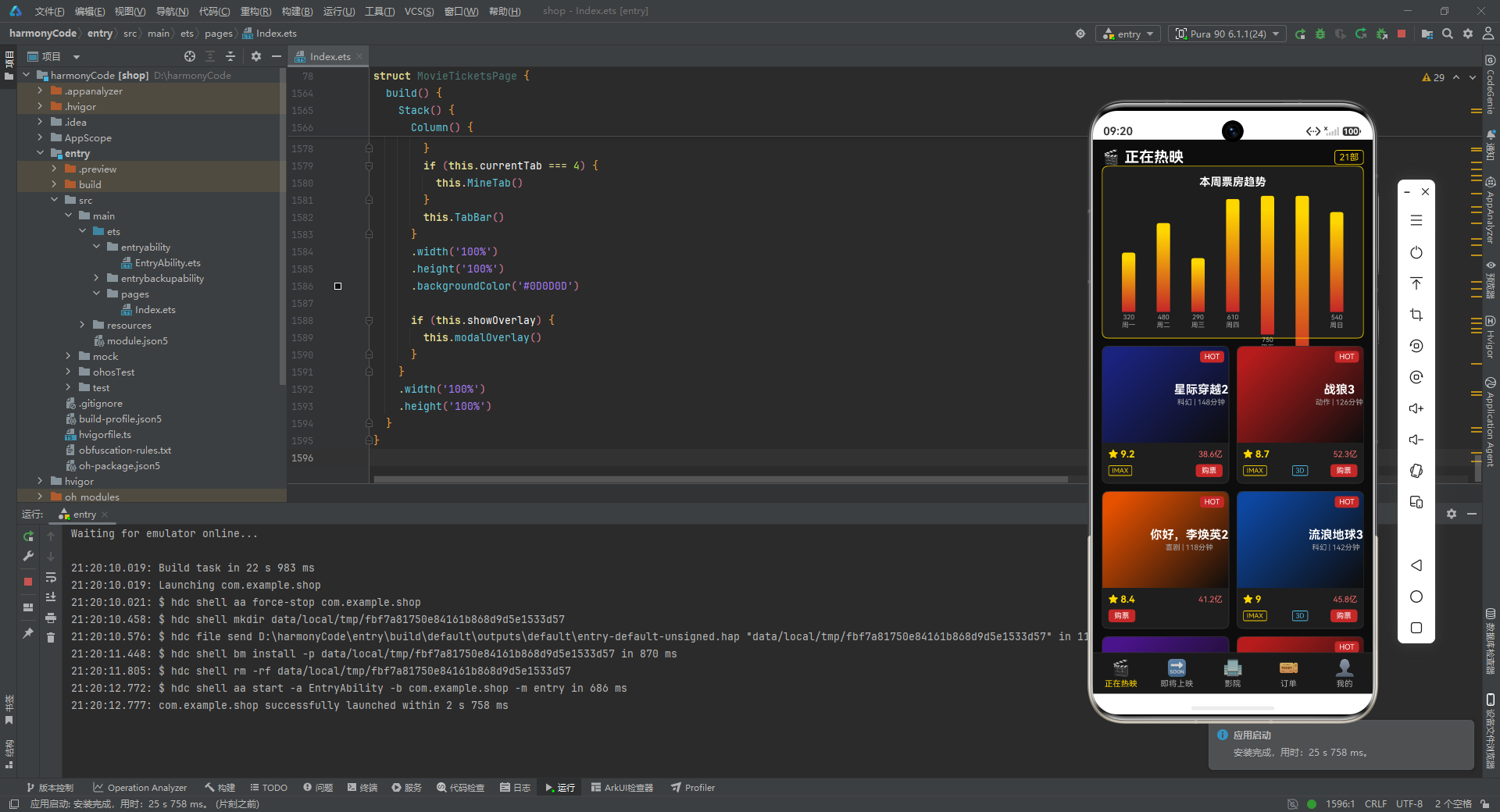
这个应用虽然使用的是模拟数据,但其架构设计和代码质量已经具备了商业级应用的雏形。它涵盖了电影票务场景的核心功能链路:浏览影片、查看详情、选择影院、选座购票、管理订单、改签退票,以及个人中心的积分、收藏、观影记录等辅助功能。整个应用通过五个 Tab 页面和四种弹窗,构建了一个功能完整、交互丰富的移动端票务体验。
从技术角度来看,这个应用展示了 ArkTS 声明式 UI 开发的多个核心能力:@State 响应式状态管理、@Builder 组件化构建、ForEach 列表渲染、Stack 层叠布局、linearGradient 渐变背景、条件渲染等。同时,元数据映射模式、统一弹窗管理、深色主题色彩体系等设计模式,也为读者提供了可复用的架构经验。

讨论HarmonyOS开发技术,专注于API与组件、DevEco Studio、测试、元服务和应用上架分发等。
更多推荐


 5
5 0
0- 0


 已为社区贡献129条内容

所有评论(0)