HarmonyOS 6 editEquipModal Builder 首先渲染一个半透明遮罩层 modalOverlay(rgba(8,10,14,0.72) 背景 + onClick 关闭)
一、引言与整体技术描述
光影镖局 LENS COURIER 是一款面向影视行业垂直场景的拍摄器材运输与设备租赁平台,整体基于 HarmonyOS 6.1.1 系统运行环境,使用 HarmonyOS ArkTS API 24 提供的声明式 UI 范式构建而成。它将器材管理、押运调度、设备租赁、剧组协作、场次排期、财务台账与个人中心七个核心业务域统一收敛到单文件 ArkTS 页面中,呈现出一个高度内聚的影视行业移动端解决方案。整个应用以电影暗调银蓝风为视觉基调,通过 #0F1115 主背景、#4DA3FF 科技蓝主色与 #E8C547 暖金点缀色,营造出摄影棚深处镜头光斑般的沉浸式观感,让使用者在打开应用的瞬间就感受到影视工业特有的专业氛围。
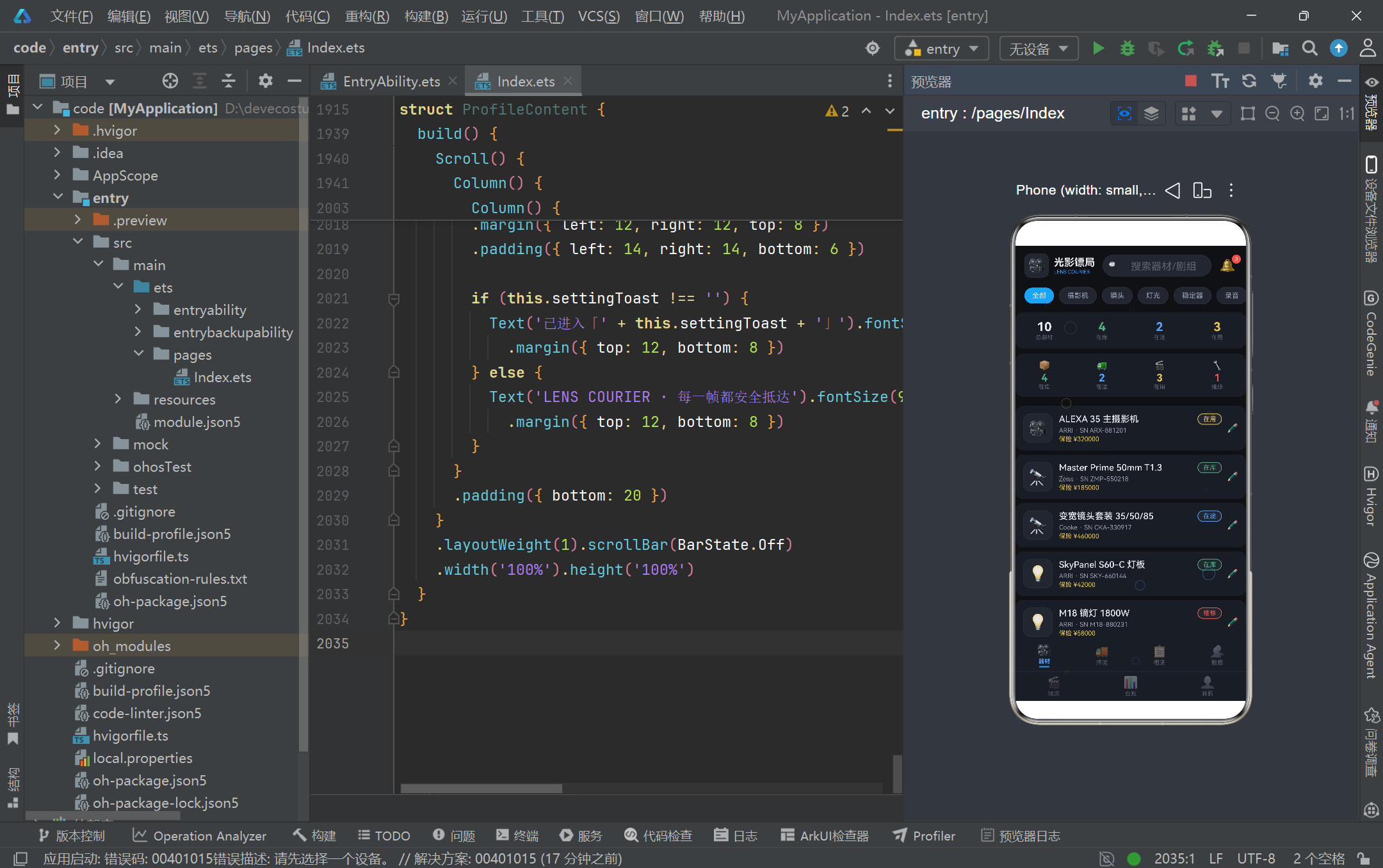
在工程组织层面,本页面充分体现了 HarmonyOS ArkTS API 24 的「单文件多组件」组织能力。它通过 @Entry 装饰一个入口结构体 LensCourierApp,再通过 @Component 装饰七个独立的子结构体(EquipmentContent、EscortContent、RentalContent、CrewContent、SetContent、LogContent、ProfileContent),每个子组件负责一个 Tab 页面的全部渲染逻辑。这种拆分方式既保证了业务模块的物理隔离,又借助 ArkTS 的声明式语法让 UI 描述与状态绑定紧密耦合,开发者可以在一个文件内通览整个应用的数据流与视图流,非常适合作为中台型业务应用的快速原型与教学样本。
在状态管理层面,本页面大量运用了 ArkTS API 24 提供的 @State、@Observed 与 @Builder 三件套。@Observed 装饰的数据类(如 EquipmentItem、EscortOrderItem)具备可观察性,当其内部字段被修改时能够驱动依赖它的视图刷新;@State 装饰的成员变量(如 activeTab、showEditModal、formName)则承担组件内部的局部状态职责;@Builder 装饰的方法(如 contentArea、tabItem、catPill、particleLayer)以轻量函数的形式封装可复用的 UI 片段,避免在 build() 中堆砌过长的嵌套层级。三种装饰器协同工作,构成了 ArkTS 声明式 UI 的状态驱动核心。
在交互与动画层面,本页面展示了 HarmonyOS ArkTS API 24 在视觉表现力上的深厚功力。最引人注目的是覆盖在整个页面之上的「镜头光斑粒子层」,它通过 setInterval 每 280 毫秒递增一次 particleTick,再由一组纯函数(particleX、particleY、particleSize、particleColor、particleOpacity)基于索引与时间戳计算每个粒子的位置、大小、颜色与透明度,最终用 Stack 叠加并设置 hitTestBehavior(HitTestMode.None) 确保不阻挡下层点击。此外,台账页用 Column 高度百分比模拟的「蓝黄双色柱状图」、场次页的「时间线节点 + 进度条」、押运页的「在途大数字 + 等级分布网格」共同构成了丰富的数据可视化表达,体现了 ArkTS 在无第三方图表库依赖下也能构建专业数据看板的能力。
二、平台架构与数据流总览
在深入代码细节之前,先通过一张 Mermaid 流程图把握整个应用的架构脉络与状态流转关系,理解七个 Tab 之间如何通过 activeTab 状态进行切换,以及粒子层、内容区、Tab 栏三层如何在 Stack 中叠加。
上图清晰地展示了应用的「三层叠加 + 七分支切换」架构。外层 Stack 将主内容 Column 与粒子层并置,粒子层位于最上层但不拦截事件;主内容 Column 自上而下依次承载头部、内容区与 Tab 栏;内容区通过 if/else if 链式判断 activeTab 的值,将渲染权分发给七个子组件。这种设计使得整个应用的状态流转高度集中,任何一个 Tab 的切换都只触发 activeTab 这一个状态变量的变更,从而驱动 contentArea Builder 的重新求值与对应子组件的挂载,符合 ArkTS 「最小化重渲染」的性能原则。
三、逐段代码深度解析
1. 颜色常量与设计令牌体系
const COLOR_BG: string = '#0F1115'
const COLOR_CARD: string = '#1A1D24'
const COLOR_CARD_LIGHT: string = '#22262F'
const COLOR_PRIMARY: string = '#4DA3FF'
const COLOR_PRIMARY_LIGHT: string = '#8AC4FF'
const COLOR_ACCENT: string = '#E8C547'
const COLOR_ACCENT_LIGHT: string = '#F5DA8A'
const COLOR_RED: string = '#E85A4F'
const COLOR_GREEN: string = '#4CAF7D'
const COLOR_TEXT_MAIN: string = '#E8EAF0'
const COLOR_TEXT_SUB: string = '#9AA0B0'
const COLOR_TEXT_HINT: string = '#5A6070'
const COLOR_BORDER: string = '#2A2E38'
这段代码定义了整个应用的设计令牌(Design Token)体系,是电影暗调银蓝风的色彩基石。COLOR_BG 作为最底层背景采用近黑的 #0F1115,模拟摄影棚熄灯后的环境光;COLOR_CARD 与 COLOR_CARD_LIGHT 形成两级卡片背景,前者用于主卡片,后者用于内嵌的输入框、标签底色,通过明度差构建层次感;COLOR_PRIMARY 科技蓝与 COLOR_ACCENT 暖金构成强对比双色主调,蓝色用于主操作按钮、在途状态、主标题强调,金色用于金额、评分、进度等需要吸睛的数值,呼应了影视镜头中冷光与暖光的经典搭配。文本色分为三级(COLOR_TEXT_MAIN、COLOR_TEXT_SUB、COLOR_TEXT_HINT),分别对应主文本、次级说明、占位提示,这种三级灰度体系在深色主题下能够有效降低视觉疲劳。将所有颜色提取为顶层 const 而非散落在组件内部,既便于全局换肤,也避免了魔法字符串带来的维护成本,是 ArkTS 项目工程化的良好实践。
2. 配置接口与元数据建模
interface EquipStatusMeta {
  label: string
  color: string
  icon: string
}

interface EscortLevelMeta {
  label: string
  color: string
  icon: string
  priceBase: number
}

interface OrderStatusMeta {
  label: string
  color: string
  icon: string
}
ArkTS 强类型特性要求所有数据结构必须有明确的类型声明,这里定义了一组「元数据接口」用于描述业务枚举的展示属性。EquipStatusMeta 描述器材状态(在库/在途/在用/维修)的标签、颜色与图标;EscortLevelMeta 在前三者基础上增加了 priceBase 字段,因为押运等级直接关联起步价;OrderStatusMeta 描述订单状态。这种「接口 + 配置映射」的设计模式将业务枚举的视觉表现从渲染逻辑中彻底解耦,后续新增一个状态只需在配置表中追加一行,无需修改任何组件代码。值得注意的是,ArkTS 的 interface 不支持实现,仅用于类型约束,因此后续的 @Observed 数据类需要用 implements 关键字显式声明契约关系,这体现了 ArkTS 对 TypeScript 语法的子集化裁剪,也是 HarmonyOS ArkTS API 24 类型系统的重要特征。
3. @Observed 数据类与可观察模型
@Observed
class EquipmentItem implements EquipmentModel {
  id: number = 0
  name: string = ''
  brand: string = ''
  serialNo: string = ''
  icon: string = '🎥'
  status: string = '在库'
  insurance: number = 0
  constructor(id: number, name: string, brand: string, serialNo: string,
              icon: string, status: string, insurance: number) {
    this.id = id
    this.name = name
    this.brand = brand
    this.serialNo = serialNo
    this.icon = icon
    this.status = status
    this.insurance = insurance
  }
}
@Observed 是 ArkTS API 24 提供的类装饰器,它将一个普通类转换为可观察的数据类,使其字段变更能够被框架追踪并触发依赖视图的刷新。这里定义的 EquipmentItem 实现了 EquipmentModel 接口,所有字段都显式声明了初始默认值(如 id: number = 0、status: string = '在库'),这是 ArkTS 的强制要求——与 TypeScript 不同,ArkTS 不允许未初始化的类成员,必须在声明时或构造函数中赋值。构造函数接收全部七个参数并逐一赋值给 this,这种「全参构造」的风格虽然略显冗长,但保证了对象创建时的数据完整性,避免了部分初始化导致的运行时 undefined 问题。本页面共定义了六个 @Observed 类(器材、押运订单、租赁项、剧组、场次、交易记录),它们构成了应用的领域模型层,为后续的列表渲染与表单编辑提供了类型安全的数据载体。
4. 配置映射表与业务字典
const EQUIP_STATUS_CONFIG: Record<string, EquipStatusMeta> = {
  '在库': { label: '在库', color: COLOR_GREEN, icon: '📦' },
  '在途': { label: '在途', color: COLOR_PRIMARY, icon: '🚚' },
  '在用': { label: '在用', color: COLOR_ACCENT, icon: '🎬' },
  '维修': { label: '维修', color: COLOR_RED, icon: '🔧' }
}

const ESCORT_LEVEL_CONFIG: Record<string, EscortLevelMeta> = {
  '普通': { label: '普通', color: COLOR_TEXT_SUB, icon: '🛡️', priceBase: 200 },
  '高级': { label: '高级', color: COLOR_PRIMARY, icon: '🛡️', priceBase: 480 },
  '特级': { label: '特级', color: COLOR_ACCENT, icon: '🏅', priceBase: 880 },
  '专车专送': { label: '专车专送', color: COLOR_RED, icon: '🚑', priceBase: 1580 }
}
这里通过 Record<string, XXXMeta> 将业务枚举值映射到其完整的展示元数据。EQUIP_STATUS_CONFIG 让器材的四种状态各自关联一个颜色与图标,绿色表示在库安全、蓝色表示在途运输、金色表示在用拍摄、红色表示维修警示,色彩语义与业务含义高度一致。ESCORT_LEVEL_CONFIG 则定义了押运的四个等级,从「普通」到「专车专送」,起步价从 200 元阶梯式上升到 1580 元,颜色也从灰色逐渐过渡到红色,暗示等级越高、专属性越强、风险管控越严格。这种「字典表 + 查询」的模式在渲染时非常高效,组件只需用 EQUIP_STATUS_CONFIG[e.status]?.color 即可拿到对应颜色,配合可选链操作符 ?. 避免了未匹配时的崩溃。整个应用共定义了七张类似的配置表,覆盖器材状态、押运等级、订单状态、剧组状态、场次状态、项目类型、交易状态,形成了一套完整的业务字典体系。
5. 静态 Mock 数据与领域样本
const mockEquipment: EquipmentItem[] = [
  new EquipmentItem(1, 'ALEXA 35 主摄影机', 'ARRI', 'ARX-881201', '🎥', '在用', 320000),
  new EquipmentItem(2, 'Master Prime 50mm T1.3', 'Zeiss', 'ZMP-550218', '🔭', '在库', 185000),
  new EquipmentItem(3, '变宽镜头套装 35/50/85', 'Cooke', 'CKA-330917', '🔭', '在途', 460000),
  new EquipmentItem(4, 'SkyPanel S60-C 灯板', 'ARRI', 'SKY-660144', '💡', '在库', 42000),
  new EquipmentItem(5, 'M18 镝灯 1800W', 'ARRI', 'M18-880231', '💡', '维修', 58000)
]
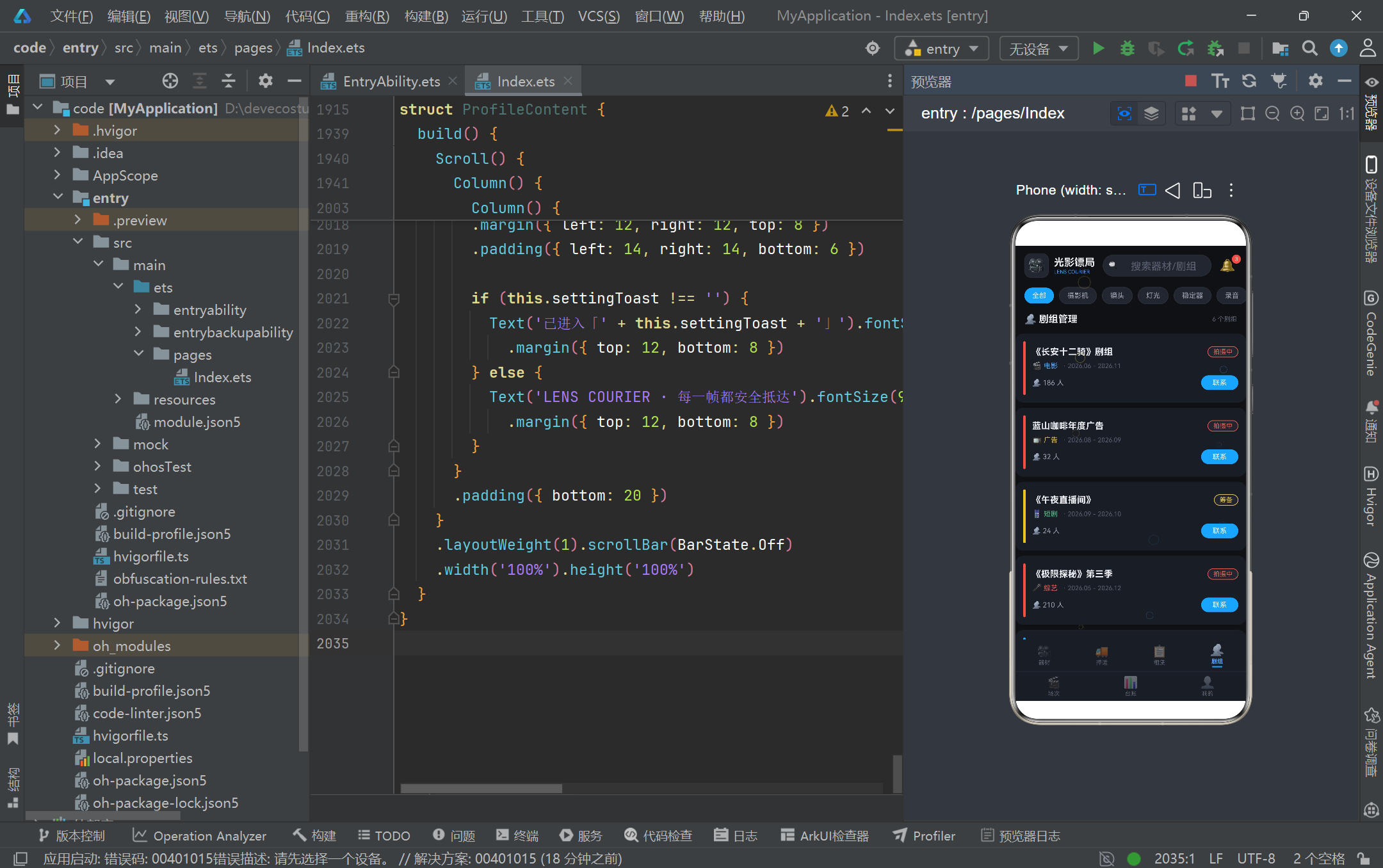
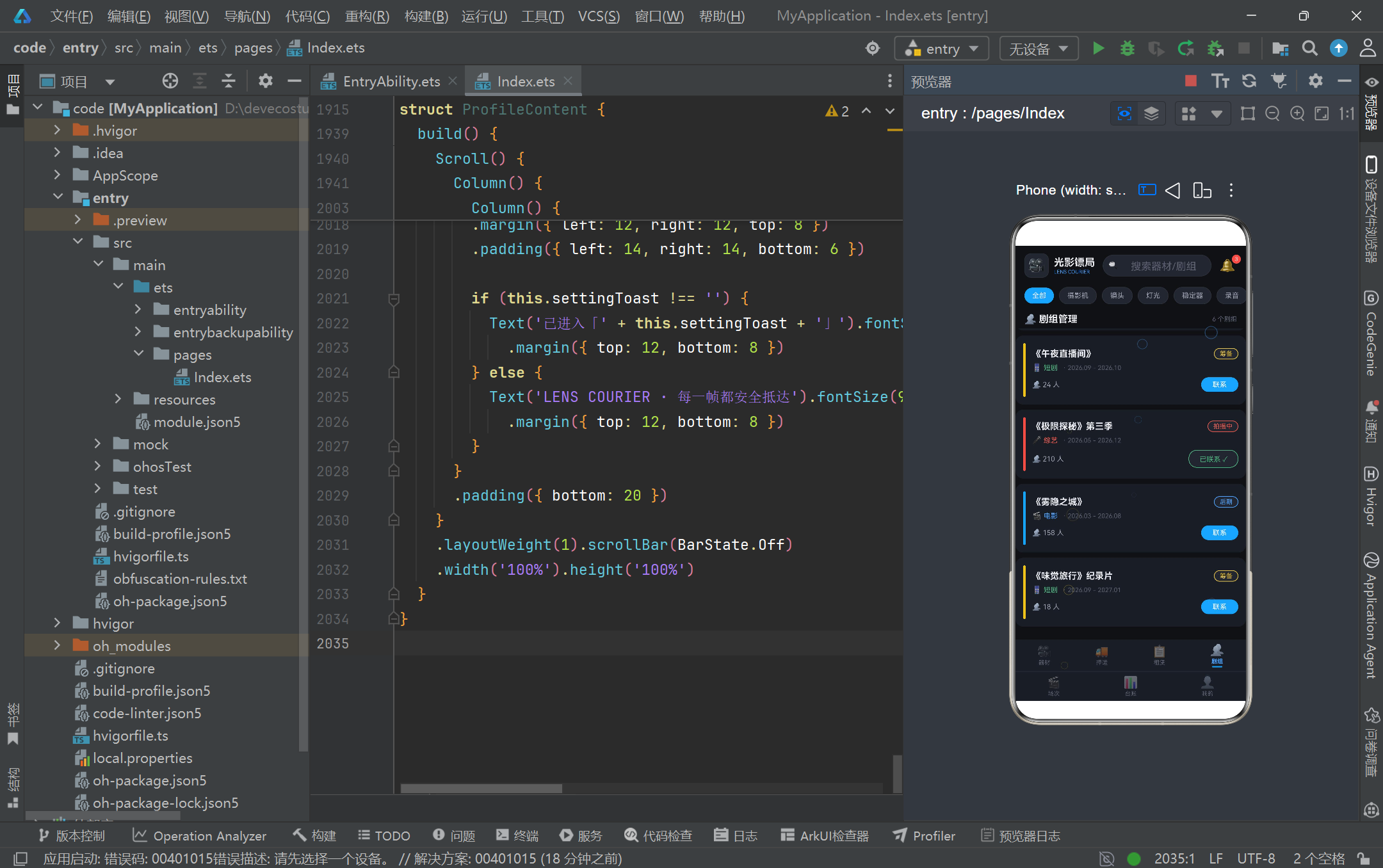
本页面作为演示原型,使用一组精心构造的静态 Mock 数据模拟真实业务场景。mockEquipment 包含十件器材,覆盖了 ARRI、Zeiss、Cooke、DJI、Sony 等影视行业头部品牌,品类涵盖摄影机、定焦镜头、变宽镜头、LED 灯板、镝灯、稳定器、调音台、轨道车等,每件都带有真实的序列号格式与合理的保险金额。这种贴近真实的数据设计让原型具备极强的说服力,开发者在演示时无需额外解释「这只是测试数据」。除器材外,页面还定义了八条押运记录(含订单号、起讫地、等级、价格、状态、日期)、十件可租器材(含日租金、押金、库存、评分、主题色)、六个剧组、八个场次、六条交易记录以及六个月的收支数组。所有数据都以 const 数组形式声明在模块顶层,组件直接引用即可渲染,后续接入真实后端时只需将 mockEquipment 替换为网络请求返回的数组即可,迁移成本极低。
6. 辅助纯函数与统计计算
function moneyText(n: number): string {
  return '¥' + n.toString()
}

function equipCountByStatus(status: string): number {
  return mockEquipment.filter((e: EquipmentItem) => e.status === status).length
}

function escortTransitCount(): number {
  return mockEscortOrders.filter((o: EscortOrderItem) => o.status === '押运中').length
}

function todayDonePercent(): number {
  return Math.round(setCountByStatus('已完成') / todaySetCount() * 100)
}
ArkTS 鼓励将可复用的计算逻辑提取为纯函数,这里定义了一组服务于统计与格式化的辅助函数。moneyText 将数字格式化为带人民币符号的字符串,统一了全应用的金额展示;equipCountByStatus 通过 filter + length 统计指定状态的器材数量,用于器材页顶部的四格统计;escortTransitCount 专门统计「押运中」状态的订单数,是押运页大数字的核心数据源;todayDonePercent 则计算今日场次的完成百分比,用 Math.round 取整避免小数。这些函数全部是无副作用的纯函数,输入相同则输出相同,既易于测试又利于 ArkTS 的依赖追踪优化。值得注意的是,ArkTS 要求箭头函数的参数必须显式标注类型(如 (e: EquipmentItem)),这与 TypeScript 的类型推断不同,是 ArkTS 为保证运行时性能而做的语法收紧。开发者迁移现有 TS 代码时需要补全这些类型注解。
7. 粒子光斑纯函数与动画驱动
function particleX(i: number, tick: number): number {
  return (i * 61 + tick * 3) % 92 + 2
}

function particleY(i: number, tick: number): number {
  return (i * 37 + tick * 5) % 94 + 2
}

function particleSize(i: number): number {
  return 10 + (i % 4) * 6
}

function particleColor(i: number): string {
  return i % 3 === 0 ? COLOR_ACCENT : COLOR_PRIMARY
}

function particleOpacity(i: number, tick: number): number {
  return 0.12 + ((i + tick) % 5) * 0.06
}
这组纯函数是镜头光斑粒子动画的数学引擎,体现了 ArkTS 在无 Canvas 依赖下构建视觉特效的能力。particleX 与 particleY 通过取模运算(% 92、% 94)将粒子位置限制在 2-94 的百分比区间内,配合 tick 的递增实现位移;每个粒子的初始相位由索引 i 乘以不同的质数(61、37)拉开,避免所有粒子同步移动。particleSize 让粒子大小在 10、16、22、28 之间循环,营造远近层次;particleColor 让三分之一的粒子呈金色、其余呈蓝色,呼应整体配色;particleOpacity 则在 0.12 到 0.36 之间脉动,模拟光斑的明灭呼吸。整个动画系统完全由数学公式驱动,无需任何缓动库或动画框架,仅靠 setInterval 每 280 毫秒递增 tick 触发重绘即可。这种「函数式动画」是 ArkTS 声明式 UI 的典型范式——状态变更驱动视图刷新,函数负责将状态映射为视图属性。
8. Tab 枚举与业务常量
enum LensTab {
  EQUIP = 0,
  SHIP = 1,
  RENTAL = 2,
  CREW = 3,
  SET = 4,
  LOG = 5,
  PROFILE = 6
}

const EQUIP_CATS: string[] = ['全部', '摄影机', '镜头', '灯光', '稳定器', '录音', '轨道']
const ESCORT_LEVELS: string[] = ['普通', '高级', '特级', '专车专送']
const SPECIAL_REQS: string[] = ['防震', '防潮', '恒温', '安保跟车']
const PICKUP_METHODS: string[] = ['自取', '配送', '押运到组']
const RENTAL_SORTS: string[] = ['热门', '价格', '评分']
const BOOKABLE_EQUIPS: string[] = ['摄影机', '镜头组', '灯光', '稳定器', '轨道', '录音']
LensTab 枚举定义了七个 Tab 的索引常量,使 activeTab 的比较更具语义化(this.activeTab === LensTab.EQUIP)而非魔法数字(this.activeTab === 0),既提升了可读性也降低了拼错风险。ArkTS 的 enum 与 TypeScript 类似,支持数值枚举与字符串枚举,这里使用数值枚举便于在 if/else if 链中做相等比较。下方的六个 const 数组则定义了各业务模块的选项常量:EQUIP_CATS 是器材分类药丸的七项;ESCORT_LEVELS 是押运等级四档;SPECIAL_REQS 是特殊要求多选项(防震、防潮、恒温、安保跟车,体现了影视器材运输的专业性);PICKUP_METHODS 是取件方式三选;RENTAL_SORTS 是租赁排序三档;BOOKABLE_EQUIPS 是可预约押运的器材大类。将这些常量集中声明在组件外部,使得组件内部的 build() 只需引用而不必内联字面量,既保持了视图层的清爽,也方便后续国际化或配置化改造。
9. 入口组件与生命周期
@Entry
@Component
struct LensCourierApp {
  @State activeTab: LensTab = LensTab.EQUIP
  @State searchKeyword: string = ''
  @State selectedCat: string = '全部'
  @State particleTick: number = 0
  particleTimer: number = -1

  aboutToAppear() {
    this.particleTimer = setInterval(() => {
      this.particleTick = this.particleTick + 1
    }, 280)
  }

  aboutToDisappear() {
    if (this.particleTimer >= 0) {
      clearInterval(this.particleTimer)
    }
  }
}
@Entry 装饰的 LensCourierApp 是整个应用的根组件,HarmonyOS 启动时会自动加载并渲染它。组件内部声明了四个 @State 状态变量:activeTab 控制当前激活的 Tab;searchKeyword 绑定顶部搜索框输入;selectedCat 记录器材分类药丸的选中项;particleTick 是粒子动画的时钟。particleTimer 没有装饰器,是普通成员变量,用于保存定时器 ID。aboutToAppear 与 aboutToDisappear 是 ArkTS 组件的生命周期回调:前者在组件实例创建后、build() 执行前调用,这里启动一个 280 毫秒间隔的定时器递增 particleTick;后者在组件销毁前调用,这里清理定时器避免内存泄漏。这种「成对出现」的资源管理是 ArkTS 开发的基本规范——任何在 aboutToAppear 中申请的资源(定时器、监听器、订阅)都必须在 aboutToDisappear 中释放,否则会导致组件销毁后仍然占用系统资源,引发性能问题。
10. contentArea Builder 与条件渲染分发
@Builder contentArea() {
  Column() {
    if (this.activeTab === LensTab.EQUIP) {
      EquipmentContent()
    } else if (this.activeTab === LensTab.SHIP) {
      EscortContent()
    } else if (this.activeTab === LensTab.RENTAL) {
      RentalContent()
    } else if (this.activeTab === LensTab.CREW) {
      CrewContent()
    } else if (this.activeTab === LensTab.SET) {
      SetContent()
    } else if (this.activeTab === LensTab.LOG) {
      LogContent()
    } else {
      ProfileContent()
    }
  }
  .layoutWeight(1)
}
@Builder 装饰的 contentArea 方法封装了内容区的条件渲染逻辑,是整个应用 Tab 切换的核心枢纽。它通过 if / else if / else 链根据 activeTab 的当前值选择挂载对应的子组件。ArkTS 的条件渲染与 React 的 if 不同,它是在 build() 内部用 if 语句直接控制组件树的生成,框架会跟踪 if 条件的变化并在条件翻转时自动挂载/卸载对应分支。layoutWeight(1) 让内容区占据 Tab 栏与头部之间的全部剩余空间,保证内容区可滚动区域最大化。这种「单一 Builder 做分发」的设计将 Tab 切换逻辑集中在一处,便于排查「为什么某个 Tab 不显示」之类的问题。值得注意的是,子组件(如 EquipmentContent())以无参形式调用,它们内部的数据全部来自模块顶层的 mockEquipment 等静态数组,这种设计在原型阶段足够,后续接入真实数据时可以通过 @Prop 或 @Link 向子组件传递参数。
11. tabItem Builder 与选中态视觉反馈
@Builder tabItem(icon: string, label: string, tab: LensTab) {
  Column() {
    Text(icon).fontSize(18).opacity(this.activeTab === tab ? 1.0 : 0.45)
    Text(label).fontSize(9)
      .fontColor(this.activeTab === tab ? COLOR_PRIMARY : COLOR_TEXT_HINT)
      .fontWeight(this.activeTab === tab ? FontWeight.Bold : FontWeight.Normal)
      .margin({ top: 2 })
    if (this.activeTab === tab) {
      Column().width(16).height(2)
        .backgroundColor(COLOR_PRIMARY).borderRadius(1).margin({ top: 2 })
    }
  }
  .layoutWeight(1)
  .alignItems(HorizontalAlign.Center)
  .padding({ top: 6, bottom: 6 })
  .onClick(() => { this.activeTab = tab })
}
tabItem Builder 封装了 Tab 栏单个项的渲染逻辑,接收图标、标签、目标 Tab 三个参数。它通过三元运算符 this.activeTab === tab ? ... : ... 在选中态与未选中态之间切换:选中时图标完全不透明、文字主色加粗、并在下方渲染一条 16×2 的蓝色指示条;未选中时图标半透明(0.45)、文字提示色、无指示条。这种「指示条 + 文字加粗 + 图标提亮」的三重视觉反馈让选中态非常明确,符合 HarmonyOS 设计规范中对底部导航的交互要求。onClick 回调将 this.activeTab 赋值为目标 Tab,触发 @State 变更,框架自动重新执行 contentArea 与 tabItem 的渲染,完成页面切换。整个 Tab 栏被拆成两排(第一排四个、第二排三个),中间用 Divider 分隔,这种布局在窄屏设备上能保证每个 Tab 项有足够的点击热区,避免误触。
12. particleLayer 与不阻挡点击的装饰层
@Builder particleLayer() {
  Stack() {
    Text('○')
      .fontSize(particleSize(0)).fontColor(particleColor(0))
      .opacity(particleOpacity(0, this.particleTick))
      .position({ x: particleX(0, this.particleTick) + '%', y: particleY(0, this.particleTick) + '%' })
    // ... 其余 9 个粒子同理
  }
  .width('100%').height('100%')
  .hitTestBehavior(HitTestMode.None)
}
particleLayer 是覆盖在整个应用最上层的镜头光斑装饰层,由十个 Text('○') 粒子组成,每个粒子通过 position 以百分比定位在屏幕上。关键在于 .hitTestBehavior(HitTestMode.None) 这一属性——它告诉 ArkTS 的命中测试系统跳过该层,让触摸事件直接穿透到下方的 Tab 栏与内容区。如果不设置这个属性,粒子层会拦截所有点击,导致整个应用无法操作。HitTestMode 是 ArkTS API 24 提供的命中测试枚举,包含 Default、Block、Transparent、None 四种模式,None 是最彻底的穿透模式。粒子层的动画驱动来自 aboutToAppear 中启动的 setInterval,每 280 毫秒递增 particleTick,由于 particleTick 是 @State 装饰的,其变更会触发依赖它的 particleLayer 重新执行,十个粒子的位置、大小、透明度随之刷新,形成连续的光斑漂浮效果。这是「状态驱动动画」在装饰层场景的典型应用。
13. build 主结构与 Stack 三层叠加
build() {
  Stack() {
    Column() {
      Row() {
        // Logo + 搜索 + 通知
      }
      Scroll() {
        Row() {
          this.catPill(EQUIP_CATS[0])
          // ... 其余药丸
        }
      }
      .scrollable(ScrollDirection.Horizontal).scrollBar(BarState.Off)
      this.contentArea()
      Row() {
        this.tabItem('🎥', '器材', LensTab.EQUIP)
        // ... 其余 Tab
      }
      Divider().color(COLOR_BORDER).strokeWidth(1)
      Row() {
        this.tabItem('🎬', '场次', LensTab.SET)
        // ... 其余 Tab
      }
    }
    .width('100%').height('100%').backgroundColor(COLOR_BG)
    this.particleLayer()
  }
  .width('100%').height('100%').backgroundColor(COLOR_BG)
}
build() 是每个 @Component 必须实现的方法,返回组件的根节点。这里根节点是 Stack,它将主内容 Column 与粒子层 particleLayer 叠加在一起,后声明的 particleLayer 位于上层。主内容 Column 自上而下依次承载:头部 Row(Logo、搜索框、通知铃铛)、横向滚动的分类药丸 Scroll、内容区 contentArea()、两排 Tab 栏(中间用 Divider 分隔)。这种「Stack 叠加 + Column 纵向布局」的组合是 ArkTS 复杂页面的常见骨架。搜索框使用 TextInput 配合 onChange 回调将输入同步到 searchKeyword 状态;通知铃铛用 Stack 嵌套 Text('🔔') 与角标 Text('3'),点击后跳转到台账 Tab。整个头部既是品牌展示区也是快捷操作区,体现了移动端「寸土寸金」的布局哲学。
14. EquipmentContent 器材页与编辑弹框
@Component
struct EquipmentContent {
  @State showEditModal: boolean = false
  @State editingEquip: EquipmentItem | null = null
  @State formName: string = ''
  @State formStatus: string = '在库'

  @Builder editEquipModal() {
    Column() {
      this.modalOverlay(() => { this.showEditModal = false })
      Column() {
        Text('✏️ 编辑器材信息').fontSize(16).fontWeight(FontWeight.Bold)
        Scroll() {
          TextInput({ placeholder: this.editingEquip?.name ?? '器材名称' })
            .onChange((v: string) => { this.formName = v })
          // ... 其余表单字段
        }
        Row() {
          Text('取消').onClick(() => { this.showEditModal = false })
          Text('保存').backgroundColor(COLOR_PRIMARY)
            .onClick(() => { this.showEditModal = false })
        }
      }
      .width('85%').height('60%').backgroundColor(COLOR_CARD).borderRadius(14)
      .position({ x: '7.5%', y: '16%' })
    }
    .width('100%').height('100%').position({ x: 0, y: 0 }).zIndex(999)
  }
}
EquipmentContent 是器材管理 Tab 的实现,它展示了 ArkTS 中「弹框(Modal)」的经典实现模式。showEditModal 控制弹框显隐,editingEquip 保存当前编辑的器材对象(可为 null),一组 formXxx 状态变量绑定表单输入。editEquipModal Builder 首先渲染一个半透明遮罩层 modalOverlay(rgba(8,10,14,0.72) 背景 + onClick 关闭),然后在遮罩之上用 position 定位一个 85% 宽、60% 高的卡片容器,内含标题栏、可滚动的表单区与底部操作按钮。整个弹框通过 zIndex(999) 提升层级确保覆盖在内容之上。这种「遮罩 + 定位卡片 + zIndex」的三件套是 ArkTS 在没有官方 Dialog 组件时的标准弹框方案,灵活性高且可完全自定义样式。表单区使用 TextInput 与 TextArea 收集用户输入,状态选择则用一组 Text 药丸实现单选,点击切换 formStatus。器材列表 equipItemRow 的 onClick 将被点击的器材赋值给 editingEquip 并打开弹框,实现「点击行 → 编辑」的交互闭环。
15. EscortContent 押运页与多类型弹框
@Component
struct EscortContent {
  @State showBookModal: boolean = false
  @State showCancelModal: boolean = false
  @State cancelOrder: EscortOrderItem | null = null
  @State formEquips: string[] = ['摄影机']
  @State formReqs: string[] = ['防震']

  @Builder cancelOrderModal() {
    Column() {
      this.modalOverlay(() => { this.showCancelModal = false })
      Column() {
        Text('⚠️').fontSize(42)
        Text('确认取消此押运?').fontSize(17).fontWeight(FontWeight.Bold)
        Text('取消后车辆与押运员将释放档期').fontSize(11).fontColor(COLOR_RED)
        Column() {
          Row() {
            Text('器材数量').fontSize(11).fontColor(COLOR_TEXT_HINT)
            Text((this.cancelOrder?.equipCount ?? 0).toString() + ' 件')
          }
          Row() {
            Text('押运路线').fontSize(11).fontColor(COLOR_TEXT_HINT)
            Text((this.cancelOrder?.pickup ?? '') + ' → ' + (this.cancelOrder?.destination ?? ''))
          }
        }
        .border({ width: 1, color: COLOR_RED, radius: 10 })
        Row() {
          Text('再想想').onClick(() => { this.showCancelModal = false })
          Text('确认取消').backgroundColor(COLOR_RED)
            .onClick(() => { this.showCancelModal = false })
        }
      }
      .border({ width: 1, color: COLOR_RED })
    }
  }
}
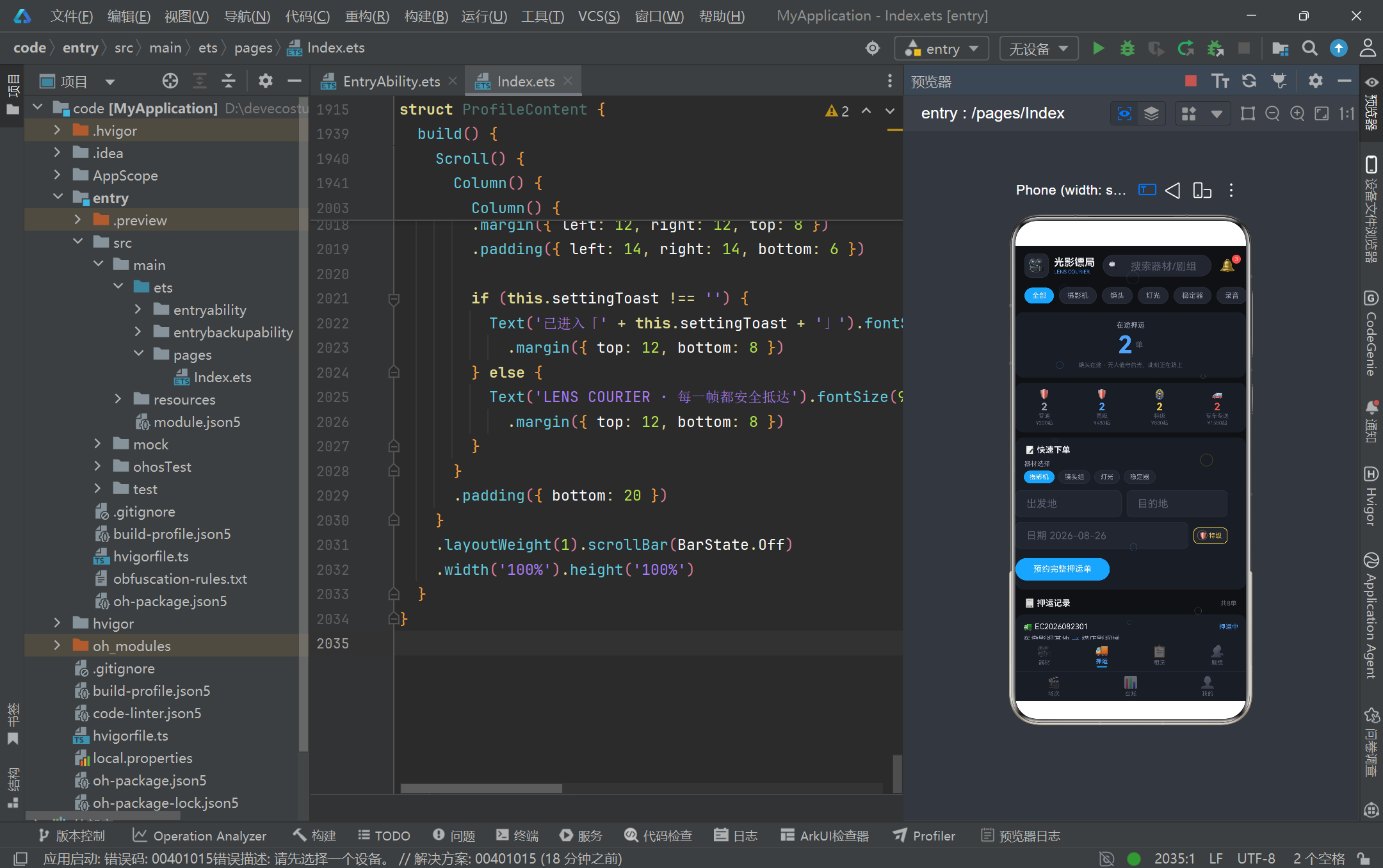
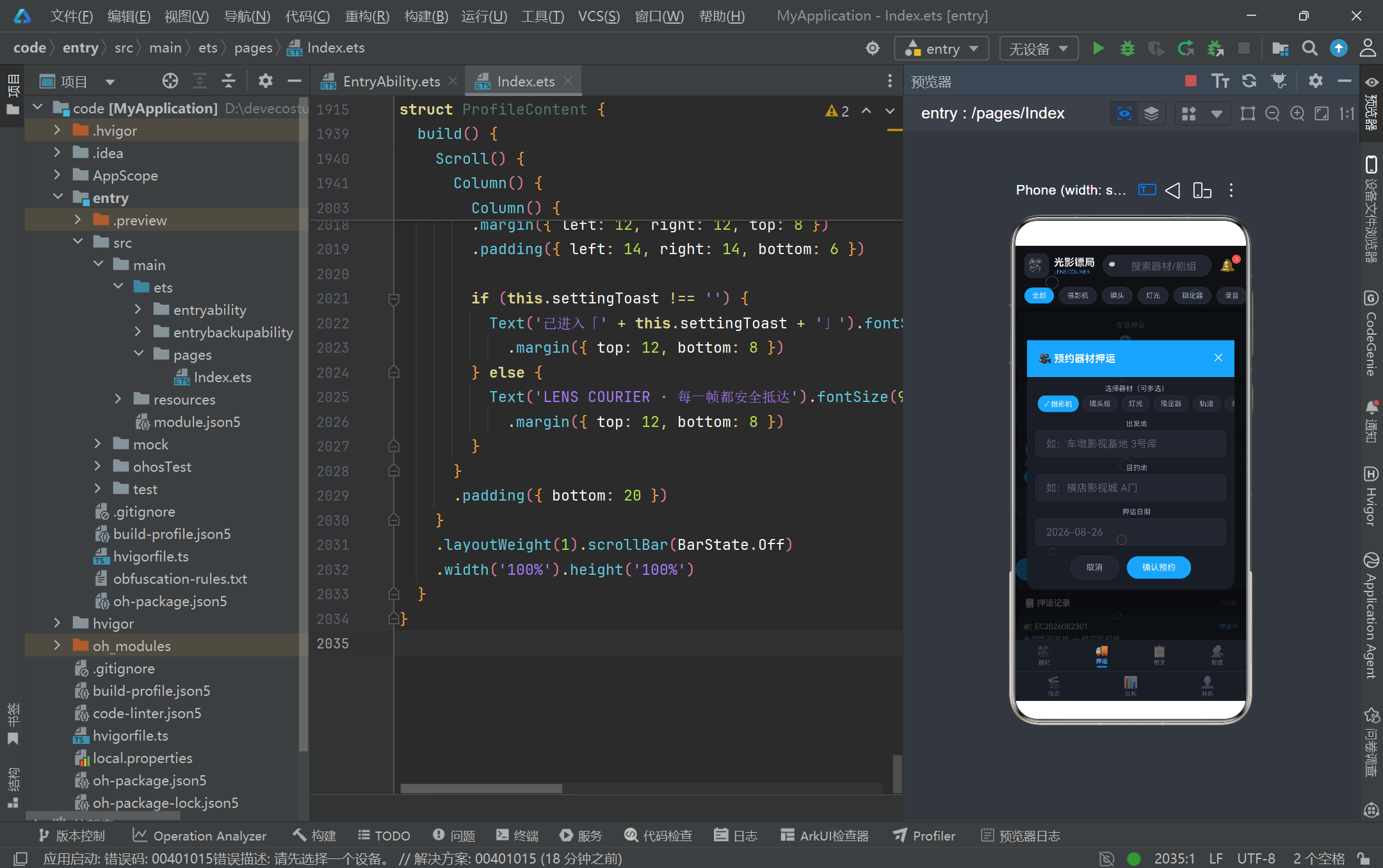
EscortContent 押运页展示了同一组件内管理多个弹框的能力。它同时维护 showBookModal(预约押运表单)与 showCancelModal(取消订单确认)两个布尔状态,以及 cancelOrder 保存待取消的订单。预约弹框是「暗色表单式」,顶部用蓝色标题栏 + 关闭按钮,表单包含器材多选(formEquips 数组 + toggleInArray 切换)、出发地、目的地、日期、押运等级单选、特殊要求多选、备注文本域,底部是取消与确认按钮。取消弹框则是「警示式」,用大号 ⚠️ 图标 + 红色边框营造警示氛围,中间用信息卡片展示待取消订单的关键数据(器材数量、路线、金额、等级),底部是「再想想」与「确认取消」双按钮。这种「一个组件多弹框」的设计通过分离的状态变量独立控制各自显隐,互不干扰。toggleInArray 与 containsValue 两个辅助函数实现了数组的多选切换与包含判断,是 ArkTS 中处理标签多选的常见模式。
16. RentalContent 租赁页与网格布局
@Component
struct RentalContent {
  @State sortBy: string = '热门'
  @State showRentModal: boolean = false
  @State rentingItem: RentalItem | null = null
  @State rentDays: number = 1
  @State pickupMethod: string = '押运到组'
  @State withInsurance: boolean = true

  @Builder rentalCard(item: RentalItem) {
    Column() {
      Column() {
        Text('🎥').fontSize(30)
      }
      .width('100%').height(64).backgroundColor(item.color)
      .borderRadius({ topLeft: 10, topRight: 10 })
      Column() {
        Text(item.name).fontSize(12).maxLines(1)
        Row() {
          Text(moneyText(item.dailyRate) + '/天').fontColor(COLOR_PRIMARY)
          Text('⭐' + item.rating.toString()).fontColor(COLOR_ACCENT)
        }
        Text('租用').backgroundColor(COLOR_PRIMARY).borderRadius(13)
          .onClick(() => {
            this.rentingItem = item
            this.rentDays = 1
            this.showRentModal = true
          })
      }
    }
    .layoutWeight(1).backgroundColor(COLOR_CARD).borderRadius(10)
  }
}
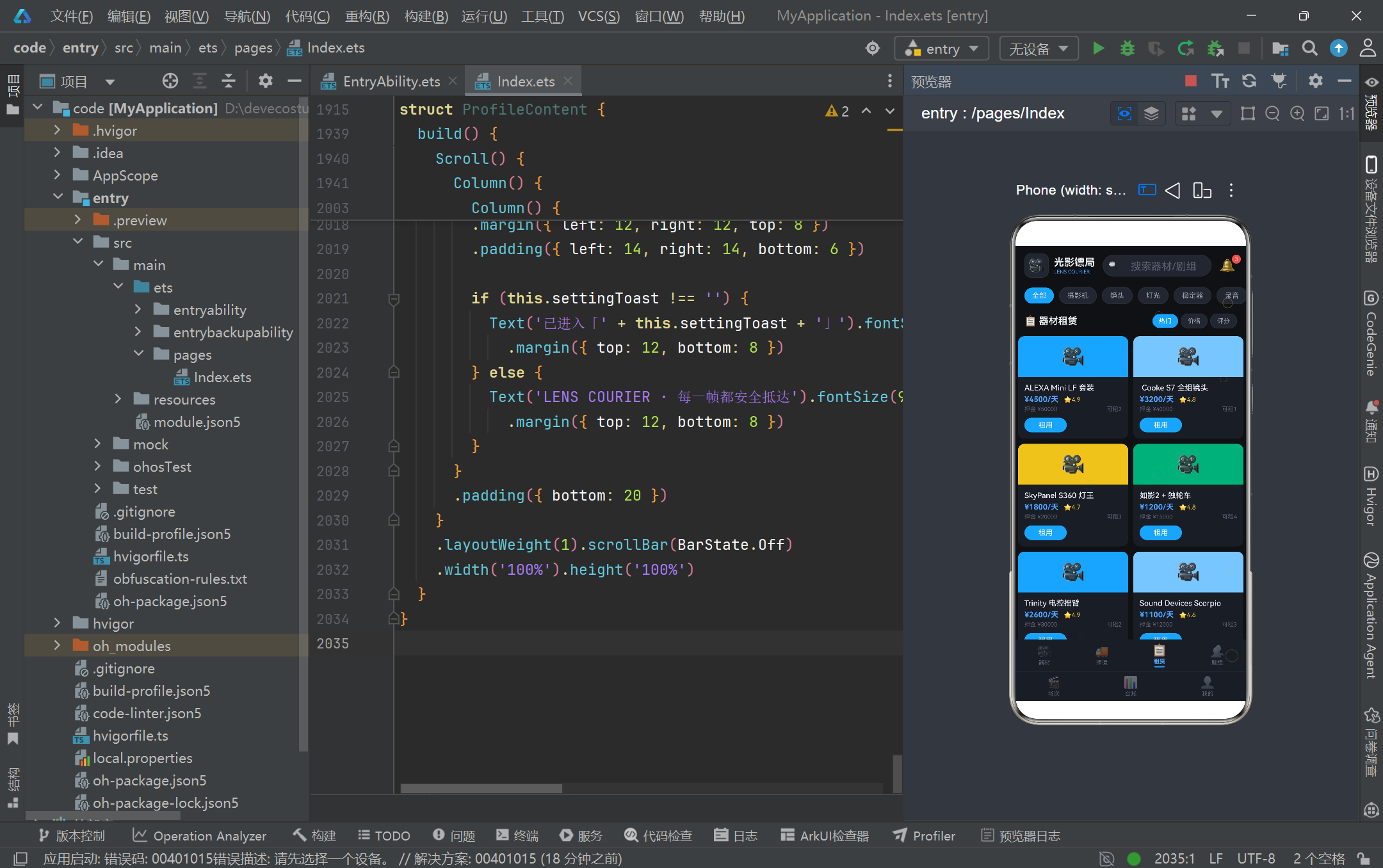
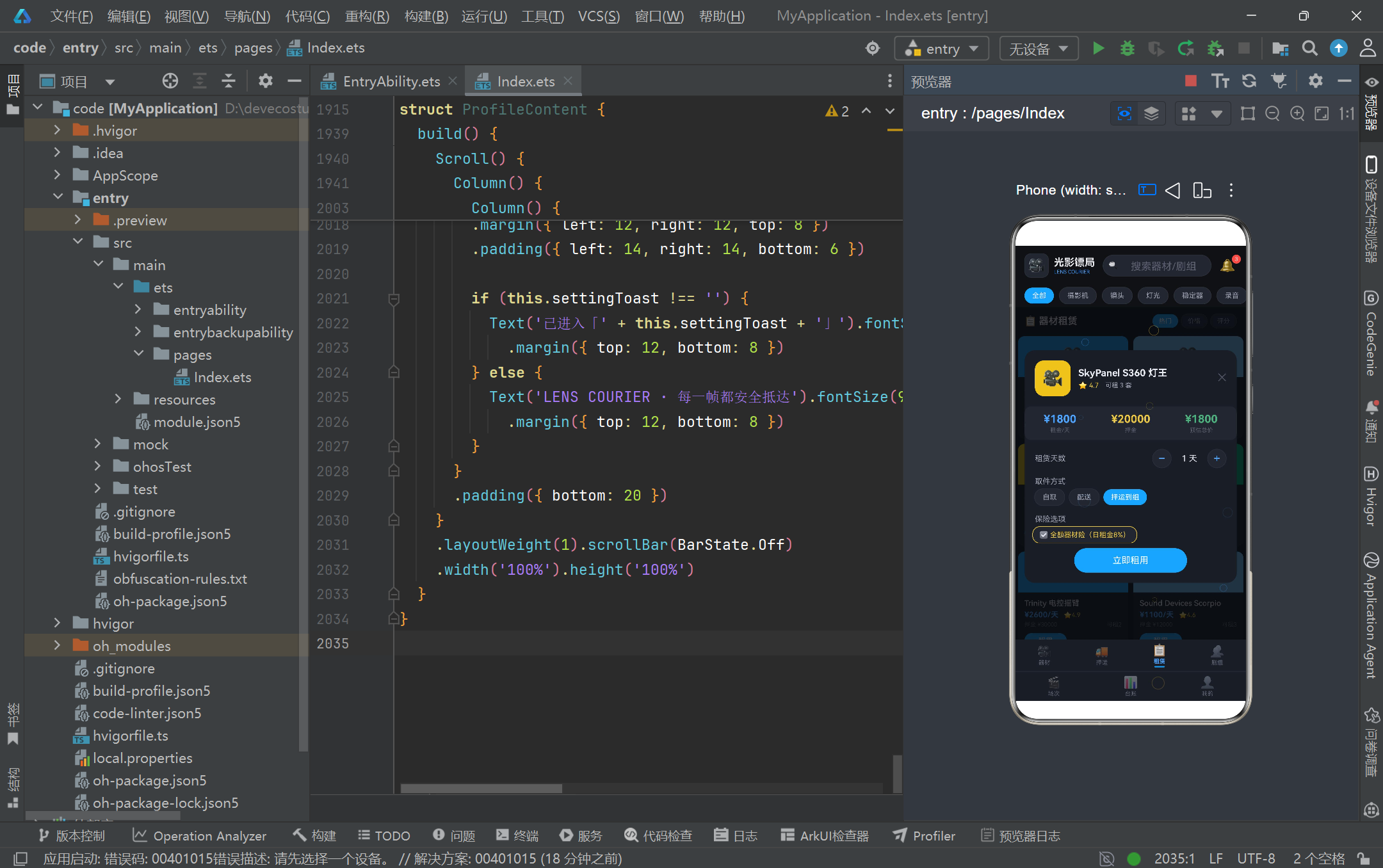
RentalContent 租赁页采用「2 列网格」展示十件可租器材,通过五个 Row 每个 Row 包含两个 rentalCard 实现网格效果,每个卡片用 layoutWeight(1) 平分宽度。卡片顶部是带主题色的图片区(用 item.color 作为背景 + 摄影机 emoji 占位),下方是器材名、日租金、评分、押金、库存、租用按钮。点击「租用」按钮会将 rentingItem 赋值为当前器材、rentDays 重置为 1、打开 rentDetailModal 弹框。租赁详情弹框展示了「天数步进器」的实现:用 − 与 + 两个 Text 按钮配合 onClick 递减或递增 rentDays,中间用固定宽度的 Text 显示当前天数,总价通过 dailyRate * rentDays 实时计算。取件方式与保险选项分别用单选药丸与切换开关实现,最后是「立即租用」主按钮。整个租赁流程从列表 → 详情 → 下单,虽然数据未真正提交,但交互闭环完整,可作为真实业务的 UI 蓝本。
17. SetContent 场次页与时间线可视化
@Component
struct SetContent {
  @State expandedSet: number = -1

  @Builder setTimelineItem(s: SetScheduleItem) {
    Row() {
      Column() {
        Text(s.time).fontSize(12).fontWeight(FontWeight.Bold)
          .fontColor(SET_STATUS_CONFIG[s.status]?.color ?? COLOR_TEXT_SUB)
        Column()
          .width(10).height(10).borderRadius(5)
          .backgroundColor(SET_STATUS_CONFIG[s.status]?.color ?? COLOR_PRIMARY)
          .margin({ top: 6 })
        Column()
          .width(2).layoutWeight(1)
          .backgroundColor(COLOR_BORDER)
          .constraintSize({ minHeight: 30 })
      }
      .width(52).alignItems(HorizontalAlign.Center)

      Column() {
        Row() {
          Text(s.sceneName).fontSize(13).fontWeight(FontWeight.Medium).layoutWeight(1)
          Text(SET_STATUS_CONFIG[s.status]?.label ?? s.status)
        }
        Row() {
          Text('📅 ' + s.date)
          Text('· ' + s.equipCount.toString() + ' 件器材')
        }
        if (this.expandedSet === s.id) {
          Text('器材清单:主摄影机 ×2 / 变宽镜头组 / SkyPanel ×4 / 如影2 / 无线跟焦 · 已由光影镖局押运到位')
            .fontSize(9).fontColor(COLOR_TEXT_SUB)
        }
      }
      .layoutWeight(1).backgroundColor(COLOR_CARD).borderRadius(12).padding(12)
      .onClick(() => {
        if (this.expandedSet === s.id) {
          this.expandedSet = -1
        } else {
          this.expandedSet = s.id
        }
      })
    }
  }
}
SetContent 场次页是全应用可视化设计的亮点之一,它将八个拍摄场次以「时间线」形式纵向排列。每个时间线条目由左列(时间 + 圆点 + 竖线)与右列(场次卡)组成:左列的圆点颜色随场次状态变化(金色待拍摄、蓝色拍摄中、绿色已完成),下方的竖线用 layoutWeight(1) 撑满剩余高度并设置 constraintSize({ minHeight: 30 }) 保证最小高度,形成连贯的时间轴。右列的场次卡显示场景名、状态标签、日期、器材数量,点击卡片会切换 expandedSet 状态,展开后显示器材清单详情。这种「手风琴式展开」通过 if (this.expandedSet === s.id) 条件渲染实现,同一时间只有一个场次展开,再次点击同一卡片则收起。页面顶部还有一个「今日进度」模块,用 todayDonePercent() 计算完成百分比,并用一个 Column 宽度等于百分比的进度条直观展示今日拍摄进度,是数据可视化的简洁范例。
18. LogContent 台账页与柱状图
@Component
struct LogContent {
  @Builder bigStatCell(label: string, value: string, color: string, icon: string) {
    Column() {
      Row() {
        Text(icon).fontSize(14)
        Text(label).fontSize(10).fontColor(COLOR_TEXT_HINT).margin({ left: 4 })
      }
      Text(value).fontSize(20).fontWeight(FontWeight.Bold).fontColor(color)
        .margin({ top: 6 })
    }
    .width('100%').padding({ top: 14, bottom: 14 })
    .backgroundColor(COLOR_CARD).borderRadius(12)
  }

  build() {
    Scroll() {
      Column() {
        Row() {
          Column() { this.bigStatCell('总收入', moneyText(totalIncome()), COLOR_GREEN, '💰') }
          Column() { this.bigStatCell('总支出', moneyText(totalExpense()), COLOR_RED, '📉') }
        }
        Row() {
          ForEach(monthLabels, (m: string, i: number) => {
            Column() {
              Row() {
                Column().width(10).height(barHeight(monthExpense[i]))
                  .backgroundColor(COLOR_PRIMARY).borderRadius(3)
                Column().width(10).height(barHeight(monthIncome[i]))
                  .backgroundColor(COLOR_ACCENT).borderRadius(3)
              }
              .alignItems(VerticalAlign.Bottom).height(126)
              Text(m).fontSize(9)
            }
          })
        }
      }
    }
  }
}
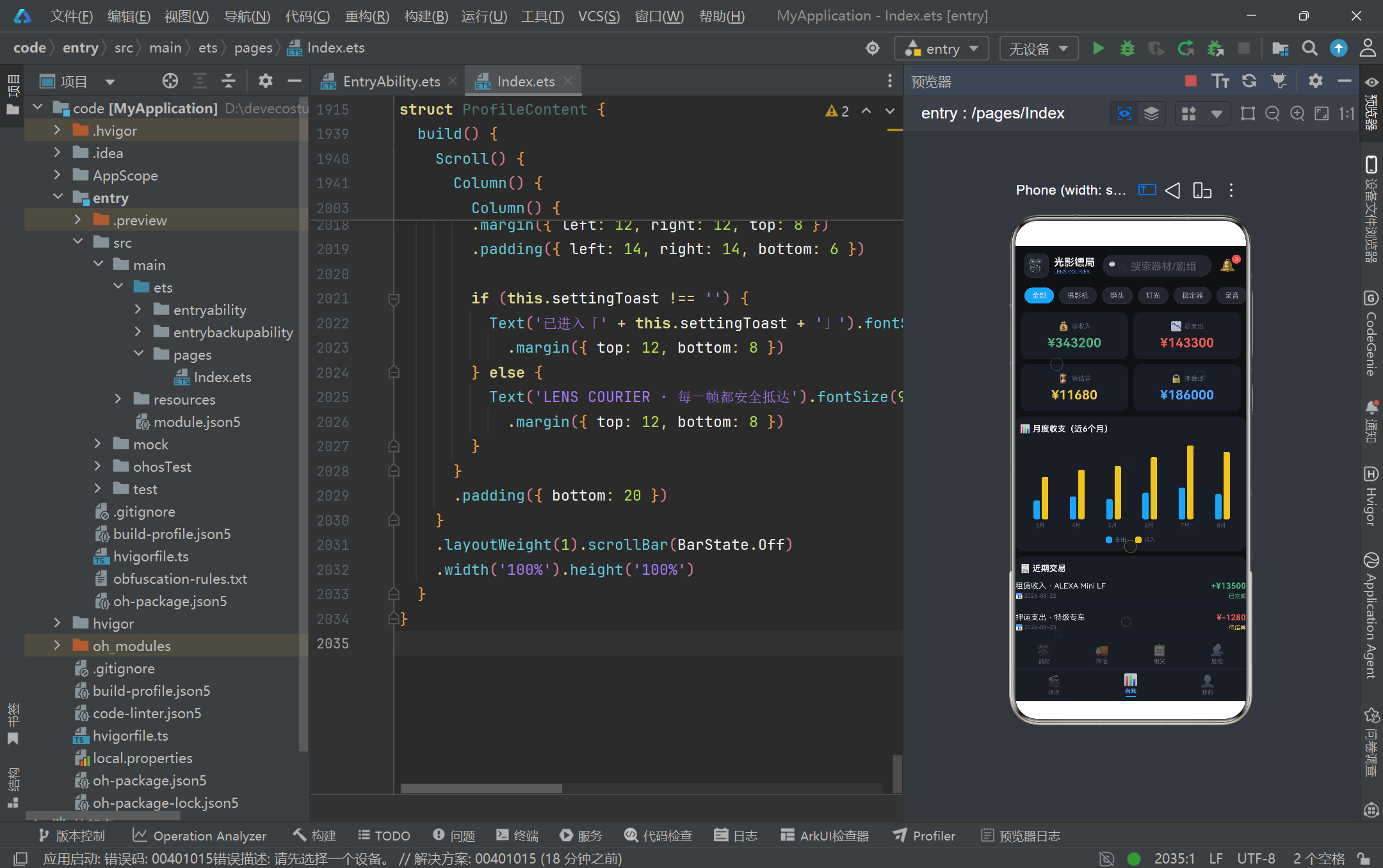
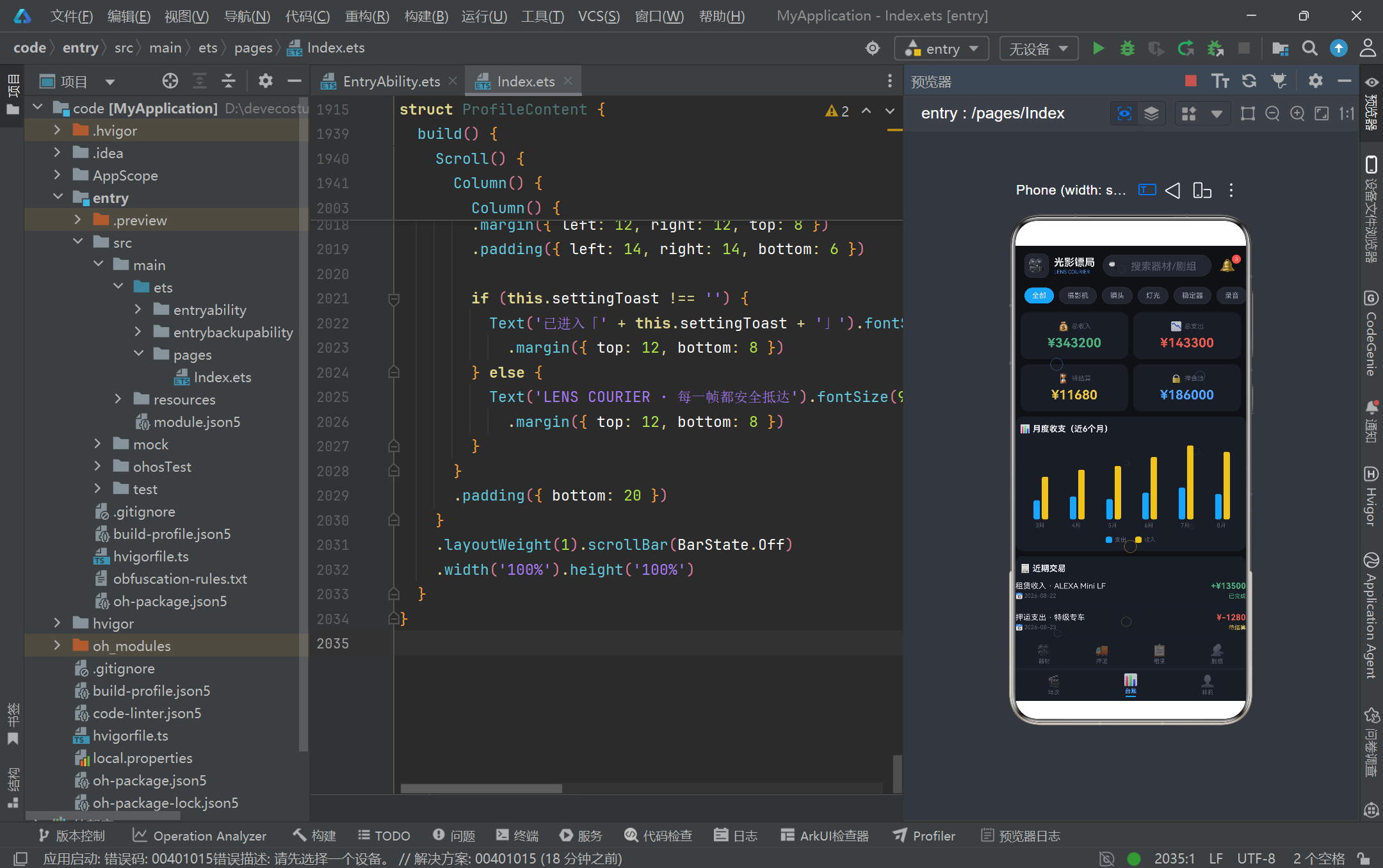
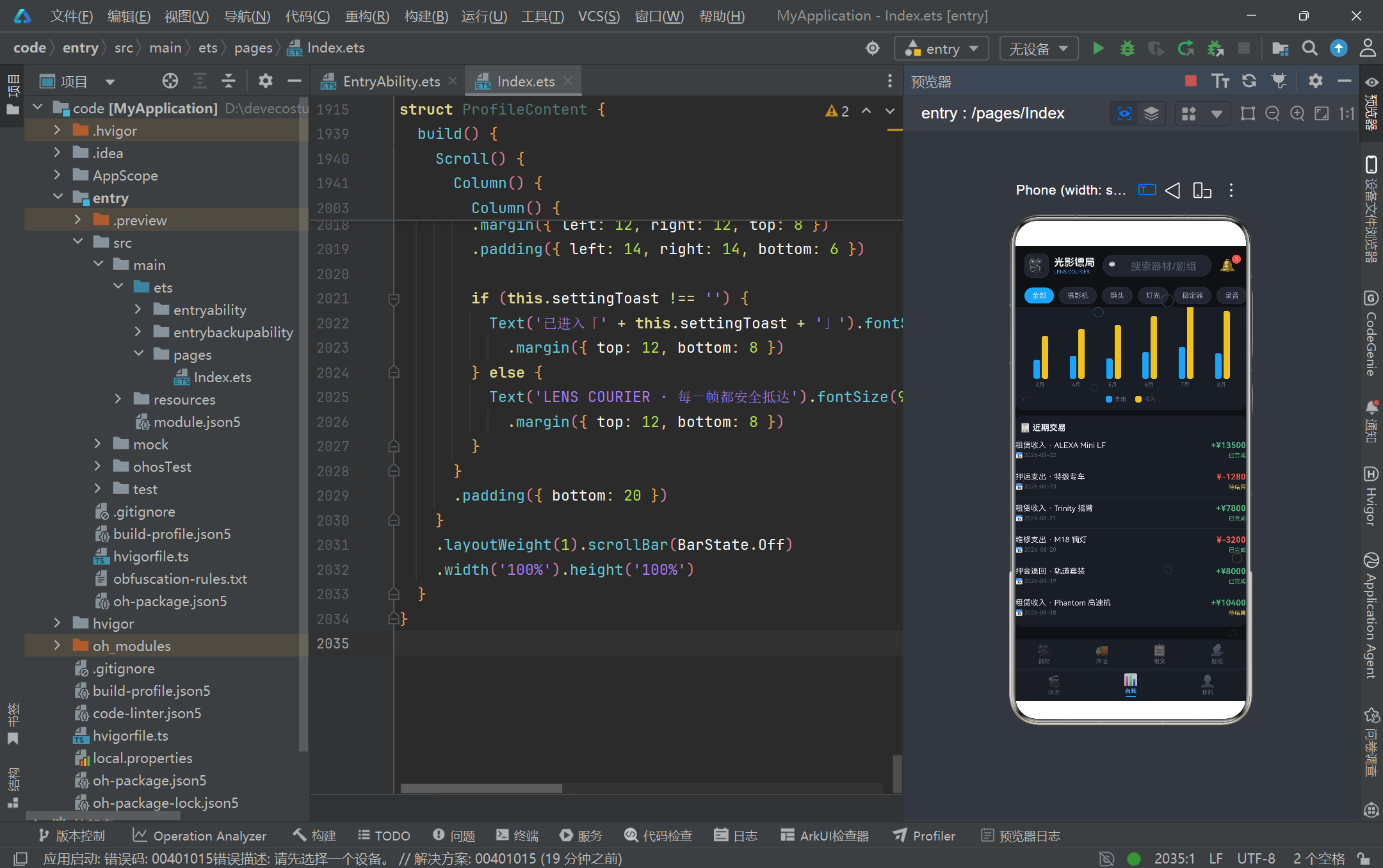
LogContent 台账页是财务数据可视化的集中展示区。顶部是 2×2 的大数字统计网格(总收入、总支出、待结算、押金池),每个单元格用 bigStatCell Builder 统一渲染,数字按语义着色(绿色收入、红色支出、金色待结算、蓝色押金)。下方是「月度收支柱状图」,这是全应用最巧妙的无图表库可视化实现:用 ForEach 遍历六个月份,每个月份渲染一个 Column,内部是一个 Row 包含两根 Column 柱子(蓝色支出 + 金色收入),柱子高度通过 barHeight 函数计算(value / monthMax * 120 转为 vp 字符串)。Row 设置 alignItems(VerticalAlign.Bottom) 让两根柱子底部对齐,height(126) 固定图表区域高度。这种用纯 Column 高度模拟柱状图的方式虽然简单,但效果惊艳,且完全不依赖任何第三方图表库,是 ArkTS 在受限环境下创造力的体现。下方还有近期交易记录列表,用 tradeRow Builder 渲染每条记录,正数金额绿色带 +、负数红色,状态用配置表着色。
19. ProfileContent 我的页与设置列表
@Component
struct ProfileContent {
  @State settingToast: string = ''

  @Builder settingRow(icon: string, label: string, hint: string) {
    Row() {
      Text(icon).fontSize(16)
      Text(label).fontSize(13).fontColor(COLOR_TEXT_MAIN).layoutWeight(1).margin({ left: 12 })
      Text(hint).fontSize(10).fontColor(COLOR_TEXT_HINT)
      Text('›').fontSize(16).fontColor(COLOR_TEXT_HINT).margin({ left: 6 })
    }
    .width('100%').padding({ top: 13, bottom: 13, left: 4, right: 4 })
    .onClick(() => { this.settingToast = label })
  }

  build() {
    Scroll() {
      Column() {
        Column() {
          Row() {
            Column() { Text('🎬').fontSize(34) }
              .width(64).height(64).backgroundColor(COLOR_CARD_LIGHT)
              .border({ width: 1, color: COLOR_PRIMARY, radius: 32 })
            Column() {
              Text('陆镜头').fontSize(17).fontWeight(FontWeight.Bold)
              Text('器材管理员 · 光影镖局 车墩站').fontSize(11)
              Text('📦 管理器材 ' + mockEquipment.length.toString() + ' 件').fontSize(10)
            }
          }
          Row() {
            Text('⭐ 信用等级 Lv.6 金牌镖师').fontColor(COLOR_ACCENT)
            Text('押运准时率 99.2%').fontColor(COLOR_GREEN)
          }
        }
        // 统计网格 2x2
        this.settingRow('🎥', '我的器材', mockEquipment.length.toString() + '件')
        this.settingRow('👥', '剧组通讯录', mockCrews.length.toString() + '个组')
        if (this.settingToast !== '') {
          Text('已进入「' + this.settingToast + '」')
        }
      }
    }
  }
}
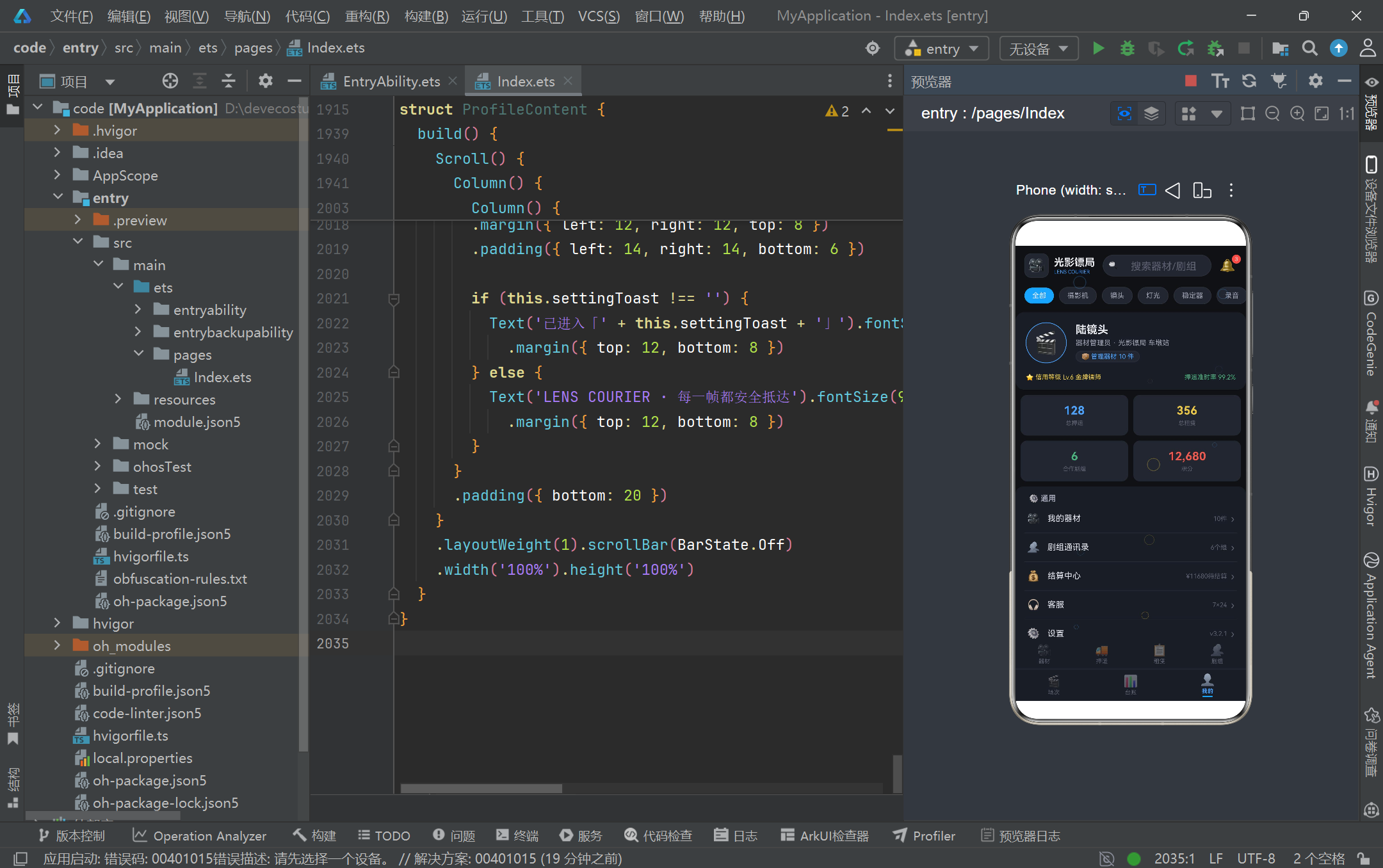
ProfileContent 我的页是个人中心,顶部是用户资料卡(头像、姓名「陆镜头」、角色「器材管理员 · 光影镖局 车墩站」、信用等级「Lv.6 金牌镖师」、押运准时率 99.2%),中间是 2×2 的统计网格(总押运、总租赁、合作剧组、积分),下方是设置列表。settingRow Builder 封装了设置项的渲染:图标 + 标题 + 提示 + 箭头 ›,点击后将 settingToast 赋值为该项标签,触发底部提示文案「已进入「XXX」」的显示。这种「点击 → Toast 提示」的模式在没有真实路由的演示场景下提供了即时反馈,让用户感知到操作已生效。页面最底部在没有点击时显示品牌 Slogan「LENS COURIER · 每一帧都安全抵达」,点击设置项后切换为 Toast,形成简洁的状态切换。整个个人页通过资料卡、统计网格、设置列表三段式结构,完整呈现了「我是谁、我做了什么、我能做什么」的个人信息架构。
四、关键交互流程图
下方的 Mermaid 流程图描绘了器材编辑弹框的完整交互链路,展示了从用户点击器材行到弹框关闭的状态流转过程。
接下来这张流程图展示了押运订单从下单到取消的完整生命周期,涵盖了预约弹框与取消弹框两条路径。
五、HarmonyOS ArkTS API 24 关键特性对比
下方表格对比了本页面所使用的 ArkTS API 24 关键特性,从装饰器、状态管理、布局、交互四个维度梳理其作用与适用场景。
| 特性类别 | 具体特性 | 在本页面的应用 | 作用与价值 |
|---|---|---|---|
| 装饰器 | @Entry | 标注 LensCourierApp 为应用入口 | 告知 HarmonyOS 框架该组件是页面根节点,启动时自动加载 |
| 装饰器 | @Component | 标注七个子组件 | 声明自定义组件,可被父组件引用并独立管理生命周期 |
| 装饰器 | @Observed | 标注六个数据类 | 使类实例字段变更可被框架追踪,驱动依赖视图刷新 |
| 状态管理 | @State | activeTab、showEditModal 等数十处 | 组件内部局部状态,变更触发当前组件重渲染 |
| 状态管理 | @Builder | contentArea、tabItem、particleLayer 等 | 封装可复用 UI 片段,支持参数化,降低 build 嵌套深度 |
| 布局 | Stack | 主容器叠加粒子层、通知铃铛角标 | 子元素按声明顺序叠加,后声明者在上层 |
| 布局 | Column/Row | 贯穿所有组件 | 纵向/横向线性布局,配合 layoutWeight 实现弹性分配 |
| 布局 | Scroll | 器材列表、押运记录、租赁网格等 | 提供可滚动区域,支持 ScrollDirection.Horizontal 横向滚动 |
| 布局 | position | 弹框定位、粒子定位 | 绝对定位,脱离文档流,常用于弹框与装饰元素 |
| 交互 | onClick | Tab 切换、弹框开关、表单提交 | 绑定点击事件,回调中修改 @State 触发刷新 |
| 交互 | onChange | 搜索框、表单输入 | 监听输入变化,实时同步到状态变量 |
| 交互 | hitTestBehavior | 粒子层 HitTestMode.None | 控制命中测试行为,让装饰层不阻挡下层点击 |
| 交互 | ForEach | 等级分布、柱状图、设置项 | 渲染数组为重复 UI,支持 index 索引参数 |
| 生命周期 | aboutToAppear/aboutToDisappear | 入口组件启动/清理定时器 | 管理资源申请与释放,避免内存泄漏 |
安装DevEco Studio程序

选择目标安装目录:

设置环境变量,但是需要重启一下:

新建一个空白模板:

设置API为24的模板项目:

初始化项目,自动下载相关依赖:

完整代码:
// ============================================================
// 光影镖局 LENS COURIER — 影视拍摄器材运输 + 设备租赁平台
// 单文件 ArkTS 页面(电影暗调银蓝风)
// Tab: 🎥器材 / 🚛押运 / 📋租赁 / 👥剧组 / 🎬场次 / 📊台账 / 👤我的
// ============================================================
// ============ 颜色常量 ============
const COLOR_BG: string = '#0F1115'
const COLOR_CARD: string = '#1A1D24'
const COLOR_CARD_LIGHT: string = '#22262F'
const COLOR_PRIMARY: string = '#4DA3FF'
const COLOR_PRIMARY_LIGHT: string = '#8AC4FF'
const COLOR_ACCENT: string = '#E8C547'
const COLOR_ACCENT_LIGHT: string = '#F5DA8A'
const COLOR_RED: string = '#E85A4F'
const COLOR_GREEN: string = '#4CAF7D'
const COLOR_TEXT_MAIN: string = '#E8EAF0'
const COLOR_TEXT_SUB: string = '#9AA0B0'
const COLOR_TEXT_HINT: string = '#5A6070'
const COLOR_BORDER: string = '#2A2E38'
// ============ 配置接口 ============
interface EquipStatusMeta {
label: string
color: string
icon: string
}
interface EscortLevelMeta {
label: string
color: string
icon: string
priceBase: number
}
interface OrderStatusMeta {
label: string
color: string
icon: string
}
interface CrewStatusMeta {
label: string
color: string
icon: string
}
interface SetStatusMeta {
label: string
color: string
icon: string
}
interface ProjectTypeMeta {
label: string
icon: string
color: string
}
interface TradeStatusMeta {
label: string
color: string
icon: string
}
// ============ 数据模型接口 ============
interface EquipmentModel {
id: number
name: string
brand: string
serialNo: string
icon: string
status: string
insurance: number
}
interface EscortOrderModel {
id: number
orderNo: string
pickup: string
destination: string
equipCount: number
level: string
price: number
status: string
date: string
}
interface RentalItemModel {
id: number
name: string
dailyRate: number
deposit: number
stock: number
rating: number
color: string
}
interface CrewModel {
id: number
name: string
projectType: string
period: string
memberCount: number
status: string
}
interface SetScheduleModel {
id: number
date: string
time: string
sceneName: string
equipCount: number
status: string
}
interface TradeLogModel {
id: number
type: string
amount: number
date: string
status: string
}
// ============ @Observed 数据类 ============
@Observed
class EquipmentItem implements EquipmentModel {
id: number = 0
name: string = ''
brand: string = ''
serialNo: string = ''
icon: string = '🎥'
status: string = '在库'
insurance: number = 0
constructor(id: number, name: string, brand: string, serialNo: string, icon: string, status: string, insurance: number) {
this.id = id
this.name = name
this.brand = brand
this.serialNo = serialNo
this.icon = icon
this.status = status
this.insurance = insurance
}
}
@Observed
class EscortOrderItem implements EscortOrderModel {
id: number = 0
orderNo: string = ''
pickup: string = ''
destination: string = ''
equipCount: number = 0
level: string = '普通'
price: number = 0
status: string = '待装车'
date: string = ''
constructor(id: number, orderNo: string, pickup: string, destination: string, equipCount: number, level: string, price: number, status: string, date: string) {
this.id = id
this.orderNo = orderNo
this.pickup = pickup
this.destination = destination
this.equipCount = equipCount
this.level = level
this.price = price
this.status = status
this.date = date
}
}
@Observed
class RentalItem implements RentalItemModel {
id: number = 0
name: string = ''
dailyRate: number = 0
deposit: number = 0
stock: number = 0
rating: number = 0
color: string = COLOR_PRIMARY
constructor(id: number, name: string, dailyRate: number, deposit: number, stock: number, rating: number, color: string) {
this.id = id
this.name = name
this.dailyRate = dailyRate
this.deposit = deposit
this.stock = stock
this.rating = rating
this.color = color
}
}
@Observed
class CrewItem implements CrewModel {
id: number = 0
name: string = ''
projectType: string = '电影'
period: string = ''
memberCount: number = 0
status: string = '筹备'
constructor(id: number, name: string, projectType: string, period: string, memberCount: number, status: string) {
this.id = id
this.name = name
this.projectType = projectType
this.period = period
this.memberCount = memberCount
this.status = status
}
}
@Observed
class SetScheduleItem implements SetScheduleModel {
id: number = 0
date: string = ''
time: string = ''
sceneName: string = ''
equipCount: number = 0
status: string = '待拍摄'
constructor(id: number, date: string, time: string, sceneName: string, equipCount: number, status: string) {
this.id = id
this.date = date
this.time = time
this.sceneName = sceneName
this.equipCount = equipCount
this.status = status
}
}
@Observed
class TradeLogItem implements TradeLogModel {
id: number = 0
type: string = ''
amount: number = 0
date: string = ''
status: string = '已完成'
constructor(id: number, type: string, amount: number, date: string, status: string) {
this.id = id
this.type = type
this.amount = amount
this.date = date
this.status = status
}
}
// ============ 配置映射 ============
const EQUIP_STATUS_CONFIG: Record<string, EquipStatusMeta> = {
'在库': { label: '在库', color: COLOR_GREEN, icon: '📦' },
'在途': { label: '在途', color: COLOR_PRIMARY, icon: '🚚' },
'在用': { label: '在用', color: COLOR_ACCENT, icon: '🎬' },
'维修': { label: '维修', color: COLOR_RED, icon: '🔧' }
}
const ESCORT_LEVEL_CONFIG: Record<string, EscortLevelMeta> = {
'普通': { label: '普通', color: COLOR_TEXT_SUB, icon: '🛡️', priceBase: 200 },
'高级': { label: '高级', color: COLOR_PRIMARY, icon: '🛡️', priceBase: 480 },
'特级': { label: '特级', color: COLOR_ACCENT, icon: '🏅', priceBase: 880 },
'专车专送': { label: '专车专送', color: COLOR_RED, icon: '🚑', priceBase: 1580 }
}
const ORDER_STATUS_CONFIG: Record<string, OrderStatusMeta> = {
'待装车': { label: '待装车', color: COLOR_ACCENT, icon: '⏳' },
'押运中': { label: '押运中', color: COLOR_PRIMARY, icon: '🚛' },
'已交付': { label: '已交付', color: COLOR_GREEN, icon: '✅' }
}
const CREW_STATUS_CONFIG: Record<string, CrewStatusMeta> = {
'筹备': { label: '筹备', color: COLOR_ACCENT, icon: '📝' },
'拍摄中': { label: '拍摄中', color: COLOR_RED, icon: '🔴' },
'后期': { label: '后期', color: COLOR_PRIMARY, icon: '🎞️' }
}
const SET_STATUS_CONFIG: Record<string, SetStatusMeta> = {
'待拍摄': { label: '待拍摄', color: COLOR_ACCENT, icon: '⏱️' },
'拍摄中': { label: '拍摄中', color: COLOR_PRIMARY, icon: '🎥' },
'已完成': { label: '已完成', color: COLOR_GREEN, icon: '✅' }
}
const PROJECT_TYPE_CONFIG: Record<string, ProjectTypeMeta> = {
'电影': { label: '电影', icon: '🎬', color: COLOR_PRIMARY },
'广告': { label: '广告', icon: '📺', color: COLOR_ACCENT },
'短剧': { label: '短剧', icon: '📱', color: COLOR_GREEN },
'综艺': { label: '综艺', icon: '🎤', color: COLOR_RED }
}
const TRADE_STATUS_CONFIG: Record<string, TradeStatusMeta> = {
'已完成': { label: '已完成', color: COLOR_GREEN, icon: '✅' },
'待结算': { label: '待结算', color: COLOR_ACCENT, icon: '⏳' },
'已退款': { label: '已退款', color: COLOR_RED, icon: '↩️' }
}
// ============ 静态数据 ============
// 10件器材
const mockEquipment: EquipmentItem[] = [
new EquipmentItem(1, 'ALEXA 35 主摄影机', 'ARRI', 'ARX-881201', '🎥', '在用', 320000),
new EquipmentItem(2, 'Master Prime 50mm T1.3', 'Zeiss', 'ZMP-550218', '🔭', '在库', 185000),
new EquipmentItem(3, '变宽镜头套装 35/50/85', 'Cooke', 'CKA-330917', '🔭', '在途', 460000),
new EquipmentItem(4, 'SkyPanel S60-C 灯板', 'ARRI', 'SKY-660144', '💡', '在库', 42000),
new EquipmentItem(5, 'M18 镝灯 1800W', 'ARRI', 'M18-880231', '💡', '维修', 58000),
new EquipmentItem(6, '如影2 专业稳定器', 'DJI', 'RJ2-110528', '🎯', '在用', 76000),
new EquipmentItem(7, 'Sound Devices 888 调音台', 'SD', 'SD8-902337', '🎚️', '在库', 68000),
new EquipmentItem(8, '高清轨道车套装 12m', 'Cine.Design', 'TRK-120844', '🛤️', '在途', 39000),
new EquipmentItem(9, '索尼威尼斯2 副机', 'Sony', 'VEN2-770612', '🎥', '在用', 285000),
new EquipmentItem(10, '无线跟焦系统 WCU-4', 'ARRI', 'WCU-440719', '🎛️', '在库', 35000)
]
// 8条押运记录
const mockEscortOrders: EscortOrderItem[] = [
new EscortOrderItem(1, 'EC2026082301', '车墩影视基地', '横店影视城', 12, '特级', 1280, '押运中', '2026-08-23'),
new EscortOrderItem(2, 'EC2026082302', '象山影视城', '青岛东方影都', 8, '专车专送', 1680, '待装车', '2026-08-24'),
new EscortOrderItem(3, 'EC2026082203', '北京中影基地', '车墩影视基地', 15, '高级', 960, '已交付', '2026-08-22'),
new EscortOrderItem(4, 'EC2026082204', '杭州萧山仓库', '乌镇景区', 6, '普通', 380, '已交付', '2026-08-22'),
new EscortOrderItem(5, 'EC2026082105', '上海租赁中心', '宁波影视城', 9, '特级', 1180, '押运中', '2026-08-21'),
new EscortOrderItem(6, 'EC2026082106', '无锡国家数字基地', '苏州机房', 4, '高级', 620, '已交付', '2026-08-21'),
new EscortOrderItem(7, 'EC2026082007', '横店影视城', '车墩影视基地', 11, '普通', 450, '已交付', '2026-08-20'),
new EscortOrderItem(8, 'EC2026082008', '青岛东方影都', '大连森林剧场', 7, '专车专送', 1520, '待装车', '2026-08-25')
]
// 10件可租器材
const mockRentals: RentalItem[] = [
new RentalItem(1, 'ALEXA Mini LF 套装', 4500, 50000, 2, 4.9, '#4DA3FF'),
new RentalItem(2, ' Cooke S7 全组镜头', 3200, 40000, 1, 4.8, '#8AC4FF'),
new RentalItem(3, 'SkyPanel S360 灯王', 1800, 20000, 3, 4.7, '#E8C547'),
new RentalItem(4, '如影2 + 独轮车', 1200, 15000, 4, 4.8, '#4CAF7D'),
new RentalItem(5, 'Trinity 电控摇臂', 2600, 30000, 2, 4.9, '#4DA3FF'),
new RentalItem(6, 'Sound Devices Scorpio', 1100, 12000, 3, 4.6, '#8AC4FF'),
new RentalItem(7, '高速摄影机 Phantom', 5200, 60000, 1, 5.0, '#E8C547'),
new RentalItem(8, '12米电动轨道', 900, 8000, 5, 4.5, '#4CAF7D'),
new RentalItem(9, '场记板/监视器套组', 300, 3000, 8, 4.4, '#4DA3FF'),
new RentalItem(10, 'DIT 数据备份车', 1500, 18000, 2, 4.7, '#8AC4FF')
]
// 6个剧组
const mockCrews: CrewItem[] = [
new CrewItem(1, '《长安十二骑》剧组', '电影', '2026.06 - 2026.11', 186, '拍摄中'),
new CrewItem(2, '蓝山咖啡年度广告', '广告', '2026.08 - 2026.09', 32, '拍摄中'),
new CrewItem(3, '《午夜直播间》', '短剧', '2026.09 - 2026.10', 24, '筹备'),
new CrewItem(4, '《极限探秘》第三季', '综艺', '2026.05 - 2026.12', 210, '拍摄中'),
new CrewItem(5, '《雾隐之城》', '电影', '2026.03 - 2026.08', 158, '后期'),
new CrewItem(6, '《味觉旅行》纪录片', '短剧', '2026.09 - 2027.01', 18, '筹备')
]
// 8个场次
const mockSchedules: SetScheduleItem[] = [
new SetScheduleItem(1, '2026-08-23', '07:00', 'A2棚 · 夜市追逐戏', 9, '已完成'),
new SetScheduleItem(2, '2026-08-23', '09:30', '外景 · 天台告白', 6, '拍摄中'),
new SetScheduleItem(3, '2026-08-23', '13:00', 'C棚 · 酒馆谈判', 11, '待拍摄'),
new SetScheduleItem(4, '2026-08-23', '16:00', '外景 · 雨巷打斗', 14, '待拍摄'),
new SetScheduleItem(5, '2026-08-23', '19:00', 'B1棚 · 车内对话', 5, '待拍摄'),
new SetScheduleItem(6, '2026-08-24', '08:00', 'D棚 · 法庭对峙', 8, '待拍摄'),
new SetScheduleItem(7, '2026-08-24', '14:00', '外景 · 码头交接', 12, '待拍摄'),
new SetScheduleItem(8, '2026-08-25', '10:00', 'A1棚 · 病房告别', 7, '待拍摄')
]
// 6条交易记录
const mockTrades: TradeLogItem[] = [
new TradeLogItem(1, '租赁收入 · ALEXA Mini LF', 13500, '2026-08-22', '已完成'),
new TradeLogItem(2, '押运支出 · 特级专车', -1280, '2026-08-23', '待结算'),
new TradeLogItem(3, '租赁收入 · Trinity 摇臂', 7800, '2026-08-21', '已完成'),
new TradeLogItem(4, '维修支出 · M18 镝灯', -3200, '2026-08-20', '已完成'),
new TradeLogItem(5, '押金退回 · 轨道套装', 8000, '2026-08-19', '已完成'),
new TradeLogItem(6, '租赁收入 · Phantom 高速机', 10400, '2026-08-18', '待结算')
]
// 月份收支数据(台账柱状图)
const monthLabels: string[] = ['3月', '4月', '5月', '6月', '7月', '8月']
const monthExpense: number[] = [18600, 22400, 19800, 26500, 31200, 24800]
const monthIncome: number[] = [42000, 48600, 52300, 61500, 72800, 66400]
const monthMax: number = 75000
// ============ 辅助纯函数 ============
function moneyText(n: number): string {
return '¥' + n.toString()
}
function equipCountByStatus(status: string): number {
return mockEquipment.filter((e: EquipmentItem) => e.status === status).length
}
function escortCountByLevel(level: string): number {
return mockEscortOrders.filter((o: EscortOrderItem) => o.level === level).length
}
function escortTransitCount(): number {
return mockEscortOrders.filter((o: EscortOrderItem) => o.status === '押运中').length
}
function setCountByStatus(status: string): number {
return mockSchedules.filter((s: SetScheduleItem) => s.status === status).length
}
function todaySetCount(): number {
return mockSchedules.filter((s: SetScheduleItem) => s.date === '2026-08-23').length
}
function todayDonePercent(): number {
return Math.round(setCountByStatus('已完成') / todaySetCount() * 100)
}
function totalExpense(): number {
return 143300
}
function totalIncome(): number {
return 343200
}
function pendingSettle(): number {
return 11680
}
function depositTotal(): number {
return 186000
}
function toggleInArray(arr: string[], v: string): string[] {
if (arr.indexOf(v) >= 0) {
return arr.filter((s: string) => s !== v)
}
return arr.concat([v])
}
function containsValue(arr: string[], v: string): boolean {
return arr.indexOf(v) >= 0
}
// 粒子纯函数(镜头光斑)
function particleX(i: number, tick: number): number {
return (i * 61 + tick * 3) % 92 + 2
}
function particleY(i: number, tick: number): number {
return (i * 37 + tick * 5) % 94 + 2
}
function particleSize(i: number): number {
return 10 + (i % 4) * 6
}
function particleColor(i: number): string {
return i % 3 === 0 ? COLOR_ACCENT : COLOR_PRIMARY
}
function particleOpacity(i: number, tick: number): number {
return 0.12 + ((i + tick) % 5) * 0.06
}
function barHeight(value: number): string {
return (value / monthMax * 120).toFixed(0) + 'vp'
}
// ============ Tab 枚举 ============
enum LensTab {
EQUIP = 0,
SHIP = 1,
RENTAL = 2,
CREW = 3,
SET = 4,
LOG = 5,
PROFILE = 6
}
const EQUIP_CATS: string[] = ['全部', '摄影机', '镜头', '灯光', '稳定器', '录音', '轨道']
const ESCORT_LEVELS: string[] = ['普通', '高级', '特级', '专车专送']
const SPECIAL_REQS: string[] = ['防震', '防潮', '恒温', '安保跟车']
const PICKUP_METHODS: string[] = ['自取', '配送', '押运到组']
const RENTAL_SORTS: string[] = ['热门', '价格', '评分']
const BOOKABLE_EQUIPS: string[] = ['摄影机', '镜头组', '灯光', '稳定器', '轨道', '录音']
// ============ 入口页面 ============
@Entry
@Component
struct LensCourierApp {
@State activeTab: LensTab = LensTab.EQUIP
@State searchKeyword: string = ''
@State selectedCat: string = '全部'
@State particleTick: number = 0
particleTimer: number = -1
aboutToAppear() {
this.particleTimer = setInterval(() => {
this.particleTick = this.particleTick + 1
}, 280)
}
aboutToDisappear() {
if (this.particleTimer >= 0) {
clearInterval(this.particleTimer)
}
}
@Builder contentArea() {
Column() {
if (this.activeTab === LensTab.EQUIP) {
EquipmentContent()
} else if (this.activeTab === LensTab.SHIP) {
EscortContent()
} else if (this.activeTab === LensTab.RENTAL) {
RentalContent()
} else if (this.activeTab === LensTab.CREW) {
CrewContent()
} else if (this.activeTab === LensTab.SET) {
SetContent()
} else if (this.activeTab === LensTab.LOG) {
LogContent()
} else {
ProfileContent()
}
}
.layoutWeight(1)
}
@Builder tabItem(icon: string, label: string, tab: LensTab) {
Column() {
Text(icon).fontSize(18).opacity(this.activeTab === tab ? 1.0 : 0.45)
Text(label).fontSize(9)
.fontColor(this.activeTab === tab ? COLOR_PRIMARY : COLOR_TEXT_HINT)
.fontWeight(this.activeTab === tab ? FontWeight.Bold : FontWeight.Normal)
.margin({ top: 2 })
if (this.activeTab === tab) {
Column().width(16).height(2)
.backgroundColor(COLOR_PRIMARY).borderRadius(1).margin({ top: 2 })
}
}
.layoutWeight(1)
.alignItems(HorizontalAlign.Center)
.padding({ top: 6, bottom: 6 })
.onClick(() => { this.activeTab = tab })
}
@Builder catPill(cat: string) {
if (this.selectedCat === cat) {
Text(cat)
.fontSize(11).fontColor(COLOR_TEXT_MAIN).backgroundColor(COLOR_PRIMARY)
.padding({ left: 12, right: 12, top: 6, bottom: 6 }).borderRadius(14)
.margin({ left: 4, right: 4 })
} else {
Text(cat)
.fontSize(11).fontColor(COLOR_TEXT_SUB).backgroundColor(COLOR_CARD_LIGHT)
.border({ width: 1, color: COLOR_BORDER, radius: 14 })
.padding({ left: 12, right: 12, top: 6, bottom: 6 })
.margin({ left: 4, right: 4 })
.onClick(() => { this.selectedCat = cat })
}
}
// ===== 粒子层(镜头光斑,不阻挡点击)=====
@Builder particleLayer() {
Stack() {
Text('○')
.fontSize(particleSize(0)).fontColor(particleColor(0))
.opacity(particleOpacity(0, this.particleTick))
.position({ x: particleX(0, this.particleTick) + '%', y: particleY(0, this.particleTick) + '%' })
Text('○')
.fontSize(particleSize(1)).fontColor(particleColor(1))
.opacity(particleOpacity(1, this.particleTick))
.position({ x: particleX(1, this.particleTick) + '%', y: particleY(1, this.particleTick) + '%' })
Text('○')
.fontSize(particleSize(2)).fontColor(particleColor(2))
.opacity(particleOpacity(2, this.particleTick))
.position({ x: particleX(2, this.particleTick) + '%', y: particleY(2, this.particleTick) + '%' })
Text('○')
.fontSize(particleSize(3)).fontColor(particleColor(3))
.opacity(particleOpacity(3, this.particleTick))
.position({ x: particleX(3, this.particleTick) + '%', y: particleY(3, this.particleTick) + '%' })
Text('○')
.fontSize(particleSize(4)).fontColor(particleColor(4))
.opacity(particleOpacity(4, this.particleTick))
.position({ x: particleX(4, this.particleTick) + '%', y: particleY(4, this.particleTick) + '%' })
Text('○')
.fontSize(particleSize(5)).fontColor(particleColor(5))
.opacity(particleOpacity(5, this.particleTick))
.position({ x: particleX(5, this.particleTick) + '%', y: particleY(5, this.particleTick) + '%' })
Text('○')
.fontSize(particleSize(6)).fontColor(particleColor(6))
.opacity(particleOpacity(6, this.particleTick))
.position({ x: particleX(6, this.particleTick) + '%', y: particleY(6, this.particleTick) + '%' })
Text('○')
.fontSize(particleSize(7)).fontColor(particleColor(7))
.opacity(particleOpacity(7, this.particleTick))
.position({ x: particleX(7, this.particleTick) + '%', y: particleY(7, this.particleTick) + '%' })
Text('○')
.fontSize(particleSize(8)).fontColor(particleColor(8))
.opacity(particleOpacity(8, this.particleTick))
.position({ x: particleX(8, this.particleTick) + '%', y: particleY(8, this.particleTick) + '%' })
Text('○')
.fontSize(particleSize(9)).fontColor(particleColor(9))
.opacity(particleOpacity(9, this.particleTick))
.position({ x: particleX(9, this.particleTick) + '%', y: particleY(9, this.particleTick) + '%' })
}
.width('100%').height('100%')
.hitTestBehavior(HitTestMode.None)
}
build() {
Stack() {
Column() {
// ===== 头部:第一行 Logo + 搜索 + 通知 =====
Row() {
Column() {
Text('🎥').fontSize(22)
}
.width(38).height(38).backgroundColor(COLOR_CARD_LIGHT)
.border({ width: 1, color: COLOR_BORDER, radius: 10 })
.alignItems(HorizontalAlign.Center).justifyContent(FlexAlign.Center)
Column() {
Text('光影镖局').fontSize(16).fontWeight(FontWeight.Bold).fontColor(COLOR_TEXT_MAIN)
Text('LENS COURIER').fontSize(8).fontColor(COLOR_PRIMARY).margin({ top: 1 })
}
.alignItems(HorizontalAlign.Start).margin({ left: 8 })
Row() {
Text('🔍').fontSize(12).margin({ left: 8 })
TextInput({ placeholder: '搜索器材/剧组' })
.placeholderColor(COLOR_TEXT_HINT).fontSize(12).layoutWeight(1)
.fontColor(COLOR_TEXT_MAIN).backgroundColor(Color.Transparent)
.margin({ left: 4 })
.onChange((v: string) => { this.searchKeyword = v })
}
.layoutWeight(1).height(34)
.backgroundColor(COLOR_CARD_LIGHT)
.border({ width: 1, color: COLOR_BORDER, radius: 17 })
.margin({ left: 12, right: 10 })
Stack() {
Text('🔔').fontSize(20)
Text('3')
.fontSize(8).fontColor(COLOR_TEXT_MAIN).backgroundColor(COLOR_RED)
.width(14).height(14).borderRadius(7).textAlign(TextAlign.Center)
.position({ x: 22, y: -2 })
}
.width(30).height(30)
.onClick(() => { this.activeTab = LensTab.LOG })
}
.width('100%')
.padding({ left: 14, right: 14, top: 12, bottom: 10 })
// ===== 头部:第二行 器材类型药丸横向滚动 =====
Scroll() {
Row() {
this.catPill(EQUIP_CATS[0])
this.catPill(EQUIP_CATS[1])
this.catPill(EQUIP_CATS[2])
this.catPill(EQUIP_CATS[3])
this.catPill(EQUIP_CATS[4])
this.catPill(EQUIP_CATS[5])
this.catPill(EQUIP_CATS[6])
}
.padding({ left: 10, right: 10 })
}
.scrollable(ScrollDirection.Horizontal)
.scrollBar(BarState.Off)
.height(36)
.width('100%')
// ===== 内容区 =====
this.contentArea()
// ===== Tab 栏:第一排4个 =====
Row() {
this.tabItem('🎥', '器材', LensTab.EQUIP)
this.tabItem('🚛', '押运', LensTab.SHIP)
this.tabItem('📋', '租赁', LensTab.RENTAL)
this.tabItem('👥', '剧组', LensTab.CREW)
}
.width('100%')
.backgroundColor(COLOR_CARD)
// ===== Tab 栏:第二排3个 =====
Divider().color(COLOR_BORDER).strokeWidth(1)
Row() {
this.tabItem('🎬', '场次', LensTab.SET)
this.tabItem('📊', '台账', LensTab.LOG)
this.tabItem('👤', '我的', LensTab.PROFILE)
}
.width('100%')
.backgroundColor(COLOR_CARD)
}
.width('100%').height('100%')
.backgroundColor(COLOR_BG)
// ===== 粒子层 =====
this.particleLayer()
}
.width('100%').height('100%')
.backgroundColor(COLOR_BG)
}
}
// ============ Tab1 器材页 ============
@Component
struct EquipmentContent {
@State showEditModal: boolean = false
@State editingEquip: EquipmentItem | null = null
@State formName: string = ''
@State formBrand: string = ''
@State formSerial: string = ''
@State formInsurance: string = ''
@State formStatus: string = '在库'
@State formNote: string = ''
@Builder modalOverlay(onClose: () => void) {
Column()
.width('100%').height('100%')
.backgroundColor('rgba(8,10,14,0.72)')
.onClick(onClose)
}
// ===== 弹框2:编辑器材信息(卡片式)=====
@Builder editEquipModal() {
Column() {
this.modalOverlay(() => { this.showEditModal = false })
Column() {
Column() {
Text('✏️ 编辑器材信息').fontSize(16).fontWeight(FontWeight.Bold).fontColor(COLOR_TEXT_MAIN)
Text('器材档案 · 序列号 ' + (this.editingEquip?.serialNo ?? '')).fontSize(10)
.fontColor(COLOR_TEXT_HINT).margin({ top: 2 })
}
.width('100%').padding({ top: 16, bottom: 14 })
.backgroundColor(COLOR_CARD_LIGHT)
.border({ width: 1, color: COLOR_BORDER, radius: { topLeft: 14, topRight: 14 } })
.alignItems(HorizontalAlign.Center)
Scroll() {
Column() {
Text('器材名称').fontSize(11).fontColor(COLOR_TEXT_SUB).margin({ top: 10, left: 18 })
TextInput({ placeholder: this.editingEquip?.name ?? '器材名称' })
.placeholderColor(COLOR_TEXT_HINT).fontSize(13).width('92%')
.fontColor(COLOR_TEXT_MAIN).backgroundColor(COLOR_CARD_LIGHT)
.border({ width: 1, color: COLOR_BORDER, radius: 8 })
.margin({ top: 4 })
.onChange((v: string) => { this.formName = v })
Text('品牌').fontSize(11).fontColor(COLOR_TEXT_SUB).margin({ top: 10, left: 18 })
TextInput({ placeholder: this.editingEquip?.brand ?? '品牌' })
.placeholderColor(COLOR_TEXT_HINT).fontSize(13).width('92%')
.fontColor(COLOR_TEXT_MAIN).backgroundColor(COLOR_CARD_LIGHT)
.border({ width: 1, color: COLOR_BORDER, radius: 8 })
.margin({ top: 4 })
.onChange((v: string) => { this.formBrand = v })
Text('序列号').fontSize(11).fontColor(COLOR_TEXT_SUB).margin({ top: 10, left: 18 })
TextInput({ placeholder: this.editingEquip?.serialNo ?? '序列号' })
.placeholderColor(COLOR_TEXT_HINT).fontSize(13).width('92%')
.fontColor(COLOR_TEXT_MAIN).backgroundColor(COLOR_CARD_LIGHT)
.border({ width: 1, color: COLOR_BORDER, radius: 8 })
.margin({ top: 4 })
.onChange((v: string) => { this.formSerial = v })
Text('保险金额(¥)').fontSize(11).fontColor(COLOR_TEXT_SUB).margin({ top: 10, left: 18 })
TextInput({ placeholder: (this.editingEquip?.insurance ?? 0).toString() })
.placeholderColor(COLOR_TEXT_HINT).fontSize(13).width('92%')
.fontColor(COLOR_TEXT_MAIN).backgroundColor(COLOR_CARD_LIGHT)
.border({ width: 1, color: COLOR_BORDER, radius: 8 })
.margin({ top: 4 })
.onChange((v: string) => { this.formInsurance = v })
Text('器材状态').fontSize(11).fontColor(COLOR_TEXT_SUB).margin({ top: 12, left: 18 })
Row() {
ForEach(['在库', '在途', '在用', '维修'], (s: string) => {
if (this.formStatus === s) {
Text(s).fontSize(11).fontColor(COLOR_TEXT_MAIN)
.backgroundColor(EQUIP_STATUS_CONFIG[s]?.color ?? COLOR_PRIMARY)
.padding({ left: 10, right: 10, top: 5, bottom: 5 }).borderRadius(12)
.margin({ left: 3, right: 3 })
} else {
Text(s).fontSize(11).fontColor(COLOR_TEXT_SUB)
.backgroundColor(COLOR_CARD_LIGHT)
.border({ width: 1, color: COLOR_BORDER, radius: 12 })
.padding({ left: 10, right: 10, top: 5, bottom: 5 })
.margin({ left: 3, right: 3 })
.onClick(() => { this.formStatus = s })
}
})
}
.margin({ top: 4 })
Text('备注').fontSize(11).fontColor(COLOR_TEXT_SUB).margin({ top: 12, left: 18 })
TextArea({ placeholder: '维保记录、配件清单等...' })
.placeholderColor(COLOR_TEXT_HINT).fontSize(12).width('92%').height(56)
.fontColor(COLOR_TEXT_MAIN).backgroundColor(COLOR_CARD_LIGHT)
.border({ width: 1, color: COLOR_BORDER, radius: 8 })
.margin({ top: 4, bottom: 12 })
.onChange((v: string) => { this.formNote = v })
}
.width('100%')
.alignItems(HorizontalAlign.Center)
}
.layoutWeight(1)
.constraintSize({ maxHeight: '60%' })
.scrollBar(BarState.Off)
Row() {
Text('取消').fontSize(13).fontColor(COLOR_TEXT_SUB)
.backgroundColor(COLOR_CARD_LIGHT)
.border({ width: 1, color: COLOR_BORDER, radius: 18 })
.padding({ left: 26, right: 26, top: 9, bottom: 9 })
.onClick(() => { this.showEditModal = false })
Text('保存').fontSize(13).fontColor('#FFFFFF')
.backgroundColor(COLOR_PRIMARY).borderRadius(18)
.padding({ left: 26, right: 26, top: 9, bottom: 9 })
.margin({ left: 12 })
.onClick(() => { this.showEditModal = false })
}
.width('100%').justifyContent(FlexAlign.Center)
.padding({ top: 12, bottom: 16 })
}
.width('85%').height('60%')
.backgroundColor(COLOR_CARD).borderRadius(14)
.alignItems(HorizontalAlign.Center)
.position({ x: '7.5%', y: '16%' })
}
.width('100%').height('100%').position({ x: 0, y: 0 }).zIndex(999)
}
@Builder equipItemRow(e: EquipmentItem) {
Row() {
Column() {
Text(e.icon).fontSize(24)
}
.width(46).height(46)
.backgroundColor(COLOR_CARD_LIGHT)
.border({ width: 1, color: COLOR_BORDER, radius: 12 })
.alignItems(HorizontalAlign.Center).justifyContent(FlexAlign.Center)
Column() {
Row() {
Text(e.name).fontSize(14).fontWeight(FontWeight.Medium)
.fontColor(COLOR_TEXT_MAIN).layoutWeight(1)
Text(EQUIP_STATUS_CONFIG[e.status]?.label ?? e.status)
.fontSize(10).fontColor(EQUIP_STATUS_CONFIG[e.status]?.color ?? COLOR_TEXT_SUB)
.backgroundColor(COLOR_CARD_LIGHT)
.border({ width: 1, color: EQUIP_STATUS_CONFIG[e.status]?.color ?? COLOR_BORDER, radius: 10 })
.padding({ left: 8, right: 8, top: 2, bottom: 2 })
}
.width('100%')
Text(e.brand + ' · SN ' + e.serialNo).fontSize(10).fontColor(COLOR_TEXT_SUB)
.margin({ top: 3 })
Text('保险 ' + moneyText(e.insurance)).fontSize(10).fontColor(COLOR_ACCENT)
.margin({ top: 2 })
}
.layoutWeight(1).alignItems(HorizontalAlign.Start).padding({ left: 10 })
Text('✏️').fontSize(14).margin({ left: 8 })
}
.width('100%').padding(12).backgroundColor(COLOR_CARD)
.borderRadius(12).margin({ left: 12, right: 12, top: 6 })
.onClick(() => {
this.editingEquip = e
this.formStatus = e.status
this.showEditModal = true
})
}
build() {
Stack() {
Column() {
// 顶部统计条
Row() {
Column() {
Text(mockEquipment.length.toString()).fontSize(19).fontWeight(FontWeight.Bold).fontColor(COLOR_TEXT_MAIN)
Text('总器材').fontSize(9).fontColor(COLOR_TEXT_HINT)
}.layoutWeight(1).alignItems(HorizontalAlign.Center)
Column() {
Text(equipCountByStatus('在库').toString()).fontSize(19).fontWeight(FontWeight.Bold).fontColor(COLOR_GREEN)
Text('在库').fontSize(9).fontColor(COLOR_TEXT_HINT)
}.layoutWeight(1).alignItems(HorizontalAlign.Center)
Column() {
Text(equipCountByStatus('在途').toString()).fontSize(19).fontWeight(FontWeight.Bold).fontColor(COLOR_PRIMARY)
Text('在途').fontSize(9).fontColor(COLOR_TEXT_HINT)
}.layoutWeight(1).alignItems(HorizontalAlign.Center)
Column() {
Text(equipCountByStatus('在用').toString()).fontSize(19).fontWeight(FontWeight.Bold).fontColor(COLOR_ACCENT)
Text('在用').fontSize(9).fontColor(COLOR_TEXT_HINT)
}.layoutWeight(1).alignItems(HorizontalAlign.Center)
}
.width('100%').padding({ top: 12, bottom: 12 })
.backgroundColor(COLOR_CARD)
.borderRadius(12).margin({ left: 12, right: 12, top: 8 })
// 状态分布统计(4格图表)
Row() {
ForEach(['在库', '在途', '在用', '维修'], (s: string) => {
Column() {
Text(EQUIP_STATUS_CONFIG[s]?.icon ?? '📦').fontSize(14)
Text(equipCountByStatus(s).toString()).fontSize(16).fontWeight(FontWeight.Bold)
.fontColor(EQUIP_STATUS_CONFIG[s]?.color ?? COLOR_TEXT_SUB).margin({ top: 2 })
Text(s).fontSize(9).fontColor(COLOR_TEXT_HINT)
}
.layoutWeight(1).alignItems(HorizontalAlign.Center)
.padding({ top: 10, bottom: 10 })
})
}
.width('100%')
.backgroundColor(COLOR_CARD).borderRadius(12)
.margin({ left: 12, right: 12, top: 8 })
// 器材库存列表
Scroll() {
Column() {
this.equipItemRow(mockEquipment[0])
this.equipItemRow(mockEquipment[1])
this.equipItemRow(mockEquipment[2])
this.equipItemRow(mockEquipment[3])
this.equipItemRow(mockEquipment[4])
this.equipItemRow(mockEquipment[5])
this.equipItemRow(mockEquipment[6])
this.equipItemRow(mockEquipment[7])
this.equipItemRow(mockEquipment[8])
this.equipItemRow(mockEquipment[9])
}
.padding({ bottom: 20 })
}
.layoutWeight(1).scrollBar(BarState.Off)
.margin({ top: 8 })
}
.width('100%').height('100%')
if (this.showEditModal) { this.editEquipModal() }
}
.width('100%').height('100%')
}
}
// ============ Tab2 押运页 ============
@Component
struct EscortContent {
@State showBookModal: boolean = false
@State showCancelModal: boolean = false
@State cancelOrder: EscortOrderItem | null = null
@State formEquips: string[] = ['摄影机']
@State formPickup: string = ''
@State formDest: string = ''
@State formDate: string = ''
@State formLevel: string = '高级'
@State formReqs: string[] = ['防震']
@State formNote: string = ''
@State quickPickup: string = ''
@State quickDest: string = ''
@State quickDate: string = ''
@State quickLevel: string = '特级'
@State quickEquip: string = '摄影机'
@Builder modalOverlay(onClose: () => void) {
Column()
.width('100%').height('100%')
.backgroundColor('rgba(8,10,14,0.75)')
.onClick(onClose)
}
// ===== 弹框1:预约器材押运(暗色表单式)=====
@Builder bookEscortModal() {
Column() {
this.modalOverlay(() => { this.showBookModal = false })
Column() {
// 蓝色标题栏
Row() {
Text('🎥 预约器材押运').fontSize(16).fontWeight(FontWeight.Bold).fontColor('#FFFFFF')
Column().layoutWeight(1)
Text('✕').fontSize(16).fontColor('#FFFFFF')
.onClick(() => { this.showBookModal = false })
}
.width('100%').padding({ left: 18, right: 18, top: 15, bottom: 15 })
.backgroundColor(COLOR_PRIMARY)
Scroll() {
Column() {
Text('选择器材(可多选)').fontSize(11).fontColor(COLOR_TEXT_SUB).margin({ top: 12, left: 18 })
Row() {
ForEach(BOOKABLE_EQUIPS, (eq: string) => {
if (containsValue(this.formEquips, eq)) {
Text('✓ ' + eq).fontSize(11).fontColor('#FFFFFF')
.backgroundColor(COLOR_PRIMARY)
.padding({ left: 10, right: 10, top: 5, bottom: 5 }).borderRadius(12)
.margin({ left: 3, right: 3 })
.onClick(() => { this.formEquips = toggleInArray(this.formEquips, eq) })
} else {
Text(eq).fontSize(11).fontColor(COLOR_TEXT_SUB)
.backgroundColor(COLOR_CARD_LIGHT)
.border({ width: 1, color: COLOR_BORDER, radius: 12 })
.padding({ left: 10, right: 10, top: 5, bottom: 5 })
.margin({ left: 3, right: 3 })
.onClick(() => { this.formEquips = toggleInArray(this.formEquips, eq) })
}
})
}
.margin({ left: 14, right: 14, top: 4 })
Text('出发地').fontSize(11).fontColor(COLOR_TEXT_SUB).margin({ top: 12, left: 18 })
TextInput({ placeholder: '如:车墩影视基地 3号库' })
.placeholderColor(COLOR_TEXT_HINT).fontSize(13).width('92%')
.fontColor(COLOR_TEXT_MAIN).backgroundColor(COLOR_CARD_LIGHT)
.border({ width: 1, color: COLOR_BORDER, radius: 8 })
.margin({ top: 4 })
.onChange((v: string) => { this.formPickup = v })
Text('目的地').fontSize(11).fontColor(COLOR_TEXT_SUB).margin({ top: 10, left: 18 })
TextInput({ placeholder: '如:横店影视城 A门' })
.placeholderColor(COLOR_TEXT_HINT).fontSize(13).width('92%')
.fontColor(COLOR_TEXT_MAIN).backgroundColor(COLOR_CARD_LIGHT)
.border({ width: 1, color: COLOR_BORDER, radius: 8 })
.margin({ top: 4 })
.onChange((v: string) => { this.formDest = v })
Text('押运日期').fontSize(11).fontColor(COLOR_TEXT_SUB).margin({ top: 10, left: 18 })
TextInput({ placeholder: '2026-08-26' })
.placeholderColor(COLOR_TEXT_HINT).fontSize(13).width('92%')
.fontColor(COLOR_TEXT_MAIN).backgroundColor(COLOR_CARD_LIGHT)
.border({ width: 1, color: COLOR_BORDER, radius: 8 })
.margin({ top: 4 })
.onChange((v: string) => { this.formDate = v })
Text('押运等级').fontSize(11).fontColor(COLOR_TEXT_SUB).margin({ top: 12, left: 18 })
Row() {
ForEach(ESCORT_LEVELS, (lv: string) => {
if (this.formLevel === lv) {
Text((ESCORT_LEVEL_CONFIG[lv]?.icon ?? '🛡️') + ' ' + lv).fontSize(11).fontColor('#FFFFFF')
.backgroundColor(ESCORT_LEVEL_CONFIG[lv]?.color ?? COLOR_PRIMARY)
.padding({ left: 9, right: 9, top: 5, bottom: 5 }).borderRadius(12)
.margin({ left: 3, right: 3 })
} else {
Text((ESCORT_LEVEL_CONFIG[lv]?.icon ?? '🛡️') + ' ' + lv).fontSize(11)
.fontColor(ESCORT_LEVEL_CONFIG[lv]?.color ?? COLOR_TEXT_SUB)
.backgroundColor(COLOR_CARD_LIGHT)
.border({ width: 1, color: COLOR_BORDER, radius: 12 })
.padding({ left: 9, right: 9, top: 5, bottom: 5 })
.margin({ left: 3, right: 3 })
.onClick(() => { this.formLevel = lv })
}
})
}
.margin({ left: 14, right: 14, top: 4 })
Text('特殊要求(可多选)').fontSize(11).fontColor(COLOR_TEXT_SUB).margin({ top: 12, left: 18 })
Row() {
ForEach(SPECIAL_REQS, (r: string) => {
if (containsValue(this.formReqs, r)) {
Text('☑ ' + r).fontSize(11).fontColor(COLOR_ACCENT)
.backgroundColor(COLOR_CARD_LIGHT)
.border({ width: 1, color: COLOR_ACCENT, radius: 12 })
.padding({ left: 9, right: 9, top: 5, bottom: 5 })
.margin({ left: 3, right: 3 })
.onClick(() => { this.formReqs = toggleInArray(this.formReqs, r) })
} else {
Text('☐ ' + r).fontSize(11).fontColor(COLOR_TEXT_SUB)
.backgroundColor(COLOR_CARD_LIGHT)
.border({ width: 1, color: COLOR_BORDER, radius: 12 })
.padding({ left: 9, right: 9, top: 5, bottom: 5 })
.margin({ left: 3, right: 3 })
.onClick(() => { this.formReqs = toggleInArray(this.formReqs, r) })
}
})
}
.margin({ left: 14, right: 14, top: 4 })
Text('备注').fontSize(11).fontColor(COLOR_TEXT_SUB).margin({ top: 12, left: 18 })
TextArea({ placeholder: '装车时间、随车联系人、取机特殊说明...' })
.placeholderColor(COLOR_TEXT_HINT).fontSize(12).width('92%').height(58)
.fontColor(COLOR_TEXT_MAIN).backgroundColor(COLOR_CARD_LIGHT)
.border({ width: 1, color: COLOR_BORDER, radius: 8 })
.margin({ top: 4, bottom: 12 })
.onChange((v: string) => { this.formNote = v })
}
.width('100%')
.alignItems(HorizontalAlign.Center)
}
.layoutWeight(1).scrollBar(BarState.Off)
Row() {
Text('取消').fontSize(13).fontColor(COLOR_TEXT_SUB)
.backgroundColor(COLOR_CARD_LIGHT)
.border({ width: 1, color: COLOR_BORDER, radius: 18 })
.padding({ left: 24, right: 24, top: 10, bottom: 10 })
.onClick(() => { this.showBookModal = false })
Text('确认预约').fontSize(13).fontColor('#FFFFFF')
.backgroundColor(COLOR_PRIMARY).borderRadius(18)
.padding({ left: 24, right: 24, top: 10, bottom: 10 })
.margin({ left: 12 })
.onClick(() => { this.showBookModal = false })
}
.width('100%').justifyContent(FlexAlign.Center)
.padding({ top: 12, bottom: 16 })
}
.width('90%').height('75%')
.backgroundColor(COLOR_CARD).borderRadius(16)
.alignItems(HorizontalAlign.Center)
.position({ x: '5%', y: '10%' })
}
.width('100%').height('100%').position({ x: 0, y: 0 }).zIndex(999)
}
// ===== 弹框3:取消押运订单(警示式)=====
@Builder cancelOrderModal() {
Column() {
this.modalOverlay(() => { this.showCancelModal = false })
Column() {
Text('⚠️').fontSize(42).margin({ top: 22 })
Text('确认取消此押运?').fontSize(17).fontWeight(FontWeight.Bold).fontColor(COLOR_TEXT_MAIN)
Text('取消后车辆与押运员将释放档期').fontSize(11).fontColor(COLOR_RED).margin({ top: 4 })
Column() {
Row() {
Text('器材数量').fontSize(11).fontColor(COLOR_TEXT_HINT)
Text((this.cancelOrder?.equipCount ?? 0).toString() + ' 件')
.fontSize(11).fontColor(COLOR_TEXT_MAIN).margin({ left: 8 })
}
.width('100%')
Row() {
Text('押运路线').fontSize(11).fontColor(COLOR_TEXT_HINT)
Text((this.cancelOrder?.pickup ?? '') + ' → ' + (this.cancelOrder?.destination ?? ''))
.fontSize(11).fontColor(COLOR_TEXT_MAIN).margin({ left: 8 })
}
.width('100%').margin({ top: 6 })
Row() {
Text('订单金额').fontSize(11).fontColor(COLOR_TEXT_HINT)
Text(moneyText(this.cancelOrder?.price ?? 0))
.fontSize(11).fontColor(COLOR_ACCENT).fontWeight(FontWeight.Bold).margin({ left: 8 })
Text('押运等级').fontSize(11).fontColor(COLOR_TEXT_HINT).margin({ left: 16 })
Text(this.cancelOrder?.level ?? '').fontSize(11).fontColor(COLOR_PRIMARY).margin({ left: 8 })
}
.width('100%').margin({ top: 6 })
}
.width('88%')
.backgroundColor(COLOR_CARD_LIGHT)
.border({ width: 1, color: COLOR_RED, radius: 10 })
.padding({ left: 14, right: 14, top: 12, bottom: 12 })
.margin({ top: 16 })
.alignItems(HorizontalAlign.Start)
Row() {
Text('再想想').fontSize(13).fontColor(COLOR_TEXT_SUB)
.backgroundColor(COLOR_CARD_LIGHT)
.border({ width: 1, color: COLOR_BORDER, radius: 18 })
.padding({ left: 24, right: 24, top: 10, bottom: 10 })
.onClick(() => { this.showCancelModal = false })
Text('确认取消').fontSize(13).fontColor('#FFFFFF')
.backgroundColor(COLOR_RED).borderRadius(18)
.padding({ left: 24, right: 24, top: 10, bottom: 10 })
.margin({ left: 12 })
.onClick(() => { this.showCancelModal = false })
}
.width('100%').justifyContent(FlexAlign.Center)
.padding({ top: 20, bottom: 22 })
}
.width('80%')
.backgroundColor(COLOR_CARD).borderRadius(16)
.border({ width: 1, color: COLOR_RED })
.alignItems(HorizontalAlign.Center)
.position({ x: '10%', y: '34%' })
}
.width('100%').height('100%').position({ x: 0, y: 0 }).zIndex(999)
}
@Builder orderCard(o: EscortOrderItem) {
Column() {
Row() {
Text('🚚 ' + o.orderNo).fontSize(12).fontColor(COLOR_TEXT_MAIN).layoutWeight(1)
Text(ORDER_STATUS_CONFIG[o.status]?.label ?? o.status)
.fontSize(10).fontColor(ORDER_STATUS_CONFIG[o.status]?.color ?? COLOR_TEXT_SUB)
}
.width('100%')
Row() {
Text(o.pickup).fontSize(12).fontColor(COLOR_TEXT_SUB)
Text(' → ').fontSize(12).fontColor(COLOR_PRIMARY)
Text(o.destination).fontSize(12).fontColor(COLOR_TEXT_SUB)
}
.width('100%').margin({ top: 6 })
Row() {
Text(o.equipCount.toString() + '件器材').fontSize(10).fontColor(COLOR_TEXT_HINT)
Text(ESCORT_LEVEL_CONFIG[o.level]?.label ?? o.level).fontSize(10)
.fontColor(ESCORT_LEVEL_CONFIG[o.level]?.color ?? COLOR_TEXT_SUB)
.backgroundColor(COLOR_CARD_LIGHT)
.border({ width: 1, color: ESCORT_LEVEL_CONFIG[o.level]?.color ?? COLOR_BORDER, radius: 8 })
.padding({ left: 6, right: 6, top: 1, bottom: 1 })
.margin({ left: 8 })
Column().layoutWeight(1)
Text(moneyText(o.price)).fontSize(13).fontWeight(FontWeight.Bold).fontColor(COLOR_ACCENT)
if (o.status === '待装车') {
Text('取消').fontSize(10).fontColor(COLOR_RED)
.backgroundColor(COLOR_CARD_LIGHT)
.border({ width: 1, color: COLOR_RED, radius: 10 })
.padding({ left: 10, right: 10, top: 3, bottom: 3 })
.margin({ left: 10 })
.onClick(() => {
this.cancelOrder = o
this.showCancelModal = true
})
}
}
.width('100%').margin({ top: 6 })
Text('日期 ' + o.date).fontSize(9).fontColor(COLOR_TEXT_HINT).margin({ top: 4 })
}
.width('100%').padding(12).backgroundColor(COLOR_CARD)
.borderRadius(12).margin({ left: 12, right: 12, top: 6 })
}
build() {
Stack() {
Column() {
Scroll() {
Column() {
// 顶部:在途押运大数字
Column() {
Text('在途押运').fontSize(11).fontColor(COLOR_TEXT_SUB)
Row() {
Text(escortTransitCount().toString()).fontSize(38).fontWeight(FontWeight.Bold).fontColor(COLOR_PRIMARY)
Text('单').fontSize(12).fontColor(COLOR_TEXT_HINT).margin({ left: 4 })
}
.margin({ top: 2 })
Text('镜头在途 · 无人值守的光,此刻正在路上').fontSize(9).fontColor(COLOR_TEXT_HINT)
.margin({ top: 4 })
}
.width('100%').padding({ top: 14, bottom: 14 })
.backgroundColor(COLOR_CARD).borderRadius(12)
.margin({ left: 12, right: 12, top: 8 })
.alignItems(HorizontalAlign.Center)
// 押运等级分布(4格统计)
Row() {
ForEach(ESCORT_LEVELS, (lv: string) => {
Column() {
Text(ESCORT_LEVEL_CONFIG[lv]?.icon ?? '🛡️').fontSize(14)
Text(escortCountByLevel(lv).toString()).fontSize(16).fontWeight(FontWeight.Bold)
.fontColor(ESCORT_LEVEL_CONFIG[lv]?.color ?? COLOR_TEXT_SUB).margin({ top: 2 })
Text(lv).fontSize(9).fontColor(COLOR_TEXT_HINT)
Text('¥' + (ESCORT_LEVEL_CONFIG[lv]?.priceBase ?? 0).toString() + '起')
.fontSize(8).fontColor(COLOR_TEXT_HINT).margin({ top: 1 })
}
.layoutWeight(1).alignItems(HorizontalAlign.Center)
.padding({ top: 10, bottom: 10 })
})
}
.width('100%')
.backgroundColor(COLOR_CARD).borderRadius(12)
.margin({ left: 12, right: 12, top: 8 })
// 押运订单表单卡
Column() {
Text('📝 快速下单').fontSize(13).fontWeight(FontWeight.Bold).fontColor(COLOR_TEXT_MAIN)
.width('100%').margin({ top: 12, left: 14 })
Text('器材选择').fontSize(10).fontColor(COLOR_TEXT_SUB).margin({ top: 8, left: 14 })
Row() {
ForEach(BOOKABLE_EQUIPS.slice(0, 4), (eq: string) => {
if (this.quickEquip === eq) {
Text(eq).fontSize(10).fontColor('#FFFFFF').backgroundColor(COLOR_PRIMARY)
.padding({ left: 9, right: 9, top: 4, bottom: 4 }).borderRadius(11)
.margin({ left: 3, right: 3 })
} else {
Text(eq).fontSize(10).fontColor(COLOR_TEXT_SUB).backgroundColor(COLOR_CARD_LIGHT)
.border({ width: 1, color: COLOR_BORDER, radius: 11 })
.padding({ left: 9, right: 9, top: 4, bottom: 4 })
.margin({ left: 3, right: 3 })
.onClick(() => { this.quickEquip = eq })
}
})
}
.margin({ left: 10, right: 10, top: 4 })
Row() {
TextInput({ placeholder: '出发地' })
.placeholderColor(COLOR_TEXT_HINT).fontSize(12).layoutWeight(1)
.fontColor(COLOR_TEXT_MAIN).backgroundColor(COLOR_CARD_LIGHT)
.border({ width: 1, color: COLOR_BORDER, radius: 8 })
.onChange((v: string) => { this.quickPickup = v })
TextInput({ placeholder: '目的地' })
.placeholderColor(COLOR_TEXT_HINT).fontSize(12).layoutWeight(1)
.fontColor(COLOR_TEXT_MAIN).backgroundColor(COLOR_CARD_LIGHT)
.border({ width: 1, color: COLOR_BORDER, radius: 8 })
.margin({ left: 8 })
.onChange((v: string) => { this.quickDest = v })
}
.width('92%').margin({ top: 10 })
Row() {
TextInput({ placeholder: '日期 2026-08-26' })
.placeholderColor(COLOR_TEXT_HINT).fontSize(12).layoutWeight(1)
.fontColor(COLOR_TEXT_MAIN).backgroundColor(COLOR_CARD_LIGHT)
.border({ width: 1, color: COLOR_BORDER, radius: 8 })
.onChange((v: string) => { this.quickDate = v })
Text('🛡️ ' + this.quickLevel)
.fontSize(10).fontColor(ESCORT_LEVEL_CONFIG[this.quickLevel]?.color ?? COLOR_ACCENT)
.backgroundColor(COLOR_CARD_LIGHT)
.border({ width: 1, color: ESCORT_LEVEL_CONFIG[this.quickLevel]?.color ?? COLOR_ACCENT, radius: 8 })
.padding({ left: 8, right: 8, top: 6, bottom: 6 })
.margin({ left: 8 })
.onClick(() => {
if (this.quickLevel === '特级') {
this.quickLevel = '专车专送'
} else {
this.quickLevel = '特级'
}
})
}
.width('92%').margin({ top: 8, bottom: 10 })
Text('预约完整押运单').fontSize(13).fontColor('#FFFFFF')
.backgroundColor(COLOR_PRIMARY).borderRadius(18)
.padding({ left: 28, right: 28, top: 10, bottom: 10 })
.margin({ top: 4, bottom: 14 })
.onClick(() => { this.showBookModal = true })
}
.width('100%')
.backgroundColor(COLOR_CARD).borderRadius(12)
.margin({ left: 12, right: 12, top: 8 })
.alignItems(HorizontalAlign.Start)
// 押运记录标题
Row() {
Text('🧾 押运记录').fontSize(13).fontWeight(FontWeight.Bold).fontColor(COLOR_TEXT_MAIN)
.layoutWeight(1)
Text('共' + mockEscortOrders.length.toString() + '单').fontSize(10).fontColor(COLOR_TEXT_HINT)
}
.width('100%').padding({ left: 14, right: 14, top: 14, bottom: 4 })
// 8条押运记录
this.orderCard(mockEscortOrders[0])
this.orderCard(mockEscortOrders[1])
this.orderCard(mockEscortOrders[2])
this.orderCard(mockEscortOrders[3])
this.orderCard(mockEscortOrders[4])
this.orderCard(mockEscortOrders[5])
this.orderCard(mockEscortOrders[6])
this.orderCard(mockEscortOrders[7])
}
.padding({ bottom: 20 })
}
.layoutWeight(1).scrollBar(BarState.Off)
}
.width('100%').height('100%')
if (this.showBookModal) { this.bookEscortModal() }
if (this.showCancelModal) { this.cancelOrderModal() }
}
.width('100%').height('100%')
}
}
// ============ Tab3 租赁页 ============
@Component
struct RentalContent {
@State sortBy: string = '热门'
@State showRentModal: boolean = false
@State rentingItem: RentalItem | null = null
@State rentDays: number = 1
@State pickupMethod: string = '押运到组'
@State withInsurance: boolean = true
@Builder modalOverlay(onClose: () => void) {
Column()
.width('100%').height('100%')
.backgroundColor('rgba(8,10,14,0.78)')
.onClick(onClose)
}
// ===== 弹框4:器材租赁详情(表单式)=====
@Builder rentDetailModal() {
Column() {
this.modalOverlay(() => { this.showRentModal = false })
Column() {
Row() {
Column() {
Text('🎥').fontSize(26)
}
.width(56).height(56)
.backgroundColor(this.rentingItem?.color ?? COLOR_PRIMARY)
.borderRadius(14)
.alignItems(HorizontalAlign.Center).justifyContent(FlexAlign.Center)
Column() {
Text(this.rentingItem?.name ?? '').fontSize(15).fontWeight(FontWeight.Bold)
.fontColor(COLOR_TEXT_MAIN)
Row() {
Text('⭐ ' + (this.rentingItem?.rating ?? 0).toString()).fontSize(11).fontColor(COLOR_ACCENT)
Text('可租 ' + (this.rentingItem?.stock ?? 0).toString() + ' 套').fontSize(10)
.fontColor(COLOR_TEXT_SUB).margin({ left: 10 })
}
.margin({ top: 4 })
}
.layoutWeight(1).alignItems(HorizontalAlign.Start).padding({ left: 12 })
Text('✕').fontSize(16).fontColor(COLOR_TEXT_HINT)
.onClick(() => { this.showRentModal = false })
}
.width('100%').padding({ left: 16, right: 16, top: 16, bottom: 12 })
Row() {
Column() {
Text(moneyText(this.rentingItem?.dailyRate ?? 0)).fontSize(17).fontWeight(FontWeight.Bold)
.fontColor(COLOR_PRIMARY)
Text('租金/天').fontSize(9).fontColor(COLOR_TEXT_HINT).margin({ top: 2 })
}.layoutWeight(1).alignItems(HorizontalAlign.Center)
Column() {
Text(moneyText(this.rentingItem?.deposit ?? 0)).fontSize(17).fontWeight(FontWeight.Bold)
.fontColor(COLOR_ACCENT)
Text('押金').fontSize(9).fontColor(COLOR_TEXT_HINT).margin({ top: 2 })
}.layoutWeight(1).alignItems(HorizontalAlign.Center)
Column() {
Text(moneyText((this.rentingItem?.dailyRate ?? 0) * this.rentDays)).fontSize(17)
.fontWeight(FontWeight.Bold).fontColor(COLOR_GREEN)
Text('预估总价').fontSize(9).fontColor(COLOR_TEXT_HINT).margin({ top: 2 })
}.layoutWeight(1).alignItems(HorizontalAlign.Center)
}
.width('100%')
.backgroundColor(COLOR_CARD_LIGHT).borderRadius(10)
.margin({ left: 16, right: 16, top: 4 })
.padding({ top: 10, bottom: 10 })
Scroll() {
Column() {
Row() {
Text('租赁天数').fontSize(12).fontColor(COLOR_TEXT_SUB).layoutWeight(1)
Text('−').fontSize(18).fontColor(COLOR_PRIMARY)
.width(30).height(30).textAlign(TextAlign.Center)
.backgroundColor(COLOR_CARD_LIGHT)
.border({ width: 1, color: COLOR_BORDER, radius: 15 })
.onClick(() => {
if (this.rentDays > 1) { this.rentDays = this.rentDays - 1 }
})
Text(this.rentDays.toString() + ' 天').fontSize(13).fontColor(COLOR_TEXT_MAIN)
.width(56).textAlign(TextAlign.Center)
Text('+').fontSize(18).fontColor(COLOR_PRIMARY)
.width(30).height(30).textAlign(TextAlign.Center)
.backgroundColor(COLOR_CARD_LIGHT)
.border({ width: 1, color: COLOR_BORDER, radius: 15 })
.onClick(() => { this.rentDays = this.rentDays + 1 })
}
.width('100%')
.padding({ left: 16, right: 16, top: 14 })
Text('取件方式').fontSize(12).fontColor(COLOR_TEXT_SUB)
.width('100%').margin({ top: 14, left: 16 })
Row() {
ForEach(PICKUP_METHODS, (m: string) => {
if (this.pickupMethod === m) {
Text(m).fontSize(11).fontColor('#FFFFFF').backgroundColor(COLOR_PRIMARY)
.padding({ left: 12, right: 12, top: 6, bottom: 6 }).borderRadius(13)
.margin({ left: 3, right: 3 })
} else {
Text(m).fontSize(11).fontColor(COLOR_TEXT_SUB).backgroundColor(COLOR_CARD_LIGHT)
.border({ width: 1, color: COLOR_BORDER, radius: 13 })
.padding({ left: 12, right: 12, top: 6, bottom: 6 })
.margin({ left: 3, right: 3 })
.onClick(() => { this.pickupMethod = m })
}
})
}
.margin({ left: 12, right: 12, top: 4 })
Text('保险选项').fontSize(12).fontColor(COLOR_TEXT_SUB)
.width('100%').margin({ top: 14, left: 16 })
Row() {
if (this.withInsurance) {
Text('☑ 全额器材险(日租金8%)').fontSize(11).fontColor(COLOR_ACCENT)
.backgroundColor(COLOR_CARD_LIGHT)
.border({ width: 1, color: COLOR_ACCENT, radius: 12 })
.padding({ left: 10, right: 10, top: 6, bottom: 6 })
.onClick(() => { this.withInsurance = false })
} else {
Text('☐ 全额器材险(日租金8%)').fontSize(11).fontColor(COLOR_TEXT_SUB)
.backgroundColor(COLOR_CARD_LIGHT)
.border({ width: 1, color: COLOR_BORDER, radius: 12 })
.padding({ left: 10, right: 10, top: 6, bottom: 6 })
.onClick(() => { this.withInsurance = true })
}
}
.margin({ left: 12, right: 12, top: 4, bottom: 14 })
}
.width('100%')
.alignItems(HorizontalAlign.Start)
}
.layoutWeight(1).scrollBar(BarState.Off)
Text('立即租用').fontSize(14).fontColor('#FFFFFF')
.backgroundColor(COLOR_PRIMARY).borderRadius(20)
.padding({ left: 60, right: 60, top: 11, bottom: 11 })
.margin({ top: 8, bottom: 16 })
.onClick(() => { this.showRentModal = false })
}
.width('92%').height('70%')
.backgroundColor(COLOR_CARD).borderRadius(16)
.alignItems(HorizontalAlign.Center)
.position({ x: '4%', y: '13%' })
}
.width('100%').height('100%').position({ x: 0, y: 0 }).zIndex(999)
}
@Builder rentalCard(item: RentalItem) {
Column() {
Column() {
Text('🎥').fontSize(30)
}
.width('100%').height(64)
.backgroundColor(item.color)
.borderRadius({ topLeft: 10, topRight: 10 })
.alignItems(HorizontalAlign.Center).justifyContent(FlexAlign.Center)
Column() {
Text(item.name).fontSize(12).fontWeight(FontWeight.Medium).fontColor(COLOR_TEXT_MAIN)
.maxLines(1)
Row() {
Text(moneyText(item.dailyRate) + '/天').fontSize(12).fontWeight(FontWeight.Bold)
.fontColor(COLOR_PRIMARY)
Text('⭐' + item.rating.toString()).fontSize(10).fontColor(COLOR_ACCENT)
.margin({ left: 8 })
}
.width('100%').margin({ top: 4 })
Row() {
Text('押金 ' + moneyText(item.deposit)).fontSize(9).fontColor(COLOR_TEXT_HINT)
Column().layoutWeight(1)
Text('可租' + item.stock.toString()).fontSize(9).fontColor(COLOR_TEXT_HINT)
}
.width('100%').margin({ top: 3 })
Text('租用').fontSize(11).fontColor('#FFFFFF')
.backgroundColor(COLOR_PRIMARY).borderRadius(13)
.padding({ left: 22, right: 22, top: 5, bottom: 5 })
.margin({ top: 8 })
.onClick(() => {
this.rentingItem = item
this.rentDays = 1
this.showRentModal = true
})
}
.width('100%').padding(10)
.alignItems(HorizontalAlign.Start)
}
.layoutWeight(1)
.backgroundColor(COLOR_CARD).borderRadius(10)
.margin({ left: 4, right: 4, top: 8 })
}
build() {
Stack() {
Column() {
// 排序药丸
Row() {
Text('📋 器材租赁').fontSize(15).fontWeight(FontWeight.Bold).fontColor(COLOR_TEXT_MAIN)
.layoutWeight(1)
ForEach(RENTAL_SORTS, (s: string) => {
if (this.sortBy === s) {
Text(s).fontSize(10).fontColor('#FFFFFF').backgroundColor(COLOR_PRIMARY)
.padding({ left: 10, right: 10, top: 5, bottom: 5 }).borderRadius(12)
.margin({ left: 4 })
} else {
Text(s).fontSize(10).fontColor(COLOR_TEXT_SUB).backgroundColor(COLOR_CARD_LIGHT)
.border({ width: 1, color: COLOR_BORDER, radius: 12 })
.padding({ left: 10, right: 10, top: 5, bottom: 5 })
.margin({ left: 4 })
.onClick(() => { this.sortBy = s })
}
})
}
.width('100%').padding({ left: 14, right: 14, top: 10, bottom: 4 })
// 租赁网格(2列 x 5行)
Scroll() {
Column() {
Row() {
this.rentalCard(mockRentals[0])
this.rentalCard(mockRentals[1])
}
Row() {
this.rentalCard(mockRentals[2])
this.rentalCard(mockRentals[3])
}
Row() {
this.rentalCard(mockRentals[4])
this.rentalCard(mockRentals[5])
}
Row() {
this.rentalCard(mockRentals[6])
this.rentalCard(mockRentals[7])
}
Row() {
this.rentalCard(mockRentals[8])
this.rentalCard(mockRentals[9])
}
}
.padding({ bottom: 20 })
}
.layoutWeight(1).scrollBar(BarState.Off)
}
.width('100%').height('100%')
if (this.showRentModal) { this.rentDetailModal() }
}
.width('100%').height('100%')
}
}
// ============ Tab4 剧组页 ============
@Component
struct CrewContent {
@State contactedCrew: string = ''
@Builder crewCard(c: CrewItem) {
Row() {
Column()
.width(4).height(84)
.backgroundColor(CREW_STATUS_CONFIG[c.status]?.color ?? COLOR_PRIMARY)
.borderRadius(2)
Column() {
Row() {
Text(c.name).fontSize(14).fontWeight(FontWeight.Bold).fontColor(COLOR_TEXT_MAIN)
.layoutWeight(1)
Text(CREW_STATUS_CONFIG[c.status]?.label ?? c.status)
.fontSize(10).fontColor(CREW_STATUS_CONFIG[c.status]?.color ?? COLOR_TEXT_SUB)
.backgroundColor(COLOR_CARD_LIGHT)
.border({ width: 1, color: CREW_STATUS_CONFIG[c.status]?.color ?? COLOR_BORDER, radius: 10 })
.padding({ left: 8, right: 8, top: 2, bottom: 2 })
}
.width('100%')
Row() {
Text(PROJECT_TYPE_CONFIG[c.projectType]?.icon ?? '🎬').fontSize(12)
Text(PROJECT_TYPE_CONFIG[c.projectType]?.label ?? c.projectType).fontSize(11)
.fontColor(PROJECT_TYPE_CONFIG[c.projectType]?.color ?? COLOR_TEXT_SUB)
.margin({ left: 3 })
Text('· ' + c.period).fontSize(10).fontColor(COLOR_TEXT_HINT).margin({ left: 8 })
}
.width('100%').margin({ top: 6 })
Row() {
Text('👥 ' + c.memberCount.toString() + ' 人').fontSize(11).fontColor(COLOR_TEXT_SUB)
Column().layoutWeight(1)
if (this.contactedCrew === c.name) {
Text('已联系 ✓').fontSize(11).fontColor(COLOR_GREEN)
.backgroundColor(COLOR_CARD_LIGHT)
.border({ width: 1, color: COLOR_GREEN, radius: 13 })
.padding({ left: 16, right: 16, top: 5, bottom: 5 })
} else {
Text('联系').fontSize(11).fontColor('#FFFFFF')
.backgroundColor(COLOR_PRIMARY).borderRadius(13)
.padding({ left: 18, right: 18, top: 5, bottom: 5 })
.onClick(() => { this.contactedCrew = c.name })
}
}
.width('100%').margin({ top: 8 })
}
.layoutWeight(1).alignItems(HorizontalAlign.Start).padding({ left: 10 })
}
.width('100%').padding(12).backgroundColor(COLOR_CARD)
.borderRadius(12).margin({ left: 12, right: 12, top: 8 })
}
build() {
Column() {
Row() {
Text('👥 剧组管理').fontSize(15).fontWeight(FontWeight.Bold).fontColor(COLOR_TEXT_MAIN)
.layoutWeight(1)
Text(mockCrews.length.toString() + ' 个剧组').fontSize(10).fontColor(COLOR_TEXT_HINT)
}
.width('100%').padding({ left: 14, right: 14, top: 10, bottom: 6 })
Scroll() {
Column() {
this.crewCard(mockCrews[0])
this.crewCard(mockCrews[1])
this.crewCard(mockCrews[2])
this.crewCard(mockCrews[3])
this.crewCard(mockCrews[4])
this.crewCard(mockCrews[5])
}
.padding({ bottom: 20 })
}
.layoutWeight(1).scrollBar(BarState.Off)
}
.width('100%').height('100%')
}
}
// ============ Tab5 场次页 ============
@Component
struct SetContent {
@State expandedSet: number = -1
@Builder setTimelineItem(s: SetScheduleItem) {
Row() {
// 时间线左列
Column() {
Text(s.time).fontSize(12).fontWeight(FontWeight.Bold)
.fontColor(SET_STATUS_CONFIG[s.status]?.color ?? COLOR_TEXT_SUB)
Column()
.width(10).height(10).borderRadius(5)
.backgroundColor(SET_STATUS_CONFIG[s.status]?.color ?? COLOR_PRIMARY)
.margin({ top: 6 })
Column()
.width(2).layoutWeight(1)
.backgroundColor(COLOR_BORDER)
.constraintSize({ minHeight: 30 })
}
.width(52).alignItems(HorizontalAlign.Center)
.padding({ top: 4, bottom: 4 })
// 场次卡
Column() {
Row() {
Text(s.sceneName).fontSize(13).fontWeight(FontWeight.Medium).fontColor(COLOR_TEXT_MAIN)
.layoutWeight(1)
Text(SET_STATUS_CONFIG[s.status]?.label ?? s.status).fontSize(10)
.fontColor(SET_STATUS_CONFIG[s.status]?.color ?? COLOR_TEXT_SUB)
}
.width('100%')
Row() {
Text('📅 ' + s.date).fontSize(10).fontColor(COLOR_TEXT_HINT)
Text('· ' + s.equipCount.toString() + ' 件器材').fontSize(10).fontColor(COLOR_TEXT_HINT)
.margin({ left: 8 })
}
.width('100%').margin({ top: 4 })
if (this.expandedSet === s.id) {
Text('器材清单:主摄影机 ×2 / 变宽镜头组 / SkyPanel ×4 / 如影2 / 无线跟焦 · 已由光影镖局押运到位')
.fontSize(9).fontColor(COLOR_TEXT_SUB).margin({ top: 6 })
}
}
.layoutWeight(1).alignItems(HorizontalAlign.Start)
.backgroundColor(COLOR_CARD).borderRadius(12)
.padding(12)
.margin({ left: 10, bottom: 8 })
.onClick(() => {
if (this.expandedSet === s.id) {
this.expandedSet = -1
} else {
this.expandedSet = s.id
}
})
}
.width('100%')
.padding({ left: 14, right: 12 })
.alignItems(VerticalAlign.Top)
}
build() {
Scroll() {
Column() {
// 今日场次大数字 + 进度
Column() {
Row() {
Column() {
Text('今日场次').fontSize(11).fontColor(COLOR_TEXT_SUB)
Row() {
Text(todaySetCount().toString()).fontSize(34).fontWeight(FontWeight.Bold).fontColor(COLOR_PRIMARY)
Text('场').fontSize(12).fontColor(COLOR_TEXT_HINT).margin({ left: 4 })
}
.margin({ top: 2 })
}
.alignItems(HorizontalAlign.Start)
Column().layoutWeight(1)
Column() {
Text('今日进度').fontSize(11).fontColor(COLOR_TEXT_SUB)
Text(todayDonePercent().toString() + '%').fontSize(22).fontWeight(FontWeight.Bold)
.fontColor(COLOR_ACCENT).margin({ top: 6 })
Text('完成 ' + setCountByStatus('已完成').toString() + ' / 进行 ' + setCountByStatus('拍摄中').toString())
.fontSize(9).fontColor(COLOR_TEXT_HINT).margin({ top: 2 })
}
.alignItems(HorizontalAlign.End)
}
.width('100%')
Row() {
Column()
.width(todayDonePercent().toString() + '%')
.height(5).backgroundColor(COLOR_ACCENT).borderRadius(3)
Column().layoutWeight(1)
}
.width('100%').height(5).backgroundColor(COLOR_CARD_LIGHT)
.borderRadius(3).margin({ top: 12 })
}
.width('100%').padding(16)
.backgroundColor(COLOR_CARD).borderRadius(12)
.margin({ left: 12, right: 12, top: 8 })
Text('🎬 拍摄日程时间线').fontSize(13).fontWeight(FontWeight.Bold).fontColor(COLOR_TEXT_MAIN)
.width('100%').margin({ top: 14, left: 14, bottom: 6 })
// 时间线 8 个场次
this.setTimelineItem(mockSchedules[0])
this.setTimelineItem(mockSchedules[1])
this.setTimelineItem(mockSchedules[2])
this.setTimelineItem(mockSchedules[3])
this.setTimelineItem(mockSchedules[4])
this.setTimelineItem(mockSchedules[5])
this.setTimelineItem(mockSchedules[6])
this.setTimelineItem(mockSchedules[7])
}
.padding({ bottom: 20 })
}
.layoutWeight(1).scrollBar(BarState.Off)
.width('100%').height('100%')
}
}
// ============ Tab6 台账页 ============
@Component
struct LogContent {
@Builder bigStatCell(label: string, value: string, color: string, icon: string) {
Column() {
Row() {
Text(icon).fontSize(14)
Text(label).fontSize(10).fontColor(COLOR_TEXT_HINT).margin({ left: 4 })
}
Text(value).fontSize(20).fontWeight(FontWeight.Bold).fontColor(color)
.margin({ top: 6 })
}
.width('100%').padding({ top: 14, bottom: 14 })
.backgroundColor(COLOR_CARD).borderRadius(12)
.alignItems(HorizontalAlign.Center)
}
@Builder tradeRow(t: TradeLogItem) {
Row() {
Column() {
Text(t.type).fontSize(12).fontColor(COLOR_TEXT_MAIN).maxLines(1)
Text('📅 ' + t.date).fontSize(9).fontColor(COLOR_TEXT_HINT).margin({ top: 3 })
}
.layoutWeight(1).alignItems(HorizontalAlign.Start)
Column() {
Text((t.amount > 0 ? '+' : '') + moneyText(t.amount)).fontSize(13).fontWeight(FontWeight.Bold)
.fontColor(t.amount > 0 ? COLOR_GREEN : COLOR_RED)
Text(TRADE_STATUS_CONFIG[t.status]?.label ?? t.status)
.fontSize(9).fontColor(TRADE_STATUS_CONFIG[t.status]?.color ?? COLOR_TEXT_HINT)
.margin({ top: 3 })
}
.alignItems(HorizontalAlign.End)
}
.width('100%').padding({ top: 10, bottom: 10 })
}
build() {
Scroll() {
Column() {
// 2x2 大数字统计
Row() {
Column() {
this.bigStatCell('总收入', moneyText(totalIncome()), COLOR_GREEN, '💰')
}.layoutWeight(1).margin({ left: 8, right: 4 })
Column() {
this.bigStatCell('总支出', moneyText(totalExpense()), COLOR_RED, '📉')
}.layoutWeight(1).margin({ left: 4, right: 8 })
}
.width('100%').margin({ top: 8 })
Row() {
Column() {
this.bigStatCell('待结算', moneyText(pendingSettle()), COLOR_ACCENT, '⏳')
}.layoutWeight(1).margin({ left: 8, right: 4 })
Column() {
this.bigStatCell('押金池', moneyText(depositTotal()), COLOR_PRIMARY, '🔒')
}.layoutWeight(1).margin({ left: 4, right: 8 })
}
.width('100%').margin({ top: 8 })
// 月度收支柱状图(蓝黄双色)
Column() {
Text('📊 月度收支(近6个月)').fontSize(13).fontWeight(FontWeight.Bold).fontColor(COLOR_TEXT_MAIN)
.width('100%').margin({ top: 12, left: 14, bottom: 8 })
Row() {
ForEach(monthLabels, (m: string, i: number) => {
Column() {
Row() {
// 支出柱(蓝)
Column()
.width(10).height(barHeight(monthExpense[i]))
.backgroundColor(COLOR_PRIMARY).borderRadius(3)
.margin({ left: 3 })
// 收入柱(黄)
Column()
.width(10).height(barHeight(monthIncome[i]))
.backgroundColor(COLOR_ACCENT).borderRadius(3)
.margin({ left: 3 })
}
.alignItems(VerticalAlign.Bottom)
.height(126)
Text(m).fontSize(9).fontColor(COLOR_TEXT_HINT).margin({ top: 4 })
}
.layoutWeight(1).alignItems(HorizontalAlign.Center)
})
}
.width('100%').padding({ left: 10, right: 10, bottom: 12 })
Row() {
Column().width(10).height(10).backgroundColor(COLOR_PRIMARY).borderRadius(3)
Text('支出').fontSize(9).fontColor(COLOR_TEXT_HINT).margin({ left: 4 })
Column().width(10).height(10).backgroundColor(COLOR_ACCENT).borderRadius(3)
.margin({ left: 14 })
Text('收入').fontSize(9).fontColor(COLOR_TEXT_HINT).margin({ left: 4 })
}
.justifyContent(FlexAlign.Center)
.padding({ bottom: 12 })
}
.width('100%')
.backgroundColor(COLOR_CARD).borderRadius(12)
.margin({ left: 12, right: 12, top: 8 })
// 近期交易记录
Column() {
Text('🧾 近期交易').fontSize(13).fontWeight(FontWeight.Bold).fontColor(COLOR_TEXT_MAIN)
.width('100%').margin({ top: 12, left: 14, bottom: 2 })
this.tradeRow(mockTrades[0])
Divider().color(COLOR_BORDER)
this.tradeRow(mockTrades[1])
Divider().color(COLOR_BORDER)
this.tradeRow(mockTrades[2])
Divider().color(COLOR_BORDER)
this.tradeRow(mockTrades[3])
Divider().color(COLOR_BORDER)
this.tradeRow(mockTrades[4])
Divider().color(COLOR_BORDER)
this.tradeRow(mockTrades[5])
}
.width('100%')
.backgroundColor(COLOR_CARD).borderRadius(12)
.margin({ left: 12, right: 12, top: 8 })
.padding({ bottom: 6 })
}
.padding({ bottom: 20 })
}
.layoutWeight(1).scrollBar(BarState.Off)
.width('100%').height('100%')
}
}
// ============ Tab7 我的页 ============
@Component
struct ProfileContent {
@State settingToast: string = ''
@Builder statCell(value: string, label: string, color: string) {
Column() {
Text(value).fontSize(18).fontWeight(FontWeight.Bold).fontColor(color)
Text(label).fontSize(9).fontColor(COLOR_TEXT_HINT).margin({ top: 4 })
}
.width('100%').padding({ top: 14, bottom: 14 })
.backgroundColor(COLOR_CARD_LIGHT).borderRadius(10)
.alignItems(HorizontalAlign.Center)
}
@Builder settingRow(icon: string, label: string, hint: string) {
Row() {
Text(icon).fontSize(16)
Text(label).fontSize(13).fontColor(COLOR_TEXT_MAIN).layoutWeight(1).margin({ left: 12 })
Text(hint).fontSize(10).fontColor(COLOR_TEXT_HINT)
Text('›').fontSize(16).fontColor(COLOR_TEXT_HINT).margin({ left: 6 })
}
.width('100%').padding({ top: 13, bottom: 13, left: 4, right: 4 })
.onClick(() => { this.settingToast = label })
}
build() {
Scroll() {
Column() {
// 暗色资料卡
Column() {
Row() {
Column() {
Text('🎬').fontSize(34)
}
.width(64).height(64)
.backgroundColor(COLOR_CARD_LIGHT)
.border({ width: 1, color: COLOR_PRIMARY, radius: 32 })
.alignItems(HorizontalAlign.Center).justifyContent(FlexAlign.Center)
Column() {
Text('陆镜头').fontSize(17).fontWeight(FontWeight.Bold).fontColor(COLOR_TEXT_MAIN)
Text('器材管理员 · 光影镖局 车墩站').fontSize(11).fontColor(COLOR_TEXT_SUB)
.margin({ top: 4 })
Row() {
Text('📦 管理器材 ' + mockEquipment.length.toString() + ' 件').fontSize(10)
.fontColor(COLOR_PRIMARY)
.backgroundColor(COLOR_CARD_LIGHT)
.border({ width: 1, color: COLOR_BORDER, radius: 9 })
.padding({ left: 8, right: 8, top: 2, bottom: 2 })
.margin({ top: 6 })
}
}
.layoutWeight(1).alignItems(HorizontalAlign.Start).padding({ left: 14 })
}
.width('100%').padding(16)
Row() {
Text('⭐ 信用等级 Lv.6 金牌镖师').fontSize(10).fontColor(COLOR_ACCENT)
Column().layoutWeight(1)
Text('押运准时率 99.2%').fontSize(10).fontColor(COLOR_GREEN)
}
.width('100%')
.padding({ left: 16, right: 16, bottom: 14 })
}
.width('100%')
.backgroundColor(COLOR_CARD).borderRadius(14)
.margin({ left: 12, right: 12, top: 8 })
// 统计网格 2x2
Row() {
Column() {
this.statCell('128', '总押运', COLOR_PRIMARY)
}.layoutWeight(1).margin({ left: 8, right: 4 })
Column() {
this.statCell('356', '总租赁', COLOR_ACCENT)
}.layoutWeight(1).margin({ left: 4, right: 8 })
}
.width('100%').margin({ top: 8 })
Row() {
Column() {
this.statCell(mockCrews.length.toString(), '合作剧组', COLOR_GREEN)
}.layoutWeight(1).margin({ left: 8, right: 4 })
Column() {
this.statCell('12,680', '积分', COLOR_RED)
}.layoutWeight(1).margin({ left: 4, right: 8 })
}
.width('100%').margin({ top: 8 })
// 设置列表
Column() {
Text('⚙️ 通用').fontSize(12).fontWeight(FontWeight.Bold).fontColor(COLOR_TEXT_SUB)
.width('100%').margin({ top: 12, left: 14, bottom: 2 })
this.settingRow('🎥', '我的器材', mockEquipment.length.toString() + '件')
Divider().color(COLOR_BORDER)
this.settingRow('👥', '剧组通讯录', mockCrews.length.toString() + '个组')
Divider().color(COLOR_BORDER)
this.settingRow('💰', '结算中心', '¥' + pendingSettle().toString() + '待结算')
Divider().color(COLOR_BORDER)
this.settingRow('🎧', '客服', '7×24')
Divider().color(COLOR_BORDER)
this.settingRow('⚙️', '设置', 'v3.2.1')
}
.width('100%')
.backgroundColor(COLOR_CARD).borderRadius(12)
.margin({ left: 12, right: 12, top: 8 })
.padding({ left: 14, right: 14, bottom: 6 })
if (this.settingToast !== '') {
Text('已进入「' + this.settingToast + '」').fontSize(10).fontColor(COLOR_TEXT_HINT)
.margin({ top: 12, bottom: 8 })
} else {
Text('LENS COURIER · 每一帧都安全抵达').fontSize(9).fontColor(COLOR_TEXT_HINT)
.margin({ top: 12, bottom: 8 })
}
}
.padding({ bottom: 20 })
}
.layoutWeight(1).scrollBar(BarState.Off)
.width('100%').height('100%')
}
}
六、总结
光影镖局 LENS COURIER 这套单文件 ArkTS 页面,最值得称道的是它在「工程内聚」与「模块解耦」之间取得的精妙平衡。一方面,全部代码收敛在一个文件内,从颜色常量、接口定义、数据类、配置表、Mock 数据、辅助函数到入口组件与七个 Tab 组件,形成了一个自洽的闭环,读者可以自上而下顺读,无需在多个文件间跳转。另一方面,七个 Tab 组件彼此完全独立,各自维护自己的 @State 与 @Builder,互不依赖,任何一个 Tab 的修改都不会影响其他 Tab。这种「物理内聚 + 逻辑解耦」的设计非常适合中型业务应用的快速开发与教学演示,也体现了 ArkTS 声明式 UI 在组件化方面的天然优势——组件边界由 struct 明确界定,状态由装饰器精确控制作用域,开发者无需引入额外的状态管理库即可构建复杂应用。
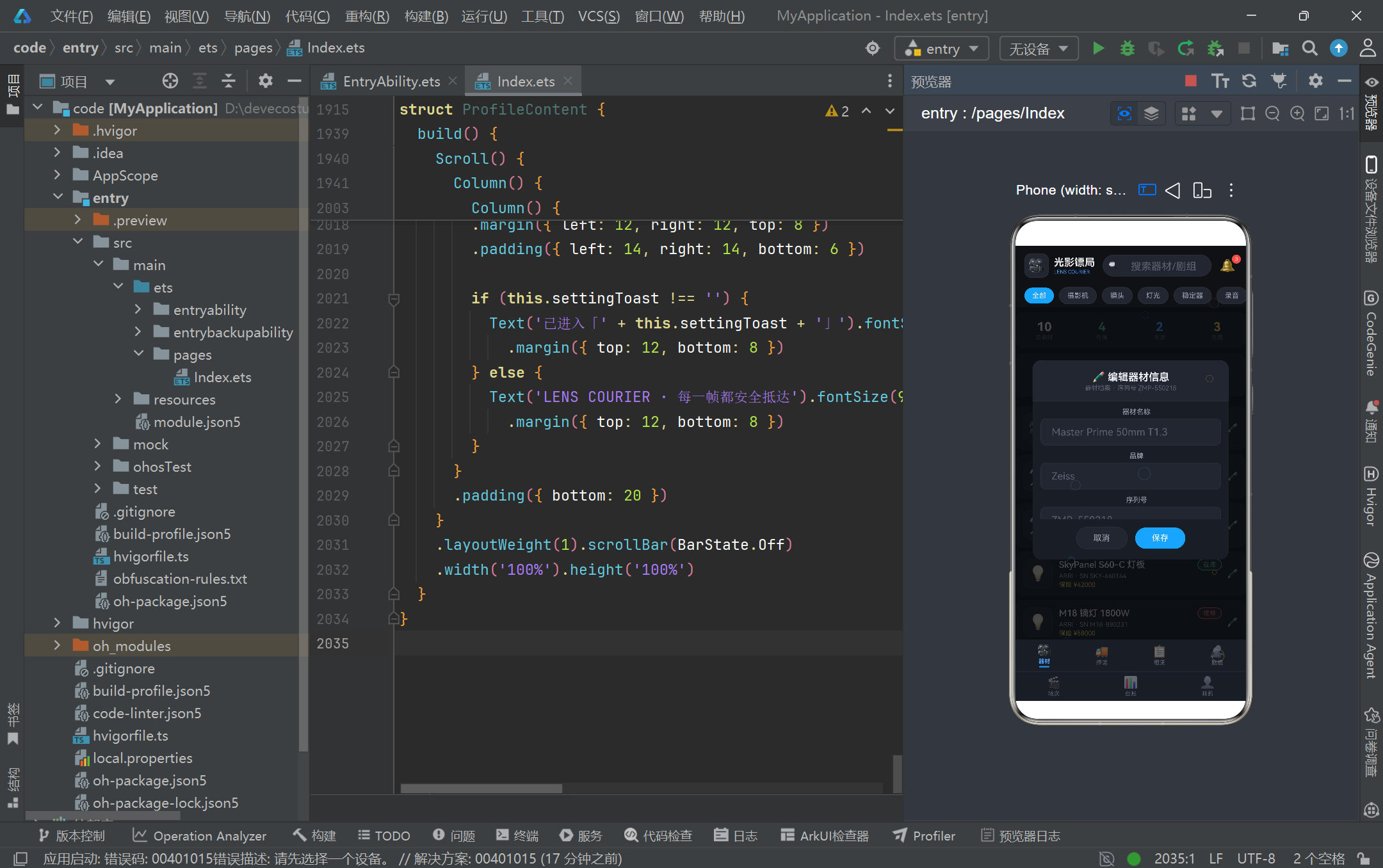
在视觉表现力方面,本页面展示了 HarmonyOS ArkTS API 24 在「无第三方库依赖」下的创造力上限。镜头光斑粒子层通过纯函数数学公式 + setInterval 驱动 @State 实现连续动画,配合 HitTestMode.None 保证不阻挡交互;台账页的月度收支柱状图用 Column 高度百分比模拟柱体,配合蓝黄双色与底部对齐实现专业图表效果;场次页的时间线通过圆点 + 竖线 + 卡片的组合构建纵向时间轴,配合展开/收起的手风琴交互呈现场次详情;押运页的在途大数字用 38px 字号 + 蓝色主色营造仪表盘般的视觉冲击。这些实现都没有依赖任何图表库或动画库,完全依靠 ArkTS 内置组件与属性的组合,证明了声明式 UI 在受限环境下依然能产出高完成度的视觉作品,对资源敏感的移动端开发具有重要参考价值。
在业务建模方面,本页面通过「接口 + @Observed 类 + 配置映射表」三层架构实现了领域模型的清晰表达。接口(如 EquipmentModel)定义数据契约,@Observed 类(如 EquipmentItem)提供可观察的运行时实例,配置映射表(如 EQUIP_STATUS_CONFIG)将业务枚举值关联到展示元数据。这种分层让数据、行为、表现各司其职:新增一个器材状态只需在接口加字段、在类里加默认值、在配置表加一行元数据,无需触碰任何组件代码。辅助纯函数(如 equipCountByStatus、moneyText、barHeight)则承担了数据加工职责,将原始数据转换为视图可直接消费的格式,既复用性强又易于测试。整体架构体现了「数据驱动视图」的核心思想——视图是数据的函数映像,数据变更自动触发视图刷新,开发者只需关心数据本身的正确性。
最后,从 HarmonyOS 生态发展的角度看,光影镖局 LENS COURIER 展示了 ArkTS API 24 在垂直行业应用中的落地潜力。影视行业具有「器材价值高、运输风险大、调度复杂、财务流水多」的特点,本页面精准切入了器材档案、押运调度、设备租赁、剧组协作、场次排期、财务台账六个核心场景,并通过个人中心串联起用户身份与权限。虽然当前使用静态 Mock 数据,但其数据结构与交互流程已经具备了接入真实后端的雏形——只需将 mockEquipment 等数组替换为 HTTP 请求返回的数据,将「保存」「确认预约」「立即租用」等按钮的 onClick 接入真实的提交接口,即可演进为生产级应用。这种「原型即蓝本」的开发模式,正是 HarmonyOS ArkTS 声明式 UI 在行业应用快速落地中的价值所在,也为更多垂直领域的鸿蒙原生应用开发提供了可借鉴的工程范本。

讨论HarmonyOS开发技术,专注于API与组件、DevEco Studio、测试、元服务和应用上架分发等。
更多推荐
 0
0 0
0- 0


 已为社区贡献163条内容

所有评论(0)