婚礼策划管理系统:基于HarmonyOS API 24的全链路技术解析,遍历每一条目,取出 category,如果该分类尚未在集合 s 中出现过(!s[n]),则标记为已出现并推入结果数组
一、背景与意义:为什么我们需要一款婚礼策划管理应用
婚礼,是人生中最重要的仪式之一。它不仅仅是一场庆典,更是两个家庭、两段人生轨迹交汇融合的里程碑。然而,一场体面而圆满的婚礼背后,往往隐藏着海量的琐碎事务:从场地的选择与租赁,到餐饮酒水的搭配;从宾客名单的反复确认,到座位安排的精心布局;从婚礼当天每一个时间节点的精确把控,到十余家供应商的合同与报价管理——这些事务如果完全依赖人脑记忆和纸质清单,很容易出现遗漏、超支甚至冲突。
在传统的婚礼筹备模式中,新人往往需要同时使用 Excel 表格记录预算、用微信通讯录管理宾客、用日历 APP 记录流程、再用备忘录记录供应商信息。这种割裂的工具链不仅效率低下,而且数据之间无法联动。例如,当一位宾客临时改变 RSVP(是否出席)状态时,餐饮桌数、座位图、伴手礼数量都需要同步调整,这在传统工具下几乎不可能实时完成。
正是在这样的痛点背景下,一款能够将预算管理、宾客管理、流程时间线、供应商管理以及个人概览高度整合的婚礼策划管理应用应运而生。它将筹备过程中的核心环节收敛到同一个界面体系中,通过底部五个 Tab(预算、宾客、流程、供应商、我的)实现功能分区,让新人在一个应用内即可掌控婚礼筹备的全局。
本文将对这套婚礼策划管理系统的完整代码进行逐段、逐行的深度技术解析。我们将从最顶层的架构设计讲起,依次拆解颜色方案、数据模型、Mock 数据、五大业务页面组件以及主入口组件的实现细节,力求让读者不仅"知其然",更能"知其所以然"。
二、技术栈与整体架构概览
本应用基于 HarmonyOS 的 ArkUI 声明式开发范式构建,使用 ArkTS(TypeScript 的超集)作为开发语言。ArkUI 的核心思想是"声明式 UI"——开发者通过描述界面"应该是什么样子",而不是"如何一步步构建界面",框架会自动处理界面更新与渲染。
整个应用的架构可以概括为以下三个层次:
第一层:静态配置层。 包括颜色方案(ColorScheme 接口与 COLORS 常量)以及四大数据模型接口(BudgetItem、Guest、ScheduleItem、Vendor)。这一层定义了应用运行所需的"词汇表",决定了数据长什么样、界面用什么颜色。
第二层:数据层。 包括四组 Mock 数据数组(BUDGETS、GUESTS、SCHEDULES、VENDORS),分别对应预算条目、宾客、流程节点和供应商。这些数据虽然是写死的常量,但其结构完整、字段丰富,真实模拟了一场中型婚礼的筹备规模。
第三层:视图层。 包括五个 @Component 组件——BudgetContent(预算页)、GuestContent(宾客页)、ScheduleContent(流程页)、VendorContent(供应商页)、ProfileContent(个人中心页),以及一个 @Entry 主入口组件 WeddingPlanner,后者通过 Tabs 容器将前五个组件组织成底部导航结构。
这种"配置—数据—视图"的三层分离架构,使得每一层都可以独立演进:换一套配色只需修改 COLORS 常量;接入真实后端只需将 Mock 数组替换为接口返回值;调整界面布局只需修改对应组件的 build 方法。
三、颜色方案:视觉语言的基础定义
3.1 颜色方案接口
任何一款设计优良的应用,都有一套统一的视觉语言。本应用以"玫红"为主色调,营造出婚礼应有的喜庆而不失优雅的氛围。颜色方案首先通过一个接口来约束其结构。
interface ColorScheme {
  primary: string;
  secondary: string;
  background: string;
  card: string;
  gold: string;
  green: string;
  orange: string;
  text: string;
  textSecondary: string;
  divider: string;
  white: string;
}
逐行解析:
interface ColorScheme:定义一个名为 ColorScheme 的接口。接口在 ArkTS 中的作用与 TypeScript 中一致,用于约束对象的结构,确保颜色方案必须包含所有规定字段。primary: string;:主色,字符串类型。在本应用中主色为玫红#AD1457,用于标题、强调数字、选中态等视觉焦点。secondary: string;:辅色,用于次级强调与危险/警告状态(如删除按钮、超支金额),取值为粉红#E91E63。background: string;:页面背景色,浅粉#FCE4EC,奠定整体的婚礼柔美基调。card: string;:卡片背景色,通常为纯白#FFFFFF,与背景色形成层次。gold: string;:金色,用于"已花费"金额、评分星星等需要贵金属质感的元素。green: string;:绿色,用于"剩余"金额、"已确认"状态等正面语义。orange: string;:橙色,用于"待确认"状态、接近预算上限的警告。text: string;:正文文字颜色,深灰#333333,保证可读性。textSecondary: string;:次要文字颜色,浅灰#999999,用于备注、标签等辅助信息。divider: string;:分割线颜色,极浅灰#F0F0F0。white: string;:纯白,用于按钮文字、弹层背景等。
通过接口约束,后续如果需要支持"暗色模式"或"换肤",只需再实现一个符合 ColorScheme 接口的对象即可,所有引用 COLORS 的组件代码无需改动。
3.2 颜色常量实例
定义完接口后,代码紧接着创建了一个实际的常量实例。
const COLORS: ColorScheme = {
  primary: '#AD1457',
  secondary: '#E91E63',
  background: '#FCE4EC',
  card: '#FFFFFF',
  gold: '#FFD700',
  green: '#4CAF50',
  orange: '#FF9800',
  text: '#333333',
  textSecondary: '#999999',
  divider: '#F0F0F0',
  white: '#FFFFFF'
};
逐行解析:
const COLORS: ColorScheme = { ... };:声明一个不可变常量 COLORS,类型标注为 ColorScheme,确保赋值内容必须完整覆盖接口定义的所有字段,否则编译报错。primary: '#AD1457':玫红色。这是一种深沉而饱和的品红,介于大红与紫红之间,既有中式婚礼的热烈,又有西式婚礼的优雅。secondary: '#E91E63':粉红色,Material Design 标准的 Pink 色值,明度更高,用于点缀和危险操作。background: '#FCE4EC':极浅的粉色,几乎接近白色但带有一丝暖意,作为页面背景不会喧宾夺主。card: '#FFFFFF':纯白卡片背景,与浅粉背景形成微妙的层次对比。gold: '#FFD700':标准金色,用于金额与星级评分,暗示"价值"。green: '#4CAF50':Material Green,象征"通过、确认、安全"。orange: '#FF9800':Material Orange,象征"等待、注意"。text与textSecondary:经典的深灰/浅灰文字组合,构成正文与辅助文字的视觉层级。divider: '#F0F0F0':极浅灰分割线,存在感弱但足以区分内容块。white: '#FFFFFF':纯白,用于按钮文字和弹层。
这套配色方案在语义上形成了清晰的对应关系:玫红=品牌主色、粉红=危险/删除、金色=金额/评分、绿色=确认/正面、橙色=待办/警告。颜色不仅是装饰,更是信息的载体。
四、数据模型:四大业务实体的接口定义
4.1 预算条目模型
预算是婚礼筹备中最为敏感的环节——超支意味着压力,结余则意味着从容。预算模型需要同时记录"计划花多少"和"实际花了多少"。
interface BudgetItem {
  id: number;
  category: string;
  item: string;
  budgeted: number;
  spent: number;
  vendor: string;
  status: string;
  note: string;
}
逐行解析:
id: number;:预算条目的唯一标识,数值类型,用于列表渲染时的 key 标识和增删改查定位。category: string;:预算大类,如"场地"“餐饮”"摄影"等。这个字段是实现按类聚合统计的关键。item: string;:具体条目名称,如"酒店宴会厅租赁"“婚宴正餐”。budgeted: number;:预算金额,以元为单位的整数。注意这里没有用浮点数,避免了浮点精度问题。spent: number;:已花费金额,与 budgeted 配对,二者之差即为"剩余"。vendor: string;:对应的供应商名称,将预算与供应商数据隐式关联。status: string;:合同/确认状态,如"已确认"“待确认”。note: string;:备注,记录该条目的补充说明。
这个模型的设计精巧之处在于:它把"预算规划"和"实际支出"合并在同一条记录中,而不是拆成两张表。这种设计在客户端应用中非常实用,因为渲染进度条时只需读取同一对象的两个字段即可,无需做关联查询。
4.2 宾客模型
宾客管理是婚礼筹备中变动最频繁、关系最复杂的部分。一位宾客的属性远比"姓名+电话"要丰富得多。
interface Guest {
  id: number;
  name: string;
  relation: string;
  phone: string;
  table: string;
  rsvp: string;
  plusOne: boolean;
  mealPreference: string;
  gift: string;
  note: string;
}
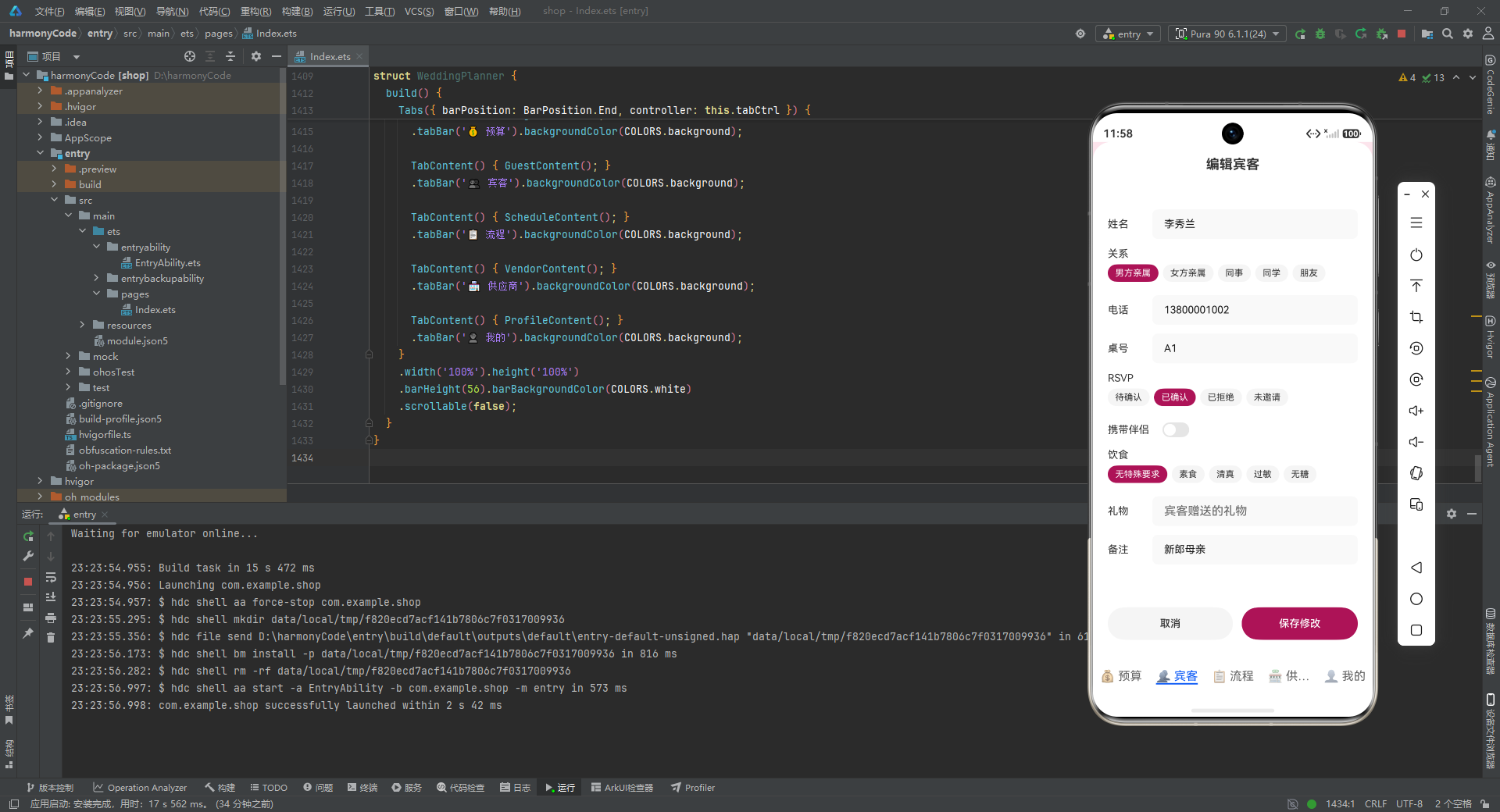
逐行解析:
id: number;:宾客唯一标识。name: string;:宾客姓名。relation: string;:与新人关系,取值为"男方亲属"“女方亲属”“同事”“同学”"朋友"之一,用于筛选和统计。phone: string;:联系电话,字符串类型以保留前导零和格式化空间。table: string;:桌号,如"A1"“B2”。用字母+数字编码便于区分"男方桌区"与"女方桌区"。rsvp: string;:回执状态,取值为"已确认"“待确认”“已拒绝”“未邀请”。这是宾客管理中最关键的状态字段。plusOne: boolean;:是否携带伴侣(+1)。布尔类型,直接决定实际到场人数的计算。mealPreference: string;:饮食偏好,如"素食"“清真”“过敏”“无糖”“无特殊要求”。直接关联到餐饮备餐。gift: string;:宾客赠送的礼物(如红包、香薰蜡烛),便于事后致谢。note: string;:备注,如"新郎父亲""新娘闺蜜"等身份说明。
这个模型的完整性令人印象深刻。它不仅覆盖了"这个人是谁"的基本信息,还覆盖了"他来不来"“带不带人”“吃什么”"送了什么"等全部婚礼筹备所需维度。特别是 plusOne 字段,它是计算实际到场人数的关键——每多一个 +1,就意味着多一份餐食、多一份伴手礼、多一个座位。
4.3 流程节点模型
婚礼当天的流程通常有十几个甚至二十几个节点,从清晨化妆到下午送客,每个节点都需要精确到分钟的时间安排。
interface ScheduleItem {
  id: number;
  time: string;
  title: string;
  description: string;
  responsible: string;
  location: string;
  duration: string;
  notes: string;
}
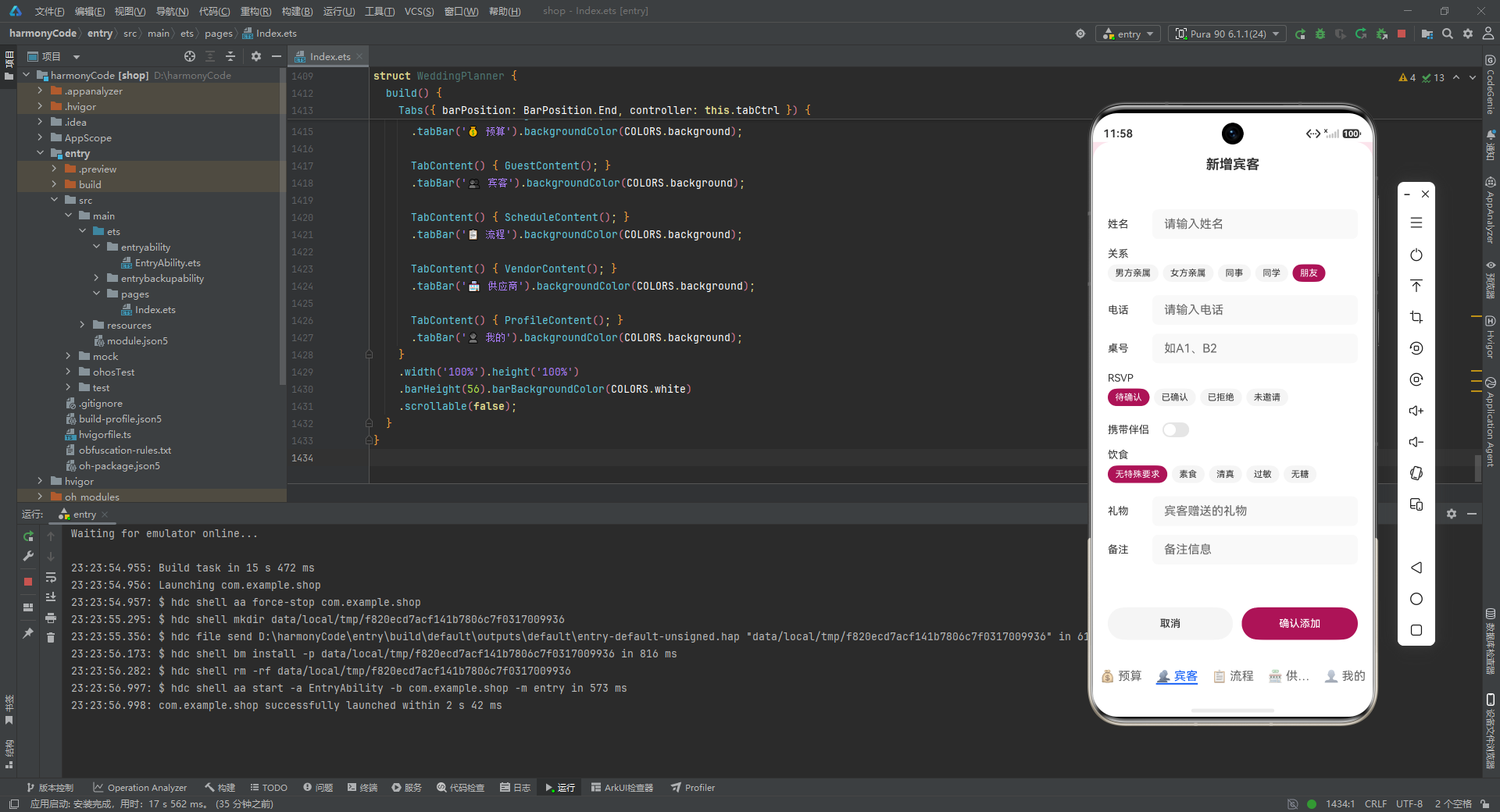
逐行解析:
id: number;:流程节点标识。time: string;:计划开始时间,如"08:08"。用字符串而非 Date 对象,是因为流程表是静态展示的,不需要计算时间差。title: string;:节点标题,如"接亲出发"“交换戒指”。description: string;:节点详细描述,说明该节点具体要做什么。responsible: string;:负责人/负责团队,如"伴娘团"“司仪”“餐饮团队”。明确"谁来做"是流程执行的关键。location: string;:地点,如"新娘家"“主舞台”“宴会厅入口”。duration: string;:预计持续时长,如"30分钟"“持续”。notes: string;:注意事项,如"准备红包和游戏道具"“戒指由伴郎保管”。
这个模型的设计体现了婚礼流程管理的核心要素:时间、事件、人、地点、时长、注意事项,六位一体。notes 字段尤为关键——婚礼当天的很多"翻车"事故,都是因为某个小细节(如戒指忘记谁保管、茶具没有准备)被遗漏。
4.4 供应商模型
一场婚礼涉及的供应商少则七八家,多则十几家。每一家都需要对比报价、确认合同、跟踪评价。
interface Vendor {
  id: number;
  name: string;
  category: string;
  contact: string;
  phone: string;
  quote: number;
  contractStatus: string;
  rating: number;
  review: string;
  tags: string[];
}
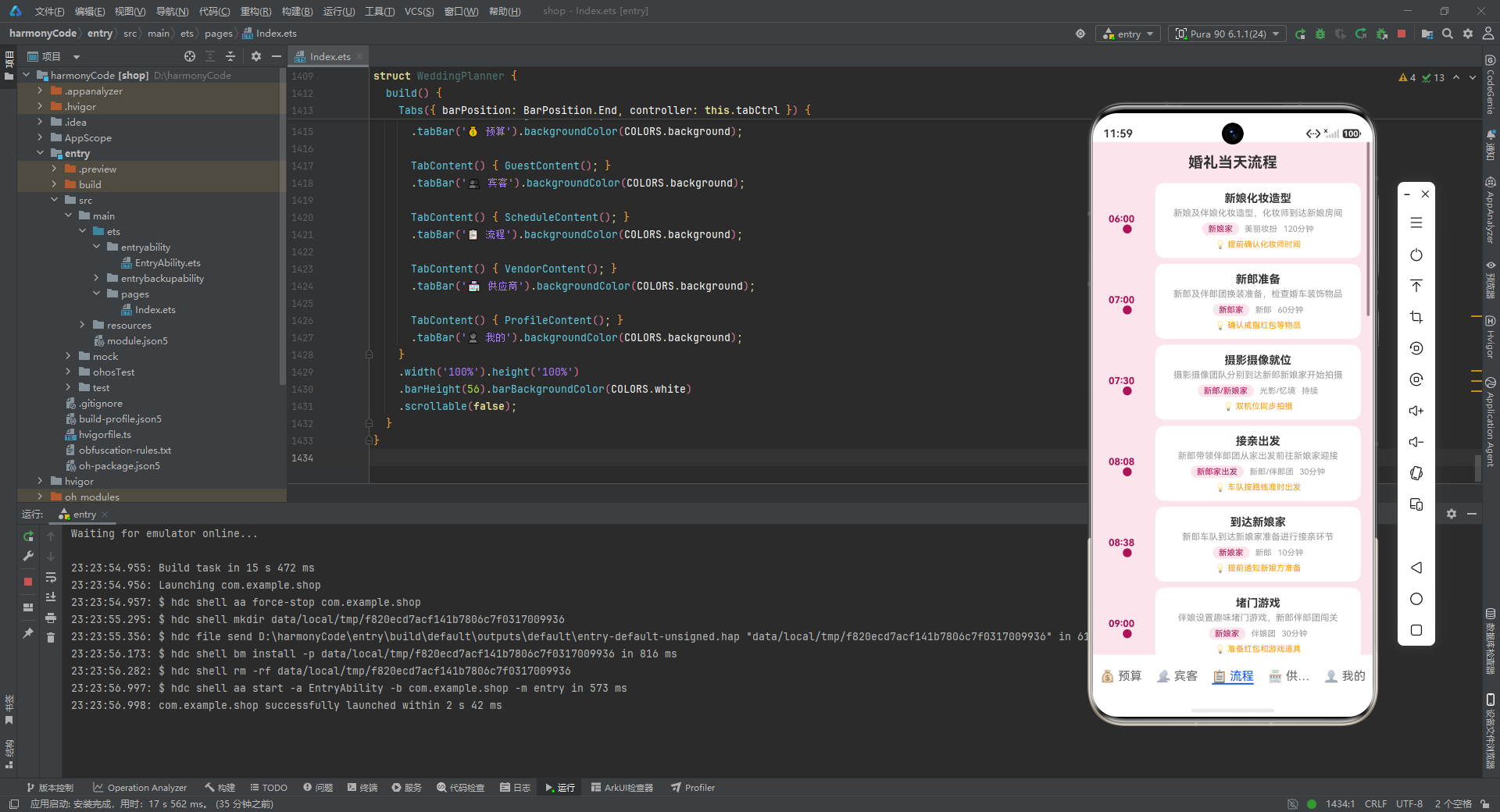
逐行解析:
id: number;:供应商标识。name: string;:供应商名称,如"花嫁婚庆公司"“希尔顿宴会厅”。category: string;:业务类别,如"婚庆布置"“婚礼场地”“婚宴餐饮”。contact: string;:联系人,如"张经理"“王总厨”。phone: string;:联系电话。quote: number;:报价金额(元)。用于预算对比和总花费计算。contractStatus: string;:合同状态,如"已签约"“洽谈中”。rating: number;:评分,浮点数(如 4.8),用于质量排序。review: string;:文字评价,记录实际合作体验。tags: string[];:标签数组,如['专业','创意','服务好']。数组类型允许一个供应商拥有多个特征标签。
tags 字段使用 string[] 数组类型是一个亮点设计。它比单一字符串更灵活,能够在列表中以"胶囊标签"形式快速展示供应商的核心特征,而 review 字段则提供了更深度的评价内容。rating 用浮点数而非整数,使得评分粒度更细(4.8 与 4.5 是有区别的)。
五、Mock 数据:模拟一场真实的中型婚礼
5.1 预算数据(20 条)
const BUDGETS: BudgetItem[] = [
  { id:1, category:'场地', item:'酒店宴会厅租赁', budgeted:50000, spent:52000,
    vendor:'希尔顿酒店', status:'已确认', note:'含LED屏及舞台' },
  { id:2, category:'场地', item:'户外仪式场地', budgeted:20000, spent:20000,
    vendor:'希尔顿酒店', status:'已确认', note:'草坪婚礼仪式区' },
  // ... 共 20 条,覆盖场地、餐饮、摄影、婚庆、婚纱、戒指、花艺、交通、伴手礼、其他十大类
];
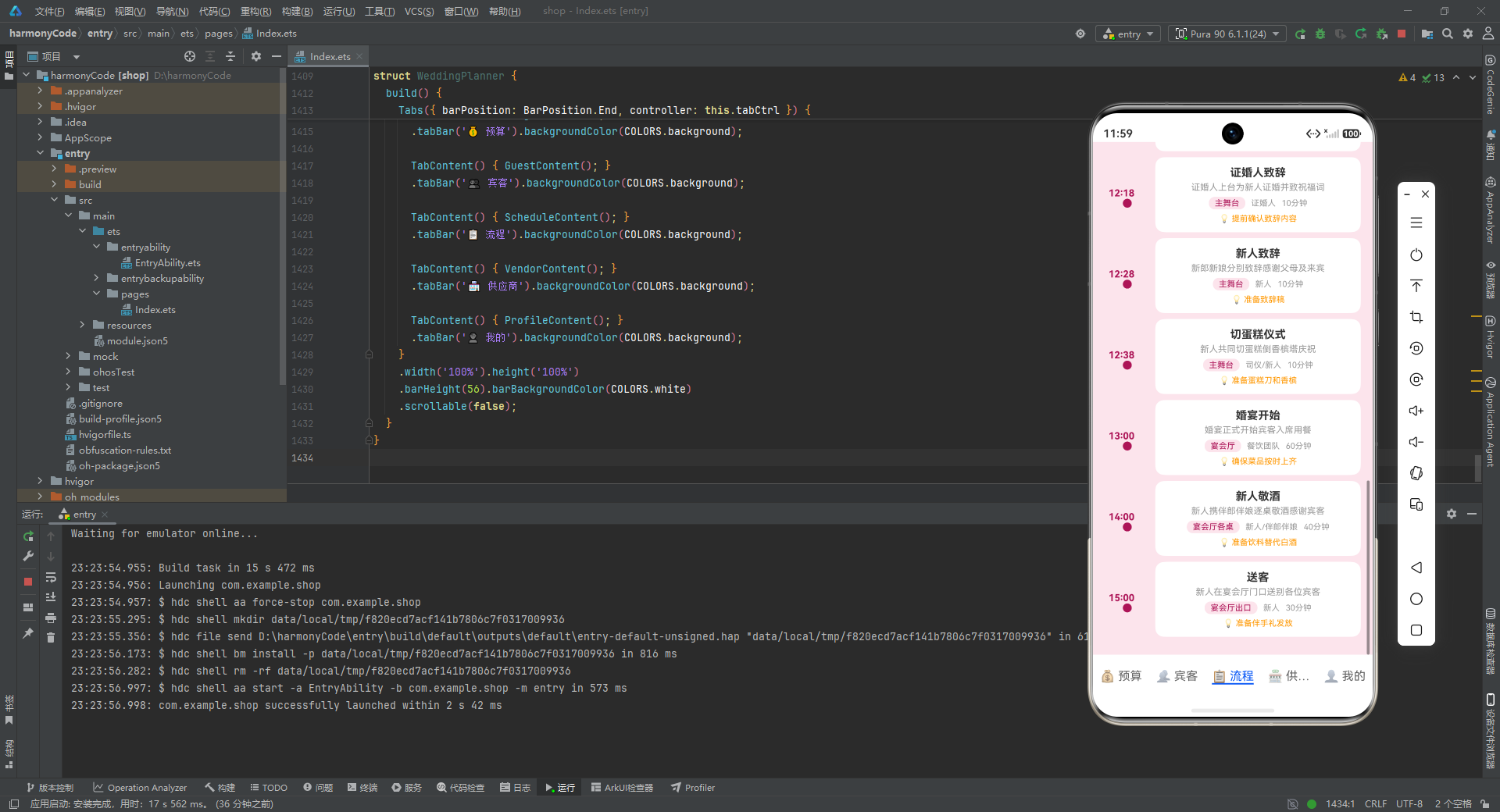
这组数据模拟了一场总预算约 31.7 万元的中型婚礼。从数据中可以看到几个值得注意的细节:第一,"酒店宴会厅租赁"的 spent(52000)超过了 budgeted(50000),形成了超支,这为预算页的"超支红色警告"逻辑提供了真实数据支撑;第二,“宾客接送大巴"状态为"待确认”,体现了筹备过程中的动态性;第三,每一类都有多条记录,使得按类聚合统计有实际意义。
数据覆盖了婚礼筹备的所有主要支出大类:场地(宴会厅+户外草坪)、餐饮(正餐+酒水)、摄影(跟拍+摄像+航拍)、婚庆(布置+音响灯光)、婚纱(新娘礼服+新郎礼服)、戒指(对戒)、花艺(手捧花+婚车花艺)、交通(婚车+大巴)、伴手礼、其他(司仪+化妆+蛋糕)。这种覆盖度确保了预算页的统计图表有足够的维度来展示。
5.2 宾客数据(25 条)
const GUESTS: Guest[] = [
  { id:1, name:'张建国', relation:'男方亲属', phone:'13800001001',
    table:'A1', rsvp:'已确认', plusOne:true, mealPreference:'无特殊要求',
    gift:'红包', note:'新郎父亲' },
  // ... 共 25 条,覆盖男方亲属、女方亲属、同事、同学、朋友五大关系类别
];
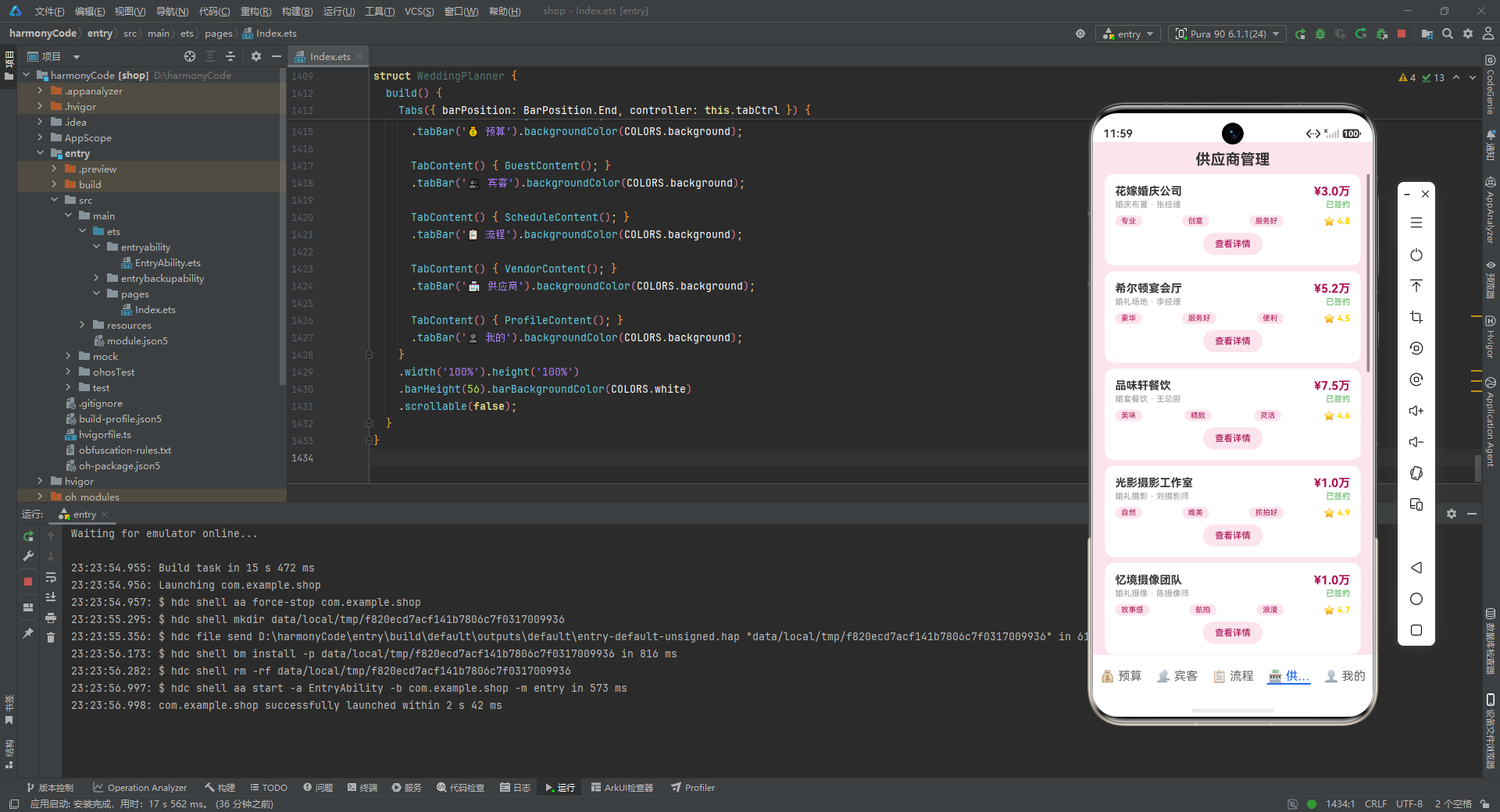
这 25 位宾客数据的设计非常贴近真实婚礼的构成。桌号编码采用了"A/B/C/D/E + 数字"的方案:A 区为男方亲属、B 区为女方亲属、C 区为同事、D 区为同学、E 区为朋友——这种编码让座位安排一目了然。
RSVP 状态的分布也体现了真实场景:大部分已确认,少数待确认,个别已拒绝(如"新娘阿姨国外"),还有一位"未邀请"的待定宾客。饮食偏好方面涵盖了素食、清真、过敏、无糖等多种特殊情况,这些数据将驱动餐饮备餐的差异化处理。plusOne 字段在多位宾客身上为 true,这意味着实际到场人数会大于 25。
5.3 流程数据(18 条)
const SCHEDULES: ScheduleItem[] = [
  { id:1, time:'06:00', title:'新娘化妆造型',
    description:'新娘及伴娘化妆造型,化妆师到达新娘房间',
    responsible:'美丽妆扮', location:'新娘家', duration:'120分钟',
    notes:'提前确认化妆师时间' },
  // ... 共 18 条,从清晨 06:00 一直排到下午 15:00 送客
];
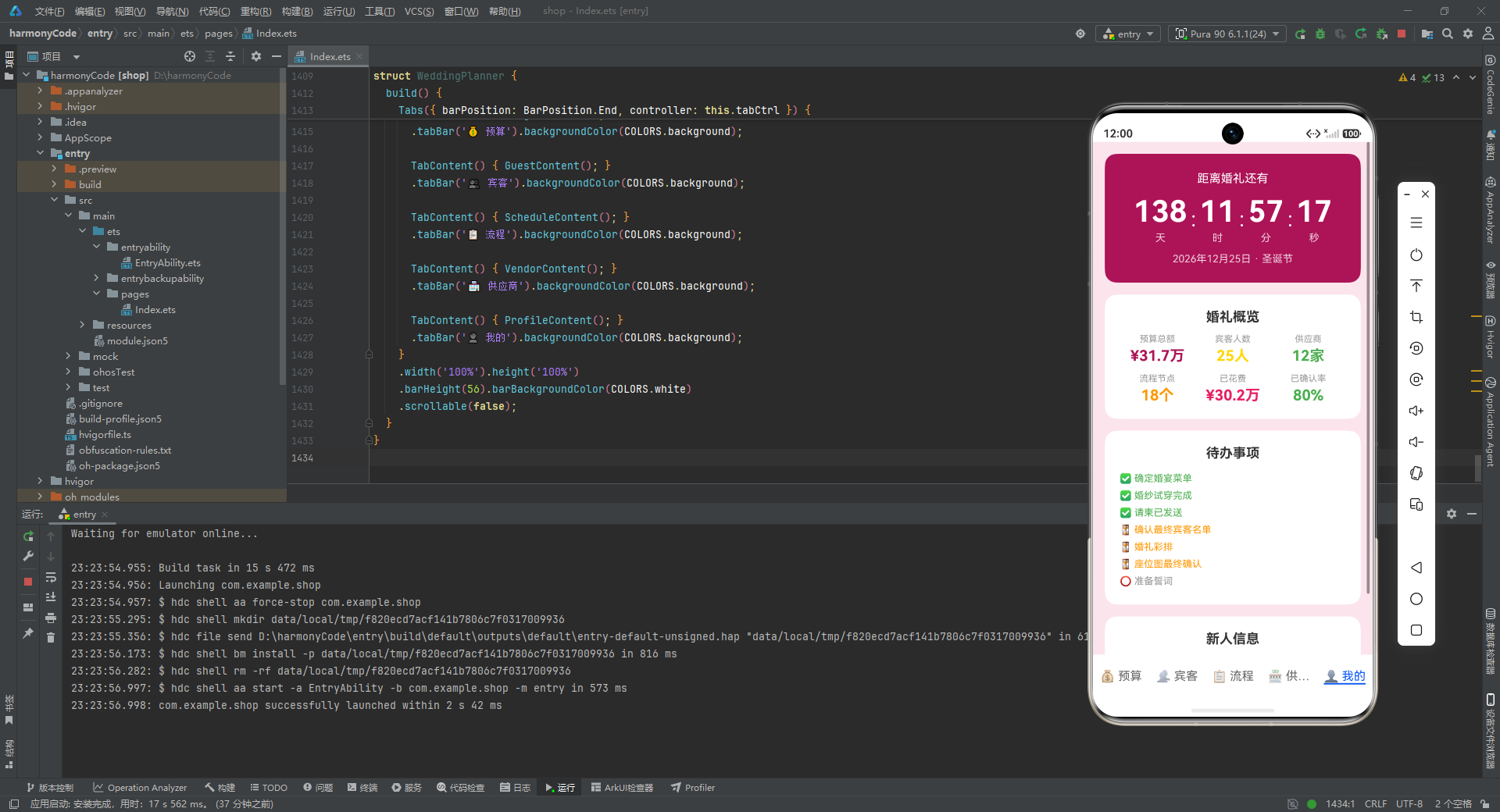
这组流程数据完整覆盖了婚礼当天的全部环节。时间线从清晨 6 点新娘化妆开始,经过新郎准备、摄影就位、接亲出发、堵门游戏、敬茶改口、前往酒店、迎宾签到、仪式开始、交换戒指、证婚致辞、新人致辞、切蛋糕、婚宴开始、敬酒,直到下午 3 点送客结束。
每一个节点都标注了负责人、地点、时长和注意事项。例如"堵门游戏"的 notes 是"准备红包和游戏道具",“交换戒指"的 notes 是"戒指由伴郎保管”——这些都是婚礼当天最容易出问题的细节。这组数据的价值在于,它把婚礼当天的执行变成了一份可操作、可追踪的清单。
5.4 供应商数据(12 条)
const VENDORS: Vendor[] = [
  { id:1, name:'花嫁婚庆公司', category:'婚庆布置', contact:'张经理',
    phone:'15800001001', quote:30000, contractStatus:'已签约', rating:4.8,
    review:'非常专业,布置效果超出预期,沟通顺畅细节把控到位。',
    tags:['专业','创意','服务好'] },
  // ... 共 12 家,覆盖婚庆布置、场地、餐饮、摄影、摄像、婚纱、花艺、婚车、司仪、化妆、音响灯光、伴手礼
];
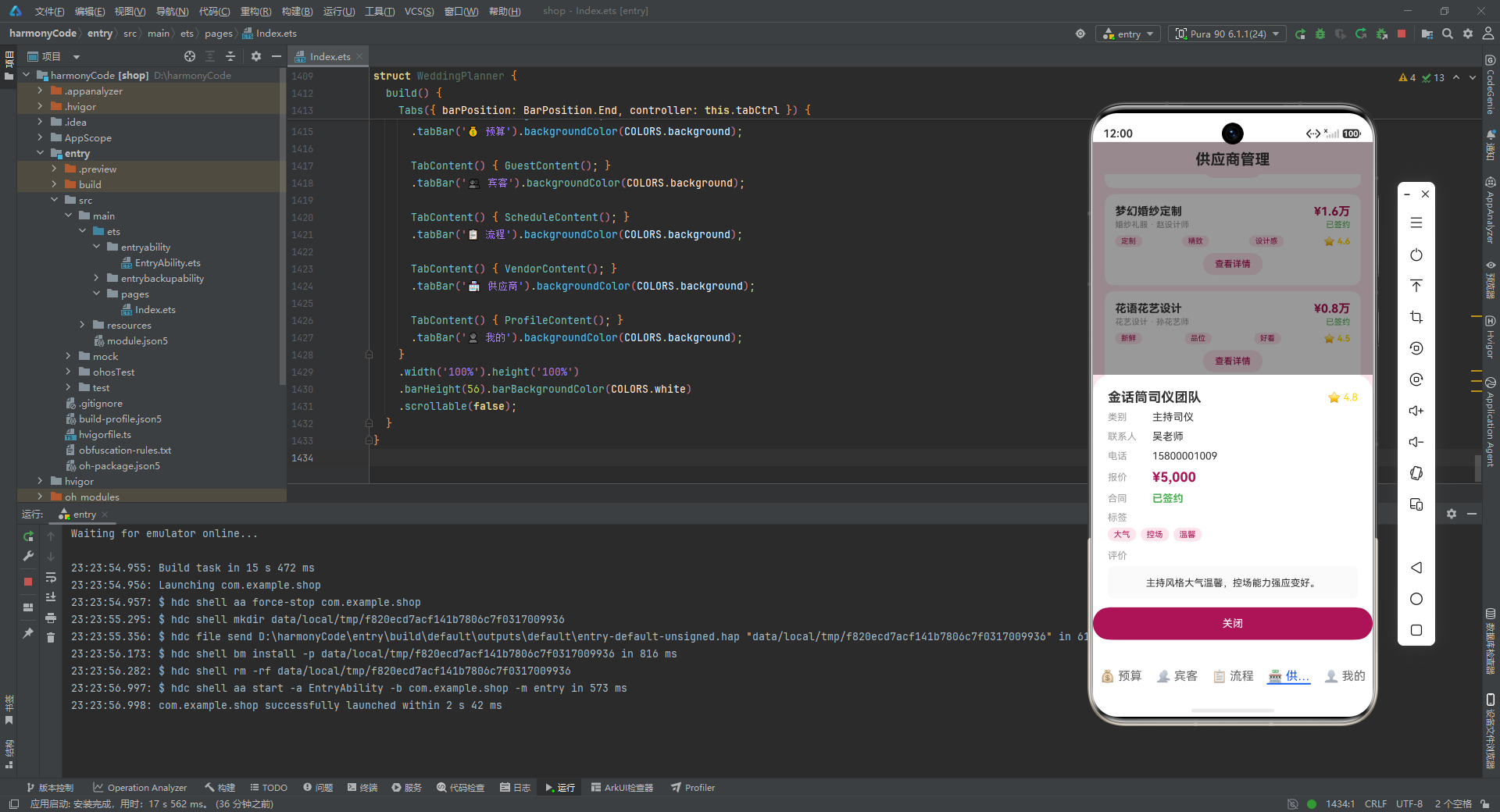
12 家供应商的数据覆盖了婚礼所需的全部服务品类。每一家都有完整的报价、合同状态、评分和评价。报价从 5000 元(司仪、化妆)到 75000 元(餐饮)不等,跨度很大;评分从 4.3 到 4.9,区分度明显;评价文字真实可信,如"摄影师用心抓拍能力强,成片自然唯美后期到位",这种细节化的评价对其他备婚新人有实际参考价值。
tags 数组的设计让每家供应商的核心特征一目了然:花嫁婚庆是"专业、创意、服务好",光影摄影是"自然、唯美、抓拍好",皇家婚车是"准时、整洁、专业"。在列表页中,这些标签会以胶囊形式展示,帮助用户快速识别每家供应商的亮点。
六、预算页面组件 BudgetContent:从概览到明细的三层展示
6.1 组件声明与状态
@Component
struct BudgetContent {
  @State items: BudgetItem[] = BUDGETS;
逐行解析:
@Component:装饰器,声明这是一个可复用的 ArkUI 组件。被此装饰器修饰的 struct 拥有独立的状态管理和 build 方法。struct BudgetContent:定义名为 BudgetContent 的结构体。在 ArkUI 中,组件用 struct 而非 class 声明。@State items: BudgetItem[] = BUDGETS;:声明一个响应式状态变量 items,类型为 BudgetItem 数组,初始值为前面定义的 BUDGETS 常量。@State装饰器的核心作用是:当 items 发生变化时,所有引用 items 的 UI 部分会自动重新渲染。这是声明式 UI 响应数据变化的基础机制。
6.2 统计计算方法
预算页需要大量的聚合统计,组件内部定义了一系列方法来实现这些计算。
sumB(): number {
  let t = 0;
  let i = 0;
  while (i < this.items.length) { t += this.items[i].budgeted; i++; }
  return t;
}

sumS(): number {
  let t = 0;
  let i = 0;
  while (i < this.items.length) { t += this.items[i].spent; i++; }
  return t;
}

rem(): number { return this.sumB() - this.sumS(); }
逐行解析:
sumB(): number:计算所有预算条目的"预算总额"。返回值类型为 number。let t = 0;:累加器初始化为 0。let i = 0;:循环索引初始化为 0。while (i < this.items.length) { t += this.items[i].budgeted; i++; }:用 while 循环遍历所有条目,将每条的 budgeted 累加到 t。这里没有用 for…of 或 reduce,而是用了最朴素的 while 循环和手动索引递增,这在 ArkTS 中是兼容性最好的写法。sumS(): number:计算所有条目的"已花费总额",逻辑与 sumB 完全对称,只是累加的是 spent 字段。rem(): number { return this.sumB() - this.sumS(); }:计算"剩余预算",即预算总额减去已花费总额。这个一行方法的优雅之处在于它复用了前两个方法,避免重复计算逻辑。
这三个方法构成了预算页最顶层的三个数字:总预算、已花费、剩余。
6.3 分类聚合方法
预算页还需要按"场地""餐饮"等大类进行分组统计。
cats(): string[] {
  const c: string[] = [];
  const s: Record<string, boolean> = {};
  let i = 0;
  while (i < this.items.length) {
    const n = this.items[i].category;
    if (!s[n]) { s[n] = true; c.push(n); }
    i++;
  }
  return c;
}

catItems(cat: string): BudgetItem[] {
  const r: BudgetItem[] = [];
  let i = 0;
  while (i < this.items.length) {
    if (this.items[i].category === cat) { r.push(this.items[i]); }
    i++;
  }
  return r;
}

catB(cat: string): number {
  const its = this.catItems(cat);
  let t = 0; let i = 0;
  while (i < its.length) { t += its[i].budgeted; i++; }
  return t;
}

catS(cat: string): number {
  const its = this.catItems(cat);
  let t = 0; let i = 0;
  while (i < its.length) { t += its[i].spent; i++; }
  return t;
}
逐行解析:
cats(): string[]:提取所有不重复的分类名称,返回字符串数组。const c: string[] = [];:结果数组,用于按出现顺序保存分类名。const s: Record<string, boolean> = {};:去重用的"集合"对象。Record<string, boolean> 表示一个键为字符串、值为布尔值的映射。- 遍历每一条目,取出 category,如果该分类尚未在集合 s 中出现过(
!s[n]),则标记为已出现并推入结果数组。这样既去重又保持了原始顺序。
catItems(cat: string): BudgetItem[]:返回指定分类下的所有条目。遍历全部条目,category 匹配的推入结果数组。catB(cat: string): number:计算指定分类的预算总额。先调用 catItems 获取该分类的条目,再累加 budgeted。catS(cat: string): number:计算指定分类的已花费总额。逻辑与 catB 对称,累加 spent。
这套方法的设计体现了"职责单一"原则:cats 负责提取分类列表,catItems 负责按分类过滤,catB/catS 负责按分类统计。它们层层复用,catB 和 catS 都依赖 catItems,而 catItems 不依赖任何统计方法。这种单向依赖使得代码易于理解和测试。
6.4 百分比与颜色计算
pct(s: number, b: number): string {
  const p = s / b;
  return ((p > 1 ? 1 : p) * 100).toFixed(0) + '%';
}

clr(s: number, b: number): string {
  if (s > b) { return COLORS.secondary; }
  if (s / b > 0.9) { return COLORS.orange; }
  return COLORS.primary;
}

fmt(n: number): string {
  return (n / 10000).toFixed(1);
}
逐行解析:
pct(s, b): string:计算花费占预算的百分比字符串。const p = s / b;:计算比率。如果超支,p 会大于 1。return ((p > 1 ? 1 : p) * 100).toFixed(0) + '%';:如果超支(p>1),将 p 限制为 1(即 100%),避免进度条溢出。乘以 100 转为百分比,toFixed(0) 保留整数,最后拼接 ‘%’。这个"截断"设计确保进度条最大不超过 100%,视觉上不会越界。
clr(s, b): string:根据花费与预算的关系返回对应的颜色。if (s > b) return COLORS.secondary;:超支(花费 > 预算)返回粉红色,表示危险。if (s / b > 0.9) return COLORS.orange;:花费超过预算 90% 但未超支,返回橙色,表示警告——预算快用完了。return COLORS.primary;:正常情况返回玫红主色。- 这个三色逻辑是预算管理的视觉核心:绿(正常,此处用主色)、橙(接近上限)、红(超支)。
fmt(n: number): string:将元转换为"万元"格式。(n / 10000).toFixed(1)除以一万并保留一位小数,返回如 “5.0” 的字符串。展示时拼接 “¥” 和 “万” 即为 “¥5.0万”。
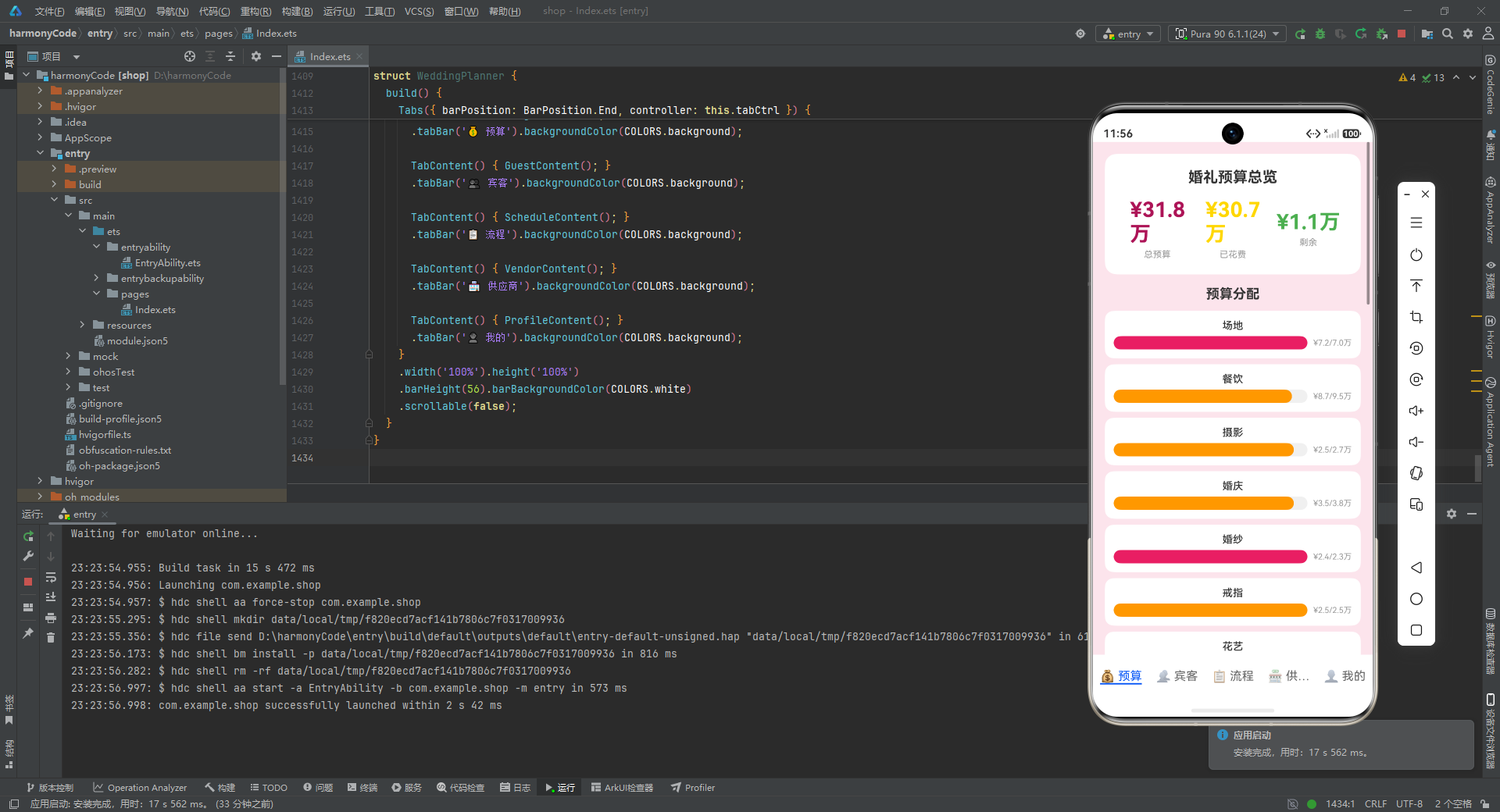
6.5 预算页 UI 构建——概览卡片
build() {
  Scroll() {
    Column() {
      // 预算概览卡片
      Column() {
        Text('婚礼预算总览')
          .fontSize(20)
          .fontWeight(FontWeight.Bold)
          .fontColor(COLORS.text)
          .margin({ bottom: 16 });

        Row() {
          Column() {
            Text('¥' + this.fmt(this.sumB()) + '万')
              .fontSize(28)
              .fontWeight(FontWeight.Bold)
              .fontColor(COLORS.primary);
            Text('总预算').fontSize(12).fontColor(COLORS.textSecondary).margin({ top: 4 });
          }.layoutWeight(1).alignItems(HorizontalAlign.Center);
          // ... 已花费、剩余两列结构相同
        }.width('100%');
      }
      .width('100%')
      .backgroundColor(COLORS.card)
      .borderRadius(16)
      .padding(20);
逐行解析:
build():ArkUI 组件的入口方法,返回组件的 UI 结构。Scroll() { ... }:最外层是可滚动容器。预算页内容较多(概览+图表+明细),必须支持滚动。Column() { ... }:垂直排列的列容器。Text('婚礼预算总览').fontSize(20).fontWeight(FontWeight.Bold).fontColor(COLORS.text).margin({ bottom: 16 });:标题文字,20 号粗体,深灰色,下方留 16 的间距。Row() { ... }.width('100%');:水平排列的行容器,占满宽度,用于并排展示三个数字。- 内部三个
Column各占layoutWeight(1)(等分宽度),alignItems(HorizontalAlign.Center)居中对齐。 - 第一个 Column 展示"总预算":
'¥' + this.fmt(this.sumB()) + '万',调用 fmt 方法将总额转为万元格式,28 号粗体玫红色;下方"总预算"标签 12 号浅灰。 - 已花费列用金色(COLORS.gold),剩余列用绿色(COLORS.green)。
.width('100%').backgroundColor(COLORS.card).borderRadius(16).padding(20);:卡片占满宽度,白色背景,圆角 16,内边距 20,构成一张视觉清爽的概览卡片。
6.6 预算页 UI 构建——分类进度条
ForEach(this.cats(), (cat: string) => {
  Column() {
    Text(cat)
      .fontSize(14)
      .fontWeight(FontWeight.Medium)
      .fontColor(COLORS.text)
      .margin({ bottom: 6 });

    Row() {
      Stack({ alignContent: Alignment.Start }) {
        Row()
          .width('100%')
          .height(18)
          .backgroundColor('#F0F0F0')
          .borderRadius(9);

        Row()
          .width(this.pct(this.catS(cat), this.catB(cat)))
          .height(18)
          .backgroundColor(this.clr(this.catS(cat), this.catB(cat)))
          .borderRadius(9);
      }
      .layoutWeight(1);

      Text('¥' + this.fmt(this.catS(cat)) + '/' + this.fmt(this.catB(cat)) + '万')
        .fontSize(11)
        .fontColor(COLORS.textSecondary)
        .margin({ left: 8 });
    }
    .width('100%');
  }
  .width('100%')
  .backgroundColor(COLORS.card)
  .borderRadius(12)
  .padding(12)
  .margin({ bottom: 8 });
});
逐行解析:
ForEach(this.cats(), (cat: string) => { ... });:遍历所有分类名称,为每个分类生成一个进度条卡片。ForEach 是 ArkUI 中实现列表渲染的核心 API,第一个参数是数据源数组,第二个参数是渲染函数。Text(cat).fontSize(14).fontWeight(FontWeight.Medium)...:分类名称标题。Row() { Stack({ alignContent: Alignment.Start }) { ... } }:用 Stack(层叠布局)实现进度条。Stack 允许多个子元素叠放在同一位置。alignContent: Alignment.Start:子元素从起始端(左侧)对齐,这是进度条从左向右填充的关键。- 第一个
Row().width('100%').height(18).backgroundColor('#F0F0F0').borderRadius(9);:进度条背景轨道,浅灰色,高度 18,圆角 9(刚好是高度的一半,形成胶囊形)。 - 第二个
Row().width(this.pct(...)).height(18).backgroundColor(this.clr(...)).borderRadius(9);:进度条填充部分,宽度由 pct 方法计算(如 “75%”),颜色由 clr 方法决定(正常玫红/警告橙/超支粉红)。 - 两个 Row 叠放在 Stack 中,背景轨道在下、填充条在上,因为 Stack 的后定义子元素会覆盖先定义的。
Text('¥' + this.fmt(this.catS(cat)) + '/' + this.fmt(this.catB(cat)) + '万'):进度条右侧的金额文字,格式为"已花费/预算",如 “¥2.8/3.0万”。
6.7 预算页 UI 构建——支出明细列表
ForEach(this.items, (item: BudgetItem) => {
  Row() {
    Column() {
      Text(item.item)
        .fontSize(14)
        .fontWeight(FontWeight.Medium)
        .fontColor(COLORS.text);
      Text(item.vendor)
        .fontSize(11)
        .fontColor(COLORS.textSecondary)
        .margin({ top: 2 });
    }
    .alignItems(HorizontalAlign.Start)
    .layoutWeight(1);

    Column() {
      Text('¥' + item.spent.toLocaleString())
        .fontSize(14)
        .fontWeight(FontWeight.Bold)
        .fontColor(item.spent > item.budgeted ? COLORS.secondary : COLORS.green);
      Text('预算¥' + item.budgeted.toLocaleString())
        .fontSize(10)
        .fontColor(COLORS.textSecondary)
        .margin({ top: 2 });
    }
    .alignItems(HorizontalAlign.End);
  }
  .width('100%')
  .padding(12)
  .border({ width: 1, color: COLORS.divider });
});
逐行解析:
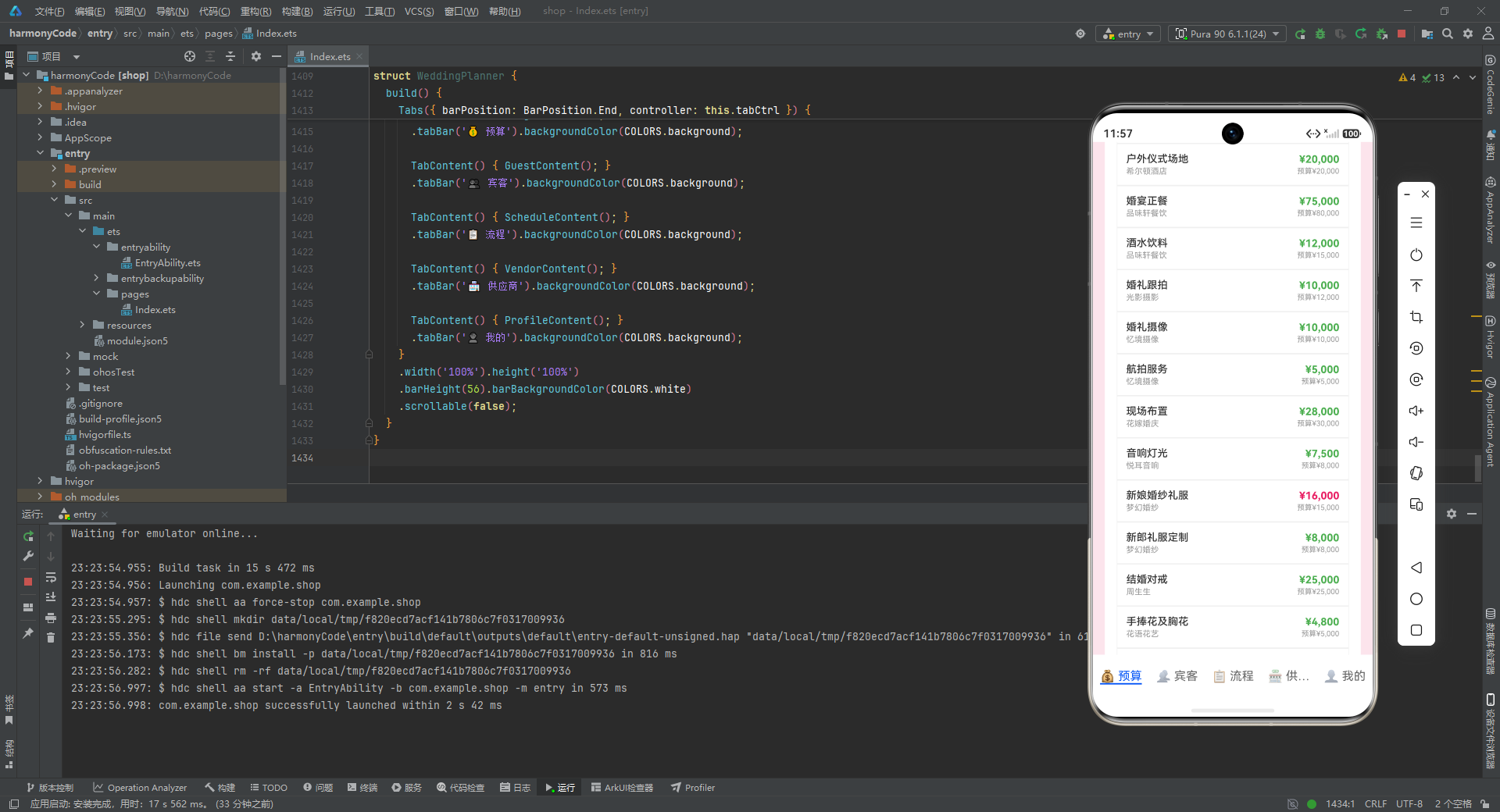
ForEach(this.items, (item: BudgetItem) => { ... });:遍历全部 20 条预算条目,逐条渲染。- 每一行分为左右两部分。左侧
Column展示条目名称和供应商名称,靠左对齐(HorizontalAlign.Start),占 layoutWeight(1) 弹性宽度。 - 右侧
Column展示已花费金额和预算金额,靠右对齐(HorizontalAlign.End)。 Text('¥' + item.spent.toLocaleString()):toLocaleString()会将数字按本地化格式加千分位逗号,如 52000 显示为 “52,000”,大幅提升可读性。.fontColor(item.spent > item.budgeted ? COLORS.secondary : COLORS.green);:这是明细列表中的颜色逻辑——如果该条目超支,金额显示粉红色;否则显示绿色。这一处三元判断让用户一眼就能发现哪些项目超支了。.border({ width: 1, color: COLORS.divider });:每条明细之间用 1 像素的浅灰分割线隔开。
七、宾客页面组件 GuestContent:完整的增删改查与表单交互
7.1 组件状态声明
宾客页是整个应用中交互最复杂的页面,支持新增、编辑、删除三种操作,因此状态变量也最多。
@Component
struct GuestContent {
  @State guests: Guest[] = GUESTS;
  @State showAdd: boolean = false;
  @State showEdit: boolean = false;
  @State showDel: boolean = false;
  @State delTarget: Guest | null = null;
  @State editGuest: Guest | null = null;

  // 表单字段
  @State fn: string = '';
  @State fr: string = '朋友';
  @State fp: string = '';
  @State ft: string = '';
  @State fv: string = '待确认';
  @State fpo: boolean = false;
  @State fm: string = '无特殊要求';
  @State fg: string = '';
  @State fno: string = '';
  @State filter: string = '全部';
逐行解析:
@State guests: Guest[] = GUESTS;:宾客列表数据,初始值为 GUESTS 常量。这是整个页面的核心数据源。@State showAdd: boolean = false;:控制"新增宾客"弹层是否显示。三个布尔状态(showAdd、showEdit、showDel)分别控制三种弹层。@State delTarget: Guest | null = null;:当前要删除的宾客对象。类型为Guest | null(可空),因为初始时没有选中任何宾客。@State editGuest: Guest | null = null;:当前正在编辑的宾客对象。- 表单字段
fn到fno:这九个状态变量对应 Guest 接口的各个字段,用于表单的双向数据绑定。命名采用简写(fn=firstName、fr=relation、fp=phone 等),是移动端开发中常见的缩写惯例,减少代码体积。fn:姓名,初始空字符串。fr:关系,默认"朋友"。fp:电话,初始空。ft:桌号,初始空。fv:RSVP 状态,默认"待确认"——新增宾客时默认状态合理。fpo:是否携带伴侣,默认 false。fm:饮食偏好,默认"无特殊要求"。fg:礼物,初始空。fno:备注,初始空。
@State filter: string = '全部';:当前筛选条件,默认显示全部宾客。
7.2 选项列表与筛选方法
ropts: string[] = ['男方亲属', '女方亲属', '同事', '同学', '朋友'];
vopts: string[] = ['待确认', '已确认', '已拒绝', '未邀请'];
mopts: string[] = ['无特殊要求', '素食', '清真', '过敏', '无糖'];
fopts: string[] = ['全部', '男方亲属', '女方亲属', '同事', '同学', '朋友'];

filtered(): Guest[] {
  if (this.filter === '全部') { return this.guests; }
  const r: Guest[] = [];
  let i = 0;
  while (i < this.guests.length) {
    if (this.guests[i].relation === this.filter) { r.push(this.guests[i]); }
    i++;
  }
  return r;
}
逐行解析:
ropts: string[]:关系选项列表,用于表单中的关系选择。注意这五个选项没有用 @State 修饰,因为它们是静态配置,不会变化。vopts: string[]:RSVP 状态选项。mopts: string[]:饮食偏好选项。涵盖了婚礼中常见的特殊饮食需求。fopts: string[]:筛选选项,比 ropts 多了一个"全部"选项。filtered(): Guest[]:根据当前 filter 值返回过滤后的宾客列表。如果 filter 为"全部",直接返回完整列表;否则遍历所有宾客,只保留 relation 匹配的。这个方法在列表渲染时被调用,是筛选功能的核心。
7.3 状态颜色与统计方法
rclr(s: string): string {
  if (s === '已确认') { return COLORS.green; }
  if (s === '待确认') { return COLORS.orange; }
  if (s === '已拒绝') { return COLORS.secondary; }
  return COLORS.textSecondary;
}

rbg(s: string): string {
  if (s === '已确认') { return '#E8F5E9'; }
  if (s === '待确认') { return '#FFF3E0'; }
  if (s === '已拒绝') { return '#FCE4EC'; }
  return '#F5F5F5';
}

cnt(s: string): number {
  let c = 0; let i = 0;
  while (i < this.guests.length) {
    if (this.guests[i].rsvp === s) { c++; }
    i++;
  }
  return c;
}
逐行解析:
rclr(s: string): string:根据 RSVP 状态返回文字颜色。已确认=绿色、待确认=橙色、已拒绝=粉红色、其他(未邀请)=浅灰。这种颜色映射让用户无需阅读文字就能从颜色判断状态。rbg(s: string): string:根据 RSVP 状态返回背景色。与文字颜色配套使用,已确认用浅绿背景、待确认用浅橙背景、已拒绝用浅粉背景。每个背景色都是对应主色的极浅版本,形成"浅底深字"的标签效果。cnt(s: string): number:统计指定 RSVP 状态的宾客数量。遍历所有宾客,rsvp 匹配的计数器加一。用于页面顶部的统计行(如"已确认 15 人")。
7.4 弹层打开方法
openAdd(): void {
  this.fn = ''; this.fr = '朋友'; this.fp = '';
  this.ft = ''; this.fv = '待确认'; this.fpo = false;
  this.fm = '无特殊要求'; this.fg = ''; this.fno = '';
  this.showAdd = true;
}

openEdit(g: Guest): void {
  this.editGuest = g; this.fn = g.name;
  this.fr = g.relation; this.fp = g.phone;
  this.ft = g.table; this.fv = g.rsvp;
  this.fpo = g.plusOne; this.fm = g.mealPreference;
  this.fg = g.gift; this.fno = g.note;
  this.showEdit = true;
}

openDel(g: Guest): void {
  this.delTarget = g;
  this.showDel = true;
}
逐行解析:
openAdd(): void:打开新增弹层。先将所有表单字段重置为默认值(姓名清空、关系设为"朋友"、RSVP 设为"待确认"等),然后将 showAdd 设为 true 触发弹层显示。重置操作至关重要——如果上次打开过编辑弹层,表单字段中会残留上一次的数据,不重置会导致新增时显示旧数据。openEdit(g: Guest): void:打开编辑弹层。参数 g 是要编辑的宾客对象。先将 editGuest 指向该宾客(用于保存时定位),然后将所有表单字段填充为该宾客的当前值,最后 showEdit 设为 true。这就是"回填表单"的标准做法。openDel(g: Guest): void:打开删除确认弹层。将 delTarget 指向要删除的宾客,showDel 设为 true。删除前需要确认是良好的 UX 实践,避免误操作。
7.5 新增与编辑保存逻辑
saveNew(): void {
  if (this.fn.trim().length === 0) { return; }
  const ng: Guest = {
    id: this.guests.length + 1,
    name: this.fn, relation: this.fr,
    phone: this.fp, table: this.ft,
    rsvp: this.fv, plusOne: this.fpo,
    mealPreference: this.fm, gift: this.fg,
    note: this.fno
  };
  this.guests = this.guests.concat([ng]);
  this.showAdd = false;
}

saveEdit(): void {
  if (this.editGuest === null) { return; }
  const idx = this.guests.findIndex((g: Guest) => g.id === this.editGuest!.id);
  if (idx !== -1) {
    const ng: Guest[] = [];
    let i = 0;
    while (i < this.guests.length) {
      if (i === idx) {
        ng.push({
          id: this.guests[i].id,
          name: this.fn, relation: this.fr,
          phone: this.fp, table: this.ft,
          rsvp: this.fv, plusOne: this.fpo,
          mealPreference: this.fm, gift: this.fg,
          note: this.fno
        });
      } else { ng.push(this.guests[i]); }
      i++;
    }
    this.guests = ng;
  }
  this.showEdit = false;
}
逐行解析:
-
saveNew(): void:保存新增宾客。if (this.fn.trim().length === 0) { return; }:表单校验——如果姓名为空或纯空格,直接返回不保存。这是最基本的必填校验。const ng: Guest = { id: this.guests.length + 1, ... };:构造新的 Guest 对象。id 取当前列表长度加一,作为简单的新 id 生成策略(注意:这种策略在删除后再新增可能产生 id 重复,但对于演示场景足够)。this.guests = this.guests.concat([ng]);:用 concat 方法将新宾客追加到列表末尾。注意这里不是用 push 直接修改原数组,而是用 concat 返回新数组——这是 ArkUI 中触发 @State 响应式更新的关键:必须替换整个数组引用,而不是原地修改。这是声明式 UI 框架中常见的"不可变更新"模式。this.showAdd = false;:关闭弹层。
-
saveEdit(): void:保存编辑。if (this.editGuest === null) { return; }:空值保护。const idx = this.guests.findIndex((g: Guest) => g.id === this.editGuest!.id);:用 findIndex 根据 id 找到要修改的宾客在数组中的位置。!是非空断言,告诉编译器 editGuest 此时一定不为 null。if (idx !== -1):如果找到了对应位置(findIndex 返回 -1 表示未找到)。- 构建新数组 ng:遍历原数组,当索引等于 idx 时,推入用表单字段构造的新对象(保留原 id);否则推入原对象。这种"重建整个数组"的方式虽然看起来不如直接赋值高效,但它保证了数组的引用变化,从而可靠地触发 UI 更新。
this.guests = ng;:替换列表。this.showEdit = false;:关闭弹层。
7.6 删除确认逻辑
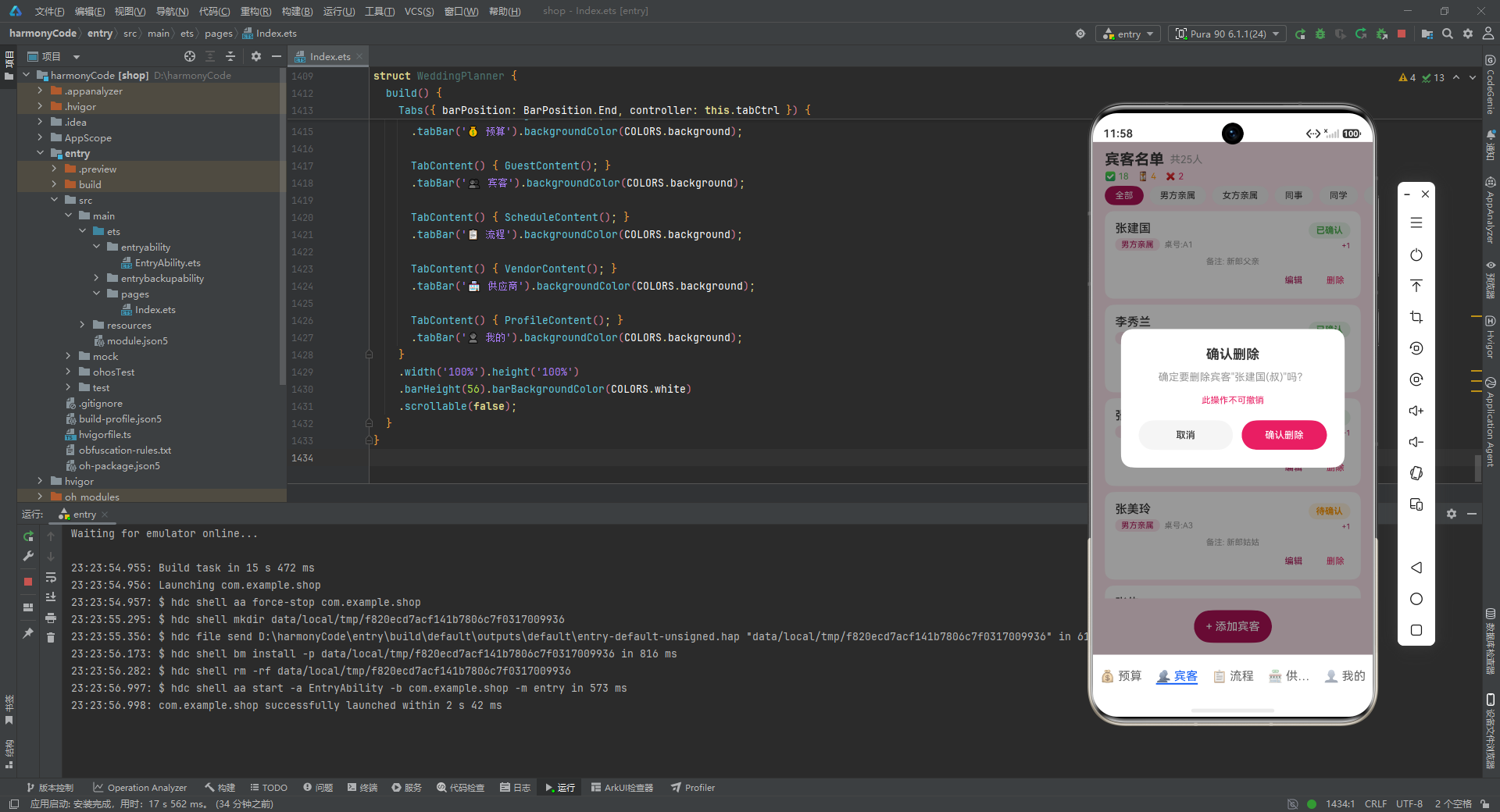
confirmDel(): void {
  if (this.delTarget === null) { return; }
  const ng: Guest[] = [];
  let i = 0;
  while (i < this.guests.length) {
    if (this.guests[i].id !== this.delTarget!.id) { ng.push(this.guests[i]); }
    i++;
  }
  this.guests = ng;
  this.showDel = false;
  this.delTarget = null;
}
逐行解析:
confirmDel(): void:确认删除宾客。- 空值保护后,构建新数组 ng,遍历原数组,只推入 id 不等于目标 id 的宾客(即排除要删除的那条)。
this.guests = ng;:替换列表,触发 UI 更新。this.showDel = false;:关闭删除弹层。this.delTarget = null;:清空删除目标引用,避免内存泄漏和下次误删。
7.7 表单字段构建器
@Builder FormFields() {
  Row() {
    Text('姓名').fontSize(14).fontColor(COLORS.text).width(60);
    TextInput({ text: this.fn, placeholder: '请输入姓名' })
      .layoutWeight(1).height(40).fontSize(14)
      .backgroundColor('#F9F9F9').borderRadius(8)
      .onChange((v: string) => { this.fn = v; });
  }.width('100%').margin({ bottom: 12 });

  Row() { Text('关系').fontSize(14).fontColor(COLORS.text).width(60); }
  .width('100%').margin({ bottom: 6 });

  Row() {
    ForEach(this.ropts, (opt: string) => {
      Text(opt)
        .fontSize(12).padding({ left: 10, right: 10, top: 5, bottom: 5 })
        .backgroundColor(this.fr === opt ? COLORS.primary : '#F5F5F5')
        .fontColor(this.fr === opt ? COLORS.white : COLORS.text)
        .borderRadius(14)
        .margin({ right: 6, bottom: 6 })
        .onClick(() => { this.fr = opt; });
    });
  }.width('100%');
  // ... 电话、桌号、RSVP、携带伴侣、饮食、礼物、备注等字段
}
逐行解析:
@Builder FormFields():使用 @Builder 装饰器定义一个可复用的 UI 构建片段。@Builder 的作用类似于"UI 函数"——它不是组件,但可以被多个组件调用以避免代码重复。这里新增弹层和编辑弹层的表单字段完全相同,因此抽取为 FormFields 复用。- 姓名字段:
Row内左侧是固定宽度 60 的标签文字"姓名",右侧是TextInput。TextInput({ text: this.fn, placeholder: '请输入姓名' })设置当前值和占位提示。.onChange((v: string) => { this.fn = v; })在输入变化时更新状态变量,实现双向绑定。 - 关系选择:不用下拉框,而是用一组可点击的"胶囊标签"。
ForEach(this.ropts, ...)遍历关系选项,每个Text是一个胶囊。.backgroundColor(this.fr === opt ? COLORS.primary : '#F5F5F5')实现选中态高亮——当前选中的选项显示玫红底白字,未选中显示浅灰底深字。.onClick(() => { this.fr = opt; })点击切换选中。 - 这种"胶囊标签选择器"的交互模式比下拉框更适合移动端:一是可视化更强,所有选项一目了然;二是点击面积大,不易误触。电话、桌号等字段使用 TextInput,RSVP、饮食等枚举字段使用胶囊选择器,携带伴侣使用 Toggle 开关——每个字段都根据数据类型选择了最合适的输入控件。
7.8 宾客列表渲染
List() {
  ForEach(this.filtered(), (guest: Guest) => {
    ListItem() {
      Column() {
        Row() {
          Column() {
            Text(guest.name).fontSize(16).fontWeight(FontWeight.Medium).fontColor(COLORS.text);
            Row() {
              Text(guest.relation)
                .fontSize(11).fontColor(COLORS.primary)
                .padding({ left: 8, right: 8, top: 2, bottom: 2 })
                .backgroundColor('#FCE4EC').borderRadius(8)
                .margin({ right: 6 });
              Text('桌号:' + guest.table).fontSize(11).fontColor(COLORS.textSecondary);
            }.margin({ top: 4 });
          }
          .alignItems(HorizontalAlign.Start).layoutWeight(1);

          Column() {
            Text(guest.rsvp)
              .fontSize(12).fontWeight(FontWeight.Bold)
              .fontColor(this.rclr(guest.rsvp))
              .padding({ left: 10, right: 10, top: 4, bottom: 4 })
              .backgroundColor(this.rbg(guest.rsvp)).borderRadius(12);
            if (guest.plusOne) {
              Text('+1').fontSize(10).fontColor(COLORS.primary).margin({ top: 4 });
            }
          }
          .alignItems(HorizontalAlign.End);
        }.width('100%');

        if (guest.note.length > 0) {
          Text('备注: ' + guest.note).fontSize(11).fontColor(COLORS.textSecondary).margin({ top: 8 });
        }

        Row() {
          Text('编辑').fontSize(12).fontColor(COLORS.primary)
            .padding({ left: 8, right: 8, top: 4, bottom: 4 })
            .onClick(() => { this.openEdit(guest); });
          Text('删除').fontSize(12).fontColor(COLORS.secondary)
            .padding({ left: 8, right: 8, top: 4, bottom: 4 })
            .margin({ left: 16 })
            .onClick(() => { this.openDel(guest); });
        }
        .width('100%').justifyContent(FlexAlign.End).margin({ top: 8 });
      }
      .width('100%').backgroundColor(COLORS.card).borderRadius(12).padding(14);
    }
    .margin({ left: 16, right: 16, bottom: 8 });
  });
}
.width('100%').layoutWeight(1).divider({ strokeWidth: 0 });
逐行解析:
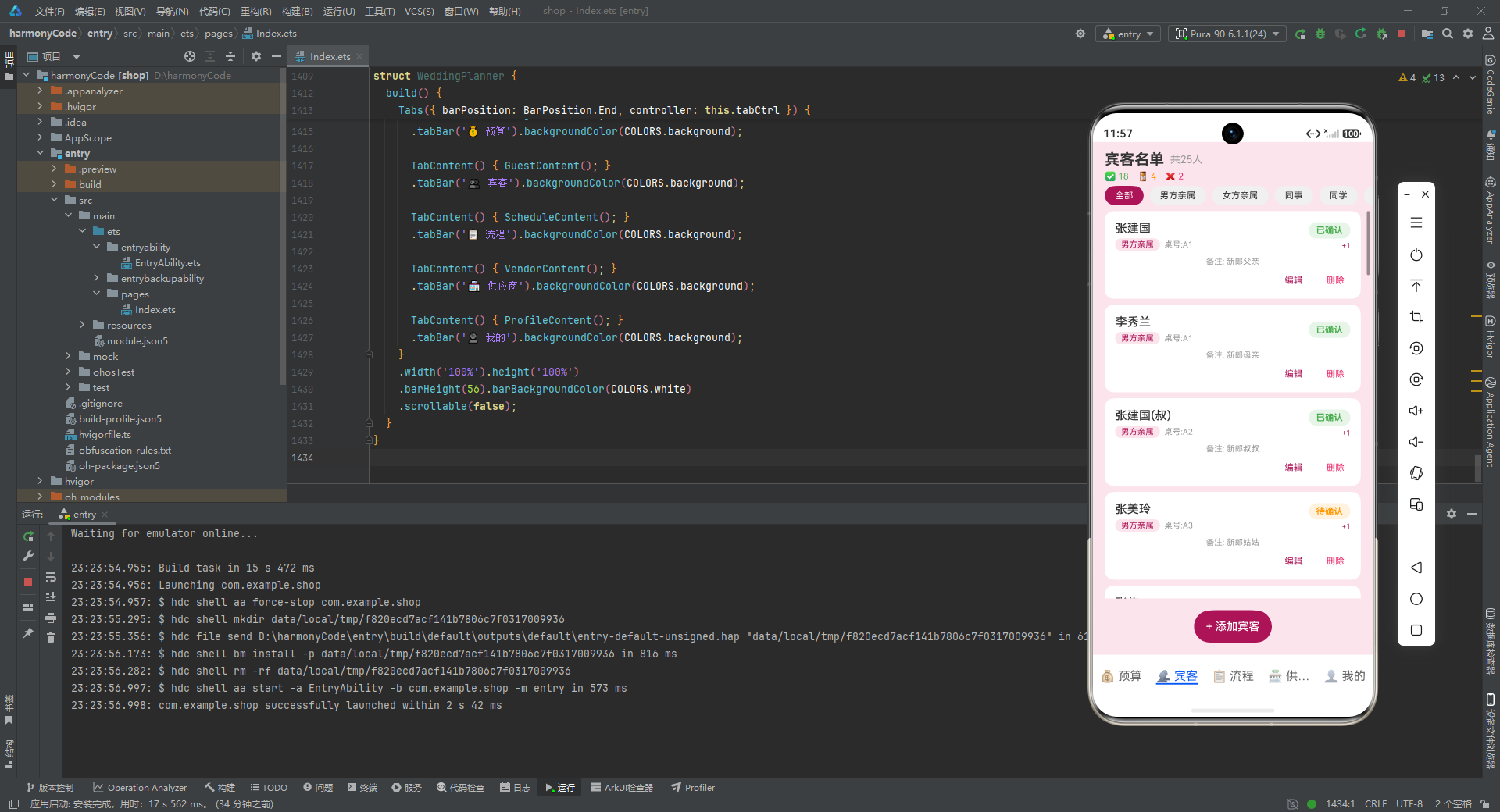
List() { ForEach(...) }:使用 List 容器渲染宾客列表。List 在 ArkUI 中是专为长列表优化的容器,支持懒加载和滚动回收。- 每个
ListItem内是一个卡片式布局。卡片内分为三层:顶部信息行、备注(可选)、操作按钮行。 - 顶部信息行左侧展示姓名和标签:姓名 16 号中粗体;下方一行包含关系标签(浅粉底玫红字胶囊)和桌号文字。
- 右侧展示 RSVP 状态标签:文字颜色由 rclr 决定,背景色由 rbg 决定,形成语义化的状态胶囊。如果宾客携带伴侣(
guest.plusOne为 true),下方显示 “+1” 提示。 if (guest.note.length > 0):条件渲染——只有当备注非空时才显示备注行。这是 ArkUI 中条件渲染的基本用法。- 操作按钮行:
justifyContent(FlexAlign.End)使两个按钮靠右排列。"编辑"按钮玫红色、"删除"按钮粉红色,颜色区分操作性质。点击分别触发 openEdit 和 openDel。 .divider({ strokeWidth: 0 }):列表项之间的分割线宽度设为 0(即不显示),因为每个条目已经是独立卡片,不需要额外分割。
7.9 弹层实现
新增宾客弹层的实现方式颇具特色——它不是使用系统的 Dialog API,而是用条件渲染的浮层来模拟。
if (this.showAdd) {
  Column() {
    Column().width('100%').layoutWeight(1)
      .backgroundColor('rgba(0,0,0,0.4)')
      .onClick(() => { this.showAdd = false; });

    Column() {
      Text('新增宾客')
        .fontSize(18).fontWeight(FontWeight.Bold).fontColor(COLORS.text)
        .padding({ left: 20, right: 20, top: 20, bottom: 12 });

      Scroll() {
        Column() {
          this.FormFields();
        }
        .width('100%').padding({ left: 20, right: 20 });
      }
      .width('100%').layoutWeight(1);

      Row() {
        Button('取消')
          .fontSize(14).backgroundColor('#F5F5F5').fontColor(COLORS.text)
          .borderRadius(24).height(44).layoutWeight(1)
          .onClick(() => { this.showAdd = false; });

        Button('确认添加')
          .fontSize(14).backgroundColor(COLORS.primary).fontColor(COLORS.white)
          .borderRadius(24).height(44).layoutWeight(1)
          .margin({ left: 12 })
          .onClick(() => { this.saveNew(); });
      }
      .width('100%').padding({ left: 20, right: 20, top: 8, bottom: 20 });
    }
    .width('100%').backgroundColor(COLORS.white)
    .borderRadius({ topLeft: 24, topRight: 24 });
  }
  .width('100%').height('100%');
}
逐行解析:
if (this.showAdd):当 showAdd 为 true 时渲染弹层。这是 ArkUI 中条件渲染整个弹层的方式——showAdd 为 false 时,这段 UI 完全不存在于渲染树中,不消耗资源。- 外层
Column占满全屏(width 和 height 都是 100%),作为弹层的遮罩容器。 - 第一个
Column().width('100%').layoutWeight(1).backgroundColor('rgba(0,0,0,0.4)'):半透明黑色遮罩层,占据上方弹性空间。.onClick(() => { this.showAdd = false; })实现点击遮罩关闭弹层——这是移动端弹层的标准交互。 - 第二个
Column是底部弹起的表单面板,白色背景,顶部圆角 24(borderRadius({ topLeft: 24, topRight: 24 })),模拟"底部弹出"的视觉效果。 - 面板内
Scroll() { Column() { this.FormFields(); } }:表单内容用 Scroll 包裹,因为表单字段较多,在屏幕较矮的设备上需要滚动。this.FormFields()调用前面定义的 @Builder,复用表单字段。 - 底部按钮行:取消按钮灰色、确认按钮玫红色,各占 layoutWeight(1) 等分宽度。取消关闭弹层,确认调用 saveNew 保存。
- 编辑弹层和删除确认弹层的结构与新增弹层类似,只是标题和按钮文字不同。编辑弹层复用了 FormFields,删除弹层则是一个居中的小对话框,包含确认提示和两个按钮。
八、流程页面组件 ScheduleContent:时间线可视化
8.1 组件声明与构建
流程页是五个页面中最简洁的一个——它只负责展示,没有交互操作。但它的视觉设计——时间线——却是最具表现力的。
@Component
struct ScheduleContent {
  @State items: ScheduleItem[] = SCHEDULES;

  build() {
    Scroll() {
      Column() {
        Text('婚礼当天流程')
          .fontSize(20)
          .fontWeight(FontWeight.Bold)
          .fontColor(COLORS.text)
          .margin({ bottom: 16 });

        ForEach(this.items, (item: ScheduleItem, index: number) => {
          Row() {
            // 左侧时间线
            Column() {
              Text(item.time)
                .fontSize(13)
                .fontWeight(FontWeight.Bold)
                .fontColor(COLORS.primary)
                .width(50);

              Column() {
                Circle({ width: 12, height: 12 }).fill(COLORS.primary);
              }
              .width(50).alignItems(HorizontalAlign.Center);
            }
            .width(60).alignItems(HorizontalAlign.Center);

            // 右侧内容卡片
            Column() {
              Text(item.title).fontSize(15).fontWeight(FontWeight.Bold).fontColor(COLORS.text);
              Text(item.description).fontSize(12).fontColor(COLORS.textSecondary).margin({ top: 4 });

              Row() {
                Text(item.location)
                  .fontSize(11).fontColor(COLORS.primary)
                  .padding({ left: 8, right: 8, top: 2, bottom: 2 })
                  .backgroundColor('#FCE4EC').borderRadius(8);
                Text(item.responsible)
                  .fontSize(11).fontColor(COLORS.textSecondary).margin({ left: 8 });
                Text(item.duration)
                  .fontSize(11).fontColor(COLORS.textSecondary).margin({ left: 8 });
              }
              .margin({ top: 6 });

              if (item.notes.length > 0) {
                Text('💡 ' + item.notes)
                  .fontSize(11).fontColor('#FF9800').margin({ top: 6 });
              }
            }
            .layoutWeight(1).backgroundColor(COLORS.card)
            .borderRadius(12).padding(12).margin({ left: 8, bottom: 8 });
          }
          .width('100%')
        });
      }
      .width('100%').padding(16);
    }
    .width('100%').height('100%');
  }
}
逐行解析:
@State items: ScheduleItem[] = SCHEDULES;:流程数据状态,初始值为 SCHEDULES。Scroll() { Column() { ... } }:可滚动容器包裹垂直列表。- 标题"婚礼当天流程"后,
ForEach(this.items, (item: ScheduleItem, index: number) => { ... })遍历 18 个流程节点。注意第二个参数 index 虽然接收了但未使用(时间线节点不需要索引来做特殊样式区分)。 - 每个节点是一个
Row,分左右两部分:- 左侧时间线(宽度 60):上方是时间文字(如 “06:00”),13 号粗体玫红色,宽度 50 居中;下方是一个 12x12 的玫红色实心圆点(
Circle({ width: 12, height: 12 }).fill(COLORS.primary))。圆点代表时间线上的"节点",多个圆点纵向排列就形成了时间线的视觉效果。 - 右侧内容卡片(layoutWeight(1) 占剩余宽度):白色背景圆角卡片。卡片内依次是:标题(15 号粗体)、描述(12 号浅灰)、信息行(地点胶囊+负责人+时长)、注意事项(如有)。
- 左侧时间线(宽度 60):上方是时间文字(如 “06:00”),13 号粗体玫红色,宽度 50 居中;下方是一个 12x12 的玫红色实心圆点(
- 信息行中,地点用浅粉底玫红字胶囊突出显示,负责人和时长用浅灰文字。这种"一胶囊+两文字"的组合既突出了地点,又不让信息行过于拥挤。
if (item.notes.length > 0):如果有注意事项,显示灯泡图标 + 橙色文字提示。橙色暗示"需要注意",与流程节点的注意事项语义匹配。- 左侧圆点 + 右侧卡片的布局,配合每个卡片之间的 margin 间距,在视觉上形成了一条从上到下的"时间轴",这是移动端时间线设计最经典的表现形式。
九、供应商页面组件 VendorContent:列表与详情
9.1 组件声明与状态颜色
@Component
struct VendorContent {
  @State vendors: Vendor[] = VENDORS;
  @State showDetail: boolean = false;
  @State sel: Vendor | null = null;

  sclr(s: string): string {
    if (s === '已签约') { return COLORS.green; }
    if (s === '洽谈中') { return COLORS.orange; }
    return COLORS.textSecondary;
  }
逐行解析:
@State vendors: Vendor[] = VENDORS;:供应商列表数据。@State showDetail: boolean = false;:控制详情弹层显示。@State sel: Vendor | null = null;:当前选中的供应商,用于详情弹层展示。sclr(s: string): string:根据合同状态返回颜色。已签约=绿色(安全)、洽谈中=橙色(进行中)、其他=浅灰。与宾客页的 rclr 方法设计思路一致——状态语义化着色。
9.2 供应商列表渲染
List() {
  ForEach(this.vendors, (vend: Vendor) => {
    ListItem() {
      Column() {
        Row() {
          Column() {
            Text(vend.name).fontSize(15).fontWeight(FontWeight.Bold).fontColor(COLORS.text);
            Text(vend.category + ' · ' + vend.contact)
              .fontSize(11).fontColor(COLORS.textSecondary).margin({ top: 3 });
          }
          .alignItems(HorizontalAlign.Start).layoutWeight(1);

          Column() {
            Text('¥' + (vend.quote / 10000).toFixed(1) + '万')
              .fontSize(16).fontWeight(FontWeight.Bold).fontColor(COLORS.primary);
            Text(vend.contractStatus)
              .fontSize(11).fontColor(this.sclr(vend.contractStatus)).margin({ top: 2 });
          }
          .alignItems(HorizontalAlign.End);
        }.width('100%');

        Row() {
          ForEach(vend.tags, (tag: string) => {
            Text(tag)
              .fontSize(10).fontColor(COLORS.primary)
              .padding({ left: 8, right: 8, top: 2, bottom: 2 })
              .backgroundColor('#FCE4EC').borderRadius(8).margin({ right: 6 });
          });
          Text('⭐ ' + vend.rating.toFixed(1))
            .fontSize(12).fontWeight(FontWeight.Bold).fontColor(COLORS.gold);
        }
        .width('100%').justifyContent(FlexAlign.SpaceBetween).margin({ top: 8 });

        Button('查看详情')
          .fontSize(12).fontColor(COLORS.primary).backgroundColor('#FCE4EC')
          .borderRadius(16).height(30).padding({ left: 16, right: 16 }).margin({ top: 8 })
          .onClick(() => { this.sel = vend; this.showDetail = true; });
      }
      .width('100%').backgroundColor(COLORS.card).borderRadius(12).padding(14);
    }
    .margin({ left: 16, right: 16, bottom: 8 });
  });
}
.width('100%').layoutWeight(1).divider({ strokeWidth: 0 });
逐行解析:
- 每个供应商卡片分三层:信息行、标签行、详情按钮。
- 信息行左侧:供应商名称(15 号粗体)和"类别 · 联系人"(11 号浅灰)。
- 信息行右侧:报价(
'¥' + (vend.quote / 10000).toFixed(1) + '万',将元转为万元并保留一位小数,16 号粗体玫红)和合同状态(颜色由 sclr 决定)。 - 标签行:
ForEach(vend.tags, ...)遍历标签数组,每个标签渲染为浅粉底胶囊。justifyContent(FlexAlign.SpaceBetween)使标签靠左、评分靠右——Text('⭐ ' + vend.rating.toFixed(1))显示金色星级评分。 - 详情按钮:浅粉底玫红字,点击时
this.sel = vend; this.showDetail = true;设置选中供应商并打开详情弹层。
9.3 供应商详情弹层
if (this.showDetail && this.sel !== null) {
  Column() {
    Column().width('100%').layoutWeight(1)
      .backgroundColor('rgba(0,0,0,0.4)')
      .onClick(() => { this.showDetail = false; });

    Column() {
      Row() {
        Text(this.sel!.name).fontSize(18).fontWeight(FontWeight.Bold).fontColor(COLORS.text);
        Text('⭐ ' + this.sel!.rating.toFixed(1)).fontSize(14).fontColor(COLORS.gold);
      }
      .width('100%').justifyContent(FlexAlign.SpaceBetween)
      .padding({ left: 20, right: 20, top: 20, bottom: 8 });

      Scroll() {
        Column() {
          Row() {
            Text('类别').fontSize(13).fontColor(COLORS.textSecondary).width(60);
            Text(this.sel!.category).fontSize(14).fontColor(COLORS.text);
          }.width('100%').margin({ bottom: 10 });

          Row() {
            Text('联系人').fontSize(13).fontColor(COLORS.textSecondary).width(60);
            Text(this.sel!.contact).fontSize(14).fontColor(COLORS.text);
          }.width('100%').margin({ bottom: 10 });
          // ... 电话、报价、合同、标签、评价
        }
        .width('100%').padding({ left: 20, right: 20, bottom: 12 });
      }
      .width('100%').constraintSize({ maxHeight: 400 });

      Button('关闭')
        .fontSize(14).backgroundColor(COLORS.primary).fontColor(COLORS.white)
        .borderRadius(24).height(44).width('100%')
        .margin({ left: 20, right: 20, bottom: 20 })
        .onClick(() => { this.showDetail = false; });
    }
    .width('100%').backgroundColor(COLORS.white)
    .borderRadius({ topLeft: 24, topRight: 24 });
  }
  .width('100%').height('100%');
}
逐行解析:
if (this.showDetail && this.sel !== null):双重条件——既要求弹层开关打开,又要求选中对象非空。这种"双保险"避免了 sel 为 null 时访问属性导致的运行时错误。- 弹层结构与宾客弹层一致:半透明遮罩 + 底部白色面板。
- 面板顶部标题行:供应商名称和星级评分,
justifyContent(FlexAlign.SpaceBetween)两端对齐。 Scroll() { Column() { ... } }.constraintSize({ maxHeight: 400 }):详情内容用 Scroll 包裹并限制最大高度 400,防止评价文字过长导致弹层超出屏幕。- 详情内容采用"标签+值"的行式布局:每行左侧固定宽度 60 的浅灰标签(类别、联系人、电话、报价、合同),右侧是对应的值。报价用 18 号粗体玫红突出显示,合同状态用粗体加状态色。
- 标签区用 ForEach 渲染胶囊,评价区用浅灰背景圆角框包裹评价文字,
lineHeight(20)增加行高提升可读性。 - 底部"关闭"按钮玫红底白字,全宽圆角按钮。
十、个人中心组件 ProfileContent:倒计时与全局概览
10.1 倒计时核心逻辑
个人中心最核心的功能是婚礼倒计时,它需要每秒更新一次。这涉及定时器的使用和生命周期的管理。
@Component
struct ProfileContent {
  @State d: number = 0;
  @State h: number = 0;
  @State m: number = 0;
  @State s: number = 0;
  tid: number = -1;

  aboutToAppear(): void {
    this.tick();
    this.tid = setInterval(() => { this.tick(); }, 1000);
  }

  aboutToDisappear(): void {
    if (this.tid !== -1) {
      clearInterval(this.tid);
      this.tid = -1;
    }
  }

  tick(): void {
    const now = new Date().getTime();
    const wd = new Date('2026-12-25T11:58:00').getTime();
    const df = wd - now;
    if (df <= 0) {
      this.d = 0; this.h = 0; this.m = 0; this.s = 0;
      return;
    }
    this.d = Math.floor(df / 86400000);
    this.h = Math.floor((df % 86400000) / 3600000);
    this.m = Math.floor((df % 3600000) / 60000);
    this.s = Math.floor((df % 60000) / 1000);
  }
逐行解析:
@State d/h/m/s: number = 0;:四个响应式状态变量,分别存储天、时、分、秒。每次值变化都会触发 UI 重渲染。tid: number = -1;:定时器 ID。注意这里没有用 @State 修饰,因为 tid 只是内部实现细节,不需要驱动 UI 更新。初始值 -1 表示"未设置定时器"。aboutToAppear(): void:ArkUI 组件生命周期钩子,在组件即将显示时调用。这里先立即调用一次 tick 计算初始倒计时值,然后设置每 1000 毫秒(1 秒)执行一次 tick 的定时器,将返回的定时器 ID 存入 tid。aboutToDisappear(): void:组件即将销毁时调用。这里检查 tid 是否有效(不等于 -1),如果有效则清除定时器并重置为 -1。这一步至关重要——如果不清除定时器,组件销毁后定时器仍在运行,会尝试更新已不存在的状态,导致内存泄漏和潜在的错误。tick(): void:倒计时计算核心方法。const now = new Date().getTime();:获取当前时间的时间戳(毫秒)。const wd = new Date('2026-12-25T11:58:00').getTime();:婚礼目标时间的时间戳——2026 年圣诞节当天 11:58(与流程数据中"婚礼仪式开始"的时间一致)。const df = wd - now;:计算时间差(毫秒)。if (df <= 0):如果时间差小于等于 0(婚礼已到或已过),所有值归零并返回。this.d = Math.floor(df / 86400000);:一天有 86400000 毫秒,整除得到剩余天数。this.h = Math.floor((df % 86400000) / 3600000);:用取余运算得到不足一天的毫秒数,再除以 3600000(一小时)得到小时数。this.m = Math.floor((df % 3600000) / 60000);:取余得到不足一小时的毫秒数,除以 60000(一分钟)得到分钟数。this.s = Math.floor((df % 60000) / 1000);:取余得到不足一分钟的毫秒数,除以 1000 得到秒数。- 这种"逐级取余"的计算方式是倒计时的标准算法,确保天/时/分/秒各字段都是"剩余"值而非总数。
10.2 数字补零
pad(n: number): string {
  if (n < 10) { return '0' + n.toString(); }
  return n.toString();
}
逐行解析:
pad(n: number): string:将个位数补零为两位字符串。如 5 变为 “05”,12 变为 “12”。- 这是倒计时显示的必要处理——“05:08” 比 “5:8” 更整齐美观。在 UI 中调用
this.pad(this.d)等。
10.3 倒计时卡片 UI
build() {
  Scroll() {
    Column() {
      // 倒计时卡片
      Column() {
        Text('距离婚礼还有')
          .fontSize(16).fontColor(COLORS.white).margin({ bottom: 12 });

        Row() {
          Column() {
            Text(this.pad(this.d)).fontSize(40).fontWeight(FontWeight.Bold).fontColor(COLORS.white);
            Text('天').fontSize(14).fontColor('rgba(255,255,255,0.8)').margin({ top: 4 });
          }.alignItems(HorizontalAlign.Center);

          Text(':').fontSize(28).fontColor(COLORS.white).margin({ left: 5, right: 5 });

          Column() {
            Text(this.pad(this.h)).fontSize(40).fontWeight(FontWeight.Bold).fontColor(COLORS.white);
            Text('时').fontSize(14).fontColor('rgba(255,255,255,0.8)').margin({ top: 4 });
          }.alignItems(HorizontalAlign.Center);

          Text(':').fontSize(28).fontColor(COLORS.white).margin({ left: 5, right: 5 });

          Column() {
            Text(this.pad(this.m)).fontSize(40).fontWeight(FontWeight.Bold).fontColor(COLORS.white);
            Text('分').fontSize(14).fontColor('rgba(255,255,255,0.8)').margin({ top: 4 });
          }.alignItems(HorizontalAlign.Center);

          Text(':').fontSize(28).fontColor(COLORS.white).margin({ left: 5, right: 5 });

          Column() {
            Text(this.pad(this.s)).fontSize(40).fontWeight(FontWeight.Bold).fontColor(COLORS.white);
            Text('秒').fontSize(14).fontColor('rgba(255,255,255,0.8)').margin({ top: 4 });
          }.alignItems(HorizontalAlign.Center);
        }
        .justifyContent(FlexAlign.Center);

        Text('2026年12月25日 · 圣诞节')
          .fontSize(14).fontColor('rgba(255,255,255,0.8)').margin({ top: 12 });
      }
      .width('100%').backgroundColor('#AD1457').borderRadius(16).padding(24);
逐行解析:
- 倒计时卡片整体是玫红色背景圆角卡片,内部文字全部白色,形成强烈的视觉焦点。
Text('距离婚礼还有'):16 号白色提示文字。- 四组数字+冒号横向排列:每组是一个 Column,内含 40 号粗体白色数字和 14 号半透明白色单位(天/时/分/秒)。数字之间用 28 号的冒号分隔。
rgba(255,255,255,0.8):白色 80% 不透明度,使单位文字比数字稍弱,形成层级。- 底部"2026年12月25日 · 圣诞节"显示具体婚期。
- 这张倒计时卡片是整个应用视觉冲击力最强的部分——大号数字 + 玫红背景 + 每秒跳动,能够持续激发新人的期待感。
10.4 婚礼概览与待办事项
// 婚礼概览
Column() {
  Text('婚礼概览')
    .fontSize(18).fontWeight(FontWeight.Bold).fontColor(COLORS.text).margin({ bottom: 12 });

  Row() {
    Column() {
      Text('预算总额').fontSize(12).fontColor(COLORS.textSecondary);
      Text('¥31.7万').fontSize(20).fontWeight(FontWeight.Bold).fontColor(COLORS.primary).margin({ top: 4 });
    }.layoutWeight(1).alignItems(HorizontalAlign.Center);
    Column() {
      Text('宾客人数').fontSize(12).fontColor(COLORS.textSecondary);
      Text('25人').fontSize(20).fontWeight(FontWeight.Bold).fontColor(COLORS.gold).margin({ top: 4 });
    }.layoutWeight(1).alignItems(HorizontalAlign.Center);
    Column() {
      Text('供应商').fontSize(12).fontColor(COLORS.textSecondary);
      Text('12家').fontSize(20).fontWeight(FontWeight.Bold).fontColor(COLORS.green).margin({ top: 4 });
    }.layoutWeight(1).alignItems(HorizontalAlign.Center);
  }.width('100%');
  // ... 第二行:流程节点、已花费、已确认率
}
.width('100%').backgroundColor(COLORS.card).borderRadius(16).padding(20).margin({ top: 16 });
逐行解析:
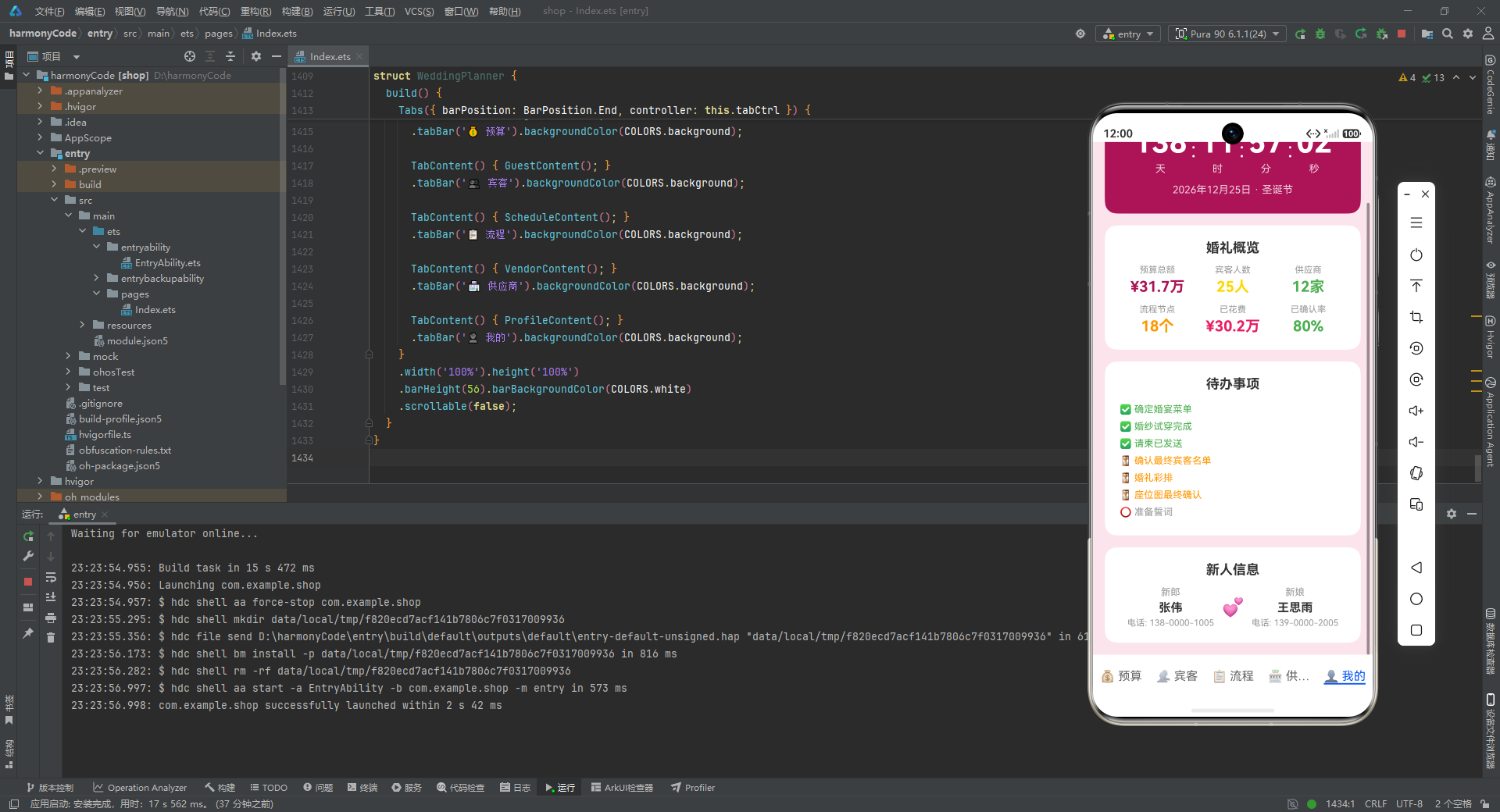
- 概览卡片用 2x3 网格展示六个核心指标:预算总额(31.7万,玫红)、宾客人数(25人,金色)、供应商(12家,绿色)、流程节点(18个,橙色)、已花费(30.2万,粉红)、已确认率(80%,绿色)。
- 每个指标由 12 号浅灰标签和 20 号粗体彩色数字组成,数字颜色各不相同,用色彩区分不同维度。
- 这六个数字是对前四个页面数据的全局汇总,让新人在"我的"页面一眼掌握筹备全貌。
待办事项部分用三种符号区分状态:✅ 已完成(绿色)、⏳ 进行中(橙色)、⭕ 未开始(浅灰),清晰展示筹备进度。
十一、主入口组件 WeddingPlanner:五 Tab 导航架构
11.1 入口声明与 Tab 配置
@Entry
@Component
struct WeddingPlanner {
  tabCtrl: TabsController = new TabsController();

  build() {
    Tabs({ barPosition: BarPosition.End, controller: this.tabCtrl }) {
      TabContent() { BudgetContent(); }
      .tabBar('💰 预算').backgroundColor(COLORS.background);

      TabContent() { GuestContent(); }
      .tabBar('👥 宾客').backgroundColor(COLORS.background);

      TabContent() { ScheduleContent(); }
      .tabBar('📋 流程').backgroundColor(COLORS.background);

      TabContent() { VendorContent(); }
      .tabBar('🏪 供应商').backgroundColor(COLORS.background);

      TabContent() { ProfileContent(); }
      .tabBar('👤 我的').backgroundColor(COLORS.background);
    }
    .width('100%').height('100%')
    .barHeight(56).barBackgroundColor(COLORS.white)
    .scrollable(false);
  }
}
逐行解析:
@Entry:装饰器,声明这是应用的入口组件。一个页面只能有一个 @Entry 组件,它会被框架自动加载。@Component struct WeddingPlanner:主组件结构体。tabCtrl: TabsController = new TabsController();:创建 Tab 控制器实例。TabsController 可以在代码中通过 API 切换 Tab(如this.tabCtrl.changeIndex(2)),本应用虽未显式调用,但保留了扩展能力。Tabs({ barPosition: BarPosition.End, controller: this.tabCtrl }):创建 Tabs 容器。barPosition: BarPosition.End表示 Tab 栏位于底部(End 端),这是移动端应用最常见的导航位置。controller传入控制器实例。- 五个
TabContent() { XxxContent(); }:每个 TabContent 内嵌套一个业务组件。这种"主入口只负责 Tab 组织,业务逻辑全部下沉到子组件"的设计,使得主入口非常简洁。 .tabBar('💰 预算')等:为每个 Tab 设置标签文字(含 emoji 图标)。emoji 的加入让 Tab 栏更生动直观。.backgroundColor(COLORS.background):每个 Tab 内容区背景为浅粉。.width('100%').height('100%'):Tabs 占满全屏。.barHeight(56):Tab 栏高度 56,是底部导航栏的标准高度。.barBackgroundColor(COLORS.white):Tab 栏背景纯白。.scrollable(false):禁止左右滑动切换 Tab。这是一个重要的交互决策——婚礼筹备应用的用户更可能通过点击 Tab 来切换,而非滑动;禁止滑动可以避免页面内 Scroll 滚动与 Tab 滑动手势冲突。
十二、关键技术特性对比总结
下面通过一张表格,对本应用中各页面的关键技术特性进行系统对比。
| 特性维度 | 预算页 BudgetContent | 宾客页 GuestContent | 流程页 ScheduleContent | 供应商页 VendorContent | 个人中心 ProfileContent |
|---|---|---|---|---|---|
| 数据来源 | BUDGETS(20条) | GUESTS(25条) | SCHEDULES(18条) | VENDORS(12条) | 静态文本+实时计算 |
| 核心交互 | 只读浏览 | 增/删/改/筛选 | 只读浏览 | 列表+详情弹层 | 倒计时自动更新 |
| 数据修改能力 | 无(只读展示) | 完整 CRUD | 无(只读展示) | 只读+详情查看 | 无(只读展示) |
| 弹层数量 | 0 | 3(新增/编辑/删除) | 0 | 1(详情) | 0 |
| 表单复用 | 无 | @Builder FormFields | 无 | 无 | 无 |
| 定时器/生命周期 | 无 | 无 | 无 | 无 | setInterval+aboutToDisappear |
| 数据聚合统计 | 按分类聚合(cats/catB/catS) | 按RSVP状态计数(cnt) | 无 | 无 | 全局汇总(静态) |
| 可视化形式 | 进度条(Stack层叠) | 状态胶囊标签 | 时间线(圆点+卡片) | 星级评分+标签胶囊 | 大号数字倒计时 |
| 颜色语义化 | 三色进度(红/橙/主色) | 四色RSVP状态 | 单色时间线 | 三色合同状态 | 多色指标网格 |
| 滚动容器 | Scroll | List(懒加载) | Scroll | List(懒加载) | Scroll |
| 状态变量数 | 1(items) | 15(含表单字段) | 1(items) | 3(vendors/showDetail/sel) | 5(d/h/m/s/tid) |
| 代码复杂度 | 中(统计方法多) | 高(CRUD+表单+弹层) | 低(纯展示) | 中(列表+详情弹层) | 中(定时器+生命周期) |
| 响应式更新模式 | 只读,无需更新 | concat/重建数组 | 只读,无需更新 | 只读,无需更新 | @State 自动驱动 |
十三、设计模式与技术亮点深度总结
13.1 不可变数据更新模式
本应用在所有需要修改 @State 数组的地方,都采用了"不可变更新"模式——不直接修改原数组(如 push、splice),而是通过 concat 或重建新数组来替换整个引用。例如宾客新增使用 this.guests = this.guests.concat([ng]),编辑和删除都是构建全新数组后整体赋值。这种模式虽然代码量略多,但它能可靠地触发 ArkUI 框架的变更检测,确保 UI 准确更新,是声明式 UI 框架中的最佳实践。
13.2 颜色语义化体系
应用建立了一套完整的"颜色=语义"映射体系:玫红=品牌主色与正常态、粉红=超支与删除操作、金色=金额与评分、绿色=确认与剩余、橙色=待确认与警告。这套体系贯穿所有页面,使得用户在不同页面间切换时,能够通过颜色快速理解信息含义,降低认知负担。
13.3 @Builder 复用机制
宾客页的表单字段被抽取为 @Builder FormFields,在新增弹层和编辑弹层中复用。@Builder 是 ArkUI 提供的 UI 片段复用机制,类似于其他框架中的"模板函数"。它避免了在新增和编辑两个弹层中重复编写近 90 行表单代码,大幅降低了维护成本——修改表单字段时只需改一处。
13.4 弹层的条件渲染实现
应用没有使用系统 Dialog API,而是通过 if (this.showXxx) 条件渲染自定义浮层来实现弹层。这种方式的优势在于:第一,弹层关闭时完全从渲染树中移除,不消耗资源;第二,弹层的样式和交互完全可控(如点击遮罩关闭、顶部圆角、自定义按钮样式);第三,弹层内部可以使用所有 ArkUI 组件(如 Scroll、FormFields),灵活性远超系统 Dialog。
13.5 生命周期与定时器管理
个人中心的倒计时功能展示了 ArkUI 生命周期的正确使用方式:在 aboutToAppear 中启动定时器,在 aboutToDisappear 中清除定时器。这种"对称式"的资源管理确保了定时器不会在组件销毁后继续运行,是避免内存泄漏的标准做法。
13.6 分层架构的可扩展性
整个应用采用"配置层(颜色)—数据层(接口+Mock)—视图层(组件)"的三层架构。这种分层的最大价值在于可扩展性:如果未来需要接入真实后端,只需将 Mock 常量替换为异步请求的结果赋值;如果需要支持暗色模式,只需新增一个符合 ColorScheme 接口的暗色配色对象;如果需要新增"座位图"页面,只需定义新的数据接口和组件,然后在主入口的 Tabs 中添加一个 TabContent。每一层的变更都不会波及其他层。
13.7 移动端交互的细节打磨
应用在交互细节上体现了对移动端用户体验的深入理解:筛选标签用可横向滚动的 Scroll 包裹,避免标签过多时换行或截断;表单枚举字段用胶囊标签选择器替代下拉框,点击面积更大、选项一目了然;列表项使用 List 容器而非 Column+ForEach,享受框架的懒加载和滚动回收优化;删除操作前弹出确认对话框,防止误删;金额使用 toLocaleString 添加千分位,万元单位用 toFixed 保留一位小数,兼顾精确与可读。
13.8 数据完整性与真实感
四组 Mock 数据的规模和细节都经过精心设计:20 条预算覆盖十大支出类别且有超支案例,25 位宾客覆盖五大关系且有 RSVP 多状态分布,18 个流程节点覆盖从清晨到下午的完整时间线,12 家供应商覆盖全部服务品类且有差异化评分和评价。这种数据完整性使得应用在演示时具有极强的真实感,也为后续接入真实数据后的功能验证提供了充分的测试覆盖。
安装DevEco Studio程序

选择目标安装目录:

设置环境变量,但是需要重启一下:

新建一个空白模板:

设置API为24的模板项目:
初始化项目,自动下载相关依赖:

完整代码:
/**
* Wedding Planner - 婚礼策划管理
* 主色: #AD1457 玫红 | 辅色: #E91E63 粉红 | 背景: #FCE4EC 浅粉
* 底部5Tab: 预算 | 宾客 | 流程 | 供应商 | 我的
*/
// ==========================================
// 颜色方案接口和常量
// ==========================================
interface ColorScheme {
primary: string;
secondary: string;
background: string;
card: string;
gold: string;
green: string;
orange: string;
text: string;
textSecondary: string;
divider: string;
white: string;
}
const COLORS: ColorScheme = {
primary: '#AD1457',
secondary: '#E91E63',
background: '#FCE4EC',
card: '#FFFFFF',
gold: '#FFD700',
green: '#4CAF50',
orange: '#FF9800',
text: '#333333',
textSecondary: '#999999',
divider: '#F0F0F0',
white: '#FFFFFF'
};
// ==========================================
// 数据模型接口
// ==========================================
interface BudgetItem {
id: number;
category: string;
item: string;
budgeted: number;
spent: number;
vendor: string;
status: string;
note: string;
}
interface Guest {
id: number;
name: string;
relation: string;
phone: string;
table: string;
rsvp: string;
plusOne: boolean;
mealPreference: string;
gift: string;
note: string;
}
interface ScheduleItem {
id: number;
time: string;
title: string;
description: string;
responsible: string;
location: string;
duration: string;
notes: string;
}
interface Vendor {
id: number;
name: string;
category: string;
contact: string;
phone: string;
quote: number;
contractStatus: string;
rating: number;
review: string;
tags: string[];
}
// ==========================================
// 预算数据 (20条)
// ==========================================
const BUDGETS: BudgetItem[] = [
{ id:1, category:'场地', item:'酒店宴会厅租赁', budgeted:50000, spent:52000,
vendor:'希尔顿酒店', status:'已确认', note:'含LED屏及舞台' },
{ id:2, category:'场地', item:'户外仪式场地', budgeted:20000, spent:20000,
vendor:'希尔顿酒店', status:'已确认', note:'草坪婚礼仪式区' },
{ id:3, category:'餐饮', item:'婚宴正餐', budgeted:80000, spent:75000,
vendor:'品味轩餐饮', status:'已确认', note:'20桌每桌¥4000' },
{ id:4, category:'餐饮', item:'酒水饮料', budgeted:15000, spent:12000,
vendor:'品味轩餐饮', status:'已确认', note:'含红酒白酒饮料' },
{ id:5, category:'摄影', item:'婚礼跟拍', budgeted:12000, spent:10000,
vendor:'光影摄影', status:'已确认', note:'双机位全天跟拍' },
{ id:6, category:'摄影', item:'婚礼摄像', budgeted:10000, spent:10000,
vendor:'忆境摄像', status:'已确认', note:'含航拍及精剪MV' },
{ id:7, category:'摄影', item:'航拍服务', budgeted:5000, spent:5000,
vendor:'忆境摄像', status:'已确认', note:'大疆御3航拍' },
{ id:8, category:'婚庆', item:'现场布置', budgeted:30000, spent:28000,
vendor:'花嫁婚庆', status:'已确认', note:'主题定制布置' },
{ id:9, category:'婚庆', item:'音响灯光', budgeted:8000, spent:7500,
vendor:'悦耳音响', status:'已确认', note:'线阵音响+灯光秀' },
{ id:10, category:'婚纱', item:'新娘婚纱礼服', budgeted:15000, spent:16000,
vendor:'梦幻婚纱', status:'已确认', note:'主纱+出门纱+敬酒服' },
{ id:11, category:'婚纱', item:'新郎礼服定制', budgeted:8000, spent:8000,
vendor:'梦幻婚纱', status:'已确认', note:'西装三件套定制' },
{ id:12, category:'戒指', item:'结婚对戒', budgeted:25000, spent:25000,
vendor:'周生生', status:'已确认', note:'铂金对戒' },
{ id:13, category:'花艺', item:'手捧花及胸花', budgeted:5000, spent:4800,
vendor:'花语花艺', status:'已确认', note:'新娘捧花+伴娘腕花' },
{ id:14, category:'花艺', item:'婚车花艺装饰', budgeted:3000, spent:3000,
vendor:'花语花艺', status:'已确认', note:'头车花艺装饰' },
{ id:15, category:'交通', item:'婚车租赁', budgeted:8000, spent:8000,
vendor:'皇家婚车', status:'已确认', note:'劳斯莱斯+5辆奥迪A6' },
{ id:16, category:'交通', item:'宾客接送大巴', budgeted:4000, spent:3500,
vendor:'皇家婚车', status:'待确认', note:'2辆50座大巴' },
{ id:17, category:'伴手礼', item:'宾客伴手礼', budgeted:6000, spent:5500,
vendor:'甜蜜伴手礼', status:'已确认', note:'定制礼盒200份' },
{ id:18, category:'其他', item:'司仪主持', budgeted:5000, spent:5000,
vendor:'金话筒司仪', status:'已确认', note:'金牌主持人全程' },
{ id:19, category:'其他', item:'化妆造型', budgeted:5000, spent:5000,
vendor:'美丽妆扮', status:'已确认', note:'新娘+伴娘+妈妈妆' },
{ id:20, category:'其他', item:'婚礼蛋糕', budgeted:4000, spent:3800,
vendor:'甜蜜伴手礼', status:'已确认', note:'三层翻糖蛋糕' }
];
// ==========================================
// 宾客数据 (25条)
// ==========================================
const GUESTS: Guest[] = [
{ id:1, name:'张建国', relation:'男方亲属', phone:'13800001001',
table:'A1', rsvp:'已确认', plusOne:true, mealPreference:'无特殊要求',
gift:'红包', note:'新郎父亲' },
{ id:2, name:'李秀兰', relation:'男方亲属', phone:'13800001002',
table:'A1', rsvp:'已确认', plusOne:false, mealPreference:'无特殊要求',
gift:'', note:'新郎母亲' },
{ id:3, name:'张建国(叔)', relation:'男方亲属', phone:'13800001003',
table:'A2', rsvp:'已确认', plusOne:true, mealPreference:'无特殊要求',
gift:'红包', note:'新郎叔叔' },
{ id:4, name:'张美玲', relation:'男方亲属', phone:'13800001004',
table:'A3', rsvp:'待确认', plusOne:true, mealPreference:'素食',
gift:'', note:'新郎姑姑' },
{ id:5, name:'张伟', relation:'男方亲属', phone:'13800001005',
table:'A4', rsvp:'已确认', plusOne:false, mealPreference:'无特殊要求',
gift:'红包', note:'新郎堂兄' },
{ id:6, name:'王明德', relation:'女方亲属', phone:'13900002001',
table:'B1', rsvp:'已确认', plusOne:true, mealPreference:'无特殊要求',
gift:'红包', note:'新娘父亲' },
{ id:7, name:'赵雅琴', relation:'女方亲属', phone:'13900002002',
table:'B1', rsvp:'已确认', plusOne:false, mealPreference:'过敏',
gift:'', note:'新娘母亲' },
{ id:8, name:'王明辉', relation:'女方亲属', phone:'13900002003',
table:'B2', rsvp:'已确认', plusOne:true, mealPreference:'无特殊要求',
gift:'红包', note:'新娘哥哥' },
{ id:9, name:'赵雅丽', relation:'女方亲属', phone:'13900002004',
table:'B3', rsvp:'已拒绝', plusOne:false, mealPreference:'无特殊要求',
gift:'', note:'新娘阿姨(国外)' },
{ id:10, name:'王思雨', relation:'女方亲属', phone:'13900002005',
table:'B4', rsvp:'待确认', plusOne:false, mealPreference:'无特殊要求',
gift:'', note:'新娘表妹' },
{ id:11, name:'陈志强', relation:'同事', phone:'13700003001',
table:'C1', rsvp:'已确认', plusOne:true, mealPreference:'无特殊要求',
gift:'红包', note:'新郎公司同事' },
{ id:12, name:'刘芳', relation:'同事', phone:'13700003002',
table:'C2', rsvp:'已确认', plusOne:false, mealPreference:'清真',
gift:'红包', note:'新郎部门同事' },
{ id:13, name:'杨帆', relation:'同事', phone:'13700003003',
table:'C1', rsvp:'已确认', plusOne:true, mealPreference:'无特殊要求',
gift:'红包', note:'新郎公司领导' },
{ id:14, name:'周敏', relation:'同事', phone:'13700003004',
table:'C2', rsvp:'待确认', plusOne:false, mealPreference:'无糖',
gift:'', note:'新郎HR同事' },
{ id:15, name:'吴磊', relation:'同事', phone:'13700003005',
table:'C3', rsvp:'已确认', plusOne:false, mealPreference:'无特殊要求',
gift:'红包', note:'新郎技术团队' },
{ id:16, name:'林晓峰', relation:'同学', phone:'13600004001',
table:'D1', rsvp:'已确认', plusOne:true, mealPreference:'无特殊要求',
gift:'红包', note:'新郎大学同学' },
{ id:17, name:'黄诗雨', relation:'同学', phone:'13600004002',
table:'D1', rsvp:'已确认', plusOne:false, mealPreference:'素食',
gift:'红包', note:'新娘大学室友' },
{ id:18, name:'何俊杰', relation:'同学', phone:'13600004003',
table:'D2', rsvp:'已确认', plusOne:true, mealPreference:'无特殊要求',
gift:'红包', note:'新郎高中死党' },
{ id:19, name:'谢雨桐', relation:'同学', phone:'13600004004',
table:'D2', rsvp:'已拒绝', plusOne:false, mealPreference:'无特殊要求',
gift:'', note:'新娘高中同学' },
{ id:20, name:'丁浩然', relation:'同学', phone:'13600004005',
table:'D3', rsvp:'已确认', plusOne:false, mealPreference:'无特殊要求',
gift:'红包', note:'新郎研究生同学' },
{ id:21, name:'苏小小', relation:'朋友', phone:'13500005001',
table:'E1', rsvp:'已确认', plusOne:false, mealPreference:'无特殊要求',
gift:'香薰蜡烛', note:'新郎发小' },
{ id:22, name:'马天宇', relation:'朋友', phone:'13500005002',
table:'E1', rsvp:'已确认', plusOne:true, mealPreference:'无特殊要求',
gift:'红包', note:'新娘闺蜜家属' },
{ id:23, name:'沈佳宜', relation:'朋友', phone:'13500005003',
table:'E2', rsvp:'待确认', plusOne:false, mealPreference:'无糖',
gift:'', note:'新娘闺蜜' },
{ id:24, name:'许文强', relation:'朋友', phone:'13500005004',
table:'E3', rsvp:'已确认', plusOne:true, mealPreference:'清真',
gift:'红包', note:'新郎健身伙伴' },
{ id:25, name:'郑爽', relation:'朋友', phone:'13500005005',
table:'E4', rsvp:'未邀请', plusOne:false, mealPreference:'无特殊要求',
gift:'', note:'待定邀请' }
];
// ==========================================
// 流程数据 (18条)
// ==========================================
const SCHEDULES: ScheduleItem[] = [
{ id:1, time:'06:00', title:'新娘化妆造型',
description:'新娘及伴娘化妆造型,化妆师到达新娘房间',
responsible:'美丽妆扮', location:'新娘家', duration:'120分钟',
notes:'提前确认化妆师时间' },
{ id:2, time:'07:00', title:'新郎准备',
description:'新郎及伴郎团换装准备,检查婚车装饰物品',
responsible:'新郎', location:'新郎家', duration:'60分钟',
notes:'确认戒指红包等物品' },
{ id:3, time:'07:30', title:'摄影摄像就位',
description:'摄影摄像团队分别到达新郎新娘家开始拍摄',
responsible:'光影/忆境', location:'新郎/新娘家', duration:'持续',
notes:'双机位同步拍摄' },
{ id:4, time:'08:08', title:'接亲出发',
description:'新郎带领伴郎团从家出发前往新娘家迎接',
responsible:'新郎/伴郎团', location:'新郎家出发', duration:'30分钟',
notes:'车队按路线准时出发' },
{ id:5, time:'08:38', title:'到达新娘家',
description:'新郎车队到达新娘家准备进行接亲环节',
responsible:'新郎', location:'新娘家', duration:'10分钟',
notes:'提前通知新娘方准备' },
{ id:6, time:'09:00', title:'堵门游戏',
description:'伴娘设置趣味堵门游戏,新郎伴郎团闯关',
responsible:'伴娘团', location:'新娘家', duration:'30分钟',
notes:'准备红包和游戏道具' },
{ id:7, time:'09:30', title:'敬茶改口',
description:'新人向女方父母敬茶行改口礼',
responsible:'司仪', location:'新娘家客厅', duration:'20分钟',
notes:'准备茶具和垫子' },
{ id:8, time:'10:00', title:'出发去酒店',
description:'新人及亲友乘坐婚车前往婚宴酒店',
responsible:'婚车司机', location:'路途中', duration:'40分钟',
notes:'注意交通安全' },
{ id:9, time:'10:40', title:'到达酒店',
description:'新人到达婚宴酒店稍作休息补妆',
responsible:'婚庆团队', location:'希尔顿酒店', duration:'20分钟',
notes:'检查场地布置完成情况' },
{ id:10, time:'11:00', title:'迎宾签到',
description:'新人在宴会厅门口迎接宾客签到',
responsible:'新人/伴郎伴娘', location:'宴会厅入口', duration:'58分钟',
notes:'准备签到本和指引牌' },
{ id:11, time:'11:58', title:'婚礼仪式开始',
description:'主持人宣布婚礼仪式正式开始',
responsible:'金话筒司仪', location:'宴会厅主舞台', duration:'30分钟',
notes:'音响灯光准备完毕' },
{ id:12, time:'12:08', title:'交换戒指',
description:'新人在所有宾客见证下交换结婚戒指',
responsible:'伴郎伴娘', location:'主舞台', duration:'5分钟',
notes:'戒指由伴郎保管' },
{ id:13, time:'12:18', title:'证婚人致辞',
description:'证婚人上台为新人证婚并致祝福词',
responsible:'证婚人', location:'主舞台', duration:'10分钟',
notes:'提前确认致辞内容' },
{ id:14, time:'12:28', title:'新人致辞',
description:'新郎新娘分别致辞感谢父母及来宾',
responsible:'新人', location:'主舞台', duration:'10分钟',
notes:'准备致辞稿' },
{ id:15, time:'12:38', title:'切蛋糕仪式',
description:'新人共同切蛋糕倒香槟塔庆祝',
responsible:'司仪/新人', location:'主舞台', duration:'10分钟',
notes:'准备蛋糕刀和香槟' },
{ id:16, time:'13:00', title:'婚宴开始',
description:'婚宴正式开始宾客入席用餐',
responsible:'餐饮团队', location:'宴会厅', duration:'60分钟',
notes:'确保菜品按时上齐' },
{ id:17, time:'14:00', title:'新人敬酒',
description:'新人携伴郎伴娘逐桌敬酒感谢宾客',
responsible:'新人/伴郎伴娘', location:'宴会厅各桌', duration:'40分钟',
notes:'准备饮料替代白酒' },
{ id:18, time:'15:00', title:'送客',
description:'新人在宴会厅门口送别各位宾客',
responsible:'新人', location:'宴会厅出口', duration:'30分钟',
notes:'准备伴手礼发放' }
];
// ==========================================
// 供应商数据 (12条)
// ==========================================
const VENDORS: Vendor[] = [
{ id:1, name:'花嫁婚庆公司', category:'婚庆布置', contact:'张经理',
phone:'15800001001', quote:30000, contractStatus:'已签约', rating:4.8,
review:'非常专业,布置效果超出预期,沟通顺畅细节把控到位。',
tags:['专业','创意','服务好'] },
{ id:2, name:'希尔顿宴会厅', category:'婚礼场地', contact:'李经理',
phone:'15800001002', quote:52000, contractStatus:'已签约', rating:4.5,
review:'场地豪华大气,服务团队专业,菜品质量高停车便利。',
tags:['豪华','服务好','便利'] },
{ id:3, name:'品味轩餐饮', category:'婚宴餐饮', contact:'王总厨',
phone:'15800001003', quote:75000, contractStatus:'已签约', rating:4.6,
review:'菜品口味好摆盘精致,性价比高可调整菜单。',
tags:['美味','精致','灵活'] },
{ id:4, name:'光影摄影工作室', category:'婚礼摄影', contact:'刘摄影师',
phone:'15800001004', quote:10000, contractStatus:'已签约', rating:4.9,
review:'摄影师用心抓拍能力强,成片自然唯美后期到位。',
tags:['自然','唯美','抓拍好'] },
{ id:5, name:'忆境摄像团队', category:'婚礼摄像', contact:'陈摄像师',
phone:'15800001005', quote:10000, contractStatus:'已签约', rating:4.7,
review:'视频剪辑有故事感,航拍镜头大气浪漫感人。',
tags:['故事感','航拍','浪漫'] },
{ id:6, name:'梦幻婚纱定制', category:'婚纱礼服', contact:'赵设计师',
phone:'15800001006', quote:16000, contractStatus:'已签约', rating:4.6,
review:'设计独特做工精致,可根据身材完美定制。',
tags:['定制','精致','设计感'] },
{ id:7, name:'花语花艺设计', category:'花艺设计', contact:'孙花艺师',
phone:'15800001007', quote:7800, contractStatus:'已签约', rating:4.5,
review:'花材新鲜搭配有品位,手捧花特别好看。',
tags:['新鲜','品位','好看'] },
{ id:8, name:'皇家婚车租赁', category:'婚车服务', contact:'周队长',
phone:'15800001008', quote:8000, contractStatus:'已签约', rating:4.4,
review:'车队准时车辆整洁,司机着装正式服务好。',
tags:['准时','整洁','专业'] },
{ id:9, name:'金话筒司仪团队', category:'主持司仪', contact:'吴老师',
phone:'15800001009', quote:5000, contractStatus:'已签约', rating:4.8,
review:'主持风格大气温馨,控场能力强应变好。',
tags:['大气','控场','温馨'] },
{ id:10, name:'美丽妆扮造型', category:'化妆造型', contact:'郑化妆师',
phone:'15800001010', quote:5000, contractStatus:'已签约', rating:4.7,
review:'化妆技术好造型时尚自然,搭配妆容到位。',
tags:['时尚','自然','技术好'] },
{ id:11, name:'悦耳音响灯光', category:'音响灯光', contact:'钱技术',
phone:'15800001011', quote:7500, contractStatus:'已签约', rating:4.3,
review:'设备先进音效震撼,灯光浪漫氛围好。',
tags:['设备好','音效棒','氛围'] },
{ id:12, name:'甜蜜伴手礼定制', category:'伴手礼', contact:'冯设计师',
phone:'15800001012', quote:5500, contractStatus:'已签约', rating:4.4,
review:'礼盒精美品质好,包装有创意反馈好。',
tags:['精美','品质','创意'] }
];
// ==========================================
// 预算页面组件
// ==========================================
@Component
struct BudgetContent {
@State items: BudgetItem[] = BUDGETS;
sumB(): number {
let t = 0;
let i = 0;
while (i < this.items.length) { t += this.items[i].budgeted; i++; }
return t;
}
sumS(): number {
let t = 0;
let i = 0;
while (i < this.items.length) { t += this.items[i].spent; i++; }
return t;
}
rem(): number { return this.sumB() - this.sumS(); }
cats(): string[] {
const c: string[] = [];
const s: Record<string, boolean> = {};
let i = 0;
while (i < this.items.length) {
const n = this.items[i].category;
if (!s[n]) { s[n] = true; c.push(n); }
i++;
}
return c;
}
catItems(cat: string): BudgetItem[] {
const r: BudgetItem[] = [];
let i = 0;
while (i < this.items.length) {
if (this.items[i].category === cat) { r.push(this.items[i]); }
i++;
}
return r;
}
catB(cat: string): number {
const its = this.catItems(cat);
let t = 0; let i = 0;
while (i < its.length) { t += its[i].budgeted; i++; }
return t;
}
catS(cat: string): number {
const its = this.catItems(cat);
let t = 0; let i = 0;
while (i < its.length) { t += its[i].spent; i++; }
return t;
}
pct(s: number, b: number): string {
const p = s / b;
return ((p > 1 ? 1 : p) * 100).toFixed(0) + '%';
}
clr(s: number, b: number): string {
if (s > b) { return COLORS.secondary; }
if (s / b > 0.9) { return COLORS.orange; }
return COLORS.primary;
}
fmt(n: number): string { return (n / 10000).toFixed(1); }
build() {
Scroll() {
Column() {
// 预算概览卡片
Column() {
Text('婚礼预算总览')
.fontSize(20)
.fontWeight(FontWeight.Bold)
.fontColor(COLORS.text)
.margin({ bottom: 16 });
Row() {
Column() {
Text('¥' + this.fmt(this.sumB()) + '万')
.fontSize(28)
.fontWeight(FontWeight.Bold)
.fontColor(COLORS.primary);
Text('总预算').fontSize(12).fontColor(COLORS.textSecondary).margin({ top: 4 });
}.layoutWeight(1).alignItems(HorizontalAlign.Center);
Column() {
Text('¥' + this.fmt(this.sumS()) + '万')
.fontSize(28)
.fontWeight(FontWeight.Bold)
.fontColor(COLORS.gold);
Text('已花费').fontSize(12).fontColor(COLORS.textSecondary).margin({ top: 4 });
}.layoutWeight(1).alignItems(HorizontalAlign.Center);
Column() {
Text('¥' + this.fmt(this.rem()) + '万')
.fontSize(28)
.fontWeight(FontWeight.Bold)
.fontColor(COLORS.green);
Text('剩余').fontSize(12).fontColor(COLORS.textSecondary).margin({ top: 4 });
}.layoutWeight(1).alignItems(HorizontalAlign.Center);
}.width('100%');
}
.width('100%')
.backgroundColor(COLORS.card)
.borderRadius(16)
.padding(20);
// 预算分配柱状图
Column() {
Text('预算分配')
.fontSize(18)
.fontWeight(FontWeight.Bold)
.fontColor(COLORS.text)
.margin({ bottom: 12 });
ForEach(this.cats(), (cat: string) => {
Column() {
Text(cat)
.fontSize(14)
.fontWeight(FontWeight.Medium)
.fontColor(COLORS.text)
.margin({ bottom: 6 });
Row() {
Stack({ alignContent: Alignment.Start }) {
Row()
.width('100%')
.height(18)
.backgroundColor('#F0F0F0')
.borderRadius(9);
Row()
.width(this.pct(this.catS(cat), this.catB(cat)))
.height(18)
.backgroundColor(this.clr(this.catS(cat), this.catB(cat)))
.borderRadius(9);
}
.layoutWeight(1);
Text('¥' + this.fmt(this.catS(cat)) + '/' + this.fmt(this.catB(cat)) + '万')
.fontSize(11)
.fontColor(COLORS.textSecondary)
.margin({ left: 8 });
}
.width('100%');
}
.width('100%')
.backgroundColor(COLORS.card)
.borderRadius(12)
.padding(12)
.margin({ bottom: 8 });
});
}
.width('100%')
.margin({ top: 16 });
// 支出明细列表
Column() {
Text('支出明细')
.fontSize(18)
.fontWeight(FontWeight.Bold)
.fontColor(COLORS.text)
.margin({ bottom: 12 });
ForEach(this.items, (item: BudgetItem) => {
Row() {
Column() {
Text(item.item)
.fontSize(14)
.fontWeight(FontWeight.Medium)
.fontColor(COLORS.text);
Text(item.vendor)
.fontSize(11)
.fontColor(COLORS.textSecondary)
.margin({ top: 2 });
}
.alignItems(HorizontalAlign.Start)
.layoutWeight(1);
Column() {
Text('¥' + item.spent.toLocaleString())
.fontSize(14)
.fontWeight(FontWeight.Bold)
.fontColor(item.spent > item.budgeted ? COLORS.secondary : COLORS.green);
Text('预算¥' + item.budgeted.toLocaleString())
.fontSize(10)
.fontColor(COLORS.textSecondary)
.margin({ top: 2 });
}
.alignItems(HorizontalAlign.End);
}
.width('100%')
.padding(12)
.border({ width: 1, color: COLORS.divider });
});
}
.width('100%')
.backgroundColor(COLORS.card)
.borderRadius(16)
.padding(16)
.margin({ top: 16 });
}
.width('100%')
.padding(16);
}
.width('100%')
.height('100%');
}
}
// ==========================================
// 宾客页面组件
// ==========================================
@Component
struct GuestContent {
@State guests: Guest[] = GUESTS;
@State showAdd: boolean = false;
@State showEdit: boolean = false;
@State showDel: boolean = false;
@State delTarget: Guest | null = null;
@State editGuest: Guest | null = null;
// 表单字段
@State fn: string = '';
@State fr: string = '朋友';
@State fp: string = '';
@State ft: string = '';
@State fv: string = '待确认';
@State fpo: boolean = false;
@State fm: string = '无特殊要求';
@State fg: string = '';
@State fno: string = '';
@State filter: string = '全部';
// 选项列表
ropts: string[] = ['男方亲属', '女方亲属', '同事', '同学', '朋友'];
vopts: string[] = ['待确认', '已确认', '已拒绝', '未邀请'];
mopts: string[] = ['无特殊要求', '素食', '清真', '过敏', '无糖'];
fopts: string[] = ['全部', '男方亲属', '女方亲属', '同事', '同学', '朋友'];
filtered(): Guest[] {
if (this.filter === '全部') { return this.guests; }
const r: Guest[] = [];
let i = 0;
while (i < this.guests.length) {
if (this.guests[i].relation === this.filter) { r.push(this.guests[i]); }
i++;
}
return r;
}
rclr(s: string): string {
if (s === '已确认') { return COLORS.green; }
if (s === '待确认') { return COLORS.orange; }
if (s === '已拒绝') { return COLORS.secondary; }
return COLORS.textSecondary;
}
rbg(s: string): string {
if (s === '已确认') { return '#E8F5E9'; }
if (s === '待确认') { return '#FFF3E0'; }
if (s === '已拒绝') { return '#FCE4EC'; }
return '#F5F5F5';
}
cnt(s: string): number {
let c = 0; let i = 0;
while (i < this.guests.length) {
if (this.guests[i].rsvp === s) { c++; }
i++;
}
return c;
}
openAdd(): void {
this.fn = ''; this.fr = '朋友'; this.fp = '';
this.ft = ''; this.fv = '待确认'; this.fpo = false;
this.fm = '无特殊要求'; this.fg = ''; this.fno = '';
this.showAdd = true;
}
openEdit(g: Guest): void {
this.editGuest = g; this.fn = g.name;
this.fr = g.relation; this.fp = g.phone;
this.ft = g.table; this.fv = g.rsvp;
this.fpo = g.plusOne; this.fm = g.mealPreference;
this.fg = g.gift; this.fno = g.note;
this.showEdit = true;
}
openDel(g: Guest): void {
this.delTarget = g;
this.showDel = true;
}
saveNew(): void {
if (this.fn.trim().length === 0) { return; }
const ng: Guest = {
id: this.guests.length + 1,
name: this.fn, relation: this.fr,
phone: this.fp, table: this.ft,
rsvp: this.fv, plusOne: this.fpo,
mealPreference: this.fm, gift: this.fg,
note: this.fno
};
this.guests = this.guests.concat([ng]);
this.showAdd = false;
}
saveEdit(): void {
if (this.editGuest === null) { return; }
const idx = this.guests.findIndex((g: Guest) => g.id === this.editGuest!.id);
if (idx !== -1) {
const ng: Guest[] = [];
let i = 0;
while (i < this.guests.length) {
if (i === idx) {
ng.push({
id: this.guests[i].id,
name: this.fn, relation: this.fr,
phone: this.fp, table: this.ft,
rsvp: this.fv, plusOne: this.fpo,
mealPreference: this.fm, gift: this.fg,
note: this.fno
});
} else { ng.push(this.guests[i]); }
i++;
}
this.guests = ng;
}
this.showEdit = false;
}
confirmDel(): void {
if (this.delTarget === null) { return; }
const ng: Guest[] = [];
let i = 0;
while (i < this.guests.length) {
if (this.guests[i].id !== this.delTarget!.id) { ng.push(this.guests[i]); }
i++;
}
this.guests = ng;
this.showDel = false;
this.delTarget = null;
}
@Builder FormFields() {
Row() {
Text('姓名').fontSize(14).fontColor(COLORS.text).width(60);
TextInput({ text: this.fn, placeholder: '请输入姓名' })
.layoutWeight(1).height(40).fontSize(14)
.backgroundColor('#F9F9F9').borderRadius(8)
.onChange((v: string) => { this.fn = v; });
}.width('100%').margin({ bottom: 12 });
Row() { Text('关系').fontSize(14).fontColor(COLORS.text).width(60); }
.width('100%').margin({ bottom: 6 });
Row() {
ForEach(this.ropts, (opt: string) => {
Text(opt)
.fontSize(12).padding({ left: 10, right: 10, top: 5, bottom: 5 })
.backgroundColor(this.fr === opt ? COLORS.primary : '#F5F5F5')
.fontColor(this.fr === opt ? COLORS.white : COLORS.text)
.borderRadius(14)
.margin({ right: 6, bottom: 6 })
.onClick(() => { this.fr = opt; });
});
}.width('100%');
Row() {
Text('电话').fontSize(14).fontColor(COLORS.text).width(60);
TextInput({ text: this.fp, placeholder: '请输入电话' })
.layoutWeight(1).height(40).fontSize(14)
.backgroundColor('#F9F9F9').borderRadius(8)
.onChange((v: string) => { this.fp = v; });
}.width('100%').margin({ top: 12, bottom: 12 });
Row() {
Text('桌号').fontSize(14).fontColor(COLORS.text).width(60);
TextInput({ text: this.ft, placeholder: '如A1、B2' })
.layoutWeight(1).height(40).fontSize(14)
.backgroundColor('#F9F9F9').borderRadius(8)
.onChange((v: string) => { this.ft = v; });
}.width('100%').margin({ bottom: 12 });
Row() { Text('RSVP').fontSize(14).fontColor(COLORS.text).width(60); }
.width('100%').margin({ bottom: 6 });
Row() {
ForEach(this.vopts, (opt: string) => {
Text(opt)
.fontSize(12).padding({ left: 10, right: 10, top: 5, bottom: 5 })
.backgroundColor(this.fv === opt ? COLORS.primary : '#F5F5F5')
.fontColor(this.fv === opt ? COLORS.white : COLORS.text)
.borderRadius(14)
.margin({ right: 6, bottom: 6 })
.onClick(() => { this.fv = opt; });
});
}.width('100%');
Row() {
Text('携带伴侣').fontSize(14).fontColor(COLORS.text).width(60).margin({ right: 12 });
Toggle({ type: ToggleType.Switch, isOn: this.fpo })
.onChange((v: boolean) => { this.fpo = v; });
}.width('100%').margin({ top: 12, bottom: 12 });
Row() { Text('饮食').fontSize(14).fontColor(COLORS.text).width(60); }
.width('100%').margin({ bottom: 6 });
Row() {
ForEach(this.mopts, (opt: string) => {
Text(opt)
.fontSize(12).padding({ left: 10, right: 10, top: 5, bottom: 5 })
.backgroundColor(this.fm === opt ? COLORS.primary : '#F5F5F5')
.fontColor(this.fm === opt ? COLORS.white : COLORS.text)
.borderRadius(14)
.margin({ right: 6, bottom: 6 })
.onClick(() => { this.fm = opt; });
});
}.width('100%');
Row() {
Text('礼物').fontSize(14).fontColor(COLORS.text).width(60);
TextInput({ text: this.fg, placeholder: '宾客赠送的礼物' })
.layoutWeight(1).height(40).fontSize(14)
.backgroundColor('#F9F9F9').borderRadius(8)
.onChange((v: string) => { this.fg = v; });
}.width('100%').margin({ top: 12, bottom: 12 });
Row() {
Text('备注').fontSize(14).fontColor(COLORS.text).width(60);
TextInput({ text: this.fno, placeholder: '备注信息' })
.layoutWeight(1).height(40).fontSize(14)
.backgroundColor('#F9F9F9').borderRadius(8)
.onChange((v: string) => { this.fno = v; });
}.width('100%').margin({ bottom: 12 });
}
build() {
Stack({ alignContent: Alignment.TopStart }) {
Column() {
// 标题与统计
Row() {
Text('宾客名单').fontSize(20).fontWeight(FontWeight.Bold).fontColor(COLORS.text);
Text('共' + this.guests.length + '人').fontSize(14).fontColor(COLORS.textSecondary).margin({ left: 8 });
}
.width('100%').padding({ left: 16, right: 16, top: 12, bottom: 4 });
Row() {
Text('✅ ' + this.cnt('已确认')).fontSize(12).fontColor(COLORS.green).margin({ right: 12 });
Text('⏳ ' + this.cnt('待确认')).fontSize(12).fontColor(COLORS.orange).margin({ right: 12 });
Text('❌ ' + this.cnt('已拒绝')).fontSize(12).fontColor(COLORS.secondary);
}
.width('100%').padding({ left: 16, right: 16, bottom: 6 });
// 筛选标签
Scroll() {
Row() {
ForEach(this.fopts, (opt: string) => {
Text(opt)
.fontSize(12)
.padding({ left: 14, right: 14, top: 6, bottom: 6 })
.margin({ right: 8 })
.backgroundColor(this.filter === opt ? COLORS.primary : COLORS.divider)
.fontColor(this.filter === opt ? COLORS.white : COLORS.text)
.borderRadius(16)
.onClick(() => { this.filter = opt; });
});
}
.width('100%').padding({ left: 16, right: 16, bottom: 8 });
}
.width('100%').scrollBar(BarState.Off);
// 宾客列表
List() {
ForEach(this.filtered(), (guest: Guest) => {
ListItem() {
Column() {
Row() {
Column() {
Text(guest.name).fontSize(16).fontWeight(FontWeight.Medium).fontColor(COLORS.text);
Row() {
Text(guest.relation)
.fontSize(11).fontColor(COLORS.primary)
.padding({ left: 8, right: 8, top: 2, bottom: 2 })
.backgroundColor('#FCE4EC').borderRadius(8)
.margin({ right: 6 });
Text('桌号:' + guest.table).fontSize(11).fontColor(COLORS.textSecondary);
}.margin({ top: 4 });
}
.alignItems(HorizontalAlign.Start).layoutWeight(1);
Column() {
Text(guest.rsvp)
.fontSize(12).fontWeight(FontWeight.Bold)
.fontColor(this.rclr(guest.rsvp))
.padding({ left: 10, right: 10, top: 4, bottom: 4 })
.backgroundColor(this.rbg(guest.rsvp)).borderRadius(12);
if (guest.plusOne) {
Text('+1').fontSize(10).fontColor(COLORS.primary).margin({ top: 4 });
}
}
.alignItems(HorizontalAlign.End);
}.width('100%');
if (guest.note.length > 0) {
Text('备注: ' + guest.note).fontSize(11).fontColor(COLORS.textSecondary).margin({ top: 8 });
}
Row() {
Text('编辑').fontSize(12).fontColor(COLORS.primary)
.padding({ left: 8, right: 8, top: 4, bottom: 4 })
.onClick(() => { this.openEdit(guest); });
Text('删除').fontSize(12).fontColor(COLORS.secondary)
.padding({ left: 8, right: 8, top: 4, bottom: 4 })
.margin({ left: 16 })
.onClick(() => { this.openDel(guest); });
}
.width('100%').justifyContent(FlexAlign.End).margin({ top: 8 });
}
.width('100%').backgroundColor(COLORS.card).borderRadius(12).padding(14);
}
.margin({ left: 16, right: 16, bottom: 8 });
});
}
.width('100%').layoutWeight(1).divider({ strokeWidth: 0 });
// 添加按钮
Row() {
Button('+ 添加宾客')
.fontSize(15).fontWeight(FontWeight.Medium)
.backgroundColor(COLORS.primary).fontColor(COLORS.white)
.borderRadius(24).height(44)
.onClick(() => { this.openAdd(); });
}
.width('100%').justifyContent(FlexAlign.Center).padding(16);
}
.width('100%').height('100%');
// === 新增宾客弹框 ===
if (this.showAdd) {
Column() {
Column().width('100%').layoutWeight(1)
.backgroundColor('rgba(0,0,0,0.4)')
.onClick(() => { this.showAdd = false; });
Column() {
Text('新增宾客')
.fontSize(18).fontWeight(FontWeight.Bold).fontColor(COLORS.text)
.padding({ left: 20, right: 20, top: 20, bottom: 12 });
Scroll() {
Column() {
this.FormFields();
}
.width('100%').padding({ left: 20, right: 20 });
}
.width('100%').layoutWeight(1);
Row() {
Button('取消')
.fontSize(14).backgroundColor('#F5F5F5').fontColor(COLORS.text)
.borderRadius(24).height(44).layoutWeight(1)
.onClick(() => { this.showAdd = false; });
Button('确认添加')
.fontSize(14).backgroundColor(COLORS.primary).fontColor(COLORS.white)
.borderRadius(24).height(44).layoutWeight(1)
.margin({ left: 12 })
.onClick(() => { this.saveNew(); });
}
.width('100%').padding({ left: 20, right: 20, top: 8, bottom: 20 });
}
.width('100%').backgroundColor(COLORS.white)
.borderRadius({ topLeft: 24, topRight: 24 });
}
.width('100%').height('100%');
}
// === 编辑宾客弹框 ===
if (this.showEdit) {
Column() {
Column().width('100%').layoutWeight(1)
.backgroundColor('rgba(0,0,0,0.4)')
.onClick(() => { this.showEdit = false; });
Column() {
Text('编辑宾客')
.fontSize(18).fontWeight(FontWeight.Bold).fontColor(COLORS.text)
.padding({ left: 20, right: 20, top: 20, bottom: 12 });
Scroll() {
Column() {
this.FormFields();
}
.width('100%').padding({ left: 20, right: 20 });
}
.width('100%').layoutWeight(1);
Row() {
Button('取消')
.fontSize(14).backgroundColor('#F5F5F5').fontColor(COLORS.text)
.borderRadius(24).height(44).layoutWeight(1)
.onClick(() => { this.showEdit = false; });
Button('保存修改')
.fontSize(14).backgroundColor(COLORS.primary).fontColor(COLORS.white)
.borderRadius(24).height(44).layoutWeight(1)
.margin({ left: 12 })
.onClick(() => { this.saveEdit(); });
}
.width('100%').padding({ left: 20, right: 20, top: 8, bottom: 20 });
}
.width('100%').backgroundColor(COLORS.white)
.borderRadius({ topLeft: 24, topRight: 24 });
}
.width('100%').height('100%');
}
// === 删除确认弹框 ===
if (this.showDel) {
Column() {
Column() {
Text('确认删除')
.fontSize(18).fontWeight(FontWeight.Bold).fontColor(COLORS.text)
.margin({ bottom: 12 });
Text('确定要删除宾客"'
+ (this.delTarget !== null ? this.delTarget.name : '') + '"吗?')
.fontSize(14).fontColor(COLORS.textSecondary)
.textAlign(TextAlign.Center).margin({ bottom: 16 });
Text('此操作不可撤销').fontSize(12).fontColor(COLORS.secondary).margin({ bottom: 20 });
Row() {
Button('取消')
.fontSize(13).backgroundColor('#F5F5F5').fontColor(COLORS.text)
.borderRadius(20).height(40).layoutWeight(1)
.onClick(() => { this.showDel = false; });
Button('确认删除')
.fontSize(13).backgroundColor(COLORS.secondary).fontColor(COLORS.white)
.borderRadius(20).height(40).layoutWeight(1)
.margin({ left: 12 })
.onClick(() => { this.confirmDel(); });
}
.width('100%');
}
.width('80%').backgroundColor(COLORS.white).borderRadius(16).padding(24);
}
.width('100%').height('100%')
.backgroundColor('rgba(0,0,0,0.4)')
.justifyContent(FlexAlign.Center).alignItems(HorizontalAlign.Center);
}
}
.width('100%').height('100%');
}
}
// ==========================================
// 流程页面组件 (时间线)
// ==========================================
@Component
struct ScheduleContent {
@State items: ScheduleItem[] = SCHEDULES;
build() {
Scroll() {
Column() {
Text('婚礼当天流程')
.fontSize(20)
.fontWeight(FontWeight.Bold)
.fontColor(COLORS.text)
.margin({ bottom: 16 });
ForEach(this.items, (item: ScheduleItem, index: number) => {
Row() {
// 左侧时间线
Column() {
Text(item.time)
.fontSize(13)
.fontWeight(FontWeight.Bold)
.fontColor(COLORS.primary)
.width(50);
Column() {
Circle({ width: 12, height: 12 }).fill(COLORS.primary);
}
.width(50).alignItems(HorizontalAlign.Center);
}
.width(60).alignItems(HorizontalAlign.Center);
// 右侧内容卡片
Column() {
Text(item.title).fontSize(15).fontWeight(FontWeight.Bold).fontColor(COLORS.text);
Text(item.description).fontSize(12).fontColor(COLORS.textSecondary).margin({ top: 4 });
Row() {
Text(item.location)
.fontSize(11).fontColor(COLORS.primary)
.padding({ left: 8, right: 8, top: 2, bottom: 2 })
.backgroundColor('#FCE4EC').borderRadius(8);
Text(item.responsible)
.fontSize(11).fontColor(COLORS.textSecondary).margin({ left: 8 });
Text(item.duration)
.fontSize(11).fontColor(COLORS.textSecondary).margin({ left: 8 });
}
.margin({ top: 6 });
if (item.notes.length > 0) {
Text('💡 ' + item.notes)
.fontSize(11).fontColor('#FF9800').margin({ top: 6 });
}
}
.layoutWeight(1).backgroundColor(COLORS.card)
.borderRadius(12).padding(12).margin({ left: 8, bottom: 8 });
}
.width('100%')
});
}
.width('100%').padding(16);
}
.width('100%').height('100%');
}
}
// ==========================================
// 供应商页面组件
// ==========================================
@Component
struct VendorContent {
@State vendors: Vendor[] = VENDORS;
@State showDetail: boolean = false;
@State sel: Vendor | null = null;
sclr(s: string): string {
if (s === '已签约') { return COLORS.green; }
if (s === '洽谈中') { return COLORS.orange; }
return COLORS.textSecondary;
}
build() {
Stack({ alignContent: Alignment.TopStart }) {
Column() {
Text('供应商管理')
.fontSize(20).fontWeight(FontWeight.Bold).fontColor(COLORS.text)
.padding({ left: 16, right: 16, top: 12, bottom: 8 });
List() {
ForEach(this.vendors, (vend: Vendor) => {
ListItem() {
Column() {
Row() {
Column() {
Text(vend.name).fontSize(15).fontWeight(FontWeight.Bold).fontColor(COLORS.text);
Text(vend.category + ' · ' + vend.contact)
.fontSize(11).fontColor(COLORS.textSecondary).margin({ top: 3 });
}
.alignItems(HorizontalAlign.Start).layoutWeight(1);
Column() {
Text('¥' + (vend.quote / 10000).toFixed(1) + '万')
.fontSize(16).fontWeight(FontWeight.Bold).fontColor(COLORS.primary);
Text(vend.contractStatus)
.fontSize(11).fontColor(this.sclr(vend.contractStatus)).margin({ top: 2 });
}
.alignItems(HorizontalAlign.End);
}.width('100%');
Row() {
ForEach(vend.tags, (tag: string) => {
Text(tag)
.fontSize(10).fontColor(COLORS.primary)
.padding({ left: 8, right: 8, top: 2, bottom: 2 })
.backgroundColor('#FCE4EC').borderRadius(8).margin({ right: 6 });
});
Text('⭐ ' + vend.rating.toFixed(1))
.fontSize(12).fontWeight(FontWeight.Bold).fontColor(COLORS.gold);
}
.width('100%').justifyContent(FlexAlign.SpaceBetween).margin({ top: 8 });
Button('查看详情')
.fontSize(12).fontColor(COLORS.primary).backgroundColor('#FCE4EC')
.borderRadius(16).height(30).padding({ left: 16, right: 16 }).margin({ top: 8 })
.onClick(() => { this.sel = vend; this.showDetail = true; });
}
.width('100%').backgroundColor(COLORS.card).borderRadius(12).padding(14);
}
.margin({ left: 16, right: 16, bottom: 8 });
});
}
.width('100%').layoutWeight(1).divider({ strokeWidth: 0 });
}
.width('100%').height('100%');
// === 供应商详情弹框 ===
if (this.showDetail && this.sel !== null) {
Column() {
Column().width('100%').layoutWeight(1)
.backgroundColor('rgba(0,0,0,0.4)')
.onClick(() => { this.showDetail = false; });
Column() {
Row() {
Text(this.sel!.name).fontSize(18).fontWeight(FontWeight.Bold).fontColor(COLORS.text);
Text('⭐ ' + this.sel!.rating.toFixed(1)).fontSize(14).fontColor(COLORS.gold);
}
.width('100%').justifyContent(FlexAlign.SpaceBetween)
.padding({ left: 20, right: 20, top: 20, bottom: 8 });
Scroll() {
Column() {
Row() {
Text('类别').fontSize(13).fontColor(COLORS.textSecondary).width(60);
Text(this.sel!.category).fontSize(14).fontColor(COLORS.text);
}.width('100%').margin({ bottom: 10 });
Row() {
Text('联系人').fontSize(13).fontColor(COLORS.textSecondary).width(60);
Text(this.sel!.contact).fontSize(14).fontColor(COLORS.text);
}.width('100%').margin({ bottom: 10 });
Row() {
Text('电话').fontSize(13).fontColor(COLORS.textSecondary).width(60);
Text(this.sel!.phone).fontSize(14).fontColor(COLORS.text);
}.width('100%').margin({ bottom: 10 });
Row() {
Text('报价').fontSize(13).fontColor(COLORS.textSecondary).width(60);
Text('¥' + this.sel!.quote.toLocaleString())
.fontSize(18).fontWeight(FontWeight.Bold).fontColor(COLORS.primary);
}.width('100%').margin({ bottom: 10 });
Row() {
Text('合同').fontSize(13).fontColor(COLORS.textSecondary).width(60);
Text(this.sel!.contractStatus)
.fontSize(14).fontWeight(FontWeight.Bold)
.fontColor(this.sclr(this.sel!.contractStatus));
}.width('100%').margin({ bottom: 10 });
Row() {
Text('标签').fontSize(13).fontColor(COLORS.textSecondary).width(60);
}.width('100%').margin({ bottom: 6 });
Row() {
ForEach(this.sel!.tags, (tag: string) => {
Text(tag)
.fontSize(11).fontColor(COLORS.primary)
.padding({ left: 8, right: 8, top: 3, bottom: 3 })
.backgroundColor('#FCE4EC').borderRadius(10).margin({ right: 6 });
});
}.width('100%');
Row() {
Text('评价').fontSize(13).fontColor(COLORS.textSecondary).width(60);
}.width('100%').margin({ top: 12, bottom: 6 });
Column() {
Text(this.sel!.review)
.fontSize(13).fontColor(COLORS.text).lineHeight(20);
}
.width('100%').backgroundColor('#FAFAFA').borderRadius(8).padding(12);
}
.width('100%').padding({ left: 20, right: 20, bottom: 12 });
}
.width('100%').constraintSize({ maxHeight: 400 });
Button('关闭')
.fontSize(14).backgroundColor(COLORS.primary).fontColor(COLORS.white)
.borderRadius(24).height(44).width('100%')
.margin({ left: 20, right: 20, bottom: 20 })
.onClick(() => { this.showDetail = false; });
}
.width('100%').backgroundColor(COLORS.white)
.borderRadius({ topLeft: 24, topRight: 24 });
}
.width('100%').height('100%');
}
}
.width('100%').height('100%');
}
}
// ==========================================
// 个人中心页面组件 (倒计时 + 概览)
// ==========================================
@Component
struct ProfileContent {
@State d: number = 0;
@State h: number = 0;
@State m: number = 0;
@State s: number = 0;
tid: number = -1;
aboutToAppear(): void {
this.tick();
this.tid = setInterval(() => { this.tick(); }, 1000);
}
aboutToDisappear(): void {
if (this.tid !== -1) {
clearInterval(this.tid);
this.tid = -1;
}
}
tick(): void {
const now = new Date().getTime();
const wd = new Date('2026-12-25T11:58:00').getTime();
const df = wd - now;
if (df <= 0) {
this.d = 0; this.h = 0; this.m = 0; this.s = 0;
return;
}
this.d = Math.floor(df / 86400000);
this.h = Math.floor((df % 86400000) / 3600000);
this.m = Math.floor((df % 3600000) / 60000);
this.s = Math.floor((df % 60000) / 1000);
}
pad(n: number): string {
if (n < 10) { return '0' + n.toString(); }
return n.toString();
}
build() {
Scroll() {
Column() {
// 倒计时卡片
Column() {
Text('距离婚礼还有')
.fontSize(16).fontColor(COLORS.white).margin({ bottom: 12 });
Row() {
Column() {
Text(this.pad(this.d)).fontSize(40).fontWeight(FontWeight.Bold).fontColor(COLORS.white);
Text('天').fontSize(14).fontColor('rgba(255,255,255,0.8)').margin({ top: 4 });
}.alignItems(HorizontalAlign.Center);
Text(':').fontSize(28).fontColor(COLORS.white).margin({ left: 5, right: 5 });
Column() {
Text(this.pad(this.h)).fontSize(40).fontWeight(FontWeight.Bold).fontColor(COLORS.white);
Text('时').fontSize(14).fontColor('rgba(255,255,255,0.8)').margin({ top: 4 });
}.alignItems(HorizontalAlign.Center);
Text(':').fontSize(28).fontColor(COLORS.white).margin({ left: 5, right: 5 });
Column() {
Text(this.pad(this.m)).fontSize(40).fontWeight(FontWeight.Bold).fontColor(COLORS.white);
Text('分').fontSize(14).fontColor('rgba(255,255,255,0.8)').margin({ top: 4 });
}.alignItems(HorizontalAlign.Center);
Text(':').fontSize(28).fontColor(COLORS.white).margin({ left: 5, right: 5 });
Column() {
Text(this.pad(this.s)).fontSize(40).fontWeight(FontWeight.Bold).fontColor(COLORS.white);
Text('秒').fontSize(14).fontColor('rgba(255,255,255,0.8)').margin({ top: 4 });
}.alignItems(HorizontalAlign.Center);
}
.justifyContent(FlexAlign.Center);
Text('2026年12月25日 · 圣诞节')
.fontSize(14).fontColor('rgba(255,255,255,0.8)').margin({ top: 12 });
}
.width('100%').backgroundColor('#AD1457').borderRadius(16).padding(24);
// 婚礼概览
Column() {
Text('婚礼概览')
.fontSize(18).fontWeight(FontWeight.Bold).fontColor(COLORS.text).margin({ bottom: 12 });
Row() {
Column() {
Text('预算总额').fontSize(12).fontColor(COLORS.textSecondary);
Text('¥31.7万').fontSize(20).fontWeight(FontWeight.Bold).fontColor(COLORS.primary).margin({ top: 4 });
}.layoutWeight(1).alignItems(HorizontalAlign.Center);
Column() {
Text('宾客人数').fontSize(12).fontColor(COLORS.textSecondary);
Text('25人').fontSize(20).fontWeight(FontWeight.Bold).fontColor(COLORS.gold).margin({ top: 4 });
}.layoutWeight(1).alignItems(HorizontalAlign.Center);
Column() {
Text('供应商').fontSize(12).fontColor(COLORS.textSecondary);
Text('12家').fontSize(20).fontWeight(FontWeight.Bold).fontColor(COLORS.green).margin({ top: 4 });
}.layoutWeight(1).alignItems(HorizontalAlign.Center);
}.width('100%');
Row() {
Column() {
Text('流程节点').fontSize(12).fontColor(COLORS.textSecondary).margin({ top: 12 });
Text('18个').fontSize(20).fontWeight(FontWeight.Bold).fontColor(COLORS.orange).margin({ top: 4 });
}.layoutWeight(1).alignItems(HorizontalAlign.Center);
Column() {
Text('已花费').fontSize(12).fontColor(COLORS.textSecondary).margin({ top: 12 });
Text('¥30.2万').fontSize(20).fontWeight(FontWeight.Bold).fontColor(COLORS.secondary).margin({ top: 4 });
}.layoutWeight(1).alignItems(HorizontalAlign.Center);
Column() {
Text('已确认率').fontSize(12).fontColor(COLORS.textSecondary).margin({ top: 12 });
Text('80%').fontSize(20).fontWeight(FontWeight.Bold).fontColor(COLORS.green).margin({ top: 4 });
}.layoutWeight(1).alignItems(HorizontalAlign.Center);
}.width('100%');
}
.width('100%').backgroundColor(COLORS.card).borderRadius(16).padding(20).margin({ top: 16 });
// 待办事项
Column() {
Text('待办事项')
.fontSize(18).fontWeight(FontWeight.Bold).fontColor(COLORS.text).margin({ bottom: 12 });
Row() { Text('✅ 确定婚宴菜单').fontSize(13).fontColor(COLORS.green).padding({ top: 4, bottom: 4 }); }.width('100%');
Row() { Text('✅ 婚纱试穿完成').fontSize(13).fontColor(COLORS.green).padding({ top: 4, bottom: 4 }); }.width('100%');
Row() { Text('✅ 请柬已发送').fontSize(13).fontColor(COLORS.green).padding({ top: 4, bottom: 4 }); }.width('100%');
Row() { Text('⏳ 确认最终宾客名单').fontSize(13).fontColor(COLORS.orange).padding({ top: 4, bottom: 4 }); }.width('100%');
Row() { Text('⏳ 婚礼彩排').fontSize(13).fontColor(COLORS.orange).padding({ top: 4, bottom: 4 }); }.width('100%');
Row() { Text('⏳ 座位图最终确认').fontSize(13).fontColor(COLORS.orange).padding({ top: 4, bottom: 4 }); }.width('100%');
Row() { Text('⭕ 准备誓词').fontSize(13).fontColor(COLORS.textSecondary).padding({ top: 4, bottom: 4 }); }.width('100%');
}
.width('100%').backgroundColor(COLORS.card).borderRadius(16).padding(20).margin({ top: 16 });
// 新人信息
Column() {
Text('新人信息')
.fontSize(18).fontWeight(FontWeight.Bold).fontColor(COLORS.text).margin({ bottom: 12 });
Row() {
Column() {
Text('新郎').fontSize(13).fontColor(COLORS.textSecondary);
Text('张伟').fontSize(16).fontWeight(FontWeight.Bold).fontColor(COLORS.text).margin({ top: 4 });
Text('电话: 138-0000-1005').fontSize(12).fontColor(COLORS.textSecondary).margin({ top: 4 });
}.layoutWeight(1).alignItems(HorizontalAlign.Center);
Text('💕').fontSize(24);
Column() {
Text('新娘').fontSize(13).fontColor(COLORS.textSecondary);
Text('王思雨').fontSize(16).fontWeight(FontWeight.Bold).fontColor(COLORS.text).margin({ top: 4 });
Text('电话: 139-0000-2005').fontSize(12).fontColor(COLORS.textSecondary).margin({ top: 4 });
}.layoutWeight(1).alignItems(HorizontalAlign.Center);
}.width('100%');
}
.width('100%').backgroundColor(COLORS.card).borderRadius(16).padding(20).margin({ top: 16 });
}
.width('100%').padding(16);
}
.width('100%').height('100%').backgroundColor(COLORS.background);
}
}
// ==========================================
// 主入口组件 - 5个Tab切换
// ==========================================
@Entry
@Component
struct WeddingPlanner {
tabCtrl: TabsController = new TabsController();
build() {
Tabs({ barPosition: BarPosition.End, controller: this.tabCtrl }) {
TabContent() { BudgetContent(); }
.tabBar('💰 预算').backgroundColor(COLORS.background);
TabContent() { GuestContent(); }
.tabBar('👥 宾客').backgroundColor(COLORS.background);
TabContent() { ScheduleContent(); }
.tabBar('📋 流程').backgroundColor(COLORS.background);
TabContent() { VendorContent(); }
.tabBar('🏪 供应商').backgroundColor(COLORS.background);
TabContent() { ProfileContent(); }
.tabBar('👤 我的').backgroundColor(COLORS.background);
}
.width('100%').height('100%')
.barHeight(56).barBackgroundColor(COLORS.white)
.scrollable(false);
}
}
十四、总结
本文对一款基于 HarmonyOS ArkUI 的婚礼策划管理应用进行了完整的代码级技术解析。从颜色方案的接口化定义,到四大数据模型的字段设计,再到四组 Mock 数据的真实模拟,最后到五个业务页面组件和一个主入口组件的逐行实现,我们完整地走过了从设计到代码的全过程。
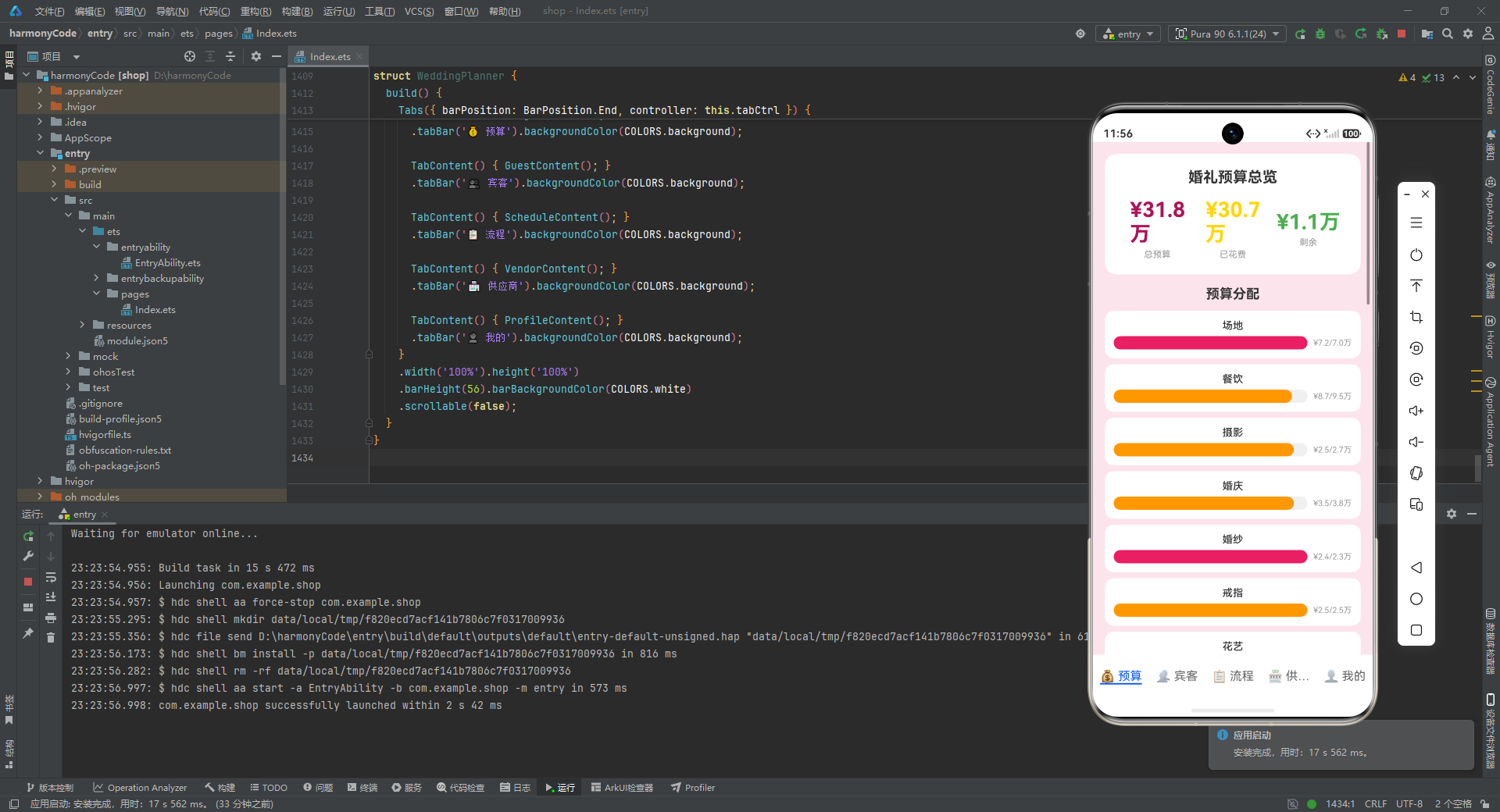
这款应用的技术价值在于:它用一个不到 1500 行的代码文件,实现了一个功能完整、交互丰富、视觉统一的婚礼筹备管理系统——涵盖预算的聚合统计与进度可视化、宾客的完整 CRUD 与表单交互、流程的时间线展示、供应商的列表与详情、个人中心的实时倒计时与全局概览。每一个功能模块都不是玩具级的占位代码,而是具备真实可用性的产品级实现。
从架构角度,它展示了 ArkUI 声明式范式的核心优势:通过 @State 驱动的响应式 UI、通过 @Component 和 @Builder 实现的组件化与复用、通过 @Entry 和 Tabs 实现的页面导航、通过生命周期钩子实现的资源管理。从交互角度,它展示了移动端 UX 的多项最佳实践:条件渲染弹层、胶囊标签选择器、语义化着色、不可变数据更新、对称式资源管理。

讨论HarmonyOS开发技术,专注于API与组件、DevEco Studio、测试、元服务和应用上架分发等。
更多推荐
 4
4 0
0- 0


 已为社区贡献146条内容

所有评论(0)