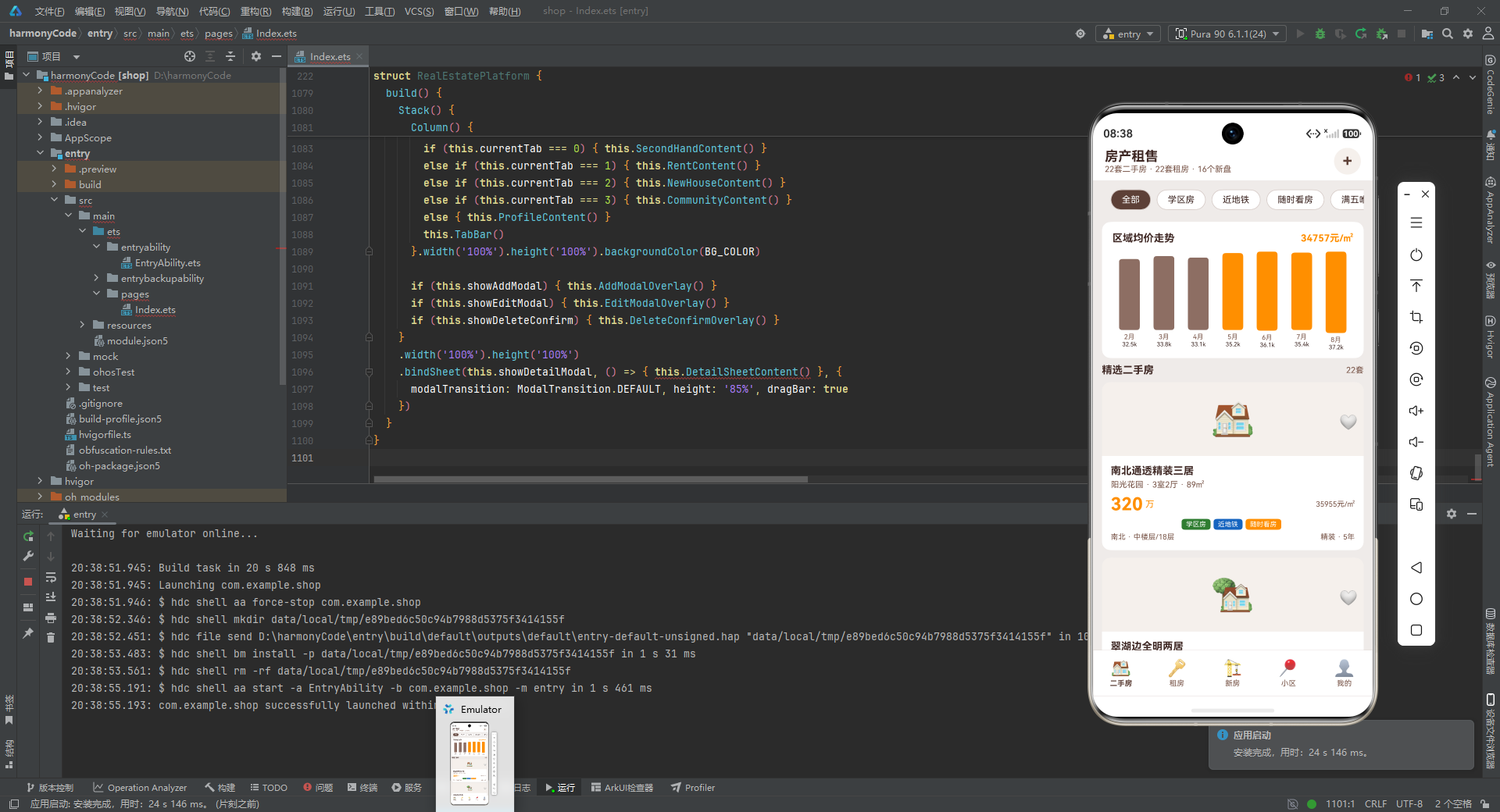
基于 ArkTS 的房产租售平台HarmonyOS ArkTS API 24在组件初始化调用getSecondHandList()获取,由于标记了@State,当数组被重新赋值时,列表UI会自动刷新
一、引言:房产数字化时代的技术重构
在当今移动互联网高速发展的时代,房地产行业的数字化转型已经从可选项变成了必选项。无论是购房者、租房者,还是房产经纪人和开发商,都对移动端房产服务提出了更高的要求。传统的线下中介模式存在信息不对称、流程繁琐、效率低下等痛点,而一款优秀的房产租售平台应用,能够将二手房交易、房屋租赁、新房开盘、小区信息查询等多种业务场景整合到一个统一的界面中,极大提升用户的找房效率和决策质量。
HarmonyOS(鸿蒙操作系统)作为华为推出的全场景分布式操作系统,正在快速扩展其应用生态。ArkTS 作为 HarmonyOS 应用开发的主力语言,在 TypeScript 的基础上做了进一步的约束与增强,提供了更严格的类型检查和更高效的编译能力。ArkTS 配合 ArkUI 声明式 UI 框架,使得开发者可以用简洁、直观的方式构建出高性能、高颜值的跨设备应用界面。
本篇博文将对一个完整的房产租售平台应用源码进行逐段、逐行、逐函数的深度技术解析。这个应用涵盖了二手房列表展示、租房信息浏览、新楼盘推荐、小区档案查询、个人中心管理五大核心模块,同时还集成了房源发布、编辑、删除等完整的增删改查(CRUD)操作,以及房价走势图表、房贷计算器、周边配套展示等增值功能。通过对这份源码的深入剖析,读者不仅能掌握 ArkTS 的核心语法和 ArkUI 的组件化开发模式,还能学到移动端房产类应用的架构设计思路和交互设计技巧。
无论你是刚刚接触 HarmonyOS 开发的新手,还是希望深入理解声明式 UI 框架的进阶开发者,这篇解析都将为你提供系统而详尽的技术参考。让我们开始这段代码之旅。
二、整体架构概览
在深入代码细节之前,我们先从宏观层面了解整个应用的架构设计。这个房产租售平台采用了典型的"数据层 + 逻辑层 + 视图层"三层架构模式,所有代码集中在一个主组件文件中,通过接口定义、数据函数、状态管理和 UI 构建器的有机结合,实现了一个功能完整、交互丰富的单页应用。
从代码组织上看,整个源码可以分为以下几个主要部分:
第一部分是接口定义区,使用 TypeScript 的 interface 关键字定义了应用中涉及的所有数据结构,包括二手房数据、租房数据、新房数据、小区数据等,为整个应用提供了严格的类型约束基础。
第二部分是颜色常量区,集中定义了应用的主题色系,采用暖棕色为主色调,辅以橙色、绿色、蓝色等语义化颜色,营造出温暖、专业的房产服务氛围。
第三部分是数据函数区,通过一系列工厂函数返回模拟数据,涵盖了房源列表、筛选标签、导航配置、周边配套等多种数据类型,为应用提供了丰富的数据源。
第四部分是主组件区,这是整个应用的核心,包含了状态变量定义、业务逻辑方法、可复用 UI 构建器、标签页内容构建器、模态弹层构建器,以及最终组装一切的 build() 方法。
这种架构设计的优势在于层次清晰、职责分明。数据结构在最顶层定义,被整个文件共享;颜色常量集中管理,便于统一调整主题;数据函数独立于组件,方便后续替换为真实接口调用;主组件内部通过 @Builder 装饰器将 UI 拆分为多个可复用的构建方法,既保证了代码的可读性,又实现了组件级别的复用。
三、数据接口定义:构建类型安全的基石
在 ArkTS 中,类型安全是代码质量的重要保障。通过 interface 定义清晰的数据接口,不仅能让开发者在编码阶段就发现类型错误,还能让代码的意图更加明确。下面我们来逐一分析这个应用中定义的所有接口。
3.1 二手房数据接口
interface SecondHouseData {
  id: number; title: string; community: string; area: number; price: number; unitPrice: number
  layout: string; orientation: string; floor: string; totalFloor: number; decoration: string
  age: number; tags: string[]; image: string; agent: string; phone: string; isFavorite: boolean
}
这个接口定义了二手房房源的完整数据结构,是整个应用中最核心的数据模型之一。让我们逐字段分析:
id:房源的唯一标识符,类型为number,用于列表渲染时的ForEach键值绑定和详情页的数据定位。title:房源标题,类型为string,通常是吸引用户眼球的一句话描述,如"南北通透精装三居"。community:所属小区名称,类型为string,用于关联小区档案信息。area:建筑面积,类型为number,单位为平方米,是用户筛选房源的重要维度。price:房屋总价,类型为number,单位为万元,是用户最关心的核心信息。unitPrice:单价,类型为number,单位为元每平方米,通过总价和面积计算得出,便于横向比较。layout:户型描述,类型为string,如"3室2厅",直接反映房屋的房间布局。orientation:朝向,类型为string,如"南北"、“东南”,影响采光和通风。floor:所在楼层描述,类型为string,如"中楼层"、“高楼层”。totalFloor:总楼层数,类型为number,与floor配合使用,帮助用户判断楼层位置。decoration:装修情况,类型为string,如"精装"、“简装”。age:房龄,类型为number,单位为年,影响房屋的折旧评估。tags:标签数组,类型为string[],如"学区房"、“近地铁”、“随时看房”,用于快速筛选和亮点展示。image:房源图片标识,类型为string,这里使用 Emoji 字符作为占位符。agent:经纪人姓名,类型为string。phone:联系电话,类型为string,做了脱敏处理。isFavorite:是否已收藏,类型为boolean,控制收藏图标的状态切换。
3.2 租房数据接口
interface RentData {
  id: number; title: string; community: string; area: number; rentPrice: number; payType: string
  layout: string; orientation: string; floor: string; tags: string[]; image: string
  landlord: string; isFavorite: boolean
}
租房数据接口与二手房接口有部分字段重叠,但也有其独特字段:
rentPrice:月租金,类型为number,单位为元每月,区别于二手房的price(总价)。payType:付款方式,类型为string,如"押一付三"、“押一付一”,这是租房场景特有的重要信息。landlord:房东姓名,类型为string,替代了二手房接口中的agent(经纪人)。
租房数据没有 unitPrice、totalFloor、decoration、age、agent、phone 等字段,这是因为租房场景中用户关注的信息维度与买房不同。租房者更关心月租金、付款方式和是否拎包入住,而非房屋的装修年代和总价单价。
3.3 新房数据接口
interface NewHouseData {
  id: number; name: string; developer: string; location: string; avgPrice: number
  propertyType: string; totalUnits: number; openingDate: string; deliveryDate: string
  tags: string[]; image: string; salesStatus: string
}
新房数据接口的结构与二手房和租房有显著差异,这反映了新房市场的独特属性:
name:楼盘名称,替代了二手房的title,因为新房以楼盘为单位进行推广。developer:开发商名称,类型为string,品牌房企是新房的重要卖点。location:楼盘所在区域,类型为string,如"城东新区"、“城中心”。avgPrice:均价,类型为number,单位为元每平方米,新房通常以均价进行宣传。propertyType:物业类型,类型为string,如"住宅"、“公寓”、“别墅”。totalUnits:总套数,类型为number,反映楼盘的规模。openingDate:开盘时间,类型为string,格式为"年-月"。deliveryDate:交付时间,类型为string,格式为"年-月"。salesStatus:销售状态,类型为string,取值为"在售"、“待开"或"售罄”。
新房数据没有 isFavorite 字段,也没有 agent 和 phone,因为新房销售通常通过售楼处进行,而非个人经纪人。
3.4 小区数据接口
interface CommunityData {
  id: number; name: string; area: number; buildYear: number; totalBuildings: number
  totalHouseholds: number; greenRate: number; parkingRatio: string; propertyFee: number
  location: string; rating: number; tags: string[]
}
小区数据接口提供了社区的全面档案信息:
area:小区占地面积,类型为number,单位为平方米。buildYear:建成年份,类型为number,用于判断小区新旧。totalBuildings:总栋数,类型为number。totalHouseholds:总户数,类型为number。greenRate:绿化率,类型为number,单位为百分比。parkingRatio:车位比,类型为string,如"1:1.2",表示每户对应的车位数量。propertyFee:物业费,类型为number,单位为元每平方米每月。rating:综合评分,类型为number,范围通常为 0 到 5。tags:标签数组,如"学区房"、“近地铁”、“高绿化”、“低物业费”。
3.5 辅助接口定义
除了四大核心业务接口外,应用还定义了若干辅助接口来支撑 UI 渲染:
interface PriceTrendData { month: string; avgPrice: number }
interface FilterTag { label: string; value: string }
interface TabItem { title: string; icon: string }
interface PropertyTypeOption { type: string; icon: string }
interface AmenityItem { name: string; distance: string; icon: string }
interface MenuOption { icon: string; title: string; subtitle: string }
这些辅助接口虽然结构简单,但各自承担着明确的职责:
PriceTrendData:房价走势数据,包含月份和均价两个字段,用于绘制柱状图。FilterTag:筛选标签,label是显示文本,value是筛选值,用于筛选栏的渲染。TabItem:底部导航标签项,包含标题和图标。PropertyTypeOption:房源类型选项,用于发布房源时的类型选择。AmenityItem:周边配套项,包含名称、距离和图标,用于详情页的周边配套展示。MenuOption:个人中心菜单项,包含图标、标题和副标题。
通过这些接口的定义,整个应用的数据模型变得清晰而严谨。每一个变量、每一个函数参数和返回值都有明确的类型约束,这大大降低了运行时错误的风险。
四、颜色常量设计:构建统一的视觉语言
在移动应用开发中,统一的视觉设计语言是提升用户体验的关键因素之一。这个应用将所有颜色定义集中在文件顶部,通过常量的方式统一管理,这是一种值得推崇的最佳实践。
const PRIMARY_COLOR: string = '#5D4037'
const ACCENT_COLOR: string = '#8D6E63'
const BG_COLOR: string = '#EFEBE9'
const CARD_COLOR: string = '#FFFFFF'
const PRICE_COLOR: string = '#FF8F00'
const SCHOOL_COLOR: string = '#2E7D32'
const METRO_COLOR: string = '#1565C0'
const TEXT_DARK: string = '#3E2723'
const TEXT_SECONDARY: string = '#795548'
const DANGER_COLOR: string = '#C62828'
const BORDER_COLOR: string = '#D7CCC8'
const IMG_BG_COLOR: string = '#F5F0EB'
让我们逐一分析这些颜色常量的设计意图:
PRIMARY_COLOR(#5D4037):主色调,深棕色。这个颜色来源于 Material Design 的 Brown 色板,给人一种稳重、温暖、可靠的感觉,非常契合房产这一重资产交易场景。主色调用于导航栏选中状态、主要按钮背景、标题文字等关键视觉元素。ACCENT_COLOR(#8D6E63):强调色,浅棕色。作为主色调的延伸,用于次要按钮、默认标签颜色等需要与主色调形成层次但不喧宾夺主的场景。BG_COLOR(#EFEBE9):页面背景色,极浅棕色。比纯灰色背景更有温度,同时不会与白色卡片形成过强的对比,保护用户视觉舒适度。CARD_COLOR(#FFFFFF):卡片背景色,纯白色。每个房源卡片、信息区块都使用白色背景,与浅棕色页面背景形成层次感。PRICE_COLOR(#FF8F00):价格强调色,琥珀橙色。价格是房产应用中最敏感的信息,使用醒目的橙色可以在第一时间抓住用户的注意力。SCHOOL_COLOR(#2E7D32):学区标签色,深绿色。绿色代表教育、成长,用于"学区房"标签的背景色,符合语义关联。METRO_COLOR(#1565C0):地铁标签色,深蓝色。蓝色代表交通、便捷,用于"近地铁"标签,呼应地铁线路的视觉标识。TEXT_DARK(#3E2723):主文字色,极深棕色。比纯黑色更柔和,减少长时间阅读的视觉疲劳。TEXT_SECONDARY(#795548):次要文字色,中棕色。用于副标题、描述性文字,与主文字色形成层次。DANGER_COLOR(#C62828):危险操作色,深红色。专用于删除按钮、确认删除弹窗等破坏性操作场景,起到警示作用。BORDER_COLOR(#D7CCC8):边框色,浅棕色。用于分隔线、卡片边框,低对比度保证视觉的柔和过渡。IMG_BG_COLOR(#F5F0EB):图片占位区背景色,米色。由于使用 Emoji 作为图片占位符,这个背景色为 Emoji 提供了一个柔和的展示舞台。
这套配色方案的设计哲学是:以暖棕色系为主,营造可信赖的房产服务氛围;以语义化颜色为辅,通过颜色快速传达信息属性(绿色=学区、蓝色=地铁、橙色=价格、红色=危险)。整个色板遵循 Material Design 的色彩规范,保证了视觉的专业性和一致性。
五、数据函数:构建丰富的数据源
在真实的生产环境中,数据通常来自后端 API 接口。但在这个应用中,开发者通过一系列工厂函数返回模拟数据,使得应用可以在不依赖后端服务的情况下独立运行和演示。这种做法在开发初期进行原型验证和 UI 调试时非常实用。
5.1 二手房列表数据
function getSecondHandList(): SecondHouseData[] {
  return [
    { id: 1, title: '南北通透精装三居', community: '阳光花园', area: 89, price: 320, unitPrice: 35955, layout: '3室2厅', orientation: '南北', floor: '中楼层', totalFloor: 18, decoration: '精装', age: 5, tags: ['学区房', '近地铁', '随时看房'], image: '🏠', agent: '张经理', phone: '138****8888', isFavorite: false },
    { id: 2, title: '翠湖边全明两居', community: '翠湖天地', area: 65, price: 280, unitPrice: 43077, layout: '2室1厅', orientation: '南', floor: '低楼层', totalFloor: 12, decoration: '精装', age: 8, tags: ['满五唯一', '近地铁'], image: '🏡', agent: '李中介', phone: '139****6666', isFavorite: false },
    // ... 更多房源数据
  ]
}
这个函数返回了 22 条二手房房源数据。每条数据都严格按照 SecondHouseData 接口定义的结构组织。值得注意的几个设计细节:
第一,数据覆盖了从一居室到四居室的各种户型,面积从 45 平方米到 180 平方米,总价从 135 万到 980 万,单价从 26857 元到 54444 元每平方米,这种丰富的数据多样性确保了筛选功能有足够的数据展示效果。
第二,标签数组包含了"学区房"、“近地铁”、“随时看房”、“满五唯一”、"南北通透"等多种常见房产标签,这些标签不仅是筛选条件,也是房源的卖点展示。
第三,联系电话做了脱敏处理(如 138****8888),这在展示模拟数据时是一个良好的安全实践。
第四,图片字段使用 Emoji 字符(如 🏠、🏡、🏘️、🏢、🏗️、🏛️),避免了引入外部图片资源,使得应用完全自包含。
5.2 租房列表数据
function getRentList(): RentData[] {
  return [
    { id: 1, title: '阳光花园精装两居整租', community: '阳光花园', area: 75, rentPrice: 4500, payType: '押一付三', layout: '2室1厅', orientation: '南', floor: '中楼层/18', tags: ['精装', '近地铁', '拎包入住'], image: '🏠', landlord: '王房东', isFavorite: false },
    // ... 更多租房数据
  ]
}
租房列表同样返回了 22 条数据。与二手房数据相比,租房数据的特色在于:
付款方式多样化:包含了"押一付一"、“押一付三”、"押二付三"三种常见的付款方式,这让筛选功能中的"押一付一"筛选项有实际意义。
租赁类型丰富:标题中明确标注了"整租"和"合租",以及合租的具体房间(如"合租主卧"、“合租次卧”),覆盖了不同的租赁需求。
租金范围广:从 1500 元/月的小房间到 12000 元/月的高端四居,满足不同消费水平用户的浏览需求。
楼层信息格式不同:租房数据中 floor 字段的格式为"中楼层/18"(包含总楼层),而二手房数据中 floor 和 totalFloor 是分开的两个字段。这体现了不同业务场景下数据组织方式的灵活性。
5.3 新房列表数据
function getNewHouseList(): NewHouseData[] {
  return [
    { id: 1, name: '万科翡翠天际', developer: '万科地产', location: '城东新区', avgPrice: 28000, propertyType: '住宅', totalUnits: 1200, openingDate: '2024-06', deliveryDate: '2026-06', tags: ['品牌房企', '近地铁'], image: '🏗️', salesStatus: '在售' },
    // ... 更多新楼盘数据
  ]
}
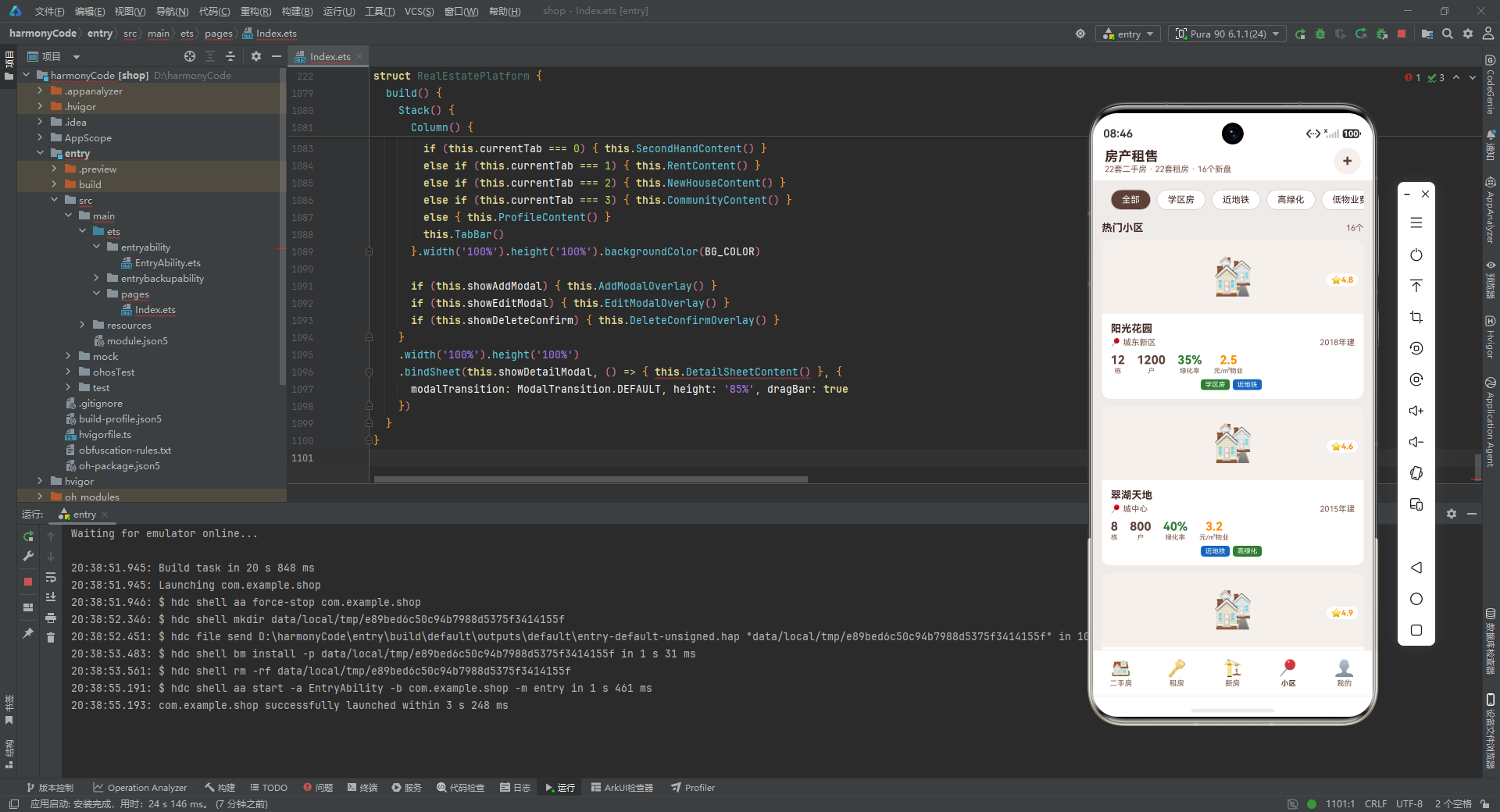
新房列表返回了 16 个楼盘数据。这些数据的设计有几个亮点:
开发商覆盖全面:包含了万科、保利、绿地、中海、龙湖、金地、华润、招商、融创、碧桂园、世茂、绿城、仁恒、中骏等 14 家知名房企,数据真实感强。
物业类型多样:涵盖了"住宅"、“公寓”、"别墅"三种类型,支持按类型筛选。
销售状态完整:包含了"在售"、“待开”、"售罄"三种状态,其中"售罄"状态的楼盘在卡片上会显示灰色标签,增强了信息的完整性。
时间信息明确:每个楼盘都有开盘时间和交付时间,帮助用户规划购房决策时间线。
5.4 小区列表数据
function getCommunityList(): CommunityData[] {
  return [
    { id: 1, name: '阳光花园', area: 85000, buildYear: 2018, totalBuildings: 12, totalHouseholds: 1200, greenRate: 35, parkingRatio: '1:1.2', propertyFee: 2.5, location: '城东新区', rating: 4.8, tags: ['学区房', '近地铁'] },
    // ... 更多小区数据
  ]
}
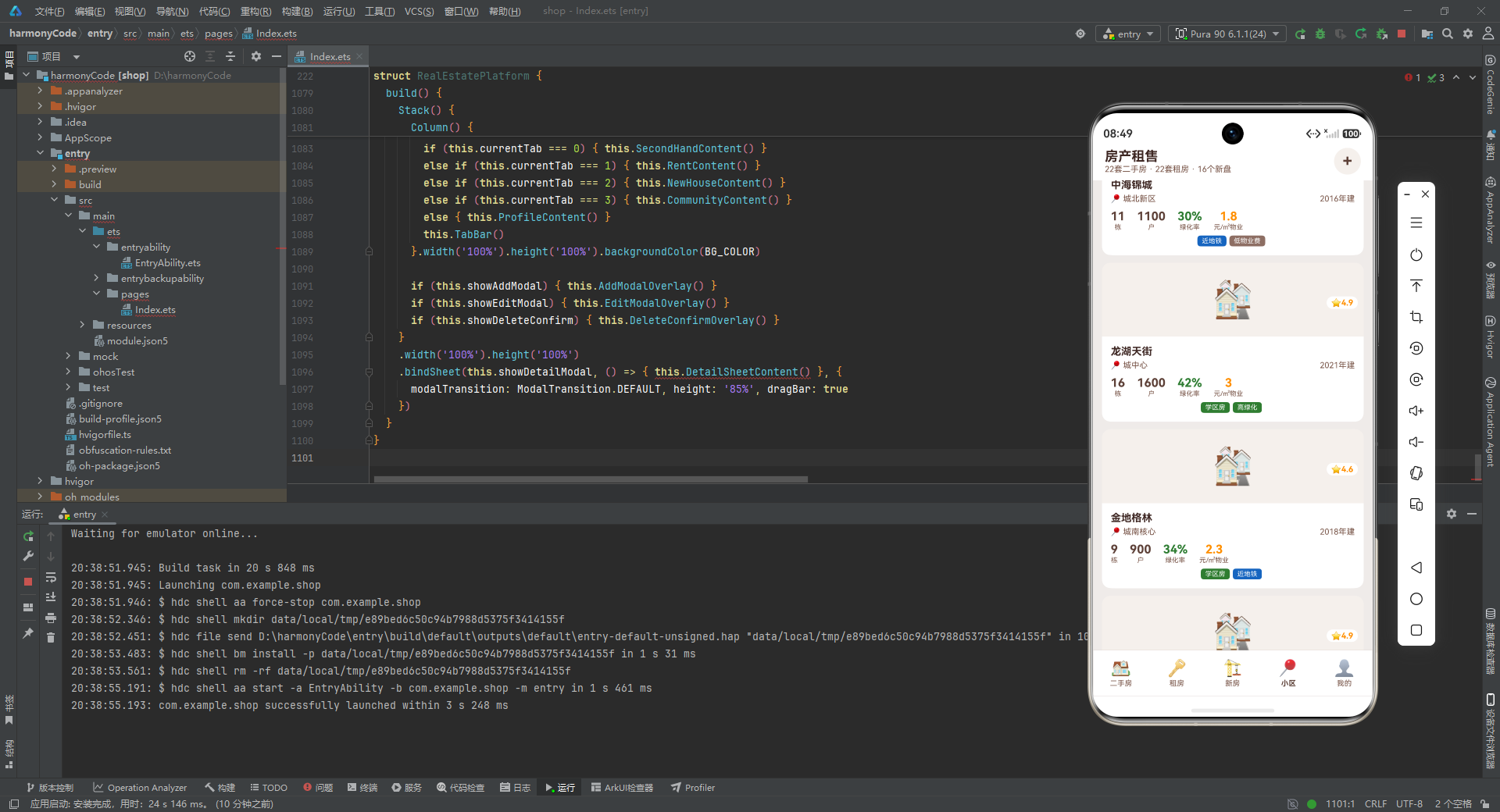
小区列表返回了 16 个小区数据。这些数据与二手房和租房数据中的 community 字段形成了关联关系,虽然应用中没有显式建立外键关系,但这种数据设计为未来扩展"点击小区名查看小区详情"等功能奠定了基础。
小区数据的评分范围从 4.3 到 4.9,绿化率从 28% 到 45%,物业费从 1.5 到 4.0 元每平方米每月,这些数值的分布既符合现实情况,又能让筛选功能(如"高绿化"筛选绿化率大于等于 38% 的小区)产生有意义的过滤效果。
5.5 房价走势数据
function getPriceTrend(): PriceTrendData[] {
  return [
    { month: '2月', avgPrice: 32500 }, { month: '3月', avgPrice: 33800 }, { month: '4月', avgPrice: 33100 },
    { month: '5月', avgPrice: 35200 }, { month: '6月', avgPrice: 36100 }, { month: '7月', avgPrice: 35400 },
    { month: '8月', avgPrice: 37200 }
  ]
}
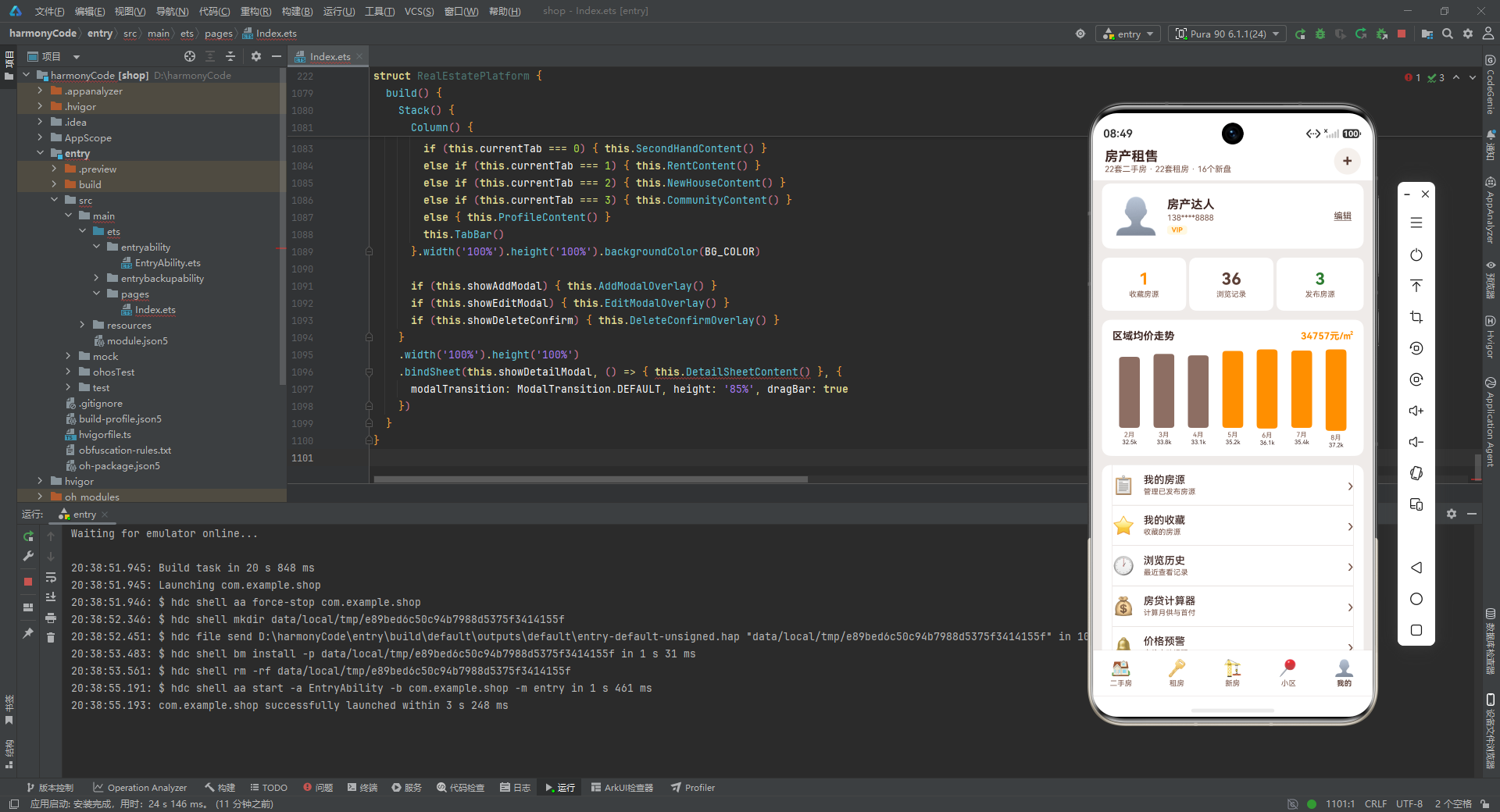
房价走势数据包含了 7 个月的区域均价信息。这组数据呈现了一个先涨后跌再涨的波动趋势,从 2 月的 32500 元上涨到 8 月的 37200 元,中间在 4 月和 7 月有两次回调。这种数据设计使得柱状图的展示效果更加生动,既有上升的趋势感,又有波动的细节,比单纯递增的数据更有说服力。
5.6 筛选标签数据
function getHouseFilterTags(): FilterTag[] {
  return [
    { label: '全部', value: 'all' }, { label: '学区房', value: 'school' }, { label: '近地铁', value: 'metro' },
    { label: '随时看房', value: 'anytime' }, { label: '满五唯一', value: 'fiveyear' }, { label: '90㎡以下', value: 'area-s' },
    { label: '90-120㎡', value: 'area-m' }, { label: '200万以下', value: 'price-s' }, { label: '200-400万', value: 'price-m' }
  ]
}

function getRentFilterTags(): FilterTag[] {
  return [
    { label: '全部', value: 'all' }, { label: '押一付一', value: 'pay1' }, { label: '近地铁', value: 'metro' },
    { label: '拎包入住', value: 'ready' }, { label: '独卫', value: 'bathroom' }, { label: '精装', value: 'decoration' },
    { label: '3000以下', value: 'price-s' }, { label: '3000-5000', value: 'price-m' }
  ]
}

function getNewHouseFilterTags(): FilterTag[] {
  return [
    { label: '全部', value: 'all' }, { label: '住宅', value: 'residential' }, { label: '公寓', value: 'apartment' },
    { label: '别墅', value: 'villa' }, { label: '在售', value: 'onsale' }, { label: '待开', value: 'pending' }
  ]
}

function getCommunityFilterTags(): FilterTag[] {
  return [
    { label: '全部', value: 'all' }, { label: '学区房', value: 'school' }, { label: '近地铁', value: 'metro' },
    { label: '高绿化', value: 'green' }, { label: '低物业费', value: 'lowfee' }, { label: '新小区', value: 'new' }
  ]
}
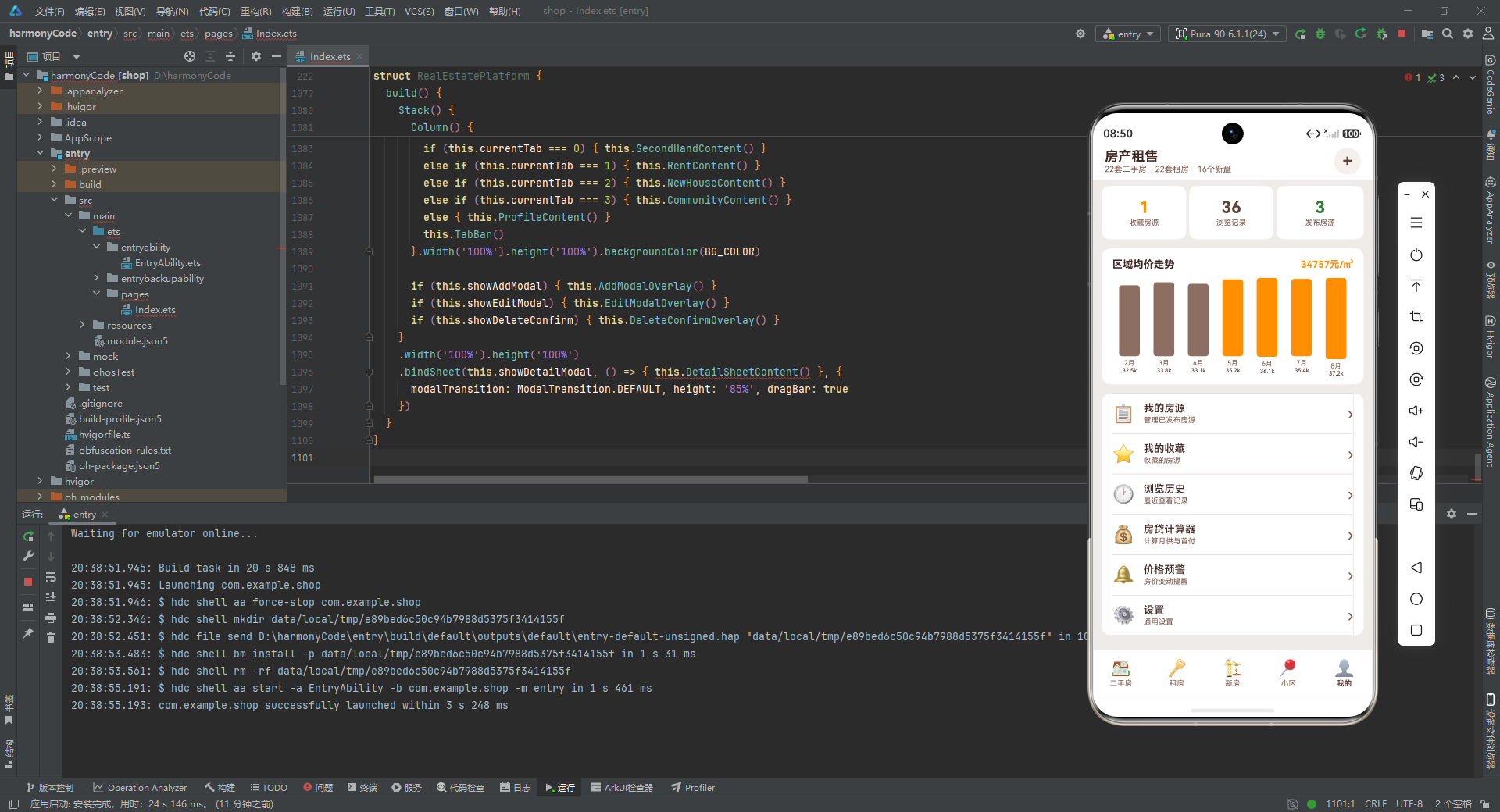
这四个筛选标签函数分别为二手房、租房、新房和小区四个标签页提供了定制的筛选选项。每个标签页的筛选维度都根据其业务特点进行了差异化设计:
二手房筛选涵盖了标签筛选(学区房、近地铁、随时看房、满五唯一)和数值范围筛选(面积区间、价格区间)两个维度,这是最复杂的筛选体系。
租房筛选侧重于付款方式(押一付一)和居住体验(拎包入住、独卫、精装)以及价格区间,符合租房者的关注点。
新房筛选按物业类型(住宅、公寓、别墅)和销售状态(在售、待开)进行分类,简洁明了。
小区筛选关注学区、交通、环境(高绿化)、成本(低物业费)和新旧(新小区)五个维度,全面覆盖了小区评价的核心指标。
5.7 导航与配置数据
function getTabs(): TabItem[] {
  return [
    { title: '二手房', icon: '🏠' }, { title: '租房', icon: '🔑' }, { title: '新房', icon: '🏗️' },
    { title: '小区', icon: '📍' }, { title: '我的', icon: '👤' }
  ]
}

function getPropertyTypes(): PropertyTypeOption[] {
  return [{ type: '二手房', icon: '🏠' }, { type: '租房', icon: '🔑' }, { type: '新房', icon: '🏗️' }]
}

function getAmenities(): AmenityItem[] {
  return [
    { name: '实验小学', distance: '300m', icon: '🏫' }, { name: '2号线阳光路站', distance: '500m', icon: '🚇' },
    { name: '人民医院', distance: '1.2km', icon: '🏥' }, { name: '沃尔玛超市', distance: '600m', icon: '🛒' },
    { name: '工商银行', distance: '200m', icon: '🏦' }, { name: '万达影城', distance: '1.5km', icon: '🎬' },
    { name: '健身房', distance: '400m', icon: '🏋️' }, { name: '星巴克', distance: '800m', icon: '☕' }
  ]
}

function getMenuOptions(): MenuOption[] {
  return [
    { icon: '📋', title: '我的房源', subtitle: '管理已发布房源' }, { icon: '⭐', title: '我的收藏', subtitle: '收藏的房源' },
    { icon: '🕐', title: '浏览历史', subtitle: '最近查看记录' }, { icon: '💰', title: '房贷计算器', subtitle: '计算月供与首付' },
    { icon: '🔔', title: '价格预警', subtitle: '房价变动提醒' }, { icon: '⚙️', title: '设置', subtitle: '通用设置' }
  ]
}
这四个函数提供了应用的导航和配置数据。getTabs() 定义了底部导航栏的五个标签页;getPropertyTypes() 定义了发布房源时可选的房源类型;getAmenities() 定义了房源详情页展示的周边配套设施,涵盖了教育、交通、医疗、购物、金融、娱乐、健身、餐饮八个类别,距离从 200 米到 1.5 千米不等,为用户提供了全面的生活便利性参考;getMenuOptions() 定义了个人中心页面的六项功能菜单,每项都有图标、标题和副标题,信息层次清晰。
六、主组件:状态管理与生命周期
在完成了数据层的定义之后,我们进入应用的核心部分——主组件 RealEstatePlatform。这个组件使用了 @Entry 和 @Component 装饰器进行声明,意味着它是整个应用的入口组件,同时也是 HarmonyOS 应用渲染的根节点。
6.1 组件声明与装饰器
@Entry
@Component
struct RealEstatePlatform {
@Entry 装饰器标记这个组件为页面的入口组件,一个页面只能有一个 @Entry 组件。@Component 装饰器声明这是一个自定义组件,可以被其他组件引用(虽然在这个应用中它是唯一的组件)。struct 关键字定义了一个结构体,这是 ArkTS 中组件的基本组织形式。
6.2 状态变量定义
ArkUI 框架采用声明式数据驱动 UI 的模式,@State 装饰器标记的变量是组件的响应式状态,当这些变量的值发生变化时,框架会自动重新渲染依赖这些状态的 UI 部分。让我们逐一分析组件中定义的所有状态变量。
@State currentTab: number = 0
@State secondHandList: SecondHouseData[] = getSecondHandList()
@State rentList: RentData[] = getRentList()
@State newHouseList: NewHouseData[] = getNewHouseList()
@State communityList: CommunityData[] = getCommunityList()
@State priceTrend: PriceTrendData[] = getPriceTrend()
currentTab:当前选中的标签页索引,初始值为 0(即二手房页面)。当用户点击底部导航栏时,这个值会更新,从而触发页面内容的切换。secondHandList:二手房列表数据,在组件初始化时通过调用getSecondHandList()获取。由于标记了@State,当这个数组被重新赋值时,列表 UI 会自动刷新。rentList:租房列表数据,同样在初始化时获取。newHouseList:新房列表数据。communityList:小区列表数据。priceTrend:房价走势数据,用于柱状图渲染。
@State showAddModal: boolean = false
@State showEditModal: boolean = false
@State showDeleteConfirm: boolean = false
@State showDetailModal: boolean = false
这四个布尔变量控制四个模态弹层的显示与隐藏。每个弹层对应一个特定的用户交互场景:发布房源、编辑房源、删除确认、房源详情。通过布尔值控制弹层的显隐是 ArkUI 中常见的模式,简洁而有效。
@State selectedHouseId: number = 1
@State selectedType: number = 0
@State filterIndex: number = 0
selectedHouseId:当前选中的房源 ID,用于详情弹层中定位具体房源。初始值为 1。selectedType:当前选中的房源类型(0=二手房,1=租房,2=新房,3=小区),用于在详情弹层中区分不同类型的房源。filterIndex:当前选中的筛选标签索引,初始值为 0(即"全部")。当用户点击筛选标签时,这个值会更新,触发列表的重新过滤和渲染。
@State tempTitle: string = ''
@State tempArea: string = ''
@State tempPrice: string = ''
@State tempLocation: string = ''
@State tempTypeIndex: number = 0
这五个变量是发布和编辑房源表单的临时状态。值得注意的是,面积和价格使用了 string 类型而非 number 类型,这是因为 TextInput 组件的 onChange 回调返回的是字符串。在提交表单时,需要通过 parseInt 将字符串转换为数字。tempTypeIndex 用于记录用户在发布房源时选择的房源类型索引。
这些状态变量共同构成了组件的数据模型,覆盖了导航、列表、筛选、弹层、表单等所有交互场景。通过 @State 的响应式机制,任何状态变化都能精确地反映到 UI 上,无需手动操作 DOM。
七、辅助方法:业务逻辑的核心实现
主组件中定义了大量辅助方法,这些方法承担了数据过滤、状态计算、CRUD 操作等核心业务逻辑。下面我们按功能分组进行详细分析。
7.1 标签匹配工具方法
hasTag(tags: string[], keyword: string): boolean {
  for (let i = 0; i < tags.length; i++) { if (tags[i].indexOf(keyword) >= 0) { return true } }
  return false
}
这是一个通用的标签匹配方法,接收一个标签数组和一个关键词字符串,返回布尔值表示是否匹配。方法内部使用 for 循环遍历标签数组,对每个标签调用 indexOf 方法检查是否包含关键词。
之所以使用 indexOf 而非严格相等比较,是因为有些标签可能包含更详细的信息。例如,筛选"学区"关键词时,标签"学区房"能够匹配成功。这种模糊匹配策略提高了筛选的灵活性。
7.2 二手房筛选方法
getFilteredSecondHand(): SecondHouseData[] {
  const result: SecondHouseData[] = []
  for (let i = 0; i < this.secondHandList.length; i++) {
    const h = this.secondHandList[i]
    let match = false
    if (this.filterIndex === 0) { match = true }
    else if (this.filterIndex === 1) { match = this.hasTag(h.tags, '学区') }
    else if (this.filterIndex === 2) { match = this.hasTag(h.tags, '地铁') }
    else if (this.filterIndex === 3) { match = this.hasTag(h.tags, '随时') }
    else if (this.filterIndex === 4) { match = this.hasTag(h.tags, '满五') }
    else if (this.filterIndex === 5) { match = h.area < 90 }
    else if (this.filterIndex === 6) { match = h.area >= 90 && h.area <= 120 }
    else if (this.filterIndex === 7) { match = h.price < 200 }
    else if (this.filterIndex === 8) { match = h.price >= 200 && h.price <= 400 }
    if (match) { result.push(h) }
  }
  return result
}
这个方法根据当前的 filterIndex 值对二手房列表进行过滤。分析其实现逻辑:
首先创建一个空数组 result 用于存放匹配的房源。然后遍历整个 secondHandList,对每条房源根据 filterIndex 的值执行不同的匹配条件。
当 filterIndex 为 0 时,匹配条件为 true,即"全部"筛选,所有房源都匹配。当 filterIndex 为 1 到 4 时,使用 hasTag 方法进行标签匹配,分别筛选"学区"、“地铁”、“随时”、"满五"关键词。当 filterIndex 为 5 到 6 时,按面积范围筛选。当 filterIndex 为 7 到 8 时,按价格范围筛选。
匹配成功的房源被 push 到 result 数组中,最终返回过滤后的列表。这种基于索引的 if-else 链式筛选虽然简洁,但在筛选条件较多时可以考虑使用策略模式进行重构,以提高代码的可维护性。
7.3 租房筛选方法
getFilteredRent(): RentData[] {
  const result: RentData[] = []
  for (let i = 0; i < this.rentList.length; i++) {
    const r = this.rentList[i]
    let match = false
    if (this.filterIndex === 0) { match = true }
    else if (this.filterIndex === 1) { match = r.payType.indexOf('押一付一') >= 0 }
    else if (this.filterIndex === 2) { match = this.hasTag(r.tags, '地铁') }
    else if (this.filterIndex === 3) { match = this.hasTag(r.tags, '拎包') }
    else if (this.filterIndex === 4) { match = this.hasTag(r.tags, '独卫') }
    else if (this.filterIndex === 5) { match = this.hasTag(r.tags, '精装') }
    else if (this.filterIndex === 6) { match = r.rentPrice < 3000 }
    else if (this.filterIndex === 7) { match = r.rentPrice >= 3000 && r.rentPrice <= 5000 }
    if (match) { result.push(r) }
  }
  return result
}
租房筛选方法的结构与二手房筛选类似,但筛选条件针对租房场景进行了定制。值得注意的是 filterIndex === 1 时直接使用 r.payType.indexOf('押一付一') >= 0 进行匹配,而不是通过 hasTag 方法。这是因为付款方式存储在 payType 字段中而非 tags 数组中,需要直接对字符串进行匹配。
7.4 新房与小区筛选方法
getFilteredNewHouse(): NewHouseData[] {
  const result: NewHouseData[] = []
  for (let i = 0; i < this.newHouseList.length; i++) {
    const n = this.newHouseList[i]
    let match = false
    if (this.filterIndex === 0) { match = true }
    else if (this.filterIndex === 1) { match = n.propertyType === '住宅' }
    else if (this.filterIndex === 2) { match = n.propertyType === '公寓' }
    else if (this.filterIndex === 3) { match = n.propertyType === '别墅' }
    else if (this.filterIndex === 4) { match = n.salesStatus === '在售' }
    else if (this.filterIndex === 5) { match = n.salesStatus === '待开' }
    if (match) { result.push(n) }
  }
  return result
}

getFilteredCommunity(): CommunityData[] {
  const result: CommunityData[] = []
  for (let i = 0; i < this.communityList.length; i++) {
    const c = this.communityList[i]
    let match = false
    if (this.filterIndex === 0) { match = true }
    else if (this.filterIndex === 1) { match = this.hasTag(c.tags, '学区') }
    else if (this.filterIndex === 2) { match = this.hasTag(c.tags, '地铁') }
    else if (this.filterIndex === 3) { match = c.greenRate >= 38 }
    else if (this.filterIndex === 4) { match = c.propertyFee < 2.5 }
    else if (this.filterIndex === 5) { match = c.buildYear >= 2019 }
    if (match) { result.push(c) }
  }
  return result
}
新房筛选使用严格相等比较(===)来匹配物业类型和销售状态,因为这些字段的值是固定的枚举值。小区筛选则结合了标签匹配和数值比较,"高绿化"筛选绿化率大于等于 38% 的小区,"低物业费"筛选物业费低于 2.5 元的小区,"新小区"筛选 2019 年及以后建成的小区。
7.5 标签颜色映射方法
getTagColor(tag: string): string {
  if (tag.indexOf('学区') >= 0) { return SCHOOL_COLOR }
  if (tag.indexOf('地铁') >= 0) { return METRO_COLOR }
  if (tag.indexOf('随时') >= 0) { return PRICE_COLOR }
  if (tag.indexOf('满五') >= 0) { return PRIMARY_COLOR }
  if (tag.indexOf('精装') >= 0 || tag.indexOf('精装交付') >= 0) { return '#7B1FA2' }
  if (tag.indexOf('南北') >= 0) { return '#00695C' }
  if (tag.indexOf('品牌') >= 0) { return METRO_COLOR }
  if (tag.indexOf('拎包') >= 0) { return '#EF6C00' }
  if (tag.indexOf('独卫') >= 0) { return '#6A1B9A' }
  if (tag.indexOf('高绿化') >= 0) { return SCHOOL_COLOR }
  if (tag.indexOf('低物业') >= 0) { return ACCENT_COLOR }
  return ACCENT_COLOR
}
这个方法实现了标签到颜色的映射逻辑,是整个应用视觉设计的重要组成部分。方法接收一个标签字符串,通过一系列 indexOf 检查返回对应的颜色值。
分析其映射策略:学区类标签使用绿色(SCHOOL_COLOR),地铁类标签使用蓝色(METRO_COLOR),随时看房类标签使用橙色(PRICE_COLOR),满五唯一类标签使用主色调棕色(PRIMARY_COLOR)。精装类标签使用紫色(#7B1FA2),南北通透类标签使用青色(#00695C),品牌房企类标签复用蓝色,拎包入住类标签使用深橙色(#EF6C00),独卫类标签使用深紫色(#6A1B9A),高绿化类标签复用绿色,低物业费类标签使用强调色棕色。
这种语义化的颜色映射让用户能够通过颜色快速识别标签的类别,提升了信息的可读性和浏览效率。方法最后的 return ACCENT_COLOR 作为默认返回值,确保了未匹配的标签也有一个合理的颜色。
7.6 数据查询与统计方法
getSelectedSecondHand(): SecondHouseData {
  for (let i = 0; i < this.secondHandList.length; i++) {
    if (this.secondHandList[i].id === this.selectedHouseId) { return this.secondHandList[i] }
  }
  return this.secondHandList[0]
}
这个方法根据 selectedHouseId 在二手房列表中查找对应的房源对象。遍历列表,找到 id 匹配的项即返回。如果未找到(理论上不会发生),则返回列表的第一项作为兜底,避免返回 undefined 导致后续访问属性时报错。
getFavoriteCount(): number {
  let count: number = 0
  for (let i = 0; i < this.secondHandList.length; i++) { if (this.secondHandList[i].isFavorite) { count++ } }
  for (let i = 0; i < this.rentList.length; i++) { if (this.rentList[i].isFavorite) { count++ } }
  return count
}
这个方法统计用户收藏的房源总数,遍历二手房列表和租房列表,累加 isFavorite 为 true 的项。这个计数结果显示在个人中心页面的"收藏房源"统计卡片中。
7.7 价格走势计算方法
getAvgPrice(): number {
  let total: number = 0
  for (let i = 0; i < this.priceTrend.length; i++) { total += this.priceTrend[i].avgPrice }
  return Math.round(total / this.priceTrend.length)
}

getMaxPrice(): number {
  let max: number = 0
  for (let i = 0; i < this.priceTrend.length; i++) {
    if (this.priceTrend[i].avgPrice > max) { max = this.priceTrend[i].avgPrice }
  }
  return max
}

getBarHeight(price: number): number {
  return Math.max(12, Math.min(price / this.getMaxPrice() * 110, 110))
}

formatPriceK(price: number): string {
  return (Math.round(price / 100) / 10).toString() + 'k'
}
这组方法协同工作来渲染房价走势柱状图:
getAvgPrice() 计算所有月份均价的算术平均值,使用 Math.round 四舍五入取整。这个平均值在图表中用作基准线,高于平均值的柱子使用橙色,低于平均值的柱子使用浅棕色。
getMaxPrice() 找出所有月份中的最高均价,用作柱状图高度的缩放基准。
getBarHeight() 根据给定的价格计算柱子的高度(像素)。公式为 price / maxPrice * 110,将价格按比例映射到 0 到 110 像素的范围内。Math.min 确保高度不超过 110 像素,Math.max 确保高度不低于 12 像素,避免出现零高度或超高柱子。
formatPriceK() 将价格格式化为"k"单位。例如,32500 会被格式化为"32.5k"。计算过程是先除以 100 得到 325,四舍五入后除以 10 得到 32.5,再拼接"k"后缀。这种格式化方式让图表中的价格标签更紧凑、更易读。
7.8 房贷费用计算方法
getDownPayment(): number {
  return Math.round(this.getSelectedSecondHand().price * 0.3 * 100) / 100
}

getLoanAmount(): number {
  return Math.round(this.getSelectedSecondHand().price * 0.7 * 100) / 100
}

getDeedTax(): number {
  return Math.round(this.getSelectedSecondHand().price * 0.015 * 100) / 100
}

getAgentFee(): number {
  return Math.round(this.getSelectedSecondHand().price * 0.02 * 100) / 100
}
这四个方法分别计算购房过程中的各项费用:
getDownPayment() 计算首付金额,按总价的 30% 计算。getLoanAmount() 计算商业贷款金额,按总价的 70% 计算。getDeedTax() 计算契税,按总价的 1.5% 计算。getAgentFee() 计算中介费,按总价的 2% 计算。
所有方法都使用了 Math.round(x * 100) / 100 的技巧来保留两位小数,避免浮点数精度问题。这是因为 JavaScript/TypeScript 中的浮点数运算可能产生如 96.00000000001 这样的精度误差,通过先乘以 100 转为整数、四舍五入、再除以 100 的方式可以精确到分。
getMonthlyPayment(): number {
  const loan = this.getSelectedSecondHand().price * 0.7 * 10000
  const r = 0.041 / 12
  const n = 360
  return Math.round(loan * r * Math.pow(1 + r, n) / (Math.pow(1 + r, n) - 1))
}
这个方法计算等额本息还款的月供金额,是整个应用中最复杂的数学计算。分析其计算过程:
loan 变量计算贷款本金,总价(万元)乘以 0.7(70% 贷款比例)再乘以 10000(转换为元)。
r 变量是月利率,年利率 4.1% 除以 12 个月,得到约 0.003417。
n 变量是还款期数,30 年乘以 12 个月等于 360 期。
核心公式 loan * r * Math.pow(1 + r, n) / (Math.pow(1 + r, n) - 1) 是标准的等额本息月供计算公式。其中 Math.pow(1 + r, n) 计算 (1+r) 的 n 次方。最终结果使用 Math.round 取整到元。
这个计算方法体现了应用的专业性——它不仅展示房源信息,还提供了精确的购房成本预算工具,帮助用户做出更明智的购房决策。
7.9 收藏切换方法
toggleFavorite(id: number, type: number): void {
  if (type === 0) {
    const newList: SecondHouseData[] = []
    for (let i = 0; i < this.secondHandList.length; i++) {
      if (this.secondHandList[i].id === id) {
        const h = this.secondHandList[i]
        newList.push({
          id: h.id, title: h.title, community: h.community, area: h.area,
          price: h.price, unitPrice: h.unitPrice, layout: h.layout,
          orientation: h.orientation, floor: h.floor, totalFloor: h.totalFloor,
          decoration: h.decoration, age: h.age, tags: h.tags, image: h.image,
          agent: h.agent, phone: h.phone, isFavorite: !h.isFavorite
        })
      } else { newList.push(this.secondHandList[i]) }
    }
    this.secondHandList = newList
  } else if (type === 1) {
    const newList: RentData[] = []
    for (let i = 0; i < this.rentList.length; i++) {
      if (this.rentList[i].id === id) {
        const r = this.rentList[i]
        newList.push({
          id: r.id, title: r.title, community: r.community, area: r.area,
          rentPrice: r.rentPrice, payType: r.payType, layout: r.layout,
          orientation: r.orientation, floor: r.floor, tags: r.tags,
          image: r.image, landlord: r.landlord, isFavorite: !r.isFavorite
        })
      } else { newList.push(this.rentList[i]) }
    }
    this.rentList = newList
  }
}
这个方法实现了房源收藏/取消收藏的切换功能。方法接收两个参数:id 是房源 ID,type 是房源类型(0=二手房,1=租房)。
分析其实现策略:这里没有使用直接修改对象属性的方式(如 this.secondHandList[i].isFavorite = !isFavorite),而是采用了创建新数组并替换整个列表的方式。这是因为在 ArkUI 的响应式系统中,直接修改数组元素的属性可能不会触发 UI 更新,而重新赋值整个数组变量能够确保 @State 检测到变化并触发重新渲染。
具体来说,方法创建一个新的空数组 newList,遍历原数组的每一项。当找到 id 匹配的项时,创建一个新对象,将原对象的所有属性复制过来,但将 isFavorite 取反。对于不匹配的项,直接将原对象引用推入新数组。遍历完成后,将新数组赋值给 @State 变量,触发 UI 更新。
这种"不可变数据"(Immutable Data)的更新模式虽然代码量较大,但保证了状态变化的可预测性和可追溯性,是响应式框架中推荐的数据更新方式。
7.10 增删改查操作方法
openDetail(id: number, type: number): void {
  this.selectedHouseId = id
  this.selectedType = type
  this.showDetailModal = true
}
openDetail 方法打开房源详情弹层。设置选中的房源 ID 和类型,然后将 showDetailModal 设为 true 触发弹层显示。
openEditFromDetail(): void {
  this.showDetailModal = false
  const h = this.getSelectedSecondHand()
  this.tempTitle = h.title
  this.tempArea = h.area.toString()
  this.tempPrice = h.price.toString()
  this.tempLocation = h.community
  this.showEditModal = true
}

openDeleteFromDetail(): void {
  this.showDetailModal = false
  this.showDeleteConfirm = true
}
openEditFromDetail 方法从详情弹层跳转到编辑弹层。首先关闭详情弹层,然后获取当前选中的房源数据,将其字段值填充到临时表单变量中。注意面积和价格需要通过 toString() 转换为字符串,因为表单输入框使用的是字符串类型。
openDeleteFromDetail 方法从详情弹层跳转到删除确认弹层,简单地关闭详情弹层并打开删除确认弹层。
addHouse(): void {
  const maxId: number = this.secondHandList.length > 0 ? this.secondHandList[0].id : 0
  const a: number = this.tempArea.length > 0 ? parseInt(this.tempArea) : 90
  const p: number = this.tempPrice.length > 0 ? parseInt(this.tempPrice) : 300
  const nh: SecondHouseData = {
    id: maxId + 1, title: this.tempTitle.length > 0 ? this.tempTitle : '新发布房源',
    community: this.tempLocation.length > 0 ? this.tempLocation : '待补充',
    area: a, price: p, unitPrice: Math.round(p * 10000 / a),
    layout: '3室2厅', orientation: '南北', floor: '中楼层',
    totalFloor: 18, decoration: '精装', age: 1, tags: ['随时看房'],
    image: '🏠', agent: '本人', phone: '138****0000', isFavorite: false
  }
  this.secondHandList = [nh, ...this.secondHandList]
  this.showAddModal = false
  this.tempTitle = ''; this.tempArea = ''; this.tempPrice = ''; this.tempLocation = ''; this.tempTypeIndex = 0
}
addHouse 方法实现了发布新房源的功能。分析其实现细节:
maxId 变量获取当前列表中第一条房源的 ID(由于新房源会被插入到列表头部,第一条的 ID 通常是最大的),加 1 作为新房源的 ID。如果列表为空,则 ID 从 1 开始。
a 和 p 变量分别解析用户输入的面积和价格。如果用户未输入(字符串长度为 0),则使用默认值(90 平方米和 300 万)。
新房源对象 nh 的创建中,unitPrice 通过 Math.round(p * 10000 / a) 自动计算(总价万元转元后除以面积),确保单价与总价和面积的一致性。一些字段如 layout、orientation、floor 等使用了默认值,因为在发布表单中没有提供这些输入项。tags 默认包含"随时看房"标签,agent 设为"本人"表示个人发布的房源。
新房源通过展开运算符 [nh, ...this.secondHandList] 插入到列表头部,这样新发布的房源会显示在列表最上方,提供即时的视觉反馈。
最后,关闭发布弹层并清空所有临时表单变量,为下次发布做准备。
saveEdit(): void {
  const newList: SecondHouseData[] = []
  for (let i = 0; i < this.secondHandList.length; i++) {
    if (this.secondHandList[i].id === this.selectedHouseId) {
      const h = this.secondHandList[i]
      const a: number = this.tempArea.length > 0 ? parseInt(this.tempArea) : h.area
      const p: number = this.tempPrice.length > 0 ? parseInt(this.tempPrice) : h.price
      newList.push({
        id: h.id,
        title: this.tempTitle.length > 0 ? this.tempTitle : h.title,
        community: this.tempLocation.length > 0 ? this.tempLocation : h.community,
        area: a, price: p, unitPrice: Math.round(p * 10000 / a),
        layout: h.layout, orientation: h.orientation, floor: h.floor,
        totalFloor: h.totalFloor, decoration: h.decoration, age: h.age,
        tags: h.tags, image: h.image, agent: h.agent, phone: h.phone,
        isFavorite: h.isFavorite
      })
    } else { newList.push(this.secondHandList[i]) }
  }
  this.secondHandList = newList
  this.showEditModal = false
}
saveEdit 方法保存用户对房源的编辑。逻辑与 toggleFavorite 类似,采用不可变数据更新模式。遍历列表,找到目标房源后创建新对象,用表单中填写的值替换原有值(如果表单值为空则保留原值),并重新计算 unitPrice。未匹配的房源保持原样。最后用新数组替换旧数组并关闭编辑弹层。
deleteHouse(): void {
  const newList: SecondHouseData[] = []
  for (let i = 0; i < this.secondHandList.length; i++) {
    if (this.secondHandList[i].id !== this.selectedHouseId) {
      newList.push(this.secondHandList[i])
    }
  }
  this.secondHandList = newList
  this.showDeleteConfirm = false
}
deleteHouse 方法删除选中的房源。遍历列表,将 ID 不等于 selectedHouseId 的房源推入新数组(即过滤掉目标房源),然后替换列表并关闭确认弹层。这种过滤式删除简洁而高效。
switchTab(index: number): void {
  this.currentTab = index
  this.filterIndex = 0
}
switchTab 方法处理标签页切换。除了更新 currentTab 外,还将 filterIndex 重置为 0(“全部”),确保每次切换到新标签页时筛选条件回到默认状态,避免用户在切换标签页后看到意外的筛选结果。
八、可复用 UI 构建器:声明式组件的艺术
ArkUI 的 @Builder 装饰器是构建可复用 UI 片段的核心机制。通过 @Builder 修饰的方法可以像组件一样被调用,实现 UI 的模块化和复用。下面我们逐一分析应用中定义的所有 UI 构建器。
8.1 标签芯片构建器
@Builder
TagChip(tag: string) {
  Text(tag)
    .fontSize(9)
    .fontColor(CARD_COLOR)
    .padding({ left: 6, right: 6, top: 2, bottom: 2 })
    .borderRadius(4)
    .backgroundColor(this.getTagColor(tag))
    .margin({ right: 4 })
}
TagChip 是应用中最小的可复用 UI 单元,用于渲染房源标签。它接收一个 tag 字符串参数,创建一个 Text 组件,设置字体大小为 9,文字颜色为白色(CARD_COLOR),内边距为左右 6、上下 2,圆角为 4,背景色通过 getTagColor 方法动态获取,右外边距为 4。
这个构建器虽然代码量少,但在应用中被大量复用——每一张房源卡片、小区卡片、新房卡片中的标签行都调用了它。通过 @Builder 的封装,避免了在多处重复编写相同的样式代码。
8.2 二手房卡片构建器
@Builder
HouseCard(item: SecondHouseData) {
  Column() {
    Stack() {
      Text(item.image).fontSize(48)
      Row() {
        Column().layoutWeight(1)
        Text(item.isFavorite ? '❤️' : '🤍').fontSize(20)
          .onClick(() => { this.toggleFavorite(item.id, 0) })
      }.width('100%').padding({ left: 8, right: 8, top: 8 })
       .justifyContent(FlexAlign.End)
    }.width('100%').height(100).backgroundColor(IMG_BG_COLOR)

    Column() {
      Text(item.title)
        .fontSize(14).fontWeight(FontWeight.Bold).fontColor(TEXT_DARK)
        .maxLines(1).textOverflow({ overflow: TextOverflow.Ellipsis })
      Row() {
        Text(item.community).fontSize(11).fontColor(TEXT_SECONDARY)
        Text(' · ').fontSize(11).fontColor(TEXT_SECONDARY)
        Text(item.layout).fontSize(11).fontColor(TEXT_SECONDARY)
        Text(' · ').fontSize(11).fontColor(TEXT_SECONDARY)
        Text(item.area.toString() + '㎡').fontSize(11).fontColor(TEXT_SECONDARY)
      }.margin({ top: 4 })
      Row() {
        Text(item.price.toString()).fontSize(24).fontWeight(FontWeight.Bold).fontColor(PRICE_COLOR)
        Text(' 万').fontSize(12).fontColor(PRICE_COLOR)
        Column().layoutWeight(1)
        Text(item.unitPrice.toString() + '元/㎡').fontSize(10).fontColor(TEXT_SECONDARY)
      }.margin({ top: 6 })
      Scroll() {
        Row() {
          ForEach(item.tags, (tag: string) => { this.TagChip(tag) }, (tag: string) => tag)
        }
      }.scrollable(ScrollDirection.Horizontal).scrollBar(BarState.Off)
       .width('100%').margin({ top: 6 })
      Row() {
        Text(item.orientation + ' · ' + item.floor + '/' + item.totalFloor.toString() + '层')
          .fontSize(10).fontColor(TEXT_SECONDARY)
        Column().layoutWeight(1)
        Text(item.decoration + ' · ' + item.age.toString() + '年')
          .fontSize(10).fontColor(TEXT_SECONDARY)
      }.margin({ top: 4 })
    }.padding(12).alignItems(HorizontalAlign.Start)
  }.backgroundColor(CARD_COLOR).borderRadius(12).clip(true)
   .onClick(() => { this.openDetail(item.id, 0) })
}
HouseCard 是二手房列表中每条房源的卡片组件,是整个应用中最复杂的 UI 构建器之一。让我们逐层分析其结构:
最外层是一个 Column 容器,设置了白色背景、12 像素圆角和 clip(true)(裁剪超出圆角的内容)。整个卡片绑定了 onClick 事件,点击后调用 openDetail 打开详情弹层。
卡片内部从上到下分为两个主要区域:
图片区域使用 Stack(堆叠布局)实现,高度为 100 像素,背景色为 IMG_BG_COLOR。底层是一个 Text 组件显示房源的 Emoji 图片,字体大小为 48。上层是一个 Row 布局,使用 layoutWeight(1) 的空 Column 撑开空间,将收藏图标推到右侧。收藏图标根据 isFavorite 状态显示红心或白心 Emoji,点击后调用 toggleFavorite 切换收藏状态。
信息区域使用 Column 布局,内边距为 12,左对齐。从上到下包含:
第一行是房源标题,字体大小 14,粗体,深色文字。maxLines(1) 限制为一行,textOverflow({ overflow: TextOverflow.Ellipsis }) 在文字超出时显示省略号。
第二行是房源摘要信息,使用 Row 横向排列小区名、户型、面积,中间用" · "分隔。字体大小 11,次要文字色。
第三行是价格行,左侧显示总价(字体大小 24,粗体,橙色)和"万"单位(字体大小 12,橙色),右侧显示单价(字体大小 10,次要文字色)。中间用 layoutWeight(1) 的空 Column 撑开空间,实现左右分布。
第四行是标签行,使用 Scroll 水平滚动容器包裹 Row,通过 ForEach 遍历标签数组,为每个标签调用 TagChip 构建器。scrollable(ScrollDirection.Horizontal) 设置水平滚动,scrollBar(BarState.Off) 隐藏滚动条。
第五行是附加信息行,左侧显示朝向和楼层信息,右侧显示装修和房龄信息。
8.3 租房卡片构建器
@Builder
RentCard(item: RentData) {
  Column() {
    Stack() {
      Text(item.image).fontSize(48)
      Row() {
        Column().layoutWeight(1)
        Text(item.isFavorite ? '❤️' : '🤍').fontSize(20)
          .onClick(() => { this.toggleFavorite(item.id, 1) })
      }.width('100%').padding({ left: 8, right: 8, top: 8 })
       .justifyContent(FlexAlign.End)
    }.width('100%').height(100).backgroundColor(IMG_BG_COLOR)

    Column() {
      Text(item.title)
        .fontSize(14).fontWeight(FontWeight.Bold).fontColor(TEXT_DARK)
        .maxLines(1).textOverflow({ overflow: TextOverflow.Ellipsis })
      Row() {
        Text(item.community).fontSize(11).fontColor(TEXT_SECONDARY)
        Text(' · ').fontSize(11).fontColor(TEXT_SECONDARY)
        Text(item.layout).fontSize(11).fontColor(TEXT_SECONDARY)
        Text(' · ').fontSize(11).fontColor(TEXT_SECONDARY)
        Text(item.area.toString() + '㎡').fontSize(11).fontColor(TEXT_SECONDARY)
      }.margin({ top: 4 })
      Row() {
        Text(item.rentPrice.toString()).fontSize(24).fontWeight(FontWeight.Bold).fontColor(PRICE_COLOR)
        Text(' 元/月').fontSize(12).fontColor(PRICE_COLOR)
        Column().layoutWeight(1)
        Text(item.payType).fontSize(10).fontColor(TEXT_SECONDARY)
      }.margin({ top: 6 })
      Scroll() {
        Row() {
          ForEach(item.tags, (tag: string) => { this.TagChip(tag) }, (tag: string) => tag)
        }
      }.scrollable(ScrollDirection.Horizontal).scrollBar(BarState.Off)
       .width('100%').margin({ top: 6 })
      Row() {
        Text(item.orientation + ' · ' + item.floor).fontSize(10).fontColor(TEXT_SECONDARY)
        Column().layoutWeight(1)
        Text('房东: ' + item.landlord).fontSize(10).fontColor(TEXT_SECONDARY)
      }.margin({ top: 4 })
    }.padding(12)
  }.backgroundColor(CARD_COLOR).borderRadius(12).clip(true)
   .onClick(() => { this.openDetail(item.id, 1) })
}
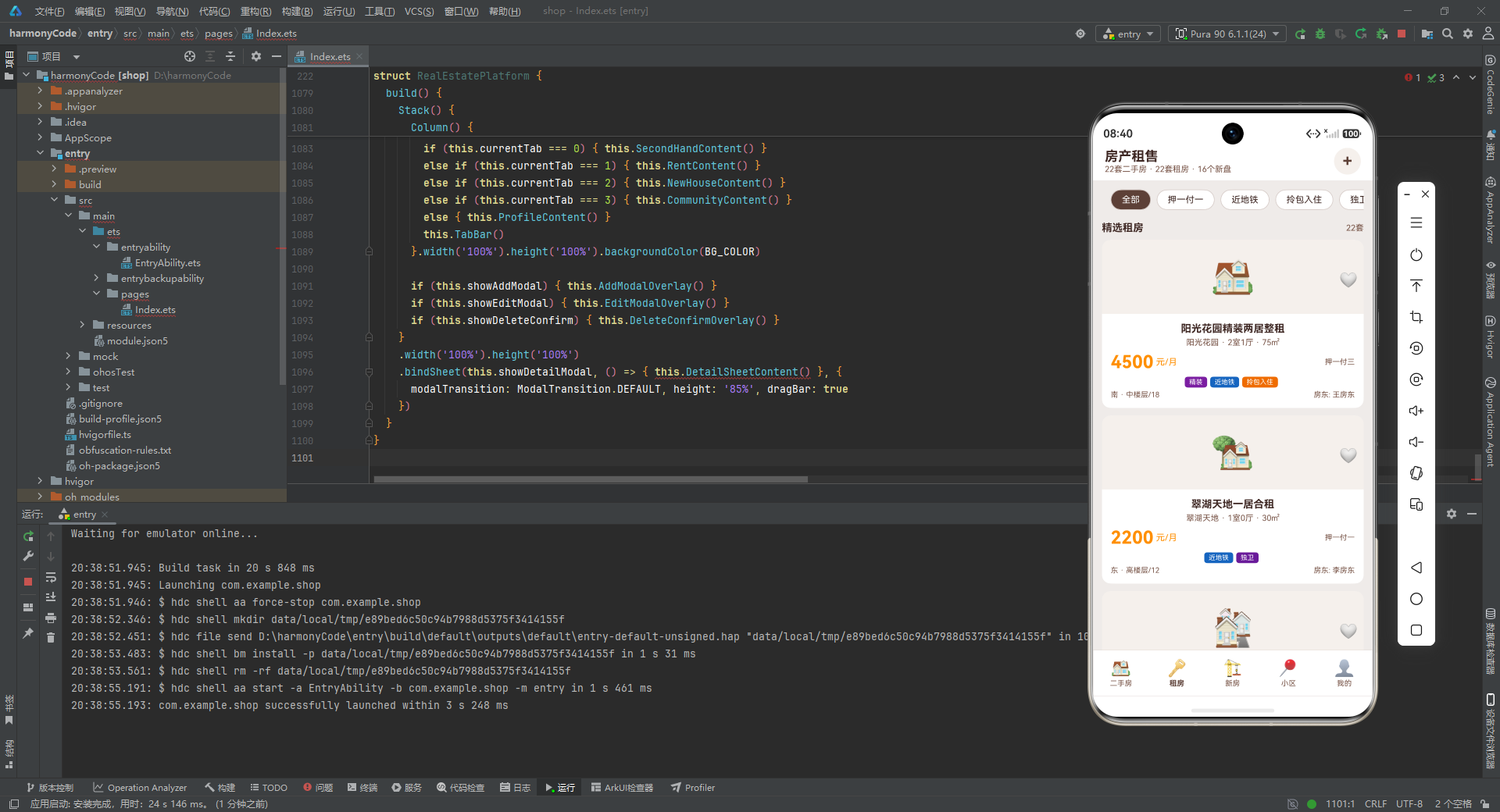
RentCard 的结构与 HouseCard 高度相似,但有几处关键差异:
价格行显示的是月租金而非总价,单位是"元/月"而非"万"。右侧显示的是付款方式(payType)而非单价。
底部信息行左侧显示朝向和楼层(格式为"中楼层/18",包含总楼层信息),右侧显示房东姓名而非经纪人信息。
收藏图标的 toggleFavorite 调用传入的 type 参数为 1(租房),而非 0(二手房)。点击卡片的 openDetail 调用同样传入 type 为 1。
这种结构相似但细节差异的设计体现了组件化开发的精髓——通过参数化差异点,复用共同的布局结构。
8.4 新房卡片构建器
@Builder
NewHouseCard(item: NewHouseData) {
  Column() {
    Stack() {
      Text(item.image).fontSize(48)
      Row() {
        Column().layoutWeight(1)
        Text(item.salesStatus).fontSize(9).fontColor(CARD_COLOR)
          .padding({ left: 6, right: 6, top: 2, bottom: 2 }).borderRadius(4)
          .backgroundColor(item.salesStatus === '在售' ? SCHOOL_COLOR :
            item.salesStatus === '待开' ? PRICE_COLOR : TEXT_SECONDARY)
      }.width('100%').padding({ left: 8, right: 8, top: 8 })
       .justifyContent(FlexAlign.End)
    }.width('100%').height(100).backgroundColor(IMG_BG_COLOR)

    Column() {
      Text(item.name)
        .fontSize(14).fontWeight(FontWeight.Bold).fontColor(TEXT_DARK)
        .maxLines(1).textOverflow({ overflow: TextOverflow.Ellipsis })
      Row() {
        Text(item.developer).fontSize(11).fontColor(TEXT_SECONDARY)
        Text(' · ').fontSize(11).fontColor(TEXT_SECONDARY)
        Text(item.propertyType).fontSize(11).fontColor(TEXT_SECONDARY)
      }.margin({ top: 4 })
      Row() {
        Text(item.avgPrice.toString()).fontSize(24).fontWeight(FontWeight.Bold).fontColor(PRICE_COLOR)
        Text(' 元/㎡').fontSize(12).fontColor(PRICE_COLOR)
        Column().layoutWeight(1)
        Text(item.totalUnits.toString() + '套').fontSize(10).fontColor(TEXT_SECONDARY)
      }.margin({ top: 6 })
      Scroll() {
        Row() {
          ForEach(item.tags, (tag: string) => { this.TagChip(tag) }, (tag: string) => tag)
        }
      }.scrollable(ScrollDirection.Horizontal).scrollBar(BarState.Off)
       .width('100%').margin({ top: 6 })
      Row() {
        Text('📍 ' + item.location).fontSize(10).fontColor(TEXT_SECONDARY)
        Column().layoutWeight(1)
        Text('交付: ' + item.deliveryDate).fontSize(10).fontColor(TEXT_SECONDARY)
      }.margin({ top: 4 })
    }.padding(12)
  }.backgroundColor(CARD_COLOR).borderRadius(12).clip(true)
   .onClick(() => { this.openDetail(item.id, 2) })
}
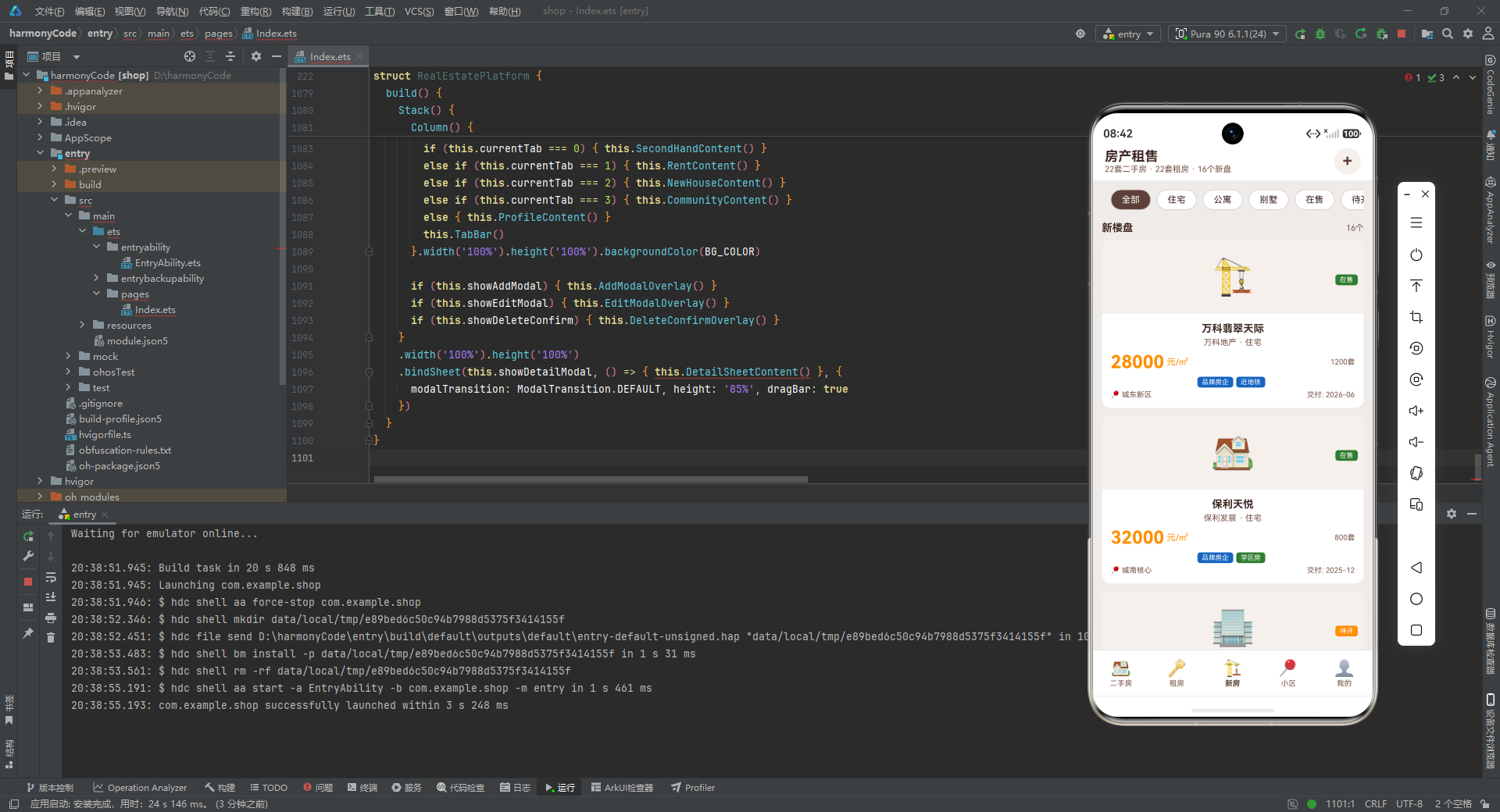
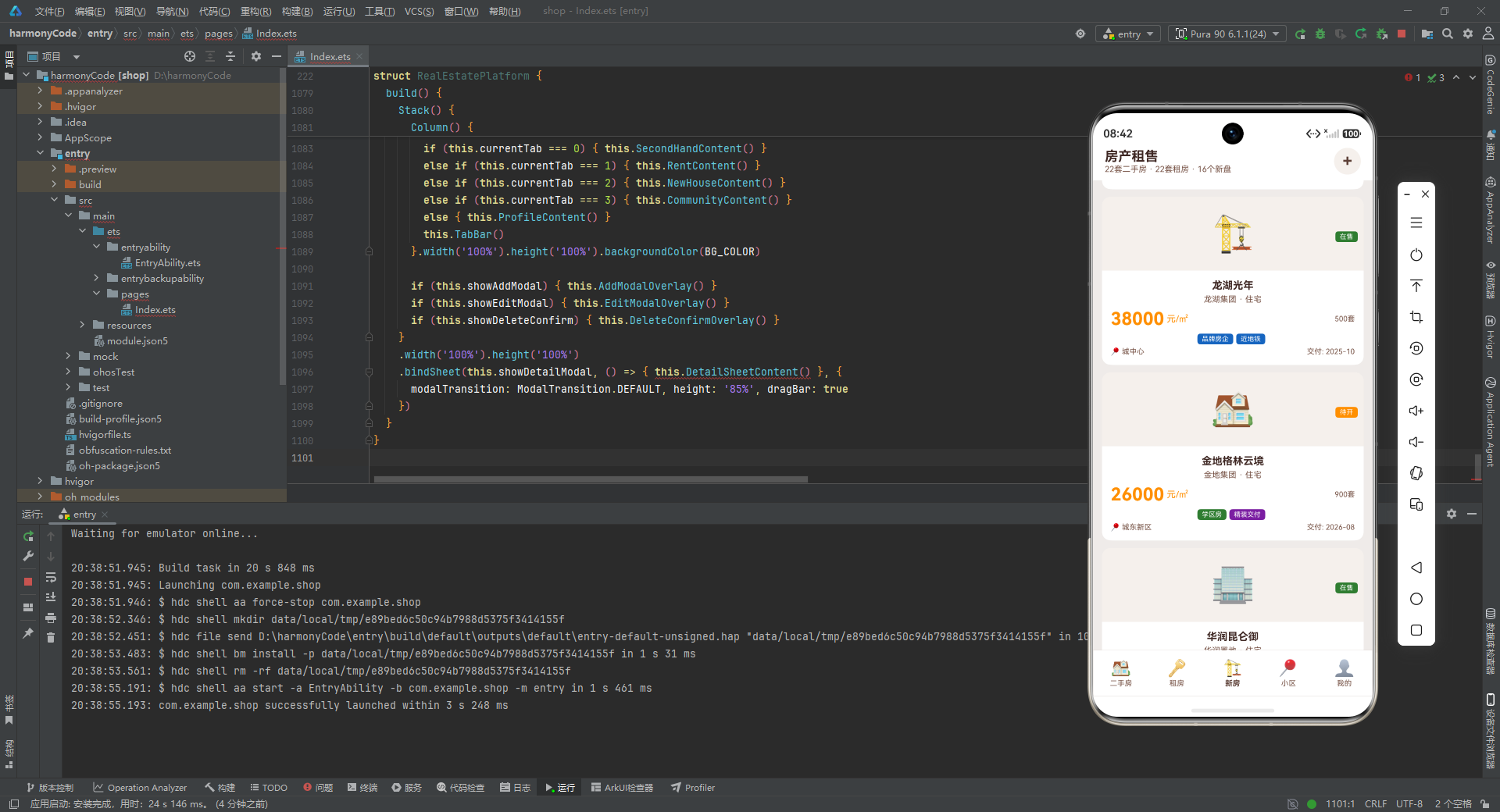
NewHouseCard 与前两个卡片构建器的主要差异在于:
图片区域右上角显示的不是收藏图标,而是销售状态标签。状态标签的背景色根据 salesStatus 动态变化:在售为绿色、待开为橙色、售罄为灰色。这种条件表达式 a ? b : c ? d : e 实现了三态颜色切换。
信息区域显示的是楼盘名称(name)而非房源标题,摘要行显示开发商和物业类型而非小区和户型。价格行显示的是均价(元每平方米)和总套数,而非总价和单价。底部信息行显示位置和交付日期。
8.5 小区卡片构建器
@Builder
CommunityCard(item: CommunityData) {
  Column() {
    Stack() {
      Text('🏘️').fontSize(48)
      Row() {
        Column().layoutWeight(1)
        Text('⭐' + item.rating.toString()).fontSize(11)
          .fontColor(PRICE_COLOR).fontWeight(FontWeight.Bold)
          .padding({ left: 6, right: 6, top: 2, bottom: 2 }).borderRadius(8)
          .backgroundColor(CARD_COLOR)
      }.width('100%').padding({ left: 8, right: 8, top: 8 })
       .justifyContent(FlexAlign.End)
    }.width('100%').height(100).backgroundColor(IMG_BG_COLOR)

    Column() {
      Text(item.name)
        .fontSize(14).fontWeight(FontWeight.Bold).fontColor(TEXT_DARK)
        .maxLines(1).textOverflow({ overflow: TextOverflow.Ellipsis })
      Row() {
        Text('📍 ' + item.location).fontSize(11).fontColor(TEXT_SECONDARY)
        Column().layoutWeight(1)
        Text(item.buildYear.toString() + '年建').fontSize(11).fontColor(TEXT_SECONDARY)
      }.margin({ top: 4 })
      Row() {
        Column() {
          Text(item.totalBuildings.toString()).fontSize(16).fontWeight(FontWeight.Bold).fontColor(PRIMARY_COLOR)
          Text('栋').fontSize(9).fontColor(TEXT_SECONDARY)
        }.alignItems(HorizontalAlign.Center)
        Column() {
          Text(item.totalHouseholds.toString()).fontSize(16).fontWeight(FontWeight.Bold).fontColor(PRIMARY_COLOR)
          Text('户').fontSize(9).fontColor(TEXT_SECONDARY)
        }.margin({ left: 16 }).alignItems(HorizontalAlign.Center)
        Column() {
          Text(item.greenRate.toString() + '%').fontSize(16).fontWeight(FontWeight.Bold).fontColor(SCHOOL_COLOR)
          Text('绿化率').fontSize(9).fontColor(TEXT_SECONDARY)
        }.margin({ left: 16 }).alignItems(HorizontalAlign.Center)
        Column() {
          Text(item.propertyFee.toString()).fontSize(16).fontWeight(FontWeight.Bold).fontColor(PRICE_COLOR)
          Text('元/㎡物业').fontSize(9).fontColor(TEXT_SECONDARY)
        }.margin({ left: 16 }).alignItems(HorizontalAlign.Center)
      }.margin({ top: 8 })
      Scroll() {
        Row() {
          ForEach(item.tags, (tag: string) => { this.TagChip(tag) }, (tag: string) => tag)
        }
      }.scrollable(ScrollDirection.Horizontal).scrollBar(BarState.Off)
       .width('100%').margin({ top: 6 })
    }.padding(12).alignItems(HorizontalAlign.Start)
  }.backgroundColor(CARD_COLOR).borderRadius(12).clip(true)
   .onClick(() => { this.openDetail(item.id, 3) })
}
CommunityCard 是四种卡片中信息密度最高的。其独特之处在于:
图片区域右上角显示的是小区评分(带星号),背景为白色圆角标签,突出评分的视觉重要性。
信息区域在标题和位置行之后,增加了一个四列数据统计行,分别展示总栋数、总户数、绿化率和物业费。每列使用 Column 垂直排列数值和单位,数值字体大小 16 且粗体,单位字体大小 9。四个数据列之间用 16 像素的左外边距分隔。这种网格化的数据展示方式让用户能够快速获取小区的核心指标。
8.6 房价走势图表构建器
@Builder
PriceChart() {
  Column() {
    Row() {
      Text('区域均价走势').fontSize(14).fontWeight(FontWeight.Bold).fontColor(TEXT_DARK)
      Column().layoutWeight(1)
      Text(this.getAvgPrice().toString() + '元/㎡').fontSize(13)
        .fontColor(PRICE_COLOR).fontWeight(FontWeight.Bold)
    }.width('100%')
    Row() {
      ForEach(this.priceTrend, (item: PriceTrendData) => {
        Column() {
          Column().width(28).height(this.getBarHeight(item.avgPrice))
            .backgroundColor(item.avgPrice > this.getAvgPrice() ? PRICE_COLOR : ACCENT_COLOR)
            .borderRadius(4)
          Text(item.month).fontSize(9).fontColor(TEXT_SECONDARY).margin({ top: 4 })
          Text(this.formatPriceK(item.avgPrice)).fontSize(8).fontColor(TEXT_DARK)
        }.layoutWeight(1).justifyContent(FlexAlign.End).height(130)
         .alignItems(HorizontalAlign.Center)
      }, (item: PriceTrendData) => item.month)
    }.width('100%').margin({ top: 10 })
  }.width('100%').padding(14).backgroundColor(CARD_COLOR).borderRadius(12)
}
PriceChart 构建器实现了一个简洁的柱状图来展示房价走势。分析其结构:
最外层 Column 设置白色背景和圆角。顶部 Row 显示图表标题"区域均价走势"和平均价格,使用 layoutWeight(1) 的空 Column 实现左右分布。
图表主体使用 Row 水平排列所有月份的数据。每个月份对应一个 Column,使用 layoutWeight(1) 等分宽度,高度为 130 像素,底部对齐(justifyContent(FlexAlign.End)),水平居中。
每个 Column 内部从上到下包含:柱子(一个 Column 设置宽 28 像素、高度通过 getBarHeight 动态计算、背景色根据价格是否高于平均值动态选择、圆角 4)、月份标签(字体 9)、价格标签(字体 8,通过 formatPriceK 格式化)。
这是一个纯 CSS 实现的柱状图,没有使用任何图表库,展现了 ArkUI 声明式布局的灵活性。
8.7 筛选栏构建器
@Builder
FilterBar(tags: FilterTag[]) {
  Scroll() {
    Row() {
      ForEach(tags, (tag: FilterTag, index: number) => {
        Text(tag.label).fontSize(12)
          .fontColor(this.filterIndex === index ? CARD_COLOR : TEXT_DARK)
          .padding({ left: 14, right: 14, top: 6, bottom: 6 }).borderRadius(16)
          .backgroundColor(this.filterIndex === index ? PRIMARY_COLOR : CARD_COLOR)
          .border({ width: 1, color: BORDER_COLOR }).margin({ right: 8 })
          .onClick(() => { this.filterIndex = index })
      }, (tag: FilterTag) => tag.label)
    }.padding({ left: 12, right: 12 })
  }.scrollable(ScrollDirection.Horizontal).scrollBar(BarState.Off)
   .width('100%').height(44)
}
FilterBar 构建器渲染水平可滚动的筛选标签栏。接收一个 FilterTag 数组参数,通过 ForEach 遍历渲染每个标签。
每个标签的样式根据是否被选中(filterIndex === index)动态变化:选中时文字为白色、背景为主色调棕色;未选中时文字为深色、背景为白色。所有标签都有 1 像素的边框和 16 像素的圆角,形成药丸形状。点击标签时更新 filterIndex,触发列表重新过滤。
外层 Scroll 设置水平滚动并隐藏滚动条,高度固定为 44 像素。这种设计在标签数量较多时(如二手房有 9 个筛选标签)可以横向滑动浏览。
8.8 底部导航栏构建器
@Builder
TabBar() {
  Row() {
    ForEach(getTabs(), (tab: TabItem, index: number) => {
      Column() {
        Text(tab.icon).fontSize(22)
        Text(tab.title).fontSize(10)
          .fontColor(this.currentTab === index ? PRIMARY_COLOR : TEXT_SECONDARY)
          .fontWeight(this.currentTab === index ? FontWeight.Bold : FontWeight.Normal)
          .margin({ top: 2 })
      }.layoutWeight(1).alignItems(HorizontalAlign.Center)
       .justifyContent(FlexAlign.Center).height(58)
       .onClick(() => { this.switchTab(index) })
    }, (tab: TabItem) => tab.title)
  }.width('100%').height(62).backgroundColor(CARD_COLOR)
   .border({ width: 0.5, color: BORDER_COLOR })
}
TabBar 构建器渲染应用底部的导航栏。使用 ForEach 遍历 getTabs() 返回的五个标签项,每个标签使用 layoutWeight(1) 等分宽度。
每个标签项是一个 Column,垂直排列图标(字体 22)和标题(字体 10)。标题的颜色和粗细根据是否为当前选中标签动态变化:选中时为主色调棕色且粗体,未选中时为次要文字色且常规字重。点击标签调用 switchTab 切换页面。
整个导航栏高度 62 像素,白色背景,顶部有 0.5 像素的浅色边框作为分隔线。
8.9 头部构建器
@Builder
Header() {
  Row() {
    Column() {
      Text('房产租售').fontSize(18).fontWeight(FontWeight.Bold).fontColor(TEXT_DARK)
      Text(this.secondHandList.length.toString() + '套二手房 · ' +
        this.rentList.length.toString() + '套租房 · ' +
        this.newHouseList.length.toString() + '个新盘')
        .fontSize(11).fontColor(TEXT_SECONDARY)
    }.alignItems(HorizontalAlign.Start)
    Column().layoutWeight(1)
    Row() {
      Text('+').fontSize(22).fontColor(PRIMARY_COLOR).fontWeight(FontWeight.Bold)
    }.width(36).height(36).borderRadius(18).backgroundColor(IMG_BG_COLOR)
     .justifyContent(FlexAlign.Center)
     .onClick(() => { this.showAddModal = true })
  }.width('100%').padding({ left: 16, right: 16, top: 8, bottom: 8 })
   .backgroundColor(CARD_COLOR)
}
Header 构建器渲染应用的顶部标题栏。左侧显示应用名称"房产租售"(字体 18,粗体)和房源统计摘要(字体 11,次要文字色),动态显示二手房、租房和新房的数量。右侧是一个 36x36 像素的圆形按钮,背景为浅色,显示"+"号,点击后打开发布房源弹层。
这个头部组件在所有标签页中都保持可见,提供了应用的全局标识和快速发布入口。
九、标签页内容构建器:五大模块的视图组装
在可复用 UI 构建器的基础上,应用为每个标签页定义了独立的内容构建器。这些构建器负责组装筛选栏、列表标题、卡片列表等元素,形成完整的页面内容。
9.1 二手房标签页内容
@Builder
SecondHandContent() {
  Scroll() {
    Column() {
      this.FilterBar(getHouseFilterTags())
      Column().height(8)
      this.PriceChart()
      Column().height(8)
      Row() {
        Text('精选二手房').fontSize(14).fontWeight(FontWeight.Bold).fontColor(TEXT_DARK)
        Column().layoutWeight(1)
        Text(this.getFilteredSecondHand().length.toString() + '套').fontSize(11).fontColor(TEXT_SECONDARY)
      }.width('100%').margin({ bottom: 8 })
      ForEach(this.getFilteredSecondHand(), (item: SecondHouseData) => {
        Column() { this.HouseCard(item) }.width('100%').margin({ bottom: 10 })
      }, (item: SecondHouseData) => item.id.toString())
      Column().height(16)
    }.padding({ left: 12, right: 12, top: 4 })
  }.layoutWeight(1).scrollBar(BarState.Off)
}
SecondHandContent 是二手房标签页的完整内容视图。分析其结构:
最外层是 Scroll 组件,设置 layoutWeight(1) 占据剩余空间,隐藏滚动条。内部是一个 Column 容器,左右内边距 12,顶部内边距 4。
内容从上到下依次为:筛选栏(调用 FilterBar 并传入二手房筛选标签)、8 像素间距、房价走势图表(调用 PriceChart)、8 像素间距、列表标题行(左侧"精选二手房"标题,右侧动态显示过滤后的房源数量)、房源卡片列表。
房源卡片列表使用 ForEach 遍历 getFilteredSecondHand() 返回的过滤结果。每个房源被包裹在一个 Column 中,宽度 100%,底部外边距 10 像素,形成卡片之间的间距。ForEach 的第三个参数是键值生成函数,使用 item.id.toString() 作为唯一键,确保列表更新时的高效 diff。
9.2 租房标签页内容
@Builder
RentContent() {
  Scroll() {
    Column() {
      this.FilterBar(getRentFilterTags())
      Column().height(8)
      Row() {
        Text('精选租房').fontSize(14).fontWeight(FontWeight.Bold).fontColor(TEXT_DARK)
        Column().layoutWeight(1)
        Text(this.getFilteredRent().length.toString() + '套').fontSize(11).fontColor(TEXT_SECONDARY)
      }.width('100%').margin({ bottom: 8 })
      ForEach(this.getFilteredRent(), (item: RentData) => {
        Column() { this.RentCard(item) }.width('100%').margin({ bottom: 10 })
      }, (item: RentData) => item.id.toString())
      Column().height(16)
    }.padding({ left: 12, right: 12, top: 4 })
  }.layoutWeight(1).scrollBar(BarState.Off)
}
RentContent 的结构与 SecondHandContent 基本一致,差异在于:使用租房筛选标签(getRentFilterTags())、不包含房价走势图表、标题为"精选租房"、遍历调用 RentCard 而非 HouseCard。租房页面没有房价走势图表,这是合理的业务设计——租房用户更关心月租金而非区域均价走势。
9.3 新房标签页内容
@Builder
NewHouseContent() {
  Scroll() {
    Column() {
      this.FilterBar(getNewHouseFilterTags())
      Column().height(8)
      Row() {
        Text('新楼盘').fontSize(14).fontWeight(FontWeight.Bold).fontColor(TEXT_DARK)
        Column().layoutWeight(1)
        Text(this.getFilteredNewHouse().length.toString() + '个').fontSize(11).fontColor(TEXT_SECONDARY)
      }.width('100%').margin({ bottom: 8 })
      ForEach(this.getFilteredNewHouse(), (item: NewHouseData) => {
        Column() { this.NewHouseCard(item) }.width('100%').margin({ bottom: 10 })
      }, (item: NewHouseData) => item.id.toString())
      Column().height(16)
    }.padding({ left: 12, right: 12, top: 4 })
  }.layoutWeight(1).scrollBar(BarState.Off)
}
NewHouseContent 使用新房筛选标签,标题为"新楼盘",数量单位使用"个"而非"套"(因为楼盘以个为单位)。遍历调用 NewHouseCard 渲染新房卡片。
9.4 小区标签页内容
@Builder
CommunityContent() {
  Scroll() {
    Column() {
      this.FilterBar(getCommunityFilterTags())
      Column().height(8)
      Row() {
        Text('热门小区').fontSize(14).fontWeight(FontWeight.Bold).fontColor(TEXT_DARK)
        Column().layoutWeight(1)
        Text(this.getFilteredCommunity().length.toString() + '个').fontSize(11).fontColor(TEXT_SECONDARY)
      }.width('100%').margin({ bottom: 8 })
      ForEach(this.getFilteredCommunity(), (item: CommunityData) => {
        Column() { this.CommunityCard(item) }.width('100%').margin({ bottom: 10 })
      }, (item: CommunityData) => item.id.toString())
      Column().height(16)
    }.padding({ left: 12, right: 12, top: 4 })
  }.layoutWeight(1).scrollBar(BarState.Off)
}
CommunityContent 使用小区筛选标签,标题为"热门小区",遍历调用 CommunityCard 渲染小区卡片。
9.5 个人中心标签页内容
@Builder
ProfileContent() {
  Scroll() {
    Column() {
      Column() {
        Row() {
          Text('👤').fontSize(48)
          Column() {
            Text('房产达人').fontSize(16).fontWeight(FontWeight.Bold).fontColor(TEXT_DARK)
            Text('138****8888').fontSize(11).fontColor(TEXT_SECONDARY).margin({ top: 2 })
            Row() {
              Text('VIP').fontSize(9).fontColor(PRICE_COLOR).fontWeight(FontWeight.Bold)
            }.padding({ left: 6, right: 6, top: 1, bottom: 1 }).borderRadius(4)
             .backgroundColor('#FFF8E1').margin({ top: 4 })
          }.alignItems(HorizontalAlign.Start).margin({ left: 12 })
          Column().layoutWeight(1)
          Text('编辑').fontSize(12).fontColor(PRIMARY_COLOR)
            .decoration({ type: TextDecorationType.Underline, color: PRIMARY_COLOR })
        }.width('100%')
      }.width('100%').padding(16).backgroundColor(CARD_COLOR).borderRadius(12)

      Column().height(12)

      Row() {
        Column() {
          Text(this.getFavoriteCount().toString()).fontSize(22).fontWeight(FontWeight.Bold).fontColor(PRICE_COLOR)
          Text('收藏房源').fontSize(10).fontColor(TEXT_SECONDARY).margin({ top: 2 })
        }.layoutWeight(1).height(72).backgroundColor(CARD_COLOR).borderRadius(10)
         .alignItems(HorizontalAlign.Center).justifyContent(FlexAlign.Center).margin({ right: 4 })
        Column() {
          Text('36').fontSize(22).fontWeight(FontWeight.Bold).fontColor(PRIMARY_COLOR)
          Text('浏览记录').fontSize(10).fontColor(TEXT_SECONDARY).margin({ top: 2 })
        }.layoutWeight(1).height(72).backgroundColor(CARD_COLOR).borderRadius(10)
         .alignItems(HorizontalAlign.Center).justifyContent(FlexAlign.Center).margin({ right: 4 })
        Column() {
          Text('3').fontSize(22).fontWeight(FontWeight.Bold).fontColor(SCHOOL_COLOR)
          Text('发布房源').fontSize(10).fontColor(TEXT_SECONDARY).margin({ top: 2 })
        }.layoutWeight(1).height(72).backgroundColor(CARD_COLOR).borderRadius(10)
         .alignItems(HorizontalAlign.Center).justifyContent(FlexAlign.Center)
      }.width('100%')

      Column().height(12)
      this.PriceChart()
      Column().height(12)

      Column() {
        ForEach(getMenuOptions(), (item: MenuOption) => {
          Row() {
            Text(item.icon).fontSize(24)
            Column() {
              Text(item.title).fontSize(14).fontColor(TEXT_DARK).fontWeight(FontWeight.Medium)
              Text(item.subtitle).fontSize(10).fontColor(TEXT_SECONDARY).margin({ top: 2 })
            }.alignItems(HorizontalAlign.Start).margin({ left: 12 })
            Column().layoutWeight(1)
            Text('›').fontSize(22).fontColor(TEXT_SECONDARY)
          }.width('100%').padding({ top: 12, bottom: 12 })
           .border({ width: 0.5, color: BORDER_COLOR })
        }, (item: MenuOption) => item.title)
      }.width('100%').padding({ left: 14, right: 14 }).backgroundColor(CARD_COLOR).borderRadius(12)

      Column().height(20)
    }.padding({ left: 12, right: 12, top: 4 })
  }.layoutWeight(1).scrollBar(BarState.Off)
}
ProfileContent 是五个标签页中信息最丰富的页面。分析其结构:
用户信息卡片:使用 Row 水平排列用户头像(Emoji)、用户信息列(昵称、手机号、VIP 标签)和编辑按钮。VIP 标签使用浅黄色背景(#FFF8E1)和橙色文字,视觉上突出会员身份。编辑按钮使用 TextDecorationType.Underline 添加下划线装饰,暗示可点击。
统计卡片行:使用 Row 等分排列三个统计卡片,每个卡片高度 72 像素,白色背景,圆角 10。三个卡片分别显示收藏房源数(动态计算,橙色)、浏览记录数(固定 36,棕色)、发布房源数(固定 3,绿色)。三种不同的颜色为统计数据增加了视觉层次。
房价走势图:复用 PriceChart 构建器,在个人中心也展示区域均价走势,让用户随时掌握市场动态。
功能菜单列表:使用 ForEach 遍历 getMenuOptions() 返回的六项菜单,每项是一个 Row,左侧显示图标,中间显示标题和副标题,右侧显示箭头符号。菜单项之间用 0.5 像素的浅色边框分隔,形成清晰的列表视觉效果。
十、模态弹层构建器:交互的深度与广度
模态弹层是移动应用中实现深度交互的重要手段。这个应用定义了四个模态弹层构建器,分别处理发布房源、编辑房源、删除确认和房源详情四种交互场景。
10.1 发布房源弹层
@Builder
AddModalOverlay() {
  Stack() {
    Column().width('100%').height('100%')
      .backgroundColor('rgba(0,0,0,0.45)')
      .onClick(() => { this.showAddModal = false })

    Column() {
      Scroll() {
        Column() {
          Row() {
            Text('发布房源').fontSize(18).fontWeight(FontWeight.Bold).fontColor(TEXT_DARK)
            Column().layoutWeight(1)
            Text('✕').fontSize(18).fontColor(TEXT_SECONDARY)
              .onClick(() => { this.showAddModal = false })
          }.width('100%').margin({ bottom: 16 })

          Text('房源类型').fontSize(13).fontColor(TEXT_DARK).fontWeight(FontWeight.Medium).margin({ bottom: 6 })
          Flex({ wrap: FlexWrap.Wrap }) {
            ForEach(getPropertyTypes(), (item: PropertyTypeOption, index: number) => {
              Row() {
                Text(item.icon).fontSize(18)
                Text(item.type).fontSize(12).fontColor(TEXT_DARK).margin({ left: 4 })
              }.padding({ left: 16, right: 16, top: 8, bottom: 8 })
               .margin({ bottom: 6, right: 8 }).borderRadius(8)
               .backgroundColor(this.tempTypeIndex === index ? IMG_BG_COLOR : CARD_COLOR)
               .border({ width: this.tempTypeIndex === index ? 2 : 1,
                 color: this.tempTypeIndex === index ? PRIMARY_COLOR : BORDER_COLOR })
               .onClick(() => { this.tempTypeIndex = index })
            }, (item: PropertyTypeOption) => item.type)
          }.width('100%')

          Text('面积 (㎡)').fontSize(13).fontColor(TEXT_DARK).fontWeight(FontWeight.Medium).margin({ top: 14, bottom: 6 })
          TextInput({ placeholder: '请输入面积,如 89' }).width('100%').height(44).borderRadius(8)
            .backgroundColor(BG_COLOR).padding({ left: 12, right: 12 }).fontSize(14)
            .onChange((value: string) => { this.tempArea = value })

          Text('价格 (万元)').fontSize(13).fontColor(TEXT_DARK).fontWeight(FontWeight.Medium).margin({ top: 14, bottom: 6 })
          TextInput({ placeholder: '请输入价格,如 320' }).width('100%').height(44).borderRadius(8)
            .backgroundColor(BG_COLOR).padding({ left: 12, right: 12 }).fontSize(14)
            .onChange((value: string) => { this.tempPrice = value })

          Text('位置 (小区名)').fontSize(13).fontColor(TEXT_DARK).fontWeight(FontWeight.Medium).margin({ top: 14, bottom: 6 })
          TextInput({ placeholder: '请输入小区名称' }).width('100%').height(44).borderRadius(8)
            .backgroundColor(BG_COLOR).padding({ left: 12, right: 12 }).fontSize(14)
            .onChange((value: string) => { this.tempLocation = value })

          Row() {
            Text('预览: ').fontSize(12).fontColor(TEXT_SECONDARY)
            Text(getPropertyTypes()[this.tempTypeIndex].icon).fontSize(18)
            Text(this.tempLocation.length > 0 ? this.tempLocation : '待补充').fontSize(12).fontColor(TEXT_DARK)
            Text(' · ').fontSize(12).fontColor(TEXT_SECONDARY)
            Text(this.tempArea.length > 0 ? this.tempArea + '㎡' : '0㎡').fontSize(12).fontColor(TEXT_DARK)
            Text(' · ').fontSize(12).fontColor(TEXT_SECONDARY)
            Text(this.tempPrice.length > 0 ? this.tempPrice + '万' : '0万')
              .fontSize(12).fontColor(PRICE_COLOR).fontWeight(FontWeight.Bold)
          }.width('100%').padding(10).margin({ top: 10 }).borderRadius(8).backgroundColor(BG_COLOR)

          Row() {
            Column() { Text('取消').fontSize(14).fontColor(TEXT_DARK) }
              .layoutWeight(1).height(44).borderRadius(10).backgroundColor('#F5F5F5')
              .justifyContent(FlexAlign.Center).alignItems(HorizontalAlign.Center)
              .onClick(() => { this.showAddModal = false }).margin({ right: 8 })
            Column() { Text('确认发布').fontSize(14).fontColor(CARD_COLOR) }
              .layoutWeight(1).height(44).borderRadius(10).backgroundColor(PRIMARY_COLOR)
              .justifyContent(FlexAlign.Center).alignItems(HorizontalAlign.Center)
              .onClick(() => { this.addHouse() })
          }.width('100%').margin({ top: 16 })
        }
      }.scrollBar(BarState.Off)
    }.width('88%').constraintSize({ maxHeight: '80%' }).padding(20)
     .backgroundColor(CARD_COLOR).borderRadius(16)
  }.width('100%').height('100%').alignContent(Alignment.Center)
}
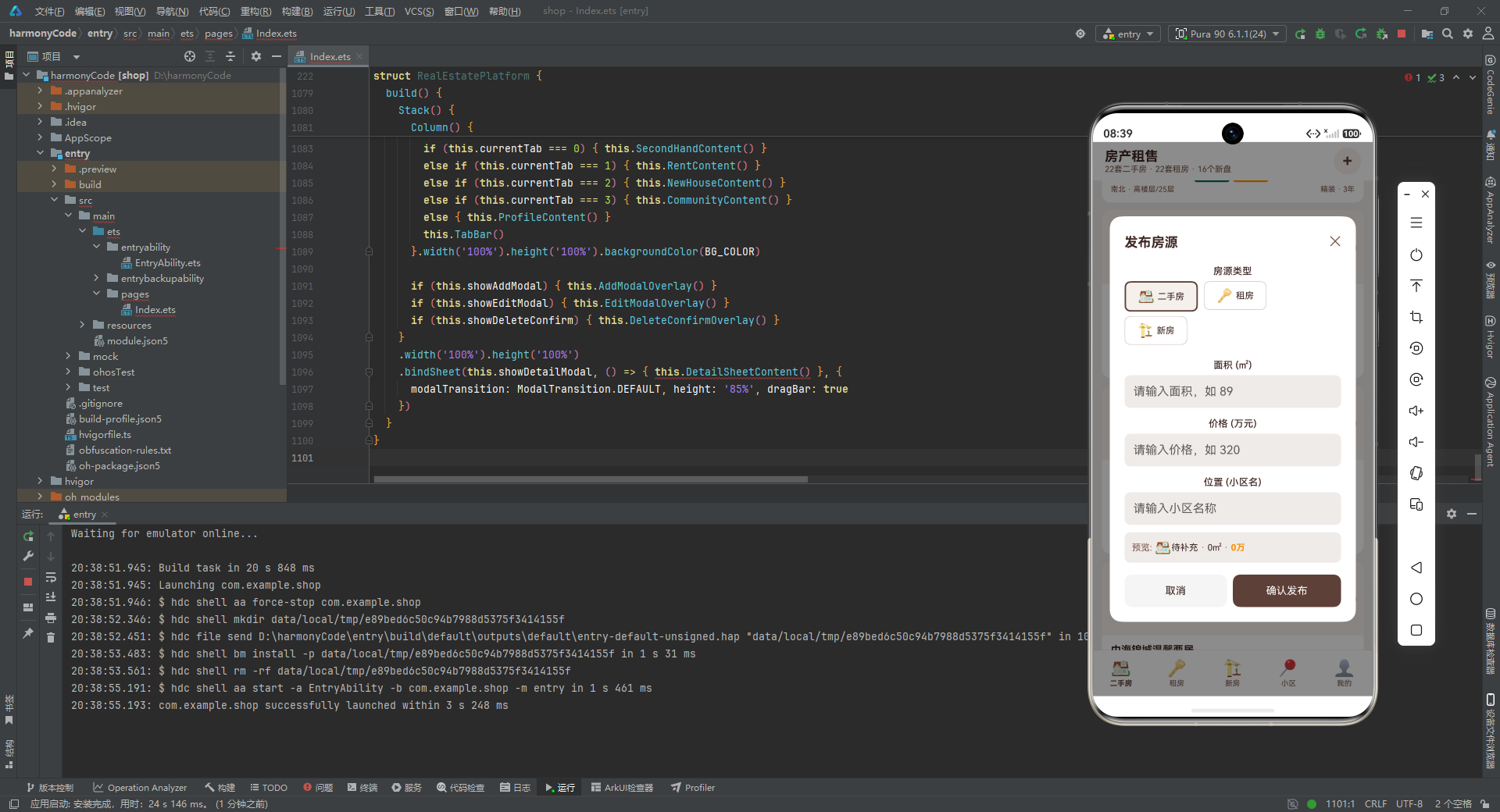
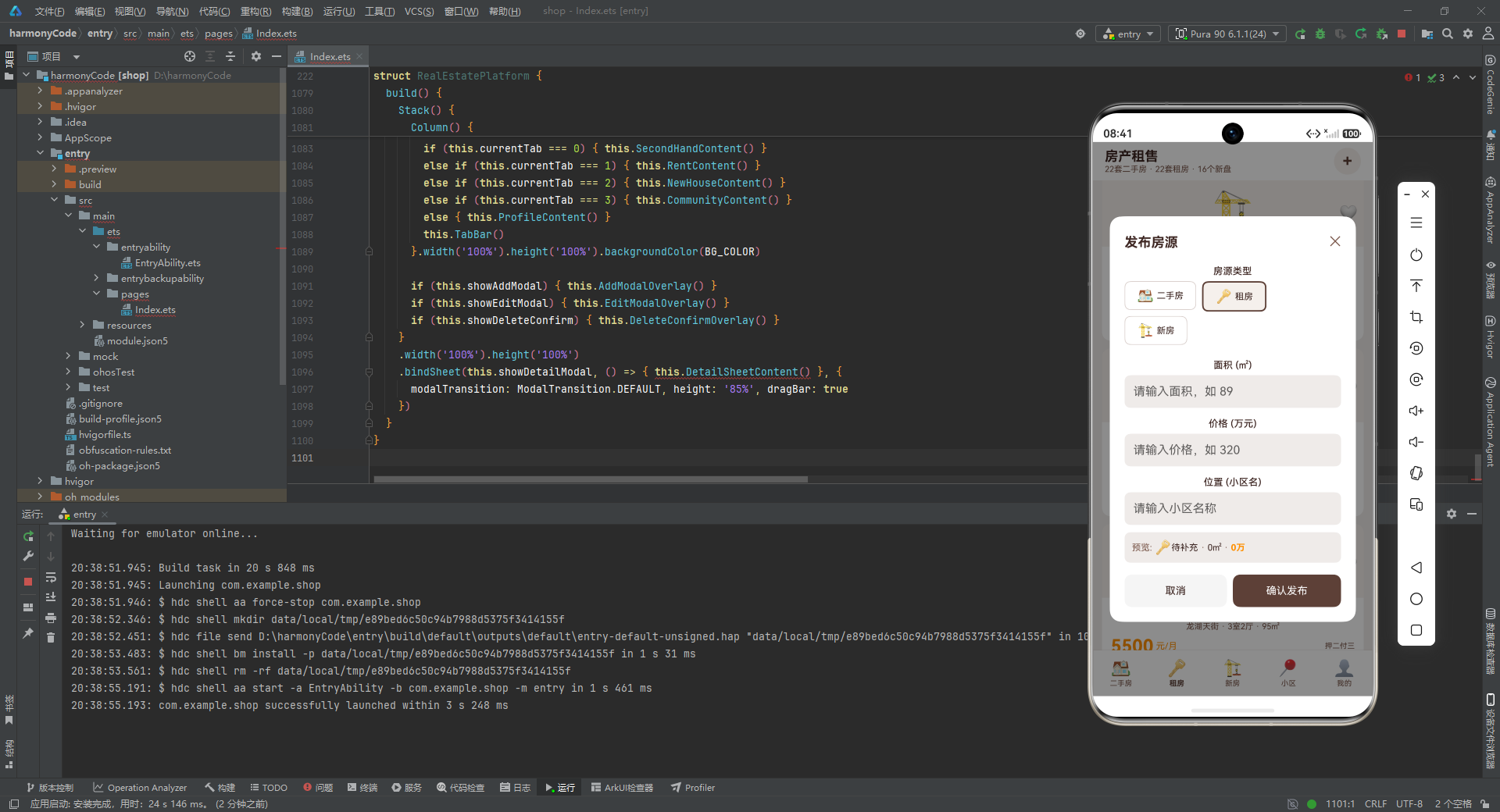
AddModalOverlay 是应用中最复杂的弹层构建器。分析其结构:
最外层 Stack 使用 alignContent(Alignment.Center) 将内容居中显示。第一层是一个全屏的半透明遮罩(rgba(0,0,0,0.45)),点击遮罩关闭弹层。
第二层是弹层主体,宽度 88%,最大高度 80%(通过 constraintSize 限制),白色背景,圆角 16,内边距 20。内部使用 Scroll 包裹内容,确保在内容超出高度时可以滚动。
弹层内容从上到下包括:
标题行:左侧"发布房源"标题,右侧关闭按钮。
房源类型选择:使用 Flex 配合 FlexWrap.Wrap 实现自动换行的类型选择按钮组。每个按钮包含图标和类型名称,选中状态通过背景色和边框宽度/颜色的变化来体现。Flex 组件的换行布局让按钮在空间不足时自动换行,适应不同屏幕宽度。
表单输入区域:三个 TextInput 组件分别接收面积、价格和位置信息。每个输入框前有标签文字,输入框高度 44 像素,圆角 8,背景色为页面背景色(BG_COLOR),通过 onChange 回调实时更新临时状态变量。
实时预览区域:一个 Row 行,根据用户当前输入的类型、位置、面积和价格实时显示预览信息。这是用户体验的一个亮点——用户在输入过程中就能看到最终房源卡片中会显示的关键信息。
操作按钮行:左侧"取消"按钮(灰色背景)和右侧"确认发布"按钮(主色调棕色背景),各占一半宽度。点击取消关闭弹层,点击确认调用 addHouse() 方法提交房源。
10.2 编辑房源弹层
@Builder
EditModalOverlay() {
  Stack() {
    Column().width('100%').height('100%')
      .backgroundColor('rgba(0,0,0,0.45)')
      .onClick(() => { this.showEditModal = false })

    Column() {
      Row() {
        Text('编辑房源').fontSize(18).fontWeight(FontWeight.Bold).fontColor(TEXT_DARK)
        Column().layoutWeight(1)
        Text('✕').fontSize(18).fontColor(TEXT_SECONDARY)
          .onClick(() => { this.showEditModal = false })
      }.width('100%').margin({ bottom: 16 })

      Text('房源标题').fontSize(13).fontColor(TEXT_DARK).fontWeight(FontWeight.Medium).margin({ bottom: 6 })
      TextInput({ placeholder: '请输入标题', text: this.tempTitle })
        .width('100%').height(44).borderRadius(8).backgroundColor(BG_COLOR)
        .padding({ left: 12, right: 12 }).fontSize(14)
        .onChange((value: string) => { this.tempTitle = value })

      Text('面积 (㎡)').fontSize(13).fontColor(TEXT_DARK).fontWeight(FontWeight.Medium).margin({ top: 14, bottom: 6 })
      TextInput({ placeholder: '请输入面积', text: this.tempArea })
        .width('100%').height(44).borderRadius(8).backgroundColor(BG_COLOR)
        .padding({ left: 12, right: 12 }).fontSize(14)
        .onChange((value: string) => { this.tempArea = value })

      Text('价格 (万元)').fontSize(13).fontColor(TEXT_DARK).fontWeight(FontWeight.Medium).margin({ top: 14, bottom: 6 })
      TextInput({ placeholder: '请输入价格', text: this.tempPrice })
        .width('100%').height(44).borderRadius(8).backgroundColor(BG_COLOR)
        .padding({ left: 12, right: 12 }).fontSize(14)
        .onChange((value: string) => { this.tempPrice = value })

      Text('位置 (小区名)').fontSize(13).fontColor(TEXT_DARK).fontWeight(FontWeight.Medium).margin({ top: 14, bottom: 6 })
      TextInput({ placeholder: '请输入小区名称', text: this.tempLocation })
        .width('100%').height(44).borderRadius(8).backgroundColor(BG_COLOR)
        .padding({ left: 12, right: 12 }).fontSize(14)
        .onChange((value: string) => { this.tempLocation = value })

      Row() {
        Column() { Text('取消').fontSize(14).fontColor(TEXT_DARK) }
          .layoutWeight(1).height(44).borderRadius(10).backgroundColor('#F5F5F5')
          .justifyContent(FlexAlign.Center).alignItems(HorizontalAlign.Center)
          .onClick(() => { this.showEditModal = false }).margin({ right: 8 })
        Column() { Text('保存修改').fontSize(14).fontColor(CARD_COLOR) }
          .layoutWeight(1).height(44).borderRadius(10).backgroundColor(PRIMARY_COLOR)
          .justifyContent(FlexAlign.Center).alignItems(HorizontalAlign.Center)
          .onClick(() => { this.saveEdit() })
      }.width('100%').margin({ top: 16 })
    }.width('88%').constraintSize({ maxHeight: '80%' }).padding(20)
     .backgroundColor(CARD_COLOR).borderRadius(16)
  }.width('100%').height('100%').alignContent(Alignment.Center)
}
EditModalOverlay 的结构与发布弹层类似,但有几个关键差异:
第一,多了一个"房源标题"输入框,因为编辑时允许修改标题,而发布时标题是可选的。
第二,所有 TextInput 组件都通过 text 参数绑定了临时状态变量的值(如 text: this.tempTitle),这样在打开编辑弹层时,输入框中会显示当前的房源信息,用户可以在原有基础上进行修改。这是编辑表单的标准做法——预填充已有数据。
第三,没有房源类型选择和实时预览区域,因为编辑操作仅限于已发布的二手房房源。
第四,确认按钮的文字是"保存修改"而非"确认发布",点击后调用 saveEdit() 方法。
10.3 删除确认弹层
@Builder
DeleteConfirmOverlay() {
  Stack() {
    Column().width('100%').height('100%')
      .backgroundColor('rgba(0,0,0,0.45)')
      .onClick(() => { this.showDeleteConfirm = false })

    Column() {
      Text('⚠️').fontSize(40)
      Text('确认删除房源').fontSize(16).fontWeight(FontWeight.Bold).fontColor(TEXT_DARK).margin({ top: 8 })
      Text('删除后将无法恢复该房源的所有数据').fontSize(11).fontColor(TEXT_SECONDARY).margin({ top: 6 })
      Text('"' + this.getSelectedSecondHand().title + '"').fontSize(13)
        .fontColor(PRICE_COLOR).fontWeight(FontWeight.Medium).margin({ top: 6 })
      Row() {
        Column() { Text('取消').fontSize(14).fontColor(TEXT_DARK) }
          .layoutWeight(1).height(44).borderRadius(10).backgroundColor('#F5F5F5')
          .justifyContent(FlexAlign.Center).alignItems(HorizontalAlign.Center)
          .onClick(() => { this.showDeleteConfirm = false }).margin({ right: 8 })
        Column() { Text('确认删除').fontSize(14).fontColor(CARD_COLOR) }
          .layoutWeight(1).height(44).borderRadius(10).backgroundColor(DANGER_COLOR)
          .justifyContent(FlexAlign.Center).alignItems(HorizontalAlign.Center)
          .onClick(() => { this.deleteHouse() })
      }.width('100%').margin({ top: 16 })
    }.width('80%').padding(24).backgroundColor(CARD_COLOR).borderRadius(16)
     .alignItems(HorizontalAlign.Center)
  }.width('100%').height('100%').alignContent(Alignment.Center)
}
DeleteConfirmOverlay 是一个简洁的确认对话框。分析其设计:
弹层主体宽度 80%(比发布和编辑弹层的 88% 略窄),内边距 24,内容居中对齐。
内容从上到下:警告图标(⚠️,字体 40)、确认标题"确认删除房源"、警告说明文字"删除后将无法恢复该房源的所有数据"、要删除的房源标题(橙色显示,让用户确认删除对象)、操作按钮行。
操作按钮中,"确认删除"按钮使用 DANGER_COLOR(深红色)作为背景色,视觉上警示用户这是一个破坏性操作。这种通过颜色传达操作危险性的设计模式是移动端 UX 设计的最佳实践。
10.4 房源详情弹层
@Builder
DetailSheetContent() {
Scroll() {
Column() {
// Header
Column() {
Row() {
Text(this.getSelectedSecondHand().image).fontSize(48)
Column() {
Text(this.getSelectedSecondHand().title).fontSize(16).fontWeight(FontWeight.Bold).fontColor(TEXT_DARK)
Text(this.getSelectedSecondHand().community + ' · ' + this.getSelectedSecondHand().layout)
.fontSize(11).fontColor(TEXT_SECONDARY).margin({ top: 2 })
Row() {
Text(this.getSelectedSecondHand().price.toString()).fontSize(20).fontWeight(FontWeight.Bold).fontColor(PRICE_COLOR)
Text(' 万').fontSize(12).fontColor(PRICE_COLOR)
Text(' · ').fontSize(11).fontColor(TEXT_SECONDARY)
Text(this.getSelectedSecondHand().unitPrice.toString() + '元/㎡').fontSize(11).fontColor(TEXT_SECONDARY)
}.margin({ top: 4 })
}.alignItems(HorizontalAlign.Start).margin({ left: 12 })
Column().layoutWeight(1)
Text(this.getSelectedSecondHand().isFavorite ? '❤️' : '🤍').fontSize(24)
.onClick(() => { this.toggleFavorite(this.getSelectedSecondHand().id, 0) })
}.width('100%')
}.width('100%').padding(16).backgroundColor(CARD_COLOR).borderRadius(12).margin({ bottom: 10 })
// Info Grid
Row() {
Column() {
Text(this.getSelectedSecondHand().area.toString() + '㎡').fontSize(16).fontWeight(FontWeight.Bold).fontColor(PRIMARY_COLOR)
Text('面积').fontSize(10).fontColor(TEXT_SECONDARY).margin({ top: 2 })
}.layoutWeight(1).height(70).borderRadius(10).backgroundColor(CARD_COLOR)
.alignItems(HorizontalAlign.Center).justifyContent(FlexAlign.Center).margin({ right: 4 })
// ... 朝向、楼层、装修三个相同结构的 Column
}.width('100%').margin({ bottom: 10 })
// Floor Plan
Column() {
Row() { Text('🏠 户型图').fontSize(14).fontWeight(FontWeight.Bold).fontColor(TEXT_DARK) }.width('100%').margin({ bottom: 8 })
Row() {
Column() { Text('🛏️').fontSize(28); Text('主卧').fontSize(10).fontColor(TEXT_SECONDARY).margin({ top: 2 }) }
.layoutWeight(1).height(70).backgroundColor(IMG_BG_COLOR).borderRadius(8)
.alignItems(HorizontalAlign.Center).justifyContent(FlexAlign.Center).margin({ right: 4 })
// ... 次卧、客厅、厨房
}.width('100%').margin({ bottom: 6 })
Row() {
Column() { Text('🚿').fontSize(28); Text('卫生间').fontSize(10).fontColor(TEXT_SECONDARY).margin({ top: 2 }) }
.layoutWeight(1).height(70).backgroundColor(IMG_BG_COLOR).borderRadius(8)
.alignItems(HorizontalAlign.Center).justifyContent(FlexAlign.Center).margin({ right: 4 })
// ... 阳台、餐厅、玄关
}.width('100%')
}.width('100%').padding(14).backgroundColor(CARD_COLOR).borderRadius(12).margin({ bottom: 10 })
// Amenities
Column() {
Row() { Text('📍 周边配套').fontSize(14).fontWeight(FontWeight.Bold).fontColor(TEXT_DARK) }.width('100%').margin({ bottom: 8 })
ForEach(getAmenities(), (item: AmenityItem) => {
Row() {
Text(item.icon).fontSize(20)
Text(item.name).fontSize(12).fontColor(TEXT_DARK).margin({ left: 8 })
Column().layoutWeight(1)
Text(item.distance).fontSize(11).fontColor(PRICE_COLOR).fontWeight(FontWeight.Medium)
}.width('100%').padding({ top: 8, bottom: 8 }).border({ width: 0.5, color: BORDER_COLOR })
}, (item: AmenityItem) => item.name)
}.width('100%').padding(14).backgroundColor(CARD_COLOR).borderRadius(12).margin({ bottom: 10 })
// Cost Breakdown
Column() {
Row() { Text('💰 费用明细').fontSize(14).fontWeight(FontWeight.Bold).fontColor(TEXT_DARK) }.width('100%').margin({ bottom: 8 })
Row() {
Text('房屋总价').fontSize(12).fontColor(TEXT_SECONDARY); Column().layoutWeight(1)
Text(this.getSelectedSecondHand().price.toString() + ' 万元').fontSize(12).fontColor(TEXT_DARK).fontWeight(FontWeight.Medium)
}.width('100%').padding({ top: 8, bottom: 8 }).border({ width: 0.5, color: BORDER_COLOR })
Row() {
Text('首付 (30%)').fontSize(12).fontColor(TEXT_SECONDARY); Column().layoutWeight(1)
Text(this.getDownPayment().toString() + ' 万元').fontSize(12).fontColor(TEXT_DARK).fontWeight(FontWeight.Medium)
}.width('100%').padding({ top: 8, bottom: 8 }).border({ width: 0.5, color: BORDER_COLOR })
Row() {
Text('商贷金额 (70%)').fontSize(12).fontColor(TEXT_SECONDARY); Column().layoutWeight(1)
Text(this.getLoanAmount().toString() + ' 万元').fontSize(12).fontColor(TEXT_DARK).fontWeight(FontWeight.Medium)
}.width('100%').padding({ top: 8, bottom: 8 }).border({ width: 0.5, color: BORDER_COLOR })
Row() {
Text('月供 (30年/4.1%)').fontSize(12).fontColor(TEXT_SECONDARY); Column().layoutWeight(1)
Text(this.getMonthlyPayment().toString() + ' 元/月').fontSize(12).fontColor(PRICE_COLOR).fontWeight(FontWeight.Bold)
}.width('100%').padding({ top: 8, bottom: 8 }).border({ width: 0.5, color: BORDER_COLOR })
Row() {
Text('契税 (1.5%)').fontSize(12).fontColor(TEXT_SECONDARY); Column().layoutWeight(1)
Text(this.getDeedTax().toString() + ' 万元').fontSize(12).fontColor(TEXT_DARK).fontWeight(FontWeight.Medium)
}.width('100%').padding({ top: 8, bottom: 8 }).border({ width: 0.5, color: BORDER_COLOR })
Row() {
Text('中介费 (2%)').fontSize(12).fontColor(TEXT_SECONDARY); Column().layoutWeight(1)
Text(this.getAgentFee().toString() + ' 万元').fontSize(12).fontColor(TEXT_DARK).fontWeight(FontWeight.Medium)
}.width('100%').padding({ top: 8, bottom: 8 })
}.width('100%').padding(14).backgroundColor(CARD_COLOR).borderRadius(12).margin({ bottom: 10 })
// Agent Contact
Column() {
Row() {
Text('👨💼 经纪人').fontSize(14).fontWeight(FontWeight.Bold).fontColor(TEXT_DARK)
Column().layoutWeight(1)
Text('📞 ' + this.getSelectedSecondHand().phone).fontSize(14)
.fontColor(PRIMARY_COLOR).fontWeight(FontWeight.Bold)
}.width('100%').margin({ bottom: 6 })
Row() {
Text('姓名: ' + this.getSelectedSecondHand().agent).fontSize(12).fontColor(TEXT_SECONDARY)
Column().layoutWeight(1)
Text('房龄: ' + this.getSelectedSecondHand().age.toString() + '年').fontSize(12).fontColor(TEXT_SECONDARY)
}.width('100%')
}.width('100%').padding(14).backgroundColor(CARD_COLOR).borderRadius(12).margin({ bottom: 10 })
// Action Buttons
Row() {
Column() { Text('✏️ 编辑房源').fontSize(14).fontColor(CARD_COLOR) }
.layoutWeight(1).height(44).borderRadius(10).backgroundColor(ACCENT_COLOR)
.justifyContent(FlexAlign.Center).alignItems(HorizontalAlign.Center)
.onClick(() => { this.openEditFromDetail() }).margin({ right: 8 })
Column() { Text('🗑️ 删除房源').fontSize(14).fontColor(CARD_COLOR) }
.layoutWeight(1).height(44).borderRadius(10).backgroundColor(DANGER_COLOR)
.justifyContent(FlexAlign.Center).alignItems(HorizontalAlign.Center)
.onClick(() => { this.openDeleteFromDetail() })
}.width('100%')
Column().height(20)
}.padding({ left: 12, right: 12, top: 12 })
}.scrollBar(BarState.Off).backgroundColor(BG_COLOR)
}
DetailSheetContent 是应用中信息量最大的构建器,它将房源的所有详细信息组织在一个可滚动的底部弹层中。分析其组成的六大模块:
头部信息区:展示房源的 Emoji 图片、标题、小区和户型、总价和单价、收藏按钮。布局采用左图右文的经典模式,收藏按钮位于右上角。
信息网格区:四个等分的白色卡片,分别展示面积、朝向、楼层、装修。每个卡片高度 70 像素,居中显示数值和标签,让用户快速浏览核心属性。
户型图区:两行四列的房间布局示意图,使用 Emoji 表示主卧、次卧、客厅、厨房、卫生间、阳台、餐厅、玄关八个功能区域。每个格子高度 70 像素,浅色背景,居中显示。这种可视化的户型展示比纯文字描述更直观。
周边配套区:遍历 getAmenities() 返回的八项配套设施,每项显示图标、名称和距离。距离使用橙色文字突出显示,让用户快速了解生活便利度。项目之间用浅色边框分隔。
费用明细区:这是详情弹层中最有价值的部分,展示了购房的完整成本结构:房屋总价、首付(30%)、商贷金额(70%)、月供(30年/4.1%利率)、契税(1.5%)、中介费(2%)。其中月供金额使用橙色粗体显示,因为它通常是购房者最关注的数字。所有费用都通过前面分析的计算方法动态生成,确保了数据的准确性。
经纪人信息区:展示经纪人姓名、房龄和联系电话。电话号码使用主色调棕色粗体显示,吸引用户拨打电话。
操作按钮区:两个等宽按钮,左侧"编辑房源"(强调色背景),右侧"删除房源"(危险色背景),分别调用 openEditFromDetail 和 openDeleteFromDetail 方法。
十一、主构建方法:一切的组装点
build() {
  Stack() {
    Column() {
      this.Header()
      if (this.currentTab === 0) { this.SecondHandContent() }
      else if (this.currentTab === 1) { this.RentContent() }
      else if (this.currentTab === 2) { this.NewHouseContent() }
      else if (this.currentTab === 3) { this.CommunityContent() }
      else { this.ProfileContent() }
      this.TabBar()
    }.width('100%').height('100%').backgroundColor(BG_COLOR)

    if (this.showAddModal) { this.AddModalOverlay() }
    if (this.showEditModal) { this.EditModalOverlay() }
    if (this.showDeleteConfirm) { this.DeleteConfirmOverlay() }
  }
  .width('100%').height('100%')
  .bindSheet(this.showDetailModal, () => { this.DetailSheetContent() }, {
    modalTransition: ModalTransition.DEFAULT, height: '85%', dragBar: true
  })
}
build() 方法是每个 ArkUI 组件必须实现的方法,它定义了组件的 UI 结构。分析这个应用的 build() 方法:
最外层使用 Stack 堆叠布局,将主页面内容和模态弹层叠加在一起。Stack 的特性是子元素按顺序堆叠,后添加的元素在上层。
第一层是主页面:一个全屏的 Column,从上到下依次排列头部(Header)、当前标签页内容和底部导航栏(TabBar)。标签页内容通过 if-else 条件判断根据 currentTab 的值动态切换。这种条件渲染方式简单直接,每次只有一个标签页的内容被渲染。Column 设置了全屏宽高和页面背景色。
第二至四层是模态弹层:通过三个独立的 if 条件判断,分别控制发布弹层、编辑弹层和删除确认弹层的显示。由于这些弹层定义在 Stack 内部,它们会叠加在主页面上方。每个弹层都有自己的半透明遮罩,因此同时只会显示一个弹层(详情弹层除外,它使用 bindSheet 独立管理)。
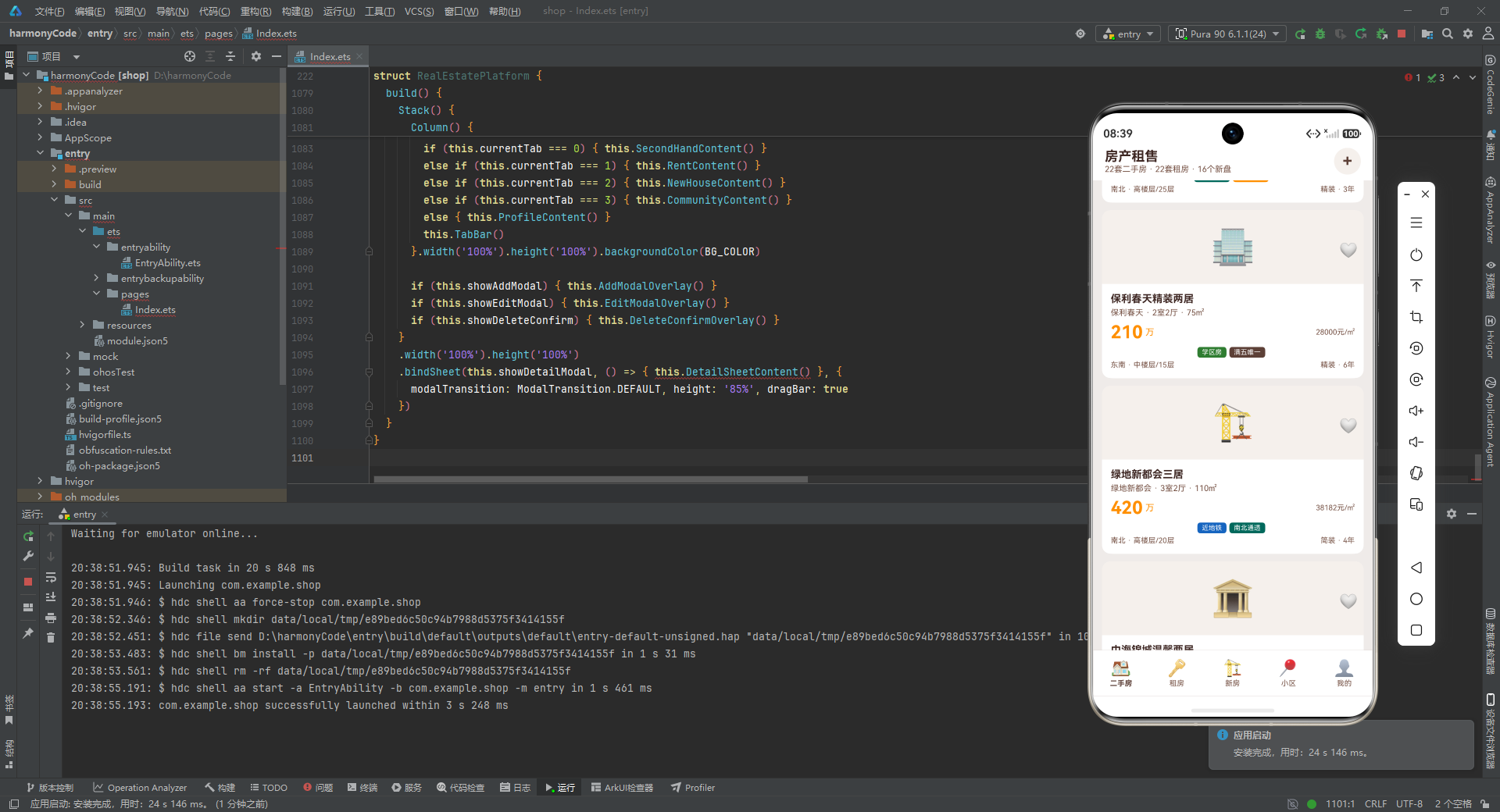
详情弹层使用 bindSheet:这是一个特殊的模态展示方式,通过 bindSheet 绑定到 Stack 上。第一个参数是控制显隐的布尔状态(showDetailModal),第二个参数是内容构建器的箭头函数,第三个参数是配置对象:modalTransition 设置过渡动画为默认效果,height 设置弹层高度为屏幕的 85%,dragBar 启用拖拽条,允许用户通过下拉手势关闭弹层。
bindSheet 与其他三个弹层的实现方式不同——其他弹层是通过条件渲染直接在 Stack 中叠加,而 bindSheet 是 ArkUI 框架提供的原生底部弹层组件,自带手势支持和动画效果。这种混合使用两种弹层实现方式的设计,可能是为了利用 bindSheet 的拖拽关闭特性来提升详情页的用户体验。
十二、关键特性对比总结
为了帮助读者更直观地理解这个房产租售平台的各项特性,下面通过一个对比表格对四大核心模块进行总结:
| 特性维度 | 二手房模块 | 租房模块 | 新房模块 | 小区模块 |
|---|---|---|---|---|
| 数据条数 | 22 条 | 22 条 | 16 条 | 16 条 |
| 核心价格指标 | 总价(万元)+ 单价(元/㎡) | 月租金(元/月) | 均价(元/㎡) | 物业费(元/㎡/月) |
| 筛选维度数量 | 9 个 | 8 个 | 6 个 | 6 个 |
| 筛选类型 | 标签 + 面积区间 + 价格区间 | 付款方式 + 标签 + 价格区间 | 物业类型 + 销售状态 | 标签 + 数值阈值 |
| 卡片右上角元素 | 收藏图标 | 收藏图标 | 销售状态标签 | 评分标签 |
| 是否支持收藏 | 是 | 是 | 否 | 否 |
| 是否支持增删改 | 是(完整 CRUD) | 否 | 否 | 否 |
| 卡片信息密度 | 中(5 行信息) | 中(5 行信息) | 中(5 行信息) | 高(含四列统计数据) |
| 特有功能 | 房价走势图 + 房贷计算 | 付款方式展示 | 开发商与交付日期 | 绿化率与车位比 |
| 详情页内容 | 户型图 + 配套 + 费用 + 经纪人 | - | - | - |
此外,从技术实现角度,以下是各核心特性的对比:
| 技术特性 | 实现方式 | 优势分析 |
|---|---|---|
| 状态管理 | @State 装饰器 |
响应式自动更新,无需手动操作 DOM |
| UI 复用 | @Builder 装饰器 |
模块化拆分,减少重复代码 |
| 数据更新 | 不可变数据模式(创建新数组替换) | 确保 @State 检测到变化,触发精确重渲染 |
| 列表渲染 | ForEach + 键值函数 |
高效 diff,仅更新变化的项 |
| 条件渲染 | if-else 链 |
简单直观的标签页切换 |
| 弹层实现 | 条件渲染 + bindSheet 混合 |
兼顾自定义弹层和原生手势体验 |
| 图表实现 | 纯 ArkUI 组件(Column + 动态高度) | 零依赖,轻量高效 |
| 表单输入 | TextInput + onChange 回调 |
实时同步表单数据到状态 |
| 数据筛选 | 索引驱动的 if-else 链 |
逻辑集中,易于理解和修改 |
| 颜色管理 | 集中式常量定义 + 语义化命名 | 统一视觉风格,便于主题切换 |
十三、总结与展望
技术亮点回顾
通过对这份房产租售平台源码的逐段深度解析,我们可以总结出以下几个值得学习的技术亮点:
第一,严谨的类型系统设计。 应用通过 10 个 interface 定义了完整的数据模型,从核心的房源数据到辅助的 UI 配置数据,每一个变量、参数和返回值都有明确的类型约束。这种类型先行的设计理念,在编译阶段就能发现大部分类型错误,大幅提升了代码的可靠性和可维护性。
第二,声明式 UI 的深度运用。 通过 @Builder 装饰器,应用将复杂的 UI 拆分为 15 个可复用的构建器,从最小的 TagChip 标签芯片到最复杂的 DetailSheetContent 详情弹层,每个构建器职责单一、接口清晰。这种组件化的开发模式使得 UI 代码的可读性和可复用性都得到了显著提升。
第三,响应式状态管理的最佳实践。 应用定义了 18 个 @State 变量,覆盖了导航、列表、筛选、弹层、表单等所有交互状态。特别是在数据更新方面,始终坚持使用不可变数据模式——创建新数组而非直接修改元素属性,确保了状态变化的可预测性和 UI 更新的及时性。
第四,业务逻辑与 UI 的清晰分离。 主组件中的 20 多个辅助方法纯粹处理业务逻辑(筛选、计算、CRUD),不包含任何 UI 代码。而 UI 构建器中虽然调用了这些方法,但本身不包含复杂的业务逻辑。这种分离使得代码的职责清晰,便于独立测试和维护。
第五,专业的房产领域建模。 应用的数据模型和计算方法体现了对房产领域的深入理解。从"满五唯一"这样的专业术语,到等额本息月供计算公式,再到首付、契税、中介费等完整的购房成本结构,应用不仅是一个技术演示,更是一个具有实际业务价值的房产工具。
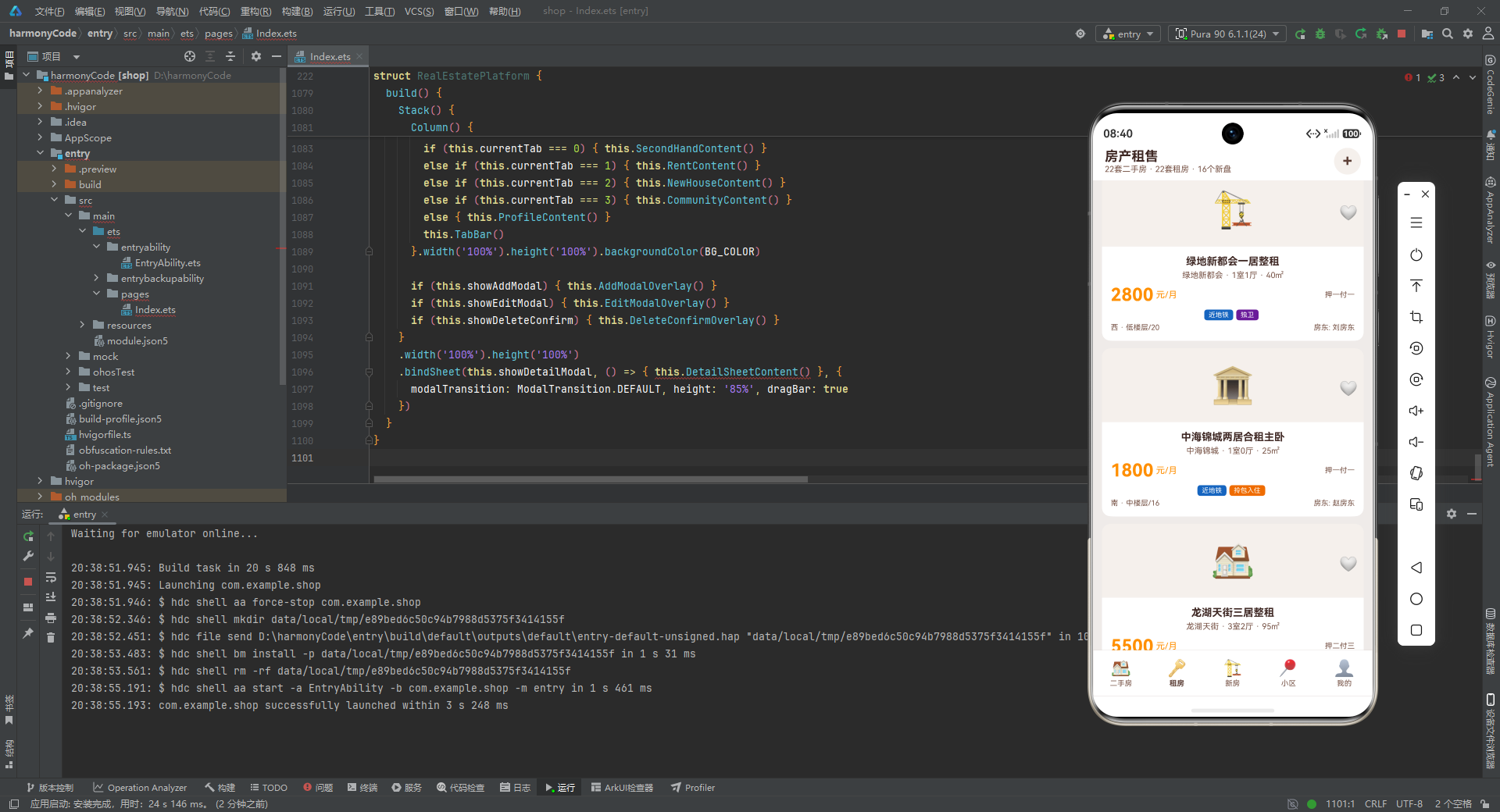
安装DevEco Studio程序

选择目标安装目录:

设置环境变量,但是需要重启一下:

新建一个空白模板:

设置API为24的模板项目:
初始化项目,自动下载相关依赖:

完整代码:
// ============================================================
// 房产租售平台 Real Estate Platform
// ArkTS HarmonyOS Application
// ============================================================
// ==================== Interfaces ====================
interface SecondHouseData {
id: number; title: string; community: string; area: number; price: number; unitPrice: number
layout: string; orientation: string; floor: string; totalFloor: number; decoration: string
age: number; tags: string[]; image: string; agent: string; phone: string; isFavorite: boolean
}
interface RentData {
id: number; title: string; community: string; area: number; rentPrice: number; payType: string
layout: string; orientation: string; floor: string; tags: string[]; image: string
landlord: string; isFavorite: boolean
}
interface NewHouseData {
id: number; name: string; developer: string; location: string; avgPrice: number
propertyType: string; totalUnits: number; openingDate: string; deliveryDate: string
tags: string[]; image: string; salesStatus: string
}
interface CommunityData {
id: number; name: string; area: number; buildYear: number; totalBuildings: number
totalHouseholds: number; greenRate: number; parkingRatio: string; propertyFee: number
location: string; rating: number; tags: string[]
}
interface PriceTrendData { month: string; avgPrice: number }
interface FilterTag { label: string; value: string }
interface TabItem { title: string; icon: string }
interface PropertyTypeOption { type: string; icon: string }
interface AmenityItem { name: string; distance: string; icon: string }
interface MenuOption { icon: string; title: string; subtitle: string }
// ==================== Color Constants ====================
const PRIMARY_COLOR: string = '#5D4037'
const ACCENT_COLOR: string = '#8D6E63'
const BG_COLOR: string = '#EFEBE9'
const CARD_COLOR: string = '#FFFFFF'
const PRICE_COLOR: string = '#FF8F00'
const SCHOOL_COLOR: string = '#2E7D32'
const METRO_COLOR: string = '#1565C0'
const TEXT_DARK: string = '#3E2723'
const TEXT_SECONDARY: string = '#795548'
const DANGER_COLOR: string = '#C62828'
const BORDER_COLOR: string = '#D7CCC8'
const IMG_BG_COLOR: string = '#F5F0EB'
// ==================== Data Functions ====================
function getSecondHandList(): SecondHouseData[] {
return [
{ id: 1, title: '南北通透精装三居', community: '阳光花园', area: 89, price: 320, unitPrice: 35955, layout: '3室2厅', orientation: '南北', floor: '中楼层', totalFloor: 18, decoration: '精装', age: 5, tags: ['学区房', '近地铁', '随时看房'], image: '🏠', agent: '张经理', phone: '138****8888', isFavorite: false },
{ id: 2, title: '翠湖边全明两居', community: '翠湖天地', area: 65, price: 280, unitPrice: 43077, layout: '2室1厅', orientation: '南', floor: '低楼层', totalFloor: 12, decoration: '精装', age: 8, tags: ['满五唯一', '近地铁'], image: '🏡', agent: '李中介', phone: '139****6666', isFavorite: false },
{ id: 3, title: '万科城豪装四居', community: '万科城', area: 145, price: 580, unitPrice: 40000, layout: '4室2厅', orientation: '南北', floor: '高楼层', totalFloor: 25, decoration: '精装', age: 3, tags: ['南北通透', '随时看房'], image: '🏘️', agent: '王经理', phone: '137****7777', isFavorite: false },
{ id: 4, title: '保利春天精装两居', community: '保利春天', area: 75, price: 210, unitPrice: 28000, layout: '2室2厅', orientation: '东南', floor: '中楼层', totalFloor: 15, decoration: '精装', age: 6, tags: ['学区房', '满五唯一'], image: '🏢', agent: '刘中介', phone: '136****5555', isFavorite: false },
{ id: 5, title: '绿地新都会三居', community: '绿地新都会', area: 110, price: 420, unitPrice: 38182, layout: '3室2厅', orientation: '南北', floor: '高楼层', totalFloor: 20, decoration: '简装', age: 4, tags: ['近地铁', '南北通透'], image: '🏗️', agent: '陈经理', phone: '135****4444', isFavorite: false },
{ id: 6, title: '中海锦城温馨两居', community: '中海锦城', area: 68, price: 195, unitPrice: 28676, layout: '2室1厅', orientation: '南', floor: '中楼层', totalFloor: 16, decoration: '精装', age: 7, tags: ['随时看房', '满五唯一'], image: '🏛️', agent: '赵中介', phone: '134****3333', isFavorite: false },
{ id: 7, title: '龙湖天街精装三居', community: '龙湖天街', area: 95, price: 365, unitPrice: 38421, layout: '3室2厅', orientation: '南北', floor: '低楼层', totalFloor: 18, decoration: '精装', age: 5, tags: ['学区房', '近地铁'], image: '🏠', agent: '孙经理', phone: '133****2222', isFavorite: false },
{ id: 8, title: '金地格林南北三居', community: '金地格林', area: 120, price: 480, unitPrice: 40000, layout: '3室2厅', orientation: '南北', floor: '高楼层', totalFloor: 22, decoration: '精装', age: 3, tags: ['南北通透', '随时看房'], image: '🏡', agent: '周中介', phone: '132****1111', isFavorite: false },
{ id: 9, title: '华润橡树湾大平层', community: '华润橡树湾', area: 160, price: 720, unitPrice: 45000, layout: '4室2厅', orientation: '南北', floor: '高楼层', totalFloor: 30, decoration: '精装', age: 2, tags: ['近地铁', '南北通透'], image: '🏘️', agent: '吴经理', phone: '131****0000', isFavorite: false },
{ id: 10, title: '招商海德江景房', community: '招商海德', area: 135, price: 650, unitPrice: 48148, layout: '3室2厅', orientation: '南', floor: '高楼层', totalFloor: 28, decoration: '精装', age: 4, tags: ['随时看房', '满五唯一'], image: '🏢', agent: '郑中介', phone: '130****9999', isFavorite: false },
{ id: 11, title: '融创文旅城三居', community: '融创文旅城', area: 88, price: 295, unitPrice: 33523, layout: '3室2厅', orientation: '东南', floor: '中楼层', totalFloor: 17, decoration: '简装', age: 6, tags: ['学区房', '近地铁'], image: '🏗️', agent: '张中介', phone: '138****1234', isFavorite: false },
{ id: 12, title: '碧桂园精装两居', community: '碧桂园', area: 70, price: 188, unitPrice: 26857, layout: '2室1厅', orientation: '南', floor: '低楼层', totalFloor: 11, decoration: '精装', age: 9, tags: ['满五唯一', '随时看房'], image: '🏛️', agent: '李经理', phone: '139****5678', isFavorite: false },
{ id: 13, title: '世茂滨江豪华四居', community: '世茂滨江', area: 180, price: 980, unitPrice: 54444, layout: '4室2厅', orientation: '南北', floor: '高楼层', totalFloor: 35, decoration: '精装', age: 3, tags: ['南北通透', '近地铁'], image: '🏠', agent: '王中介', phone: '137****9012', isFavorite: false },
{ id: 14, title: '绿城桂花园三居', community: '绿城桂花园', area: 100, price: 350, unitPrice: 35000, layout: '3室2厅', orientation: '南北', floor: '中楼层', totalFloor: 14, decoration: '精装', age: 8, tags: ['学区房', '满五唯一'], image: '🏡', agent: '刘经理', phone: '136****3456', isFavorite: false },
{ id: 15, title: '仁恒置地高端三居', community: '仁恒置地', area: 125, price: 560, unitPrice: 44800, layout: '3室2厅', orientation: '南北', floor: '高楼层', totalFloor: 26, decoration: '精装', age: 2, tags: ['随时看房', '近地铁'], image: '🏘️', agent: '陈中介', phone: '135****7890', isFavorite: false },
{ id: 16, title: '中骏世界城两居', community: '中骏世界城', area: 72, price: 225, unitPrice: 31250, layout: '2室2厅', orientation: '东南', floor: '中楼层', totalFloor: 19, decoration: '简装', age: 5, tags: ['近地铁', '随时看房'], image: '🏢', agent: '赵经理', phone: '134****2345', isFavorite: false },
{ id: 17, title: '阳光花园精装一居', community: '阳光花园', area: 45, price: 135, unitPrice: 30000, layout: '1室1厅', orientation: '南', floor: '低楼层', totalFloor: 12, decoration: '精装', age: 10, tags: ['近地铁', '满五唯一'], image: '🏗️', agent: '孙中介', phone: '133****6789', isFavorite: false },
{ id: 18, title: '翠湖天地大两居', community: '翠湖天地', area: 85, price: 310, unitPrice: 36471, layout: '2室2厅', orientation: '南北', floor: '中楼层', totalFloor: 15, decoration: '精装', age: 7, tags: ['学区房', '南北通透'], image: '🏛️', agent: '周经理', phone: '132****0123', isFavorite: false },
{ id: 19, title: '万科城温馨三居', community: '万科城', area: 92, price: 345, unitPrice: 37500, layout: '3室2厅', orientation: '南', floor: '高楼层', totalFloor: 20, decoration: '精装', age: 4, tags: ['随时看房', '满五唯一'], image: '🏠', agent: '吴中介', phone: '131****4567', isFavorite: false },
{ id: 20, title: '保利春天简装三居', community: '保利春天', area: 105, price: 315, unitPrice: 30000, layout: '3室2厅', orientation: '南北', floor: '低楼层', totalFloor: 16, decoration: '简装', age: 6, tags: ['学区房', '近地铁'], image: '🏡', agent: '郑经理', phone: '130****8901', isFavorite: false },
{ id: 21, title: '绿地新都会豪华四居', community: '绿地新都会', area: 155, price: 620, unitPrice: 40000, layout: '4室2厅', orientation: '南北', floor: '高楼层', totalFloor: 24, decoration: '精装', age: 3, tags: ['南北通透', '随时看房'], image: '🏘️', agent: '张经理', phone: '138****3456', isFavorite: false },
{ id: 22, title: '中海锦城紧凑两居', community: '中海锦城', area: 60, price: 175, unitPrice: 29167, layout: '2室1厅', orientation: '南', floor: '中楼层', totalFloor: 14, decoration: '简装', age: 8, tags: ['满五唯一', '近地铁'], image: '🏢', agent: '李中介', phone: '139****7890', isFavorite: false }
]
}
function getRentList(): RentData[] {
return [
{ id: 1, title: '阳光花园精装两居整租', community: '阳光花园', area: 75, rentPrice: 4500, payType: '押一付三', layout: '2室1厅', orientation: '南', floor: '中楼层/18', tags: ['精装', '近地铁', '拎包入住'], image: '🏠', landlord: '王房东', isFavorite: false },
{ id: 2, title: '翠湖天地一居合租', community: '翠湖天地', area: 30, rentPrice: 2200, payType: '押一付一', layout: '1室0厅', orientation: '东', floor: '高楼层/12', tags: ['近地铁', '独卫'], image: '🏡', landlord: '李房东', isFavorite: false },
{ id: 3, title: '万科城三居整租', community: '万科城', area: 110, rentPrice: 6800, payType: '押一付三', layout: '3室2厅', orientation: '南北', floor: '高楼层/25', tags: ['精装', '南北通透'], image: '🏘️', landlord: '张房东', isFavorite: false },
{ id: 4, title: '保利春天两居整租', community: '保利春天', area: 65, rentPrice: 3800, payType: '押一付三', layout: '2室1厅', orientation: '南', floor: '中楼层/15', tags: ['精装', '拎包入住'], image: '🏢', landlord: '陈房东', isFavorite: false },
{ id: 5, title: '绿地新都会一居整租', community: '绿地新都会', area: 40, rentPrice: 2800, payType: '押一付一', layout: '1室1厅', orientation: '西', floor: '低楼层/20', tags: ['近地铁', '独卫'], image: '🏗️', landlord: '刘房东', isFavorite: false },
{ id: 6, title: '中海锦城两居合租主卧', community: '中海锦城', area: 25, rentPrice: 1800, payType: '押一付一', layout: '1室0厅', orientation: '南', floor: '中楼层/16', tags: ['近地铁', '拎包入住'], image: '🏛️', landlord: '赵房东', isFavorite: false },
{ id: 7, title: '龙湖天街三居整租', community: '龙湖天街', area: 95, rentPrice: 5500, payType: '押二付三', layout: '3室2厅', orientation: '南北', floor: '低楼层/18', tags: ['精装', '南北通透'], image: '🏠', landlord: '孙房东', isFavorite: false },
{ id: 8, title: '金地格林两居整租', community: '金地格林', area: 80, rentPrice: 4200, payType: '押一付三', layout: '2室2厅', orientation: '南', floor: '高楼层/22', tags: ['精装', '近地铁'], image: '🏡', landlord: '周房东', isFavorite: false },
{ id: 9, title: '华润橡树湾四居整租', community: '华润橡树湾', area: 145, rentPrice: 8500, payType: '押二付三', layout: '4室2厅', orientation: '南北', floor: '高楼层/30', tags: ['精装', '南北通透'], image: '🏘️', landlord: '吴房东', isFavorite: false },
{ id: 10, title: '招商海德三居整租', community: '招商海德', area: 120, rentPrice: 7200, payType: '押一付三', layout: '3室2厅', orientation: '南', floor: '高楼层/28', tags: ['精装', '拎包入住'], image: '🏢', landlord: '郑房东', isFavorite: false },
{ id: 11, title: '融创文旅城两居整租', community: '融创文旅城', area: 70, rentPrice: 3600, payType: '押一付一', layout: '2室1厅', orientation: '东南', floor: '中楼层/17', tags: ['近地铁', '拎包入住'], image: '🏗️', landlord: '张房东', isFavorite: false },
{ id: 12, title: '碧桂园一居整租', community: '碧桂园', area: 38, rentPrice: 2500, payType: '押一付一', layout: '1室1厅', orientation: '南', floor: '低楼层/11', tags: ['精装', '独卫'], image: '🏛️', landlord: '李房东', isFavorite: false },
{ id: 13, title: '世茂滨江豪华四居', community: '世茂滨江', area: 160, rentPrice: 12000, payType: '押二付三', layout: '4室2厅', orientation: '南北', floor: '高楼层/35', tags: ['精装', '南北通透'], image: '🏠', landlord: '王房东', isFavorite: false },
{ id: 14, title: '绿城桂花园三居整租', community: '绿城桂花园', area: 90, rentPrice: 4800, payType: '押一付三', layout: '3室2厅', orientation: '南北', floor: '中楼层/14', tags: ['精装', '近地铁'], image: '🏡', landlord: '刘房东', isFavorite: false },
{ id: 15, title: '仁恒置地两居整租', community: '仁恒置地', area: 85, rentPrice: 5200, payType: '押一付三', layout: '2室2厅', orientation: '南', floor: '高楼层/26', tags: ['精装', '拎包入住'], image: '🏘️', landlord: '陈房东', isFavorite: false },
{ id: 16, title: '中骏世界城一居整租', community: '中骏世界城', area: 42, rentPrice: 3000, payType: '押一付一', layout: '1室1厅', orientation: '东南', floor: '中楼层/19', tags: ['近地铁', '独卫'], image: '🏢', landlord: '赵房东', isFavorite: false },
{ id: 17, title: '阳光花园三居整租', community: '阳光花园', area: 100, rentPrice: 5800, payType: '押一付三', layout: '3室2厅', orientation: '南北', floor: '中楼层/18', tags: ['精装', '南北通透'], image: '🏗️', landlord: '孙房东', isFavorite: false },
{ id: 18, title: '翠湖天地两居合租次卧', community: '翠湖天地', area: 20, rentPrice: 1500, payType: '押一付一', layout: '1室0厅', orientation: '北', floor: '中楼层/15', tags: ['近地铁', '拎包入住'], image: '🏛️', landlord: '周房东', isFavorite: false },
{ id: 19, title: '万科城一居整租', community: '万科城', area: 45, rentPrice: 3200, payType: '押一付一', layout: '1室1厅', orientation: '南', floor: '高楼层/20', tags: ['精装', '独卫'], image: '🏠', landlord: '吴房东', isFavorite: false },
{ id: 20, title: '保利春天三居整租', community: '保利春天', area: 105, rentPrice: 5000, payType: '押一付三', layout: '3室2厅', orientation: '南北', floor: '低楼层/16', tags: ['精装', '近地铁'], image: '🏡', landlord: '郑房东', isFavorite: false },
{ id: 21, title: '绿地新都会两居整租', community: '绿地新都会', area: 78, rentPrice: 4000, payType: '押一付三', layout: '2室1厅', orientation: '南', floor: '高楼层/20', tags: ['拎包入住', '近地铁'], image: '🏘️', landlord: '张房东', isFavorite: false },
{ id: 22, title: '中海锦城一居整租', community: '中海锦城', area: 35, rentPrice: 2300, payType: '押一付一', layout: '1室1厅', orientation: '东', floor: '中楼层/14', tags: ['精装', '独卫'], image: '🏢', landlord: '李房东', isFavorite: false }
]
}
function getNewHouseList(): NewHouseData[] {
return [
{ id: 1, name: '万科翡翠天际', developer: '万科地产', location: '城东新区', avgPrice: 28000, propertyType: '住宅', totalUnits: 1200, openingDate: '2024-06', deliveryDate: '2026-06', tags: ['品牌房企', '近地铁'], image: '🏗️', salesStatus: '在售' },
{ id: 2, name: '保利天悦', developer: '保利发展', location: '城南核心', avgPrice: 32000, propertyType: '住宅', totalUnits: 800, openingDate: '2024-03', deliveryDate: '2025-12', tags: ['品牌房企', '学区房'], image: '🏠', salesStatus: '在售' },
{ id: 3, name: '绿地云都会', developer: '绿地集团', location: '城西新城', avgPrice: 25000, propertyType: '公寓', totalUnits: 1500, openingDate: '2024-09', deliveryDate: '2026-09', tags: ['近地铁', '精装交付'], image: '🏢', salesStatus: '待开' },
{ id: 4, name: '中海御景华府', developer: '中海地产', location: '城北新区', avgPrice: 35000, propertyType: '住宅', totalUnits: 600, openingDate: '2024-05', deliveryDate: '2026-05', tags: ['品牌房企', '南北通透'], image: '🏘️', salesStatus: '在售' },
{ id: 5, name: '龙湖光年', developer: '龙湖集团', location: '城中心', avgPrice: 38000, propertyType: '住宅', totalUnits: 500, openingDate: '2024-01', deliveryDate: '2025-10', tags: ['品牌房企', '近地铁'], image: '🏗️', salesStatus: '在售' },
{ id: 6, name: '金地格林云境', developer: '金地集团', location: '城东新区', avgPrice: 26000, propertyType: '住宅', totalUnits: 900, openingDate: '2024-08', deliveryDate: '2026-08', tags: ['学区房', '精装交付'], image: '🏠', salesStatus: '待开' },
{ id: 7, name: '华润昆仑御', developer: '华润置地', location: '城南核心', avgPrice: 42000, propertyType: '住宅', totalUnits: 400, openingDate: '2024-04', deliveryDate: '2026-04', tags: ['品牌房企', '南北通透'], image: '🏢', salesStatus: '在售' },
{ id: 8, name: '招商公园1872', developer: '招商蛇口', location: '城西新城', avgPrice: 29000, propertyType: '住宅', totalUnits: 1100, openingDate: '2024-07', deliveryDate: '2026-07', tags: ['近地铁', '学区房'], image: '🏘️', salesStatus: '在售' },
{ id: 9, name: '融创文旅城', developer: '融创中国', location: '城北新区', avgPrice: 24000, propertyType: '公寓', totalUnits: 2000, openingDate: '2024-10', deliveryDate: '2027-01', tags: ['品牌房企', '精装交付'], image: '🏗️', salesStatus: '待开' },
{ id: 10, name: '碧桂园凤凰城', developer: '碧桂园', location: '城南核心', avgPrice: 22000, propertyType: '住宅', totalUnits: 1800, openingDate: '2024-02', deliveryDate: '2025-12', tags: ['学区房', '近地铁'], image: '🏠', salesStatus: '在售' },
{ id: 11, name: '世茂璀璨滨江', developer: '世茂集团', location: '城中心', avgPrice: 45000, propertyType: '住宅', totalUnits: 300, openingDate: '2024-05', deliveryDate: '2026-06', tags: ['品牌房企', '南北通透'], image: '🏢', salesStatus: '在售' },
{ id: 12, name: '绿城桂语江南', developer: '绿城中国', location: '城东新区', avgPrice: 31000, propertyType: '别墅', totalUnits: 200, openingDate: '2024-09', deliveryDate: '2026-12', tags: ['品牌房企', '南北通透'], image: '🏘️', salesStatus: '待开' },
{ id: 13, name: '仁恒公园世纪', developer: '仁恒置地', location: '城中心', avgPrice: 48000, propertyType: '住宅', totalUnits: 350, openingDate: '2024-03', deliveryDate: '2026-03', tags: ['品牌房企', '近地铁'], image: '🏗️', salesStatus: '在售' },
{ id: 14, name: '中骏世界城', developer: '中骏集团', location: '城西新城', avgPrice: 27000, propertyType: '公寓', totalUnits: 1300, openingDate: '2024-08', deliveryDate: '2026-08', tags: ['近地铁', '精装交付'], image: '🏠', salesStatus: '在售' },
{ id: 15, name: '保利和光逸境', developer: '保利发展', location: '城北新区', avgPrice: 33000, propertyType: '别墅', totalUnits: 150, openingDate: '2024-11', deliveryDate: '2027-06', tags: ['品牌房企', '南北通透'], image: '🏢', salesStatus: '待开' },
{ id: 16, name: '万科未来城', developer: '万科地产', location: '城南核心', avgPrice: 30000, propertyType: '住宅', totalUnits: 1000, openingDate: '2024-01', deliveryDate: '2025-12', tags: ['品牌房企', '学区房'], image: '🏘️', salesStatus: '售罄' }
]
}
function getCommunityList(): CommunityData[] {
return [
{ id: 1, name: '阳光花园', area: 85000, buildYear: 2018, totalBuildings: 12, totalHouseholds: 1200, greenRate: 35, parkingRatio: '1:1.2', propertyFee: 2.5, location: '城东新区', rating: 4.8, tags: ['学区房', '近地铁'] },
{ id: 2, name: '翠湖天地', area: 60000, buildYear: 2015, totalBuildings: 8, totalHouseholds: 800, greenRate: 40, parkingRatio: '1:1.0', propertyFee: 3.2, location: '城中心', rating: 4.6, tags: ['近地铁', '高绿化'] },
{ id: 3, name: '万科城', area: 120000, buildYear: 2020, totalBuildings: 20, totalHouseholds: 2000, greenRate: 38, parkingRatio: '1:1.5', propertyFee: 2.8, location: '城南核心', rating: 4.9, tags: ['学区房', '高绿化'] },
{ id: 4, name: '保利春天', area: 70000, buildYear: 2017, totalBuildings: 10, totalHouseholds: 1000, greenRate: 32, parkingRatio: '1:1.1', propertyFee: 2.0, location: '城西新城', rating: 4.5, tags: ['学区房', '近地铁'] },
{ id: 5, name: '绿地新都会', area: 95000, buildYear: 2019, totalBuildings: 15, totalHouseholds: 1500, greenRate: 36, parkingRatio: '1:1.3', propertyFee: 2.6, location: '城东新区', rating: 4.7, tags: ['近地铁', '高绿化'] },
{ id: 6, name: '中海锦城', area: 80000, buildYear: 2016, totalBuildings: 11, totalHouseholds: 1100, greenRate: 30, parkingRatio: '1:1.0', propertyFee: 1.8, location: '城北新区', rating: 4.4, tags: ['近地铁', '低物业费'] },
{ id: 7, name: '龙湖天街', area: 100000, buildYear: 2021, totalBuildings: 16, totalHouseholds: 1600, greenRate: 42, parkingRatio: '1:1.5', propertyFee: 3.0, location: '城中心', rating: 4.9, tags: ['学区房', '高绿化'] },
{ id: 8, name: '金地格林', area: 75000, buildYear: 2018, totalBuildings: 9, totalHouseholds: 900, greenRate: 34, parkingRatio: '1:1.2', propertyFee: 2.3, location: '城南核心', rating: 4.6, tags: ['学区房', '近地铁'] },
{ id: 9, name: '华润橡树湾', area: 110000, buildYear: 2020, totalBuildings: 18, totalHouseholds: 1800, greenRate: 45, parkingRatio: '1:1.5', propertyFee: 3.5, location: '城东新区', rating: 4.9, tags: ['高绿化', '近地铁'] },
{ id: 10, name: '招商海德', area: 90000, buildYear: 2019, totalBuildings: 14, totalHouseholds: 1400, greenRate: 38, parkingRatio: '1:1.3', propertyFee: 2.8, location: '城中心', rating: 4.7, tags: ['学区房', '高绿化'] },
{ id: 11, name: '融创文旅城', area: 130000, buildYear: 2021, totalBuildings: 22, totalHouseholds: 2200, greenRate: 40, parkingRatio: '1:1.4', propertyFee: 2.9, location: '城北新区', rating: 4.8, tags: ['近地铁', '高绿化'] },
{ id: 12, name: '碧桂园', area: 65000, buildYear: 2015, totalBuildings: 7, totalHouseholds: 700, greenRate: 28, parkingRatio: '1:0.8', propertyFee: 1.5, location: '城西新城', rating: 4.3, tags: ['低物业费', '近地铁'] },
{ id: 13, name: '世茂滨江', area: 105000, buildYear: 2020, totalBuildings: 17, totalHouseholds: 1700, greenRate: 42, parkingRatio: '1:1.5', propertyFee: 4.0, location: '城中心', rating: 4.9, tags: ['高绿化', '学区房'] },
{ id: 14, name: '绿城桂花园', area: 72000, buildYear: 2017, totalBuildings: 10, totalHouseholds: 1000, greenRate: 36, parkingRatio: '1:1.1', propertyFee: 2.2, location: '城南核心', rating: 4.6, tags: ['学区房', '近地铁'] },
{ id: 15, name: '仁恒置地', area: 88000, buildYear: 2021, totalBuildings: 13, totalHouseholds: 1300, greenRate: 43, parkingRatio: '1:1.4', propertyFee: 3.8, location: '城中心', rating: 4.9, tags: ['高绿化', '学区房'] },
{ id: 16, name: '中骏世界城', area: 78000, buildYear: 2019, totalBuildings: 12, totalHouseholds: 1200, greenRate: 33, parkingRatio: '1:1.2', propertyFee: 2.4, location: '城西新城', rating: 4.5, tags: ['近地铁', '低物业费'] }
]
}
function getPriceTrend(): PriceTrendData[] {
return [
{ month: '2月', avgPrice: 32500 }, { month: '3月', avgPrice: 33800 }, { month: '4月', avgPrice: 33100 },
{ month: '5月', avgPrice: 35200 }, { month: '6月', avgPrice: 36100 }, { month: '7月', avgPrice: 35400 },
{ month: '8月', avgPrice: 37200 }
]
}
function getHouseFilterTags(): FilterTag[] {
return [
{ label: '全部', value: 'all' }, { label: '学区房', value: 'school' }, { label: '近地铁', value: 'metro' },
{ label: '随时看房', value: 'anytime' }, { label: '满五唯一', value: 'fiveyear' }, { label: '90㎡以下', value: 'area-s' },
{ label: '90-120㎡', value: 'area-m' }, { label: '200万以下', value: 'price-s' }, { label: '200-400万', value: 'price-m' }
]
}
function getRentFilterTags(): FilterTag[] {
return [
{ label: '全部', value: 'all' }, { label: '押一付一', value: 'pay1' }, { label: '近地铁', value: 'metro' },
{ label: '拎包入住', value: 'ready' }, { label: '独卫', value: 'bathroom' }, { label: '精装', value: 'decoration' },
{ label: '3000以下', value: 'price-s' }, { label: '3000-5000', value: 'price-m' }
]
}
function getNewHouseFilterTags(): FilterTag[] {
return [
{ label: '全部', value: 'all' }, { label: '住宅', value: 'residential' }, { label: '公寓', value: 'apartment' },
{ label: '别墅', value: 'villa' }, { label: '在售', value: 'onsale' }, { label: '待开', value: 'pending' }
]
}
function getCommunityFilterTags(): FilterTag[] {
return [
{ label: '全部', value: 'all' }, { label: '学区房', value: 'school' }, { label: '近地铁', value: 'metro' },
{ label: '高绿化', value: 'green' }, { label: '低物业费', value: 'lowfee' }, { label: '新小区', value: 'new' }
]
}
function getTabs(): TabItem[] {
return [
{ title: '二手房', icon: '🏠' }, { title: '租房', icon: '🔑' }, { title: '新房', icon: '🏗️' },
{ title: '小区', icon: '📍' }, { title: '我的', icon: '👤' }
]
}
function getPropertyTypes(): PropertyTypeOption[] {
return [{ type: '二手房', icon: '🏠' }, { type: '租房', icon: '🔑' }, { type: '新房', icon: '🏗️' }]
}
function getAmenities(): AmenityItem[] {
return [
{ name: '实验小学', distance: '300m', icon: '🏫' }, { name: '2号线阳光路站', distance: '500m', icon: '🚇' },
{ name: '人民医院', distance: '1.2km', icon: '🏥' }, { name: '沃尔玛超市', distance: '600m', icon: '🛒' },
{ name: '工商银行', distance: '200m', icon: '🏦' }, { name: '万达影城', distance: '1.5km', icon: '🎬' },
{ name: '健身房', distance: '400m', icon: '🏋️' }, { name: '星巴克', distance: '800m', icon: '☕' }
]
}
function getMenuOptions(): MenuOption[] {
return [
{ icon: '📋', title: '我的房源', subtitle: '管理已发布房源' }, { icon: '⭐', title: '我的收藏', subtitle: '收藏的房源' },
{ icon: '🕐', title: '浏览历史', subtitle: '最近查看记录' }, { icon: '💰', title: '房贷计算器', subtitle: '计算月供与首付' },
{ icon: '🔔', title: '价格预警', subtitle: '房价变动提醒' }, { icon: '⚙️', title: '设置', subtitle: '通用设置' }
]
}
Column().layoutWeight(1)
Text(item.isFavorite ? '❤️' : '🤍').fontSize(20).onClick(() => { this.toggleFavorite(item.id, 1) })
}.width('100%').padding({ left: 8, right: 8, top: 8 }).justifyContent(FlexAlign.End)
}.width('100%').height(100).backgroundColor(IMG_BG_COLOR)
Column() {
Text(item.title).fontSize(14).fontWeight(FontWeight.Bold).fontColor(TEXT_DARK).maxLines(1).textOverflow({ overflow: TextOverflow.Ellipsis })
Row() {
Text(item.community).fontSize(11).fontColor(TEXT_SECONDARY)
Text(' · ').fontSize(11).fontColor(TEXT_SECONDARY)
Text(item.layout).fontSize(11).fontColor(TEXT_SECONDARY)
Text(' · ').fontSize(11).fontColor(TEXT_SECONDARY)
Text(item.area.toString() + '㎡').fontSize(11).fontColor(TEXT_SECONDARY)
}.margin({ top: 4 })
Row() {
Text(item.rentPrice.toString()).fontSize(24).fontWeight(FontWeight.Bold).fontColor(PRICE_COLOR)
Text(' 元/月').fontSize(12).fontColor(PRICE_COLOR)
Column().layoutWeight(1)
Text(item.payType).fontSize(10).fontColor(TEXT_SECONDARY)
}.margin({ top: 6 })
Scroll() {
Row() { ForEach(item.tags, (tag: string) => { this.TagChip(tag) }, (tag: string) => tag) }
}.scrollable(ScrollDirection.Horizontal).scrollBar(BarState.Off).width('100%').margin({ top: 6 })
Row() {
Text(item.orientation + ' · ' + item.floor).fontSize(10).fontColor(TEXT_SECONDARY)
Column().layoutWeight(1)
Text('房东: ' + item.landlord).fontSize(10).fontColor(TEXT_SECONDARY)
}.margin({ top: 4 })
}.padding(12)
}.backgroundColor(CARD_COLOR).borderRadius(12).clip(true).onClick(() => { this.openDetail(item.id, 1) })
}
@Builder
NewHouseCard(item: NewHouseData) {
Column() {
Stack() {
Text(item.image).fontSize(48)
Row() {
Column().layoutWeight(1)
Text(item.salesStatus).fontSize(9).fontColor(CARD_COLOR).padding({ left: 6, right: 6, top: 2, bottom: 2 }).borderRadius(4)
.backgroundColor(item.salesStatus === '在售' ? SCHOOL_COLOR : item.salesStatus === '待开' ? PRICE_COLOR : TEXT_SECONDARY)
}.width('100%').padding({ left: 8, right: 8, top: 8 }).justifyContent(FlexAlign.End)
}.width('100%').height(100).backgroundColor(IMG_BG_COLOR)
Column() {
Text(item.name).fontSize(14).fontWeight(FontWeight.Bold).fontColor(TEXT_DARK).maxLines(1).textOverflow({ overflow: TextOverflow.Ellipsis })
Row() {
Text(item.developer).fontSize(11).fontColor(TEXT_SECONDARY)
Text(' · ').fontSize(11).fontColor(TEXT_SECONDARY)
Text(item.propertyType).fontSize(11).fontColor(TEXT_SECONDARY)
}.margin({ top: 4 })
Row() {
Text(item.avgPrice.toString()).fontSize(24).fontWeight(FontWeight.Bold).fontColor(PRICE_COLOR)
Text(' 元/㎡').fontSize(12).fontColor(PRICE_COLOR)
Column().layoutWeight(1)
Text(item.totalUnits.toString() + '套').fontSize(10).fontColor(TEXT_SECONDARY)
}.margin({ top: 6 })
Scroll() {
Row() { ForEach(item.tags, (tag: string) => { this.TagChip(tag) }, (tag: string) => tag) }
}.scrollable(ScrollDirection.Horizontal).scrollBar(BarState.Off).width('100%').margin({ top: 6 })
Row() {
Text('📍 ' + item.location).fontSize(10).fontColor(TEXT_SECONDARY)
Column().layoutWeight(1)
Text('交付: ' + item.deliveryDate).fontSize(10).fontColor(TEXT_SECONDARY)
}.margin({ top: 4 })
}.padding(12)
}.backgroundColor(CARD_COLOR).borderRadius(12).clip(true).onClick(() => { this.openDetail(item.id, 2) })
}
@Builder
CommunityCard(item: CommunityData) {
Column() {
Stack() {
Text('🏘️').fontSize(48)
Row() {
Column().layoutWeight(1)
Text('⭐' + item.rating.toString()).fontSize(11).fontColor(PRICE_COLOR).fontWeight(FontWeight.Bold)
.padding({ left: 6, right: 6, top: 2, bottom: 2 }).borderRadius(8).backgroundColor(CARD_COLOR)
}.width('100%').padding({ left: 8, right: 8, top: 8 }).justifyContent(FlexAlign.End)
}.width('100%').height(100).backgroundColor(IMG_BG_COLOR)
Column() {
Text(item.name).fontSize(14).fontWeight(FontWeight.Bold).fontColor(TEXT_DARK).maxLines(1).textOverflow({ overflow: TextOverflow.Ellipsis })
Row() {
Text('📍 ' + item.location).fontSize(11).fontColor(TEXT_SECONDARY)
Column().layoutWeight(1)
Text(item.buildYear.toString() + '年建').fontSize(11).fontColor(TEXT_SECONDARY)
}.margin({ top: 4 })
Row() {
Column() {
Text(item.totalBuildings.toString()).fontSize(16).fontWeight(FontWeight.Bold).fontColor(PRIMARY_COLOR)
Text('栋').fontSize(9).fontColor(TEXT_SECONDARY)
}.alignItems(HorizontalAlign.Center)
Column() {
Text(item.totalHouseholds.toString()).fontSize(16).fontWeight(FontWeight.Bold).fontColor(PRIMARY_COLOR)
Text('户').fontSize(9).fontColor(TEXT_SECONDARY)
}.margin({ left: 16 }).alignItems(HorizontalAlign.Center)
Column() {
Text(item.greenRate.toString() + '%').fontSize(16).fontWeight(FontWeight.Bold).fontColor(SCHOOL_COLOR)
Text('绿化率').fontSize(9).fontColor(TEXT_SECONDARY)
}.margin({ left: 16 }).alignItems(HorizontalAlign.Center)
Column() {
Text(item.propertyFee.toString()).fontSize(16).fontWeight(FontWeight.Bold).fontColor(PRICE_COLOR)
Text('元/㎡物业').fontSize(9).fontColor(TEXT_SECONDARY)
}.margin({ left: 16 }).alignItems(HorizontalAlign.Center)
}.margin({ top: 8 })
Scroll() {
Row() { ForEach(item.tags, (tag: string) => { this.TagChip(tag) }, (tag: string) => tag) }
}.scrollable(ScrollDirection.Horizontal).scrollBar(BarState.Off).width('100%').margin({ top: 6 })
}.padding(12).alignItems(HorizontalAlign.Start)
}.backgroundColor(CARD_COLOR).borderRadius(12).clip(true).onClick(() => { this.openDetail(item.id, 3) })
}
@Builder
PriceChart() {
Column() {
Row() {
Text('区域均价走势').fontSize(14).fontWeight(FontWeight.Bold).fontColor(TEXT_DARK)
Column().layoutWeight(1)
Text(this.getAvgPrice().toString() + '元/㎡').fontSize(13).fontColor(PRICE_COLOR).fontWeight(FontWeight.Bold)
}.width('100%')
Row() {
ForEach(this.priceTrend, (item: PriceTrendData) => {
Column() {
Column().width(28).height(this.getBarHeight(item.avgPrice))
.backgroundColor(item.avgPrice > this.getAvgPrice() ? PRICE_COLOR : ACCENT_COLOR).borderRadius(4)
Text(item.month).fontSize(9).fontColor(TEXT_SECONDARY).margin({ top: 4 })
Text(this.formatPriceK(item.avgPrice)).fontSize(8).fontColor(TEXT_DARK)
}.layoutWeight(1).justifyContent(FlexAlign.End).height(130).alignItems(HorizontalAlign.Center)
}, (item: PriceTrendData) => item.month)
}.width('100%').margin({ top: 10 })
}.width('100%').padding(14).backgroundColor(CARD_COLOR).borderRadius(12)
}
@Builder
FilterBar(tags: FilterTag[]) {
Scroll() {
Row() {
ForEach(tags, (tag: FilterTag, index: number) => {
Text(tag.label).fontSize(12)
.fontColor(this.filterIndex === index ? CARD_COLOR : TEXT_DARK)
.padding({ left: 14, right: 14, top: 6, bottom: 6 }).borderRadius(16)
.backgroundColor(this.filterIndex === index ? PRIMARY_COLOR : CARD_COLOR)
.border({ width: 1, color: BORDER_COLOR }).margin({ right: 8 })
.onClick(() => { this.filterIndex = index })
}, (tag: FilterTag) => tag.label)
}.padding({ left: 12, right: 12 })
}.scrollable(ScrollDirection.Horizontal).scrollBar(BarState.Off).width('100%').height(44)
}
@Builder
TabBar() {
Row() {
ForEach(getTabs(), (tab: TabItem, index: number) => {
Column() {
Text(tab.icon).fontSize(22)
Text(tab.title).fontSize(10)
.fontColor(this.currentTab === index ? PRIMARY_COLOR : TEXT_SECONDARY)
.fontWeight(this.currentTab === index ? FontWeight.Bold : FontWeight.Normal).margin({ top: 2 })
}.layoutWeight(1).alignItems(HorizontalAlign.Center).justifyContent(FlexAlign.Center).height(58)
.onClick(() => { this.switchTab(index) })
}, (tab: TabItem) => tab.title)
}.width('100%').height(62).backgroundColor(CARD_COLOR).border({ width: 0.5, color: BORDER_COLOR })
}
@Builder
Header() {
Row() {
Column() {
Text('房产租售').fontSize(18).fontWeight(FontWeight.Bold).fontColor(TEXT_DARK)
Text(this.secondHandList.length.toString() + '套二手房 · ' + this.rentList.length.toString() + '套租房 · ' + this.newHouseList.length.toString() + '个新盘')
.fontSize(11).fontColor(TEXT_SECONDARY)
}.alignItems(HorizontalAlign.Start)
Column().layoutWeight(1)
Row() {
Text('+').fontSize(22).fontColor(PRIMARY_COLOR).fontWeight(FontWeight.Bold)
}.width(36).height(36).borderRadius(18).backgroundColor(IMG_BG_COLOR)
.justifyContent(FlexAlign.Center).onClick(() => { this.showAddModal = true })
}.width('100%').padding({ left: 16, right: 16, top: 8, bottom: 8 }).backgroundColor(CARD_COLOR)
}
// ==================== Tab Content Builders ====================
@Builder
SecondHandContent() {
Scroll() {
Column() {
this.FilterBar(getHouseFilterTags())
Column().height(8)
this.PriceChart()
Column().height(8)
Row() {
Text('精选二手房').fontSize(14).fontWeight(FontWeight.Bold).fontColor(TEXT_DARK)
Column().layoutWeight(1)
Text(this.getFilteredSecondHand().length.toString() + '套').fontSize(11).fontColor(TEXT_SECONDARY)
}.width('100%').margin({ bottom: 8 })
ForEach(this.getFilteredSecondHand(), (item: SecondHouseData) => {
Column() { this.HouseCard(item) }.width('100%').margin({ bottom: 10 })
}, (item: SecondHouseData) => item.id.toString())
Column().height(16)
}.padding({ left: 12, right: 12, top: 4 })
}.layoutWeight(1).scrollBar(BarState.Off)
}
@Builder
RentContent() {
Scroll() {
Column() {
this.FilterBar(getRentFilterTags())
Column().height(8)
Row() {
Text('精选租房').fontSize(14).fontWeight(FontWeight.Bold).fontColor(TEXT_DARK)
Column().layoutWeight(1)
Text(this.getFilteredRent().length.toString() + '套').fontSize(11).fontColor(TEXT_SECONDARY)
}.width('100%').margin({ bottom: 8 })
ForEach(this.getFilteredRent(), (item: RentData) => {
Column() { this.RentCard(item) }.width('100%').margin({ bottom: 10 })
}, (item: RentData) => item.id.toString())
Column().height(16)
}.padding({ left: 12, right: 12, top: 4 })
}.layoutWeight(1).scrollBar(BarState.Off)
}
@Builder
NewHouseContent() {
Scroll() {
Column() {
this.FilterBar(getNewHouseFilterTags())
Column().height(8)
Row() {
Text('新楼盘').fontSize(14).fontWeight(FontWeight.Bold).fontColor(TEXT_DARK)
Column().layoutWeight(1)
Text(this.getFilteredNewHouse().length.toString() + '个').fontSize(11).fontColor(TEXT_SECONDARY)
}.width('100%').margin({ bottom: 8 })
ForEach(this.getFilteredNewHouse(), (item: NewHouseData) => {
Column() { this.NewHouseCard(item) }.width('100%').margin({ bottom: 10 })
}, (item: NewHouseData) => item.id.toString())
Column().height(16)
}.padding({ left: 12, right: 12, top: 4 })
}.layoutWeight(1).scrollBar(BarState.Off)
}
Column().layoutWeight(1)
Text(this.getDeedTax().toString() + ' 万元').fontSize(12).fontColor(TEXT_DARK).fontWeight(FontWeight.Medium)
}.width('100%').padding({ top: 8, bottom: 8 }).border({ width: 0.5, color: BORDER_COLOR })
Row() {
Text('中介费 (2%)').fontSize(12).fontColor(TEXT_SECONDARY); Column().layoutWeight(1)
Text(this.getAgentFee().toString() + ' 万元').fontSize(12).fontColor(TEXT_DARK).fontWeight(FontWeight.Medium)
}.width('100%').padding({ top: 8, bottom: 8 })
}.width('100%').padding(14).backgroundColor(CARD_COLOR).borderRadius(12).margin({ bottom: 10 })
// Agent Contact
Column() {
Row() {
Text('👨💼 经纪人').fontSize(14).fontWeight(FontWeight.Bold).fontColor(TEXT_DARK)
Column().layoutWeight(1)
Text('📞 ' + this.getSelectedSecondHand().phone).fontSize(14).fontColor(PRIMARY_COLOR).fontWeight(FontWeight.Bold)
}.width('100%').margin({ bottom: 6 })
Row() {
Text('姓名: ' + this.getSelectedSecondHand().agent).fontSize(12).fontColor(TEXT_SECONDARY)
Column().layoutWeight(1)
Text('房龄: ' + this.getSelectedSecondHand().age.toString() + '年').fontSize(12).fontColor(TEXT_SECONDARY)
}.width('100%')
}.width('100%').padding(14).backgroundColor(CARD_COLOR).borderRadius(12).margin({ bottom: 10 })
// Action Buttons
Row() {
Column() { Text('✏️ 编辑房源').fontSize(14).fontColor(CARD_COLOR) }
.layoutWeight(1).height(44).borderRadius(10).backgroundColor(ACCENT_COLOR).justifyContent(FlexAlign.Center).alignItems(HorizontalAlign.Center)
.onClick(() => { this.openEditFromDetail() }).margin({ right: 8 })
Column() { Text('🗑️ 删除房源').fontSize(14).fontColor(CARD_COLOR) }
.layoutWeight(1).height(44).borderRadius(10).backgroundColor(DANGER_COLOR).justifyContent(FlexAlign.Center).alignItems(HorizontalAlign.Center)
.onClick(() => { this.openDeleteFromDetail() })
}.width('100%')
Column().height(20)
}.padding({ left: 12, right: 12, top: 12 })
}.scrollBar(BarState.Off).backgroundColor(BG_COLOR)
}
// ==================== Main Build ====================
build() {
Stack() {
Column() {
this.Header()
if (this.currentTab === 0) { this.SecondHandContent() }
else if (this.currentTab === 1) { this.RentContent() }
else if (this.currentTab === 2) { this.NewHouseContent() }
else if (this.currentTab === 3) { this.CommunityContent() }
else { this.ProfileContent() }
this.TabBar()
}.width('100%').height('100%').backgroundColor(BG_COLOR)
if (this.showAddModal) { this.AddModalOverlay() }
if (this.showEditModal) { this.EditModalOverlay() }
if (this.showDeleteConfirm) { this.DeleteConfirmOverlay() }
}
.width('100%').height('100%')
.bindSheet(this.showDetailModal, () => { this.DetailSheetContent() }, {
modalTransition: ModalTransition.DEFAULT, height: '85%', dragBar: true
})
}
}
改进与扩展方向
尽管这个应用已经相当完善,但仍有几个可以改进和扩展的方向:
数据持久化:目前所有数据都是内存中的模拟数据,应用关闭后状态会丢失。可以引入 HarmonyOS 的轻量级存储(如 Preferences)或关系型数据库来持久化用户收藏、发布房源等数据。
网络请求层:将数据函数替换为真实的 HTTP 请求,通过 HarmonyOS 的网络模块调用后端 API,实现真正的在线房产服务。
搜索功能:目前只有筛选功能,可以增加全文搜索能力,让用户通过关键词快速查找房源。
地图集成:在房源详情中集成地图组件,直观展示房源位置和周边配套的地理分布。
消息推送:当收藏的房源价格变动或有新的符合条件房源上线时,通过 HarmonyOS 的推送服务通知用户。
结语
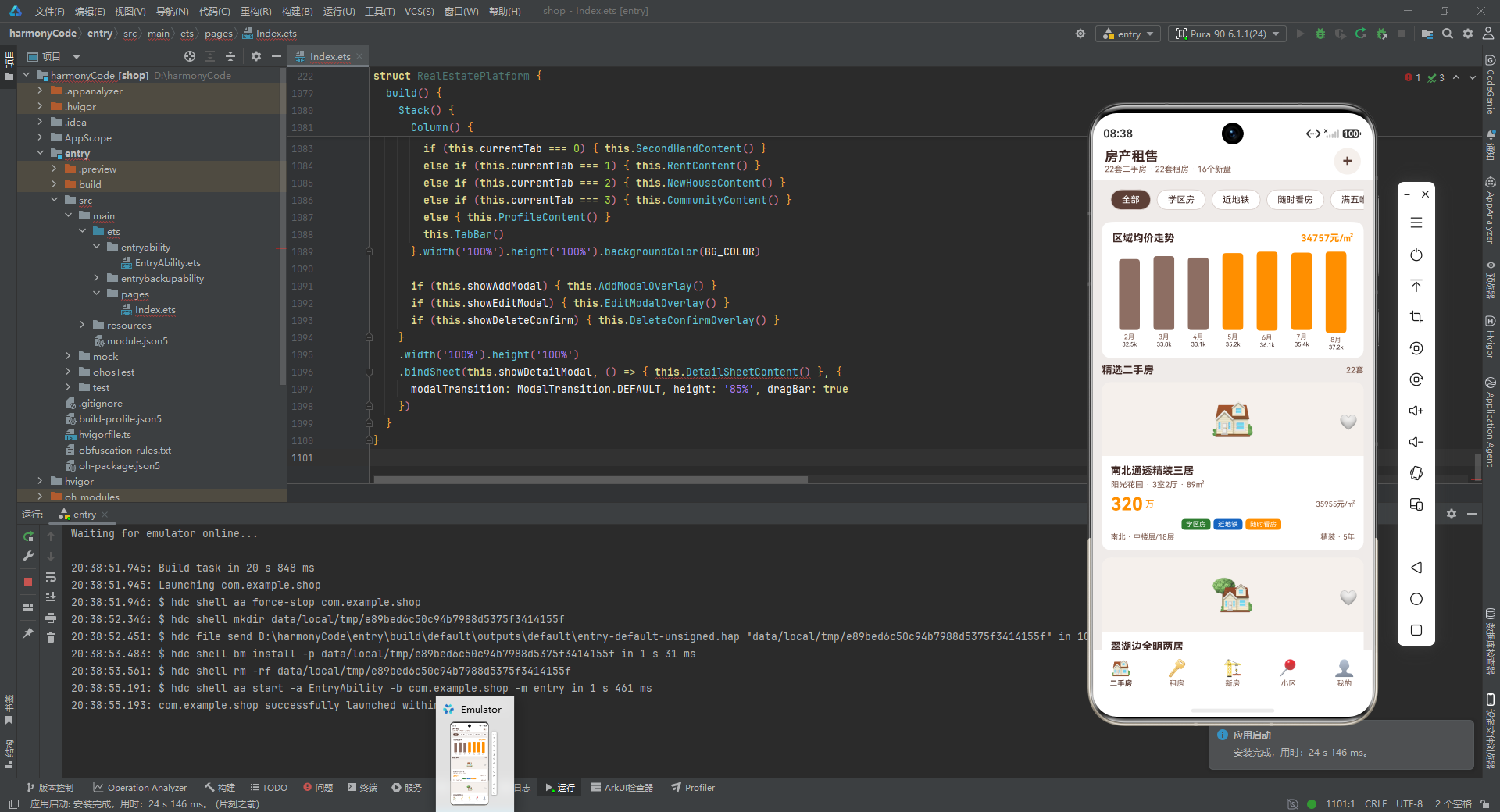
这个房产租售平台的源码解析,展示了如何运用 ArkTS 的类型系统、ArkUI 的组件化机制和响应式状态管理来构建一个功能完整、交互丰富的移动应用。希望这篇解析能够为正在学习或即将进入 HarmonyOS 开发领域的开发者们提供有价值的参考和启发。在万物互联的时代,掌握跨设备应用开发的能力,将成为每一位开发者不可或缺的核心竞争力。

讨论HarmonyOS开发技术,专注于API与组件、DevEco Studio、测试、元服务和应用上架分发等。
更多推荐
 1
1 0
0- 0


 已为社区贡献146条内容

所有评论(0)