音乐播放器应用基于HarmonyOS API 24的设计与实现,排序比较函数(a, b) => b.playCount - a.playCount表示当b的播放次数大于a时,b排在前面,即降序排列
一、引言:音乐播放器的时代意义与设计挑战
在当今移动互联网时代,音乐已经成为人们日常生活中不可或缺的一部分。无论是在通勤路上、工作间隙、运动健身时,还是在深夜独处的时刻,音乐都能为用户提供情感的慰藉与精神的陪伴。一款优秀的音乐播放器应用,不仅仅是音频播放的简单工具,更是一个承载着用户情感记忆、审美偏好和社交互动的综合性平台。
从产品角度来看,现代音乐播放器需要满足多维度的用户需求。首先是内容发现的需求,用户希望在茫茫曲库中快速找到自己喜爱的歌曲,这就需要推荐算法、排行榜、分类浏览等多种发现路径。其次是内容管理的需求,用户需要创建和管理自己的歌单,收藏喜欢的歌曲,记录播放历史。再次是社交互动的需求,用户希望看到其他人的收听数据,了解热门趋势,甚至通过电台等形式获得陪伴感。最后是个性化体验的需求,每个用户的听歌习惯都不尽相同,应用需要通过数据统计、可视化图表等方式,帮助用户更好地理解自己的音乐偏好。
从技术角度来看,构建这样一款功能丰富的音乐播放器面临着诸多挑战。首当其冲的是状态管理的复杂性。应用中存在大量需要同步更新的状态:当前播放的歌曲索引、播放进度、是否正在播放、各弹窗的显示与隐藏状态、用户正在编辑的歌单信息等。这些状态之间往往存在复杂的联动关系,一个状态的改变可能触发多个UI区域的重新渲染。其次是UI层级的深度与多样性。应用包含底部导航栏切换的五个主要页面,每个页面内部又有多个内容区块,同时还叠加了多种弹窗交互。如何组织这些UI结构,保证代码的可读性和可维护性,是一个需要仔细考量的问题。此外,数据模型的设计也至关重要,合理的接口定义和类型约束能够有效减少运行时错误,提升开发效率。
本文将以一款功能完整的音乐播放器应用为例,从接口定义、状态管理、生命周期、数据处理、UI构建等多个维度,逐段深入剖析其代码实现。通过对每一部分代码的详细解读,读者将能够理解如何运用声明式UI范式构建复杂的应用界面,掌握状态驱动的开发模式,以及学会运用Builder装饰器实现UI组件的复用与组合。
二、技术栈概述
本应用基于ArkTS语言开发,采用声明式UI编程范式。ArkTS是在TypeScript基础上扩展而来的语言,专门为鸿蒙生态的应用开发而设计。它继承了TypeScript的静态类型系统,同时通过装饰器(Decorator)机制提供了响应式状态管理和声明式UI描述的能力。
在本应用中,主要运用了以下核心技术特性:
-
装饰器系统:
@Entry标记入口组件,@Component声明自定义组件,@State定义响应式状态变量,@Builder定义可复用的UI构建函数。这些装饰器共同构成了声明式UI开发的基础设施。 -
响应式状态管理:通过
@State装饰器声明的变量,当其值发生变化时,框架会自动触发依赖该状态的UI区域进行重新渲染,开发者无需手动操作DOM或调用刷新方法。 -
声明式UI描述:通过链式调用的方式描述UI结构,每个组件的属性(如宽度、高度、颜色、字体大小等)通过点语法进行设置,布局容器(Row、Column、Stack等)通过嵌套表达层级关系。
-
ForEach循环渲染:用于根据数组数据动态生成列表项,支持键值生成函数以优化渲染性能。
-
条件渲染:通过
if/else语句根据状态条件动态显示不同的UI内容。 -
生命周期回调:
aboutToAppear方法在组件即将显示时被调用,用于执行初始化逻辑。
三、接口定义:数据模型的类型契约
3.1 歌曲接口
在任何应用中,数据模型的设计都是整个架构的基石。良好的接口定义能够明确数据的结构和类型,为后续的业务逻辑和UI渲染提供可靠的类型保障。本应用在文件开头定义了多个接口,每个接口都对应一种核心数据实体。
首先是歌曲接口,它描述了应用中一首歌曲所包含的全部信息:
interface ISong {
  id: number;
  title: string;
  artist: string;
  album: string;
  duration: string;
  playCount: number;
  likes: number;
  genre: string;
  isFavorite: boolean;
  releaseDate: string;
  image: string;
  lyrics: string;
}
这个接口定义了十二个字段,覆盖了歌曲展示所需的全部维度。下面逐字段解释:
id:歌曲的唯一标识符,类型为数值。在列表渲染时作为ForEach的键值使用,保证列表的高效更新。title:歌曲名称,字符串类型,用于在列表项和详情页中展示。artist:艺术家/演唱者名称,字符串类型。album:所属专辑名称,字符串类型,在详情页中展示。duration:歌曲时长,字符串类型,格式为"分:秒"(如"4:08"),便于直接展示。playCount:播放次数,数值类型,用于排行榜排序和热度展示。likes:点赞数,数值类型,在排行榜中展示用户喜爱程度。genre:音乐流派,字符串类型,如"流行"、“摇滚”、"古典"等,用于相关推荐算法和分类标签展示。isFavorite:是否已收藏,布尔类型,控制收藏图标的状态显示。releaseDate:发行日期,字符串类型,格式为"YYYY-MM-DD"。image:封面图标,字符串类型。这里使用Emoji表情符号作为封面图标,是一种轻量化的设计选择,避免了引入图片资源文件的复杂性。lyrics:歌词内容,字符串类型,其中使用\n换行符表示歌词的分行。
3.2 歌单接口
歌单是音乐应用中组织歌曲的核心容器,用户可以将多首歌曲按照主题、场景或心情进行归类整理:
interface IPlaylist {
  id: number;
  name: string;
  creator: string;
  songCount: number;
  playCount: number;
  cover: string;
  description: string;
  tags: string[];
  isOfficial: boolean;
}
歌单接口包含九个字段。id和name分别表示歌单的唯一标识和名称。creator记录歌单的创建者名称。songCount和playCount分别表示歌单包含的歌曲数量和累计播放次数,这两个数值用于在歌单卡片上展示数据。cover使用Emoji作为封面图标。description是歌单的文字描述,帮助用户了解歌单的主题和风格。tags是一个字符串数组,存储歌单的标签信息(如"华语"、"经典"等),在UI中以标签胶囊的形式展示。isOfficial是一个布尔值,区分官方歌单和用户自建歌单,这一标志决定了歌单在不同页面的展示位置以及是否显示"官方"标识。
3.3 电台接口
电台功能为用户提供了一种被动收听的内容消费方式,类似于传统广播电台的体验:
interface IRadio {
  id: number;
  name: string;
  host: string;
  category: string;
  listenerCount: number;
  schedule: string;
  image: string;
}
电台接口定义了七个字段。id和name是电台标识和名称。host是电台主持人/主播名称。category是电台的分类(如"情感"、“古典”、“流行"等)。listenerCount是当前正在收听的人数,这个实时数据能营造一种"不是一个人在听"的陪伴感。schedule是电台的播放时间安排,如"22:00-01:00"或"全天播放”。image同样是Emoji图标。
3.4 图表数据与导航项接口
应用的个人中心页面包含一个柱状图,用于展示用户一周的播放统计。为此定义了图表数据项接口:
interface IBarChartItem {
  label: string;
  value: number;
  color: string;
}
三个字段分别表示柱状图每一项的标签(如"周一")、数值和颜色。颜色使用十六进制字符串表示,通过不同的颜色区分工作日和周末的播放量。
底部导航栏的每一项也定义了对应的接口:
interface ITabItem {
  label: string;
  icon: string;
}
label是导航项的文字标签,icon是导航项的图标(使用Emoji)。此外,歌单封面选择器也有对应的数据接口:
interface ICoverOption {
  emoji: string;
  name: string;
}
emoji是封面表情符号,name是该表情的中文名称(如"音符"、"吉他"等),便于在封面选择器中进行展示和选择。
值得注意的是,所有接口都采用了I前缀的命名规范。这是一种常见的TypeScript接口命名约定,能够有效区分接口类型与具体实现,提升代码的可读性。在大型项目中,这种统一的命名规范尤为重要,它让开发者一眼就能识别出哪些是类型定义,哪些是变量或函数。
四、状态变量:响应式驱动的核心
4.1 状态变量声明
声明式UI范式的核心在于状态驱动视图。当状态发生变化时,框架自动重新渲染依赖该状态的UI区域。本应用在组件内部声明了大量状态变量,涵盖了应用运行所需的全部动态数据。
@State currentTab: number = 0;
@State showAddModal: boolean = false;
@State showEditModal: boolean = false;
@State showDeleteConfirm: boolean = false;
@State showDetailModal: boolean = false;
@State selectedSongIndex: number = 0;
@State selectedPlaylistIndex: number = 0;
@State currentSongIndex: number = 0;
@State isPlaying: boolean = true;
@State progress: number = 0.35;
@State newPlaylistName: string = '';
@State newPlaylistDesc: string = '';
@State selectedCoverIndex: number = 0;
@State editPlaylistName: string = '';
@State editPlaylistDesc: string = '';
@State editCoverIndex: number = 0;
@State deletePlaylistIndex: number = 0;
@State songs: ISong[] = [];
@State playlists: IPlaylist[] = [];
每一个@State装饰的变量都具备响应式特性,下面分类逐一解释。
4.2 导航与页面状态
currentTab初始值为0,表示当前显示的标签页索引。取值范围是0到4,分别对应"推荐"、“歌单”、“排行榜”、“电台”、"我的"五个页面。当用户点击底部导航栏的某个标签时,这个值随之改变,从而触发主内容区域的切换。
4.3 弹窗控制状态
showAddModal、showEditModal、showDeleteConfirm、showDetailModal四个布尔变量分别控制四种弹窗的显示与隐藏。这种设计将弹窗的显示逻辑完全交给状态管理,而非通过命令式的show/hide方法调用。当某个状态变量被设置为true时,对应的弹窗Builder会被渲染到界面上;当被设置为false时,弹窗自动移除。
4.4 选择索引状态
selectedSongIndex和selectedPlaylistIndex分别记录当前被选中的歌曲和歌单在数组中的索引。这两个变量主要用于详情弹窗和编辑弹窗的数据展示。currentSongIndex记录当前正在播放的歌曲索引,与迷你播放器条的数据展示直接相关。deletePlaylistIndex记录即将被删除的歌单索引。
4.5 播放状态
isPlaying初始值为true,表示当前是否处于播放状态。这个变量控制播放/暂停按钮的图标显示,以及进度条是否继续前进。progress初始值为0.35,表示播放进度,取值范围是0到1。这个值驱动迷你播放器中进度条的宽度。
4.6 表单状态
新建歌单弹窗使用newPlaylistName、newPlaylistDesc、selectedCoverIndex三个变量分别存储用户输入的歌单名称、描述和选择的封面索引。编辑歌单弹窗则使用editPlaylistName、editPlaylistDesc、editCoverIndex三个对应的编辑变量。这种为新建和编辑分别维护状态的设计,避免了两个弹窗之间的状态串扰。
4.7 数据集合状态
songs和playlists是两个数组类型的状态变量,初始值均为空数组。它们在组件的生命周期回调中被填充数据,之后任何对数组内容的修改都会触发相关列表的重新渲染。需要注意的是,ArkTS中的数组状态修改需要特别处理——直接修改数组元素的属性可能不会触发UI更新,需要通过重新赋值或克隆对象的方式来确保响应式生效。
五、静态数据:应用的基础素材
5.1 导航项配置
除了响应式状态外,组件中还定义了一些静态数据,这些数据在应用运行期间不会发生变化,因此使用private关键字声明为非响应式的私有属性。
private tabItems: ITabItem[] = [
  { label: '推荐', icon: '🎵' },
  { label: '歌单', icon: '📋' },
  { label: '排行榜', icon: '📈' },
  { label: '电台', icon: '📻' },
  { label: '我的', icon: '👤' }
];
导航项数组定义了五个底部标签页的配置。每一项包含一个标签文字和一个Emoji图标。这些数据在TabBarBuilder中被遍历渲染为导航按钮。使用Emoji作为图标是一种巧妙的做法,它不需要引入额外的图标资源文件,同时保证了跨平台的一致性显示。
5.2 封面选项配置
private coverOptions: ICoverOption[] = [
  { emoji: '🎵', name: '音符' },
  { emoji: '🎸', name: '吉他' },
  { emoji: '🎹', name: '钢琴' },
  { emoji: '🥁', name: '鼓' },
  { emoji: '🎤', name: '麦克风' },
  { emoji: '🎷', name: '萨克斯' }
];
封面选项提供了六种音乐相关的Emoji供用户在创建和编辑歌单时选择封面。每个选项都包含Emoji符号和对应的中文名称。
5.3 电台数据
private radios: IRadio[] = [
  { id: 1, name: '深夜情感电台', host: '主播小夜', category: '情感', listenerCount: 12800, schedule: '22:00-01:00', image: '🌙' },
  { id: 2, name: '古典音乐台', host: '主持人雅乐', category: '古典', listenerCount: 5600, schedule: '全天播放', image: '🎻' },
  // ... 更多电台数据
];
电台数组包含了十三个电台的完整信息,覆盖了情感、古典、流行、摇滚、爵士、电子、民谣、嘻哈、资讯、曲艺、助眠、亲子、心理等多种分类。每个电台都有独立的主持人、听众数量和播放时段。这些数据在电台页面的精选推荐区域和全部电台列表中展示。
5.4 柱状图数据
private barChartData: IBarChartItem[] = [
  { label: '周一', value: 320, color: '#7B1FA2' },
  { label: '周二', value: 480, color: '#7B1FA2' },
  { label: '周三', value: 250, color: '#7B1FA2' },
  { label: '周四', value: 560, color: '#FFD600' },
  { label: '周五', value: 720, color: '#FFD600' },
  { label: '周六', value: 850, color: '#E91E63' },
  { label: '周日', value: 680, color: '#E91E63' }
];
柱状图数据记录了一周七天的播放次数。数据呈现一个明显的趋势:工作日(周一至周三)使用紫色(#7B1FA2),接近周末(周四、周五)变为黄色(#FFD600),周末(周六、周日)变为粉红色(#E91E63)。数值方面,从周一的320逐步上升到周六的峰值850,周日的680略有回落。这种颜色和数值的变化直观地反映了用户在周末更频繁地使用音乐应用的行为模式。
六、生命周期:组件的初始化时机
6.1 aboutToAppear方法
aboutToAppear() {
  this.InitSongs();
  this.InitPlaylists();
  setInterval(() => {
    if (this.isPlaying) {
      this.progress += 0.004;
      if (this.progress >= 1) {
        this.progress = 0;
      }
    }
  }, 1000);
}
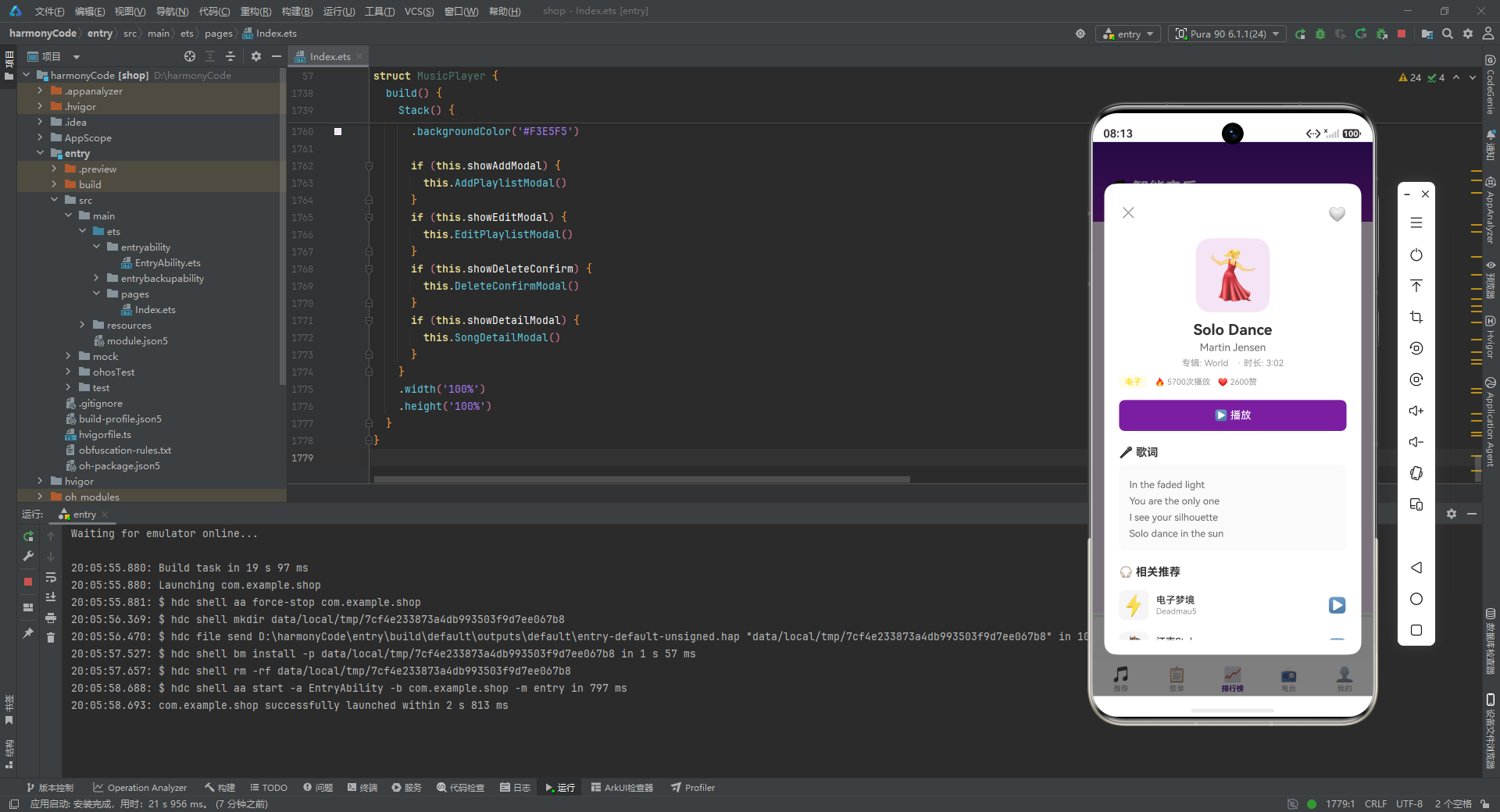
aboutToAppear是ArkTS组件的生命周期回调方法,在组件即将被显示到界面上之前被调用。这个方法是执行初始化逻辑的理想位置,此时组件的状态变量已经完成初始赋值,但UI尚未完成首次渲染。
方法体首先调用this.InitSongs()和this.InitPlaylists()两个初始化方法,分别填充歌曲列表和歌单列表的数据。这两个方法执行后,songs和playlists数组将从空数组变为包含完整数据的集合,从而触发首次UI渲染时列表区域显示真实数据。
随后,方法设置了一个每秒执行一次的定时器。定时器的回调函数中,首先检查isPlaying状态——只有在播放状态下才会推进进度。每次执行时,progress值增加0.004,这意味着每秒前进0.4%,完整播放一首歌大约需要250秒(约4分钟)。当progress达到或超过1时,重置为0,模拟歌曲播放完毕后自动循环的行为。
这个定时器是实现"模拟播放"效果的核心机制。由于本应用没有集成真实的音频播放引擎,播放进度完全通过定时器模拟,这为UI展示提供了动态变化的视觉效果。
七、数据初始化:构建应用的内容基石
7.1 歌曲数据初始化
InitSongs方法负责填充歌曲列表的初始数据:
InitSongs() {
  this.songs = [
    { id: 1, title: '夜空中最亮的星', artist: '逃跑计划', album: '世界', duration: '4:08', playCount: 9820, likes: 4521, genre: '流行', isFavorite: true, releaseDate: '2011-03-12', image: '🌟', lyrics: '夜空中最亮的星\n能否听清\n那仰望的人\n心底的孤独和叹息\n\n夜空中最亮的星\n能否记起\n曾与我同行\n消失在风里的身影' },
    { id: 2, title: '成都', artist: '赵雷', album: '无法长大', duration: '5:28', playCount: 8650, likes: 3980, genre: '民谣', isFavorite: false, releaseDate: '2016-09-26', image: '🏙️', lyrics: '和我在成都的街头走一走\n直到所有的灯都熄灭了也不停留\n你会挽着我的衣袖\n我会把手揣进裤兜\n走到玉林路的尽头\n坐在小酒馆的门口' },
    // ... 更多歌曲数据,共26首
  ];
}
该方法将一个包含26首歌曲的数组直接赋值给this.songs状态变量。每首歌曲都包含完整的元数据信息:歌曲名、艺术家、专辑、时长、播放次数、点赞数、流派、收藏状态、发行日期、Emoji封面和歌词文本。
歌曲的选取涵盖了多种音乐流派,包括流行、民谣、摇滚、古典、嘻哈、爵士、电子等。既有华语经典如《夜空中最亮的星》、《成都》、《晴天》、《海阔天空》,也有国际名曲如《Take Five》、《Fly Me to the Moon》、《What a Wonderful World》。歌词字段中使用\n表示换行,部分段落之间用空行(连续两个\n)分隔,在详情弹窗中会以多行文本的形式展示。
这种将数据直接硬编码在代码中的方式适用于演示和原型开发场景。在生产环境中,这些数据通常会通过网络请求从服务器获取,然后异步填充到状态变量中。
7.2 歌单数据初始化
InitPlaylists方法负责填充歌单列表:
InitPlaylists() {
  this.playlists = [
    { id: 1, name: '华语经典合集', creator: '音乐编辑', songCount: 50, playCount: 320000, cover: '🎵', description: '华语乐坛经典之作,承载一代人的记忆', tags: ['华语', '经典'], isOfficial: true },
    { id: 2, name: '深夜电台', creator: '夜猫子', songCount: 30, playCount: 180000, cover: '🌙', description: '深夜独处的最佳伴侣,治愈你的心灵', tags: ['深夜', '治愈'], isOfficial: false },
    // ... 更多歌单数据,共16个
  ];
}
歌单数据共包含16个歌单,其中8个标记为官方歌单(isOfficial: true),8个为用户自建歌单(isOfficial: false)。每个歌单都有主题鲜明的名称、描述和标签。例如"华语经典合集"聚焦华语经典歌曲,"运动必备"面向健身场景,"学习专注"提供纯音乐以提升专注力,"开车路上"适合自驾出行。
官方歌单和用户歌单的区分设计,使得应用能够在不同页面以不同方式展示这些歌单。在歌单页面的"官方精选"区域只展示官方歌单,而"我的歌单"区域只展示用户自建歌单。用户只能对自建歌单进行编辑和删除操作,官方歌单则受保护。
八、辅助方法:业务逻辑的集中处理
8.1 数据查询方法
应用提供了多个数据查询方法,用于从歌曲列表中提取符合特定条件的数据子集:
GetSortedSongs(): ISong[] {
  return this.songs.slice().sort((a: ISong, b: ISong) => b.playCount - a.playCount);
}
GetSortedSongs方法返回按播放次数降序排列的歌曲列表。这里使用了slice()方法先创建数组的副本,然后对副本进行排序,避免修改原始数组。排序比较函数(a, b) => b.playCount - a.playCount表示当b的播放次数大于a时,b排在前面,即降序排列。这个方法为排行榜页面提供数据支持。
GetTopSongs(count: number): ISong[] {
  let sorted = this.GetSortedSongs();
  return sorted.slice(0, count);
}
GetTopSongs方法在已排序的歌曲列表基础上,截取前count首歌曲。这个方法用于推荐页面的"热门歌曲"区域,展示播放次数最高的8首歌曲。
GetRecentSongs(count: number): ISong[] {
  return this.songs.slice(-count);
}
GetRecentSongs方法使用slice(-count)从数组末尾截取指定数量的歌曲,模拟"最近添加"的歌曲列表。负数索引是JavaScript/TypeScript中数组切片的一个特性,-count表示从倒数第count个元素开始截取到数组末尾。
8.2 相关推荐算法
GetRelatedSongs(song: ISong): ISong[] {
  let result: ISong[] = [];
  for (let i = 0; i < this.songs.length; i++) {
    if (this.songs[i].genre === song.genre && this.songs[i].id !== song.id) {
      result.push(this.songs[i]);
      if (result.length >= 3) {
        break;
      }
    }
  }
  return result;
}
GetRelatedSongs方法实现了一个简单的相关推荐算法。它接收一首歌曲作为参数,遍历整个歌曲列表,查找与该歌曲流派(genre)相同但ID不同的歌曲,将匹配的歌曲加入结果数组。当结果数量达到3首时,停止遍历。
这个算法的核心思路是"同流派推荐"——如果用户正在查看一首摇滚歌曲,系统会推荐其他摇滚歌曲。虽然这是一个非常基础的推荐策略,但在实际应用中已经能够提供有意义的推荐结果。在生产环境中,推荐算法通常会综合考虑更多因素,如用户的播放历史、收藏偏好、协同过滤数据等。
8.3 收藏管理方法
GetFavoriteSongs(): ISong[] {
  let result: ISong[] = [];
  for (let i = 0; i < this.songs.length; i++) {
    if (this.songs[i].isFavorite) {
      result.push(this.songs[i]);
    }
  }
  return result;
}
GetFavoriteSongs方法遍历歌曲列表,筛选出所有isFavorite为true的歌曲,返回收藏歌曲数组。这个方法在个人中心页面的"我的收藏"区域使用。
ToggleFavorite(index: number) {
  this.songs[index].isFavorite = !this.songs[index].isFavorite;
  this.songs[index] = this.CloneSong(this.songs[index]);
}
ToggleFavorite方法切换指定索引歌曲的收藏状态。方法的第二步调用CloneSong创建该歌曲对象的副本并重新赋值,这是一个关键操作。在ArkTS的响应式系统中,直接修改对象内部的属性可能不会触发UI更新。通过创建新对象并重新赋值给数组元素,确保框架能够检测到数据变化,从而触发重新渲染。
CloneSong(s: ISong): ISong {
  return {
    id: s.id, title: s.title, artist: s.artist, album: s.album,
    duration: s.duration, playCount: s.playCount, likes: s.likes,
    genre: s.genre, isFavorite: s.isFavorite, releaseDate: s.releaseDate,
    image: s.image, lyrics: s.lyrics
  };
}
CloneSong方法创建一个歌曲对象的完整副本。它手动复制了所有十二个字段到新对象中。这种浅拷贝方式对于当前的数据结构已经足够,因为所有字段都是基本类型(数值、字符串、布尔值),没有嵌套的引用类型。
ToggleCurrentFavorite方法是对ToggleFavorite的封装,专门用于切换当前正在播放歌曲的收藏状态:
ToggleCurrentFavorite() {
  let i = this.currentSongIndex;
  this.songs[i].isFavorite = !this.songs[i].isFavorite;
  this.songs[i] = this.CloneSong(this.songs[i]);
}
8.4 播放控制方法
PlaySong(index: number) {
  this.currentSongIndex = index;
  this.isPlaying = true;
  this.progress = 0;
}
PlaySong方法接收歌曲索引作为参数,将当前播放索引设置为指定值,将播放状态设为true,并将进度重置为0。这三个状态的同时更新会触发迷你播放器的歌曲信息、播放按钮图标和进度条的同步刷新。
TogglePlay() {
  this.isPlaying = !this.isPlaying;
}
TogglePlay方法简单切换播放/暂停状态。由于定时器的回调中会检查isPlaying的值,暂停状态下进度不会继续前进。
8.5 格式化方法
FormatPlayCount(count: number): string {
  if (count >= 10000) {
    return (count / 10000).toFixed(1) + '万';
  }
  return count.toString();
}
FormatPlayCount方法将数值格式化为易读的字符串。当数值大于等于10000时,除以10000并保留一位小数,加上"万"后缀(如320000变为"32.0万")。小于10000的数值直接转为字符串。这种格式化方式在中文语境下非常常见,使大数字更加简洁易读。
FormatListenerCount(count: number): string {
  if (count >= 10000) {
    return (count / 10000).toFixed(1) + '万';
  }
  return count.toString();
}
FormatListenerCount方法与FormatPlayCount逻辑完全相同,用于格式化电台的听众数量。虽然两个方法的实现一致,但分别命名的好处是语义清晰——在代码中看到方法名就能知道正在格式化的是什么数据。
8.6 颜色映射方法
GetRankColor(rank: number): string {
  if (rank === 1) { return '#FFD700'; }
  if (rank === 2) { return '#C0C0C0'; }
  if (rank === 3) { return '#CD7F32'; }
  return '#7B1FA2';
}
GetRankColor方法根据排名返回对应的颜色值。第一名返回金色(#FFD700),第二名返回银色(#C0C0C0),第三名返回铜色(#CD7F32),其余排名返回应用的紫色主题色(#7B1FA2)。这种金、银、铜的颜色编码是一种国际通用的排名视觉语言,用户能够直观地识别前三名。
GetGenreColor(genre: string): string {
  if (genre === '摇滚' || genre === '嘻哈') { return '#E91E63'; }
  if (genre === '电子') { return '#FFD600'; }
  return '#7B1FA2';
}
GetGenreColor方法根据音乐流派返回对应的文字颜色。摇滚和嘻哈返回粉红色(#E91E63),电子乐返回黄色(#FFD600),其他流派返回紫色。这种颜色编码使用户能够通过颜色快速识别歌曲的流派类型。
GetGenreBgColor(genre: string): string {
  if (genre === '摇滚' || genre === '嘻哈') { return '#FCE4EC'; }
  if (genre === '电子') { return '#FFFDE7'; }
  return '#F3E5F5';
}
GetGenreBgColor方法返回与GetGenreColor对应的浅色背景色。摇滚和嘻哈使用浅粉色背景,电子乐使用浅黄色背景,其他使用浅紫色背景。文字色与背景色的搭配确保了足够的对比度,使标签在各种背景下都清晰可读。
九、歌单增删改方法:完整的CRUD操作
9.1 打开新建弹窗
OpenAddModal() {
  this.newPlaylistName = '';
  this.newPlaylistDesc = '';
  this.selectedCoverIndex = 0;
  this.showAddModal = true;
}
OpenAddModal方法在打开新建歌单弹窗之前,先将三个表单状态变量重置为初始值——名称和描述清空,封面索引设为0。这一步非常重要,它确保每次打开弹窗时表单都是干净的,不会残留上一次编辑的内容。重置完成后,将showAddModal设为true触发弹窗显示。
9.2 添加新歌单
AddNewPlaylist() {
  if (this.newPlaylistName.trim().length === 0) { return; }
  let maxId = 0;
  for (let i = 0; i < this.playlists.length; i++) {
    if (this.playlists[i].id > maxId) { maxId = this.playlists[i].id; }
  }
  let newP: IPlaylist = {
    id: maxId + 1,
    name: this.newPlaylistName,
    creator: '我',
    songCount: 0,
    playCount: 0,
    cover: this.coverOptions[this.selectedCoverIndex].emoji,
    description: this.newPlaylistDesc,
    tags: ['自定义'],
    isOfficial: false
  };
  this.playlists = [newP].concat(this.playlists);
  this.showAddModal = false;
  this.newPlaylistName = '';
  this.newPlaylistDesc = '';
  this.selectedCoverIndex = 0;
}
AddNewPlaylist方法实现了新歌单的创建逻辑。首先进行输入验证,如果歌单名称去除首尾空格后为空,则直接返回不执行后续逻辑。然后遍历现有歌单列表找到最大的ID值,新歌单的ID为最大值加1,确保ID的唯一性。
接着构建一个新的IPlaylist对象,其中creator设为"我",songCount和playCount初始化为0,cover从用户选择的封面选项中取对应的Emoji,tags默认为[“自定义”],isOfficial设为false表示用户自建。
this.playlists = [newP].concat(this.playlists)这行代码将新歌单添加到数组的最前面。使用concat方法创建新数组而非直接修改原数组,确保响应式系统能检测到变化。最后关闭弹窗并重置表单状态。
9.3 打开编辑弹窗
OpenEditModal(index: number) {
  this.selectedPlaylistIndex = index;
  this.editPlaylistName = this.playlists[index].name;
  this.editPlaylistDesc = this.playlists[index].description;
  let cover = this.playlists[index].cover;
  this.editCoverIndex = 0;
  for (let i = 0; i < this.coverOptions.length; i++) {
    if (this.coverOptions[i].emoji === cover) {
      this.editCoverIndex = i;
      break;
    }
  }
  this.showEditModal = true;
}
OpenEditModal方法接收歌单索引参数,首先记录被选中的歌单索引,然后将该歌单的名称和描述读取到编辑表单状态变量中。对于封面选择,需要根据当前歌单的cover Emoji在coverOptions数组中查找对应的索引位置,以便弹窗中的封面选择器能够正确高亮当前封面。查找完成后显示编辑弹窗。
9.4 保存编辑
SaveEditPlaylist() {
  if (this.editPlaylistName.trim().length === 0) { return; }
  let i = this.selectedPlaylistIndex;
  this.playlists[i].name = this.editPlaylistName;
  this.playlists[i].description = this.editPlaylistDesc;
  this.playlists[i].cover = this.coverOptions[this.editCoverIndex].emoji;
  this.playlists = this.playlists.slice();
  this.showEditModal = false;
}
SaveEditPlaylist方法同样先进行名称非空验证,然后将编辑表单中的值写回到对应歌单对象的属性中。关键的一步是this.playlists = this.playlists.slice()——通过slice()方法创建数组的浅拷贝并重新赋值,触发响应式系统检测到数组变化,从而更新歌单列表的UI显示。最后关闭编辑弹窗。
9.5 删除歌单
OpenDeleteConfirm(index: number) {
  this.deletePlaylistIndex = index;
  this.showDeleteConfirm = true;
}
OpenDeleteConfirm方法记录待删除歌单的索引并显示确认弹窗,确保用户在执行不可逆操作前有二次确认的机会。
DeletePlaylist() {
  let i = this.deletePlaylistIndex;
  let newList: IPlaylist[] = [];
  for (let j = 0; j < this.playlists.length; j++) {
    if (j !== i) { newList.push(this.playlists[j]); }
  }
  this.playlists = newList;
  this.showDeleteConfirm = false;
  this.showEditModal = false;
}
DeletePlaylist方法通过遍历原数组,将除待删除索引外的所有歌单加入新数组,然后将新数组赋值给playlists状态变量。同时关闭确认弹窗和编辑弹窗(因为删除操作通常从编辑弹窗中触发,删除后编辑弹窗也应该关闭)。
9.6 打开歌曲详情
OpenSongDetail(index: number) {
  this.selectedSongIndex = index;
  this.showDetailModal = true;
}
OpenSongDetail方法记录被点击歌曲的索引并显示详情弹窗。详情弹窗中会展示该歌曲的完整信息,包括封面、标题、艺术家、专辑、时长、流派、播放次数、点赞数、歌词和相关推荐。
十、通用UI构建器:可复用的界面组件
10.1 头部构建器
ArkTS中的@Builder装饰器用于定义可复用的UI构建函数。这些函数封装了特定的UI片段,可以在组件的build方法或其他Builder中多次调用,实现UI代码的复用。
@Builder
HeaderBuilder() {
  Row() {
    Column() {
      Text('🎵 智能音乐')
        .fontSize(22)
        .fontWeight(FontWeight.Bold)
        .fontColor('#FFFFFF')
      Text('发现你的下一首最爱')
        .fontSize(12)
        .fontColor('#E1BEE7')
        .margin({ top: 2 })
    }
    .alignItems(HorizontalAlign.Start)
    .layoutWeight(1)

    Row() {
      Text('🔍').fontSize(22)
      Text('🔔').fontSize(22).margin({ left: 16 })
    }
    .alignItems(VerticalAlign.Center)
  }
  .width('100%')
  .padding({ left: 20, right: 20, top: 50, bottom: 16 })
  .linearGradient({
    direction: GradientDirection.Bottom,
    colors: [['#4A148C', 0.0], ['##7B1FA2', 1.0]]
  })
}
HeaderBuilder构建应用顶部的标题栏。外层是一个Row容器,宽度占满屏幕。Row内部分为两部分:左侧是一个Column,包含应用名称"🎵 智能音乐"和副标题"发现你的下一首最爱",使用layoutWeight(1)占据剩余空间,使右侧按钮靠右对齐。右侧是一个Row,包含搜索和通知两个Emoji图标按钮,两者之间有16的间距。
整个头部区域应用了从上到下的线性渐变背景,从深紫色(#4A148C)渐变到主紫色(#7B1FA2),营造出品牌色的视觉印象。顶部内边距设为50,为状态栏留出空间。
10.2 迷你播放器构建器
@Builder
MiniPlayerBuilder() {
  Column() {
    Row() {
      Text('━'.repeat(60))
        .fontSize(2)
        .fontColor('#E0E0E0')
        .layoutWeight(1)
    }
    .width('100%')
    .height(2)
    .backgroundColor('#E0E0E0')
    .borderRadius(1)
    .margin({ left: 16, right: 16, top: 4 })

    Row() {
      Text(this.songs[this.currentSongIndex].image)
        .fontSize(36)
        .width(44)
        .height(44)
        .backgroundColor('#FFFFFF')
        .borderRadius(8)
        .textAlign(TextAlign.Center)

      Column() {
        Text(this.songs[this.currentSongIndex].title)
          .fontSize(14)
          .fontWeight(FontWeight.Medium)
          .fontColor('#333333')
          .maxLines(1)
          .textOverflow({ overflow: TextOverflow.Ellipsis })
        Text(this.songs[this.currentSongIndex].artist)
          .fontSize(11)
          .fontColor('#999999')
          .margin({ top: 2 })
      }
      .alignItems(HorizontalAlign.Start)
      .layoutWeight(1)
      .margin({ left: 12 })

      Text(this.songs[this.currentSongIndex].isFavorite ? '❤️' : '🤍')
        .fontSize(22)
        .onClick(() => { this.ToggleCurrentFavorite(); })
        .margin({ right: 12 })

      Text(this.isPlaying ? '⏸' : '▶️')
        .fontSize(28)
        .onClick(() => { this.TogglePlay(); })
    }
    .width('100%')
    .padding({ left: 16, right: 16, top: 8, bottom: 6 })
    .backgroundColor('#FAFAFA')
  }
  .width('100%')
  .backgroundColor('#FAFAFA')
  .onClick(() => { this.OpenSongDetail(this.currentSongIndex); })
}
MiniPlayerBuilder构建固定在底部的迷你播放器条。这是整个应用中最核心的交互组件之一,因为它在所有页面都可见,用户随时可以看到当前播放的歌曲信息并进行基本控制。
迷你播放器由两部分组成。上方是一条进度条,通过重复60次"━"字符并设置极小的字号(2)来模拟一条细线。虽然这是一个巧妙的实现方式,但在实际项目中通常会使用专门的Progress组件来实现进度条。
下方的Row是播放器的主体区域,从左到右依次排列:当前歌曲的Emoji封面图标(44x44,白底圆角)、歌曲标题和艺术家信息(占据剩余空间,标题超过一行时显示省略号)、收藏按钮(根据isFavorite状态显示❤️或🤍)、播放/暂停按钮(根据isPlaying状态显示⏸或▶️)。
整个迷你播放器绑定了点击事件,点击任意位置会打开当前歌曲的详情弹窗,这是一种常见的交互模式——用户可以通过点击迷你播放器快速查看当前歌曲的完整信息和歌词。
10.3 底部导航栏构建器
@Builder
TabBarBuilder() {
  Row() {
    ForEach(this.tabItems, (item: ITabItem, index: number) => {
      Column() {
        Text(item.icon).fontSize(20)
        Text(item.label)
          .fontSize(10)
          .fontColor(this.currentTab === index ? '#4A148C' : '#999999')
          .fontWeight(this.currentTab === index ? FontWeight.Bold : FontWeight.Normal)
          .margin({ top: 2 })
      }
      .layoutWeight(1)
      .padding({ top: 8, bottom: 4 })
      .onClick(() => { this.currentTab = index; })
    }, (item: ITabItem) => item.icon)
  }
  .width('100%')
  .backgroundColor('#FFFFFF')
}
TabBarBuilder构建底部导航栏。使用ForEach遍历tabItems数组,为每个导航项生成一个Column,包含Emoji图标和文字标签。每个导航项使用layoutWeight(1)等分屏幕宽度。当前选中的导航项文字颜色变为深紫色(#4A148C)并加粗,未选中的为灰色(#999999)。
点击导航项时,将currentTab设置为对应索引,触发主内容区域的页面切换。ForEach的第三个参数是键值生成函数,使用item.icon作为键值,确保列表渲染的高效更新。
10.4 歌曲列表项构建器
@Builder
SongItemBuilder(song: ISong, showFavorite: boolean) {
  Row() {
    Text(song.image)
      .fontSize(32)
      .width(48)
      .height(48)
      .backgroundColor('#F5F5F5')
      .borderRadius(8)
      .textAlign(TextAlign.Center)

    Column() {
      Text(song.title)
        .fontSize(15)
        .fontWeight(FontWeight.Medium)
        .fontColor('#333333')
        .maxLines(1)
        .textOverflow({ overflow: TextOverflow.Ellipsis })
      Text(song.artist + ' · ' + song.album)
        .fontSize(12)
        .fontColor('#999999')
        .maxLines(1)
        .textOverflow({ overflow: TextOverflow.Ellipsis })
        .margin({ top: 2 })
    }
    .alignItems(HorizontalAlign.Start)
    .layoutWeight(1)
    .margin({ left: 12 })

    Column() {
      Text(song.genre)
        .fontSize(10)
        .fontColor(this.GetGenreColor(song.genre))
        .backgroundColor(this.GetGenreBgColor(song.genre))
        .borderRadius(4)
        .padding({ left: 6, right: 6, top: 2, bottom: 2 })
      Text('▶️ ' + this.FormatPlayCount(song.playCount))
        .fontSize(11)
        .fontColor('#999999')
        .margin({ top: 4 })
    }
    .alignItems(HorizontalAlign.End)
    .margin({ right: 8 })

    Text('▶️')
      .fontSize(20)
      .fontColor('#7B1FA2')
      .margin({ right: 4 })
      .onClick(() => { this.PlaySong(song.id - 1); })

    if (showFavorite) {
      Text(song.isFavorite ? '❤️' : '🤍')
        .fontSize(16)
        .onClick(() => { this.ToggleFavorite(song.id - 1); })
    }
  }
  .width('100%')
  .padding({ left: 16, right: 16, top: 10, bottom: 10 })
  .onClick(() => { this.OpenSongDetail(song.id - 1); })
}
SongItemBuilder是一个通用的歌曲列表项构建器,接收两个参数:song表示歌曲数据对象,showFavorite控制是否显示收藏按钮。这种参数化设计使得同一个构建器可以适应不同的使用场景——在"我的收藏"列表中不需要显示收藏按钮(因为列表本身已经是收藏的歌曲),而在其他列表中则需要显示。
列表项的布局从左到右依次为:Emoji封面图标(48x48,浅灰底圆角)、歌曲标题和艺术家+专辑信息(占据剩余空间,超长文本省略号截断)、流派标签和播放次数(右对齐)、播放按钮、收藏按钮(条件显示)。整行绑定点击事件打开歌曲详情,播放按钮和收藏按钮各自绑定独立的事件处理。
10.5 排行榜歌曲项构建器
@Builder
RankSongItemBuilder(song: ISong, rank: number) {
  Row() {
    Text(rank.toString())
      .fontSize(18)
      .fontWeight(FontWeight.Bold)
      .fontColor(this.GetRankColor(rank))
      .width(32)
      .textAlign(TextAlign.Center)

    if (rank <= 3) {
      Text(rank === 1 ? '🥇' : rank === 2 ? '🥈' : '🥉')
        .fontSize(16)
        .margin({ left: 2 })
    }

    Text(song.image)
      .fontSize(28)
      .width(42)
      .height(42)
      .backgroundColor('#F5F5F5')
      .borderRadius(6)
      .textAlign(TextAlign.Center)
      .margin({ left: 6 })

    Column() {
      Text(song.title)
        .fontSize(14)
        .fontWeight(FontWeight.Medium)
        .fontColor('#333333')
        .maxLines(1)
        .textOverflow({ overflow: TextOverflow.Ellipsis })
      Text(song.artist)
        .fontSize(11)
        .fontColor('#999999')
        .margin({ top: 1 })
    }
    .alignItems(HorizontalAlign.Start)
    .layoutWeight(1)
    .margin({ left: 10 })

    Column() {
      Text('🔥 ' + this.FormatPlayCount(song.playCount))
        .fontSize(11)
        .fontColor('#E91E63')
        .fontWeight(FontWeight.Medium)
      Text('❤️ ' + this.FormatPlayCount(song.likes))
        .fontSize(10)
        .fontColor('#999999')
        .margin({ top: 2 })
    }
    .alignItems(HorizontalAlign.End)

    Text('▶️')
      .fontSize(22)
      .fontColor('#7B1FA2')
      .margin({ left: 10 })
      .onClick(() => { this.PlaySong(song.id - 1); })
  }
  .width('100%')
  .padding({ left: 16, right: 16, top: 10, bottom: 10 })
  .onClick(() => { this.OpenSongDetail(song.id - 1); })
}
RankSongItemBuilder是专为排行榜页面设计的歌曲列表项构建器。与通用列表项不同,它增加了排名数字和奖牌Emoji的展示。排名数字使用GetRankColor方法获取颜色——前三名分别显示金、银、铜色。前三名还会在排名数字旁边显示对应的奖牌Emoji(🥇🥈🥉),增强视觉辨识度。
右侧信息区同时展示播放次数(带🔥图标,粉红色加粗)和点赞数(带❤️图标,灰色),让用户一目了然地了解歌曲的热度数据。
10.6 歌单卡片构建器
@Builder
PlaylistCardBuilder(playlist: IPlaylist) {
  Column() {
    Stack() {
      Column() {
        Text(playlist.cover)
          .fontSize(36)
          .width('100%')
          .height(80)
          .borderRadius({ topLeft: 10, topRight: 10 })
          .backgroundColor('#F3E5F5')
          .textAlign(TextAlign.Center)
      }
      .width('100%')
      .height(80)

      if (playlist.isOfficial) {
        Text('官方')
          .fontSize(9)
          .fontColor('#FFFFFF')
          .backgroundColor('#E91E63')
          .borderRadius(4)
          .padding({ left: 4, right: 4, top: 1, bottom: 1 })
      }

      Text('✏️')
        .fontSize(14)
        .onClick(() => { this.OpenEditModal(playlist.id - 1); })
    }
    .alignContent(Alignment.TopEnd)
    .width('100%')
    .padding({ top: 4, right: 4 })

    Text(playlist.name)
      .fontSize(13)
      .fontWeight(FontWeight.Medium)
      .fontColor('#333333')
      .maxLines(1)
      .textOverflow({ overflow: TextOverflow.Ellipsis })
      .padding({ left: 8, right: 8, top: 6 })
      .width('100%')

    Text('🎵 ' + playlist.songCount.toString() + '首 · ▶️ ' + this.FormatPlayCount(playlist.playCount))
      .fontSize(10)
      .fontColor('#999999')
      .padding({ left: 8, right: 8, bottom: 8 })
      .width('100%')
  }
  .width('100%')
  .backgroundColor('#FFFFFF')
  .borderRadius(12)
  .margin({ top: 6, bottom: 6 })
}
PlaylistCardBuilder构建歌单卡片视图。卡片使用Stack容器实现层叠效果——底层是封面区域(浅紫色背景的Emoji图标),上层右上是"官方"标签(仅官方歌单显示,粉红色背景白字),上层右下是编辑按钮。封面区域下方是歌单名称和歌曲数量+播放次数信息。
10.7 电台项构建器
@Builder
RadioItemBuilder(radio: IRadio) {
  Row() {
    Text(radio.image)
      .fontSize(32)
      .width(52)
      .height(52)
      .backgroundColor('#F3E5F5')
      .borderRadius(12)
      .textAlign(TextAlign.Center)

    Column() {
      Text(radio.name)
        .fontSize(15)
        .fontWeight(FontWeight.Medium)
        .fontColor('#333333')
      Text('🎙️ ' + radio.host + ' · ' + radio.category)
        .fontSize(11)
        .fontColor('#999999')
        .margin({ top: 3 })
      Text('👥 ' + this.FormatListenerCount(radio.listenerCount) + '人在听 · ' + radio.schedule)
        .fontSize(10)
        .fontColor('#AAAAAA')
        .margin({ top: 2 })
    }
    .alignItems(HorizontalAlign.Start)
    .layoutWeight(1)
    .margin({ left: 12 })

    Text('▶️')
      .fontSize(24)
      .fontColor('#7B1FA2')
  }
  .width('100%')
  .padding({ left: 16, right: 16, top: 10, bottom: 10 })
}
RadioItemBuilder构建电台列表项。左侧是52x52的圆角图标,右侧三行文字依次显示电台名称、主持人+分类、听众数+播放时段。听众数使用"人在听"的表述方式,营造出实时收听的氛围感。
10.8 区块标题构建器
@Builder
SectionTitleBuilder(title: string) {
  Row() {
    Column() {
      Row() {
        Column()
          .width(3)
          .height(16)
          .backgroundColor('#7B1FA2')
          .borderRadius(2)
        Text(title)
          .fontSize(16)
          .fontWeight(FontWeight.Bold)
          .fontColor('#333333')
          .margin({ left: 8 })
      }
    }
    .layoutWeight(1)
  }
  .width('100%')
  .padding({ left: 16, right: 16, top: 12, bottom: 4 })
}
SectionTitleBuilder是一个通用的区块标题构建器,接收标题文字作为参数。标题左侧有一个3x16的紫色竖条作为视觉标记,后面是加粗的标题文字。这种设计模式在内容型应用中非常常见,能够有效区分不同内容区块,提升信息的层次感。由于这个构建器被多个Tab页面反复使用,它的复用性大大减少了代码重复。
十一、Tab内容构建器:五大页面的界面实现
11.1 推荐页面
推荐页面是应用启动后的默认页面,也是用户接触最频繁的页面。它通过多种方式帮助用户发现新音乐。
@Builder
RecommendContent() {
  Scroll() {
    Column() {
      Column() {
        Text(this.playlists.length > 0 ? this.playlists[0].cover : '🎵')
          .fontSize(48)
        Text('每日推荐')
          .fontSize(20)
          .fontWeight(FontWeight.Bold)
          .fontColor('#4A148C')
          .margin({ top: 8 })
        Text('根据你的听歌习惯,为你精心推荐')
          .fontSize(12)
          .fontColor('#7B1FA2')
          .margin({ top: 4 })
      }
      .width('92%')
      .padding({ top: 28, bottom: 28 })
      .linearGradient({
        angle: 135,
        colors: [['#F3E5F5', 0.0], ['#E1BEE7', 0.5], ['#CE93D8', 1.0]]
      })
      .borderRadius(16)
      .margin({ top: 12, left: 16, right: 16 })
      // ...
    }
    .width('100%')
  }
  .scrollBar(BarState.Off)
  .width('100%')
  .layoutWeight(1)
}
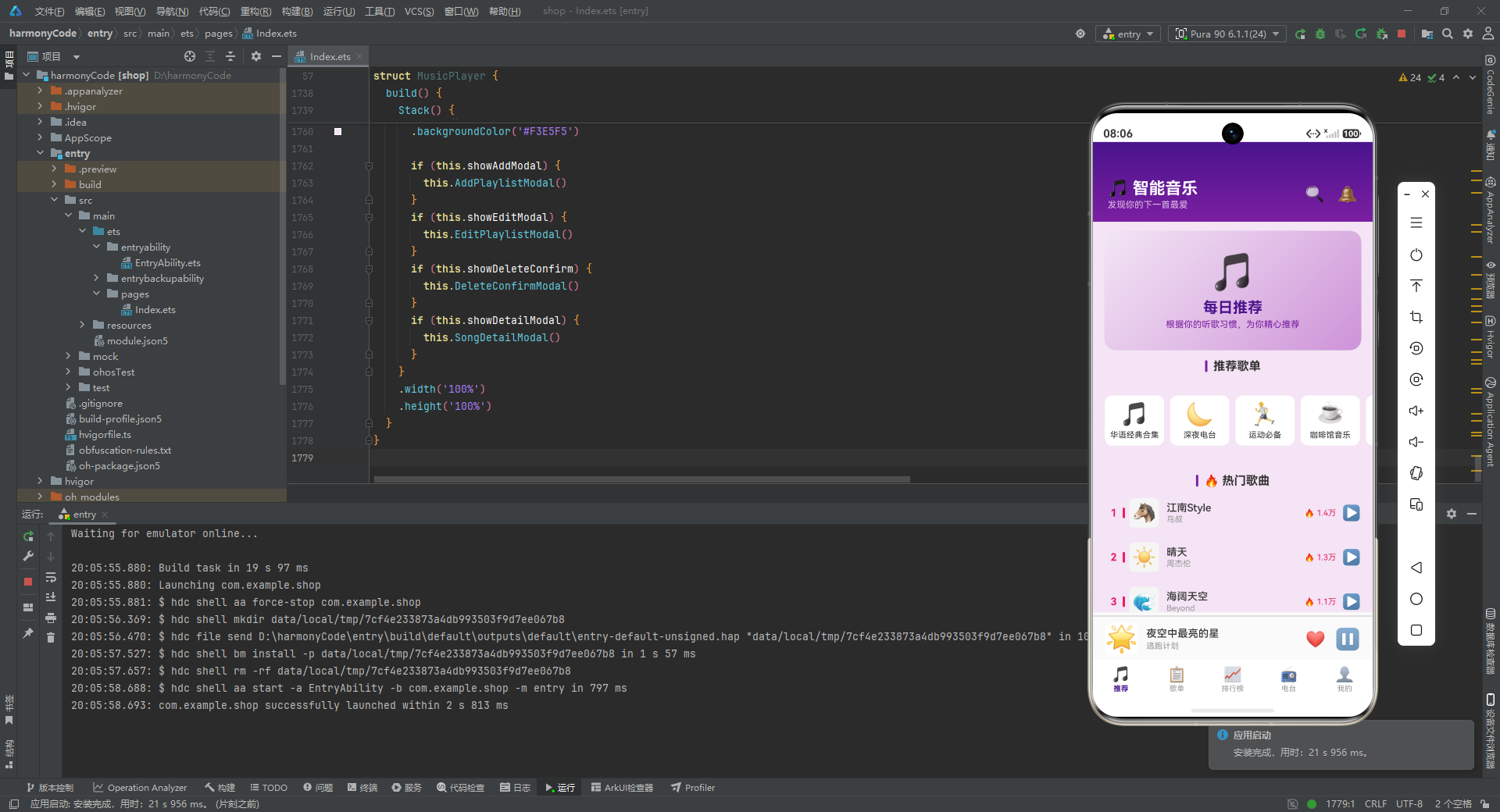
推荐页面的顶部是一个"每日推荐"Banner区域,使用了135度角的线性渐变背景,从浅紫色(#F3E5F5)过渡到中等紫色(#E1BEE7)再到较深紫色(#CE93D8),视觉上呈现出柔和的紫色光晕效果。Banner中央显示一个大号Emoji图标(取第一个歌单的封面),下方是"每日推荐"标题和说明文字。
Banner下方是"推荐歌单"区域,使用横向滚动的Scroll容器展示前8个歌单的迷你卡片。每个卡片宽80,包含Emoji封面和歌单名称。横向滚动使有限的空间内能展示更多内容,用户可以通过左右滑动浏览。
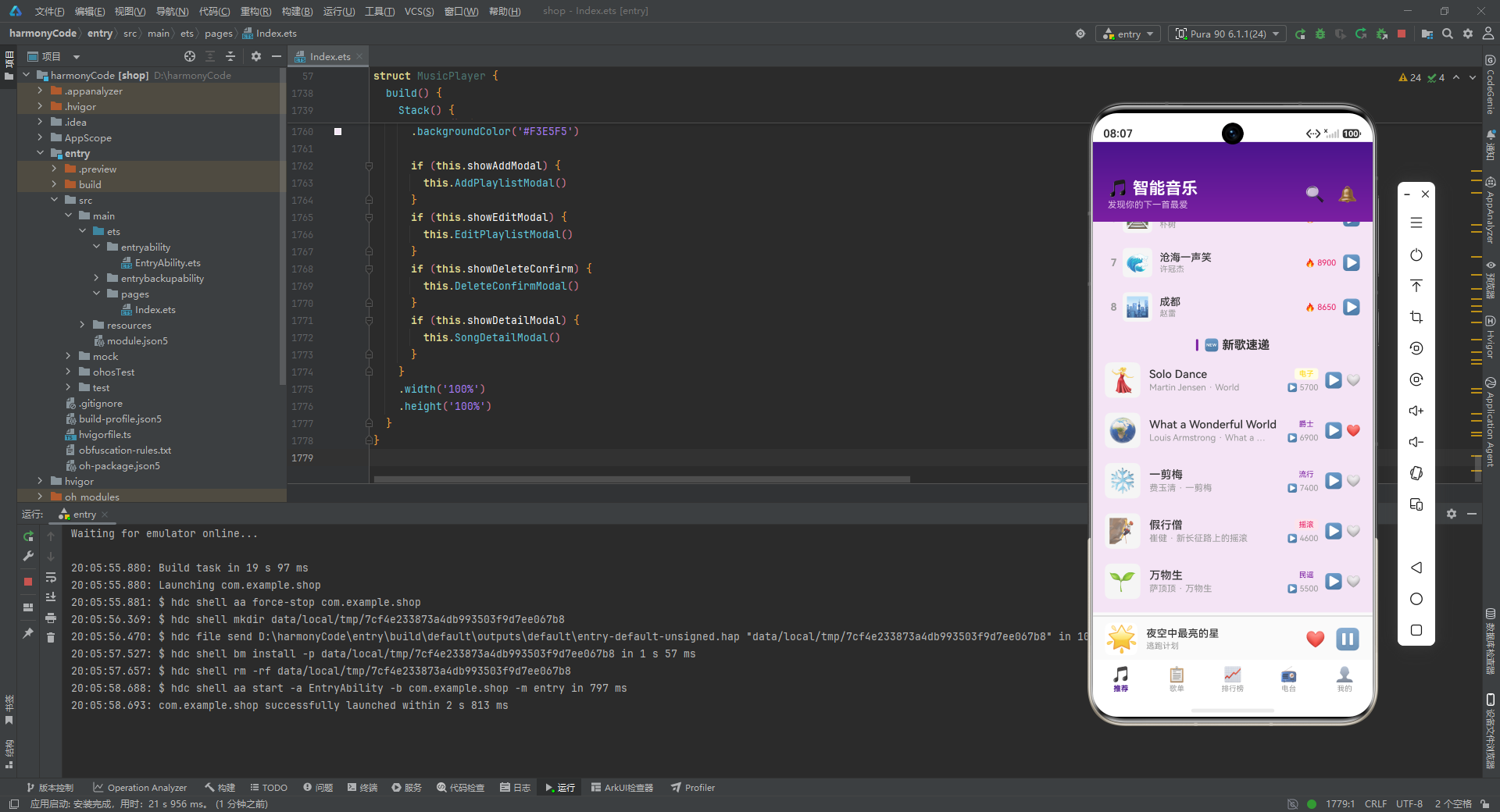
接下来是"热门歌曲"区域,调用GetTopSongs(8)获取播放次数最高的8首歌曲,使用ForEach渲染。前3名歌曲的排名数字显示为粉红色并带有紫色竖条标记,其余排名为灰色。
最后是"新歌速递"区域,调用GetRecentSongs(5)获取最后5首歌曲(模拟最新添加的歌曲),使用通用的SongItemBuilder渲染,并显示收藏按钮。
11.2 歌单页面
歌单页面提供了完整的歌单管理功能,包括创建、浏览、编辑和删除。
@Builder
PlaylistContent() {
  Scroll() {
    Column() {
      Row() {
        Text('➕ 新建歌单')
          .fontSize(16)
          .fontWeight(FontWeight.Medium)
          .fontColor('#7B1FA2')
      }
      .width('92%')
      .height(48)
      .justifyContent(FlexAlign.Center)
      .backgroundColor('#FFFFFF')
      .border({ width: 1, color: '#7B1FA2', style: BorderStyle.Dashed })
      .borderRadius(12)
      .margin({ top: 12, left: 16, right: 16 })
      .onClick(() => { this.OpenAddModal(); })
      // ...
    }
    .width('100%')
  }
  .scrollBar(BarState.Off)
  .width('100%')
  .layoutWeight(1)
}
页面顶部是"新建歌单"按钮,使用了虚线边框样式(BorderStyle.Dashed),这种视觉风格在"添加"类操作中很常见,传达出"可填充"的暗示。点击按钮调用OpenAddModal打开新建歌单弹窗。
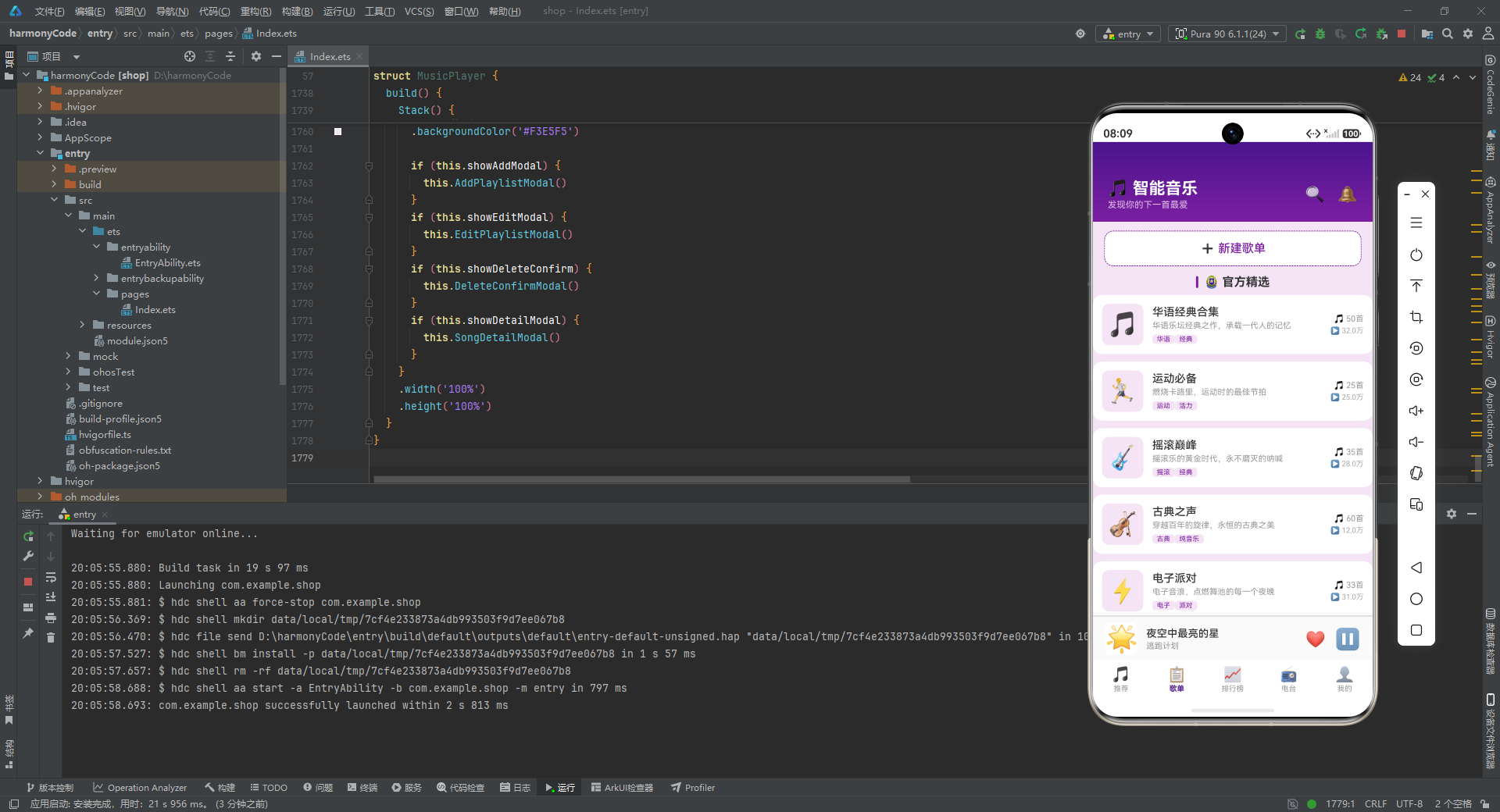
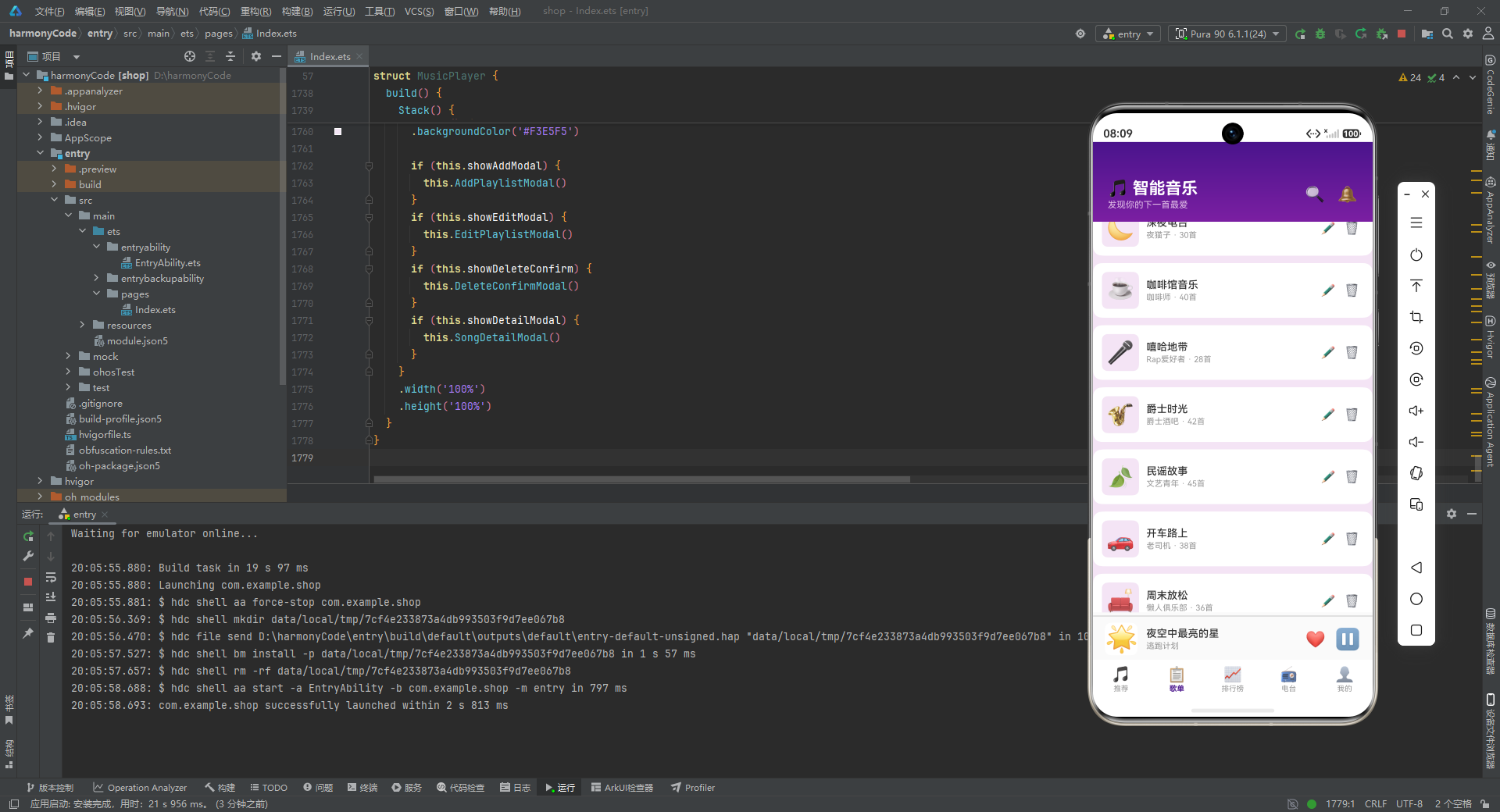
页面下方分为"官方精选"和"我的歌单"两个区域。官方精选区域使用filter方法筛选isOfficial为true的歌单,每个歌单以卡片形式展示,包含封面、名称、描述、标签胶囊、歌曲数和播放数。个人歌单区域筛选isOfficial为false的歌单,布局更为紧凑,并在右侧提供编辑(✏️)和删除(🗑️)两个操作按钮。
11.3 排行榜页面
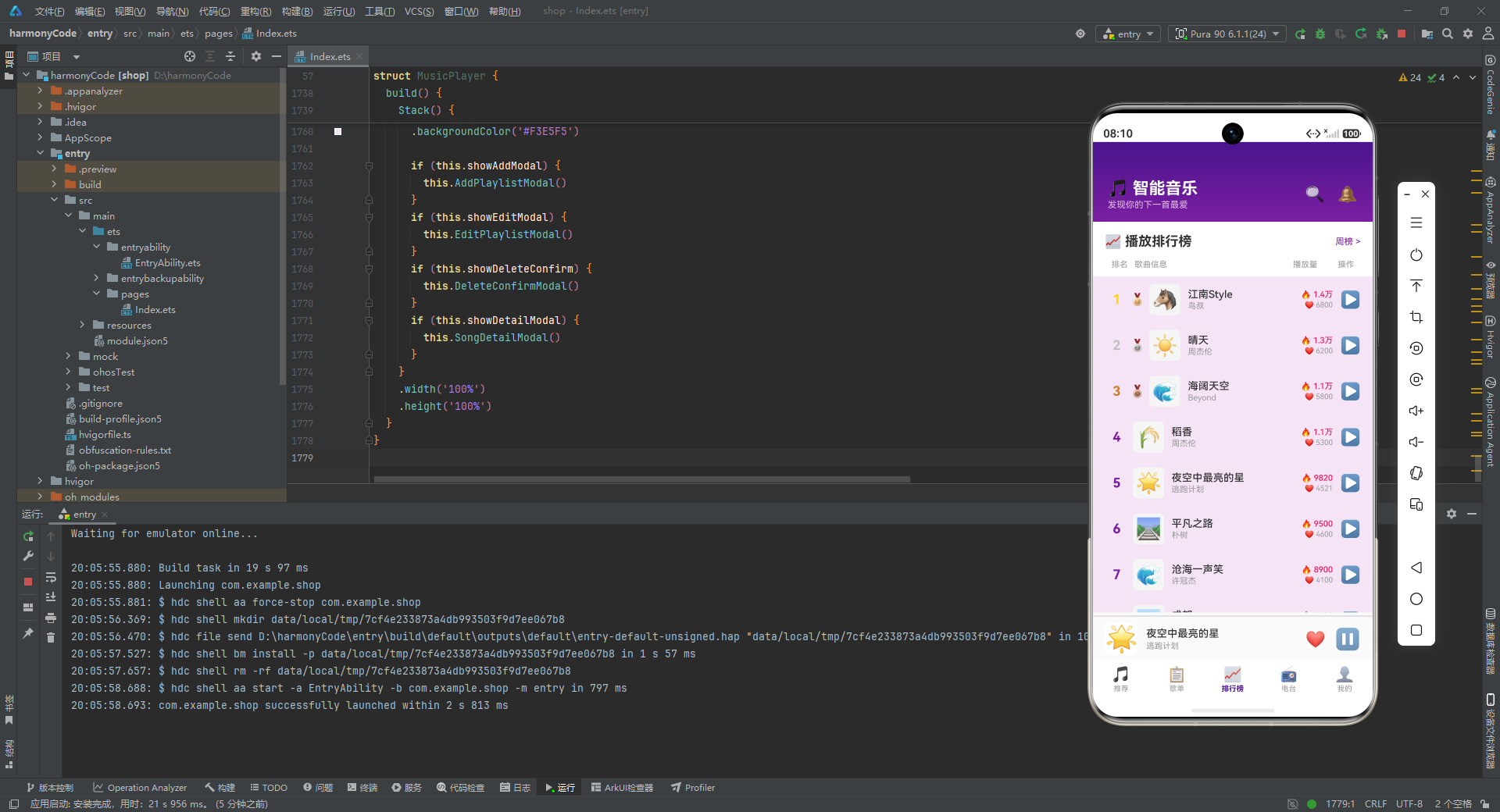
排行榜页面以表格化的方式展示所有歌曲的播放排名。
@Builder
RankingContent() {
  Scroll() {
    Column() {
      Row() {
        Text('📈 播放排行榜')
          .fontSize(18)
          .fontWeight(FontWeight.Bold)
          .fontColor('#333333')
        Column().layoutWeight(1)
        Text('周榜 >')
          .fontSize(12)
          .fontColor('#7B1FA2')
      }
      .width('100%')
      .padding({ left: 16, right: 16, top: 16, bottom: 8 })
      .backgroundColor('#FFFFFF')

      Row() {
        Text('排名')
          .fontSize(11)
          .fontColor('#999999')
          .width(40)
          .textAlign(TextAlign.Center)
        Text('歌曲信息')
          .fontSize(11)
          .fontColor('#999999')
          .layoutWeight(1)
        Text('播放量')
          .fontSize(11)
          .fontColor('#999999')
          .width(70)
          .textAlign(TextAlign.Center)
        Text('操作')
          .fontSize(11)
          .fontColor('#999999')
          .width(40)
          .textAlign(TextAlign.Center)
      }
      .width('100%')
      .padding({ left: 16, right: 16, top: 6, bottom: 10 })
      .backgroundColor('#FFFFFF')

      ForEach(this.GetSortedSongs(), (song: ISong, index: number) => {
        this.RankSongItemBuilder(song, index + 1)
      }, (song: ISong) => song.id.toString())
      // ...
    }
    .width('100%')
  }
  .scrollBar(BarState.Off)
  .width('100%')
  .layoutWeight(1)
}
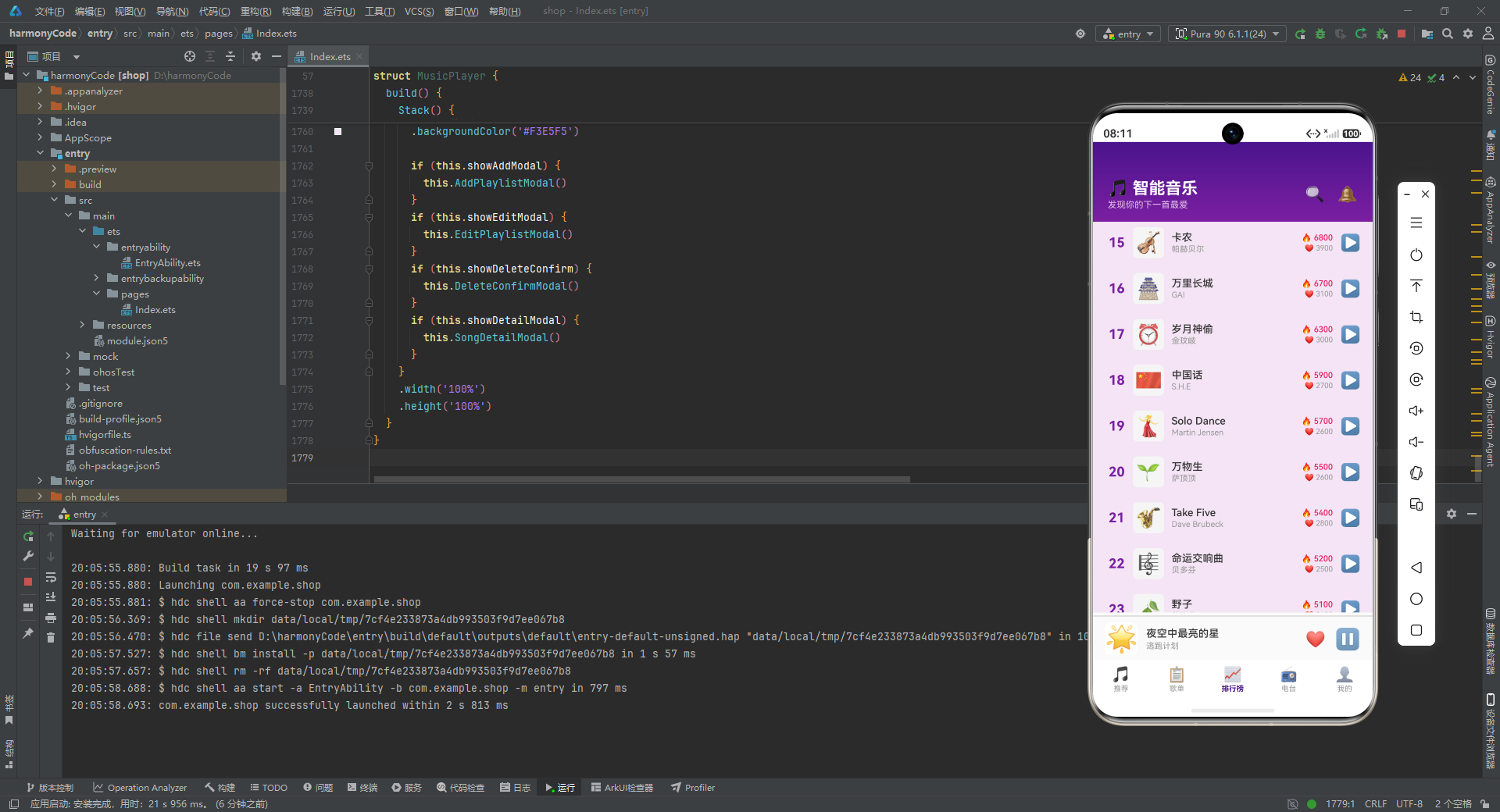
排行榜页面的顶部是标题行,左侧显示"📈 播放排行榜",右侧是"周榜 >"链接。下方是一个表头行,定义了四列的布局:排名(宽40)、歌曲信息(layoutWeight(1)占据剩余空间)、播放量(宽70)、操作(宽40)。
表头下方通过ForEach遍历GetSortedSongs()返回的已排序列表,为每首歌曲调用RankSongItemBuilder构建列表项。index + 1作为排名参数传入,使排名从1开始。
11.4 电台页面
电台页面提供了电台内容的浏览功能。
@Builder
RadioContent() {
  Scroll() {
    Column() {
      this.SectionTitleBuilder('⭐ 精选推荐')
      Scroll() {
        Row() {
          ForEach(this.radios.slice(0, 8), (radio: IRadio) => {
            Column() {
              Text(radio.image)
                .fontSize(36)
                .width(64)
                .height(64)
                .backgroundColor('#F3E5F5')
                .borderRadius(14)
                .textAlign(TextAlign.Center)

              Text(radio.name)
                .fontSize(11)
                .fontColor('#333333')
                .fontWeight(FontWeight.Medium)
                .maxLines(1)
                .textOverflow({ overflow: TextOverflow.Ellipsis })
                .width(72)
                .textAlign(TextAlign.Center)
                .margin({ top: 6 })

              Text('👥 ' + this.FormatListenerCount(radio.listenerCount))
                .fontSize(10)
                .fontColor('#999999')
                .margin({ top: 2 })
            }
            .width(84)
            .margin({ right: 10 })
            .padding({ top: 10, bottom: 10 })
            .backgroundColor('#FFFFFF')
            .borderRadius(10)
          }, (radio: IRadio) => radio.id.toString())
        }
        .padding({ left: 16, right: 16 })
      }
      .scrollable(ScrollDirection.Horizontal)
      .scrollBar(BarState.Off)
      .width('100%')
      .height(150)
      // ...
    }
    .width('100%')
  }
  .scrollBar(BarState.Off)
  .width('100%')
  .layoutWeight(1)
}
电台页面包含三个区域。首先是"精选推荐"区域,使用横向滚动展示前8个电台的卡片。每个卡片宽84,包含64x64的圆角Emoji图标、电台名称和听众数。
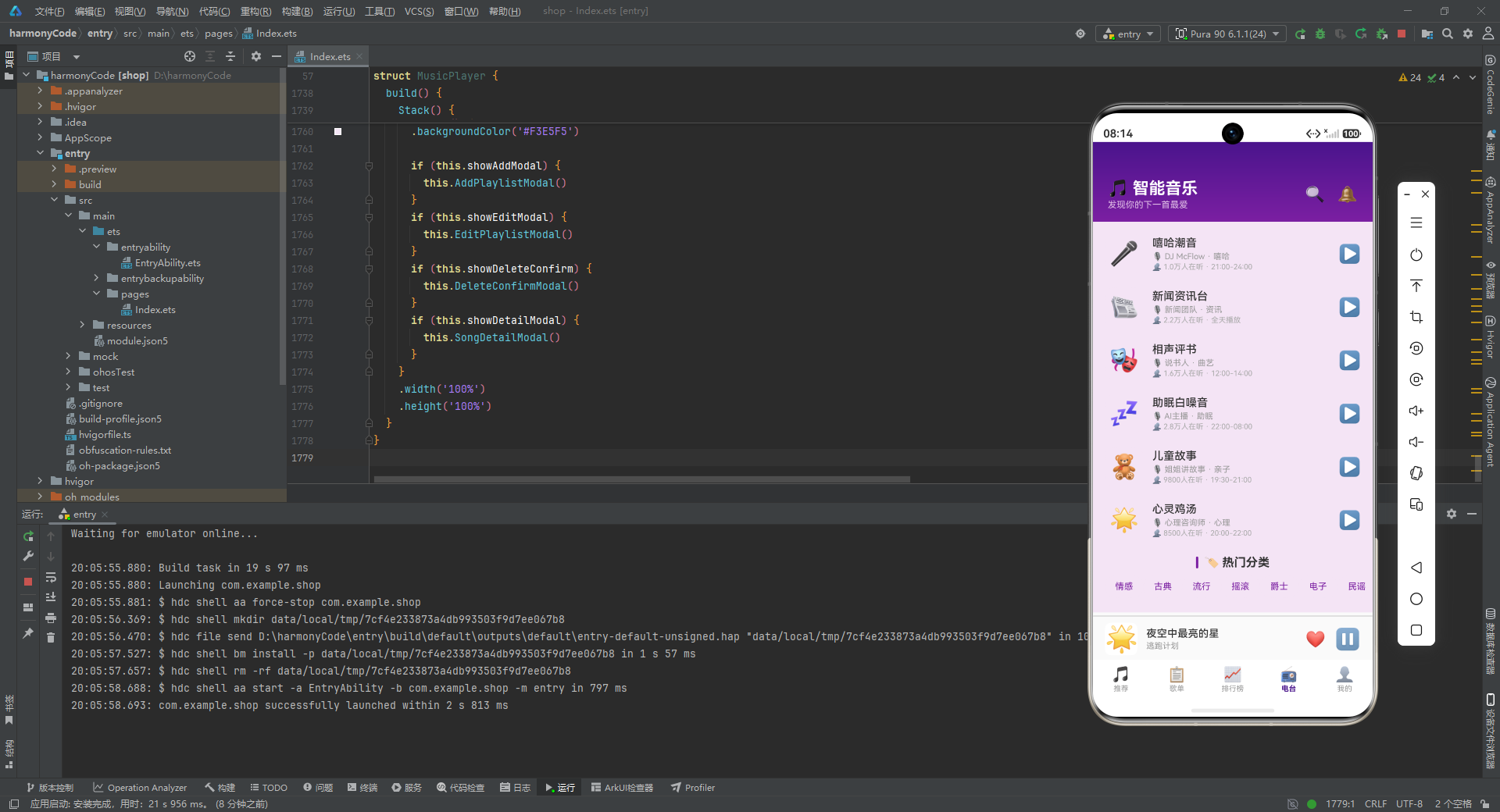
第二个区域是"全部电台"列表,使用RadioItemBuilder渲染所有13个电台,以列表形式展示完整的电台信息。
第三个区域是"热门分类"标签行,使用ForEach遍历分类名称数组(情感、古典、流行、摇滚、爵士、电子、民谣、嘻哈),为每个分类生成一个圆角胶囊样式的标签。
11.5 个人中心页面
个人中心页面是最复杂的页面之一,集成了用户信息展示、数据统计、播放图表和多个内容列表。
@Builder
ProfileContent() {
  Scroll() {
    Column() {
      Row() {
        Text('👤')
          .fontSize(40)
          .width(64)
          .height(64)
          .backgroundColor('#F3E5F5')
          .borderRadius(32)
          .textAlign(TextAlign.Center)

        Column() {
          Text('音乐爱好者')
            .fontSize(18)
            .fontWeight(FontWeight.Bold)
            .fontColor('#333333')
          Text('@music_lover_2024 · VIP会员')
            .fontSize(12)
            .fontColor('#7B1FA2')
            .margin({ top: 4 })
        }
        .alignItems(HorizontalAlign.Start)
        .layoutWeight(1)
        .margin({ left: 14 })

        Text('✏️')
          .fontSize(18)
          .fontColor('#7B1FA2')
      }
      .width('100%')
      .padding(20)
      .backgroundColor('#FFFFFF')
      .borderRadius(12)
      .margin({ top: 12, left: 16, right: 16 })
      // ...
    }
    .width('100%')
  }
  .scrollBar(BarState.Off)
  .width('100%')
  .layoutWeight(1)
}
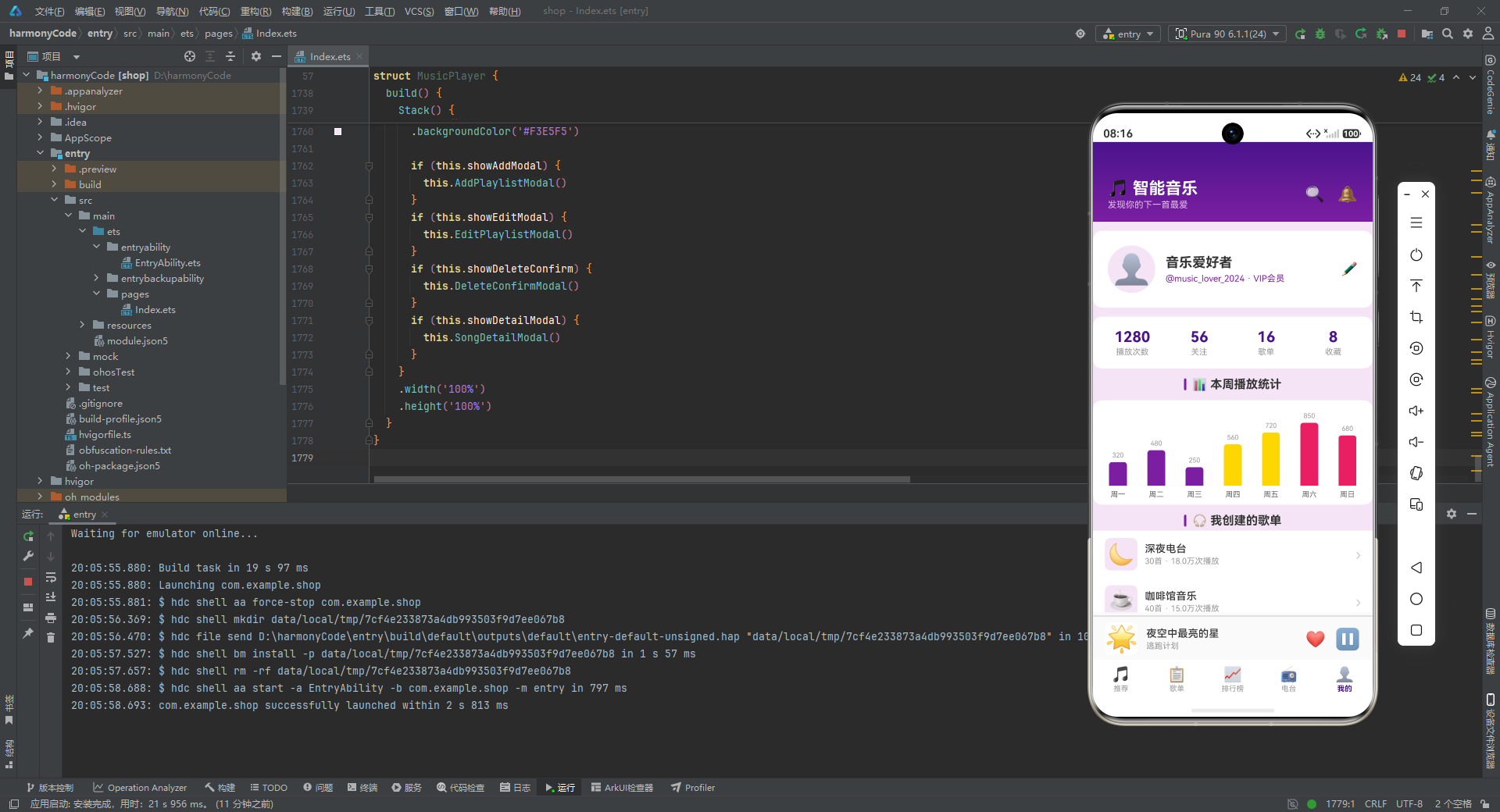
用户信息区域展示一个圆形头像(使用👤Emoji)、用户名"音乐爱好者"、账号信息和VIP标识。下方是四列数据统计栏,分别显示播放次数(1280)、关注数(56)、歌单数(动态计算this.playlists.length)和收藏数(动态计算this.GetFavoriteSongs().length)。其中歌单数和收藏数是根据实际数据动态计算的,确保数据的一致性。
数据统计下方是本周播放统计的柱状图:
Row() {
  ForEach(this.barChartData, (item: IBarChartItem) => {
    Column() {
      Text(this.FormatPlayCount(item.value))
        .fontSize(9)
        .fontColor('#999999')
        .margin({ bottom: 4 })

      Column()
        .width(24)
        .height(item.value * 0.1)
        .backgroundColor(item.color)
        .borderRadius({ topLeft: 4, topRight: 4 })

      Text(item.label)
        .fontSize(10)
        .fontColor('#666666')
        .margin({ top: 6 })
    }
    .layoutWeight(1)
    .alignItems(HorizontalAlign.Center)
  }, (item: IBarChartItem) => item.label)
}
.width('100%')
.alignItems(VerticalAlign.Bottom)
.justifyContent(FlexAlign.SpaceAround)
柱状图的实现方式非常巧妙。每根柱子是一个Column组件,其高度通过item.value * 0.1计算得出(如值850对应高度85)。柱子顶部有圆角,上方显示数值,下方显示星期标签。整行使用alignItems(VerticalAlign.Bottom)使所有柱子底部对齐,justifyContent(FlexAlign.SpaceAround)使柱子均匀分布。这种纯UI方式实现的柱状图虽然简单,但视觉效果清晰直观。
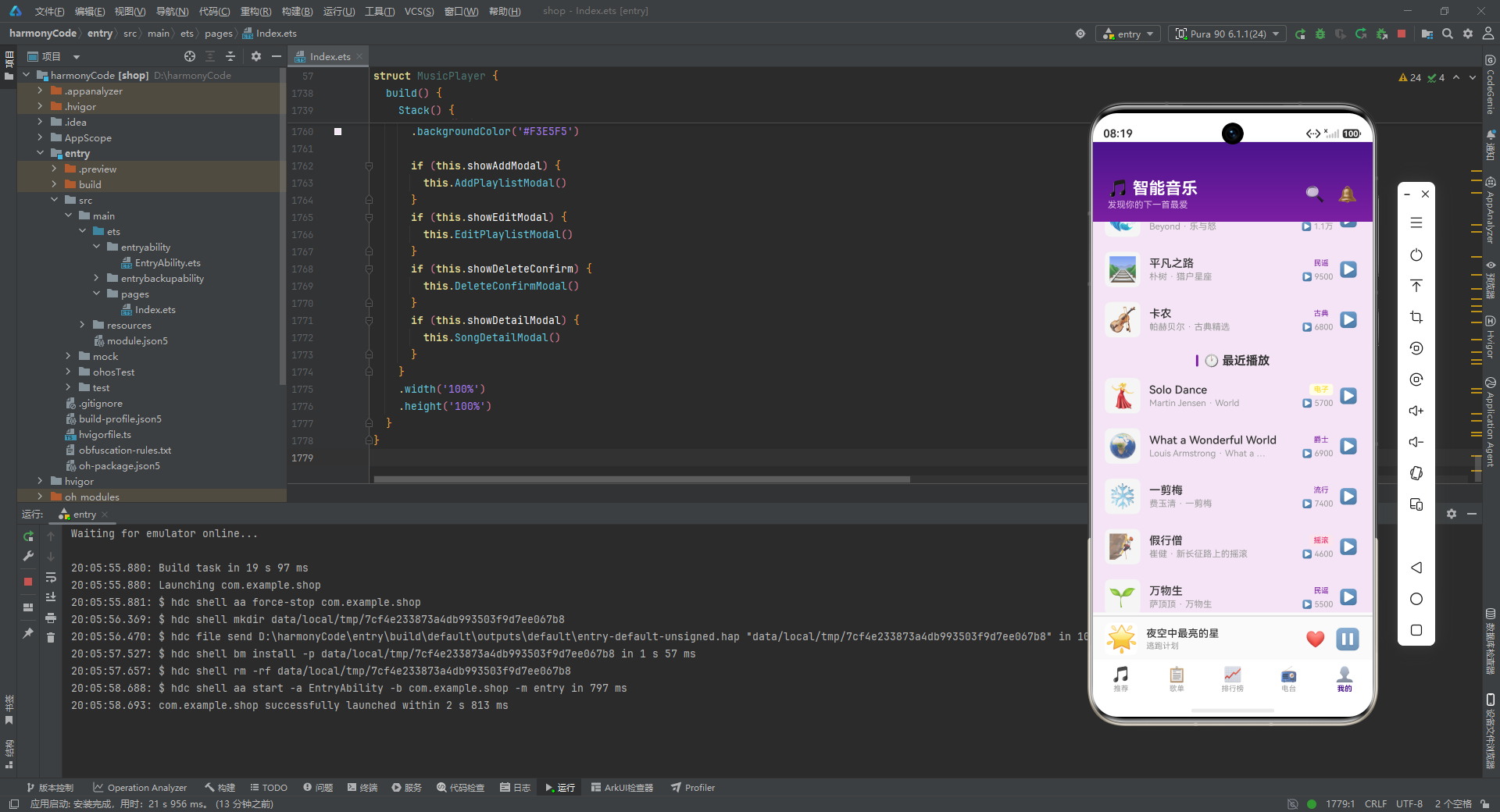
个人中心页面还包含"我创建的歌单"、"我的收藏"和"最近播放"三个内容区域。"我的收藏"调用GetFavoriteSongs().slice(0, 5)展示前5首收藏歌曲,"最近播放"调用GetRecentSongs(5)展示最近5首歌曲,均使用SongItemBuilder渲染但不显示收藏按钮。
十二、弹窗构建器:模态交互的实现
12.1 新建歌单弹窗
应用实现了四种弹窗,每种弹窗都使用Stack容器实现层叠效果——底层是半透明遮罩层,上层是弹窗内容卡片。
@Builder
AddPlaylistModal() {
  Stack() {
    Column()
      .width('100%')
      .height('100%')
      .backgroundColor('rgba(0,0,0,0.5)')
      .onClick(() => { this.showAddModal = false; })

    Column() {
      Scroll() {
        Column() {
          Text('新建歌单')
            .fontSize(18)
            .fontWeight(FontWeight.Bold)
            .fontColor('#333333')
            .width('100%')
            .textAlign(TextAlign.Center)
            .margin({ bottom: 16 })

          Text('歌单名称')
            .fontSize(13)
            .fontColor('#666666')
            .width('100%')
            .margin({ bottom: 6 })

          TextInput({ placeholder: '请输入歌单名称' })
            .width('100%')
            .height(44)
            .backgroundColor('#F5F5F5')
            .borderRadius(8)
            .padding({ left: 12, right: 12 })
            .onChange((value: string) => { this.newPlaylistName = value; })

          Text('歌单描述')
            .fontSize(13)
            .fontColor('#666666')
            .width('100%')
            .margin({ top: 16, bottom: 6 })

          TextArea({ placeholder: '请输入歌单描述' })
            .width('100%')
            .height(72)
            .backgroundColor('#F5F5F5')
            .borderRadius(8)
            .padding({ left: 12, right: 12, top: 8, bottom: 8 })
            .onChange((value: string) => { this.newPlaylistDesc = value; })

          Text('选择封面')
            .fontSize(13)
            .fontColor('#666666')
            .width('100%')
            .margin({ top: 16, bottom: 8 })

          Row() {
            ForEach(this.coverOptions, (option: ICoverOption, idx: number) => {
              Column() {
                Text(option.emoji)
                  .fontSize(28)
              }
              .width(44)
              .height(44)
              .borderRadius(10)
              .backgroundColor(this.selectedCoverIndex === idx ? '#F3E5F5' : '#F5F5F5')
              .border({ width: this.selectedCoverIndex === idx ? 2 : 1, color: this.selectedCoverIndex === idx ? '#7B1FA2' : '#E0E0E0' })
              .justifyContent(FlexAlign.Center)
              .alignItems(HorizontalAlign.Center)
              .onClick(() => { this.selectedCoverIndex = idx; })
            }, (option: ICoverOption) => option.emoji)
          }
          .width('100%')
          .justifyContent(FlexAlign.SpaceBetween)

          Row() {
            Text('取消')
              .fontSize(15)
              .fontColor('#999999')
              .layoutWeight(1)
              .height(44)
              .textAlign(TextAlign.Center)
              .backgroundColor('#F5F5F5')
              .borderRadius(8)
              .onClick(() => { this.showAddModal = false; })

            Text('创建')
              .fontSize(15)
              .fontWeight(FontWeight.Medium)
              .fontColor('#FFFFFF')
              .layoutWeight(1)
              .height(44)
              .textAlign(TextAlign.Center)
              .backgroundColor('#7B1FA2')
              .borderRadius(8)
              .margin({ left: 12 })
              .onClick(() => { this.AddNewPlaylist(); })
          }
          .width('100%')
          .margin({ top: 20 })
        }
        .width('100%')
      }
      .scrollBar(BarState.Off)
    }
    .width('88%')
    .constraintSize({ maxHeight: '80%' })
    .backgroundColor('#FFFFFF')
    .borderRadius(16)
    .padding(20)
  }
  .width('100%')
  .height('100%')
  .alignContent(Alignment.Center)
}
新建歌单弹窗的遮罩层使用rgba(0,0,0,0.5)半透明黑色背景,点击遮罩层关闭弹窗。弹窗内容卡片宽度为屏幕的88%,最大高度限制为80%,使用constraintSize确保内容过多时可以滚动。
弹窗内部使用Scroll容器包裹内容,确保在小屏幕设备上表单内容可以滚动查看。表单包含三个输入区域:歌单名称(使用TextInput单行输入框)、歌单描述(使用TextArea多行输入框)、封面选择(六个Emoji选项,选中的项背景变为浅紫色并加粗边框)。
底部是"取消"和"创建"两个按钮,使用layoutWeight(1)等分宽度。取消按钮为浅灰色背景,创建按钮为紫色背景白色文字,视觉上突出主操作。onChange回调将输入框的值实时同步到对应的状态变量,确保点击创建时能够获取到最新的输入值。
12.2 编辑歌单弹窗
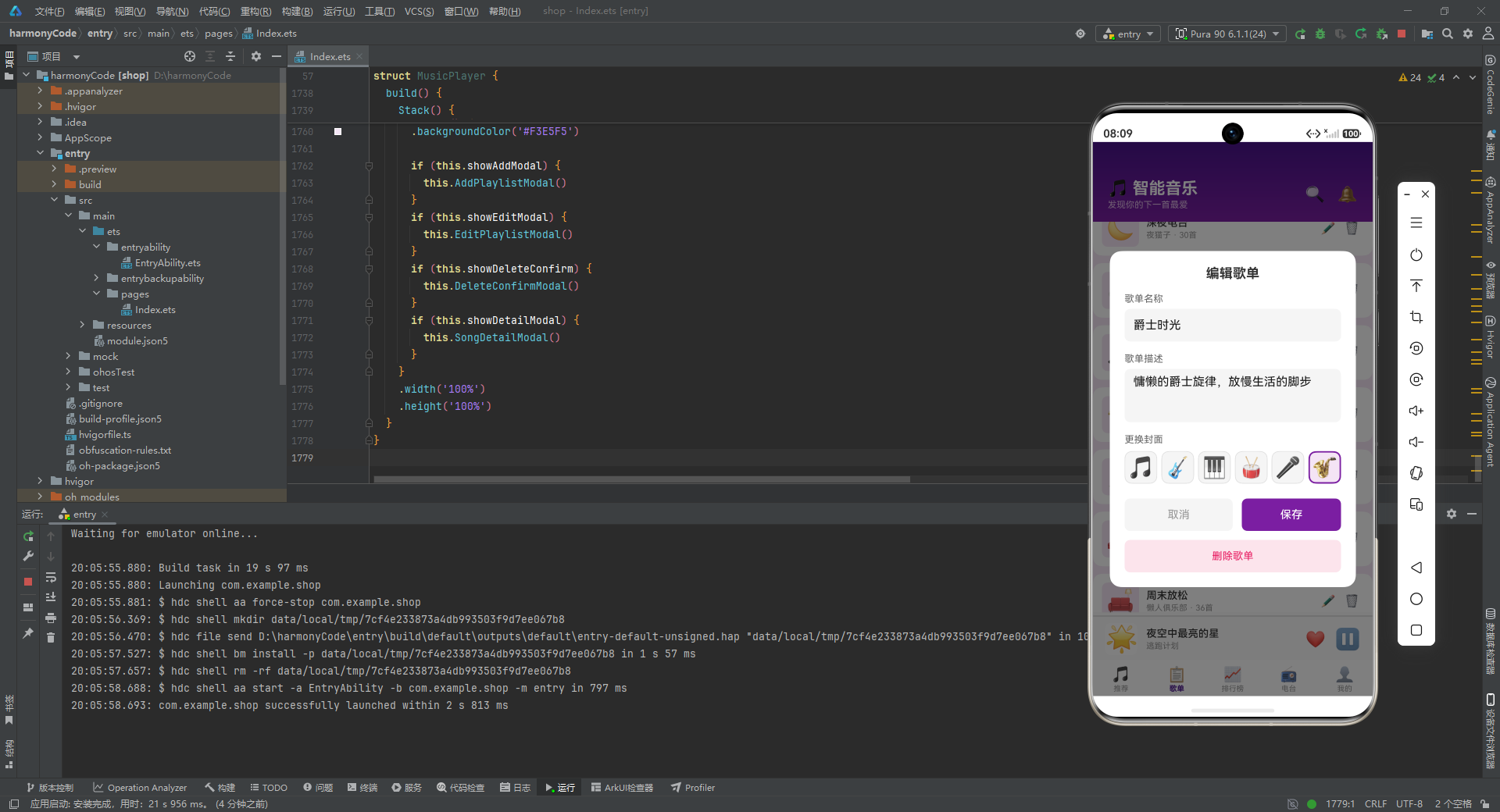
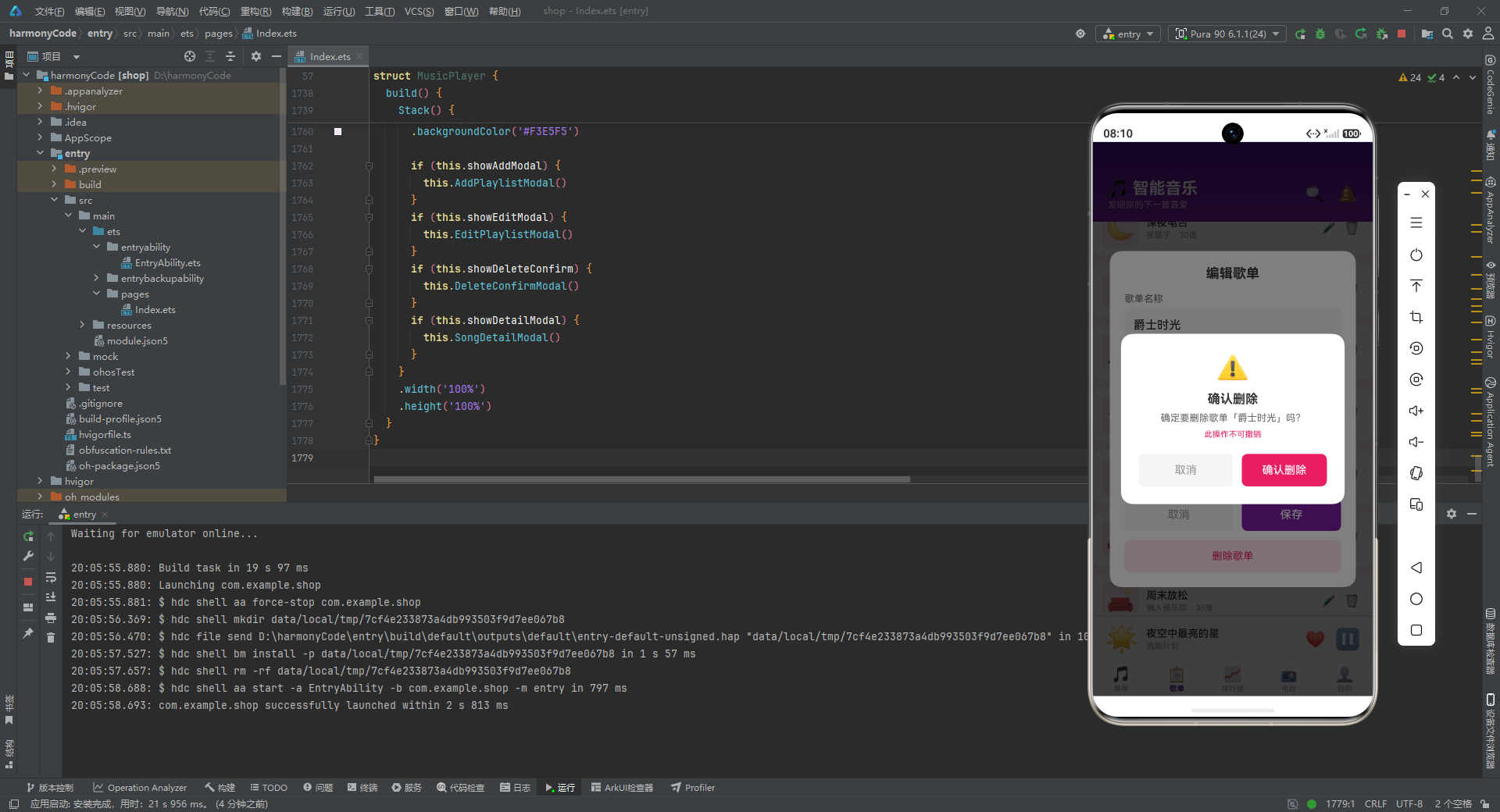
编辑弹窗的结构与新建弹窗基本一致,但有以下区别:标题改为"编辑歌单",输入框使用text参数预填充当前歌单的数据,封面选择器使用editCoverIndex状态变量,底部增加了"删除歌单"按钮(粉红色背景),底部主按钮文字改为"保存"。
TextInput({ placeholder: '请输入歌单名称', text: this.editPlaylistName })
这里text参数绑定了editPlaylistName状态变量,使输入框在打开弹窗时显示当前歌单的名称。需要注意的是,这种绑定方式在ArkTS中通常是单向的——输入框的初始值来自状态变量,但后续的修改通过onChange回调同步回状态变量。
12.3 删除确认弹窗
@Builder
DeleteConfirmModal() {
  Stack() {
    Column()
      .width('100%')
      .height('100%')
      .backgroundColor('rgba(0,0,0,0.5)')
      .onClick(() => { this.showDeleteConfirm = false; })

    Column() {
      Text('⚠️')
        .fontSize(36)
        .margin({ bottom: 12 })

      Text('确认删除')
        .fontSize(17)
        .fontWeight(FontWeight.Bold)
        .fontColor('#333333')

      Text('确定要删除歌单「' + this.playlists[this.deletePlaylistIndex].name + '」吗?')
        .fontSize(13)
        .fontColor('#666666')
        .textAlign(TextAlign.Center)
        .margin({ top: 8, bottom: 8 })

      Text('此操作不可撤销')
        .fontSize(11)
        .fontColor('#E91E63')

      Row() {
        Text('取消')
          .fontSize(15)
          .fontColor('#999999')
          .layoutWeight(1)
          .height(44)
          .textAlign(TextAlign.Center)
          .backgroundColor('#F5F5F5')
          .borderRadius(8)
          .onClick(() => { this.showDeleteConfirm = false; })

        Text('确认删除')
          .fontSize(15)
          .fontWeight(FontWeight.Medium)
          .fontColor('#FFFFFF')
          .layoutWeight(1)
          .height(44)
          .textAlign(TextAlign.Center)
          .backgroundColor('#E91E63')
          .borderRadius(8)
          .margin({ left: 12 })
          .onClick(() => { this.DeletePlaylist(); })
      }
      .width('100%')
      .margin({ top: 20 })
    }
    .width('80%')
    .backgroundColor('#FFFFFF')
    .borderRadius(16)
    .padding(24)
  }
  .width('100%')
  .height('100%')
  .alignContent(Alignment.Center)
}
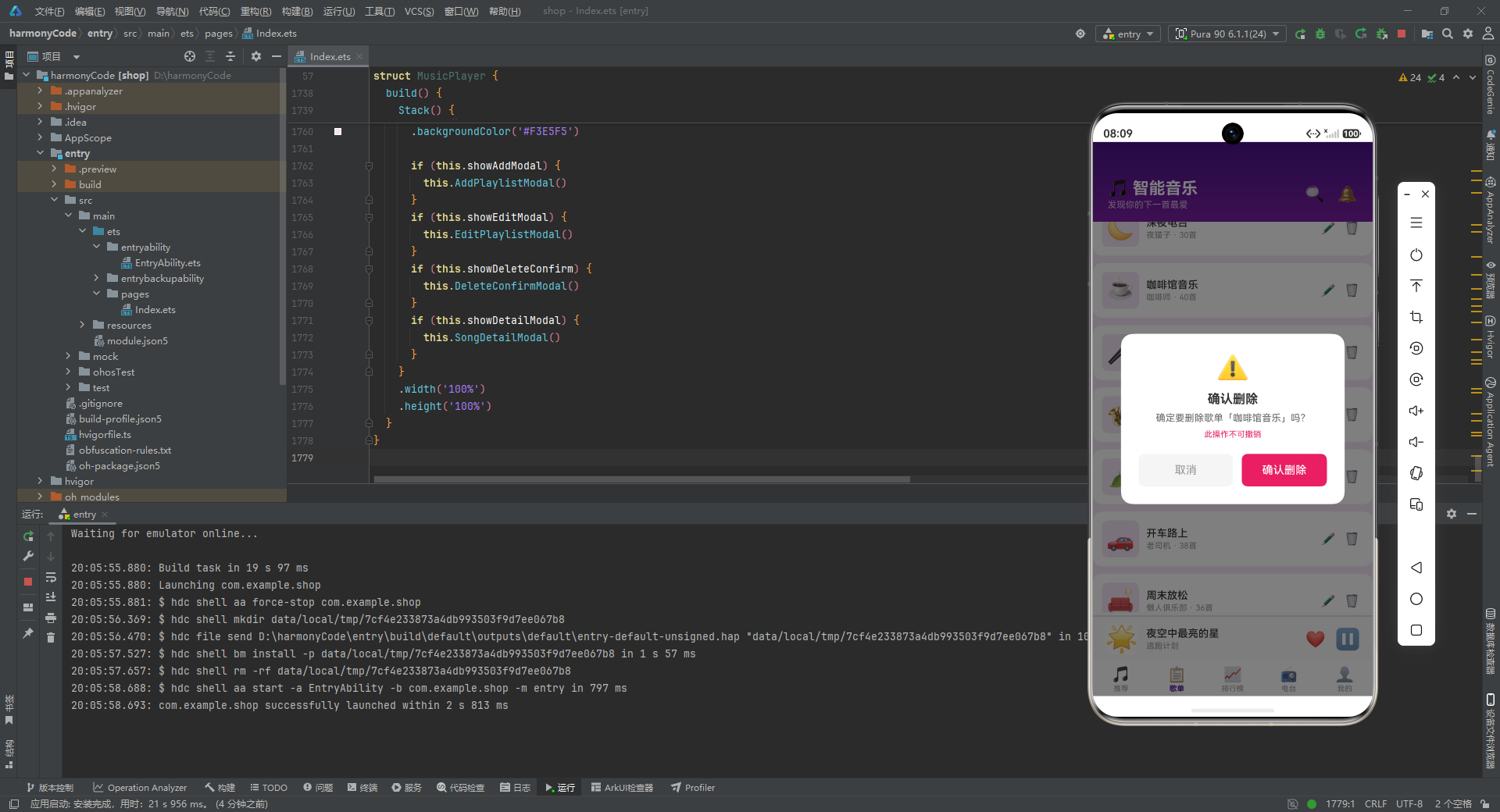
删除确认弹窗是一个居中显示的小型对话框。顶部是⚠️警告图标,下方是"确认删除"标题、包含歌单名称的确认信息和"此操作不可撤销"的红色提示。底部是"取消"和"确认删除"两个按钮,确认按钮使用粉红色背景以传达危险操作的视觉警示。弹窗宽度为屏幕的80%,比新建和编辑弹窗更窄,因为内容更少。
12.4 歌曲详情弹窗
歌曲详情弹窗是内容最丰富的弹窗,展示了歌曲的完整信息和相关推荐。
@Builder
SongDetailModal() {
  Stack() {
    Column()
      .width('100%')
      .height('100%')
      .backgroundColor('rgba(0,0,0,0.5)')
      .onClick(() => { this.showDetailModal = false; })

    Column() {
      Scroll() {
        Column() {
          Row() {
            Text('✕')
              .fontSize(20)
              .fontColor('#999999')
              .padding(4)
              .onClick(() => { this.showDetailModal = false; })
            Column().layoutWeight(1)
            Text(this.songs[this.selectedSongIndex].isFavorite ? '❤️' : '🤍')
              .fontSize(20)
              .onClick(() => { this.ToggleFavorite(this.selectedSongIndex); })
          }
          .width('100%')
          .margin({ bottom: 12 })

          Text(this.songs[this.selectedSongIndex].image)
            .fontSize(64)
            .width(100)
            .height(100)
            .backgroundColor('#F3E5F5')
            .borderRadius(20)
            .textAlign(TextAlign.Center)

          Text(this.songs[this.selectedSongIndex].title)
            .fontSize(20)
            .fontWeight(FontWeight.Bold)
            .fontColor('#333333')
            .margin({ top: 12 })

          Text(this.songs[this.selectedSongIndex].artist)
            .fontSize(14)
            .fontColor('#666666')
            .margin({ top: 4 })
          // ...
        }
        .width('100%')
      }
      .scrollBar(BarState.Off)
    }
    .width('92%')
    .constraintSize({ maxHeight: '85%' })
    .backgroundColor('#FFFFFF')
    .borderRadius(16)
    .padding(20)
  }
  .width('100%')
  .height('100%')
  .alignContent(Alignment.Center)
}
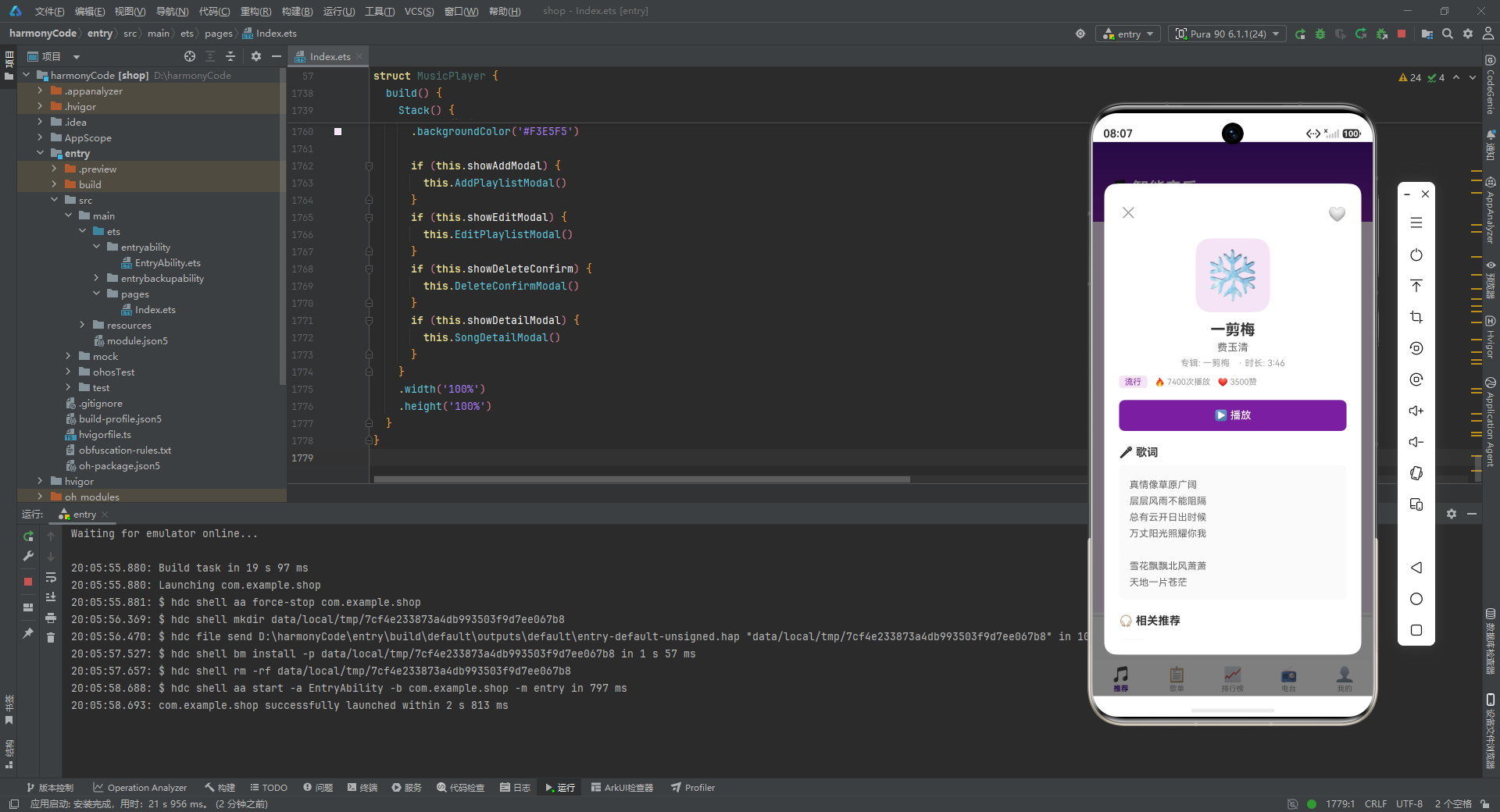
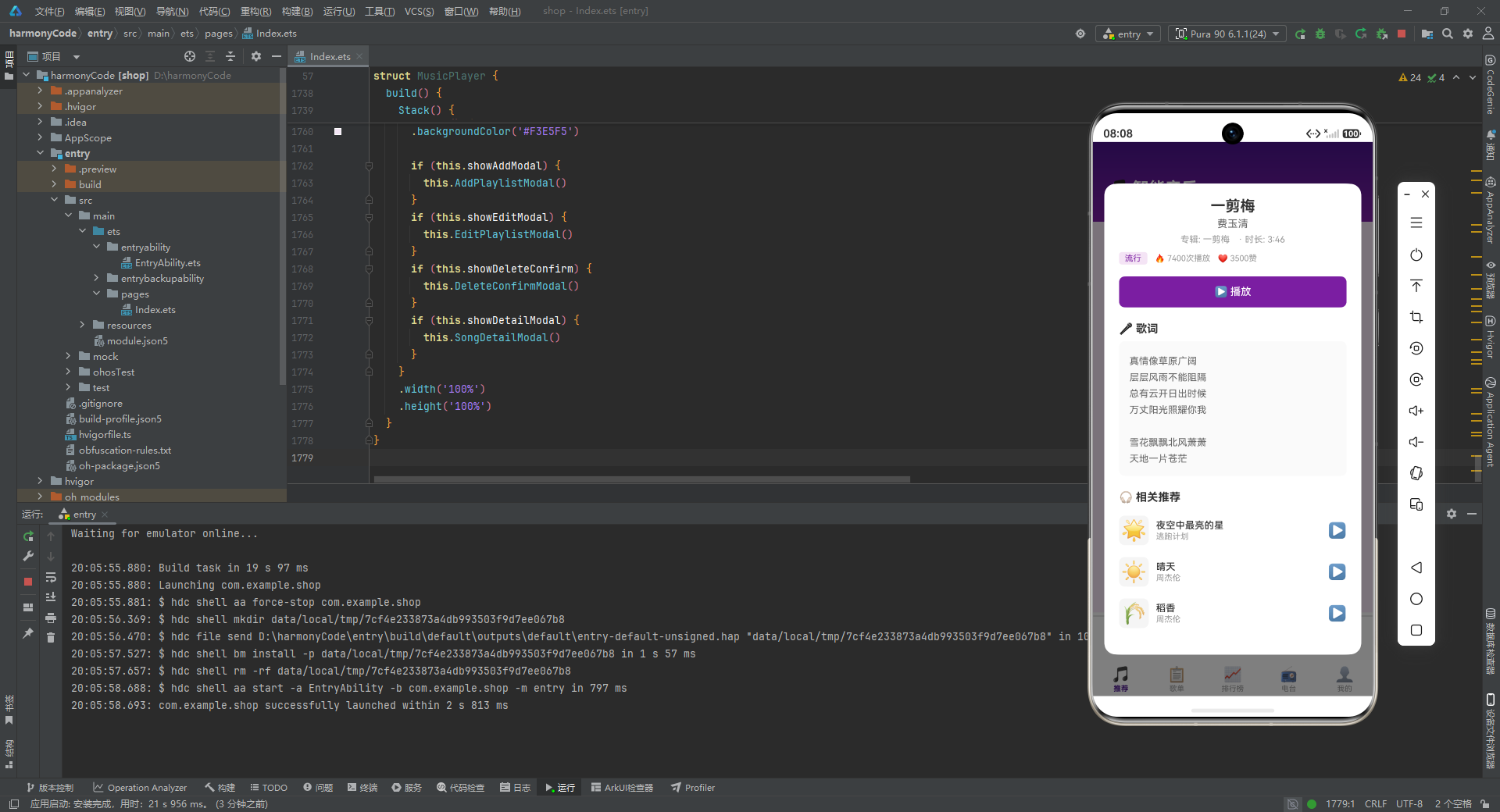
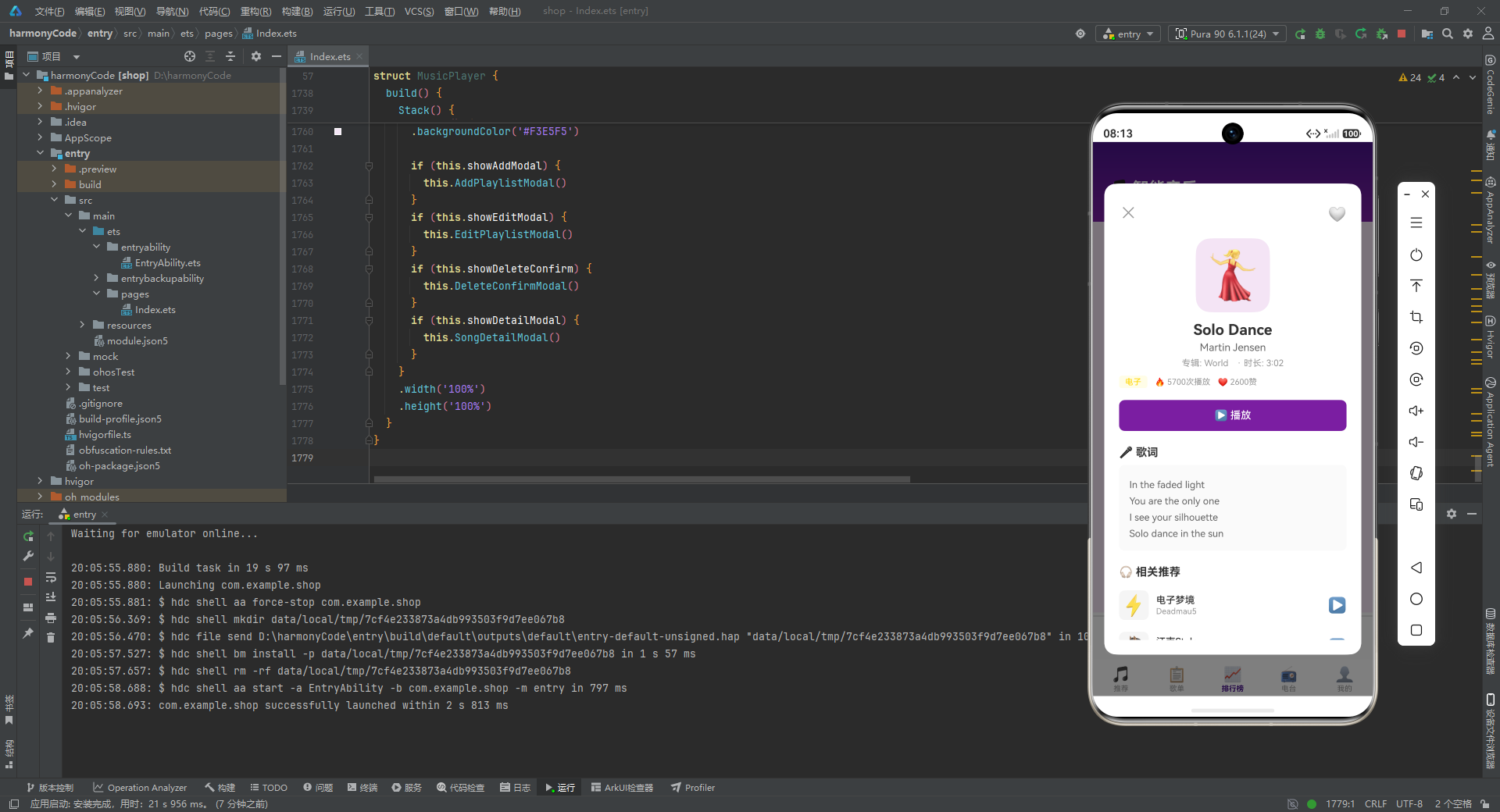
详情弹窗的顶部是关闭按钮(左)和收藏按钮(右),中间用layoutWeight(1)的空Column撑开间距。下方依次展示:100x100的大号Emoji封面(圆角20)、歌曲标题(20号粗体)、艺术家名、专辑和时长信息、流派标签和播放/点赞数据。
中部是一个紫色的"播放"按钮,点击后调用PlaySong方法开始播放并关闭弹窗。
下半部分是歌词区域,以浅灰色背景卡片展示完整的歌词文本,行高设为22以提升多行歌词的阅读体验。
最后是"相关推荐"区域,调用GetRelatedSongs方法获取与当前歌曲同流派的其他歌曲(最多3首),以列表形式展示。点击推荐项会调用OpenSongDetail方法切换到该歌曲的详情,实现了详情弹窗的链式导航。
十三、主构建方法:整体页面的组装
13.1 build方法的结构
build方法是每个ArkTS组件的核心,它描述了组件的最终UI结构。
build() {
  Stack() {
    Column() {
      this.HeaderBuilder()

      if (this.currentTab === 0) {
        this.RecommendContent()
      } else if (this.currentTab === 1) {
        this.PlaylistContent()
      } else if (this.currentTab === 2) {
        this.RankingContent()
      } else if (this.currentTab === 3) {
        this.RadioContent()
      } else {
        this.ProfileContent()
      }

      this.MiniPlayerBuilder()
      this.TabBarBuilder()
    }
    .width('100%')
    .height('100%')
    .backgroundColor('#F3E5F5')

    if (this.showAddModal) {
      this.AddPlaylistModal()
    }
    if (this.showEditModal) {
      this.EditPlaylistModal()
    }
    if (this.showDeleteConfirm) {
      this.DeleteConfirmModal()
    }
    if (this.showDetailModal) {
      this.SongDetailModal()
    }
  }
  .width('100%')
  .height('100%')
}
最外层是一个Stack容器,它允许子元素层叠显示。Stack内部包含两部分内容:
第一部分是一个Column,作为应用的主界面骨架。从上到下依次排列:头部区域(HeaderBuilder)、当前Tab的内容区域(根据currentTab的值条件渲染五个页面之一)、迷你播放器(MiniPlayerBuilder)、底部导航栏(TabBarBuilder)。整个Column设置了浅紫色背景(#F3E5F5),作为应用的基色。
第二部分是四个条件渲染的弹窗。每个弹窗的显示由对应的布尔状态变量控制。由于这些弹窗是Stack的子元素,它们会覆盖在主界面上方,实现模态遮罩效果。当弹窗状态变量为false时,对应的弹窗Builder不会被渲染,不占用任何空间和资源。
13.2 条件渲染的页面切换
主内容区域的页面切换通过if/else if/else语句实现。当currentTab的值改变时,旧的页面Builder不再被渲染,新的页面Builder开始渲染。这种基于条件渲染的页面切换方式简单直接,适合页面数量较少的场景。如果页面数量较多,可以考虑使用更高效的懒加载机制。
13.3 弹窗的层级管理
四个弹窗虽然可以同时显示状态为true,但在实际交互流程中,通常只有一个弹窗处于显示状态。例如,从编辑弹窗中点击"删除歌单"时,会先显示删除确认弹窗,删除完成后两个弹窗的状态都会被设为false。由于Stack的渲染顺序,后声明的弹窗会覆盖在先声明的弹窗之上,但本应用中的弹窗不会同时出现,因此不存在层级冲突问题。
十四、关键特性对比与总结
14.1 关键特性对比表
下表对本应用中涉及的核心技术特性进行了系统性的归纳与对比,帮助读者快速理解各项特性的定位、实现方式和设计意图:
| 特性维度 | 实现方式 | 核心机制 | 适用场景 | 优势分析 |
|---|---|---|---|---|
| 状态管理 | @State装饰器 | 响应式数据绑定,值变化自动触发UI更新 | 播放状态、弹窗显隐、表单数据、列表数据 | 无需手动操作DOM,代码简洁,数据与视图自动同步 |
| UI复用 | @Builder装饰器 | 函数封装UI片段,支持参数传递 | 歌曲列表项、区块标题、弹窗等重复出现的UI | 减少代码重复,统一UI风格,便于维护修改 |
| 页面切换 | 条件渲染(if/else) | 根据currentTab值渲染对应页面Builder | 五个主页面间的切换 | 实现简单直接,适合页面数量较少的场景 |
| 列表渲染 | ForEach组件 | 数组遍历生成列表项,支持键值优化 | 歌曲列表、歌单列表、电台列表、标签列表 | 自动处理增删改的UI更新,性能优化好 |
| 弹窗交互 | Stack层叠+条件渲染 | 半透明遮罩层+内容卡片,状态控制显隐 | 新建/编辑歌单、删除确认、歌曲详情 | 模态体验好,遮罩点击关闭,层级管理清晰 |
| 数据格式化 | 自定义格式化方法 | 数值除以万并加后缀,颜色映射 | 播放次数、听众数、排名颜色、流派颜色 | 大数字易读,颜色编码直观,语义清晰 |
| 模拟播放 | setInterval定时器 | 每秒递增progress值,到1后重置 | 迷你播放器进度条 | 无需音频引擎即可展示播放效果,适合演示 |
| 图表实现 | 纯UI组件组合 | Column高度映射数值,ForEach遍历数据 | 个人中心本周播放柱状图 | 无需第三方图表库,实现轻量,视觉效果清晰 |
| 相关推荐 | 同流派匹配算法 | 遍历歌曲列表匹配相同genre | 详情弹窗相关推荐区域 | 算法简单有效,提供有意义的推荐结果 |
| 数据隔离 | 接口类型约束 | TypeScript静态类型系统 | 所有数据模型的定义和使用 | 编译时类型检查,减少运行时错误 |
| 封面方案 | Emoji表情符号 | 使用Unicode字符代替图片资源 | 歌曲、歌单、电台、导航图标 | 零资源依赖,跨平台一致,体积小 |
| CRUD操作 | 状态数组操作 | 数组重建触发响应式更新 | 歌单的创建、编辑、删除 | 操作即渲染,数据变更立即反映到UI |
14.2 架构设计要点
从架构层面来看,本应用虽然代码集中在一个组件中,但通过清晰的分区注释和职责划分,保持了良好的可读性。代码按功能模块组织为:接口定义、状态变量、静态数据、生命周期、数据初始化、辅助方法、UI构建器、Tab内容构建器、弹窗构建器和主构建方法。这种自顶向下的组织方式使开发者能够快速定位到需要修改的代码区域。
14.3 响应式状态管理的深度思考
ArkTS的@State响应式系统是本应用的核心基础设施。理解其工作机制对于正确使用至关重要。当状态变量的值发生变化时,框架会自动比较新旧值,如果检测到变化,就会标记所有依赖该状态的UI区域为"脏"状态,然后在下一次渲染周期中重新构建这些区域。
对于数组类型的状态变量,需要注意的是直接修改数组元素的属性(如this.songs[0].isFavorite = true)可能不会触发响应式更新。本应用通过CloneSong方法创建对象副本并重新赋值的方式解决了这个问题。这是因为ArkTS的响应式系统对于数组的检测是基于引用的比较——只有当数组引用本身发生变化时,才会触发更新。通过创建新对象并重新赋值给数组元素,再通过slice()或concat()创建新数组,确保了引用的变化能够被框架检测到。
14.4 Builder模式的实践价值
@Builder装饰器是ArkTS中实现UI复用的关键机制。本应用定义了十三个Builder方法,涵盖了从简单的区块标题到复杂的弹窗的多种UI组件。Builder方法支持参数传递,使得同一个Builder可以适应不同的使用场景。例如SongItemBuilder通过showFavorite参数控制收藏按钮的显示,在收藏列表中省略收藏按钮,在其他列表中显示收藏按钮。
Builder的另一个优势是代码组织。如果将所有UI代码都写在一个build方法中,代码将变得极其冗长且难以维护。通过将不同区域的UI提取到独立的Builder方法中,build方法变得简洁明了,只需按照从上到下的顺序调用各个Builder即可。
安装DevEco Studio程序

选择目标安装目录:

设置环境变量,但是需要重启一下:

新建一个空白模板:

设置API为24的模板项目:

初始化项目,自动下载相关依赖:

完整代码:
// ===== 接口定义(修改后,全部加I前缀)=====
interface ISong {
id: number;
title: string;
artist: string;
album: string;
duration: string;
playCount: number;
likes: number;
genre: string;
isFavorite: boolean;
releaseDate: string;
image: string;
lyrics: string;
}
interface IPlaylist {
id: number;
name: string;
creator: string;
songCount: number;
playCount: number;
cover: string;
description: string;
tags: string[];
isOfficial: boolean;
}
interface IRadio {
id: number;
name: string;
host: string;
category: string;
listenerCount: number;
schedule: string;
image: string;
}
interface IBarChartItem {
label: string;
value: number;
color: string;
}
interface ITabItem {
label: string;
icon: string;
}
interface ICoverOption {
emoji: string;
name: string;
}
@Entry
@Component
struct MusicPlayer {
// ===== 状态变量 =====
@State currentTab: number = 0;
@State showAddModal: boolean = false;
@State showEditModal: boolean = false;
@State showDeleteConfirm: boolean = false;
@State showDetailModal: boolean = false;
@State selectedSongIndex: number = 0;
@State selectedPlaylistIndex: number = 0;
@State currentSongIndex: number = 0;
@State isPlaying: boolean = true;
@State progress: number = 0.35;
@State newPlaylistName: string = '';
@State newPlaylistDesc: string = '';
@State selectedCoverIndex: number = 0;
@State editPlaylistName: string = '';
@State editPlaylistDesc: string = '';
@State editCoverIndex: number = 0;
@State deletePlaylistIndex: number = 0;
@State songs: ISong[] = [];
@State playlists: IPlaylist[] = [];
// ===== 静态数据 =====
private tabItems: ITabItem[] = [
{ label: '推荐', icon: '🎵' },
{ label: '歌单', icon: '📋' },
{ label: '排行榜', icon: '📈' },
{ label: '电台', icon: '📻' },
{ label: '我的', icon: '👤' }
];
private coverOptions: ICoverOption[] = [
{ emoji: '🎵', name: '音符' },
{ emoji: '🎸', name: '吉他' },
{ emoji: '🎹', name: '钢琴' },
{ emoji: '🥁', name: '鼓' },
{ emoji: '🎤', name: '麦克风' },
{ emoji: '🎷', name: '萨克斯' }
];
private radios: IRadio[] = [
{ id: 1, name: '深夜情感电台', host: '主播小夜', category: '情感', listenerCount: 12800, schedule: '22:00-01:00', image: '🌙' },
{ id: 2, name: '古典音乐台', host: '主持人雅乐', category: '古典', listenerCount: 5600, schedule: '全天播放', image: '🎻' },
{ id: 3, name: '流行金曲台', host: 'DJ阿杰', category: '流行', listenerCount: 18900, schedule: '06:00-24:00', image: '🎶' },
{ id: 4, name: '摇滚电台', host: 'DJ老狼', category: '摇滚', listenerCount: 9200, schedule: '20:00-23:00', image: '🎸' },
{ id: 5, name: '爵士咖啡', host: '主持人苏菲', category: '爵士', listenerCount: 6800, schedule: '14:00-18:00', image: '☕' },
{ id: 6, name: '电子舞曲', host: 'DJ Pulse', category: '电子', listenerCount: 11500, schedule: '22:00-04:00', image: '⚡' },
{ id: 7, name: '民谣之声', host: '主播阿木', category: '民谣', listenerCount: 7300, schedule: '19:00-22:00', image: '🍃' },
{ id: 8, name: '嘻哈潮音', host: 'DJ McFlow', category: '嘻哈', listenerCount: 10400, schedule: '21:00-24:00', image: '🎤' },
{ id: 9, name: '新闻资讯台', host: '新闻团队', category: '资讯', listenerCount: 22000, schedule: '全天播放', image: '📰' },
{ id: 10, name: '相声评书', host: '说书人', category: '曲艺', listenerCount: 15600, schedule: '12:00-14:00', image: '🎭' },
{ id: 11, name: '助眠白噪音', host: 'AI主播', category: '助眠', listenerCount: 28000, schedule: '22:00-08:00', image: '💤' },
{ id: 12, name: '儿童故事', host: '姐姐讲故事', category: '亲子', listenerCount: 9800, schedule: '19:30-21:00', image: '🧸' },
{ id: 13, name: '心灵鸡汤', host: '心理咨询师', category: '心理', listenerCount: 8500, schedule: '20:00-22:00', image: '🌟' }
];
private barChartData: IBarChartItem[] = [
{ label: '周一', value: 320, color: '#7B1FA2' },
{ label: '周二', value: 480, color: '#7B1FA2' },
{ label: '周三', value: 250, color: '#7B1FA2' },
{ label: '周四', value: 560, color: '#FFD600' },
{ label: '周五', value: 720, color: '#FFD600' },
{ label: '周六', value: 850, color: '#E91E63' },
{ label: '周日', value: 680, color: '#E91E63' }
];
// ===== 生命周期 =====
aboutToAppear() {
this.InitSongs();
this.InitPlaylists();
setInterval(() => {
if (this.isPlaying) {
this.progress += 0.004;
if (this.progress >= 1) {
this.progress = 0;
}
}
}, 1000);
}
// ===== 数据初始化 =====
InitSongs() {
this.songs = [
{ id: 1, title: '夜空中最亮的星', artist: '逃跑计划', album: '世界', duration: '4:08', playCount: 9820, likes: 4521, genre: '流行', isFavorite: true, releaseDate: '2011-03-12', image: '🌟', lyrics: '夜空中最亮的星\n能否听清\n那仰望的人\n心底的孤独和叹息\n\n夜空中最亮的星\n能否记起\n曾与我同行\n消失在风里的身影' },
{ id: 2, title: '成都', artist: '赵雷', album: '无法长大', duration: '5:28', playCount: 8650, likes: 3980, genre: '民谣', isFavorite: false, releaseDate: '2016-09-26', image: '🏙️', lyrics: '和我在成都的街头走一走\n直到所有的灯都熄灭了也不停留\n你会挽着我的衣袖\n我会把手揣进裤兜\n走到玉林路的尽头\n坐在小酒馆的门口' },
{ id: 3, title: '晴天', artist: '周杰伦', album: '叶惠美', duration: '4:29', playCount: 12500, likes: 6200, genre: '流行', isFavorite: true, releaseDate: '2003-07-31', image: '☀️', lyrics: '故事的小黄花\n从出生那年就飘着\n童年的荡秋千\n随记忆一直晃到现在\n\nRe So So Si Do Si La\nSo La Si Si Si Si La Si La So' },
{ id: 4, title: '海阔天空', artist: 'Beyond', album: '乐与怒', duration: '5:25', playCount: 11200, likes: 5800, genre: '摇滚', isFavorite: true, releaseDate: '1993-05-15', image: '🌊', lyrics: '原谅我这一生不羁放纵爱自由\n也会怕有一天会跌倒\n背弃了理想谁人都可以\n哪会怕有一天只你共我' },
{ id: 5, title: '月亮代表我的心', artist: '邓丽君', album: '岛国之情歌', duration: '3:30', playCount: 7800, likes: 4200, genre: '古典', isFavorite: false, releaseDate: '1977-01-01', image: '🌙', lyrics: '你问我爱你有多深\n我爱你有几分\n我的情也真\n我的爱也真\n月亮代表我的心' },
{ id: 6, title: '万里长城', artist: 'GAI', album: '光宗耀祖', duration: '3:45', playCount: 6700, likes: 3100, genre: '嘻哈', isFavorite: false, releaseDate: '2018-10-20', image: '🏯', lyrics: '万里长城永不倒\n千里黄河水滔滔\n江山秀丽叠彩峰岭\n问我国家哪像染病' },
{ id: 7, title: 'Take Five', artist: 'Dave Brubeck', album: 'Time Out', duration: '5:24', playCount: 5400, likes: 2800, genre: '爵士', isFavorite: false, releaseDate: '1959-07-01', image: '🎷', lyrics: '(纯器乐演奏)\n\n经典5/4拍爵士标准曲\n由Paul Desmond创作\n被誉为爵士乐史上\n最畅销的单曲之一' },
{ id: 8, title: '电子梦境', artist: 'Deadmau5', album: 'For Lack of a Better Name', duration: '6:30', playCount: 4300, likes: 2100, genre: '电子', isFavorite: false, releaseDate: '2009-09-22', image: '⚡', lyrics: '(电子音乐)\n\n渐变合成器音色\n4/4拍House节奏\n营造迷幻氛围\n适合沉浸式聆听' },
{ id: 9, title: '平凡之路', artist: '朴树', album: '猎户星座', duration: '5:00', playCount: 9500, likes: 4600, genre: '民谣', isFavorite: true, releaseDate: '2014-07-16', image: '🛤️', lyrics: '我曾经跨过山和大海\n也穿过人山人海\n我曾经拥有着的一切\n转眼都飘散如烟\n我曾经失落失望失掉所有方向\n直到看见平凡才是唯一的答案' },
{ id: 10, title: '稻香', artist: '周杰伦', album: '魔杰座', duration: '3:43', playCount: 10800, likes: 5300, genre: '流行', isFavorite: false, releaseDate: '2008-10-15', image: '🌾', lyrics: '还记得你说家是唯一的城堡\n随着稻香河流继续奔跑\n微微笑 小时候的梦我知道\n不要哭让萤火虫带着你逃跑\n乡间的歌谣永远的依靠' },
{ id: 11, title: '怒放的生命', artist: '汪峰', album: '怒放的生命', duration: '4:29', playCount: 7200, likes: 3400, genre: '摇滚', isFavorite: false, releaseDate: '2005-06-01', image: '🔥', lyrics: '我想要怒放的生命\n就像飞翔在辽阔天空\n就像穿行在无边的旷野\n拥有挣脱一切的力量' },
{ id: 12, title: '卡农', artist: '帕赫贝尔', album: '古典精选', duration: '5:00', playCount: 6800, likes: 3900, genre: '古典', isFavorite: true, releaseDate: '1700-01-01', image: '🎻', lyrics: '(古典器乐曲)\n\n帕赫贝尔D大调卡农\n三把小提琴轮奏\n大提琴低音声部循环\n巴洛克时期经典作品' },
{ id: 13, title: '中国话', artist: 'S.H.E', album: 'Play', duration: '3:48', playCount: 5900, likes: 2700, genre: '流行', isFavorite: false, releaseDate: '2007-05-11', image: '🇨🇳', lyrics: '扁担宽板凳长\n扁担想绑在板凳上\n板凳不让扁担绑在板凳上\n扁担偏要绑在板凳上\n全世界都在学中国话' },
{ id: 14, title: '野子', artist: '苏运莹', album: '冥明', duration: '3:35', playCount: 5100, likes: 2400, genre: '民谣', isFavorite: false, releaseDate: '2015-08-14', image: '🍃', lyrics: '怎么大风越狠\n我心越荡\n幻如一丝尘土\n随风自由的在狂舞\n我要握紧手中坚定\n却又飘散的勇气' },
{ id: 15, title: '江南Style', artist: '鸟叔', album: 'Psy 6', duration: '3:39', playCount: 13500, likes: 6800, genre: '电子', isFavorite: false, releaseDate: '2012-07-15', image: '🐴', lyrics: '오빤 강남스타일\n강남스타일\n\nOppa Gangnam Style!\nGangnam Style!' },
{ id: 16, title: '沧海一声笑', artist: '许冠杰', album: '沧海一声笑', duration: '3:02', playCount: 8900, likes: 4100, genre: '摇滚', isFavorite: true, releaseDate: '1990-01-01', image: '🌊', lyrics: '沧海一声笑\n滔滔两岸潮\n浮沉随浪只记今朝\n苍天笑\n纷纷世上潮\n谁负谁胜出天知晓' },
{ id: 17, title: 'Fly Me to the Moon', artist: 'Frank Sinatra', album: 'It Might as Well Be Swing', duration: '2:28', playCount: 7600, likes: 3700, genre: '爵士', isFavorite: false, releaseDate: '1964-03-01', image: '🚀', lyrics: 'Fly me to the moon\nAnd let me play among the stars\nLet me see what spring is like\nOn Jupiter and Mars' },
{ id: 18, title: '天干物燥', artist: 'GAI', album: '华夏', duration: '3:12', playCount: 4800, likes: 2200, genre: '嘻哈', isFavorite: false, releaseDate: '2017-07-01', image: '🏜️', lyrics: '天干物燥小心火烛\n人生漫长我劝你好生走路\n天干物燥小心火烛\n人生漫长师兄你听我来诉说' },
{ id: 19, title: '遇见', artist: '孙燕姿', album: 'The Moment', duration: '4:09', playCount: 8200, likes: 4300, genre: '流行', isFavorite: true, releaseDate: '2003-08-22', image: '💕', lyrics: '听见冬天的离开\n我在某年某月醒过来\n我想我等我期待\n未来却不能理智安排\n\n我遇见谁会有怎样的对白\n我等的人他在多远的未来' },
{ id: 20, title: '岁月神偷', artist: '金玟岐', album: '岁月神偷', duration: '4:35', playCount: 6300, likes: 3000, genre: '民谣', isFavorite: false, releaseDate: '2015-03-18', image: '⏰', lyrics: '能够握紧的就别放了\n能够拥抱的就别拉扯\n时间着急的冲刷着\n剩下了什么\n\n原谅走过的那些曲折\n原来留下的都是真的' },
{ id: 21, title: '命运交响曲', artist: '贝多芬', album: '贝多芬交响曲集', duration: '7:40', playCount: 5200, likes: 2500, genre: '古典', isFavorite: false, releaseDate: '1808-12-22', image: '🎼', lyrics: '(古典交响曲)\n\n贝多芬第五交响曲\nc小调作品第67号\n"命运在敲门"的动机\n贯穿全曲四个乐章' },
{ id: 22, title: 'Solo Dance', artist: 'Martin Jensen', album: 'World', duration: '3:02', playCount: 5700, likes: 2600, genre: '电子', isFavorite: false, releaseDate: '2016-11-04', image: '💃', lyrics: 'In the faded light\nYou are the only one\nI see your silhouette\nSolo dance in the sun' },
{ id: 23, title: 'What a Wonderful World', artist: 'Louis Armstrong', album: 'What a Wonderful World', duration: '2:21', playCount: 6900, likes: 3300, genre: '爵士', isFavorite: true, releaseDate: '1967-10-01', image: '🌍', lyrics: 'I see trees of green\nRed roses too\nI see them bloom\nFor me and you\nAnd I think to myself\nWhat a wonderful world' },
{ id: 24, title: '一剪梅', artist: '费玉清', album: '一剪梅', duration: '3:46', playCount: 7400, likes: 3500, genre: '流行', isFavorite: false, releaseDate: '1983-01-01', image: '❄️', lyrics: '真情像草原广阔\n层层风雨不能阻隔\n总有云开日出时候\n万丈阳光照耀你我\n\n雪花飘飘北风萧萧\n天地一片苍茫' },
{ id: 25, title: '假行僧', artist: '崔健', album: '新长征路上的摇滚', duration: '5:22', playCount: 4600, likes: 2100, genre: '摇滚', isFavorite: false, releaseDate: '1989-03-01', image: '🧗', lyrics: '我要从南走到北\n我还要从白走到黑\n我要人们都看到我\n但不知道我是谁\n\n假如你看我有点累\n就请你给我倒碗水' },
{ id: 26, title: '万物生', artist: '萨顶顶', album: '万物生', duration: '4:12', playCount: 5500, likes: 2600, genre: '民谣', isFavorite: false, releaseDate: '2007-06-01', image: '🌱', lyrics: '从前冬天冷呀夏天雨呀水呀\n秋天远处传来你声音暖呀暖呀\n你说那时屋后有白茫茫茫雪呀\n山谷里有金黄旗子在大风里飘呀' }
];
}
InitPlaylists() {
this.playlists = [
{ id: 1, name: '华语经典合集', creator: '音乐编辑', songCount: 50, playCount: 320000, cover: '🎵', description: '华语乐坛经典之作,承载一代人的记忆', tags: ['华语', '经典'], isOfficial: true },
{ id: 2, name: '深夜电台', creator: '夜猫子', songCount: 30, playCount: 180000, cover: '🌙', description: '深夜独处的最佳伴侣,治愈你的心灵', tags: ['深夜', '治愈'], isOfficial: false },
{ id: 3, name: '运动必备', creator: '健身达人', songCount: 25, playCount: 250000, cover: '🏃', description: '燃烧卡路里,运动时的最佳节拍', tags: ['运动', '活力'], isOfficial: true },
{ id: 4, name: '咖啡馆音乐', creator: '咖啡师', songCount: 40, playCount: 150000, cover: '☕', description: '悠闲午后,一杯咖啡一首歌', tags: ['休闲', '爵士'], isOfficial: false },
{ id: 5, name: '摇滚巅峰', creator: '摇滚乐迷', songCount: 35, playCount: 280000, cover: '🎸', description: '摇滚乐的黄金时代,永不磨灭的呐喊', tags: ['摇滚', '经典'], isOfficial: true },
{ id: 6, name: '古典之声', creator: '古典爱好者', songCount: 60, playCount: 120000, cover: '🎻', description: '穿越百年的旋律,永恒的古典之美', tags: ['古典', '纯音乐'], isOfficial: true },
{ id: 7, name: '嘻哈地带', creator: 'Rap爱好者', songCount: 28, playCount: 200000, cover: '🎤', description: '最燃的嘻哈节拍,释放你的态度', tags: ['嘻哈', '潮流'], isOfficial: false },
{ id: 8, name: '爵士时光', creator: '爵士酒吧', songCount: 42, playCount: 95000, cover: '🎷', description: '慵懒的爵士旋律,放慢生活的脚步', tags: ['爵士', '放松'], isOfficial: false },
{ id: 9, name: '电子派对', creator: 'DJ Mix', songCount: 33, playCount: 310000, cover: '⚡', description: '电子音浪,点燃舞池的每一个夜晚', tags: ['电子', '派对'], isOfficial: true },
{ id: 10, name: '民谣故事', creator: '文艺青年', songCount: 45, playCount: 170000, cover: '🍃', description: '每一首民谣都是一段故事,静静聆听', tags: ['民谣', '故事'], isOfficial: false },
{ id: 11, name: '学习专注', creator: '学霸君', songCount: 20, playCount: 420000, cover: '📚', description: '提升专注力的纯音乐,让学习更高效', tags: ['专注', '纯音乐'], isOfficial: true },
{ id: 12, name: '开车路上', creator: '老司机', songCount: 38, playCount: 190000, cover: '🚗', description: '自驾出行的完美歌单,伴你一路前行', tags: ['开车', '公路'], isOfficial: false },
{ id: 13, name: '周末放松', creator: '懒人俱乐部', songCount: 36, playCount: 160000, cover: '🛋️', description: '周末就该这样,放松身心享受音乐', tags: ['周末', '放松'], isOfficial: false },
{ id: 14, name: '怀旧金曲', creator: '音乐编辑', songCount: 55, playCount: 290000, cover: '📻', description: '那些年的旋律,勾起最美的回忆', tags: ['怀旧', '经典'], isOfficial: true },
{ id: 15, name: '欧美热歌', creator: '国际音乐', songCount: 32, playCount: 350000, cover: '🌍', description: 'Billboard榜单热曲,紧跟全球潮流', tags: ['欧美', '流行'], isOfficial: true },
{ id: 16, name: '独立音乐精选', creator: '独立音乐人', songCount: 27, playCount: 88000, cover: '🎨', description: '发现不一样的声音,独立音乐人的珍藏', tags: ['独立', '小众'], isOfficial: false }
];
}
// ===== 辅助方法 =====
GetSortedSongs(): ISong[] {
return this.songs.slice().sort((a: ISong, b: ISong) => b.playCount - a.playCount);
}
GetTopSongs(count: number): ISong[] {
let sorted = this.GetSortedSongs();
return sorted.slice(0, count);
}
GetRecentSongs(count: number): ISong[] {
return this.songs.slice(-count);
}
GetRelatedSongs(song: ISong): ISong[] {
let result: ISong[] = [];
for (let i = 0; i < this.songs.length; i++) {
if (this.songs[i].genre === song.genre && this.songs[i].id !== song.id) {
result.push(this.songs[i]);
if (result.length >= 3) {
break;
}
}
}
return result;
}
GetFavoriteSongs(): ISong[] {
let result: ISong[] = [];
for (let i = 0; i < this.songs.length; i++) {
if (this.songs[i].isFavorite) {
result.push(this.songs[i]);
}
}
return result;
}
ToggleFavorite(index: number) {
this.songs[index].isFavorite = !this.songs[index].isFavorite;
this.songs[index] = this.CloneSong(this.songs[index]);
}
ToggleCurrentFavorite() {
let i = this.currentSongIndex;
this.songs[i].isFavorite = !this.songs[i].isFavorite;
this.songs[i] = this.CloneSong(this.songs[i]);
}
CloneSong(s: ISong): ISong {
return {
id: s.id, title: s.title, artist: s.artist, album: s.album,
duration: s.duration, playCount: s.playCount, likes: s.likes,
genre: s.genre, isFavorite: s.isFavorite, releaseDate: s.releaseDate,
image: s.image, lyrics: s.lyrics
};
}
PlaySong(index: number) {
this.currentSongIndex = index;
this.isPlaying = true;
this.progress = 0;
}
TogglePlay() {
this.isPlaying = !this.isPlaying;
}
FormatPlayCount(count: number): string {
if (count >= 10000) {
return (count / 10000).toFixed(1) + '万';
}
return count.toString();
}
FormatListenerCount(count: number): string {
if (count >= 10000) {
return (count / 10000).toFixed(1) + '万';
}
return count.toString();
}
GetRankColor(rank: number): string {
if (rank === 1) { return '#FFD700'; }
if (rank === 2) { return '#C0C0C0'; }
if (rank === 3) { return '#CD7F32'; }
return '#7B1FA2';
}
GetGenreColor(genre: string): string {
if (genre === '摇滚' || genre === '嘻哈') { return '#E91E63'; }
if (genre === '电子') { return '#FFD600'; }
return '#7B1FA2';
}
GetGenreBgColor(genre: string): string {
if (genre === '摇滚' || genre === '嘻哈') { return '#FCE4EC'; }
if (genre === '电子') { return '#FFFDE7'; }
return '#F3E5F5';
}
OpenAddModal() {
this.newPlaylistName = '';
this.newPlaylistDesc = '';
this.selectedCoverIndex = 0;
this.showAddModal = true;
}
AddNewPlaylist() {
if (this.newPlaylistName.trim().length === 0) { return; }
let maxId = 0;
for (let i = 0; i < this.playlists.length; i++) {
if (this.playlists[i].id > maxId) { maxId = this.playlists[i].id; }
}
let newP: IPlaylist = {
id: maxId + 1,
name: this.newPlaylistName,
creator: '我',
songCount: 0,
playCount: 0,
cover: this.coverOptions[this.selectedCoverIndex].emoji,
description: this.newPlaylistDesc,
tags: ['自定义'],
isOfficial: false
};
this.playlists = [newP].concat(this.playlists);
this.showAddModal = false;
this.newPlaylistName = '';
this.newPlaylistDesc = '';
this.selectedCoverIndex = 0;
}
OpenEditModal(index: number) {
this.selectedPlaylistIndex = index;
this.editPlaylistName = this.playlists[index].name;
this.editPlaylistDesc = this.playlists[index].description;
let cover = this.playlists[index].cover;
this.editCoverIndex = 0;
for (let i = 0; i < this.coverOptions.length; i++) {
if (this.coverOptions[i].emoji === cover) {
this.editCoverIndex = i;
break;
}
}
this.showEditModal = true;
}
SaveEditPlaylist() {
if (this.editPlaylistName.trim().length === 0) { return; }
let i = this.selectedPlaylistIndex;
this.playlists[i].name = this.editPlaylistName;
this.playlists[i].description = this.editPlaylistDesc;
this.playlists[i].cover = this.coverOptions[this.editCoverIndex].emoji;
this.playlists = this.playlists.slice();
this.showEditModal = false;
}
OpenDeleteConfirm(index: number) {
this.deletePlaylistIndex = index;
this.showDeleteConfirm = true;
}
DeletePlaylist() {
let i = this.deletePlaylistIndex;
let newList: IPlaylist[] = [];
for (let j = 0; j < this.playlists.length; j++) {
if (j !== i) { newList.push(this.playlists[j]); }
}
this.playlists = newList;
this.showDeleteConfirm = false;
this.showEditModal = false;
}
OpenSongDetail(index: number) {
this.selectedSongIndex = index;
this.showDetailModal = true;
}
// ===== 通用UI构建器 =====
@Builder
HeaderBuilder() {
Row() {
Column() {
Text('🎵 智能音乐')
.fontSize(22)
.fontWeight(FontWeight.Bold)
.fontColor('#FFFFFF')
Text('发现你的下一首最爱')
.fontSize(12)
.fontColor('#E1BEE7')
.margin({ top: 2 })
}
.alignItems(HorizontalAlign.Start)
.layoutWeight(1)
Row() {
Text('🔍').fontSize(22)
Text('🔔').fontSize(22).margin({ left: 16 })
}
.alignItems(VerticalAlign.Center)
}
.width('100%')
.padding({ left: 20, right: 20, top: 50, bottom: 16 })
.linearGradient({
direction: GradientDirection.Bottom,
colors: [['#4A148C', 0.0], ['#7B1FA2', 1.0]]
})
}
@Builder
MiniPlayerBuilder() {
Column() {
Row() {
Text('━'.repeat(60))
.fontSize(2)
.fontColor('#E0E0E0')
.layoutWeight(1)
}
.width('100%')
.height(2)
.backgroundColor('#E0E0E0')
.borderRadius(1)
.margin({ left: 16, right: 16, top: 4 })
Row() {
Text(this.songs[this.currentSongIndex].image)
.fontSize(36)
.width(44)
.height(44)
.backgroundColor('#FFFFFF')
.borderRadius(8)
.textAlign(TextAlign.Center)
Column() {
Text(this.songs[this.currentSongIndex].title)
.fontSize(14)
.fontWeight(FontWeight.Medium)
.fontColor('#333333')
.maxLines(1)
.textOverflow({ overflow: TextOverflow.Ellipsis })
Text(this.songs[this.currentSongIndex].artist)
.fontSize(11)
.fontColor('#999999')
.margin({ top: 2 })
}
.alignItems(HorizontalAlign.Start)
.layoutWeight(1)
.margin({ left: 12 })
Text(this.songs[this.currentSongIndex].isFavorite ? '❤️' : '🤍')
.fontSize(22)
.onClick(() => { this.ToggleCurrentFavorite(); })
.margin({ right: 12 })
Text(this.isPlaying ? '⏸' : '▶️')
.fontSize(28)
.onClick(() => { this.TogglePlay(); })
}
.width('100%')
.padding({ left: 16, right: 16, top: 8, bottom: 6 })
.backgroundColor('#FAFAFA')
}
.width('100%')
.backgroundColor('#FAFAFA')
.onClick(() => { this.OpenSongDetail(this.currentSongIndex); })
}
@Builder
TabBarBuilder() {
Row() {
ForEach(this.tabItems, (item: ITabItem, index: number) => {
Column() {
Text(item.icon).fontSize(20)
Text(item.label)
.fontSize(10)
.fontColor(this.currentTab === index ? '#4A148C' : '#999999')
.fontWeight(this.currentTab === index ? FontWeight.Bold : FontWeight.Normal)
.margin({ top: 2 })
}
.layoutWeight(1)
.padding({ top: 8, bottom: 4 })
.onClick(() => { this.currentTab = index; })
}, (item: ITabItem) => item.icon)
}
.width('100%')
.backgroundColor('#FFFFFF')
}
@Builder
SongItemBuilder(song: ISong, showFavorite: boolean) {
Row() {
Text(song.image)
.fontSize(32)
.width(48)
.height(48)
.backgroundColor('#F5F5F5')
.borderRadius(8)
.textAlign(TextAlign.Center)
Column() {
Text(song.title)
.fontSize(15)
.fontWeight(FontWeight.Medium)
.fontColor('#333333')
.maxLines(1)
.textOverflow({ overflow: TextOverflow.Ellipsis })
Text(song.artist + ' · ' + song.album)
.fontSize(12)
.fontColor('#999999')
.maxLines(1)
.textOverflow({ overflow: TextOverflow.Ellipsis })
.margin({ top: 2 })
}
.alignItems(HorizontalAlign.Start)
.layoutWeight(1)
.margin({ left: 12 })
Column() {
Text(song.genre)
.fontSize(10)
.fontColor(this.GetGenreColor(song.genre))
.backgroundColor(this.GetGenreBgColor(song.genre))
.borderRadius(4)
.padding({ left: 6, right: 6, top: 2, bottom: 2 })
Text('▶️ ' + this.FormatPlayCount(song.playCount))
.fontSize(11)
.fontColor('#999999')
.margin({ top: 4 })
}
.alignItems(HorizontalAlign.End)
.margin({ right: 8 })
Text('▶️')
.fontSize(20)
.fontColor('#7B1FA2')
.margin({ right: 4 })
.onClick(() => { this.PlaySong(song.id - 1); })
if (showFavorite) {
Text(song.isFavorite ? '❤️' : '🤍')
.fontSize(16)
.onClick(() => { this.ToggleFavorite(song.id - 1); })
}
}
.width('100%')
.padding({ left: 16, right: 16, top: 10, bottom: 10 })
.onClick(() => { this.OpenSongDetail(song.id - 1); })
}
@Builder
RankSongItemBuilder(song: ISong, rank: number) {
Row() {
Text(rank.toString())
.fontSize(18)
.fontWeight(FontWeight.Bold)
.fontColor(this.GetRankColor(rank))
.width(32)
.textAlign(TextAlign.Center)
if (rank <= 3) {
Text(rank === 1 ? '🥇' : rank === 2 ? '🥈' : '🥉')
.fontSize(16)
.margin({ left: 2 })
}
Text(song.image)
.fontSize(28)
.width(42)
.height(42)
.backgroundColor('#F5F5F5')
.borderRadius(6)
.textAlign(TextAlign.Center)
.margin({ left: 6 })
Column() {
Text(song.title)
.fontSize(14)
.fontWeight(FontWeight.Medium)
.fontColor('#333333')
.maxLines(1)
.textOverflow({ overflow: TextOverflow.Ellipsis })
Text(song.artist)
.fontSize(11)
.fontColor('#999999')
.margin({ top: 1 })
}
.alignItems(HorizontalAlign.Start)
.layoutWeight(1)
.margin({ left: 10 })
Column() {
Text('🔥 ' + this.FormatPlayCount(song.playCount))
.fontSize(11)
.fontColor('#E91E63')
.fontWeight(FontWeight.Medium)
Text('❤️ ' + this.FormatPlayCount(song.likes))
.fontSize(10)
.fontColor('#999999')
.margin({ top: 2 })
}
.alignItems(HorizontalAlign.End)
Text('▶️')
.fontSize(22)
.fontColor('#7B1FA2')
.margin({ left: 10 })
.onClick(() => { this.PlaySong(song.id - 1); })
}
.width('100%')
.padding({ left: 16, right: 16, top: 10, bottom: 10 })
.onClick(() => { this.OpenSongDetail(song.id - 1); })
}
@Builder
PlaylistCardBuilder(playlist: IPlaylist) {
Column() {
Stack() {
Column() {
Text(playlist.cover)
.fontSize(36)
.width('100%')
.height(80)
.borderRadius({ topLeft: 10, topRight: 10 })
.backgroundColor('#F3E5F5')
.textAlign(TextAlign.Center)
}
.width('100%')
.height(80)
if (playlist.isOfficial) {
Text('官方')
.fontSize(9)
.fontColor('#FFFFFF')
.backgroundColor('#E91E63')
.borderRadius(4)
.padding({ left: 4, right: 4, top: 1, bottom: 1 })
}
Text('✏️')
.fontSize(14)
.onClick(() => { this.OpenEditModal(playlist.id - 1); })
}
.alignContent(Alignment.TopEnd)
.width('100%')
.padding({ top: 4, right: 4 })
Text(playlist.name)
.fontSize(13)
.fontWeight(FontWeight.Medium)
.fontColor('#333333')
.maxLines(1)
.textOverflow({ overflow: TextOverflow.Ellipsis })
.padding({ left: 8, right: 8, top: 6 })
.width('100%')
Text('🎵 ' + playlist.songCount.toString() + '首 · ▶️ ' + this.FormatPlayCount(playlist.playCount))
.fontSize(10)
.fontColor('#999999')
.padding({ left: 8, right: 8, bottom: 8 })
.width('100%')
}
.width('100%')
.backgroundColor('#FFFFFF')
.borderRadius(12)
.margin({ top: 6, bottom: 6 })
}
@Builder
RadioItemBuilder(radio: IRadio) {
Row() {
Text(radio.image)
.fontSize(32)
.width(52)
.height(52)
.backgroundColor('#F3E5F5')
.borderRadius(12)
.textAlign(TextAlign.Center)
Column() {
Text(radio.name)
.fontSize(15)
.fontWeight(FontWeight.Medium)
.fontColor('#333333')
Text('🎙️ ' + radio.host + ' · ' + radio.category)
.fontSize(11)
.fontColor('#999999')
.margin({ top: 3 })
Text('👥 ' + this.FormatListenerCount(radio.listenerCount) + '人在听 · ' + radio.schedule)
.fontSize(10)
.fontColor('#AAAAAA')
.margin({ top: 2 })
}
.alignItems(HorizontalAlign.Start)
.layoutWeight(1)
.margin({ left: 12 })
Text('▶️')
.fontSize(24)
.fontColor('#7B1FA2')
}
.width('100%')
.padding({ left: 16, right: 16, top: 10, bottom: 10 })
}
@Builder
SectionTitleBuilder(title: string) {
Row() {
Column() {
Row() {
Column()
.width(3)
.height(16)
.backgroundColor('#7B1FA2')
.borderRadius(2)
Text(title)
.fontSize(16)
.fontWeight(FontWeight.Bold)
.fontColor('#333333')
.margin({ left: 8 })
}
}
.layoutWeight(1)
}
.width('100%')
.padding({ left: 16, right: 16, top: 12, bottom: 4 })
}
// ===== Tab内容构建器 =====
@Builder
RecommendContent() {
Scroll() {
Column() {
// 推荐Banner
Column() {
Text(this.playlists.length > 0 ? this.playlists[0].cover : '🎵')
.fontSize(48)
Text('每日推荐')
.fontSize(20)
.fontWeight(FontWeight.Bold)
.fontColor('#4A148C')
.margin({ top: 8 })
Text('根据你的听歌习惯,为你精心推荐')
.fontSize(12)
.fontColor('#7B1FA2')
.margin({ top: 4 })
}
.width('92%')
.padding({ top: 28, bottom: 28 })
.linearGradient({
angle: 135,
colors: [['#F3E5F5', 0.0], ['#E1BEE7', 0.5], ['#CE93D8', 1.0]]
})
.borderRadius(16)
.margin({ top: 12, left: 16, right: 16 })
// 推荐歌单
this.SectionTitleBuilder('推荐歌单')
Scroll() {
Row() {
ForEach(this.playlists.slice(0, 8), (playlist: IPlaylist) => {
Column() {
Text(playlist.cover).fontSize(30)
Text(playlist.name)
.fontSize(11)
.fontColor('#333333')
.maxLines(1)
.textOverflow({ overflow: TextOverflow.Ellipsis })
.width(68)
.textAlign(TextAlign.Center)
.margin({ top: 4 })
}
.width(80)
.margin({ right: 8 })
.padding({ top: 8, bottom: 8 })
.backgroundColor('#FFFFFF')
.borderRadius(10)
}, (playlist: IPlaylist) => playlist.id.toString())
}
.padding({ left: 16, right: 16 })
}
.scrollable(ScrollDirection.Horizontal)
.scrollBar(BarState.Off)
.width('100%')
.height(120)
// 热门歌曲
this.SectionTitleBuilder('🔥 热门歌曲')
ForEach(this.GetTopSongs(8), (song: ISong, index: number) => {
Row() {
Text((index + 1).toString())
.fontSize(14)
.fontWeight(FontWeight.Bold)
.fontColor(index < 3 ? '#E91E63' : '#999999')
.width(24)
.textAlign(TextAlign.Center)
if (index < 3) {
Row() {
Column()
.width(3)
.height(14)
.backgroundColor('#E91E63')
.borderRadius(1)
}
.margin({ right: 6 })
}
Text(song.image).fontSize(26).width(40).height(40)
.backgroundColor('#F5F5F5').borderRadius(6).textAlign(TextAlign.Center)
Column() {
Text(song.title).fontSize(14).fontWeight(FontWeight.Medium).fontColor('#333333')
.maxLines(1).textOverflow({ overflow: TextOverflow.Ellipsis })
Text(song.artist).fontSize(11).fontColor('#999999').margin({ top: 1 })
}
.alignItems(HorizontalAlign.Start).layoutWeight(1).margin({ left: 10 })
Text('🔥 ' + this.FormatPlayCount(song.playCount))
.fontSize(11).fontColor('#E91E63').margin({ right: 8 })
Text('▶️').fontSize(20).fontColor('#7B1FA2')
.onClick(() => { this.PlaySong(song.id - 1); })
}
.width('100%')
.padding({ left: 16, right: 16, top: 10, bottom: 10 })
.onClick(() => { this.OpenSongDetail(song.id - 1); })
}, (song: ISong) => song.id.toString())
// 新歌速递
this.SectionTitleBuilder('🆕 新歌速递')
ForEach(this.GetRecentSongs(5), (song: ISong) => {
this.SongItemBuilder(song, true)
}, (song: ISong) => song.id.toString())
Column().height(8)
}
.width('100%')
}
.scrollBar(BarState.Off)
.width('100%')
.layoutWeight(1)
}
@Builder
PlaylistContent() {
Scroll() {
Column() {
// 新建歌单按钮
Row() {
Text('➕ 新建歌单')
.fontSize(16)
.fontWeight(FontWeight.Medium)
.fontColor('#7B1FA2')
}
.width('92%')
.height(48)
.justifyContent(FlexAlign.Center)
.backgroundColor('#FFFFFF')
.border({ width: 1, color: '#7B1FA2', style: BorderStyle.Dashed })
.borderRadius(12)
.margin({ top: 12, left: 16, right: 16 })
.onClick(() => { this.OpenAddModal(); })
// 官方歌单
this.SectionTitleBuilder('🏅 官方精选')
ForEach(this.playlists.filter((p: IPlaylist) => p.isOfficial), (playlist: IPlaylist) => {
Column() {
Row() {
Text(playlist.cover)
.fontSize(32)
.width(56)
.height(56)
.backgroundColor('#F3E5F5')
.borderRadius(10)
.textAlign(TextAlign.Center)
Column() {
Text(playlist.name)
.fontSize(15)
.fontWeight(FontWeight.Medium)
.fontColor('#333333')
Text(playlist.description)
.fontSize(11)
.fontColor('#999999')
.maxLines(1)
.textOverflow({ overflow: TextOverflow.Ellipsis })
.margin({ top: 3 })
Row() {
ForEach(playlist.tags, (tag: string) => {
Text(tag)
.fontSize(9)
.fontColor('#7B1FA2')
.backgroundColor('#F3E5F5')
.borderRadius(4)
.padding({ left: 6, right: 6, top: 1, bottom: 1 })
}, (tag: string) => tag)
}
.width('100%')
.margin({ top: 6 })
}
.alignItems(HorizontalAlign.Start)
.layoutWeight(1)
.margin({ left: 12 })
Column() {
Text('🎵 ' + playlist.songCount.toString() + '首')
.fontSize(11)
.fontColor('#999999')
Text('▶️ ' + this.FormatPlayCount(playlist.playCount))
.fontSize(10)
.fontColor('#AAAAAA')
.margin({ top: 4 })
}
.alignItems(HorizontalAlign.End)
}
.width('100%')
}
.width('100%')
.backgroundColor('#FFFFFF')
.borderRadius(12)
.padding(12)
.margin({ left: 16, right: 16, top: 4, bottom: 6 })
}, (playlist: IPlaylist) => playlist.id.toString())
// 个人歌单
this.SectionTitleBuilder('👤 我的歌单')
ForEach(this.playlists.filter((p: IPlaylist) => !p.isOfficial), (playlist: IPlaylist) => {
Column() {
Row() {
Text(playlist.cover)
.fontSize(30)
.width(50)
.height(50)
.backgroundColor('#F3E5F5')
.borderRadius(8)
.textAlign(TextAlign.Center)
Column() {
Text(playlist.name)
.fontSize(14)
.fontWeight(FontWeight.Medium)
.fontColor('#333333')
Text(playlist.creator + ' · ' + playlist.songCount.toString() + '首')
.fontSize(11)
.fontColor('#999999')
.margin({ top: 2 })
}
.alignItems(HorizontalAlign.Start)
.layoutWeight(1)
.margin({ left: 10 })
Text('✏️')
.fontSize(16)
.padding(6)
.onClick(() => { this.OpenEditModal(playlist.id - 1); })
Text('🗑️')
.fontSize(16)
.padding(6)
.onClick(() => { this.OpenDeleteConfirm(playlist.id - 1); })
}
.width('100%')
}
.width('100%')
.backgroundColor('#FFFFFF')
.borderRadius(12)
.padding(12)
.margin({ left: 16, right: 16, top: 4, bottom: 6 })
}, (playlist: IPlaylist) => playlist.id.toString())
Column().height(8)
}
.width('100%')
}
.scrollBar(BarState.Off)
.width('100%')
.layoutWeight(1)
}
@Builder
RankingContent() {
Scroll() {
Column() {
Row() {
Text('📈 播放排行榜')
.fontSize(18)
.fontWeight(FontWeight.Bold)
.fontColor('#333333')
Column().layoutWeight(1)
Text('周榜 >')
.fontSize(12)
.fontColor('#7B1FA2')
}
.width('100%')
.padding({ left: 16, right: 16, top: 16, bottom: 8 })
.backgroundColor('#FFFFFF')
Row() {
Text('排名')
.fontSize(11)
.fontColor('#999999')
.width(40)
.textAlign(TextAlign.Center)
Text('歌曲信息')
.fontSize(11)
.fontColor('#999999')
.layoutWeight(1)
Text('播放量')
.fontSize(11)
.fontColor('#999999')
.width(70)
.textAlign(TextAlign.Center)
Text('操作')
.fontSize(11)
.fontColor('#999999')
.width(40)
.textAlign(TextAlign.Center)
}
.width('100%')
.padding({ left: 16, right: 16, top: 6, bottom: 10 })
.backgroundColor('#FFFFFF')
ForEach(this.GetSortedSongs(), (song: ISong, index: number) => {
this.RankSongItemBuilder(song, index + 1)
}, (song: ISong) => song.id.toString())
Column().height(8)
}
.width('100%')
}
.scrollBar(BarState.Off)
.width('100%')
.layoutWeight(1)
}
@Builder
RadioContent() {
Scroll() {
Column() {
// 精选电台
this.SectionTitleBuilder('⭐ 精选推荐')
Scroll() {
Row() {
ForEach(this.radios.slice(0, 8), (radio: IRadio) => {
Column() {
Text(radio.image)
.fontSize(36)
.width(64)
.height(64)
.backgroundColor('#F3E5F5')
.borderRadius(14)
.textAlign(TextAlign.Center)
Text(radio.name)
.fontSize(11)
.fontColor('#333333')
.fontWeight(FontWeight.Medium)
.maxLines(1)
.textOverflow({ overflow: TextOverflow.Ellipsis })
.width(72)
.textAlign(TextAlign.Center)
.margin({ top: 6 })
Text('👥 ' + this.FormatListenerCount(radio.listenerCount))
.fontSize(10)
.fontColor('#999999')
.margin({ top: 2 })
}
.width(84)
.margin({ right: 10 })
.padding({ top: 10, bottom: 10 })
.backgroundColor('#FFFFFF')
.borderRadius(10)
}, (radio: IRadio) => radio.id.toString())
}
.padding({ left: 16, right: 16 })
}
.scrollable(ScrollDirection.Horizontal)
.scrollBar(BarState.Off)
.width('100%')
.height(150)
// 全部电台
this.SectionTitleBuilder('📻 全部电台 (' + this.radios.length.toString() + ')')
ForEach(this.radios, (radio: IRadio) => {
this.RadioItemBuilder(radio)
}, (radio: IRadio) => radio.id.toString())
// 热门分类
this.SectionTitleBuilder('🏷️ 热门分类')
Row() {
ForEach(['情感', '古典', '流行', '摇滚', '爵士', '电子', '民谣', '嘻哈'], (cat: string) => {
Text(cat)
.fontSize(12)
.fontColor('#7B1FA2')
.backgroundColor('#F3E5F5')
.borderRadius(16)
.padding({ left: 14, right: 14, top: 8, bottom: 8 })
}, (cat: string) => cat)
}
.width('100%')
.padding({ left: 16, right: 16, top: 4, bottom: 12 })
Column().height(8)
}
.width('100%')
}
.scrollBar(BarState.Off)
.width('100%')
.layoutWeight(1)
}
@Builder
ProfileContent() {
Scroll() {
Column() {
// 用户信息
Row() {
Text('👤')
.fontSize(40)
.width(64)
.height(64)
.backgroundColor('#F3E5F5')
.borderRadius(32)
.textAlign(TextAlign.Center)
Column() {
Text('音乐爱好者')
.fontSize(18)
.fontWeight(FontWeight.Bold)
.fontColor('#333333')
Text('@music_lover_2024 · VIP会员')
.fontSize(12)
.fontColor('#7B1FA2')
.margin({ top: 4 })
}
.alignItems(HorizontalAlign.Start)
.layoutWeight(1)
.margin({ left: 14 })
Text('✏️')
.fontSize(18)
.fontColor('#7B1FA2')
}
.width('100%')
.padding(20)
.backgroundColor('#FFFFFF')
.borderRadius(12)
.margin({ top: 12, left: 16, right: 16 })
// 数据统计
Row() {
Column() {
Text('1280')
.fontSize(20)
.fontWeight(FontWeight.Bold)
.fontColor('#4A148C')
Text('播放次数')
.fontSize(11)
.fontColor('#999999')
.margin({ top: 2 })
}
.layoutWeight(1)
Column() {
Text('56')
.fontSize(20)
.fontWeight(FontWeight.Bold)
.fontColor('#4A148C')
Text('关注')
.fontSize(11)
.fontColor('#999999')
.margin({ top: 2 })
}
.layoutWeight(1)
Column() {
Text(this.playlists.length.toString())
.fontSize(20)
.fontWeight(FontWeight.Bold)
.fontColor('#4A148C')
Text('歌单')
.fontSize(11)
.fontColor('#999999')
.margin({ top: 2 })
}
.layoutWeight(1)
Column() {
Text(this.GetFavoriteSongs().length.toString())
.fontSize(20)
.fontWeight(FontWeight.Bold)
.fontColor('#4A148C')
Text('收藏')
.fontSize(11)
.fontColor('#999999')
.margin({ top: 2 })
}
.layoutWeight(1)
}
.width('100%')
.padding({ top: 16, bottom: 16, left: 8, right: 8 })
.backgroundColor('#FFFFFF')
.borderRadius(12)
.margin({ left: 16, right: 16, top: 12 })
// 播放次数柱状图
this.SectionTitleBuilder('📊 本周播放统计')
Column() {
Row() {
ForEach(this.barChartData, (item: IBarChartItem) => {
Column() {
Text(this.FormatPlayCount(item.value))
.fontSize(9)
.fontColor('#999999')
.margin({ bottom: 4 })
Column()
.width(24)
.height(item.value * 0.1)
.backgroundColor(item.color)
.borderRadius({ topLeft: 4, topRight: 4 })
Text(item.label)
.fontSize(10)
.fontColor('#666666')
.margin({ top: 6 })
}
.layoutWeight(1)
.alignItems(HorizontalAlign.Center)
}, (item: IBarChartItem) => item.label)
}
.width('100%')
.alignItems(VerticalAlign.Bottom)
.justifyContent(FlexAlign.SpaceAround)
.padding({ top: 16, bottom: 8, left: 8, right: 8 })
}
.width('100%')
.backgroundColor('#FFFFFF')
.borderRadius(12)
.margin({ left: 16, right: 16, top: 8 })
// 我创建的歌单
this.SectionTitleBuilder('🎧 我创建的歌单')
ForEach(this.playlists.filter((p: IPlaylist) => !p.isOfficial).slice(0, 4), (playlist: IPlaylist) => {
Row() {
Text(playlist.cover).fontSize(28).width(44).height(44)
.backgroundColor('#F3E5F5').borderRadius(8).textAlign(TextAlign.Center)
Column() {
Text(playlist.name).fontSize(14).fontWeight(FontWeight.Medium).fontColor('#333333')
Text(playlist.songCount.toString() + '首 · ' + this.FormatPlayCount(playlist.playCount) + '次播放')
.fontSize(11).fontColor('#999999').margin({ top: 2 })
}
.alignItems(HorizontalAlign.Start).layoutWeight(1).margin({ left: 10 })
Text('›').fontSize(20).fontColor('#CCCCCC')
}
.width('100%')
.padding({ left: 16, right: 16, top: 10, bottom: 10 })
.backgroundColor('#FFFFFF')
}, (playlist: IPlaylist) => playlist.id.toString())
// 我的收藏
this.SectionTitleBuilder('❤️ 我的收藏')
ForEach(this.GetFavoriteSongs().slice(0, 5), (song: ISong) => {
this.SongItemBuilder(song, false)
}, (song: ISong) => song.id.toString())
// 最近播放
this.SectionTitleBuilder('🕐 最近播放')
ForEach(this.GetRecentSongs(5), (song: ISong) => {
this.SongItemBuilder(song, false)
}, (song: ISong) => song.id.toString())
Column().height(8)
}
.width('100%')
}
.scrollBar(BarState.Off)
.width('100%')
.layoutWeight(1)
}
// ===== 弹框构建器 =====
@Builder
AddPlaylistModal() {
Stack() {
Column()
.width('100%')
.height('100%')
.backgroundColor('rgba(0,0,0,0.5)')
.onClick(() => { this.showAddModal = false; })
Column() {
Scroll() {
Column() {
Text('新建歌单')
.fontSize(18)
.fontWeight(FontWeight.Bold)
.fontColor('#333333')
.width('100%')
.textAlign(TextAlign.Center)
.margin({ bottom: 16 })
Text('歌单名称')
.fontSize(13)
.fontColor('#666666')
.width('100%')
.margin({ bottom: 6 })
TextInput({ placeholder: '请输入歌单名称' })
.width('100%')
.height(44)
.backgroundColor('#F5F5F5')
.borderRadius(8)
.padding({ left: 12, right: 12 })
.onChange((value: string) => { this.newPlaylistName = value; })
Text('歌单描述')
.fontSize(13)
.fontColor('#666666')
.width('100%')
.margin({ top: 16, bottom: 6 })
TextArea({ placeholder: '请输入歌单描述' })
.width('100%')
.height(72)
.backgroundColor('#F5F5F5')
.borderRadius(8)
.padding({ left: 12, right: 12, top: 8, bottom: 8 })
.onChange((value: string) => { this.newPlaylistDesc = value; })
Text('选择封面')
.fontSize(13)
.fontColor('#666666')
.width('100%')
.margin({ top: 16, bottom: 8 })
Row() {
ForEach(this.coverOptions, (option: ICoverOption, idx: number) => {
Column() {
Text(option.emoji)
.fontSize(28)
}
.width(44)
.height(44)
.borderRadius(10)
.backgroundColor(this.selectedCoverIndex === idx ? '#F3E5F5' : '#F5F5F5')
.border({ width: this.selectedCoverIndex === idx ? 2 : 1, color: this.selectedCoverIndex === idx ? '#7B1FA2' : '#E0E0E0' })
.justifyContent(FlexAlign.Center)
.alignItems(HorizontalAlign.Center)
.onClick(() => { this.selectedCoverIndex = idx; })
}, (option: ICoverOption) => option.emoji)
}
.width('100%')
.justifyContent(FlexAlign.SpaceBetween)
Row() {
Text('取消')
.fontSize(15)
.fontColor('#999999')
.layoutWeight(1)
.height(44)
.textAlign(TextAlign.Center)
.backgroundColor('#F5F5F5')
.borderRadius(8)
.onClick(() => { this.showAddModal = false; })
Text('创建')
.fontSize(15)
.fontWeight(FontWeight.Medium)
.fontColor('#FFFFFF')
.layoutWeight(1)
.height(44)
.textAlign(TextAlign.Center)
.backgroundColor('#7B1FA2')
.borderRadius(8)
.margin({ left: 12 })
.onClick(() => { this.AddNewPlaylist(); })
}
.width('100%')
.margin({ top: 20 })
}
.width('100%')
}
.scrollBar(BarState.Off)
}
.width('88%')
.constraintSize({ maxHeight: '80%' })
.backgroundColor('#FFFFFF')
.borderRadius(16)
.padding(20)
}
.width('100%')
.height('100%')
.alignContent(Alignment.Center)
}
@Builder
EditPlaylistModal() {
Stack() {
Column()
.width('100%')
.height('100%')
.backgroundColor('rgba(0,0,0,0.5)')
.onClick(() => { this.showEditModal = false; })
Column() {
Scroll() {
Column() {
Text('编辑歌单')
.fontSize(18)
.fontWeight(FontWeight.Bold)
.fontColor('#333333')
.width('100%')
.textAlign(TextAlign.Center)
.margin({ bottom: 16 })
Text('歌单名称')
.fontSize(13)
.fontColor('#666666')
.width('100%')
.margin({ bottom: 6 })
TextInput({ placeholder: '请输入歌单名称', text: this.editPlaylistName })
.width('100%')
.height(44)
.backgroundColor('#F5F5F5')
.borderRadius(8)
.padding({ left: 12, right: 12 })
.onChange((value: string) => { this.editPlaylistName = value; })
Text('歌单描述')
.fontSize(13)
.fontColor('#666666')
.width('100%')
.margin({ top: 16, bottom: 6 })
TextArea({ placeholder: '请输入歌单描述', text: this.editPlaylistDesc })
.width('100%')
.height(72)
.backgroundColor('#F5F5F5')
.borderRadius(8)
.padding({ left: 12, right: 12, top: 8, bottom: 8 })
.onChange((value: string) => { this.editPlaylistDesc = value; })
Text('更换封面')
.fontSize(13)
.fontColor('#666666')
.width('100%')
.margin({ top: 16, bottom: 8 })
Row() {
ForEach(this.coverOptions, (option: ICoverOption, idx: number) => {
Column() {
Text(option.emoji).fontSize(28)
}
.width(44)
.height(44)
.borderRadius(10)
.backgroundColor(this.editCoverIndex === idx ? '#F3E5F5' : '#F5F5F5')
.border({ width: this.editCoverIndex === idx ? 2 : 1, color: this.editCoverIndex === idx ? '#7B1FA2' : '#E0E0E0' })
.justifyContent(FlexAlign.Center)
.alignItems(HorizontalAlign.Center)
.onClick(() => { this.editCoverIndex = idx; })
}, (option: ICoverOption) => option.emoji)
}
.width('100%')
.justifyContent(FlexAlign.SpaceBetween)
Row() {
Text('取消')
.fontSize(15)
.fontColor('#999999')
.layoutWeight(1)
.height(44)
.textAlign(TextAlign.Center)
.backgroundColor('#F5F5F5')
.borderRadius(8)
.onClick(() => { this.showEditModal = false; })
Text('保存')
.fontSize(15)
.fontWeight(FontWeight.Medium)
.fontColor('#FFFFFF')
.layoutWeight(1)
.height(44)
.textAlign(TextAlign.Center)
.backgroundColor('#7B1FA2')
.borderRadius(8)
.margin({ left: 12 })
.onClick(() => { this.SaveEditPlaylist(); })
}
.width('100%')
.margin({ top: 20 })
Row() {
Text('删除歌单')
.fontSize(14)
.fontColor('#E91E63')
.width('100%')
.height(44)
.textAlign(TextAlign.Center)
.backgroundColor('#FCE4EC')
.borderRadius(8)
}
.width('100%')
.margin({ top: 12 })
.onClick(() => { this.OpenDeleteConfirm(this.selectedPlaylistIndex); })
}
.width('100%')
}
.scrollBar(BarState.Off)
}
.width('88%')
.constraintSize({ maxHeight: '85%' })
.backgroundColor('#FFFFFF')
.borderRadius(16)
.padding(20)
}
.width('100%')
.height('100%')
.alignContent(Alignment.Center)
}
@Builder
DeleteConfirmModal() {
Stack() {
Column()
.width('100%')
.height('100%')
.backgroundColor('rgba(0,0,0,0.5)')
.onClick(() => { this.showDeleteConfirm = false; })
Column() {
Text('⚠️')
.fontSize(36)
.margin({ bottom: 12 })
Text('确认删除')
.fontSize(17)
.fontWeight(FontWeight.Bold)
.fontColor('#333333')
Text('确定要删除歌单「' + this.playlists[this.deletePlaylistIndex].name + '」吗?')
.fontSize(13)
.fontColor('#666666')
.textAlign(TextAlign.Center)
.margin({ top: 8, bottom: 8 })
Text('此操作不可撤销')
.fontSize(11)
.fontColor('#E91E63')
Row() {
Text('取消')
.fontSize(15)
.fontColor('#999999')
.layoutWeight(1)
.height(44)
.textAlign(TextAlign.Center)
.backgroundColor('#F5F5F5')
.borderRadius(8)
.onClick(() => { this.showDeleteConfirm = false; })
Text('确认删除')
.fontSize(15)
.fontWeight(FontWeight.Medium)
.fontColor('#FFFFFF')
.layoutWeight(1)
.height(44)
.textAlign(TextAlign.Center)
.backgroundColor('#E91E63')
.borderRadius(8)
.margin({ left: 12 })
.onClick(() => { this.DeletePlaylist(); })
}
.width('100%')
.margin({ top: 20 })
}
.width('80%')
.backgroundColor('#FFFFFF')
.borderRadius(16)
.padding(24)
}
.width('100%')
.height('100%')
.alignContent(Alignment.Center)
}
@Builder
SongDetailModal() {
Stack() {
Column()
.width('100%')
.height('100%')
.backgroundColor('rgba(0,0,0,0.5)')
.onClick(() => { this.showDetailModal = false; })
Column() {
Scroll() {
Column() {
Row() {
Text('✕')
.fontSize(20)
.fontColor('#999999')
.padding(4)
.onClick(() => { this.showDetailModal = false; })
Column().layoutWeight(1)
Text(this.songs[this.selectedSongIndex].isFavorite ? '❤️' : '🤍')
.fontSize(20)
.onClick(() => { this.ToggleFavorite(this.selectedSongIndex); })
}
.width('100%')
.margin({ bottom: 12 })
Text(this.songs[this.selectedSongIndex].image)
.fontSize(64)
.width(100)
.height(100)
.backgroundColor('#F3E5F5')
.borderRadius(20)
.textAlign(TextAlign.Center)
Text(this.songs[this.selectedSongIndex].title)
.fontSize(20)
.fontWeight(FontWeight.Bold)
.fontColor('#333333')
.margin({ top: 12 })
Text(this.songs[this.selectedSongIndex].artist)
.fontSize(14)
.fontColor('#666666')
.margin({ top: 4 })
Row() {
Text('专辑: ' + this.songs[this.selectedSongIndex].album)
.fontSize(12)
.fontColor('#999999')
Text(' · 时长: ' + this.songs[this.selectedSongIndex].duration)
.fontSize(12)
.fontColor('#999999')
.margin({ left: 8 })
}
.margin({ top: 6 })
Row() {
Text(this.songs[this.selectedSongIndex].genre)
.fontSize(11)
.fontColor(this.GetGenreColor(this.songs[this.selectedSongIndex].genre))
.backgroundColor(this.GetGenreBgColor(this.songs[this.selectedSongIndex].genre))
.borderRadius(4)
.padding({ left: 8, right: 8, top: 2, bottom: 2 })
Text('🔥 ' + this.FormatPlayCount(this.songs[this.selectedSongIndex].playCount) + '次播放')
.fontSize(11)
.fontColor('#999999')
.margin({ left: 10 })
Text('❤️ ' + this.FormatPlayCount(this.songs[this.selectedSongIndex].likes) + '赞')
.fontSize(11)
.fontColor('#999999')
.margin({ left: 10 })
}
.width('100%')
.margin({ top: 10 })
Row() {
Text('▶️ 播放')
.fontSize(14)
.fontWeight(FontWeight.Medium)
.fontColor('#FFFFFF')
.width('100%')
.height(42)
.textAlign(TextAlign.Center)
.backgroundColor('#7B1FA2')
.borderRadius(8)
}
.width('100%')
.margin({ top: 16 })
.onClick(() => {
this.PlaySong(this.selectedSongIndex);
this.showDetailModal = false;
})
Text('🎤 歌词')
.fontSize(15)
.fontWeight(FontWeight.Bold)
.fontColor('#333333')
.width('100%')
.margin({ top: 20, bottom: 8 })
Text(this.songs[this.selectedSongIndex].lyrics)
.fontSize(13)
.fontColor('#666666')
.lineHeight(22)
.width('100%')
.backgroundColor('#FAFAFA')
.borderRadius(8)
.padding(14)
Text('🎧 相关推荐')
.fontSize(15)
.fontWeight(FontWeight.Bold)
.fontColor('#333333')
.width('100%')
.margin({ top: 20, bottom: 8 })
ForEach(this.GetRelatedSongs(this.songs[this.selectedSongIndex]), (song: ISong) => {
Row() {
Text(song.image).fontSize(28).width(40).height(40)
.backgroundColor('#F5F5F5').borderRadius(8).textAlign(TextAlign.Center)
Column() {
Text(song.title)
.fontSize(13).fontWeight(FontWeight.Medium).fontColor('#333333')
.maxLines(1).textOverflow({ overflow: TextOverflow.Ellipsis })
Text(song.artist)
.fontSize(11).fontColor('#999999').margin({ top: 1 })
}
.alignItems(HorizontalAlign.Start).layoutWeight(1).margin({ left: 10 })
Text('▶️').fontSize(20).fontColor('#7B1FA2')
.onClick(() => {
this.OpenSongDetail(song.id - 1);
})
}
.width('100%')
.padding({ top: 8, bottom: 8 })
}, (song: ISong) => song.id.toString())
Column().height(8)
}
.width('100%')
}
.scrollBar(BarState.Off)
}
.width('92%')
.constraintSize({ maxHeight: '85%' })
.backgroundColor('#FFFFFF')
.borderRadius(16)
.padding(20)
}
.width('100%')
.height('100%')
.alignContent(Alignment.Center)
}
// ===== 主构建方法 =====
build() {
Stack() {
Column() {
this.HeaderBuilder()
if (this.currentTab === 0) {
this.RecommendContent()
} else if (this.currentTab === 1) {
this.PlaylistContent()
} else if (this.currentTab === 2) {
this.RankingContent()
} else if (this.currentTab === 3) {
this.RadioContent()
} else {
this.ProfileContent()
}
this.MiniPlayerBuilder()
this.TabBarBuilder()
}
.width('100%')
.height('100%')
.backgroundColor('#F3E5F5')
if (this.showAddModal) {
this.AddPlaylistModal()
}
if (this.showEditModal) {
this.EditPlaylistModal()
}
if (this.showDeleteConfirm) {
this.DeleteConfirmModal()
}
if (this.showDetailModal) {
this.SongDetailModal()
}
}
.width('100%')
.height('100%')
}
}
十五、总结
本文详细解析了一款基于ArkTS声明式UI范式开发的全功能音乐播放器应用。该应用涵盖了音乐播放器产品的核心功能模块,包括内容推荐、歌单管理、排行榜展示、电台收听和个人中心,同时实现了完整的歌曲详情查看、歌词展示和相关推荐功能。
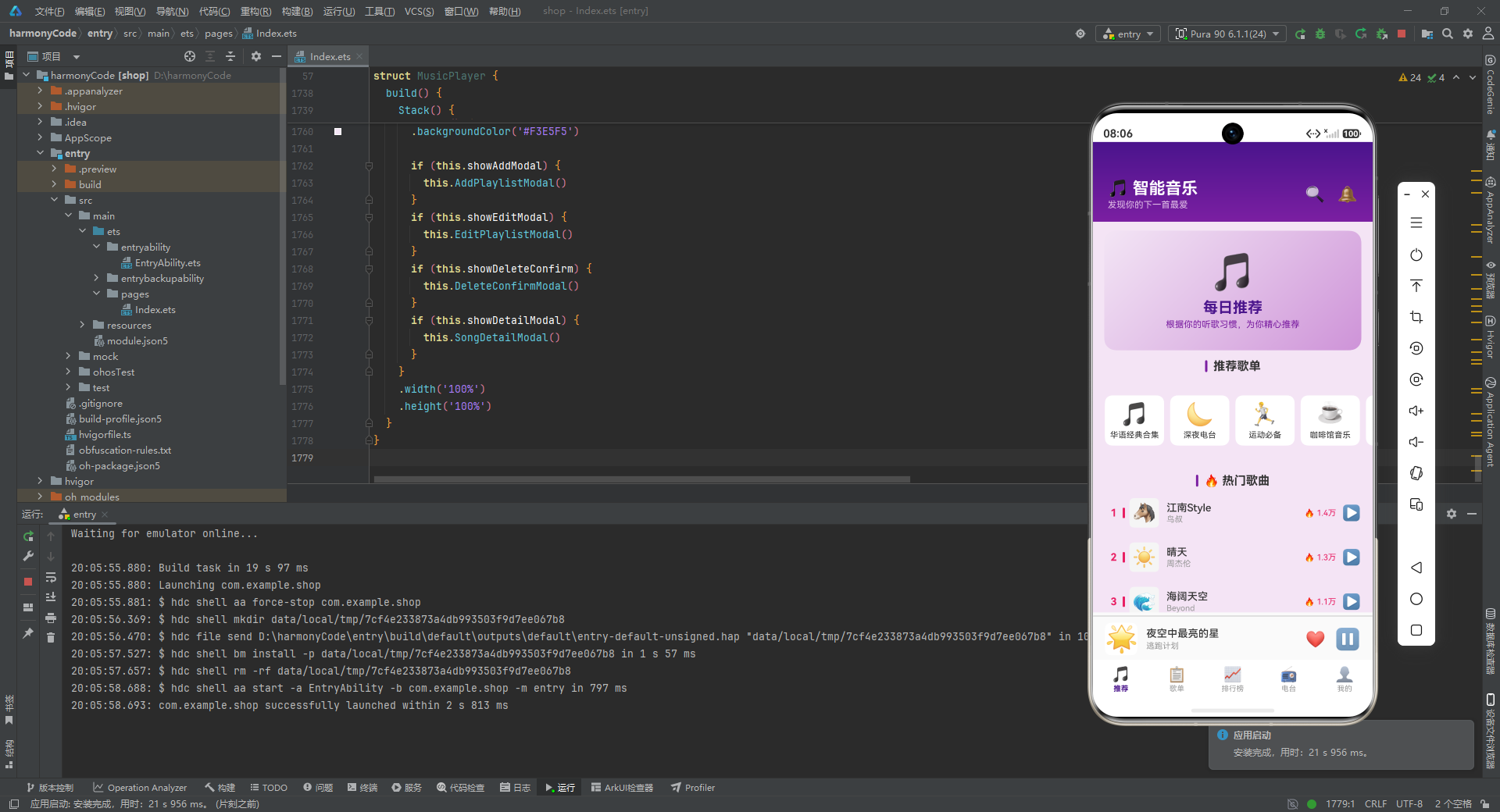
从技术角度来看,本应用展示了声明式UI开发的多个关键实践。在状态管理方面,通过@State装饰器管理了十九个响应式状态变量,覆盖了页面导航、弹窗控制、播放状态、表单数据和列表数据等多种状态类型。在UI构建方面,通过@Builder装饰器定义了十三个可复用的UI组件,实现了从基础的区块标题到复杂的多字段表单弹窗的全面覆盖。在数据处理方面,实现了数据排序、筛选、分页截取、相关推荐等多种查询方法,以及完整的增删改查操作。在交互设计方面,通过Stack层叠和条件渲染实现了四种弹窗的模态交互,通过定时器实现了播放进度的模拟动画,通过ForEach实现了多种列表的动态渲染。

讨论HarmonyOS开发技术,专注于API与组件、DevEco Studio、测试、元服务和应用上架分发等。
更多推荐


 8
8 0
0- 0


 已为社区贡献146条内容

所有评论(0)