HarmonyOS 6.0 WebSocket实时通信实战——从轮询到双向推送的进化
做聊天室、股票行情、实时协作——HTTP 轮询延迟高、流量大、服务器扛不住。WebSocket 一次握手、持久连接、服务端主动推送,才是实时交互的正解。HarmonyOS NEXT 的 @kit.NetworkKit 提供了完整的 WebSocket 客户端 API,这篇把连接、收发、断线重连全流程讲清楚。
WebSocket 基础
WebSocket 协议在 HTTP 握手基础上升级为全双工通信——客户端和服务端都能主动发消息,不再是一问一答。
import { webSocket } from '@kit.NetworkKit';
import { BusinessError } from '@kit.BasicServicesKit';
核心流程:createWebSocket → connect → on(‘open’) → send/on(‘message’) → close → on(‘close’)
建立连接
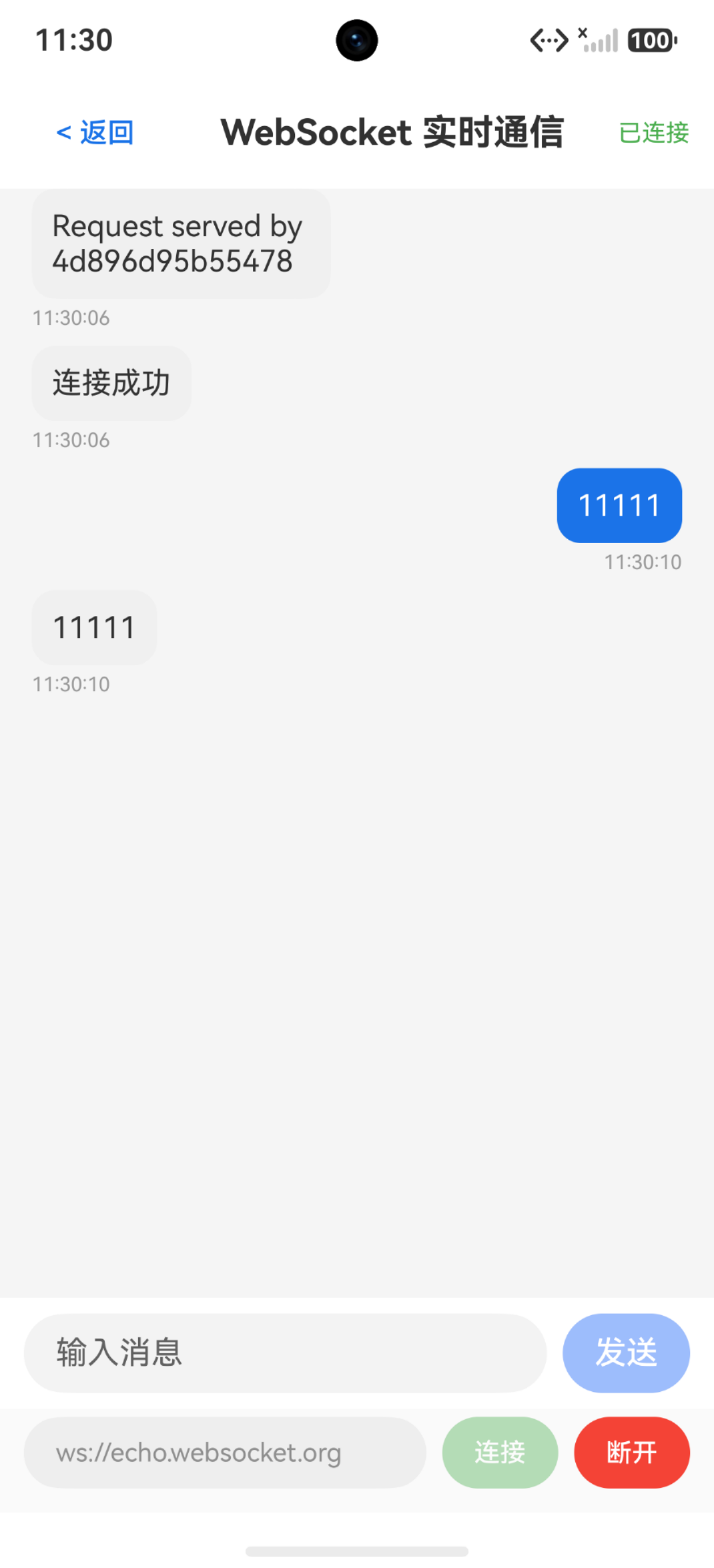
@Entry
@Component
struct WsBasicDemo {
  @State connStatus: string = '未连接'
  @State isConnected: boolean = false
  private ws: webSocket.WebSocket | null = null

  build() {
    Column({ space: 16 }) {
      Text('WebSocket 基础连接')
        .fontSize(22)
        .fontWeight(FontWeight.Bold)
        .width('100%')

      Text(this.connStatus)
        .fontSize(14)
        .fontColor(this.isConnected ? '#4CAF50' : '#999999')

      Row({ space: 8 }) {
        Button('连接').onClick(() => this.doConnect())
        Button('断开').onClick(() => this.doClose())
      }
    }
    .width('100%')
    .padding(20)
  }

  private doConnect(): void {
    this.ws = webSocket.createWebSocket()
    this.connStatus = '连接中...'

    this.ws.on('open', (err: BusinessError, value: Object) => {
      if (err) {
        this.connStatus = '连接失败'
        return
      }
      this.isConnected = true
      this.connStatus = '已连接'
    })

    this.ws.on('close', (err: BusinessError, value: webSocket.CloseResult) => {
      this.isConnected = false
      this.connStatus = `已断开 (code=${value.code})`
    })

    this.ws.on('error', (err: BusinessError) => {
      this.connStatus = `错误: ${err.message}`
      this.isConnected = false
    })

    this.ws.connect('ws://echo.websocket.org', (err: BusinessError, value: boolean) => {
      if (err) {
        this.connStatus = `连接失败: ${err.message}`
      }
    })
  }

  private doClose(): void {
    if (!this.ws) return
    this.ws.close((err: BusinessError, value: boolean) => {
      if (!err) {
        this.isConnected = false
        this.connStatus = '已断开'
      }
    })
    this.ws.off('open')
    this.ws.off('close')
    this.ws.off('error')
    this.ws = null
  }
}
要点: connect 的 URL 必须以 ws:// 或 wss:// 开头,长度不超过 1024 字符。连接成功后 on(‘open’) 回调触发,此时才能 send。
收发消息
连接建立后,用 send() 发消息、on(‘message’) 收消息。
interface ChatMessage {
  id: string
  content: string
  isSelf: boolean
  time: string
}

@Entry
@Component
struct WsChatDemo {
  @State messageList: ChatMessage[] = []
  @State inputText: string = ''
  @State isConnected: boolean = false
  private ws: webSocket.WebSocket | null = null

  build() {
    Column({ space: 0 }) {
      List({ space: 8 }) {
        ForEach(this.messageList, (msg: ChatMessage) => {
          ListItem() {
            Row() {
              Text(msg.content)
                .fontSize(15)
                .fontColor(msg.isSelf ? '#FFFFFF' : '#333333')
                .padding(10)
                .borderRadius(12)
                .backgroundColor(msg.isSelf ? '#1a73e8' : '#F0F0F0')
            }
            .width('100%')
            .justifyContent(msg.isSelf ? FlexAlign.End : FlexAlign.Start)
            .padding({ left: 16, right: 16 })
          }
        }, (msg: ChatMessage) => msg.id)
      }
      .layoutWeight(1)

      Row({ space: 8 }) {
        TextInput({ text: this.inputText, placeholder: '输入消息' })
          .layoutWeight(1)
          .onChange((value: string) => { this.inputText = value })
        Button('发送')
          .enabled(this.isConnected && this.inputText.length > 0)
          .onClick(() => this.doSend())
      }
      .padding(12)
    }
    .width('100%')
    .height('100%')
  }

  private doSend(): void {
    if (!this.ws || !this.isConnected) return
    let msg: string = this.inputText
    this.ws.send(msg, (err: BusinessError, value: boolean) => {
      if (!err) {
        this.addMessage(msg, true)
        this.inputText = ''
      }
    })
  }

  private addMessage(content: string, isSelf: boolean): void {
    this.messageList.push({
      id: Date.now().toString(),
      content: content,
      isSelf: isSelf,
      time: new Date().toLocaleTimeString()
    })
  }
}
要点: on(‘message’) 的 value 类型是 string | ArrayBuffer,字符串消息直接用,二进制消息需要判断类型。echo 服务器会把收到的消息原样返回,适合测试。
断线重连与心跳
网络不稳定时 WebSocket 会断开,需要自动重连。心跳机制检测连接是否存活。
interface ReconnectState {
  isConnected: boolean
  retryCount: number
  maxRetry: number
  heartbeatInterval: number
}

@Entry
@Component
struct WsReconnectDemo {
  @State connStatus: string = '未连接'
  @State isConnected: boolean = false
  @State retryCount: number = 0
  @State lastHeartbeat: string = ''
  private ws: webSocket.WebSocket | null = null
  private heartbeatTimer: number = -1
  private reconnectTimer: number = -1
  private readonly maxRetry: number = 5
  private readonly heartbeatMs: number = 30000

  build() {
    Column({ space: 16 }) {
      Text('断线重连与心跳')
        .fontSize(22)
        .fontWeight(FontWeight.Bold)
        .width('100%')

      Text(this.connStatus)
        .fontSize(14)
        .fontColor(this.isConnected ? '#4CAF50' : '#F44336')

      Text(`重试次数: ${this.retryCount}/${this.maxRetry}`)
        .fontSize(14)

      Text(`最近心跳: ${this.lastHeartbeat || '未启动'}`)
        .fontSize(13)
        .fontColor('#999999')

      Row({ space: 8 }) {
        Button('连接').onClick(() => this.connect())
        Button('断开').onClick(() => this.close())
        Button('模拟断线').onClick(() => this.simulateDisconnect())
      }
    }
    .width('100%')
    .padding(20)
  }

  private connect(): void {
    this.cleanup()
    this.ws = webSocket.createWebSocket()
    this.connStatus = '连接中...'

    this.ws.on('open', () => {
      this.isConnected = true
      this.retryCount = 0
      this.connStatus = '已连接'
      this.startHeartbeat()
    })

    this.ws.on('message', (err: BusinessError, value: string | ArrayBuffer) => {
      let content: string = typeof value === 'string' ? value : '[二进制]'
      if (content === 'pong') {
        this.lastHeartbeat = new Date().toLocaleTimeString()
      }
    })

    this.ws.on('close', () => {
      this.isConnected = false
      this.connStatus = '连接断开'
      this.stopHeartbeat()
      this.tryReconnect()
    })

    this.ws.on('error', () => {
      this.isConnected = false
      this.connStatus = '连接错误'
    })

    this.ws.connect('ws://echo.websocket.org')
  }

  private startHeartbeat(): void {
    this.stopHeartbeat()
    this.heartbeatTimer = setInterval(() => {
      if (this.ws && this.isConnected) {
        this.ws.send('ping')
      }
    }, this.heartbeatMs)
  }

  private stopHeartbeat(): void {
    if (this.heartbeatTimer !== -1) {
      clearInterval(this.heartbeatTimer)
      this.heartbeatTimer = -1
    }
  }

  private tryReconnect(): void {
    if (this.retryCount >= this.maxRetry) {
      this.connStatus = `重连失败(已达${this.maxRetry}次上限)`
      return
    }
    this.retryCount++
    let delay: number = Math.min(1000 * Math.pow(2, this.retryCount - 1), 30000)
    this.connStatus = `${delay / 1000}秒后第${this.retryCount}次重连...`
    this.reconnectTimer = setTimeout(() => { this.connect() }, delay)
  }

  private simulateDisconnect(): void {
    if (this.ws) {
      this.ws.close()
    }
  }

  private close(): void {
    this.retryCount = this.maxRetry
    this.cleanup()
    if (this.ws) {
      this.ws.close()
      this.ws.off('open')
      this.ws.off('message')
      this.ws.off('close')
      this.ws.off('error')
      this.ws = null
    }
    this.isConnected = false
    this.connStatus = '已断开'
  }

  private cleanup(): void {
    this.stopHeartbeat()
    if (this.reconnectTimer !== -1) {
      clearTimeout(this.reconnectTimer)
      this.reconnectTimer = -1
    }
  }
}
关键设计: 指数退避重连——1s、2s、4s、8s、16s,最大不超过 30s。心跳间隔通常 30s,发 “ping” 期望服务端回 “pong”。超过 3 次心跳无响应视为断连。
连接参数配置
connect 支持传入 header、proxy、protocol 等参数。
interface ConnectOptions {
  header?: Record<string, string>
  protocol?: string
  proxy?: webSocket.ProxyOptions
}

let options: webSocket.WebSocketConnectOptions = {
  header: {
    'Authorization': 'Bearer token123',
    'X-Device-Id': 'device-001'
  },
  protocol: 'my-protocol'
}
this.ws.connect('ws://example.com/ws', options)
要点: header 用于鉴权和设备标识,protocol 用于子协议协商(如 STOMP、MQTT over WebSocket)。代理设置用于企业内网环境。
完整实战:简易聊天室
把连接管理、收发消息、断线重连组合起来——做一个完整的聊天客户端。
interface ChatMsg {
  id: string
  sender: string
  content: string
  time: string
  isSelf: boolean
}

@Entry
@Component
struct ChatRoomDemo {
  @State messages: ChatMsg[] = []
  @State inputText: string = ''
  @State isConnected: boolean = false
  @State onlineCount: number = 1
  @State statusText: string = '未连接'
  private ws: webSocket.WebSocket | null = null

  build() {
    Column({ space: 0 }) {
      Row() {
        Text('聊天室')
          .fontSize(20)
          .fontWeight(FontWeight.Bold)
          .layoutWeight(1)
        Text(`${this.onlineCount}人在线`)
          .fontSize(13)
          .fontColor('#999999')
        Column()
          .width(10)
          .height(10)
          .borderRadius(5)
          .backgroundColor(this.isConnected ? '#4CAF50' : '#F44336')
          .margin({ left: 8 })
      }
      .width('100%')
      .padding({ left: 16, right: 16, top: 12, bottom: 12 })
      .backgroundColor('#FFFFFF')

      List({ space: 4 }) {
        ForEach(this.messages, (msg: ChatMsg) => {
          ListItem() {
            Column({ space: 2 }) {
              Text(msg.sender)
                .fontSize(11)
                .fontColor('#999999')
              Text(msg.content)
                .fontSize(15)
                .fontColor(msg.isSelf ? '#FFFFFF' : '#333333')
                .padding(10)
                .borderRadius(12)
                .backgroundColor(msg.isSelf ? '#1a73e8' : '#F0F0F0')
              Text(msg.time)
                .fontSize(10)
                .fontColor('#CCCCCC')
            }
            .alignItems(msg.isSelf ? HorizontalAlign.End : HorizontalAlign.Start)
            .width('100%')
            .padding({ left: 16, right: 16, top: 4, bottom: 4 })
          }
        }, (msg: ChatMsg) => msg.id)
      }
      .layoutWeight(1)

      Row({ space: 8 }) {
        TextInput({ text: this.inputText, placeholder: '说点什么...' })
          .layoutWeight(1)
          .onChange((value: string) => { this.inputText = value })
        Button('发送')
          .enabled(this.isConnected && this.inputText.length > 0)
          .onClick(() => this.sendMsg())
      }
      .width('100%')
      .padding(12)
      .backgroundColor('#FFFFFF')

      Text(this.statusText)
        .fontSize(12)
        .fontColor('#999999')
        .width('100%')
        .textAlign(TextAlign.Center)
        .padding(4)
    }
    .width('100%')
    .height('100%')
  }

  private sendMsg(): void {
    if (!this.ws || !this.isConnected) return
    let content: string = this.inputText
    this.ws.send(content)
    this.messages.push({
      id: Date.now().toString(),
      sender: '我',
      content: content,
      time: new Date().toLocaleTimeString(),
      isSelf: true
    })
    this.inputText = ''
  }
}
踩坑清单
| 问题 | 原因 | 解决 |
|---|---|---|
| connect 报错 | URL 格式错误或超1024字符 | 用 ws:// 或 wss://,URL 短于1024 |
| send 时连接已断 | 连接状态未判断 | send 前检查 isConnected |
| on(‘message’) 收不到 | 未订阅就发消息 | 先 on(‘message’) 再 connect |
| 内存泄漏 | close 后未 off 事件 | close 前依次 off 所有事件 |
| 重连风暴 | 断开后立即重连 | 指数退避 + 最大重试次数 |
| 心跳不生效 | 服务端不识别 ping | 与服务端约定心跳协议 |
| 二进制消息解析失败 | value 是 ArrayBuffer | typeof 判断后分别处理 |
| 后台断连无感知 | 切后台 WebSocket 被系统回收 | onBackground 检测 + 重连 |
| wss 证书校验失败 | 自签证书不受信任 | 正式环境用合法证书 |
| Proxy 配置无效 | proxy 参数格式错误 | host 为 IP,port 为数字 |

讨论HarmonyOS开发技术,专注于API与组件、DevEco Studio、测试、元服务和应用上架分发等。
更多推荐

 4
4 0
0- 0


 已为社区贡献100条内容

所有评论(0)