HarmonyOS 6.0 蓝牙BLE设备通信实战——智能手环/蓝牙秤接入全流程
·
健康类 APP 连智能手环读心率、连蓝牙秤读体重、连血糖仪读数据——BLE(低功耗蓝牙)是这些 IoT 场景的通信基础。HarmonyOS NEXT 提供了完整的 BLE API:扫描发现、GATT 连接、服务发现、特征值读写、通知订阅。这篇从零到一讲清楚 BLE 通信全流程。
BLE 通信概览
BLE 通信核心概念:
- Peripheral(外设)——手环、体重秤等硬件设备,广播自己的存在
- Central(中心)——手机 APP,扫描并连接外设
- GATT——通用属性协议,定义数据组织方式(Service → Characteristic)
- Service——一组相关特征的集合(如"心率服务"0x180D)
- Characteristic——具体的数据项(如"心率测量"0x2A37),可读/写/通知
import { ble } from '@kit.ConnectivityKit'
import { access } from '@kit.ConnectivityKit'
权限配置
BLE 需要蓝牙权限,在 module.json5 中声明。
{
  "requestPermissions": [
    { "name": "ohos.permission.ACCESS_BLUETOOTH" }
  ]
}
注意: ACCESS_BLUETOOTH 是 user_grant 权限,需要动态申请。
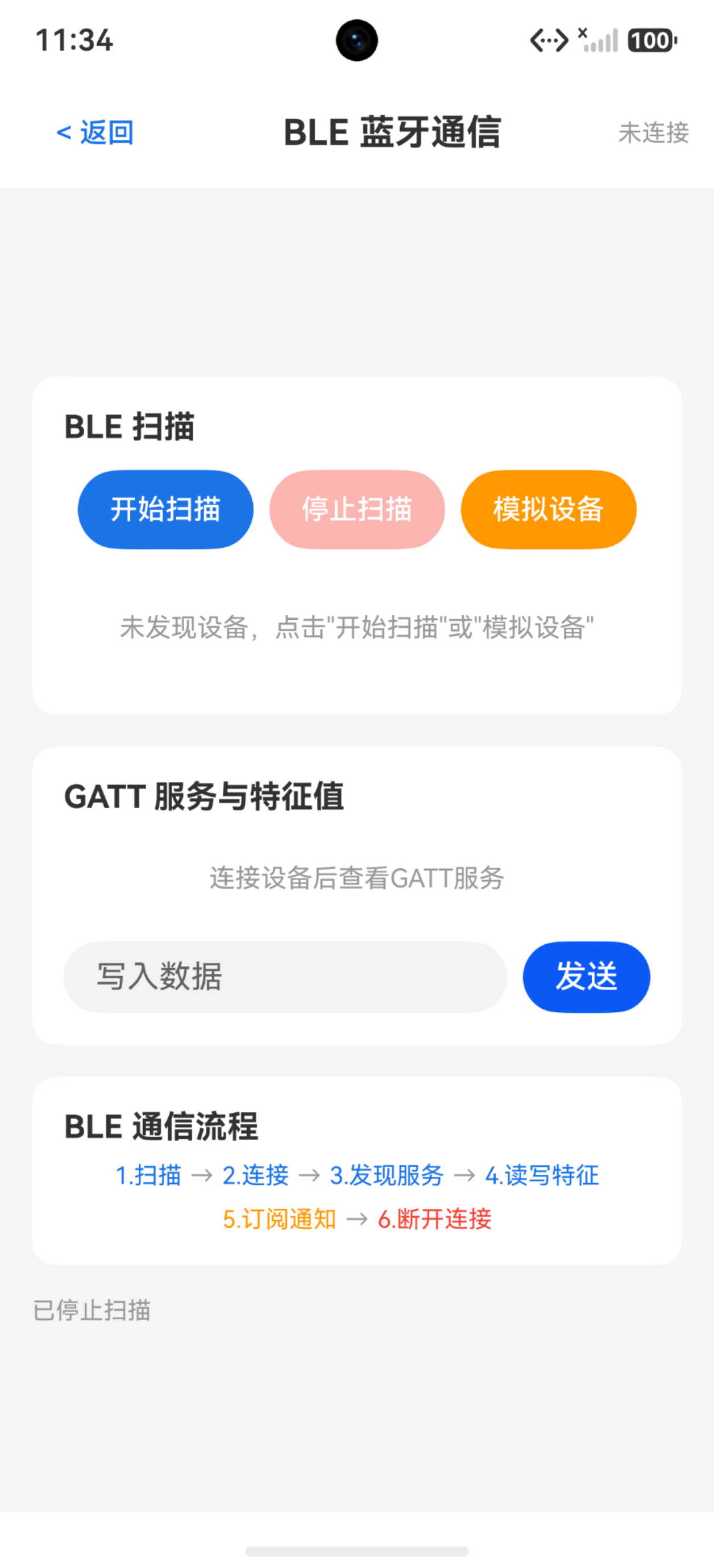
BLE 扫描
扫描是 BLE 通信的第一步——发现周围的蓝牙设备。
interface BleDevice {
  id: string
  name: string
  rssi: number
  isConnected: boolean
}

@Entry
@Component
struct BleScanDemo {
  @State deviceList: BleDevice[] = []
  @State isScanning: boolean = false
  @State statusMsg: string = ''

  build() {
    Column({ space: 16 }) {
      Text('BLE 扫描')
        .fontSize(22)
        .fontWeight(FontWeight.Bold)
        .width('100%')

      Row({ space: 8 }) {
        Button(this.isScanning ? '扫描中...' : '开始扫描')
          .enabled(!this.isScanning)
          .onClick(() => this.startScan())
        Button('停止扫描')
          .enabled(this.isScanning)
          .onClick(() => this.stopScan())
      }

      ForEach(this.deviceList, (device: BleDevice) => {
        Row({ space: 12 }) {
          Column({ space: 2 }) {
            Text(device.name || '未知设备')
              .fontSize(15)
              .fontWeight(FontWeight.Medium)
            Text(device.id)
              .fontSize(11)
              .fontColor('#999999')
          }
          .layoutWeight(1)
          Text(`RSSI: ${device.rssi}`)
            .fontSize(12)
            .fontColor(device.rssi > -50 ? '#4CAF50' : '#FF9800')
        }
        .width('100%')
        .padding(12)
        .borderRadius(8)
        .backgroundColor('#FAFAFA')
      }, (device: BleDevice) => device.id)

      Text(this.statusMsg)
        .fontSize(13)
        .fontColor('#999999')
    }
    .width('100%')
    .padding(20)
  }

  private startScan(): void {
    this.isScanning = true
    this.statusMsg = '扫描中...(需真机+蓝牙权限)'
    // 真实场景:ble.startBLEScan()
    setTimeout(() => { this.isScanning = false }, 5000)
  }

  private stopScan(): void {
    this.isScanning = false
    // 真实场景:ble.stopBLEScan()
  }
}
真实代码:
ble.startBLEScan(null)
ble.on('BLEDeviceFind', (result: Array<ble.ScanResult>) => {
  for (let i: number = 0; i < result.length; i++) {
    let device: ble.ScanResult = result[i]
    // device.deviceId, device.deviceName, device.rssi
  }
})
要点: startBLEScan 的参数可以传 ScanOptions 过滤特定设备(按 ServiceUUID、设备名等)。扫描到足够设备后及时 stopBLEScan 省电。
GATT 连接
扫描到目标设备后,通过 GATT 连接并发现服务。
// 连接设备
let gattClient: ble.GattClientDevice = ble.createGattClientDevice(deviceId)
await gattClient.connect()

// 发现服务
let services: Array<ble.GattService> = await gattClient.getServices()
for (let i: number = 0; i < services.length; i++) {
  let service: ble.GattService = services[i]
  let chars: Array<ble.GattCharacteristic> = service.characteristics
  // service.serviceUuid, characteristics[].characteristicUuid
}

// 断开连接
gattClient.disconnect()
关键区别: connect() 只是建立连接,getServices() 才能获取设备支持的服务和特征值。必须先发现服务才能读写。
特征值读写
每个 Characteristic 支持三种操作:读、写、通知。
读取特征值
// 读取心率值
let characteristic: ble.GattCharacteristic = {
  serviceUuid: '0000180d-0000-1000-8000-00805f9b34fb',
  characteristicUuid: '00002a37-0000-1000-8000-00805f9b34fb',
  characteristicValue: new ArrayBuffer(0)
}
let result: ble.GattCharacteristic = await gattClient.readCharacteristicValue(characteristic)
// result.characteristicValue 包含心率数据
写入特征值
let writeValue: ble.GattCharacteristic = {
  serviceUuid: '0000180d-0000-1000-8000-00805f9b34fb',
  characteristicUuid: '00002a39-0000-1000-8000-00805f9b34fb',
  characteristicValue: buffer  // 要写入的数据
}
gattClient.writeCharacteristicValue(writeValue, ble.GattWriteType.WRITE_NO_RESPONSE)
订阅通知
心率、步数等实时数据用通知模式——设备主动推,APP 被动收。
gattClient.on('BLECharacteristicChange', (char: ble.GattCharacteristic) => {
  // char.characteristicValue 包含最新数据
  // 解析心率/步数等
})

// 开启通知
let notifyChar: ble.GattCharacteristic = {
  serviceUuid: '0000180d-0000-1000-8000-00805f9b34fb',
  characteristicUuid: '00002a37-0000-1000-8000-00805f9b34fb',
  characteristicValue: new ArrayBuffer(0)
}
await gattClient.setNotifyCharacteristicChanged(notifyChar, true)
要点: setNotifyCharacteristicChanged 开启通知后,设备会在数据变化时主动推送,不需要 APP 反复读取。
BLE 通信全流程 Demo
模拟完整的 BLE 通信流程——扫描→连接→发现服务→读写特征值。
interface ServiceInfo {
  id: string
  uuid: string
  characteristics: string[]
}

@Entry
@Component
struct BleFullDemo {
  @State deviceList: BleDevice[] = []
  @State connectionStatus: string = '未连接'
  @State serviceList: ServiceInfo[] = []
  @State readValue: string = ''
  @State isScanning: boolean = false

  build() {
    Column({ space: 16 }) {
      Text('BLE 通信全流程')
        .fontSize(22)
        .fontWeight(FontWeight.Bold)
        .width('100%')

      // 扫描区
      Row({ space: 8 }) {
        Button(this.isScanning ? '扫描中' : '扫描')
          .onClick(() => this.startScan())
        Button('模拟设备')
          .onClick(() => {
            this.deviceList.push({
              id: `AA:BB:CC:DD:EE:${(this.deviceList.length + 1).toString().padStart(2, '0')}`,
              name: `智能设备-${this.deviceList.length + 1}`,
              rssi: -35 - this.deviceList.length * 10,
              isConnected: false
            })
          })
      }

      // 设备列表
      ForEach(this.deviceList, (device: BleDevice) => {
        Row() {
          Text(`${device.name} (${device.rssi}dBm)`)
            .fontSize(14)
            .layoutWeight(1)
          if (device.isConnected) {
            Text('已连接').fontSize(12).fontColor('#4CAF50')
          } else {
            Button('连接').fontSize(12).height(28)
              .onClick(() => this.connectDevice(device.id))
          }
        }
        .padding(8).borderRadius(6).backgroundColor('#FAFAFA')
      }, (device: BleDevice) => device.id)

      // 服务列表
      if (this.serviceList.length > 0) {
        Text('GATT 服务:')
          .fontSize(16).fontWeight(FontWeight.Medium).width('100%')
        ForEach(this.serviceList, (service: ServiceInfo) => {
          Column({ space: 4 }) {
            Text(`服务: ${service.uuid}`)
              .fontSize(13).fontColor('#1a73e8')
            ForEach(service.characteristics, (char: string) => {
              Row({ space: 8 }) {
                Text(`特征: ${char}`).fontSize(12).layoutWeight(1)
                Button('读').fontSize(11).height(24).padding({ left: 6, right: 6 })
                  .onClick(() => { this.readValue = '72 bpm' })
              }
            }, (char: string) => char)
          }
          .padding(8).borderRadius(6).backgroundColor('#F5F5F5')
        }, (service: ServiceInfo) => service.id)
      }

      if (this.readValue) {
        Text(`读取结果: ${this.readValue}`)
          .fontSize(15).fontColor('#4CAF50')
          .padding(12).borderRadius(8).backgroundColor('#E8F5E9')
      }

      Text(this.connectionStatus)
        .fontSize(13).fontColor('#999999')
    }
    .width('100%')
    .padding(20)
  }

  private startScan(): void {
    this.isScanning = true
    setTimeout(() => { this.isScanning = false }, 3000)
  }

  private connectDevice(deviceId: string): void {
    this.connectionStatus = '连接中...'
    setTimeout(() => {
      this.connectionStatus = '已连接'
      this.serviceList = [
        { id: '1', uuid: '0x180D (心率)', characteristics: ['0x2A37 (心率测量)', '0x2A38 (传感器位置)'] },
        { id: '2', uuid: '0x180A (设备信息)', characteristics: ['0x2A29 (制造商)', '0x2A24 (型号)'] }
      ]
    }, 1500)
  }
}
常见 BLE Service UUID
| UUID | 名称 | 典型特征 |
|---|---|---|
| 0x180D | 心率服务 | 0x2A37心率测量、0x2A38传感器位置 |
| 0x181A | 环境感知 | 温度、湿度、气压 |
| 0x180F | 电池服务 | 0x2A19电量百分比 |
| 0x180A | 设备信息 | 制造商、型号、固件版本 |
| 0x1810 | 血压服务 | 收缩压、舒张压、脉率 |
| 0x1818 | 自行车速度 | 速度、踏频 |
踩坑清单
| 问题 | 原因 | 解决 |
|---|---|---|
| startBLEScan 报错 | 未申请蓝牙权限 | module.json5 声明 + 动态申请 |
| 扫描不到设备 | 蓝牙未开启或定位未开 | 检查蓝牙和定位开关 |
| connect 后无服务 | 未调用 getServices | connect 后必须 getServices |
| readCharacteristicValue 报错 | 特征不支持读 | 检查 properties.read 是否为 true |
| 通知收不到 | 未 setNotifyCharacteristicChanged | 先 setNotify(true) 再等推送 |
| 断开后重连失败 | 未释放 GattClient | disconnect 后重新 createGattClientDevice |
| RSSI 值跳变大 | 信号不稳定 | 多次扫描取平均值 |
| 写入后设备无响应 | 写入类型不对 | 区分 WRITE/WRITE_NO_RESPONSE |
| 连接超时 | 设备距离远或广播间隔大 | 靠近设备,增大扫描时间 |
| 多设备同时连接卡顿 | GATT 操作串行 | 避免并发操作,排队执行 |

讨论HarmonyOS开发技术,专注于API与组件、DevEco Studio、测试、元服务和应用上架分发等。
更多推荐

 7
7 0
0- 0


 已为社区贡献100条内容

所有评论(0)