HarmonyOS 防窥保护实战进阶:金融场景完整接入与系统蒙层实践
HarmonyOS 防窥保护实战进阶:金融场景完整接入与系统蒙层实践
前言
在上一篇文章中,我们系统介绍了防窥保护(dlpAntiPeep)的概念原理、窥视状态体系和基础 API 用法。但概念终要落地——金融类应用如何实现敏感金额自动隐藏?系统级防窥蒙层如何拉起?实况窗提醒如何触发?权限如何申请与管理?
本文将以金融场景为切入点,深入拆解防窥保护的完整接入实战,包括工具类封装、系统蒙层控制、实况窗提醒、ACL 权限申请以及完整的金融账户页面代码实现。
一、金融场景需求分析
1.1 金融场景的隐私痛点
金融类应用汇集了大量的财务敏感信息,每一项都是不希望被他人知晓的隐私数据:
| 敏感信息类型 | 具体内容 | 泄露风险 |
|---|---|---|
| 账户资产 | 账户余额、总资产数值 | 暴露个人财务状况 |
| 收益明细 | 收益曲线、收益金额 | 暴露投资偏好和收益 |
| 持仓明细 | 股票持仓、基金持仓 | 暴露投资策略 |
| 交易记录 | 转账记录、消费记录 | 暴露消费习惯 |
| 银行卡号 | 卡号、CVV 等 | 金融欺诈风险 |
1.2 防窥保护响应策略
金融场景下,防窥保护提供三级响应策略:
| 级别 | 策略 | 触发条件 | 用户体验 |
|---|---|---|---|
| 一级:字段隐藏 | 敏感数字替换为 **** | 检测到窥视,立即触发 | 轻量级,不影响页面浏览 |
| 二级:系统蒙层 | 拉起系统级半透明蒙层 | 窥视持续 + 用户开启蒙层开关 | 中等级,遮盖整个窗口 |
| 三级:实况窗提醒 | 屏幕顶部实况窗提示 | 持续窥视风险 | 提醒级,用户可感知风险 |
二、防窥保护工具类封装
2.1 工具类设计
封装一个完整的 AntiPeepUtils 工具类,统一管理能力检测、状态查询、监听注册和蒙层控制:
// entry/src/main/ets/utils/AntiPeepUtils.ets
import { dlpAntiPeep } from '@kit.DeviceSecurityKit';
import { BusinessError } from '@kit.BasicServicesKit';
import { window } from '@kit.ArkUI';

const TAG = 'AntiPeepUtils';

/**
 * 防窥保护回调接口
 */
export interface AntiPeepCallback {
  onStatusChanged: (status: dlpAntiPeep.DlpAntiPeepStatus) => Promise<void>;
}

/**
 * 防窥保护工具类
 * 统一管理能力检测、状态查询、监听注册和蒙层控制
 */
export class AntiPeepUtils {
  /**
   * 检测设备是否支持防窥保护
   */
  static canUseAntiPeep(): boolean {
    return canIUse('SystemCapability.Security.DlpAntiPeep');
  }

  /**
   * 检查当前应用是否已开启防窥保护
   */
  static async isAntiPeepOn(): Promise<boolean> {
    try {
      if (AntiPeepUtils.canUseAntiPeep()) {
        const result = await dlpAntiPeep.isDlpAntiPeepSwitchOn();
        console.info(`${TAG} 防窥保护开关状态: ${result}`);
        return result;
      }
      return false;
    } catch (err) {
      const error = err as BusinessError;
      console.error(`${TAG} 检查开关状态失败: ${error.code}, ${error.message}`);
      return false;
    }
  }

  /**
   * 同步获取当前窥视状态
   */
  static getAntiPeepInfo(): dlpAntiPeep.DlpAntiPeepStatus | number {
    try {
      if (AntiPeepUtils.canUseAntiPeep()) {
        const status = dlpAntiPeep.getDlpAntiPeepInfo();
        console.info(`${TAG} 当前窥视状态: ${JSON.stringify(status)}`);
        return status;
      }
      return -1;
    } catch (err) {
      console.error(`${TAG} 获取窥视状态失败: ${JSON.stringify(err)}`);
      return -1;
    }
  }

  /**
   * 注册防窥保护状态监听
   */
  static listenOnAntiPeepStatus(antiPeepCB: AntiPeepCallback): boolean {
    try {
      if (AntiPeepUtils.canUseAntiPeep()) {
        console.info(`${TAG} 开始监听防窥保护状态`);

        dlpAntiPeep.on('dlpAntiPeep', (status: dlpAntiPeep.DlpAntiPeepStatus) => {
          console.info(`${TAG} 防窥状态变化: ${JSON.stringify(status)}`);
          if (antiPeepCB) {
            antiPeepCB.onStatusChanged(status);
          }
        });

        console.info(`${TAG} 防窥保护监听已注册`);
        return true;
      }
      return false;
    } catch (err) {
      const error = err as BusinessError;
      console.error(`${TAG} 注册监听失败: ${error.code}, ${error.message}`);
      return false;
    }
  }

  /**
   * 取消防窥保护状态监听
   */
  static listenOffAntiPeepStatus(): void {
    try {
      if (AntiPeepUtils.canUseAntiPeep()) {
        console.info(`${TAG} 取消防窥保护监听`);
        dlpAntiPeep.off('dlpAntiPeep');
        console.info(`${TAG} 防窥保护监听已取消`);
      }
    } catch (err) {
      const error = err as BusinessError;
      console.error(`${TAG} 取消监听失败: ${error.code}, ${error.message}`);
    }
  }

  /**
   * 拉起系统防窥蒙层
   * @param windowId 窗口 ID
   * @returns 是否成功拉起蒙层
   */
  static showSystemMaskLayer(windowId: number): Promise<boolean> {
    return new Promise((resolve) => {
      try {
        if (AntiPeepUtils.canUseAntiPeep()) {
          dlpAntiPeep.setAntiPeepMaskLayer(windowId)
            .then(() => {
              console.info(`${TAG} 系统防窥蒙层已拉起`);
              resolve(true);
            })
            .catch((err: BusinessError) => {
              console.error(`${TAG} 拉起蒙层失败: ${err.code}, ${err.message}`);
              resolve(false);
            });
        } else {
          resolve(false);
        }
      } catch (err) {
        console.error(`${TAG} 调用蒙层接口失败: ${JSON.stringify(err)}`);
        resolve(false);
      }
    });
  }

  /**
   * 修改窥视状态为 PASS
   * 直到手机锁屏或应用退出前一直返回非窥视状态
   */
  static passDlpAntiPeepInfo(): void {
    try {
      if (AntiPeepUtils.canUseAntiPeep()) {
        dlpAntiPeep.passDlpAntiPeepInfo();
        console.info(`${TAG} 窥视状态已修改为 PASS`);
      }
    } catch (err) {
      const error = err as BusinessError;
      console.error(`${TAG} 修改窥视状态失败: ${error.code}, ${error.message}`);
    }
  }

  /**
   * 拉起系统设置弹窗(API 23+)
   */
  static async requestAntiPeepOptions(context: Context): Promise<boolean> {
    try {
      if (AntiPeepUtils.canUseAntiPeep()) {
        const result = await dlpAntiPeep.requestAntiPeepOptions(context);
        console.info(`${TAG} 设置弹窗结果: ${JSON.stringify(result)}`);
        return true;
      }
      return false;
    } catch (err) {
      const error = err as BusinessError;
      console.error(`${TAG} 拉起设置弹窗失败: ${error.code}, ${error.message}`);
      return false;
    }
  }

  /**
   * 发布实况窗提醒(API 23+)
   */
  static async publishAntiPeepWarning(): Promise<boolean> {
    try {
      if (AntiPeepUtils.canUseAntiPeep()) {
        await dlpAntiPeep.publishAntiPeepInformation();
        console.info(`${TAG} 实况窗提醒已发布`);
        return true;
      }
      return false;
    } catch (err) {
      const error = err as BusinessError;
      console.error(`${TAG} 发布实况窗提醒失败: ${error.code}, ${error.message}`);
      return false;
    }
  }
}
三、系统防窥蒙层详解
3.1 蒙层机制
setAntiPeepMaskLayer() 是防窥保护最核心的防护手段。它拉起一个系统级半透明蒙层覆盖整个应用窗口,使窥视者无法看清屏幕内容。
| 特性 | 说明 |
|---|---|
| 覆盖范围 | 整个应用窗口 |
| 蒙层样式 | 系统统一样式,半透明遮罩 |
| 触发时机 | 检测到窥视时由应用主动调用 |
| 触发频率 | 每次进入页面只触发一次 |
| 解除时机 | 用户重新进入页面后自动解除 |
3.2 蒙层控制策略
/**
 * 系统防窥蒙层管理器
 * 控制蒙层触发时机和频率
 */
export class AntiPeepMaskLayerManager {
  private isSystemLayerTriggered: boolean = false;
  private isAlertDialogShow: boolean = false;
  private windowId: number = 0;

  constructor(windowId: number) {
    this.windowId = windowId;
  }

  /**
   * 尝试拉起系统蒙层
   * 每次进入页面只触发一次
   */
  async tryShowMaskLayer(): Promise<boolean> {
    // 蒙层已触发过,不再重复触发
    if (this.isSystemLayerTriggered) {
      console.info('系统蒙层已触发过,跳过');
      return false;
    }

    // 有弹窗正在显示,不触发蒙层
    if (this.isAlertDialogShow) {
      console.info('有弹窗正在显示,暂不触发蒙层');
      return false;
    }

    const result = await AntiPeepUtils.showSystemMaskLayer(this.windowId);
    if (result) {
      this.isSystemLayerTriggered = true;
    }
    return result;
  }

  /**
   * 重置蒙层状态(页面重新进入时调用)
   */
  reset(): void {
    this.isSystemLayerTriggered = false;
  }

  /**
   * 设置弹窗显示状态
   */
  setAlertDialogVisible(visible: boolean): void {
    this.isAlertDialogShow = visible;
  }
}
四、金融账户页面完整实战
4.1 场景描述
构建一个金融账户页面,包含以下功能:
- 账户总资产展示(敏感数字)
- 收益明细列表(敏感数字)
- 持仓明细(敏感信息)
- 检测到窥视时自动隐藏敏感数字
- 用户可选开启系统蒙层
4.2 完整实现代码
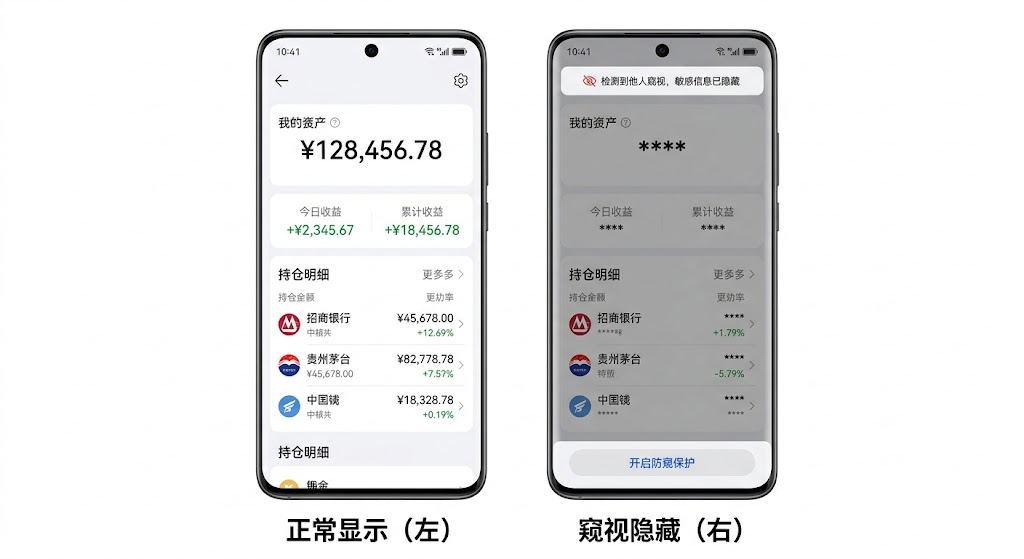
图:金融账户防窥保护——正常显示(左)与检测到窥视后隐藏敏感数字(右)对比
// entry/src/main/ets/pages/FinanceAccountPage.ets
import { dlpAntiPeep } from '@kit.DeviceSecurityKit';
import { AntiPeepUtils, AntiPeepCallback } from '../utils/AntiPeepUtils';
import { AntiPeepMaskLayerManager } from '../utils/AntiPeepMaskLayerManager';
import { window } from '@kit.ArkUI';
import { BusinessError } from '@kit.BasicServicesKit';

// 账户数据接口
interface AccountData {
  totalAssets: string;
  dailyReturn: string;
  totalReturn: string;
  holdings: HoldingItem[];
}

interface HoldingItem {
  name: string;
  code: string;
  amount: string;
  returnRate: string;
}

@Entry
@Component
struct FinanceAccountPage {
  @State private isAntiPeepSupported: boolean = false;
  @State private isSwitchOn: boolean = false;
  @State private isPeeping: boolean = false;
  @State private isToggleOpened: boolean = false;
  @State private isSystemLayerTriggered: boolean = false;

  // 真实数据
  private realData: AccountData = {
    totalAssets: '¥128,456.78',
    dailyReturn: '+¥2,345.67',
    totalReturn: '+¥18,456.78',
    holdings: [
      { name: '招商银行', code: '600036', amount: '¥45,678.00', returnRate: '+12.5%' },
      { name: '贵州茅台', code: '600519', amount: '¥82,778.78', returnRate: '+8.3%' },
    ]
  };

  // 显示数据(窥视时隐藏)
  @State private displayData: AccountData = {
    totalAssets: '¥128,456.78',
    dailyReturn: '+¥2,345.67',
    totalReturn: '+¥18,456.78',
    holdings: []
  };

  private maskLayerManager: AntiPeepMaskLayerManager = new AntiPeepMaskLayerManager(0);

  private antiPeepCB: AntiPeepCallback = {
    onStatusChanged: async (status: dlpAntiPeep.DlpAntiPeepStatus) => {
      await this.handleAntiPeepStatus(status);
    }
  };

  aboutToAppear(): void {
    this.initializeAntiPeep();
  }

  aboutToDisappear(): void {
    AntiPeepUtils.listenOffAntiPeepStatus();
  }

  /**
   * 初始化防窥保护
   */
  private async initializeAntiPeep(): Promise<void> {
    this.isAntiPeepSupported = AntiPeepUtils.canUseAntiPeep();
    if (!this.isAntiPeepSupported) {
      return;
    }

    this.isSwitchOn = await AntiPeepUtils.isAntiPeepOn();
    if (!this.isSwitchOn) {
      return;
    }

    // 获取窗口 ID
    try {
      const mainWindow = await window.getLastWindow(getContext(this));
      const windowProperties = mainWindow.getWindowProperties();
      this.maskLayerManager = new AntiPeepMaskLayerManager(windowProperties.id);
    } catch (err) {
      console.error(`获取窗口 ID 失败: ${JSON.stringify(err)}`);
    }

    // 获取初始状态
    const initialStatus = AntiPeepUtils.getAntiPeepInfo();
    if (typeof initialStatus === 'number' && initialStatus !== -1) {
      await this.handleAntiPeepStatus(initialStatus as dlpAntiPeep.DlpAntiPeepStatus);
    }

    // 注册实时监听
    AntiPeepUtils.listenOnAntiPeepStatus(this.antiPeepCB);
  }

  /**
   * 处理防窥保护状态变化
   */
  private async handleAntiPeepStatus(status: dlpAntiPeep.DlpAntiPeepStatus): Promise<void> {
    switch (status) {
      case dlpAntiPeep.DlpAntiPeepStatus.PASS:
        this.isPeeping = false;
        this.displayData = this.realData;
        break;

      case dlpAntiPeep.DlpAntiPeepStatus.HIDE:
        this.isPeeping = true;
        // 隐藏敏感数字
        this.displayData = {
          totalAssets: '****',
          dailyReturn: '****',
          totalReturn: '****',
          holdings: this.realData.holdings.map(h => ({
            ...h,
            amount: '****',
            returnRate: '****'
          }))
        };

        // 如果用户开启了蒙层开关,且蒙层尚未触发
        if (this.isToggleOpened && !this.isSystemLayerTriggered) {
          const success = await this.maskLayerManager.tryShowMaskLayer();
          if (success) {
            this.isSystemLayerTriggered = true;
          }
        }
        break;

      default:
        this.displayData = this.realData;
        break;
    }
  }

  @Builder
  buildHeader() {
    Column() {
      Text('我的资产')
        .fontSize(16)
        .fontColor('#999')
        .margin({ bottom: 8 })

      Text(this.displayData.totalAssets)
        .fontSize(36)
        .fontWeight(FontWeight.Bold)
        .fontColor(this.isPeeping ? '#CCC' : '#333')
        .animation({ duration: 300 })

      if (this.isPeeping) {
        Row() {
          SymbolGlyph($r('sys.symbol.eye'))
            .fontSize(14)
            .fontColor(['#FF3B30'])
          Text('检测到他人窥视,敏感信息已隐藏')
            .fontSize(13)
            .fontColor('#FF3B30')
            .margin({ left: 4 })
        }
        .margin({ top: 8 })
      }
    }
    .width('100%')
    .padding(24)
    .borderRadius(16)
    .backgroundColor('#FFF')
    .shadow({ radius: 8, color: 'rgba(0,0,0,0.06)', offsetY: 2 })
    .margin({ left: 16, right: 16, top: 16 })
  }

  @Builder
  buildReturnCard() {
    Row({ space: 24 }) {
      Column() {
        Text('今日收益')
          .fontSize(13)
          .fontColor('#999')
        Text(this.displayData.dailyReturn)
          .fontSize(20)
          .fontWeight(FontWeight.Medium)
          .fontColor(this.isPeeping ? '#CCC' : '#34C759')
          .margin({ top: 4 })
      }
      .layoutWeight(1)

      Divider()
        .vertical(true)
        .strokeWidth(0.5)
        .color('#E5E5E5')
        .height(40)

      Column() {
        Text('累计收益')
          .fontSize(13)
          .fontColor('#999')
        Text(this.displayData.totalReturn)
          .fontSize(20)
          .fontWeight(FontWeight.Medium)
          .fontColor(this.isPeeping ? '#CCC' : '#34C759')
          .margin({ top: 4 })
      }
      .layoutWeight(1)
    }
    .width('100%')
    .padding(20)
    .borderRadius(16)
    .backgroundColor('#FFF')
    .shadow({ radius: 8, color: 'rgba(0,0,0,0.06)', offsetY: 2 })
    .margin({ left: 16, right: 16, top: 12 })
  }

  @Builder
  buildHoldingItem(item: HoldingItem, index: number) {
    Row() {
      Column() {
        Text(item.name)
          .fontSize(16)
          .fontWeight(FontWeight.Medium)
          .fontColor('#333')
        Text(item.code)
          .fontSize(12)
          .fontColor('#999')
          .margin({ top: 4 })
      }
      .alignItems(HorizontalAlign.Start)
      .layoutWeight(1)

      Column() {
        Text(item.amount)
          .fontSize(16)
          .fontWeight(FontWeight.Medium)
          .fontColor(this.isPeeping ? '#CCC' : '#333')
        Text(item.returnRate)
          .fontSize(12)
          .fontColor(this.isPeeping ? '#CCC' : '#34C759')
          .margin({ top: 4 })
      }
      .alignItems(HorizontalAlign.End)
    }
    .width('100%')
    .padding({ left: 20, right: 20, top: 14, bottom: 14 })
  }

  @Builder
  buildHoldingList() {
    Column() {
      Text('持仓明细')
        .fontSize(16)
        .fontWeight(FontWeight.Bold)
        .fontColor('#333')
        .width('100%')
        .padding({ left: 20, top: 16, bottom: 8 })

      ForEach(this.displayData.holdings, (item: HoldingItem, index: number) => {
        this.buildHoldingItem(item, index)
        if (index < this.displayData.holdings.length - 1) {
          Divider()
            .strokeWidth(0.5)
            .color('#F0F0F0')
            .margin({ left: 20, right: 20 })
        }
      })
    }
    .width('100%')
    .borderRadius(16)
    .backgroundColor('#FFF')
    .shadow({ radius: 8, color: 'rgba(0,0,0,0.06)', offsetY: 2 })
    .margin({ left: 16, right: 16, top: 12, bottom: 16 })
  }

  @Builder
  buildAntiPeepToggle() {
    Row() {
      Text('开启系统防窥蒙层')
        .fontSize(14)
        .fontColor('#333')
      Blank()
      Toggle({ type: ToggleType.Switch, isOn: this.isToggleOpened })
        .onChange((isOn: boolean) => {
          this.isToggleOpened = isOn;
        })
    }
    .width('100%')
    .padding(16)
    .borderRadius(12)
    .backgroundColor('#FFF')
    .margin({ left: 16, right: 16, bottom: 16 })
  }

  @Builder
  buildGuideButton() {
    if (!this.isSwitchOn && this.isAntiPeepSupported) {
      Button('开启防窥保护')
        .fontSize(16)
        .fontColor(Color.White)
        .backgroundColor('#007AFF')
        .borderRadius(12)
        .width('90%')
        .height(48)
        .margin({ bottom: 16 })
        .onClick(async () => {
          await AntiPeepUtils.requestAntiPeepOptions(getContext(this));
          this.isSwitchOn = await AntiPeepUtils.isAntiPeepOn();
          if (this.isSwitchOn) {
            this.initializeAntiPeep();
          }
        })
    }
  }

  build() {
    Column() {
      Scroll() {
        Column() {
          this.buildHeader()
          this.buildReturnCard()
          this.buildHoldingList()
          this.buildAntiPeepToggle()
          this.buildGuideButton()
        }
        .width('100%')
      }
      .width('100%')
      .layoutWeight(1)
      .scrollBar(BarState.Off)
    }
    .width('100%')
    .height('100%')
    .backgroundColor('#F5F6F8')
  }
}
五、实况窗提醒机制
5.1 实况窗提醒原理
当设备持续处于窥屏风险状态时,系统会通过实况窗(Live Window)在屏幕顶部向用户发出提醒。系统只会主动发送一次时长 5 秒的提醒,再次提醒需要通过 publishAntiPeepInformation() 接口主动触发。
5.2 实况窗提醒实现
/**
 * 防窥保护实况窗提醒管理器
 */
export class AntiPeepLiveWindowManager {
  private lastPublishTime: number = 0;
  private readonly PUBLISH_INTERVAL_MS: number = 30000; // 30秒间隔

  /**
   * 尝试发布实况窗提醒
   * 控制发布频率,避免频繁打扰用户
   */
  async tryPublishWarning(): Promise<boolean> {
    const now = Date.now();

    // 距离上次发布不足 30 秒,跳过
    if (now - this.lastPublishTime < this.PUBLISH_INTERVAL_MS) {
      console.info('实况窗提醒间隔不足,跳过');
      return false;
    }

    const result = await AntiPeepUtils.publishAntiPeepWarning();
    if (result) {
      this.lastPublishTime = now;
    }
    return result;
  }

  /**
   * 重置提醒计时器
   */
  reset(): void {
    this.lastPublishTime = 0;
  }
}
5.3 与蒙层协同使用
/**
 * 防窥保护综合响应策略
 * 结合蒙层和实况窗提醒
 */
private async handleAntiPeepStatusWithLiveWindow(
  status: dlpAntiPeep.DlpAntiPeepStatus
): Promise<void> {
  switch (status) {
    case dlpAntiPeep.DlpAntiPeepStatus.HIDE:
      // 1. 隐藏敏感信息
      this.hideSensitiveData();

      // 2. 尝试拉起系统蒙层
      if (this.isToggleOpened) {
        await this.maskLayerManager.tryShowMaskLayer();
      }

      // 3. 尝试发布实况窗提醒
      await this.liveWindowManager.tryPublishWarning();
      break;

    case dlpAntiPeep.DlpAntiPeepStatus.PASS:
      // 恢复正常显示
      this.showSensitiveData();
      break;
  }
}
六、权限申请与管理
6.1 ACL 权限申请流程
防窥保护需要 ohos.permission.DLP_GET_HIDE_STATUS 权限,这是一个受限权限(ACL),申请流程如下:
- 在
module.json5中声明权限 - 本地调试时使用自动签名
- 应用上架时在 AGC 平台 申请 ACL 权限
6.2 module.json5 配置
{
  "module": {
    "requestPermissions": [
      {
        "name": "ohos.permission.DLP_GET_HIDE_STATUS",
        "reason": "$string:antipeep_reason",
        "usedScene": {
          "abilities": ["FinanceAccountAbility"],
          "when": "inuse"
        }
      }
    ]
  }
}
6.3 权限说明文案
在 resources/base/element/string.json 中声明权限说明:
{
  "string": [
    {
      "name": "antipeep_reason",
      "value": "防窥保护需要检测屏幕窥视状态,以保护您的账户余额、持仓明细等敏感信息不被他人窥视"
    }
  ]
}
七、完整生命周期管理
7.1 生命周期状态机
防窥保护在实际项目中的完整生命周期管理:
/**
 * 防窥保护生命周期状态机
 */
export class AntiPeepLifecycle {
  private static instance: AntiPeepLifecycle | null = null;
  private isInitialized: boolean = false;
  private isListening: boolean = false;
  private isPageVisible: boolean = false;

  static getInstance(): AntiPeepLifecycle {
    if (!AntiPeepLifecycle.instance) {
      AntiPeepLifecycle.instance = new AntiPeepLifecycle();
    }
    return AntiPeepLifecycle.instance;
  }

  /**
   * 页面可见时初始化
   */
  async onPageShow(): Promise<void> {
    this.isPageVisible = true;

    if (!this.isInitialized) {
      const supported = AntiPeepUtils.canUseAntiPeep();
      if (!supported) return;

      const switchOn = await AntiPeepUtils.isAntiPeepOn();
      if (!switchOn) return;

      this.isInitialized = true;
    }

    if (!this.isListening) {
      this.startListening();
    }
  }

  /**
   * 页面不可见时暂停监听
   */
  onPageHide(): void {
    this.isPageVisible = false;
  }

  /**
   * 页面销毁时清理
   */
  onPageDestroy(): void {
    this.stopListening();
    this.isInitialized = false;
    AntiPeepLifecycle.instance = null;
  }

  private startListening(): void {
    // 注册监听
    this.isListening = true;
  }

  private stopListening(): void {
    AntiPeepUtils.listenOffAntiPeepStatus();
    this.isListening = false;
  }
}
八、常见问题与排错
8.1 常见问题
| 问题 | 可能原因 | 解决方案 |
|---|---|---|
| 监听不触发 | 未开启人脸识别或防窥保护开关 | 按前置条件逐一检查 |
| 开关检测返回 false | 用户未在系统设置中开启 | 调用 requestAntiPeepOptions 引导用户 |
| 蒙层拉起失败 | 窗口 ID 不正确或蒙层已触发 | 检查窗口 ID,确认蒙层每次进入页面只触发一次 |
| 权限被拒绝(201) | 未申请 ACL 权限 | 本地调试用自动签名,上架需申请 ACL |
| 能力不支持(801) | 设备不支持 | 使用 canIUse 前置检测,不支持时降级 |
| 模拟器无法测试 | 模拟器不支持 | 必须使用带人脸识别的真机 |
8.2 调试检查清单
/**
 * 防窥保护调试诊断工具
 */
export class AntiPeepDiagnostics {
  static async runDiagnostics(): Promise<DiagnosticsResult> {
    const result: DiagnosticsResult = {
      deviceSupported: false,
      switchOn: false,
      hasPermission: false,
      canListen: false,
      issues: []
    };

    // 1. 检测设备能力
    result.deviceSupported = canIUse('SystemCapability.Security.DlpAntiPeep');
    if (!result.deviceSupported) {
      result.issues.push('当前设备不支持防窥保护能力');
      return result;
    }

    // 2. 检测开关状态
    result.switchOn = await AntiPeepUtils.isAntiPeepOn();
    if (!result.switchOn) {
      result.issues.push('防窥保护开关未开启,请在 设置 > 隐私与安全 > 防窥保护 中开启');
    }

    // 3. 检测权限
    try {
      const status = dlpAntiPeep.getDlpAntiPeepInfo();
      result.hasPermission = true;
    } catch (err) {
      result.issues.push('权限不足,请检查 ohos.permission.DLP_GET_HIDE_STATUS 权限');
    }

    result.canListen = result.deviceSupported && result.switchOn && result.hasPermission;

    return result;
  }
}

interface DiagnosticsResult {
  deviceSupported: boolean;
  switchOn: boolean;
  hasPermission: boolean;
  canListen: boolean;
  issues: string[];
}
九、总结
本文从金融场景实战角度深入讲解了防窥保护的进阶应用:
- 工具类封装:
AntiPeepUtils统一管理能力检测、状态查询、监听注册和蒙层控制 - 系统蒙层:
setAntiPeepMaskLayer拉起系统级半透明蒙层,每次进入页面只触发一次 - 金融场景完整实战:账户总资产、收益明细、持仓明细的敏感信息隐藏与恢复
- 实况窗提醒:
publishAntiPeepInformation发布系统级提醒,控制发布频率 - 权限管理:ACL 权限申请流程,module.json5 配置与权限说明文案
- 生命周期管理:页面可见性控制、防窥保护初始化/销毁的完整状态机
防窥保护是 HarmonyOS 安全体系从"系统内部"延伸到"物理空间"的重要里程碑。掌握这些实战技巧,你的应用将为用户提供真正的隐私安全保障。
下一篇将深入讲解即时通讯、短视频等多场景适配,以及与 DLP 数据防泄漏框架的联动实践。
如果这篇文章对你有帮助,欢迎点赞👍、收藏⭐、关注🔔,你的支持是我持续创作的动力!
相关资源:

讨论HarmonyOS开发技术,专注于API与组件、DevEco Studio、测试、元服务和应用上架分发等。
更多推荐

 8
8 0
0- 0


 已为社区贡献87条内容

所有评论(0)