HarmonyOS 6(API 23)实战:Payment Kit 与 IAP Kit 双支付服务集成全攻略
文章目录

每日一句正能量
以此为序,马不停蹄,愿你的2026,前程广阔,自由驰骋。
在看不见光的日子向下扎根,做自己最确定的坐标。奔跑起来,你把自己变成了光。签名而非贴标签,保留生命的复杂性。轻盈是力量,释怀即出路。
一、前言
在移动应用的商业化闭环中,支付服务是连接用户价值与开发者收益的核心枢纽。HarmonyOS 提供了两套互补的支付能力:**Payment Kit(华为支付服务)**面向实物商品与线下服务,**IAP Kit(应用内支付服务)**专注虚拟商品与订阅内容。两者在支付模式、适用场景、商品类型上形成了完整的覆盖矩阵。
随着 HarmonyOS NEXT 全面商用及 API 23 的发布,支付服务在安全性、易用性和合规性上实现了显著升级:JWS 签名验签机制确保交易不可篡改,标准化收银台提供一致的用户体验,沙盒测试环境支持完整的支付链路验证。本文将从架构对比、实战编码、订阅管理、安全验签、沙盒测试五个维度,深入解析 HarmonyOS 支付服务集成的完整技术方案。
二、Payment Kit 与 IAP Kit 架构对比
HarmonyOS 的支付体系采用"双 Kit"设计,开发者需根据业务场景选择对应的支付能力。
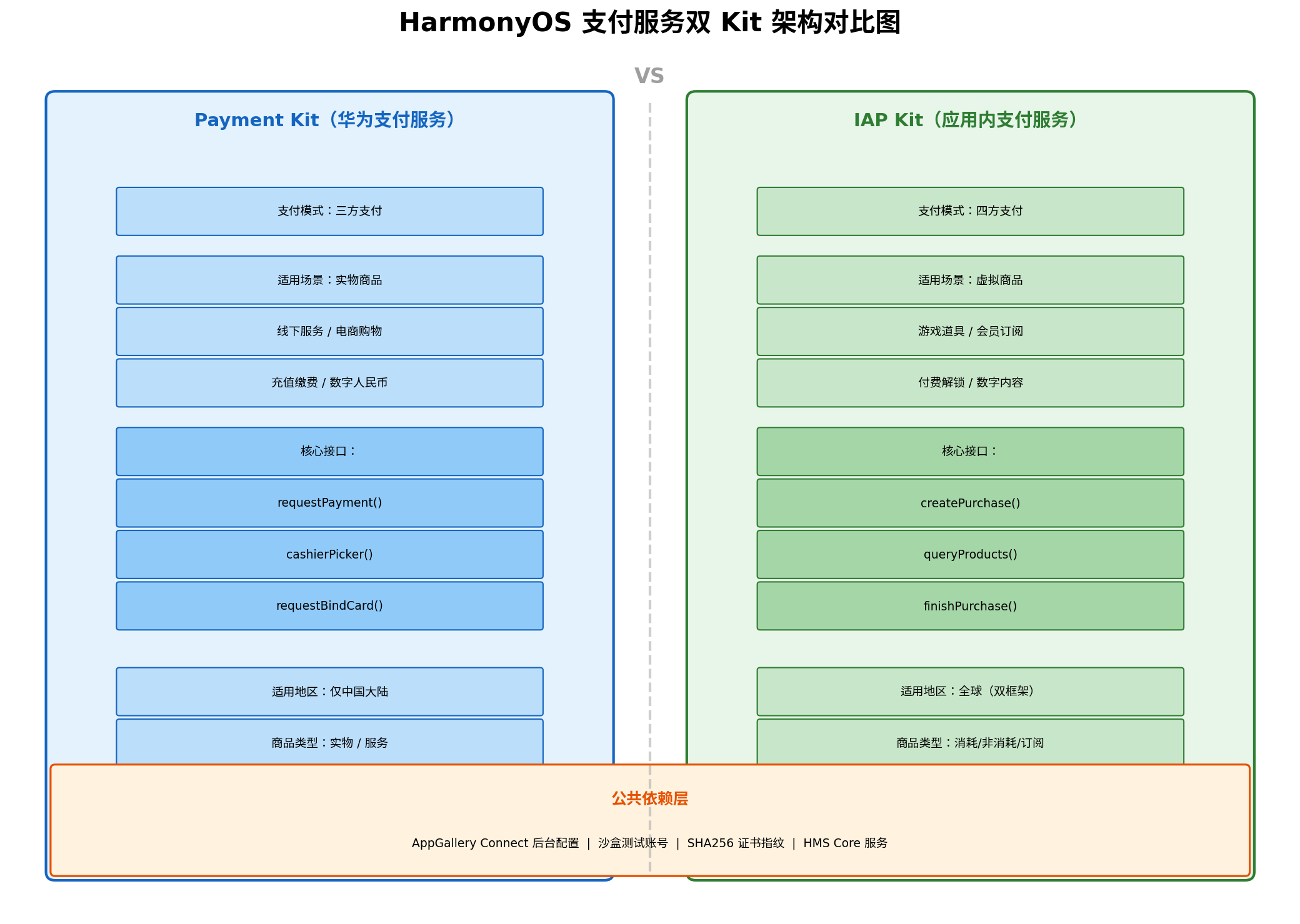
2.1 核心定位差异
| 维度 | Payment Kit | IAP Kit |
|---|---|---|
| 支付模式 | 三方支付(开发者 ↔ 用户 ↔ 支付渠道) | 四方支付(开发者 ↔ 用户 ↔ 应用商店 ↔ 支付渠道) |
| 适用场景 | 实物商品、线下服务、充值缴费 | 虚拟商品、游戏道具、会员订阅 |
| 商品类型 | 实物商品、数字人民币 | 消耗型、非消耗型、自动续期订阅、非续期订阅 |
| 适用地区 | 仅中国大陆 | 全球(双框架支持) |
| 核心接口 | requestPayment、cashierPicker |
createPurchase、queryProducts、finishPurchase |
| 导入路径 | @kit.PaymentKit |
@kit.IAPKit / @kit.InAppPurchaseKit |
2.2 选择决策树
业务涉及付费?
├── 实物商品 / 线下服务 / 充值缴费 → Payment Kit
└── 虚拟商品 / 数字内容 / 会员订阅 → IAP Kit
    ├── 一次性购买
    │   ├── 可重复购买(游戏金币)→ 消耗型商品
    │   └── 永久拥有(去广告)→ 非消耗型商品
    └── 周期性付费
        ├── 自动续期(连续包月)→ 自动续期订阅
        └── 固定周期(季卡)→ 非续期订阅
合规红线:Payment Kit 不支持虚拟商品支付,IAP Kit 不支持实物商品。两者不可混用,否则上架审核将被驳回。
三、IAP Kit 核心概念与商品类型
IAP Kit 支持四种商品类型,每种类型在交易流程、状态管理和权益发放上存在本质差异。
3.1 商品类型详解
| 商品类型 | 说明 | 典型场景 | 后续操作 |
|---|---|---|---|
| 消耗型 (CONSUMABLE) | 购买后消耗,可重复购买 | 游戏金币、体力值、抽奖券 | finishPurchase + consumePurchase |
| 非消耗型 (NONCONSUMABLE) | 购买后永久拥有,不可重复购买 | 去广告、解锁关卡、永久会员 | finishPurchase |
| 自动续期订阅 (AUTO_RENEWABLE) | 周期自动扣费,可暂停/取消 | 视频会员、音乐包月、云存储 | finishPurchase + 监听续期事件 |
| 非续期订阅 (NON_RENEWABLE) | 固定周期,到期不自动续费 | 季卡、年卡、活动套餐 | finishPurchase |
3.2 关键数据结构
// 商品信息 (Product)
interface Product {
  productId: string;           // 商品 ID,与 AGC 后台一致
  productType: ProductType;    // 商品类型枚举
  price: string;               // 本地化价格(如 "¥6.00")
  currency: string;            // 货币代码(如 "CNY")
  name: string;                // 商品名称
  description: string;         // 商品描述
}

// 购买结果 (PurchaseData)
interface PurchaseData {
  jwsPurchaseOrder: string;      // JWS 格式的订单数据,需验签
  purchaseToken: string;        // 购买令牌,唯一标识一笔交易
  productId: string;
  orderId: string;             // 华为订单号
  purchaseTime: number;        // 购买时间戳
  developerPayload: string;    // 开发者透传数据
}
四、实战一:IAP Kit 基础支付流程
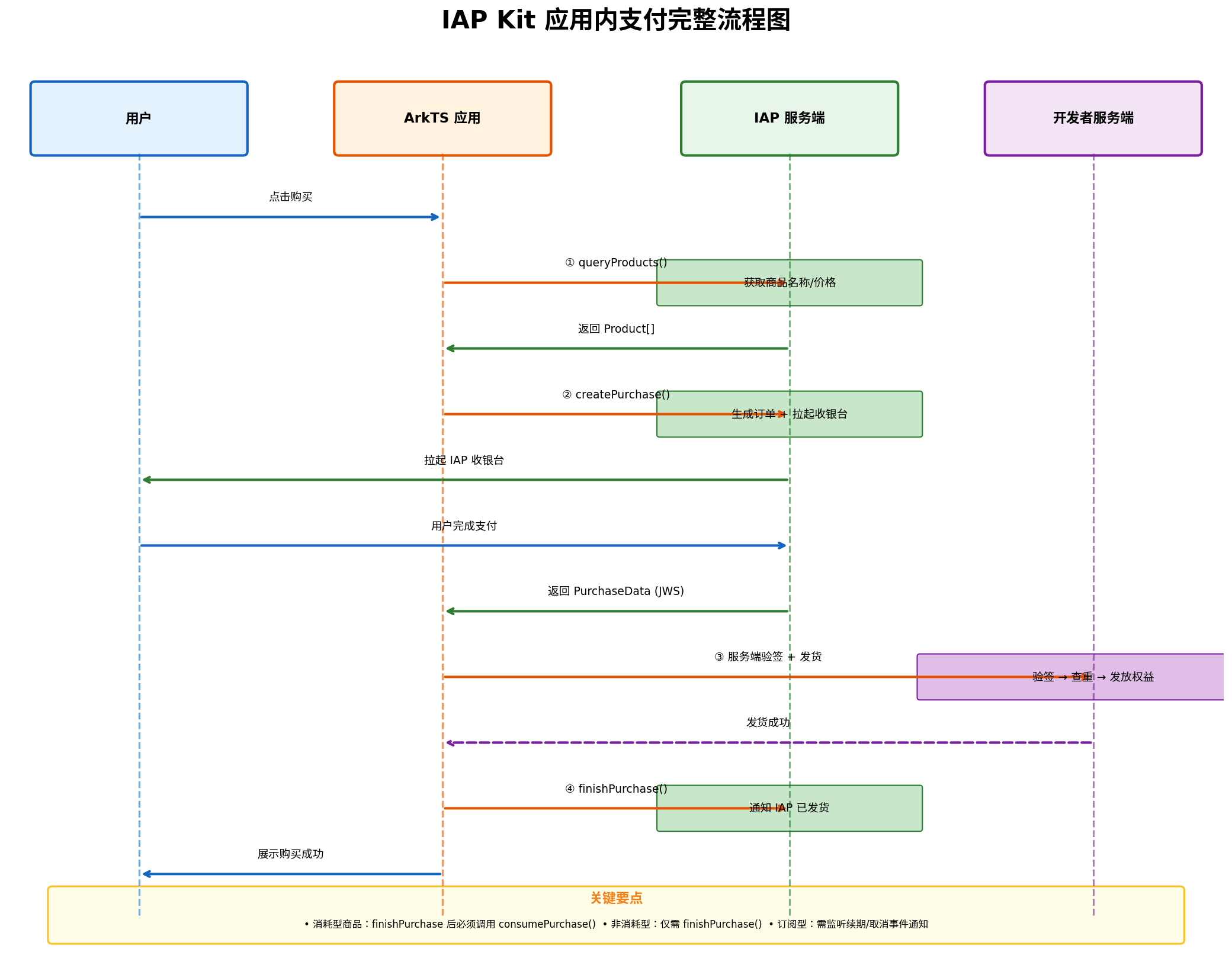
IAP Kit 的支付流程遵循"查询 → 购买 → 发货 → 确认"四步闭环,任何一步的失败都可能导致掉单或重复发货。
4.1 初始化与商品查询
// entry/src/main/ets/utils/IAPManager.ets
import { iap } from '@kit.IAPKit';
import { common } from '@kit.AbilityKit';
import { hilog } from '@kit.PerformanceAnalysisKit';
import { BusinessError } from '@kit.BasicServicesKit';

const TAG: string = 'IAPManager';

export class IAPManager {
  private static instance: IAPManager;
  private iapService: iap.IAPService | null = null;
  private context: common.UIAbilityContext;

  private constructor(context: common.UIAbilityContext) {
    this.context = context;
  }

  static getInstance(context: common.UIAbilityContext): IAPManager {
    if (!IAPManager.instance) {
      IAPManager.instance = new IAPManager(context);
    }
    return IAPManager.instance;
  }

  /**
   * 初始化 IAP 服务
   */
  async init(): Promise<boolean> {
    try {
      this.iapService = iap.getService();
      hilog.info(0, TAG, 'IAP 服务初始化成功');
      return true;
    } catch (error) {
      hilog.error(0, TAG, `IAP 初始化失败: ${JSON.stringify(error)}`);
      return false;
    }
  }

  /**
   * 查询商品信息
   * @param productIds 商品 ID 列表
   * @param productType 商品类型
   */
  async queryProducts(
    productIds: string[],
    productType: iap.ProductType = iap.ProductType.CONSUMABLE
  ): Promise<iap.Product[]> {
    if (!this.iapService) {
      hilog.error(0, TAG, 'IAP 服务未初始化');
      return [];
    }

    try {
      const products = await this.iapService.queryProducts({
        productIds: productIds,
        productType: productType
      });
      hilog.info(0, TAG, `查询到 ${products.length} 个商品`);
      return products;
    } catch (error) {
      hilog.error(0, TAG, `查询商品失败: ${JSON.stringify(error)}`);
      return [];
    }
  }
}
4.2 发起购买请求
  /**
   * 发起购买
   * @param productId 商品 ID
   * @param productType 商品类型
   * @param developerPayload 开发者透传数据(如用户 ID、订单号)
   */
  async createPurchase(
    productId: string,
    productType: iap.ProductType,
    developerPayload: string = ''
  ): Promise<iap.PurchaseResult | null> {
    if (!this.iapService) {
      hilog.error(0, TAG, 'IAP 服务未初始化');
      return null;
    }

    try {
      const request: iap.PurchaseRequest = {
        productId: productId,
        productType: productType,
        developerPayload: developerPayload  // 透传数据,验签时回传
      };

      hilog.info(0, TAG, `发起购买: productId=${productId}, type=${productType}`);
      const result = await this.iapService.createPurchase(request);

      hilog.info(0, TAG, `购买成功: orderId=${result.getOrderId()}, purchaseToken=${result.getPurchaseToken()}`);
      return result;
    } catch (error) {
      const payError = error as iap.IAPError;
      this.handlePurchaseError(payError);
      return null;
    }
  }

  /**
   * 处理购买错误
   */
  private handlePurchaseError(error: iap.IAPError): void {
    switch (error.code) {
      case iap.IAPErrorCode.ORDER_CANCELLED:
        hilog.info(0, TAG, '用户取消支付');
        break;
      case iap.IAPErrorCode.ORDER_FAILED:
        hilog.error(0, TAG, '支付失败,请重试');
        break;
      case iap.IAPErrorCode.PRODUCT_NOT_EXIST:
        hilog.error(0, TAG, '商品不存在,请检查 AGC 配置');
        break;
      case iap.IAPErrorCode.ITEM_ALREADY_OWNED:
        hilog.warn(0, TAG, '用户已拥有该商品(非消耗型/未消耗)');
        break;
      case iap.IAPErrorCode.SANDBOX_NOT_ACTIVATED:
        hilog.error(0, TAG, '沙盒环境未激活,请检查签名配置');
        break;
      default:
        hilog.error(0, TAG, `支付异常: code=${error.code}, message=${error.message}`);
    }
  }
4.3 确认发货与消耗商品
  /**
   * 完成购买(通知 IAP 已发货)
   * @param purchaseOrder 购买订单数据
   */
  async finishPurchase(purchaseOrder: iap.PurchaseOrderPayload): Promise<boolean> {
    try {
      const finishParam: iap.FinishPurchaseParameter = {
        productType: purchaseOrder.productType,
        purchaseToken: purchaseOrder.purchaseToken,
        purchaseOrderId: purchaseOrder.purchaseOrderId
      };

      await iap.finishPurchase(this.context, finishParam);
      hilog.info(0, TAG, 'finishPurchase 成功,订单已确认');
      return true;
    } catch (error) {
      const err = error as BusinessError;
      hilog.error(0, TAG, `finishPurchase 失败: code=${err.code}, message=${err.message}`);
      return false;
    }
  }

  /**
   * 消耗型商品:消耗购买(允许再次购买)
   * @param purchaseToken 购买令牌
   */
  async consumePurchase(purchaseToken: string): Promise<boolean> {
    try {
      await this.iapService?.consumePurchase({ purchaseToken });
      hilog.info(0, TAG, `商品已消耗: ${purchaseToken}`);
      return true;
    } catch (error) {
      hilog.error(0, TAG, `消耗商品失败: ${JSON.stringify(error)}`);
      return false;
    }
  }
4.4 页面中使用示例
// entry/src/main/ets/pages/PaymentPage.ets
import { IAPManager } from '../utils/IAPManager';
import { iap } from '@kit.IAPKit';
import { promptAction } from '@kit.ArkUI';

@Entry
@Component
struct PaymentPage {
  private iapManager: IAPManager = IAPManager.getInstance(
    getContext(this) as common.UIAbilityContext
  );
  @State products: iap.Product[] = [];
  @State isLoading: boolean = false;

  async aboutToAppear(): Promise<void> {
    await this.iapManager.init();
    await this.loadProducts();
  }

  async loadProducts(): Promise<void> {
    this.isLoading = true;
    this.products = await this.iapManager.queryProducts(
      ['coin_100', 'coin_500', 'remove_ads'],
      iap.ProductType.CONSUMABLE
    );
    this.isLoading = false;
  }

  async handlePurchase(product: iap.Product): Promise<void> {
    const userId = 'user_001';  // 实际从登录态获取
    const developerPayload = JSON.stringify({ userId, clientOrderId: `order_${Date.now()}` });

    const result = await this.iapManager.createPurchase(
      product.productId,
      product.productType,
      developerPayload
    );

    if (result) {
      // 将 PurchaseData 发送到服务端验签并发货
      const purchaseData = result.getPurchaseData();
      const deliverSuccess = await this.deliverToServer(purchaseData);

      if (deliverSuccess) {
        // 发货成功后调用 finishPurchase
        const purchaseOrder = purchaseData.getPurchaseOrder();
        await this.iapManager.finishPurchase(purchaseOrder);

        // 消耗型商品需额外调用 consumePurchase
        if (product.productType === iap.ProductType.CONSUMABLE) {
          await this.iapManager.consumePurchase(purchaseData.getPurchaseToken());
        }

        promptAction.showToast({ message: '购买成功!', duration: 2000 });
      }
    }
  }

  // 发送到开发者服务端验签发货
  private async deliverToServer(purchaseData: iap.PurchaseData): Promise<boolean> {
    // 实际项目中通过 HTTPS 发送到自建服务端
    // 服务端使用华为公钥验证 JWS 签名,查重后发放权益
    return new Promise((resolve) => {
      setTimeout(() => resolve(true), 500);  // 模拟网络请求
    });
  }

  build() {
    Column() {
      Text('应用内购买')
        .fontSize(24)
        .fontWeight(FontWeight.Bold)
        .margin({ top: 40, bottom: 20 })

      if (this.isLoading) {
        LoadingProgress()
          .width(50)
          .height(50)
      } else {
        List({ space: 12 }) {
          ForEach(this.products, (product: iap.Product) => {
            ListItem() {
              Row() {
                Column() {
                  Text(product.name)
                    .fontSize(16)
                    .fontWeight(FontWeight.Medium)
                  Text(product.description)
                    .fontSize(12)
                    .fontColor('#999999')
                }
                .layoutWeight(1)
                .alignItems(HorizontalAlign.Start)

                Text(product.price)
                  .fontSize(18)
                  .fontColor('#D32F2F')
                  .fontWeight(FontWeight.Bold)

                Button('购买')
                  .width(80)
                  .height(36)
                  .fontSize(14)
                  .onClick(() => this.handlePurchase(product))
              }
              .width('100%')
              .padding(16)
              .backgroundColor(Color.White)
              .borderRadius(12)
              .shadow({ radius: 8, color: 'rgba(0,0,0,0.08)' })
            }
          })
        }
        .width('90%')
        .layoutWeight(1)
      }
    }
    .width('100%')
    .height('100%')
    .backgroundColor('#F5F5F5')
  }
}
五、实战二:自动续期订阅管理
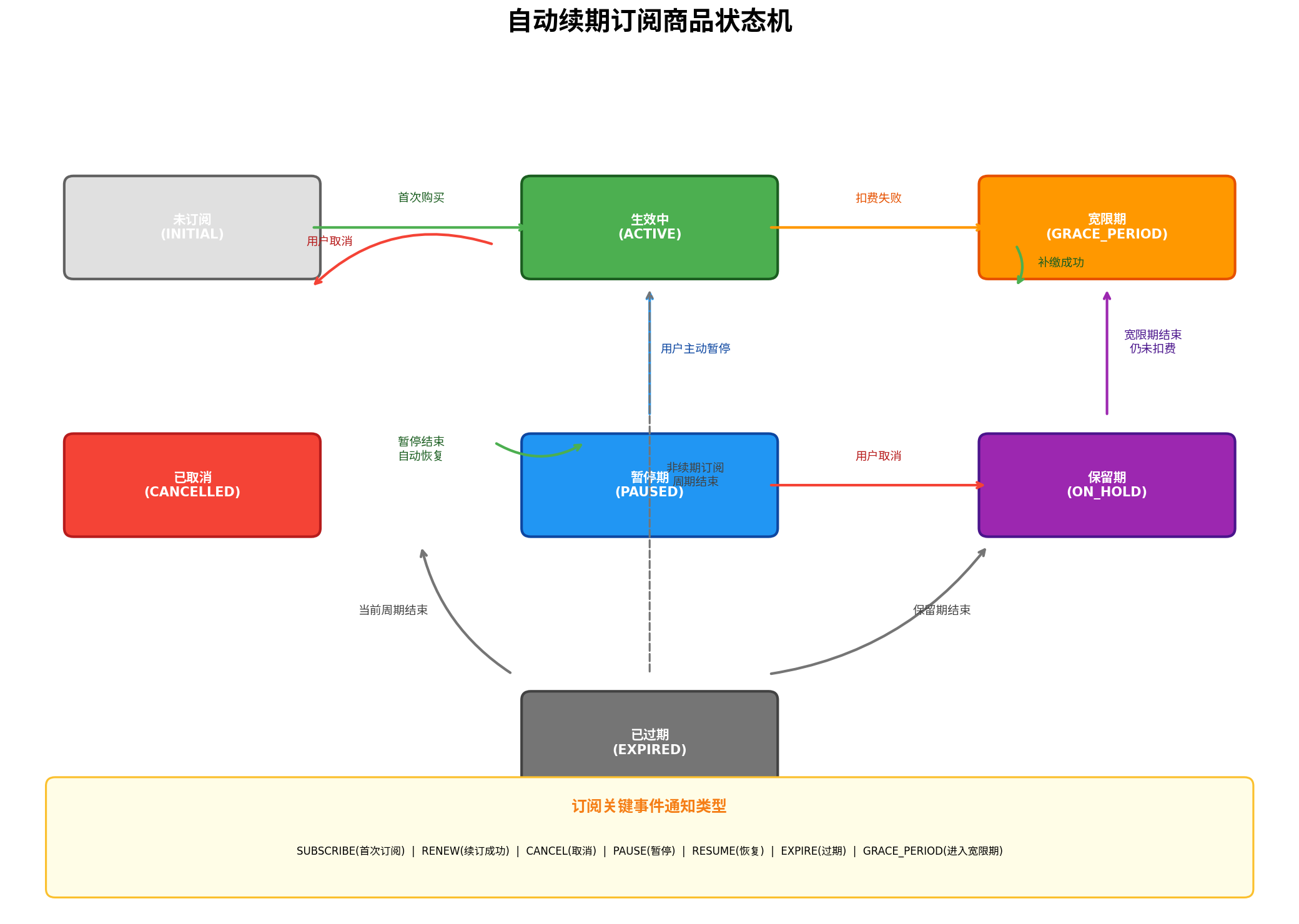
订阅服务是应用持续收入的核心模式。IAP Kit 提供了完整的订阅生命周期管理,包括续期、暂停、取消、宽限期等复杂状态。
5.1 订阅状态说明
| 状态 | 说明 | 用户权益 |
|---|---|---|
| ACTIVE | 生效中 | 正常享受订阅服务 |
| GRACE_PERIOD | 宽限期 | 扣费失败后的缓冲期,用户仍可享受服务 |
| PAUSED | 暂停期 | 用户主动暂停,暂停结束后自动恢复 |
| ON_HOLD | 保留期 | 宽限期结束仍未扣费,服务暂停 |
| CANCELLED | 已取消 | 用户取消订阅,当前周期结束后失效 |
| EXPIRED | 已过期 | 订阅完全失效,需重新购买 |
5.2 查询订阅状态
  /**
   * 查询订阅状态
   * @param productId 订阅商品 ID
   */
  async querySubscriptionStatus(productId: string): Promise<iap.SubscriptionStatus | null> {
    try {
      const status = await this.iapService?.querySubscriptionStatus({ productId });
      hilog.info(0, TAG, `订阅状态: ${JSON.stringify(status)}`);
      return status || null;
    } catch (error) {
      hilog.error(0, TAG, `查询订阅状态失败: ${JSON.stringify(error)}`);
      return null;
    }
  }
5.3 订阅关键事件通知
开发者需在服务端配置订阅事件通知地址,IAP 服务器会在订阅状态变化时主动推送通知。
// 服务端接收订阅事件通知示例(Node.js)
app.post('/iap/subscription/notify', express.json(), (req, res) => {
  const notification = req.body;

  // 1. 验证通知签名(使用华为公钥)
  const isValid = verifyJWSSignature(notification.jwsData, huaweiPublicKey);
  if (!isValid) {
    return res.status(400).send('Invalid signature');
  }

  // 2. 解析通知内容
  const payload = JSON.parse(Buffer.from(notification.jwsData.split('.')[1], 'base64').toString());
  const { notificationType, subscriptionId, purchaseToken } = payload;

  // 3. 根据通知类型处理
  switch (notificationType) {
    case 'SUBSCRIBE':
      // 首次订阅,发放权益
      grantSubscriptionBenefits(subscriptionId, purchaseToken);
      break;
    case 'RENEW':
      // 续订成功,延长服务期限
      extendSubscription(subscriptionId, purchaseToken);
      break;
    case 'CANCEL':
      // 用户取消,标记为到期不续费
      markAsCancelled(subscriptionId);
      break;
    case 'PAUSE':
      // 用户暂停,记录暂停状态
      markAsPaused(subscriptionId);
      break;
    case 'RESUME':
      // 恢复订阅,重新激活
      reactivateSubscription(subscriptionId);
      break;
    case 'EXPIRE':
      // 订阅过期,回收权益
      revokeBenefits(subscriptionId);
      break;
    case 'GRACE_PERIOD':
      // 进入宽限期,发送提醒
      sendPaymentReminder(subscriptionId);
      break;
  }

  res.status(200).send('OK');
});
5.4 续费提醒合规要求
根据应用市场审核政策,自动续期订阅商品需在续订前 5 天以显著方式明确告知用户续费信息。虽然系统会自动发送短信提醒,但开发者仍需在应用内提供清晰的订阅管理入口。
六、实战三:安全验签与防掉单机制
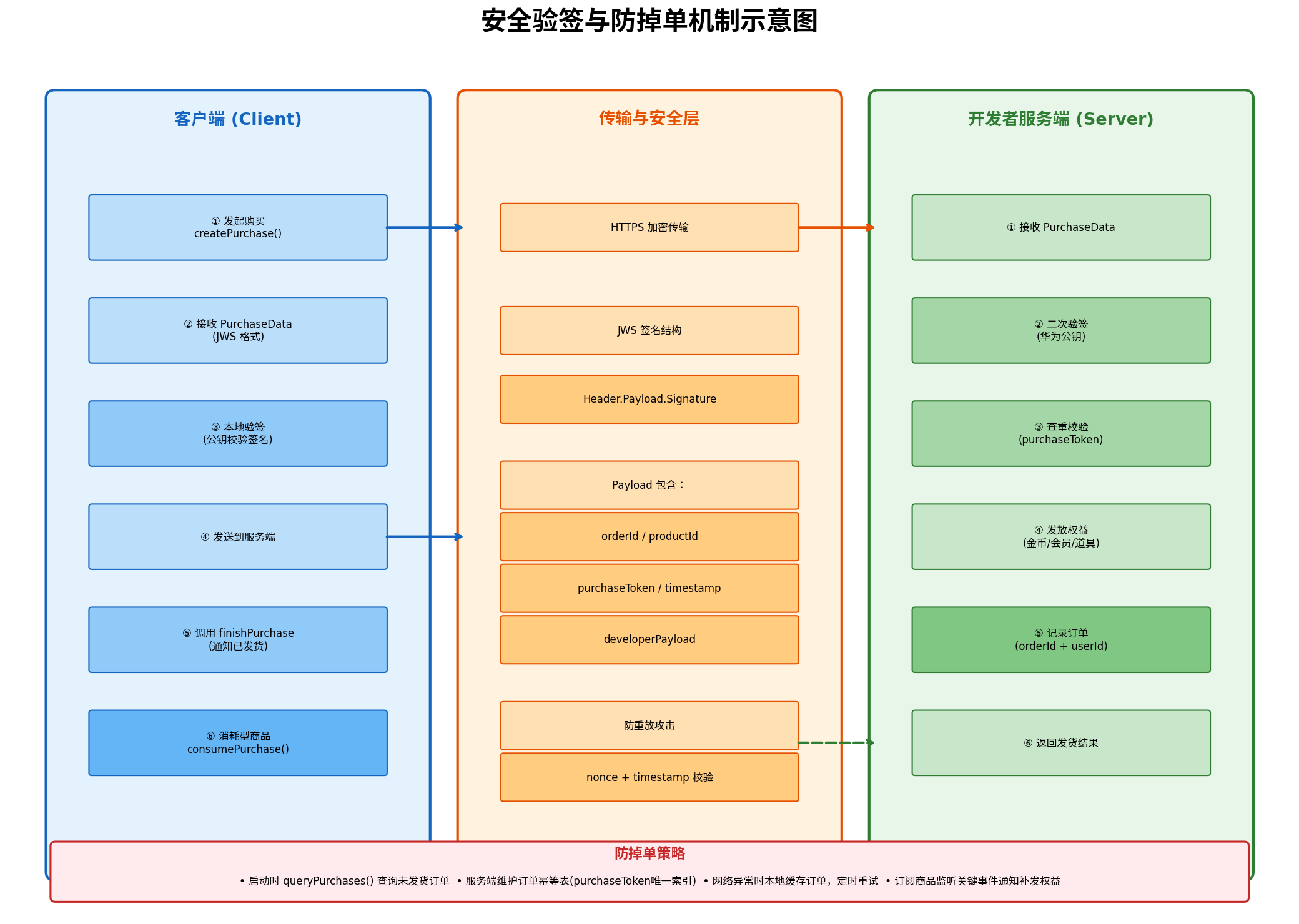
支付安全是商业化系统的生命线。IAP Kit 采用 JWS(JSON Web Signature)格式传输购买凭证,确保数据完整性与不可抵赖性。
6.1 JWS 验签流程
// entry/src/main/ets/utils/JWSTool.ets
import { cryptoFramework } from '@kit.CryptoArchitectureKit';
import { util } from '@kit.ArkTS';

/**
 * JWS 验签工具类
 */
export class JWSTool {
  /**
   * 解析 JWS 数据
   * @param jwsData JWS 字符串 (header.payload.signature)
   * @returns 解析后的 Payload 对象
   */
  static parseJWS(jwsData: string): object | null {
    try {
      const parts = jwsData.split('.');
      if (parts.length !== 3) {
        console.error('JWS 格式错误,应为三段式');
        return null;
      }

      // Base64URL 解码 Payload
      const payloadBase64 = this.base64UrlDecode(parts[1]);
      const payload = JSON.parse(payloadBase64);
      return payload;
    } catch (error) {
      console.error(`JWS 解析失败: ${JSON.stringify(error)}`);
      return null;
    }
  }

  /**
   * Base64URL 解码
   */
  private static base64UrlDecode(input: string): string {
    // 替换 Base64URL 特殊字符
    let base64 = input.replace(/-/g, '+').replace(/_/g, '/');
    // 补齐 padding
    while (base64.length % 4) {
      base64 += '=';
    }
    const bytes = util.decodeURIComponent(base64);
    return bytes;
  }
}
6.2 服务端验签(推荐)
// 服务端验签示例(Node.js + jsonwebtoken)
const jwt = require('jsonwebtoken');

/**
 * 验证购买凭证
 * @param jwsPurchaseOrder 客户端传来的 JWS 数据
 * @param huaweiPublicKey 从 AGC 下载的华为公钥
 */
function verifyPurchase(jwsPurchaseOrder: string, huaweiPublicKey: string): boolean {
  try {
    // 使用华为公钥验证 JWS 签名
    const decoded = jwt.verify(jwsPurchaseOrder, huaweiPublicKey, {
      algorithms: ['ES256']
    });

    // 验签通过后,提取订单信息
    const { orderId, productId, purchaseToken, purchaseTime, developerPayload } = decoded;

    // 1. 校验 purchaseToken 是否已处理(幂等性)
    const existingOrder = db.findOrderByPurchaseToken(purchaseToken);
    if (existingOrder) {
      console.warn(`订单已处理: ${purchaseToken}`);
      return true;  // 已处理,直接返回成功
    }

    // 2. 校验订单时间(防重放攻击,5分钟内有效)
    const now = Date.now();
    if (now - purchaseTime > 5 * 60 * 1000) {
      throw new Error('订单已过期,可能存在重放攻击');
    }

    // 3. 发放权益
    const userId = JSON.parse(developerPayload).userId;
    grantBenefits(userId, productId, orderId);

    // 4. 记录订单
    db.saveOrder({ orderId, productId, purchaseToken, userId, status: 'delivered' });

    return true;
  } catch (error) {
    console.error(`验签失败: ${error.message}`);
    return false;
  }
}
6.3 防掉单策略
| 场景 | 策略 | 实现方式 |
|---|---|---|
| 应用启动时 | 查询未发货订单 | queryPurchases() 遍历未 finish 的订单,重新发货 |
| 网络异常 | 本地缓存 + 定时重试 | 将 PurchaseData 存入本地数据库,网络恢复后重试 |
| 重复通知 | 服务端幂等 | purchaseToken 作为唯一索引,已处理订单直接返回成功 |
| 订阅续期 | 监听关键事件 | 服务端配置通知地址,实时同步订阅状态 |
  /**
   * 应用启动时补单:查询未完成的购买
   */
  async restoreUnfinishedPurchases(): Promise<void> {
    try {
      const unfinishedPurchases = await this.iapService?.queryPurchases({
        productType: iap.ProductType.CONSUMABLE
      });

      for (const purchase of unfinishedPurchases || []) {
        const purchaseData = purchase.getPurchaseData();
        hilog.info(0, TAG, `发现未发货订单: ${purchaseData.getOrderId()}`);

        // 重新发送到服务端验签发货
        const success = await this.deliverToServer(purchaseData);
        if (success) {
          await this.finishPurchase(purchaseData.getPurchaseOrder());
          await this.consumePurchase(purchaseData.getPurchaseToken());
        }
      }
    } catch (error) {
      hilog.error(0, TAG, `补单失败: ${JSON.stringify(error)}`);
    }
  }
七、实战四:Payment Kit 基础集成
Payment Kit 面向实物商品与线下服务,提供系统级支付收银台能力。
7.1 发起支付请求
// entry/src/main/ets/utils/PaymentKitManager.ets
import { payment } from '@kit.PaymentKit';
import { common } from '@kit.AbilityKit';
import { hilog } from '@kit.PerformanceAnalysisKit';

const TAG: string = 'PaymentKitManager';

/**
 * 使用 Payment Kit 发起支付
 * @param context UIAbilityContext
 * @param orderInfo 订单信息
 */
export async function requestPayment(
  context: common.UIAbilityContext,
  orderInfo: payment.OrderInfo
): Promise<payment.PaymentResult | null> {
  try {
    const result = await payment.requestPayment(context, {
      orderId: orderInfo.orderId,
      amount: orderInfo.amount,           // 金额,单位:分
      currency: 'CNY',
      merchantId: orderInfo.merchantId,    // 商户号
      productName: orderInfo.productName,
      productDescription: orderInfo.productDescription,
      callbackUrl: 'https://your-server.com/payment/callback'  // 支付结果回调地址
    });

    hilog.info(0, TAG, `支付结果: ${JSON.stringify(result)}`);
    return result;
  } catch (error) {
    hilog.error(0, TAG, `支付失败: ${JSON.stringify(error)}`);
    return null;
  }
}
7.2 收银台选择器
/**
 * 展示收银台选择器(支持多种支付方式)
 */
export async function showCashierPicker(context: common.UIAbilityContext): Promise<void> {
  try {
    const result = await payment.cashierPicker(context, {
      paymentMethods: [
        payment.PaymentMethod.HUAWEI_PAY,
        payment.PaymentMethod.WECHAT_PAY,
        payment.PaymentMethod.ALIPAY,
        payment.PaymentMethod.DIGITAL_RMB
      ]
    });

    hilog.info(0, TAG, `用户选择支付方式: ${result.selectedMethod}`);
  } catch (error) {
    hilog.error(0, TAG, `选择支付方式失败: ${JSON.stringify(error)}`);
  }
}
八、AGC 后台配置与沙盒测试
8.1 AGC 后台配置清单
| 步骤 | 操作路径 | 说明 |
|---|---|---|
| 1 | 项目设置 → 常规 → 应用 → SHA256 证书指纹 | 添加 debug 和 release 证书指纹 |
| 2 | 开放能力管理 → 应用内购买服务 | 开通 IAP Kit 服务 |
| 3 | 运营 → 产品运营 → 商品管理 | 添加商品,配置 ID、价格、类型 |
| 4 | 用户与访问 → 沙盒测试 → 测试账号 | 添加测试华为账号 |
| 5 | 盈利 → 应用内支付 → 公钥 | 下载支付公钥用于服务端验签 |
8.2 沙盒测试要点
// 检查沙盒环境是否激活
async checkSandbox(): Promise<void> {
  try {
    const isSandbox = await iap.isSandboxActivated();
    hilog.info(0, TAG, `沙盒环境状态: ${isSandbox}`);

    if (!isSandbox) {
      hilog.warn(0, TAG, '沙盒未激活,可能原因:未使用 debug 签名 / 账号未加入沙盒 / SHA256 指纹未配置');
    }
  } catch (error) {
    hilog.error(0, TAG, `检查沙盒失败: ${JSON.stringify(error)}`);
  }
}
常见错误:错误码
1001860057表示沙盒环境未激活,通常是因为使用了 release 签名或 SHA256 指纹配置不完整。
8.3 测试账号要求
- 必须使用在 AGC 沙盒中添加的华为账号登录设备;
- 沙盒测试中支付不会真实扣款;
- 订阅商品在沙盒中的周期会加速(如 1 个月订阅可能 5 分钟即到期),便于测试续期逻辑。
九、常见问题与错误码速查
| 错误码 | 含义 | 解决方案 |
|---|---|---|
| 1001860001 | 系统错误 | 检查 HMS Core 服务是否正常 |
| 1001860002 | 支付服务配置错误 | 核对 AGC 应用包名、签名证书、服务开通状态 |
| 1001860051 | 用户已拥有该商品 | 消耗型商品未调用 consumePurchase,或非消耗型重复购买 |
| 1001860057 | 沙盒环境未激活 | 使用 debug 签名,检查 SHA256 指纹配置 |
| 1001860060 | 商品不存在 | 核对 productId 与 AGC 后台配置是否一致 |
| 1001860062 | 用户取消支付 | 正常行为,无需处理 |
| 1001860065 | 网络错误 | 检查网络连接,稍后重试 |
| 1001860070 | 订单已过期 | 重新发起购买请求 |
十、总结
本文从架构到实战,系统梳理了 HarmonyOS 支付服务集成的完整技术方案:
- Payment Kit 与 IAP Kit 的双 Kit 架构覆盖了实物商品与虚拟商品的全场景支付需求,开发者需严格按商品类型选择对应 Kit;
- IAP Kit 的四步支付闭环(查询 → 购买 → 发货 → 确认)要求开发者正确处理
finishPurchase与consumePurchase的调用时机,避免掉单或重复发货; - 自动续期订阅的状态机管理涉及 ACTIVE、GRACE_PERIOD、PAUSED、ON_HOLD、CANCELLED、EXPIRED 六种状态,需配合服务端关键事件通知实现权益的精准发放与回收;
- JWS 签名验签机制通过客户端本地验签 + 服务端二次验签的双重保障,确保交易数据的真实性与完整性;
- 沙盒测试环境是验证支付流程的必备工具,需正确配置 SHA256 指纹、沙盒账号与 debug 签名。
随着 HarmonyOS 生态的全球化推进,IAP Kit 将在多币种、多税率、跨境支付等方向持续增强。建议开发者在项目初期即规划好商品体系与支付架构,充分利用平台能力构建安全、合规、高效的商业化系统。
转载自:https://blog.csdn.net/u014727709/article/details/163827326
欢迎 👍点赞✍评论⭐收藏,欢迎指正

讨论HarmonyOS开发技术,专注于API与组件、DevEco Studio、测试、元服务和应用上架分发等。
更多推荐
 1
1 0
0- 0


 已为社区贡献536条内容

所有评论(0)