HarmonyOS 云服务基础集成——端云一体化全栈开发实战指南
文章目录

每日一句正能量
且将旧岁换新鞍,重整衣冠再上鞍,此去关山千万里,马到功成马上安。
摘要
摘要: 在HarmonyOS生态中,端云一体化开发已成为降低全栈开发门槛、提升应用竞争力的关键路径。本文基于HarmonyOS NEXT(API 12+)与AppGallery Connect(AGC)平台,系统性地讲解云服务基础集成的完整技术链路,涵盖认证服务、云数据库、云存储与云函数四大核心能力。通过DevEco Studio端云一体化工程实战,配合完整的ArkTS代码示例与架构设计,帮助开发者从零构建具备云端能力的元服务与应用,实现真正的"一人全栈、端云协同"。
一、引言:端云一体化是HarmonyOS开发的必然选择
传统的移动应用开发遵循"前端+后端+运维"的分工模式,对于个人开发者或小型团队而言,搭建服务器、维护数据库、配置CDN、处理安全防护等工作不仅成本高昂,而且技术门槛极高。HarmonyOS推出的端云一体化开发模式,通过Cloud Foundation Kit(云开发服务)将云端能力以SDK形式下沉到端侧,开发者无需关注服务器运维,即可使用云数据库、云存储、云函数和认证服务等生产级后端能力。
端云一体化的核心价值在于:
- 开发效率跃升:前后端统一使用ArkTS/TypeScript技术栈,无需在Java/Swift与JavaScript之间切换上下文。
- 零运维成本:Serverless架构自动处理弹性伸缩、负载均衡与故障恢复,开发者只需为实际调用付费。
- 数据安全合规:AGC提供端到端加密、数据驻留策略与GDPR合规保障,降低安全合规风险。
- 全球加速分发:内置CDN边缘节点与全球数据中心,应用出海无需额外配置。
二、HarmonyOS 云服务基础集成整体架构
在深入代码之前,我们需要理解端云一体化的整体技术架构。下图展示了从AGC控制台到端侧应用的完整服务链路:
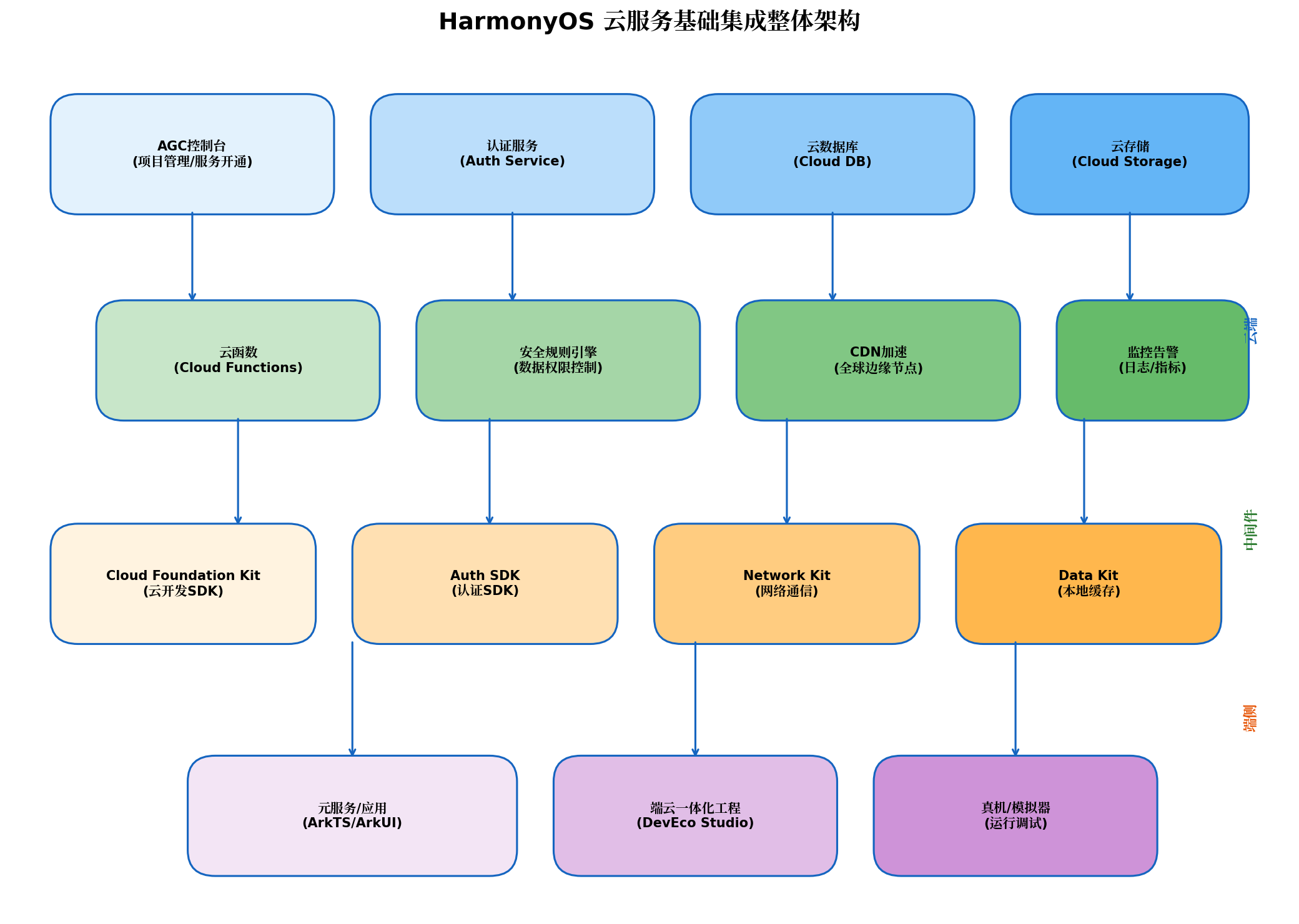
架构分层解析:
- AGC平台层:作为云端能力的中枢,提供项目管理、服务开通、配置下发与运营分析能力。开发者通过Web控制台或DevEco Studio插件管理云资源。
- 核心服务层:包含认证服务(Auth Service)、云数据库(Cloud DB)、云存储(Cloud Storage)三大基础能力,以及云函数(Cloud Functions)作为业务逻辑编排层。
- 中间件层:安全规则引擎控制数据访问权限,CDN加速静态资源分发,监控告警系统实时追踪服务健康状态。
- SDK层:Cloud Foundation Kit统一封装云端API,Auth SDK处理身份认证,Network Kit保障网络通信,Data Kit管理本地缓存。
- 应用层:元服务或应用通过ArkTS调用SDK API,DevEco Studio提供端云一体化工程的完整开发、调试与部署体验。
三、环境准备与项目初始化
3.1 前置条件
在开始集成之前,需要完成以下准备工作:
| 工具/环境 | 版本要求 | 说明 |
|---|---|---|
| DevEco Studio | 5.0.0 Release+ | 支持端云一体化开发的IDE |
| HarmonyOS SDK | API 12+ | 兼容端云一体化API |
| Node.js | 18.x | 云函数开发与构建依赖 |
| 华为开发者账号 | 实名认证 | 访问AGC控制台与云服务 |
3.2 创建端云一体化工程
DevEco Studio提供两种创建端云一体化工程的方式:先在AGC平台创建应用再关联,或直接在IDE中创建并自动同步到AGC。推荐第二种方式,流程更为简洁:
File → New → Create Project → [CloudDev] Empty Ability → 勾选"Enable CloudDev"
→ 配置Bundle name → 登录AGC账号 → 自动关联云资源 → Finish
创建完成后,工程目录将包含两个核心模块:
MyCloudProject/
├── entry/                    # 端侧工程(ArkTS UI与业务逻辑)
│   ├── src/main/ets/         # 端侧代码
│   └── src/main/resources/rawfile/agconnect-services.json
└── cloud/                    # 云侧工程(云函数与云数据库定义)
    ├── functions/            # 云函数目录
    └── database/             # 云数据库对象类型定义
3.3 配置文件与权限声明
将AGC控制台下载的agconnect-services.json放置于entry/src/main/resources/rawfile/目录下,并在module.json5中声明网络权限:
{
  "module": {
    "requestPermissions": [
      {
        "name": "ohos.permission.INTERNET"
      }
    ]
  }
}
四、认证服务集成:构建用户身份体系
认证服务是端云一体化的安全基石,为云数据库、云存储等资源提供统一的访问控制与身份鉴权。
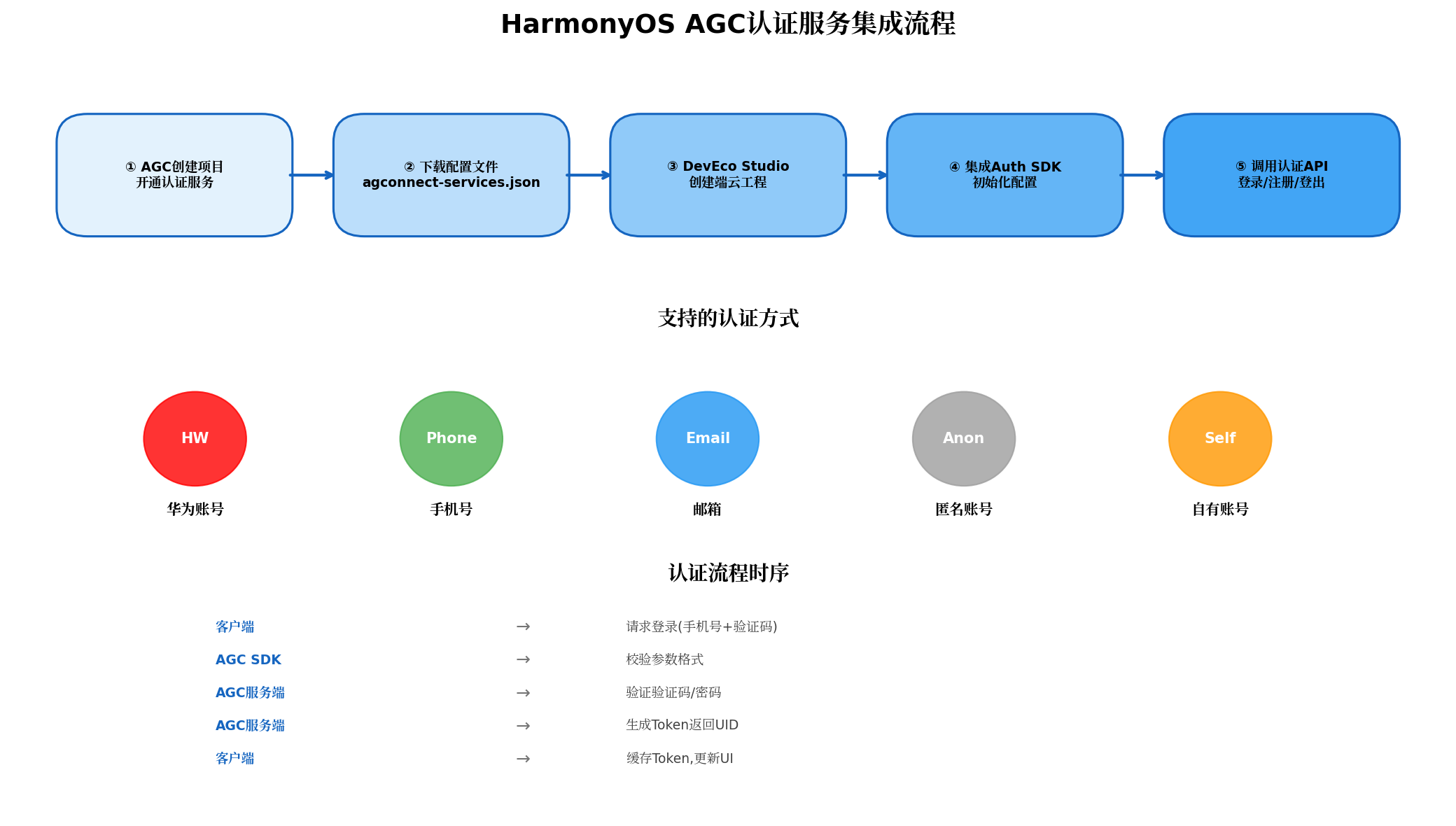
4.1 SDK初始化
在EntryAbility.ets的onCreate生命周期中完成AGC SDK初始化:
// EntryAbility.ets
import { AbilityConstant, UIAbility, Want } from '@kit.AbilityKit';
import { hilog } from '@kit.PerformanceAnalysisKit';
import { cloud } from '@hw-agconnect/cloud';

export default class EntryAbility extends UIAbility {
  onCreate(want: Want, launchParam: AbilityConstant.LaunchParam): void {
    hilog.info(0x0000, 'testTag', '%{public}s', 'Ability onCreate');

    // 初始化Cloud Foundation Kit
    try {
      const file = this.context.resourceManager.getRawFileContentSync('agconnect-services.json');
      const json = buffer.from(file.buffer).toString();
      cloud.init(this.context, json);
      hilog.info(0x0000, 'testTag', 'AGC Cloud SDK initialized successfully');
    } catch (error) {
      hilog.error(0x0000, 'testTag', 'AGC init failed: %{public}s', JSON.stringify(error));
    }
  }
}
4.2 手机号认证实战
手机号认证是国内应用最常用的登录方式,支持验证码登录与密码登录两种模式:
// AuthService.ets
import { cloud } from '@hw-agconnect/cloud';
import { AuthUser, SignInResult, VerifyCodeAction } from '@hw-agconnect/auth';

export class AuthService {
  private static auth = cloud.auth();

  /**
   * 请求手机验证码
   */
  static async requestPhoneVerifyCode(phoneNumber: string): Promise<void> {
    try {
      await this.auth.requestVerifyCode({
        action: VerifyCodeAction.REGISTER_LOGIN,
        lang: 'zh_CN',
        sendInterval: 60,
        verifyCodeType: {
          phoneNumber: phoneNumber,
          countryCode: '86',
          kind: 'phone'
        }
      });
      console.info('Verify code sent successfully');
    } catch (error) {
      console.error('Failed to send verify code:', error);
      throw error;
    }
  }

  /**
   * 手机号验证码登录
   */
  static async signInWithPhoneCode(
    phoneNumber: string,
    verifyCode: string
  ): Promise<AuthUser> {
    try {
      // 登录前确保登出当前用户
      await this.signOut();

      const result: SignInResult = await this.auth.signIn({
        autoCreateUser: true, // 用户不存在时自动注册
        credentialInfo: {
          kind: 'phone',
          countryCode: '86',
          phoneNumber: phoneNumber,
          verifyCode: verifyCode
        }
      });

      const user = result.getUser();
      console.info('Sign in success, UID:', user.getUid());
      return user;
    } catch (error) {
      console.error('Sign in failed:', error);
      throw error;
    }
  }

  /**
   * 获取当前登录用户
   */
  static async getCurrentUser(): Promise<AuthUser | null> {
    try {
      return await this.auth.getCurrentUser();
    } catch {
      return null;
    }
  }

  /**
   * 登出
   */
  static async signOut(): Promise<void> {
    try {
      await this.auth.signOut();
    } catch (error) {
      console.warn('Sign out error:', error);
    }
  }

  /**
   * 匿名登录(适用于游客模式)
   */
  static async signInAnonymously(): Promise<AuthUser> {
    try {
      const result = await this.auth.signInAnonymously();
      return result.getUser();
    } catch (error) {
      console.error('Anonymous sign in failed:', error);
      throw error;
    }
  }
}
4.3 登录状态管理与UI联动
使用AppStorage实现登录状态的全局共享,确保UI与认证状态实时同步:
// LoginViewModel.ets
import { AuthUser } from '@hw-agconnect/auth';

@Observed
export class LoginViewModel {
  @Track isLoggedIn: boolean = false;
  @Track userInfo: AuthUser | null = null;
  @Track isLoading: boolean = false;
  @Track errorMessage: string = '';

  async checkLoginStatus(): Promise<void> {
    const user = await AuthService.getCurrentUser();
    this.isLoggedIn = !!user;
    this.userInfo = user;
  }

  async loginWithPhone(phone: string, code: string): Promise<void> {
    this.isLoading = true;
    this.errorMessage = '';
    try {
      const user = await AuthService.signInWithPhoneCode(phone, code);
      this.isLoggedIn = true;
      this.userInfo = user;
    } catch (error) {
      this.errorMessage = '登录失败,请检查验证码';
    } finally {
      this.isLoading = false;
    }
  }
}
五、云数据库集成:Serverless数据持久化
云数据库(Cloud DB)是端云一体化的核心数据层,提供文档型NoSQL存储能力,支持端侧离线缓存与云端实时同步。
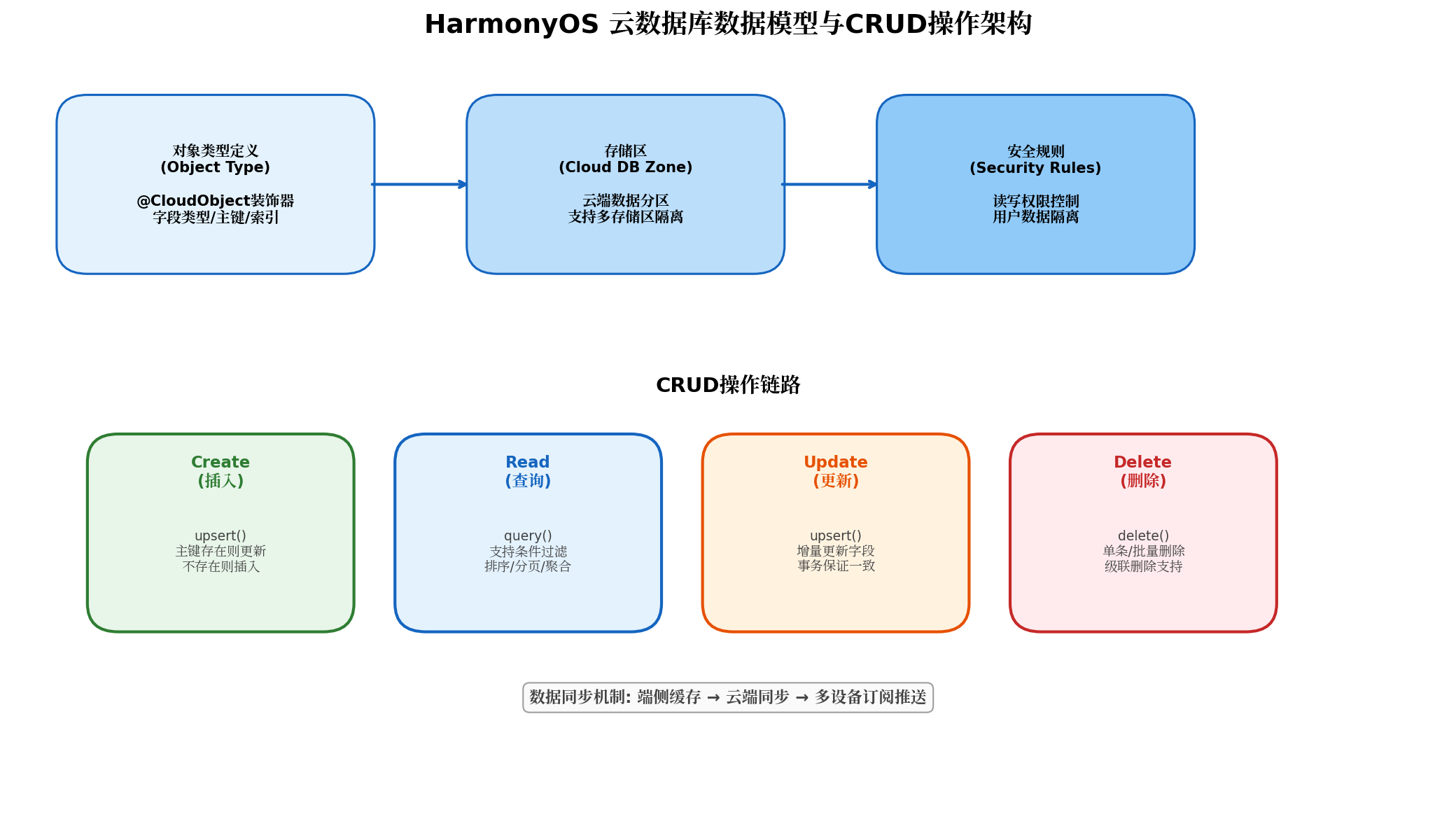
5.1 对象类型定义
云数据库采用对象类型(Object Type)定义数据模型,需在AGC控制台或云侧工程中创建:
// cloud/database/TodoItem.json
{
  "objectTypeName": "TodoItem",
  "fields": [
    {
      "fieldName": "id",
      "fieldType": "String",
      "notNull": true,
      "isPrimaryKey": true
    },
    {
      "fieldName": "title",
      "fieldType": "String",
      "notNull": true
    },
    {
      "fieldName": "description",
      "fieldType": "String"
    },
    {
      "fieldName": "isCompleted",
      "fieldType": "Boolean",
      "defaultValue": false
    },
    {
      "fieldName": "priority",
      "fieldType": "Integer",
      "defaultValue": 0
    },
    {
      "fieldName": "createTime",
      "fieldType": "Date",
      "notNull": true
    },
    {
      "fieldName": "userId",
      "fieldType": "String",
      "notNull": true
    }
  ],
  "indexes": [
    {
      "indexName": "userId_index",
      "fields": ["userId"]
    }
  ]
}
5.2 端侧数据操作封装
// TodoDataSource.ets
import { cloud } from '@hw-agconnect/cloud';
import { CloudDBZone, CloudDBZoneQuery } from '@hw-agconnect/database';

export class TodoDataSource {
  private static zone: CloudDBZone | null = null;
  private static readonly ZONE_NAME = 'TodoZone';

  static async initialize(): Promise<void> {
    if (this.zone) return;
    try {
      this.zone = await cloud.database().openCloudDBZone({
        cloudDBZoneName: this.ZONE_NAME,
        syncProperty: cloud.SyncProperty.CLOUD_CACHE  // 云端优先+本地缓存
      });
    } catch (error) {
      console.error('Failed to open CloudDBZone:', error);
      throw error;
    }
  }

  /**
   * 插入/更新待办事项
   */
  static async upsertTodo(todo: TodoItem): Promise<void> {
    if (!this.zone) throw new Error('CloudDBZone not initialized');
    try {
      await this.zone.executeUpsert([todo]);
      console.info('Todo upserted successfully');
    } catch (error) {
      console.error('Failed to upsert todo:', error);
      throw error;
    }
  }

  /**
   * 查询当前用户的待办列表
   */
  static async queryTodosByUser(userId: string): Promise<TodoItem[]> {
    if (!this.zone) throw new Error('CloudDBZone not initialized');
    try {
      const query = CloudDBZoneQuery.where(TodoItem)
        .equalTo('userId', userId)
        .orderByDesc('createTime');

      const snapshot = await this.zone.executeQuery(query);
      return snapshot.getSnapshotObjects() || [];
    } catch (error) {
      console.error('Failed to query todos:', error);
      throw error;
    }
  }

  /**
   * 分页查询(大数据量场景)
   */
  static async queryTodosWithPagination(
    userId: string,
    pageSize: number = 20,
    offset: number = 0
  ): Promise<TodoItem[]> {
    if (!this.zone) throw new Error('CloudDBZone not initialized');
    try {
      const query = CloudDBZoneQuery.where(TodoItem)
        .equalTo('userId', userId)
        .limit(pageSize)
        .offset(offset)
        .orderByDesc('createTime');

      const snapshot = await this.zone.executeQuery(query);
      return snapshot.getSnapshotObjects() || [];
    } catch (error) {
      console.error('Pagination query failed:', error);
      throw error;
    }
  }

  /**
   * 删除待办事项
   */
  static async deleteTodo(todo: TodoItem): Promise<void> {
    if (!this.zone) throw new Error('CloudDBZone not initialized');
    try {
      await this.zone.executeDelete([todo]);
    } catch (error) {
      console.error('Failed to delete todo:', error);
      throw error;
    }
  }

  /**
   * 订阅数据变更(实时同步)
   */
  static subscribeTodos(
    userId: string,
    onChange: (todos: TodoItem[]) => void
  ): () => void {
    if (!this.zone) return () => {};

    const query = CloudDBZoneQuery.where(TodoItem)
      .equalTo('userId', userId);

    const listener = {
      onSnapshot: (snapshot) => {
        const todos = snapshot.getSnapshotObjects() || [];
        onChange(todos);
      },
      onError: (error) => {
        console.error('Subscription error:', error);
      }
    };

    this.zone.subscribeSnapshot(query, listener);

    // 返回取消订阅函数
    return () => {
      this.zone?.unsubscribeSnapshot(listener);
    };
  }
}

// 数据模型定义
export class TodoItem {
  id: string = '';
  title: string = '';
  description: string = '';
  isCompleted: boolean = false;
  priority: number = 0;
  createTime: Date = new Date();
  userId: string = '';
}
5.3 安全规则配置
云数据库的安全规则决定了谁可以读写哪些数据。以下是一个典型的用户数据隔离规则:
{
  "rules": {
    "TodoZone": {
      "TodoItem": {
        ".read": "auth != null && data.userId == auth.uid",
        ".write": "auth != null && (data == null || data.userId == auth.uid)"
      }
    }
  }
}
规则解析:
.read:仅允许已认证用户读取属于自己的数据(userId等于当前登录用户UID)。.write:允许已认证用户插入新数据(data == null表示插入操作),或更新/删除属于自己的数据。
六、云存储集成:文件上传与下载
云存储为应用提供高可用、高并发的对象存储服务,适用于图片、视频、文档等静态资源的云端托管。
// CloudStorageService.ets
import { cloud } from '@hw-agconnect/cloud';
import { request } from '@kit.BasicServicesKit';

export class CloudStorageService {
  private static storage = cloud.storage();

  /**
   * 上传文件到云存储
   */
  static async uploadFile(
    localPath: string,
    cloudPath: string,
    onProgress?: (progress: number) => void
  ): Promise<string> {
    try {
      const task = await this.storage.uploadFile({
        localPath: localPath,
        cloudPath: cloudPath,
        // 上传模式:前台或后台
        mode: request.agent.Mode.BACKGROUND
      });

      // 监听上传进度
      if (onProgress) {
        task.on('progress', (progress) => {
          onProgress(progress.state);
        });
      }

      const result = await task.promise;
      console.info('Upload success, URL:', result.downloadUrl);
      return result.downloadUrl;
    } catch (error) {
      console.error('Upload failed:', error);
      throw error;
    }
  }

  /**
   * 下载文件到本地
   */
  static async downloadFile(
    cloudPath: string,
    localPath: string
  ): Promise<void> {
    try {
      const task = await this.storage.downloadFile({
        cloudPath: cloudPath,
        localPath: localPath
      });
      await task.promise;
      console.info('Download success');
    } catch (error) {
      console.error('Download failed:', error);
      throw error;
    }
  }

  /**
   * 获取文件的下载URL(用于图片展示)
   */
  static async getDownloadUrl(cloudPath: string): Promise<string> {
    try {
      return await this.storage.getDownloadURL(cloudPath);
    } catch (error) {
      console.error('Get URL failed:', error);
      throw error;
    }
  }

  /**
   * 删除云端文件
   */
  static async deleteFile(cloudPath: string): Promise<void> {
    try {
      await this.storage.deleteFile(cloudPath);
    } catch (error) {
      console.error('Delete failed:', error);
      throw error;
    }
  }
}
使用场景示例——头像上传:
// ProfilePage.ets
async uploadAvatar(uri: string): Promise<void> {
  const user = await AuthService.getCurrentUser();
  if (!user) {
    promptAction.showToast({ message: '请先登录' });
    return;
  }

  const cloudPath = `avatars/${user.getUid()}/${Date.now()}.jpg`;

  this.isUploading = true;
  try {
    const downloadUrl = await CloudStorageService.uploadFile(
      uri,
      cloudPath,
      (progress) => { this.uploadProgress = progress; }
    );

    // 将头像URL保存到用户资料
    await this.updateUserProfile({ avatarUrl: downloadUrl });
    promptAction.showToast({ message: '头像上传成功' });
  } catch (error) {
    promptAction.showToast({ message: '上传失败,请重试' });
  } finally {
    this.isUploading = false;
  }
}
七、云函数集成:Serverless业务逻辑编排
云函数(Cloud Functions)是端云一体化的"逻辑胶水",用于处理需要服务端执行的复杂业务,如数据聚合、第三方API调用、定时任务等。
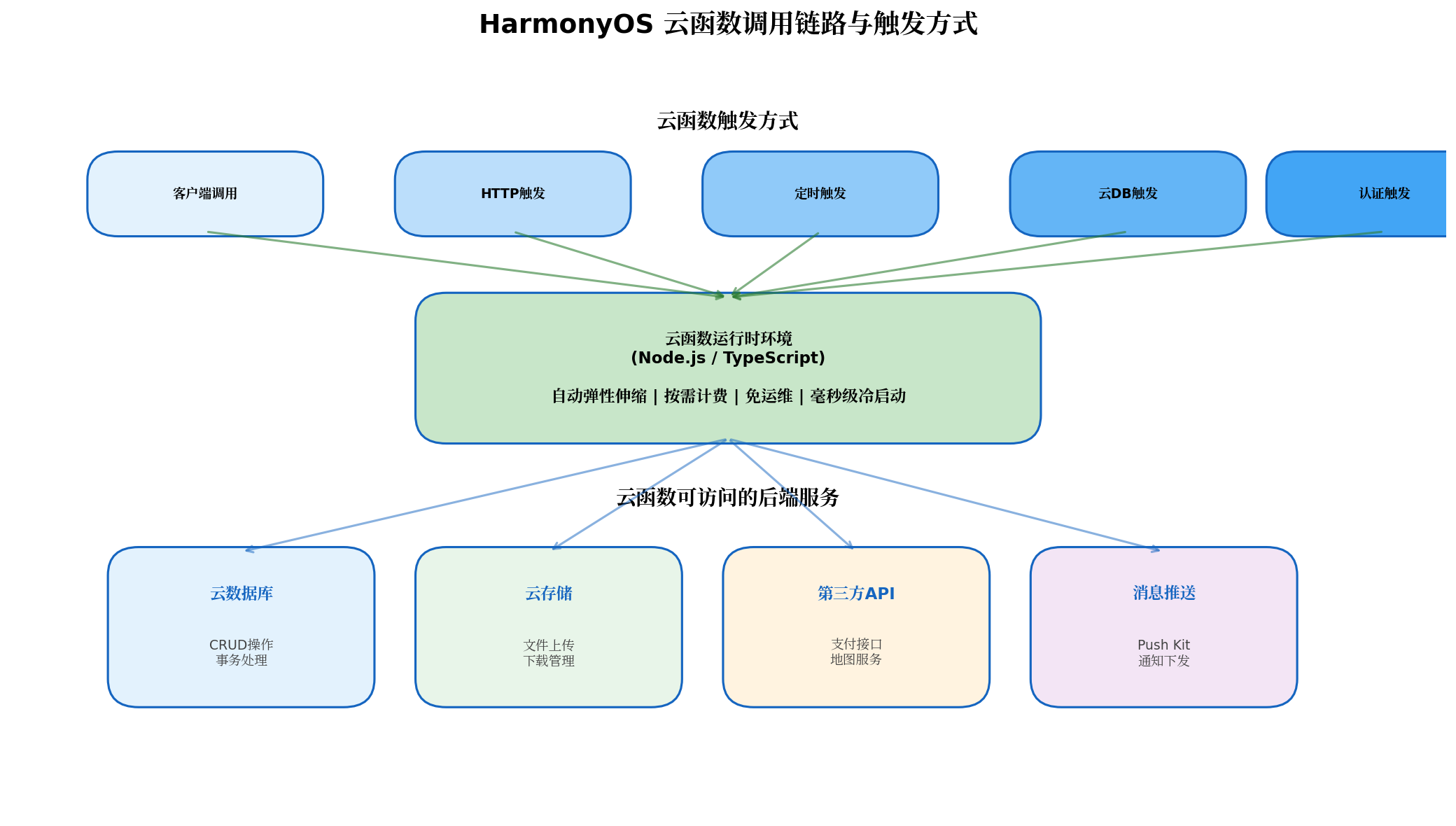
7.1 云函数开发
在cloud/functions/目录下创建云函数:
// cloud/functions/getTodoStatistics/index.ts
import { FuncContext } from '@hw-agconnect/function-server';
import { cloud } from '@hw-agconnect/cloud';

// 云函数入口
export async function handler(event: any, context: FuncContext): Promise<any> {
  const { userId } = event;

  if (!userId) {
    return {
      code: 400,
      message: 'Missing userId parameter'
    };
  }

  try {
    // 连接云数据库
    const zone = await cloud.database().openCloudDBZone({
      cloudDBZoneName: 'TodoZone'
    });

    // 查询用户所有待办
    const query = cloud.CloudDBZoneQuery.where('TodoItem')
      .equalTo('userId', userId);
    const snapshot = await zone.executeQuery(query);
    const todos = snapshot.getSnapshotObjects() || [];

    // 统计计算
    const total = todos.length;
    const completed = todos.filter(t => t.isCompleted).length;
    const pending = total - completed;
    const highPriority = todos.filter(t => t.priority >= 3 && !t.isCompleted).length;

    // 按优先级分组
    const priorityDistribution = todos.reduce((acc, todo) => {
      const key = `priority_${todo.priority}`;
      acc[key] = (acc[key] || 0) + 1;
      return acc;
    }, {} as Record<string, number>);

    return {
      code: 200,
      data: {
        total,
        completed,
        pending,
        completionRate: total > 0 ? (completed / total * 100).toFixed(2) + '%' : '0%',
        highPriority,
        priorityDistribution
      }
    };
  } catch (error) {
    console.error('Statistics calculation failed:', error);
    return {
      code: 500,
      message: 'Internal server error'
    };
  }
}
7.2 端侧调用云函数
// TodoStatisticsService.ets
import { cloud } from '@hw-agconnect/cloud';

export class TodoStatisticsService {
  private static functions = cloud.functions();

  static async getStatistics(userId: string): Promise<TodoStatistics | null> {
    try {
      const result = await this.functions.callFunction({
        name: 'getTodoStatistics',
        data: { userId }
      });

      if (result.code === 200) {
        return result.data as TodoStatistics;
      }
      console.error('Function returned error:', result.message);
      return null;
    } catch (error) {
      console.error('Call function failed:', error);
      return null;
    }
  }
}

interface TodoStatistics {
  total: number;
  completed: number;
  pending: number;
  completionRate: string;
  highPriority: number;
  priorityDistribution: Record<string, number>;
}
7.3 定时云函数(Cron Trigger)
定时云函数适用于数据清理、报表生成、消息推送等周期性任务:
// cloud/functions/dailyCleanup/index.ts
import { FuncContext } from '@hw-agconnect/function-server';
import { cloud } from '@hw-agconnect/cloud';

export async function handler(event: any, context: FuncContext): Promise<void> {
  console.info('Daily cleanup task started at:', new Date().toISOString());

  try {
    const zone = await cloud.database().openCloudDBZone({
      cloudDBZoneName: 'TodoZone'
    });

    // 删除已完成且创建超过30天的待办
    const thirtyDaysAgo = new Date(Date.now() - 30 * 24 * 60 * 60 * 1000);
    const query = cloud.CloudDBZoneQuery.where('TodoItem')
      .equalTo('isCompleted', true)
      .lessThan('createTime', thirtyDaysAgo);

    const snapshot = await zone.executeQuery(query);
    const expiredTodos = snapshot.getSnapshotObjects() || [];

    if (expiredTodos.length > 0) {
      await zone.executeDelete(expiredTodos);
      console.info(`Cleaned up ${expiredTodos.length} expired todos`);
    } else {
      console.info('No expired todos found');
    }
  } catch (error) {
    console.error('Cleanup task failed:', error);
    throw error;
  }
}
在function-config.json中配置定时触发器:
{
  "triggers": [
    {
      "type": "timer",
      "name": "dailyCleanupTrigger",
      "schedule": "0 2 * * *"
    }
  ]
}
八、端云一体化最佳实践
8.1 数据安全与隐私保护
- 最小权限原则:云数据库安全规则应严格限制用户只能访问自己的数据,避免全局读写权限。
- 敏感数据加密:对于身份证号、银行卡号等敏感信息,在端侧加密后再存入云数据库,密钥由用户密码派生。
- 传输安全:Cloud Foundation Kit默认启用HTTPS/TLS加密传输,无需额外配置。
8.2 性能优化策略
| 优化项 | 策略 | 效果 |
|---|---|---|
| 本地缓存优先 | 使用CLOUD_CACHE同步模式 |
减少80%网络请求 |
| 分页加载 | 大数据集使用limit+offset | 避免内存溢出与卡顿 |
| 批量操作 | 合并多条upsert为单次调用 | 减少网络往返次数 |
| 增量同步 | 订阅Snapshot仅接收变更数据 | 降低带宽消耗 |
| 图片压缩 | 上传前使用Image Kit压缩 | 减少存储与流量成本 |
8.3 错误处理与降级
// CloudErrorHandler.ets
export class CloudErrorHandler {
  static handle(error: any): string {
    const errorCode = error?.code || 'UNKNOWN';

    const errorMap: Record<string, string> = {
      'NETWORK_ERROR': '网络连接异常,请检查网络设置',
      'AUTH_TOKEN_EXPIRED': '登录已过期,请重新登录',
      'PERMISSION_DENIED': '无权访问该资源',
      'QUOTA_EXCEEDED': '服务配额已满,请联系管理员',
      'RESOURCE_NOT_FOUND': '请求的资源不存在',
      'SERVER_ERROR': '服务端繁忙,请稍后重试'
    };

    return errorMap[errorCode] || '操作失败,请稍后重试';
  }

  static async retry<T>(
    operation: () => Promise<T>,
    maxRetries: number = 3
  ): Promise<T> {
    let lastError: any;

    for (let i = 0; i < maxRetries; i++) {
      try {
        return await operation();
      } catch (error) {
        lastError = error;
        if (i < maxRetries - 1) {
          await this.delay(1000 * Math.pow(2, i)); // 指数退避
        }
      }
    }

    throw lastError;
  }

  private static delay(ms: number): Promise<void> {
    return new Promise(resolve => setTimeout(resolve, ms));
  }
}
九、总结与展望
本文从架构设计、环境搭建、认证服务、云数据库、云存储到云函数,完整覆盖了HarmonyOS云服务基础集成的核心技术链路。通过端云一体化开发模式,开发者可以以极低的学习成本构建具备云端能力的全栈应用,将更多精力聚焦于业务创新与用户体验优化。
随着HarmonyOS生态的持续演进,云服务基础能力将在以下方向进一步升级:
- AI能力集成:AGC将提供端云协同的AI推理服务,开发者可通过云函数调用大模型API,实现智能客服、内容生成等高级功能。
- 实时协作增强:基于云数据库的实时同步能力,未来将原生支持多用户协同编辑、在线白板、实时游戏状态同步等场景。
- 边缘计算下沉:结合HarmonyOS分布式能力,部分云函数逻辑将可下沉到边缘设备执行,进一步降低延迟与带宽成本。
建议HarmonyOS开发者尽早将云服务基础能力纳入技术栈,从认证+云数据库的最小可用组合开始,逐步扩展至云存储、云函数与AI服务,构建真正具备竞争力的端云协同应用。
转载自:https://blog.csdn.net/u014727709/article/details/163832309
欢迎 👍点赞✍评论⭐收藏,欢迎指正

讨论HarmonyOS开发技术,专注于API与组件、DevEco Studio、测试、元服务和应用上架分发等。
更多推荐

 2
2 0
0- 0


 已为社区贡献548条内容

所有评论(0)