HarmonyOS 云数据库使用——从对象建模到生产级数据管理的深度实战
文章目录

每日一句正能量
辞暮尔尔,烟火年年。
摘要
摘要: 在HarmonyOS端云一体化开发体系中,云数据库(Cloud DB)是实现数据持久化与多端同步的核心基础设施。本文基于HarmonyOS NEXT(API 12+)与Cloud Foundation Kit,系统性地讲解云数据库的完整使用链路,涵盖存储区管理、对象类型设计、索引策略、CRUD操作、复杂查询构建、性能优化与数据同步机制。通过可落地的ArkTS代码示例与架构设计,帮助开发者掌握生产级云数据库的开发技巧,构建高可靠、高性能的端云数据管理体系。
一、引言:云数据库是端云一体化的数据基石
在HarmonyOS元服务与应用开发中,数据管理是绕不开的核心命题。传统的本地数据库(如RelationalStore)虽然能满足单机场景,但无法解决跨设备数据同步、用户数据云端备份、多终端实时共享等现代应用的基础需求。云数据库(Cloud DB)作为AGC(AppGallery Connect)提供的Serverless数据存储服务,以对象类型(Object Type)为核心数据模型,支持端侧离线缓存与云端实时同步的双向数据流,为开发者提供了"开箱即用"的云端数据管理能力。
与本地数据库相比,云数据库的核心优势在于:
- 端云双向同步:本地修改自动同步到云端,云端变更实时推送到端侧,支持离线操作与冲突自动解决。
- 跨设备数据共享:同一华为账号下的多设备可自动同步数据,实现"一处修改,处处生效"。
- 零运维成本:无需搭建数据库服务器、配置主从复制或处理备份恢复,AGC自动处理高可用与容灾。
- 细粒度权限控制:通过安全规则实现用户级数据隔离,确保用户只能访问自己的数据。
二、云数据库核心概念与端云架构
在深入代码之前,必须理解云数据库的三个核心概念:存储区(Cloud DB Zone)、对象类型(Object Type)和数据条目(Data Entry)。
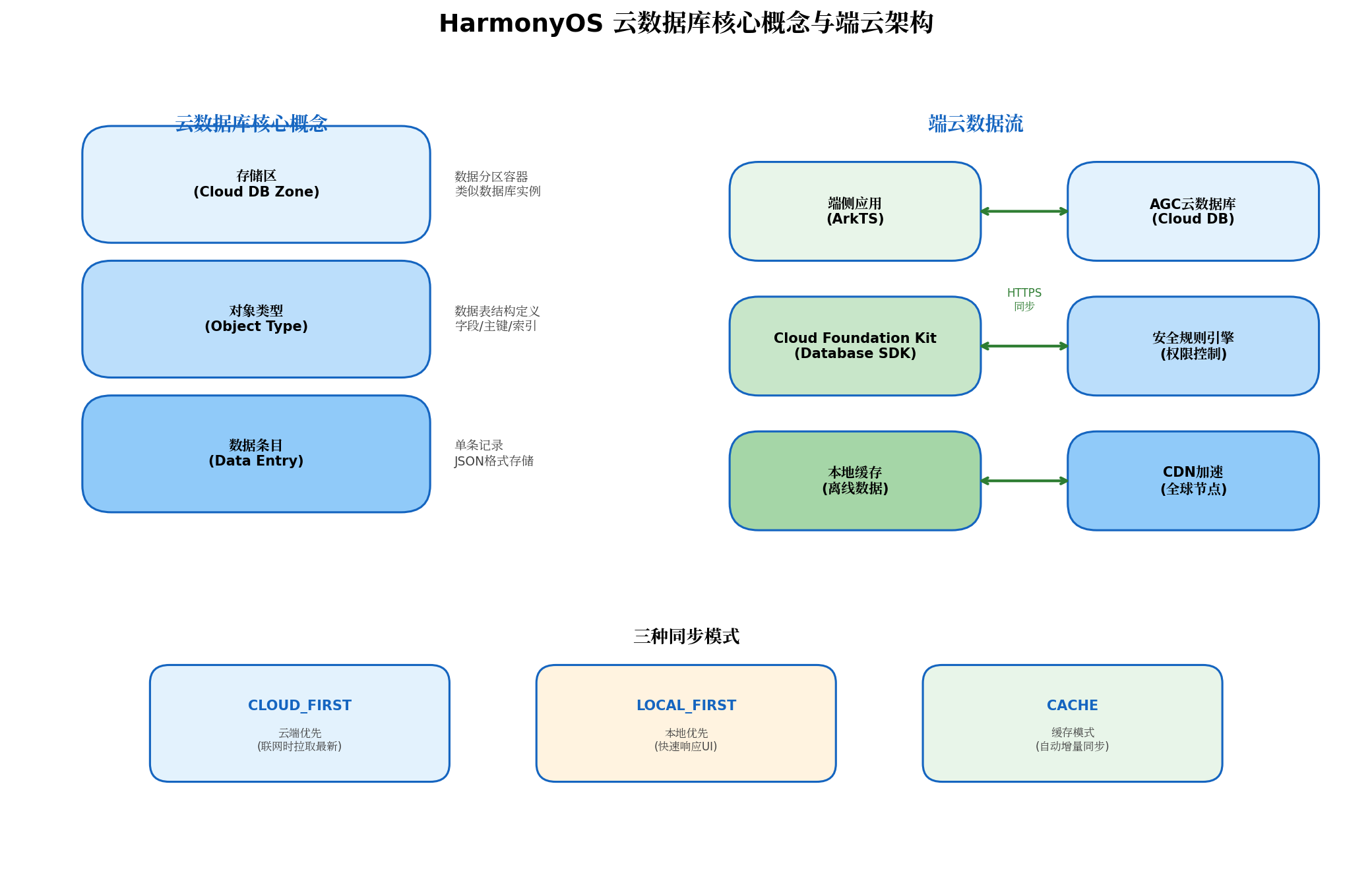
核心概念解析:
- 存储区(Cloud DB Zone):数据存储的顶层容器,类似传统数据库中的"数据库实例"。一个应用可创建多个存储区实现数据逻辑隔离(如用户数据区、公共数据区、缓存数据区)。
- 对象类型(Object Type):定义数据表结构的Schema,包含字段定义(名称、类型、约束)、主键配置、索引策略和权限规则。每个对象类型对应云数据库中的一张逻辑表。
- 数据条目(Data Entry):对象类型的具体实例,以JSON格式存储在云端。每条数据必须包含主键字段,用于唯一标识记录。
端云数据流: 端侧应用通过Cloud Foundation Kit的Database SDK与云端交互。SDK内部维护本地缓存层,支持三种同步模式:
- CLOUD_FIRST:优先从云端拉取最新数据,适用于强一致性场景(如账户余额)。
- LOCAL_FIRST:优先返回本地缓存,后台异步同步,适用于快速响应场景(如列表首屏渲染)。
- CACHE:自动增量同步模式,仅传输变更数据,适用于常规业务数据。
三、对象类型设计与索引策略
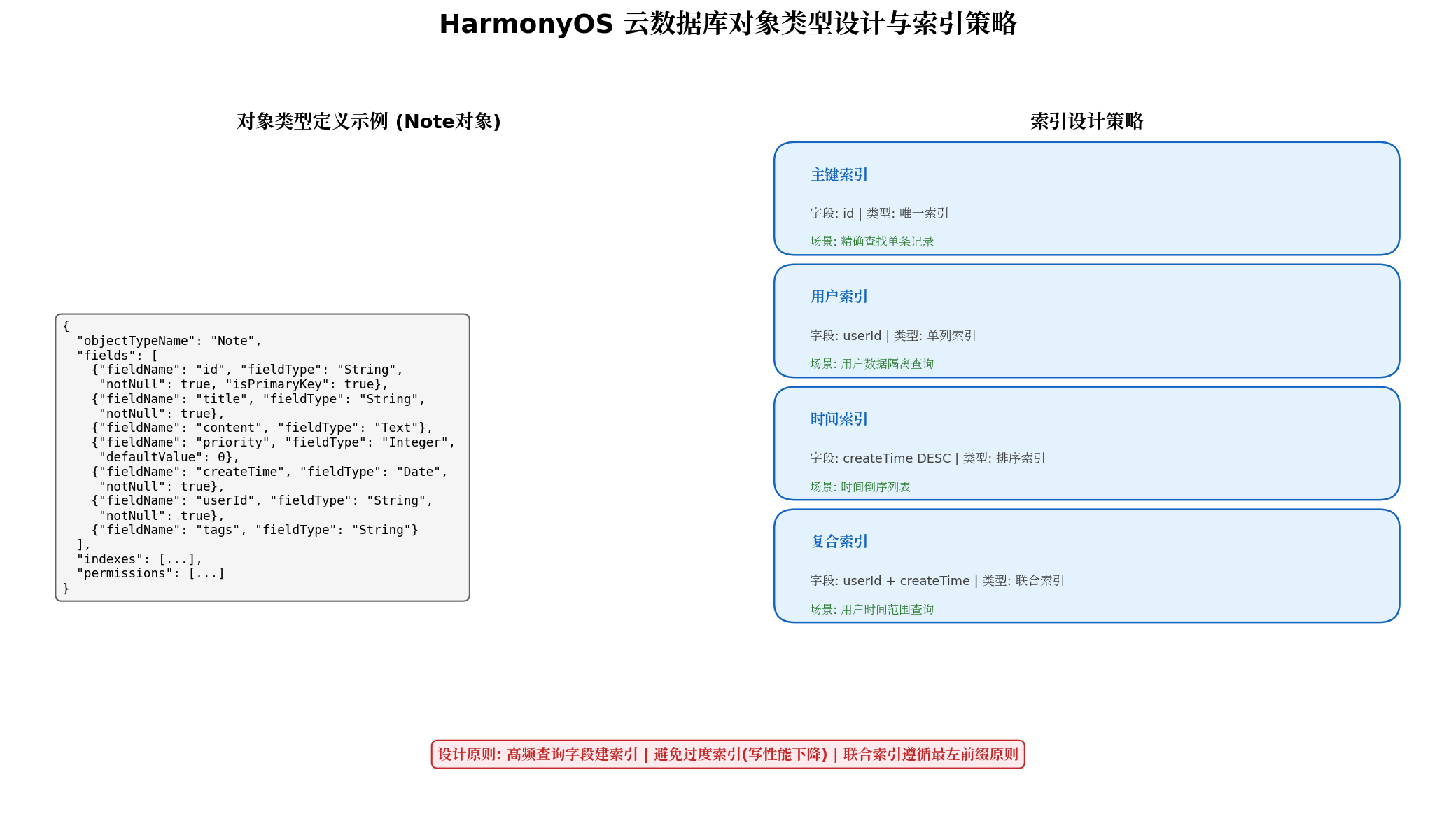
对象类型的设计质量直接决定查询性能与数据一致性。以下以"笔记应用"为例,展示完整的对象类型定义:
3.1 对象类型JSON定义
{
  "objectTypeName": "Note",
  "fields": [
    {
      "fieldName": "id",
      "fieldType": "String",
      "notNull": true,
      "isPrimaryKey": true,
      "description": "笔记唯一标识,UUID生成"
    },
    {
      "fieldName": "title",
      "fieldType": "String",
      "notNull": true,
      "description": "笔记标题"
    },
    {
      "fieldName": "content",
      "fieldType": "Text",
      "description": "笔记正文,支持长文本"
    },
    {
      "fieldName": "priority",
      "fieldType": "Integer",
      "defaultValue": 0,
      "description": "优先级: 0-普通, 1-重要, 2-紧急"
    },
    {
      "fieldName": "category",
      "fieldType": "String",
      "defaultValue": "default",
      "description": "分类标签"
    },
    {
      "fieldName": "isArchived",
      "fieldType": "Boolean",
      "defaultValue": false,
      "description": "是否归档"
    },
    {
      "fieldName": "createTime",
      "fieldType": "Date",
      "notNull": true,
      "description": "创建时间"
    },
    {
      "fieldName": "updateTime",
      "fieldType": "Date",
      "notNull": true,
      "description": "最后更新时间"
    },
    {
      "fieldName": "userId",
      "fieldType": "String",
      "notNull": true,
      "description": "所属用户ID,用于数据隔离"
    },
    {
      "fieldName": "tags",
      "fieldType": "String",
      "description": "标签列表,JSON数组字符串"
    }
  ],
  "indexes": [
    {
      "indexName": "userId_index",
      "indexList": [{ "fieldName": "userId", "sortType": "ASC" }]
    },
    {
      "indexName": "createTime_index",
      "indexList": [{ "fieldName": "createTime", "sortType": "DESC" }]
    },
    {
      "indexName": "user_category_index",
      "indexList": [
        { "fieldName": "userId", "sortType": "ASC" },
        { "fieldName": "category", "sortType": "ASC" }
      ]
    }
  ],
  "permissions": [
    { "role": "World", "rights": ["Read"] },
    { "role": "Authenticated", "rights": ["Read", "Upsert", "Delete"] },
    { "role": "Creator", "rights": ["Read", "Upsert", "Delete"] },
    { "role": "Administrator", "rights": ["Read", "Upsert", "Delete"] }
  ]
}
3.2 端侧实体类生成
对象类型定义完成后,需在端侧创建对应的实体类,继承自cloudDatabase.DatabaseObject:
// model/Note.ets
import { cloudDatabase } from '@kit.CloudFoundationKit';

export class Note extends cloudDatabase.DatabaseObject {
  id: string = '';
  title: string = '';
  content: string = '';
  priority: number = 0;
  category: string = 'default';
  isArchived: boolean = false;
  createTime: Date = new Date();
  updateTime: Date = new Date();
  userId: string = '';
  tags: string = '';

  naturalbase_ClassName(): string {
    return 'Note';
  }

  // 业务辅助方法
  getTagList(): string[] {
    try {
      return JSON.parse(this.tags || '[]');
    } catch {
      return [];
    }
  }

  setTagList(tags: string[]): void {
    this.tags = JSON.stringify(tags);
  }
}
设计要点:
- 主键选择:使用String类型的UUID而非自增整数,避免分布式场景下的主键冲突。
- 时间字段:同时维护
createTime(创建时间,不可变)与updateTime(更新时间,每次修改刷新),便于排序与审计。 - 索引策略:为高频查询字段(
userId、createTime)创建单列索引,为多条件查询(userId + category)创建联合索引,遵循最左前缀原则。 - 权限配置:
World角色仅开放只读(适用于公共数据),Authenticated及以上角色开放读写(适用于用户私有数据)。
四、CRUD操作实战与查询构建器
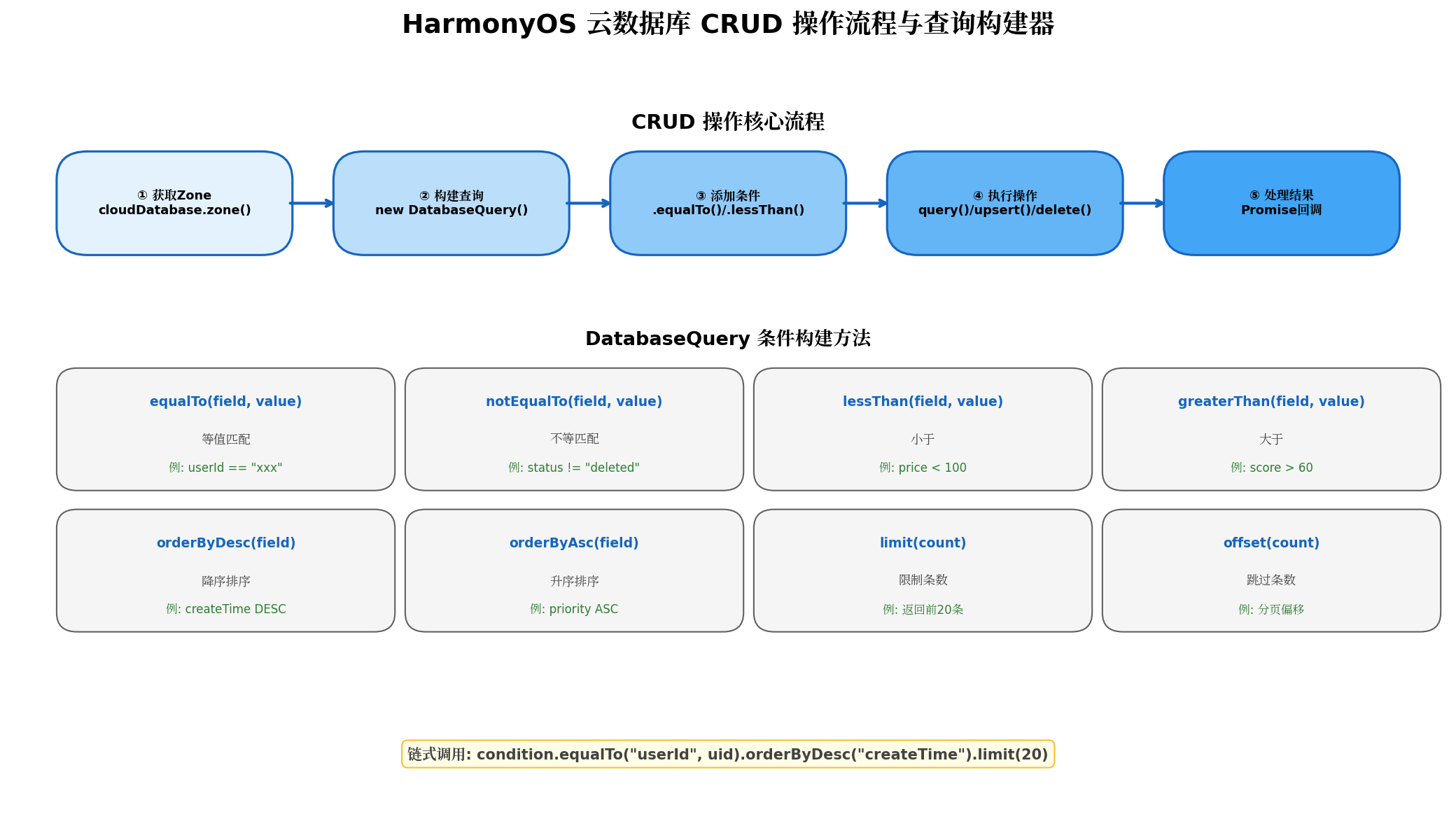
云数据库的CRUD操作通过DatabaseZone与DatabaseQuery两个核心类完成。以下展示完整的操作封装:
4.1 数据访问层封装
// data/NoteRepository.ets
import { cloudDatabase } from '@kit.CloudFoundationKit';
import { Note } from '../model/Note';
import { hilog } from '@kit.PerformanceAnalysisKit';

export class NoteRepository {
  private static zone: cloudDatabase.DatabaseZone | null = null;
  private static readonly ZONE_NAME = 'NoteZone';

  static async initialize(): Promise<void> {
    if (this.zone) return;
    try {
      this.zone = cloudDatabase.zone(this.ZONE_NAME);
      hilog.info(0x0000, 'NoteRepository', 'Cloud DB zone initialized');
    } catch (error) {
      hilog.error(0x0000, 'NoteRepository', 'Failed to init zone: %{public}s', JSON.stringify(error));
      throw error;
    }
  }

  // ==================== Create / Update ====================

  /**
   * 插入或更新笔记
   * upsert: 主键存在则更新,不存在则插入
   */
  static async save(note: Note): Promise<number> {
    if (!this.zone) throw new Error('Zone not initialized');

    // 自动更新时间戳
    note.updateTime = new Date();
    if (!note.createTime) {
      note.createTime = note.updateTime;
    }

    try {
      const count = await this.zone.upsert([note]);
      hilog.info(0x0000, 'NoteRepository', 'Upsert success, count: %{public}d', count);
      return count;
    } catch (error) {
      hilog.error(0x0000, 'NoteRepository', 'Upsert failed: %{public}s', JSON.stringify(error));
      throw error;
    }
  }

  /**
   * 批量插入笔记
   * 限制:单次最多1000条,总大小不超过2MB
   */
  static async batchSave(notes: Note[]): Promise<number> {
    if (!this.zone) throw new Error('Zone not initialized');
    if (notes.length > 1000) {
      throw new Error('Batch size exceeds limit of 1000');
    }

    const now = new Date();
    notes.forEach(n => {
      n.updateTime = now;
      if (!n.createTime) n.createTime = now;
    });

    return await this.zone.upsert(notes);
  }

  // ==================== Read ====================

  /**
   * 根据ID查询单条笔记
   */
  static async findById(id: string): Promise<Note | null> {
    if (!this.zone) throw new Error('Zone not initialized');

    const condition = new cloudDatabase.DatabaseQuery(Note);
    condition.equalTo('id', id);

    try {
      const result = await this.zone.query(condition);
      const notes = result as Note[];
      return notes.length > 0 ? notes[0] : null;
    } catch (error) {
      hilog.error(0x0000, 'NoteRepository', 'Query by id failed: %{public}s', JSON.stringify(error));
      throw error;
    }
  }

  /**
   * 查询用户的所有笔记(时间倒序)
   */
  static async findByUser(userId: string): Promise<Note[]> {
    if (!this.zone) throw new Error('Zone not initialized');

    const condition = new cloudDatabase.DatabaseQuery(Note);
    condition.equalTo('userId', userId)
             .orderByDesc('createTime');

    try {
      const result = await this.zone.query(condition);
      return result as Note[];
    } catch (error) {
      hilog.error(0x0000, 'NoteRepository', 'Query by user failed: %{public}s', JSON.stringify(error));
      return [];
    }
  }

  /**
   * 分页查询(大数据量场景)
   */
  static async findByPage(
    userId: string,
    page: number = 1,
    pageSize: number = 20
  ): Promise<Note[]> {
    if (!this.zone) throw new Error('Zone not initialized');

    const condition = new cloudDatabase.DatabaseQuery(Note);
    condition.equalTo('userId', userId)
             .equalTo('isArchived', false)
             .orderByDesc('createTime')
             .limit(pageSize)
             .offset((page - 1) * pageSize);

    try {
      const result = await this.zone.query(condition);
      return result as Note[];
    } catch (error) {
      hilog.error(0x0000, 'NoteRepository', 'Page query failed: %{public}s', JSON.stringify(error));
      return [];
    }
  }

  /**
   * 复合条件查询:按分类+优先级筛选
   */
  static async findByCategoryAndPriority(
    userId: string,
    category: string,
    minPriority: number
  ): Promise<Note[]> {
    if (!this.zone) throw new Error('Zone not initialized');

    const condition = new cloudDatabase.DatabaseQuery(Note);
    condition.equalTo('userId', userId)
             .equalTo('category', category)
             .greaterThanOrEqualTo('priority', minPriority)
             .equalTo('isArchived', false)
             .orderByDesc('priority')
             .orderByDesc('createTime');

    try {
      const result = await this.zone.query(condition);
      return result as Note[];
    } catch (error) {
      hilog.error(0x0000, 'NoteRepository', 'Complex query failed: %{public}s', JSON.stringify(error));
      return [];
    }
  }

  // ==================== Delete ====================

  /**
   * 删除单条笔记
   */
  static async delete(note: Note): Promise<number> {
    if (!this.zone) throw new Error('Zone not initialized');

    try {
      const count = await this.zone.delete([note]);
      hilog.info(0x0000, 'NoteRepository', 'Delete success, count: %{public}d', count);
      return count;
    } catch (error) {
      hilog.error(0x0000, 'NoteRepository', 'Delete failed: %{public}s', JSON.stringify(error));
      throw error;
    }
  }

  /**
   * 批量删除
   */
  static async batchDelete(notes: Note[]): Promise<number> {
    if (!this.zone) throw new Error('Zone not initialized');
    if (notes.length === 0) return 0;

    return await this.zone.delete(notes);
  }
}
4.2 查询构建器高级用法
DatabaseQuery支持链式调用构建复杂查询条件:
// 场景1:搜索标题包含关键词的笔记(配合本地过滤)
async searchNotes(userId: string, keyword: string): Promise<Note[]> {
  // 云数据库暂不支持LIKE模糊查询,先按用户拉取再本地过滤
  const allNotes = await NoteRepository.findByUser(userId);
  return allNotes.filter(n =>
    n.title.includes(keyword) || n.content.includes(keyword)
  );
}

// 场景2:查询最近7天内创建的高优先级笔记
async findRecentHighPriority(userId: string): Promise<Note[]> {
  const sevenDaysAgo = new Date(Date.now() - 7 * 24 * 60 * 60 * 1000);

  const condition = new cloudDatabase.DatabaseQuery(Note);
  condition.equalTo('userId', userId)
           .greaterThanOrEqualTo('priority', 2)
           .greaterThanOrEqualTo('createTime', sevenDaysAgo)
           .orderByDesc('createTime');

  const result = await this.zone.query(condition);
  return result as Note[];
}

// 场景3:按分类统计笔记数量(需配合云函数聚合)
// 注:云数据库端侧SDK暂不支持GROUP BY,复杂聚合建议通过云函数实现
五、性能优化策略与数据同步机制
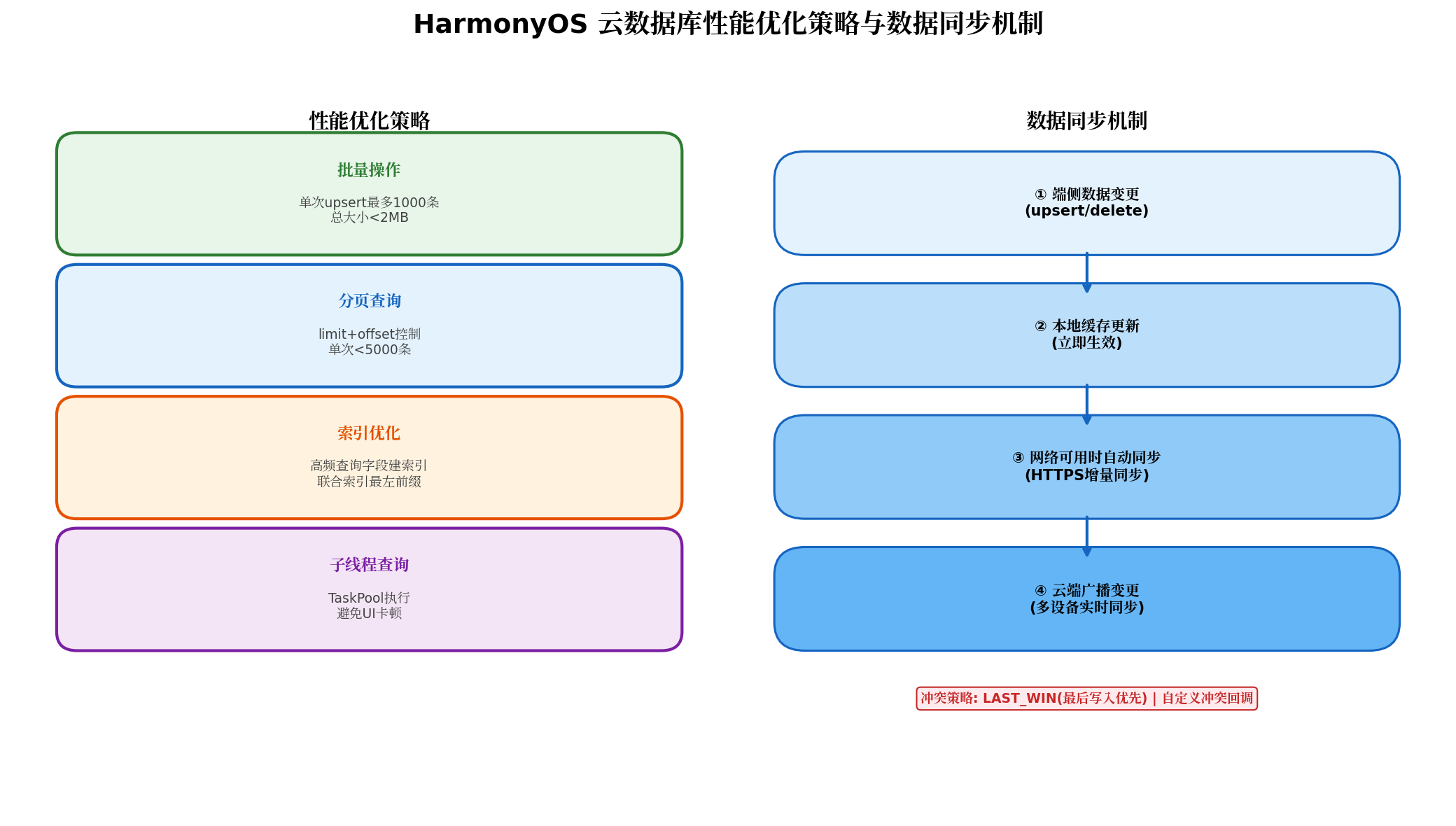
生产环境中,云数据库的性能优化需要从查询效率、批量操作、线程管理和同步策略四个维度入手。
5.1 批量操作优化
云数据库的upsert和delete支持批量操作,单次最多1000条记录,总数据量不超过2MB。批量操作是原子性的——要么全部成功,要么全部失败。
// 批量导入示例:从本地JSON文件导入历史笔记
async importNotesFromJson(jsonData: string, userId: string): Promise<number> {
  const rawNotes: Array<Partial<Note>> = JSON.parse(jsonData);

  // 分批处理,每批500条
  const BATCH_SIZE = 500;
  let totalImported = 0;

  for (let i = 0; i < rawNotes.length; i += BATCH_SIZE) {
    const batch = rawNotes.slice(i, i + BATCH_SIZE).map(raw => {
      const note = new Note();
      note.id = raw.id || this.generateUUID();
      note.title = raw.title || '';
      note.content = raw.content || '';
      note.userId = userId;
      note.createTime = new Date(raw.createTime || Date.now());
      note.updateTime = new Date();
      return note;
    });

    const count = await NoteRepository.batchSave(batch);
    totalImported += count;

    // 每批之间短暂休眠,避免触发限流
    if (i + BATCH_SIZE < rawNotes.length) {
      await this.delay(200);
    }
  }

  return totalImported;
}

private delay(ms: number): Promise<void> {
  return new Promise(resolve => setTimeout(resolve, ms));
}

private generateUUID(): string {
  return 'xxxxxxxx-xxxx-4xxx-yxxx-xxxxxxxxxxxx'.replace(/[xy]/g, c => {
    const r = Math.random() * 16 | 0;
    const v = c === 'x' ? r : (r & 0x3 | 0x8);
    return v.toString(16);
  });
}
5.2 大数据量分页查询
当用户数据量达到万级以上时,必须采用分页查询避免内存溢出与UI卡顿:
// NoteListViewModel.ets
@Observed
export class NoteListViewModel {
  @Track notes: Note[] = [];
  @Track isLoading: boolean = false;
  @Track hasMore: boolean = true;

  private currentPage: number = 1;
  private readonly PAGE_SIZE = 20;
  private userId: string = '';

  async loadMore(): Promise<void> {
    if (this.isLoading || !this.hasMore) return;

    this.isLoading = true;
    try {
      // 在子线程中执行查询,避免阻塞UI
      const newNotes = await taskpool.execute(
        this.queryNotesTask,
        { userId: this.userId, page: this.currentPage, pageSize: this.PAGE_SIZE }
      ) as Note[];

      if (newNotes.length < this.PAGE_SIZE) {
        this.hasMore = false;
      }

      this.notes.push(...newNotes);
      this.currentPage++;
    } catch (error) {
      console.error('Load more failed:', error);
    } finally {
      this.isLoading = false;
    }
  }

  @Concurrent
  private async queryNotesTask(params: { userId: string; page: number; pageSize: number }): Promise<Note[]> {
    await NoteRepository.initialize();
    return await NoteRepository.findByPage(params.userId, params.page, params.pageSize);
  }
}
5.3 数据订阅与实时同步
云数据库支持订阅(Subscribe)机制,当云端数据发生变更时,自动通知端侧更新UI:
// 订阅用户笔记变更
static subscribeUserNotes(
  userId: string,
  onDataChange: (notes: Note[]) => void
): () => void {
  if (!this.zone) return () => {};

  const condition = new cloudDatabase.DatabaseQuery(Note);
  condition.equalTo('userId', userId);

  const listener = {
    onSnapshot: (snapshot) => {
      const notes = snapshot.getSnapshotObjects() as Note[];
      onDataChange(notes);
    },
    onError: (error) => {
      hilog.error(0x0000, 'NoteRepository', 'Subscription error: %{public}s', JSON.stringify(error));
    }
  };

  this.zone.subscribeSnapshot(condition, listener);

  // 返回取消订阅函数
  return () => {
    this.zone?.unsubscribeSnapshot(listener);
  };
}
5.4 冲突解决策略
在多设备同步场景下,同一记录可能在不同设备上被同时修改,产生数据冲突。云数据库默认采用LAST_WIN策略(最后写入优先),开发者也可注册自定义冲突回调:
// 自定义冲突解决:合并两个设备的笔记内容
static async resolveConflict(
  localNote: Note,
  cloudNote: Note
): Promise<Note> {
  const merged = new Note();
  merged.id = localNote.id;
  merged.userId = localNote.userId;

  // 标题:以更新时间较晚的为准
  merged.title = localNote.updateTime > cloudNote.updateTime
    ? localNote.title
    : cloudNote.title;

  // 内容:合并两段内容(实际业务中可能需要更智能的合并算法)
  merged.content = `【本地】${localNote.content}\n---\n【云端】${cloudNote.content}`;

  // 优先级:取较高值
  merged.priority = Math.max(localNote.priority, cloudNote.priority);

  // 更新时间设为当前时间
  merged.updateTime = new Date();
  merged.createTime = localNote.createTime;

  return merged;
}
六、安全规则与数据隔离
云数据库的安全规则是防止数据泄露的第一道防线。以下展示生产级的安全规则配置:
{
  "rules": {
    "NoteZone": {
      "Note": {
        ".read": "auth != null && (data.userId == auth.uid || auth.token.admin == true)",
        ".write": "auth != null && (data == null || data.userId == auth.uid)"
      }
    }
  }
}
规则解析:
.read:已认证用户可读取自己的笔记(data.userId == auth.uid),管理员可读取全部(auth.token.admin == true)。.write:已认证用户可插入新笔记(data == null表示插入操作),或更新/删除自己的笔记。
数据隔离最佳实践:
- 强制userId字段:每条记录必须包含
userId字段,且安全规则中强制校验。 - 服务端校验:端侧SDK的查询条件可被篡改,安全规则在云端执行,是最终的信任边界。
- 敏感字段加密:对于身份证号、手机号等敏感数据,在端侧加密后再存入云数据库,密钥由用户密码派生。
七、最佳实践与避坑指南
7.1 实施建议
| 实践项 | 推荐方案 | 避免方案 |
|---|---|---|
| 主键设计 | String类型UUID | 自增整数(分布式冲突) |
| 批量写入 | 每批500-1000条 | 单条循环写入(性能差) |
| 分页查询 | limit+offset,单页20-50条 | 一次性查询全部数据 |
| 模糊搜索 | 端侧本地过滤+云数据库按用户预过滤 | 全表拉取后过滤 |
| 时间字段 | Date类型,统一使用UTC存储 | 字符串存储时间 |
| 大文本 | Text类型,单条<100KB | String类型存储长文本 |
7.2 常见陷阱
- 未初始化Zone就操作:所有CRUD操作前必须确保
cloudDatabase.zone()已成功返回,建议在应用启动时初始化并缓存Zone实例。 - 忽略离线场景:网络不可用时,云数据库操作会失败。对于核心功能,应结合本地RelationalStore实现离线降级。
- 并发写入冲突:多设备同时修改同一记录时,后写入的数据会覆盖前者。对于协作型应用,建议使用云数据库的
onConflict回调实现自定义合并逻辑。 - 查询结果类型转换:
zone.query()返回的是DatabaseObject[],需要显式转换为具体类型(as Note[]),否则无法访问自定义方法。
八、总结与展望
本文从云数据库核心概念、对象类型设计、索引策略、CRUD操作、查询构建器、性能优化、数据同步到安全规则,完整覆盖了HarmonyOS云数据库的生产级使用链路。云数据库的价值不仅在于提供了免运维的云端存储,更在于其内置的端云同步机制让开发者无需关心网络状态、冲突解决与多设备一致性,专注于业务逻辑本身。
随着HarmonyOS生态的持续扩展,云数据库将在以下方向进一步演进:
- 全文检索能力:原生支持文本内容的倒排索引与关键词搜索,无需端侧本地过滤。
- 服务端聚合查询:支持
GROUP BY、COUNT、SUM等聚合操作,减少端侧数据处理负担。 - 跨应用数据共享:在用户授权的前提下,实现不同应用间的安全数据共享(如健康数据、日历事件)。
建议HarmonyOS开发者将云数据库作为应用数据层的默认选择,从项目初期即规划好对象类型结构与索引策略,避免后期因数据模型不合理导致的大规模迁移成本。
转载自:https://blog.csdn.net/u014727709/article/details/163832369
欢迎 👍点赞✍评论⭐收藏,欢迎指正

讨论HarmonyOS开发技术,专注于API与组件、DevEco Studio、测试、元服务和应用上架分发等。
更多推荐


 4
4 0
0- 0


 已为社区贡献548条内容

所有评论(0)