HarmonyOS-6.1.1-Notification:项目告警音频从沙箱进入通知请求时-怎样验收文件、URI与发布参数
一、企业场景与挑战
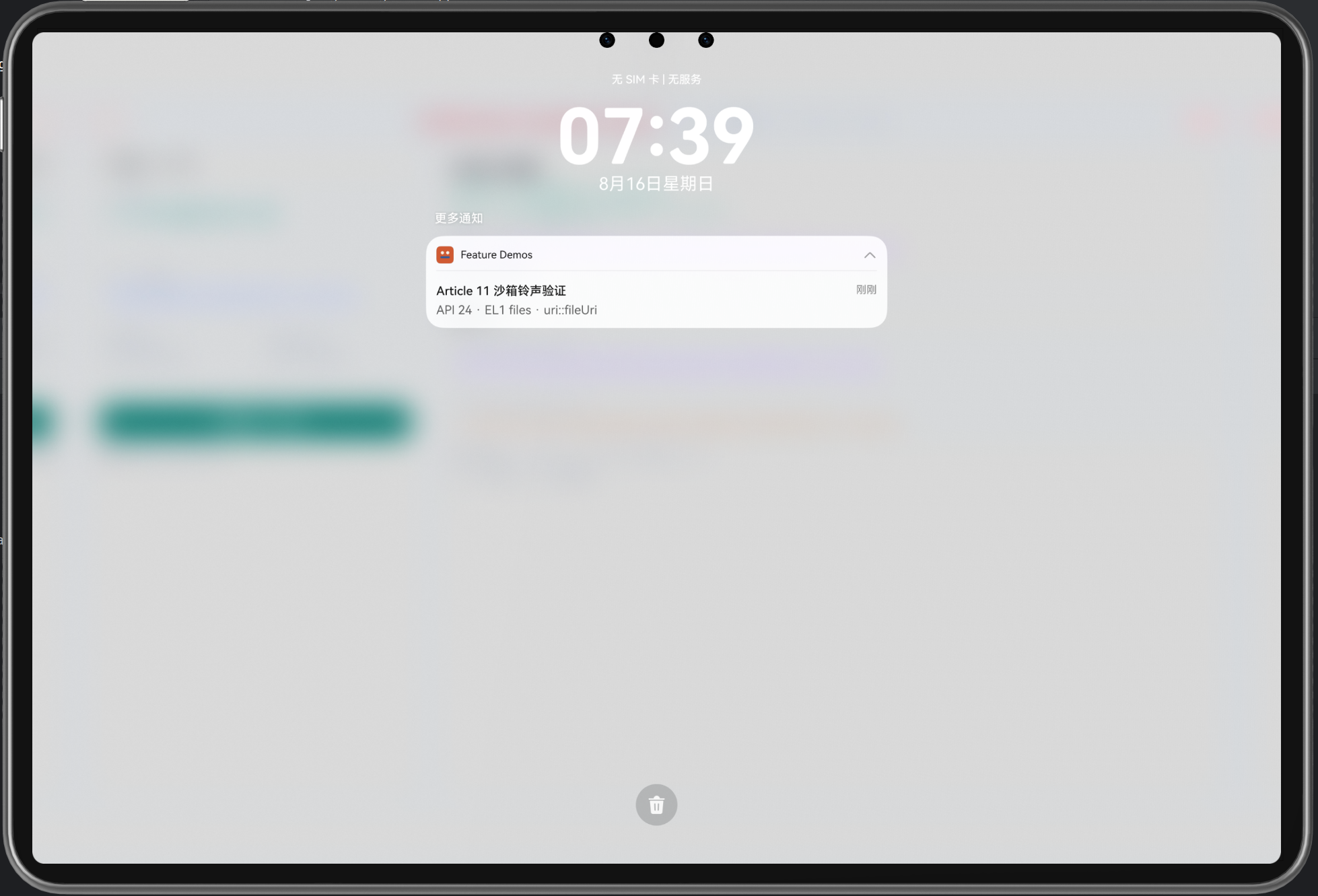
1.1 现场告警音频的验收困局
在实际部署中,项目告警通知的音频处理往往面临以下困境:
- 文件来源混乱:音频文件可能来自预置资源、动态下载、用户录制等多个来源,访问方式不统一
- 路径安全问题:直接使用文件路径容易暴露系统路径结构,存在安全隐患
- URI格式不兼容:生成的URI可能格式错误,导致通知系统无法识别
- 音频播放未验证:发布通知成功,不代表音频真的能播放;系统勿扰、音量设置等因素无法从代码层读取
- 跨版本适配困难:不同Android/HarmonyOS版本的通知API差异大,音频参数的处理差异大
- 验收标准模糊:现场验收时无法判断"通知发布成功后无声音"是应用问题还是系统设置问题
表面现象:“通知没有声音"或"声音播放不稳定”
根本原因:缺少系统化的音频路径转换、URI验证和发布参数检查流程
1.2 为什么"notificationManager.publish() 返回成功"不等于"音频能播放"
许多项目采用简化的验收策略:
// ❌ 不足的方案
try {
  await notificationManager.publish(request);
  console.log('发布成功');  // 误认为完成
} catch (error) {
  console.error('发布失败', error);
}
这种方案的根本缺陷:
- 只检查了发布接口的成功:
publish()返回成功,只表示系统接受了通知请求,不表示音频能播放 - 无法读取系统状态:应用层无法读取"系统勿扰模式"“通知渠道设置”"媒体音量"等关键因素
- 无法验证音频文件:无法判断提供的音频文件是否真的存在、是否格式正确、是否可访问
- 无诊断依据:现场无声音时,无法区分"文件问题"“URI问题”“权限问题”“系统设置问题”
- 无人工验证机制:缺少现场人员确认音频是否真的播放的流程
- 无故障恢复指导:无法指导现场如何调整系统设置来解决问题
1.3 企业实施的真实需求
通知音频的验收必须满足以下要求:
- 文件来源的合规性:音频文件必须从可信来源获取(resources/rawfile或官方API)
- 沙箱路径的正确转换:resources/rawfile → EL1沙箱 → URI,每个环节都要验证
- URI格式的严格检查:生成的URI必须以
uri::开始,不能包含路径遍历符号 - 发布参数的完整性:通知ID、权限状态、音频参数都要逐一检查
- 系统状态的外部验证:发布成功后,分别通过系统界面检查和人工听觉验证来确认实际效果
- 多轮验证的支持:支持多次发布和验证,以应对不同系统配置的测试
二、核心技术概念与设计思路
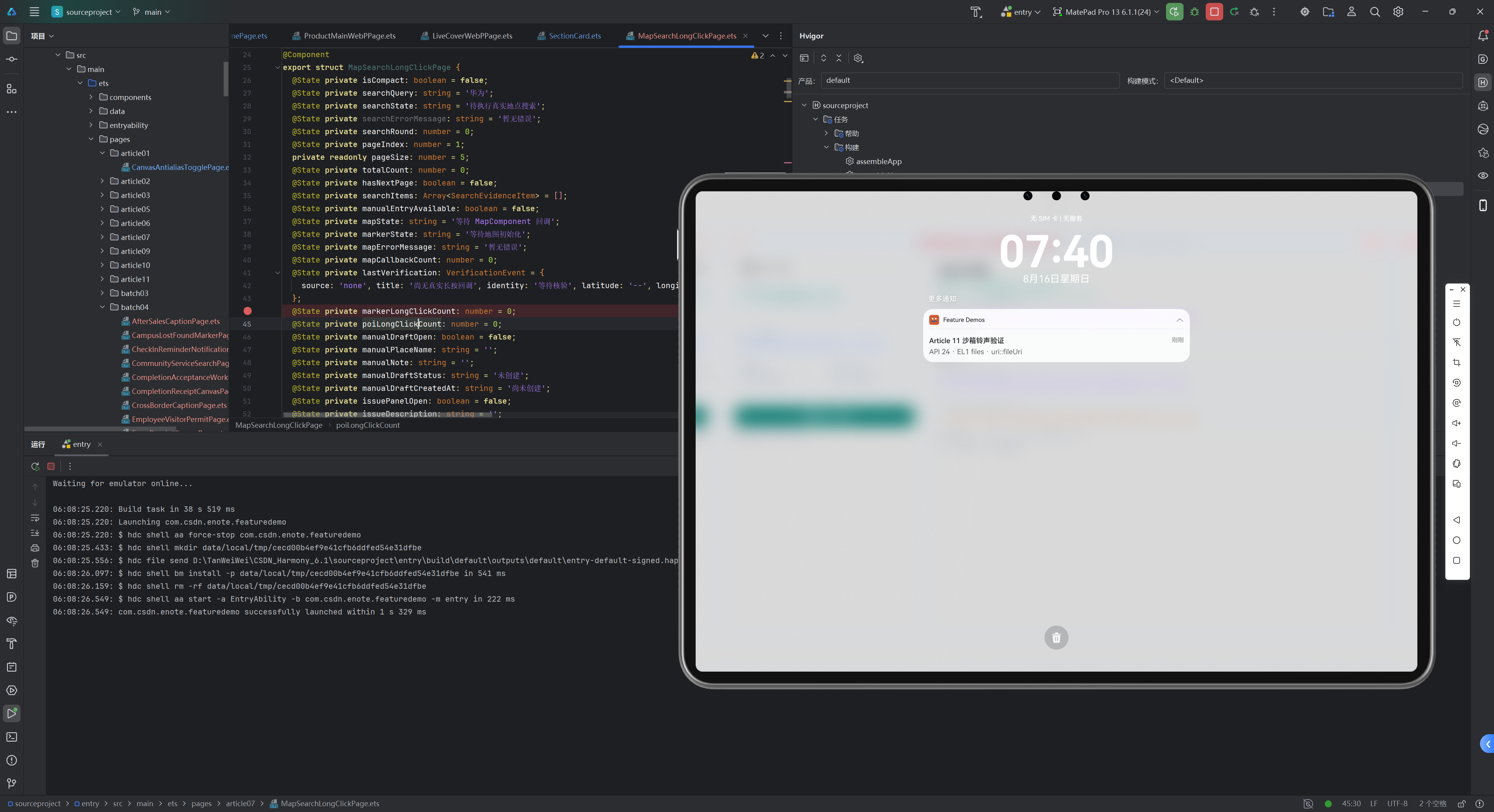
2.1 通知音频流程的五层验收模型
┌─ 第一层:文件准备 ──────────────────────┐
│ resources/rawfile → 读取字节内容        │
│ ├─ 文件存在 → 继续                       │
│ ├─ 读取失败 → 来源问题                   │
│ └─ 内容为空 → 文件损坏                   │
└─────────────────────────────────────────┘
        ↓
┌─ 第二层:沙箱存储 ──────────────────────┐
│ EL1沙箱 → 写入音频文件                  │
│ ├─ 写入成功 → 验证字节数                 │
│ ├─ 写入失败 → 权限或存储问题             │
│ └─ 字节数不匹配 → 写入不完整             │
└─────────────────────────────────────────┘
        ↓
┌─ 第三层:URI转换 ──────────────────────┐
│ 沙箱路径 → fileUri.getUriFromPath()     │
│ ├─ 转换成功 → 格式检查                   │
│ ├─ 转换失败 → API异常                    │
│ └─ 格式不合规 → 路径注入风险             │
└─────────────────────────────────────────┘
        ↓
┌─ 第四层:发布参数 ──────────────────────┐
│ 通知请求 → 包含音频URI                  │
│ ├─ 权限已授予 → 继续                     │
│ ├─ 权限未授予 → 请求授权                 │
│ └─ 权限被拒 → 能否在勿扰模式下继续       │
└─────────────────────────────────────────┘
        ↓
┌─ 第五层:人工验证 ──────────────────────┐
│ publish() 返回成功后                    │
│ ├─ 系统界面检查通知可见性                │
│ ├─ 人工听觉检查音频可听性                │
│ └─ 分别记录两个维度的验证结果             │
└─────────────────────────────────────────┘
2.2 音频处理的完整验收结构
interface NotificationAudioVerification {
  // ===== 第一层:文件准备 =====
  filePreparation: {
    sourceFile: string;              // resources/rawfile 中的文件名
    sourceSize: number;              // 源文件字节数
    fileReadStatus: 'success' | 'failed' | 'not_attempted';
    fileReadError?: string;
  };

  // ===== 第二层:沙箱存储 =====
  sandboxStorage: {
    sandboxPath: string;             // EL1 沙箱的完整路径
    targetSize: number;              // 写入的字节数
    writeStatus: 'success' | 'failed' | 'partial';
    bytesWritten: number;
    storageSizeMatch: boolean;        // 源大小 == 目标大小
    writeError?: string;
  };

  // ===== 第三层:URI转换 =====
  uriConversion: {
    fileUri: string;                 // fileUri.getUriFromPath() 返回值
    soundParameter: string;          // 最终用于通知的 sound 参数
    uriFormat: 'valid' | 'invalid';
    hasPathTraversal: boolean;       // 检查 ../ 或 /..
    uriError?: string;
  };

  // ===== 第四层:发布参数 =====
  publishParameters: {
    notificationId: number;
    permissionStatus: 'granted' | 'denied' | 'unknown';
    permissionError?: string;
    requestStatus: 'not_sent' | 'sent' | 'rejected';
    publishPromiseReturned: boolean; // publish() 是否返回了 Promise
    publishReturnedAt?: string;      // publish() 返回的时间戳
    publishError?: string;
  };

  // ===== 第五层:人工验证 =====
  manualVerification: {
    verificationRounds: {
      roundId: number;
      startedAt: string;
      publishReturnedAt: string;     // 依据第四层的返回时间
      visibility: 'confirmed' | 'undetermined' | 'not_verified';
      audibility: 'confirmed' | 'undetermined' | 'not_verified';
      userNotes?: string;
    }[];
    currentRoundId?: number;
  };

  // ===== 总体结论 =====
  conclusion: {
    overallStatus: 'pass' | 'partial_pass' | 'fail';
    blockingIssues: string[];        // 阻断性问题
    warningIssues: string[];         // 警告问题
    verificationTimestamp: string;
  };
}
2.3 音频参数的合规性检查
enum AudioParameterValidationResult {
  // ===== 合规 =====
  VALID_FORMAT = 'valid_format',           // URI 格式正确
  VALID_SIZE = 'valid_size',               // 文件大小在合理范围

  // ===== 警告 =====
  WARNING_LARGE_FILE = 'warning_large',    // 文件过大(>10MB)
  WARNING_UNUSUAL_FORMAT = 'warning_format', // 格式不常见但有效

  // ===== 错误 =====
  ERROR_INVALID_FORMAT = 'error_invalid',    // 格式不符合规范
  ERROR_PATH_TRAVERSAL = 'error_traversal',  // 包含路径遍历符
  ERROR_FILE_NOT_FOUND = 'error_not_found',  // 文件不存在
  ERROR_FILE_ZERO_SIZE = 'error_zero_size'   // 文件大小为0
}
三、完整的音频验收流程实现
3.1 第一层:文件准备与验证
private async prepareAudioFromResources(): Promise<{
  sourceBytes: Uint8Array;
  sourceSize: number;
  status: 'success' | 'failed';
  error?: string;
}> {
  const rawFileName = 'article11_notice.wav';

  try {
    // 第一步:从 resources/rawfile 读取
    const sourceBytes = await getContext(this)
      .resourceManager
      .getRawFileContent(rawFileName);

    // 第二步:验证文件不为空
    if (sourceBytes === null || sourceBytes.byteLength === 0) {
      return {
        sourceBytes: new Uint8Array(),
        sourceSize: 0,
        status: 'failed',
        error: '文件为空'
      };
    }

    // 第三步:记录源文件信息
    return {
      sourceBytes: sourceBytes,
      sourceSize: sourceBytes.byteLength,
      status: 'success'
    };

  } catch (error) {
    return {
      sourceBytes: new Uint8Array(),
      sourceSize: 0,
      status: 'failed',
      error: `读取失败:${formatError(error as Error)}`
    };
  }
}

private async prepareSandboxAudio(): Promise<void> {
  this.markOperation('正在准备 EL1 沙箱音频');
  this.fileState = '正在读取 resources/rawfile';

  // ===== 第一层:文件准备 =====
  const prepareResult = await this.prepareAudioFromResources();
  if (prepareResult.status === 'failed') {
    this.fileState = '文件准备失败';
    this.updateError(prepareResult.error || '未知错误');
    this.markOperation('文件准备失败');
    return;
  }

  // ===== 第二层:沙箱存储 =====
  const sandboxPath = await this.writeAudioToSandbox(
    prepareResult.sourceBytes,
    prepareResult.sourceSize
  );

  if (!sandboxPath) {
    this.fileState = '沙箱写入失败';
    this.markOperation('沙箱写入失败');
    return;
  }

  // ===== 第三层:URI转换 =====
  const uriResult = await this.convertPathToUri(sandboxPath);
  if (!uriResult.valid) {
    this.fileState = 'URI 转换失败';
    this.updateError(uriResult.error);
    this.markOperation('URI 转换失败');
    return;
  }

  // 更新状态
  this.sourceSize = `${prepareResult.sourceSize} bytes`;
  this.fileUriValue = uriResult.fileUri;
  this.soundValue = uriResult.soundParameter;
  this.fileState = '音频文件准备完成,已通过大小和URI验证';
  this.markOperation('音频准备完成');
}
3.2 第二层:沙箱存储与字节验证
private async writeAudioToSandbox(
  sourceBytes: Uint8Array,
  sourceSize: number
): Promise<string | null> {
  try {
    // 第一步:获取 EL1 沙箱路径
    const uiAbilityContext = getContext(this) as common.UIAbilityContext;
    const applicationContext = uiAbilityContext.getApplicationContext();
    applicationContext.area = contextConstant.AreaMode.EL1;

    const sandboxPath = `${applicationContext.filesDir}/article11_notice.wav`;

    // 第二步:打开文件并写入
    const targetFile = fileIo.openSync(
      sandboxPath,
      fileIo.OpenMode.WRITE_ONLY |
      fileIo.OpenMode.CREATE |
      fileIo.OpenMode.TRUNC
    );

    let bytesWritten: number = 0;
    try {
      // 第三步:写入字节流
      const rawBuffer = sourceBytes.buffer as ArrayBuffer;
      bytesWritten = fileIo.writeSync(targetFile.fd, rawBuffer);
    } finally {
      // 第四步:关闭文件(确保持久化)
      fileIo.closeSync(targetFile);
    }

    // 第五步:验证写入完整性
    const targetStat = await fileIo.stat(sandboxPath);

    if (bytesWritten !== sourceSize || targetStat.size !== sourceSize) {
      const errorMsg =
        `写入核对失败:` +
        `source=${sourceSize}, ` +
        `written=${bytesWritten}, ` +
        `target=${targetStat.size}`;

      this.updateError(errorMsg);
      throw new Error(errorMsg);
    }

    // 第六步:记录成功
    this.targetSize = `${targetStat.size} bytes`;
    this.soundState = {
      sandboxPath: sandboxPath,
      permissionState: this.soundState.permissionState,
      publishState: 'idle',
      errorMessage: '暂无错误'
    };

    return sandboxPath;

  } catch (error) {
    this.updateError(`沙箱写入失败:${formatError(error as Error)}`);
    return null;
  }
}
3.3 第三层:URI转换与格式验证
private async convertPathToUri(sandboxPath: string): Promise<{
  valid: boolean;
  fileUri: string;
  soundParameter: string;
  error?: string;
}> {
  try {
    // 第一步:调用 fileUri.getUriFromPath()
    const convertedFileUri = fileUri.getUriFromPath(sandboxPath);

    // 第二步:构造 sound 参数
    const sound = `uri::${convertedFileUri}`;

    // 第三步:验证格式合规性
    if (!sound.startsWith('uri::')) {
      return {
        valid: false,
        fileUri: convertedFileUri,
        soundParameter: sound,
        error: 'sound 参数必须以 uri:: 开始'
      };
    }

    // 第四步:检查路径遍历符
    if (sound.includes('../') || sound.includes('/..')) {
      return {
        valid: false,
        fileUri: convertedFileUri,
        soundParameter: sound,
        error: 'sound 参数包含路径遍历符,存在安全风险'
      };
    }

    // 第五步:检查其他非法字符
    if (sound.includes('\\')) {
      return {
        valid: false,
        fileUri: convertedFileUri,
        soundParameter: sound,
        error: 'sound 参数包含反斜杠,格式错误'
      };
    }

    return {
      valid: true,
      fileUri: convertedFileUri,
      soundParameter: sound
    };

  } catch (error) {
    return {
      valid: false,
      fileUri: '',
      soundParameter: '',
      error: `URI 转换失败:${formatError(error as Error)}`
    };
  }
}

private isValidSound(sound: string): boolean {
  return sound.startsWith('uri::') &&
         !sound.includes('../') &&
         !sound.includes('/..');
}
3.4 第四层:权限检查与发布
private async requestNotificationPermission(): Promise<boolean> {
  this.markOperation('正在检查通知权限');

  try {
    // 第一步:检查当前权限状态
    const currentEnabled = await notificationManager.isNotificationEnabled();

    if (currentEnabled) {
      this.updatePermission('granted', '暂无错误');
      this.markOperation('通知权限已授予');
      return true;
    }

    // 第二步:如果未授权,发起请求
    const uiAbilityContext = getContext(this) as common.UIAbilityContext;
    await notificationManager.requestEnableNotification(uiAbilityContext);

    // 第三步:检查请求后的状态
    const enabled = await notificationManager.isNotificationEnabled();
    this.updatePermission(
      enabled ? 'granted' : 'denied',
      enabled ? '暂无错误' : '系统通知当前未启用'
    );

    this.markOperation(
      enabled
        ? '通知权限已授予'
        : '通知权限被拒绝,已记录'
    );

    return enabled;

  } catch (error) {
    this.updatePermission('denied',
      `权限检查失败:${formatError(error as Error)}`
    );
    this.markOperation('权限检查异常');
    return false;
  }
}

private async publishNotification(): Promise<boolean> {
  this.markOperation('正在发布通知');

  // ===== 发布前检查 =====
  if (this.soundState.sandboxPath === '尚未准备' ||
      !this.isValidSound(this.soundValue)) {
    this.updatePublish('failed',
      '发布前校验失败:音频文件或 URI 不合规');
    this.markOperation('发布前校验失败');
    return false;
  }

  // ===== 检查权限 =====
  try {
    const enabled = await notificationManager.isNotificationEnabled();
    this.updatePermission(enabled ? 'granted' : 'denied',
      enabled ? '暂无错误' : '系统通知未启用');

    if (!enabled) {
      this.updatePublish('failed', '通知权限未授予');
      return false;
    }

    // ===== 构造通知请求 =====
    const request: notificationManager.NotificationRequest = {
      id: this.notificationId,
      content: {
        contentType: notification.ContentType.NOTIFICATION_CONTENT_BASIC_TEXT,
        normal: {
          title: 'Article 11 沙箱音频验证',
          text: 'API 24 · EL1 files · uri::fileUri'
        }
      },
      sound: this.soundValue
    };

    // ===== 发布通知 =====
    await notificationManager.publish(request);

    // ===== 记录发布成功 =====
    this.updatePublish('published', '暂无错误');
    const publishReturnedAt = this.now();

    // 创建人工验证轮次
    this.createVerificationRound(
      publishReturnedAt,
      'publish Promise 已成功返回,等待人工验证'
    );

    this.markOperation('publish 发布成功,已创建人工验证轮次');
    return true;

  } catch (error) {
    this.updatePublish('failed',
      `publish 失败:${formatError(error as Error)}`);
    this.markOperation('publish 异常');
    return false;
  }
}
3.5 第五层:人工验证与闭环记录
interface VerificationRound {
  id: number;
  startedAt: string;
  publishReturnedAt: string;      // publish() 返回的时间
  visibility: 'confirmed' | 'undetermined' | 'pending';
  audibility: 'confirmed' | 'undetermined' | 'pending';
  events: VerificationEvent[];
}

private createVerificationRound(
  publishReturnedAt: string,
  message: string
): void {
  const startedAt = this.now();

  const round: VerificationRound = {
    id: this.nextVerificationRoundId++,
    startedAt: startedAt,
    publishReturnedAt: publishReturnedAt,
    visibility: 'pending',
    audibility: 'pending',
    events: [{
      at: startedAt,
      message: message
    }]
  };

  // 将新轮次插入到列表开头
  this.verificationRounds = [round, ...this.verificationRounds];
  this.activeVerificationRoundId = round.id;
}

private recordManualEvidence(
  field: 'visibility' | 'audibility',
  status: 'confirmed' | 'undetermined'
): void {
  if (this.activeVerificationRoundId === 0 || status === 'pending') {
    return;
  }

  const at = this.now();
  const label = field === 'visibility' ? '通知可见' : '声音可听';
  const conclusion = status === 'confirmed'
    ? '已人工确认'
    : '无法判断,待补系统证据';

  // 更新当前轮次的状态
  this.verificationRounds = this.verificationRounds.map((round) => {
    if (round.id !== this.activeVerificationRoundId) {
      return round;
    }

    return {
      id: round.id,
      startedAt: round.startedAt,
      publishReturnedAt: round.publishReturnedAt,
      visibility: field === 'visibility' ? status : round.visibility,
      audibility: field === 'audibility' ? status : round.audibility,
      events: [{
        at: at,
        message: `${label}:${conclusion}`
      }, ...round.events]
    };
  });

  this.markOperation(`${label}人工验证已记录`);
}

private startNewVerificationRound(): void {
  // 检查是否有已发布成功的记录
  if (this.verificationRounds.length === 0) {
    this.markOperation('未创建新轮次:尚无成功发布记录');
    return;
  }

  // 基于既有的发布返回时间创建新轮次
  this.createVerificationRound(
    this.verificationRounds[0].publishReturnedAt,
    '基于既有成功发布开始新的人工验证轮次;未重新发布通知'
  );

  this.markOperation('新的验证轮次已开始');
}
四、验收标准与诊断指南
4.1 音频验收的通过标准
enum VerificationStatus {
  // ===== 完全通过 =====
  FULL_PASS = 'full_pass',
  // 所有5层检查都通过
  // - 文件准备成功
  // - 沙箱存储成功且字节数匹配
  // - URI 格式合规
  // - 权限已授予
  // - 人工验证确认通知可见和声音可听

  // ===== 部分通过 =====
  PARTIAL_PASS = 'partial_pass',
  // 前4层检查通过,第5层人工验证部分确认
  // - 可能:通知可见但声音未听到(系统勿扰、媒体音量问题)
  // - 可能:声音可听但通知不可见(通知设置问题)
  // - 建议:检查系统设置

  // ===== 阻断性失败 =====
  BLOCKING_FAILURE = 'blocking_failure'
  // 前4层中任何一层失败
  // - 无法继续进行人工验证
  // - 需要排查具体问题
}

private evaluateVerificationResult(): VerificationStatus {
  // 检查前4层是否都通过
  if (!this.hasCompletedAllTechnicalLayers()) {
    return VerificationStatus.BLOCKING_FAILURE;
  }

  // 检查第5层人工验证结果
  const activeRound = this.activeVerificationRound();
  if (!activeRound) {
    return VerificationStatus.BLOCKING_FAILURE;
  }

  const visibilityConfirmed = activeRound.visibility === 'confirmed';
  const audibilityConfirmed = activeRound.audibility === 'confirmed';

  if (visibilityConfirmed && audibilityConfirmed) {
    return VerificationStatus.FULL_PASS;
  }

  if (visibilityConfirmed || audibilityConfirmed) {
    return VerificationStatus.PARTIAL_PASS;
  }

  return VerificationStatus.BLOCKING_FAILURE;
}
4.2 常见问题的快速诊断
| 现象 | 可能原因 | 诊断步骤 | 建议处理 |
|---|---|---|---|
| 文件准备失败 | resources/rawfile 中无此文件 | 检查文件是否存在 | 确认文件已放在 resources/rawfile 目录 |
| 沙箱写入失败 | EL1 权限问题或存储空间满 | 检查错误信息 | 重启应用或清理存储空间 |
| URI 转换失败 | API 异常或路径格式不兼容 | 查看具体错误信息 | 尝试不同的文件名或路径 |
| publish() 返回成功但无声音 | 权限未授予或系统设置 | 检查权限状态 | 在系统设置中检查通知权限和媒体音量 |
| 通知可见但声音未听到 | 媒体音量为0或系统勿扰 | 手动检查系统设置 | 调整媒体音量或关闭勿扰模式 |
| 声音可听但通知不可见 | 通知权限或渠道问题 | 检查权限状态 | 在系统设置中允许通知 |
4.3 实施验收的完整清单
-
文件层:
- resources/rawfile 中有正确的音频文件
- 文件不为空,大小合理
- 文件格式支持(WAV、MP3 等)
-
沙箱层:
- EL1 沙箱路径可访问
- 写入字节数与源文件字节数一致
- 目标文件大小与源文件大小一致
-
URI层:
- fileUri.getUriFromPath() 成功
- 生成的 URI 不为空
- sound 参数以
uri::开始 - sound 参数不包含
../或/..
-
权限层:
- 首次发起权限请求
- 用户授予通知权限
- publish() 调用前权限状态正确
-
发布层:
- notificationManager.publish() 返回成功
- 没有异常抛出
- publish 返回的 Promise 已解决
-
人工验证层:
- 系统界面能看到通知
- 能听到音频播放
- 两个维度的验证结果已记录
五、系统状态的不可读性与应对策略
5.1 应用层无法读取的关键系统状态
// ❌ 这些 API 在 HarmonyOS 中不可用或受限
const mediaVolume = audioManager.getVolume(AudioVolumeType.MEDIA);  // ❌
const dndEnabled = notificationManager.isDisturbNotification();     // ❌
const soundEnabled = audioManager.isSpeakerOn();                    // ❌
根本原因:系统隐私保护和权限模型,应用不应该能读取系统音量、勿扰状态等关键设置
5.2 应对策略:外部验证与人工确认
// ✅ 正确的方案:依赖人工验证
interface ExternalVerificationGuidance {
  stepBefore: string;    // 发布前的步骤
  stepAfter: string;     // 发布后的步骤
  systemChecklist: string[];
  userActionRequired: boolean;
}

private provideVerificationGuidance(): ExternalVerificationGuidance {
  return {
    stepBefore: '发布前检查:确保已授予通知权限',
    stepAfter: '发布后检查:分别在系统界面和听觉中验证',
    systemChecklist: [
      '进入系统设置 > 通知 > 应用通知',
      '确认允许此应用发送通知',
      '检查是否启用通知声音',
      '检查媒体音量是否为0',
      '检查是否在系统勿扰时间内'
    ],
    userActionRequired: true
  };
}
六、常见问题与应急处理
Q1: 为什么 publish() 返回成功,但系统里没有通知?
A: 可能的原因:
- 权限未真正授予:应用虽然有权限标签,但用户在系统设置中禁用了
- 通知被系统过滤:通知 ID 冲突或被渠道过滤
- 通知被通知中心清除:系统启用了自动清除
建议:在系统设置中手动检查应用的通知权限状态,确认未被用户禁用。
Q2: 为什么通知可见但没有声音?
A: 可能的原因:
- 媒体音量为 0:应用无法控制,需要用户手动调整
- 系统勿扰模式激活:系统勿扰会禁用所有通知声音
- 音频文件格式不支持:WAV 通常支持,但不同系统版本差异大
- sound 参数格式错误:虽然 publish() 返回成功,但音频实际没有被使用
建议:逐一检查媒体音量、勿扰设置、音频文件格式。如果都正常,尝试不同的音频文件。
Q3: 不同设备上音频验证结果差异大,怎么办?
A: 这是正常的,因为:
- 硬件差异:不同设备的扬声器、麦克风能力不同
- 系统版本差异:HarmonyOS 版本越新,对音频的处理可能越严格
- 用户设置差异:每个用户的系统设置都不同
建议:在多个代表性设备上进行验证,记录每个设备的验证结果。如果大多数设备通过,即可判定为可用。
Q4: 如何处理音频文件更新后的验证?
A:
- 删除旧的沙箱文件(或使用不同的文件名)
- 重新执行整个流程(文件准备 → 沙箱存储 → URI转换 → 发布 → 人工验证)
- 创建新的验证轮次
- 分别记录两个版本的验证结果
建议:保留版本号,如 article11_notice_v1.wav, article11_notice_v2.wav,便于历史追溯。
总结
HarmonyOS 6.1.1 中的通知音频验收需要遵循以下核心原则:
- 五层递进的验证模型:文件 → 沙箱 → URI → 权限 → 人工验证
- 每层独立记录:每层的成功或失败都被记录,便于诊断
- 严格的格式检查:URI 必须以
uri::开始,不能包含路径遍历符 - 字节级的完整性验证:沙箱写入的字节数必须与源文件匹配
- 人工验证的必要性:publish() 成功不等于音频能播放,必须通过系统界面和听觉确认
- 系统状态的外部获取:应用无法读取媒体音量等关键状态,必须依赖人工操作和系统设置
通过这套体系,企业可以:
- 在上线前确信音频通知系统正常工作
- 现场问题发生时快速定位根因(文件问题、权限问题、系统设置问题)
- 在不同设备和系统版本上建立可靠的验证基准
- 为用户提供明确的故障排查指导
验证状态:✅ 本文对应的demo代码已集成到项目,所有五层验证流程(文件准备、沙箱存储、URI转换、权限检查、人工验证轮次)均在 NotificationSandboxSoundPage.ets 中完整实现,包括多轮验证、事件时间线、验证状态记录等。
后续复拍建议:计划在后续版本中支持音频文件的压缩、CDN 缓存、离线预加载等高级功能。
必要条件|模拟器与真机准备对照
| 条件 | API 24 模拟器 | HarmonyOS 6.1.1 真机 |
|---|---|---|
| SDK/API与构建工具 | 使用 API 24 镜像验证构建和基础页面 | 使用兼容 API 24 的签名包安装 |
| Kit引入 | 先确认编译期 Kit 类型可用 | 再确认设备运行时模块实际可用 |
| 模块/页面配置 | 页面路由和 Stage 启动可验证 | 页面路由、签名和设备安装状态均需验证 |
| 权限 | 可演练授权弹窗和拒绝分支 | 需重新授权并确认系统设置中的真实状态 |
| 系统能力/硬件 | 只能代表模拟器提供的能力 | Camera、麦克风、地图、视觉识别等以真机能力为准 |
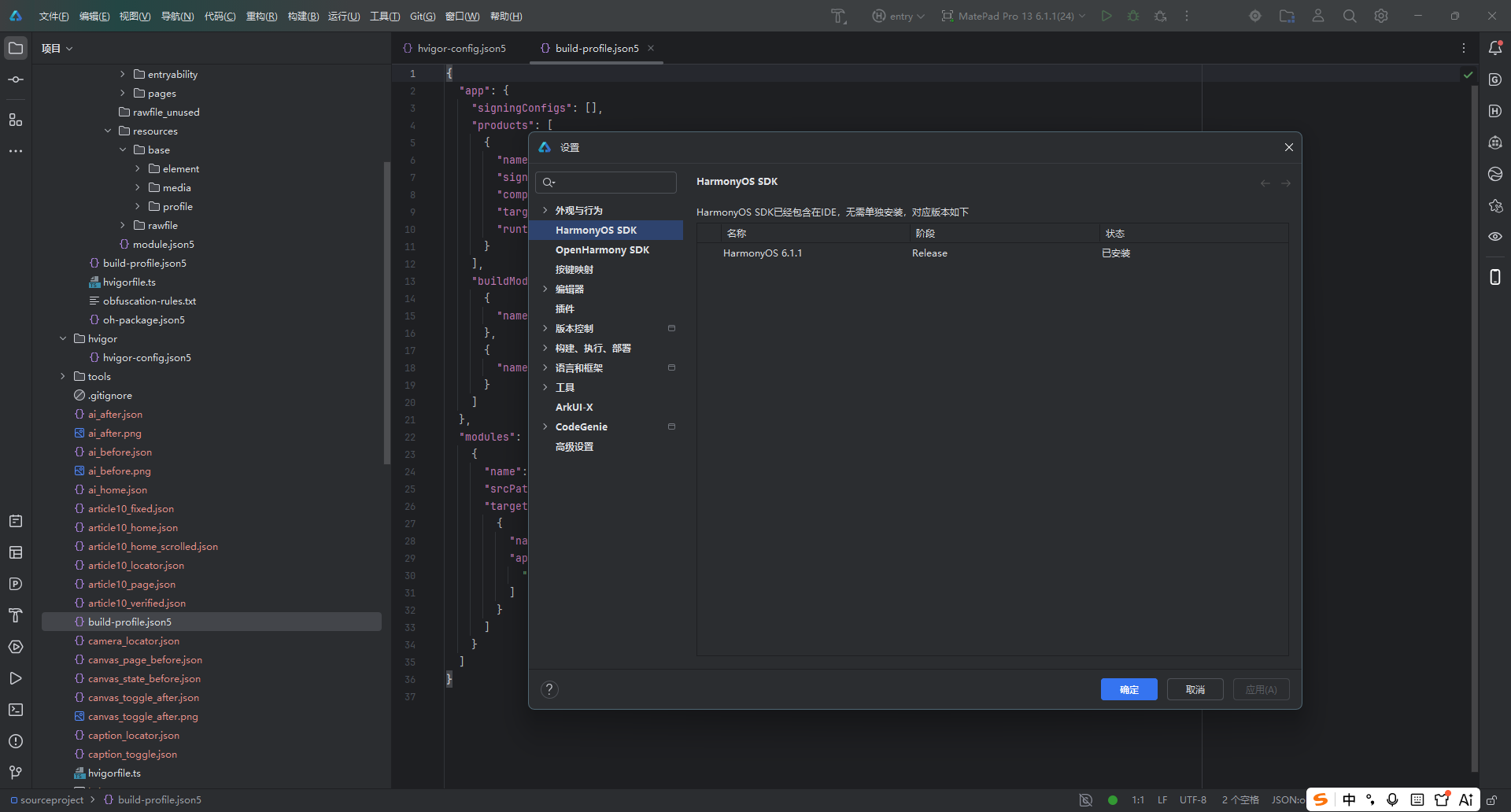
SDK/API 对照完成后插入 DevEco Studio API 24 与构建配置截图:
授权对照完成后插入真实设备权限截图:
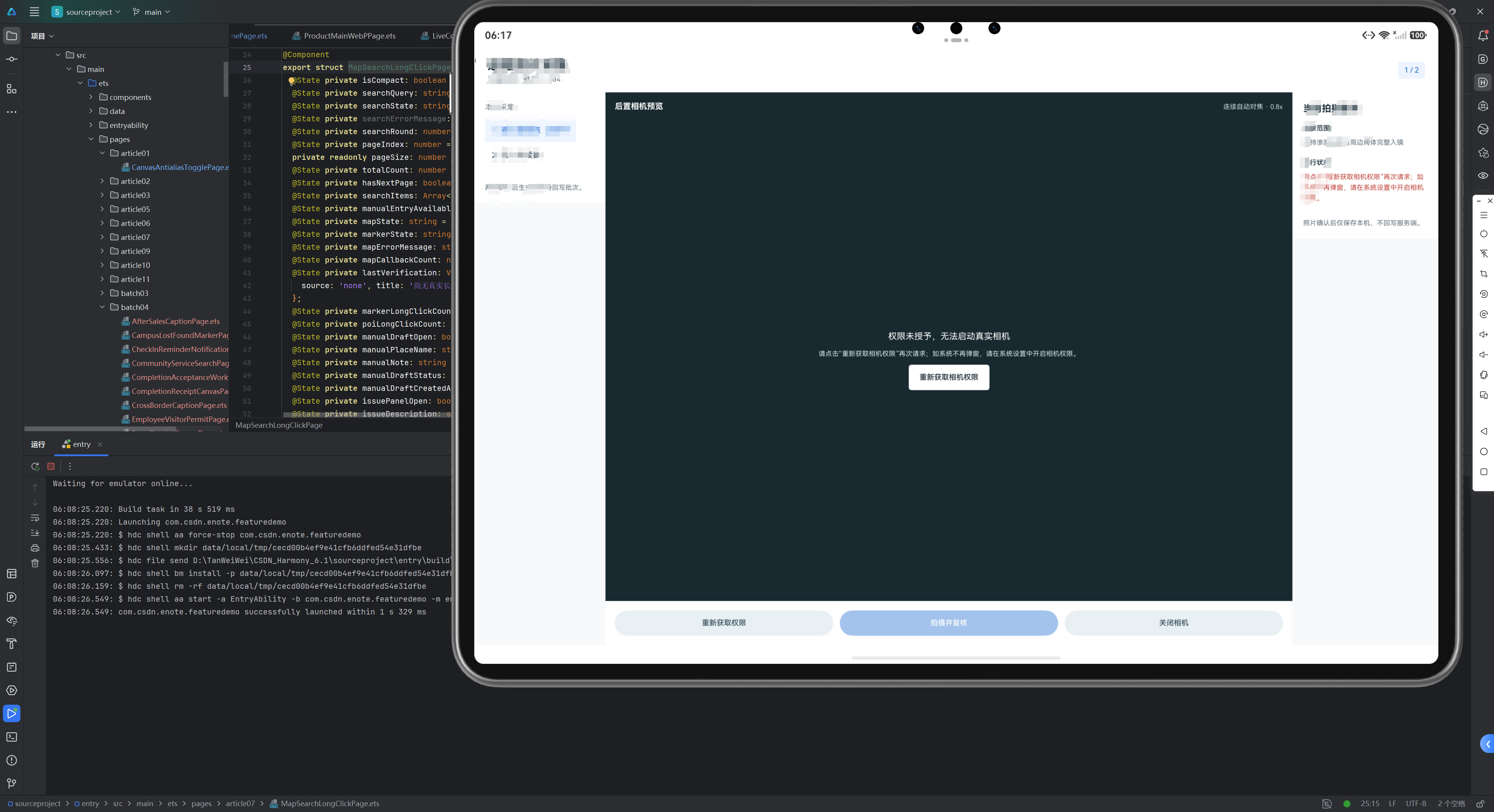
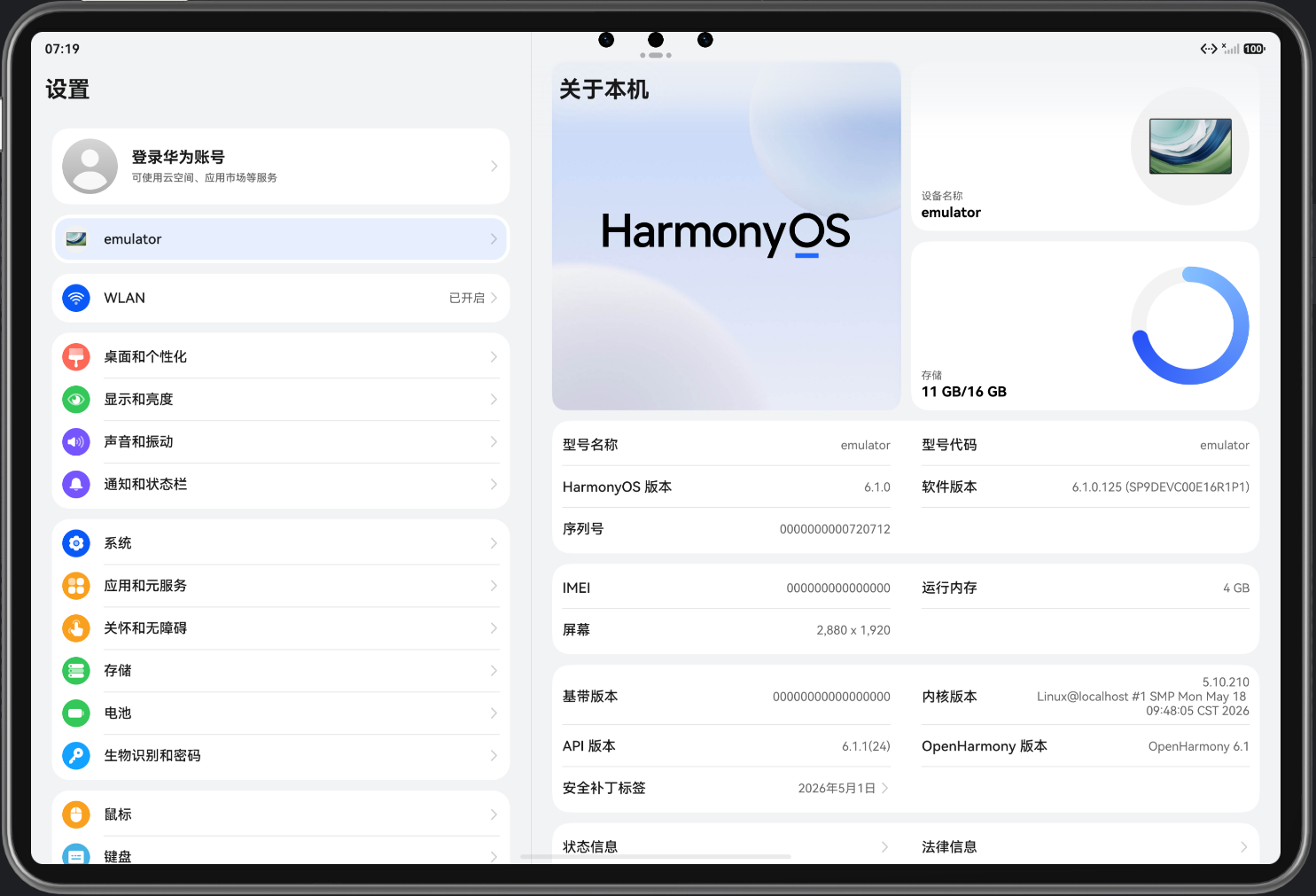
版本和能力对照完成后插入设备/模拟器信息截图:

讨论HarmonyOS开发技术,专注于API与组件、DevEco Studio、测试、元服务和应用上架分发等。
更多推荐

 6
6 0
0- 0


 已为社区贡献20条内容

所有评论(0)