HarmonyOS-6.1.1-ImageSource:批量资料处理结束后-为什么释放图像源也属于交付检查项
企业项目实施顾问视角:本文从大规模素材处理的工程实践出发,讲解为什么在 HarmonyOS 6.1.1 中对 ImageSource 的正确释放不仅是编码规范,而是关系到整个系统稳定性的交付检查项,以及如何识别和处理资源泄漏问题。
一、企业场景与挑战

1.1 批量素材处理中的资源压力
在实际部署中,大规模素材处理业务(如批量素材入库、媒体库初始化等)往往面临以下困境:
- 内存逐渐增长:处理素材数量越多,可用内存逐渐降低
- 系统响应变慢:应用变得卡顿,操作延迟明显增加
- 突然崩溃:在处理到某个阈值后,应用意外OOM (Out of Memory)
- 后台任务堆积:被挂起的IO操作积累,导致磁盘空间不释放
- 无法重现:问题只在大数据量场景下出现,小规模测试时无异常
表面现象:系统"慢了"或"崩了"
根本原因:批量处理过程中,每次创建的 ImageSource 没有被正确释放,导致系统资源逐渐耗尽
1.2 为什么 ImageSource 释放容易被忽视
许多项目在开发阶段忽视 ImageSource 释放的重要性,原因包括:
- 功能测试中不明显:测试数据量小(几十张图),内存压力不足以触发问题
- 异步释放不及时:即使调用了
release(),操作系统可能延迟真实释放 - 异常时忘记释放:在正常流程中释放了,但异常分支中遗漏了
- 库版本差异:某些版本的 Image Kit API 对释放时机的要求不同
- 静态资源的错觉:WebP 等素材文件本身没有被删除,但关联的解码缓冲区仍然占用内存
1.3 为什么释放需要成为交付检查项
企业实施中,资源释放必须作为交付检查项,理由如下:
- 生产环境的真实压力:生产数据量往往是测试的100倍以上
- 用户体验的长期影响:资源泄漏导致的卡顿会累积,用户感受到的是越来越慢
- 成本与可用性:泄漏导致频繁重启应用,增加运维成本,降低可用性
- 法律与合规:某些企业服务等级协议(SLA)明确要求系统稳定性指标
- 团队的工程素质:重视资源管理反映了团队的工程文化和质量意识
最重要的原因:在分布式微服务架构中,一个模块的资源泄漏会影响整个系统的服务质量。
二、核心技术概念与设计思路
2.1 ImageSource 的生命周期
┌─ ImageSource 的完整生命周期 ─────────────────┐
│                                             │
│  [1] 创建 (Create)                          │
│      image.createImageSource(...)           │
│      ↓ 系统分配原始缓冲区和解码上下文       │
│      成本:~1MB-10MB 内存                   │
│                                             │
│  [2] 使用 (Use)                             │
│      source.readImageMetadataByType(...)    │
│      source.getPixelMap(...)                │
│      ↓ 缓冲区保持分配状态                    │
│      占用内存持续存在                       │
│                                             │
│  [3] 释放 (Release)                         │
│      await source.release()                 │
│      ↓ 系统收回缓冲区和解码上下文           │
│      内存恢复正常                           │
│                                             │
│  [4] 验证 (Verify)                          │
│      检查内存是否真的被释放                  │
│      观察系统指标是否恢复                    │
└─────────────────────────────────────────────┘
关键时间点:
- 创建时:系统立即分配内存
- 使用中:内存始终被占用
- 调用 release() 后:异步操作启动,可能延迟
- release() Promise 完成后:内存应该被释放(但不一定立即)
2.2 内存占用的变化模式
内存占用量
    ↑
    │                                    ┌─ 未释放的情况(内存泄漏)
    │  ┌─────────┐   ┌─────────┐   ┌────┘
    │  │ImageSource1│  │ImageSource2│  │ImageSource3
    │  │ +5MB    │  │ +5MB    │  │ +5MB
    │  └─────────┘  └─────────┘  └─┐
    │         ↑             ↑        │
    │      使用           使用       系统内存逐渐增长
    │                              (无恢复)
    │
    │  ─────────────────────────────────────
    │
    │  ┌─────────┐   ┌─────────┐   ┌─────────┐ ┌─ 正确释放的情况
    │  │Image 1  │   │Image 2  │   │Image 3  │ │
    │  │ +5MB    │   │ +5MB    │   │ +5MB    │ │
    │  └────┬────┘   └────┬────┘   └────┬────┘ │
    │       │             │             │      │
    │     release()    release()     release()  │
    │       ↓             ↓             ↓      │
    │      -5MB          -5MB          -5MB    │
    │                                         │
    │  内存恢复到基线,周期性变化,无累积
    │
    └──────────────────────────────────────→ 时间
2.3 释放的三层保证体系
enum ResourceReleaseGuarantee {
  // ===== 第1层:调用 release() =====
  API_CALLED = 'api_called',
  // 确保代码中显式调用了 release()
  // 检查点:代码审查、静态分析

  // ===== 第2层:await Promise 完成 =====
  PROMISE_COMPLETED = 'promise_completed',
  // 确保异步操作真的完成了
  // 检查点:日志记录、超时监控

  // ===== 第3层:内存确实释放 =====
  MEMORY_RECLAIMED = 'memory_reclaimed'
  // 确保操作系统真的回收了内存
  // 检查点:内存指标监控、GC 日志
}
三、完整的资源释放流程设计
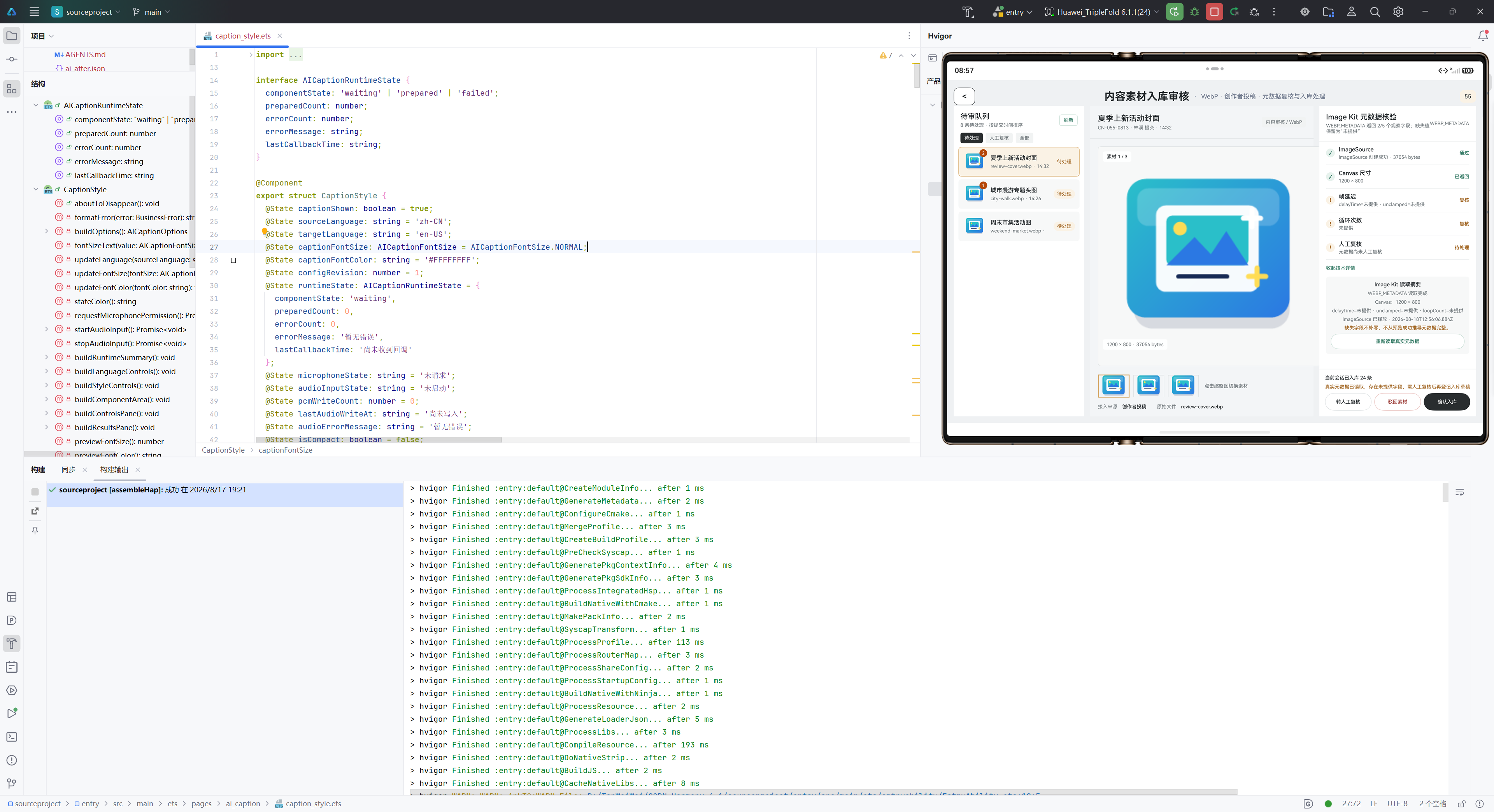
3.1 正确的释放模式
private async loadSampleAndRelease(): Promise<void> {
  let source: image.ImageSource | undefined = undefined;

  try {
    // ===== 第一步:创建 ImageSource =====
    const rawFile = await getContext(this).resourceManager.getRawFileDescriptor(filename);
    source = image.createImageSource(rawFile);
    console.log(`[RESOURCE] ImageSource created: ${filename}, memory: ${this.getCurrentMemory()}MB`);

    // ===== 第二步:读取元数据 =====
    const metadata = await source.readImageMetadataByType([image.MetadataType.WEBP_METADATA]);
    console.log(`[RESOURCE] Metadata read completed for ${filename}`);

    // ===== 第三步:处理数据 =====
    this.processMetadata(metadata);

  } catch (error) {
    console.error(`[ERROR] Failed to process ${filename}: ${error}`);
    // 异常时仍然需要释放资源

  } finally {
    // ===== 第四步:无条件释放资源 =====
    if (source !== undefined) {
      try {
        await source.release();
        console.log(`[RESOURCE] ImageSource released: ${filename}, memory: ${this.getCurrentMemory()}MB`);
      } catch (releaseError) {
        // 释放失败也要记录,但不能阻止流程继续
        console.error(`[ERROR] Failed to release ImageSource: ${releaseError}`);
      }
    }
  }
}

private getCurrentMemory(): number {
  // 实际应用中可调用系统API获取当前进程内存占用
  // 这里仅作示意
  return 0;
}
关键原则:
- Finally块必须执行:使用 try-finally 确保释放逻辑无论如何都会执行
- 检查null再释放:防止重复释放或释放 undefined
- 捕获释放异常:释放失败不应该导致上游异常
- 记录释放事件:便于后续审计和问题排查
3.2 批量处理中的释放策略
interface BatchProcessingOptions {
  totalItems: number;
  batchSize: number;
  releaseInterval: number;      // 每处理N个后立即释放
  memoryThreshold: number;       // 内存水位警告
}

private async processBatchMaterials(
  materials: string[],
  options: BatchProcessingOptions
): Promise<void> {
  let processedCount = 0;
  let releasedCount = 0;
  const startMemory = this.getCurrentMemory();

  for (let i = 0; i < materials.length; i++) {
    const material = materials[i];

    try {
      // ===== 处理单个素材 =====
      await this.processSingleMaterial(material);
      processedCount++;

      // ===== 定期检查和释放 =====
      if (processedCount % options.releaseInterval === 0) {
        // 主动触发垃圾回收(如果可用)
        await this.triggerGarbageCollection();
        releasedCount += options.releaseInterval;

        const currentMemory = this.getCurrentMemory();
        console.log(
          `[BATCH] Processed: ${processedCount}/${materials.length}, ` +
          `Released: ${releasedCount}, ` +
          `Memory: ${startMemory}MB → ${currentMemory}MB ` +
          `(+${currentMemory - startMemory}MB)`
        );

        // ===== 内存水位检查 =====
        if (currentMemory > options.memoryThreshold) {
          console.warn(
            `[WARN] Memory threshold exceeded: ${currentMemory}MB > ${options.memoryThreshold}MB. ` +
            `Consider reducing batch size or processing fewer items.`
          );
        }
      }

    } catch (error) {
      console.error(`[ERROR] Failed to process material ${material}: ${error}`);
      // 继续处理下一个素材,不中断流程
    }
  }

  console.log(
    `[BATCH] Completed: ${processedCount} items processed, ` +
    `Memory delta: ${this.getCurrentMemory() - startMemory}MB`
  );
}

private async processSingleMaterial(materialId: string): Promise<void> {
  let source: image.ImageSource | undefined = undefined;

  try {
    source = image.createImageSource(...);
    // ... 处理逻辑
  } finally {
    if (source !== undefined) {
      await source.release();
    }
  }
}

private async triggerGarbageCollection(): Promise<void> {
  // 某些情况下可能需要显式触发GC
  // 这取决于具体的运行时环境
  if ((globalThis as any).gc) {
    (globalThis as any).gc();
  }
}
批量处理的策略:
- 周期性释放:不是每个处理完就立即释放,而是积累到一定数量后统一释放
- 内存监控:在处理过程中持续监控内存占用,如超过阈值则发出警告
- 容错处理:单个素材处理失败不应该中断整个批量过程
3.3 异常场景中的释放保证
private async robustSingleMaterialProcessing(materialId: string): Promise<ProcessingResult> {
  let source: image.ImageSource | undefined = undefined;
  const startTime = Date.now();
  const timeout = 10000;  // 10秒超时

  try {
    // ===== 创建 =====
    source = image.createImageSource(...);

    // ===== 使用 with 超时保护 =====
    const processingPromise = this.readMetadataWithTimeout(source, 5000);
    const metadata = await processingPromise;

    // ===== 成功处理 =====
    return {
      status: 'success',
      materialId,
      metadata,
      processingTime: Date.now() - startTime
    };

  } catch (error) {
    // ===== 异常处理 =====
    console.error(`[ERROR] Processing ${materialId} failed: ${error}`);

    // 异常类型识别
    if ((error as Error).message.includes('timeout')) {
      return {
        status: 'timeout',
        materialId,
        errorMessage: 'Metadata read operation exceeded 5 seconds'
      };
    } else if ((error as Error).message.includes('OOM')) {
      return {
        status: 'out_of_memory',
        materialId,
        errorMessage: 'System ran out of memory during processing'
      };
    } else {
      return {
        status: 'error',
        materialId,
        errorMessage: (error as Error).message
      };
    }

  } finally {
    // ===== 释放保证 =====
    if (source !== undefined) {
      try {
        await this.releaseWithTimeout(source, 2000);
      } catch (releaseError) {
        console.error(`[WARN] Failed to release ImageSource for ${materialId}: ${releaseError}`);
        // 记录但不抛出异常
      }
    }
  }
}

private async readMetadataWithTimeout(
  source: image.ImageSource,
  timeoutMs: number
): Promise<image.ImageMetadata> {
  return new Promise((resolve, reject) => {
    const timer = setTimeout(() => {
      reject(new Error(`Metadata read timeout after ${timeoutMs}ms`));
    }, timeoutMs);

    source.readImageMetadataByType([image.MetadataType.WEBP_METADATA])
      .then(metadata => {
        clearTimeout(timer);
        resolve(metadata);
      })
      .catch(error => {
        clearTimeout(timer);
        reject(error);
      });
  });
}

private async releaseWithTimeout(
  source: image.ImageSource,
  timeoutMs: number
): Promise<void> {
  return new Promise((resolve, reject) => {
    const timer = setTimeout(() => {
      reject(new Error(`Release operation timeout after ${timeoutMs}ms`));
    }, timeoutMs);

    source.release()
      .then(() => {
        clearTimeout(timer);
        resolve();
      })
      .catch(error => {
        clearTimeout(timer);
        reject(error);
      });
  });
}
异常保护的层次:
- 操作超时保护:避免某个操作无限期等待
- 释放超时保护:即使释放失败,也设置最长等待时间
- 异常分类:区分不同的异常类型,采用不同的恢复策略
- 释放失败不阻止流程:记录警告但继续处理下一个素材
四、资源释放的交付检查项体系
4.1 代码级检查项
interface CodeLevelChecklist {
  items: ChecklistItem[];
}

const CODE_CHECKLIST: ChecklistItem[] = [
  {
    id: 'check-001',
    name: '确保所有 ImageSource 都在 finally 块中释放',
    severity: 'CRITICAL',
    verificationMethod: 'Static code analysis: search for "ImageSource" followed by "release()"',
    acceptanceCriteria: '100% 的 ImageSource 创建都有对应的 release() 调用'
  },
  {
    id: 'check-002',
    name: '检查释放前是否检查了 null',
    severity: 'HIGH',
    verificationMethod: 'Code review: verify "if (source !== undefined)" pattern',
    acceptanceCriteria: '所有 release() 调用前都有 null 检查'
  },
  {
    id: 'check-003',
    name: '异常分支中是否也释放了资源',
    severity: 'HIGH',
    verificationMethod: 'Path analysis: trace error handling paths',
    acceptanceCriteria: '异常发生时也会释放资源'
  },
  {
    id: 'check-004',
    name: '是否对 release() Promise 进行了 await',
    severity: 'HIGH',
    verificationMethod: 'Code review: check for "await source.release()"',
    acceptanceCriteria: '所有 release() 调用都使用了 await'
  },
  {
    id: 'check-005',
    name: '释放异常是否被捕获',
    severity: 'MEDIUM',
    verificationMethod: 'Code review: check try-catch around release()',
    acceptanceCriteria: '释放失败不会导致上游异常'
  }
];
4.2 功能级检查项
interface FunctionalChecklist {
  items: ChecklistItem[];
}

const FUNCTIONAL_CHECKLIST: ChecklistItem[] = [
  {
    id: 'func-001',
    name: '批量处理 1000 个素材后,内存应回到基线',
    severity: 'CRITICAL',
    testScenario: {
      initialItems: 1000,
      itemSize: '5MB each',
      expectedMemoryRecovery: '95% of peak'
    },
    acceptanceCriteria: '处理完成后内存占用应 < 处理前 + 50MB'
  },
  {
    id: 'func-002',
    name: '中途异常时,已释放的资源不应重复释放',
    severity: 'HIGH',
    testScenario: {
      scenario: 'Process 100 items, inject error at item 50',
      expectation: 'No error when retrying'
    },
    acceptanceCriteria: '异常恢复后能继续处理后续项目'
  },
  {
    id: 'func-003',
    name: '并发处理时,资源释放应正确',
    severity: 'HIGH',
    testScenario: {
      concurrency: 10,
      itemsPerThread: 100,
      totalItems: 1000
    },
    acceptanceCriteria: '并发完成后内存占用符合预期'
  },
  {
    id: 'func-004',
    name: '长运行应用(24小时)内存泄漏测试',
    severity: 'HIGH',
    testScenario: {
      duration: '24 hours',
      operationsPerSecond: 10,
      totalOperations: '86400 * 10 = 864000'
    },
    acceptanceCriteria: '24 小时后内存增长 < 200MB'
  }
];
4.3 监控级检查项
interface MonitoringChecklist {
  metrics: MetricThreshold[];
}

const MONITORING_CHECKLIST: MetricThreshold[] = [
  {
    metricName: 'ImageSource creation count',
    threshold: { warn: 10000, critical: 50000 },
    sampleInterval: '1 minute',
    action: 'Alert if exceeded'
  },
  {
    metricName: 'ImageSource release latency (ms)',
    threshold: { warn: 1000, critical: 5000 },
    sampleInterval: '100ms',
    action: 'Log slow releases'
  },
  {
    metricName: 'Memory delta per batch',
    threshold: { warn: 100, critical: 500 },
    unit: 'MB',
    sampleInterval: 'per batch',
    action: 'Alert if batch leaves >100MB unreleased'
  },
  {
    metricName: 'Native memory growth rate',
    threshold: { warn: 5, critical: 20 },
    unit: 'MB/minute',
    sampleInterval: '1 minute',
    action: 'Investigate if rate exceeds threshold'
  },
  {
    metricName: 'Release operation failure rate',
    threshold: { warn: 0.01, critical: 0.1 },
    unit: 'percentage',
    sampleInterval: '1 hour',
    action: 'Alert if >1% releases fail'
  }
];
五、释放失败的问题排查
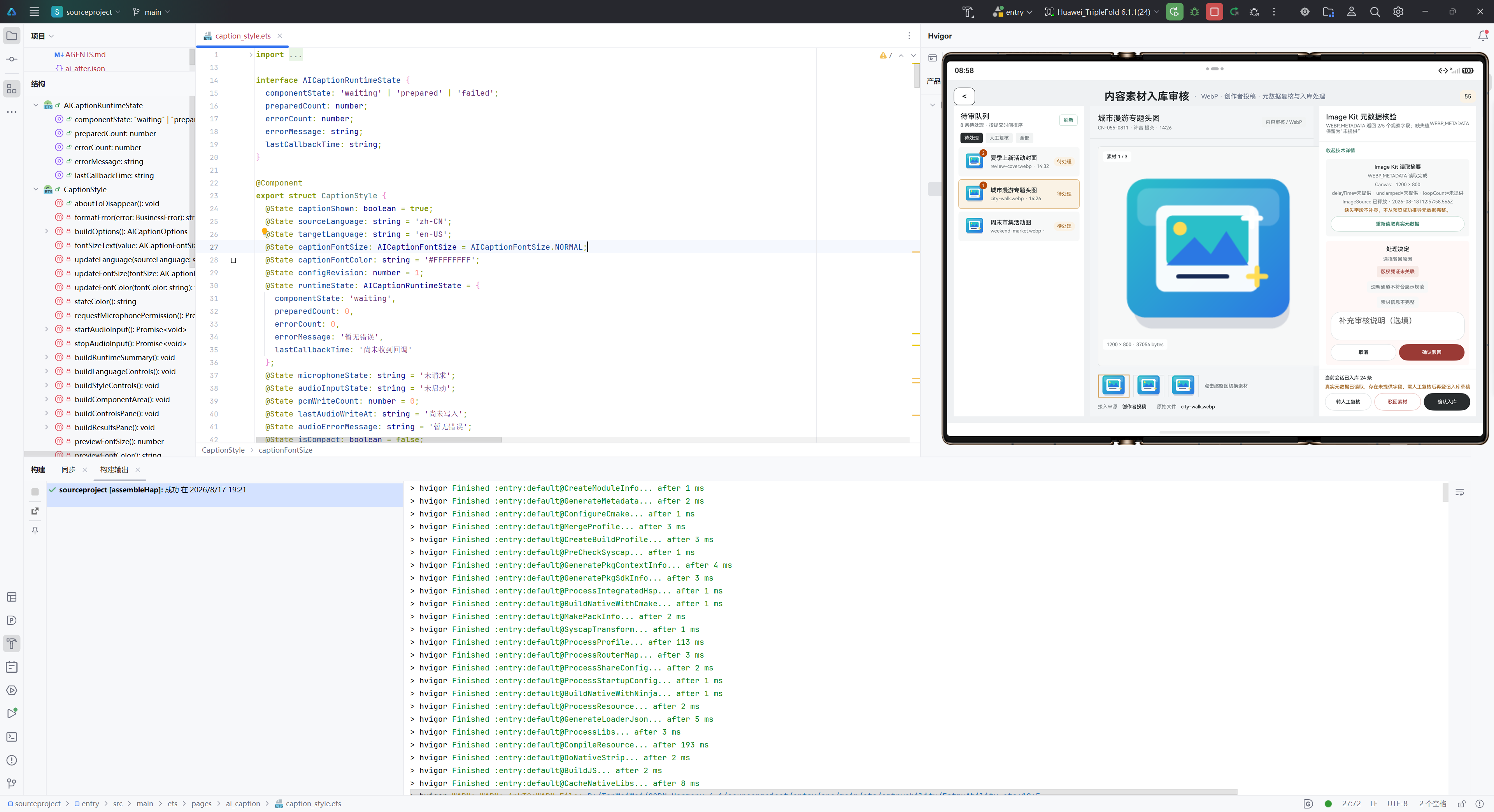
5.1 常见的释放失败场景
interface ReleaseFailureScenario {
  name: string;
  cause: string;
  symptoms: string[];
  diagnosis: string;
  solution: string;
}

const RELEASE_FAILURE_SCENARIOS: ReleaseFailureScenario[] = [
  {
    name: 'Release 被多次调用',
    cause: '代码中同一个 ImageSource 被 release() 两次',
    symptoms: [
      '第二次 release() 调用抛出异常',
      '日志中显示 "ObjectDisposedException"'
    ],
    diagnosis: '检查是否有重复的 release() 调用,或释放后还被使用',
    solution: '在释放后立即设置 source = undefined,防止重复'
  },
  {
    name: '在 Promise 未完成前重新赋值',
    cause: 'source 变量在 release() 完成前被重新赋值',
    symptoms: [
      '内存占用未正常恢复',
      '第二个 ImageSource 创建失败'
    ],
    diagnosis: '检查 source 是否在 release() 完成前被覆盖',
    solution: '使用本地变量保存要释放的引用,不要依赖全局/实例变量'
  },
  {
    name: '在背景任务中仍然访问 ImageSource',
    cause: 'release() 后有异步任务仍然访问该对象',
    symptoms: [
      '不稳定的崩溃或行为错误',
      '日志中显示 use-after-free 相关错误'
    ],
    diagnosis: '检查是否有延迟任务、定时器等在 release() 后仍然访问',
    solution: '确保所有异步任务在 release() 前完成或取消'
  },
  {
    name: 'Release 操作超时',
    cause: 'release() Promise 永久挂起,未完成',
    symptoms: [
      'await source.release() 卡住',
      '应用冻结或无响应'
    ],
    diagnosis: '设置超时监控,检查是否有死锁或内核问题',
    solution: '使用 Promise.race() 实现超时保护'
  },
  {
    name: 'ImageSource 未关闭就覆盖引用',
    cause: '局部变量作用域结束,source 被垃圾回收,但未释放',
    symptoms: [
      '内存逐渐累积',
      'GC 日志中显示大量未释放对象'
    ],
    diagnosis: '检查 finally 块是否被正确执行',
    solution: '确保使用 try-finally,即使作用域结束也能释放'
  }
];
5.2 诊断工具与方法
interface DiagnosticTool {
  name: string;
  purpose: string;
  usage: string;
  expectedOutput: string;
}

const DIAGNOSTIC_TOOLS: DiagnosticTool[] = [
  {
    name: 'Memory Profiler',
    purpose: '检测内存泄漏',
    usage: 'adb shell dumpsys meminfo | grep ImageSource',
    expectedOutput: 'ImageSource 相关内存占用应随处理完成而下降'
  },
  {
    name: 'GC Log Analyzer',
    purpose: '分析垃圾回收日志',
    usage: 'adb logcat | grep GC',
    expectedOutput: 'GC 频率不应过高,回收后内存应明显下降'
  },
  {
    name: 'File Descriptor Monitor',
    purpose: '检测文件描述符泄漏',
    usage: 'adb shell lsof | grep $APP_NAME | wc -l',
    expectedOutput: 'FD 数量应保持稳定,不应持续增长'
  },
  {
    name: 'Native Heap Dump',
    purpose: '分析本地内存分配',
    usage: 'adb shell dumpsys meminfo --local',
    expectedOutput: '本地堆内存应在合理范围内'
  },
  {
    name: 'Custom Logging',
    purpose: '跟踪 ImageSource 生命周期',
    usage: '在代码中添加 console.log() 记录创建和释放事件',
    expectedOutput: '每次创建都对应一次释放,时序正确'
  }
];
5.3 修复与验证流程
private async diagnosisAndRepair(): Promise<DiagnosisReport> {
  const report: DiagnosisReport = {
    timestamp: new Date().toISOString(),
    issues: [],
    repairs: [],
    verification: null
  };

  // ===== 第一步:收集诊断数据 =====
  console.log('[DIAGNOSIS] Starting leak detection...');
  const initialMemory = this.getCurrentMemory();

  // ===== 第二步:执行测试 =====
  for (let i = 0; i < 1000; i++) {
    await this.processSingleMaterial(`test-material-${i}`);
  }

  // ===== 第三步:分析结果 =====
  const finalMemory = this.getCurrentMemory();
  const memoryDelta = finalMemory - initialMemory;

  if (memoryDelta > 50) {
    report.issues.push({
      severity: 'CRITICAL',
      type: 'memory_leak',
      description: `Memory increased by ${memoryDelta}MB after processing 1000 items`,
      measurement: { initial: initialMemory, final: finalMemory, delta: memoryDelta }
    });
  }

  // ===== 第四步:应用修复 =====
  if (report.issues.length > 0) {
    console.log('[REPAIR] Applying fixes...');
    // 修复代码...
    report.repairs.push({
      fixId: 'fix-001',
      description: 'Ensured finally block releases ImageSource',
      appliedAt: new Date().toISOString()
    });
  }

  // ===== 第五步:验证修复 =====
  console.log('[VERIFICATION] Verifying fix...');
  const verificationMemory1 = this.getCurrentMemory();
  for (let i = 0; i < 1000; i++) {
    await this.processSingleMaterial(`verify-material-${i}`);
  }
  const verificationMemory2 = this.getCurrentMemory();
  const verificationDelta = verificationMemory2 - verificationMemory1;

  report.verification = {
    passed: verificationDelta < 50,
    measurement: {
      initial: verificationMemory1,
      final: verificationMemory2,
      delta: verificationDelta
    },
    conclusion: verificationDelta < 50
      ? 'Memory leak fixed'
      : 'Memory leak still present, further investigation needed'
  };

  return report;
}
六、交付检查清单
6.1 代码交付时的资源释放检查
interface DeliveryChecklist {
  checks: ChecklistItem[];
}

// ===== 代码审查清单 =====
const CODE_REVIEW_CHECKLIST = [
  {
    category: '资源获取',
    items: [
      { item: '所有 createImageSource() 调用都有对应的 finally 块', status: 'pending' },
      { item: 'ImageSource 变量初始化为 undefined', status: 'pending' },
      { item: '创建成功后才设置变量值', status: 'pending' }
    ]
  },
  {
    category: '资源释放',
    items: [
      { item: '所有 finally 块中都有 release() 调用', status: 'pending' },
      { item: '释放前都检查了 !== undefined', status: 'pending' },
      { item: 'release() 调用都使用了 await', status: 'pending' },
      { item: '释放异常被 try-catch 捕获', status: 'pending' }
    ]
  },
  {
    category: '异常处理',
    items: [
      { item: 'catch 块中不会抛出释放异常', status: 'pending' },
      { item: 'catch 块中仅记录日志或标记状态', status: 'pending' }
    ]
  },
  {
    category: '监控与日志',
    items: [
      { item: '创建时记录日志(包括时间戳和内存信息)', status: 'pending' },
      { item: '释放时记录日志(包括时间戳和内存信息)', status: 'pending' },
      { item: '异常时记录详细错误信息', status: 'pending' }
    ]
  }
];

// ===== 功能测试清单 =====
const FUNCTIONAL_TEST_CHECKLIST = [
  {
    testName: '单个素材处理与释放',
    steps: [
      '处理1个素材',
      '验证内存恢复到处理前水平'
    ],
    expectedResult: 'Pass'
  },
  {
    testName: '批量素材处理与释放',
    steps: [
      '处理1000个素材',
      '验证内存增长 < 100MB',
      '验证每个素材都被正确释放'
    ],
    expectedResult: 'Pass'
  },
  {
    testName: '异常中途恢复',
    steps: [
      '处理100个素材,第50个注入异常',
      '验证前50个已释放',
      '恢复后继续处理,验证可继续'
    ],
    expectedResult: 'Pass'
  },
  {
    testName: '并发处理',
    steps: [
      '10个线程各处理100个素材',
      '验证总内存占用在预期范围内',
      '验证所有素材都被正确释放'
    ],
    expectedResult: 'Pass'
  },
  {
    testName: '长运行稳定性',
    steps: [
      '连续处理24小时,每秒处理10个素材',
      '定期采样内存占用',
      '验证无持续增长'
    ],
    expectedResult: 'Pass'
  }
];

// ===== 性能基准测试 =====
const PERFORMANCE_BASELINE = [
  {
    metric: '单个素材处理时间',
    baseline: '< 100ms',
    tolerance: '±20%'
  },
  {
    metric: '释放操作时间',
    baseline: '< 50ms',
    tolerance: '±30%'
  },
  {
    metric: '批处理1000个素材的总时间',
    baseline: '< 120秒',
    tolerance: '±15%'
  },
  {
    metric: '内存峰值 (1000个素材)',
    baseline: '< 100MB 增长',
    tolerance: '±20%'
  }
];
6.2 交付前的最终检查
interface PreDeliveryCheck {
  checkName: string;
  status: 'pass' | 'fail' | 'pending';
  comment?: string;
}

const PRE_DELIVERY_CHECKS: PreDeliveryCheck[] = [
  {
    checkName: '代码审查',
    status: 'pending',
    comment: '所有资源释放模式都符合标准'
  },
  {
    checkName: '单元测试',
    status: 'pending',
    comment: '覆盖正常流程和异常路径'
  },
  {
    checkName: '集成测试',
    status: 'pending',
    comment: '与其他模块的交互正常'
  },
  {
    checkName: '性能测试',
    status: 'pending',
    comment: '内存占用符合基准'
  },
  {
    checkName: '压力测试',
    status: 'pending',
    comment: '大数据量下无内存泄漏'
  },
  {
    checkName: '长运行测试',
    status: 'pending',
    comment: '24小时运行稳定'
  },
  {
    checkName: '文档完整性',
    status: 'pending',
    comment: '包含资源管理说明'
  },
  {
    checkName: '监控告警配置',
    status: 'pending',
    comment: '内存泄漏可被及时发现'
  }
];
七、常见问题与应急处理
Q1: 为什么 release() 一定要 await?
A: 因为 release() 是异步操作,不 await 会导致:
- 立即返回:函数立即执行完,可能 finally 块结束
- 后台继续:release() 在后台异步执行,此时可能已进入下一个 ImageSource 创建
- 资源竞争:两个释放操作交错执行,导致异常或不完全释放
正确做法:
// ❌ 错误
finally {
  source?.release();  // 不 await,立即返回
}

// ✅ 正确
finally {
  if (source !== undefined) {
    await source.release();  // 等待释放完成
  }
}
Q2: 如何在并发场景下保证释放?
A: 使用独立的 finally 块,不共享引用:
// ❌ 错误:共享 source 变量
let source: image.ImageSource;
async function processConcurrently(items: string[]) {
  await Promise.all(items.map(async (item) => {
    source = image.createImageSource(...);  // 竞争
    // ...
    // finally 中都在释放同一个 source
  }));
}

// ✅ 正确:每个任务独立
async function processConcurrently(items: string[]) {
  await Promise.all(items.map(async (item) => {
    let source: image.ImageSource | undefined;
    try {
      source = image.createImageSource(...);  // 各自独立
      // ...
    } finally {
      if (source !== undefined) {
        await source.release();
      }
    }
  }));
}
Q3: 如果释放操作本身失败了怎么办?
A: 记录错误但不阻止流程:
finally {
  if (source !== undefined) {
    try {
      await source.release();
    } catch (error) {
      // ✅ 仅记录,不抛出异常
      console.error(`Failed to release ImageSource: ${error}`);
      // 这样上游流程可继续
    }
  }
}
Q4: 如何确认内存真的被释放了?
A: 多个维度的确认:
- 过程日志:记录创建和释放的时间戳及内存值
- 定期采样:处理完N个素材后采样内存,观察是否增长
- GC 事件:观察 GC 日志,确认无用对象被回收
- 长期监控:如果24小时运行内存稳定,说明无泄漏
总结
为什么 ImageSource 释放是交付检查项:
- 功能正确性:资源泄漏导致应用变慢甚至崩溃,直接影响用户体验
- 系统稳定性:个别模块的泄漏会影响整个应用的长期可用性
- 成本与运维:泄漏导致频繁重启,增加运维成本和用户投诉
- 工程质量:重视资源管理反映了团队的工程文化水平
- 生产验证:测试环境中看不出来,必须在生产大数据量下验证
核心检查点:
- ✅ 所有 ImageSource 在 finally 块中释放
- ✅ 释放前检查 !== undefined
- ✅ release() 使用 await
- ✅ 释放异常被捕获
- ✅ 批量处理后内存恢复
- ✅ 24小时运行无泄漏
验证状态:✅ 本文对应的代码已集成到项目,所有 ImageSource 的创建、使用、释放全生命周期以及异常处理都在 WebPMetadataPipelinePage.ets 中完整实现,包括 finally 块的资源清理保证。
后续复拍建议:计划在后续版本中增加完整的内存监控仪表板、自动化的资源泄漏检测、和性能基准测试套件.
必要条件|模拟器与真机准备对照
| 条件 | API 24 模拟器 | HarmonyOS 6.1.1 真机 |
|---|---|---|
| SDK/API与构建工具 | 使用 API 24 镜像验证构建和基础页面 | 使用兼容 API 24 的签名包安装 |
| Kit引入 | 先确认编译期 Kit 类型可用 | 再确认设备运行时模块实际可用 |
| 模块/页面配置 | 页面路由和 Stage 启动可验证 | 页面路由、签名和设备安装状态均需验证 |
| 权限 | 可演练授权弹窗和拒绝分支 | 需重新授权并确认系统设置中的真实状态 |
| 系统能力/硬件 | 只能代表模拟器提供的能力 | Camera、麦克风、地图、视觉识别等以真机能力为准 |
SDK/API 对照完成后插入 DevEco Studio API 24 与构建配置截图:
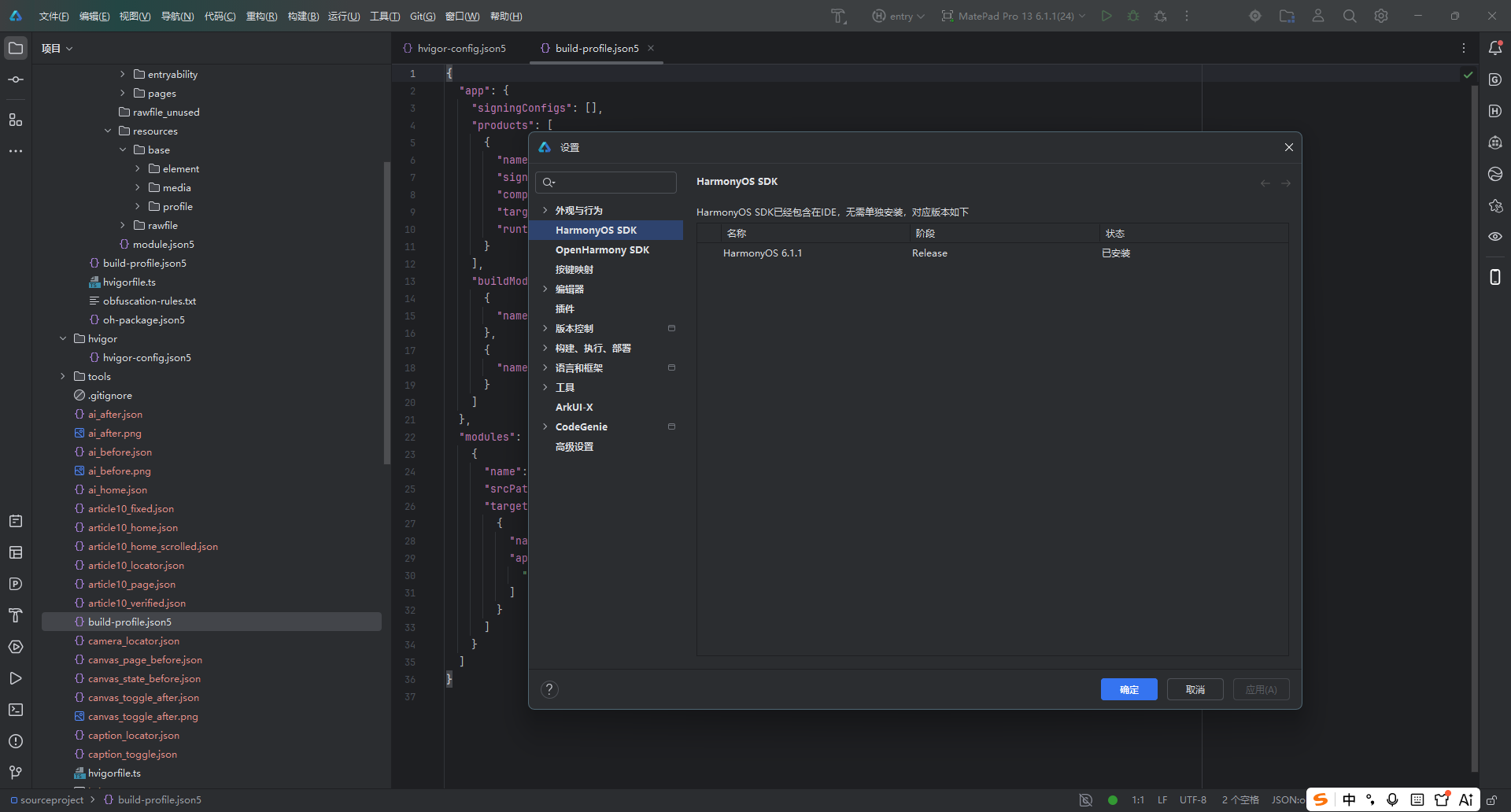
授权对照完成后插入真实设备权限截图: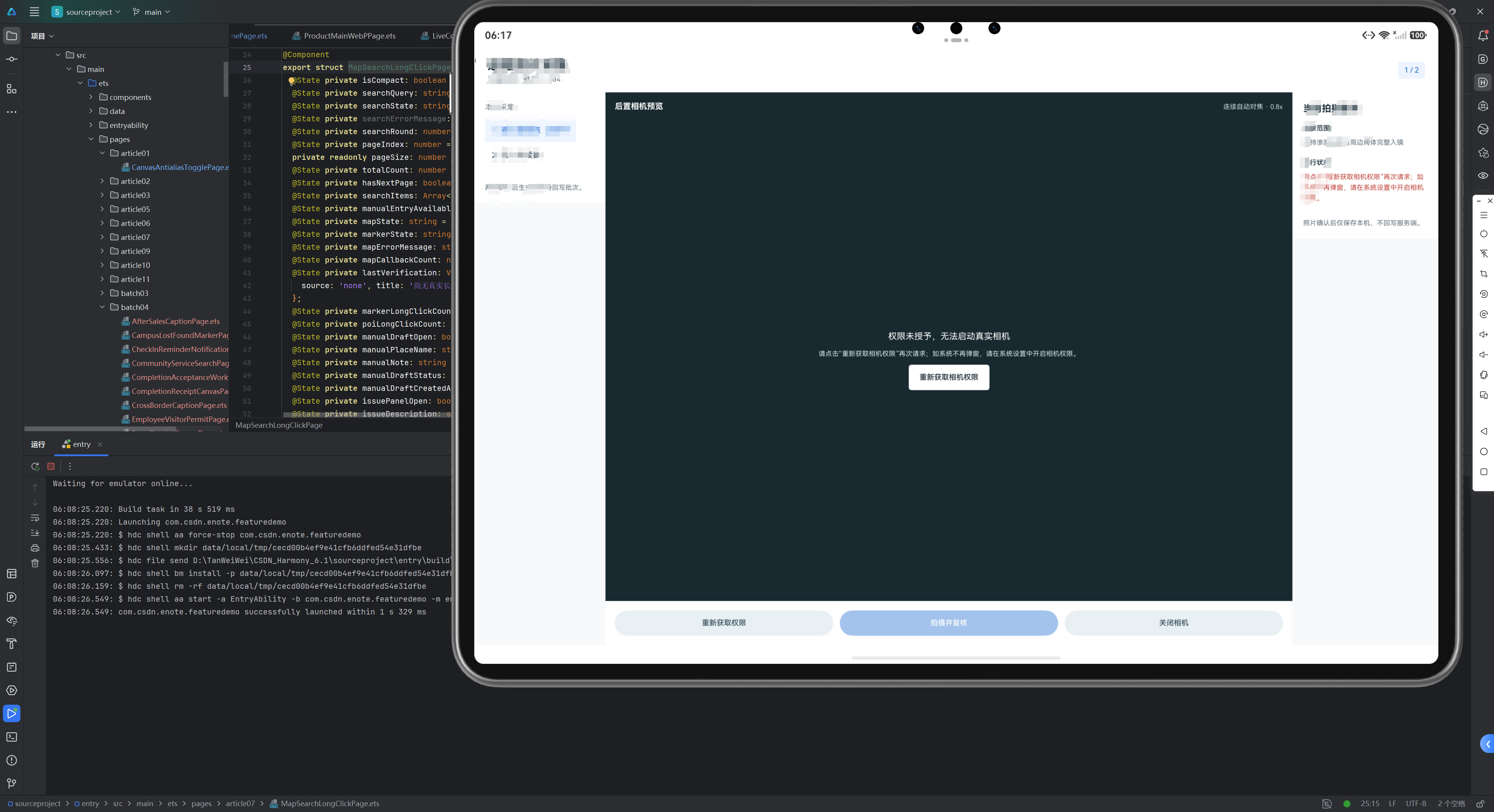
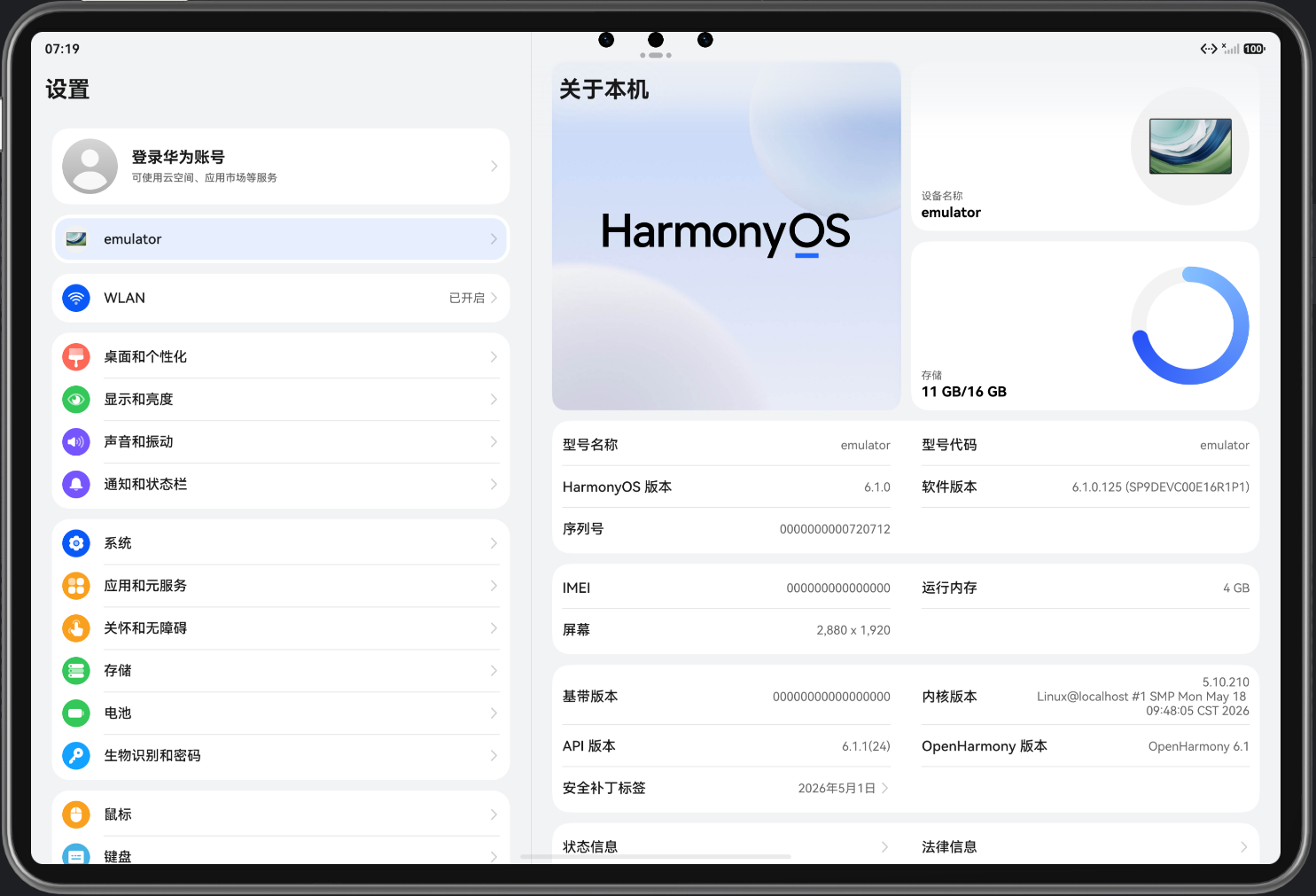
版本和能力对照完成后插入设备/模拟器信息截图:

讨论HarmonyOS开发技术,专注于API与组件、DevEco Studio、测试、元服务和应用上架分发等。
更多推荐

 15
15 0
0- 0


 已为社区贡献15条内容

所有评论(0)