依托HarmonyOS 6.1最新特性实现图片编辑APP(九):HDR与多图对象高级处理
·
依托HarmonyOS 6.1最新特性实现图片编辑APP(九):HDR与多图对象高级处理
前言
随着移动设备显示技术的进步,HDR(高动态范围)已经成为现代图片处理的核心能力。HarmonyOS 6.1 Image Kit 通过Picture(多图对象)提供了完整的HDR图片处理支持,包括HDR解码、合成、显示和编码。本文将深入探讨HDR技术与多图对象的高级处理。
Picture(多图对象)是Image Kit中的高级对象,由主图、辅助图和元数据组成,支持获取主图、辅助图、元数据以及合成HDR图等操作。它是处理HDR图片和HEIF专业格式的核心。
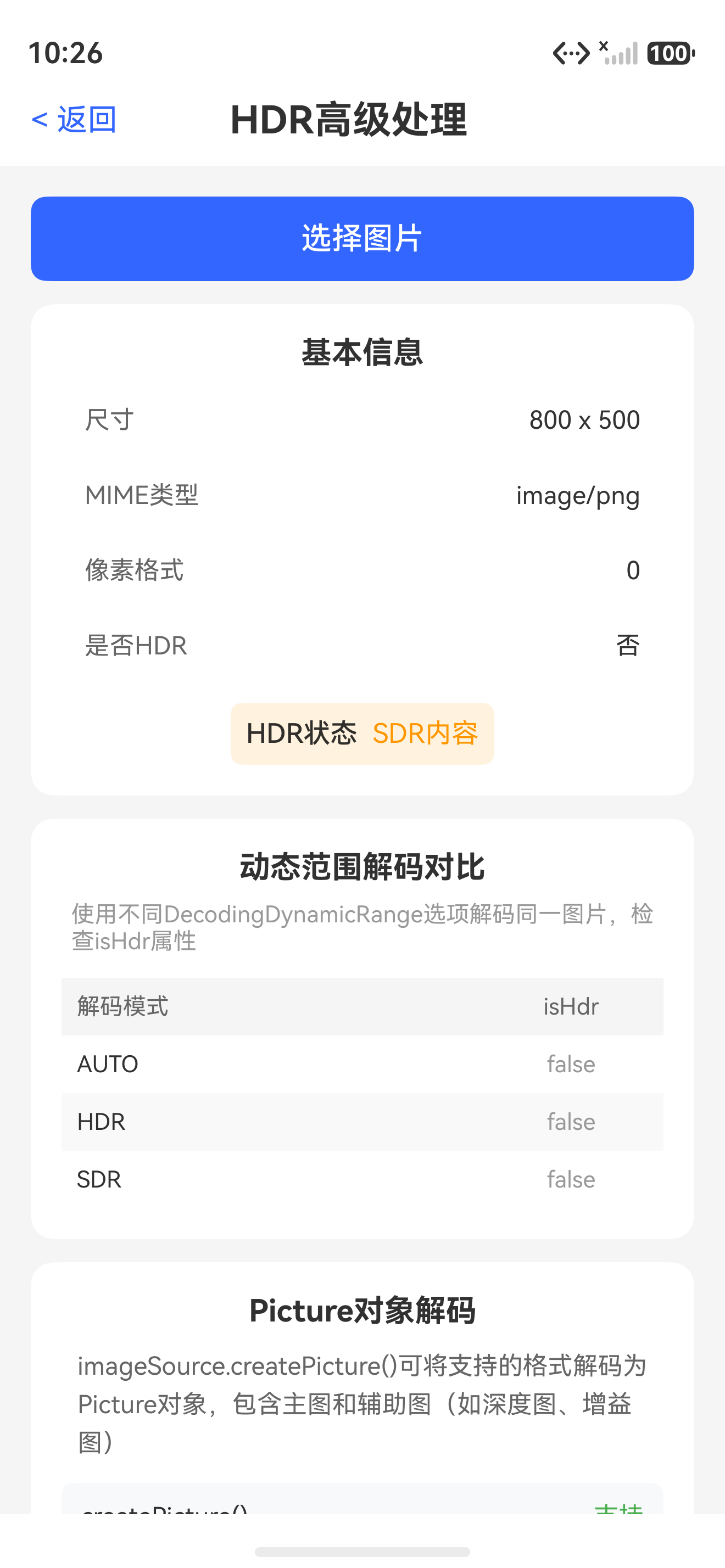
一、HDR技术基础
1.1 HDR与SDR对比
| 维度 | SDR(标准动态范围) | HDR(高动态范围) |
|---|---|---|
| 亮度范围 | 0-100 nits | 0-1000+ nits |
| 色彩深度 | 8-bit | 10-bit/12-bit |
| 色彩空间 | sRGB | Display P3 / BT.2020 |
| 对比度 | 标准 | 更高 |
| 细节保留 | 亮部/暗部易丢失 | 保留更多细节 |
| 文件大小 | 较小 | 较大 |
1.2 HDR图片类型
| 类型 | 说明 | 特点 |
|---|---|---|
| HDR单层图 | 在单一图像层中承载HDR显示信息 | 可直接显示,兼容性好 |
| HDR双层图 | 由主图和GainMap等辅助数据共同表达 | 可同时兼容SDR和HDR设备 |
| GainMap | 增益图,表示亮度增益信息 | 配合主图实现HDR效果 |
二、Picture多图对象处理
2.1 Picture对象创建与解码
import { image } from '@kit.ImageKit';
import { BusinessError } from '@kit.BasicServicesKit';

// Picture多图对象管理器
class PictureManager {
  private picture: image.Picture | undefined;

  // 从ImageSource解码为Picture对象
  async decodeToPicture(imageSource: image.ImageSource): Promise<image.Picture | undefined> {
    try {
      this.picture = await imageSource.createPicture();
      console.info('Picture object created from ImageSource.');
      return this.picture;
    } catch (error) {
      console.error(`Failed to create Picture: ${error}`);
      return undefined;
    }
  }

  // 获取主图
  async getMainPixelMap(): Promise<image.PixelMap | undefined> {
    if (!this.picture) {
      console.error('Picture object is null.');
      return undefined;
    }

    try {
      const mainPixelMap = await this.picture.getMainPixelMap();
      if (mainPixelMap) {
        let info = await mainPixelMap.getImageInfo();
        console.info(`Main image: ${info.size.width} x ${info.size.height}, HDR: ${info.isHdr}`);
      }
      return mainPixelMap;
    } catch (error) {
      console.error(`Failed to get main pixel map: ${error}`);
      return undefined;
    }
  }

  // 获取辅助图类型列表
  async getAuxiliaryPictureTypes(): Promise<string[]> {
    if (!this.picture) return [];

    try {
      const types = await this.picture.getAuxiliaryPictureTypes();
      console.info(`Auxiliary picture types: ${types.join(', ')}`);
      return types;
    } catch (error) {
      console.error(`Failed to get auxiliary types: ${error}`);
      return [];
    }
  }

  // 获取指定类型的辅助图
  async getAuxiliaryPicture(type: string): Promise<image.PixelMap | undefined> {
    if (!this.picture) return undefined;

    try {
      const auxPixelMap = await this.picture.getAuxiliaryPicture(type);
      if (auxPixelMap) {
        console.info(`Auxiliary picture '${type}' obtained.`);
      }
      return auxPixelMap;
    } catch (error) {
      console.error(`Failed to get auxiliary picture: ${error}`);
      return undefined;
    }
  }

  // 获取GainMap(增益图)
  async getGainMap(): Promise<image.PixelMap | undefined> {
    return this.getAuxiliaryPicture('GainMap');
  }

  // 获取深度图
  async getDepthMap(): Promise<image.PixelMap | undefined> {
    return this.getAuxiliaryPicture('DepthMap');
  }

  // 获取线性图
  async getLinearMap(): Promise<image.PixelMap | undefined> {
    return this.getAuxiliaryPicture('LinearMap');
  }

  // 释放Picture对象
  async release(): Promise<void> {
    if (this.picture) {
      this.picture.release();
      this.picture = undefined;
      console.info('Picture released.');
    }
  }
}
2.2 HDR合成与转换
// HDR处理工具
class HDRProcessor {
  // 将HDR双层图合成为HDR单层图
  static async synthesizeHDR(picture: image.Picture): Promise<image.PixelMap | undefined> {
    try {
      // 获取主图和GainMap
      const mainPixelMap = await picture.getMainPixelMap();
      const gainMap = await picture.getAuxiliaryPicture('GainMap');

      if (mainPixelMap && gainMap) {
        console.info('HDR synthesis: main + gainMap available.');

        // 读取主图像素数据
        const mainBuffer = await mainPixelMap.readPixelsToBuffer();
        const gainBuffer = await gainMap.readPixelsToBuffer();

        if (mainBuffer && gainBuffer) {
          const mainColors = RGBAPixelOperator.bufferToRGBAColors(mainBuffer);
          const gainColors = RGBAPixelOperator.bufferToRGBAColors(gainBuffer);

          // HDR合成算法:将GainMap应用到主图
          const hdrColors = mainColors.map((color, index) => {
            const gain = gainColors[index].r / 255.0; // 使用R通道作为增益
            return {
              r: RGBAPixelOperator.clamp(color.r * (1.0 + gain * 0.5)),
              g: RGBAPixelOperator.clamp(color.g * (1.0 + gain * 0.5)),
              b: RGBAPixelOperator.clamp(color.b * (1.0 + gain * 0.5)),
              a: color.a
            };
          });

          const hdrBuffer = RGBAPixelOperator.colorsToBuffer(hdrColors);
          await mainPixelMap.writeBufferToPixels(hdrBuffer);

          console.info('HDR synthesis completed.');
          return mainPixelMap;
        }
      }

      return undefined;
    } catch (error) {
      console.error(`HDR synthesis failed: ${error}`);
      return undefined;
    }
  }

  // HDR转SDR(色调映射)
  static async convertHDRtoSDR(hdrPixelMap: image.PixelMap): Promise<image.PixelMap | undefined> {
    try {
      const buffer = await hdrPixelMap.readPixelsToBuffer();
      if (!buffer) return undefined;

      let colors = RGBAPixelOperator.bufferToRGBAColors(buffer);

      // 简单的色调映射:Reinhard算法
      colors = colors.map(color => {
        const r = color.r / 255.0;
        const g = color.g / 255.0;
        const b = color.b / 255.0;

        // Reinhard色调映射
        const mappedR = r / (1.0 + r);
        const mappedG = g / (1.0 + g);
        const mappedB = b / (1.0 + b);

        return {
          r: RGBAPixelOperator.clamp(mappedR * 255),
          g: RGBAPixelOperator.clamp(mappedG * 255),
          b: RGBAPixelOperator.clamp(mappedB * 255),
          a: color.a
        };
      });

      const sdrBuffer = RGBAPixelOperator.colorsToBuffer(colors);
      await hdrPixelMap.writeBufferToPixels(sdrBuffer);

      console.info('HDR to SDR conversion completed.');
      return hdrPixelMap;
    } catch (error) {
      console.error(`HDR to SDR conversion failed: ${error}`);
      return undefined;
    }
  }

  // 判断PixelMap是否为HDR内容
  static async isHDRContent(pixelMap: image.PixelMap): Promise<boolean> {
    try {
      let info = await pixelMap.getImageInfo();
      console.info(`Image isHDR: ${info.isHdr}`);
      return info.isHdr;
    } catch (error) {
      console.error(`Failed to check HDR status: ${error}`);
      return false;
    }
  }
}
三、动态范围解码策略
3.1 解码动态范围选项
// 动态范围解码管理器
class DynamicRangeDecoder {
  // 自动选择动态范围解码
  static async decodeWithAutoRange(imageSource: image.ImageSource): Promise<image.PixelMap | undefined> {
    try {
      let decodingOptions: image.DecodingOptions = {
        editable: true,
        desiredPixelFormat: image.PixelMapFormat.RGBA_8888,
        desiredDynamicRange: image.DecodingDynamicRange.AUTO
      };

      const pixelMap = await imageSource.createPixelMap(decodingOptions);
      let info = await pixelMap.getImageInfo();
      console.info(`Auto range decode - HDR: ${info.isHdr}`);
      return pixelMap;
    } catch (error) {
      console.error(`Auto range decode failed: ${error}`);
      return undefined;
    }
  }

  // 强制HDR解码
  static async decodeWithHDR(imageSource: image.ImageSource): Promise<image.PixelMap | undefined> {
    try {
      let decodingOptions: image.DecodingOptions = {
        editable: true,
        desiredPixelFormat: image.PixelMapFormat.RGBA_8888,
        desiredDynamicRange: image.DecodingDynamicRange.HDR
      };

      const pixelMap = await imageSource.createPixelMap(decodingOptions);
      let info = await pixelMap.getImageInfo();
      console.info(`HDR decode - HDR: ${info.isHdr}`);
      return pixelMap;
    } catch (error) {
      console.error(`HDR decode failed: ${error}`);
      return undefined;
    }
  }

  // 强制SDR解码
  static async decodeWithSDR(imageSource: image.ImageSource): Promise<image.PixelMap | undefined> {
    try {
      let decodingOptions: image.DecodingOptions = {
        editable: true,
        desiredPixelFormat: image.PixelMapFormat.RGBA_8888,
        desiredDynamicRange: image.DecodingDynamicRange.SDR
      };

      const pixelMap = await imageSource.createPixelMap(decodingOptions);
      let info = await pixelMap.getImageInfo();
      console.info(`SDR decode - HDR: ${info.isHdr}`);
      return pixelMap;
    } catch (error) {
      console.error(`SDR decode failed: ${error}`);
      return undefined;
    }
  }
}
3.2 色彩空间转换
// 色彩空间管理
enum ColorSpace {
  SRGB = 'sRGB',
  DISPLAY_P3 = 'Display P3',
  BT2020 = 'BT.2020'
}

// 色彩空间转换工具
class ColorSpaceConverter {
  // 色彩空间转换(概念性实现)
  static async convertColorSpace(
    pixelMap: image.PixelMap,
    targetColorSpace: ColorSpace
  ): Promise<image.PixelMap | undefined> {
    try {
      console.info(`Converting color space to: ${targetColorSpace}`);

      const buffer = await pixelMap.readPixelsToBuffer();
      if (!buffer) return undefined;

      let colors = RGBAPixelOperator.bufferToRGBAColors(buffer);

      // 色彩空间转换
      switch (targetColorSpace) {
        case ColorSpace.SRGB:
          colors = ColorSpaceConverter.toSRGB(colors);
          break;
        case ColorSpace.DISPLAY_P3:
          colors = ColorSpaceConverter.toDisplayP3(colors);
          break;
        case ColorSpace.BT2020:
          colors = ColorSpaceConverter.toBT2020(colors);
          break;
      }

      const resultBuffer = RGBAPixelOperator.colorsToBuffer(colors);
      await pixelMap.writeBufferToPixels(resultBuffer);

      console.info(`Color space conversion to ${targetColorSpace} completed.`);
      return pixelMap;
    } catch (error) {
      console.error(`Color space conversion failed: ${error}`);
      return undefined;
    }
  }

  private static toSRGB(colors: RGBAColor[]): RGBAColor[] {
    return colors; // 假设输入已是sRGB
  }

  private static toDisplayP3(colors: RGBAColor[]): RGBAColor[] {
    return colors.map(color => ({
      r: RGBAPixelOperator.clamp(color.r * 1.13),
      g: RGBAPixelOperator.clamp(color.g * 1.07),
      b: RGBAPixelOperator.clamp(color.b * 1.02),
      a: color.a
    }));
  }

  private static toBT2020(colors: RGBAColor[]): RGBAColor[] {
    return colors.map(color => ({
      r: RGBAPixelOperator.clamp(color.r * 1.25),
      g: RGBAPixelOperator.clamp(color.g * 1.18),
      b: RGBAPixelOperator.clamp(color.b * 1.12),
      a: color.a
    }));
  }
}
四、HEIF格式处理
4.1 HEIF图片处理
// HEIF格式处理工具
class HEIFProcessor {
  // 检查是否为HEIF格式
  static async isHEIFFormat(imageSource: image.ImageSource): Promise<boolean> {
    try {
      let info = await imageSource.getImageInfo();
      const isHeif = info.encodedFormat === 'image/heic' || info.encodedFormat === 'image/heif';
      console.info(`Image format: ${info.encodedFormat}, isHEIF: ${isHeif}`);
      return isHeif;
    } catch (error) {
      console.error(`HEIF format check failed: ${error}`);
      return false;
    }
  }

  // 处理HEIF图片(获取主图+辅助图)
  static async processHEIFImage(imageSource: image.ImageSource): Promise<HEIFResult> {
    const result: HEIFResult = {
      mainImage: undefined,
      hasDepthMap: false,
      hasGainMap: false,
      hasLinearMap: false,
      auxiliaryTypes: []
    };

    try {
      const picture = await imageSource.createPicture();
      if (!picture) return result;

      result.mainImage = await picture.getMainPixelMap();
      result.auxiliaryTypes = await picture.getAuxiliaryPictureTypes();
      result.hasDepthMap = result.auxiliaryTypes.includes('DepthMap');
      result.hasGainMap = result.auxiliaryTypes.includes('GainMap');
      result.hasLinearMap = result.auxiliaryTypes.includes('LinearMap');

      console.info(`HEIF processing completed. Aux types: ${result.auxiliaryTypes.join(', ')}`);
      return result;
    } catch (error) {
      console.error(`HEIF processing failed: ${error}`);
      return result;
    }
  }

  // HEIF转换为JPEG
  static async convertHEIFtoJPEG(
    imageSource: image.ImageSource,
    outputPath: string,
    quality: number = 90
  ): Promise<boolean> {
    try {
      // 解码HEIF为PixelMap
      let decodingOptions: image.DecodingOptions = {
        editable: false,
        desiredPixelFormat: image.PixelMapFormat.RGBA_8888,
        desiredDynamicRange: image.DecodingDynamicRange.SDR
      };

      const pixelMap = await imageSource.createPixelMap(decodingOptions);

      // 编码为JPEG
      const imagePacker = image.createImagePacker();
      let packOptions: image.PackingOptions = {
        format: 'image/jpeg',
        quality: quality
      };

      const data = await imagePacker.packToData(pixelMap, packOptions);

      // 保存文件
      const file = fileIo.openSync(outputPath,
        fileIo.OpenMode.CREATE | fileIo.OpenMode.WRITE_ONLY | fileIo.OpenMode.TRUNC);
      fileIo.writeSync(file.fd, data);
      fileIo.closeSync(file);

      await pixelMap.release();
      imagePacker.release();

      console.info(`HEIF converted to JPEG: ${outputPath}`);
      return true;
    } catch (error) {
      console.error(`HEIF to JPEG conversion failed: ${error}`);
      return false;
    }
  }
}

interface HEIFResult {
  mainImage: image.PixelMap | undefined;
  hasDepthMap: boolean;
  hasGainMap: boolean;
  hasLinearMap: boolean;
  auxiliaryTypes: string[];
}
4.2 HEIFS序列图像处理
// HEIFS序列图像处理
class HEIFSProcessor {
  // 获取HEIFS中的帧数
  static async getFrameCount(imageSource: image.ImageSource): Promise<number> {
    try {
      let info = await imageSource.getImageInfo();
      // HEIFS通常包含多帧信息
      console.info(`HEIFS image info: ${JSON.stringify(info)}`);
      return 1; // 实际需根据API获取
    } catch (error) {
      console.error(`Failed to get HEIFS frame count: ${error}`);
      return 0;
    }
  }

  // 提取HEIFS的指定帧
  static async extractFrame(
    imageSource: image.ImageSource,
    frameIndex: number
  ): Promise<image.PixelMap | undefined> {
    try {
      let decodingOptions: image.DecodingOptions = {
        editable: true,
        desiredPixelFormat: image.PixelMapFormat.RGBA_8888
      };

      const pixelMap = await imageSource.createPixelMap(decodingOptions, frameIndex);
      console.info(`HEIFS frame ${frameIndex} extracted.`);
      return pixelMap;
    } catch (error) {
      console.error(`Failed to extract HEIFS frame: ${error}`);
      return undefined;
    }
  }
}
五、HDR显示与兼容性
5.1 HDR显示策略
// HDR显示管理
class HDRDisplayManager {
  // 根据设备能力选择显示策略
  static async getDisplayStrategy(pixelMap: image.PixelMap): Promise<DisplayStrategy> {
    let isHdr = await HDRProcessor.isHDRContent(pixelMap);
    let deviceSupportsHDR = HDRDisplayManager.checkDeviceHDRSupport();

    if (isHdr && deviceSupportsHDR) {
      return DisplayStrategy.HDR_DIRECT;
    } else if (isHdr && !deviceSupportsHDR) {
      return DisplayStrategy.HDR_TO_SDR;
    } else {
      return DisplayStrategy.SDR_DIRECT;
    }
  }

  // 检查设备HDR支持
  static checkDeviceHDRSupport(): boolean {
    // 实际项目中查询设备能力
    // 模拟:假设设备支持HDR
    return true;
  }

  // 获取HDR显示参数
  static getHDRDisplayParams(): HDRDisplayParams {
    return {
      maxLuminance: 1000,    // 最大亮度(nits)
      minLuminance: 0.005,   // 最小亮度
      colorSpace: ColorSpace.DISPLAY_P3,
      bitDepth: 10
    };
  }
}

enum DisplayStrategy {
  HDR_DIRECT = 'hdr_direct',     // 直接HDR显示
  HDR_TO_SDR = 'hdr_to_sdr',     // HDR转SDR显示
  SDR_DIRECT = 'sdr_direct'      // 直接SDR显示
}

interface HDRDisplayParams {
  maxLuminance: number;
  minLuminance: number;
  colorSpace: ColorSpace;
  bitDepth: number;
}
5.2 图片显示层级
| 处理层级 | 输入 | 输出 | 适用场景 |
|---|---|---|---|
| HDR原生显示 | HDR PixelMap | HDR显示 | 支持HDR的设备 |
| 色调映射显示 | HDR PixelMap | SDR显示 | 不支持HDR的设备 |
| SDR直接显示 | SDR PixelMap | SDR显示 | 常规图片 |
| HDR合成显示 | Picture(主图+GainMap) | HDR显示 | HDR双层图 |
总结
本文深入介绍了 HarmonyOS 6.1 Image Kit 的高级HDR处理能力,包括Picture多图对象的创建与操作、HDR合成与转换、动态范围解码策略、色彩空间转换以及HEIF/HEIFS格式处理。这些高级特性让ImageEditor Pro能够处理专业级的HDR图片,提供高品质的图像处理体验。
下一篇文章(终篇),我们将对整个系列进行总结,回顾ImageEditor Pro APP的完整实现,并分享性能优化与最佳实践。
如果这篇文章对你有帮助,欢迎点赞👍、收藏⭐、关注🔔,你的支持是我持续创作的动力!
相关资源:
- Image Kit简介:Image Kit概述
- 图片开发指导(ArkTS):开发指南
- 使用ImageSource完成多图对象解码:多图对象解码
- 使用ImagePacker完成多图对象编码:多图对象编码
- PixelMap接口:Interface (PixelMap)
- Picture接口:Interface (Picture)
- 如何处理HEIF图片:HEIF适配FAQ
- 开源鸿蒙跨平台社区:社区链接

讨论HarmonyOS开发技术,专注于API与组件、DevEco Studio、测试、元服务和应用上架分发等。
更多推荐



 5
5 0
0- 0


 已为社区贡献64条内容

所有评论(0)