灯光模拟HarmonyOS应用实战-1-从EntryAbility到单页练习台的启动链路
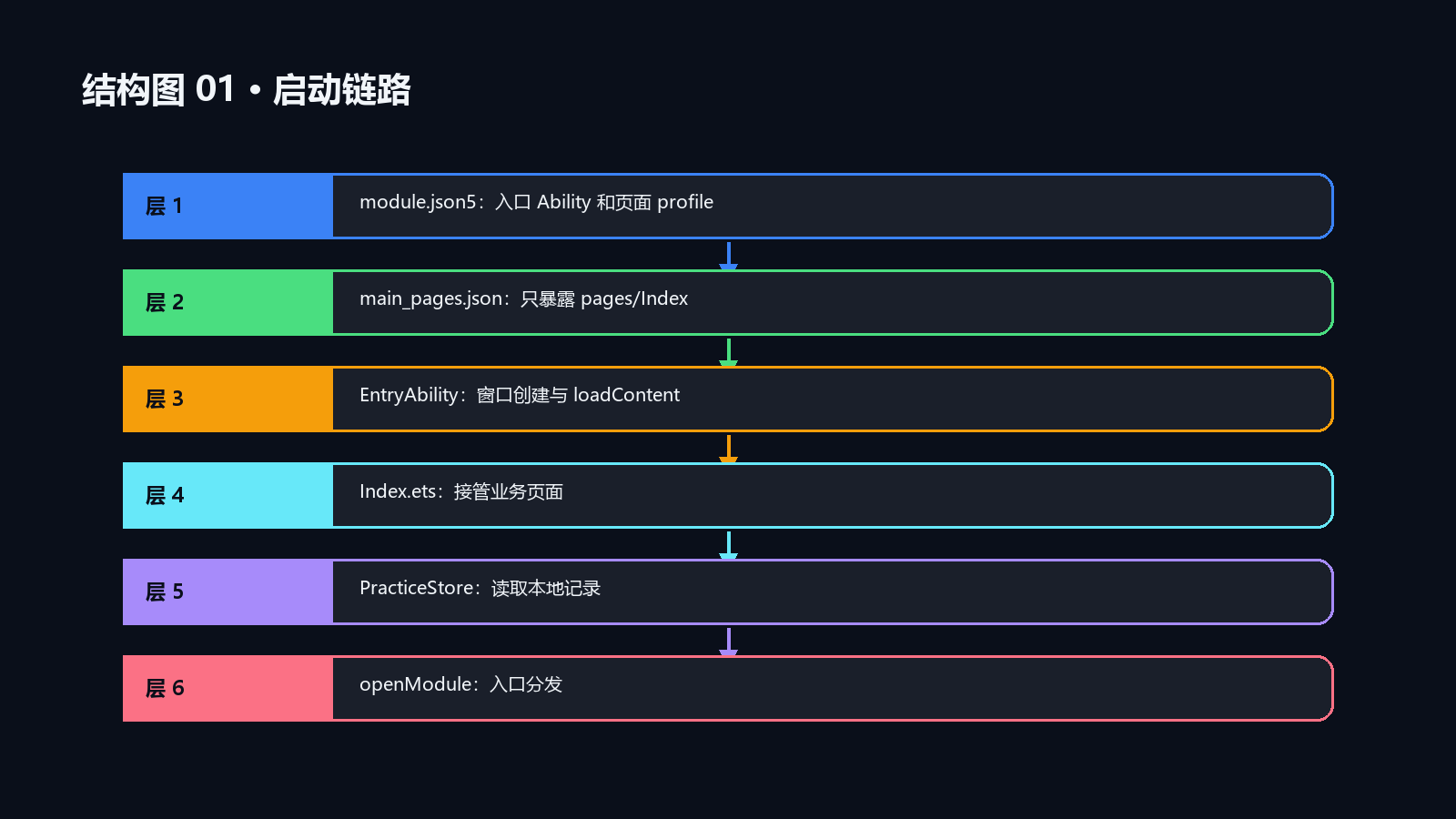
Ability 只加载 pages/Index,主业务在 Index.ets 内按 currentPage 分发。这样入口、页面状态和本地记录初始化彼此独立。
本文只围绕 EntryAbility -> pages/Index -> PracticeStore 这条启动链路展开。它解决的不是“首页能不能显示”,而是冷启动、回到首页和本地记录为空时,谁负责把应用带回一个可练习的初始状态。
启动异常先按配置、窗口、页面、数据四层定位
同一个“白屏”现象,落点可能完全不同:main_pages.json 找不到页面属于配置问题,loadContent 回调报错属于窗口加载问题,页面能出现但模块不切换属于状态问题,统计始终为零才需要回到 PracticeStore。把这些层次混在一起,最常见的后果是为了修统计卡片去改 Ability。
本篇按四个可验证节点展开:profile 是否声明 pages/Index、EntryAbility 是否只负责装载页面、Index.ets 是否持有 currentPage、记录列表是否由存储层回填。每一层都能单独确认,排查不会在 UI 和启动配置之间来回猜。
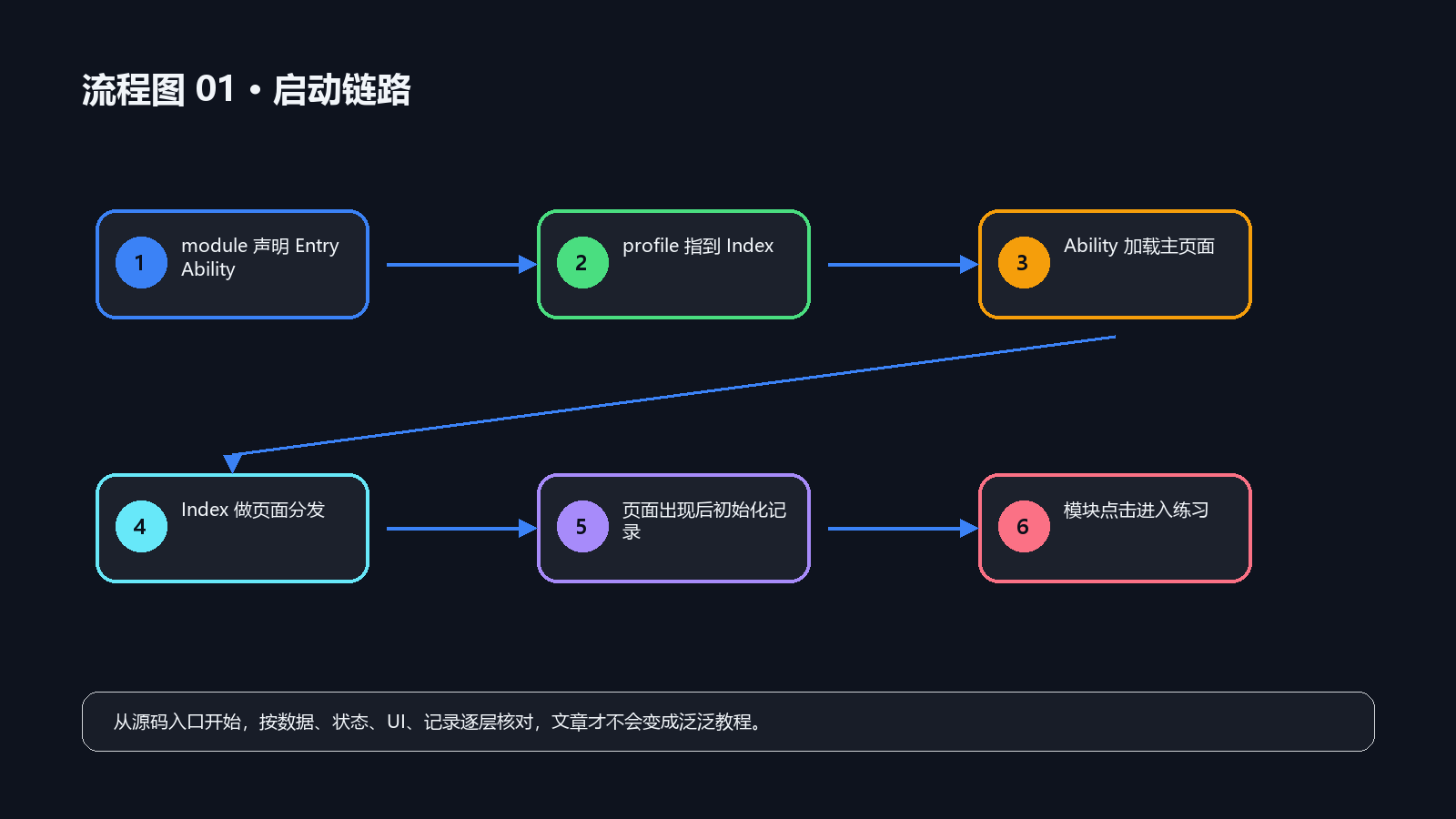
源码边界和文件分工
| 源码位置 | 作用 |
|---|---|
entry/src/main/module.json5 |
Ability、页面 profile、启动资源和扩展配置 |
entry/src/main/resources/base/profile/main_pages.json |
应用页面 profile,声明可加载的首页 |
entry/src/main/ets/entryability/EntryAbility.ets |
窗口创建和主页面加载 |
entry/src/main/ets/pages/Index.ets |
页面状态、Builder、入口分发和业务处理 |
当前源码把启动职责切得很窄:module.json5 和 main_pages.json 提供声明,EntryAbility.ets 调用 loadContent,Index.ets 才管理页面状态与记录刷新。这个顺序说明题库选择、倒计时和历史列表不应提前塞进 Ability 生命周期。
源码路径:D:\ProgramData\huawei\lesson\The_kemusan
核对重点:`module.json5`、`main_pages.json`、`EntryAbility.ets`、`Index.ets`
事实边界:本文只说明当前源码的装载与状态归属;真机首屏耗时需另行运行确认
入口配置先闭环
源码节选:entry/src/main/module.json5:1-50
{
  "module": {
    "name": "entry",
    "type": "entry",
    "description": "$string:module_desc",
    "mainElement": "EntryAbility",
    "deviceTypes": [
      "phone"
    ],
    "deliveryWithInstall": true,
    "installationFree": false,
    "pages": "$profile:main_pages",
    "abilities": [
      {
        "name": "EntryAbility",
        "srcEntry": "./ets/entryability/EntryAbility.ets",
        "description": "$string:EntryAbility_desc",
        "icon": "$media:layered_image",
        "label": "$string:EntryAbility_label",
        "startWindowIcon": "$media:layered_image",
        "startWindowBackground": "$color:start_window_background",
        "exported": true,
        "skills": [
          {
            "entities": [
              "entity.system.home"
            ],
            "actions": [
              "ohos.want.action.home"
            ]
          }
        ]
      }
    ],
    "extensionAbilities": [
      {
        "name": "EntryBackupAbility",
        "srcEntry": "./ets/entrybackupability/EntryBackupAbility.ets",
        "type": "backup",
        "exported": false,
        "metadata": [
          {
            "name": "ohos.extension.backup",
            "resource": "$profile:backup_config"
          }
        ],
      }
    ]
  }
}
源码节选:entry/src/main/resources/base/profile/main_pages.json:1-5
{
  "src": [
    "pages/Index"
  ]
}
启动链路最先要确认的是配置是否能闭环。mainElement、pages、srcEntry 和 loadContent 这几个字段必须互相对上,否则后面的页面状态写得再完整也没有入口。
这里的模型词汇不是灯光动作,而是“哪个文件拥有启动责任”。Ability 只信任 profile 给出的页面路径,页面再获取 UIAbilityContext 初始化本地记录,这样启动层和业务层不会互相污染。
EntryAbility 只负责加载首页
源码节选:entry/src/main/ets/entryability/EntryAbility.ets:1
import { AbilityConstant, ConfigurationConstant, UIAbility, Want } from '@kit.AbilityKit';
import { hilog } from '@kit.PerformanceAnalysisKit';
import { window } from '@kit.ArkUI';

const DOMAIN = 0x0000;

export default class EntryAbility extends UIAbility {
  onCreate(want: Want, launchParam: AbilityConstant.LaunchParam): void {
    try {
      this.context.getApplicationContext().setColorMode(ConfigurationConstant.ColorMode.COLOR_MODE_NOT_SET);
    } catch (err) {
      hilog.error(DOMAIN, 'testTag', 'Failed to set colorMode. Cause: %{public}s', JSON.stringify(err));
    }
    hilog.info(DOMAIN, 'testTag', '%{public}s', 'Ability onCreate');
  }

  onDestroy(): void {
    hilog.info(DOMAIN, 'testTag', '%{public}s', 'Ability onDestroy');
  }

  onWindowStageCreate(windowStage: window.WindowStage): void {
    // Main window is created, set main page for this ability
    hilog.info(DOMAIN, 'testTag', '%{public}s', 'Ability onWindowStageCreate');

    windowStage.loadContent('pages/Index', (err) => {
      if (err.code) {
        hilog.error(DOMAIN, 'testTag', 'Failed to load the content. Cause: %{public}s', JSON.stringify(err));
        return;
      }
      hilog.info(DOMAIN, 'testTag', 'Succeeded in loading the content.');
    });
  }

  onWindowStageDestroy(): void {
    // Main window is destroyed, release UI related resources
    hilog.info(DOMAIN, 'testTag', '%{public}s', 'Ability onWindowStageDestroy');
  }

  onForeground(): void {
    // Ability has brought to foreground
    hilog.info(DOMAIN, 'testTag', '%{public}s', 'Ability onForeground');
  }

  onBackground(): void {
源码节选:entry/src/main/ets/pages/Index.ets:176
  aboutToAppear(): void {
    const context = this.getUIContext().getHostContext() as common.UIAbilityContext;
    this.store.init(context).then(() => {
      this.refreshData();
    });
  }

  aboutToDisappear(): void {
    this.stopTimer();
    this.stopAltFlash();
  }

  build() {
    Column() {
      this.Header()
      if (this.currentPage === PAGE_HOME) {
        this.HomeView()
      } else if (this.currentPage === PAGE_SUBJECT_THREE_EXAM) {
        this.SubjectThreeExamView()
      } else if (this.currentPage === PAGE_SUBJECT_THREE_FLOW) {
        this.SubjectThreePracticalView()
      } else if (this.currentPage === PAGE_QUESTION_BANK) {
        this.QuestionBankView()
      } else if (this.currentPage === PAGE_HISTORY) {
        this.HistoryView()
      } else if (this.currentPage === PAGE_SETTINGS) {
        this.SettingsView()
      } else {
        this.TheoryPracticeView()
      }
    }
EntryAbility 的代码故意很薄:窗口创建后加载 pages/Index,失败时打日志,成功后不继续做题库或历史处理。这种写法让启动失败和业务失败可以分开定位。
Index.ets 接管后,build() 根据 currentPage 分发视图,aboutToAppear 再初始化 PracticeStore。入口层只把主页面拉起来,页面层才决定首页、科三、题库和历史如何切换。
Index 接管页面和记录初始化
源码节选:entry/src/main/ets/pages/Index.ets:1084
  private refreshData(): void {
    this.store.listRecords().then((records: PracticeRecord[]) => {
      this.records = records;
    });
  }

  private goHome(): void {
    this.stopTimer();
    this.stopAltFlash();
    this.currentPage = PAGE_HOME;
    this.pageTitle = '驾考灯光综合助手';
  }

  private openModule(id: string, title: string): void {
    this.stopTimer();
    this.stopAltFlash();
    this.currentPage = id;
    this.pageTitle = title;
    if (id === PAGE_SUBJECT_ONE) {
      this.startTheoryPractice(SUBJECT_ONE, '科一灯光题', '');
    } else if (id === PAGE_SUBJECT_TWO) {
      this.subject2Category = '图标认知';
      this.startTheoryPractice(SUBJECT_TWO, '科二灯光基础', this.subject2Category);
    } else if (id === PAGE_SUBJECT_FOUR) {
      this.startTheoryPractice(SUBJECT_FOUR, '科四灯光题', '');
    } else if (id === PAGE_SUBJECT_THREE_EXAM || id === PAGE_SUBJECT_THREE_FLOW) {
      this.resetSubjectThreeExam();
    } else if (id === PAGE_QUESTION_BANK) {
      this.resetQuestionBank();
    }
  }
启动链路的结果不是“页面显示了”这么简单,还包括本地记录是否能刷新到首页统计、返回首页时计时器是否清掉、模块点击是否进入正确练习模式。
迁移时先别急着引入路由框架。先让 module.json5 -> main_pages.json -> EntryAbility -> Index 这条线跑通,再接题库和记录服务,问题会少很多。
接入新练习页时先完成最小启动闭环
把新功能接进 Stage 工程时,可以先只完成这一条路径:
Ability 配置正确 → main_pages 声明页面 → loadContent 成功装载 → 页面初始化轻量状态 → 用户动作进入业务分支
题库、计时器和历史记录不需要抢在 Ability 里初始化完成。页面真正出现后再读取记录,既能让启动失败与数据失败分开,也能避免窗口还没准备好就触发 UI 刷新。
启动回归要覆盖冷启动、返回和空记录
| 场景 | 观察点 | 预期结果 |
|---|---|---|
| 冷启动 | main_pages 与 loadContent |
无页面路径错误,进入首页 |
| 从练习返回 | currentPage、计时与闪烁状态 |
回到首页后不残留上一题状态 |
| 首次使用 | PracticeStore.listRecords() |
统计展示空值或零值,不阻塞首页 |
| 已有记录重进 | records 与统计卡 |
记录回填后首页统计同步刷新 |
这些核对的是当前源码链路;要验证设备首屏、后台恢复和不同机型行为,还应在真机或模拟器上单独运行。
启动问题的定位顺序
| 现象 | 优先检查 | 不应先做的事 |
|---|---|---|
pages/Index 无法进入 |
profile、文件路径和 loadContent 回调 |
在页面里补业务逻辑 |
| 页面进入后模块无法切换 | currentPage 与 openModule 分支 |
修改 Ability 的加载代码 |
| 首页统计为空 | aboutToAppear、PracticeStore 回填 |
把记录读写塞入 Builder |
| 返回首页仍在闪烁 | stopTimer、stopAltFlash、重置入口 |
只隐藏状态行 |
小结:让启动层只负责把页面带到可用状态
The_kemusan 的入口并不复杂,但职责很清楚:配置声明页面,Ability 装载页面,Index.ets 管理交互状态,PracticeStore 负责本地记录。把这条边界守住,后续增加题库、实操或历史页时,启动问题就不会被误修成业务问题。
](https://i-blog.csdnimg.cn/direct/f627a48b82924540931ff18720f489f3.png#pic_center)

讨论HarmonyOS开发技术,专注于API与组件、DevEco Studio、测试、元服务和应用上架分发等。
更多推荐


 2
2 0
0- 0


 已为社区贡献126条内容

所有评论(0)