灯光模拟HarmonyOS应用实战-5-5秒倒计时、超时判定和自动进入下一题
如果 5 秒倒计时只当 UI 装饰,用户超时后仍能点击,记录也会乱。源码把 timerId、actionLocked、handleTimeout 串起来。
本文只看 5 秒倒计时如何参与业务判定。源码里的计时条不是装饰,它会触发超时、锁定操作、推进题目和写入失败记录。
倒计时最难处理的是点击与超时同时发生
用户在最后一秒点击正确按钮时,页面同时可能收到点击事件和计时器回调。如果两条路径都继续推进,就会出现重复写记录、跳过一题,或者已经失败后仍显示“操作正确”。单纯把进度条做得更醒目解决不了这种竞态。
当前页面把 examActive、actionLocked 与计时器状态放在同一条判定链路中:开始题目时启动计时,操作后锁定并停止计时,超时则进入 handleTimeout,最终由完成函数统一结束本轮。这让时间不只是显示字段,而是影响操作是否仍有效的业务输入。
源码边界和文件分工
| 源码位置 | 作用 |
|---|---|
entry/src/main/ets/pages/Index.ets |
页面状态、Builder、入口分发和业务处理 |
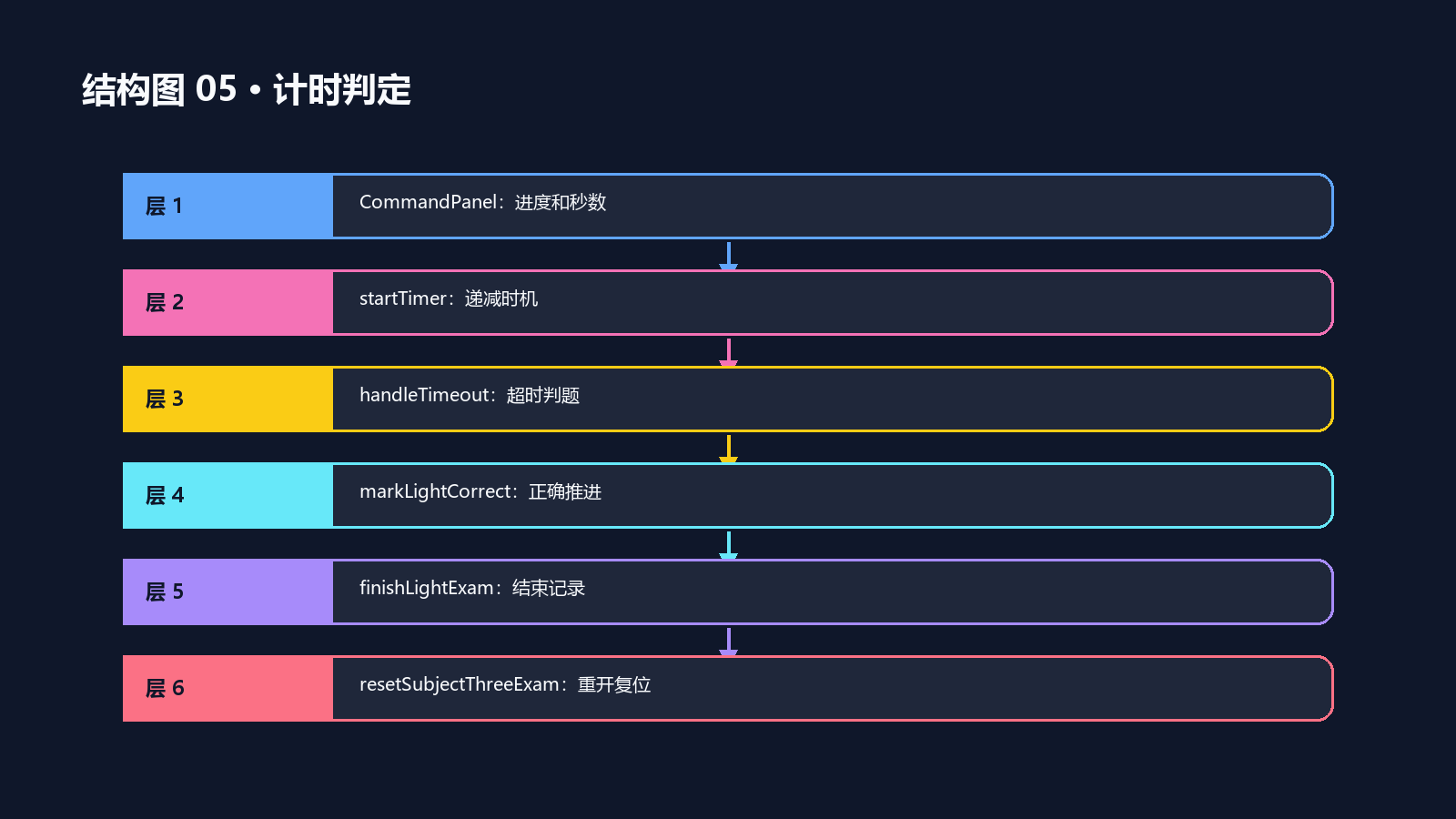
Index.ets 中的 CommandPanel 负责呈现倒计时,startTimer 负责递减,handleTimeout 判断超时,markLightCorrect 和 finishLightExam 负责收口。它们共享同一组考试状态,不能只替换其中一个方法。
源码路径:D:\ProgramData\huawei\lesson\The_kemusan
核对重点:`startTimer`、`handleTimeout`、`actionLocked`、`finishLightExam`
事实边界:当前代码说明倒计时判定路径;不同设备上的定时精度需要实际运行验证
CommandPanel 把题面和时间放一起
源码节选:entry/src/main/ets/pages/Index.ets:805
  @Builder
  CommandPanel() {
    Column({ space: 12 }) {
      Text(this.examActive || this.examFinished ? `${this.currentIndex + 1}/${this.totalQuestions}` : this.getLightExamIntro())
        .fontSize(13)
        .fontColor($r('app.color.text_secondary'))
      Text(this.currentPrompt)
        .fontSize(24)
        .fontWeight(FontWeight.Bold)
        .fontColor($r('app.color.text_primary'))
        .textAlign(TextAlign.Center)
        .lineHeight(34)
        .width('100%')
        .constraintSize({ minHeight: 76 })
      Column() {
        Row()
          .height(8)
          .width(this.getTimerWidth())
          .borderRadius(4)
          .backgroundColor(this.timeLeft <= 2 ? $r('app.color.danger') : $r('app.color.accent'))
      }
      .width('100%')
      .height(8)
      .borderRadius(4)
      .backgroundColor($r('app.color.track_bg'))
      Text(`${this.timeLeft}s`)
        .fontSize(22)
        .fontWeight(FontWeight.Bold)
        .fontColor($r('app.color.text_primary'))
        .width(64)
        .height(64)
        .textAlign(TextAlign.Center)
        .backgroundColor($r('app.color.panel_bg'))
        .borderRadius(32)
    }
    .width('100%')
    .padding(18)
    .backgroundColor($r('app.color.surface_bg'))
    .borderRadius(22)
    .border({ width: 1, color: $r('app.color.border_subtle') })
  }
源码节选:entry/src/main/ets/pages/Index.ets:1405
  private startTimer(): void {
    this.stopTimer();
    this.timerId = setInterval(() => {
      if (!this.examActive || this.actionLocked) {
        return;
      }
      this.timeLeft = Math.max(0, this.timeLeft - 1);
      if (this.timeLeft <= 0) {
        this.stopTimer();
        this.handleTimeout();
      }
    }, 1000);
  }

  private stopTimer(): void {
    if (this.timerId >= 0) {
      clearInterval(this.timerId);
      this.timerId = -1;
    }
  }
倒计时先要和当前题绑定。每次 presentLightCommand 都会把 timeLeft 重置,再启动新的 timer。
如果 timer 没有先停止旧实例,连续开始或快速切题时就会出现多条倒计时同时递减。源码里 startTimer 开头先调用 stopTimer。
startTimer 只在有效考试里递减
源码节选:entry/src/main/ets/pages/Index.ets:1465
  private handleTimeout(): void {
    if (this.currentPage === PAGE_SUBJECT_THREE_FLOW) {
      this.handlePracticalTimeout();
      return;
    }
    if (!this.examActive || this.examFinished || this.actionLocked || !this.currentLightCommand) {
      return;
    }
    if (this.currentLightCommand.action === ACTION_LOW && this.lightState === LIGHT_LOW) {
      this.markLightCorrect('保持近光,操作正确');
      return;
    }
    const correctOption = getActionLabel(this.currentLightCommand.action);
    this.finishLightExam(false, `超时未完成正确灯光操作:${this.currentLightCommand.text}`, this.currentLightCommand.id, correctOption, '');
  }

  private handlePracticalTimeout(): void {
    if (!this.examActive || this.examFinished || this.actionLocked || !this.currentPracticalCommand) {
      return;
    }
    const correctOption = getPracticalActionLabel(this.currentPracticalCommand.action);
    this.finishPracticalExam(false, `超时未完成正确实操灯光:${this.currentPracticalCommand.text}`,
      this.currentPracticalCommand.id, correctOption, '');
  }
源码节选:entry/src/main/ets/pages/Index.ets:1490
  private markLightCorrect(text: string): void {
    this.actionLocked = true;
    this.stopTimer();
    this.correctCount++;
    this.message = text;
    this.isSuccessMessage = true;
    setTimeout(() => {
      this.currentIndex++;
      if (this.currentIndex < this.examCommands.length) {
        this.presentLightCommand(this.examCommands[this.currentIndex]);
      } else {
        this.finishLightExam(true, '全部题目操作正确', '', '', '');
      }
    }, this.altFlashActive ? 1000 : 550);
CommandPanel 把题号、题面、进度条和秒数放在同一个面板里,用户可以同时看到当前任务和剩余时间。
倒计时颜色在 2 秒以内切到 danger,这是 UI 提示;真正的业务边界仍然在 handleTimeout。
超时和正确推进都走同一条结果链
源码节选:entry/src/main/ets/pages/Index.ets:1522
  private finishLightExam(passed: boolean, reason: string, wrongQuestionId: string, correctOption: string, selectedOption: string): void {
    this.actionLocked = true;
    this.examActive = false;
    this.examFinished = true;
    this.stopTimer();
    this.currentPrompt = passed ? '考试合格!' : '考试未合格';
    this.message = passed ? reason : `${reason}${correctOption.length > 0 ? ',正确选项:' + correctOption : ''}`;
    this.isSuccessMessage = passed;
    this.addSimpleRecord(SUBJECT_THREE, this.getLightExamMode(), passed, reason, wrongQuestionId, correctOption, selectedOption,
      this.correctCount, this.totalQuestions, Math.max(1, Math.floor((Date.now() - this.startAt) / 1000)));
  }
超时后不能简单显示失败,还要区分“保持近光”这种当前状态已经正确的题。源码在 handleTimeout 里专门处理了 ACTION_LOW。
迁移时把倒计时当成判题输入:它决定是否继续等待、是否自动失败、是否允许下一次点击。
让计时器只服务于有效考试状态
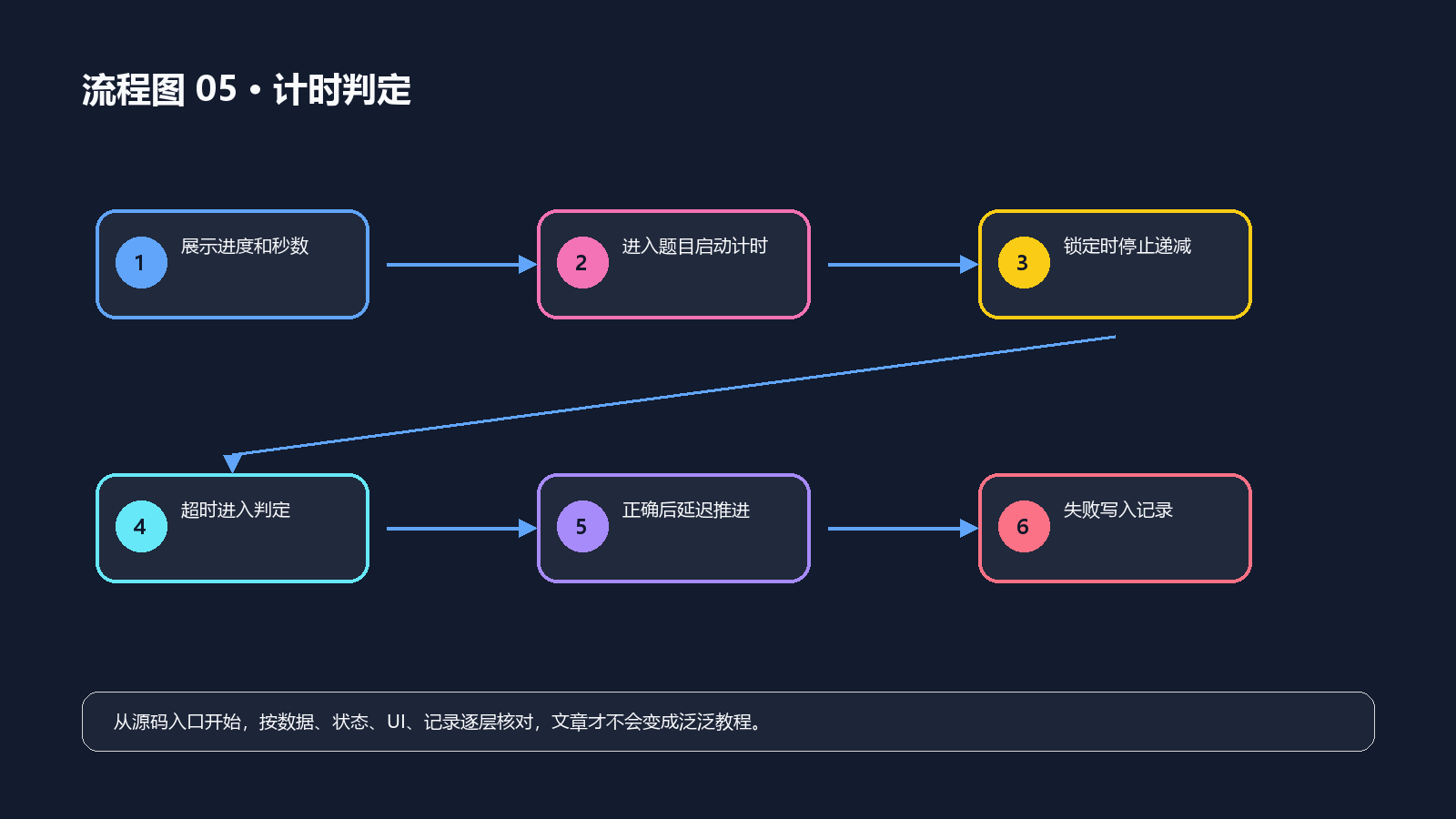
一轮倒计时的状态转换可以收成下面四步:
呈现新题 → timeLeft 归位并启动计时 → 用户操作或超时先取得锁 → 停止计时并进入推进或结束
关键不是定时器每秒减一,而是任何路径结束题目后都不能再让旧回调改写新题状态。因此重新开始、答对、答错、超时和离开页面都应走同一个停止计时入口。
倒计时回归:专门验证临界时刻
| 场景 | 触发动作 | 应观察的结果 |
|---|---|---|
| 刚进入新题 | 等待一秒 | timeLeft 递减,考试仍有效 |
| 正确操作 | 在 5 秒内点击 | 计时停止,只推进一次 |
| 最后一秒点击 | 点击与回调接近 | 不重复写记录、不跳题 |
| 完全不操作 | 倒计时归零 | 进入超时处理并结束或推进 |
| 当前要求保持近光 | 不点击直至超时 | 按当前规则判为正确并进入下一题 |
计时链路常见错误
| 现象 | 根因 | 处理方式 |
|---|---|---|
| 超时后还能点按钮 | 没有先设置 actionLocked |
在结果路径开始处锁定操作 |
| 下一题刚出现就被旧回调结束 | 上一题计时器未停止 | 每次呈现新题前清理旧 timer |
| 记录出现两条 | 点击与超时分别写入 | 将最终写入收在完成函数 |
| 进度条变红但业务未结束 | 只更新 UI 阈值 | 以 handleTimeout 作为超时唯一入口 |
小结:倒计时是判题状态机的一部分
灯光练习中的 5 秒限制不是视觉效果。The_kemusan 把时间、操作锁和记录收口到同一条状态链里,才能同时处理正常点击、超时和临界点击。这样页面即使切换视觉样式,也不会改变“这一题还能不能操作”的业务判断。
](https://i-blog.csdnimg.cn/direct/97da057008a94c958a1e1958b2a895fe.png#pic_center)

讨论HarmonyOS开发技术,专注于API与组件、DevEco Studio、测试、元服务和应用上架分发等。
更多推荐

 2
2 0
0- 0


 已为社区贡献126条内容

所有评论(0)