胭脂铺非遗古妆应用基于HarmonyOS API 24深度解析——采用了“单入口 + 多内容区 + 底部导航“的经典移动端布局模式。入口组件 RougeApp 作为整个应用的根容器
胭脂铺非遗古妆应用基于HarmonyOS API 24深度解析——采用了"单入口 + 多内容区 + 底部导航"的经典移动端布局模式。入口组件 RougeApp 作为整个应用的根容器
本文基于 HarmonyOS NEXT + ArkTS 声明式开发框架,完整实现一个「胭脂铺」非遗古妆主题 App,涵盖配色系统、状态管理、多 Tab 页面、自定义弹窗、动态颜色映射、弹窗数据真实交互等核心知识点,并附完整源码与运行效果截图。
一、引言:非遗古妆的数字化传承
在移动互联网与智能设备高速发展的今天,非物质文化遗产的传承与传播已经从单纯的线下演示,演变为一种高度数字化、流程化、个性化的线上线下融合体验。胭脂,作为中国古代女子妆容的核心,距今已有两千余年历史。一盒好胭脂,从捣花、调脂、窖藏、滤汁到调香、装奁,需经数十道工序,凝聚着匠人的心血与花香的温润。桃花的娇柔、朱砂的浓烈、玫瑰的馥郁、海棠的清雅,每一盒胭脂都承载着中国人对美的追求与向往。然而,这门古老的技艺正面临着传承人老龄化、受众面狭窄、销售渠道单一等现实困境。
正是在这样的背景下,胭脂铺类数字化应用应运而生,并迅速成为非遗古妆"活态传承"的数字载体。一个优秀的胭脂铺应用,不仅需要覆盖从"胭脂陈列"到"客评口碑"的完整业务闭环,还要在视觉设计、交互体验、数据呈现上做到细致入微,让用户在指尖滑动间便能感受到花香的温润与红妆的雅致。
本文将深入剖析一个基于鸿蒙 ArkUI 声明式开发框架构建的胭脂铺非遗古妆应用。该应用以"胭脂陈列"为核心,横向扩展出眉黛匣、铜镜架、订单管理、客评口碑五大功能模块,形成了一个完整闭环的古妆管理生态。它不仅是一个功能完备的演示项目,更是一份典型的 ArkUI 工程实践范本,涵盖了状态管理、组件化设计、模态弹窗、列表渲染、图表可视化、动态颜色映射、弹窗数据真实交互等关键技术点。
二、应用整体架构概览
整个应用采用了"单入口 + 多内容区 + 底部导航"的经典移动端布局模式。入口组件 RougeApp 作为整个应用的根容器,负责管理当前激活的 Tab 状态,并根据状态切换不同的内容区组件。
应用一共划分为五个一级页面:胭脂陈列(ROUGE)、眉黛匣(BROW)、铜镜架(MIRROR)、订单管理(ORDER)以及客评口碑(REVIEW)。每个页面都是一个独立的 @Component 装饰的自定义组件,内部封装了自己的状态、构建逻辑和子组件。这种"高内聚、低耦合"的组件化设计,使得每个页面可以独立开发、独立测试,同时也便于后续的扩展与维护。
在数据层面,应用定义了一套完整的类型系统,包括色彩主题、胭脂元数据、眉黛元数据、铜镜元数据、订单元数据、客评元数据、周销量元数据、色系构成元数据、工艺热度元数据、TOP榜元数据等,并通过常量数组将数据与 UI 表现层解耦。所有业务数据以 @Observed 装饰的可观察类 RougeData 为载体,配合五组各 12 条模拟数据,模拟了一个真实的胭脂铺数据环境。
在交互层面,应用通过条件渲染(if-else)实现了四类弹窗的叠加显示:定制胭脂、修改订单、撤下眉黛、铜镜详情。与此前版本不同的是,本版本的弹窗不再是纯展示型,而是通过 onConfirm 回调真正修改数据源——定制胭脂会 push 新数据到数组、撤下眉黛会 splice 删除对应项、修改订单会更新 count 和 amount、铜镜详情会通过 find 查找真实数据传入弹窗。弹窗以全屏半透明遮罩 + 居中卡片的形式呈现,与主内容共享同一根 Column,通过布尔状态控制显隐。
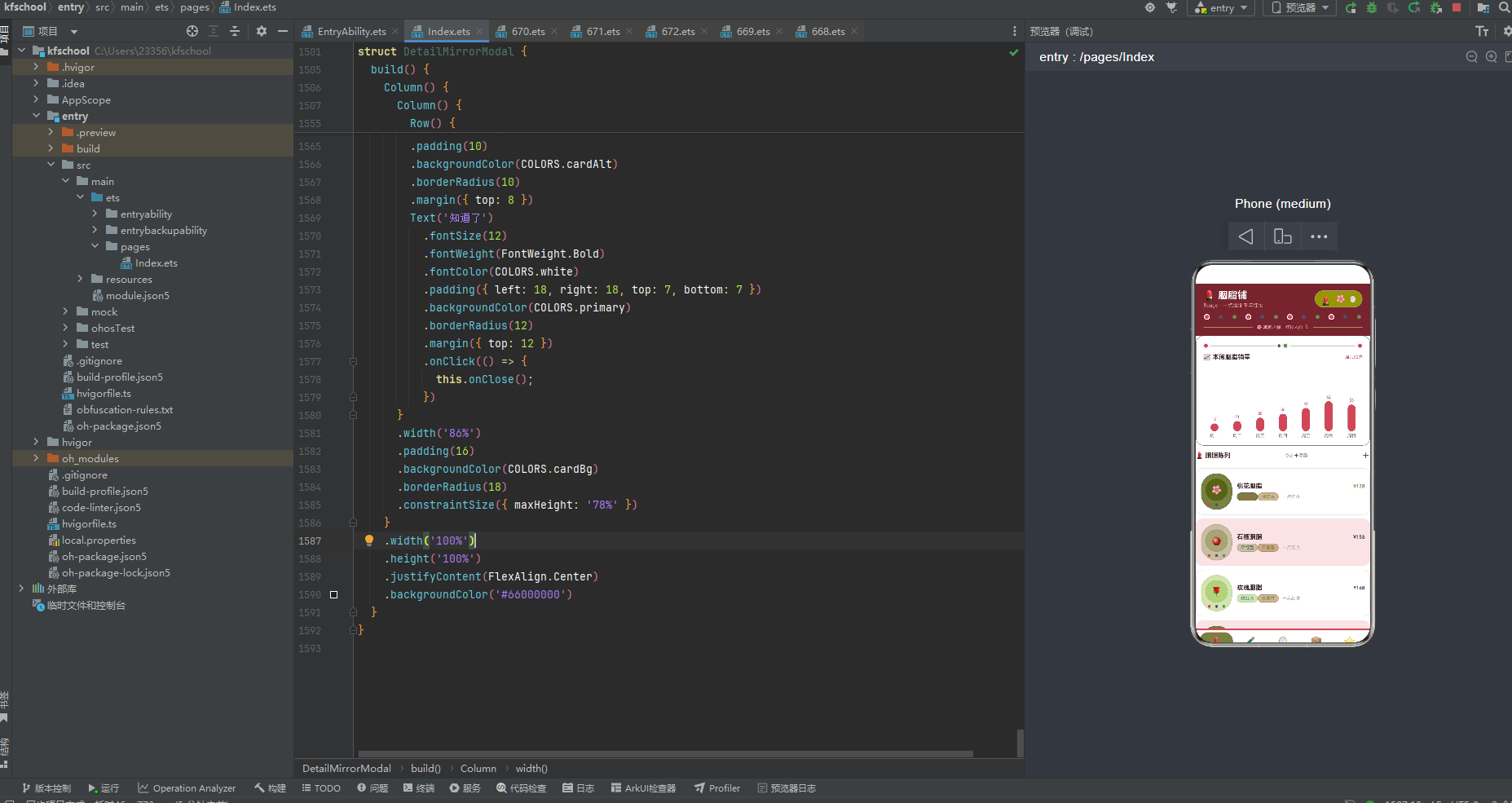
下面逐页展示应用的五大功能模块运行效果。
三、胭脂页:应用的核心陈列中枢
胭脂页是整个应用的默认首页,也是信息密度最高的页面之一。它包含了本周胭脂销量柱状图、胭脂陈列列表,以及定制胭脂弹窗。
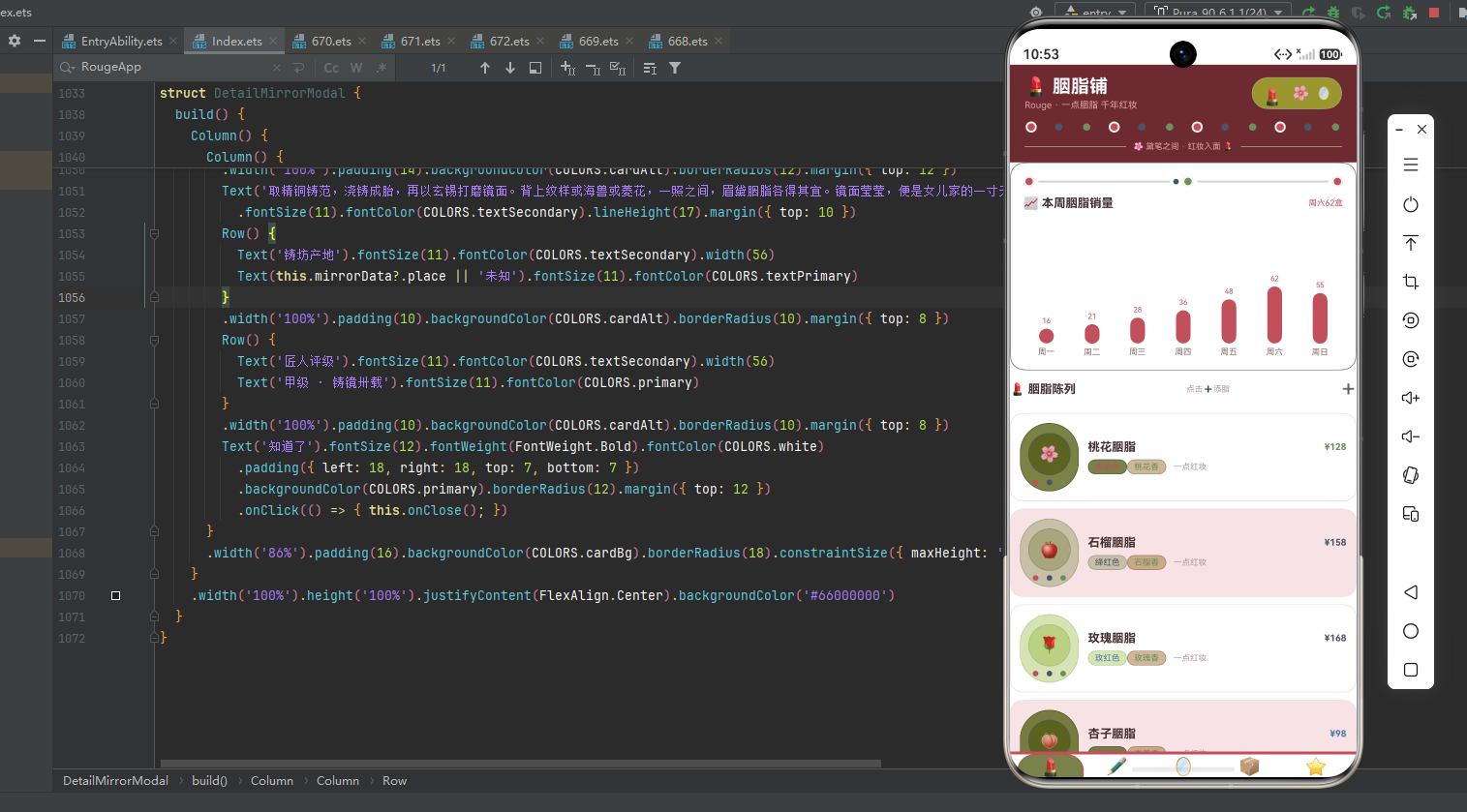
胭脂页顶部是"本周胭脂销量"柱状图卡片,通过 ForEach 遍历一周七天的销量数据,柱子高度直接绑定销量数值,销量超过 45 的日期(周五、周六、周日)使用主色胭脂红 #C2505A 突出显示,其余日期使用 rosy 胭脂色,形成自然的高低起伏。周六以 62 盒的销量居首,符合胭脂作为古妆雅器在周末热销的真实节奏。柱状图上方还有一条装饰线,由胭脂色方块、黛灰横线、绿色方块交替组成,模仿胭脂盒的"盖与奁"结构。
下方是胭脂陈列列表,12 款胭脂卡片采用"左图标右文字"的横向布局。左侧图标区展示胭脂 emoji 图标,图标使用圆形(borderRadius 23),背景色通过动态颜色函数按胭脂名称分档着色,图标下方还有三个小圆点装饰(胭脂色/黛灰色/绿色),模仿胭脂盒的"三色奁"结构。整个图标区外层也是圆形(borderRadius 34),营造出胭脂盒的圆润感。右侧信息区展示胭脂名称、价格(通过动态颜色函数按价格分档着色)、色调标签、香气标签和"一点红妆"提示文字。卡片背景使用白色与浅粉色奇偶交替,提升长列表可读性。
12 款胭脂覆盖了从 88 元(蜜桃胭脂)到 208 元(朱砂胭脂)的完整价格梯队,色调涵盖绯桃、绛红、玫红、杏红、绯红、海棠红、荔红、藕粉、朱红、樱红、紫红、蜜桃粉十二种,香气从桃花香、石榴香、玫瑰香到杏花香、牡丹香、海棠香等各有特色,每款都配有独特的 emoji 图标(桃花用🌸、石榴用🍎、玫瑰用🌹、朱砂用🔴等),让胭脂不仅是美妆用品,更是嗅觉与视觉的双重体验。右上角 ➕ 按钮点击可弹出"定制胭脂"弹窗,确认后会真正往数据数组中 push 一条"晚霞胭脂"新数据。
四、眉黛页:销量排行与撤黛管理
眉黛页以"眉黛"为核心,顶部是胭脂销量 TOP6 横向条形图,下方是眉黛匣列表,支持撤黛操作。
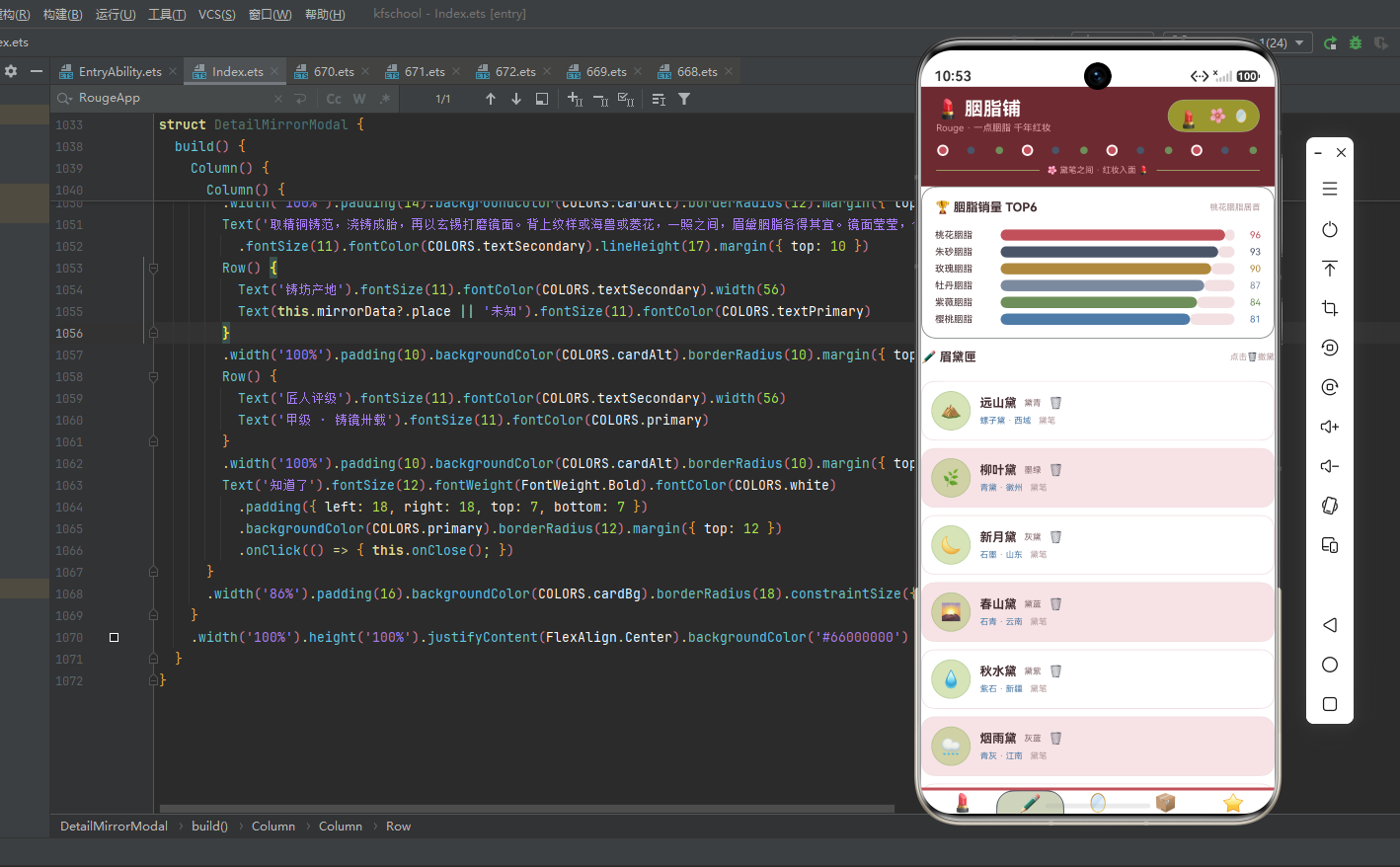
顶部 TOP6 卡片通过横向进度条展示销量排名前六的胭脂品种,桃花胭脂以 96 的销量居首,朱砂胭脂、玫瑰胭脂紧随其后。进度条使用 layoutWeight 比例法实现,已售部分与剩余部分按比例分配宽度,颜色直接取数据中的配置色,六种胭脂各有特色。
下方眉黛匣列表展示 12 款眉黛,卡片采用"左图标右文字"布局。左侧展示眉黛 emoji 图标,图标使用圆形(borderRadius 21),背景色通过 getRougeColor 函数按眉黛名称分档着色。右侧展示眉黛名称、颜色(黛青/墨绿/灰黛/黛蓝等)、材质与产地(“螺子黛 · 西域”)和 🗑️ 撤黛按钮。
12 款眉黛颜色覆盖黛青、墨绿、灰黛、黛蓝、黛紫、灰蓝、墨黛、黛粉、银黛、棕黛等,材质涵盖螺子黛、青黛、石墨、石青、紫石、青灰、竹管、螺壳、松烟、花汁、云母、沉香十二种,产地从西域、徽州、山东、云南、新疆、江南到湖州、南海、安徽、苏州、湖北、海南,呈现出"黛材天下"的格局。点击 🗑️ 按钮弹出"撤下眉黛"二次确认弹窗,确认后会通过 splice 真正从数据数组中删除对应眉黛项,列表会实时刷新。
五、铜镜页:色系构成与铸镜详情
铜镜页以"铜镜"为核心,顶部是色系构成占比图,下方是铜镜架列表,支持查看详情。
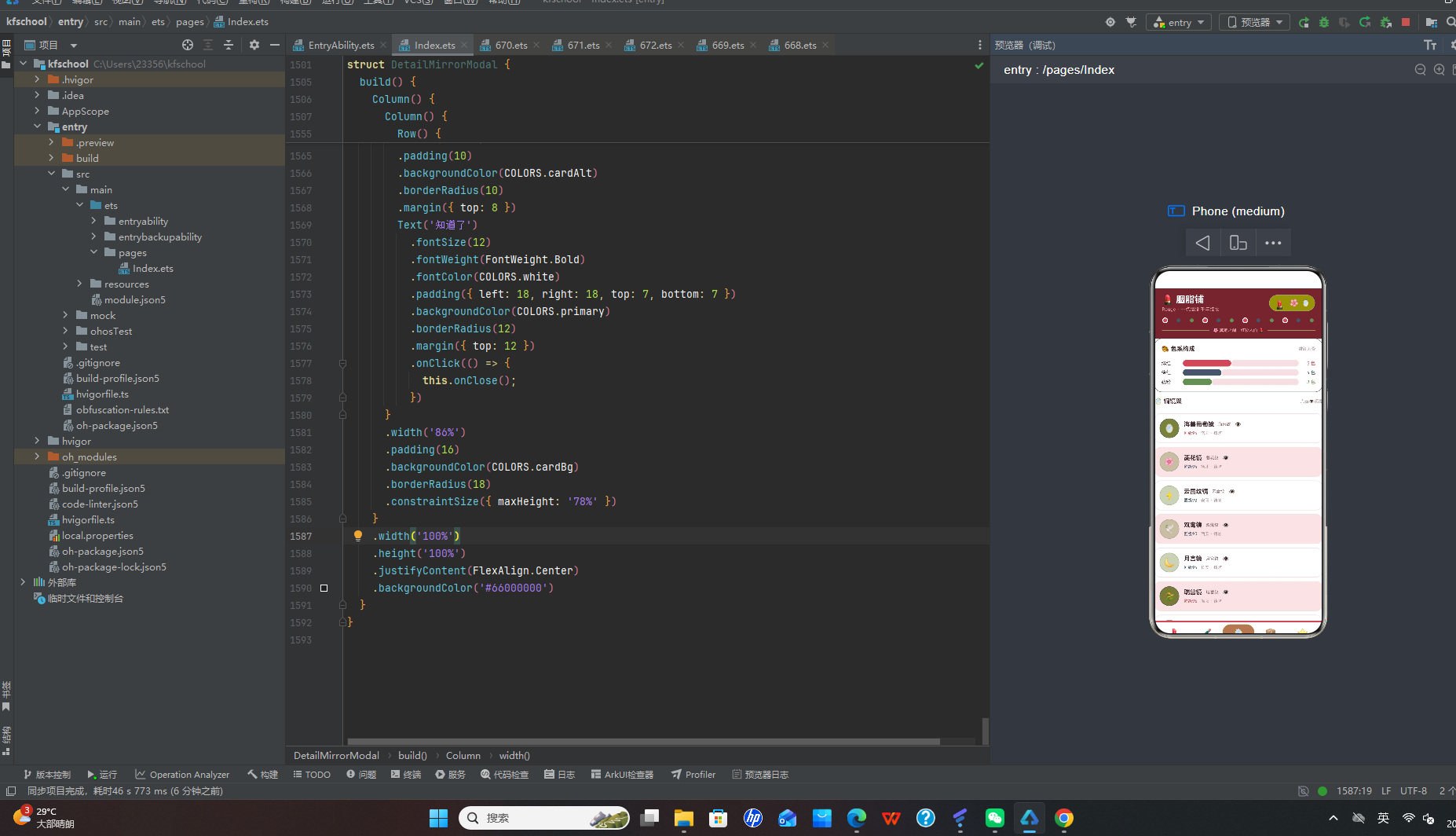
顶部色系构成卡片展示三种色系的分布占比:绯红 5 色、绛红 4 色、藕粉 3 色,合计 12 色,恰好对应胭脂陈列的色调总数。进度条以 12 为满刻度进行比例渲染,比百分比更直观地传达了"几色系"的语义。
下方铜镜架列表展示 12 款铜镜,卡片采用"左图标右文字"布局。左侧展示铜镜 emoji 图标,图标使用圆形(borderRadius 21),背景色通过 getMirrorColor 函数按匠级分数分档着色(≥96用胭脂红、≥93用黛灰、其余用竹叶绿)。右侧展示铜镜名称、纹样(海兽纹/菱花纹/云雷纹等)、匠级评分(“匠级96”,颜色按匠级动态着色)、产地(“洛阳 · 铸坊”)和 👁️ 详情按钮。
12 款铜镜纹样覆盖海兽纹、菱花纹、云雷纹、双鸾纹、月宫纹、瑞兽纹、花鸟纹、八卦纹、铭文、日光纹、昭明纹、四神纹十二种传统铜镜纹样,匠级从 90(日光镜)到 97(四神镜)不等,四神镜以 97 级居首,海兽葡萄镜和瑞兽镜 96 级次之,符合"镜以纹为贵、以精为上"的行业共识。产地从洛阳、扬州、安阳、西安、长安、苏州到成都、临淄、咸阳,几乎囊括了中国古代铸镜的全部名产地。点击 👁️ 按钮弹出"铜镜详情"弹窗,弹窗通过 getMirrorData 方法从数据源中查找对应铜镜的真实数据,展示铜镜 emoji、名称、文艺风格描述文案(“取精铜铸范,浇铸成胎,再以玄锡打磨镜面。背上纹样或海兽或菱花,一照之间,眉黛胭脂各得其宜。”)、真实产地(从 mirrorData.place 获取)和匠人评级(“甲级 · 铸镜卅载”)。
六、订单页:制脂工艺热度与订单改单
订单页以"订单"为核心,顶部是制脂工艺热度排行,下方是订单列表,支持修改订单。
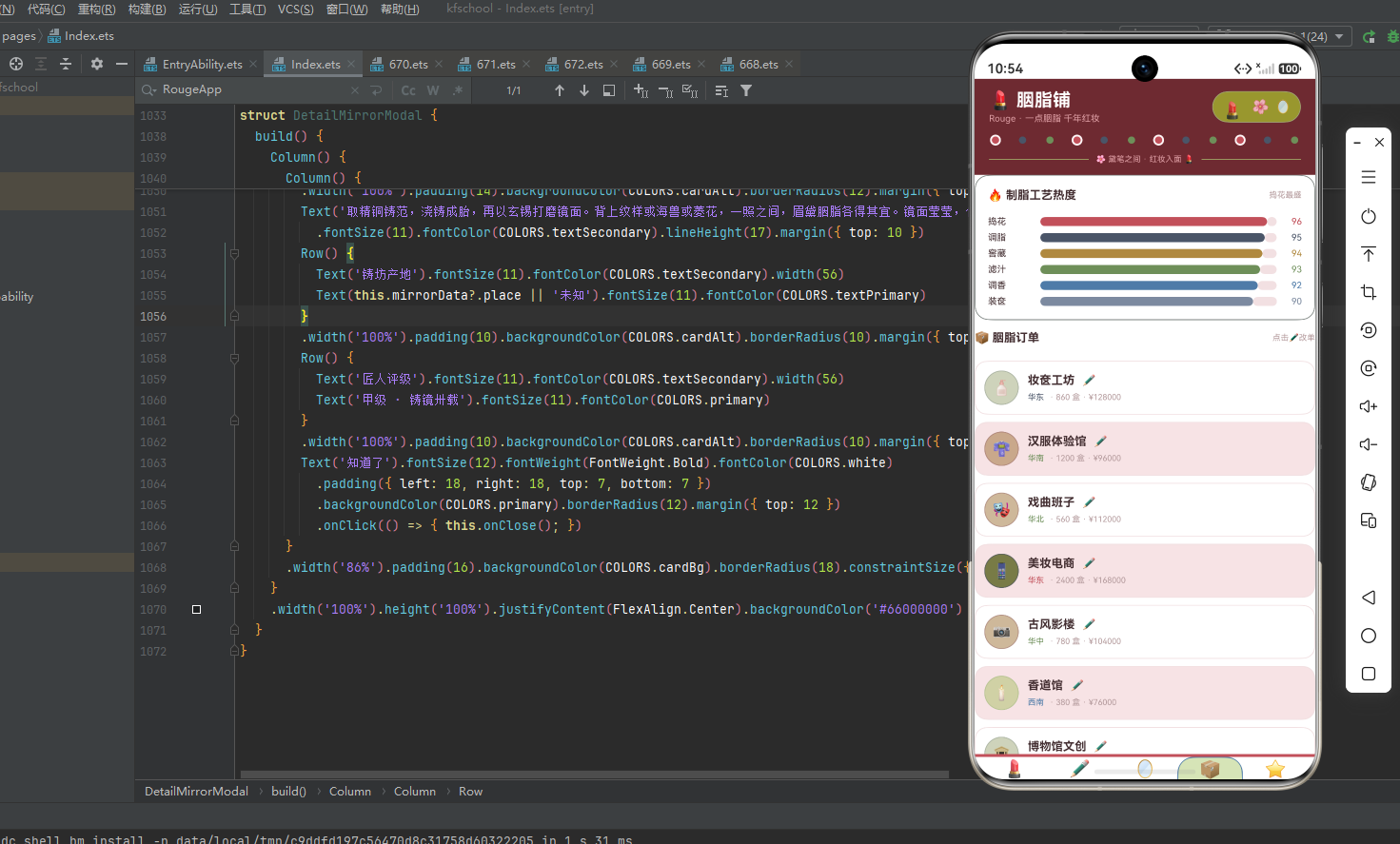
顶部制脂工艺热度卡片展示六门工序的热度指数:捣花 96、调脂 95、窖藏 94、滤汁 93、调香 92、装奁 90,恰好对应胭脂制作的完整流程(捣花→调脂→窖藏→滤汁→调香→装奁),热度依次递减,呈现出"核心工序最热、收尾工序稍低"的合理分布。六根进度条都接近满格,视觉上呈现出"六道工序皆热"的繁荣感,颜色从胭脂红到黛灰到金棕到竹叶绿到蓝色到浅灰,形成了一条色彩渐变的工艺流水线。
下方订单列表展示 12 条订单,卡片采用"左图标右文字"布局。左侧展示客户 emoji 图标,图标使用圆形(borderRadius 19),背景色通过动态颜色函数按订单金额分档着色(16万以上胭脂红、12-16万黛灰、9-12万竹叶绿、9万以下蓝色)。右侧展示客户名称、✏️ 编辑按钮、区域标签和订单详情(“· 860 盒 · ¥128000”)。
12 类客户覆盖妆奁工坊、汉服体验馆、戏曲班子、美妆电商、古风影楼、香道馆、博物馆文创、民宿集群、老字号药铺、直播妆造场、茶楼雅集、海外汉文化节。美妆电商以 2400 盒的数量居首,海外汉文化节以 182000 元的金额居首,博物馆文创虽然只有 460 盒,但金额高达 138000,单价最高,体现了非遗古妆在文创收藏市场的高溢价。点击 ✏️ 按钮弹出"修改订单"弹窗,可调整数量和金额,确认后会通过 editOrderItem 方法真正更新对应订单的 count(+100)和 amount(+5000),列表会实时刷新。
七、客评页:口碑展示与标签体系
客评页是应用中最具"人情味"的页面,展示了 12 条用户好评。
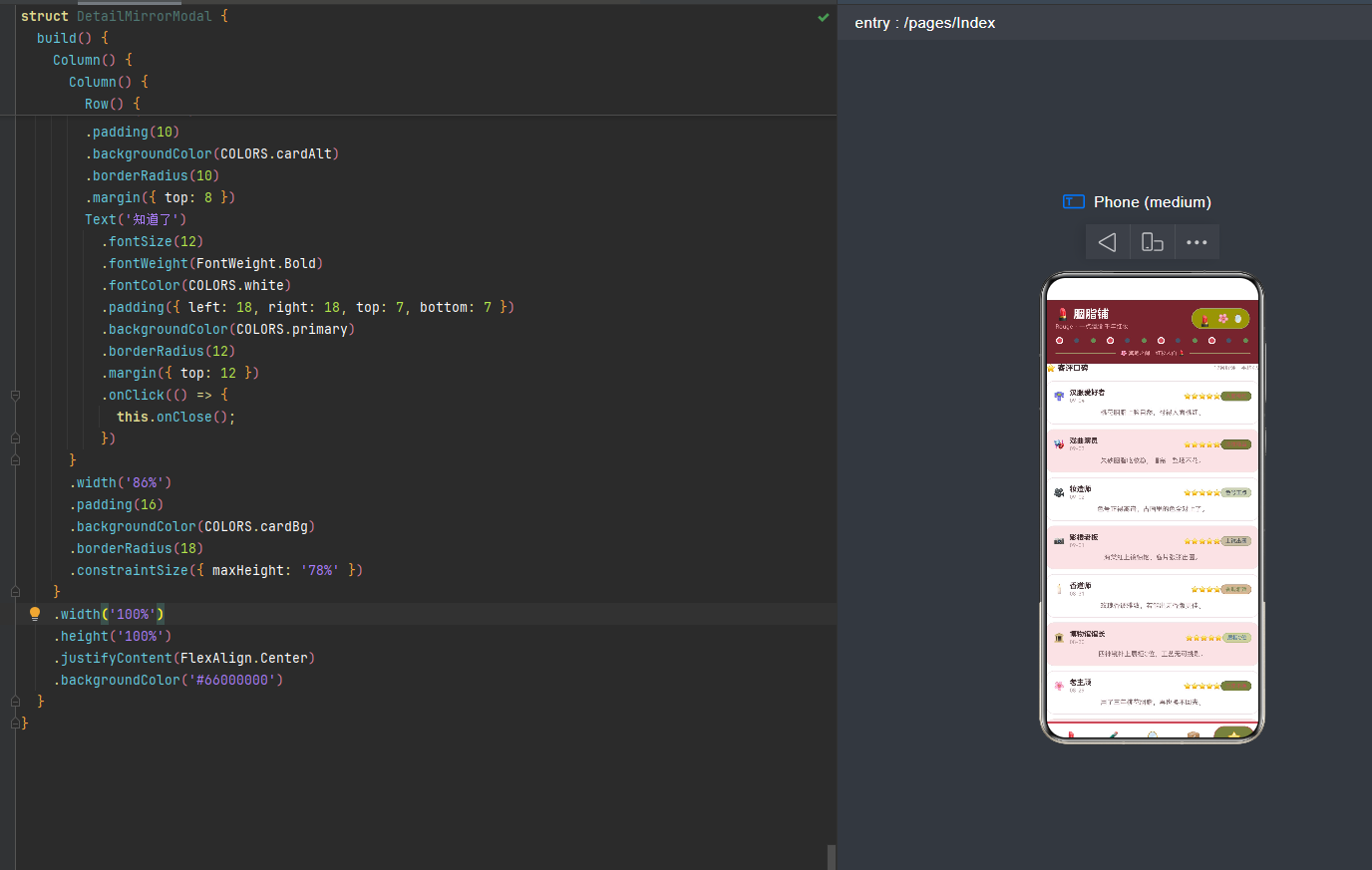
页面顶部是标题行"⭐ 客评口碑"和统计摘要"12条好评 · 平均4.9"。下方 12 条评价卡片采用"左头像右信息"的横向布局:最左侧是用户 emoji 头像,中间是用户名称和日期,右侧是星级评分(通过 String.repeat 一行代码生成对应数量的星星)和评价标签(通过动态颜色函数按标签语义分档着色)。评价内容正文在卡片下方,使用次要色文字和 16px 行高。
12 条评价每条都有独特的标签:“人面桃红”、“吃妆稳当”、“色号正点”、“上镜出圈”、“香调雅致”、“展柜C位”、“三年不换”、“卖断货了”、“好用顺手”、“奁中珍品”、“雅集之选”、“东方韵味”,这些标签既概括了评价核心,又形成了胭脂铺的口碑关键词云。
评价内容充满生活气息,如"桃花胭脂上脸自然,衬得人面桃红"、“朱砂胭脂吃妆稳,唱完一整场不花”、“色号正得离谱,古画里的色全对上了”、“海棠红上镜惊艳,客片张张出圈”、“用了三年桃花胭脂,再也换不回去”、“当场试色蜜桃粉,直播间直接卖断货”、“漂洋过海瓶罐完好,东方韵味十足”,让数据看起来不是冷冰冰的测试桩,而是真实顾客的心声。卡片背景使用白色与浅粉色奇偶交替,整体视觉温馨而雅致。
八、色彩主题系统:胭脂红黛灰的古妆视觉语言
8.1 色彩接口定义
任何一款设计精良的应用,背后都有一套严谨的色彩规范。该应用首先通过一个 RougePalette 接口,将整个应用所需的色彩抽象为一个结构化的契约:
interface RougePalette {
  primary: string;
  primaryLight: string;
  primaryDark: string;
  accent: string;
  accentLight: string;
  bg: string;
  cardBg: string;
  cardAlt: string;
  textPrimary: string;
  textSecondary: string;
  textHint: string;
  border: string;
  line: string;
  success: string;
  warning: string;
  danger: string;
  white: string;
  rosy: string;
  petalWhite: string;
}
- primary:主色调,胭脂红 #C2505A,用于按钮、强调文字、激活状态等高优先级视觉元素,是胭脂的标志性色彩。
- primaryDark:主色深色变体 #6E2A31,作为顶部头部背景,营造深胭脂奁的沉稳感。
- accent:强调色,黛灰 #4A5568,与胭脂红形成冷暖对比,用于眉黛、墨线等元素。
- bg:页面整体背景色 #FBF0F1,粉白暖调,营造肌肤般的温润质感。
- rosy:胭脂色 #C2505A,专用于装饰方块和柱状图非高亮色,语义上强调"胭脂"的质感。
- petalWhite:花瓣白 #FDF6F7,用于装饰方块的边框色,营造出花瓣边缘的柔和质感。
8.2 色彩实例化
const COLORS: RougePalette = {
  primary: '#C2505A',
  primaryLight: '#E0A0A6',
  primaryDark: '#6E2A31',
  accent: '#4A5568',
  accentLight: '#7C8AA0',
  bg: '#FBF0F1',
  cardBg: '#FFFFFF',
  cardAlt: '#F7E3E5',
  textPrimary: '#432E31',
  textSecondary: '#866A6D',
  textHint: '#B49A9C',
  border: '#EBCFD2',
  line: '#F2E0E2',
  success: '#6E8F5A',
  warning: '#B0893F',
  danger: '#8E2E26',
  white: '#FFFFFF',
  rosy: '#C2505A',
  petalWhite: '#FDF6F7'
};
主色 #C2505A 是一种醇厚的胭脂红,既契合"胭脂"主题,又具有传统、雅致的气质。强调色 #4A5568 黛灰与胭脂红形成冷暖对比,呼应眉黛的"黛"色。背景色 #FBF0F1 粉白暖调与主色同暖色系,营造出肌肤般的温润氛围。这种将所有色彩集中管理的做法保证了全局一致性,支持主题切换,降低了维护成本。
九、类型定义:构建严谨的数据契约
应用通过一组接口定义,为每一类业务对象建立了明确的数据契约。
9.1 胭脂、眉黛、铜镜元数据
interface RougeItem {
  name: string; tone: string; scent: string; price: number; emoji: string;
}
interface BrowItem {
  name: string; color: string; material: string; place: string; emoji: string;
}
interface MirrorItem {
  name: string; pattern: string; level: number; place: string; emoji: string;
}
RougeItem 描述胭脂的名称、色调、香气、价格和图标。BrowItem 描述眉黛的名称、颜色、材质、产地和图标。MirrorItem 描述铜镜的名称、纹样、匠级评分、产地和图标,用 level 字段体现"以级定品"。
9.2 订单、客评与图表元数据
interface RougeOrderItem {
  name: string; region: string; count: number; amount: number; emoji: string;
}
interface RougeReviewItem {
  name: string; score: number; date: string; content: string; tag: string; emoji: string;
}
interface WeekRougeMeta { day: string; value: number; }
interface ToneShareMeta { name: string; count: number; color: string; }
interface RougeHotMeta { name: string; heat: number; color: string; }
interface RougeTopMeta { name: string; sold: number; color: string; }
四组图表元数据(WeekRougeMeta/ToneShareMeta/RougeHotMeta/RougeTopMeta)都自带 color 字段,实现了"数据即配色"的图表渲染模式,组件渲染时无需额外的颜色映射逻辑。
十、配置驱动:常量数据与可视化配置
10.1 Tab 导航配置
enum RougeTab { ROUGE = 0, BROW = 1, MIRROR = 2, ORDER = 3, REVIEW = 4 }

const TAB_LIST: TabMeta[] = [
  { key: 'rouge', icon: '💄', label: '胭脂', color: '#C2505A' },
  { key: 'brow', icon: '✏️', label: '眉黛', color: '#4A5568' },
  { key: 'mirror', icon: '🪞', label: '铜镜', color: '#B0893F' },
  { key: 'order', icon: '📦', label: '订单', color: '#4E7BA8' },
  { key: 'review', icon: '⭐', label: '客评', color: '#C2505A' }
];
枚举提供类型安全的 Tab 标识,TAB_LIST 为每个 Tab 配置独立的图标、标签和主题色:胭脂用胭脂红、眉黛用黛灰、铜镜用金棕、订单用蓝色、客评用胭脂红,"一 Tab 一色"让每个页面有鲜明的视觉身份。
10.2 周销量、色系构成、工艺热度与 TOP 榜
const WEEK_SOLD = [
  { day: '周一', value: 16 }, { day: '周二', value: 21 },
  { day: '周三', value: 28 }, { day: '周四', value: 36 },
  { day: '周五', value: 48 }, { day: '周六', value: 62 }, { day: '周日', value: 55 }
];
const TONE_SHARE = [
  { name: '绯红', count: 5, color: '#C2505A' },
  { name: '绛红', count: 4, color: '#4A5568' },
  { name: '藕粉', count: 3, color: '#6E8F5A' }
];
const ROUGE_HOT = [
  { name: '捣花', heat: 96 }, { name: '调脂', heat: 95 }, { name: '窖藏', heat: 94 },
  { name: '滤汁', heat: 93 }, { name: '调香', heat: 92 }, { name: '装奁', heat: 90 }
];
const ROUGE_TOP = [
  { name: '桃花胭脂', sold: 96 }, { name: '朱砂胭脂', sold: 93 },
  { name: '玫瑰胭脂', sold: 90 }, { name: '牡丹胭脂', sold: 87 },
  { name: '紫薇胭脂', sold: 84 }, { name: '樱桃胭脂', sold: 81 }
];
ROUGE_HOT 的六门工艺恰好对应胭脂制作的完整流程(捣花→调脂→窖藏→滤汁→调香→装奁),热度依次递减。ROUGE_COL 常量 [0…11] 用于顶部头部的装饰带渲染,按索引模 3 分别渲染:胭脂色方块带花瓣白边框(模0)、黛灰圆点(模1)、绿色圆点(模2),形成一条色彩斑斓的装饰线,呼应胭脂的"三色奁"视觉元素。
十一、数据模型:可观察的胭脂实体
@Observed
export class RougeData {
  rouges: RougeItem[] = [ /* 12 款胭脂 */ ];
  brows: BrowItem[] = [ /* 12 款眉黛 */ ];
  mirrors: MirrorItem[] = [ /* 12 款铜镜 */ ];
  orders: RougeOrderItem[] = [ /* 12 条订单 */ ];
  reviews: RougeReviewItem[] = [ /* 12 条客评 */ ];
}
RougeData 是核心数据模型,以五个数组承载胭脂铺全部业务信息。@Observed 装饰器使得该类实例在被 @State 或 @ObjectLink 引用时,属性变化能自动触发 UI 刷新。每个数组精确包含 12 条数据,"五五对称、各十二条"的设计保证了每个页面都有足够的内容密度。所有数据在类定义时直接初始化,"字段即默认值"的写法避免了构造函数中重复赋值。
值得注意的是,由于本版本的弹窗会真正修改数据(push 新胭脂、splice 删除眉黛、修改订单数量金额),RougeData 的数组在运行时会动态变化,@Observed + @ObjectLink 的响应式机制确保了数据变化后列表能实时刷新,这是本版本相较于此前纯展示型版本的核心升级。
十二、模拟数据:构建真实的胭脂铺数据环境
12.1 胭脂模拟数据
12 款胭脂覆盖了从 88 元(蜜桃胭脂)到 208 元(朱砂胭脂)的完整价格梯队,色调涵盖绯桃、绛红、玫红、杏红、绯红、海棠红、荔红、藕粉、朱红、樱红、紫红、蜜桃粉十二种,香气从桃花香、石榴香、玫瑰香到杏花香、牡丹香、海棠香等各有特色。桃花胭脂¥128、石榴胭脂¥158、玫瑰胭脂¥168、杏子胭脂¥98、牡丹胭脂¥188、海棠胭脂¥138、荔枝胭脂¥118、莲瓣胭脂¥108、朱砂胭脂¥208、樱桃胭脂¥148、紫薇胭脂¥178、蜜桃胭脂¥88,emoji 图标与胭脂名称呼应(桃花用🌸、石榴用🍎、玫瑰用🌹、朱砂用🔴等)。
12.2 眉黛与铜镜模拟数据
眉黛颜色覆盖黛青、墨绿、灰黛、黛蓝、黛紫、灰蓝、墨黛、黛粉、银黛、棕黛等,材质涵盖螺子黛、青黛、石墨、石青、紫石、青灰、竹管、螺壳、松烟、花汁、云母、沉香十二种,产地从西域到海南呈现出"黛材天下"的格局。铜镜纹样覆盖海兽纹、菱花纹、云雷纹、双鸾纹、月宫纹、瑞兽纹、花鸟纹、八卦纹、铭文、日光纹、昭明纹、四神纹十二种传统铜镜纹样,匠级从 90 到 97 不等,四神镜以 97 级居首,符合"镜以纹为贵、以精为上"的行业共识。
12.3 订单与客评模拟数据
订单覆盖 12 类客户,美妆电商以 2400 盒的数量居首,海外汉文化节以 182000 元的金额居首,博物馆文创单价最高。客评 12 条各有独特标签(人面桃红、吃妆稳当、色号正点、上镜出圈、香调雅致、展柜C位、三年不换、卖断货了、好用顺手、奁中珍品、雅集之选、东方韵味),评价内容充满生活气息,如"桃花胭脂上脸自然,衬得人面桃红"、“用了三年桃花胭脂,再也换不回去”。
十三、动态颜色函数:数据驱动的视觉映射
应用通过五个动态颜色函数将业务数据映射为视觉色彩,实现"数据即配色"。
function getRougeColor(name: string): string {
  if (name === '桃花胭脂' || name === '杏子胭脂' || name === '蜜桃胭脂') return '#C2505A';
  else if (name === '朱砂胭脂' || name === '牡丹胭脂' || name === '石榴胭脂') return '#4A5568';
  else if (name === '莲瓣胭脂' || name === '荔枝胭脂' || name === '海棠胭脂') return '#6E8F5A';
  return '#4E7BA8';
}
function getMirrorColor(level: number): string {
  if (level >= 96) return '#C2505A';
  else if (level >= 93) return '#4A5568';
  return '#6E8F5A';
}
function getPriceColor(price: number): string {
  if (price >= 180) return '#C2505A';
  else if (price >= 140) return '#4A5568';
  else if (price >= 110) return '#6E8F5A';
  return '#4E7BA8';
}
function getOrderColor(amount: number): string {
  if (amount >= 160000) return '#C2505A';
  else if (amount >= 120000) return '#4A5568';
  else if (amount >= 90000) return '#6E8F5A';
  return '#4E7BA8';
}
function getReviewTagColor(tag: string): string { /* 按标签语义分五档着色 */ }
- getRougeColor:按胭脂名称分四组色彩(桃花杏子蜜桃类胭脂红、朱砂牡丹石榴类黛灰、莲瓣荔枝海棠类竹叶绿、其他蓝色)。
- getMirrorColor:按匠级分数分三档(96以上胭脂红、93-95黛灰、其余竹叶绿),“以色定级”。
- getPriceColor:按价格分四档(180以上胭脂红、140-179黛灰、110-139竹叶绿、110以下蓝色)。
- getOrderColor:按订单金额分四档(16万以上胭脂红、12-16万黛灰、9-12万竹叶绿、9万以下蓝色)。
- getReviewTagColor:按评价标签语义分五色系。
值得注意的是,眉黛页调用 getRougeColor(p.name) 复用胭脂颜色函数。由于眉黛元数据 BrowItem 没有专门的颜色映射函数,开发者巧妙地复用胭脂的 getRougeColor,按眉黛名称落入不同档位,为眉黛生成稳定且有区分度的色彩。这种"函数复用"的技巧既避免了为眉黛单独编写颜色函数,又通过统一色调强化了古妆"胭脂眉黛一体"的视觉身份。
十四、入口组件:应用的骨架与导航中枢
14.1 组件声明与状态
@Entry
@Component
struct RougeApp {
  @State curTab: number = 0;
  @State data: RougeData = new RougeData();
  @State showAddRouge: boolean = false;
  @State showEditOrder: boolean = false;
  @State showDeleteBrow: boolean = false;
  @State showDetailMirror: boolean = false;
  @State delBrowName: string = '';
  @State detailMirrorName: string = '';
  @State rougeFloat: boolean = false;
  @State petalSpin: boolean = false;
}
10 个 @State 状态分四类:导航状态(curTab)、数据状态(data)、弹窗控制状态(4个布尔+2个参数字符串)、交互动效状态(rougeFloat、petalSpin)。
14.2 核心业务逻辑方法
本版本的核心升级在于入口组件中定义了四个真正操作数据的业务方法:
addRougeItem() {
  const newItem: RougeItem = {
    name: '晚霞胭脂', tone: '晚霞红', scent: '晚香玉', price: 128, emoji: '🌅'
  };
  this.data.rouges.push(newItem);
}
deleteBrowItem(name: string) {
  const index = this.data.brows.findIndex(item => item.name === name);
  if (index !== -1) { this.data.brows.splice(index, 1); }
}
editOrderItem(updatedName: string) {
  const item = this.data.orders.find(o => o.name === updatedName);
  if (item) { item.count += 100; item.amount += 5000; }
}
getMirrorData(name: string): MirrorItem | undefined {
  return this.data.mirrors.find(item => item.name === name);
}
- addRougeItem:往胭脂数组 push 一条"晚霞胭脂"新数据,定制胭脂弹窗确认后调用。
- deleteBrowItem:通过 findIndex 找到对应眉黛,用 splice 从数组中删除,撤下眉黛弹窗确认后调用。
- editOrderItem:通过 find 找到对应订单,修改 count(+100)和 amount(+5000),修改订单弹窗确认后调用。
- getMirrorData:通过 find 查找对应铜镜的完整数据,返回给铜镜详情弹窗使用,弹窗中 mirrorData?.place 可获取真实产地。
这四个方法通过弹窗的 onConfirm 回调触发,实现了弹窗与数据源的真正联动,@Observed + @ObjectLink 的响应式机制确保数据变化后列表实时刷新。
14.3 顶部头部构建
顶部头部采用 primaryDark #6E2A31 深胭脂色背景。第一层标题栏左侧是标题"胭脂铺"和副标题"Rouge · 一点胭脂 千年红妆",右侧是动效区:口红💄点击触发上下浮动动画(translate Y 从 4 到 -10,duration 700ms)、花瓣🌸点击触发 180 度旋转动画(duration 800ms)、铜镜🪞静态装饰。第二层是"装饰带",通过 ForEach 遍历 ROUGE_COL,按模 3 渲染胭脂色方块带花瓣白边框、黛灰圆点、绿色圆点,形成一条色彩斑斓的装饰线,呼应胭脂的"三色奁"。第三层是标语分割线"🌸 黛笔之间 · 红妆入面 💄"。
14.4 底部 Tab 导航
底部导航顶部有一条 3px 高的胭脂红色装饰条,与深胭脂色头部形成上下呼应。每个 Tab 激活态有三重视觉反馈:标签文字主题色加粗、背景填充主题色 8% 透明度、主题色实线边框,圆角 18(圆润的胭脂盒风格)。导航项的 padding 设计特殊(top:2 bottom:30),让图标和文字偏上显示,底部留出更多空间,营造出悬浮感。非激活态用灰色文字、透明背景、无边框。导航栏高度 60。
14.5 条件渲染弹窗与数据交互
应用采用条件渲染(if-else)实现四个弹窗:定制胭脂(AddRougeModal)、修改订单(EditRougeOrderModal)、撤下眉黛(DeleteBrowModal)、铜镜详情(DetailMirrorModal)。每个弹窗都接收 onClose 和 onConfirm 回调(铜镜详情只有 onClose),确认按钮点击后先调用父组件的业务方法修改数据,再关闭弹窗。弹窗直接叠加在根 Column 末尾,通过布尔状态控制显隐,每个弹窗内部是全屏半透明遮罩(#66000000)+ 居中白色卡片。弹窗卡片统一使用圆角 18,信息行圆角 10。
十五、关键技术特性对比
| 特性维度 | 实现方式 | 技术要点 | 设计价值 |
|---|---|---|---|
| 色彩管理 | RougePalette 接口 + COLORS 常量 | 集中定义 20 种语义色,含 rosy/petalWhite 装饰色 | 保证视觉一致性,支持主题切换 |
| 数据建模 | @Observed 装饰的 RougeData 类 | 5 个数组各 12 条数据,运行时可动态增删改 | 数据与 UI 双向联动,响应式更新 |
| 配置驱动 | 常量数组 + 元数据接口 | WEEK_SOLD/TONE_SHARE/ROUGE_HOT/ROUGE_TOP 自带 color | 数据与表现解耦,扩展零成本 |
| 动态颜色 | 5 个全局映射函数 | 按名称/匠级/价格/金额/标签分档着色,眉黛复用 getRougeColor | 数据即配色,信息密度翻倍 |
| 弹窗数据交互 | onConfirm 回调 + 4 个业务方法 | addRougeItem push、deleteBrowItem splice、editOrderItem 修改、getMirrorData 查找 | 弹窗真正修改数据,列表实时刷新 |
| 状态管理 | @State + @ObjectLink | 10 个状态分四类(导航/数据/弹窗/动效) | 细粒度状态控制,自动触发渲染 |
| 组件化 | @Component + @Builder | 5 个页面组件 + 4 个弹窗组件 + RougeTag 通用组件 | 高内聚低耦合,代码复用率高 |
| 模态交互 | 条件渲染弹窗 + 全屏遮罩 | 4 个弹窗 if-else 叠加,#66000000 半透明遮罩 | 灵活可控,完全自定义布局 |
| 列表渲染 | ForEach + 奇偶交替背景 | 12 条数据 × 5 页面,cardBg/cardAlt 交替 | 数据驱动渲染,长列表可读性强 |
| 数据可视化 | 柱状图 + 横向条形图 | height 绑定数据、layoutWeight 比例法、阈值着色 | 多维度呈现,直观易读 |
| 星级渲染 | String.repeat 技巧 | ‘⭐’.repeat(score) 一行代码生成星级 | 简洁高效,无需循环 |
| 防御编程 | 字段默认值 + 类型安全 | 所有数据字段声明即初始化,枚举替代魔法数字 | 健壮性强,无运行时异常 |
| 布局系统 | Column/Row + layoutWeight | 弹性权重分配、条件渲染弹窗、Scroll 滚动容器 | 自适应布局,层次分明 |
| 交互动效 | translate + rotate + animation | 口红浮动 700ms、花瓣旋转 800ms、EaseOut 曲线 | 静态头部灵动化,趣味性强 |
| 视觉层次 | 装饰带/圆角18/圆形图标 | ROUGE_COL 模3渲染装饰、卡片圆角18、图标圆形模仿胭脂盒 | 精致细腻,胭脂氛围感强 |
完整代码
interface RougePalette {
primary: string;
primaryLight: string;
primaryDark: string;
accent: string;
accentLight: string;
bg: string;
cardBg: string;
cardAlt: string;
textPrimary: string;
textSecondary: string;
textHint: string;
border: string;
line: string;
success: string;
warning: string;
danger: string;
white: string;
rosy: string;
petalWhite: string;
}
const COLORS: RougePalette = {
primary: '#C2505A',
primaryLight: '#E0A0A6',
primaryDark: '#6E2A31',
accent: '#4A5568',
accentLight: '#7C8AA0',
bg: '#FBF0F1',
cardBg: '#FFFFFF',
cardAlt: '#F7E3E5',
textPrimary: '#432E31',
textSecondary: '#866A6D',
textHint: '#B49A9C',
border: '#EBCFD2',
line: '#F2E0E2',
success: '#6E8F5A',
warning: '#B0893F',
danger: '#8E2E26',
white: '#FFFFFF',
rosy: '#C2505A',
petalWhite: '#FDF6F7'
};
enum RougeTab {
ROUGE = 0,
BROW = 1,
MIRROR = 2,
ORDER = 3,
REVIEW = 4
}
interface TabMeta {
key: string;
icon: string;
label: string;
color: string;
}
const TAB_LIST: TabMeta[] = [
{ key: 'rouge', icon: '💄', label: '胭脂', color: '#C2505A' },
{ key: 'brow', icon: '✏️', label: '眉黛', color: '#4A5568' },
{ key: 'mirror', icon: '🪞', label: '铜镜', color: '#B0893F' },
{ key: 'order', icon: '📦', label: '订单', color: '#4E7BA8' },
{ key: 'review', icon: '⭐', label: '客评', color: '#C2505A' }
];
const ROUGE_COL: number[] = [0, 1, 2, 3, 4, 5, 6, 7, 8, 9, 10, 11];
interface RougeItem {
name: string;
tone: string;
scent: string;
price: number;
emoji: string;
}
interface BrowItem {
name: string;
color: string;
material: string;
place: string;
emoji: string;
}
interface MirrorItem {
name: string;
pattern: string;
level: number;
place: string;
emoji: string;
}
interface RougeOrderItem {
name: string;
region: string;
count: number;
amount: number;
emoji: string;
}
interface RougeReviewItem {
name: string;
score: number;
date: string;
content: string;
tag: string;
emoji: string;
}
interface WeekRougeMeta {
day: string;
value: number;
}
interface ToneShareMeta {
name: string;
count: number;
color: string;
}
interface RougeHotMeta {
name: string;
heat: number;
color: string;
}
interface RougeTopMeta {
name: string;
sold: number;
color: string;
}
const WEEK_SOLD: WeekRougeMeta[] = [
{ day: '周一', value: 16 }, { day: '周二', value: 21 },
{ day: '周三', value: 28 }, { day: '周四', value: 36 },
{ day: '周五', value: 48 }, { day: '周六', value: 62 },
{ day: '周日', value: 55 }
];
const TONE_SHARE: ToneShareMeta[] = [
{ name: '绯红', count: 5, color: '#C2505A' },
{ name: '绛红', count: 4, color: '#4A5568' },
{ name: '藕粉', count: 3, color: '#6E8F5A' }
];
const ROUGE_HOT: RougeHotMeta[] = [
{ name: '捣花', heat: 96, color: '#C2505A' },
{ name: '调脂', heat: 95, color: '#4A5568' },
{ name: '窖藏', heat: 94, color: '#B0893F' },
{ name: '滤汁', heat: 93, color: '#6E8F5A' },
{ name: '调香', heat: 92, color: '#4E7BA8' },
{ name: '装奁', heat: 90, color: '#7C8AA0' }
];
const ROUGE_TOP: RougeTopMeta[] = [
{ name: '桃花胭脂', sold: 96, color: '#C2505A' },
{ name: '朱砂胭脂', sold: 93, color: '#4A5568' },
{ name: '玫瑰胭脂', sold: 90, color: '#B0893F' },
{ name: '牡丹胭脂', sold: 87, color: '#7C8AA0' },
{ name: '紫薇胭脂', sold: 84, color: '#6E8F5A' },
{ name: '樱桃胭脂', sold: 81, color: '#4E7BA8' }
];
@Observed
export class RougeData {
rouges: RougeItem[] = [
{ name: '桃花胭脂', tone: '绯桃', scent: '桃花香', price: 128, emoji: '🌸' },
{ name: '石榴胭脂', tone: '绛红', scent: '石榴香', price: 158, emoji: '🍎' },
{ name: '玫瑰胭脂', tone: '玫红', scent: '玫瑰香', price: 168, emoji: '🌹' },
{ name: '杏子胭脂', tone: '杏红', scent: '杏花香', price: 98, emoji: '🍑' },
{ name: '牡丹胭脂', tone: '绯红', scent: '牡丹香', price: 188, emoji: '🌺' },
{ name: '海棠胭脂', tone: '海棠红', scent: '海棠香', price: 138, emoji: '🌼' },
{ name: '荔枝胭脂', tone: '荔红', scent: '荔枝香', price: 118, emoji: '🍓' },
{ name: '莲瓣胭脂', tone: '藕粉', scent: '莲香', price: 108, emoji: '🪷' },
{ name: '朱砂胭脂', tone: '朱红', scent: '无香', price: 208, emoji: '🔴' },
{ name: '樱桃胭脂', tone: '樱红', scent: '樱桃香', price: 148, emoji: '🍒' },
{ name: '紫薇胭脂', tone: '紫红', scent: '紫薇香', price: 178, emoji: '💜' },
{ name: '蜜桃胭脂', tone: '蜜桃粉', scent: '蜜桃香', price: 88, emoji: '🍑' }
];
brows: BrowItem[] = [
{ name: '远山黛', color: '黛青', material: '螺子黛', place: '西域', emoji: '⛰️' },
{ name: '柳叶黛', color: '墨绿', material: '青黛', place: '徽州', emoji: '🌿' },
{ name: '新月黛', color: '灰黛', material: '石墨', place: '山东', emoji: '🌙' },
{ name: '春山黛', color: '黛蓝', material: '石青', place: '云南', emoji: '🌄' },
{ name: '秋水黛', color: '黛紫', material: '紫石', place: '新疆', emoji: '💧' },
{ name: '烟雨黛', color: '灰蓝', material: '青灰', place: '江南', emoji: '🌧️' },
{ name: '青黛笔', color: '黛青', material: '竹管', place: '湖州', emoji: '🖌️' },
{ name: '螺黛笔', color: '墨黛', material: '螺壳', place: '南海', emoji: '🐚' },
{ name: '松烟黛', color: '玄黑', material: '松烟', place: '安徽', emoji: '🌲' },
{ name: '花黛笔', color: '黛粉', material: '花汁', place: '苏州', emoji: '🌸' },
{ name: '云母黛', color: '银黛', material: '云母', place: '湖北', emoji: '✨' },
{ name: '沉香黛', color: '棕黛', material: '沉香', place: '海南', emoji: '🪵' }
];
mirrors: MirrorItem[] = [
{ name: '海兽葡萄镜', pattern: '海兽纹', level: 96, place: '洛阳', emoji: '🪞' },
{ name: '菱花镜', pattern: '菱花纹', level: 94, place: '扬州', emoji: '🌸' },
{ name: '云雷纹镜', pattern: '云雷纹', level: 93, place: '安阳', emoji: '⚡' },
{ name: '双鸾镜', pattern: '双鸾纹', level: 95, place: '西安', emoji: '🕊️' },
{ name: '月宫镜', pattern: '月宫纹', level: 94, place: '长安', emoji: '🌙' },
{ name: '瑞兽镜', pattern: '瑞兽纹', level: 96, place: '洛阳', emoji: '🐉' },
{ name: '花鸟镜', pattern: '花鸟纹', level: 92, place: '苏州', emoji: '🐦' },
{ name: '八卦镜', pattern: '八卦纹', level: 93, place: '成都', emoji: '☯️' },
{ name: '铭文镜', pattern: '铭文', level: 91, place: '临淄', emoji: '📜' },
{ name: '日光镜', pattern: '日光纹', level: 90, place: '咸阳', emoji: '☀️' },
{ name: '昭明镜', pattern: '昭明纹', level: 92, place: '西安', emoji: '🏛️' },
{ name: '四神镜', pattern: '四神纹', level: 97, place: '洛阳', emoji: '🐢' }
];
orders: RougeOrderItem[] = [
{ name: '妆奁工坊', region: '华东', count: 860, amount: 128000, emoji: '🧴' },
{ name: '汉服体验馆', region: '华南', count: 1200, amount: 96000, emoji: '👘' },
{ name: '戏曲班子', region: '华北', count: 560, amount: 112000, emoji: '🎭' },
{ name: '美妆电商', region: '华东', count: 2400, amount: 168000, emoji: '📱' },
{ name: '古风影楼', region: '华中', count: 780, amount: 104000, emoji: '📷' },
{ name: '香道馆', region: '西南', count: 380, amount: 76000, emoji: '🕯️' },
{ name: '博物馆文创', region: '华东', count: 460, amount: 138000, emoji: '🏛️' },
{ name: '民宿集群', region: '西南', count: 640, amount: 64000, emoji: '🏡' },
{ name: '老字号药铺', region: '华北', count: 320, amount: 88000, emoji: '🏮' },
{ name: '直播妆造场', region: '华东', count: 1500, amount: 126000, emoji: '🎥' },
{ name: '茶楼雅集', region: '华中', count: 420, amount: 56000, emoji: '🍵' },
{ name: '海外汉文化节', region: '海外', count: 300, amount: 182000, emoji: '🌏' }
];
reviews: RougeReviewItem[] = [
{ name: '汉服爱好者', score: 5, date: '09-04', content: '桃花胭脂上脸自然,衬得人面桃红。', tag: '人面桃红', emoji: '👘' },
{ name: '戏曲演员', score: 5, date: '09-03', content: '朱砂胭脂吃妆稳,唱完一整场不花。', tag: '吃妆稳当', emoji: '🎭' },
{ name: '妆造师', score: 5, date: '09-02', content: '色号正得离谱,古画里的色全对上了。', tag: '色号正点', emoji: '🎥' },
{ name: '影楼老板', score: 5, date: '09-01', content: '海棠红上镜惊艳,客片张张出圈。', tag: '上镜出圈', emoji: '📷' },
{ name: '香道师', score: 4, date: '08-31', content: '玫瑰香调雅致,若能出无香版更佳。', tag: '香调雅致', emoji: '🕯️' },
{ name: '博物馆馆长', score: 5, date: '08-30', content: '四神镜补上展柜C位,工艺无可挑剔。', tag: '展柜C位', emoji: '🏛️' },
{ name: '老主顾', score: 5, date: '08-29', content: '用了三年桃花胭脂,再也换不回去。', tag: '三年不换', emoji: '🌸' },
{ name: '直播达人', score: 5, date: '08-28', content: '当场试色蜜桃粉,直播间直接卖断货。', tag: '卖断货了', emoji: '📱' },
{ name: '民宿主理人', score: 4, date: '08-27', content: '沉香黛笔好用,若能配个眉匣更完整。', tag: '好用顺手', emoji: '🏡' },
{ name: '妆奁收藏家', score: 5, date: '08-26', content: '螺黛笔笔管光润,摆进奁里正正好。', tag: '奁中珍品', emoji: '💎' },
{ name: '茶楼掌柜', score: 5, date: '08-25', content: '雅集妆造全用它,客人夸了又夸。', tag: '雅集之选', emoji: '🍵' },
{ name: '海外买家', score: 5, date: '08-24', content: '漂洋过海瓶罐完好,东方韵味十足。', tag: '东方韵味', emoji: '🌏' }
];
}
function getRougeColor(name: string): string {
if (name === '桃花胭脂' || name === '杏子胭脂' || name === '蜜桃胭脂') {
return '#C2505A';
} else if (name === '朱砂胭脂' || name === '牡丹胭脂' || name === '石榴胭脂') {
return '#4A5568';
} else if (name === '莲瓣胭脂' || name === '荔枝胭脂' || name === '海棠胭脂') {
return '#6E8F5A';
}
return '#4E7BA8';
}
function getMirrorColor(level: number): string {
if (level >= 96) { return '#C2505A'; } else if (level >= 93) { return '#4A5568'; }
return '#6E8F5A';
}
function getPriceColor(price: number): string {
if (price >= 180) { return '#C2505A'; } else if (price >= 140) { return '#4A5568'; } else if (price >= 110) { return '#6E8F5A'; }
return '#4E7BA8';
}
function getOrderColor(amount: number): string {
if (amount >= 160000) { return '#C2505A'; } else if (amount >= 120000) { return '#4A5568'; } else if (amount >= 90000) { return '#6E8F5A'; }
return '#4E7BA8';
}
function getReviewTagColor(tag: string): string {
if (tag === '人面桃红' || tag === '吃妆稳当' || tag === '三年不换' || tag === '奁中珍品') { return '#C2505A'; } else if (tag === '色号正点' || tag === '上镜出圈' || tag === '卖断货了') { return '#4A5568'; } else if (tag === '香调雅致' || tag === '好用顺手' || tag === '雅集之选' || tag === '东方韵味') { return '#6E8F5A'; } else if (tag === '展柜C位') { return '#4E7BA8'; }
return '#B0893F';
}
@Entry
@Component
struct RougeApp {
@State curTab: number = 0;
@State data: RougeData = new RougeData();
@State showAddRouge: boolean = false;
@State showEditOrder: boolean = false;
@State showDeleteBrow: boolean = false;
@State showDetailMirror: boolean = false;
@State delBrowName: string = '';
@State detailMirrorName: string = '';
@State rougeFloat: boolean = false;
@State petalSpin: boolean = false;
// --- 核心业务逻辑方法 ---
addRougeItem() {
// 真实应用中,您可以从弹窗中拿到 name 和 price 等参数,这里演示直接往数组 push 数据
const newItem: RougeItem = {
name: '晚霞胭脂',
tone: '晚霞红',
scent: '晚香玉',
price: 128,
emoji: '🌅'
};
this.data.rouges.push(newItem);
}
deleteBrowItem(name: string) {
const index = this.data.brows.findIndex(item => item.name === name);
if (index !== -1) {
this.data.brows.splice(index, 1); // 使用 splice 删除真实数据
}
}
editOrderItem(updatedName: string) {
// 演示修改某个订单的数据
const item = this.data.orders.find(o => o.name === updatedName);
if (item) {
item.count += 100; // 比如在原订单上增加 100 盒
item.amount += 5000;
}
}
getMirrorData(name: string): MirrorItem | undefined {
return this.data.mirrors.find(item => item.name === name);
}
build() {
Column() {
Column() {
Column() {
Row() {
Column() {
Text('💄 胭脂铺')
.fontSize(20)
.fontWeight(FontWeight.Bold)
.fontColor(COLORS.white)
Text('Rouge · 一点胭脂 千年红妆')
.fontSize(10)
.fontColor(COLORS.primaryLight)
.margin({ top: 3 })
}
.alignItems(HorizontalAlign.Start)
.layoutWeight(1)
Row() {
Text('💄')
.fontSize(18)
.onClick(() => { this.rougeFloat = !this.rougeFloat; })
.translate({ x: 0, y: this.rougeFloat ? -10 : 4 })
.animation({ duration: 700, curve: Curve.EaseOut })
Text('🌸')
.fontSize(16)
.margin({ left: 10 })
.onClick(() => { this.petalSpin = !this.petalSpin; })
.rotate({ angle: this.petalSpin ? 180 : 0 })
.animation({ duration: 800, curve: Curve.EaseOut })
Text('🪞')
.fontSize(14)
.margin({ left: 6 })
}
.padding({ left: 10, right: 10, top: 6, bottom: 6 })
.backgroundColor(COLORS.primaryLight + '2E')
.borderRadius(24)
.border({ width: 1, color: COLORS.primaryLight + '80' })
}
.width('100%')
Row() {
ForEach(ROUGE_COL, (r: number) => {
Row() {
if (r % 3 === 0) {
Column()
.width(12)
.height(12)
.backgroundColor(COLORS.rosy)
.borderRadius(6)
.border({ width: 2, color: COLORS.petalWhite })
} else if (r % 3 === 1) {
Column()
.width(8)
.height(8)
.backgroundColor(COLORS.accent)
.borderRadius(4)
} else {
Column()
.width(8)
.height(8)
.backgroundColor(COLORS.success)
.borderRadius(4)
}
}
.width(14)
.justifyContent(FlexAlign.Center)
}, (r: number) => 'rouge' + r)
}
.width('100%')
.justifyContent(FlexAlign.SpaceBetween)
.margin({ top: 12 })
Row() {
Column()
.layoutWeight(1)
.height(1)
.backgroundColor(COLORS.primaryLight + '66')
Text('🌸 黛笔之间 · 红妆入面 💄')
.fontSize(9)
.fontColor(COLORS.primaryLight)
.margin({ left: 8, right: 8 })
Column()
.layoutWeight(1)
.height(1)
.backgroundColor(COLORS.primaryLight + '66')
}
.width('100%')
.margin({ top: 10 })
}
.width('100%')
.padding({ left: 16, right: 16, top: 12, bottom: 12 })
.backgroundColor(COLORS.primaryDark)
if (this.curTab === RougeTab.ROUGE) {
RougeContent({ data: this.data, onAdd: () => { this.showAddRouge = true; } })
} else if (this.curTab === RougeTab.BROW) {
BrowContent({ data: this.data, onDel: (n: string) => {
this.delBrowName = n;
this.showDeleteBrow = true;
} })
} else if (this.curTab === RougeTab.MIRROR) {
MirrorContent({ data: this.data, onDetail: (n: string) => {
this.detailMirrorName = n;
this.showDetailMirror = true;
} })
} else if (this.curTab === RougeTab.ORDER) {
RougeOrderContent({ data: this.data, onEdit: () => { this.showEditOrder = true; } })
} else {
RougeReviewContent({ data: this.data })
}
}
.width('100%')
.height('100%')
Column() {
Column().width('100%').height(3).backgroundColor(COLORS.primary)
Row() {
ForEach(TAB_LIST, (t: TabMeta) => {
Column() {
Text(t.icon).fontSize(19)
Text(t.label)
.fontSize(10)
.fontColor(this.curTab === TAB_LIST.indexOf(t) ? t.color : COLORS.textHint)
.fontWeight(this.curTab === TAB_LIST.indexOf(t) ? FontWeight.Bold : FontWeight.Normal)
.margin({ top: 2 })
}
.layoutWeight(1)
.justifyContent(FlexAlign.Center)
.padding({ top: 2, bottom: 30 })
.backgroundColor(this.curTab === TAB_LIST.indexOf(t) ? t.color + '14' : '#00000000')
.borderRadius(18)
.border(this.curTab === TAB_LIST.indexOf(t) ? { width: 1, color: t.color } : { width: 0 })
.onClick(() => { this.curTab = TAB_LIST.indexOf(t); })
}, (t: TabMeta) => t.key)
}
.width('100%')
.height(60)
.padding({ left: 8, right: 8 })
.backgroundColor(COLORS.cardBg)
}
.width('100%')
if (this.showAddRouge) {
AddRougeModal({
onClose: () => { this.showAddRouge = false; },
onConfirm: () => {
this.addRougeItem();
this.showAddRouge = false;
}
})
}
if (this.showEditOrder) {
EditRougeOrderModal({
orderName: '美妆电商',
onClose: () => { this.showEditOrder = false; },
onConfirm: (updatedName: string) => {
this.editOrderItem(updatedName);
this.showEditOrder = false;
}
})
}
if (this.showDeleteBrow) {
DeleteBrowModal({
title: this.delBrowName,
onClose: () => { this.showDeleteBrow = false; },
onConfirm: (delName: string) => {
this.deleteBrowItem(delName);
this.showDeleteBrow = false;
}
})
}
if (this.showDetailMirror) {
DetailMirrorModal({
name: this.detailMirrorName,
mirrorData: this.getMirrorData(this.detailMirrorName),
onClose: () => { this.showDetailMirror = false; }
})
}
}
}
}
@Component
struct RougeTag {
@Prop text: string;
@Prop color: string;
build() {
Text(this.text)
.fontSize(9)
.fontColor(this.color)
.padding({ left: 7, right: 7, top: 2, bottom: 2 })
.backgroundColor(this.color + '14')
.borderRadius(10)
.border({ width: 1, color: this.color + '40' })
}
}
@Component
struct RougeContent {
@ObjectLink data: RougeData;
onAdd: () => void = () => {};
build() {
Scroll() {
Column() {
Column() {
Row() {
Column()
.width(12)
.height(12)
.backgroundColor(COLORS.rosy)
.borderRadius(6)
.border({ width: 2, color: COLORS.petalWhite })
Column()
.layoutWeight(1)
.height(2)
.backgroundColor(COLORS.accent + '55')
.margin({ left: 4, right: 4 })
Column()
.width(6)
.height(6)
.backgroundColor(COLORS.accent)
.borderRadius(3)
.margin({ right: 4 })
Column()
.width(12)
.height(12)
.backgroundColor(COLORS.success)
.borderRadius(6)
.border({ width: 2, color: COLORS.petalWhite })
Column()
.layoutWeight(1)
.height(2)
.backgroundColor(COLORS.accent + '55')
.margin({ left: 4, right: 4 })
Column()
.width(12)
.height(12)
.backgroundColor(COLORS.rosy)
.borderRadius(6)
.border({ width: 2, color: COLORS.petalWhite })
}
.width('100%')
.margin({ bottom: 10 })
Row() {
Text('📈 本周胭脂销量').fontSize(13).fontWeight(FontWeight.Bold).fontColor(COLORS.textPrimary)
Text('周六62盒').fontSize(9).fontColor(COLORS.primary).margin({ left: 8 })
}
.width('100%')
.justifyContent(FlexAlign.SpaceBetween)
Row() {
ForEach(WEEK_SOLD, (w: WeekRougeMeta) => {
Column() {
Text(w.value + '').fontSize(8).fontColor(w.value >= 45 ? COLORS.primary : COLORS.rosy)
Column().width(16).height(w.value).backgroundColor(w.value >= 45 ? COLORS.primary : COLORS.rosy).borderRadius(8).margin({ top: 4 })
Text(w.day).fontSize(9).fontColor(COLORS.textSecondary).margin({ top: 4 })
}
.layoutWeight(1)
.alignItems(HorizontalAlign.Center)
}, (w: WeekRougeMeta) => w.day)
}
.width('100%')
.height(150)
.alignItems(VerticalAlign.Bottom)
.margin({ top: 10 })
}
.width('100%')
.padding(14)
.backgroundColor(COLORS.cardBg)
.borderRadius(16)
.border({ width: 1, color: COLORS.primary + '55' })
Column() {
Row() {
Text('💄 胭脂陈列').fontSize(13).fontWeight(FontWeight.Bold).fontColor(COLORS.textPrimary)
Text('点击➕添脂').fontSize(9).fontColor(COLORS.textHint).margin({ left: 8 })
Text('➕').fontSize(14).margin({ left: 8 }).onClick(() => { this.onAdd(); })
}
.width('100%')
.justifyContent(FlexAlign.SpaceBetween)
.margin({ bottom: 10 })
ForEach(this.data.rouges, (p: RougeItem, i: number) => {
Row() {
Column() {
Column() { Text(p.emoji).fontSize(18).textAlign(TextAlign.Center) }
.width(46).height(46).justifyContent(FlexAlign.Center).alignItems(HorizontalAlign.Center)
.backgroundColor(getRougeColor(p.name) + '14').borderRadius(23)
.border({ width: 1, color: getRougeColor(p.name) + '66' })
Row() {
Column().width(6).height(6).backgroundColor(COLORS.rosy).borderRadius(3)
Column().width(6).height(6).backgroundColor(COLORS.accent).borderRadius(3)
Column().width(6).height(6).backgroundColor(COLORS.success).borderRadius(3)
}
.width(36).justifyContent(FlexAlign.SpaceBetween).margin({ top: 5 })
}
.width(64).padding({ top: 10, bottom: 6 })
.backgroundColor(getRougeColor(p.name) + '0D').borderRadius(34)
.border({ width: 1, color: getRougeColor(p.name) + '33' })
Column() {
Row() {
Text(p.name).fontSize(13).fontWeight(FontWeight.Bold).fontColor(COLORS.textPrimary)
Text('¥' + p.price).fontSize(10).fontWeight(FontWeight.Bold).fontColor(getPriceColor(p.price)).margin({ left: 8 })
}
.width('100%').justifyContent(FlexAlign.SpaceBetween)
Row() {
RougeTag({ text: p.tone + '色', color: getRougeColor(p.name) })
RougeTag({ text: p.scent, color: COLORS.success })
Text('一点红妆').fontSize(9).fontColor(COLORS.textHint).margin({ left: 8 })
}
.width('100%').justifyContent(FlexAlign.Start).margin({ top: 6 })
}
.layoutWeight(1).alignItems(HorizontalAlign.Start).margin({ left: 10 })
}
.width('100%').padding(10)
.backgroundColor(i % 2 === 0 ? COLORS.cardBg : COLORS.cardAlt)
.borderRadius(14).border({ width: 1, color: COLORS.line }).margin({ top: 8 })
}, (p: RougeItem, i: number) => 'rg' + p.name + i)
}
.width('100%')
.margin({ top: 12 })
}
.width('100%').constraintSize({ maxHeight: '100%' })
}
.width('100%').constraintSize({ maxHeight: '100%' })
.scrollable(ScrollDirection.Vertical).scrollBar(BarState.Off)
}
}
@Component
struct BrowContent {
@ObjectLink data: RougeData;
onDel: (n: string) => void = () => {};
build() {
Scroll() {
Column() {
Column() {
Row() {
Text('🏆 胭脂销量 TOP6').fontSize(13).fontWeight(FontWeight.Bold).fontColor(COLORS.textPrimary)
Text('桃花胭脂居首').fontSize(9).fontColor(COLORS.textHint).margin({ left: 8 })
}
.width('100%').justifyContent(FlexAlign.SpaceBetween).margin({ bottom: 10 })
ForEach(ROUGE_TOP, (t: RougeTopMeta) => {
Row() {
Text(t.name).fontSize(10).width(64).fontColor(COLORS.textPrimary)
Row() {
Row().layoutWeight(t.sold).height(12).backgroundColor(t.color).borderRadius(6)
Row().layoutWeight(100 - t.sold).height(12).backgroundColor(COLORS.line).borderRadius(6)
}
.layoutWeight(1).height(12).margin({ left: 6 })
Text(t.sold + '').fontSize(10).width(28).textAlign(TextAlign.End).fontColor(t.color)
}
.width('100%').margin({ top: 6 })
}, (t: RougeTopMeta) => t.name)
}
.width('100%').padding(14).backgroundColor(COLORS.cardBg).borderRadius(16).border({ width: 1, color: COLORS.primary + '55' })
Column() {
Row() {
Text('✏️ 眉黛匣').fontSize(13).fontWeight(FontWeight.Bold).fontColor(COLORS.textPrimary)
Text('点击🗑️撤黛').fontSize(9).fontColor(COLORS.textHint).margin({ left: 8 })
}
.width('100%').justifyContent(FlexAlign.SpaceBetween).margin({ bottom: 10 })
ForEach(this.data.brows, (p: BrowItem, i: number) => {
Row() {
Column() { Text(p.emoji).fontSize(18).textAlign(TextAlign.Center) }
.width(42).height(42).justifyContent(FlexAlign.Center).alignItems(HorizontalAlign.Center)
.backgroundColor(getRougeColor(p.name) + '14').borderRadius(21)
.border({ width: 1, color: getRougeColor(p.name) + '66' })
Column() {
Row() {
Text(p.name).fontSize(13).fontWeight(FontWeight.Bold).fontColor(COLORS.textPrimary)
Text(p.color).fontSize(9).fontColor(COLORS.textSecondary).margin({ left: 8 })
Text('🗑️').fontSize(12).margin({ left: 8 }).onClick(() => { this.onDel(p.name); })
}
.width('100%').justifyContent(FlexAlign.Start)
Row() {
Text(p.material + ' · ' + p.place).fontSize(9).fontColor(getRougeColor(p.name))
Text('黛笔').fontSize(9).fontColor(COLORS.textHint).margin({ left: 8 })
}
.width('100%').justifyContent(FlexAlign.Start).margin({ top: 6 })
}
.layoutWeight(1).alignItems(HorizontalAlign.Start).margin({ left: 10 })
}
.width('100%').padding(10)
.backgroundColor(i % 2 === 0 ? COLORS.cardBg : COLORS.cardAlt)
.borderRadius(14).border({ width: 1, color: COLORS.line }).margin({ top: 8 })
}, (p: BrowItem, i: number) => 'br' + p.name + i)
}
.width('100%').margin({ top: 12 })
}
.width('100%').constraintSize({ maxHeight: '100%' })
}
.width('100%').constraintSize({ maxHeight: '100%' })
.scrollable(ScrollDirection.Vertical).scrollBar(BarState.Off)
}
}
@Component
struct MirrorContent {
@ObjectLink data: RougeData;
onDetail: (n: string) => void = () => {};
build() {
Scroll() {
Column() {
Column() {
Row() {
Text('🎨 色系构成').fontSize(13).fontWeight(FontWeight.Bold).fontColor(COLORS.textPrimary)
Text('绯红为骨').fontSize(9).fontColor(COLORS.textHint).margin({ left: 8 })
}
.width('100%').justifyContent(FlexAlign.SpaceBetween).margin({ bottom: 10 })
ForEach(TONE_SHARE, (s: ToneShareMeta) => {
Row() {
Text(s.name).fontSize(10).width(40).fontColor(COLORS.textPrimary)
Row() {
Row().layoutWeight(s.count).height(14).backgroundColor(s.color).borderRadius(7)
Row().layoutWeight(12 - s.count).height(14).backgroundColor(COLORS.line).borderRadius(7)
}
.layoutWeight(1).height(14).margin({ left: 6 })
Text(s.count + ' 色').fontSize(10).width(36).textAlign(TextAlign.End).fontColor(s.color)
}
.width('100%').margin({ top: 6 })
}, (s: ToneShareMeta) => s.name)
}
.width('100%').padding(14).backgroundColor(COLORS.cardBg).borderRadius(16).border({ width: 1, color: COLORS.primary + '55' })
Column() {
Row() {
Text('🪞 铜镜架').fontSize(13).fontWeight(FontWeight.Bold).fontColor(COLORS.textPrimary)
Text('点击👁️观镜').fontSize(9).fontColor(COLORS.textHint).margin({ left: 8 })
}
.width('100%').justifyContent(FlexAlign.SpaceBetween).margin({ bottom: 10 })
ForEach(this.data.mirrors, (p: MirrorItem, i: number) => {
Row() {
Column() { Text(p.emoji).fontSize(18).textAlign(TextAlign.Center) }
.width(42).height(42).justifyContent(FlexAlign.Center).alignItems(HorizontalAlign.Center)
.backgroundColor(getMirrorColor(p.level) + '14').borderRadius(21)
.border({ width: 1, color: getMirrorColor(p.level) + '66' })
Column() {
Row() {
Text(p.name).fontSize(13).fontWeight(FontWeight.Bold).fontColor(COLORS.textPrimary)
Text(p.pattern).fontSize(9).fontColor(COLORS.textSecondary).margin({ left: 8 })
Text('👁️').fontSize(12).margin({ left: 8 }).onClick(() => { this.onDetail(p.name); })
}
.width('100%').justifyContent(FlexAlign.Start)
Row() {
Text('匠级' + p.level).fontSize(9).fontColor(getMirrorColor(p.level))
Text(p.place + ' · 铸坊').fontSize(9).fontColor(COLORS.textHint).margin({ left: 8 })
}
.width('100%').justifyContent(FlexAlign.Start).margin({ top: 6 })
}
.layoutWeight(1).alignItems(HorizontalAlign.Start).margin({ left: 10 })
}
.width('100%').padding(10)
.backgroundColor(i % 2 === 0 ? COLORS.cardBg : COLORS.cardAlt)
.borderRadius(14).border({ width: 1, color: COLORS.line }).margin({ top: 8 })
}, (p: MirrorItem, i: number) => 'mr' + p.name + i)
}
.width('100%').margin({ top: 12 })
}
.width('100%').constraintSize({ maxHeight: '100%' })
}
.width('100%').constraintSize({ maxHeight: '100%' })
.scrollable(ScrollDirection.Vertical).scrollBar(BarState.Off)
}
}
@Component
struct RougeOrderContent {
@ObjectLink data: RougeData;
onEdit: () => void = () => {};
build() {
Scroll() {
Column() {
Column() {
Row() {
Text('🔥 制脂工艺热度').fontSize(13).fontWeight(FontWeight.Bold).fontColor(COLORS.textPrimary)
Text('捣花最盛').fontSize(9).fontColor(COLORS.textHint).margin({ left: 8 })
}
.width('100%').justifyContent(FlexAlign.SpaceBetween).margin({ bottom: 10 })
ForEach(ROUGE_HOT, (h: RougeHotMeta) => {
Row() {
Text(h.name).fontSize(10).width(52).fontColor(COLORS.textPrimary)
Row() {
Row().layoutWeight(h.heat).height(10).backgroundColor(h.color).borderRadius(5)
Row().layoutWeight(100 - h.heat).height(10).backgroundColor(COLORS.line).borderRadius(5)
}
.layoutWeight(1).height(10).margin({ left: 6 })
Text(h.heat + '').fontSize(10).width(28).textAlign(TextAlign.End).fontColor(h.color)
}
.width('100%').margin({ top: 6 })
}, (h: RougeHotMeta) => h.name)
}
.width('100%').padding(14).backgroundColor(COLORS.cardBg).borderRadius(16).border({ width: 1, color: COLORS.primary + '55' })
Column() {
Row() {
Text('📦 胭脂订单').fontSize(13).fontWeight(FontWeight.Bold).fontColor(COLORS.textPrimary)
Text('点击✏️改单').fontSize(9).fontColor(COLORS.textHint).margin({ left: 8 })
}
.width('100%').justifyContent(FlexAlign.SpaceBetween).margin({ bottom: 10 })
ForEach(this.data.orders, (o: RougeOrderItem, i: number) => {
Row() {
Column() { Text(o.emoji).fontSize(16).textAlign(TextAlign.Center) }
.width(38).height(38).justifyContent(FlexAlign.Center).alignItems(HorizontalAlign.Center)
.backgroundColor(getOrderColor(o.amount) + '14').borderRadius(19)
.border({ width: 1, color: getOrderColor(o.amount) + '66' })
Column() {
Row() {
Text(o.name).fontSize(13).fontWeight(FontWeight.Bold).fontColor(COLORS.textPrimary)
Text('✏️').fontSize(12).margin({ left: 8 }).onClick(() => { this.onEdit(); })
}
.width('100%').justifyContent(FlexAlign.Start)
Row() {
Text(o.region).fontSize(9).fontColor(getOrderColor(o.amount))
Text('· ' + o.count + ' 盒 · ¥' + o.amount).fontSize(9).fontColor(COLORS.textHint).margin({ left: 6 })
}
.width('100%').justifyContent(FlexAlign.Start).margin({ top: 6 })
}
.layoutWeight(1).alignItems(HorizontalAlign.Start).margin({ left: 10 })
}
.width('100%').padding(10)
.backgroundColor(i % 2 === 0 ? COLORS.cardBg : COLORS.cardAlt)
.borderRadius(14).border({ width: 1, color: COLORS.line }).margin({ top: 8 })
}, (o: RougeOrderItem, i: number) => 'od' + o.name + i)
}
.width('100%').margin({ top: 12 })
}
.width('100%').constraintSize({ maxHeight: '100%' })
}
.width('100%').constraintSize({ maxHeight: '100%' })
.scrollable(ScrollDirection.Vertical).scrollBar(BarState.Off)
}
}
@Component
struct RougeReviewContent {
@ObjectLink data: RougeData;
build() {
Scroll() {
Column() {
Row() {
Text('⭐ 客评口碑').fontSize(13).fontWeight(FontWeight.Bold).fontColor(COLORS.textPrimary)
Text('12条好评 · 平均4.9').fontSize(9).fontColor(COLORS.textHint).margin({ left: 8 })
}
.width('100%').justifyContent(FlexAlign.SpaceBetween).margin({ bottom: 6 })
ForEach(this.data.reviews, (r: RougeReviewItem, i: number) => {
Column() {
Row() {
Text(r.emoji).fontSize(15)
Column() {
Text(r.name).fontSize(12).fontWeight(FontWeight.Bold).fontColor(COLORS.textPrimary)
Text(r.date).fontSize(9).fontColor(COLORS.textHint).margin({ top: 1 })
}
.alignItems(HorizontalAlign.Start).layoutWeight(1).margin({ left: 8 })
Text('⭐'.repeat(r.score)).fontSize(10).fontColor(COLORS.warning)
RougeTag({ text: r.tag, color: getReviewTagColor(r.tag) })
}
.width('100%')
Text(r.content).fontSize(11).fontColor(COLORS.textSecondary).lineHeight(16).margin({ top: 6 })
}
.width('100%').padding(12)
.backgroundColor(i % 2 === 0 ? COLORS.cardBg : COLORS.cardAlt)
.borderRadius(14).border({ width: 1, color: COLORS.line }).margin({ top: 8 })
}, (r: RougeReviewItem, i: number) => 'rv' + r.name + i)
}
.width('100%').constraintSize({ maxHeight: '100%' })
}
.width('100%').constraintSize({ maxHeight: '100%' })
.scrollable(ScrollDirection.Vertical).scrollBar(BarState.Off)
}
}
// ============================================================
// 以下修复了各弹窗的交互逻辑,确保点击按钮能够成功修改数据
// ============================================================
@Component
struct AddRougeModal {
onClose: () => void = () => {};
onConfirm: () => void = () => {};
build() {
Column() {
Column() {
Row() {
Text('💄 定制胭脂').fontSize(16).fontWeight(FontWeight.Bold).fontColor(COLORS.textPrimary)
Text('✕').fontSize(16).fontColor(COLORS.textHint).onClick(() => { this.onClose(); })
}
.width('100%').justifyContent(FlexAlign.SpaceBetween)
Row() {
Text('品名').fontSize(11).fontColor(COLORS.textSecondary).width(56)
Text('晚霞胭脂').fontSize(11).fontColor(COLORS.textPrimary)
}
.width('100%').padding(10).backgroundColor(COLORS.cardAlt).borderRadius(10).margin({ top: 14 })
Row() {
Text('色香').fontSize(11).fontColor(COLORS.textSecondary).width(56)
Text('晚霞红 · 晚香玉 · 井泥窑藏').fontSize(11).fontColor(COLORS.textPrimary)
}
.width('100%').padding(10).backgroundColor(COLORS.cardAlt).borderRadius(10).margin({ top: 8 })
Row() {
Text('定价').fontSize(11).fontColor(COLORS.textSecondary).width(56)
Text('¥128').fontSize(11).fontColor(COLORS.primary)
}
.width('100%').padding(10).backgroundColor(COLORS.cardAlt).borderRadius(10).margin({ top: 8 })
Row() {
Text('取消').fontSize(12).fontColor(COLORS.textSecondary).padding({ left: 16, right: 16, top: 7, bottom: 7 })
.borderRadius(12).border({ width: 1, color: COLORS.border }).onClick(() => { this.onClose(); })
Text('确认添脂').fontSize(12).fontWeight(FontWeight.Bold).fontColor(COLORS.white)
.padding({ left: 16, right: 16, top: 7, bottom: 7 })
.backgroundColor(COLORS.primary).borderRadius(12)
.onClick(() => {
// 先调用父组件的添加逻辑,再关闭弹窗
this.onConfirm();
})
}
.width('100%').justifyContent(FlexAlign.End).margin({ top: 14 })
}
.width('86%').padding(16).backgroundColor(COLORS.cardBg).borderRadius(18).constraintSize({ maxHeight: '78%' })
}
.width('100%').height('100%').justifyContent(FlexAlign.Center).backgroundColor('#66000000')
}
}
@Component
struct EditRougeOrderModal {
@Prop orderName: string = '';
onClose: () => void = () => {};
onConfirm: (updatedName: string) => void = () => {};
build() {
Column() {
Column() {
Row() {
Text('✏️ 修改订单').fontSize(16).fontWeight(FontWeight.Bold).fontColor(COLORS.textPrimary)
Text('✕').fontSize(16).fontColor(COLORS.textHint).onClick(() => { this.onClose(); })
}
.width('100%').justifyContent(FlexAlign.SpaceBetween)
Row() {
Text('客户').fontSize(11).fontColor(COLORS.textSecondary).width(56)
Text(this.orderName).fontSize(11).fontColor(COLORS.textPrimary)
}
.width('100%').padding(10).backgroundColor(COLORS.cardAlt).borderRadius(10).margin({ top: 14 })
Row() {
Text('数量').fontSize(11).fontColor(COLORS.textSecondary).width(56)
Text('2400 → 2800 盒').fontSize(11).fontColor(COLORS.primary)
}
.width('100%').padding(10).backgroundColor(COLORS.cardAlt).borderRadius(10).margin({ top: 8 })
Row() {
Text('金额').fontSize(11).fontColor(COLORS.textSecondary).width(56)
Text('¥196000').fontSize(11).fontColor(COLORS.accent)
}
.width('100%').padding(10).backgroundColor(COLORS.cardAlt).borderRadius(10).margin({ top: 8 })
Row() {
Text('取消').fontSize(12).fontColor(COLORS.textSecondary).padding({ left: 16, right: 16, top: 7, bottom: 7 })
.borderRadius(12).border({ width: 1, color: COLORS.border }).onClick(() => { this.onClose(); })
Text('保存修改').fontSize(12).fontWeight(FontWeight.Bold).fontColor(COLORS.white)
.padding({ left: 16, right: 16, top: 7, bottom: 7 })
.backgroundColor(COLORS.primary).borderRadius(12)
.onClick(() => {
// 调用父组件修改逻辑
this.onConfirm(this.orderName);
})
}
.width('100%').justifyContent(FlexAlign.End).margin({ top: 14 })
}
.width('86%').padding(16).backgroundColor(COLORS.cardBg).borderRadius(18).constraintSize({ maxHeight: '78%' })
}
.width('100%').height('100%').justifyContent(FlexAlign.Center).backgroundColor('#66000000')
}
}
@Component
struct DeleteBrowModal {
@Prop title: string;
onClose: () => void = () => {};
onConfirm: (name: string) => void = () => {};
build() {
Column() {
Column() {
Text('🗑️ 撤下眉黛').fontSize(16).fontWeight(FontWeight.Bold).fontColor(COLORS.textPrimary)
Text('确定撤下「' + this.title + '」吗?').fontSize(12).fontColor(COLORS.textSecondary).margin({ top: 10 })
Text('撤下的眉黛将从眉黛匣移除。').fontSize(10).fontColor(COLORS.textHint).margin({ top: 4 })
Row() {
Text('再想想').fontSize(12).fontColor(COLORS.textSecondary).padding({ left: 16, right: 16, top: 7, bottom: 7 })
.borderRadius(12).border({ width: 1, color: COLORS.border }).onClick(() => { this.onClose(); })
Text('确认撤下').fontSize(12).fontWeight(FontWeight.Bold).fontColor(COLORS.white)
.padding({ left: 16, right: 16, top: 7, bottom: 7 })
.backgroundColor(COLORS.danger).borderRadius(12)
.onClick(() => {
// 调用父组件的删除逻辑
this.onConfirm(this.title);
})
}
.width('100%').justifyContent(FlexAlign.End).margin({ top: 16 })
}
.width('86%').padding(16).backgroundColor(COLORS.cardBg).borderRadius(18).constraintSize({ maxHeight: '78%' })
}
.width('100%').height('100%').justifyContent(FlexAlign.Center).backgroundColor('#66000000')
}
}
@Component
struct DetailMirrorModal {
@Prop name: string = '';
@Prop mirrorData: MirrorItem | undefined = undefined;
onClose: () => void = () => {};
build() {
Column() {
Column() {
Row() {
Text('👁️ 铜镜详情').fontSize(16).fontWeight(FontWeight.Bold).fontColor(COLORS.textPrimary)
Text('✕').fontSize(16).fontColor(COLORS.textHint).onClick(() => { this.onClose(); })
}
.width('100%').justifyContent(FlexAlign.SpaceBetween)
Column() {
Text(this.mirrorData?.emoji || '🪞').fontSize(30)
Text(this.mirrorData?.name || '未找到').fontSize(14).fontWeight(FontWeight.Bold).fontColor(COLORS.textPrimary).margin({ top: 6 })
}
.width('100%').padding(14).backgroundColor(COLORS.cardAlt).borderRadius(12).margin({ top: 12 })
Text('取精铜铸范,浇铸成胎,再以玄锡打磨镜面。背上纹样或海兽或菱花,一照之间,眉黛胭脂各得其宜。镜面莹莹,便是女儿家的一寸天地。')
.fontSize(11).fontColor(COLORS.textSecondary).lineHeight(17).margin({ top: 10 })
Row() {
Text('铸坊产地').fontSize(11).fontColor(COLORS.textSecondary).width(56)
Text(this.mirrorData?.place || '未知').fontSize(11).fontColor(COLORS.textPrimary)
}
.width('100%').padding(10).backgroundColor(COLORS.cardAlt).borderRadius(10).margin({ top: 8 })
Row() {
Text('匠人评级').fontSize(11).fontColor(COLORS.textSecondary).width(56)
Text('甲级 · 铸镜卅载').fontSize(11).fontColor(COLORS.primary)
}
.width('100%').padding(10).backgroundColor(COLORS.cardAlt).borderRadius(10).margin({ top: 8 })
Text('知道了').fontSize(12).fontWeight(FontWeight.Bold).fontColor(COLORS.white)
.padding({ left: 18, right: 18, top: 7, bottom: 7 })
.backgroundColor(COLORS.primary).borderRadius(12).margin({ top: 12 })
.onClick(() => { this.onClose(); })
}
.width('86%').padding(16).backgroundColor(COLORS.cardBg).borderRadius(18).constraintSize({ maxHeight: '78%' })
}
.width('100%').height('100%').justifyContent(FlexAlign.Center).backgroundColor('#66000000')
}
}
十六、开发环境搭建
16.1 安装 DevEco Studio
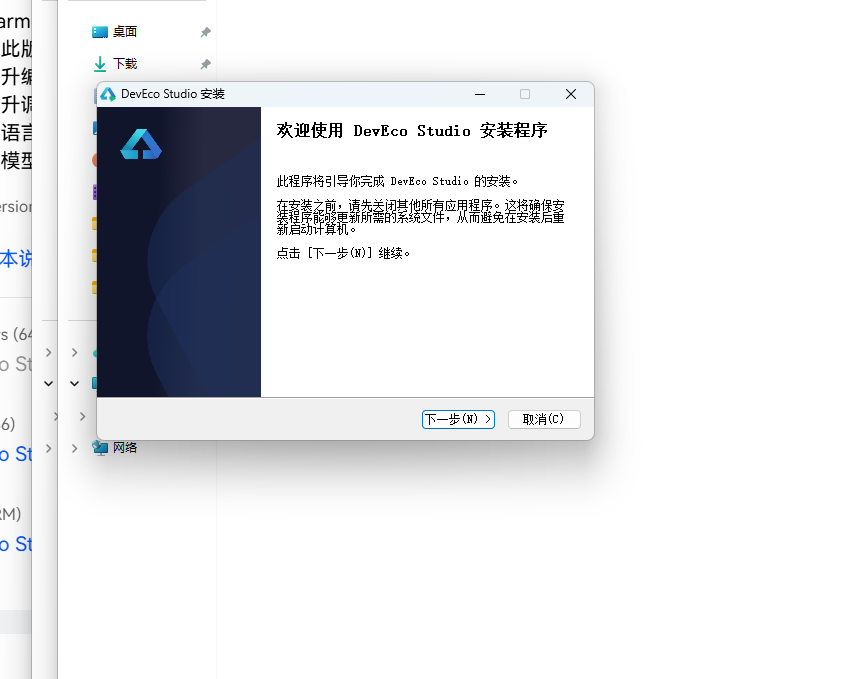
DevEco Studio 是 HarmonyOS 应用开发的官方 IDE。下载安装包后双击运行,进入安装欢迎界面,点击「下一步」继续。
16.2 选择安装路径
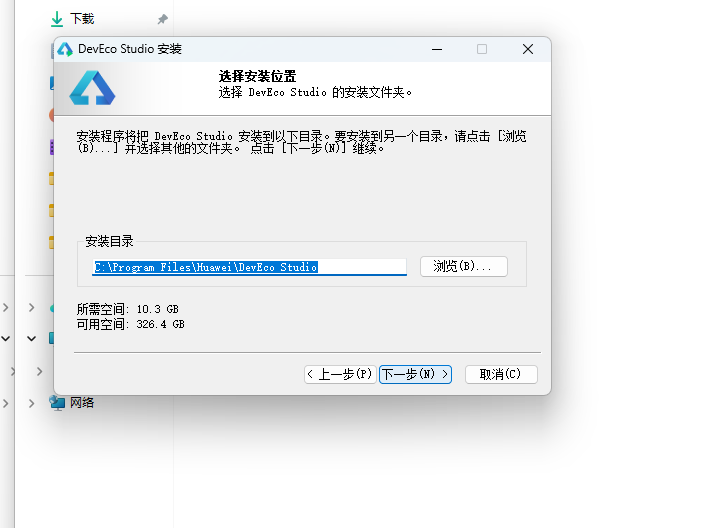
选择目标安装目录,建议安装到非系统盘,确认所需空间后点击「下一步」。
16.3 配置安装选项
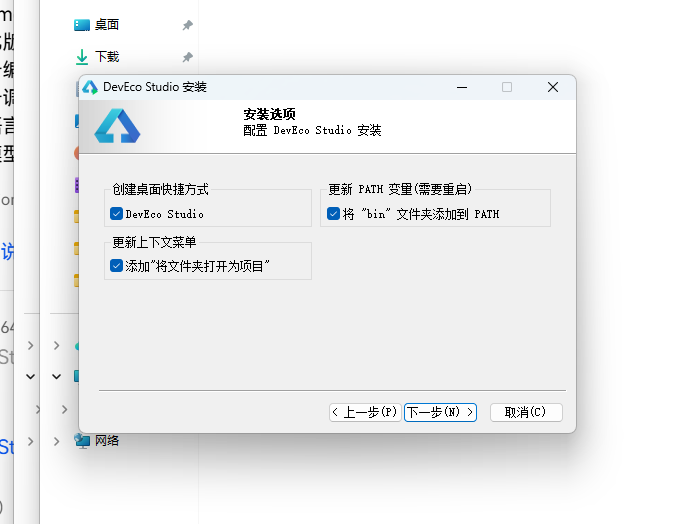
设置环境变量,勾选创建桌面快捷方式、将 bin 文件夹添加到 PATH、添加上下文菜单,但是需要重启一下电脑使环境变量生效。
16.4 选择项目模板
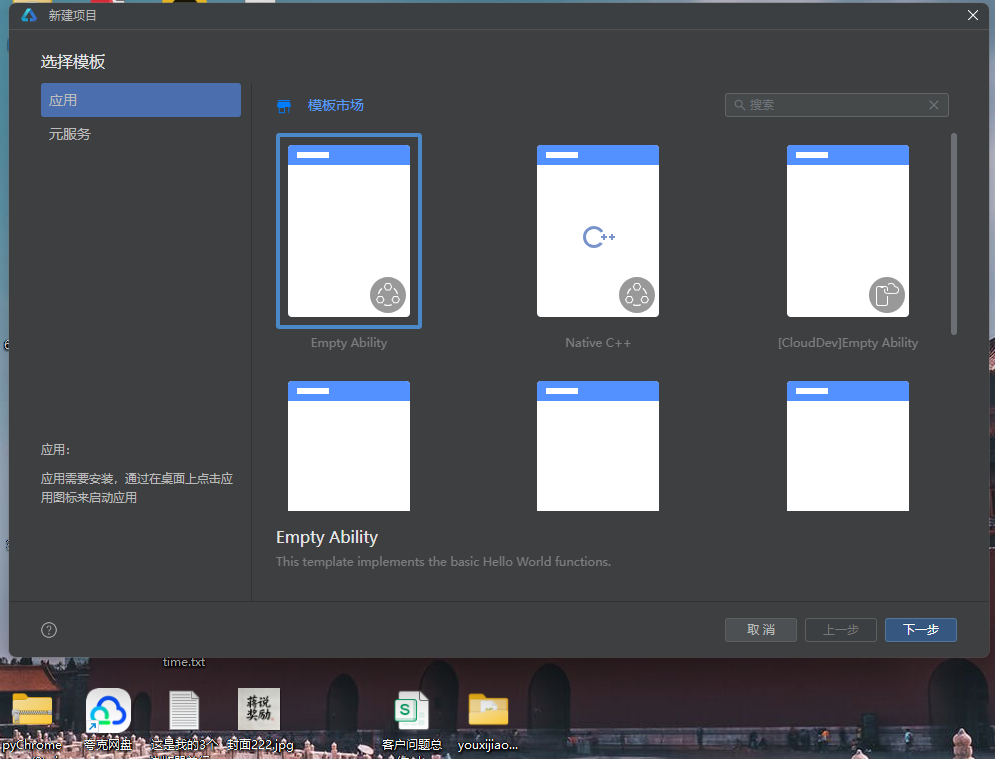
新建一个空白模板,在模板市场中选择 Empty Ability。
16.5 配置项目信息
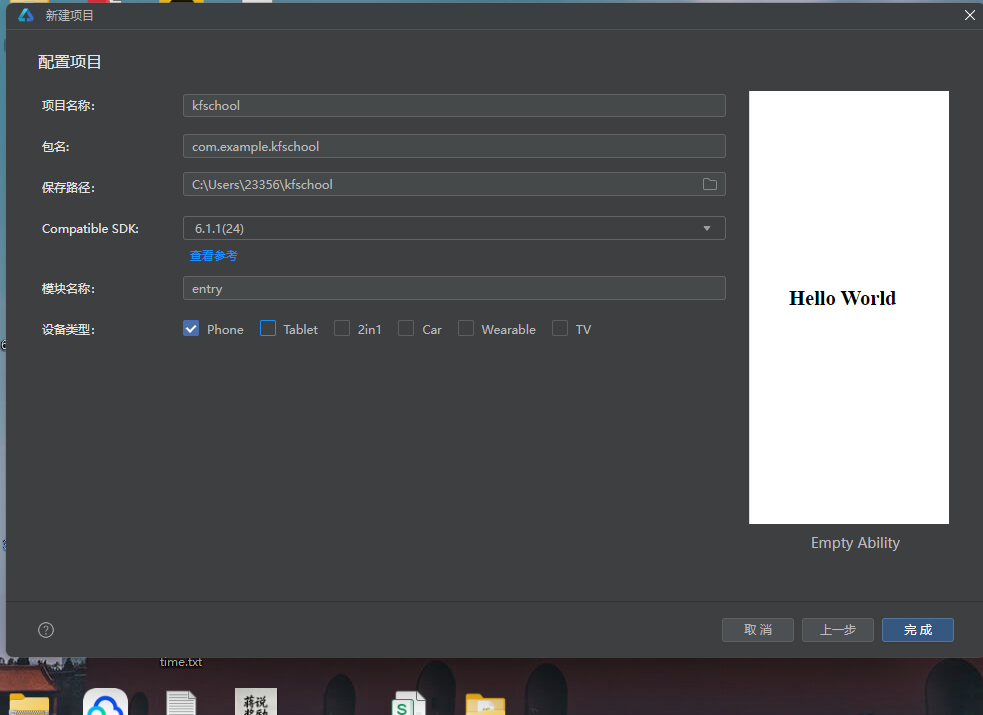
设置 API 为 24 的模板项目,项目名称 kfschool,Compatible SDK 6.1.1(24),设备类型勾选 Phone,点击完成后初始化项目,自动下载相关依赖。
十七、总结
通过对这款胭脂铺非遗古妆应用的深度剖析,我们可以看到,一个优秀的移动端应用远不止是功能的堆砌,它更是架构设计、数据建模、视觉系统、交互逻辑、防御性编程等多维度能力的综合体现。
在架构层面,该应用采用了"配置驱动 + 组件化 + 状态管理"的三层设计模式。配置层将所有可变的数据与视觉属性抽离为常量数组和元数据接口,使得业务逻辑与表现层彻底解耦;组件层将五个功能页面拆分为独立的 @Component,每个组件内部通过 @Builder 进一步复用 UI 片段;状态层利用 ArkUI 的 @State、@Observed 和 @ObjectLink 机制,实现了数据变化到 UI 刷新的自动响应。
在数据层面,RougeData 类作为核心数据模型,以 5 个数组各 12 条数据完整描述了胭脂铺的全部业务信息。5 个动态颜色映射函数将业务数据转化为视觉色彩,实现了"数据即配色"的高级渲染模式,这是该应用最具特色的技术亮点之一。
在交互层面,本版本实现了相较于此前版本的核心升级——弹窗不再是纯展示型,而是通过 onConfirm 回调与四个业务方法(addRougeItem、deleteBrowItem、editOrderItem、getMirrorData)真正联动,定制胭脂会 push 新数据、撤下眉黛会 splice 删除、修改订单会更新数量金额、铜镜详情会查找真实数据传入。@Observed + @ObjectLink 的响应式机制确保数据变化后列表实时刷新,实现了完整的 CRUD 闭环。顶部头部口红浮动、花瓣旋转等微动效的加入,更是为静态界面增添了一丝灵动与雅致。
在视觉层面,统一的色彩系统是整个应用的视觉基石。胭脂红主色搭配黛灰强调色,配合竹叶绿语义色和金棕装饰色,营造出既传统又雅致的古妆主题氛围。顶部头部的三色装饰带、胭脂盒式圆形图标、18px 大圆角等细节处理,使得界面在信息密度较高的同时依然保持精致与舒适,处处透露出"胭脂铺"的主题气质。
标签: HarmonyOS · ArkTS · 华为 · 非遗古妆 · 移动端开发

讨论HarmonyOS开发技术,专注于API与组件、DevEco Studio、测试、元服务和应用上架分发等。
更多推荐
 0
0 0
0- 0


 已为社区贡献4条内容

所有评论(0)