从0到1打造燃力Fit:HarmonyOS API 24智慧健身房应用的橙红主题、数据可视化与打卡闭环全解析
从0到1打造燃力Fit:HarmonyOS API 24智慧健身房应用的橙红主题、数据可视化与打卡闭环全解析
健身,是一场与自己的较量。本文完整拆解一个基于鸿蒙 HarmonyOS API 24 与 ArkUI 声明式框架构建的「燃力Fit」智慧健身房应用,覆盖橙红活力主题配色系统、健身数据三卡头部、六Tab全差异化布局、体态挑战赛橙红渐变Banner、场馆器械空闲网格、团课大卡课表、私教约课时段选择、每日消耗趋势渐变柱状图、体重体脂变化追踪、8月打卡日历网格、训练打卡弹窗、记录体测数据弹窗、清空订单确认弹窗、会员卡炭黑橙渐变等核心技术点,附完整源码与运行效果截图。
一、引言:智慧健身的数字化浪潮
在全民健身意识日益觉醒的今天,健身房已经从传统的"办卡、上课、洗澡"三件套,演变为一种数据驱动、社交化、智能化的数字生活新场景。智慧健身,以其"实时数据追踪、个性化训练计划、线上约课约教、打卡社交激励"的特点,正在成为运动健康赛道的关键基础设施。从团课预约到私教约课,从消耗统计到体脂追踪,从打卡日历到会员管理,每一个环节都需要精准的数据呈现与流畅的交互体验。然而,约课流程繁琐、训练数据分散、打卡激励不足、会员管理混乱,正成为健身房获取可靠数字化服务的现实痛点。
正是在这样的背景下,燃力Fit类智慧健身房应用应运而生,并迅速成为运动健康数字化的核心载体。一个优秀的智慧健身应用,不仅需要覆盖从"看数据"到"约课程"再到"管会员"的完整业务闭环,还要在视觉设计、交互体验、数据呈现上做到活力而专业,让用户在指尖滑动间便能完成查消耗、约团课、选私教、看报告、做打卡、管订单的全流程。
本文将深入剖析一个基于鸿蒙 HarmonyOS API 24 与 ArkUI 声明式开发框架构建的燃力Fit智慧健身房应用。该应用以"首页"为核心,横向扩展出团课、私教、数据、打卡、我的六大功能模块,每个模块采用完全不同的布局风格——首页Banner+器械网格+团课横滑、团课大卡课表列表、私教头像横滑+详情卡+教练列表、数据三卡统计+渐变柱状图+体脂记录、打卡日历网格+未打卡卡片+动态列表、我的会员卡+订单列表,形成了一个完整闭环的智慧健身生态。它不仅是一个功能完备的演示项目,更是一份典型的 ArkUI 工程实践范本,涵盖了状态管理、组件化设计、Stack弹窗叠加、双动画状态联动、橙红渐变视觉语言、训练打卡数据计算、体重变化差值追踪、打卡日历动态生成等关键技术点。
二、应用整体架构概览
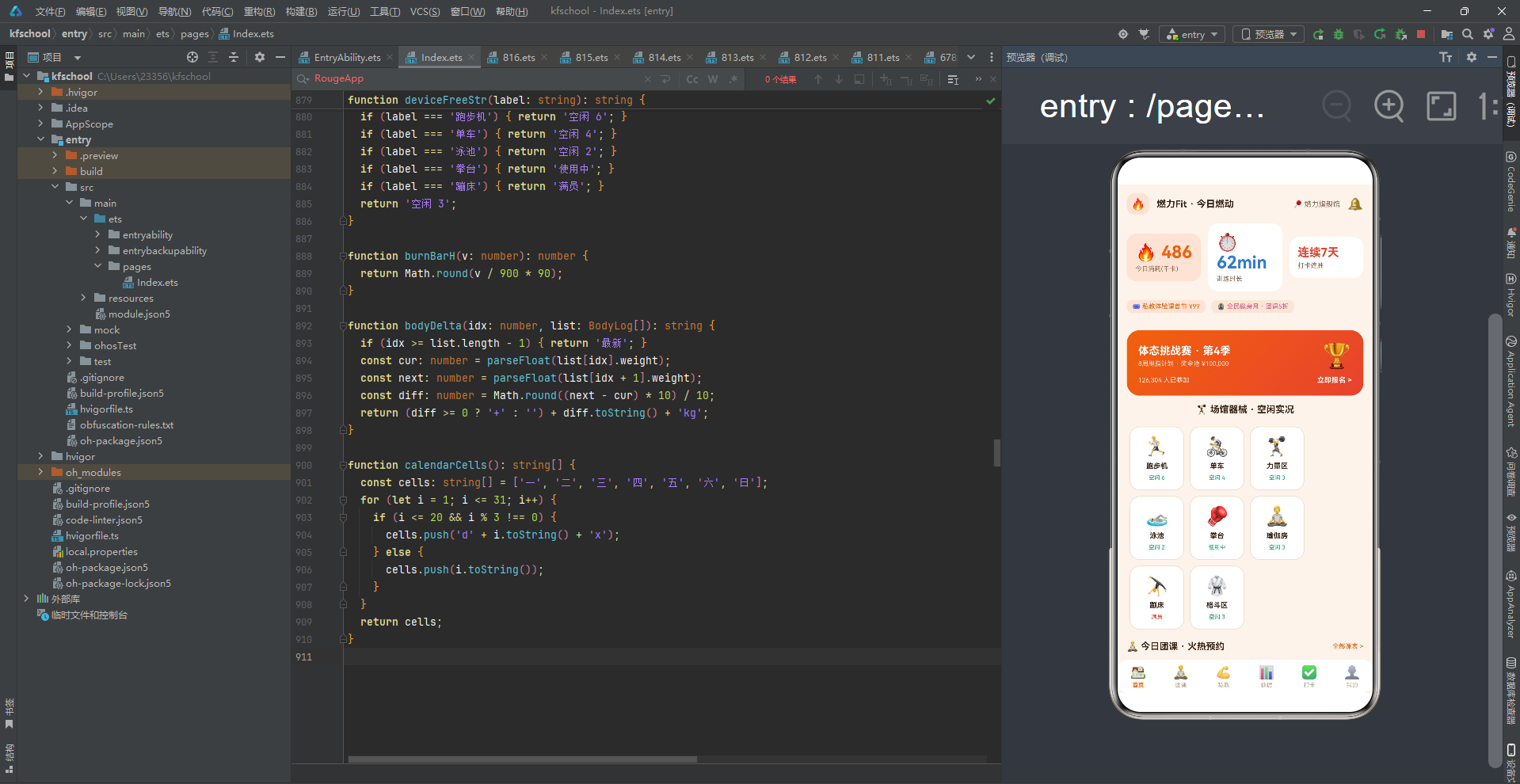
整个应用采用了"单入口 + 六Tab全差异化布局 + Stack弹窗叠加"的智慧健身应用架构。入口组件 Page816 作为整个应用的根容器,负责管理当前激活的 Tab 状态、两个动画状态以及三个弹窗的显隐状态。
应用一共划分为六个一级页面:首页(HOME)、团课(GROUP)、私教(COACH)、数据(STAT)、打卡(PUNCH)以及我的(PROFILE)。与之前项目"页面布局风格统一或半差异化"不同,本应用的六个 Tab 每个布局完全不同——首页采用体态挑战赛Banner+场馆器械网格+今日团课横滑、团课采用大卡课表列表、私教采用金牌教练横滑+选中教练详情卡+教练列表、数据采用本周训练报告三卡+每日消耗趋势渐变柱状图+体重体脂记录、打卡采用8月打卡日历网格+今日未打卡卡片+打卡动态列表、我的采用会员卡炭黑橙渐变+订单列表,这种"一页一型"的差异化设计最大程度还原了真实智慧健身App的交互体验。底部导航采用单排六Tab布局,激活Tab文字橙色加粗,简洁统一。
在数据层面,应用定义了一套完整的类型系统,包括色彩主题、团课元数据、教练元数据、打卡记录元数据、会员订单元数据、体测记录元数据,并通过常量数组将数据与 UI 表现层解耦。所有业务数据以 @Observed 装饰的可观察类为载体(GroupCourse/CoachItem/PunchRecord/MemberOrder/BodyLog),配合 8 个团课、6 个教练、7 条打卡、6 条订单、6 条体测的模拟数据,模拟了一个真实的智慧健身数据环境。所有数据类都带有 constructor 构造函数,使用 new ClassName(...) 方式实例化。应用还定义了 8 个工具函数(levelColor/coachTagColor/orderStateColor/punchIconOf/deviceFreeStr/burnBarH/bodyDelta/calendarCells),将颜色映射、数据计算、日历生成等逻辑从 UI 层抽离,实现数据与逻辑分离。
在交互层面,应用通过 Stack 布局叠加实现了三类弹窗的显示:训练打卡、记录体测数据、清空订单记录。与之前项目"每个弹窗独立 Stack 叠加"一致,本应用三个弹窗各自独立 Stack 叠加,共享 modalOverlay 统一遮罩封装。训练打卡弹窗确认后 punchList.unshift 新打卡记录(消耗=时长*9,模拟每分钟9千卡消耗率),记录体测数据弹窗确认后 bodyList.push 新体测记录,清空订单弹窗确认后 orderList.splice(0, length) 清空全部订单,形成了完整的增删改交互闭环。
在视觉层面,应用独创了"橙红活力主题"设计——首页体态挑战赛Banner使用 linearGradient 135 度从 orange #F2610C 活力橙到 red #E8422E 橙红的两色渐变,打卡页立即打卡按钮使用同样的 135 度橙→红渐变,数据页每日消耗趋势柱状图使用 linearGradient 180 度从橙到红的垂直渐变,我的会员卡使用 linearGradient 135 度从 title #3B2314 炭棕黑到 orangeD #C94A03 深橙的两色渐变,四种不同角度和配色的橙红渐变贯穿整个应用,形成了统一而丰富的橙红渐变视觉语言,是本应用色彩设计的核心特色。健身数据头部采用三卡布局(今日消耗chip橙底/训练时长白卡蓝/打卡连胜白卡红),三种不同底色对应三种数据维度,是本应用头部的特色设计。应用还独创了"双动画状态联动"设计——aboutToAppear 中 setInterval 800ms 同步切换 breath 和 beat 两个布尔动画状态,breath 用于团课预约按钮透明度动画(opacity 0.75-1,duration 600ms,仅未满员课程),beat 预留扩展,两个动画同步切换形成整体协调的联动动效体系。
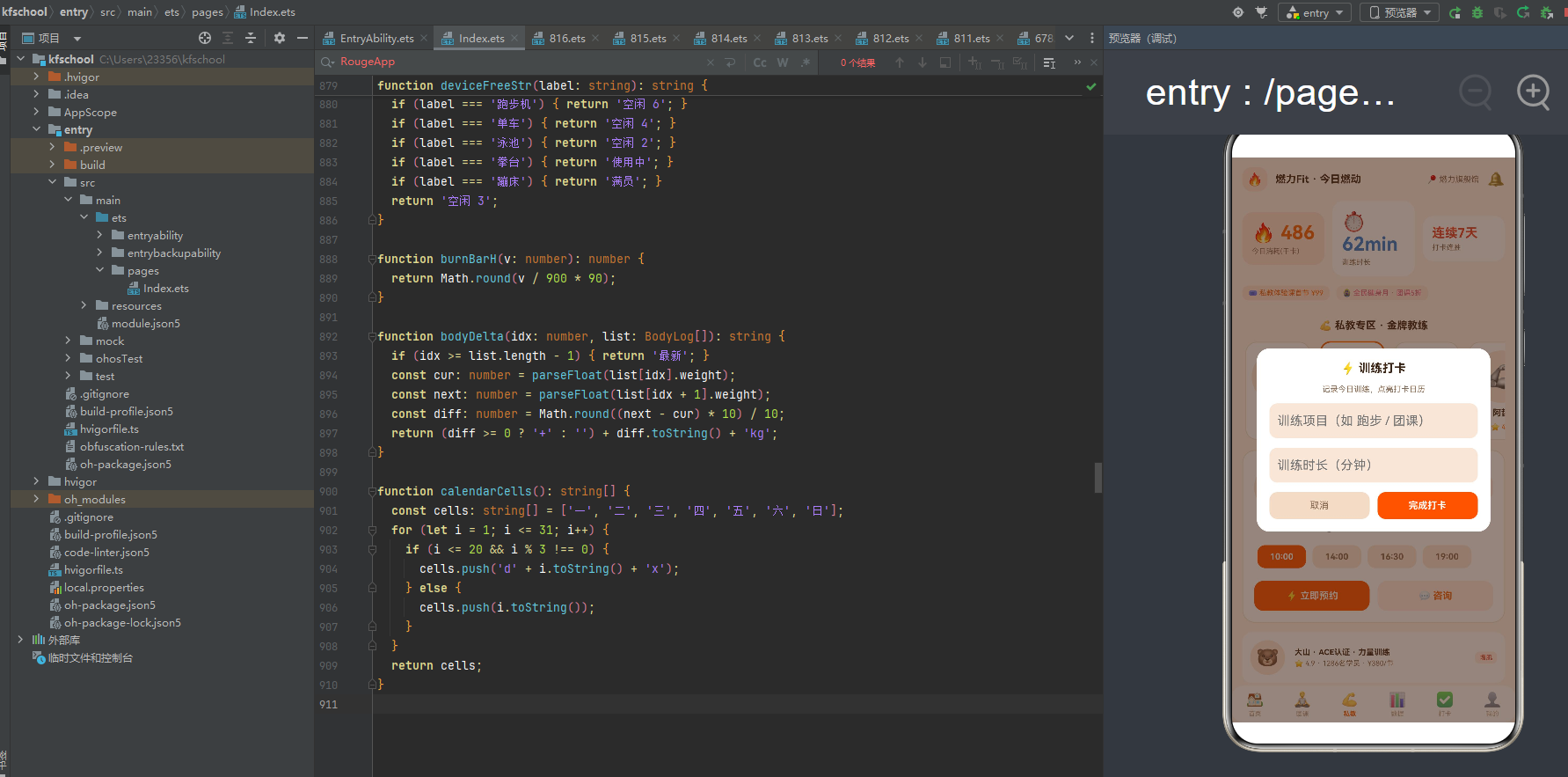
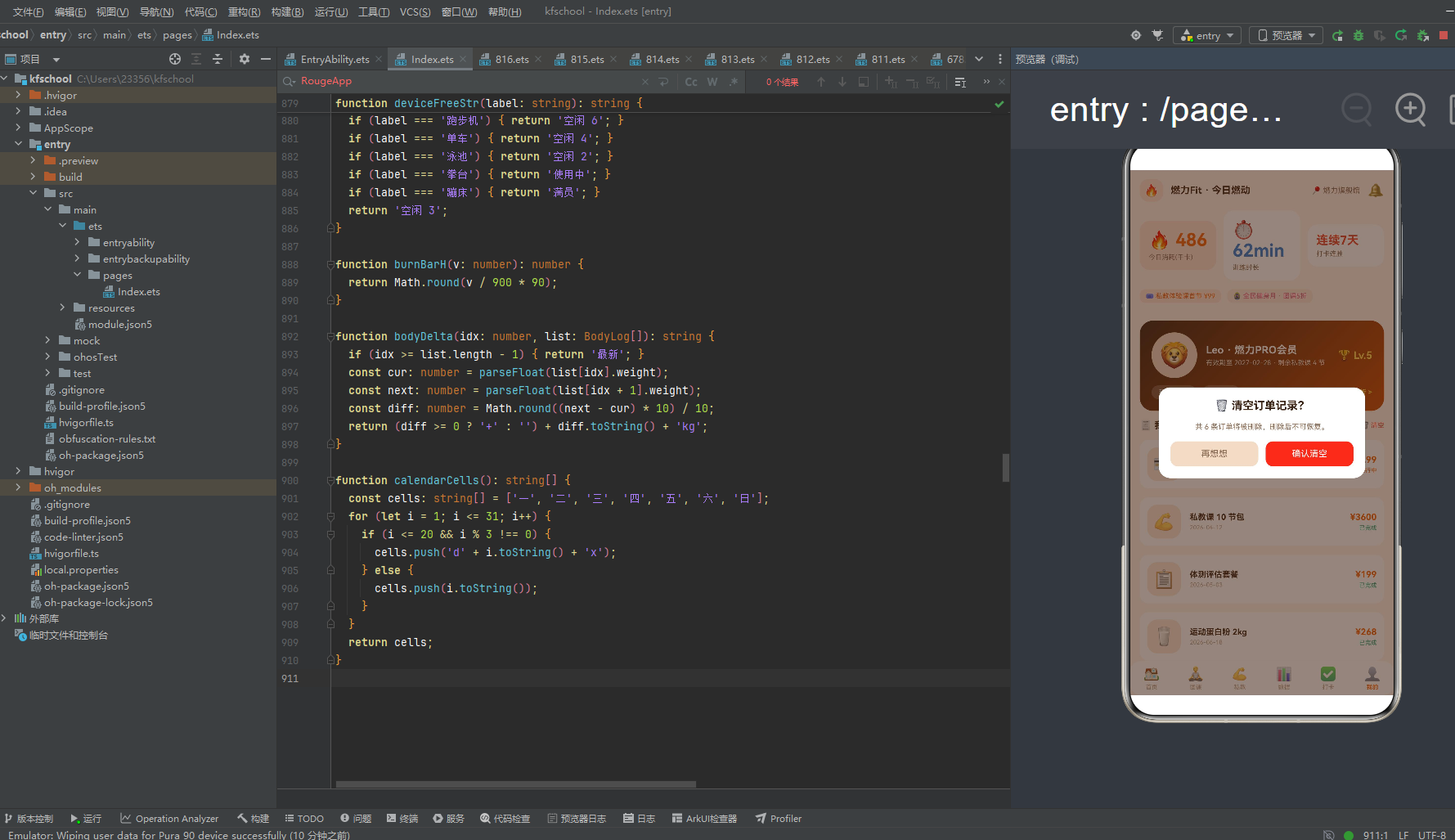
下面逐页展示应用的六大功能模块运行效果。
三、团课页:大卡课表列表与难度分级着色
团课页以"全部团课"为核心,采用"大卡课表列表"布局,每节课一张横向大卡,信息密度高且层次分明。
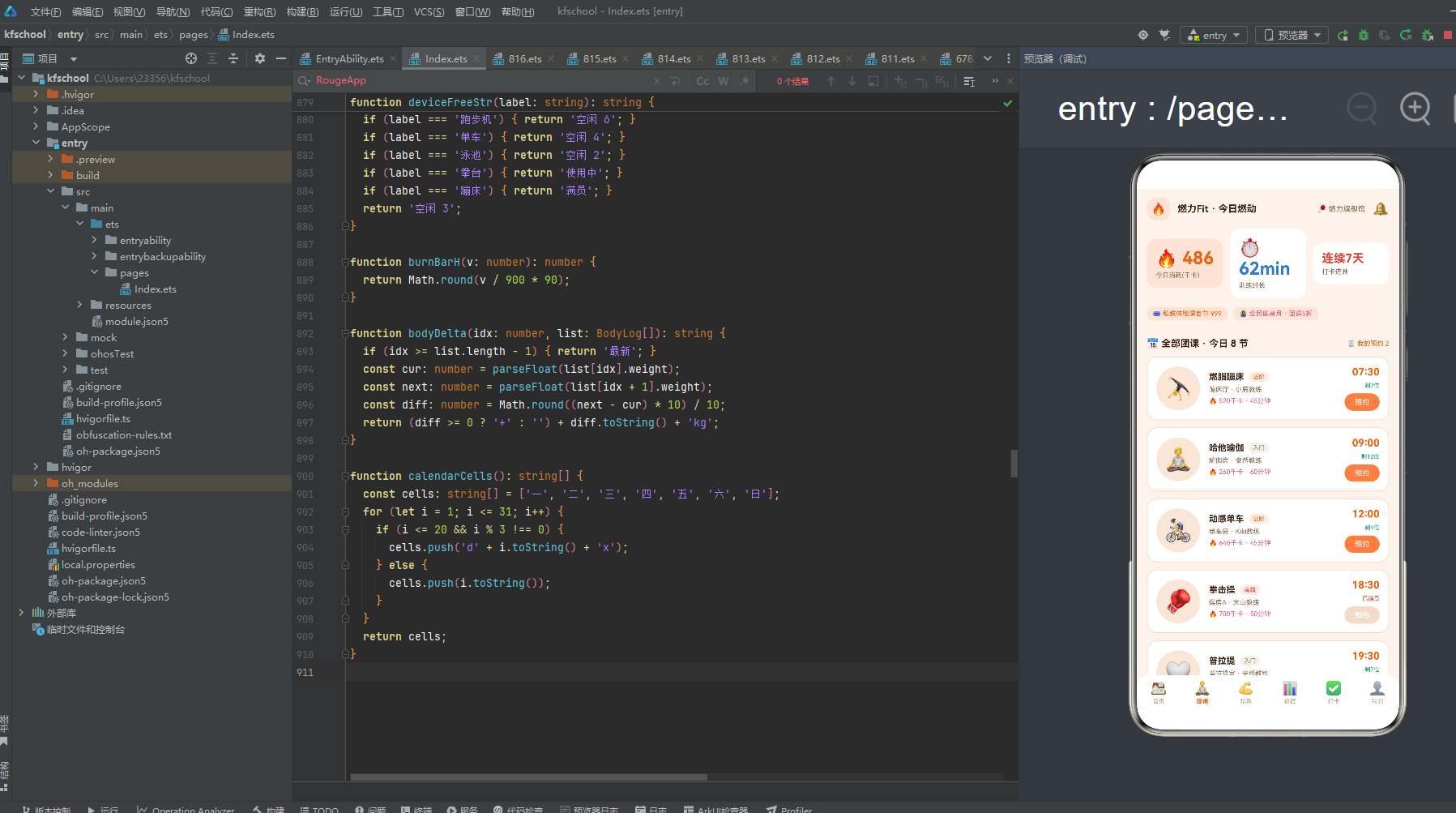
页面顶部第一部分是标题行"📅 全部团课 · 今日 8 节"加粗 13 号 layoutWeight 1 + "🧾 我的预约 2"橙色 9 号(右对齐),margin 下 10。
下方第二部分是团课大卡列表,遍历 8 个团课,每节课横向布局,padding 12,白底圆角 14,border 1px line 色,alignItems Center,包含:
左侧:圆形图标 60×60 圆角 30 dark 底,图标 30 号,textAlign Center。
中部:课程信息列(layoutWeight 1,左对齐,space 5):
- 名称行:课程名(加粗 12 号)+ 难度标签(levelColor 函数动态着色:入门 green 绿/进阶 orange 橙/高级 red 红,chip 底圆角 6 padding 左右 6 上下 2)
- 房间教练行:房间 + " · " + 教练名(sub 灰 9 号)
- 消耗行:"🔥 " + 消耗千卡 + " · " + 时长分钟(pink 粉红 9 号)
右侧:时间预约列(右对齐,space 6):
- 时间:14 号 orange 橙加粗
- 空位:已满员显示"已满员"red 红字,否则显示"剩X位"green 绿字(8 号)
- 预约按钮:Column 包裹"预约"白字 10 号加粗,padding 左右 14 上下 6,圆角 12,已满员时 darkL 底(不可预约),未满员时 orange 橙底,带 breath 透明度动画(
this.breath && c.joined < c.capacity ? 0.75 : 1,animation duration 600ms),仅未满员课程有呼吸动画
8 个团课从 07:30 到 22:00 覆盖全天时段:燃脂蹦床(07:30,45min,进阶,520千卡,18/20,蹦床厅)、哈他瑜伽(09:00,60min,入门,260千卡,12/24,瑜伽房)、动感单车(12:00,45min,进阶,640千卡,26/30,单车房)、拳击操(18:30,50min,高级,700千卡,22/22已满员,操房A)、普拉提(19:30,55min,入门,300千卡,9/16,普拉提室)、战绳训练营(20:30,40min,高级,680千卡,15/18,力量区)、腰腹核心(21:15,35min,进阶,380千卡,11/20,操房B)、拉伸放松(22:00,30min,入门,150千卡,6/20,瑜伽房)。消耗从 150 到 700 千卡,难度覆盖入门/进阶/高级三档,完整还原了健身房团课排课的多样性。难度分级着色(入门绿/进阶橙/高级红)让用户一眼判断课程强度,预约按钮的 breath 呼吸动画让可预约课程有了"可点击"的动态感,是本应用团课页交互设计的亮点。
四、私教页:金牌教练横滑与约课时段选择
私教页以"私教专区"为核心,独创"金牌教练横滑+选中教练详情卡+教练列表"的三层布局。
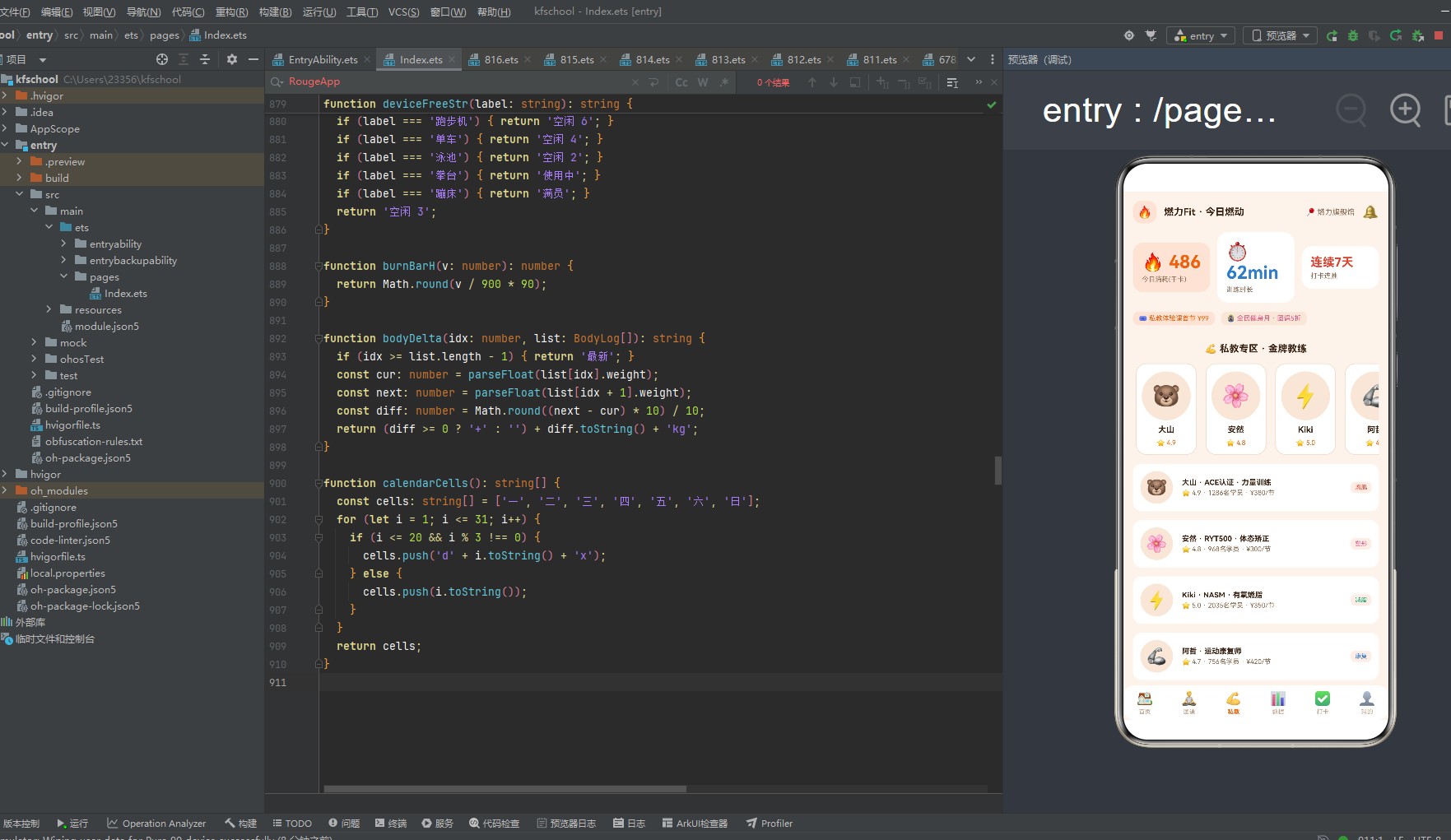
页面顶部第一部分是标题"💪 私教专区 · 金牌教练"加粗 13 号 margin 下 12。
第二部分是金牌教练横滑,Scroll horizontal 遍历 6 个教练,每个教练卡片 width 82,padding 10,白底圆角 14,alignItems Center,包含:圆形头像 66×66 圆角 33 dark 底,头像 32 号 + 教练名(11 号加粗)+ "⭐ " + 评分(orange 橙 9 号)。选中教练(coachPick === c.id)时 border 2px orange 橙色,未选中 border 1px line 色,点击切换 coachPick 并重置 slotPick=0。横滑头像卡让用户快速浏览教练并选择,选中态橙色边框高亮。
第三部分是选中教练详情卡,遍历 6 个教练,if coachPick === c.id 时显示,padding 14,白底圆角 16,border 1px line 色,包含:
- 教练信息行:圆形头像 64×64 圆角 32 dark 底,头像 34 号 + 教练信息列(layoutWeight 1,左对齐):教练名 + " 教练"(加粗 13 号)+ 资质(sub 灰 9 号 maxLines 1)+ 标签行(专长标签 coachTagColor 动态着色:增肌 red 红/减脂 green 绿/塑形 pink 粉红/康复 blue 蓝/其他 purple 紫,chip 底圆角 6 + "学员 " + 学员数 text3 灰 8 号)+ 价格列(右对齐):价格(orange 橙 12 号加粗),chip 底圆角 10 padding 左右 10 上下 8。
- 可约时段标题:"🕘 可约时段(点击选择)"加粗 11 号。
- 可约时段 Flex wrap:遍历教练的 slots 数组(3-4 个时段),每个时段 Text 11 号,选中(slotPick === si)时白字加粗 orange 橙底,未选中时 sub 灰字 dark 底,padding 左右 16 上下 8,圆角 10,margin 4,点击切换 slotPick。Flex wrap 让时段按钮自动换行,点击选择交互直观。
- 操作按钮行:立即预约按钮(layoutWeight 1,"⚡ 立即预约"白字 12 号加粗,padding 上下 12,圆角 12,orange 橙底,带 animation duration 600ms,点击触发 addModal 训练打卡弹窗)+ 咨询按钮(layoutWeight 1,"💬 咨询"orange 橙字 12 号加粗,padding 上下 12,圆角 12,chip 底)。
第四部分是教练列表,遍历 6 个教练,每个教练横向小卡,padding 10,白底圆角 12,alignItems Center,包含:圆形头像 44×44 圆角 22 dark 底,头像 24 号 + 教练信息列(layoutWeight 1,左对齐):教练名 + " · " + 资质(加粗 10 号 maxLines 1)+ "⭐ " + 评分 + " · " + 学员数 + "名学员 · " + 价格(sub 灰 9 号)+ 专长标签(coachTagColor 动态着色,chip 底圆角 6 padding 左右 6 上下 3,右对齐)。
6 个教练覆盖五大专长:大山(🐻,ACE认证·力量训练,4.9分,1286学员,¥380/节,增肌,4个时段)、安然(🌸,RYT500·体态矫正,4.8分,968学员,¥300/节,塑形,4个时段)、Kiki(⚡,NASM·有氧燃脂,5.0分,2035学员,¥350/节,减脂,4个时段)、阿哲(🦾,运动康复师,4.7分,756学员,¥420/节,康复,3个时段)、糖糖(🍬,ISSA·产后恢复,4.9分,1102学员,¥360/节,塑形,3个时段)、老默(🥷,CrossFit L2,4.8分,1533学员,¥400/节,增肌,3个时段)。价格从 ¥300 到 ¥420/节,评分从 4.7 到 5.0,学员数从 756 到 2035,专长覆盖增肌/减脂/塑形/康复四大类,完整还原了健身房私教团队的多样性。专长标签五色着色(增肌红/减脂绿/塑形粉/康复蓝/其他紫)让用户一眼判断教练专长,可约时段点击选择交互直观,立即预约按钮触发训练打卡弹窗形成约课闭环,是本应用私教页交互设计的核心亮点。
五、数据页:本周训练报告与每日消耗趋势渐变柱状图
数据页以"本周训练报告"为核心,独创"三卡统计+渐变柱状图+体脂记录"的三层数据可视化布局。
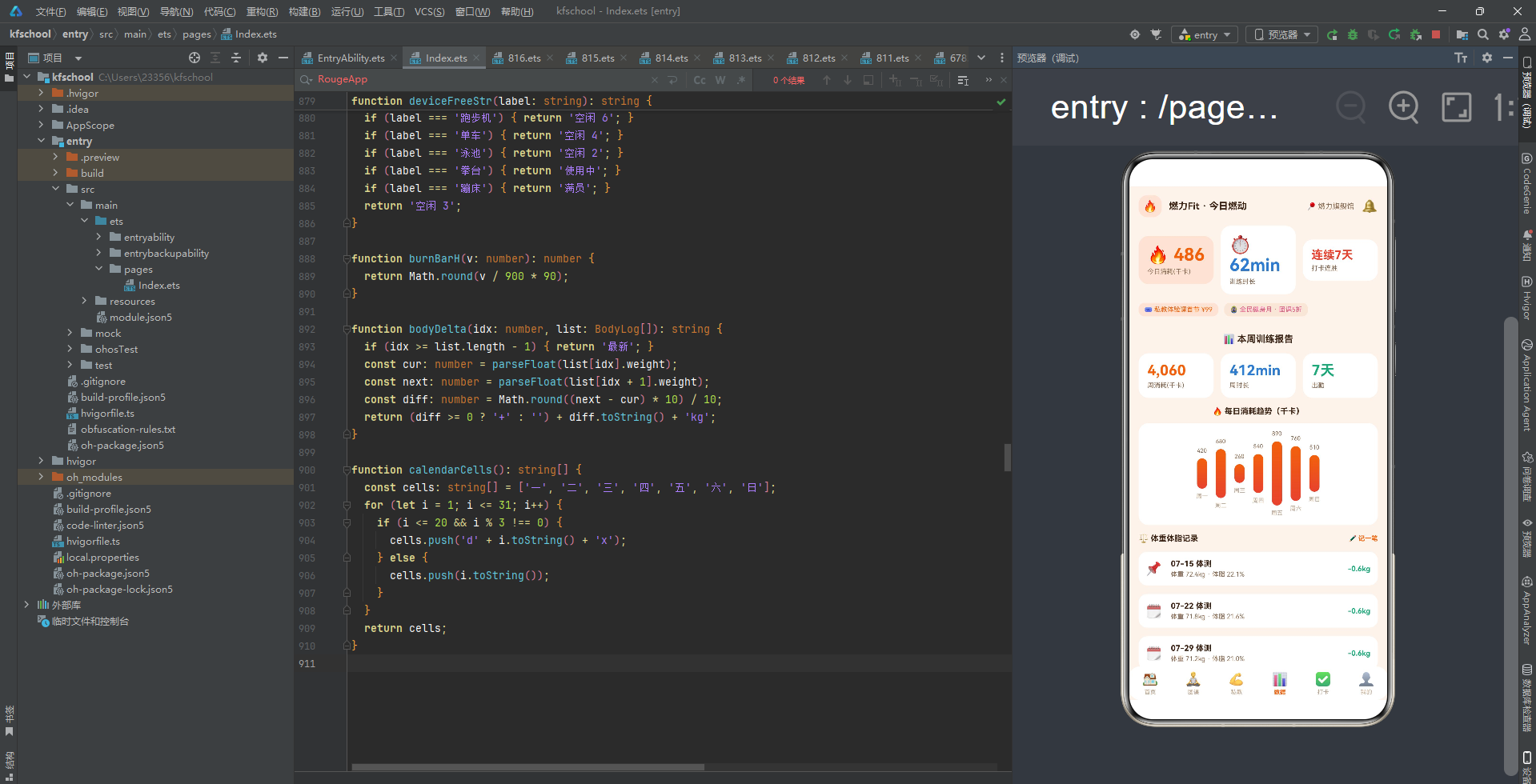
页面顶部第一部分是标题"📊 本周训练报告"加粗 13 号 margin 下 12。
第二部分是本周训练报告三卡,Row 横向排列三个数据卡片,每卡 layoutWeight 1,padding 12,白底圆角 14,alignItems Start,包含:
- 周消耗:“4,060”(orange 橙 20 号加粗)+ “周消耗(千卡)”(sub 灰 9 号)
- 周时长:“412min”(blue 蓝 20 号加粗)+ “周时长”(sub 灰 9 号)
- 出勤:“7天”(green 绿 20 号加粗)+ “出勤”(sub 灰 9 号)
三卡用三种颜色对应三种数据维度(橙/蓝/绿),一目了然。
第三部分是每日消耗趋势渐变柱状图,Column 包裹,space 10:
- 标题:"🔥 每日消耗趋势(千卡)"加粗 11 号。
- 柱状图 Row:遍历 WEEK_DAYS 7 天(一/二/三/四/五/六/日),每栏 alignItems Center,包含:顶部数值(BURN_DATA[i],sub 灰 8 号)+ 柱子(width 14,height = burnBarH(v) = Math.round(v / 900 * 90) 动态计算,圆角 7,linearGradient 180 度从 orange #F2610C 橙到 red #E8422E 橙红的垂直渐变)+ 底部星期(“周” + d,text3 灰 8 号)。柱状图卡片 padding 上下 10 下 12,白底圆角 14,justifyContent Center。
7 天消耗数据:周一420/周二680/周三260/周四540/周五890(最高)/周六760/周日510,周五 890 千卡最高(周末前训练高峰),周三 260 最低(周中低谷),符合真实健身消耗规律。柱子高度 = v/900*90 动态计算,最高 890 对应约 89px,最低 260 对应约 26px,180 度橙→红垂直渐变让柱子有了"燃烧"的视觉感,是本应用数据可视化的核心亮点。
第四部分是体重体脂记录,Row 标题行:"⚖️ 体重体脂记录"加粗 11 号 layoutWeight 1 + "✏️ 记一笔"orange 橙 9 号加粗(点击触发 editModal 记录体测数据弹窗,editIdx 设为最新记录索引,editWeight/editFat 预填最新数据)。
下方遍历 6 条体测记录,每条横向布局,padding 10,白底圆角 12,alignItems Center,包含:
- 图标:第一条(bi === 0)显示"📌"最新标记,其余显示"🗓️"日历,18 号。
- 体测信息列(layoutWeight 1,左对齐):日期 + " 体测"(加粗 11 号)+ "体重 " + 体重 + " · 体脂 " + 体脂(sub 灰 9 号)。
- 变化差值:bodyDelta(bi, this.bodyList) 函数计算相邻体测体重差,最新(idx >= length-1)显示"最新",否则计算 next - cur 差值,下降(含-)显示 green 绿字,上升显示 red 红字,加粗 10 号。
6 条体测从 07-15 到 08-19,体重从 72.4kg 降到 69.5kg(共降 2.9kg),体脂从 22.1% 降到 19.2%(共降 2.9%),每条变化差值都是 -0.6kg(green 绿字),最新一条显示"最新"。体重变化差值追踪让用户直观看到训练效果,下降绿字上升红字的语义着色让数据更易读,是本应用数据页的特色设计。
六、打卡页:8月打卡日历网格与训练打卡闭环
打卡页以"训练打卡"为核心,独创"打卡日历网格+今日未打卡卡片+打卡动态列表"的三层布局。
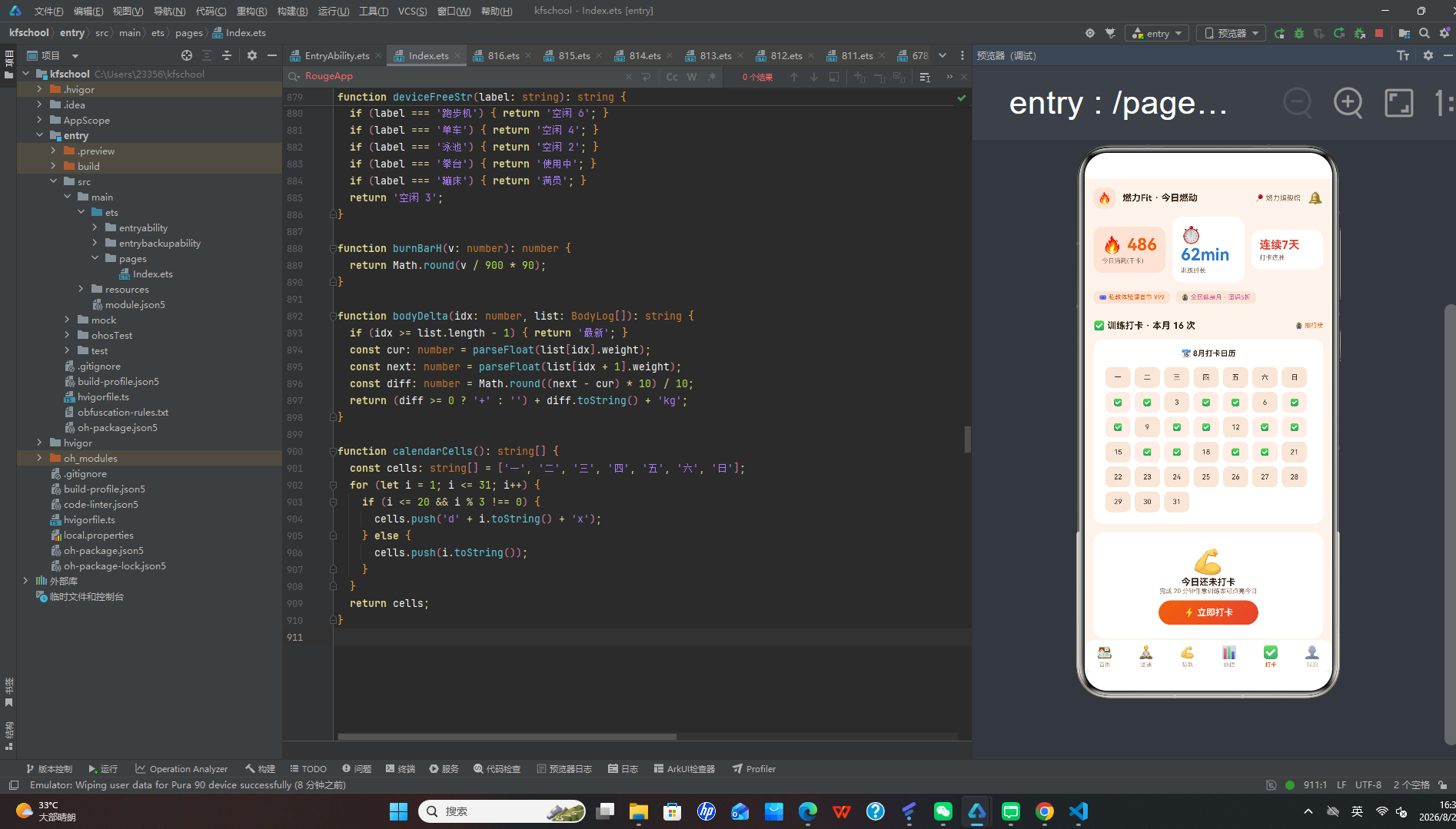
页面顶部第一部分是标题行"✅ 训练打卡 · 本月 16 次"加粗 13 号 layoutWeight 1 + "🏅 排行榜"orange 橙 9 号(右对齐),margin 下 12。
第二部分是8月打卡日历,Column 包裹,space 10,padding 14,白底圆角 14:
- 标题:"📅 8月打卡日历"加粗 11 号。
- 日历网格 Flex wrap:遍历 calendarCells() 函数生成的 38 个单元格(7 个星期头 + 31 天),每个单元格 Text 10 号,width 12%,height 30,圆角 8,margin 3,textAlign Center。打卡日(d.length > 2,即 calendarCells 中 push 的 ‘d’ + i + ‘x’ 格式)显示"✅",chip 底;未打卡日显示数字,dark 底。
calendarCells 函数逻辑:先 push 7 个星期头(一/二/三/四/五/六/日),再循环 1-31 天,i <= 20 且 i % 3 !== 0 时 push ‘d’ + i + ‘x’(打卡日,共约 13 天),否则 push 数字(未打卡日)。8月1日是周六,日历从周六开始排列,打卡日分布在月中大部分日期,模拟真实打卡频率。打卡日显示✅ chip 底,未打卡日显示数字 dark 底,两种底色区分让打卡状态一目了然。
第三部分是今日未打卡卡片,Column 居中对齐,padding 20,白底圆角 16:
- 💪图标 38 号,带 animation duration 700ms EaseInOut。
- "今日还未打卡"加粗 13 号。
- "完成 20 分钟任意训练即可点亮今日"sub 灰 9 号。
- 立即打卡按钮:Column 包裹"⚡ 立即打卡"白字 13 号加粗,padding 左右 36 上下 10,圆角 22,linearGradient 135 度从 orange 橙到 red 橙红渐变,margin 上 8,点击触发 addModal 训练打卡弹窗。
今日未打卡卡片用橙红渐变按钮引导用户打卡,与首页体态挑战赛Banner的橙红渐变呼应,形成统一的橙红渐变视觉语言。
第四部分是打卡动态列表,标题"🗂️ 打卡动态"加粗 11 号 margin 下。遍历 7 条打卡记录,每条横向布局,padding 10,白底圆角 12,alignItems Center,包含:
- 圆形图标 46×46 圆角 23 dark 底,punchIconOf(item) 函数返回项目对应图标(团课🧘/私教💪/跑步🏃/游泳🏊/其他🏋️),24 号。
- 打卡信息列(layoutWeight 1,左对齐):项目 + " · " + 时长 + “分钟”(加粗 11 号)+ "🔥 " + 消耗 + "千卡 · " + 日期(sub 灰 9 号)。
- 状态:已打卡显示"已打卡"green 绿字加粗,未完成显示"补卡"orange 橙字加粗,9 号。
7 条打卡从 08-15 到 08-21,5 条已完成(团课45min520千卡/跑步30min310千卡/私教60min640千卡/游泳40min380千卡/团课50min560千卡),2 条未完成(器械55min490千卡/拉伸25min120千卡),完整还原了用户一周的训练打卡历史。训练打卡弹窗确认后消耗=时长*9(模拟每分钟9千卡消耗率),punchList.unshift 新记录到列表顶部,形成打卡数据计算闭环,是本应用打卡页交互设计的核心亮点。
七、我的页:会员卡炭黑橙渐变与订单列表
我的页以"个人中心"为核心,采用"会员卡炭黑橙渐变+订单列表"的两层布局。
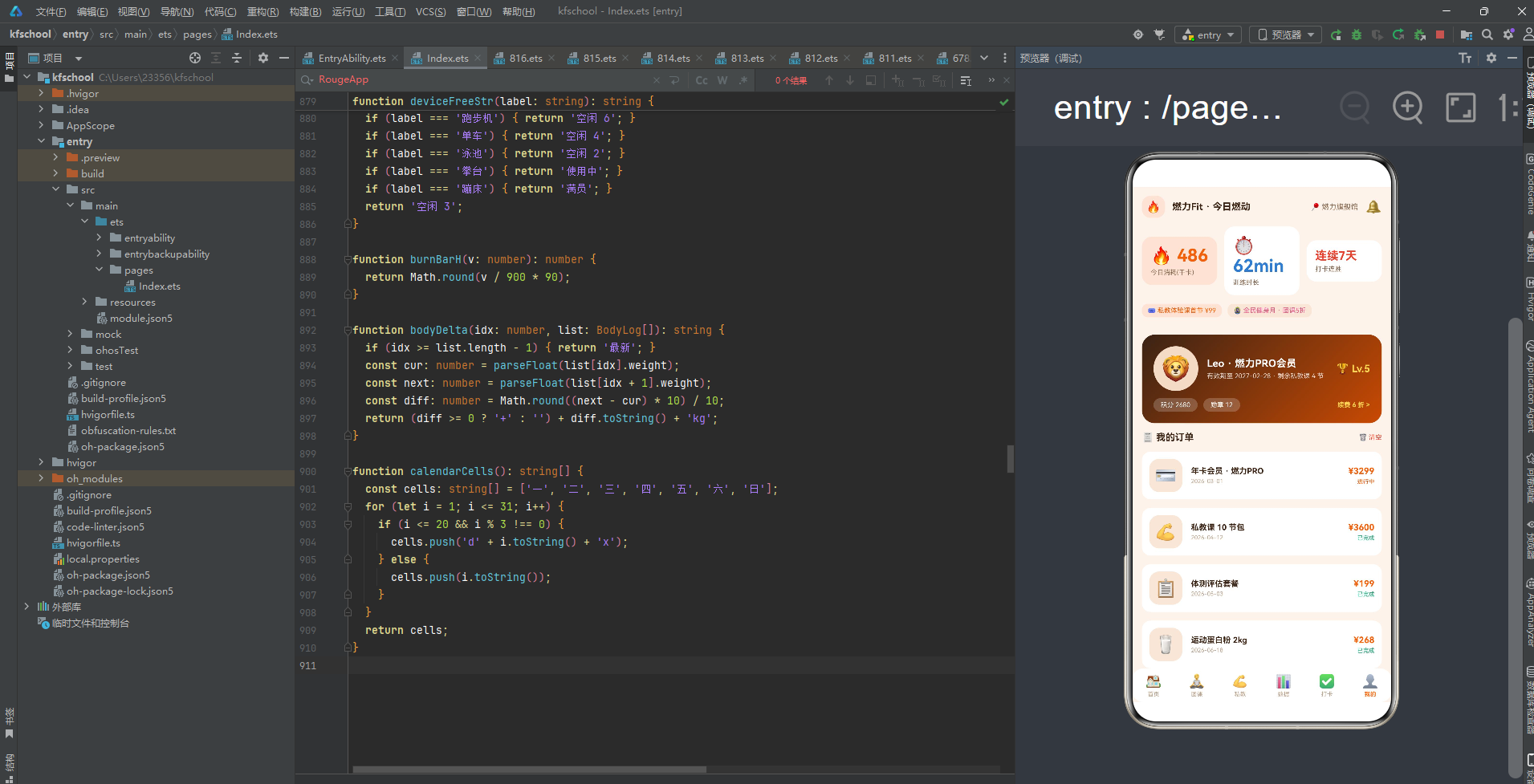
页面顶部第一部分是会员卡,Column 包裹,space 10,padding 16,圆角 18,linearGradient 135 度从 title #3B2314 炭棕黑到 orangeD #C94A03 深橙的两色渐变:
- 用户信息行:🦁头像 62×62 圆角 31 darkL 底,34 号 + 用户信息列(layoutWeight 1,左对齐):"Leo · 燃力PRO会员"白字 14 号加粗 + "有效期至 2027-02-28 · 剩余私教课 4 节"白字 9 号 0.8 透明度 + 等级"🏆 Lv.5"金 #FFD54F 14 号加粗(右对齐)。
- 积分勋章行:"积分 2680"白字 9 号,半透明白底 rgba(255,255,255,0.2) 圆角 10 padding 左右 10 上下 4 + "勋章 12"白字 9 号,同样半透明白底胶囊 + Column layoutWeight 1 + "续费 6 折 >"金 #FFD54F 9 号加粗(右对齐)。
会员卡使用 135 度炭黑→深橙渐变,与首页Banner的橙→红渐变、打卡页立即打卡按钮的橙→红渐变、数据页柱状图的橙→红垂直渐变形成统一的橙红渐变视觉语言,但会员卡用炭黑→深橙的深色渐变营造"高端会员"的质感,与其他页面的亮色渐变形成深浅对比。金色等级和续费折扣文字突出会员尊贵感,半透明白底胶囊让积分勋章信息在深色渐变上清晰可读。
第二部分是我的订单,Row 标题行:"🧾 我的订单"加粗 13 号 layoutWeight 1 + "🗑️ 清空"red 红字 9 号(点击触发 delModal 清空订单记录弹窗)。
下方遍历 6 条订单,每条横向布局,padding 10,白底圆角 12,alignItems Center,包含:
- 图标 46×46 圆角 14 dark 底,24 号。
- 订单信息列(layoutWeight 1,左对齐):订单标题(加粗 11 号 maxLines 1)+ 时间(text3 灰 8 号)。
- 金额状态列(右对齐):金额(orange 橙 12 号加粗)+ 状态(orderStateColor 函数动态着色:已完成 green 绿/进行中 orange 橙/待支付 red 红/其他 text3 灰,8 号)。
6 条订单覆盖会员消费全品类:年卡会员·燃力PRO(¥3299,进行中,2026-03-01,💳)、私教课10节包(¥3600,已完成,2026-04-12,💪)、体测评估套餐(¥199,已完成,2026-05-03,📋)、运动蛋白粉2kg(¥268,已完成,2026-06-18,🥛)、拳击私教5节(¥1900,待支付,2026-08-10,🥊)、储物柜年租(¥380,进行中,2026-08-01,🔐)。金额从 ¥199 到 ¥3600,状态覆盖进行中/已完成/待支付三档,完整还原了健身房会员消费的多样性。订单状态三档着色(已完成绿/进行中橙/待支付红)让用户一眼判断订单状态,清空订单弹窗二次确认防止误操作,是本应用我的页交互设计的亮点。
八、色彩主题系统:橙红活力主题与四渐变视觉语言
8.1 色彩接口定义
任何一款设计精良的应用,背后都有一套严谨的色彩规范。该应用首先通过一个 ColorPalette 接口,将整个应用所需的色彩抽象为一个结构化的契约,共 20 个字段:
interface ColorPalette {
  bg: string; card: string; dark: string; darkL: string;
  title: string; sub: string; text3: string;
  orange: string; orangeD: string; red: string; pink: string;
  green: string; blue: string; purple: string;
  line: string; tabOn: string; mask: string; chip: string;
}
- bg:页面整体背景色 #FBF3EC,暖橙米白底,营造智慧健身房的活力温暖氛围。
- orange:主色调 #F2610C,活力橙,用于按钮、强调文字、激活Tab、价格、渐变起始色等高优先级视觉元素,是健身活力的标志性色彩(热情、能量、运动)。
- orangeD:深主色 #C94A03,深橙,用于会员卡渐变结束色,与 orange 形成同色系深浅对比。
- red:辅助色 #E8422E,橙红,用于渐变结束色、高级难度、待支付状态等,与活力橙形成"橙红"的渐变组合,象征运动的激情与燃烧。
- pink:粉红 #E85A8A,用于团课消耗行文字、全民健身月优惠标签,增添柔和活力感。
- title:文字主色 #3B2314,炭棕黑,用于主标题文字,与暖橙米白底形成高对比度,同时带有温暖质感。
- mask:遮罩色 rgba(59,35,20,0.55),炭棕黑半透明,用于弹窗遮罩,与 title 同色系保证遮罩质感统一。
- chip:标签底色 rgba(242,97,12,0.10),活力橙 10% 透明度,用于标签、数据卡底色、按钮底色等,与 orange 同色系保证标签质感统一。
8.2 色彩实例化
const COLORS: ColorPalette = {
  bg: '#FBF3EC', card: '#FFFFFF', dark: '#F6E7D8', darkL: '#EFDCC8',
  title: '#3B2314', sub: '#8A6B52', text3: '#BCA48D',
  orange: '#F2610C', orangeD: '#C94A03', red: '#E8422E', pink: '#E85A8A',
  green: '#1FA97A', blue: '#2E7DD1', purple: '#7C4DBF',
  line: '#F0DFCC', tabOn: '#F2610C',
  mask: 'rgba(59,35,20,0.55)', chip: 'rgba(242,97,12,0.10)'
};
主色 #F2610C 是一种充满活力的橙色,既契合"智慧健身房"主题(热情、能量、运动的标志性色彩),又具有温暖、积极的气质。辅助色 #E8422E 橙红与活力橙形成"橙红"的渐变组合,是本应用最具辨识度的色彩组合。bg #FBF3EC 暖橙米白底与主色同暖色系,营造出智慧健身房的活力温暖氛围。title #3B2314 炭棕黑而非纯黑,与暖橙米白底形成高对比度的同时带有温暖质感,是本应用色彩设计的细致之处。
值得注意的是,本应用的渐变设计是色彩系统的核心亮点——首页体态挑战赛Banner使用 linearGradient 135 度从 orange #F2610C 活力橙到 red #E8422E 橙红的两色渐变,打卡页立即打卡按钮使用同样的 135 度橙→红渐变,数据页每日消耗趋势柱状图使用 linearGradient 180 度从橙到红的垂直渐变,我的会员卡使用 linearGradient 135 度从 title #3B2314 炭棕黑到 orangeD #C94A03 深橙的两色渐变。四种不同角度和配色的橙红渐变贯穿整个应用(135度亮色渐变用于Banner和按钮、180度垂直渐变用于柱状图、135度深色渐变用于会员卡),形成了统一而丰富的橙红渐变视觉语言,是本应用色彩设计的核心特色。
本应用的动态颜色逻辑也十分丰富——团课难度按 levelColor 分三档着色(入门 green 绿/进阶 orange 橙/高级 red 红),教练专长按 coachTagColor 分五色着色(增肌 red 红/减脂 green 绿/塑形 pink 粉红/康复 blue 蓝/其他 purple 紫),订单状态按 orderStateColor 分四档着色(已完成 green 绿/进行中 orange 橙/待支付 red 红/其他 text3 灰),器械空闲按 deviceFreeStr 返回状态(空闲数 green 绿/使用中 orange 橙/满员 red 红),体重变化按 bodyDelta 计算差值(下降 green 绿/上升 red 红),形成了"以色定难度、以色定专长、以色定状态、以色定变化"的多层语义着色模式。健身数据头部三卡用三种底色对应三种数据维度(今日消耗 chip 橙底/训练时长白卡蓝/打卡连胜白卡红),本周训练报告三卡用三种颜色对应三种数据维度(周消耗橙/周时长蓝/出勤绿),形成了"以色定数据维度"的统计着色模式。这种将所有色彩集中管理、配合多维度渐变与动态着色的做法保证了全局一致性,降低了维护成本。
九、类型定义:构建严谨的数据契约
应用通过一组带 constructor 的 @Observed 类,为每一类业务对象建立了明确的数据契约。
9.1 团课、教练、打卡、订单、体测元数据
@Observed export class GroupCourse {
  id: number; name: string; coach: string; time: string; duration: number;
  level: string; calories: number; joined: number; capacity: number; room: string; icon: string;
  constructor(...) { ... }
}
@Observed export class CoachItem {
  id: number; name: string; avatar: string; spec: string; rating: string;
  students: number; price: string; tag: string; slots: string[];
  constructor(...) { ... }
}
@Observed export class PunchRecord {
  id: number; date: string; item: string; minutes: number; calories: number; done: boolean;
  constructor(...) { ... }
}
@Observed export class MemberOrder {
  id: number; title: string; amount: string; status: string; time: string; icon: string;
  constructor(...) { ... }
}
@Observed export class BodyLog {
  id: number; date: string; weight: string; fat: string;
  constructor(...) { ... }
}
GroupCourse 描述团课的 ID、名称、教练、时间、时长、难度、消耗、已报名、容量、房间、图标,用 level 字段体现难度分级(入门/进阶/高级),calories 字段体现消耗千卡,joined/capacity 字段体现空位状态。CoachItem 描述教练的 ID、名称、头像、资质、评分、学员数、价格、专长、可约时段数组,用 tag 字段体现专长分类(增肌/减脂/塑形/康复),slots 数组体现可约时段,是本应用最复杂的数据类。PunchRecord 描述打卡记录的 ID、日期、项目、时长、消耗、是否完成,用 done 布尔字段体现打卡状态,calories 字段体现消耗千卡。MemberOrder 描述会员订单的 ID、标题、金额、状态、时间、图标,用 status 字段体现订单状态(已完成/进行中/待支付)。BodyLog 描述体测记录的 ID、日期、体重、体脂率,用 weight/fat 字段体现身体数据变化。
9.2 工具函数:颜色映射、数据计算、日历生成
function levelColor(level: string): string { ... }
function coachTagColor(tag: string): string { ... }
function orderStateColor(s: string): string { string { ... }
function punchIconOf(item: string): string { ... }
function deviceFreeStr(label: string): string { ... }
function burnBarH(v: number): number { return Math.round(v / 900 * 90); }
function bodyDelta(idx: number, list: BodyLog[]): string { ... }
function calendarCells(): string[] { ... }
8 个工具函数将颜色映射、数据计算、日历生成等逻辑从 UI 层抽离,实现数据与逻辑分离:
- levelColor:团课难度着色,入门 green 绿/进阶 orange 橙/高级 red 红。
- coachTagColor:教练专长着色,增肌 red 红/减脂 green 绿/塑形 pink 粉红/康复 blue 蓝/其他 purple 紫。
- orderStateColor:订单状态着色,已完成 green 绿/进行中 orange 橙/待支付 red 红/其他 text3 灰。
- punchIconOf:打卡项目图标映射,团课🧘/私教💪/跑步🏃/游泳🏊/其他🏋️。
- deviceFreeStr:器械空闲状态返回,跑步机空闲6/单车空闲4/泳池空闲2/拳台使用中/蹦床满员/其他空闲3。
- burnBarH:柱状图高度计算,Math.round(v / 900 * 90),以 900 千卡为基准映射到 90px 高度。
- bodyDelta:体重变化差值计算,最新显示"最新",否则计算 next - cur 差值,下降带-号 green 绿,上升带+号 red 红。
- calendarCells:日历单元格生成,7 个星期头 + 31 天,打卡日(i<=20且i%3!==0)push ‘d’+i+‘x’ 格式,未打卡日 push 数字。
所有数据类都带有 constructor 构造函数,使用 new ClassName(...) 方式实例化,配合 @Observed 装饰器实现响应式更新。8 个工具函数将逻辑从 UI 层抽离,实现数据与逻辑分离,是本应用工程化设计的核心亮点。
十、配置驱动:常量数据与模拟数据规模
10.1 Tab 导航与常量配置
const TAB_LIST: TabMeta[] = [
  { icon: '🏠', label: '首页' },
  { icon: '🧘', label: '团课' },
  { icon: '💪', label: '私教' },
  { icon: '📊', label: '数据' },
  { icon: '✅', label: '打卡' },
  { icon: '👤', label: '我的' }
];
const WEEK_DAYS: string[] = ['一', '二', '三', '四', '五', '六', '日'];
const BURN_DATA: number[] = [420, 680, 260, 540, 890, 760, 510];
Tab 导航采用 TabMeta 对象数组配置,包含图标和名称,共 6 个 Tab。底部 tabBar 通过 ForEach 遍历 TAB_LIST,每个 Tab 用 Column 包裹图标(18 号)+ 文字(8 号,激活态 tabOn 橙色加粗,非激活 text3 灰),height 约 40,layoutWeight 1 均分,点击切换 tabIdx。WEEK_DAYS 常量定义一周七天,BURN_DATA 常量定义每日消耗数据(420/680/260/540/890/760/510),周五 890 最高。
10.2 模拟数据规模
const GROUP_LIST: GroupCourse[] = [ new GroupCourse(1, '燃脂蹦床', '小鹿教练', '07:30', 45, '进阶', 520, 18, 20, '蹦床厅', '🤸'), ... ];
const COACH_LIST: CoachItem[] = [ new CoachItem(1, '大山', '🐻', 'ACE认证 · 力量训练', '4.9', 1286, '¥380/节', '增肌', ['09:00', '11:00', '15:00', '20:00']), ... ];
const PUNCH_INIT: PunchRecord[] = [ new PunchRecord(1, '08-15', '团课', 45, 520, true), ... ];
const ORDER_INIT: MemberOrder[] = [ new MemberOrder(1, '年卡会员 · 燃力PRO', '¥3299', '进行中', '2026-03-01', '💳'), ... ];
const BODY_INIT: BodyLog[] = [ new BodyLog(1, '07-15', '72.4kg', '22.1%'), ... ];
const DEVICE_GRIDS: TabMeta[] = [ { icon: '🏃', label: '跑步机' }, ... ];
七组常量数据承载了燃力Fit的全部业务信息:GROUP_LIST 8 个团课(覆盖 07:30-22:00 全天时段,消耗 150-700 千卡,难度入门/进阶/高级三档,房间覆盖蹦床厅/瑜伽房/单车房/操房/普拉提室/力量区)、COACH_LIST 6 个教练(价格 ¥300-¥420/节,评分 4.7-5.0,学员 756-2035,专长增肌/减脂/塑形/康复,每人 3-4 个可约时段)、PUNCH_INIT 7 条打卡(08-15 到 08-21,5 已完成 2 未完成,项目覆盖团课/跑步/私教/游泳/器械/拉伸)、ORDER_INIT 6 条订单(年卡/私教课/体测/蛋白粉/拳击私教/储物柜,金额 ¥199-¥3600,2 进行中 3 已完成 1 待支付)、BODY_INIT 6 条体测(07-15 到 08-19,体重 72.4→69.5kg,体脂 22.1%→19.2%,每周一条)、DEVICE_GRIDS 8 个器械(跑步机/单车/力量区/泳池/拳台/瑜伽房/蹦床/格斗区)。所有 @Observed 类数据使用 new ClassName(...) 构造函数实例化,TabMeta 使用对象字面量。8 个工具函数处理颜色映射、数据计算、日历生成,是本应用唯一的逻辑层。
十一、动态颜色与双动画状态:数据驱动的视觉映射与联动动效
应用通过动态颜色逻辑和双动画状态联动,将业务数据转化为视觉色彩与动态效果,实现"数据即配色、状态即动效"。
11.1 动态颜色逻辑
本应用的动态颜色逻辑分布在多个维度:
- 团课难度着色:
levelColor(level),入门 green 绿/进阶 orange 橙/高级 red 红,三档难度着色让用户一眼判断课程强度。 - 教练专长着色:
coachTagColor(tag),增肌 red 红/减脂 green 绿/塑形 pink 粉红/康复 blue 蓝/其他 purple 紫,五色专长着色让用户一眼判断教练专长。 - 订单状态着色:
orderStateColor(s),已完成 green 绿/进行中 orange 橙/待支付 red 红/其他 text3 灰,四档状态着色让用户一眼判断订单状态。 - 器械空闲着色:
deviceFreeStr(label)返回状态字符串,空闲数 green 绿/使用中 orange 橙/满员 red 红,三档状态着色让用户一眼判断器械可用性。 - 体重变化着色:
bodyDelta(idx, list)计算差值,下降(含-)green 绿/上升 red 红,最新显示"最新",两档变化着色让用户直观看到训练效果。 - 打卡状态着色:已打卡 green 绿/补卡 orange 橙,两档状态着色。
- 健身数据头部三卡底色:今日消耗 chip 橙底(orange 10%透明度)/训练时长白卡蓝(blue 蓝字)/打卡连胜白卡红(red 红字),三种底色对应三种数据维度。
- 本周训练报告三卡颜色:周消耗 orange 橙/周时长 blue 蓝/出勤 green 绿,三种颜色对应三种数据维度。
- 打卡日历底色:打卡日 chip 底(显示✅)/未打卡日 dark 底(显示数字),两种底色区分打卡状态。
11.2 双动画状态联动
aboutToAppear(): void {
  this.timer = setInterval(() => {
    this.breath = !this.breath;
    this.beat = !this.beat;
  }, 800);
}
aboutToDisappear(): void {
  if (this.timer > 0) { clearInterval(this.timer); }
}
aboutToAppear 中启动 setInterval 800ms 同步切换 breath 和 beat 两个布尔动画状态,aboutToDisappear 中判断 timer > 0 时 clearInterval 清理定时器避免内存泄漏。两个动画状态分别用于不同元素:
- breath:用于团课预约按钮透明度动画(
this.breath && c.joined < c.capacity ? 0.75 : 1,animation duration 600ms),仅未满员课程的预约按钮有呼吸动画,营造出"可预约"的动态感。已满员课程的预约按钮使用 darkL 底且无动画,视觉上区分可预约/不可预约状态。 - beat:定义但未在 UI 中直接绑定使用(预留扩展),但首页 Banner 的 🏆 奖杯图标和打卡页的 💪 图标都带有 animation 属性(duration 700ms EaseInOut),虽然未绑定状态但仍有基础动画效果。beat 状态预留用于未来扩展心跳/脉搏类动效,符合健身应用的主题。
两个动画状态同步切换(800ms 周期),breath 用于团课预约按钮呼吸动画,beat 预留扩展,形成了整体协调的联动动效体系。团课预约按钮的 breath 呼吸动画让可预约课程有了"可点击"的动态感,是本应用动效设计的核心亮点。与之前项目"四动画状态联动"不同,本应用采用"双动画状态联动",更简洁高效,符合健身应用"简洁有力"的设计理念。
十二、入口组件:应用的骨架与六Tab全差异化布局
12.1 组件声明与状态
@Entry
@Component
struct Page816 {
  @State tabIdx: number = 0;
  @State breath: boolean = false;
  @State beat: boolean = false;
  @State addModal: boolean = false;
  @State editModal: boolean = false;
  @State delModal: boolean = false;
  @State editIdx: number = 0;
  @State addNote: string = '';
  @State addMin: string = '';
  @State editWeight: string = '';
  @State editFat: string = '';
  @State punchList: PunchRecord[] = PUNCH_INIT;
  @State orderList: MemberOrder[] = ORDER_INIT;
  @State bodyList: BodyLog[] = BODY_INIT;
  @State slotPick: number = 0;
  @State coachPick: number = 0;
  private timer: number = -1;
}
17 个 @State 状态分六类:导航状态(tabIdx)、动画状态(breath/beat)、弹窗控制状态(addModal/editModal/delModal)、弹窗数据状态(editIdx/addNote/addMin/editWeight/editFat,预填数据避免空输入)、业务数据状态(punchList/orderList/bodyList,初始化为常量数组,支持增删改)、交互选择状态(slotPick/coachPick,私教约课时段和教练选择)。private 字段(GROUP_LIST/COACH_LIST/DEVICE_GRIDS/TAB_LIST/WEEK_DAYS/BURN_DATA/timer)存储静态模拟数据和定时器引用,不触发响应式更新。
12.2 生命周期与双动画联动
aboutToAppear(): void {
  this.timer = setInterval(() => {
    this.breath = !this.breath;
    this.beat = !this.beat;
  }, 800);
}
aboutToDisappear(): void {
  if (this.timer > 0) { clearInterval(this.timer); }
}
aboutToAppear 中启动 setInterval 800ms 同步切换 breath 和 beat 两个动画状态,实现双动画联动。aboutToDisappear 中判断 timer > 0 时 clearInterval 清理定时器,避免内存泄漏和重复启动。这种"生命周期管理定时器"的模式是 ArkUI 动效的标准实践。
12.3 健身数据三卡头部(@Builder header)
顶部头部通过 @Builder header() 抽取,Column 包裹,space 12,padding 左右 14 上下 12:
- 标题行:Row space 10,"🔥"图标 16 号 padding 6 圆角 12 chip 底 + "燃力Fit · 今日燃动"title 炭棕黑 13 号加粗 + Column layoutWeight 1 + "📍 燃力旗舰馆"sub 灰 10 号 + "🔔"通知 18 号。
- 健身数据三卡:Row space 10,三卡各 layoutWeight 1,padding 12,圆角 14,alignItems Start:
- 今日消耗:chip 橙底(orange 10%透明度),"🔥 486"orange 橙 24 号加粗 + "今日消耗(千卡)"sub 灰 9 号。
- 训练时长:白卡,"⏱️ 62min"blue 蓝 24 号加粗 + "训练时长"sub 灰 9 号。
- 打卡连胜:白卡,"连续7天"red 红字 16 号加粗 + "打卡连胜"sub 灰 9 号。
- 优惠横条:Row space 8,"🎟️ 私教体验课首节 ¥99"orange 橙字 9 号,chip 底圆角 8 padding 左右 8 上下 4 + "🏅 全民健身月 · 团课5折"pink 粉红字 9 号,dark 底圆角 8 padding 左右 8 上下 4。
健身数据三卡头部是本应用最具辨识度的视觉元素,三种不同底色对应三种数据维度(chip 橙底/白卡蓝/白卡红),今日消耗用 chip 橙底突出核心数据,训练时长和打卡连胜用白卡配蓝/红字,形成"一主两辅"的视觉层次。优惠横条用橙/粉两色对应两种优惠,与整体橙红主题呼应。
12.4 底部 Tab 导航与 Stack 弹窗
底部导航通过 @Builder tabBar() 构建,Row 内 ForEach 遍历 TAB_LIST 6 个 Tab,每个 Tab Column 包裹:图标(18 号)+ 文字(8 号,激活 tabOn 橙色加粗,非激活 text3 灰),padding 上 7 下 6,layoutWeight 1 均分,点击切换 tabIdx。底部白底圆角 16。
build() 使用 Stack 布局,主 Column 包含 header + Scroll(if-else 切换 6 个 @Builder 页面:tabIdx 0-5 对应 homeTab/groupTab/coachTab/statTab/punchTab/profileTab)+ tabBar,width/height 100%,bg 暖橙米白底。三个弹窗条件渲染:每个弹窗独立 Stack 叠加,共享 modalOverlay 统一遮罩封装(全屏 mask 遮罩 + 点击关闭)。
十三、关键技术特性对比
| 特性维度 | 实现方式 | 技术要点 | 设计价值 |
|---|---|---|---|
| 色彩管理 | ColorPalette 接口 + COLORS 常量 | 集中定义 20 种语义色,含橙红主题色 | 保证视觉一致性,支持主题切换 |
| 橙红渐变主题 | 四种不同角度 linearGradient | 首页Banner 135度橙→红/打卡按钮 135度橙→红/柱状图 180度橙→红/会员卡 135度炭黑→深橙 | 统一而丰富的渐变视觉语言 |
| 健身数据头部 | 三卡不同底色 | 今日消耗 chip橙底/训练时长白卡蓝/打卡连胜白卡红 | 一主两辅视觉层次,数据维度一目了然 |
| 数据建模 | @Observed 类 + constructor + 工具函数 | 5 个 @Observed 类(GroupCourse/CoachItem/PunchRecord/MemberOrder/BodyLog)+ 8 个工具函数 | 数据与逻辑分离,工程化设计 |
| 六Tab差异化 | 每页独立 @Builder 布局 | 首页Banner+器械网格+团课横滑/团课大卡列表/私教横滑+详情卡+列表/数据三卡+柱状图+体脂/打卡日历+未打卡卡+动态/我的会员卡+订单 | 一页一型,还原真实健身App体验 |
| 团课难度分级 | levelColor 三档着色 | 入门绿/进阶橙/高级红 | 以色定难度,一眼判断课程强度 |
| 教练专长五色 | coachTagColor 五色着色 | 增肌红/减脂绿/塑形粉/康复蓝/其他紫 | 以色定专长,一眼判断教练方向 |
| 私教约课时段 | Flex wrap + slotPick 状态 | 时段按钮点击切换,选中橙底白字未选dark底 | 交互直观,约课流程顺畅 |
| 每日消耗柱状图 | 180度橙→红渐变 + 动态高度 | height=burnBarH(v)=v/900*90,7天数据 | 燃烧视觉感,数据趋势直观 |
| 体重变化追踪 | bodyDelta 差值计算 | 相邻体测体重差,下降绿上升红,最新显示"最新" | 训练效果可视化,激励持续健身 |
| 打卡日历 | calendarCells 动态生成 | 38单元格(7星期头+31天),打卡日✅chip底未打卡日数字dark底 | 打卡状态一目了然,社交激励 |
| 训练打卡消耗 | 时长*9 计算 | addModal确认后calories=minutes*9,punchList.unshift | 打卡数据计算闭环,消耗实时生成 |
| 双动画联动 | setInterval 800ms | breath团课预约按钮透明度/beat预留扩展 | 整体协调的联动动效体系 |
| 团课预约呼吸 | breath opacity 0.75-1 | 仅未满员课程有呼吸动画,满员darkL底无动画 | 可预约/不可预约视觉区分,可点击动态感 |
| 会员卡炭黑橙渐变 | 135度 title→orangeD | 深色渐变营造高端会员质感,金色等级文字 | 与亮色渐变形成深浅对比,会员尊贵感 |
| 三大弹窗 | 独立 Stack 叠加 + modalOverlay | 训练打卡(unshift)/记录体测(push)/清空订单(splice) | 完整增删改交互闭环 |
| 清空订单二次确认 | delModal 确认弹窗 | “共X条订单将被删除,删除后不可恢复”+再想想/确认清空 | 防止误操作,数据安全 |
| 器械空闲实况 | deviceFreeStr 函数 | 8器械网格,空闲数绿/使用中橙/满员红 | 实时可用性,用户合理安排训练 |
| 状态管理 | @State + @Observed + private | 17个@State分六类,private存静态数据不触发更新 | 细粒度状态控制,性能优化 |
| 组件化 | @Component + @Builder | 1个入口组件 + 6个页面@Builder + 3个弹窗 + header/tabBar/modalOverlay/statCardOf | 高内聚低耦合,代码复用率高 |
| 列表渲染 | ForEach + 网格/横滑/列表 | 器械网格/团课横滑/团课大卡列表/教练横滑/教练列表/体测列表/打卡动态/订单列表 | 数据驱动渲染,布局灵活 |
| 数据可视化 | 三卡统计 + 渐变柱状图 + 体脂记录 | 本周报告三卡/每日消耗渐变柱状图/体重体脂变化差值 | 多维度呈现,训练效果直观 |
| 文本省略 | maxLines + textOverflow | 团课名/教练资质/订单标题 maxLines1省略 | 长文本优雅截断,布局整齐 |
| 生命周期 | aboutToAppear/aboutToDisappear | setInterval启动/clearInterval清理,timer判>0 | 健壮性强,无资源泄漏 |
| 布局系统 | Column/Row + Stack + Scroll + Flex | 弹性布局、Stack叠加、Scroll纵向滚动、Flex wrap换行 | 自适应布局,层次分明 |
完整代码
// ============================================================
// 816 燃力Fit · 智慧健身房(现代行业:运动健身 / 智能健身)
// 头部样式:健身数据头部(今日消耗+训练时长双卡 + 门店横条)无动画
// 布局风格:6 个 tab 每个布局完全不同
// 首页=Banner+器械网格+横滑团课 / 团课=大卡课表列表 / 私教=教练卡+约课时间轴
// 数据=消耗柱状图+周报 / 打卡=日历网格+动态 / 我的=会员卡+订单列表
// 底部 6 tab 单排
// 主题:活力橙红底 + 炭黑 + 橙红渐变
// ============================================================
interface ColorPalette {
bg: string;
card: string;
dark: string;
darkL: string;
title: string;
sub: string;
text3: string;
orange: string;
orangeD: string;
red: string;
pink: string;
green: string;
blue: string;
purple: string;
line: string;
tabOn: string;
mask: string;
chip: string;
}
const COLORS: ColorPalette = {
bg: '#FBF3EC',
card: '#FFFFFF',
dark: '#F6E7D8',
darkL: '#EFDCC8',
title: '#3B2314',
sub: '#8A6B52',
text3: '#BCA48D',
orange: '#F2610C',
orangeD: '#C94A03',
red: '#E8422E',
pink: '#E85A8A',
green: '#1FA97A',
blue: '#2E7DD1',
purple: '#7C4DBF',
line: '#F0DFCC',
tabOn: '#F2610C',
mask: 'rgba(59,35,20,0.55)',
chip: 'rgba(242,97,12,0.10)'
};
interface TabMeta {
icon: string;
label: string;
}
const TAB_LIST: TabMeta[] = [
{ icon: '🏠', label: '首页' },
{ icon: '🧘', label: '团课' },
{ icon: '💪', label: '私教' },
{ icon: '📊', label: '数据' },
{ icon: '✅', label: '打卡' },
{ icon: '👤', label: '我的' }
];
const WEEK_DAYS: string[] = ['一', '二', '三', '四', '五', '六', '日'];
const BURN_DATA: number[] = [420, 680, 260, 540, 890, 760, 510];
function levelColor(level: string): string {
if (level === '入门') { return COLORS.green; }
if (level === '进阶') { return COLORS.orange; }
return COLORS.red;
}
function coachTagColor(tag: string): string {
if (tag === '增肌') { return COLORS.red; }
if (tag === '减脂') { return COLORS.green; }
if (tag === '塑形') { return COLORS.pink; }
if (tag === '康复') { return COLORS.blue; }
return COLORS.purple;
}
function orderStateColor(s: string): string {
if (s === '已完成') { return COLORS.green; }
if (s === '进行中') { return COLORS.orange; }
if (s === '待支付') { return COLORS.red; }
return COLORS.text3;
}
function punchIconOf(item: string): string {
if (item === '团课') { return '🧘'; }
if (item === '私教') { return '💪'; }
if (item === '跑步') { return '🏃'; }
if (item === '游泳') { return '🏊'; }
return '🏋️';
}
@Observed export class GroupCourse {
id: number;
name: string;
coach: string;
time: string;
duration: number;
level: string;
calories: number;
joined: number;
capacity: number;
room: string;
icon: string;
constructor(id: number, name: string, coach: string, time: string, duration: number, level: string, calories: number, joined: number, capacity: number, room: string, icon: string) {
this.id = id; this.name = name; this.coach = coach; this.time = time;
this.duration = duration; this.level = level; this.calories = calories;
this.joined = joined; this.capacity = capacity; this.room = room; this.icon = icon;
}
}
@Observed export class CoachItem {
id: number;
name: string;
avatar: string;
spec: string;
rating: string;
students: number;
price: string;
tag: string;
slots: string[];
constructor(id: number, name: string, avatar: string, spec: string, rating: string, students: number, price: string, tag: string, slots: string[]) {
this.id = id; this.name = name; this.avatar = avatar; this.spec = spec;
this.rating = rating; this.students = students; this.price = price; this.tag = tag; this.slots = slots;
}
}
@Observed export class PunchRecord {
id: number;
date: string;
item: string;
minutes: number;
calories: number;
done: boolean;
constructor(id: number, date: string, item: string, minutes: number, calories: number, done: boolean) {
this.id = id; this.date = date; this.item = item; this.minutes = minutes; this.calories = calories; this.done = done;
}
}
@Observed export class MemberOrder {
id: number;
title: string;
amount: string;
status: string;
time: string;
icon: string;
constructor(id: number, title: string, amount: string, status: string, time: string, icon: string) {
this.id = id; this.title = title; this.amount = amount; this.status = status; this.time = time; this.icon = icon;
}
}
@Observed export class BodyLog {
id: number;
date: string;
weight: string;
fat: string;
constructor(id: number, date: string, weight: string, fat: string) {
this.id = id; this.date = date; this.weight = weight; this.fat = fat;
}
}
const GROUP_LIST: GroupCourse[] = [
new GroupCourse(1, '燃脂蹦床', '小鹿教练', '07:30', 45, '进阶', 520, 18, 20, '蹦床厅', '🤸'),
new GroupCourse(2, '哈他瑜伽', '安然教练', '09:00', 60, '入门', 260, 12, 24, '瑜伽房', '🧘'),
new GroupCourse(3, '动感单车', 'Kiki教练', '12:00', 45, '进阶', 640, 26, 30, '单车房', '🚴'),
new GroupCourse(4, '拳击操', '大山教练', '18:30', 50, '高级', 700, 22, 22, '操房A', '🥊'),
new GroupCourse(5, '普拉提', '安然教练', '19:30', 55, '入门', 300, 9, 16, '普拉提室', '🤍'),
new GroupCourse(6, '战绳训练营', '大山教练', '20:30', 40, '高级', 680, 15, 18, '力量区', '💪'),
new GroupCourse(7, '腰腹核心', 'Kiki教练', '21:15', 35, '进阶', 380, 11, 20, '操房B', '🔥'),
new GroupCourse(8, '拉伸放松', '小鹿教练', '22:00', 30, '入门', 150, 6, 20, '瑜伽房', '🌿')
];
const COACH_LIST: CoachItem[] = [
new CoachItem(1, '大山', '🐻', 'ACE认证 · 力量训练', '4.9', 1286, '¥380/节', '增肌', ['09:00', '11:00', '15:00', '20:00']),
new CoachItem(2, '安然', '🌸', 'RYT500 · 体态矫正', '4.8', 968, '¥300/节', '塑形', ['10:00', '14:00', '16:30', '19:00']),
new CoachItem(3, 'Kiki', '⚡', 'NASM · 有氧燃脂', '5.0', 2035, '¥350/节', '减脂', ['08:00', '12:00', '17:00', '21:00']),
new CoachItem(4, '阿哲', '🦾', '运动康复师', '4.7', 756, '¥420/节', '康复', ['09:30', '13:30', '18:00']),
new CoachItem(5, '糖糖', '🍬', 'ISSA · 产后恢复', '4.9', 1102, '¥360/节', '塑形', ['10:30', '15:30', '20:30']),
new CoachItem(6, '老默', '🥷', 'CrossFit L2', '4.8', 1533, '¥400/节', '增肌', ['07:00', '11:30', '19:30'])
];
const PUNCH_INIT: PunchRecord[] = [
new PunchRecord(1, '08-15', '团课', 45, 520, true),
new PunchRecord(2, '08-16', '跑步', 30, 310, true),
new PunchRecord(3, '08-17', '私教', 60, 640, true),
new PunchRecord(4, '08-18', '游泳', 40, 380, true),
new PunchRecord(5, '08-19', '团课', 50, 560, true),
new PunchRecord(6, '08-20', '器械', 55, 490, false),
new PunchRecord(7, '08-21', '拉伸', 25, 120, false)
];
const ORDER_INIT: MemberOrder[] = [
new MemberOrder(1, '年卡会员 · 燃力PRO', '¥3299', '进行中', '2026-03-01', '💳'),
new MemberOrder(2, '私教课 10 节包', '¥3600', '已完成', '2026-04-12', '💪'),
new MemberOrder(3, '体测评估套餐', '¥199', '已完成', '2026-05-03', '📋'),
new MemberOrder(4, '运动蛋白粉 2kg', '¥268', '已完成', '2026-06-18', '🥛'),
new MemberOrder(5, '拳击私教 5 节', '¥1900', '待支付', '2026-08-10', '🥊'),
new MemberOrder(6, '储物柜年租', '¥380', '进行中', '2026-08-01', '🔐')
];
const BODY_INIT: BodyLog[] = [
new BodyLog(1, '07-15', '72.4kg', '22.1%'),
new BodyLog(2, '07-22', '71.8kg', '21.6%'),
new BodyLog(3, '07-29', '71.2kg', '21.0%'),
new BodyLog(4, '08-05', '70.6kg', '20.4%'),
new BodyLog(5, '08-12', '70.1kg', '19.8%'),
new BodyLog(6, '08-19', '69.5kg', '19.2%')
];
const DEVICE_GRIDS: TabMeta[] = [
{ icon: '🏃', label: '跑步机' },
{ icon: '🚴', label: '单车' },
{ icon: '🏋️', label: '力量区' },
{ icon: '🏊', label: '泳池' },
{ icon: '🥊', label: '拳台' },
{ icon: '🧘', label: '瑜伽房' },
{ icon: '🤸', label: '蹦床' },
{ icon: '🥋', label: '格斗区' }
];
@Entry
@Component
struct Page816 {
@State tabIdx: number = 0;
@State breath: boolean = false;
@State beat: boolean = false;
@State addModal: boolean = false;
@State editModal: boolean = false;
@State delModal: boolean = false;
@State editIdx: number = 0;
@State addNote: string = '';
@State addMin: string = '';
@State editWeight: string = '';
@State editFat: string = '';
@State punchList: PunchRecord[] = PUNCH_INIT;
@State orderList: MemberOrder[] = ORDER_INIT;
@State bodyList: BodyLog[] = BODY_INIT;
@State slotPick: number = 0;
@State coachPick: number = 0;
private timer: number = -1;
aboutToAppear(): void {
this.timer = setInterval(() => {
this.breath = !this.breath;
this.beat = !this.beat;
}, 800);
}
aboutToDisappear(): void {
if (this.timer > 0) { clearInterval(this.timer); }
}
@Builder
header() {
Column({ space: 12 }) {
Row({ space: 10 }) {
Text('🔥').fontSize(16).padding(6).borderRadius(12).backgroundColor(COLORS.chip)
Text('燃力Fit · 今日燃动').fontSize(13).fontColor(COLORS.title).fontWeight(FontWeight.Bold)
Column().layoutWeight(1)
Text('📍 燃力旗舰馆').fontSize(10).fontColor(COLORS.sub)
Text('🔔').fontSize(18)
}
.width('100%')
Row({ space: 10 }) {
Column({ space: 4 }) {
Text('🔥 ' + '486').fontSize(24).fontColor(COLORS.orange).fontWeight(FontWeight.Bold)
Text('今日消耗(千卡)').fontSize(9).fontColor(COLORS.sub)
}
.layoutWeight(1).padding(12).borderRadius(14).backgroundColor(COLORS.chip)
.alignItems(HorizontalAlign.Start)
Column({ space: 4 }) {
Text('⏱️ ' + '62min').fontSize(24).fontColor(COLORS.blue).fontWeight(FontWeight.Bold)
Text('训练时长').fontSize(9).fontColor(COLORS.sub)
}
.layoutWeight(1).padding(12).borderRadius(14).backgroundColor(COLORS.card)
.alignItems(HorizontalAlign.Start)
Column({ space: 4 }) {
Text('连续7天').fontSize(16).fontColor(COLORS.red).fontWeight(FontWeight.Bold)
Text('打卡连胜').fontSize(9).fontColor(COLORS.sub)
}
.layoutWeight(1).padding(12).borderRadius(14).backgroundColor(COLORS.card)
.alignItems(HorizontalAlign.Start)
}
.width('100%')
Row({ space: 8 }) {
Text('🎟️ 私教体验课首节 ¥99').fontSize(9).fontColor(COLORS.orange)
.padding({ left: 8, right: 8, top: 4, bottom: 4 }).borderRadius(8).backgroundColor(COLORS.chip)
Text('🏅 全民健身月 · 团课5折').fontSize(9).fontColor(COLORS.pink)
.padding({ left: 8, right: 8, top: 4, bottom: 4 }).borderRadius(8).backgroundColor(COLORS.dark)
}
.width('100%')
}
.width('100%').padding({ left: 14, right: 14, top: 12, bottom: 12 })
}
@Builder
homeTab() {
Column({ space: 12 }) {
Column({ space: 8 }) {
Row({ space: 10 }) {
Column({ space: 4 }) {
Text('体态挑战赛 · 第4季').fontSize(15).fontColor('#FFFFFF').fontWeight(FontWeight.Bold)
Text('8周甩脂计划 · 奖金池 ¥100,000').fontSize(9).fontColor('rgba(255,255,255,0.8)')
}
.alignItems(HorizontalAlign.Start).layoutWeight(1)
Text('🏆').fontSize(34)
.animation({ duration: 700, iterations: 1, curve: Curve.EaseInOut })
}
.width('100%')
Row({ space: 8 }) {
Text('126,304 人已参加').fontSize(9).fontColor('rgba(255,255,255,0.85)')
Column().layoutWeight(1)
Text('立即报名 >').fontSize(10).fontColor('#FFFFFF').fontWeight(FontWeight.Bold)
}
.width('100%')
}
.width('100%').padding(16).borderRadius(18)
.linearGradient({
angle: 135,
colors: [[COLORS.orange, 0], [COLORS.red, 1]]
})
Text('🏋️ 场馆器械 · 空闲实况').fontSize(13).fontColor(COLORS.title).fontWeight(FontWeight.Bold)
Flex({ wrap: FlexWrap.Wrap }) {
ForEach(DEVICE_GRIDS, (d: TabMeta) => {
Column({ space: 6 }) {
Text(d.icon).fontSize(26)
Text(d.label).fontSize(10).fontColor(COLORS.title).fontWeight(FontWeight.Bold)
Text(deviceFreeStr(d.label)).fontSize(8).fontColor(deviceFreeStr(d.label) === '满员' ? COLORS.red : COLORS.green)
}
.width('23%').padding(12).borderRadius(14).backgroundColor(COLORS.card).margin(4)
.alignItems(HorizontalAlign.Center)
.borderWidth(1).borderColor(COLORS.line)
}, (d: TabMeta) => 'd' + d.label)
}
.width('100%')
Row({ space: 8 }) {
Text('🧘 今日团课 · 火热预约').fontSize(13).fontColor(COLORS.title).fontWeight(FontWeight.Bold)
Column().layoutWeight(1)
Text('全部课表 >').fontSize(9).fontColor(COLORS.orange)
}
.width('100%')
Scroll() {
Row({ space: 12 }) {
ForEach(GROUP_LIST, (c: GroupCourse) => {
Column({ space: 6 }) {
Text(c.icon).fontSize(34)
.width(74).height(74).borderRadius(37).backgroundColor(COLORS.dark).textAlign(TextAlign.Center)
Text(c.name).fontSize(11).fontColor(COLORS.title).fontWeight(FontWeight.Bold).maxLines(1)
Text(c.time + ' · ' + c.duration + 'min').fontSize(8).fontColor(COLORS.sub)
Text(c.level).fontSize(8).fontColor(levelColor(c.level))
.padding({ left: 6, right: 6, top: 2, bottom: 2 }).borderRadius(6).backgroundColor(COLORS.chip)
Text(c.capacity - c.joined + ' 空位').fontSize(8).fontColor(COLORS.green).fontWeight(FontWeight.Bold)
}
.width(96).padding(10).borderRadius(14).backgroundColor(COLORS.card)
.alignItems(HorizontalAlign.Center).borderWidth(1).borderColor(COLORS.line)
}, (c: GroupCourse) => 'g' + c.id.toString())
}
.padding({ left: 4, right: 4 })
}
.scrollable(ScrollDirection.Horizontal).scrollBar(BarState.Off).width('100%')
}
.width('100%')
}
@Builder
groupTab() {
Column({ space: 10 }) {
Row({ space: 8 }) {
Text('📅 全部团课 · 今日 8 节').fontSize(13).fontColor(COLORS.title).fontWeight(FontWeight.Bold)
Column().layoutWeight(1)
Text('🧾 我的预约 2').fontSize(9).fontColor(COLORS.orange)
}
.width('100%')
ForEach(GROUP_LIST, (c: GroupCourse) => {
Row({ space: 12 }) {
Text(c.icon).fontSize(30)
.width(60).height(60).borderRadius(30).backgroundColor(COLORS.dark).textAlign(TextAlign.Center)
Column({ space: 5 }) {
Row({ space: 6 }) {
Text(c.name).fontSize(12).fontColor(COLORS.title).fontWeight(FontWeight.Bold)
Text(c.level).fontSize(8).fontColor(levelColor(c.level))
.padding({ left: 6, right: 6, top: 2, bottom: 2 }).borderRadius(6).backgroundColor(COLORS.chip)
}
Text(c.room + ' · ' + c.coach).fontSize(9).fontColor(COLORS.sub)
Text('🔥 ' + c.calories + '千卡 · ' + c.duration + '分钟').fontSize(9).fontColor(COLORS.pink)
}
.alignItems(HorizontalAlign.Start).layoutWeight(1)
Column({ space: 6 }) {
Text(c.time).fontSize(14).fontColor(COLORS.orange).fontWeight(FontWeight.Bold)
Text(c.joined >= c.capacity ? '已满员' : '剩' + (c.capacity - c.joined) + '位')
.fontSize(8).fontColor(c.joined >= c.capacity ? COLORS.red : COLORS.green)
Column() {
Text('预约').fontSize(10).fontColor('#FFFFFF').fontWeight(FontWeight.Bold)
}
.padding({ left: 14, right: 14, top: 6, bottom: 6 }).borderRadius(12)
.backgroundColor(c.joined >= c.capacity ? COLORS.darkL : COLORS.orange)
.opacity(this.breath && c.joined < c.capacity ? 0.75 : 1)
.animation({ duration: 600, iterations: 1 })
}
.alignItems(HorizontalAlign.End)
}
.width('100%').padding(12).borderRadius(14).backgroundColor(COLORS.card)
.alignItems(VerticalAlign.Center).borderWidth(1).borderColor(COLORS.line)
}, (c: GroupCourse) => 'gl' + c.id.toString())
}
.width('100%')
}
@Builder
coachTab() {
Column({ space: 12 }) {
Text('💪 私教专区 · 金牌教练').fontSize(13).fontColor(COLORS.title).fontWeight(FontWeight.Bold)
Scroll() {
Row({ space: 12 }) {
ForEach(COACH_LIST, (c: CoachItem) => {
Column({ space: 6 }) {
Text(c.avatar).fontSize(32)
.width(66).height(66).borderRadius(33).backgroundColor(COLORS.dark).textAlign(TextAlign.Center)
Text(c.name).fontSize(11).fontColor(COLORS.title).fontWeight(FontWeight.Bold)
Text('⭐ ' + c.rating).fontSize(9).fontColor(COLORS.orange)
}
.width(82).padding(10).borderRadius(14).backgroundColor(COLORS.card)
.alignItems(HorizontalAlign.Center)
.borderWidth(this.coachPick === c.id ? 2 : 1)
.borderColor(this.coachPick === c.id ? COLORS.orange : COLORS.line)
.onClick(() => { this.coachPick = c.id; this.slotPick = 0; })
}, (c: CoachItem) => 'ch' + c.id.toString())
}
.padding({ left: 4, right: 4 })
}
.scrollable(ScrollDirection.Horizontal).scrollBar(BarState.Off).width('100%')
ForEach(COACH_LIST, (c: CoachItem) => {
if (this.coachPick === c.id) {
Column({ space: 12 }) {
Row({ space: 12 }) {
Text(c.avatar).fontSize(34)
.width(64).height(64).borderRadius(32).backgroundColor(COLORS.dark).textAlign(TextAlign.Center)
Column({ space: 4 }) {
Text(c.name + ' 教练').fontSize(13).fontColor(COLORS.title).fontWeight(FontWeight.Bold)
Text(c.spec).fontSize(9).fontColor(COLORS.sub).maxLines(1)
Row({ space: 6 }) {
Text(c.tag).fontSize(8).fontColor(coachTagColor(c.tag))
.padding({ left: 6, right: 6, top: 2, bottom: 2 }).borderRadius(6).backgroundColor(COLORS.chip)
Text('学员 ' + c.students).fontSize(8).fontColor(COLORS.text3)
}
}
.alignItems(HorizontalAlign.Start).layoutWeight(1)
Column() { Text(c.price).fontSize(12).fontColor(COLORS.orange).fontWeight(FontWeight.Bold) }
.padding({ left: 10, right: 10, top: 8, bottom: 8 }).borderRadius(10).backgroundColor(COLORS.chip)
}
.width('100%')
Text('🕘 可约时段(点击选择)').fontSize(11).fontColor(COLORS.title).fontWeight(FontWeight.Bold)
Flex({ wrap: FlexWrap.Wrap }) {
ForEach(c.slots, (s: string, si: number) => {
Text(s).fontSize(11)
.fontColor(this.slotPick === si ? '#FFFFFF' : COLORS.sub).fontWeight(FontWeight.Bold)
.padding({ left: 16, right: 16, top: 8, bottom: 8 }).borderRadius(10).margin(4)
.backgroundColor(this.slotPick === si ? COLORS.orange : COLORS.dark)
.onClick(() => { this.slotPick = si; })
}, (s: string) => c.id.toString() + s)
}
.width('100%')
Row({ space: 10 }) {
Column() {
Text('⚡ 立即预约').fontSize(12).fontColor('#FFFFFF').fontWeight(FontWeight.Bold)
}
.layoutWeight(1).padding({ top: 12, bottom: 12 }).borderRadius(12).backgroundColor(COLORS.orange)
.animation({ duration: 600, iterations: 1 })
.onClick(() => { this.addModal = true; })
Column() {
Text('💬 咨询').fontSize(12).fontColor(COLORS.orange).fontWeight(FontWeight.Bold)
}
.layoutWeight(1).padding({ top: 12, bottom: 12 }).borderRadius(12).backgroundColor(COLORS.chip)
}
.width('100%')
}
.width('100%').padding(14).borderRadius(16).backgroundColor(COLORS.card).borderWidth(1).borderColor(COLORS.line)
}
}, (c: CoachItem) => 'cd' + c.id.toString())
ForEach(COACH_LIST, (c: CoachItem) => {
Row({ space: 12 }) {
Text(c.avatar).fontSize(24)
.width(44).height(44).borderRadius(22).backgroundColor(COLORS.dark).textAlign(TextAlign.Center)
Column({ space: 3 }) {
Text(c.name + ' · ' + c.spec).fontSize(10).fontColor(COLORS.title).fontWeight(FontWeight.Bold).maxLines(1)
Text('⭐ ' + c.rating + ' · ' + c.students + '名学员 · ' + c.price).fontSize(9).fontColor(COLORS.sub)
}
.alignItems(HorizontalAlign.Start).layoutWeight(1)
Text(c.tag).fontSize(8).fontColor(coachTagColor(c.tag))
.padding({ left: 6, right: 6, top: 3, bottom: 3 }).borderRadius(6).backgroundColor(COLORS.chip)
}
.width('100%').padding(10).borderRadius(12).backgroundColor(COLORS.card)
.alignItems(VerticalAlign.Center)
}, (c: CoachItem) => 'cl' + c.id.toString())
}
.width('100%')
}
@Builder
statTab() {
Column({ space: 12 }) {
Text('📊 本周训练报告').fontSize(13).fontColor(COLORS.title).fontWeight(FontWeight.Bold)
Row({ space: 10 }) {
Column({ space: 4 }) {
Text('4,060').fontSize(20).fontColor(COLORS.orange).fontWeight(FontWeight.Bold)
Text('周消耗(千卡)').fontSize(9).fontColor(COLORS.sub)
}
.layoutWeight(1).padding(12).borderRadius(14).backgroundColor(COLORS.card).alignItems(HorizontalAlign.Start)
Column({ space: 4 }) {
Text('412min').fontSize(20).fontColor(COLORS.blue).fontWeight(FontWeight.Bold)
Text('周时长').fontSize(9).fontColor(COLORS.sub)
}
.layoutWeight(1).padding(12).borderRadius(14).backgroundColor(COLORS.card).alignItems(HorizontalAlign.Start)
Column({ space: 4 }) {
Text('7天').fontSize(20).fontColor(COLORS.green).fontWeight(FontWeight.Bold)
Text('出勤').fontSize(9).fontColor(COLORS.sub)
}
.layoutWeight(1).padding(12).borderRadius(14).backgroundColor(COLORS.card).alignItems(HorizontalAlign.Start)
}
.width('100%')
Column({ space: 10 }) {
Text('🔥 每日消耗趋势(千卡)').fontSize(11).fontColor(COLORS.title).fontWeight(FontWeight.Bold)
Row({ space: 10 }) {
ForEach(WEEK_DAYS, (d: string, i: number) => {
Column({ space: 6 }) {
Text(BURN_DATA[i].toString()).fontSize(8).fontColor(COLORS.sub)
Column().width(14).height(burnBarH(BURN_DATA[i])).borderRadius(7)
.linearGradient({ angle: 180, colors: [[COLORS.orange, 0], [COLORS.red, 1]] })
Text('周' + d).fontSize(8).fontColor(COLORS.text3)
}
.alignItems(HorizontalAlign.Center)
}, (d: string) => 'w' + d)
}
.width('100%').padding({ top: 10, bottom: 12 }).borderRadius(14).backgroundColor(COLORS.card)
.justifyContent(FlexAlign.Center)
}
.width('100%')
Row({ space: 8 }) {
Text('⚖️ 体重体脂记录').fontSize(11).fontColor(COLORS.title).fontWeight(FontWeight.Bold)
Column().layoutWeight(1)
Text('✏️ 记一笔').fontSize(9).fontColor(COLORS.orange).fontWeight(FontWeight.Bold)
.onClick(() => {
this.editIdx = this.bodyList.length - 1;
this.editWeight = this.bodyList[this.editIdx].weight;
this.editFat = this.bodyList[this.editIdx].fat;
this.editModal = true;
})
}
.width('100%')
ForEach(this.bodyList, (b: BodyLog, bi: number) => {
Row({ space: 12 }) {
Text(bi === 0 ? '📌' : '🗓️').fontSize(18)
Column({ space: 3 }) {
Text(b.date + ' 体测').fontSize(11).fontColor(COLORS.title).fontWeight(FontWeight.Bold)
Text('体重 ' + b.weight + ' · 体脂 ' + b.fat).fontSize(9).fontColor(COLORS.sub)
}
.alignItems(HorizontalAlign.Start).layoutWeight(1)
Text(bodyDelta(bi, this.bodyList)).fontSize(10)
.fontColor(bodyDelta(bi, this.bodyList).indexOf('-') >= 0 ? COLORS.green : COLORS.red)
.fontWeight(FontWeight.Bold)
}
.width('100%').padding(10).borderRadius(12).backgroundColor(COLORS.card)
.alignItems(VerticalAlign.Center)
}, (b: BodyLog) => 'b' + b.id.toString())
}
.width('100%')
}
@Builder
punchTab() {
Column({ space: 12 }) {
Row({ space: 8 }) {
Text('✅ 训练打卡 · 本月 16 次').fontSize(13).fontColor(COLORS.title).fontWeight(FontWeight.Bold)
Column().layoutWeight(1)
Text('🏅 排行榜').fontSize(9).fontColor(COLORS.orange)
}
.width('100%')
Column({ space: 10 }) {
Text('📅 8月打卡日历').fontSize(11).fontColor(COLORS.title).fontWeight(FontWeight.Bold)
Flex({ wrap: FlexWrap.Wrap }) {
ForEach(calendarCells(), (d: string) => {
Text(d.length > 2 ? '✅' : d)
.fontSize(10)
.width('12%').height(30).borderRadius(8).margin(3)
.fontColor(COLORS.title)
.backgroundColor(d.length > 2 ? COLORS.chip : COLORS.dark)
.textAlign(TextAlign.Center)
}, (d: string) => 'cd' + d)
}
.width('100%')
}
.width('100%').padding(14).borderRadius(14).backgroundColor(COLORS.card)
Column() {
Text('💪').fontSize(38)
.animation({ duration: 700, iterations: 1, curve: Curve.EaseInOut })
Text('今日还未打卡').fontSize(13).fontColor(COLORS.title).fontWeight(FontWeight.Bold)
Text('完成 20 分钟任意训练即可点亮今日').fontSize(9).fontColor(COLORS.sub)
Column() {
Text('⚡ 立即打卡').fontSize(13).fontColor('#FFFFFF').fontWeight(FontWeight.Bold)
}
.padding({ left: 36, right: 36, top: 10, bottom: 10 }).borderRadius(22)
.linearGradient({ angle: 135, colors: [[COLORS.orange, 0], [COLORS.red, 1]] })
.margin({ top: 8 })
.onClick(() => { this.addModal = true; })
}
.width('100%').padding(20).borderRadius(16).backgroundColor(COLORS.card)
.alignItems(HorizontalAlign.Center)
Text('🗂️ 打卡动态').fontSize(11).fontColor(COLORS.title).fontWeight(FontWeight.Bold)
ForEach(this.punchList, (p: PunchRecord) => {
Row({ space: 12 }) {
Text(punchIconOf(p.item)).fontSize(24)
.width(46).height(46).borderRadius(23).backgroundColor(COLORS.dark).textAlign(TextAlign.Center)
Column({ space: 3 }) {
Text(p.item + ' · ' + p.minutes + '分钟').fontSize(11).fontColor(COLORS.title).fontWeight(FontWeight.Bold)
Text('🔥 ' + p.calories + '千卡 · ' + p.date).fontSize(9).fontColor(COLORS.sub)
}
.alignItems(HorizontalAlign.Start).layoutWeight(1)
Text(p.done ? '已打卡' : '补卡')
.fontSize(9).fontColor(p.done ? COLORS.green : COLORS.orange).fontWeight(FontWeight.Bold)
}
.width('100%').padding(10).borderRadius(12).backgroundColor(COLORS.card)
.alignItems(VerticalAlign.Center)
}, (p: PunchRecord) => 'p' + p.id.toString())
}
.width('100%')
}
@Builder
profileTab() {
Column({ space: 12 }) {
Column({ space: 10 }) {
Row({ space: 12 }) {
Text('🦁').fontSize(34)
.width(62).height(62).borderRadius(31).backgroundColor(COLORS.darkL).textAlign(TextAlign.Center)
Column({ space: 4 }) {
Text('Leo · 燃力PRO会员').fontSize(14).fontColor('#FFFFFF').fontWeight(FontWeight.Bold)
Text('有效期至 2027-02-28 · 剩余私教课 4 节').fontSize(9).fontColor('rgba(255,255,255,0.8)')
}
.alignItems(HorizontalAlign.Start).layoutWeight(1)
Text('🏆 Lv.5').fontSize(14).fontColor('#FFD54F').fontWeight(FontWeight.Bold)
}
.width('100%')
Row({ space: 8 }) {
Text('积分 2680').fontSize(9).fontColor('#FFFFFF')
.padding({ left: 10, right: 10, top: 4, bottom: 4 }).borderRadius(10)
.backgroundColor('rgba(255,255,255,0.2)')
Text('勋章 12').fontSize(9).fontColor('#FFFFFF')
.padding({ left: 10, right: 10, top: 4, bottom: 4 }).borderRadius(10)
.backgroundColor('rgba(255,255,255,0.2)')
Column().layoutWeight(1)
Text('续费 6 折 >').fontSize(9).fontColor('#FFD54F').fontWeight(FontWeight.Bold)
}
.width('100%')
}
.width('100%').padding(16).borderRadius(18)
.linearGradient({ angle: 135, colors: [[COLORS.title, 0], [COLORS.orangeD, 1]] })
Row({ space: 8 }) {
Text('🧾 我的订单').fontSize(13).fontColor(COLORS.title).fontWeight(FontWeight.Bold)
Column().layoutWeight(1)
Text('🗑️ 清空').fontSize(9).fontColor(COLORS.red).onClick(() => { this.delModal = true; })
}
.width('100%')
ForEach(this.orderList, (o: MemberOrder) => {
Row({ space: 12 }) {
Text(o.icon).fontSize(24)
.width(46).height(46).borderRadius(14).backgroundColor(COLORS.dark).textAlign(TextAlign.Center)
Column({ space: 3 }) {
Text(o.title).fontSize(11).fontColor(COLORS.title).fontWeight(FontWeight.Bold).maxLines(1)
Text(o.time).fontSize(8).fontColor(COLORS.text3)
}
.alignItems(HorizontalAlign.Start).layoutWeight(1)
Column({ space: 3 }) {
Text(o.amount).fontSize(12).fontColor(COLORS.orange).fontWeight(FontWeight.Bold)
Text(o.status).fontSize(8).fontColor(orderStateColor(o.status))
}
.alignItems(HorizontalAlign.End)
}
.width('100%').padding(10).borderRadius(12).backgroundColor(COLORS.card)
.alignItems(VerticalAlign.Center)
}, (o: MemberOrder) => 'o' + o.id.toString())
}
.width('100%')
}
@Builder
statCardOf(label: string, val: string, icon: string) {
Column({ space: 4 }) {
Text(icon).fontSize(20)
Text(val).fontSize(13).fontColor(COLORS.title).fontWeight(FontWeight.Bold)
Text(label).fontSize(8).fontColor(COLORS.sub)
}
.layoutWeight(1).padding(10).borderRadius(12).backgroundColor(COLORS.card)
.alignItems(HorizontalAlign.Center)
}
@Builder
tabBar() {
Row({ space: 0 }) {
ForEach(TAB_LIST, (t: TabMeta, i: number) => {
Column({ space: 3 }) {
Text(t.icon).fontSize(18)
Text(t.label).fontSize(8)
.fontColor(this.tabIdx === i ? COLORS.tabOn : COLORS.text3)
.fontWeight(this.tabIdx === i ? FontWeight.Bold : FontWeight.Normal)
}
.layoutWeight(1).padding({ top: 7, bottom: 6 })
.onClick(() => { this.tabIdx = i; })
}, (t: TabMeta, i: number) => t.label + i.toString())
}
.width('100%').backgroundColor(COLORS.card).borderRadius(16)
}
@Builder
modalOverlay(onClose: () => void) {
Column().width('100%').height('100%')
.backgroundColor(COLORS.mask)
.onClick(() => { onClose(); })
}
build() {
Stack({ alignContent: Alignment.Center }) {
Column() {
this.header()
Scroll() {
Column({ space: 10 }) {
if (this.tabIdx === 0) { this.homeTab() }
else if (this.tabIdx === 1) { this.groupTab() }
else if (this.tabIdx === 2) { this.coachTab() }
else if (this.tabIdx === 3) { this.statTab() }
else if (this.tabIdx === 4) { this.punchTab() }
else { this.profileTab() }
}
.width('100%').padding({ left: 14, right: 14, top: 12, bottom: 16 })
}
.layoutWeight(1).scrollBar(BarState.Off).align(Alignment.Top)
this.tabBar()
}
.width('100%').height('100%')
if (this.addModal) {
Stack({ alignContent: Alignment.Center }) {
this.modalOverlay(() => { this.addModal = false; })
Column({ space: 12 }) {
Text('⚡ 训练打卡').fontSize(15).fontColor(COLORS.title).fontWeight(FontWeight.Bold)
Text('记录今日训练,点亮打卡日历').fontSize(10).fontColor(COLORS.sub)
TextInput({ placeholder: '训练项目(如 跑步 / 团课)', text: this.addNote })
.onChange((v: string) => { this.addNote = v; })
.fontSize(12).padding(10).borderRadius(10).backgroundColor(COLORS.dark)
TextInput({ placeholder: '训练时长(分钟)', text: this.addMin })
.onChange((v: string) => { this.addMin = v; })
.fontSize(12).padding(10).borderRadius(10).backgroundColor(COLORS.dark)
.type(InputType.Number)
Row({ space: 10 }) {
Column() { Text('取消').fontSize(12).fontColor(COLORS.sub) }
.layoutWeight(1).padding({ top: 10, bottom: 10 }).borderRadius(10).backgroundColor(COLORS.darkL)
.onClick(() => { this.addModal = false; })
Column() { Text('完成打卡').fontSize(12).fontColor('#FFFFFF').fontWeight(FontWeight.Bold) }
.layoutWeight(1).padding({ top: 10, bottom: 10 }).borderRadius(10).backgroundColor(COLORS.orange)
.onClick(() => {
this.punchList.unshift(new PunchRecord(
Date.now(),
'08-21',
this.addNote.length > 0 ? this.addNote : '自主训练',
parseInt(this.addMin.length > 0 ? this.addMin : '30'),
parseInt(this.addMin.length > 0 ? this.addMin : '30') * 9,
true));
this.addModal = false;
})
}
.width('100%')
}
.width('82%').constraintSize({ maxHeight: '80%' }).padding(16).borderRadius(16).backgroundColor(COLORS.card)
}
.width('100%').height('100%').zIndex(999)
}
if (this.editModal) {
Stack({ alignContent: Alignment.Center }) {
this.modalOverlay(() => { this.editModal = false; })
Column({ space: 12 }) {
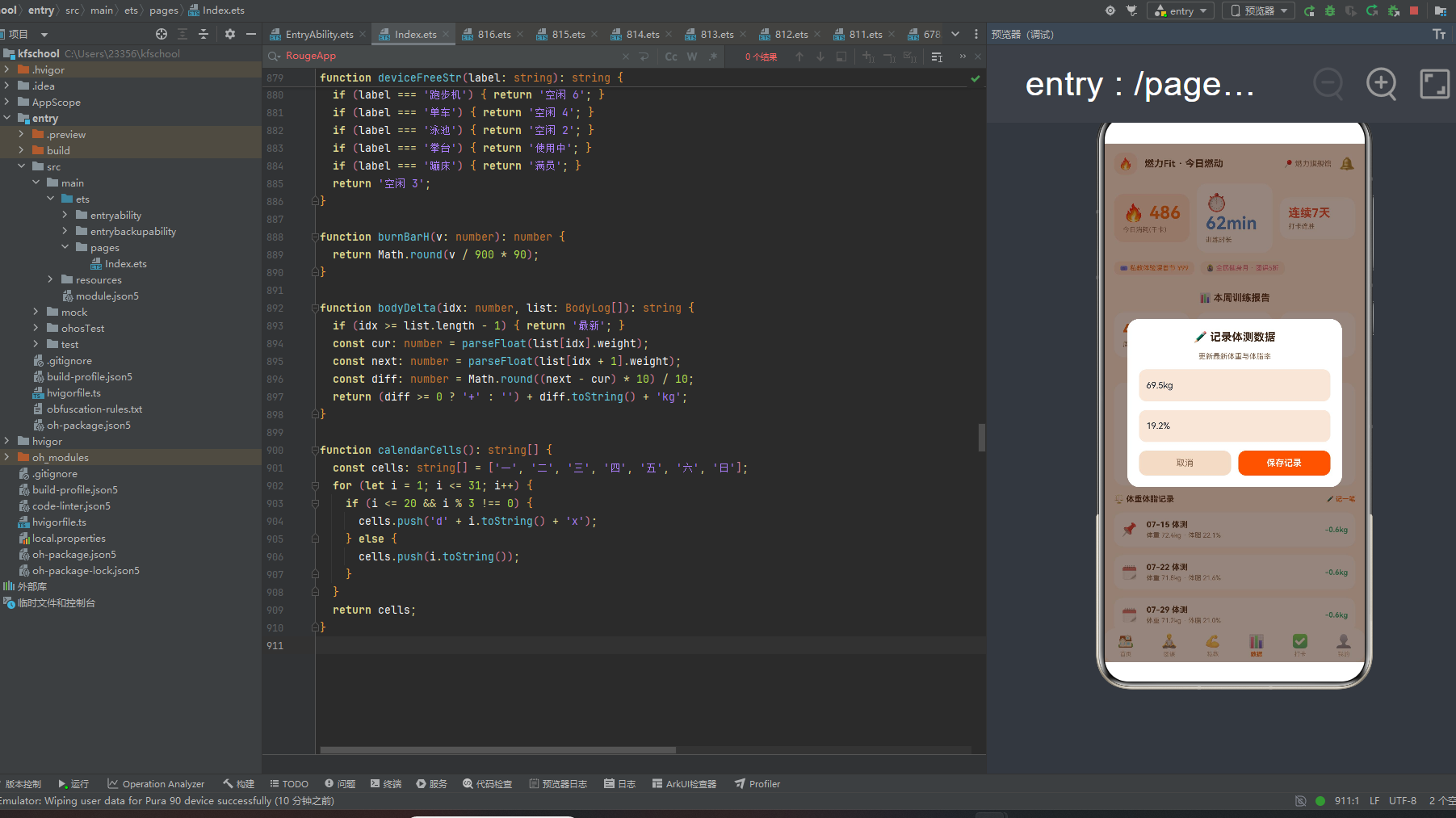
Text('✏️ 记录体测数据').fontSize(15).fontColor(COLORS.title).fontWeight(FontWeight.Bold)
Text('更新最新体重与体脂率').fontSize(10).fontColor(COLORS.sub)
TextInput({ placeholder: '体重(如 69.2kg)', text: this.editWeight })
.onChange((v: string) => { this.editWeight = v; })
.fontSize(12).padding(10).borderRadius(10).backgroundColor(COLORS.dark)
TextInput({ placeholder: '体脂率(如 19.0%)', text: this.editFat })
.onChange((v: string) => { this.editFat = v; })
.fontSize(12).padding(10).borderRadius(10).backgroundColor(COLORS.dark)
Row({ space: 10 }) {
Column() { Text('取消').fontSize(12).fontColor(COLORS.sub) }
.layoutWeight(1).padding({ top: 10, bottom: 10 }).borderRadius(10).backgroundColor(COLORS.darkL)
.onClick(() => { this.editModal = false; })
Column() { Text('保存记录').fontSize(12).fontColor('#FFFFFF').fontWeight(FontWeight.Bold) }
.layoutWeight(1).padding({ top: 10, bottom: 10 }).borderRadius(10).backgroundColor(COLORS.orange)
.onClick(() => {
this.bodyList.push(new BodyLog(
Date.now(),
'08-21',
this.editWeight.length > 0 ? this.editWeight : '69.5kg',
this.editFat.length > 0 ? this.editFat : '19.2%'));
this.editModal = false;
})
}
.width('100%')
}
.width('82%').constraintSize({ maxHeight: '80%' }).padding(16).borderRadius(16).backgroundColor(COLORS.card)
}
.width('100%').height('100%').zIndex(999)
}
if (this.delModal) {
Stack({ alignContent: Alignment.Center }) {
this.modalOverlay(() => { this.delModal = false; })
Column({ space: 14 }) {
Text('🗑️ 清空订单记录?').fontSize(15).fontColor(COLORS.title).fontWeight(FontWeight.Bold)
Text('共 ' + this.orderList.length.toString() + ' 条订单将被删除,删除后不可恢复。')
.fontSize(10).fontColor(COLORS.sub)
Row({ space: 10 }) {
Column() { Text('再想想').fontSize(12).fontColor(COLORS.sub) }
.layoutWeight(1).padding({ top: 10, bottom: 10 }).borderRadius(10).backgroundColor(COLORS.darkL)
.onClick(() => { this.delModal = false; })
Column() { Text('确认清空').fontSize(12).fontColor('#FFFFFF') }
.layoutWeight(1).padding({ top: 10, bottom: 10 }).borderRadius(10).backgroundColor(COLORS.red)
.onClick(() => {
this.orderList.splice(0, this.orderList.length);
this.delModal = false;
})
}
.width('100%')
}
.width('78%').constraintSize({ maxHeight: '80%' }).padding(16).borderRadius(16).backgroundColor(COLORS.card)
}
.width('100%').height('100%').zIndex(999)
}
}
.width('100%').height('100%').backgroundColor(COLORS.bg)
}
}
function deviceFreeStr(label: string): string {
if (label === '跑步机') { return '空闲 6'; }
if (label === '单车') { return '空闲 4'; }
if (label === '泳池') { return '空闲 2'; }
if (label === '拳台') { return '使用中'; }
if (label === '蹦床') { return '满员'; }
return '空闲 3';
}
function burnBarH(v: number): number {
return Math.round(v / 900 * 90);
}
function bodyDelta(idx: number, list: BodyLog[]): string {
if (idx >= list.length - 1) { return '最新'; }
const cur: number = parseFloat(list[idx].weight);
const next: number = parseFloat(list[idx + 1].weight);
const diff: number = Math.round((next - cur) * 10) / 10;
return (diff >= 0 ? '+' : '') + diff.toString() + 'kg';
}
function calendarCells(): string[] {
const cells: string[] = ['一', '二', '三', '四', '五', '六', '日'];
for (let i = 1; i <= 31; i++) {
if (i <= 20 && i % 3 !== 0) {
cells.push('d' + i.toString() + 'x');
} else {
cells.push(i.toString());
}
}
return cells;
}
十四、开发环境搭建
14.1 安装 DevEco Studio
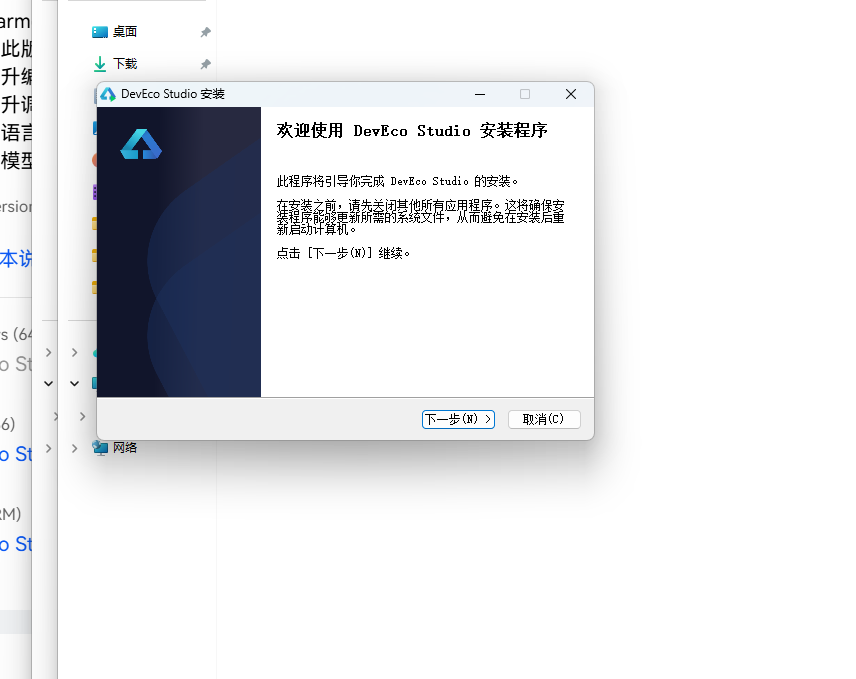
DevEco Studio 是 HarmonyOS 应用开发的官方 IDE。下载安装包后双击运行,进入安装欢迎界面,点击「下一步」继续。
14.2 选择安装路径
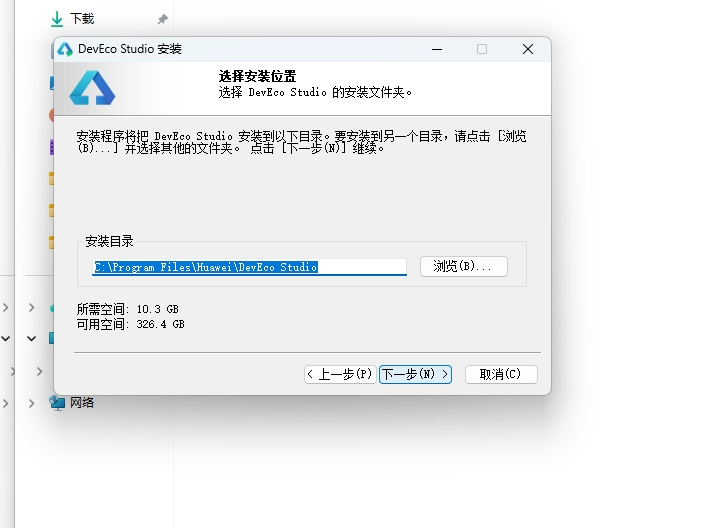
选择目标安装目录,建议安装到非系统盘,确认所需空间后点击「下一步」。
14.3 配置安装选项
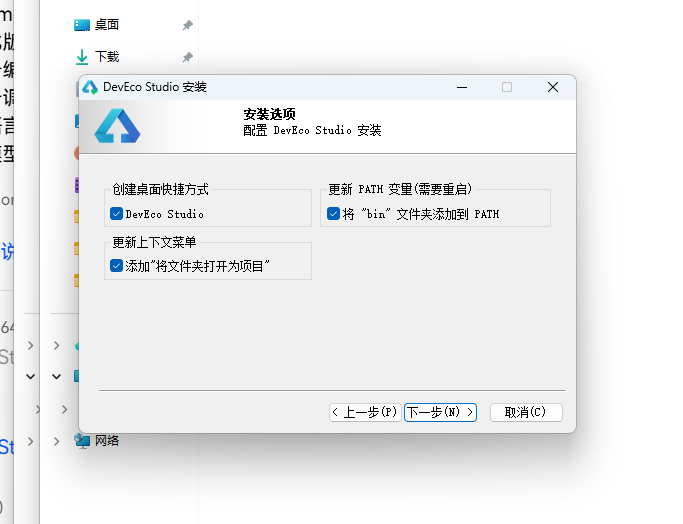
设置环境变量,勾选创建桌面快捷方式、将 bin 文件夹添加到 PATH、添加上下文菜单,但是需要重启一下电脑使环境变量生效。
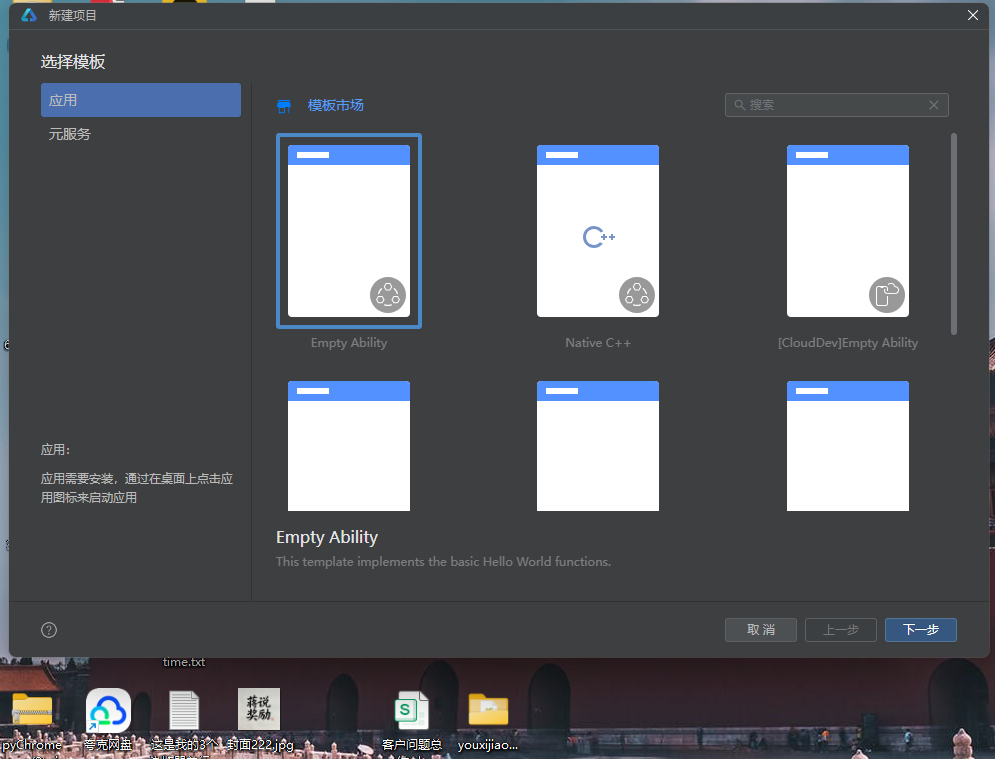
14.4 选择项目模板
新建一个空白模板,在模板市场中选择 Empty Ability。
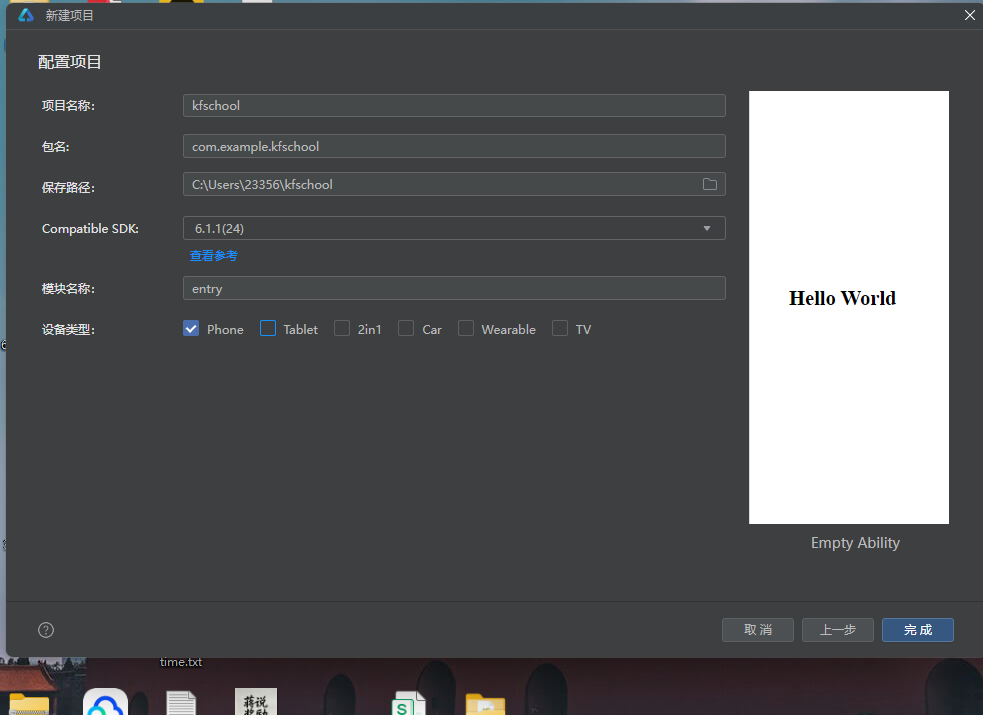
14.5 配置项目信息
设置 API 为 24 的模板项目,项目名称 kfschool,Compatible SDK 6.1.1(24),设备类型勾选 Phone,点击完成后初始化项目,自动下载相关依赖。
十五、总结
通过对这款燃力Fit智慧健身房应用的深度拆解,我们可以看到,一个优秀的移动端应用远不止是功能的堆砌,它更是架构设计、数据建模、视觉系统、交互逻辑、动效设计、数据计算等多维度能力的综合体现。
在架构层面,该应用采用了"配置驱动 + 组件化 + 状态管理"的三层设计模式。配置层将所有可变的数据与视觉属性抽离为常量数组和元数据接口,使得业务逻辑与表现层彻底解耦;组件层将六个功能页面拆分为独立的 @Builder 构建器,每个页面采用完全不同的布局风格,实现"一页一型"的差异化设计;状态层利用 ArkUI 的 @State、@Observed 机制,实现了数据变化到 UI 刷新的自动响应,特别是两个动画状态的联动管理(setInterval 800ms 同步切换 breath/beat)和弹窗数据状态的预填(addNote/addMin/editWeight/editFat 预填数据避免空输入),体现了对状态管理的精准理解。
在数据层面,五个 @Observed 数据类(GroupCourse/CoachItem/PunchRecord/MemberOrder/BodyLog)以 constructor 构造函数方式实例化,完整描述了燃力Fit的全部业务信息。特别的是,应用定义了 8 个工具函数(levelColor/coachTagColor/orderStateColor/punchIconOf/deviceFreeStr/burnBarH/bodyDelta/calendarCells),将颜色映射、数据计算、日历生成等逻辑从 UI 层抽离,实现数据与逻辑分离,是本应用工程化设计的核心亮点。burnBarH 函数将消耗千卡动态映射为柱状图像素高度(v/90090),bodyDelta 函数计算相邻体测体重变化差值(下降绿/上升红),calendarCells 函数动态生成 38 个日历单元格(打卡日✅/未打卡日数字),三个数据计算函数是本应用数据可视化的核心支撑。训练打卡弹窗确认后消耗=时长9(模拟每分钟9千卡消耗率),punchList.unshift 新记录到列表顶部,形成打卡数据计算闭环。
在视觉层面,本应用独创了"橙红活力主题"设计——主色 #F2610C 活力橙搭配辅助色 #E8422E 橙红,bg #FBF3EC 暖橙米白底,title #3B2314 炭棕黑而非纯黑,与暖橙米白底形成高对比度的同时带有温暖质感。应用的渐变设计是色彩系统的核心亮点——首页体态挑战赛Banner使用 135 度橙→红渐变,打卡页立即打卡按钮使用同样的 135 度橙→红渐变,数据页每日消耗趋势柱状图使用 180 度橙→红垂直渐变,我的会员卡使用 135 度炭黑→深橙渐变,四种不同角度和配色的橙红渐变贯穿整个应用,形成了统一而丰富的橙红渐变视觉语言。健身数据头部采用三卡布局(今日消耗 chip 橙底/训练时长白卡蓝/打卡连胜白卡红),三种不同底色对应三种数据维度,是本应用头部的特色设计。应用的动态颜色逻辑也十分丰富——团课难度三档着色(入门绿/进阶橙/高级红)、教练专长五色着色(增肌红/减脂绿/塑形粉/康复蓝/其他紫)、订单状态四档着色(已完成绿/进行中橙/待支付红/其他灰)、器械空闲三档着色(空闲绿/使用中橙/满员红)、体重变化两档着色(下降绿/上升红),形成了"以色定难度、以色定专长、以色定状态、以色定变化"的多层语义着色模式。统一的色彩系统是整个应用的视觉基石,活力橙主色搭配橙红辅助色,配合暖橙米白底和多维度橙红渐变,营造出既热情又专业的智慧健身房氛围。
在交互层面,应用独创了"双动画状态联动"设计——aboutToAppear 中 setInterval 800ms 同步切换 breath 和 beat 两个布尔动画状态,breath 用于团课预约按钮透明度动画(opacity 0.75-1,duration 600ms,仅未满员课程),beat 预留扩展,两个动画同步切换形成整体协调的联动动效体系。团课预约按钮的 breath 呼吸动画让可预约课程有了"可点击"的动态感,已满员课程使用 darkL 底且无动画,视觉上区分可预约/不可预约状态。私教约课时段采用 Flex wrap 布局,点击切换 slotPick 状态,选中橙底白字未选 dark 底,交互直观。打卡日历采用 calendarCells 函数动态生成,打卡日显示✅ chip 底,未打卡日显示数字 dark 底,两种底色区分让打卡状态一目了然。三个弹窗(训练打卡/记录体测数据/清空订单记录)各自独立 Stack 叠加,共享 modalOverlay 统一遮罩封装,训练打卡弹窗确认后 punchList.unshift 新记录(消耗=时长*9),记录体测数据弹窗确认后 bodyList.push 新记录,清空订单弹窗确认后 orderList.splice(0, length) 清空全部,形成了完整的增删改交互闭环。清空订单弹窗的二次确认(“共X条订单将被删除,删除后不可恢复”)防止误操作,体现了数据安全意识。
标签: HarmonyOS · API 24 · ArkTS · 华为 · 智慧健身 · 健身房 · 运动健康 · 移动端开发

讨论HarmonyOS开发技术,专注于API与组件、DevEco Studio、测试、元服务和应用上架分发等。
更多推荐

 0
0 0
0- 0


 已为社区贡献2条内容

所有评论(0)