HarmonyOS ArkTS API 24每个接口对应一个@Observed装饰的实现类,通过构造函数接收接口类型的参数对象完成属性初始化
HarmonyOS作为华为面向万物互联时代打造的分布式操作系统,在HarmonyOS 6.1.1版本中持续深化了ArkTS声明式开发框架的工程化能力与生态成熟度。ArkTS语言在TypeScript的基础上进行了深度定制化扩展,保留了静态类型系统的编译期安全保障,同时引入了@State、@Observed、@Builder、@Entry、@Component等一系列装饰器,构建了一套完整的响应式UI开发范式。在HarmonyOS ArkTS API 24的技术栈下,开发者可以借助interface接口与implements实现关系建立严格的数据契约,通过@Observed装饰器使数据模型具备可观察性,再通过@State状态变量驱动组件的自动重渲染,形成从数据定义到界面呈现的完整响应式数据流。本文将以一个汉服体验馆社区应用——霓裳阁——为案例,全面剖析其在HarmonyOS平台下的架构设计思路与实现细节。
霓裳阁是一个面向汉服文化爱好者的垂直社区应用,其业务模式参考了美团等本地生活服务平台的经典交互范式,在汉服体验这一新兴文化消费垂直领域进行了深度的产品定制。从业务覆盖面来看,该应用整合了汉服租赁套餐、妆造师预约、跟拍作品浏览、经典发型选择、配饰租赁、档期日历六大核心业务板块,构建了从选装到妆造再到跟拍的完整服务链条。汉服体验作为一种兼具文化传承与视觉美学的消费形式,其线上社区化运营具有独特的业务价值:用户不仅需要在应用内完成汉服款式筛选与妆造师选聘,还需要浏览跟拍作品集、选择经典发型、租赁配饰、查看档期,这些需求共同构成了一个高频互动的文化体验社区场景。ArkTS的声明式组件体系与响应式状态管理恰好为这种多页面、多弹框、多列表的复杂交互场景提供了理想的技术支撑。
在技术架构层面,霓裳阁应用的设计体现了HarmonyOS ArkTS API 24的几个关键设计理念。首先是interface+implements模式的全面应用:应用定义了六个接口(Outfit/Stylist/PhotoWork/HairStyle/Accessory/Slot),每个接口对应一个@Observed装饰的实现类,通过构造函数接收接口类型的参数对象完成属性初始化。这种模式将数据契约与实现分离,接口定义了数据的形状,实现类提供了可观察性,两者通过implements关键字建立正式的类型关联。其次是流苏书签式标签栏的创新设计:六个内容标签以单排流苏书签形式排列,每个标签顶部设有一个圆形流苏珠与短线条,模拟古籍书签的流苏装饰,选中态通过金色流苏与深红色背景提供视觉反馈。再次是fxLayer动效系统的多元素协同设计:团扇旋转、花瓣飘落、灯笼呼吸缩放、星光闪烁、铜镜旋转五种动效元素各自由tick状态变量的不同取模运算驱动,节奏错位避免了机械感。
从工程实践角度审视,霓裳阁应用的色彩体系以深红色(#AD1457)为primary主色,以更深的暗红色(#880E4F)为primaryDeep暗色变体,以青绿色(#00695C)为accent强调色,以古铜金色(#C9A227)为辅助高亮色。这套色彩体系营造出典雅、古典的汉服文化氛围感——深红色的艳丽调性传递中国传统美学的端庄与华贵,青绿色作为清雅的对比色出现在档期标签与妆造师等级标识中,古铜金色则用于拼团价格与流苏装饰强调。bg背景色采用极浅的暖灰(#F6EEEA),card卡片色为纯白(#FFFFFF),通过tagBg浅粉灰(#F4E9E4)提供标签背景层级,整体构建出层次分明且主题感强烈的视觉体系。四个弹框组件(新建预约单、编辑体态档案、取消预约确认、拼团套餐GROUP BUY)通过统一的modalOverlay覆盖层管理,每个弹框都有中文标题与部分英文标识的双语呈现。
一、色彩体系与ColorPalette接口定义
霓裳阁应用的色彩管理通过ColorPalette接口统一约束,定义了16个语义化颜色字段,确保全局色彩使用的一致性与可维护性。这种接口驱动的色彩管理方案在大型项目中尤为重要,它确保了色彩体系的完整性与一致性。
interface ColorPalette {
  bg: string
  card: string
  white: string
  primary: string
  primaryDeep: string
  accent: string
  accentSoft: string
  gold: string
  textPrimary: string
  textSecond: string
  textThird: string
  line: string
  tagBg: string
  warn: string
  danger: string
  ok: string
}
上述ColorPalette接口定义了16个颜色字段,涵盖背景色、卡片色、主色及其深色变体、强调色及其浅色变体、金色辅助色、三级文本色、边框色、标签背景色以及三个功能状态色(warn警告橙、danger危险红、ok成功绿)。与简单的颜色对象不同,使用interface定义色彩结构后,COLORS常量必须完整实现所有字段,TypeScript编译器会在编译阶段验证完整性,任何遗漏字段都会触发编译错误。primary字段代表深红色#AD1457,传递中国传统色彩中胭脂红的典雅气质;accent字段代表青绿色#00695C,象征竹青与松柏的清雅意境;gold字段代表古铜金色#C9A227,用于流苏装饰与价格强调。
COLORS常量的实例化体现了精心的色彩搭配考量。primary为#AD1457——一种深沉的胭脂红,传递汉服文化中端庄华丽的审美基调;primaryDeep为#880E4F——更深的暗红色,用于头部渐变终点与预约按钮背景;accent为#00695C——青绿色,在红色调中作为清雅的对比色,用于档期可约标签、妆造师等级标识与体态档案保存按钮;accentSoft为#E0F2F1——极浅的薄荷青,作为选中态标签背景与辅助色。gold为#C9A227——古铜金色,用于流苏书签选中态装饰、拼团价格强调与星级评分标识。
const COLORS: ColorPalette = {
  bg: '#F6EEEA',
  card: '#FFFFFF',
  white: '#FFFFFF',
  primary: '#AD1457',
  primaryDeep: '#880E4F',
  accent: '#00695C',
  accentSoft: '#E0F2F1',
  gold: '#C9A227',
  textPrimary: '#2B2024',
  textSecond: '#6E5A62',
  textThird: '#A2929B',
  line: '#EFE3DC',
  tagBg: '#F4E9E4',
  warn: '#E65100',
  danger: '#C62828',
  ok: '#2E7D32'
}
文本色采用三级暖灰梯度:textPrimary(#2B2024)为深暖灰近黑用于标题正文,textSecond(#6E5A62)为中等暖灰用于辅助说明,textThird(#A2929B)为浅暖灰用于占位提示与时间信息。line(#EFE3DC)与tagBg(#F4E9E4)均为极浅暖色调,分别用于分割线与标签背景,在不干扰主内容的前提下提供柔和的层级分隔。warn(#E65100)深橙色用于库存预警(如配饰库存低于10件时显示),danger(#C62828)红色用于取消预约操作,ok(#2E7D32)绿色用于档期可约状态与好评率。这套色彩体系在HarmonyOS ArkTS的声明式UI框架中,由于UI是状态的函数式映射,颜色常量的变更会自动触发依赖该常量的所有UI组件重新渲染,无需额外的命令式刷新操作。
二、interface+implements数据模型体系
霓裳阁应用在数据层采用了interface接口定义数据契约、@Observed class implements接口实现可观察数据模型的架构模式。这种模式将数据形状的定义与可观察实现分离,接口可以被多个实现类共享,也可以被函数参数类型引用,实现了高度的类型复用。应用共定义了六个接口与六个对应的@Observed实现类。
2.1 汉服套装模型 Outfit 与 OutfitItem
Outfit接口定义了汉服套装的完整数据契约,包含id、name、style、price、day、score、hot、fav共8个字段。style字段为朝代形制标签(唐制/明制/宋制/汉制/定制/武侠/配件),day字段为可租天数,score字段为评分,hot字段为是否热门爆款,fav字段为布尔值收藏标记。
interface Outfit {
  id: number
  name: string
  style: string
  price: number
  day: number
  score: number
  hot: boolean
  fav: boolean
}

@Observed
class OutfitItem implements Outfit {
  id: number = 0
  name: string = ''
  style: string = ''
  price: number = 0
  day: number = 0
  score: number = 0
  hot: boolean = false
  fav: boolean = false

  constructor(o: Outfit) {
    this.id = o.id
    this.name = o.name
    this.style = o.style
    this.price = o.price
    this.day = o.day
    this.score = o.score
    this.hot = o.hot ? o.hot : false
    this.fav = o.fav ? o.fav : false
  }
}
OutfitItem类通过implements关键字声明实现Outfit接口,所有字段在声明时都提供了默认值(这是ArkTS的类型安全要求)。构造函数接收一个Outfit类型的参数对象o,将o的各属性逐一赋值给实例属性。hot和fav两个布尔字段使用了o.hot ? o.hot : false的三元表达式,确保当传入值为undefined时默认为false。这种通过参数对象初始化的构造函数模式比位置参数构造函数更加灵活,调用时无需记忆参数顺序,且可以只传入部分字段(其余字段使用默认值)。
2.2 妆造师模型 Stylist 与 StylistItem
interface Stylist {
  id: number
  name: string
  level: string
  years: number
  price: number
  orders: number
  score: number
  fav: boolean
}

@Observed
class StylistItem implements Stylist {
  id: number = 0
  name: string = ''
  level: string = ''
  years: number = 0
  price: number = 0
  orders: number = 0
  score: number = 0
  fav: boolean = false

  constructor(o: Stylist) {
    this.id = o.id
    this.name = o.name
    this.level = o.level
    this.years = o.years
    this.price = o.price
    this.orders = o.orders
    this.score = o.score
    this.fav = o.fav ? o.fav : false
  }
}
Stylist模型包含level字段(等级标签如"首席妆造"/“高级妆造”/"古风专项"等)、years字段(从业年限)、orders字段(累计订单数)、score字段(评分)。这些字段共同描述了妆造师的专业资质与市场认可度,为用户的选聘决策提供了全面的数据支撑。在UI渲染时,level字段以青绿色标签形式展示在妆造师卡片上,配合years与orders信息行,构成了专业感与信任感兼备的妆造师展示卡片。
2.3 跟拍作品模型 PhotoWork 与 PhotoWorkItem
interface PhotoWork {
  id: number
  title: string
  master: string
  price: number
  shots: number
  hot: boolean
  fav: boolean
}

@Observed
class PhotoWorkItem implements PhotoWork {
  id: number = 0
  title: string = ''
  master: string = ''
  price: number = 0
  shots: number = 0
  hot: boolean = false
  fav: boolean = false

  constructor(o: PhotoWork) {
    this.id = o.id
    this.title = o.title
    this.master = o.master
    this.price = o.price
    this.shots = o.shots
    this.hot = o.hot ? o.hot : false
    this.fav = o.fav ? o.fav : false
  }
}
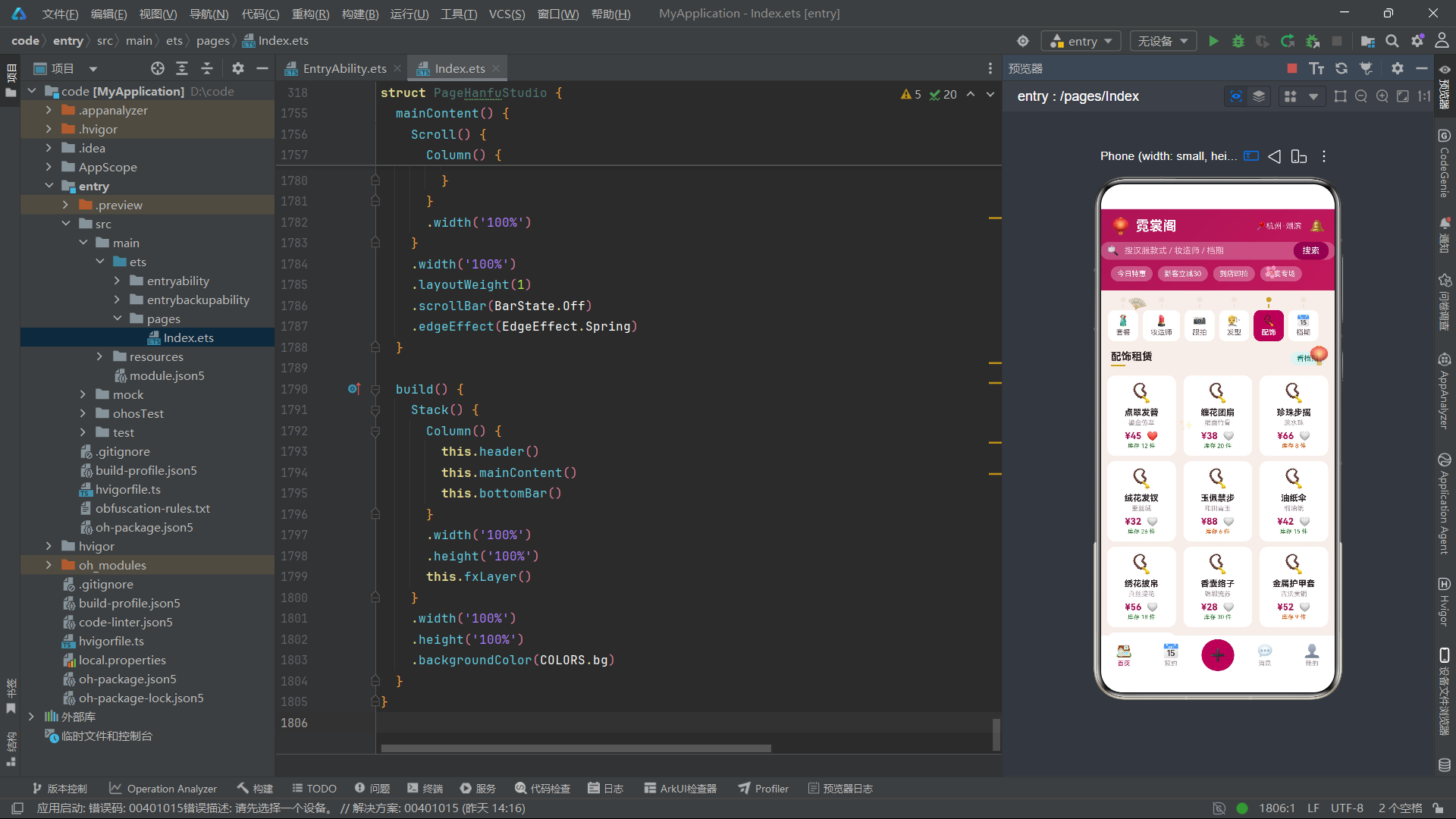
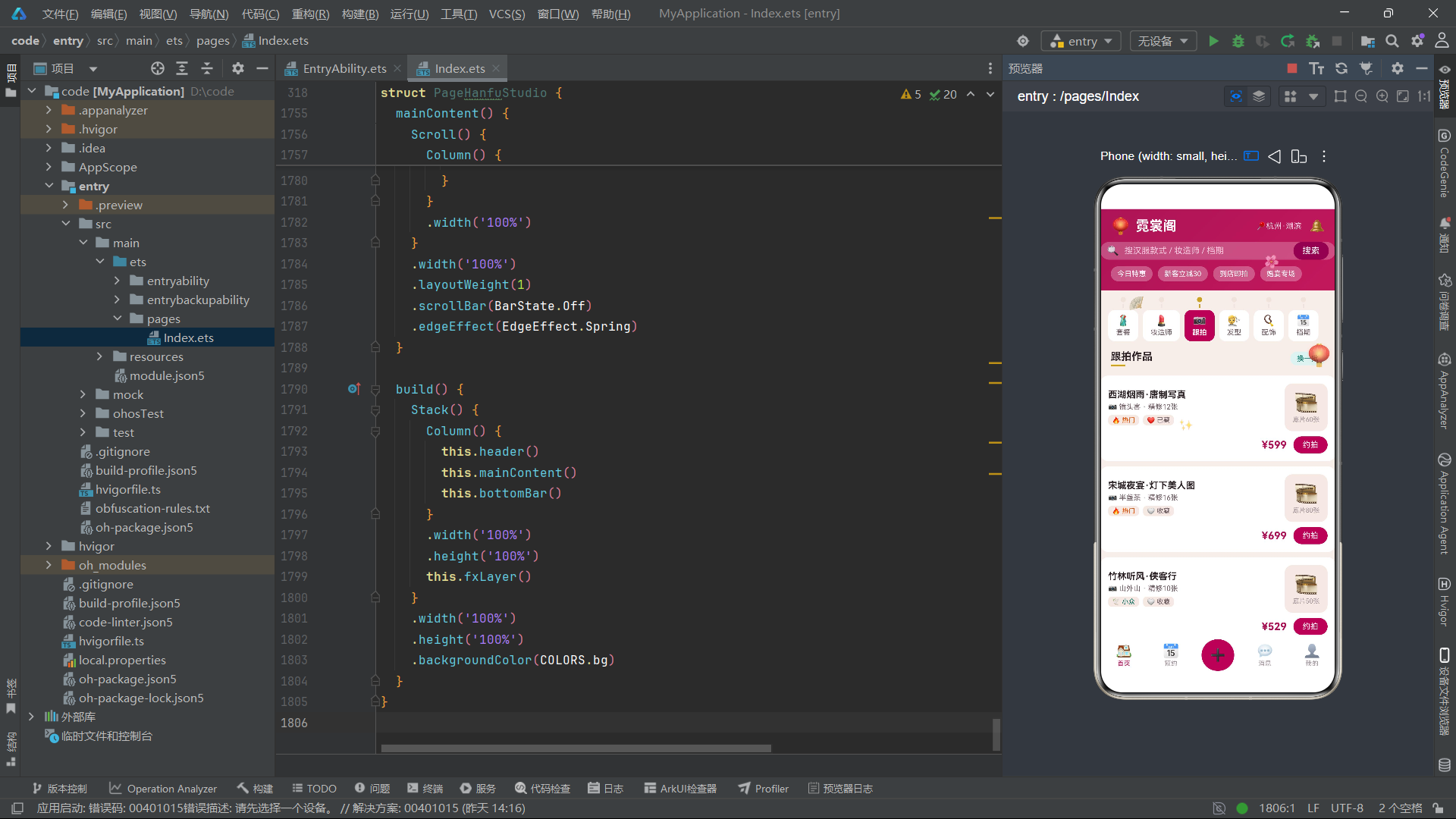
PhotoWork模型的title字段为作品标题(如"西湖烟雨·唐制写真"),master字段为摄影师名号(如"镜头客"/“半盏茶”/“山外山”),shots字段为底片张数。hot字段标记热门作品,fav字段标记用户收藏。在UI渲染时,hot字段驱动"🔥 热门"或"🕊️ 小众"标签的显示,shots字段同时驱动底片数量展示与精修张数计算(shots/5)。
2.4 发型模型 HairStyle 与配饰模型 Accessory
interface HairStyle {
  id: number
  name: string
  fit: string
  price: number
  mins: number
  fav: boolean
}

@Observed
class HairStyleItem implements HairStyle {
  id: number = 0
  name: string = ''
  fit: string = ''
  price: number = 0
  mins: number = 0
  fav: boolean = false

  constructor(o: HairStyle) {
    this.id = o.id
    this.name = o.name
    this.fit = o.fit
    this.price = o.price
    this.mins = o.mins
    this.fav = o.fav ? o.fav : false
  }
}

interface Accessory {
  id: number
  name: string
  material: string
  price: number
  stock: number
  fav: boolean
}

@Observed
class AccessoryItem implements Accessory {
  id: number = 0
  name: string = ''
  material: string = ''
  price: number = 0
  stock: number = 0
  fav: boolean = false

  constructor(o: Accessory) {
    this.id = o.id
    this.name = o.name
    this.material = o.material
    this.price = o.price
    this.stock = o.stock
    this.fav = o.fav ? o.fav : false
  }
}
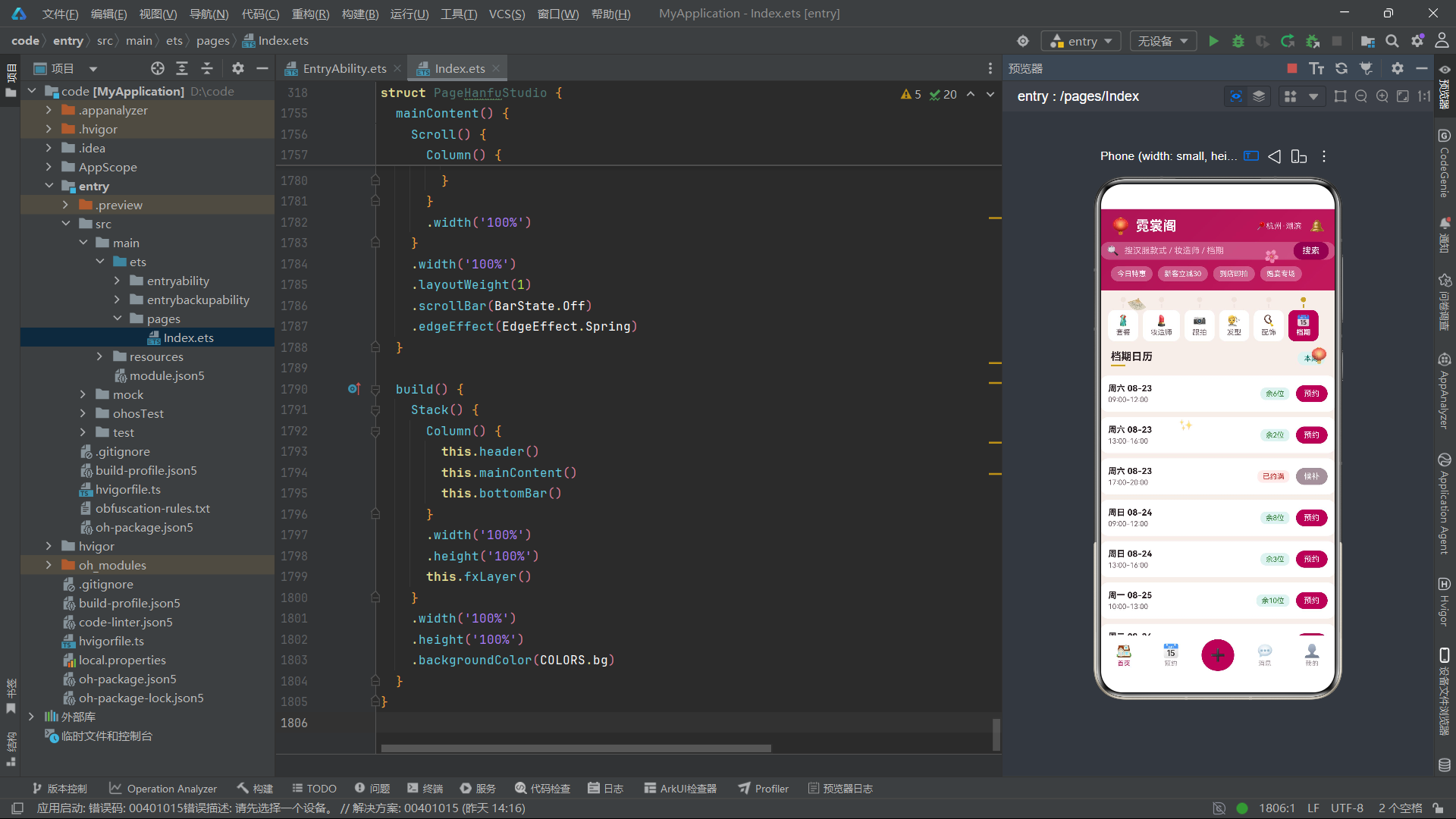
HairStyle模型的fit字段记录适配的汉服形制(如"齐胸襦裙"/“大氅”/“明制袄裙"等),mins字段为造型耗时分钟数,这些信息帮助用户评估发型与汉服的搭配适配度与时间成本。Accessory模型的material字段记录材质(如"鎏金仿翠”/“绢面竹骨”/"淡水珠"等),stock字段为库存数量,当库存低于10件时显示warn橙色预警,这一库存预警机制帮助用户在租赁前了解配饰的可用性。
三、静态数据数组与辅助函数
3.1 汉服套装列表 SUITS
const SUITS: OutfitItem[] = [
  new OutfitItem({ id: 1, name: '齐胸襦裙·烟霞粉', style: '唐制', price: 168, day: 3, score: 4.9, hot: true, fav: true }),
  new OutfitItem({ id: 2, name: '马面裙·黛蓝织金', style: '明制', price: 198, day: 3, score: 4.8, hot: true, fav: false }),
  new OutfitItem({ id: 3, name: '大氅·鹤雪白', style: '宋制', price: 226, day: 2, score: 4.7, hot: false, fav: false }),
  new OutfitItem({ id: 4, name: '圆领袍·墨青竹纹', style: '唐制', price: 158, day: 3, score: 4.6, hot: false, fav: false }),
  new OutfitItem({ id: 5, name: '曲裾·朱砂红', style: '汉制', price: 178, day: 2, score: 4.9, hot: true, fav: false }),
  new OutfitItem({ id: 6, name: '袄裙·秋香绿', style: '明制', price: 148, day: 3, score: 4.5, hot: false, fav: false }),
  new OutfitItem({ id: 7, name: '褙子·月白暗纹', style: '宋制', price: 128, day: 2, score: 4.4, hot: false, fav: false }),
  new OutfitItem({ id: 8, name: '云肩·鎏金点翠', style: '配件', price: 88, day: 2, score: 4.9, hot: true, fav: false }),
  new OutfitItem({ id: 9, name: '婚服·凤冠霞帔', style: '定制', price: 998, day: 1, score: 5.0, hot: true, fav: false }),
  new OutfitItem({ id: 10, name: '侠客装·玄夜黑', style: '武侠', price: 188, day: 3, score: 4.7, hot: false, fav: false }),
  new OutfitItem({ id: 11, name: '道袍·霜灰云鹤', style: '明制', price: 166, day: 3, score: 4.6, hot: false, fav: false }),
  new OutfitItem({ id: 12, name: '齐胸襦裙·青竹雨', style: '唐制', price: 172, day: 3, score: 4.8, hot: false, fav: false })
]
SUITS数组包含12个汉服套装,覆盖唐制、明制、宋制、汉制、定制、武侠、配件等多种形制类别。每个套装都通过对象字面量传入OutfitItem构造函数,名称采用"形制·色彩/纹样"的命名规则(如"齐胸襦裙·烟霞粉"、“马面裙·黛蓝织金”),既有文化准确性又有视觉想象力。价格区间从88元到998元,租期从1天到3天,其中婚服·凤冠霞帔以998元的价格和5.0的满分评分成为最高端选项。hot字段标记了4个热门爆款(齐胸襦裙·烟霞粉、马面裙·黛蓝织金、曲裾·朱砂红、云肩·鎏金点翠、婚服·凤冠霞帔),这些热门套装在列表中会额外显示"🔥 本周爆款 · 剩余N套"的促销标签。
3.2 辅助函数体系
function monthVisitBar(i: number): number {
  return MONTH_VISITS[i] * 0.9
}

function pctWidth(i: number): string {
  return STYLE_PCTS[i] + '%'
}
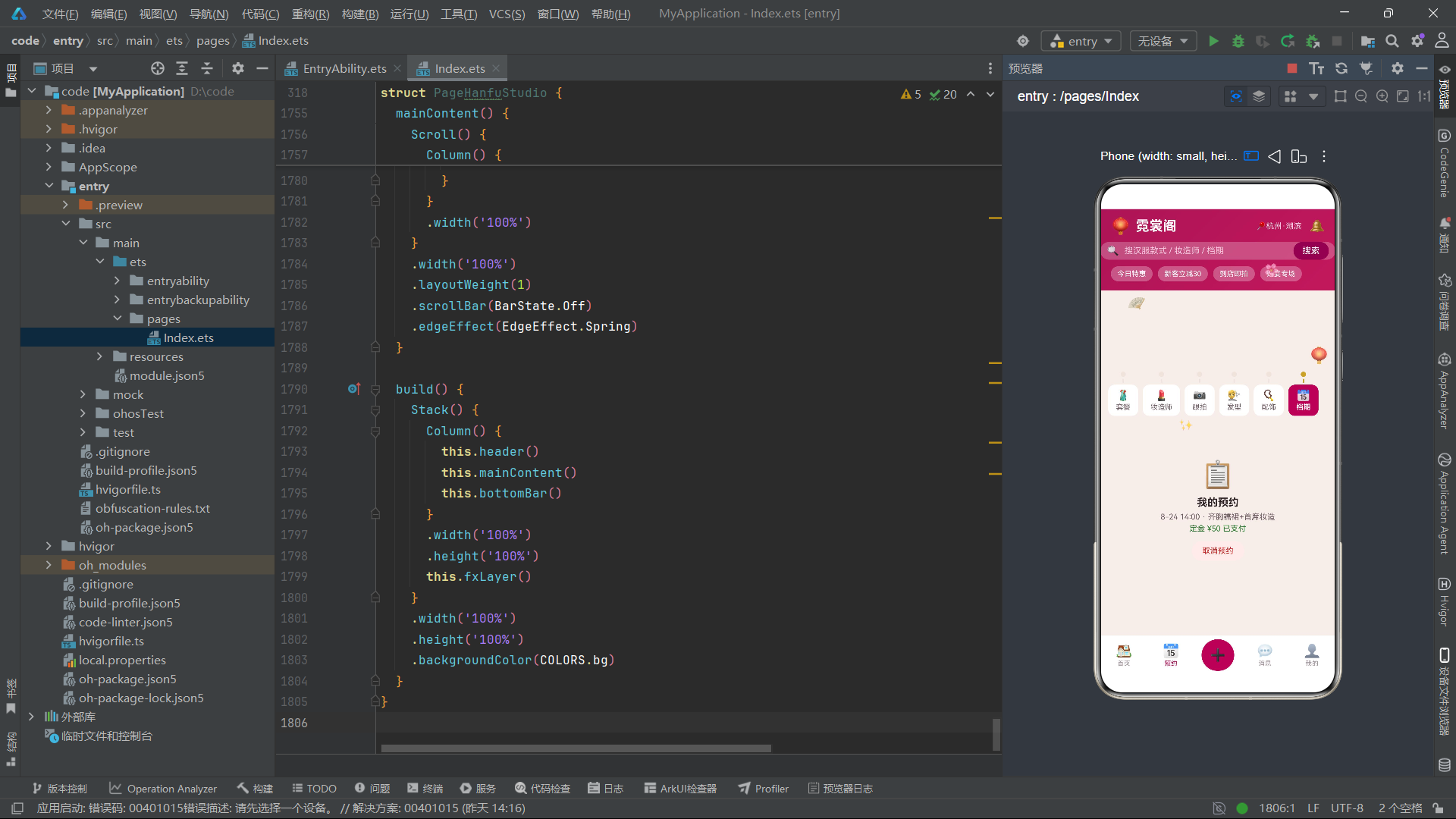
monthVisitBar函数将月度到店人数映射为柱状图高度(乘以0.9系数略微缩小),pctWidth函数将风格占比数值转换为带百分号的字符串。这两个辅助函数在UI构建过程中被@Builder函数调用,将业务逻辑与视觉呈现进行了清晰的分离。在ArkTS的声明式UI框架中,辅助函数返回的值会直接参与组件属性设置,当依赖的数据变化时,由于辅助函数在渲染过程中被重新调用,返回值也会自动更新。
四、组件状态与生命周期管理
PageHanfuStudio组件作为应用入口,通过@Entry和@Component装饰器声明。其内部状态管理体现了ArkTS响应式系统的精髓。
@Entry
@Component
struct PageHanfuStudio {
  @State curTab: number = 0
  @State mainTab: number = 0
  @State addOpen: boolean = false
  @State editOpen: boolean = false
  @State delOpen: boolean = false
  @State bizOpen: boolean = false
  @State suitList: OutfitItem[] = SUITS
  @State stylistList: StylistItem[] = STYLISTS
  @State photoList: PhotoWorkItem[] = PHOTOS
  @State hairList: HairStyleItem[] = HAIRS
  @State accList: AccessoryItem[] = ACCS
  @State slotList: SlotItem[] = SLOTS
  @State rev: number = 0
  @State tick: number = 0
  @State bookTags: number[] = [0]
  @State figTags: number[] = [0]
  @State hourStep: number = 2
  @State heightStep: number = 165
  @State rainFlag: boolean = false
  @State groupTags: number[] = [1]
  @State groupStep: number = 3
  private timer: number = -1
curTab控制内容区6个页签切换(0-5分别对应套餐、妆造师、跟拍、发型、配饰、档期),mainTab控制底部5个主tab。suitList、stylistList、photoList、hairList、accList、slotList六个列表状态分别承载对应业务域的动态数据。rev是一个递增修订号用于驱动ForEach键值变化以触发列表刷新。tick是动画驱动力,bookTags/figTags是两组多选标签索引数组(分别对应预约类型与偏好风格),hourStep/heightStep是两个步进器状态(拍摄时长与身高),rainFlag是雨天备用妆开关布尔值,groupTags/groupStep用于拼团弹框的时段选择与人数设置。
4.1 生命周期钩子
aboutToAppear(): void {
  this.timer = setInterval(() => {
    this.tick = this.tick + 1
  }, 115)
}

aboutToDisappear(): void {
  if (this.timer >= 0) {
    clearInterval(this.timer)
  }
}
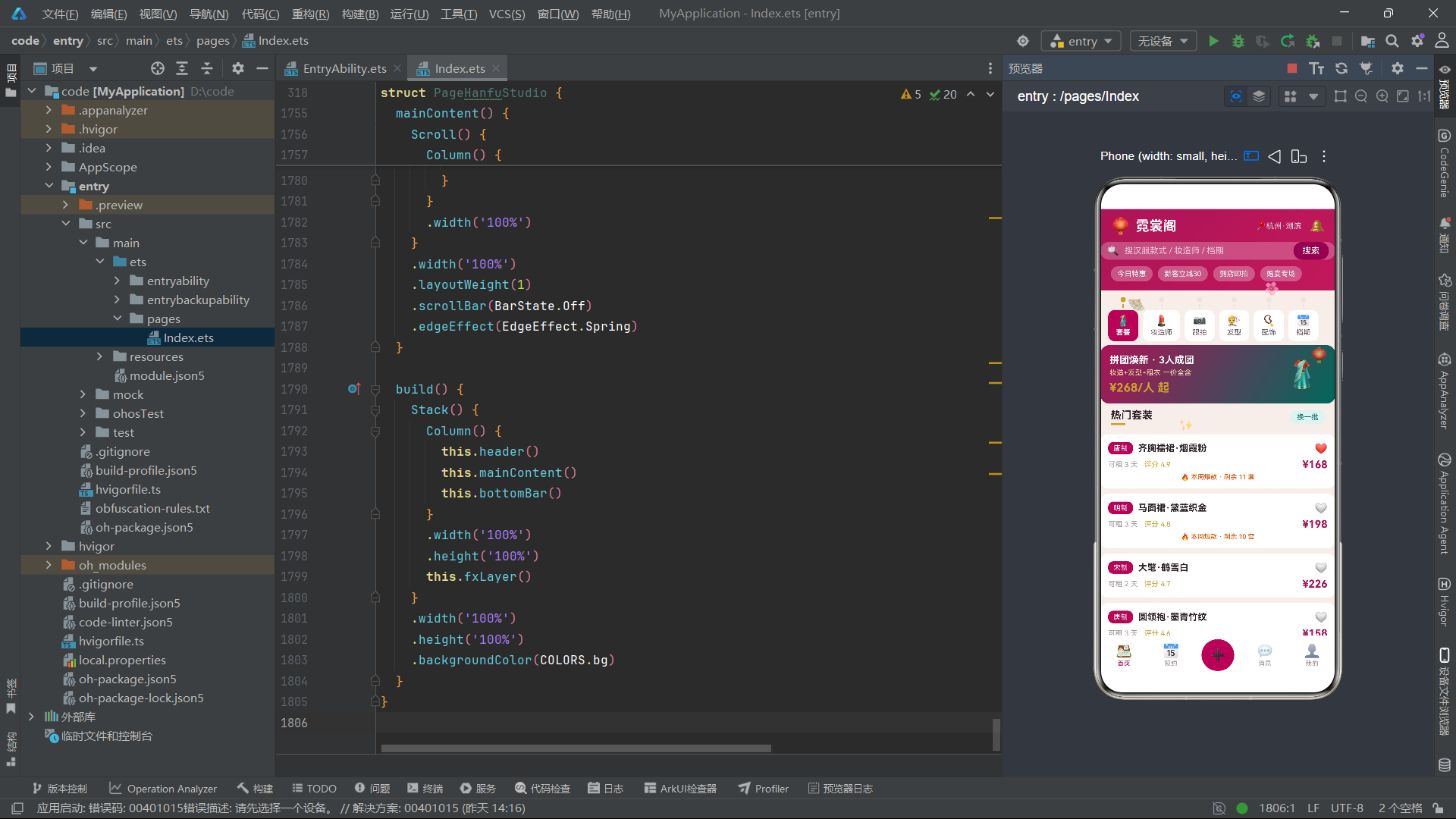
定时器以115毫秒间隔递增tick变量,频率介于990应用的120ms与991应用的105ms之间。aboutToDisappear中清除定时器防止内存泄漏,这是HarmonyOS开发的标准资源管理模式。
4.2 收藏切换与列表刷新方法
toggleSuitFav(i: number): void {
  this.suitList[i].fav = !this.suitList[i].fav
  this.rev = this.rev + 1
}

toggleHairFav(i: number): void {
  this.hairList[i].fav = !this.hairList[i].fav
  this.rev = this.rev + 1
}

toggleAccFav(i: number): void {
  this.accList[i].fav = !this.accList[i].fav
  this.rev = this.rev + 1
}

toggleTag(list: number[], i: number): void {
  if (list.indexOf(i) >= 0) {
    list.splice(list.indexOf(i), 1)
  } else {
    list.push(i)
  }
}

groupTotal(): number {
  return this.groupStep * 158
}
三个toggle方法分别处理汉服套装、发型、配饰的收藏切换,统一模式为:直接修改@Observed对象的fav属性,然后递增rev触发ForEach重新渲染。toggleTag是通用的多选标签切换方法,通过indexOf判断标签是否已选中——已选则splice移除,未选则push添加。groupTotal方法按groupStep * 158公式计算拼团总价,其中158为人均拼团价。closeAll方法将四个弹框状态一次性重置为false,提供了简洁的全局关闭入口。
五、fxLayer动效系统
fxLayer是霓裳阁应用的动效装饰层,通过6个emoji文本元素构建了汉服文化场景的氛围动画。该层使用hitTestBehavior(HitTestMode.None)设置事件穿透,确保下层交互不受影响。
@Builder
fxLayer() {
  Stack() {
    Text('🪭')
      .fontSize(26)
      .rotate({ angle: (this.tick % 24) * 15 })
      .position({ x: 40, y: 130 })
      .opacity(0.85)
    Text('🌸')
      .fontSize(20)
      .translate({ y: this.tick % 60 })
      .position({ x: 250, y: 60 })
      .opacity(0.75)
    Text('🏮')
      .fontSize(24)
      .scale({ x: 0.9 + (this.tick % 10) / 20, y: 0.9 + (this.tick % 10) / 20 })
      .position({ x: 320, y: 210 })
      .opacity(0.85)
    Text('✨')
      .fontSize(18)
      .position({ x: 120, y: 320 })
      .opacity((this.tick % 8) / 8 + 0.15)
    Text('🌸')
      .fontSize(14)
      .translate({ y: (this.tick + 30) % 80 })
      .position({ x: 560, y: 100 })
      .opacity(0.6)
    Text('🪞')
      .fontSize(22)
      .rotate({ angle: 0 - (this.tick % 20) * 9 })
      .position({ x: 470, y: 380 })
      .opacity(0.5)
  }
  .width('100%')
  .height('100%')
  .hitTestBehavior(HitTestMode.None)
}
团扇emoji通过rotate实现持续旋转,角度按(tick % 24) * 15计算,在0到345度之间循环(24步每步15度),模拟团扇在空中缓缓旋转飘落的优雅姿态。花瓣emoji通过translate的y方向位移实现下落飘动,位移量按tick % 60计算,在0到60像素之间循环,模拟花瓣从枝头飘落的过程。灯笼emoji通过scale实现呼吸式缩放,缩放系数按0.9 + (tick % 10) / 20计算,在0.9到1.4之间循环变化,模拟灯笼烛光摇曳的明暗变化。星光emoji通过opacity实现闪烁,透明度按(tick % 8) / 8 + 0.15计算,在0.15到1.15之间循环。第二朵花瓣使用与第一朵不同的取模基数(80而非60)和不同的初始偏移(+30),实现了两朵花瓣的错位飘落效果。铜镜emoji通过rotate实现反向旋转(角度取负值),按0 - (tick % 20) * 9计算,在0到-171度之间循环,模拟铜镜在妆台上的微微转动。
这种基于tick取模运算的动效驱动方案具有几个显著优势:首先,取模运算保证了所有动画属性在有限的数值空间内循环,不会因tick的持续递增而产生数值溢出;其次,不同元素采用不同的取模基数(24、60、10、8、80、20),使得各动画元素的运动节奏相互独立,避免了同步带来的机械感;最后,所有动画仅依赖单一状态变量tick,每115ms仅需递增一次,性能开销极低,适合在移动设备上长时间运行。两朵花瓣使用不同的取模基数与初始偏移,形成了自然的花瓣飘落错位效果,是动效设计中精细度控制的体现。
六、头部渐变与流苏书签式标签栏
6.1 header头部组件
头部组件采用深红色到更红紫色的135度线性渐变,营造汉服文化典雅华贵的视觉基调。
@Builder
header() {
  Column() {
    Row() {
      Text('🏮')
        .fontSize(24)
      Text('霓裳阁')
        .fontSize(21)
        .fontWeight(FontWeight.Bold)
        .fontColor(COLORS.white)
        .margin({ left: 8 })
      Column()
        .layoutWeight(1)
      Text('📍杭州·湖滨')
        .fontSize(12)
        .fontColor('#F8D7E4')
      Text('🔔')
        .fontSize(19)
        .margin({ left: 12 })
        .onClick(() => { this.mainTab = 3 })
    }
    .width('100%')
    .padding({ left: 16, right: 16, top: 12 })

    Row() {
      Text('🔍')
        .fontSize(15)
      Text('搜汉服款式 / 妆造师 / 档期')
        .fontSize(13)
        .fontColor('#F3C6DA')
        .margin({ left: 8 })
      Column()
        .layoutWeight(1)
      Text('搜索')
        .fontSize(13)
        .fontColor(COLORS.white)
        .padding({ left: 14, right: 14, top: 6, bottom: 6 })
        .backgroundColor(COLORS.primaryDeep)
        .borderRadius(14)
        .onClick(() => { this.curTab = 0 })
    }
    .width('100%')
    .padding({ left: 10, right: 10 })
    .margin({ top: 10 })
    .backgroundColor('rgba(255,255,255,0.24)')
    .borderRadius(20)

    Row({ space: 8 }) {
      Text('今日特惠')
        .fontSize(11)
        .fontColor(COLORS.white)
        .padding({ left: 10, right: 10, top: 5, bottom: 5 })
        .backgroundColor('rgba(255,255,255,0.28)')
        .borderRadius(12)
      Text('新客立减30')
        .fontSize(11)
        .fontColor(COLORS.white)
        .padding({ left: 10, right: 10, top: 5, bottom: 5 })
        .backgroundColor('rgba(255,255,255,0.28)')
        .borderRadius(12)
      Text('到店即拍')
        .fontSize(11)
        .fontColor(COLORS.white)
        .padding({ left: 10, right: 10, top: 5, bottom: 5 })
        .backgroundColor('rgba(255,255,255,0.28)')
        .borderRadius(12)
      Text('婚宴专场')
        .fontSize(11)
        .fontColor(COLORS.white)
        .padding({ left: 10, right: 10, top: 5, bottom: 5 })
        .backgroundColor('rgba(255,255,255,0.28)')
        .borderRadius(12)
    }
    .width('100%')
    .padding({ left: 16, right: 16 })
    .margin({ top: 10, bottom: 14 })
  }
  .width('100%')
  .alignItems(HorizontalAlign.Start)
  .linearGradient({ angle: 135, colors: [[COLORS.primary, 0], ['#C2185B', 1]] })
}
头部区域包含品牌名称与定位信息、搜索框、四个促销标签三个层级。品牌名称"霓裳阁"配合灯笼emoji,副标题"📍杭州·湖滨"传递了门店的地理位置。搜索框使用半透明白色背景(rgba(255,255,255,0.24))的胶囊形设计,右侧设有独立的深红色"搜索"按钮,点击后跳转到套餐页签。四个促销标签(今日特惠、新客立减30、到店即拍、婚宴专场)以药丸标签形式排列,每个使用相同的半透明白色背景。整个头部通过linearGradient设置为从primary(#AD1457)到#C2185B(稍浅的红色)的135度渐变,营造典雅华贵的汉服文化视觉氛围。
6.2 流苏书签式标签栏 tasselTab与tabBar
tasselTab是霓裳阁应用在标签栏设计上的核心创新,以古籍流苏书签为隐喻,每个标签顶部设有一个圆形流苏珠与一条短线条,模拟书签的流苏装饰。
@Builder
tasselTab(name: string, icon: string, idx: number) {
  Column() {
    Circle({ width: 8, height: 8 })
      .fill(this.curTab === idx ? COLORS.gold : COLORS.line)
      .margin({ bottom: 3 })
    Rect({ width: 2, height: 6 })
      .fill(this.curTab === idx ? COLORS.gold : COLORS.line)
    Column() {
      Text(icon)
        .fontSize(16)
      Text(name)
        .fontSize(11)
        .fontWeight(this.curTab === idx ? FontWeight.Bold : FontWeight.Normal)
        .fontColor(this.curTab === idx ? COLORS.white : COLORS.textSecond)
        .margin({ top: 2 })
    }
    .alignItems(HorizontalAlign.Center)
    .padding({ top: 7, bottom: 7, left: 12, right: 12 })
    .backgroundColor(this.curTab === idx ? COLORS.primary : COLORS.card)
    .borderRadius(10)
    .margin({ top: 3 })
  }
  .alignItems(HorizontalAlign.Center)
  .onClick(() => { this.switchTab(idx) })
}
标签最顶部是一个8x8像素的圆形流苏珠,选中时填充古铜金色(COLORS.gold),未选中时填充浅色线条色(COLORS.line)。流苏珠下方是一条2x6像素的短线条,颜色同样随选中态切换。这两个元素共同构成了流苏书签的顶部装饰——金色圆形珠加上短线条模拟书签顶端的流苏穗子。流苏装饰下方是emoji图标与标签名称的容器,选中时背景色变为深红色(COLORS.primary),文字变为白色与粗体;未选中时背景色为纯白色(COLORS.card),文字为次要色。这种将古籍书签流苏装饰引入标签栏设计的做法,不仅增强了汉服文化主题的沉浸感,也让用户在操作时获得了符合文化语境的视觉反馈。
@Builder
tabBar() {
  Row({ space: 7 }) {
    this.tasselTab('套餐', '🥻', 0)
    this.tasselTab('妆造师', '💄', 1)
    this.tasselTab('跟拍', '📷', 2)
    this.tasselTab('发型', '💇', 3)
    this.tasselTab('配饰', '📿', 4)
    this.tasselTab('档期', '📅', 5)
  }
  .width('100%')
  .padding({ left: 12, right: 12, top: 10, bottom: 6 })
}
tabBar通过单排Row排列6个tasselTab,对应6个内容页面:套餐、妆造师、跟拍、发型、配饰、档期。Row的space参数设为7像素,为标签之间提供均匀间距。这种单排6标签的布局比双排布局更加直观,也更符合古籍书签并排排列的视觉隐喻。
七、业务页面构建器体系
7.1 汉服套装页 pageSuit
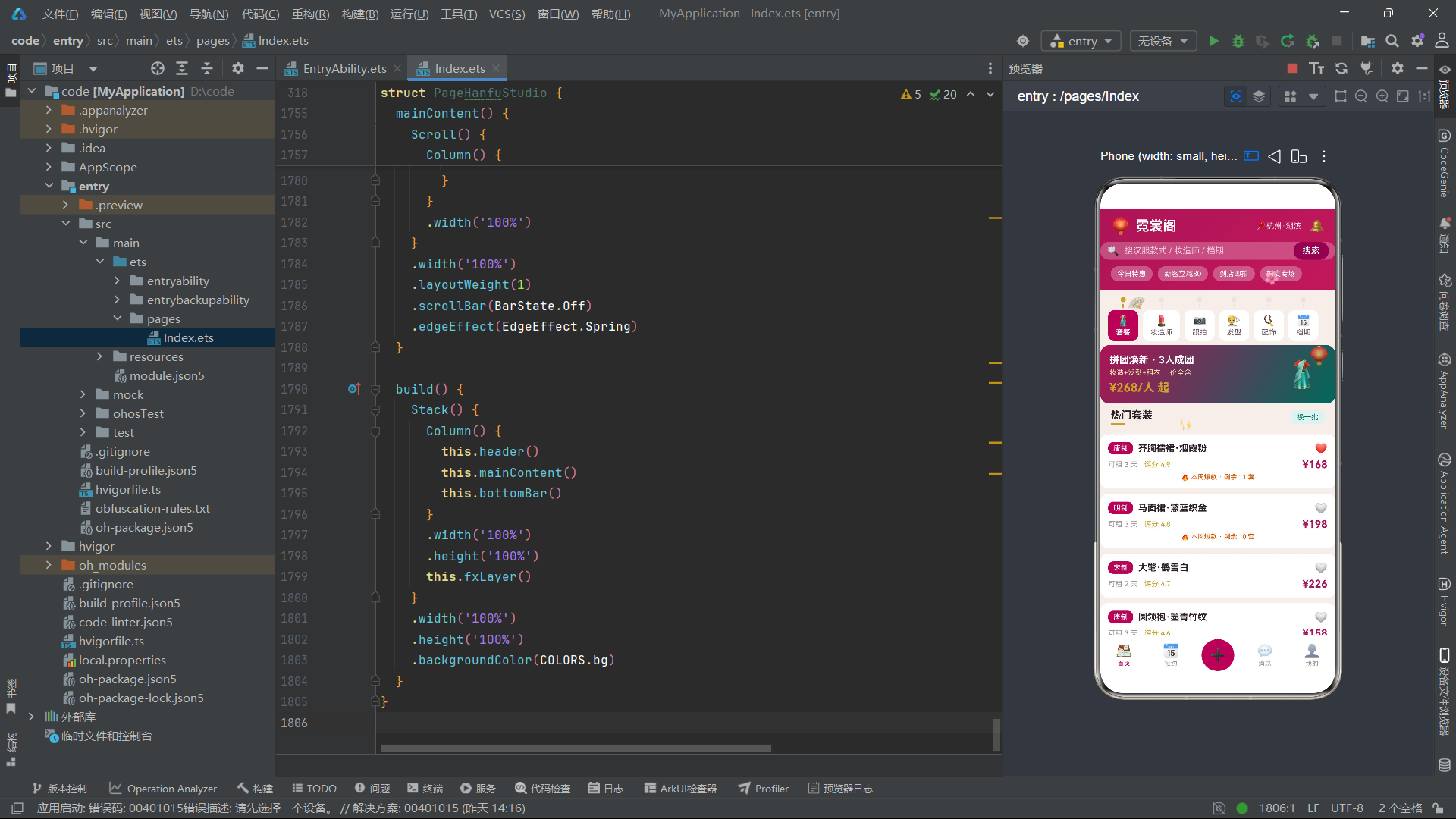
pageSuit是应用的首屏页面,顶部是一个渐变推广卡片(从primary到accent的对角渐变),展示"拼团焕新·3人成团"的拼团推广信息。
Row() {
  Column() {
    Text('拼团焕新 · 3人成团')
      .fontSize(15)
      .fontWeight(FontWeight.Bold)
      .fontColor(COLORS.white)
    Text('妆造+发型+租衣 一价全含')
      .fontSize(11)
      .fontColor('#EFD9A8')
      .margin({ top: 4 })
    Text('¥268/人 起')
      .fontSize(18)
      .fontWeight(FontWeight.Bold)
      .fontColor(COLORS.gold)
      .margin({ top: 6 })
  }
  .alignItems(HorizontalAlign.Start)
  .layoutWeight(1)
  Text('🥻')
    .fontSize(40)
    .margin({ right: 12 })
}
.width('100%')
.padding(14)
.borderRadius(14)
.linearGradient({ angle: 120, colors: [[COLORS.primary, 0], [COLORS.accent, 1]] })
.onClick(() => { this.bizOpen = true })
推广卡片使用从深红到青绿的120度对角渐变背景,金色价格文字在渐变上格外醒目。点击推广卡片触发拼团套餐弹框(bizOpen)。下方通过ForEach遍历suitList渲染套装列表,每个套装条目展示形制标签、名称、收藏按钮、可租天数、评分与价格。
ForEach(this.suitList, (it: OutfitItem, i: number) => {
  Column() {
    Row() {
      Text(it.style)
        .fontSize(11)
        .fontColor(COLORS.white)
        .padding({ left: 8, right: 8, top: 3, bottom: 3 })
        .backgroundColor(COLORS.primary)
        .borderRadius(8)
      Text(it.name)
        .fontSize(14)
        .fontWeight(FontWeight.Bold)
        .fontColor(COLORS.textPrimary)
        .margin({ left: 8 })
      Column()
        .layoutWeight(1)
      Text(it.fav ? '❤️' : '🤍')
        .fontSize(16)
        .onClick(() => { this.toggleSuitFav(i) })
    }
    .width('100%')
    Row() {
      Text('可租 ' + it.day + ' 天')
        .fontSize(11)
        .fontColor(COLORS.textThird)
      Text('评分 ' + it.score)
        .fontSize(11)
        .fontColor(COLORS.gold)
        .margin({ left: 10 })
      Column()
        .layoutWeight(1)
      Text('¥' + it.price)
        .fontSize(16)
        .fontWeight(FontWeight.Bold)
        .fontColor(COLORS.primary)
    }
    .width('100%')
    .margin({ top: 6 })
    if (it.hot) {
      Text('🔥 本周爆款 · 剩余 ' + (12 - it.id) + ' 套')
        .fontSize(10)
        .fontColor(COLORS.warn)
        .margin({ top: 4 })
    }
  }
  .width('100%')
  .padding(12)
  .backgroundColor(COLORS.card)
  .borderRadius(12)
  .margin({ left: 16, right: 16, top: 8 })
  .onClick(() => { this.bizOpen = true })
}, (it: OutfitItem) => 's' + it.id.toString() + '_' + this.rev.toString())
套装条目顶部的形制标签使用深红色背景配白色文字(如"唐制"/“明制”),名称使用粗体显示。收藏按钮(❤️/🤍切换)调用toggleSuitFav方法。第二行展示可租天数与评分(金色),右侧是深红色粗体价格。当hot为true时额外显示"🔥 本周爆款 · 剩余N套"的橙色促销标签,剩余套数按12 - it.id动态计算。点击套装条目触发拼团套餐弹框。ForEach键值生成器返回's' + id + '_' + rev,将rev修订号纳入键值确保收藏切换时重新渲染。
7.2 妆造师页 pageStylist
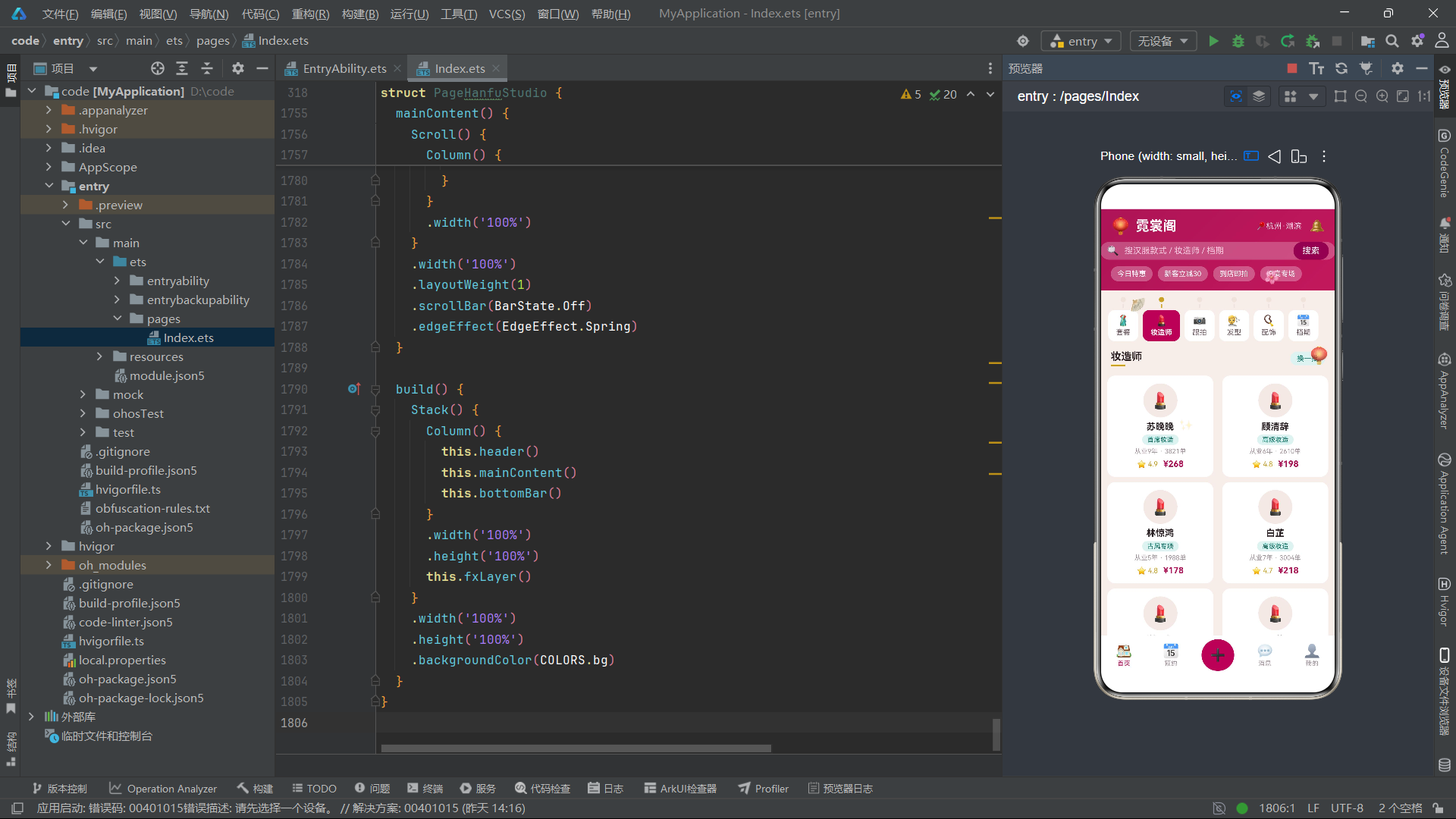
妆造师页采用Flex双列卡片布局展示10位妆造师,每张卡片包含圆形头像区域、姓名、等级标签、从业年限与订单数、评分与价格。
ForEach(this.stylistList, (it: StylistItem, i: number) => {
  Column() {
    Stack() {
      Circle({ width: 52, height: 52 })
        .fill(COLORS.tagBg)
      Text('💄')
        .fontSize(24)
    }
    Text(it.name)
      .fontSize(14)
      .fontWeight(FontWeight.Bold)
      .fontColor(COLORS.textPrimary)
      .margin({ top: 6 })
    Text(it.level)
      .fontSize(10)
      .fontColor(COLORS.accent)
      .padding({ left: 8, right: 8, top: 2, bottom: 2 })
      .backgroundColor(COLORS.accentSoft)
      .borderRadius(8)
      .margin({ top: 4 })
    Text('从业' + it.years + '年 · ' + it.orders + '单')
      .fontSize(10)
      .fontColor(COLORS.textThird)
      .margin({ top: 4 })
    Row() {
      Text('⭐ ' + it.score)
        .fontSize(11)
        .fontColor(COLORS.gold)
      Text('¥' + it.price)
        .fontSize(13)
        .fontWeight(FontWeight.Bold)
        .fontColor(COLORS.primary)
        .margin({ left: 8 })
    }
    .margin({ top: 6 })
  }
  .width('48%')
  .alignItems(HorizontalAlign.Center)
  .padding(12)
  .backgroundColor(COLORS.card)
  .borderRadius(12)
  .margin({ top: 8 })
  .onClick(() => { this.editOpen = true })
}, (it: StylistItem) => 'y' + it.id.toString() + '_' + this.rev.toString())
每张妆造师卡片宽度设为48%,配合Flex的SpaceBetween对齐形成双列布局。头像区域使用52x52的Circle配合浅色背景。等级标签使用青绿色背景配青绿色文字(如"首席妆造"/“高级妆造”/“古风专项”),与主色调的深红色形成清新对比。从业年限与订单数信息使用textThird浅暖灰色。评分使用金色星号,价格使用深红色粗体。点击卡片触发编辑体态档案弹框。
7.3 发型页 pageHair 与统计图表
发型页除了展示8种经典发型外,还包含两个数据可视化组件:近6月到店人数柱状图与款式风格占比条形图。
ForEach(this.hairList, (it: HairStyleItem, i: number) => {
  Row() {
    Column() {
      Text(it.name)
        .fontSize(14)
        .fontWeight(FontWeight.Bold)
        .fontColor(COLORS.textPrimary)
      Text('适配 ' + it.fit + ' · 约' + it.mins + '分钟')
        .fontSize(11)
        .fontColor(COLORS.textSecond)
        .margin({ top: 3 })
    }
    .alignItems(HorizontalAlign.Start)
    .layoutWeight(1)
    Text(it.fav ? '❤️' : '🤍')
      .fontSize(15)
      .margin({ right: 10 })
      .onClick(() => { this.toggleHairFav(i) })
    Text('¥' + it.price)
      .fontSize(15)
      .fontWeight(FontWeight.Bold)
      .fontColor(COLORS.primary)
  }
  .width('100%')
  .padding(12)
  .backgroundColor(COLORS.card)
  .borderRadius(12)
  .margin({ left: 16, right: 16, top: 8 })
  .onClick(() => { this.addOpen = true })
}, (it: HairStyleItem) => 'h' + it.id.toString() + '_' + this.rev.toString())
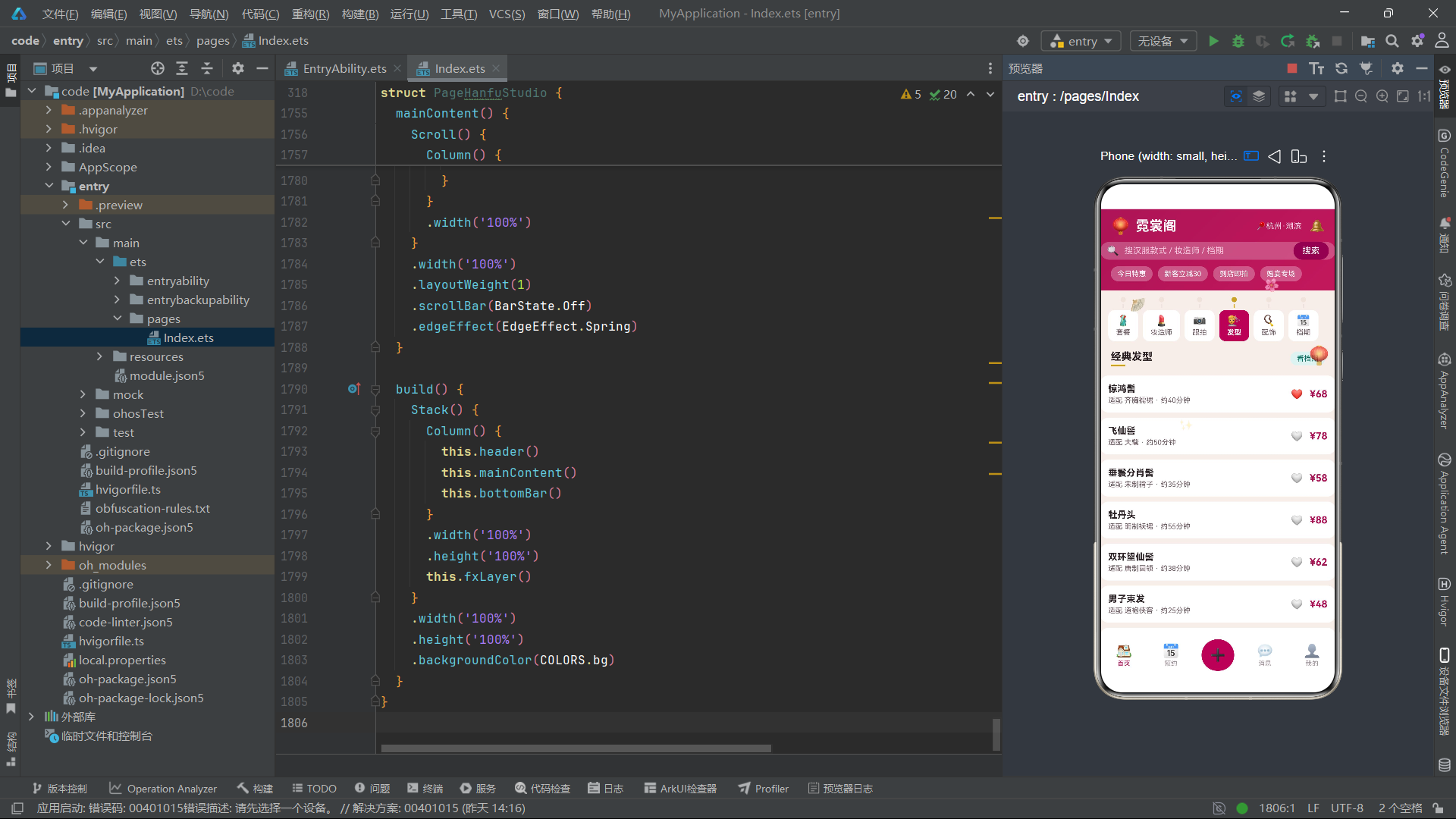
发型列表项左侧是名称与适配形制/耗时信息,右侧是收藏按钮与价格。点击发型触发预约弹框。适配信息(如"适配 齐胸襦裙 · 约40分钟")帮助用户了解发型与汉服的搭配关系及造型时间成本。
柱状图通过ForEach遍历MONTH_LABELS与MONTH_VISITS数组渲染,当月(8月)使用primary深红色高亮,其他月份使用tagBg浅色。
Row({ space: 10 }) {
  ForEach(MONTH_LABELS, (m: string, i: number) => {
    Column() {
      Text(MONTH_VISITS[i].toString())
        .fontSize(9)
        .fontColor(COLORS.textThird)
      Column()
        .width(16)
        .height(monthVisitBar(i))
        .backgroundColor(i === 5 ? COLORS.primary : COLORS.tagBg)
        .borderRadius(4)
        .margin({ top: 3 })
      Text(m)
        .fontSize(10)
        .fontColor(COLORS.textSecond)
        .margin({ top: 3 })
    }
    .alignItems(HorizontalAlign.Center)
  }, (m: string) => 'm' + m)
}
款式风格占比条形图通过ForEach遍历STYLE_PCTS数组,每段柱体的layoutWeight设为对应的百分比值,背景色使用STYLE_COLORS数组中对应的颜色,构成一个横向比例条。
八、弹框组件体系
8.1 新建预约单弹框 modalBodyAdd
预约弹框的标题为"🧧 新建预约单",包含预约类型多选标签(个人写真/闺蜜结伴/婚礼跟妆/亲子出游/舞台演出五选多)、拍摄时长步进器(1-8小时范围)以及费用计算展示。
@Builder
modalBodyAdd() {
  Column() {
    Row() {
      Text('🧧 新建预约单')
        .fontSize(17)
        .fontWeight(FontWeight.Bold)
        .fontColor(COLORS.textPrimary)
      Column()
        .layoutWeight(1)
      Text('✕')
        .fontSize(16)
        .fontColor(COLORS.textThird)
        .onClick(() => { this.addOpen = false })
    }
    .width('100%')

    Text('预约类型')
      .fontSize(13)
      .fontColor(COLORS.textSecond)
      .margin({ top: 14 })
    Flex({ wrap: FlexWrap.Wrap }) {
      ForEach(BOOK_KINDS, (k: string, i: number) => {
        Text(k)
          .fontSize(12)
          .fontColor(this.bookTags.indexOf(i) >= 0 ? COLORS.white : COLORS.textSecond)
          .padding({ left: 12, right: 12, top: 6, bottom: 6 })
          .backgroundColor(this.bookTags.indexOf(i) >= 0 ? COLORS.primary : COLORS.tagBg)
          .borderRadius(14)
          .margin({ right: 8, top: 8 })
          .onClick(() => { this.toggleTag(this.bookTags, i) })
      }, (k: string) => 'bk' + k)
    }
预约类型标签使用Flex换行布局,选中项使用深红色背景配白色文字,未选项使用浅色背景配次要色文字。点击调用toggleTag方法切换选中状态。时长步进器中,减号按钮使用tagBg浅色背景,加号按钮使用primary深红色背景形成视觉区分。费用按hourStep * 199公式动态计算。底部"提交预约"按钮使用深红色背景,右侧显示金色合计金额。
8.2 编辑体态档案弹框 modalBodyEdit
@Builder
modalBodyEdit() {
  Column() {
    Row() {
      Text('📐 编辑体态档案')
        .fontSize(17)
        .fontWeight(FontWeight.Bold)
        .fontColor(COLORS.textPrimary)
      Column()
        .layoutWeight(1)
      Text('✕')
        .fontSize(16)
        .fontColor(COLORS.textThird)
        .onClick(() => { this.editOpen = false })
    }
    .width('100%')

    Text('偏好风格(可多选)')
      .fontSize(13)
      .fontColor(COLORS.textSecond)
      .margin({ top: 14 })
    Flex({ wrap: FlexWrap.Wrap }) {
      ForEach(FIG_STYLES, (f: string, i: number) => {
        Text(f)
          .fontSize(12)
          .fontColor(this.figTags.indexOf(i) >= 0 ? COLORS.white : COLORS.accent)
          .padding({ left: 12, right: 12, top: 6, bottom: 6 })
          .backgroundColor(this.figTags.indexOf(i) >= 0 ? COLORS.accent : COLORS.accentSoft)
          .borderRadius(14)
          .margin({ right: 8, top: 8 })
          .onClick(() => { this.toggleTag(this.figTags, i) })
      }, (f: string) => 'fg' + f)
    }
体态档案弹框的偏好风格标签选中态使用accent青绿色背景配白色文字(唐制丰韵/明制端庄/宋制清雅/武侠飒爽/新中式五选多),与预约弹框的深红色选中态形成视觉区分。下方设有身高步进器(140-200cm范围)和雨天备用妆开关。雨天备用妆是一个特色功能——“自动保留1个免费改期名额”,当下雨无法外景拍摄时自动触发改期机制。弹框底部的"保存档案"按钮使用accent青绿色背景,右侧显示"上次更新08-12"的历史记录信息。
8.3 取消预约确认弹框 modalBodyDel
取消弹框采用警示设计,标题区使用红色文字"⚠️ 取消预约确认",内容区以浅红色背景展示取消警告与扣费规则。
Column() {
  Text('🥻')
    .fontSize(34)
  Text('预约单即将取消,档位将被释放')
    .fontSize(13)
    .fontColor(COLORS.textPrimary)
    .margin({ top: 8 })
  Text('开拍前24小时内取消将扣除定金 ¥50')
    .fontSize(11)
    .fontColor(COLORS.warn)
    .margin({ top: 6 })
}
.width('100%')
.alignItems(HorizontalAlign.Center)
.padding({ top: 18, bottom: 18 })
.backgroundColor('#FDECEA')
.borderRadius(14)
.margin({ top: 14 })
弹框展示三个统计指标:1个待出行预约、50元已付定金、2次剩余免费改期。底部设有"再想想"(tagBg背景)与"确认取消"(danger红色背景)两个操作按钮,通过色彩对比引导用户谨慎操作。定金扣除规则"开拍前24小时内取消将扣除定金¥50"以橙色warn文字醒目展示,配合"剩余免费改期2次"的绿色统计,让用户了解取消后的权益影响。
8.4 拼团套餐弹框 modalBodyBiz (GROUP BUY)
拼团弹框是霓裳阁应用最具特色的弹框,标题为"🧧 拼团套餐 GROUP BUY",内容区展示一个从primary到accent对角渐变的信息卡片。
Row() {
  Column() {
    Text('妆造 + 发型 + 租衣')
      .fontSize(15)
      .fontWeight(FontWeight.Bold)
      .fontColor(COLORS.white)
    Text('赠3张精修 · 当日出片')
      .fontSize(11)
      .fontColor('#EFD9A8')
      .margin({ top: 4 })
    Text('拼团价 ¥268/人')
      .fontSize(17)
      .fontWeight(FontWeight.Bold)
      .fontColor(COLORS.gold)
      .margin({ top: 6 })
  }
  .alignItems(HorizontalAlign.Start)
  .layoutWeight(1)
  Text('🧧')
    .fontSize(36)
}
.width('100%')
.padding(14)
.borderRadius(14)
.linearGradient({ angle: 120, colors: [[COLORS.primary, 0], [COLORS.accent, 1]] })
.margin({ top: 14 })
信息卡片使用从深红到青绿的120度对角渐变背景,金色拼团价格在渐变上格外醒目。到店时段选择使用SLOTS数组的时段文本标签,选中项使用gold金色背景配白色文字,与偏好风格的青绿色选中态形成视觉区分。拼团人数步进器(2-10人范围)的加号按钮使用gold金色背景。费用按groupStep * 158公式动态计算(groupTotal方法),底部"发起拼团"按钮使用primary深红色背景,右侧显示金色预估总价。
九、模态覆盖层与底部导航栏
9.1 modalOverlay模态覆盖层
@Builder
modalOverlay() {
  Stack({ alignContent: Alignment.Bottom }) {
    Column()
      .width('100%')
      .height('100%')
      .backgroundColor('rgba(30,10,20,0.45)')
      .onClick(() => { this.closeAll() })
    if (this.addOpen) { this.modalBodyAdd() }
    if (this.editOpen) { this.modalBodyEdit() }
    if (this.delOpen) { this.modalBodyDel() }
    if (this.bizOpen) { this.modalBodyBiz() }
  }
  .width('100%')
  .height('100%')
}
遮罩层使用rgba(30,10,20,0.45)——带有暖红色调的半透明深色(45%透明度),与应用的红色主题保持和谐。点击遮罩调用closeAll方法关闭所有弹框。弹框内容通过if条件渲染,根据四个开关状态决定显示哪个弹框。closeAll方法将四个弹框状态一次性设为false,实现了简洁的全局关闭逻辑。
9.2 底部导航栏 bottomBar
底部导航栏设有5个等宽tab:首页、预约、加号、消息、我的。中间的加号按钮使用深红色圆形背景,配24号字配10像素padding配26像素圆角。
Column() {
  Text('➕')
    .fontSize(24)
    .fontColor(COLORS.white)
    .padding(10)
    .backgroundColor(COLORS.primary)
    .borderRadius(26)
}
.layoutWeight(1)
.alignItems(HorizontalAlign.Center)
.onClick(() => { this.addOpen = true })
加号按钮触发预约弹框,是核心转化入口。两侧tab选中态文字使用primary深红色,未选中态使用textThird浅暖灰色。底部栏使用card纯白背景,无圆角设计(贴底全宽)。
十、build主架构方法
build() {
  Stack() {
    Column() {
      this.header()
      this.mainContent()
      this.bottomBar()
    }
    .width('100%')
    .height('100%')
    this.fxLayer()
  }
  .width('100%')
  .height('100%')
  .backgroundColor(COLORS.bg)
}
build方法通过Stack堆叠两层:主内容层(Column包含header、mainContent、bottomBar三个垂直排列的构建器)和动效装饰层(fxLayer,事件穿透)。mainContent内部通过Scroll包裹tabBar与条件渲染的6个页面构建器,根据curTab值决定渲染哪个页面。当mainTab为0时按curTab渲染套餐/妆造师/跟拍/发型/配饰/档期页面,当mainTab非0时渲染pageMainOther(我的预约页)。mainContent使用edgeEffect(EdgeEffect.Spring)设置弹簧回弹效果,scrollBar(BarState.Off)隐藏滚动条,营造沉浸式滚动体验。
十一、架构流程图
上图展示了霓裳阁应用从build方法开始的完整组件树。Stack两层堆叠是骨架——主内容层的Column垂直排列header、mainContent与bottomBar,动效层fxLayer覆盖其上提供汉服文化氛围动画。mainContent内部的tabBar以单排6个流苏书签形式排列6个内容标签,配合条件渲染链实现了6个业务页面的按需切换。四个modalBody弹框由各自的布尔状态控制显隐,通过modalOverlay统一管理覆盖层。底部导航栏的5个tab中加号按钮作为核心转化入口触发预约弹框。
十二、数据模型与组件对比表
| 维度 | OutfitItem 套装 | StylistItem 妆造师 | PhotoWorkItem 跟拍 | HairStyleItem 发型 | AccessoryItem 配饰 | SlotItem 档期 |
|---|---|---|---|---|---|---|
| 接口名 | Outfit | Stylist | PhotoWork | HairStyle | Accessory | Slot |
| 字段数量 | 8 | 8 | 7 | 6 | 6 | 5 |
| 核心状态字段 | fav/hot (boolean) | fav (boolean) | fav/hot (boolean) | fav (boolean) | fav/stock | full (boolean) |
| 装饰器 | @Observed | @Observed | @Observed | @Observed | @Observed | @Observed |
| 初始数据量 | 12条 | 10条 | 10条 | 8条 | 10条 | 8条 |
| 对应页面 | pageSuit | pageStylist | pagePhoto | pageHair | pageAcc | pageSlot |
| 弹框关联 | modalBodyBiz | modalBodyEdit | modalBodyAdd | modalBodyAdd | modalBodyBiz | modalBodyAdd |
| 构造函数模式 | 对象参数 | 对象参数 | 对象参数 | 对象参数 | 对象参数 | 对象参数 |
| 切换方法 | toggleSuitFav | - | 内联fav切换 | toggleHairFav | toggleAccFav | - |
| 弹框组件 | 中文标题 | 英文标识 | 功能定位 | 表单元素 | 费用公式 |
|---|---|---|---|---|---|
| modalBodyAdd | 新建预约单 | - | 预约拍摄 | 类型多选/时长步进 | hourStep*199 |
| modalBodyEdit | 编辑体态档案 | - | 编辑偏好 | 风格多选/身高步进/雨天开关 | - |
| modalBodyDel | 取消预约确认 | - | 取消预约 | 影响统计展示 | - |
| modalBodyBiz | 拼团套餐 | GROUP BUY | 发起拼团 | 时段多选/人数步进 | groupStep*158 |
安装DevEco Studio程序

选择目标安装目录:

设置环境变量,但是需要重启一下:

新建一个空白模板:

设置API为24的模板项目:

初始化项目,自动下载相关依赖:

完整代码:
// ============================================================
// 布局风格:流苏书签式内容tab(单排6个)+ 静态渐变头部
// 弹框:预约单 / 体态档案 / 取消警示 / 拼团套餐
// ============================================================
interface ColorPalette {
bg: string
card: string
white: string
primary: string
primaryDeep: string
accent: string
accentSoft: string
gold: string
textPrimary: string
textSecond: string
textThird: string
line: string
tagBg: string
warn: string
danger: string
ok: string
}
const COLORS: ColorPalette = {
bg: '#F6EEEA',
card: '#FFFFFF',
white: '#FFFFFF',
primary: '#AD1457',
primaryDeep: '#880E4F',
accent: '#00695C',
accentSoft: '#E0F2F1',
gold: '#C9A227',
textPrimary: '#2B2024',
textSecond: '#6E5A62',
textThird: '#A2929B',
line: '#EFE3DC',
tagBg: '#F4E9E4',
warn: '#E65100',
danger: '#C62828',
ok: '#2E7D32'
}
interface Outfit {
id: number
name: string
style: string
price: number
day: number
score: number
hot: boolean
fav: boolean
}
@Observed
class OutfitItem implements Outfit {
id: number = 0
name: string = ''
style: string = ''
price: number = 0
day: number = 0
score: number = 0
hot: boolean = false
fav: boolean = false
constructor(o: Outfit) {
this.id = o.id
this.name = o.name
this.style = o.style
this.price = o.price
this.day = o.day
this.score = o.score
this.hot = o.hot ? o.hot : false
this.fav = o.fav ? o.fav : false
}
}
interface Stylist {
id: number
name: string
level: string
years: number
price: number
orders: number
score: number
fav: boolean
}
@Observed
class StylistItem implements Stylist {
id: number = 0
name: string = ''
level: string = ''
years: number = 0
price: number = 0
orders: number = 0
score: number = 0
fav: boolean = false
constructor(o: Stylist) {
this.id = o.id
this.name = o.name
this.level = o.level
this.years = o.years
this.price = o.price
this.orders = o.orders
this.score = o.score
this.fav = o.fav ? o.fav : false
}
}
interface PhotoWork {
id: number
title: string
master: string
price: number
shots: number
hot: boolean
fav: boolean
}
@Observed
class PhotoWorkItem implements PhotoWork {
id: number = 0
title: string = ''
master: string = ''
price: number = 0
shots: number = 0
hot: boolean = false
fav: boolean = false
constructor(o: PhotoWork) {
this.id = o.id
this.title = o.title
this.master = o.master
this.price = o.price
this.shots = o.shots
this.hot = o.hot ? o.hot : false
this.fav = o.fav ? o.fav : false
}
}
interface HairStyle {
id: number
name: string
fit: string
price: number
mins: number
fav: boolean
}
@Observed
class HairStyleItem implements HairStyle {
id: number = 0
name: string = ''
fit: string = ''
price: number = 0
mins: number = 0
fav: boolean = false
constructor(o: HairStyle) {
this.id = o.id
this.name = o.name
this.fit = o.fit
this.price = o.price
this.mins = o.mins
this.fav = o.fav ? o.fav : false
}
}
interface Accessory {
id: number
name: string
material: string
price: number
stock: number
fav: boolean
}
@Observed
class AccessoryItem implements Accessory {
id: number = 0
name: string = ''
material: string = ''
price: number = 0
stock: number = 0
fav: boolean = false
constructor(o: Accessory) {
this.id = o.id
this.name = o.name
this.material = o.material
this.price = o.price
this.stock = o.stock
this.fav = o.fav ? o.fav : false
}
}
interface Slot {
id: number
date: string
slot: string
left: number
full: boolean
}
@Observed
class SlotItem implements Slot {
id: number = 0
date: string = ''
slot: string = ''
left: number = 0
full: boolean = false
constructor(o: Slot) {
this.id = o.id
this.date = o.date
this.slot = o.slot
this.left = o.left
this.full = o.full ? o.full : false
}
}
const SUITS: OutfitItem[] = [
new OutfitItem({ id: 1, name: '齐胸襦裙·烟霞粉', style: '唐制', price: 168, day: 3, score: 4.9, hot: true, fav: true }),
new OutfitItem({ id: 2, name: '马面裙·黛蓝织金', style: '明制', price: 198, day: 3, score: 4.8, hot: true, fav: false }),
new OutfitItem({ id: 3, name: '大氅·鹤雪白', style: '宋制', price: 226, day: 2, score: 4.7, hot: false, fav: false }),
new OutfitItem({ id: 4, name: '圆领袍·墨青竹纹', style: '唐制', price: 158, day: 3, score: 4.6, hot: false, fav: false }),
new OutfitItem({ id: 5, name: '曲裾·朱砂红', style: '汉制', price: 178, day: 2, score: 4.9, hot: true, fav: false }),
new OutfitItem({ id: 6, name: '袄裙·秋香绿', style: '明制', price: 148, day: 3, score: 4.5, hot: false, fav: false }),
new OutfitItem({ id: 7, name: '褙子·月白暗纹', style: '宋制', price: 128, day: 2, score: 4.4, hot: false, fav: false }),
new OutfitItem({ id: 8, name: '云肩·鎏金点翠', style: '配件', price: 88, day: 2, score: 4.9, hot: true, fav: false }),
new OutfitItem({ id: 9, name: '婚服·凤冠霞帔', style: '定制', price: 998, day: 1, score: 5.0, hot: true, fav: false }),
new OutfitItem({ id: 10, name: '侠客装·玄夜黑', style: '武侠', price: 188, day: 3, score: 4.7, hot: false, fav: false }),
new OutfitItem({ id: 11, name: '道袍·霜灰云鹤', style: '明制', price: 166, day: 3, score: 4.6, hot: false, fav: false }),
new OutfitItem({ id: 12, name: '齐胸襦裙·青竹雨', style: '唐制', price: 172, day: 3, score: 4.8, hot: false, fav: false })
]
const STYLISTS: StylistItem[] = [
new StylistItem({ id: 1, name: '苏晚晚', level: '首席妆造', years: 9, price: 268, orders: 3821, score: 4.9, fav: true }),
new StylistItem({ id: 2, name: '顾清辞', level: '高级妆造', years: 6, price: 198, orders: 2610, score: 4.8, fav: false }),
new StylistItem({ id: 3, name: '林惊鸿', level: '古风专项', years: 5, price: 178, orders: 1988, score: 4.8, fav: false }),
new StylistItem({ id: 4, name: '白芷', level: '高级妆造', years: 7, price: 218, orders: 3004, score: 4.7, fav: false }),
new StylistItem({ id: 5, name: '谢云归', level: '新中式专项', years: 4, price: 158, orders: 1566, score: 4.7, fav: false }),
new StylistItem({ id: 6, name: '阿萝', level: '妆造师', years: 3, price: 128, orders: 1102, score: 4.6, fav: false }),
new StylistItem({ id: 7, name: '沈眉山', level: '男妆专项', years: 6, price: 188, orders: 1740, score: 4.6, fav: false }),
new StylistItem({ id: 8, name: '洛九歌', level: '首席发艺', years: 8, price: 238, orders: 2588, score: 4.9, fav: false }),
new StylistItem({ id: 9, name: '温梨落', level: '妆造师', years: 2, price: 98, orders: 720, score: 4.5, fav: false }),
new StylistItem({ id: 10, name: '祝红妆', level: '婚服专项', years: 10, price: 328, orders: 4021, score: 5.0, fav: false })
]
const PHOTOS: PhotoWorkItem[] = [
new PhotoWorkItem({ id: 1, title: '西湖烟雨·唐制写真', master: '镜头客', price: 599, shots: 60, hot: true, fav: true }),
new PhotoWorkItem({ id: 2, title: '宋城夜宴·灯下美人图', master: '半盏茶', price: 699, shots: 80, hot: true, fav: false }),
new PhotoWorkItem({ id: 3, title: '竹林听风·侠客行', master: '山外山', price: 529, shots: 50, hot: false, fav: false }),
new PhotoWorkItem({ id: 4, title: '庭院深深·明制全家福', master: '拾光记', price: 899, shots: 100, hot: false, fav: false }),
new PhotoWorkItem({ id: 5, title: '雪落长安·大氅特辑', master: '镜头客', price: 649, shots: 70, hot: true, fav: false }),
new PhotoWorkItem({ id: 6, title: '红墙宫阙·汉婚跟拍', master: '朱颜记', price: 1299, shots: 150, hot: false, fav: false }),
new PhotoWorkItem({ id: 7, title: '市井长街·宋人一天', master: '半盏茶', price: 569, shots: 60, hot: false, fav: false }),
new PhotoWorkItem({ id: 8, title: '月上柳梢·夜拍套餐', master: '山外山', price: 629, shots: 65, hot: false, fav: false }),
new PhotoWorkItem({ id: 9, title: '小团扇·儿童汉服', master: '拾光记', price: 429, shots: 45, hot: false, fav: false }),
new PhotoWorkItem({ id: 10, title: '四季流转·年度套系', master: '朱颜记', price: 1899, shots: 260, hot: true, fav: false })
]
const HAIRS: HairStyleItem[] = [
new HairStyleItem({ id: 1, name: '惊鸿髻', fit: '齐胸襦裙', price: 68, mins: 40, fav: true }),
new HairStyleItem({ id: 2, name: '飞仙髻', fit: '大氅', price: 78, mins: 50, fav: false }),
new HairStyleItem({ id: 3, name: '垂鬟分肖髻', fit: '宋制褙子', price: 58, mins: 35, fav: false }),
new HairStyleItem({ id: 4, name: '牡丹头', fit: '明制袄裙', price: 88, mins: 55, fav: false }),
new HairStyleItem({ id: 5, name: '双环望仙髻', fit: '唐制圆领', price: 62, mins: 38, fav: false }),
new HairStyleItem({ id: 6, name: '男子束发', fit: '道袍侠客', price: 48, mins: 25, fav: false }),
new HairStyleItem({ id: 7, name: '百合髻', fit: '婚服', price: 128, mins: 70, fav: false }),
new HairStyleItem({ id: 8, name: '堕马髻', fit: '曲裾', price: 66, mins: 42, fav: false })
]
const ACCS: AccessoryItem[] = [
new AccessoryItem({ id: 1, name: '点翠发簪', material: '鎏金仿翠', price: 45, stock: 12, fav: true }),
new AccessoryItem({ id: 2, name: '缠花团扇', material: '绢面竹骨', price: 38, stock: 20, fav: false }),
new AccessoryItem({ id: 3, name: '珍珠步摇', material: '淡水珠', price: 66, stock: 8, fav: false }),
new AccessoryItem({ id: 4, name: '绒花发钗', material: '蚕丝绒', price: 32, stock: 26, fav: false }),
new AccessoryItem({ id: 5, name: '玉佩禁步', material: '和田青玉', price: 88, stock: 6, fav: false }),
new AccessoryItem({ id: 6, name: '油纸伞', material: '桐油纸', price: 42, stock: 15, fav: false }),
new AccessoryItem({ id: 7, name: '绣花披帛', material: '真丝提花', price: 56, stock: 18, fav: false }),
new AccessoryItem({ id: 8, name: '香囊络子', material: '锦缎流苏', price: 28, stock: 30, fav: false }),
new AccessoryItem({ id: 9, name: '金属护甲套', material: '古法黄铜', price: 52, stock: 9, fav: false }),
new AccessoryItem({ id: 10, name: '穗子发带', material: '染色丝绦', price: 22, stock: 40, fav: false })
]
const SLOTS: SlotItem[] = [
new SlotItem({ id: 1, date: '周六 08-23', slot: '09:00-12:00', left: 6, full: false }),
new SlotItem({ id: 2, date: '周六 08-23', slot: '13:00-16:00', left: 2, full: false }),
new SlotItem({ id: 3, date: '周六 08-23', slot: '17:00-20:00', left: 0, full: true }),
new SlotItem({ id: 4, date: '周日 08-24', slot: '09:00-12:00', left: 8, full: false }),
new SlotItem({ id: 5, date: '周日 08-24', slot: '13:00-16:00', left: 3, full: false }),
new SlotItem({ id: 6, date: '周一 08-25', slot: '10:00-13:00', left: 10, full: false }),
new SlotItem({ id: 7, date: '周二 08-26', slot: '14:00-17:00', left: 5, full: false }),
new SlotItem({ id: 8, date: '周三 08-27', slot: '09:00-12:00', left: 9, full: false })
]
const MONTH_LABELS: string[] = ['3月', '4月', '5月', '6月', '7月', '8月']
const MONTH_VISITS: number[] = [86, 102, 79, 120, 138, 156]
const STYLE_LABELS: string[] = ['齐胸襦裙', '马面裙', '大氅', '圆领袍']
const STYLE_PCTS: number[] = [38, 27, 20, 15]
const STYLE_COLORS: string[] = ['#AD1457', '#00695C', '#C9A227', '#8D6E63']
const BOOK_KINDS: string[] = ['个人写真', '闺蜜结伴', '婚礼跟妆', '亲子出游', '舞台演出']
const FIG_STYLES: string[] = ['唐制丰韵', '明制端庄', '宋制清雅', '武侠飒爽', '新中式']
function monthVisitBar(i: number): number {
return MONTH_VISITS[i] * 0.9
}
function pctWidth(i: number): string {
return STYLE_PCTS[i] + '%'
}
@Entry
@Component
struct PageHanfuStudio {
@State curTab: number = 0
@State mainTab: number = 0
@State addOpen: boolean = false
@State editOpen: boolean = false
@State delOpen: boolean = false
@State bizOpen: boolean = false
@State suitList: OutfitItem[] = SUITS
@State stylistList: StylistItem[] = STYLISTS
@State photoList: PhotoWorkItem[] = PHOTOS
@State hairList: HairStyleItem[] = HAIRS
@State accList: AccessoryItem[] = ACCS
@State slotList: SlotItem[] = SLOTS
@State rev: number = 0
@State tick: number = 0
@State bookTags: number[] = [0]
@State figTags: number[] = [0]
@State hourStep: number = 2
@State heightStep: number = 165
@State rainFlag: boolean = false
@State groupTags: number[] = [1]
@State groupStep: number = 3
private timer: number = -1
aboutToAppear(): void {
this.timer = setInterval(() => {
this.tick = this.tick + 1
}, 115)
}
aboutToDisappear(): void {
if (this.timer >= 0) {
clearInterval(this.timer)
}
}
switchTab(i: number): void {
this.curTab = i
}
switchMain(i: number): void {
this.mainTab = i
}
refreshSuits(): void {
this.suitList.unshift(this.suitList[this.suitList.length - 1])
this.suitList.splice(this.suitList.length - 1, 1)
this.rev = this.rev + 1
}
refreshStylists(): void {
this.stylistList.unshift(this.stylistList[this.stylistList.length - 1])
this.stylistList.splice(this.stylistList.length - 1, 1)
this.rev = this.rev + 1
}
refreshPhotos(): void {
this.photoList.unshift(this.photoList[this.photoList.length - 1])
this.photoList.splice(this.photoList.length - 1, 1)
this.rev = this.rev + 1
}
toggleSuitFav(i: number): void {
this.suitList[i].fav = !this.suitList[i].fav
this.rev = this.rev + 1
}
toggleHairFav(i: number): void {
this.hairList[i].fav = !this.hairList[i].fav
this.rev = this.rev + 1
}
toggleAccFav(i: number): void {
this.accList[i].fav = !this.accList[i].fav
this.rev = this.rev + 1
}
toggleTag(list: number[], i: number): void {
if (list.indexOf(i) >= 0) {
list.splice(list.indexOf(i), 1)
} else {
list.push(i)
}
}
closeAll(): void {
this.addOpen = false
this.editOpen = false
this.delOpen = false
this.bizOpen = false
}
groupTotal(): number {
return this.groupStep * 158
}
@Builder
fxLayer() {
Stack() {
Text('🪭')
.fontSize(26)
.rotate({ angle: (this.tick % 24) * 15 })
.position({ x: 40, y: 130 })
.opacity(0.85)
Text('🌸')
.fontSize(20)
.translate({ y: this.tick % 60 })
.position({ x: 250, y: 60 })
.opacity(0.75)
Text('🏮')
.fontSize(24)
.scale({ x: 0.9 + (this.tick % 10) / 20, y: 0.9 + (this.tick % 10) / 20 })
.position({ x: 320, y: 210 })
.opacity(0.85)
Text('✨')
.fontSize(18)
.position({ x: 120, y: 320 })
.opacity((this.tick % 8) / 8 + 0.15)
Text('🌸')
.fontSize(14)
.translate({ y: (this.tick + 30) % 80 })
.position({ x: 560, y: 100 })
.opacity(0.6)
Text('🪞')
.fontSize(22)
.rotate({ angle: 0 - (this.tick % 20) * 9 })
.position({ x: 470, y: 380 })
.opacity(0.5)
}
.width('100%')
.height('100%')
.hitTestBehavior(HitTestMode.None)
}
@Builder
header() {
Column() {
Row() {
Text('🏮')
.fontSize(24)
Text('霓裳阁')
.fontSize(21)
.fontWeight(FontWeight.Bold)
.fontColor(COLORS.white)
.margin({ left: 8 })
Column()
.layoutWeight(1)
Text('📍杭州·湖滨')
.fontSize(12)
.fontColor('#F8D7E4')
Text('🔔')
.fontSize(19)
.margin({ left: 12 })
.onClick(() => {
this.mainTab = 3
})
}
.width('100%')
.padding({ left: 16, right: 16, top: 12 })
Row() {
Text('🔍')
.fontSize(15)
Text('搜汉服款式 / 妆造师 / 档期')
.fontSize(13)
.fontColor('#F3C6DA')
.margin({ left: 8 })
Column()
.layoutWeight(1)
Text('搜索')
.fontSize(13)
.fontColor(COLORS.white)
.padding({ left: 14, right: 14, top: 6, bottom: 6 })
.backgroundColor(COLORS.primaryDeep)
.borderRadius(14)
.onClick(() => {
this.curTab = 0
})
}
.width('100%')
.padding({ left: 10, right: 10 })
.margin({ top: 10 })
.backgroundColor('rgba(255,255,255,0.24)')
.borderRadius(20)
Row({ space: 8 }) {
Text('今日特惠')
.fontSize(11)
.fontColor(COLORS.white)
.padding({ left: 10, right: 10, top: 5, bottom: 5 })
.backgroundColor('rgba(255,255,255,0.28)')
.borderRadius(12)
Text('新客立减30')
.fontSize(11)
.fontColor(COLORS.white)
.padding({ left: 10, right: 10, top: 5, bottom: 5 })
.backgroundColor('rgba(255,255,255,0.28)')
.borderRadius(12)
Text('到店即拍')
.fontSize(11)
.fontColor(COLORS.white)
.padding({ left: 10, right: 10, top: 5, bottom: 5 })
.backgroundColor('rgba(255,255,255,0.28)')
.borderRadius(12)
Text('婚宴专场')
.fontSize(11)
.fontColor(COLORS.white)
.padding({ left: 10, right: 10, top: 5, bottom: 5 })
.backgroundColor('rgba(255,255,255,0.28)')
.borderRadius(12)
}
.width('100%')
.padding({ left: 16, right: 16 })
.margin({ top: 10, bottom: 14 })
}
.width('100%')
.alignItems(HorizontalAlign.Start)
.linearGradient({ angle: 135, colors: [[COLORS.primary, 0], ['#C2185B', 1]] })
}
@Builder
tasselTab(name: string, icon: string, idx: number) {
Column() {
Circle({ width: 8, height: 8 })
.fill(this.curTab === idx ? COLORS.gold : COLORS.line)
.margin({ bottom: 3 })
Rect({ width: 2, height: 6 })
.fill(this.curTab === idx ? COLORS.gold : COLORS.line)
Column() {
Text(icon)
.fontSize(16)
Text(name)
.fontSize(11)
.fontWeight(this.curTab === idx ? FontWeight.Bold : FontWeight.Normal)
.fontColor(this.curTab === idx ? COLORS.white : COLORS.textSecond)
.margin({ top: 2 })
}
.alignItems(HorizontalAlign.Center)
.padding({ top: 7, bottom: 7, left: 12, right: 12 })
.backgroundColor(this.curTab === idx ? COLORS.primary : COLORS.card)
.borderRadius(10)
.margin({ top: 3 })
}
.alignItems(HorizontalAlign.Center)
.onClick(() => {
this.switchTab(idx)
})
}
@Builder
tabBar() {
Row({ space: 7 }) {
this.tasselTab('套餐', '🥻', 0)
this.tasselTab('妆造师', '💄', 1)
this.tasselTab('跟拍', '📷', 2)
this.tasselTab('发型', '💇', 3)
this.tasselTab('配饰', '📿', 4)
this.tasselTab('档期', '📅', 5)
}
.width('100%')
.padding({ left: 12, right: 12, top: 10, bottom: 6 })
}
@Builder
sectionTitle(title: string, sub: string, onMore: number) {
Row() {
Column() {
Text(title)
.fontSize(16)
.fontWeight(FontWeight.Bold)
.fontColor(COLORS.textPrimary)
Rect({ width: 22, height: 3 })
.fill(COLORS.gold)
.margin({ top: 3 })
}
.alignItems(HorizontalAlign.Start)
Column()
.layoutWeight(1)
Text(sub)
.fontSize(11)
.fontColor(COLORS.accent)
.padding({ left: 10, right: 10, top: 4, bottom: 4 })
.backgroundColor(COLORS.accentSoft)
.borderRadius(10)
.onClick(() => {
if (onMore === 0) {
this.refreshSuits()
} else if (onMore === 1) {
this.refreshStylists()
} else if (onMore === 2) {
this.refreshPhotos()
} else {
this.curTab = 5
}
})
}
.width('100%')
.padding({ left: 16, right: 16, top: 8, bottom: 6 })
}
@Builder
pageSuit() {
Column() {
Row() {
Column() {
Text('拼团焕新 · 3人成团')
.fontSize(15)
.fontWeight(FontWeight.Bold)
.fontColor(COLORS.white)
Text('妆造+发型+租衣 一价全含')
.fontSize(11)
.fontColor('#EFD9A8')
.margin({ top: 4 })
Text('¥268/人 起')
.fontSize(18)
.fontWeight(FontWeight.Bold)
.fontColor(COLORS.gold)
.margin({ top: 6 })
}
.alignItems(HorizontalAlign.Start)
.layoutWeight(1)
Text('🥻')
.fontSize(40)
.margin({ right: 12 })
}
.width('100%')
.padding(14)
.borderRadius(14)
.linearGradient({ angle: 120, colors: [[COLORS.primary, 0], [COLORS.accent, 1]] })
.onClick(() => {
this.bizOpen = true
})
this.sectionTitle('热门套装', '换一批', 0)
ForEach(this.suitList, (it: OutfitItem, i: number) => {
Column() {
Row() {
Text(it.style)
.fontSize(11)
.fontColor(COLORS.white)
.padding({ left: 8, right: 8, top: 3, bottom: 3 })
.backgroundColor(COLORS.primary)
.borderRadius(8)
Text(it.name)
.fontSize(14)
.fontWeight(FontWeight.Bold)
.fontColor(COLORS.textPrimary)
.margin({ left: 8 })
Column()
.layoutWeight(1)
Text(it.fav ? '❤️' : '🤍')
.fontSize(16)
.onClick(() => {
this.toggleSuitFav(i)
})
}
.width('100%')
Row() {
Text('可租 ' + it.day + ' 天')
.fontSize(11)
.fontColor(COLORS.textThird)
Text('评分 ' + it.score)
.fontSize(11)
.fontColor(COLORS.gold)
.margin({ left: 10 })
Column()
.layoutWeight(1)
Text('¥' + it.price)
.fontSize(16)
.fontWeight(FontWeight.Bold)
.fontColor(COLORS.primary)
}
.width('100%')
.margin({ top: 6 })
if (it.hot) {
Text('🔥 本周爆款 · 剩余 ' + (12 - it.id) + ' 套')
.fontSize(10)
.fontColor(COLORS.warn)
.margin({ top: 4 })
}
}
.width('100%')
.padding(12)
.backgroundColor(COLORS.card)
.borderRadius(12)
.margin({ left: 16, right: 16, top: 8 })
.onClick(() => {
this.bizOpen = true
})
}, (it: OutfitItem) => 's' + it.id.toString() + '_' + this.rev.toString())
}
.width('100%')
.padding({ bottom: 12 })
}
@Builder
pageStylist() {
Column() {
this.sectionTitle('妆造师', '换一批', 1)
Flex({ wrap: FlexWrap.Wrap, justifyContent: FlexAlign.SpaceBetween }) {
ForEach(this.stylistList, (it: StylistItem, i: number) => {
Column() {
Stack() {
Circle({ width: 52, height: 52 })
.fill(COLORS.tagBg)
Text('💄')
.fontSize(24)
}
Text(it.name)
.fontSize(14)
.fontWeight(FontWeight.Bold)
.fontColor(COLORS.textPrimary)
.margin({ top: 6 })
Text(it.level)
.fontSize(10)
.fontColor(COLORS.accent)
.padding({ left: 8, right: 8, top: 2, bottom: 2 })
.backgroundColor(COLORS.accentSoft)
.borderRadius(8)
.margin({ top: 4 })
Text('从业' + it.years + '年 · ' + it.orders + '单')
.fontSize(10)
.fontColor(COLORS.textThird)
.margin({ top: 4 })
Row() {
Text('⭐ ' + it.score)
.fontSize(11)
.fontColor(COLORS.gold)
Text('¥' + it.price)
.fontSize(13)
.fontWeight(FontWeight.Bold)
.fontColor(COLORS.primary)
.margin({ left: 8 })
}
.margin({ top: 6 })
}
.width('48%')
.alignItems(HorizontalAlign.Center)
.padding(12)
.backgroundColor(COLORS.card)
.borderRadius(12)
.margin({ top: 8 })
.onClick(() => {
this.editOpen = true
})
}, (it: StylistItem) => 'y' + it.id.toString() + '_' + this.rev.toString())
}
.width('94%')
}
.width('100%')
.padding({ bottom: 12 })
}
@Builder
pagePhoto() {
Column() {
this.sectionTitle('跟拍作品', '换一批', 2)
ForEach(this.photoList, (it: PhotoWorkItem, i: number) => {
Column() {
Row() {
Column() {
Text(it.title)
.fontSize(14)
.fontWeight(FontWeight.Bold)
.fontColor(COLORS.textPrimary)
Text('📷 ' + it.master + ' · 精修' + (it.shots / 5) + '张')
.fontSize(11)
.fontColor(COLORS.textSecond)
.margin({ top: 4 })
Row() {
Text(it.hot ? '🔥 热门' : '🕊️ 小众')
.fontSize(10)
.fontColor(it.hot ? COLORS.warn : COLORS.accent)
.padding({ left: 6, right: 6, top: 2, bottom: 2 })
.backgroundColor(COLORS.tagBg)
.borderRadius(6)
Text(it.fav ? '❤️ 已藏' : '🤍 收藏')
.fontSize(10)
.fontColor(COLORS.textSecond)
.padding({ left: 6, right: 6, top: 2, bottom: 2 })
.backgroundColor(COLORS.tagBg)
.borderRadius(6)
.margin({ left: 6 })
.onClick(() => {
it.fav = !it.fav
this.rev = this.rev + 1
})
}
.margin({ top: 6 })
}
.alignItems(HorizontalAlign.Start)
.layoutWeight(1)
Column() {
Text('🎞️')
.fontSize(30)
Text('底片' + it.shots + '张')
.fontSize(10)
.fontColor(COLORS.textThird)
.margin({ top: 2 })
}
.alignItems(HorizontalAlign.Center)
.padding(12)
.backgroundColor(COLORS.tagBg)
.borderRadius(12)
}
.width('100%')
Row() {
Column()
.layoutWeight(1)
Text('¥' + it.price)
.fontSize(16)
.fontWeight(FontWeight.Bold)
.fontColor(COLORS.primary)
Text('约拍')
.fontSize(12)
.fontColor(COLORS.white)
.padding({ left: 14, right: 14, top: 6, bottom: 6 })
.backgroundColor(COLORS.primary)
.borderRadius(14)
.margin({ left: 10 })
.onClick(() => {
this.addOpen = true
})
}
.width('100%')
.margin({ top: 8 })
}
.width('100%')
.padding(12)
.backgroundColor(COLORS.card)
.borderRadius(12)
.margin({ left: 16, right: 16, top: 8 })
}, (it: PhotoWorkItem) => 'p' + it.id.toString() + '_' + this.rev.toString())
}
.width('100%')
.padding({ bottom: 12 })
}
@Builder
pageHair() {
Column() {
this.sectionTitle('经典发型', '看档期', 3)
ForEach(this.hairList, (it: HairStyleItem, i: number) => {
Row() {
Column() {
Text(it.name)
.fontSize(14)
.fontWeight(FontWeight.Bold)
.fontColor(COLORS.textPrimary)
Text('适配 ' + it.fit + ' · 约' + it.mins + '分钟')
.fontSize(11)
.fontColor(COLORS.textSecond)
.margin({ top: 3 })
}
.alignItems(HorizontalAlign.Start)
.layoutWeight(1)
Text(it.fav ? '❤️' : '🤍')
.fontSize(15)
.margin({ right: 10 })
.onClick(() => {
this.toggleHairFav(i)
})
Text('¥' + it.price)
.fontSize(15)
.fontWeight(FontWeight.Bold)
.fontColor(COLORS.primary)
}
.width('100%')
.padding(12)
.backgroundColor(COLORS.card)
.borderRadius(12)
.margin({ left: 16, right: 16, top: 8 })
.onClick(() => {
this.addOpen = true
})
}, (it: HairStyleItem) => 'h' + it.id.toString() + '_' + this.rev.toString())
Column() {
Text('近6月到店人数')
.fontSize(14)
.fontWeight(FontWeight.Bold)
.fontColor(COLORS.textPrimary)
Row({ space: 10 }) {
ForEach(MONTH_LABELS, (m: string, i: number) => {
Column() {
Text(MONTH_VISITS[i].toString())
.fontSize(9)
.fontColor(COLORS.textThird)
Column()
.width(16)
.height(monthVisitBar(i))
.backgroundColor(i === 5 ? COLORS.primary : COLORS.tagBg)
.borderRadius(4)
.margin({ top: 3 })
Text(m)
.fontSize(10)
.fontColor(COLORS.textSecond)
.margin({ top: 3 })
}
.alignItems(HorizontalAlign.Center)
}, (m: string) => 'm' + m)
}
.margin({ top: 10 })
}
.width('100%')
.padding(12)
.backgroundColor(COLORS.card)
.borderRadius(12)
.margin({ left: 16, right: 16, top: 12 })
.alignItems(HorizontalAlign.Start)
Column() {
Text('款式风格占比')
.fontSize(14)
.fontWeight(FontWeight.Bold)
.fontColor(COLORS.textPrimary)
Row() {
ForEach(STYLE_PCTS, (p: number, i: number) => {
Column()
.layoutWeight(p)
.height(12)
.backgroundColor(STYLE_COLORS[i])
}, (p: number, i: number) => 'sp' + i.toString())
}
.width('100%')
.borderRadius(6)
.clip(true)
.margin({ top: 10 })
Flex({ wrap: FlexWrap.Wrap }) {
ForEach(STYLE_LABELS, (l: string, i: number) => {
Row() {
Circle({ width: 7, height: 7 })
.fill(STYLE_COLORS[i])
Text(l + ' ' + STYLE_PCTS[i] + '%')
.fontSize(10)
.fontColor(COLORS.textSecond)
.margin({ left: 4 })
}
.margin({ right: 12, top: 8 })
}, (l: string) => 'sl' + l)
}
.margin({ top: 2 })
}
.width('100%')
.padding(12)
.backgroundColor(COLORS.card)
.borderRadius(12)
.margin({ left: 16, right: 16, top: 10 })
.alignItems(HorizontalAlign.Start)
}
.width('100%')
.padding({ bottom: 12 })
}
@Builder
pageAcc() {
Column() {
this.sectionTitle('配饰租赁', '看档期', 3)
Flex({ wrap: FlexWrap.Wrap, justifyContent: FlexAlign.SpaceBetween }) {
ForEach(this.accList, (it: AccessoryItem, i: number) => {
Column() {
Text('📿')
.fontSize(28)
Text(it.name)
.fontSize(13)
.fontWeight(FontWeight.Bold)
.fontColor(COLORS.textPrimary)
.margin({ top: 6 })
Text(it.material)
.fontSize(10)
.fontColor(COLORS.textThird)
.margin({ top: 2 })
Row() {
Text('¥' + it.price)
.fontSize(14)
.fontWeight(FontWeight.Bold)
.fontColor(COLORS.primary)
Text(it.fav ? '❤️' : '🤍')
.fontSize(14)
.margin({ left: 8 })
.onClick(() => {
this.toggleAccFav(i)
})
}
.margin({ top: 6 })
Text('库存 ' + it.stock + ' 件')
.fontSize(9)
.fontColor(it.stock < 10 ? COLORS.warn : COLORS.ok)
.margin({ top: 2 })
}
.width('31%')
.alignItems(HorizontalAlign.Center)
.padding(10)
.backgroundColor(COLORS.card)
.borderRadius(12)
.margin({ top: 8 })
.onClick(() => {
this.bizOpen = true
})
}, (it: AccessoryItem) => 'a' + it.id.toString() + '_' + this.rev.toString())
}
.width('94%')
}
.width('100%')
.padding({ bottom: 12 })
}
@Builder
pageSlot() {
Column() {
this.sectionTitle('档期日历', '本周', 3)
ForEach(this.slotList, (it: SlotItem, i: number) => {
Row() {
Column() {
Text(it.date)
.fontSize(13)
.fontWeight(FontWeight.Bold)
.fontColor(COLORS.textPrimary)
Text(it.slot)
.fontSize(11)
.fontColor(COLORS.textSecond)
.margin({ top: 3 })
}
.alignItems(HorizontalAlign.Start)
.layoutWeight(1)
Text(it.full ? '已约满' : '余' + it.left + '位')
.fontSize(11)
.fontColor(it.full ? COLORS.danger : COLORS.ok)
.padding({ left: 8, right: 8, top: 3, bottom: 3 })
.backgroundColor(it.full ? '#FDECEA' : COLORS.accentSoft)
.borderRadius(8)
Text(it.full ? '候补' : '预约')
.fontSize(12)
.fontColor(COLORS.white)
.padding({ left: 12, right: 12, top: 6, bottom: 6 })
.backgroundColor(it.full ? COLORS.textThird : COLORS.primary)
.borderRadius(14)
.margin({ left: 10 })
.onClick(() => {
if (it.full) {
this.delOpen = true
} else {
this.addOpen = true
}
})
}
.width('100%')
.padding(12)
.backgroundColor(COLORS.card)
.borderRadius(12)
.margin({ left: 16, right: 16, top: 8 })
}, (it: SlotItem) => 'k' + it.id.toString() + '_' + this.rev.toString())
Row({ space: 8 }) {
Column() {
Text('3.2k')
.fontSize(18)
.fontWeight(FontWeight.Bold)
.fontColor(COLORS.primary)
Text('本周预约')
.fontSize(10)
.fontColor(COLORS.textSecond)
.margin({ top: 2 })
}
.layoutWeight(1)
.alignItems(HorizontalAlign.Center)
.padding(10)
.backgroundColor(COLORS.card)
.borderRadius(12)
Column() {
Text('96%')
.fontSize(18)
.fontWeight(FontWeight.Bold)
.fontColor(COLORS.accent)
Text('好评率')
.fontSize(10)
.fontColor(COLORS.textSecond)
.margin({ top: 2 })
}
.layoutWeight(1)
.alignItems(HorizontalAlign.Center)
.padding(10)
.backgroundColor(COLORS.card)
.borderRadius(12)
Column() {
Text('12间')
.fontSize(18)
.fontWeight(FontWeight.Bold)
.fontColor(COLORS.gold)
Text('化妆镜位')
.fontSize(10)
.fontColor(COLORS.textSecond)
.margin({ top: 2 })
}
.layoutWeight(1)
.alignItems(HorizontalAlign.Center)
.padding(10)
.backgroundColor(COLORS.card)
.borderRadius(12)
}
.width('100%')
.margin({ left: 16, right: 16, top: 12 })
}
.width('100%')
.padding({ bottom: 12 })
}
@Builder
pageMainOther() {
Column() {
Text('📋')
.fontSize(40)
.margin({ top: 60 })
Text('我的预约')
.fontSize(16)
.fontWeight(FontWeight.Bold)
.fontColor(COLORS.textPrimary)
.margin({ top: 10 })
Text('8-24 14:00 · 齐胸襦裙+首席妆造')
.fontSize(12)
.fontColor(COLORS.textSecond)
.margin({ top: 6 })
Text('定金 ¥50 已支付')
.fontSize(12)
.fontColor(COLORS.ok)
.margin({ top: 4 })
Text('取消预约')
.fontSize(12)
.fontColor(COLORS.danger)
.padding({ left: 16, right: 16, top: 8, bottom: 8 })
.backgroundColor('#FDECEA')
.borderRadius(16)
.margin({ top: 12 })
.onClick(() => {
this.delOpen = true
})
}
.width('100%')
.alignItems(HorizontalAlign.Center)
}
@Builder
modalBodyAdd() {
Column() {
Row() {
Text('🧧 新建预约单')
.fontSize(17)
.fontWeight(FontWeight.Bold)
.fontColor(COLORS.textPrimary)
Column()
.layoutWeight(1)
Text('✕')
.fontSize(16)
.fontColor(COLORS.textThird)
.onClick(() => {
this.addOpen = false
})
}
.width('100%')
Text('预约类型')
.fontSize(13)
.fontColor(COLORS.textSecond)
.margin({ top: 14 })
Flex({ wrap: FlexWrap.Wrap }) {
ForEach(BOOK_KINDS, (k: string, i: number) => {
Text(k)
.fontSize(12)
.fontColor(this.bookTags.indexOf(i) >= 0 ? COLORS.white : COLORS.textSecond)
.padding({ left: 12, right: 12, top: 6, bottom: 6 })
.backgroundColor(this.bookTags.indexOf(i) >= 0 ? COLORS.primary : COLORS.tagBg)
.borderRadius(14)
.margin({ right: 8, top: 8 })
.onClick(() => {
this.toggleTag(this.bookTags, i)
})
}, (k: string) => 'bk' + k)
}
.width('100%')
.margin({ top: 4 })
Text('拍摄时长(小时)')
.fontSize(13)
.fontColor(COLORS.textSecond)
.margin({ top: 16 })
Row() {
Text('-')
.fontSize(16)
.fontColor(COLORS.textSecond)
.padding(10)
.backgroundColor(COLORS.tagBg)
.borderRadius(10)
.onClick(() => {
if (this.hourStep > 1) {
this.hourStep = this.hourStep - 1
}
})
Column() {
Text(this.hourStep.toString() + ' 小时')
.fontSize(15)
.fontWeight(FontWeight.Bold)
.fontColor(COLORS.primary)
}
.layoutWeight(1)
.alignItems(HorizontalAlign.Center)
Text('+')
.fontSize(16)
.fontColor(COLORS.white)
.padding(10)
.backgroundColor(COLORS.primary)
.borderRadius(10)
.onClick(() => {
if (this.hourStep < 8) {
this.hourStep = this.hourStep + 1
}
})
}
.width('100%')
.margin({ top: 8 })
Row() {
Text('提交预约')
.fontSize(14)
.fontWeight(FontWeight.Bold)
.fontColor(COLORS.white)
.padding({ left: 20, right: 20, top: 10, bottom: 10 })
.backgroundColor(COLORS.primary)
.borderRadius(20)
.onClick(() => {
this.addOpen = false
})
Column()
.layoutWeight(1)
Text('合计 ¥' + (this.hourStep * 199))
.fontSize(13)
.fontColor(COLORS.gold)
}
.width('100%')
.margin({ top: 20, bottom: 20 })
}
.width('100%')
.padding({ left: 20, right: 20, top: 16 })
.backgroundColor(COLORS.card)
.borderRadius(20)
.constraintSize({ maxHeight: '80%' })
}
@Builder
modalBodyEdit() {
Column() {
Row() {
Text('📐 编辑体态档案')
.fontSize(17)
.fontWeight(FontWeight.Bold)
.fontColor(COLORS.textPrimary)
Column()
.layoutWeight(1)
Text('✕')
.fontSize(16)
.fontColor(COLORS.textThird)
.onClick(() => {
this.editOpen = false
})
}
.width('100%')
Text('偏好风格(可多选)')
.fontSize(13)
.fontColor(COLORS.textSecond)
.margin({ top: 14 })
Flex({ wrap: FlexWrap.Wrap }) {
ForEach(FIG_STYLES, (f: string, i: number) => {
Text(f)
.fontSize(12)
.fontColor(this.figTags.indexOf(i) >= 0 ? COLORS.white : COLORS.accent)
.padding({ left: 12, right: 12, top: 6, bottom: 6 })
.backgroundColor(this.figTags.indexOf(i) >= 0 ? COLORS.accent : COLORS.accentSoft)
.borderRadius(14)
.margin({ right: 8, top: 8 })
.onClick(() => {
this.toggleTag(this.figTags, i)
})
}, (f: string) => 'fg' + f)
}
.width('100%')
.margin({ top: 4 })
Text('身高(cm)')
.fontSize(13)
.fontColor(COLORS.textSecond)
.margin({ top: 16 })
Row() {
Text('-')
.fontSize(16)
.fontColor(COLORS.textSecond)
.padding(10)
.backgroundColor(COLORS.tagBg)
.borderRadius(10)
.onClick(() => {
if (this.heightStep > 140) {
this.heightStep = this.heightStep - 1
}
})
Column() {
Text(this.heightStep.toString() + ' cm')
.fontSize(15)
.fontWeight(FontWeight.Bold)
.fontColor(COLORS.accent)
}
.layoutWeight(1)
.alignItems(HorizontalAlign.Center)
Text('+')
.fontSize(16)
.fontColor(COLORS.white)
.padding(10)
.backgroundColor(COLORS.accent)
.borderRadius(10)
.onClick(() => {
if (this.heightStep < 200) {
this.heightStep = this.heightStep + 1
}
})
}
.width('100%')
.margin({ top: 8 })
Row() {
Column() {
Text('雨天备用妆')
.fontSize(14)
.fontColor(COLORS.textPrimary)
Text('自动保留1个免费改期名额')
.fontSize(11)
.fontColor(COLORS.textThird)
.margin({ top: 3 })
}
.alignItems(HorizontalAlign.Start)
.layoutWeight(1)
Text(this.rainFlag ? '已开启' : '已关闭')
.fontSize(12)
.fontColor(this.rainFlag ? COLORS.white : COLORS.textSecond)
.padding({ left: 12, right: 12, top: 6, bottom: 6 })
.backgroundColor(this.rainFlag ? COLORS.accent : COLORS.tagBg)
.borderRadius(14)
.onClick(() => {
this.rainFlag = !this.rainFlag
})
}
.width('100%')
.margin({ top: 16 })
.padding(12)
.backgroundColor(COLORS.accentSoft)
.borderRadius(12)
Row() {
Text('保存档案')
.fontSize(14)
.fontWeight(FontWeight.Bold)
.fontColor(COLORS.white)
.padding({ left: 20, right: 20, top: 10, bottom: 10 })
.backgroundColor(COLORS.accent)
.borderRadius(20)
.onClick(() => {
this.editOpen = false
})
Column()
.layoutWeight(1)
Text('上次更新 08-12')
.fontSize(11)
.fontColor(COLORS.textThird)
}
.width('100%')
.margin({ top: 20, bottom: 20 })
}
.width('100%')
.padding({ left: 20, right: 20, top: 16 })
.backgroundColor(COLORS.card)
.borderRadius(20)
.constraintSize({ maxHeight: '80%' })
}
@Builder
modalBodyDel() {
Column() {
Row() {
Text('⚠️ 取消预约确认')
.fontSize(17)
.fontWeight(FontWeight.Bold)
.fontColor(COLORS.danger)
Column()
.layoutWeight(1)
Text('✕')
.fontSize(16)
.fontColor(COLORS.textThird)
.onClick(() => {
this.delOpen = false
})
}
.width('100%')
Column() {
Text('🥻')
.fontSize(34)
Text('预约单即将取消,档位将被释放')
.fontSize(13)
.fontColor(COLORS.textPrimary)
.margin({ top: 8 })
Text('开拍前24小时内取消将扣除定金 ¥50')
.fontSize(11)
.fontColor(COLORS.warn)
.margin({ top: 6 })
}
.width('100%')
.alignItems(HorizontalAlign.Center)
.padding({ top: 18, bottom: 18 })
.backgroundColor('#FDECEA')
.borderRadius(14)
.margin({ top: 14 })
Row({ space: 8 }) {
Column() {
Text('1')
.fontSize(16)
.fontWeight(FontWeight.Bold)
.fontColor(COLORS.primary)
Text('待出行预约')
.fontSize(10)
.fontColor(COLORS.textSecond)
.margin({ top: 2 })
}
.layoutWeight(1)
.alignItems(HorizontalAlign.Center)
.padding(8)
.backgroundColor(COLORS.tagBg)
.borderRadius(10)
Column() {
Text('¥50')
.fontSize(16)
.fontWeight(FontWeight.Bold)
.fontColor(COLORS.warn)
Text('已付定金')
.fontSize(10)
.fontColor(COLORS.textSecond)
.margin({ top: 2 })
}
.layoutWeight(1)
.alignItems(HorizontalAlign.Center)
.padding(8)
.backgroundColor(COLORS.tagBg)
.borderRadius(10)
Column() {
Text('2次')
.fontSize(16)
.fontWeight(FontWeight.Bold)
.fontColor(COLORS.accent)
Text('剩余免费改期')
.fontSize(10)
.fontColor(COLORS.textSecond)
.margin({ top: 2 })
}
.layoutWeight(1)
.alignItems(HorizontalAlign.Center)
.padding(8)
.backgroundColor(COLORS.tagBg)
.borderRadius(10)
}
.width('100%')
.margin({ top: 12 })
Row() {
Text('再想想')
.fontSize(14)
.fontColor(COLORS.textSecond)
.padding({ left: 20, right: 20, top: 10, bottom: 10 })
.backgroundColor(COLORS.tagBg)
.borderRadius(20)
.onClick(() => {
this.delOpen = false
})
Column()
.layoutWeight(1)
Text('确认取消')
.fontSize(14)
.fontWeight(FontWeight.Bold)
.fontColor(COLORS.white)
.padding({ left: 20, right: 20, top: 10, bottom: 10 })
.backgroundColor(COLORS.danger)
.borderRadius(20)
.onClick(() => {
this.delOpen = false
})
}
.width('100%')
.margin({ top: 18, bottom: 20 })
}
.width('100%')
.padding({ left: 20, right: 20, top: 16 })
.backgroundColor(COLORS.card)
.borderRadius(20)
.constraintSize({ maxHeight: '80%' })
}
@Builder
modalBodyBiz() {
Column() {
Row() {
Text('🧧 拼团套餐 GROUP BUY')
.fontSize(17)
.fontWeight(FontWeight.Bold)
.fontColor(COLORS.textPrimary)
Column()
.layoutWeight(1)
Text('✕')
.fontSize(16)
.fontColor(COLORS.textThird)
.onClick(() => {
this.bizOpen = false
})
}
.width('100%')
Row() {
Column() {
Text('妆造 + 发型 + 租衣')
.fontSize(15)
.fontWeight(FontWeight.Bold)
.fontColor(COLORS.white)
Text('赠3张精修 · 当日出片')
.fontSize(11)
.fontColor('#EFD9A8')
.margin({ top: 4 })
Text('拼团价 ¥268/人')
.fontSize(17)
.fontWeight(FontWeight.Bold)
.fontColor(COLORS.gold)
.margin({ top: 6 })
}
.alignItems(HorizontalAlign.Start)
.layoutWeight(1)
Text('🧧')
.fontSize(36)
}
.width('100%')
.padding(14)
.borderRadius(14)
.linearGradient({ angle: 120, colors: [[COLORS.primary, 0], [COLORS.accent, 1]] })
.margin({ top: 14 })
Text('到店时段')
.fontSize(13)
.fontColor(COLORS.textSecond)
.margin({ top: 14 })
Flex({ wrap: FlexWrap.Wrap }) {
ForEach(SLOTS, (s: SlotItem, i: number) => {
Text(s.slot)
.fontSize(12)
.fontColor(this.groupTags.indexOf(i) >= 0 ? COLORS.white : COLORS.textSecond)
.padding({ left: 12, right: 12, top: 6, bottom: 6 })
.backgroundColor(this.groupTags.indexOf(i) >= 0 ? COLORS.gold : COLORS.tagBg)
.borderRadius(14)
.margin({ right: 8, top: 8 })
.onClick(() => {
this.toggleTag(this.groupTags, i)
})
}, (s: SlotItem) => 'gs' + s.id.toString())
}
.width('100%')
.margin({ top: 4 })
Text('拼团人数')
.fontSize(13)
.fontColor(COLORS.textSecond)
.margin({ top: 16 })
Row() {
Text('-')
.fontSize(16)
.fontColor(COLORS.textSecond)
.padding(10)
.backgroundColor(COLORS.tagBg)
.borderRadius(10)
.onClick(() => {
if (this.groupStep > 2) {
this.groupStep = this.groupStep - 1
}
})
Column() {
Text(this.groupStep.toString() + ' 人成团')
.fontSize(15)
.fontWeight(FontWeight.Bold)
.fontColor(COLORS.gold)
}
.layoutWeight(1)
.alignItems(HorizontalAlign.Center)
Text('+')
.fontSize(16)
.fontColor(COLORS.white)
.padding(10)
.backgroundColor(COLORS.gold)
.borderRadius(10)
.onClick(() => {
if (this.groupStep < 10) {
this.groupStep = this.groupStep + 1
}
})
}
.width('100%')
.margin({ top: 8 })
Row() {
Text('发起拼团')
.fontSize(14)
.fontWeight(FontWeight.Bold)
.fontColor(COLORS.white)
.padding({ left: 20, right: 20, top: 10, bottom: 10 })
.backgroundColor(COLORS.primary)
.borderRadius(20)
.onClick(() => {
this.bizOpen = false
})
Column()
.layoutWeight(1)
Text('预估 ¥' + this.groupTotal())
.fontSize(13)
.fontColor(COLORS.gold)
}
.width('100%')
.margin({ top: 20, bottom: 20 })
}
.width('100%')
.padding({ left: 20, right: 20, top: 16 })
.backgroundColor(COLORS.card)
.borderRadius(20)
.constraintSize({ maxHeight: '80%' })
}
@Builder
modalOverlay() {
Stack({ alignContent: Alignment.Bottom }) {
Column()
.width('100%')
.height('100%')
.backgroundColor('rgba(30,10,20,0.45)')
.onClick(() => {
this.closeAll()
})
if (this.addOpen) {
this.modalBodyAdd()
}
if (this.editOpen) {
this.modalBodyEdit()
}
if (this.delOpen) {
this.modalBodyDel()
}
if (this.bizOpen) {
this.modalBodyBiz()
}
}
.width('100%')
.height('100%')
}
@Builder
bottomBar() {
Row() {
Column() {
Text('🏠')
.fontSize(20)
Text('首页')
.fontSize(10)
.fontColor(this.mainTab === 0 ? COLORS.primary : COLORS.textThird)
.margin({ top: 2 })
}
.layoutWeight(1)
.alignItems(HorizontalAlign.Center)
.onClick(() => {
this.switchMain(0)
})
Column() {
Text('📅')
.fontSize(20)
Text('预约')
.fontSize(10)
.fontColor(this.mainTab === 1 ? COLORS.primary : COLORS.textThird)
.margin({ top: 2 })
}
.layoutWeight(1)
.alignItems(HorizontalAlign.Center)
.onClick(() => {
this.switchMain(1)
})
Column() {
Text('➕')
.fontSize(24)
.fontColor(COLORS.white)
.padding(10)
.backgroundColor(COLORS.primary)
.borderRadius(26)
}
.layoutWeight(1)
.alignItems(HorizontalAlign.Center)
.onClick(() => {
this.addOpen = true
})
Column() {
Text('💬')
.fontSize(20)
Text('消息')
.fontSize(10)
.fontColor(this.mainTab === 3 ? COLORS.primary : COLORS.textThird)
.margin({ top: 2 })
}
.layoutWeight(1)
.alignItems(HorizontalAlign.Center)
.onClick(() => {
this.switchMain(3)
})
Column() {
Text('👤')
.fontSize(20)
Text('我的')
.fontSize(10)
.fontColor(this.mainTab === 4 ? COLORS.primary : COLORS.textThird)
.margin({ top: 2 })
}
.layoutWeight(1)
.alignItems(HorizontalAlign.Center)
.onClick(() => {
this.switchMain(4)
})
}
.width('100%')
.padding({ top: 6, bottom: 6 })
.backgroundColor(COLORS.card)
}
@Builder
mainContent() {
Scroll() {
Column() {
this.tabBar()
if (this.mainTab === 0) {
if (this.curTab === 0) {
this.pageSuit()
}
if (this.curTab === 1) {
this.pageStylist()
}
if (this.curTab === 2) {
this.pagePhoto()
}
if (this.curTab === 3) {
this.pageHair()
}
if (this.curTab === 4) {
this.pageAcc()
}
if (this.curTab === 5) {
this.pageSlot()
}
} else {
this.pageMainOther()
}
}
.width('100%')
}
.width('100%')
.layoutWeight(1)
.scrollBar(BarState.Off)
.edgeEffect(EdgeEffect.Spring)
}
build() {
Stack() {
Column() {
this.header()
this.mainContent()
this.bottomBar()
}
.width('100%')
.height('100%')
this.fxLayer()
}
.width('100%')
.height('100%')
.backgroundColor(COLORS.bg)
}
}
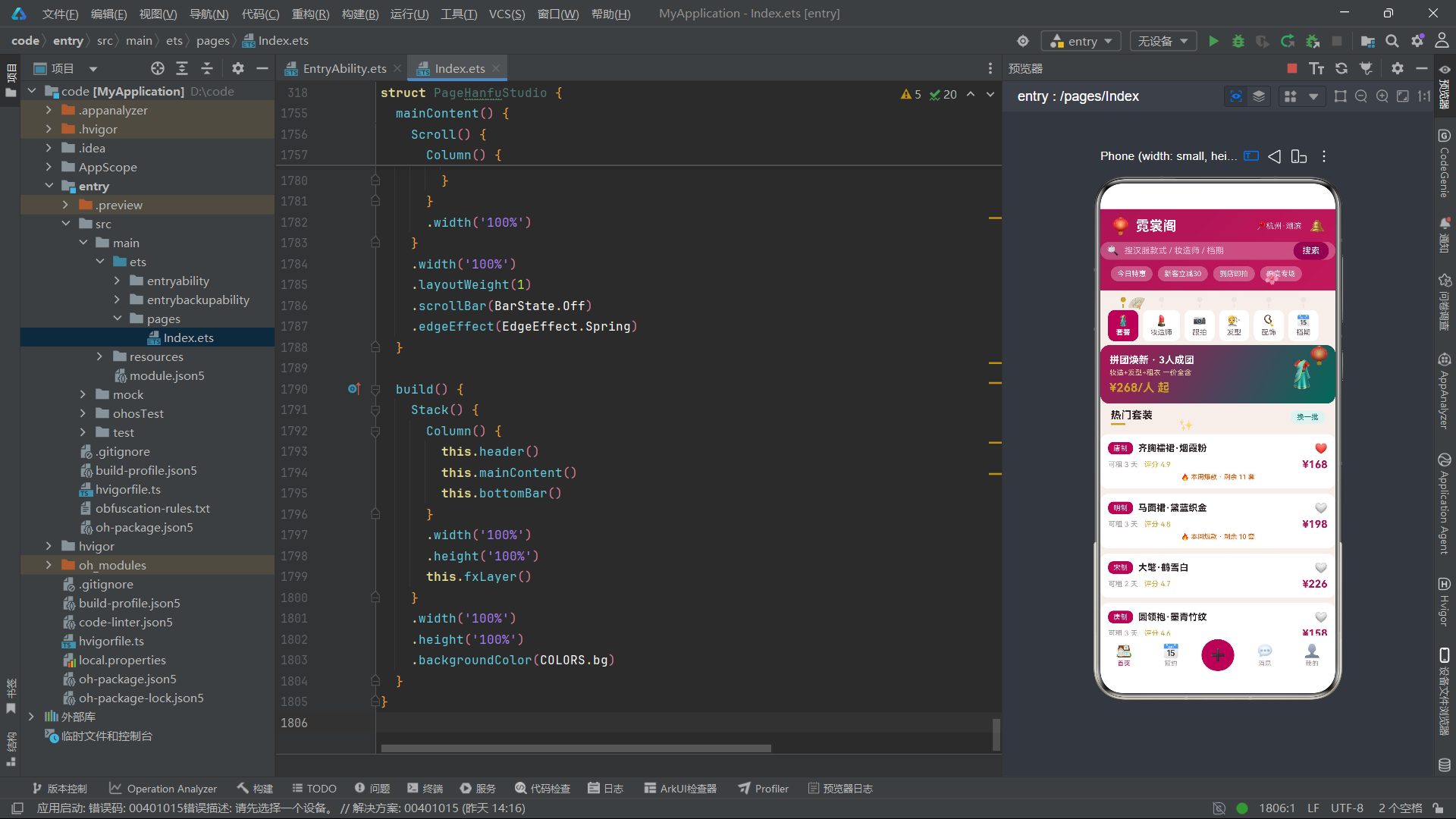
十三、总结
通过对霓裳阁汉服体验馆社区应用源代码的逐段深度解析,我们可以清晰地看到HarmonyOS ArkTS API 24在构建文化消费垂直社区应用时的技术表达力与工程成熟度。该应用以汉服体验为核心场景,通过六个interface+implements数据模型对(覆盖套装、妆造师、跟拍作品、发型、配饰、档期六大业务域)建立了严格的数据契约体系。每个接口定义了清晰的数据形状,每个@Observed实现类提供了可观察性,两者通过implements关键字建立正式的类型关联。这种接口驱动的数据模型设计不仅保证了类型安全,还使得数据形状的定义与可观察实现可以独立演进,在大型项目中尤其有利于团队协作与代码维护。构造函数接收接口类型的参数对象完成属性初始化的模式,比传统的位置参数构造函数更加灵活且可读性更强。
在UI架构层面,流苏书签式标签栏(tasselTab)以古籍流苏书签为隐喻,通过圆形流苏珠与短线条装饰构建了视觉上富有文化质感的标签栏。单排6标签的布局简洁直观,金色流苏选中态与深红色背景配合白色文字,在未选中态与选中态之间形成了清晰而优雅的视觉过渡。fxLayer动效系统通过团扇旋转、花瓣飘落(两朵错位)、灯笼呼吸缩放、星光闪烁、铜镜反向旋转六种动效元素营造了汉服文化场景的典雅氛围感,全部由tick变量的取模运算驱动,不同元素采用不同取模基数(24、60、10、8、80、20)实现节奏错位,以115ms的定时器间隔保证了动画的流畅性。两朵花瓣使用不同的取模基数与初始偏移值,实现了自然的花瓣飘落错位效果,是动效设计中精细度控制的体现。
在状态管理方面,rev修订号机制是该应用的一个精妙设计——每当列表数据发生变化(如收藏切换、列表轮转)时,rev递增1,ForEach的键值生成器将rev纳入键值计算(如's' + id + '_' + rev),确保了即使数据对象的id未变,只要rev变化就能触发列表项的重新渲染。三个独立的toggle方法(toggleSuitFav、toggleHairFav、toggleAccFav)分别处理三类业务对象的收藏切换,统一模式为直接修改@Observed对象的fav属性并递增rev。toggleTag通用方法通过indexOf判断与splice/push操作实现了两组多选标签(bookTags、figTags)的统一切换逻辑。groupTotal方法按groupStep * 158公式计算拼团总价,体现了业务逻辑与UI展示的清晰分离。
在弹框设计层面,四个弹框组件各具特色:新建预约单弹框以预约类型多选与时长步进为核心表单,费用按hourStep * 199动态计算;编辑体态档案弹框的偏好风格多选与雨天备用妆开关体现了汉服拍摄场景的人性化设计——雨天备用妆自动保留免费改期名额;取消预约弹框通过红色警示背景与定金扣除规则提示引导用户谨慎操作,同时展示剩余免费改期次数;拼团套餐弹框以深红到青绿的对角渐变信息卡片展示套餐内容,配合时段多选与人数步进,费用按groupStep * 158计算。每个弹框都配有✕关闭按钮与统一的constraintSize最大高度限制,确保了弹框在各种内容长度下的可用性。

讨论HarmonyOS开发技术,专注于API与组件、DevEco Studio、测试、元服务和应用上架分发等。
更多推荐

 0
0 0
0- 0


 已为社区贡献168条内容

所有评论(0)