HarmonyOS 6.1 实战:从接口定义(interface)到可观察类(@Observed class)的实现模式
一、HarmonyOS技术背景与ArkTS开发理念
HarmonyOS 6.1.1作为华为全场景智慧生活操作系统的最新迭代版本,其核心架构理念始终围绕"一次开发,多端部署"的分布式能力展开。在这一版本中,ArkTS作为主要的声明式开发语言,已经从早期的实验性框架发展为成熟且功能完备的编程范式。ArkTS融合了TypeScript的静态类型安全性与声明式UI的简洁表达力,为开发者提供了兼顾开发效率与运行性能的统一方案。基于HarmonyOS API 24的能力开放体系,开发者可以借助丰富的系统接口,实现从底层硬件调度到上层UI渲染的全链路控制。这种架构设计使得即使在复杂的商业应用场景中,也能保持极高的响应速度和流畅的用户体验。
在HarmonyOS ArkTS API 24的生态体系中,状态管理机制是构建响应式应用的核心基石。@State、@Observed、@ObjectLink等装饰器构成了一个层级化的状态驱动体系,使得数据变更能够自动触发UI的精准刷新。与传统的命令式编程不同,ArkTS的声明式状态管理大幅减少了开发者在DOM操作上的心智负担,使开发者可以将注意力集中在业务逻辑本身。当一个数据列表发生增删或属性变更时,框架会自动计算最小渲染差异,仅更新发生变化的UI节点,这种机制在包含大量列表项的商业应用中尤为关键。
对于美团类O2O(Online to Offline)场景而言,HarmonyOS的技术特性提供了得天独厚的优势。这类应用通常需要处理海量的商品列表、复杂的筛选标签、多层级的弹窗交互以及实时的状态更新。ArkTS的@Builder装饰器允许开发者将复杂的UI片段拆分为独立的可复用构建函数,这种模块化思路与美团类应用的多Tab页面架构天然契合。同时,ForEach的高性能列表渲染机制配合自定义的键值生成策略,能够确保在数据频繁刷新时依然保持列表的稳定性和动画的连贯性。
本文所解析的"时光底片·胶片冲扫与胶片相机租赁"场景,正是一个高度典型的O2O本地生活服务应用。该场景融合了冲扫服务下单、胶片相机租赁、技师预约、胶卷商城、配件租售、会员档案管理等多重业务模块。在视觉设计上,采用深棕色(#3E2723)搭配青蓝色(#00ACC1)的配色方案,灵感源自传统胶片的暗房环境与冲洗药液的青蓝色调,营造出浓厚的复古影像氛围。布局设计上别出心裁地采用胶片帧式内容Tab——双排4+3排列的齿孔胶片框作为导航元素,每个Tab项上下两端带有模拟胶片齿孔的圆点装饰,在功能性与视觉隐喻之间达成了精妙的平衡。
从工程架构的角度审视,该源码文件展示了一套完整的HarmonyOS应用开发范式:从接口定义(interface)到可观察类(@Observed class)的实现模式,从静态数据源的集中管理到动态状态驱动的列表渲染,从复杂的页面级@Builder组合到精细化的弹窗交互系统。每一个技术决策都体现了对HarmonyOS ArkTS API 24能力的深入理解和对业务场景的精准映射。接下来的章节将逐一拆解这些技术实现,揭示其背后的设计思路与工程价值。
二、ColorPalette色彩架构与COLORS常量定义
在任何HarmonyOS应用中,色彩管理系统的设计都是视觉一致性的基础保障。该场景采用了一套基于接口约束的颜色管理方案。
interface ColorPalette {
  bg: string
  card: string
  white: string
  primary: string
  primaryDeep: string
  accent: string
  accentSoft: string
  gold: string
  textPrimary: string
  textSecond: string
  textThird: string
  line: string
  tagBg: string
  warn: string
  danger: string
  ok: string
}
这段代码定义了一个名为ColorPalette的接口,它声明了16个字符串类型的颜色属性。接口在ArkTS中扮演着类型契约的角色——它不包含任何实现逻辑,仅定义数据结构规范。这种做法的好处在于,任何尝试创建颜色常量的代码都必须遵守这一结构约定,从编译期就杜绝了属性遗漏或拼写错误的风险。
const COLORS: ColorPalette = {
  bg: '#F4F1EC',
  card: '#FFFFFF',
  white: '#FFFFFF',
  primary: '#3E2723',
  primaryDeep: '#251512',
  accent: '#00ACC1',
  accentSoft: '#E0F6F9',
  gold: '#C99700',
  textPrimary: '#2E2420',
  textSecond: '#6B5D55',
  textThird: '#A69890',
  line: '#EAE4DC',
  tagBg: '#F0EAE2',
  warn: '#E65100',
  danger: '#C62828',
  ok: '#2E7D32'
}
COLORS常量是整个应用的色彩中枢。主色primary为#3E2723——一种深棕色,灵感来自暗房的安全灯环境与旧式胶片底片的深褐底色。强调色accent为#00ACC1——一种青蓝色,象征着冲洗药液的色彩特征。这一棕青搭配构成了整个应用的视觉基调,在每一个页面、每一张卡片、每一个按钮上反复出现,形成了强烈的品牌识别。accentSoft作为强调色的浅色变体,用于标签背景和选中态的柔和过渡。gold金色用于价格和会员等级的高亮展示。warn、danger、ok三色则构成了标准的状态反馈色彩体系,分别用于警告提示、危险操作和成功确认。
三、Interface接口定义与@Observed类implements模式
该场景的数据模型架构采用了一套严谨的"接口定义+可观察类实现"模式,这种模式在HarmonyOS ArkTS API 24的开发中被广泛推荐。
interface DevPack {
  id: number
  name: string
  fmt: string
  price: number
  days: number
  fav: boolean
}

@Observed
class DevPackItem implements DevPack {
  id: number = 0
  name: string = ''
  fmt: string = ''
  price: number = 0
  days: number = 0
  fav: boolean = false

  constructor(o: DevPack) {
    this.id = o.id
    this.name = o.name
    this.fmt = o.fmt
    this.price = o.price
    this.days = o.days
    this.fav = o.fav ? o.fav : false
  }
}
首先定义DevPack接口,它描述了冲扫套餐的核心数据结构:唯一标识id、套餐名称name、胶片格式fmt、价格price、出片天数days以及收藏标记fav。随后,DevPackItem类使用@Observed装饰器标记为可观察类,并通过implements DevPack声明对接口的实现。@Observed是ArkTS状态管理框架的关键装饰器,它使得该类的实例在被@State变量引用时,其属性变更能够自动触发UI刷新。
构造函数接收一个DevPack类型的参数o,将接口数据的属性逐一赋值到实例中。值得注意的是fav属性的处理采用了三元运算符o.fav ? o.fav : false,这是一种防御性编程技巧——当传入数据未显式设置fav属性时,默认赋值为false,避免了undefined在布尔上下文中的潜在问题。
这一模式在场景中重复应用于六种核心数据模型。CamGear接口描述胶片相机租赁实体,包含品牌brand、成色cond、日租金price、押金deposit等业务字段;Sample接口定义冲扫样片实体,包含标题title、ISO感光度iso、作者author、点赞数likes等社交化字段;TechMaster接口刻画暗房技师档案,包含从业年限years、专长领域special、评分score等专业属性;FilmRoll接口管理胶卷商品,包含品牌brand、ISO值iso、库存stock等电商字段;Accessory接口则定义配件租售实体,包含用途use、价格price、库存stock等字段。六个接口各司其职,六个@Observed类统一实现,形成了清晰且可扩展的数据层架构。
四、静态数据数组与图表常量定义
在应用的业务数据层,该场景定义了六个静态常量数组,作为初始数据源供组件状态消费。
const DEVS: DevPackItem[] = [
  new DevPackItem({ id: 1, name: 'C-41彩负标准冲', fmt: '135', price: 25, days: 3, fav: true }),
  new DevPackItem({ id: 2, name: 'C-41彩负·底片+扫描', fmt: '135', price: 45, days: 4, fav: false }),
  new DevPackItem({ id: 3, name: 'E6反转片冲扫', fmt: '135', price: 68, days: 5, fav: false }),
  new DevPackItem({ id: 4, name: '黑白手工冲·显影定制', fmt: '135', price: 55, days: 5, fav: false }),
  new DevPackItem({ id: 5, name: '120中画幅冲扫', fmt: '120', price: 78, days: 6, fav: false }),
  new DevPackItem({ id: 6, name: '一次性相机冲扫', fmt: '一次性', price: 35, days: 3, fav: true }),
  new DevPackItem({ id: 7, name: '电影卷ECN-2脱碳', fmt: '135', price: 62, days: 7, fav: false }),
  new DevPackItem({ id: 8, name: '过期卷抢救冲', fmt: '135', price: 50, days: 7, fav: false }),
  new DevPackItem({ id: 9, name: 'APS暗盒冲扫', fmt: 'APS', price: 88, days: 10, fav: false }),
  new DevPackItem({ id: 10, name: '大幅4x5散页冲', fmt: '页片', price: 128, days: 10, fav: false }),
  new DevPackItem({ id: 11, name: '底片翻新去霉翻拍', fmt: '旧底', price: 98, days: 8, fav: false }),
  new DevPackItem({ id: 12, name: '全家福老胶卷整卷冲', fmt: '135', price: 42, days: 6, fav: false })
]
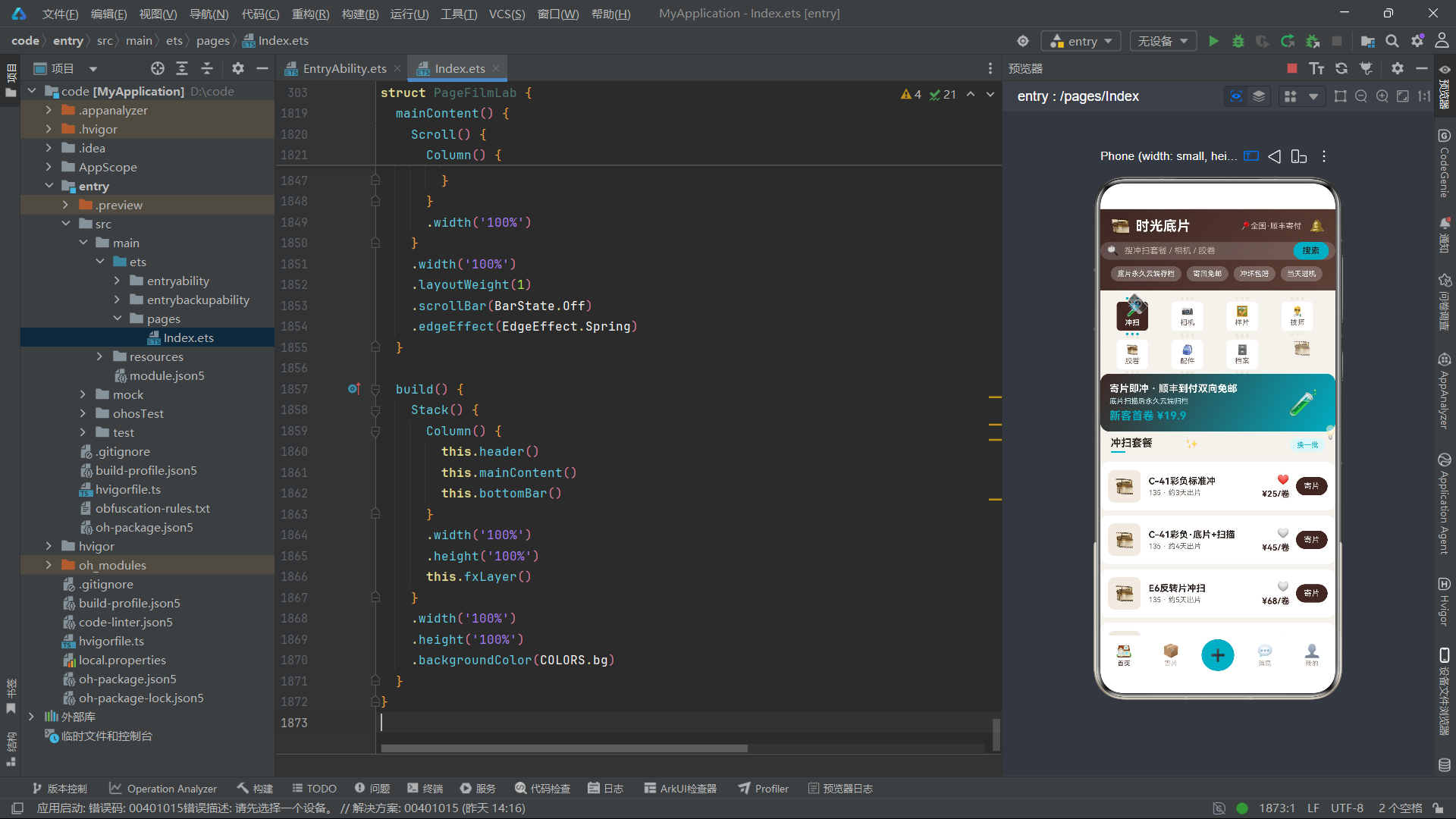
DEVS数组包含了12种冲扫套餐,覆盖了从最常见的C-41彩负标准冲洗到专业级的E6反转片、电影卷ECN-2脱碳、大幅4x5散页冲洗等全品类服务。每条数据通过构造函数实例化为DevPackItem对象,这意味着数组中的每一项在创建时就具备了可观察能力。类似地,CAMS数组收录了10款经典胶片相机(Nikon FM2、Contax T2、Hasselblad 500C/M、Leica M6 TTL等),SAMPLES数组展示10幅冲扫样片作品,TECHS数组列示8位暗房技师档案,FILMS数组管理10种胶卷商品,ACCS数组维护8件配件租售项目。
const MONTH_LABELS: string[] = ['3月', '4月', '5月', '6月', '7月', '8月']
const MONTH_ROLLS: number[] = [46, 58, 62, 51, 78, 92]
const FMT_LABELS: string[] = ['135彩负', '120中画幅', '反转片', '黑白']
const FMT_PCTS: number[] = [44, 26, 16, 14]
const FMT_COLORS: string[] = ['#3E2723', '#00ACC1', '#C99700', '#8D6E63']
const DEV_TAGS: string[] = ['C-41彩负', 'E6反转', '黑白', '电影卷']
const CAM_TAGS: string[] = ['旁轴', '单反', '中画幅', 'PS机', '一次性']
const LENS_TAGS: string[] = ['35mm', '50mm', '85mm', '变焦', '不租镜头']

function rollBar(i: number): number {
  return MONTH_ROLLS[i] * 1.4
}
这些常量定义服务于档案页的数据可视化需求。MONTH_LABELS和MONTH_ROLLS用于绘制近6个月冲扫卷数的柱状图,FMT_LABELS、FMT_PCTS和FMT_COLORS用于渲染胶片格式占比的堆叠条形图。DEV_TAGS、CAM_TAGS、LENS_TAGS作为弹窗中的多选标签选项,为用户的筛选交互提供数据源。辅助函数rollBar将月度数据乘以系数1.4来计算柱状图高度,这是一种简单的数据可视化映射技巧——通过调整系数可以在有限的空间内让数据差异更加直观。
五、组件状态管理与生命周期
@Entry
@Component
struct PageFilmLab {
  @State curTab: number = 0
  @State mainTab: number = 0
  @State addOpen: boolean = false
  @State editOpen: boolean = false
  @State delOpen: boolean = false
  @State bizOpen: boolean = false
  @State devList: DevPackItem[] = DEVS
  @State camList: CamGearItem[] = CAMS
  @State sampleList: SampleItem[] = SAMPLES
  @State filmList: FilmRollItem[] = FILMS
  @State accList: AccessoryItem[] = ACCS
  @State rev: number = 0
  @State tick: number = 0
  @State devTags: number[] = [0]
  @State camTags: number[] = [0]
  @State lensTags: number[] = [1]
  @State rollStep: number = 2
  @State shutterStep: number = 12
  @State dryFlag: boolean = true
  @State dayStep: number = 3
  private timer: number = -1
PageFilmLab是整个应用的入口组件,使用@Entry和@Component装饰器标记。其状态管理体系可以分为四个层次:第一层是导航控制状态,curTab管理内容区7个子页面的切换,mainTab控制底部导航栏在首页与个人中心之间的切换;第二层是弹窗控制状态,addOpen、editOpen、delOpen、bizOpen四个布尔值分别控制四种弹窗的显示与隐藏;第三层是数据列表状态,devList、camList、sampleList等五个数组直接绑定到ForEach列表渲染;第四层是交互表单状态,devTags、camTags、lensTags管理多选标签的选中索引,rollStep、shutterStep、dayStep管理步进器的数值。
rev(revision版本号)是一个巧妙的设计——它作为列表数据的"刷新版本号",在每次数据变更时递增,并被嵌入到ForEach的键值生成函数中,强制框架重新计算列表项的diff。tick状态则服务于动画系统,由定时器驱动持续递增,作为fxLayer动画效果的时间输入。
  aboutToAppear(): void {
    this.timer = setInterval(() => {
      this.tick = this.tick + 1
    }, 110)
  }

  aboutToDisappear(): void {
    if (this.timer >= 0) {
      clearInterval(this.timer)
    }
  }
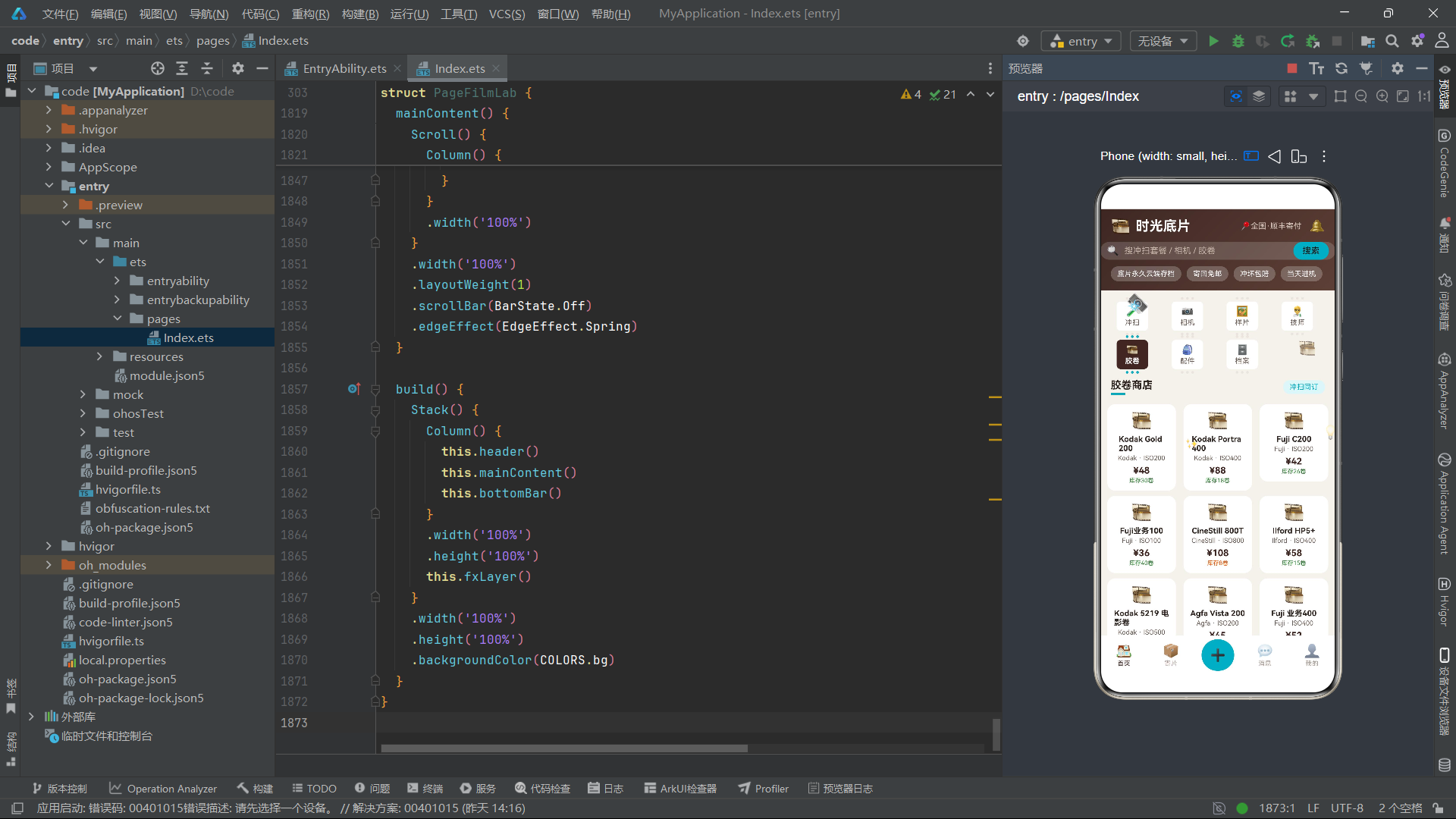
生命周期方法aboutToAppear在组件实例创建后、UI渲染前被调用,此处用于启动一个110毫秒间隔的定时器,持续递增tick状态值。这一定时器是整个应用动画系统的脉搏——每一次tick的递增都会触发fxLayer中所有依赖该状态的动画元素重新计算位置、旋转角度和透明度。aboutToDisappear在组件销毁时被调用,负责清理定时器以防止内存泄漏。这种"在出现时创建、在消失时清理"的资源管理范式是HarmonyOS开发中的标准实践。
六、业务方法与数据操作
  switchTab(i: number): void {
    this.curTab = i
  }

  switchMain(i: number): void {
    this.mainTab = i
  }

  refreshDevs(): void {
    this.devList.unshift(this.devList[this.devList.length - 1])
    this.devList.splice(this.devList.length - 1, 1)
    this.rev = this.rev + 1
  }

  refreshSamples(): void {
    this.sampleList.unshift(this.sampleList[this.sampleList.length - 1])
    this.sampleList.splice(this.sampleList.length - 1, 1)
    this.rev = this.rev + 1
  }

  refreshCams(): void {
    this.camList.unshift(this.camList[this.camList.length - 1])
    this.camList.splice(this.camList.length - 1, 1)
    this.rev = this.rev + 1
  }
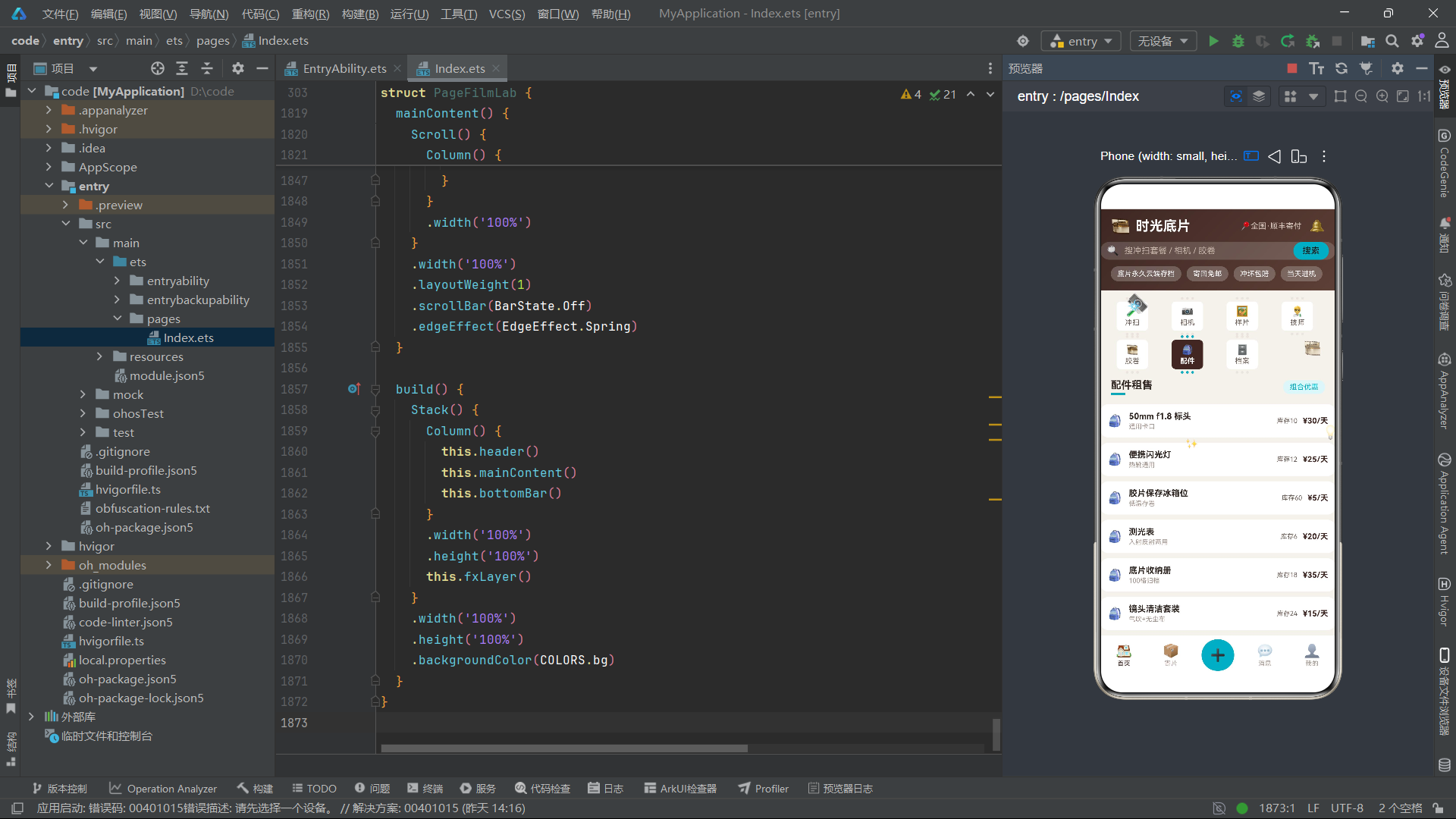
switchTab和switchMain是两个最基础的导航方法,它们简单地修改curTab和mainTab状态值,由ArkTS的状态驱动机制自动完成UI的切换渲染。refreshDevs、refreshSamples和refreshCams三个方法实现了一种"轮转刷新"效果——将数组的最后一个元素移到首位,模拟了"换一批"的数据更新体验。unshift将末尾元素插入到数组头部,splice随后删除原末尾元素,两步操作完成了元素的循环移位。每次操作后递增rev版本号,确保ForEach能正确识别数据变更。
  toggleDevFav(i: number): void {
    this.devList[i].fav = !this.devList[i].fav
    this.rev = this.rev + 1
  }

  toggleCamFav(i: number): void {
    this.camList[i].fav = !this.camList[i].fav
    this.rev = this.rev + 1
  }

  toggleSampleFav(i: number): void {
    this.sampleList[i].fav = !this.sampleList[i].fav
    this.rev = this.rev + 1
  }

  toggleTag(list: number[], i: number): void {
    if (list.indexOf(i) >= 0) {
      list.splice(list.indexOf(i), 1)
    } else {
      list.push(i)
    }
  }

  closeAll(): void {
    this.addOpen = false
    this.editOpen = false
    this.delOpen = false
    this.bizOpen = false
  }

  rentTotal(): number {
    return this.dayStep * 58
  }
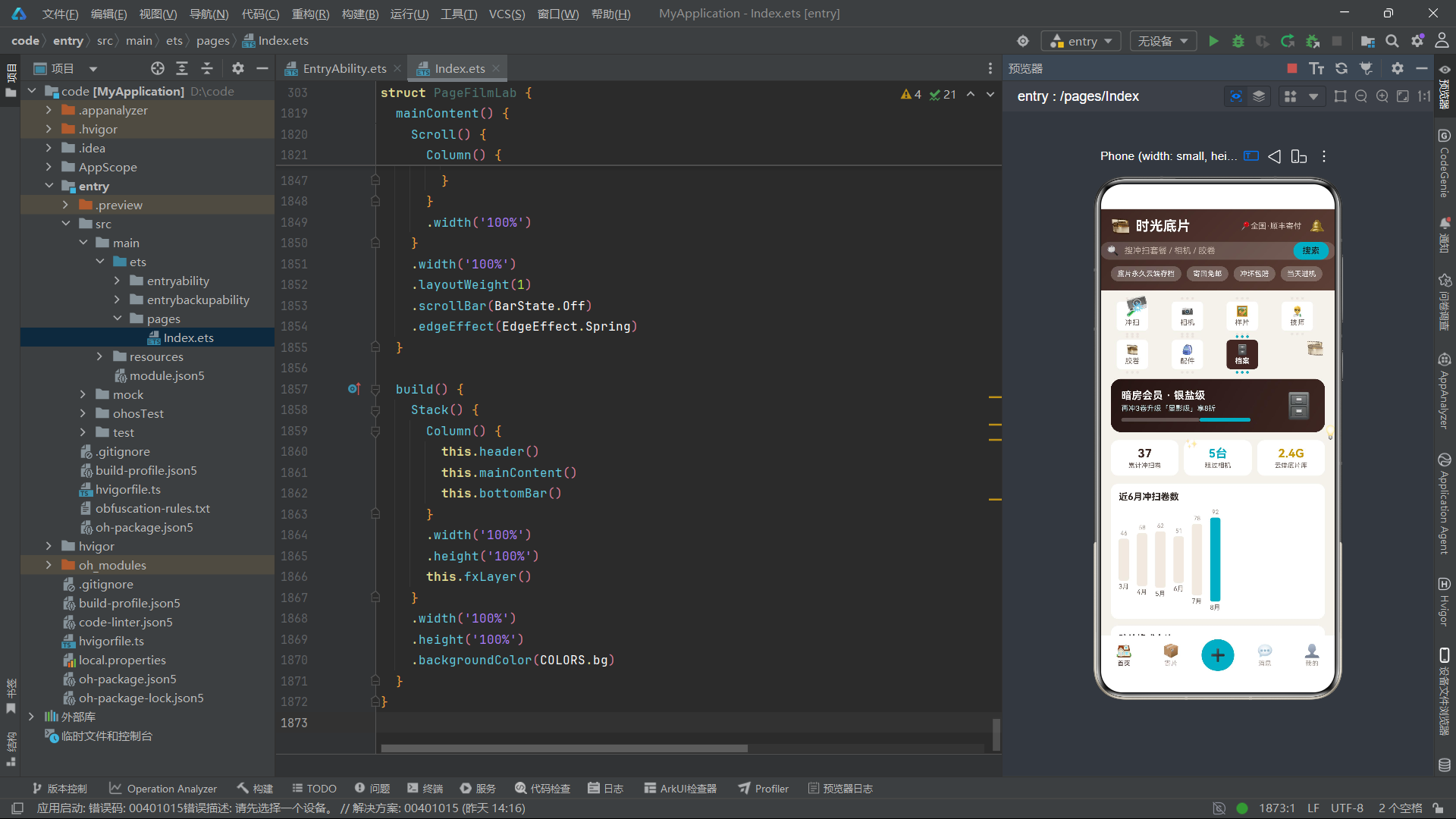
toggleDevFav、toggleCamFav、toggleSampleFav三个方法分别管理冲扫套餐、胶片相机和样片的收藏切换。由于数据项是@Observed类的实例,直接修改其fav属性会触发框架的细粒度刷新机制,同时递增rev确保列表级别的重新渲染。toggleTag是一个通用的多选标签切换方法,它接收一个索引数组和目标索引,在已选列表中切换该索引的存在状态——已选中则移除,未选中则添加。closeAll方法一键关闭所有弹窗,是弹窗管理的基础保障。rentTotal方法计算租赁总价,将天数乘以日租金58元返回。
七、fxLayer动画特效构建器
  @Builder
  fxLayer() {
    Stack() {
      Text('📸')
        .fontSize(26)
        .rotate({ angle: (this.tick % 24) * 15 })
        .position({ x: 40, y: 130 })
        .opacity(0.85)
      Text('🎞️')
        .fontSize(22)
        .translate({ x: this.tick % 40 })
        .position({ x: 280, y: 200 })
        .opacity(0.7)
      Text('💡')
        .fontSize(20)
        .opacity((this.tick % 6) / 6 + 0.1)
        .position({ x: 340, y: 330 })
      Text('✨')
        .fontSize(16)
        .position({ x: 130, y: 350 })
        .opacity((this.tick % 8) / 8 + 0.15)
      Text('📷')
        .fontSize(20)
        .translate({ y: this.tick % 50 })
        .position({ x: 540, y: 110 })
        .opacity(0.5)
    }
    .width('100%')
    .height('100%')
    .hitTestBehavior(HitTestMode.None)
  }
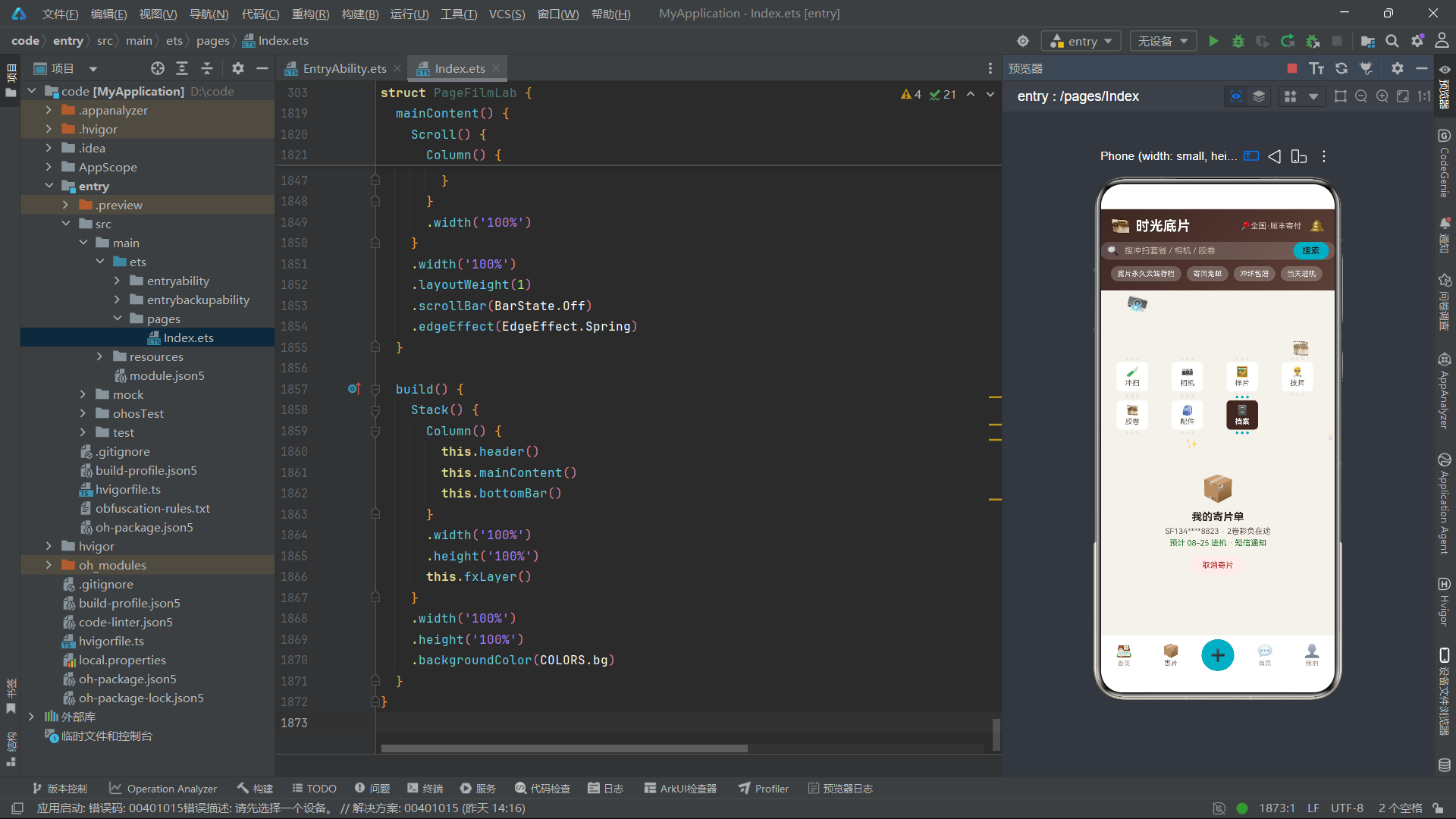
fxLayer是应用的全局动画特效层,它以一个Stack容器承载五个emoji图标元素,每个元素都绑定了基于tick状态的动态变换。相机emoji通过rotate实现每帧15度的旋转,取模24确保角度在0-345度之间循环。胶卷emoji通过translate在水平方向上做周期性位移,取模40控制位移范围为0-40vp。灯泡emoji的透明度通过(this.tick % 6) / 6 + 0.1计算,实现了从0.1到1.1的周期性闪烁。整个fxLayer通过hitTestBehavior(HitTestMode.None)设置为穿透式交互——它覆盖在所有内容之上,但不拦截任何触摸事件,确保下层的功能交互完全不受影响。这是一种非常优雅的装饰性动画方案,在不影响功能逻辑的前提下为应用注入了灵动的视觉气息。
八、header静态渐变头部构建器
  @Builder
  header() {
    Column() {
      Row() {
        Text('🎞️')
          .fontSize(24)
        Text('时光底片')
          .fontSize(21)
          .fontWeight(FontWeight.Bold)
          .fontColor(COLORS.white)
          .margin({ left: 8 })
        Column()
          .layoutWeight(1)
        Text('📍全国·顺丰寄付')
          .fontSize(12)
          .fontColor('#D8C8BE')
        Text('🔔')
          .fontSize(19)
          .margin({ left: 12 })
          .onClick(() => {
            this.mainTab = 3
          })
      }
      .width('100%')
      .padding({ left: 16, right: 16, top: 12 })

      Row() {
        Text('🔍')
          .fontSize(15)
        Text('搜冲扫套餐 / 相机 / 胶卷')
          .fontSize(13)
          .fontColor('#C4B2A6')
          .margin({ left: 8 })
        Column()
          .layoutWeight(1)
        Text('搜索')
          .fontSize(13)
          .fontColor(COLORS.primaryDeep)
          .padding({ left: 14, right: 14, top: 6, bottom: 6 })
          .backgroundColor(COLORS.accent)
          .borderRadius(14)
          .onClick(() => {
            this.curTab = 0
          })
      }
      .width('100%')
      .padding({ left: 10, right: 10 })
      .margin({ top: 10 })
      .backgroundColor('rgba(255,255,255,0.16)')
      .borderRadius(20)
header构建器绘制了应用的顶部区域,使用linearGradient设置了135度角的深棕色渐变背景。第一行包含品牌标识(胶卷emoji+文字"时光底片")、定位信息"全国·顺丰寄付"和通知铃铛。铃铛图标绑定了onClick事件,点击后跳转到消息页面(mainTab = 3)。第二行是搜索栏,采用半透明白色背景模拟毛玻璃效果,搜索按钮使用青色背景与深棕文字的组合,点击后切换到冲扫套餐页面。第三行是三个服务保障标签——“底片永久云端存档”、“寄回免邮”、“冲坏包赔”,使用半透明白色胶囊样式呈现,这些标签在O2O场景中扮演着信任建设的关键角色。
九、frameTab胶片帧式导航与tabBar双排布局
  @Builder
  frameTab(name: string, icon: string, idx: number) {
    Column() {
      Row({ space: 4 }) {
        Circle({ width: 4, height: 4 })
          .fill(this.curTab === idx ? COLORS.accent : COLORS.line)
        Circle({ width: 4, height: 4 })
          .fill(this.curTab === idx ? COLORS.accent : COLORS.line)
        Circle({ width: 4, height: 4 })
          .fill(this.curTab === idx ? COLORS.accent : COLORS.line)
      }
      Column() {
        Text(icon)
          .fontSize(15)
        Text(name)
          .fontSize(11)
          .fontWeight(this.curTab === idx ? FontWeight.Bold : FontWeight.Normal)
          .fontColor(this.curTab === idx ? COLORS.white : COLORS.textSecond)
          .margin({ top: 2 })
      }
      .alignItems(HorizontalAlign.Center)
      .padding({ top: 6, bottom: 6, left: 13, right: 13 })
      .backgroundColor(this.curTab === idx ? COLORS.primary : COLORS.card)
      .borderRadius(6)
      .margin({ top: 3 })
      Row({ space: 4 }) {
        Circle({ width: 4, height: 4 })
          .fill(this.curTab === idx ? COLORS.accent : COLORS.line)
        Circle({ width: 4, height: 4 })
          .fill(this.curTab === idx ? COLORS.accent : COLORS.line)
        Circle({ width: 4, height: 4 })
          .fill(this.curTab === idx ? COLORS.accent : COLORS.line)
      }
      .margin({ top: 3 })
    }
    .width('23%')
    .alignItems(HorizontalAlign.Center)
    .onClick(() => {
      this.switchTab(idx)
    })
  }
frameTab是整个应用视觉设计的点睛之笔——它将传统胶片的齿孔结构巧妙地转化为Tab导航的视觉语言。每个Tab项由三部分组成:上方的三个小圆点模拟胶片齿孔、中间的图标+文字内容区、下方的三个小圆点再次模拟齿孔。当选中某个Tab时(this.curTab === idx),齿孔圆点变为青色COLORS.accent,内容区背景变为深棕色COLORS.primary,文字加粗并变为白色,整个Tab呈现出胶片曝光后显影的视觉效果。未选中的Tab则保持浅色齿孔和白色背景的"未曝光"状态。这种设计在功能性与隐喻性之间达成了完美的统一——用户在操作Tab时仿佛在操控一条胶片进行选择和曝光。
@Builder
tabBar() {
Column() {
Row({ space: 6 }) {
this.frameTab('冲扫', '🧪', 0)
this.frameTab('相机', '📷', 1)
this.frameTab('样片', '🖼', 2)
this.frameTab('技师', '🧑🔬', 3)
}
.width('100%')
Row({ space: 6 }) {
this.frameTab('胶卷', '🎞', 4)
this.frameTab('配件', '🎒', 5)
this.frameTab('档案', '🗄', 6)
}
.width('100%')
}
.width('100%')
.padding({ left: 10, right: 10, top: 10 })
}
tabBar构建器将七个frameTab排列为双排4+3的布局:第一排四个Tab(冲扫、相机、样片、技师),第二排三个Tab(胶卷、配件、档案)。每个Tab宽度为23%,四个Tab加上间距恰好填满一行;第二排三个Tab则在右侧留出空间,模拟了胶片末端逐渐稀疏的齿孔排列。整个导航系统覆盖了应用的全部七大功能模块,是用户在应用内导航的核心枢纽。
十、sectionTitle与pageDev冲扫套餐页
  @Builder
  sectionTitle(title: string, sub: string, act: number) {
    Row() {
      Column() {
        Text(title)
          .fontSize(16)
          .fontWeight(FontWeight.Bold)
          .fontColor(COLORS.textPrimary)
        Rect({ width: 22, height: 3 })
          .fill(COLORS.accent)
          .margin({ top: 3 })
      }
      .alignItems(HorizontalAlign.Start)
      Column()
        .layoutWeight(1)
      Text(sub)
        .fontSize(11)
        .fontColor(COLORS.accent)
        .padding({ left: 10, right: 10, top: 4, bottom: 4 })
        .backgroundColor(COLORS.accentSoft)
        .borderRadius(10)
        .onClick(() => {
          if (act === 0) {
            this.refreshDevs()
          } else if (act === 1) {
            this.refreshSamples()
          } else if (act === 2) {
            this.refreshCams()
          } else {
            this.addOpen = true
          }
        })
    }
    .width('100%')
    .padding({ left: 16, right: 16, top: 8, bottom: 6 })
  }
sectionTitle是一个可复用的区块标题构建器,它接收三个参数:标题文字title、副操作文字sub和动作类型act。标题左侧配有22vp宽的青色短横线装饰,右侧的副操作标签根据act参数分发到不同的刷新方法或弹窗打开逻辑。这种"参数化构建器+条件分发"的设计模式在ArkTS中极具实用性——它将多个相似但不完全相同的区块标题统一为一个参数化模板,大幅减少了代码冗余。
  @Builder
  pageDev() {
    Column() {
      Row() {
        Column() {
          Text('寄片即冲 · 顺丰到付双向免邮')
            .fontSize(15)
            .fontWeight(FontWeight.Bold)
            .fontColor(COLORS.white)
          Text('底片扫描后永久云端归档')
            .fontSize(11)
            .fontColor('#CDEEF3')
            .margin({ top: 4 })
          Text('新客首卷 ¥19.9')
            .fontSize(17)
            .fontWeight(FontWeight.Bold)
            .fontColor(COLORS.accent)
            .margin({ top: 6 })
        }
        .alignItems(HorizontalAlign.Start)
        .layoutWeight(1)
        Text('🧪')
          .fontSize(38)
          .margin({ right: 12 })
      }
      .width('100%')
      .padding(14)
      .borderRadius(14)
      .linearGradient({ angle: 120, colors: [[COLORS.primary, 0], [COLORS.accent, 1]] })
      .onClick(() => {
        this.addOpen = true
      })

      this.sectionTitle('冲扫套餐', '换一批', 0)
      ForEach(this.devList, (it: DevPackItem, i: number) => {
        Row() {
          Stack() {
            Column()
              .width(50)
              .height(50)
              .backgroundColor(COLORS.tagBg)
              .borderRadius(10)
            Text('🎞')
              .fontSize(24)
          }
          Column() {
            Text(it.name)
              .fontSize(14)
              .fontWeight(FontWeight.Bold)
              .fontColor(COLORS.textPrimary)
            Text(it.fmt + ' · 约' + it.days + '天出片')
              .fontSize(11)
              .fontColor(COLORS.textSecond)
              .margin({ top: 3 })
          }
          .alignItems(HorizontalAlign.Start)
          .layoutWeight(1)
          .margin({ left: 12 })
          Column() {
            Text(it.fav ? '❤️' : '🤍')
              .fontSize(15)
              .onClick(() => {
                this.toggleDevFav(i)
              })
            Text('¥' + it.price + '/卷')
              .fontSize(13)
              .fontWeight(FontWeight.Bold)
              .fontColor(COLORS.primary)
              .margin({ top: 6 })
          }
          .alignItems(HorizontalAlign.End)
          Text('寄片')
            .fontSize(12)
            .fontColor(COLORS.white)
            .padding({ left: 12, right: 12, top: 7, bottom: 7 })
            .backgroundColor(COLORS.primary)
            .borderRadius(14)
            .margin({ left: 10 })
            .onClick(() => {
              this.addOpen = true
            })
        }
        .width('100%')
        .padding(12)
        .backgroundColor(COLORS.card)
        .borderRadius(12)
        .margin({ left: 16, right: 16, top: 8 })
      }, (it: DevPackItem) => 'd' + it.id.toString() + '_' + this.rev.toString())
    }
    .width('100%')
    .padding({ bottom: 12 })
  }
pageDev是冲扫套餐主页面,顶部是一张渐变Banner卡片,使用从COLORS.primary到COLORS.accent的120度线性渐变,展示"寄片即冲"的核心服务承诺和"新客首卷¥19.9"的获客优惠。Banner点击后打开寄送冲扫弹窗。Banner下方通过sectionTitle引出冲扫套餐列表,使用ForEach遍历devList数组渲染套餐卡片。每张卡片包含图标Stack容器、套餐名称、格式+天数描述、收藏按钮、价格和"寄片"操作按钮。ForEach的键值生成函数'd' + it.id.toString() + '_' + this.rev.toString()将套餐ID与版本号组合为唯一键,确保在rev变化时框架能正确执行列表的diff计算和定向刷新。
十一、pageCam相机租赁与pageSample样片展示
  @Builder
  pageCam() {
    Column() {
      this.sectionTitle('胶片相机租赁', '换一批', 2)
      Flex({ wrap: FlexWrap.Wrap, justifyContent: FlexAlign.SpaceBetween }) {
        ForEach(this.camList, (it: CamGearItem, i: number) => {
          Column() {
            Stack() {
              Column()
                .width(64)
                .height(48)
                .backgroundColor(COLORS.tagBg)
                .borderRadius(8)
              Text('📷')
                .fontSize(28)
            }
            Text(it.name)
              .fontSize(13)
              .fontWeight(FontWeight.Bold)
              .fontColor(COLORS.textPrimary)
              .margin({ top: 6 })
            Text(it.brand + ' · ' + it.cond)
              .fontSize(10)
              .fontColor(COLORS.textSecond)
              .margin({ top: 2 })
            Row() {
              Text('¥' + it.price + '/天')
                .fontSize(13)
                .fontWeight(FontWeight.Bold)
                .fontColor(COLORS.primary)
              Text(it.fav ? '❤️' : '🤍')
                .fontSize(13)
                .margin({ left: 8 })
                .onClick(() => {
                  this.toggleCamFav(i)
                })
            }
            .margin({ top: 6 })
            Text('押金 ¥' + it.deposit)
              .fontSize(9)
              .fontColor(it.deposit > 2000 ? COLORS.warn : COLORS.textThird)
              .margin({ top: 2 })
            Text('租')
              .fontSize(11)
              .fontColor(COLORS.white)
              .padding({ left: 14, right: 14, top: 5, bottom: 5 })
              .backgroundColor(COLORS.accent)
              .borderRadius(12)
              .margin({ top: 6 })
              .onClick(() => {
                this.bizOpen = true
              })
          }
          .width('48%')
          .alignItems(HorizontalAlign.Center)
          .padding(12)
          .backgroundColor(COLORS.card)
          .borderRadius(12)
          .margin({ top: 8 })
          .onClick(() => {
            this.bizOpen = true
          })
        }, (it: CamGearItem) => 'cam' + it.id.toString() + '_' + this.rev.toString())
      }
      .width('94%')
    }
    .width('100%')
    .padding({ bottom: 12 })
  }
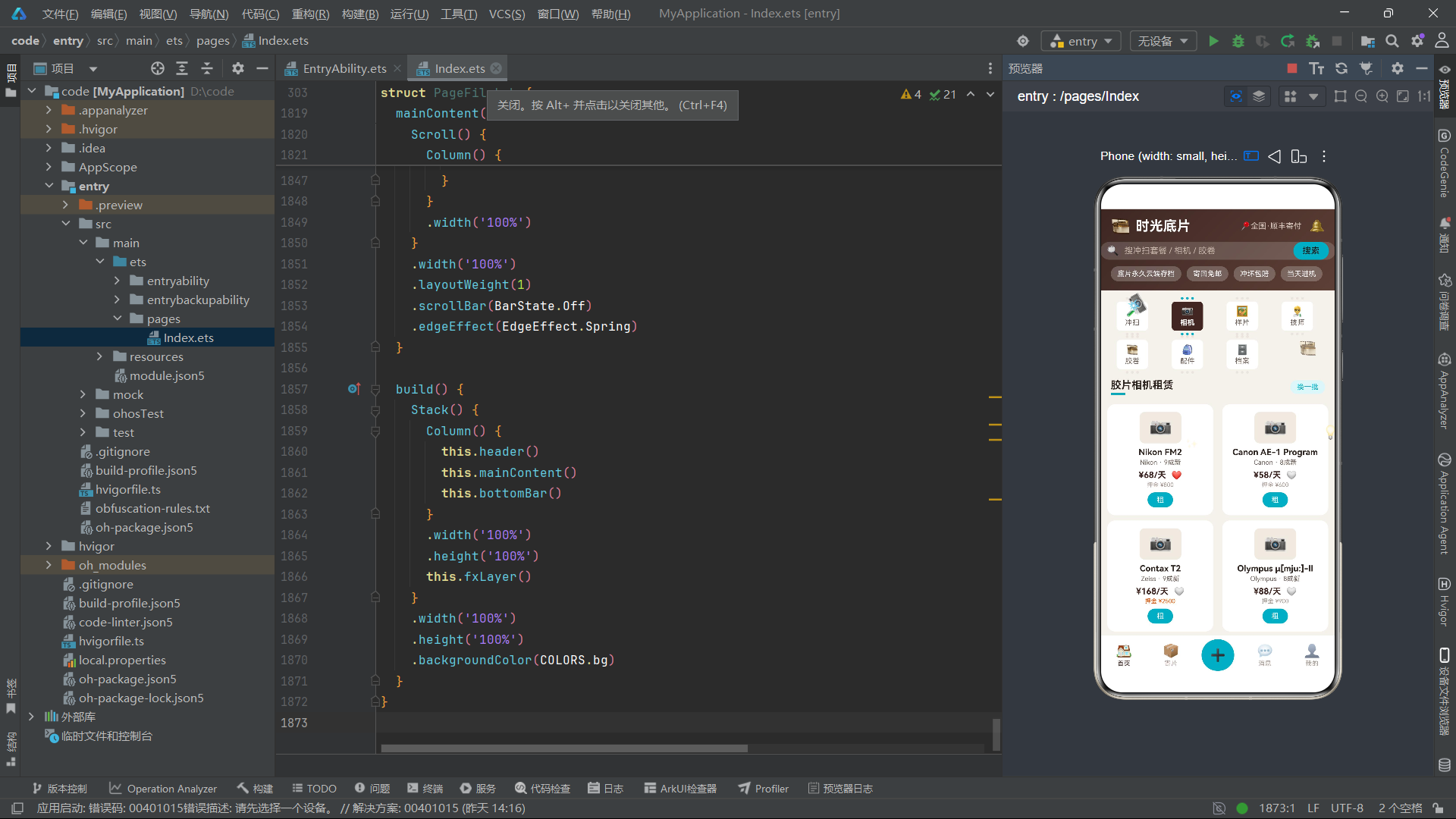
pageCam使用Flex容器配合FlexWrap.Wrap和FlexAlign.SpaceBetween实现了两列瀑布流布局,每张相机卡片宽度为48%,两列之间自动均分间距。卡片内容包含相机图标Stack容器、相机名称、品牌+成色信息、日租金+收藏按钮、押金信息和"租"操作按钮。押金文字的颜色根据金额动态变化——当押金超过2000元时使用警告色COLORS.warn(橙色),否则使用三级文字色。这种条件化色彩逻辑在视觉上提示用户高价值租赁的风险,是O2O场景中常见的安全提示手段。卡片和"租"按钮均可触发租赁弹窗bizOpen。
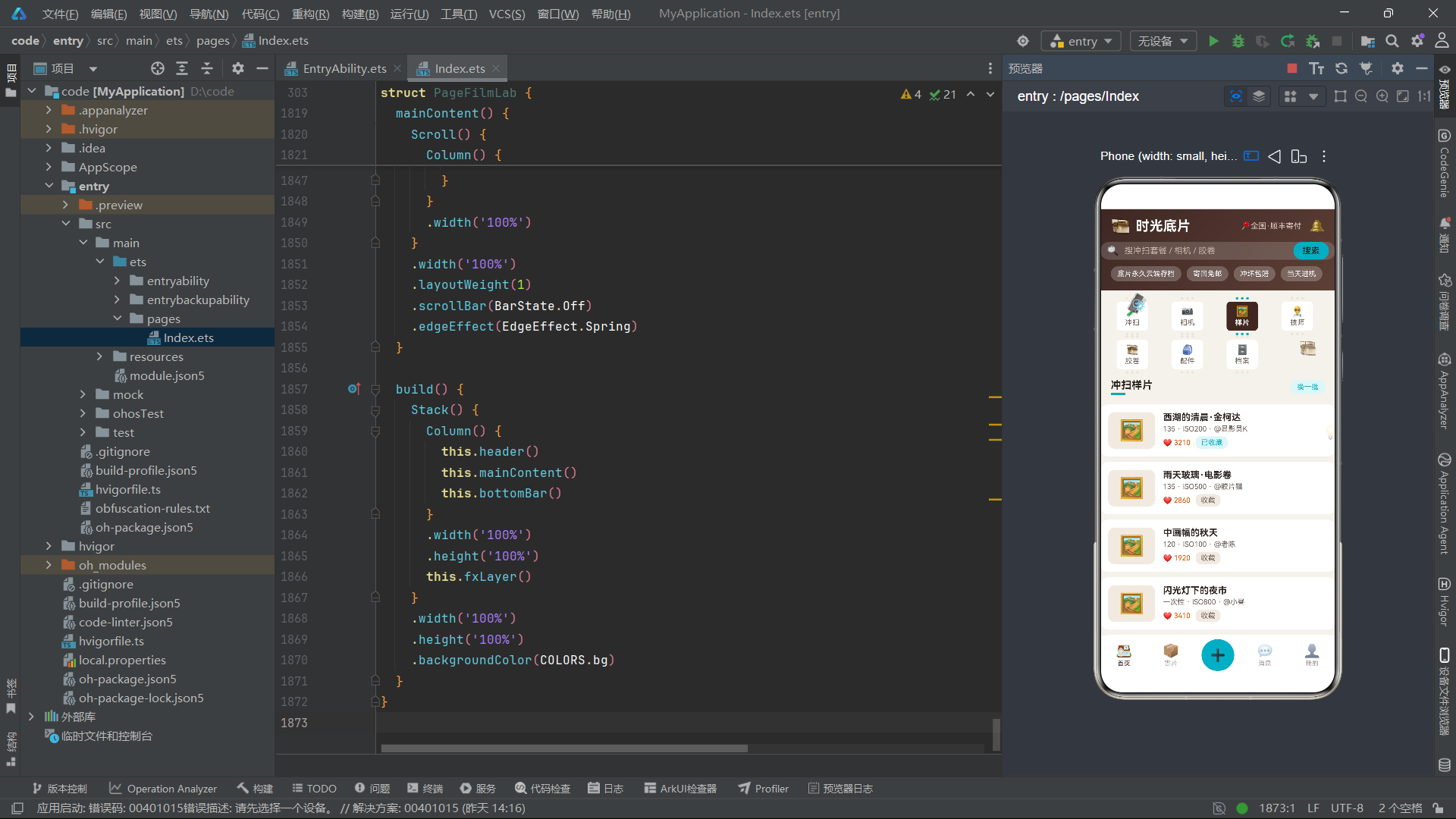
pageSample构建器则采用纵向列表布局展示冲扫样片。每张样片卡片包含样片预览图标、标题、格式+ISO+作者信息、点赞数和收藏按钮。收藏按钮的样式根据fav状态动态切换——已收藏时显示"已收藏"文字配青色背景,未收藏时显示"收藏"文字配灰色背景。整张卡片点击后打开相机档案编辑弹窗editOpen。
十二、pageTech技师档案与pageFilm胶卷商城
@Builder
pageTech() {
Column() {
this.sectionTitle('暗房技师', '招募中', 3)
ForEach(TECHS, (it: TechMasterItem, i: number) => {
Row() {
Stack() {
Circle({ width: 46, height: 46 })
.fill(COLORS.tagBg)
Text('🧑🔬')
.fontSize(22)
}
Column() {
Text(it.name)
.fontSize(14)
.fontWeight(FontWeight.Bold)
.fontColor(COLORS.textPrimary)
Text('主攻 ' + it.special)
.fontSize(11)
.fontColor(COLORS.accent)
.margin({ top: 3 })
Text('从业' + it.years + '年 · ⭐' + it.score)
.fontSize(11)
.fontColor(COLORS.textSecond)
.margin({ top: 3 })
}
.alignItems(HorizontalAlign.Start)
.layoutWeight(1)
.margin({ left: 12 })
Text('指定')
.fontSize(12)
.fontColor(COLORS.white)
.padding({ left: 12, right: 12, top: 7, bottom: 7 })
.backgroundColor(COLORS.primary)
.borderRadius(14)
.onClick(() => {
this.addOpen = true
})
}
.width('100%')
.padding(12)
.backgroundColor(COLORS.card)
.borderRadius(12)
.margin({ left: 16, right: 16, top: 8 })
.onClick(() => {
this.addOpen = true
})
}, (it: TechMasterItem) => 'tc' + it.id.toString())
Column() {
Text('暗房守则')
.fontSize(14)
.fontWeight(FontWeight.Bold)
.fontColor(COLORS.textPrimary)
Text('① 底片当天登记进机,全程可查节点')
.fontSize(11)
.fontColor(COLORS.textSecond)
.margin({ top: 6 })
Text('② 冲坏按市价3倍赔付,原片不弃')
.fontSize(11)
.fontColor(COLORS.textSecond)
.margin({ top: 4 })
Text('③ 底片默认寄回,也可付费仓储')
.fontSize(11)
.fontColor(COLORS.textSecond)
.margin({ top: 4 })
}
.width('100%')
.padding(12)
.backgroundColor(COLORS.card)
.borderRadius(12)
.margin({ left: 16, right: 16, top: 12 })
.alignItems(HorizontalAlign.Start)
}
.width('100%')
.padding({ bottom: 12 })
}
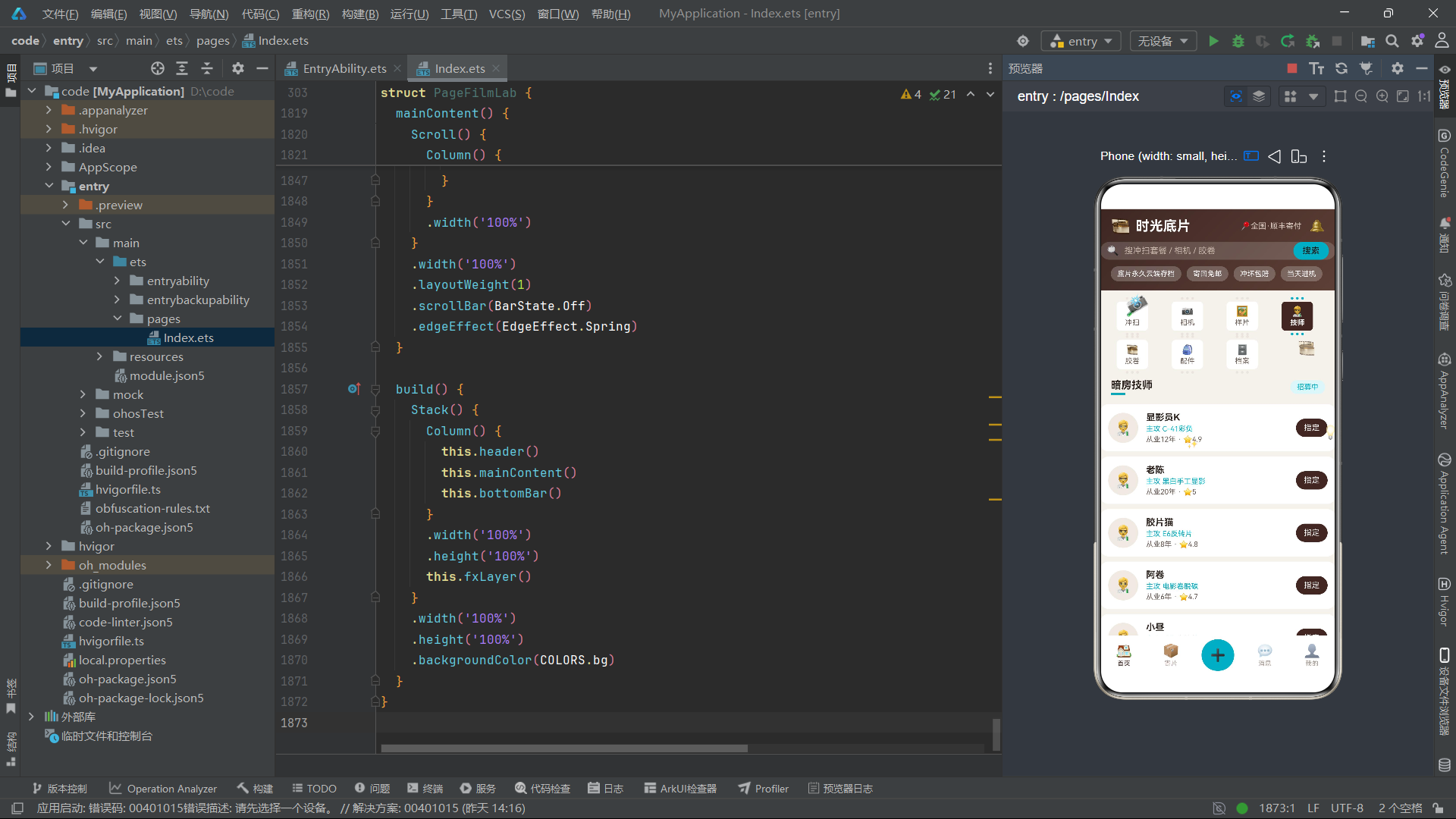
pageTech页面展示暗房技师团队,每行包含技师头像(圆形Stack容器+技师emoji)、姓名、主攻方向、从业年限+评分,以及"指定"按钮。值得注意的是,技师列表的ForEach直接遍历静态常量TECHS而非状态变量,且键值函数不包含rev版本号——这意味着技师列表是静态的,不参与"换一批"的轮转刷新。列表下方附有"暗房守则"信息卡片,列出了三条服务保障规则,这些规则文本在O2O服务类场景中扮演着建立用户信任、明确权责边界的重要角色。
pageFilm页面使用三列Flex布局展示胶卷商品,每张商品卡片包含胶卷emoji、名称、品牌+ISO信息、价格和库存。库存文字颜色根据数量动态变化——库存低于10卷时使用警告色,否则使用成功色。pageAcc页面则采用纵向列表展示配件租售项目,每行包含配件emoji、名称、用途、库存和日租金。
十三、pageProfile会员档案与数据可视化
  @Builder
  pageProfile() {
    Column() {
      Row() {
        Column() {
          Text('暗房会员 · 银盐级')
            .fontSize(16)
            .fontWeight(FontWeight.Bold)
            .fontColor(COLORS.white)
          Text('再冲3卷升级「显影级」享8折')
            .fontSize(11)
            .fontColor('#CDEEF3')
            .margin({ top: 4 })
          Row() {
            Column()
              .width(120)
              .height(6)
              .backgroundColor('rgba(255,255,255,0.24)')
              .borderRadius(3)
            Column()
              .width(78)
              .height(6)
              .backgroundColor(COLORS.accent)
              .borderRadius(3)
          }
          .margin({ top: 8 })
        }
        .alignItems(HorizontalAlign.Start)
        .layoutWeight(1)
        Text('🗄')
          .fontSize(38)
      }
      .width('100%')
      .padding(16)
      .borderRadius(16)
      .linearGradient({ angle: 120, colors: [[COLORS.primaryDeep, 0], [COLORS.primary, 1]] })
      .margin({ top: 8 })
pageProfile是会员档案页面,顶部是渐变会员卡片,使用从primaryDeep到primary的渐变背景,展示"暗房会员·银盐级"身份和升级进度条。进度条采用两层Column叠加实现——底层120vp宽的半透明白色条作为轨道,上层78vp宽的青色条作为进度填充,直观展示了"再冲3卷升级"的进度比例。卡片下方是三列数据统计面板,分别展示累计冲扫卷数、租过相机数量和云端底片库容量。
      Column() {
        Text('近6月冲扫卷数')
          .fontSize(14)
          .fontWeight(FontWeight.Bold)
          .fontColor(COLORS.textPrimary)
        Row({ space: 12 }) {
          ForEach(MONTH_LABELS, (m: string, i: number) => {
            Column() {
              Text(MONTH_ROLLS[i].toString())
                .fontSize(9)
                .fontColor(COLORS.textThird)
              Column()
                .width(16)
                .height(rollBar(i))
                .backgroundColor(i === 5 ? COLORS.accent : COLORS.tagBg)
                .borderRadius(4)
                .margin({ top: 3 })
              Text(m)
                .fontSize(10)
                .fontColor(COLORS.textSecond)
                .margin({ top: 3 })
            }
            .alignItems(HorizontalAlign.Center)
          }, (m: string) => 'rm' + m)
        }
        .margin({ top: 10 })
      }
数据可视化部分包含两个图表。第一个是近6月冲扫卷数的柱状图,使用ForEach遍历MONTH_LABELS和MONTH_ROLLS数组,为每个月份渲染一个柱子。柱子高度通过rollBar(i)函数计算(即月度数据乘以1.4系数),最新月份(索引5)使用青色高亮,其余月份使用浅灰色。第二个是胶片格式占比的堆叠条形图,使用ForEach遍历FMT_PCTS数组,每段宽度通过layoutWeight(p)按百分比分配,颜色取自FMT_COLORS数组。下方配有图例Flex布局,展示各格式的名称和占比百分比。页面末尾是"删除云端底片库"的危险操作入口,点击后打开删除确认弹窗。
十四、modalBodyAdd寄送冲扫弹窗
  @Builder
  modalBodyAdd() {
    Column() {
      Row() {
        Text('🧪 寄送冲扫 DEV ORDER')
          .fontSize(17)
          .fontWeight(FontWeight.Bold)
          .fontColor(COLORS.textPrimary)
        Column()
          .layoutWeight(1)
        Text('✕')
          .fontSize(16)
          .fontColor(COLORS.textThird)
          .onClick(() => {
            this.addOpen = false
          })
      }
      .width('100%')

      Text('冲扫工艺')
        .fontSize(13)
        .fontColor(COLORS.textSecond)
        .margin({ top: 14 })
      Flex({ wrap: FlexWrap.Wrap }) {
        ForEach(DEV_TAGS, (d: string, i: number) => {
          Text(d)
            .fontSize(12)
            .fontColor(this.devTags.indexOf(i) >= 0 ? COLORS.white : COLORS.accent)
            .padding({ left: 12, right: 12, top: 6, bottom: 6 })
            .backgroundColor(this.devTags.indexOf(i) >= 0 ? COLORS.accent : COLORS.accentSoft)
            .borderRadius(14)
            .margin({ right: 8, top: 8 })
            .onClick(() => {
              this.toggleTag(this.devTags, i)
            })
        }, (d: string) => 'dt' + d)
      }
      .width('100%')
      .margin({ top: 4 })
modalBodyAdd是寄送冲扫下单弹窗,顶部标题栏配有关闭按钮。弹窗主体包含三个交互区域:冲扫工艺多选标签(使用DEV_TAGS数组渲染C-41彩负、E6反转、黑白、电影卷四个选项,选中态为青色背景白色文字,通过toggleTag方法切换选中状态)、寄送卷数步进器(减号按钮+数值显示+加号按钮,范围1-20卷,每卷45元)、以及底部的"生成寄片码"提交按钮和合计金额。弹窗使用constraintSize({ maxHeight: '80%' })限制最大高度,确保在小屏设备上不会遮挡整个屏幕。
十五、modalBodyEdit相机档案与modalBodyDel删除警示
modalBodyEdit是相机档案编辑弹窗,包含常用机型多选标签(CAM_TAGS数组渲染旁轴、单反、中画幅、PS机、一次性五个选项)、快门数步进器(1-30万次)和防潮柜寄存开关。防潮柜开关使用dryFlag布尔状态控制,点击切换"已开启"/"已关闭"状态,开启时背景为深棕色,关闭时为灰色。底部"保存档案"按钮显示已选机型数量。
  @Builder
  modalBodyDel() {
    Column() {
      Row() {
        Text('⚠️ 删除档案确认')
          .fontSize(17)
          .fontWeight(FontWeight.Bold)
          .fontColor(COLORS.danger)
        Column()
          .layoutWeight(1)
        Text('✕')
          .fontSize(16)
          .fontColor(COLORS.textThird)
          .onClick(() => {
            this.delOpen = false
          })
      }
      .width('100%')

      Column() {
        Text('🗄')
          .fontSize(34)
        Text('云端底片库即将清空,不可恢复')
          .fontSize(13)
          .fontColor(COLORS.textPrimary)
          .margin({ top: 8 })
        Text('删除前可导出全部JPG打包下载')
          .fontSize(11)
          .fontColor(COLORS.warn)
          .margin({ top: 6 })
      }
      .width('100%')
      .alignItems(HorizontalAlign.Center)
      .padding({ top: 18, bottom: 18 })
      .backgroundColor('#FDECEA')
      .borderRadius(14)
      .margin({ top: 14 })
modalBodyDel是删除确认警示弹窗,标题使用危险色COLORS.danger渲染。中间区域使用浅红色背景#FDECEA的卡片展示警示信息——“云端底片库即将清空,不可恢复"的主提示和"删除前可导出全部JPG打包下载"的引导提示。下方三列数据面板展示底片容量(2.4G)、照片数量(612张)和保存时长(永久),让用户在删除前直观了解将损失的数据量。底部并排"再想想”(取消)和"确认删除"两个按钮,确认按钮使用危险色背景。
十六、modalBodyBiz租赁相机弹窗与modalOverlay弹窗管理
  @Builder
  modalBodyBiz() {
    Column() {
      Row() {
        Text('📷 租赁相机 RENT SLIP')
          .fontSize(17)
          .fontWeight(FontWeight.Bold)
          .fontColor(COLORS.textPrimary)
        Column()
          .layoutWeight(1)
        Text('✕')
          .fontSize(16)
          .fontColor(COLORS.textThird)
          .onClick(() => {
            this.bizOpen = false
          })
      }
      .width('100%')

      Row() {
        Column() {
          Text('Nikon FM2 · 9成新')
            .fontSize(15)
            .fontWeight(FontWeight.Bold)
            .fontColor(COLORS.white)
          Text('含一卷柯达金200 · 免费测光教学')
            .fontSize(11)
            .fontColor('#CDEEF3')
            .margin({ top: 4 })
          Text('¥68/天 · 押金¥800')
            .fontSize(16)
            .fontWeight(FontWeight.Bold)
            .fontColor(COLORS.accent)
            .margin({ top: 6 })
        }
        .alignItems(HorizontalAlign.Start)
        .layoutWeight(1)
        Text('📷')
          .fontSize(36)
      }
      .width('100%')
      .padding(14)
      .borderRadius(14)
      .linearGradient({ angle: 120, colors: [[COLORS.primaryDeep, 0], [COLORS.accent, 1]] })
      .margin({ top: 14 })
modalBodyBiz是相机租赁下单弹窗,顶部是渐变Banner卡片展示租赁商品信息(Nikon FM2、9成新、含一卷柯达金200、免费测光教学、¥68/天、押金¥800)。下方包含加租镜头多选标签(LENS_TAGS数组渲染35mm、50mm、85mm、变焦、不租镜头五个选项)、租期步进器(1-30天)和"确认租赁"提交按钮。按钮旁显示通过rentTotal()方法计算的租金总额。
  @Builder
  modalOverlay() {
    Stack({ alignContent: Alignment.Bottom }) {
      Column()
        .width('100%')
        .height('100%')
        .backgroundColor('rgba(28,16,12,0.5)')
        .onClick(() => {
          this.closeAll()
        })
      if (this.addOpen) {
        this.modalBodyAdd()
      }
      if (this.editOpen) {
        this.modalBodyEdit()
      }
      if (this.delOpen) {
        this.modalBodyDel()
      }
      if (this.bizOpen) {
        this.modalBodyBiz()
      }
    }
    .width('100%')
    .height('100%')
  }
modalOverlay是弹窗管理中枢,使用Stack容器配合Alignment.Bottom将弹窗内容对齐到底部。底层是一个半透明深棕色遮罩层(rgba(28,16,12,0.5)),点击遮罩调用closeAll()关闭所有弹窗。遮罩上方通过四个条件判断(if (this.addOpen)等)决定渲染哪个弹窗组件。这种集中式弹窗管理方案确保了同一时刻只有一个弹窗处于激活状态,避免了多个弹窗叠加的视觉混乱。
十七、bottomBar底部导航与mainContent内容路由
  @Builder
  bottomBar() {
    Row() {
      Column() {
        Text('🏠')
          .fontSize(20)
        Text('首页')
          .fontSize(10)
          .fontColor(this.mainTab === 0 ? COLORS.primary : COLORS.textThird)
          .margin({ top: 2 })
      }
      .layoutWeight(1)
      .alignItems(HorizontalAlign.Center)
      .onClick(() => {
        this.switchMain(0)
      })
      Column() {
        Text('📦')
          .fontSize(20)
        Text('寄片')
          .fontSize(10)
          .fontColor(this.mainTab === 1 ? COLORS.primary : COLORS.textThird)
          .margin({ top: 2 })
      }
      .layoutWeight(1)
      .alignItems(HorizontalAlign.Center)
      .onClick(() => {
        this.switchMain(1)
      })
      Column() {
        Text('➕')
          .fontSize(24)
          .fontColor(COLORS.white)
          .padding(10)
          .backgroundColor(COLORS.accent)
          .borderRadius(26)
      }
      .layoutWeight(1)
      .alignItems(HorizontalAlign.Center)
      .onClick(() => {
        this.addOpen = true
      })
bottomBar是底部导航栏,包含五个入口:首页、寄片、中间的加号悬浮按钮、消息和我的。每个入口的图标和文字颜色根据mainTab状态动态切换——当前激活的入口使用主色COLORS.primary,未激活的入口使用三级文字色COLORS.textThird。中间的加号按钮使用青色背景和白色文字,视觉上浮出于其他按钮之上,点击后打开寄送冲扫弹窗,是应用中最核心的快捷下单入口。
  @Builder
  mainContent() {
    Scroll() {
      Column() {
        this.tabBar()
        if (this.mainTab === 0) {
          if (this.curTab === 0) {
            this.pageDev()
          }
          if (this.curTab === 1) {
            this.pageCam()
          }
          if (this.curTab === 2) {
            this.pageSample()
          }
          if (this.curTab === 3) {
            this.pageTech()
          }
          if (this.curTab === 4) {
            this.pageFilm()
          }
          if (this.curTab === 5) {
            this.pageAcc()
          }
          if (this.curTab === 6) {
            this.pageProfile()
          }
        } else {
          this.pageMainOther()
        }
      }
      .width('100%')
    }
    .width('100%')
    .layoutWeight(1)
    .scrollBar(BarState.Off)
    .edgeEffect(EdgeEffect.Spring)
  }
mainContent是内容区的路由枢纽,使用Scroll容器包裹所有页面内容。路由逻辑分为两级:第一级通过mainTab判断是首页内容还是个人中心内容;第二级(当mainTab === 0时)通过curTab的0-6七个值分别路由到七个页面构建器。Scroll容器关闭了滚动条显示(BarState.Off),并启用了弹簧边缘效果(EdgeEffect.Spring),使得滚动到边界时会产生自然的回弹动画。
十八、build()主架构与全局组件树
  build() {
    Stack() {
      Column() {
        this.header()
        this.mainContent()
        this.bottomBar()
      }
      .width('100%')
      .height('100%')
      this.fxLayer()
    }
    .width('100%')
    .height('100%')
    .backgroundColor(COLORS.bg)
  }
build()方法是整个组件的渲染入口,它使用Stack容器将主体内容与动画特效层进行层叠组合。底层是一个Column容器,按照从上到下的顺序排列header()(头部)、mainContent()(内容区)和bottomBar()(底部导航)。上层是fxLayer()动画特效层,覆盖在所有内容之上但不拦截触摸事件。整个Stack设置了浅色背景COLORS.bg(#F4F1EC),这一带有暖灰调的背景色为整个应用奠定了柔和而不刺眼的视觉底色。
十九、Mermaid架构流程图
上图展示了整个应用的组件树架构与数据流向。从build()入口出发,Stack容器分为两条分支:主体列和动画层。主体列内部通过mainContent进行两级路由——mainTab控制首页与个人中心的切换,curTab控制首页内七个功能页面的切换。动画层通过定时器驱动的tick状态实现三种动画效果。所有功能页面共享modalOverlay弹窗系统,通过四个布尔状态变量分别控制四种弹窗的显示。
二十、数据模型对比表
| 数据模型 | 接口名 | 实现类 | 核心业务字段 | 应用场景 | 列表布局 | 支持收藏 | 弹窗关联 |
|---|---|---|---|---|---|---|---|
| 冲扫套餐 | DevPack | DevPackItem | fmt, price, days | 寄片冲扫服务下单 | 纵向列表 | 是 (fav) | modalBodyAdd |
| 胶片相机 | CamGear | CamGearItem | brand, cond, deposit | 相机租赁交易 | 双列瀑布流 | 是 (fav) | modalBodyBiz |
| 冲扫样片 | Sample | SampleItem | iso, author, likes | 样片社区展示 | 纵向列表 | 是 (fav) | modalBodyEdit |
| 暗房技师 | TechMaster | TechMasterItem | years, special, score | 技师预约指定 | 纵向列表 | 否 | modalBodyAdd |
| 胶卷商品 | FilmRoll | FilmRollItem | brand, iso, stock | 胶卷电商购买 | 三列网格 | 否 | modalBodyAdd |
| 配件租售 | Accessory | AccessoryItem | use, price, stock | 配件附加购买 | 纵向列表 | 否 | modalBodyBiz |
安装DevEco Studio程序

选择目标安装目录:

设置环境变量,但是需要重启一下:

新建一个空白模板:

设置API为24的模板项目:

初始化项目,自动下载相关依赖:

完整代码:
// ============================================================
// 布局风格:胶片帧式内容tab(双排4+3,齿孔胶片框)+ 静态渐变头部
// 弹框:寄送冲扫 / 相机档案 / 删除警示 / 租赁相机
// ============================================================
interface ColorPalette {
bg: string
card: string
white: string
primary: string
primaryDeep: string
accent: string
accentSoft: string
gold: string
textPrimary: string
textSecond: string
textThird: string
line: string
tagBg: string
warn: string
danger: string
ok: string
}
const COLORS: ColorPalette = {
bg: '#F4F1EC',
card: '#FFFFFF',
white: '#FFFFFF',
primary: '#3E2723',
primaryDeep: '#251512',
accent: '#00ACC1',
accentSoft: '#E0F6F9',
gold: '#C99700',
textPrimary: '#2E2420',
textSecond: '#6B5D55',
textThird: '#A69890',
line: '#EAE4DC',
tagBg: '#F0EAE2',
warn: '#E65100',
danger: '#C62828',
ok: '#2E7D32'
}
interface DevPack {
id: number
name: string
fmt: string
price: number
days: number
fav: boolean
}
@Observed
class DevPackItem implements DevPack {
id: number = 0
name: string = ''
fmt: string = ''
price: number = 0
days: number = 0
fav: boolean = false
constructor(o: DevPack) {
this.id = o.id
this.name = o.name
this.fmt = o.fmt
this.price = o.price
this.days = o.days
this.fav = o.fav ? o.fav : false
}
}
interface CamGear {
id: number
name: string
brand: string
cond: string
price: number
deposit: number
fav: boolean
}
@Observed
class CamGearItem implements CamGear {
id: number = 0
name: string = ''
brand: string = ''
cond: string = ''
price: number = 0
deposit: number = 0
fav: boolean = false
constructor(o: CamGear) {
this.id = o.id
this.name = o.name
this.brand = o.brand
this.cond = o.cond
this.price = o.price
this.deposit = o.deposit
this.fav = o.fav ? o.fav : false
}
}
interface Sample {
id: number
title: string
fmt: string
iso: number
author: string
likes: number
fav: boolean
}
@Observed
class SampleItem implements Sample {
id: number = 0
title: string = ''
fmt: string = ''
iso: number = 0
author: string = ''
likes: number = 0
fav: boolean = false
constructor(o: Sample) {
this.id = o.id
this.title = o.title
this.fmt = o.fmt
this.iso = o.iso
this.author = o.author
this.likes = o.likes
this.fav = o.fav ? o.fav : false
}
}
interface TechMaster {
id: number
name: string
years: number
special: string
score: number
}
@Observed
class TechMasterItem implements TechMaster {
id: number = 0
name: string = ''
years: number = 0
special: string = ''
score: number = 0
constructor(o: TechMaster) {
this.id = o.id
this.name = o.name
this.years = o.years
this.special = o.special
this.score = o.score
}
}
interface FilmRoll {
id: number
name: string
brand: string
iso: number
price: number
stock: number
}
@Observed
class FilmRollItem implements FilmRoll {
id: number = 0
name: string = ''
brand: string = ''
iso: number = 0
price: number = 0
stock: number = 0
constructor(o: FilmRoll) {
this.id = o.id
this.name = o.name
this.brand = o.brand
this.iso = o.iso
this.price = o.price
this.stock = o.stock
}
}
interface Accessory {
id: number
name: string
use: string
price: number
stock: number
}
@Observed
class AccessoryItem implements Accessory {
id: number = 0
name: string = ''
use: string = ''
price: number = 0
stock: number = 0
constructor(o: Accessory) {
this.id = o.id
this.name = o.name
this.use = o.use
this.price = o.price
this.stock = o.stock
}
}
const DEVS: DevPackItem[] = [
new DevPackItem({ id: 1, name: 'C-41彩负标准冲', fmt: '135', price: 25, days: 3, fav: true }),
new DevPackItem({ id: 2, name: 'C-41彩负·底片+扫描', fmt: '135', price: 45, days: 4, fav: false }),
new DevPackItem({ id: 3, name: 'E6反转片冲扫', fmt: '135', price: 68, days: 5, fav: false }),
new DevPackItem({ id: 4, name: '黑白手工冲·显影定制', fmt: '135', price: 55, days: 5, fav: false }),
new DevPackItem({ id: 5, name: '120中画幅冲扫', fmt: '120', price: 78, days: 6, fav: false }),
new DevPackItem({ id: 6, name: '一次性相机冲扫', fmt: '一次性', price: 35, days: 3, fav: true }),
new DevPackItem({ id: 7, name: '电影卷ECN-2脱碳', fmt: '135', price: 62, days: 7, fav: false }),
new DevPackItem({ id: 8, name: '过期卷抢救冲', fmt: '135', price: 50, days: 7, fav: false }),
new DevPackItem({ id: 9, name: 'APS暗盒冲扫', fmt: 'APS', price: 88, days: 10, fav: false }),
new DevPackItem({ id: 10, name: '大幅4x5散页冲', fmt: '页片', price: 128, days: 10, fav: false }),
new DevPackItem({ id: 11, name: '底片翻新去霉翻拍', fmt: '旧底', price: 98, days: 8, fav: false }),
new DevPackItem({ id: 12, name: '全家福老胶卷整卷冲', fmt: '135', price: 42, days: 6, fav: false })
]
const CAMS: CamGearItem[] = [
new CamGearItem({ id: 1, name: 'Nikon FM2', brand: 'Nikon', cond: '9成新', price: 68, deposit: 800, fav: true }),
new CamGearItem({ id: 2, name: 'Canon AE-1 Program', brand: 'Canon', cond: '8成新', price: 58, deposit: 600, fav: false }),
new CamGearItem({ id: 3, name: 'Contax T2', brand: 'Zeiss', cond: '9成新', price: 168, deposit: 2500, fav: false }),
new CamGearItem({ id: 4, name: 'Olympus μ[mju:]-II', brand: 'Olympus', cond: '8成新', price: 88, deposit: 900, fav: false }),
new CamGearItem({ id: 5, name: 'Hasselblad 500C/M', brand: 'Hasselblad', cond: '9成新', price: 388, deposit: 8000, fav: false }),
new CamGearItem({ id: 6, name: 'Pentax 67', brand: 'Pentax', cond: '8成新', price: 258, deposit: 5000, fav: false }),
new CamGearItem({ id: 7, name: 'Ricoh GR1s', brand: 'Ricoh', cond: '9成新', price: 158, deposit: 2200, fav: false }),
new CamGearItem({ id: 8, name: 'Kodak FunSaver 一次性', brand: 'Kodak', cond: '全新', price: 39, deposit: 0, fav: false }),
new CamGearItem({ id: 9, name: 'Leica M6 TTL', brand: 'Leica', cond: '9成新', price: 488, deposit: 12000, fav: false }),
new CamGearItem({ id: 10, name: 'Yashica MG-1', brand: 'Yashica', cond: '7成新', price: 45, deposit: 400, fav: false })
]
const SAMPLES: SampleItem[] = [
new SampleItem({ id: 1, title: '西湖的清晨·金柯达', fmt: '135', iso: 200, author: '显影员K', likes: 3210, fav: true }),
new SampleItem({ id: 2, title: '雨天玻璃·电影卷', fmt: '135', iso: 500, author: '胶片猫', likes: 2860, fav: false }),
new SampleItem({ id: 3, title: '中画幅的秋天', fmt: '120', iso: 100, author: '老陈', likes: 1920, fav: false }),
new SampleItem({ id: 4, title: '闪光灯下的夜市', fmt: '一次性', iso: 800, author: '小昼', likes: 3410, fav: false }),
new SampleItem({ id: 5, title: '反转片·城市蓝调', fmt: '135', iso: 100, author: '显影员K', likes: 2280, fav: false }),
new SampleItem({ id: 6, title: '过期十年的绿', fmt: '135', iso: 200, author: '阿卷', likes: 1620, fav: false }),
new SampleItem({ id: 7, title: '暗房放大·银盐颗粒', fmt: '页片', iso: 100, author: '老陈', likes: 1180, fav: false }),
new SampleItem({ id: 8, title: '雪天地铁·黑白', fmt: '135', iso: 400, author: '胶片猫', likes: 2650, fav: false }),
new SampleItem({ id: 9, title: '婚礼纪实·柯达金', fmt: '135', iso: 200, author: '小昼', likes: 3020, fav: false }),
new SampleItem({ id: 10, title: '古镇一炷香', fmt: '120', iso: 400, author: '阿卷', likes: 1450, fav: false })
]
const TECHS: TechMasterItem[] = [
new TechMasterItem({ id: 1, name: '显影员K', years: 12, special: 'C-41彩负', score: 4.9 }),
new TechMasterItem({ id: 2, name: '老陈', years: 20, special: '黑白手工显影', score: 5.0 }),
new TechMasterItem({ id: 3, name: '胶片猫', years: 8, special: 'E6反转片', score: 4.8 }),
new TechMasterItem({ id: 4, name: '阿卷', years: 6, special: '电影卷脱碳', score: 4.7 }),
new TechMasterItem({ id: 5, name: '小昼', years: 4, special: '过期卷抢救', score: 4.6 }),
new TechMasterItem({ id: 6, name: '梁师傅', years: 26, special: '大幅页片', score: 5.0 }),
new TechMasterItem({ id: 7, name: '金子', years: 10, special: '翻拍去霉', score: 4.8 }),
new TechMasterItem({ id: 8, name: '小满', years: 2, special: '扫描调色', score: 4.5 })
]
const FILMS: FilmRollItem[] = [
new FilmRollItem({ id: 1, name: 'Kodak Gold 200', brand: 'Kodak', iso: 200, price: 48, stock: 30 }),
new FilmRollItem({ id: 2, name: 'Kodak Portra 400', brand: 'Kodak', iso: 400, price: 88, stock: 18 }),
new FilmRollItem({ id: 3, name: 'Fuji C200', brand: 'Fuji', iso: 200, price: 42, stock: 26 }),
new FilmRollItem({ id: 4, name: 'Fuji业务100', brand: 'Fuji', iso: 100, price: 36, stock: 40 }),
new FilmRollItem({ id: 5, name: 'CineStill 800T', brand: 'CineStill', iso: 800, price: 108, stock: 8 }),
new FilmRollItem({ id: 6, name: 'Ilford HP5+', brand: 'Ilford', iso: 400, price: 58, stock: 15 }),
new FilmRollItem({ id: 7, name: 'Kodak 5219 电影卷', brand: 'Kodak', iso: 500, price: 68, stock: 12 }),
new FilmRollItem({ id: 8, name: 'Agfa Vista 200', brand: 'Agfa', iso: 200, price: 45, stock: 20 }),
new FilmRollItem({ id: 9, name: 'Fuji 业务400', brand: 'Fuji', iso: 400, price: 52, stock: 22 }),
new FilmRollItem({ id: 10, name: 'Fomapan 100', brand: 'Foma', iso: 100, price: 32, stock: 25 })
]
const ACCS: AccessoryItem[] = [
new AccessoryItem({ id: 1, name: '50mm f1.8 标头', use: '通用卡口', price: 30, stock: 10 }),
new AccessoryItem({ id: 2, name: '便携闪光灯', use: '热靴通用', price: 25, stock: 12 }),
new AccessoryItem({ id: 3, name: '胶片保存冰箱位', use: '低温存卷', price: 5, stock: 60 }),
new AccessoryItem({ id: 4, name: '测光表', use: '入射反射两用', price: 20, stock: 6 }),
new AccessoryItem({ id: 5, name: '底片收纳册', use: '100格归档', price: 35, stock: 18 }),
new AccessoryItem({ id: 6, name: '镜头清洁套装', use: '气吹+无尘布', price: 15, stock: 24 }),
new AccessoryItem({ id: 7, name: '相机肩带复古款', use: '快拆通用', price: 28, stock: 14 }),
new AccessoryItem({ id: 8, name: '三脚架·桌面款', use: '慢门稳定', price: 22, stock: 9 })
]
const MONTH_LABELS: string[] = ['3月', '4月', '5月', '6月', '7月', '8月']
const MONTH_ROLLS: number[] = [46, 58, 62, 51, 78, 92]
const FMT_LABELS: string[] = ['135彩负', '120中画幅', '反转片', '黑白']
const FMT_PCTS: number[] = [44, 26, 16, 14]
const FMT_COLORS: string[] = ['#3E2723', '#00ACC1', '#C99700', '#8D6E63']
const DEV_TAGS: string[] = ['C-41彩负', 'E6反转', '黑白', '电影卷']
const CAM_TAGS: string[] = ['旁轴', '单反', '中画幅', 'PS机', '一次性']
const LENS_TAGS: string[] = ['35mm', '50mm', '85mm', '变焦', '不租镜头']
function rollBar(i: number): number {
return MONTH_ROLLS[i] * 1.4
}
@Entry
@Component
struct PageFilmLab {
@State curTab: number = 0
@State mainTab: number = 0
@State addOpen: boolean = false
@State editOpen: boolean = false
@State delOpen: boolean = false
@State bizOpen: boolean = false
@State devList: DevPackItem[] = DEVS
@State camList: CamGearItem[] = CAMS
@State sampleList: SampleItem[] = SAMPLES
@State filmList: FilmRollItem[] = FILMS
@State accList: AccessoryItem[] = ACCS
@State rev: number = 0
@State tick: number = 0
@State devTags: number[] = [0]
@State camTags: number[] = [0]
@State lensTags: number[] = [1]
@State rollStep: number = 2
@State shutterStep: number = 12
@State dryFlag: boolean = true
@State dayStep: number = 3
private timer: number = -1
aboutToAppear(): void {
this.timer = setInterval(() => {
this.tick = this.tick + 1
}, 110)
}
aboutToDisappear(): void {
if (this.timer >= 0) {
clearInterval(this.timer)
}
}
switchTab(i: number): void {
this.curTab = i
}
switchMain(i: number): void {
this.mainTab = i
}
refreshDevs(): void {
this.devList.unshift(this.devList[this.devList.length - 1])
this.devList.splice(this.devList.length - 1, 1)
this.rev = this.rev + 1
}
refreshSamples(): void {
this.sampleList.unshift(this.sampleList[this.sampleList.length - 1])
this.sampleList.splice(this.sampleList.length - 1, 1)
this.rev = this.rev + 1
}
refreshCams(): void {
this.camList.unshift(this.camList[this.camList.length - 1])
this.camList.splice(this.camList.length - 1, 1)
this.rev = this.rev + 1
}
toggleDevFav(i: number): void {
this.devList[i].fav = !this.devList[i].fav
this.rev = this.rev + 1
}
toggleCamFav(i: number): void {
this.camList[i].fav = !this.camList[i].fav
this.rev = this.rev + 1
}
toggleSampleFav(i: number): void {
this.sampleList[i].fav = !this.sampleList[i].fav
this.rev = this.rev + 1
}
toggleTag(list: number[], i: number): void {
if (list.indexOf(i) >= 0) {
list.splice(list.indexOf(i), 1)
} else {
list.push(i)
}
}
closeAll(): void {
this.addOpen = false
this.editOpen = false
this.delOpen = false
this.bizOpen = false
}
rentTotal(): number {
return this.dayStep * 58
}
@Builder
fxLayer() {
Stack() {
Text('📸')
.fontSize(26)
.rotate({ angle: (this.tick % 24) * 15 })
.position({ x: 40, y: 130 })
.opacity(0.85)
Text('🎞️')
.fontSize(22)
.translate({ x: this.tick % 40 })
.position({ x: 280, y: 200 })
.opacity(0.7)
Text('💡')
.fontSize(20)
.opacity((this.tick % 6) / 6 + 0.1)
.position({ x: 340, y: 330 })
Text('✨')
.fontSize(16)
.position({ x: 130, y: 350 })
.opacity((this.tick % 8) / 8 + 0.15)
Text('📷')
.fontSize(20)
.translate({ y: this.tick % 50 })
.position({ x: 540, y: 110 })
.opacity(0.5)
}
.width('100%')
.height('100%')
.hitTestBehavior(HitTestMode.None)
}
@Builder
header() {
Column() {
Row() {
Text('🎞️')
.fontSize(24)
Text('时光底片')
.fontSize(21)
.fontWeight(FontWeight.Bold)
.fontColor(COLORS.white)
.margin({ left: 8 })
Column()
.layoutWeight(1)
Text('📍全国·顺丰寄付')
.fontSize(12)
.fontColor('#D8C8BE')
Text('🔔')
.fontSize(19)
.margin({ left: 12 })
.onClick(() => {
this.mainTab = 3
})
}
.width('100%')
.padding({ left: 16, right: 16, top: 12 })
Row() {
Text('🔍')
.fontSize(15)
Text('搜冲扫套餐 / 相机 / 胶卷')
.fontSize(13)
.fontColor('#C4B2A6')
.margin({ left: 8 })
Column()
.layoutWeight(1)
Text('搜索')
.fontSize(13)
.fontColor(COLORS.primaryDeep)
.padding({ left: 14, right: 14, top: 6, bottom: 6 })
.backgroundColor(COLORS.accent)
.borderRadius(14)
.onClick(() => {
this.curTab = 0
})
}
.width('100%')
.padding({ left: 10, right: 10 })
.margin({ top: 10 })
.backgroundColor('rgba(255,255,255,0.16)')
.borderRadius(20)
Row({ space: 8 }) {
Text('底片永久云端存档')
.fontSize(11)
.fontColor(COLORS.white)
.padding({ left: 10, right: 10, top: 5, bottom: 5 })
.backgroundColor('rgba(255,255,255,0.22)')
.borderRadius(12)
Text('寄回免邮')
.fontSize(11)
.fontColor(COLORS.white)
.padding({ left: 10, right: 10, top: 5, bottom: 5 })
.backgroundColor('rgba(255,255,255,0.22)')
.borderRadius(12)
Text('冲坏包赔')
.fontSize(11)
.fontColor(COLORS.white)
.padding({ left: 10, right: 10, top: 5, bottom: 5 })
.backgroundColor('rgba(255,255,255,0.22)')
.borderRadius(12)
Text('当天进机')
.fontSize(11)
.fontColor(COLORS.white)
.padding({ left: 10, right: 10, top: 5, bottom: 5 })
.backgroundColor('rgba(255,255,255,0.22)')
.borderRadius(12)
}
.width('100%')
.padding({ left: 16, right: 16 })
.margin({ top: 10, bottom: 14 })
}
.width('100%')
.alignItems(HorizontalAlign.Start)
.linearGradient({ angle: 135, colors: [[COLORS.primary, 0], ['#5D4037', 1]] })
}
@Builder
frameTab(name: string, icon: string, idx: number) {
Column() {
Row({ space: 4 }) {
Circle({ width: 4, height: 4 })
.fill(this.curTab === idx ? COLORS.accent : COLORS.line)
Circle({ width: 4, height: 4 })
.fill(this.curTab === idx ? COLORS.accent : COLORS.line)
Circle({ width: 4, height: 4 })
.fill(this.curTab === idx ? COLORS.accent : COLORS.line)
}
Column() {
Text(icon)
.fontSize(15)
Text(name)
.fontSize(11)
.fontWeight(this.curTab === idx ? FontWeight.Bold : FontWeight.Normal)
.fontColor(this.curTab === idx ? COLORS.white : COLORS.textSecond)
.margin({ top: 2 })
}
.alignItems(HorizontalAlign.Center)
.padding({ top: 6, bottom: 6, left: 13, right: 13 })
.backgroundColor(this.curTab === idx ? COLORS.primary : COLORS.card)
.borderRadius(6)
.margin({ top: 3 })
Row({ space: 4 }) {
Circle({ width: 4, height: 4 })
.fill(this.curTab === idx ? COLORS.accent : COLORS.line)
Circle({ width: 4, height: 4 })
.fill(this.curTab === idx ? COLORS.accent : COLORS.line)
Circle({ width: 4, height: 4 })
.fill(this.curTab === idx ? COLORS.accent : COLORS.line)
}
.margin({ top: 3 })
}
.width('23%')
.alignItems(HorizontalAlign.Center)
.onClick(() => {
this.switchTab(idx)
})
}
@Builder
tabBar() {
Column() {
Row({ space: 6 }) {
this.frameTab('冲扫', '🧪', 0)
this.frameTab('相机', '📷', 1)
this.frameTab('样片', '🖼', 2)
this.frameTab('技师', '🧑🔬', 3)
}
.width('100%')
Row({ space: 6 }) {
this.frameTab('胶卷', '🎞', 4)
this.frameTab('配件', '🎒', 5)
this.frameTab('档案', '🗄', 6)
}
.width('100%')
}
.width('100%')
.padding({ left: 10, right: 10, top: 10 })
}
@Builder
sectionTitle(title: string, sub: string, act: number) {
Row() {
Column() {
Text(title)
.fontSize(16)
.fontWeight(FontWeight.Bold)
.fontColor(COLORS.textPrimary)
Rect({ width: 22, height: 3 })
.fill(COLORS.accent)
.margin({ top: 3 })
}
.alignItems(HorizontalAlign.Start)
Column()
.layoutWeight(1)
Text(sub)
.fontSize(11)
.fontColor(COLORS.accent)
.padding({ left: 10, right: 10, top: 4, bottom: 4 })
.backgroundColor(COLORS.accentSoft)
.borderRadius(10)
.onClick(() => {
if (act === 0) {
this.refreshDevs()
} else if (act === 1) {
this.refreshSamples()
} else if (act === 2) {
this.refreshCams()
} else {
this.addOpen = true
}
})
}
.width('100%')
.padding({ left: 16, right: 16, top: 8, bottom: 6 })
}
@Builder
pageDev() {
Column() {
Row() {
Column() {
Text('寄片即冲 · 顺丰到付双向免邮')
.fontSize(15)
.fontWeight(FontWeight.Bold)
.fontColor(COLORS.white)
Text('底片扫描后永久云端归档')
.fontSize(11)
.fontColor('#CDEEF3')
.margin({ top: 4 })
Text('新客首卷 ¥19.9')
.fontSize(17)
.fontWeight(FontWeight.Bold)
.fontColor(COLORS.accent)
.margin({ top: 6 })
}
.alignItems(HorizontalAlign.Start)
.layoutWeight(1)
Text('🧪')
.fontSize(38)
.margin({ right: 12 })
}
.width('100%')
.padding(14)
.borderRadius(14)
.linearGradient({ angle: 120, colors: [[COLORS.primary, 0], [COLORS.accent, 1]] })
.onClick(() => {
this.addOpen = true
})
this.sectionTitle('冲扫套餐', '换一批', 0)
ForEach(this.devList, (it: DevPackItem, i: number) => {
Row() {
Stack() {
Column()
.width(50)
.height(50)
.backgroundColor(COLORS.tagBg)
.borderRadius(10)
Text('🎞')
.fontSize(24)
}
Column() {
Text(it.name)
.fontSize(14)
.fontWeight(FontWeight.Bold)
.fontColor(COLORS.textPrimary)
Text(it.fmt + ' · 约' + it.days + '天出片')
.fontSize(11)
.fontColor(COLORS.textSecond)
.margin({ top: 3 })
}
.alignItems(HorizontalAlign.Start)
.layoutWeight(1)
.margin({ left: 12 })
Column() {
Text(it.fav ? '❤️' : '🤍')
.fontSize(15)
.onClick(() => {
this.toggleDevFav(i)
})
Text('¥' + it.price + '/卷')
.fontSize(13)
.fontWeight(FontWeight.Bold)
.fontColor(COLORS.primary)
.margin({ top: 6 })
}
.alignItems(HorizontalAlign.End)
Text('寄片')
.fontSize(12)
.fontColor(COLORS.white)
.padding({ left: 12, right: 12, top: 7, bottom: 7 })
.backgroundColor(COLORS.primary)
.borderRadius(14)
.margin({ left: 10 })
.onClick(() => {
this.addOpen = true
})
}
.width('100%')
.padding(12)
.backgroundColor(COLORS.card)
.borderRadius(12)
.margin({ left: 16, right: 16, top: 8 })
}, (it: DevPackItem) => 'd' + it.id.toString() + '_' + this.rev.toString())
}
.width('100%')
.padding({ bottom: 12 })
}
@Builder
pageCam() {
Column() {
this.sectionTitle('胶片相机租赁', '换一批', 2)
Flex({ wrap: FlexWrap.Wrap, justifyContent: FlexAlign.SpaceBetween }) {
ForEach(this.camList, (it: CamGearItem, i: number) => {
Column() {
Stack() {
Column()
.width(64)
.height(48)
.backgroundColor(COLORS.tagBg)
.borderRadius(8)
Text('📷')
.fontSize(28)
}
Text(it.name)
.fontSize(13)
.fontWeight(FontWeight.Bold)
.fontColor(COLORS.textPrimary)
.margin({ top: 6 })
Text(it.brand + ' · ' + it.cond)
.fontSize(10)
.fontColor(COLORS.textSecond)
.margin({ top: 2 })
Row() {
Text('¥' + it.price + '/天')
.fontSize(13)
.fontWeight(FontWeight.Bold)
.fontColor(COLORS.primary)
Text(it.fav ? '❤️' : '🤍')
.fontSize(13)
.margin({ left: 8 })
.onClick(() => {
this.toggleCamFav(i)
})
}
.margin({ top: 6 })
Text('押金 ¥' + it.deposit)
.fontSize(9)
.fontColor(it.deposit > 2000 ? COLORS.warn : COLORS.textThird)
.margin({ top: 2 })
Text('租')
.fontSize(11)
.fontColor(COLORS.white)
.padding({ left: 14, right: 14, top: 5, bottom: 5 })
.backgroundColor(COLORS.accent)
.borderRadius(12)
.margin({ top: 6 })
.onClick(() => {
this.bizOpen = true
})
}
.width('48%')
.alignItems(HorizontalAlign.Center)
.padding(12)
.backgroundColor(COLORS.card)
.borderRadius(12)
.margin({ top: 8 })
.onClick(() => {
this.bizOpen = true
})
}, (it: CamGearItem) => 'cam' + it.id.toString() + '_' + this.rev.toString())
}
.width('94%')
}
.width('100%')
.padding({ bottom: 12 })
}
@Builder
pageSample() {
Column() {
this.sectionTitle('冲扫样片', '换一批', 1)
ForEach(this.sampleList, (it: SampleItem, i: number) => {
Column() {
Row() {
Stack() {
Column()
.width(72)
.height(56)
.backgroundColor(COLORS.tagBg)
.borderRadius(10)
Text('🖼')
.fontSize(30)
}
Column() {
Text(it.title)
.fontSize(14)
.fontWeight(FontWeight.Bold)
.fontColor(COLORS.textPrimary)
Text(it.fmt + ' · ISO' + it.iso + ' · @' + it.author)
.fontSize(11)
.fontColor(COLORS.textSecond)
.margin({ top: 3 })
Row() {
Text('❤ ' + it.likes)
.fontSize(11)
.fontColor(COLORS.warn)
Text(it.fav ? '已收藏' : '收藏')
.fontSize(11)
.fontColor(it.fav ? COLORS.accent : COLORS.textSecond)
.padding({ left: 8, right: 8, top: 3, bottom: 3 })
.backgroundColor(it.fav ? COLORS.accentSoft : COLORS.tagBg)
.borderRadius(8)
.margin({ left: 8 })
.onClick(() => {
this.toggleSampleFav(i)
})
}
.margin({ top: 5 })
}
.alignItems(HorizontalAlign.Start)
.layoutWeight(1)
.margin({ left: 12 })
}
.width('100%')
}
.width('100%')
.padding(12)
.backgroundColor(COLORS.card)
.borderRadius(12)
.margin({ left: 16, right: 16, top: 8 })
.onClick(() => {
this.editOpen = true
})
}, (it: SampleItem) => 'sm' + it.id.toString() + '_' + this.rev.toString())
}
.width('100%')
.padding({ bottom: 12 })
}
@Builder
pageTech() {
Column() {
this.sectionTitle('暗房技师', '招募中', 3)
ForEach(TECHS, (it: TechMasterItem, i: number) => {
Row() {
Stack() {
Circle({ width: 46, height: 46 })
.fill(COLORS.tagBg)
Text('🧑🔬')
.fontSize(22)
}
Column() {
Text(it.name)
.fontSize(14)
.fontWeight(FontWeight.Bold)
.fontColor(COLORS.textPrimary)
Text('主攻 ' + it.special)
.fontSize(11)
.fontColor(COLORS.accent)
.margin({ top: 3 })
Text('从业' + it.years + '年 · ⭐' + it.score)
.fontSize(11)
.fontColor(COLORS.textSecond)
.margin({ top: 3 })
}
.alignItems(HorizontalAlign.Start)
.layoutWeight(1)
.margin({ left: 12 })
Text('指定')
.fontSize(12)
.fontColor(COLORS.white)
.padding({ left: 12, right: 12, top: 7, bottom: 7 })
.backgroundColor(COLORS.primary)
.borderRadius(14)
.onClick(() => {
this.addOpen = true
})
}
.width('100%')
.padding(12)
.backgroundColor(COLORS.card)
.borderRadius(12)
.margin({ left: 16, right: 16, top: 8 })
.onClick(() => {
this.addOpen = true
})
}, (it: TechMasterItem) => 'tc' + it.id.toString())
Column() {
Text('暗房守则')
.fontSize(14)
.fontWeight(FontWeight.Bold)
.fontColor(COLORS.textPrimary)
Text('① 底片当天登记进机,全程可查节点')
.fontSize(11)
.fontColor(COLORS.textSecond)
.margin({ top: 6 })
Text('② 冲坏按市价3倍赔付,原片不弃')
.fontSize(11)
.fontColor(COLORS.textSecond)
.margin({ top: 4 })
Text('③ 底片默认寄回,也可付费仓储')
.fontSize(11)
.fontColor(COLORS.textSecond)
.margin({ top: 4 })
}
.width('100%')
.padding(12)
.backgroundColor(COLORS.card)
.borderRadius(12)
.margin({ left: 16, right: 16, top: 12 })
.alignItems(HorizontalAlign.Start)
}
.width('100%')
.padding({ bottom: 12 })
}
@Builder
pageFilm() {
Column() {
this.sectionTitle('胶卷商店', '冲扫同订', 3)
Flex({ wrap: FlexWrap.Wrap, justifyContent: FlexAlign.SpaceBetween }) {
ForEach(this.filmList, (it: FilmRollItem, i: number) => {
Column() {
Text('🎞')
.fontSize(26)
Text(it.name)
.fontSize(12)
.fontWeight(FontWeight.Bold)
.fontColor(COLORS.textPrimary)
.margin({ top: 6 })
Text(it.brand + ' · ISO' + it.iso)
.fontSize(10)
.fontColor(COLORS.textSecond)
.margin({ top: 2 })
Text('¥' + it.price)
.fontSize(14)
.fontWeight(FontWeight.Bold)
.fontColor(COLORS.primary)
.margin({ top: 5 })
Text('库存' + it.stock + '卷')
.fontSize(9)
.fontColor(it.stock < 10 ? COLORS.warn : COLORS.ok)
.margin({ top: 2 })
}
.width('31%')
.alignItems(HorizontalAlign.Center)
.padding(10)
.backgroundColor(COLORS.card)
.borderRadius(12)
.margin({ top: 8 })
.onClick(() => {
this.addOpen = true
})
}, (it: FilmRollItem) => 'fl' + it.id.toString())
}
.width('94%')
}
.width('100%')
.padding({ bottom: 12 })
}
@Builder
pageAcc() {
Column() {
this.sectionTitle('配件租售', '组合优惠', 3)
ForEach(this.accList, (it: AccessoryItem, i: number) => {
Row() {
Text('🎒')
.fontSize(18)
Column() {
Text(it.name)
.fontSize(13)
.fontWeight(FontWeight.Bold)
.fontColor(COLORS.textPrimary)
Text(it.use)
.fontSize(10)
.fontColor(COLORS.textThird)
.margin({ top: 2 })
}
.alignItems(HorizontalAlign.Start)
.layoutWeight(1)
.margin({ left: 10 })
Text('库存' + it.stock)
.fontSize(10)
.fontColor(COLORS.textSecond)
Text('¥' + it.price + '/天')
.fontSize(12)
.fontWeight(FontWeight.Bold)
.fontColor(COLORS.primary)
.margin({ left: 8 })
}
.width('100%')
.padding(11)
.backgroundColor(COLORS.card)
.borderRadius(12)
.margin({ left: 16, right: 16, top: 8 })
.onClick(() => {
this.bizOpen = true
})
}, (it: AccessoryItem) => 'ac' + it.id.toString())
}
.width('100%')
.padding({ bottom: 12 })
}
@Builder
pageProfile() {
Column() {
Row() {
Column() {
Text('暗房会员 · 银盐级')
.fontSize(16)
.fontWeight(FontWeight.Bold)
.fontColor(COLORS.white)
Text('再冲3卷升级「显影级」享8折')
.fontSize(11)
.fontColor('#CDEEF3')
.margin({ top: 4 })
Row() {
Column()
.width(120)
.height(6)
.backgroundColor('rgba(255,255,255,0.24)')
.borderRadius(3)
Column()
.width(78)
.height(6)
.backgroundColor(COLORS.accent)
.borderRadius(3)
}
.margin({ top: 8 })
}
.alignItems(HorizontalAlign.Start)
.layoutWeight(1)
Text('🗄')
.fontSize(38)
}
.width('100%')
.padding(16)
.borderRadius(16)
.linearGradient({ angle: 120, colors: [[COLORS.primaryDeep, 0], [COLORS.primary, 1]] })
.margin({ top: 8 })
Row({ space: 8 }) {
Column() {
Text('37')
.fontSize(18)
.fontWeight(FontWeight.Bold)
.fontColor(COLORS.primary)
Text('累计冲扫卷')
.fontSize(10)
.fontColor(COLORS.textSecond)
.margin({ top: 2 })
}
.layoutWeight(1)
.alignItems(HorizontalAlign.Center)
.padding(10)
.backgroundColor(COLORS.card)
.borderRadius(12)
Column() {
Text('5台')
.fontSize(18)
.fontWeight(FontWeight.Bold)
.fontColor(COLORS.accent)
Text('租过相机')
.fontSize(10)
.fontColor(COLORS.textSecond)
.margin({ top: 2 })
}
.layoutWeight(1)
.alignItems(HorizontalAlign.Center)
.padding(10)
.backgroundColor(COLORS.card)
.borderRadius(12)
Column() {
Text('2.4G')
.fontSize(18)
.fontWeight(FontWeight.Bold)
.fontColor(COLORS.gold)
Text('云端底片库')
.fontSize(10)
.fontColor(COLORS.textSecond)
.margin({ top: 2 })
}
.layoutWeight(1)
.alignItems(HorizontalAlign.Center)
.padding(10)
.backgroundColor(COLORS.card)
.borderRadius(12)
}
.width('100%')
.margin({ top: 12 })
Column() {
Text('近6月冲扫卷数')
.fontSize(14)
.fontWeight(FontWeight.Bold)
.fontColor(COLORS.textPrimary)
Row({ space: 12 }) {
ForEach(MONTH_LABELS, (m: string, i: number) => {
Column() {
Text(MONTH_ROLLS[i].toString())
.fontSize(9)
.fontColor(COLORS.textThird)
Column()
.width(16)
.height(rollBar(i))
.backgroundColor(i === 5 ? COLORS.accent : COLORS.tagBg)
.borderRadius(4)
.margin({ top: 3 })
Text(m)
.fontSize(10)
.fontColor(COLORS.textSecond)
.margin({ top: 3 })
}
.alignItems(HorizontalAlign.Center)
}, (m: string) => 'rm' + m)
}
.margin({ top: 10 })
}
.width('100%')
.padding(12)
.backgroundColor(COLORS.card)
.borderRadius(12)
.margin({ top: 12 })
.alignItems(HorizontalAlign.Start)
Column() {
Text('胶片格式占比')
.fontSize(14)
.fontWeight(FontWeight.Bold)
.fontColor(COLORS.textPrimary)
Row() {
ForEach(FMT_PCTS, (p: number, i: number) => {
Column()
.layoutWeight(p)
.height(12)
.backgroundColor(FMT_COLORS[i])
}, (p: number, i: number) => 'fp' + i.toString())
}
.width('100%')
.borderRadius(6)
.clip(true)
.margin({ top: 10 })
Flex({ wrap: FlexWrap.Wrap }) {
ForEach(FMT_LABELS, (l: string, i: number) => {
Row() {
Circle({ width: 7, height: 7 })
.fill(FMT_COLORS[i])
Text(l + ' ' + FMT_PCTS[i] + '%')
.fontSize(10)
.fontColor(COLORS.textSecond)
.margin({ left: 4 })
}
.margin({ right: 12, top: 8 })
}, (l: string) => 'flb' + l)
}
.margin({ top: 2 })
}
.width('100%')
.padding(12)
.backgroundColor(COLORS.card)
.borderRadius(12)
.margin({ top: 10 })
.alignItems(HorizontalAlign.Start)
Text('删除云端底片库')
.fontSize(12)
.fontColor(COLORS.danger)
.padding({ left: 16, right: 16, top: 8, bottom: 8 })
.backgroundColor('#FDECEA')
.borderRadius(16)
.margin({ top: 14 })
.onClick(() => {
this.delOpen = true
})
}
.width('100%')
.padding({ left: 16, right: 16, bottom: 12 })
}
@Builder
pageMainOther() {
Column() {
Text('📦')
.fontSize(40)
.margin({ top: 60 })
Text('我的寄片单')
.fontSize(16)
.fontWeight(FontWeight.Bold)
.fontColor(COLORS.textPrimary)
.margin({ top: 10 })
Text('SF134****8823 · 2卷彩负在途')
.fontSize(12)
.fontColor(COLORS.textSecond)
.margin({ top: 6 })
Text('预计 08-25 进机 · 短信通知')
.fontSize(12)
.fontColor(COLORS.ok)
.margin({ top: 4 })
Text('取消寄片')
.fontSize(12)
.fontColor(COLORS.danger)
.padding({ left: 16, right: 16, top: 8, bottom: 8 })
.backgroundColor('#FDECEA')
.borderRadius(16)
.margin({ top: 12 })
.onClick(() => {
this.delOpen = true
})
}
.width('100%')
.alignItems(HorizontalAlign.Center)
}
@Builder
modalBodyAdd() {
Column() {
Row() {
Text('🧪 寄送冲扫 DEV ORDER')
.fontSize(17)
.fontWeight(FontWeight.Bold)
.fontColor(COLORS.textPrimary)
Column()
.layoutWeight(1)
Text('✕')
.fontSize(16)
.fontColor(COLORS.textThird)
.onClick(() => {
this.addOpen = false
})
}
.width('100%')
Text('冲扫工艺')
.fontSize(13)
.fontColor(COLORS.textSecond)
.margin({ top: 14 })
Flex({ wrap: FlexWrap.Wrap }) {
ForEach(DEV_TAGS, (d: string, i: number) => {
Text(d)
.fontSize(12)
.fontColor(this.devTags.indexOf(i) >= 0 ? COLORS.white : COLORS.accent)
.padding({ left: 12, right: 12, top: 6, bottom: 6 })
.backgroundColor(this.devTags.indexOf(i) >= 0 ? COLORS.accent : COLORS.accentSoft)
.borderRadius(14)
.margin({ right: 8, top: 8 })
.onClick(() => {
this.toggleTag(this.devTags, i)
})
}, (d: string) => 'dt' + d)
}
.width('100%')
.margin({ top: 4 })
Text('寄送卷数')
.fontSize(13)
.fontColor(COLORS.textSecond)
.margin({ top: 16 })
Row() {
Text('-')
.fontSize(16)
.fontColor(COLORS.textSecond)
.padding(10)
.backgroundColor(COLORS.tagBg)
.borderRadius(10)
.onClick(() => {
if (this.rollStep > 1) {
this.rollStep = this.rollStep - 1
}
})
Column() {
Text(this.rollStep.toString() + ' 卷')
.fontSize(15)
.fontWeight(FontWeight.Bold)
.fontColor(COLORS.accent)
}
.layoutWeight(1)
.alignItems(HorizontalAlign.Center)
Text('+')
.fontSize(16)
.fontColor(COLORS.white)
.padding(10)
.backgroundColor(COLORS.accent)
.borderRadius(10)
.onClick(() => {
if (this.rollStep < 20) {
this.rollStep = this.rollStep + 1
}
})
}
.width('100%')
.margin({ top: 8 })
Text('含上门取件 · 底片寄回 · 云端归档')
.fontSize(11)
.fontColor(COLORS.textThird)
.margin({ top: 8 })
Row() {
Text('生成寄片码')
.fontSize(14)
.fontWeight(FontWeight.Bold)
.fontColor(COLORS.white)
.padding({ left: 20, right: 20, top: 10, bottom: 10 })
.backgroundColor(COLORS.accent)
.borderRadius(20)
.onClick(() => {
this.addOpen = false
})
Column()
.layoutWeight(1)
Text('合计 ¥' + (this.rollStep * 45))
.fontSize(13)
.fontColor(COLORS.gold)
}
.width('100%')
.margin({ top: 20, bottom: 20 })
}
.width('100%')
.padding({ left: 20, right: 20, top: 16 })
.backgroundColor(COLORS.card)
.borderRadius(20)
.constraintSize({ maxHeight: '80%' })
}
@Builder
modalBodyEdit() {
Column() {
Row() {
Text('📷 编辑相机档案 GEAR FILE')
.fontSize(17)
.fontWeight(FontWeight.Bold)
.fontColor(COLORS.textPrimary)
Column()
.layoutWeight(1)
Text('✕')
.fontSize(16)
.fontColor(COLORS.textThird)
.onClick(() => {
this.editOpen = false
})
}
.width('100%')
Text('常用机型(可多选)')
.fontSize(13)
.fontColor(COLORS.textSecond)
.margin({ top: 14 })
Flex({ wrap: FlexWrap.Wrap }) {
ForEach(CAM_TAGS, (c: string, i: number) => {
Text(c)
.fontSize(12)
.fontColor(this.camTags.indexOf(i) >= 0 ? COLORS.white : COLORS.accent)
.padding({ left: 12, right: 12, top: 6, bottom: 6 })
.backgroundColor(this.camTags.indexOf(i) >= 0 ? COLORS.accent : COLORS.accentSoft)
.borderRadius(14)
.margin({ right: 8, top: 8 })
.onClick(() => {
this.toggleTag(this.camTags, i)
})
}, (c: string) => 'ct' + c)
}
.width('100%')
.margin({ top: 4 })
Text('自有机身快门数(万次)')
.fontSize(13)
.fontColor(COLORS.textSecond)
.margin({ top: 16 })
Row() {
Text('-')
.fontSize(16)
.fontColor(COLORS.textSecond)
.padding(10)
.backgroundColor(COLORS.tagBg)
.borderRadius(10)
.onClick(() => {
if (this.shutterStep > 1) {
this.shutterStep = this.shutterStep - 1
}
})
Column() {
Text(this.shutterStep.toString() + ' 万次')
.fontSize(15)
.fontWeight(FontWeight.Bold)
.fontColor(COLORS.primary)
}
.layoutWeight(1)
.alignItems(HorizontalAlign.Center)
Text('+')
.fontSize(16)
.fontColor(COLORS.white)
.padding(10)
.backgroundColor(COLORS.primary)
.borderRadius(10)
.onClick(() => {
if (this.shutterStep < 30) {
this.shutterStep = this.shutterStep + 1
}
})
}
.width('100%')
.margin({ top: 8 })
Row() {
Column() {
Text('防潮柜寄存')
.fontSize(14)
.fontColor(COLORS.textPrimary)
Text('恒湿40% · 按月计费可随时取')
.fontSize(11)
.fontColor(COLORS.textThird)
.margin({ top: 3 })
}
.alignItems(HorizontalAlign.Start)
.layoutWeight(1)
Text(this.dryFlag ? '已开启' : '已关闭')
.fontSize(12)
.fontColor(this.dryFlag ? COLORS.white : COLORS.textSecond)
.padding({ left: 12, right: 12, top: 6, bottom: 6 })
.backgroundColor(this.dryFlag ? COLORS.primary : COLORS.tagBg)
.borderRadius(14)
.onClick(() => {
this.dryFlag = !this.dryFlag
})
}
.width('100%')
.margin({ top: 16 })
.padding(12)
.backgroundColor(COLORS.tagBg)
.borderRadius(12)
Row() {
Text('保存档案')
.fontSize(14)
.fontWeight(FontWeight.Bold)
.fontColor(COLORS.white)
.padding({ left: 20, right: 20, top: 10, bottom: 10 })
.backgroundColor(COLORS.primary)
.borderRadius(20)
.onClick(() => {
this.editOpen = false
})
Column()
.layoutWeight(1)
Text('已选 ' + this.camTags.length + ' 类机型')
.fontSize(11)
.fontColor(COLORS.textThird)
}
.width('100%')
.margin({ top: 20, bottom: 20 })
}
.width('100%')
.padding({ left: 20, right: 20, top: 16 })
.backgroundColor(COLORS.card)
.borderRadius(20)
.constraintSize({ maxHeight: '80%' })
}
@Builder
modalBodyDel() {
Column() {
Row() {
Text('⚠️ 删除档案确认')
.fontSize(17)
.fontWeight(FontWeight.Bold)
.fontColor(COLORS.danger)
Column()
.layoutWeight(1)
Text('✕')
.fontSize(16)
.fontColor(COLORS.textThird)
.onClick(() => {
this.delOpen = false
})
}
.width('100%')
Column() {
Text('🗄')
.fontSize(34)
Text('云端底片库即将清空,不可恢复')
.fontSize(13)
.fontColor(COLORS.textPrimary)
.margin({ top: 8 })
Text('删除前可导出全部JPG打包下载')
.fontSize(11)
.fontColor(COLORS.warn)
.margin({ top: 6 })
}
.width('100%')
.alignItems(HorizontalAlign.Center)
.padding({ top: 18, bottom: 18 })
.backgroundColor('#FDECEA')
.borderRadius(14)
.margin({ top: 14 })
Row({ space: 8 }) {
Column() {
Text('2.4G')
.fontSize(16)
.fontWeight(FontWeight.Bold)
.fontColor(COLORS.primary)
Text('底片容量')
.fontSize(10)
.fontColor(COLORS.textSecond)
.margin({ top: 2 })
}
.layoutWeight(1)
.alignItems(HorizontalAlign.Center)
.padding(8)
.backgroundColor(COLORS.tagBg)
.borderRadius(10)
Column() {
Text('612张')
.fontSize(16)
.fontWeight(FontWeight.Bold)
.fontColor(COLORS.warn)
Text('照片数量')
.fontSize(10)
.fontColor(COLORS.textSecond)
.margin({ top: 2 })
}
.layoutWeight(1)
.alignItems(HorizontalAlign.Center)
.padding(8)
.backgroundColor(COLORS.tagBg)
.borderRadius(10)
Column() {
Text('永久')
.fontSize(16)
.fontWeight(FontWeight.Bold)
.fontColor(COLORS.accent)
Text('保存时长')
.fontSize(10)
.fontColor(COLORS.textSecond)
.margin({ top: 2 })
}
.layoutWeight(1)
.alignItems(HorizontalAlign.Center)
.padding(8)
.backgroundColor(COLORS.tagBg)
.borderRadius(10)
}
.width('100%')
.margin({ top: 12 })
Row() {
Text('再想想')
.fontSize(14)
.fontColor(COLORS.textSecond)
.padding({ left: 20, right: 20, top: 10, bottom: 10 })
.backgroundColor(COLORS.tagBg)
.borderRadius(20)
.onClick(() => {
this.delOpen = false
})
Column()
.layoutWeight(1)
Text('确认删除')
.fontSize(14)
.fontWeight(FontWeight.Bold)
.fontColor(COLORS.white)
.padding({ left: 20, right: 20, top: 10, bottom: 10 })
.backgroundColor(COLORS.danger)
.borderRadius(20)
.onClick(() => {
this.delOpen = false
})
}
.width('100%')
.margin({ top: 18, bottom: 20 })
}
.width('100%')
.padding({ left: 20, right: 20, top: 16 })
.backgroundColor(COLORS.card)
.borderRadius(20)
.constraintSize({ maxHeight: '80%' })
}
@Builder
modalBodyBiz() {
Column() {
Row() {
Text('📷 租赁相机 RENT SLIP')
.fontSize(17)
.fontWeight(FontWeight.Bold)
.fontColor(COLORS.textPrimary)
Column()
.layoutWeight(1)
Text('✕')
.fontSize(16)
.fontColor(COLORS.textThird)
.onClick(() => {
this.bizOpen = false
})
}
.width('100%')
Row() {
Column() {
Text('Nikon FM2 · 9成新')
.fontSize(15)
.fontWeight(FontWeight.Bold)
.fontColor(COLORS.white)
Text('含一卷柯达金200 · 免费测光教学')
.fontSize(11)
.fontColor('#CDEEF3')
.margin({ top: 4 })
Text('¥68/天 · 押金¥800')
.fontSize(16)
.fontWeight(FontWeight.Bold)
.fontColor(COLORS.accent)
.margin({ top: 6 })
}
.alignItems(HorizontalAlign.Start)
.layoutWeight(1)
Text('📷')
.fontSize(36)
}
.width('100%')
.padding(14)
.borderRadius(14)
.linearGradient({ angle: 120, colors: [[COLORS.primaryDeep, 0], [COLORS.accent, 1]] })
.margin({ top: 14 })
Text('加租镜头')
.fontSize(13)
.fontColor(COLORS.textSecond)
.margin({ top: 14 })
Flex({ wrap: FlexWrap.Wrap }) {
ForEach(LENS_TAGS, (l: string, i: number) => {
Text(l)
.fontSize(12)
.fontColor(this.lensTags.indexOf(i) >= 0 ? COLORS.white : COLORS.accent)
.padding({ left: 12, right: 12, top: 6, bottom: 6 })
.backgroundColor(this.lensTags.indexOf(i) >= 0 ? COLORS.accent : COLORS.accentSoft)
.borderRadius(14)
.margin({ right: 8, top: 8 })
.onClick(() => {
this.toggleTag(this.lensTags, i)
})
}, (l: string) => 'lt' + l)
}
.width('100%')
.margin({ top: 4 })
Text('租期(天)')
.fontSize(13)
.fontColor(COLORS.textSecond)
.margin({ top: 16 })
Row() {
Text('-')
.fontSize(16)
.fontColor(COLORS.textSecond)
.padding(10)
.backgroundColor(COLORS.tagBg)
.borderRadius(10)
.onClick(() => {
if (this.dayStep > 1) {
this.dayStep = this.dayStep - 1
}
})
Column() {
Text(this.dayStep.toString() + ' 天')
.fontSize(15)
.fontWeight(FontWeight.Bold)
.fontColor(COLORS.primary)
}
.layoutWeight(1)
.alignItems(HorizontalAlign.Center)
Text('+')
.fontSize(16)
.fontColor(COLORS.white)
.padding(10)
.backgroundColor(COLORS.primary)
.borderRadius(10)
.onClick(() => {
if (this.dayStep < 30) {
this.dayStep = this.dayStep + 1
}
})
}
.width('100%')
.margin({ top: 8 })
Row() {
Text('确认租赁')
.fontSize(14)
.fontWeight(FontWeight.Bold)
.fontColor(COLORS.white)
.padding({ left: 20, right: 20, top: 10, bottom: 10 })
.backgroundColor(COLORS.primary)
.borderRadius(20)
.onClick(() => {
this.bizOpen = false
})
Column()
.layoutWeight(1)
Text('租金 ¥' + this.rentTotal())
.fontSize(13)
.fontColor(COLORS.gold)
}
.width('100%')
.margin({ top: 20, bottom: 20 })
}
.width('100%')
.padding({ left: 20, right: 20, top: 16 })
.backgroundColor(COLORS.card)
.borderRadius(20)
.constraintSize({ maxHeight: '80%' })
}
@Builder
modalOverlay() {
Stack({ alignContent: Alignment.Bottom }) {
Column()
.width('100%')
.height('100%')
.backgroundColor('rgba(28,16,12,0.5)')
.onClick(() => {
this.closeAll()
})
if (this.addOpen) {
this.modalBodyAdd()
}
if (this.editOpen) {
this.modalBodyEdit()
}
if (this.delOpen) {
this.modalBodyDel()
}
if (this.bizOpen) {
this.modalBodyBiz()
}
}
.width('100%')
.height('100%')
}
@Builder
bottomBar() {
Row() {
Column() {
Text('🏠')
.fontSize(20)
Text('首页')
.fontSize(10)
.fontColor(this.mainTab === 0 ? COLORS.primary : COLORS.textThird)
.margin({ top: 2 })
}
.layoutWeight(1)
.alignItems(HorizontalAlign.Center)
.onClick(() => {
this.switchMain(0)
})
Column() {
Text('📦')
.fontSize(20)
Text('寄片')
.fontSize(10)
.fontColor(this.mainTab === 1 ? COLORS.primary : COLORS.textThird)
.margin({ top: 2 })
}
.layoutWeight(1)
.alignItems(HorizontalAlign.Center)
.onClick(() => {
this.switchMain(1)
})
Column() {
Text('➕')
.fontSize(24)
.fontColor(COLORS.white)
.padding(10)
.backgroundColor(COLORS.accent)
.borderRadius(26)
}
.layoutWeight(1)
.alignItems(HorizontalAlign.Center)
.onClick(() => {
this.addOpen = true
})
Column() {
Text('💬')
.fontSize(20)
Text('消息')
.fontSize(10)
.fontColor(this.mainTab === 3 ? COLORS.primary : COLORS.textThird)
.margin({ top: 2 })
}
.layoutWeight(1)
.alignItems(HorizontalAlign.Center)
.onClick(() => {
this.switchMain(3)
})
Column() {
Text('👤')
.fontSize(20)
Text('我的')
.fontSize(10)
.fontColor(this.mainTab === 4 ? COLORS.primary : COLORS.textThird)
.margin({ top: 2 })
}
.layoutWeight(1)
.alignItems(HorizontalAlign.Center)
.onClick(() => {
this.switchMain(4)
})
}
.width('100%')
.padding({ top: 6, bottom: 6 })
.backgroundColor(COLORS.card)
}
@Builder
mainContent() {
Scroll() {
Column() {
this.tabBar()
if (this.mainTab === 0) {
if (this.curTab === 0) {
this.pageDev()
}
if (this.curTab === 1) {
this.pageCam()
}
if (this.curTab === 2) {
this.pageSample()
}
if (this.curTab === 3) {
this.pageTech()
}
if (this.curTab === 4) {
this.pageFilm()
}
if (this.curTab === 5) {
this.pageAcc()
}
if (this.curTab === 6) {
this.pageProfile()
}
} else {
this.pageMainOther()
}
}
.width('100%')
}
.width('100%')
.layoutWeight(1)
.scrollBar(BarState.Off)
.edgeEffect(EdgeEffect.Spring)
}
build() {
Stack() {
Column() {
this.header()
this.mainContent()
this.bottomBar()
}
.width('100%')
.height('100%')
this.fxLayer()
}
.width('100%')
.height('100%')
.backgroundColor(COLORS.bg)
}
}
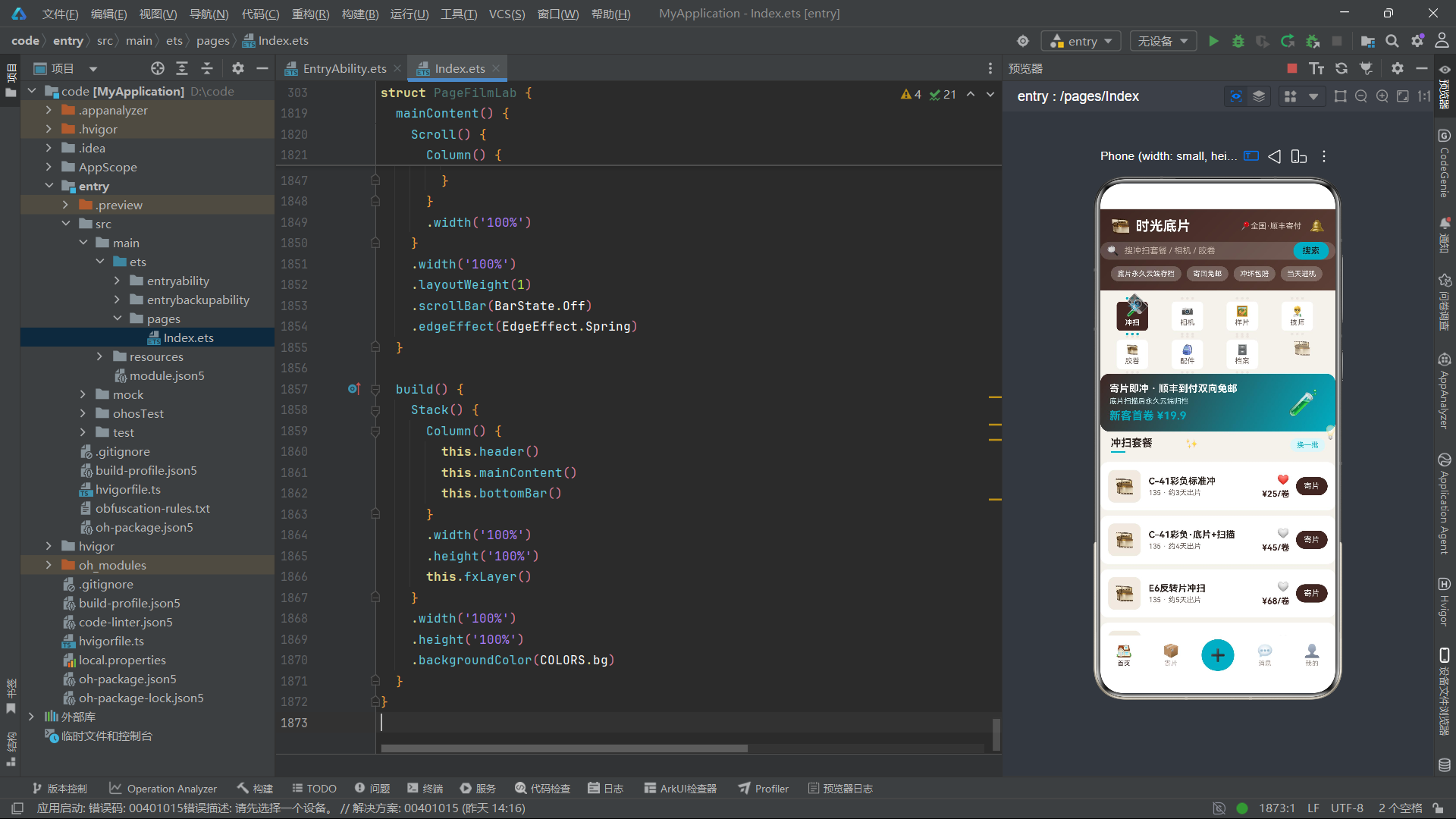
二十一、总结
本文深入解析了基于HarmonyOS 6.1.1 ArkTS API 24构建的"时光底片·胶片冲扫与胶片相机租赁"美团类场景应用的技术架构。从整体来看,该应用展示了一套完整的O2O本地生活服务的HarmonyOS实现方案,涵盖了从数据建模、状态管理、UI构建到弹窗交互的全链路技术实践。其核心架构设计可以概括为"接口驱动的数据层、状态驱动的逻辑层、构建器驱动的视图层"三层分离模式,每一层都通过ArkTS的语言特性和框架能力实现了高度的模块化和可复用性。
在数据层方面,"interface定义+@Observed class implements"的模式为应用提供了类型安全与可观察性的双重保障。六个核心数据模型各自定义了清晰的接口契约,对应的可观察类通过构造函数接收接口数据并进行防御性赋值,确保了数据实例在创建时就处于合法状态。这种模式不仅使得数据结构变更时编译器能够及时发现影响范围,还为未来接入真实后端API提供了天然的适配点——只需将网络返回的JSON数据传入构造函数即可创建可观察实例。
在状态管理方面,应用通过精心设计的四层状态体系(导航控制、弹窗控制、数据列表、表单交互)覆盖了所有业务场景。rev版本号与ForEach键值生成函数的配合是一个值得学习的设计模式——它在不改变数据本身的前提下,为框架提供了额外的刷新信号,确保在数据内部属性变更或列表顺序调整时都能触发正确的UI更新。tick状态与定时器的组合则为动画系统提供了持续的时间脉冲,使得fxLayer中的五个emoji元素能够独立运行各自的动画轨迹,营造出应用活泼灵动的视觉氛围。
在视图层方面,@Builder装饰器的运用是整个应用架构中最值得称道的部分。通过将页面级别的UI拆分为header、tabBar、pageDev、pageCam等独立构建器,不仅使得代码结构清晰可读,还使得每个构建器可以独立开发和测试。frameTab构建器的胶片齿孔设计更是将业务场景的视觉特征(胶片)与技术实现(参数化构建器)完美融合的范例。sectionTitle构建器通过act参数的条件下发展示了参数化构建器处理业务逻辑分发的优雅方案。弹窗系统的modalOverlay集中管理四个条件渲染的弹窗组件,确保了交互的一致性和状态的可控性。
从HarmonyOS ArkTS API 24的能力维度来看,该应用充分利用了声明式UI的全部核心特性:@Entry/@Component的组件声明、@State的响应式状态管理、@Observed的类级别可观察性、@Builder的UI片段复用、ForEach的高性能列表渲染、linearGradient的渐变背景、Flex的弹性布局、Stack的层叠组合、Scroll的滚动容器以及生命周期方法aboutToAppear/aboutToDisappear的资源管理。这些能力的组合运用形成了一套可复用的HarmonyOS商业应用开发范式,对类似场景的开发具有直接的参考价值。展望未来,随着HarmonyOS生态的持续演进和ArkTS语言能力的不断扩展,这种基于接口契约、状态驱动和构建器组合的架构模式将在更多复杂业务场景中展现其工程价值。

讨论HarmonyOS开发技术,专注于API与组件、DevEco Studio、测试、元服务和应用上架分发等。
更多推荐

 5
5 0
0- 0


 已为社区贡献168条内容

所有评论(0)