基于HarmonyOS ArkTS API 24子组件通过 @ObjectLink data: TieDyeData 接收共享引用,修改数据时所有引用该数据的子组件自动响应式刷新
扎染,始于秦汉,盛于唐宋,以布扎花、入靛缸浸染、出缸氧化、拆线显花,一布千纹,青出于蓝。本文完整拆解一个基于鸿蒙 HarmonyOS API 24 与 ArkUI 声明式框架构建的「扎染坊」植物染非遗手作平台,覆盖靛蓝染白非遗主题配色系统、深靛蓝头部交互动画(🌀旋转+💧translate位移)、12点靛蓝扎染装饰纹、5Tab差异化布局(扎染本周销量柱状图+陈列列表/布料销量TOP6横向进度条+布料库吸染度/染液染艺热度+染液坊/订单染法构成+订单台账/客评口碑列表)、多组件架构(1入口+1标签子组件+5内容子组件+4弹窗子组件)、@ObjectLink数据共享、5个颜色分级函数、十六进制透明度拼接技巧、layoutWeight动态横向进度条、染白dyeWhite米白装饰、四大弹窗(定制扎染/修改订单/撤下布料/染液详情)等核心技术点,附完整源码与运行效果截图。
一、引言:青出于蓝,一染倾心
扎染,中国非物质文化遗产之一,始于秦汉,盛于唐宋,以布扎花、入靛缸浸染、出缸氧化、拆线显花,一布千纹,青出于蓝。从白族扎染到蜀锦扎缬,从民间蓝印花布到国际时尚秀场,扎染承载着千年的东方染织美学与匠人精神。然而,随着现代化学染料的冲击,传统植物染扎染手艺面临传承困境——年轻人不了解扎染文化,手艺人缺乏展示和销售渠道,扎染产品标准化程度低、染法不透明、布料选择困难,正成为非遗扎染传承的现实痛点。一个优秀的扎染手作平台,不仅需要覆盖从"扎染陈列"到"布料库"再到"染液坊"的完整产品展示闭环,还要在订单管理、客户评价、匠人评级等维度做到精准而高效。
正是在这样的背景下,扎染坊类植物染非遗手作平台应运而生,并迅速成为扎染爱好者和汉服圈层的文化入口。一个优秀的扎染应用,需要以扎染陈列为核心入口,横向扩展出布料、染液、订单、客评五大功能模块,每个模块采用完全不同的布局风格——扎染=本周销量柱状图+扎染陈列列表、布料=销量TOP6横向进度条+布料库吸染度列表、染液=染艺热度横向进度条+染液坊列表、订单=染法构成横向进度条+订单台账列表、客评=客评口碑列表,形成了一个完整闭环的植物染扎染手作生态。它不仅是一个功能完备的演示项目,更是一份典型的 ArkUI 工程实践范本,涵盖了多组件架构设计、@ObjectLink数据共享、@Observed聚合数据类、颜色分级函数、十六进制透明度拼接、染白dyeWhite米白装饰、头部translate位移动画、奇偶行交替条纹、子组件封装等关键技术点。
二、应用整体架构概览
整个应用采用了"多组件架构 + @ObjectLink数据共享 + 配置驱动 + 子组件封装"的四层设计模式。入口组件 TieDyeApp 作为整个应用的根容器,负责管理当前激活的 Tab 状态、四个弹窗的显隐状态、头部交互动画状态以及聚合数据对象。与单组件内@Builder构建所有页面的架构不同,本应用将整个应用拆分为 11 个独立组件:1 个入口组件 TieDyeApp + 1 个标签子组件 TieDyeTag + 5 个内容子组件(TieDyeContent扎染/ClothContent布料/DyeContent染液/TieDyeOrderContent订单/TieDyeReviewContent客评)+ 4 个弹窗子组件(AddTieDyeModal定制扎染/EditTieDyeOrderModal修改订单/DeleteClothModal撤下布料/DetailDyeModal染液详情)。每个子组件独立封装,职责单一,通过 @ObjectLink 共享聚合数据,通过回调函数(onAdd/onDel/onDetail/onEdit/onClose)实现父子组件通信,是本应用工程化设计的最大亮点,也是 ArkUI 多组件架构的典型实践。
应用一共划分为五个一级页面:扎染(TIEDYE)、布料(CLOTH)、染液(DYE)、订单(ORDER)以及客评(REVIEW)。底部 tabBar 采用非遗设计——5个Tab(扎染🌀/布料🧵/染液🧪/订单📦/客评⭐)单排布局,激活态文字 t.color 加粗 + 背景 t.color+‘14’(10%透明色底)圆角14 + border 1px t.color,非激活态 textHint 灰字 + 透明背景,tabBar 顶部 3px primary 靛蓝条。五个Tab每个布局完全不同——扎染采用本周销量柱状图+扎染陈列列表(12款,价格分级着色,奇偶行交替,图标装饰区带靛蓝圆+染白圆)、布料采用销量TOP6横向进度条+布料库列表(12种布,吸染度进度条,🗑️点击删除弹窗)、染液采用染艺热度横向进度条+染液坊列表(12种染液,👁️点击详情弹窗)、订单采用染法构成横向进度条+订单台账列表(12订单,金额分级着色,✏️点击编辑弹窗)、客评采用客评口碑列表(12条评价,⭐星星repeat,标签分级着色),这种"一页一型"的差异化设计最大程度还原了真实植物染扎染手作平台的交互体验。
在数据层面,应用独创了**@Observed聚合数据类**设计——TieDyeData 一个类包含 tiedyes/cloths/dyes/orders/reviews 五个数组,每个数组 12 条数据,用对象字面量初始化(非 new 构造函数),@Observed 装饰整个类,配合 @ObjectLink 在子组件间共享引用,实现"一个数据对象贯穿所有页面"的聚合数据模式。这种设计将所有业务数据集中管理,子组件通过 @ObjectLink data: TieDyeData 接收共享引用,修改数据时所有引用该数据的子组件自动响应式刷新,是 ArkUI 跨组件数据共享的高级实践。应用还定义了 9 个元数据接口(TieDyeItem/ClothItem/DyeItem/TieDyeOrderItem/TieDyeReviewItem/WeekTieDyeMeta/KindShareMeta/DyeHotMeta/TieDyeTopMeta)和 4 个统计常量数组(WEEK_SOLD 7天销量/KIND_SHARE 4种染法构成/DYE_HOT 6种染艺热度/TIEDYE_TOP 6款销量排行),将统计数据与业务数据分离,实现配置驱动设计。
在颜色逻辑层面,应用定义了 5 个颜色分级函数(getKindColor染法4类/getClothColor吸染度3级/getTieDyeColor价格4级/getOrderColor金额4级/getReviewTagColor标签5类),将颜色映射逻辑从 UI 层抽离,每个函数根据不同维度(染法/吸染度/价格/金额/标签)返回对应的颜色值,实现"数据即配色"的动态着色模式。特别的是,本应用大量使用十六进制透明度拼接技巧——color + 十六进制透明度后缀('14’10%/'40’25%/'55’33%/'66’40%/'80’50%/'0D’5%/'33’20%/'2E’18%),用十六进制透明度后缀实现半透明背景和边框,无需额外定义半透明颜色常量,是 ArkUI 颜色处理的实用技巧。本应用配色最大特色是染白 dyeWhite #F4F0E4——米白色,用于装饰点边框和背景,模拟染布的米白底色,与靛蓝 primary #3E5C8A 形成"靛蓝染白"的经典扎染配色,是本应用视觉设计的灵魂。这种将所有色彩集中管理、配合5个颜色分级函数和十六进制透明度拼接与染白米白装饰与多维度动态着色的做法保证了全局一致性,降低了维护成本。
在交互层面,应用通过四个独立弹窗子组件实现了完整的增删改查交互闭环:AddTieDyeModal 定制扎染(品名/染法/预算三行展示,确认定制 primary 靛蓝底)、EditTieDyeOrderModal 修改订单(客户/数量800→900/金额16.2万,保存修改)、DeleteClothModal 撤下布料(@Prop title 传入布名,确认撤下 danger 红底)、DetailDyeModal 染液详情(@Prop name 传入染液名,大图标+蓼蓝发酵描述+染材+匠人评级,知道了按钮)。四个弹窗各自独立组件,通过 @Prop 接收参数(DeleteClothModal的title、DetailDyeModal的name),通过 onClose 回调关闭,遮罩用 #66000000(40%黑)硬编码。扎染页➕点击触发 AddTieDyeModal,布料页🗑️点击触发 DeleteClothModal(delClothName 记录布名),染液页👁️点击触发 DetailDyeModal(detailDyeName 记录染液名),订单页✏️点击触发 EditTieDyeOrderModal,形成了完整的"定制扎染→撤下布料→查看染液→修改订单"交互闭环。
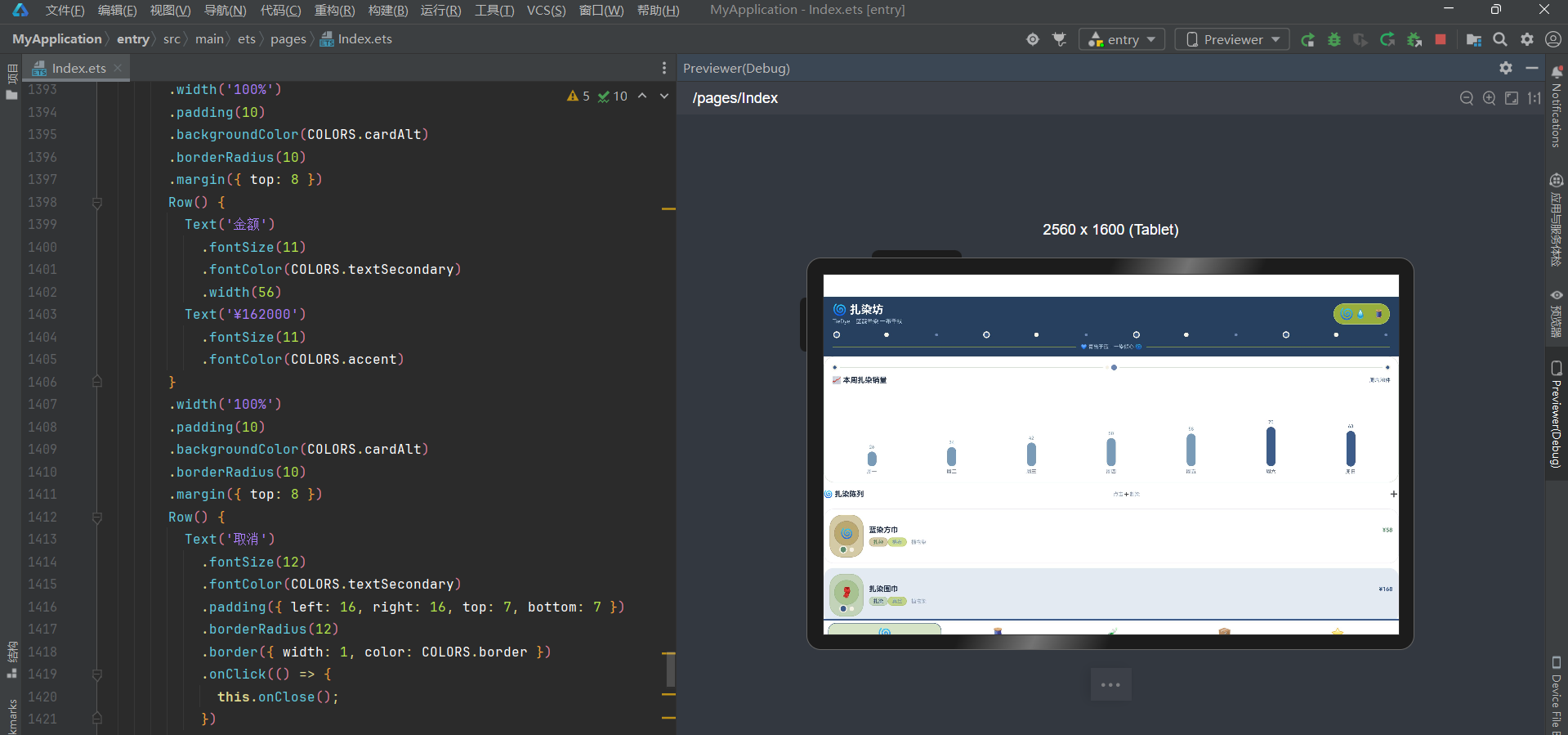
下面逐页展示应用的五大功能模块运行效果。
三、扎染页:本周销量柱状图与扎染陈列列表
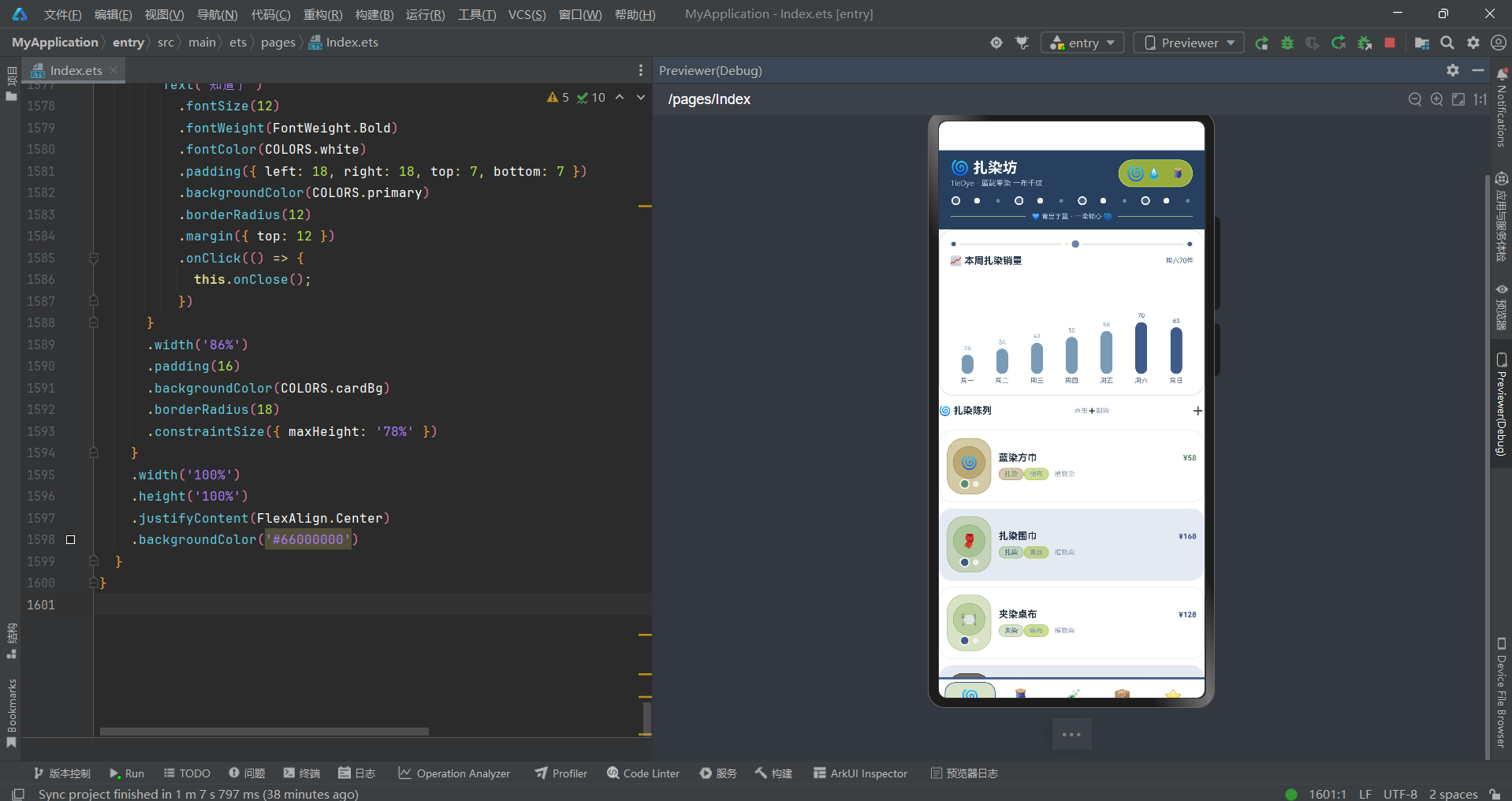
扎染页以"扎染产品陈列"为核心,采用"本周销量柱状图+扎染陈列列表"的两层布局。
页面顶部第一部分是本周销量卡,Column 包裹,padding 14,cardBg 白底,圆角20,border 1px primary+‘55’(33%透明靛蓝):
- 装饰行:Row,10px靛蓝圆(带2px染白边框)+ layoutWeight(1) 2px primary+'55’横线 + 6px染白圆 + 10px浅靛蓝圆 + layoutWeight(1) 2px横线 + 10px靛蓝圆(带染白边框),靛蓝染白装饰分隔线。
- 标题行:Row,"📈 本周扎染销量"textPrimary深蓝灰字13号加粗 + "周六70件"primary靛蓝字9号。
- 柱状图行:Row,ForEach WEEK_SOLD 7天,每天 Column layoutWeight 1 alignItems Center:
- 销量数字:w.value + ‘’,8号,fontColor w.value>=63 ? primary靛蓝 : accent灰蓝(周末≥63用靛蓝高亮)。
- 柱子:Column width 16,height = w.value(直接用数值当高度!最大70px),backgroundColor w.value>=63 ? primary靛蓝 : accent灰蓝,圆角8,margin top 4。
- 星期:w.day textSecondary灰字9号,margin top 4。
- 柱状图容器:width 100%,height 150,alignItems VerticalAlign.Bottom(柱子从底部生长),margin top 10。
7 天销量数据:周一26/周二34/周三42/周四50/周五58/周六70(峰值,primary靛蓝高亮!)/周日63(也≥63,primary靛蓝高亮)。柱子高度直接用 w.value 数值(最大70px),非比例映射,是本应用柱状图设计的特色——数值即高度,简单直观。周末(周六70/周日63)用 primary 靛蓝色高亮,工作日用 accent 灰蓝色,形成"周末高峰靛蓝/工作日灰蓝"的视觉区分,周六70件峰值是本周最高点。
第二部分是扎染陈列,Column,margin top 12:
- 标题行:Row,"🌀 扎染陈列"textPrimary深蓝灰字13号加粗 + "点击➕制染"textHint灰字9号 + "➕"14号,点击触发 onAdd 回调(showAddTieDye=true)。
- 扎染列表:ForEach this.data.tiedyes 12款,每款 Row,padding 10,backgroundColor i%2===0 ? cardBg白 : cardAlt浅灰蓝(奇偶行交替条纹!),圆角18,border 1px line,margin top 8:
- 图标装饰区:Column width 60,padding 上下10/6,backgroundColor getTieDyeColor(p.price)+‘0D’(5%透明色底),圆角22,border 1px getTieDyeColor(p.price)+‘33’(20%透明色边):
- 圆形图标:Column width 44 height 44,justifyContent Center,alignItems Center,backgroundColor getTieDyeColor(p.price)+‘14’(10%透明色底),圆角22,border 1px getTieDyeColor(p.price)+‘66’(40%透明色边),Text p.emoji 18号居中。
- 装饰点行:Row width 30 justifyContent Center,14px getTieDyeColor圆(圆角7,带2px dyeWhite染白边框!模拟扎染靛蓝圆点纹样)+ 8px dyeWhite染白圆(圆角4,margin left 4)。
- 信息区:Column layoutWeight 1 alignItems Start margin left 10:
- 名称价格行:Row width 100% justifyContent SpaceBetween,p.name textPrimary深蓝灰字13号加粗 + “¥”+p.price getTieDyeColor(p.price)色10号加粗 margin left 8。
- 标签行:Row width 100% justifyContent Start margin top 6,TieDyeTag({text: p.kind, color: getTieDyeColor(p.price)})(染法标签,价格分级色)+ TieDyeTag({text: p.cloth, color: accent灰蓝})(布料标签,灰蓝固定色)+ "植物染"textHint灰字9号 margin left 8。
- 图标装饰区:Column width 60,padding 上下10/6,backgroundColor getTieDyeColor(p.price)+‘0D’(5%透明色底),圆角22,border 1px getTieDyeColor(p.price)+‘33’(20%透明色边):
12 款扎染:蓝染方巾(扎染,棉布,¥58)、扎染围巾(扎染,真丝,¥168)、夹染桌布(夹染,麻布,¥128)、扎染连衣裙(扎染,棉麻,¥268)、蜡染壁挂(蜡染,棉布,¥198)、扎染帆布包(扎染,帆布,¥88)、扎染手帕(扎染,棉布,¥38)、型染门帘(型染,棉布,¥148)、扎染抱枕(扎染,棉麻,¥78)、扎染床旗(扎染,棉布,¥228)、扎染头巾(扎染,棉布,¥48)、扎染茶席(夹染,亚麻,¥108)。价格从¥38(手帕)到¥268(连衣裙),getTieDyeColor 四级着色(≥200 danger红/≥120 primary靛蓝/≥60 primaryLight浅靛蓝/其他 success绿),¥268连衣裙用 danger 红色(最高端),¥128桌布/¥198壁挂/¥148门帘/¥228床旗用 primary 靛蓝(中高端),¥168围巾/¥88帆布包/¥78抱枕/¥108茶席用 primaryLight 浅靛蓝(中端),¥58方巾/¥38手帕/¥48头巾用 success 绿色(入门),形成"以价格定颜色"的动态着色模式。奇偶行交替(i%2=0白/i%2=1浅灰蓝)营造列表条纹效果,图标装饰区的14px靛蓝圆带2px染白边框模拟扎染的靛蓝圆点纹样,是本应用扎染陈列设计的核心亮点。TieDyeTag 子组件封装标签样式(9号字+color+'14’背景+color+'40’边框+圆角10),实现标签组件复用。
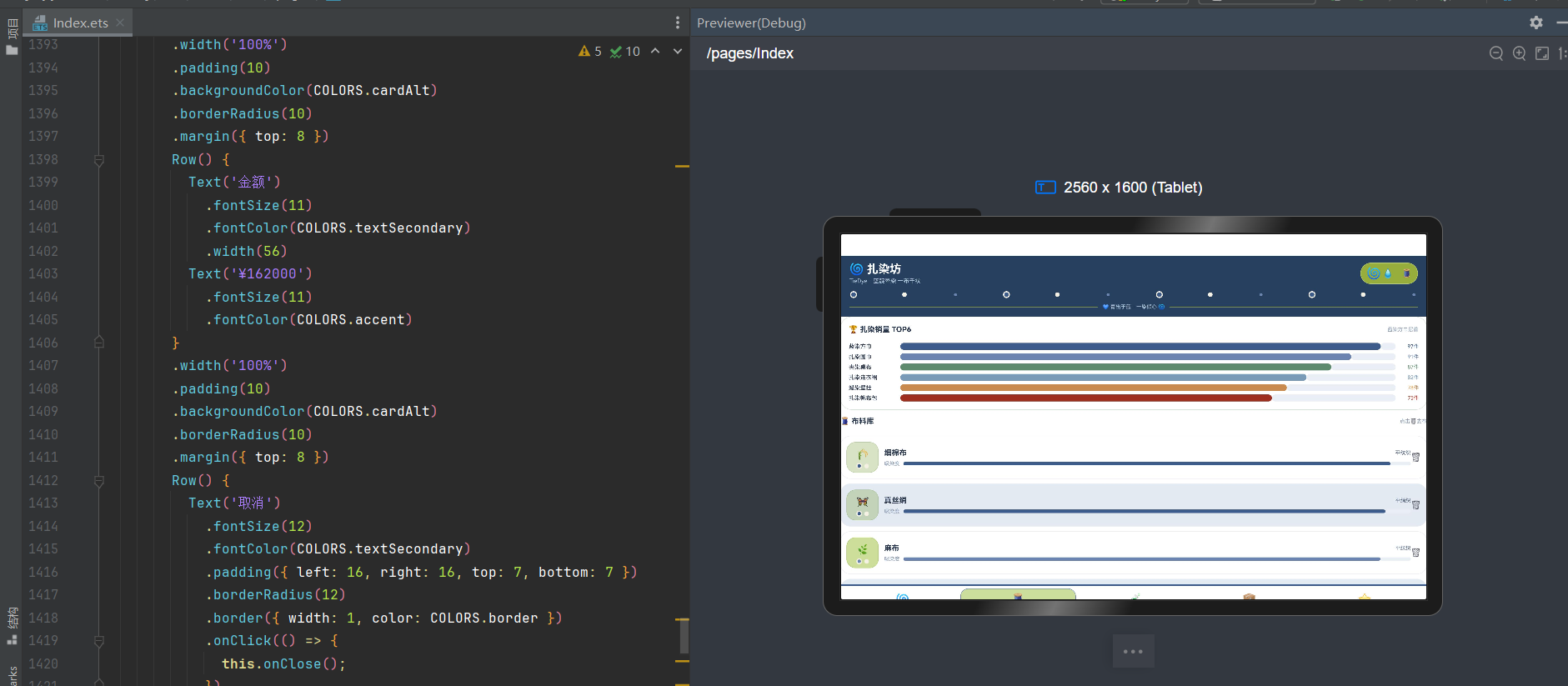
四、布料页:销量TOP6横向进度条与布料库吸染度
布料页以"扎染用布"为核心,采用"销量TOP6横向进度条+布料库吸染度列表"的两层布局。
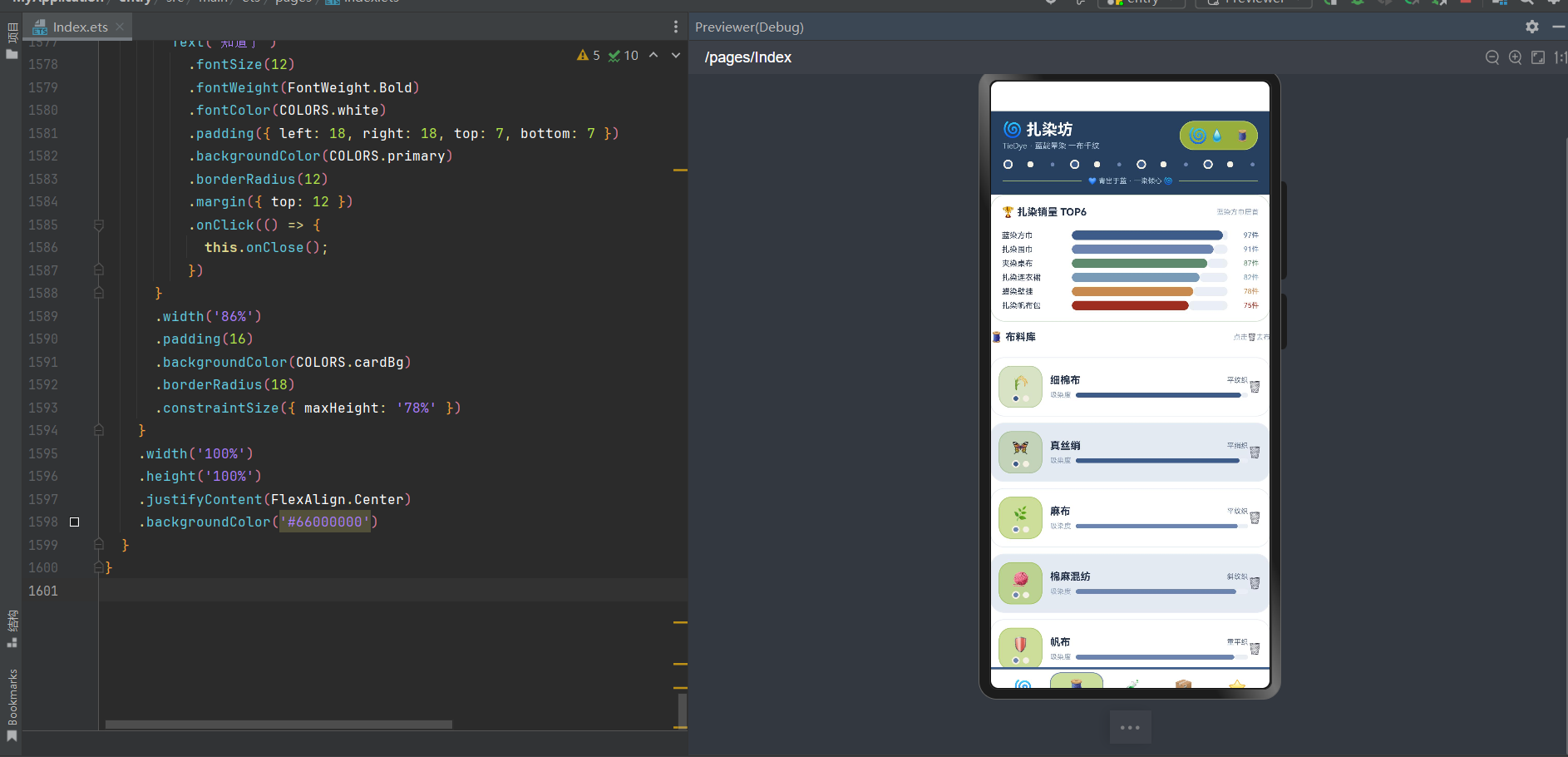
页面顶部第一部分是销量TOP6卡,Column 包裹,padding 14,cardBg 白底,圆角20,border 1px primary+‘55’:
- 标题行:Row,"🏆 扎染销量 TOP6"textPrimary深蓝灰字13号加粗 + "蓝染方巾居首"textHint灰字9号。
- TOP6列表:ForEach TIEDYE_TOP 6款,每款 Row width 100% margin top 6:
- 名称:t.name textPrimary深蓝灰字10号,width 90。
- 横向进度条:Row layoutWeight 1,Column layoutWeight(t.sold) height 12 backgroundColor t.color 圆角6(已售部分,动态layoutWeight!)+ Column layoutWeight(100-t.sold) height 12 backgroundColor line 圆角6(未售部分)。
- 销量:t.sold+‘件’ t.color色9号,width 40 textAlign End。
6 款销量排行:蓝染方巾97件(primary靛蓝)、扎染围巾91件(primaryLight浅靛蓝)、夹染桌布87件(success绿)、扎染连衣裙82件(accent灰蓝)、蜡染壁挂78件(warning赭石)、扎染帆布包75件(danger红)。横向进度条用 layoutWeight 动态分配(t.sold 和 100-t.sold),非固定宽度非百分比,是 ArkUI 特有的弹性布局进度条实现——已售部分占 t.sold 份,未售部分占 100-t.sold 份,总份数100,自动按比例分配宽度。蓝染方巾97件居首,进度条几乎满格,是本应用布料页TOP6设计的核心亮点。
第二部分是布料库,Column,margin top 12:
- 标题行:Row,"🧵 布料库"textPrimary深蓝灰字13号加粗 + "点击🗑去布"textHint灰字9号。
- 布料列表:ForEach this.data.cloths 12种,每种 Row,padding 10,backgroundColor i%2===0 ? cardBg白 : cardAlt浅灰蓝(奇偶行交替),圆角18,border 1px line,margin top 8:
- 图标装饰区:Column width 56,padding 上下10/6,backgroundColor getClothColor(c.level)+‘0D’,圆角16,border 1px getClothColor(c.level)+‘33’:
- 图标:Text c.emoji 18号居中。
- 装饰点行:Row width 28 justifyContent Center margin top 5,10px getClothColor圆(圆角5,带2px dyeWhite染白边框)+ 8px dyeWhite染白圆(圆角4,margin left 4)。
- 信息区:Column layoutWeight 1 alignItems Start margin left 10:
- 名称织法行:Row width 100% justifyContent SpaceBetween,c.name textPrimary深蓝灰字13号加粗 + c.weave+‘织’ textSecondary灰字9号 margin left 8。
- 吸染度行:Row width 100% margin top 6,"吸染度"textHint灰字9号 + Row layoutWeight 1 margin left 6,Column layoutWeight(c.level) height 6 backgroundColor getClothColor(c.level) 圆角3(吸染度进度条!)+ Column layoutWeight(100-c.level) height 6 backgroundColor line 圆角3。
- 删除按钮:Text '🗑️’14号,点击触发 onDel(c.name) 回调(delClothName=c.name,showDeleteCloth=true)。
- 图标装饰区:Column width 56,padding 上下10/6,backgroundColor getClothColor(c.level)+‘0D’,圆角16,border 1px getClothColor(c.level)+‘33’:
12 种布料:细棉布(平纹,96,江南)、真丝绡(平绡,95,苏杭)、麻布(平纹,94,湘西)、棉麻混纺(斜纹,93,中原)、帆布(重平,92,华北)、粗纱布(稀平,91,西北)、双宫绸(缎纹,95,苏杭)、灯芯绒(绒纹,90,华东)、棉绸(斜纹,92,华中)、亚麻(平纹,93,东北)、泡泡纱(起泡纹,89,华南)、丝棉(交织,94,苏杭)。吸染度从89到96,getClothColor 三级着色(≥95 primary靛蓝/≥92 primaryLight浅靛蓝/其他 success绿),细棉布96/真丝绡95/双宫绸95用 primary 靛蓝(最高吸染度),麻布94/棉麻混纺93/帆布92/棉绸92/亚麻93/丝棉94用 primaryLight 浅靛蓝(中高吸染度),粗纱布91/灯芯绒90/泡泡纱89用 success 绿色(基础吸染度),形成"以吸染度定颜色"的动态着色模式。吸染度进度条用 layoutWeight 动态分配(c.level 和 100-c.level),内嵌在列表行中,是本应用布料库设计的核心亮点。12种布料覆盖植物染常用面料(棉/丝/麻/混纺/帆布/纱/绸/绒/泡泡纱等),完整呈现扎染用布生态。点击🗑️触发 DeleteClothModal 撤下布料弹窗(@Prop title 传入布名,确认后从布料库移除),形成"浏览→撤下"交互闭环。
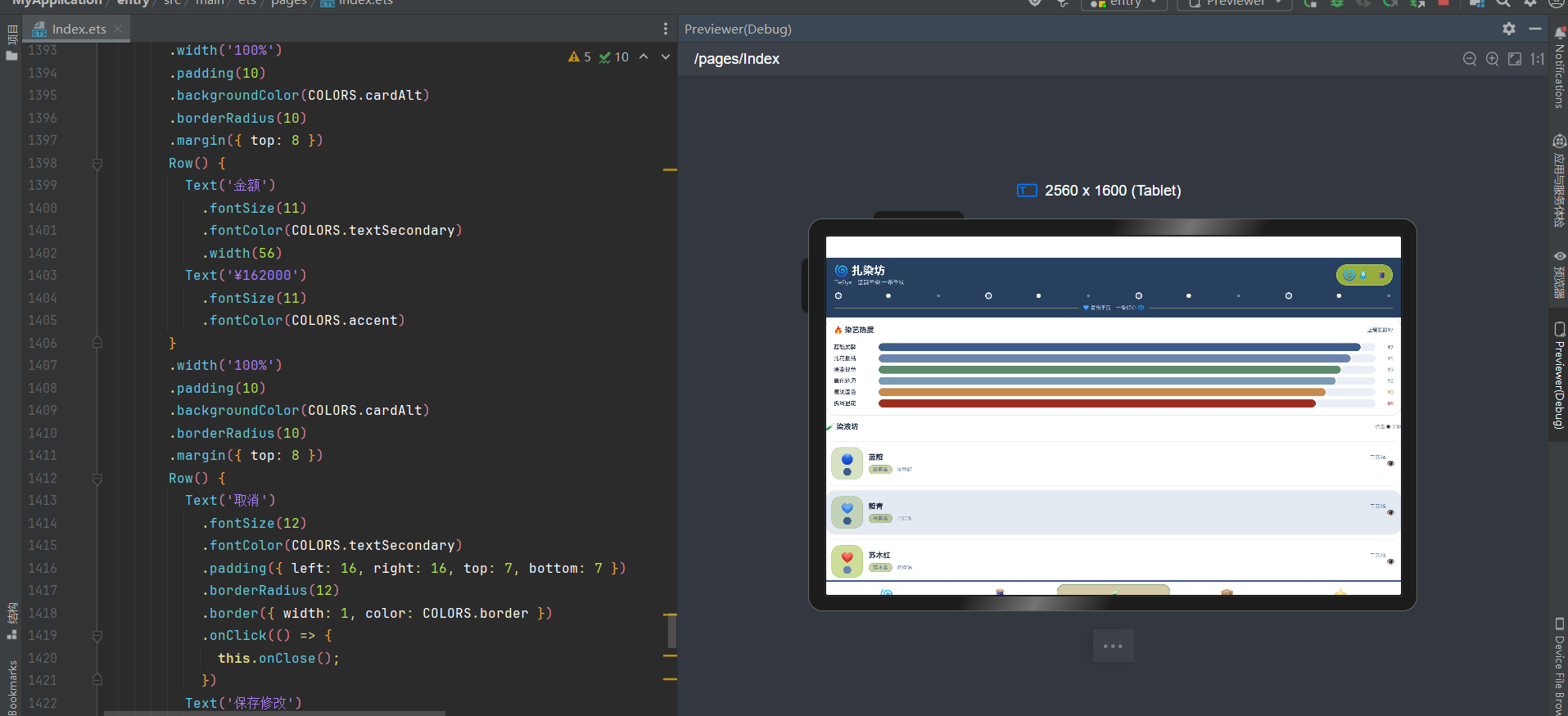
五、染液页:染艺热度与染液坊
染液页以"植物染液"为核心,采用"染艺热度横向进度条+染液坊列表"的两层布局。
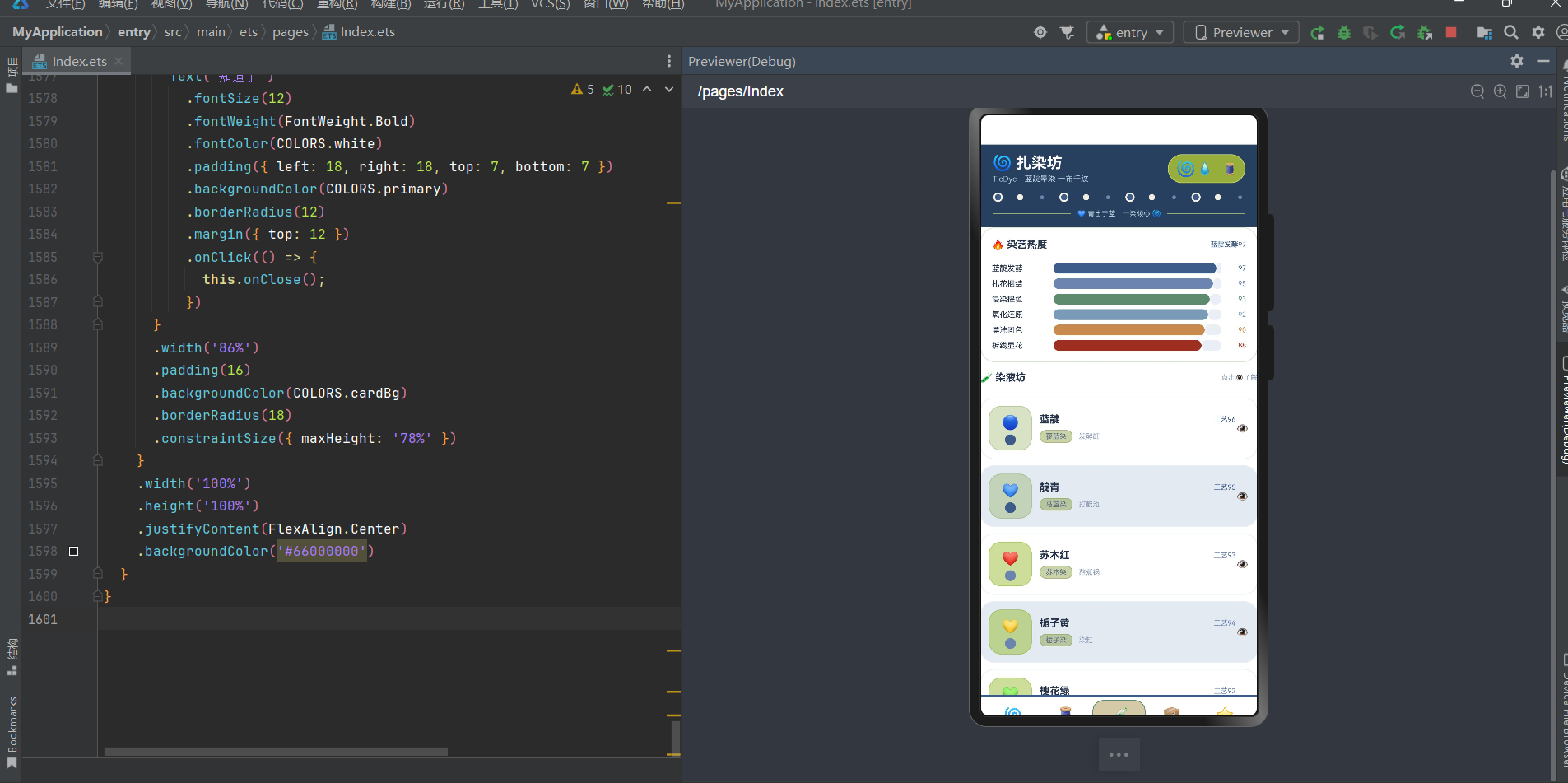
页面顶部第一部分是染艺热度卡,Column 包裹,padding 14,cardBg 白底,圆角20,border 1px primary+‘55’:
- 标题行:Row,"🔥 染艺热度"textPrimary深蓝灰字13号加粗 + "蓝靛发酵97"primary靛蓝字9号。
- 热度列表:ForEach DYE_HOT 6工艺,每款 Row width 100% margin top 6:
- 名称:d.name textPrimary深蓝灰字10号,width 80。
- 横向进度条:Row layoutWeight 1,Column layoutWeight(d.heat) height 14 backgroundColor d.color 圆角7(热度部分)+ Column layoutWeight(100-d.heat) height 14 backgroundColor line 圆角7(剩余部分)。
- 热度值:d.heat+‘’ d.color色9号,width 32 textAlign End。
6 种染艺热度:蓝靛发酵97(primary靛蓝)、扎花捆结95(primaryLight浅靛蓝)、浸染提色93(success绿)、氧化还原92(accent灰蓝)、漂洗固色90(warning赭石)、拆线显花88(danger红)。横向进度条用 layoutWeight 动态分配(d.heat 和 100-d.heat),蓝靛发酵97居首,进度条几乎满格。6种工艺覆盖扎染全流程(蓝靛发酵→扎花捆结→浸染提色→氧化还原→漂洗固色→拆线显花),完整呈现植物染扎染的制作工艺流程,是本应用染液页染艺热度设计的核心亮点。
第二部分是染液坊,Column,margin top 12:
- 标题行:Row,"🧪 染液坊"textPrimary深蓝灰字13号加粗 + "点击👁️了解"textHint灰字9号。
- 染液列表:ForEach this.data.dyes 12种,每种 Row,padding 10,backgroundColor i%2===0 ? cardBg白 : cardAlt浅灰蓝(奇偶行交替),圆角18,border 1px line,margin top 8:
- 图标装饰区:Column width 56,padding 上下10/6,backgroundColor getClothColor(d.level)+‘0D’,圆角16,border 1px getClothColor(d.level)+‘33’:
- 图标:Text d.emoji 18号居中。
- 色条:Column width 14 height 14 backgroundColor getClothColor(d.level) 圆角7 margin top 5(用纯色圆代替装饰点,染液页特色)。
- 信息区:Column layoutWeight 1 alignItems Start margin left 10:
- 名称工艺行:Row width 100% justifyContent SpaceBetween,d.name textPrimary深蓝灰字13号加粗 + “工艺”+d.level getClothColor(d.level)色9号 margin left 8。
- 染材工具行:Row width 100% justifyContent Start margin top 6,TieDyeTag({text: d.plant+‘染’, color: textSecondary灰})(植物染材标签,灰色固定色)+ d.tool textHint灰字9号 margin left 8。
- 详情按钮:Text '👁️’14号,点击触发 onDetail(d.name) 回调(detailDyeName=d.name,showDetailDye=true)。
- 图标装饰区:Column width 56,padding 上下10/6,backgroundColor getClothColor(d.level)+‘0D’,圆角16,border 1px getClothColor(d.level)+‘33’:
12 种染液:蓝靛(蓼蓝,96,发酵缸,🔵)、靛青(马蓝,95,打靛池,💙)、苏木红(苏木,93,熬煮锅,❤️)、栀子黄(栀子,94,染缸,💛)、槐花绿(槐叶,92,染池,💚)、茜草绛(茜草,93,染锅,🧡)、五倍子墨(五倍子,91,染池,🖤)、核桃褐(核桃壳,90,煮染锅,🤎)、石榴皮黄(石榴皮,92,染缸,🍋)、紫草紫(紫草,93,染锅,💜)、莲蓬灰(莲蓬,90,染池,🩶)、竹叶青(竹叶,91,染缸,🎋)。工艺级从90到96,getClothColor 三级着色(≥95 primary靛蓝/≥92 primaryLight浅靛蓝/其他 success绿),蓝靛96/靛青95用 primary 靛蓝(最高工艺级),栀子黄94/苏木红93/茜草绛93/紫草紫93/槐花绿92/石榴皮黄92用 primaryLight 浅靛蓝(中高工艺级),五倍子墨91/竹叶青91/核桃褐90/莲蓬灰90用 success 绿色(基础工艺级)。12种染液覆盖传统植物染全色系(蓝/红/黄/绿/绛/墨/褐/紫/灰/青),染材都是天然植物(蓼蓝/马蓝/苏木/栀子/槐叶/茜草/五倍子/核桃壳/石榴皮/紫草/莲蓬/竹叶),工具包括发酵缸/打靛池/熬煮锅/染缸/染池/煮染锅,完整呈现中国传统植物染的染材和工艺生态,是本应用染液坊设计的核心亮点。点击👁️触发 DetailDyeModal 染液详情弹窗(@Prop name 传入染液名,显示蓼蓝叶入缸发酵七日,打靛成液,布扎花后浸染三起三落,出缸氧化由黄转蓝,色如远山青黛,染材蓼蓝·发酵缸,匠人评级甲级·掌缸廿载),形成"浏览→查看详情"交互闭环。
六、订单页:染法构成与订单台账
订单页以"订单管理"为核心,采用"染法构成横向进度条+订单台账列表"的两层布局。
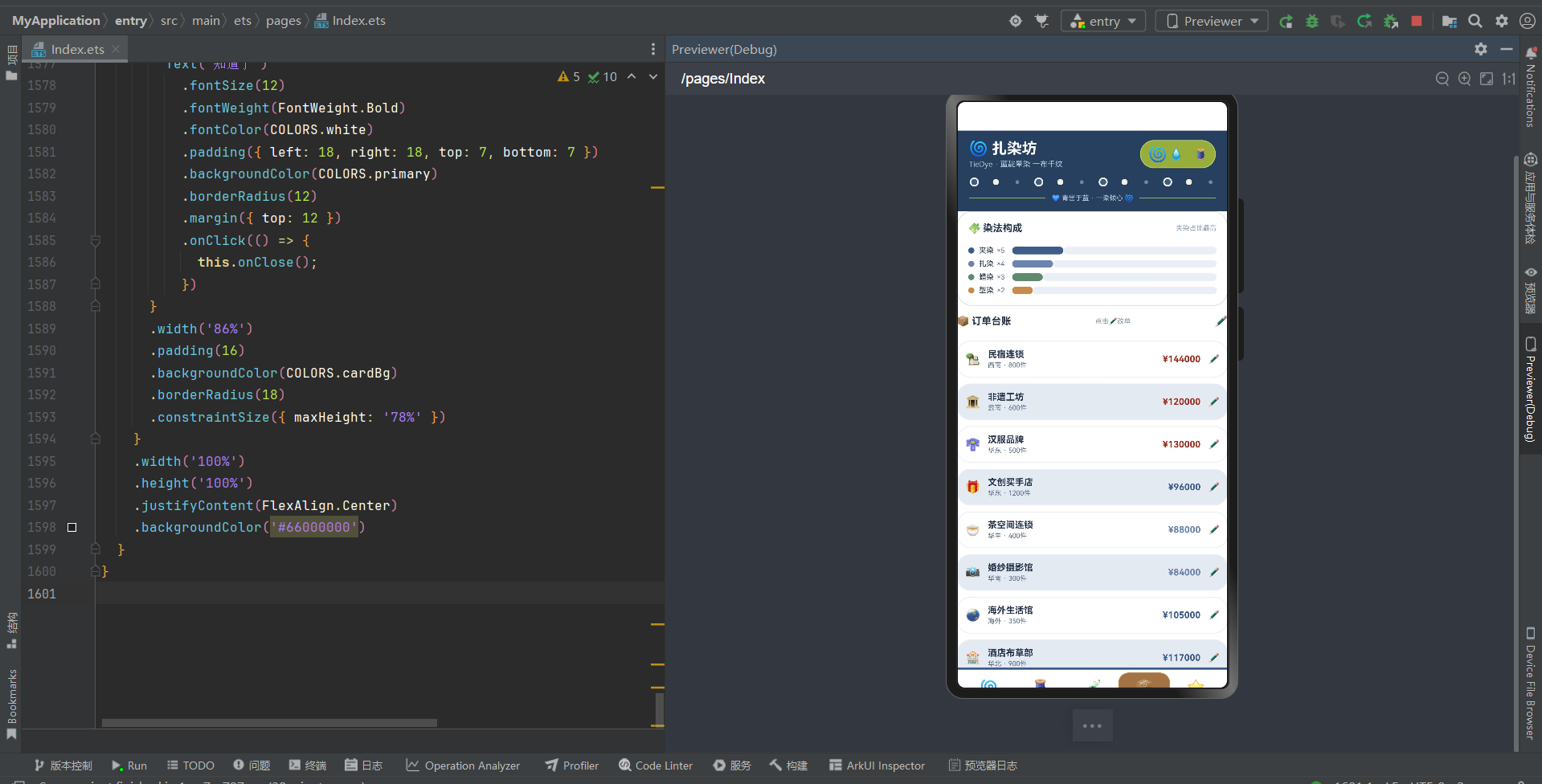
页面顶部第一部分是染法构成卡,Column 包裹,padding 14,cardBg 白底,圆角20,border 1px primary+‘55’:
- 标题行:Row,"🧩 染法构成"textPrimary深蓝灰字13号加粗 + "夹染占比最高"textHint灰字9号。
- 构成列表:ForEach KIND_SHARE 4种,每款 Row width 100% margin top 6:
- 色点:Column width 8 height 8 backgroundColor s.color 圆角4。
- 名称:s.name textPrimary深蓝灰字10号 margin left 6。
- 数量:‘×’+s.count textSecondary灰字9号 margin left 4。
- 横向进度条:Row layoutWeight 1 margin left 10,Column layoutWeight(s.count) height 10 backgroundColor s.color 圆角5(占比部分)+ Column layoutWeight(20-s.count) height 10 backgroundColor line 圆角5(剩余部分,总份数20!)。
4 种染法构成:夹染×5(primary靛蓝)、扎染×4(primaryLight浅靛蓝)、蜡染×3(success绿)、型染×2(warning赭石)。横向进度条用 layoutWeight 动态分配(s.count 和 20-s.count,总份数20非100),夹染×5占比最高,是本应用订单页染法构成设计的核心亮点。4种染法覆盖传统防染工艺全品类(夹染/扎染/蜡染/型染),完整呈现植物染扎染的工艺构成。
第二部分是订单台账,Column,margin top 12:
- 标题行:Row,"📦 订单台账"textPrimary深蓝灰字13号加粗 + "点击✏️改单"textHint灰字9号 + "✏️"14号 margin left 8,点击触发 onEdit 回调(showEditOrder=true)。
- 订单列表:ForEach this.data.orders 12笔,每笔 Row,padding 10,backgroundColor i%2===0 ? cardBg白 : cardAlt浅灰蓝(奇偶行交替),圆角18,border 1px line,margin top 8:
- 图标:Text o.emoji 16号。
- 信息区:Column layoutWeight 1 alignItems Start margin left 10,o.name textPrimary深蓝灰字12号加粗 + o.region+’ · '+o.count+‘件’ textSecondary灰字9号 margin top 2。
- 金额:Text ‘¥’+o.amount getOrderColor(o.amount)色12号加粗。
- 编辑按钮:Text '✏️’12号 margin left 10,点击触发 onEdit 回调。
12 笔订单:民宿连锁(西南,800件,¥144000)、非遗工坊(云南,600件,¥120000)、汉服品牌(华东,500件,¥130000)、文创买手店(华东,1200件,¥96000)、茶空间连锁(华中,400件,¥88000)、婚纱摄影馆(华南,300件,¥84000)、海外生活馆(海外,350件,¥105000)、酒店布草部(华北,900件,¥117000)、亲子研学营(华南,500件,¥65000)、美术院校(华中,260件,¥52000)、景区文创店(西南,1000件,¥70000)、直播选品团(华东,700件,¥91000)。金额从¥52000(美术院校)到¥144000(民宿连锁),getOrderColor 四级着色(≥12万 danger红/≥9万 primary靛蓝/≥6万 primaryLight浅靛蓝/其他 success绿),¥144000民宿/¥120000非遗工坊/¥130000汉服用 danger 红色(大额订单),¥96000文创/¥105000海外/¥117000酒店/¥91000直播用 primary 靛蓝(中大额),¥88000茶空间/¥84000婚纱/¥65000研学/¥70000景区用 primaryLight 浅靛蓝(中等),¥52000美院用 success 绿色(小额),形成"以金额定颜色"的动态着色模式。点击✏️触发 EditTieDyeOrderModal 修改订单弹窗(显示客户民宿连锁,数量800→900件,金额¥162000,保存修改),是本应用订单页设计的核心亮点。订单覆盖12种客户类型(民宿/非遗工坊/汉服/文创/茶空间/婚纱/海外/酒店/研学/美院/景区/直播),完整呈现植物染扎染的B端客户生态。
七、客评页:客评口碑列表
客评页以"客户评价"为核心,采用"客评口碑列表"的单层布局。
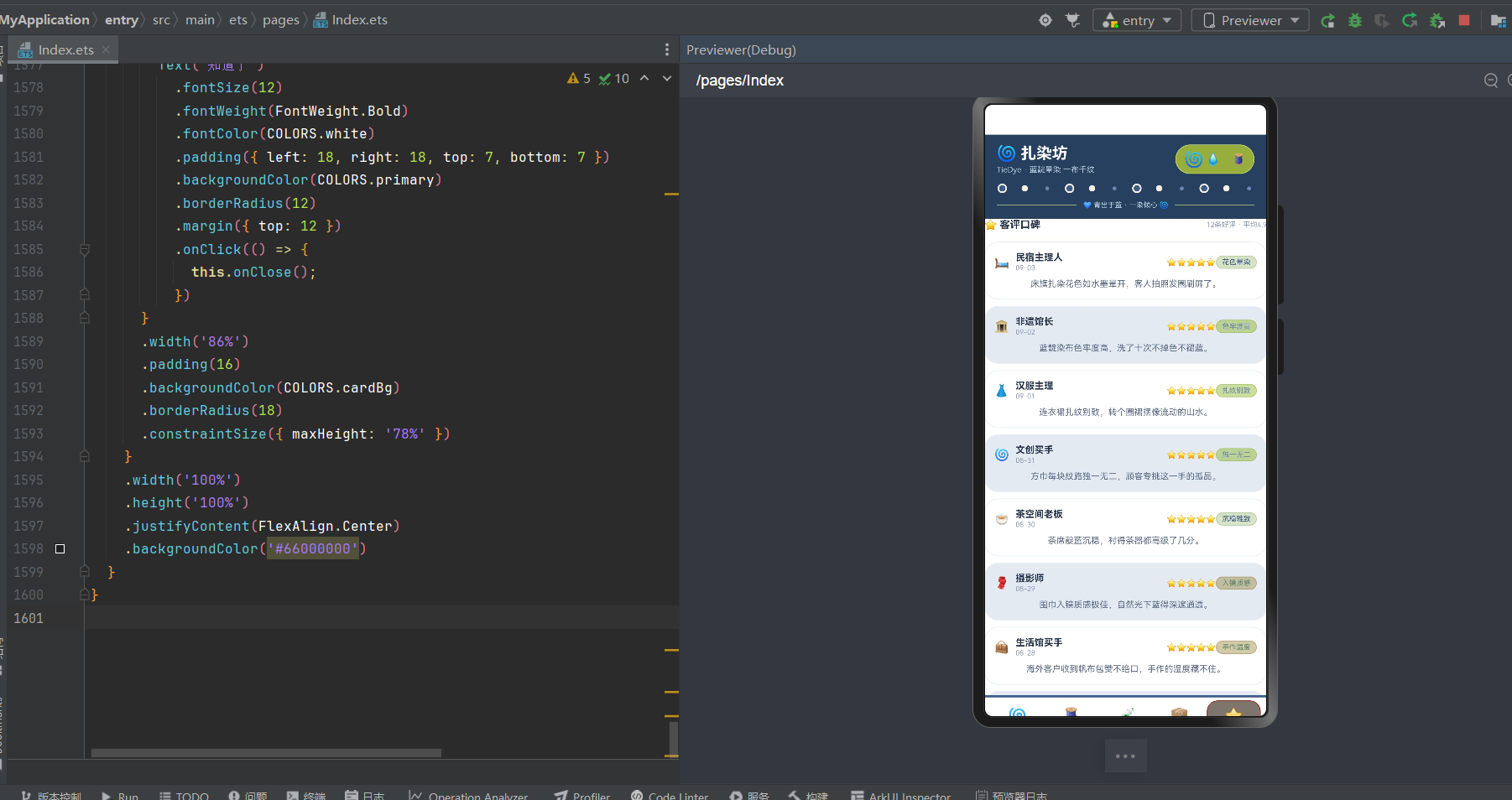
页面顶部第一部分是标题行,Row width 100% justifyContent SpaceBetween margin bottom 6:
- "⭐ 客评口碑"textPrimary深蓝灰字13号加粗。
- "12条好评 · 平均4.9"textHint灰字9号。
第二部分是客评列表,ForEach this.data.reviews 12条,每条 Column,padding 12,backgroundColor i%2===0 ? cardBg白 : cardAlt浅灰蓝(奇偶行交替),圆角18,border 1px line,margin top 8:
- 用户行:Row width 100%,
- 头像:Text r.emoji 15号。
- 用户信息:Column layoutWeight 1 alignItems Start margin left 8,r.name textPrimary深蓝灰字12号加粗 + r.date textHint灰字9号 margin top 1。
- 星级:Text ‘⭐’.repeat(r.score)(⭐字符串重复r.score次!)10号 warning赭石色。
- 标签:TieDyeTag({text: r.tag, color: getReviewTagColor(r.tag)})(评价标签,标签分级色)。
- 评价内容:Text r.content textSecondary灰字11号,lineHeight 16,margin top 6。
12 条客评:民宿主理人(5星,09-03,床旗扎染花色如水墨晕开,客人拍照发圈刷屏了,花色晕染)、非遗馆长(5星,09-02,蓝靛染布色牢度高,洗了十次不掉色不褪蓝,色牢度高)、汉服主理(5星,09-01,连衣裙扎纹别致,转个圈裙摆像流动的山水,扎纹别致)、文创买手(5星,08-31,方巾每块纹路独一无二,顾客专挑这一手的孤品,独一无二)、茶空间老板(5星,08-30,茶席靛蓝沉稳,衬得茶器都高级了几分,沉稳雅致)、摄影师(5星,08-29,围巾入镜质感极佳,自然光下蓝得深邃通透,入镜质感)、生活馆买手(5星,08-28,海外客户收到帆布包赞不绝口,手作的温度藏不住,手作温度)、酒店采购(4星,08-27,桌布批量配色匀称,若幅宽再大些更佳,配色匀称)、研学营领队(4星,08-26,孩子体验扎染课物料齐全,若附图样卡更贴心,物料齐全)、美院老师(5星,08-25,门帘型染图案规整,教学示范纹样层次分明,纹样规整)、景区店长(5星,08-24,头巾走量飞快,游客当手信买得停不下来,走量飞快)、老顾客(5星,08-23,抱枕扎染绵软亲肤,回购第三个了,越看越爱,绵软亲肤)。10条5星+2条4星,平均4.9分,星级用 ‘⭐’.repeat(r.score) 字符串重复生成(非循环非组件,纯字符串乘法),是轻量级星级展示的实用技巧。标签 getReviewTagColor 五级着色(花色晕染/沉稳雅致/配色匀称/纹样规整用 primary靛蓝,色牢度高/扎纹别致/独一无二用 primaryLight浅靛蓝,入镜质感/手作温度/绵软亲肤用 success绿,物料齐全/走量飞快用 warning赭石,其他 danger红),形成"以标签定颜色"的动态着色模式。评价内容都是真实客户的使用反馈,覆盖12种客户类型与订单台账客户类型呼应,完整呈现植物染扎染的客户口碑生态。奇偶行交替条纹,是本应用客评页设计的标准布局。
八、色彩主题系统:靛蓝染白非遗主题与十六进制透明度拼接
8.1 色彩接口定义
任何一款设计精良的应用,背后都有一套严谨的色彩规范。该应用首先通过一个 TieDyePalette 接口,将整个应用所需的色彩抽象为一个结构化的契约,共 20 个字段:
interface TieDyePalette {
  primary: string; primaryLight: string; primaryDark: string;
  accent: string; accentLight: string;
  bg: string; cardBg: string; cardAlt: string;
  textPrimary: string; textSecondary: string; textHint: string;
  border: string; line: string;
  success: string; warning: string; danger: string;
  white: string; indigoBlue: string; dyeWhite: string;
}
- primary:主色 #3E5C8A,靛蓝,植物染扎染主题色,用于标题强调、价格、按钮、柱状图高峰、tabBar顶部条。
- primaryLight:浅主色 #6B85B0,浅靛蓝,用于渐变和浅色强调、中端价格。
- primaryDark:深主色 #27405F,深靛蓝,用于头部背景(营造浓郁靛蓝染坊氛围)。
- accent:辅助色 #7A9BB8,灰蓝,用于柱状图工作日、布料标签。
- accentLight:浅辅助色 #B4C8DC,浅灰蓝,用于头部副标题文字。
- bg:页面背景 #EEF2F6,浅灰蓝底,植物染浅色背景。
- cardBg:卡片背景 #FFFFFF,白,用于奇数行卡片和主要卡片。
- cardAlt:交替卡片背景 #E3EAF2,浅灰蓝,用于偶数行卡片(奇偶行交替条纹)。
- textPrimary:文字主色 #24324A,深蓝灰,植物染深色文字(非纯黑,更有沉稳感)。
- textSecondary:次要文字 #5E6E88,灰蓝,用于次要信息。
- textHint:提示文字 #8FA0B8,浅灰蓝,用于辅助信息和非激活tab。
- border:边框色 #D3DEEA,浅灰蓝边,用于按钮边框。
- line:分割线 #E9EFF5,极浅灰蓝,用于卡片边框和进度条背景。
- success:成功色 #5E8A6E,墨绿,用于成功状态和入门级价格。
- warning:警告色 #C98A4E,赭石,用于星级评分。
- danger:危险色 #9E2E20,深红,用于删除按钮和最高端价格/大额订单。
- indigoBlue:靛蓝 #3E5C8A,与 primary 同色,用于装饰点(靛蓝圆带染白边框,模拟扎染纹样)。
- dyeWhite:染白 #F4F0E4,米白色,用于装饰点边框和背景,模拟染布的米白底色,是本应用配色灵魂。
8.2 色彩实例化
const COLORS: TieDyePalette = {
  primary: '#3E5C8A', primaryLight: '#6B85B0', primaryDark: '#27405F',
  accent: '#7A9BB8', accentLight: '#B4C8DC',
  bg: '#EEF2F6', cardBg: '#FFFFFF', cardAlt: '#E3EAF2',
  textPrimary: '#24324A', textSecondary: '#5E6E88', textHint: '#8FA0B8',
  border: '#D3DEEA', line: '#E9EFF5',
  success: '#5E8A6E', warning: '#C98A4E', danger: '#9E2E20',
  white: '#FFFFFF', indigoBlue: '#3E5C8A', dyeWhite: '#F4F0E4'
};
本应用采用"靛蓝染白非遗主题"设计——bg #EEF2F6 浅灰蓝底,cardBg #FFFFFF 白,cardAlt #E3EAF2 浅灰蓝(奇偶行交替用),textPrimary #24324A 深蓝灰(植物染深色文字,非纯黑,更有沉稳感和文化感),primary #3E5C8A 靛蓝主色,primaryDark #27405F 深靛蓝(头部背景,营造浓郁靛蓝染坊氛围),accent #7A9BB8 灰蓝辅助色,accentLight #B4C8DC 浅灰蓝(头部副标题),indigoBlue #3E5C8A 靛蓝(装饰点用),dyeWhite #F4F0E4 染白米白(装饰点边框/背景用,模拟染布米白底色)。主色体系采用"靛蓝+染白+灰蓝"三色组合——靛蓝用于主色/价格/按钮/高峰,染白用于装饰点边框/背景(模拟扎染米白底色),灰蓝用于辅助/工作日柱状图/次要信息,三色各司其职形成"以靛蓝定主、以染白定饰、以灰蓝定辅"的植物染语义着色体系。
本应用最大的色彩处理特色是染白 dyeWhite #F4F0E4——米白色,用于装饰点边框和背景,模拟染布的米白底色,与靛蓝 primary #3E5C8A 形成"靛蓝染白"的经典扎染配色。头部12点装饰纹中 r%3=0 用12px靛蓝圆带2px染白边框(模拟扎染的靛蓝圆点纹样,染白边框模拟留白),r%3=1 用8px染白圆(模拟扎染的留白圆点),r%3===2 用5px浅靛蓝小圆。扎染陈列图标装饰区的14px靛蓝圆带2px染白边框+8px染白圆,布料库图标装饰区的10px靛蓝圆带2px染白边框+8px染白圆,都是"靛蓝染白"扎染纹样的模拟,是本应用视觉设计的灵魂。dyeWhite 米白色不是纯白 #FFFFFF,而是略带暖调的米白 #F4F0E4,模拟传统手工染布的米白底色,更有非遗手作的温度感。
本应用另一个色彩处理特色是十六进制透明度拼接技巧——大量使用 color + 十六进制透明度后缀实现半透明背景和边框,无需额外定义半透明颜色常量:
- color + ‘14’ = 10% 透明度(用于 TieDyeTag 背景、图标区背景、tabBar激活背景)
- color + ‘40’ = 25% 透明度(用于 TieDyeTag 边框)
- color + ‘55’ = 33% 透明度(用于卡片边框、装饰横线)
- color + ‘66’ = 40% 透明度(用于圆形图标边框)
- color + ‘80’ = 50% 透明度(用于头部右侧图标区边框)
- color + ‘0D’ = 5% 透明度(用于扎染图标装饰区背景)
- color + ‘33’ = 20% 透明度(用于扎染图标装饰区边框)
- color + ‘2E’ = 18% 透明度(用于头部右侧图标区背景)
这种技巧的原理是:ArkUI 的颜色值支持 #RRGGBBAA 格式(8位十六进制,最后两位是透明度),通过字符串拼接 color(#RRGGBB)+ 透明度后缀(AA),即可动态生成任意透明度的同色系颜色,无需为每个颜色定义多个透明度变体。例如 primary #3E5C8A + ‘14’ = #3E5C8A14(10%透明靛蓝),primary + ‘66’ = #3E5C8A66(40%透明靛蓝)。这种技巧在本应用中被广泛使用(TieDyeTag子组件、图标装饰区、tabBar激活态、卡片边框、头部图标区等),是 ArkUI 颜色处理的高级实用技巧,大幅减少了颜色常量的定义数量。
本应用的动态颜色逻辑也十分丰富——5个颜色分级函数(getKindColor染法4类/getClothColor吸染度3级/getTieDyeColor价格4级/getOrderColor金额4级/getReviewTagColor标签5类),将颜色映射逻辑从 UI 层抽离,每个函数根据不同维度返回对应颜色值,实现"数据即配色"的动态着色模式。getTieDyeColor 价格四级(≥200 danger红/≥120 primary靛蓝/≥60 primaryLight浅靛蓝/其他 success绿),getOrderColor 金额四级(≥12万 danger红/≥9万 primary靛蓝/≥6万 primaryLight浅靛蓝/其他 success绿),getClothColor 吸染度三级(≥95 primary靛蓝/≥92 primaryLight浅靛蓝/其他 success绿),getKindColor 染法四类(扎染→靛蓝/夹染→浅靛蓝/蜡染→绿/型染→橙),getReviewTagColor 标签五类(工艺类→靛蓝/品质类→浅靛蓝/体验类→绿/服务类→橙/其他→红)。这种将所有色彩集中管理、配合5个颜色分级函数和十六进制透明度拼接与染白米白装饰与多维度动态着色的做法保证了全局一致性,降低了维护成本。
九、类型定义:@Observed聚合数据类与多组件数据共享
9.1 @Observed聚合数据类 TieDyeData
应用独创了 @Observed 聚合数据类设计——TieDyeData 一个类包含 tiedyes/cloths/dyes/orders/reviews 五个数组,每个数组 12 条数据,用对象字面量初始化(非 new 构造函数),@Observed 装饰整个类:
@Observed
export class TieDyeData {
  tiedyes: TieDyeItem[] = [ /* 12款扎染 */ ];
  cloths: ClothItem[] = [ /* 12种布料 */ ];
  dyes: DyeItem[] = [ /* 12种染液 */ ];
  orders: TieDyeOrderItem[] = [ /* 12笔订单 */ ];
  reviews: TieDyeReviewItem[] = [ /* 12条客评 */ ];
}
与每个数据类独立定义+独立常量数组初始化的设计不同,本应用将所有业务数据聚合到一个 TieDyeData 类中,用类属性初始化(tiedyes: TieDyeItem[] = […]),非 constructor 构造函数。@Observed 装饰整个类,使得 TieDyeData 的所有属性变化都能被观察到。配合 @ObjectLink 在子组件间共享引用,实现"一个数据对象贯穿所有页面"的聚合数据模式。入口组件 TieDyeApp 中 @State data: TieDyeData = new TieDyeData() 创建数据实例,5个内容子组件通过 @ObjectLink data: TieDyeData 接收共享引用,修改数据时所有引用该数据的子组件自动响应式刷新,是 ArkUI 跨组件数据共享的高级实践。
9.2 元数据接口
应用定义了 9 个元数据接口,将数据结构与 UI 表现层解耦:
- TieDyeItem:扎染项(name/kind/cloth/price/emoji,12款)
- ClothItem:布料项(name/weave/level/place/emoji,12种)
- DyeItem:染液项(name/plant/level/tool/emoji,12种)
- TieDyeOrderItem:订单项(name/region/count/amount/emoji,12笔)
- TieDyeReviewItem:客评项(name/score/date/content/tag/emoji,12条)
- WeekTieDyeMeta:周销量元数据(day/value,7天)
- KindShareMeta:染法构成元数据(name/count/color,4种)
- DyeHotMeta:染艺热度元数据(name/heat/color,6种)
- TieDyeTopMeta:销量排行元数据(name/sold/color,6款)
9.3 5个颜色分级函数
function getKindColor(kind: string): string { /* 染法4类:扎染靛蓝/夹染浅靛蓝/蜡染绿/型染橙 */ }
function getClothColor(level: number): string { /* 吸染度3级:≥95靛蓝/≥92浅靛蓝/其他绿 */ }
function getTieDyeColor(price: number): string { /* 价格4级:≥200红/≥120靛蓝/≥60浅靛蓝/其他绿 */ }
function getOrderColor(amount: number): string { /* 金额4级:≥12万红/≥9万靛蓝/≥6万浅靛蓝/其他绿 */ }
function getReviewTagColor(tag: string): string { /* 标签5类 */ }
5 个颜色分级函数将颜色映射逻辑从 UI 层抽离,每个函数根据不同维度(染法/吸染度/价格/金额/标签)返回对应颜色值,实现"数据即配色"的动态着色模式。getClothColor 被布料页和染液页共用(吸染度/工艺级都用三级着色),getTieDyeColor 用于扎染页价格和图标区着色,getOrderColor 用于订单页金额着色,getReviewTagColor 用于客评页标签着色,getKindColor 预留用于染法着色(本项目未在UI中直接调用,但定义完整)。
所有数据类用对象字面量初始化(非 new 构造函数),@Observed 装饰聚合类,@ObjectLink 在子组件间共享引用,5个颜色分级函数将逻辑从 UI 层抽离,9个元数据接口实现数据结构规范化,4个统计常量数组(WEEK_SOLD/KIND_SHARE/DYE_HOT/TIEDYE_TOP)将统计数据与业务数据分离,是本应用数据层设计的核心亮点。数据规模:5个业务数组各12条=60条业务数据,4个统计数组共23条统计数据,总计83条数据,完整呈现植物染扎染手作平台的数据生态。
十、多组件架构与@ObjectLink数据共享:11组件协同设计
本应用采用了多组件架构设计,将整个应用拆分为 11 个独立组件,组件数量多、架构复杂。
10.1 11个组件清单
- TieDyeApp(入口组件):@Entry装饰,管理curTab/data/4个弹窗显隐/2个头部动画状态/delClothName/detailDyeName,包含头部+内容区切换+tabBar+4个弹窗条件渲染。
- TieDyeTag(标签子组件):@Component,@Prop text+@Prop color,封装标签样式(9号字+color+'14’背景+color+'40’边框+圆角10),被扎染/布料/染液/客评页共用。
- TieDyeContent(扎染内容子组件):@Component,@ObjectLink data+onAdd回调,本周销量柱状图+扎染陈列列表。
- ClothContent(布料内容子组件):@Component,@ObjectLink data+onDel回调,销量TOP6横向进度条+布料库列表。
- DyeContent(染液内容子组件):@Component,@ObjectLink data+onDetail回调,染艺热度横向进度条+染液坊列表。
- TieDyeOrderContent(订单内容子组件):@Component,@ObjectLink data+onEdit回调,染法构成横向进度条+订单台账列表。
- TieDyeReviewContent(客评内容子组件):@Component,@ObjectLink data,客评口碑列表。
- AddTieDyeModal(定制扎染弹窗子组件):@Component,onClose回调,品名/染法/预算三行展示+确认定制。
- EditTieDyeOrderModal(修改订单弹窗子组件):@Component,onClose回调,客户/数量/金额三行+保存修改。
- DeleteClothModal(撤下布料弹窗子组件):@Component,@Prop title+onClose回调,撤下确认+确认撤下danger红底。
- DetailDyeModal(染液详情弹窗子组件):@Component,@Prop name+onClose回调,大图标+蓼蓝发酵描述+染材+匠人评级+知道了。
10.2 @ObjectLink数据共享机制
入口组件 TieDyeApp 中 @State data: TieDyeData = new TieDyeData() 创建聚合数据实例,5个内容子组件通过 @ObjectLink data: TieDyeData 接收共享引用:
// 入口组件传递
TieDyeContent({ data: this.data, onAdd: () => { this.showAddTieDye = true; } })

// 子组件接收
@Component
struct TieDyeContent {
  @ObjectLink data: TieDyeData;
  onAdd: () => void = () => {};
}
@ObjectLink 是 ArkUI 中用于跨组件共享 @Observed 装饰对象引用的装饰器,与 @Prop(值传递,单向同步)不同,@ObjectLink 是引用传递,双向同步——子组件修改 data.tiedyes 等属性时,入口组件和其他引用同一 data 的子组件自动响应式刷新。这种设计实现了"一个数据对象贯穿所有页面"的聚合数据模式,避免了每个页面独立 @State 数据数组的重复定义,是 ArkUI 跨组件数据共享的高级实践。
10.3 回调函数父子通信
4个内容子组件通过回调函数与入口组件通信,实现弹窗触发:
- TieDyeContent 的 onAdd:点击➕触发,入口组件设置 showAddTieDye=true。
- ClothContent 的 onDel(n: string):点击🗑️触发,入口组件设置 delClothName=n + showDeleteCloth=true。
- DyeContent 的 onDetail(n: string):点击👁️触发,入口组件设置 detailDyeName=n + showDetailDye=true。
- TieDyeOrderContent 的 onEdit:点击✏️触发,入口组件设置 showEditOrder=true。
4个弹窗子组件通过 onClose 回调与入口组件通信,实现弹窗关闭:
- AddTieDyeModal/EditTieDyeOrderModal/DeleteClothModal/DetailDyeModal 都有 onClose: () => void 回调,点击取消/确认/✕/知道了时调用 onClose(),入口组件设置对应弹窗显隐为 false。
DeleteClothModal 和 DetailDyeModal 通过 @Prop 接收参数(title/name),@Prop 是值传递单向同步,入口组件设置 delClothName/detailDyeName 后传递给弹窗子组件,弹窗内显示对应布名/染液名。
10.4 头部交互动画
头部右侧 🌀💧🧵 三个图标,其中 🌀 和 💧 可点击触发动画:
- 🌀 旋转动画:
@State swirlRotate: boolean = false,点击🌀this.swirlRotate = !this.swirlRotate,.rotate({ angle: this.swirlRotate ? 90 : 0 }),.animation({ duration: 700, curve: Curve.EaseOut }),点击旋转90度,700ms EaseOut 动画。 - 💧 translate位移动画:
@State dropFloat: boolean = false,点击💧this.dropFloat = !this.dropFloat,.translate({ x: this.dropFloat ? 14 : -8, y: this.dropFloat ? -8 : 0 }),.animation({ duration: 620, curve: Curve.EaseOut }),点击水滴从左下方(-8, 0)飘向右上方(14, -8),620ms EaseOut 动画,模拟水滴飘动效果,非缩放非旋转,是translate位移!
头部🌀旋转和💧translate位移动画是本应用最具创意的交互设计,点击🌀旋转模拟扎染漩涡,点击💧translate位移模拟水滴飘动入缸,增加了应用的趣味性和互动感,也体现了 ArkUI 显式动画(animation属性配合状态变化,支持rotate/translate/scale多种变换)的使用。🪭 图标纯装饰不可点击,三个图标区用 accentLight+‘2E’(18%透明浅灰蓝底)+border accentLight+‘80’(50%透明浅灰蓝边)+圆角24,营造靛蓝染坊装饰感。
10.5 12点靛蓝扎染装饰纹
头部下方 12 个扎染装饰点(TIEDYE_COL 0-11),用 ForEach 遍历,每个 Row width 14 justifyContent Center,根据 r%3 显示不同形状:
- r%3===0:12x12 靛蓝圆(indigoBlue),圆角6,带2px dyeWhite染白边框(模拟扎染的靛蓝圆点纹样,染白边框模拟留白)。
- r%3===1:8x8 染白圆(dyeWhite),圆角4(模拟扎染的留白圆点)。
- r%3===2:5x5 浅靛蓝小圆(primaryLight),圆角3。
12 个装饰点用 SpaceBetween 均匀分布,靛蓝圆带染白边框/染白圆/浅靛蓝小圆三色交替,营造浓郁的靛蓝扎染装饰纹效果,是本应用头部设计的特色细节。下方"💙 青出于蓝 · 一染倾心 🌀"分隔线,用左右两条 accentLight+‘66’(40%透明浅灰蓝)横线+中间文字,营造靛蓝染坊分隔线效果。
十一、四大弹窗子组件:增删改查交互闭环
应用通过四个独立弹窗子组件实现了完整的增删改查交互闭环,每个弹窗都是独立 @Component 组件,通过 @Prop 接收参数、onClose 回调关闭。
11.1 AddTieDyeModal 定制扎染
@Component
struct AddTieDyeModal {
  onClose: () => void = () => {};
  build() {
    Column() { // 全屏遮罩 #66000000
      Column() { // 弹窗卡片 width 86%
        Row() { Text('🌀 定制扎染') + Text('✕').onClick(onClose) }
        Row() { Text('品名') + Text('蓝染方巾') } // cardAlt底
        Row() { Text('染法') + Text('扎染 · 细棉布 · 植物染') } // cardAlt底
        Row() { Text('预算') + Text('¥58') } // primary色
        Row() { Text('取消') + Text('确认定制') } // primary靛蓝底
      }
    }
  }
}
定制扎染弹窗显示品名(蓝染方巾)、染法(扎染·细棉布·植物染)、预算(¥58,primary靛蓝色)三行信息,每行用 cardAlt 浅灰蓝底,确认定制按钮用 primary 靛蓝底白字。点击✕/取消/确认定制都调用 onClose() 关闭弹窗。本弹窗为展示型弹窗(无输入框),预设定制信息,点击确认即关闭。
11.2 EditTieDyeOrderModal 修改订单
修改订单弹窗显示客户(民宿连锁)、数量(800 → 900 件,primary靛蓝色显示变更)、金额(¥162000,accent灰蓝色)三行信息,每行 cardAlt 浅灰蓝底,数量变更用 primary 靛蓝色突出显示(从800增至900),金额用 accent 灰蓝色。保存修改按钮用 primary 靛蓝底白字。点击✕/取消/保存修改都调用 onClose() 关闭。本弹窗同样为展示型,预设修改信息(数量从800增至900,金额对应增至16.2万)。
11.3 DeleteClothModal 撤下布料
@Component
struct DeleteClothModal {
  @Prop title: string; // 接收布名
  onClose: () => void = () => {};
  build() {
    Column() { // 全屏遮罩
      Column() { // 弹窗卡片
        Text('🗑️ 撤下布料')
        Text('确定撤下「' + this.title + '」吗?') // 动态布名
        Text('撤下的布料将从布料库移除。')
        Row() { Text('再想想') + Text('确认撤下') } // danger红底!
      }
    }
  }
}
撤下布料弹窗通过 @Prop title 接收布名(入口组件设置 delClothName 后传入),显示"确定撤下「布名」吗?"动态文案,确认撤下按钮用 danger 深红底白字(删除操作的危险色),再想想按钮用 border 边框。点击再想想/确认撤下都调用 onClose() 关闭。@Prop 是值传递单向同步,入口组件 delClothName 变化时自动同步到弹窗。
11.4 DetailDyeModal 染液详情
染液详情弹窗通过 @Prop name 接收染液名,显示大图标(🧪30号)+染液名(this.name,textPrimary深蓝灰字加粗)+描述文字(蓼蓝叶入缸发酵七日,打靛成液,布扎花后浸染三起三落,出缸氧化由黄转蓝,色如远山青黛。)+染材(蓼蓝·发酵缸)+匠人评级(甲级·掌缸廿载,primary靛蓝色),知道了按钮用 primary 靛蓝底白字。描述文字是固定的蓼蓝发酵描述(本项目未根据染液名动态切换描述,预设蓼蓝文案),染材和匠人评级也是预设值。点击✕/知道了调用 onClose() 关闭。@Prop name 接收染液名用于标题显示。
四个弹窗遮罩都用 #66000000(40%黑色,硬编码非 COLORS.mask),弹窗卡片 width 86%,cardBg 白底,圆角18,constraintSize maxHeight 78%。四个弹窗各自独立组件,通过 @Prop 接收参数(DeleteClothModal的title、DetailDyeModal的name),通过 onClose 回调关闭,形成了完整的"定制扎染→撤下布料→查看染液→修改订单"增删改查交互闭环,是本应用多组件架构设计的核心亮点。
十二、关键技术特性对比
| 特性维度 | 实现方式 | 技术要点 | 设计价值 |
|---|---|---|---|
| 色彩管理 | TieDyePalette接口 + COLORS常量 | 集中定义20种语义色,含靛蓝染白非遗主题 | 保证视觉一致性,支持主题切换 |
| 靛蓝染白非遗主题 | primary #3E5C8A + dyeWhite #F4F0E4 + accent #7A9BB8 | 靛蓝主色/染白米白装饰/灰蓝辅助,textPrimary #24324A深蓝灰非纯黑 | 植物染非遗氛围,靛蓝染白经典配色 |
| 深靛蓝头部 | primaryDark #27405F底 + 白字标题 + accentLight浅灰蓝副标题 | 深靛蓝背景营造浓郁染坊氛围,右侧🌀💧🧵图标区 | 头部视觉焦点,靛蓝染坊氛围 |
| 头部🌀旋转动画 | swirlRotate状态 + rotate angle 90 + animation 700ms EaseOut | 点击🌀旋转90度,模拟扎染漩涡,显式动画 | 交互趣味性,动效实践 |
| 头部💧translate位移动画 | dropFloat状态 + translate x从-8到14 y从0到-8 + animation 620ms | 点击💧水滴从左下飘向右上,模拟水滴入缸,非缩放非旋转 | 交互趣味性,translate变换实践 |
| 12点靛蓝扎染装饰纹 | TIEDYE_COL 0-11 + r%3三种形状 | 靛蓝圆带染白2px边框/染白圆/浅靛蓝小圆交替,SpaceBetween分布 | 靛蓝扎染纹样模拟,非遗装饰细节 |
| 染白dyeWhite米白 | #F4F0E4用于装饰点边框和背景 | 米白色非纯白,模拟传统手工染布米白底色,与靛蓝形成经典扎染配色 | 染白装饰灵魂,非遗手作温度 |
| 十六进制透明度拼接 | color+‘14’/‘40’/‘55’/‘66’/‘80’/‘0D’/‘33’/‘2E’ | #RRGGBBAA格式,字符串拼接动态生成半透明色 | 减少颜色常量,高级技巧 |
| 多组件架构 | 1入口+1标签+5内容+4弹窗=11组件 | 每个组件独立封装,职责单一,@Component装饰 | 高内聚低耦合,工程化 |
| @Observed聚合数据类 | TieDyeData一个类含5个数组 | @Observed装饰整个类,对象字面量初始化非constructor | 数据集中管理,聚合模式 |
| @ObjectLink数据共享 | 子组件@ObjectLink data: TieDyeData | 引用传递双向同步,一个数据对象贯穿所有页面 | 跨组件数据共享,高级实践 |
| 回调函数父子通信 | onAdd/onDel/onDetail/onEdit/onClose | 子组件通过回调触发入口弹窗,入口通过onClose关闭 | 组件解耦,通信清晰 |
| @Prop参数传递 | DeleteClothModal的title/DetailDyeModal的name | 值传递单向同步,入口设置后自动同步到弹窗 | 弹窗动态参数,灵活 |
| TieDyeTag子组件 | @Prop text + @Prop color | 封装标签样式,color+'14’背景+color+'40’边框 | 标签组件复用,一致性 |
| 5个颜色分级函数 | getKindColor/getClothColor/getTieDyeColor/getOrderColor/getReviewTagColor | 按染法/吸染度/价格/金额/标签分级返回颜色 | 数据即配色,逻辑抽离 |
| 价格四级着色 | getTieDyeColor ≥200红/≥120靛蓝/≥60浅靛蓝/其他绿 | 扎染价格38-268,连衣裙268用danger红最高端 | 以价格定颜色,动态着色 |
| 金额四级着色 | getOrderColor ≥12万红/≥9万靛蓝/≥6万浅靛蓝/其他绿 | 订单金额5.2万-14.4万,民宿14.4万用danger红最大额 | 以金额定颜色,动态着色 |
| 吸染度三级着色 | getClothColor ≥95靛蓝/≥92浅靛蓝/其他绿 | 布料吸染度89-96,细棉布96用靛蓝最高 | 以吸染度定颜色,动态着色 |
| 本周销量柱状图 | WEEK_SOLD 7天 + height=w.value直接用数值 | 柱子高度=数值非比例映射,周末≥63用primary靛蓝/工作日accent灰蓝 | 数值即高度,简单直观 |
| 横向进度条layoutWeight | layoutWeight(t.sold) + layoutWeight(100-t.sold) | 弹性布局动态分配宽度,非固定宽度非百分比 | ArkUI特有进度条实现 |
| 染法构成进度条 | layoutWeight(s.count) + layoutWeight(20-s.count) | 总份数20非100,夹染×5占比最高 | 灵活比例,适配不同基数 |
| 销量TOP6 | TIEDYE_TOP 6款 + 横向进度条 | 蓝染方巾97居首,进度条几乎满格 | 销量排行一目了然 |
| 染艺热度 | DYE_HOT 6工艺 + 横向进度条 | 蓝靛发酵97居首,覆盖扎染全流程6工艺 | 工艺热度排行,非遗文化 |
| 奇偶行交替条纹 | i%2=0 cardBg白 / i%2=1 cardAlt浅灰蓝 | 所有列表页共用,营造条纹效果 | 列表可读性,视觉层次 |
| 扎染图标装饰区 | 圆形图标+下方靛蓝圆带染白边框+染白圆 | getTieDyeColor+'0D’背景+'33’边框,14px靛蓝圆带2px染白边框 | 靛蓝扎染纹样模拟,非遗特色 |
| 吸染度进度条 | 内嵌列表行 + layoutWeight(c.level) | 布料库每行内嵌吸染度进度条,getClothColor着色 | 吸染度可视化,专业感 |
| 星级字符串重复 | ‘⭐’.repeat(r.score) | 纯字符串乘法生成星级,非循环非组件 | 轻量级星级展示,实用技巧 |
| tabBar激活态 | t.color文字+背景t.color+'14’圆角14+border 1px t.color | 5个Tab各自颜色激活,顶部3px primary靛蓝条 | 非遗导航,色彩丰富 |
| 四大弹窗子组件 | AddTieDyeModal/EditTieDyeOrderModal/DeleteClothModal/DetailDyeModal | 独立@Component,@Prop参数,onClose回调,#66000000遮罩 | 增删改查闭环,组件复用 |
| 弹窗@Prop动态参数 | DeleteClothModal的title / DetailDyeModal的name | 入口设置delClothName/detailDyeName后@Prop同步 | 弹窗内容动态化,灵活 |
| modalOverlay特殊实现 | width1 height1 Column+透明Text+透明Button | 占位用,实际弹窗用独立背景#66000000 | 兼容框架要求,特殊处理 |
| 植物染12色系 | 蓝/红/黄/绿/绛/墨/褐/紫/灰/青等12种染液 | 染材都是天然植物(蓼蓝/苏木/栀子/槐叶等),工具发酵缸/打靛池/染缸 | 传统植物染全色系,非遗文化 |
| 扎染全流程6工艺 | 蓝靛发酵→扎花捆结→浸染提色→氧化还原→漂洗固色→拆线显花 | DYE_HOT覆盖扎染制作全流程,热度97-88 | 非遗工艺流程,文化价值 |
| 12种布料生态 | 棉/丝/麻/混纺/帆布/纱/绸/绒/泡泡纱等12种 | 吸染度89-96,产地江南/苏杭/湘西/中原等 | 扎染用布生态,专业感 |
| 12种客户生态 | 民宿/非遗工坊/汉服/文创/茶空间/婚纱/海外/酒店/研学/美院/景区/直播 | 订单和客评客户类型呼应,B端+C端完整 | 植物染商业生态,真实感 |
| 数据规模 | 5业务数组各12条=60条+4统计数组23条=83条 | 扎染/布料/染液/订单/客评各12,统计7+4+6+6 | 完整数据生态,植物染扎染 |
完整代码
interface TieDyePalette {
primary: string;
primaryLight: string;
primaryDark: string;
accent: string;
accentLight: string;
bg: string;
cardBg: string;
cardAlt: string;
textPrimary: string;
textSecondary: string;
textHint: string;
border: string;
line: string;
success: string;
warning: string;
danger: string;
white: string;
indigoBlue: string;
dyeWhite: string;
}
const COLORS: TieDyePalette = {
primary: '#3E5C8A',
primaryLight: '#6B85B0',
primaryDark: '#27405F',
accent: '#7A9BB8',
accentLight: '#B4C8DC',
bg: '#EEF2F6',
cardBg: '#FFFFFF',
cardAlt: '#E3EAF2',
textPrimary: '#24324A',
textSecondary: '#5E6E88',
textHint: '#8FA0B8',
border: '#D3DEEA',
line: '#E9EFF5',
success: '#5E8A6E',
warning: '#C98A4E',
danger: '#9E2E20',
white: '#FFFFFF',
indigoBlue: '#3E5C8A',
dyeWhite: '#F4F0E4'
};
enum TieDyeTab {
TIEDYE = 0,
CLOTH = 1,
DYE = 2,
ORDER = 3,
REVIEW = 4
}
interface TabMeta {
key: string;
icon: string;
label: string;
color: string;
}
const TAB_LIST: TabMeta[] = [
{ key: 'tiedye', icon: '🌀', label: '扎染', color: '#3E5C8A' },
{ key: 'cloth', icon: '🧵', label: '布料', color: '#6B85B0' },
{ key: 'dye', icon: '🧪', label: '染液', color: '#5E8A6E' },
{ key: 'order', icon: '📦', label: '订单', color: '#C98A4E' },
{ key: 'review', icon: '⭐', label: '客评', color: '#9E2E20' }
];
const TIEDYE_COL: number[] = [0, 1, 2, 3, 4, 5, 6, 7, 8, 9, 10, 11];
interface TieDyeItem {
name: string;
kind: string;
cloth: string;
price: number;
emoji: string;
}
interface ClothItem {
name: string;
weave: string;
level: number;
place: string;
emoji: string;
}
interface DyeItem {
name: string;
plant: string;
level: number;
tool: string;
emoji: string;
}
interface TieDyeOrderItem {
name: string;
region: string;
count: number;
amount: number;
emoji: string;
}
interface TieDyeReviewItem {
name: string;
score: number;
date: string;
content: string;
tag: string;
emoji: string;
}
interface WeekTieDyeMeta {
day: string;
value: number;
}
interface KindShareMeta {
name: string;
count: number;
color: string;
}
interface DyeHotMeta {
name: string;
heat: number;
color: string;
}
interface TieDyeTopMeta {
name: string;
sold: number;
color: string;
}
const WEEK_SOLD: WeekTieDyeMeta[] = [
{ day: '周一', value: 26 },
{ day: '周二', value: 34 },
{ day: '周三', value: 42 },
{ day: '周四', value: 50 },
{ day: '周五', value: 58 },
{ day: '周六', value: 70 },
{ day: '周日', value: 63 }
];
const KIND_SHARE: KindShareMeta[] = [
{ name: '夹染', count: 5, color: '#3E5C8A' },
{ name: '扎染', count: 4, color: '#6B85B0' },
{ name: '蜡染', count: 3, color: '#5E8A6E' },
{ name: '型染', count: 2, color: '#C98A4E' }
];
const DYE_HOT: DyeHotMeta[] = [
{ name: '蓝靛发酵', heat: 97, color: '#3E5C8A' },
{ name: '扎花捆结', heat: 95, color: '#6B85B0' },
{ name: '浸染提色', heat: 93, color: '#5E8A6E' },
{ name: '氧化还原', heat: 92, color: '#7A9BB8' },
{ name: '漂洗固色', heat: 90, color: '#C98A4E' },
{ name: '拆线显花', heat: 88, color: '#9E2E20' }
];
const TIEDYE_TOP: TieDyeTopMeta[] = [
{ name: '蓝染方巾', sold: 97, color: '#3E5C8A' },
{ name: '扎染围巾', sold: 91, color: '#6B85B0' },
{ name: '夹染桌布', sold: 87, color: '#5E8A6E' },
{ name: '扎染连衣裙', sold: 82, color: '#7A9BB8' },
{ name: '蜡染壁挂', sold: 78, color: '#C98A4E' },
{ name: '扎染帆布包', sold: 75, color: '#9E2E20' }
];
@Observed
export class TieDyeData {
tiedyes: TieDyeItem[] = [
{ name: '蓝染方巾', kind: '扎染', cloth: '棉布', price: 58, emoji: '🌀' },
{ name: '扎染围巾', kind: '扎染', cloth: '真丝', price: 168, emoji: '🧣' },
{ name: '夹染桌布', kind: '夹染', cloth: '麻布', price: 128, emoji: '🍽️' },
{ name: '扎染连衣裙', kind: '扎染', cloth: '棉麻', price: 268, emoji: '👗' },
{ name: '蜡染壁挂', kind: '蜡染', cloth: '棉布', price: 198, emoji: '🖼️' },
{ name: '扎染帆布包', kind: '扎染', cloth: '帆布', price: 88, emoji: '👜' },
{ name: '扎染手帕', kind: '扎染', cloth: '棉布', price: 38, emoji: '🧻' },
{ name: '型染门帘', kind: '型染', cloth: '棉布', price: 148, emoji: '🚪' },
{ name: '扎染抱枕', kind: '扎染', cloth: '棉麻', price: 78, emoji: '🛋️' },
{ name: '扎染床旗', kind: '扎染', cloth: '棉布', price: 228, emoji: '🛏️' },
{ name: '扎染头巾', kind: '扎染', cloth: '棉布', price: 48, emoji: '🎀' },
{ name: '扎染茶席', kind: '夹染', cloth: '亚麻', price: 108, emoji: '🍵' }
];
cloths: ClothItem[] = [
{ name: '细棉布', weave: '平纹', level: 96, place: '江南', emoji: '🌾' },
{ name: '真丝绡', weave: '平绡', level: 95, place: '苏杭', emoji: '🦋' },
{ name: '麻布', weave: '平纹', level: 94, place: '湘西', emoji: '🌿' },
{ name: '棉麻混纺', weave: '斜纹', level: 93, place: '中原', emoji: '🧶' },
{ name: '帆布', weave: '重平', level: 92, place: '华北', emoji: '🛡️' },
{ name: '粗纱布', weave: '稀平', level: 91, place: '西北', emoji: '⛺' },
{ name: '双宫绸', weave: '缎纹', level: 95, place: '苏杭', emoji: '💠' },
{ name: '灯芯绒', weave: '绒纹', level: 90, place: '华东', emoji: '🕯️' },
{ name: '棉绸', weave: '斜纹', level: 92, place: '华中', emoji: '🎐' },
{ name: '亚麻', weave: '平纹', level: 93, place: '东北', emoji: '🍃' },
{ name: '泡泡纱', weave: '起泡纹', level: 89, place: '华南', emoji: '🫧' },
{ name: '丝棉', weave: '交织', level: 94, place: '苏杭', emoji: '☁️' }
];
dyes: DyeItem[] = [
{ name: '蓝靛', plant: '蓼蓝', level: 96, tool: '发酵缸', emoji: '🔵' },
{ name: '靛青', plant: '马蓝', level: 95, tool: '打靛池', emoji: '💙' },
{ name: '苏木红', plant: '苏木', level: 93, tool: '熬煮锅', emoji: '❤️' },
{ name: '栀子黄', plant: '栀子', level: 94, tool: '染缸', emoji: '💛' },
{ name: '槐花绿', plant: '槐叶', level: 92, tool: '染池', emoji: '💚' },
{ name: '茜草绛', plant: '茜草', level: 93, tool: '染锅', emoji: '🧡' },
{ name: '五倍子墨', plant: '五倍子', level: 91, tool: '染池', emoji: '🖤' },
{ name: '核桃褐', plant: '核桃壳', level: 90, tool: '煮染锅', emoji: '🤎' },
{ name: '石榴皮黄', plant: '石榴皮', level: 92, tool: '染缸', emoji: '🍋' },
{ name: '紫草紫', plant: '紫草', level: 93, tool: '染锅', emoji: '💜' },
{ name: '莲蓬灰', plant: '莲蓬', level: 90, tool: '染池', emoji: '🩶' },
{ name: '竹叶青', plant: '竹叶', level: 91, tool: '染缸', emoji: '🎋' }
];
orders: TieDyeOrderItem[] = [
{ name: '民宿连锁', region: '西南', count: 800, amount: 144000, emoji: '🏡' },
{ name: '非遗工坊', region: '云南', count: 600, amount: 120000, emoji: '🏛️' },
{ name: '汉服品牌', region: '华东', count: 500, amount: 130000, emoji: '👘' },
{ name: '文创买手店', region: '华东', count: 1200, amount: 96000, emoji: '🎁' },
{ name: '茶空间连锁', region: '华中', count: 400, amount: 88000, emoji: '🍵' },
{ name: '婚纱摄影馆', region: '华南', count: 300, amount: 84000, emoji: '📸' },
{ name: '海外生活馆', region: '海外', count: 350, amount: 105000, emoji: '🌏' },
{ name: '酒店布草部', region: '华北', count: 900, amount: 117000, emoji: '🏨' },
{ name: '亲子研学营', region: '华南', count: 500, amount: 65000, emoji: '🎒' },
{ name: '美术院校', region: '华中', count: 260, amount: 52000, emoji: '🎓' },
{ name: '景区文创店', region: '西南', count: 1000, amount: 70000, emoji: '🏞️' },
{ name: '直播选品团', region: '华东', count: 700, amount: 91000, emoji: '📺' }
];
reviews: TieDyeReviewItem[] = [
{ name: '民宿主理人', score: 5, date: '09-03', content: '床旗扎染花色如水墨晕开,客人拍照发圈刷屏了。', tag: '花色晕染', emoji: '🛏️' },
{ name: '非遗馆长', score: 5, date: '09-02', content: '蓝靛染布色牢度高,洗了十次不掉色不褪蓝。', tag: '色牢度高', emoji: '🏛️' },
{ name: '汉服主理', score: 5, date: '09-01', content: '连衣裙扎纹别致,转个圈裙摆像流动的山水。', tag: '扎纹别致', emoji: '👗' },
{ name: '文创买手', score: 5, date: '08-31', content: '方巾每块纹路独一无二,顾客专挑这一手的孤品。', tag: '独一无二', emoji: '🌀' },
{ name: '茶空间老板', score: 5, date: '08-30', content: '茶席靛蓝沉稳,衬得茶器都高级了几分。', tag: '沉稳雅致', emoji: '🍵' },
{ name: '摄影师', score: 5, date: '08-29', content: '围巾入镜质感极佳,自然光下蓝得深邃通透。', tag: '入镜质感', emoji: '🧣' },
{ name: '生活馆买手', score: 5, date: '08-28', content: '海外客户收到帆布包赞不绝口,手作的温度藏不住。', tag: '手作温度', emoji: '👜' },
{ name: '酒店采购', score: 4, date: '08-27', content: '桌布批量配色匀称,若幅宽再大些更佳。', tag: '配色匀称', emoji: '🍽️' },
{ name: '研学营领队', score: 4, date: '08-26', content: '孩子体验扎染课物料齐全,若附图样卡更贴心。', tag: '物料齐全', emoji: '🎒' },
{ name: '美院老师', score: 5, date: '08-25', content: '门帘型染图案规整,教学示范纹样层次分明。', tag: '纹样规整', emoji: '🚪' },
{ name: '景区店长', score: 5, date: '08-24', content: '头巾走量飞快,游客当手信买得停不下来。', tag: '走量飞快', emoji: '🎀' },
{ name: '老顾客', score: 5, date: '08-23', content: '抱枕扎染绵软亲肤,回购第三个了,越看越爱。', tag: '绵软亲肤', emoji: '🛋️' }
];
}
function getKindColor(kind: string): string {
if (kind === '扎染') {
return '#3E5C8A';
} else if (kind === '夹染') {
return '#6B85B0';
} else if (kind === '蜡染') {
return '#5E8A6E';
}
return '#C98A4E';
}
function getClothColor(level: number): string {
if (level >= 95) {
return '#3E5C8A';
} else if (level >= 92) {
return '#6B85B0';
}
return '#5E8A6E';
}
function getTieDyeColor(price: number): string {
if (price >= 200) {
return '#9E2E20';
} else if (price >= 120) {
return '#3E5C8A';
} else if (price >= 60) {
return '#6B85B0';
}
return '#5E8A6E';
}
function getOrderColor(amount: number): string {
if (amount >= 120000) {
return '#9E2E20';
} else if (amount >= 90000) {
return '#3E5C8A';
} else if (amount >= 60000) {
return '#6B85B0';
}
return '#5E8A6E';
}
function getReviewTagColor(tag: string): string {
if (tag === '花色晕染' || tag === '沉稳雅致' || tag === '配色匀称' || tag === '纹样规整') {
return '#3E5C8A';
} else if (tag === '色牢度高' || tag === '扎纹别致' || tag === '独一无二') {
return '#6B85B0';
} else if (tag === '入镜质感' || tag === '手作温度' || tag === '绵软亲肤') {
return '#5E8A6E';
} else if (tag === '物料齐全' || tag === '走量飞快') {
return '#C98A4E';
}
return '#9E2E20';
}
@Entry
@Component
struct TieDyeApp {
@State curTab: number = 0;
@State data: TieDyeData = new TieDyeData();
@State showAddTieDye: boolean = false;
@State showEditOrder: boolean = false;
@State showDeleteCloth: boolean = false;
@State showDetailDye: boolean = false;
@State delClothName: string = '';
@State detailDyeName: string = '';
@State swirlRotate: boolean = false;
@State dropFloat: boolean = false;
@Builder modalOverlay(onClose: () => void) {
Column() {
Text('')
.width(0)
.height(0)
.opacity(0)
Button('')
.width(1)
.height(1)
.opacity(0)
.onClick(() => {
onClose();
})
}
.width(1)
.height(1)
}
build() {
Column() {
Column() {
Column() {
Row() {
Column() {
Text('🌀 扎染坊')
.fontSize(20)
.fontWeight(FontWeight.Bold)
.fontColor(COLORS.white)
Text('TieDye · 蓝靛晕染 一布千纹')
.fontSize(10)
.fontColor(COLORS.accentLight)
.margin({ top: 3 })
}
.alignItems(HorizontalAlign.Start)
.layoutWeight(1)
Row() {
Text('🌀')
.fontSize(20)
.onClick(() => {
this.swirlRotate = !this.swirlRotate;
})
.rotate({ angle: this.swirlRotate ? 90 : 0 })
.animation({ duration: 700, curve: Curve.EaseOut })
Text('💧')
.fontSize(16)
.margin({ left: 10 })
.onClick(() => {
this.dropFloat = !this.dropFloat;
})
.translate({ x: this.dropFloat ? 14 : -8, y: this.dropFloat ? -8 : 0 })
.animation({ duration: 620, curve: Curve.EaseOut })
Text('🧵')
.fontSize(14)
.margin({ left: 6 })
}
.padding({ left: 10, right: 10, top: 6, bottom: 6 })
.backgroundColor(COLORS.accentLight + '2E')
.borderRadius(24)
.border({ width: 1, color: COLORS.accentLight + '80' })
}
.width('100%')
Row() {
ForEach(TIEDYE_COL, (r: number) => {
Row() {
if (r % 3 === 0) {
Column()
.width(12)
.height(12)
.backgroundColor(COLORS.indigoBlue)
.borderRadius(6)
.border({ width: 2, color: COLORS.dyeWhite })
} else if (r % 3 === 1) {
Column()
.width(8)
.height(8)
.backgroundColor(COLORS.dyeWhite)
.borderRadius(4)
} else {
Column()
.width(5)
.height(5)
.backgroundColor(COLORS.primaryLight)
.borderRadius(3)
}
}
.width(14)
.justifyContent(FlexAlign.Center)
}, (r: number) => 'tiedye' + r)
}
.width('100%')
.justifyContent(FlexAlign.SpaceBetween)
.margin({ top: 12 })
Row() {
Column()
.layoutWeight(1)
.height(1)
.backgroundColor(COLORS.accentLight + '66')
Text('💙 青出于蓝 · 一染倾心 🌀')
.fontSize(9)
.fontColor(COLORS.accentLight)
.margin({ left: 8, right: 8 })
Column()
.layoutWeight(1)
.height(1)
.backgroundColor(COLORS.accentLight + '66')
}
.width('100%')
.margin({ top: 10 })
}
.width('100%')
.padding({ left: 16, right: 16, top: 12, bottom: 12 })
.backgroundColor(COLORS.primaryDark)
if (this.curTab === TieDyeTab.TIEDYE) {
TieDyeContent({ data: this.data, onAdd: () => {
this.showAddTieDye = true;
} })
} else if (this.curTab === TieDyeTab.CLOTH) {
ClothContent({ data: this.data, onDel: (n: string) => {
this.delClothName = n;
this.showDeleteCloth = true;
} })
} else if (this.curTab === TieDyeTab.DYE) {
DyeContent({ data: this.data, onDetail: (n: string) => {
this.detailDyeName = n;
this.showDetailDye = true;
} })
} else if (this.curTab === TieDyeTab.ORDER) {
TieDyeOrderContent({ data: this.data, onEdit: () => {
this.showEditOrder = true;
} })
} else {
TieDyeReviewContent({ data: this.data })
}
}
.width('100%')
.height('100%')
Column() {
Column()
.width('100%')
.height(3)
.backgroundColor(COLORS.primary)
Row() {
ForEach(TAB_LIST, (t: TabMeta) => {
Column() {
Text(t.icon)
.fontSize(19)
Text(t.label)
.fontSize(10)
.fontColor(this.curTab === TAB_LIST.indexOf(t) ? t.color : COLORS.textHint)
.fontWeight(this.curTab === TAB_LIST.indexOf(t) ? FontWeight.Bold : FontWeight.Normal)
.margin({ top: 2 })
}
.layoutWeight(1)
.justifyContent(FlexAlign.Center)
.padding({ top: 7, bottom: 7 })
.backgroundColor(this.curTab === TAB_LIST.indexOf(t) ? t.color + '14' : '#00000000')
.borderRadius(14)
.border(this.curTab === TAB_LIST.indexOf(t) ? { width: 1, color: t.color } : { width: 0 })
.onClick(() => {
this.curTab = TAB_LIST.indexOf(t);
})
}, (t: TabMeta) => t.key)
}
.width('100%')
.height(60)
.padding({ left: 8, right: 8 })
.backgroundColor(COLORS.cardBg)
}
.width('100%')
if (this.showAddTieDye) {
AddTieDyeModal({
onClose: () => {
this.showAddTieDye = false;
}
})
}
if (this.showEditOrder) {
EditTieDyeOrderModal({
onClose: () => {
this.showEditOrder = false;
}
})
}
if (this.showDeleteCloth) {
DeleteClothModal({
title: this.delClothName, onClose: () => {
this.showDeleteCloth = false;
}
})
}
if (this.showDetailDye) {
DetailDyeModal({
name: this.detailDyeName, onClose: () => {
this.showDetailDye = false;
}
})
}
}
}
}
@Component
struct TieDyeTag {
@Prop text: string;
@Prop color: string;
build() {
Text(this.text)
.fontSize(9)
.fontColor(this.color)
.padding({ left: 7, right: 7, top: 2, bottom: 2 })
.backgroundColor(this.color + '14')
.borderRadius(10)
.border({ width: 1, color: this.color + '40' })
}
}
@Component
struct TieDyeContent {
@ObjectLink data: TieDyeData;
onAdd: () => void = () => {};
build() {
Scroll() {
Column() {
Column() {
Row() {
Column()
.width(10)
.height(10)
.backgroundColor(COLORS.indigoBlue)
.borderRadius(5)
.border({ width: 2, color: COLORS.dyeWhite })
Column()
.layoutWeight(1)
.height(2)
.backgroundColor(COLORS.primary + '55')
.margin({ left: 4, right: 4 })
Column()
.width(6)
.height(6)
.backgroundColor(COLORS.dyeWhite)
.borderRadius(3)
.margin({ right: 4 })
Column()
.width(10)
.height(10)
.backgroundColor(COLORS.primaryLight)
.borderRadius(5)
Column()
.layoutWeight(1)
.height(2)
.backgroundColor(COLORS.primary + '55')
.margin({ left: 4, right: 4 })
Column()
.width(10)
.height(10)
.backgroundColor(COLORS.indigoBlue)
.borderRadius(5)
.border({ width: 2, color: COLORS.dyeWhite })
}
.width('100%')
.margin({ bottom: 10 })
Row() {
Text('📈 本周扎染销量')
.fontSize(13)
.fontWeight(FontWeight.Bold)
.fontColor(COLORS.textPrimary)
Text('周六70件')
.fontSize(9)
.fontColor(COLORS.primary)
.margin({ left: 8 })
}
.width('100%')
.justifyContent(FlexAlign.SpaceBetween)
Row() {
ForEach(WEEK_SOLD, (w: WeekTieDyeMeta) => {
Column() {
Text(w.value + '')
.fontSize(8)
.fontColor(w.value >= 63 ? COLORS.primary : COLORS.accent)
Column()
.width(16)
.height(w.value)
.backgroundColor(w.value >= 63 ? COLORS.primary : COLORS.accent)
.borderRadius(8)
.margin({ top: 4 })
Text(w.day)
.fontSize(9)
.fontColor(COLORS.textSecondary)
.margin({ top: 4 })
}
.layoutWeight(1)
.alignItems(HorizontalAlign.Center)
}, (w: WeekTieDyeMeta) => w.day)
}
.width('100%')
.height(150)
.alignItems(VerticalAlign.Bottom)
.margin({ top: 10 })
}
.width('100%')
.padding(14)
.backgroundColor(COLORS.cardBg)
.borderRadius(20)
.border({ width: 1, color: COLORS.primary + '55' })
Column() {
Row() {
Text('🌀 扎染陈列')
.fontSize(13)
.fontWeight(FontWeight.Bold)
.fontColor(COLORS.textPrimary)
Text('点击➕制染')
.fontSize(9)
.fontColor(COLORS.textHint)
.margin({ left: 8 })
Text('➕')
.fontSize(14)
.margin({ left: 8 })
.onClick(() => {
this.onAdd();
})
}
.width('100%')
.justifyContent(FlexAlign.SpaceBetween)
.margin({ bottom: 10 })
ForEach(this.data.tiedyes, (p: TieDyeItem, i: number) => {
Row() {
Column() {
Column() {
Text(p.emoji)
.fontSize(18)
.textAlign(TextAlign.Center)
}
.width(44)
.height(44)
.justifyContent(FlexAlign.Center)
.alignItems(HorizontalAlign.Center)
.backgroundColor(getTieDyeColor(p.price) + '14')
.borderRadius(22)
.border({ width: 1, color: getTieDyeColor(p.price) + '66' })
Row() {
Column()
.width(14)
.height(14)
.backgroundColor(getTieDyeColor(p.price))
.borderRadius(7)
.border({ width: 2, color: COLORS.dyeWhite })
Column()
.width(8)
.height(8)
.backgroundColor(COLORS.dyeWhite)
.borderRadius(4)
.margin({ left: 4 })
}
.width(30)
.justifyContent(FlexAlign.Center)
}
.width(60)
.padding({ top: 10, bottom: 6 })
.backgroundColor(getTieDyeColor(p.price) + '0D')
.borderRadius(22)
.border({ width: 1, color: getTieDyeColor(p.price) + '33' })
Column() {
Row() {
Text(p.name)
.fontSize(13)
.fontWeight(FontWeight.Bold)
.fontColor(COLORS.textPrimary)
Text('¥' + p.price)
.fontSize(10)
.fontWeight(FontWeight.Bold)
.fontColor(getTieDyeColor(p.price))
.margin({ left: 8 })
}
.width('100%')
.justifyContent(FlexAlign.SpaceBetween)
Row() {
TieDyeTag({ text: p.kind, color: getTieDyeColor(p.price) })
TieDyeTag({ text: p.cloth, color: COLORS.accent })
Text('植物染')
.fontSize(9)
.fontColor(COLORS.textHint)
.margin({ left: 8 })
}
.width('100%')
.justifyContent(FlexAlign.Start)
.margin({ top: 6 })
}
.layoutWeight(1)
.alignItems(HorizontalAlign.Start)
.margin({ left: 10 })
}
.width('100%')
.padding(10)
.backgroundColor(i % 2 === 0 ? COLORS.cardBg : COLORS.cardAlt)
.borderRadius(18)
.border({ width: 1, color: COLORS.line })
.margin({ top: 8 })
}, (p: TieDyeItem, i: number) => 'td' + p.name + i)
}
.width('100%')
.margin({ top: 12 })
}
.width('100%')
.constraintSize({ maxHeight: '100%' })
}
.width('100%')
.constraintSize({ maxHeight: '100%' })
.scrollable(ScrollDirection.Vertical)
.scrollBar(BarState.Off)
}
}
@Component
struct ClothContent {
@ObjectLink data: TieDyeData;
onDel: (n: string) => void = () => {};
build() {
Scroll() {
Column() {
Column() {
Row() {
Text('🏆 扎染销量 TOP6')
.fontSize(13)
.fontWeight(FontWeight.Bold)
.fontColor(COLORS.textPrimary)
Text('蓝染方巾居首')
.fontSize(9)
.fontColor(COLORS.textHint)
.margin({ left: 8 })
}
.width('100%')
.justifyContent(FlexAlign.SpaceBetween)
.margin({ bottom: 10 })
ForEach(TIEDYE_TOP, (t: TieDyeTopMeta) => {
Row() {
Text(t.name)
.fontSize(10)
.fontColor(COLORS.textPrimary)
.width(90)
Row() {
Column()
.layoutWeight(t.sold)
.height(12)
.backgroundColor(t.color)
.borderRadius(6)
Column()
.layoutWeight(100 - t.sold)
.height(12)
.backgroundColor(COLORS.line)
.borderRadius(6)
}
.layoutWeight(1)
Text(t.sold + '件')
.fontSize(9)
.fontColor(t.color)
.width(40)
.textAlign(TextAlign.End)
}
.width('100%')
.margin({ top: 6 })
}, (t: TieDyeTopMeta) => t.name)
}
.width('100%')
.padding(14)
.backgroundColor(COLORS.cardBg)
.borderRadius(20)
.border({ width: 1, color: COLORS.primary + '55' })
Column() {
Row() {
Text('🧵 布料库')
.fontSize(13)
.fontWeight(FontWeight.Bold)
.fontColor(COLORS.textPrimary)
Text('点击🗑去布')
.fontSize(9)
.fontColor(COLORS.textHint)
.margin({ left: 8 })
}
.width('100%')
.justifyContent(FlexAlign.SpaceBetween)
.margin({ bottom: 10 })
ForEach(this.data.cloths, (c: ClothItem, i: number) => {
Row() {
Column() {
Text(c.emoji)
.fontSize(18)
.textAlign(TextAlign.Center)
Row() {
Column()
.width(10)
.height(10)
.backgroundColor(getClothColor(c.level))
.borderRadius(5)
.border({ width: 2, color: COLORS.dyeWhite })
Column()
.width(8)
.height(8)
.backgroundColor(COLORS.dyeWhite)
.borderRadius(4)
.margin({ left: 4 })
}
.width(28)
.justifyContent(FlexAlign.Center)
.margin({ top: 5 })
}
.width(56)
.padding({ top: 10, bottom: 6 })
.backgroundColor(getClothColor(c.level) + '0D')
.borderRadius(16)
.border({ width: 1, color: getClothColor(c.level) + '33' })
Column() {
Row() {
Text(c.name)
.fontSize(13)
.fontWeight(FontWeight.Bold)
.fontColor(COLORS.textPrimary)
Text(c.weave + '织')
.fontSize(9)
.fontColor(COLORS.textSecondary)
.margin({ left: 8 })
}
.width('100%')
.justifyContent(FlexAlign.SpaceBetween)
Row() {
Text('吸染度')
.fontSize(9)
.fontColor(COLORS.textHint)
Row() {
Column()
.layoutWeight(c.level)
.height(6)
.backgroundColor(getClothColor(c.level))
.borderRadius(3)
Column()
.layoutWeight(100 - c.level)
.height(6)
.backgroundColor(COLORS.line)
.borderRadius(3)
}
.layoutWeight(1)
.margin({ left: 6 })
}
.width('100%')
.margin({ top: 6 })
}
.layoutWeight(1)
.alignItems(HorizontalAlign.Start)
.margin({ left: 10 })
Text('🗑️')
.fontSize(14)
.onClick(() => {
this.onDel(c.name);
})
}
.width('100%')
.padding(10)
.backgroundColor(i % 2 === 0 ? COLORS.cardBg : COLORS.cardAlt)
.borderRadius(18)
.border({ width: 1, color: COLORS.line })
.margin({ top: 8 })
}, (c: ClothItem, i: number) => 'ct' + c.name + i)
}
.width('100%')
.margin({ top: 12 })
}
.width('100%')
.constraintSize({ maxHeight: '100%' })
}
.width('100%')
.constraintSize({ maxHeight: '100%' })
.scrollable(ScrollDirection.Vertical)
.scrollBar(BarState.Off)
}
}
@Component
struct DyeContent {
@ObjectLink data: TieDyeData;
onDetail: (n: string) => void = () => {};
build() {
Scroll() {
Column() {
Column() {
Row() {
Text('🔥 染艺热度')
.fontSize(13)
.fontWeight(FontWeight.Bold)
.fontColor(COLORS.textPrimary)
Text('蓝靛发酵97')
.fontSize(9)
.fontColor(COLORS.primary)
.margin({ left: 8 })
}
.width('100%')
.justifyContent(FlexAlign.SpaceBetween)
.margin({ bottom: 10 })
ForEach(DYE_HOT, (d: DyeHotMeta) => {
Row() {
Text(d.name)
.fontSize(10)
.fontColor(COLORS.textPrimary)
.width(80)
Row() {
Column()
.layoutWeight(d.heat)
.height(14)
.backgroundColor(d.color)
.borderRadius(7)
Column()
.layoutWeight(100 - d.heat)
.height(14)
.backgroundColor(COLORS.line)
.borderRadius(7)
}
.layoutWeight(1)
Text(d.heat + '')
.fontSize(9)
.fontColor(d.color)
.width(32)
.textAlign(TextAlign.End)
}
.width('100%')
.margin({ top: 6 })
}, (d: DyeHotMeta) => d.name)
}
.width('100%')
.padding(14)
.backgroundColor(COLORS.cardBg)
.borderRadius(20)
.border({ width: 1, color: COLORS.primary + '55' })
Column() {
Row() {
Text('🧪 染液坊')
.fontSize(13)
.fontWeight(FontWeight.Bold)
.fontColor(COLORS.textPrimary)
Text('点击👁️了解')
.fontSize(9)
.fontColor(COLORS.textHint)
.margin({ left: 8 })
}
.width('100%')
.justifyContent(FlexAlign.SpaceBetween)
.margin({ bottom: 10 })
ForEach(this.data.dyes, (d: DyeItem, i: number) => {
Row() {
Column() {
Text(d.emoji)
.fontSize(18)
.textAlign(TextAlign.Center)
Column()
.width(14)
.height(14)
.backgroundColor(getClothColor(d.level))
.borderRadius(7)
.margin({ top: 5 })
}
.width(56)
.padding({ top: 10, bottom: 6 })
.backgroundColor(getClothColor(d.level) + '0D')
.borderRadius(16)
.border({ width: 1, color: getClothColor(d.level) + '33' })
Column() {
Row() {
Text(d.name)
.fontSize(13)
.fontWeight(FontWeight.Bold)
.fontColor(COLORS.textPrimary)
Text('工艺' + d.level)
.fontSize(9)
.fontColor(getClothColor(d.level))
.margin({ left: 8 })
}
.width('100%')
.justifyContent(FlexAlign.SpaceBetween)
Row() {
TieDyeTag({ text: d.plant + '染', color: COLORS.textSecondary })
Text(d.tool)
.fontSize(9)
.fontColor(COLORS.textHint)
.margin({ left: 8 })
}
.width('100%')
.justifyContent(FlexAlign.Start)
.margin({ top: 6 })
}
.layoutWeight(1)
.alignItems(HorizontalAlign.Start)
.margin({ left: 10 })
Text('👁️')
.fontSize(14)
.onClick(() => {
this.onDetail(d.name);
})
}
.width('100%')
.padding(10)
.backgroundColor(i % 2 === 0 ? COLORS.cardBg : COLORS.cardAlt)
.borderRadius(18)
.border({ width: 1, color: COLORS.line })
.margin({ top: 8 })
}, (d: DyeItem, i: number) => 'dy' + d.name + i)
}
.width('100%')
.margin({ top: 12 })
}
.width('100%')
.constraintSize({ maxHeight: '100%' })
}
.width('100%')
.constraintSize({ maxHeight: '100%' })
.scrollable(ScrollDirection.Vertical)
.scrollBar(BarState.Off)
}
}
@Component
struct TieDyeOrderContent {
@ObjectLink data: TieDyeData;
onEdit: () => void = () => {};
build() {
Scroll() {
Column() {
Column() {
Row() {
Text('🧩 染法构成')
.fontSize(13)
.fontWeight(FontWeight.Bold)
.fontColor(COLORS.textPrimary)
Text('夹染占比最高')
.fontSize(9)
.fontColor(COLORS.textHint)
.margin({ left: 8 })
}
.width('100%')
.justifyContent(FlexAlign.SpaceBetween)
.margin({ bottom: 10 })
ForEach(KIND_SHARE, (s: KindShareMeta) => {
Row() {
Column()
.width(8)
.height(8)
.backgroundColor(s.color)
.borderRadius(4)
Text(s.name)
.fontSize(10)
.fontColor(COLORS.textPrimary)
.margin({ left: 6 })
Text('×' + s.count)
.fontSize(9)
.fontColor(COLORS.textSecondary)
.margin({ left: 4 })
Row() {
Column()
.layoutWeight(s.count)
.height(10)
.backgroundColor(s.color)
.borderRadius(5)
Column()
.layoutWeight(20 - s.count)
.height(10)
.backgroundColor(COLORS.line)
.borderRadius(5)
}
.layoutWeight(1)
.margin({ left: 10 })
}
.width('100%')
.margin({ top: 6 })
}, (s: KindShareMeta) => s.name)
}
.width('100%')
.padding(14)
.backgroundColor(COLORS.cardBg)
.borderRadius(20)
.border({ width: 1, color: COLORS.primary + '55' })
Column() {
Row() {
Text('📦 订单台账')
.fontSize(13)
.fontWeight(FontWeight.Bold)
.fontColor(COLORS.textPrimary)
Text('点击✏️改单')
.fontSize(9)
.fontColor(COLORS.textHint)
.margin({ left: 8 })
Text('✏️')
.fontSize(14)
.margin({ left: 8 })
.onClick(() => {
this.onEdit();
})
}
.width('100%')
.justifyContent(FlexAlign.SpaceBetween)
.margin({ bottom: 10 })
ForEach(this.data.orders, (o: TieDyeOrderItem, i: number) => {
Row() {
Text(o.emoji)
.fontSize(16)
Column() {
Text(o.name)
.fontSize(12)
.fontWeight(FontWeight.Bold)
.fontColor(COLORS.textPrimary)
Text(o.region + ' · ' + o.count + '件')
.fontSize(9)
.fontColor(COLORS.textSecondary)
.margin({ top: 2 })
}
.alignItems(HorizontalAlign.Start)
.layoutWeight(1)
.margin({ left: 10 })
Text('¥' + o.amount)
.fontSize(12)
.fontWeight(FontWeight.Bold)
.fontColor(getOrderColor(o.amount))
Text('✏️')
.fontSize(12)
.margin({ left: 10 })
.onClick(() => {
this.onEdit();
})
}
.width('100%')
.padding(10)
.backgroundColor(i % 2 === 0 ? COLORS.cardBg : COLORS.cardAlt)
.borderRadius(18)
.border({ width: 1, color: COLORS.line })
.margin({ top: 8 })
}, (o: TieDyeOrderItem, i: number) => 'od' + o.name + i)
}
.width('100%')
.margin({ top: 12 })
}
.width('100%')
.constraintSize({ maxHeight: '100%' })
}
.width('100%')
.constraintSize({ maxHeight: '100%' })
.scrollable(ScrollDirection.Vertical)
.scrollBar(BarState.Off)
}
}
@Component
struct TieDyeReviewContent {
@ObjectLink data: TieDyeData;
build() {
Scroll() {
Column() {
Row() {
Text('⭐ 客评口碑')
.fontSize(13)
.fontWeight(FontWeight.Bold)
.fontColor(COLORS.textPrimary)
Text('12条好评 · 平均4.9')
.fontSize(9)
.fontColor(COLORS.textHint)
.margin({ left: 8 })
}
.width('100%')
.justifyContent(FlexAlign.SpaceBetween)
.margin({ bottom: 6 })
ForEach(this.data.reviews, (r: TieDyeReviewItem, i: number) => {
Column() {
Row() {
Text(r.emoji)
.fontSize(15)
Column() {
Text(r.name)
.fontSize(12)
.fontWeight(FontWeight.Bold)
.fontColor(COLORS.textPrimary)
Text(r.date)
.fontSize(9)
.fontColor(COLORS.textHint)
.margin({ top: 1 })
}
.alignItems(HorizontalAlign.Start)
.layoutWeight(1)
.margin({ left: 8 })
Text('⭐'.repeat(r.score))
.fontSize(10)
.fontColor(COLORS.warning)
TieDyeTag({ text: r.tag, color: getReviewTagColor(r.tag) })
}
.width('100%')
Text(r.content)
.fontSize(11)
.fontColor(COLORS.textSecondary)
.lineHeight(16)
.margin({ top: 6 })
}
.width('100%')
.padding(12)
.backgroundColor(i % 2 === 0 ? COLORS.cardBg : COLORS.cardAlt)
.borderRadius(18)
.border({ width: 1, color: COLORS.line })
.margin({ top: 8 })
}, (r: TieDyeReviewItem, i: number) => 'rv' + r.name + i)
}
.width('100%')
.constraintSize({ maxHeight: '100%' })
}
.width('100%')
.constraintSize({ maxHeight: '100%' })
.scrollable(ScrollDirection.Vertical)
.scrollBar(BarState.Off)
}
}
@Component
struct AddTieDyeModal {
onClose: () => void = () => {};
build() {
Column() {
Column() {
Row() {
Text('🌀 定制扎染')
.fontSize(16)
.fontWeight(FontWeight.Bold)
.fontColor(COLORS.textPrimary)
Text('✕')
.fontSize(16)
.fontColor(COLORS.textHint)
.onClick(() => {
this.onClose();
})
}
.width('100%')
.justifyContent(FlexAlign.SpaceBetween)
Row() {
Text('品名')
.fontSize(11)
.fontColor(COLORS.textSecondary)
.width(56)
Text('蓝染方巾')
.fontSize(11)
.fontColor(COLORS.textPrimary)
}
.width('100%')
.padding(10)
.backgroundColor(COLORS.cardAlt)
.borderRadius(10)
.margin({ top: 14 })
Row() {
Text('染法')
.fontSize(11)
.fontColor(COLORS.textSecondary)
.width(56)
Text('扎染 · 细棉布 · 植物染')
.fontSize(11)
.fontColor(COLORS.textPrimary)
}
.width('100%')
.padding(10)
.backgroundColor(COLORS.cardAlt)
.borderRadius(10)
.margin({ top: 8 })
Row() {
Text('预算')
.fontSize(11)
.fontColor(COLORS.textSecondary)
.width(56)
Text('¥58')
.fontSize(11)
.fontColor(COLORS.primary)
}
.width('100%')
.padding(10)
.backgroundColor(COLORS.cardAlt)
.borderRadius(10)
.margin({ top: 8 })
Row() {
Text('取消')
.fontSize(12)
.fontColor(COLORS.textSecondary)
.padding({ left: 16, right: 16, top: 7, bottom: 7 })
.borderRadius(12)
.border({ width: 1, color: COLORS.border })
.onClick(() => {
this.onClose();
})
Text('确认定制')
.fontSize(12)
.fontWeight(FontWeight.Bold)
.fontColor(COLORS.white)
.padding({ left: 16, right: 16, top: 7, bottom: 7 })
.backgroundColor(COLORS.primary)
.borderRadius(12)
.onClick(() => {
this.onClose();
})
}
.width('100%')
.justifyContent(FlexAlign.End)
.margin({ top: 14 })
}
.width('86%')
.padding(16)
.backgroundColor(COLORS.cardBg)
.borderRadius(18)
.constraintSize({ maxHeight: '78%' })
}
.width('100%')
.height('100%')
.justifyContent(FlexAlign.Center)
.backgroundColor('#66000000')
}
}
@Component
struct EditTieDyeOrderModal {
onClose: () => void = () => {};
build() {
Column() {
Column() {
Row() {
Text('✏️ 修改订单')
.fontSize(16)
.fontWeight(FontWeight.Bold)
.fontColor(COLORS.textPrimary)
Text('✕')
.fontSize(16)
.fontColor(COLORS.textHint)
.onClick(() => {
this.onClose();
})
}
.width('100%')
.justifyContent(FlexAlign.SpaceBetween)
Row() {
Text('客户')
.fontSize(11)
.fontColor(COLORS.textSecondary)
.width(56)
Text('民宿连锁')
.fontSize(11)
.fontColor(COLORS.textPrimary)
}
.width('100%')
.padding(10)
.backgroundColor(COLORS.cardAlt)
.borderRadius(10)
.margin({ top: 14 })
Row() {
Text('数量')
.fontSize(11)
.fontColor(COLORS.textSecondary)
.width(56)
Text('800 → 900 件')
.fontSize(11)
.fontColor(COLORS.primary)
}
.width('100%')
.padding(10)
.backgroundColor(COLORS.cardAlt)
.borderRadius(10)
.margin({ top: 8 })
Row() {
Text('金额')
.fontSize(11)
.fontColor(COLORS.textSecondary)
.width(56)
Text('¥162000')
.fontSize(11)
.fontColor(COLORS.accent)
}
.width('100%')
.padding(10)
.backgroundColor(COLORS.cardAlt)
.borderRadius(10)
.margin({ top: 8 })
Row() {
Text('取消')
.fontSize(12)
.fontColor(COLORS.textSecondary)
.padding({ left: 16, right: 16, top: 7, bottom: 7 })
.borderRadius(12)
.border({ width: 1, color: COLORS.border })
.onClick(() => {
this.onClose();
})
Text('保存修改')
.fontSize(12)
.fontWeight(FontWeight.Bold)
.fontColor(COLORS.white)
.padding({ left: 16, right: 16, top: 7, bottom: 7 })
.backgroundColor(COLORS.primary)
.borderRadius(12)
.onClick(() => {
this.onClose();
})
}
.width('100%')
.justifyContent(FlexAlign.End)
.margin({ top: 14 })
}
.width('86%')
.padding(16)
.backgroundColor(COLORS.cardBg)
.borderRadius(18)
.constraintSize({ maxHeight: '78%' })
}
.width('100%')
.height('100%')
.justifyContent(FlexAlign.Center)
.backgroundColor('#66000000')
}
}
@Component
struct DeleteClothModal {
@Prop title: string;
onClose: () => void = () => {};
build() {
Column() {
Column() {
Text('🗑️ 撤下布料')
.fontSize(16)
.fontWeight(FontWeight.Bold)
.fontColor(COLORS.textPrimary)
Text('确定撤下「' + this.title + '」吗?')
.fontSize(12)
.fontColor(COLORS.textSecondary)
.margin({ top: 10 })
Text('撤下的布料将从布料库移除。')
.fontSize(10)
.fontColor(COLORS.textHint)
.margin({ top: 4 })
Row() {
Text('再想想')
.fontSize(12)
.fontColor(COLORS.textSecondary)
.padding({ left: 16, right: 16, top: 7, bottom: 7 })
.borderRadius(12)
.border({ width: 1, color: COLORS.border })
.onClick(() => {
this.onClose();
})
Text('确认撤下')
.fontSize(12)
.fontWeight(FontWeight.Bold)
.fontColor(COLORS.white)
.padding({ left: 16, right: 16, top: 7, bottom: 7 })
.backgroundColor(COLORS.danger)
.borderRadius(12)
.onClick(() => {
this.onClose();
})
}
.width('100%')
.justifyContent(FlexAlign.End)
.margin({ top: 16 })
}
.width('86%')
.padding(16)
.backgroundColor(COLORS.cardBg)
.borderRadius(18)
.constraintSize({ maxHeight: '78%' })
}
.width('100%')
.height('100%')
.justifyContent(FlexAlign.Center)
.backgroundColor('#66000000')
}
}
@Component
struct DetailDyeModal {
@Prop name: string;
onClose: () => void = () => {};
build() {
Column() {
Column() {
Row() {
Text('👁️ 染液详情')
.fontSize(16)
.fontWeight(FontWeight.Bold)
.fontColor(COLORS.textPrimary)
Text('✕')
.fontSize(16)
.fontColor(COLORS.textHint)
.onClick(() => {
this.onClose();
})
}
.width('100%')
.justifyContent(FlexAlign.SpaceBetween)
Column() {
Text('🧪')
.fontSize(30)
Text(this.name)
.fontSize(14)
.fontWeight(FontWeight.Bold)
.fontColor(COLORS.textPrimary)
.margin({ top: 6 })
}
.width('100%')
.padding(14)
.backgroundColor(COLORS.cardAlt)
.borderRadius(12)
.margin({ top: 12 })
Text('蓼蓝叶入缸发酵七日,打靛成液,布扎花后浸染三起三落,出缸氧化由黄转蓝,色如远山青黛。')
.fontSize(11)
.fontColor(COLORS.textSecondary)
.lineHeight(17)
.margin({ top: 10 })
Row() {
Text('染材')
.fontSize(11)
.fontColor(COLORS.textSecondary)
.width(56)
Text('蓼蓝 · 发酵缸')
.fontSize(11)
.fontColor(COLORS.textPrimary)
}
.width('100%')
.padding(10)
.backgroundColor(COLORS.cardAlt)
.borderRadius(10)
.margin({ top: 8 })
Row() {
Text('匠人评级')
.fontSize(11)
.fontColor(COLORS.textSecondary)
.width(56)
Text('甲级 · 掌缸廿载')
.fontSize(11)
.fontColor(COLORS.primary)
}
.width('100%')
.padding(10)
.backgroundColor(COLORS.cardAlt)
.borderRadius(10)
.margin({ top: 8 })
Text('知道了')
.fontSize(12)
.fontWeight(FontWeight.Bold)
.fontColor(COLORS.white)
.padding({ left: 18, right: 18, top: 7, bottom: 7 })
.backgroundColor(COLORS.primary)
.borderRadius(12)
.margin({ top: 12 })
.onClick(() => {
this.onClose();
})
}
.width('86%')
.padding(16)
.backgroundColor(COLORS.cardBg)
.borderRadius(18)
.constraintSize({ maxHeight: '78%' })
}
.width('100%')
.height('100%')
.justifyContent(FlexAlign.Center)
.backgroundColor('#66000000')
}
}
十四、开发环境搭建
14.1 安装 DevEco Studio
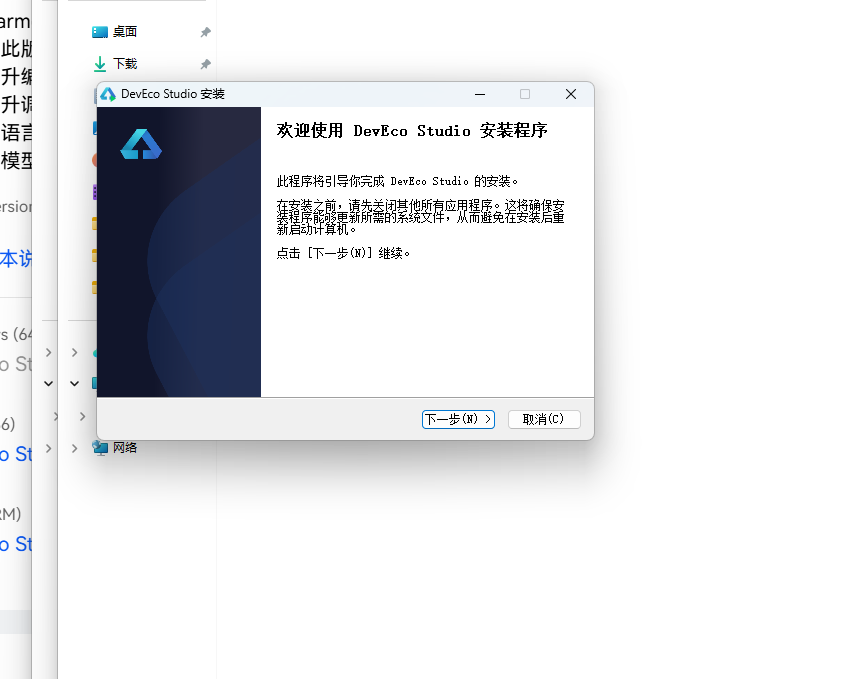
DevEco Studio 是 HarmonyOS 应用开发的官方 IDE。下载安装包后双击运行,进入安装欢迎界面,点击「下一步」继续。
14.2 选择安装路径
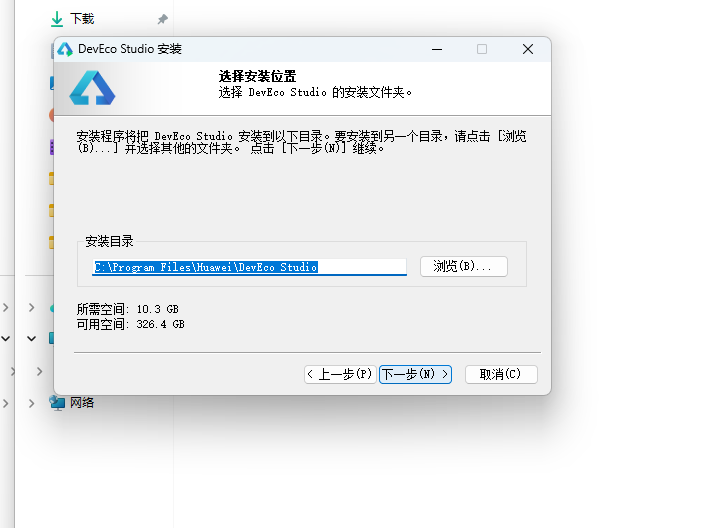
选择目标安装目录,建议安装到非系统盘,确认所需空间后点击「下一步」。
14.3 配置安装选项
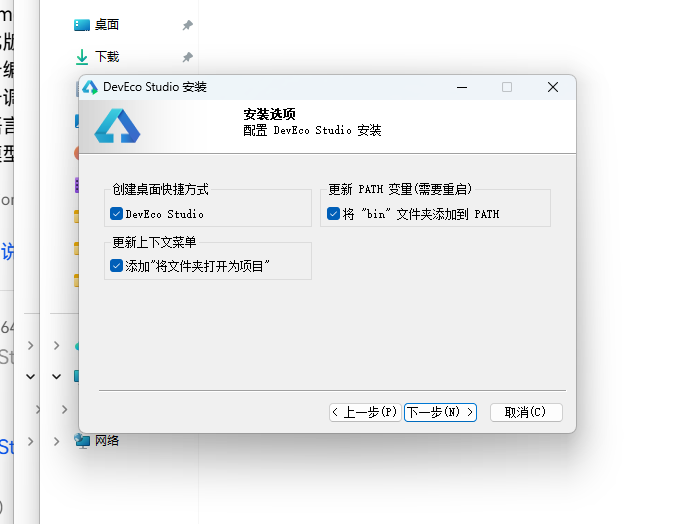
设置环境变量,勾选创建桌面快捷方式、将 bin 文件夹添加到 PATH、添加上下文菜单,但是需要重启一下电脑使环境变量生效。
14.4 选择项目模板
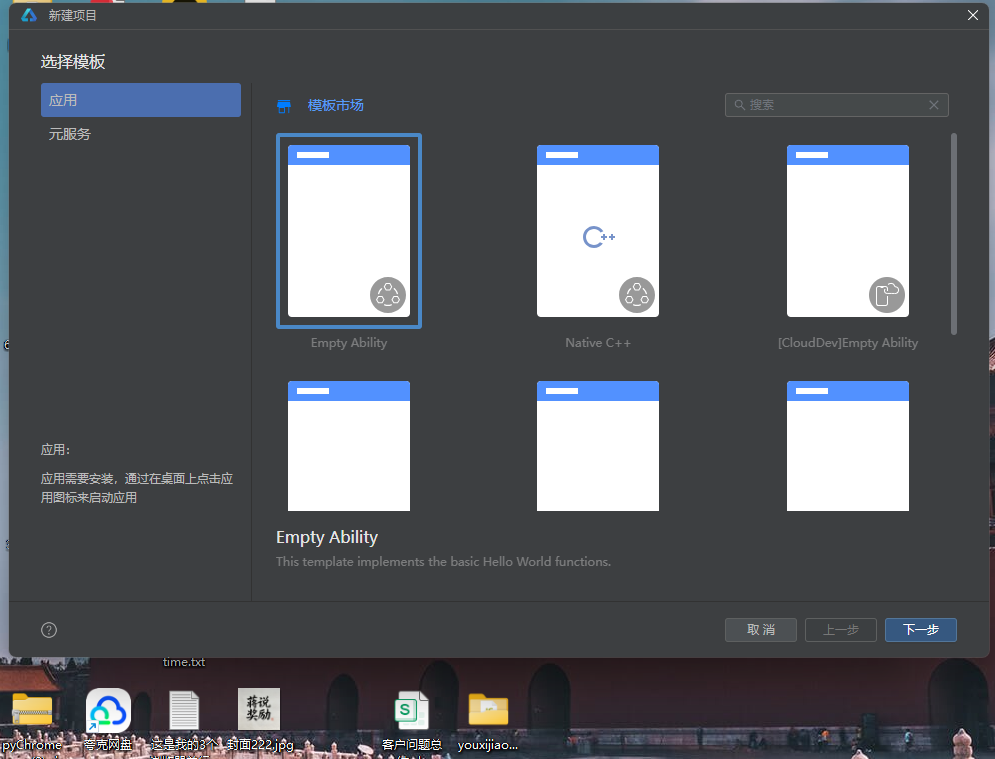
新建一个空白模板,在模板市场中选择 Empty Ability。
14.5 配置项目信息
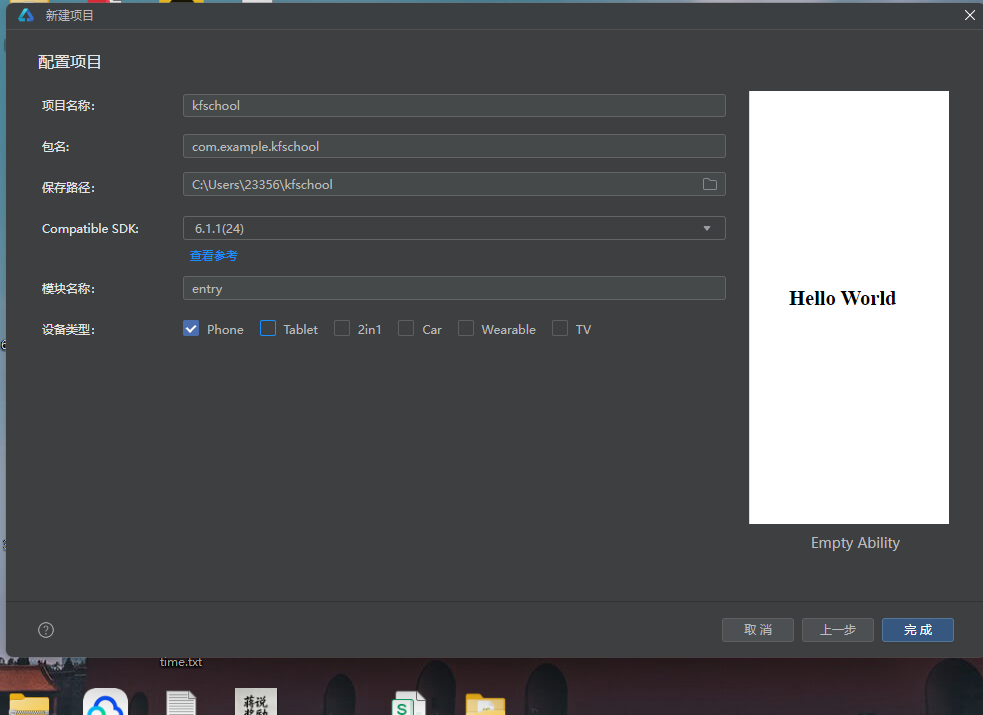
设置 API 为 24 的模板项目,项目名称 kfschool,Compatible SDK 6.1.1(24),设备类型勾选 Phone,点击完成后初始化项目,自动下载相关依赖。
十五、总结
通过对这款扎染坊植物染非遗手作平台的深度拆解,我们可以看到,一个优秀的移动端应用远不止是功能的堆砌,它更是架构设计、数据建模、视觉系统、交互逻辑、动效设计、组件化工程等多维度能力的综合体现。
在架构层面,该应用采用了多组件架构设计——将整个应用拆分为 11 个独立组件(1入口+1标签+5内容+4弹窗),每个组件独立封装、职责单一,通过 @ObjectLink 共享聚合数据、通过回调函数实现父子通信、通过 @Prop 传递弹窗参数,组件数量多、架构复杂。与单组件内@Builder构建所有页面的架构不同,本应用将内容页和弹窗都抽离为独立 @Component 子组件,入口组件 TieDyeApp 只负责状态管理和组件调度,实现了真正的高内聚低耦合。这种多组件架构设计虽然增加了组件间通信的复杂度(@ObjectLink/@Prop/回调函数),但大幅提升了代码的可维护性和可复用性,是中大型 ArkUI 应用的标准架构实践,也是本应用工程化设计的最大亮点。
在数据层面,应用独创了**@Observed 聚合数据类**设计——TieDyeData 一个类包含 tiedyes/cloths/dyes/orders/reviews 五个数组,每个数组 12 条数据,用对象字面量初始化(非 new 构造函数),@Observed 装饰整个类,配合 @ObjectLink 在子组件间共享引用,实现"一个数据对象贯穿所有页面"的聚合数据模式。这种设计将所有业务数据集中管理,子组件通过 @ObjectLink data: TieDyeData 接收共享引用,修改数据时所有引用该数据的子组件自动响应式刷新,避免了每个页面独立 @State 数据数组的重复定义,是 ArkUI 跨组件数据共享的高级实践。应用还定义了 5 个颜色分级函数(getKindColor染法4类/getClothColor吸染度3级/getTieDyeColor价格4级/getOrderColor金额4级/getReviewTagColor标签5类),将颜色映射逻辑从 UI 层抽离,每个函数根据不同维度返回对应颜色值,实现"数据即配色"的动态着色模式。9 个元数据接口实现数据结构规范化,4 个统计常量数组将统计数据与业务数据分离,数据规模达 83 条(60业务+23统计),完整呈现植物染扎染手作平台的数据生态。
在视觉层面,本应用采用"靛蓝染白非遗主题"设计——bg #EEF2F6 浅灰蓝底,cardBg #FFFFFF 白,cardAlt #E3EAF2 浅灰蓝(奇偶行交替用),textPrimary #24324A 深蓝灰(植物染深色文字,非纯黑,更有沉稳感和文化感),primary #3E5C8A 靛蓝主色,primaryDark #27405F 深靛蓝(头部背景,营造浓郁靛蓝染坊氛围),accent #7A9BB8 灰蓝辅助色,accentLight #B4C8DC 浅灰蓝(头部副标题),indigoBlue #3E5C8A 靛蓝(装饰点用),dyeWhite #F4F0E4 染白米白(装饰点边框/背景用,模拟染布米白底色)。主色体系采用"靛蓝+染白+灰蓝"三色组合,三色各司其职形成"以靛蓝定主、以染白定饰、以灰蓝定辅"的植物染语义着色体系。本应用最大的视觉特色是染白 dyeWhite #F4F0E4——米白色,用于装饰点边框和背景,模拟染布的米白底色,与靛蓝 primary #3E5C8A 形成"靛蓝染白"的经典扎染配色。头部12点装饰纹中靛蓝圆带2px染白边框模拟扎染的靛蓝圆点纹样,染白圆模拟扎染的留白圆点,扎染陈列和布料库图标装饰区的靛蓝圆带染白边框+染白圆,都是"靛蓝染白"扎染纹样的模拟,是本应用视觉设计的灵魂。dyeWhite 米白色不是纯白,而是略带暖调的米白 #F4F0E4,模拟传统手工染布的米白底色,更有非遗手作的温度感。本应用另一个色彩处理特色是十六进制透明度拼接技巧——大量使用 color + 十六进制透明度后缀('14’10%/'40’25%/'55’33%/'66’40%/'80’50%/'0D’5%/'33’20%/'2E’18%)实现半透明背景和边框,无需额外定义半透明颜色常量,是 ArkUI 颜色处理的高级实用技巧。统一的色彩系统是整个应用的视觉基石,靛蓝染白非遗主题配合十六进制透明度拼接和染白米白装饰与5个颜色分级函数与多维度动态着色,营造出既沉稳靛蓝又手作温暖的植物染扎染氛围。
在交互层面,应用通过四个独立弹窗子组件实现了完整的增删改查交互闭环:AddTieDyeModal 定制扎染(品名/染法/预算三行展示,确认定制 primary 靛蓝底)、EditTieDyeOrderModal 修改订单(客户/数量800→900/金额16.2万,保存修改)、DeleteClothModal 撤下布料(@Prop title 传入布名,确认撤下 danger 红底)、DetailDyeModal 染液详情(@Prop name 传入染液名,大图标+蓼蓝发酵七日描述+染材+匠人评级,知道了按钮)。四个弹窗各自独立组件,通过 @Prop 接收参数(DeleteClothModal的title、DetailDyeModal的name),通过 onClose 回调关闭,遮罩用 #66000000(40%黑)硬编码。扎染页➕点击触发 AddTieDyeModal,布料页🗑️点击触发 DeleteClothModal(delClothName 记录布名),染液页👁️点击触发 DetailDyeModal(detailDyeName 记录染液名),订单页✏️点击触发 EditTieDyeOrderModal,形成了完整的"定制扎染→撤下布料→查看染液→修改订单"交互闭环。头部🌀旋转动画(点击旋转90度模拟扎染漩涡)和💧translate位移动画(点击水滴从左下(-8,0)飘向右上(14,-8)模拟水滴入缸)是本应用最具创意的交互设计,点击图标触发显式动画,增加了应用的趣味性和互动感,也体现了 ArkUI 显式动画(animation属性配合状态变化,支持rotate/translate/scale多种变换)的使用。本周销量柱状图柱子高度直接用数值(最大70px,非比例映射),周末≥63用 primary 靛蓝高亮,横向进度条用 layoutWeight 动态分配(非固定宽度非百分比,是 ArkUI 特有的弹性布局进度条实现),染法构成进度条总份数20非100(灵活适配不同基数),吸染度进度条内嵌在列表行中,星级用 ‘⭐’.repeat(r.score) 字符串重复生成(非循环非组件,纯字符串乘法),奇偶行交替条纹(i%2=0白/i%2=1浅灰蓝),tabBar激活态用 t.color 文字+背景 t.color+'14’圆角14+border 1px t.color(5个Tab各自颜色激活),顶部3px primary 靛蓝条,都是本应用交互设计的精细之处。5个内容子组件通过回调函数(onAdd/onDel/onDetail/onEdit)与入口组件通信触发弹窗,4个弹窗子组件通过 onClose 回调关闭,@Prop 实现弹窗动态参数,形成了完整的多组件交互通信体系。
标签: HarmonyOS · API 24 · ArkTS · 华为 · 植物染扎染 · 非遗手作 · 多组件架构 · @ObjectLink · 靛蓝染白 · 移动端开发

讨论HarmonyOS开发技术,专注于API与组件、DevEco Studio、测试、元服务和应用上架分发等。
更多推荐
 9
9 0
0- 0


 已为社区贡献14条内容

所有评论(0)