基于 HarmonyOS API 24 的糖果多彩童趣乐园票务应用全链路解析:HarmonyOS 6.1.1 ArkTS API 24 声明式 UI 架构实战
#> 在 HarmonyOS 6.1.1 的开发框架中,基于 HarmonyOS ArkTS API 24 的声明式 UI 范式为垂直行业应用提供了强大的组件化开发能力。本文围绕一个完整的乐园直通车票务平台(ParkExpress),从色彩系统设计、八大数据模型接口、十组静态数据源、七 Tab 导航架构、棒棒糖圆点自定义 Tab 栏、五个模态弹窗的 Overlay 遮罩模式、柱状图与进度条可视化、不可变状态更新策略等维度,逐段拆解全部 2600 余行代码,全面展示 HarmonyOS ArkTS API 24 在复杂业务场景下的工程实践范式。
一、色彩系统设计:ColorPalette 接口与 COLORS 常量
1.1 色彩接口定义
interface ColorPalette {
  primary: string
  primaryDeep: string
  accent: string
  accentLight: string
  candyOrange: string
  candyBlue: string
  candyGreen: string
  candyPink: string
  gold: string
  bg: string
  card: string
  white: string
  textPrimary: string
  textSecondary: string
  danger: string
  success: string
}
ColorPalette 接口定义了整个应用使用的 16 个色彩字段,是 HarmonyOS ArkTS API 24 中 interface 关键字的典型应用。这里将所有颜色属性集中在一个接口中,而非分散在各组件内部,实现了设计令牌(Design Token)的统一管理。接口中包含三大色系:主色系(primary、primaryDeep、accent、accentLight)定义了紫色-粉色渐变基调;糖果色系(candyOrange、candyBlue、candyGreen、candyPink、gold)用于 Tab 圆点、标签胶囊等点缀元素的彩色轮换;功能色系(danger、success)用于状态提示。此外还有文本色(textPrimary、textSecondary)和背景色(bg、card、white)。
这种将色彩抽象为接口的设计模式在声明式 UI 中有显著优势——当需要调整整体配色方案时,只需修改 COLORS 常量的值,所有引用 COLORS.xxx 的组件会自动应用新配色,无需逐个修改组件代码。同时,接口的存在使色彩字段具有类型安全保证,编译器会在引用不存在的字段时报错。
1.2 色彩常量实例化
const COLORS: ColorPalette = {
  primary: '#AB47BC',
  primaryDeep: '#6A1B9A',
  accent: '#EC407A',
  accentLight: '#FCE4EC',
  candyOrange: '#FF7043',
  candyBlue: '#29B6F6',
  candyGreen: '#66BB6A',
  candyPink: '#F06292',
  gold: '#FFCA28',
  bg: '#FDF6FB',
  card: '#FFFFFF',
  white: '#FFFFFF',
  textPrimary: '#4A148C',
  textSecondary: '#9C7BB5',
  danger: '#E53935',
  success: '#43A047'
}
COLORS 常量将 ColorPalette 接口实例化,赋予了具体的色值。主色调选用了紫色系(#AB47BC 主紫、#6A1B9A 深紫),搭配粉色系(#EC407A 强调粉、#FCE4EC 浅粉),营造出糖果童趣的视觉氛围。糖果色系选用了 Material Design 的中等饱和色值,每种颜色在视觉上都能清晰区分,用于 Tab 圆点的彩色轮换效果。文本主色 #4A148C 是深紫色,在白色卡片背景上具有良好的可读性;次级文本色 #9C7BB5 是浅紫色,用于辅助信息的展示。背景色 #FDF6FB 是极浅的粉色,为白色卡片提供了柔和的背景对比。
二、八大数据模型接口体系
2.1 乐园信息接口 ParkItem
interface ParkItem {
  id: number
  name: string
  city: string
  tag: string
  price: number
  rating: number
  distance: string
  emoji: string
  hot: string
  fast: string
}
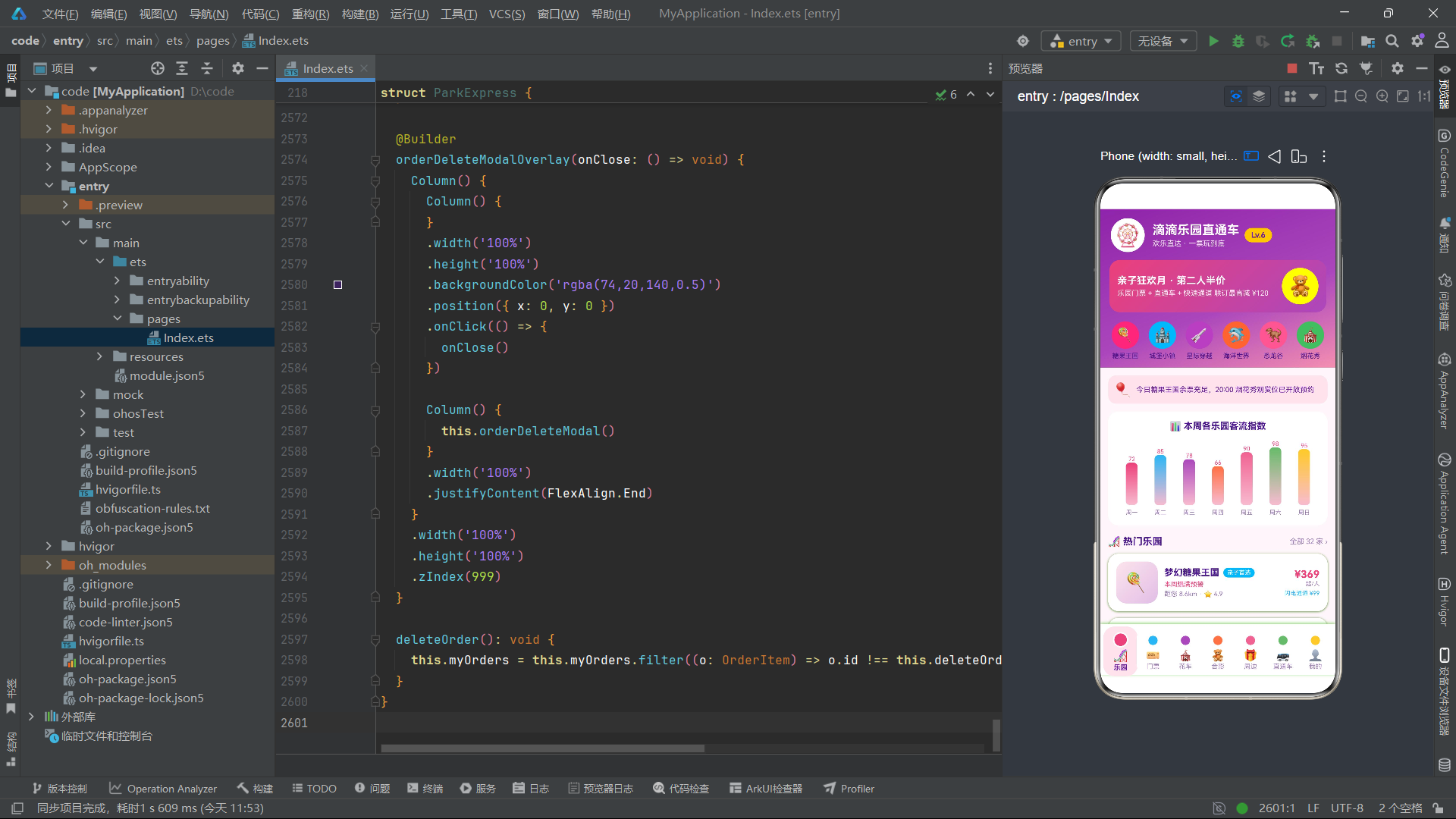
ParkItem 接口定义了乐园的基本信息结构,共 10 个字段。其中 emoji 字段存储 Emoji 字符(如 '🍭'、'🚀'),在 ArkTS 中通过 Text 组件直接渲染为图形,无需图片资源加载。hot 字段存储热门提示文本(如"本周爆满预警"),fast 字段存储闪电通道路径信息(如"闪电通道 ¥99"),这些业务字段直接作为 UI 展示内容使用。rating 使用 number 类型存储评分值(如 4.9),在渲染时通过 .toString() 转为字符串显示。distance 使用 string 类型而非 number,因为它包含"距您 8.6km"这样的完整文本格式。
2.2 门票信息与花车巡游接口
interface TicketItem {
  id: number
  name: string
  type: string
  price: number
  origin: number
  desc: string
  perk: string
  emoji: string
  save: string
}

interface ParadeItem {
  id: number
  time: string
  name: string
  zone: string
  duration: string
  emoji: string
  index: number
  spot: string
}
TicketItem 接口包含 9 个字段,其中 price 和 origin 是一对用于展示折扣效果的字段——price 为现价,origin 为原价,在 UI 上原价通过 decoration({ type: TextDecorationType.LineThrough }) 添加删除线。perk 字段存储附加权益描述(如"赠旋转木马快速券"),save 字段存储节省金额标签(如"立省 60")。
ParadeItem 接口定义花车巡游信息,共 8 个字段。index 字段是观赏指数(数值类型,如 98),在弹窗中用于展示推荐度。spot 字段存储最佳观赏位置描述(如"城堡正门台阶左侧第 3 排"),在 UI 上通过 maxLines(1) 和 textOverflow({ overflow: TextOverflow.Ellipsis }) 限制单行显示并省略溢出部分。
2.3 角色合影、纪念品与直通车接口
interface MeetItem {
  id: number
  name: string
  zone: string
  wait: number
  emoji: string
  period: string
  hot: string
}

interface SouvenirItem {
  id: number
  name: string
  price: number
  tag: string
  stock: string
  emoji: string
  sold: string
}

interface ShuttleLine {
  id: number
  from: string
  park: string
  duration: string
  price: number
  first: string
  emoji: string
  rest: string
}
MeetItem 的 wait 字段是角色合影等待时长(分钟),在 UI 上通过 Progress 组件渲染为线性进度条,并根据等待时长动态着色——m.wait > 25 时使用红色(COLORS.danger),否则使用绿色(COLORS.candyGreen),这是典型的条件色彩渲染模式。
SouvenirItem 的 stock 字段使用 string 类型存储库存状态文本(如"有货"、“仅剩 12 件”、“预售中”),在 UI 上通过 s.stock === '有货' 条件判断动态设置颜色标签。
ShuttleLine 的 rest 字段存储剩余座位信息(如"余 14 座"),在 UI 上通过 l.rest === '余 4 座' || l.rest === '余 6 座' 条件判断——座位紧张时显示红色,充足时显示绿色。
2.4 订单与出行人接口
interface OrderItem {
  id: number
  park: string
  date: string
  ticket: string
  count: number
  total: number
  status: string
  emoji: string
}

interface TravelerItem {
  id: number
  name: string
  phone: string
  idcard: string
  height: string
}
OrderItem 接口的 status 字段使用 string 类型存储订单状态(“待出行”、“已完成”、“已退款”),在 UI 上通过嵌套三元运算符映射颜色——待出行为橙色、已退款为红色、已完成为绿色。TravelerItem 接口的 height 字段存储身高文本(如"168cm"、“122cm”),在 UI 上通过 t.height === '122cm' 条件判断决定显示儿童图标还是成人图标,以及是否标注"享儿童票"优惠提示。身份证号 idcard 字段存储脱敏后的文本(如"310***********0021"),体现了隐私保护意识。
上图展示了从接口定义到静态数据再到动态状态和 Tab 页面渲染的完整数据流路径。
三、十组静态数据源体系
3.1 乐园与门票数据
const PARKS: ParkItem[] = [
  { id: 1, name: '梦幻糖果王国', city: '上海', tag: '亲子首选', price: 369,
    rating: 4.9, distance: '距您 8.6km', emoji: '🍭', hot: '本周爆满预警', fast: '闪电通道 ¥99' },
  { id: 2, name: '星际穿越乐园', city: '上海', tag: '科技沉浸', price: 428,
    rating: 4.8, distance: '距您 12.4km', emoji: '🚀', hot: '周末预约满', fast: '闪电通道 ¥129' },
  // ...共10条
]
PARKS 数组包含 10 条乐园数据,每条通过对象字面量直接赋值(而非构造函数),这是 ArkTS 中定义静态数据的简洁方式。10 个乐园覆盖了不同主题(糖果、星际、海洋、恐龙、童话、运动、萌宠、影视、机器人、摩天轮),每个配有独特的 Emoji 图标、标签、热门提示和闪电通道路径信息。在 parkTab 中通过 ForEach(PARKS, (p: ParkItem) => { ... }) 遍历渲染为卡片列表。
3.2 花车、合影与纪念品数据
const TICKETS: TicketItem[] = [
  { id: 1, name: '糖果王国一日票', type: '成人票', price: 369, origin: 429,
    desc: '全场 32 个项目无限畅玩', perk: '赠旋转木马快速券', emoji: '🎟️', save: '立省 60' },
  // ...共10条
]

const PARADES: ParadeItem[] = [
  { id: 1, time: '10:30', name: '糖果花车大巡游', zone: '中央大道',
    duration: '25 分钟', emoji: '🍬', index: 98, spot: '城堡正门台阶左侧第 3 排' },
  // ...共8条
]

const MEETS: MeetItem[] = [
  { id: 1, name: '棒棒糖公主', zone: '糖果城堡', wait: 25,
    emoji: '🍭', period: '10:00-18:00', hot: '合影榜 No.1' },
  // ...共10条
]

const SOUVENIRS: SouvenirItem[] = [
  { id: 1, name: '城堡星光辉光头箍', price: 68, tag: '夜场必备',
    stock: '有货', emoji: '👑', sold: '已售 2.3 万' },
  // ...共10条
]
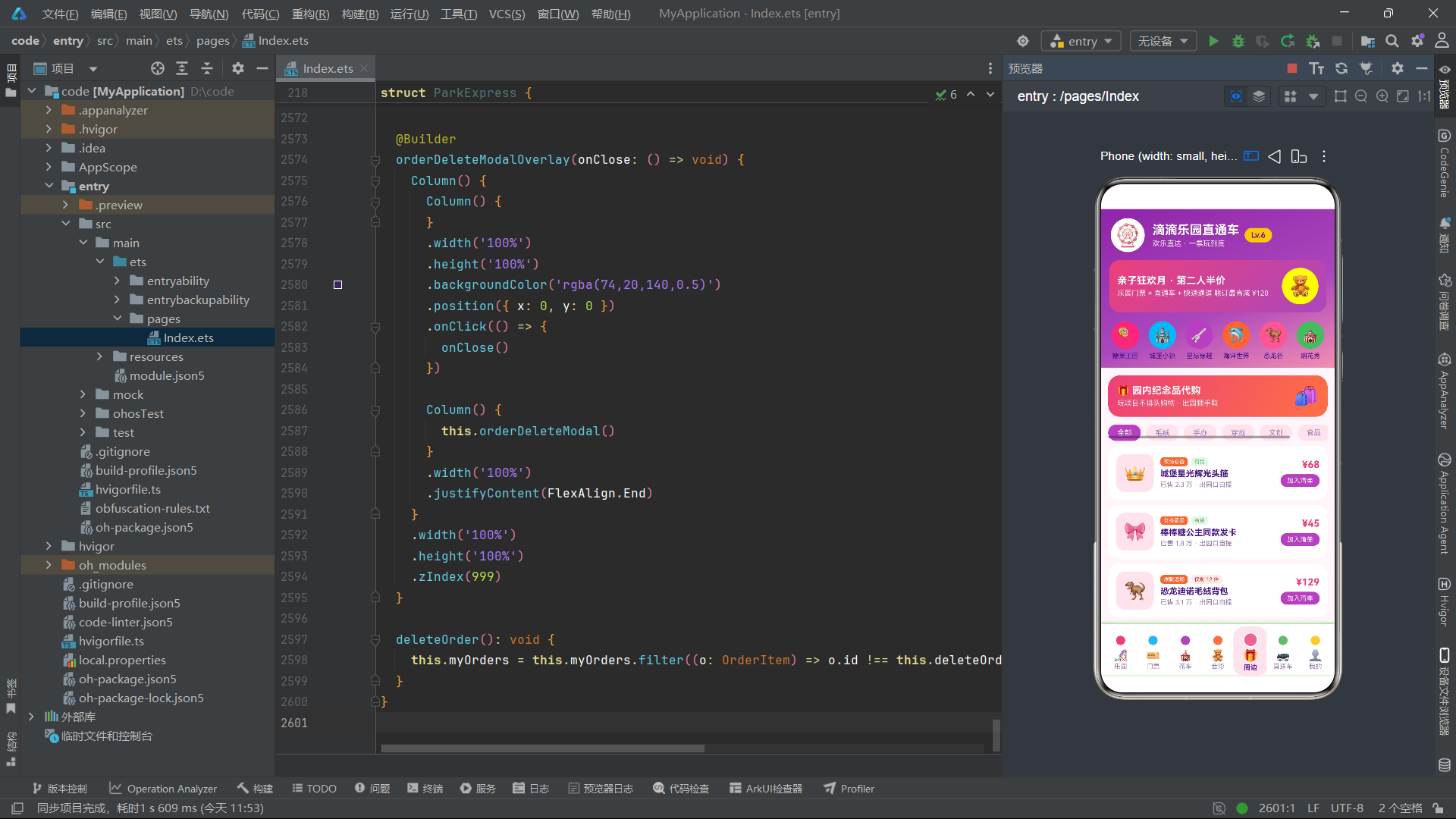
四组静态数据分别包含 10 条门票、8 条花车、10 条合影角色和 10 条纪念品。花车数据按时间顺序排列(从 10:30 到 20:00),在 paradeTab 中渲染为时间线列表。合影数据中的 wait 字段在 8 到 30 之间取值,通过 Progress 组件可视化展示等待时长。纪念品数据的 stock 字段有"有货"、“仅剩 12 件”、“仅剩 5 件”、"预售中"四种状态,在 UI 上通过条件判断实现差异化色彩展示。
3.3 直通车与图表数据
const SHUTTLE_LINES: ShuttleLine[] = [
  { id: 1, from: '人民广场', park: '梦幻糖果王国', duration: '约 40 分钟',
    price: 25, first: '07:30', emoji: '🚌', rest: '余 14 座' },
  // ...共10条
]

const DEPART_TIMES: string[][] = [
  ['07:30', '08:10', '08:50', '09:30', '10:10'],
  ['07:00', '07:40', '08:20', '09:00', '09:40'],
  // ...共5行5列
]

const WEEK_CROWD: number[] = [72, 85, 78, 66, 90, 98, 95]
const MONTH_PRICE: number[] = [369, 399, 389, 409, 429, 449, 429, 409, 389, 399, 419, 469]
const RIDE_WAIT: number[] = [45, 32, 58, 25, 40, 68, 22, 50, 15, 35]
SHUTTLE_LINES 包含 10 条直通车班线,覆盖上海多个出发地到各乐园的接驳路线。DEPART_TIMES 是一个二维字符串数组(5 行 5 列),在 shuttleTab 中通过嵌套 ForEach 渲染为时刻表网格——外层遍历行,内层遍历列,每个单元格展示一个发车时间。
三组数值数组 WEEK_CROWD、MONTH_PRICE、RIDE_WAIT 分别服务于不同维度的柱状图渲染。WEEK_CROWD(7 个值,周一到周日客流指数)在 parkTab 中渲染为 7 根彩色柱状图;MONTH_PRICE(12 个值,全年各月票价)在 ticketTab 中渲染为 12 根渐变柱状图;RIDE_WAIT(10 个值,热门项目等待时长)在 meetTab 中渲染为 10 根橙色柱状图。
四、入口组件 ParkExpress 状态管理
4.1 @Entry 与 @Component 声明
@Entry
@Component
struct ParkExpress {
  @State currentTab: number = 0
  @State showTicketModal: boolean = false
  @State showParadeModal: boolean = false
  @State showSouvenirModal: boolean = false
  @State showTravelerModal: boolean = false
  @State showOrderDeleteModal: boolean = false
  @State selectedTicket: TicketItem = TICKETS[0]
  @State selectedParade: ParadeItem = PARADES[0]
  @State selectedSouvenir: SouvenirItem = SOUVENIRS[0]
  @State deleteOrderId: number = 0
  @State ticketDate: string = '今天'
  @State ticketCount: number = 2
  @State souvenirCount: number = 1
  @State ticketKind: string = '成人票'
  @State remindTime: string = '提前 30 分钟'
  @State myOrders: OrderItem[] = [
    { id: 1, park: '梦幻糖果王国', date: '08-24 周一', ticket: '亲子套票',
      count: 3, total: 968, status: '待出行', emoji: '🍭' },
    // ...共4条
  ]
  @State travelers: TravelerItem[] = [
    { id: 1, name: '王糖糖', phone: '138****6688',
      idcard: '310***********0021', height: '168cm' },
    { id: 2, name: '小糖果', phone: '139****1120',
      idcard: '310***********7745', height: '122cm' }
  ]
  @State souvenirBag: SouvenirItem[] = [
    { id: 1, name: '城堡星光辉光头箍', price: 68, tag: '夜场必备',
      stock: '有货', emoji: '👑', sold: '已售 2.3 万' },
    { id: 3, name: '恐龙迪诺毛绒背包', price: 129, tag: '爆款返场',
      stock: '仅剩 12 件', emoji: '🦖', sold: '已售 3.1 万' }
  ]
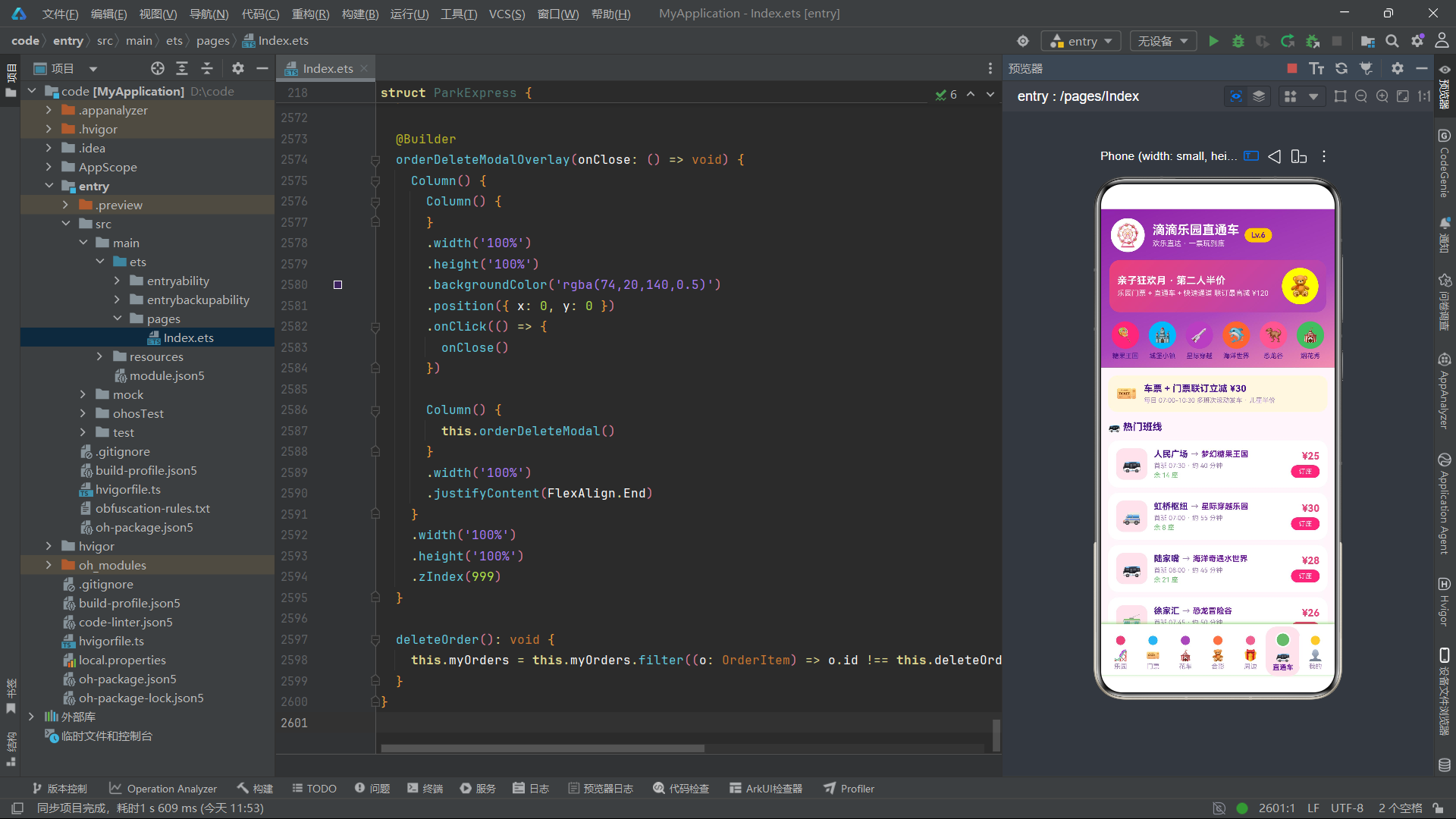
ParkExpress 组件声明了 20 个 @State 变量,分为五组:
Tab 导航状态(1个):currentTab 存储当前选中的 Tab 索引(0-6),初始值为 0(乐园 Tab)。
弹窗显示状态(5个):showTicketModal 到 showOrderDeleteModal 分别控制五个模态弹窗的显示隐藏。
选中数据状态(4个):selectedTicket、selectedParade、selectedSouvenir 初始值分别为对应静态数组的第一条记录,deleteOrderId 记录待删除订单的 ID。这些 @State 变量的类型是接口类型(如 TicketItem),当其属性变化时自动触发关联视图更新。
表单状态(4个):ticketDate、ticketCount、souvenirCount、ticketKind、remindTime 存储弹窗表单中的用户选择值。
动态数据状态(3个):myOrders(4 条初始订单)、travelers(2 条初始出行人)、souvenirBag(2 条初始代购清单)是应用运行期间可变的数据集合,支持增删改操作。
4.2 私有属性与生命周期
  private tabNames: string[] = ['乐园', '门票', '花车', '合影', '周边', '直通车', '我的']
  private tabIcons: string[] = ['🎢', '🎫', '🎪', '🧸', '🎁', '🚌', '👤']
  private tabDotColors: string[] = ['#EC407A', '#29B6F6', '#AB47BC', '#FF7043', '#F06292', '#66BB6A', '#FFCA28']
  private kingIcons: string[] = ['🍭', '🏰', '🚀', '🐬', '🦖', '🎪']
  private kingLabels: string[] = ['糖果王国', '城堡小镇', '星际穿越', '海洋世界', '恐龙谷', '烟花秀']

  aboutToAppear(): void {
    this.selectedSouvenir = SOUVENIRS[0]
    this.selectedParade = PARADES[0]
    this.selectedTicket = TICKETS[0]
  }
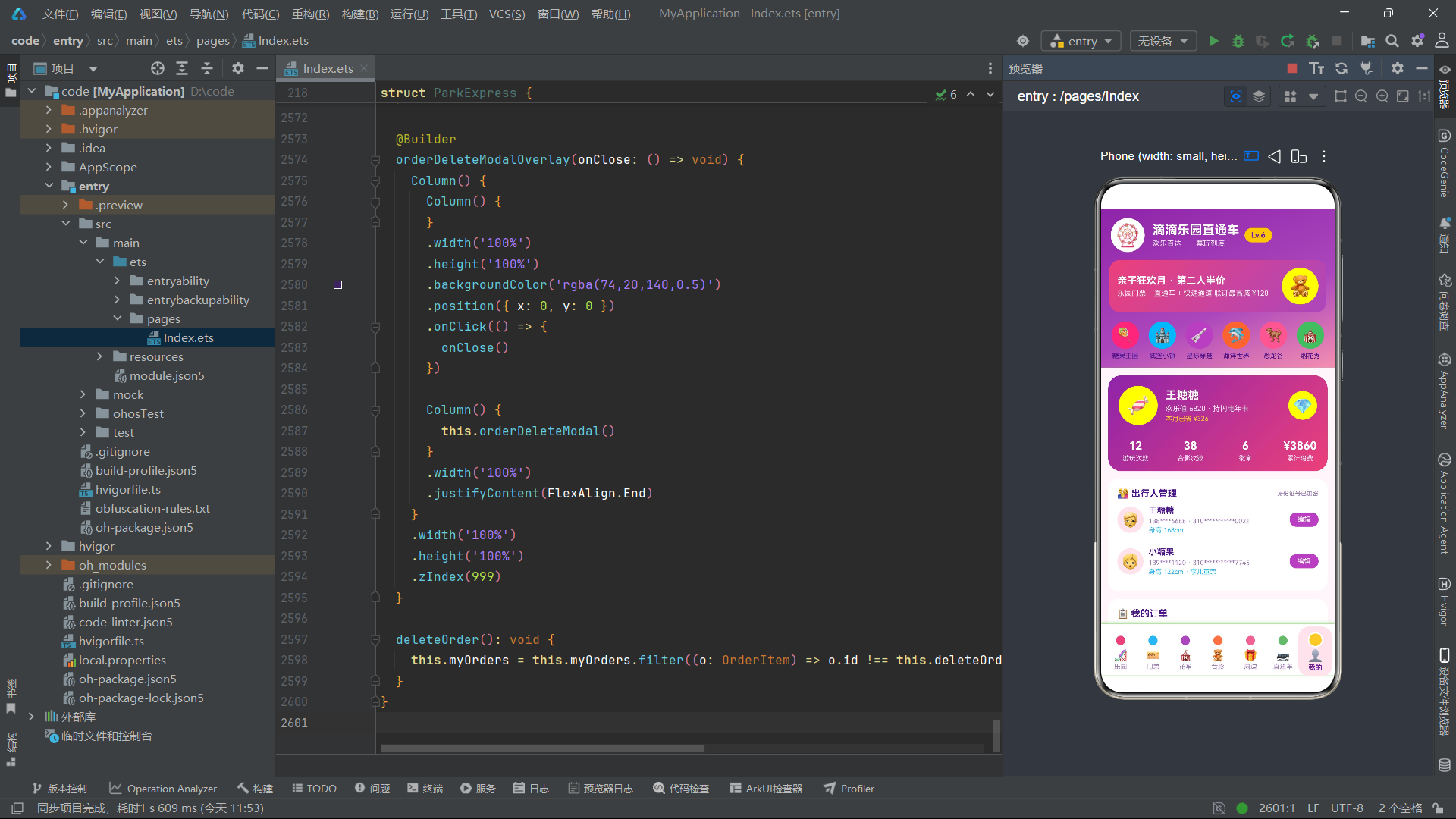
private 属性使用 tabNames、tabIcons、tabDotColors 三个并行数组定义了 7 个 Tab 的名称、图标和圆点颜色。使用三个并行数组而非一个对象数组的设计选择在 ArkTS 中是合理的——因为 ForEach 在渲染时需要分别访问这三个数组,使用并行数组可以避免在每次渲染时创建临时对象。
tabDotColors 数组定义了 7 种不同的彩色圆点颜色,每种对应一个 Tab,实现了"棒棒糖圆点"的多彩视觉效果。kingIcons 和 kingLabels 定义了金刚区(快捷入口区)的 6 个图标和标签。
aboutToAppear() 是 HarmonyOS ArkTS API 24 的组件生命周期方法,在组件创建后、build() 执行前调用。这里用于初始化三个 selected 状态变量,确保它们在首次渲染时已有有效值。虽然 @State 变量在声明时已有初始值,但 aboutToAppear 中的重新赋值可以确保数据一致性——例如当静态数据源在运行时被修改后,aboutToAppear 中的初始化逻辑可以保证 selected 变量引用最新的数组首元素。
五、build 方法与 Stack 布局架构
5.1 头部渐变区域
  build() {
    Column() {
      Column() {
        Row() {
          Column() {
            Text('🎡').fontSize(34)
          }
          .width(52).height(52)
          .justifyContent(FlexAlign.Center)
          .backgroundColor(COLORS.white).borderRadius(26)

          Column() {
            Text('滴滴乐园直通车')
              .fontSize(19).fontWeight(FontWeight.Bold).fontColor(COLORS.white)
            Text('欢乐直达 · 一票玩到底')
              .fontSize(11).fontColor('#F3E5F5').margin({ top: 3 })
          }
          .alignItems(HorizontalAlign.Start).margin({ left: 12 })

          Column() {
            Text('Lv.6').fontSize(12).fontWeight(FontWeight.Bold)
              .fontColor(COLORS.primaryDeep)
          }
          .padding({ left: 10, right: 10, top: 4, bottom: 4 })
          .backgroundColor(COLORS.gold).borderRadius(12).margin({ left: 8 })
        }
        .width('100%').alignItems(VerticalAlign.Center)
        .padding({ left: 16, right: 16, top: 14 })
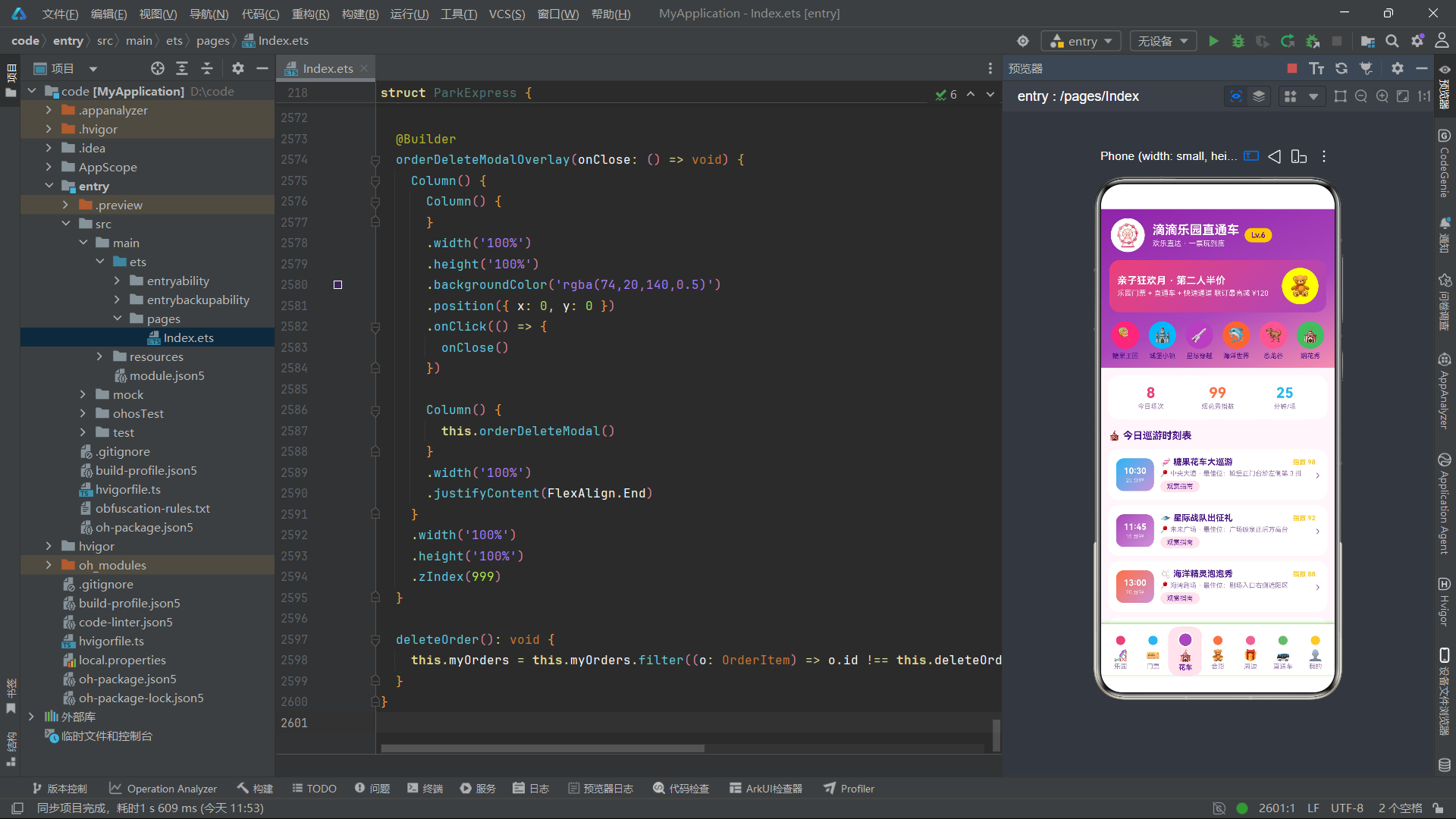
build() 方法的根容器是 Column,内部分为头部渐变区、内容滚动区、Tab 栏和弹窗层四个部分。头部区域第一行展示摩天轮图标(白色圆形容器内)、应用标题和会员等级标签(金色背景圆角胶囊)。Text('🎡').fontSize(34) 直接渲染 Emoji 字符为大尺寸图标,配合白色圆形背景容器(width(52).height(52).borderRadius(26))形成圆形头像效果。
会员等级 Lv.6 使用金色背景(COLORS.gold = #FFCA28)和深紫色文字(COLORS.primaryDeep = #6A1B9A),在视觉上形成金色勋章效果。
5.2 大促横幅与金刚区
        Column() {
          Row() {
            Column() {
              Text('亲子狂欢月 · 第二人半价')
                .fontSize(15).fontWeight(FontWeight.Bold).fontColor(COLORS.white)
              Text('乐园门票 + 直通车 + 快速通道 联订最高减 ¥120')
                .fontSize(11).fontColor('#FFEBEE').margin({ top: 4 })
            }
            .alignItems(HorizontalAlign.Start).layoutWeight(1)

            Column() {
              Text('🧸').fontSize(30)
            }
            .width(56).height(56).justifyContent(FlexAlign.Center)
            .backgroundColor('#FFFFFF33').borderRadius(28)
          }
          .alignItems(VerticalAlign.Center).padding(12)
          .linearGradient({ angle: 135, colors: [['#EC407A', 0], ['#AB47BC', 1]] })
          .borderRadius(16).margin({ top: 12, left: 14, right: 14 })
        }
大促横幅使用 linearGradient 实现 135 度的粉色到紫色渐变背景。右侧的玩具熊图标使用半透明白色背景(#FFFFFF33,最后两位 33 为透明度),营造悬浮效果。#FFFFFF33 是 8 位十六进制颜色格式,前 6 位是 RGB 值,后 2 位是 Alpha 透明度。
5.3 金刚区快捷入口
        Row() {
          ForEach(this.kingIcons, (icon: string, idx: number) => {
            Column() {
              Column() {
                Text(icon).fontSize(22)
              }
              .width(42).height(42).justifyContent(FlexAlign.Center)
              .backgroundColor(this.tabDotColors[idx]).borderRadius(21)

              Text(this.kingLabels[idx])
                .fontSize(10).fontColor(COLORS.textPrimary).margin({ top: 5 })
            }
            .layoutWeight(1)
            .onClick(() => {
              this.currentTab = idx === 5 ? 2 : (idx >= 4 ? 4 : idx)
            })
          }, (icon: string, idx: number) => icon + idx.toString())
        }
金刚区通过 ForEach(this.kingIcons, ...) 渲染 6 个快捷入口,每个入口的图标背景色使用 this.tabDotColors[idx] 从彩色数组中取值,实现了 6 种不同颜色的圆形图标按钮。点击金刚区入口时通过 this.currentTab = idx === 5 ? 2 : (idx >= 4 ? 4 : idx) 进行 Tab 跳转映射——第 5 个入口(烟花秀)跳转到花车 Tab(索引 2),第 4 个及以上的入口跳转到周边 Tab(索引 4),其余直接跳转到对应索引的 Tab。
5.4 内容区与 Tab 条件渲染
      Scroll() {
        Column() {
          if (this.currentTab === 0) {
            this.parkTab()
          } else if (this.currentTab === 1) {
            this.ticketTab()
          } else if (this.currentTab === 2) {
            this.paradeTab()
          } else if (this.currentTab === 3) {
            this.meetTab()
          } else if (this.currentTab === 4) {
            this.souvenirTab()
          } else if (this.currentTab === 5) {
            this.shuttleTab()
          } else {
            this.mineTab()
          }
        }
        .width('100%').padding(12)
      }
      .scrollable(ScrollDirection.Vertical)
      .layoutWeight(1).backgroundColor(COLORS.bg)
内容区使用 Scroll 容器包裹,内部通过 if-else if-else 链根据 currentTab 的值调用对应的 @Builder 方法。Scroll 的 .layoutWeight(1) 使内容区占据头部和 Tab 栏之间的全部剩余空间。.scrollable(ScrollDirection.Vertical) 启用垂直滚动,当 Tab 页内容超出屏幕高度时用户可以上下滚动浏览。
5.5 Tab 栏与弹窗层挂载
      this.lollipopTabBar()

      if (this.showTicketModal) {
        this.ticketModalOverlay(() => { this.showTicketModal = false })
      }
      if (this.showParadeModal) {
        this.paradeModalOverlay(() => { this.showParadeModal = false })
      }
      if (this.showSouvenirModal) {
        this.souvenirModalOverlay(() => { this.showSouvenirModal = false })
      }
      if (this.showTravelerModal) {
        this.travelerModalOverlay(() => { this.showTravelerModal = false })
      }
      if (this.showOrderDeleteModal) {
        this.orderDeleteModalOverlay(() => { this.showOrderDeleteModal = false })
      }
    }
    .width('100%').height('100%').backgroundColor(COLORS.bg)
  }
Tab 栏通过 this.lollipopTabBar() 调用渲染在内容区下方。五个弹窗通过独立的 if 条件语句挂载在 Column 的末尾,每个弹窗调用对应的 xxxModalOverlay 构建器并传入一个关闭回调函数。这种"条件渲染 + 回调参数"的弹窗管理模式是 HarmonyOS ArkTS API 24 中实现模态弹窗的标准范式——弹窗显示时条件为 true,弹窗进入组件树;关闭时回调将对应 @State 布尔值设为 false,弹窗从组件树中移除。
六、棒棒糖圆点 Tab 栏:Circle 图形与缩放动画
  @Builder
  lollipopTabBar() {
    Row() {
      ForEach(this.tabNames, (name: string, idx: number) => {
        Column() {
          Stack() {
            Circle({ width: 14, height: 14 })
              .fill(this.tabDotColors[idx])
              .scale({
                x: this.currentTab === idx ? 1.5 : 1,
                y: this.currentTab === idx ? 1.5 : 1
              })
            if (this.currentTab === idx) {
              Circle({ width: 20, height: 20 })
                .fill('transparent')
                .stroke(COLORS.white)
                .strokeWidth(2)
            }
          }
          .width(24).height(24)

          Text(this.tabIcons[idx])
            .fontSize(17).margin({ top: 1 })

          Text(name)
            .fontSize(10)
            .fontWeight(this.currentTab === idx ? FontWeight.Bold : FontWeight.Normal)
            .fontColor(this.currentTab === idx ? COLORS.primaryDeep : COLORS.textSecondary)
            .margin({ top: 1 })
        }
        .layoutWeight(1)
        .padding({ top: 7, bottom: 7 })
        .backgroundColor(this.currentTab === idx ? COLORS.accentLight : COLORS.white)
        .borderRadius({ topLeft: 16, topRight: 16, bottomLeft: 16, bottomRight: 16 })
        .scale({
          x: this.currentTab === idx ? 1.06 : 1,
          y: this.currentTab === idx ? 1.06 : 1
        })
        .onClick(() => { this.currentTab = idx })
      }, (name: string, idx: number) => name + idx.toString() + this.currentTab.toString())
    }
    .width('100%')
    .alignItems(VerticalAlign.Center)
    .padding({ left: 6, right: 6, top: 6 })
    .backgroundColor(COLORS.white)
    .shadow({ radius: 12, color: '#AB47BC1A', offsetX: 0, offsetY: -3 })
  }
lollipopTabBar 是整个应用最具特色的 UI 组件——棒棒糖圆点 Tab 栏。每个 Tab 项顶部有一个彩色圆点,颜色从 tabDotColors 数组中按索引取值,7 种颜色依次为粉、蓝、紫、橙、粉、绿、金,形成糖果多彩的视觉效果。
圆点使用 Circle({ width: 14, height: 14 }) 图形组件渲染,通过 .fill(this.tabDotColors[idx]) 填充颜色。选中状态的圆点通过 .scale({ x: 1.5, y: 1.5 }) 放大 1.5 倍,并叠加一个透明填充、白色描边的 Circle({ width: 20, height: 20 }) 形成光环效果。Stack 容器将两个 Circle 层叠放置——底层是彩色实心圆,上层是选中时出现的白色描边环。
整个 Tab 项在选中时还通过 .scale({ x: 1.06, y: 1.06 }) 整体放大 6%,配合背景色从白色变为浅粉色(COLORS.accentLight)和文字加粗,形成多层级的选中态视觉反馈。
ForEach 的键生成函数 (name: string, idx: number) => name + idx.toString() + this.currentTab.toString() 将 Tab 名称、索引和当前选中索引拼接为唯一键——包含 this.currentTab.toString() 是为了让选中状态变化时 ForEach 能够正确识别需要更新的项,触发选中态样式的重新渲染。这是 ArkTS 中 ForEach 键值策略的高级用法——当依赖的外部状态变化时,通过将外部状态编入键值来触发列表项的更新。
七、Tab0 乐园页:客流柱状图与乐园列表
7.1 今日提示与客流柱状图
  @Builder
  parkTab() {
    Column() {
      Column() {
        Row() {
          Text('🎈').fontSize(20)
          Text('今日糖果王国余票充足,20:00 烟花秀观赏位已开放预约')
            .fontSize(11).fontColor(COLORS.primaryDeep)
            .layoutWeight(1).margin({ left: 8 })
        }
        .alignItems(VerticalAlign.Center).padding(10)
      }
      .width('100%').backgroundColor(COLORS.accentLight).borderRadius(12)

      Column() {
        Text('📊 本周各乐园客流指数')
          .fontSize(14).fontWeight(FontWeight.Bold).fontColor(COLORS.textPrimary)
        Row() {
          ForEach(WEEK_CROWD, (v: number, idx: number) => {
            Column() {
              Text(v.toString())
                .fontSize(9).fontColor(COLORS.accent)
              Column() {}
              .width(18).height(this.crowdBarHeight(v))
              .linearGradient({
                angle: 180,
                colors: [[this.tabDotColors[idx % 7], 0], ['#F8BBD0', 1]]
              })
              .borderRadius(6)
            }
            .layoutWeight(1).alignItems(HorizontalAlign.Center).margin({ top: 6 })
          }, (v: number, idx: number) => 'crowd' + idx.toString())
        }
        .alignItems(VerticalAlign.Bottom).margin({ top: 8 })
      }
      .width('100%').padding(14)
      .backgroundColor(COLORS.white).borderRadius(16).margin({ top: 12 })
客流柱状图使用 ForEach(WEEK_CROWD, ...) 遍历 7 个数值,每根柱子通过 Column().width(18).height(this.crowdBarHeight(v)) 渲染。柱高由 crowdBarHeight 方法计算——v / 100 * 90,将 0-100 的客流指数映射为 0-90 像素的柱高。每根柱子使用 linearGradient 实现 180 度(从上到下)的渐变填充,渐变起始色为 tabDotColors[idx % 7](彩色轮换),终止色为 #F8BBD0(浅粉色),形成彩色到浅粉的渐变效果。
7.2 乐园列表卡片
      ForEach(PARKS, (p: ParkItem) => {
        Column() {
          Row() {
            Column() {
              Text(p.emoji).fontSize(30)
            }
            .width(64).height(64).justifyContent(FlexAlign.Center)
            .linearGradient({ angle: 135, colors: [[COLORS.accentLight, 0], ['#E1BEE7', 1]] })
            .borderRadius(16)

            Column() {
              Row() {
                Text(p.name).fontSize(14).fontWeight(FontWeight.Bold).fontColor(COLORS.textPrimary)
                Text(p.tag).fontSize(9).fontColor(COLORS.white)
                  .padding({ left: 6, right: 6, top: 2, bottom: 2 })
                  .backgroundColor(this.tabDotColors[p.id % 7])
                  .borderRadius(8).margin({ left: 6 })
              }
              Text(p.hot).fontSize(10).fontColor(COLORS.accent).margin({ top: 4 })
              Text(p.distance + ' · ⭐ ' + p.rating.toString())
                .fontSize(10).fontColor(COLORS.textSecondary).margin({ top: 3 })
            }
            .alignItems(HorizontalAlign.Start).layoutWeight(1).margin({ left: 10 })

            Column() {
              Text('¥' + p.price.toString())
                .fontSize(16).fontWeight(FontWeight.Bold).fontColor(COLORS.accent)
              Text('起/人').fontSize(9).fontColor(COLORS.textSecondary)
              Text(p.fast).fontSize(9).fontColor(COLORS.candyBlue).margin({ top: 4 })
            }
            .alignItems(HorizontalAlign.End)
          }
          .alignItems(VerticalAlign.Center)
          .onClick(() => { this.currentTab = 1 })
        }
        .width('100%').padding(12)
        .backgroundColor(COLORS.white).borderRadius(16).margin({ bottom: 10 })
        .shadow({ radius: 8, color: '#EC407A14', offsetY: 2 })
      }, (p: ParkItem) => p.id.toString())
乐园列表通过 ForEach(PARKS, ...) 渲染 10 个乐园卡片。每个卡片的左侧是 64x64 的渐变色图标容器,使用 135 度的浅粉到紫色渐变背景。标签胶囊的背景色使用 this.tabDotColors[p.id % 7] 按乐园 ID 取模取色,实现了不同乐园的标签色彩差异化。点击乐园卡片时跳转到门票 Tab(this.currentTab = 1),引导用户查看门票信息。
7.3 辅助计算方法
  crowdBarHeight(v: number): number {
    return v / 100 * 90
  }
crowdBarHeight 方法将客流指数(0-100)映射为柱高(0-90 像素)。这种将数值映射为视觉尺寸的辅助方法在声明式 UI 中非常常见——它将数据维度(客流指数)与视图维度(像素高度)解耦,使柱状图的渲染逻辑清晰可维护。
八、Tab1 门票页:闪电通卡与票价走势
8.1 闪电通道卡渐变大卡
  @Builder
  ticketTab() {
    Column() {
      Column() {
        Row() {
          Column() {
            Text('⚡ 闪电通道卡')
              .fontSize(17).fontWeight(FontWeight.Bold).fontColor(COLORS.white)
            Text('20+ 热门项目免排队 · 平均省 3.5 小时')
              .fontSize(11).fontColor('#FFF3E0').margin({ top: 5 })
            Text('单日卡 ¥99 起 · 全年卡 ¥1288')
              .fontSize(11).fontColor(COLORS.gold).margin({ top: 5 })
          }
          .alignItems(HorizontalAlign.Start).layoutWeight(1)

          Column() {
            Text('🎟️').fontSize(34)
          }
          .width(64).height(64).justifyContent(FlexAlign.Center)
          .backgroundColor('#FFFFFF2E').borderRadius(32)
        }
        .alignItems(VerticalAlign.Center).padding(14)
        .linearGradient({ angle: 120, colors: [['#7B1FA2', 0], ['#EC407A', 1]] })
        .borderRadius(18)
      }
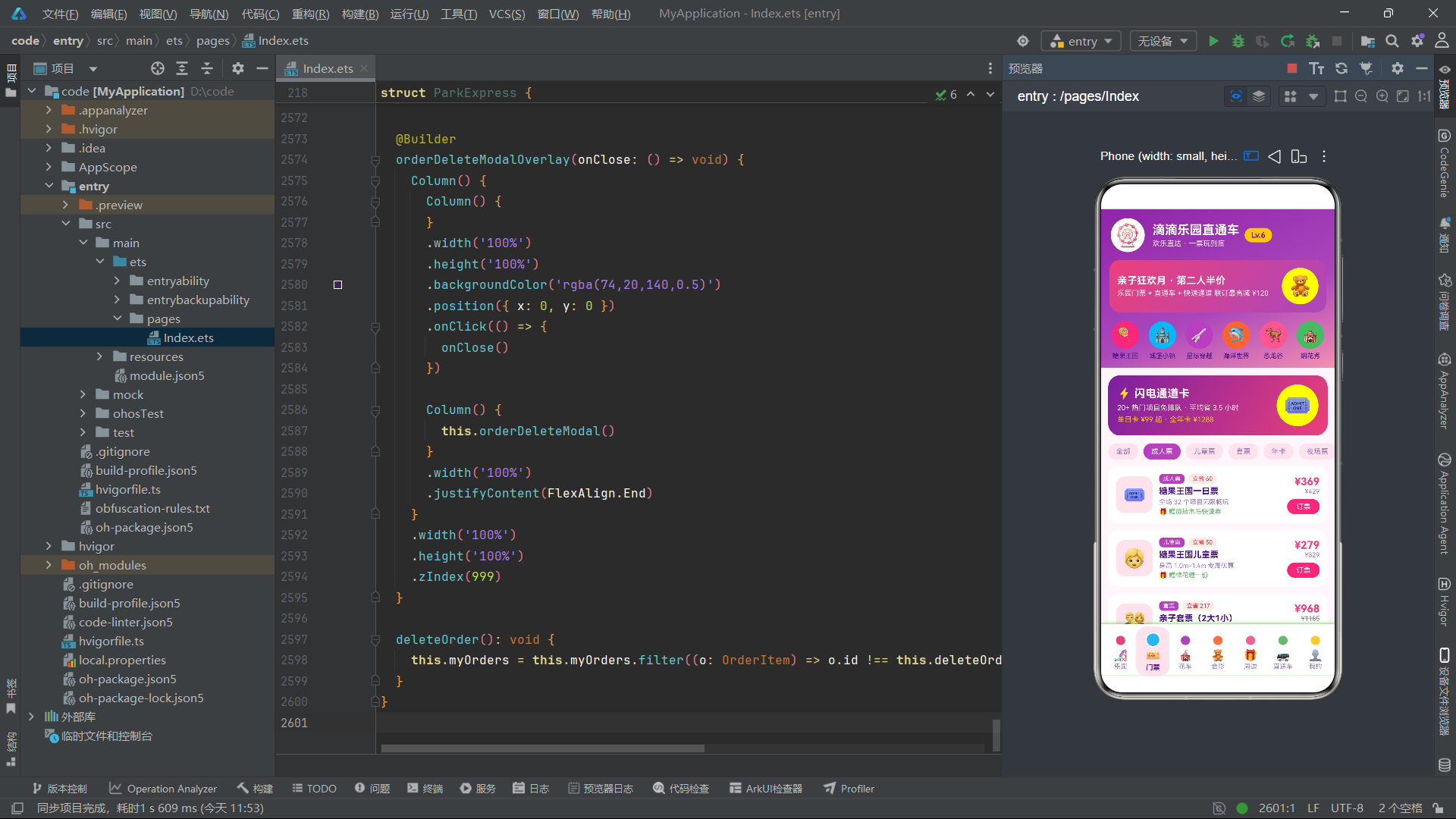
闪电通道卡使用 120 度的深紫到粉色渐变背景,右侧的门票图标使用半透明白色背景(#FFFFFF2E,透明度约 18%)。卡片的三行文案使用不同颜色:标题为白色、描述为浅橙色(#FFF3E0)、价格为金色(COLORS.gold),形成层次分明的信息展示。
8.2 票种筛选与门票列表
      Row() {
        ForEach(['全部', '成人票', '儿童票', '套票', '年卡', '夜场票'], (t: string) => {
          Text(t)
            .fontSize(11)
            .fontColor(this.ticketKind === t ? COLORS.white : COLORS.textSecondary)
            .padding({ left: 12, right: 12, top: 6, bottom: 6 })
            .backgroundColor(this.ticketKind === t ? COLORS.primary : COLORS.accentLight)
            .borderRadius(14).margin({ right: 8 })
            .onClick(() => { this.ticketKind = t })
        }, (t: string) => t + this.ticketKind)
      }
票种筛选通过 ForEach 渲染 6 个可点击的胶囊标签,选中态使用紫色背景白字,非选中态使用浅粉背景紫字。键生成函数 t + this.ticketKind 包含了当前选中值,确保选中态变化时所有标签都能正确更新。
门票列表通过 ForEach(TICKETS, ...) 渲染 10 个门票卡片,每个卡片展示票种标签、节省金额标签、票名、描述、权益信息和价格行。原价通过 .decoration({ type: TextDecorationType.LineThrough }) 添加删除线,与现价形成对比。点击门票卡片时设置 selectedTicket 并打开门票预订弹窗。
8.3 全年票价柱状图
      Column() {
        Text('📈 全年票价走势(成人票)')
          .fontSize(14).fontWeight(FontWeight.Bold).fontColor(COLORS.textPrimary)
        Row() {
          ForEach(MONTH_PRICE, (v: number, idx: number) => {
            Column() {
              Column() {}
              .width(12).height(this.priceBarHeight(v))
              .linearGradient({ angle: 180, colors: [[COLORS.accent, 0], [COLORS.candyPink, 1]] })
              .borderRadius(4)
            }
            .layoutWeight(1).alignItems(HorizontalAlign.Center)
            .justifyContent(FlexAlign.End).height(110)
          }, (v: number, idx: number) => 'price' + idx.toString())
        }
        .alignItems(VerticalAlign.Bottom).height(110).margin({ top: 10 })

        Row() {
          ForEach(['1月', '2月', ... '12月'], (m: string) => {
            Text(m).fontSize(8).fontColor(COLORS.textSecondary)
              .layoutWeight(1).textAlign(TextAlign.Center)
          }, (m: string) => m)
        }
        Text('💡 淡季 3 月 / 9 月出行,票价最低省 ¥100')
          .fontSize(10).fontColor(COLORS.candyBlue).margin({ top: 10 })
      }
全年票价走势图使用 ForEach(MONTH_PRICE, ...) 渲染 12 根柱子,每根柱子宽 12 像素,高度由 priceBarHeight 方法计算。柱子使用粉色到浅粉的 180 度渐变填充。底部对齐的 12 个月份标签和淡季提示文案,构成了完整的柱状图可视化。
  priceBarHeight(v: number): number {
    return (v - 340) / 140 * 100
  }
priceBarHeight 方法将票价值(340-480 范围)映射为柱高(0-100 像素),减去 340 的基准值再除以 140 的范围值,实现归一化映射。这种"减基准再归一化"的方法使得柱状图能够更好地展示数据间的相对差异,而非从 0 开始的绝对值。
九、Tab2 花车页:时间线列表与观赏指南
9.1 花车总览与巡游时刻表
  @Builder
  paradeTab() {
    Column() {
      Row() {
        Column() {
          Text('8').fontSize(22).fontWeight(FontWeight.Bold).fontColor(COLORS.accent)
          Text('今日场次').fontSize(10).fontColor(COLORS.textSecondary).margin({ top: 2 })
        }
        .layoutWeight(1).alignItems(HorizontalAlign.Center)
        // ...烟花秀指数 99、分钟/场 25
      }
      .width('100%').padding(14).backgroundColor(COLORS.white).borderRadius(16)

      ForEach(PARADES, (p: ParadeItem) => {
        Row() {
          Column() {
            Text(p.time).fontSize(13).fontWeight(FontWeight.Bold).fontColor(COLORS.white)
            Text(p.duration).fontSize(8).fontColor('#F3E5F5').margin({ top: 2 })
          }
          .width(58).height(50).justifyContent(FlexAlign.Center)
          .linearGradient({ angle: 135, colors: [[this.tabDotColors[p.id % 7], 0], ['#CE93D8', 1]] })
          .borderRadius(12)

          Column() {
            Row() {
              Text(p.emoji + ' ' + p.name)
                .fontSize(13).fontWeight(FontWeight.Bold).fontColor(COLORS.textPrimary).layoutWeight(1)
              Text('指数 ' + p.index.toString())
                .fontSize(10).fontColor(COLORS.gold).fontWeight(FontWeight.Bold)
            }
            Text('📍 ' + p.zone + ' · 最佳位:' + p.spot)
              .fontSize(10).fontColor(COLORS.textSecondary).margin({ top: 4 })
              .maxLines(1).textOverflow({ overflow: TextOverflow.Ellipsis })
          }
          .alignItems(HorizontalAlign.Start).layoutWeight(1).margin({ left: 10 })
        }
        .onClick(() => {
          this.selectedParade = p
          this.remindTime = '提前 30 分钟'
          this.showParadeModal = true
        })
      }, (p: ParadeItem) => p.id.toString())
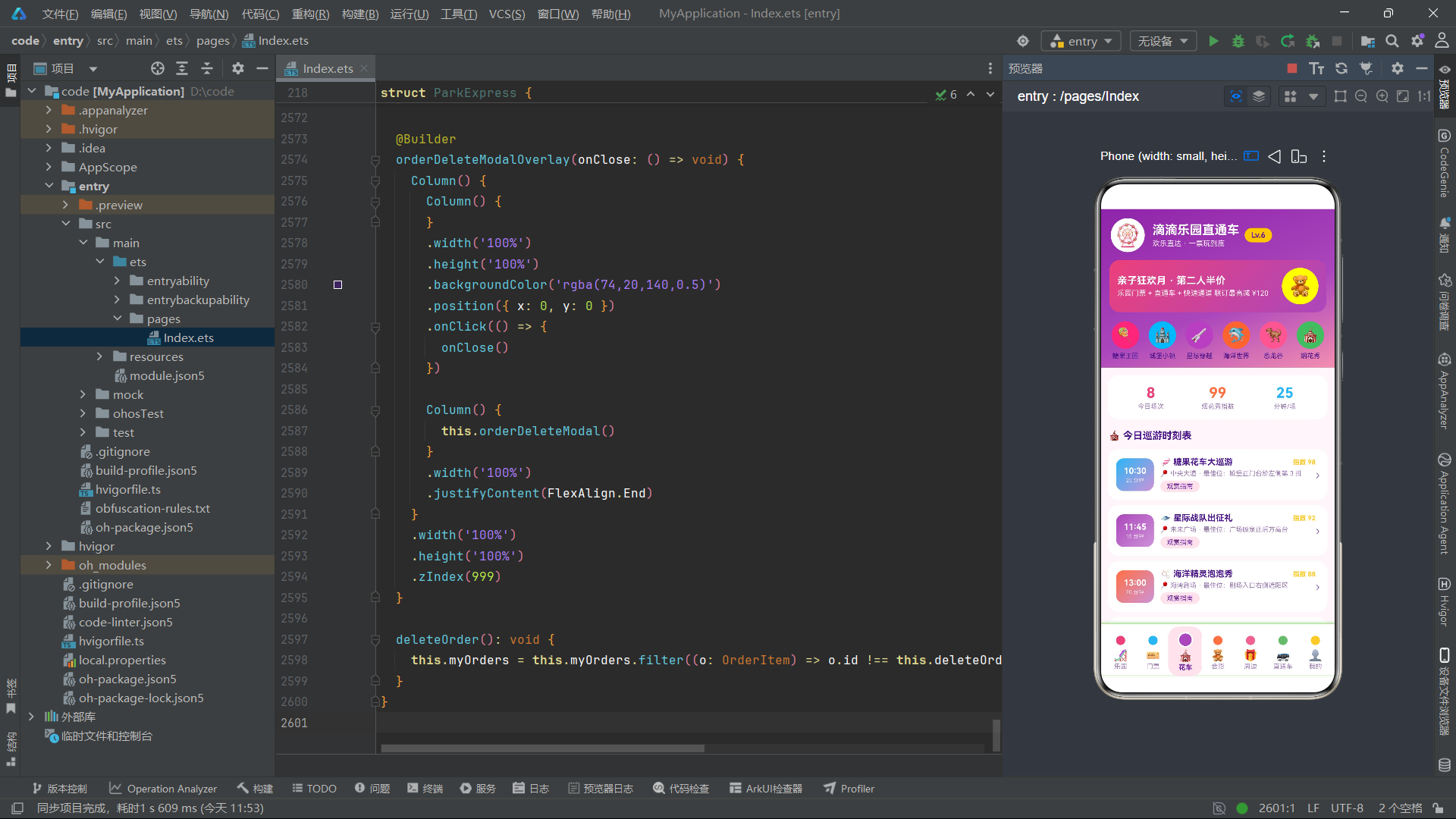
花车列表的每条记录左侧是 58x50 的渐变色时间块,展示演出时间和时长。时间块使用 tabDotColors[p.id % 7] 到浅紫色的 135 度渐变,实现不同花车的色彩区分。右侧展示花车名称、观赏指数和最佳观赏位置——位置描述使用 maxLines(1) 限制单行显示,并通过 textOverflow({ overflow: TextOverflow.Ellipsis }) 在溢出时显示省略号。点击花车记录时设置 selectedParade 并打开花车观赏指南弹窗。
9.2 观赏贴士
      Column() {
        Text('💡 巡游观赏贴士')
          .fontSize(13).fontWeight(FontWeight.Bold).fontColor(COLORS.textPrimary)
        ForEach(['提前 20 分钟占位,巡游路线左侧视角更佳',
          '烟花秀湖畔西侧人少且有摩天轮做前景',
          '巡游互动环节会向路边派发糖果贴纸'], (tip: string) => {
          Row() {
            Text('🍬').fontSize(12)
            Text(tip).fontSize(11).fontColor(COLORS.textSecondary).margin({ left: 8 })
          }
          .alignItems(VerticalAlign.Center).margin({ top: 8 })
        }, (tip: string) => tip)
      }
观赏贴士通过 ForEach 渲染 3 条建议文案,每条前缀糖果图标 🍬,形成统一的视觉风格。
十、Tab3 合影页:达人榜与等待进度条
10.1 合影达人榜
  @Builder
  meetTab() {
    Column() {
      Column() {
        Row() {
          Text('🏆 合影达人榜').fontSize(14).fontWeight(FontWeight.Bold)
            .fontColor(COLORS.textPrimary).layoutWeight(1)
          Text('本月').fontSize(10).fontColor(COLORS.textSecondary)
        }

        Row() {
          ForEach(MEETS.slice(0, 3), (m: MeetItem, idx: number) => {
            Column() {
              Column() {
                Text(m.emoji).fontSize(26)
                Text((idx + 1).toString() + 'st')
                  .fontSize(9).fontColor(COLORS.white).margin({ top: 2 })
              }
              .width(64).height(72).justifyContent(FlexAlign.Center)
              .linearGradient({ angle: 160, colors: [[this.tabDotColors[idx], 0], ['#F8BBD0', 1]] })
              .borderRadius(16)

              Text(m.name).fontSize(10).fontWeight(FontWeight.Bold)
                .fontColor(COLORS.textPrimary).margin({ top: 6 })
              Text(m.hot).fontSize(9).fontColor(COLORS.accent).margin({ top: 2 })
            }
            .layoutWeight(1).alignItems(HorizontalAlign.Center)
          }, (m: MeetItem, idx: number) => 'top' + m.id.toString())
        }
      }
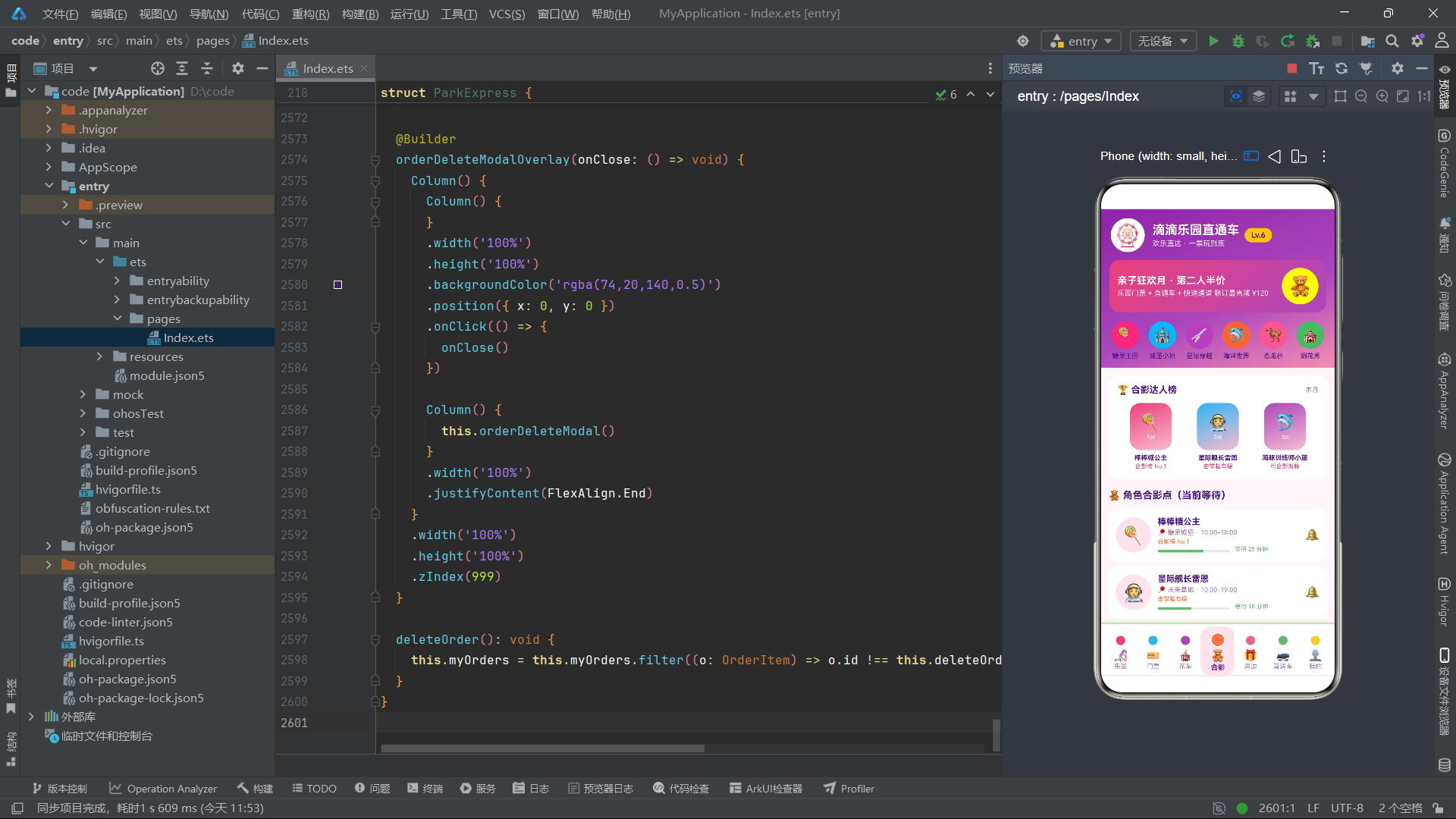
合影达人榜通过 MEETS.slice(0, 3) 取前三名角色渲染为领奖台样式的卡片。每个卡片高 72 像素,使用 160 度渐变背景,内部展示角色 Emoji 和排名标记(1st、2nd、3rd)。
10.2 角色等待进度条
      ForEach(MEETS, (m: MeetItem) => {
        Column() {
          Row() {
            Column() {
              Text(m.emoji).fontSize(28)
            }
            .width(54).height(54).justifyContent(FlexAlign.Center)
            .backgroundColor(COLORS.accentLight).borderRadius(27)

            Column() {
              Text(m.name).fontSize(13).fontWeight(FontWeight.Bold).fontColor(COLORS.textPrimary)
              Text('📍 ' + m.zone + ' · ' + m.period)
                .fontSize(10).fontColor(COLORS.textSecondary).margin({ top: 3 })
              Text(m.hot).fontSize(9).fontColor(COLORS.candyOrange).margin({ top: 3 })

              Row() {
                Progress({ value: m.wait, total: 40, type: ProgressType.Linear })
                  .width(110).height(6)
                  .color(m.wait > 25 ? COLORS.danger : COLORS.candyGreen)
                  .margin({ top: 6 })
                Text('等待 ' + m.wait.toString() + ' 分钟')
                  .fontSize(9)
                  .fontColor(m.wait > 25 ? COLORS.danger : COLORS.candyGreen)
                  .margin({ left: 8 })
              }
            }
          }
        }
      }, (m: MeetItem) => m.id.toString() + m.wait.toString())
角色等待时长通过 Progress 组件渲染为线性进度条。Progress({ value: m.wait, total: 40, type: ProgressType.Linear }) 将等待时长(分钟)映射为进度值,total: 40 表示 40 分钟为满进度。进度条颜色根据等待时长动态切换——超过 25 分钟为红色(COLORS.danger),否则为绿色(COLORS.candyGreen)。ForEach 的键生成函数 m.id.toString() + m.wait.toString() 包含了 wait 值,确保等待时长变化时进度条能正确更新。
10.3 热门项目等待柱状图
      Column() {
        Text('⏱️ 热门项目实时等待(分钟)')
          .fontSize(14).fontWeight(FontWeight.Bold).fontColor(COLORS.textPrimary)
        Row() {
          ForEach(RIDE_WAIT, (v: number, idx: number) => {
            Column() {
              Text(v.toString()).fontSize(9).fontColor(COLORS.accent)
              Column() {}
              .width(16).height(v)
              .linearGradient({ angle: 180, colors: [[COLORS.candyOrange, 0], [COLORS.gold, 1]] })
              .borderRadius(4)
            }
            .layoutWeight(1).alignItems(HorizontalAlign.Center)
          }, (v: number, idx: number) => 'wait' + idx.toString())
        }
        .alignItems(VerticalAlign.Bottom).height(80)
      }
热门项目等待柱状图使用 ForEach(RIDE_WAIT, ...) 渲染 10 根柱子,每根柱子的高度直接等于等待分钟数(height(v)),因为等待时长在 15-68 范围内,恰好适合 80 像素高度的图表区域。柱子使用橙色到金色的 180 度渐变填充,与整个应用的糖果主题色彩一致。
十一、Tab4 周边页:代购服务与购物清单管理
11.1 代购服务卡与分类筛选
  @Builder
  souvenirTab() {
    Column() {
      Column() {
        Row() {
          Column() {
            Text('🎁 园内纪念品代购')
              .fontSize(15).fontWeight(FontWeight.Bold).fontColor(COLORS.white)
            Text('玩项目不排队购物 · 出园顺手取')
              .fontSize(11).fontColor('#F3E5F5').margin({ top: 4 })
          }
          .alignItems(HorizontalAlign.Start).layoutWeight(1)
          Text('🛍️').fontSize(30)
        }
        .padding(14)
        .linearGradient({ angle: 120, colors: [['#EC407A', 0], ['#FF7043', 1]] })
        .borderRadius(18)
      }

      Scroll() {
        Row() {
          ForEach(['全部', '毛绒', '手办', '穿戴', '文创', '食品', '限定'], (c: string) => {
            Text(c)
              .fontSize(11)
              .fontColor(c === '全部' ? COLORS.white : COLORS.textSecondary)
              .padding({ left: 14, right: 14, top: 6, bottom: 6 })
              .backgroundColor(c === '全部' ? COLORS.primary : COLORS.accentLight)
              .borderRadius(14).margin({ right: 8 })
          }, (c: string) => c)
        }
      }
      .scrollable(ScrollDirection.Horizontal)
代购服务卡使用 120 度的粉色到橙色渐变背景。分类筛选通过水平滚动的 Scroll 容器包裹 ForEach 渲染的 7 个分类标签,"全部"标签默认选中态(紫色背景白字),其余为非选中态(浅粉背景紫字)。
11.2 纪念品列表与代购清单
      ForEach(SOUVENIRS, (s: SouvenirItem) => {
        Row() {
          Column() {
            Text(s.emoji).fontSize(28)
          }
          .width(58).height(58).justifyContent(FlexAlign.Center)
          .backgroundColor(COLORS.accentLight).borderRadius(14)

          Column() {
            Row() {
              Text(s.tag).fontSize(8).fontColor(COLORS.white)
                .padding({ left: 5, right: 5, top: 2, bottom: 2 })
                .backgroundColor(COLORS.candyOrange).borderRadius(5)
              Text(s.stock).fontSize(8)
                .fontColor(s.stock === '有货' ? COLORS.candyGreen : COLORS.danger)
                .padding({ left: 5, right: 5, top: 2, bottom: 2 })
                .backgroundColor(s.stock === '有货' ? '#E8F5E9' : '#FDECEA')
                .borderRadius(5).margin({ left: 5 })
            }
            Text(s.name).fontSize(13).fontWeight(FontWeight.Bold).fontColor(COLORS.textPrimary)
            Text(s.sold + ' · 出园口自提')
              .fontSize(10).fontColor(COLORS.textSecondary).margin({ top: 3 })
          }
          .layoutWeight(1).margin({ left: 10 })

          Column() {
            Text('¥' + s.price.toString())
              .fontSize(15).fontWeight(FontWeight.Bold).fontColor(COLORS.accent)
            Text('加入清单')
              .fontSize(10).fontColor(COLORS.white)
              .padding({ left: 10, right: 10, top: 4, bottom: 4 })
              .backgroundColor(COLORS.primary).borderRadius(10).margin({ top: 6 })
          }
        }
        .onClick(() => {
          this.selectedSouvenir = s
          this.souvenirCount = 1
          this.showSouvenirModal = true
        })
      }, (s: SouvenirItem) => s.id.toString())
纪念品列表展示标签和库存状态——库存状态通过 s.stock === '有货' 条件判断动态着色:有货为绿色背景绿字,其他状态为红色背景红字。点击纪念品卡片时设置 selectedSouvenir 并打开加购弹窗。
11.3 代购清单与不可变删除
      Column() {
        Row() {
          Text('🧺 我的代购清单')
            .fontSize(14).fontWeight(FontWeight.Bold).fontColor(COLORS.textPrimary).layoutWeight(1)
          Text(this.souvenirBag.length.toString() + ' 件 · 合计 ¥' + this.bagTotal().toString())
            .fontSize(11).fontColor(COLORS.accent)
        }

        ForEach(this.souvenirBag, (s: SouvenirItem) => {
          Row() {
            Text(s.emoji).fontSize(22)
            Text(s.name).fontSize(12).fontWeight(FontWeight.Bold).fontColor(COLORS.textPrimary)
            Text('¥' + s.price.toString()).fontSize(11).fontColor(COLORS.accent)
            Text('移除')
              .fontSize(10).fontColor(COLORS.danger)
              .border({ width: 1, color: COLORS.danger }).borderRadius(10)
              .onClick(() => {
                this.souvenirBag = this.souvenirBag.filter((x: SouvenirItem) => x.id !== s.id)
              })
          }
        }, (s: SouvenirItem) => 'bag' + s.id.toString())
      }
代购清单的合计金额通过 this.bagTotal() 方法实时计算。移除按钮的 onClick 使用 .filter() 方法创建新数组并赋值给 this.souvenirBag——这是 HarmonyOS ArkTS API 24 中不可变状态更新的标准模式,不直接修改原数组而是创建新数组引用,确保 @State 能正确检测到变化并触发视图更新。
  bagTotal(): number {
    let total: number = 0
    this.souvenirBag.forEach((s: SouvenirItem) => {
      total += s.price
    })
    return total
  }
bagTotal 方法通过 forEach 遍历代购清单累加价格,返回总金额。
十二、Tab5 直通车页:班线列表与发车时刻表
  @Builder
  shuttleTab() {
    Column() {
      ForEach(SHUTTLE_LINES, (l: ShuttleLine) => {
        Column() {
          Row() {
            Column() { Text(l.emoji).fontSize(24) }
              .width(48).height(48).backgroundColor(COLORS.accentLight).borderRadius(12)
            Column() {
              Row() {
                Text(l.from).fontSize(13).fontWeight(FontWeight.Bold).fontColor(COLORS.textPrimary)
                Text('→').fontSize(12).fontColor(COLORS.textSecondary).margin({ left: 4, right: 4 })
                Text(l.park).fontSize(12).fontColor(COLORS.primaryDeep).fontWeight(FontWeight.Bold)
              }
              Text('首班 ' + l.first + ' · ' + l.duration).fontSize(10).fontColor(COLORS.textSecondary)
              Text(l.rest).fontSize(10)
                .fontColor(l.rest === '余 4 座' || l.rest === '余 6 座' ? COLORS.danger : COLORS.candyGreen)
            }
            .layoutWeight(1).margin({ left: 10 })
            Column() {
              Text('¥' + l.price.toString()).fontSize(15).fontWeight(FontWeight.Bold).fontColor(COLORS.accent)
              Text('订座').fontSize(10).fontColor(COLORS.white)
                .backgroundColor(COLORS.accent).borderRadius(10).margin({ top: 5 })
            }
          }
        }
      }, (l: ShuttleLine) => l.id.toString())

      Column() {
        Text('🕐 糖果王国线发车时刻')
        ForEach(DEPART_TIMES, (row: string[], ri: number) => {
          Row() {
            ForEach(row, (t: string, ci: number) => {
              Text(t).fontSize(11).fontColor(COLORS.textPrimary)
                .padding({ top: 6, bottom: 6 }).layoutWeight(1).textAlign(TextAlign.Center)
                .backgroundColor(COLORS.accentLight).borderRadius(8).margin({ left: 4, right: 4 })
            }, (t: string, ci: number) => t + ci.toString())
          }
        }, (row: string[], ri: number) => 'row' + ri.toString())
      }
    }
  }
直通车页通过 ForEach(SHUTTLE_LINES, ...) 渲染 10 条班线卡片,剩余座位状态通过条件判断动态着色——座位紧张(“余 4 座"或"余 6 座”)为红色,充足为绿色。
发车时刻表通过嵌套 ForEach 渲染 DEPART_TIMES 二维数组——外层遍历行(5 行),内层遍历列(5 列),每个单元格渲染一个发车时间,使用浅粉色背景圆角方块。嵌套 ForEach 的键生成函数分别为 'row' + ri.toString()(行级键)和 t + ci.toString()(单元格级键),确保时刻表网格的正确 diff 和更新。
十三、Tab6 我的页:用户卡片与数据管理
13.1 渐变用户卡与统计
  @Builder
  mineTab() {
    Column() {
      Column() {
        Row() {
          Column() {
            Text('🍬').fontSize(30)
          }
          .width(60).height(60).justifyContent(FlexAlign.Center)
          .backgroundColor('#FFFFFF33').borderRadius(30)

          Column() {
            Text('王糖糖').fontSize(17).fontWeight(FontWeight.Bold).fontColor(COLORS.white)
            Text('欢乐值 6820 · 持闪电年卡')
              .fontSize(11).fontColor('#F3E5F5').margin({ top: 4 })
            Text('本月已省 ¥326').fontSize(10).fontColor(COLORS.gold).margin({ top: 3 })
          }
          .layoutWeight(1).margin({ left: 12 })
        }
        .padding(16)
        .linearGradient({ angle: 135, colors: [['#8E24AA', 0], ['#EC407A', 1]] })
        .borderRadius(20)

        Row() {
          Column() {
            Text('12').fontSize(17).fontWeight(FontWeight.Bold).fontColor(COLORS.white)
            Text('游玩次数').fontSize(10).fontColor('#F3E5F5')
          }
          .layoutWeight(1).alignItems(HorizontalAlign.Center)
          // ...合影次数 38、徽章 6、累计消费 ¥3860
        }
      }
用户卡使用 135 度的深紫到粉色渐变背景,头像使用半透明白色圆形容器(#FFFFFF33)。统计区域展示游玩次数、合影次数、徽章数和累计消费四个指标,每个使用 layoutWeight(1) 等宽分布。
13.2 出行人管理与编辑
Column() {
Text('👨👩👧 出行人管理')
ForEach(this.travelers, (t: TravelerItem) => {
Row() {
Column() {
Text(t.height === '122cm' ? '🧒' : '🧑').fontSize(22)
}
.width(40).height(40).backgroundColor(COLORS.accentLight).borderRadius(20)
Column() {
Text(t.name).fontSize(13).fontWeight(FontWeight.Bold).fontColor(COLORS.textPrimary)
Text(t.phone + ' · ' + t.idcard).fontSize(10).fontColor(COLORS.textSecondary)
Text('身高 ' + t.height + (t.height === '122cm' ? ' · 享儿童票' : ''))
.fontSize(10).fontColor(COLORS.candyBlue)
}
.layoutWeight(1).margin({ left: 8 })
Text('编辑')
.backgroundColor(COLORS.primary).borderRadius(10)
.onClick(() => {
this.editName = t.name
this.editPhone = t.phone
this.editHeight = t.height
this.editingId = t.id
this.showTravelerModal = true
})
}
}, (t: TravelerItem) => t.id.toString() + t.name + t.phone + t.height)
出行人管理通过 ForEach(this.travelers, ...) 渲染出行人列表。头像图标通过 t.height === '122cm' ? '🧒' : '🧑' 条件判断——身高 122cm 的出行人显示儿童图标,其他显示成人图标。ForEach 的键生成函数 t.id.toString() + t.name + t.phone + t.height 包含了所有可变字段,确保编辑后列表能正确更新。
编辑按钮点击时将出行人数据复制到 editName、editPhone、editHeight、editingId 四个编辑状态变量,并打开编辑弹窗。
13.3 订单管理与删除
        ForEach(this.myOrders, (o: OrderItem) => {
          Row() {
            Text(o.emoji).fontSize(22)
            Column() {
              Row() {
                Text(o.park).fontSize(12).fontWeight(FontWeight.Bold).layoutWeight(1)
                Text(o.status).fontSize(9)
                  .fontColor(o.status === '待出行' ? COLORS.candyOrange :
                    (o.status === '已退款' ? COLORS.danger : COLORS.candyGreen))
              }
              Text(o.ticket + ' · ' + o.date).fontSize(10).fontColor(COLORS.textSecondary)
              Text('¥' + o.total.toString()).fontSize(12).fontWeight(FontWeight.Bold).fontColor(COLORS.accent)
            }
            .layoutWeight(1).margin({ left: 8 })

            Text('删除')
              .border({ width: 1, color: COLORS.textSecondary }).borderRadius(10)
              .onClick(() => {
                this.deleteOrderId = o.id
                this.showOrderDeleteModal = true
              })
          }
        }, (o: OrderItem) => o.id.toString() + o.status)
订单状态通过嵌套三元运算符映射颜色——待出行为橙色、已退款为红色、已完成为绿色。删除按钮点击时设置 deleteOrderId 并打开删除确认弹窗。ForEach 的键 o.id.toString() + o.status 包含了状态值,确保订单状态变化时能正确更新。
13.4 设置列表
      Column() {
        ForEach(['🎫 我的年卡', '⚡ 闪电通道券包', '🎁 兑换中心',
          '💬 意见反馈', '⚙️ 设置'], (s: string) => {
          Row() {
            Text(s).fontSize(13).fontColor(COLORS.textPrimary).layoutWeight(1)
            Text('›').fontSize(16).fontColor(COLORS.textSecondary)
          }
          .padding({ top: 13, bottom: 13 })
        }, (s: string) => s)
      }
设置列表通过 ForEach 渲染 5 个菜单项,每项由文字标签和右箭头 › 组成,使用字符串本身作为键值。
十四、五个模态弹窗的 Overlay 遮罩模式
14.1 弹窗1:门票详情与预订
  @Builder
  ticketModal() {
    Column() {
      Column() {
        Text(this.selectedTicket.emoji).fontSize(38).margin({ top: 18 })
        Text(this.selectedTicket.name).fontSize(17).fontWeight(FontWeight.Bold).fontColor(COLORS.white)
        Text(this.selectedTicket.desc + ' · ' + this.selectedTicket.perk)
          .fontSize(11).fontColor('#F3E5F5').margin({ top: 5 })
      }
      .linearGradient({ angle: 135, colors: [['#8E24AA', 0], ['#EC407A', 1]] })

      Column() {
        Text('选择日期')
        Row() {
          ForEach(['今天', '明天', '08-24', '08-25', '08-26'], (d: string) => {
            Text(d)
              .fontColor(this.ticketDate === d ? COLORS.white : COLORS.textSecondary)
              .backgroundColor(this.ticketDate === d ? COLORS.accent : COLORS.accentLight)
              .borderRadius(12).onClick(() => { this.ticketDate = d })
          }, (d: string) => d + this.ticketDate)
        }

        Text('购买数量')
        Row() {
          Text('−')
            .fontColor(this.ticketCount > 1 ? COLORS.textPrimary : COLORS.textSecondary)
            .width(36).height(36).backgroundColor(COLORS.accentLight).borderRadius(18)
            .onClick(() => { if (this.ticketCount > 1) this.ticketCount -= 1 })
          Text(this.ticketCount.toString()).fontSize(16).fontWeight(FontWeight.Bold)
          Text('+')
            .width(36).height(36).backgroundColor(COLORS.accentLight).borderRadius(18)
            .onClick(() => { if (this.ticketCount < 9) this.ticketCount += 1 })
        }

        Text('¥' + this.ticketTotal().toString())
          .fontSize(17).fontWeight(FontWeight.Bold).fontColor(COLORS.accent)

        Text('立即预订')
          .linearGradient({ angle: 90, colors: [['#EC407A', 0], ['#AB47BC', 1]] })
          .borderRadius(22)
          .onClick(() => { this.showTicketModal = false })
      }
    }
  }
门票预订弹窗分为渐变头部和白色内容区两部分。内容区包含日期选择(5 个可点击标签)、数量步进器(减号/数字/加号)和合计金额展示。数量步进器的减号在 ticketCount === 1 时文字变灰(禁用态),加号在 ticketCount === 9 时达到上限。合计金额通过 ticketTotal() 方法计算:
  ticketTotal(): number {
    return this.selectedTicket.price * this.ticketCount + 99 * this.ticketCount
  }
ticketTotal 方法计算票价小计(单价 x 数量)加上闪电通道加购费用(99 x 数量),返回总金额。
14.2 Overlay 遮罩层封装模式
  @Builder
  ticketModalOverlay(onClose: () => void) {
    Column() {
      Column() {}
        .width('100%').height('100%')
        .backgroundColor('rgba(74,20,140,0.55)')
        .position({ x: 0, y: 0 })
        .onClick(() => { onClose() })

      Column() {
        this.ticketModal()
      }
      .width('100%').justifyContent(FlexAlign.End)
    }
    .width('100%').height('100%').zIndex(999)
  }
ticketModalOverlay 是遮罩层的封装模式——全屏 Column 包含一个半透明遮罩层(rgba(74,20,140,0.55),深紫色 55% 透明度)和弹窗内容。遮罩层使用 .position({ x: 0, y: 0 }) 绝对定位覆盖全屏,点击遮罩层时执行 onClose 回调关闭弹窗。弹窗内容使用 .justifyContent(FlexAlign.End) 对齐到底部,实现底部弹出效果。.zIndex(999) 确保弹窗层在所有内容之上。
五个弹窗的 Overlay 遮罩层结构完全一致,区别仅在于遮罩颜色和内嵌的弹窗内容:
- 门票弹窗:
rgba(74,20,140,0.55)深紫色遮罩 - 花车弹窗:
rgba(236,64,122,0.5)粉色遮罩 - 纪念品弹窗:
rgba(171,71,188,0.5)紫色遮罩 - 出行人弹窗:
rgba(106,27,154,0.5)深紫遮罩 - 删除确认弹窗:
rgba(74,20,140,0.5)深紫遮罩
14.3 弹窗2:花车观赏指南
  @Builder
  paradeModal() {
    Column() {
      Column() {
        Row() {
          Text(this.selectedParade.emoji).fontSize(34)
          Column() {
            Text(this.selectedParade.name).fontSize(16).fontWeight(FontWeight.Bold).fontColor(COLORS.white)
            Text(this.selectedParade.time + ' · ' + this.selectedParade.zone + ' · ' + this.selectedParade.duration)
              .fontSize(11).fontColor('#FFF3E0')
          }
        }
      }
      .linearGradient({ angle: 135, colors: [['#EC407A', 0], ['#FF7043', 1]] })

      Column() {
        Row() {
          Column() { Text(this.selectedParade.index.toString()).fontSize(20).fontColor(COLORS.candyOrange)
                      Text('观赏指数') }
          Column() { Text('左侧').fontSize(20).fontColor(COLORS.candyBlue)
                      Text('推荐站位') }
          Column() { Text('20').fontSize(20).fontColor(COLORS.candyGreen)
                      Text('提前占位(分)') }
        }

        Text('📍 最佳观赏位')
        Text(this.selectedParade.spot)

        Text('开演提醒')
        Row() {
          ForEach(['提前 15 分钟', '提前 30 分钟', '提前 1 小时'], (r: string) => {
            Text(r)
              .fontColor(this.remindTime === r ? COLORS.white : COLORS.textSecondary)
              .backgroundColor(this.remindTime === r ? COLORS.candyOrange : COLORS.accentLight)
              .borderRadius(12).onClick(() => { this.remindTime = r })
          }, (r: string) => r + this.remindTime)
        }

        Text('🔔 设置提醒')
          .backgroundColor(COLORS.candyOrange).borderRadius(20)
          .onClick(() => { this.showParadeModal = false })
      }
    }
  }
花车观赏指南弹窗展示观赏指数、推荐站位、提前占位时间三个统计指标,以及最佳观赏位置描述和开演提醒时间选择。提醒时间通过 ForEach 渲染 3 个可选标签,选中态使用橙色背景白字。
14.4 弹窗3:纪念品加购
  @Builder
  souvenirModal() {
    Column() {
      Row() {
        Text(this.selectedSouvenir.emoji).fontSize(34)
        Column() {
          Text(this.selectedSouvenir.name)
          Text(this.selectedSouvenir.tag + ' · ' + this.selectedSouvenir.sold)
          Text('库存:' + this.selectedSouvenir.stock + ' · 出园口自提')
        }
      }

      Text('¥' + this.selectedSouvenir.price.toString())
      Text('代购免排队 · 支持出园取货')

      Row() {
        Text('购买数量')
        Text('−').onClick(() => { if (this.souvenirCount > 1) this.souvenirCount -= 1 })
        Text(this.souvenirCount.toString())
        Text('+').onClick(() => { if (this.souvenirCount < 5) this.souvenirCount += 1 })
      }

      Text('¥' + this.souvenirTotal().toString())

      Text('加入代购清单')
        .backgroundColor(COLORS.primary).borderRadius(22)
        .onClick(() => { this.addToBag(); this.showSouvenirModal = false })
    }
  }

  souvenirTotal(): number {
    return this.selectedSouvenir.price * this.souvenirCount
  }

  addToBag(): void {
    const first: SouvenirItem = {
      id: this.selectedSouvenir.id,
      name: this.selectedSouvenir.name,
      price: this.selectedSouvenir.price * this.souvenirCount,
      tag: this.selectedSouvenir.tag,
      stock: this.selectedSouvenir.stock,
      emoji: this.selectedSouvenir.emoji,
      sold: '×' + this.souvenirCount.toString()
    }
    this.souvenirBag = [first].concat(this.souvenirBag)
  }
纪念品加购弹窗展示商品信息、价格、数量步进器(上限 5 件)和合计金额。addToBag 方法创建一个新的 SouvenirItem 对象(价格已乘以数量,sold 字段改为数量标记如 ×2),通过 [first].concat(this.souvenirBag) 将新商品插入到代购清单数组的最前面。这种使用 concat 创建新数组而非 push 修改原数组的方式,确保了 @State 的不可变更新检测。
14.5 弹窗4:编辑出行人
  @Builder
  travelerModal() {
    Column() {
      Text('✏️ 编辑出行人')

      Column() {
        Text('姓名')
        TextInput({ text: this.editName, placeholder: '请输入姓名' })
          .onChange((v: string) => { this.editName = v })
      }

      Column() {
        Text('手机号')
        TextInput({ text: this.editPhone, placeholder: '请输入手机号' })
          .onChange((v: string) => { this.editPhone = v })
      }

      Column() {
        Text('身高(决定儿童票)')
        TextInput({ text: this.editHeight, placeholder: '如 122cm' })
          .onChange((v: string) => { this.editHeight = v })
      }

      Text('💡 身高低于 1.4m 自动享儿童票优惠')

      Row() {
        Text('取消').onClick(() => { this.showTravelerModal = false })
        Text('保存').onClick(() => { this.saveTraveler(); this.showTravelerModal = false })
      }
    }
  }

  saveTraveler(): void {
    const next: TravelerItem[] = []
    this.travelers.forEach((t: TravelerItem) => {
      if (t.id === this.editingId) {
        const updated: TravelerItem = {
          id: t.id,
          name: this.editName,
          phone: this.editPhone,
          idcard: t.idcard,
          height: this.editHeight
        }
        next.push(updated)
      } else {
        next.push(t)
      }
    })
    this.travelers = next
  }
编辑出行人弹窗使用三个 TextInput 组件分别编辑姓名、手机号和身高。TextInput 使用 text 参数预填当前值(text: this.editName),通过 onChange 回调实时更新编辑状态变量。
saveTraveler 方法是出行人数据的保存逻辑——遍历 travelers 数组,当找到匹配 editingId 的记录时创建更新后的 TravelerItem 对象(保留 idcard 不变),其他记录原样保留。最终将新数组赋值给 this.travelers,触发视图更新。这种"遍历重建数组"的模式是 ArkTS 中修改数组元素的标准不可变更新方法。
14.6 弹窗5:订单删除确认
  @Builder
  orderDeleteModal() {
    Column() {
      Text('🗑️').fontSize(34)
      Text('确认删除该订单?').fontSize(16).fontWeight(FontWeight.Bold)
      Text('删除后将无法恢复,订单凭证请提前截图保存').fontSize(11)

      Row() {
        Text('再想想')
          .backgroundColor(COLORS.bg).borderRadius(18)
          .onClick(() => { this.showOrderDeleteModal = false })
        Text('确认删除')
          .backgroundColor(COLORS.danger).borderRadius(18)
          .onClick(() => { this.deleteOrder(); this.showOrderDeleteModal = false })
      }
    }
  }

  deleteOrder(): void {
    this.myOrders = this.myOrders.filter((o: OrderItem) => o.id !== this.deleteOrderId)
  }
删除确认弹窗采用紧凑设计,展示垃圾桶图标、确认标题和风险提示。双按钮模式——“再想想”(取消)和"确认删除"(红色背景),符合删除操作的交互规范。deleteOrder 方法使用 .filter() 创建不包含目标订单的新数组,是不可变删除的标准实现。
十五、编辑出行人状态变量
  @State editName: string = ''
  @State editPhone: string = ''
  @State editHeight: string = ''
  @State editingId: number = 0
这四个 @State 变量在组件结构体的末尾声明(而非与其他状态变量一起声明),这在 ArkTS 中是合法的——@State 变量可以在 struct 内部的任意位置声明。它们用于编辑出行人弹窗的表单数据管理:editName、editPhone、editHeight 存储表单输入值,editingId 记录正在编辑的出行人 ID。
十六、技术对比与总结
16.1 五种弹窗设计对比
| 弹窗名称 | 触发方式 | Overlay 遮罩色 | 核心交互 | 关闭回调 | 数据操作 |
|---|---|---|---|---|---|
| 门票预订 | 点击门票卡片 | rgba(74,20,140,0.55) | 日期选择+数量步进器+合计计算 | 立即预订/遮罩点击 | 无(仅读取) |
| 花车指南 | 点击花车记录 | rgba(236,64,122,0.5) | 提醒时间选择+观赏位展示 | 设置提醒/遮罩点击 | 无(仅读取) |
| 纪念品加购 | 点击纪念品卡片 | rgba(171,71,188,0.5) | 数量步进器+合计计算+加入清单 | 加入清单/遮罩点击 | addToBag 不可变插入 |
| 编辑出行人 | 点击编辑按钮 | rgba(106,27,154,0.5) | TextInput 表单+保存更新 | 取消/保存/遮罩点击 | saveTraveler 遍历重建 |
| 删除确认 | 点击删除按钮 | rgba(74,20,140,0.5) | 双按钮确认 | 再想想/确认删除/遮罩点击 | deleteOrder filter 删除 |
16.2 七大 Tab 页面对比
| Tab | 索引 | 名称 | 核心数据源 | 可视化组件 | 列表渲染方式 | 可变数据操作 |
|---|---|---|---|---|---|---|
| 乐园 | 0 | parkTab | PARKS 10条 | 彩色柱状图 | ForEach 卡片列表 | 无 |
| 门票 | 1 | ticketTab | TICKETS 10条 | 渐变柱状图+筛选标签 | ForEach 卡片列表 | 无 |
| 花车 | 2 | paradeTab | PARADES 8条 | 渐变时间块 | ForEach 时间线列表 | 无 |
| 合影 | 3 | meetTab | MEETS 10条 | Progress 进度条+柱状图 | ForEach 卡片列表 | 无 |
| 周边 | 4 | souvenirTab | SOUVENIRS 10条+souvenirBag | 无 | ForEach 双列表 | filter 删除+concat 插入 |
| 直通车 | 5 | shuttleTab | SHUTTLE_LINES 10条+DEPART_TIMES | 嵌套 ForEach 时刻表 | ForEach 卡片列表 | 无 |
| 我的 | 6 | mineTab | myOrders+travelers+souvenirBag | 渐变用户卡 | ForEach 多列表 | filter 删除+遍历重建编辑 |
16.3 ArkTS 核心技术使用统计
| 技术点 | 使用次数 | 核心代码示例 |
|---|---|---|
| @State 状态管理 | 24个变量 | @State currentTab: number = 0 |
| @Builder UI 复用 | 12个构建器 | @Builder lollipopTabBar() |
| ForEach 列表渲染 | 15+处 | ForEach(PARKS, (p) => {...}) |
| linearGradient 渐变 | 20+处 | .linearGradient({ angle: 135, colors: [...] }) |
| 条件渲染 if-else | 7处 Tab + 5处弹窗 | if (this.currentTab === 0) |
| Circle 图形 | 2处/Tab项 | Circle({ width: 14, height: 14 }).fill(...) |
| Progress 进度条 | 10处/合影列表 | Progress({ value: m.wait, total: 40 }) |
| TextInput 表单 | 3处/编辑弹窗 | TextInput({ text: this.editName }) |
| 不可变数组更新 | 3处 | this.souvenirBag = [...].concat(...) |
| scale 缩放动画 | 2处/Tab项 | .scale({ x: 1.06, y: 1.06 }) |
| shadow 阴影 | 10+处 | .shadow({ radius: 8, color: '#EC407A14' }) |
| textOverflow 溢出 | 1处/花车位置 | .textOverflow({ overflow: TextOverflow.Ellipsis }) |
安装DevEco Studio程序

选择目标安装目录:

设置环境变量,但是需要重启一下:

新建一个空白模板:

设置API为24的模板项目:
初始化项目,自动下载相关依赖:

完整代码:
// 7 tab 棒棒糖圆点样式:每个 tab 顶部彩色轮换小圆点,选中放大
// 弹框:门票详情 / 花车观赏指南 / 纪念品加购 / 出行人编辑 / 订单删除
interface ColorPalette {
primary: string
primaryDeep: string
accent: string
accentLight: string
candyOrange: string
candyBlue: string
candyGreen: string
candyPink: string
gold: string
bg: string
card: string
white: string
textPrimary: string
textSecondary: string
danger: string
success: string
}
const COLORS: ColorPalette = {
primary: '#AB47BC',
primaryDeep: '#6A1B9A',
accent: '#EC407A',
accentLight: '#FCE4EC',
candyOrange: '#FF7043',
candyBlue: '#29B6F6',
candyGreen: '#66BB6A',
candyPink: '#F06292',
gold: '#FFCA28',
bg: '#FDF6FB',
card: '#FFFFFF',
white: '#FFFFFF',
textPrimary: '#4A148C',
textSecondary: '#9C7BB5',
danger: '#E53935',
success: '#43A047'
}
interface ParkItem {
id: number
name: string
city: string
tag: string
price: number
rating: number
distance: string
emoji: string
hot: string
fast: string
}
interface TicketItem {
id: number
name: string
type: string
price: number
origin: number
desc: string
perk: string
emoji: string
save: string
}
interface ParadeItem {
id: number
time: string
name: string
zone: string
duration: string
emoji: string
index: number
spot: string
}
interface MeetItem {
id: number
name: string
zone: string
wait: number
emoji: string
period: string
hot: string
}
interface SouvenirItem {
id: number
name: string
price: number
tag: string
stock: string
emoji: string
sold: string
}
interface ShuttleLine {
id: number
from: string
park: string
duration: string
price: number
first: string
emoji: string
rest: string
}
interface OrderItem {
id: number
park: string
date: string
ticket: string
count: number
total: number
status: string
emoji: string
}
interface TravelerItem {
id: number
name: string
phone: string
idcard: string
height: string
}
const PARKS: ParkItem[] = [
{ id: 1, name: '梦幻糖果王国', city: '上海', tag: '亲子首选', price: 369, rating: 4.9, distance: '距您 8.6km', emoji: '🍭', hot: '本周爆满预警', fast: '闪电通道 ¥99' },
{ id: 2, name: '星际穿越乐园', city: '上海', tag: '科技沉浸', price: 428, rating: 4.8, distance: '距您 12.4km', emoji: '🚀', hot: '周末预约满', fast: '闪电通道 ¥129' },
{ id: 3, name: '海洋奇遇水世界', city: '上海', tag: '水上狂欢', price: 298, rating: 4.7, distance: '距您 15.2km', emoji: '🐬', hot: '暑期热卖', fast: '闪电通道 ¥79' },
{ id: 4, name: '恐龙冒险谷', city: '上海', tag: '探险刺激', price: 348, rating: 4.8, distance: '距您 18.9km', emoji: '🦖', hot: '霸王龙巡游', fast: '闪电通道 ¥89' },
{ id: 5, name: '童话城堡小镇', city: '上海', tag: '拍照圣地', price: 388, rating: 4.9, distance: '距您 21.3km', emoji: '🏰', hot: '烟花秀恢复', fast: '闪电通道 ¥109' },
{ id: 6, name: '极限运动公园', city: '上海', tag: '潮玩挑战', price: 268, rating: 4.6, distance: '距您 9.8km', emoji: '🛹', hot: '夜场五折', fast: '闪电通道 ¥59' },
{ id: 7, name: '萌宠亲密营地', city: '上海', tag: '撸猫撸狗', price: 198, rating: 4.8, distance: '距您 11.6km', emoji: '🐼', hot: '羊驼喂食', fast: '闪电通道 ¥49' },
{ id: 8, name: '魔幻影视基地', city: '上海', tag: '沉浸剧本', price: 458, rating: 4.7, distance: '距您 26.7km', emoji: '🎬', hot: 'NPC 互动', fast: '闪电通道 ¥139' },
{ id: 9, name: '未来机器人城', city: '上海', tag: '遛娃科普', price: 318, rating: 4.6, distance: '距您 14.1km', emoji: '🤖', hot: '机甲对战', fast: '闪电通道 ¥69' },
{ id: 10, name: '云端摩天轮公园', city: '上海', tag: '浪漫夜景', price: 158, rating: 4.5, distance: '距您 6.2km', emoji: '🎡', hot: '情侣票热卖', fast: '闪电通道 ¥39' }
]
const TICKETS: TicketItem[] = [
{ id: 1, name: '糖果王国一日票', type: '成人票', price: 369, origin: 429, desc: '全场 32 个项目无限畅玩', perk: '赠旋转木马快速券', emoji: '🎟️', save: '立省 60' },
{ id: 2, name: '糖果王国儿童票', type: '儿童票', price: 279, origin: 329, desc: '身高 1.0m-1.4m 专属优惠', perk: '赠棉花糖一份', emoji: '🧒', save: '立省 50' },
{ id: 3, name: '亲子套票(2大1小)', type: '套票', price: 968, origin: 1185, desc: '含全家福拍摄一次', perk: '赠储物柜 4 小时', emoji: '👨👩👧', save: '立省 217' },
{ id: 4, name: '闪电通道年卡', type: '年卡', price: 1288, origin: 1588, desc: '全年无限次 + 项目速通', perk: '生日当月免排队', emoji: '⚡', save: '立省 300' },
{ id: 5, name: '星际穿越夜场票', type: '夜场票', price: 199, origin: 258, desc: '16:00 后入园星空模式', perk: '赠星空棒棒糖', emoji: '🌙', save: '立省 59' },
{ id: 6, name: '海洋世界双人票', type: '双人票', price: 528, origin: 596, desc: '含海豚秀 VIP 坐席', perk: '赠防水手机袋', emoji: '🐋', save: '立省 68' },
{ id: 7, name: '恐龙谷学生票', type: '学生票', price: 248, origin: 348, desc: '凭学生证核验入园', perk: '赠考古挖掘体验', emoji: '🎓', save: '立省 100' },
{ id: 8, name: '城堡小镇家庭年卡', type: '年卡', price: 1688, origin: 2088, desc: '两大两小全年畅玩', perk: '免费停车 12 次', emoji: '👑', save: '立省 400' },
{ id: 9, name: '萌宠营地喂养套票', type: '套票', price: 258, origin: 298, desc: '含三篮专属饲料', perk: '赠合影打印一次', emoji: '🥕', save: '立省 40' },
{ id: 10, name: '摩天轮星光票', type: '夜场票', price: 128, origin: 158, desc: '含一圈星光舱 + 双人饮品', perk: '赠许愿币两枚', emoji: '✨', save: '立省 30' }
]
const PARADES: ParadeItem[] = [
{ id: 1, time: '10:30', name: '糖果花车大巡游', zone: '中央大道', duration: '25 分钟', emoji: '🍬', index: 98, spot: '城堡正门台阶左侧第 3 排' },
{ id: 2, time: '11:45', name: '星际战队出征礼', zone: '未来广场', duration: '15 分钟', emoji: '🛸', index: 92, spot: '广场喷泉正后方高台' },
{ id: 3, time: '13:00', name: '海洋精灵泡泡秀', zone: '海湾剧场', duration: '20 分钟', emoji: '🫧', index: 88, spot: '剧场入口右侧遮阳区' },
{ id: 4, time: '14:30', name: '恐龙谷霸王龙巡场', zone: '雨林区', duration: '18 分钟', emoji: '🦕', index: 95, spot: '吊桥观景平台前排' },
{ id: 5, time: '15:45', name: '童话公主下午茶', zone: '城堡花园', duration: '22 分钟', emoji: '🧚', index: 90, spot: '玫瑰拱门正对面长椅' },
{ id: 6, time: '17:00', name: '机器人机甲对战秀', zone: '钢铁舞台', duration: '16 分钟', emoji: '🤖', index: 86, spot: '舞台西侧护栏第一排' },
{ id: 7, time: '18:30', name: '萌宠嘉年华派对', zone: '牧场区', duration: '20 分钟', emoji: '🐶', index: 84, spot: '栅栏互动区前排' },
{ id: 8, time: '20:00', name: '星光烟花城堡秀', zone: '星梦湖畔', duration: '12 分钟', emoji: '🎆', index: 99, spot: '湖畔西侧摩天轮下方' }
]
const MEETS: MeetItem[] = [
{ id: 1, name: '棒棒糖公主', zone: '糖果城堡', wait: 25, emoji: '🍭', period: '10:00-18:00', hot: '合影榜 No.1' },
{ id: 2, name: '星际舰长雷恩', zone: '未来基地', wait: 18, emoji: '👨🚀', period: '10:00-19:00', hot: '击掌超有梗' },
{ id: 3, name: '海豚训练师小蓝', zone: '海洋剧场', wait: 12, emoji: '🐬', period: '11:00-17:00', hot: '可合影海豚' },
{ id: 4, name: '小恐龙迪诺', zone: '雨林入口', wait: 30, emoji: '🦖', period: '09:30-18:30', hot: '小孩最爱' },
{ id: 5, name: '睡美人艾拉', zone: '玫瑰花园', wait: 22, emoji: '🌹', period: '12:00-18:00', hot: '旋转裙摆绝美' },
{ id: 6, name: '机甲勇士阿尔法', zone: '钢铁舞台', wait: 15, emoji: '🦾', period: '13:00-20:00', hot: '变身互动' },
{ id: 7, name: '牧场奶奶与羊驼', zone: '萌宠牧场', wait: 8, emoji: '🦙', period: '09:00-17:00', hot: '可喂食合影' },
{ id: 8, name: '魔法巫师梅林', zone: '魔法小巷', wait: 20, emoji: '🧙', period: '10:30-19:30', hot: '送魔法贴纸' },
{ id: 9, name: '泡泡小丑波波', zone: '中央大道', wait: 10, emoji: '🤡', period: '10:00-20:00', hot: '现场编气球' },
{ id: 10, name: '月光仙子露娜', zone: '星梦湖畔', wait: 16, emoji: '🌙', period: '16:00-20:30', hot: '夜场限定' }
]
const SOUVENIRS: SouvenirItem[] = [
{ id: 1, name: '城堡星光辉光头箍', price: 68, tag: '夜场必备', stock: '有货', emoji: '👑', sold: '已售 2.3 万' },
{ id: 2, name: '棒棒糖公主同款发卡', price: 45, tag: '女孩最爱', stock: '有货', emoji: '🎀', sold: '已售 1.8 万' },
{ id: 3, name: '恐龙迪诺毛绒背包', price: 129, tag: '爆款返场', stock: '仅剩 12 件', emoji: '🦖', sold: '已售 3.1 万' },
{ id: 4, name: '星际战舰合金模型', price: 258, tag: '限量编号', stock: '仅剩 5 件', emoji: '🚀', sold: '已售 0.9 万' },
{ id: 5, name: '海洋精灵泡泡机', price: 89, tag: '亲子互动', stock: '有货', emoji: '🫧', sold: '已售 1.5 万' },
{ id: 6, name: '魔法巫师互动魔杖', price: 158, tag: '感应发光', stock: '有货', emoji: '🪄', sold: '已售 1.2 万' },
{ id: 7, name: '烟花城堡八音盒', price: 198, tag: '纪念收藏', stock: '预售中', emoji: '🎶', sold: '已售 0.6 万' },
{ id: 8, name: '机甲勇士变形手办', price: 168, tag: '男孩人气', stock: '有货', emoji: '🦾', sold: '已售 1.1 万' },
{ id: 9, name: '萌宠羊驼毛绒挂件', price: 39, tag: '伴手礼', stock: '有货', emoji: '🦙', sold: '已售 4.2 万' },
{ id: 10, name: '限定星空爆米花桶', price: 55, tag: '续桶半价', stock: '有货', emoji: '🍿', sold: '已售 2.7 万' }
]
const SHUTTLE_LINES: ShuttleLine[] = [
{ id: 1, from: '人民广场', park: '梦幻糖果王国', duration: '约 40 分钟', price: 25, first: '07:30', emoji: '🚌', rest: '余 14 座' },
{ id: 2, from: '虹桥枢纽', park: '星际穿越乐园', duration: '约 55 分钟', price: 30, first: '07:00', emoji: '🚐', rest: '余 8 座' },
{ id: 3, from: '陆家嘴', park: '海洋奇遇水世界', duration: '约 45 分钟', price: 28, first: '08:00', emoji: '🚌', rest: '余 21 座' },
{ id: 4, from: '徐家汇', park: '恐龙冒险谷', duration: '约 50 分钟', price: 26, first: '07:45', emoji: '🚎', rest: '余 6 座' },
{ id: 5, from: '中山公园', park: '童话城堡小镇', duration: '约 60 分钟', price: 32, first: '07:15', emoji: '🚌', rest: '余 17 座' },
{ id: 6, from: '五角场', park: '极限运动公园', duration: '约 35 分钟', price: 22, first: '08:15', emoji: '🚐', rest: '余 25 座' },
{ id: 7, from: '莘庄枢纽', park: '萌宠亲密营地', duration: '约 38 分钟', price: 24, first: '08:00', emoji: '🚌', rest: '余 19 座' },
{ id: 8, from: '静安寺', park: '魔幻影视基地', duration: '约 65 分钟', price: 35, first: '07:20', emoji: '🚎', rest: '余 4 座' },
{ id: 9, from: '世纪大道', park: '未来机器人城', duration: '约 42 分钟', price: 27, first: '07:50', emoji: '🚌', rest: '余 11 座' },
{ id: 10, from: '漕河泾', park: '云端摩天轮公园', duration: '约 30 分钟', price: 20, first: '08:30', emoji: '🚐', rest: '余 28 座' }
]
const DEPART_TIMES: string[][] = [
['07:30', '08:10', '08:50', '09:30', '10:10'],
['07:00', '07:40', '08:20', '09:00', '09:40'],
['08:00', '08:40', '09:20', '10:00', '10:40'],
['07:45', '08:25', '09:05', '09:45', '10:25'],
['07:15', '07:55', '08:35', '09:15', '09:55']
]
const WEEK_CROWD: number[] = [72, 85, 78, 66, 90, 98, 95]
const MONTH_PRICE: number[] = [369, 399, 389, 409, 429, 449, 429, 409, 389, 399, 419, 469]
const RIDE_WAIT: number[] = [45, 32, 58, 25, 40, 68, 22, 50, 15, 35]
@Entry
@Component
struct ParkExpress {
@State currentTab: number = 0
@State showTicketModal: boolean = false
@State showParadeModal: boolean = false
@State showSouvenirModal: boolean = false
@State showTravelerModal: boolean = false
@State showOrderDeleteModal: boolean = false
@State selectedTicket: TicketItem = TICKETS[0]
@State selectedParade: ParadeItem = PARADES[0]
@State selectedSouvenir: SouvenirItem = SOUVENIRS[0]
@State deleteOrderId: number = 0
@State ticketDate: string = '今天'
@State ticketCount: number = 2
@State souvenirCount: number = 1
@State ticketKind: string = '成人票'
@State remindTime: string = '提前 30 分钟'
@State myOrders: OrderItem[] = [
{ id: 1, park: '梦幻糖果王国', date: '08-24 周一', ticket: '亲子套票', count: 3, total: 968, status: '待出行', emoji: '🍭' },
{ id: 2, park: '童话城堡小镇', date: '08-18 周二', ticket: '一日票 × 2', count: 2, total: 738, status: '已完成', emoji: '🏰' },
{ id: 3, park: '星际穿越乐园', date: '08-10 周一', ticket: '夜场票 × 2', count: 2, total: 398, status: '已完成', emoji: '🚀' },
{ id: 4, park: '萌宠亲密营地', date: '07-28 周二', ticket: '喂养套票', count: 2, total: 258, status: '已退款', emoji: '🐼' }
]
@State travelers: TravelerItem[] = [
{ id: 1, name: '王糖糖', phone: '138****6688', idcard: '310***********0021', height: '168cm' },
{ id: 2, name: '小糖果', phone: '139****1120', idcard: '310***********7745', height: '122cm' }
]
@State souvenirBag: SouvenirItem[] = [
{ id: 1, name: '城堡星光辉光头箍', price: 68, tag: '夜场必备', stock: '有货', emoji: '👑', sold: '已售 2.3 万' },
{ id: 3, name: '恐龙迪诺毛绒背包', price: 129, tag: '爆款返场', stock: '仅剩 12 件', emoji: '🦖', sold: '已售 3.1 万' }
]
private tabNames: string[] = ['乐园', '门票', '花车', '合影', '周边', '直通车', '我的']
private tabIcons: string[] = ['🎢', '🎫', '🎪', '🧸', '🎁', '🚌', '👤']
private tabDotColors: string[] = ['#EC407A', '#29B6F6', '#AB47BC', '#FF7043', '#F06292', '#66BB6A', '#FFCA28']
private kingIcons: string[] = ['🍭', '🏰', '🚀', '🐬', '🦖', '🎪']
private kingLabels: string[] = ['糖果王国', '城堡小镇', '星际穿越', '海洋世界', '恐龙谷', '烟花秀']
aboutToAppear(): void {
this.selectedSouvenir = SOUVENIRS[0]
this.selectedParade = PARADES[0]
this.selectedTicket = TICKETS[0]
}
build() {
Column() {
// ============ 童趣票务电商头部(无动画) ============
Column() {
Row() {
Column() {
Text('🎡')
.fontSize(34)
}
.width(52)
.height(52)
.justifyContent(FlexAlign.Center)
.backgroundColor(COLORS.white)
.borderRadius(26)
Column() {
Text('滴滴乐园直通车')
.fontSize(19)
.fontWeight(FontWeight.Bold)
.fontColor(COLORS.white)
Text('欢乐直达 · 一票玩到底')
.fontSize(11)
.fontColor('#F3E5F5')
.margin({ top: 3 })
}
.alignItems(HorizontalAlign.Start)
.margin({ left: 12 })
Column() {
Text('Lv.6')
.fontSize(12)
.fontWeight(FontWeight.Bold)
.fontColor(COLORS.primaryDeep)
}
.padding({ left: 10, right: 10, top: 4, bottom: 4 })
.backgroundColor(COLORS.gold)
.borderRadius(12)
.margin({ left: 8 })
}
.width('100%')
.alignItems(VerticalAlign.Center)
.padding({ left: 16, right: 16, top: 14 })
// 大促横幅
Column() {
Row() {
Column() {
Text('亲子狂欢月 · 第二人半价')
.fontSize(15)
.fontWeight(FontWeight.Bold)
.fontColor(COLORS.white)
Text('乐园门票 + 直通车 + 快速通道 联订最高减 ¥120')
.fontSize(11)
.fontColor('#FFEBEE')
.margin({ top: 4 })
}
.alignItems(HorizontalAlign.Start)
.layoutWeight(1)
Column() {
Text('🧸')
.fontSize(30)
}
.width(56)
.height(56)
.justifyContent(FlexAlign.Center)
.backgroundColor('#FFFFFF33')
.borderRadius(28)
}
.alignItems(VerticalAlign.Center)
.padding(12)
.linearGradient({
angle: 135,
colors: [['#EC407A', 0], ['#AB47BC', 1]]
})
.borderRadius(16)
.margin({ top: 12, left: 14, right: 14 })
}
.width('100%')
// 分类金刚区
Row() {
ForEach(this.kingIcons, (icon: string, idx: number) => {
Column() {
Column() {
Text(icon)
.fontSize(22)
}
.width(42)
.height(42)
.justifyContent(FlexAlign.Center)
.backgroundColor(this.tabDotColors[idx])
.borderRadius(21)
Text(this.kingLabels[idx])
.fontSize(10)
.fontColor(COLORS.textPrimary)
.margin({ top: 5 })
}
.layoutWeight(1)
.onClick(() => {
this.currentTab = idx === 5 ? 2 : (idx >= 4 ? 4 : idx)
})
}, (icon: string, idx: number) => icon + idx.toString())
}
.width('100%')
.alignItems(VerticalAlign.Center)
.padding({ top: 14, bottom: 12, left: 10, right: 10 })
}
.width('100%')
.linearGradient({
angle: 160,
colors: [['#8E24AA', 0], ['#AB47BC', 0.6], ['#F48FB1', 1]]
})
// ============ 内容区 ============
Scroll() {
Column() {
if (this.currentTab === 0) {
this.parkTab()
} else if (this.currentTab === 1) {
this.ticketTab()
} else if (this.currentTab === 2) {
this.paradeTab()
} else if (this.currentTab === 3) {
this.meetTab()
} else if (this.currentTab === 4) {
this.souvenirTab()
} else if (this.currentTab === 5) {
this.shuttleTab()
} else {
this.mineTab()
}
}
.width('100%')
.padding(12)
}
.scrollable(ScrollDirection.Vertical)
.layoutWeight(1)
.backgroundColor(COLORS.bg)
// ============ 棒棒糖圆点 Tab 栏 ============
this.lollipopTabBar()
// ============ 弹框层 ============
if (this.showTicketModal) {
this.ticketModalOverlay(() => {
this.showTicketModal = false
})
}
if (this.showParadeModal) {
this.paradeModalOverlay(() => {
this.showParadeModal = false
})
}
if (this.showSouvenirModal) {
this.souvenirModalOverlay(() => {
this.showSouvenirModal = false
})
}
if (this.showTravelerModal) {
this.travelerModalOverlay(() => {
this.showTravelerModal = false
})
}
if (this.showOrderDeleteModal) {
this.orderDeleteModalOverlay(() => {
this.showOrderDeleteModal = false
})
}
}
.width('100%')
.height('100%')
.backgroundColor(COLORS.bg)
}
// 棒棒糖圆点 tab:每个 tab 顶部彩色轮换小圆点,选中放大 + 白描边
@Builder
lollipopTabBar() {
Row() {
ForEach(this.tabNames, (name: string, idx: number) => {
Column() {
Stack() {
Circle({ width: 14, height: 14 })
.fill(this.tabDotColors[idx])
.scale({
x: this.currentTab === idx ? 1.5 : 1,
y: this.currentTab === idx ? 1.5 : 1
})
if (this.currentTab === idx) {
Circle({ width: 20, height: 20 })
.fill('transparent')
.stroke(COLORS.white)
.strokeWidth(2)
}
}
.width(24)
.height(24)
Text(this.tabIcons[idx])
.fontSize(17)
.margin({ top: 1 })
Text(name)
.fontSize(10)
.fontWeight(this.currentTab === idx ? FontWeight.Bold : FontWeight.Normal)
.fontColor(this.currentTab === idx ? COLORS.primaryDeep : COLORS.textSecondary)
.margin({ top: 1 })
}
.layoutWeight(1)
.padding({ top: 7, bottom: 7 })
.backgroundColor(this.currentTab === idx ? COLORS.accentLight : COLORS.white)
.borderRadius({
topLeft: 16,
topRight: 16,
bottomLeft: 16,
bottomRight: 16
})
.scale({
x: this.currentTab === idx ? 1.06 : 1,
y: this.currentTab === idx ? 1.06 : 1
})
.onClick(() => {
this.currentTab = idx
})
}, (name: string, idx: number) => name + idx.toString() + this.currentTab.toString())
}
.width('100%')
.alignItems(VerticalAlign.Center)
.padding({ left: 6, right: 6, top: 6 })
.backgroundColor(COLORS.white)
.shadow({
radius: 12,
color: '#AB47BC1A',
offsetX: 0,
offsetY: -3
})
}
// ============ Tab0 乐园 ============
@Builder
parkTab() {
Column() {
// 今日童趣提示
Column() {
Row() {
Text('🎈')
.fontSize(20)
Text('今日糖果王国余票充足,20:00 烟花秀观赏位已开放预约')
.fontSize(11)
.fontColor(COLORS.primaryDeep)
.layoutWeight(1)
.margin({ left: 8 })
}
.alignItems(VerticalAlign.Center)
.padding(10)
}
.width('100%')
.backgroundColor(COLORS.accentLight)
.borderRadius(12)
// 本周客流柱状图
Column() {
Text('📊 本周各乐园客流指数')
.fontSize(14)
.fontWeight(FontWeight.Bold)
.fontColor(COLORS.textPrimary)
Row() {
ForEach(WEEK_CROWD, (v: number, idx: number) => {
Column() {
Text(v.toString())
.fontSize(9)
.fontColor(COLORS.accent)
Column() {
}
.width(18)
.height(this.crowdBarHeight(v))
.linearGradient({
angle: 180,
colors: [[this.tabDotColors[idx % 7], 0], ['#F8BBD0', 1]]
})
.borderRadius(6)
}
.layoutWeight(1)
.alignItems(HorizontalAlign.Center)
.margin({ top: 6 })
}, (v: number, idx: number) => 'crowd' + idx.toString())
}
.alignItems(VerticalAlign.Bottom)
.margin({ top: 8 })
Row() {
ForEach(['周一', '周二', '周三', '周四', '周五', '周六', '周日'], (d: string) => {
Text(d)
.fontSize(9)
.fontColor(COLORS.textSecondary)
.layoutWeight(1)
.textAlign(TextAlign.Center)
}, (d: string) => d)
}
.width('100%')
.margin({ top: 6 })
}
.width('100%')
.padding(14)
.backgroundColor(COLORS.white)
.borderRadius(16)
.margin({ top: 12 })
// 乐园列表
Row() {
Text('🎢 热门乐园')
.fontSize(15)
.fontWeight(FontWeight.Bold)
.fontColor(COLORS.textPrimary)
.layoutWeight(1)
Text('全部 32 家 ›')
.fontSize(11)
.fontColor(COLORS.textSecondary)
}
.width('100%')
.alignItems(VerticalAlign.Center)
.margin({ top: 16, bottom: 10 })
ForEach(PARKS, (p: ParkItem) => {
Column() {
Row() {
Column() {
Text(p.emoji)
.fontSize(30)
}
.width(64)
.height(64)
.justifyContent(FlexAlign.Center)
.linearGradient({
angle: 135,
colors: [[COLORS.accentLight, 0], ['#E1BEE7', 1]]
})
.borderRadius(16)
Column() {
Row() {
Text(p.name)
.fontSize(14)
.fontWeight(FontWeight.Bold)
.fontColor(COLORS.textPrimary)
Text(p.tag)
.fontSize(9)
.fontColor(COLORS.white)
.padding({ left: 6, right: 6, top: 2, bottom: 2 })
.backgroundColor(this.tabDotColors[p.id % 7])
.borderRadius(8)
.margin({ left: 6 })
}
.alignItems(VerticalAlign.Center)
Text(p.hot)
.fontSize(10)
.fontColor(COLORS.accent)
.margin({ top: 4 })
Text(p.distance + ' · ⭐ ' + p.rating.toString())
.fontSize(10)
.fontColor(COLORS.textSecondary)
.margin({ top: 3 })
}
.alignItems(HorizontalAlign.Start)
.layoutWeight(1)
.margin({ left: 10 })
ticketTotal(): number {
return this.selectedTicket.price * this.ticketCount + 99 * this.ticketCount
}
// ============ 弹框2:花车观赏指南 ============
@Builder
paradeModal() {
Column() {
Column() {
Row() {
Text(this.selectedParade.emoji)
.fontSize(34)
Column() {
Text(this.selectedParade.name)
.fontSize(16)
.fontWeight(FontWeight.Bold)
.fontColor(COLORS.white)
Text(this.selectedParade.time + ' · ' + this.selectedParade.zone + ' · ' + this.selectedParade.duration)
.fontSize(11)
.fontColor('#FFF3E0')
.margin({ top: 4 })
}
.alignItems(HorizontalAlign.Start)
.layoutWeight(1)
.margin({ left: 10 })
}
.alignItems(VerticalAlign.Center)
.padding(16)
}
.width('100%')
.linearGradient({
angle: 135,
colors: [['#EC407A', 0], ['#FF7043', 1]]
})
Column() {
Row() {
Column() {
Text(this.selectedParade.index.toString())
.fontSize(20)
.fontWeight(FontWeight.Bold)
.fontColor(COLORS.candyOrange)
Text('观赏指数')
.fontSize(10)
.fontColor(COLORS.textSecondary)
.margin({ top: 2 })
}
.layoutWeight(1)
.alignItems(HorizontalAlign.Center)
Column() {
Text('左侧')
.fontSize(20)
.fontWeight(FontWeight.Bold)
.fontColor(COLORS.candyBlue)
Text('推荐站位')
.fontSize(10)
.fontColor(COLORS.textSecondary)
.margin({ top: 2 })
}
.layoutWeight(1)
.alignItems(HorizontalAlign.Center)
Column() {
Text('20')
.fontSize(20)
.fontWeight(FontWeight.Bold)
.fontColor(COLORS.candyGreen)
Text('提前占位(分)')
.fontSize(10)
.fontColor(COLORS.textSecondary)
.margin({ top: 2 })
}
.layoutWeight(1)
.alignItems(HorizontalAlign.Center)
}
.width('100%')
.alignItems(VerticalAlign.Center)
.margin({ top: 14 })
Column() {
Text('📍 最佳观赏位')
.fontSize(13)
.fontWeight(FontWeight.Bold)
.fontColor(COLORS.textPrimary)
Text(this.selectedParade.spot)
.fontSize(11)
.fontColor(COLORS.textSecondary)
.margin({ top: 6 })
}
.width('100%')
.padding(12)
.backgroundColor(COLORS.bg)
.borderRadius(12)
.margin({ top: 14 })
.alignItems(HorizontalAlign.Start)
Text('开演提醒')
.fontSize(13)
.fontWeight(FontWeight.Bold)
.fontColor(COLORS.textPrimary)
.margin({ top: 16 })
Row() {
ForEach(['提前 15 分钟', '提前 30 分钟', '提前 1 小时'], (r: string) => {
Text(r)
.fontSize(11)
.fontColor(this.remindTime === r ? COLORS.white : COLORS.textSecondary)
.padding({ left: 12, right: 12, top: 6, bottom: 6 })
.backgroundColor(this.remindTime === r ? COLORS.candyOrange : COLORS.accentLight)
.borderRadius(12)
.margin({ right: 8 })
.onClick(() => {
this.remindTime = r
})
}, (r: string) => r + this.remindTime)
}
.margin({ top: 10 })
Text('🔔 设置提醒')
.fontSize(14)
.fontWeight(FontWeight.Bold)
.fontColor(COLORS.white)
.width('100%')
.textAlign(TextAlign.Center)
.padding({ top: 12, bottom: 12 })
.backgroundColor(COLORS.candyOrange)
.borderRadius(20)
.margin({ top: 18 })
.onClick(() => {
this.showParadeModal = false
})
}
.width('100%')
.padding(16)
.backgroundColor(COLORS.white)
.alignItems(HorizontalAlign.Start)
}
.width('100%')
.backgroundColor(COLORS.white)
.borderRadius({ topLeft: 22, topRight: 22 })
.alignItems(HorizontalAlign.Center)
}
@Builder
paradeModalOverlay(onClose: () => void) {
Column() {
Column() {
}
.width('100%')
.height('100%')
.backgroundColor('rgba(236,64,122,0.5)')
.position({ x: 0, y: 0 })
.onClick(() => {
onClose()
})
Column() {
this.paradeModal()
}
.width('100%')
.justifyContent(FlexAlign.End)
}
.width('100%')
.height('100%')
.zIndex(999)
}
// ============ 弹框3:纪念品加购 ============
@Builder
souvenirModal() {
Column() {
Row() {
Column() {
Text(this.selectedSouvenir.emoji)
.fontSize(34)
}
.width(72)
.height(72)
.justifyContent(FlexAlign.Center)
.backgroundColor(COLORS.accentLight)
.borderRadius(18)
Column() {
Text(this.selectedSouvenir.name)
.fontSize(15)
.fontWeight(FontWeight.Bold)
.fontColor(COLORS.textPrimary)
Text(this.selectedSouvenir.tag + ' · ' + this.selectedSouvenir.sold)
.fontSize(10)
.fontColor(COLORS.candyOrange)
.margin({ top: 4 })
Text('库存:' + this.selectedSouvenir.stock + ' · 出园口自提')
.fontSize(10)
.fontColor(COLORS.textSecondary)
.margin({ top: 3 })
}
.alignItems(HorizontalAlign.Start)
.layoutWeight(1)
.margin({ left: 12 })
}
.alignItems(VerticalAlign.Center)
.width('100%')
.margin({ top: 18 })
Row() {
Text('¥' + this.selectedSouvenir.price.toString())
.fontSize(22)
.fontWeight(FontWeight.Bold)
.fontColor(COLORS.accent)
Text('代购免排队 · 支持出园取货')
.fontSize(10)
.fontColor(COLORS.candyGreen)
.margin({ left: 10 })
}
.alignItems(VerticalAlign.Center)
.width('100%')
.margin({ top: 14 })
Row() {
Text('购买数量')
.fontSize(13)
.fontColor(COLORS.textPrimary)
.layoutWeight(1)
Text('−')
.fontSize(16)
.fontColor(this.souvenirCount > 1 ? COLORS.textPrimary : COLORS.textSecondary)
.width(30)
.height(30)
.textAlign(TextAlign.Center)
.backgroundColor(COLORS.accentLight)
.borderRadius(15)
.onClick(() => {
if (this.souvenirCount > 1) {
this.souvenirCount -= 1
}
})
Text(this.souvenirCount.toString())
.fontSize(14)
.fontWeight(FontWeight.Bold)
.fontColor(COLORS.textPrimary)
.margin({ left: 14, right: 14 })
Text('+')
.fontSize(16)
.fontColor(COLORS.textPrimary)
.width(30)
.height(30)
.textAlign(TextAlign.Center)
.backgroundColor(COLORS.accentLight)
.borderRadius(15)
.onClick(() => {
if (this.souvenirCount < 5) {
this.souvenirCount += 1
}
})
}
.width('100%')
.alignItems(VerticalAlign.Center)
.margin({ top: 16 })
Row() {
Text('合计')
.fontSize(13)
.fontWeight(FontWeight.Bold)
.fontColor(COLORS.textPrimary)
Text('¥' + this.souvenirTotal().toString())
.fontSize(18)
.fontWeight(FontWeight.Bold)
.fontColor(COLORS.accent)
.layoutWeight(1)
}
.width('100%')
.alignItems(VerticalAlign.Center)
.margin({ top: 16 })
Text('加入代购清单')
.fontSize(15)
.fontWeight(FontWeight.Bold)
.fontColor(COLORS.white)
.width('100%')
.textAlign(TextAlign.Center)
.padding({ top: 13, bottom: 13 })
.backgroundColor(COLORS.primary)
.borderRadius(22)
.margin({ top: 18, bottom: 20 })
.onClick(() => {
this.addToBag()
this.showSouvenirModal = false
})
}
.width('100%')
.padding({ left: 16, right: 16 })
.backgroundColor(COLORS.white)
.borderRadius({ topLeft: 22, topRight: 22 })
.alignItems(HorizontalAlign.Start)
}
@Builder
souvenirModalOverlay(onClose: () => void) {
Column() {
Column() {
}
.width('100%')
.height('100%')
.backgroundColor('rgba(171,71,188,0.5)')
.position({ x: 0, y: 0 })
.onClick(() => {
onClose()
})
Column() {
this.souvenirModal()
}
.width('100%')
.justifyContent(FlexAlign.End)
}
.width('100%')
.height('100%')
.zIndex(999)
}
souvenirTotal(): number {
return this.selectedSouvenir.price * this.souvenirCount
}
addToBag(): void {
const first: SouvenirItem = {
id: this.selectedSouvenir.id,
name: this.selectedSouvenir.name,
price: this.selectedSouvenir.price * this.souvenirCount,
tag: this.selectedSouvenir.tag,
stock: this.selectedSouvenir.stock,
emoji: this.selectedSouvenir.emoji,
sold: '×' + this.souvenirCount.toString()
}
this.souvenirBag = [first].concat(this.souvenirBag)
}
// ============ 弹框4:编辑出行人 ============
@Builder
travelerModal() {
Column() {
Text('✏️ 编辑出行人')
.fontSize(16)
.fontWeight(FontWeight.Bold)
.fontColor(COLORS.textPrimary)
.margin({ top: 18 })
Column() {
Text('姓名')
.fontSize(12)
.fontColor(COLORS.textSecondary)
TextInput({ text: this.editName, placeholder: '请输入姓名' })
.fontSize(13)
.fontColor(COLORS.textPrimary)
.backgroundColor(COLORS.bg)
.borderRadius(10)
.height(42)
.margin({ top: 6 })
.onChange((v: string) => {
this.editName = v
})
}
.width('100%')
.alignItems(HorizontalAlign.Start)
.margin({ top: 16 })
Column() {
Text('手机号')
.fontSize(12)
.fontColor(COLORS.textSecondary)
TextInput({ text: this.editPhone, placeholder: '请输入手机号' })
.fontSize(13)
.fontColor(COLORS.textPrimary)
.backgroundColor(COLORS.bg)
.borderRadius(10)
.height(42)
.margin({ top: 6 })
.onChange((v: string) => {
this.editPhone = v
})
}
.width('100%')
.alignItems(HorizontalAlign.Start)
.margin({ top: 12 })
Column() {
Text('身高(决定儿童票)')
.fontSize(12)
.fontColor(COLORS.textSecondary)
TextInput({ text: this.editHeight, placeholder: '如 122cm' })
.fontSize(13)
.fontColor(COLORS.textPrimary)
.backgroundColor(COLORS.bg)
.borderRadius(10)
.height(42)
.margin({ top: 6 })
.onChange((v: string) => {
this.editHeight = v
})
}
.width('100%')
.alignItems(HorizontalAlign.Start)
.margin({ top: 12 })
Text('💡 身高低于 1.4m 自动享儿童票优惠')
.fontSize(10)
.fontColor(COLORS.candyBlue)
.margin({ top: 12 })
Row() {
Text('取消')
.fontSize(14)
.fontColor(COLORS.textSecondary)
.layoutWeight(1)
.textAlign(TextAlign.Center)
.padding({ top: 12, bottom: 12 })
.backgroundColor(COLORS.bg)
.borderRadius(20)
.onClick(() => {
this.showTravelerModal = false
})
Text('保存')
.fontSize(14)
.fontWeight(FontWeight.Bold)
.fontColor(COLORS.white)
.layoutWeight(1)
.textAlign(TextAlign.Center)
.padding({ top: 12, bottom: 12 })
.backgroundColor(COLORS.primary)
.borderRadius(20)
.margin({ left: 12 })
.onClick(() => {
this.saveTraveler()
this.showTravelerModal = false
})
}
.width('100%')
.margin({ top: 20, bottom: 20 })
}
.width('100%')
.padding({ left: 16, right: 16 })
.backgroundColor(COLORS.white)
.borderRadius({ topLeft: 22, topRight: 22 })
.alignItems(HorizontalAlign.Start)
}
@Builder
travelerModalOverlay(onClose: () => void) {
Column() {
Column() {
}
.width('100%')
.height('100%')
.backgroundColor('rgba(106,27,154,0.5)')
.position({ x: 0, y: 0 })
.onClick(() => {
onClose()
})
Column() {
this.travelerModal()
}
.width('100%')
.justifyContent(FlexAlign.End)
}
.width('100%')
.height('100%')
.zIndex(999)
}
saveTraveler(): void {
const next: TravelerItem[] = []
this.travelers.forEach((t: TravelerItem) => {
if (t.id === this.editingId) {
const updated: TravelerItem = {
id: t.id,
name: this.editName,
phone: this.editPhone,
idcard: t.idcard,
height: this.editHeight
}
next.push(updated)
} else {
next.push(t)
}
})
this.travelers = next
}
// ============ 弹框5:订单删除确认 ============
@Builder
orderDeleteModal() {
Column() {
Text('🗑️')
.fontSize(34)
.margin({ top: 22 })
Text('确认删除该订单?')
.fontSize(16)
.fontWeight(FontWeight.Bold)
.fontColor(COLORS.textPrimary)
.margin({ top: 10 })
Text('删除后将无法恢复,订单凭证请提前截图保存')
.fontSize(11)
.fontColor(COLORS.textSecondary)
.margin({ top: 8 })
Row() {
Text('再想想')
.fontSize(13)
.fontColor(COLORS.textSecondary)
.layoutWeight(1)
.textAlign(TextAlign.Center)
.padding({ top: 11, bottom: 11 })
.backgroundColor(COLORS.bg)
.borderRadius(18)
.onClick(() => {
this.showOrderDeleteModal = false
})
Text('确认删除')
.fontSize(13)
.fontWeight(FontWeight.Bold)
.fontColor(COLORS.white)
.layoutWeight(1)
.textAlign(TextAlign.Center)
.padding({ top: 11, bottom: 11 })
.backgroundColor(COLORS.danger)
.borderRadius(18)
.margin({ left: 10 })
.onClick(() => {
this.deleteOrder()
this.showOrderDeleteModal = false
})
}
.width('100%')
.margin({ top: 22, bottom: 22 })
}
.width('100%')
.padding({ left: 16, right: 16 })
.backgroundColor(COLORS.white)
.borderRadius({ topLeft: 22, topRight: 22 })
.alignItems(HorizontalAlign.Center)
}
@Builder
orderDeleteModalOverlay(onClose: () => void) {
Column() {
Column() {
}
.width('100%')
.height('100%')
.backgroundColor('rgba(74,20,140,0.5)')
.position({ x: 0, y: 0 })
.onClick(() => {
onClose()
})
Column() {
this.orderDeleteModal()
}
.width('100%')
.justifyContent(FlexAlign.End)
}
.width('100%')
.height('100%')
.zIndex(999)
}
deleteOrder(): void {
this.myOrders = this.myOrders.filter((o: OrderItem) => o.id !== this.deleteOrderId)
}
}
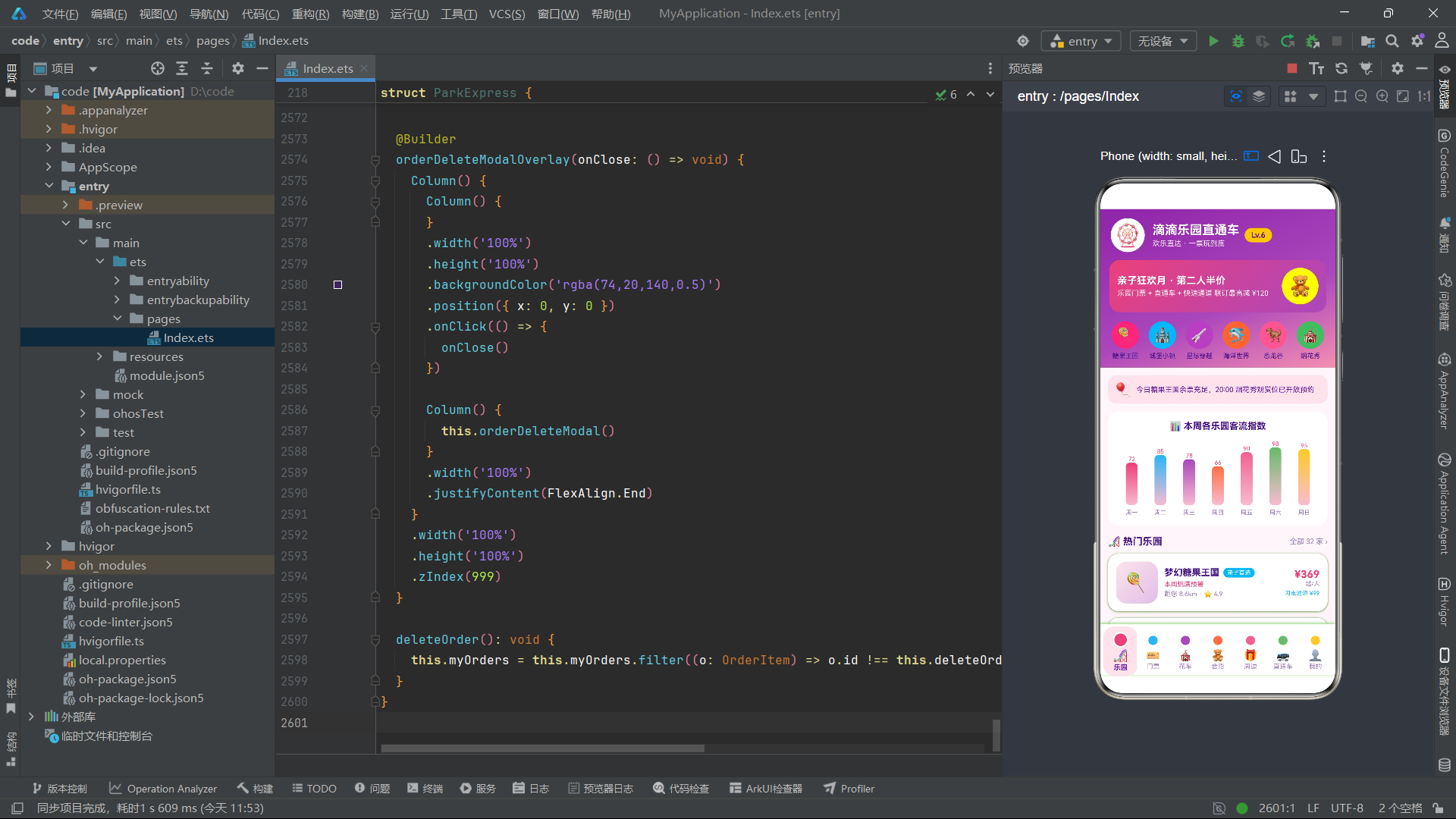
16.4 总结
本文以一个完整的乐园直通车票务平台为案例,全面解析了基于 HarmonyOS API 24 的 ArkTS 声明式 UI 范式在复杂业务场景下的工程实践。从 ColorPalette 接口的 16 色设计令牌体系,到 8 个数据模型接口的类型安全建模;从 10 组静态数据源(涵盖乐园、门票、花车、合影、纪念品、直通车、时刻表、客流、票价、等待时长)的集中声明,到 24 个 @State 变量的多维度状态管理;从 7 个 Tab 页面的条件渲染路由,到棒棒糖圆点 Tab 栏的 Circle 图形与 scale 缩放动画;从 5 个模态弹窗的 Overlay 遮罩封装模式,到 addToBag/saveTraveler/deleteOrder 三个不可变数据操作方法——每一个技术环节都通过逐段代码拆解进行了深入剖析。
在 HarmonyOS 6.1.1 版本下,基于 HarmonyOS ArkTS API 24 的声明式 UI 范式展现出了三大核心优势。第一,数据驱动视图的响应式机制——@State 变量的变更自动触发 build() 重执行,开发者只需维护状态变量,视图更新由框架自动驱动。第二,组件化复用的模块化开发——@Builder 构建器将复杂 UI 片段封装为可复用单元,ForEach 的键值策略确保列表渲染的高效 diff。第三,类型安全的工程化保障——interface 接口定义数据契约,Record 映射表管理配置数据,编译期类型检查减少运行时错误。应用中棒棒糖圆点 Tab 栏的 Circle 图形与 scale 缩放动画组合、柱状图的 linearGradient 多彩渐变填充、Progress 组件的条件色彩渲染等,都展示了 ArkTS 在视觉表现力上的灵活性。不可变状态更新模式(filter 删除、concat 插入、遍历重建编辑)是确保 @State 正确检测变化的关键工程实践,值得在所有 HarmonyOS ArkTS 应用中遵循。

讨论HarmonyOS开发技术,专注于API与组件、DevEco Studio、测试、元服务和应用上架分发等。
更多推荐


 2
2 0
0- 0


 已为社区贡献4条内容

所有评论(0)