HarmonyOS API 24 ArkTS 深度技术解析:舞龙坊(Dragon Dance Workshop)非遗手作平台的声明式架构与百节蜿蜒动画实践(HarmonyOS 6.1.1 / API
HarmonyOS API 24 ArkTS 深度技术解析:舞龙坊(Dragon Dance Workshop)非遗手作平台的声明式架构与百节蜿蜒动画实践(HarmonyOS 6.1.1 / API 24)
基于 HarmonyOS 6.1.1(API 24)ArkTS 声明式范式,完整剖析一个以中国非遗舞龙文化为主题的移动端应用「舞龙坊」,覆盖从全局配色、@Observed 数据流、@Builder 视图分层到 sin 波蜿蜒动画、自定义柱状图与三类弹窗交互的全链路实现。
一、引言:舞龙文化与非遗手作平台的现实意义
舞龙,是中华民族最具代表性的传统民俗艺术之一,其历史可追溯至汉代。据《汉书·礼乐志》记载,早在两千多年前,先民便以"龙舞"作为祈雨祭祀的重要仪式,舞动用稻草、竹篾扎制的龙形道具,在田间地头祈求风调雨顺、五谷丰登。这种源自农耕文明的龙神崇拜,逐渐从单纯的求雨仪式演变为节庆庆典中的核心表演,至唐宋时期已盛极一时。唐代段成式《酉阳杂俎》中便有"春时竞渡、秋时舞龙"的记载,宋代《东京梦华录》更详细描述了汴京元宵节"舞龙穿街、灯火如昼"的盛景。明清以降,舞龙技艺进一步与地方民俗、戏曲、武术深度融合,形成了今天千姿百态的舞龙流派。
龙,在中国文化中是至高无上的祥瑞象征。它集九种动物特征于一身——驼头、鹿角、蛇身、鱼鳞、鹰爪、牛耳、兔眼、虎掌、鲶须——代表着天人合一的宇宙观与生生不息的生命力。龙能腾云驾雾、兴云布雨,被视为水神与天帝的化身。在舞龙表演中,龙身蜿蜒起伏、龙头追珠腾跃,不仅是技艺的展示,更是对龙的神性与人龙合一哲学的具象表达。一条完整的舞龙通常由龙头、龙身(多节)、龙珠三部分组成,配以锣鼓喧天的鼓乐,方能营造出"龙腾盛世"的磅礴气象。
中华大地上的舞龙流派百花齐放,各具地域特色。重庆铜梁火龙以铁水火花四溅闻名,舞动时火星如雨、金龙穿梭其间,被誉为"中华第一龙";广东佛山醒龙融合南狮南拳元素,刚柔并济、威武灵动;潮汕英歌龙将英歌舞的豪迈与舞龙的气势合二为一,鼓点铿锵、气势磅礴。此外,浦江板凳龙以长板凳首尾相接而成,可绵延数百米;浙江奉化布龙以轻巧灵动见长;芷江孽龙则讲述降妖除魔的传说故事。这些流派不仅是地方文化的活化石,更是中华民族共同体意识的具象载体。
然而,随着城市化进程加速,传统舞龙技艺面临传承断层的困境——扎龙艺人年事已高、年轻一代对扎作工序知之甚少、舞龙队伍青黄不接、赛事信息分散难寻。「舞龙坊」应用正是为应对这一现实问题而生。它将舞龙的全生命周期——从彩龙款式选择、龙头工艺展示、龙身段规格、引路龙珠配饰、锣鼓配乐、扎作工序、舞龙队伍到舞龙赛事——整合到一个平台之上,以数字化手段记录、展示、传播舞龙非遗文化。通过这个平台,非遗传承人可以管理扎作工序与舞龙队伍,文化爱好者可以了解舞龙流派与赛事动态,研究者可以追溯舞龙文化的发展脉络。这正是「舞龙坊」作为非遗手作平台的现实意义所在:让千年龙文化在数字时代焕发新生。
本文将基于 HarmonyOS 6.1.1(API 24)的 ArkTS 声明式开发范式,对「舞龙坊」应用进行全链路深度技术解析,涵盖配色体系、数据建模、视图构建、动画实现、弹窗交互与图表可视化等核心模块,为 HarmonyOS 开发者提供一份可复用的非遗主题应用工程实践参考。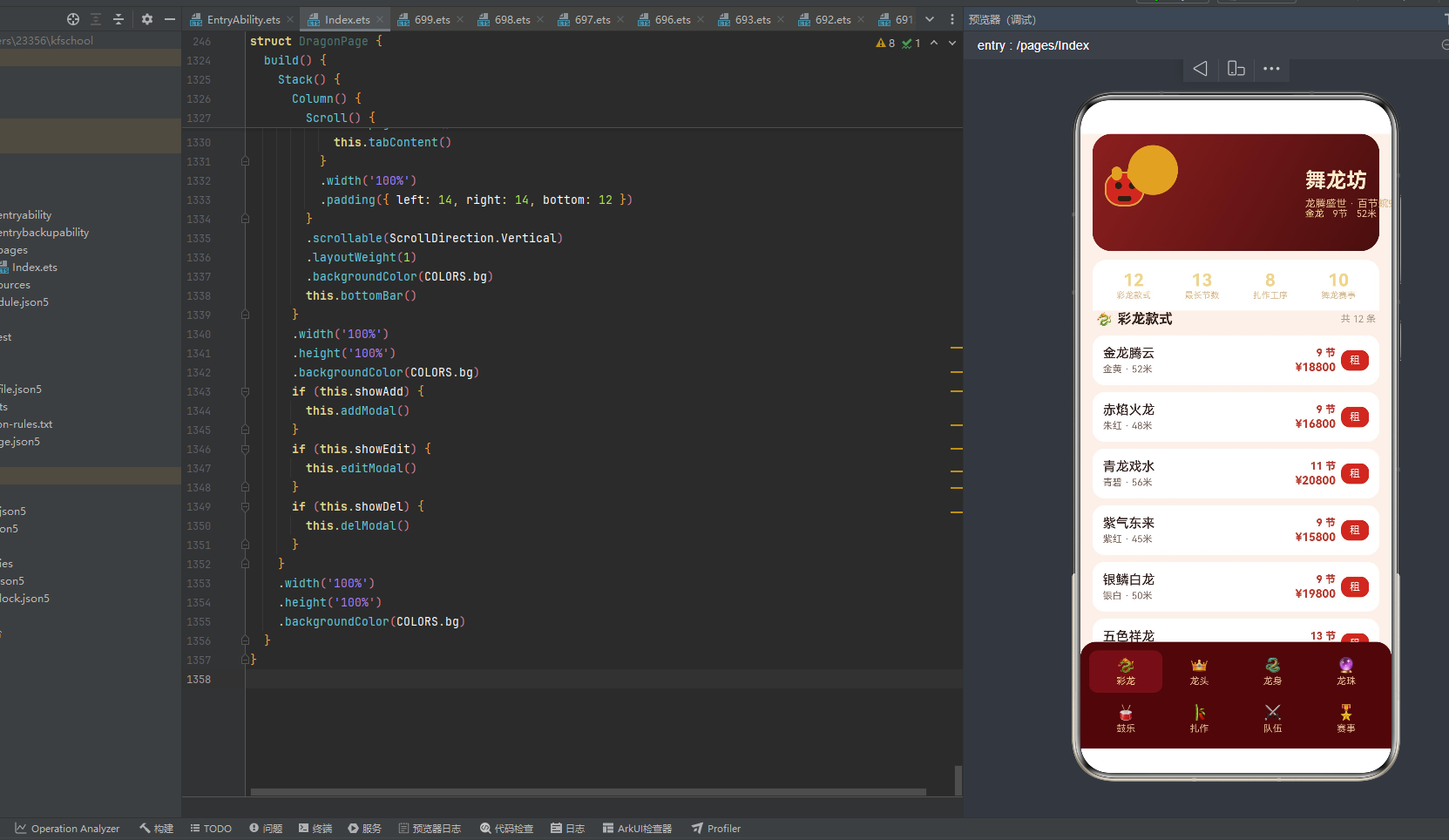
二、整体架构概览
「舞龙坊」应用采用经典的三层分层架构,自底向上分为全局层、数据层与视图层。这种分层方式将配色常量、数据模型与 UI 渲染逻辑彻底解耦,使得每一层都可以独立演进、独立测试,符合 ArkTS 声明式范式的最佳实践。
2.1 架构分层 mermaid 流程图
2.2 架构文字详解
全局层是整个应用的基石。它定义了三个接口(ColorPalette、TabMeta)和四组常量(COLORS、TAB_LIST、ROW1_IDX/ROW2_IDX、SEG_IDX/MATCH_BAR_IDX)。其中 ColorPalette 接口约束了 22 个色值字段,COLORS 常量则将这 22 个字段实例化为红金绿三色为主的舞龙主题配色。TAB_LIST 定义了 8 个导航 Tab 的标签与图标,ROW1_IDX 与 ROW2_IDX 将这 8 个 Tab 拆分为上下两行各四列,SEG_IDX(6 段)用于头部龙身蜿蜒动画,MATCH_BAR_IDX(10 柱)用于赛事奖金柱状图。全局层的所有定义都是不可变的 const,确保在应用运行期间不会被意外修改。
数据层包含 8 个 @Observed 装饰的可观察数据类(DragonItem、HeadItem、BodyItem、PearlItem、DrumItem、CraftItem、TeamItem、MatchItem),分别对应舞龙的 8 个业务领域。每个类都定义了与自身领域强相关的属性字段,并通过显式构造函数完成初始化。@Observed 装饰器使得这些类的实例在属性变更时能够自动触发 UI 刷新,是实现数据驱动视图的关键。此外,数据层还包含 9 个纯函数工具(segX、segY、segColor、widthBarW、hotBarW、prizeBarH、stageColor、levelColor、eyeOn),负责将数值映射为位置、颜色或尺寸,供视图层调用。
视图层以 DragonPage 结构体为核心,通过 @Entry 和 @Component 装饰器声明为应用的入口组件。视图层内部维护了大量 @State 状态变量(导航索引、呼吸动画开关、弹窗显隐开关、选中项、表单字段)和 8 个 @State 数据数组。通过 @Builder 装饰器,视图层将 UI 拆分为十余个独立的渲染方法——pageHeader(头部动画)、sectionTitle(章节标题)、dragonRow/headRow/bodyRow/pearlRow/drumRow/craftRow/teamRow/matchRow(8 种行渲染)、matchChart(柱状图)、bottomBar/bottomItem(底部导航)、addModal/editModal/delModal(三类弹窗)。最终 build() 方法将 Scroll 滚动容器、底部导航与弹窗通过 Stack 层叠组合,形成完整页面。
2.3 数据流与渲染流 mermaid 时序图
上图展示了应用的两条核心数据流:左侧是呼吸动画流,由 aboutToAppear 中的 setInterval 每 480 毫秒翻转 breath 布尔值,所有依赖 this.breath 的 @Builder 方法(龙身段透明度、龙珠脉冲、进度条闪烁、柱状图呼吸)都会自动触发重绘;右侧是交互数据流,用户点击 Tab 切换 curTab 触发列表切换,点击按钮打开弹窗填写表单,最终通过 splice 修改 @State 数组实现数据的增删改。两条数据流通过 ArkTS 的响应式机制自动驱动 UI 刷新,无需手动调用 invalidate 或 requestLayout。
三、配色体系:红金绿三色的文化编码
舞龙坊的配色体系是整个应用的视觉灵魂。它通过一个 ColorPalette 接口和 COLORS 常量,将中国舞龙文化中的色彩象征系统地编码为 22 个色值字段。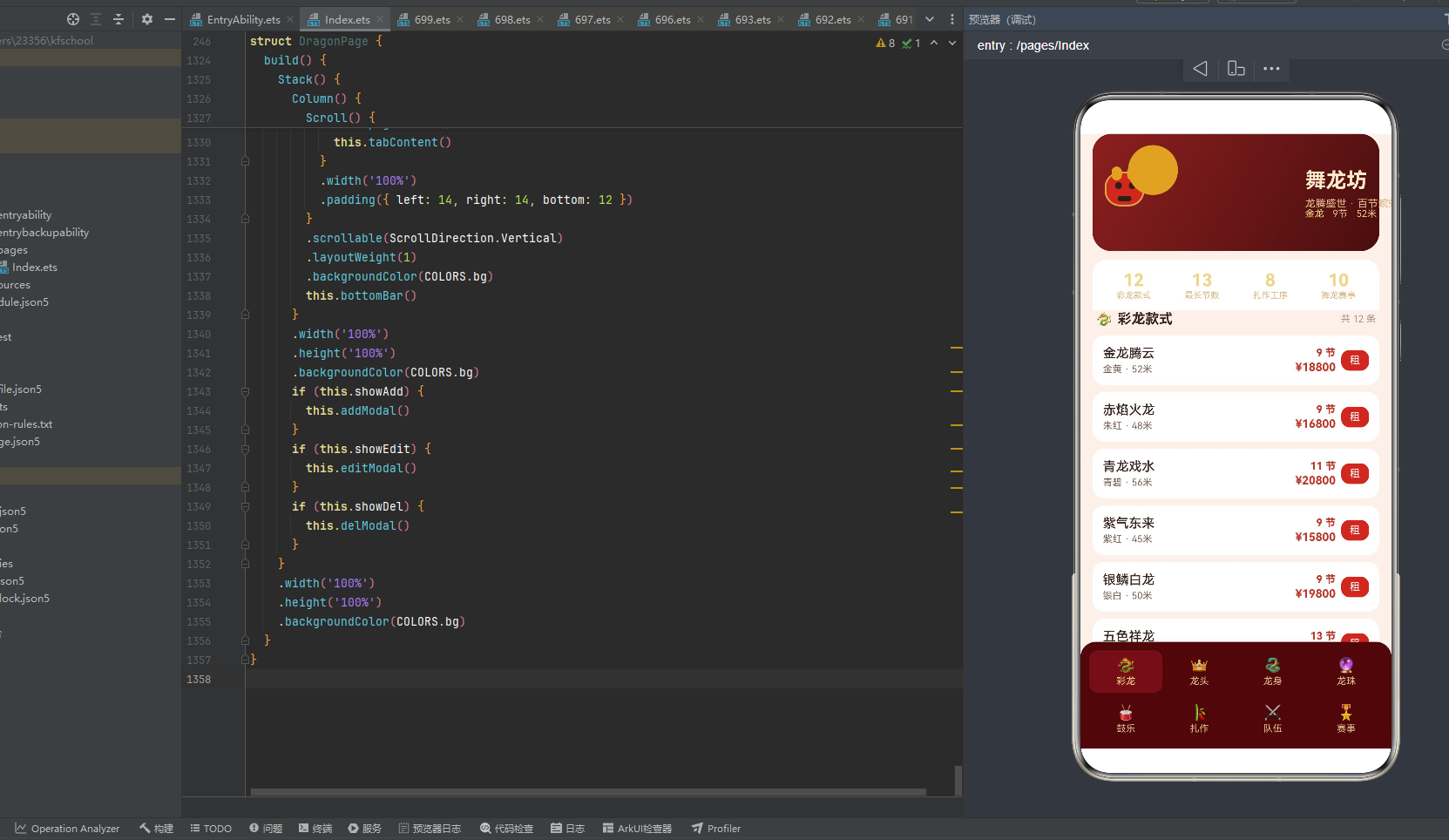
3.1 ColorPalette 接口定义
interface ColorPalette {
  bg: string;
  cardBg: string;
  header1: string;
  header2: string;
  red: string;
  gold: string;
  goldLight: string;
  green: string;
  dark: string;
  title: string;
  sub: string;
  text1: string;
  text2: string;
  text3: string;
  accent: string;
  win: string;
  lose: string;
  danger: string;
  tabBg: string;
  tabOn: string;
  mask: string;
}
ColorPalette 接口定义了 22 个字符串类型的色值字段,覆盖了应用从背景到前景、从文字到图标、从常态到交互态的全部色彩需求。这里使用 interface 而非 type,是因为 ArkTS 对接口的装饰器支持更完善,且接口在编译期会进行更严格的类型检查。字段命名采用语义化设计——bg 表示页面背景、cardBg 表示卡片背景、header1/header2 表示头部渐变两端色、text1/text2/text3 表示三级文字层次、tabBg/tabOn 表示 Tab 未选与选中色——使得开发者在引用时能直观理解其用途,无需查阅文档。mask 字段使用 rgba 格式而非十六进制,专门用于弹窗遮罩层的半透明效果。
3.2 COLORS 常量实例
const COLORS: ColorPalette = {
  bg: '#FAF0EA',
  cardBg: '#FFFFFF',
  header1: '#8C1F1F',
  header2: '#4A0E0E',
  red: '#C0392B',
  gold: '#D9A441',
  goldLight: '#F0D48A',
  green: '#2E7D32',
  dark: '#2B2118',
  title: '#FFE9C9',
  sub: '#E0B98A',
  text1: '#3A2622',
  text2: '#7A6258',
  text3: '#A89688',
  accent: '#C0392B',
  win: '#C0392B',
  lose: '#2E7D32',
  danger: '#D9534F',
  tabBg: '#4A0E0E',
  tabOn: '#F0D48A',
  mask: 'rgba(0,0,0,0.45)'
};
COLORS 常量将 ColorPalette 接口的 22 个字段实例化为具体的十六进制色值。这套配色以红、金、绿三色为主轴,构建出一个浓郁的中国传统节庆视觉氛围。const 关键字确保该对象在运行期间不可被重新赋值,而 ColorPalette 类型标注则保证了每个字段的值必须是合法的字符串颜色。下面逐一解析每个色值的文化含义与技术用途。
3.3 色值文化含义详解
背景与卡片层
| 字段 | 色值 | 含义 |
|---|---|---|
bg |
#FAF0EA |
暖米色背景,模拟舞龙坊宣纸般的温润底色 |
cardBg |
#FFFFFF |
纯白卡片背景,提供内容区的高对比承载 |
mask |
rgba(0,0,0,0.45) |
45% 黑色遮罩,弹窗弹出时压暗底层内容 |
bg 采用 #FAF0EA——一种带有暖调的浅米色。这种色调接近传统宣纸或丝绸的底色,为整个应用奠定温润古朴的基调。相较于纯白背景,暖米色能有效降低长时间阅读的视觉疲劳,同时呼应舞龙坊"非遗手作"的文化定位。cardBg 使用纯白 #FFFFFF,在暖米色背景上形成清晰的层次分离,确保每张数据卡片都能脱颖而出。mask 使用 rgba(0,0,0,0.45),这是弹窗遮罩的标准透明度——既足以压暗底层内容使弹窗成为视觉焦点,又不会完全遮挡底层内容的轮廓,让用户保持上下文感知。
头部渐变层
| 字段 | 色值 | 含义 |
|---|---|---|
header1 |
#8C1F1F |
深朱红,头部渐变起点,象征龙袍朱漆 |
header2 |
#4A0E0E |
暗酒红,头部渐变终点,象征深殿古木 |
头部区域使用 linearGradient 从 header1(#8C1F1F)到 header2(#4A0E0E)的 120 度线性渐变。#8C1F1F 是一种深沉的朱红色,接近古代龙袍与宫殿朱漆的色泽,传递庄重威严之感。#4A0E0E 则是近乎黑红的暗酒色,模拟古殿深处木梁被岁月浸润的色泽。两色渐变营造出由明到深的纵深感,使头部如同一条从光明处蜿蜒而来的巨龙。120 度的渐变角度(从左上到右下)避免了平庸的水平/垂直渐变,为头部增添了动态的视觉张力。
核心三色:红金绿
| 字段 | 色值 | 含义 |
|---|---|---|
red |
#C0392B |
朱砂红,龙身主色,象征喜庆祥瑞与火龙之焰 |
gold |
#D9A441 |
鎏金色,龙鳞与边框,象征皇家尊贵与佛光 |
goldLight |
#F0D48A |
浅鎏金,龙珠光晕与高亮,象征瑞气祥云 |
green |
#2E7D32 |
翡翠绿,青龙之色,象征生机与五行之木 |
红色 #C0392B 是整个配色的核心。这是一种介于朱砂与赭红之间的色泽,比纯红更沉稳,比暗红更鲜活。在舞龙文化中,红色是最高规格的喜庆色——火龙以红身舞动,象征着驱邪纳福、薪火相传。在代码中,red 被用于龙身段动画(segColor 函数中 i % 3 === 0 的段)、鼓乐热度进度条、柱状图偶数柱等关键视觉位置。同时 accent(强调色)和 win(胜出/高价色)也复用了 #C0392B,确保应用中所有"正向强调"都统一为同一种朱红。
金色 #D9A441 是鎏金铜的色泽,比纯金更温润,比古铜更明亮。金色在舞龙文化中代表着皇权、尊贵与佛光普照——金龙是最高规格的龙,金鳞闪耀象征着祥瑞降临。在代码中,gold 用于龙头边框、龙身段金边、龙珠核心、扎作工序中序标签、赛事全国级标签等位置。goldLight(#F0D48A)则是金色的减淡版,用于龙珠外圈光晕、龙身段边框高亮、Tab 选中态文字以及标题文字,营造出金光四溢的辉光效果。
绿色 #2E7D32 是翡翠青碧之色,对应五行中的"木"与东方青龙。在舞龙文化中,青龙司春主生,象征着万物复苏与勃勃生机。代码中 green 用于龙身段动画(i % 3 === 2 的段)、赛事市级标签底色、以及作为 lose 色用于低级别赛事标识。红色与绿色一暖一冷、一动一静,在龙身蜿蜒动画中交替出现,形成强烈的视觉节奏。
文字层次层
| 字段 | 色值 | 含义 |
|---|---|---|
dark |
#2B2118 |
墨褐,龙头嘴部与眼眶,接近松烟墨 |
title |
#FFE9C9 |
浅金标题色,头部主标题专用 |
sub |
#E0B98A |
暗金副标题色,头部副标题与说明 |
text1 |
#3A2622 |
主文字深褐,列表项名称 |
text2 |
#7A6258 |
次文字暖灰,列表项材质/城市 |
text3 |
#A89688 |
弱文字浅灰,单位标签与说明 |
文字层次采用三级递减设计:text1(#3A2622)是最深的主文字色,用于列表项的名称等核心信息;text2(#7A6258)是中等亮度的次文字色,用于材质、城市等辅助信息;text3(#A89688)是最浅的弱文字色,用于"单位:元""幅宽标尺"等说明性标签。三级文字色都带有暖调(褐/灰偏暖),与红金绿主色和谐统一,避免了冷调灰字与暖调背景的割裂感。title(#FFE9C9)和 sub(#E0B98A)是头部专用的金色调文字,与头部深红渐变背景形成金红交映的华贵效果。dark(#2B2118)是一种近乎黑色的墨褐色,用于龙头嘴部细节与龙眼暗态,接近传统松烟墨的色泽。
交互状态层
| 字段 | 色值 | 含义 |
|---|---|---|
accent |
#C0392B |
强调色,与 red 同值,用于按钮与高亮数字 |
win |
#C0392B |
胜出/高价色,与 red 同值,用于价格与热度 |
lose |
#2E7D32 |
低级别色,与 green 同值,用于市级赛事 |
danger |
#D9534F |
危险色,删除按钮,比 red 更明亮的警示红 |
tabBg |
#4A0E0E |
Tab 背景色,与 header2 同值的暗酒红 |
tabOn |
#F0D48A |
Tab 选中色,与 goldLight 同值的浅金 |
交互状态色体现了"语义复用"的设计理念:accent、win 均指向 #C0392B(红),lose 指向 #2E7D32(绿),tabBg 指向 #4A0E0E(暗红),tabOn 指向 #F0D48A(浅金)。这种"多字段同值"的设计允许未来在不影响其他语义的前提下独立调整某一类色彩。例如,若要将"胜出"色改为金色,只需修改 win 一个字段,而不会波及 accent 和 red。danger(#D9534F)是唯一的例外——它比 red 更明亮、更偏橙调,专门用于删除按钮,通过更高的饱和度传达"危险、谨慎"的警示信号,与普通的朱红强调色形成区分。
3.4 配色体系 mermaid 关系图
上图清晰展示了 22 个色值如何归入四大色系:暖色系(红/暗红/警示红)、金色系(鎏金/浅金/标题金)、冷色系(翡翠绿)和中性色(背景/卡片/文字灰阶)。同值关系用箭头标出,体现了语义复用的设计模式。整个配色体系以暖色系为绝对主导(13 个字段涉及红/暗红),金色系为辅(5 个字段),冷色系仅 1 个绿色作为对比点缀,中性色则提供层次支撑——这种"暖主冷辅"的配比完美契合了舞龙文化中"火龙为尊、金鳞为贵、青龙为辅"的色彩哲学。
四、导航 Tab 设计:双行四列的八卦布局
舞龙坊的底部导航采用双行四列的八宫格布局,共承载 8 个功能 Tab,覆盖舞龙全生命周期的 8 个维度。这种布局突破了常规应用单行 Tab 的数量限制,将更多信息入口压缩在有限屏幕空间内。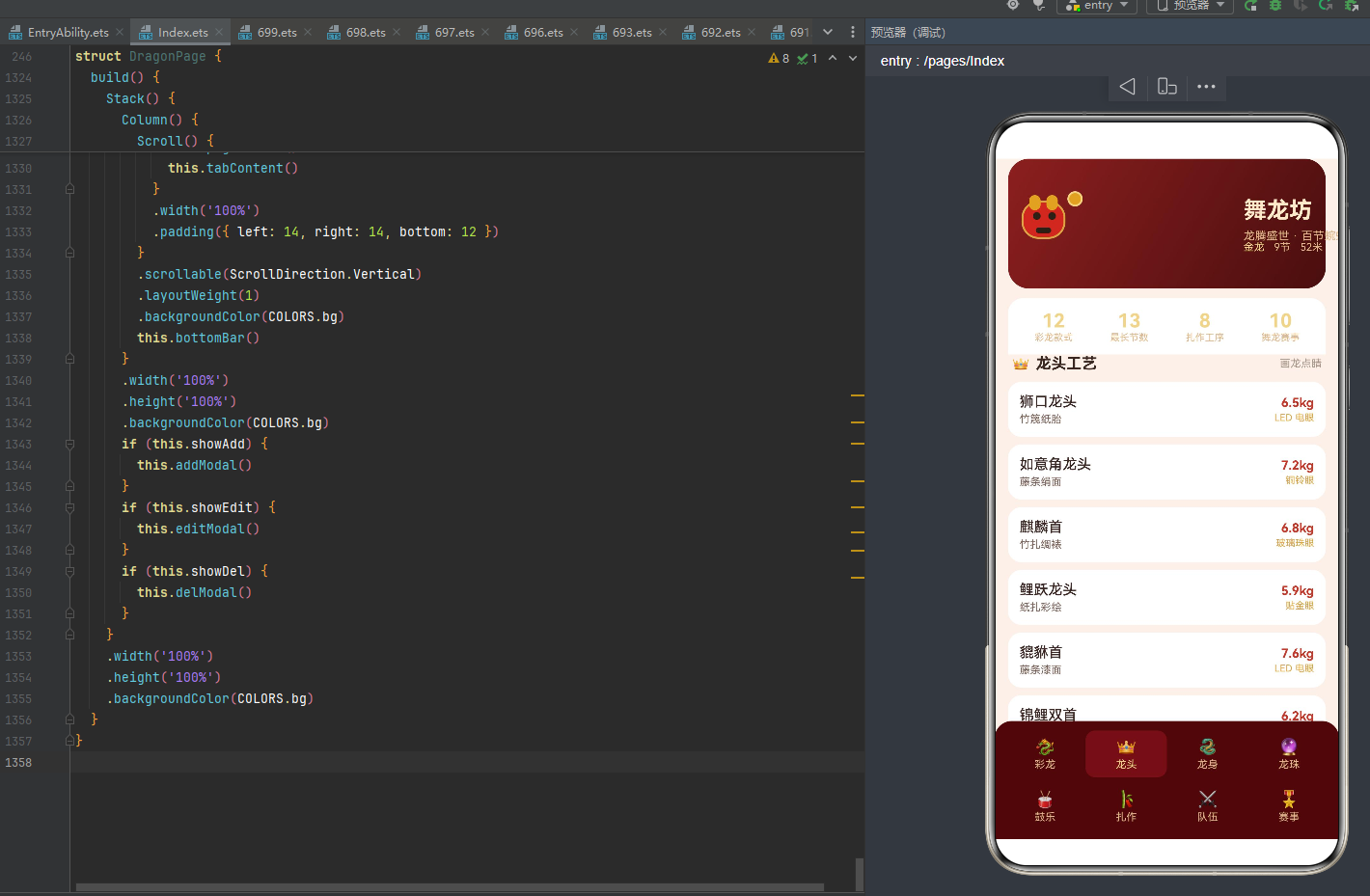
4.1 TabMeta 接口与 TAB_LIST 数组
interface TabMeta {
  label: string;
  icon: string;
}

const TAB_LIST: TabMeta[] = [
  { label: '彩龙', icon: '🐉' },
  { label: '龙头', icon: '👑' },
  { label: '龙身', icon: '🐍' },
  { label: '龙珠', icon: '🔮' },
  { label: '鼓乐', icon: '🥁' },
  { label: '扎作', icon: '🎋' },
  { label: '队伍', icon: '⚔️' },
  { label: '赛事', icon: '🎖️' }
];
TabMeta 接口定义了每个 Tab 的两个属性:label(中文标签)和 icon(Emoji 图标)。使用 Emoji 而非自定义图标字体或图片资源,是一种轻量化的设计选择——Emoji 是系统级资源,无需打包额外字体文件,且自带跨平台一致性,渲染开销极低。8 个 Tab 按舞龙的组成逻辑排列:前四个(彩龙、龙头、龙身、龙珠)是舞龙的物理构成,中间两个(鼓乐、扎作)是舞龙的配套技艺,最后两个(队伍、赛事)是舞龙的社会活动。这种排列暗合"物—艺—人"的递进逻辑。
4.2 索引数组与布局拆分
const ROW1_IDX: number[] = [0, 1, 2, 3];
const ROW2_IDX: number[] = [4, 5, 6, 7];
const SEG_IDX: number[] = [0, 1, 2, 3, 4, 5];
const MATCH_BAR_IDX: number[] = [0, 1, 2, 3, 4, 5, 6, 7, 8, 9];
四个索引数组各自承担不同的渲染职责。ROW1_IDX 和 ROW2_IDX 将 TAB_LIST 的 8 个 Tab 拆分为上下两行——第一行索引 [0,1,2,3] 对应彩龙/龙头/龙身/龙珠,第二行索引 [4,5,6,7] 对应鼓乐/扎作/队伍/赛事。这种拆分使得 bottomBar 可以通过两次 ForEach 分别渲染上下两行,每行四个 Tab 各占 25% 宽度。SEG_IDX(0-5 共 6 个索引)用于头部龙身蜿蜒动画,控制 6 段龙身的水平排布。MATCH_BAR_IDX(0-9 共 10 个索引)用于赛事奖金柱状图,对应 10 场赛事的柱子排布。将索引数组提为全局 const,既避免了在 ForEach 中重复创建数组带来的性能开销,也使得索引范围一目了然。
4.3 底部导航渲染逻辑
@Builder
bottomItem(i: number) {
  Column() {
    Text(TAB_LIST[i].icon)
      .fontSize(17)
    Text(TAB_LIST[i].label)
      .fontSize(11)
      .fontColor(this.curTab === i ? COLORS.tabOn : COLORS.sub)
      .margin({ top: 2 })
  }
  .width('25%')
  .padding({ top: 7, bottom: 7 })
  .backgroundColor(this.curTab === i ? '#6E1A1A' : COLORS.tabBg)
  .borderRadius(10)
  .onClick(() => {
    this.curTab = i;
  })
}

@Builder
bottomBar() {
  Column() {
    Row() {
      ForEach(ROW1_IDX, (i: number) => {
        this.bottomItem(i)
      }, (i: number) => 'r1' + i)
    }
    .width('100%')
    Row() {
      ForEach(ROW2_IDX, (i: number) => {
        this.bottomItem(i)
      }, (i: number) => 'r2' + i)
    }
    .width('100%')
    .margin({ top: 6 })
  }
  .width('100%')
  .padding(10)
  .backgroundColor(COLORS.tabBg)
  .borderRadius({ topLeft: 18, topRight: 18, bottomLeft: 0, bottomRight: 0 })
}
bottomItem 是单个 Tab 项的渲染方法,接收索引 i 作为参数。它通过 Column 垂直排列 Emoji 图标(17px)和文字标签(11px),宽度设为 25% 确保每行恰好容纳 4 个 Tab。选中态通过三重视觉反馈体现:文字颜色从 COLORS.sub(暗金)变为 COLORS.tabOn(浅金),背景色从 COLORS.tabBg(#4A0E0E 暗酒红)变为 #6E1A1A(略亮的酒红),圆角 10 使每个 Tab 呈现为独立的圆角胶囊。onClick 回调将 curTab 赋值为当前索引 i,触发 ArkTS 的响应式刷新,自动切换 tabContent 的渲染分支。
bottomBar 通过两次 ForEach 分别遍历 ROW1_IDX 和 ROW2_IDX,将 8 个 bottomItem 排列为两行。ForEach 的第三个参数是键值生成器(key generator),第一行用 'r1' + i、第二行用 'r2' + i,确保 ArkTS 的 Diff 算法能正确识别列表项的唯一性,避免不必要的重渲染。整个底部导航容器使用 COLORS.tabBg 暗酒红背景,顶部两角圆角 18 营造悬浮卡片效果,10 的内边距使 Tab 项之间留有呼吸空间。
4.4 导航布局 mermaid 示意图
上图展示了 8 个 Tab 与对应内容区的映射关系。第一行选中态(#6E1A1A)以略亮的酒红高亮,其余 Tab 保持 #4A0E0E 暗酒红底色。每个 Tab 点击后通过 curTab 状态变量驱动 tabContent 中的 if-else 分支切换,渲染对应的数据列表。值得注意的是,第 7 个 Tab(赛事)除了渲染赛事列表外,还会额外渲染 matchChart 柱状图,是 8 个 Tab 中内容最丰富的页面。
五、数据接口与 @Observed 可观察数据类
舞龙坊的数据层由 8 个 @Observed 装饰的可观察数据类构成,每个类对应舞龙的一个业务领域。这些类通过显式构造函数初始化,并通过 @Observed 装饰器获得属性变更的自动监听能力,是实现数据驱动视图的基石。
5.1 数据模型总览 mermaid 类图
5.2 DragonItem 彩龙款式
@Observed
export class DragonItem {
  name: string;
  length: number;
  segments: number;
  color: string;
  price: number;

  constructor(name: string, length: number, segments: number, color: string, price: number) {
    this.name = name;
    this.length = length;
    this.segments = segments;
    this.color = color;
    this.price = price;
  }
}
DragonItem 是彩龙款式的数据模型,包含 5 个属性。name 是彩龙的诗意名称(如"金龙腾云"“赤焰火龙”),length 是龙身总长(米),segments 是龙身节数(传统舞龙以 9 节为标准,亦有 7 节、11 节、13 节等变化),color 是色彩描述(“金黄”“朱红”"青碧"等),price 是租赁价格(元)。@Observed 装饰器使得该类的实例在被 @State 引用时,任何属性变更都会自动触发关联 UI 的重绘。export 关键字使该类可被其他模块引用。显式构造函数确保所有属性在实例化时即被赋值,避免了可选属性带来的空值风险。
5.3 HeadItem 龙头工艺
@Observed
export class HeadItem {
  name: string;
  material: string;
  weight: number;
  eyes: string;

  constructor(name: string, material: string, weight: number, eyes: string) {
    this.name = name;
    this.material = material;
    this.weight = weight;
    this.eyes = eyes;
  }
}
HeadItem 描述龙头工艺,包含 4 个属性。name 是龙头造型名称(如"狮口龙头"“如意角龙头”“麒麟首”),这些名称反映了龙头造型与狮、麒麟、鲤、貔貅等瑞兽的融合。material 是扎制材料(“竹篾纸胎”“藤条绢面”"竹扎绸裱"等),weight 是龙头重量(千克,通常在 5-8kg 之间),eyes 是龙眼工艺(“LED 电眼”“铜铃眼”“玻璃珠眼”"贴金眼"等)。龙眼是龙头的灵魂——"画龙点睛"的典故正源于此,因此 eyes 字段在 headRow 渲染时以金色高亮显示。
5.4 BodyItem 龙身段
@Observed
export class BodyItem {
  name: string;
  material: string;
  width: number;
  price: number;

  constructor(name: string, material: string, width: number, price: number) {
    this.name = name;
    this.material = material;
    this.width = width;
    this.price = price;
  }
}
BodyItem 描述龙身段,包含 4 个属性。name 是龙身段名称(如"金鳞龙身段"“红绸龙身段”“绣金龙身段”),material 是面料材质(“彩布竹环”“绸缎竹环”"织锦竹环"等),width 是幅宽(厘米,决定龙身的视觉粗细),price 是单价(元)。width 字段是 BodyItem 的核心——它驱动 widthBarW 函数计算进度条宽度,并在 editModal 弹窗中可被加减 2cm 调整。由于 BodyItem 是 @Observed 类,width 与 price 的修改会自动刷新 bodyRow 的进度条与价格显示。
5.5 PearlItem 引路龙珠
@Observed
export class PearlItem {
  name: string;
  material: string;
  light: number;
  price: number;

  constructor(name: string, material: string, light: number, price: number) {
    this.name = name;
    this.material = material;
    this.light = light;
    this.price = price;
  }
}
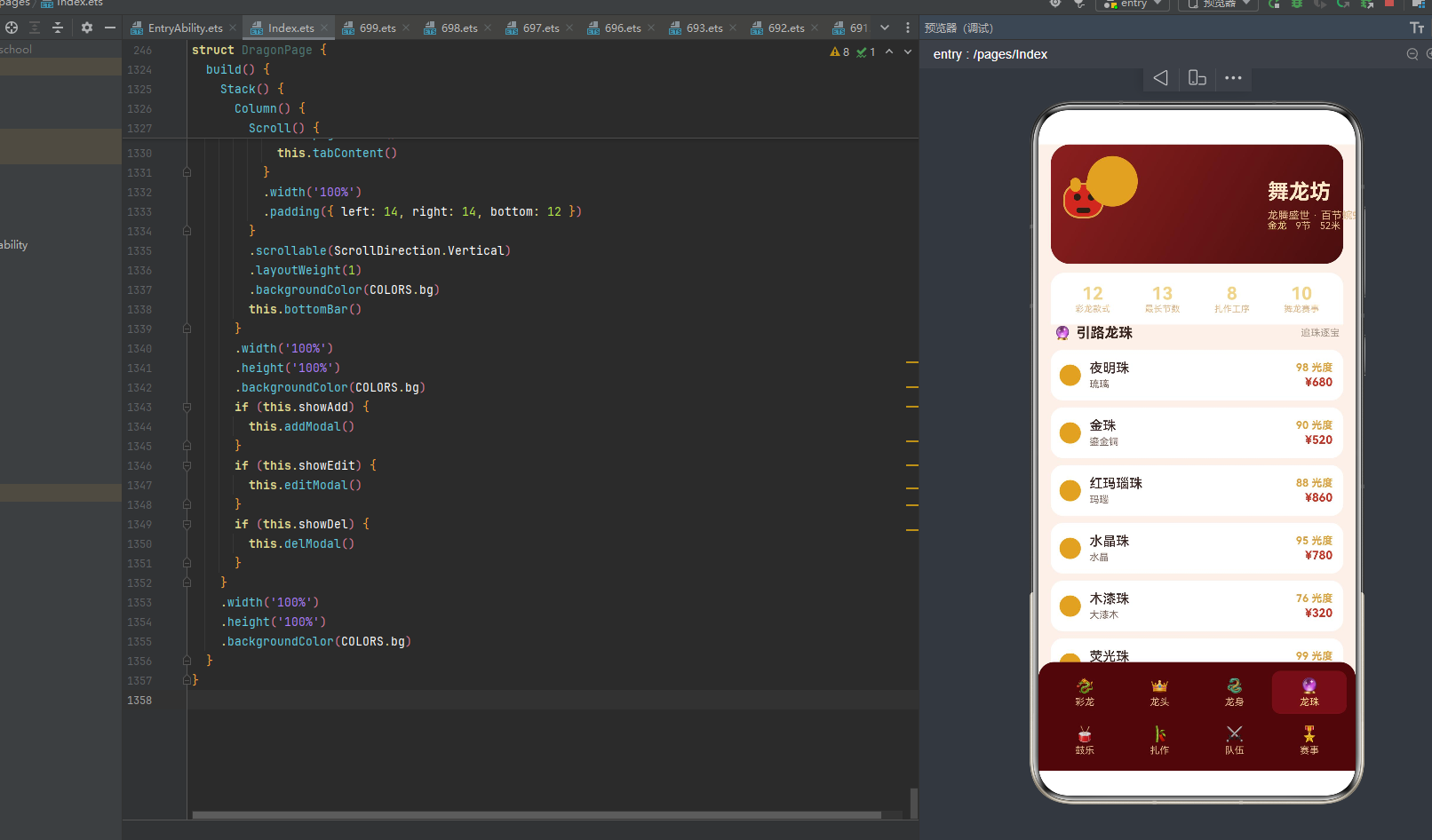
PearlItem 描述引路龙珠,包含 4 个属性。name 是龙珠名称(“夜明珠”“金珠”“红玛瑙珠”"水晶珠"等),material 是材质(“琉璃”“鎏金铜”“玛瑙”"水晶"等),light 是光度值(0-100,越高越亮),price 是价格。龙珠在舞龙中是引导龙身行进的核心道具——“龙戏珠”"二龙戏珠"是经典桥段。light 字段在 pearlRow 中以"X 光度"的金色文字显示,配合龙珠图形的脉冲缩放动画,营造出珠光闪烁的视觉效果。
5.6 DrumItem 锣鼓配乐
@Observed
export class DrumItem {
  name: string;
  drum: string;
  gong: string;
  hot: number;

  constructor(name: string, drum: string, gong: string, hot: number) {
    this.name = name;
    this.drum = drum;
    this.gong = gong;
    this.hot = hot;
  }
}
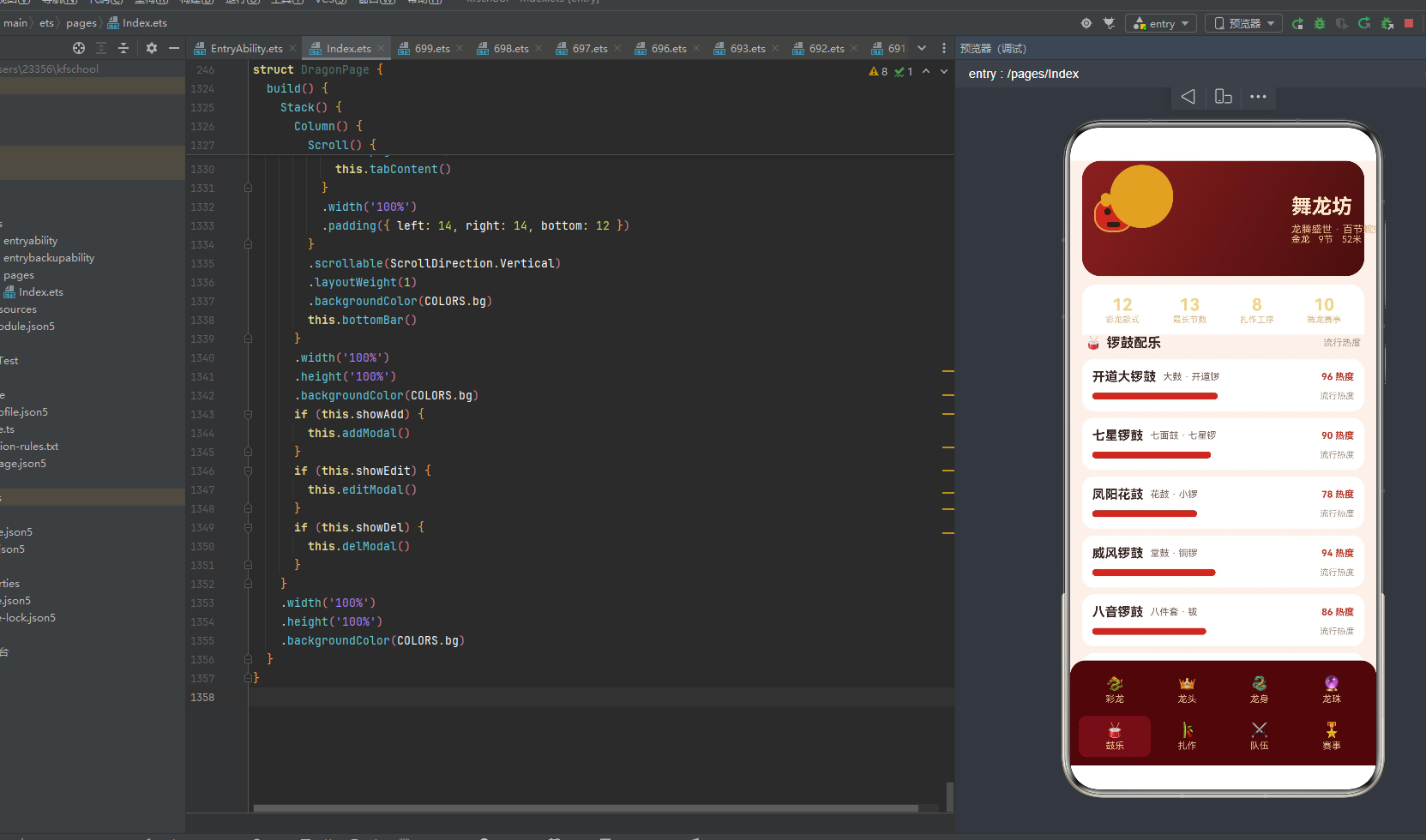
DrumItem 描述锣鼓配乐,包含 4 个属性。name 是锣鼓组合名称(“开道大锣鼓”“七星锣鼓”“威风锣鼓”"十番锣鼓"等),drum 是鼓的类型(“大鼓”“七面鼓”“堂鼓”"腰鼓"等),gong 是锣钲类型(“开道锣”“七星锣”“铜锣”“云锣"等),hot 是流行热度(0-100)。锣鼓是舞龙的"灵魂之声”——鼓点节奏决定龙身行进的步法与速度,没有鼓乐的舞龙如同失声的巨龙。hot 字段驱动 hotBarW 函数计算红色进度条宽度,配合呼吸动画的闪烁效果,直观展示各锣鼓组合的流行程度。
5.7 CraftItem 扎作工序
@Observed
export class CraftItem {
  name: string;
  hours: number;
  stage: string;

  constructor(name: string, hours: number, stage: string) {
    this.name = name;
    this.hours = hours;
    this.stage = stage;
  }
}
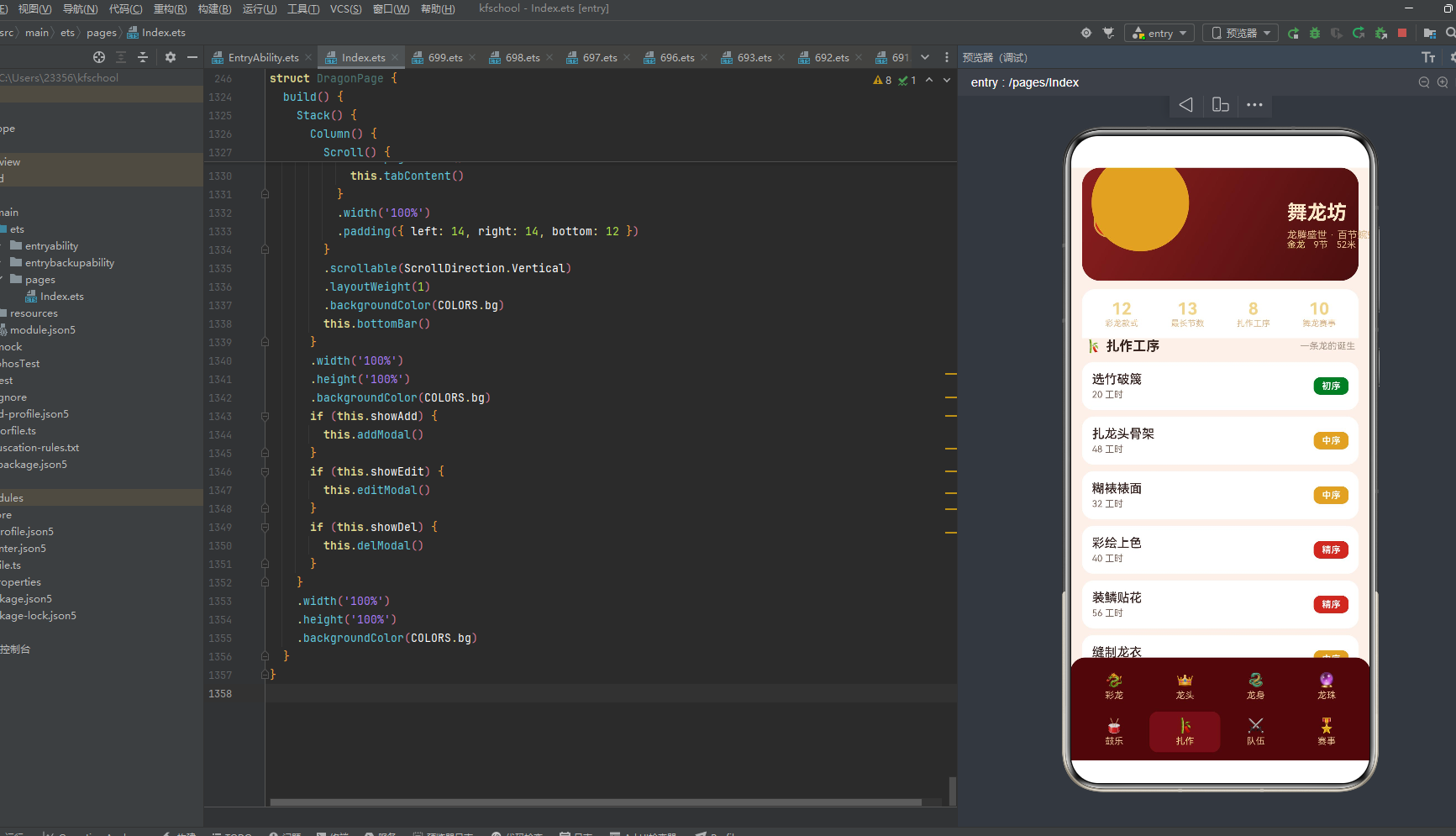
CraftItem 描述扎作工序,仅含 3 个属性——是所有数据类中最精简的。name 是工序名称(“选竹破篾”“扎龙头骨架”“糊裱裱面”“彩绘上色”“装鳞贴花”“缝制龙衣”“装配灯具”“整龙试舞”),这 8 道工序完整覆盖了一条舞龙从竹料到成品的全部流程。hours 是该工序所需工时(小时),stage 是工序阶段(“初序”“中序”“精序”"末序"四阶段)。stage 字段通过 stageColor 函数映射为不同颜色——精序为红、中序为金、初序/末序为绿——在 craftRow 中以彩色标签呈现,使工序的先后轻重一目了然。
5.8 TeamItem 舞龙队伍
@Observed
export class TeamItem {
  name: string;
  city: string;
  members: number;
  wins: number;

  constructor(name: string, city: string, members: number, wins: number) {
    this.name = name;
    this.city = city;
    this.members = members;
    this.wins = number;
  }
}
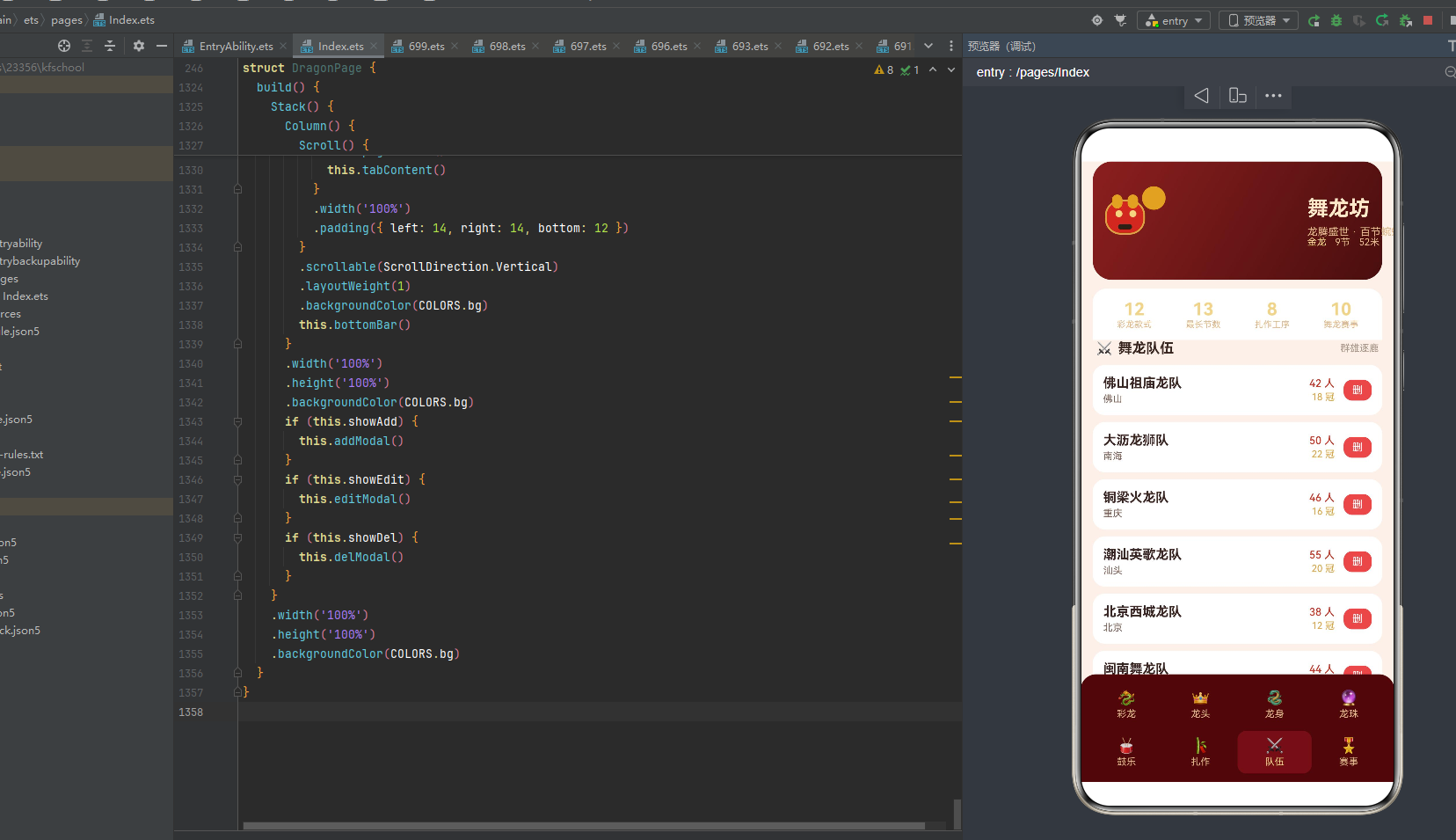
TeamItem 描述舞龙队伍,包含 4 个属性。name 是队伍名称(“佛山祖庙龙队”“铜梁火龙队”"潮汕英歌龙队"等),这些名称直接对应中国各地著名的舞龙流派。city 是所在城市(“佛山”“重庆”“汕头”"北京"等),members 是队伍人数(通常 38-55 人),wins 是历年夺冠次数。TeamItem 是唯一支持删除操作的数据类——在 teamRow 中点击"删"按钮会弹出 delModal 确认删除,通过 splice 从 teams 数组中移除,这一操作演示了 @State 数组的响应式删除能力。
5.9 MatchItem 舞龙赛事
@Observed
export class MatchItem {
  name: string;
  prize: number;
  level: string;
  date: string;

  constructor(name: string, prize: number, level: string, date: string) {
    this.name = name;
    this.prize = prize;
    this.level = level;
    this.date = date;
  }
}
MatchItem 描述舞龙赛事,包含 4 个属性。name 是赛事名称(“国际舞龙邀请赛”“全国舞龙锦标赛”“佛山秋色巡游赛”"重庆铜梁龙灯节"等),prize 是奖金(元,最高 15 万),level 是赛事级别(“国际”“全国”“大湾区”“省级”“市级”),date 是举办日期。MatchItem 是功能最丰富的数据类——它同时支持新增(addModal 弹窗)和可视化(matchChart 柱状图)。prize 驱动 prizeBarH 函数计算柱状图高度,level 通过 levelColor 函数映射为彩色级别标签。addModal 中通过 this.matches.splice(0, 0, new MatchItem(...)) 在数组头部插入新赛事,触发柱状图与列表的自动刷新。
5.10 数据类对比表
| 数据类 | 属性数 | 核心数值字段 | 可视化方式 | 增删改支持 |
|---|---|---|---|---|
| DragonItem | 5 | length / segments / price | 文字+价格标签 | 仅展示 |
| HeadItem | 4 | weight | 文字+重量高亮 | 仅展示 |
| BodyItem | 4 | width / price | 进度条(widthBarW) | 编辑(editModal) |
| PearlItem | 4 | light / price | 脉冲圆点+光度 | 仅展示 |
| DrumItem | 4 | hot | 进度条(hotBarW) | 仅展示 |
| CraftItem | 3 | hours | 阶段彩色标签 | 仅展示 |
| TeamItem | 4 | members / wins | 文字+人数/冠数 | 删除(delModal) |
| MatchItem | 4 | prize | 柱状图(prizeBarH) | 新增(addModal) |
上表清晰展示了 8 个数据类的设计差异。每个类的属性数量精简(3-5 个),核心数值字段各不相同,可视化方式也根据数据特性定制——连续型数值(width/hot/prize)用进度条或柱状图,离散型分类(stage/level)用彩色标签,计数型数值(members/wins/segments)用文字高亮。增删改支持集中在 3 个类上:BodyItem 支持编辑(调整幅宽)、TeamItem 支持删除、MatchItem 支持新增,三者分别对应 editModal、delModal、addModal 三个弹窗,形成完整的 CRUD 演示。
六、工具函数:从数值到视觉的映射引擎
舞龙坊定义了 9 个纯函数工具,负责将数据层的数值映射为视图层所需的位置坐标、颜色值或尺寸值。这些函数是连接数据与视觉的桥梁,均采用无副作用的纯函数设计,输入确定则输出确定,便于测试与复用。
6.1 龙身蜿蜒位置函数 segX / segY
function segX(i: number): number {
  return 78 + i * 27;
}

function segY(i: number): number {
  return 44 + Math.sin(i * 1.15) * 9;
}
segX 和 segY 共同决定头部动画中 6 段龙身段的位置。segX(i) 返回第 i 段的水平坐标——起始 78 像素,每段间隔 27 像素,使 6 段龙身从左到右均匀排布在头部区域。segY(i) 返回垂直坐标——以 44 为基准线,通过 Math.sin(i * 1.15) * 9 产生正弦波形偏移,使龙身在垂直方向上呈现波浪起伏。1.15 是角频率系数,使波形不是简单的等周期正弦,而是带有轻微的相位压缩,更接近真实龙身蜿蜒的有机曲线。9 是振幅(像素),控制波峰波谷的高低差。两者结合,6 段龙身在水平匀速前进的同时垂直正弦起伏,形成"百节蜿蜒"的视觉效果。
6.2 龙身段配色函数 segColor
function segColor(i: number): string {
  if (i % 3 === 0) {
    return COLORS.red;
  }
  if (i % 3 === 1) {
    return COLORS.gold;
  }
  return COLORS.green;
}
segColor 通过模 3 运算将 6 段龙身按"红-金-绿"三色循环着色。第 0、3 段为朱红(#C0392B),第 1、4 段为鎏金(#D9A441),第 2、5 段为翡翠绿(#2E7D32)。这种三色循环对应中国传统舞龙中"五彩龙"的色彩配置——红代表火与喜庆,金代表尊贵与祥瑞,绿代表生机与青龙。三色交替排列使龙身在蜿蜒时色彩流转,视觉节奏鲜明。使用模运算而非查表,使得龙身段数量可灵活扩展而无需修改配色逻辑。
6.3 进度条宽度函数 widthBarW / hotBarW
function widthBarW(w: number): number {
  return 16 + Math.min(w, 100) * 1.3;
}

function hotBarW(h: number): number {
  return 18 + Math.min(h, 100) * 1.35;
}
widthBarW 和 hotBarW 分别将龙身幅宽(width,单位 cm)和鼓乐热度(hot,0-100)映射为进度条像素宽度。两者结构相同:基础宽度 + Math.min(value, 100) * 系数。Math.min(value, 100) 是关键的截断逻辑——当数值超过 100 时,进度条不再增长,避免过宽的进度条撑破卡片布局。widthBarW 的基础宽 16、系数 1.3,hotBarW 的基础宽 18、系数 1.35,两者参数略有差异,使龙身幅宽进度条(金色)与鼓乐热度进度条(红色)在视觉长度上有所区别,避免雷同感。以幅宽 42cm 为例,widthBarW(42) = 16 + 42 * 1.3 = 70.6 像素;以热度 96 为例,hotBarW(96) = 18 + 96 * 1.35 = 147.6 像素。
6.4 奖金柱状图高度函数 prizeBarH
function prizeBarH(p: number): number {
  return 20 + Math.min(p, 200000) / 3000;
}
prizeBarH 将赛事奖金(prize,单位元)映射为柱状图柱子高度(像素)。基础高度 20 像素,加上 Math.min(p, 200000) / 3000。Math.min(p, 200000) 截断在 20 万元,超过部分不再增高;/3000 的除数将金额压缩为像素——1 万元约对应 3.3 像素,15 万元对应 20 + 150000/3000 = 70 像素。以国际舞龙邀请赛 15 万奖金为例,柱高 70 像素;以北京庙会舞龙赛 1.5 万奖金为例,柱高 20 + 15000/3000 = 25 像素。基础高度 20 确保即使奖金为 0 的柱子也有最小可见高度,避免"空柱"的视觉断裂。
6.5 阶段颜色映射函数 stageColor
function stageColor(stage: string): string {
  if (stage.indexOf('精') >= 0) {
    return COLORS.win;
  }
  if (stage.indexOf('中') >= 0) {
    return COLORS.gold;
  }
  return COLORS.lose;
}
stageColor 将扎作工序阶段字符串映射为颜色值。通过 indexOf 检索关键字:"精序"含"精"返回红色(COLORS.win),“中序"含"中"返回金色(COLORS.gold),其余(“初序”“末序”)返回绿色(COLORS.lose)。这种基于字符串包含匹配的设计比 switch 更灵活——未来若新增"精细序”"中段序"等变体也无需修改函数。颜色映射体现了工序的轻重缓急:精序(彩绘、装鳞)是技艺含量最高的核心工序,用红色强调;中序(扎骨架、糊裱、缝衣)是承上启下的中间工序,用金色标识;初序(选竹)与末序(装配、试舞)是辅助性工序,用绿色弱化。
6.6 级别颜色映射函数 levelColor
function levelColor(level: string): string {
  if (level.indexOf('国际') >= 0) {
    return COLORS.win;
  }
  if (level.indexOf('全国') >= 0) {
    return COLORS.gold;
  }
  return COLORS.lose;
}
levelColor 将赛事级别字符串映射为颜色值,逻辑与 stageColor 结构相同。含"国际"返回红色,含"全国"返回金色,其余(“省级”“市级”“大湾区”)返回绿色。颜色映射体现了赛事的规格高低:国际赛用红色最高规格强调,全国赛用金色次高规格标识,省级/市级/大湾区赛用绿色统一归类。值得注意的是"大湾区"虽然实际规格高于省级,但由于不含"国际"或"全国"关键字,被归入绿色——这是基于关键字匹配的局限,在当前数据集中"粤港澳龙狮大赛"标注为"大湾区"级别,不影响功能正确性。
6.7 龙眼开关函数 eyeOn
function eyeOn(b: boolean): string {
  return b ? COLORS.goldLight : COLORS.dark;
}
eyeOn 是最简单的工具函数——将布尔值映射为龙眼颜色。true 返回浅金(#F0D48A),表示龙眼"亮"的状态;false 返回墨褐(#2B2118),表示龙眼"暗"的状态。这个函数在 pageHeader 中被两只龙眼引用,配合 480 毫秒的 breath 翻转,实现龙眼一明一暗的"眨眼"效果。“画龙点睛”——龙眼的明暗变化赋予了静态龙头以生命力,是整个头部动画的点睛之笔。
6.8 工具函数调用关系 mermaid 图
上图完整展示了 9 个工具函数的数据流:左侧是数据输入(索引、数值、字符串、布尔),中间是工具函数(将输入映射为位置/颜色/尺寸),右侧是视图输出(@Builder 方法中的具体应用)。segX/segY/segColor 三个函数共同服务于 pageHeader 的龙身段渲染,widthBarW/hotBarW/prizeBarH 三个函数分别服务于三种进度可视化,stageColor/levelColor 两个函数服务于彩色标签,eyeOn 单独服务于龙眼动画。这种"一函数一用途"的设计使得每个函数都足够小而专注,便于理解和测试。
七、头部动画:龙身蜿蜒与龙珠脉冲的 Stack 层叠艺术
pageHeader 是整个应用视觉表现力最集中的区域。它通过多层 Stack 层叠,将渐变背景、龙头造型、6 段蜿蜒龙身、脉冲龙珠、标题文字与统计信息组合为一个有机整体,并以 480 毫秒为周期的 breath 状态驱动多组动画并发执行。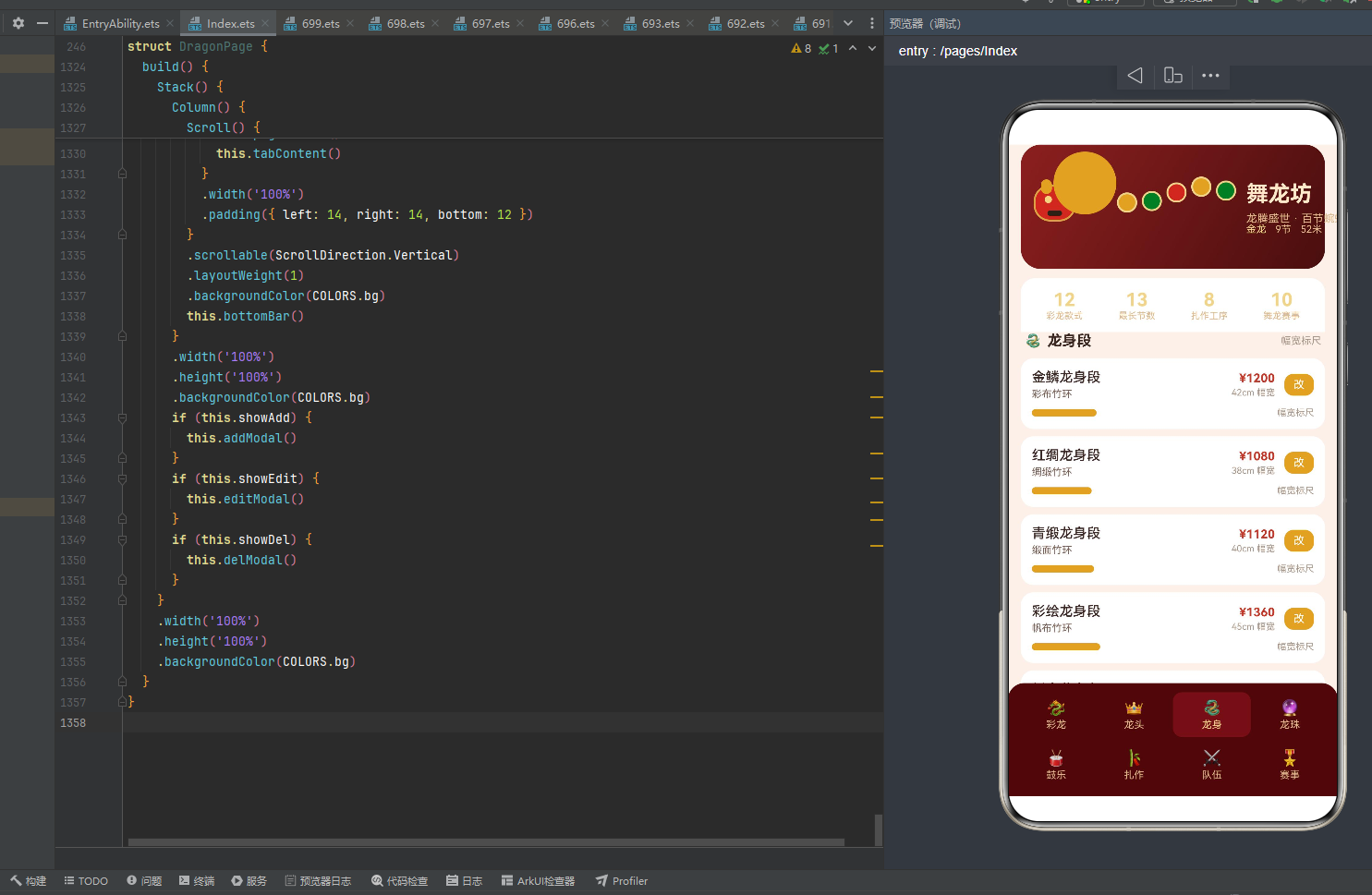
7.1 aboutToAppear 生命周期与呼吸定时器
aboutToAppear(): void {
  setInterval(() => {
    this.breath = !this.breath;
  }, 480);
}
aboutToAppear 是 ArkTS 组件的生命周期回调,在组件实例创建后、build() 执行前被调用。这里通过 setInterval 注册了一个每 480 毫秒执行一次的定时器,将 breath 布尔值在 true/false 之间翻转。480 毫秒的周期选择经过精心考量——快于人类视觉暂留的临界点(约 100ms)以产生流畅动画,又慢于性能敏感的 16ms 帧间隔以避免过度刷新。breath 是 @State 装饰的状态变量,每次翻转都会触发所有引用了 this.breath 的 @Builder 方法重新执行,进而驱动龙身段透明度、龙眼明暗、龙珠脉冲、进度条闪烁等多组动画的并发更新。这种"单状态驱动多动画"的设计极大简化了动画协调逻辑——无需为每组动画单独管理定时器。
7.2 pageHeader 渐变背景与龙头 Stack
@Builder
pageHeader() {
  Column() {
    Stack() {
      Column()
        .width('100%')
        .height('100%')
        .borderRadius(22)
        .linearGradient({
          angle: 120,
          colors: [[COLORS.header1, 0], [COLORS.header2, 1]]
        })
      Stack() {
        Column()
          .width(46)
          .height(40)
          .borderRadius(18)
          .backgroundColor(COLORS.red)
          .border({ width: 2, color: COLORS.gold })
        Column()
          .width(12)
          .height(16)
          .borderRadius(6)
          .backgroundColor(COLORS.gold)
          .position({ x: 8, y: -6 })
        Column()
          .width(12)
          .height(16)
          .borderRadius(6)
          .backgroundColor(COLORS.gold)
          .position({ x: 26, y: -6 })
        Column()
          .width(8)
          .height(8)
          .borderRadius(4)
          .backgroundColor(eyeOn(this.breath))
          .position({ x: 12, y: 12 })
        Column()
          .width(8)
          .height(8)
          .borderRadius(4)
          .backgroundColor(eyeOn(this.breath))
          .position({ x: 28, y: 12 })
        Column()
          .width(16)
          .height(6)
          .borderRadius(3)
          .backgroundColor(COLORS.dark)
          .position({ x: 15, y: 28 })
      }
      .position({ x: 14, y: 44 })
pageHeader 的最外层是一个 Stack,其第一个子元素是铺满的渐变背景 Column——通过 linearGradient 从 COLORS.header1(#8C1F1F 深朱红)到 COLORS.header2(#4A0E0E 暗酒红)的 120 度渐变,圆角 22 营造出柔和的头部卡片轮廓。
第二个子元素是龙头 Stack,位于 position({ x: 14, y: 44 }),由 6 个 Column 层叠组合成龙头造型:最底层是 46x40 的红色圆角矩形(龙头主体),金边 2px 勾勒轮廓;上方两个 12x16 的金色圆角矩形是龙角,通过 position 分别偏移到左上和右上;中间两个 8x8 的圆点是龙眼,颜色由 eyeOn(this.breath) 动态决定——breath 为 true 时浅金(睁眼),false 时墨褐(闭眼),实现眨眼效果;最下方 16x6 的墨褐色矩形是龙嘴。这种纯 Column+position 的几何拼装方式无需任何图片资源,完全由代码绘制龙头,体现了 ArkTS 声明式 UI 的图形组合能力。
7.3 龙身段蜿蜒动画 ForEach
      ForEach(SEG_IDX, (i: number) => {
        Column()
          .width(22)
          .height(22)
          .borderRadius(11)
          .backgroundColor(segColor(i))
          .border({ width: 2, color: COLORS.goldLight })
          .opacity(this.breath ? 1 : 0.55)
          .animation({ duration: 480, iterations: -1, playMode: PlayMode.Alternate })
          .position({ x: segX(i), y: segY(i) })
      }, (i: number) => 'seg' + i)
龙身段通过 ForEach(SEG_IDX, ...) 渲染 6 个圆形龙身段。每个段是 22x22 的圆(borderRadius(11)),背景色由 segColor(i) 按红-金-绿三色循环,金色边框 2px。关键是 .opacity(this.breath ? 1 : 0.55) ——透明度随 breath 在 1.0(完全可见)和 0.55(半透明)之间切换,配合 .animation({ duration: 480, iterations: -1, playMode: PlayMode.Alternate }) 实现无限循环的呼吸式闪烁。iterations: -1 表示无限重复,PlayMode.Alternate 表示正反向交替播放(先渐显再渐隐),480ms 的动画时长与 breath 翻转周期完全同步,确保动画的每个相位都与状态变化对齐。
每个段的位置由 segX(i) 和 segY(i) 计算得出——水平方向从 78 像素起每段间隔 27 像素,垂直方向以 44 为基准做正弦波动。6 段龙身从龙头后方开始向右延伸,垂直方向因正弦函数呈现一上一下的波浪走势,配合透明度闪烁,整体呈现出龙身蜿蜒前行、鳞片明灭的动态效果。ForEach 的键值生成器 'seg' + i 确保每段有稳定唯一标识,避免 breath 刷新时的无效重渲染。
7.4 龙珠脉冲 Stack
      Stack() {
        Column()
          .width(16)
          .height(16)
          .borderRadius(8)
          .backgroundColor(COLORS.goldLight)
          .opacity(this.breath ? 0.15 : 0.5)
          .animation({ duration: 480, iterations: -1, playMode: PlayMode.Alternate })
        Column()
          .width(10)
          .height(10)
          .borderRadius(5)
          .backgroundColor(COLORS.gold)
          .scale({ x: this.breath ? 1.5 : 1, y: this.breath ? 1.5 : 1 })
          .animation({ duration: 480, iterations: -1, playMode: PlayMode.Alternate })
      }
      .position({ x: 62, y: 34 })
龙珠位于龙头前方 position({ x: 62, y: 34 }),由两层 Column 在 Stack 中层叠。外层是 16x16 的浅金圆(#F0D48A),透明度在 0.15-0.5 之间脉动,模拟龙珠的光晕扩散;内层是 10x10 的鎏金圆(#D9A441),通过 scale 在 1.0-1.5 之间缩放,模拟龙珠核心的脉冲跳动。两层动画的相位相同(都由 breath 驱动、480ms 周期、Alternate 模式),但表现维度不同——外层控透明度(光晕强弱),内层控缩放(核心大小),组合产生"龙珠忽明忽暗、忽大忽小"的立体脉冲效果。龙珠位于龙头前方略偏上的位置,恰好与龙眼处于同一水平视线,营造出"龙戏珠"的经典构图。
7.5 头部标题与统计信息
      Column() {
        Text('舞龙坊')
          .fontSize(24)
          .fontWeight(FontWeight.Bold)
          .fontColor(COLORS.title)
        Text('龙腾盛世 · 百节蜿蜒')
          .fontSize(12)
          .fontColor(COLORS.sub)
          .margin({ top: 6 })
      }
      .alignItems(HorizontalAlign.Start)
      .position({ x: 246, y: 40 })
      Row() {
        Text('金龙')
          .fontSize(11)
          .fontColor(COLORS.goldLight)
        Text('9节')
          .fontSize(11)
          .fontColor(COLORS.sub)
          .margin({ left: 10 })
        Text('52米')
          .fontSize(11)
          .fontColor(COLORS.sub)
          .margin({ left: 10 })
      }
      .position({ x: 246, y: 86 })
    }
    .width('100%')
    .height(136)
头部右侧 position({ x: 246, y: 40 }) 放置应用标题"舞龙坊"(24px 加粗,浅金色 #FFE9C9)与副标题"龙腾盛世 · 百节蜿蜒"(12px,暗金色 #E0B98A)。下方 y: 86 处是一行 Row,展示当前彩龙的规格摘要——“金龙”“9节”"52米"三段文字,间距 10 像素。整个头部 Stack 高度 136 像素,将渐变背景、龙头、龙身段、龙珠、标题、规格摘要六层元素在统一坐标系中层叠组合。
头部下方紧接一个四列统计栏,分别展示"12 彩龙款式"“13 最长节数”“8 扎作工序”"10 舞龙赛事"四组关键数字,使用 layoutWeight(1) 等分宽度,金色数字配暗金标签,白色背景圆角顶部 16 与头部卡片视觉衔接。
7.6 头部动画 mermaid 层叠结构图
上图展示了 pageHeader 的六层 Stack 层叠结构,从底到顶依次为:渐变背景(深红底色)、龙头造型(红色主体+金色细节)、龙身段(红金绿三色蜿蜒圆点)、龙珠(双层脉冲圆)、标题文字(浅金加粗)、规格摘要(暗金小字)。六层共用同一套 breath 驱动的 480ms 动画周期,但各层动画维度不同——龙眼控颜色、龙身段控透明度、龙珠控透明度+缩放,形成多维度并发的有机动画系统。统计栏在头部下方独立排列,不参与动画。
八、列表渲染:8 种 @Builder 行方法的差异化设计
舞龙坊为 8 个数据类各定义了一个 @Builder 行渲染方法,每个方法根据数据特性定制了不同的视觉布局与交互逻辑。这 8 个方法共同体现了"数据驱动视图"的核心理念——相同的数据结构通过不同的 Builder 呈现出差异化的视觉效果。
8.1 行渲染方法总览 mermaid 图
8.2 dragonRow 彩龙款式行
@Builder
dragonRow(item: DragonItem, i: number) {
  Row() {
    Column() {
      Text(item.name)
        .fontSize(15)
        .fontWeight(FontWeight.Medium)
        .fontColor(COLORS.text1)
      Text(item.color + ' · ' + item.length + '米')
        .fontSize(11)
        .fontColor(COLORS.text2)
        .margin({ top: 3 })
    }
    .alignItems(HorizontalAlign.Start)
    .layoutWeight(1)
    Column() {
      Text(item.segments + ' 节')
        .fontSize(12)
        .fontWeight(FontWeight.Bold)
        .fontColor(COLORS.accent)
      Text('¥' + item.price)
        .fontSize(13)
        .fontWeight(FontWeight.Bold)
        .fontColor(COLORS.win)
        .margin({ top: 2 })
    }
    .alignItems(HorizontalAlign.End)
    .margin({ right: 6 })
    Text('租')
      .fontSize(12)
      .fontColor(COLORS.cardBg)
      .backgroundColor(COLORS.accent)
      .borderRadius(10)
      .padding({ left: 10, right: 10, top: 5, bottom: 5 })
      .onClick(() => {
        this.showAdd = true;
      })
  }
  .width('100%')
  .padding(12)
  .backgroundColor(COLORS.cardBg)
  .borderRadius(14)
  .margin({ bottom: 8 })
}
dragonRow 采用经典的"左信息+右数据+操作按钮"三栏布局。左侧 Column 通过 layoutWeight(1) 占据剩余空间,展示彩龙名称(15px 中粗深褐)和色彩规格(11px 暖灰,格式为"色彩 · 长度米")。右侧 Column 右对齐展示节数(12px 加粗朱红)和价格(13px 加粗朱红,¥ 前缀)。最右侧是"租"按钮——朱红底白字圆角胶囊,点击触发 this.showAdd = true 打开新增赛事弹窗(复用了 addModal 作为租赁登记入口)。整行白色卡片背景、圆角 14、内边距 12、底部间距 8,形成清晰的卡片列表节奏。dragonRow 是唯一带操作按钮的"展示型"行,按钮复用 addModal 体现了弹窗组件的复用设计。
8.3 headRow 龙头工艺行
@Builder
headRow(item: HeadItem, i: number) {
  Row() {
    Column() {
      Text(item.name)
        .fontSize(15)
        .fontWeight(FontWeight.Medium)
        .fontColor(COLORS.text1)
      Text(item.material)
        .fontSize(11)
        .fontColor(COLORS.text2)
        .margin({ top: 3 })
    }
    .alignItems(HorizontalAlign.Start)
    .layoutWeight(1)
    Column() {
      Text(item.weight + 'kg')
        .fontSize(13)
        .fontWeight(FontWeight.Bold)
        .fontColor(COLORS.accent)
      Text(item.eyes)
        .fontSize(10)
        .fontColor(COLORS.gold)
        .margin({ top: 2 })
    }
    .alignItems(HorizontalAlign.End)
  }
  .width('100%')
  .padding(12)
  .backgroundColor(COLORS.cardBg)
  .borderRadius(14)
  .margin({ bottom: 8 })
}
headRow 采用简洁的"左名称+材料 | 右重量+龙眼"两栏布局,无操作按钮。左侧展示龙头名称与扎制材料,右侧展示重量(13px 加粗朱红,kg 后缀)和龙眼工艺(10px 金色)。龙眼字段以金色 COLORS.gold 高亮,呼应"画龙点睛"的文化意象——龙眼是龙头的灵魂,金色标识突显其特殊地位。与 dragonRow 相比,headRow 去掉了操作按钮和右侧 margin,使布局更紧凑,适合信息密度较低的数据展示。
8.4 bodyRow 龙身段行(含进度条)
@Builder
bodyRow(item: BodyItem, i: number) {
  Column() {
    Row() {
      Column() {
        Text(item.name)
          .fontSize(15)
          .fontWeight(FontWeight.Medium)
          .fontColor(COLORS.text1)
        Text(item.material)
          .fontSize(11)
          .fontColor(COLORS.text2)
          .margin({ top: 3 })
      }
      .alignItems(HorizontalAlign.Start)
      .layoutWeight(1)
      Column() {
        Text('¥' + item.price)
          .fontSize(13)
          .fontWeight(FontWeight.Bold)
          .fontColor(COLORS.win)
        Text(item.width + 'cm 幅宽')
          .fontSize(10)
          .fontColor(COLORS.text3)
          .margin({ top: 2 })
      }
      .alignItems(HorizontalAlign.End)
      .margin({ right: 10 })
      Text('改')
        .fontSize(12)
        .fontColor(COLORS.cardBg)
        .backgroundColor(COLORS.gold)
        .borderRadius(10)
        .padding({ left: 10, right: 10, top: 5, bottom: 5 })
        .onClick(() => {
          this.selBody = item;
          this.showEdit = true;
        })
    }
    .width('100%')
    Row() {
      Column()
        .width(widthBarW(item.width))
        .height(8)
        .borderRadius(4)
        .backgroundColor(COLORS.gold)
        .opacity(this.breath ? 1 : 0.6)
        .animation({ duration: 480, iterations: -1, playMode: PlayMode.Alternate })
      Column().layoutWeight(1)
      Text('幅宽标尺')
        .fontSize(10)
        .fontColor(COLORS.text3)
    }
    .width('100%')
    .margin({ top: 8 })
  }
  .width('100%')
  .padding(12)
  .backgroundColor(COLORS.cardBg)
  .borderRadius(14)
  .margin({ bottom: 8 })
}
bodyRow 是结构最复杂的行渲染方法之一,采用"上信息行+下进度条行"的双行 Column 布局。上行 Row 与 dragonRow 类似——左侧名称+材料,右侧价格+幅宽标注,最右是金色"改"按钮(点击将 item 赋值给 selBody 并打开 editModal)。下行是幅宽进度条:金色 Column 宽度由 widthBarW(item.width) 计算,高 8px 圆角 4,透明度随 breath 在 1.0-0.6 之间呼吸闪烁,右侧 layoutWeight(1) 的空 Column 占据剩余空间,末尾是"幅宽标尺"说明文字。进度条的呼吸动画使静态数据获得了动态生命力,金色进度条配合呼吸闪烁直观传达了"幅宽越宽龙身越粗壮"的物理意象。
8.5 pearlRow 引路龙珠行(含脉冲动画)
@Builder
pearlRow(item: PearlItem, i: number) {
  Row() {
    Column()
      .width(20)
      .height(20)
      .borderRadius(10)
      .backgroundColor(COLORS.gold)
      .scale({ x: this.breath ? 1.25 : 1, y: this.breath ? 1.25 : 1 })
      .animation({ duration: 480, iterations: -1, playMode: PlayMode.Alternate })
    Column() {
      Text(item.name)
        .fontSize(15)
        .fontWeight(FontWeight.Medium)
        .fontColor(COLORS.text1)
      Text(item.material)
        .fontSize(11)
        .fontColor(COLORS.text2)
        .margin({ top: 3 })
    }
    .alignItems(HorizontalAlign.Start)
    .layoutWeight(1)
    .margin({ left: 12 })
    Column() {
      Text(item.light + ' 光度')
        .fontSize(12)
        .fontWeight(FontWeight.Bold)
        .fontColor(COLORS.gold)
      Text('¥' + item.price)
        .fontSize(13)
        .fontWeight(FontWeight.Bold)
        .fontColor(COLORS.win)
        .margin({ top: 2 })
    }
    .alignItems(HorizontalAlign.End)
  }
  .width('100%')
  .padding(12)
  .backgroundColor(COLORS.cardBg)
  .borderRadius(14)
  .margin({ bottom: 8 })
}
pearlRow 的独特之处在于行首的脉冲龙珠圆点——20x20 的金色圆,通过 scale 在 1.0-1.25 之间缩放,配合 480ms 的 Alternate 动画实现持续脉冲。这个脉冲圆点直接呼应了头部 pageHeader 中的龙珠动画,使列表项与头部形成视觉呼应。圆点右侧留 12px 间距后是名称+材料,最右是光度(12px 加粗金色)和价格(13px 加粗朱红)。光度以金色显示而非朱红,是因为"光度"是龙珠的属性而非价格——金色暗示珠光,朱红暗示金钱,色彩语义与数据语义精准对应。
8.6 drumRow 锣鼓配乐行(含热度进度条)
@Builder
drumRow(item: DrumItem, i: number) {
  Column() {
    Row() {
      Text(item.name)
        .fontSize(15)
        .fontWeight(FontWeight.Bold)
        .fontColor(COLORS.text1)
      Text(item.drum + ' · ' + gong)
        .fontSize(11)
        .fontColor(COLORS.text2)
        .margin({ left: 8 })
      Column().layoutWeight(1)
      Text(item.hot + ' 热度')
        .fontSize(11)
        .fontWeight(FontWeight.Bold)
        .fontColor(COLORS.win)
    }
    .width('100%')
    Row() {
      Column()
        .width(hotBarW(item.hot))
        .height(8)
        .borderRadius(4)
        .backgroundColor(COLORS.red)
        .opacity(this.breath ? 1 : 0.6)
        .animation({ duration: 480, iterations: -1, playMode: PlayMode.Alternate })
      Column().layoutWeight(1)
      Text('流行热度')
        .fontSize(10)
        .fontColor(COLORS.text3)
    }
    .width('100%')
    .margin({ top: 8 })
  }
  .width('100%')
  .padding(12)
  .backgroundColor(COLORS.cardBg)
  .borderRadius(14)
  .margin({ bottom: 8 })
}
drumRow 与 bodyRow 结构相似——双行 Column 布局,上行信息行下行进度条行。区别在于:上行采用单行 Row 横排——名称(15px 加粗)、鼓锣规格(11px,“鼓 · 锣"格式)、layoutWeight(1) 弹性占位、热度数值(11px 加粗朱红);下行是红色热度进度条,宽度由 hotBarW(item.hot) 计算,透明度随 breath 呼吸。红色进度条与金色幅宽进度条形成色彩对比——热度用红色暗示"火热流行”,幅宽用金色暗示"金鳞华贵",两种进度条通过颜色区分数据语义。
8.7 craftRow 扎作工序列表
@Builder
craftRow(item: CraftItem, i: number) {
  Row() {
    Column() {
      Text(item.name)
        .fontSize(15)
        .fontWeight(FontWeight.Medium)
        .fontColor(COLORS.text1)
      Text(item.hours + ' 工时')
        .fontSize(11)
        .fontColor(COLORS.text2)
        .margin({ top: 3 })
    }
    .alignItems(HorizontalAlign.Start)
    .layoutWeight(1)
    Text(item.stage)
      .fontSize(11)
      .fontWeight(FontWeight.Bold)
      .fontColor(COLORS.cardBg)
      .backgroundColor(stageColor(item.stage))
      .borderRadius(8)
      .padding({ left: 10, right: 10, top: 4, bottom: 4 })
  }
  .width('100%')
  .padding(12)
  .backgroundColor(COLORS.cardBg)
  .borderRadius(14)
  .margin({ bottom: 8 })
}
craftRow 采用"左名称+工时 | 右阶段标签"两栏布局。左侧展示工序名称与工时(小时),右侧是阶段标签——白字彩色底圆角胶囊,背景色由 stageColor(item.stage) 决定(精序红、中序金、初序/末序绿)。阶段标签是 craftRow 的视觉核心——它将抽象的工序阶段转化为直观的色彩信号,使用户一眼即可分辨哪些是核心工序(红)、哪些是中间工序(金)、哪些是辅助工序(绿)。8 道工序按"初序→中序→中序→精序→精序→中序→末序→末序"的顺序排列,标签颜色呈现出"绿→金→金→红→红→金→绿→绿"的色彩波形,暗合扎作工艺由浅入深再收尾的节奏。
8.8 teamRow 舞龙队伍行(含删除按钮)
@Builder
teamRow(item: TeamItem, i: number) {
  Row() {
    Column() {
      Text(item.name)
        .fontSize(15)
        .fontWeight(FontWeight.Bold)
        .fontColor(COLORS.text1)
      Text(item.city)
        .fontSize(11)
        .fontColor(COLORS.text2)
        .margin({ top: 3 })
    }
    .alignItems(HorizontalAlign.Start)
    .layoutWeight(1)
    Column() {
      Text(item.members + ' 人')
        .fontSize(12)
        .fontWeight(FontWeight.Medium)
        .fontColor(COLORS.accent)
      Text(item.wins + ' 冠')
        .fontSize(11)
        .fontColor(COLORS.gold)
        .margin({ top: 2 })
    }
    .alignItems(HorizontalAlign.End)
    .margin({ right: 10 })
    Text('删')
      .fontSize(12)
      .fontColor(COLORS.cardBg)
      .backgroundColor(COLORS.danger)
      .borderRadius(10)
      .padding({ left: 10, right: 10, top: 5, bottom: 5 })
      .onClick(() => {
        this.selTeam = item;
        this.showDel = true;
      })
  }
  .width('100%')
  .padding(12)
  .backgroundColor(COLORS.cardBg)
  .borderRadius(14)
  .margin({ bottom: 8 })
}
teamRow 与 dragonRow 结构对称——"左名称+城市 | 右人数+冠数 | 删按钮"三栏布局。队伍名称 15px 加粗,城市 11px 暖灰。右侧人数(12px 中粗朱红,"人"后缀)与夺冠次数(11px 金色,"冠"后缀)。最右侧是"删"按钮——警示红 COLORS.danger(#D9534F)底白字圆角胶囊,比 dragonRow 的朱红"租"按钮更明亮醒目,传达"危险操作"的视觉警示。点击将 item 赋值给 selTeam 并打开 delModal 确认弹窗。人数用朱红、冠数用金色,体现了"人为主、冠为荣"的语义层次。
8.9 matchRow 舞龙赛事行
@Builder
matchRow(item: MatchItem, i: number) {
  Row() {
    Column() {
      Text(item.name)
        .fontSize(15)
        .fontWeight(FontWeight.Bold)
        .fontColor(COLORS.text1)
      Text(item.date)
        .fontSize(11)
        .fontColor(COLORS.text2)
        .margin({ top: 3 })
    }
    .alignItems(HorizontalAlign.Start)
    .layoutWeight(1)
    Column() {
      Text(item.level)
        .fontSize(10)
        .fontWeight(FontWeight.Bold)
        .fontColor(COLORS.cardBg)
        .backgroundColor(levelColor(item.level))
        .borderRadius(8)
        .padding({ left: 8, right: 8, top: 3, bottom: 3 })
      Text('¥' + item.prize)
        .fontSize(12)
        .fontWeight(FontWeight.Bold)
        .fontColor(COLORS.win)
        .margin({ top: 3 })
    }
    .alignItems(HorizontalAlign.End)
  }
  .width('100%')
  .padding(12)
  .backgroundColor(COLORS.cardBg)
  .borderRadius(14)
  .margin({ bottom: 8 })
}
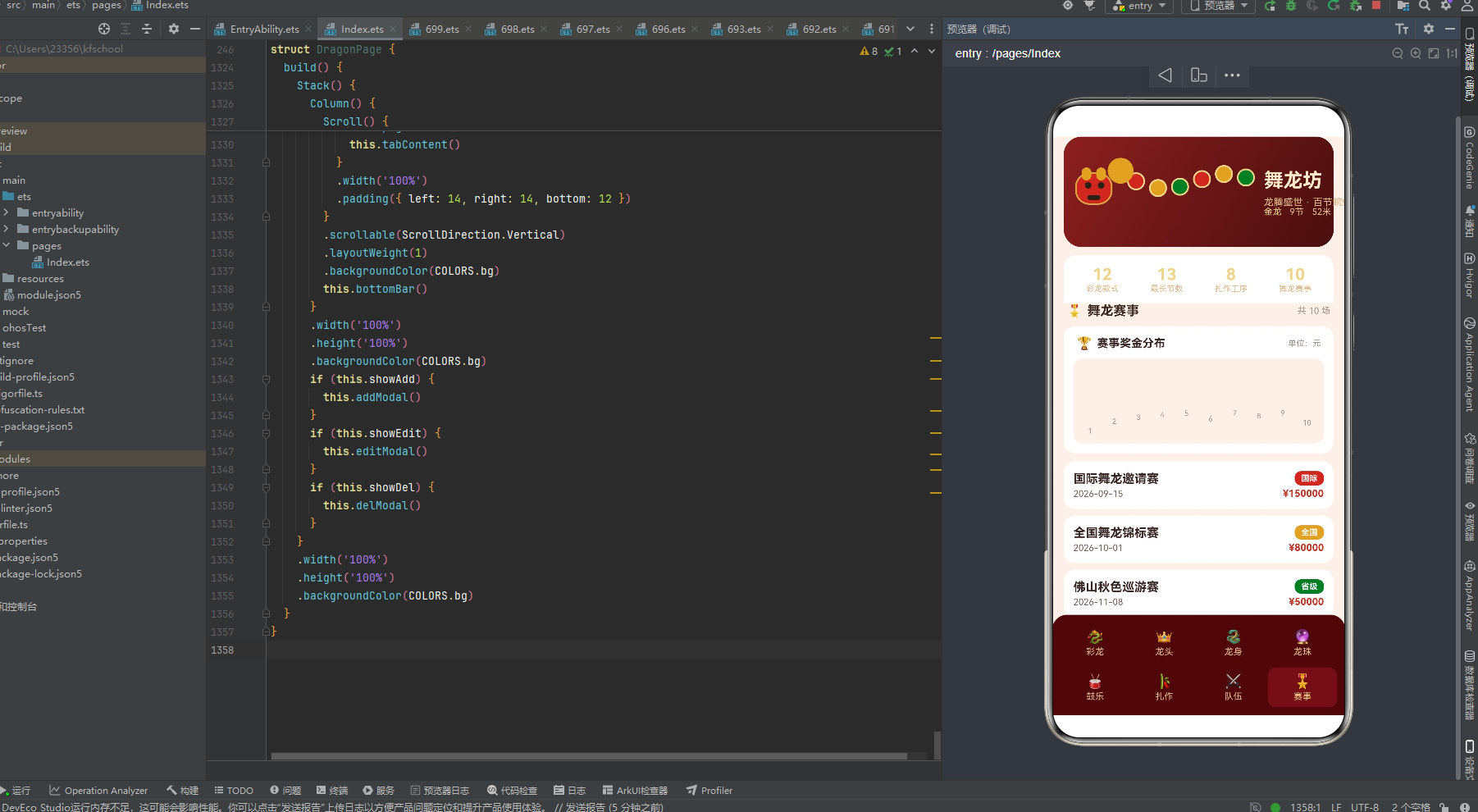
matchRow 采用"左名称+日期 | 右级别标签+奖金"两栏布局。左侧赛事名称 15px 加粗,举办日期 11px 暖灰。右侧上方是级别标签——白字彩色底圆角胶囊,背景色由 levelColor(item.level) 决定(国际红、全国金、省级/市级/大湾区绿),下方是奖金(12px 加粗朱红,¥ 前缀)。级别标签与 craftRow 的阶段标签设计一致,形成统一的"彩色标签"视觉语言。matchRow 与 matchChart 配合使用——柱状图展示奖金分布全景,列表行展示赛事详情,两者互补构成赛事 Tab 的完整视图。
8.10 行渲染方法对比表
| 方法 | 布局结构 | 动画元素 | 交互按钮 | 进度条 |
|---|---|---|---|---|
| dragonRow | 三栏 Row | 无 | 租(朱红→addModal) | 无 |
| headRow | 两栏 Row | 无 | 无 | 无 |
| bodyRow | 双行 Column | 幅宽进度条呼吸 | 改(金色→editModal) | 金色幅宽条 |
| pearlRow | 三栏 Row | 龙珠圆脉冲 | 无 | 无 |
| drumRow | 双行 Column | 热度进度条呼吸 | 无 | 红色热度条 |
| craftRow | 两栏 Row | 无 | 无 | 无(阶段标签) |
| teamRow | 三栏 Row | 无 | 删(警示红→delModal) | 无 |
| matchRow | 两栏 Row | 无 | 无 | 无(级别标签) |
上表揭示了 8 种行渲染方法的设计规律:三栏 Row 布局用于带操作按钮的行(dragonRow/teamRow),两栏 Row 布局用于纯展示行(headRow/craftRow/matchRow),双行 Column 布局用于含进度条的行(bodyRow/drumRow),pearlRow 则以脉冲圆点为特色。动画元素集中在 bodyRow(进度条呼吸)、drumRow(进度条呼吸)和 pearlRow(龙珠脉冲),其余行保持静态以保证滚动性能。交互按钮仅出现在 dragonRow(租)、bodyRow(改)、teamRow(删)三个行中,分别对应 addModal、editModal、delModal 三个弹窗,形成"一行一弹窗"的清晰交互映射。
九、弹窗交互:三类 Modal 的 Stack 层叠与遮罩设计
舞龙坊实现了三个功能弹窗——addModal(新增赛事)、editModal(编辑龙身段)、delModal(删除队伍),统一采用 Stack 层叠遮罩 + 居中卡片的结构,通过 showAdd/showEdit/showDel 三个布尔状态控制显隐。
9.1 弹窗显隐控制机制
build() {
  Stack() {
    Column() {
      Scroll() {
        Column() {
          this.pageHeader()
          this.tabContent()
        }
        .width('100%')
        .padding({ left: 14, right: 14, bottom: 12 })
      }
      .scrollable(ScrollDirection.Vertical)
      .layoutWeight(1)
      .backgroundColor(COLORS.bg)
      this.bottomBar()
    }
    .width('100%')
    .height('100%')
    .backgroundColor(COLORS.bg)
    if (this.showAdd) {
      this.addModal()
    }
    if (this.showEdit) {
      this.editModal()
    }
    if (this.showDel) {
      this.delModal()
    }
  }
  .width('100%')
  .height('100%')
  .backgroundColor(COLORS.bg)
}
build() 方法是整个应用的渲染入口。最外层 Stack 包含两层:底层是 Column(Scroll 滚动区 + bottomBar 底部导航),上层是三个条件渲染的弹窗。三个 if 语句分别检查 showAdd、showEdit、showDel 状态——当某个状态为 true 时,对应的弹窗 @Builder 方法被调用并渲染到 Stack 的上层。这种"条件渲染弹窗"的设计确保了弹窗只在需要时才被创建和销毁,避免了同时存在多个不可见弹窗的内存浪费。由于 Stack 的层叠特性,后渲染的弹窗自然覆盖在底层内容之上,无需手动设置 zIndex(弹窗内部仍通过 zIndex(999) 确保最高层级)。
9.2 modalOverlay 遮罩复用
@Builder
modalOverlay(onClose: () => void) {
  Column()
    .width('100%')
    .height('100%')
    .backgroundColor(COLORS.mask)
    .onClick(() => {
      onClose();
    })
}
modalOverlay 是三个弹窗共用的遮罩层 @Builder。它接收一个 onClose 回调函数作为参数,渲染一个铺满的 Column,背景色为 COLORS.mask(rgba(0,0,0,0.45),45% 黑色半透明),点击时触发 onClose 回调关闭弹窗。这种"遮罩层抽离为独立 Builder + 回调参数"的设计实现了三个弹窗的遮罩复用——addModal、editModal、delModal 各自传入不同的关闭逻辑(this.showAdd = false、this.showEdit = false、this.showDel = false),共享同一套遮罩渲染代码,消除了重复代码。
9.3 addModal 新增赛事弹窗
@Builder
addModal() {
  if (this.showAdd) {
    Stack() {
      this.modalOverlay(() => {
        this.showAdd = false;
      })
      Column() {
        Text('新增赛事')
          .fontSize(17)
          .fontWeight(FontWeight.Bold)
          .fontColor(COLORS.text1)
        Text('登记一场新的舞龙赛事')
          .fontSize(11)
          .fontColor(COLORS.text3)
          .margin({ top: 3 })
        Column() {
          Text('赛事名称')
            .fontSize(12)
            .fontColor(COLORS.text2)
          TextInput({ text: this.formName, placeholder: '如:村晚舞龙大赛' })
            .height(38)
            .fontSize(13)
            .margin({ top: 5 })
            .onChange((v: string) => {
              this.formName = v;
            })
        }
        .alignItems(HorizontalAlign.Start)
        .width('100%')
        .margin({ top: 14 })
        Column() {
          Text('奖金(元)')
            .fontSize(12)
            .fontColor(COLORS.text2)
          TextInput({ text: this.formPrize, placeholder: '如:10000' })
            .height(38)
            .fontSize(13)
            .margin({ top: 5 })
            .onChange((v: string) => {
              this.formPrize = v;
            })
        }
        .alignItems(HorizontalAlign.Start)
        .width('100%')
        .margin({ top: 12 })
        Column() {
          Text('举办日期')
            .fontSize(12)
            .fontColor(COLORS.text2)
          TextInput({ text: this.formDate, placeholder: '如:2026-09-01' })
            .height(38)
            .fontSize(13)
            .margin({ top: 5 })
            .onChange((v: string) => {
              this.formDate = v;
            })
        }
        .alignItems(HorizontalAlign.Start)
        .width('100%')
        .margin({ top: 12 })
        Row() {
          Text('取消')
            .fontSize(14)
            .fontColor(COLORS.text2)
            .textAlign(TextAlign.Center)
            .layoutWeight(1)
            .padding({ top: 10, bottom: 10 })
            .backgroundColor('#F5E9DE')
            .borderRadius(12)
            .onClick(() => {
              this.showAdd = false;
            })
          Text('保存')
            .fontSize(14)
            .fontWeight(FontWeight.Bold)
            .fontColor(COLORS.cardBg)
            .textAlign(TextAlign.Center)
            .layoutWeight(1)
            .padding({ top: 10, bottom: 10 })
            .backgroundColor(COLORS.accent)
            .borderRadius(12)
            .margin({ left: 12 })
            .onClick(() => {
              this.matches.splice(0, 0, new MatchItem(this.formName, 10000, '市级', this.formDate));
              this.showAdd = false;
            })
        }
        .width('100%')
        .margin({ top: 18 })
      }
      .width('88%')
      .padding(18)
      .backgroundColor(COLORS.cardBg)
      .borderRadius(18)
      .constraintSize({ maxHeight: '80%' })
    }
    .width('100%')
    .height('100%')
    .position({ x: 0, y: 0 })
    .zIndex(999)
  }
}
addModal 是最复杂的弹窗,包含标题、说明、三个表单字段(赛事名称、奖金、日期)和取消/保存双按钮。整体结构为 Stack 层叠——底层是 modalOverlay 遮罩(点击关闭),上层是 88% 宽的白色圆角卡片(圆角 18,内边距 18,最大高度 80%)。三个 TextInput 通过 onChange 回调将输入值同步到 formName、formPrize、formDate 三个 @State 变量。底部"取消"按钮浅米色底(#F5E9DE),“保存"按钮朱红底白字加粗。点击"保存"执行 this.matches.splice(0, 0, new MatchItem(this.formName, 10000, '市级', this.formDate))——splice(0, 0, item) 在数组头部插入新赛事(奖金固定为 10000,级别固定为"市级”),随后关闭弹窗。@State matches 数组的变更自动触发赛事列表与柱状图的刷新。constraintSize({ maxHeight: '80%' }) 确保弹窗内容不超过屏幕 80% 高度,超出部分可滚动。
9.4 editModal 编辑龙身段弹窗
@Builder
editModal() {
  if (this.showEdit) {
    Stack() {
      this.modalOverlay(() => {
        this.showEdit = false;
      })
      Column() {
        Text('编辑龙身段')
          .fontSize(17)
          .fontWeight(FontWeight.Bold)
          .fontColor(COLORS.text1)
        Text('调整幅宽与售价')
          .fontSize(11)
          .fontColor(COLORS.text3)
          .margin({ top: 3 })
        Column() {
          Text('龙身段')
            .fontSize(12)
            .fontColor(COLORS.text2)
          Text(this.selBody === null ? '—' : this.selBody.name)
            .fontSize(16)
            .fontWeight(FontWeight.Bold)
            .fontColor(COLORS.text1)
            .margin({ top: 4 })
        }
        .alignItems(HorizontalAlign.Start)
        .width('100%')
        .margin({ top: 14 })
        Column() {
          Text('当前幅宽')
            .fontSize(12)
            .fontColor(COLORS.text2)
          Text((this.selBody === null ? 0 : this.selBody.width) + 'cm')
            .fontSize(22)
            .fontWeight(FontWeight.Bold)
            .fontColor(COLORS.accent)
            .margin({ top: 4 })
        }
        .alignItems(HorizontalAlign.Start)
        .width('100%')
        .margin({ top: 12 })
        Row() {
          Text('加宽 +2cm')
            .fontSize(13)
            .fontColor(COLORS.cardBg)
            .textAlign(TextAlign.Center)
            .layoutWeight(1)
            .padding({ top: 9, bottom: 9 })
            .backgroundColor(COLORS.win)
            .borderRadius(10)
            .onClick(() => {
              if (this.selBody !== null) {
                this.selBody.width = this.selBody.width + 2;
                this.selBody.price = this.selBody.price + 80;
              }
              this.showEdit = false;
            })
          Text('减窄 -2cm')
            .fontSize(13)
            .fontColor(COLORS.cardBg)
            .textAlign(TextAlign.Center)
            .layoutWeight(1)
            .padding({ top: 9, bottom: 9 })
            .backgroundColor(COLORS.gold)
            .borderRadius(10)
            .margin({ left: 10 })
            .onClick(() => {
              if (this.selBody !== null) {
                this.selBody.width = Math.max(this.selBody.width - 2, 20);
                this.selBody.price = Math.max(this.selBody.price - 80, 200);
              }
              this.showEdit = false;
            })
        }
        .width('100%')
        .margin({ top: 18 })
        Text('关闭')
          .fontSize(14)
          .fontColor(COLORS.text2)
          .textAlign(TextAlign.Center)
          .width('100%')
          .padding({ top: 10, bottom: 10 })
          .backgroundColor('#F5E9DE')
          .borderRadius(12)
          .margin({ top: 12 })
          .onClick(() => {
            this.showEdit = false;
          })
      }
      .width('88%')
      .padding(18)
      .backgroundColor(COLORS.cardBg)
      .borderRadius(18)
      .constraintSize({ maxHeight: '80%' })
    }
    .width('100%')
    .height('100%')
    .position({ x: 0, y: 0 })
    .zIndex(999)
  }
}
editModal 用于编辑龙身段的幅宽与价格。它展示当前选中的龙身段名称(selBody.name,通过 selBody === null ? '—' : selBody.name 的空安全处理防止空指针)和当前幅宽(22px 加粗朱红,selBody.width + 'cm')。核心交互是两个操作按钮:“加宽 +2cm”(朱红底)每次点击将 width 加 2、price 加 80;“减窄 -2cm”(金色底)每次将 width 减 2(下限 20)、price 减 80(下限 200)。Math.max(..., 20) 和 Math.max(..., 200) 的下限保护确保幅宽不会减到不合理的值。由于 selBody 引用的是 @State bodies 数组中的 @Observed BodyItem 实例,修改 selBody.width 会自动触发 bodyRow 中进度条宽度和价格显示的刷新——这是 @Observed 装饰器实现深层属性响应式更新的典型应用。底部"关闭"按钮为辅助操作,浅米色底。editModal 无表单输入,全部通过按钮操作完成数据修改,交互简洁直接。
9.5 delModal 删除队伍弹窗
@Builder
delModal() {
  if (this.showDel) {
    Stack() {
      this.modalOverlay(() => {
        this.showDel = false;
      })
      Column() {
        Text('删除队伍')
          .fontSize(17)
          .fontWeight(FontWeight.Bold)
          .fontColor(COLORS.text1)
        Text('此操作不可恢复,请确认')
          .fontSize(12)
          .fontColor(COLORS.text3)
          .margin({ top: 6 })
        Column() {
          Text('将删除:')
            .fontSize(12)
            .fontColor(COLORS.text2)
          Text(this.selTeam === null ? '—' : this.selTeam.name)
            .fontSize(16)
            .fontWeight(FontWeight.Bold)
            .fontColor(COLORS.danger)
            .margin({ top: 4 })
        }
        .alignItems(HorizontalAlign.Start)
        .width('100%')
        .padding(12)
        .backgroundColor('#FBE9E7')
        .borderRadius(12)
        .margin({ top: 14 })
        Row() {
          Text('再想想')
            .fontSize(14)
            .fontColor(COLORS.text2)
            .textAlign(TextAlign.Center)
            .layoutWeight(1)
            .padding({ top: 10, bottom: 10 })
            .backgroundColor('#F5E9DE')
            .borderRadius(12)
            .onClick(() => {
              this.showDel = false;
            })
          Text('确认删除')
            .fontSize(14)
            .fontWeight(FontWeight.Bold)
            .fontColor(COLORS.cardBg)
            .textAlign(TextAlign.Center)
            .layoutWeight(1)
            .padding({ top: 10, bottom: 10 })
            .backgroundColor(COLORS.danger)
            .borderRadius(12)
            .margin({ left: 12 })
            .onClick(() => {
              if (this.selTeam !== null) {
                this.teams.splice(this.teams.indexOf(this.selTeam), 1);
              }
              this.showDel = false;
            })
        }
        .width('100%')
        .margin({ top: 18 })
      }
      .width('88%')
      .padding(18)
      .backgroundColor(COLORS.cardBg)
      .borderRadius(18)
      .constraintSize({ maxHeight: '80%' })
    }
    .width('100%')
    .height('100%')
    .position({ x: 0, y: 0 })
    .zIndex(999)
  }
}
delModal 是删除确认弹窗,采用"警示标题+确认信息+双按钮"的精简结构。标题"删除队伍"加粗,副标题"此操作不可恢复,请确认"以 12px 浅灰传达警示。中间是一个浅粉警示框(#FBE9E7 底色,圆角 12,内边距 12),展示"将删除:“标签和队伍名称——名称以 COLORS.danger(#D9534F)警示红加粗显示,强化删除的不可逆性。底部双按钮:“再想想”(浅米底,取消操作)和"确认删除”(警示红底白字加粗,执行删除)。确认删除通过 this.teams.splice(this.teams.indexOf(this.selTeam), 1) 先用 indexOf 找到选中队伍在数组中的索引,再用 splice(index, 1) 移除一个元素。@State teams 数组的变更自动触发队伍列表的刷新,被删除的行从列表中消失。delModal 的设计严格遵循了破坏性操作的交互规范——警示文案+确认信息+双按钮防误触。
9.6 三类弹窗对比 mermaid 图
上图对比了三个弹窗的结构与数据流。三者共享相同的 Stack 层叠遮罩架构(modalOverlay + 居中卡片),但在交互模式上各有侧重:addModal 是表单输入型(3 个 TextInput + 保存),editModal 是按钮操作型(加宽/减窄双按钮,无输入框),delModal 是确认警示型(警示框 + 双按钮防误触)。三者分别演示了 ArkTS 中数组的新增(splice(0,0,item))、@Observed 属性的修改(selBody.width = ...)、数组的删除(splice(index,1))三种数据操作方式,是 ArkTS 响应式数据流的完整教学案例。
十、图表可视化:matchChart 赛事奖金柱状图
matchChart 是赛事 Tab 的核心可视化组件,通过纯 ArkTS 声明式组件绘制 10 柱奖金分布柱状图,无需引入任何第三方图表库。
10.1 matchChart 完整实现
@Builder
matchChart() {
  Column() {
    Row() {
      Text('🏆')
        .fontSize(15)
      Text('赛事奖金分布')
        .fontSize(14)
        .fontWeight(FontWeight.Bold)
        .fontColor(COLORS.text1)
        .margin({ left: 6 })
      Column().layoutWeight(1)
      Text('单位:元')
        .fontSize(10)
        .fontColor(COLORS.text3)
    }
    .width('100%')
    .padding({ left: 4, right: 4, bottom: 10 })
    Row() {
      ForEach(MATCH_BAR_IDX, (i: number) => {
        Column() {
          Column()
            .width(16)
            .height(prizeBarH(this.matches[i].prize))
            .borderRadius({ topLeft: 4, topRight: 4 })
            .backgroundColor(i % 2 === 0 ? COLORS.red : COLORS.gold)
            .opacity(this.breath ? 1 : 0.65)
            .animation({ duration: 480, iterations: -1, playMode: PlayMode.Alternate })
          Text((i + 1) + '')
            .fontSize(9)
            .fontColor(COLORS.text3)
            .margin({ top: 4 })
        }
        .layoutWeight(1)
        .alignItems(HorizontalAlign.Center)
      }, (i: number) => 'mbar' + i)
    }
    .width('100%')
    .padding({ left: 6, right: 6, top: 10, bottom: 10 })
    .backgroundColor('#FDF1E8')
    .borderRadius(12)
  }
  .width('100%')
  .padding(12)
  .backgroundColor(COLORS.cardBg)
  .borderRadius(14)
  .margin({ bottom: 10 })
}
matchChart 采用双层 Column 结构——外层白色卡片(圆角 14,内边距 12),内层浅米色图表区(#FDF1E8 底色,圆角 12)。顶部标题行是 Row:奖杯 Emoji、标题"赛事奖金分布"(14px 加粗深褐)、layoutWeight(1) 弹性占位、右对齐的"单位:元"说明(10px 浅灰)。
核心柱状图通过 ForEach(MATCH_BAR_IDX, ...) 渲染 10 根柱子。每根柱子是一个 Column——内部包含一个 Column 柱体(宽 16px,高度由 prizeBarH(this.matches[i].prize) 计算得出,顶部圆角 4)和下方序号文字(9px 浅灰,i+1)。柱体背景色按 i % 2 === 0 交替为朱红(COLORS.red)或鎏金(COLORS.gold),透明度随 breath 在 1.0-0.65 之间呼吸闪烁,配合 480ms Alternate 动画实现整组柱状图的脉动效果。每个柱子的 Column 通过 layoutWeight(1) 等分宽度、alignItems(HorizontalAlign.Center) 居中对齐,确保 10 根柱子在浅米色图表区内均匀排列。键值生成器 'mbar' + i 保证每根柱子的唯一标识。
10.2 柱状图数据映射 mermaid 流程图
上图完整展示了 10 场赛事的奖金数据如何通过 prizeBarH 函数映射为柱状图高度。国际邀请赛(15 万)以 70px 的最高柱雄踞首位,粤港澳龙狮大赛(9 万)以 50px 位居第二,全国锦标赛(8 万)以 46.7px 排第三。柱体颜色按红金交替排列,形成"红-金-红-金…"的视觉节奏。当用户通过 addModal 新增赛事后,matches 数组头部插入新元素,prizeBarH(this.matches[0].prize) 计算出新增赛事的柱高,柱状图自动刷新——这是数据驱动图表的典型应用。
10.3 tabContent 内容分发与 ForEach 键值策略
@Builder
tabContent() {
  if (this.curTab === 0) {
    Column() {
      this.sectionTitle('🐉', '彩龙款式', '共 ' + this.dragons.length + ' 条')
      ForEach(this.dragons, (item: DragonItem, i: number) => {
        this.dragonRow(item, i)
      }, (item: DragonItem) => item.name)
    }
    .width('100%')
  } else if (this.curTab === 1) {
    Column() {
      this.sectionTitle('👑', '龙头工艺', '画龙点睛')
      ForEach(this.heads, (item: HeadItem, i: number) => {
        this.headRow(item, i)
      }, (item: HeadItem) => item.name)
    }
    .width('100%')
  } else if (this.curTab === 2) {
    Column() {
      this.sectionTitle('🐍', '龙身段', '幅宽标尺')
      ForEach(this.bodies, (item: BodyItem, i: number) => {
        this.bodyRow(item, i)
      }, (item: BodyItem) => item.name)
    }
    .width('100%')
  } else if (this.curTab === 3) {
    Column() {
      this.sectionTitle('🔮', '引路龙珠', '追珠逐宝')
      ForEach(this.pearls, (item: PearlItem, i: number) => {
        this.pearlRow(item, i)
      }, (item: PearlItem) => item.name)
    }
    .width('100%')
  } else if (this.curTab === 4) {
    Column() {
      this.sectionTitle('🥁', '锣鼓配乐', '流行热度')
      ForEach(this.drums, (item: DrumItem, i: number) => {
        this.drumRow(item, i)
      }, (item: DrumItem) => item.name)
    }
    .width('100%')
  } else if (this.curTab === 5) {
    Column() {
      this.sectionTitle('🎋', '扎作工序', '一条龙的诞生')
      ForEach(this.crafts, (item: CraftItem, i: number) => {
        this.craftRow(item, i)
      }, (item: CraftItem) => item.name)
    }
    .width('100%')
  } else if (this.curTab === 6) {
    Column() {
      this.sectionTitle('⚔️', '舞龙队伍', '群雄逐鹿')
      ForEach(this.teams, (item: TeamItem, i: number) => {
        this.teamRow(item, i)
      }, (item: TeamItem) => item.name)
    }
    .width('100%')
  } else {
    Column() {
      this.sectionTitle('🎖️', '舞龙赛事', '共 ' + this.matches.length + ' 场')
      this.matchChart()
      ForEach(this.matches, (item: MatchItem, i: number) => {
        this.matchRow(item, i)
      }, (item: MatchItem) => item.name)
    }
    .width('100%')
  }
}
tabContent 是内容分发的核心 @Builder,通过 if-else if-else 链根据 curTab 值选择渲染对应的数据列表。每个分支结构相同:先调用 sectionTitle 渲染章节标题(Emoji + 标题 + 副标题/数量),再用 ForEach 遍历对应的 @State 数组渲染行列表。ForEach 的第三个参数是键值生成器——所有列表均使用 item.name 作为键值,确保当数据项的名称变化时 ArkTS 能正确识别并更新。赛事 Tab(curTab === 7,else 分支)最特殊——它在 sectionTitle 与 ForEach 之间额外插入了 this.matchChart(),使赛事页面同时拥有柱状图全景与列表详情两种视图。sectionTitle 的副标题参数动态拼接数组长度(如 '共 ' + this.dragons.length + ' 条'),当数组增删时标题中的数量自动更新。
10.4 sectionTitle 章节标题
@Builder
sectionTitle(icon: string, title: string, sub: string) {
  Row() {
    Text(icon)
      .fontSize(15)
    Text(title)
      .fontSize(16)
      .fontWeight(FontWeight.Bold)
      .fontColor(COLORS.text1)
      .margin({ left: 6 })
    Column().layoutWeight(1)
    Text(sub)
      .fontSize(11)
      .fontColor(COLORS.text3)
  }
  .width('100%')
  .padding({ left: 4, right: 4, bottom: 10 })
}
sectionTitle 是一个参数化的 @Builder,接收 icon、title、sub 三个字符串参数,渲染为"Emoji + 标题 + 弹性占位 + 副标题"的横向布局。标题 16px 加粗深褐,副标题 11px 浅灰右对齐。这种参数化设计使得 8 个 Tab 的章节标题复用同一套渲染逻辑,仅通过传入不同的参数值产生差异。layoutWeight(1) 的空 Column 将标题推向左侧、副标题推向右侧,形成清晰的左右分栏。底部 10px 的内边距为标题与下方列表之间留出呼吸空间。
十一、完整源码
以下是舞龙坊应用的完整 ArkTS 源代码,共 1357 行,涵盖了上文解析的全部接口、常量、数据类、工具函数与组件方法。代码以 HarmonyOS API 24(HarmonyOS 6.1.1)的 ArkTS 声明式范式编写,可直接在 DevEco Studio 中创建 Empty Ability 项目后粘贴使用。
interface ColorPalette {
bg: string;
cardBg: string;
header1: string;
header2: string;
red: string;
gold: string;
goldLight: string;
green: string;
dark: string;
title: string;
sub: string;
text1: string;
text2: string;
text3: string;
accent: string;
win: string;
lose: string;
danger: string;
tabBg: string;
tabOn: string;
mask: string;
}
const COLORS: ColorPalette = {
bg: '#FAF0EA',
cardBg: '#FFFFFF',
header1: '#8C1F1F',
header2: '#4A0E0E',
red: '#C0392B',
gold: '#D9A441',
goldLight: '#F0D48A',
green: '#2E7D32',
dark: '#2B2118',
title: '#FFE9C9',
sub: '#E0B98A',
text1: '#3A2622',
text2: '#7A6258',
text3: '#A89688',
accent: '#C0392B',
win: '#C0392B',
lose: '#2E7D32',
danger: '#D9534F',
tabBg: '#4A0E0E',
tabOn: '#F0D48A',
mask: 'rgba(0,0,0,0.45)'
};
interface TabMeta {
label: string;
icon: string;
}
const TAB_LIST: TabMeta[] = [
{ label: '彩龙', icon: '🐉' },
{ label: '龙头', icon: '👑' },
{ label: '龙身', icon: '🐍' },
{ label: '龙珠', icon: '🔮' },
{ label: '鼓乐', icon: '🥁' },
{ label: '扎作', icon: '🎋' },
{ label: '队伍', icon: '⚔️' },
{ label: '赛事', icon: '🎖️' }
];
const ROW1_IDX: number[] = [0, 1, 2, 3];
const ROW2_IDX: number[] = [4, 5, 6, 7];
const SEG_IDX: number[] = [0, 1, 2, 3, 4, 5];
const MATCH_BAR_IDX: number[] = [0, 1, 2, 3, 4, 5, 6, 7, 8, 9];
@Observed
export class DragonItem {
name: string;
length: number;
segments: number;
color: string;
price: number;
constructor(name: string, length: number, segments: number, color: string, price: number) {
this.name = name;
this.length = length;
this.segments = segments;
this.color = color;
this.price = price;
}
}
@Observed
export class HeadItem {
name: string;
material: string;
weight: number;
eyes: string;
constructor(name: string, material: string, weight: number, eyes: string) {
this.name = name;
this.material = material;
this.weight = weight;
this.eyes = eyes;
}
}
@Observed
export class BodyItem {
name: string;
material: string;
width: number;
price: number;
constructor(name: string, material: string, width: number, price: number) {
this.name = name;
this.material = material;
this.width = width;
this.price = price;
}
}
@Observed
export class PearlItem {
name: string;
material: string;
light: number;
price: number;
constructor(name: string, material: string, light: number, price: number) {
this.name = name;
this.material = material;
this.light = light;
this.price = price;
}
}
@Observed
export class DrumItem {
name: string;
drum: string;
gong: string;
hot: number;
constructor(name: string, drum: string, gong: string, hot: number) {
this.name = name;
this.drum = drum;
this.gong = gong;
this.hot = hot;
}
}
@Observed
export class CraftItem {
name: string;
hours: number;
stage: string;
constructor(name: string, hours: number, stage: string) {
this.name = name;
this.hours = hours;
this.stage = stage;
}
}
@Observed
export class TeamItem {
name: string;
city: string;
members: number;
wins: number;
constructor(name: string, city: string, members: number, wins: number) {
this.name = name;
this.city = city;
this.members = members;
this.wins = wins;
}
}
@Observed
export class MatchItem {
name: string;
prize: number;
level: string;
date: string;
constructor(name: string, prize: number, level: string, date: string) {
this.name = name;
this.prize = prize;
this.level = level;
this.date = date;
}
}
function segX(i: number): number {
return 78 + i * 27;
}
function segY(i: number): number {
return 44 + Math.sin(i * 1.15) * 9;
}
function segColor(i: number): string {
if (i % 3 === 0) {
return COLORS.red;
}
if (i % 3 === 1) {
return COLORS.gold;
}
return COLORS.green;
}
function widthBarW(w: number): number {
return 16 + Math.min(w, 100) * 1.3;
}
function hotBarW(h: number): number {
return 18 + Math.min(h, 100) * 1.35;
}
function prizeBarH(p: number): number {
return 20 + Math.min(p, 200000) / 3000;
}
function stageColor(stage: string): string {
if (stage.indexOf('精') >= 0) {
return COLORS.win;
}
if (stage.indexOf('中') >= 0) {
return COLORS.gold;
}
return COLORS.lose;
}
function levelColor(level: string): string {
if (level.indexOf('国际') >= 0) {
return COLORS.win;
}
if (level.indexOf('全国') >= 0) {
return COLORS.gold;
}
return COLORS.lose;
}
function eyeOn(b: boolean): string {
return b ? COLORS.goldLight : COLORS.dark;
}
@Entry
@Component
struct DragonPage {
@State curTab: number = 0;
@State breath: boolean = false;
@State showAdd: boolean = false;
@State showEdit: boolean = false;
@State showDel: boolean = false;
@State selBody: BodyItem | null = null;
@State selTeam: TeamItem | null = null;
@State formName: string = '';
@State formPrize: string = '';
@State formDate: string = '2026-08-30';
@State dragons: DragonItem[] = [
new DragonItem('金龙腾云', 52, 9, '金黄', 18800),
new DragonItem('赤焰火龙', 48, 9, '朱红', 16800),
new DragonItem('青龙戏水', 56, 11, '青碧', 20800),
new DragonItem('紫气东来', 45, 9, '紫红', 15800),
new DragonItem('银鳞白龙', 50, 9, '银白', 19800),
new DragonItem('五色祥龙', 60, 13, '五彩', 26800),
new DragonItem('黑金威龙', 46, 9, '玄黑', 17800),
new DragonItem('橙光瑞龙', 42, 7, '橙金', 12800),
new DragonItem('粉樱花龙', 40, 7, '桃粉', 11800),
new DragonItem('翡翠碧龙', 54, 11, '翡翠绿', 22800),
new DragonItem('少年小金龙', 30, 5, '金黄', 6800),
new DragonItem('夜光荧光龙', 44, 9, '荧光', 13800)
];
@State heads: HeadItem[] = [
new HeadItem('狮口龙头', '竹篾纸胎', 6.5, 'LED 电眼'),
new HeadItem('如意角龙头', '藤条绢面', 7.2, '铜铃眼'),
new HeadItem('麒麟首', '竹扎绸裱', 6.8, '玻璃珠眼'),
new HeadItem('鲤跃龙头', '纸扎彩绘', 5.9, '贴金眼'),
new HeadItem('貔貅首', '藤条漆面', 7.6, 'LED 电眼'),
new HeadItem('锦鲤双首', '竹篾彩布', 6.2, '滚珠眼'),
new HeadItem('龟蛇玄武首', '纸胎彩绘', 8.0, '铜铃眼'),
new HeadItem('戏曲脸谱首', '纸扎描金', 6.4, '贴银眼')
];
@State bodies: BodyItem[] = [
new BodyItem('金鳞龙身段', '彩布竹环', 42, 1200),
new BodyItem('红绸龙身段', '绸缎竹环', 38, 1080),
new BodyItem('青缎龙身段', '缎面竹环', 40, 1120),
new BodyItem('彩绘龙身段', '帆布竹环', 45, 1360),
new BodyItem('绣金龙身段', '织锦竹环', 48, 1580),
new BodyItem('渐变荧光段', '荧光布', 36, 980),
new BodyItem('鳞片贴花段', '贴花彩布', 44, 1280),
new BodyItem('儿童轻量段', '轻布塑环', 28, 680)
];
@State pearls: PearlItem[] = [
new PearlItem('夜明珠', '琉璃', 98, 680),
new PearlItem('金珠', '鎏金铜', 90, 520),
new PearlItem('红玛瑙珠', '玛瑙', 88, 860),
new PearlItem('水晶珠', '水晶', 95, 780),
new PearlItem('木漆珠', '大漆木', 76, 320),
new PearlItem('荧光珠', '荧光材料', 99, 420),
new PearlItem('彩绸球', '绸缎', 68, 180),
new PearlItem('转灯珠', '灯彩', 92, 460)
];
@State drums: DrumItem[] = [
new DrumItem('开道大锣鼓', '大鼓', '开道锣', 96),
new DrumItem('七星锣鼓', '七面鼓', '七星锣', 90),
new DrumItem('凤阳花鼓', '花鼓', '小锣', 78),
new DrumItem('威风锣鼓', '堂鼓', '铜锣', 94),
new DrumItem('八音锣鼓', '八件套', '钹', 86),
new DrumItem('腰鼓队鼓', '腰鼓', '镲', 82),
new DrumItem('十番锣鼓', '十件套', '云锣', 88),
new DrumItem('太平锣鼓', '大鼓', '太平锣', 80)
];
@State crafts: CraftItem[] = [
new CraftItem('选竹破篾', 20, '初序'),
new CraftItem('扎龙头骨架', 48, '中序'),
new CraftItem('糊裱裱面', 32, '中序'),
new CraftItem('彩绘上色', 40, '精序'),
new CraftItem('装鳞贴花', 56, '精序'),
new CraftItem('缝制龙衣', 36, '中序'),
new CraftItem('装配灯具', 16, '末序'),
new CraftItem('整龙试舞', 12, '末序')
];
@State teams: TeamItem[] = [
new TeamItem('佛山祖庙龙队', '佛山', 42, 18),
new TeamItem('大沥龙狮队', '南海', 50, 22),
new TeamItem('铜梁火龙队', '重庆', 46, 16),
new TeamItem('潮汕英歌龙队', '汕头', 55, 20),
new TeamItem('北京西城龙队', '北京', 38, 12),
new TeamItem('闽南舞龙队', '泉州', 44, 15),
new TeamItem('河南舞钢龙队', '平顶山', 40, 14),
new TeamItem('湖南湘西龙队', '湘西', 48, 17)
];
@State matches: MatchItem[] = [
new MatchItem('国际舞龙邀请赛', 150000, '国际', '2026-09-15'),
new MatchItem('全国舞龙锦标赛', 80000, '全国', '2026-10-01'),
new MatchItem('佛山秋色巡游赛', 50000, '省级', '2026-11-08'),
new MatchItem('重庆铜梁龙灯节', 30000, '市级', '2026-12-20'),
new MatchItem('元宵灯会龙舞大赛', 20000, '市级', '2027-02-12'),
new MatchItem('南海龙狮争霸赛', 60000, '全国', '2027-01-18'),
new MatchItem('北京庙会舞龙赛', 15000, '市级', '2027-02-01'),
new MatchItem('湘西百龙大会', 40000, '省级', '2026-10-20'),
new MatchItem('泉州民俗展演赛', 18000, '市级', '2026-11-28'),
new MatchItem('粤港澳龙狮大赛', 90000, '大湾区', '2026-12-08')
];
aboutToAppear(): void {
setInterval(() => {
this.breath = !this.breath;
}, 480);
}
@Builder
modalOverlay(onClose: () => void) {
Column()
.width('100%')
.height('100%')
.backgroundColor(COLORS.mask)
.onClick(() => {
onClose();
})
}
@Builder
pageHeader() {
Column() {
Stack() {
Column()
.width('100%')
.height('100%')
.borderRadius(22)
.linearGradient({
angle: 120,
colors: [[COLORS.header1, 0], [COLORS.header2, 1]]
})
Stack() {
Column()
.width(46)
.height(40)
.borderRadius(18)
.backgroundColor(COLORS.red)
.border({ width: 2, color: COLORS.gold })
Column()
.width(12)
.height(16)
.borderRadius(6)
.backgroundColor(COLORS.gold)
.position({ x: 8, y: -6 })
Column()
.width(12)
.height(16)
.borderRadius(6)
.backgroundColor(COLORS.gold)
.position({ x: 26, y: -6 })
Column()
.width(8)
.height(8)
.borderRadius(4)
.backgroundColor(eyeOn(this.breath))
.position({ x: 12, y: 12 })
Column()
.width(8)
.height(8)
.borderRadius(4)
.backgroundColor(eyeOn(this.breath))
.position({ x: 28, y: 12 })
Column()
.width(16)
.height(6)
.borderRadius(3)
.backgroundColor(COLORS.dark)
.position({ x: 15, y: 28 })
}
.position({ x: 14, y: 44 })
ForEach(SEG_IDX, (i: number) => {
Column()
.width(22)
.height(22)
.borderRadius(11)
.backgroundColor(segColor(i))
.border({ width: 2, color: COLORS.goldLight })
.opacity(this.breath ? 1 : 0.55)
.animation({ duration: 480, iterations: -1, playMode: PlayMode.Alternate })
.position({ x: segX(i), y: segY(i) })
}, (i: number) => 'seg' + i)
Stack() {
Column()
.width(16)
.height(16)
.borderRadius(8)
.backgroundColor(COLORS.goldLight)
.opacity(this.breath ? 0.15 : 0.5)
.animation({ duration: 480, iterations: -1, playMode: PlayMode.Alternate })
Column()
.width(10)
.height(10)
.borderRadius(5)
.backgroundColor(COLORS.gold)
.scale({ x: this.breath ? 1.5 : 1, y: this.breath ? 1.5 : 1 })
.animation({ duration: 480, iterations: -1, playMode: PlayMode.Alternate })
}
.position({ x: 62, y: 34 })
Column() {
Text('舞龙坊')
.fontSize(24)
.fontWeight(FontWeight.Bold)
.fontColor(COLORS.title)
Text('龙腾盛世 · 百节蜿蜒')
.fontSize(12)
.fontColor(COLORS.sub)
.margin({ top: 6 })
}
.alignItems(HorizontalAlign.Start)
.position({ x: 246, y: 40 })
Row() {
Text('金龙')
.fontSize(11)
.fontColor(COLORS.goldLight)
Text('9节')
.fontSize(11)
.fontColor(COLORS.sub)
.margin({ left: 10 })
Text('52米')
.fontSize(11)
.fontColor(COLORS.sub)
.margin({ left: 10 })
}
.position({ x: 246, y: 86 })
}
.width('100%')
.height(136)
Row() {
Column() {
Text('12')
.fontSize(20)
.fontWeight(FontWeight.Bold)
.fontColor(COLORS.goldLight)
Text('彩龙款式')
.fontSize(10)
.fontColor(COLORS.sub)
}
.layoutWeight(1)
Column() {
Text('13')
.fontSize(20)
.fontWeight(FontWeight.Bold)
.fontColor(COLORS.goldLight)
Text('最长节数')
.fontSize(10)
.fontColor(COLORS.sub)
}
.layoutWeight(1)
Column() {
Text('8')
.fontSize(20)
.fontWeight(FontWeight.Bold)
.fontColor(COLORS.goldLight)
Text('扎作工序')
.fontSize(10)
.fontColor(COLORS.sub)
}
.layoutWeight(1)
Column() {
Text('10')
.fontSize(20)
.fontWeight(FontWeight.Bold)
.fontColor(COLORS.goldLight)
Text('舞龙赛事')
.fontSize(10)
.fontColor(COLORS.sub)
}
.layoutWeight(1)
}
.width('100%')
.padding({ top: 12, bottom: 12, left: 8, right: 8 })
.backgroundColor(COLORS.cardBg)
.borderRadius({ topLeft: 16, topRight: 16, bottomLeft: 0, bottomRight: 0 })
.margin({ top: 10 })
}
.width('100%')
}
@Builder
sectionTitle(icon: string, title: string, sub: string) {
Row() {
Text(icon)
.fontSize(15)
Text(title)
.fontSize(16)
.fontWeight(FontWeight.Bold)
.fontColor(COLORS.text1)
.margin({ left: 6 })
Column().layoutWeight(1)
Text(sub)
.fontSize(11)
.fontColor(COLORS.text3)
}
.width('100%')
.padding({ left: 4, right: 4, bottom: 10 })
}
@Builder
dragonRow(item: DragonItem, i: number) {
Row() {
Column() {
Text(item.name)
.fontSize(15)
.fontWeight(FontWeight.Medium)
.fontColor(COLORS.text1)
Text(item.color + ' · ' + item.length + '米')
.fontSize(11)
.fontColor(COLORS.text2)
.margin({ top: 3 })
}
.alignItems(HorizontalAlign.Start)
.layoutWeight(1)
Column() {
Text(item.segments + ' 节')
.fontSize(12)
.fontWeight(FontWeight.Bold)
.fontColor(COLORS.accent)
Text('¥' + item.price)
.fontSize(13)
.fontWeight(FontWeight.Bold)
.fontColor(COLORS.win)
.margin({ top: 2 })
}
.alignItems(HorizontalAlign.End)
.margin({ right: 6 })
Text('租')
.fontSize(12)
.fontColor(COLORS.cardBg)
.backgroundColor(COLORS.accent)
.borderRadius(10)
.padding({ left: 10, right: 10, top: 5, bottom: 5 })
.onClick(() => {
this.showAdd = true;
})
}
.width('100%')
.padding(12)
.backgroundColor(COLORS.cardBg)
.borderRadius(14)
.margin({ bottom: 8 })
}
@Builder
headRow(item: HeadItem, i: number) {
Row() {
Column() {
Text(item.name)
.fontSize(15)
.fontWeight(FontWeight.Medium)
.fontColor(COLORS.text1)
Text(item.material)
.fontSize(11)
.fontColor(COLORS.text2)
.margin({ top: 3 })
}
.alignItems(HorizontalAlign.Start)
.layoutWeight(1)
Column() {
Text(item.weight + 'kg')
.fontSize(13)
.fontWeight(FontWeight.Bold)
.fontColor(COLORS.accent)
Text(item.eyes)
.fontSize(10)
.fontColor(COLORS.gold)
.margin({ top: 2 })
}
.alignItems(HorizontalAlign.End)
}
.width('100%')
.padding(12)
.backgroundColor(COLORS.cardBg)
.borderRadius(14)
.margin({ bottom: 8 })
}
@Builder
bodyRow(item: BodyItem, i: number) {
Column() {
Row() {
Column() {
Text(item.name)
.fontSize(15)
.fontWeight(FontWeight.Medium)
.fontColor(COLORS.text1)
Text(item.material)
.fontSize(11)
.fontColor(COLORS.text2)
.margin({ top: 3 })
}
.alignItems(HorizontalAlign.Start)
.layoutWeight(1)
Column() {
Text('¥' + item.price)
.fontSize(13)
.fontWeight(FontWeight.Bold)
.fontColor(COLORS.win)
Text(item.width + 'cm 幅宽')
.fontSize(10)
.fontColor(COLORS.text3)
.margin({ top: 2 })
}
.alignItems(HorizontalAlign.End)
.margin({ right: 10 })
Text('改')
.fontSize(12)
.fontColor(COLORS.cardBg)
.backgroundColor(COLORS.gold)
.borderRadius(10)
.padding({ left: 10, right: 10, top: 5, bottom: 5 })
.onClick(() => {
this.selBody = item;
this.showEdit = true;
})
}
.width('100%')
Row() {
Column()
.width(widthBarW(item.width))
.height(8)
.borderRadius(4)
.backgroundColor(COLORS.gold)
.opacity(this.breath ? 1 : 0.6)
.animation({ duration: 480, iterations: -1, playMode: PlayMode.Alternate })
Column().layoutWeight(1)
Text('幅宽标尺')
.fontSize(10)
.fontColor(COLORS.text3)
}
.width('100%')
.margin({ top: 8 })
}
.width('100%')
.padding(12)
.backgroundColor(COLORS.cardBg)
.borderRadius(14)
.margin({ bottom: 8 })
}
@Builder
pearlRow(item: PearlItem, i: number) {
Row() {
Column()
.width(20)
.height(20)
.borderRadius(10)
.backgroundColor(COLORS.gold)
.scale({ x: this.breath ? 1.25 : 1, y: this.breath ? 1.25 : 1 })
.animation({ duration: 480, iterations: -1, playMode: PlayMode.Alternate })
Column() {
Text(item.name)
.fontSize(15)
.fontWeight(FontWeight.Medium)
.fontColor(COLORS.text1)
Text(item.material)
.fontSize(11)
.fontColor(COLORS.text2)
.margin({ top: 3 })
}
.alignItems(HorizontalAlign.Start)
.layoutWeight(1)
.margin({ left: 12 })
Column() {
Text(item.light + ' 光度')
.fontSize(12)
.fontWeight(FontWeight.Bold)
.fontColor(COLORS.gold)
Text('¥' + item.price)
.fontSize(13)
.fontWeight(FontWeight.Bold)
.fontColor(COLORS.win)
.margin({ top: 2 })
}
.alignItems(HorizontalAlign.End)
}
.width('100%')
.padding(12)
.backgroundColor(COLORS.cardBg)
.borderRadius(14)
.margin({ bottom: 8 })
}
@Builder
drumRow(item: DrumItem, i: number) {
Column() {
Row() {
Text(item.name)
.fontSize(15)
.fontWeight(FontWeight.Bold)
.fontColor(COLORS.text1)
Text(item.drum + ' · ' + item.gong)
.fontSize(11)
.fontColor(COLORS.text2)
.margin({ left: 8 })
Column().layoutWeight(1)
Text(item.hot + ' 热度')
.fontSize(11)
.fontWeight(FontWeight.Bold)
.fontColor(COLORS.win)
}
.width('100%')
Row() {
Column()
.width(hotBarW(item.hot))
.height(8)
.borderRadius(4)
.backgroundColor(COLORS.red)
.opacity(this.breath ? 1 : 0.6)
.animation({ duration: 480, iterations: -1, playMode: PlayMode.Alternate })
Column().layoutWeight(1)
Text('流行热度')
.fontSize(10)
.fontColor(COLORS.text3)
}
.width('100%')
.margin({ top: 8 })
}
.width('100%')
.padding(12)
.backgroundColor(COLORS.cardBg)
.borderRadius(14)
.margin({ bottom: 8 })
}
@Builder
craftRow(item: CraftItem, i: number) {
Row() {
Column() {
Text(item.name)
.fontSize(15)
.fontWeight(FontWeight.Medium)
.fontColor(COLORS.text1)
Text(item.hours + ' 工时')
.fontSize(11)
.fontColor(COLORS.text2)
.margin({ top: 3 })
}
.alignItems(HorizontalAlign.Start)
.layoutWeight(1)
Text(item.stage)
.fontSize(11)
.fontWeight(FontWeight.Bold)
.fontColor(COLORS.cardBg)
.backgroundColor(stageColor(item.stage))
.borderRadius(8)
.padding({ left: 10, right: 10, top: 4, bottom: 4 })
}
.width('100%')
.padding(12)
.backgroundColor(COLORS.cardBg)
.borderRadius(14)
.margin({ bottom: 8 })
}
@Builder
teamRow(item: TeamItem, i: number) {
Row() {
Column() {
Text(item.name)
.fontSize(15)
.fontWeight(FontWeight.Bold)
.fontColor(COLORS.text1)
Text(item.city)
.fontSize(11)
.fontColor(COLORS.text2)
.margin({ top: 3 })
}
.alignItems(HorizontalAlign.Start)
.layoutWeight(1)
Column() {
Text(item.members + ' 人')
.fontSize(12)
.fontWeight(FontWeight.Medium)
.fontColor(COLORS.accent)
Text(item.wins + ' 冠')
.fontSize(11)
.fontColor(COLORS.gold)
.margin({ top: 2 })
}
.alignItems(HorizontalAlign.End)
.margin({ right: 10 })
Text('删')
.fontSize(12)
.fontColor(COLORS.cardBg)
.backgroundColor(COLORS.danger)
.borderRadius(10)
.padding({ left: 10, right: 10, top: 5, bottom: 5 })
.onClick(() => {
this.selTeam = item;
this.showDel = true;
})
}
.width('100%')
.padding(12)
.backgroundColor(COLORS.cardBg)
.borderRadius(14)
.margin({ bottom: 8 })
}
@Builder
matchRow(item: MatchItem, i: number) {
Row() {
Column() {
Text(item.name)
.fontSize(15)
.fontWeight(FontWeight.Bold)
.fontColor(COLORS.text1)
Text(item.date)
.fontSize(11)
.fontColor(COLORS.text2)
.margin({ top: 3 })
}
.alignItems(HorizontalAlign.Start)
.layoutWeight(1)
Column() {
Text(item.level)
.fontSize(10)
.fontWeight(FontWeight.Bold)
.fontColor(COLORS.cardBg)
.backgroundColor(levelColor(item.level))
.borderRadius(8)
.padding({ left: 8, right: 8, top: 3, bottom: 3 })
Text('¥' + item.prize)
.fontSize(12)
.fontWeight(FontWeight.Bold)
.fontColor(COLORS.win)
.margin({ top: 3 })
}
.alignItems(HorizontalAlign.End)
}
.width('100%')
.padding(12)
.backgroundColor(COLORS.cardBg)
.borderRadius(14)
.margin({ bottom: 8 })
}
@Builder
matchChart() {
Column() {
Row() {
Text('🏆')
.fontSize(15)
Text('赛事奖金分布')
.fontSize(14)
.fontWeight(FontWeight.Bold)
.fontColor(COLORS.text1)
.margin({ left: 6 })
Column().layoutWeight(1)
Text('单位:元')
.fontSize(10)
.fontColor(COLORS.text3)
}
.width('100%')
.padding({ left: 4, right: 4, bottom: 10 })
Row() {
ForEach(MATCH_BAR_IDX, (i: number) => {
Column() {
Column()
.width(16)
.height(prizeBarH(this.matches[i].prize))
.borderRadius({ topLeft: 4, topRight: 4 })
.backgroundColor(i % 2 === 0 ? COLORS.red : COLORS.gold)
.opacity(this.breath ? 1 : 0.65)
.animation({ duration: 480, iterations: -1, playMode: PlayMode.Alternate })
Text((i + 1) + '')
.fontSize(9)
.fontColor(COLORS.text3)
.margin({ top: 4 })
}
.layoutWeight(1)
.alignItems(HorizontalAlign.Center)
}, (i: number) => 'mbar' + i)
}
.width('100%')
.padding({ left: 6, right: 6, top: 10, bottom: 10 })
.backgroundColor('#FDF1E8')
.borderRadius(12)
}
.width('100%')
.padding(12)
.backgroundColor(COLORS.cardBg)
.borderRadius(14)
.margin({ bottom: 10 })
}
@Builder
tabContent() {
if (this.curTab === 0) {
Column() {
this.sectionTitle('🐉', '彩龙款式', '共 ' + this.dragons.length + ' 条')
ForEach(this.dragons, (item: DragonItem, i: number) => {
this.dragonRow(item, i)
}, (item: DragonItem) => item.name)
}
.width('100%')
} else if (this.curTab === 1) {
Column() {
this.sectionTitle('👑', '龙头工艺', '画龙点睛')
ForEach(this.heads, (item: HeadItem, i: number) => {
this.headRow(item, i)
}, (item: HeadItem) => item.name)
}
.width('100%')
} else if (this.curTab === 2) {
Column() {
this.sectionTitle('🐍', '龙身段', '幅宽标尺')
ForEach(this.bodies, (item: BodyItem, i: number) => {
this.bodyRow(item, i)
}, (item: BodyItem) => item.name)
}
.width('100%')
} else if (this.curTab === 3) {
Column() {
this.sectionTitle('🔮', '引路龙珠', '追珠逐宝')
ForEach(this.pearls, (item: PearlItem, i: number) => {
this.pearlRow(item, i)
}, (item: PearlItem) => item.name)
}
.width('100%')
} else if (this.curTab === 4) {
Column() {
this.sectionTitle('🥁', '锣鼓配乐', '流行热度')
ForEach(this.drums, (item: DrumItem, i: number) => {
this.drumRow(item, i)
}, (item: DrumItem) => item.name)
}
.width('100%')
} else if (this.curTab === 5) {
Column() {
this.sectionTitle('🎋', '扎作工序', '一条龙的诞生')
ForEach(this.crafts, (item: CraftItem, i: number) => {
this.craftRow(item, i)
}, (item: CraftItem) => item.name)
}
.width('100%')
} else if (this.curTab === 6) {
Column() {
this.sectionTitle('⚔️', '舞龙队伍', '群雄逐鹿')
ForEach(this.teams, (item: TeamItem, i: number) => {
this.teamRow(item, i)
}, (item: TeamItem) => item.name)
}
.width('100%')
} else {
Column() {
this.sectionTitle('🎖️', '舞龙赛事', '共 ' + this.matches.length + ' 场')
this.matchChart()
ForEach(this.matches, (item: MatchItem, i: number) => {
this.matchRow(item, i)
}, (item: MatchItem) => item.name)
}
.width('100%')
}
}
@Builder
bottomItem(i: number) {
Column() {
Text(TAB_LIST[i].icon)
.fontSize(17)
Text(TAB_LIST[i].label)
.fontSize(11)
.fontColor(this.curTab === i ? COLORS.tabOn : COLORS.sub)
.margin({ top: 2 })
}
.width('25%')
.padding({ top: 7, bottom: 7 })
.backgroundColor(this.curTab === i ? '#6E1A1A' : COLORS.tabBg)
.borderRadius(10)
.onClick(() => {
this.curTab = i;
})
}
@Builder
bottomBar() {
Column() {
Row() {
ForEach(ROW1_IDX, (i: number) => {
this.bottomItem(i)
}, (i: number) => 'r1' + i)
}
.width('100%')
Row() {
ForEach(ROW2_IDX, (i: number) => {
this.bottomItem(i)
}, (i: number) => 'r2' + i)
}
.width('100%')
.margin({ top: 6 })
}
.width('100%')
.padding(10)
.backgroundColor(COLORS.tabBg)
.borderRadius({ topLeft: 18, topRight: 18, bottomLeft: 0, bottomRight: 0 })
}
@Builder
addModal() {
if (this.showAdd) {
Stack() {
this.modalOverlay(() => {
this.showAdd = false;
})
Column() {
Text('新增赛事')
.fontSize(17)
.fontWeight(FontWeight.Bold)
.fontColor(COLORS.text1)
Text('登记一场新的舞龙赛事')
.fontSize(11)
.fontColor(COLORS.text3)
.margin({ top: 3 })
Column() {
Text('赛事名称')
.fontSize(12)
.fontColor(COLORS.text2)
TextInput({ text: this.formName, placeholder: '如:村晚舞龙大赛' })
.height(38)
.fontSize(13)
.margin({ top: 5 })
.onChange((v: string) => {
this.formName = v;
})
}
.alignItems(HorizontalAlign.Start)
.width('100%')
.margin({ top: 14 })
Column() {
Text('奖金(元)')
.fontSize(12)
.fontColor(COLORS.text2)
TextInput({ text: this.formPrize, placeholder: '如:10000' })
.height(38)
.fontSize(13)
.margin({ top: 5 })
.onChange((v: string) => {
this.formPrize = v;
})
}
.alignItems(HorizontalAlign.Start)
.width('100%')
.margin({ top: 12 })
Column() {
Text('举办日期')
.fontSize(12)
.fontColor(COLORS.text2)
TextInput({ text: this.formDate, placeholder: '如:2026-09-01' })
.height(38)
.fontSize(13)
.margin({ top: 5 })
.onChange((v: string) => {
this.formDate = v;
})
}
.alignItems(HorizontalAlign.Start)
.width('100%')
.margin({ top: 12 })
Row() {
Text('取消')
.fontSize(14)
.fontColor(COLORS.text2)
.textAlign(TextAlign.Center)
.layoutWeight(1)
.padding({ top: 10, bottom: 10 })
.backgroundColor('#F5E9DE')
.borderRadius(12)
.onClick(() => {
this.showAdd = false;
})
Text('保存')
.fontSize(14)
.fontWeight(FontWeight.Bold)
.fontColor(COLORS.cardBg)
.textAlign(TextAlign.Center)
.layoutWeight(1)
.padding({ top: 10, bottom: 10 })
.backgroundColor(COLORS.accent)
.borderRadius(12)
.margin({ left: 12 })
.onClick(() => {
this.matches.splice(0, 0, new MatchItem(this.formName, 10000, '市级', this.formDate));
this.showAdd = false;
})
}
.width('100%')
.margin({ top: 18 })
}
.width('88%')
.padding(18)
.backgroundColor(COLORS.cardBg)
.borderRadius(18)
.constraintSize({ maxHeight: '80%' })
}
.width('100%')
.height('100%')
.position({ x: 0, y: 0 })
.zIndex(999)
}
}
@Builder
editModal() {
if (this.showEdit) {
Stack() {
this.modalOverlay(() => {
this.showEdit = false;
})
Column() {
Text('编辑龙身段')
.fontSize(17)
.fontWeight(FontWeight.Bold)
.fontColor(COLORS.text1)
Text('调整幅宽与售价')
.fontSize(11)
.fontColor(COLORS.text3)
.margin({ top: 3 })
Column() {
Text('龙身段')
.fontSize(12)
.fontColor(COLORS.text2)
Text(this.selBody === null ? '—' : this.selBody.name)
.fontSize(16)
.fontWeight(FontWeight.Bold)
.fontColor(COLORS.text1)
.margin({ top: 4 })
}
.alignItems(HorizontalAlign.Start)
.width('100%')
.margin({ top: 14 })
Column() {
Text('当前幅宽')
.fontSize(12)
.fontColor(COLORS.text2)
Text((this.selBody === null ? 0 : this.selBody.width) + 'cm')
.fontSize(22)
.fontWeight(FontWeight.Bold)
.fontColor(COLORS.accent)
.margin({ top: 4 })
}
.alignItems(HorizontalAlign.Start)
.width('100%')
.margin({ top: 12 })
Row() {
Text('加宽 +2cm')
.fontSize(13)
.fontColor(COLORS.cardBg)
.textAlign(TextAlign.Center)
.layoutWeight(1)
.padding({ top: 9, bottom: 9 })
.backgroundColor(COLORS.win)
.borderRadius(10)
.onClick(() => {
if (this.selBody !== null) {
this.selBody.width = this.selBody.width + 2;
this.selBody.price = this.selBody.price + 80;
}
this.showEdit = false;
})
Text('减窄 -2cm')
.fontSize(13)
.fontColor(COLORS.cardBg)
.textAlign(TextAlign.Center)
.layoutWeight(1)
.padding({ top: 9, bottom: 9 })
.backgroundColor(COLORS.gold)
.borderRadius(10)
.margin({ left: 10 })
.onClick(() => {
if (this.selBody !== null) {
this.selBody.width = Math.max(this.selBody.width - 2, 20);
this.selBody.price = Math.max(this.selBody.price - 80, 200);
}
this.showEdit = false;
})
}
.width('100%')
.margin({ top: 18 })
Text('关闭')
.fontSize(14)
.fontColor(COLORS.text2)
.textAlign(TextAlign.Center)
.width('100%')
.padding({ top: 10, bottom: 10 })
.backgroundColor('#F5E9DE')
.borderRadius(12)
.margin({ top: 12 })
.onClick(() => {
this.showEdit = false;
})
}
.width('88%')
.padding(18)
.backgroundColor(COLORS.cardBg)
.borderRadius(18)
.constraintSize({ maxHeight: '80%' })
}
.width('100%')
.height('100%')
.position({ x: 0, y: 0 })
.zIndex(999)
}
}
@Builder
delModal() {
if (this.showDel) {
Stack() {
this.modalOverlay(() => {
this.showDel = false;
})
Column() {
Text('删除队伍')
.fontSize(17)
.fontWeight(FontWeight.Bold)
.fontColor(COLORS.text1)
Text('此操作不可恢复,请确认')
.fontSize(12)
.fontColor(COLORS.text3)
.margin({ top: 6 })
Column() {
Text('将删除:')
.fontSize(12)
.fontColor(COLORS.text2)
Text(this.selTeam === null ? '—' : this.selTeam.name)
.fontSize(16)
.fontWeight(FontWeight.Bold)
.fontColor(COLORS.danger)
.margin({ top: 4 })
}
.alignItems(HorizontalAlign.Start)
.width('100%')
.padding(12)
.backgroundColor('#FBE9E7')
.borderRadius(12)
.margin({ top: 14 })
Row() {
Text('再想想')
.fontSize(14)
.fontColor(COLORS.text2)
.textAlign(TextAlign.Center)
.layoutWeight(1)
.padding({ top: 10, bottom: 10 })
.backgroundColor('#F5E9DE')
.borderRadius(12)
.onClick(() => {
this.showDel = false;
})
Text('确认删除')
.fontSize(14)
.fontWeight(FontWeight.Bold)
.fontColor(COLORS.cardBg)
.textAlign(TextAlign.Center)
.layoutWeight(1)
.padding({ top: 10, bottom: 10 })
.backgroundColor(COLORS.danger)
.borderRadius(12)
.margin({ left: 12 })
.onClick(() => {
if (this.selTeam !== null) {
this.teams.splice(this.teams.indexOf(this.selTeam), 1);
}
this.showDel = false;
})
}
.width('100%')
.margin({ top: 18 })
}
.width('88%')
.padding(18)
.backgroundColor(COLORS.cardBg)
.borderRadius(18)
.constraintSize({ maxHeight: '80%' })
}
.width('100%')
.height('100%')
.position({ x: 0, y: 0 })
.zIndex(999)
}
}
build() {
Stack() {
Column() {
Scroll() {
Column() {
this.pageHeader()
this.tabContent()
}
.width('100%')
.padding({ left: 14, right: 14, bottom: 12 })
}
.scrollable(ScrollDirection.Vertical)
.layoutWeight(1)
.backgroundColor(COLORS.bg)
this.bottomBar()
}
.width('100%')
.height('100%')
.backgroundColor(COLORS.bg)
if (this.showAdd) {
this.addModal()
}
if (this.showEdit) {
this.editModal()
}
if (this.showDel) {
this.delModal()
}
}
.width('100%')
.height('100%')
.backgroundColor(COLORS.bg)
}
}
以上源码完整呈现了舞龙坊应用的全貌。从全局层的 ColorPalette 接口与 COLORS 常量,到数据层的 8 个 @Observed 类与 9 个工具函数,再到视图层的 DragonPage 结构体及其十余个 @Builder 方法,代码组织清晰、职责分明。开发者可直接将此代码复制到 DevEco Studio 的 .ets 文件中运行,体验舞龙坊的完整功能。
十二、开发环境搭建
要运行舞龙坊应用,需要先搭建 HarmonyOS 开发环境。以下是完整的 5 步安装指南。
安装 DevEco Studio
DevEco Studio 是 HarmonyOS 应用开发的官方 IDE。下载安装包后双击运行,进入安装欢迎界面,点击「下一步」继续。
DevEco Studio 基于 IntelliJ IDEA 社区版定制,集成了 HarmonyOS SDK、ArkTS/ArkUI 编译器、Previewer 预览器、模拟器与真机调试工具。安装欢迎界面是安装向导的第一步,确认安装意图后进入路径选择。建议从华为开发者官网下载最新版本,以确保支持 API 24(HarmonyOS 6.1.1)的全部特性。
选择安装路径
选择目标安装目录,建议安装到非系统盘,确认所需空间后点击「下一步」。
安装路径选择建议避开 C 盘系统分区,选择 D 盘或其它数据盘的独立目录(如 D:\DevEcoStudio)。DevEco Studio 本体约 2-3GB,加上后续自动下载的 HarmonyOS SDK、Node.js 运行时与各种工具链,总体积可达 5-8GB。预留充足空间可避免后续 SDK 更新时空间不足的问题。路径中避免中文和空格,以防编译工具链出现路径解析异常。
配置安装选项
设置环境变量,勾选创建桌面快捷方式、将 bin 文件夹添加到 PATH、添加上下文菜单,但是需要重启一下电脑使环境变量生效。
安装选项配置是关键步骤。勾选「创建桌面快捷方式」便于日常启动;勾选「将 bin 文件夹添加到 PATH」使 devecostudio 命令行工具全局可用,方便通过命令行打开项目;勾选「添加上下文菜单」后可在任意文件夹右键以 DevEco Studio 打开。环境变量修改需要重启电脑才能生效——这是 Windows 系统的环境变量刷新机制决定的,重启后 PATH 中才会包含 DevEco Studio 的 bin 路径。
选择项目模板
新建一个空白模板,在模板市场中选择 Empty Ability。
Empty Ability 是最基础的 HarmonyOS 项目模板,仅包含一个空的 Entry Ability 和最简的 build() 方法。选择此模板而非带导航的复杂模板,是因为舞龙坊的代码是自包含的——所有逻辑都在一个 .ets 文件中,直接替换 Index.ets 即可运行。Empty Ability 模板生成的项目结构最简洁,便于理解 HarmonyOS 应用的基本骨架:entry/src/main/ets/pages/Index.ets 是入口页面,module.json5 是模块配置,app.json5 是应用配置。
配置项目信息
设置 API 为 24 的模板项目,项目名称 kfschool,Compatible SDK 6.1.1(24),设备类型勾选 Phone,点击完成后初始化项目,自动下载相关依赖。
项目信息配置是最后一步。项目名称设为 kfschool(可根据需要修改),Compile SDK 选择 API 24,Compatible SDK 选择 6.1.1(24)——这确保项目使用 HarmonyOS 6.1.1 的 API 24 级别特性。设备类型勾选 Phone 表示面向手机形态开发。点击「Finish」后,DevEco Studio 会自动初始化项目并下载 Gradle 依赖、HarmonyOS SDK 组件与 ArkTS 编译工具链。首次初始化可能需要数分钟(取决于网络速度),完成后即可在 entry/src/main/ets/pages/Index.ets 中粘贴舞龙坊的完整源码,点击运行按钮即可在模拟器或真机上预览效果。
开发环境搭建流程 mermaid 图
上图展示了从安装到运行的完整 9 步流程。其中步骤 3(配置安装选项)和步骤 6(配置项目信息)是两个关键节点——前者决定了命令行工具是否可用,后者决定了 API 级别是否正确。步骤 8(粘贴源码)是舞龙坊应用落地的最终环节,将本文解析的完整源码复制到 Index.ets 后即可运行。
十三、总结
13.1 技术特性总结
舞龙坊应用作为 HarmonyOS API 24(HarmonyOS 6.1.1)的 ArkTS 声明式范式实践案例,充分展现了以下技术特性:
-
@Observed 数据驱动:8 个
@Observed数据类实现了深层属性变更的自动 UI 刷新,editModal中修改selBody.width即可触发bodyRow进度条的实时更新,无需手动调用刷新方法。 -
@Builder 组件化:十余个
@Builder方法将 UI 拆分为可复用的独立单元,sectionTitle、modalOverlay等参数化 Builder 实现了跨场景复用,bottomItem通过索引参数化实现了 8 个 Tab 的统一渲染。 -
@State 响应式状态:
curTab驱动 8 个 Tab 的内容切换,breath单状态驱动龙身段、龙眼、龙珠、进度条、柱状图五组动画并发,showAdd/showEdit/showDel三个布尔状态控制弹窗的条件渲染。 -
纯函数映射引擎:9 个工具函数将数值映射为位置(
segX/segY)、颜色(segColor/stageColor/levelColor/eyeOn)、尺寸(widthBarW/hotBarW/prizeBarH),实现了数据到视觉的解耦。 -
Stack 层叠动画:头部
pageHeader通过 6 层Stack层叠组合渐变背景、龙头、龙身段、龙珠、标题、规格摘要,配合position精确定位与animation无限循环动画,实现了纯代码绘制的龙身蜿蜒效果。 -
自定义柱状图:
matchChart通过ForEach+Column高度映射实现 10 柱奖金分布图,红金交替配色与呼吸透明度动画使图表获得动态生命力,无需任何第三方图表库。 -
三类弹窗交互:
addModal(表单输入型)、editModal(按钮操作型)、delModal(确认警示型)覆盖了 CRUD 的三种典型交互模式,统一的modalOverlay遮罩复用消除了重复代码。
13.2 技术特性对比表
| 技术维度 | 舞龙坊 | 香囊坊 | 灯谜坊 | 风筝坊 |
|---|---|---|---|---|
| 应用主题 | 舞龙非遗 | 香囊手作 | 元宵灯谜 | 风筝放飞 |
| 主色调 | 红金绿三色 | 朱红鎏金 | 灯笼红黄 | 青蓝纸白 |
| 数据类数量 | 8 个 @Observed | 6 个 | 5 个 | 7 个 |
| Tab 数量 | 8 个(双行四列) | 6 个 | 4 个 | 5 个 |
| 动画机制 | breath 单状态驱动 | pulse 驱动 | flicker 驱动 | wind 驱动 |
| 头部动画 | 龙身蜿蜒+龙珠脉冲+龙眼眨眼 | 流苏飘动 | 灯笼摇曳 | 风筝飘飞 |
| 进度条类型 | 幅宽(金)+热度(红) 双进度条 | 香气进度 | 猜中率 | 风力进度 |
| 弹窗类型 | 新增/编辑/删除 三类 | 新增/编辑 | 猜谜 | 放飞 |
| 图表可视化 | 10柱奖金柱状图 | 香料占比饼图 | 猜中率折线 | 飞行高度 |
| 工具函数数 | 9 个 | 7 个 | 5 个 | 6 个 |
| 源码行数 | ~1357 行 | ~1200 行 | ~900 行 | ~1100 行 |
| 文化符号 | 画龙点睛/龙腾盛世 | 佩香辟邪 | 元宵灯会 | 纸鸢飞天 |
上表横向对比了舞龙坊与同系列非遗主题应用的技术特性。舞龙坊在数据类数量(8 个)、Tab 数量(8 个双行四列)、工具函数数量(9 个)、弹窗类型(3 类)和源码行数(~1357 行)上均为系列中最丰富的应用。其独特的"龙身蜿蜒"头部动画(segX/segY 正弦波定位 + segColor 三色循环 + opacity 呼吸闪烁)是区别于其它坊的核心视觉特征。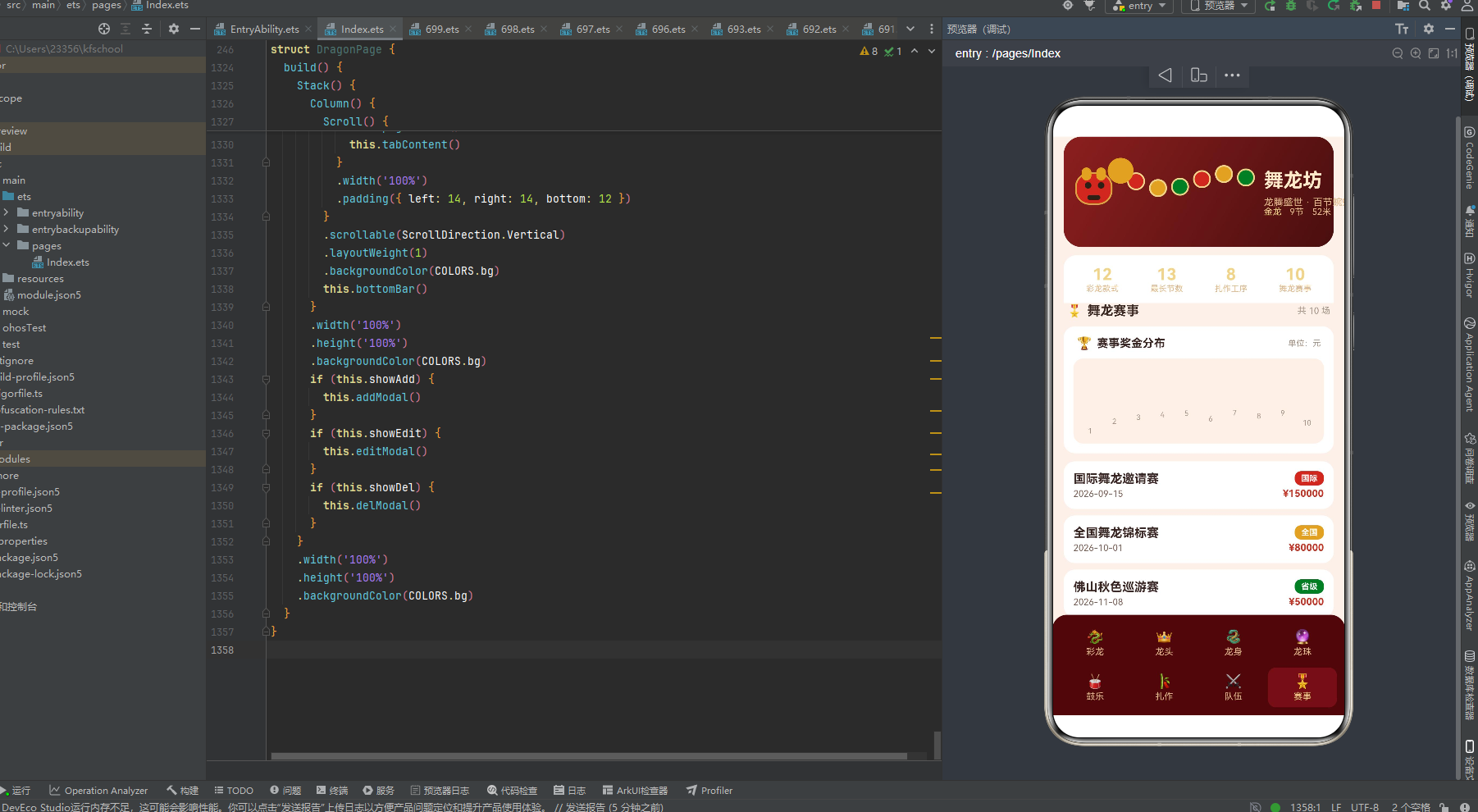
13.4 关键技术标签
HarmonyOS ArkTS API 24 HarmonyOS 6.1.1 @Entry @Component @State @Observed @Builder ForEach Stack Column Row linearGradient animation PlayMode.Alternate setInterval TextInput Scroll layoutWeight position borderRadius backgroundColor 声明式UI 响应式数据流 非遗文化 舞龙 非遗手作平台 柱状图可视化 弹窗交互 纯函数映射 数据驱动视图

讨论HarmonyOS开发技术,专注于API与组件、DevEco Studio、测试、元服务和应用上架分发等。
更多推荐


 2
2 0
0- 0


 已为社区贡献2条内容

所有评论(0)