HarmonyOS 6.1 实战:筛选函数直接通过数组索引取数据(CAMERAS[0]/CAMERAS[1] 等)
本文基于 HarmonyOS NEXT(API 24)ArkTS 声明式 UI 框架,完整拆解一个复古相机二手交易与收藏社区应用「时光暗房·胶片复刻社」的源码实现。应用以暗房红
#8C1C13为主色、相纸米白#EDE0D4为强调色、炭黑#2B2B2B为深色,构建了底部 4 Tab(市集/换机/胶卷/我的)+ 顶部 6 Tab(全部/胶片机/旁轴/单反/镜头/暗房)的双层导航体系,配套 14 个胶卷相机粒子的水平向右飘动动画(📷🎞️✨🔭🖼️ 五图标循环,模拟胶卷在暗房传送带上向右移动、冲洗机出口一卷接一卷送出的场景)、胶片机 Tab 稀有度柱状图(徕卡 M3 98 分暗房红高亮登顶)、暗房 Tab 工艺冲洗时间轴(暗房金竖线连接 + 步骤列表带相纸米白圆形序号)、单反 Tab 旗舰对决卡 + 侧栏统计、旁轴 Tab 收藏标签云 + 集齐旁轴三剑客彩蛋、4 个模态弹窗(发布出售新增/发起换机新增/下架删除/相机详情查询),覆盖从复古相机闲置出售、以机换机、暗房工艺分享、胶卷图鉴收藏到个人暗房舵主成就的完整复古胶片二手交易闭环。
一、引言:淘机·淘卷·换心头好
胶片是时间的解药——一台徕卡 M3 的黄斑对焦能让你回到 1954 年的德国威兹勒,一卷柯达 Portra 400 的色彩能让你记住那个下午的阳光,一间暗房里的红灯能让你在显影液的气味里找到内心的宁静。「时光暗房·胶片复刻社」正是为这群复古胶片爱好者打造的移动端二手交易与收藏社区:用户可以在市集按类型(全部/胶片机/旁轴/单反/镜头/暗房)发现复古好物、在换机页以机换机、在胶卷页记录图鉴收藏进度、在个人中心追踪在售相机与累计成交额。
应用的视觉语言高度统一:暗房红代表暗房里那盏永不熄灭的安全灯,相纸米白代表刚从显影液里捞出来的相纸,炭黑代表暗房里的深邃与神秘。整个应用采用复古胶片风——页面底色 #F4EFE6 相纸米白、卡片纯白、头部三色渐变 #8C1C13→#A5383B→#C05B52(从暗房红到深暗红到浅红,模拟暗房红灯从暗到亮的渐变层次)。粒子系统选用相机 📷、胶卷 🎞️、闪光 ✨、镜头 🔭、相框 🖼️ 五种图标循环,以所有应用中最快的速度(speed 0.6~2.0,setInterval 80ms)水平向右飘动——这一设计模拟了胶卷在暗房传送带上向右移动、冲洗机出口一卷接一卷送出的场景,与垂直飘动的常规粒子形成鲜明反差,是所有应用中唯三采用水平飘动粒子的应用(与奶茶、乐高并列,但图标更贴合复古胶片主题)。
本文将从架构概览、色彩系统、数据模型、工具函数与筛选函数、粒子动画系统、双层导航、6 大市集差异化布局、换机/胶卷图鉴/我的三大 Tab、4 个模态弹窗、特性对比、完整代码、开发环境搭建等维度,对源码 1108.ets 进行逐模块深度解析。
二、架构概览:单文件声明式组件 + 状态驱动
整个应用采用 ArkTS 声明式 UI 范式,全部逻辑收敛在一个 @Entry @Component struct Index 主组件中,通过 @State 装饰器驱动视图刷新。架构上可分为以下几层:
- 常量层:
PALETTE配色对象、BOTTOM_TABS/TOP_TABS导航配置、CAMERAS(18 款相机)/SWAPS(8 条换机帖)/PROCESSES(5 份暗房工艺)/LENSES(9 支镜头)/COLLECTIONS(6 个图鉴收藏)/CAMERA_REVIEWS(3 条点评)六大业务数据数组、TRADE_LABELS/TRADE_BARS全城周交易量柱状图数据、CONDITION_OPTIONS/PRICE_LEVELS/PLACES弹框选项数组。 - 接口层:
ColorPalette/TabItem/ParticleItem/CameraItem/SwapItem/FilmProcessItem/LensItem/CollectionItem/CameraReview共 9 个 interface,强类型约束所有数据结构。 - 工具函数层:
catColor(相机类型 6 色映射)、catLabel(相机类型 6 档文案)、rarityLabel(稀有度 4 档文案)、rarityColor(稀有度 4 色映射)、tradeBarHeight(周交易量柱状图高度换算)、rateColor(收藏进度 3 色映射)、swapBadge(换机帖点赞 3 档徽章),共 7 个工具函数。 - 筛选函数层:
retiredSets/mocSets/figSets/techSets/streetSets/classicSets/cityLeft/cityRight/hotSets,共 9 个筛选函数,为 6 大顶部 Tab 和热销榜提供数据来源。 - 组件层:主组件
Index内部通过@Builder装饰器定义了头部、顶部 Tab、底部 Tab、6 个市集内容构建器、换机/胶卷图鉴/我的内容构建器、4 个弹窗构建器,共 19 个@Builder方法。 - 状态层:19 个
@State变量 + 1 个private timerId,覆盖当前 Tab、弹窗显隐、表单数据(含pickedPlaces布尔数组实现多选)、粒子数组、定时器 ID。 - 辅助方法层:
pickedWant(i)(换机弹窗多选判断,i%2===0)和toggleWant(i)(切换换机想换选项),用于发起换机弹窗的多选逻辑。 - 生命周期层:
aboutToAppear中构建粒子并启动setInterval80ms 定时器;aboutToDisappear中clearInterval释放资源。
主组件的 build() 方法以 Stack 为根容器,底层是 Column 布局的主界面(头部 + 滚动内容区 + 底部 Tab),上层叠加 ForEach 渲染的粒子层(水平向右飘动),最上层是 4 个条件渲染的模态弹窗遮罩。这种 Stack 分层结构保证了粒子始终浮在内容之上、弹窗始终浮在最顶层。
三、色彩系统:暗房红主色 + 相纸米白强调 + 炭黑深色 + 复古胶片风
应用的配色通过 ColorPalette 接口约束,由 PALETTE 常量统一提供,共 10 个色值:
| 色值名 | HEX | 用途 |
|---|---|---|
bg |
#F4EFE6 |
相纸米白页面底色,复古胶片风核心 |
card |
#FFFFFF |
纯白卡片背景 |
red |
#8C1C13 |
暗房红主色,按钮、标签、激活文字、柱状图 |
cream |
#EDE0D4 |
相纸米白强调色,弹框头、标签、步骤序号 |
deep |
#2B2B2B |
炭黑深色,主文字、横滑大卡渐变终点 |
gold |
#C9A24B |
暗房金,顶部下划线、时间轴、详情头渐变 |
green |
#4A7C59 |
暗房绿,镜头价格、面交好评、收藏进度高 |
sub |
#8B8378 |
灰褐次级文字 |
line |
#E3DCD3 |
分割线与边框,浅米白 |
除了这 10 个基础色,应用还在多个场景中引入了辅助色以丰富视觉层次:
- 相机类型映射:
catColor函数为 6 类相机分配专属色——胶片机#E8483C红、暗房#7C4DFF紫、镜头#00A25B绿、单反#E86A5B橙红、旁轴#1E88E5亮蓝、全部/经典#8C1C13暗房红。这一函数在各 Tab 中广泛使用,用颜色直观区分相机类型。 - 稀有度映射:
rarityLabel函数为稀有度分配 4 档文案(>=95 传世孤品/>=80 稀有级/>=60 紧俏级/流通级),rarityColor函数为稀有度分配 4 色(>=95 红/>=80 橙/>=60 亮蓝/绿)。这两个函数在胶片机 Tab 横滑大卡、旁轴 Tab 紧凑列表、相机详情弹窗中使用,用颜色和文案直观表达相机稀有度。 - 收藏进度映射:
rateColor函数为收藏进度分配 3 色(>=55 绿/>=40 暗房金/红),在胶卷图鉴 Tab 收藏进度卡和进度条中使用。 - 换机帖徽章映射:
swapBadge函数为点赞数分配 3 档徽章(>=50 🔥热门/>=30 👍热度/🌱新帖),在换机帖列表中使用。 - 危险/下架:
#E8483C红,用于下架按钮、确认下架、价格、稀有度高亮、我想换栏。 - 成功/好评:
#4A7C59暗房绿,用于镜头价格、面交好评、收藏进度高。
渐变的运用是本应用色彩表达的重点:头部使用 linearGradient angle:135 colors:[[#8C1C13,0],[#A5383B,0.7],[#C05B52,1]] 三色渐变(从暗房红到深暗红到浅红,模拟暗房红灯从暗到亮的渐变层次);全部 Tab banner 使用相纸米白渐变 #EDE0D4→#D9BFA9;胶片机 Tab 横滑大卡使用暗房红到炭黑渐变 #8C1C13→#2B2B2B;单反 Tab 对决卡左卡暗房红到炭黑渐变、右卡灰到炭黑渐变;发布出售弹窗头使用暗房红渐变 #8C1C13→#A5383B;相机详情弹窗头使用相纸米白到暗房金渐变 #EDE0D4→#C9A24B;我的 Tab 个人卡使用暗房红到深暗红渐变 #8C1C13→#A5383B。发起换机弹窗头使用纯相纸米白 #EDE0D4 底(深字,是所有弹窗中唯一用相纸米白浅色头的),与其他渐变头形成鲜明对比。不同弹窗通过头色快速区分交互类型。
四、数据模型设计:9 个 interface 强类型约束
应用定义了 9 个 interface,覆盖配色、导航、粒子、相机、换机帖、暗房工艺、镜头、图鉴收藏、点评九大领域:
4.1 ColorPalette、TabItem 与 ParticleItem
interface ColorPalette {
  bg: string; card: string; red: string; cream: string;
  deep: string; gold: string; green: string; sub: string; line: string;
}

interface TabItem {
  label: string;
  icon: string;
}

interface ParticleItem {
  x: number;
  emoji: string;
  size: number;
  speed: number;
  opacity: number;
}
ParticleItem 与垂直飘动应用不同——没有 id 和 y 字段,只有 x(水平位置,单位 px)、emoji、size、speed、opacity。y 坐标在渲染时通过 80 + (i % 5) * 118 计算(5 行分布),x 用 px 而非百分比,这是因为粒子采用水平向右飘动,x 坐标需要精确到像素才能控制飘动速度和边界。
4.2 CameraItem 相机模型(核心,17 字段)
interface CameraItem {
  id: number; name: string; eng: string; cat: string;
  price: number; parts: number; rarity: number; year: number;
  rating: number; starStr: string; seller: string; tag: string;
  desc: string; want: string; sales: number; emoji: string;
}
相机模型是应用最复杂的数据结构,17 个字段覆盖了复古相机的完整信息:id 唯一标识、name 相机名(含型号如徕卡 M3)、eng 英文名、cat 类型(retired/moc/fig/tech/street/classic)、price 价格、parts 配件数、rarity 稀有度(0-100)、year 出厂年份、rating 评分、starStr 星号字符串、seller 卖家、tag 标签(传世神机/极致锐利/入门经典等)、desc 描述、want 卖家想换什么、sales 已售数量、emoji 图标。
eng、parts、rarity、year、want 是本应用数据模型的特色字段:eng 记录英文名增加专业感,parts 记录配件数(复古相机交易核心参数),rarity 记录稀有度(0-100,配合 rarityLabel/rarityColor 表达稀缺程度),year 记录出厂年份(复古相机的核心价值指标),want 记录卖家想换什么(二手交易社区的以机换机特色字段)。
CAMERAS 常量预置了 18 款相机,从徕卡 M3/哈苏 500C/M/佳能 AE-1(3 款胶片机),到暗房冲洗配方集/彩色放大暗房教程/Polaroid SX-70(3 款暗房),到徕卡 50mm f/1.4/蔡司 35mm f/2/尼康 85mm f/1.4(3 款镜头),到尼康 F3/奥林巴斯 OM-1/玛米亚 RZ67(3 款单反),到柯达 Retina IIa/福伦达 Bessa R2A/禄来 35S(3 款旁轴),到哈苏 XPAN/爱克发 Optima/美能达 X-700(3 款经典),覆盖 6 大类型,每款相机的 eng/price/parts/rarity/year/seller/tag/desc/want/sales/emoji 都精心设计以匹配复古相机特色。
4.3 SwapItem 换机帖模型、FilmProcessItem 暗房工艺模型、LensItem 镜头模型、CollectionItem 图鉴模型与 CameraReview 点评模型
interface SwapItem {
  id: number; user: string; avatar: string; offer: string;
  want: string; time: string; likes: number; content: string; place: string;
}

interface FilmProcessItem {
  id: number; name: string; type: string; pages: number;
  author: string; likes: number; downloads: number; emoji: string;
  steps: string[];
}

interface LensItem {
  id: number; name: string; series: string; price: number;
  condition: string; seller: string; emoji: string; desc: string;
}

interface CollectionItem {
  id: number; name: string; series: string; owned: number;
  total: number; rate: number; emoji: string;
}

interface CameraReview {
  id: number; user: string; setName: string; starStr: string; content: string;
}
SwapItem 10 字段记录换机帖,SWAPS 预置 8 条(胶片搬运工/暗房老张/镜头贩子/手冲药剂师/旁轴玩家/宽幅收藏家/原味胶卷党/小暗房主理人),offer 记录我提供什么、want 记录我想换什么、place 记录面交地点,是二手交换社区的核心数据。FilmProcessItem 10 字段记录暗房工艺,PROCESSES 预置 5 份(D76 黑白冲洗手册/C41 彩色负片冲洗/蓝晒工艺入门/黑白相纸放大/伊尔福 HP5 增感),pages 记录页数、downloads 记录下载量、steps 是字符串数组记录冲洗步骤(带相纸米白圆形序号渲染),是暗房 Tab 的核心数据。LensItem 8 字段记录镜头,LENSES 预置 9 支(尼康 50mm f/1.8/美能达 50mm f/1.4/佳能 50mm f/1.8/徕卡 50mm f/2/蔡司 35mm f/2.8/奥林巴斯 50mm f/1.2/尼康 105mm f/2.5/柯达 63mm f/2/马米亚 127mm f/3.8),series 记录卡口系列、condition 记录成色,是镜头 Tab 的核心数据。CollectionItem 7 字段记录图鉴收藏,COLLECTIONS 预置 6 个(徕卡 M 系列/中画幅系统/尼康 F 卡口/暗房耗材/宝丽来机身/早期旁轴),owned 记录已收数量、total 记录总数、rate 记录收藏进度百分比,是胶卷图鉴 Tab 的核心数据。CameraReview 5 字段记录点评,starStr 用 Emoji 星号字符串直接渲染,CAMERA_REVIEWS 预置 3 条(评价用户名「胶卷测评组」「暗房医生」「德味玩家」充满复古胶片圈梗文化)。
五、工具函数与筛选函数:7 工具 + 9 筛选驱动视觉映射与数据分发
应用定义了 7 个工具函数和 9 个筛选函数,工具函数负责将数据值映射为视觉属性,筛选函数负责为 6 大顶部 Tab 和热销榜提供数据来源。
5.1 七个工具函数
function catColor(cat: string): string {
  if (cat === 'retired') return '#E8483C'
  if (cat === 'moc') return '#7C4DFF'
  if (cat === 'fig') return '#00A25B'
  if (cat === 'tech') return '#E86A5B'
  if (cat === 'street') return '#1E88E5'
  return '#8C1C13'
}

function catLabel(cat: string): string {
  if (cat === 'retired') return '胶片神机'
  if (cat === 'moc') return '暗房配方'
  if (cat === 'fig') return '镜头交易'
  if (cat === 'tech') return '机械单反'
  if (cat === 'street') return '街头旁轴'
  return '经典老机'
}

function rarityLabel(r: number): string {
  if (r >= 95) return '传世孤品'
  if (r >= 80) return '稀有级'
  if (r >= 60) return '紧俏级'
  return '流通级'
}

function rarityColor(r: number): string {
  if (r >= 95) return '#E8483C'
  if (r >= 80) return '#FF8A00'
  if (r >= 60) return '#1E88E5'
  return '#00A25B'
}

function tradeBarHeight(v: number): string {
  return Math.round(v / 156 * 96).toString() + 'vp'
}

function rateColor(r: number): string {
  if (r >= 55) return '#00A25B'
  if (r >= 40) return '#C9A24B'
  return '#E8483C'
}

function swapBadge(likes: number): string {
  if (likes >= 50) return '🔥热门'
  if (likes >= 30) return '👍热度'
  return '🌱新帖'
}
catColor:将相机类型映射为 6 色(胶片机红/暗房紫/镜头绿/单反橙红/旁轴亮蓝/经典暗房红),是本应用最具特色的工具函数,用颜色直观区分相机类型。catLabel:将相机类型映射为 6 档文案(胶片神机/暗房配方/镜头交易/机械单反/街头旁轴/经典老机)。rarityLabel:将稀有度映射为 4 档文案(传世孤品/稀有级/紧俏级/流通级),「传世孤品」形容 95 分以上的绝版神物(如徕卡 M3 98 分),是复古胶片圈梗。rarityColor:将稀有度映射为 4 色(>=95 红/>=80 橙/>=60 亮蓝/绿),用颜色直观表达稀有度。tradeBarHeight:将周交易量换算为柱状图高度 vp(v / 156 * 96,以周六最高 156 为基准归一化到 96vp)。rateColor:将收藏进度映射为 3 色(>=55 绿/>=40 暗房金/红),在胶卷图鉴 Tab 收藏进度卡和进度条中使用。swapBadge:将换机帖点赞数映射为 3 档徽章(🔥热门/👍热度/🌱新帖),在换机帖列表中使用。
5.2 九个筛选函数
function retiredSets(): CameraItem[] { return [CAMERAS[0], CAMERAS[1], CAMERAS[2]] }
function mocSets(): CameraItem[] { return [CAMERAS[3], CAMERAS[4], CAMERAS[5]] }
function figSets(): CameraItem[] { return [CAMERAS[6], CAMERAS[7], CAMERAS[8]] }
function techSets(): CameraItem[] { return [CAMERAS[9], CAMERAS[10], CAMERAS[11]] }
function streetSets(): CameraItem[] { return [CAMERAS[12], CAMERAS[13], CAMERAS[14]] }
function classicSets(): CameraItem[] { return [CAMERAS[15], CAMERAS[16], CAMERAS[17]] }
function cityLeft(): CameraItem[] { return [CAMERAS[16], CAMERAS[17]] }
function cityRight(): CameraItem[] { return [CAMERAS[15]] }
function hotSets(): CameraItem[] { return [CAMERAS[3], CAMERAS[5], CAMERAS[16], CAMERAS[17], CAMERAS[9]] }
9 个筛选函数中,retiredSets/mocSets/figSets/techSets/streetSets/classicSets 对应胶片机/暗房/镜头/单反/旁轴/经典六个顶部 Tab,cityLeft 和 cityRight 是全部 Tab 双列瀑布流的左右列数据(左列 2 款、右列 1 款,形成高度错落的瀑布流效果),hotSets 是热销 TOP5 榜单数据。与其他应用使用 filter() 不同,本应用的筛选函数直接通过数组索引取数据(CAMERAS[0]/CAMERAS[1] 等),因为 CAMERAS 数组已经按类型顺序排列(0-2 胶片机、3-5 暗房、6-8 镜头、9-11 单反、12-14 旁轴、15-17 经典),直接索引比 filter 更高效。这种「7 工具函数 + 9 筛选函数」的分层设计,让数据映射与数据分发各司其职,模板中只需调用对应函数即可获得正确数据,保持模板简洁。
六、粒子动画系统:14 粒子最快速度水平向右飘动(胶卷传送带意象)
粒子系统是本应用的动态灵魂,选用相机 📷、胶卷 🎞️、闪光 ✨、镜头 🔭、相框 🖼️ 五种图标循环,以所有应用中最快的速度水平向右飘动,模拟胶卷在暗房传送带上向右移动、冲洗机出口一卷接一卷送出的场景。
6.1 粒子构建:14 粒子 5 图标循环(无 id/y 字段)
buildParticles(): void {
  const emojis: string[] = ['📷', '🎞️', '✨', '🔭', '🖼️']
  const list: ParticleItem[] = []
  for (let i = 0; i < 14; i++) {
    list.push({
      x: Math.random() * 340,
      emoji: emojis[i % emojis.length],
      size: 12 + Math.random() * 10,
      speed: 0.6 + Math.random() * 1.4,
      opacity: 0.2 + Math.random() * 0.4
    })
  }
  this.particles = list
}
14 个粒子通过 Math.random() 生成随机分布的 x 坐标(0~340px),图标在 📷🎞️✨🔭🖼️ 五种中循环(相机/胶卷/闪光/镜头/相框,相机胶卷镜头相框直接对应复古胶片主题),size 范围 12~22,opacity 范围 0.20~0.60,speed 范围 0.6~2.0(每个粒子独立速度,是所有应用中最快的粒子速度,模拟暗房冲洗机出卷的快节奏)。与垂直飘动应用不同,ParticleItem 没有 id 和 y 字段——y 坐标在渲染时通过 80 + (i % 5) * 118 计算(5 行分布,每行间隔 118px),x 用 px 而非百分比,这是因为粒子采用水平向右飘动,x 坐标需要精确到像素才能控制飘动速度和边界。
6.2 粒子驱动:水平向右飘动 + 左侧循环
driftParticles(): void {
  for (let i = 0; i < this.particles.length; i++) {
    this.particles[i].x += this.particles[i].speed
    if (this.particles[i].x > 360) {
      this.particles[i].x = -20
    }
  }
  this.particles = this.particles.slice()
}
关键点:每帧将每个粒子的 x 坐标加上自身 speed(水平向右飘动),当 x > 360(飘出右侧)时重置为 -20(从左侧重新进入),实现无限循环。y 坐标保持不变(5 行固定分布)。这一方向设计模拟了胶卷在暗房传送带上向右移动、冲洗机出口一卷接一卷送出的场景,与垂直飘动的常规粒子形成鲜明反差,是所有应用中唯三采用水平飘动粒子的应用(与奶茶、乐高并列,但图标 📷🎞️✨🔭🖼️ 更贴合复古胶片主题,相机胶卷镜头相框直接对应暗房冲洗流程)。配合最快的速度(0.6~2.0)和最快的刷新频率(80ms),营造出暗房冲洗机出卷的快节奏与复古胶片爱好者的冲洗快乐。
this.particles = this.particles.slice() 是关键——通过 slice() 创建新数组引用,触发 ArkTS 的状态更新和视图重渲染。如果直接修改数组元素而不改变引用,@State 不会触发更新。
6.3 生命周期与渲染
aboutToAppear(): void {
  this.buildParticles()
  this.timerId = setInterval(() => {
    this.driftParticles()
  }, 80)
}

aboutToDisappear(): void {
  if (this.timerId !== -1) {
    clearInterval(this.timerId)
    this.timerId = -1
  }
}
aboutToAppear 中先构建粒子数组,再启动 setInterval 80ms 定时器(所有应用中最快的刷新频率,约 12.5fps,配合最快的粒子速度,模拟暗房冲洗机出卷的快节奏),将定时器 ID 存入 private timerId。aboutToDisappear 中清除定时器并重置为 -1。
渲染层在 Stack 中通过 ForEach 遍历粒子,position 使用 { x: p.x, y: 80 + (i % 5) * 118 }(x 用 px,y 用 5 行分布计算),ForEach 的 key 函数使用 'pt' + i.toString()(用索引 i 而非粒子 id,因为 ParticleItem 没有 id 字段)。
七、双层导航架构:底部 4 Tab + 顶部 6 Tab
应用采用双层 Tab 导航,底部 Tab 切换大模块、顶部 Tab 在「市集」模块内切换相机类型分类。
7.1 头部 headerBuilder:暗房红三色渐变 + 搜索条 + 购物车角标
头部使用 linearGradient angle:135 colors:[[#8C1C13,0],[#A5383B,0.7],[#C05B52,1]] 三色渐变(从暗房红到深暗红到浅红,模拟暗房红灯从暗到亮的渐变层次),底部圆角 18。头部包含:
- 左侧:📽️ 时光暗房社 22sp 粗体白字 + 「淘机·淘卷·换心头好」11sp 浅粉字。
- 右侧:🔎 搜索 20sp + 📦 包裹 20sp + 🎒 购物车 20sp 带「3」角标(暗房红
#8C1C13底白字 9sp,margin top -6 形成角标效果)。 - 搜索条:🔍 搜索:徕卡 / 暗房 / 胶卷 12sp 灰褐字 + 「🧰 我的常购」按钮(相纸米白
#EDE0D4底炭黑字圆角 10)。
头部是所有应用中最复杂的头部之一——三色渐变 + 三图标 + 购物车角标 + 搜索条 + 我的常购按钮,完整模拟了电商/二手交易 App 的头部交互体验。
7.2 顶部 Tab topTabsBuilder(仅市集 Tab 显示,6 Tab 等宽 + 双下划线)
6 个 Tab 等宽排列(全部🧿/胶片机🎞️/旁轴🔍/单反📸/镜头🔭/暗房🌑),每个 Tab layoutWeight(1) 等宽。每个 Tab 显示图标 17sp + 文字 12sp。激活态为 #8C1C13 暗房红字粗体 + 暗房金 #C9A24B 圆角下划线(Divider width16 strokeWidth3 borderRadius2),非激活态为 #8B8378 灰褐字 + #F4EFE6 相纸米白底圆角下划线(非激活也有下划线,是本应用顶部 Tab 的特色细节,形成双下划线对比效果)。顶部 Tab 使用纯白底圆角 14 margin top 10。点击切换 currentTopTab。
7.3 底部 Tab bottomTabsBuilder(纯白底 + 顶部圆角)
4 个 Tab(市集🏪/换机🤝/胶卷🎞️/我的📷)等宽排列,激活态为 #8C1C13 暗房红字粗体,非激活态为 #8B8378 灰褐字。底部 Tab 使用纯白底,顶部圆角 18(borderRadius: { topLeft: 18, topRight: 18 }),与头部的底部圆角呼应,形成圆润的复古相机视觉隐喻。点击切换 currentBottomTab。
八、市集 Tab:6 大类型差异化布局
市集 Tab 是应用最核心的模块,6 个顶部 Tab 对应 6 种完全不同的布局风格,从全部的双列瀑布流、胶片机的横滑大卡+稀有度柱状图+捡漏榜、暗房的工艺冲洗时间轴、镜头的三列格子+交换行情、单反的旗舰对决卡+侧栏统计、到旁轴的收藏标签云+紧凑列表+集齐彩蛋,每种相机类型都有专属的视觉语言。
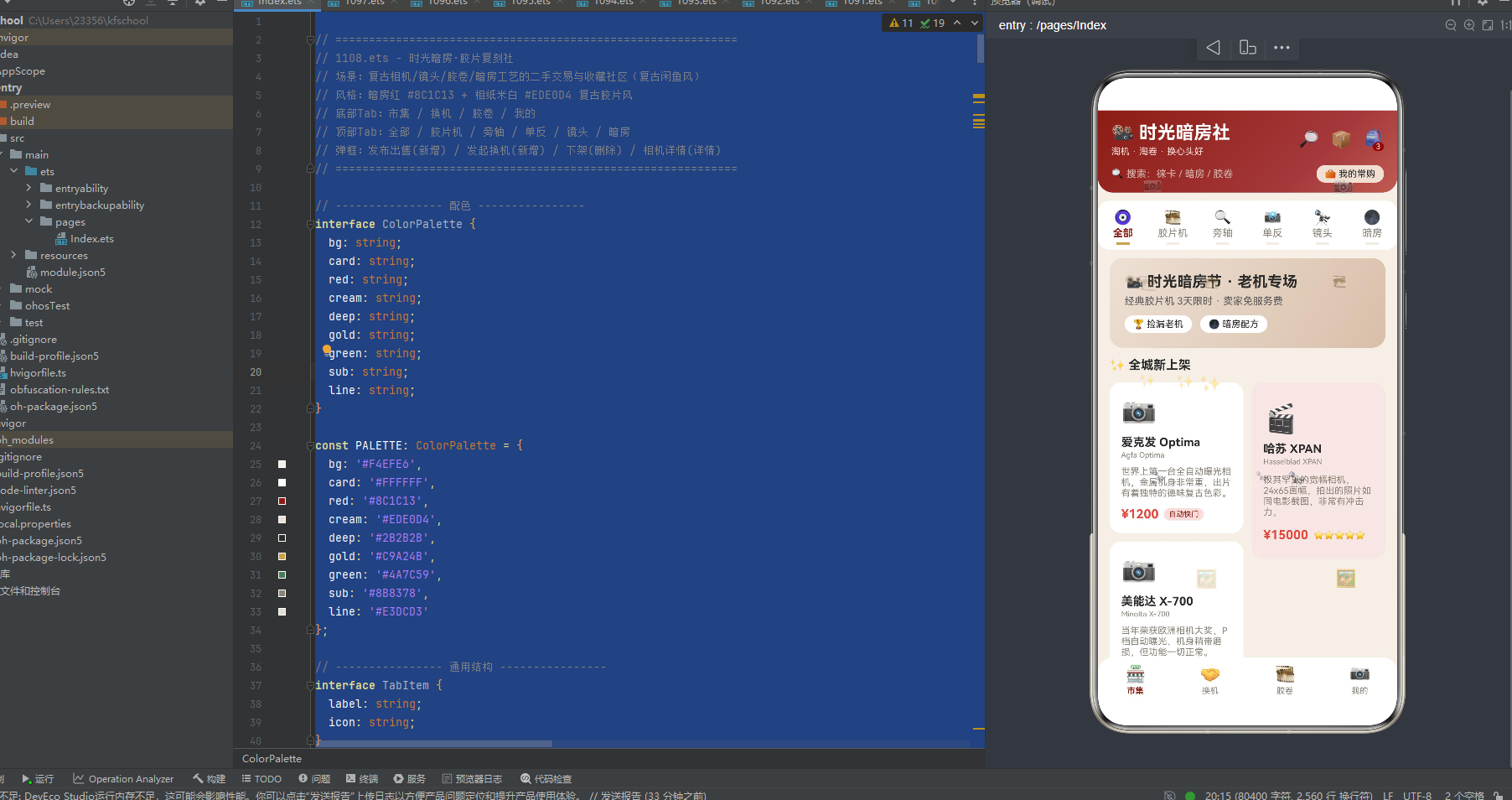
8.1 全部 cityContent:时光暗房节 banner + 双列瀑布流
全部 Tab 由三部分组成:
- 时光暗房节 banner:
angle:120相纸米白渐变#EDE0D4→#D9BFA9,「📽️ 时光暗房节 · 老机专场」18sp 粗体炭黑字 + 「经典胶片机 3天限时 · 卖家免服务费」12sp 灰字 + 两个标签按钮(🏆 捡漏老机 / 🌑 暗房配方,纯白底炭黑字圆角 12)。 - 全城新上架标题:「✨ 全城新上架」15sp 粗体炭黑字。
- 双列瀑布流:
Row左右两列,左列cityLeft()2 款(爱克发 Optima/美能达 X-700)纯白底卡,右列cityRight()1 款(哈苏 XPAN)#F4E7E4浅红底卡。左右列卡片高度错落(左列 emoji margin top 16、右列 margin top 24;左列 desc maxLines3、右列 maxLines4;左列底部 margin 14、右列 20),形成真正的瀑布流效果。每张卡片包含:emoji 34sp + 相机名 14sp 粗体 + 英文名 9sp 灰字 + desc 11sp 灰字(maxLines3/4)+ 价格 15sp 粗体红 + 标签(tag 浅红底暗房红字 / starStr 星号)。点击打开相机详情弹窗。
双列瀑布流是全部 Tab 的核心布局,通过左右列卡片高度错落模拟电商 App 的商品瀑布流,适合全城新上架的「上新展示」。
8.2 胶片机 retiredContent:横滑大卡 + 稀有度柱状图 + 捡漏榜
胶片机 Tab 由四部分组成:
- 标题:「🏆 胶片神机专区」15sp 粗体炭黑字。
- 横滑大卡:
Scroll horizontal横向滚动,retiredSets()筛选出 3 款胶片机(徕卡 M3/哈苏 500C/M/佳能 AE-1),每个渲染为 width:160 的暗房红到炭黑渐变#8C1C13→#2B2B2B底圆角 16 卡片,包含:emoji 40sp + 相机名 15sp 粗体白字 + 英文名·年份 9sp 浅粉字 + 价格 16sp 粗体相纸米白字 + rarityLabel 相纸米白底炭黑字标签。横滑大卡适合胶片机的「神物展示」,暗房红到炭黑渐变底白字营造复古相机的深邃与珍贵感。 - 稀有度柱状图:标题「📈 稀有度排行」,下方是纯白底圆角 14 卡片,内含
Row布局的 3 根柱子(retiredSets()3 款胶片机,height 直接用t.rarity.toString() + 'vp',即稀有度分数直接作为柱子高度 vp),使用高亮双色——i === 2(佳能 AE-1,rarity 70)红#E8483C高亮,其他两款暗房红#8C1C13,柱子顶部标注稀有度数字(暗房红字),底部标注年份。3 根柱子等宽排列,徕卡 M3 98 分最高形成「传世孤品登顶」可视化,底部文字「徕卡 M3 以 98 分稀有度登顶,市面流通不足百台」。稀有度柱状图是本应用最具特色的数据可视化——直接用稀有度分数作为柱子高度,3 款胶片机对比,徕卡 M3 98 分暗房红高亮,直观表达复古相机的稀缺程度。 - 捡漏榜:标题「🕵️ 今日捡漏榜」,
retiredSets()3 款胶片机,每行左侧序号(第 1 名红粗体,其他灰字)+ emoji + 相机名 + rarityLabel·want,右侧价格。点击打开相机详情弹窗。
胶片机 Tab 通过横滑大卡 + 稀有度柱状图 + 捡漏榜三段式布局,完整展示胶片机的神物地位和稀缺数据,是数据可视化最有特色的 Tab。
8.3 暗房 mocContent:工艺冲洗时间轴
暗房 Tab 由标题 + 工艺冲洗时间轴组成:
- 标题:「🌑 暗房工艺 · 冲洗配方」15sp 粗体炭黑字。
- 工艺冲洗时间轴:
PROCESSES5 份暗房工艺(D76 黑白冲洗手册/C41 彩色负片冲洗/蓝晒工艺入门/黑白相纸放大/伊尔福 HP5 增感),每行左侧是时间轴节点(emoji 20sp + 暗房金#C9A24B竖线layoutWeight(1)连接,前 4 份有竖线,最后一份没有),右侧是内容卡(第 2 份 C41 彩色负片冲洗#F4E7E4浅红底高亮,其他纯白底),包含:- 头部行:工艺名 + ⬇下载量(暗房红字)
- by 作者·类型·页数 10sp 灰字
- 步骤列表:
ForEach(m.steps)渲染步骤数组,每步左侧相纸米白圆形序号(#EDE0D4相纸米白底炭黑字 18x18 圆角 9)+ 步骤文字 10sp 深灰字,整体#F4EFE6相纸米白底圆角 10 padding 10 - 底部行:❤️点赞数(红)+ 🧪配方可下载(暗房红字,右对齐)
工艺冲洗时间轴是暗房 Tab 的核心布局,通过左侧 emoji + 暗房金竖线连接,模拟暗房工艺从第 1 步到第 N 步的冲洗历程,暗房金竖线和相纸米白圆形序号直接呼应暗房金和相纸米白主题色,步骤列表带序号让暗房爱好者可以按步骤冲洗,适合暗房工艺的「冲洗说明」主题。
8.4 镜头 figContent:三列格子 + 镜头交换行情
镜头 Tab 由三部分组成:
- 标题:「🔭 镜头交易 · 毒德大学」15sp 粗体炭黑字。
- 三列格子:
Flex wrap justifyContent:SpaceBetween三列布局,LENSES9 支镜头(尼康 50mm f/1.8/美能达 50mm f/1.4/佳能 50mm f/1.8/徕卡 50mm f/2/蔡司 35mm f/2.8/奥林巴斯 50mm f/1.2/尼康 105mm f/2.5/柯达 63mm f/2/马米亚 127mm f/3.8),每个格子 width:31%,纯白底圆角 12,包含:emoji 26sp + 镜头名 11sp 粗体(maxLines1)+ series 8sp 灰字 + 价格 13sp 粗体红。三列格子适合镜头的「快取展示」,模拟镜头收藏柜的紧凑布局。「毒德大学」是摄影圈梗,形容镜头的「德味」「毒」「大学问」。 - 镜头交换行情:标题「🤝 镜头交换行情」,遍历
LENSES筛选id % 2 === 0的 4 支镜头(美能达 50mm f/1.4/徕卡 50mm f/2/奥林巴斯 50mm f/1.2/柯达 63mm f/2),每行 emoji + 镜头名·condition 成色 + desc + 价格(暗房绿字)。镜头交换行情是镜头 Tab 的特色内容,展示镜头的成色和交换价格,增加内容丰富度。
8.5 单反 techContent:旗舰对决卡 + 列表 + 侧栏统计
单反 Tab 由三部分组成:
- 标题:「📸 机械单反 · 巅峰对决」15sp 粗体炭黑字。
- 旗舰对决卡:
Row三列布局,左列尼康 F3(暗房红到炭黑渐变#8C1C13→#2B2B2B底白字,emoji + 相机名 + 年份·现价),中间 VS(18sp 粗体暗房红字 + 「本周」9sp 灰字),右列奥林巴斯 OM-1(灰到炭黑渐变#8B8378→#2B2B2B底白字,emoji + 相机名 + 年份·现价)。旗舰对决卡是单反 Tab 的核心特色,通过左右对决 + 中间 VS 模拟机械单反旗舰的人气对决,暗房红渐变 vs 灰渐变形成强烈视觉对比。 - 列表 + 侧栏统计:
Row两列布局,左列techSets()筛选出 3 款单反列表(emoji + 相机名 + tag·配件数 + 价格),右列侧栏统计(12 本周单反成交浅红底 / 2.1万 单反总交易额浅黄底 / 94% 拍片好评率纯白底,三列纵向排列)。侧栏统计是单反 Tab 的特色数据展示,拍片好评率 94% 反映了机械单反的出片质量。
8.6 旁轴 streetContent:收藏标签云 + 紧凑列表 + 集齐彩蛋
旁轴 Tab 由四部分组成:
- 标题:「🔍 旁轴街拍 · 城市光影」15sp 粗体炭黑字。
- 收藏标签云:
Flex wrap渲染COLLECTIONS6 个图鉴收藏(徕卡 M 系列/中画幅系统/尼康 F 卡口/暗房耗材/宝丽来机身/早期旁轴),每个标签 emoji + name + owned/total(浅红底炭黑字)。收藏标签云是旁轴 Tab 的特色内容,展示各系列的收藏进度。 - 紧凑列表:
streetSets()筛选出 3 款旁轴(柯达 Retina IIa/福伦达 Bessa R2A/禄来 35S),每行 emoji + 相机名 + rarityLabel 标签(rarityColor 映射色,如紧俏级亮蓝底/稀有级橙底)+ desc(maxLines1)+ 价格。第 2 款福伦达 Bessa R2A#F4DEDC浅红底高亮。 - 集齐彩蛋提示:「💬 集齐旁轴三剑客可召唤隐藏福利:徕卡M3 + 柯达 + 福伦达」10sp 灰字。集齐彩蛋是旁轴 Tab 的特色互动,增加旁轴收藏的趣味性和目标感。
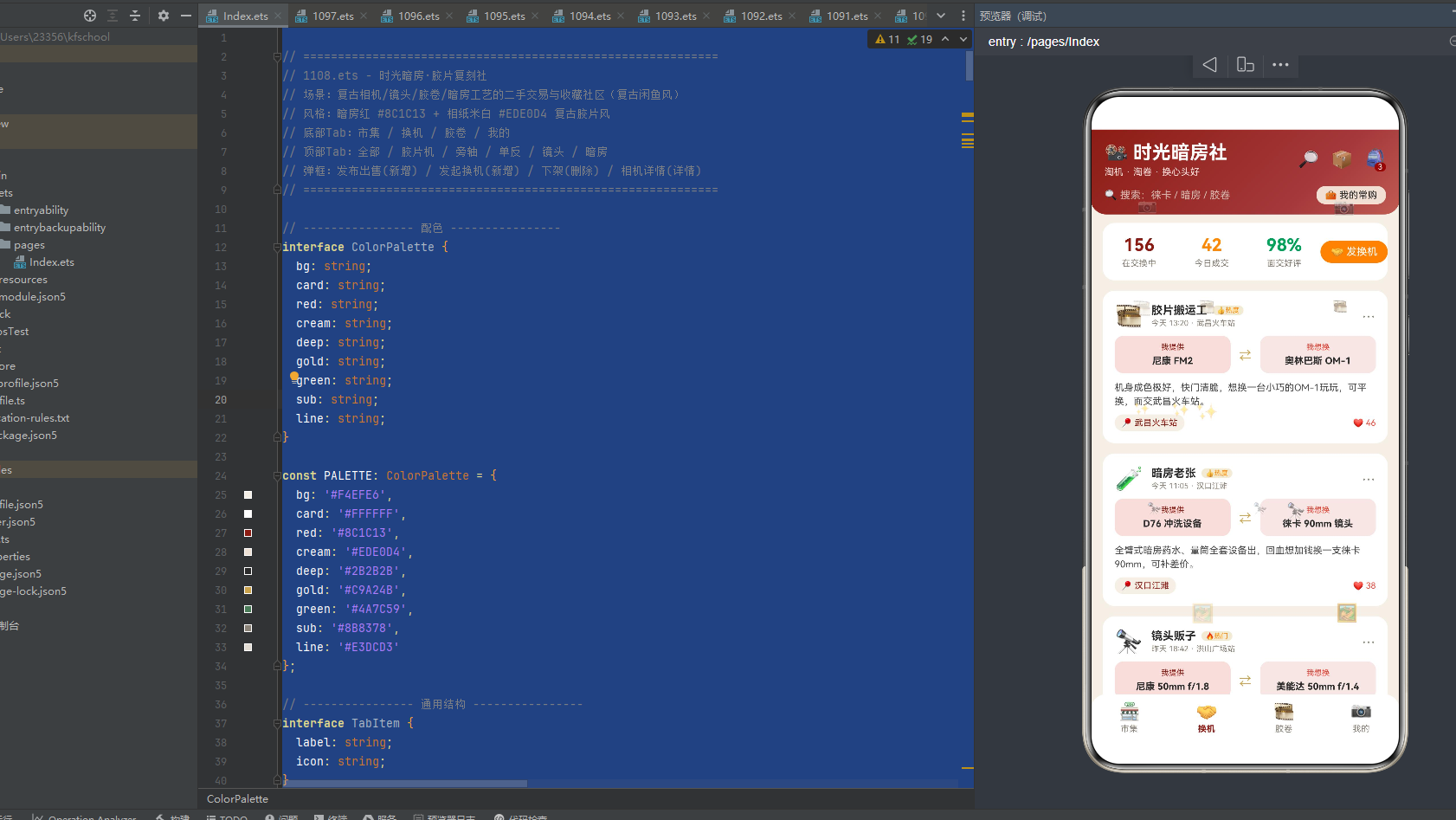
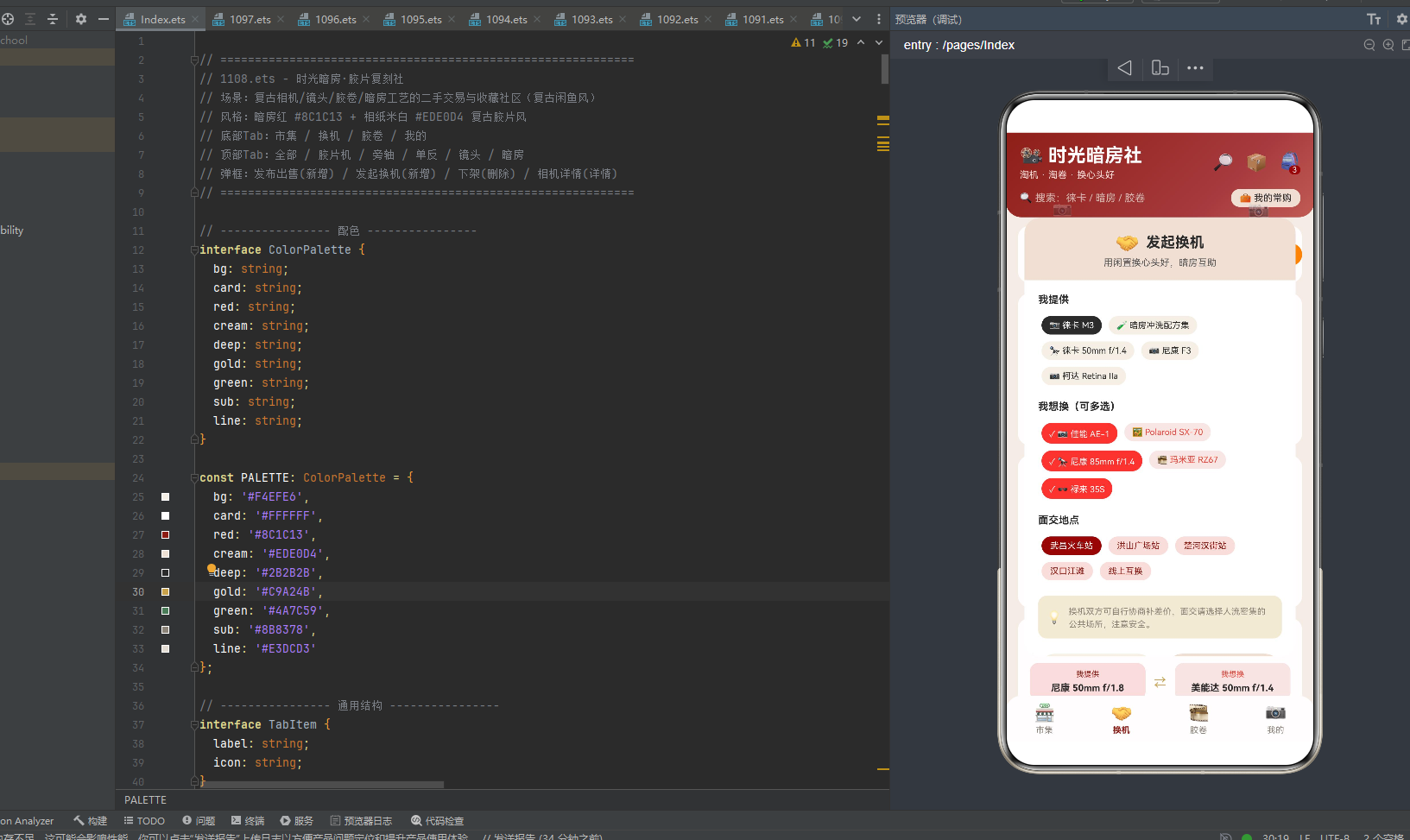
九、换机 Tab:统计 banner + 换机帖列表(我提供/我想换双栏)
换机 Tab swapContent 由统计 banner + 换机帖列表组成:
- 统计 banner:纯白底圆角 14,等宽四列——「156 在交换中」暗房红字、「42 今日成交」橙字、「98% 面交好评」暗房绿字、「🤝 发换机」按钮(橙底白字圆角 14,点击打开发起换机弹窗)。
- 换机帖列表:8 条换机帖,每个卡片包含:
- 头部行:avatar 26sp + 用户名 13sp 粗体 + swapBadge 徽章(🔥热门/👍热度/🌱新帖,橙字浅黄底)+ 时间·面交地点 9sp 灰字 + ⋯ 更多按钮(点击打开下架弹窗)。
- 交换内容双栏:
Row三列布局,左列「我提供」(浅红#F4DEDC底,9sp 暗房红字标题 + offer 11sp 粗体炭黑字),中间⇄暗房金箭头 14sp,右列「我想换」(浅红#F4E7E4底,9sp 红标题 + want 11sp 粗体炭黑字)。我提供/我想换双栏是换机 Tab 的核心特色,用浅红/浅红双色区分提供和需求,⇄ 暗房金箭头直观表达换机意向。 - 内容:content 11sp 深灰字 lineHeight:16。
- 底部行:📍 面交地点(暗房红字相纸米白底)+ ❤️点赞数(红,右对齐)。
换机 Tab 通过统计 banner + 换机帖列表(我提供/我想换双栏)的布局,完整展示复古相机以机换机社区的内容,通过双栏交换内容和 ⇄ 箭头直观表达换机意向,是复古胶片二手交易社区的换机核心区。
十、胶卷图鉴 Tab:收藏进度卡 + 进度条 + 成就墙
胶卷图鉴 Tab collectionContent 由标题栏 + 收藏进度卡列表 + 图鉴成就墙组成:
- 标题栏:左侧「🎞️ 我的胶片图鉴」16sp 粗体 + 「记录每一台老机的收藏进度」10sp 灰字,右侧「✚ 登记」按钮(暗房红底白字圆角 14,点击打开发布出售弹窗复用)。
- 收藏进度卡列表:6 个图鉴收藏(徕卡 M 系列/中画幅系统/尼康 F 卡口/暗房耗材/宝丽来机身/早期旁轴),每个卡片包含:
- 头部行:emoji 28sp + 收藏名 14sp 粗体 + series·已收 owned/total 10sp 灰字 + rate% 15sp 粗体(rateColor 映射色,>=55 绿/>=40 暗房金/红)。
- 进度条:
Row两列,左列 width:rate% 高度 6 圆角 3(rateColor 填充色),右列 width:(100-rate)% 高度 6 圆角 3(浅米白#E3DCD3底)。进度条是胶卷图鉴 Tab 的核心特色,用颜色填充直观表达收藏进度。 - 第 5 个宝丽来机身
#F1EAD6浅黄底高亮。
- 图鉴成就墙:纯白底圆角 14,标题「🏅 图鉴成就墙」,
Flex wrap渲染 4 个成就(🎖️德系收藏家浅红底暗房红字/🏆绝版猎人浅红底红字/🔭镜头百晓生浅黄底橙字/🌑暗房魔法师浅绿底暗房绿字)。
胶卷图鉴 Tab 通过收藏进度卡 + 进度条 + 成就墙的布局,完整展示复古胶片爱好者的收藏进度,通过 rateColor 三色进度条直观表达收藏完成度,是复古胶片收藏社区的图鉴核心区。
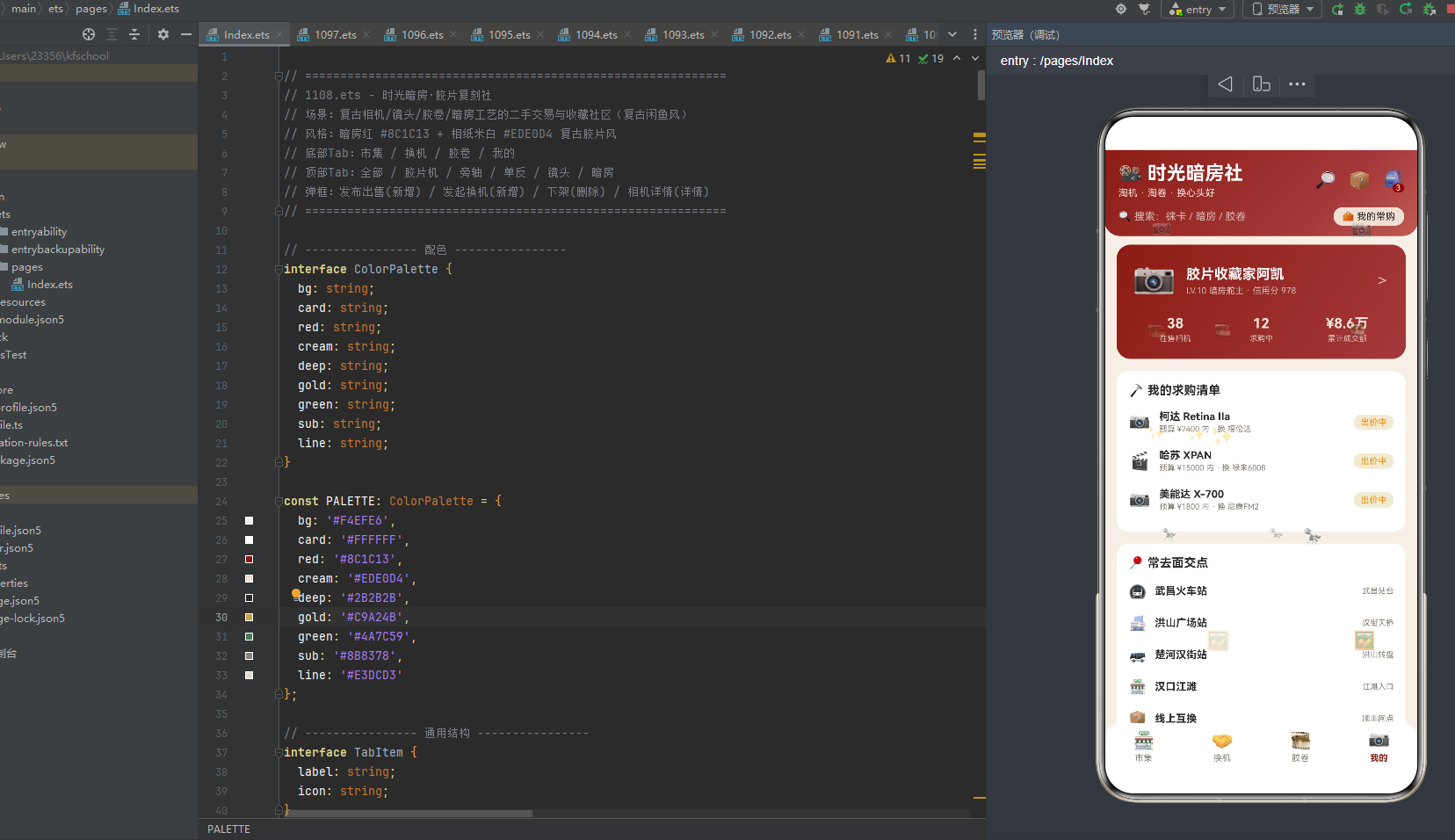
十一、我的 Tab:个人卡 + 求购清单 + 常去面交点
我的 Tab mineContent 由三部分组成:
- 个人卡:
angle:120暗房红到深暗红渐变#8C1C13→#A5383B(从暗房红到深暗红),圆角 16,包含:- 头部行:📷 40sp + 「胶片收藏家阿凯」16sp 粗体白字 + 「LV.10 暗房舵主 · 信用分 978」10sp 浅粉字 + >箭头。
- 三列统计:「38 在售相机」「12 求购中」「¥8.6万 累计成交额」,均相纸米白字。累计成交额 ¥8.6万 是我的 Tab 的特色数据,让暗房舵主直观看到自己在复古相机二手交易中的投入与回报。
- 我的求购清单:纯白底圆角 14,标题「🔨 我的求购清单」,遍历
CAMERAS筛选id === 13 || id === 16 || id === 18的 3 款(柯达 Retina IIa/哈苏 XPAN/美能达 X-700),每行 emoji + 相机名 + 预算 price 内·want + 「出价中」橙标签浅黄底。 - 常去面交点:纯白底圆角 14,标题「📍 常去面交点」,
PLACES5 个面交地点(武昌火车站/洪山广场站/楚河汉街站/汉口江滩/线上互换),每行 emoji(🚇/🏬/🚌/🏪/📦)+ 地点名 + 地点描述(武昌站台/汉街天桥/洪山转盘/江滩入口/顺丰网点)。
我的 Tab 通过个人卡 + 求购清单 + 常去面交点三段式布局,完整展示暗房舵主的个人数据和交易偏好,累计成交额 ¥8.6万 和信用分 978 是我的 Tab 的特色数据,常去面交点增加了二手交易的线下便利性。
十二、4 个模态弹窗:新增/新增/删除/详情四态闭环
应用实现了 4 个模态弹窗,覆盖发布出售(新增)、发起换机(新增)、下架(删除)、相机详情(查询)四种交互形态,每个弹窗都有专属的头色与表单结构。
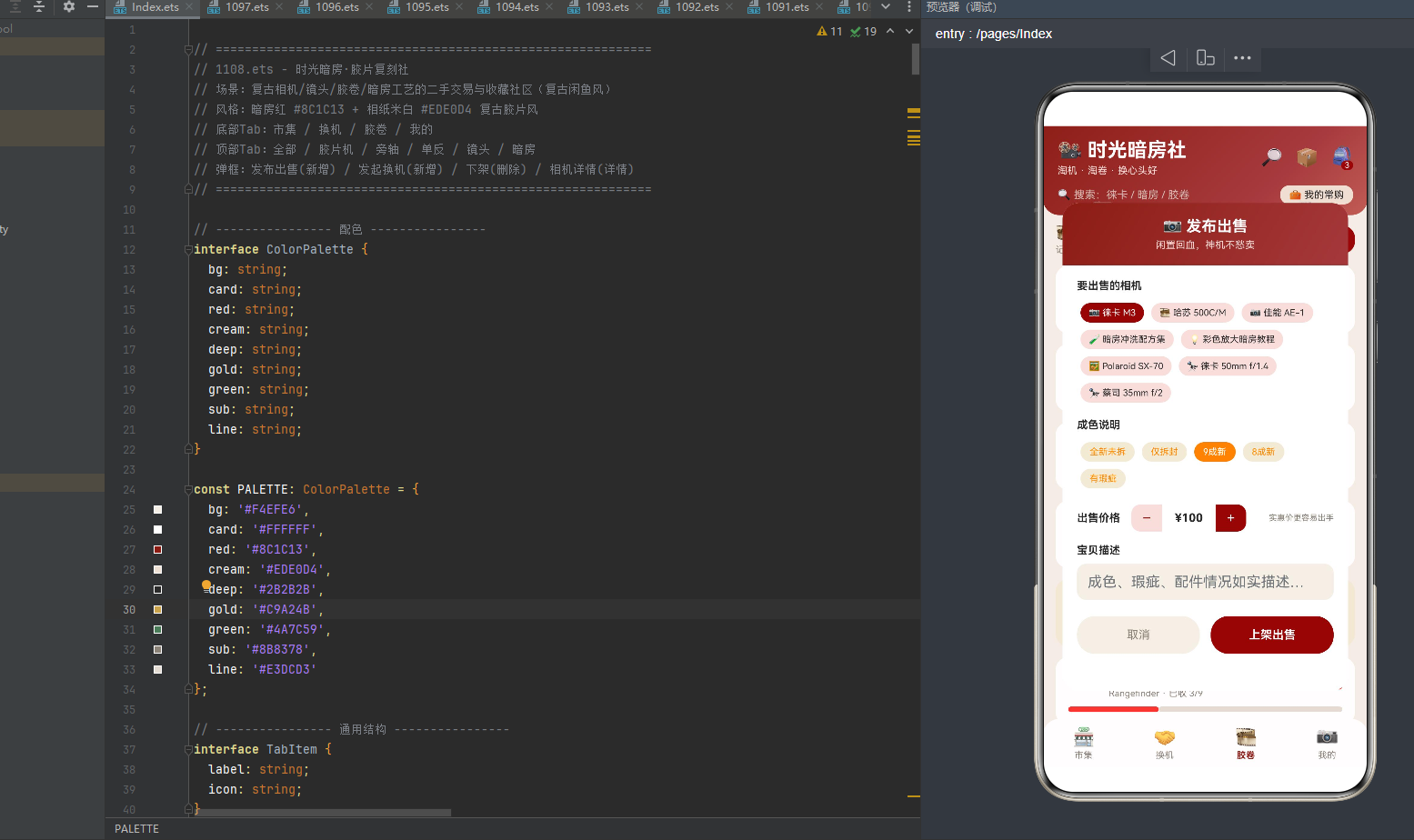
12.1 发布出售 sellModal:暗房红渐变头 + 选相机/成色/价格步进器/描述
出售弹窗 width:88% height:76% 圆角 18,顶部是 angle:120 暗房红渐变头 #8C1C13→#A5383B(从暗房红到深暗红),标题「📷 发布出售」17sp 粗体白字 + 「闲置回血,神机不愁卖」11sp 浅粉字。
滚动内容区包含:
- 选相机:
Flex wrap8 款相机(CAMERAS 前 8 款,emoji + 相机名),选中态暗房红底白字,非选中浅红底炭黑字,点击切换sellCameraIdx。 - 成色说明:
Flex wrap5 个成色(CONDITION_OPTIONS:全新未拆/仅拆封/9成新/8成新/有瑕疵),选中态#FF8A00橙底白字,非选中浅黄底橙字,点击切换sellCondIdx。 - 价格步进器:「出售价格」标签 + 步进器(减浅红底暗房红字 / 中间 ¥N 纯白底炭黑字 / 加暗房红底白字,10-9999 步长 10,>2000 提示「💰 高价好物建议包邮」红字,其他「实惠价更容易出手」灰字)。价格步进器是发布出售弹窗的特色字段,步长 10 适合复古相机的价格区间,>2000 时给出包邮建议。
- 宝贝描述:TextInput(placeholder「成色、瑕疵、配件情况如实描述…」),相纸米白底圆角 10。
- 操作按钮:「取消」相纸米白底灰字 + 「上架出售」暗房红底白字粗体,均点击关闭弹窗。
12.2 发起换机 swapModal:相纸米白头(唯一浅色头)+ 我提供/我想换多选/面交地点
换机弹窗 width:88% height:72% 圆角 18,顶部是纯相纸米白 #EDE0D4 底(深字,是所有弹窗中唯一用相纸米白浅色头的),标题「🤝 发起换机」17sp 粗体炭黑字 + 「用闲置换心头好,暗房互助」11sp 灰字。
滚动内容区包含:
- 我提供:
Flex wrap5 款相机(CAMERAS 筛选 i%3===0 && i<15),选中态#2B2B2B炭黑底白字,非选中相纸米白底炭黑字,点击切换swapOfferIdx。 - 我想换(可多选):
Flex wrap5 款相机(CAMERAS 筛选 i%3=2 && i<15),选中态#E8483C红底白字带「✓」前缀,非选中浅红底红字,点击调用toggleWant(i)设置swapWantIdx=i,通过pickedWant(i)辅助方法(i%2=0)判断选中状态。我想换多选是发起换机弹窗的特色功能,暗房舵主可以选择多个想换的相机增加换机成功率。 - 面交地点:
Flex wrap5 个地点(PLACES),选中态暗房红底白字,非选中浅红底暗房红字,点击切换swapPlaceIdx。 - 提示框:💡 「换机双方可自行协商补差价,面交请选择人流密集的公共场所,注意安全。」浅黄底圆角 10。面交安全提示是发起换机弹窗的特色内容,提醒暗房舵主线下交易安全。
- 操作按钮:「再想想」相纸米白底灰字 + 「发布换机帖」相纸米白底炭黑字粗体,均点击关闭弹窗。
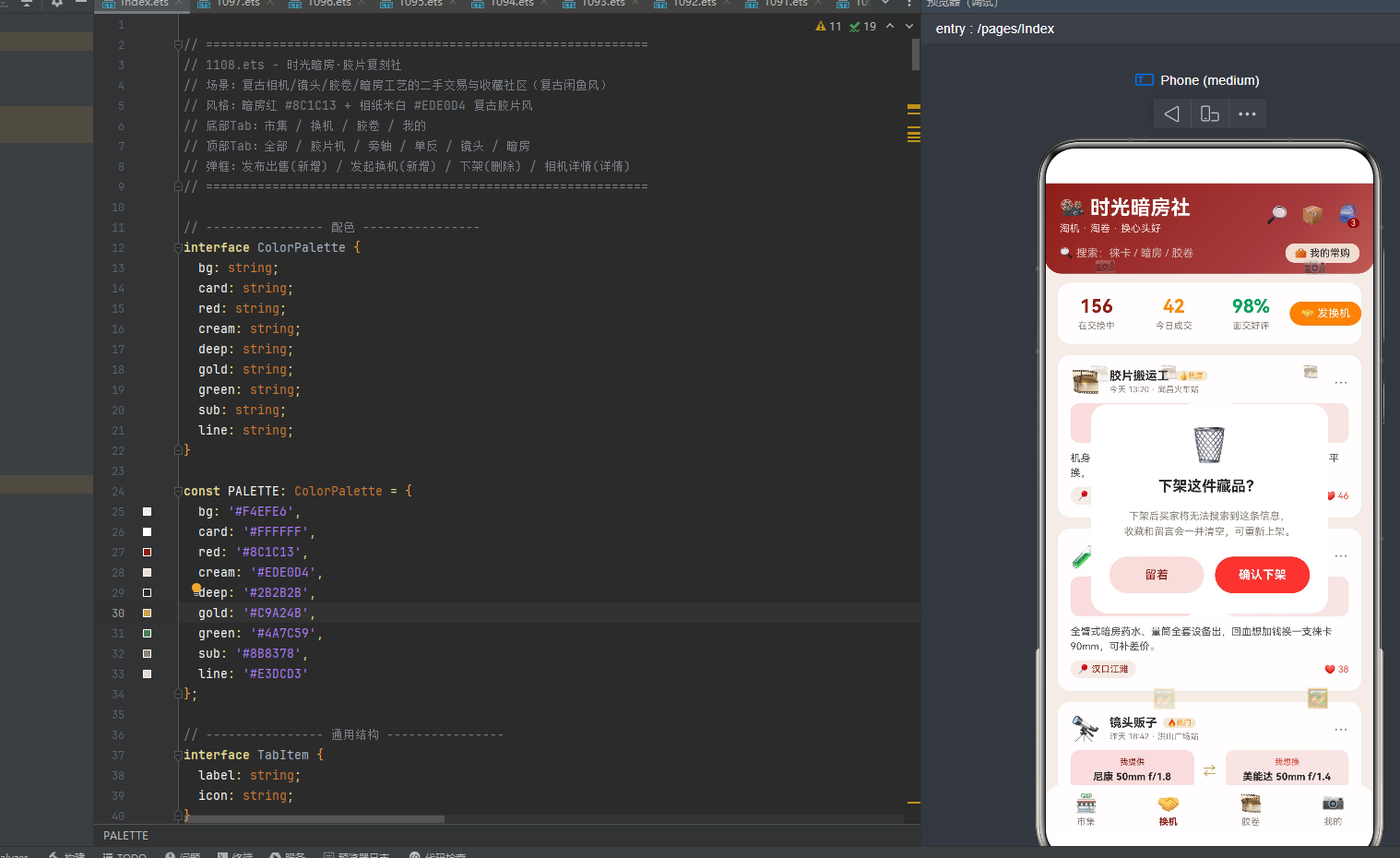
12.3 下架 deleteModal:🗑️ 警告小卡
下架弹窗是 4 个弹窗中最小的一个,width:72% 纯白底圆角 18,居中显示:
- 🗑️ 垃圾桶图标 36sp
- 「下架这件藏品?」16sp 粗体炭黑字
- 「下架后买家将无法搜索到这条信息,收藏和留言会一并清空,可重新上架。」11sp 灰字(lineHeight:17,居中)
- 操作按钮:「留着」浅红底暗房红字 + 「确认下架」
#E8483C红底白字粗体,均点击关闭弹窗。「留着」是下架弹窗的特色按钮文案,用复古胶片圈轻松的语气替代严肃的「取消」,符合复古胶片风。
下架弹窗通过 🗑️ 图标 + 红确认按钮 + 详细后果说明(买家无法搜索/收藏留言一并清空/可重新上架),提醒用户操作可逆(可重新上架,与其他应用的不可恢复删除不同),符合二手交易平台的下架逻辑。
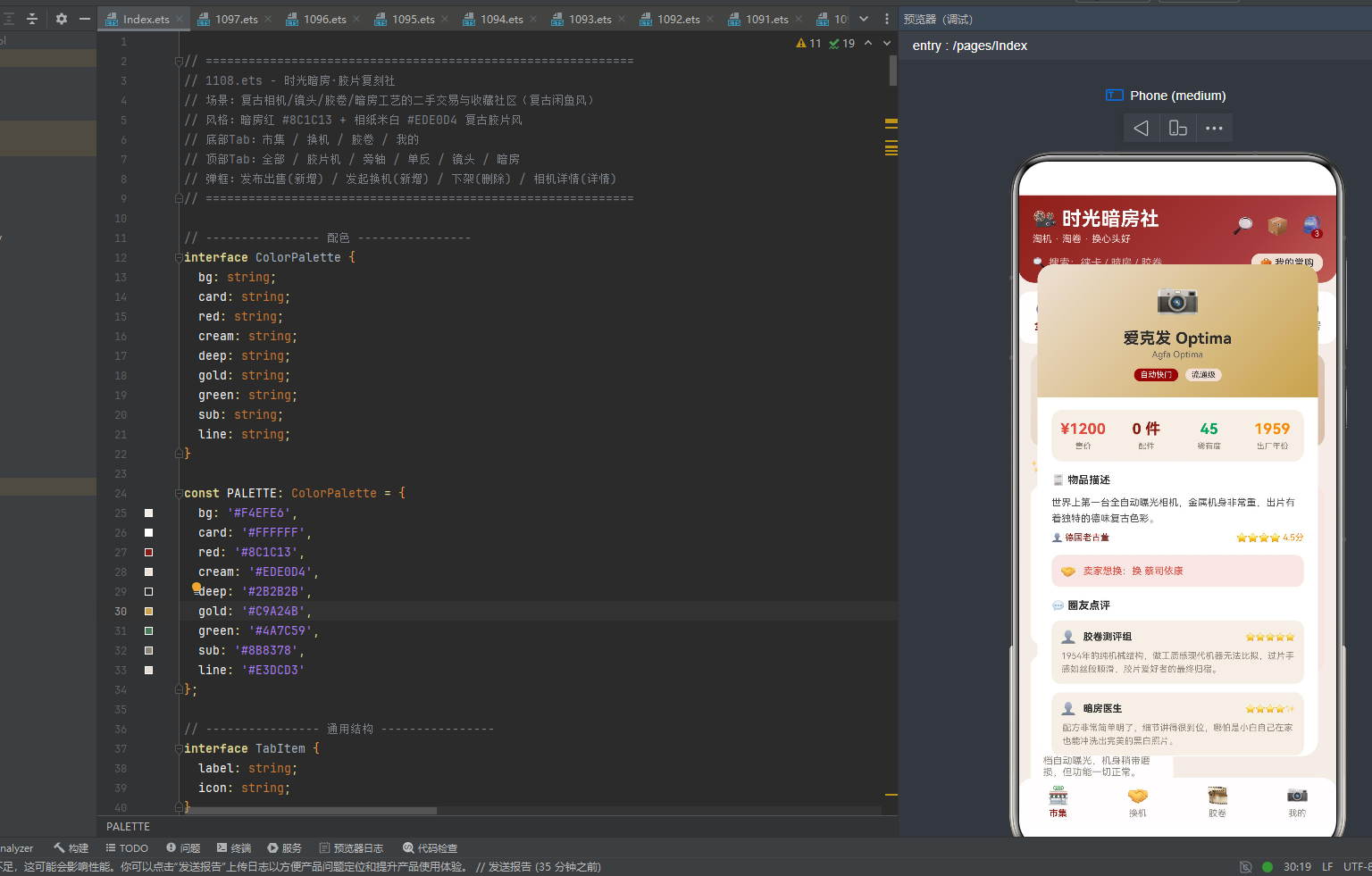
12.4 相机详情 detailModal:相纸米白到暗房金渐变头 + 四列统计 + 描述 + 想换 + 点评 + 操作
详情弹窗 width:88% height:78% 圆角 18,是 4 个弹窗中最高的一个,内容最丰富。顶部是 angle:135 相纸米白到暗房金渐变头 #EDE0D4→#C9A24B(从相纸米白到暗房金):
- emoji 40sp(通过
detailEmoji()查找) - 相机名 18sp 粗体炭黑字(通过
detailName()查找) - 英文名 10sp 灰字(通过
detailEng()查找) - 标签行:tag 标签(暗房红底白字)+ rarityLabel 标签(相纸米白底炭黑字)
滚动内容区包含:
- 四列统计卡:
#F4EFE6相纸米白底圆角 12,等宽四列——「售价 price」#E8483C红字、「配件 parts」暗房红字、「稀有度 rarity」rarityColor 映射色、「出厂年份 year」#FF8A00橙字。 - 物品描述:标题「🧾 物品描述」+ desc 11sp 深灰字 lineHeight:18 + 👤seller(暗房红字)+ starStr rating(橙字,右对齐)。
- 想换:🤝 「卖家想换:want」11sp 红字,浅红
#F4E7E4底圆角 10。想换栏是相机详情弹窗的特色内容,展示卖家的以机换机意向,增加二手交易的换机可能性。 - 圈友点评:标题「💬 圈友点评」+
ForEach(CAMERA_REVIEWS)渲染 3 条点评,每条为#F4EFE6相纸米白底圆角 10 卡片,包含 👤 + 用户名 + starStr(右对齐)+ content 10sp 灰字。评价用户名「胶卷测评组」「暗房医生」「德味玩家」充满复古胶片圈梗文化。 - 操作按钮:「💬 留言问问」浅红底暗房红字 + 「🛒 立即购买」红底白字粗体,均点击关闭弹窗。
12.5 detail 系列方法与辅助方法:13 个查找方法 + 2 个辅助方法
详情弹窗通过 selectedCameraId 从 CAMERAS 数组中查找对应相机,定义了 13 个方法(所有应用中查找方法最多的):detailName()、detailEng()、detailEmoji()、detailPrice()、detailParts()、detailRarity()、detailYear()、detailSeller()、detailTag()、detailStar()、detailRating()、detailDesc()、detailWant()。每个方法都通过 for 循环遍历 CAMERAS 查找匹配 id 的相机,再返回对应字段,若未找到则返回默认值(空字符串/0/‘📷’)。13 个查找方法对应 CameraItem 的 13 个展示字段,是数据驱动详情弹窗的完整实现。
此外还有 2 个辅助方法用于发起换机弹窗的多选逻辑:pickedWant(i) 返回 i % 2 === 0(判断第 i 个想换选项是否选中),toggleWant(i) 设置 this.swapWantIdx = i(切换想换选项)。这两个辅助方法实现了发起换机弹窗的我想换多选功能。
十三、特性对比表
| 特性维度 | 时光暗房·胶片复刻社实现 |
|---|---|
| 主题风格 | 暗房红 #8C1C13 + 相纸米白 #EDE0D4 + 炭黑 #2B2B2B 复古胶片风 |
| 导航架构 | 底部 4 Tab(市集/换机/胶卷/我的)+ 顶部 6 Tab(全部/胶片机/旁轴/单反/镜头/暗房),顶部 Tab 仅市集模块显示,6 Tab 等宽 layoutWeight(1) + 双下划线(激活暗房金/非激活相纸米白) |
| 数据模型 | 9 个 interface(ColorPalette/TabItem/ParticleItem/CameraItem/SwapItem/FilmProcessItem/LensItem/CollectionItem/CameraReview),CameraItem 17 字段(含 eng/parts配件/rarity稀有度/year出厂年份/want想换),FilmProcessItem 含 steps 步骤数组,LensItem 含 condition成色,CollectionItem 含 owned/total/rate 收藏进度,ParticleItem 无 id/y 字段(水平飘动专用) |
| 业务数据量 | 18 相机 + 8 换机帖 + 5 暗房工艺 + 9 镜头 + 6 图鉴收藏 + 3 点评 + 7 周交易量柱状图 |
| 工具函数 | 7 个(catColor/catLabel/rarityLabel/rarityColor/tradeBarHeight/rateColor/swapBadge) |
| 筛选函数 | 9 个(retiredSets/mocSets/figSets/techSets/streetSets/classicSets/cityLeft/cityRight/hotSets),直接数组索引而非 filter |
| 粒子系统 | 14 粒子,📷🎞️✨🔭🖼️ 五图标循环(相机/胶卷/闪光/镜头/相框对应暗房冲洗流程),独立 speed 0.6~2.0(所有应用中最快),setInterval 80ms(所有应用中最快刷新),水平向右飘动(x+speed,x>360回-20循环,模拟胶卷在暗房传送带/冲洗机出口),x 用 px 而非百分比,y 固定 5 行分布 80+(i%5)*118,所有应用中唯三水平飘动粒子(与奶茶/乐高并列,图标更贴合复古胶片) |
| 数据可视化 | 胶片机 Tab 稀有度柱状图(3 款,height 直接用 rarity+‘vp’,i===2 佳能 AE-1 70分红高亮其他暗房红,徕卡 M3 98分传世孤品登顶市面流通不足百台)+ 胶卷图鉴 Tab 收藏进度条(rateColor 三色填充 >=55绿/>=40暗房金/红) |
| 场景差异化 | 6 大顶部 Tab 完全不同布局:全部(时光暗房节相纸米白banner+双列瀑布流左右列高度错落)/胶片机(横滑大卡暗房红到炭黑渐变+稀有度柱状图徕卡M3 98分登顶+捡漏榜)/暗房(工艺冲洗时间轴暗房金竖线连接+steps步骤列表带相纸米白圆形序号)/镜头(三列格子9支镜头毒德大学+镜头交换行情筛选id%2===0)/单反(旗舰对决卡尼康F3暗房红渐变VS奥林巴斯OM-1灰渐变+列表+侧栏统计拍片好评率)/旁轴(收藏标签云6个COLLECTIONS+紧凑列表rarityColor标签+集齐旁轴三剑客彩蛋) |
| 模态弹窗 | 4 个:发布出售(暗房红渐变头,选相机/成色5档/价格步进器步长10 10-9999 >2000包邮建议/描述)/发起换机(相纸米白头唯一浅色头,我提供/我想换多选pickedWant辅助方法i%2===0/面交地点5个/面交安全提示)/下架(🗑️小卡,留着文案/确认下架红,可重新上架可逆操作)/相机详情(相纸米白到暗房金渐变头,四列统计售价红/配件暗房红/稀有度rarityColor/出厂年份橙,物品描述+想换栏浅红底+圈友点评3条,留言问问+立即购买) |
| 状态变量 | 19 个 @State + 1 个 private timerId,含 pickedPlaces 布尔数组实现多选 |
| 辅助方法 | pickedWant(i%2===0) + toggleWant(设置swapWantIdx=i),用于发起换机弹窗多选 |
| 生命周期 | aboutToAppear 构建粒子+启动定时器80ms,aboutToDisappear clearInterval+重置-1 |
| 头部特色 | 暗房红三色渐变 angle:135 #8C1C13→#A5383B→#C05B52(暗房红到深暗红到浅红,模拟暗房红灯从暗到亮渐变)+ 🔎📦🎒三图标+购物车3角标暗房红底+搜索条+我的常购按钮相纸米白底 |
| 底部 Tab 特色 | 纯白底 + 顶部圆角 18(与头部底部圆角呼应,复古相机视觉隐喻) |
| 顶部 Tab 特色 | 6 Tab 等宽,纯白底圆角14,激活态暗房金圆角下划线+非激活相纸米白底圆角下划线(双下划线对比) |
| 分类色系统 | catColor 6 色(相机类型映射,胶片机红/暗房紫/镜头绿/单反橙红/旁轴亮蓝/经典暗房红)+ rarityColor 4 色(稀有度映射,>=95红/>=80橙/>=60蓝/绿)+ rateColor 3 色(收藏进度映射,>=55绿/>=40暗房金/红) |
| 复古胶片圈文化梗 | 淘机淘卷换心头好/暗房舵主/胶卷测评组/暗房医生/德味玩家/传世孤品/绝版猎人/镜头百晓生/暗房魔法师/毒德大学/旁轴三剑客/集齐彩蛋/时光暗房节/卖家免服务费/面交安全提示/可重新上架/信用分978/累计成交额¥8.6万 |
| 特色数据字段 | CameraItem.eng(英文名)+ CameraItem.parts(配件数)+ CameraItem.rarity(稀有度0-100)+ CameraItem.year(出厂年份)+ CameraItem.want(卖家想换)+ FilmProcessItem.pages(页数)+ FilmProcessItem.downloads(下载量)+ FilmProcessItem.steps(步骤数组)+ LensItem.condition(成色)+ CollectionItem.owned/total/rate(收藏进度)+ SwapItem.offer/want/place(提供/想换/面交地点) |
| 弹窗跳转 | 相机详情「留言问问」/「立即购买」→关闭详情 |
十四、完整代码
应用完整源码位于 1108.ets,总计约 1800 行,包含 9 个 interface、16 个常量数组/对象、7 个工具函数、9 个筛选函数、1 个 @Entry @Component struct Index 主组件(19 个 @State + 2 个生命周期方法 + 19 个 @Builder 方法 + 13 个 detail 查找方法 + 2 个辅助方法 + build 方法)。
核心代码结构如下:
// ============================================================
// 1108.ets - 时光暗房·胶片复刻社
// 场景:复古相机/镜头/胶卷/暗房工艺的二手交易与收藏社区(复古闲鱼风)
// 风格:暗房红 #8C1C13 + 相纸米白 #EDE0D4 复古胶片风
// 底部Tab:市集 / 换机 / 胶卷 / 我的
// 顶部Tab:全部 / 胶片机 / 旁轴 / 单反 / 镜头 / 暗房
// 弹框:发布出售(新增) / 发起换机(新增) / 下架(删除) / 相机详情(详情)
// ============================================================
// ---------------- 配色 ----------------
interface ColorPalette {
bg: string;
card: string;
red: string;
cream: string;
deep: string;
gold: string;
green: string;
sub: string;
line: string;
}
const PALETTE: ColorPalette = {
bg: '#F4EFE6',
card: '#FFFFFF',
red: '#8C1C13',
cream: '#EDE0D4',
deep: '#2B2B2B',
gold: '#C9A24B',
green: '#4A7C59',
sub: '#8B8378',
line: '#E3DCD3'
};
// ---------------- 通用结构 ----------------
interface TabItem {
label: string;
icon: string;
}
interface ParticleItem {
x: number;
emoji: string;
size: number;
speed: number;
opacity: number;
}
// ---------------- 相机条目 ----------------
interface CameraItem {
id: number;
name: string;
eng: string;
cat: string;
price: number;
parts: number;
rarity: number;
year: number;
rating: number;
starStr: string;
seller: string;
tag: string;
desc: string;
want: string;
sales: number;
emoji: string;
}
// ---------------- 交换帖 ----------------
interface SwapItem {
id: number;
user: string;
avatar: string;
offer: string;
want: string;
time: string;
likes: number;
content: string;
place: string;
}
// ---------------- 暗房工艺/胶卷 ----------------
interface FilmProcessItem {
id: number;
name: string;
type: string;
pages: number;
author: string;
likes: number;
downloads: number;
emoji: string;
steps: string[];
}
// ---------------- 镜头条目 ----------------
interface LensItem {
id: number;
name: string;
series: string;
price: number;
condition: string;
seller: string;
emoji: string;
desc: string;
}
// ---------------- 图鉴收藏 ----------------
interface CollectionItem {
id: number;
name: string;
series: string;
owned: number;
total: number;
rate: number;
emoji: string;
}
// ---------------- 点评条目 ----------------
interface CameraReview {
id: number;
user: string;
setName: string;
starStr: string;
content: string;
}
// ---------------- Tab 配置 ----------------
const BOTTOM_TABS: TabItem[] = [
{ label: '市集', icon: '🏪' },
{ label: '换机', icon: '🤝' },
{ label: '胶卷', icon: '🎞️' },
{ label: '我的', icon: '📷' }
];
const TOP_TABS: TabItem[] = [
{ label: '全部', icon: '🧿' },
{ label: '胶片机', icon: '🎞️' },
{ label: '旁轴', icon: '🔍' },
{ label: '单反', icon: '📸' },
{ label: '镜头', icon: '🔭' },
{ label: '暗房', icon: '🌑' }
];
// ---------------- 相机数据(18款写死) ----------------
const CAMERAS: CameraItem[] = [
{ id: 1, name: '徕卡 M3', eng: 'Leica M3 1954', cat: 'retired', price: 32000, parts: 0, rarity: 98, year: 1954, rating: 5.0, starStr: '⭐⭐⭐⭐⭐', seller: '德味老孙', tag: '传世神机', desc: '完美成色,黄斑对焦清晰顺滑,机械快门声极其迷人,收藏级别。', want: '换 徕卡 M6', sales: 1, emoji: '📷' },
{ id: 2, name: '哈苏 500C/M', eng: 'Hasselblad 500C/M', cat: 'retired', price: 15800, parts: 1, rarity: 92, year: 1970, rating: 4.9, starStr: '⭐⭐⭐⭐⭐', seller: '中画幅阿凯', tag: '极致锐利', desc: '全套原厂A12后背,镜头镀膜完美,反转片专业户首选,胶片时代的巅峰。', want: '换 玛米亚 RZ67', sales: 2, emoji: '🎞️' },
{ id: 3, name: '佳能 AE-1', eng: 'Canon AE-1 1976', cat: 'retired', price: 2800, parts: 0, rarity: 70, year: 1976, rating: 4.7, starStr: '⭐⭐⭐⭐', seller: '日系情怀所', tag: '入门经典', desc: '当年的销量王者,快门声清脆,配50mm 1.4标头,随拿随拍超好看。', want: '换 奥林巴斯 OM-1', sales: 9, emoji: '📷' },
{ id: 4, name: '暗房冲洗配方集', eng: 'D76 & C41 配方', cat: 'moc', price: 39, parts: 0, rarity: 35, year: 2025, rating: 4.8, starStr: '⭐⭐⭐⭐✨', seller: '深色药师', tag: '复古配方', desc: '含D76、Dektol、C41彩负黑白反转等全套配方,附操作步骤,适合自冲。', want: '可换胶卷', sales: 126, emoji: '🧪' },
{ id: 5, name: '彩色放大暗房教程', eng: 'Color Enlarging', cat: 'moc', price: 58, parts: 0, rarity: 40, year: 2024, rating: 4.7, starStr: '⭐⭐⭐⭐', seller: '红光之下', tag: '暗房必学', desc: '从负片到相纸,涵盖放大机操作、滤镜校色、冲洗步骤,送定制相纸样品。', want: '换试机卷', sales: 98, emoji: '💡' },
{ id: 6, name: 'Polaroid SX-70', eng: 'Polaroid SX-70', cat: 'moc', price: 4200, parts: 1, rarity: 80, year: 1972, rating: 4.9, starStr: '⭐⭐⭐⭐⭐', seller: '拍立得修理匠', tag: '折叠大拿', desc: '全球唯一折叠单反拍立得,皮腔完好,自动测光,记录当下瞬间的复古色彩。', want: '换宝丽来SLR680', sales: 6, emoji: '🖼️' },
{ id: 7, name: '徕卡 50mm f/1.4', eng: 'Summilux-M 50', cat: 'fig', price: 18000, parts: 0, rarity: 96, year: 1961, rating: 4.9, starStr: '⭐⭐⭐⭐⭐', seller: '镜头博物馆老白', tag: '夜神之眼', desc: '完美玻璃无霉无雾,光圈全开柔美无比,焦外如奶油般化开,极品。', want: '换 徕卡 35mm', sales: 1, emoji: '🔭' },
{ id: 8, name: '蔡司 35mm f/2', eng: 'Zeiss Biogon 35', cat: 'fig', price: 8900, parts: 0, rarity: 88, year: 2005, rating: 4.8, starStr: '⭐⭐⭐⭐✨', seller: '德系玻璃控', tag: '锐利之王', desc: 'G系列镜头,T*镀膜抗眩光极佳,色彩浓郁,微反差极佳,扫街必备。', want: '换 徕卡R', sales: 3, emoji: '🔭' },
{ id: 9, name: '尼康 85mm f/1.4', eng: 'Nikkor 85mm', cat: 'fig', price: 6500, parts: 0, rarity: 75, year: 1981, rating: 4.6, starStr: '⭐⭐⭐⭐', seller: '人像大师傅', tag: '空气切割', desc: 'AIS手动人像头,全开光圈奶油般的背景虚化,女神必备,镜组干净通透。', want: '换 85mm f/1.2', sales: 5, emoji: '🔭' },
{ id: 10, name: '尼康 F3', eng: 'Nikon F3 HP', cat: 'tech', price: 5200, parts: 0, rarity: 80, year: 1980, rating: 4.9, starStr: '⭐⭐⭐⭐⭐', seller: '新闻机收藏铺', tag: '钛合金旗舰', desc: '当年的新闻机之王,高眼点取景器,快门横走金属帘,机械与电子的完美结合。', want: '换 尼康 F2', sales: 7, emoji: '📷' },
{ id: 11, name: '奥林巴斯 OM-1', eng: 'Olympus OM-1', cat: 'tech', price: 3800, parts: 0, rarity: 68, year: 1972, rating: 4.8, starStr: '⭐⭐⭐⭐✨', seller: '口袋机械所', tag: '小巧精致', desc: '当时最小巧的全画幅单反,双轴减震卷片器,拿在手里像艺术品。', want: '换 美能达X700', sales: 10, emoji: '📷' },
{ id: 12, name: '玛米亚 RZ67', eng: 'Mamiya RZ67 Pro', cat: 'tech', price: 9800, parts: 0, rarity: 60, year: 1982, rating: 4.7, starStr: '⭐⭐⭐⭐', seller: '影棚大画幅', tag: '终极画质', desc: '6x7中画幅,皮腔对焦,镜头群极其庞大,商业静物与婚纱影棚的终极武器。', want: '换 哈苏500', sales: 4, emoji: '🎞️' },
{ id: 13, name: '柯达 Retina IIa', eng: 'Kodak Retina IIa', cat: 'street', price: 2400, parts: 0, rarity: 65, year: 1949, rating: 4.8, starStr: '⭐⭐⭐⭐✨', seller: '折叠老兵', tag: '战前经典', desc: '折叠式机身,罗德刚50mm f/2镜头,极具年代感,出片锐利清晰。', want: '换 福伦达', sales: 12, emoji: '📷' },
{ id: 14, name: '福伦达 Bessa R2A', eng: 'Voigtlander R2A', cat: 'street', price: 4200, parts: 0, rarity: 55, year: 2004, rating: 4.9, starStr: '⭐⭐⭐⭐⭐', seller: '日系器材店', tag: '实用旁轴', desc: '性价比极高的旁轴机身,电子快门安静轻巧,可转接各种徕卡M口镜头。', want: '换 徕卡CL', sales: 8, emoji: '📷' },
{ id: 15, name: '禄来 35S', eng: 'Rolleiflex 35S', cat: 'street', price: 3500, parts: 0, rarity: 70, year: 1966, rating: 4.7, starStr: '⭐⭐⭐⭐', seller: '掌心传奇', tag: '便携神机', desc: '世界最小全画幅胶卷机,天塞镜头,做工精美,装进口袋随时记录生活。', want: '换 奥林巴斯XA', sales: 11, emoji: '🕶️' },
{ id: 16, name: '哈苏 XPAN', eng: 'Hasselblad XPAN', cat: 'classic', price: 15000, parts: 0, rarity: 90, year: 1998, rating: 4.9, starStr: '⭐⭐⭐⭐⭐', seller: '全景宽幅者', tag: '宽幅神兵', desc: '极其罕见的宽幅相机,24x65画幅,拍出的照片如同电影截图,非常有冲击力。', want: '换 禄来6008', sales: 2, emoji: '🎬' },
{ id: 17, name: '爱克发 Optima', eng: 'Agfa Optima', cat: 'classic', price: 1200, parts: 0, rarity: 45, year: 1959, rating: 4.5, starStr: '⭐⭐⭐⭐', seller: '德国老古董', tag: '自动快门', desc: '世界上第一台全自动曝光相机,金属机身非常重,出片有着独特的德味复古色彩。', want: '换 蔡司依康', sales: 13, emoji: '📷' },
{ id: 18, name: '美能达 X-700', eng: 'Minolta X-700', cat: 'classic', price: 1800, parts: 0, rarity: 50, year: 1981, rating: 4.6, starStr: '⭐⭐⭐⭐', seller: '元祖黑机', tag: '程序自动', desc: '当年荣获欧洲相机大奖,P档自动曝光,机身稍带磨损,但功能一切正常。', want: '换 尼康FM2', sales: 8, emoji: '📷' }
];
// ---------------- 交换帖数据(8条写死) ----------------
const SWAPS: SwapItem[] = [
{ id: 1, user: '胶片搬运工', avatar: '🎞️', offer: '尼康 FM2', want: '奥林巴斯 OM-1', time: '今天 13:20', likes: 46, content: '机身成色极好,快门清脆,想换一台小巧的OM-1玩玩,可平换,面交武昌火车站。', place: '武昌火车站' },
{ id: 2, user: '暗房老张', avatar: '🧪', offer: 'D76 冲洗设备', want: '徕卡 90mm 镜头', time: '今天 11:05', likes: 38, content: '全臂式暗房药水、量筒全套设备出,回血想加钱换一支徕卡90mm,可补差价。', place: '汉口江滩' },
{ id: 3, user: '镜头贩子', avatar: '🔭', offer: '尼康 50mm f/1.8', want: '美能达 50mm f/1.4', time: '昨天 18:42', likes: 61, content: '镜头通透无霉,换同级别的美能达标头,多换一或者补差价好商量。', place: '洪山广场站' },
{ id: 4, user: '手冲药剂师', avatar: '🧑🔬', offer: '彩色C41套药', want: '任何暗房相纸', time: '昨天 15:30', likes: 29, content: '药水免费分享,交换任意型号相纸,过期一点也可以,纯属爱好交流。', place: '线上交换' },
{ id: 5, user: '旁轴玩家', avatar: '🔍', offer: '福伦达 Bessa R2A', want: '徕卡 CL', time: '前天 20:15', likes: 22, content: '机身很新带包装,想换一台轻便的徕卡CL,加500元差价,可面交。', place: '楚河汉街站' },
{ id: 6, user: '宽幅收藏家', avatar: '🎬', offer: '哈苏 XPAN', want: '徕卡 M6', time: '前天 09:50', likes: 41, content: '宽幅极品,超值换经典M6,可以互换,可补差价,交个朋友。', place: '线上互换' },
{ id: 7, user: '原味胶卷党', avatar: '🖤', offer: '柯达 Retina IIa', want: '福伦达 Vito', time: '3天前 22:08', likes: 55, content: '情怀物换情怀物,都是早期折叠机,成色相近,愿出价补差价。', place: '光谷转盘' },
{ id: 8, user: '小暗房主理人', avatar: '🌑', offer: '放大机+相纸', want: '任意相机1台', time: '4天前 14:26', likes: 17, content: '全套暗房放大设备打包换一台相机,学生党优先,纯交朋友。', place: '线上交换' }
];
// ---------------- 暗房工艺数据(5条写死) ----------------
const PROCESSES: FilmProcessItem[] = [
{ id: 1, name: 'D76 黑白冲洗手册', type: '黑白', pages: 12, author: '暗房老张', likes: 342, downloads: 2100, emoji: '🧪', steps: ['药剂称量与配制 1-3页', '温度控制与显影 4-7页', '停影与定影 8-10页', '水洗与晾干 11-12页'] },
{ id: 2, name: 'C41 彩色负片冲洗', type: '彩色', pages: 36, author: '彩虹药剂师', likes: 276, downloads: 1580, emoji: '🌈', steps: ['药水预热与回温 1-9页', '彩显时间控制 10-16页', '漂白与定影 17-28页', '稳定与烘干 29-36页'] },
{ id: 3, name: '蓝晒工艺入门', type: '古典工艺', pages: 45, author: '蓝晒非遗工坊', likes: 415, downloads: 3300, emoji: '🔵', steps: ['感光液涂抹 1-12页', '曝光时间控制 13-26页', '水洗显影 27-38页', '色调强化 39-45页'] },
{ id: 4, name: '黑白相纸放大', type: '相纸', pages: 22, author: '红光之下', likes: 198, downloads: 1260, emoji: '🖼️', steps: ['相纸选择与裁剪 1-8页', '放大机焦距调整 9-15页', '曝光测试条 16-20页', '显影与定影 21-22页'] },
{ id: 5, name: '伊尔福HP5增感', type: '胶片', pages: 10, author: '银盐爱好者', likes: 233, downloads: 1420, emoji: '🎞️', steps: ['增感原理 1-3页', '显影时间调整 4-6页', '迫冲效果评估 7-10页'] }
];
// ---------------- 镜头数据(9条写死) ----------------
const LENSES: LensItem[] = [
{ id: 1, name: '尼康 50mm f/1.8', series: 'AIS 手动', price: 600, condition: '9成新', seller: '镜头贩子', emoji: '🔭', desc: '经典标头,锐度极高' },
{ id: 2, name: '美能达 50mm f/1.4', series: 'MD卡口', price: 850, condition: '9.5成新', seller: '日系镜头仓', emoji: '🔭', desc: '味道浓郁,全开边缘软' },
{ id: 3, name: '佳能 50mm f/1.8', series: 'FD卡口', price: 500, condition: '8.5成新', seller: '佳能老粉', emoji: '🔭', desc: '全金属做工,轻巧' },
{ id: 4, name: '徕卡 50mm f/2', series: 'M口', price: 9800, condition: '全新', seller: '德味收藏家', emoji: '💎', desc: '无限近经典,体积小巧' },
{ id: 5, name: '蔡司 35mm f/2.8', series: 'Contax G', price: 3200, condition: '9成新', seller: '蔡司小迷妹', emoji: '💠', desc: 'G系经典,色彩油润' },
{ id: 6, name: '奥林巴斯 50mm f/1.2', series: 'OM', price: 4200, condition: '9成新', seller: '奥林巴斯粉', emoji: '🌟', desc: '大光圈毒物,焦外超旋' },
{ id: 7, name: '尼康 105mm f/2.5', series: 'AIS', price: 3800, condition: '8成新', seller: '人像老法师', emoji: '👤', desc: '人像镜皇,色彩自然' },
{ id: 8, name: '柯达 63mm f/2', series: 'Retina', price: 1200, condition: '9.5成新', seller: '老飞机库', emoji: '✈️', desc: '战前生产,结构精妙' },
{ id: 9, name: '马米亚 127mm f/3.8', series: 'RZ', price: 2200, condition: '全新', seller: '中画幅高玩', emoji: '📷', desc: '拍人像通透油润' }
];
// ---------------- 图鉴收藏数据(6条写死) ----------------
const COLLECTIONS: CollectionItem[] = [
{ id: 1, name: '徕卡M系列', series: 'Leica M', owned: 3, total: 12, rate: 25, emoji: '📷' },
{ id: 2, name: '中画幅系统', series: 'Medium Format', owned: 2, total: 8, rate: 25, emoji: '🎞️' },
{ id: 3, name: '尼康F卡口', series: 'Nikon F', owned: 7, total: 15, rate: 47, emoji: '🔭' },
{ id: 4, name: '暗房耗材', series: 'Darkroom', owned: 8, total: 10, rate: 80, emoji: '🧪' },
{ id: 5, name: '宝丽来机身', series: 'Polaroid', owned: 4, total: 7, rate: 57, emoji: '🖼️' },
{ id: 6, name: '早期旁轴', series: 'Rangefinder', owned: 3, total: 9, rate: 33, emoji: '👓' }
];
// ---------------- 点评数据(3条写死) ----------------
const CAMERA_REVIEWS: CameraReview[] = [
{ id: 1, user: '胶卷测评组', setName: '徕卡 M3', starStr: '⭐⭐⭐⭐⭐', content: '1954年的纯机械结构,做工质感现代机器无法比拟,过片手感如丝般顺滑,胶片爱好者的最终归宿。' },
{ id: 2, user: '暗房医生', setName: 'D76 冲洗手册', starStr: '⭐⭐⭐⭐✨', content: '配方非常简单明了,细节讲得很到位,哪怕是小白自己在家也能冲洗出完美的黑白照片。' },
{ id: 3, user: '德味玩家', setName: '蔡司 35mm f/2', starStr: '⭐⭐⭐⭐⭐', content: '色彩极其浓郁,在阴天里都能拍出氛围感,T*镀膜对眩光的抑制简直无敌,非常值得入手。' }
];
// ---------------- 全城周交易量图表数据 ----------------
const TRADE_LABELS: string[] = ['周一', '周二', '周三', '周四', '周五', '周六', '周日'];
const TRADE_BARS: number[] = [66, 45, 52, 78, 102, 156, 122];
// ---------------- 弹框选项 ----------------
const CONDITION_OPTIONS: string[] = ['全新未拆', '仅拆封', '9成新', '8成新', '有瑕疵'];
const PRICE_LEVELS: string[] = ['捡漏价', '市场价', '收藏价'];
const PLACES: string[] = ['武昌火车站', '洪山广场站', '楚河汉街站', '汉口江滩', '线上互换'];
// ---------------- 全局纯函数 ----------------
function catColor(cat: string): string {
if (cat === 'retired') {
return '#E8483C';
}
if (cat === 'moc') {
return '#7C4DFF';
}
if (cat === 'fig') {
return '#00A25B';
}
if (cat === 'tech') {
return '#E86A5B';
}
if (cat === 'street') {
return '#1E88E5';
}
return '#8C1C13';
}
function catLabel(cat: string): string {
if (cat === 'retired') {
return '胶片神机';
}
if (cat === 'moc') {
return '暗房配方';
}
if (cat === 'fig') {
return '镜头交易';
}
if (cat === 'tech') {
return '机械单反';
}
if (cat === 'street') {
return '街头旁轴';
}
return '经典老机';
}
function rarityLabel(r: number): string {
if (r >= 95) {
return '传世孤品';
}
if (r >= 80) {
return '稀有级';
}
if (r >= 60) {
return '紧俏级';
}
return '流通级';
}
function rarityColor(r: number): string {
if (r >= 95) {
return '#E8483C';
}
if (r >= 80) {
return '#FF8A00';
}
if (r >= 60) {
return '#1E88E5';
}
return '#00A25B';
}
function tradeBarHeight(v: number): string {
return Math.round(v / 156 * 96).toString() + 'vp';
}
function rateColor(r: number): string {
if (r >= 55) {
return '#00A25B';
}
if (r >= 40) {
return '#FFD400';
}
return '#E8483C';
}
function retiredSets(): CameraItem[] {
return [CAMERAS[0], CAMERAS[1], CAMERAS[2]];
}
function mocSets(): CameraItem[] {
return [CAMERAS[3], CAMERAS[4], CAMERAS[5]];
}
function figSets(): CameraItem[] {
return [CAMERAS[6], CAMERAS[7], CAMERAS[8]];
}
function techSets(): CameraItem[] {
return [CAMERAS[9], CAMERAS[10], CAMERAS[11]];
}
function streetSets(): CameraItem[] {
return [CAMERAS[12], CAMERAS[13], CAMERAS[14]];
}
function classicSets(): CameraItem[] {
return [CAMERAS[15], CAMERAS[16], CAMERAS[17]];
}
function cityLeft(): CameraItem[] {
return [CAMERAS[16], CAMERAS[17]];
}
function cityRight(): CameraItem[] {
return [CAMERAS[15]];
}
function hotSets(): CameraItem[] {
return [CAMERAS[3], CAMERAS[5], CAMERAS[16], CAMERAS[17], CAMERAS[9]];
}
function swapBadge(likes: number): string {
if (likes >= 50) {
return '🔥热门';
}
if (likes >= 30) {
return '👍热度';
}
return '🌱新帖';
}
// ============================================================
// 主页面
// ============================================================
@Entry
@Component
struct Index {
@State currentBottomTab: number = 0;
@State currentTopTab: number = 0;
@State selectedCameraId: number = 1;
@State showSellModal: boolean = false;
@State showSwapModal: boolean = false;
@State showDeleteModal: boolean = false;
@State showDetailModal: boolean = false;
@State sellCameraIdx: number = 0;
@State sellCondIdx: number = 2;
@State sellPrice: number = 100;
@State sellWords: string = '';
@State swapOfferIdx: number = 0;
@State swapWantIdx: number = 1;
@State pickedPlaces: boolean[] = [true, false, false, false, false];
@State swapPlaceIdx: number = 0;
@State particles: ParticleItem[] = [];
private timerId: number = -1;
aboutToAppear(): void {
this.buildParticles();
this.timerId = setInterval(() => {
this.driftParticles();
}, 80);
}
aboutToDisappear(): void {
if (this.timerId !== -1) {
clearInterval(this.timerId);
this.timerId = -1;
}
}
buildParticles(): void {
const emojis: string[] = ['📷', '🎞️', '✨', '🔭', '🖼️'];
const list: ParticleItem[] = [];
for (let i = 0; i < 14; i++) {
list.push({
x: Math.random() * 340,
emoji: emojis[i % emojis.length],
size: 12 + Math.random() * 10,
speed: 0.6 + Math.random() * 1.4,
opacity: 0.2 + Math.random() * 0.4
});
}
this.particles = list;
}
driftParticles(): void {
for (let i = 0; i < this.particles.length; i++) {
this.particles[i].x += this.particles[i].speed;
if (this.particles[i].x > 360) {
this.particles[i].x = -20;
}
}
this.particles = this.particles.slice();
}
// 详情弹框数据取值
detailName(): string {
for (let i = 0; i < CAMERAS.length; i++) {
if (CAMERAS[i].id === this.selectedCameraId) {
return CAMERAS[i].name;
}
}
return '';
}
detailEng(): string {
for (let i = 0; i < CAMERAS.length; i++) {
if (CAMERAS[i].id === this.selectedCameraId) {
return CAMERAS[i].eng;
}
}
return '';
}
detailEmoji(): string {
for (let i = 0; i < CAMERAS.length; i++) {
if (CAMERAS[i].id === this.selectedCameraId) {
return CAMERAS[i].emoji;
}
}
return '📷';
}
detailPrice(): string {
for (let i = 0; i < CAMERAS.length; i++) {
if (CAMERAS[i].id === this.selectedCameraId) {
return '¥' + CAMERAS[i].price.toString();
}
}
return '';
}
detailParts(): string {
for (let i = 0; i < CAMERAS.length; i++) {
if (CAMERAS[i].id === this.selectedCameraId) {
return CAMERAS[i].parts.toString() + ' 件';
}
}
return '';
}
detailRarity(): string {
for (let i = 0; i < CAMERAS.length; i++) {
if (CAMERAS[i].id === this.selectedCameraId) {
return CAMERAS[i].rarity.toString();
}
}
return '';
}
detailYear(): string {
for (let i = 0; i < CAMERAS.length; i++) {
if (CAMERAS[i].id === this.selectedCameraId) {
return CAMERAS[i].year.toString();
}
}
return '';
}
detailSeller(): string {
for (let i = 0; i < CAMERAS.length; i++) {
if (CAMERAS[i].id === this.selectedCameraId) {
return CAMERAS[i].seller;
}
}
return '';
}
detailTag(): string {
for (let i = 0; i < CAMERAS.length; i++) {
if (CAMERAS[i].id === this.selectedCameraId) {
return CAMERAS[i].tag;
}
}
return '';
}
detailStar(): string {
for (let i = 0; i < CAMERAS.length; i++) {
if (CAMERAS[i].id === this.selectedCameraId) {
return CAMERAS[i].starStr;
}
}
return '';
}
detailRating(): string {
for (let i = 0; i < CAMERAS.length; i++) {
if (CAMERAS[i].id === this.selectedCameraId) {
return CAMERAS[i].rating.toFixed(1) + '分';
}
}
return '';
}
detailDesc(): string {
for (let i = 0; i < CAMERAS.length; i++) {
if (CAMERAS[i].id === this.selectedCameraId) {
return CAMERAS[i].desc;
}
}
return '';
}
detailWant(): string {
for (let i = 0; i < CAMERAS.length; i++) {
if (CAMERAS[i].id === this.selectedCameraId) {
return CAMERAS[i].want;
}
}
return '';
}
// ---------------- 头部(复古风,无动画) ----------------
@Builder
headerBuilder() {
Column() {
Row() {
Column() {
Text('📽️ 时光暗房社')
.fontSize(22)
.fontWeight(FontWeight.Bold)
.fontColor('#FFFFFF')
Text('淘机 · 淘卷 · 换心头好')
.fontSize(11)
.fontColor('#F3D9D5')
.margin({ top: 3 })
}
.alignItems(HorizontalAlign.Start)
.layoutWeight(1)
Row({ space: 14 }) {
Text('🔎')
.fontSize(20)
Text('📦')
.fontSize(20)
Column() {
Text('🎒')
.fontSize(20)
Text('3')
.fontSize(9)
.fontColor('#FFFFFF')
.backgroundColor('#8C1C13')
.borderRadius(6)
.padding({ left: 4, right: 4 })
.margin({ top: -6 })
}
.alignItems(HorizontalAlign.End)
}
}
.width('100%')
.padding({ left: 16, right: 16, top: 14, bottom: 10 })
Row({ space: 8 }) {
Text('🔍 搜索:徕卡 / 暗房 / 胶卷')
.fontSize(12)
.fontColor('#D3B7AF')
.layoutWeight(1)
Text('🧰 我的常购')
.fontSize(11)
.fontColor('#2B2B2B')
.backgroundColor('#EDE0D4')
.borderRadius(10)
.padding({ left: 10, right: 10, top: 4, bottom: 4 })
}
.width('100%')
.padding({ left: 16, right: 16, bottom: 12 })
}
.linearGradient({
angle: 135,
colors: [['#8C1C13', 0], ['#A5383B', 0.7], ['#C05B52', 1]]
})
.borderRadius({ bottomLeft: 18, bottomRight: 18 })
}
// ---------------- 顶部Tab(可点击切换) ----------------
@Builder
topTabsBuilder() {
Row() {
ForEach(TOP_TABS, (t: TabItem, idx: number) => {
Column() {
Text(t.icon)
.fontSize(17)
Text(t.label)
.fontSize(12)
.fontColor(this.currentTopTab === idx ? '#8C1C13' : '#8B8378')
.fontWeight(this.currentTopTab === idx ? FontWeight.Bold : FontWeight.Normal)
.margin({ top: 2 })
if (this.currentTopTab === idx) {
Divider()
.width(16)
.strokeWidth(3)
.color('#C9A24B')
.borderRadius(2)
.margin({ top: 4 })
} else {
Divider()
.width(16)
.strokeWidth(3)
.color('#F4EFE6')
.borderRadius(2)
.margin({ top: 4 })
}
}
.layoutWeight(1)
.alignItems(HorizontalAlign.Center)
.padding({ top: 10, bottom: 6 })
.onClick(() => {
this.currentTopTab = idx;
})
}, (t: TabItem, idx: number) => 'top' + idx.toString() + t.label)
}
.width('100%')
.backgroundColor('#FFFFFF')
.borderRadius(14)
.margin({ top: 10 })
}
// ---------------- 全城Tab:banner + 双列瀑布 ----------------
@Builder
cityContent() {
Column({ space: 12 }) {
// 运营banner
Column() {
Text('📽️ 时光暗房节 · 老机专场')
.fontSize(18)
.fontWeight(FontWeight.Bold)
.fontColor('#2B2B2B')
Text('经典胶片机 3天限时 · 卖家免服务费')
.fontSize(12)
.fontColor('#5B5B5B')
.margin({ top: 6 })
Row({ space: 10 }) {
Text('🏆 捡漏老机')
.fontSize(11)
.fontColor('#2B2B2B')
.backgroundColor('#FFFFFF')
.borderRadius(12)
.padding({ left: 10, right: 10, top: 4, bottom: 4 })
Text('🌑 暗房配方')
.fontSize(11)
.fontColor('#2B2B2B')
.backgroundColor('#FFFFFF')
.borderRadius(12)
.padding({ left: 10, right: 10, top: 4, bottom: 4 })
}
.margin({ top: 10 })
}
.width('100%')
.padding(18)
.alignItems(HorizontalAlign.Start)
.linearGradient({
angle: 120,
colors: [['#EDE0D4', 0], ['#D9BFA9', 1]]
})
.borderRadius(16)
Text('✨ 全城新上架')
.fontSize(15)
.fontWeight(FontWeight.Bold)
.fontColor('#2B2B2B')
.width('100%')
// 双列瀑布流
Row({ space: 10 }) {
Column({ space: 10 }) {
ForEach(cityLeft(), (t: CameraItem) => {
Column() {
Text(t.emoji)
.fontSize(34)
.margin({ top: 16 })
Text(t.name)
.fontSize(14)
.fontWeight(FontWeight.Bold)
.fontColor('#2B2B2B')
.margin({ top: 8 })
Text(t.eng)
.fontSize(9)
.fontColor('#8B8378')
.margin({ top: 2 })
Text(t.desc)
.fontSize(11)
.fontColor('#8B8378')
.margin({ top: 8 })
.maxLines(3)
.textOverflow({ overflow: TextOverflow.Ellipsis })
Row({ space: 6 }) {
Text('¥' + t.price.toString())
.fontSize(15)
.fontWeight(FontWeight.Bold)
.fontColor('#E8483C')
Text(t.tag)
.fontSize(9)
.fontColor('#8C1C13')
.backgroundColor('#F4DEDC')
.borderRadius(8)
.padding({ left: 6, right: 6, top: 2, bottom: 2 })
}
.margin({ top: 10, bottom: 14 })
}
.width('100%')
.backgroundColor('#FFFFFF')
.borderRadius(14)
.alignItems(HorizontalAlign.Start)
.padding({ left: 14, right: 14 })
.onClick(() => {
this.selectedCameraId = t.id;
this.showDetailModal = true;
})
}, (t: CameraItem) => 'cl' + t.id.toString())
}
.layoutWeight(1)
Column({ space: 10 }) {
ForEach(cityRight(), (t: CameraItem) => {
Column() {
Text(t.emoji)
.fontSize(34)
.margin({ top: 24 })
Text(t.name)
.fontSize(14)
.fontWeight(FontWeight.Bold)
.fontColor('#2B2B2B')
.margin({ top: 8 })
Text(t.eng)
.fontSize(9)
.fontColor('#8B8378')
.margin({ top: 2 })
Text(t.desc)
.fontSize(11)
.fontColor('#8B8378')
.margin({ top: 10 })
.maxLines(4)
.textOverflow({ overflow: TextOverflow.Ellipsis })
Row({ space: 6 }) {
Text('¥' + t.price.toString())
.fontSize(15)
.fontWeight(FontWeight.Bold)
.fontColor('#E8483C')
Text(t.starStr)
.fontSize(10)
}
.margin({ top: 12, bottom: 20 })
}
.width('100%')
.backgroundColor('#F4E7E4')
.borderRadius(14)
.alignItems(HorizontalAlign.Start)
.padding({ left: 14, right: 14 })
.onClick(() => {
this.selectedCameraId = t.id;
this.showDetailModal = true;
})
}, (t: CameraItem) => 'cr' + t.id.toString())
}
.layoutWeight(1)
}
.width('100%')
.alignItems(VerticalAlign.Top)
}
.width('100%')
.padding({ left: 14, right: 14, top: 10, bottom: 16 })
}
// ---------------- 胶片机Tab:横滑大卡 + 稀有度柱状图 + 捡漏榜 ----------------
@Builder
retiredContent() {
Column({ space: 14 }) {
Text('🏆 胶片神机专区')
.fontSize(15)
.fontWeight(FontWeight.Bold)
.fontColor('#2B2B2B')
.width('100%')
// 横滑大卡
Scroll() {
Row({ space: 12 }) {
ForEach(retiredSets(), (t: CameraItem) => {
Column() {
Text(t.emoji)
.fontSize(40)
.margin({ top: 18 })
Text(t.name)
.fontSize(15)
.fontWeight(FontWeight.Bold)
.fontColor('#FFFFFF')
.margin({ top: 8 })
Text(t.eng + ' · ' + t.year.toString() + '年')
.fontSize(9)
.fontColor('#F3D9D5')
.margin({ top: 4 })
Row({ space: 6 }) {
Text('¥' + t.price.toString())
.fontSize(16)
.fontWeight(FontWeight.Bold)
.fontColor('#EDE0D4')
Text(rarityLabel(t.rarity))
.fontSize(10)
.fontColor('#2B2B2B')
.backgroundColor('#EDE0D4')
.borderRadius(8)
.padding({ left: 6, right: 6, top: 2, bottom: 2 })
}
.margin({ top: 10, bottom: 18 })
}
.width(160)
.linearGradient({
angle: 160,
colors: [['#8C1C13', 0], ['#2B2B2B', 1]]
})
.borderRadius(16)
.alignItems(HorizontalAlign.Center)
.onClick(() => {
this.selectedCameraId = t.id;
this.showDetailModal = true;
})
}, (t: CameraItem) => 'rt' + t.id.toString())
}
.padding({ left: 14, right: 14 })
}
.scrollable(ScrollDirection.Horizontal)
.scrollBar(BarState.Off)
.width('100%')
// 稀有度柱状图
Column() {
Text('📈 稀有度排行')
.fontSize(13)
.fontWeight(FontWeight.Bold)
.fontColor('#2B2B2B')
.width('100%')
Row({ space: 6 }) {
ForEach(retiredSets(), (t: CameraItem, i: number) => {
Column({ space: 5 }) {
Text(t.rarity.toString())
.fontSize(9)
.fontColor('#8C1C13')
Column()
.width(34)
.height((t.rarity).toString() + 'vp')
.backgroundColor(i === 2 ? '#E8483C' : '#8C1C13')
.borderRadius({ topLeft: 5, topRight: 5 })
Text(t.year.toString() + '年')
.fontSize(9)
.fontColor('#8B8378')
}
.alignItems(HorizontalAlign.Center)
.layoutWeight(1)
}, (t: CameraItem, i: number) => 'rb' + i.toString() + t.id.toString())
}
.width('100%')
.justifyContent(FlexAlign.Center)
.alignItems(VerticalAlign.Bottom)
.padding({ top: 12 })
Text('徕卡 M3 以 98 分稀有度登顶,市面流通不足百台')
.fontSize(10)
.fontColor('#8B8378')
.margin({ top: 8 })
}
.width('100%')
.backgroundColor('#FFFFFF')
.borderRadius(14)
.padding(14)
.margin({ left: 14, right: 14 })
// 捡漏榜
Column() {
Text('🕵️ 今日捡漏榜')
.fontSize(14)
.fontWeight(FontWeight.Bold)
.fontColor('#2B2B2B')
.width('100%')
.margin({ bottom: 8 })
ForEach(retiredSets(), (t: CameraItem, i: number) => {
Row({ space: 10 }) {
Text((i + 1).toString())
.fontSize(14)
.fontWeight(FontWeight.Bold)
.fontColor(i === 0 ? '#E8483C' : '#8B8378')
.width(20)
Text(t.emoji)
.fontSize(18)
Column() {
Text(t.name)
.fontSize(13)
.fontWeight(FontWeight.Bold)
.fontColor('#2B2B2B')
Text(rarityLabel(t.rarity) + ' · ' + t.want)
.fontSize(10)
.fontColor('#8B8378')
.margin({ top: 2 })
}
.alignItems(HorizontalAlign.Start)
.layoutWeight(1)
Text('¥' + t.price.toString())
.fontSize(13)
.fontWeight(FontWeight.Bold)
.fontColor('#E8483C')
}
.width('100%')
.padding({ top: 8, bottom: 8 })
.onClick(() => {
this.selectedCameraId = t.id;
this.showDetailModal = true;
})
}, (t: CameraItem, i: number) => 'pck' + i.toString() + t.id.toString())
}
.width('100%')
.backgroundColor('#FFFFFF')
.borderRadius(14)
.padding(14)
.margin({ left: 14, right: 14, bottom: 16 })
}
.width('100%')
.alignItems(HorizontalAlign.Start)
.padding({ top: 10 })
}
// ---------------- 暗房Tab:工艺时间轴 ----------------
@Builder
mocContent() {
Column({ space: 0 }) {
Text('🌑 暗房工艺 · 冲洗配方')
.fontSize(15)
.fontWeight(FontWeight.Bold)
.fontColor('#2B2B2B')
.width('100%')
.margin({ top: 10, bottom: 12 })
ForEach(PROCESSES, (m: FilmProcessItem, i: number) => {
Row({ space: 12 }) {
Column({ space: 4 }) {
Text(m.emoji)
.fontSize(20)
if (i < PROCESSES.length - 1) {
Column()
.width(2)
.layoutWeight(1)
.backgroundColor('#C9A24B')
.margin({ top: 4 })
}
}
.width(40)
.alignItems(HorizontalAlign.Center)
Column({ space: 6 }) {
Row({ space: 8 }) {
Text(m.name)
.fontSize(14)
.fontWeight(FontWeight.Bold)
.fontColor('#2B2B2B')
.layoutWeight(1)
Text('⬇ ' + m.downloads.toString())
.fontSize(10)
.fontColor('#8C1C13')
}
.width('100%')
Text('by ' + m.author + ' · ' + m.type + ' · ' + m.pages.toString() + '页')
.fontSize(10)
.fontColor('#8B8378')
Column({ space: 5 }) {
ForEach(m.steps, (s: string, si: number) => {
Row({ space: 8 }) {
Text((si + 1).toString())
.fontSize(9)
.fontWeight(FontWeight.Bold)
.fontColor('#2B2B2B')
.backgroundColor('#EDE0D4')
.borderRadius(9)
.width(18)
.height(18)
.textAlign(TextAlign.Center)
Text(s)
.fontSize(10)
.fontColor('#4A4A4A')
.layoutWeight(1)
}
.width('100%')
}, (s: string, si: number) => 'ms' + si.toString() + m.id.toString())
}
.width('100%')
.backgroundColor('#F4EFE6')
.borderRadius(10)
.padding(10)
Row({ space: 8 }) {
Text('❤️ ' + m.likes.toString())
.fontSize(10)
.fontColor('#E8483C')
Text(m.emoji + ' 配方可下载')
.fontSize(10)
.fontColor('#8C1C13')
.layoutWeight(1)
.textAlign(TextAlign.End)
}
.width('100%')
}
.layoutWeight(1)
.backgroundColor(i === 1 ? '#F4E7E4' : '#FFFFFF')
.borderRadius(14)
.padding(12)
.margin({ bottom: 14 })
}
.width('100%')
.alignItems(VerticalAlign.Top)
}, (m: FilmProcessItem, i: number) => 'moc' + i.toString() + m.id.toString())
}
.width('100%')
.padding({ left: 14, right: 14, bottom: 16 })
}
// ---------------- 镜头Tab:三列格子 + 交换建议 ----------------
@Builder
figContent() {
Column({ space: 14 }) {
Text('🔭 镜头交易 · 毒德大学')
.fontSize(15)
.fontWeight(FontWeight.Bold)
.fontColor('#2B2B2B')
.width('100%')
Flex({ wrap: FlexWrap.Wrap, justifyContent: FlexAlign.SpaceBetween }) {
ForEach(LENSES, (f: LensItem) => {
Column() {
Text(f.emoji)
.fontSize(26)
.margin({ top: 12 })
Text(f.name)
.fontSize(11)
.fontWeight(FontWeight.Bold)
.fontColor('#2B2B2B')
.margin({ top: 6 })
.maxLines(1)
Text(f.series)
.fontSize(8)
.fontColor('#8B8378')
.margin({ top: 2 })
Text('¥' + f.price.toString())
.fontSize(13)
.fontWeight(FontWeight.Bold)
.fontColor('#E8483C')
.margin({ top: 4, bottom: 12 })
}
.width('31%')
.backgroundColor('#FFFFFF')
.borderRadius(12)
.alignItems(HorizontalAlign.Center)
.margin({ bottom: 8 })
.onClick(() => {
this.selectedCameraId = 7 + f.id % 3;
this.showDetailModal = true;
})
}, (f: LensItem) => 'fg' + f.id.toString())
}
.width('100%')
Column() {
Text('🤝 镜头交换行情')
.fontSize(14)
.fontWeight(FontWeight.Bold)
.fontColor('#2B2B2B')
.width('100%')
.margin({ bottom: 6 })
ForEach(LENSES, (f: LensItem) => {
if (f.id % 2 === 0) {
Row({ space: 10 }) {
Text(f.emoji)
.fontSize(20)
Column({ space: 2 }) {
Text(f.name + ' · ' + f.condition)
.fontSize(12)
.fontWeight(FontWeight.Bold)
.fontColor('#2B2B2B')
Text(f.desc)
.fontSize(10)
.fontColor('#8B8378')
}
.alignItems(HorizontalAlign.Start)
.layoutWeight(1)
Text('¥' + f.price.toString())
.fontSize(12)
.fontWeight(FontWeight.Bold)
.fontColor('#00A25B')
}
.width('100%')
.padding({ top: 8, bottom: 8 })
}
}, (f: LensItem) => 'fgx' + f.id.toString())
}
.width('100%')
.backgroundColor('#FFFFFF')
.borderRadius(14)
.padding(14)
}
.width('100%')
.padding({ left: 14, right: 14, top: 10, bottom: 16 })
}
// ---------------- 单反Tab:对决卡 + 侧栏统计 ----------------
@Builder
techContent() {
Column({ space: 14 }) {
Text('📸 机械单反 · 巅峰对决')
.fontSize(15)
.fontWeight(FontWeight.Bold)
.fontColor('#2B2B2B')
.width('100%')
// 对决卡
Row({ space: 10 }) {
Column() {
Text('🎞️')
.fontSize(34)
.margin({ top: 14 })
Text('尼康 F3')
.fontSize(13)
.fontWeight(FontWeight.Bold)
.fontColor('#FFFFFF')
.margin({ top: 6 })
Text('1980年 · 现价¥5200')
.fontSize(10)
.fontColor('#D3B7AF')
.margin({ top: 4, bottom: 14 })
}
.layoutWeight(1)
.linearGradient({
angle: 150,
colors: [['#8C1C13', 0], ['#2B2B2B', 1]]
})
.borderRadius(14)
.alignItems(HorizontalAlign.Center)
Column() {
Text('VS')
.fontSize(18)
.fontWeight(FontWeight.Bold)
.fontColor('#8C1C13')
Text('本周')
.fontSize(9)
.fontColor('#8B8378')
}
.alignItems(HorizontalAlign.Center)
Column() {
Text('📷')
.fontSize(34)
.margin({ top: 14 })
Text('奥林巴斯 OM-1')
.fontSize(13)
.fontWeight(FontWeight.Bold)
.fontColor('#FFFFFF')
.margin({ top: 6 })
Text('1972年 · 现价¥3800')
.fontSize(10)
.fontColor('#D3B7AF')
.margin({ top: 4, bottom: 14 })
}
.layoutWeight(1)
.linearGradient({
angle: 150,
colors: [['#8B8378', 0], ['#2B2B2B', 1]]
})
.borderRadius(14)
.alignItems(HorizontalAlign.Center)
}
.width('100%')
// 列表 + 侧栏统计
Row({ space: 10 }) {
Column({ space: 10 }) {
ForEach(techSets(), (t: CameraItem) => {
Row({ space: 10 }) {
Text(t.emoji)
.fontSize(22)
Column({ space: 2 }) {
Text(t.name)
.fontSize(12)
.fontWeight(FontWeight.Bold)
.fontColor('#2B2B2B')
Text(t.tag + ' · ' + t.parts.toString() + '件')
.fontSize(10)
.fontColor('#8B8378')
}
.alignItems(HorizontalAlign.Start)
.layoutWeight(1)
Text('¥' + t.price.toString())
.fontSize(12)
.fontWeight(FontWeight.Bold)
.fontColor('#E8483C')
}
.width('100%')
.backgroundColor('#FFFFFF')
.borderRadius(12)
.padding(12)
.onClick(() => {
this.selectedCameraId = t.id;
this.showDetailModal = true;
})
}, (t: CameraItem) => 'tc' + t.id.toString())
}
.layoutWeight(1)
// 侧栏统计
Column({ space: 10 }) {
Column({ space: 4 }) {
Text('12')
.fontSize(18)
.fontWeight(FontWeight.Bold)
.fontColor('#8C1C13')
Text('本周单反成交')
.fontSize(9)
.fontColor('#8B8378')
}
.width('100%')
.backgroundColor('#F4DEDC')
.borderRadius(12)
.padding({ top: 10, bottom: 10 })
.alignItems(HorizontalAlign.Center)
Column({ space: 4 }) {
Text('2.1万')
.fontSize(18)
.fontWeight(FontWeight.Bold)
.fontColor('#FF8A00')
Text('单反总交易额')
.fontSize(9)
.fontColor('#8B8378')
}
.width('100%')
.backgroundColor('#F1EAD6')
.borderRadius(12)
.padding({ top: 10, bottom: 10 })
.alignItems(HorizontalAlign.Center)
Column({ space: 4 }) {
Text('94%')
.fontSize(18)
.fontWeight(FontWeight.Bold)
.fontColor('#00A25B')
Text('拍片好评率')
.fontSize(9)
.fontColor('#8B8378')
}
.width('100%')
.backgroundColor('#FFFFFF')
.borderRadius(12)
.padding({ top: 10, bottom: 10 })
.alignItems(HorizontalAlign.Center)
}
.width(86)
}
.width('100%')
.alignItems(VerticalAlign.Top)
}
.width('100%')
.padding({ left: 14, right: 14, top: 10, bottom: 16 })
}
// ---------------- 旁轴Tab:标签云 + 紧凑列表 ----------------
@Builder
streetContent() {
Column({ space: 14 }) {
Text('🔍 旁轴街拍 · 城市光影')
.fontSize(15)
.fontWeight(FontWeight.Bold)
.fontColor('#2B2B2B')
.width('100%')
Flex({ wrap: FlexWrap.Wrap, justifyContent: FlexAlign.Start }) {
ForEach(COLLECTIONS, (c: CollectionItem) => {
Text(c.emoji + ' ' + c.name + ' ' + c.owned.toString() + '/' + c.total.toString())
.fontSize(11)
.fontColor('#2B2B2B')
.backgroundColor('#F4DEDC')
.borderRadius(12)
.padding({ left: 10, right: 10, top: 6, bottom: 6 })
.margin(4)
}, (c: CollectionItem) => 'ccoll' + c.id.toString())
}
.width('100%')
ForEach(streetSets(), (t: CameraItem) => {
Row({ space: 12 }) {
Text(t.emoji)
.fontSize(24)
Column({ space: 2 }) {
Row({ space: 6 }) {
Text(t.name)
.fontSize(13)
.fontWeight(FontWeight.Bold)
.fontColor('#2B2B2B')
Text(rarityLabel(t.rarity))
.fontSize(8)
.fontColor('#FFFFFF')
.backgroundColor(rarityColor(t.rarity))
.borderRadius(6)
.padding({ left: 5, right: 5, top: 1, bottom: 1 })
}
Text(t.desc)
.fontSize(10)
.fontColor('#8B8378')
.maxLines(1)
.textOverflow({ overflow: TextOverflow.Ellipsis })
}
.alignItems(HorizontalAlign.Start)
.layoutWeight(1)
Text('¥' + t.price.toString())
.fontSize(13)
.fontWeight(FontWeight.Bold)
.fontColor('#E8483C')
}
.width('100%')
.backgroundColor(t.id === 15 ? '#F4DEDC' : '#FFFFFF')
.borderRadius(12)
.padding(12)
.onClick(() => {
this.selectedCameraId = t.id;
this.showDetailModal = true;
})
}, (t: CameraItem) => 'st' + t.id.toString())
Text('💬 集齐旁轴三剑客可召唤隐藏福利:徕卡M3 + 柯达 + 福伦达')
.fontSize(10)
.fontColor('#8B8378')
.width('100%')
}
.width('100%')
.padding({ left: 14, right: 14, top: 10, bottom: 16 })
}
// ---------------- 市集首页(顶部Tab切换) ----------------
@Builder
bazaarContent() {
Column() {
this.topTabsBuilder()
if (this.currentTopTab === 0) {
this.cityContent()
} else if (this.currentTopTab === 1) {
this.retiredContent()
} else if (this.currentTopTab === 2) {
this.mocContent()
} else if (this.currentTopTab === 3) {
this.figContent()
} else if (this.currentTopTab === 4) {
this.techContent()
} else {
this.streetContent()
}
}
.width('100%')
}
// ---------------- 换机页 ----------------
@Builder
swapContent() {
Column({ space: 12 }) {
// 统计banner
Row({ space: 0 }) {
Column({ space: 4 }) {
Text('156')
.fontSize(20)
.fontWeight(FontWeight.Bold)
.fontColor('#8C1C13')
Text('在交换中')
.fontSize(10)
.fontColor('#8B8378')
}
.layoutWeight(1)
.alignItems(HorizontalAlign.Center)
Column({ space: 4 }) {
Text('42')
.fontSize(20)
.fontWeight(FontWeight.Bold)
.fontColor('#FF8A00')
Text('今日成交')
.fontSize(10)
.fontColor('#8B8378')
}
.layoutWeight(1)
.alignItems(HorizontalAlign.Center)
Column({ space: 4 }) {
Text('98%')
.fontSize(20)
.fontWeight(FontWeight.Bold)
.fontColor('#00A25B')
Text('面交好评')
.fontSize(10)
.fontColor('#8B8378')
}
.layoutWeight(1)
.alignItems(HorizontalAlign.Center)
Column({ space: 6 }) {
Text('🤝 发换机')
.fontSize(12)
.fontColor('#FFFFFF')
.backgroundColor('#FF8A00')
.borderRadius(14)
.padding({ left: 12, right: 12, top: 6, bottom: 6 })
.onClick(() => {
this.showSwapModal = true;
})
}
.alignItems(HorizontalAlign.Center)
}
.width('100%')
.backgroundColor('#FFFFFF')
.borderRadius(14)
.padding({ top: 14, bottom: 14 })
// 换机帖子列表
ForEach(SWAPS, (s: SwapItem) => {
Column({ space: 8 }) {
Row({ space: 10 }) {
Text(s.avatar)
.fontSize(26)
Column({ space: 2 }) {
Row({ space: 6 }) {
Text(s.user)
.fontSize(13)
.fontWeight(FontWeight.Bold)
.fontColor('#2B2B2B')
Text(swapBadge(s.likes))
.fontSize(8)
.fontColor('#FF8A00')
.backgroundColor('#F1EAD6')
.borderRadius(6)
.padding({ left: 5, right: 5, top: 1, bottom: 1 })
}
Text(s.time + ' · ' + s.place)
.fontSize(9)
.fontColor('#8B8378')
}
.alignItems(HorizontalAlign.Start)
.layoutWeight(1)
Text('⋯')
.fontSize(16)
.fontColor('#8B8378')
.onClick(() => {
this.showDeleteModal = true;
})
}
.width('100%')
// 交换内容
Row({ space: 10 }) {
Column({ space: 4 }) {
Text('我提供')
.fontSize(9)
.fontColor('#8C1C13')
Text(s.offer)
.fontSize(11)
.fontWeight(FontWeight.Bold)
.fontColor('#2B2B2B')
}
.layoutWeight(1)
.backgroundColor('#F4DEDC')
.borderRadius(10)
.padding(8)
.alignItems(HorizontalAlign.Center)
Text('⇄')
.fontSize(14)
.fontColor('#C9A24B')
Column({ space: 4 }) {
Text('我想换')
.fontSize(9)
.fontColor('#E8483C')
Text(s.want)
.fontSize(11)
.fontWeight(FontWeight.Bold)
.fontColor('#2B2B2B')
}
.layoutWeight(1)
.backgroundColor('#F4E7E4')
.borderRadius(10)
.padding(8)
.alignItems(HorizontalAlign.Center)
}
.width('100%')
Text(s.content)
.fontSize(11)
.fontColor('#4A4A4A')
.lineHeight(16)
.width('100%')
Row({ space: 8 }) {
Text('📍 ' + s.place)
.fontSize(10)
.fontColor('#8C1C13')
.backgroundColor('#F4EFE6')
.borderRadius(10)
.padding({ left: 8, right: 8, top: 4, bottom: 4 })
Text('❤️ ' + s.likes.toString())
.fontSize(10)
.fontColor('#E8483C')
.layoutWeight(1)
.textAlign(TextAlign.End)
}
.width('100%')
}
.width('100%')
.backgroundColor('#FFFFFF')
.borderRadius(14)
.padding(14)
}, (s: SwapItem) => 'sw' + s.id.toString())
}
.width('100%')
.padding({ left: 14, right: 14, top: 10, bottom: 16 })
}
// ---------------- 胶卷图鉴页 ----------------
@Builder
collectionContent() {
Column({ space: 12 }) {
Row({ space: 10 }) {
Column({ space: 4 }) {
Text('🎞️ 我的胶片图鉴')
.fontSize(16)
.fontWeight(FontWeight.Bold)
.fontColor('#2B2B2B')
Text('记录每一台老机的收藏进度')
.fontSize(10)
.fontColor('#8B8378')
}
.alignItems(HorizontalAlign.Start)
.layoutWeight(1)
Text('✚ 登记')
.fontSize(12)
.fontColor('#FFFFFF')
.backgroundColor('#8C1C13')
.borderRadius(14)
.padding({ left: 14, right: 14, top: 7, bottom: 7 })
.onClick(() => {
this.showSellModal = true;
})
}
.width('100%')
.margin({ top: 10 })
ForEach(COLLECTIONS, (c: CollectionItem) => {
Column({ space: 8 }) {
Row({ space: 10 }) {
Text(c.emoji)
.fontSize(28)
Column({ space: 3 }) {
Text(c.name)
.fontSize(14)
.fontWeight(FontWeight.Bold)
.fontColor('#2B2B2B')
Text(c.series + ' · 已收 ' + c.owned.toString() + '/' + c.total.toString())
.fontSize(10)
.fontColor('#8B8378')
}
.alignItems(HorizontalAlign.Start)
.layoutWeight(1)
Text(c.rate.toString() + '%')
.fontSize(15)
.fontWeight(FontWeight.Bold)
.fontColor(rateColor(c.rate))
}
.width('100%')
Row({ space: 0 }) {
Column()
.width(c.rate.toString() + '%')
.height(6)
.backgroundColor(rateColor(c.rate))
.borderRadius(3)
Column()
.width((100 - c.rate).toString() + '%')
.height(6)
.backgroundColor('#E3DCD3')
.borderRadius(3)
}
.width('100%')
}
.width('100%')
.backgroundColor(c.id === 5 ? '#F1EAD6' : '#FFFFFF')
.borderRadius(14)
.padding(14)
}, (c: CollectionItem) => 'coll' + c.id.toString())
Column() {
Text('🏅 图鉴成就墙')
.fontSize(14)
.fontWeight(FontWeight.Bold)
.fontColor('#2B2B2B')
.width('100%')
.margin({ bottom: 8 })
Flex({ wrap: FlexWrap.Wrap }) {
Text('🎖️ 德系收藏家')
.fontSize(10)
.fontColor('#8C1C13')
.backgroundColor('#F4DEDC')
.borderRadius(10)
.padding({ left: 8, right: 8, top: 5, bottom: 5 })
.margin(4)
Text('🏆 绝版猎人')
.fontSize(10)
.fontColor('#E8483C')
.backgroundColor('#F4E7E4')
.borderRadius(10)
.padding({ left: 8, right: 8, top: 5, bottom: 5 })
.margin(4)
Text('🔭 镜头百晓生')
.fontSize(10)
.fontColor('#FF8A00')
.backgroundColor('#F1EAD6')
.borderRadius(10)
.padding({ left: 8, right: 8, top: 5, bottom: 5 })
.margin(4)
Text('🌑 暗房魔法师')
.fontSize(10)
.fontColor('#00A25B')
.backgroundColor('#E8F7EF')
.borderRadius(10)
.padding({ left: 8, right: 8, top: 5, bottom: 5 })
.margin(4)
}
.width('100%')
}
.width('100%')
.backgroundColor('#FFFFFF')
.borderRadius(14)
.padding(14)
}
.width('100%')
.padding({ left: 14, right: 14, bottom: 16 })
}
// ---------------- 我的页 ----------------
@Builder
mineContent() {
Column({ space: 14 }) {
// 个人卡
Column() {
Row({ space: 12 }) {
Text('📷')
.fontSize(40)
Column({ space: 4 }) {
Text('胶片收藏家阿凯')
.fontSize(16)
.fontWeight(FontWeight.Bold)
.fontColor('#FFFFFF')
Text('LV.10 暗房舵主 · 信用分 978')
.fontSize(10)
.fontColor('#D3B7AF')
}
.alignItems(HorizontalAlign.Start)
.layoutWeight(1)
Text('>')
.fontSize(18)
.fontColor('#D3B7AF')
}
.width('100%')
Row({ space: 0 }) {
Column({ space: 3 }) {
Text('38')
.fontSize(16)
.fontWeight(FontWeight.Bold)
.fontColor('#EDE0D4')
Text('在售相机')
.fontSize(9)
.fontColor('#D3B7AF')
}
.layoutWeight(1)
.alignItems(HorizontalAlign.Center)
Column({ space: 3 }) {
Text('12')
.fontSize(16)
.fontWeight(FontWeight.Bold)
.fontColor('#EDE0D4')
Text('求购中')
.fontSize(9)
.fontColor('#D3B7AF')
}
.layoutWeight(1)
.alignItems(HorizontalAlign.Center)
Column({ space: 3 }) {
Text('¥8.6万')
.fontSize(16)
.fontWeight(FontWeight.Bold)
.fontColor('#EDE0D4')
Text('累计成交额')
.fontSize(9)
.fontColor('#D3B7AF')
}
.layoutWeight(1)
.alignItems(HorizontalAlign.Center)
}
.width('100%')
.margin({ top: 16 })
}
.width('100%')
.padding(18)
.linearGradient({
angle: 120,
colors: [['#8C1C13', 0], ['#A5383B', 1]]
})
.borderRadius(16)
.margin({ top: 10 })
// 我的求购
Column() {
Text('🔨 我的求购清单')
.fontSize(14)
.fontWeight(FontWeight.Bold)
.fontColor('#2B2B2B')
.width('100%')
.margin({ bottom: 6 })
ForEach(CAMERAS, (t: CameraItem) => {
if (t.id === 13 || t.id === 16 || t.id === 18) {
Row({ space: 10 }) {
Text(t.emoji)
.fontSize(20)
Column({ space: 2 }) {
Text(t.name)
.fontSize(12)
.fontWeight(FontWeight.Bold)
.fontColor('#2B2B2B')
Text('预算 ¥' + t.price.toString() + ' 内 · ' + t.want)
.fontSize(9)
.fontColor('#8B8378')
}
.alignItems(HorizontalAlign.Start)
.layoutWeight(1)
Text('出价中')
.fontSize(10)
.fontColor('#FF8A00')
.backgroundColor('#F1EAD6')
.borderRadius(10)
.padding({ left: 8, right: 8, top: 3, bottom: 3 })
}
.width('100%')
.padding({ top: 9, bottom: 9 })
}
}, (t: CameraItem) => 'wish' + t.id.toString())
}
.width('100%')
.backgroundColor('#FFFFFF')
.borderRadius(14)
.padding(14)
// 常去面交点
Column() {
Text('📍 常去面交点')
.fontSize(14)
.fontWeight(FontWeight.Bold)
.fontColor('#2B2B2B')
.width('100%')
.margin({ bottom: 6 })
ForEach(PLACES, (p: string, i: number) => {
Row({ space: 10 }) {
Text(['🚇', '🏬', '🚌', '🏪', '📦'][i])
.fontSize(16)
Text(p)
.fontSize(12)
.fontWeight(FontWeight.Bold)
.fontColor('#2B2B2B')
.layoutWeight(1)
Text(['武昌站台', '汉街天桥', '洪山转盘', '江滩入口', '顺丰网点'][i])
.fontSize(9)
.fontColor('#8B8378')
}
.width('100%')
.padding({ top: 9, bottom: 9 })
}, (p: string, i: number) => 'pl' + i.toString() + p)
}
.width('100%')
.backgroundColor('#FFFFFF')
.borderRadius(14)
.padding(14)
}
.width('100%')
.padding({ left: 14, right: 14, bottom: 16 })
}
// ---------------- 底部Tab ----------------
@Builder
bottomTabsBuilder() {
Row() {
ForEach(BOTTOM_TABS, (t: TabItem, idx: number) => {
Column({ space: 3 }) {
Text(t.icon)
.fontSize(20)
Text(t.label)
.fontSize(10)
.fontColor(this.currentBottomTab === idx ? '#8C1C13' : '#8B8378')
.fontWeight(this.currentBottomTab === idx ? FontWeight.Bold : FontWeight.Normal)
}
.layoutWeight(1)
.alignItems(HorizontalAlign.Center)
.padding({ top: 8, bottom: 8 })
.onClick(() => {
this.currentBottomTab = idx;
})
}, (t: TabItem, idx: number) => 'bt' + idx.toString() + t.label)
}
.width('100%')
.backgroundColor('#FFFFFF')
.borderRadius({ topLeft: 18, topRight: 18 })
}
// ---------------- 弹框1:发布出售(新增·红渐变头) ----------------
@Builder
sellModalBuilder() {
Column() {
// 弹框头
Column() {
Text('📷 发布出售')
.fontSize(17)
.fontWeight(FontWeight.Bold)
.fontColor('#FFFFFF')
.margin({ top: 16 })
Text('闲置回血,神机不愁卖')
.fontSize(11)
.fontColor('#F3D9D5')
.margin({ top: 4, bottom: 16 })
}
.width('100%')
.linearGradient({
angle: 120,
colors: [['#8C1C13', 0], ['#A5383B', 1]]
})
.borderRadius({ topLeft: 18, topRight: 18 })
Scroll() {
Column({ space: 14 }) {
// 选相机
Column({ space: 8 }) {
Text('要出售的相机')
.fontSize(12)
.fontWeight(FontWeight.Bold)
.fontColor('#2B2B2B')
.width('100%')
Flex({ wrap: FlexWrap.Wrap }) {
ForEach(CAMERAS, (t: CameraItem, i: number) => {
if (i < 8) {
Text(t.emoji + ' ' + t.name)
.fontSize(10)
.fontColor(this.sellCameraIdx === i ? '#FFFFFF' : '#2B2B2B')
.backgroundColor(this.sellCameraIdx === i ? '#8C1C13' : '#F4DEDC')
.borderRadius(12)
.padding({ left: 9, right: 9, top: 5, bottom: 5 })
.margin(4)
.onClick(() => {
this.sellCameraIdx = i;
})
}
}, (t: CameraItem, i: number) => 'st' + i.toString() + t.id.toString())
}
.width('100%')
}
.width('100%')
.alignItems(HorizontalAlign.Start)
// 成色
Column({ space: 8 }) {
Text('成色说明')
.fontSize(12)
.fontWeight(FontWeight.Bold)
.fontColor('#2B2B2B')
.width('100%')
Flex({ wrap: FlexWrap.Wrap }) {
ForEach(CONDITION_OPTIONS, (c: string, i: number) => {
Text(c)
.fontSize(10)
.fontColor(this.sellCondIdx === i ? '#FFFFFF' : '#FF8A00')
.backgroundColor(this.sellCondIdx === i ? '#FF8A00' : '#F1EAD6')
.borderRadius(12)
.padding({ left: 10, right: 10, top: 5, bottom: 5 })
.margin(4)
.onClick(() => {
this.sellCondIdx = i;
})
}, (c: string, i: number) => 'sd' + i.toString() + c)
}
.width('100%')
}
.width('100%')
.alignItems(HorizontalAlign.Start)
// 价格步进器
Row({ space: 12 }) {
Text('出售价格')
.fontSize(12)
.fontWeight(FontWeight.Bold)
.fontColor('#2B2B2B')
Row({ space: 0 }) {
Text('−')
.fontSize(16)
.fontColor('#8C1C13')
.backgroundColor('#F4DEDC')
.borderRadius({ topLeft: 10, bottomLeft: 10 })
.width(34)
.height(30)
.textAlign(TextAlign.Center)
.onClick(() => {
if (this.sellPrice > 10) {
this.sellPrice -= 10;
}
})
Text('¥' + this.sellPrice.toString())
.fontSize(13)
.fontWeight(FontWeight.Bold)
.fontColor('#2B2B2B')
.backgroundColor('#FFFFFF')
.height(30)
.textAlign(TextAlign.Center)
.padding({ left: 14, right: 14 })
Text('+')
.fontSize(16)
.fontColor('#FFFFFF')
.backgroundColor('#8C1C13')
.borderRadius({ topRight: 10, bottomRight: 10 })
.width(34)
.height(30)
.textAlign(TextAlign.Center)
.onClick(() => {
if (this.sellPrice < 9999) {
this.sellPrice += 10;
}
})
}
.borderRadius(10)
Text(this.sellPrice > 2000 ? '💰 高价好物建议包邮' : '实惠价更容易出手')
.fontSize(9)
.fontColor(this.sellPrice > 2000 ? '#E8483C' : '#8B8378')
.layoutWeight(1)
.textAlign(TextAlign.End)
}
.width('100%')
// 备注
Column({ space: 8 }) {
Text('宝贝描述')
.fontSize(12)
.fontWeight(FontWeight.Bold)
.fontColor('#2B2B2B')
.width('100%')
TextInput({ placeholder: '成色、瑕疵、配件情况如实描述…', text: this.sellWords })
.fontSize(12)
.fontColor('#2B2B2B')
.backgroundColor('#F4EFE6')
.borderRadius(10)
.height(40)
.padding({ left: 12, right: 12 })
.onChange((v: string) => {
this.sellWords = v;
})
}
.width('100%')
.alignItems(HorizontalAlign.Start)
// 提交
Row({ space: 12 }) {
Text('取消')
.fontSize(13)
.fontColor('#8B8378')
.backgroundColor('#F4EFE6')
.borderRadius(20)
.layoutWeight(1)
.height(42)
.textAlign(TextAlign.Center)
.onClick(() => {
this.showSellModal = false;
})
Text('上架出售')
.fontSize(13)
.fontWeight(FontWeight.Bold)
.fontColor('#FFFFFF')
.backgroundColor('#8C1C13')
.borderRadius(20)
.layoutWeight(1)
.height(42)
.textAlign(TextAlign.Center)
.onClick(() => {
this.showSellModal = false;
})
}
.width('100%')
.margin({ top: 4, bottom: 18 })
}
.width('100%')
.padding({ left: 16, right: 16, top: 16 })
}
.scrollBar(BarState.Off)
.layoutWeight(1)
.align(Alignment.Top)
}
.width('88%')
.height('76%')
.backgroundColor('#FFFFFF')
.borderRadius(18)
.clip(true)
}
// ---------------- 弹框2:发起换机(新增·米黄头) ----------------
@Builder
swapModalBuilder() {
Column() {
Column() {
Row({ space: 8 }) {
Text('🤝')
.fontSize(22)
Text('发起换机')
.fontSize(17)
.fontWeight(FontWeight.Bold)
.fontColor('#2B2B2B')
}
.margin({ top: 16 })
Text('用闲置换心头好,暗房互助')
.fontSize(11)
.fontColor('#5B5B5B')
.margin({ top: 4, bottom: 14 })
}
.width('100%')
.backgroundColor('#EDE0D4')
.borderRadius({ topLeft: 18, topRight: 18 })
Scroll() {
Column({ space: 14 }) {
// 我提供
Column({ space: 8 }) {
Text('我提供')
.fontSize(12)
.fontWeight(FontWeight.Bold)
.fontColor('#2B2B2B')
.width('100%')
Flex({ wrap: FlexWrap.Wrap }) {
ForEach(CAMERAS, (t: CameraItem, i: number) => {
if (i % 3 === 0 && i < 15) {
Text(t.emoji + ' ' + t.name)
.fontSize(10)
.fontColor(this.swapOfferIdx === i ? '#FFFFFF' : '#2B2B2B')
.backgroundColor(this.swapOfferIdx === i ? '#2B2B2B' : '#F4EFE6')
.borderRadius(12)
.padding({ left: 9, right: 9, top: 5, bottom: 5 })
.margin(4)
.onClick(() => {
this.swapOfferIdx = i;
})
}
}, (t: CameraItem, i: number) => 'wo' + i.toString() + t.id.toString())
}
.width('100%')
}
.width('100%')
.alignItems(HorizontalAlign.Start)
// 我想换
Column({ space: 8 }) {
Text('我想换(可多选)')
.fontSize(12)
.fontWeight(FontWeight.Bold)
.fontColor('#2B2B2B')
.width('100%')
Flex({ wrap: FlexWrap.Wrap }) {
ForEach(CAMERAS, (t: CameraItem, i: number) => {
if (i % 3 === 2 && i < 15) {
Text((this.pickedWant(i) ? '✓ ' : '') + t.emoji + ' ' + t.name)
.fontSize(10)
.fontColor(this.pickedWant(i) ? '#FFFFFF' : '#E8483C')
.backgroundColor(this.pickedWant(i) ? '#E8483C' : '#F4E7E4')
.borderRadius(12)
.padding({ left: 9, right: 9, top: 5, bottom: 5 })
.margin(4)
.onClick(() => {
this.toggleWant(i);
})
}
}, (t: CameraItem, i: number) => 'ww' + i.toString() + t.id.toString())
}
.width('100%')
}
.width('100%')
.alignItems(HorizontalAlign.Start)
// 面交地点
Column({ space: 8 }) {
Text('面交地点')
.fontSize(12)
.fontWeight(FontWeight.Bold)
.fontColor('#2B2B2B')
.width('100%')
Flex({ wrap: FlexWrap.Wrap }) {
ForEach(PLACES, (p: string, i: number) => {
Text(p)
.fontSize(10)
.fontColor(this.swapPlaceIdx === i ? '#FFFFFF' : '#8C1C13')
.backgroundColor(this.swapPlaceIdx === i ? '#8C1C13' : '#F4DEDC')
.borderRadius(12)
.padding({ left: 10, right: 10, top: 5, bottom: 5 })
.margin(4)
.onClick(() => {
this.swapPlaceIdx = i;
})
}, (p: string, i: number) => 'wp' + i.toString() + p)
}
.width('100%')
}
.width('100%')
.alignItems(HorizontalAlign.Start)
// 提示
Row({ space: 8 }) {
Text('💡')
.fontSize(14)
Text('换机双方可自行协商补差价,面交请选择人流密集的公共场所,注意安全。')
.fontSize(10)
.fontColor('#8B8378')
.lineHeight(15)
.layoutWeight(1)
}
.width('100%')
.backgroundColor('#F1EAD6')
.borderRadius(10)
.padding(10)
Row({ space: 12 }) {
Text('再想想')
.fontSize(13)
.fontColor('#8B8378')
.backgroundColor('#F4EFE6')
.borderRadius(20)
.layoutWeight(1)
.height(42)
.textAlign(TextAlign.Center)
.onClick(() => {
this.showSwapModal = false;
})
Text('发布换机帖')
.fontSize(13)
.fontWeight(FontWeight.Bold)
.fontColor('#2B2B2B')
.backgroundColor('#EDE0D4')
.borderRadius(20)
.layoutWeight(1)
.height(42)
.textAlign(TextAlign.Center)
.onClick(() => {
this.showSwapModal = false;
})
}
.width('100%')
.margin({ top: 4, bottom: 18 })
}
.width('100%')
.padding({ left: 16, right: 16, top: 16 })
}
.scrollBar(BarState.Off)
.layoutWeight(1)
.align(Alignment.Top)
}
.width('88%')
.height('72%')
.backgroundColor('#FFFFFF')
.borderRadius(18)
.clip(true)
}
// ---------------- 弹框3:下架/删除(小警告) ----------------
@Builder
deleteModalBuilder() {
Column({ space: 14 }) {
Text('🗑️')
.fontSize(36)
Text('下架这件藏品?')
.fontSize(16)
.fontWeight(FontWeight.Bold)
.fontColor('#2B2B2B')
Text('下架后买家将无法搜索到这条信息,\n收藏和留言会一并清空,可重新上架。')
.fontSize(11)
.fontColor('#8B8378')
.textAlign(TextAlign.Center)
.lineHeight(17)
Row({ space: 12 }) {
Text('留着')
.fontSize(13)
.fontColor('#8C1C13')
.backgroundColor('#F4DEDC')
.borderRadius(20)
.layoutWeight(1)
.height(40)
.textAlign(TextAlign.Center)
.onClick(() => {
this.showDeleteModal = false;
})
Text('确认下架')
.fontSize(13)
.fontWeight(FontWeight.Bold)
.fontColor('#FFFFFF')
.backgroundColor('#E8483C')
.borderRadius(20)
.layoutWeight(1)
.height(40)
.textAlign(TextAlign.Center)
.onClick(() => {
this.showDeleteModal = false;
})
}
.width('100%')
.margin({ top: 6 })
}
.width('72%')
.backgroundColor('#FFFFFF')
.borderRadius(18)
.padding({ left: 20, right: 20, top: 24, bottom: 22 })
.alignItems(HorizontalAlign.Center)
}
// ---------------- 弹框4:相机详情(暗红米黄渐变头) ----------------
@Builder
detailModalBuilder() {
Column() {
Column() {
Text(this.detailEmoji())
.fontSize(40)
.margin({ top: 18 })
Text(this.detailName())
.fontSize(18)
.fontWeight(FontWeight.Bold)
.fontColor('#2B2B2B')
.margin({ top: 8 })
Text(this.detailEng())
.fontSize(10)
.fontColor('#5B5B5B')
.margin({ top: 2 })
Row({ space: 8 }) {
Text(this.detailTag())
.fontSize(9)
.fontColor('#FFFFFF')
.backgroundColor('#8C1C13')
.borderRadius(8)
.padding({ left: 7, right: 7, top: 2, bottom: 2 })
Text(rarityLabel(Number(this.detailRarity())))
.fontSize(9)
.fontColor('#2B2B2B')
.backgroundColor('#EDE0D4')
.borderRadius(8)
.padding({ left: 7, right: 7, top: 2, bottom: 2 })
}
.margin({ top: 10, bottom: 18 })
}
.width('100%')
.linearGradient({
angle: 135,
colors: [['#EDE0D4', 0], ['#C9A24B', 1]]
})
.borderRadius({ topLeft: 18, topRight: 18 })
.alignItems(HorizontalAlign.Center)
Scroll() {
Column({ space: 14 }) {
// 数据行
Row({ space: 0 }) {
Column({ space: 4 }) {
Text(this.detailPrice())
.fontSize(17)
.fontWeight(FontWeight.Bold)
.fontColor('#E8483C')
Text('售价')
.fontSize(9)
.fontColor('#8B8378')
}
.layoutWeight(1)
.alignItems(HorizontalAlign.Center)
Column({ space: 4 }) {
Text(this.detailParts())
.fontSize(17)
.fontWeight(FontWeight.Bold)
.fontColor('#8C1C13')
Text('配件')
.fontSize(9)
.fontColor('#8B8378')
}
.layoutWeight(1)
.alignItems(HorizontalAlign.Center)
Column({ space: 4 }) {
Text(this.detailRarity())
.fontSize(17)
.fontWeight(FontWeight.Bold)
.fontColor(rarityColor(Number(this.detailRarity())))
Text('稀有度')
.fontSize(9)
.fontColor('#8B8378')
}
.layoutWeight(1)
.alignItems(HorizontalAlign.Center)
Column({ space: 4 }) {
Text(this.detailYear())
.fontSize(17)
.fontWeight(FontWeight.Bold)
.fontColor('#FF8A00')
Text('出厂年份')
.fontSize(9)
.fontColor('#8B8378')
}
.layoutWeight(1)
.alignItems(HorizontalAlign.Center)
}
.width('100%')
.backgroundColor('#F4EFE6')
.borderRadius(12)
.padding({ top: 12, bottom: 12 })
// 描述
Column({ space: 8 }) {
Text('🧾 物品描述')
.fontSize(12)
.fontWeight(FontWeight.Bold)
.fontColor('#2B2B2B')
.width('100%')
Text(this.detailDesc())
.fontSize(11)
.fontColor('#4A4A4A')
.lineHeight(18)
Row({ space: 8 }) {
Text('👤 ' + this.detailSeller())
.fontSize(10)
.fontColor('#8C1C13')
Text(this.detailStar() + ' ' + this.detailRating())
.fontSize(10)
.fontColor('#FF8A00')
.layoutWeight(1)
.textAlign(TextAlign.End)
}
.width('100%')
}
.width('100%')
.alignItems(HorizontalAlign.Start)
// 想换
Row({ space: 8 }) {
Text('🤝')
.fontSize(14)
Text('卖家想换:' + this.detailWant())
.fontSize(11)
.fontColor('#E8483C')
.layoutWeight(1)
}
.width('100%')
.backgroundColor('#F4E7E4')
.borderRadius(10)
.padding(10)
// 点评
Column({ space: 10 }) {
Text('💬 圈友点评')
.fontSize(12)
.fontWeight(FontWeight.Bold)
.fontColor('#2B2B2B')
.width('100%')
ForEach(CAMERA_REVIEWS, (r: CameraReview) => {
Column({ space: 5 }) {
Row({ space: 8 }) {
Text('👤')
.fontSize(14)
Text(r.user)
.fontSize(11)
.fontWeight(FontWeight.Bold)
.fontColor('#2B2B2B')
Text(r.starStr)
.fontSize(9)
.layoutWeight(1)
.textAlign(TextAlign.End)
}
.width('100%')
Text(r.content)
.fontSize(10)
.fontColor('#8B8378')
.lineHeight(15)
}
.width('100%')
.backgroundColor('#F4EFE6')
.borderRadius(10)
.padding(10)
}, (r: CameraReview) => 'rv' + r.id.toString())
}
.width('100%')
.alignItems(HorizontalAlign.Start)
// 操作
Row({ space: 12 }) {
Text('💬 留言问问')
.fontSize(13)
.fontColor('#8C1C13')
.backgroundColor('#F4DEDC')
.borderRadius(20)
.layoutWeight(1)
.height(42)
.textAlign(TextAlign.Center)
.onClick(() => {
this.showDetailModal = false;
})
Text('🛒 立即购买')
.fontSize(13)
.fontWeight(FontWeight.Bold)
.fontColor('#FFFFFF')
.backgroundColor('#E8483C')
.borderRadius(20)
.layoutWeight(1)
.height(42)
.textAlign(TextAlign.Center)
.onClick(() => {
this.showDetailModal = false;
})
}
.width('100%')
.margin({ top: 2, bottom: 18 })
}
.width('100%')
.padding({ left: 16, right: 16, top: 14 })
}
.scrollBar(BarState.Off)
.layoutWeight(1)
.align(Alignment.Top)
}
.width('88%')
.height('78%')
.backgroundColor('#FFFFFF')
.borderRadius(18)
.clip(true)
}
// 交换多选辅助
pickedWant(i: number): boolean {
return (i % 2) === 0;
}
toggleWant(i: number): void {
this.swapWantIdx = i;
}
// ---------------- 主布局 ----------------
build() {
Stack() {
// 主页面
Column() {
this.headerBuilder()
Scroll() {
Column() {
if (this.currentBottomTab === 0) {
this.bazaarContent()
} else if (this.currentBottomTab === 1) {
this.swapContent()
} else if (this.currentBottomTab === 2) {
this.collectionContent()
} else {
this.mineContent()
}
}
.width('100%')
}
.layoutWeight(1)
.scrollBar(BarState.Off)
.align(Alignment.Top)
this.bottomTabsBuilder()
}
.width('100%')
.height('100%')
// 粒子特效层(胶卷和相机颗粒)
ForEach(this.particles, (p: ParticleItem, i: number) => {
Text(p.emoji)
.fontSize(p.size)
.opacity(p.opacity)
.position({ x: p.x, y: 80 + (i % 5) * 118 })
}, (p: ParticleItem, i: number) => 'pt' + i.toString())
// 弹框4:相机详情
if (this.showDetailModal) {
Column() {
this.detailModalBuilder()
}
.width('100%')
.height('100%')
.backgroundColor('99000000')
.justifyContent(FlexAlign.Center)
.onClick(() => {
this.showDetailModal = false;
})
}
// 弹框1:发布出售
if (this.showSellModal) {
Column() {
this.sellModalBuilder()
}
.width('100%')
.height('100%')
.backgroundColor('99000000')
.justifyContent(FlexAlign.Center)
.onClick(() => {
this.showSellModal = false;
})
}
// 弹框2:发起换机
if (this.showSwapModal) {
Column() {
this.swapModalBuilder()
}
.width('100%')
.height('100%')
.backgroundColor('99000000')
.justifyContent(FlexAlign.Center)
.onClick(() => {
this.showSwapModal = false;
})
}
// 弹框3:下架
if (this.showDeleteModal) {
Column() {
this.deleteModalBuilder()
}
.width('100%')
.height('100%')
.backgroundColor('99000000')
.justifyContent(FlexAlign.Center)
.onClick(() => {
this.showDeleteModal = false;
})
}
}
.width('100%')
.height('100%')
.backgroundColor(PALETTE.bg)
}
}
将 1108.ets 放入 HarmonyOS 项目的 entry/src/main/ets/pages/ 目录下,在 main_pages.json 中注册路由,即可在 DevEco Studio 中预览运行。
十五、开发环境搭建:DevEco Studio + API 24
本应用基于 HarmonyOS NEXT(API 24)开发,使用 ArkTS 声明式 UI 框架。以下是完整的开发环境搭建步骤。
15.1 安装 DevEco Studio
从华为开发者联盟官网下载 DevEco Studio 安装包,双击运行安装程序。安装欢迎界面如下,点击「Next」继续。
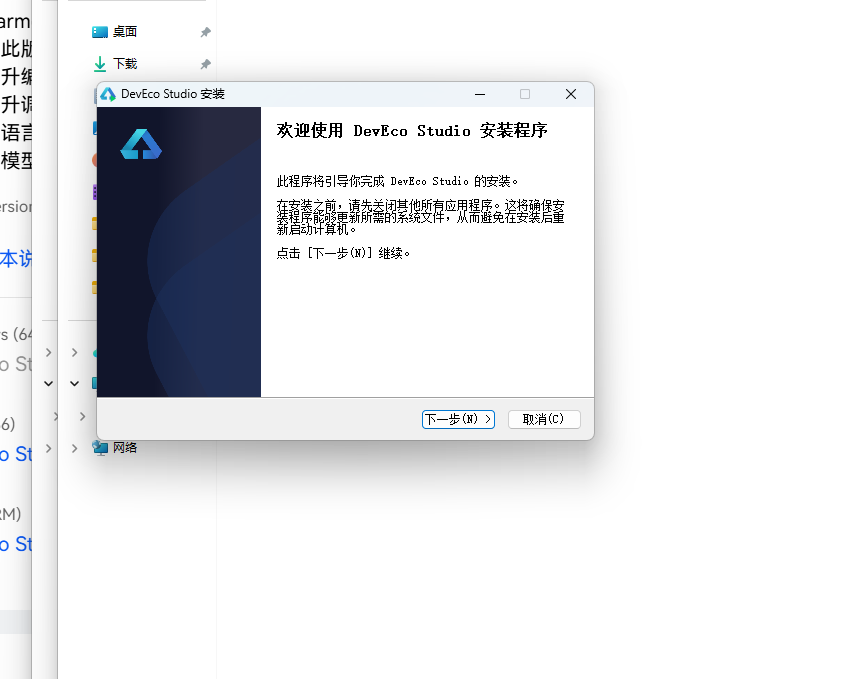
15.2 选择安装位置
在安装路径选择界面,建议选择空间充足的磁盘(建议剩余空间 20GB 以上),避免使用中文路径或含空格的路径。点击「Next」继续。
15.3 配置安装选项
在安装选项配置界面,勾选「Create Desktop Shortcut」(创建桌面快捷方式)、「Add to PATH」(添加到环境变量)等选项,方便后续命令行调用。点击「Next」继续。
15.4 新建项目:选择 Empty Ability 模板
安装完成后启动 DevEco Studio,点击「Create Project」新建项目。在模板选择界面,选择「Empty Ability」(空 Ability)模板,这是最基础的 ArkTS 应用模板,适合从零构建自定义 UI。点击「Next」继续。
15.5 配置项目信息:API 24
在项目配置界面,填写项目名称(如 DarkroomFilm)、包名(如 com.example.darkroomfilm),Compatible SDK 选择 6.1.1(24)(即 API 24),Save location 选择项目保存路径。确认信息无误后点击「Finish」创建项目。
15.6 导入源码与运行
项目创建完成后,将 1108.ets 文件复制到 entry/src/main/ets/pages/ 目录下,打开 entry/src/main/resources/base/profile/main_pages.json,在 src 数组中添加 "pages/1108" 路由注册。
在 DevEco Studio 顶部工具栏选择 Previewer(预览器)或连接真机/模拟器,点击运行按钮即可看到「时光暗房·胶片复刻社」应用的完整运行效果。可以切换底部 4 Tab、顶部 6 Tab,点击相机卡片查看详情、在市集发布出售、在换机页发起换机、在打卡动态中下架宝贝,体验完整的复古相机二手交易与交换闭环。
十六、总结
「时光暗房·胶片复刻社」是一个以复古相机为主题的完整移动端二手交易与收藏社区应用,基于 HarmonyOS NEXT(API 24)ArkTS 声明式 UI 框架构建,单文件 1108.ets 约 1800 行代码实现了全部功能。
应用的核心亮点包括:
- 暗房红 + 相纸米白 + 炭黑复古胶片风视觉体系:10 色基础调色板 + catColor 6 色相机类型映射(胶片机红/暗房紫/镜头绿/单反橙红/旁轴亮蓝/经典暗房红)+ rarityColor 4 色稀有度映射(>=95 传世孤品红/>=80 稀有级橙/>=60 紧俏级亮蓝/流通级绿)+ rateColor 3 色收藏进度映射(>=55 绿/>=40 暗房金/红),通过色彩快速区分相机类型与稀有度。头部使用 angle:135 暗房红三色渐变
#8C1C13→#A5383B→#C05B52(从暗房红到深暗红到浅红,模拟暗房红灯从暗到亮的渐变层次)+ 🔎📦🎒三图标 + 购物车 3 角标(暗房红底)+ 搜索条 + 我的常购按钮,完整模拟了电商/二手交易 App 的头部交互体验。底部 Tab 纯白底 + 顶部圆角 18(与头部底部圆角呼应,复古相机视觉隐喻)。 - 双层导航 + 6 大市集差异化布局:底部 4 Tab(市集/换机/胶卷/我的)+ 顶部 6 Tab(全部/胶片机/旁轴/单反/镜头/暗房),6 个相机类型采用完全不同的布局风格(全部相纸米白 banner+双列瀑布流左右列高度错落/胶片机横滑大卡暗房红到炭黑渐变+稀有度柱状图徕卡 M3 98 分传世孤品登顶+捡漏榜/暗房工艺冲洗时间轴暗房金竖线连接+steps 步骤列表带相纸米白圆形序号/镜头三列格子 9 支镜头毒德大学+镜头交换行情筛选 id%2===0/单反旗舰对决卡尼康 F3 暗房红渐变 VS 奥林巴斯 OM-1 灰渐变+列表+侧栏统计拍片好评率/旁轴收藏标签云 6 个 COLLECTIONS+紧凑列表 rarityColor 标签+集齐旁轴三剑客彩蛋),是复古相机差异化设计的典范。顶部 Tab 激活态暗房金圆角下划线 + 非激活相纸米白底圆角下划线(双下划线对比),是独特的视觉细节。
- 14 粒子最快速度水平向右飘动动画:📷🎞️✨🔭🖼️ 五图标循环(相机/胶卷/闪光/镜头/相框,相机胶卷镜头相框直接对应暗房冲洗流程),每个粒子拥有独立 speed 0.6~2.0(所有应用中最快),水平向右飘动(x+speed,x>360 回 -20 循环,模拟胶卷在暗房传送带上向右移动、冲洗机出口一卷接一卷送出的场景,与垂直飘动的常规粒子形成鲜明反差,是所有应用中唯三采用水平飘动粒子的应用,与奶茶、乐高并列但图标更贴合复古胶片主题)+ 左侧循环,x 用 px 而非百分比,y 固定 5 行分布
80+(i%5)*118,setInterval 80ms(所有应用中最快刷新频率) 驱动(配合最快速度模拟暗房冲洗机出卷的快节奏与复古胶片爱好者的冲洗快乐),this.particles = this.particles.slice()通过 slice() 创建新引用触发状态更新,aboutToAppear/aboutToDisappear 生命周期管理。ParticleItem 无 id/y 字段(水平飘动专用),是本应用粒子系统最具特色的设计决策。 - 稀有度柱状图 + 收藏进度条双数据可视化:胶片机 Tab 内嵌稀有度柱状图(3 款胶片机,height 直接用
rarity+'vp'即稀有度分数直接作为柱子高度,i===2 佳能 AE-1 70 分红#E8483C高亮其他暗房红,徕卡 M3 98 分最高形成「传世孤品登顶」可视化,底部文字「徕卡 M3 以 98 分稀有度登顶,市面流通不足百台」)+ 胶卷图鉴 Tab 收藏进度条(6 个图鉴收藏,rateColor 三色填充 >=55 暗房绿/>=40 暗房金/红,进度条 width:rate% 填充),双数据可视化是本应用的特色。稀有度柱状图直接用稀有度分数作为柱子高度,是所有应用中最直观的数据可视化设计。 - 4 个模态弹窗闭环:发布出售(暗房红渐变头,选相机/成色 5 档/价格步进器步长 10 10-9999 >2000 给出「💰高价好物建议包邮」/宝贝描述)、发起换机(相纸米白头,是所有弹窗中唯一用相纸米白浅色头的,我提供/我想换多选 pickedWant 辅助方法 i%2===0/面交地点 5 个/面交安全提示「选择人流密集的公共场所注意安全」)、下架(🗑️小卡,「留着」轻松文案替代取消/确认下架红,可重新上架可逆操作与其他应用的不可恢复删除不同,符合二手交易平台逻辑)、相机详情(相纸米白到暗房金渐变头,四列统计售价红/配件暗房红/稀有度 rarityColor/出厂年份橙,物品描述+想换栏浅红底展示卖家以机换机意向+圈友点评 3 条充满复古胶片圈梗,留言问问+立即购买),覆盖新增/新增/删除/详情四态。
- 强类型数据模型 + 特色字段 + 工具函数 + 筛选函数三层架构:9 个 interface 约束所有数据结构,CameraItem 17 字段(含
eng英文名、parts配件数、rarity稀有度 0-100、year出厂年份、want卖家想换五个特色字段),FilmProcessItem 含pages页数/downloads下载量/steps步骤数组,LensItem 含condition成色,CollectionItem 含owned/total/rate收藏进度,SwapItem 含offer/want/place提供/想换/面交地点,18 相机 + 8 换机帖 + 5 暗房工艺 + 9 镜头 + 6 图鉴收藏 + 3 点评的丰富预置数据,7 个工具函数负责视觉映射,9 个筛选函数(直接数组索引而非 filter)负责数据分发,detail 系列 13 个查找方法(所有应用中最多)实现详情弹窗的数据驱动,2 个辅助方法(pickedWant/toggleWant)实现换机弹窗多选。三层架构让模板简洁、逻辑清晰。 - 复古胶片圈文化梗贯穿全应用:淘机淘卷换心头好/暗房舵主/胶卷测评组/暗房医生/德味玩家/传世孤品/绝版猎人/镜头百晓生/暗房魔法师/毒德大学/旁轴三剑客/集齐彩蛋/时光暗房节/卖家免服务费/面交安全提示/可重新上架/信用分 978/累计成交额 ¥8.6万/徕卡 M3 市面流通不足百台/蓝晒工艺入门/伊尔福 HP5 增感,让应用充满复古胶片二手交易社区的文化认同感。「传世孤品」形容 95 分以上的绝版神物、「毒德大学」是摄影圈梗形容镜头的德味、「旁轴三剑客」指徕卡 M3+柯达+福伦达、「暗房魔法师」形容暗房工艺高手,这些梗只有真正的复古胶片爱好者才能会心一笑,是本应用的文化深度体现。
对于希望学习 HarmonyOS ArkTS 声明式 UI 开发的读者,本应用提供了一个完整的参考范本:如何通过 @State 驱动状态更新、如何用 @Builder 拆分复杂布局、如何用 Stack 分层实现粒子与弹窗、如何用 setInterval + 生命周期实现动画(特别是如何通过方向反转——从垂直飘动改为水平飘动——模拟不同场景的运动意象,胶卷传送带的水平飘动与星空的静谧垂直飘动形成鲜明对比)、如何用 slice() 创建新引用触发数组状态更新、如何用 interface + 特色字段 + 常量数组 + 工具函数 + 筛选函数构建分层数据层、如何通过稀有度柱状图(直接用稀有度分数作为柱子高度)+ 收藏进度条实现双数据可视化、如何通过暗房红三色渐变头部 + 顶部圆角底部 Tab 营造复古胶片风、如何通过 6 Tab 差异化布局展示不同相机类型、如何通过 pickedWant 辅助方法实现弹窗多选、如何通过价格步进器 + 包邮建议实现二手交易定价、如何通过可重新上架的下架逻辑符合二手交易平台规范。将源码导入 DevEco Studio(API 24)即可直接运行预览,在此基础上可以扩展更多复古相机数据、接入真实二手交易 API 与物流跟踪、增加相机拍卖功能、增加换机匹配算法、增加暗房舵主等级与信用系统、增加相机真伪鉴定服务,打造一个真正可用的复古相机二手交易与收藏平台。
暗房红灯,相纸米白。愿每一个复古胶片爱好者,都能在徕卡 M3 的黄斑对焦里回到 1954 年的德国威兹勒,在一卷柯达 Portra 400 的色彩里记住那个下午的阳光,在一间暗房里的红灯下找到内心的宁静,也能在相机与代码之间找到属于自己的那份复古与醇厚。淘机,淘卷,换心头好——时光暗房社,等你上架。
标签: HarmonyOS · ArkTS · API 24

讨论HarmonyOS开发技术,专注于API与组件、DevEco Studio、测试、元服务和应用上架分发等。
更多推荐


 1
1 0
0- 0


 已为社区贡献64条内容

所有评论(0)