基于HarmonyOS API 24的ArkTS社群拼团管理平台深度解析——HarmonyOS 6.1.1声明式UI实战
引言:社群电商的技术架构与业务设计
在移动互联网快速发展的今天,社群拼团已成为电商领域中最具活力的商业模式之一。以拼多多为代表的社群拼团平台,通过社交裂变的方式将商品采购成本压至最低,同时为消费者带来极致性价比的购物体验。本文将深入剖析一个基于HarmonyOS ArkTS声明式UI框架构建的社群拼团管理平台,该平台涵盖了拼团大厅、社群管理、营销活动、订单追踪、数据看板、排行榜及个人中心等七大核心业务模块,是一个功能完整的电商管理端应用。
从技术架构角度来看,该平台采用了HarmonyOS API 24提供的声明式UI开发范式,通过@Entry、@Component、@State、@Builder等核心装饰器构建出高度可组合的组件体系。声明式UI的核心思想在于"状态驱动视图"——开发者只需描述界面在任何给定状态下应该呈现的样子,框架会自动处理状态变化时的UI更新。这种范式相比传统的命令式UI开发,大幅减少了模板代码量,提升了开发效率。在本应用中,@State装饰器管理着当前选中的Tab索引、搜索关键词、分类筛选条件以及各种弹窗的显示状态,这些状态的任何变化都会触发框架精确的差分渲染。
从业务设计角度来看,该平台围绕"拼团"这一核心交易模式构建了完整的运营闭环。拼团大厅采用双列瀑布流网格布局展示商品,每个商品卡片包含状态角标、折扣信息、进度条等丰富视觉元素;社群管理模块通过KPI卡片直观展示运营数据;数据看板集成了柱状图和分类销量分布的可视化图表;排行榜模块则通过前三名展示台和列表相结合的方式呈现排名信息。整个应用的设计风格以橙红色(#FF4242)为主色调,搭配金橙色(#FF7733)作为强调色,浅粉色(#FFF5F5)作为背景色,营造出与拼多多品牌高度一致的视觉体验。
一、类型定义与数据模型设计
在ArkTS中,接口(interface)是定义数据模型的核心手段。本平台定义了五个核心数据接口,分别对应拼团商品、社群、订单、活动和排行榜五个业务实体。这些接口的设计遵循了单一职责原则,每个接口只负责描述一个实体的数据结构。
interface GroupItem {
  id: number; title: string; category: string; originPrice: number
  groupPrice: number; needCount: number; joinedCount: number
  endTime: string; status: string; image: string; description: string
  tags: string[]; shopName: string; rating: number; salesCount: number
}
interface CommunityItem {
  id: number; name: string; memberCount: number; todayOrders: number
  todayRevenue: number; level: string; leaderName: string; createTime: string
  tag: string; status: string
}
interface OrderItem {
  id: number; groupTitle: string; buyerName: string; phone: string
  quantity: number; totalPrice: number; status: string; createTime: string
  address: string; remark: string
}
interface ActivityItem {
  id: number; title: string; type: string; discount: string
  startTime: string; endTime: string; budget: number; used: number
  status: string; joinCount: number; description: string
}
interface RankItem {
  rank: number; name: string; avatar: string; groupCount: number
  revenue: number; members: number; growth: string
}
GroupItem接口是整个平台最核心的数据模型,包含了商品的标题、分类、原价、拼团价、所需人数、已参与人数、截止时间、状态、图片、描述、标签、店铺名称、评分和销量等14个字段。值得注意的是价格字段使用了number类型并以"分"为单位存储,这是一种电商领域常见的做法,可以有效避免浮点数精度问题。CommunityItem接口则描述了社群的基本信息,包括成员数、今日订单数、今日营收、等级、团长姓名等运营关键指标。OrderItem和ActivityItem分别定义了订单和营销活动的数据结构,RankItem则用于排行榜的数据展示。
二、静态配置与视觉映射体系
静态配置是本平台架构设计中的一个重要模式。通过将业务配置数据集中定义为常量对象,实现了配置与逻辑的分离,便于后期维护和扩展。
const CAT_CONFIG: Record<string, string> = {
  '生鲜': '🥬', '零食': '🍪', '日用': '🧴', '美妆': '💄',
  '数码': '📱', '服饰': '👕', '家居': '🛋️', '母婴': '🍼',
}
const STATUS_CONFIG: Record<string, string> = {
  '拼团中': '#FF4242', '已成团': '#4CAF50', '未成团': '#9E9E9E',
  '已结束': '#BDBDBD', '即将开团': '#FF9800',
}
const ORDER_STATUS_CONFIG: Record<string, string> = {
  '待付款': '#FF9800', '待发货': '#2196F3', '已发货': '#4CAF50',
  '已完成': '#9E9E9E', '退款中': '#F44336', '已退款': '#9C27B0',
}
const ACTIVITY_TYPE_CONFIG: Record<string, string> = {
  '满减': '💰', '折扣': '🏷️', '秒杀': '⚡', '新人': '🎁', '红包': '🧧',
}
interface LevelMeta {
  color: string;
  bg: string;
}
const LEVEL_CONFIG: Record<string, LevelMeta> = {
  '钻石': { color: '#9C27B0', bg: '#F3E5F5' },
  '金牌': { color: '#FF9800', bg: '#FFF3E0' },
  '银牌': { color: '#757575', bg: '#F5F5F5' },
  '铜牌': { color: '#8D6E63', bg: '#EFEBE9' },
}
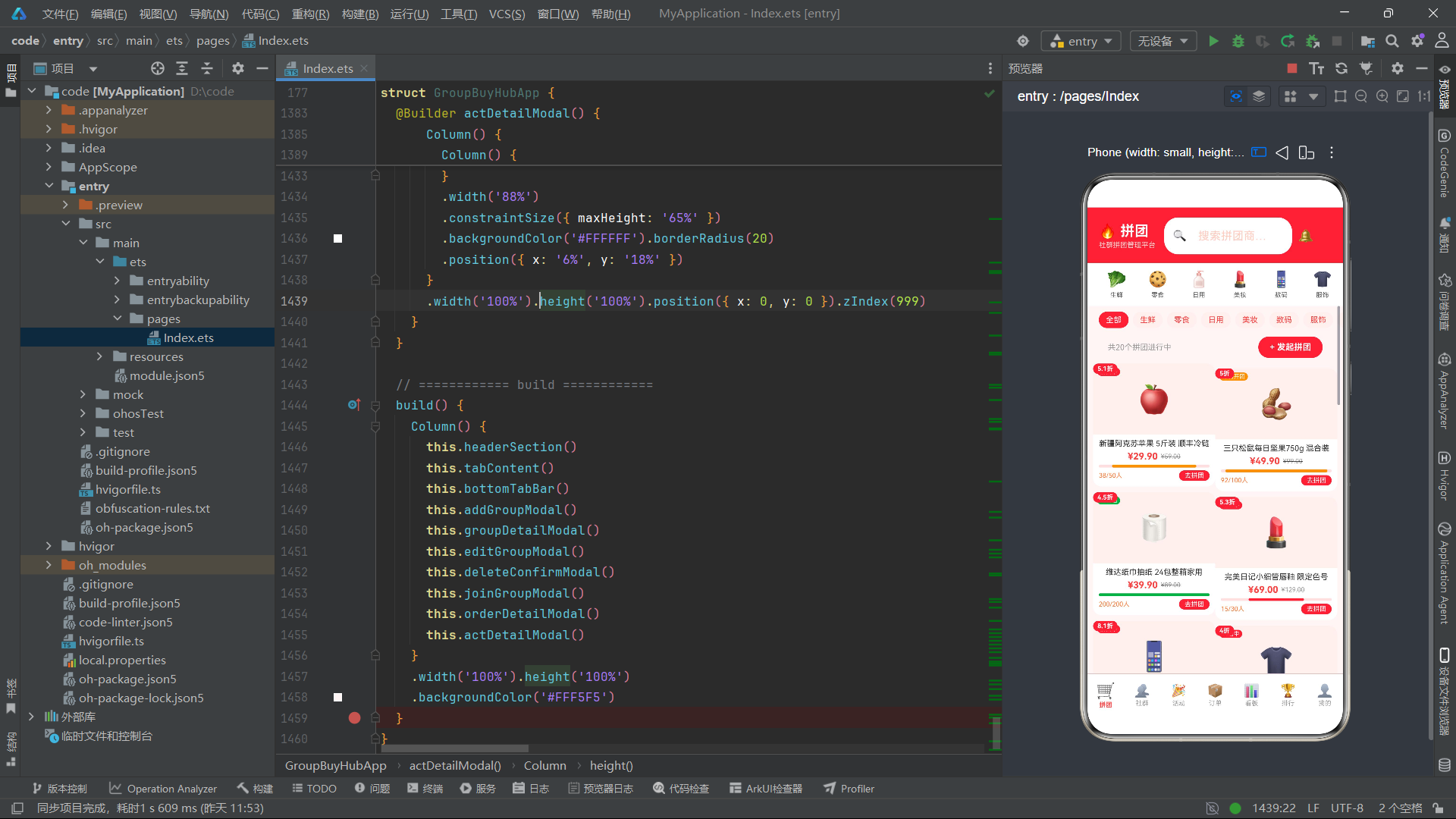
上述配置代码展示了平台的三层视觉映射体系。第一层是分类配置CAT_CONFIG,将商品分类映射为emoji图标,使界面更加直观生动。第二层是状态颜色配置,包括STATUS_CONFIG和ORDER_STATUS_CONFIG,它们将业务状态映射为对应的颜色值——例如"已成团"使用绿色表示成功,"退款中"使用红色表示警示。第三层是等级配置LEVEL_CONFIG,它使用了LevelMeta接口来同时存储前景色和背景色,实现了更复杂的视觉样式映射。这种"配置即数据"的设计模式使得新增分类、状态或等级时只需修改配置对象,无需改动任何业务逻辑代码。
三、工具函数与业务逻辑封装
工具函数层是连接数据模型和UI视图的桥梁。本平台定义了一系列纯函数来处理数据格式化和状态查询,这些函数具有无副作用、可复用的特点。
function fmtPrice(p: number): string { return '¥' + (p / 100).toFixed(2) }
function fmtNum(n: number): string { return n >= 10000 ? (n / 10000).toFixed(1) + 'w' : n.toString() }
function fmtDate(d: string): string { return d.substring(5) }
function getStatusColor(s: string): string { return STATUS_CONFIG[s] ?? '#9E9E9E' }
function getOrderStatusColor(s: string): string { return ORDER_STATUS_CONFIG[s] ?? '#9E9E9E' }
function getCatIcon(c: string): string { return CAT_CONFIG[c] ?? '📦' }
function getActTypeIcon(t: string): string { return ACTIVITY_TYPE_CONFIG[t] ?? '📌' }
function getLevelMeta(l: string): LevelMeta {
  return LEVEL_CONFIG[l] ?? { color: '#757575', bg: '#F5F5F5' }
}
function getProgressPct(item: GroupItem): number {
  return Math.min(100, Math.round(item.joinedCount / item.needCount * 100))
}
function getProgressColor(pct: number): string {
  if (pct >= 100) return '#4CAF50'
  if (pct >= 60) return '#FF9800'
  if (pct >= 30) return '#FF4242'
  return '#FF7733'
}
function getDiscountRate(origin: number, group: number): number {
  return Math.round(group / origin * 100) / 10
}
fmtPrice函数将以分为单位的数值转换为带人民币符号的字符串,fmtNum函数在数字超过一万时自动转换为"w"单位的简写形式,这些格式化函数确保了数据在UI上的展示既规范又简洁。getProgressPct和getProgressColor两个函数配合实现了拼团进度的动态计算和颜色分级——进度100%显示绿色表示已完成,60%以上显示橙色表示接近完成,30%以上显示红色表示需要加速,低于30%则显示金橙色表示刚刚开始。getDiscountRate函数通过原价和拼团价的比例计算折扣率,Math.round确保结果为整数后除以10得到一位小数的折扣值。所有查询函数都使用了空值合并运算符??提供默认值,确保在配置缺失时不会导致界面异常。
四、主组件架构与状态管理
主组件GroupBuyHubApp是整个应用的入口,通过@Entry和@Component装饰器声明。它管理着应用级别的所有状态,并通过@Builder方法将界面拆分为可复用的构建块。
@Entry
@Component
struct GroupBuyHubApp {
  @State activeTab: number = 0
  @State searchKw: string = ''
  @State catFilter: string = '全部'
  @State orderFilter: string = '全部'
  @State selectedGroup: GroupItem | null = null
  @State selectedOrder: OrderItem | null = null
  @State selectedActivity: ActivityItem | null = null
  @State showAddGroup: boolean = false
  @State showEditGroup: boolean = false
  @State showDeleteConfirm: boolean = false
  @State showGroupDetail: boolean = false
  @State showJoinGroup: boolean = false
  @State showOrderDetail: boolean = false
  @State showActDetail: boolean = false
  @State deleteTargetId: number = -1
  @State joinQuantity: number = 1
该组件的状态管理设计体现了ArkTS状态驱动UI的核心理念。activeTab控制当前显示的Tab页面,searchKw和catFilter用于拼团商品的搜索和分类筛选,orderFilter用于订单状态筛选。七个show*布尔类型状态分别控制七种弹窗的显示与隐藏。三个selected*状态采用联合类型(| null),在未选中任何项时为null,选中后变为对应的数据对象。这种设计使得弹窗内容能够根据选中的数据动态渲染。joinQuantity状态专门用于加入拼团弹窗中的数量选择器,支持用户增减购买数量。
五、头部区域与分类快捷入口
头部区域是用户进入应用后首先看到的区域,它承载了品牌标识、搜索功能和分类导航三大核心功能。
@Builder headerSection() {
  Column() {
    Row() {
      Column() {
        Text('🔥 拼团')
          .fontSize(20).fontWeight(FontWeight.Bold).fontColor('#FFFFFF')
        Text('社群拼团管理平台')
          .fontSize(10).fontColor('#FFD0CC').margin({ top: 2 })
      }.alignItems(HorizontalAlign.Start)

      Row() {
        Text('🔍').fontSize(16)
        TextInput({ placeholder: '搜索拼团商品…' })
          .placeholderColor('#FFCCC0').fontSize(12).layoutWeight(1)
          .backgroundColor('transparent').borderWidth(0)
          .onChange((v: string) => { this.searchKw = v })
      }
      .width('55%').backgroundColor('#FFFFFF').borderRadius(20)
      .padding({ left: 12, right: 12, top: 6, bottom: 6 })
      .margin({ left: 12 })

      Text('🔔').fontSize(18).fontColor('#FFFFFF').margin({ left: 8 })
    }
    .width('100%').padding({ left: 16, right: 16, top: 14, bottom: 12 })
    .backgroundColor('#FF4242')

    Scroll() {
      Row() {
        ForEach(Object.keys(CAT_CONFIG), (cat: string) => {
          Column() {
            Text(getCatIcon(cat)).fontSize(22)
            Text(cat).fontSize(9).fontColor('#666666').margin({ top: 4 })
          }
          .width(58).alignItems(HorizontalAlign.Center)
          .onClick(() => { this.catFilter = cat; this.activeTab = 0 })
        })
      }
      .padding({ left: 12, right: 12, top: 10, bottom: 10 })
    }
    .width('100%').scrollable(ScrollDirection.Horizontal).scrollBar(BarState.Off)
    .backgroundColor('#FFFFFF')
  }
}
头部区域由两部分组成。上部分是一个Row容器,左侧是品牌标题和副标题,中间是搜索输入框,右侧是通知图标。搜索框通过onChange回调实时更新searchKw状态,触发拼团列表的重新筛选。整个头部使用橙红色背景搭配白色文字,营造出强烈的电商品牌氛围。下部分是分类快捷入口,使用横向滚动的Scroll容器承载ForEach遍历的8个分类项。每个分类项由emoji图标和文字标签组成,点击后会设置catFilter并切换到拼团大厅Tab,实现了快捷导航的功能。横向滚动通过scrollable(ScrollDirection.Horizontal)设置,并隐藏了滚动条以保持界面整洁。
六、底部Tab栏与页面切换机制
底部Tab栏是移动端应用的核心导航组件,本平台采用了7Tab设计,涵盖了应用的所有核心功能入口。
@Builder bottomTabBar() {
  Column() {
    Divider().width('100%').height(0.5).backgroundColor('#FFE0E0')
    Row() {
      this.tabBtn('拼团', '🛒', 0)
      this.tabBtn('社群', '👥', 1)
      this.tabBtn('活动', '🎉', 2)
      this.tabBtn('订单', '📦', 3)
      this.tabBtn('看板', '📊', 4)
      this.tabBtn('排行', '🏆', 5)
      this.tabBtn('我的', '👤', 6)
    }
    .width('100%').padding({ top: 6, bottom: 4 })
    .backgroundColor('#FFFFFF')
  }
}

@Builder tabBtn(label: string, icon: string, idx: number) {
  Column() {
    Text(icon).fontSize(this.activeTab === idx ? 22 : 18)
    Text(label).fontSize(9).margin({ top: 2 })
      .fontColor(this.activeTab === idx ? '#FF4242' : '#999999')
      .fontWeight(this.activeTab === idx ? FontWeight.Bold : FontWeight.Normal)
  }
  .layoutWeight(1).alignItems(HorizontalAlign.Center)
  .padding({ top: 4, bottom: 4 })
  .onClick(() => { this.activeTab = idx })
}

@Builder tabContent() {
  if (this.activeTab === 0) { this.groupsTab() }
  else if (this.activeTab === 1) { this.communitiesTab() }
  else if (this.activeTab === 2) { this.activitiesTab() }
  else if (this.activeTab === 3) { this.ordersTab() }
  else if (this.activeTab === 4) { this.dashboardTab() }
  else if (this.activeTab === 5) { this.rankingTab() }
  else if (this.activeTab === 6) { this.profileTab() }
}
tabBtn构建器是Tab按钮的通用模板,通过参数化设计实现了高度复用。每个Tab按钮的图标大小、文字颜色和字重都根据activeTab与当前idx的比较结果动态变化——选中时图标放大至22号字体、文字变为橙红色加粗,未选中时图标为18号字体、文字为灰色常规字重。这种视觉反馈让用户能够清晰地感知当前所处的页面。tabContent构建器通过if-else if条件链将activeTab的值映射到对应的页面构建器方法,实现了页面切换的核心逻辑。顶部Divider提供了一条细分隔线,增强了底部栏与内容区的视觉分离感。
七、拼团大厅双列网格布局
拼团大厅是应用的核心页面,采用了双列瀑布流网格布局来展示拼团商品卡片,这种布局方式在电商应用中非常普遍,能够高效利用屏幕空间。
@Builder groupsTab() {
  Scroll() {
    Column() {
      Scroll() {
        Row() {
          ForEach(['全部', ...Object.keys(CAT_CONFIG)], (cat: string) => {
            Text(cat)
              .fontSize(11)
              .fontColor(this.catFilter === cat ? '#FFFFFF' : '#FF4242')
              .backgroundColor(this.catFilter === cat ? '#FF4242' : '#FFF0EE')
              .borderRadius(14)
              .padding({ left: 10, right: 10, top: 5, bottom: 5 })
              .margin({ right: 6 })
              .onClick(() => { this.catFilter = cat })
          })
        }.padding({ left: 16, right: 16, top: 8, bottom: 8 })
      }.width('100%').scrollable(ScrollDirection.Horizontal).scrollBar(BarState.Off)

      Row() {
        Text('共' + this.getFilteredGroups().length + '个拼团进行中')
          .fontSize(11).fontColor('#999999')
        Column() {
          Text('+ 发起拼团').fontSize(12).fontColor('#FFFFFF').fontWeight(FontWeight.Bold)
        }
        .backgroundColor('#FF4242').borderRadius(20)
        .padding({ left: 16, right: 16, top: 8, bottom: 8 })
        .onClick(() => { this.showAddGroup = true })
      }
      .width('92%').justifyContent(FlexAlign.SpaceBetween)
      .padding({ left: '4%', right: '4%', top: 4, bottom: 8 })

      Row() {
        Column() {
          ForEach(this.getFilteredGroups().filter((_: GroupItem, i: number) => i % 2 === 0), (g: GroupItem) => {
            this.groupGridCard(g)
          })
        }.layoutWeight(1)

        Column() {
          ForEach(this.getFilteredGroups().filter((_: GroupItem, i: number) => i % 2 === 1), (g: GroupItem) => {
            this.groupGridCard(g)
          })
        }.layoutWeight(1)
      }.width('100%').padding({ left: 8, right: 8, bottom: 16 })
    }
  }.width('100%').layoutWeight(1).backgroundColor('#FFF5F5')
}
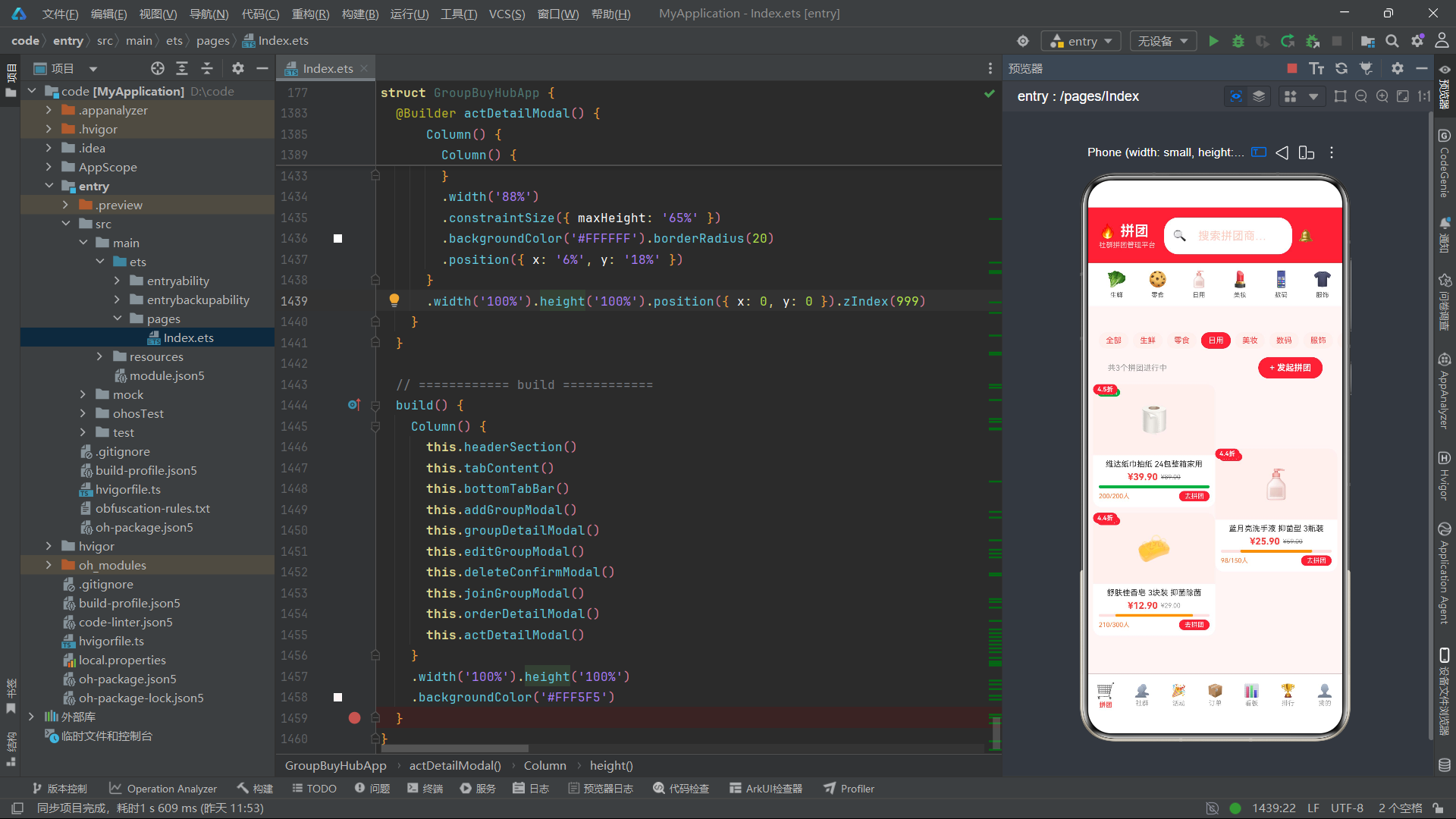
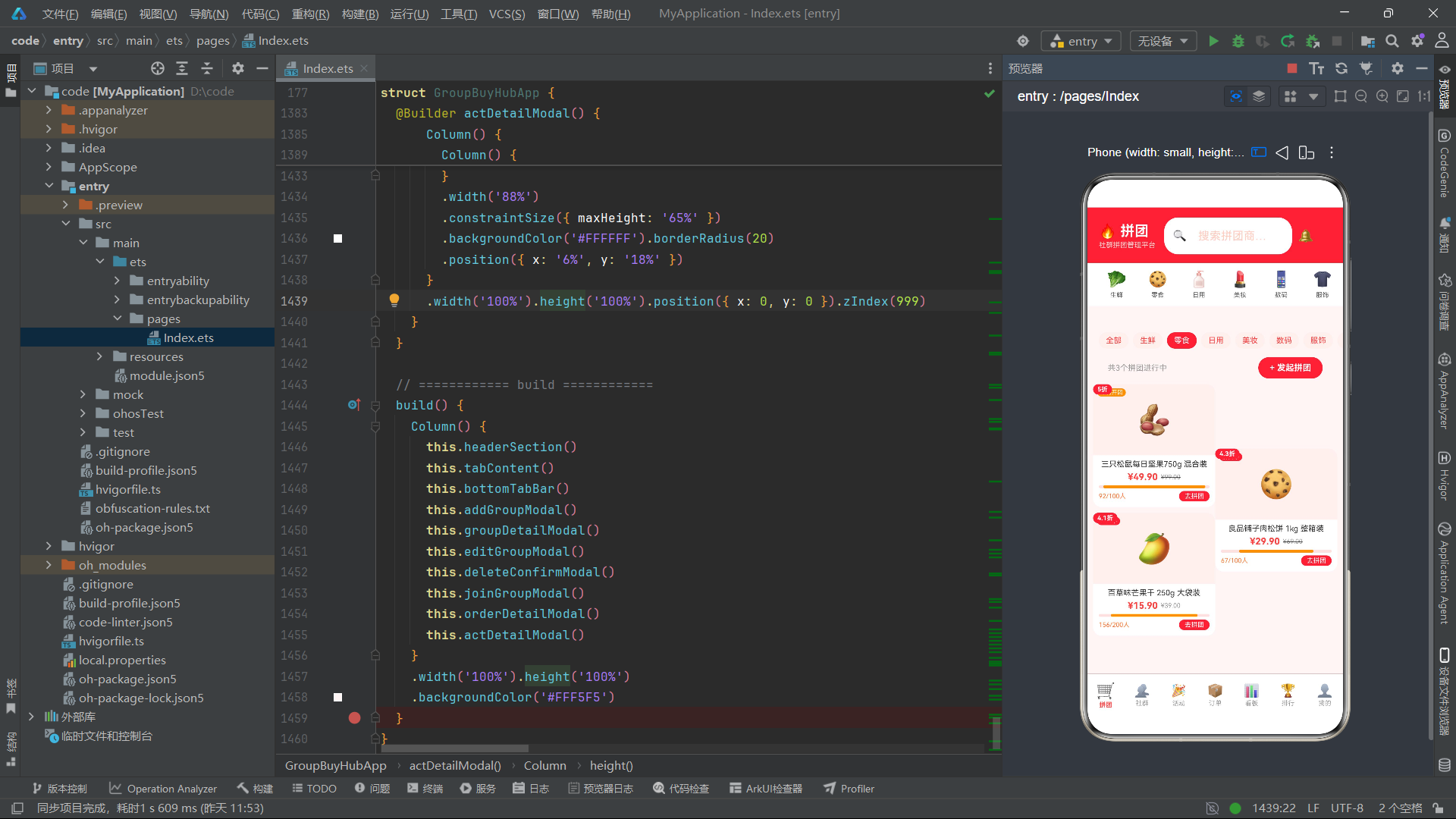
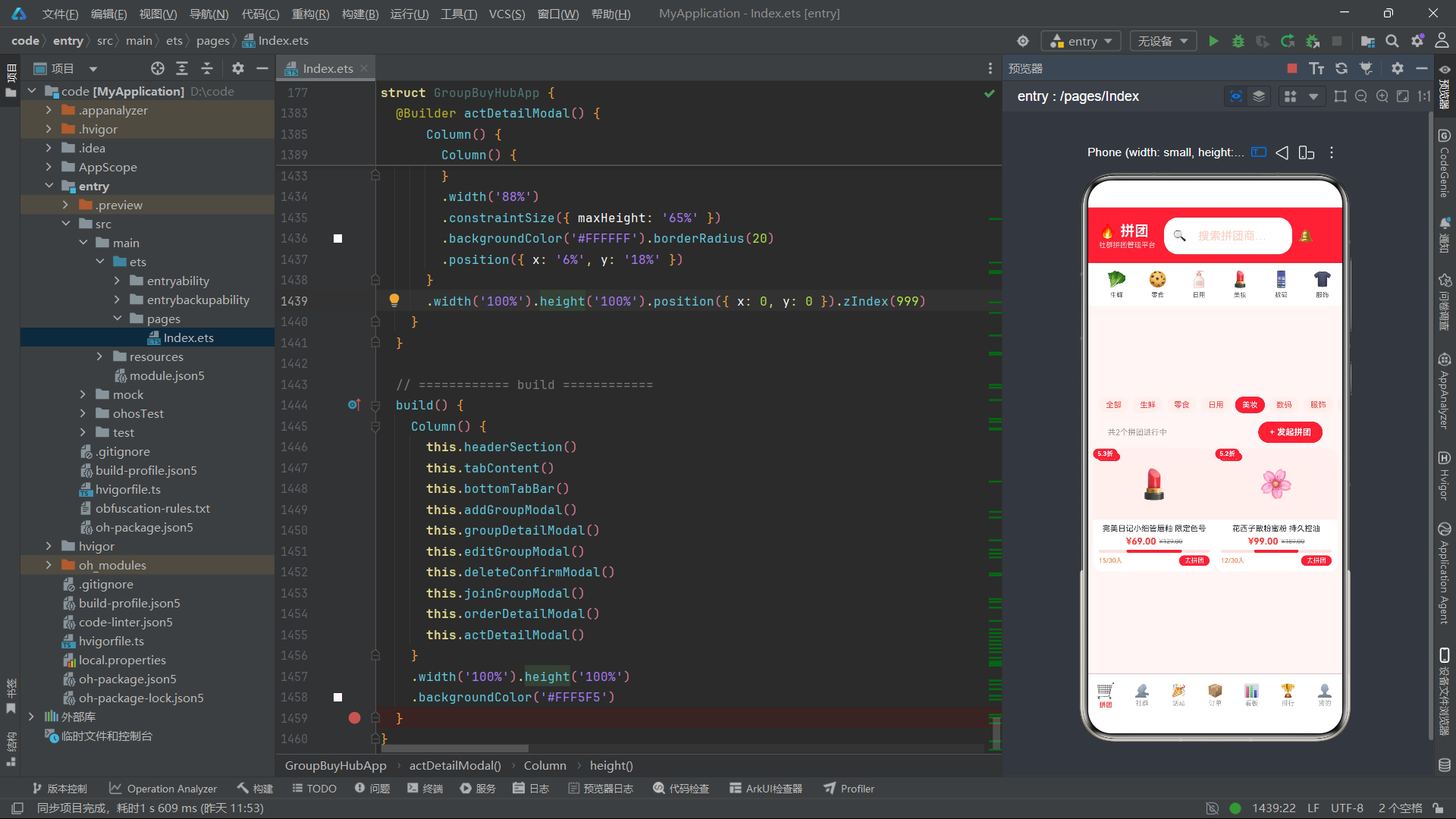
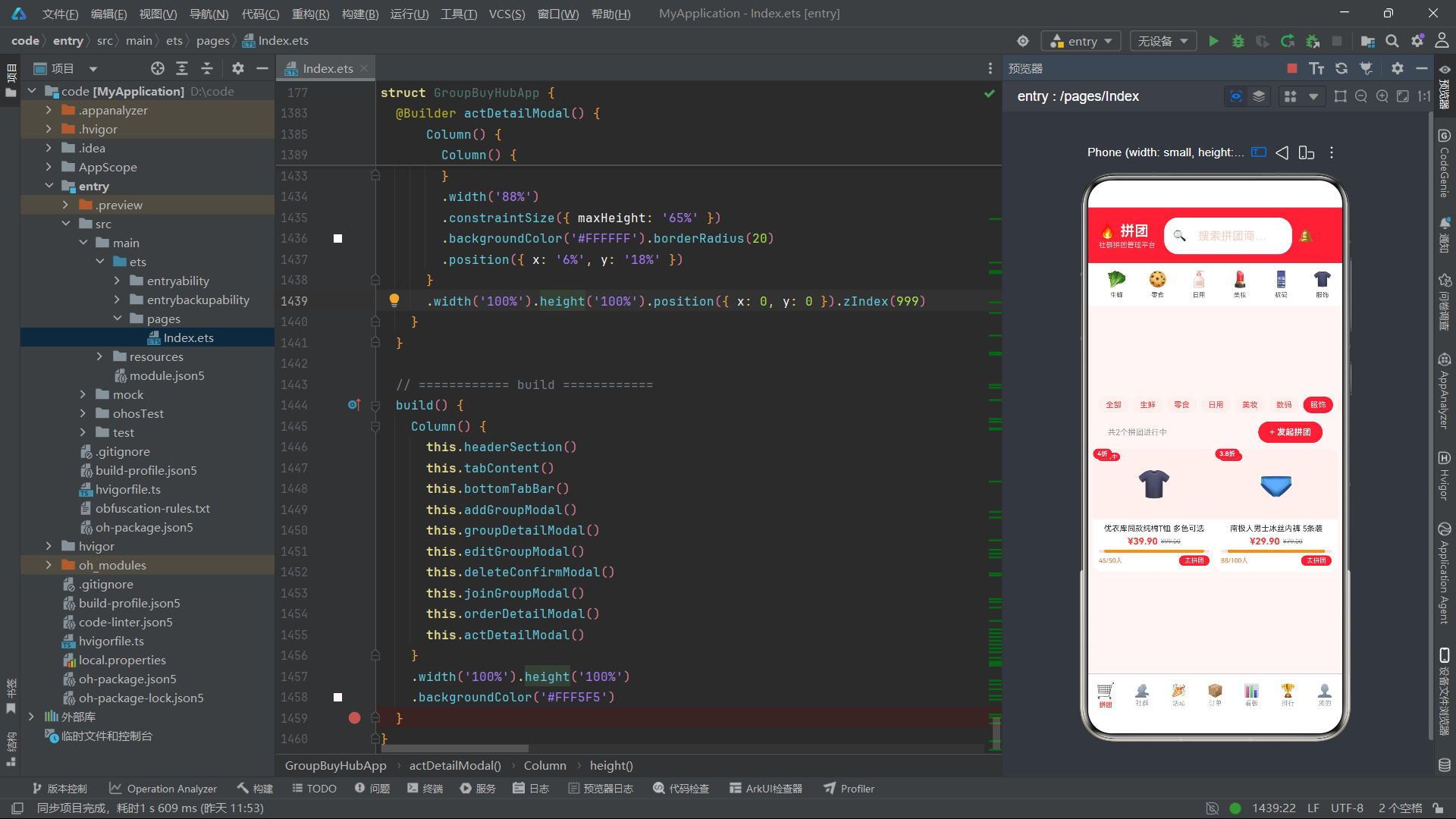
拼团大厅页面由三个部分组成。顶部是分类筛选条,通过横向滚动的Scroll容器承载"全部"以及8个分类的筛选标签,每个标签根据是否为当前选中分类显示不同的配色方案。中间是操作栏,左侧显示当前筛选后的拼团数量,右侧是"发起拼团"按钮,点击后触发showAddGroup状态为true,弹出新建拼团表单。底部是双列网格区域,通过将筛选后的数据按索引奇偶性拆分到两个Column中,实现了双列瀑布流的效果。每个商品卡片由groupGridCard构建器渲染,layoutWeight(1)确保两列等宽分布。
八、拼团商品卡片与进度条组件
商品卡片是拼团大厅中最核心的UI组件,它需要在有限的空间内展示商品图片、状态、折扣、价格、进度等丰富信息。
@Builder groupGridCard(g: GroupItem) {
  Column() {
    Column() {
      Text(g.image).fontSize(40)
      Row() {
        Text(g.status).fontSize(8).fontColor('#FFFFFF')
          .backgroundColor(getStatusColor(g.status))
          .borderRadius(8).padding({ left: 4, right: 4, top: 1, bottom: 1 })
      }
      .position({ x: 6, y: 6 })
      Column() {
        Text(getDiscountRate(g.originPrice, g.groupPrice) + '折').fontSize(9).fontColor('#FFFFFF').fontWeight(FontWeight.Bold)
      }
      .backgroundColor('#FF4242').borderRadius(8)
      .padding({ left: 6, right: 6, top: 2, bottom: 2 })
      .position({ x: 0, y: 0 })
    }
    .width('100%').height(100)
    .backgroundColor('#FFF0EE')
    .borderRadius({ topLeft: 12, topRight: 12 })
    .justifyContent(FlexAlign.Center)

    Column() {
      Text(g.title).fontSize(11).fontColor('#333333').maxLines(2)
        .textOverflow({ overflow: TextOverflow.Ellipsis })
        .margin({ bottom: 4 })

      Row() {
        Text(fmtPrice(g.groupPrice)).fontSize(13).fontColor('#FF4242').fontWeight(FontWeight.Bold)
        Text(fmtPrice(g.originPrice)).fontSize(9).fontColor('#999999')
          .decoration({ type: TextDecorationType.LineThrough }).margin({ left: 4 })
      }.margin({ bottom: 4 })

      Column() {
        Column()
          .width(getProgressPct(g) + '%').height(4)
          .backgroundColor(getProgressColor(getProgressPct(g)))
          .borderRadius(2)
      }
      .width('100%').height(4).backgroundColor('#FFE0E0').borderRadius(2)
      .margin({ bottom: 4 })

      Row() {
        Text(g.joinedCount + '/' + g.needCount + '人').fontSize(9).fontColor('#FF7733')
        Column().layoutWeight(1)
        Text('去拼团').fontSize(9).fontColor('#FFFFFF')
          .backgroundColor('#FF4242').borderRadius(8)
          .padding({ left: 8, right: 8, top: 2, bottom: 2 })
          .onClick(() => {
            this.selectedGroup = g
            this.showJoinGroup = true
          })
      }.width('100%')
    }
    .width('100%').padding({ left: 8, right: 8, top: 6, bottom: 8 })
  }
  .width('100%').backgroundColor('#FFFFFF').borderRadius(12)
  .margin({ left: 4, right: 4, bottom: 8 })
  .shadow({ radius: 4, color: '#00000010', offsetX: 0, offsetY: 2 })
  .onClick(() => {
    this.selectedGroup = g
    this.showGroupDetail = true
  })
}
商品卡片的视觉设计层次分明。图片区域使用position定位在左上角放置折扣角标、右上角放置状态角标,中间居中显示商品emoji图标。信息区域展示商品标题(最多两行,超出显示省略号)、拼团价和原价(带删除线装饰),以及一个动态进度条。进度条通过getProgressPct计算宽度百分比,getProgressColor根据百分比返回对应颜色,实现了进度的可视化反馈。"去拼团"按钮和卡片整体的onClick分别触发加入拼团和查看详情弹窗。shadow属性为卡片添加了微妙的阴影效果,增强了卡片的立体感和层次感。textOverflow配置确保长文本不会破坏卡片布局。
流程图:拼团交易核心流程
九、社群管理与KPI数据卡片
社群管理页面采用了KPI数据卡片加列表的布局模式,通过顶部三个关键指标卡片快速传达运营概览,下方列表展示各社群的详细信息。
@Builder communitiesTab() {
  Scroll() {
    Column() {
      Row() {
        this.kpiCard('总社群', mockCommunities.length + '', '#FF4242', '#FFF0EE')
        this.kpiCard('今日下单', mockCommunities.reduce((s: number, c: CommunityItem) => s + c.todayOrders, 0) + '', '#FF7733', '#FFF3E0')
        this.kpiCard('今日营收', '¥' + fmtNum(mockCommunities.reduce((s: number, c: CommunityItem) => s + c.todayRevenue, 0)), '#4CAF50', '#E8F5E9')
      }.width('92%').padding({ left: '4%', right: '4%', top: 10, bottom: 10 })

      Column() {
        ForEach(mockCommunities, (c: CommunityItem) => {
          this.communityCard(c)
        })
      }.width('92%').padding({ left: '4%', right: '4%', bottom: 16 })
    }
  }.width('100%').layoutWeight(1).backgroundColor('#FFF5F5')
}

@Builder kpiCard(label: string, val: string, fc: string, bg: string) {
  Column() {
    Text(val).fontSize(18).fontWeight(FontWeight.Bold).fontColor(fc)
    Text(label).fontSize(9).fontColor('#999999').margin({ top: 3 })
  }
  .layoutWeight(1).backgroundColor(bg).borderRadius(12)
  .padding({ top: 12, bottom: 12 })
  .alignItems(HorizontalAlign.Center).margin({ left: 3, right: 3 })
}
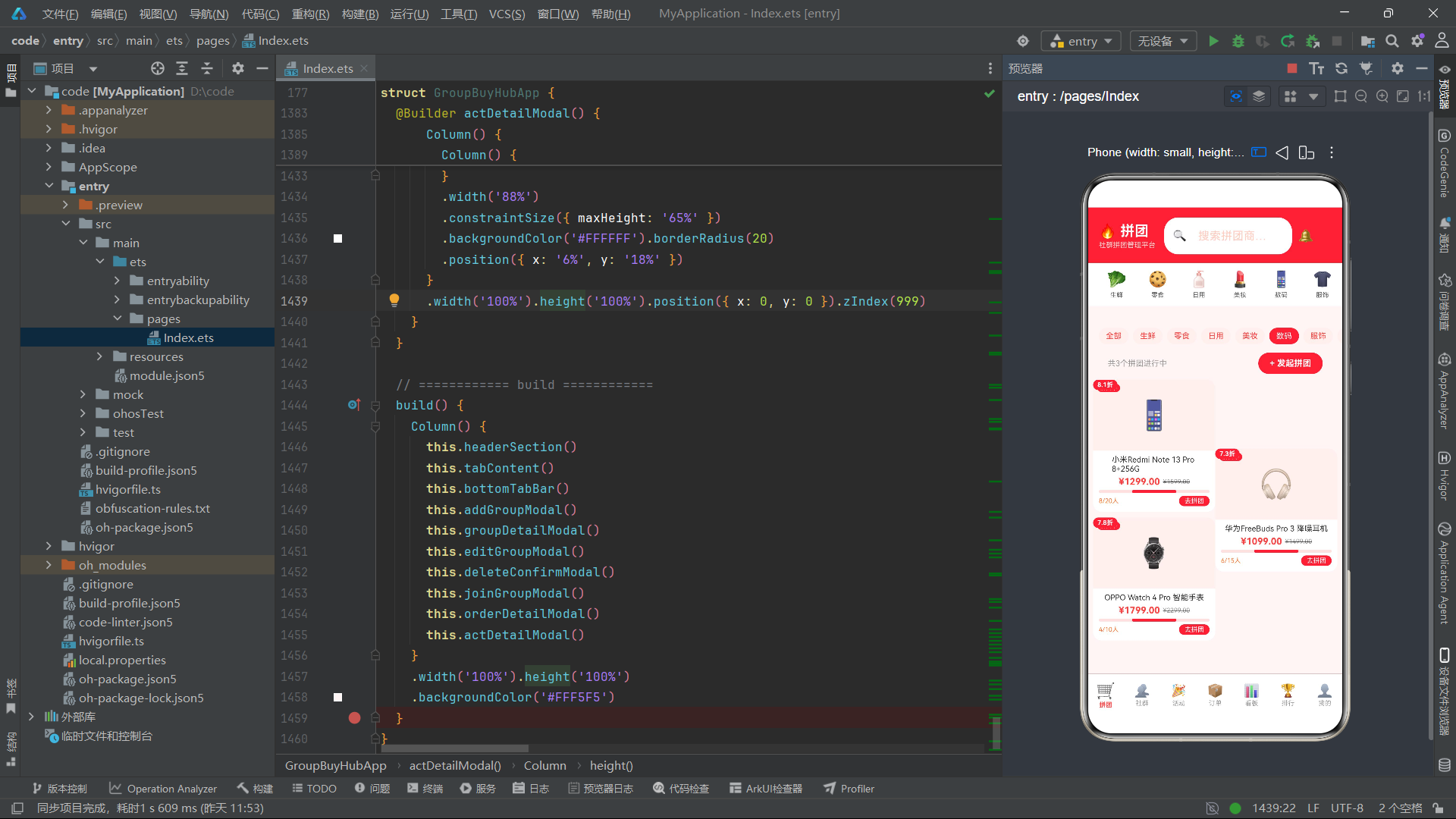
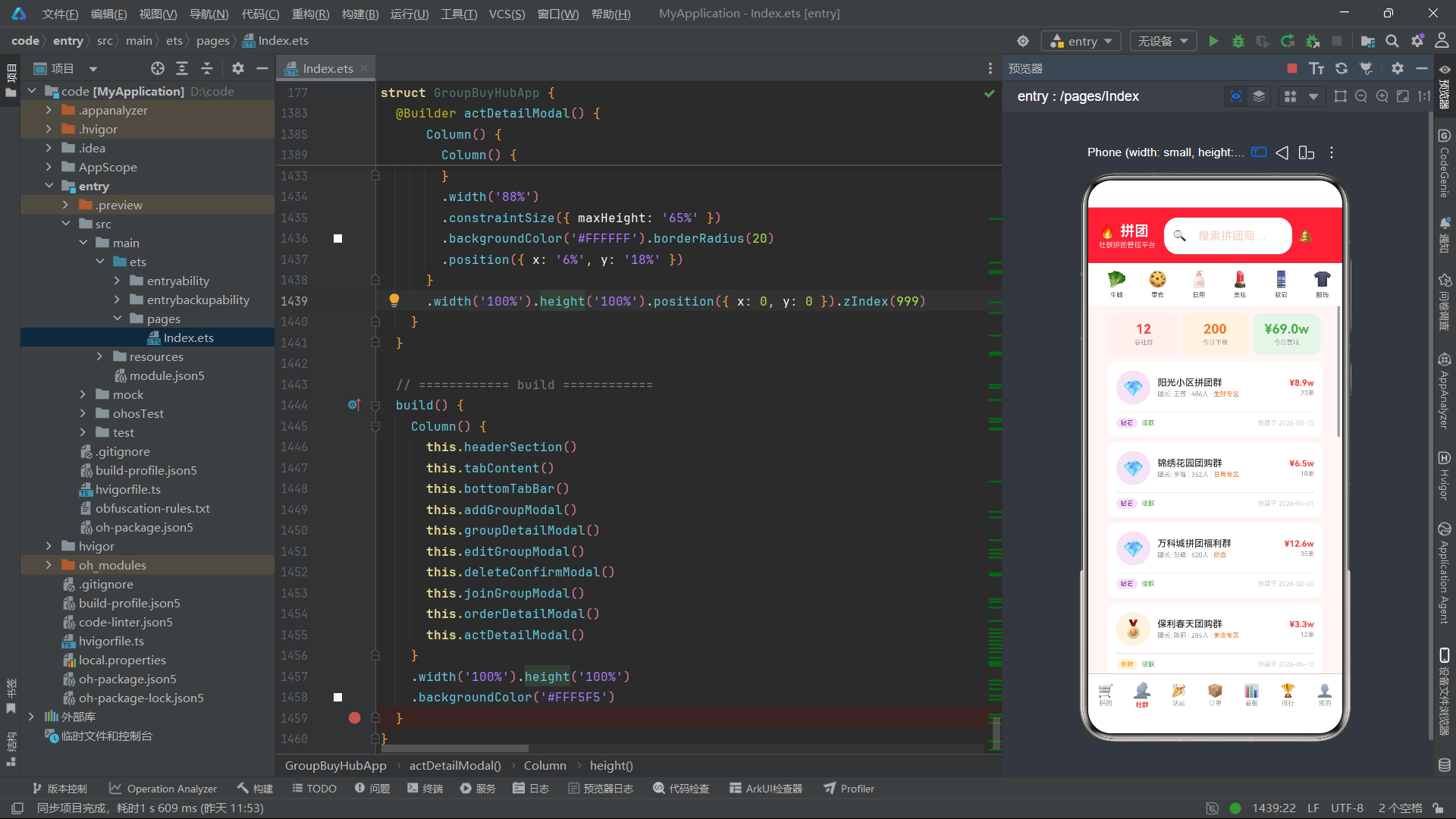
KPI卡片区域通过三个等宽的kpiCard构建器实例展示了总社群数、今日下单数和今日营收三个核心指标。每个卡片的数值通过reduce方法对mockCommunities数组进行聚合计算得出。kpiCard构建器接收标签、值、前景色和背景色四个参数,实现了高度参数化的卡片样式。下方社群列表通过ForEach遍历mockCommunities数组,为每个社群渲染一个communityCard。社群卡片展示了社群名称、团长信息、成员数、标签、等级、状态、今日营收和订单数等丰富的运营数据,帮助管理者全面掌握各社群的运营状况。
十、数据看板与柱状图可视化
数据看板模块是整个平台数据可视化的核心,它集成了柱状图、分类销量分布和状态统计三大可视化组件。
@Builder dashboardTab() {
  Scroll() {
    Column() {
      Row() {
        this.kpiCard('拼团总数', mockGroups.length + '', '#FF4242', '#FFF0EE')
        this.kpiCard('社群数', mockCommunities.length + '', '#FF7733', '#FFF3E0')
        this.kpiCard('订单数', mockOrders.length + '', '#4CAF50', '#E8F5E9')
      }.width('92%').padding({ left: '4%', right: '4%', top: 10, bottom: 10 })

      Column() {
        Row() {
          Text('📈 本周销售趋势').fontSize(13).fontWeight(FontWeight.Bold).fontColor('#333333')
          Column().layoutWeight(1)
          Text('单位: 万元').fontSize(9).fontColor('#999999')
        }.width('100%').margin({ bottom: 12 })

        Row() {
          ForEach(['周一', '周二', '周三', '周四', '周五', '周六', '周日'], (day: string, idx: number) => {
            Column() {
              Column()
                .width(20).height(40 + idx * 12 + (idx === 5 ? 30 : 0))
                .backgroundColor(idx === 5 || idx === 6 ? '#FF4242' : '#FFB199')
                .borderRadius({ topLeft: 4, topRight: 4 })
              Text(day).fontSize(8).fontColor('#999999').margin({ top: 4 })
            }.layoutWeight(1).alignItems(HorizontalAlign.Center)
          })
        }.width('100%').height(120).justifyContent(FlexAlign.SpaceEvenly)
      }
      .width('92%').backgroundColor('#FFFFFF').borderRadius(14)
      .padding(14).margin({ left: '4%', right: '4%', bottom: 10 })
      .shadow({ radius: 6, color: '#00000008', offsetX: 0, offsetY: 2 })

      Column() {
        Text('🏷️ 分类销量分布').fontSize(13).fontWeight(FontWeight.Bold).fontColor('#333333')
          .margin({ bottom: 10 })
        ForEach(Object.keys(CAT_CONFIG), (cat: string) => {
          Row() {
            Text(getCatIcon(cat) + ' ' + cat).fontSize(10).fontColor('#666666').width(70)
            Column() {
              Column()
                .width(this.getCatCount(cat) / this.getMaxCatCount() * 100 + '%')
                .height(8).backgroundColor('#FF4242').borderRadius(4)
            }
            .layoutWeight(1).height(8).backgroundColor('#FFF0EE').borderRadius(4).margin({ left: 8, right: 8 })
            Text(this.getCatCount(cat) + '单').fontSize(9).fontColor('#999999').width(36)
          }.width('100%').margin({ bottom: 6 })
        })
      }
      .width('92%').backgroundColor('#FFFFFF').borderRadius(14)
      .padding(14).margin({ left: '4%', right: '4%', bottom: 10 })
      .shadow({ radius: 6, color: '#00000008', offsetX: 0, offsetY: 2 })
    }
  }.width('100%').layoutWeight(1).backgroundColor('#FFF5F5')
}

getCatCount(cat: string): number {
  return mockGroups.filter((g: GroupItem) => g.category === cat).length
}
getMaxCatCount(): number {
  return Math.max(...Object.keys(CAT_CONFIG).map((c: string) => this.getCatCount(c)))
}
柱状图通过ForEach遍历一周七天,为每天生成一个Column柱子,柱子高度通过公式40 + idx * 12 + (idx === 5 ? 30 : 0)计算,使得柱子随天数递增且周六有额外加成。周末柱子使用主色橙红色,工作日使用浅橙色,形成视觉对比。分类销量分布图通过横向进度条展示各分类的商品数量占比,每个进度条的宽度通过getCatCount(cat) / getMaxCatCount() * 100计算,确保最大值的分类占据100%宽度。getMaxCatCount使用Math.max和展开运算符获取所有分类中的最大商品数,作为进度条的缩放基准。整个看板区域通过白色卡片背景、圆角和阴影效果打造出数据仪表盘的专业感。
十一、排行榜与前三名展示台
排行榜页面是平台中视觉设计最丰富的页面之一,它通过前三名展示台和列表两种形式呈现排名信息。
@Builder rankingTab() {
  Scroll() {
    Column() {
      Row() {
        Column() {
          Text('🥈').fontSize(36)
          Text(mockRanks[1].name).fontSize(8).fontColor('#666666').maxLines(1)
            .textOverflow({ overflow: TextOverflow.Ellipsis }).margin({ top: 4 })
          Text('¥' + mockRanks[1].revenue + 'w').fontSize(11).fontColor('#FF9800').fontWeight(FontWeight.Bold)
        }
        .layoutWeight(1).alignItems(HorizontalAlign.Center)
        .backgroundColor('#FFF8E1').borderRadius(12)
        .padding({ top: 16, bottom: 16 })

        Column() {
          Text('🥇').fontSize(48)
          Text(mockRanks[0].name).fontSize(8).fontColor('#333333').maxLines(1)
            .textOverflow({ overflow: TextOverflow.Ellipsis }).margin({ top: 4 })
          Text('¥' + mockRanks[0].revenue + 'w').fontSize(13).fontColor('#FF4242').fontWeight(FontWeight.Bold)
        }
        .layoutWeight(1.2).alignItems(HorizontalAlign.Center)
        .backgroundColor('#FFF3E0').borderRadius(12)
        .padding({ top: 24, bottom: 16 })

        Column() {
          Text('🥉').fontSize(36)
          Text(mockRanks[2].name).fontSize(8).fontColor('#666666').maxLines(1)
            .textOverflow({ overflow: TextOverflow.Ellipsis }).margin({ top: 4 })
          Text('¥' + mockRanks[2].revenue + 'w').fontSize(11).fontColor('#8D6E63').fontWeight(FontWeight.Bold)
        }
        .layoutWeight(1).alignItems(HorizontalAlign.Center)
        .backgroundColor('#EFEBE9').borderRadius(12)
        .padding({ top: 16, bottom: 16 })
      }
      .width('92%').padding({ left: '4%', right: '4%', top: 16, bottom: 16 })

      Column() {
        ForEach(mockRanks.slice(3), (r: RankItem) => {
          this.rankRow(r)
        })
      }.width('92%').padding({ left: '4%', right: '4%', bottom: 16 })
    }
  }.width('100%').layoutWeight(1).backgroundColor('#FFF5F5')
}

@Builder rankRow(r: RankItem) {
  Row() {
    Text(r.rank.toString()).fontSize(14).fontWeight(FontWeight.Bold).fontColor('#CCCCCC').width(30)
    Column() {
      Text(r.name).fontSize(12).fontColor('#333333')
      Text(r.members + '人 · ' + r.groupCount + '团').fontSize(9).fontColor('#999999').margin({ top: 2 })
    }
    .layoutWeight(1).margin({ left: 8 }).alignItems(HorizontalAlign.Start)
    Column() {
      Text('¥' + r.revenue + 'w').fontSize(12).fontColor('#FF4242').fontWeight(FontWeight.Bold)
      Text(r.growth).fontSize(9)
        .fontColor(r.growth.startsWith('+') ? '#4CAF50' : '#F44336').margin({ top: 2 })
    }.alignItems(HorizontalAlign.End)
  }
  .width('100%').backgroundColor('#FFFFFF').borderRadius(10)
  .padding({ left: 12, right: 12, top: 10, bottom: 10 }).margin({ bottom: 6 })
  .shadow({ radius: 2, color: '#00000008', offsetX: 0, offsetY: 1 })
}
前三名展示台采用了经典的领奖台布局——第二名居左、第一名居中且更大更高、第三名居右。第一名使用layoutWeight(1.2)使其比两侧更宽,padding的顶部间距更大,图标字号达到48,营造出"冠军"的视觉突出感。三者的背景色分别对应银牌的浅黄色、金牌的浅橙色和铜牌的浅棕色。第4至12名通过rankRow构建器渲染为列表行,每行包含排名序号、名称、成员数与团数、营收和增长率。增长率通过startsWith('+')判断正负,正增长显示绿色,负增长显示红色,为运营者提供了直观的趋势信号。
十二、弹窗系统与表单交互
本平台实现了7种弹窗,涵盖了新建拼团、拼团详情、编辑拼团、删除确认、加入拼团、订单详情和活动详情等完整的交互场景。以下展示加入拼团弹窗的实现。
@Builder joinGroupModal() {
  if (this.showJoinGroup && this.selectedGroup) {
    Column() {
      Column().width('100%').height('100%').backgroundColor('rgba(0,0,0,0.5)')
        .onClick(() => { this.showJoinGroup = false })

      Column() {
        Row() {
          Column() {
            Text(this.selectedGroup.image).fontSize(32)
          }
          .width(56).height(56).backgroundColor('#FFF0EE').borderRadius(12)
          .justifyContent(FlexAlign.Center).alignItems(HorizontalAlign.Center)

          Column() {
            Text(fmtPrice(this.selectedGroup.groupPrice)).fontSize(16).fontWeight(FontWeight.Bold).fontColor('#FF4242')
            Text('已选: ' + this.joinQuantity + '件').fontSize(10).fontColor('#999999').margin({ top: 4 })
          }
          .layoutWeight(1).margin({ left: 10 }).alignItems(HorizontalAlign.Start)

          Text('✕').fontSize(18).fontColor('#999999')
            .onClick(() => { this.showJoinGroup = false })
        }.width('90%').padding({ top: 16, bottom: 12 })

        Divider().width('90%').height(0.5).backgroundColor('#FFF0EE')

        Row() {
          Text('购买数量').fontSize(13).fontColor('#333333')
          Column().layoutWeight(1)
          Row() {
            Text('−').fontSize(16).fontColor('#FF4242')
              .width(32).height(32).backgroundColor('#FFF5F5')
              .borderRadius({ topLeft: 8, bottomLeft: 8 })
              .textAlign(TextAlign.Center)
              .onClick(() => { if (this.joinQuantity > 1) this.joinQuantity-- })
            Text(this.joinQuantity.toString()).fontSize(14)
              .width(40).height(32).backgroundColor('#FFFFFF')
              .textAlign(TextAlign.Center)
            Text('+').fontSize(16).fontColor('#FF4242')
              .width(32).height(32).backgroundColor('#FFF5F5')
              .borderRadius({ topRight: 8, bottomRight: 8 })
              .textAlign(TextAlign.Center)
              .onClick(() => { this.joinQuantity++ })
          }
        }.width('90%').margin({ top: 16, bottom: 16 })

        Row() {
          Column() {
            Text('合计').fontSize(10).fontColor('#999999')
            Text(fmtPrice(this.selectedGroup.groupPrice * this.joinQuantity))
              .fontSize(16).fontWeight(FontWeight.Bold).fontColor('#FF4242')
          }.alignItems(HorizontalAlign.Start)
          Column().layoutWeight(1)
          Text('确认参团').fontSize(14).fontColor('#FFFFFF').fontWeight(FontWeight.Bold)
            .backgroundColor('#FF4242').borderRadius(20)
            .padding({ left: 28, right: 28, top: 12, bottom: 12 })
            .onClick(() => { this.showJoinGroup = false })
        }.width('90%').margin({ bottom: 20 })
      }
      .width('88%').backgroundColor('#FFFFFF').borderRadius(20)
      .position({ x: '6%', y: '30%' })
    }
    .width('100%').height('100%').position({ x: 0, y: 0 }).zIndex(999)
  }
}
弹窗系统采用统一的架构模式:外层Column作为全屏遮罩容器,通过半透明黑色背景和点击关闭实现遮罩交互。内层Column作为弹窗主体,通过position和zIndex(999)定位在屏幕上层。加入拼团弹窗包含商品头部、数量选择器、规格选择和底部价格汇总四个区域。数量选择器通过"−"和"+"按钮实现数量的增减,减号按钮包含if (this.joinQuantity > 1)的保护逻辑防止数量减至0以下。合计价格通过selectedGroup.groupPrice * joinQuantity实时计算,随着数量变化自动更新,充分体现了ArkTS状态驱动UI的特性。所有弹窗都遵循"条件渲染 + 遮罩层 + 主体层"的三段式结构,保证了交互体验的一致性。
十三、应用入口与组件组装
build() {
  Column() {
    this.headerSection()
    this.tabContent()
    this.bottomTabBar()
    this.addGroupModal()
    this.groupDetailModal()
    this.editGroupModal()
    this.deleteConfirmModal()
    this.joinGroupModal()
    this.orderDetailModal()
    this.actDetailModal()
  }
  .width('100%').height('100%')
  .backgroundColor('#FFF5F5')
}
build方法是组件的入口,它将所有构建器方法按顺序组装。头部、内容区和底部Tab栏构成应用的主体结构,7个弹窗构建器紧随其后。虽然弹窗在视觉上是浮动的,但在结构上它们与主体平级,通过自身的position和zIndex属性实现层叠效果。整个应用以浅粉色作为基础背景色,通过width('100%')和height('100%')确保填满整个屏幕空间。这种将复杂界面拆分为独立构建器的方法,使得每个部分可以独立开发和维护,极大提升了代码的可读性和可维护性。
核心技术点对比总结
| 技术维度 | 实现方式 | 关键API/装饰器 | 设计特点 | 适用场景 |
|---|---|---|---|---|
| 状态管理 | @State装饰器管理组件级状态 | @State、@Entry、@Component | 响应式数据绑定,状态变化自动触发UI更新 | Tab切换、弹窗显隐、筛选条件 |
| UI构建 | @Builder方法拆分界面 | @Builder、ForEach | 声明式UI组装,参数化复用,代码结构清晰 | 商品卡片、KPI卡片、Tab按钮 |
| 布局系统 | Column/Row/Scroll组合 | layoutWeight、FlexAlign | 弹性布局+滚动容器,支持瀑布流双列网格 | 双列商品网格、横向滚动筛选 |
| 数据过滤 | 纯函数+数组方法 | filter、reduce、map | 无副作用函数封装,支持链式调用 | 商品搜索分类、订单状态筛选 |
| 视觉映射 | 配置对象+查询函数 | Record、空值合并运算符?? | 配置与逻辑分离,默认值兜底防崩溃 | 状态颜色、分类图标、等级样式 |
| 弹窗系统 | 条件渲染+遮罩层 | if、position、zIndex | 三段式弹窗架构,点击遮罩关闭 | 新建拼团、详情查看、表单编辑 |
| 数据可视化 | Column高度模拟图表 | height、backgroundColor、borderRadius | 纯ArkTS组件实现柱状图和进度条 | 销售趋势、分类销量、拼团进度 |
| 文本溢出 | maxLines+textOverflow | maxLines、TextOverflow.Ellipsis | 防止长文本破坏布局,显示省略号 | 商品标题、地址、社群名称 |
| 阴影效果 | shadow属性 | radius、color、offsetX、offsetY | 轻量级阴影提升卡片立体感 | 商品卡片、数据面板、列表项 |
| 进度条 | 动态宽度+颜色分级 | width百分比、条件颜色 | 根据进度自动变色,视觉反馈直观 | 拼团进度、预算使用率、活动参与度 |
安装DevEco Studio程序

选择目标安装目录:

设置环境变量,但是需要重启一下:

新建一个空白模板:

设置API为24的模板项目:
初始化项目,自动下载相关依赖:

完整代码:
// 场景:拼多多风格 / 社群拼团 / 优惠活动 / 订单追踪 / 数据看板
// 视觉:橙红 #FF4242(主色)+ 金橙 #FF7733(强调)+ 浅粉 #FFF5F5(背景)
// 布局:底部7Tab + 各Tab差异化布局 + 5类弹框 + 进度条/柱状图特效
// 编译合规:无Blank / Scroll单子组件 / 无.maxHeight / border简写 / Button无文字
// ============ 类型定义 ============
interface GroupItem {
id: number; title: string; category: string; originPrice: number
groupPrice: number; needCount: number; joinedCount: number
endTime: string; status: string; image: string; description: string
tags: string[]; shopName: string; rating: number; salesCount: number
}
interface CommunityItem {
id: number; name: string; memberCount: number; todayOrders: number
todayRevenue: number; level: string; leaderName: string; createTime: string
tag: string; status: string
}
interface OrderItem {
id: number; groupTitle: string; buyerName: string; phone: string
quantity: number; totalPrice: number; status: string; createTime: string
address: string; remark: string
}
interface ActivityItem {
id: number; title: string; type: string; discount: string
startTime: string; endTime: string; budget: number; used: number
status: string; joinCount: number; description: string
}
interface RankItem {
rank: number; name: string; avatar: string; groupCount: number
revenue: number; members: number; growth: string
}
// ============ 静态配置 ============
const CAT_CONFIG: Record<string, string> = {
'生鲜': '🥬', '零食': '🍪', '日用': '🧴', '美妆': '💄',
'数码': '📱', '服饰': '👕', '家居': '🛋️', '母婴': '🍼',
}
const STATUS_CONFIG: Record<string, string> = {
'拼团中': '#FF4242', '已成团': '#4CAF50', '未成团': '#9E9E9E',
'已结束': '#BDBDBD', '即将开团': '#FF9800',
}
const ORDER_STATUS_CONFIG: Record<string, string> = {
'待付款': '#FF9800', '待发货': '#2196F3', '已发货': '#4CAF50',
'已完成': '#9E9E9E', '退款中': '#F44336', '已退款': '#9C27B0',
}
const ACTIVITY_TYPE_CONFIG: Record<string, string> = {
'满减': '💰', '折扣': '🏷️', '秒杀': '⚡', '新人': '🎁', '红包': '🧧',
}
interface LevelMeta {
color: string;
bg: string;
}
const LEVEL_CONFIG: Record<string, LevelMeta> = {
'钻石': { color: '#9C27B0', bg: '#F3E5F5' },
'金牌': { color: '#FF9800', bg: '#FFF3E0' },
'银牌': { color: '#757575', bg: '#F5F5F5' },
'铜牌': { color: '#8D6E63', bg: '#EFEBE9' },
}
// ============ 工具函数 ============
function fmtPrice(p: number): string { return '¥' + (p / 100).toFixed(2) }
function fmtNum(n: number): string { return n >= 10000 ? (n / 10000).toFixed(1) + 'w' : n.toString() }
function fmtDate(d: string): string { return d.substring(5) }
function getStatusColor(s: string): string { return STATUS_CONFIG[s] ?? '#9E9E9E' }
function getOrderStatusColor(s: string): string { return ORDER_STATUS_CONFIG[s] ?? '#9E9E9E' }
function getCatIcon(c: string): string { return CAT_CONFIG[c] ?? '📦' }
function getActTypeIcon(t: string): string { return ACTIVITY_TYPE_CONFIG[t] ?? '📌' }
function getLevelMeta(l: string): LevelMeta {
return LEVEL_CONFIG[l] ?? { color: '#757575', bg: '#F5F5F5' }
}
function getProgressPct(item: GroupItem): number {
return Math.min(100, Math.round(item.joinedCount / item.needCount * 100))
}
function getProgressColor(pct: number): string {
if (pct >= 100) return '#4CAF50'
if (pct >= 60) return '#FF9800'
if (pct >= 30) return '#FF4242'
return '#FF7733'
}
function getDiscountRate(origin: number, group: number): number {
return Math.round(group / origin * 100) / 10
}
// ============ 模拟数据 ============
const mockGroups: GroupItem[] = [
{ id: 1, title: '新疆阿克苏苹果 5斤装 顺丰冷链', category: '生鲜', originPrice: 5900, groupPrice: 2990, needCount: 50, joinedCount: 38, endTime: '2026-08-25', status: '拼团中', image: '🍎', description: '阿克苏冰糖心苹果,光照充足,甜度爆表,坏果包赔。', tags: ['顺丰冷链', '坏果包赔', '产地直发'], shopName: '果农直供旗舰店', rating: 4.8, salesCount: 12850 },
{ id: 2, title: '三只松鼠每日坚果750g 混合装', category: '零食', originPrice: 9900, groupPrice: 4990, needCount: 100, joinedCount: 92, endTime: '2026-08-24', status: '即将开团', image: '🥜', description: '每日坚果750g,30小包独立包装,科学配比。', tags: ['独立包装', '科学配比', '送礼佳品'], shopName: '三只松鼠官方', rating: 4.9, salesCount: 35600 },
{ id: 3, title: '维达纸巾抽纸 24包整箱家用', category: '日用', originPrice: 8900, groupPrice: 3990, needCount: 200, joinedCount: 200, endTime: '2026-08-22', status: '已成团', image: '🧻', description: '24包抽纸整箱发货,3层加厚,湿水不破。', tags: ['3层加厚', '整箱发货', '湿水不破'], shopName: '维达自营店', rating: 4.7, salesCount: 89200 },
{ id: 4, title: '完美日记小细管唇釉 限定色号', category: '美妆', originPrice: 12900, groupPrice: 6900, needCount: 30, joinedCount: 15, endTime: '2026-08-26', status: '拼团中', image: '💄', description: '小细管唇釉,丝绒哑光质地,持久不脱色。', tags: ['丝绒哑光', '持久不脱色', '限定色号'], shopName: '完美日记旗舰店', rating: 4.6, salesCount: 23400 },
{ id: 5, title: '小米Redmi Note 13 Pro 8+256G', category: '数码', originPrice: 159900, groupPrice: 129900, needCount: 20, joinedCount: 8, endTime: '2026-08-28', status: '拼团中', image: '📱', description: 'Redmi Note 13 Pro,2亿像素主摄,骁龙7s Gen2。', tags: ['2亿像素', '骁龙7s', '官方质保'], shopName: '小米官方旗舰店', rating: 4.9, salesCount: 15800 },
{ id: 6, title: '优衣库同款纯棉T恤 多色可选', category: '服饰', originPrice: 9900, groupPrice: 3990, needCount: 50, joinedCount: 45, endTime: '2026-08-25', status: '拼团中', image: '👕', description: '纯棉T恤,20种颜色可选,宽松版型,百搭款。', tags: ['纯棉面料', '20色可选', '宽松版型'], shopName: '潮牌工厂店', rating: 4.5, salesCount: 45600 },
{ id: 7, title: '北欧风ins北欧简约四件套', category: '家居', originPrice: 29900, groupPrice: 12900, needCount: 40, joinedCount: 22, endTime: '2026-08-27', status: '拼团中', image: '🛏️', description: '北欧风四件套,60支全棉贡缎,亲肤透气。', tags: ['60支全棉', '贡缎面料', '亲肤透气'], shopName: '家纺源头工厂', rating: 4.7, salesCount: 12300 },
{ id: 8, title: '帮宝适纸尿裤 NB号 96片装', category: '母婴', originPrice: 15900, groupPrice: 8990, needCount: 60, joinedCount: 55, endTime: '2026-08-25', status: '拼团中', image: '🍼', description: '帮宝适一级帮,超薄透气,日本进口吸水珠珠。', tags: ['日本进口', '超薄透气', '96片装'], shopName: '帮宝适官方店', rating: 4.8, salesCount: 67800 },
{ id: 9, title: '赣南脐橙 10斤精品果 产地直发', category: '生鲜', originPrice: 7900, groupPrice: 3990, needCount: 80, joinedCount: 80, endTime: '2026-08-20', status: '已成团', image: '🍊', description: '赣南脐橙,皮薄多汁,甜度14°以上,产地直发。', tags: ['产地直发', '甜度14°', '坏果包赔'], shopName: '赣南果业', rating: 4.9, salesCount: 98700 },
{ id: 10, title: '良品铺子肉松饼 1kg 整箱装', category: '零食', originPrice: 6900, groupPrice: 2990, needCount: 100, joinedCount: 67, endTime: '2026-08-26', status: '拼团中', image: '🍪', description: '肉松饼1kg整箱,酥脆饼皮,满满肉松馅。', tags: ['整箱装', '酥脆饼皮', '满满肉松'], shopName: '良品铺子官方', rating: 4.7, salesCount: 54300 },
{ id: 11, title: '蓝月亮洗手液 抑菌型 3瓶装', category: '日用', originPrice: 5900, groupPrice: 2590, needCount: 150, joinedCount: 98, endTime: '2026-08-27', status: '拼团中', image: '🧴', description: '蓝月亮抑菌洗手液,3瓶装,温和不伤手。', tags: ['抑菌型', '3瓶装', '温和不伤手'], shopName: '蓝月亮自营', rating: 4.6, salesCount: 76500 },
{ id: 12, title: '花西子散粉蜜粉 持久控油', category: '美妆', originPrice: 18900, groupPrice: 9900, needCount: 30, joinedCount: 12, endTime: '2026-08-29', status: '拼团中', image: '🌸', description: '花西子散粉,持久控油12小时,细腻不卡粉。', tags: ['持久控油', '12小时', '细腻不卡粉'], shopName: '花西子旗舰店', rating: 4.8, salesCount: 32100 },
{ id: 13, title: '华为FreeBuds Pro 3 降噪耳机', category: '数码', originPrice: 149900, groupPrice: 109900, needCount: 15, joinedCount: 6, endTime: '2026-08-30', status: '拼团中', image: '🎧', description: '华为FreeBuds Pro 3,智慧降噪,双设备连接。', tags: ['智慧降噪', '双设备连接', '官方质保'], shopName: '华为官方店', rating: 4.9, salesCount: 23400 },
{ id: 14, title: '南极人男士冰丝内裤 5条装', category: '服饰', originPrice: 7900, groupPrice: 2990, needCount: 100, joinedCount: 88, endTime: '2026-08-26', status: '拼团中', image: '🩲', description: '冰丝内裤5条装,透气凉爽,抗菌裆设计。', tags: ['冰丝面料', '5条装', '抗菌裆'], shopName: '南极人工厂店', rating: 4.4, salesCount: 88900 },
{ id: 15, title: '懒人沙发 北欧风单人豆袋沙发', category: '家居', originPrice: 59900, groupPrice: 25900, needCount: 20, joinedCount: 10, endTime: '2026-08-28', status: '拼团中', image: '🛋️', description: '懒人豆袋沙发,EPP填充,可坐可躺,多色可选。', tags: ['EPP填充', '可坐可躺', '多色可选'], shopName: '家具工厂直供', rating: 4.5, salesCount: 8900 },
{ id: 16, title: '飞鹤星飞帆奶粉 3段 800g', category: '母婴', originPrice: 29900, groupPrice: 19900, needCount: 40, joinedCount: 35, endTime: '2026-08-25', status: '拼团中', image: '🍼', description: '飞鹤星飞帆3段,新鲜生牛乳,适合12-36月龄。', tags: ['生牛乳', '3段', '12-36月龄'], shopName: '飞鹤官方店', rating: 4.9, salesCount: 45600 },
{ id: 17, title: '百草味芒果干 250g 大袋装', category: '零食', originPrice: 3900, groupPrice: 1590, needCount: 200, joinedCount: 156, endTime: '2026-08-24', status: '拼团中', image: '🥭', description: '百草味芒果干,泰国大青芒,果肉厚实,酸甜可口。', tags: ['泰国大青芒', '果肉厚实', '酸甜可口'], shopName: '百草味旗舰店', rating: 4.6, salesCount: 67800 },
{ id: 18, title: '舒肤佳香皂 3块装 抑菌除菌', category: '日用', originPrice: 2900, groupPrice: 1290, needCount: 300, joinedCount: 210, endTime: '2026-08-25', status: '拼团中', image: '🧼', description: '舒肤佳香皂3块装,抑菌除菌,温和洁净。', tags: ['抑菌除菌', '3块装', '温和洁净'], shopName: '舒肤佳官方', rating: 4.7, salesCount: 156000 },
{ id: 19, title: 'OPPO Watch 4 Pro 智能手表', category: '数码', originPrice: 229900, groupPrice: 179900, needCount: 10, joinedCount: 4, endTime: '2026-09-01', status: '拼团中', image: '⌚', description: 'OPPO Watch 4 Pro,1.91英寸AMOLED屏,独立eSIM。', tags: ['AMOLED', '独立eSIM', '14天续航'], shopName: 'OPPO官方店', rating: 4.8, salesCount: 5600 },
{ id: 20, title: '罗莱家纺乳胶枕 颈椎枕', category: '家居', originPrice: 19900, groupPrice: 8990, needCount: 50, joinedCount: 28, endTime: '2026-08-27', status: '拼团中', image: '💤', description: '泰国乳胶枕,人体工学设计,保护颈椎,透气防螨。', tags: ['泰国乳胶', '人体工学', '防螨透气'], shopName: '罗莱家纺', rating: 4.6, salesCount: 23400 },
]
const mockCommunities: CommunityItem[] = [
{ id: 1, name: '阳光小区拼团群', memberCount: 486, todayOrders: 23, todayRevenue: 89200, level: '钻石', leaderName: '王芳', createTime: '2026-03-15', tag: '生鲜专区', status: '活跃' },
{ id: 2, name: '锦绣花园团购群', memberCount: 352, todayOrders: 18, todayRevenue: 65400, level: '钻石', leaderName: '李强', createTime: '2026-04-01', tag: '日用专区', status: '活跃' },
{ id: 3, name: '万科城拼团福利群', memberCount: 620, todayOrders: 35, todayRevenue: 125800, level: '钻石', leaderName: '张敏', createTime: '2026-02-20', tag: '综合', status: '活跃' },
{ id: 4, name: '保利春天团购群', memberCount: 285, todayOrders: 12, todayRevenue: 32600, level: '金牌', leaderName: '陈丽', createTime: '2026-05-10', tag: '美妆专区', status: '活跃' },
{ id: 5, name: '碧桂园邻里拼团', memberCount: 198, todayOrders: 8, todayRevenue: 18900, level: '金牌', leaderName: '刘伟', createTime: '2026-05-22', tag: '零食专区', status: '一般' },
{ id: 6, name: '融创玖玺台拼团群', memberCount: 412, todayOrders: 20, todayRevenue: 76500, level: '钻石', leaderName: '赵琳', createTime: '2026-01-15', tag: '数码专区', status: '活跃' },
{ id: 7, name: '中海国际社区拼团', memberCount: 534, todayOrders: 28, todayRevenue: 98300, level: '钻石', leaderName: '孙浩', createTime: '2026-03-08', tag: '综合', status: '活跃' },
{ id: 8, name: '龙湖天街团购群', memberCount: 167, todayOrders: 5, todayRevenue: 12300, level: '银牌', leaderName: '周婷', createTime: '2026-06-01', tag: '母婴专区', status: '一般' },
{ id: 9, name: '绿地世纪拼团福利', memberCount: 378, todayOrders: 15, todayRevenue: 45600, level: '金牌', leaderName: '吴峰', createTime: '2026-04-18', tag: '服饰专区', status: '活跃' },
{ id: 10, name: '华润置地拼团群', memberCount: 445, todayOrders: 22, todayRevenue: 82100, level: '钻石', leaderName: '郑华', createTime: '2026-02-28', tag: '综合', status: '活跃' },
{ id: 11, name: '金地名峰邻里团', memberCount: 132, todayOrders: 3, todayRevenue: 8900, level: '银牌', leaderName: '冯静', createTime: '2026-06-15', tag: '生鲜专区', status: '一般' },
{ id: 12, name: '招商雍景湾拼团', memberCount: 298, todayOrders: 11, todayRevenue: 34500, level: '金牌', leaderName: '何明', createTime: '2026-05-05', tag: '日用专区', status: '活跃' },
]
const mockOrders: OrderItem[] = [
{ id: 1, groupTitle: '新疆阿克苏苹果 5斤装', buyerName: '张三', phone: '138****6688', quantity: 2, totalPrice: 5980, status: '已发货', createTime: '2026-08-22', address: '上海市浦东新区张江路100号', remark: '请放快递柜' },
{ id: 2, groupTitle: '三只松鼠每日坚果750g', buyerName: '李四', phone: '139****2233', quantity: 1, totalPrice: 4990, status: '待发货', createTime: '2026-08-23', address: '北京市海淀区中关村大街5号', remark: '' },
{ id: 3, groupTitle: '维达纸巾抽纸 24包', buyerName: '王五', phone: '137****4455', quantity: 3, totalPrice: 11970, status: '已完成', createTime: '2026-08-20', address: '广州市天河区珠江新城A座', remark: '工作日送达' },
{ id: 4, groupTitle: '完美日记小细管唇釉', buyerName: '赵六', phone: '136****7788', quantity: 1, totalPrice: 6900, status: '待付款', createTime: '2026-08-24', address: '深圳市南山区科技园B栋', remark: '' },
{ id: 5, groupTitle: '小米Redmi Note 13 Pro', buyerName: '钱七', phone: '135****9900', quantity: 1, totalPrice: 129900, status: '已发货', createTime: '2026-08-21', address: '杭州市西湖区文三路88号', remark: '贵重物品请当面签收' },
{ id: 6, groupTitle: '优衣库同款纯棉T恤', buyerName: '孙八', phone: '134****1122', quantity: 2, totalPrice: 7980, status: '已完成', createTime: '2026-08-19', address: '成都市武侯区天府大道200号', remark: '' },
{ id: 7, groupTitle: '北欧风ins简约四件套', buyerName: '周九', phone: '133****3344', quantity: 1, totalPrice: 12900, status: '退款中', createTime: '2026-08-22', address: '武汉市江汉区解放大道500号', remark: '颜色发错要求退款' },
{ id: 8, groupTitle: '帮宝适纸尿裤 NB号', buyerName: '吴十', phone: '132****5566', quantity: 2, totalPrice: 17980, status: '待发货', createTime: '2026-08-24', address: '南京市鼓楼区中山路100号', remark: '急需请尽快发货' },
{ id: 9, groupTitle: '赣南脐橙 10斤精品果', buyerName: '郑十一', phone: '131****7788', quantity: 2, totalPrice: 7980, status: '已发货', createTime: '2026-08-21', address: '重庆市渝北区新南路66号', remark: '' },
{ id: 10, groupTitle: '良品铺子肉松饼 1kg', buyerName: '王芳', phone: '130****9900', quantity: 3, totalPrice: 8970, status: '已完成', createTime: '2026-08-18', address: '西安市雁塔区高新路88号', remark: '' },
{ id: 11, groupTitle: '蓝月亮洗手液 3瓶装', buyerName: '李强', phone: '138****1234', quantity: 2, totalPrice: 5180, status: '待付款', createTime: '2026-08-24', address: '苏州市工业园区现代大道188号', remark: '' },
{ id: 12, groupTitle: '花西子散粉蜜粉', buyerName: '张敏', phone: '139****5678', quantity: 1, totalPrice: 9900, status: '已退款', createTime: '2026-08-20', address: '青岛市市南区香港中路20号', remark: '过敏退款' },
{ id: 13, groupTitle: '华为FreeBuds Pro 3', buyerName: '陈丽', phone: '137****9012', quantity: 1, totalPrice: 109900, status: '已发货', createTime: '2026-08-22', address: '天津市河西区友谊路30号', remark: '请包装加固' },
{ id: 14, groupTitle: '南极人男士冰丝内裤 5条', buyerName: '刘伟', phone: '136****3456', quantity: 2, totalPrice: 5980, status: '已完成', createTime: '2026-08-17', address: '长沙市岳麓区麓山南路9号', remark: '' },
{ id: 15, groupTitle: '懒人沙发 北欧风豆袋', buyerName: '赵琳', phone: '135****7890', quantity: 1, totalPrice: 25900, status: '待发货', createTime: '2026-08-24', address: '郑州市金水区花园路100号', remark: '周末送达' },
{ id: 16, groupTitle: '飞鹤星飞帆奶粉 3段', buyerName: '孙浩', phone: '134****2345', quantity: 2, totalPrice: 39800, status: '已发货', createTime: '2026-08-22', address: '沈阳市和平区中华路65号', remark: '保质期请确认' },
{ id: 17, groupTitle: '百草味芒果干 250g', buyerName: '周婷', phone: '133****6789', quantity: 5, totalPrice: 7950, status: '已完成', createTime: '2026-08-18', address: '哈尔滨市南岗区中山路180号', remark: '' },
{ id: 18, groupTitle: '舒肤佳香皂 3块装', buyerName: '吴峰', phone: '132****1234', quantity: 4, totalPrice: 5160, status: '待付款', createTime: '2026-08-24', address: '长春市朝阳区西安大路8号', remark: '' },
{ id: 19, groupTitle: 'OPPO Watch 4 Pro', buyerName: '郑华', phone: '131****5678', quantity: 1, totalPrice: 179900, status: '待发货', createTime: '2026-08-24', address: '大连市中山区人民路15号', remark: '需要发票' },
{ id: 20, groupTitle: '罗莱家纺乳胶枕', buyerName: '冯静', phone: '130****9012', quantity: 2, totalPrice: 17980, status: '已发货', createTime: '2026-08-21', address: '昆明市盘龙区北京路428号', remark: '' },
]
const mockActivities: ActivityItem[] = [
{ id: 1, title: '新人专享满50减20', type: '新人', discount: '满50减20', startTime: '2026-08-01', endTime: '2026-08-31', budget: 50000, used: 38600, status: '进行中', joinCount: 3250, description: '新用户首单专享,满50元立减20元,每人限用1次。' },
{ id: 2, title: '生鲜专区5折秒杀', type: '秒杀', discount: '5折', startTime: '2026-08-24', endTime: '2026-08-24', budget: 30000, used: 18500, status: '进行中', joinCount: 890, description: '生鲜专区限时5折,每日10点/14点/20点开抢。' },
{ id: 3, title: '全场满100减30红包雨', type: '红包', discount: '满100减30', startTime: '2026-08-20', endTime: '2026-08-26', budget: 80000, used: 52300, status: '进行中', joinCount: 5600, description: '每日整点抢红包,满100减30,可与拼团叠加使用。' },
{ id: 4, title: '美妆专区8.8折优惠', type: '折扣', discount: '8.8折', startTime: '2026-08-15', endTime: '2026-08-30', budget: 20000, used: 8900, status: '进行中', joinCount: 1200, description: '美妆专区全场8.8折,不与其他优惠叠加。' },
{ id: 5, title: '满200减50大促', type: '满减', discount: '满200减50', startTime: '2026-08-10', endTime: '2026-09-10', budget: 100000, used: 76800, status: '进行中', joinCount: 8900, description: '全场满200减50,无上限叠加,多买多减。' },
{ id: 6, title: '数码专区限时满减', type: '满减', discount: '满1000减100', startTime: '2026-08-22', endTime: '2026-08-28', budget: 50000, used: 34500, status: '进行中', joinCount: 680, description: '数码专区满1000减100,每日限量500张。' },
{ id: 7, title: '母婴专区新人立减', type: '新人', discount: '立减15', startTime: '2026-08-01', endTime: '2026-08-31', budget: 15000, used: 9800, status: '进行中', joinCount: 760, description: '母婴专区新用户立减15元,无门槛使用。' },
{ id: 8, title: '夏季清仓3折起秒杀', type: '秒杀', discount: '3折起', startTime: '2026-08-20', endTime: '2026-08-25', budget: 40000, used: 31200, status: '进行中', joinCount: 2300, description: '夏季清仓3折起,每日20点限时秒杀。' },
{ id: 9, title: '家居满300减80', type: '满减', discount: '满300减80', startTime: '2026-08-15', endTime: '2026-09-15', budget: 60000, used: 42300, status: '进行中', joinCount: 3400, description: '家居专区满300减80,叠加拼团更优惠。' },
{ id: 10, title: '服饰专区买二送一', type: '折扣', discount: '买二送一', startTime: '2026-08-18', endTime: '2026-09-18', budget: 35000, used: 15600, status: '进行中', joinCount: 1800, description: '服饰专区买二送一,同类商品可凑单。' },
]
const mockRanks: RankItem[] = [
{ rank: 1, name: '万科城拼团福利群', avatar: '🏆', groupCount: 356, revenue: 2856, members: 620, growth: '+12.5%' },
{ rank: 2, name: '中海国际社区拼团', avatar: '🥈', groupCount: 298, revenue: 2456, members: 534, growth: '+8.3%' },
{ rank: 3, name: '华润置地拼团群', avatar: '🥉', groupCount: 265, revenue: 2186, members: 445, growth: '+6.7%' },
{ rank: 4, name: '阳光小区拼团群', avatar: '4', groupCount: 234, revenue: 1892, members: 486, growth: '+5.2%' },
{ rank: 5, name: '融创玖玺台拼团群', avatar: '5', groupCount: 198, revenue: 1654, members: 412, growth: '+4.1%' },
{ rank: 6, name: '锦绣花园团购群', avatar: '6', groupCount: 176, revenue: 1432, members: 352, growth: '+3.5%' },
{ rank: 7, name: '绿地世纪拼团福利', avatar: '7', groupCount: 156, revenue: 1256, members: 378, growth: '+2.8%' },
{ rank: 8, name: '保利春天团购群', avatar: '8', groupCount: 128, revenue: 1056, members: 285, growth: '+1.9%' },
{ rank: 9, name: '招商雍景湾拼团', avatar: '9', groupCount: 98, revenue: 856, members: 298, growth: '+0.8%' },
{ rank: 10, name: '碧桂园邻里拼团', avatar: '10', groupCount: 76, revenue: 654, members: 198, growth: '-1.2%' },
{ rank: 11, name: '龙湖天街团购群', avatar: '11', groupCount: 52, revenue: 432, members: 167, growth: '-2.5%' },
{ rank: 12, name: '金地名峰邻里团', avatar: '12', groupCount: 38, revenue: 312, members: 132, growth: '-3.8%' },
]
// ============ 主组件 ============
@Entry
@Component
struct GroupBuyHubApp {
@State activeTab: number = 0
@State searchKw: string = ''
@State catFilter: string = '全部'
@State orderFilter: string = '全部'
@State selectedGroup: GroupItem | null = null
@State selectedOrder: OrderItem | null = null
@State selectedActivity: ActivityItem | null = null
@State showAddGroup: boolean = false
@State showEditGroup: boolean = false
@State showDeleteConfirm: boolean = false
@State showGroupDetail: boolean = false
@State showJoinGroup: boolean = false
@State showOrderDetail: boolean = false
@State showActDetail: boolean = false
@State deleteTargetId: number = -1
@State joinQuantity: number = 1
// ============ @Builder 顶部电商风格头部 ============
@Builder headerSection() {
Column() {
Row() {
Column() {
Text('🔥 拼团')
.fontSize(20).fontWeight(FontWeight.Bold).fontColor('#FFFFFF')
Text('社群拼团管理平台')
.fontSize(10).fontColor('#FFD0CC').margin({ top: 2 })
}.alignItems(HorizontalAlign.Start)
Row() {
Text('🔍').fontSize(16)
TextInput({ placeholder: '搜索拼团商品…' })
.placeholderColor('#FFCCC0').fontSize(12).layoutWeight(1)
.backgroundColor('transparent').borderWidth(0)
.onChange((v: string) => { this.searchKw = v })
}
.width('55%').backgroundColor('#FFFFFF').borderRadius(20)
.padding({ left: 12, right: 12, top: 6, bottom: 6 })
.margin({ left: 12 })
Text('🔔').fontSize(18).fontColor('#FFFFFF').margin({ left: 8 })
}
.width('100%').padding({ left: 16, right: 16, top: 14, bottom: 12 })
.backgroundColor('#FF4242')
// 分类快捷入口
Scroll() {
Row() {
ForEach(Object.keys(CAT_CONFIG), (cat: string) => {
Column() {
Text(getCatIcon(cat)).fontSize(22)
Text(cat).fontSize(9).fontColor('#666666').margin({ top: 4 })
}
.width(58).alignItems(HorizontalAlign.Center)
.onClick(() => { this.catFilter = cat; this.activeTab = 0 })
})
}
.padding({ left: 12, right: 12, top: 10, bottom: 10 })
}
.width('100%').scrollable(ScrollDirection.Horizontal).scrollBar(BarState.Off)
.backgroundColor('#FFFFFF')
}
}
// ============ @Builder Tab切换内容区 ============
@Builder tabContent() {
if (this.activeTab === 0) { this.groupsTab() }
else if (this.activeTab === 1) { this.communitiesTab() }
else if (this.activeTab === 2) { this.activitiesTab() }
else if (this.activeTab === 3) { this.ordersTab() }
else if (this.activeTab === 4) { this.dashboardTab() }
else if (this.activeTab === 5) { this.rankingTab() }
else if (this.activeTab === 6) { this.profileTab() }
}
// ============ @Builder 底部Tab栏 ============
@Builder bottomTabBar() {
Column() {
Divider().width('100%').height(0.5).backgroundColor('#FFE0E0')
Row() {
this.tabBtn('拼团', '🛒', 0)
this.tabBtn('社群', '👥', 1)
this.tabBtn('活动', '🎉', 2)
this.tabBtn('订单', '📦', 3)
this.tabBtn('看板', '📊', 4)
this.tabBtn('排行', '🏆', 5)
this.tabBtn('我的', '👤', 6)
}
.width('100%').padding({ top: 6, bottom: 4 })
.backgroundColor('#FFFFFF')
}
}
@Builder tabBtn(label: string, icon: string, idx: number) {
Column() {
Text(icon).fontSize(this.activeTab === idx ? 22 : 18)
Text(label).fontSize(9).margin({ top: 2 })
.fontColor(this.activeTab === idx ? '#FF4242' : '#999999')
.fontWeight(this.activeTab === idx ? FontWeight.Bold : FontWeight.Normal)
}
.layoutWeight(1).alignItems(HorizontalAlign.Center)
.padding({ top: 4, bottom: 4 })
.onClick(() => { this.activeTab = idx })
}
// ============ Tab0: 拼团大厅(双列网格布局) ============
@Builder groupsTab() {
Scroll() {
Column() {
// 筛选条
Scroll() {
Row() {
ForEach(['全部', ...Object.keys(CAT_CONFIG)], (cat: string) => {
Text(cat)
.fontSize(11)
.fontColor(this.catFilter === cat ? '#FFFFFF' : '#FF4242')
.backgroundColor(this.catFilter === cat ? '#FF4242' : '#FFF0EE')
.borderRadius(14)
.padding({ left: 10, right: 10, top: 5, bottom: 5 })
.margin({ right: 6 })
.onClick(() => { this.catFilter = cat })
})
}.padding({ left: 16, right: 16, top: 8, bottom: 8 })
}.width('100%').scrollable(ScrollDirection.Horizontal).scrollBar(BarState.Off)
// 新建拼团按钮
Row() {
Text('共' + this.getFilteredGroups().length + '个拼团进行中')
.fontSize(11).fontColor('#999999')
Column() {
Text('+ 发起拼团').fontSize(12).fontColor('#FFFFFF').fontWeight(FontWeight.Bold)
}
.backgroundColor('#FF4242').borderRadius(20)
.padding({ left: 16, right: 16, top: 8, bottom: 8 })
.onClick(() => { this.showAddGroup = true })
}
.width('92%').justifyContent(FlexAlign.SpaceBetween)
.padding({ left: '4%', right: '4%', top: 4, bottom: 8 })
// 双列网格
Row() {
Column() {
ForEach(this.getFilteredGroups().filter((_: GroupItem, i: number) => i % 2 === 0), (g: GroupItem) => {
this.groupGridCard(g)
})
}.layoutWeight(1)
Column() {
ForEach(this.getFilteredGroups().filter((_: GroupItem, i: number) => i % 2 === 1), (g: GroupItem) => {
this.groupGridCard(g)
})
}.layoutWeight(1)
}.width('100%').padding({ left: 8, right: 8, bottom: 16 })
}
}.width('100%').layoutWeight(1).backgroundColor('#FFF5F5')
}
@Builder groupGridCard(g: GroupItem) {
Column() {
// 商品图片区
Column() {
Text(g.image).fontSize(40)
// 状态角标
Row() {
Text(g.status).fontSize(8).fontColor('#FFFFFF')
.backgroundColor(getStatusColor(g.status))
.borderRadius(8).padding({ left: 4, right: 4, top: 1, bottom: 1 })
}
.position({ x: 6, y: 6 })
// 折扣角标
Column() {
Text(getDiscountRate(g.originPrice, g.groupPrice) + '折').fontSize(9).fontColor('#FFFFFF').fontWeight(FontWeight.Bold)
}
.backgroundColor('#FF4242').borderRadius(8)
.padding({ left: 6, right: 6, top: 2, bottom: 2 })
.position({ x: 0, y: 0 })
}
.width('100%').height(100)
.backgroundColor('#FFF0EE')
.borderRadius({ topLeft: 12, topRight: 12 })
.justifyContent(FlexAlign.Center)
// 商品信息
Column() {
Text(g.title).fontSize(11).fontColor('#333333').maxLines(2)
.textOverflow({ overflow: TextOverflow.Ellipsis })
.margin({ bottom: 4 })
Row() {
Text(fmtPrice(g.groupPrice)).fontSize(13).fontColor('#FF4242').fontWeight(FontWeight.Bold)
Text(fmtPrice(g.originPrice)).fontSize(9).fontColor('#999999')
.decoration({ type: TextDecorationType.LineThrough }).margin({ left: 4 })
}.margin({ bottom: 4 })
// 拼团进度条
Column() {
Column()
.width(getProgressPct(g) + '%').height(4)
.backgroundColor(getProgressColor(getProgressPct(g)))
.borderRadius(2)
}
.width('100%').height(4).backgroundColor('#FFE0E0').borderRadius(2)
.margin({ bottom: 4 })
Row() {
Text(g.joinedCount + '/' + g.needCount + '人').fontSize(9).fontColor('#FF7733')
Column().layoutWeight(1)
Text('去拼团').fontSize(9).fontColor('#FFFFFF')
.backgroundColor('#FF4242').borderRadius(8)
.padding({ left: 8, right: 8, top: 2, bottom: 2 })
.onClick(() => {
this.selectedGroup = g
this.showJoinGroup = true
})
}.width('100%')
}
.width('100%').padding({ left: 8, right: 8, top: 6, bottom: 8 })
}
.width('100%').backgroundColor('#FFFFFF').borderRadius(12)
.margin({ left: 4, right: 4, bottom: 8 })
.shadow({ radius: 4, color: '#00000010', offsetX: 0, offsetY: 2 })
.onClick(() => {
this.selectedGroup = g
this.showGroupDetail = true
})
}
getFilteredGroups(): GroupItem[] {
let list = mockGroups
if (this.catFilter !== '全部') {
list = list.filter((g: GroupItem) => g.category === this.catFilter)
}
if (this.searchKw.length > 0) {
const kw = this.searchKw.toLowerCase()
list = list.filter((g: GroupItem) =>
g.title.toLowerCase().includes(kw) || g.category.toLowerCase().includes(kw))
}
return list
}
// ============ Tab1: 社群管理(列表+KPI布局) ============
@Builder communitiesTab() {
Scroll() {
Column() {
// KPI卡片
Row() {
this.kpiCard('总社群', mockCommunities.length + '', '#FF4242', '#FFF0EE')
this.kpiCard('今日下单', mockCommunities.reduce((s: number, c: CommunityItem) => s + c.todayOrders, 0) + '', '#FF7733', '#FFF3E0')
this.kpiCard('今日营收', '¥' + fmtNum(mockCommunities.reduce((s: number, c: CommunityItem) => s + c.todayRevenue, 0)), '#4CAF50', '#E8F5E9')
}.width('92%').padding({ left: '4%', right: '4%', top: 10, bottom: 10 })
// 社群列表
Column() {
ForEach(mockCommunities, (c: CommunityItem) => {
this.communityCard(c)
})
}.width('92%').padding({ left: '4%', right: '4%', bottom: 16 })
}
}.width('100%').layoutWeight(1).backgroundColor('#FFF5F5')
}
@Builder communityCard(c: CommunityItem) {
Column() {
Row() {
Column() {
Text(getLevelMeta(c.level).color === '#9C27B0' ? '💎' : getLevelMeta(c.level).color === '#FF9800' ? '🥇' : '🏅')
.fontSize(24)
}
.width(48).height(48)
.backgroundColor(getLevelMeta(c.level).bg).borderRadius(24)
.justifyContent(FlexAlign.Center).alignItems(HorizontalAlign.Center)
Column() {
Text(c.name).fontSize(13).fontWeight(FontWeight.Medium).fontColor('#333333')
Row() {
Text('团长: ' + c.leaderName).fontSize(9).fontColor('#999999')
Text(' | ').fontSize(9).fontColor('#E0E0E0')
Text(c.memberCount + '人').fontSize(9).fontColor('#999999')
Text(' | ').fontSize(9).fontColor('#E0E0E0')
Text(c.tag).fontSize(9).fontColor('#FF7733')
}.margin({ top: 3 })
}
.layoutWeight(1).margin({ left: 10 }).alignItems(HorizontalAlign.Start)
Column() {
Text('¥' + fmtNum(c.todayRevenue)).fontSize(12).fontWeight(FontWeight.Bold).fontColor('#FF4242')
Text(c.todayOrders + '单').fontSize(9).fontColor('#999999').margin({ top: 2 })
}.alignItems(HorizontalAlign.End)
}.width('100%')
Divider().width('100%').height(0.5).backgroundColor('#FFF0EE').margin({ top: 10 })
Row() {
Text(c.level).fontSize(9)
.fontColor(getLevelMeta(c.level).color)
.backgroundColor(getLevelMeta(c.level).bg)
.borderRadius(8).padding({ left: 6, right: 6, top: 2, bottom: 2 })
Text(c.status).fontSize(9).fontColor(c.status === '活跃' ? '#4CAF50' : '#999999')
.margin({ left: 6 })
Column().layoutWeight(1)
Text('创建于 ' + c.createTime).fontSize(9).fontColor('#CCCCCC')
}.width('100%').margin({ top: 8 })
}
.width('100%').backgroundColor('#FFFFFF').borderRadius(12)
.padding(12).margin({ bottom: 8 })
.shadow({ radius: 4, color: '#00000008', offsetX: 0, offsetY: 2 })
}
@Builder kpiCard(label: string, val: string, fc: string, bg: string) {
Column() {
Text(val).fontSize(18).fontWeight(FontWeight.Bold).fontColor(fc)
Text(label).fontSize(9).fontColor('#999999').margin({ top: 3 })
}
.layoutWeight(1).backgroundColor(bg).borderRadius(12)
.padding({ top: 12, bottom: 12 })
.alignItems(HorizontalAlign.Center).margin({ left: 3, right: 3 })
}
// ============ Tab2: 优惠活动(卡片瀑布流布局) ============
@Builder activitiesTab() {
Scroll() {
Column() {
Row() {
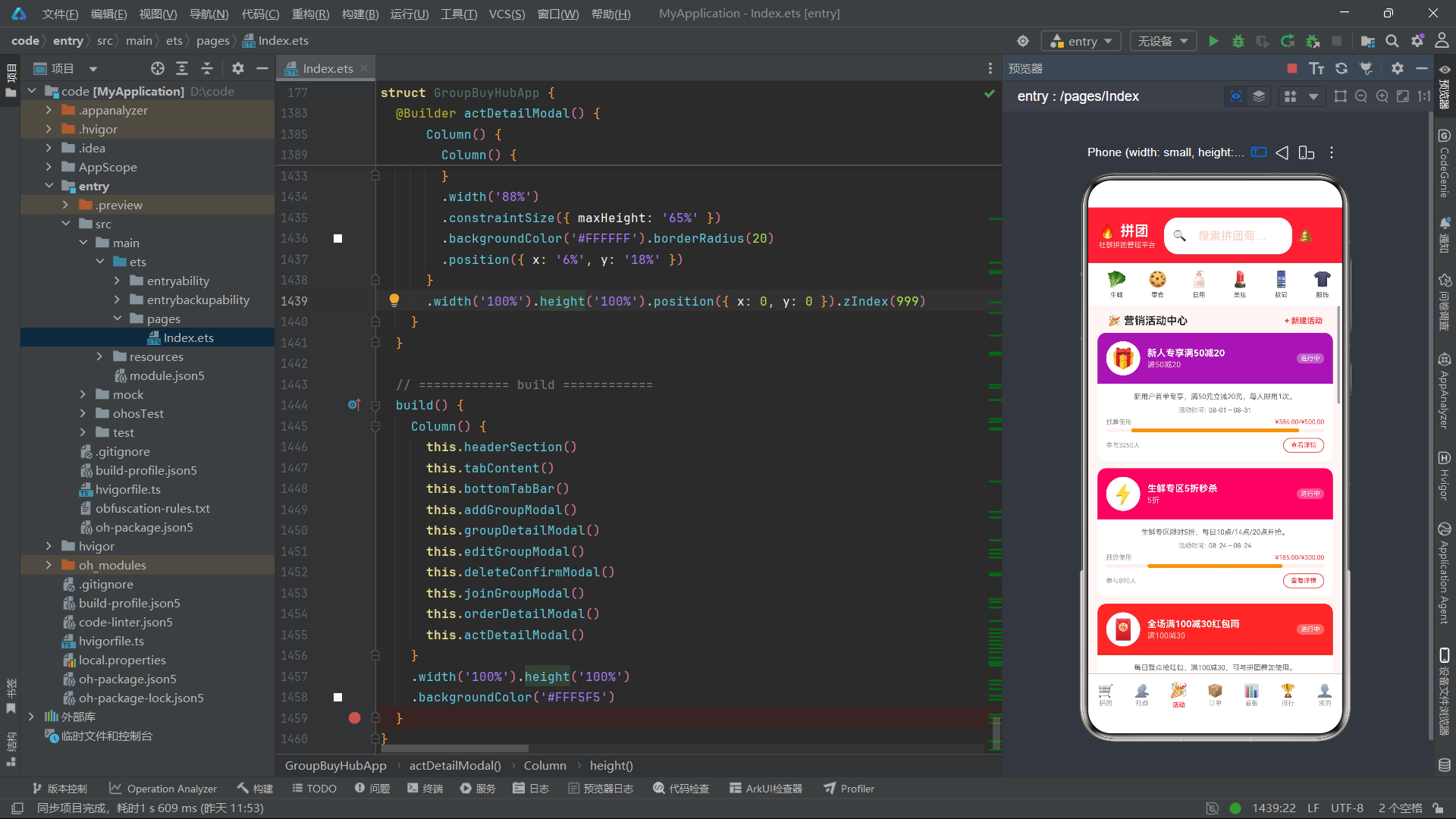
Text('🎉 营销活动中心').fontSize(15).fontWeight(FontWeight.Bold).fontColor('#333333')
Column().layoutWeight(1)
Text('+ 新建活动').fontSize(11).fontColor('#FF4242').fontWeight(FontWeight.Bold)
}
.width('92%').padding({ left: '4%', right: '4%', top: 12, bottom: 8 })
ForEach(mockActivities, (a: ActivityItem) => {
this.activityCard(a)
})
}
}.width('100%').layoutWeight(1).backgroundColor('#FFF5F5')
}
@Builder activityCard(a: ActivityItem) {
Column() {
// 头部渐变
Row() {
Column() {
Text(getActTypeIcon(a.type)).fontSize(28)
}
.width(48).height(48).backgroundColor('#FFFFFF').borderRadius(24)
.justifyContent(FlexAlign.Center).alignItems(HorizontalAlign.Center)
Column() {
Text(a.title).fontSize(13).fontWeight(FontWeight.Bold).fontColor('#FFFFFF')
Text(a.discount).fontSize(11).fontColor('#FFD0CC').margin({ top: 2 })
}
.layoutWeight(1).margin({ left: 10 }).alignItems(HorizontalAlign.Start)
Text(a.status).fontSize(9).fontColor('#FFFFFF')
.backgroundColor('rgba(255,255,255,0.3)')
.borderRadius(8).padding({ left: 6, right: 6, top: 2, bottom: 2 })
}
.width('100%')
.backgroundImage('/data/gradient_bg.png')
.backgroundColor(a.type === '秒杀' ? '#E91E63' : a.type === '红包' ? '#F44336' : a.type === '新人' ? '#9C27B0' : '#FF4242')
.borderRadius({ topLeft: 12, topRight: 12 })
.padding(12)
// 内容区
Column() {
Text(a.description).fontSize(10).fontColor('#666666').margin({ bottom: 8 })
.maxLines(2).textOverflow({ overflow: TextOverflow.Ellipsis })
Row() {
Text('活动时间:').fontSize(9).fontColor('#999999')
Text(fmtDate(a.startTime) + ' ~ ' + fmtDate(a.endTime)).fontSize(9).fontColor('#666666').margin({ left: 4 })
}.margin({ bottom: 6 })
// 预算使用进度
Row() {
Text('预算使用').fontSize(9).fontColor('#999999')
Column().layoutWeight(1)
Text(fmtPrice(a.used) + '/' + fmtPrice(a.budget)).fontSize(9).fontColor('#FF4242')
}.width('100%').margin({ bottom: 4 })
Column() {
Column()
.width(Math.round(a.used / a.budget * 100) + '%').height(5)
.backgroundColor(a.used / a.budget > 0.8 ? '#F44336' : '#FF9800')
.borderRadius(3)
}
.width('100%').height(5).backgroundColor('#FFF0EE').borderRadius(3).margin({ bottom: 8 })
Row() {
Text('参与' + fmtNum(a.joinCount) + '人').fontSize(9).fontColor('#999999')
Column().layoutWeight(1)
Text('查看详情').fontSize(9).fontColor('#FF4242')
.borderWidth(1).borderColor('#FF4242').borderRadius(12)
.padding({ left: 10, right: 10, top: 4, bottom: 4 })
.onClick(() => {
this.selectedActivity = a
this.showActDetail = true
})
}.width('100%')
}
.width('100%').padding(12)
}
.width('92%').backgroundColor('#FFFFFF').borderRadius(12)
.margin({ left: '4%', right: '4%', bottom: 10 })
.clip(true)
.shadow({ radius: 6, color: '#00000010', offsetX: 0, offsetY: 3 })
}
// ============ Tab3: 订单追踪(分段筛选+列表布局) ============
@Builder ordersTab() {
Scroll() {
Column() {
// 订单状态筛选
Row() {
ForEach(['全部', '待付款', '待发货', '已发货', '已完成', '退款中'], (s: string) => {
Text(s)
.fontSize(10)
.fontColor(this.orderFilter === s ? '#FFFFFF' : '#666666')
.backgroundColor(this.orderFilter === s ? '#FF4242' : '#FFFFFF')
.borderRadius(14)
.padding({ left: 8, right: 8, top: 5, bottom: 5 })
.margin({ right: 6 })
.onClick(() => { this.orderFilter = s })
})
}
.width('92%').padding({ left: '4%', right: '4%', top: 10, bottom: 10 })
// 订单列表
Column() {
ForEach(this.getFilteredOrders(), (o: OrderItem) => {
this.orderCard(o)
})
}.width('92%').padding({ left: '4%', right: '4%', bottom: 16 })
}
}.width('100%').layoutWeight(1).backgroundColor('#FFF5F5')
}
getFilteredOrders(): OrderItem[] {
if (this.orderFilter === '全部') return mockOrders
if (this.orderFilter === '退款中') {
return mockOrders.filter((o: OrderItem) => o.status === '退款中' || o.status === '已退款')
}
return mockOrders.filter((o: OrderItem) => o.status === this.orderFilter)
}
@Builder orderCard(o: OrderItem) {
Column() {
// 订单头部
Row() {
Text('订单号: PDD' + (10000000 + o.id).toString())
.fontSize(10).fontColor('#999999')
Column().layoutWeight(1)
Text(o.status).fontSize(10).fontColor(getOrderStatusColor(o.status)).fontWeight(FontWeight.Bold)
}.width('100%').margin({ bottom: 8 })
Divider().width('100%').height(0.5).backgroundColor('#FFF0EE')
// 商品信息
Row() {
Column() {
Text('📦').fontSize(28)
}
.width(50).height(50).backgroundColor('#FFF0EE').borderRadius(10)
.justifyContent(FlexAlign.Center).alignItems(HorizontalAlign.Center)
Column() {
Text(o.groupTitle).fontSize(12).fontColor('#333333').maxLines(2)
.textOverflow({ overflow: TextOverflow.Ellipsis })
Text('x' + o.quantity).fontSize(10).fontColor('#999999').margin({ top: 2 })
}
.layoutWeight(1).margin({ left: 10 }).alignItems(HorizontalAlign.Start)
Column() {
Text(fmtPrice(o.totalPrice)).fontSize(13).fontWeight(FontWeight.Bold).fontColor('#FF4242')
}.alignItems(HorizontalAlign.End)
}.width('100%').margin({ top: 8 })
// 收件信息
Row() {
Text('📞').fontSize(10)
Text(o.buyerName + ' ' + o.phone).fontSize(10).fontColor('#666666').margin({ left: 4 })
}.margin({ top: 8 })
Row() {
Text('📍').fontSize(10)
Text(o.address).fontSize(9).fontColor('#999999').margin({ left: 4 })
.maxLines(1).textOverflow({ overflow: TextOverflow.Ellipsis }).layoutWeight(1)
}.margin({ top: 4 })
Divider().width('100%').height(0.5).backgroundColor('#FFF0EE').margin({ top: 8 })
// 操作按钮
Row() {
Text(fmtDate(o.createTime)).fontSize(9).fontColor('#CCCCCC')
Column().layoutWeight(1)
Text('查看详情').fontSize(10).fontColor('#FF4242')
.borderWidth(1).borderColor('#FF4242').borderRadius(16)
.padding({ left: 12, right: 12, top: 5, bottom: 5 })
.onClick(() => {
this.selectedOrder = o
this.showOrderDetail = true
})
}.width('100%').margin({ top: 8 })
}
.width('100%').backgroundColor('#FFFFFF').borderRadius(12)
.padding(12).margin({ bottom: 8 })
.shadow({ radius: 4, color: '#00000008', offsetX: 0, offsetY: 2 })
}
// ============ Tab4: 数据看板(图表布局) ============
@Builder dashboardTab() {
Scroll() {
Column() {
// 概览数据
Row() {
this.kpiCard('拼团总数', mockGroups.length + '', '#FF4242', '#FFF0EE')
this.kpiCard('社群数', mockCommunities.length + '', '#FF7733', '#FFF3E0')
this.kpiCard('订单数', mockOrders.length + '', '#4CAF50', '#E8F5E9')
}.width('92%').padding({ left: '4%', right: '4%', top: 10, bottom: 10 })
// 周销售柱状图
Column() {
Row() {
Text('📈 本周销售趋势').fontSize(13).fontWeight(FontWeight.Bold).fontColor('#333333')
Column().layoutWeight(1)
Text('单位: 万元').fontSize(9).fontColor('#999999')
}.width('100%').margin({ bottom: 12 })
Row() {
ForEach(['周一', '周二', '周三', '周四', '周五', '周六', '周日'], (day: string, idx: number) => {
Column() {
// 柱子
Column()
.width(20).height(40 + idx * 12 + (idx === 5 ? 30 : 0))
.backgroundColor(idx === 5 || idx === 6 ? '#FF4242' : '#FFB199')
.borderRadius({ topLeft: 4, topRight: 4 })
Text(day).fontSize(8).fontColor('#999999').margin({ top: 4 })
}.layoutWeight(1).alignItems(HorizontalAlign.Center)
})
}.width('100%').height(120).justifyContent(FlexAlign.SpaceEvenly)
}
.width('92%').backgroundColor('#FFFFFF').borderRadius(14)
.padding(14).margin({ left: '4%', right: '4%', bottom: 10 })
.shadow({ radius: 6, color: '#00000008', offsetX: 0, offsetY: 2 })
// 分类销量分布
Column() {
Text('🏷️ 分类销量分布').fontSize(13).fontWeight(FontWeight.Bold).fontColor('#333333')
.margin({ bottom: 10 })
ForEach(Object.keys(CAT_CONFIG), (cat: string) => {
Row() {
Text(getCatIcon(cat) + ' ' + cat).fontSize(10).fontColor('#666666').width(70)
Column() {
Column()
.width(this.getCatCount(cat) / this.getMaxCatCount() * 100 + '%')
.height(8).backgroundColor('#FF4242').borderRadius(4)
}
.layoutWeight(1).height(8).backgroundColor('#FFF0EE').borderRadius(4).margin({ left: 8, right: 8 })
Text(this.getCatCount(cat) + '单').fontSize(9).fontColor('#999999').width(36)
}.width('100%').margin({ bottom: 6 })
})
}
.width('92%').backgroundColor('#FFFFFF').borderRadius(14)
.padding(14).margin({ left: '4%', right: '4%', bottom: 10 })
.shadow({ radius: 6, color: '#00000008', offsetX: 0, offsetY: 2 })
// 拼团状态分布
Column() {
Text('📊 拼团状态统计').fontSize(13).fontWeight(FontWeight.Bold).fontColor('#333333')
.margin({ bottom: 10 })
Row() {
ForEach(['拼团中', '已成团', '即将开团', '已结束'], (s: string) => {
Column() {
Text(mockGroups.filter((g: GroupItem) => g.status === s).length.toString())
.fontSize(18).fontWeight(FontWeight.Bold).fontColor(getStatusColor(s))
Text(s).fontSize(9).fontColor('#999999').margin({ top: 3 })
}.layoutWeight(1).alignItems(HorizontalAlign.Center)
})
}.width('100%')
}
.width('92%').backgroundColor('#FFFFFF').borderRadius(14)
.padding(14).margin({ left: '4%', right: '4%', bottom: 10 })
.shadow({ radius: 6, color: '#00000008', offsetX: 0, offsetY: 2 })
}
}.width('100%').layoutWeight(1).backgroundColor('#FFF5F5')
}
getCatCount(cat: string): number {
return mockGroups.filter((g: GroupItem) => g.category === cat).length
}
getMaxCatCount(): number {
return Math.max(...Object.keys(CAT_CONFIG).map((c: string) => this.getCatCount(c)))
}
// ============ Tab5: 拼团排行(排行榜样式) ============
@Builder rankingTab() {
Scroll() {
Column() {
// 前三名展示台
Row() {
// 第二名
Column() {
Text('🥈').fontSize(36)
Text(mockRanks[1].name).fontSize(8).fontColor('#666666').maxLines(1)
.textOverflow({ overflow: TextOverflow.Ellipsis }).margin({ top: 4 })
Text('¥' + mockRanks[1].revenue + 'w').fontSize(11).fontColor('#FF9800').fontWeight(FontWeight.Bold)
}
.layoutWeight(1).alignItems(HorizontalAlign.Center)
.backgroundColor('#FFF8E1').borderRadius(12)
.padding({ top: 16, bottom: 16 })
// 第一名
Column() {
Text('🥇').fontSize(48)
Text(mockRanks[0].name).fontSize(8).fontColor('#333333').maxLines(1)
.textOverflow({ overflow: TextOverflow.Ellipsis }).margin({ top: 4 })
Text('¥' + mockRanks[0].revenue + 'w').fontSize(13).fontColor('#FF4242').fontWeight(FontWeight.Bold)
}
.layoutWeight(1.2).alignItems(HorizontalAlign.Center)
.backgroundColor('#FFF3E0').borderRadius(12)
.padding({ top: 24, bottom: 16 })
// 第三名
Column() {
Text('🥉').fontSize(36)
Text(mockRanks[2].name).fontSize(8).fontColor('#666666').maxLines(1)
.textOverflow({ overflow: TextOverflow.Ellipsis }).margin({ top: 4 })
Text('¥' + mockRanks[2].revenue + 'w').fontSize(11).fontColor('#8D6E63').fontWeight(FontWeight.Bold)
}
.layoutWeight(1).alignItems(HorizontalAlign.Center)
.backgroundColor('#EFEBE9').borderRadius(12)
.padding({ top: 16, bottom: 16 })
}
.width('92%').padding({ left: '4%', right: '4%', top: 16, bottom: 16 })
// 第4~12名列表
Column() {
ForEach(mockRanks.slice(3), (r: RankItem) => {
this.rankRow(r)
})
}.width('92%').padding({ left: '4%', right: '4%', bottom: 16 })
}
}.width('100%').layoutWeight(1).backgroundColor('#FFF5F5')
}
@Builder rankRow(r: RankItem) {
Row() {
Text(r.rank.toString()).fontSize(14).fontWeight(FontWeight.Bold).fontColor('#CCCCCC').width(30)
Column() {
Text(r.name).fontSize(12).fontColor('#333333')
Text(r.members + '人 · ' + r.groupCount + '团').fontSize(9).fontColor('#999999').margin({ top: 2 })
}
.layoutWeight(1).margin({ left: 8 }).alignItems(HorizontalAlign.Start)
Column() {
Text('¥' + r.revenue + 'w').fontSize(12).fontColor('#FF4242').fontWeight(FontWeight.Bold)
Text(r.growth).fontSize(9)
.fontColor(r.growth.startsWith('+') ? '#4CAF50' : '#F44336').margin({ top: 2 })
}.alignItems(HorizontalAlign.End)
}
.width('100%').backgroundColor('#FFFFFF').borderRadius(10)
.padding({ left: 12, right: 12, top: 10, bottom: 10 }).margin({ bottom: 6 })
.shadow({ radius: 2, color: '#00000008', offsetX: 0, offsetY: 1 })
}
// ============ Tab6: 我的(个人中心布局) ============
@Builder profileTab() {
Scroll() {
Column() {
// 用户信息卡
Column() {
Row() {
Column() {
Text('👤').fontSize(40)
}
.width(64).height(64).backgroundColor('#FFFFFF').borderRadius(32)
.justifyContent(FlexAlign.Center).alignItems(HorizontalAlign.Center)
Column() {
Text('拼团团长').fontSize(16).fontWeight(FontWeight.Bold).fontColor('#FFFFFF')
Text('钻石团长 · ID: TG20260824').fontSize(10).fontColor('#FFD0CC').margin({ top: 4 })
}
.layoutWeight(1).margin({ left: 12 }).alignItems(HorizontalAlign.Start)
Text('编辑').fontSize(10).fontColor('#FFFFFF')
.borderWidth(1).borderColor('#FFFFFF').borderRadius(12)
.padding({ left: 10, right: 10, top: 4, bottom: 4 })
}.width('100%')
}
.width('92%')
.backgroundColor('#FF4242')
.borderRadius(16).padding(16)
.margin({ left: '4%', right: '4%', top: 16, bottom: 16 })
// 资产概览
Row() {
this.profileStat('账户余额', '¥2,856.50', '#FF4242')
this.profileStat('拼团佣金', '¥1,230.00', '#FF7733')
this.profileStat('优惠券', '12张', '#4CAF50')
}.width('92%').padding({ left: '4%', right: '4%', bottom: 12 })
// 功能菜单
Column() {
this.menuRow('📦', '我的拼团', '23个进行中')
this.menuRow('📋', '我的订单', '5个待处理')
this.menuRow('👥', '我的社群', '管理3个社群')
this.menuRow('🎫', '优惠券中心', '3张即将过期')
this.menuRow('💰', '提现账户', '已绑定')
this.menuRow('📞', '客服中心', '')
this.menuRow('⚙️', '设置', '')
}.width('92%').padding({ left: '4%', right: '4%', bottom: 16 })
}
}.width('100%').layoutWeight(1).backgroundColor('#FFF5F5')
}
@Builder profileStat(label: string, val: string, fc: string) {
Column() {
Text(val).fontSize(14).fontWeight(FontWeight.Bold).fontColor(fc)
Text(label).fontSize(9).fontColor('#999999').margin({ top: 3 })
}
.layoutWeight(1).backgroundColor('#FFFFFF').borderRadius(12)
.padding({ top: 14, bottom: 14 }).alignItems(HorizontalAlign.Center)
.margin({ left: 3, right: 3 })
.shadow({ radius: 2, color: '#00000008', offsetX: 0, offsetY: 1 })
}
@Builder menuRow(icon: string, title: string, desc: string) {
Row() {
Text(icon).fontSize(18).width(30)
Text(title).fontSize(13).fontColor('#333333')
Column().layoutWeight(1)
Text(desc).fontSize(10).fontColor('#999999')
Text('›').fontSize(16).fontColor('#CCCCCC').margin({ left: 8 })
}
.width('100%').backgroundColor('#FFFFFF').borderRadius(10)
.padding({ left: 14, right: 14, top: 14, bottom: 14 }).margin({ bottom: 6 })
.shadow({ radius: 2, color: '#00000008', offsetX: 0, offsetY: 1 })
}
// ============ 弹框: 发起新拼团 ============
@Builder addGroupModal() {
if (this.showAddGroup) {
Column() {
// 遮罩
Column().width('100%').height('100%').backgroundColor('rgba(0,0,0,0.5)')
.onClick(() => { this.showAddGroup = false })
// 弹框主体
Column() {
Row() {
Text('🛒 发起新拼团').fontSize(17).fontWeight(FontWeight.Bold).fontColor('#333333')
Column().layoutWeight(1)
Text('✕').fontSize(18).fontColor('#999999')
.onClick(() => { this.showAddGroup = false })
}.width('90%').padding({ top: 18, bottom: 12 })
Divider().width('90%').height(0.5).backgroundColor('#FFF0EE')
Scroll() {
Column() {
Text('商品名称').fontSize(11).fontColor('#999999')
TextInput({ placeholder: '输入拼团商品名称' }).fontSize(13).width('100%')
.backgroundColor('#FFF5F5').borderRadius(10).padding(10).margin({ top: 4, bottom: 12 })
Text('商品分类').fontSize(11).fontColor('#999999')
Row() {
ForEach(Object.keys(CAT_CONFIG), (cat: string) => {
Text(getCatIcon(cat) + ' ' + cat)
.fontSize(10).fontColor('#FF4242')
.backgroundColor('#FFF0EE').borderRadius(12)
.padding({ left: 8, right: 8, top: 5, bottom: 5 }).margin({ right: 6, bottom: 4 })
})
}.width('100%').margin({ top: 4, bottom: 12 })
Row() {
Column() {
Text('原价(分)').fontSize(11).fontColor('#999999')
TextInput({ placeholder: '5900' }).fontSize(13).width('100%')
.backgroundColor('#FFF5F5').borderRadius(10).padding(10).margin({ top: 4 })
.type(InputType.Number)
}.layoutWeight(1).margin({ right: 8 })
Column() {
Text('拼团价(分)').fontSize(11).fontColor('#999999')
TextInput({ placeholder: '2990' }).fontSize(13).width('100%')
.backgroundColor('#FFF5F5').borderRadius(10).padding(10).margin({ top: 4 })
.type(InputType.Number)
}.layoutWeight(1)
}.width('100%').margin({ bottom: 12 })
Row() {
Column() {
Text('开团人数').fontSize(11).fontColor('#999999')
TextInput({ placeholder: '50' }).fontSize(13).width('100%')
.backgroundColor('#FFF5F5').borderRadius(10).padding(10).margin({ top: 4 })
.type(InputType.Number)
}.layoutWeight(1).margin({ right: 8 })
Column() {
Text('截止日期').fontSize(11).fontColor('#999999')
TextInput({ placeholder: '2026-08-30' }).fontSize(13).width('100%')
.backgroundColor('#FFF5F5').borderRadius(10).padding(10).margin({ top: 4 })
}.layoutWeight(1)
}.width('100%').margin({ bottom: 12 })
Text('商品描述').fontSize(11).fontColor('#999999')
TextArea({ placeholder: '输入商品描述...' }).fontSize(13).width('100%')
.backgroundColor('#FFF5F5').borderRadius(10).padding(10).margin({ top: 4, bottom: 16 })
.height(70)
Row() {
Text('取消').fontSize(13).fontColor('#999999')
.borderWidth(1).borderColor('#E0E0E0').borderRadius(20)
.padding({ left: 20, right: 20, top: 10, bottom: 10 })
.onClick(() => { this.showAddGroup = false })
Column().layoutWeight(1)
Text('确认发起').fontSize(13).fontColor('#FFFFFF').fontWeight(FontWeight.Bold)
.backgroundColor('#FF4242').borderRadius(20)
.padding({ left: 20, right: 20, top: 10, bottom: 10 })
.onClick(() => { this.showAddGroup = false })
}.width('100%')
}.width('90%').padding({ top: 16, bottom: 20 })
}
.width('100%').layoutWeight(1)
}
.width('88%')
.constraintSize({ maxHeight: '80%' })
.backgroundColor('#FFFFFF').borderRadius(20)
.position({ x: '6%', y: '10%' })
}
.width('100%').height('100%').position({ x: 0, y: 0 }).zIndex(999)
}
}
// ============ 弹框: 拼团详情 ============
@Builder groupDetailModal() {
if (this.showGroupDetail && this.selectedGroup) {
Column() {
Column().width('100%').height('100%').backgroundColor('rgba(0,0,0,0.5)')
.onClick(() => { this.showGroupDetail = false })
Column() {
// 商品图片区
Column() {
Text(this.selectedGroup.image).fontSize(60)
}
.width('100%').height(120).backgroundColor('#FFF0EE')
.borderRadius({ topLeft: 20, topRight: 20 })
.justifyContent(FlexAlign.Center)
Scroll() {
Column() {
Row() {
Text(fmtPrice(this.selectedGroup.groupPrice)).fontSize(22).fontWeight(FontWeight.Bold).fontColor('#FF4242')
Text(fmtPrice(this.selectedGroup.originPrice)).fontSize(12).fontColor('#999999')
.decoration({ type: TextDecorationType.LineThrough }).margin({ left: 8 })
Column().layoutWeight(1)
Text(getDiscountRate(this.selectedGroup.originPrice, this.selectedGroup.groupPrice) + '折')
.fontSize(10).fontColor('#FFFFFF').backgroundColor('#FF4242')
.borderRadius(8).padding({ left: 6, right: 6, top: 2, bottom: 2 })
}.width('90%').margin({ top: 16 })
Text(this.selectedGroup.title).fontSize(14).fontWeight(FontWeight.Medium).fontColor('#333333')
.width('90%').margin({ top: 8 })
Row() {
Text('⭐' + this.selectedGroup.rating.toFixed(1)).fontSize(10).fontColor('#FF9800')
Text(' | ').fontSize(10).fontColor('#E0E0E0')
Text('已售' + fmtNum(this.selectedGroup.salesCount)).fontSize(10).fontColor('#999999')
Text(' | ').fontSize(10).fontColor('#E0E0E0')
Text(this.selectedGroup.shopName).fontSize(10).fontColor('#FF4242')
}.width('90%').margin({ top: 6 })
// 拼团进度
Column() {
Row() {
Text('拼团进度').fontSize(11).fontColor('#999999')
Column().layoutWeight(1)
Text(this.selectedGroup.joinedCount + '/' + this.selectedGroup.needCount + '人')
.fontSize(11).fontColor('#FF4242').fontWeight(FontWeight.Bold)
}.width('100%').margin({ bottom: 6 })
Column() {
Column()
.width(getProgressPct(this.selectedGroup) + '%').height(8)
.backgroundColor(getProgressColor(getProgressPct(this.selectedGroup)))
.borderRadius(4)
}
.width('100%').height(8).backgroundColor('#FFF0EE').borderRadius(4)
Row() {
Text('剩余名额').fontSize(10).fontColor('#999999')
Column().layoutWeight(1)
Text((this.selectedGroup.needCount - this.selectedGroup.joinedCount) + '人')
.fontSize(10).fontColor('#FF4242')
}.width('100%').margin({ top: 6 })
}
.width('90%').backgroundColor('#FFF5F5').borderRadius(12)
.padding(12).margin({ top: 12 })
// 商品描述
Text('商品详情').fontSize(12).fontWeight(FontWeight.Bold).fontColor('#333333')
.width('90%').margin({ top: 16, bottom: 6 })
Text(this.selectedGroup.description).fontSize(11).fontColor('#666666').width('90%')
// 标签
Row() {
ForEach(this.selectedGroup.tags, (tag: string) => {
Text(tag).fontSize(9).fontColor('#FF4242').backgroundColor('#FFF0EE')
.borderRadius(10).padding({ left: 8, right: 8, top: 3, bottom: 3 })
.margin({ right: 6 })
})
}.width('90%').margin({ top: 10, bottom: 16 })
// 操作按钮
Row() {
Text('编辑').fontSize(13).fontColor('#FF4242')
.borderWidth(1).borderColor('#FF4242').borderRadius(20)
.padding({ left: 20, right: 20, top: 10, bottom: 10 })
.onClick(() => {
this.showGroupDetail = false
this.showEditGroup = true
})
Column().layoutWeight(1)
Text('立即参团').fontSize(13).fontColor('#FFFFFF').fontWeight(FontWeight.Bold)
.backgroundColor('#FF4242').borderRadius(20)
.padding({ left: 24, right: 24, top: 10, bottom: 10 })
.onClick(() => {
this.showGroupDetail = false
this.showJoinGroup = true
})
}.width('90%').margin({ bottom: 20 })
}
}
.width('100%').layoutWeight(1)
}
.width('88%')
.constraintSize({ maxHeight: '75%' })
.backgroundColor('#FFFFFF').borderRadius(20)
.position({ x: '6%', y: '12%' })
}
.width('100%').height('100%').position({ x: 0, y: 0 }).zIndex(999)
}
}
// ============ 弹框: 编辑拼团 ============
@Builder editGroupModal() {
if (this.showEditGroup && this.selectedGroup) {
Column() {
Column().width('100%').height('100%').backgroundColor('rgba(0,0,0,0.5)')
.onClick(() => { this.showEditGroup = false })
Column() {
Row() {
Text('✏️ 编辑拼团信息').fontSize(17).fontWeight(FontWeight.Bold).fontColor('#333333')
Column().layoutWeight(1)
Text('✕').fontSize(18).fontColor('#999999')
.onClick(() => { this.showEditGroup = false })
}.width('90%').padding({ top: 18, bottom: 12 })
Divider().width('90%').height(0.5).backgroundColor('#FFF0EE')
Column() {
Text('商品名称').fontSize(11).fontColor('#999999')
TextInput({ placeholder: this.selectedGroup.title, text: this.selectedGroup.title })
.fontSize(13).width('100%')
.backgroundColor('#FFF5F5').borderRadius(10).padding(10).margin({ top: 4, bottom: 12 })
Row() {
Column() {
Text('拼团价(分)').fontSize(11).fontColor('#999999')
TextInput({ placeholder: this.selectedGroup.groupPrice.toString(), text: this.selectedGroup.groupPrice.toString() })
.fontSize(13).width('100%')
.backgroundColor('#FFF5F5').borderRadius(10).padding(10).margin({ top: 4 })
.type(InputType.Number)
}.layoutWeight(1).margin({ right: 8 })
Column() {
Text('开团人数').fontSize(11).fontColor('#999999')
TextInput({ placeholder: this.selectedGroup.needCount.toString(), text: this.selectedGroup.needCount.toString() })
.fontSize(13).width('100%')
.backgroundColor('#FFF5F5').borderRadius(10).padding(10).margin({ top: 4 })
.type(InputType.Number)
}.layoutWeight(1)
}.width('100%').margin({ bottom: 12 })
Text('商品描述').fontSize(11).fontColor('#999999')
TextArea({ placeholder: this.selectedGroup.description, text: this.selectedGroup.description })
.fontSize(13).width('100%')
.backgroundColor('#FFF5F5').borderRadius(10).padding(10).margin({ top: 4, bottom: 16 })
.height(70)
Row() {
Text('取消').fontSize(13).fontColor('#999999')
.borderWidth(1).borderColor('#E0E0E0').borderRadius(20)
.padding({ left: 20, right: 20, top: 10, bottom: 10 })
.onClick(() => { this.showEditGroup = false })
Column().layoutWeight(1)
Text('保存修改').fontSize(13).fontColor('#FFFFFF').fontWeight(FontWeight.Bold)
.backgroundColor('#FF4242').borderRadius(20)
.padding({ left: 20, right: 20, top: 10, bottom: 10 })
.onClick(() => { this.showEditGroup = false })
}.width('100%')
}.width('90%').padding({ top: 16, bottom: 20 })
}
.width('88%')
.constraintSize({ maxHeight: '70%' })
.backgroundColor('#FFFFFF').borderRadius(20)
.position({ x: '6%', y: '15%' })
}
.width('100%').height('100%').position({ x: 0, y: 0 }).zIndex(999)
}
}
// ============ 弹框: 删除确认 ============
@Builder deleteConfirmModal() {
if (this.showDeleteConfirm) {
Column() {
Column().width('100%').height('100%').backgroundColor('rgba(0,0,0,0.5)')
.onClick(() => { this.showDeleteConfirm = false })
Column() {
Column() {
Text('⚠️').fontSize(40)
Text('确认删除?').fontSize(16).fontWeight(FontWeight.Bold).fontColor('#333333').margin({ top: 12 })
Text('删除后不可恢复,确定要删除该拼团吗?').fontSize(11).fontColor('#999999').margin({ top: 8 })
}.width('100%').padding({ top: 24, bottom: 20 }).alignItems(HorizontalAlign.Center)
Divider().width('100%').height(0.5).backgroundColor('#FFF0EE')
Row() {
Text('取消').fontSize(14).fontColor('#999999')
.layoutWeight(1).textAlign(TextAlign.Center)
.padding({ top: 14, bottom: 14 })
.onClick(() => { this.showDeleteConfirm = false })
Column().width(0.5).height(40).backgroundColor('#FFF0EE')
Text('确认删除').fontSize(14).fontColor('#FF4242').fontWeight(FontWeight.Bold)
.layoutWeight(1).textAlign(TextAlign.Center)
.padding({ top: 14, bottom: 14 })
.onClick(() => { this.showDeleteConfirm = false })
}.width('100%')
}
.width('72%').backgroundColor('#FFFFFF').borderRadius(16)
.position({ x: '14%', y: '35%' })
}
.width('100%').height('100%').position({ x: 0, y: 0 }).zIndex(999)
}
}
// ============ 弹框: 加入拼团 ============
@Builder joinGroupModal() {
if (this.showJoinGroup && this.selectedGroup) {
Column() {
Column().width('100%').height('100%').backgroundColor('rgba(0,0,0,0.5)')
.onClick(() => { this.showJoinGroup = false })
Column() {
// 商品头部
Row() {
Column() {
Text(this.selectedGroup.image).fontSize(32)
}
.width(56).height(56).backgroundColor('#FFF0EE').borderRadius(12)
.justifyContent(FlexAlign.Center).alignItems(HorizontalAlign.Center)
Column() {
Text(fmtPrice(this.selectedGroup.groupPrice)).fontSize(16).fontWeight(FontWeight.Bold).fontColor('#FF4242')
Text('已选: ' + this.joinQuantity + '件').fontSize(10).fontColor('#999999').margin({ top: 4 })
}
.layoutWeight(1).margin({ left: 10 }).alignItems(HorizontalAlign.Start)
Text('✕').fontSize(18).fontColor('#999999')
.onClick(() => { this.showJoinGroup = false })
}.width('90%').padding({ top: 16, bottom: 12 })
Divider().width('90%').height(0.5).backgroundColor('#FFF0EE')
// 数量选择
Row() {
Text('购买数量').fontSize(13).fontColor('#333333')
Column().layoutWeight(1)
Row() {
Text('−').fontSize(16).fontColor('#FF4242')
.width(32).height(32).backgroundColor('#FFF5F5')
.borderRadius({ topLeft: 8, bottomLeft: 8 })
.textAlign(TextAlign.Center)
.onClick(() => { if (this.joinQuantity > 1) this.joinQuantity-- })
Text(this.joinQuantity.toString()).fontSize(14)
.width(40).height(32).backgroundColor('#FFFFFF')
.textAlign(TextAlign.Center)
Text('+').fontSize(16).fontColor('#FF4242')
.width(32).height(32).backgroundColor('#FFF5F5')
.borderRadius({ topRight: 8, bottomRight: 8 })
.textAlign(TextAlign.Center)
.onClick(() => { this.joinQuantity++ })
}
}.width('90%').margin({ top: 16, bottom: 16 })
// 规格选择
Text('商品规格').fontSize(11).fontColor('#999999').width('90%')
Row() {
Text('默认规格').fontSize(11).fontColor('#FFFFFF').backgroundColor('#FF4242')
.borderRadius(10).padding({ left: 10, right: 10, top: 5, bottom: 5 }).margin({ right: 6 })
Text('大份装').fontSize(11).fontColor('#FF4242').backgroundColor('#FFF0EE')
.borderRadius(10).padding({ left: 10, right: 10, top: 5, bottom: 5 }).margin({ right: 6 })
Text('家庭装').fontSize(11).fontColor('#FF4242').backgroundColor('#FFF0EE')
.borderRadius(10).padding({ left: 10, right: 10, top: 5, bottom: 5 })
}.width('90%').margin({ top: 6, bottom: 16 })
// 底部价格
Row() {
Column() {
Text('合计').fontSize(10).fontColor('#999999')
Text(fmtPrice(this.selectedGroup.groupPrice * this.joinQuantity))
.fontSize(16).fontWeight(FontWeight.Bold).fontColor('#FF4242')
}.alignItems(HorizontalAlign.Start)
Column().layoutWeight(1)
Text('确认参团').fontSize(14).fontColor('#FFFFFF').fontWeight(FontWeight.Bold)
.backgroundColor('#FF4242').borderRadius(20)
.padding({ left: 28, right: 28, top: 12, bottom: 12 })
.onClick(() => { this.showJoinGroup = false })
}.width('90%').margin({ bottom: 20 })
}
.width('88%').backgroundColor('#FFFFFF').borderRadius(20)
.position({ x: '6%', y: '30%' })
}
.width('100%').height('100%').position({ x: 0, y: 0 }).zIndex(999)
}
}
// ============ 弹框: 订单详情 ============
@Builder orderDetailModal() {
if (this.showOrderDetail && this.selectedOrder) {
Column() {
Column().width('100%').height('100%').backgroundColor('rgba(0,0,0,0.5)')
.onClick(() => { this.showOrderDetail = false })
Column() {
Row() {
Text('📦 订单详情').fontSize(17).fontWeight(FontWeight.Bold).fontColor('#333333')
Column().layoutWeight(1)
Text('✕').fontSize(18).fontColor('#999999')
.onClick(() => { this.showOrderDetail = false })
}.width('90%').padding({ top: 18, bottom: 12 })
Divider().width('90%').height(0.5).backgroundColor('#FFF0EE')
Scroll() {
Column() {
// 状态
Row() {
Text(this.selectedOrder.status).fontSize(14).fontWeight(FontWeight.Bold)
.fontColor(getOrderStatusColor(this.selectedOrder.status))
Column().layoutWeight(1)
Text(fmtDate(this.selectedOrder.createTime)).fontSize(10).fontColor('#999999')
}.width('90%').margin({ top: 16, bottom: 12 })
// 商品
Row() {
Column() {
Text('📦').fontSize(24)
}.width(40).height(40).backgroundColor('#FFF0EE').borderRadius(10)
.justifyContent(FlexAlign.Center).alignItems(HorizontalAlign.Center)
Column() {
Text(this.selectedOrder.groupTitle).fontSize(12).fontColor('#333333')
Text('x' + this.selectedOrder.quantity).fontSize(10).fontColor('#999999').margin({ top: 2 })
}.layoutWeight(1).margin({ left: 8 }).alignItems(HorizontalAlign.Start)
Text(fmtPrice(this.selectedOrder.totalPrice)).fontSize(13).fontWeight(FontWeight.Bold).fontColor('#FF4242')
}.width('90%').margin({ bottom: 12 })
Divider().width('90%').height(0.5).backgroundColor('#FFF0EE')
// 收件信息
Column() {
Text('收件信息').fontSize(11).fontColor('#999999').margin({ bottom: 6 })
Row() {
Text('收件人').fontSize(11).fontColor('#999999').width(60)
Text(this.selectedOrder.buyerName).fontSize(11).fontColor('#333333')
}.margin({ bottom: 4 })
Row() {
Text('电话').fontSize(11).fontColor('#999999').width(60)
Text(this.selectedOrder.phone).fontSize(11).fontColor('#333333')
}.margin({ bottom: 4 })
Row() {
Text('地址').fontSize(11).fontColor('#999999').width(60)
Text(this.selectedOrder.address).fontSize(11).fontColor('#333333').layoutWeight(1)
}.margin({ bottom: 4 })
if (this.selectedOrder.remark.length > 0) {
Row() {
Text('备注').fontSize(11).fontColor('#999999').width(60)
Text(this.selectedOrder.remark).fontSize(11).fontColor('#FF4242')
}
}
}.width('90%').margin({ top: 12, bottom: 16 })
}
}
.width('100%').layoutWeight(1)
}
.width('88%')
.constraintSize({ maxHeight: '70%' })
.backgroundColor('#FFFFFF').borderRadius(20)
.position({ x: '6%', y: '15%' })
}
.width('100%').height('100%').position({ x: 0, y: 0 }).zIndex(999)
}
}
// ============ 弹框: 活动详情 ============
@Builder actDetailModal() {
if (this.showActDetail && this.selectedActivity) {
Column() {
Column().width('100%').height('100%').backgroundColor('rgba(0,0,0,0.5)')
.onClick(() => { this.showActDetail = false })
Column() {
Row() {
Text(getActTypeIcon(this.selectedActivity.type) + ' ' + this.selectedActivity.title)
.fontSize(15).fontWeight(FontWeight.Bold).fontColor('#333333')
.layoutWeight(1)
Text('✕').fontSize(18).fontColor('#999999')
.onClick(() => { this.showActDetail = false })
}.width('90%').padding({ top: 18, bottom: 12 })
Divider().width('90%').height(0.5).backgroundColor('#FFF0EE')
Column() {
Text(this.selectedActivity.description).fontSize(12).fontColor('#666666').width('90%').margin({ top: 16 })
Row() {
Text('优惠力度').fontSize(11).fontColor('#999999').width(70)
Text(this.selectedActivity.discount).fontSize(12).fontColor('#FF4242').fontWeight(FontWeight.Bold)
}.width('90%').margin({ top: 12 })
Row() {
Text('活动时间').fontSize(11).fontColor('#999999').width(70)
Text(this.selectedActivity.startTime + ' ~ ' + this.selectedActivity.endTime).fontSize(11).fontColor('#333333')
}.width('90%').margin({ top: 8 })
Row() {
Text('参与人数').fontSize(11).fontColor('#999999').width(70)
Text(fmtNum(this.selectedActivity.joinCount) + '人').fontSize(11).fontColor('#333333')
}.width('90%').margin({ top: 8 })
Row() {
Text('预算使用').fontSize(11).fontColor('#999999').width(70)
Text(fmtPrice(this.selectedActivity.used) + ' / ' + fmtPrice(this.selectedActivity.budget))
.fontSize(11).fontColor('#333333')
}.width('90%').margin({ top: 8, bottom: 16 })
Row() {
Text('关闭').fontSize(13).fontColor('#999999')
.borderWidth(1).borderColor('#E0E0E0').borderRadius(20)
.padding({ left: 20, right: 20, top: 10, bottom: 10 })
.onClick(() => { this.showActDetail = false })
Column().layoutWeight(1)
Text('参与活动').fontSize(13).fontColor('#FFFFFF').fontWeight(FontWeight.Bold)
.backgroundColor('#FF4242').borderRadius(20)
.padding({ left: 20, right: 20, top: 10, bottom: 10 })
.onClick(() => { this.showActDetail = false })
}.width('90%').margin({ bottom: 20 })
}
}
.width('88%')
.constraintSize({ maxHeight: '65%' })
.backgroundColor('#FFFFFF').borderRadius(20)
.position({ x: '6%', y: '18%' })
}
.width('100%').height('100%').position({ x: 0, y: 0 }).zIndex(999)
}
}
// ============ build ============
build() {
Column() {
this.headerSection()
this.tabContent()
this.bottomTabBar()
this.addGroupModal()
this.groupDetailModal()
this.editGroupModal()
this.deleteConfirmModal()
this.joinGroupModal()
this.orderDetailModal()
this.actDetailModal()
}
.width('100%').height('100%')
.backgroundColor('#FFF5F5')
}
}
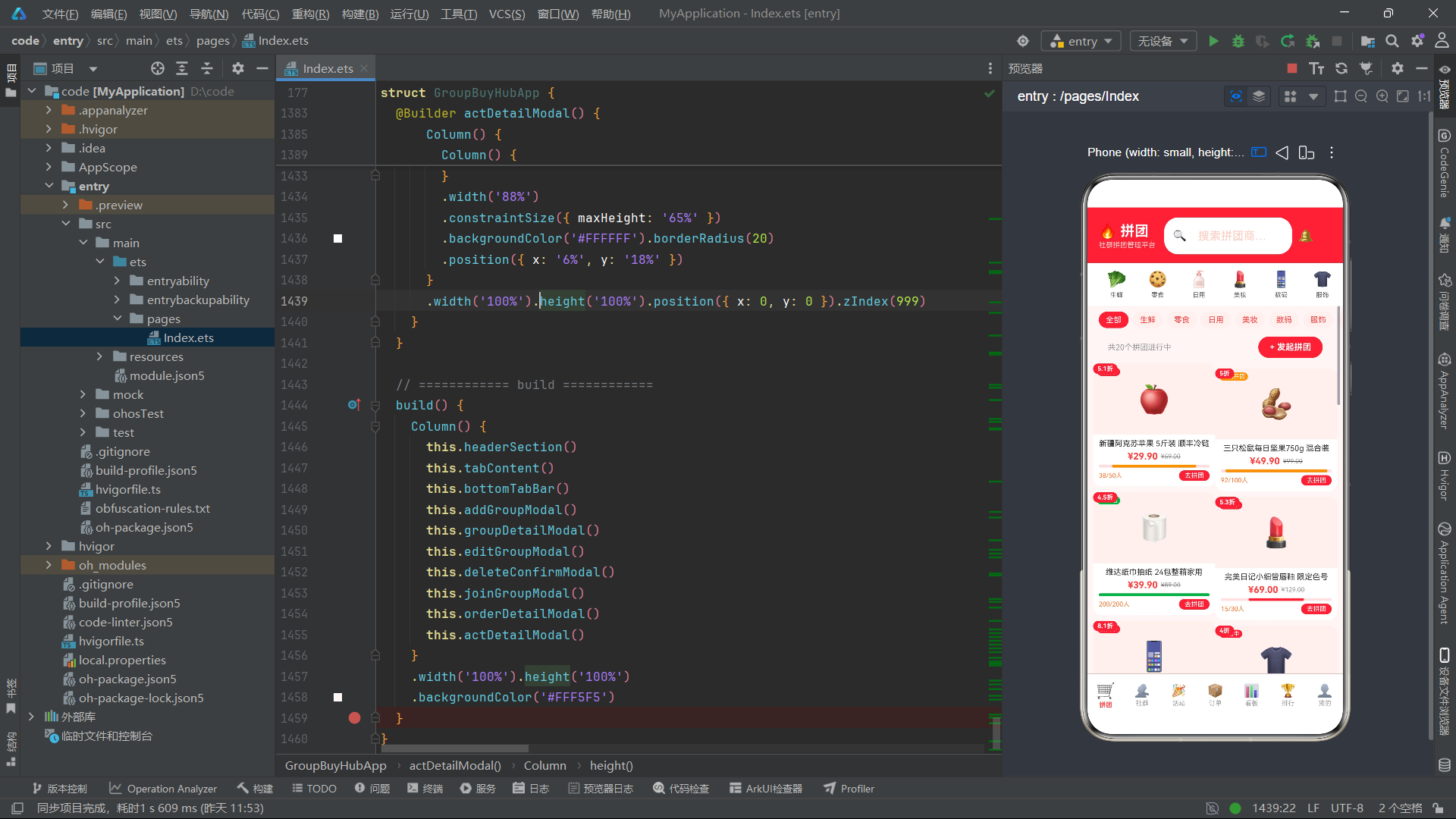
总结
本文详细剖析了一个基于HarmonyOS API 24的ArkTS社群拼团管理平台的完整实现。该平台通过@Entry、@Component、@State、@Builder等核心装饰器构建了声明式UI架构,将复杂的电商管理界面拆分为类型定义、静态配置、工具函数、主组件和多个构建器方法,实现了高度的模块化和可维护性。七大功能模块涵盖了拼团大厅、社群管理、营销活动、订单追踪、数据看板、排行榜和个人中心,每个模块都有差异化的布局设计和丰富的交互逻辑。
从技术实现角度来看,该平台的亮点在于多个方面。首先是配置驱动的视觉映射体系,通过Record类型的配置对象将业务状态映射为颜色和图标,实现了配置与逻辑的彻底分离。其次是纯ArkTS组件实现的数据可视化,柱状图、进度条和分类分布图全部通过Column的高度和宽度属性模拟,无需引入第三方图表库。再次是统一架构的弹窗系统,七种弹窗都遵循"条件渲染+遮罩层+主体层"的三段式模式,保证了交互体验的一致性和代码的可读性。
从架构设计角度来看,该平台展示了ArkTS声明式UI的最佳实践。@State驱动的响应式数据流使得界面更新变得自动化和精确化,@Builder方法的参数化设计实现了UI组件的高度复用,ForEach与数组方法的配合使得列表渲染简洁高效。状态联合类型(| null)的设计巧妙地表达了"选中"与"未选中"两种状态,避免了额外的布尔标记。整体代码结构清晰、层次分明,为HarmonyOS应用开发提供了一个具有参考价值的工程实践范例。

讨论HarmonyOS开发技术,专注于API与组件、DevEco Studio、测试、元服务和应用上架分发等。
更多推荐



 1
1 0
0- 0


 已为社区贡献6条内容

所有评论(0)