HarmonyOS 6效果实现:设置 Alignment.Bottom 对齐方式使弹窗从底部弹出
引言
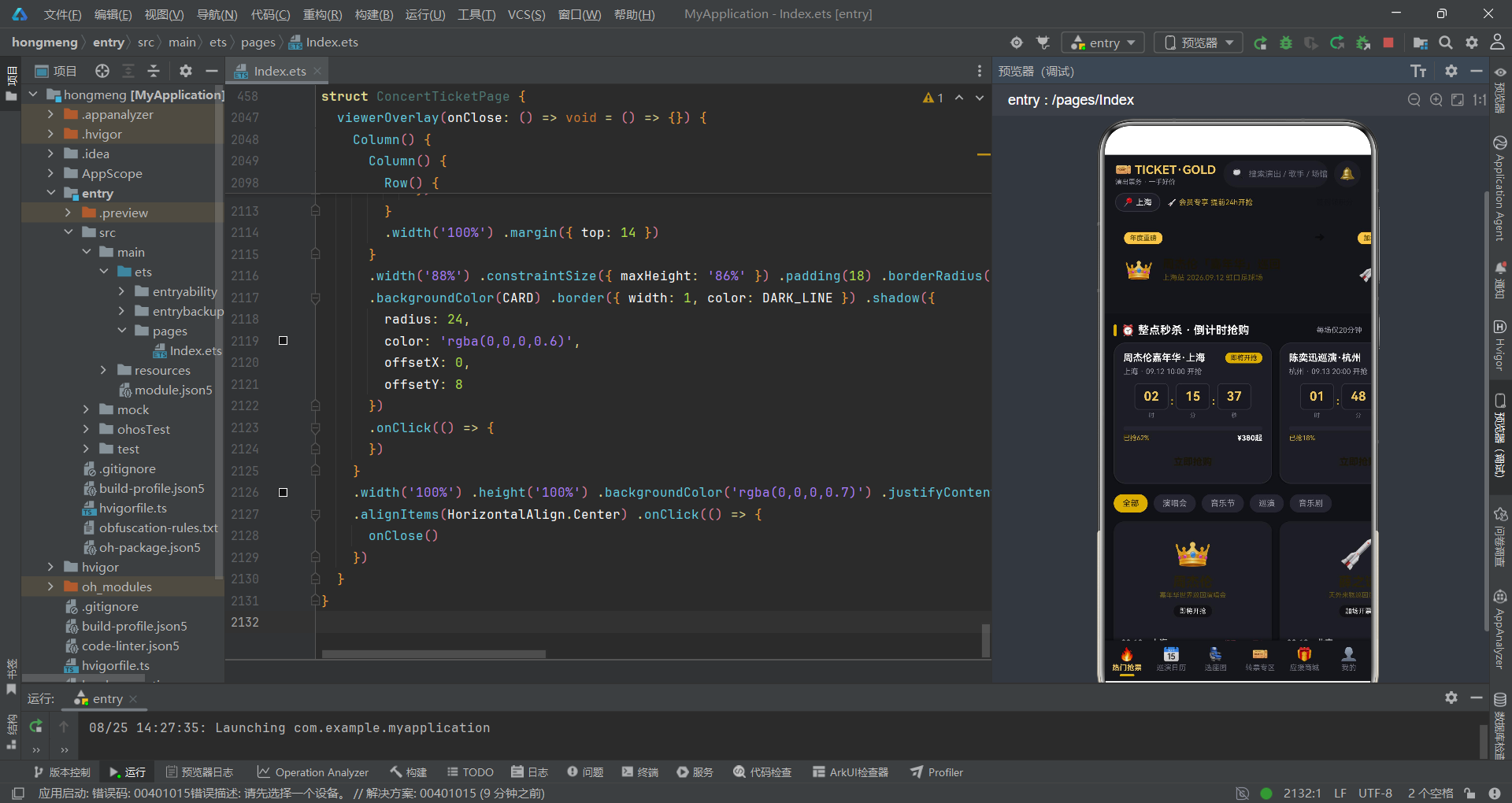
随着数字经济的蓬勃发展,演出票务行业正经历着深刻的数字化转型。演唱会、音乐节、巡演等大型演出活动的票务销售环节面临着高并发抢购、座位精准选择、转票安全担保等多重业务挑战。传统的票务系统往往采用 Web 前端加后端服务的经典架构,在移动端的交互体验和响应速度上存在明显短板。而在 HarmonyOS 6.1.1 的全新技术体系下,开发者可以利用 ArkTS 声明式 UI 框架构建出兼具高性能与精美视觉效果的移动端票务应用,为用户提供流畅的抢票体验。
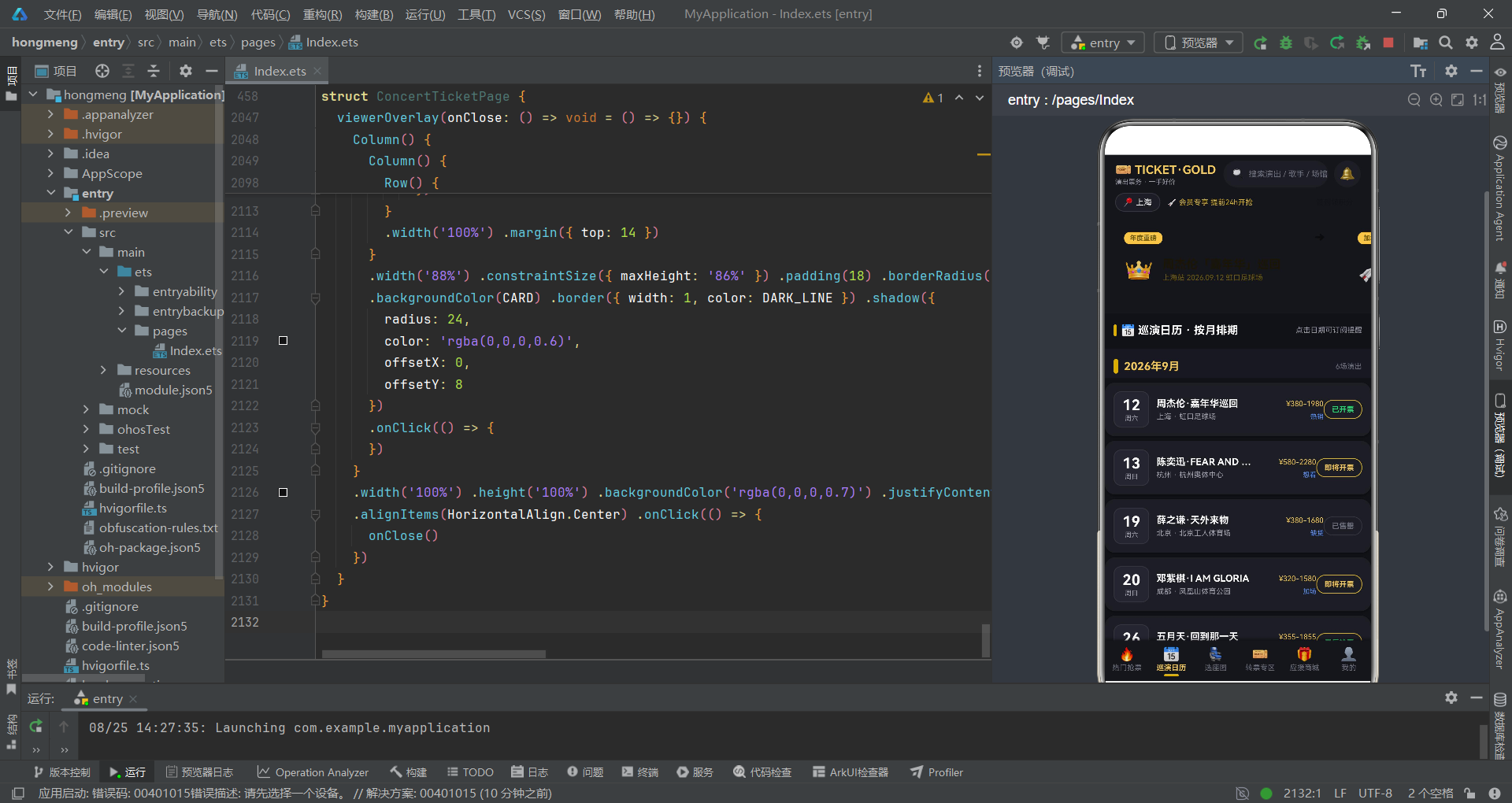
本文所分析的演出票务应用采用了黑金舞台风格的设计语言,将演唱会现场的视觉氛围融入到了 App 的每一个界面之中。整体技术架构基于 HarmonyOS ArkTS API 24 的声明式编程范式,通过 @Entry 和 @Component 装饰器构建页面组件,利用 @State 状态管理驱动 UI 的自动更新,实现了数据与视图的双向绑定。应用共包含六个底部 Tab 页面——热门抢票、巡演日历、选座图、转票专区、应援商城、我的,覆盖了从票务浏览到下单支付再到票根管理的完整业务链路。
在业务设计层面,该应用深入模拟了真实票务平台的核心功能场景:整点秒杀倒计时抢购营造了紧迫感,大卡海报横滑展示提供了沉浸式的演出浏览体验,座位网格选座实现了场馆座位的可视化交互,转票专区溢价标签保障了二手票交易的透明度,应援商城双列布局则满足了粉丝购买周边商品的需求。此外,应用还集成了五个功能各异的弹窗模态——抢票确认弹窗、座位详情弹窗、转票发布编辑弹窗、取消订单确认弹窗和实名观演人编辑弹窗,形成了一套完整的用户交互闭环。
一、数据结构定义与设计令牌
1.1 接口定义与类型体系
应用首先通过一系列 interface 定义了完整的类型系统,为整个页面的数据流提供了严格的类型约束。从 Banner 轮播项到热门演出、从倒计时场次到座位行信息、从转票商品到应援周边,每一个业务实体都有对应的数据结构。
interface BannerItem {
  id: number
  title: string
  sub: string
  tag: string
  emoji: string
}

interface HotShow {
  id: number
  artist: string
  name: string
  city: string
  date: string
  venue: string
  price: string
  tag: string
  emoji: string
  soldText: string
}

interface CountdownShow {
  id: number
  name: string
  city: string
  date: string
  hh: number
  mm: number
  ss: number
  soldPct: number
  price: string
  status: string
}

interface SeatRow {
  id: number
  rowName: string
  zone: string
  price: number
  startId: number
  seatCount: number
}

interface SeatInfo {
  id: number
  rowName: string
  seatNo: number
  zone: string
  price: number
}

interface TransferItem {
  id: number
  show: string
  date: string
  zone: string
  row: string
  seat: string
  origPrice: number
  price: number
  seller: string
  delivery: string
  emoji: string
}
上述类型定义体现了 ArkTS 类型系统的核心优势。每个接口都精确描述了业务数据的字段构成,例如 HotShow 不仅包含演出的基本信息(名称、城市、日期、场馆),还额外携带了 soldText 字段用于展示销售热度文案,emoji 字段用于渲染演出主题图标。SeatRow 接口中的 startId 和 seatCount 字段则巧妙地支持了座位编号的动态生成逻辑。这种强类型的设计方式能够在编译阶段捕获潜在的类型错误,大幅提升了代码的健壮性和可维护性。
1.2 设计令牌与阴影配置
应用采用了统一的颜色常量和阴影配置来管理全局视觉风格,实现了设计语言的高度一致性。黑金配色方案营造出了高级、沉稳的舞台氛围。
const BG: string = '#111217'
const CARD: string = '#1C1D24'
const CARD2: string = '#242530'
const GOLD: string = '#D4AF37'
const GOLD_LIGHT: string = '#F0C75E'
const GOLD_DEEP: string = '#A8842A'
const TEXT_MAIN: string = '#FFFFFF'
const TEXT_SUB: string = '#9A9CA8'
const TEXT_DIM: string = '#6B6E7B'
const RED: string = '#F04A4A'
const GREEN: string = '#2ED573'
const BLUE: string = '#5B8DEF'
const DIVIDER: string = '#2A2B34'
const DARK_LINE: string = '#33353F'

const CARD_SHADOW: ShadowOptions = {
  radius: 8,
  color: 'rgba(0,0,0,0.45)',
  offsetX: 0,
  offsetY: 3
}

const NO_SHADOW: ShadowOptions = {
  radius: 0,
  color: 'rgba(0,0,0,0)',
  offsetX: 0,
  offsetY: 0
}

const SEAT_GLOW: ShadowOptions = {
  radius: 8,
  color: 'rgba(240,199,94,0.8)',
  offsetX: 0,
  offsetY: 0
}
颜色令牌的设计遵循了语义化命名原则。BG 代表主背景色,CARD 和 CARD2 分别代表两级卡片背景色,GOLD 系列定义了金色主题的三个层次。TEXT_MAIN、TEXT_SUB、TEXT_DIM 构成了文字颜色的三级层次体系。阴影配置方面,CARD_SHADOW 为普通卡片提供了柔和的投影效果,SEAT_GLOW 则为选中的座位添加了金色辉光,增强了交互反馈的视觉表现力。NO_SHADOW 配置则用于未选中状态的座位,通过显式地消除阴影来突出选中座位的视觉差异。
二、全局纯函数与静态数据
2.1 工具函数设计
应用定义了一组全局纯函数来处理座位区域颜色映射、溢价计算、柱状图高度转换等通用逻辑。这些函数不依赖组件状态,可以在任意位置调用,保证了逻辑的复用性和可测试性。
function pad2(n: number): string {
  if (n < 10) {
    return '0' + n
  }
  return '' + n
}

function zoneColor(z: string): string {
  if (z === 'VIP') {
    return '#5C4B1F'
  }
  if (z === '看台A') {
    return '#2E3A5C'
  }
  return '#453455'
}

function zoneTextColor(z: string): string {
  if (z === 'VIP') {
    return GOLD
  }
  if (z === '看台A') {
    return '#8FA8E8'
  }
  return '#B49AE0'
}

function zoneScore(z: string): number {
  if (z === 'VIP') {
    return 5
  }
  if (z === '看台A') {
    return 4
  }
  return 3
}

function rowSeats(r: SeatRow): SeatInfo[] {
  let arr: SeatInfo[] = []
  for (let i = 0; i < r.seatCount; i++) {
    arr.push({
      id: r.startId + i,
      rowName: r.rowName,
      seatNo: i + 1,
      zone: r.zone,
      price: r.price
    })
  }
  return arr
}

function premiumPct(p: number, o: number): number {
  return Math.round((p / o - 1) * 100)
}

function premiumLabel(p: number, o: number): string {
  let v: number = premiumPct(p, o)
  if (v > 0) {
    return '+' + v + '%'
  }
  if (v < 0) {
    return '' + v + '%'
  }
  return '0%'
}

function overPrice(p: number, o: number): boolean {
  return p >= o
}

function barHeight(v: number): number {
  return v / 2980 * 120
}
pad2 函数用于将个位数补零格式化,在倒计时显示中起到关键作用。zoneColor 和 zoneTextColor 两个函数根据座位区域名称返回对应的背景色和文字色,VIP 区使用金色系,看台A区使用蓝色系,看台B区使用紫色系。rowSeats 函数是一个重要的数据生成器,它接收一个 SeatRow 配置,利用循环生成该行所有座位的 SeatInfo 数组。premiumPct 和 premiumLabel 函数用于转票专区的溢价计算和标签展示,overPrice 函数判断转票价格是否高于原价。barHeight 函数则将观演花费金额映射为柱状图的高度像素值。
2.2 静态数据初始化
应用预置了丰富的静态数据来模拟真实的票务场景,包括城市列表、轮播横幅、热门演出、倒计时场次、巡演日历、座位行、转票商品、应援商品、票夹卡片、消费记录等。
const HOT_SHOWS: HotShow[] = [
  { id: 1, artist: '周杰伦', name: '嘉年华世界巡回演唱会', city: '上海', date: '09.12', venue: '上海虹口足球场', price: '¥380-1980', tag: '即将开抢', emoji: '👑', soldText: '想看 486.2万人' },
  { id: 2, artist: '薛之谦', name: '天外来物巡回演唱会', city: '北京', date: '09.19', venue: '北京工人体育场', price: '¥380-1680', tag: '加场开票', emoji: '🚀', soldText: '想看 312.5万人' },
  { id: 3, artist: '五月天', name: '回到那一天25周年巡回', city: '深圳', date: '09.26', venue: '深圳大运中心', price: '¥355-1855', tag: '最后抢票', emoji: '🎸', soldText: '已售 92%' },
  { id: 4, artist: '林俊杰', name: 'JJ20世界巡回演唱会', city: '广州', date: '09.30', venue: '广州天河体育场', price: '¥480-1880', tag: '已售罄', emoji: '🎤', soldText: '秒罄 · 可蹲转票' },
  { id: 5, artist: '邓紫棋', name: 'I AM GLORIA巡回演唱会', city: '成都', date: '10.03', venue: '成都凤凰山体育公园', price: '¥320-1580', tag: '新场次', emoji: '💜', soldText: '想看 198.7万人' },
  { id: 6, artist: '陈奕迅', name: 'FEAR AND DREAMS巡回', city: '杭州', date: '10.10', venue: '杭州奥体中心', price: '¥580-2280', tag: '即将开抢', emoji: '🌙', soldText: '想看 275.3万人' },
  { id: 7, artist: '华晨宇', name: '火星演唱会', city: '长沙', date: '10.17', venue: '长沙贺龙体育场', price: '¥380-1280', tag: '开票预警', emoji: '🔥', soldText: '想看 121.6万人' },
  { id: 8, artist: '张杰', name: '未·LIVE巡回演唱会', city: '南京', date: '10.24', venue: '南京奥体中心', price: '¥380-1680', tag: '热度飙升', emoji: '🪐', soldText: '想看 167.4万人' }
]

const SEAT_ROWS: SeatRow[] = [
  { id: 1, rowName: 'A', zone: 'VIP', price: 980, startId: 1, seatCount: 10 },
  { id: 2, rowName: 'B', zone: 'VIP', price: 980, startId: 11, seatCount: 10 },
  { id: 3, rowName: 'C', zone: 'VIP', price: 980, startId: 21, seatCount: 10 },
  { id: 4, rowName: 'D', zone: '看台A', price: 680, startId: 31, seatCount: 12 },
  { id: 5, rowName: 'E', zone: '看台A', price: 680, startId: 43, seatCount: 12 },
  { id: 6, rowName: 'F', zone: '看台A', price: 680, startId: 55, seatCount: 12 },
  { id: 7, rowName: 'G', zone: '看台B', price: 380, startId: 67, seatCount: 12 },
  { id: 8, rowName: 'H', zone: '看台B', price: 380, startId: 79, seatCount: 12 },
  { id: 9, rowName: 'I', zone: '看台B', price: 380, startId: 91, seatCount: 12 }
]
静态数据的组织方式体现了清晰的数据建模思路。HOT_SHOWS 数组包含了8场热门演出的完整信息,每条数据都携带了艺人、演出名称、城市、日期、场馆、票价区间、状态标签和销售热度文案。SEAT_ROWS 数组则定义了9行座位的配置,前三行为 VIP 区(每行10座),中间三行为看台A区(每行12座),后三行为看台B区(每行12座),每行通过 startId 和 seatCount 的组合实现座位编号的连续生成。
三、页面主体与状态管理
3.1 组件声明与状态定义
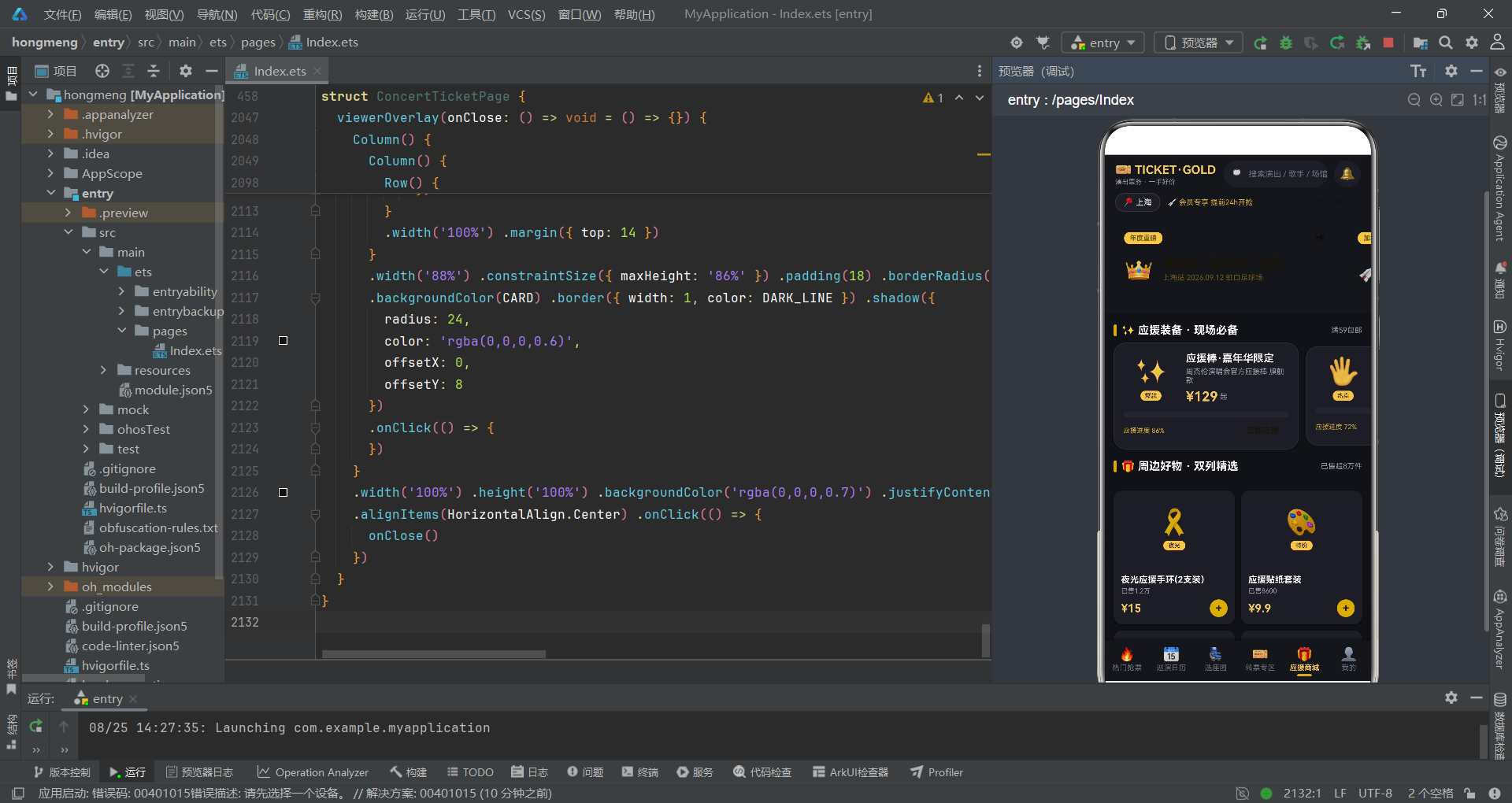
应用的主页面通过 @Entry 和 @Component 装饰器声明为一个入口组件,内部维护了一系列 @State 状态变量来驱动 UI 的动态更新。
@Entry
@Component
struct ConcertTicketPage {
  @State currentTab: number = 0
  @State cityIndex: number = 0
  @State chipIndex: number = 0
  @State transChip: number = 0
  @State showGrabModal: boolean = false
  @State showSeatModal: boolean = false
  @State showPublishModal: boolean = false
  @State showCancelModal: boolean = false
  @State showViewerModal: boolean = false
  @State gradeIndex: number = 0
  @State ticketCount: number = 1
  @State agreeProtocol: boolean = false
  @State selectedSeatId: number = -1
  @State selSeat: SeatInfo = DEFAULT_SEAT
  @State pubShowIndex: number = 0
  @State pubPriceStr: string = '980'
  @State pubDelivery: number = 0
  @State viewerName: string = '张小明'
  @State viewerId: string = '310101********1234'
  @State viewerPhone: string = '138****6688'
}
@State 装饰器是 ArkTS 状态管理的核心机制。当被装饰的状态变量发生变化时,框架会自动触发依赖该状态的 UI 组件重新渲染。currentTab 控制当前显示的 Tab 页面,cityIndex 管理城市选择器的索引,chipIndex 和 transChip 分别管理热门抢票和转票专区的筛选标签。五个布尔型状态变量(showGrabModal、showSeatModal 等)各自控制一个弹窗的显示与隐藏。gradeIndex 和 ticketCount 用于抢票弹窗中的票档选择和数量控制。selectedSeatId 和 selSeat 则用于座位选择页面的交互状态管理。
3.2 构建函数与页面骨架
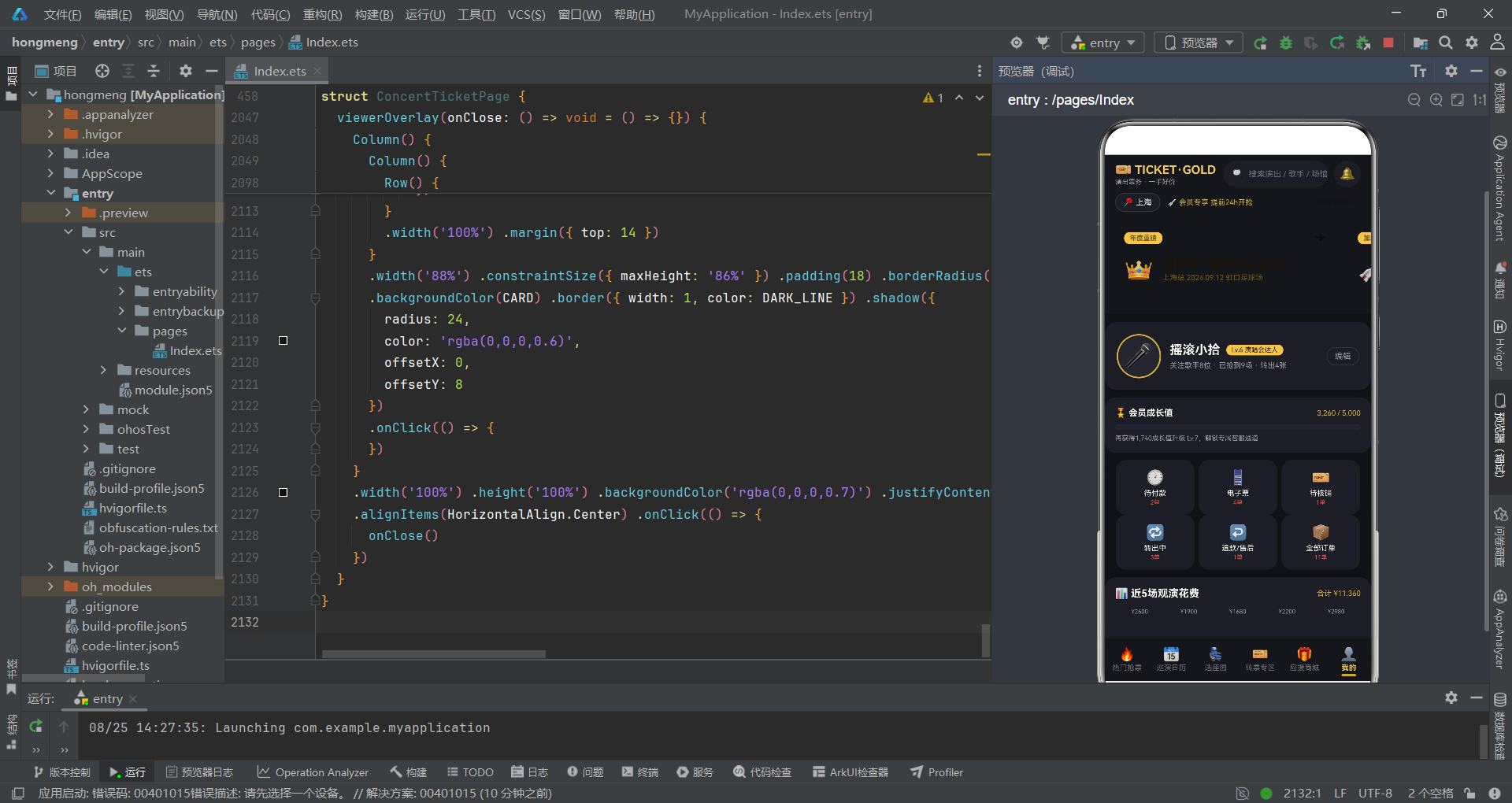
build() 方法是组件的入口构建函数,它定义了整个页面的层级结构。
build() {
  Stack({ alignContent: Alignment.Bottom }) {
    Column() {
      this.topHeader()
      Column() {
        if (this.currentTab === 0) {
          this.tabHot()
        } else if (this.currentTab === 1) {
          this.tabCalendar()
        } else if (this.currentTab === 2) {
          this.tabSeat()
        } else if (this.currentTab === 3) {
          this.tabTransfer()
        } else if (this.currentTab === 4) {
          this.tabShop()
        } else {
          this.tabMine()
        }
      }
      .layoutWeight(1)
      .width('100%')

      this.bottomTabs()
    }
    .width('100%')
    .height('100%')

    if (this.showGrabModal || this.showSeatModal || this.showPublishModal ||
        this.showCancelModal || this.showViewerModal) {
      this.modalOverlay(() => {
        this.showGrabModal = false
        this.showSeatModal = false
        this.showPublishModal = false
        this.showCancelModal = false
        this.showViewerModal = false
      })
    }
  }
  .width('100%')
  .height('100%')
  .backgroundColor(BG)
}
页面采用 Stack 作为根容器,设置 Alignment.Bottom 对齐方式使弹窗从底部弹出。Column 内部包含顶部头部区域、可切换的内容区域(通过 if-else 条件判断根据 currentTab 渲染对应的 Tab 内容构建器)和底部 Tab 栏。内容区域使用 layoutWeight(1) 占据剩余空间。弹窗的显示采用条件渲染,当任一弹窗状态为 true 时,modalOverlay 构建器会被渲染到 Stack 的上层。这种设计模式确保了弹窗始终覆盖在页面内容之上,同时通过集中式的状态管理避免了多个弹窗同时出现的冲突问题。
四、页面整体交互流程
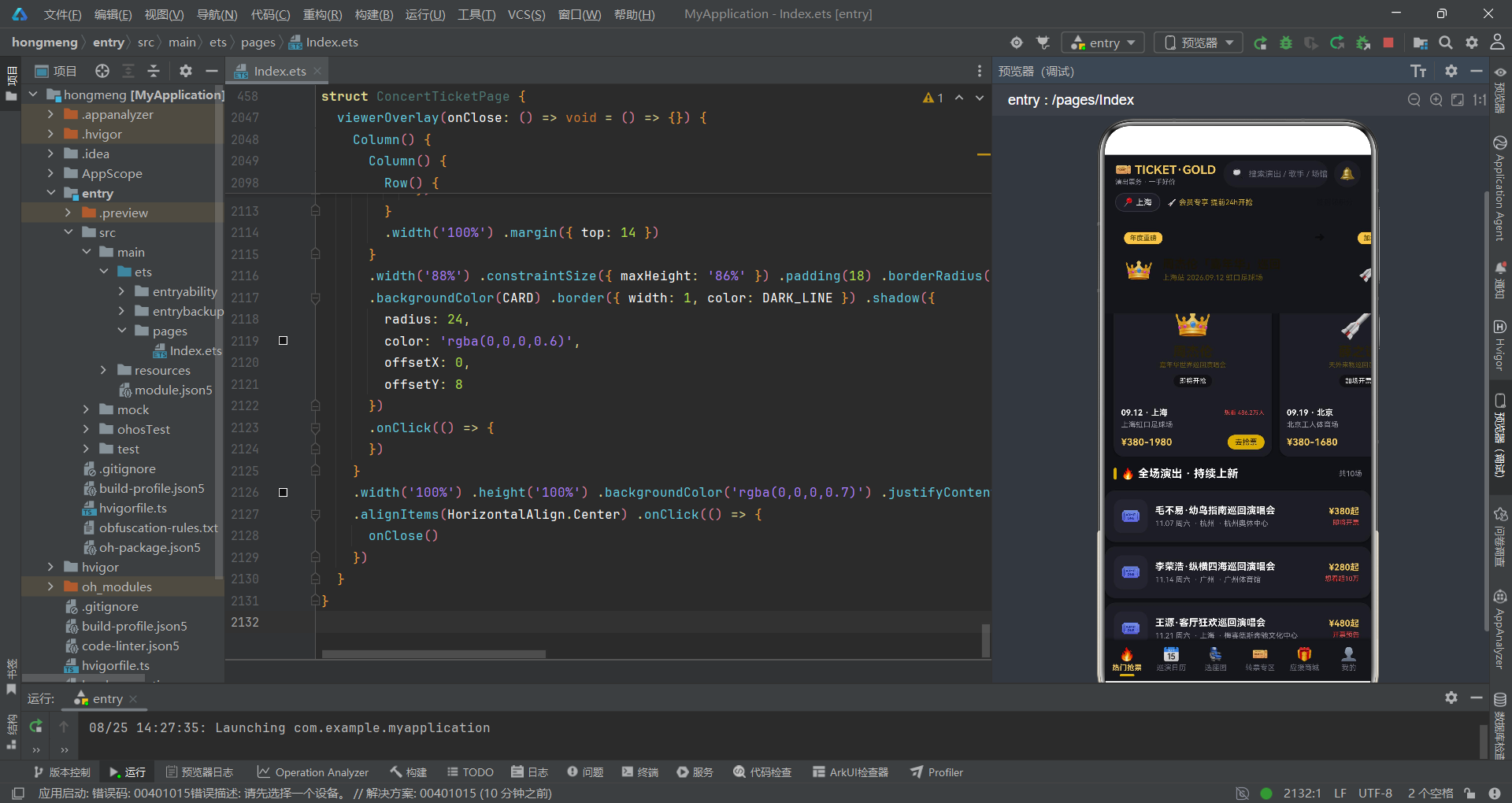
上述流程图清晰地展示了应用的核心交互路径。用户进入应用后首先看到热门抢票页面,通过底部 Tab 栏可以在六个功能页面之间自由切换。在热门抢票页面,用户可以点击演出卡片触发抢票弹窗;在选座图页面,用户可以点击具体座位触发座位详情弹窗,确认后进入抢票流程;在转票专区,用户可以直接购买转票或发布自己的转票信息;在应援商城,用户可以浏览和购买应援周边商品。整个交互流程形成了一个从浏览到下单的完整闭环。
五、热门抢票页面实现
5.1 倒计时卡片与分类筛选
热门抢票页面是应用的核心入口,它集成了倒计时抢购条、演出分类筛选、大卡横滑和普通演出列表四个区域。
@Builder
tabHot() {
  Scroll() {
    Column() {
      this.sectionTitle('⏰ 整点秒杀 · 倒计时抢购', '每场仅20分钟')

      Scroll() {
        Row() {
          ForEach(COUNTDOWN_SHOWS, (c: CountdownShow) => {
            this.countdownCard(c)
          }, (c: CountdownShow) => 'cd' + c.id)
        }
        .padding({ left: 12, right: 4 })
      }
      .scrollable(ScrollDirection.Horizontal)
      .scrollBar(BarState.Off)
      .width('100%')

      Row() {
        ForEach(['全部', '演唱会', '音乐节', '巡演', '音乐剧'], (c: string, i: number) => {
          Text(c)
            .fontSize(11)
            .fontColor(this.chipIndex === i ? '#1A1506' : TEXT_SUB)
            .padding({ left: 12, right: 12, top: 6, bottom: 6 })
            .borderRadius(14)
            .backgroundColor(this.chipIndex === i ? GOLD : CARD2)
            .margin({ right: 8 })
            .onClick(() => {
              this.chipIndex = i
            })
        }, (c: string) => 'chip' + c)
      }
      .width('100%')
      .padding({ left: 12, right: 12, top: 14 })
    }
    .width('100%')
  }
  .layoutWeight(1)
  .width('100%')
  .scrollBar(BarState.Off)
}
页面整体采用 Scroll 作为外层容器,内部 Column 垂直排列各个区域。倒计时卡片区域通过内嵌的横向 Scroll 实现了卡片横滑浏览的效果。分类筛选栏使用 ForEach 渲染5个分类标签,每个标签的颜色根据 chipIndex 状态动态切换——选中时使用金色背景配深色文字,未选中时使用深灰背景配灰色文字。sectionTitle 是一个自定义的 @Builder 方法,用于统一渲染章节标题,包含金色竖线装饰和可选的"更多"文案。
5.2 倒计时卡片构建
每张倒计时卡片是页面的视觉焦点之一,它将演出信息、倒计时数字、进度条和抢购按钮整合在一个紧凑的卡片中。
@Builder
countdownCard(c: CountdownShow) {
  Column() {
    Row() {
      Text(c.name)
        .fontSize(13)
        .fontWeight(FontWeight.Bold)
        .fontColor(TEXT_MAIN)
        .layoutWeight(1)
        .maxLines(1)
        .textOverflow({ overflow: TextOverflow.Ellipsis })
      Text(c.status)
        .fontSize(9)
        .fontColor('#1A1506')
        .padding({ left: 7, right: 7, top: 2, bottom: 2 })
        .borderRadius(7)
        .backgroundColor(GOLD)
    }
    .width('100%')

    Text(c.city + ' · ' + c.date + ' 开抢')
      .fontSize(10)
      .fontColor(TEXT_SUB)
      .width('100%')
      .margin({ top: 5 })

    Row() {
      this.countdownCell(c.hh, '时')
      Text(':')
        .fontSize(14)
        .fontWeight(FontWeight.Bold)
        .fontColor(GOLD)
        .margin({ left: 3, right: 3 })
      this.countdownCell(c.mm, '分')
      Text(':')
        .fontSize(14)
        .fontWeight(FontWeight.Bold)
        .fontColor(GOLD)
        .margin({ left: 3, right: 3 })
      this.countdownCell(c.ss, '秒')
    }
    .width('100%')
    .justifyContent(FlexAlign.Center)
    .margin({ top: 10 })

    Row() {
      Column() {
        Column()
          .width(c.soldPct + '%')
          .height(6)
          .borderRadius(3)
      }
      .width('100%')
      .height(6)
      .borderRadius(3)
      .backgroundColor(CARD2)
    }
    .width('100%')
    .margin({ top: 10 })

    Row() {
      Text('已抢' + c.soldPct + '%')
        .fontSize(9)
        .fontColor(GOLD)
      Column().layoutWeight(1)
      Text(c.price)
        .fontSize(10)
        .fontWeight(FontWeight.Bold)
        .fontColor(TEXT_MAIN)
    }
    .width('100%')
    .margin({ top: 4 })

    Text('立即抢购')
      .fontSize(13)
      .fontWeight(FontWeight.Bold)
      .fontColor('#1A1506')
      .width('100%')
      .textAlign(TextAlign.Center)
      .padding({ top: 9, bottom: 9 })
      .borderRadius(18)
      .margin({ top: 10 })
      .onClick(() => {
        this.gradeIndex = 1
        this.ticketCount = 1
        this.agreeProtocol = false
        this.showGrabModal = true
      })
  }
  .width(214)
  .padding(12)
  .borderRadius(16)
  .backgroundColor(CARD)
  .border({ width: 1, color: DIVIDER })
  .margin({ right: 10 })
  .shadow(CARD_SHADOW)
}
倒计时卡片通过 countdownCell 构建器渲染时分秒数字,每个数字单元格使用深色背景配金色数字,中间以冒号分隔。进度条通过嵌套的 Column 实现——外层 Column 作为轨道背景,内层 Column 通过 width(c.soldPct + '%') 动态设置宽度来表示进度。抢购按钮在点击时重置票档、数量和协议状态,然后打开抢票确认弹窗。maxLines(1) 和 textOverflow({ overflow: TextOverflow.Ellipsis }) 的组合确保了演出名称过长时以省略号截断,保持了卡片的整洁布局。
六、座位选择网格实现
6.1 场馆座位布局
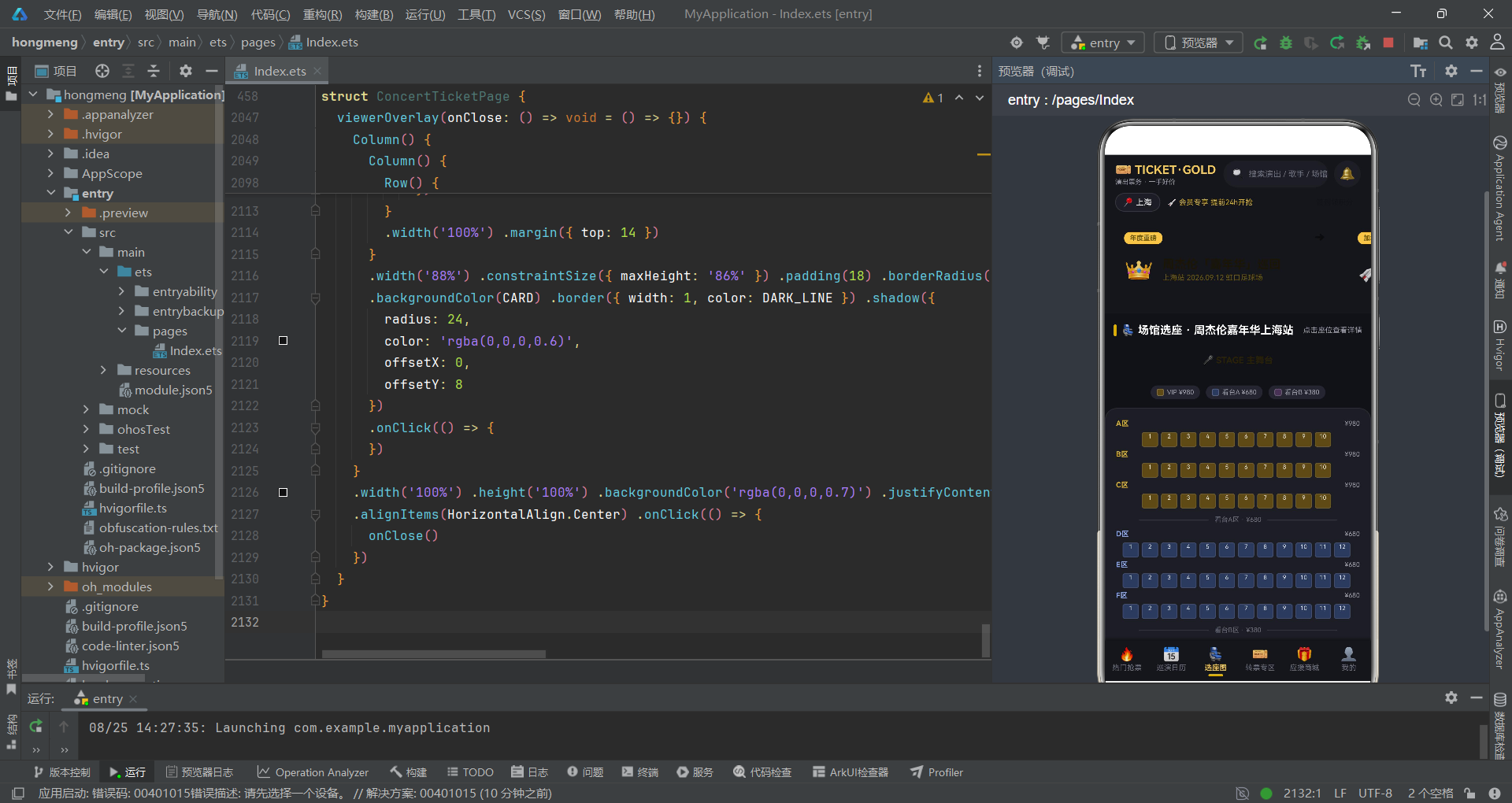
选座图页面是应用中最具交互性的部分,它通过座位网格实现了场馆座位的可视化选择。
@Builder
tabSeat() {
  Scroll() {
    Column() {
      this.sectionTitle('💺 场馆选座 · 周杰伦嘉年华上海站', '点击座位查看详情')

      Column() {
        Text('🎤 STAGE 主舞台')
          .fontSize(12)
          .fontWeight(FontWeight.Bold)
          .fontColor('#2A2208')
      }
      .width('100%')
      .height(48)
      .justifyContent(FlexAlign.Center)
      .borderRadius(12)
      .margin({ left: 12, right: 12 })

      Row() {
        ForEach([['VIP', '¥980'], ['看台A', '¥680'], ['看台B', '¥380']], (z: string[]) => {
          Row() {
            Column()
              .width(10)
              .height(10)
              .borderRadius(3)
              .backgroundColor(zoneColor(z[0]))
              .border({ width: 1, color: 'rgba(255,255,255,0.2)' })
            Text(z[0] + ' ' + z[1])
              .fontSize(9)
              .fontColor(TEXT_SUB)
              .margin({ left: 4 })
          }
          .padding({ left: 8, right: 8, top: 4, bottom: 4 })
          .borderRadius(10)
          .backgroundColor(CARD2)
          .margin({ left: 4, right: 4 })
        }, (z: string[]) => 'lg' + z[0])
      }
      .width('100%')
      .justifyContent(FlexAlign.Center)
      .margin({ top: 10 })

      Column() {
        ForEach(SEAT_ROWS, (r: SeatRow) => {
          Column() {
            this.seatRowBlock(r)
            if (r.id === 3) {
              this.zoneDivider('看台A区 · ¥680')
            }
            if (r.id === 6) {
              this.zoneDivider('看台B区 · ¥380')
            }
          }
          .width('100%')
        }, (r: SeatRow) => 'sr' + r.id)
      }
      .width('100%')
      .padding(10)
      .borderRadius(16)
      .backgroundColor(CARD)
      .margin({ left: 12, right: 12, top: 12 })
      .border({ width: 1, color: DIVIDER })
    }
    .width('100%')
  }
  .layoutWeight(1)
  .width('100%')
  .scrollBar(BarState.Off)
}
页面上方是舞台标识区域,使用金色文字标注"STAGE 主舞台"。紧接着是图例区域,通过 ForEach 渲染三个区域的颜色标识和价格信息。座位网格主体通过遍历 SEAT_ROWS 数组逐行渲染,每行结束后检查是否需要插入区域分隔线——在第3行(VIP 区结束)后插入看台A区分隔线,在第6行(看台A区结束)后插入看台B区分隔线。zoneDivider 构建器通过左右两条横线和中间的文字标签实现了优雅的区域分隔效果。
6.2 座位单元格交互
每个座位单元格的交互状态管理是选座页面的核心逻辑。
@Builder
seatCell(s: SeatInfo) {
  Column() {
    Text('' + s.seatNo)
      .fontSize(8)
      .fontColor(this.selectedSeatId === s.id ? '#15161B' : 'rgba(255,255,255,0.85)')
  }
  .width(22)
  .height(20)
  .borderRadius(3)
  .backgroundColor(this.selectedSeatId === s.id ? GOLD_LIGHT : zoneColor(s.zone))
  .border({ width: 1, color: this.selectedSeatId === s.id ? GOLD : 'rgba(255,255,255,0.10)' })
  .shadow(this.selectedSeatId === s.id ? SEAT_GLOW : NO_SHADOW)
  .margin({ right: 4, top: 2 })
  .onClick(() => {
    this.selectedSeatId = s.id
    this.selSeat = s
    this.showSeatModal = true
  })
}
座位单元格通过 this.selectedSeatId === s.id 的条件判断实现了选中态的视觉切换。未选中时,背景色使用 zoneColor(s.zone) 返回的区域色(VIP 为深金色、看台A为深蓝色、看台B为深紫色),文字为半透明白色。选中时,背景色切换为亮金色 GOLD_LIGHT,边框变为金色 GOLD,并添加 SEAT_GLOW 辉光阴影效果,文字也变为深色以提高对比度。点击事件更新 selectedSeatId 和 selSeat 状态,并立即弹出座位详情弹窗。这种即时反馈机制为用户提供了直观的选座体验。
七、转票专区与应援商城
7.1 转票卡片与溢价标签
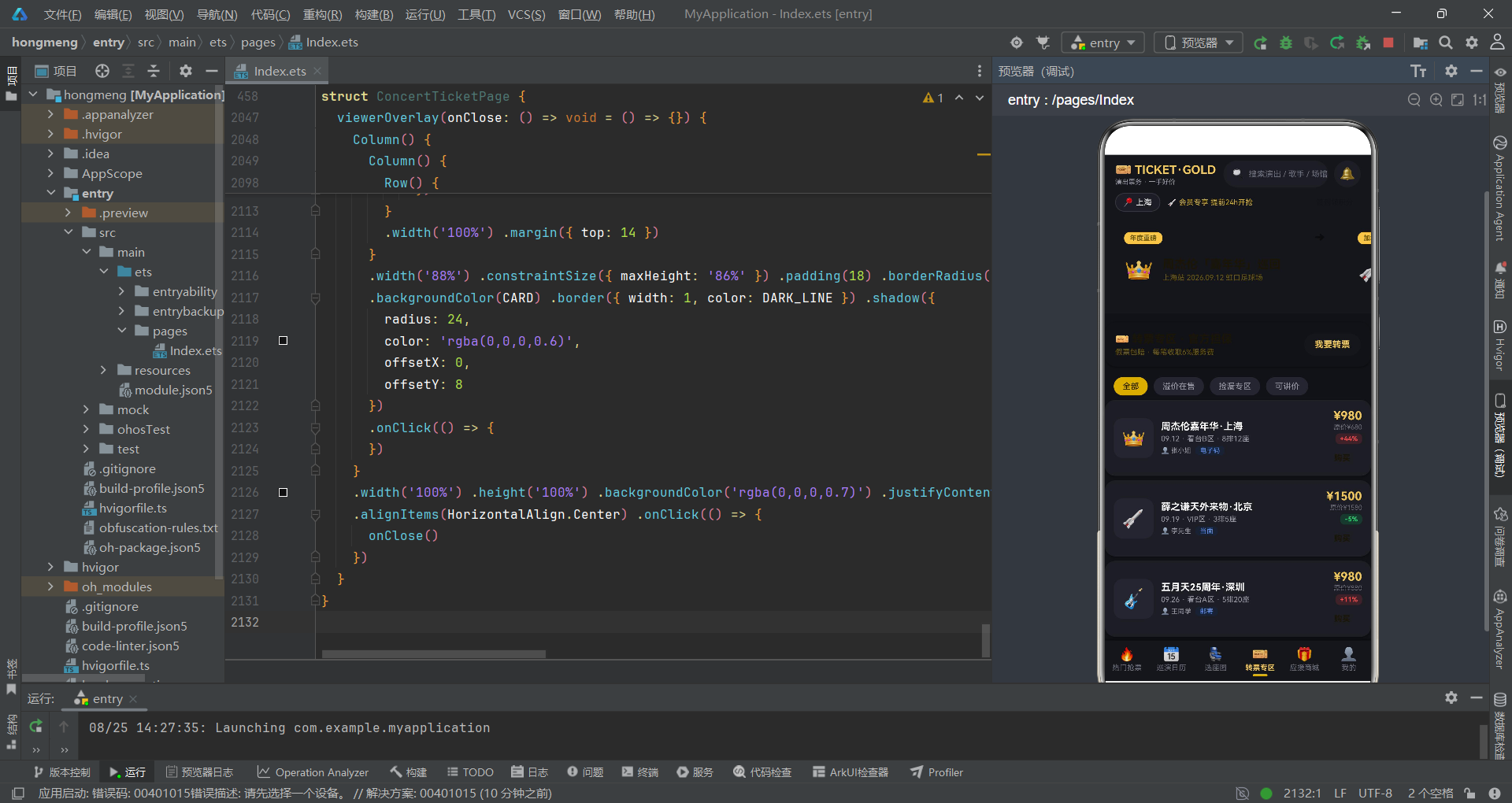
转票专区是二手票交易的入口,每张转票卡片都需要展示原价、转让价和溢价幅度。
@Builder
transferRow(t: TransferItem) {
  Row() {
    Text(t.emoji)
      .fontSize(26)
      .width(54)
      .height(54)
      .textAlign(TextAlign.Center)
      .borderRadius(12)
      .backgroundColor(CARD2)

    Column() {
      Text(t.show)
        .fontSize(13)
        .fontWeight(FontWeight.Bold)
        .fontColor(TEXT_MAIN)
        .maxLines(1)
        .textOverflow({ overflow: TextOverflow.Ellipsis })
      Text(t.date + ' · ' + t.zone + ' · ' + t.row + t.seat)
        .fontSize(10)
        .fontColor(TEXT_SUB)
        .margin({ top: 3 })
      Row() {
        Text('👤 ' + t.seller)
          .fontSize(9)
          .fontColor(TEXT_SUB)
        Text(t.delivery)
          .fontSize(9)
          .fontColor(BLUE)
          .padding({ left: 6, right: 6, top: 1, bottom: 1 })
          .borderRadius(5)
          .backgroundColor('#1A2233')
          .margin({ left: 6 })
      }
      .margin({ top: 4 })
    }
    .layoutWeight(1)
    .alignItems(HorizontalAlign.Start)
    .margin({ left: 10 })

    Column() {
      Text('¥' + t.price)
        .fontSize(16)
        .fontWeight(FontWeight.Bold)
        .fontColor(GOLD_LIGHT)
      Text('原价¥' + t.origPrice)
        .fontSize(9)
        .fontColor(TEXT_DIM)
        .margin({ top: 1 })
        .decoration({ type: TextDecorationType.LineThrough })
      Text(premiumLabel(t.price, t.origPrice))
        .fontSize(9)
        .fontWeight(FontWeight.Bold)
        .fontColor(overPrice(t.price, t.origPrice) ? RED : GREEN)
        .padding({ left: 6, right: 6, top: 2, bottom: 2 })
        .borderRadius(6)
        .backgroundColor(overPrice(t.price, t.origPrice) ? 'rgba(240,74,74,0.15)' : 'rgba(46,213,115,0.15)')
        .margin({ top: 3 })
      Text('购买')
        .fontSize(11)
        .fontWeight(FontWeight.Bold)
        .fontColor('#1A1506')
        .padding({ left: 16, right: 16, top: 6, bottom: 6 })
        .borderRadius(12)
        .margin({ top: 6 })
        .onClick(() => {
          this.gradeIndex = 2
          this.ticketCount = 1
          this.agreeProtocol = false
          this.showGrabModal = true
        })
    }
    .alignItems(HorizontalAlign.End)
    .margin({ left: 8 })
  }
  .width('100%')
  .padding(12)
  .borderRadius(14)
  .backgroundColor(CARD)
  .margin({ left: 12, right: 12, top: 6 })
  .shadow(CARD_SHADOW)
}
转票卡片的右侧信息区域展示了三层数据:当前转让价(大号金色文字)、原价(小号灰色文字配删除线效果)和溢价标签。溢价标签通过 premiumLabel 函数计算并格式化,通过 overPrice 函数判断是否溢价——溢价时使用红色背景标签,折价时使用绿色背景标签。原价使用 decoration({ type: TextDecorationType.LineThrough }) 添加删除线,这是 ArkTS 文本装饰能力的典型应用。购买按钮在点击时会将票档索引设为2(对应转票来源),然后打开抢票确认弹窗。
7.2 应援商城双列布局
应援商城页面采用了双列瀑布流布局来展示周边商品,同时上方还保留了横滑大卡区域。
@Builder
tabShop() {
  Scroll() {
    Column() {
      this.sectionTitle('✨ 应援装备 · 现场必备', '满59包邮')

      Scroll() {
        Row() {
          ForEach(SUPPORT_BIG, (s: SupportBig) => {
            this.supportCard(s)
          }, (s: SupportBig) => 'sp' + s.id)
        }
        .padding({ left: 12, right: 4 })
      }
      .scrollable(ScrollDirection.Horizontal)
      .scrollBar(BarState.Off)
      .width('100%')

      this.sectionTitle('🎁 周边好物 · 双列精选', '已售超8万件')

      Row() {
        Column() {
          ForEach(MERCH_ITEMS.filter((m: MerchItem) => m.id % 2 === 1), (m: MerchItem) => {
            this.merchCard(m)
          }, (m: MerchItem) => 'ML' + m.id)
        }
        .layoutWeight(1)
        .alignItems(HorizontalAlign.Start)

        Column().width(8)

        Column() {
          ForEach(MERCH_ITEMS.filter((m: MerchItem) => m.id % 2 === 0), (m: MerchItem) => {
            this.merchCard(m)
          }, (m: MerchItem) => 'MR' + m.id)
        }
        .layoutWeight(1)
        .alignItems(HorizontalAlign.Start)
      }
      .width('100%')
      .padding({ left: 12, right: 12, top: 8 })
      .alignItems(VerticalAlign.Top)
    }
    .width('100%')
  }
  .layoutWeight(1)
  .width('100%')
  .scrollBar(BarState.Off)
}
双列布局的实现利用了 filter 方法对商品数据进行奇偶分组——m.id % 2 === 1 的商品放在左列,m.id % 2 === 0 的商品放在右列。两列之间通过一个宽度为8的空 Column 作为间距。每列使用 layoutWeight(1) 等分宽度,alignItems(HorizontalAlign.Start) 确保商品卡片左对齐。大卡横滑区域展示的是应援装备类商品(应援棒、手幅、灯牌等),每张大卡包含众筹进度条,通过 width(s.soldPct + '%') 动态渲染进度。
八、弹窗模态系统
8.1 弹窗统一入口管理
应用采用了集中式的弹窗管理策略,通过 modalOverlay 构建器统一调度五个弹窗的显示。
@Builder
modalOverlay(onClose: () => void) {
  if (this.showGrabModal) {
    this.grabOverlay(() => {
      this.showGrabModal = false
    })
  } else if (this.showSeatModal) {
    this.seatOverlay(() => {
      this.showSeatModal = false
    })
  } else if (this.showPublishModal) {
    this.publishOverlay(() => {
      this.showPublishModal = false
    })
  } else if (this.showCancelModal) {
    this.cancelOverlay(() => {
      this.showCancelModal = false
    })
  } else if (this.showViewerModal) {
    this.viewerOverlay(() => {
      this.showViewerModal = false
    })
  }
}
这种 if-else if 链式判断确保了同一时刻只有一个弹窗处于显示状态。每个弹窗构建器都接收一个 onClose 回调函数,当用户关闭弹窗时(点击遮罩或关闭按钮),对应的布尔状态被设为 false,从而触发条件渲染的重新评估并移除弹窗。这种设计模式的优势在于状态管理清晰、弹窗切换流畅,避免了多个弹窗叠加导致的 z-index 层级混乱问题。
8.2 抢票确认弹窗
抢票确认弹窗是应用中功能最复杂的模态组件,它集成了票档选择、数量控制、金额计算、协议确认和支付按钮。
@Builder
grabOverlay(onClose: () => void = () => {}) {
  Column() {
    Column() {
      Row() {
        Column()
          .width(42)
          .height(4)
          .borderRadius(2)
          .backgroundColor('#3A3F47')
      }
      .width('100%')
      .justifyContent(FlexAlign.Center)
      .padding({ top: 10 })

      Row() {
        Text('🎫 确认抢票')
          .fontSize(17)
          .fontWeight(FontWeight.Bold)
          .fontColor(TEXT_MAIN)
        Column().layoutWeight(1)
        this.closeBtn(() => {
          onClose()
        })
      }
      .width('100%')
      .padding({ left: 16, right: 16, top: 10 })

      ForEach(TICKET_GRADES, (g: TicketGrade, i: number) => {
        Row() {
          Column() {
            Text(g.name)
              .fontSize(13)
              .fontWeight(FontWeight.Bold)
              .fontColor(this.gradeIndex === i ? GOLD_LIGHT : TEXT_MAIN)
            Text(g.soldOut ? '已售罄' : '余票 ' + g.stock + ' 张')
              .fontSize(9)
              .fontColor(g.soldOut ? RED : TEXT_SUB)
              .margin({ top: 3 })
          }
          .layoutWeight(1)
          .alignItems(HorizontalAlign.Start)

          Text('¥' + g.price)
            .fontSize(15)
            .fontWeight(FontWeight.Bold)
            .fontColor(this.gradeIndex === i ? GOLD_LIGHT : TEXT_SUB)
            .margin({ right: 8 })

          Column()
            .width(18)
            .height(18)
            .borderRadius(9)
            .border({ width: 2, color: this.gradeIndex === i ? GOLD : DARK_LINE })
            .backgroundColor(this.gradeIndex === i ? GOLD : 'rgba(0,0,0,0)')
        }
        .width('100%')
        .padding(12)
        .borderRadius(12)
        .backgroundColor(this.gradeIndex === i ? '#2A2414' : CARD2)
        .border({ width: 1, color: this.gradeIndex === i ? GOLD : DIVIDER })
        .margin({ top: 6 })
        .onClick(() => {
          if (!g.soldOut) {
            this.gradeIndex = i
          }
        })
      }, (g: TicketGrade) => 'tg' + g.id)

      Row() {
        Text('实付金额')
          .fontSize(12)
          .fontColor(TEXT_MAIN)
        Column().layoutWeight(1)
        Text('¥' + TICKET_GRADES[this.gradeIndex].price * this.ticketCount)
          .fontSize(22)
          .fontWeight(FontWeight.Bold)
          .fontColor(GOLD_LIGHT)
      }
      .width('100%')
      .padding(12)
      .borderRadius(12)
      .backgroundColor(CARD2)

      Text(this.agreeProtocol ? '立即支付 ¥' + TICKET_GRADES[this.gradeIndex].price * this.ticketCount : '请先勾选购票协议')
        .fontSize(15)
        .fontWeight(FontWeight.Bold)
        .fontColor(this.agreeProtocol ? '#1A1506' : TEXT_DIM)
        .width('100%')
        .textAlign(TextAlign.Center)
        .padding({ top: 13, bottom: 13 })
        .borderRadius(24)
        .margin({ top: 14, bottom: 20 })
        .onClick(() => {
          if (this.agreeProtocol) {
            this.showGrabModal = false
          }
        })
    }
    .width('100%')
    .height('82%')
    .backgroundColor(CARD)
    .borderRadius({ topLeft: 24, topRight: 24 })
  }
  .width('100%')
  .height('100%')
  .backgroundColor('rgba(0,0,0,0.68)')
  .justifyContent(FlexAlign.End)
}
弹窗从底部滑出,高度占据屏幕的82%。顶部有一个小拖拽条作为视觉装饰。票档选择区域通过 ForEach 渲染4个票档(看台B区¥380、看台A区¥680、VIP区¥1280、内场站席¥1980),每个票档行包含名称、余票信息、价格和单选指示器。选中的票档行背景变为深金色 #2A2414,边框变为金色,文字也变为亮金色。已售罄的票档显示红色"已售罄"文案,且点击时不响应。实付金额通过 TICKET_GRADES[this.gradeIndex].price * this.ticketCount 实时计算。支付按钮的文案根据协议勾选状态动态变化——已勾选时显示金额并启用深色背景,未勾选时显示提示文案并使用灰色背景。
8.3 票根卡片与锯齿边效果
我的票夹中的票根卡片是应用中最具创意的 UI 组件之一,它通过锯齿边效果模拟了真实门票的撕票线。
@Builder
ticketCard(t: TicketCard) {
  Stack({ alignContent: Alignment.Bottom }) {
    Column() {
      Row() {
        Column()
          .width('100%')
          .height(6)
      }
      .width('100%')
      .borderRadius({ topLeft: 14, topRight: 14 })

      Column() {
        Row() {
          Column() {
            Row() {
              Text(t.emoji)
                .fontSize(14)
              Text(t.show)
                .fontSize(14)
                .fontWeight(FontWeight.Bold)
                .fontColor(TEXT_MAIN)
                .margin({ left: 4 })
            }
            Text(t.date + ' · ' + t.venue)
              .fontSize(10)
              .fontColor(TEXT_SUB)
              .margin({ top: 4 })
          }
          .layoutWeight(1)
          .alignItems(HorizontalAlign.Start)

          Column() {
            Text('¥' + t.price)
              .fontSize(17)
              .fontWeight(FontWeight.Bold)
              .fontColor(GOLD_LIGHT)
            Text(t.status)
              .fontSize(9)
              .fontWeight(FontWeight.Bold)
              .fontColor(t.status === '已抢到' ? GREEN : t.status === '抢票中' ? RED : GOLD_LIGHT)
              .padding({ left: 7, right: 7, top: 2, bottom: 2 })
              .borderRadius(7)
              .backgroundColor(t.status === '已抢到' ? 'rgba(46,213,115,0.15)' : 'rgba(212,175,55,0.15)')
              .margin({ top: 4 })
          }
          .alignItems(HorizontalAlign.End)
        }
        .width('100%')

        Text('··· ··· ··· ··· 撕票线 ··· ··· ··· ···')
          .fontSize(8)
          .fontColor(DARK_LINE)
          .width('100%')
          .textAlign(TextAlign.Center)
          .margin({ top: 10, bottom: 6 })
      }
      .width('100%')
      .padding({ left: 14, right: 14, top: 14, bottom: 18 })
    }
    .width('100%')
    .borderRadius(14)
    .backgroundColor(CARD)
    .border({ width: 1, color: DIVIDER })

    Row() {
      ForEach(SAW_TEETH, (i: number) => {
        Column()
          .width(14)
          .height(14)
          .borderRadius(7)
          .backgroundColor(BG)
          .margin({ left: 2, right: 2 })
      }, (i: number) => 'saw' + i)
    }
    .width('100%')
    .justifyContent(FlexAlign.Center)
    .offset({ y: 7 })
  }
  .width('100%')
  .margin({ left: 12, right: 12, top: 8 })
}
票根卡片使用 Stack 作为根容器,内部包含主体卡片和锯齿边两层。主体卡片展示了演出信息、日期场馆、票价和状态标签。状态标签的颜色根据状态动态变化——"已抢到"为绿色、"抢票中"为红色、其他状态为金色。锯齿边通过 ForEach 渲染22个圆形 Column(直径14px)来模拟门票的撕票线效果,每个圆形使用页面背景色 BG 填充,通过 offset({ y: 7 }) 向下偏移使其一半覆盖在卡片底部、一半露在外部,形成了真实的半圆缺口视觉效果。"撕票线"文字以点号装饰居中显示在卡片中部,进一步增强了门票的真实感。
九、底部导航与消费统计
9.1 底部 Tab 栏实现
底部 Tab 栏是应用导航的核心组件,它通过状态驱动的样式切换实现了选中态的视觉反馈。
@Builder
bottomTabs() {
  Row() {
    ForEach(['热门抢票', '巡演日历', '选座图', '转票专区', '应援商城', '我的'], (lb: string, i: number) => {
      Column() {
        Text(['🔥', '📅', '💺', '🎫', '🎁', '👤'][i])
          .fontSize(18)
        Text(lb)
          .fontSize(10)
          .fontColor(this.currentTab === i ? GOLD_LIGHT : TEXT_DIM)
          .fontWeight(this.currentTab === i ? FontWeight.Bold : FontWeight.Normal)
          .margin({ top: 2 })
        Column()
          .width(this.currentTab === i ? 20 : 0)
          .height(3)
          .borderRadius(2)
          .backgroundColor(GOLD)
          .margin({ top: 3 })
      }
      .layoutWeight(1)
      .alignItems(HorizontalAlign.Center)
      .padding({ top: 8, bottom: 6 })
      .onClick(() => {
        this.currentTab = i
      })
    }, (lb: string, i: number) => lb + i)
  }
  .width('100%')
  .backgroundColor('#15161B')
  .shadow({
    radius: 10,
    color: 'rgba(0,0,0,0.5)',
    offsetX: 0,
    offsetY: -4
  })
}
Tab 栏的每个项包含图标 Emoji、文字标签和指示器三个元素。选中态的视觉反馈体现在三个方面:文字颜色变为亮金色 GOLD_LIGHT、字重变为粗体、底部出现一条宽度为20px的金色指示条。未选中时指示条的宽度为0,实现了平滑的出现/消失效果。阴影配置的 offsetY: -4 使阴影投射向上,增强了 Tab 栏浮在内容上方的层次感。
9.2 观演花费柱状图
我的页面中的消费统计区域通过纯 UI 组件实现了一个柱状图,直观展示了用户近5个月的观演花费趋势。
Row() {
  ForEach(SPEND_ITEMS, (s: SpendItem) => {
    Column() {
      Text('¥' + s.amount)
        .fontSize(8)
        .fontColor(TEXT_SUB)
      Column() {
        Column()
          .width('100%')
          .height(barHeight(s.amount))
          .borderRadius({ topLeft: 4, topRight: 4 })
      }
      .width(20)
      .height(120)
      .justifyContent(FlexAlign.End)
      .margin({ top: 4 })

      Text(s.show)
        .fontSize(8)
        .fontColor(TEXT_SUB)
        .margin({ top: 4 })
        .maxLines(1)
      Text(s.month)
        .fontSize(8)
        .fontColor(TEXT_DIM)
        .margin({ top: 1 })
    }
    .layoutWeight(1)
    .alignItems(HorizontalAlign.Center)
  }, (s: SpendItem) => 'spend' + s.id)
}
.width('100%')
.margin({ top: 12 })
柱状图的实现原理非常巧妙:外层 Column 作为柱子容器,固定高度120px并设置 justifyContent(FlexAlign.End) 使内容底部对齐。内层 Column 作为实际柱子,高度通过 barHeight(s.amount) 函数计算得出(将金额除以2980再乘以120,使最大金额对应满高柱子)。柱子顶部使用 borderRadius({ topLeft: 4, topRight: 4 }) 添加圆角。每根柱子上方显示金额,下方显示演出名称和月份。这种纯声明式 UI 方式实现柱状图,无需引入任何图表库,展示了 ArkTS 在数据可视化方面的灵活性。
技术对比总结
| 技术维度 | 本应用实现方案 | 传统 Web 实现方案 | 优势对比 |
|---|---|---|---|
| 状态管理 | @State 装饰器,自动驱动 UI 更新 | React/Vue 状态管理需额外库 | 更轻量,编译期类型检查 |
| UI 构建 | 声明式 @Builder 链式调用 | JSX 模板或 HTML+CSS | 类型安全,无运行时模板解析开销 |
| 弹窗系统 | modalOverlay 集中式条件渲染 | 第三方 Modal 库或自行管理 | 状态清晰,无 z-index 冲突 |
| 横滑列表 | Scroll+Row+ForEach 原生组件 | CSS overflow+JS 事件 | 原生滚动性能更优 |
| 柱状图 | 纯 Column 组件声明式构建 | ECharts/Chart.js 图表库 | 零依赖,包体积更小 |
| 座位网格 | ForEach+条件渲染动态生成 | DOM 操作或虚拟列表 | 自动 diff 更新,无需手动操作 DOM |
| 颜色主题 | 全局常量令牌统一管理 | CSS 变量或预处理器 | 编译期检查,无运行时解析 |
| 点击反馈 | onClick 直接绑定组件 | addEventListener 事件监听 | 声明式绑定,自动移除监听 |
安装DevEco Studio程序

选择目标安装目录:

设置环境变量,但是需要重启一下:

新建一个空白模板:

设置API为24的模板项目:
初始化项目,自动下载相关依赖:

完整代码:
// 场景:演唱会/音乐节/巡演门票抢购、看台选座、转票专区、现场应援周边
// 布局特色:黑金舞台风 + 倒计时抢购条 + 大卡海报横滑 + 巡演日历 + 座位网格选座 + 转票溢价标签 + 应援商城双列 + 票夹票根 + 观演花费柱状图
// 6个底部Tab:热门抢票 / 巡演日历 / 选座图 / 转票专区 / 应援商城 / 我的
// ==================== 数据结构 ====================
interface BannerItem {
id: number
title: string
sub: string
tag: string
emoji: string
}
interface HotShow {
id: number
artist: string
name: string
city: string
date: string
venue: string
price: string
tag: string
emoji: string
soldText: string
}
interface CountdownShow {
id: number
name: string
city: string
date: string
hh: number
mm: number
ss: number
soldPct: number
price: string
status: string
}
interface NormalShow {
id: number
name: string
city: string
date: string
venue: string
price: string
tag: string
}
interface TourShow {
id: number
day: number
weekday: string
name: string
city: string
venue: string
status: string
price: string
tag: string
}
interface MonthGroup {
label: string
shows: TourShow[]
}
interface SeatRow {
id: number
rowName: string
zone: string
price: number
startId: number
seatCount: number
}
interface SeatInfo {
id: number
rowName: string
seatNo: number
zone: string
price: number
}
interface TransferItem {
id: number
show: string
date: string
zone: string
row: string
seat: string
origPrice: number
price: number
seller: string
delivery: string
emoji: string
}
interface SupportBig {
id: number
name: string
desc: string
price: number
emoji: string
tag: string
soldPct: number
}
interface MerchItem {
id: number
name: string
price: number
emoji: string
tag: string
sold: string
}
interface TicketCard {
id: number
show: string
date: string
venue: string
zone: string
seat: string
price: number
status: string
emoji: string
}
interface SpendItem {
id: number
month: string
show: string
amount: number
}
interface OrderStatus {
id: number
label: string
emoji: string
count: string
}
interface TicketGrade {
id: number
name: string
price: number
stock: number
soldOut: boolean
}
interface PublishShow {
id: number
name: string
date: string
venue: string
}
interface CancelFee {
id: number
text: string
}
// ==================== 设计令牌 ====================
const BG: string = '#111217'
const CARD: string = '#1C1D24'
const CARD2: string = '#242530'
const GOLD: string = '#D4AF37'
const GOLD_LIGHT: string = '#F0C75E'
const GOLD_DEEP: string = '#A8842A'
const TEXT_MAIN: string = '#FFFFFF'
const TEXT_SUB: string = '#9A9CA8'
const TEXT_DIM: string = '#6B6E7B'
const RED: string = '#F04A4A'
const GREEN: string = '#2ED573'
const BLUE: string = '#5B8DEF'
const DIVIDER: string = '#2A2B34'
const DARK_LINE: string = '#33353F'
const CARD_SHADOW: ShadowOptions = {
radius: 8,
color: 'rgba(0,0,0,0.45)',
offsetX: 0,
offsetY: 3
}
const NO_SHADOW: ShadowOptions = {
radius: 0,
color: 'rgba(0,0,0,0)',
offsetX: 0,
offsetY: 0
}
const SEAT_GLOW: ShadowOptions = {
radius: 8,
color: 'rgba(240,199,94,0.8)',
offsetX: 0,
offsetY: 0
}
// ==================== 全局纯函数 ====================
function pad2(n: number): string {
if (n < 10) {
return '0' + n
}
return '' + n
}
function zoneColor(z: string): string {
if (z === 'VIP') {
return '#5C4B1F'
}
if (z === '看台A') {
return '#2E3A5C'
}
return '#453455'
}
function zoneTextColor(z: string): string {
if (z === 'VIP') {
return GOLD
}
if (z === '看台A') {
return '#8FA8E8'
}
return '#B49AE0'
}
function zoneScore(z: string): number {
if (z === 'VIP') {
return 5
}
if (z === '看台A') {
return 4
}
return 3
}
function rowSeats(r: SeatRow): SeatInfo[] {
let arr: SeatInfo[] = []
for (let i = 0; i < r.seatCount; i++) {
arr.push({
id: r.startId + i,
rowName: r.rowName,
seatNo: i + 1,
zone: r.zone,
price: r.price
})
}
return arr
}
function premiumPct(p: number, o: number): number {
return Math.round((p / o - 1) * 100)
}
function premiumLabel(p: number, o: number): string {
let v: number = premiumPct(p, o)
if (v > 0) {
return '+' + v + '%'
}
if (v < 0) {
return '' + v + '%'
}
return '0%'
}
function overPrice(p: number, o: number): boolean {
return p >= o
}
function barHeight(v: number): number {
return v / 2980 * 120
}
// ==================== 静态数据 ====================
const CITY_LIST: string[] = ['上海', '北京', '广州', '深圳', '成都', '杭州']
const STAR_KEYS: number[] = [1, 2, 3, 4, 5]
const SAW_TEETH: number[] = [1, 2, 3, 4, 5, 6, 7, 8, 9, 10, 11, 12, 13, 14, 15, 16, 17, 18, 19, 20, 21, 22]
const BANNERS: BannerItem[] = [
{ id: 1, title: '周杰伦「嘉年华」巡回', sub: '上海站 2026.09.12 虹口足球场', tag: '年度重磅', emoji: '👑' },
{ id: 2, title: '薛之谦「天外来物」巡演', sub: '北京站 2026.09.19 工人体育场', tag: '加场开票', emoji: '🚀' },
{ id: 3, title: '五月天「回到那一天」', sub: '25周年巡回 · 深圳 09.26', tag: '最后抢票', emoji: '🎸' },
{ id: 4, title: '邓紫棋 I AM GLORIA', sub: '成都站 2026.10.03 新场次', tag: '首场预售', emoji: '💜' }
]
const HOT_SHOWS: HotShow[] = [
{ id: 1, artist: '周杰伦', name: '嘉年华世界巡回演唱会', city: '上海', date: '09.12', venue: '上海虹口足球场', price: '¥380-1980', tag: '即将开抢', emoji: '👑', soldText: '想看 486.2万人' },
{ id: 2, artist: '薛之谦', name: '天外来物巡回演唱会', city: '北京', date: '09.19', venue: '北京工人体育场', price: '¥380-1680', tag: '加场开票', emoji: '🚀', soldText: '想看 312.5万人' },
{ id: 3, artist: '五月天', name: '回到那一天25周年巡回', city: '深圳', date: '09.26', venue: '深圳大运中心', price: '¥355-1855', tag: '最后抢票', emoji: '🎸', soldText: '已售 92%' },
{ id: 4, artist: '林俊杰', name: 'JJ20世界巡回演唱会', city: '广州', date: '09.30', venue: '广州天河体育场', price: '¥480-1880', tag: '已售罄', emoji: '🎤', soldText: '秒罄 · 可蹲转票' },
{ id: 5, artist: '邓紫棋', name: 'I AM GLORIA巡回演唱会', city: '成都', date: '10.03', venue: '成都凤凰山体育公园', price: '¥320-1580', tag: '新场次', emoji: '💜', soldText: '想看 198.7万人' },
{ id: 6, artist: '陈奕迅', name: 'FEAR AND DREAMS巡回', city: '杭州', date: '10.10', venue: '杭州奥体中心', price: '¥580-2280', tag: '即将开抢', emoji: '🌙', soldText: '想看 275.3万人' },
{ id: 7, artist: '华晨宇', name: '火星演唱会', city: '长沙', date: '10.17', venue: '长沙贺龙体育场', price: '¥380-1280', tag: '开票预警', emoji: '🔥', soldText: '想看 121.6万人' },
{ id: 8, artist: '张杰', name: '未·LIVE巡回演唱会', city: '南京', date: '10.24', venue: '南京奥体中心', price: '¥380-1680', tag: '热度飙升', emoji: '🪐', soldText: '想看 167.4万人' }
]
const COUNTDOWN_SHOWS: CountdownShow[] = [
{ id: 1, name: '周杰伦嘉年华·上海', city: '上海', date: '09.12 10:00', hh: 2, mm: 15, ss: 37, soldPct: 62, price: '¥380起', status: '即将开抢' },
{ id: 2, name: '陈奕迅巡演·杭州', city: '杭州', date: '09.13 20:00', hh: 1, mm: 48, ss: 22, soldPct: 18, price: '¥580起', status: '倒计时' },
{ id: 3, name: '邓紫棋巡演·成都', city: '成都', date: '09.15 12:00', hh: 5, mm: 9, ss: 51, soldPct: 40, price: '¥320起', status: '倒计时' },
{ id: 4, name: '五月天25周年·深圳', city: '深圳', date: '09.16 19:00', hh: 3, mm: 27, ss: 5, soldPct: 55, price: '¥355起', status: '最后加场' },
{ id: 5, name: '张杰未LIVE·南京', city: '南京', date: '09.20 11:00', hh: 8, mm: 33, ss: 44, soldPct: 25, price: '¥380起', status: '开票预告' }
]
const NORMAL_SHOWS: NormalShow[] = [
{ id: 1, name: '毛不易·幼鸟指南巡回演唱会', city: '杭州', date: '11.07 周六', venue: '杭州奥体中心', price: '¥380起', tag: '即将开票' },
{ id: 2, name: '李荣浩·纵横四海巡回演唱会', city: '广州', date: '11.14 周六', venue: '广州体育馆', price: '¥280起', tag: '想看超10万' },
{ id: 3, name: '王源·客厅狂欢巡回演唱会', city: '上海', date: '11.21 周六', venue: '梅赛德斯奔驰文化中心', price: '¥480起', tag: '开票预告' },
{ id: 4, name: '张学友·60+巡回演唱会', city: '北京', date: '11.28 周六', venue: '北京国家体育场', price: '¥480起', tag: '经典回归' },
{ id: 5, name: '汪苏泷·十万伏特巡回演唱会', city: '成都', date: '11.30 周一', venue: '成都金融城演艺中心', price: '¥380起', tag: '预售中' },
{ id: 6, name: '凤凰传奇·吉祥如意巡回', city: '深圳', date: '12.05 周六', venue: '深圳湾体育中心', price: '¥280起', tag: '全民狂欢' },
{ id: 7, name: '蔡依林·Ugly Beauty巡回', city: '武汉', date: '12.12 周六', venue: '武汉体育中心', price: '¥390起', tag: '补仓开票' },
{ id: 8, name: '张信哲·未来式2.0巡回', city: '长沙', date: '12.19 周六', venue: '湖南国际会展中心', price: '¥280起', tag: '情怀专场' },
{ id: 9, name: '刘若英·飞行日巡回演唱会', city: '上海', date: '12.26 周六', venue: '上海东方体育中心', price: '¥380起', tag: '冬日温暖' },
{ id: 10, name: '周深·9.29Hz巡回演唱会', city: '广州', date: '01.03 周六', venue: '广州大学城体育中心', price: '¥380起', tag: '年度期待' }
]
const TOUR_MONTHS: MonthGroup[] = [
{
label: '2026年9月',
shows: [
{ id: 1, day: 12, weekday: '周六', name: '周杰伦·嘉年华巡回', city: '上海', venue: '虹口足球场', status: '已开票', price: '¥380-1980', tag: '热销' },
{ id: 2, day: 13, weekday: '周日', name: '陈奕迅·FEAR AND DREAMS', city: '杭州', venue: '杭州奥体中心', status: '即将开票', price: '¥580-2280', tag: '想看' },
{ id: 3, day: 19, weekday: '周六', name: '薛之谦·天外来物', city: '北京', venue: '北京工人体育场', status: '已售罄', price: '¥380-1680', tag: '缺货' },
{ id: 4, day: 20, weekday: '周日', name: '邓紫棋·I AM GLORIA', city: '成都', venue: '凤凰山体育公园', status: '即将开票', price: '¥320-1580', tag: '加场' },
{ id: 5, day: 26, weekday: '周六', name: '五月天·回到那一天', city: '深圳', venue: '深圳大运中心', status: '最后抢票', price: '¥355-1855', tag: '抢购' },
{ id: 6, day: 30, weekday: '周三', name: '林俊杰·JJ20巡回', city: '广州', venue: '广州天河体育场', status: '已售罄', price: '¥480-1880', tag: '秒罄' }
]
},
{
label: '2026年10月',
shows: [
{ id: 7, day: 3, weekday: '周六', name: '邓紫棋·I AM GLORIA', city: '成都', venue: '凤凰山体育公园', status: '已开票', price: '¥320-1580', tag: '返场' },
{ id: 8, day: 10, weekday: '周六', name: '陈奕迅·FEAR AND DREAMS', city: '杭州', venue: '杭州奥体中心', status: '已开票', price: '¥580-2280', tag: '返场' },
{ id: 9, day: 17, weekday: '周六', name: '华晨宇·火星演唱会', city: '长沙', venue: '长沙贺龙体育场', status: '即将开票', price: '¥380-1280', tag: '期待' },
{ id: 10, day: 24, weekday: '周六', name: '张杰·未LIVE巡回', city: '南京', venue: '南京奥体中心', status: '即将开票', price: '¥380-1680', tag: '期待' },
{ id: 11, day: 31, weekday: '周六', name: '汪苏泷·十万伏特', city: '成都', venue: '成都金融城演艺中心', status: '已开票', price: '¥380-980', tag: '预售' }
]
},
{
label: '2026年11月',
shows: [
{ id: 12, day: 7, weekday: '周六', name: '毛不易·幼鸟指南', city: '杭州', venue: '杭州奥体中心', status: '即将开票', price: '¥380-1280', tag: '期待' },
{ id: 13, day: 14, weekday: '周六', name: '李荣浩·纵横四海', city: '广州', venue: '广州体育馆', status: '已开票', price: '¥280-1080', tag: '预售' },
{ id: 14, day: 21, weekday: '周六', name: '王源·客厅狂欢', city: '上海', venue: '梅赛德斯奔驰文化中心', status: '开票预告', price: '¥480-1680', tag: '预告' },
{ id: 15, day: 28, weekday: '周六', name: '张学友·60+巡回', city: '北京', venue: '北京国家体育场', status: '已开票', price: '¥480-2280', tag: '热销' }
]
}
]
const TRANSFER_ITEMS: TransferItem[] = [
{ id: 1, show: '周杰伦嘉年华·上海', date: '09.12', zone: '看台B区', row: '8排', seat: '12座', origPrice: 680, price: 980, seller: '张小姐', delivery: '电子码', emoji: '👑' },
{ id: 2, show: '薛之谦天外来物·北京', date: '09.19', zone: 'VIP区', row: '3排', seat: '5座', origPrice: 1580, price: 1500, seller: '李先生', delivery: '当面', emoji: '🚀' },
{ id: 3, show: '五月天25周年·深圳', date: '09.26', zone: '看台A区', row: '5排', seat: '20座', origPrice: 880, price: 980, seller: '王同学', delivery: '邮寄', emoji: '🎸' },
{ id: 4, show: '林俊杰JJ20·广州', date: '09.30', zone: '看台B区', row: '12排', seat: '8座', origPrice: 480, price: 450, seller: '陈先生', delivery: '电子码', emoji: '🎤' },
{ id: 5, show: '邓紫棋巡演·成都', date: '10.03', zone: '看台A区', row: '6排', seat: '15座', origPrice: 980, price: 1200, seller: '赵小姐', delivery: '当面', emoji: '💜' },
{ id: 6, show: '陈奕迅巡演·杭州', date: '10.10', zone: 'VIP区', row: '2排', seat: '6座', origPrice: 1980, price: 1980, seller: '孙女士', delivery: '电子码', emoji: '🌙' },
{ id: 7, show: '华晨宇火星·长沙', date: '10.17', zone: '看台B区', row: '15排', seat: '3座', origPrice: 380, price: 350, seller: '刘同学', delivery: '邮寄', emoji: '🔥' },
{ id: 8, show: '张杰未LIVE·南京', date: '10.24', zone: '看台A区', row: '9排', seat: '11座', origPrice: 780, price: 900, seller: '周先生', delivery: '电子码', emoji: '🪐' },
{ id: 9, show: '五月天25周年·深圳', date: '09.26', zone: 'VIP区', row: '5排', seat: '2座', origPrice: 1580, price: 1700, seller: '阿杰', delivery: '当面', emoji: '🎸' },
{ id: 10, show: '周杰伦嘉年华·上海', date: '09.12', zone: '看台A区', row: '3排', seat: '18座', origPrice: 1280, price: 1250, seller: '小K', delivery: '邮寄', emoji: '👑' }
]
const SUPPORT_BIG: SupportBig[] = [
{ id: 1, name: '应援棒·嘉年华限定', desc: '周杰伦演唱会官方应援棒 旗舰款', price: 129, emoji: '✨', tag: '爆款', soldPct: 86 },
{ id: 2, name: '定制手幅·五月天25周年', desc: '荧光布材质 大尺寸 双面印制', price: 39, emoji: '🖐️', tag: '热卖', soldPct: 72 },
{ id: 3, name: '应援灯牌·LED可定制', desc: '支持姓名定制 双面显示 超长续航', price: 59, emoji: '💡', tag: '新款', soldPct: 45 },
{ id: 4, name: '纪念徽章·巡演套装', desc: '6枚金属珐琅徽章 收藏级做工', price: 89, emoji: '🏅', tag: '收藏', soldPct: 30 },
{ id: 5, name: '应援T恤·巡演同款', desc: '情侣款应援文化衫 纯棉亲肤', price: 199, emoji: '👕', tag: '预售', soldPct: 58 }
]
const MERCH_ITEMS: MerchItem[] = [
{ id: 1, name: '夜光应援手环(2支装)', price: 15, emoji: '🎗️', tag: '夜光', sold: '已售1.2万' },
{ id: 2, name: '应援贴纸套装', price: 9.9, emoji: '🎨', tag: '特价', sold: '已售8600' },
{ id: 3, name: '定制应援旗', price: 35, emoji: '🚩', tag: '定制', sold: '已售3200' },
{ id: 4, name: '演唱会高清望远镜', price: 45, emoji: '🔭', tag: '看台神器', sold: '已售2100' },
{ id: 5, name: '镭射应援卡套装', price: 19.9, emoji: '💳', tag: '限定', sold: '已售5400' },
{ id: 6, name: '应援发箍·LED', price: 25, emoji: '👑', tag: '夜场必备', sold: '已售6800' },
{ id: 7, name: '定制荧光棒', price: 29.9, emoji: '🪄', tag: '爆款', sold: '已售1.1万' },
{ id: 8, name: '巡演海报收藏版', price: 49, emoji: '🖼️', tag: '收藏', sold: '已售1900' },
{ id: 9, name: '应援丝带', price: 12.9, emoji: '🎀', tag: '特价', sold: '已售7300' },
{ id: 10, name: '电池收纳盒套装', price: 18, emoji: '🔋', tag: '实用', sold: '已售4200' }
]
const TICKET_CARDS: TicketCard[] = [
{ id: 1, show: '周杰伦·嘉年华巡回', date: '2026.09.12 19:30', venue: '上海虹口足球场', zone: '看台A区', seat: '3排15座', price: 880, status: '待核销', emoji: '👑' },
{ id: 2, show: '薛之谦·天外来物', date: '2026.09.19 19:30', venue: '北京工人体育场', zone: 'VIP区', seat: '2排8座', price: 1580, status: '已抢到', emoji: '✅' },
{ id: 3, show: '五月天·回到那一天', date: '2026.09.26 19:00', venue: '深圳大运中心', zone: '看台B区', seat: '6排10座', price: 480, status: '已转出', emoji: '🔁' },
{ id: 4, show: '林俊杰·JJ20巡回', date: '2026.09.30 20:00', venue: '广州天河体育场', zone: '看台A区', seat: '8排22座', price: 780, status: '已使用', emoji: '🎵' },
{ id: 5, show: '邓紫棋·I AM GLORIA', date: '2026.10.03 19:30', venue: '成都凤凰山公园', zone: 'VIP区', seat: '1排6座', price: 1680, status: '抢票中', emoji: '⏳' },
{ id: 6, show: '陈奕迅·FEAR AND DREAMS', date: '2026.10.10 19:30', venue: '杭州奥体中心', zone: '看台B区', seat: '9排5座', price: 580, status: '已退票', emoji: '↩️' }
]
const SPEND_ITEMS: SpendItem[] = [
{ id: 1, month: '09月', show: '张杰·长沙', amount: 2600 },
{ id: 2, month: '08月', show: '邓紫棋·武汉', amount: 1900 },
{ id: 3, month: '07月', show: '五月天·北京', amount: 1680 },
{ id: 4, month: '06月', show: '薛之谦·成都', amount: 2200 },
{ id: 5, month: '05月', show: '周杰伦·上海', amount: 2980 }
]
const ORDER_STATUS: OrderStatus[] = [
{ id: 1, label: '待付款', emoji: '🕐', count: '2' },
{ id: 2, label: '电子票', emoji: '📱', count: '4' },
{ id: 3, label: '待核销', emoji: '🎫', count: '1' },
{ id: 4, label: '转出中', emoji: '🔁', count: '3' },
{ id: 5, label: '退款/售后', emoji: '↩️', count: '1' },
{ id: 6, label: '全部订单', emoji: '📦', count: '11' }
]
const TICKET_GRADES: TicketGrade[] = [
{ id: 1, name: '看台B区', price: 380, stock: 0, soldOut: true },
{ id: 2, name: '看台A区', price: 680, stock: 142, soldOut: false },
{ id: 3, name: 'VIP区', price: 1280, stock: 36, soldOut: false },
{ id: 4, name: '内场站席', price: 1980, stock: 8, soldOut: false }
]
const PUBLISH_SHOWS: PublishShow[] = [
{ id: 1, name: '周杰伦嘉年华·上海', date: '09.12', venue: '上海虹口足球场' },
{ id: 2, name: '五月天25周年·深圳', date: '09.26', venue: '深圳大运中心' },
{ id: 3, name: '邓紫棋巡演·成都', date: '10.03', venue: '成都凤凰山体育公园' },
{ id: 4, name: '陈奕迅巡演·杭州', date: '10.10', venue: '杭州奥体中心' }
]
const CANCEL_FEES: CancelFee[] = [
{ id: 1, text: '距开演 >30天:收取票面价 5% 手续费' },
{ id: 2, text: '距开演 7-30天:收取票面价 15% 手续费' },
{ id: 3, text: '距开演 ≤7天:不支持退票,仅可转票' },
{ id: 4, text: '退票款项将在 3-7 个工作日原路退回' }
]
const SEAT_ROWS: SeatRow[] = [
{ id: 1, rowName: 'A', zone: 'VIP', price: 980, startId: 1, seatCount: 10 },
{ id: 2, rowName: 'B', zone: 'VIP', price: 980, startId: 11, seatCount: 10 },
{ id: 3, rowName: 'C', zone: 'VIP', price: 980, startId: 21, seatCount: 10 },
{ id: 4, rowName: 'D', zone: '看台A', price: 680, startId: 31, seatCount: 12 },
{ id: 5, rowName: 'E', zone: '看台A', price: 680, startId: 43, seatCount: 12 },
{ id: 6, rowName: 'F', zone: '看台A', price: 680, startId: 55, seatCount: 12 },
{ id: 7, rowName: 'G', zone: '看台B', price: 380, startId: 67, seatCount: 12 },
{ id: 8, rowName: 'H', zone: '看台B', price: 380, startId: 79, seatCount: 12 },
{ id: 9, rowName: 'I', zone: '看台B', price: 380, startId: 91, seatCount: 12 }
]
const DEFAULT_SEAT: SeatInfo = { id: 1, rowName: 'A', seatNo: 1, zone: 'VIP', price: 980 }
// ==================== 页面主体 ====================
@Entry
@Component
struct ConcertTicketPage {
@State currentTab: number = 0
@State cityIndex: number = 0
@State chipIndex: number = 0
@State transChip: number = 0
@State showGrabModal: boolean = false
@State showSeatModal: boolean = false
@State showPublishModal: boolean = false
@State showCancelModal: boolean = false
@State showViewerModal: boolean = false
@State gradeIndex: number = 0
@State ticketCount: number = 1
@State agreeProtocol: boolean = false
@State selectedSeatId: number = -1
@State selSeat: SeatInfo = DEFAULT_SEAT
@State pubShowIndex: number = 0
@State pubPriceStr: string = '980'
@State pubDelivery: number = 0
@State viewerName: string = '张小明'
@State viewerId: string = '310101********1234'
@State viewerPhone: string = '138****6688'
build() {
Stack({ alignContent: Alignment.Bottom }) {
Column() {
this.topHeader()
Column() {
if (this.currentTab === 0) {
this.tabHot()
} else if (this.currentTab === 1) {
this.tabCalendar()
} else if (this.currentTab === 2) {
this.tabSeat()
} else if (this.currentTab === 3) {
this.tabTransfer()
} else if (this.currentTab === 4) {
this.tabShop()
} else {
this.tabMine()
}
}
.layoutWeight(1) .width('100%')
this.bottomTabs()
}
.width('100%') .height('100%')
if (this.showGrabModal || this.showSeatModal || this.showPublishModal || this.showCancelModal || this.showViewerModal) {
this.modalOverlay(() => {
this.showGrabModal = false
this.showSeatModal = false
this.showPublishModal = false
this.showCancelModal = false
this.showViewerModal = false
})
}
}
.width('100%') .height('100%') .backgroundColor(BG)
}
// ==================== 弹窗统一入口(modalOverlay模式) ====================
@Builder
modalOverlay(onClose: () => void) {
if (this.showGrabModal) {
this.grabOverlay(() => {
this.showGrabModal = false
})
} else if (this.showSeatModal) {
this.seatOverlay(() => {
this.showSeatModal = false
})
} else if (this.showPublishModal) {
this.publishOverlay(() => {
this.showPublishModal = false
})
} else if (this.showCancelModal) {
this.cancelOverlay(() => {
this.showCancelModal = false
})
} else if (this.showViewerModal) {
this.viewerOverlay(() => {
this.showViewerModal = false
})
}
}
// ==================== 通用小组件 ====================
@Builder
closeBtn(onClose: () => void = () => {}) {
Text('✕')
.fontSize(15) .fontColor(TEXT_SUB) .width(30) .height(30)
.textAlign(TextAlign.Center) .borderRadius(15) .backgroundColor(CARD2) .onClick(() => {
onClose()
})
}
@Builder
sectionTitle(title: string, more: string = '') {
Row() {
Column()
.width(4) .height(16) .borderRadius(2) .backgroundColor(GOLD)
.margin({ right: 6 })
Text(title)
.fontSize(15) .fontWeight(FontWeight.Bold) .fontColor(TEXT_MAIN)
Column().layoutWeight(1)
if (more !== '') {
Text(more)
.fontSize(10) .fontColor(TEXT_SUB)
}
}
.width('100%') .padding({ left: 12, right: 12, top: 14, bottom: 8 })
}
@Builder
countdownCell(v: number, label: string) {
Column() {
Text(pad2(v))
.fontSize(17) .fontWeight(FontWeight.Bold) .fontColor(GOLD_LIGHT) .width(46)
.height(36) .textAlign(TextAlign.Center) .borderRadius(6) .backgroundColor('#181920')
.border({ width: 1, color: DARK_LINE })
Text(label)
.fontSize(8) .fontColor(TEXT_DIM) .margin({ top: 3 })
}
.alignItems(HorizontalAlign.Center)
}
// ==================== 头部 ====================
@Builder
topHeader() {
Column() {
Row() {
Column() {
Row() {
Text('🎫')
.fontSize(18)
Text('TICKET·GOLD')
.fontSize(16) .fontWeight(FontWeight.Bold) .fontColor(GOLD_LIGHT) .margin({ left: 4 })
}
Text('演出票务 · 一手好价')
.fontSize(9) .fontColor(TEXT_SUB) .margin({ top: 1 })
}
.alignItems(HorizontalAlign.Start)
Row() {
Text('🔍')
.fontSize(13)
Text('搜索演出 / 歌手 / 场馆')
.fontSize(11) .fontColor(TEXT_DIM) .margin({ left: 6 })
Column().layoutWeight(1)
}
.layoutWeight(1) .height(36) .borderRadius(18) .backgroundColor(CARD)
.padding({ left: 12, right: 12 }) .margin({ left: 10 }) .onClick(() => {
this.currentTab = 0
})
Text('🔔')
.fontSize(17) .width(36) .height(36) .textAlign(TextAlign.Center)
.borderRadius(18) .backgroundColor(CARD) .margin({ left: 8 }) .onClick(() => {
this.currentTab = 5
})
}
.width('100%') .padding({ left: 14, right: 14, top: 8 })
Row() {
Text('📍 ' + CITY_LIST[this.cityIndex])
.fontSize(11) .fontColor(TEXT_MAIN) .padding({ left: 10, right: 10, top: 5, bottom: 5 }) .borderRadius(12)
.backgroundColor(CARD) .border({ width: 1, color: DARK_LINE }) .onClick(() => {
this.cityIndex = (this.cityIndex + 1) % CITY_LIST.length
})
Text('🚀 会员专享 提前24h开抢')
.fontSize(10) .fontColor(GOLD) .margin({ left: 10 })
Column().layoutWeight(1)
Text('签到领积分')
.fontSize(10) .fontColor(BG) .padding({ left: 10, right: 10, top: 5, bottom: 5 }) .borderRadius(12)
.onClick(() => {
this.showViewerModal = true
})
}
.width('100%') .padding({ left: 14, right: 14, top: 8, bottom: 8 })
Scroll() {
Row() {
ForEach(BANNERS, (b: BannerItem) => {
Column() {
Row() {
Text(b.tag)
.fontSize(9) .fontWeight(FontWeight.Bold) .fontColor('#6B5813') .padding({ left: 8, right: 8, top: 3, bottom: 3 })
.borderRadius(8) .backgroundColor(GOLD_LIGHT)
Column().layoutWeight(1)
Text('➜')
.fontSize(14) .fontColor('rgba(0,0,0,0.45)')
}
.width('100%')
Row() {
Text(b.emoji)
.fontSize(32)
Column() {
Text(b.title)
.fontSize(16) .fontWeight(FontWeight.Bold) .fontColor('#1A1506') .maxLines(1)
Text(b.sub)
.fontSize(10) .fontColor('#6B5813') .margin({ top: 3 }) .maxLines(1)
}
.alignItems(HorizontalAlign.Start) .layoutWeight(1) .margin({ left: 12 })
}
.width('100%') .margin({ top: 12 })
}
.width(300) .height(118) .padding(14) .borderRadius(16)
.margin({ left: 12, right: 4 }) .onClick(() => {
this.showGrabModal = true
})
}, (b: BannerItem) => 'bn' + b.id)
}
.padding({ top: 2, bottom: 10, right: 8 })
}
.scrollable(ScrollDirection.Horizontal) .scrollBar(BarState.Off) .width('100%')
}
.width('100%') .backgroundColor('#15161B')
}
// ==================== Tab0 热门抢票 ====================
@Builder
tabHot() {
Scroll() {
Column() {
// 倒计时抢购条
this.sectionTitle('⏰ 整点秒杀 · 倒计时抢购', '每场仅20分钟')
Scroll() {
Row() {
ForEach(COUNTDOWN_SHOWS, (c: CountdownShow) => {
this.countdownCard(c)
}, (c: CountdownShow) => 'cd' + c.id)
}
.padding({ left: 12, right: 4 })
}
.scrollable(ScrollDirection.Horizontal) .scrollBar(BarState.Off) .width('100%')
// 演出分类
Row() {
ForEach(['全部', '演唱会', '音乐节', '巡演', '音乐剧'], (c: string, i: number) => {
Text(c)
.fontSize(11) .fontColor(this.chipIndex === i ? '#1A1506' : TEXT_SUB) .padding({ left: 12, right: 12, top: 6, bottom: 6 }) .borderRadius(14)
.backgroundColor(this.chipIndex === i ? GOLD : CARD2) .margin({ right: 8 }) .onClick(() => {
this.chipIndex = i
})
}, (c: string) => 'chip' + c)
}
.width('100%') .padding({ left: 12, right: 12, top: 14 })
// 大卡横滑
Scroll() {
Row() {
ForEach(HOT_SHOWS, (h: HotShow) => {
this.hotCard(h)
}, (h: HotShow) => 'hot' + h.id)
}
.padding({ left: 12, right: 4 })
}
.scrollable(ScrollDirection.Horizontal) .scrollBar(BarState.Off) .width('100%') .margin({ top: 12 })
// 普通演出列表
this.sectionTitle('🔥 全场演出 · 持续上新', '共' + NORMAL_SHOWS.length + '场')
ForEach(NORMAL_SHOWS, (n: NormalShow) => {
this.normalRow(n)
}, (n: NormalShow) => 'nm' + n.id)
Column()
.height(20)
}
.width('100%')
}
.layoutWeight(1) .width('100%') .scrollBar(BarState.Off)
}
@Builder
countdownCard(c: CountdownShow) {
Column() {
Row() {
Text(c.name)
.fontSize(13) .fontWeight(FontWeight.Bold) .fontColor(TEXT_MAIN) .layoutWeight(1)
.maxLines(1) .textOverflow({ overflow: TextOverflow.Ellipsis })
Text(c.status)
.fontSize(9) .fontColor('#1A1506') .padding({ left: 7, right: 7, top: 2, bottom: 2 }) .borderRadius(7)
.backgroundColor(GOLD)
}
.width('100%')
Text(c.city + ' · ' + c.date + ' 开抢')
.fontSize(10) .fontColor(TEXT_SUB) .width('100%') .margin({ top: 5 })
Row() {
this.countdownCell(c.hh, '时')
Text(':')
.fontSize(14) .fontWeight(FontWeight.Bold) .fontColor(GOLD) .margin({ left: 3, right: 3 })
this.countdownCell(c.mm, '分')
Text(':')
.fontSize(14) .fontWeight(FontWeight.Bold) .fontColor(GOLD) .margin({ left: 3, right: 3 })
this.countdownCell(c.ss, '秒')
}
.width('100%') .justifyContent(FlexAlign.Center) .margin({ top: 10 })
// 已抢进度条
Row() {
Column() {
Column()
.width(c.soldPct + '%') .height(6) .borderRadius(3)
}
.width('100%') .height(6) .borderRadius(3) .backgroundColor(CARD2)
}
.width('100%') .margin({ top: 10 })
Row() {
Text('已抢' + c.soldPct + '%')
.fontSize(9) .fontColor(GOLD)
Column().layoutWeight(1)
Text(c.price)
.fontSize(10) .fontWeight(FontWeight.Bold) .fontColor(TEXT_MAIN)
}
.width('100%') .margin({ top: 4 })
Text('立即抢购')
.fontSize(13) .fontWeight(FontWeight.Bold) .fontColor('#1A1506') .width('100%')
.textAlign(TextAlign.Center) .padding({ top: 9, bottom: 9 }) .borderRadius(18)
.margin({ top: 10 }) .onClick(() => {
this.gradeIndex = 1
this.ticketCount = 1
this.agreeProtocol = false
this.showGrabModal = true
})
}
.width(214) .padding(12) .borderRadius(16) .backgroundColor(CARD)
.border({ width: 1, color: DIVIDER }) .margin({ right: 10 }) .shadow(CARD_SHADOW)
}
@Builder
hotCard(h: HotShow) {
Column() {
Column() {
Text(h.emoji)
.fontSize(42)
Text(h.artist)
.fontSize(18) .fontWeight(FontWeight.Bold) .fontColor('#2A2208') .margin({ top: 4 })
Text(h.name)
.fontSize(9) .fontColor('#6B5813') .margin({ top: 2 })
Text(h.tag)
.fontSize(9) .fontColor(Color.White) .padding({ left: 8, right: 8, top: 3, bottom: 3 }) .borderRadius(8)
.backgroundColor('rgba(0,0,0,0.4)') .margin({ top: 8 })
}
.width('100%') .height(148) .justifyContent(FlexAlign.Center) .borderRadius({ topLeft: 14, topRight: 14 })
Column() {
Row() {
Text(h.date + ' · ' + h.city)
.fontSize(11) .fontWeight(FontWeight.Bold) .fontColor(TEXT_MAIN)
Column().layoutWeight(1)
Text(h.soldText)
.fontSize(8) .fontColor(RED)
}
.width('100%')
Text(h.venue)
.fontSize(10) .fontColor(TEXT_SUB) .width('100%') .maxLines(1)
.margin({ top: 4 })
Row() {
Text(h.price)
.fontSize(13) .fontWeight(FontWeight.Bold) .fontColor(GOLD_LIGHT)
Column().layoutWeight(1)
Text('去抢票')
.fontSize(10) .fontColor('#1A1506') .padding({ left: 10, right: 10, top: 4, bottom: 4 }) .borderRadius(10)
.backgroundColor(GOLD) .onClick(() => {
this.gradeIndex = 1
this.ticketCount = 1
this.agreeProtocol = false
this.showGrabModal = true
})
}
.width('100%') .margin({ top: 8 })
}
.width('100%') .padding(10) .alignItems(HorizontalAlign.Start)
}
.width(214) .borderRadius(14) .backgroundColor(CARD) .margin({ right: 10 })
.shadow(CARD_SHADOW) .onClick(() => {
this.showGrabModal = true
})
}
@Builder
normalRow(n: NormalShow) {
Row() {
Text('🎟️')
.fontSize(22) .width(46) .height(46) .textAlign(TextAlign.Center)
.borderRadius(12) .backgroundColor(CARD2)
Column() {
Text(n.name)
.fontSize(13) .fontWeight(FontWeight.Bold) .fontColor(TEXT_MAIN) .maxLines(1)
.textOverflow({ overflow: TextOverflow.Ellipsis })
Row() {
Text(n.date)
.fontSize(10) .fontColor(TEXT_SUB)
Text(' · ' + n.city)
.fontSize(10) .fontColor(TEXT_SUB) .margin({ left: 2 })
Text(' · ' + n.venue)
.fontSize(10) .fontColor(TEXT_SUB) .layoutWeight(1) .maxLines(1)
.textOverflow({ overflow: TextOverflow.Ellipsis }) .margin({ left: 2 })
}
.width('100%') .margin({ top: 4 })
}
.layoutWeight(1) .alignItems(HorizontalAlign.Start) .margin({ left: 10 })
Column() {
Text(n.price)
.fontSize(12) .fontWeight(FontWeight.Bold) .fontColor(GOLD_LIGHT)
Text(n.tag)
.fontSize(9) .fontColor(RED) .margin({ top: 3 })
}
.alignItems(HorizontalAlign.End) .margin({ right: 4 })
}
.width('100%') .padding(12) .borderRadius(14) .backgroundColor(CARD)
.margin({ left: 12, right: 12, top: 6 }) .shadow(CARD_SHADOW) .onClick(() => {
this.currentTab = 1
})
}
// ==================== Tab1 巡演日历 ====================
@Builder
tabCalendar() {
Scroll() {
Column() {
this.sectionTitle('📅 巡演日历 · 按月排期', '点击日期可订阅提醒')
ForEach(TOUR_MONTHS, (g: MonthGroup) => {
Column() {
Row() {
Column()
.width(6) .height(20) .borderRadius(3) .backgroundColor(GOLD)
.margin({ right: 8 })
Text(g.label)
.fontSize(15) .fontWeight(FontWeight.Bold) .fontColor(GOLD_LIGHT)
Column().layoutWeight(1)
Text(g.shows.length + '场演出')
.fontSize(10) .fontColor(TEXT_DIM)
}
.width('100%') .padding({ left: 12, right: 12, top: 14, bottom: 6 }) .backgroundColor('#171820')
ForEach(g.shows, (t: TourShow) => {
this.tourRow(t)
}, (t: TourShow) => 'tour' + t.id)
}
.width('100%') .margin({ top: 8 })
}, (g: MonthGroup) => 'month' + g.label)
Column()
.height(20)
}
.width('100%')
}
.layoutWeight(1) .width('100%') .scrollBar(BarState.Off)
}
@Builder
tourRow(t: TourShow) {
Row() {
Column() {
Text('' + t.day)
.fontSize(20) .fontWeight(FontWeight.Bold) .fontColor(TEXT_MAIN)
Text(t.weekday)
.fontSize(9) .fontColor(TEXT_SUB) .margin({ top: 1 })
}
.width(48) .alignItems(HorizontalAlign.Center) .padding({ top: 6, bottom: 6 }) .borderRadius(10)
.backgroundColor(CARD2) .border({ width: 1, color: DARK_LINE })
Column() {
Row() {
Text(t.name)
.fontSize(13) .fontWeight(FontWeight.Bold) .fontColor(TEXT_MAIN) .layoutWeight(1)
.maxLines(1) .textOverflow({ overflow: TextOverflow.Ellipsis })
Text(t.price)
.fontSize(10) .fontColor(GOLD_LIGHT)
}
.width('100%')
Row() {
Text(t.city + ' · ' + t.venue)
.fontSize(10) .fontColor(TEXT_SUB) .layoutWeight(1) .maxLines(1)
.textOverflow({ overflow: TextOverflow.Ellipsis })
Text(t.tag)
.fontSize(9) .fontColor(BLUE) .margin({ left: 6 })
}
.width('100%') .margin({ top: 4 })
}
.layoutWeight(1) .alignItems(HorizontalAlign.Start) .margin({ left: 10 })
Text(t.status)
.fontSize(10) .fontWeight(FontWeight.Bold) .fontColor(t.status === '已售罄' ? TEXT_DIM : t.status === '即将开票' ? GOLD_LIGHT : t.status === '开票预告' ? BLUE : GREEN) .padding({ left: 10, right: 10, top: 6, bottom: 6 })
.borderRadius(12) .border({ width: 1, color: t.status === '已售罄' ? DARK_LINE : GOLD }) .onClick(() => {
if (t.status === '已售罄') {
this.transChip = 0
this.currentTab = 3
} else {
this.gradeIndex = 1
this.ticketCount = 1
this.agreeProtocol = false
this.showGrabModal = true
}
})
}
.width('100%') .padding(12) .borderRadius(14) .backgroundColor(CARD)
.margin({ left: 12, right: 12, top: 6 }) .shadow(CARD_SHADOW) .onClick(() => {
this.currentTab = 2
})
}
// ==================== Tab2 选座图 ====================
@Builder
tabSeat() {
Scroll() {
Column() {
this.sectionTitle('💺 场馆选座 · 周杰伦嘉年华上海站', '点击座位查看详情')
Column() {
Text('🎤 STAGE 主舞台')
.fontSize(12) .fontWeight(FontWeight.Bold) .fontColor('#2A2208')
}
.width('100%') .height(48) .justifyContent(FlexAlign.Center) .borderRadius(12)
.margin({ left: 12, right: 12 })
Row() {
ForEach([['VIP', '¥980'], ['看台A', '¥680'], ['看台B', '¥380']], (z: string[], i: number) => {
Row() {
Column()
.width(10) .height(10) .borderRadius(3) .backgroundColor(zoneColor(z[0]))
.border({ width: 1, color: 'rgba(255,255,255,0.2)' })
Text(z[0] + ' ' + z[1])
.fontSize(9) .fontColor(TEXT_SUB) .margin({ left: 4 })
}
.padding({ left: 8, right: 8, top: 4, bottom: 4 }) .borderRadius(10) .backgroundColor(CARD2) .margin({ left: 4, right: 4 })
}, (z: string[]) => 'lg' + z[0])
}
.width('100%') .justifyContent(FlexAlign.Center) .margin({ top: 10 })
Column() {
ForEach(SEAT_ROWS, (r: SeatRow) => {
Column() {
this.seatRowBlock(r)
if (r.id === 3) {
this.zoneDivider('看台A区 · ¥680')
}
if (r.id === 6) {
this.zoneDivider('看台B区 · ¥380')
}
}
.width('100%')
}, (r: SeatRow) => 'sr' + r.id)
}
.width('100%') .padding(10) .borderRadius(16) .backgroundColor(CARD)
.margin({ left: 12, right: 12, top: 12 }) .border({ width: 1, color: DIVIDER })
// 选中提示
Row() {
Column()
.width(10) .height(10) .borderRadius(3) .backgroundColor(GOLD_LIGHT)
.border({ width: 1, color: GOLD }) .shadow(SEAT_GLOW) .margin({ right: 5 })
Text(this.selectedSeatId === -1 ? '尚未选座,点击座位试试' : '已选 ' + this.selSeat.zone + ' ' + this.selSeat.rowName + '排' + this.selSeat.seatNo + '座')
.fontSize(10) .fontColor(TEXT_SUB)
Column().layoutWeight(1)
Text('去选座')
.fontSize(11) .fontWeight(FontWeight.Bold) .fontColor('#1A1506') .padding({ left: 14, right: 14, top: 7, bottom: 7 })
.borderRadius(14).onClick(() => {
if (this.selectedSeatId !== -1) {
this.showSeatModal = true
}
})
}
.width('100%') .padding(12) .borderRadius(14) .backgroundColor(CARD)
.margin({ left: 12, right: 12, top: 10 })
Column()
.height(20)
}
.width('100%')
}
.layoutWeight(1) .width('100%') .scrollBar(BarState.Off)
}
@Builder
seatRowBlock(r: SeatRow) {
Column() {
Row() {
Text(r.rowName + '区')
.fontSize(10) .fontWeight(FontWeight.Bold) .fontColor(zoneTextColor(r.zone))
Column().layoutWeight(1)
Text('¥' + r.price)
.fontSize(9) .fontColor(TEXT_SUB)
}
.width('100%') .padding({ left: 4, right: 4, bottom: 4 })
Row() {
ForEach(rowSeats(r), (s: SeatInfo) => {
this.seatCell(s)
}, (s: SeatInfo) => 'seat' + s.id)
}
.width('100%') .justifyContent(FlexAlign.Center)
}
.width('100%') .padding({ top: 4 })
}
@Builder
zoneDivider(txt: string) {
Row() {
Column()
.width('28%') .height(1) .backgroundColor(DARK_LINE)
Text(txt)
.fontSize(9) .fontColor(TEXT_DIM) .margin({ left: 8, right: 8 })
Column()
.width('28%') .height(1) .backgroundColor(DARK_LINE)
}
.width('100%') .justifyContent(FlexAlign.Center) .margin({ top: 10, bottom: 4 })
}
@Builder
seatCell(s: SeatInfo) {
Column() {
Text('' + s.seatNo)
.fontSize(8) .fontColor(this.selectedSeatId === s.id ? '#15161B' : 'rgba(255,255,255,0.85)')
}
.width(22) .height(20) .borderRadius(3) .backgroundColor(this.selectedSeatId === s.id ? GOLD_LIGHT : zoneColor(s.zone))
.border({ width: 1, color: this.selectedSeatId === s.id ? GOLD : 'rgba(255,255,255,0.10)' }) .shadow(this.selectedSeatId === s.id ? SEAT_GLOW : NO_SHADOW) .margin({ right: 4, top: 2 }) .onClick(() => {
this.selectedSeatId = s.id
this.selSeat = s
this.showSeatModal = true
})
}
// ==================== Tab3 转票专区 ====================
@Builder
tabTransfer() {
Scroll() {
Column() {
// 转票横幅
Row() {
Column() {
Text('🎫 转票专区 · 官方担保')
.fontSize(15) .fontWeight(FontWeight.Bold) .fontColor('#1A1506')
Text('假票包赔 · 每笔收取6%服务费')
.fontSize(10) .fontColor('#6B5813') .margin({ top: 3 })
}
.alignItems(HorizontalAlign.Start) .layoutWeight(1)
Text('我要转票')
.fontSize(12) .fontWeight(FontWeight.Bold) .fontColor(GOLD_LIGHT) .padding({ left: 14, right: 14, top: 8, bottom: 8 })
.borderRadius(16) .backgroundColor('#15161B') .onClick(() => {
this.pubShowIndex = 0
this.pubPriceStr = '980'
this.pubDelivery = 0
this.showPublishModal = true
})
}
.width('100%') .padding(14) .borderRadius(16)
.margin({ left: 12, right: 12, top: 12 }) .shadow(CARD_SHADOW)
Row() {
ForEach(['全部', '溢价在售', '捡漏专区', '可讲价'], (c: string, i: number) => {
Text(c)
.fontSize(11) .fontColor(this.transChip === i ? '#1A1506' : TEXT_SUB) .padding({ left: 12, right: 12, top: 6, bottom: 6 }) .borderRadius(14)
.backgroundColor(this.transChip === i ? GOLD : CARD2) .margin({ right: 8 }) .onClick(() => {
this.transChip = i
})
}, (c: string) => 'tc' + c)
}
.width('100%') .padding({ left: 12, right: 12, top: 14 })
ForEach(TRANSFER_ITEMS, (t: TransferItem) => {
this.transferRow(t)
}, (t: TransferItem) => 'tf' + t.id)
Column()
.height(20)
}
.width('100%')
}
.layoutWeight(1) .width('100%') .scrollBar(BarState.Off)
}
@Builder
transferRow(t: TransferItem) {
Row() {
Text(t.emoji)
.fontSize(26) .width(54) .height(54) .textAlign(TextAlign.Center)
.borderRadius(12) .backgroundColor(CARD2)
Column() {
Text(t.show)
.fontSize(13) .fontWeight(FontWeight.Bold) .fontColor(TEXT_MAIN) .maxLines(1)
.textOverflow({ overflow: TextOverflow.Ellipsis })
Text(t.date + ' · ' + t.zone + ' · ' + t.row + t.seat)
.fontSize(10) .fontColor(TEXT_SUB) .margin({ top: 3 })
Row() {
Text('👤 ' + t.seller)
.fontSize(9) .fontColor(TEXT_SUB)
Text(t.delivery)
.fontSize(9) .fontColor(BLUE) .padding({ left: 6, right: 6, top: 1, bottom: 1 }) .borderRadius(5)
.backgroundColor('#1A2233') .margin({ left: 6 })
}
.margin({ top: 4 })
}
.layoutWeight(1) .alignItems(HorizontalAlign.Start) .margin({ left: 10 })
Column() {
Text('¥' + t.price)
.fontSize(16) .fontWeight(FontWeight.Bold) .fontColor(GOLD_LIGHT)
Text('原价¥' + t.origPrice)
.fontSize(9) .fontColor(TEXT_DIM) .margin({ top: 1 }) .decoration({ type: TextDecorationType.LineThrough })
Text(premiumLabel(t.price, t.origPrice))
.fontSize(9) .fontWeight(FontWeight.Bold) .fontColor(overPrice(t.price, t.origPrice) ? RED : GREEN) .padding({ left: 6, right: 6, top: 2, bottom: 2 })
.borderRadius(6) .backgroundColor(overPrice(t.price, t.origPrice) ? 'rgba(240,74,74,0.15)' : 'rgba(46,213,115,0.15)') .margin({ top: 3 })
Text('购买')
.fontSize(11) .fontWeight(FontWeight.Bold) .fontColor('#1A1506') .padding({ left: 16, right: 16, top: 6, bottom: 6 })
.borderRadius(12).margin({ top: 6 }) .onClick(() => {
this.gradeIndex = 2
this.ticketCount = 1
this.agreeProtocol = false
this.showGrabModal = true
})
}
.alignItems(HorizontalAlign.End) .margin({ left: 8 })
}
.width('100%') .padding(12) .borderRadius(14) .backgroundColor(CARD)
.margin({ left: 12, right: 12, top: 6 }) .shadow(CARD_SHADOW) .onClick(() => {
this.showPublishModal = true
})
}
// ==================== Tab4 应援商城 ====================
@Builder
tabShop() {
Scroll() {
Column() {
this.sectionTitle('✨ 应援装备 · 现场必备', '满59包邮')
Scroll() {
Row() {
ForEach(SUPPORT_BIG, (s: SupportBig) => {
this.supportCard(s)
}, (s: SupportBig) => 'sp' + s.id)
}
.padding({ left: 12, right: 4 })
}
.scrollable(ScrollDirection.Horizontal) .scrollBar(BarState.Off) .width('100%')
this.sectionTitle('🎁 周边好物 · 双列精选', '已售超8万件')
Row() {
Column() {
ForEach(MERCH_ITEMS.filter((m: MerchItem) => m.id % 2 === 1), (m: MerchItem) => {
this.merchCard(m)
}, (m: MerchItem) => 'ML' + m.id)
}
.layoutWeight(1) .alignItems(HorizontalAlign.Start)
Column().width(8)
Column() {
ForEach(MERCH_ITEMS.filter((m: MerchItem) => m.id % 2 === 0), (m: MerchItem) => {
this.merchCard(m)
}, (m: MerchItem) => 'MR' + m.id)
}
.layoutWeight(1) .alignItems(HorizontalAlign.Start)
}
.width('100%') .padding({ left: 12, right: 12, top: 8 }) .alignItems(VerticalAlign.Top)
Column()
.height(20)
}
.width('100%')
}
.layoutWeight(1) .width('100%') .scrollBar(BarState.Off)
}
@Builder
supportCard(s: SupportBig) {
Column() {
Row() {
Column() {
Text(s.emoji)
.fontSize(36)
Text(s.tag)
.fontSize(8) .fontColor('#1A1506') .padding({ left: 6, right: 6, top: 2, bottom: 2 }) .borderRadius(6)
.backgroundColor(GOLD_LIGHT) .margin({ top: 5 })
}
.alignItems(HorizontalAlign.Center) .layoutWeight(1)
Column() {
Text(s.name)
.fontSize(14) .fontWeight(FontWeight.Bold) .fontColor(TEXT_MAIN) .maxLines(1)
Text(s.desc)
.fontSize(10) .fontColor(TEXT_SUB) .maxLines(2) .textOverflow({ overflow: TextOverflow.Ellipsis })
.margin({ top: 4 })
Row() {
Text('¥' + s.price)
.fontSize(18) .fontWeight(FontWeight.Bold) .fontColor(GOLD_LIGHT)
Text(' 起')
.fontSize(10) .fontColor(TEXT_SUB)
}
.margin({ top: 6 })
}
.layoutWeight(2) .alignItems(HorizontalAlign.Start) .margin({ left: 10 })
}
.width('100%')
// 众筹进度条
Row() {
Column() {
Column()
.width(s.soldPct + '%') .height(7) .borderRadius(4)
}
.width('100%') .height(7) .borderRadius(4) .backgroundColor(CARD2)
}
.width('100%') .margin({ top: 10 })
Row() {
Text('应援进度 ' + s.soldPct + '%')
.fontSize(9) .fontColor(GOLD)
Column().layoutWeight(1)
Text('立即应援')
.fontSize(11) .fontWeight(FontWeight.Bold) .fontColor('#1A1506') .padding({ left: 14, right: 14, top: 6, bottom: 6 })
.borderRadius(12)
}
.width('100%') .margin({ top: 6 })
}
.width(250) .padding(12) .borderRadius(16) .backgroundColor(CARD)
.border({ width: 1, color: DIVIDER }) .margin({ right: 10 }) .shadow(CARD_SHADOW) .onClick(() => {
this.showViewerModal = true
})
}
@Builder
merchCard(m: MerchItem) {
Column() {
Column() {
Text(m.emoji)
.fontSize(34)
Text(m.tag)
.fontSize(8) .fontColor('#1A1506') .padding({ left: 7, right: 7, top: 2, bottom: 2 }) .borderRadius(7)
.backgroundColor(GOLD_LIGHT) .margin({ top: 5 })
}
.width('100%') .height(104) .justifyContent(FlexAlign.Center) .borderRadius({ topLeft: 12, topRight: 12 })
Column() {
Text(m.name)
.fontSize(12) .fontWeight(FontWeight.Bold) .fontColor(TEXT_MAIN) .maxLines(1)
.textOverflow({ overflow: TextOverflow.Ellipsis })
Text(m.sold)
.fontSize(9) .fontColor(TEXT_SUB) .margin({ top: 3 })
Row() {
Text('¥' + m.price)
.fontSize(15) .fontWeight(FontWeight.Bold) .fontColor(GOLD_LIGHT)
Column().layoutWeight(1)
Text('+')
.fontSize(15) .fontWeight(FontWeight.Bold) .fontColor('#1A1506') .width(24)
.height(24) .textAlign(TextAlign.Center) .borderRadius(12) .backgroundColor(GOLD)
.onClick(() => {
this.showPublishModal = true
})
}
.width('100%') .margin({ top: 6 })
}
.width('100%') .padding(10) .alignItems(HorizontalAlign.Start)
}
.width('100%') .borderRadius(12) .backgroundColor(CARD) .margin({ top: 8 })
.shadow(CARD_SHADOW) .onClick(() => {
this.showViewerModal = true
})
}
// ==================== Tab5 我的 ====================
@Builder
tabMine() {
Scroll() {
Column() {
// 个人卡
Row() {
Text('🎤')
.fontSize(32) .width(60) .height(60) .textAlign(TextAlign.Center)
.borderRadius(30) .backgroundColor(CARD2) .border({ width: 2, color: GOLD })
Column() {
Row() {
Text('摇滚小拾')
.fontSize(17) .fontWeight(FontWeight.Bold) .fontColor(TEXT_MAIN)
Text('Lv.6 演唱会达人')
.fontSize(9) .fontColor('#1A1506') .padding({ left: 7, right: 7, top: 2, bottom: 2 }) .borderRadius(7)
.backgroundColor(GOLD_LIGHT) .margin({ left: 8 })
}
Text('关注歌手8位 · 已抢到9场 · 转出4张')
.fontSize(10) .fontColor(TEXT_SUB) .margin({ top: 5 })
}
.layoutWeight(1) .alignItems(HorizontalAlign.Start) .margin({ left: 12 })
Text('编辑')
.fontSize(11) .fontColor(TEXT_SUB) .padding({ left: 10, right: 10, top: 5, bottom: 5 }) .borderRadius(12)
.border({ width: 1, color: DARK_LINE }) .onClick(() => {
this.showViewerModal = true
})
}
.width('100%') .padding(16) .borderRadius(16) .backgroundColor(CARD)
.margin({ left: 12, right: 12, top: 12 }) .shadow(CARD_SHADOW)
// 会员成长进度
Column() {
Row() {
Text('🎖️ 会员成长值')
.fontSize(12) .fontWeight(FontWeight.Bold) .fontColor(TEXT_MAIN)
Column().layoutWeight(1)
Text('3,260 / 5,000')
.fontSize(10) .fontColor(GOLD)
}
.width('100%')
Row() {
Column() {
Column()
.width('72%') .height(8) .borderRadius(4)
}
.width('100%') .height(8) .borderRadius(4) .backgroundColor(CARD2)
}
.width('100%') .margin({ top: 8 })
Row() {
Text('再获得1,740成长值升级 Lv.7,解锁专属客服通道')
.fontSize(9) .fontColor(TEXT_SUB)
}
.width('100%') .margin({ top: 6 })
}
.width('100%') .padding(14) .borderRadius(14) .backgroundColor(CARD)
.margin({ left: 12, right: 12, top: 10 })
// 订单状态宫格
Row() {
ForEach(ORDER_STATUS.filter((o: OrderStatus) => o.id <= 3), (o: OrderStatus) => {
Column() {
Text(o.emoji)
.fontSize(20)
Text(o.label)
.fontSize(10) .fontColor(TEXT_MAIN) .margin({ top: 4 })
Text(o.count + '单')
.fontSize(8) .fontColor(RED) .margin({ top: 2 })
}
.layoutWeight(1) .alignItems(HorizontalAlign.Center) .padding({ top: 12, bottom: 12 }) .borderRadius(14)
.backgroundColor(CARD) .margin({ left: 3, right: 3 }) .onClick(() => {
this.showCancelModal = true
})
}, (o: OrderStatus) => 'os1' + o.id)
}
.width('100%') .padding({ left: 12, right: 12, top: 10 })
Row() {
ForEach(ORDER_STATUS.filter((o: OrderStatus) => o.id > 3), (o: OrderStatus) => {
Column() {
Text(o.emoji)
.fontSize(20)
Text(o.label)
.fontSize(10) .fontColor(TEXT_MAIN) .margin({ top: 4 })
Text(o.count + '单')
.fontSize(8) .fontColor(RED) .margin({ top: 2 })
}
.layoutWeight(1) .alignItems(HorizontalAlign.Center) .padding({ top: 12, bottom: 12 }) .borderRadius(14)
.backgroundColor(CARD) .margin({ left: 3, right: 3 }) .onClick(() => {
this.showCancelModal = true
})
}, (o: OrderStatus) => 'os2' + o.id)
}
.width('100%') .padding({ left: 12, right: 12, top: 0 })
// 近5场观演花费柱状图
Column() {
Row() {
Text('📊 近5场观演花费')
.fontSize(14) .fontWeight(FontWeight.Bold) .fontColor(TEXT_MAIN)
Column().layoutWeight(1)
Text('合计 ¥11,360')
.fontSize(10) .fontColor(GOLD)
}
.width('100%')
Row() {
ForEach(SPEND_ITEMS, (s: SpendItem) => {
Column() {
Text('¥' + s.amount)
.fontSize(8) .fontColor(TEXT_SUB)
Column() {
Column()
.width('100%') .height(barHeight(s.amount)) .borderRadius({ topLeft: 4, topRight: 4 })
}
.width(20) .height(120) .justifyContent(FlexAlign.End) .margin({ top: 4 })
Text(s.show)
.fontSize(8) .fontColor(TEXT_SUB) .margin({ top: 4 }) .maxLines(1)
Text(s.month)
.fontSize(8) .fontColor(TEXT_DIM) .margin({ top: 1 })
}
.layoutWeight(1) .alignItems(HorizontalAlign.Center)
}, (s: SpendItem) => 'spend' + s.id)
}
.width('100%') .margin({ top: 12 })
}
.width('100%') .padding(14) .borderRadius(16) .backgroundColor(CARD)
.margin({ left: 12, right: 12, top: 10 }) .shadow(CARD_SHADOW)
// 我的票夹
this.sectionTitle('🎟️ 我的票夹', '共' + TICKET_CARDS.length + '张')
ForEach(TICKET_CARDS, (t: TicketCard) => {
this.ticketCard(t)
}, (t: TicketCard) => 'tk' + t.id)
Column()
.height(20)
}
.width('100%')
}
.layoutWeight(1) .width('100%') .scrollBar(BarState.Off)
}
@Builder
ticketCard(t: TicketCard) {
Stack({ alignContent: Alignment.Bottom }) {
Column() {
Row() {
Column()
.width('100%') .height(6)
}
.width('100%') .borderRadius({ topLeft: 14, topRight: 14 })
Column() {
Row() {
Column() {
Row() {
Text(t.emoji)
.fontSize(14)
Text(t.show)
.fontSize(14) .fontWeight(FontWeight.Bold) .fontColor(TEXT_MAIN) .margin({ left: 4 })
}
Text(t.date + ' · ' + t.venue)
.fontSize(10) .fontColor(TEXT_SUB) .margin({ top: 4 })
}
.layoutWeight(1) .alignItems(HorizontalAlign.Start)
Column() {
Text('¥' + t.price)
.fontSize(17) .fontWeight(FontWeight.Bold) .fontColor(GOLD_LIGHT)
Text(t.status)
.fontSize(9) .fontWeight(FontWeight.Bold) .fontColor(t.status === '已抢到' ? GREEN : t.status === '抢票中' ? RED : t.status === '已转出' || t.status === '已退票' ? TEXT_DIM : GOLD_LIGHT) .padding({ left: 7, right: 7, top: 2, bottom: 2 })
.borderRadius(7) .backgroundColor(t.status === '已抢到' ? 'rgba(46,213,115,0.15)' : t.status === '抢票中' ? 'rgba(240,74,74,0.15)' : 'rgba(212,175,55,0.15)') .margin({ top: 4 })
}
.alignItems(HorizontalAlign.End)
}
.width('100%')
Text('··· ··· ··· ··· 撕票线 ··· ··· ··· ···')
.fontSize(8) .fontColor(DARK_LINE) .width('100%') .textAlign(TextAlign.Center)
.margin({ top: 10, bottom: 6 })
Row() {
Column() {
Text(t.zone + ' · ' + t.seat)
.fontSize(11) .fontColor(TEXT_MAIN)
Text('副券 · 验票时撕下')
.fontSize(9) .fontColor(TEXT_DIM) .margin({ top: 3 })
}
.layoutWeight(1) .alignItems(HorizontalAlign.Start)
Text(t.status === '已抢到' ? '查看电子票' : t.status === '待核销' ? '出示入场码' : t.status === '抢票中' ? '去抢票' : t.status === '已转出' ? '查看转出' : '查看详情')
.fontSize(11) .fontWeight(FontWeight.Bold) .fontColor('#1A1506') .padding({ left: 14, right: 14, top: 7, bottom: 7 })
.borderRadius(14).onClick(() => {
if (t.status === '抢票中') {
this.gradeIndex = 1
this.ticketCount = 1
this.agreeProtocol = false
this.showGrabModal = true
} else if (t.status === '已转出') {
this.showPublishModal = true
} else if (t.status === '已退票') {
this.showCancelModal = true
} else {
this.showSeatModal = true
}
})
}
.width('100%')
}
.width('100%') .padding({ left: 14, right: 14, top: 14, bottom: 18 }) .alignItems(HorizontalAlign.Start)
}
.width('100%') .borderRadius(14) .backgroundColor(CARD) .border({ width: 1, color: DIVIDER })
// 锯齿边(小圆Row模拟)
Row() {
ForEach(SAW_TEETH, (i: number) => {
Column()
.width(14) .height(14) .borderRadius(7) .backgroundColor(BG)
.margin({ left: 2, right: 2 })
}, (i: number) => 'saw' + i)
}
.width('100%') .justifyContent(FlexAlign.Center) .offset({ y: 7 })
}
.width('100%') .margin({ left: 12, right: 12, top: 8 }) .onClick(() => {
this.showSeatModal = true
})
}
// ==================== 底部Tab ====================
@Builder
bottomTabs() {
Row() {
ForEach(['热门抢票', '巡演日历', '选座图', '转票专区', '应援商城', '我的'], (lb: string, i: number) => {
Column() {
Text(['🔥', '📅', '💺', '🎫', '🎁', '👤'][i])
.fontSize(18)
Text(lb)
.fontSize(10) .fontColor(this.currentTab === i ? GOLD_LIGHT : TEXT_DIM) .fontWeight(this.currentTab === i ? FontWeight.Bold : FontWeight.Normal) .margin({ top: 2 })
Column()
.width(this.currentTab === i ? 20 : 0) .height(3) .borderRadius(2) .backgroundColor(GOLD)
.margin({ top: 3 })
}
.layoutWeight(1) .alignItems(HorizontalAlign.Center) .padding({ top: 8, bottom: 6 }) .onClick(() => {
this.currentTab = i
})
}, (lb: string, i: number) => lb + i)
}
.width('100%') .backgroundColor('#15161B') .shadow({
radius: 10,
color: 'rgba(0,0,0,0.5)',
offsetX: 0,
offsetY: -4
})
}
// ==================== 弹框1:抢票确认(底部滑出) ====================
@Builder
grabOverlay(onClose: () => void = () => {}) {
Column() {
Column() {
Row() {
Column()
.width(42) .height(4) .borderRadius(2) .backgroundColor('#3A3F47')
}
.width('100%') .justifyContent(FlexAlign.Center) .padding({ top: 10 })
Row() {
Text('🎫 确认抢票')
.fontSize(17) .fontWeight(FontWeight.Bold) .fontColor(TEXT_MAIN)
Column().layoutWeight(1)
this.closeBtn(() => {
onClose()
})
}
.width('100%') .padding({ left: 16, right: 16, top: 10 })
Row() {
Text('👑')
.fontSize(26) .width(48) .height(48) .textAlign(TextAlign.Center)
.borderRadius(12) .backgroundColor(CARD2)
Column() {
Text('周杰伦「嘉年华」世界巡回演唱会')
.fontSize(13) .fontWeight(FontWeight.Bold) .fontColor(TEXT_MAIN) .maxLines(1)
Text('上海站 · 09.12 19:30 · 虹口足球场')
.fontSize(10) .fontColor(TEXT_SUB) .margin({ top: 3 })
}
.layoutWeight(1) .alignItems(HorizontalAlign.Start) .margin({ left: 10 })
}
.width('100%') .padding(12) .borderRadius(14) .backgroundColor(CARD2)
.margin({ left: 16, right: 16, top: 12 })
Scroll() {
Column() {
Text('选择票档')
.fontSize(12) .fontColor(TEXT_SUB) .width('100%') .margin({ top: 12 })
ForEach(TICKET_GRADES, (g: TicketGrade, i: number) => {
Row() {
Column() {
Text(g.name)
.fontSize(13) .fontWeight(FontWeight.Bold) .fontColor(this.gradeIndex === i ? GOLD_LIGHT : TEXT_MAIN)
Text(g.soldOut ? '已售罄' : '余票 ' + g.stock + ' 张')
.fontSize(9) .fontColor(g.soldOut ? RED : TEXT_SUB) .margin({ top: 3 })
}
.layoutWeight(1) .alignItems(HorizontalAlign.Start)
Text('¥' + g.price)
.fontSize(15) .fontWeight(FontWeight.Bold) .fontColor(this.gradeIndex === i ? GOLD_LIGHT : TEXT_SUB) .margin({ right: 8 })
Column()
.width(18) .height(18) .borderRadius(9) .border({ width: 2, color: this.gradeIndex === i ? GOLD : DARK_LINE })
.backgroundColor(this.gradeIndex === i ? GOLD : 'rgba(0,0,0,0)')
}
.width('100%') .padding(12) .borderRadius(12) .backgroundColor(this.gradeIndex === i ? '#2A2414' : CARD2)
.border({ width: 1, color: this.gradeIndex === i ? GOLD : DIVIDER }) .margin({ top: 6 }) .onClick(() => {
if (!g.soldOut) {
this.gradeIndex = i
}
})
}, (g: TicketGrade) => 'tg' + g.id)
Row() {
Text('购票数量')
.fontSize(12) .fontColor(TEXT_MAIN)
Column().layoutWeight(1)
Text('−')
.fontSize(16) .fontColor(TEXT_MAIN) .width(32) .height(32)
.textAlign(TextAlign.Center) .borderRadius(16) .backgroundColor(CARD2) .onClick(() => {
if (this.ticketCount > 1) {
this.ticketCount = this.ticketCount - 1
}
})
Text('' + this.ticketCount)
.fontSize(16) .fontWeight(FontWeight.Bold) .fontColor(GOLD_LIGHT) .width(40)
.textAlign(TextAlign.Center)
Text('+')
.fontSize(16) .fontColor('#1A1506') .width(32) .height(32)
.textAlign(TextAlign.Center) .borderRadius(16) .backgroundColor(GOLD) .onClick(() => {
if (this.ticketCount < 4) {
this.ticketCount = this.ticketCount + 1
}
})
}
.width('100%') .padding({ top: 14, bottom: 14 })
Row() {
Text('实付金额')
.fontSize(12) .fontColor(TEXT_MAIN)
Column().layoutWeight(1)
Text('¥' + TICKET_GRADES[this.gradeIndex].price * this.ticketCount)
.fontSize(22) .fontWeight(FontWeight.Bold) .fontColor(GOLD_LIGHT)
}
.width('100%') .padding(12) .borderRadius(12) .backgroundColor(CARD2)
Row() {
Column()
.width(16) .height(16) .borderRadius(4) .border({ width: 1, color: GOLD })
.backgroundColor(this.agreeProtocol ? GOLD : 'rgba(0,0,0,0)') .justifyContent(FlexAlign.Center) .alignItems(HorizontalAlign.Center) .margin({ right: 6 })
.onClick(() => {
this.agreeProtocol = !this.agreeProtocol
})
Text('我已阅读并同意《购票须知》《退改签规则》')
.fontSize(10) .fontColor(TEXT_SUB)
Column().layoutWeight(1)
}
.width('100%') .margin({ top: 12 }) .onClick(() => {
this.agreeProtocol = !this.agreeProtocol
})
Text(this.agreeProtocol ? '立即支付 ¥' + TICKET_GRADES[this.gradeIndex].price * this.ticketCount : '请先勾选购票协议')
.fontSize(15) .fontWeight(FontWeight.Bold) .fontColor(this.agreeProtocol ? '#1A1506' : TEXT_DIM) .width('100%')
.textAlign(TextAlign.Center) .padding({ top: 13, bottom: 13 }) .borderRadius(24)
.margin({ top: 14, bottom: 20 }) .onClick(() => {
if (this.agreeProtocol) {
this.showGrabModal = false
}
})
}
.width('100%') .padding({ left: 16, right: 16 })
}
.layoutWeight(1) .scrollBar(BarState.Off) .align(Alignment.Top)
}
.width('100%') .height('82%') .backgroundColor(CARD) .borderRadius({ topLeft: 24, topRight: 24 })
.onClick(() => {
})
}
.width('100%') .height('100%') .backgroundColor('rgba(0,0,0,0.68)') .justifyContent(FlexAlign.End)
.onClick(() => {
onClose()
})
}
// ==================== 弹框2:座位详情(居中卡) ====================
@Builder
seatOverlay(onClose: () => void = () => {}) {
Column() {
Column() {
Row() {
Text('💺 座位详情')
.fontSize(17) .fontWeight(FontWeight.Bold) .fontColor(TEXT_MAIN)
Column().layoutWeight(1)
this.closeBtn(() => {
onClose()
})
}
.width('100%')
Column() {
Row() {
Text('区域')
.fontSize(12) .fontColor(TEXT_SUB)
Column().layoutWeight(1)
Text(this.selSeat.zone)
.fontSize(13) .fontWeight(FontWeight.Bold) .fontColor(zoneTextColor(this.selSeat.zone))
}
.width('100%') .padding({ top: 8, bottom: 8 })
Row() {
Text('排号')
.fontSize(12) .fontColor(TEXT_SUB)
Column().layoutWeight(1)
Text(this.selSeat.rowName + '排')
.fontSize(13) .fontColor(TEXT_MAIN)
}
.width('100%') .padding({ top: 8, bottom: 8 })
Row() {
Text('座位')
.fontSize(12) .fontColor(TEXT_SUB)
Column().layoutWeight(1)
Text('' + this.selSeat.seatNo + '号')
.fontSize(13) .fontColor(TEXT_MAIN)
}
.width('100%') .padding({ top: 8, bottom: 8 })
Row() {
Text('价位')
.fontSize(12) .fontColor(TEXT_SUB)
Column().layoutWeight(1)
Text('¥' + this.selSeat.price)
.fontSize(15) .fontWeight(FontWeight.Bold) .fontColor(GOLD_LIGHT)
}
.width('100%') .padding({ top: 8, bottom: 8 })
Row() {
Text('视野评分')
.fontSize(12) .fontColor(TEXT_SUB)
Column().layoutWeight(1)
Row() {
ForEach(STAR_KEYS, (i: number) => {
Text(i <= zoneScore(this.selSeat.zone) ? '★' : '☆')
.fontSize(20) .fontColor(i <= zoneScore(this.selSeat.zone) ? GOLD : TEXT_DIM) .margin({ left: 1, right: 1 })
}, (i: number) => 'star' + i)
}
}
.width('100%') .padding({ top: 8, bottom: 8 })
Row() {
Text('⚡ 该区域支持提前90分钟入场,VIP区含专属礼包')
.fontSize(9) .fontColor(GREEN)
}
.width('100%') .padding(10) .borderRadius(10) .backgroundColor('rgba(46,213,115,0.08)')
.margin({ top: 6 })
}
.width('100%') .padding(12) .borderRadius(14) .backgroundColor(CARD2)
.margin({ top: 12 })
Row() {
Text('再想想')
.fontSize(14) .fontColor(TEXT_SUB) .layoutWeight(1) .textAlign(TextAlign.Center)
.padding({ top: 12, bottom: 12 }) .borderRadius(22) .backgroundColor(CARD2) .onClick(() => {
onClose()
})
Column().width(12)
Text('确认选座 ¥' + this.selSeat.price)
.fontSize(14) .fontWeight(FontWeight.Bold) .fontColor('#1A1506') .layoutWeight(1)
.textAlign(TextAlign.Center) .padding({ top: 12, bottom: 12 }) .borderRadius(22)
.onClick(() => {
this.showSeatModal = false
this.gradeIndex = 1
this.ticketCount = 1
this.agreeProtocol = false
this.showGrabModal = true
})
}
.width('100%') .margin({ top: 14 })
}
.width('86%') .padding(18) .borderRadius(20) .backgroundColor(CARD)
.border({ width: 1, color: DARK_LINE }) .shadow({
radius: 24,
color: 'rgba(0,0,0,0.6)',
of
})
}
}
总结
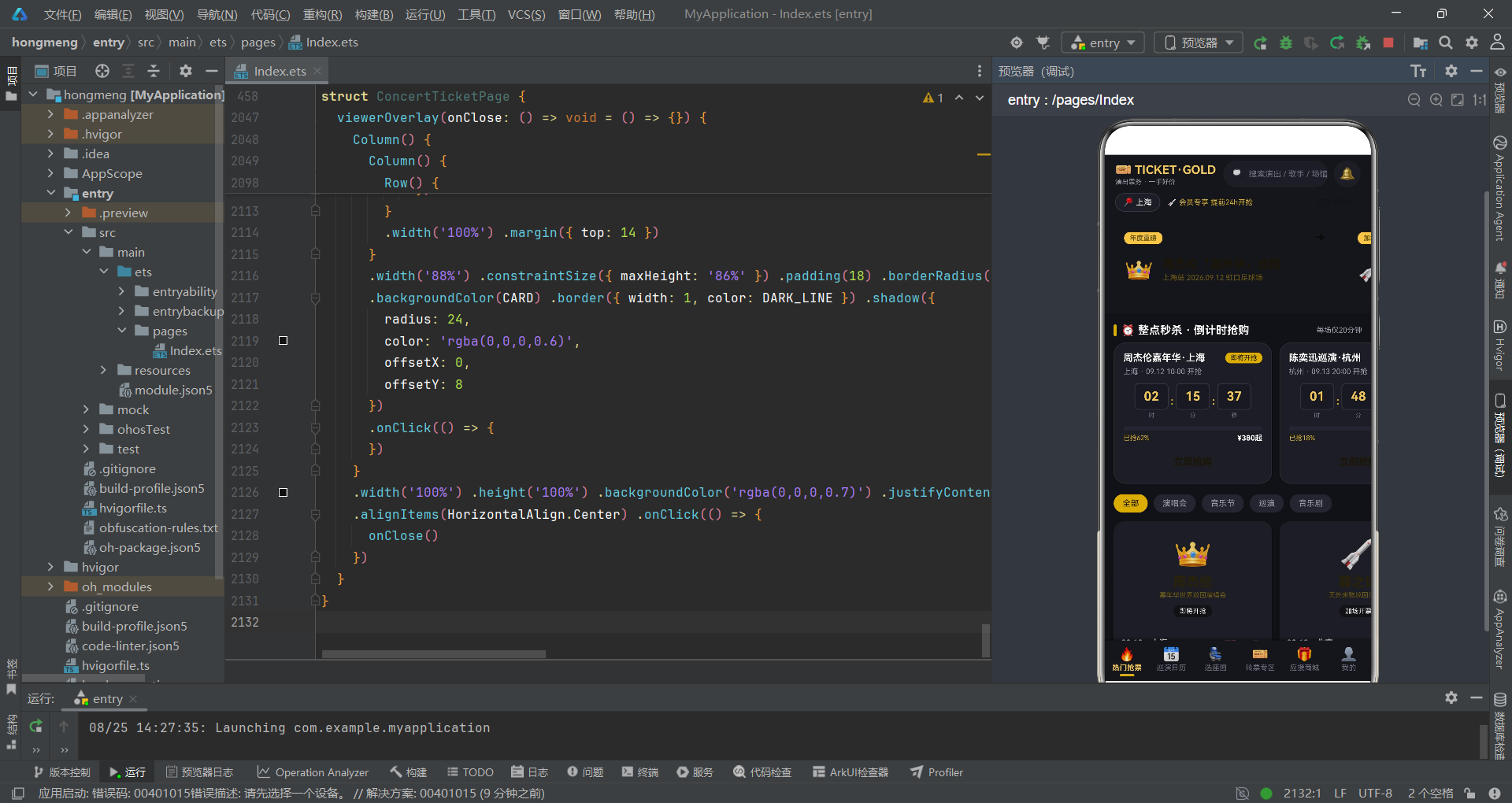
本文深入分析了基于 HarmonyOS ArkTS API 24 构建的演唱会票务抢购应用,从数据结构定义、设计令牌、全局纯函数到页面构建、弹窗系统、座位交互等多个维度进行了详细的代码级剖析。该应用充分展现了 ArkTS 声明式 UI 框架在构建复杂移动端应用方面的强大能力:通过 @State 状态管理实现了数据与视图的自动同步,通过 @Builder 方法拆分实现了 UI 组件的高度复用,通过集中式 modalOverlay 模式实现了弹窗的统一调度,通过纯声明式组件实现了柱状图等数据可视化效果而无需引入任何第三方图表库。
从架构设计角度来看,该应用采用了清晰的三层结构——数据层(接口定义与静态数据)、逻辑层(纯函数与状态管理)和视图层(@Builder 构建器)。数据层通过严格的 TypeScript 接口定义确保了类型安全;逻辑层通过独立的纯函数封装了业务计算逻辑,保证了可测试性和复用性;视图层通过细粒度的 @Builder 方法拆分实现了 UI 组件的模块化组合。这种分层架构使得代码易于理解、维护和扩展,也为后续接入真实后端 API 奠定了良好的基础。

讨论HarmonyOS开发技术,专注于API与组件、DevEco Studio、测试、元服务和应用上架分发等。
更多推荐

 3
3 0
0- 0


 已为社区贡献37条内容

所有评论(0)